WO2024252579A1 - プログラミング支援装置、プログラミング支援方法、およびプログラム - Google Patents
プログラミング支援装置、プログラミング支援方法、およびプログラム Download PDFInfo
- Publication number
- WO2024252579A1 WO2024252579A1 PCT/JP2023/021225 JP2023021225W WO2024252579A1 WO 2024252579 A1 WO2024252579 A1 WO 2024252579A1 JP 2023021225 W JP2023021225 W JP 2023021225W WO 2024252579 A1 WO2024252579 A1 WO 2024252579A1
- Authority
- WO
- WIPO (PCT)
- Prior art keywords
- display unit
- support device
- programming
- visual
- objects
- Prior art date
- Legal status (The legal status is an assumption and is not a legal conclusion. Google has not performed a legal analysis and makes no representation as to the accuracy of the status listed.)
- Ceased
Links
Images






Classifications
-
- G—PHYSICS
- G06—COMPUTING OR CALCULATING; COUNTING
- G06F—ELECTRIC DIGITAL DATA PROCESSING
- G06F8/00—Arrangements for software engineering
- G06F8/30—Creation or generation of source code
- G06F8/34—Graphical or visual programming
Definitions
- One aspect of the present invention relates to a programming support device, a programming support method, and a program.
- Visual programming is an environment in which programs are created (coded) by combining visual objects. It is beginner-friendly as it does not require direct editing of text source code, and has been successful in programming education. In recent years, use cases have also emerged that enable practical application development and complex tool settings.
- the debugging function is a support function for finding bugs in a program before it is released.
- functions are provided that allow you to pause a program at any line of source code during execution and check its status.
- a visual debugger has been proposed as a similar function in visual programming (see, for example, non-patent document 1).
- Code completion also known as code completion, content assist, code hinting, etc.
- code completion is a powerful support function in traditional text-based programming environments. Using this function, for example, you can instantly determine which of the many APIs (Application Programming Interfaces) to call, making it an indispensable tool for programmers. Code completion functionality is available in the majority of environments, at least for text-based coding (see non-patent document 2, for example).
- This invention was made in response to the above-mentioned circumstances, and aims to provide technology to further enhance the support functions in a visual programming environment.
- a programming support device is a computer installed with a visual programming environment for coding by combining visual objects.
- the programming support device includes a display unit, a compatibility calculation unit, and a recommended object display unit.
- the compatibility calculation unit calculates the compatibility between a selected first object and a second object that can be combined with the first object.
- the recommended object display unit displays a list of candidates for second objects to be combined with the first object on the display unit based on the compatibility.
- FIG. 1 is a functional block diagram showing an example of a programming support device according to an embodiment.
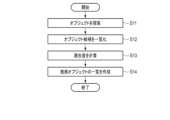
- FIG. 2 is a flowchart showing an example of a processing procedure in the programming support device 100 shown in FIG.
- FIG. 3 is a flowchart showing an example of a procedure in the compatibility calculation process of FIG.
- FIG. 4 is a diagram for explaining the process in step S11 of FIG.
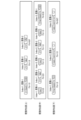
- FIG. 5 is a diagram for explaining the process in step S12 of FIG.
- FIG. 6 is a diagram for explaining the process in step S13 in FIG.
- FIG. 7 is a diagram for explaining the process in step S14 of FIG.
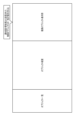
- FIG. 8 is a diagram showing an example of object arrangement in a GUI window of a visual programming application.
- FIG. 1 is a functional block diagram showing an example of a programming support device according to an embodiment.
- FIG. 2 is a flowchart showing an example of a processing procedure in the programming support device 100 shown in FIG.
- FIG. 3 is a flowchart showing an example
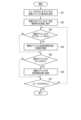
- FIG. 9 is a flowchart showing an example of a procedure of the recommended object display process of FIG.
- FIG. 10 is a diagram for explaining the process in step S22 of FIG.
- FIG. 11 is a diagram showing an example of a GUI window display in a visual programming environment.
- the programming support device 100 is a computer including a processor 11, a storage unit 12, and a display unit 13.
- the processor 11 has a visual programming unit 11a, a recommended object display unit 11b, and a compatibility calculation unit 11c as processing functions related to the embodiment.
- the visual programming unit 11a provides a visual programming environment to the user 10. That is, an application that provides the visual programming environment is installed in the programming support device 100. The user 10 can operate the visual programming application to create a product 14, such as a practical application or setting.
- the compatibility calculation unit 11c calculates the compatibility of this object (first object) with an object (second object) that can be combined with this object.
- selecting an object in an interface such as a GUI is also referred to as "focusing,” “coming into focus,” or “focusing.”
- the compatibility calculation unit 11c calculates the compatibility score of the focused visual object with each of the other objects.
- the recommended object display unit 11b displays a list of candidates for objects to be combined with the focused object in a GUI window of the display unit 13 based on the suitability (suitability score) calculated by the suitability calculation unit 11c.
- the storage unit 12 stores current setting data 12b and past setting data 12c in addition to a program 12a that enables the computer to function as a programming support device.
- Both the current setting data 12b and the past setting data 12c are information for determining how to select a second object for a first object.
- the current setting data 12b is a setting such as "when object A is focused, the second object is selected from objects in group B.” Similar information is also stored in the past setting data 12c.
- the past setting data can be dynamically switched.
- exemplary settings groups and settings groups created by experts can be accumulated in the past setting data 12c. This not only improves efficiency by recommending settings from the user's own current and past settings, but also helps improve quality by creating better settings.
- FIG. 2 is a flowchart showing an example of a processing procedure in the programming support device 100 shown in FIG. 1.
- the programming support device 100 determines whether or not a focused object exists (step S1), and if there is (YES), performs a compatibility calculation process (step S10), and executes a recommended object display process based on the result (step S20).
- FIG. 3 is a flowchart showing an example of a procedure in the compatibility calculation process of FIG. (Step S11)
- the programming support device 100 refers to the setting data 12b, 12c in the storage unit 12, and searches for objects of the same type as the focused object from the current settings and past settings, respectively.
- the same type of object can be found in both the current setting data 12b and the past setting data 12c.
- the search range can be set arbitrarily. For example, it is possible to specify a range such as using only the current settings, using only past settings, or using past settings up to a certain number of days ago.
- step S12 the programming support device 100 lists the objects that are set adjacent to the object found in the search, by visual position on the GUI of the display unit 13, and stores the list in the storage unit 12.
- the range of the area that is considered to be adjacent and the definition of the visual position can be set arbitrarily.
- the display area on the GUI of the display unit 13 is divided into three areas: [Visual position (top)], [Visual position (middle)], and [Visual position (bottom)], and the objects set adjacent to the focused object are listed for each area.
- the current settings are placed on the far left, and past settings are placed on the right, from newest to oldest.
- step S13 the programming support device 100 calculates the degree of fit for each object for the group of objects listed by visual position.
- a formula for calculating the degree of fit can be set arbitrarily.
- the degree of fit (Fit) can be calculated using formula (1).
- Fit (Fit) (1.0/time index) ⁇ frequency of occurrence of the same type of object (frequency) ... (1)
- the time index in formula (1) is calculated by assigning indexes to past settings in order of most recent, with the index of the object appearing in the current setting being 1.
- the fit (Fit) for each object can be calculated for each of the areas [Visual Position (Top)], [Visual Position (Middle)], and [Visual Position (Bottom)].
- step S14 the programming support device 100 creates a list of recommended objects for each visual position based on the suitability, and passes the created list to the recommended object display unit 11b.
- FIG. 8 is a diagram showing an example of object layout in a GUI window of a visual programming application. For example, from left to right in the window, there are the following areas: [Object list], [Object layout], and [Recommended object display section]. Of these, the [Recommended object display section] displays a list of recommended objects sent from the compatibility calculation section 11c.
- Step S22 the programming support device 100 displays a list of recommended objects for each visual position. 10, for example, in a visual programming environment in which objects are connected vertically, an "Object List” area is displayed on the left side of the window, and the user 10 selects one of the objects in the "Object Placement” area in the center (1). The object focused on here is clearly displayed in the "Recommended Object Display” area on the right side of the window (2). In addition, a list of recommended objects is displayed by visual position (3).
- Step S23 In step S23 in Fig. 9, the programming support device 100 determines whether or not the recommended object has been hovered over with the mouse. If the result is YES, the programming support device 100 arranges (4) the recommended object semi-transparently at the recommended setting position in the window in Fig. 10 (step S24).
- Step S25 In step S25 of Fig. 9, the programming support device 100 judges whether or not a recommended object has been clicked. If the answer is YES, the programming support device 100 places (5) the clicked object at the recommended setting position in the window of Fig. 10 (step S26).
- Step S27 the programming support device 100 determines whether or not the focus has been removed from the object. If NO, the process returns to step S23, and if YES, the process ends.
- FIG. 11 is a diagram showing an example of a GUI window display in a visual programming environment.
- the focused object is displayed (2).
- a list of candidate second objects (recommended objects) is displayed by visual position (3).
- user 10 hovers the mouse over a recommended object the object is placed semi-transparently in the recommended setting position (4).
- the object is placed in the recommended setting position (5).
- other objects to be combined with the focused object are evaluated for suitability for each visual position based on the current and past settings of the visual programming environment, and are displayed in the GUI window in association with a position based on suitability. In this way, it is possible to explicitly recommend visual objects that should currently be combined.
- the embodiment it is possible to provide code completion in text-based coding in a visual programming environment. This makes it possible to reduce the developer's indecisiveness that tends to occur in a visual programming environment. As a result, it is possible to dramatically improve development efficiency. As a result, according to the embodiment, it is possible to further enhance the support functions in a visual programming environment.
- this invention is not limited to the above-described embodiment as it is, and in the implementation stage, the components can be modified and embodied without departing from the gist of the invention.
- various inventions can be formed by appropriately combining multiple components disclosed in the above-described embodiment. For example, some components may be deleted from all of the components shown in the embodiment. Furthermore, components from different embodiments may be appropriately combined.
Landscapes
- Engineering & Computer Science (AREA)
- Software Systems (AREA)
- General Engineering & Computer Science (AREA)
- Theoretical Computer Science (AREA)
- Physics & Mathematics (AREA)
- General Physics & Mathematics (AREA)
- User Interface Of Digital Computer (AREA)
Abstract
この発明の一態様に係るプログラミング支援装置は、視覚的なオブジェクトを組み合わせてコーディングするビジュアルプログラミング環境をインストールされたコンピュータである。プログラミング支援装置は、表示部と、適合度計算部と、推薦オブジェクト表示部とを具備する。適合度計算部は、選択された第1オブジェクトと当該第1オブジェクトに組み合わせ可能な第2オブジェクトとの適合度を計算する。推薦オブジェクト表示部は、適合度に基づいて、第1オブジェクトに組み合わせるべき第2オブジェクトの候補を表示部に一覧表示する。
Description
この発明の一態様は、プログラミング支援装置、プログラミング支援方法、およびプログラムに関する。
ビジュアルプログラミングは、視覚的なオブジェクトを組み合わせてプログラムを作成(コーディング)する環境である。テキストのソースコードを直接編集しなくてよいので初心者に優しく、プログラミング教育などで成果を上げている。近年では、実用的なアプリケーション開発や複雑なツール設定を実現するユースケースも登場している。
デバッグ機能は、プログラムのバグをリリース前に発見するための支援機能である。旧来のテキストベースでのプログラミング環境では、例えば、実行時にソースコードの任意行でプログラムを一時停止して状態を確認するなどの機能が提供されている。ビジュアルプログラミングでの同様の機能としては、ビジュアルデバッガーが提案されている(例えば非特許文献1を参照)。
コード補完(code completion, content assist, code hinting 等と称される)は、旧来のテキストベースでのプログラミング環境における、有力な支援機能である。この機能を用いれば、例えば多数のAPI(Application Programming Interface)からどれを呼び出せばいいかが即座に分かり、プログラマにとっては欠かせないツールと言える。コード補完の機能は、少なくともテキストベースでのコーディングでは大多数の環境に備わっている(例えば非特許文献2を参照)。
A. Savidis, K.Savvaki, "Complete Block-Level Visual Debugger for Blockly"
"IntelliSense in Visual Studio Code" [online], [令和5年5月30日検索], インターネット<URL:https://code.visualstudio.com/docs/editor/intellisense>
ビジュアルプログラミングでは、例えばコード補完に相当する、多数のオブジェクトから何を選択すればよいかの判断を支援する技術は知られていない。デバッグ機能は提案されているが、使い勝手の面では検討の余地がある。つまりビジュアルプログラミングでは開発者への支援機能が十分に成熟しているとは言い難く、折角のビジュアルプログラミングの利点を、実用的なアプリケーション開発や大規模なシステムの構築などに活かすことが難しかった。
この発明は、上記事情に着目してなされたもので、ビジュアルプログラミング環境における支援機能をさらに充実させるための技術を提供しようとするものである。
この発明の一態様に係るプログラミング支援装置は、視覚的なオブジェクトを組み合わせてコーディングするビジュアルプログラミング環境をインストールされたコンピュータである。プログラミング支援装置は、表示部と、適合度計算部と、推薦オブジェクト表示部とを具備する。適合度計算部は、選択された第1オブジェクトと当該第1オブジェクトに組み合わせ可能な第2オブジェクトとの適合度を計算する。推薦オブジェクト表示部は、適合度に基づいて、第1オブジェクトに組み合わせるべき第2オブジェクトの候補を表示部に一覧表示する。
この発明の一態様によれば、ビジュアルプログラミング環境における支援機能をさらに充実させることができる。
以下、図面を参照してこの発明に係わる実施形態を説明する。
図1は、実施形態に係わるプログラミング支援装置の一例を示す機能ブロック図である。図1において、プログラミング支援装置100は、プロセッサ11、記憶部12、および、表示部13を備えるコンピュータである。
図1は、実施形態に係わるプログラミング支援装置の一例を示す機能ブロック図である。図1において、プログラミング支援装置100は、プロセッサ11、記憶部12、および、表示部13を備えるコンピュータである。
プロセッサ11は、実施形態に係わる処理機能としてビジュアルプログラミング部11a、推薦オブジェクト表示部11b、および適合度計算部11cを備える。
ビジュアルプログラミング部11aは、ユーザ10にビジュアルプログラミング環境を提供する。すなわち、ビジュアルプログラミング環境を提供するアプリケーションが、プログラミング支援装置100にインストールされている。ユーザ10は、ビジュアルプログラミングアプリケーションを操作して、実用的なアプリケーションや設定などのプロダクト14を作成することができる。
適合度計算部11cは、上記ビジュアルプログラミング環境において、ユーザ10により任意のオブジェクトが選択された場合に、このオブジェクト(第1オブジェクト)に組み合わせ可能なオブジェクト(第2オブジェクト)との適合度を計算する。なお、GUI(Graphical User Interface)などのインタフェースでオブジェクトを選択することを「フォーカスを当てる」、「フォーカスが当たる」、あるいは「フォーカスする」などともいう。つまり適合度計算部11cは、フォーカスされた視覚的オブジェクトに対し、他のオブジェクトのそれぞれとの適合度スコアを計算する。
推薦オブジェクト表示部11bは、適合度計算部11cにより計算された適合度(適合度スコア)に基づいて、フォーカスされたオブジェクトに組み合わせるべきオブジェクトの候補を表示部13のGUIウインドウに一覧表示する。
記憶部12は、コンピュータにプログラミング支援装置としての機能を実現させるプログラム12aに加え、現在の設定データ12b、および過去の設定データ12cを記憶する。現在の設定データ12b、および過去の設定データ12cは、いずれも第1オブジェクトに対して如何に第2オブジェクトを選択するかを決定するための情報である。現在の設定データ12bは、例えば「オブジェクトAがフォーカスされた場合に、第2オブジェクトはB群のオブジェクトから選択する」といった設定である。過去の設定データ12cにも同様の情報が格納される。なお、過去の設定データは動的に切り替え可能である。他追えば、過去の設定データ12cに、模範となる設定群や、有識者が作成した設定群などを蓄積することができる。これにより、ユーザ自身の現在・過去の設定から推薦することによる効率化だけではなく、より良い設定の作成という品質向上にも役立てることができる。
図2は、図1に示されるプログラミング支援装置100における処理手順の一例を示すフローチャートである。図2において、プログラミング支援装置100は、フォーカスされたオブジェクトの有無を判定し(ステップS1)、有り(YES)ならば、適合度計算処理を行い(ステップS10)、その結果をもとに推薦オブジェクト表示処理を実行する(ステップS20)。
図3は、図2の適合度計算処理における手順の一例を示すフローチャートである。
(ステップS11)
ステップS11において、プログラミング支援装置100は、記憶部12の設定データ12b,12cを参照し、フォーカスされたオブジェクトと同じ種類のオブジェクトを、現在の設定と過去の設定の中からそれぞれ検索する。
(ステップS11)
ステップS11において、プログラミング支援装置100は、記憶部12の設定データ12b,12cを参照し、フォーカスされたオブジェクトと同じ種類のオブジェクトを、現在の設定と過去の設定の中からそれぞれ検索する。
図4に示されるように、例えば繰り返し制御構文(repeat:do~while)を表すオブジェクトがフォーカスされた場合、現在の設定データ12b、および過去の設定データ12cの双方に同じ種類のオブジェクトを発見することができる。ここで、探索範囲は任意に設定できる。例えば、現在の設定のみを利用する、過去の設定のみを利用する、あるいは、過去の設定のうち何日前までを利用するなどの範囲指定が可能である。
(ステップS12)
ステップS12において、プログラミング支援装置100は、探索で発見されたオブジェクトに隣接して設定されているオブジェクトを、表示部13のGUI上での視覚的な位置ごとに一覧化し、記憶部12に格納する。ここで、どこまでの領域を隣接とするかの範囲と、視覚的位置の定義は任意に設定することができる。
ステップS12において、プログラミング支援装置100は、探索で発見されたオブジェクトに隣接して設定されているオブジェクトを、表示部13のGUI上での視覚的な位置ごとに一覧化し、記憶部12に格納する。ここで、どこまでの領域を隣接とするかの範囲と、視覚的位置の定義は任意に設定することができる。
図5に示されるように、表示部13のGUI上での表示領域を[視覚的位置(上)]、[視覚的位置(中)]、[視覚的位置(下)]の3つの領域に分け、フォーカスされたオブジェクトに隣接して設定されているオブジェクトを、各領域ごとに一覧にする。現在の設定は一番左に配置され、過去の設定では新しいものから古いものへと順に、右側に配置される。
(ステップS13)
ステップS13において、プログラミング支援装置100は、視覚的な位置ごとに一覧化されたオブジェクト群に対してオブジェクトごとの適合度を計算する。ここで、適合度の計算式は任意に設定することができる。例えば、式(1)を用いて適合度(Fit)を求めることができる。
適合度(Fit)=(1.0/時間インデックス)×同種のオブジェクトの出現頻度(度数) … (1)
なお、式(1)の時間インデックスは、現在の設定に登場したオブジェクトのインデックスを1として、過去の設定の新しい順にインデックスを付与したものである。
ステップS13において、プログラミング支援装置100は、視覚的な位置ごとに一覧化されたオブジェクト群に対してオブジェクトごとの適合度を計算する。ここで、適合度の計算式は任意に設定することができる。例えば、式(1)を用いて適合度(Fit)を求めることができる。
適合度(Fit)=(1.0/時間インデックス)×同種のオブジェクトの出現頻度(度数) … (1)
なお、式(1)の時間インデックスは、現在の設定に登場したオブジェクトのインデックスを1として、過去の設定の新しい順にインデックスを付与したものである。
図6に示されるように、[視覚的位置(上)]、[視覚的位置(中)]、[視覚的位置(下)]の領域ごとに、各オブジェクトに対する適合度(Fit)を求めることができる。
(ステップS14)
ステップS14において、プログラミング支援装置100は、適合度をもとに視覚的な位置ごとに推薦オブジェクトの一覧を作成する。作成された一覧は、推薦オブジェクト表示部11bに渡される。
ステップS14において、プログラミング支援装置100は、適合度をもとに視覚的な位置ごとに推薦オブジェクトの一覧を作成する。作成された一覧は、推薦オブジェクト表示部11bに渡される。
推薦オブジェクトの一覧を作成する際に、例えば、次のようなルールを適用することができる。
・適合度の降順で一覧化する。
・完全に同一のオブジェクトは適合度が一番高いもの以外を削除する。
・適合度が同じ場合はIndexが小さいものを優先する。
図7に示されるように、上記のルールを適用すると、図6の一覧から図7下段に示されるような推薦オブジェクトの一覧が作成される。
・適合度の降順で一覧化する。
・完全に同一のオブジェクトは適合度が一番高いもの以外を削除する。
・適合度が同じ場合はIndexが小さいものを優先する。
図7に示されるように、上記のルールを適用すると、図6の一覧から図7下段に示されるような推薦オブジェクトの一覧が作成される。
図8は、ビジュアルプログラミングアプリケーションのGUIウインドウにおける、オブジェクト配置の一例を示す図である。例えばウインドウの左から右へと、[オブジェクト一覧]、[オブジェクト配置]、[推薦オブジェクト表示部]の各領域が設けられる。このうち[推薦オブジェクト表示部]に、適合度計算部11cから送信された推薦オブジェクトの一覧が表示される。
図9は、図2の推薦オブジェクト表示処理における手順の一例を示すフローチャートである。
(ステップS21)
ステップS21において、プログラミング支援装置100は、フォーカスされたオブジェクトを推薦オブジェクト表示部に表示する。ただしこのステップはスキップされても良く、つまり、フォーカスオブジェクトの表示は省略してもよい。
(ステップS21)
ステップS21において、プログラミング支援装置100は、フォーカスされたオブジェクトを推薦オブジェクト表示部に表示する。ただしこのステップはスキップされても良く、つまり、フォーカスオブジェクトの表示は省略してもよい。
(ステップS22)
ステップS22において、プログラミング支援装置100は、推薦するオブジェクトの一覧を視覚的な位置ごとに表示する。
図10に示されるように、例えば、オブジェクトが上下に接続されるビジュアルプログラミング環境であれば、ウインドウ左に[オブジェクト一覧]エリアが表示され、ユーザ10は、中央の[オブジェクト配置]エリアでいずれかのオブジェクトを選択する(1)。ここでフォーカスされたオブジェクトは、ウインドウ右の[推薦オブジェクト表示部]エリアで明示される(2)。また、推薦するオブジェクトの一覧が視覚的な位置ごとに表示される(3)。
(ステップS23)
図9のステップS23において、プログラミング支援装置100は、推奨オブジェクトがマウスホーバーされたか否かを判定する。ここでYESであれば、プログラミング支援装置100は、図10のウインドウにおいて、推奨オブジェクトを設定推奨位置に半透明で配置(4)する(ステップS24)。
ステップS22において、プログラミング支援装置100は、推薦するオブジェクトの一覧を視覚的な位置ごとに表示する。
図10に示されるように、例えば、オブジェクトが上下に接続されるビジュアルプログラミング環境であれば、ウインドウ左に[オブジェクト一覧]エリアが表示され、ユーザ10は、中央の[オブジェクト配置]エリアでいずれかのオブジェクトを選択する(1)。ここでフォーカスされたオブジェクトは、ウインドウ右の[推薦オブジェクト表示部]エリアで明示される(2)。また、推薦するオブジェクトの一覧が視覚的な位置ごとに表示される(3)。
(ステップS23)
図9のステップS23において、プログラミング支援装置100は、推奨オブジェクトがマウスホーバーされたか否かを判定する。ここでYESであれば、プログラミング支援装置100は、図10のウインドウにおいて、推奨オブジェクトを設定推奨位置に半透明で配置(4)する(ステップS24)。
(ステップS25)
図9のステップS25において、プログラミング支援装置100は、推奨オブジェクトがクリックされたか否かを判定する。ここでYESであれば、プログラミング支援装置100は、当該クリックされたオブジェクトを図10のウインドウにおいて設定推奨位置に配置(5)する(ステップS26)。
図9のステップS25において、プログラミング支援装置100は、推奨オブジェクトがクリックされたか否かを判定する。ここでYESであれば、プログラミング支援装置100は、当該クリックされたオブジェクトを図10のウインドウにおいて設定推奨位置に配置(5)する(ステップS26)。
(ステップS27)
ステップS27において、プログラミング支援装置100は、オブジェクトからフォーカスが外れたか否かを判定し、NOで有ればステップS23の処理に戻り、YESであれば処理を終了する。
ステップS27において、プログラミング支援装置100は、オブジェクトからフォーカスが外れたか否かを判定し、NOで有ればステップS23の処理に戻り、YESであれば処理を終了する。
図11は、ビジュアルプログラミング環境のGUIウインドウの表示の一例を示す図である。図11において、オブジェクトにフォーカスが当たると(1)、フォーカスされたオブジェクトが表示される(2)。続いて、候補となる第2オブジェクト(推薦オブジェクト)の一覧が視覚的な位置ごとに表示される(3)。ユーザ10が推薦オブジェクトをマウスホーバーすると、そのオブジェクトが設定推奨位置に半透明で配置される(4)。そして、ユーザ10が推薦オブジェクトをクリックすると、そのオブジェクトが設定推奨位置に配置される(5)。
以上述べたように実施形態では、ビジュアルプログラミング環境の現在の設定、および過去の設定から、フォーカスされたオブジェクトに組み合わせるべき他のオブジェクトを、視覚的な位置ごとに適合度で評価し、適合度を基準とする位置に対応付けてGUIウインドウに表示するようにした。このようにすることで、現在組み合わせるべき視覚的オブジェクトを明示的に推薦することができる。
すなわち実施形態によれば、テキストベースでのコーディングにおけるコード補完を、ビジュアルプログラミング環境においても提供することが可能になる。これにより、ビジュアルプログラミング環境において生じがちな、開発者の判断の迷いを削減することが可能になる。ひいては、開発の効率を飛躍的に向上させることができる。
これらのことから、実施形態によれば、ビジュアルプログラミング環境における支援機能をさらに充実させることが可能になる。
これらのことから、実施形態によれば、ビジュアルプログラミング環境における支援機能をさらに充実させることが可能になる。
なお、この発明は上記実施の形態に限定されるものではない。例えば、ビジュアルプログラミングアプリケーションのGUIウインドウにで配置された視覚的オブジェクトの、視覚的な空欄位置(例えば上側、中側、下側の空欄)をクリックすることで、該当の視覚的な位置の組み合わせるべき視覚的オブジェクトを推薦表示してもよい
また、適合度計算部11cは、探索されたオブジェクトに隣接する他のオブジェクトの出現度数、または最近の出現頻度に基づいて適合度を計算してもよい。
また、推薦表示パネルに、図3のステップS14の手順で作成した推薦推奨ブロック一覧を表示してもよい。
さらに、既存のオブジェクト一覧(例えば図11のウインドウの左カラム)を、推薦推奨ブロック一覧に表示されたオブジェクト絞り込んで表示しても良い。
また、適合度計算部11cは、探索されたオブジェクトに隣接する他のオブジェクトの出現度数、または最近の出現頻度に基づいて適合度を計算してもよい。
また、推薦表示パネルに、図3のステップS14の手順で作成した推薦推奨ブロック一覧を表示してもよい。
さらに、既存のオブジェクト一覧(例えば図11のウインドウの左カラム)を、推薦推奨ブロック一覧に表示されたオブジェクト絞り込んで表示しても良い。
すなわち、この発明は、上記実施形態そのままに限定されるものではなく、実施段階ではその要旨を逸脱しない範囲で構成要素を変形して具体化できる。また、上記実施形態に開示されている複数の構成要素の適宜な組み合せにより種々の発明を形成できる。例えば、実施形態に示される全構成要素から幾つかの構成要素を削除してもよい。さらに、異なる実施形態に亘る構成要素を適宜組み合せてもよい。
10…ユーザ
11…プロセッサ
11a…ビジュアルプログラミング部
11b…推薦オブジェクト表示部
11c…適合度計算部
12…記憶部
12a…プログラム
12b…設定データ
12c…設定データ
13…表示部
14…プロダクト
100…プログラミング支援装置。
11…プロセッサ
11a…ビジュアルプログラミング部
11b…推薦オブジェクト表示部
11c…適合度計算部
12…記憶部
12a…プログラム
12b…設定データ
12c…設定データ
13…表示部
14…プロダクト
100…プログラミング支援装置。
Claims (8)
- 視覚的なオブジェクトを組み合わせてコーディングするビジュアルプログラミング環境をインストールされたプログラミング支援装置であって、
表示部と、
選択された第1オブジェクトと当該第1オブジェクトに組み合わせ可能な第2オブジェクトとの適合度を計算する適合度計算部と、
前記適合度に基づいて、前記第1オブジェクトに組み合わせるべき第2オブジェクトの候補を前記表示部に一覧表示する推薦オブジェクト表示部とを具備する、プログラミング支援装置。 - オブジェクトの組み合わせの設定を記憶する記憶部をさらに具備し、
前記適合度計算部は、前記設定に基づいて前記第1オブジェクトと同種のオブジェクトを探索して前記第2オブジェクトの候補を得る、請求項1に記載のプログラミング支援装置。 - 前記適合度計算部は、探索されたオブジェクトに隣接する他のオブジェクトの出現度数、または最近の出現頻度に基づいて前記適合度を計算する、請求項2に記載のプログラミング支援装置。
- 前記推薦オブジェクト表示部は、表示位置と前記適合度とを対応付けて前記第2オブジェクトの候補を前記表示部に表示する、請求項1に記載のプログラミング支援装置。
- 前記推薦オブジェクト表示部は、マウスホーバーされた第2オブジェクトを、前記表示部の設定推奨位置に半透明で表示する、請求項1に記載のプログラミング支援装置。
- 前記推薦オブジェクト表示部は、前記第2オブジェクトがクリックされると、当該クリックされた第2オブジェクトを前記表示部の設定推奨位置に配置する、請求項5に記載のプログラミング支援装置。
- 視覚的なオブジェクトを組み合わせてコーディングするビジュアルプログラミング環境をインストールされたコンピュータによるプログラミング支援方法であって、
前記コンピュータが、前記ビジュアルプログラミング環境に設定されたオブジェクトが選択されたか否かを判定する過程と、
前記コンピュータが、選択された第1オブジェクトと当該第1オブジェクトに組み合わせ可能な第2オブジェクトとの適合度を計算する過程と、
前記コンピュータが、前記適合度に基づいて、前記第1オブジェクトに組み合わせるべき第2オブジェクトの候補を表示部に一覧表示する過程とを具備する、プログラミング支援方法。 - コンピュータを、請求項1乃至6のいずれか1項に記載のプログラミング支援装置として機能させる命令を含む、プログラム。
Priority Applications (2)
| Application Number | Priority Date | Filing Date | Title |
|---|---|---|---|
| JP2025525543A JPWO2024252579A1 (ja) | 2023-06-07 | 2023-06-07 | |
| PCT/JP2023/021225 WO2024252579A1 (ja) | 2023-06-07 | 2023-06-07 | プログラミング支援装置、プログラミング支援方法、およびプログラム |
Applications Claiming Priority (1)
| Application Number | Priority Date | Filing Date | Title |
|---|---|---|---|
| PCT/JP2023/021225 WO2024252579A1 (ja) | 2023-06-07 | 2023-06-07 | プログラミング支援装置、プログラミング支援方法、およびプログラム |
Publications (1)
| Publication Number | Publication Date |
|---|---|
| WO2024252579A1 true WO2024252579A1 (ja) | 2024-12-12 |
Family
ID=93795345
Family Applications (1)
| Application Number | Title | Priority Date | Filing Date |
|---|---|---|---|
| PCT/JP2023/021225 Ceased WO2024252579A1 (ja) | 2023-06-07 | 2023-06-07 | プログラミング支援装置、プログラミング支援方法、およびプログラム |
Country Status (2)
| Country | Link |
|---|---|
| JP (1) | JPWO2024252579A1 (ja) |
| WO (1) | WO2024252579A1 (ja) |
Citations (5)
| Publication number | Priority date | Publication date | Assignee | Title |
|---|---|---|---|---|
| JPH09251305A (ja) * | 1996-03-14 | 1997-09-22 | Omron Corp | プログラム作成装置 |
| JP2014203226A (ja) * | 2013-04-04 | 2014-10-27 | 株式会社日立製作所 | プログラム開発支援システム |
| JP2015075876A (ja) * | 2013-10-08 | 2015-04-20 | キヤノン株式会社 | 設計支援装置、設計支援方法、及びプログラム |
| JP2015099564A (ja) * | 2013-11-20 | 2015-05-28 | キヤノン株式会社 | 視覚プログラミング装置およびその制御方法 |
| WO2020174888A1 (ja) * | 2019-02-27 | 2020-09-03 | 三菱電機株式会社 | 設計支援装置、設計支援方法および設計支援プログラム |
-
2023
- 2023-06-07 JP JP2025525543A patent/JPWO2024252579A1/ja active Pending
- 2023-06-07 WO PCT/JP2023/021225 patent/WO2024252579A1/ja not_active Ceased
Patent Citations (5)
| Publication number | Priority date | Publication date | Assignee | Title |
|---|---|---|---|---|
| JPH09251305A (ja) * | 1996-03-14 | 1997-09-22 | Omron Corp | プログラム作成装置 |
| JP2014203226A (ja) * | 2013-04-04 | 2014-10-27 | 株式会社日立製作所 | プログラム開発支援システム |
| JP2015075876A (ja) * | 2013-10-08 | 2015-04-20 | キヤノン株式会社 | 設計支援装置、設計支援方法、及びプログラム |
| JP2015099564A (ja) * | 2013-11-20 | 2015-05-28 | キヤノン株式会社 | 視覚プログラミング装置およびその制御方法 |
| WO2020174888A1 (ja) * | 2019-02-27 | 2020-09-03 | 三菱電機株式会社 | 設計支援装置、設計支援方法および設計支援プログラム |
Also Published As
| Publication number | Publication date |
|---|---|
| JPWO2024252579A1 (ja) | 2024-12-12 |
Similar Documents
| Publication | Publication Date | Title |
|---|---|---|
| US8578328B2 (en) | Method for presenting candidate for link target to component in web application, as well as computer program and computer system for the same | |
| CN110580189A (zh) | 生成前端页面的方法、装置、计算机设备以及存储介质 | |
| JP5987853B2 (ja) | ラダープログラム作成装置、コンピュータプログラム及びコンピュータ可読情報記録媒体 | |
| JP2008226061A (ja) | 画像のタグ指定装置および画像検索装置ならびにそれらの動作制御方法およびそれらのコンピュータを制御するプログラム | |
| CN108984171B (zh) | 基于Unity3D的场景持续构建方法、存储介质 | |
| US8677244B2 (en) | Exclusive operation control apparatus and method | |
| US10983813B2 (en) | Automatic repetition of context-specific code edits | |
| JP6370503B1 (ja) | プログラム作成装置 | |
| US20130263143A1 (en) | Information processing method and system | |
| CN112016692B (zh) | 机器学习自动建模过程的展示方法及系统 | |
| JP6543785B1 (ja) | ブロック型プログラミングシステムにおける新たな言語変換方法 | |
| JP2019008663A (ja) | ヘルプ画面提示システム、ヘルプ画面提示方法及びヘルプ画面提示プログラム | |
| CN111460235A (zh) | 图谱数据的处理方法、装置、设备及存储介质 | |
| CN120743345A (zh) | 源代码层级定位方法、电子设备和介质 | |
| US8689196B2 (en) | Display of data from parallel programming contexts | |
| US11151213B2 (en) | Browser search result option to facilitate human spidering | |
| US20140222782A1 (en) | Method and system for generating interactive query results previews | |
| Yoo et al. | Breaking the bento box: Accelerating visual momentum in data-flow analysis | |
| CN114153536B (zh) | 兼容触摸屏的物理按键的web页面焦点控制方法及系统 | |
| JP2019168891A (ja) | コードリーディング支援装置、及び、コードリーディング支援方法、並びに、コードリーディング支援プログラム | |
| US9846607B2 (en) | Method and system for associating crash reports with end user analytics | |
| JP2025031350A (ja) | 操作自動化装置、ウェブ操作自動化方法及びプログラム | |
| JP7524690B2 (ja) | 判定プログラム、判定方法および情報処理装置 | |
| JP6983976B2 (ja) | コードリーディング支援装置、及び、コードリーディング支援方法、並びに、コードリーディング支援プログラム | |
| JP2005352861A (ja) | 電子データ処理方法、電子データ処理装置、および、電子データ処理プログラム |
Legal Events
| Date | Code | Title | Description |
|---|---|---|---|
| 121 | Ep: the epo has been informed by wipo that ep was designated in this application |
Ref document number: 23940680 Country of ref document: EP Kind code of ref document: A1 |
|
| ENP | Entry into the national phase |
Ref document number: 2025525543 Country of ref document: JP Kind code of ref document: A |
|
| NENP | Non-entry into the national phase |
Ref country code: DE |