WO2024004007A1 - 配信中に投稿されたコメントの表示を制御する動画配信 - Google Patents
配信中に投稿されたコメントの表示を制御する動画配信 Download PDFInfo
- Publication number
- WO2024004007A1 WO2024004007A1 PCT/JP2022/025649 JP2022025649W WO2024004007A1 WO 2024004007 A1 WO2024004007 A1 WO 2024004007A1 JP 2022025649 W JP2022025649 W JP 2022025649W WO 2024004007 A1 WO2024004007 A1 WO 2024004007A1
- Authority
- WO
- WIPO (PCT)
- Prior art keywords
- comment
- live video
- unit
- comments
- broadcaster
- Prior art date
- Legal status (The legal status is an assumption and is not a legal conclusion. Google has not performed a legal analysis and makes no representation as to the accuracy of the status listed.)
- Ceased
Links
Images






Classifications
-
- H—ELECTRICITY
- H04—ELECTRIC COMMUNICATION TECHNIQUE
- H04N—PICTORIAL COMMUNICATION, e.g. TELEVISION
- H04N21/00—Selective content distribution, e.g. interactive television or video on demand [VOD]
- H04N21/40—Client devices specifically adapted for the reception of or interaction with content, e.g. set-top-box [STB]; Operations thereof
- H04N21/43—Processing of content or additional data, e.g. demultiplexing additional data from a digital video stream; Elementary client operations, e.g. monitoring of home network or synchronising decoder's clock; Client middleware
- H04N21/431—Generation of visual interfaces for content selection or interaction; Content or additional data rendering
- H04N21/4318—Generation of visual interfaces for content selection or interaction; Content or additional data rendering by altering the content in the rendering process, e.g. blanking, blurring or masking an image region
-
- H—ELECTRICITY
- H04—ELECTRIC COMMUNICATION TECHNIQUE
- H04N—PICTORIAL COMMUNICATION, e.g. TELEVISION
- H04N21/00—Selective content distribution, e.g. interactive television or video on demand [VOD]
- H04N21/20—Servers specifically adapted for the distribution of content, e.g. VOD servers; Operations thereof
- H04N21/21—Server components or server architectures
- H04N21/218—Source of audio or video content, e.g. local disk arrays
- H04N21/2187—Live feed
-
- H—ELECTRICITY
- H04—ELECTRIC COMMUNICATION TECHNIQUE
- H04N—PICTORIAL COMMUNICATION, e.g. TELEVISION
- H04N21/00—Selective content distribution, e.g. interactive television or video on demand [VOD]
- H04N21/20—Servers specifically adapted for the distribution of content, e.g. VOD servers; Operations thereof
- H04N21/27—Server based end-user applications
-
- H—ELECTRICITY
- H04—ELECTRIC COMMUNICATION TECHNIQUE
- H04N—PICTORIAL COMMUNICATION, e.g. TELEVISION
- H04N21/00—Selective content distribution, e.g. interactive television or video on demand [VOD]
- H04N21/40—Client devices specifically adapted for the reception of or interaction with content, e.g. set-top-box [STB]; Operations thereof
- H04N21/43—Processing of content or additional data, e.g. demultiplexing additional data from a digital video stream; Elementary client operations, e.g. monitoring of home network or synchronising decoder's clock; Client middleware
- H04N21/431—Generation of visual interfaces for content selection or interaction; Content or additional data rendering
- H04N21/4312—Generation of visual interfaces for content selection or interaction; Content or additional data rendering involving specific graphical features, e.g. screen layout, special fonts or colors, blinking icons, highlights or animations
- H04N21/4316—Generation of visual interfaces for content selection or interaction; Content or additional data rendering involving specific graphical features, e.g. screen layout, special fonts or colors, blinking icons, highlights or animations for displaying supplemental content in a region of the screen, e.g. an advertisement in a separate window
-
- H—ELECTRICITY
- H04—ELECTRIC COMMUNICATION TECHNIQUE
- H04N—PICTORIAL COMMUNICATION, e.g. TELEVISION
- H04N21/00—Selective content distribution, e.g. interactive television or video on demand [VOD]
- H04N21/40—Client devices specifically adapted for the reception of or interaction with content, e.g. set-top-box [STB]; Operations thereof
- H04N21/47—End-user applications
- H04N21/478—Supplemental services, e.g. displaying phone caller identification, shopping application
- H04N21/4788—Supplemental services, e.g. displaying phone caller identification, shopping application communicating with other users, e.g. chatting
-
- G—PHYSICS
- G10—MUSICAL INSTRUMENTS; ACOUSTICS
- G10L—SPEECH ANALYSIS TECHNIQUES OR SPEECH SYNTHESIS; SPEECH RECOGNITION; SPEECH OR VOICE PROCESSING TECHNIQUES; SPEECH OR AUDIO CODING OR DECODING
- G10L15/00—Speech recognition
-
- G—PHYSICS
- G10—MUSICAL INSTRUMENTS; ACOUSTICS
- G10L—SPEECH ANALYSIS TECHNIQUES OR SPEECH SYNTHESIS; SPEECH RECOGNITION; SPEECH OR VOICE PROCESSING TECHNIQUES; SPEECH OR AUDIO CODING OR DECODING
- G10L15/00—Speech recognition
- G10L15/08—Speech classification or search
Definitions
- the present disclosure relates to video distribution that controls the display of comments posted during distribution.
- Patent Document 1 discloses a distribution system that appropriately processes posted comments.
- the comments that are displayed superimposed on the video are restricted according to the poster's attribute information, so that the video can be displayed in an easy-to-see manner even when a large number of comments have been posted.
- the present disclosure has been made to solve the above-mentioned problems, and aims to provide video distribution that controls the display of comments posted during distribution.
- the server device includes: comprising one or more processors; by at least one of the one or more processors, A live video provided by a broadcaster is distributed to a viewer terminal that has a comment area where a predetermined number of comments can be displayed, Receive comments posted from the viewer terminal during the distribution of the live video, transmitting the received comment to the viewer terminal to add it to the comment area in a last-in, first-out manner;
- the live video being distributed, each time the broadcaster speaks, the uttered text obtained by voice recognition of the broadcaster's voice is compared with each comment currently displayed in the comment area. to identify the comment that the broadcaster responded to, controlling the display of the identified comment; It is characterized in that processing is executed.
- a display control method includes: The computer is A live video provided by a broadcaster is distributed to a viewer terminal that has a comment area where a predetermined number of comments can be displayed, Receive comments posted from the viewer terminal during the distribution of the live video, transmitting the received comment to the viewer terminal to add it to the comment area in a last-in, first-out manner; In the live video being distributed, each time the broadcaster speaks, the uttered text obtained by voice recognition of the broadcaster's voice is compared with each comment currently displayed in the comment area. to identify the comment that the broadcaster responded to, controlling the display of the identified comment; It is characterized by
- the recording medium is to the computer,
- a live video provided by a broadcaster is distributed to a viewer terminal that has a comment area where a predetermined number of comments can be displayed, Receive comments posted from the viewer terminal during the distribution of the live video, transmitting the received comment to the viewer terminal to add it to the comment area in a last-in, first-out manner;
- the live video being distributed, each time the broadcaster speaks, the uttered text obtained by voice recognition of the broadcaster's voice is compared with each comment currently displayed in the comment area. to identify the comment that the broadcaster responded to, controlling the display of the identified comment; It is characterized by recording a program for executing processing.
- FIG. 1 is a schematic diagram showing an example of the overall configuration of a distribution system according to Embodiment 1 of the present disclosure.
- FIG. 1 is a block diagram illustrating an example of a schematic configuration of a typical information processing device that implements a distribution server and the like.
- FIG. 2 is a block diagram illustrating an example of a functional configuration of a distribution server according to the first embodiment.
- FIG. 3 is a schematic diagram showing an example of comment management information.
- FIG. 3 is a schematic diagram showing an example of controlling display of comments in a comment area.
- FIG. 2 is a block diagram illustrating an example of a functional configuration of a distributor terminal.
- FIG. 2 is a block diagram showing an example of a functional configuration of a viewer terminal.
- FIG. 1 is a block diagram illustrating an example of a schematic configuration of a typical information processing device that implements a distribution server and the like.
- FIG. 2 is a block diagram illustrating an example of a functional configuration of a distribution server according to the
- FIG. 3 is a schematic diagram showing an example of a viewing screen according to the first embodiment.
- 3 is a flowchart for explaining distribution processing according to the first embodiment.
- FIG. 2 is a schematic diagram showing an example of the overall configuration of a distribution system according to Embodiment 2 of the present disclosure.
- FIG. 2 is a block diagram illustrating an example of a functional configuration of a distribution server according to a second embodiment.
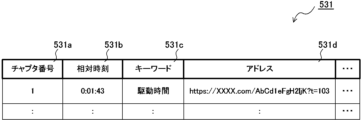
- FIG. 3 is a schematic diagram showing an example of chapter management information.
- FIG. 7 is a schematic diagram showing an example of a viewing screen according to Embodiment 2.
- FIG. 7 is a flowchart for explaining distribution processing according to the second embodiment.
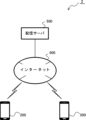
- FIG. 1 is a schematic diagram showing an example of the overall configuration of a distribution system 1 according to Embodiment 1 of the present disclosure.
- a distribution server 100 that distributes live video
- a distributor terminal 200 used by a distributor and a viewer terminal 300 used by a viewer can communicate via the Internet 900. It is connected to the. It is assumed that there are a large number of distributor terminals 200 and viewer terminals 300, depending on the number of distributors and viewers who use the system.
- the distribution server 100 is, for example, a server device (server computer, etc.), and distributes live video provided by a distributor to the viewer terminal 300. Furthermore, the distribution server 100 transmits comments posted during live video distribution to the distributor terminal 200 and the viewer terminal 300.
- the distributor terminal 200 is, for example, a terminal such as a PC (Personal Computer), a smartphone, or a tablet, and is used by a distributor who performs live distribution. For example, a distributor shoots a live video to introduce a product.
- the distributor terminal 200 provides the live video to the distribution server 100, so that the live video is distributed from the distribution server 100 to the viewer terminal 300.
- the broadcaster can view comments posted by viewers on the viewer terminal 300 while broadcasting a live video, and can mention the comments in the live video in response to a predetermined comment. It has become.
- the viewer terminal 300 is, for example, a terminal such as a smartphone, a tablet, or a PC, and is used by a viewer who views the live video being distributed. For example, the viewer starts a video viewing application (or browser application) on the viewer terminal 300, logs into the distribution server 100, and then views a live video distributed from the distribution server 100. Additionally, viewers can post comments addressed to the distributor of the live video they are viewing. That is, the screen of a video viewing application or the like is provided with a video area for displaying live video and a comment area for displaying comments, as will be described later. Note that a predetermined number of the latest comments can be displayed in the comment area.
- the information processing device 400 includes a CPU (Central Processing Unit) 401, a ROM (Read Only Memory) 402, a RAM (Random Access Memory) 403, an NIC (Network Interface Card) 404, and an image processing unit. It includes a processing section 405, an audio processing section 406, an auxiliary storage section 407, an interface 408, a photographing unit 409, an audio unit 410, an operation unit 411, and a display unit 412.
- CPU Central Processing Unit
- ROM Read Only Memory
- RAM Random Access Memory
- NIC Network Interface Card
- a CPU 401 controls the operation of the entire information processing device 400, and is connected to each component to exchange control signals and data.
- the ROM 402 records an IPL (Initial Program Loader) that is executed immediately after the power is turned on, and when this is executed, the program stored in the auxiliary storage unit 407 is read out to the RAM 403, and the CPU 401 executes the program. Execution begins.
- IPL Initial Program Loader
- the RAM 403 is for temporarily storing data and programs, and holds programs and data read from the auxiliary storage unit 407, as well as other data necessary for communication.
- the NIC 404 is for connecting the information processing device 400 to a computer communication network such as the Internet, and may be one that conforms to the 10BASE-T/100BASE-T standard used when configuring a LAN (Local Area Network). Consists of an analog modem for connecting to the Internet using a telephone line, an ISDN (Integrated Services Digital Network) modem, an ADSL (Asymmetric Digital Subscriber Line) modem, a cable modem for connecting to the Internet using a cable television line, etc. be done.
- a computer communication network such as the Internet
- LAN Local Area Network
- the image processing unit 405 processes the image data read from the auxiliary storage unit 407 etc. using the CPU 401 and an image calculation processor (not shown) included in the image processing unit 405, and then processes the image data. It is recorded in a frame memory (not shown). The image data recorded in the frame memory is converted into a video signal at predetermined synchronization timing and output to the display unit 412 via the interface 408 or the like. That is, under the control of the CPU 401, the image processing unit 405 generates an image that is necessary during the progress of the processing performed by the information processing device 400, and causes the display unit 412 to display the image.
- the audio processing unit 406 converts the music data and audio data read from the auxiliary storage unit 407 etc. into audio signals and outputs them to the outside via the interface 408 etc. Note that in the case where the information processing device 400 includes a speaker inside, the audio processing unit 406 outputs the converted audio signal to the speaker. In other words, under the control of the CPU 401, the audio processing unit 406 generates music sounds and voices to be generated during the progress of processing performed by the information processing device 400, and outputs the music sounds etc. from internal or external speakers. let
- the auxiliary storage unit 407 is a hard disk, an SSD (Solid State Drive), or the like, and stores various programs and various data necessary for controlling the operation of the entire information processing device 400.
- the auxiliary storage unit 407 stores a program for realizing the distribution server 100 and the like according to the embodiment. Under the control of the CPU 401, the auxiliary storage unit 407 reads the stored programs and data as appropriate, and temporarily stores them in the RAM 403 or the like.
- the interface 408 is compliant with standards such as HDMI (registered trademark), USB (Universal Serial Bus), and I2C (Inter-Integrated Circuit), and is compatible with the photographing unit 409, the audio unit 410, the operation unit 411, and the display. Unit 412 is connected. Note that the interface 408 may transmit and receive necessary information to and from other connected external devices.
- HDMI registered trademark
- USB Universal Serial Bus
- I2C Inter-Integrated Circuit
- the photographing unit 409 is, for example, a single-focus lens and an image sensor (CMOS; Complementary Metal Oxide Semiconductor; CCD; Charge Coupled Device), etc., and photographs still images or moving images.
- CMOS Complementary Metal Oxide Semiconductor
- CCD Charge Coupled Device
- the audio unit 410 is, for example, a microphone, and inputs the voice (utterance) of a worker or the like using the information processing device 400.
- the operation unit 411 receives operation input from a worker or the like who uses the information processing device 400.
- the display unit 412 draws an image according to the image data output by the image processing unit 405 and presents it to a worker using the information processing device 400.
- the information processing device 400 may include a drive unit such as a DVD (Digital Versatile Disc)-ROM instead of the auxiliary storage unit 407.
- the information processing device 400 reads programs and data from a DVD-ROM etc. installed in the drive unit and operates in the same manner as described above.
- the functions of the distribution server 100, the distributor terminal 200, and the viewer terminal 300 realized in the above information processing device 400 will be explained with reference to FIGS. 3 to 8.
- a program that causes the distribution server 100 according to the first embodiment, the distributor terminal 200, and the viewer terminal 300 to function is executed, and the distribution server 100 according to the first embodiment and the distribution A viewer terminal 200 and a viewer terminal 300 are realized.
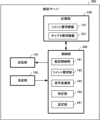
- FIG. 3 is a block diagram showing an example of the functional configuration of the distribution server 100 according to the first embodiment.
- the distribution server 100 includes a transmitting section 110, a receiving section 120, a storage section 130, and a control section 140.
- the transmitter 110 transmits various information to the viewer terminal 300 and the like via the Internet 900.
- the transmitter 110 distributes a live video provided from the distributor terminal 200 to the viewer terminal 300.
- the transmitter 110 transmits comments posted from the viewer terminal 300 to the distributor terminal 200 and the viewer terminal 300.
- the transmitter 110 transmits command information for changing the display mode of comments to the viewer terminal 300 and the like.
- the above-mentioned NIC 404 can function as such a transmitter 110.
- the receiving unit 120 receives various information sent from the distributor terminal 200 and the viewer terminal 300 via the Internet 900. For example, the receiving unit 120 receives a live video provided from the distributor terminal 200. Further, the receiving unit 120 receives comments posted from the viewer terminal 300. Note that the above-mentioned NIC 404 can function as such a receiving unit 120.
- the storage unit 130 stores various information necessary for processing in the distribution server 100.
- the storage unit 130 stores comment management information 131.
- the comment management information 131 is information for managing comments posted by viewers during live video distribution, and includes information as shown in FIG. 4 as an example. That is, the comment management information 131 includes information such as a comment ID 131a, a reception time 131b, a comment 131c, a display flag 131d, and a reaction flag 131e.
- the display flag 131d is a flag indicating whether or not a comment is currently being displayed in the comment area for displaying a predetermined number of comments on the viewer terminal 300. In other words, when the display flag 131d is "1", it indicates that the comment is to be displayed, and on the other hand, when the display flag 131d is "0", it indicates that the comment is not to be displayed. ing.
- reaction flag 131e is a flag indicating whether or not the distributor has responded to the comment. In other words, when the reaction flag 131e is "1", it indicates that the distributor has responded to the comment, and on the other hand, when the reaction flag 131e is "0", it indicates that the distributor has responded to the comment. This indicates that it has not reacted (unreacted).
- the storage unit 130 stores various information necessary for the processing of the control unit 140.
- the storage unit 130 stores the ID, password, etc. of the viewer who uses the viewer terminal 300.
- the storage unit 130 also stores a video management ID, video title, video summary, distribution start time, etc. as information regarding live video.
- the above-mentioned auxiliary storage unit 407 and the like can function as such a storage unit 130.
- the control unit 140 controls the entire distribution server 100.
- the control unit 140 includes, for example, a distribution control unit 141, a comment management unit 142, a voice recognition unit 143, a specification unit 144, and a display control unit 145.
- the distribution control unit 141 distributes the live video received from the distributor terminal 200 to the viewer terminal 300. That is, when the receiving unit 120 receives the live video provided from the distributor terminal 200, the distribution control unit 141 controls the transmitting unit 110 to distribute the received live video to the viewer terminal 300.
- the comment management unit 142 manages comments posted by viewers watching the live video. That is, when the receiving unit 120 receives a comment posted from the viewer terminal 300, the comment management unit 142 controls the transmitting unit 110 to transmit the received comment to the distributor terminal 200 and the viewer terminal 300.
- the comment management unit 142 also updates the comment management information 131 shown in FIG. 4 described above. In other words, the comment management unit 142 adds the newly posted comment to the comment management information 131 (setting the display flag 131d to "1" and setting the reaction flag 131e to "0") and , among the comments whose display flag 131d is "1", the display flag 131d of the comment with the oldest reception time 131b is changed to "0". Furthermore, when the specifying unit 144 (described later) specifies a comment, the comment managing unit 142 changes the reaction flag 131e of the comment to "1".
- the voice recognition unit 143 performs voice recognition in real time on the voice uttered by the broadcaster in the live video, and converts it into uttered text. For example, every time the distributor speaks, the voice recognition unit 143 divides the voice data into phoneme units, identifies each phoneme by comparing it with the characteristic distribution of sample phonemes, and performs pattern matching to words, etc. Finally, the utterance text uttered by the distributor is generated.
- the specifying unit 144 identifies the converted spoken text and each comment currently displayed in the comment area of the viewer terminal 300. By comparing these, we identify comments that the broadcaster has responded to (comments mentioned by the broadcaster in the live video). More specifically, the specifying unit 144 first performs morphological analysis on the spoken text (natural sentence) to extract keywords (for example, nouns, noun phrases, etc.). Next, the specifying unit 144 refers to the comment management information 131 shown in FIG. 4, morphologically analyzes each comment whose display flag 131d is "1", and extracts each keyword.
- the identifying unit 144 compares the keywords extracted from the uttered text (keywords included in the uttered text) and the keywords extracted from each comment (keywords included in each comment), and the matching keywords are included.
- the comments that are received are identified as comments that the broadcaster responded to.
- the broadcaster says, "The battery life was approximately 4 hours.”
- the comments (comment 131c) for which the display flag 131d is set to "1" in the comment management information 131 include "You explain well,” “I see,” and “Maybe you prefer the old model.” ”, “I was waiting for that function”, and “How long does it run?”.
- the specifying unit 144 extracts the keywords “battery”, “driving time”, and “4 hours” from the uttered text converted by the speech recognition unit 143, and also extracts the keywords “good at explaining”, “good at explaining”, and “4 hours” from each comment.
- the identifying unit 144 then compares each keyword extracted from the uttered text with each keyword extracted from each comment. In this case, since the keyword "driving time” matches, the specifying unit 144 identifies the comment "How long is the driving time?" that includes the keyword “driving time” as a comment to which the distributor has responded.
- the specifying unit 144 performs a character search for each comment whose display flag 131d is "1" using the keyword extracted from the uttered text as a key, and searches for the searched comment (that is, a comment that includes the keyword). may be specified as a comment to which the distributor has responded.
- the display control section 145 controls the display on the viewer terminal 300 of the comment specified by the above-mentioned specifying section 144.
- the display control unit 145 transmits command information for changing the display mode of the comment specified by the specifying unit 144 to the viewer terminal 300, so that the specified comment ( In other words, the display mode of comments (to which the broadcaster responded) is made different.
- the display control unit 145 transmits command information for changing the font color and background color of this comment to the viewer terminal 300, for example.
- the display mode of the comment DC ("How long is the driving time?") is changed in the comment area CA.
- changing the display mode is not limited to changing the font color and background color, but may also include changing the font, font size, etc.
- the CPU 401 and the like described above can function as the control unit 140 having such a configuration.
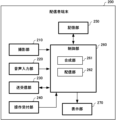
- FIG. 6 is a block diagram showing an example of the functional configuration of the distributor terminal 200.
- the distributor terminal 200 includes a photographing section 210, an audio input section 220, a transmitting/receiving section 230, an operation receiving section 240, a storage section 250, a control section 260, and a display section 270.
- the photographing unit 210 is, for example, a camera placed on the distributor terminal 200, and photographs the distributor etc. during distribution. That is, the imaging unit 210 outputs a video including the distributor during distribution. Note that the above-described photographing unit 409 can function as such a photographing section 210.
- the audio input unit 220 inputs the distributor's audio.
- the audio input unit 220 inputs audio uttered by a distributor during distribution.
- the audio unit 410 described above can function as such an audio input section 220.
- the transmitting/receiving unit 230 transmits and receives various information to and from the distribution server 100 via the Internet 900.
- the transmitting/receiving unit 230 is controlled by the control unit 260 (distribution unit 262 described later) and adds an object to a video shot by the shooting unit 210 (more specifically, a video including audio input by the audio input unit 220).
- the combined video is transmitted to the distribution server 100 (distributed to the viewer terminal 300 via the distribution server 100).
- the transmitting/receiving unit 230 also receives comments sent from the distribution server 100 (comments posted from the viewer terminals 300).
- the above-mentioned NIC 404 can function as such a transmitter/receiver 230.
- the operation reception unit 240 is a touch panel or a pointing device, and accepts various operations from the distributor.
- the operation accepting unit 240 accepts an operation directed to an object to be combined with the video image photographed by the photographing unit 210.
- the operation unit 411 described above can function as such an operation reception section 240.
- the storage unit 250 stores various information necessary for processing at the distributor terminal 200.
- the storage unit 250 stores information about objects to be combined with a photographed video, a combination position of the objects, and the like.
- the object is a subtitle (banner) that includes text information for notifying viewers in a live video.
- the compositing position is a position at which objects in the video are to be composited. Note that the above-mentioned auxiliary storage section 407 and the like can function as such a storage section 250.
- the control unit 260 controls the entire distributor terminal 200.
- This control section 260 includes, for example, a composition section 261 and a distribution section 262.
- the compositing unit 261 composites the object into the video shot by the imaging unit 210.
- the synthesizing section 261 synthesizes text information for informing the viewer into the photographed video according to the object information and the synthesis position stored in the storage section 250.
- the distribution unit 262 transmits the video with the objects synthesized by the composition unit 261 to the distribution server 100 for distribution to the viewer terminal 300. That is, the distribution unit 262 controls the transmission/reception unit 230 to transmit the video in which the objects are combined to the distribution server 100, and distributes the video to the viewer terminal 300 via the distribution server 100.
- CPU 401 and the like described above can function as the control unit 260 having such a configuration.
- the display unit 270 displays a video in which objects have been synthesized by the above-mentioned compositing unit 261. Further, the display section 270 has a comment area, similar to the display section 350 of the viewer terminal 300 described later, and displays comments received by the transmitting/receiving section 230. Note that the display unit 412 described above can function as such a display section 270.
- FIG. 7 is a block diagram showing an example of the functional configuration of the viewer terminal 300.
- the viewer terminal 300 includes a transmitting/receiving section 310, an operation receiving section 320, a storage section 330, a control section 340, and a display section 350.
- the transmitting/receiving unit 310 transmits and receives various information to and from the distribution server 100 via the Internet 900.
- the transmitter/receiver 310 is controlled by the controller 340 and receives live video distributed from the distribution server 100.
- the transmitting/receiving unit 310 also transmits comments received from the operation receiving unit 320 to the distribution server 100, and also transmits comments and command information (command information for changing the display mode of comments) sent from the distribution server 100.
- Receive Note that the above-mentioned NIC 404 can function as such a transmitter/receiver 310.
- the operation reception unit 320 is a touch panel or a pointing device, and accepts various operations from the viewer. For example, the operation reception unit 320 accepts comments input from viewers. Note that the operation unit 411 described above can function as such an operation reception section 320.
- the storage unit 330 stores various information necessary for processing in the viewer terminal 300.
- the storage unit 330 stores various applications including a video viewing application and a browser application. More specifically, various applications are installed in the storage unit 330.
- the video viewing application is, for example, an application for viewing videos distributed from the distribution server 100.
- the browser application may also be able to view videos distributed from the distribution server 100.
- the above-mentioned auxiliary storage unit 407 and the like can function as such a storage unit 330.
- the control unit 340 controls the entire viewer terminal 300.
- the control unit 340 executes a video viewing application stored in the storage unit 330 and displays live video etc. distributed from the distribution server 100 on the display unit 350.
- the display unit 350 is provided with a video area for displaying live videos and a comment area for displaying comments
- the control unit 340 can display live videos received by the transmitter/receiver 310.
- the video is displayed in the video area
- the comment received by the transmitter/receiver 310 is displayed in the comment area.
- This comment area can display a predetermined number of the latest comments.
- the control unit 340 sequentially adds the received comments to the comment area every time the transmitting/receiving unit 310 receives a comment. After the number of comments reaches a predetermined number, the control unit 340 deletes old comments from the comment area in a last-in, first-out manner every time the transmitting/receiving unit 310 receives a comment, and inserts new comments into the comment area. to add. Further, when the transmitting/receiving unit 310 receives the command information, the control unit 340 changes the display mode of the target comment in the comment area according to the command information. Note that the CPU 401 and the like described above can function as the control unit 340 having such a configuration.
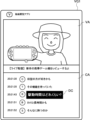
- the display unit 350 displays a screen corresponding to the application executed by the control unit 340 described above. For example, when a video viewing application is executed by the control unit 340, the display unit 350 displays a viewing screen VG1 as shown in FIG.
- This viewing screen VG1 includes a video area VA for displaying live video and a comment area CA for displaying a predetermined number of posted comments. Note that in the comment area CA, the comment DC to which the distributor has responded is displayed in a different display mode from other comments.
- FIG. 9 is a flowchart for explaining distribution processing according to the first embodiment. This distribution process is executed by the distribution server 100, for example, when the distributor terminal 200 starts providing a live video.
- the distribution server 100 starts distributing live video (step S11). That is, when the receiving unit 120 receives the live video provided from the distributor terminal 200, the control unit 140 (distribution control unit 141) controls the transmitting unit 110 to send the received live video to the viewer terminal 300. To deliver.
- the distribution server 100 determines whether a new comment has been received (step S12). That is, the control unit 140 (comment management unit 142) determines whether the receiving unit 120 has received a comment posted from the viewer terminal 300.
- step S12 determines that no new comment has been received (step S12; No)
- the distribution server 100 advances the process to step S14, which will be described later.
- the distribution server 100 updates the comment management information and transmits the received comment to each terminal (step S13). That is, the control unit 140 (comment management unit 142) updates the comment management information 131 shown in FIG. 4 described above. That is, the comment management unit 142 adds a new comment to the comment management information 131 (setting the display flag 131d to "1" and setting the reaction flag 131e to "0"), and also sets the display flag 131d to "0". Among the comments whose 131d is "1", the display flag 131d of the comment whose reception time 131b is the oldest is changed to "0". Then, the control unit 140 transmits the new comment to the distributor terminal 200 and the viewer terminal 300.
- the distribution server 100 determines whether or not there is an utterance by the distributor (step S14). That is, the control unit 140 (speech recognition unit 143) determines whether the distributor has spoken in the live video.
- step S14 determines that there is no utterance by the distributor (step S14; No)
- the distribution server 100 advances the process to step S19, which will be described later.
- the distribution server 100 performs voice recognition on the distributor's voice and converts it into uttered text (step S15). That is, the control unit 140 (speech recognition unit 143), for example, divides the audio data uttered by the distributor into phoneme units, identifies each phoneme while comparing it with the characteristic distribution of sample phonemes, and performs pattern matching to words. Finally, the utterance text uttered by the distributor is generated.
- the distribution server 100 compares the uttered text with each comment to be displayed (step S16). That is, the control unit 140 (specification unit 144) compares the utterance text converted in step S15 described above with each comment currently displayed in the comment area of the viewer terminal 300. More specifically, the control unit 140 first performs morphological analysis on the uttered text to extract keywords (for example, nouns, noun phrases, etc.). Next, the control unit 140 refers to the comment management information 131 shown in FIG. 4, morphologically analyzes each comment whose display flag 131d is "1", and extracts each keyword. Then, the control unit 140 compares the keywords extracted from the uttered text and the keywords extracted from each comment.
- the control unit 140 compares the keywords extracted from the uttered text and the keywords extracted from each comment.
- the distribution server 100 determines whether there is a matching comment (step S17). For example, the control unit 140 (specification unit 144) determines whether there is a comment that includes a keyword that matches the keyword included in the uttered text, based on the comparison in step S16 described above.
- step S17 determines that there is no matching comment (step S17; No)
- the distribution server 100 advances the process to step S19, which will be described later.
- the distribution server 100 instructs each terminal to change the display for the matching comment (step S18). That is, the control unit 140 (display control unit 145) transmits instruction information for changing the display mode of the matching comment to the viewer terminal 300, etc., so that the broadcaster can The display mode of the comment that responded to is different. For example, the viewer terminal 300 that has received the command information changes and displays the comment DC (“How long is the drive time?”) in the comment area CA of the viewing screen VG1 shown in FIG. 8 described above.
- the distribution server 100 determines whether distribution of the live video has ended (step S19). That is, the control unit 140 (distribution control unit 141) determines whether the live video provided from the distributor terminal 200 has ended.
- step S19 If the distribution server 100 determines that the distribution of the live video has not ended (step S19; No), the process returns to step S12 described above.
- step S19 if it is determined that the live video distribution has ended (step S19; Yes), the distribution server 100 ends the distribution process.
- the display control unit 145 may display the comment specified by the specifying unit 144 (the comment to which the distributor has reacted) in the comment area for a longer time than standard.
- the display control unit 145 transmits command information to the viewer terminal 300 to set the reception time of the comment specified by the specifying unit 144 a certain amount of time later than the original time. , the specified comment is displayed longer in the comment area of the viewer terminal 300.
- this command information includes first command information for changing the comment display format and second command information for delaying the comment reception time by a certain period of time from the original time, so that the display format can be changed.
- a comment that has been changed may be displayed in the comment area for a longer time than the standard one. In these cases, comments to which the distributor has responded can be displayed with priority.
- FIG. 10 is a schematic diagram showing an example of the overall configuration of a distribution system 2 according to Embodiment 2 of the present disclosure.
- a distribution server 500 that distributes live video
- a distributor terminal 200 used by a distributor and a viewer terminal 300 used by a viewer can communicate via the Internet 900. It is connected to the.
- the distributor terminal 200 and the viewer terminal 300 have the same configuration as the distribution system 1 according to the first embodiment described above. In other words, only the distribution server 500 is different from the distribution system 1 of FIG.
- the distribution server 500 is also realized by the information processing device 400 in FIG. 2 described above. That is, when the information processing device 400 is powered on, a program for functioning as the distribution server 500 according to the second embodiment is executed, and the distribution server 500 according to the second embodiment is realized.
- FIG. 11 is a block diagram showing an example of the functional configuration of the distribution server 500 according to the second embodiment.
- the distribution server 500 includes a transmitting section 110, a receiving section 120, a storage section 530, and a control section 540.
- the transmitter 110 and the receiver 120 have the same configuration as the transmitter 110 and the receiver 120 in the distribution server 100 of FIG. 3 described above.
- the storage unit 530 stores various information necessary for processing in the distribution server 500.
- the storage unit 530 stores comment management information 131 and chapter management information 531.
- the comment management information 131 is the same information as the comment management information 131 in FIG. 4 described above.
- the storage unit 530 stores (records) the live video in parallel with the distribution of the live video. That is, the control unit 540 (distribution control unit 141) stores the live video in the storage unit 530 while distributing the live video. As a result, as will be described later, even if a live video is being distributed, the control unit 540 performs so-called follow-up playback so that a viewer who starts viewing late can watch from the scene he/she missed.
- control unit 540 performs distribution using the live video stored in the storage unit 530. be able to.
- the chapter management information 531 is information for managing chapters for dividing a live video, and includes information as shown in FIG. 12 as an example. That is, the chapter management information 531 includes information such as a chapter number 531a, a relative time 531b, a keyword 531c, and an address 531d.
- the relative time 531b is time information indicating the start position of a chapter in the live video, and is indicated as a relative time (time elapsed from the beginning) based on the start time of the live video.
- the keyword 531c is a phrase for identifying the chapter, and is also a phrase mentioned by the distributor within the chapter.
- URL Uniform Resource Locator
- the storage unit 530 stores various information necessary for the processing of the control unit 540.
- the storage unit 530 stores the ID, password, etc. of the viewer who uses the viewer terminal 300.
- the storage unit 530 also stores information regarding live video. Note that the above-mentioned auxiliary storage unit 407 and the like can function as such a storage unit 530.
- control unit 540 controls the entire distribution server 500.
- This control section 540 includes, for example, a distribution control section 141, a comment management section 142, a voice recognition section 143, a specifying section 144, and a setting section 541.
- the comment management unit 142, voice recognition unit 143, and identification unit 144 are the same as the comment management unit 142, voice recognition unit 143, and identification unit 144 in the distribution server 100 (control unit 140) in FIG. 3 described above. It is the composition.
- the distribution control unit 141 further has the following functions.
- the distribution control unit 141 stores the live video in the storage unit 530 while distributing the live video to the viewer terminal 300. Furthermore, after the setting unit 541 (described below) sets chapters in a live video, when a viewer plays the live video in pursuit or on-demand, the distribution control unit 141 controls the playback position of the live video. Display the chapter in the seek bar that shows. As a result, in addition to operating the chapter information (chapter information CD displayed in the summary area SA), which will be described later, the viewer can also view the live video from the start position of the chapter by moving the seek bar to the chapter. be able to.
- chapter information displayed in the summary area SA
- the setting unit 541 sets chapters for dividing the live video based on the relative time in the live video corresponding to the time when the comment specified by the specifying unit 144 is received (that is, the relative time based on the start time of the live video). Set. For example, the setting unit 541 creates chapter management information 531 as shown in FIG. 12 described above, and sets a chapter by adding the created chapter management information 531 to the summary information of the live video.
- the identifying unit 144 extracts keywords such as "driving time” from the uttered text, and also identifies the comment "How long is the driving time?" from the comments currently displayed in the comment area.
- keywords such as "driving time” from the uttered text
- the comment "How long is the driving time?" from the comments currently displayed in the comment area.
- the start time of the live video is "20:20:00" and the address of the live video is "https://XXXX.com/AbCd1eFgH2IjK”.
- the setting unit 541 first subtracts the start time of the live video from the reception time 131b of the corresponding comment (comment 131c "How long is the drive time?") in the comment management information 131 shown in FIG. By doing so, the relative time in the live video is calculated.
- the setting unit 541 subtracts "20:20:00” from “20:21:43” and obtains "0:01:43”, and then sets the relative time 531b in the chapter management information 531 shown in FIG. set.
- the setting unit 541 sets the keyword used by the identifying unit 144 to identify the comment (that is, the keyword “driving time”) to the keyword 531c in the chapter management information 531.
- Chapters are set by adding the chapter management information 531 generated in this way to the summary information about the live video.
- a viewing screen VG2 as shown in is displayed.
- This viewing screen VG2 includes a video area VA for displaying a live video, a summary area SA for displaying an overview of the live video, and a comment area CA for displaying a predetermined number of posted comments.
- chapter information CD is added to the summary area SA.
- This chapter information CD is linked to the address 531d in the chapter management information 531, and by touching the chapter information CD, the viewer can view the live video from the starting position of that chapter. ing.
- FIG. 14 is a flowchart for explaining distribution processing according to the second embodiment. This distribution process is executed by the distribution server 500, for example, when the distributor terminal 200 starts providing a live video. Note that steps S11 to S17 and step S19 in the distribution process in FIG. 14 are the same as steps S11 to S17 and step S19 in the distribution process in FIG. 9 described above. Therefore, the same processing contents will be briefly explained.
- the distribution server 500 starts distributing the live video (step S11), and determines whether a new comment has been received (step S12).
- step S12 determines that no new comment has been received (step S12; No)
- the distribution server 500 advances the process to step S14, which will be described later.
- step S12; Yes if it is determined that a new comment has been received (step S12; Yes), the distribution server 500 updates the comment management information and transmits the received comment to each terminal (step S13).
- the distribution server 500 determines whether or not there is an utterance by the distributor (step S14).
- step S14 determines that there is no utterance by the distributor (step S14; No)
- the distribution server 500 advances the process to step S19, which will be described later.
- step S14; Yes if it is determined that there is an utterance by the distributor (step S14; Yes), the distribution server 500 performs voice recognition on the distributor's voice and converts it into uttered text (step S15).
- the distribution server 500 compares the uttered text with each comment to be displayed (step S16), and determines whether there is a matching comment (step S17).
- step S17 determines that there is no matching comment (step S17; No)
- the distribution server 500 advances the process to step S19, which will be described later.
- the distribution server 500 sets chapters for dividing the live video (step S21). That is, the control unit 540 (setting unit 541) divides the live video based on the relative time in the live video corresponding to the time when the matching comment is received (that is, the relative time based on the start time of the live video). Set a chapter for. For example, the control unit 540 creates chapter management information 531 as shown in FIG. 12 described above, and sets a chapter by adding the created chapter management information 531 to the summary information of the live video.
- the distribution server 500 determines whether distribution of the live video has ended (step S19).
- step S19; No the distribution server 500 determines that the distribution of the live video has not ended.
- step S19; Yes the distribution server 500 returns the process to step S12 described above.
- step S19; Yes the distribution server 500 ends the distribution process.
- Embodiments 1 and 2 In Embodiments 1 and 2 above, a case was explained in which the uttered text obtained by voice recognition of the broadcaster's voice in a live video is compared with each comment being displayed to identify the comment to which the broadcaster has responded. Other methods may be used to identify comments to which the distributor has responded. For example, the distributor terminal 200 may allow the distributor to arbitrarily select posted comments, and the comment selected by the distributor may be identified as the comment to which the distributor has responded.
- the display section 270 of the broadcaster terminal 200 also has a comment area, similar to the display section 350 of the viewer terminal 300, in which comments received by the transmitting/receiving section 230 (posted comments) are displayed. Display. Then, when the distributor during distribution selects any comment displayed in the comment area, the control unit 260 transmits selection information indicating the selected comment to the distribution server 100, 500 through the transmitting/receiving unit 230. do. In the distribution server 100, 500 that has received this selection information, the specifying unit 144 specifies the comment to which the distributor has responded based on the selection information. In this case, the comment to which the distributor responded can be identified without error.
- the control unit 140, 540 of the distribution server 100, 500 includes the voice recognition unit 143, the identification unit 144, etc.
- the program executed by the distribution server 100, 500, etc. is a CD-ROM (Compact Disc Read Only Memory), DVD, MO (Magneto-Optical Disk), USB memory, memory card, etc. It is also possible to store and distribute it on a computer-readable recording medium. By installing such a program on a specific or general-purpose computer, it is also possible to cause the computer to function as the distribution server 100, 500 in the first and second embodiments described above.
- the above program may be stored in a disk device included in a server device on a communication network such as the Internet, and may be superimposed on a carrier wave and downloaded to a computer, for example.
- the above processing can also be achieved by starting and executing the program while transferring it via a communication network.
- the above-mentioned processing can also be achieved by executing all or part of the program on a server device, and executing the program while the computer transmits and receives information regarding the processing via a communication network.
- a live video provided by a broadcaster is distributed to a viewer terminal that has a comment area where a predetermined number of comments can be displayed, Receive comments posted from the viewer terminal during the distribution of the live video, transmitting the received comment to the viewer terminal to add it to the comment area in a last-in, first-out manner;
- the live video being distributed, each time the broadcaster speaks, the uttered text obtained by voice recognition of the broadcaster's voice is compared with each comment currently displayed in the comment area. to identify the comment that the broadcaster responded to, controlling the display of the identified comment;
- a server device that executes processing.
- the display control is a control that changes the display mode of the specified comment to be different from the display mode of other comments.
- the server device according to any one of [1] to [3], characterized in that: [5]
- the computer is A live video provided by a broadcaster is distributed to a viewer terminal that has a comment area where a predetermined number of comments can be displayed, Receive comments posted from the viewer terminal during the distribution of the live video, transmitting the received comment to the viewer terminal to add it to the comment area in a last-in, first-out manner;
- the live video being distributed, each time the broadcaster speaks, the uttered text obtained by voice recognition of the broadcaster's voice is compared with each comment currently displayed in the comment area.
- a display control method characterized by: [6] to the computer, A live video provided by a broadcaster is distributed to a viewer terminal that has a comment area where a predetermined number of comments can be displayed, Receive comments posted from the viewer terminal during the distribution of the live video, transmitting the received comment to the viewer terminal to add it to the comment area in a last-in, first-out manner; In the live video being distributed, each time the broadcaster speaks, the uttered text obtained by voice recognition of the broadcaster's voice is compared with each comment currently displayed in the comment area. to identify the comment that the broadcaster responded to, controlling the display of the identified comment; A computer-readable recording medium that records a program for executing processing.
- the present disclosure can be suitably adopted for video distribution that controls the display of comments posted during distribution.
Landscapes
- Engineering & Computer Science (AREA)
- Multimedia (AREA)
- Signal Processing (AREA)
- Business, Economics & Management (AREA)
- Marketing (AREA)
- Databases & Information Systems (AREA)
- General Engineering & Computer Science (AREA)
- Two-Way Televisions, Distribution Of Moving Picture Or The Like (AREA)
- Information Transfer Between Computers (AREA)
Priority Applications (4)
| Application Number | Priority Date | Filing Date | Title |
|---|---|---|---|
| JP2024524383A JP7596602B2 (ja) | 2022-06-28 | 2022-06-28 | 配信中に投稿されたコメントの表示を制御する動画配信 |
| PCT/JP2022/025649 WO2024004007A1 (ja) | 2022-06-28 | 2022-06-28 | 配信中に投稿されたコメントの表示を制御する動画配信 |
| US17/921,519 US12231716B2 (en) | 2022-06-28 | 2022-06-28 | Video distribution in which display of comments posted during distribution is controlled |
| JP2024204244A JP2025024211A (ja) | 2022-06-28 | 2024-11-22 | 配信中に投稿されたコメントの表示を制御する動画配信 |
Applications Claiming Priority (1)
| Application Number | Priority Date | Filing Date | Title |
|---|---|---|---|
| PCT/JP2022/025649 WO2024004007A1 (ja) | 2022-06-28 | 2022-06-28 | 配信中に投稿されたコメントの表示を制御する動画配信 |
Publications (1)
| Publication Number | Publication Date |
|---|---|
| WO2024004007A1 true WO2024004007A1 (ja) | 2024-01-04 |
Family
ID=89381803
Family Applications (1)
| Application Number | Title | Priority Date | Filing Date |
|---|---|---|---|
| PCT/JP2022/025649 Ceased WO2024004007A1 (ja) | 2022-06-28 | 2022-06-28 | 配信中に投稿されたコメントの表示を制御する動画配信 |
Country Status (3)
| Country | Link |
|---|---|
| US (1) | US12231716B2 (https=) |
| JP (2) | JP7596602B2 (https=) |
| WO (1) | WO2024004007A1 (https=) |
Cited By (1)
| Publication number | Priority date | Publication date | Assignee | Title |
|---|---|---|---|---|
| JP7824480B1 (ja) * | 2025-09-26 | 2026-03-04 | 株式会社ドワンゴ | システム、端末、送信方法、およびプログラム |
Citations (3)
| Publication number | Priority date | Publication date | Assignee | Title |
|---|---|---|---|---|
| WO2019216249A1 (ja) * | 2018-05-07 | 2019-11-14 | 株式会社エクシヴィ | 所定のコンテンツを有する仮想空間を提供する方法 |
| JP2021087789A (ja) * | 2021-01-26 | 2021-06-10 | 株式会社コロプラ | 視聴プログラム、配信プログラム、視聴プログラムを実行する方法、配信プログラムを実行する方法、情報処理装置、および情報処理システム |
| JP2021124809A (ja) * | 2020-02-03 | 2021-08-30 | 靖宜 下岡 | eラーニング、ファンクラブ及びクラウドファンディングの連携方法及びシステム |
Family Cites Families (11)
| Publication number | Priority date | Publication date | Assignee | Title |
|---|---|---|---|---|
| JP4263218B2 (ja) * | 2006-12-11 | 2009-05-13 | 株式会社ドワンゴ | コメント配信システム、コメント配信サーバ、端末装置、コメント配信方法、及びプログラム |
| US10057731B2 (en) * | 2013-10-01 | 2018-08-21 | Ambient Consulting, LLC | Image and message integration system and method |
| US10498794B1 (en) * | 2016-11-30 | 2019-12-03 | Caffeine, Inc. | Social entertainment platform |
| US10528623B2 (en) * | 2017-06-09 | 2020-01-07 | Fuji Xerox Co., Ltd. | Systems and methods for content curation in video based communications |
| JP7041649B2 (ja) * | 2019-07-17 | 2022-03-24 | 株式会社 ディー・エヌ・エー | 動画を配信するためのシステム、方法、及びプログラム |
| JP6735398B1 (ja) * | 2019-08-06 | 2020-08-05 | 株式会社 ディー・エヌ・エー | ライブ動画を配信するためのシステム、方法、及びプログラム |
| JP6850927B1 (ja) | 2020-07-28 | 2021-03-31 | 株式会社ドワンゴ | コメント配信システム、コメント配信サーバ、端末、コメント配信方法、およびプログラム |
| JP7079823B2 (ja) * | 2020-08-03 | 2022-06-02 | 株式会社 ディー・エヌ・エー | ライブ動画を配信するためのシステム、方法、及びプログラム |
| CN114793285B (zh) * | 2021-01-26 | 2024-11-05 | 北京字节跳动网络技术有限公司 | 信息显示方法、装置、设备及介质 |
| JP7071718B1 (ja) * | 2021-12-27 | 2022-05-19 | 17Live株式会社 | サーバ及び方法 |
| JP7301263B1 (ja) * | 2022-02-25 | 2023-07-03 | グリー株式会社 | 情報処理システム、情報処理方法およびコンピュータプログラム |
-
2022
- 2022-06-28 US US17/921,519 patent/US12231716B2/en active Active
- 2022-06-28 WO PCT/JP2022/025649 patent/WO2024004007A1/ja not_active Ceased
- 2022-06-28 JP JP2024524383A patent/JP7596602B2/ja active Active
-
2024
- 2024-11-22 JP JP2024204244A patent/JP2025024211A/ja active Pending
Patent Citations (3)
| Publication number | Priority date | Publication date | Assignee | Title |
|---|---|---|---|---|
| WO2019216249A1 (ja) * | 2018-05-07 | 2019-11-14 | 株式会社エクシヴィ | 所定のコンテンツを有する仮想空間を提供する方法 |
| JP2021124809A (ja) * | 2020-02-03 | 2021-08-30 | 靖宜 下岡 | eラーニング、ファンクラブ及びクラウドファンディングの連携方法及びシステム |
| JP2021087789A (ja) * | 2021-01-26 | 2021-06-10 | 株式会社コロプラ | 視聴プログラム、配信プログラム、視聴プログラムを実行する方法、配信プログラムを実行する方法、情報処理装置、および情報処理システム |
Cited By (1)
| Publication number | Priority date | Publication date | Assignee | Title |
|---|---|---|---|---|
| JP7824480B1 (ja) * | 2025-09-26 | 2026-03-04 | 株式会社ドワンゴ | システム、端末、送信方法、およびプログラム |
Also Published As
| Publication number | Publication date |
|---|---|
| JP7596602B2 (ja) | 2024-12-09 |
| JP2025024211A (ja) | 2025-02-19 |
| US20240223842A1 (en) | 2024-07-04 |
| US12231716B2 (en) | 2025-02-18 |
| JPWO2024004007A1 (https=) | 2024-01-04 |
Similar Documents
| Publication | Publication Date | Title |
|---|---|---|
| US10019989B2 (en) | Text transcript generation from a communication session | |
| CN104869467B (zh) | 媒体播放中的信息输出方法、装置和系统 | |
| WO2019205872A1 (zh) | 视频流处理方法、装置、计算机设备及存储介质 | |
| CN110913241B (zh) | 一种视频检索方法、装置、电子设备及存储介质 | |
| CN109474843A (zh) | 语音操控终端的方法、客户端、服务器 | |
| GB2510116A (en) | Translating the language of text associated with a video | |
| WO2020207080A1 (zh) | 视频拍摄方法、装置、电子设备及存储介质 | |
| JP7516695B2 (ja) | 配信中における配信者の反応に基づいてチャプタを設定する動画配信 | |
| CN115981769A (zh) | 页面显示方法、装置、设备、计算机可读存储介质及产品 | |
| CN117082292A (zh) | 视频生成方法、装置、设备、存储介质和程序产品 | |
| CN117376593A (zh) | 直播流的字幕处理方法、装置、存储介质及计算机设备 | |
| US20180268819A1 (en) | Communication terminal, communication method, and computer program product | |
| JP2025024211A (ja) | 配信中に投稿されたコメントの表示を制御する動画配信 | |
| US20240040161A1 (en) | Method and server for handling streaming data | |
| CN114341866A (zh) | 同声传译方法、装置、服务器和存储介质 | |
| CN112004100B (zh) | 将多路音视频源集合成单路音视频源的驱动方法 | |
| CN113891108A (zh) | 字幕优化方法、装置、电子设备和存储介质 | |
| CN110149528B (zh) | 一种过程录制方法、装置、系统、电子设备、及存储介质 | |
| CN111816183B (zh) | 基于音视频录制的语音识别方法、装置、设备及存储介质 | |
| CN115243087A (zh) | 音视频合拍处理方法、装置、终端设备及存储介质 | |
| CN114979764A (zh) | 视频生成方法、装置、计算机设备及存储介质 | |
| US12184953B2 (en) | Information processing apparatus, information processing method, and program for presenting reproduced video including service object and adding additional image indicating the service object | |
| CN112309391B (zh) | 用于输出信息的方法和装置 | |
| EP3767964B1 (en) | Information processing device, information processing device, and program | |
| CN113096674B (zh) | 一种音频处理方法、装置及电子设备 |
Legal Events
| Date | Code | Title | Description |
|---|---|---|---|
| WWE | Wipo information: entry into national phase |
Ref document number: 17921519 Country of ref document: US |
|
| 121 | Ep: the epo has been informed by wipo that ep was designated in this application |
Ref document number: 22949286 Country of ref document: EP Kind code of ref document: A1 |
|
| ENP | Entry into the national phase |
Ref document number: 2024524383 Country of ref document: JP Kind code of ref document: A |
|
| NENP | Non-entry into the national phase |
Ref country code: DE |
|
| 122 | Ep: pct application non-entry in european phase |
Ref document number: 22949286 Country of ref document: EP Kind code of ref document: A1 |