WO2023120052A1 - 情報処理装置、pdfファイル表示方法、pdfファイル生成方法、pdfファイル表示プログラムおよびpdfファイル生成プログラム - Google Patents
情報処理装置、pdfファイル表示方法、pdfファイル生成方法、pdfファイル表示プログラムおよびpdfファイル生成プログラム Download PDFInfo
- Publication number
- WO2023120052A1 WO2023120052A1 PCT/JP2022/043854 JP2022043854W WO2023120052A1 WO 2023120052 A1 WO2023120052 A1 WO 2023120052A1 JP 2022043854 W JP2022043854 W JP 2022043854W WO 2023120052 A1 WO2023120052 A1 WO 2023120052A1
- Authority
- WO
- WIPO (PCT)
- Prior art keywords
- menu
- screen
- document
- pdf file
- data
- Prior art date
- Legal status (The legal status is an assumption and is not a legal conclusion. Google has not performed a legal analysis and makes no representation as to the accuracy of the status listed.)
- Ceased
Links
Images




Classifications
-
- G—PHYSICS
- G06—COMPUTING OR CALCULATING; COUNTING
- G06F—ELECTRIC DIGITAL DATA PROCESSING
- G06F40/00—Handling natural language data
- G06F40/10—Text processing
- G06F40/166—Editing, e.g. inserting or deleting
Definitions
- the present invention relates to an information processing device, a PDF file display method, a PDF file generation method, a PDF file display program, and a PDF file generation program.
- PDF files Portable Document Format
- PDF files are widely used for business documents because they are not affected by the usage environment of a terminal operated by a user, can be displayed and printed on a page-by-page basis, and do not lose their layout.
- a PDF file into which data can be input has also been provided, and such a PDF file accepts input of data from a predetermined area on the PDF file.
- the applicant of the present application has disclosed a technique for displaying a PDF file according to the device type (see Patent Document 1).
- the present invention has been made in view of the above, and includes an information processing apparatus, a PDF file display method, a PDF file generation method, a PDF file display program, and a menu capable of displaying a menu corresponding to the contents of each page of a PDF file.
- the object is to provide a PDF file generation program.
- the present invention reads a PDF file containing document data describing a document of one or more pages and menu data describing information about a menu that is an operation for the document, and reads the document.
- a document screen is generated from data
- a menu screen is generated from menu data
- the document screen and the menu screen are displayed on the display screen.
- FIG. 1 is a block diagram showing configurations of an information processing apparatus 100 and an information processing apparatus 200 according to an embodiment
- FIG. FIG. 4 is an explanatory diagram showing an example of the data structure of a PDF file displayed in this embodiment
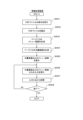
- 4 is a flowchart showing a PDF file display processing procedure executed by the information processing apparatus 100
- FIG. 4 is an explanatory diagram showing an example of displaying a menu screen and a document screen generated from a PDF file on a display screen
- FIG. 11 is an explanatory diagram showing another example of displaying the menu screen and the document screen on the display screen
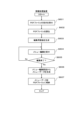
- 4 is a flowchart showing a PDF file generation processing procedure including menu data, executed by the information processing apparatus 200.
- FIG. 4 is an explanatory diagram showing an example of the data structure of a PDF file displayed in this embodiment
- 4 is a flowchart showing a PDF file display processing procedure executed by the information processing apparatus 100
- FIG. 4 is an explanatory diagram showing an example of displaying a menu screen and a document screen generated from
- FIG. 1 is a block diagram showing configurations of an information processing apparatus 100 and an information processing apparatus 200 according to this embodiment.
- the information processing device 100 is a computer that displays a PDF file containing menu data
- the information processing device 200 is a computer that generates a PDF file containing menu data.
- the information processing device 100 and the information processing device 200 are, for example, personal computers, tablet terminals, smart phones, and the like.
- the information processing device 100 includes a control unit 110, a storage unit 120, an input/output control unit 130, and a communication unit 140, as shown in FIG.
- the storage unit 120 stores PDF files in addition to programs for controlling each unit, application programs, various control information, intermediate files, and the like.
- FIG. 2 is an explanatory diagram showing an example of the data structure of a PDF file displayed in this embodiment. As shown in FIG. 2, the PDF file includes document data, input form data and menu data.
- Document data is data describing the content of a document consisting of one or more pages.
- the document data can be read by a general PDF file reader, can be displayed on the screen and printed page by page, and the layout is not disturbed.
- the input form data is described when receiving input of various data from a screen that displays a document (hereinafter referred to as a document screen).
- the type 24, which is a simple data format, and the action attribute 25 that assists input are described.
- the input form data is described in JSON format as an example. In the example of accepting input of a handwritten signature in a document shown in FIG.
- Menu data describes information about menus that are operations for documents described in document data.
- Menu data is described in JSON format as shown in FIG. 2 as an example.
- the menu data describes coordinate information 26, item name 27, type 28, action attribute 29, etc. for each menu.
- Menu item names include "save" for storing a PDF file in the storage unit 120 as shown in FIG. , can be anything.
- the menu data is not limited to the JSON format, and may be in any format as long as the contents of the menu can be described.
- an area for displaying each menu on a screen displaying menus (hereinafter referred to as a menu screen) is described as coordinate information 26, but the coordinate information is not described, and menu item names 27 are described.
- the menu may be controlled to be displayed in predetermined positions on the menu screen in order.
- the menu screen is displayed in an area that does not overlap the document screen on the top, bottom, right, or left side of the document screen according to the description of the menu data. Also, the menu screen may be displayed by a pop-up that is superimposed on the document screen, or by a slide-in function that displays the menu by swiping from the top, bottom, left, and right edges of the document screen to the center.
- the control unit 110 develops and executes various programs and control information stored in the storage unit 120 to control the operation of each unit of the information processing device 100 .
- the control unit 110 includes a PDF file reading unit 111 , a document screen generation unit 112 , a menu screen generation unit 113 and a menu processing unit 114 .
- the PDF file reading unit 111 reads the PDF file stored in the storage unit 120 according to the PDF file instruction received from the display screen displayed on the input device 131 . More specifically, the PDF file reading unit 111 reads document data, input form data, and menu data included in the PDF file.
- the document screen generation unit 112 generates a document screen from the PDF file document data read by the PDF file reading unit 111 .
- the document screen generation unit 112 generates a document screen including the input form from the document data and the input form data.
- the menu screen generation unit 113 generates a menu screen from the menu data of the PDF file read by the PDF file reading unit 111 .
- Menu processing unit 114 executes processing associated with the menu when receiving an instruction for a menu to be displayed on the menu screen.
- the input/output control unit 130 receives user operations and the like from the input device 131 and controls the output device 132 to display the results of the operations and the document screen and menu screen generated from the PDF file.
- the input device 131 is, for example, a keyboard, mouse, etc.
- the output device 132 is a liquid crystal display (LCD), an organic EL (electroluminescence) display, or the like.
- the input device 131 and the output device 132 are a touch panel or the like configured by superimposing a liquid crystal display and a touch sensor.
- the communication unit 140 is communicably connected to other devices via the network N, and transmits and receives data to and from the other devices.
- Network N is any communication network such as the Internet, intranet, LAN (Local Area Network), VPN (Virtual Private Network), mobile communication network, etc. good too.
- the information processing device 200 generates a PDF file containing menu data from the PDF file.
- the information processing apparatus 200 also edits the PDF file containing the menu data to generate a PDF file containing new menu data.
- the information processing device 200 includes a control unit 210 , a storage unit 220 , an input/output control unit 230 and a communication unit 240 .
- the storage unit 220 stores PDF files in addition to programs for controlling each unit, application programs, various types of control information, intermediate files, and the like.
- the PDF file may be a PDF file containing document data, input form data and menu data, a PDF file containing document data and input form data, or a PDF file containing only document data.
- the control unit 210 develops and executes various programs and control information stored in the storage unit 220 to control the operation of each unit of the information processing device 200 .
- the control unit 210 includes a PDF file reading unit 211 , an editing screen generation unit 212 and a menu editing unit 213 .
- the PDF file reading unit 211 reads the PDF file stored in the storage unit 220 according to the PDF file instruction. More specifically, the PDF file reading unit 211 reads document data included in the PDF file, and if input form data and menu data are included in the PDF file, reads the input form data and menu data.
- the editing screen generation unit 212 generates a document screen from the document data of the PDF file read by the PDF file reading unit 211.
- the editing screen generation unit 212 generates a document screen including the input form from the document data and the input form data.
- the editing screen generation unit 212 generates a menu editing screen including menus when the PDF file read by the PDF file reading unit 211 contains menu data, and creates an empty menu editing screen when the PDF file does not contain menu data. Generate.
- the menu editing unit 213 edits the menu by operating the menu editing screen, and stores the menu data generated from the edited menu in the PDF file together with the document data (and input form data). More specifically, the menu editing unit 213 creates a menu that can be operated on the page of the document displayed on the document screen by pasting a button having a predetermined processing content on the menu editing screen at an arbitrary position. is edited, menu data is generated from the menu arranged on the menu screen, and stored in a PDF file.
- Input/output control unit 230 and communication unit 240 have the same functions and configurations as input/output control unit 130 and communication unit 140 described above. Description is omitted.
- FIG. 3 is a flowchart showing a PDF file display processing procedure executed by the information processing apparatus 100. As shown in FIG.
- the input/output control unit 130 receives the PDF file instruction from the display screen displayed on the input device 131 (step S301). For example, a PDF file is selected by designating a PDF file from a list of files to be stored in the storage unit 120 displayed on the display screen.
- the PDF file reading unit 111 reads the designated PDF file (step S302).
- the menu screen generation unit 113 generates a menu screen for each page from the menu data of the PDF file (step S303). More specifically, when generating a menu screen for each page, menu screen generation unit 113 determines whether the menu data includes a description for the page to be generated. If the menu screen generation unit 113 determines that the menu data includes a description for the page, it generates a menu screen from the description for the page and the description of the common menu. Menu screen generation unit 113 generates a menu screen from the common menu when it is determined that the menu data does not have a description for the page.
- the document screen generation unit 112 generates a document screen for each page from the document data of the PDF file (step S304).
- the input/output control unit 130 controls to display the document screen and the menu screen on the display screen of the output device 132 (step S305).
- FIG. 4 is an explanatory diagram showing an example of displaying a menu screen and a document screen generated from a PDF file on the display screen.
- a PDF file 41 shown in FIG. 4 is a *** contract document, and includes document data, an input form, and menu data.
- (a) Screen example shows an example of a display screen displaying the first page of document data.
- the display screen 42 includes a menu screen 43 generated from the menu data of the first page and the common menu data, a document screen 44 generated from the first page of the document data, an input form 45 and an input form 46 generated from the input form data of the first page. indicate. Since the menu screen 43 is the first page, the "next page” button is displayed, but since it is not described in the menu data, the "previous page” button is not displayed.
- FIG. 43 shows an example of a display screen displaying the last page of document data.
- the display screen 47 displays a menu screen 48 generated from the menu data, a document screen 49 generated from the document data, and an input form 50 generated from the input form data. Since the menu screen 48 is the final page, the "previous page” button is displayed, but the "next page” button is not displayed because it is not described in the menu data.
- handwritten signature is described as an action attribute in the signature input form 50
- the handwritten input screen is displayed when the cursor enters the input form area or the input form is specified, and the displayed handwritten input is performed.
- Handwritten input can be accepted on the screen by input with a mouse, input with a finger or a stylus pen on the touch panel, or the like.
- FIG. 5 is an explanatory diagram showing another example of displaying the menu screen and the document screen on the display screen.
- Screen example shows an example of the display screen 51 displaying the menu screen 52 on the right side of the document screen 53 .
- the menu screen 52 can be displayed on the right side of the document screen 53 by describing the display position of the menu screen 52 on the display screen 51 and the display order of the menu buttons displayed on the menu screen 52 in the menu data. .
- the display position of the menu screen 52 on the display screen 51 can be designated up, down, left, or right.
- Screen example shows an example of the display screen 54 in which the menu screen 55 is popped up on the document screen 56 .
- the pop-up of the menu screen 55 is displayed or hidden by specifying a predetermined position on the display screen 54 or performing a predetermined action. Normally, only the document screen 56 is displayed on the display screen 54, and the menu screen 55 is displayed only when necessary, so that the document screen 56 can be displayed in a wide area. Further, instead of the pop-up display, the menu screen 55 is displayed by sliding the finger from the top, bottom, left, and right ends of the display screen 54 to the center, and the menu screen 55 is displayed by sliding in the opposite direction. You can hide it.
- the input/output control unit 130 accepts inputs from the document screen and the menu screen (step S306). More specifically, input/output control unit 130 receives input of various data from the input form of the document screen. The input/output control unit 130 receives input of various menus from the menu screen.
- Menu processing unit 114 executes processing according to the menu received from the menu screen (step S307). More specifically, menu processing unit 114 enlarges or reduces the document displayed on the document screen when, for example, an instruction to "enlarge” or “reduce” is received. Menu processing unit 114 prints the document displayed on the document screen when receiving the “print” instruction, and prints the document data and the input form of the document displayed on the document screen when receiving the “save” instruction.
- the data input from is stored in the storage unit 120 as a PDF file. Note that the menu data may be added to the PDF file and stored in the storage unit 120 .
- Menu processing unit 114 displays the document data (and the input form) of the previous page of the currently displayed page when the instruction of "previous page” is received, and when the instruction of "next page” is received, menu processing unit 114 displays , displays the document data (and input form) on the next page of the currently displayed page.
- menu processing unit 114 receives an instruction to “read information”, it reads data from a file describing data for each item name (for example, address, name, etc.) into the input form for the corresponding item name.
- menu processing unit 114 When the menu processing unit 114 receives an instruction of "mail transmission”, it transmits only the document data of the PDF file to which the data input from the input form is added in an unmodifiable format to a predetermined mail address. When menu processing unit 114 receives an instruction to “end”, menu processing unit 114 ends the operation on the document. Thus, when a menu is instructed, a predetermined process is executed for each menu.
- the input/output control unit 130 determines whether or not an end input has been received (step S308). If it is determined that an end input has been received (step S308: Yes), the display of the document screen and the menu screen is terminated. If it is determined that the input to end has not been received (step S308: No), the process returns to step S306 to receive the input.
- the document data of the PDF file including the document data, the input form and the menu data is displayed on the document screen, the menu corresponding to the page of the document data is displayed on the menu screen, and the input of the menu is accepted from the menu screen.
- the menu screen may be displayed in a display method according to the user's preference as designated by the user.
- the device type of the information terminal device 100 operated by the user is acquired, and the menu data is described so as to select the display method of the menu screen according to the acquired device type.
- FIG. 6 is a flowchart showing a PDF file generation processing procedure including menu data executed by the information processing apparatus 200 .
- the input/output control unit 230 receives a PDF file instruction from the input device 231 (step S601).
- a PDF file is selected by designating one PDF file from a list of PDF files stored in the storage unit 220 .
- the PDF file reading unit 211 reads the designated PDF file (step S602).
- the PDF file to be read may be a PDF file containing the aforementioned document data, input form data and menu data, a PDF file containing document data and input form data, or a PDF file containing only document data. good too.
- the edit screen generation unit 212 generates an edit screen consisting of a document screen and a menu edit screen from the read PDF file (step S603). More specifically, similarly to the PDF file display process described above, the editing screen generation unit 212 generates a document screen for each page from the document data (and input form data) included in the PDF file, and displays the menu data if any. For example, a menu editing screen including a menu corresponding to the menu data is generated for each page. If there is no menu data, an empty menu edit screen is generated. Further, on another screen, menu buttons prepared in advance for adding, deleting, and replacing menus on the menu editing screen are displayed.
- the input/output control unit 230 accepts menu editing for the menu editing screen for each page (step S604).
- the input/output control unit 230 determines whether or not editing of the menu has ended (step S605). If it is determined that editing of the menu has not been completed (step S605: No), the process returns to step S604 to accept editing of the menu. If it is determined that the editing of the menu has ended (step S605: Yes), the menu editing unit 213 generates menu data from the menu editing screen (step S606). Menu editing unit 213 stores the menu data in a PDF file (step S607).
- the PDF file contains menu data
- the menu displayed on the menu editing screen is edited, and if the PDF file does not contain menu data, the menu is added to the menu editing screen. , can generate a PDF file that displays a different menu for each page.
- the hardware configuration of the information processing apparatus 100, the information processing apparatus 200, and the server 300 includes one or more CPU (Central Processing Unit), MPU (Micro-Processing Unit), GPU (Graphics Processing Unit), or the like.
- processor external storage devices such as ROM (Read Only Memory), RAM (Random Access Memory), HDD (Hard Disk Drive), flash memory, SSD (Solid State Drive), communication control device, etc.
- ROM Read Only Memory
- RAM Random Access Memory
- HDD Hard Disk Drive
- flash memory SSD (Solid State Drive)
- communication control device etc.
- the control unit may be an electronic circuit such as an ASIC (Application Specific Integrated Circuit) or a PLD (Programmable Logic Device).
- the programs that operate on the information processing device 100, the information processing device 200, and the server 300 are stored on a computer connected to a network such as the Internet, and are provided by being downloaded via the network, or in an installable format or It may be recorded in a computer-readable recording medium such as a CD-ROM, a DVD, a USB memory, an SD card, etc., and provided as a file in an executable format.
- Programs that implement the functions and processes described above may be provided in the forms of utilization such as API (Application Programming Interface), SaaS (Software as a Service), and cloud computing.
- the information processing device 100, the information processing device 200, and the server 300 are described as separate devices. Alternatively, the functions of any two devices may be combined.
- the present invention is not limited to the above-described embodiments as they are, and does not necessarily have to be physically configured as illustrated.
- the present invention functionally or physically divides, integrates, replaces, transforms, or deletes all or part of the constituent elements described in the embodiments in arbitrary units according to various loads and usage conditions. can be configured
- DESCRIPTION OF SYMBOLS 100 Information processing apparatus, 110... Control part, 111... PDF file reading part, 112... Document screen generation part, 113... Menu screen generation part, 114... Menu processing part, 120... Storage part, 130... Input-output control part, DESCRIPTION OF SYMBOLS 131... Input device, 132... Output device, 140... Communication part, 200... Information processing apparatus, 210... Control part, 211... PDF file reading part, 212... Edit screen generation part, 213... Menu editing part, 220... Storage part , 230... Input/output control unit, 231... Input device, 232... Output device, 240... Communication unit, 300... Server
Landscapes
- Engineering & Computer Science (AREA)
- Theoretical Computer Science (AREA)
- Health & Medical Sciences (AREA)
- Artificial Intelligence (AREA)
- Audiology, Speech & Language Pathology (AREA)
- Computational Linguistics (AREA)
- General Health & Medical Sciences (AREA)
- Physics & Mathematics (AREA)
- General Engineering & Computer Science (AREA)
- General Physics & Mathematics (AREA)
- Document Processing Apparatus (AREA)
- User Interface Of Digital Computer (AREA)
Applications Claiming Priority (2)
| Application Number | Priority Date | Filing Date | Title |
|---|---|---|---|
| JP2021-207729 | 2021-12-22 | ||
| JP2021207729A JP7638203B2 (ja) | 2021-12-22 | 2021-12-22 | 情報処理装置、pdfファイル表示方法、pdfファイル生成方法、pdfファイル表示プログラムおよびpdfファイル生成プログラム |
Publications (1)
| Publication Number | Publication Date |
|---|---|
| WO2023120052A1 true WO2023120052A1 (ja) | 2023-06-29 |
Family
ID=86902066
Family Applications (1)
| Application Number | Title | Priority Date | Filing Date |
|---|---|---|---|
| PCT/JP2022/043854 Ceased WO2023120052A1 (ja) | 2021-12-22 | 2022-11-29 | 情報処理装置、pdfファイル表示方法、pdfファイル生成方法、pdfファイル表示プログラムおよびpdfファイル生成プログラム |
Country Status (2)
| Country | Link |
|---|---|
| JP (1) | JP7638203B2 (enExample) |
| WO (1) | WO2023120052A1 (enExample) |
Citations (4)
| Publication number | Priority date | Publication date | Assignee | Title |
|---|---|---|---|---|
| JP2007213501A (ja) * | 2006-02-13 | 2007-08-23 | Konica Minolta Business Technologies Inc | 文書処理装置、文書処理システムおよび文書ファイルのデータ構造 |
| JP2010049431A (ja) * | 2008-08-20 | 2010-03-04 | Konica Minolta Business Technologies Inc | 情報処理プログラム、情報処理方法及び情報処理装置 |
| JP2012073861A (ja) * | 2010-09-29 | 2012-04-12 | Casio Comput Co Ltd | メニュー管理装置およびプログラム |
| JP6687801B1 (ja) * | 2019-12-24 | 2020-04-28 | 株式会社スカイコム | 文書表示システム、サーバ装置、情報端末装置、文書表示方法、および文書表示プログラム |
-
2021
- 2021-12-22 JP JP2021207729A patent/JP7638203B2/ja active Active
-
2022
- 2022-11-29 WO PCT/JP2022/043854 patent/WO2023120052A1/ja not_active Ceased
Patent Citations (4)
| Publication number | Priority date | Publication date | Assignee | Title |
|---|---|---|---|---|
| JP2007213501A (ja) * | 2006-02-13 | 2007-08-23 | Konica Minolta Business Technologies Inc | 文書処理装置、文書処理システムおよび文書ファイルのデータ構造 |
| JP2010049431A (ja) * | 2008-08-20 | 2010-03-04 | Konica Minolta Business Technologies Inc | 情報処理プログラム、情報処理方法及び情報処理装置 |
| JP2012073861A (ja) * | 2010-09-29 | 2012-04-12 | Casio Comput Co Ltd | メニュー管理装置およびプログラム |
| JP6687801B1 (ja) * | 2019-12-24 | 2020-04-28 | 株式会社スカイコム | 文書表示システム、サーバ装置、情報端末装置、文書表示方法、および文書表示プログラム |
Also Published As
| Publication number | Publication date |
|---|---|
| JP7638203B2 (ja) | 2025-03-03 |
| JP2023092609A (ja) | 2023-07-04 |
Similar Documents
| Publication | Publication Date | Title |
|---|---|---|
| US11675471B2 (en) | Optimized joint document review | |
| CN109933322B (zh) | 一种页面编辑方法、装置及计算机可读存储介质 | |
| JP6142580B2 (ja) | 情報処理システム、情報登録方法、会議装置及びプログラム | |
| CN104142782A (zh) | 用于注释的系统和方法 | |
| CN114489648A (zh) | 一种页面生成方法、系统、终端及介质 | |
| JP2020067977A (ja) | 情報処理装置およびプログラム | |
| WO2024169761A1 (zh) | 文档创建方法、装置、电子设备及存储介质 | |
| US20170154022A1 (en) | Information processing apparatus, method for controlling the same, and storage medium | |
| US12278933B2 (en) | Information processing apparatus, non- transitory computer readable medium storing program and information processing method for personalized collaboration in shared digital workspaces | |
| CN112583603B (zh) | 可视化签名方法、装置、电子设备和计算机可读存储介质 | |
| US20150026552A1 (en) | Electronic device and image data displaying method | |
| JP7365935B2 (ja) | 表示装置 | |
| JP7496699B2 (ja) | 表示装置 | |
| WO2023120052A1 (ja) | 情報処理装置、pdfファイル表示方法、pdfファイル生成方法、pdfファイル表示プログラムおよびpdfファイル生成プログラム | |
| CN103064965B (zh) | 网页中的swf文件操作方法及设备 | |
| JP2019095850A (ja) | 文書処理装置およびプログラム | |
| KR102245042B1 (ko) | 단말기, 이의 제어 방법 및 상기 방법을 구현하기 위한 프로그램을 기록한 기록 매체 | |
| US20220147693A1 (en) | Systems and Methods for Generating Documents from Video Content | |
| JP2023103021A (ja) | 情報処理装置及びプログラム | |
| EP4254153A1 (en) | Information processing system, information processing method, and program | |
| CN113378610A (zh) | 信息处理装置以及计算机可读介质 | |
| EP4254155A1 (en) | Information processing system and method and program | |
| US9990338B2 (en) | Display device for controlling enlargement of displayed image data, and data processing device and non-transitory computer readable medium | |
| EP4254151A1 (en) | Information processing system and method and program | |
| EP4254152A1 (en) | Information processing system and information processing program |
Legal Events
| Date | Code | Title | Description |
|---|---|---|---|
| 121 | Ep: the epo has been informed by wipo that ep was designated in this application |
Ref document number: 22910770 Country of ref document: EP Kind code of ref document: A1 |
|
| NENP | Non-entry into the national phase |
Ref country code: DE |
|
| 122 | Ep: pct application non-entry in european phase |
Ref document number: 22910770 Country of ref document: EP Kind code of ref document: A1 |