WO2023079810A1 - 計算機システム及び装置条件の探索支援方法 - Google Patents
計算機システム及び装置条件の探索支援方法 Download PDFInfo
- Publication number
- WO2023079810A1 WO2023079810A1 PCT/JP2022/030799 JP2022030799W WO2023079810A1 WO 2023079810 A1 WO2023079810 A1 WO 2023079810A1 JP 2022030799 W JP2022030799 W JP 2022030799W WO 2023079810 A1 WO2023079810 A1 WO 2023079810A1
- Authority
- WO
- WIPO (PCT)
- Prior art keywords
- learning data
- input
- data
- processing
- condition
- Prior art date
- Legal status (The legal status is an assumption and is not a legal conclusion. Google has not performed a legal analysis and makes no representation as to the accuracy of the status listed.)
- Ceased
Links
Images






Classifications
-
- G—PHYSICS
- G05—CONTROLLING; REGULATING
- G05B—CONTROL OR REGULATING SYSTEMS IN GENERAL; FUNCTIONAL ELEMENTS OF SUCH SYSTEMS; MONITORING OR TESTING ARRANGEMENTS FOR SUCH SYSTEMS OR ELEMENTS
- G05B13/00—Adaptive control systems, i.e. systems automatically adjusting themselves to have a performance which is optimum according to some preassigned criterion
- G05B13/02—Adaptive control systems, i.e. systems automatically adjusting themselves to have a performance which is optimum according to some preassigned criterion electric
- G05B13/0265—Adaptive control systems, i.e. systems automatically adjusting themselves to have a performance which is optimum according to some preassigned criterion electric the criterion being a learning criterion
-
- G—PHYSICS
- G06—COMPUTING OR CALCULATING; COUNTING
- G06N—COMPUTING ARRANGEMENTS BASED ON SPECIFIC COMPUTATIONAL MODELS
- G06N20/00—Machine learning
-
- G—PHYSICS
- G06—COMPUTING OR CALCULATING; COUNTING
- G06N—COMPUTING ARRANGEMENTS BASED ON SPECIFIC COMPUTATIONAL MODELS
- G06N99/00—Subject matter not provided for in other groups of this subclass
Definitions
- the present invention relates to a system for supporting the search for equipment conditions of manufacturing equipment and a method for supporting the search of equipment conditions for manufacturing equipment.
- control devices In order to increase the types of materials and structures that can be handled and at the same time significantly improve the aforementioned accuracy, speed, operating rate, and operating costs, recent control devices are provided with multiple control knobs (control conditions). , control and manufacturing performance are enhanced.
- One method for improving the processing accuracy, processing speed, operating rate, or operating costs of manufacturing equipment is to optimize the equipment conditions.
- optimization of equipment conditions is important for improving machining accuracy and realizing a target machining shape.
- Patent Document 1 discloses a technique for optimizing the conditions of semiconductor manufacturing equipment. Further, Patent Literature 2 discloses a method of reducing the cost spent on simulation by users by publishing a processing result simulator in semiconductor manufacturing on the Internet.
- One way to support engineers is to provide an optimum condition search system that uses a machining result simulator or a machining shape prediction model that uses machine learning and deep learning.
- Patent Document 1 discloses a method for optimizing the conditions of semiconductor processing equipment using a learning model. As described above, in order to solve the shortage of engineers in optimizing equipment conditions, it is necessary to make such a method available to general engineers.
- Patent Document 2 discloses a method of publishing a machining shape simulator on the Internet so that it can be used by a plurality of users. In order to search for the optimum equipment conditions, it is necessary for general engineers to be able to incorporate not only the predicted shape but also the actual experimental data for the prediction and the improvement of the prediction model.
- the purpose of the present invention is to provide a system that supports the search for equipment conditions of manufacturing equipment, and in particular, supports the construction of learning data sets.
- a representative example of the invention disclosed in the present application is as follows.
- a computer system for supporting search of equipment conditions for controlling a manufacturing equipment that performs processing comprising at least one computing device, a storage device connected to the computing device, and a connection interface connected to the computing device
- the processing includes at least one manufacturing process, and the computer system comprises a combination of input parameter values that are the apparatus conditions and output parameter values that are the results of the processing.
- FIG. 1 is a block diagram showing a configuration example of a system of Example 1;
- FIG. 4 is a flowchart illustrating an example of processing executed by the device condition search support system of the first embodiment; 4 is a flowchart illustrating an example of processing executed by the device condition search support system of the first embodiment;
- FIG. 5 is a diagram showing an example of a screen presented by the device condition search support system of Example 1;
- FIG. 10 is a diagram showing an example of an operation field presented by the device condition search support system of the first embodiment when a data input button is operated;
- 5 is a diagram showing an example of updating input/output data information by the device condition search support system of the first embodiment;
- FIG. 4 is a flowchart illustrating an example of processing executed by the device condition search support system of the first embodiment;
- 4 is a flowchart illustrating an example of processing executed by the device condition search support system of the first embodiment;
- FIG. 5 is a diagram showing an example of a screen presented by the device condition search support system
- FIG. 5 is a diagram showing an example of updating input/output data information by the device condition search support system of the first embodiment
- FIG. 5 is a diagram showing an example of updating input/output data information by the device condition search support system of the first embodiment
- FIG. 5 is a diagram showing an example of updating input/output data information by the device condition search support system of the first embodiment
- FIG. 5 is a diagram showing an example of updating input/output data information by the device condition search support system of the first embodiment
- FIG. 10 is a diagram showing an example of a screen presented by the apparatus condition search support system of the first embodiment when a data set creation button is operated
- FIG. 10 is a diagram showing an example of a screen presented by the device condition search support system of Example 1 when a manual creation button is operated; 4 is a flowchart illustrating an example of processing executed by the device condition search support system of the first embodiment; FIG. 10 is a diagram showing an example of a screen presented by the device condition search support system of the first embodiment when a workspace creation button is operated; FIG. 10 is a diagram showing an example of a screen presented by the device condition search support system of the first embodiment when a preprocessing setting button is operated; FIG. 10 is a diagram showing an example of a screen presented by the device condition search support system of Example 1 when an operation setting button is operated; FIG. 10 is a diagram showing an example of a screen presented by the device condition search support system of Example 1 when an operation setting button is operated;
- FIG. 1 is a block diagram showing a configuration example of the system of the first embodiment.
- the system consists of an equipment condition search support system 100 and a demonstration experiment system 101.
- the equipment condition search support system 100 and the demonstration experiment system 101 are connected to each other directly or via a network.
- the user terminal 102 connects to the display system 111 .
- the user performs various operations via a GUI (Graphical User Interface) presented to the user terminal 102 by the display system 111 .
- GUI Graphic User Interface
- the user performs an input or the like necessary for executing the functions of the calculation execution unit 142 .
- the demonstration experiment system 101 conducts experiments using manufacturing equipment based on the equipment conditions input from the equipment condition search support system 100 .
- the demonstration experiment system 101 is composed of a manufacturing device 150 and a measuring machine 151 .
- a sample 160 to be processed is introduced into the manufacturing apparatus 150, and the sample 160 is processed based on the received apparatus conditions.
- the processed sample 160 is output from the manufacturing apparatus 150 to the measuring device 151 as a processing result.
- the measuring device 151 measures the processed sample 160 and transmits the measurement result to the apparatus condition search support system 100 .
- the measurement results are registered in the data storage unit 130 as output data by the input/output data input unit 132 .
- the data acquired as the measurement results are, for example, images.
- the result obtained by the measurement software becomes the measurement result.
- sensor data and the like acquired by the manufacturing apparatus 150 can also be handled as processing results. In this case, since measurement by the measuring device 151 is unnecessary, sensor data and the like are transmitted to the apparatus condition search support system 100 as the measurement results.
- the manufacturing apparatus 150 is an apparatus that requires optimization of apparatus conditions, and includes, for example, a semiconductor manufacturing apparatus, a film forming apparatus, a modeling apparatus (3D printer, etc.), a cleaning apparatus, a coating apparatus, a conveying apparatus, and a packing apparatus. , machining equipment, and construction equipment (heavy machinery, etc.). Further, specific examples of semiconductor manufacturing equipment include lithography equipment, film forming equipment, pattern processing equipment, ion implantation equipment, heating equipment, and cleaning equipment.
- a lithographic apparatus includes an exposure apparatus, an electron beam writer, and an X-ray writer.
- the film forming apparatus includes, for example, CVD (Chemical Vapor Deposition), PVD (Physical Vapor Deposition), evaporation apparatus, sputtering apparatus, and thermal oxidation apparatus.
- the pattern processing device includes, for example, a wet etching device, a dry etching device, an electron beam processing device, and a laser processing device.
- Ion implanters include plasma doping devices and ion beam doping devices.
- Heating devices include, for example, resistance heating devices, lamp heating devices, and laser heating devices.
- the cleaning device includes a liquid cleaning device and an ultrasonic cleaning device.
- the apparatus condition search support system 100 searches for apparatus conditions to be set for the manufacturing apparatus 150 .
- the device condition search support system 100 transmits the device conditions obtained by the search process to the demonstration experiment system 101 .
- the device condition search support system 100 comprises an arithmetic system 110 and a display system 111 . In the following description, various processes in search processing are described as calculations.
- the computing system 110 and the display system 111 are composed of computers equipped with processors, memories, network interfaces, input devices, and output devices. Note that the number of computers constituting each system is not limited.
- the computing system 110 has a computing section 120 .
- the display system 111 has a data storage unit 130 , an authentication unit 131 , an input/output data input unit 132 , a learning data set construction unit 133 , an apparatus condition transmission unit 134 and an operation management unit 135 .
- Calculation management unit 135 has calculation setting unit 140 , calculation result display unit 141 , and calculation execution unit 142 .
- the authentication unit 131 displays a login screen when receiving access from the user.
- the login screen is not shown because it is a general display screen.
- the authentication unit 131 manages information that associates inputs such as a user name, access password, user belonging group, and the like with accessible areas, and determines whether or not access is permitted based on the information.
- the display system 111 displays a screen (see FIG. 5) for inputting data used for learning.
- the input/output data input unit 132 registers and deletes input data and output data, and sets and displays label names and parameter names of data display columns.
- the input data is a combination of parameter values that are conditions for controlling the manufacturing apparatus 150
- the output data is the processing results of the manufacturing apparatus 150.
- a pair of input data and output data is referred to as input/output data.
- the input/output data are used as data for learning the search model.
- the display system 111 displays a screen (see FIGS. 7 and 8) for constructing a learning data set when the input of input/output data by the user is completed.
- the learning dataset constructing unit 133 constructs datasets, manages information accompanying the datasets, and displays various types of information.
- the display system 111 displays a screen for making various settings related to calculation when the construction of the learning data set by the user is completed.
- the screen includes a screen for creating and managing a workspace (see FIG. 10), a screen for setting preprocessing (see FIG. 11), and a screen for setting a search model, as described later.
- Each functional unit of the operation management unit 135 reflects the setting using the above-described screen, displays the operation status and operation result, instructs the execution of the operation, and outputs and manages the result obtained from the operation system 110 .
- the computation management unit 135 may simultaneously execute setting, computation execution, and result display, or may cause the computation unit 120 to simultaneously execute a plurality of computations.
- the data storage unit 130 manages various information handled by the display system 111 .
- the equipment condition transmission unit 134 acquires equipment conditions from the data storage unit 130 and transmits them to the manufacturing equipment 150 .
- computing system 110 and the display system 111 may be integrated into one system. Also, the arrangement of the functional units of the arithmetic system 110 and the display system 111 can be set arbitrarily. For example, computing manager 135 may be included in computing system 110 . In addition, the functional units of the device condition search support system 100 may be combined into one functional unit, or may be divided into multiple functional units for each function.
- a system for searching for equipment conditions of the manufacturing equipment 150 will be described. Optimization is important. For example, in observation with an electron microscope, a target imaging object can be acquired with optimum image quality by adjusting equipment conditions such as focus during imaging, orientation of the observation plane, observation position, and electron beam acceleration voltage. Therefore, the present invention can also be applied to devices other than manufacturing devices. Specific examples of devices to which this system is applied include electron microscopes, laser microscopes, optical microscopes, film thickness measuring machines, and three-dimensional dimension measuring machines.
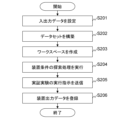
- FIGS 2 and 3 are flowcharts for explaining an example of processing executed by the device condition search support system 100 of the first embodiment.
- the apparatus condition search support system 100 starts the process described below.
- the apparatus condition search support system 100 sets input/output data based on user input via the screen (step S201).
- the apparatus condition search support system 100 builds a learning data set based on the user's input through the screen (step S202).
- the apparatus condition search support system 100 creates a workspace based on user input via the screen (step S203). At this time, the user selects a data set to be used for calculation. Note that the selection of the dataset may be performed at the same time the workspace is created, or may be performed after the workspace is created.
- the apparatus condition search support system 100 executes apparatus condition search processing (step S204). In this process, a plurality of calculations can be set, and each calculation can be executed and the calculation result can be displayed. Details of the device condition search processing will be described with reference to FIG.
- Data sets, calculation settings, and calculation execution states are managed in association with one workspace. This improves the convenience of managing device conditions. Since apparatus conditions strongly depend on data sets and calculation settings, it is extremely important to simplify the management of these changes and calculation results in order to improve user convenience when searching for apparatus conditions. be.
- the apparatus condition search support system 100 transmits a demonstration experiment execution instruction including apparatus conditions to the demonstration experiment system 101 (step S205).
- the demonstration experiment system 101 executes a demonstration experiment based on the device conditions, and transmits the processing results and measurement results to the device condition search support system 100 .
- the apparatus condition search support system 100 When the apparatus condition search support system 100 receives the processing result and the measurement result, it registers them as output data in the data storage unit 130 (step S206), and ends the process.
- the output data is registered in association with the transmitted apparatus conditions (input data).
- New input/output data is registered in the data storage unit 130 through the series of processes described above. By executing the same processing again using new input/output data, it becomes possible to search for new device conditions and to conduct demonstration experiments based on the new device conditions. By repeatedly executing the process shown in FIG. 2, it is possible to greatly improve the accuracy of searching for apparatus conditions that can achieve the user's desired purpose.
- the device condition search support system 100 can improve user convenience by displaying the progress of various processes to the user.
- the apparatus condition search support system 100 performs settings related to preprocessing of data included in the data set based on user input through the screen (step S301), and executes preprocessing based on the settings (step S302). .
- the apparatus condition search support system 100 sets the search model based on the user's input through the screen (step S303), executes the learning process based on the setting, and determines the apparatus conditions using the search model. Search (step S304).
- the search model is, for example, a model that receives input data as input and predicts output data.
- the apparatus condition search support system 100 performs settings related to post-processing to be executed on the search results based on user input via the screen (step S305), executes post-processing based on the settings, and outputs the processing results. display (step S306).
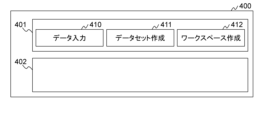
- FIG. 4 is a diagram showing an example of a screen presented by the device condition search support system 100 of the first embodiment.
- the screen 400 includes an operation button display field 401 and an operation field 402.
- the operation button display column 401 is a column for displaying buttons for selecting operations to be performed using the screen.
- the operation button display field 401 includes a data input button 410 , a data set creation button 411 and a workspace creation button 412 .
- the operation field 402 is a field for presenting various types of information and setting various types of information. In the operation column 402, a display corresponding to the operation button is performed.
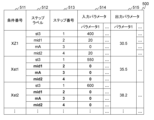
- FIG. 5 is a diagram showing an example of the operation field 402 presented by the device condition search support system 100 of the first embodiment when the data input button 410 is operated.
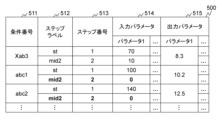
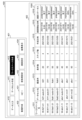
- the input/output data information 500 is table format information, and stores entries including a condition number 511 , a step label 512 , a step number 513 , an input parameter 514 and an output parameter 515 . There is one entry for one condition.
- the input data and output data of each step included in the processing of the sample 160 are managed in association with the condition number.
- the fields included in the entry are not limited to those described above. For example, to improve convenience, it may include fields for storing the name of the registered user, the name of the group to which he belongs, and the date and time of registration.
- the input/output data information 500 is not limited to the table format, and may be in a cell format, a sheet format, an array format, or the like.
- a condition number 511 is a field for storing identification information of conditions.
- a step label 512 is a field that stores a label assigned to a step included in processing the sample 160 .
- a step number 513 is a field that stores the execution order of steps in the processing of the sample 160 .
- Input parameters 514 is a group of fields that store the values of the input parameters. Input parameters 514 include one or more fields.
- Output parameters 515 is a group of fields that store the values of the output parameters. Output parameters 515 include one or more fields.
- the input/output data information 500 displays an entry corresponding to the input/output data.
- the device condition search support system 100 may separately display a screen for input and add an entry to the input/output data information 500 based on the input to the screen.
- the values set in the input parameters 514 are usually numerical values, and the manufacturing apparatus 150 is provided with input restrictions such as upper limit values, lower limit values, or input prohibited ranges. Therefore, the apparatus condition search support system 100 performs an error judgment on the value input by the user according to the input restrictions, and when an inappropriate value is input, the error value or the field in which the value is input is highlighted. Also, it is desirable to display the reason for the error and notify the user.
- the values set for the output parameters are numerical values, and are provided with an upper limit value, a lower limit value, or an input prohibited range according to the sample 160 to be measured.
- the apparatus condition search support system 100 performs an error judgment on the value input by the user according to the prohibited range, and when an inappropriate value is input, the error value or the field in which the value is input is highlighted. Also, it is desirable to display the reason for the error and notify the user.
- the apparatus condition search support system 100 may accept an operation to add or delete fields of the input parameter 514 and the output parameter 515 and an operation to change the name of the field. Also, the number and names of the fields of the input parameters 514 and the output parameters 515 may be set only for the first time.
- the apparatus condition search support system 100 may separately display a part of the condition number 511, the step label 512, the step number 513, the input parameter 514, and the output parameter 515 on the screen.
- condition number 511, step label 512, step number 513, input parameter 514, and output parameter 515 need not be managed as one piece of information.
- the apparatus condition search support system 100 can classify input/output data that can be aggregated into the same data set based on the step label 512, and build a data set based on the classification results.
- input/output data that should be included in the dataset and input/output data that makes learning difficult if included in the dataset.
- the accuracy of the search model tends to decrease. For example, it is possible to increase the number of input parameters to 20 by adding a small amount of data to a data set with 100 data and 10 input parameters.
- the dimension of the parameter space is constant, increasing the number of data is effective in improving the accuracy of the search model.
- the accuracy of the search model may decrease. Therefore, the increase in the number of parameters due to aggregation into datasets should be suppressed as much as possible.
- the increase in the number of parameters should be at least less than the number of data added to the dataset. Also, how much the number of parameters is allowed to increase with respect to the number of additional data is an important point in constructing a data set.
- the apparatus condition search support system 100 of this embodiment visualizes the above trade-off. This allows the user to easily understand the aforementioned trade-off relationship and build a high-quality data set in a short period of time.
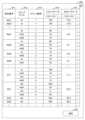
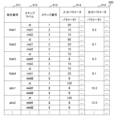
- 6A, 6B, 6C, 6D, and 6E are diagrams showing examples of updating the input/output data information 500 by the device condition search support system 100 of the first embodiment.
- the apparatus condition search support system 100 selects input/output data corresponding to two conditions including a plurality of steps, and determines whether the input/output data can be aggregated based on the following first and second criteria. do. Here, let the selected two conditions be the first condition and the second condition. (First criterion) All step labels of the first condition must be included in the step labels of the second condition. (Second Criterion) The execution order of the step labels in the first condition must be the same in the second condition.
- the device condition search support system 100 determines that the input/output data of the first condition can be aggregated into the input/output data of the second condition. Even if the step label included in the first condition and the step label included in the second condition are the same, the first criterion and the second criterion are satisfied.
- the apparatus condition search support system 100 automatically classifies input/output data and builds a data set according to the following procedure.
- the apparatus condition search support system 100 selects the condition with the largest number of steps from the input/output data information 500 .
- the apparatus condition search support system 100 sets the condition as a parent condition.
- the apparatus condition search support system 100 searches for conditions that satisfy the first and second criteria with respect to the parent conditions, and generates a list of the conditions.
- the apparatus condition search support system 100 selects one condition from the condition list and sets the condition as the parent condition.
- the device condition search support system 100 constructs a data set by aggregating the conditions determined to be aggregatable. At this time, the step structure of the conditions contained in the data set is updated based on the parent conditions. Specifically, the apparatus condition search support system 100 adds steps included in the parent condition to the condition so that the steps have the same configuration as the step configuration of the parent condition. The input parameter 514 and output parameter 515 corresponding to the added step are set to zero. Even if the conditions are updated as described above, the manufacturing apparatus 150 normally does not operate when all the input parameters are zero.
- parameters that are allowed to be blank depending on the specifications of the manufacturing apparatus 150 may be left blank. It should be noted that there are parameters that are difficult to change instantaneously, such as the temperature of a liquid medium or a heater for controlling the temperature of device parts, and that it takes time to reach a specified value. As for the parameter, it may be desirable to input the same value as the value of the step before the inserted step, or input a specific value specified by the user, as the input value of the inserted step. The user sets the parameter so that the same value as in the step preceding the inserted step or a specified value is input.
- condition number "XZ1" is the parent condition
- the conditions with the condition numbers “XZ1", “Xst1”, and “Xst2" are to be aggregated.
- the conditions are updated as shown in FIG. 6A.
- the condition number "XY1” is the parent condition
- the conditions with the condition numbers "XY1", “abc1”, and “abc2" are to be aggregated.
- the conditions are updated as shown in FIG. 6A.
- condition number "Xab1" When the condition number "Xab1" is the parent condition, the conditions with the condition numbers “Xab1”, “Xab2”, “Xab3”, “Xab4", “abc1”, and “abc2" are to be aggregated. When the conditions are aggregated to build the data set, the conditions are updated as shown in FIG. 6C. If the condition number "Xab3” is the parent condition, the conditions with the condition numbers “Xab3", “abc1", and “abc2" are to be aggregated. When conditions are aggregated to build a data set, the conditions are updated as shown in FIG. 6D.
- condition number "Xab4" is the parent condition
- the conditions with the condition numbers "Xab4", "abc1", and “abc2" are to be aggregated.
- condition number "abc1” is set as the parent condition
- the conditions with the condition numbers "abc1” and “abc2” are to be aggregated.
- the conditions are updated as shown in FIG. 6E.
- the input parameter value in the same step is a condition where the value of the input parameter is a value other than zero, and the aggregation inserts the corresponding parameter of the corresponding step (in other words, in the data before aggregation, the parameter of the corresponding step is not included).
- the aggregation inserts the corresponding parameter of the corresponding step (in other words, in the data before aggregation, the parameter of the corresponding step is not included).
- one value other than zero is set to X1
- the reason for this is that the data set in which the value of the corresponding parameter is composed only of X1 and the data set in which the value of the corresponding parameter is X1 and zero, the latter expands the data space of the data set, so it is necessary to search for the solution. This is because the time increases.
- a model for example, a regression model
- learning the input/output relationship of the manufacturing apparatus 150 is usually learned using data with the same parameter structure, so the above step insertion is important.
- it takes time and effort to manually classify conditions with different step structures. is also important for
- the aggregation method described above can also be applied to conditions with different parameters and step structures. For example, if the first condition and the second condition have different step labels and step orders, they can be combined in principle by inserting all the steps of both. However, if the number of parameters for the first condition and the second condition is 10 each, the number of parameters after aggregation increases to 20 at maximum. If the number of parameter increments is larger than the number of increments in the data set resulting from aggregation, it becomes difficult to search for a solution, as described above. Aggregation as described above is therefore undesirable.
- FIG. 7 is a diagram showing an example of a screen presented by the device condition search support system 100 of Example 1 when the data set creation button 411 is operated.
- FIG. 8 is a diagram showing an example of a screen presented by the apparatus condition search support system 100 according to the first embodiment when the manual creation button is operated.
- the data set information 700 is information in a table format, and stores entries including a data set name 711, parent conditions 712, number of conditions 713, number of steps 714, creation date and time 715, and creation method 716. There is one entry for one data set.
- the fields included in the entry are not limited to those described above. For example, it may include fields for storing the number of parameters for each of the input data and output data.
- the parent condition 712 is a field that stores the identification information of the parent condition at the time of classification determination.
- the number of conditions 713 is a field that stores the number of conditions (input/output data) included in the data set.
- the number of steps 714 is a field that stores the number of steps included in the conditions included in the data set.
- the date and time of creation 715 is a field that stores the date and time when the data set was created.
- a creation method 716 is a field that stores the creation method of the data set. Either “automatic” or “manual” is stored in the creation method 716 .
- the device condition search support system 100 may display a list of data that make up the data set. For example, if the entry "XZ2-auto-01" is selected, a screen such as that shown in FIG. 6A is displayed.
- the device condition search support system 100 executes the aforementioned classification processing and data set construction processing.
- data sets with names including "auto" are automatically created data sets.
- the device condition search support system 100 presents the operation field 800 shown in FIG.
- the operation column 800 stores entries including parent condition selection 811 , data selection 812 , condition number 813 , step label 814 , step number 815 , input parameters 816 and output parameters 817 . There is one entry for one condition.
- condition number 813, step label 814, step number 815, input parameter 816, and output parameter 817 are the same fields as the condition number 511, step label 512, step number 513, input parameter 514, and output parameter 515.
- a parent condition selection 811 is a field for selecting a condition corresponding to an entry as a parent condition.
- Data selection 812 is a field for selecting conditions for aggregation.
- the apparatus condition search support system 100 executes the above-described classification processing and highlights conditions that can be aggregated. As shown in FIG. 8, when the condition "Xab1" is selected as the parent condition, the conditions “abc1”, “abc2”, “Xab1”, “Xab2”, “Xab3” and “Xab4" are highlighted. The user refers to the highlighted entry and sets a check in the data selection 812 of the condition to be aggregated.
- the value of the output parameter is always set, but there are cases where the output parameter is not measured.
- conditions for which output parameter values are not set cannot be used as model learning data. Therefore, a model is generated by learning the input-output relationship using the condition that all the values of the input parameters and output parameters exist, and the predicted values of the non-existing output parameters are obtained by inputting the values of the input parameters into the model. get.
- the input/output data in which the values of the output parameters are interpolated can be used as learning data. This makes it possible to increase the number of learning data.
- the apparatus condition search support system 100 makes the predicted value or the cell into which the predicted value is input visible by highlighting, for example, by changing the color of the cell.
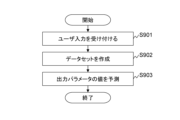
- FIG. 9 is a flowchart illustrating an example of processing executed by the device condition search support system 100 of the first embodiment.
- FIG. 9 describes the details of the construction of the dataset.
- the apparatus condition search support system 100 accepts user input via the screen 400 (step S901).
- the apparatus condition search support system 100 creates a data set based on user input (step S902).
- the device condition search support system 100 automatically classifies the conditions and creates a data set based on the classification results.
- the manual creation button 421 is pressed, the device condition search support system 100 classifies the conditions based on the parent conditions specified by the user and creates a data set based on the conditions selected by the user.
- the apparatus condition search support system 100 predicts the value of the output parameter for the conditions for which the value of the output parameter is not set (step S903).
- the device condition search support system 100 sets the predicted value as an output parameter.
- an operation button for executing the prediction of the value of the output parameter is provided in the operation button display field 401 or the operation field 402.
- the user selects a data set and presses the operation button to execute the process of step S903.
- the data set does not have to be specified. In this case, processing is performed for the entire data set.
- step S903 can be omitted.
- the user may be allowed to select whether or not to include the input/output data including the predicted value in the data set.
- FIG. 10 is a diagram showing an example of a screen presented by the device condition search support system 100 of Example 1 when the workspace creation button 412 is operated.
- the operation button display field 401 newly displays a new creation button 430, a copy button 431, a preprocessing setting button 432, an operation setting button 433, and a result display button 434.
- Workspace information 1000 is displayed in the operation column 402 .
- the workspace information 1000 is tabular information and includes a workspace name 1011, a data set name 1012, a parent condition 1013, the number of conditions 1014, the number of steps 1015, the creation date and time 1016, the operation start date and time 1017, and the operation status 1018. store the entry. There is one entry for one workspace.
- the fields included in the entry are not limited to those described above. For example, it may include fields for storing the number of parameters for each of the input data and output data.
- the data set name 1012, parent condition 1013, number of conditions 1014, number of steps 1015, and creation date/time 1016 are the same fields as the data set name 711, parent condition 712, number of conditions 713, number of steps 714, and creation date/time 715.
- a workspace name 1011 is a field that stores the name of the workspace. The name of the workspace may be set automatically or manually by the user in the field.
- the calculation start date and time 1017 is a field for storing the start date and time of the search process.
- the calculation status 1018 is a field that stores the execution status of calculations in search processing.
- the device condition search support system 100 When the new creation button 430 is pressed, the device condition search support system 100 presents a data set selection screen (not shown), and when receiving a data set selection result from the user, registers an entry in the workspace information 1000. do.
- the device condition search support system 100 adds the entry to the workspace information 1000 and copies the content of the selected entry to the entry. to copy.
- a value different from the selected entry is set in the workspace name 1011 .
- the device condition search support system 100 does not accept the operation of the result display button 434, or controls so that the screen is not displayed even if the result display button 434 is operated.
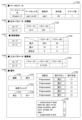
- FIG. 11 is a diagram showing an example of a screen presented by the apparatus condition search support system 100 of the first embodiment when the preprocessing setting button 432 is operated.
- the screen 1100 includes a display field 1101 , setting fields 1102 , 1103 and 1104 and an operation field 1105 .
- a display column 1101 is a column for displaying information on the workspace being used.
- the setting column 1102 is a column for setting the target value of the output parameter. The user sets the target values of the output parameters in the setting table 1120 .
- a setting field 1103 is a field for setting the search range of the input parameter.
- the user sets, in the setting table 1130, the maximum and minimum values of the input parameters and the number of values to be added that do not fall between the maximum and minimum values during search.
- the reason for adding values to the search range is that some input parameters, such as the gas flow rate system, have lower and upper limits that are not equal to zero inflow when fully closed and inflow control. Because there is
- a setting field 1104 is a field for setting input parameters whose values are changed discretely during a search.
- the user sets a discrete change pattern of arbitrary input parameters in the setting table 1132 . This makes it possible to search for values of input parameters that can take only discrete values or that are set only with discrete values.
- the setting fields 1102, 1103, and 1104 include a save button for saving the set contents and a load button for loading the saved contents.
- the operation column 1105 is a column for controlling inputs to the setting columns 1102, 1103, and 1104 and execution of preprocessing.
- the edit button 1150 is a button for validating input to the setting fields 1102, 1103, and 1104.
- the computation execution state is initialized.
- the execution button 1151 is a button for transitioning to the execution phase of calculations related to preprocessing.
- the execution button 1151 is pressed, the input to the setting fields 1102, 1103, and 1104 is controlled not to be accepted.
- the calculation result is managed in association with various settings, and this is to avoid confusing the correspondence with the calculation result when the various settings are changed after execution of the calculation.
- the settings are changed in the middle of the calculations, it may cause errors in the calculations, such as stopping the calculations, so it is necessary to switch between editing the settings and executing the calculations.
- the apparatus condition search support system 100 may check the setting contents of the setting column 1102 and determine whether or not the correct value is set. This makes it possible to avoid the occurrence of errors in advance.
- the calculation table 1155 displays the name of the calculation for preprocessing, the execution button, and the execution state of the calculation.
- each operation is executed in order from the top.
- the execution button for each operation is not activated until the previous operation is completed.
- the run button for "Preprocess2" is enabled after “Preprocess1” is completed. This allows the user to visually grasp the execution state of the calculation, improving convenience.
- a log column 1156 displays a log indicating the execution state or execution result of the operation.
- a result folder button 1152 is a button for referring to a folder in which output data and the like generated by execution of calculation are saved.
- the transition button 1153 is a button for transitioning to the phase before setting the preprocessing. For example, when the transition button 1153 is pressed, the state transitions to the state shown in FIG.
- a transition button 1154 is a button for transitioning to the calculation setting phase. For example, when the transition button 1154 is pressed, the state transitions to the state shown in FIG. However, the transition button 1154 is not activated until all calculations are completed.
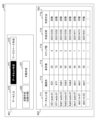
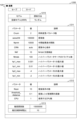
- 12A and 12B are diagrams showing examples of screens presented by the device condition search support system 100 of the first embodiment when the calculation setting button 433 is operated.
- the screen 1200 includes setting fields 1201 and 1202, an operation field 1203, and a display field 1204.
- the setting column 1201 is a column for setting the calculation related to the learning of the search model and the search for the device conditions.
- the user selects the type of model to be used and the method of searching for device conditions using the model in the model selection table 1210 .
- the model selection table 1210 displays available search methods in a selectable format according to the selected model format.
- model format simple regression, support vector regression, regression trees, regression using neural networks, etc. can be selected. Random search, grid search, gradient method, etc. can be selected as the search method.
- the user sets parameter values for controlling the search for device conditions in parameter setting tables 1211 and 1212 .
- the parameter setting table 1211 is a table for setting parameters dependent on the model format and search method
- the parameter setting table 1212 is a table for setting parameters independent of the model format and search method.
- the parameter setting table 1211 and the parameter setting table 1212 display parameters as shown in FIG. 12A.
- Cnum is a parameter that adjusts the number of input parameters that are changed at once during a search.
- searchN is a parameter that adjusts the number of conditions to search.
- Nprint is a parameter that adjusts the display interval of intermediate results. When the same number of search trials as the value set in Nprint have been executed, the device condition search support system 100 displays the processing conditions obtained so far.
- Nkf is a parameter that adjusts the number of data divisions in cross-validation.
- the search cost table 1213 displays the recommended number of searches and the estimated calculation time. Note that the recommended calculation time may be displayed. Note that the number of searches and the calculation time are calculated based on the settings in the model selection table 1210 and parameter setting tables 1211 and 1212 .
- a setting field 1202 is a field for setting hyperparameters.
- the device condition search support system 100 searches for hyperparameters and displays the search results in the hyperparameter table 1221 .
- the operation column 1203 is a column for controlling input to the setting columns 1201, 1202, and 1104, learning of the search model, and searching for device conditions.
- An edit button 1230 is a button for validating input to the setting fields 1201 and 1202 . Also, when the edit button 1230 is pressed, the computation execution state is initialized.
- the execution button 1231 is a button for transitioning to the calculation execution phase. When the execution button 1231 is pressed, control is performed so as not to accept input to the setting fields 1201 and 1202 .
- the calculation table 1235 and log column 1236 are columns similar to the calculation table 1155 and log column 1156 .
- a result folder button 1232 is a button for referring to a folder in which output data and the like generated by execution of calculation are saved.
- the transition button 1233 is a button for transitioning to the phase before setting the calculation. For example, when the transition button 1233 is pressed, the state transitions to the state shown in FIG.
- a transition button 1234 is a button for transitioning to the result reference phase. For example, when the transition button 1234 is pressed, the result is displayed in the display column 1204 . However, the transition button 1234 is not activated until all operations are completed.
- a display column 1204 is a column for displaying device conditions obtained by calculation.
- a display field 1204 displays a plurality of device conditions.
- the apparatus condition search support system 100 of the first embodiment can support various inputs for searching for apparatus conditions of manufacturing apparatuses.
- it is characterized by supporting the construction of learning data sets, which can reduce the time and labor required for optimizing the device conditions and improve efficiency.
- the device condition search support system 100 supports various inputs, it can be used by engineers who do not have specialized knowledge.
- the second embodiment differs from the first embodiment in that the device condition search support system 100 is used by a plurality of users.
- a plurality of user terminals 102 may be connected to the device condition search support system 100 via different networks. For example, they may be connected via the Internet or via an intranet.
- a firewall and an authentication server are installed between the user terminal 102 and the device condition search support system 100 to perform user authentication and access control.
- the user operates the user terminal 102 to access the device condition search support system 100, input input data and output data, create a data set, create a workspace, make calculation settings, and acquire device conditions. can be done. Also, the user can transmit the device conditions to the demonstration experiment system 101 and obtain the demonstration experiment results. In addition, the user can register the verification test results together with the device conditions in the device condition search support system 100 . By registering the results of the demonstration experiment as new learning data, it is possible to improve the search accuracy of the device conditions.
- the present invention is not limited to the above-described embodiments, and includes various modifications. Further, for example, the above-described embodiments are detailed descriptions of the configurations for easy understanding of the present invention, and are not necessarily limited to those having all the described configurations. Moreover, it is possible to add, delete, or replace a part of the configuration of each embodiment with another configuration.
- each of the above configurations, functions, processing units, processing means, etc. may be realized in hardware, for example, by designing a part or all of them with an integrated circuit.
- the present invention can also be implemented by software program code that implements the functions of the embodiments.
- a computer is provided with a storage medium recording the program code, and a processor included in the computer reads the program code stored in the storage medium.
- the program code itself read from the storage medium implements the functions of the above-described embodiments, and the program code itself and the storage medium storing it constitute the present invention.
- Examples of storage media for supplying such program code include flexible disks, CD-ROMs, DVD-ROMs, hard disks, SSDs (Solid State Drives), optical disks, magneto-optical disks, CD-Rs, magnetic tapes, A nonvolatile memory card, ROM, or the like is used.
- program code that implements the functions described in this embodiment can be implemented in a wide range of programs or script languages, such as assembler, C/C++, perl, Shell, PHP, Python, and Java.
- the program code of the software that implements the functions of the embodiment can be stored in storage means such as a hard disk or memory of a computer, or in a storage medium such as a CD-RW or CD-R.
- a processor provided in the computer may read and execute the program code stored in the storage means or the storage medium.
- control lines and information lines indicate those that are considered necessary for explanation, and not all the control lines and information lines are necessarily indicated on the product. All configurations may be interconnected.
Landscapes
- Engineering & Computer Science (AREA)
- Artificial Intelligence (AREA)
- Software Systems (AREA)
- General Physics & Mathematics (AREA)
- Physics & Mathematics (AREA)
- Theoretical Computer Science (AREA)
- Evolutionary Computation (AREA)
- Medical Informatics (AREA)
- Computer Vision & Pattern Recognition (AREA)
- Automation & Control Theory (AREA)
- Health & Medical Sciences (AREA)
- Computing Systems (AREA)
- General Engineering & Computer Science (AREA)
- Mathematical Physics (AREA)
- Data Mining & Analysis (AREA)
- Management, Administration, Business Operations System, And Electronic Commerce (AREA)
Priority Applications (2)
| Application Number | Priority Date | Filing Date | Title |
|---|---|---|---|
| US18/684,866 US20240353803A1 (en) | 2021-11-04 | 2022-08-12 | Computer system and apparatus condition search support method |
| KR1020247005847A KR20240038754A (ko) | 2021-11-04 | 2022-08-12 | 계산기 시스템 및 장치 조건의 탐색 지원 방법 |
Applications Claiming Priority (2)
| Application Number | Priority Date | Filing Date | Title |
|---|---|---|---|
| JP2021180254A JP7687935B2 (ja) | 2021-11-04 | 2021-11-04 | 計算機システム及び装置条件の探索支援方法 |
| JP2021-180254 | 2021-11-04 |
Publications (1)
| Publication Number | Publication Date |
|---|---|
| WO2023079810A1 true WO2023079810A1 (ja) | 2023-05-11 |
Family
ID=86241198
Family Applications (1)
| Application Number | Title | Priority Date | Filing Date |
|---|---|---|---|
| PCT/JP2022/030799 Ceased WO2023079810A1 (ja) | 2021-11-04 | 2022-08-12 | 計算機システム及び装置条件の探索支援方法 |
Country Status (4)
| Country | Link |
|---|---|
| US (1) | US20240353803A1 (enExample) |
| JP (1) | JP7687935B2 (enExample) |
| KR (1) | KR20240038754A (enExample) |
| WO (1) | WO2023079810A1 (enExample) |
Families Citing this family (1)
| Publication number | Priority date | Publication date | Assignee | Title |
|---|---|---|---|---|
| JP2026079313A (ja) * | 2024-10-30 | 2026-05-15 | 東京エレクトロン株式会社 | プロセス結果予測方法、情報処理装置及びプログラム |
Citations (5)
| Publication number | Priority date | Publication date | Assignee | Title |
|---|---|---|---|---|
| JPH05282270A (ja) * | 1992-03-31 | 1993-10-29 | Hitachi Ltd | ニューラルネットの構成方法及び装置 |
| JP2016162257A (ja) * | 2015-03-03 | 2016-09-05 | 富士ゼロックス株式会社 | 情報処理装置及び情報処理プログラム |
| JP2017107302A (ja) * | 2015-12-07 | 2017-06-15 | 株式会社Ubic | データ分析システム、その制御方法、プログラム、および、記録媒体 |
| JP2019040984A (ja) * | 2017-08-24 | 2019-03-14 | 株式会社日立製作所 | 探索装置及び探索方法 |
| JP2019049975A (ja) * | 2017-09-07 | 2019-03-28 | 富士通株式会社 | ディープラーニング分類モデルの訓練装置及び方法 |
Family Cites Families (3)
| Publication number | Priority date | Publication date | Assignee | Title |
|---|---|---|---|---|
| JP2003050871A (ja) | 2001-08-07 | 2003-02-21 | Hitachi Ltd | 試料の処理条件のシミュレーション方法及びシミュレーションシステム |
| US20220292350A1 (en) * | 2021-03-15 | 2022-09-15 | Toyota Jidosha Kabushiki Kaisha | Model updating apparatus, model updating method, and model updating program |
| US20230028059A1 (en) * | 2021-07-22 | 2023-01-26 | Cilag Gmbh International | Multi-level surgical data analysis system |
-
2021
- 2021-11-04 JP JP2021180254A patent/JP7687935B2/ja active Active
-
2022
- 2022-08-12 US US18/684,866 patent/US20240353803A1/en active Pending
- 2022-08-12 KR KR1020247005847A patent/KR20240038754A/ko active Pending
- 2022-08-12 WO PCT/JP2022/030799 patent/WO2023079810A1/ja not_active Ceased
Patent Citations (5)
| Publication number | Priority date | Publication date | Assignee | Title |
|---|---|---|---|---|
| JPH05282270A (ja) * | 1992-03-31 | 1993-10-29 | Hitachi Ltd | ニューラルネットの構成方法及び装置 |
| JP2016162257A (ja) * | 2015-03-03 | 2016-09-05 | 富士ゼロックス株式会社 | 情報処理装置及び情報処理プログラム |
| JP2017107302A (ja) * | 2015-12-07 | 2017-06-15 | 株式会社Ubic | データ分析システム、その制御方法、プログラム、および、記録媒体 |
| JP2019040984A (ja) * | 2017-08-24 | 2019-03-14 | 株式会社日立製作所 | 探索装置及び探索方法 |
| JP2019049975A (ja) * | 2017-09-07 | 2019-03-28 | 富士通株式会社 | ディープラーニング分類モデルの訓練装置及び方法 |
Also Published As
| Publication number | Publication date |
|---|---|
| JP7687935B2 (ja) | 2025-06-03 |
| US20240353803A1 (en) | 2024-10-24 |
| JP2023068859A (ja) | 2023-05-18 |
| KR20240038754A (ko) | 2024-03-25 |
Similar Documents
| Publication | Publication Date | Title |
|---|---|---|
| US20240256903A1 (en) | Systems and methods for using machine learning as a segmentation tool | |
| US11922143B1 (en) | Systems and methods for providing a user interface that facilitates application development | |
| Yang et al. | Reinforcement learning for adaptive optimal control of unknown continuous-time nonlinear systems with input constraints | |
| Van Rijn et al. | Fast algorithm selection using learning curves | |
| US20160232457A1 (en) | User Interface for Unified Data Science Platform Including Management of Models, Experiments, Data Sets, Projects, Actions and Features | |
| Menezes et al. | Symbolic regression of generative network models | |
| US20200097725A1 (en) | Automatic generation of user interfaces using image recognition | |
| Tkachenko | An integral software solution of the SGTM neural-like structures implementation for solving different Data Mining tasks | |
| WO2021123287A1 (en) | Federated computational analysis over distributed data | |
| JPWO2014054230A1 (ja) | 情報システム構築装置、情報システム構築方法および情報システム構築プログラム | |
| JP7687935B2 (ja) | 計算機システム及び装置条件の探索支援方法 | |
| JP2024137513A (ja) | 学習モデル生成装置、学習モデル生成方法および学習モデル生成プログラム | |
| Saini et al. | Optimistic NAUTILUS navigator for multiobjective optimization with costly function evaluations | |
| US12347088B2 (en) | Data processing system | |
| CN118860380A (zh) | 一种用于软件开发的智能辅助方法及系统 | |
| Blockeel | Declarative data analysis | |
| Trubiani et al. | VisArch: visualisation of performance-based architectural refactorings | |
| Wang | MM for penalized estimation | |
| Hale et al. | Revisiting the application of simultaneous perturbation stochastic approximation towards signal timing optimization | |
| JP2024159229A (ja) | データ解析システム、データ解析装置およびデータ解析方法 | |
| Pereira | A collaborative-based recommender system for configuration of extended product lines | |
| JP7765257B2 (ja) | 画像処理装置およびその制御方法、プログラム | |
| JP7758046B2 (ja) | 細胞画像解析システム | |
| US20240256989A1 (en) | Combined Learner Forming Apparatus, Combined Learner Forming Program, and Non-Transitory Recording Medium Storing Combined Lerner Forming Program | |
| EP4535364A1 (en) | Scientific experiment method creation |
Legal Events
| Date | Code | Title | Description |
|---|---|---|---|
| 121 | Ep: the epo has been informed by wipo that ep was designated in this application |
Ref document number: 22889635 Country of ref document: EP Kind code of ref document: A1 |
|
| WWE | Wipo information: entry into national phase |
Ref document number: 18684866 Country of ref document: US |
|
| ENP | Entry into the national phase |
Ref document number: 20247005847 Country of ref document: KR Kind code of ref document: A |
|
| WWE | Wipo information: entry into national phase |
Ref document number: 1020247005847 Country of ref document: KR |
|
| NENP | Non-entry into the national phase |
Ref country code: DE |
|
| 122 | Ep: pct application non-entry in european phase |
Ref document number: 22889635 Country of ref document: EP Kind code of ref document: A1 |