WO2021124451A1 - 情報処理装置、情報処理方法、及びプログラム - Google Patents
情報処理装置、情報処理方法、及びプログラム Download PDFInfo
- Publication number
- WO2021124451A1 WO2021124451A1 PCT/JP2019/049424 JP2019049424W WO2021124451A1 WO 2021124451 A1 WO2021124451 A1 WO 2021124451A1 JP 2019049424 W JP2019049424 W JP 2019049424W WO 2021124451 A1 WO2021124451 A1 WO 2021124451A1
- Authority
- WO
- WIPO (PCT)
- Prior art keywords
- state
- moving image
- display element
- target
- transition
- Prior art date
- Legal status (The legal status is an assumption and is not a legal conclusion. Google has not performed a legal analysis and makes no representation as to the accuracy of the status listed.)
- Ceased
Links
Images




Classifications
-
- G—PHYSICS
- G06—COMPUTING OR CALCULATING; COUNTING
- G06T—IMAGE DATA PROCESSING OR GENERATION, IN GENERAL
- G06T13/00—Animation
- G06T13/80—Two-dimensional [2D] animation, e.g. using sprites
-
- G—PHYSICS
- G06—COMPUTING OR CALCULATING; COUNTING
- G06F—ELECTRIC DIGITAL DATA PROCESSING
- G06F3/00—Input arrangements for transferring data to be processed into a form capable of being handled by the computer; Output arrangements for transferring data from processing unit to output unit, e.g. interface arrangements
- G06F3/01—Input arrangements or combined input and output arrangements for interaction between user and computer
- G06F3/048—Interaction techniques based on graphical user interfaces [GUI]
- G06F3/0481—Interaction techniques based on graphical user interfaces [GUI] based on specific properties of the displayed interaction object or a metaphor-based environment, e.g. interaction with desktop elements like windows or icons, or assisted by a cursor's changing behaviour or appearance
-
- G—PHYSICS
- G06—COMPUTING OR CALCULATING; COUNTING
- G06F—ELECTRIC DIGITAL DATA PROCESSING
- G06F3/00—Input arrangements for transferring data to be processed into a form capable of being handled by the computer; Output arrangements for transferring data from processing unit to output unit, e.g. interface arrangements
- G06F3/01—Input arrangements or combined input and output arrangements for interaction between user and computer
- G06F3/048—Interaction techniques based on graphical user interfaces [GUI]
- G06F3/0484—Interaction techniques based on graphical user interfaces [GUI] for the control of specific functions or operations, e.g. selecting or manipulating an object, an image or a displayed text element, setting a parameter value or selecting a range
-
- G—PHYSICS
- G06—COMPUTING OR CALCULATING; COUNTING
- G06T—IMAGE DATA PROCESSING OR GENERATION, IN GENERAL
- G06T2200/00—Indexing scheme for image data processing or generation, in general
- G06T2200/24—Indexing scheme for image data processing or generation, in general involving graphical user interfaces [GUIs]
Definitions
- the present invention relates to an information processing device, an information processing method, and a program for displaying a moving image showing a transition of display elements.
- the information processing device may shift various display elements displayed on the screen from the currently displayed state (initial state) to another state (target state) according to the user's instruction. For example, moving a window displayed in a part of the screen to another location, or when one of multiple images is selected by the user, the selected image may be magnified. Control is in place. In such a case, in order to clarify to the user what kind of transition has been performed, instead of deleting the display element in the initial state and suddenly displaying the target state after the transition, the initial state is changed to the target state. A moving image (animation) showing the process of gradual transition of display elements may be displayed.
- the user can intuitively grasp that the display element has transitioned from the initial state to the target state, but on the other hand, when the entire process of gradually transitioning the state is displayed, It gives the user the impression that it takes time for the target state to be displayed, and the user may feel that the response to the operation is low.
- the present invention has been made in consideration of the above circumstances, and one of the purposes thereof is to make a transition while not impairing the user's operability when the display element on the screen is transitioned to another state.
- the purpose is to provide an information processing device, an information processing method, and a program capable of presenting to the user in an easy-to-understand manner that the above has been performed.
- the information processing device is an information processing device that transitions a display element displayed on the screen of the display device from an initial state to a target state, and is a display element of the display element according to a user operation.
- a display element control unit that determines a target state after a transition, and a transition video display unit that displays a transition video indicating a process in which the display element changes from the initial state to the determined target state are included.
- the transition moving image includes a process of change from the initial state to the first intermediate state and a process of change from the second intermediate state to the target state, and from the first intermediate state to the second intermediate state. It is characterized by being a moving image that does not include the process of change.
- the information processing method is an information processing method for transitioning a display element displayed on the screen of a display device from an initial state to a target state, and the information processing method of the display element is changed according to a user operation.
- the transition moving image includes a step of determining a target state after the transition and a step of displaying a transition moving image showing a process in which the display element changes from the initial state to the determined target state.
- the program according to one aspect of the present invention is a program for transitioning the display element displayed on the screen of the display device from the initial state to the target state, and after the transition of the display element according to the user's operation.
- a computer is made to execute a step of determining the target state of the above and a step of displaying a transition moving image showing a process in which the display element changes from the initial state to the determined target state. It includes the process of change from the initial state to the first intermediate state and the process of change from the second intermediate state to the target state, and does not include the process of change from the first intermediate state to the second intermediate state. It is characterized by being a moving image.
- the program may be provided stored in a computer-readable, non-temporary information storage medium.
- FIG. 1 is a configuration block diagram showing a configuration of an information processing device 1 according to an embodiment of the present invention.
- the information processing device 1 is, for example, a home-use game machine, a portable game machine, a personal computer, a smartphone, a tablet, or the like.
- the information processing device 1 includes a control unit 11, a storage unit 12, and an interface unit 13. , Is included. Further, the information processing device 1 is connected to the display device 14 and the operation device 15.
- the control unit 11 includes at least one processor such as a CPU, executes a program stored in the storage unit 12, and executes various information processing. A specific example of the processing executed by the control unit 11 in this embodiment will be described later.
- the storage unit 12 includes at least one memory device such as a RAM, and stores a program executed by the control unit 11 and data processed by the program.
- the interface unit 13 is an interface for data communication between the display device 14 and the operation device 15.
- the information processing device 1 is connected to each of the display device 14 and the operation device 15 by wire or wirelessly via the interface unit 13.
- the interface unit 13 includes a multimedia interface such as HDMI (registered trademark) (High-Definition Multimedia Interface) in order to transmit the video data supplied by the information processing device 1 to the display device 14.
- a data communication interface such as USB (Universal Serial Bus) is included in order to receive a signal indicating the operation content performed by the user to the operation device 15.
- the display device 14 is a liquid crystal display, an organic EL display, or the like, and displays an image corresponding to a video signal supplied from the information processing device 1 on the screen.
- the operation device 15 is, for example, a keyboard, a mouse, a controller of a home-use game machine, or the like, and receives operation input from a user.
- the display device 14 and the operation device 15 may both be built in the housing of the information processing device 1, or may be separate devices connected to the information processing device 1 by wire or wirelessly.
- the operation device 15 may include a push button or a touch panel arranged on the surface of the housing of the information processing device 1.
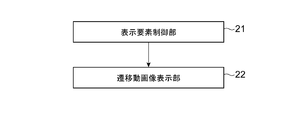
- the information processing apparatus 1 is functionally configured to include a display element control unit 21 and a transition moving image display unit 22. These functions are realized by the control unit 11 operating according to the program stored in the storage unit 12.
- This program may be provided to the information processing apparatus 1 via a communication network such as the Internet, or may be stored and provided in a computer-readable information storage medium such as an optical disk.
- the display element control unit 21 generates a screen including one or a plurality of display elements and displays it in the display area of the display device 14.
- the display element displayed by the display element control unit 21 includes the target display element E which is the target of the transition control described later.
- the target display element E is assumed to be a display element to be operated by the user. That is, when the user inputs a predetermined operation to the operation device 15, the display element control unit 21 shifts the display state of the target display element E from one state to another.
- the transition of the display element in the present embodiment means that the state of the display element in the screen changes, and the display element moves (changes in position), enlarges / reduces (changes in size), and deforms in the screen. It shall include at least one of (change in shape).
- the target display element E may perform a transition in which these changes are combined.
- the display element control unit 21 may perform a transition that simultaneously changes the position and size of the target display element E in response to an instruction from the user.
- the display element control unit 21 When the display element control unit 21 receives an instruction from the user to transition the state of the target display element E while the target display element E is displayed on the screen, the display element control unit 21 changes the state of the target display element E after the transition. decide.
- the state of the target display element E before the transition is referred to as an initial state
- the state after the transition is referred to as a target state.
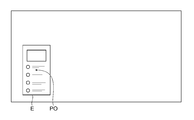
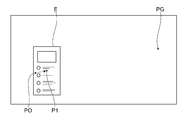
- FIG. 3 and 4 are diagrams showing an example of the initial state and the target state of the target display element E, where FIG. 3 shows the initial state and FIG. 4 shows the target state, respectively.
- the target display element E is a sub-window containing information to be presented to the user, and the target display element E is arranged at a position PO near the lower left of the screen in the initial state.
- the display element control unit 21 determines the changed arrangement position of the target display element E as the target state.
- the target display element E after the transition is displayed at the position PG near the upper right of the screen.
- the display element control unit 21 determines the target state of the target display element E, the display element control unit 21 requests the transition video display unit 22 to display a moving image showing the process of transition from the initial state to the target state.
- the transition moving image display unit 22 In response to a request from the display element control unit 21, the transition moving image display unit 22 generates a moving image showing the process in which the target display element E transitions from the initial state to the target state, and displays the moving image on the display device 14.
- the moving image showing this transition process is referred to as a transition moving image.
- the transition moving image in the present embodiment is a moving image showing the process of change of the target display element E immediately after the start of the transition and the process of change of the target display element E immediately before the end of the transition, and the intermediate process is omitted. It is a moving image. That is, the transition moving image is a moving image showing only a part of the early stage and a part of the final stage of the whole process of the change from the initial state to the target state.
- the first intermediate state is a state in which the target display element E is displayed at a position P1 closer to the position PO in the initial state than the position PG in the target state
- the second intermediate state is from the position PO in the initial state. Is also a state in which the target display element E is displayed at the position P2 near the position PG in the target state.
- the broken line arrows indicate the locus of movement of the target display element E during the display of the transition moving image. That is, the first moving image is a moving image showing the process of the target display element E moving from the position PO in the initial state to the position P1 in the first intermediate state, and the broken line arrow in FIG. 5 indicates the display of the first moving image. The locus of movement of the target display element E in the inside is shown. Similarly, the second moving image is a moving image showing the process of the target display element E moving from the position P2 in the second intermediate state to the position PG in the target state, and the dashed arrow in FIG. 6 is the moving image of the second moving image. The locus of movement of the target display element E during display is shown.
- the transition moving image in this example is a moving image showing the process in which the target display element E moves from the position PO to the position P1 and then from the position P2 to the position PG.
- the position P1 in the first intermediate state and the position P2 in the second intermediate state are arranged on a line segment connecting the position PO in the initial state and the position PG in the target state. Therefore, the moving direction of the first moving image from the position PO in the initial state to the position P1 in the first intermediate state and the moving direction from the position P2 in the second intermediate state to the position PG in the target state coincide with each other. It becomes.
- the user can use the first moving image even though the process of moving from position P1 to position P2 is omitted. It is possible to recognize that the second moving image and the second moving image show continuous changes, and it is possible to grasp that the target display element E has transitioned from the initial state to the target state without discomfort.
- the first moving image and the second moving image do not have to be moving images at the same time.
- the second moving image is more eye-catching than the first moving image. Therefore, for example, by making the moving speed of the target display element E in the second moving image (that is, the speed of change of the target display element E) slower than the moving speed in the first moving image, the second moving image is displayed.
- the time to be displayed may be longer than the time when the first moving image is displayed.
- the moving speed of the target display element E in each of the first moving image and the second moving image does not have to be constant. For example, in the first moving image, the target display element E gradually accelerates and in the second moving image. Then, the target display element E may be controlled so as to gradually decelerate.
- the transition moving image display unit 22 makes the moving distance of the target display element E in the second moving image (that is, the amount of change of the target display element E) longer than the moving distance in the first moving image.
- the display time of the second moving image may be lengthened. This can be achieved by making the distance between the position P2 and the position PG longer than the distance between the position PO and the position P1.
- the transition moving image display unit 22 may display the preliminary moving image at the start of displaying the transition moving image prior to the display of the first moving image.
- This preliminary moving image is a moving image in which the target display element E is slightly changed in the direction opposite to the change from the initial state to the target state.
- a preliminary moving image may be displayed in which the target display element E is once moved away from the position PG in the target state, starting from the position PO in the initial state.
- the transition moving image display unit 22 starts from the position at the time when the display of the preliminary moving image is finished (the position opposite to the position PG in the target state with respect to the position PO in the initial state), and the position PG in the target state.
- a first moving image showing the process of moving the target display element E in the direction approaching is displayed.
- a second moving image similar to the above-described example is displayed. That is, the transition moving image in this example is a moving image including the preliminary moving image, the first moving image, and the second moving image in this order. As a result, the transition of the target display element E can be further emphasized.
- FIG. 7 is a diagram illustrating a change in the position of the target display element E during the transition moving image display when displaying such a preliminary moving image.
- the vertical axis indicates the position of the target display element E with the position PO in the initial state as the origin.
- the horizontal axis is a moving image that causes the target display element E to transition from the initial state to the target state without omitting the movement of the target display element E from the first intermediate state to the second intermediate state as described above. It shows the time change when it is assumed that is displayed.
- the slope of the solid line in this figure indicates the moving speed of the target display element E.
- the target display element E when the target display element E is transitioned from the initial state to the target state, the target display element E is gradually moved in the direction away from the position PG of the target state (negative direction on the vertical axis), and then gradually.
- the target display element E is moved toward the position PG while accelerating to. After that, when the moving speed reaches the maximum speed, the target display element E continues to move toward the position PG at a substantially constant speed. Finally, the target display element E reaches the position PG while gradually decelerating. This shows the natural change in velocity when the object moves with recoil.
- the transition moving image display unit 22 omits the display of the moving image of the portion indicated by the broken line in the figure.
- the position P1 in the first intermediate state is preferably the timing at which the moving speed of the target display element E reaches the maximum speed, or the timing immediately before that.
- the speed is increased, the movement of the object is generally not captured by the human eye. Therefore, the movement of the target display element E is not displayed in the accelerated state in this way, so that the movement of the target display element E is changed. Even if the process is omitted, the user will not feel any discomfort. In this case, the moving speed of the target display element E will continue to gradually accelerate while the first moving image is being displayed.
- the position P2 in the second intermediate state is preferably the timing at which deceleration is started or the timing after that.
- the moving speed of the target display element E will continue to gradually decrease while the second moving image is being displayed.
- the target display element E reaches the position PG in the target state, it is not necessary to display the movement opposite to the preliminary movement image in which the target display element E finally moves in the opposite direction and stops, unlike the movement start time.
- the transition moving image display unit 22 may provide an interval state in which the target display element E is not displayed for a given time, and may start displaying the second moving image after the time of this interval state has elapsed.
- the time of the interval state in this case should not exceed the time T of the portion shown by the broken line in FIG. 7. That is, the time required for the interval state is shorter than the time required when it is assumed that the target display element E is moved to the second intermediate state at a constant speed while maintaining the moving speed at the timing of reaching the first intermediate state. Is preferable. As a result, it is possible to give the user the impression that the target display element E is rapidly transitioning.
- the transition moving image display unit 22 displays the target with the same content from the beginning to the end when displaying the transition moving image.
- the content of the target display element E may also change with the transition of the state. For example, when the user performs an operation of instructing the display of new information, it is necessary to change the display position of the target display element E and change the display content so that the target display element E includes the new information. In this case, the content of the target display element E differs between the initial state and the target state.
- the transition moving image display unit 22 decides to display the target display element E with the same display content as the initial state in the first moving image, and displays the target display element E with the same display content as the target state in the second moving image. It may be displayed. That is, the transition moving image display unit 22 newly draws the content of the target display element E to be displayed after the state transition at the timing when the display of the second moving image is started, and the newly drawn target display element E is the target. A second moving image showing how to move to the position PG of the state is displayed. In this case, the display content is switched at the timing when the target display element E moves (discontinuously) from the first intermediate state to the second intermediate state, so that the user does not feel a sense of discomfort.
- the drawing of the target display element E before the start of the transition and during the display of the first moving image, and the drawing of the target display element E after the completion of the transition and during the display of the second moving image May be realized by different programs.
- the target display element E is drawn by the system program before the start of the transition and during the display of the first moving image, and the target display element E is drawn by the game program after the transition is completed and during the display of the second moving image. You may.
- the transition moving image display unit 22 displays the first moving image
- the position of the target display element E is gradually changed, and the transparency of the target display element E itself is gradually increased or the brightness is gradually decreased.
- Image processing may be performed to gradually make the target display element E inconspicuous.
- the target display element E is finally finalized, contrary to the first moving image, such as gradually lowering the transparency from the high transparency state and gradually increasing the brightness from the low brightness state.
- Image processing may be performed to gradually make the image stand out until it is displayed as usual. According to such control, the discontinuous change from the first intermediate state to the second intermediate state can be made inconspicuous, and the user can be made less likely to feel a sense of discomfort.
- transition moving image display unit 22 is not limited to this, and is similarly intermediate when causing other types of changes. It is possible to display a transitional moving image in which the process of is omitted.
- a transition for expanding the target display element E is performed will be described with reference to FIGS. 8 to 11.
- FIG. 8 shows a display example of the target display element E in the initial state.
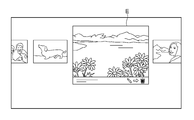
- a plurality of thumbnail images are displayed side by side as display elements, and when the user selects one of them, the selected thumbnail image is set as the target display element E.
- FIG. 9 shows a display example of the target display element E in the target state.
- the target display element E in the target state is added with detailed information about the selected image, operation buttons, etc., and the display content is different from the target display element E (thumbnail image) in the initial state. It is assumed that you are doing.
- the target display element E since the target display element E is displayed in the center of the screen in the target state, not only the size of the target display element E but also the position in the screen changes with the transition of the state. Will be there.
- the transition moving image display unit 22 expands the target display element E from the initial state to the first intermediate state. Is displayed, and then the second moving image that enlarges the target display element E from the second intermediate state to the target state is displayed. Finally, the display transitions to the display of the target state shown in FIG.
- the first intermediate state is a state in which the target display element E is displayed in a size larger than the initial state and smaller than the second intermediate state
- the second intermediate state is larger than the first intermediate state and the target. This is a state in which the target display element E is displayed in a size smaller than the state.
- FIG. 10 shows a display example in the first intermediate state
- FIG. 11 shows a display example in the second intermediate state
- the target display element E in the first intermediate state in FIG. 10 has the same display contents as the initial state shown in FIG. 7, and the target display element E in the second intermediate state in FIG. 11 has the same display contents.
- the display content is the same as the target state shown in FIG. That is, the display content of the target display element E is changed at the timing of switching from the first intermediate state to the second intermediate state.
- the user by omitting the display of the state between the first intermediate state and the second intermediate state, the user is given the impression that the state transition is quickly performed according to the user's operation. be able to.
- the state in which the target display element E starts to expand from the initial state is displayed as the first moving image, and then the state in which the target display element E expands and the target state is displayed is displayed as the second moving image.
- the amount of change in the second moving image may be larger than the amount of change in the first moving image, as in the example of the transition moving image in which the target display element E is moved.
- the rate of change in the moving image may be slower than the rate of change in the first moving image.
- a preliminary moving image showing how the target display element E is slightly reduced from the initial state may be included in the transition moving image.
- the transition moving image display unit 22 may display the same transition moving image as described above even when the target display element E that has not been displayed up to that point is newly displayed on the screen.
- the target display element E is not displayed in the initial state
- the transition moving image display unit 22 is the first moving image in which the target display element E expands from the size 0 to the first intermediate state.
- the transition moving image including the second moving image in which the target display element E expands from the second intermediate state to the final target state is displayed. This makes it possible to present the newly displayed window to the user in an easy-to-understand manner, for example, when the window is popped up or displayed in response to the user's operation.
- the transition moving image display unit 22 starts from the initial state in which a part of the target display element E is displayed on the screen but not the whole, and transitions to the target state in which the whole is displayed on the screen.
- a transitional moving image may be displayed.
- the transition moving image display unit 22 does not always have to display the transition moving image in which the intermediate change process as described above is omitted. For example, when the degree of change due to the state transition is small (such as when the moving distance is small), the transition moving image including the entire process of change from the initial state to the target state may be displayed without omitting the intermediate process. ..
- the information processing device 1 According to the information processing device 1 according to the present embodiment, it is possible to present the state transition according to the user's operation to the user in an easy-to-understand manner and with high responsiveness.
- the embodiments of the present invention are not limited to those described above.
- the state transition of the target display element E in the above description is only an example, and the information processing apparatus 1 according to the embodiment of the present invention has a transition moving image as described above for various state transitions of the target display element E. May be displayed.
- 1 information processing device 11 control unit, 12 storage unit, 13 interface unit, 14 display device, 15 operation device, 21 display element control unit, 22 transition video display unit.
Landscapes
- Engineering & Computer Science (AREA)
- Theoretical Computer Science (AREA)
- Physics & Mathematics (AREA)
- General Physics & Mathematics (AREA)
- General Engineering & Computer Science (AREA)
- Human Computer Interaction (AREA)
- User Interface Of Digital Computer (AREA)
- Controls And Circuits For Display Device (AREA)
Abstract
Description
Claims (9)
- 表示装置の画面内に表示される表示要素を初期状態から目標状態に遷移させる情報処理装置であって、
ユーザーの操作に応じて、前記表示要素の遷移後の目標状態を決定する表示要素制御部と、
前記表示要素が前記初期状態から前記決定された目標状態に変化する過程を示す遷移動画像を表示する遷移動画像表示部と、
を含み、
前記遷移動画像は、前記初期状態から第1中間状態までの変化の過程と第2中間状態から前記目標状態までの変化の過程とを含み、前記第1中間状態から前記第2中間状態までの変化の過程を含まない動画像である
ことを特徴とする情報処理装置。 - 請求項1に記載の情報処理装置において、
前記遷移動画像は、第2中間状態から前記目標状態までの変化の速度が、前記初期状態から第1中間状態までの変化の速度よりも遅い動画像である
ことを特徴とする情報処理装置。 - 請求項1又は2に記載の情報処理装置において、
前記遷移動画像は、第2中間状態から前記目標状態までの変化の量が、前記初期状態から第1中間状態までの変化の量よりも大きい動画像である
ことを特徴とする情報処理装置。 - 請求項1から3のいずれか一項に記載の情報処理装置において、
前記目標状態における前記表示要素の表示内容は前記初期状態における表示内容と異なり、
前記遷移動画像は、前記初期状態の表示内容で前記初期状態から前記第1中間状態までの変化の過程を示し、前記目標状態の表示内容で前記第2中間状態から前記目標状態までの変化の過程を示す動画像である
ことを特徴とする情報処理装置。 - 請求項1から4のいずれか一項に記載の情報処理装置において、
前記遷移動画像は、前記初期状態から前記第1中間状態までの変化の過程に先立って、前記初期状態から開始して、前記初期状態から前記目標状態に向かう変化と逆向きに変化する過程を含む
ことを特徴とする情報処理装置。 - 請求項1から5のいずれか一項に記載の情報処理装置において、
前記目標状態は前記初期状態と異なる位置に前記表示要素が配置される状態であって、
前記遷移動画像は、前記初期状態の位置から前記目標状態の位置に前記表示要素が移動する過程を示す動画像である
ことを特徴とする情報処理装置。 - 請求項1から6のいずれか一項に記載の情報処理装置において、
前記目標状態は前記初期状態と異なる大きさで前記表示要素が表示される状態であって、
前記遷移動画像は、前記初期状態の大きさから前記目標状態の大きさに前記表示要素の大きさが変化する過程を示す動画像である
ことを特徴とする情報処理装置。 - 表示装置の画面内に表示される表示要素を初期状態から目標状態に遷移させる情報処理方法であって、
ユーザーの操作に応じて、前記表示要素の遷移後の目標状態を決定するステップと、
前記表示要素が前記初期状態から前記決定された目標状態に変化する過程を示す遷移動画像を表示するステップと、
を含み、
前記遷移動画像は、前記初期状態から第1中間状態までの変化の過程と第2中間状態から前記目標状態までの変化の過程とを含み、前記第1中間状態から前記第2中間状態までの変化の過程を含まない動画像である
ことを特徴とする情報処理方法。 - 表示装置の画面内に表示される表示要素を初期状態から目標状態に遷移させるためのプログラムであって、
ユーザーの操作に応じて、前記表示要素の遷移後の目標状態を決定するステップと、
前記表示要素が前記初期状態から前記決定された目標状態に変化する過程を示す遷移動画像を表示するステップと、
をコンピュータに実行させ、
前記遷移動画像は、前記初期状態から第1中間状態までの変化の過程と第2中間状態から前記目標状態までの変化の過程とを含み、前記第1中間状態から前記第2中間状態までの変化の過程を含まない動画像である
プログラム。
Priority Applications (3)
| Application Number | Priority Date | Filing Date | Title |
|---|---|---|---|
| JP2021565209A JP7422784B2 (ja) | 2019-12-17 | 2019-12-17 | 情報処理装置、情報処理方法、及びプログラム |
| PCT/JP2019/049424 WO2021124451A1 (ja) | 2019-12-17 | 2019-12-17 | 情報処理装置、情報処理方法、及びプログラム |
| US17/783,757 US12327307B2 (en) | 2019-12-17 | 2019-12-17 | Information processing apparatus, information processing method, and program |
Applications Claiming Priority (1)
| Application Number | Priority Date | Filing Date | Title |
|---|---|---|---|
| PCT/JP2019/049424 WO2021124451A1 (ja) | 2019-12-17 | 2019-12-17 | 情報処理装置、情報処理方法、及びプログラム |
Publications (1)
| Publication Number | Publication Date |
|---|---|
| WO2021124451A1 true WO2021124451A1 (ja) | 2021-06-24 |
Family
ID=76477288
Family Applications (1)
| Application Number | Title | Priority Date | Filing Date |
|---|---|---|---|
| PCT/JP2019/049424 Ceased WO2021124451A1 (ja) | 2019-12-17 | 2019-12-17 | 情報処理装置、情報処理方法、及びプログラム |
Country Status (3)
| Country | Link |
|---|---|
| US (1) | US12327307B2 (ja) |
| JP (1) | JP7422784B2 (ja) |
| WO (1) | WO2021124451A1 (ja) |
Families Citing this family (6)
| Publication number | Priority date | Publication date | Assignee | Title |
|---|---|---|---|---|
| USD1103200S1 (en) | 2020-10-05 | 2025-11-25 | Sony Interactive Entertainment Inc. | Display screen with animated graphical user interface |
| USD1103199S1 (en) * | 2020-10-05 | 2025-11-25 | Sony Interactive Entertainment Inc. | Display screen with animated graphical user interface |
| USD1103201S1 (en) | 2020-10-05 | 2025-11-25 | Sony Interactive Entertainment Inc. | Display screen with animated graphical user interface |
| CA202359S (en) * | 2020-10-05 | 2023-09-07 | Sony Interactive Entertainment Inc | Display screen with animated graphical user interface |
| JP1692292S (ja) * | 2020-10-05 | 2021-08-10 | ||
| US12086371B2 (en) * | 2022-05-10 | 2024-09-10 | Apple Inc. | Dynamically resizable content for electronic devices |
Citations (4)
| Publication number | Priority date | Publication date | Assignee | Title |
|---|---|---|---|---|
| JP2010009368A (ja) * | 2008-06-27 | 2010-01-14 | Nec Corp | 情報処理装置、プログラム及び画面切替方法 |
| JP2011175323A (ja) * | 2010-02-23 | 2011-09-08 | Kyocera Mita Corp | 表示制御装置、画像形成装置および表示制御方法 |
| JP2014140104A (ja) * | 2013-01-21 | 2014-07-31 | Ntt Communications Corp | 遠隔制御システム、遠隔制御方法及び遠隔制御プログラム |
| JP2015158748A (ja) * | 2014-02-21 | 2015-09-03 | ソニー株式会社 | 制御装置、情報処理装置、制御方法、情報処理方法、情報処理システム、ウェアラブル機器 |
Family Cites Families (5)
| Publication number | Priority date | Publication date | Assignee | Title |
|---|---|---|---|---|
| JP4325075B2 (ja) * | 2000-04-21 | 2009-09-02 | ソニー株式会社 | データオブジェクト管理装置 |
| US8671344B2 (en) * | 2009-02-02 | 2014-03-11 | Panasonic Corporation | Information display device |
| JP5282627B2 (ja) * | 2009-03-30 | 2013-09-04 | ソニー株式会社 | 電子機器、表示制御方法およびプログラム |
| US10262462B2 (en) * | 2014-04-18 | 2019-04-16 | Magic Leap, Inc. | Systems and methods for augmented and virtual reality |
| JP2015148991A (ja) * | 2014-02-07 | 2015-08-20 | ソニー株式会社 | 情報処理装置、情報処理方法及びプログラム |
-
2019
- 2019-12-17 WO PCT/JP2019/049424 patent/WO2021124451A1/ja not_active Ceased
- 2019-12-17 JP JP2021565209A patent/JP7422784B2/ja active Active
- 2019-12-17 US US17/783,757 patent/US12327307B2/en active Active
Patent Citations (4)
| Publication number | Priority date | Publication date | Assignee | Title |
|---|---|---|---|---|
| JP2010009368A (ja) * | 2008-06-27 | 2010-01-14 | Nec Corp | 情報処理装置、プログラム及び画面切替方法 |
| JP2011175323A (ja) * | 2010-02-23 | 2011-09-08 | Kyocera Mita Corp | 表示制御装置、画像形成装置および表示制御方法 |
| JP2014140104A (ja) * | 2013-01-21 | 2014-07-31 | Ntt Communications Corp | 遠隔制御システム、遠隔制御方法及び遠隔制御プログラム |
| JP2015158748A (ja) * | 2014-02-21 | 2015-09-03 | ソニー株式会社 | 制御装置、情報処理装置、制御方法、情報処理方法、情報処理システム、ウェアラブル機器 |
Also Published As
| Publication number | Publication date |
|---|---|
| US20230005207A1 (en) | 2023-01-05 |
| US12327307B2 (en) | 2025-06-10 |
| JPWO2021124451A1 (ja) | 2021-06-24 |
| JP7422784B2 (ja) | 2024-01-26 |
Similar Documents
| Publication | Publication Date | Title |
|---|---|---|
| JP7422784B2 (ja) | 情報処理装置、情報処理方法、及びプログラム | |
| US12340455B2 (en) | Display control method, non-transitory computer-readable storage medium, and electronic device | |
| CN106164839B (zh) | 以减小的等待时间提供对输入的视觉响应的方法 | |
| CN106687889B (zh) | 显示器便捷式文本输入和编辑 | |
| CN105556451A (zh) | 用于多个显示器的用户界面 | |
| CN108541224A (zh) | 程序和信息处理方法 | |
| US11093114B2 (en) | Context-based user interface menu with selectable actions | |
| EP4115274B1 (en) | A method for caching and presenting an interactive menu for disparate applications | |
| US11896900B2 (en) | Game console application with action card strand | |
| KR102326766B1 (ko) | 디스플레이 장치의 선택된 키 표시 방법 및 디스플레이 장치 | |
| US11762533B2 (en) | User interface menu transitions with selectable actions | |
| US20260029897A1 (en) | Interface display method and apparatus, computer device and storage medium | |
| US11797169B2 (en) | Context-based user interface menu with selectable actions | |
| WO2025044461A1 (zh) | 一种帧动画处理方法、装置、电子设备和存储介质 | |
| JP7774648B2 (ja) | 情報処理装置、情報処理方法、及びプログラム | |
| CN115364483A (zh) | 游戏中对象控制方法、装置和电子设备 | |
| JP7774647B2 (ja) | 情報処理装置、情報処理方法、及びプログラム | |
| US20260027454A1 (en) | Manipulation device, information processing system, and computer program | |
| US20260021413A1 (en) | Information processing device, information processing system, and computer program | |
| CN121349339A (zh) | 一种基于停靠栏的显示方法、装置及电子设备 | |
| JP5511023B2 (ja) | 映像表示システム及び方法 | |
| CN115617219A (zh) | 零终端外设的控制方法及装置 | |
| HK1253849B (zh) | 非暂时性计算机可读介质和信息处理方法 |
Legal Events
| Date | Code | Title | Description |
|---|---|---|---|
| 121 | Ep: the epo has been informed by wipo that ep was designated in this application |
Ref document number: 19956965 Country of ref document: EP Kind code of ref document: A1 |
|
| ENP | Entry into the national phase |
Ref document number: 2021565209 Country of ref document: JP Kind code of ref document: A |
|
| NENP | Non-entry into the national phase |
Ref country code: DE |
|
| 122 | Ep: pct application non-entry in european phase |
Ref document number: 19956965 Country of ref document: EP Kind code of ref document: A1 |
|
| WWG | Wipo information: grant in national office |
Ref document number: 17783757 Country of ref document: US |