WO2020004417A1 - ケアサポートシステム - Google Patents
ケアサポートシステム Download PDFInfo
- Publication number
- WO2020004417A1 WO2020004417A1 PCT/JP2019/025232 JP2019025232W WO2020004417A1 WO 2020004417 A1 WO2020004417 A1 WO 2020004417A1 JP 2019025232 W JP2019025232 W JP 2019025232W WO 2020004417 A1 WO2020004417 A1 WO 2020004417A1
- Authority
- WO
- WIPO (PCT)
- Prior art keywords
- staff
- information
- work
- facility
- terminal
- Prior art date
- Legal status (The legal status is an assumption and is not a legal conclusion. Google has not performed a legal analysis and makes no representation as to the accuracy of the status listed.)
- Ceased
Links
Images


Classifications
-
- G—PHYSICS
- G16—INFORMATION AND COMMUNICATION TECHNOLOGY [ICT] SPECIALLY ADAPTED FOR SPECIFIC APPLICATION FIELDS
- G16H—HEALTHCARE INFORMATICS, i.e. INFORMATION AND COMMUNICATION TECHNOLOGY [ICT] SPECIALLY ADAPTED FOR THE HANDLING OR PROCESSING OF MEDICAL OR HEALTHCARE DATA
- G16H40/00—ICT specially adapted for the management or administration of healthcare resources or facilities; ICT specially adapted for the management or operation of medical equipment or devices
- G16H40/20—ICT specially adapted for the management or administration of healthcare resources or facilities; ICT specially adapted for the management or operation of medical equipment or devices for the management or administration of healthcare resources or facilities, e.g. managing hospital staff or surgery rooms
-
- G—PHYSICS
- G06—COMPUTING OR CALCULATING; COUNTING
- G06Q—INFORMATION AND COMMUNICATION TECHNOLOGY [ICT] SPECIALLY ADAPTED FOR ADMINISTRATIVE, COMMERCIAL, FINANCIAL, MANAGERIAL OR SUPERVISORY PURPOSES; SYSTEMS OR METHODS SPECIALLY ADAPTED FOR ADMINISTRATIVE, COMMERCIAL, FINANCIAL, MANAGERIAL OR SUPERVISORY PURPOSES, NOT OTHERWISE PROVIDED FOR
- G06Q10/00—Administration; Management
- G06Q10/06—Resources, workflows, human or project management; Enterprise or organisation planning; Enterprise or organisation modelling
-
- G—PHYSICS
- G06—COMPUTING OR CALCULATING; COUNTING
- G06Q—INFORMATION AND COMMUNICATION TECHNOLOGY [ICT] SPECIALLY ADAPTED FOR ADMINISTRATIVE, COMMERCIAL, FINANCIAL, MANAGERIAL OR SUPERVISORY PURPOSES; SYSTEMS OR METHODS SPECIALLY ADAPTED FOR ADMINISTRATIVE, COMMERCIAL, FINANCIAL, MANAGERIAL OR SUPERVISORY PURPOSES, NOT OTHERWISE PROVIDED FOR
- G06Q50/00—Information and communication technology [ICT] specially adapted for implementation of business processes of specific business sectors, e.g. utilities or tourism
- G06Q50/10—Services
- G06Q50/22—Social work or social welfare, e.g. community support activities or counselling services
Definitions
- the present invention relates to a care support system that supports a subject's daily life.
- Japanese Patent No. 5503449 discloses a family support service support system that provides a family support service using a registered worker as a worker.
- the family support service support system has a business server used by a business and a client terminal connectable to the business server. Then, the company server holds and manages user information for a plurality of users of the family support service. For a plurality of workers, maintain and manage worker information including attribute information and schedule information.
- an object of the present invention is to provide a care support system that reflects staff's intentions as much as possible, and that can efficiently arrange appropriate staff at appropriate facilities over a plurality of facilities.
- the care support system of the present invention arranges staff at said facility in response to a request from a plurality of facilities connected to a network in which a subject who is to support daily life moves in.
- a care support system wherein the staff terminal is communicably connected to the network and individually owned by the staff and accepts an input operation by the staff; and the staff terminal is communicably connected to the network to manage the staff.
- a director terminal that accepts an input operation by the care director, and a cloud communicably connected to the network, wherein the cloud is based on request information including information on a work requested from the facility, , Create recruitment information including information on the facility performing the work and its time Together, the recruitment information can be browsed on at least some of the staff terminals, and the recruitment information is arranged in each of the facilities based on the application information including information for applying for recruitment with the recruitment information provided from the staff terminal.
- the staff arrangement is performed at the facility.
- Request information for making a business request to the staff terminal of the staff member, and information of the staff members arranged for the facility is provided as staff information.
- the director terminal may acquire the request information from each of the plurality of facilities and provide the recruitment information generated based on the request information to the cloud.
- the care director can control all the request information from the facility. Therefore, the care director can quickly determine the staffing of a facility whose staff is vacant due to a sudden event such as a traffic injury or illness. Note that the care director may simply send a staffing instruction to the cloud.
- the request information may include schedule information indicating a work schedule in the facility. This makes it possible to recruit short-term work.
- the cloud may include a staff information management database that manages information of staff using the staff terminal. Thereby, the cloud can create the recruitment information for each staff based on the staff information.
- the staff information management database may include, for each of the staff, appropriate values obtained by quantifying at least appropriateness for work and appropriateness including skills.
- the cloud can refer to staff applications and place staff at facilities that are appropriate and have appropriate skills.
- the cloud acquires the appropriateness required for the work from the request information, extracts the staff appropriately matching the work from the staff information management database, and selects the staff of the extracted staff.
- the recruitment information may be browsed on a terminal. By doing so, it is possible to prevent staff without proper and skill from applying. In addition, since the staff does not browse information that cannot be applied, it is easy to confirm the recruitment information.
- the cloud acquires the appropriateness required for the work from the request information, and the appropriate value of the staff who has performed the input operation of the staff terminal that has provided the application information from the staff information management database. And generates staff placement information in which staff who have performed an input operation on the staff terminal that has provided the application information are arranged in an appropriate facility. Thereby, the right material and the right place can be arranged.
- the appropriateness and skills are insufficient, it is also possible to arrange in combination with staff members with high appropriateness and skills, and to raise the appropriateness and skills of the staff while performing the work. That is, it is possible to raise the appropriateness and skills of the entire staff.
- the appropriate value of the staff management information database has a value obtained by quantifying compatibility with other staff, and the cloud determines an appropriate staff in consideration of compatibility with the other staff. You may.
- the cloud extracts the staff who can perform the work based on the staff information management database based on the insufficient staff. Transmitting the confirmation information asking whether or not to perform the work to the staff terminal of the extracted staff, and acquiring the work possible information indicating that the work is possible from the staff terminal, the staff having acquired the work possible information Generate staff placement information including the staff who performed the input operation. By doing so, it is possible to arrange staff even when the number of applicants is smaller than the number of applicants and the recruitment is not satisfied, or when there is a sudden shortage of staff.
- the cloud further includes a facility information management database that manages information of the facility, and the facility information management database includes information on compatibility between the staff and the target person.
- the facility information management database includes information on compatibility between the staff and the target person.
- information on the compatibility between the staff and the subject may be acquired from the facility information management database, and an appropriate staff may be determined in consideration of the compatibility between the subject and the staff.
- the staff information management database may further include desired information that is desired information on the work for each of the staff. By doing so, it is possible to arrange the work according to the wishes of the staff, and it is possible to increase the motivation of the staff.
- the cloud obtains an evaluation of at least one of the staff, the facility, and the staff who has performed the work in cooperation with the staff who has performed the work, and manages the staff information as the evaluation of the staff. It may be stored in a database.
- FIG. 2 is a functional block diagram illustrating a schematic configuration of a cloud. It is a figure showing an example of a staff information management database. It is a figure showing an example of request information. It is a figure showing an example of the recruitment information displayed on the staff terminal. It is a figure showing other examples of recruitment information. It is a figure showing the details of recruitment information. It is a flowchart which shows the flow of a process in the care support system of this embodiment. It is a flow chart which shows operation of other examples of the care support system concerning the present invention. It is a figure showing other examples of a staff information management database.
- a staff refers to a worker (a doctor, a caregiver (caregiver), a nurse, or the like) engaged in medical care, nursing care, or nursing.
- care refers to care performed on a subject regarding medical treatment, nursing care, or nursing.
- the nursing home where the care target is resident, the hospital where the patient is hospitalized, and the like are collectively referred to as a facility 100.
- FIG. 1 is an explanatory diagram showing a schematic configuration of an example of a care support system according to the present invention.
- a control device for example, a communication server
- the communication server communicates with the communication network 300. Since the care support system A of the present invention does not particularly limit the control device, “communication by the control device of each facility 100” is simply referred to as “communication with the facility 100”.
- the facility 100 includes a medical facility such as a hospital and a care facility such as a nursing home.
- the care support system A includes a cloud 200, a communication network 300, a staff terminal 400, and a director terminal 500.
- the cloud 200 provides services such as information processing, storage, and distribution on the communication network 300. Although the detailed operation of the cloud 200 will be described later, the cloud 200 accumulates information from each facility 100 and performs processing based on information from the staff terminal 400 and the director terminal 500.
- Examples of the information managed by the cloud 200 include information on the facility 100, information on work request from the facility 100, information on the staff T, individual information on the staff terminal 400, application information from the staff terminal 400, and the like. It can. The details of the information managed by the cloud 200 will be described together with the operation description of the care support system A.
- the communication network 300 includes a communication line that can communicate with a plurality of devices.
- the communication network 300 may use, for example, a public communication network such as the Internet or a mobile phone communication network, or may use a dedicated line, a dedicated antenna, or the like to determine the facility 100, the cloud 200, and the staff terminal 400 in advance. And a communication network to which only the director terminal 500 can be connected.
- the staff T carries (owns) the staff terminal 400.
- FIG. 1 illustrates three staff members T, the number of staff members is not limited to three.
- each staff member T carries the staff terminal 400. That is, in the care support system A, a plurality of staff terminals 400 can be connected to the communication network 300.
- a staff T will be described unless a staff is specified individually.
- the staff terminal 400 can access the cloud 200 and acquire various information based on the operation by the staff T. Then, the staff terminal 400 can display the acquired information on the staff terminal display unit 41 described later. Information may be distributed from the cloud 200 in some cases. Also in this case, the information from the cloud 200 can be displayed on the staff terminal display unit 41.
- the information input by the staff T at the staff terminal 400 includes information disclosed in the cloud 200, application information for applying for recruitment information transmitted from the cloud 200, and information such as the schedule and skills of the staff T. Can be. These pieces of information are transmitted to the cloud 200 via the communication network 300 and stored in the database function mounted on the storage function of the cloud 200.
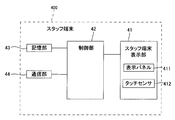
- FIG. 2 is a functional block diagram of the staff terminal.
- the staff terminal 400 includes a staff terminal display unit 41, a control unit 42, a storage unit 43, and a communication unit 44.
- the staff terminal display unit 41 includes a display panel 411 and a touch sensor 412.
- the display panel 411 displays information such as images and characters. Examples of the display panel 411 include a liquid crystal panel and an organic EL panel, but are not limited thereto.
- the touch sensor 412 is arranged on the front surface of the display panel 411, and detects, for example, the position of a contact portion of the staff T with a finger. Thereby, the touch sensor 412 can detect the image touched by the finger of the staff T among the images displayed on the display panel 411. That is, the staff terminal display unit 41 is a so-called touch panel.
- the staff terminal display unit 41 is connected to the control unit 42.
- the control unit 42 controls each unit of the staff terminal 400 and processes information handled by the staff terminal 400.
- the control unit 42 includes a CPU.
- the storage unit 43 is a memory for storing a control program executed by the control unit 42 and various kinds of information, and includes, for example, a random access memory (RAM), a read only memory (ROM), and a nonvolatile memory.
- RAM random access memory
- ROM read only memory
- the communication unit 44 connects to the communication network 300 and transmits and receives information.
- the communication unit 44 is connected to the communication network 300.
- the communication unit 44 is an interface that can be connected to at least one of a wireless communication network and a wired communication network, and includes a transmission circuit, a reception circuit, an antenna, and the like.
- the staff terminal 400 for example, a multifunctional mobile terminal such as a tablet or a smartphone, or a notebook personal computer can be used. Further, it may be a wearable wearable device such as a bracelet or a watch. In addition to these, a device that can provide information to the staff T and can accept an input operation by the staff T can be widely used.
- the staff terminal 400 is assumed to be a smartphone-type mobile terminal having high portability and easy to display and input information.
- the staff terminal 400 may have a function of notifying the staff T by voice, vibration, or the like when information is acquired from the cloud 200.
- the staff terminal 400 may be installed by installing an application on an information terminal such as a smartphone, a tablet, or a personal computer owned by the staff T.
- the care support system A of the present embodiment also includes a director terminal 500 which is a terminal device used by the care director D.
- the director terminal 500 is configured by a multifunctional mobile terminal such as a tablet or a smartphone, a notebook personal computer, or the like.
- the director terminal 500 is also connected to the communication network 300, like the staff terminal 400.
- the staff terminal 400 and the director terminal 500 may be able to directly transmit and receive information, or may transmit and receive information via the cloud 200.
- the director terminal 500 includes a display unit that displays information. In the following description, the display unit of the director terminal 500 will be described as the director terminal display unit 51 in order to distinguish it from the staff terminal display unit 41.
- the care director D is an instructor (supervisor) who gives instructions and advice regarding work to the staff T.
- the instruction information is transmitted from the director terminal 500 to the staff terminal 400 via the communication network 300.
- the staff T can perform an operation such as appropriate care based on the displayed instruction information.
- the care director D can operate the director terminal 500 to set and change operations in the cloud 200.
- the care director D may be artificial intelligence, and in this case, the cloud 200 may also serve as the care director D.
- the director terminal 500 acquires the staff placement information described later.
- staff arrangement information is displayed on the director terminal display unit 51.
- the care director D confirms the arrangement of the staff T displayed on the director terminal display unit 51, and performs an operation as to whether to approve the arrangement of the staff T.
- the director terminal 500 transmits the approval information of the arrangement of the staff T to the cloud 200.
- non-approval non-approval information is transmitted.
- the non-approval information may include the reason for non-approval, the staff T who has been recognized as non-approval, alternatives to staffing, and the like.
- the facility 100 has a plurality of care recipients. Most of the care recipients need the staff T to support their lives.
- the facility 100 includes a living room for the care target to reside. In each room, a call button (not shown) is provided.
- the call button is an operation unit that outputs a call signal for calling a staff member T who cares for the care target in response to an input operation by the care target.
- the staff T in the facility is notified that the staff terminal 400 has been called. This notification may be made by switching the display of the staff terminal display unit 41 (for example, blinking, switching the screen, etc.), or by sound, vibration, or the like.
- the cloud 200 includes a plurality of nodes that provide computer resources.
- the cloud 200 includes a front end to which external devices (here, the facility 100, the staff terminal 400, the director terminal 500, and the like) are connected, a node group having each function, and a management system that manages and controls the node group. Including.
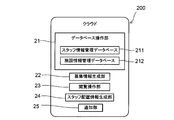
- FIG. 3 is a functional block diagram showing a schematic configuration of the cloud.
- the cloud 200 includes a database operation unit 21, a recruitment information generation unit 22, a browse operation unit 23, a staff arrangement information generation unit 24, and a notification unit 25.
- the database operation unit 21 includes, for example, a staff information management database 211 including information on the registered staff T, a facility information management database 212 including information on the connected facility 100, and the like.
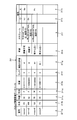
- FIG. 4 is a diagram illustrating an example of the staff information management database.
- the staff information management database 211 manages information on the staff T.
- the staff information management database 211 manages information of a pre-registered staff T (here, referred to as a registered staff).
- the staff information management database 211 manages a plurality of management items for each staff T.
- the staff information management database 211 includes, as management items, a number field 211a, a name field 211b, an age field 211c, a gender field 211d, a work field 211e, a rank field 211f, a facility evaluation field 211g, and a desired field.
- 211h a schedule column 211i, a compatibility column 211j, and a compatibility column 211k.
- the number column 211a stores the identification number of the staff T.
- the identification number of the staff T matches the identification number of the staff terminal 400 owned by the staff T. That is, the cloud 200 can determine the staff T possessed based on the identification number of the staff terminal 400.
- the name column 211b stores the name of the staff T.
- the name of the staff T is included in the staff information sent to the facility 100.
- the age column 211c is the age of the staff T.
- the gender column 211d stores the gender of the staff T.
- men: M and women: F In the staff information management database 211 shown in FIG. 4, men: M and women: F. Note that the age and gender do not have to be registered at the request of the staff T, but if the recruitment conditions include the age and gender, the application will be invalid.
- the work column 211e indicates the type of work that each staff member T can handle.
- work that can be handled is indicated by nine numbers. The nine numbers will be described. As shown in FIG. 4, the work is indicated by one digit number minus eight digit number. The first digit is the job category. Here, “1” is a medical service, and “2” is a nursing service.
- the rank column 211f is an evaluation of the staff T by the care director D.
- the rank is divided into 10 stages of "1", “2", “3", “4", ..., "10” from the top.
- the rank is determined by the care director D based on the skill, ability, experience, and the like of the staff T.
- the skills include “education”, “assistance”, “management”, and the like.
- the rank is determined by comprehensively judging these skills, abilities, experiences, and the like.
- one rank column 211f is provided for each staff member T, the present invention is not limited to this. In addition to the overall rank, skills, abilities, experiences, and the like may be finely classified, and the rank may be included for each classification.
- the facility evaluation column 211g summarizes the evaluation of the work of the staff T from the facility 100. For example, the evaluation is indicated by “S”, “A +”, “A”, “B +”, “B”,.
- the facility evaluation column 211g is a comprehensive evaluation that has been comprehensively determined based on the evaluation (feedback) from the facility 100 that has been arranged so far. Evaluation criteria are notified to each facility 100 in advance, and evaluation is performed based on the criteria.
- the facility evaluation column 211g is one for each staff T, but is not limited to this. In addition to the comprehensive evaluation, an evaluation for each facility 100 and each evaluation standard may be included. This makes it possible to avoid troubles caused by compatibility between the facility 100 and the staff T.
- the rank field 211f and the facility evaluation field 211g are determined based on feedback from the facility, feedback from the care recipient and / or their family members, and information from staff members who have performed the work together. Each time the work is completed, a self-evaluation, an evaluation of another staff, and an evaluation of a facility may be acquired, and the rank and the evaluation of the facility may be updated based on the information. Further, the staff T arranged for the work extracted at random may be evaluated. Further, other items may be included.
- the rank column 211f and the facility evaluation column 211g are columns for evaluating the staff T.
- the desired column 211h stores requests for work, facilities, and the like registered in advance by the staff T.
- the request may be made freely by the staff T or may be made by the staff T by preparing the registration items in advance and having the registered items checked.
- the schedule column 211i stores the schedule of the staff T.
- the schedule for example, a periodic schedule (for example, every Monday) and a sudden schedule (for example, xx month yy day, from 9:00 to 17:00) are stored.
- the schedule field 211i also includes the name of the facility where the work is performed. Further, other management items, for example, information such as the latest work amount may be included.
- the staff information management database 211 stores information to be considered when the staff arrangement information generation unit 24 determines the arrangement of the staff T.
- the good compatibility column 211j and the bad compatibility column 211k indicate compatibility with other staff T. That is, in the good compatibility column 211j, the staff T who can easily perform the work in cooperation is stored. Further, in the compatibility incompatibility column 211k, a staff member T who has difficulty in performing the work in a coordinated manner is stored.
- the database operation unit 21 may be able to change the management items of the staff information management database 211.
- the change of the management item of the staff information management database 211 may be based on an instruction from the director terminal 500 (care director D).
- the cloud 200 itself may perform machine learning based on feedback from the facility 100, the staff terminal 400 (staff T), and the director terminal 500 (care director D), and may change management items that are deemed necessary.
- the staff information management database 211 may not be provided.
- the facility information management database 212 has the same configuration as the staff information management database 211, and thus details are omitted.
- the facility information management database 212 stores information for specifying the facility 100, such as a name, an address, and a telephone number, for each facility 100.
- the facility information management database 212 manages information of the facility 100 where the staff T is arranged in the care support system A. In other words, the facility information management database 212 manages the facilities 100 supported by the care support system A. More specifically, information on the facilities with which the care support system A has a contract to arrange the staff T is stored in the facility information management database 212.
- the change of the information in the facility information management database 212 is preferably performed by an operation from the director terminal 500, but may be performed by the cloud 200.
- the facility information management database 212 stores staff T that is compatible with the facility and staff T that is not compatible with the facility.
- the compatibility column of the facility information management database 212 stores information on the staff T that is compatible with the care recipient and the staff T that is not compatible with the care target resident in the facility 100.
- the recruitment information generation unit 22 is provided with request information including information on work requested from each facility 100.
- the request information includes information such as the name of the facility, the content of the required work, the required number of workers, and the time of the work.
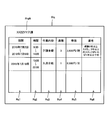
- FIG. 5 is a diagram illustrating an example of the request information.
- the request information Rq is shown in a table format for easy understanding. However, in reality, the request information Rq may not be a table and may include necessary information.
- the request information Rq is sent to the director terminal 500 via the communication network 300 for each facility 100.
- the request information Rq includes a facility name column RqN, a period column Rq1, a time column Rq2, a work content column Rq3, a headcount column Rq4, a unit price column Rq5, and a remarks column Rq6.
- the period column Rq1 indicates a period during which the allocation of the staff T is requested.
- the table of FIG. 5 shows an example of July 2, 2018 to July 9, 2018. In the case of a single day, date information is stored. Further, after the period is specified, the day of the week (for example, Monday, Friday, Tuesday, Saturday, Monday to Friday, etc.) may be further specified. Information that indicates the date and time when the staff T is required is stored.
- the time column Rq2 is the binding time of the staff T in each period. For example, in the table of FIG. 5, it is 8:00 to 14:00. In other words, it means that the work starts at 8:00 and ends at 14:00.
- the work content column Rq3 stores the content of the work required by the facility 100.
- the required work content includes, for example, “general care”, “meal assistance or assistance assistance”, “bathing assistance or assistance assistance”, and the like.
- the required work content differs depending on the type of facility 100 (hospital, nursing facility, rehabilitation facility, etc.).
- the number of members column Rq4 corresponds to the number of staff members T required to execute required work. Note that the number of staff members is based on the staff members T having ordinary skills and experiences, and the number of staff members T with low skill levels is required to be larger than the number of staff members. In the case of the staff T having a high skill and skill, the number of staff members may be smaller than the number of staff members.
- the unit price column Rq5 is a unit price for the work.
- the unit price column Rq5 is a reward paid from the facility 100 to all staff T arranged.
- the reward may be a reward for each hour or a reward for a day's work. Further, it may be the cost for all operations.
- the unit of the unit price column Rq5 is not particularly limited, but a unit that is easy to understand and easy to calculate is preferable.
- the unit price may be determined at the time of contract with the care support system A.
- the unit price column since the unit price is managed by the facility information management database 212, the unit price column may be omitted from the request information. If the request is a sudden request or requires a different operation from the contract, a unit price column may be provided. In this case, the unit price in the unit price column of the request information Rq has priority over the unit price stored in the facility information management database 212.
- the remarks column Rq6 is a column for describing other requests that cannot be described in the above-described columns.
- the skill level, skill, and the like required for the work may be described.
- the remarks column Rq6 will be separately described as needed.
- information that is deemed necessary for staffing T may be provided in addition to the above.
- the type of request information may be determined for each facility 100 on the cloud 200 side, or may be determined on the facility 100 side.
- the request information provided from each facility 100 is provided to the recruitment information generation unit 22 of the cloud 200 after being aggregated by the director terminal 500. Thereby, the care director D can check all the request information.
- the recruitment information generation unit 22 calls the name of the facility recruiting the work, the content of the recruited work, the number of staff T recruited, the date and time of the work. Get the information of. Then, for each facility 100, information on the facility name, the work content, the number of staff T, and the date and time is generated as recruitment information.
- the browsing operation unit 23 allows the recruitment information to be browsed using the staff terminal 400.
- the browsing operation unit 23 may share application information with a staff terminal 400 registered in advance in SNS (Social Network Service), or may send an e-mail to the staff terminal 400 registered in advance. Or by using a message service or the like.
- SNS Social Network Service
- the browsing operation unit 23 may always be able to access the recruitment information from the staff terminal 400, and may update the recruitment information as needed. At this time, the fact that the recruitment information has been updated may be transmitted to the staff terminal 400.
- FIG. 6 is a diagram illustrating an example of the recruitment information displayed on the staff terminal.
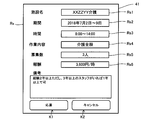
- the staff terminal display section 41 of the staff terminal 400 displays recruitment information RB, an application button K1, and a cancel button K2.
- the staff terminal 400 browses the recruiting information RB and can apply immediately thereafter.
- the recruitment information RB includes a check column Rb1, a facility name column Rb2, a period column Rb3, a time column Rb4, a work content column Rb5, a number column Rb6, a reward column Rb7, and a remarks column Rb8.
- the check box Rb1 displays a square check box. The staff T who has viewed the recruitment information RB can make a selection by checking the check box Rb1.
- the facility name column Rb2 stores the name of the facility recruiting staff.
- the period column Rb3, the time column Rb4, the work content column Rb5, the number of members column Rb6, the remuneration column Rb7, and the remarks column Rb8 are the period column Rq1, the time column Rq2, the work contents column Rq3, the number of columns Rq4, and the unit price column Rq5 of the request information Rq. And the same content as the remarks column Rq6. Therefore, details are omitted.
- the staff T who browses the recruitment information RB on the staff terminal 400 checks the recruitment check box if the recruitment is liked. Then, by pressing (touching) the application button K1, the application information is transmitted to the staff arrangement information generation unit 24.
- FIG. 7 is a diagram illustrating another example of the recruitment information.
- FIG. 8 is a diagram showing details of the recruitment information.
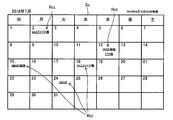
- calendar type recruiting information Sc may be used.
- a recruitment display Rct which is a display of the work currently being recruited, is displayed at each date. Then, when the staff T selects the recruitment display Rct, the display of the staff terminal display unit 41 is switched to the detailed display Rs of the recruitment information (see FIG. 8).
- the detailed display Rs of the recruitment information includes a facility name column Rs1, a period column Rs2, a time column Rs3, a work content column Rs4, a recruitment number column Rs5, a reward column Rs6, a remarks column Rs7, an application button K1, and a cancel button K2.
- the recruitment display Rct is displayed together with the calendar display, so that the schedule can be easily set. It should be noted that the recruitment information Sc may be able to add the schedule of the individual staff T. By doing so, it is possible to promptly recruit work. Further, the staff T may share the information with the schedule application that the staff T uses personally on the staff terminal 400. Thereby, the convenience of the staff T can be further improved.
- the recruitment information Sc may display an application status by another staff. If there is a limit on the number of years of experience in the recruitment information as described in the remarks, the applicant may be able to clear the application conditions. By knowing the information of the staff who has applied, it is possible to check whether or not one can recruit. Further, the browsing operation unit 243 may change the browsable staff T based on the information of the applied staff T.
- the staff arrangement information generation unit 24 is provided with application information from the staff T who has viewed the recruitment information.
- Application information is sent for recruitment information. Therefore, the application information includes information included in the recruitment information.
- the application information includes information on the identification number of the recruitment information.
- the staff arrangement information generation unit 24 acquires information of the staff terminal 400 that has transmitted the application information from the application information and the staff T who has the staff terminal 400.
- the information of the staff T may be included in the application information, or the information of the staff T may be obtained by referring to the staff information management database 211 based on the identification number of the staff terminal 400 that has transmitted the application information. You may.
- the staff allocation information generation unit 24 compares the information of the staff T with the request information and generates the staff allocation information for allocating appropriate staff T to each facility.
- the staff location information includes the name of the staff T, the name of the facility 100 where the work is performed, the content of the work, the date and time, and remarks. Further, information other than these may be included.
- the staff arrangement information generation unit 24 provides the generated staff arrangement information to the director terminal 500.
- the staff arrangement information generation unit 24 reconstructs the staff arrangement when the non-approval information is sent from the director terminal 500. At this time, correction information such as the reason for non-approval is acquired from the non-approval information received from the director terminal 500, and staff arrangement information is generated again based on the correction information.
- the notification unit 25 when the notification unit 25 acquires the approval information from the director terminal 500, the notification unit 25 provides the request information to the staff terminal 400 of the staff T included in the staff arrangement information, and is the information of the staff arranged for the facility 100. Submit staff information.
- the cloud 200 has the functions described above.
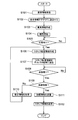
- FIG. 9 is a flowchart showing a flow of processing in the care support system of the present embodiment.
- the cloud 200 will be mainly described.
- the operation is started by receiving request information including the contents of work required in the facility 100 (step S101).
- the request information is sent to the director terminal 500 once.
- all the request information is collected in the director terminal 500. That is, all request information is managed by the director terminal 500.
- the director terminal 500 transmits the request information to the recruitment information generation unit 22 of the cloud 200 (Step S102).
- the request information is transmitted to the cloud 200 after being aggregated by the director terminal 500, but may be transmitted to the cloud 200 from the beginning.
- the cloud 200 can manage the request information in the director terminal 500 by transmitting the request information collectively to the director terminal 500.
- the recruitment information generation unit 22 of the cloud 200 creates the recruitment information including the required work, the number of staff members, and the date and time for each facility 100 based on the request information (step S103).
- the recruitment information generation unit 22 transfers the recruitment information to the browsing operation unit 23.
- the browsing operation unit 23 enables browsing of the recruitment information on the staff terminal 400 possessed by the staff T, and starts browsing (step S104).
- the browsing operation unit 23 allows the recruitment information to be browsed by all staff terminals 400 connected to the communication network 300.
- the method of browsing the recruitment information may be an electronic mail, or the recruitment information may be shared using an SNS service.
- the staff arrangement information generation unit 24 confirms whether or not there is an application for the recruitment information from the staff T, that is, whether or not the application information has been acquired from the staff terminal 400 (step S105). When there is no application from the staff T (No in step S105), the staff arrangement information generation unit 24 waits until there is an application (continues step S105).
- the staff arrangement information generation unit 24 acquires the identification number of the staff terminal 400 from the application information and possesses the staff terminal 400 from the identification number. Identify the staff T that is working. Then, the staff arrangement information generation unit 24 acquires the information of the staff T from the staff information management database 211 of the database operation unit 21. The staff arrangement information generating unit 24 generates staff arrangement information in which the facility 100 and the staff T who have applied for the work are allocated (step S106).
- the staff arrangement information generation unit 24 transmits the staff arrangement information to the director terminal 500 (step S107). Then, the cloud 200 checks whether there is a reply from the director terminal 500 (step S108). If there is no reply from the director terminal 500 (No in step S108), the process waits until there is a reply from the director terminal 500 (step S108 is repeated).
- the care director D can check the staff arrangement information displayed on the director terminal display unit 51 of the director terminal 500 and determine whether the staff T is appropriate for the facility 100 where the assigned staff T is located and for the work. Then, when it is determined that the information is appropriate, the director terminal 500 is operated to transmit the approval information. If it is determined that the information is not appropriate, non-approval information including the reason (for example, the distance between the house and the facility is long) is transmitted. In addition, the non-approval information may include only the fact that the user does not approve.
- the cloud 200 checks whether the information sent from the director terminal 500 is approval information (step S109).
- the staff arrangement information generation unit 24 acquires the correction information including the inappropriate staff T and the reason thereof from the non-approval information (Ste S110). Then, the staff arrangement information generating unit 24 generates the staff arrangement information again with reference to the correction information (return to step S106).
- the notification unit 25 transmits the request information including the information on the facility 100 where the work is performed, the date and time, and the content of the work, and transmits the application information. It transmits to the staff terminal 400 (step S111).
- the request information may be generated by the staff arrangement information generation unit 24 or may be generated by the notification unit 25.
- the notification unit 25 transmits the staff information including the information of the staff T performing the work to the facility 100 which has sent the request information (Step S112).
- the staff T can be sent for work required in the facility 100 connected by the communication network 300. At this time, since the staff T can be arranged beyond the facility 100, it is possible to prevent the staff T from being left over or missing at all the facilities 100. Further, the staff T can confirm the recruitment from the facility 100 and perform the job by applying by himself / herself. Therefore, the staff T can use the free time efficiently. Further, it is possible to suppress the work from being concentrated on some staffs T due to the absence of the substitute staffs T. Further, in the care support system A, the care director D can grasp the recruitment and application of all jobs and the arrangement of the staff T.
- the browsing operation unit 23 refers to the work column 211e, the rank column 211f, and the facility evaluation column 211g of the staff information management database 211, restricts browsing for each staff terminal 400, and browses application information. For example, for a staff member T engaged in nursing care work, information related to medical care work cannot be browsed. In addition, even if the staff T is engaged in nursing care, the viewing operation unit 23 restricts viewing to the staff T who is determined to be unable to apply based on the rank of the staff information management database 211 and the evaluation of the facility. You may do so.
- the browsing operation unit 23 confirms the possible work of the staff, the rank, the evaluation of the facility, and the like, and only the staff terminal 400 of the staff T who determines that the staff can be arranged is new. Make available recruitment information. In this way, the staff T can apply for the recruitment smoothly and easily.
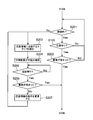
- FIG. 10 is a flowchart showing the operation of another example of the care support system according to the present invention.
- the care support system A of the present embodiment has the same configuration as the care support system A of the first embodiment. Therefore, each part of the care support system A is denoted by the same reference numeral as in the first embodiment, and detailed description is omitted.
- the flowchart shown in FIG. 10 includes steps S201 to S207 arranged between step S104 and step S106 in the flowchart shown in FIG. Also, step S105 is included.
- the browsing operation unit 23 checks whether or not the recruitment information is within the browsing deadline (step S201). . When it is within the browsing period (Yes in step S201), the browsing operation unit 23 checks whether or not there is an application for the recruitment information (step S105). If there is no application (No in step S105), the browsing operation unit 23 returns to the confirmation (step S201) as to whether or not it is within the browsing period.
- the viewing period may be included in the request information Rq, or may be a certain time (for example, 24 hours) before the start of the work based on the information on the period of the request information and the time information. If the expiration date is not included in the request information Rq, it is preferable that the staff T apply after the application and that the staff T have a sufficient margin to prepare. Preparation also includes time to the facility to be deployed.
- the staff arrangement information generation unit 24 checks whether or not the recruitment has been filled (step S202). When the recruitment is not filled (in the case of No in step S202), the browsing operation unit 23 confirms whether or not it is within the browsing period (return to step S201). When the recruitment is completed (Yes in step S202), the staff arrangement information generation unit 24 generates the staff arrangement information (step S106).
- the staff arrangement information generation unit 24 refers to the staff information management database 211, and uses the work information, rank information, facility evaluation information, desired information, schedule information, and the like. Then, a staff T matching the conditions (for example, period, place, work content, skill level, skill) included in the recruitment information is extracted (step S203). Then, the notification unit 25 transmits confirmation information for confirming whether or not the recruited work can be handled to the staff terminal 400 of the extracted staff T (step S204). Note that the notification unit 25 may be configured to receive the approval of the notification of the confirmation information from the director terminal 500 before transmitting the confirmation information.
- the confirmation information is displayed on the staff terminal display unit 41.
- the confirmation information is the same as or equivalent to the detailed display of the application information shown in FIG.
- the staff T After confirming the confirmation information displayed on the staff terminal display unit 41, the staff T transmits workable information or work impossible information including information on whether work is possible or not, based on the information displayed in the confirmation information. .
- the workable information is transmitted when work is possible, and the work impossible information is transmitted when work is not possible.
- the staff arrangement information generation unit 24 confirms whether or not there is a reply from the staff terminal 400 (step S205). If there is no reply (No in step S205), the process waits until there is a reply (return to step S205). If there is a reply (Yes in step S205), the staffing information generation unit 24 checks whether the reply is workable information or workless information, and checks whether the recruitment is filled based on the reply ( Step S206). When the recruitment is completed (Yes in Step S206), the staff arrangement information generating unit 24 generates the staff arrangement information (Step S106).
- the staff arrangement information generation unit 24 changes the conditions for extracting the staff (step S207). As a condition for extracting staff, the place where the rank is 3 or more at the time of the first extraction is changed to the rank 5 or more. Then, returning to step S203, the staff arrangement information generation unit 24 extracts the staff T from the staff information management database 211 under a new condition for extracting the staff.
- the present invention is not limited to this.
- the steps S203 to S207 may be repeated to arrange the staff T in the facility 100.
- the arrangement of the staff T in the facility is determined based on the application from the staff T (staff terminal 400). However, depending on the appropriateness of the staff T, there is a case where it is better to allocate to another work. For example, in the overall rank of the staff information management database 211, it is assumed that a plurality of staffs T of the same rank have applied for the same work. Then, it is assumed that recruitment for another work is received from the same facility. The operation of determining the staff arrangement in such a case will be described with reference to a new drawing.
- FIG. 11 is a diagram illustrating another example of the staff information management database.
- the staff information management database 211 is provided with individual ranks as well as overall ranks.
- FIG. 11 shows the rank database 213 of the staff information management database 211. As shown in FIG. 11, the rank database 213 quantifies, for example, the appropriateness of the staff for determining the rank of the care staff.
- the rank database 213 is provided for each staff and is linked to the staff information management database 211.
- the rank database 213 indicates a staff name 213N.
- the items in the rank database 213 are experience value 213a, bathing assistance 213b, meal assistance 213c, changing assistance 213d, toilet assistance 213e, cleaning 213f, washing 213g, cooking 213h, and general 213i.
- Each item is evaluated with a numerical value (evaluation value) of at least 1 to at most 5.
- a numerical value a number with about one decimal place may be used. For example, when a number up to the first decimal place is used, the evaluation value is 1.0 to 5.0.
- the experience value 213a indicates the experience value of the work as the assistant staff. The experience value is evaluated based on, for example, the number of years, the total work time, and the like.
- the items of change assistance 213d, toilet assistance 213e, cleaning 213f, laundry 213g, and cooking 213h are feedback from the facility, feedback from the care recipient and / or their family members, and information from the staff who worked together. Is determined by the care director D based on the In addition, information may be acquired for each operation and the evaluation may be performed. Further, the staff T arranged for the work extracted at random may be evaluated. Further, other items may be included.
- the staffing information generating unit 24 considers each item of the rank database 213 and the conditions described in the request information and selects an appropriate staff. Then, it generates staff arrangement information in which the staff determined to be appropriate is arranged at the facility (step S106 in FIG. 9), and transmits it to the director terminal 500 (step S107 in FIG. 9).
- the director terminal 500 can access the staff information management database 211 of the cloud 200. Then, the care director D checks the staff arrangement information displayed on the director terminal display unit 51. At this time, the care director D confirms information that is difficult to judge using only the numerical value (for example, close to the house in the desired column), and if there is an inappropriate part in the staffing information, disapproval including the reason is performed. Submit information.
- the arrangement of the staff is determined based on the information of the applied staff.
- the staff information management database 211 has a staff schedule column 211i, and has schedule information on the work of the staff T.
- a staff with a higher tank and a staff with a lower rank are assigned.
- OJT On ⁇ Job ⁇ Training
- some of the staffs with high ranks may be assigned to another work that meets the conditions.
- the arrangement may be set so that a staff with a lower rank works with a staff with a higher rank.
- the change of the staff may be adjusted by the cloud 200, or may be adjusted by the care director D and reflected on the staff adjustment by the cloud 200.
- the staff placement information generation unit 24 checks the staff information management database 211 to prevent staffs with poor compatibility from being placed at the same facility. Generate information. By doing so, it is possible to suppress a decrease in work efficiency due to work performed by staff members with incompatible work. Further, the compatibility with the staff T arranged in advance may be considered with reference to the schedule information of the facility.
- the staff arrangement information generation unit 24 checks the facility information management database 212 and generates staff arrangement information so that the staff T that is not compatible with the care target person who is resident in the facility is not arranged in the facility. You may. By doing so, it is possible to prevent trouble between the care target person and the staff T beforehand.
Landscapes
- Business, Economics & Management (AREA)
- Engineering & Computer Science (AREA)
- Health & Medical Sciences (AREA)
- General Business, Economics & Management (AREA)
- Strategic Management (AREA)
- Tourism & Hospitality (AREA)
- Economics (AREA)
- Human Resources & Organizations (AREA)
- General Physics & Mathematics (AREA)
- Entrepreneurship & Innovation (AREA)
- Physics & Mathematics (AREA)
- Marketing (AREA)
- General Health & Medical Sciences (AREA)
- Primary Health Care (AREA)
- Theoretical Computer Science (AREA)
- Child & Adolescent Psychology (AREA)
- Educational Administration (AREA)
- Development Economics (AREA)
- Game Theory and Decision Science (AREA)
- Operations Research (AREA)
- Quality & Reliability (AREA)
- Biomedical Technology (AREA)
- Epidemiology (AREA)
- Medical Informatics (AREA)
- Public Health (AREA)
- Medical Treatment And Welfare Office Work (AREA)
- Management, Administration, Business Operations System, And Electronic Commerce (AREA)
Abstract
日常の生活を支援する対象となる対象者が入居しネットワークに接続された複数の施設からの要求に応じて前記施設にスタッフを配置するケアサポートシステムであって、施設から要求される作業を募集情報としてスタッフに閲覧可能にし、募集情報に対して、スタッフからの応募に基づいて、施設に対して配置するスタッフを決定する。
Description
本発明は、対象者の日常の生活を支援するケアサポートシステムに関する。
例えば、特許5503449号公報には、登録型の労働者を作業者としてファミリーサポートサービスを提供するファミリーサポートサービス支援システムが開示されている。ファミリーサポートサービス支援システムは、事業者に使用される事業者サーバと、事業者サーバに接続可能なクライアント端末とを有する。そして、事業者サーバは、ファミリーサポートサービスの複数の利用者について、利用者情報を保持および管理する。複数の作業者について、属性情報およびスケジュール情報を含む作業者情報を保持および管理する。
そして、利用者からのファミリーサポートサービスの利用申し込みを受け付けると、利用申し込みに係る利用予定日時に業務可能な作業者を作業者候補として抽出し、当該作業者候補からの作業依頼の受諾連絡を受け付けて作業者を決定して予約を確定する。このようなシステムを用いることで、利用者に作業者を割り振る作業を簡略化できる。また、作業者も、端末を介して作業依頼を受けることができるので、サービスセンター等で待機する必要がなく、作業者の利便性も高くなる。
しかしながら、この手のサービスでは、作業者のスケジュールに基づいて、作業者を割り当てるため、作業が割り当てられる作業者と割り当てられない作業者とが偏る虞がある。また、作業者が仕事を選択することが困難であり、作業者の意欲が低下する虞がある。
そこで本発明は、スタッフの意思を可能な限り反映し、複数の施設にまたがって効率よく適切なスタッフを適切な施設に配置することができるケアサポートシステムを提供することを目的とする。
上記目的を達成するために本発明のケアサポートシステムは、日常の生活を支援する対象となる対象者が入居しネットワークに接続された複数の施設からの要求に応じて前記施設にスタッフを配置するケアサポートシステムであって、前記ネットワークに通信可能に接続されて前記スタッフが個々に所持するとともに前記スタッフによる入力操作を受け付けるスタッフ端末と、前記ネットワークに通信可能に接続されて前記スタッフの管理を行うケアディレクタによる入力操作を受け付けるディレクタ端末と、前記ネットワークに通信可能に接続されたクラウドと、を含み、前記クラウドは、前記施設から要求される作業の情報を含む要求情報に基づいて前記作業の内容、当該作業を行う施設及びその時間の情報を含む募集情報を作成するとともに前記募集情報を少なくとも一部の前記スタッフ端末で閲覧可能にし、前記スタッフ端末から提供された前記募集情報で募集する作業に応募する情報を含む応募情報に基づいて、前記施設の各々に配置するスタッフを決めるとともにスタッフの配置をスタッフ配置情報として前記ディレクタ端末に送信し、前記ディレクタ端末から前記スタッフ配置情報に基づいて前記スタッフの配置を承認する承認情報を受け付けたときに、前記施設に配置されるスタッフの前記スタッフ端末に業務の依頼を行う依頼情報を提供するとともに前記施設に対して配置される前記スタッフの情報をスタッフ情報として提供する。
このように構成することで、スタッフの作業を行う意思(応募)に基づいて、スタッフの施設への配置を決定することが可能である。そのため、スタッフが、自分の不得意とする作業やできない作業に配置されることを抑制し、スタッフが気持ち良く作業を行うことができる。これにより、スタッフによる作業の品質を上昇することができる。
上記構成において、前記ディレクタ端末は、前記複数の施設の各々から前記要求情報を取得するとともに、前記要求情報に基づいて生成された募集情報を前記クラウドに提供するようにしてもよい。このようにすることで、ケアディレクタが、施設からの要求情報を全て掌握することができる。そのため、交通傷害、疾病等の突発的な事象によってスタッフに欠員が出た施設に対して、ケアディレクタは、迅速にスタッフの配置を決定することができる。なお、ケアディレクタは、クラウドにスタッフ配置の指示を送るだけでもよい。
上記構成において、前記要求情報には、前記施設における作業のスケジュールを示すスケジュール情報を含んでいてもよい。これにより、短期間の作業の募集を行うことが可能となる。
上記構成において、前記クラウドは、前記スタッフ端末を使用するスタッフの情報を管理するスタッフ情報管理データベースを備えていてもよい。これにより、クラウドは、スタッフの情報に基づいて、スタッフごとに募集情報を作成することができる。
上記構成において、前記スタッフ情報管理データベースは、少なくとも作業に対する適正、スキルを含む適正を数値化した適正値を前記スタッフごとに備えてもよい。このようにすることで、クラウドは、スタッフの応募を参照しつつ、適正、スキルにあった施設にスタッフを配置することも可能となる。
上記構成において、前記クラウドは、前記要求情報から作業に要求される適正を取得するとともに、前記スタッフ情報管理データベースから前記作業に対する適正に合致する前記スタッフを抽出し、前記抽出されたスタッフの前記スタッフ端末で前記募集情報を閲覧可能にしてもよい。このようにすることで、適正、スキルを持たないスタッフが、応募するのを抑制できる。また、スタッフにとって、応募できない情報を閲覧しないので、募集情報の確認が容易になる。
上記構成において、前記クラウドは、前記要求情報から前記作業に要求される適正を取得するとともに、前記スタッフ情報管理データベースから前記応募情報を提供した前記スタッフ端末の入力操作を行ったスタッフの前記適正値を取得し、前記応募情報を提供した前記スタッフ端末の入力操作を行ったスタッフを適切な施設に配置したスタッフ配置情報を生成する。これにより、適材適所の配置を可能とする。また、適正、スキルが不十分であったとしても、適正、スキルの高いスタッフと組み合わせて配置することも可能であり、作業を行いながらスタッフの適正、スキルを挙げることができる。すなわち、スタッフ全体の適正、スキルの底上げが可能である。
上記構成において、スタッフ管理情報データベースの適正値には、他のスタッフとの相性を数値化した値を備えており、前記クラウドは、前記他のスタッフとの相性を鑑みて適切なスタッフを決定してもよい。
上記構成において、前記クラウドは、前記施設の各々に配置するスタッフを決めるときに前記スタッフが不足する場合において、前記不足したスタッフを前記スタッフ情報管理データベースに基づいて作業担当可能なスタッフを抽出するとともに、抽出したスタッフの前記スタッフ端末に対して作業の可否を問う確認情報を送信し、前記スタッフ端末から前記作業が可である作業可能情報を取得したときに、前記作業可能情報を取得した前記スタッフ入力操作を行ったスタッフを含んだスタッフ配置情報を生成する。このようにすることで、募集数に対して応募数が少なくて募集が満たされない場合、突発的にスタッフが不足する場合等にもスタッフの配置が可能となる。
上記構成において、前記クラウドは、前記施設の情報を管理する施設情報管理データベースをさらに備え、前記施設情報管理データベースには、前記スタッフと前記対象者の相性の情報が含まれており、前記クラウドは、前記施設情報管理データベースから前記スタッフと前記対象者の相性の情報を取得するとともに、前記対象者と前記スタッフとの相性を鑑みて適切なスタッフを決定してもよい。
上記構成において、前記スタッフ情報管理データベースは、前記スタッフごとに前記作業に対する希望の情報である希望情報をさらに含んでいてもよい。このようにすることで、スタッフの希望に応じた作業に配置することができるため、スタッフの意欲を高めることが可能である。
上記構成において、前記クラウドは、スタッフ本人、前記施設及び共同して作業を行ったスタッフの少なくとも一者から作業を実行したスタッフに対する評価を取得するとともに、前記スタッフへの評価として、前記スタッフ情報管理データベースに蓄積してもよい。
本発明によると、スタッフの意思を可能な限り反映し、複数の施設にまたがって効率よく適切なスタッフを適切な施設に配置することができるケアサポートシステムを提供することが可能である。
本発明について、図面に基づいて説明する。なお、本明細書において、スタッフとは、医療、介護または看護に従事する従事者(医師、介護士(介護者)、看護師など)を指す。また、ケアとは、医療、介護または看護に関して対象者に対して実施される世話を指す。さらにケアの対象者が入居している介護施設、入院している病院等を、まとめて、施設100と称する。
<第1実施形態>
〔ケアサポートシステム〕
図1は、本発明にかかるケアサポートシステムの一例の概略の構成を示す説明図である。ケアサポートシステムAは、通信ネットワーク300を介して、複数の施設100が通信可能に接続されている。施設100には、通信を制御する制御装置(例えば、通信サーバ)が配置され、通信サーバが通信ネットワーク300と通信を行っている。本発明のケアサポートシステムAは、制御装置を特に限定するものではないので、「各施設100の制御装置による通信」を、単に「施設100との通信」と称するものとする。以下、特に断りが無い場合には、同様とする。また、施設100には、病院等の医療施設と、老人ホーム等の介護施設とがあるものとする。
〔ケアサポートシステム〕
図1は、本発明にかかるケアサポートシステムの一例の概略の構成を示す説明図である。ケアサポートシステムAは、通信ネットワーク300を介して、複数の施設100が通信可能に接続されている。施設100には、通信を制御する制御装置(例えば、通信サーバ)が配置され、通信サーバが通信ネットワーク300と通信を行っている。本発明のケアサポートシステムAは、制御装置を特に限定するものではないので、「各施設100の制御装置による通信」を、単に「施設100との通信」と称するものとする。以下、特に断りが無い場合には、同様とする。また、施設100には、病院等の医療施設と、老人ホーム等の介護施設とがあるものとする。
図1に示すように、ケアサポートシステムAは、クラウド200と、通信ネットワーク300と、スタッフ端末400と、ディレクタ端末500と、を備える。
クラウド200は、通信ネットワーク300上における情報の処理、蓄積、配信等のサービスを提供する。クラウド200の詳細な動作は後述するが、クラウド200は、各施設100からの情報を蓄積したり、スタッフ端末400、ディレクタ端末500からの情報に基づいて、処理を行う。
クラウド200が管理する情報としては、例えば、施設100の情報、施設100からの作業の要求情報、スタッフTの情報、スタッフ端末400の個別情報、スタッフ端末400からの応募情報、等を挙げることができる。クラウド200で管理する情報の詳細についても、ケアサポートシステムAの動作説明とともに説明する。
通信ネットワーク300は、複数の機器と通信が可能な通信回線を備える。通信ネットワーク300は、例えば、インターネット、携帯電話通信網等の公共の通信網を用いてもよいし、専用回線、専用空中線等を用いて、予め決められた、施設100、クラウド200、スタッフ端末400及びディレクタ端末500のみが接続可能な通信網であってもよい。
ケアサポートシステムAでは、スタッフTがスタッフ端末400を携帯(所有)している。図1において、3人のスタッフTを図示しているが、人数は、3人に限定されない。そして、個々のスタッフTがそれぞれスタッフ端末400を携帯する。すなわち、ケアサポートシステムAにおいて、通信ネットワーク300には、複数のスタッフ端末400が接続可能である。なお、以下の説明において、特にスタッフを個別に特定しない場合には、スタッフTとして説明する。
スタッフ端末400は、スタッフTによる操作に基づいて、クラウド200にアクセスして種々の情報を取得できる。そして、スタッフ端末400は、取得した情報を後述するスタッフ端末表示部41に表示させることが可能である。またクラウド200から情報が配信される場合もある。この場合もクラウド200からの情報をスタッフ端末表示部41に表示させることが可能である。
スタッフTがスタッフ端末400で入力する情報としては、クラウド200で公開される情報、あるいは、クラウド200から送信された募集情報に対する応募を行う応募情報、スタッフTのスケジュール、スキル等の情報を挙げることができる。なお、これらの情報は、通信ネットワーク300を介して、クラウド200に送信されて、クラウド200のストレージ機能に搭載されたデータベース機能に格納される。
<スタッフ端末400およびディレクタ端末500>
次にスタッフ端末400について、図面を参照して説明する。図2は、スタッフ端末の機能ブロック図である。図2に示すように、スタッフ端末400は、スタッフ端末表示部41と、制御部42と、記憶部43と、通信部44とを備える。
次にスタッフ端末400について、図面を参照して説明する。図2は、スタッフ端末の機能ブロック図である。図2に示すように、スタッフ端末400は、スタッフ端末表示部41と、制御部42と、記憶部43と、通信部44とを備える。
スタッフ端末表示部41は、表示パネル411と、タッチセンサ412とを備える。表示パネル411は、画像、文字等の情報を表示する。表示パネル411としては、例えば、液晶パネル、有機ELパネル等を挙げることができるが、これに限定されない。タッチセンサ412は、表示パネル411の前面に配置されており、例えば、スタッフTの指の接触部分の位置を検知する。これにより、タッチセンサ412は、表示パネル411に表示された画像のうちスタッフTの指が接触した画像を検知できる。すなわち、スタッフ端末表示部41は、いわゆる、タッチパネルである。
スタッフ端末表示部41は、制御部42と接続される。制御部42は、スタッフ端末400の各部を制御するとともに、スタッフ端末400で取り扱われる情報の処理を行う。制御部42は、CPUを備えている。
記憶部43は、制御部42が実行する制御プログラムや各種の情報を記憶するメモリであり、例えばRAM(Random Access Memory)、ROM(Read Only Memory)、不揮発性メモリなどで構成されている。
通信部44は、通信ネットワーク300に接続して、情報を送受信する。また、通信部44は、通信ネットワーク300に接続される。なお、通信部44は、無線通信網および有線通信網の少なくとも一方と接続可能なインターフェースであり、送信回路、受信回路、アンテナ等を備える。
なお、スタッフ端末400としては、例えば、タブレットやスマートフォンなどの多機能型携帯端末、ノート型パーソナルコンピュータを挙げることができる。また、ブレスレットまたは腕時計等のような装着型のウェアラブルデバイスであってもよい。これら以外にも、スタッフTに情報を提供できるとともに、スタッフTによる入力操作を受け付けることができるデバイスを広く採用できる。ここでは、スタッフ端末400を、携帯性が高く、情報の表示および入力操作が容易なスマートフォン型の携帯端末とする。スタッフ端末400は、クラウド200から情報を取得したときに、音声、振動等でスタッフTに通知できる機能を備えていてもよい。また、スタッフTの個人所有のスマートフォン、タブレット、パーソナルコンピュータ等の情報端末にアプリケーションをインストールすることで、スタッフ端末400としてもよい。
また、本実施形態のケアサポートシステムAは、ケアディレクタDによって使用される端末装置である、ディレクタ端末500を含んでいる。ディレクタ端末500は、スタッフ端末400と同様に、タブレットやスマートフォンなどの多機能型携帯端末、ノート型パーソナルコンピュータなどで構成されている。ディレクタ端末500もスタッフ端末400と同様、通信ネットワーク300に接続される。なお、スタッフ端末400とディレクタ端末500とは直接情報の送受信が可能であってもよいし、クラウド200を経由して情報の送受信を行ってもよい。ディレクタ端末500は、情報を表示する表示部を備えている。なお、以下の説明では、スタッフ端末表示部41と区別するために、ディレクタ端末500の表示部をディレクタ端末表示部51として説明する。
ここで、ケアディレクタDとは、スタッフTに対して、作業に関する指示や助言を与える指示者(監督者)である。例えば、ケアディレクタDがディレクタ端末500を操作して指示情報を入力すると、その指示情報がディレクタ端末500から通信ネットワーク300を介してスタッフ端末400に送信される。指示情報をスタッフ端末400のスタッフ端末表示部41に表示させることにより、スタッフTは、表示された指示情報に基づいて適切なケア等の作業を行うことができる。また、ケアディレクタDは、ディレクタ端末500を操作して、クラウド200における動作の設定および変更を行うことが可能である。なお、ケアディレクタDは、人工知能であってもよく、この場合、クラウド200がケアディレクタDを兼ねてもよい。
ディレクタ端末500は、後述するスタッフ配置情報を取得する。ディレクタ端末500では、ディレクタ端末表示部51にスタッフ配置情報を表示する。ケアディレクタDは、ディレクタ端末表示部51に表示されたスタッフTの配置を確認し、スタッフTの配置を承認するか否かの操作を行う。ディレクタ端末500は、スタッフTの配置の承認情報をクラウド200に送信する。なお、非承認の場合には、非承認情報を送信する。なお、非承認情報には、非承認の理由、非承認と認定したスタッフT、スタッフ配置の代替案等を含んでよい。
施設100には、複数人のケア対象者が入居している。そして、ケア対象者の多くは、スタッフTによる生活のサポートが必要である。施設100には、ケア対象者が居住するための居室を備える。また、各居室には、不図示のコールボタンが設置されている。コールボタンは、ケア対象者の入力操作に応じて、ケア対象者を世話するスタッフTを呼び出すための呼出信号を出力する操作ユニットである。コールボタンが操作されると、施設内のスタッフTにはスタッフ端末400を呼び出しがあったことが通知される。この通知には、スタッフ端末表示部41の表示の切り替え(例えば、明滅、画面の切り替わり等)で行ってもよいし、音、振動等で行ってもよい。
<クラウド200の詳細な構成>
次に、クラウド200について説明する。クラウド200は、計算機リソースを提供する複数のノードを含む。例えば、クラウド200は、外部機器(ここでは、施設100、スタッフ端末400、ディレクタ端末500等)が接続されるフロントエンド、それぞれの機能を有するノード群、ノード群の管理及び制御を行う管理システムを含む。
次に、クラウド200について説明する。クラウド200は、計算機リソースを提供する複数のノードを含む。例えば、クラウド200は、外部機器(ここでは、施設100、スタッフ端末400、ディレクタ端末500等)が接続されるフロントエンド、それぞれの機能を有するノード群、ノード群の管理及び制御を行う管理システムを含む。
図3は、クラウドの概略構成を示す機能ブロック図である。ケアサポートシステムAにおいて、クラウド200は、データベース操作部21、募集情報生成部22、閲覧操作部23、スタッフ配置情報生成部24及び通知部25を備える。
データベース操作部21には、例えば、登録されているスタッフTの情報を含むスタッフ情報管理データベース211、接続されている施設100の情報を含む施設情報管理データベース212等が備えられる。
ここで、データベースについて図面を参照して説明する。図4は、スタッフ情報管理データベースの一例を示す図である。スタッフ情報管理データベース211は、スタッフTに関する情報を管理する。なお、スタッフ情報管理データベース211は、予め登録されているスタッフT(ここでは、登録スタッフと称する)の情報を管理する。
スタッフ情報管理データベース211は、スタッフTごとに複数の管理項目で管理する。図4に示すように、スタッフ情報管理データベース211は、管理項目として、番号欄211a、氏名欄211b、年齢欄211c、性別欄211d、作業欄211e、ランク欄211f、施設の評価欄211g、希望欄211h、スケジュール欄211i、相性良欄211j、相性不可欄211kを備える。
番号欄211aはスタッフTの識別番号が格納される。スタッフTの識別番号は、スタッフTが所持しているスタッフ端末400の識別番号と一致する。すなわち、クラウド200は、スタッフ端末400の識別番号に基づいて、所持しているスタッフTを判別できる。
氏名欄211bは、スタッフTの氏名が格納される。本実施形態の例では、「VV」、「WW」、「XX」、「YY」の4人が登録されているが、これ以上登録されていてもよい。スタッフTの氏名は、施設100に送るスタッフ情報に含まれる。年齢欄211cは、スタッフTの年齢である。性別欄211dは、スタッフTの性別が格納される。なお、図4に示すスタッフ情報管理データベース211では、男性:M、女性:Fとしている。なお、年齢及び性別は、スタッフTの希望により登録しなくてもよいが、募集条件に、年齢、性別がある場合に、応募が無効になる。
作業欄211eは、スタッフT各々の対応可能な作業の種類を示している。図4に示すスタッフ情報管理データベース211では、9個の数字で、対応可能な作業を示している。この9個の数字について説明する。図4に示すように、1ケタの数字-8ケタの数字で作業を示している。最初の1ケタは、職種のカテゴリーである。ここでは「1」は医療業務、「2」は介護業務である。
そして、最初のケタが「1」のとき、その後のケタは、順に、「医師」、「看護師」、「理学療法士」、「放射線技師」、「介護士」、「栄養士」、「医療事務」、「その他」を示している。そして、各ケタは、「0」又は「1」で示し、「1」は対応可能な職種であることを示す。例えば、図4の「WW」さんは、「1-10000000」である。そのため、「WW」さんは、職種は、医師である。
また、最初のケタが「2」のとき、その後のケタは、対応可能な作業内容を示している。すなわち、「食事介助」、「入浴介助」、「着替介助」、「トイレ介助」、「掃除」、「洗濯」、「調理」、「その他」を示している。そして、各桁は、上述と同様、「0」又は「1」で示される。例えば、図4の「VV」さんは、「2-11111111」である。そのため、「WW」さんは、介護職で、上述した仕事の全てに対応可能であることを示す。なお、作業欄211eの管理方法は、一例であり、別の管理方法を用いて管理を行ってもよい。スタッフの職種(資格)等を管理する方法を広く採用することができる。
ランク欄211fは、スタッフTに対するケアディレクタDによる評価である。ランクは上から「1」、「2」、「3」、「4」、・・・、「10」の10段階に分かれている。そして、ランクは、スタッフTのスキル、能力、経験等によって、ケアディレクタDが決定する。例えば、スキルとしては、「教育」、「補助」、「管理」等を挙げることができる。そして、これらのスキル、能力、経験等を総合的に判断してランクが決められる。なお、ランク欄211fは、スタッフTごとに1つとしているが、これに限定されない。総合ランクに加えて、スキル、能力、経験等を細かく分類し、分類ごとにランクを含んでいてもよい。
施設の評価欄211gは、スタッフTの作業に対する施設100からの評価を総合したものである。例えば、評価は「S」、「A+」、「A」、「B+」、「B」・・・で示される。施設の評価欄211gは、これまで、配置された施設100からの評価(フィードバック)に基づいて、総合的に決定された総合評価である。評価の基準は、各施設100に予め通知しておき、その基準に基づいて、評価されるものとする。なお、施設の評価欄211gは、スタッフTごとに1つとしているが、これに限定されない。総合評価に加えて、施設100ごと、評価基準ごとの評価を含んでいてもよい。これにより、施設100とスタッフTの相性によるトラブルを避けることが可能である。
ランク欄211f及び施設の評価欄211gは、施設からのフィードバック、ケア対象者及び(又は)その家族からのフィードバック、一緒に作業を実行したスタッフからの情報に基づいて決定される。なお、作業が終了するごとに自己評価、他のスタッフの評価、施設の評価を取得し、その情報に基づいて、ランク及び施設の評価を更新するようにしてもよい。また、ランダムに抽出された作業に対して配置されたスタッフTの評価を行ようにしてもよい。また、これ以外の項目が含まれていてもよい。ランク欄211f及び施設の評価欄211gは、スタッフTへの評価の欄である。
希望欄211hは、予めスタッフTから登録された作業、施設等に対する希望が格納される。なお、希望は、スタッフTが自由に登録してもよいし、予め登録項目を用意し、その登録項目をチェックしてもらうことで、スタッフTの希望としてもよい。
スケジュール欄211iは、スタッフTのスケジュールが格納される。スケジュールとしては、例えば、周期的なスケジュール(例えば、毎週月曜日等)と、突発的なスケジュール(例えば、××月yy日、9:00~17:00等)とが格納される。なお、スケジュール欄211iには、作業を行う施設名も含まれていることが好ましい。また、これら以外の管理項目、例えば、直近の作業量等の情報を含んでいてもよい。スタッフ情報管理データベース211には、スタッフ配置情報生成部24において、スタッフTの配置を決めるときに、考慮される情報が格納される。
相性良欄211j、相性不可欄211kは、他のスタッフTとの相性を示している。すなわち、相性良欄211jには、作業を協調して実施しやすいスタッフTが格納される。また、相性不可欄211kには、作業を協調して実施するのが難しいスタッフTが格納されている。
なお、データベース操作部21は、スタッフ情報管理データベース211の管理項目を変更できてもよい。スタッフ情報管理データベース211の管理項目の変更は、ディレクタ端末500(ケアディレクタD)からの指示に基づくものであってもよい。また、クラウド200自体が施設100、スタッフ端末400(スタッフT)及びディレクタ端末500(ケアディレクタD)からのフィードバックに基づいて、機械学習を行い、必要と思われる管理項目を変更してもよい。
このとき、ディレクタ端末500からの承認があった後に最終的な追加の決定が行われる。このようにすることで、スタッフ情報管理データベース211の管理項目が際限なく増加するのを抑制できる。なお、予め管理項目の上限値を決めておき、管理項目を変更する場合、ディレクタ端末500からの承認なしで管理項目を変更できるようにしてもよい。この場合であっても、データベース操作部21は、ディレクタ端末500に管理項目の変更についての情報を送信する。
なお、スタッフ端末400から応募情報として、スタッフTの上述のような情報を取得する構成の場合、スタッフ情報管理データベース211を備えていなくてもよい。
また、施設情報管理データベース212は、スタッフ情報管理データベース211と同様の構成を有しているため、詳細は省略する。施設情報管理データベース212は、施設100ごとに、名称、住所、電話番号等の施設100を特定するための情報が格納されている。施設情報管理データベース212は、ケアサポートシステムAでスタッフTを配置する施設100の情報を管理している。換言すると、施設情報管理データベース212で、ケアサポートシステムAでサポートする施設100を管理している。さらに言うと、ケアサポートシステムAでスタッフTの配置を行う契約を結んでいる施設の情報が、施設情報管理データベース212に格納される。なお、施設情報管理データベース212の情報の変更は、ディレクタ端末500からの操作によって行われることが好ましいが、クラウド200が行うようにしてもよい。施設情報管理データベース212には、施設と相性が良いスタッフT及び相性が良くないスタッフTを格納されている。施設情報管理データベース212の相性欄は、施設100に入居しているケア対象者と相性の良いスタッフT及び相性が良くないスタッフTの情報が格納されている。
募集情報生成部22には、各施設100から要求される作業の情報を含む要求情報が提供される。要求情報には、施設名、必要とされる作業の内容、必要な員数、作業の時間等の情報が含まれる。
ここで、要求情報の詳細について図面を参照して説明する。図5は、要求情報の一例を示す図である。図5では、理解を容易にするために要求情報Rqを表形式で示しているが、実際には、表でなくてもよく、必要な情報が含まれていればよい。
まず、要求情報が送信される背景について説明する。多くの施設100では、常住(常勤)のスタッフで、医療や介護の作業を行っている。そして、スタッフが休業等すると、残りのスタッフで作業をカバーしている。しかしながら、例えば、インフルエンザ等によって、多数のスタッフが同時に病欠してしまうと、残りのスタッフで作業をカバーしきれなくなる。そこで、施設100(の管理者)は、ケアサポートシステムAに対して、足りない作業、換言すると、必要とする作業を実行できるスタッフTの配置を要求する要求情報を送信する。
要求情報Rqは、施設100ごとに、通信ネットワーク300を介してディレクタ端末500に送られる。図5に示すように要求情報Rqは、施設名欄RqN、期間欄Rq1、時間欄Rq2、作業内容欄Rq3、員数欄Rq4、単価欄Rq5及び備考欄Rq6を含む。期間欄Rq1は、スタッフTの配置を要求する期間を示す。例えば、図5の表では、2018年7月2日~7月9日の例を示している。また、単日の場合、日付の情報が格納される。また、期間を指定した後、曜日(例えば、月水金、火木土、月~金等)をさらに指定してもよい。スタッフTの配置が必要な日時がわかる情報が格納される。
時間欄Rq2は、各期間におけるスタッフTの拘束時間である。例えば、図5の表では、8:00~14:00となっている。すなわち、8:00作業開始、14:00作業終了を意味している。
作業内容欄Rq3は、施設100が必要としている作業の内容が格納される。施設100が老人介護施設の場合、必要とされる作業の内容として、例えば、「介護全般」、「食事介助又は介助補助」、「入浴介助又は介助補助」等が含まれる。必要とされる作業の内容は、施設100の種類(病院、介護施設、リハビリ施設等)によって異なる。
員数欄Rq4には、必要とされる作業を実行するために必要なスタッフTの人数に相当する。なお、員数は、通常のスキル及び経験を有するスタッフTを基準としたものであり、熟練度が低いスタッフTでは、員数よりも多い人数が必要となる。また、スキル、熟練度が高いスタッフTでは、員数よりも少なくてもよい場合もある。単価欄Rq5は、作業に対する単価である。
なお、図5に示す例では、3600円/時となっている。これは、員数3に対しての単価であり、例えば、スキル、経験が略同じスタッフTが3人配置される場合、各スタッフTの報酬は、1200円/時となる。すなわち、単価欄Rq5は、配置されるすべてのスタッフTに対して、施設100から支払われる報酬である。なお、時間毎の報酬であってもよいし、1日の作業に対する報酬であってもよい。さらには、全ての作業に対する費用であってもよい。単価欄Rq5の単位については、特に限定されないが、理解しやすく、計算が容易なものが好ましい。
また、ケアサポートシステムAとの契約時に単価が決められている場合がある。このような場合、単価は施設情報管理データベース212で管理されるため、要求情報から単価欄を省略してもよい。また、突発的な要求であったり、契約とは異なる作業を要求する場合には、単価欄を設けてもよい。この場合、要求情報Rqの単価欄の単価は、施設情報管理データベース212に格納されている単価よりも優先される。
備考欄Rq6は、その他、上述の各欄では表記できない要求を記載する欄である。例えば、備考欄Rq6には、作業に要求される熟練度、スキル等が記載される場合がある。なお、備考欄Rq6については、別途必要に応じて説明を行う。
なお、これら以外にもスタッフTの配置に必要と思われる情報が提供される場合もある。要求情報の種類については、クラウド200側で、施設100毎に決めたものであってもよいし、施設100側で決めたものであってもよい。なお、本実施形態のケアサポートシステムAでは、各施設100から提供された要求情報は、ディレクタ端末500で集約された後、クラウド200の募集情報生成部22に提供される。これにより、全ての要求情報をケアディレクタDが確認することが可能である。
募集情報生成部22は、各施設100から送られてきた要求情報Rqから、作業を募集している施設名、募集されている作業の内容、募集されているスタッフTの人数、作業を行う日時の情報を取得する。そして、施設100ごとに施設名、作業内容、スタッフTの員数、日時の情報を募集情報として生成する。
閲覧操作部23は、スタッフ端末400を用いて、募集情報を閲覧可能にする。閲覧操作部23は、例えば、SNS(Social Network Service)で予め登録されているスタッフ端末400に対して、応募情報を共有するようにしてもよいし、予め登録されているスタッフ端末400に電子メールやメッセージサービス等を利用して配信するようにしてもよい。
また、閲覧操作部23は、スタッフ端末400から募集情報に常にアクセス可能にしておき、随時、募集情報を更新するようにしてもよい。このとき、募集情報を更新したことをスタッフ端末400に送信するようにしてもよい。
ここで、募集情報の詳細について、図面を参照して説明する。図6は、スタッフ端末で表示された募集情報の一例を示す図である。図6に示すように、スタッフ端末400のスタッフ端末表示部41には、募集情報RBと、応募ボタンK1と、キャンセルボタンK2とが表示される。スタッフ端末400では、募集情報RBを閲覧し、その後すぐに、応募可能な構成となっている。
募集情報RBは、チェック欄Rb1、施設名欄Rb2、期間欄Rb3、時間欄Rb4、作業内容欄Rb5、員数欄Rb6、報酬欄Rb7及び備考欄Rb8が表示される。チェック欄Rb1は、正方形状のチェックボックスが表示される。募集情報RBを閲覧したスタッフTは、チェック欄Rb1をチェックすることで、選択を行うことができる。
施設名欄Rb2は、スタッフを募集している施設の名前が格納される。期間欄Rb3、時間欄Rb4、作業内容欄Rb5、員数欄Rb6、報酬欄Rb7及び備考欄Rb8は、要求情報Rqの期間欄Rq1、時間欄Rq2、作業内容欄Rq3、員数欄Rq4、単価欄Rq5及び備考欄Rq6と同じ内容が格納される。そのため、詳細は省略する。
スタッフ端末400で募集情報RBを閲覧したスタッフTは、気に入った募集がある場合、その募集のチェックボックスをチェックする。そして、応募ボタンK1を押す(触れる)ことで、応募情報をスタッフ配置情報生成部24に送信する。
本実施形態では、募集情報として一覧表としているが、これに限定されない。図7は、募集情報の他の例を示す図である。図8は、募集情報の詳細を示す図である。図7に示すように、カレンダ型の募集情報Scを用いてもよい。そして、募集情報Scには、各日付の部分に、現在募集中の作業の表示である募集表示Rctが表示される。そして、スタッフTが募集表示Rctを選択すると、スタッフ端末表示部41の表示が、募集情報の詳細表示Rs(図8参照)に切り替わる。募集情報の詳細表示Rsは、施設名欄Rs1、期間欄Rs2、時間欄Rs3、作業内容欄Rs4、募集数欄Rs5、報酬欄Rs6、備考欄Rs7、応募ボタンK1及びキャンセルボタンK2を備える。
詳細表示Rsの施設名欄Rs1、期間欄Rs2、時間欄Rs3、作業内容欄Rs4、募集数欄Rs5、報酬欄Rs6及び備考欄Rs7は、募集情報RB8(図6参照)と同じであるため、詳細な説明は省略する。このように、カレンダ表示と共に募集表示Rctが表示されることで、スケジュールを立てやすくなる。なお、募集情報Scには、スタッフT個人の予定を追加することができてもよい。このようにすることで、作業の募集を迅速に行うことが可能である。また、スタッフTがスタッフ端末400上で個人的に使用しているスケジュールアプリに情報を共有してもよい。これにより、スタッフTの利便性をさらに向上することが可能である。
なお、募集情報Scには、別のスタッフによる応募状況が表示されるようになっていてもよい。募集情報に、備考にあるような経験年数の制限があったとき、応募している人によって応募条件をクリアできる場合がある。応募しているスタッフの情報を知ることで、自分が募集可能であるか否か確認することが可能である。また、閲覧操作部243で、応募しているスタッフTの情報に基づいて、閲覧可能なスタッフTを変更するようにしてもよい。
そして、スタッフ配置情報生成部24には、募集情報を閲覧したスタッフTからの応募情報が提供される。応募情報は募集情報に対して送られる。そのため、応募情報は、募集情報に含まれる情報を含む。募集情報に、個別の識別番号が振られている場合、応募情報には、募集情報の識別番号の情報が含まれる。そして、応募情報に複数の作業、日時が設定されている場合、作業の内容とその日時の情報が含まれる。また、スタッフ配置情報生成部24は、応募情報から応募情報を送信したスタッフ端末400及びそのスタッフ端末400を所持しているスタッフTの情報を取得する。スタッフTの情報は、応募情報に含まれていてもよいし、応募情報を送信したスタッフ端末400の識別番号をもとに、スタッフ情報管理データベース211を参照して、スタッフTの情報を取得してもよい。
スタッフ配置情報生成部24は、スタッフTの情報と要求情報とを比較し、適切なスタッフTを各施設に配置するスタッフ配置情報を生成する。スタッフ配置情報には、スタッフTの氏名、作業を行う施設100の名前、作業の内容、日時、備考を含む。またこれら以外の情報を含んでいてもよい。スタッフ配置情報生成部24は生成したスタッフ配置情報をディレクタ端末500に提供する。
スタッフ配置情報生成部24は、ディレクタ端末500から非承認情報が送られてきたときに、スタッフの配置を再構築する。このとき、ディレクタ端末500から受け取った非承認情報から非承認の理由等の修正情報を取得し、修正情報に基づいてスタッフ配置情報を再度生成する。
また、通知部25は、ディレクタ端末500から承認情報を取得すると、スタッフ配置情報に含まれるスタッフTのスタッフ端末400に依頼情報を提供するとともに、施設100に対して配置されるスタッフの情報であるスタッフ情報を送信する。
クラウド200は、上述の機能を有している。
〔具体例1〕
次に、本実施形態のケアサポートシステムAの具体的な処理について図面を参照して説明する。図9は、本実施形態のケアサポートシステムにおける処理の流れを示すフローチャートである。なお、以下の説明では、クラウド200を中心に説明を行う。
次に、本実施形態のケアサポートシステムAの具体的な処理について図面を参照して説明する。図9は、本実施形態のケアサポートシステムにおける処理の流れを示すフローチャートである。なお、以下の説明では、クラウド200を中心に説明を行う。
まず、施設100において必要とされる作業の内容を含む要求情報を受信する(ステップS101)ことで、動作開始する。要求情報は、一旦、ディレクタ端末500に送られる。これにより、全ての要求情報が、ディレクタ端末500に集約される。つまり、全ての要求情報は、ディレクタ端末500で管理される。そして、ディレクタ端末500は、要求情報をクラウド200の募集情報生成部22に送信する(ステップS102)。なお、本具体例では、要求情報を、ディレクタ端末500で集約した後に、クラウド200に送っているが、最初からクラウド200に送信されるようにしてもよい。このとき、クラウド200は、要求情報をまとめてディレクタ端末500に送信することで、ディレクタ端末500で要求情報の管理が可能である。
クラウド200の募集情報生成部22は、要求情報に基づいて、施設100ごとに、必要とされる作業、スタッフの員数、日時の情報を含む募集情報を作成する(ステップS103)。募集情報生成部22は、募集情報を閲覧操作部23に受け渡す。閲覧操作部23は、募集情報をスタッフTが所持するスタッフ端末400で閲覧可能にし、閲覧を開始する(ステップS104)。本具体例において、閲覧操作部23は、募集情報を、通信ネットワーク300に接続される全てのスタッフ端末400で閲覧可能にする。なお、募集情報の閲覧方法としては、上述もしているが、電子メールを送信するようにしてもよいし、SNSサービスを利用して、募集情報を共有するようにしてもよい。
スタッフ配置情報生成部24は、スタッフTから募集情報に対する応募があるか否か、すなわち、スタッフ端末400から応募情報を取得したか否かを確認する(ステップS105)。スタッフTからの応募が無い場合(ステップS105でNoの場合)、スタッフ配置情報生成部24は応募があるまで待機する(ステップS105を継続する)。
スタッフTから募集情報に対する応募がある場合(ステップS105でYesの場合)、スタッフ配置情報生成部24は、応募情報をからスタッフ端末400の識別番号を取得し、識別番号からスタッフ端末400を所持しているスタッフTを識別する。そして、スタッフ配置情報生成部24は、データベース操作部21のスタッフ情報管理データベース211からスタッフTの情報を取得する。スタッフ配置情報生成部24は、施設100及び作業に応募したスタッフTを割り振った、スタッフ配置情報を生成する(ステップS106)。
そして、スタッフ配置情報生成部24は、スタッフ配置情報をディレクタ端末500に送信する(ステップS107)。そして、クラウド200は、ディレクタ端末500からの返信があるか否か確認する(ステップS108)。ディレクタ端末500からの返信が無い場合(ステップS108でNoの場合)、ディレクタ端末500からの返信があるまで待機する(ステップS108を繰り返す)。
ケアディレクタDは、ディレクタ端末500のディレクタ端末表示部51に表示されたスタッフ配置情報を確認し、配置されているスタッフTが配置されている施設100及び作業に適切であるか判断可能である。そして、適切であると判断した場合には、ディレクタ端末500を操作して承認情報を送信する。また、適切ではないと判断した場合には、その理由(例えば、住居と施設との距離が遠い等)を含む非承認情報を送信する。なお、非承認情報は、承認しないことだけを含んでいてもよい。
ディレクタ端末500からの返信があった場合(ステップS108でYesの場合)、クラウド200は、ディレクタ端末500から送られた情報が承認情報か否か確認する(ステップS109)。ディレクタ端末500からの返信が非承認情報の場合(ステップS109でNoの場合)、スタッフ配置情報生成部24は、非承認情報から適切ではないスタッフT及びその理由等を含む修正情報を取得する(ステップS110)。そして、スタッフ配置情報生成部24は、修正情報を参照して、スタッフ配置情報を再度生成する(ステップS106に戻る)。
ディレクタ端末500からの返信が承認情報である場合(ステップS109でYesの場合)、通知部25は、作業を行う施設100、日時、作業の内容の情報を含む依頼情報を、応募情報を送信してきたスタッフ端末400に対して送信する(ステップS111)。なお、依頼情報は、スタッフ配置情報生成部24が生成してもよいし、通知部25が生成してもよい。
さらに、通知部25は、要求情報を送ってきた施設100に対して、作業を実施するスタッフTの情報を含むスタッフ情報を送信する(ステップS112)。
ケアサポートシステムAでは、通信ネットワーク300で接続された施設100で必要とされる作業に対して、スタッフTを送ることができる。このとき、スタッフTを施設100を超えて配置することができるため、全ての施設100でスタッフTが余ったり、足りなかったりするのを抑制できる。また、スタッフTは、施設100からの募集を確認し、自分の意思で応募することで仕事を行うことができる。そのため、スタッフTは、空き時間を効率よく使うことが可能である。また、代りのスタッフTがいないことによる、仕事が一部のスタッフTに集中することも抑制できる。さらに、ケアサポートシステムAでは、全ての仕事の募集、応募、スタッフTの配置をケアディレクタDが把握できる。これにより、交通網の麻痺等でスタッフTが施設に行けなくなる等のアクシデントが発生したときに、ケアディレクタDが迅速に対応することが可能である。そのため、スタッフT不在による、施設100の運用ができなくなる不具合を抑制することができる。
[第1変形例]
上述の実施形態では、ケアサポートシステムAに対して送られた要求情報Rqを全て表示している。この場合、募集情報RBが煩雑になりやすい。また、スタッフTが従事できない作業の募集も表示される。そのため、実施できない作業の募集に対して、応募してしまう虞がある。また、施設100からの要求情報Rqの備考欄Rq6に、作業に対する熟練度、スキル等に対する要求が含まれる場合がある。このような場合において、熟練度及びスキルが足りないスタッフTが応募してしまう虞がある。
上述の実施形態では、ケアサポートシステムAに対して送られた要求情報Rqを全て表示している。この場合、募集情報RBが煩雑になりやすい。また、スタッフTが従事できない作業の募集も表示される。そのため、実施できない作業の募集に対して、応募してしまう虞がある。また、施設100からの要求情報Rqの備考欄Rq6に、作業に対する熟練度、スキル等に対する要求が含まれる場合がある。このような場合において、熟練度及びスキルが足りないスタッフTが応募してしまう虞がある。
そこで、閲覧操作部23は、スタッフ情報管理データベース211の作業欄211e、ランク欄211f、施設の評価欄211gを参照し、スタッフ端末400毎に閲覧制限を行って、応募情報の閲覧を行う。例えば、介護業務に従事するスタッフTに対しては、医療業務にかかわる情報を閲覧できないようにする。また、介護業務に従事するスタッフTであっても、閲覧操作部23がスタッフ情報管理データベース211のランクや施設の評価に基づいて、応募できないと判断したスタッフTに対しては、閲覧制限をかけるようにしてもよい。
すなわち、閲覧操作部23は、新たな募集情報の閲覧を開始するときに、スタッフの可能作業、ランク、施設の評価等を確認し、配置可能と判断したスタッフTのスタッフ端末400でのみ、新しい募集情報を閲覧可能にする。このようにすることで、スタッフTが募集に対して円滑かつ簡単に応募することが可能である。
なお、本実施形態では、施設から期限のある作業の募集がある場合について説明したが、これに限定されない。例えば、月単位、年単位等の長期間にわたる周期的(定期的)な作業の募集、常勤の作業の募集を行うことも可能である。
<第2実施形態>
本発明にかかるケアサポートシステムの他の例について図面を参照して説明する。図10は、本発明にかかるケアサポートシステムの他の例の動作を示すフローチャートである。なお、本実施形態のケアサポートシステムAは、第1実施形態のケアサポートシステムAと同じ構成を有している。そのため、ケアサポートシステムAの各部については、第1実施形態と同じ符号を付すとともに、詳細な説明は省略する。また、図10に示すフローチャートでは、図9に示すフローチャートのステップS104とステップS106の間に配置されるステップS201からステップS207を備えている。また、ステップS105も含まれている。本実施形態の、ケアサポートシステムAの動作を説明するときには、第1実施形態のケアサポートシステムAの動作と同じ部分の説明は省略する。
本発明にかかるケアサポートシステムの他の例について図面を参照して説明する。図10は、本発明にかかるケアサポートシステムの他の例の動作を示すフローチャートである。なお、本実施形態のケアサポートシステムAは、第1実施形態のケアサポートシステムAと同じ構成を有している。そのため、ケアサポートシステムAの各部については、第1実施形態と同じ符号を付すとともに、詳細な説明は省略する。また、図10に示すフローチャートでは、図9に示すフローチャートのステップS104とステップS106の間に配置されるステップS201からステップS207を備えている。また、ステップS105も含まれている。本実施形態の、ケアサポートシステムAの動作を説明するときには、第1実施形態のケアサポートシステムAの動作と同じ部分の説明は省略する。
このようなケアサポートシステムAにおいて、閲覧操作部23が募集情報の閲覧を開始した(ステップS104)後、閲覧操作部23は、募集情報の閲覧期限内であるか否か確認する(ステップS201)。閲覧期限内である場合(ステップS201でYesの場合)、閲覧操作部23は、募集情報に対して応募があったか否か確認する(ステップS105)。応募が無い場合(ステップS105でNoの場合)、閲覧操作部23は、閲覧期限内であるか否かの確認(ステップS201)に戻る。なお、閲覧期限は、要求情報Rqに含まれていてもよいし、要求情報の期間の情報及び時間の情報に基づき、作業開始よりも一定時間(例えば、24時間)手前としてもよい。閲覧期限が要求情報Rqにない場合には、スタッフTが応募した後、スタッフTが十分に準備できる程度の余裕を持ったものとして設定することが好ましい。準備には、配置される施設までの時間も含む。
応募があった場合(ステップS105でYesの場合)、スタッフ配置情報生成部24は募集が埋まったか否か確認する(ステップS202)。募集が埋まっていない場合(ステップS202でNoの場合)、閲覧操作部23は、閲覧期限内であるか否かの確認(ステップS201に戻る)。また、募集が埋まった場合(ステップS202でYesの場合)、スタッフ配置情報生成部24は、スタッフ配置情報を生成する(ステップS106)。
閲覧期限を過ぎた場合(ステップS201でNoの場合)、スタッフ配置情報生成部24は、スタッフ情報管理データベース211を参照し、作業情報、ランク情報、施設の評価情報、希望情報、スケジュール情報等から、募集情報に含まれる条件(例えば、期間、場所、作業内容、熟練度、スキル)等に合致するスタッフTを抽出する(ステップS203)。そして、通知部25は、抽出したスタッフTのスタッフ端末400に対して、募集されている作業に対応可能か否かを確認する確認情報を送信する(ステップS204)。なお、通知部25は、確認情報を送信する前に、ディレクタ端末500に対して、確認情報の通知の承諾を受けるようにしてもよい。
確認情報は、スタッフ端末表示部41に表示される。確認情報は、図8に示す応募情報の詳細表示と同じか同等のものである。スタッフ端末表示部41に表示された確認情報を確認したスタッフTは、確認情報に表示されている情報に基づいて、作業可能か否かの情報を含む作業可能情報又は作業不可能情報を送信する。なお、作業可能情報は作業可能な場合に送信され、作業不可能情報は作業不可能な場合に送信される。
スタッフ配置情報生成部24は、スタッフ端末400からの返信がある否か確認する(ステップS205)。返信が無い場合(ステップS205でNoの場合)、返信があるまで待機する(ステップS205に戻る)。返信があった場合(ステップS205でYesの場合)、スタッフ配置情報生成部24は、返信が、作業可能情報か作業不可能情報か確認し、返信に基づいて募集が埋まったか否か確認する(ステップS206)。募集が埋まった場合(ステップS206でYesの場合)、スタッフ配置情報生成部24は、スタッフ配置情報を生成する(ステップS106)。
募集が埋まらなかった場合(ステップS206でNoの場合)、スタッフ配置情報生成部24は、スタッフを抽出する条件を変更する(ステップS207)。スタッフを抽出する条件としては、最初の抽出時には、ランク3以上としていたところを、ランク5以上に変更する。そして、ステップS203に戻り、スタッフ配置情報生成部24は、新しい、スタッフを抽出する条件でスタッフ情報管理データベース211からスタッフTを抽出する。
このように、クラウド200にスタッフTを抽出する機能を備えることで、募集に対して応募が少ない場合でも、施設100に配置されるスタッフTが不足する状態が発生するのを抑制できる。なお、本実施形態では、募集に対する応募が少ない場合として、説明しているが、これに限定されない。例えば、急病等で、スタッフに空きができた施設100から、要求情報を受けたときに、ステップS203からステップS207を繰り返して、スタッフTを施設100に配置するようにしてもよい。
これ以外の特徴については、第1実施形態と同じである。
<第3実施形態>
上述の例では、スタッフT(スタッフ端末400)からの応募に基づいて、スタッフTの施設への配置が決定されている。しかしながら、スタッフTの適正によっては、別の作業に割り振った方がよい場合もある。例えば、スタッフ情報管理データベース211の総合ランクにおいて、同じランクのスタッフTが複数人、同じ作業に応募している場合があるとする。そして、同じ施設から別の作業に対する募集を受けているものとする。このような場合のスタッフ配置の決定動作について、新たな図面を参照して説明する。図11は、スタッフ情報管理データベースの他の例を示す図である。
上述の例では、スタッフT(スタッフ端末400)からの応募に基づいて、スタッフTの施設への配置が決定されている。しかしながら、スタッフTの適正によっては、別の作業に割り振った方がよい場合もある。例えば、スタッフ情報管理データベース211の総合ランクにおいて、同じランクのスタッフTが複数人、同じ作業に応募している場合があるとする。そして、同じ施設から別の作業に対する募集を受けているものとする。このような場合のスタッフ配置の決定動作について、新たな図面を参照して説明する。図11は、スタッフ情報管理データベースの他の例を示す図である。
スタッフ情報管理データベース211は、総合ランクと共に、個別のランクが設けられている。そして、図11は、スタッフ情報管理データベース211のランクデータベース213を示している。図11に示すように、ランクデータベース213は、例えば、介護スタッフのランクを決定するためのスタッフの適正を数値化したものである。ランクデータベース213は、スタッフごとに設けられており、スタッフ情報管理データベース211とリンクしている。
ランクデータベース213には、スタッフ名213Nが示されている。そして、ランクデータベース213の各項目は、経験値213a、入浴介助213b、食事介助213c、着替介助213d、トイレ介助213e、掃除213f、洗濯213g、調理213h、総合213iである。なお、各項目は、最低1~最高5の数値(評価値)で評価する。また数値は、小数点1位程度の数字を用いてもよい。例えば、小数点1位までの数字を使う場合、評価値は、1.0~5.0である。そして、経験値213aは、介助スタッフとしての作業の経験値を示す。経験値としては、例えば、年数、延べ作業時間等に基づいて評価される。着替介助213d、トイレ介助213e、掃除213f、洗濯213g、調理213hの各項目は、施設からのフィードバック、ケア対象者及び(又は)その家族からのフィードバック、一緒に作業を実行したスタッフからの情報に基づいてケアディレクタDが判定する。なお、作業ごとに情報を取得して、評価を行ってもよい。また、ランダムに抽出された作業に対して配置されたスタッフTの評価を行ようにしてもよい。また、これ以外の項目が含まれていてもよい。
そして、スタッフ配置情報生成部24は、スタッフ配置を決定するときに、ランクデータベース213の各項目と、要求情報に記載の条件とを検討して適切なスタッフを選択する。そして、適切と判断されたスタッフを、施設に配置したスタッフ配置情報を生成して(図9ステップS106)、ディレクタ端末500に送信する(図9ステップS107)。
また、ディレクタ端末500は、クラウド200のスタッフ情報管理データベース211にアクセス可能になっている。そして、ケアディレクタDは、ディレクタ端末表示部51に表示されている、スタッフ配置情報を確認する。このとき、ケアディレクタDは数値だけでは、判断が困難な情報(たとえば、希望欄における家から近い等)を確認し、スタッフ配置情報で、適切ではない部分があった場合、理由を含む非承認情報を送信する。
このようにすることで、各施設に、適切なスタッフを配置することが可能である。
[第1変形例]
本実施形態では、スタッフの配置を応募したスタッフの情報をもとに決定している。一方で、スタッフ情報管理データベース211は、スタッフのスケジュール欄211iを備えており、スタッフTの作業に関するスケジュールの情報を備えている。
本実施形態では、スタッフの配置を応募したスタッフの情報をもとに決定している。一方で、スタッフ情報管理データベース211は、スタッフのスケジュール欄211iを備えており、スタッフTの作業に関するスケジュールの情報を備えている。
そこで、例えば、募集されている作業に対して、ランクが高いスタッフTが応募している場合において、多少ランクが低いスタッフTが応募しているときには、タンクが高いスタッフとランクが低いスタッフとを組み合わせて配置することで、OJT(On the Job Training)を行うようにしてもよい。なお、ランクが高い複数のスタッフから応募があったとき、スタッフ及びケアディレクタDの承諾がある場合に、ランクが高いスタッフの一部を、条件が合う別の作業に割り振るようにしてもよい。また、スタッフ及びケアディレクタDの承諾がある場合に、ランクが低いスタッフをランクが高いスタッフと一緒に作業するように配置を設定してもよい。
スタッフの変更については、クラウド200が調整してもよいし、ケアディレクタDが調整しクラウド200がスタッフ調整に反映させてもよい。
これ以外の特徴については、第1実施形態及び第2実施形態と同じである。
[第2変形例]
スタッフ配置情報生成部24は、1つの施設に複数のスタッフを配置する場合には、スタッフ情報管理データベース211を確認して、相性が悪いスタッフが同じ施設に配置されるのを抑制して、スタッフ情報を生成する。このようにすることで、相性の悪いスタッフが組んで作業を行うことによる、作業の効率の低下を抑制することができる。また、施設のスケジュール情報を参照して、予め配置されているスタッフTとの相性についても考慮してもよい。
スタッフ配置情報生成部24は、1つの施設に複数のスタッフを配置する場合には、スタッフ情報管理データベース211を確認して、相性が悪いスタッフが同じ施設に配置されるのを抑制して、スタッフ情報を生成する。このようにすることで、相性の悪いスタッフが組んで作業を行うことによる、作業の効率の低下を抑制することができる。また、施設のスケジュール情報を参照して、予め配置されているスタッフTとの相性についても考慮してもよい。
さらに、スタッフ配置情報生成部24は、施設情報管理データベース212を確認し、施設に入居しているケア対象者と相性の良くないスタッフTがその施設に配置されないように、スタッフ配置情報を生成してもよい。このようにすることで、ケア対象者とスタッフTとのトラブルを未然に防ぐことが可能である。
以上、本発明の実施形態について説明したが、本発明はこの内容に限定されるものではない。また本発明の実施形態は、発明の趣旨を逸脱しない限り、種々の改変を加えることが可能である。
21 データベース操作部
22 募集情報生成部
23 閲覧操作部
24 スタッフ配置情報生成部
25 通知部
41 スタッフ端末表示部
42 制御部
43 記憶部
44 通信部
51 ディレクタ端末表示部
100 施設
200 クラウド
200 調整しクラウド
211 スタッフ情報管理データベース
211a 番号欄
211b 氏名欄
211c 年齢欄
211d 性別欄
211e 作業欄
211f ランク欄
211g 評価欄
211h 希望欄
211i スケジュール欄
212 施設情報管理データベース
213 ランクデータベース
213a 経験値
213b 入浴介助
213c 食事介助
213d 着替介助
213e トイレ介助
213f 掃除
213g 洗濯
213h 調理
213i 総合
300 通信ネットワーク
400 スタッフ端末
411 表示パネル
412 タッチセンサ
500 ディレクタ端末
A ケアサポートシステム
D ケアディレクタ
K1 応募ボタン
K2 キャンセルボタン
RB 募集情報
Rb1 チェック欄
Rb2 施設名欄
Rb3 期間欄
Rb4 時間欄
Rb5 作業内容欄
Rb6 員数欄
Rb7 単価欄
Rb8 備考欄
Rct 募集表示
Rq 要求情報
Rq1 期間欄
Rq2 時間欄
Rq3 作業内容欄
Rq4 員数欄
Rq5 単価欄
Rq6 備考欄
RqN 施設名
Rs 詳細表示
Rs1 施設名欄
Rs2 期間欄
Rs3 時間欄
Rs4 作業内容欄
Rs5 募集数欄
Rs6 報酬欄
Rs7 備考欄
Sc 募集情報
22 募集情報生成部
23 閲覧操作部
24 スタッフ配置情報生成部
25 通知部
41 スタッフ端末表示部
42 制御部
43 記憶部
44 通信部
51 ディレクタ端末表示部
100 施設
200 クラウド
200 調整しクラウド
211 スタッフ情報管理データベース
211a 番号欄
211b 氏名欄
211c 年齢欄
211d 性別欄
211e 作業欄
211f ランク欄
211g 評価欄
211h 希望欄
211i スケジュール欄
212 施設情報管理データベース
213 ランクデータベース
213a 経験値
213b 入浴介助
213c 食事介助
213d 着替介助
213e トイレ介助
213f 掃除
213g 洗濯
213h 調理
213i 総合
300 通信ネットワーク
400 スタッフ端末
411 表示パネル
412 タッチセンサ
500 ディレクタ端末
A ケアサポートシステム
D ケアディレクタ
K1 応募ボタン
K2 キャンセルボタン
RB 募集情報
Rb1 チェック欄
Rb2 施設名欄
Rb3 期間欄
Rb4 時間欄
Rb5 作業内容欄
Rb6 員数欄
Rb7 単価欄
Rb8 備考欄
Rct 募集表示
Rq 要求情報
Rq1 期間欄
Rq2 時間欄
Rq3 作業内容欄
Rq4 員数欄
Rq5 単価欄
Rq6 備考欄
RqN 施設名
Rs 詳細表示
Rs1 施設名欄
Rs2 期間欄
Rs3 時間欄
Rs4 作業内容欄
Rs5 募集数欄
Rs6 報酬欄
Rs7 備考欄
Sc 募集情報
Claims (12)
- 日常の生活を支援する対象となる対象者が入居しネットワークに接続された複数の施設からの要求に応じて前記施設にスタッフを配置するケアサポートシステムであって、
前記ネットワークに通信可能に接続されて前記スタッフが個々に所持するとともに前記スタッフによる入力操作を受け付けるスタッフ端末と、
前記ネットワークに通信可能に接続されて前記スタッフの管理を行うケアディレクタによる入力操作を受け付けるディレクタ端末と、
前記ネットワークに通信可能に接続されたクラウドと、を含み、
前記クラウドは、前記施設から要求される作業の情報を含む要求情報に基づいて前記作業の内容、当該作業を行う施設及びその時間の情報を含む募集情報を作成するとともに前記募集情報を少なくとも一部の前記スタッフ端末で閲覧可能にし、前記スタッフ端末からの前記募集情報に対して応募する情報を含む応募情報に基づいて、前記施設の各々に配置するスタッフを決めるとともにスタッフの配置をスタッフ配置情報として前記ディレクタ端末に送信し、前記ディレクタ端末から前記スタッフ配置情報に基づいて前記スタッフの配置を承認する承認情報を受け付けたときに、前記施設に配置されるスタッフの前記スタッフ端末に作業の依頼を行う依頼情報を提供するとともに前記施設に対して配置される前記スタッフの情報をスタッフ情報として提供するケアサポートシステム。 - 前記ディレクタ端末は、前記複数の施設の各々から前記要求情報を取得するとともに、前記要求情報を前記クラウドに提供する請求項1に記載のケアサポートシステム。
- 前記要求情報には、前記施設における作業のスケジュールを示すスケジュール情報を含む請求項1又は請求項2に記載のケアサポートシステム。
- 前記クラウドは、前記スタッフの情報を管理するスタッフ情報管理データベースを備える請求項1から請求項3のいずれかに記載のケアサポートシステム。
- 前記スタッフ情報管理データベースは、少なくとも作業に対する適正、スキルを含む適正を数値化した適正値を前記スタッフごとに備える請求項4に記載のケアサポートシステム。
- 前記クラウドは、前記要求情報から作業に要求される適正を取得するとともに、前記スタッフ情報管理データベースから前記作業に対する適正に合致する前記スタッフを抽出し、前記抽出されたスタッフの前記スタッフ端末で前記募集情報を閲覧可能にする請求項5に記載のケアサポートシステム。
- 前記クラウドは、前記要求情報から前記作業に要求される適正を取得するとともに、前記スタッフ情報管理データベースから前記応募情報を提供した前記スタッフ端末の入力操作を行ったスタッフの前記適正値を取得し、前記応募情報を提供した前記スタッフ端末の入力操作を行ったスタッフを適切な施設に配置したスタッフ配置情報を生成する請求項5に記載のケアサポートシステム。
- スタッフ管理情報データベースの適正値には、他のスタッフとの相性を数値化した値を備えており、
前記クラウドは、前記他のスタッフとの相性を鑑みて適切なスタッフを決定する請求項5から請求項7のいずれかに記載のケアサポートシステム。 - 前記クラウドは、前記施設の情報を管理する施設情報管理データベースをさらに備え、
前記施設情報管理データベースには、前記スタッフと前記対象者の相性の情報が含まれており、
前記クラウドは、前記施設情報管理データベースから前記スタッフと前記対象者の相性の情報を取得するとともに、前記対象者と前記スタッフとの相性を鑑みて適切なスタッフを決定する請求項5から請求項8のいずれかに記載のケアサポートシステム。 - 前記スタッフ情報管理データベースは、前記スタッフごとに前記作業に対する希望の情報である希望情報をさらに含んでいる請求項3から請求項9のいずれかに記載のケアサポートシステム。
- 前記クラウドは、スタッフ本人、前記施設及び共同して作業を行ったスタッフの少なくとも一者から作業を実行したスタッフに対する評価を取得するとともに、前記スタッフへの評価として、前記スタッフ情報管理データベースに蓄積する請求項3から請求項10のいずれかに記載のケアサポートシステム。
- 前記クラウドは、前記施設の各々に配置するスタッフを決めるときに前記スタッフが不足する場合において、前記不足したスタッフを前記スタッフ情報管理データベースに基づいて作業担当可能なスタッフを抽出するとともに、抽出したスタッフの前記スタッフ端末に対して作業の可否を問う確認情報を送信し、前記スタッフ端末から前記作業が可である作業可能情報を取得したときに、前記作業可能情報を取得した前記スタッフ入力操作を行ったスタッフを含んだスタッフ配置情報を生成する請求項1から請求項11のいずれかに記載のケアサポートシステム。
Priority Applications (1)
| Application Number | Priority Date | Filing Date | Title |
|---|---|---|---|
| JP2020527555A JP7272361B2 (ja) | 2018-06-29 | 2019-06-25 | ケアサポートシステム |
Applications Claiming Priority (2)
| Application Number | Priority Date | Filing Date | Title |
|---|---|---|---|
| JP2018125496 | 2018-06-29 | ||
| JP2018-125496 | 2018-06-29 |
Publications (1)
| Publication Number | Publication Date |
|---|---|
| WO2020004417A1 true WO2020004417A1 (ja) | 2020-01-02 |
Family
ID=68986512
Family Applications (1)
| Application Number | Title | Priority Date | Filing Date |
|---|---|---|---|
| PCT/JP2019/025232 Ceased WO2020004417A1 (ja) | 2018-06-29 | 2019-06-25 | ケアサポートシステム |
Country Status (2)
| Country | Link |
|---|---|
| JP (1) | JP7272361B2 (ja) |
| WO (1) | WO2020004417A1 (ja) |
Cited By (1)
| Publication number | Priority date | Publication date | Assignee | Title |
|---|---|---|---|---|
| JPWO2022259371A1 (ja) * | 2021-06-08 | 2022-12-15 |
Citations (5)
| Publication number | Priority date | Publication date | Assignee | Title |
|---|---|---|---|---|
| JP2001350845A (ja) * | 2000-06-09 | 2001-12-21 | Shinji Iizuka | 介護従事者のリクルート情報システム |
| JP2002149927A (ja) * | 2000-11-10 | 2002-05-24 | Hitachi Plant Eng & Constr Co Ltd | 介護業務支援システム |
| US20040039603A1 (en) * | 2002-06-21 | 2004-02-26 | Hanrahan Lawrence M. | Method and system for acquiring healthcare professionals for domestic service |
| JP2007052612A (ja) * | 2005-08-17 | 2007-03-01 | Advanced Telecommunication Research Institute International | スケジューリングシステム |
| JP2015230646A (ja) * | 2014-06-06 | 2015-12-21 | ワッツ コンサルティング株式会社 | 介護スタッフの介護スケジュール作成システム |
-
2019
- 2019-06-25 WO PCT/JP2019/025232 patent/WO2020004417A1/ja not_active Ceased
- 2019-06-25 JP JP2020527555A patent/JP7272361B2/ja active Active
Patent Citations (5)
| Publication number | Priority date | Publication date | Assignee | Title |
|---|---|---|---|---|
| JP2001350845A (ja) * | 2000-06-09 | 2001-12-21 | Shinji Iizuka | 介護従事者のリクルート情報システム |
| JP2002149927A (ja) * | 2000-11-10 | 2002-05-24 | Hitachi Plant Eng & Constr Co Ltd | 介護業務支援システム |
| US20040039603A1 (en) * | 2002-06-21 | 2004-02-26 | Hanrahan Lawrence M. | Method and system for acquiring healthcare professionals for domestic service |
| JP2007052612A (ja) * | 2005-08-17 | 2007-03-01 | Advanced Telecommunication Research Institute International | スケジューリングシステム |
| JP2015230646A (ja) * | 2014-06-06 | 2015-12-21 | ワッツ コンサルティング株式会社 | 介護スタッフの介護スケジュール作成システム |
Cited By (2)
| Publication number | Priority date | Publication date | Assignee | Title |
|---|---|---|---|---|
| JPWO2022259371A1 (ja) * | 2021-06-08 | 2022-12-15 | ||
| JP7568093B2 (ja) | 2021-06-08 | 2024-10-16 | 日本電信電話株式会社 | 情報処理装置、情報処理方法およびプログラム |
Also Published As
| Publication number | Publication date |
|---|---|
| JP7272361B2 (ja) | 2023-05-12 |
| JPWO2020004417A1 (ja) | 2021-07-08 |
Similar Documents
| Publication | Publication Date | Title |
|---|---|---|
| US12045905B2 (en) | Systems and methods for transportation coordination in healthcare and other settings | |
| US20210407658A1 (en) | Data processing systems for scheduling work shifts, such as physician work shifts | |
| US20110112877A1 (en) | Method and Apparatus for Constraint-based Staff Scheduling | |
| JP6886181B2 (ja) | 地域医療総合受付システム及びそのプログラム | |
| KR102166712B1 (ko) | 실시간 정보 공유가 가능한 간병인 중개 서비스를 제공하는 시스템 및 그 방법 | |
| US20150286992A1 (en) | Appointment Scheduling System and Tool | |
| JP2016085624A (ja) | 看護師マッチングシステム | |
| JP7808338B2 (ja) | プログラム、方法、及びシステム | |
| JP6331873B2 (ja) | シフト管理システム、端末装置、情報処理システム、情報処理方法及びプログラム | |
| CN105593895A (zh) | 访问服务管理支援系统中的服务器、其控制方法以及其控制程序 | |
| JP7439754B2 (ja) | ケアサポートシステム | |
| JP7272361B2 (ja) | ケアサポートシステム | |
| JP2024041078A (ja) | スケジュール作成システム、スケジュール作成装置、スケジュール作成方法並びに勤務表作成方法及びスケジュール作成プログラム | |
| JP2017076311A (ja) | 子育て女性支援システム | |
| JP2003242317A (ja) | 派遣要員管理システムおよび方法、サーバ装置、ならびにプログラム | |
| US10475535B2 (en) | Systems and methods for managing an electronic database | |
| JP6994802B1 (ja) | 動物病院管理システム、プログラムおよび方法 | |
| US20130151271A1 (en) | System and a method for care coordination in healthcare | |
| JP2009276837A (ja) | スタッフ派遣依頼の受注手配方法 | |
| JP2013200773A (ja) | 情報入力支援システム、情報入力支援方法、及び情報入力支援プログラム | |
| JP2022172025A (ja) | ベッド利用状況管理システム、及びプログラム | |
| JP7676493B2 (ja) | 透析患者管理システム及び透析患者管理方法 | |
| JP7335412B1 (ja) | プログラム、システム及び方法 | |
| US12170132B1 (en) | Systems and methods for generating electronic communications and updating electronic databases | |
| WO2021199274A1 (ja) | シフト管理システム、プログラムおよび方法 |
Legal Events
| Date | Code | Title | Description |
|---|---|---|---|
| 121 | Ep: the epo has been informed by wipo that ep was designated in this application |
Ref document number: 19825599 Country of ref document: EP Kind code of ref document: A1 |
|
| ENP | Entry into the national phase |
Ref document number: 2020527555 Country of ref document: JP Kind code of ref document: A |
|
| NENP | Non-entry into the national phase |
Ref country code: DE |
|
| 122 | Ep: pct application non-entry in european phase |
Ref document number: 19825599 Country of ref document: EP Kind code of ref document: A1 |