WO2018040425A1 - 图标显示方法及系统 - Google Patents
图标显示方法及系统 Download PDFInfo
- Publication number
- WO2018040425A1 WO2018040425A1 PCT/CN2016/112709 CN2016112709W WO2018040425A1 WO 2018040425 A1 WO2018040425 A1 WO 2018040425A1 CN 2016112709 W CN2016112709 W CN 2016112709W WO 2018040425 A1 WO2018040425 A1 WO 2018040425A1
- Authority
- WO
- WIPO (PCT)
- Prior art keywords
- icon
- zoom
- original
- buffer area
- preset
- Prior art date
- Legal status (The legal status is an assumption and is not a legal conclusion. Google has not performed a legal analysis and makes no representation as to the accuracy of the status listed.)
- Ceased
Links
Images



Classifications
-
- G—PHYSICS
- G06—COMPUTING OR CALCULATING; COUNTING
- G06F—ELECTRIC DIGITAL DATA PROCESSING
- G06F3/00—Input arrangements for transferring data to be processed into a form capable of being handled by the computer; Output arrangements for transferring data from processing unit to output unit, e.g. interface arrangements
- G06F3/01—Input arrangements or combined input and output arrangements for interaction between user and computer
- G06F3/048—Interaction techniques based on graphical user interfaces [GUI]
- G06F3/0484—Interaction techniques based on graphical user interfaces [GUI] for the control of specific functions or operations, e.g. selecting or manipulating an object, an image or a displayed text element, setting a parameter value or selecting a range
- G06F3/04845—Interaction techniques based on graphical user interfaces [GUI] for the control of specific functions or operations, e.g. selecting or manipulating an object, an image or a displayed text element, setting a parameter value or selecting a range for image manipulation, e.g. dragging, rotation, expansion or change of colour
-
- G—PHYSICS
- G06—COMPUTING OR CALCULATING; COUNTING
- G06F—ELECTRIC DIGITAL DATA PROCESSING
- G06F3/00—Input arrangements for transferring data to be processed into a form capable of being handled by the computer; Output arrangements for transferring data from processing unit to output unit, e.g. interface arrangements
- G06F3/01—Input arrangements or combined input and output arrangements for interaction between user and computer
- G06F3/048—Interaction techniques based on graphical user interfaces [GUI]
- G06F3/0484—Interaction techniques based on graphical user interfaces [GUI] for the control of specific functions or operations, e.g. selecting or manipulating an object, an image or a displayed text element, setting a parameter value or selecting a range
-
- G—PHYSICS
- G06—COMPUTING OR CALCULATING; COUNTING
- G06F—ELECTRIC DIGITAL DATA PROCESSING
- G06F3/00—Input arrangements for transferring data to be processed into a form capable of being handled by the computer; Output arrangements for transferring data from processing unit to output unit, e.g. interface arrangements
- G06F3/01—Input arrangements or combined input and output arrangements for interaction between user and computer
- G06F3/048—Interaction techniques based on graphical user interfaces [GUI]
- G06F3/0481—Interaction techniques based on graphical user interfaces [GUI] based on specific properties of the displayed interaction object or a metaphor-based environment, e.g. interaction with desktop elements like windows or icons, or assisted by a cursor's changing behaviour or appearance
- G06F3/04817—Interaction techniques based on graphical user interfaces [GUI] based on specific properties of the displayed interaction object or a metaphor-based environment, e.g. interaction with desktop elements like windows or icons, or assisted by a cursor's changing behaviour or appearance using icons
Definitions
- the present invention relates to the field of icon display technologies, and in particular, to an icon display method and system.
- UI interfaces with icons such as the Android interface
- icons have some simple effects on icons, such as icon sliding effects, icon changing effects, and button action effects, but as the user's requirements for human-computer interaction become higher and higher, these simple The special effects do not give people a very realistic effect.
- the disadvantage of the above technical solution is that when the icon is selected, the selected icon shows a single, no dynamic stereoscopic effect.
- the main object of the present invention is to provide an icon display method, which aims to improve the dynamic stereoscopic feeling when an icon is selected.
- the icon display method provided by the present invention includes the following steps:
- controlling the switching of the original icon and each of the zoom icons comprises:
- the preset icon switching time is obtained according to a preset playing frame rate, where the preset playing frame rate is greater than or equal to a refresh rate of the display interface.
- the zooming the original icon to the size of the zoom icon to form a zoom icon comprises:
- the preset step-by-step zooming rule is a step-by-step zooming rule
- the size of the zoom icon corresponding to each frame of the original icon is copied to the buffer area
- the calculating a pixel point to be filled in the buffer area in the buffer area, and performing a filling process includes:
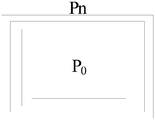
- P 0 , P 1 , P 2 , P 3 are respectively copied to the four pixel points of the buffer area according to the size of the corresponding zoom icon, and P 0 , P 1 , P 2 , P 3 Surrounding the pixel points Q 0 , S 0 , S 1 , S 2 , and S 3 to be filled respectively are distances of P 0 , P 1 , P 2 , P 3 to Q 0 ;
- the zooming the original icon to the size of the zoom icon to form a zoom icon comprises:
- the preset step-by-step zooming rule is a step-by-step zooming rule
- the size of the zoom icon corresponding to each frame of the original icon is copied to the buffer area
- the present invention further provides an icon display system, where the icon display system includes:
- An obtaining module configured to obtain an original icon selected by a user on a display interface
- a calculation module configured to acquire a size of the original icon and a preset step-by-step scaling rule, and calculate, according to the size of the original icon and a preset step-by-step scaling rule, a size of a zoom icon corresponding to the zoomed display,
- the zoom icon is at least two;
- a scaling module configured to copy the original icon to a size of the zoom icon to form a zoom icon
- a display module configured to control the original icon to be switched and displayed with each of the zoom icons.
- the display module comprises:
- a time acquisition unit configured to acquire a preset icon switching time
- a timing unit configured to start timing after the icon display of the previous frame is completed, and determine whether the timing time exceeds the preset icon switching time
- a display unit configured to switch to display the current zoom icon when the timing time exceeds the preset icon switching time
- the preset icon switching time is obtained according to a preset playing frame rate, where the preset playing frame rate is greater than or equal to a refresh rate of the display interface.
- the scaling module comprises:
- a first copy unit configured to: when the preset step-by-step zooming rule is a step-by-step zooming rule, copy the size of the zoom icon corresponding to each frame of the original icon to the buffer area;
- the first calculating unit is configured to calculate a pixel point to be filled in the buffer area in the buffer area, and perform a filling process.
- the first calculating unit comprises:
- a first sub-unit configured to obtain a pixel point Q 0 to be filled in the buffer area according to a preset pixel point calculation method
- P 0 , P 1 , P 2 , P 3 are respectively copied to the four pixel points of the buffer area according to the size of the corresponding zoom icon, and P 0 , P 1 , P 2 , P 3 Surrounding the pixel points Q 0 , S 0 , S 1 , S 2 , and S 3 to be filled respectively are distances of P 0 , P 1 , P 2 , P 3 to Q 0 ;
- a second subunit configured to perform, according to the pixel to be filled, a zoom icon in a buffer area Fill processing.
- the scaling module further includes:
- a second copy unit configured to: when the preset step-by-step zooming rule is a step-by-step zooming rule, copy the size of the zoom icon corresponding to each frame of the original icon to the buffer area;
- a second calculating unit configured to calculate a pixel point of the zoom icon to be deleted in the buffer area, and perform a deletion process.
- the size of the original icon is obtained, and the size of the zoom icon corresponding to the zoomed process is calculated according to the preset step-by-step zoom rule, and Converting the original icon to the size of the zoom icon to form a zoom icon, and then controlling the original icon to switch display with each of the zoom icons, since the zoom icons are scaled between each frame
- the rule therefore, after the user box selects the original icon, the original icon will exhibit a zoomed dynamic stereo effect.
- FIG. 1 is a schematic flow chart of a first embodiment of an icon display method according to the present invention.
- FIG. 2 is a schematic diagram showing an icon display for scaling an original icon to form a zoom icon according to an embodiment of the icon display method of the present invention
- FIG. 3 is a schematic flow chart of a second embodiment of an icon display method according to the present invention.
- FIG. 4 is a schematic flow chart of a third embodiment of an icon display method according to the present invention.
- FIG. 5 is a schematic flowchart diagram of a fourth embodiment of an icon display method according to the present invention.
- FIG. 6 is a schematic diagram of processing of an icon scaling algorithm according to an embodiment of an icon display method according to the present invention.
- FIG. 7 is a schematic flow chart of a fifth embodiment of an icon display method according to the present invention.
- FIG. 8 is a schematic diagram of functional modules of a first embodiment of an icon display system according to the present invention.
- FIG. 9 is a schematic diagram of functional modules of a second embodiment of an icon display system according to the present invention.
- FIG. 10 is a schematic diagram of functional modules of a third embodiment of an icon display system according to the present invention.
- FIG. 11 is a schematic diagram of functional modules of a fourth embodiment of an icon display system according to the present invention.
- FIG. 12 is a schematic diagram of functional modules of a fifth embodiment of an icon display system according to the present invention.
- the invention provides an icon display method.
- the icon display method includes the following steps:
- Step S100 obtaining an original icon selected by the user on the display interface
- Step S200 acquiring a size of the original icon and a preset step-by-step scaling rule, and calculating, according to the size of the original icon and a preset step-by-step scaling rule, a size of a zoom icon corresponding to the zoomed display, the scaling At least two icons;
- Step S300 copying the original icon to the size of the zoom icon to form a zoom icon
- Step S400 controlling the original icon to be switched and displayed with each of the zoom icons.
- the size of the original icon is obtained, and the size of the zoom icon corresponding to the zoomed process is calculated according to the preset step-by-step zoom rule, and Converting the original icon to the size of the zoom icon to form a zoom icon, and then controlling the original icon to switch display with each of the zoom icons, since the zoom icons are scaled between each frame
- the rule therefore, after the user box selects the original icon, the original icon will exhibit a zoomed dynamic stereo effect.
- the display interface may be any UI interface, for example, a smart TV manipulation interface, a mobile phone manipulation interface, and the like.
- the frame rate of the zoom icon is preferably greater than the refresh rate of the display interface (ie, the frame rate of the display interface).
- step-by-step scaling rule may be a rule for stepping down the original icon step by step, or may be a rule for stepping up the original icon step by step.
- step-by-step zooming rule is a step-by-step zooming rule
- the original icon when the original icon is selected by the frame, the original icon is stepwise enlarged within 200 milliseconds at a speed of 50 frames per second or more until zoomed to a preset enlarged size.
- the zoom icon of the largest size is gradually reduced in a reverse process of the progressive enlargement process until it is reduced to the size of the original icon.
- step-by-step zooming rule is a step-by-step zooming rule
- the other of the original icons is also scaled down by more than 50 frames per second in less than 200 milliseconds.
- the zoom icon of the minimum size is progressively enlarged in a reverse process of the step-by-step reduction process until zoomed in to the size of the original icon.
- the progressive zooming and step-by-step zooming of the original icon can make the display interface more stereoscopic and present a dynamic icon effect.
- the dynamic effect of the original icon is more realistic, especially when the zoom icon of the last frame is 1.5 times the size of the original icon, and the effect is optimal.
- the foregoing step S400 includes:
- Step S410 acquiring a preset icon switching time
- Step S420 starting timing after the display of the icon of the previous frame is completed, determining whether the timing time exceeds the preset icon switching time;
- Step S430 if yes, switching to display the current zoom icon
- the preset icon switching time is obtained according to a preset playing frame rate, where the preset playing frame rate is greater than or equal to a refresh rate of the display interface.
- the playing frame rate f 70 frames per second
- f 70 frames per second.
- T and f are not limited to this, T ⁇ 200 milliseconds, f ⁇ 50 frames per second, can achieve a better stereoscopic display effect, and all of the same are included in the protection scope of the present invention.
- the size of the zoom icon in the last frame is the Take 1.5 times the original icon size as an example.
- the total playback time of the zoom icon is 200 milliseconds, and the frame rate is 70 frames per second. Therefore, the number of frames of the zoom icon can be 14 frames.
- the zoom icon of 14 frames is played in 200 milliseconds, and the preset time interval of the zoom icon in each frame is 14.3 milliseconds.
- the preset step-by-step scaling rule is a calculation function of the zoom icon in each frame.
- the original icon has a width of W 0 , a height of H 0 , and a maximum magnification of 1.5 times, and may be sequentially calculated.
- n is 0 to 14, and when n is 0, corresponding to the size of the initial icon, when n is 1 to 14, respectively, corresponding to the number of frames of the scaling icon from the first frame to the fourteenth frame, W n is the width of the zoom icon in the nth frame, and H n is the height of the zoom icon in the nth frame.
- the method further includes:
- Step S440 if no, proceed to the above step S420.
- the foregoing step S300 includes:
- Step S310 when the preset step-by-step zooming rule is a step-by-step zooming rule, copy the size of the zoom icon corresponding to each frame of the original icon to the buffer area;
- Step S320 calculating a pixel point to be filled in the buffer area in the buffer area, and performing a filling process.
- the enlargement of the original icon and the filling of the pixel are all completed in the buffer area, and the buffer area is a host buffer area corresponding to the display interface, and the computing resources of the host are better utilized.
- the preset step-by-step zooming rule is a step-by-step zooming rule
- the original icon is copied to the buffer area according to an enlarging rule, and the distance between adjacent pixel points is increased, resulting in an unclear enlarged icon.
- pixel points should be filled between adjacent pixel points after the original icon is enlarged.
- step S320 includes:
- Step S321 obtaining a pixel point Q 0 to be filled in the buffer area according to a preset pixel point calculation method, where
- P 0 , P 1 , P 2 , P 3 are respectively copied to the four pixel points of the buffer area according to the size of the corresponding zoom icon, and P 0 , P 1 , P 2 , P 3 Surrounding the pixel points Q 0 , S 0 , S 1 , S 2 , and S 3 to be filled respectively are distances of P 0 , P 1 , P 2 , P 3 to Q 0 ;
- Step S322 performing a filling process on the zoom icon in the buffer area according to the pixel to be filled.
- the pixels to be filled are calculated by adjacent pixels around the pixel, and the adjacent pixels are copied to the pixel on the zoom icon of the current frame.
- the pixel point Q 0 can be calculated from adjacent pixel points around it.
- P 0 , P 1 , P 2 , and P 3 are the pixels on the original icon copied to the adjacent four points on the enlarged icon, P 0 and P 1 , P 1 and P 3 ,
- the distance between P 3 and P 2 , P 2 and P 1 is ⁇ z, and the horizontal and vertical distances of Q 0 and P 0 are ⁇ x and ⁇ y, respectively, so that the filling points Q 0 to P 0 , P 1 ,
- the distances between P 2 and P 3 are:
- the pixel point Q 0 is most similar to the pixel closest to it, and when the pixel point Q 0 is calculated by using the surrounding pixel points, the ratio of the weight of the pixel point closer to the prime point Q 0 should be higher, and thus the pixel is obtained.
- the pixel at point Q 0 is:
- P 0 since P 0 is closest to Q 0 , P 0 has the highest weight ratio.
- the foregoing step S300 includes:
- Step S311 when the preset step-by-step zooming rule is a step-by-step zooming rule, copy the size of the zoom icon corresponding to each frame of the original icon to the buffer area;
- Step S321 calculating a pixel point to be deleted in the buffer area in the buffer area, and performing deletion processing.
- the preset step-by-step scaling rule is a step-by-step reduction rule
- the original icon is copied to the buffer area according to the reduction rule, and the distance between adjacent pixel points is reduced, resulting in reducing the icon and the location.
- the resolutions of the original icons are inconsistent.
- pixels should be deleted between adjacent pixels after the original icon is reduced. .
- the method further includes:
- Step S500 determining whether the display of all the zoom icons is completed
- the determining process of determining whether to complete the display of all the zoom icons may be implemented by determining whether the number of frames of the zoom icon in the current frame reaches a preset number of frames, for example, determining whether the preset 14 frames are reached, if Then, the zoom display of the original icon is ended, and if not, the process returns to the above step S200.
- the execution of the determining process may also be implemented by determining whether the current time reaches a preset total time.
- the preset total time is 200 milliseconds. Therefore, if it reaches 200 milliseconds, the zoom display of the original icon is ended. If not, the process returns to step S200.
- the process of performing the determination may also be implemented by determining whether a preset zoom factor is reached. For example, determining whether the size of the zoom icon of the current frame is 1.5 times of the original icon, and if so, Then, the zoom display of the original icon is ended, and if not, the process returns to the above step S200.
- the icon display system provided by the present invention includes:
- the obtaining module 10 is configured to obtain an original icon selected by the user on the display interface
- the calculating module 20 is configured to acquire a size of the original icon and a preset step-by-step scaling rule, and calculate a size of the zoom icon corresponding to the zoomed display according to the size of the original icon and a preset step-by-step zooming rule.
- the zoom icons are at least two;
- a scaling module 30 configured to copy the original icon to a size of the zoom icon to form a zoom icon
- the display module 40 is configured to control the original icon to be switched and displayed with each of the zoom icons.
- the size of the original icon is obtained, and the size of the zoom icon corresponding to the zoomed process is calculated according to the preset step-by-step zoom rule, and Converting the original icon to the size of the zoom icon to form a zoom icon, and then controlling the original icon to switch display with each of the zoom icons, since the zoom icons are scaled between each frame
- the rule therefore, after the user box selects the original icon, the original icon will exhibit a zoomed dynamic stereo effect.
- the display interface may be any UI interface, for example, a smart TV manipulation interface, a mobile phone manipulation interface, and the like.
- the frame rate of the zoom icon is preferably greater than the refresh rate of the display interface (ie, the frame rate of the display interface).
- step-by-step scaling rule may be a rule for stepping down the original icon step by step, or may be a rule for stepping up the original icon step by step.
- step-by-step zooming rule is a step-by-step zooming rule
- the original icon when the original icon is selected by the frame, the original icon is stepwise enlarged within 200 milliseconds at a speed of 50 frames per second or more until zoomed to a preset enlarged size.
- the zoom icon of the largest size is stepwise The inverse of the zooming process is scaled down until it is reduced to the size of the original icon.
- step-by-step zooming rule is a step-by-step zooming rule
- the other of the original icons is also scaled down by more than 50 frames per second in less than 200 milliseconds.
- the zoom icon of the minimum size is progressively enlarged in a reverse process of the step-by-step reduction process until zoomed in to the size of the original icon.
- the progressive zooming and step-by-step zooming of the original icon can make the display interface more stereoscopic and present a dynamic icon effect.
- the dynamic effect of the original icon is more realistic, especially when the zoom icon of the last frame is 1.5 times the size of the original icon, and the effect is optimal.
- the display module 40 further includes:
- the time obtaining unit 41 is configured to acquire a preset icon switching time
- the timing unit 42 is configured to start timing after the icon display of the previous frame is completed, and determine whether the timing time exceeds the preset icon switching time;
- the display unit 43 is configured to switch to display the current zoom icon when the timing time exceeds the preset icon switching time
- the preset icon switching time is obtained according to a preset playing frame rate, where the preset playing frame rate is greater than or equal to a refresh rate of the display interface.
- the playing frame rate f 70 frames per second
- f 70 frames per second.
- T and f are not limited to this, T ⁇ 200 milliseconds, f ⁇ 50 frames per second, can achieve a better stereoscopic display effect, and all of the same are included in the protection scope of the present invention.
- the size of the zoom icon in the last frame is 1.5 times the size of the original icon.
- the total playback time of the zoom icon is 200 milliseconds, and the frame rate is 70 frames per second. Therefore, the number of frames of the zoom icon can be 14 frames.
- the zoom icon of 14 frames is at 200 millimeters. After the playback is completed in seconds, the preset time interval of the zoom icon for each frame is 14.3 milliseconds.
- the preset step-by-step scaling rule is a calculation function of the zoom icon in each frame.
- the original icon has a width of W 0 , a height of H 0 , and a maximum magnification of 1.5 times, and may be sequentially calculated.
- n is 0 to 14, and when n is 0, corresponding to the size of the initial icon, when n is 1 to 14, respectively, corresponding to the number of frames of the scaling icon from the first frame to the fourteenth frame, W n is the width of the zoom icon in the nth frame, and H n is the height of the zoom icon in the nth frame.
- the timing time does not exceed the preset icon switching time, the current zoom icon is not switched.
- the scaling module 30 includes:
- the first copy unit 31 is configured to: when the preset step-by-step zooming rule is a step-by-step zooming rule, copy the size of the zoom icon corresponding to each frame of the original icon to the buffer area;
- the first calculating unit 32 is configured to calculate a pixel point to be filled in the buffer area in the buffer area, and perform a filling process.
- the enlargement of the original icon and the filling of the pixel are all completed in the buffer area, and the buffer area is a host buffer area corresponding to the display interface, and the computing resources of the host are better utilized.
- the preset step-by-step zooming rule is a step-by-step zooming rule
- the original icon is copied to the buffer area according to an enlarging rule, and the distance between adjacent pixel points is increased, resulting in an unclear enlarged icon.
- pixel points should be filled between adjacent pixel points after the original icon is enlarged.
- the first calculating unit 32 includes:
- a first sub-unit 321 is configured to obtain, according to a preset pixel point calculation method, a pixel point Q 0 to be filled in the buffer area, where
- P 0 , P 1 , P 2 , P 3 are respectively copied to the four pixel points of the buffer area according to the size of the corresponding zoom icon, and P 0 , P 1 , P 2 , P 3 Surrounding the pixel points Q 0 , S 0 , S 1 , S 2 , and S 3 to be filled respectively are distances of P 0 , P 1 , P 2 , P 3 to Q 0 ;
- the second sub-unit 322 is configured to perform a filling process on the zoom icon in the buffer area according to the pixel point to be filled.
- the pixels to be filled are calculated by adjacent pixels around the pixel, and the adjacent pixels are copied to the pixel on the zoom icon of the current frame.
- the pixel point Q 0 can be calculated from adjacent pixel points around it.
- P 0 , P 1 , P 2 , and P 3 are the pixels on the original icon copied to the adjacent four points on the enlarged icon, P 0 and P 1 , P 1 and P 3 ,
- the distance between P 3 and P 2 , P 2 and P 1 is ⁇ z, and the horizontal and vertical distances of Q 0 and P 0 are ⁇ x and ⁇ y, respectively, so that the filling points Q 0 to P 0 , P 1 ,
- the distances between P 2 and P 3 are:
- the pixel point Q 0 is most similar to the pixel closest to it, and when the pixel point Q 0 is calculated by using the surrounding pixel points, the ratio of the weight of the pixel point closer to the prime point Q 0 should be higher, and thus the pixel is obtained.
- the pixel at point Q 0 is:
- P 0 since P 0 is closest to Q 0 , P 0 has the highest weight ratio.
- the scaling module further includes:
- a second copy unit 33 configured to: when the preset step-by-step zooming rule is a step-by-step zooming rule, copy the size of the zoom icon corresponding to each frame of the original icon to the buffer area;
- the second calculating unit 34 is configured to calculate a pixel point of the zoom icon to be deleted in the buffer area, and perform a deletion process.
- the preset step-by-step scaling rule is a step-by-step reduction rule
- the original icon is copied to the buffer area according to the reduction rule, and the distance between adjacent pixel points is reduced, resulting in reducing the icon and the location.
- the resolutions of the original icons are inconsistent.
- pixels should be deleted between adjacent pixels after the original icon is reduced. .
- the icon display system further includes:
- a determining module configured to determine whether all of the zoom icons are displayed
- the calculation module 20 acquires the size of the original icon and a preset step-by-step scaling rule, and calculates a scaling icon corresponding to the zooming process according to the size of the original icon and the preset step-by-step scaling rule. size of.
- the determining process of determining whether to complete the display of all the zoom icons may be implemented by determining whether the number of frames of the zoom icon in the current frame reaches a preset number of frames, for example, determining whether the preset 14 frames are reached, if Then ends the zoom display of the original icon.
- the execution of the determining process may also be implemented by determining whether the current time reaches a preset total time.
- the preset total time is 200 milliseconds, and therefore, if it reaches 200 milliseconds, the zoom display of the original icon is ended.
- the process of performing the determination may also be implemented by determining whether a preset zoom factor is reached. For example, it is determined whether the size of the zoom icon of the current frame is 1.5 times of the original icon, and if so, the zoom display of the original icon is ended.
Landscapes
- Engineering & Computer Science (AREA)
- General Engineering & Computer Science (AREA)
- Theoretical Computer Science (AREA)
- Human Computer Interaction (AREA)
- Physics & Mathematics (AREA)
- General Physics & Mathematics (AREA)
- Controls And Circuits For Display Device (AREA)
- User Interface Of Digital Computer (AREA)
Abstract
一种图标显示方法及系统,所述图标显示方法包括以下步骤:获取用户在显示界面上选中的原始图标(S100);获取所述原始图标的尺寸和预设的逐级缩放规则,根据所述原始图标的尺寸和预设的逐级缩放规则计算进行缩放处理后对应显示的缩放图标的尺寸,所述缩放图标至少为两个(S200);将所述原始图标复制缩放至所述缩放图标的尺寸,以形成缩放图标(S300);控制所述原始图标与各所述缩放图标进行切换显示(S400)。该图标显示方法旨在提高图标框选时的动态立体感。
Description
本发明涉及图标显示技术领域,尤其涉及一种图标显示方法及系统。
带有图标的UI界面,例如安卓界面,对图标有一些简单的特效,比如图标滑动效果,图标换屏效果,按钮动作特效,但随着用户对人机交互的要求越来越高,这些简单的特效并不能给人以非常逼真效果。
当进入安卓系统的HOME界面后,用户通过操作遥控器上的“上”、“下”、“左”、“右”按键切换框选图标时,各个图标的焦点框切换非常死板,不能呈现立体感。
上述技术方案的弊端是,框选图标时,选中的图标显示单一,无动态的立体感。
发明内容
本发明的主要目的在于提供一种图标显示方法,旨在提高图标框选时的动态立体感。
为实现上述目的,本发明提供的图标显示方法包括以下步骤:
获取用户在显示界面上选中的原始图标;
获取所述原始图标的尺寸和预设的逐级缩放规则,根据所述原始图标的尺寸和预设的逐级缩放规则计算进行缩放处理后对应显示的缩放图标的尺寸,所述缩放图标至少为两个;
将所述原始图标复制缩放至所述缩放图标的尺寸,以形成缩放图标;
控制所述原始图标与各所述缩放图标进行切换显示。
优选地,所述控制所述原始图标与各所述缩放图标进行切换显示包括:
获取预设的图标切换时间;
自上一帧图标显示完成后开始计时,判断计时时间是否超过所述预设的
图标切换时间;
若是,则切换显示当前的所述缩放图标;
其中,所述预设的图标切换时间根据预设的播放帧率获得,所述预设的播放帧率大于或等于所述显示界面的刷新率。
优选地,所述将所述原始图标复制缩放至所述缩放图标的尺寸,以形成缩放图标包括:
当所述预设的逐级缩放规则为逐级放大规则时,将所述原始图标的按照每一帧画面对应的缩放图标的尺寸拷贝至缓存区;
计算所述缓存区中缩放图标待填充的像素点,并进行填充处理。
优选地,所述计算所述缓存区中缩放图标待填充的像素点,并进行填充处理包括:
按照预设的像素点计算方法,获得所述缓存区中缩放图标待填充的像素点Q0,其中,

根据所述待填充的像素点对缓存区中的缩放图标进行填充处理。
优选地,所述将所述原始图标复制缩放至所述缩放图标的尺寸,以形成缩放图标包括:
当所述预设的逐级缩放规则为逐级缩小规则时,将所述原始图标的按照每一帧画面对应的缩放图标的尺寸拷贝至缓存区;
计算所述缓存区中缩放图标待删除的像素点,并进行删除处理。
此外,为实现上述目的,本发明还提供一种图标显示系统,所述图标显示系统包括:
获取模块,用于获取用户在显示界面上选中的原始图标;
计算模块,用于获取所述原始图标的尺寸和预设的逐级缩放规则,根据所述原始图标的尺寸和预设的逐级缩放规则计算进行缩放处理后对应显示的缩放图标的尺寸,所述缩放图标至少为两个;
缩放模块,用于将所述原始图标复制缩放至所述缩放图标的尺寸,以形成缩放图标;
显示模块,用于控制所述原始图标与各所述缩放图标进行切换显示。
优选地,所述显示模块包括:
时间获取单元,用于获取预设的图标切换时间;
计时单元,用于自上一帧图标显示完成后开始计时,判断计时时间是否超过所述预设的图标切换时间;
显示单元,用于在计时时间超过所述预设的图标切换时间时,切换显示当前的所述缩放图标;
其中,所述预设的图标切换时间根据预设的播放帧率获得,所述预设的播放帧率大于或等于所述显示界面的刷新率。
优选地,所述缩放模块包括:
第一拷贝单元,用于当所述预设的逐级缩放规则为逐级放大规则时,将所述原始图标的按照每一帧画面对应的缩放图标的尺寸拷贝至缓存区;
第一计算单元,用于计算所述缓存区中缩放图标待填充的像素点,并进行填充处理。
优选地,所述第一计算单元包括:
第一子单元,用于按照预设的像素点计算方法,获得所述缓存区中缩放图标待填充的像素点Q0,其中,

第二子单元,用于根据所述待填充的像素点对缓存区中的缩放图标进行
填充处理。
优选地,所述缩放模块还包括:
第二拷贝单元,用于当所述预设的逐级缩放规则为逐级缩小规则时,将所述原始图标的按照每一帧画面对应的缩放图标的尺寸拷贝至缓存区;
第二计算单元,用于计算所述缓存区中缩放图标待删除的像素点,并进行删除处理。
在本发明的技术方案中,在用户选中显示界面上的原始图标后,获取所述原始图标的尺寸,根据预设的逐级缩放规则计算进行缩放处理后对应显示的缩放图标的尺寸,并将所述原始图标复制缩放至所述缩放图标的尺寸,以形成缩放图标,然后控制所述原始图标与各所述缩放图标进行切换显示,由于每一帧所述缩放图标之间具有逐级缩放的规则,因此,用户框选中所述原始图标后,所述原始图标会呈现出缩放的动态立体效果。
图1为本发明图标显示方法第一实施例的流程示意图;
图2为本发明图标显示方法一实施例中对原始图标进行逐级缩放形成缩放图标的图标显示示意图;
图3为本发明图标显示方法第二实施例的流程示意图;
图4为本发明图标显示方法第三实施例的流程示意图;
图5为本发明图标显示方法第四实施例的流程示意图;
图6为本发明图标显示方法一实施例的图标缩放算法处理示意图;
图7为本发明图标显示方法第五实施例的流程示意图;
图8为本发明图标显示系统第一实施例的功能模块示意图;
图9为本发明图标显示系统第二实施例的功能模块示意图;
图10为本发明图标显示系统第三实施例的功能模块示意图;
图11为本发明图标显示系统第四实施例的功能模块示意图;
图12为本发明图标显示系统第五实施例的功能模块示意图。
本发明目的的实现、功能特点及优点将结合实施例,参照附图做进一步说明。
应当理解,此处所描述的具体实施例仅仅用以解释本发明,并不用于限定本发明。
本发明提供一种图标显示方法。
参照图1和图2,提出了本发明图标显示方法第一实施例,该实施例中,图标显示方法包括以下步骤:
步骤S100,获取用户在显示界面上选中的原始图标;
步骤S200,获取所述原始图标的尺寸和预设的逐级缩放规则,根据所述原始图标的尺寸和预设的逐级缩放规则计算进行缩放处理后对应显示的缩放图标的尺寸,所述缩放图标至少为两个;
步骤S300,将所述原始图标复制缩放至所述缩放图标的尺寸,以形成缩放图标;
步骤S400,控制所述原始图标与各所述缩放图标进行切换显示。
在本发明的技术方案中,在用户选中显示界面上的原始图标后,获取所述原始图标的尺寸,根据预设的逐级缩放规则计算进行缩放处理后对应显示的缩放图标的尺寸,并将所述原始图标复制缩放至所述缩放图标的尺寸,以形成缩放图标,然后控制所述原始图标与各所述缩放图标进行切换显示,由于每一帧所述缩放图标之间具有逐级缩放的规则,因此,用户框选中所述原始图标后,所述原始图标会呈现出缩放的动态立体效果。
具体的,所述显示界面可以是任意的UI界面,例如,智能电视机操纵界面、手机操纵界面等。
对所述原始图标进行缩放特效,当每一帧缩放图标的帧率在50帧每秒以上,并且从所述原始图标至播放最后一帧所述缩放图标的总时间在200毫秒以上,人眼即可有观察到立体效果非常逼真的动态图标。
为了使图标缩放立体感更强,进一步提高用户的体验,在本实施例中,所述缩放图标的帧率优选大于所述显示界面的刷新率(即所述显示界面的帧率)。
应当理解,所述逐级缩放规则可以为将所述原始图标进行逐级缩小的规则,也可以为将所述原始图标进行逐级放大的规则。
若所述逐级缩放规则为逐级放大规则,当框选中所述原始图标时,所述原始图标以50帧每秒以上的速度在200毫秒以内逐级放大,直至放大至预设的放大尺寸,当从所述原始图标移开时,最大尺寸的所述缩放图标按照逐级放大过程的逆过程逐级缩小,直至缩小至所述原始图标的尺寸。
若所述逐级缩放规则为逐级缩小规则,当框选中到另外一个所述原始图标时,另一个所述原始图标就同样以50帧每秒以上的在200毫秒以内逐级缩小,直至缩小至预设的缩小尺寸,当从所述原始图标移开时,最小尺寸的所述缩放图标按照逐级缩小过程的逆过程逐级放大,直至放大至所述原始图标的尺寸。
所述原始图标的逐级放大和逐级缩小都能够使显示界面更立体,呈现出动态的图标效果。
所述逐级缩放规则为逐级放大规则时,所述原始图标的动态效果更逼真,尤其是最后一帧所述缩放图标为所述原始图标尺寸的1.5倍时,效果最理想。
进一步地,参照图3,基于本发明图标显示方法第一实施例,在本发明第二实施例中,上述步骤S400包括:
步骤S410,获取预设的图标切换时间;
步骤S420,自上一帧图标显示完成后开始计时,判断计时时间是否超过所述预设的图标切换时间;
步骤S430,若是,则切换显示当前的所述缩放图标;
其中,所述预设的图标切换时间根据预设的播放帧率获得,所述预设的播放帧率大于或等于所述显示界面的刷新率。
具体的,在本实施例中,所述播放帧率f=70帧每秒,所述预设的图标切换时间t=1/f=14.3毫秒,从所述原始图标至播放最后一帧所述缩放图标的总时间T=200毫秒,f=70帧每秒。当然,T和f并不以此为限,T≥200毫秒,f≥50帧每秒,可达到较好的立体显示效果,均同理包含在本发明的保护范围内。
在本实施例中,为了便于介绍,以最后一帧所述缩放图标的尺寸为所述
原始图标尺寸的1.5倍为例。
所述缩放图标的播放总时间为200毫秒,帧率为70帧每秒,因此,可以得到所述缩放图标的帧数为14帧。
为了使所述缩放图像的播放过程更均匀化,14帧所述缩放图标在200毫秒内播放完毕,每一帧所述缩放图标的预设的时间间隔为14.3毫秒。
预设的逐级缩放规则为每一帧所述缩放图标的计算函数,在本实施例中,令所述原始图标的宽度为W0,高度为H0,最高放大1.5倍,则可以依次计算出每帧所述缩放图标的尺寸:

其中,n的取值为0至14,n取0时,对应所述初始图标的尺寸,n取1至14时,分别对应从第一帧至第十四帧所述缩放图标的帧数,Wn为第n帧所述缩放图标的宽度,Hn为第n帧所述缩放图标的高度。
进一步地,上述步骤S420之后还包括;
步骤S440,若否,则继续执行上述步骤S420。
进一步地,参照图4,基于本发明图标显示方法第一实施例,在本发明第三实施例中,上述步骤S300包括:
步骤S310,当所述预设的逐级缩放规则为逐级放大规则时,将所述原始图标的按照每一帧画面对应的缩放图标的尺寸拷贝至缓存区;
步骤S320,计算所述缓存区中缩放图标待填充的像素点,并进行填充处理。
所述原始图标的放大和像素点的填充均在缓存区完成,所述缓存区为所述显示界面对应的主机缓存区,较好的利用了主机的计算资源。
当所述预设的逐级缩放规则为逐级放大规则时,所述原始图标按照放大规则拷贝至所述缓存区,其相邻的像素点之间的距离会增大,导致放大图标不清晰,为了使所述缩放图标和所述原始图标保持相等的分辨率,保证一致的视觉效果,应该在所述原始图标放大后的相邻的像素点之间填充像素点。
当然,仅对所述原始图标按照预设的逐级放大规则进行放大,而不在放大后的相邻像素点之间填充像素点的技术方案,也同理包含在本发明的保护
范围之内。
进一步地,参照图5,基于本发明图标显示方法第三实施例,在本发明第四实施例中,上述步骤S320包括:
步骤S321,按照预设的像素点计算方法,获得所述缓存区中缩放图标待填充的像素点Q0,其中,

步骤S322,根据所述待填充的像素点对缓存区中的缩放图标进行填充处理。
具体的,待填充的像素由环绕其周围的相邻像素点计算得到,所述相邻像素点为所述原始图标上的像素点拷贝至当前帧所述缩放图标上的像素点。
像素点Q0可以由环绕其周围的相邻像素点计算得到。
请参照图6,P0、P1、P2和P3为原始图标上的像素拷贝到经放大后的图标上的相邻的四个点,P0与P1、P1与P3、P3与P2、P2与P1之间的距离均为Δz,Q0与P0的水平和垂直距离分别为Δx和Δy,故可以计算出填充点Q0至P0、P1、P2和P3的距离分别为:


像素点Q0与其最接近的像素最相似,在利用周围的像素点计算像素点Q0时,应使与素点Q0越接近的像素点所占的权值比例越高,因此,得到像素点Q0的像素为:

在本实施例中,由于P0与Q0最接近,因此,P0所占的权值比例最高。
进一步地,请参照图7,基于本发明图标显示方法第一实施例至第四实施例,在本发明第五实施例中,上述步骤S300包括:
步骤S311,当所述预设的逐级缩放规则为逐级缩小规则时,将所述原始图标的按照每一帧画面对应的缩放图标的尺寸拷贝至缓存区;
步骤S321,计算所述缓存区中缩放图标待删除的像素点,并进行删除处理。
当所述预设的逐级缩放规则为逐级缩小规则时,所述原始图标按照缩小规则拷贝至所述缓存区,其相邻的像素点之间的距离会减小,导致缩小图标与所述原始图标的分辨率不一致,为了使所述缩放图标和所述原始图标保持相等的分辨率,保证一致的视觉效果,应该在所述原始图标缩小后的相邻的像素点之间删除像素点。
当然,仅对所述原始图标按照预设的逐级缩小规则进行放大,而不在缩小后的相邻像素点之间删除像素点的技术方案,也同理包含在本发明的保护范围之内。
进一步地,基于本发明图标显示方法第一实施例至第五实施例中任意一项,在本发明第六实施例中,上述步骤S400之后还包括:
步骤S500,判断是否完成所有的所述缩放图标的显示;
若否,则返回上述步骤S200。
若是,则结束对所述原始图标的缩放显示。
执行判断是否完成所有的所述缩放图标的显示的判断过程可以通过判断当前帧所述缩放图标的帧数是否达到预设的帧数来实现,例如,判断是否达到预设的14帧,若达到,则结束对所述原始图标的缩放显示,若未达到,则返回上述步骤S200。
同时,执行所述判断过程也可以通过判断当前时间是否达到预设的总时间来实现。例如,在本实施例中,所述预设的总时间为200毫秒,因此,若达到200毫秒,则结束对所述原始图标的缩放显示,若未达到,则返回上述步骤S200。
执行所述判断过程还可以通过判断是否达到预设的缩放倍数来实现。例如,判断当前帧所述缩放图标的尺寸是否为所述原始图标的1.5倍,若达到,
则结束对所述原始图标的缩放显示,若未达到,则返回上述步骤S200。
参照图8,提出了本发明图标显示系统第一实施例,该实施例中,本发明提供的图标显示系统包括:
获取模块10,用于获取用户在显示界面上选中的原始图标;
计算模块20,用于获取所述原始图标的尺寸和预设的逐级缩放规则,根据所述原始图标的尺寸和预设的逐级缩放规则计算进行缩放处理后对应显示的缩放图标的尺寸,所述缩放图标至少为两个;
缩放模块30,用于将所述原始图标复制缩放至所述缩放图标的尺寸,以形成缩放图标;
显示模块40,用于控制所述原始图标与各所述缩放图标进行切换显示。
在本发明的技术方案中,在用户选中显示界面上的原始图标后,获取所述原始图标的尺寸,根据预设的逐级缩放规则计算进行缩放处理后对应显示的缩放图标的尺寸,并将所述原始图标复制缩放至所述缩放图标的尺寸,以形成缩放图标,然后控制所述原始图标与各所述缩放图标进行切换显示,由于每一帧所述缩放图标之间具有逐级缩放的规则,因此,用户框选中所述原始图标后,所述原始图标会呈现出缩放的动态立体效果。
具体的,所述显示界面可以是任意的UI界面,例如,智能电视机操纵界面、手机操纵界面等。
对所述原始图标进行缩放特效,当每一帧缩放图标的帧率在50帧每秒以上,并且从所述原始图标至播放最后一帧所述缩放图标的总时间在200毫秒以上,人眼即可有观察到立体效果非常逼真的动态图标。
为了使图标缩放立体感更强,进一步提高用户的体验,在本实施例中,所述缩放图标的帧率优选大于所述显示界面的刷新率(即所述显示界面的帧率)。
应当理解,所述逐级缩放规则可以为将所述原始图标进行逐级缩小的规则,也可以为将所述原始图标进行逐级放大的规则。
若所述逐级缩放规则为逐级放大规则,当框选中所述原始图标时,所述原始图标以50帧每秒以上的速度在200毫秒以内逐级放大,直至放大至预设的放大尺寸,当从所述原始图标移开时,最大尺寸的所述缩放图标按照逐级
放大过程的逆过程逐级缩小,直至缩小至所述原始图标的尺寸。
若所述逐级缩放规则为逐级缩小规则,当框选中到另外一个所述原始图标时,另一个所述原始图标就同样以50帧每秒以上的在200毫秒以内逐级缩小,直至缩小至预设的缩小尺寸,当从所述原始图标移开时,最小尺寸的所述缩放图标按照逐级缩小过程的逆过程逐级放大,直至放大至所述原始图标的尺寸。
所述原始图标的逐级放大和逐级缩小都能够使显示界面更立体,呈现出动态的图标效果。
所述逐级缩放规则为逐级放大规则时,所述原始图标的动态效果更逼真,尤其是最后一帧所述缩放图标为所述原始图标尺寸的1.5倍时,效果最理想。
进一步地,请参照图9,基于本发明图标显示系统第一实施例,在本发明第二实施例中,所述显示模块40还包括:
时间获取单元41,用于获取预设的图标切换时间;
计时单元42,用于自上一帧图标显示完成后开始计时,判断计时时间是否超过所述预设的图标切换时间;
显示单元43,用于在计时时间超过所述预设的图标切换时间时,切换显示当前的所述缩放图标;
其中,所述预设的图标切换时间根据预设的播放帧率获得,所述预设的播放帧率大于或等于所述显示界面的刷新率。
具体的,在本实施例中,所述播放帧率f=70帧每秒,所述预设的图标切换时间t=1/f=14.3毫秒,从所述原始图标至播放最后一帧所述缩放图标的总时间T=200毫秒,f=70帧每秒。当然,T和f并不以此为限,T≥200毫秒,f≥50帧每秒,可达到较好的立体显示效果,均同理包含在本发明的保护范围内。
在本实施例中,为了便于介绍,以最后一帧所述缩放图标的尺寸为所述原始图标尺寸的1.5倍为例。
所述缩放图标的播放总时间为200毫秒,帧率为70帧每秒,因此,可以得到所述缩放图标的帧数为14帧。
为了使所述缩放图像的播放过程更均匀化,14帧所述缩放图标在200毫
秒内播放完毕,每一帧所述缩放图标的预设的时间间隔为14.3毫秒。
预设的逐级缩放规则为每一帧所述缩放图标的计算函数,在本实施例中,令所述原始图标的宽度为W0,高度为H0,最高放大1.5倍,则可以依次计算出每帧所述缩放图标的尺寸:

其中,n的取值为0至14,n取0时,对应所述初始图标的尺寸,n取1至14时,分别对应从第一帧至第十四帧所述缩放图标的帧数,Wn为第n帧所述缩放图标的宽度,Hn为第n帧所述缩放图标的高度。
进一步地,若计时时间未超过所述预设的图标切换时间,则不切换显示当前的所述缩放图标。
进一步地,请参照图10,基于本发明图标显示系统第一实施例,在本发明第三实施例中,所述缩放模块30包括:
第一拷贝单元31,用于当所述预设的逐级缩放规则为逐级放大规则时,将所述原始图标的按照每一帧画面对应的缩放图标的尺寸拷贝至缓存区;
第一计算单元32,用于计算所述缓存区中缩放图标待填充的像素点,并进行填充处理。
所述原始图标的放大和像素点的填充均在缓存区完成,所述缓存区为所述显示界面对应的主机缓存区,较好的利用了主机的计算资源。
当所述预设的逐级缩放规则为逐级放大规则时,所述原始图标按照放大规则拷贝至所述缓存区,其相邻的像素点之间的距离会增大,导致放大图标不清晰,为了使所述缩放图标和所述原始图标保持相等的分辨率,保证一致的视觉效果,应该在所述原始图标放大后的相邻的像素点之间填充像素点。
当然,仅对所述原始图标按照预设的逐级放大规则进行放大,而不在放大后的相邻像素点之间填充像素点的技术方案,也同理包含在本发明的保护范围之内。
进一步地,请参照图11,基于本发明图标显示系统第三实施例,在本发明第四实施例中,所述第一计算单元32包括:
第一子单元321,用于按照预设的像素点计算方法,获得所述缓存区中缩放图标待填充的像素点Q0,其中,

第二子单元322,用于根据所述待填充的像素点对缓存区中的缩放图标进行填充处理。
具体的,待填充的像素由环绕其周围的相邻像素点计算得到,所述相邻像素点为所述原始图标上的像素点拷贝至当前帧所述缩放图标上的像素点。
像素点Q0可以由环绕其周围的相邻像素点计算得到。
请参照图5,P0、P1、P2和P3为原始图标上的像素拷贝到经放大后的图标上的相邻的四个点,P0与P1、P1与P3、P3与P2、P2与P1之间的距离均为Δz,Q0与P0的水平和垂直距离分别为Δx和Δy,故可以计算出填充点Q0至P0、P1、P2和P3的距离分别为:


像素点Q0与其最接近的像素最相似,在利用周围的像素点计算像素点Q0时,应使与素点Q0越接近的像素点所占的权值比例越高,因此,得到像素点Q0的像素为:

在本实施例中,由于P0与Q0最接近,因此,P0所占的权值比例最高。
进一步地,请参照图12,基于本发明图标显示系统第一实施例至第四实施例中任意一项,在本发明第五实施例中,所述缩放模块还包括:
第二拷贝单元33,用于当所述预设的逐级缩放规则为逐级缩小规则时,将所述原始图标的按照每一帧画面对应的缩放图标的尺寸拷贝至缓存区;
第二计算单元34,用于计算所述缓存区中缩放图标待删除的像素点,并进行删除处理。
当所述预设的逐级缩放规则为逐级缩小规则时,所述原始图标按照缩小规则拷贝至所述缓存区,其相邻的像素点之间的距离会减小,导致缩小图标与所述原始图标的分辨率不一致,为了使所述缩放图标和所述原始图标保持相等的分辨率,保证一致的视觉效果,应该在所述原始图标缩小后的相邻的像素点之间删除像素点。
当然,仅对所述原始图标按照预设的逐级缩小规则进行放大,而不在缩小后的相邻像素点之间删除像素点的技术方案,也同理包含在本发明的保护范围之内。
进一步地,基于本发明图标显示系统第一实施例至第五实施例中任意一项,在本发明第六实施例中,所述图标显示系统还包括:
判断模块,用于判断是否完成所有的所述缩放图标的显示;
若否,则所述计算模块20获取所述原始图标的尺寸和预设的逐级缩放规则,根据所述原始图标的尺寸和预设的逐级缩放规则计算进行缩放处理后对应显示的缩放图标的尺寸。
若是,则结束对所述原始图标的缩放显示。
执行判断是否完成所有的所述缩放图标的显示的判断过程可以通过判断当前帧所述缩放图标的帧数是否达到预设的帧数来实现,例如,判断是否达到预设的14帧,若达到,则结束对所述原始图标的缩放显示。
同时,执行所述判断过程也可以通过判断当前时间是否达到预设的总时间来实现。例如,在本实施例中,所述预设的总时间为200毫秒,因此,若达到200毫秒,则结束对所述原始图标的缩放显示。
执行所述判断过程还可以通过判断是否达到预设的缩放倍数来实现。例如,判断当前帧所述缩放图标的尺寸是否为所述原始图标的1.5倍,若达到,则结束对所述原始图标的缩放显示。
以上仅为本发明的优选实施例,并非因此限制本发明的专利范围,凡是利用本发明说明书及附图内容所作的等效结构或等效流程变换,或直接或间接运用在其他相关的技术领域,均同理包括在本发明的专利保护范围内。
Claims (16)
- 一种图标显示方法,其特征在于,所述图标显示方法包括以下步骤:获取用户在显示界面上选中的原始图标;获取所述原始图标的尺寸和预设的逐级缩放规则,根据所述原始图标的尺寸和预设的逐级缩放规则计算进行缩放处理后对应显示的缩放图标的尺寸,所述缩放图标至少为两个;将所述原始图标复制缩放至所述缩放图标的尺寸,以形成缩放图标;控制所述原始图标与各所述缩放图标进行切换显示。
- 如权利要求1所述的图标显示方法,其特征在于,所述控制所述原始图标与各所述缩放图标进行切换显示包括:获取预设的图标切换时间;自上一帧图标显示完成后开始计时,判断计时时间是否超过所述预设的图标切换时间;若是,则切换显示当前的所述缩放图标;其中,所述预设的图标切换时间根据预设的播放帧率获得,所述预设的播放帧率大于或等于所述显示界面的刷新率。
- 如权利要求1所述的图标显示方法,其特征在于,所述将所述原始图标复制缩放至所述缩放图标的尺寸,以形成缩放图标包括:当所述预设的逐级缩放规则为逐级放大规则时,将所述原始图标的按照每一帧画面对应的缩放图标的尺寸拷贝至缓存区;计算所述缓存区中缩放图标待填充的像素点,并进行填充处理。
- 如权利要求3所述的图标显示方法,其特征在于,所述计算所述缓存区中缩放图标待填充的像素点,并进行填充处理包括:按照预设的像素点计算方法,获得所述缓存区中缩放图标待填充的像素点Q0,其中,其中, P0、P1、P2、P3分别为所述原始图标按照对应的缩放图标的尺寸拷贝至所述缓存区的四个像素点,且P0、P1、P2、P3分别环绕所述待填充的像素点Q0,S0、S1、S2、S3分别为P0、P1、P2、P3至Q0的距离;
 根据所述待填充的像素点对缓存区中的缩放图标进行填充处理。
 - 如权利要求1所述的图标显示方法,其特征在于,所述将所述原始图标复制缩放至所述缩放图标的尺寸,以形成缩放图标包括:当所述预设的逐级缩放规则为逐级缩小规则时,将所述原始图标的按照每一帧画面对应的缩放图标的尺寸拷贝至缓存区;计算所述缓存区中缩放图标待删除的像素点,并进行删除处理。
- 如权利要求2所述的图标显示方法,其特征在于,所述将所述原始图标复制缩放至所述缩放图标的尺寸,以形成缩放图标包括:当所述预设的逐级缩放规则为逐级缩小规则时,将所述原始图标的按照每一帧画面对应的缩放图标的尺寸拷贝至缓存区;计算所述缓存区中缩放图标待删除的像素点,并进行删除处理。
- 如权利要求3所述的图标显示方法,其特征在于,所述将所述原始图标复制缩放至所述缩放图标的尺寸,以形成缩放图标包括:当所述预设的逐级缩放规则为逐级缩小规则时,将所述原始图标的按照每一帧画面对应的缩放图标的尺寸拷贝至缓存区;计算所述缓存区中缩放图标待删除的像素点,并进行删除处理。
- 如权利要求4所述的图标显示方法,其特征在于,所述将所述原始图标复制缩放至所述缩放图标的尺寸,以形成缩放图标包括:当所述预设的逐级缩放规则为逐级缩小规则时,将所述原始图标的按照每一帧画面对应的缩放图标的尺寸拷贝至缓存区;计算所述缓存区中缩放图标待删除的像素点,并进行删除处理。
- 一种图标显示系统,其特征在于,所述图标显示系统包括:获取模块,用于获取用户在显示界面上选中的原始图标;计算模块,用于获取所述原始图标的尺寸和预设的逐级缩放规则,根据所述原始图标的尺寸和预设的逐级缩放规则计算进行缩放处理后对应显示的缩放图标的尺寸,所述缩放图标至少为两个;缩放模块,用于将所述原始图标复制缩放至所述缩放图标的尺寸,以形成缩放图标;显示模块,用于控制所述原始图标与各所述缩放图标进行切换显示。
- 如权利要求9所述的图标显示系统,其特征在于,所述显示模块包括:时间获取单元,用于获取预设的图标切换时间;计时单元,用于自上一帧图标显示完成后开始计时,判断计时时间是否超过所述预设的图标切换时间;显示单元,用于在计时时间超过所述预设的图标切换时间时,切换显示当前的所述缩放图标;其中,所述预设的图标切换时间根据预设的播放帧率获得,所述预设的播放帧率大于或等于所述显示界面的刷新率。
- 如权利要求9所述的图标显示系统,其特征在于,所述缩放模块包括:第一拷贝单元,用于当所述预设的逐级缩放规则为逐级放大规则时,将所述原始图标的按照每一帧画面对应的缩放图标的尺寸拷贝至缓存区;第一计算单元,用于计算所述缓存区中缩放图标待填充的像素点,并进行填充处理。
- 如权利要求11所述的图标显示系统,其特征在于,所述第一计算单元包括:第一子单元,用于按照预设的像素点计算方法,获得所述缓存区中缩放图标待填充的像素点Q0,其中,其中,P0、P1、P2、P3分别为所述原始图标按照对应的缩放图标的尺寸拷贝至所述缓存区的四个像素点,且P0、P1、P2、P3分别环绕所述待填充的像素点Q0,S0、S1、S2、S3分别为P0、P1、P2、P3至Q0的距离;
 第二子单元,用于根据所述待填充的像素点对缓存区中的缩放图标进行填充处理。
 - 如权利要求9所述的图标显示系统,其特征在于,所述缩放模块还包括:第二拷贝单元,用于当所述预设的逐级缩放规则为逐级缩小规则时,将所述原始图标的按照每一帧画面对应的缩放图标的尺寸拷贝至缓存区;第二计算单元,用于计算所述缓存区中缩放图标待删除的像素点,并进行删除处理。
- 如权利要求10所述的图标显示系统,其特征在于,所述缩放模块还包括:第二拷贝单元,用于当所述预设的逐级缩放规则为逐级缩小规则时,将所述原始图标的按照每一帧画面对应的缩放图标的尺寸拷贝至缓存区;第二计算单元,用于计算所述缓存区中缩放图标待删除的像素点,并进行删除处理。
- 如权利要求11所述的图标显示系统,其特征在于,所述缩放模块还包括:第二拷贝单元,用于当所述预设的逐级缩放规则为逐级缩小规则时,将所述原始图标的按照每一帧画面对应的缩放图标的尺寸拷贝至缓存区;第二计算单元,用于计算所述缓存区中缩放图标待删除的像素点,并进行删除处理。
- 如权利要求12所述的图标显示系统,其特征在于,所述缩放模块还包括:第二拷贝单元,用于当所述预设的逐级缩放规则为逐级缩小规则时,将所述原始图标的按照每一帧画面对应的缩放图标的尺寸拷贝至缓存区;第二计算单元,用于计算所述缓存区中缩放图标待删除的像素点,并进行删除处理。
Applications Claiming Priority (2)
| Application Number | Priority Date | Filing Date | Title |
|---|---|---|---|
| CN201610801622.3 | 2016-09-05 | ||
| CN201610801622.3A CN106445332A (zh) | 2016-09-05 | 2016-09-05 | 图标显示方法及系统 |
Publications (1)
| Publication Number | Publication Date |
|---|---|
| WO2018040425A1 true WO2018040425A1 (zh) | 2018-03-08 |
Family
ID=58163822
Family Applications (1)
| Application Number | Title | Priority Date | Filing Date |
|---|---|---|---|
| PCT/CN2016/112709 Ceased WO2018040425A1 (zh) | 2016-09-05 | 2016-12-28 | 图标显示方法及系统 |
Country Status (2)
| Country | Link |
|---|---|
| CN (1) | CN106445332A (zh) |
| WO (1) | WO2018040425A1 (zh) |
Cited By (2)
| Publication number | Priority date | Publication date | Assignee | Title |
|---|---|---|---|---|
| US10866631B2 (en) | 2016-11-09 | 2020-12-15 | Rockwell Automation Technologies, Inc. | Methods, systems, apparatuses, and techniques for employing augmented reality and virtual reality |
| US11159771B2 (en) | 2016-11-08 | 2021-10-26 | Rockwell Automation Technologies, Inc. | Virtual reality and augmented reality for industrial automation |
Families Citing this family (3)
| Publication number | Priority date | Publication date | Assignee | Title |
|---|---|---|---|---|
| CN110286840B (zh) * | 2019-06-25 | 2022-11-11 | 广州视源电子科技股份有限公司 | 可触控设备的手势缩放控制方法、装置和相关设备 |
| CN115619894A (zh) * | 2021-07-08 | 2023-01-17 | 荣耀终端有限公司 | 图标圆角化的处理方法及装置 |
| CN119201328B (zh) * | 2024-11-27 | 2025-04-01 | 上海创景信息科技股份有限公司 | 界面自适应缩放的方法及系统 |
Citations (4)
| Publication number | Priority date | Publication date | Assignee | Title |
|---|---|---|---|---|
| CN101295224A (zh) * | 2008-05-30 | 2008-10-29 | 炬力集成电路设计有限公司 | 文件数据显示装置的显示方法、装置及多媒体播放系统 |
| CN101986254A (zh) * | 2010-11-05 | 2011-03-16 | 福州瑞芯微电子有限公司 | 渐变推进式三维用户界面实现方法及移动终端 |
| CN105278819A (zh) * | 2014-06-30 | 2016-01-27 | 西安Tcl软件开发有限公司 | 用户交互界面的应用导航方法及智能设备 |
| CN105612478A (zh) * | 2013-10-11 | 2016-05-25 | 微软技术许可有限责任公司 | 用户接口程序化的缩放 |
Family Cites Families (5)
| Publication number | Priority date | Publication date | Assignee | Title |
|---|---|---|---|---|
| EP2325782A1 (en) * | 2007-12-04 | 2011-05-25 | A.T Communications Co., Ltd. | Two-dimensional code display system, two-dimensional code display method, and program |
| CN102722357A (zh) * | 2011-03-29 | 2012-10-10 | 北京新媒传信科技有限公司 | 显示图标的方法和装置 |
| ES2625263T3 (es) * | 2011-09-27 | 2017-07-19 | Huawei Technologies Co., Ltd. | Procedimiento y aparato para generar animación de metamorfosis |
| CN102662664B (zh) * | 2012-03-28 | 2015-06-17 | 北京奇虎科技有限公司 | 界面动画实现方法及系统 |
| CN103106004A (zh) * | 2013-02-06 | 2013-05-15 | 广东欧珀移动通信有限公司 | 基于移动终端的应用程序待处理事件的提醒方法和装置 |
-
2016
- 2016-09-05 CN CN201610801622.3A patent/CN106445332A/zh active Pending
- 2016-12-28 WO PCT/CN2016/112709 patent/WO2018040425A1/zh not_active Ceased
Patent Citations (4)
| Publication number | Priority date | Publication date | Assignee | Title |
|---|---|---|---|---|
| CN101295224A (zh) * | 2008-05-30 | 2008-10-29 | 炬力集成电路设计有限公司 | 文件数据显示装置的显示方法、装置及多媒体播放系统 |
| CN101986254A (zh) * | 2010-11-05 | 2011-03-16 | 福州瑞芯微电子有限公司 | 渐变推进式三维用户界面实现方法及移动终端 |
| CN105612478A (zh) * | 2013-10-11 | 2016-05-25 | 微软技术许可有限责任公司 | 用户接口程序化的缩放 |
| CN105278819A (zh) * | 2014-06-30 | 2016-01-27 | 西安Tcl软件开发有限公司 | 用户交互界面的应用导航方法及智能设备 |
Cited By (5)
| Publication number | Priority date | Publication date | Assignee | Title |
|---|---|---|---|---|
| US11159771B2 (en) | 2016-11-08 | 2021-10-26 | Rockwell Automation Technologies, Inc. | Virtual reality and augmented reality for industrial automation |
| US11265513B2 (en) | 2016-11-08 | 2022-03-01 | Rockwell Automation Technologies, Inc. | Virtual reality and augmented reality for industrial automation |
| US10866631B2 (en) | 2016-11-09 | 2020-12-15 | Rockwell Automation Technologies, Inc. | Methods, systems, apparatuses, and techniques for employing augmented reality and virtual reality |
| US11347304B2 (en) | 2016-11-09 | 2022-05-31 | Rockwell Automation Technologies, Inc. | Methods, systems, apparatuses, and techniques for employing augmented reality and virtual reality |
| US11669156B2 (en) | 2016-11-09 | 2023-06-06 | Rockwell Automation Technologies, Inc. | Methods, systems, apparatuses, and techniques for employing augmented reality and virtual reality |
Also Published As
| Publication number | Publication date |
|---|---|
| CN106445332A (zh) | 2017-02-22 |
Similar Documents
| Publication | Publication Date | Title |
|---|---|---|
| US10516830B2 (en) | Guided image composition on mobile devices | |
| EP2750372B1 (en) | Photographing device for producing composite image and method using the same | |
| CN104822088B (zh) | 视频图像缩放方法和装置 | |
| WO2018040425A1 (zh) | 图标显示方法及系统 | |
| CN102890816B (zh) | 视频图像缩放处理方法以及视频图像缩放处理装置 | |
| WO2017063324A1 (zh) | 一种窗口显示方法及移动终端 | |
| JP2015531079A (ja) | プレビュー画像表示方法及び装置、並びに端末 | |
| WO2013139089A1 (zh) | 屏幕内容放大显示方法及终端 | |
| CN105511712B (zh) | 一种图片呈现方法及装置 | |
| CN111127621B (zh) | 画面渲染方法、装置和可读存储介质 | |
| CN103473737A (zh) | 图像处理装置、图像处理方法和程序 | |
| CN106200881A (zh) | 一种数据展示方法及装置与虚拟现实设备 | |
| WO2017032035A1 (zh) | 调节方法、调节装置和终端 | |
| CN106385550A (zh) | 一种截取屏幕图像的方法和终端 | |
| US20260075289A1 (en) | Video processing method and apparatus, and device | |
| CN105491309A (zh) | 一种图像显示方法以及装置 | |
| CN115315684A (zh) | 用于改变虚拟空间中的视点的方法 | |
| CN110928509A (zh) | 显示控制方法、显示控制装置、存储介质、通信终端 | |
| KR101451236B1 (ko) | 3차원 영상 변환 방법 및 그 장치 | |
| CN104254875A (zh) | 信息处理装置、信息处理方法及信息处理计算机程序产品 | |
| CN105094614B (zh) | 图像显示方法及装置 | |
| JP6212878B2 (ja) | 画像処理装置、画像処理システム及びプログラム | |
| JP5798343B2 (ja) | 画像処理装置および画像処理方法 | |
| CN107547727A (zh) | 一种图像预览方法和装置 | |
| JP7118383B1 (ja) | 表示システム、表示方法、及び表示プログラム |
Legal Events
| Date | Code | Title | Description |
|---|---|---|---|
| 121 | Ep: the epo has been informed by wipo that ep was designated in this application |
Ref document number: 16914986 Country of ref document: EP Kind code of ref document: A1 |
|
| NENP | Non-entry into the national phase |
Ref country code: DE |
|
| 122 | Ep: pct application non-entry in european phase |
Ref document number: 16914986 Country of ref document: EP Kind code of ref document: A1 |