WO2017016066A1 - 一种菜单托盘界面显示方法及装置、终端 - Google Patents
一种菜单托盘界面显示方法及装置、终端 Download PDFInfo
- Publication number
- WO2017016066A1 WO2017016066A1 PCT/CN2015/091336 CN2015091336W WO2017016066A1 WO 2017016066 A1 WO2017016066 A1 WO 2017016066A1 CN 2015091336 W CN2015091336 W CN 2015091336W WO 2017016066 A1 WO2017016066 A1 WO 2017016066A1
- Authority
- WO
- WIPO (PCT)
- Prior art keywords
- tray interface
- menu tray
- operation event
- display
- user
- Prior art date
- Legal status (The legal status is an assumption and is not a legal conclusion. Google has not performed a legal analysis and makes no representation as to the accuracy of the status listed.)
- Ceased
Links
Images

Classifications
-
- G—PHYSICS
- G06—COMPUTING OR CALCULATING; COUNTING
- G06F—ELECTRIC DIGITAL DATA PROCESSING
- G06F3/00—Input arrangements for transferring data to be processed into a form capable of being handled by the computer; Output arrangements for transferring data from processing unit to output unit, e.g. interface arrangements
- G06F3/01—Input arrangements or combined input and output arrangements for interaction between user and computer
- G06F3/048—Interaction techniques based on graphical user interfaces [GUI]
- G06F3/0481—Interaction techniques based on graphical user interfaces [GUI] based on specific properties of the displayed interaction object or a metaphor-based environment, e.g. interaction with desktop elements like windows or icons, or assisted by a cursor's changing behaviour or appearance
- G06F3/0482—Interaction with lists of selectable items, e.g. menus
-
- G—PHYSICS
- G06—COMPUTING OR CALCULATING; COUNTING
- G06F—ELECTRIC DIGITAL DATA PROCESSING
- G06F3/00—Input arrangements for transferring data to be processed into a form capable of being handled by the computer; Output arrangements for transferring data from processing unit to output unit, e.g. interface arrangements
- G06F3/01—Input arrangements or combined input and output arrangements for interaction between user and computer
- G06F3/048—Interaction techniques based on graphical user interfaces [GUI]
- G06F3/0484—Interaction techniques based on graphical user interfaces [GUI] for the control of specific functions or operations, e.g. selecting or manipulating an object, an image or a displayed text element, setting a parameter value or selecting a range
- G06F3/0486—Drag-and-drop
-
- H—ELECTRICITY
- H04—ELECTRIC COMMUNICATION TECHNIQUE
- H04M—TELEPHONIC COMMUNICATION
- H04M1/00—Substation equipment, e.g. for use by subscribers
- H04M1/72—Mobile telephones; Cordless telephones, i.e. devices for establishing wireless links to base stations without route selection
- H04M1/725—Cordless telephones
Definitions
- the present invention relates to the field of communications technologies, and in particular, to a menu tray interface display method and apparatus, and a terminal.
- Menus for terminals such as mobile phones are generally displayed to the user in the form of a menu tray interface.
- the user can slide down from the top of the terminal and the menu tray interface can be completely displayed on the screen.
- the technical problem to be solved by the present invention is to provide a menu tray interface display method, device and terminal, which are invented to solve the problem of poor user experience of the menu tray interface in the prior art.
- the present invention provides a menu tray interface display method, comprising: receiving a sliding operation event that a user slides from any edge region of a touch screen of the terminal toward a central region; and displaying the menu tray interface along a direction of the sliding operation event.
- the displaying the menu tray interface in the direction of the sliding operation event comprises: pulling the menu tray interface from any of the edge regions to any stay operation event; displaying any of the The menu tray interface between the edge region and the dwell operation event.
- the display content of the menu tray interface between any of the edge regions to the pause operation event is a draggable operation or a scrollable operation.
- the method further includes: receiving a drag operation event of the user on the menu tray interface; displaying a display position of the menu tray interface, where the display position of the menu tray interface is related to the user The drag operation event direction of the menu tray interface moves.
- the method further includes: if an operation event that the user slides again from any edge region of the terminal to the central region is detected, along the edge The sliding direction of the sliding operation event hides the menu tray interface.
- the present invention further provides a menu tray interface display device, comprising: a receiving unit, configured to receive a sliding operation event that a user slides from any edge region of the touch screen of the terminal toward the central region; and a display unit configured to The direction of the sliding operation event displays the menu tray interface.
- the display unit includes: a processing module, configured to pull the menu tray interface from any of the edge regions to any of the stay operation events; and an execution module, configured to display any of the edge regions To the menu tray interface between the dwell operation events.
- the display content of the menu tray interface between the any edge region and the stay operation event of the display unit is a draggable operation or a scrollable operation.
- the receiving unit is further configured to receive a drag operation event of the user on the menu tray interface; the display unit is further configured to display a display position of the menu tray interface, the menu tray The display position of the interface moves in the direction of the drag operation event of the user on the menu tray interface.
- the device further includes: a hidden unit; the hidden unit is configured to display the menu tray interface in a direction of the sliding operation event, and if the user is detected to be again from any edge region of the terminal to the center The sliding operation event of the area sliding hides the menu tray interface along the sliding direction of the sliding operation event.
- the present invention also provides a terminal comprising any of the menu tray interface display devices provided by the present invention.
- the menu tray interface display method and device and terminal provided by the embodiment of the invention can receive a sliding operation event that the user slides from any edge region of the touch screen of the terminal to the central region, and display the menu tray along the direction of the sliding operation event. interface. In this way, no matter which edge of the touch screen the user slides, the menu tray interface can be displayed to the user, which is very convenient for one-hand operation, and the user experience is greatly improved.
- FIG. 1 is a flowchart of a method for displaying a menu tray interface according to an embodiment of the present invention
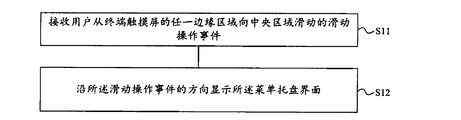
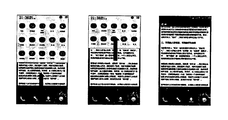
- FIG. 2 is a schematic diagram of a menu tray interface display and hiding process according to an embodiment of the present invention
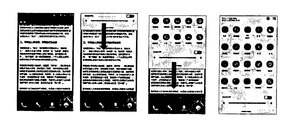
- FIG. 3 is another schematic diagram of a menu tray interface display and hiding process according to an embodiment of the present invention.
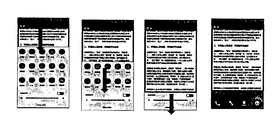
- FIG. 4 is another schematic diagram of a menu tray interface display and hiding process according to an embodiment of the present invention.
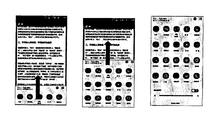
- FIG. 5 is still another schematic diagram of a menu tray interface display and hiding process according to an embodiment of the present invention.
- FIG. 6 is a schematic structural diagram of a menu tray interface display device according to an embodiment of the present invention.
- an embodiment of the present invention provides a menu tray interface display method, including:
- the menu tray interface display method provided by the embodiment of the invention can receive a sliding operation event that the user slides from any edge area of the touch screen of the terminal to the central area, and displays the menu tray interface along the direction of the sliding operation event. In this way, no matter which edge of the touch screen the user slides, the menu tray interface can be displayed to the user, which is very convenient for one-hand operation, and the user experience is greatly improved.
- the edge area may include an upper edge area, a lower edge area, a left edge area, and a right edge area of the touch screen of the terminal, and may also include an upper left edge area, a lower left edge area, an upper right edge area, and a right edge. Lower edge area. The user can slide from either edge area to the center area, causing the menu to be pulled out of the display in different directions.
- displaying the menu tray interface in the direction of the sliding operation event may include:
- the menu tray interface between any of the edge regions to the dwell operation event is displayed.
- the menu tray interface may be pulled out from the edge region to the user's finger rest to make the menu
- the tray interface is displayed between the edge region and the finger rest; optionally, when the user's finger leaves the touch screen while the finger is resting, the menu tray interface may also stay in place to continue display.
- the menu tray interface is not completely displayed from the top to the bottom as in the prior art, or is completely pulled. It is not displayed, but can be partially displayed, partially hidden, and the ratio of display and hidden can be changed as the user's gesture changes, thereby making it easier for the user to operate.
- the display content of the menu tray interface between any edge region and the pause operation event is a draggable operation or a scrollable operation, and the user may drag on the menu tray interface that has been partially displayed.
- icons or scroll bars, etc. enable browsing of the contents of all menu tray interfaces.
- the displayed menu tray interface can also be adjusted in its display position, including:
- the display position of the menu tray interface may move with the drag of the finger, for example, if the menu tray interface is pulled from the top of the touch screen of the terminal, The user can press and hold the menu tray interface to the right to move the display position of the menu tray interface to the right, exposing the left side portion blocked by the menu tray interface, so that the user can operate the left part of the application while still retaining Display of the menu tray interface.
- the menu tray interface display method provided by the present invention may further include: if detecting the user again from any edge region of the terminal to the central region A sliding operational event that hides the menu tray interface along a sliding direction of the sliding operational event.
- Figure 3 shows the process of gradually hiding the menu tray interface from the top. As shown in Figure 3, in one embodiment of the invention, the menu tray interface has been fully displayed, at which time the user's finger is again detected from the top of the touch screen. When you slide down, the menu tray interface is gradually hidden from the user. The user's finger can stop anywhere in the process, leaving the touch screen, and the menu tray interface will remain there.
- Figure 4 shows the process of gradually pulling up the menu tray interface from the bottom end.
- the present invention is not limited thereto, and in other embodiments of the present invention, the user may Other edge areas slide toward the central area to hide the menu tray interface, for example, the user You can slide from the left edge area to the center area to gradually display or hide the menu tray interface from the left side, or slide from the upper right edge area or the lower left edge area to the center area, so that the menu tray interface is diagonally displayed or hide.
- the embodiment of the present invention further provides a menu tray interface display device, including:
- the receiving unit 61 is configured to receive a sliding operation event that the user slides from any edge region of the touch screen of the terminal to the central region;
- the display unit 62 is configured to display the menu tray interface in a direction of the sliding operation event.
- the receiving unit 61 can receive a sliding operation event that the user slides from any edge region of the touch screen of the terminal to the central region, and the display unit 62 can display the direction along the direction of the sliding operation event.
- Menu tray interface In this way, no matter which edge of the touch screen the user slides, the menu tray interface can be displayed to the user, which is very convenient for one-hand operation, and the user experience is greatly improved.
- the edge area may include an upper edge area, a lower edge area, a left edge area, and a right edge area of the terminal touch screen, and may also include an upper left edge area, a lower left edge area, an upper right edge area, and a lower right edge area.
- the user can slide from either edge area to the center area, causing the menu to be pulled out of the display in different directions.
- the display unit 62 can include:
- a processing module for pulling the menu tray interface from any of the edge regions to any of the stay operation events
- An execution module configured to display the menu tray interface between any of the edge regions to the dwell operation event.
- the menu tray interface can be pulled out from the edge region to the user's finger rest so that the menu tray interface is displayed between the edge region and the finger rest; when the user The menu tray interface stays when the finger leaves the touch screen while the finger is resting The original place continues to display.
- the display content of the menu tray interface between the edge region and the pause operation event of the display unit 62 is a draggable operation or a scrollable operation, and the user can display the menu tray interface that has been partially displayed. Drag the icons or scroll bars on it to browse the contents of all menu tray interfaces.
- the receiving unit is further configured to receive the drag operation event of the user on the menu tray interface; the display unit is further configured to display the display position of the menu tray interface The display position of the menu tray interface moves in the direction of the drag operation event of the user to the menu tray interface.
- the menu tray interface display device may further include a hidden unit, the hidden unit may be configured to display the menu tray interface in a direction in which the user slides the operation event, and if the user is detected again from the terminal An operational event in which an edge region slides toward the central region hides the menu tray interface along a sliding direction of the sliding operational event.
- the embodiment of the present invention further provides a terminal, which includes any of the menu tray interface display devices provided in the foregoing embodiments, and thus can achieve corresponding beneficial technical effects, which have been described in detail herein. No longer.
Landscapes
- Engineering & Computer Science (AREA)
- General Engineering & Computer Science (AREA)
- Theoretical Computer Science (AREA)
- Human Computer Interaction (AREA)
- Physics & Mathematics (AREA)
- General Physics & Mathematics (AREA)
- Computer Networks & Wireless Communication (AREA)
- Signal Processing (AREA)
- User Interface Of Digital Computer (AREA)
Abstract
本发明公开一种菜单托盘界面显示方法及装置、终端,以解决现有技术中菜单托盘界面操作不便,用户体验差的问题。所述方法包括:接收用户从终端触摸屏的任一边缘区域向中央区域滑动的滑动操作事件;沿所述滑动操作事件的方向显示所述菜单托盘界面,采用本发明实施例不论用户从终端触摸屏的哪个边缘滑动,都可以向用户显示菜单托盘界面,便于用户对终端进行单手操作,提高用户体验。
Description
本发明涉及通信技术领域,尤其涉及一种菜单托盘界面显示方法及装置、终端。
手机等终端的菜单一般以菜单托盘界面的形式向用户显示。当用户需要查看菜单托盘界面或者对菜单托盘界面进行操作时,可以从终端顶端滑下,菜单托盘界面就可以完整地展示在屏幕上。
然而,从顶端下拉菜单托盘界面时,对于大屏手机必须用双手操作,给用户的使用带来一定不便,大大降低了用户体验。
发明内容
本发明要解决的技术问题是,提供一种菜单托盘界面显示方法及装置、终端,为解决现有技术中菜单托盘界面操作不便用户体验差的问题而发明。
一方面,本发明提供一种菜单托盘界面显示方法,包括:接收用户从终端触摸屏的任一边缘区域向中央区域滑动的滑动操作事件;沿所述滑动操作事件的方向显示所述菜单托盘界面。
可选的,所述沿所述滑动操作事件的方向显示所述菜单托盘界面包括:将所述菜单托盘界面从所述任一边缘区域拉出至任一停留操作事件处;显示所述任一边缘区域至所述停留操作事件之间的所述菜单托盘界面。
可选的,所述任一边缘区域至所述停留操作事件之间的所述菜单托盘界面的显示内容是可拖动操作或者可滚动操作的。
可选的,所述方法还包括:接收所述用户对所述菜单托盘界面的拖动操作事件;显示所述菜单托盘界面的显示位置,所述菜单托盘界面的显示位置随所述用户对所述菜单托盘界面的拖动操作事件方向移动。
进一步的,所述沿所述滑动操作事件的方向显示所述菜单托盘界面之后,所述方法还包括:若检测到所述用户再次从终端的任一边缘区域向中央区域滑动的操作事件,沿所述滑动操作事件的滑动方向隐藏所述菜单托盘界面。
另一方面,本发明还提供一种菜单托盘界面显示装置,包括:接收单元,用于接收用户从终端触摸屏的任一边缘区域向中央区域滑动的滑动操作事件;显示单元,用于沿所述滑动操作事件的方向显示所述菜单托盘界面。
可选的,所述显示单元包括:处理模块,用于将所述菜单托盘界面从所述任一边缘区域拉出至任一停留操作事件处;执行模块,用于显示所述任一边缘区域至所述停留操作事件之间的所述菜单托盘界面。
可选的,所述显示单元在所述任一边缘区域至所述停留操作事件之间的所述菜单托盘界面的显示内容是可拖动操作或者可滚动操作的。
可选的,所述接收单元,还用于接收所述用户对所述菜单托盘界面的拖动操作事件;所述显示单元,还用于显示所述菜单托盘界面的显示位置,所述菜单托盘界面的显示位置随所述用户对所述菜单托盘界面的拖动操作事件方向移动。
进一步的,所述装置还包括:隐藏单元;所述隐藏单元用于沿所述滑动操作事件的方向显示所述菜单托盘界面之后,若检测到所述用户再次从终端的任一边缘区域向中央区域滑动的滑动操作事件,沿所述滑动操作事件的滑动方向隐藏所述菜单托盘界面。
另一方面,本发明还提供一种终端,包括本发明提供的任一种菜单托盘界面显示装置。
本发明实施例提供的菜单托盘界面显示方法及装置、终端,能够接收用户从终端触摸屏的任一边缘区域向中央区域滑动的滑动操作事件,并沿所述滑动操作事件的方向显示所述菜单托盘界面。这样,不论用户从终端触摸屏的哪个边缘滑动,都可以向用户显示菜单托盘界面,非常便于单手操作,大大提高了用户体验。
图1为本发明实施例提供的菜单托盘界面显示方法的一种流程图;
图2为本发明实施例中菜单托盘界面显示与隐藏过程的一种示意图;
图3为本发明实施例中菜单托盘界面显示与隐藏过程的另一种示意图;
图4为本发明实施例中菜单托盘界面显示与隐藏过程的又一种示意图;
图5为本发明实施例中菜单托盘界面显示与隐藏过程的再又一种示意图;
图6为本发明实施例提供的菜单托盘界面显示装置的一种结构示意图。
为更进一步阐述本发明为达成预定目的所采取的技术手段及功效,以下结合附图及较佳实施例,对本发明进行详细说明如后。通过具体实施方式的说明,应当可对本发明为达成预定目的所采取的技术手段及功效得以更加深入且具体的了解,然而所附图示仅是提供参考与说明之用,并非用来对本发明加以限制。
如图1所示,本发明的实施例提供一种菜单托盘界面显示方法,包括:
S11,接收用户从终端触摸屏的任一边缘区域向中央区域滑动的滑动操作事件;
S12,沿所述滑动操作事件的方向显示所述菜单托盘界面。
本发明实施例提供的菜单托盘界面显示方法,能够接收用户从终端触摸屏的任一边缘区域向中央区域滑动的滑动操作事件,并沿该滑动操作事件的方向显示所述菜单托盘界面。这样,不论用户从终端触摸屏的哪个边缘滑动,都可以向用户显示菜单托盘界面,非常便于单手操作,大大提高了用户体验。
可选的,本实施例中,所述边缘区域可以包括终端触摸屏的上边缘区域、下边缘区域、左边缘区域、右边缘区域,也可以包括左上边缘区域、左下边缘区域、右上边缘区域、右下边缘区域。用户可以从其中任一边缘区域向中央区域滑动,从而使菜单以不同的方向被拉出显示。
具体而言,在本发明的一个实施例中,步骤S12中,沿所述滑动操作事件的方向显示所述菜单托盘界面可包括:
将所述菜单托盘界面从所述任一边缘区域拉出至任一停留操作事件处;
显示所述任一边缘区域至所述停留操作事件之间的所述菜单托盘界面。
也就是说,当检测到用户手指从终端触摸屏的任一边缘区域向中央区域滑动时,可以将所述菜单托盘界面从所述边缘区域拉出至所述用户手指停留处,以使所述菜单托盘界面在所述边缘区域至所述手指停留处之间显示;可选的,当用户手指在所述手指停留处离开触摸屏时,所述菜单托盘界面还可以停留在原处继续显示。
图2示出了从顶端逐步下拉菜单托盘界面的过程,如图2所示,本实施例中,菜单托盘界面并不像现有技术那样,或者从顶部到底部完全显示出来,或者完全被拉起不显示,而是可以部分显示、部分隐藏,显示和隐藏的比例可以随着用户的手势变化而改变,从而更便于用户操作。
可选的,任一边缘区域至所述停留操作事件之间的所述菜单托盘界面的显示内容是可拖动操作或者可滚动操作的,用户可以在已经部分显示出的菜单托盘界面上拖动其中的图标或滚动条等,实现对全部菜单托盘界面内容的浏览。
可选的,已经显示出的菜单托盘界面,其显示位置也可以再调整,具体包括:
接收所述用户对所述菜单托盘界面的拖动操作事件;
显示所述菜单托盘界面的显示位置,所述菜单托盘界面的显示位置随所述用户对所述菜单托盘界面的拖动操作事件方向移动。
例如,当用户手指按住所述菜单托盘界面拖动时,所述菜单托盘界面的显示位置可以随所述手指的拖动而移动,如,如果菜单托盘界面是从终端触摸屏顶端被拉下的,用户可以按住该菜单托盘界面向右拖动,从而使菜单托盘界面的显示位置右移,露出被菜单托盘界面遮挡的左侧部分,以便用户可以对左侧部分的应用进行操作,同时还保留菜单托盘界面的显示。
进一步的,在沿所述滑动操作事件的方向显示所述菜单托盘界面之后,本发明提供的菜单托盘界面显示方法还可包括:若检测到所述用户再次从终端的任一边缘区域向中央区域滑动的操作事件,沿所述滑动操作事件的滑动方向隐藏所述菜单托盘界面。图3示出了从顶端逐步隐藏菜单托盘界面的过程,如图3所示,在本发明的一个实施例中,菜单托盘界面已经被完全显示出,此时当再次检测到用户手指从触摸屏顶端滑下时,将该菜单托盘界面向用户逐步隐藏。用户手指可以在过程中的任意位置停下来,离开触摸屏,菜单托盘界面依然会在该位置保持。图4示出了从底端逐步上拉菜单托盘界面的过程。如图4所示,当完全将菜单托盘界面隐藏后,用户仍然可以从下边缘区域向中央区域拖动,以使菜单托盘界面被从下而上逐步显示。如图5所示,当完全将菜单托盘界面显示后,也可以从下边缘区域向中央区域拖动,以使菜单托盘界面被从下而上逐步隐藏。
需要说明的是,本实施例中虽然是以从顶端到底端以及从底端到顶端的滑动方向为例进行说明的,但本发明不限于此,在本发明的其他实施例中,用户可以从其他边缘区域向中央区域滑动来隐藏菜单托盘界面,例如,用户
可以从左侧边缘区域向中央区域滑动而使菜单托盘界面从左侧开始被逐步显示或隐藏,也可以从右上边缘区域或左下边缘区域向中央区域滑动,而使菜单托盘界面被斜拉显示或隐藏。
相应的,如图6所示,本发明实施例还提供一种菜单托盘界面显示装置,包括:
接收单元61,用于接收用户从终端触摸屏的任一边缘区域向中央区域滑动的滑动操作事件;
显示单元62,用于沿所述滑动操作事件的方向显示所述菜单托盘界面。
本发明实施例提供的菜单托盘界面显示装置,接收单元61能够接收用户从终端触摸屏的任一边缘区域向中央区域滑动的滑动操作事件,显示单元62能够沿所述滑动操作事件的方向显示所述菜单托盘界面。这样,不论用户从终端触摸屏的哪个边缘滑动,都可以向用户显示菜单托盘界面,非常便于单手操作,大大提高了用户体验。
可选的,所述边缘区域可以包括终端触摸屏的上边缘区域、下边缘区域、左边缘区域、右边缘区域,也可以包括左上边缘区域、左下边缘区域、右上边缘区域、右下边缘区域。用户可以从其中任一边缘区域向中央区域滑动,从而使菜单以不同的方向被拉出显示。
可选的,显示单元62可包括:
处理模块,用于将所述菜单托盘界面从所述任一边缘区域拉出至任一停留操作事件处;
执行模块,用于显示所述任一边缘区域至所述停留操作事件之间的所述菜单托盘界面。
也就是说,可以将所述菜单托盘界面从所述边缘区域拉出至所述用户手指停留处,以使所述菜单托盘界面在所述边缘区域至所述手指停留处之间显示;当用户手指在所述手指停留处离开触摸屏时,所述菜单托盘界面停留在
原处继续显示。
可选的,显示单元62在任一边缘区域至所述停留操作事件之间的所述菜单托盘界面的显示内容是可拖动操作或可滚动操作的,用户可以在已经部分显示出的菜单托盘界面上拖动其中的图标或滚动条等,实现对全部菜单托盘界面内容的浏览。
进一步的,本发明提供的菜单托盘界面显示装置,接收单元,还用于接收所述用户对所述菜单托盘界面的拖动操作事件;显示单元,还用于显示所述菜单托盘界面的显示位置,所述菜单托盘界面的显示位置随所述用户对所述菜单托盘界面的拖动操作事件方向移动。
进一步的,本发明提供的菜单托盘界面显示装置还可包括隐藏单元,该隐藏单元可用于在沿用户滑动操作事件的方向显示所述菜单托盘界面之后,若检测到所述用户再次从终端的任一边缘区域向中央区域滑动的操作事件,沿所述滑动操作事件的滑动方向隐藏所述菜单托盘界面。
相应的,本发明的实施例还提供一种终端,该终端包括前述实施例提供的任一种菜单托盘界面显示装置,因此也能实现相应的有益技术效果,前文已经进行了详细说明,此处不再赘述。
尽管为示例目的,已经公开了本发明的优选实施例,本领域的技术人员将意识到各种改进、增加和取代也是可能的,因此,本发明的范围应当不限于上述实施例。
Claims (11)
- 一种菜单托盘界面显示方法,其特征在于,包括:接收用户从终端触摸屏的任一边缘区域向中央区域滑动的滑动操作事件;沿所述滑动操作事件的方向显示所述菜单托盘界面。
- 根据权利要求1所述的方法,其特征在于,所述沿所述滑动操作事件的方向显示所述菜单托盘界面包括:将所述菜单托盘界面从所述任一边缘区域拉出至任一停留操作事件处;显示所述任一边缘区域至所述停留操作事件之间的所述菜单托盘界面。
- 根据权利要求2所述的方法,其特征在于,所述任一边缘区域至所述停留操作事件之间的所述菜单托盘界面的显示内容是可拖动操作或者可滚动操作的。
- 根据权利要求1所述的方法,其特征在于,所述方法还包括:接收所述用户对所述菜单托盘界面的拖动操作事件;显示所述菜单托盘界面的显示位置,所述菜单托盘界面的显示位置随所述用户对所述菜单托盘界面的拖动操作事件方向移动。
- 根据权利要求1所述的方法,其特征在于,所述沿所述滑动操作事件的方向显示所述菜单托盘界面之后,所述方法还包括:若检测到所述用户再次从终端的任一边缘区域向中央区域滑动的滑动操作事件,沿所述滑动操作事件的滑动方向隐藏所述菜单托盘界面。
- 一种菜单托盘界面显示装置,其特征在于,包括:接收单元,用于接收用户从终端触摸屏的任一边缘区域向中央区域滑动的滑动操作事件;显示单元,用于沿所述滑动操作事件的方向显示所述菜单托盘界面。
- 根据权利要求6所述的装置,其特征在于,所述显示单元包括:处理模块,用于将所述菜单托盘界面从所述任一边缘区域拉出至任一停留操作事件处;执行模块,用于显示所述任一边缘区域至所述停留操作事件之间的所述菜单托盘界面。
- 根据权利要求7所述的装置,其特征在于,所述显示单元在所述任一边缘区域至所述停留操作事件之间的所述菜单托盘界面的显示内容是可拖动操作或者可滚动操作的。
- 根据权利要求6所述的装置,其特征在于,所述接收单元,还用于接收所述用户对所述菜单托盘界面的拖动操作事件;所述显示单元,还用于显示所述菜单托盘界面的显示位置,所述菜单托盘界面的显示位置随所述用户对所述菜单托盘界面的拖动操作事件方向移动。
- 根据权利要求6所述的装置,其特征在于,还包括:隐藏单元;所述隐藏单元用于沿所述滑动操作事件的方向显示所述菜单托盘界面之后,若检测到所述用户再次从终端的任一边缘区域向中央区域滑动的滑动操作事件,沿所述滑动操作事件的滑动方向隐藏所述菜单托盘界面。
- 一种终端,其特征在于,包括如权利要求6至10中任一项所述的菜单托盘界面显示装置。
Applications Claiming Priority (2)
| Application Number | Priority Date | Filing Date | Title |
|---|---|---|---|
| CN201510447287.7A CN106406680A (zh) | 2015-07-27 | 2015-07-27 | 一种菜单托盘界面显示方法及装置、终端 |
| CN201510447287.7 | 2015-07-27 |
Publications (1)
| Publication Number | Publication Date |
|---|---|
| WO2017016066A1 true WO2017016066A1 (zh) | 2017-02-02 |
Family
ID=57886925
Family Applications (1)
| Application Number | Title | Priority Date | Filing Date |
|---|---|---|---|
| PCT/CN2015/091336 Ceased WO2017016066A1 (zh) | 2015-07-27 | 2015-09-30 | 一种菜单托盘界面显示方法及装置、终端 |
Country Status (2)
| Country | Link |
|---|---|
| CN (1) | CN106406680A (zh) |
| WO (1) | WO2017016066A1 (zh) |
Cited By (2)
| Publication number | Priority date | Publication date | Assignee | Title |
|---|---|---|---|---|
| CN108704307A (zh) * | 2018-05-17 | 2018-10-26 | Oppo广东移动通信有限公司 | 触控信息的处理方法、装置、存储介质及电子装置 |
| EP3454193A1 (en) * | 2017-09-11 | 2019-03-13 | Guangdong OPPO Mobile Telecommunications Corp., Ltd. | Control method and apparatus of terminal device, and storage medium |
Families Citing this family (2)
| Publication number | Priority date | Publication date | Assignee | Title |
|---|---|---|---|---|
| CN111273825B (zh) * | 2019-04-29 | 2022-02-11 | 深圳市鸿合创新信息技术有限责任公司 | 工具栏的调节方法及装置、交互式显示设备 |
| CN110248027B (zh) * | 2019-06-21 | 2020-10-09 | 广东虹勤通讯技术有限公司 | 一种提高手持终端单手操作便捷性的方法和系统 |
Citations (5)
| Publication number | Priority date | Publication date | Assignee | Title |
|---|---|---|---|---|
| JP2003195998A (ja) * | 2001-12-26 | 2003-07-11 | Canon Inc | 情報処理装置及び情報処理装置の制御方法及び情報処理装置の制御プログラム及び記憶媒体 |
| CN101404687A (zh) * | 2007-10-04 | 2009-04-08 | Lg电子株式会社 | 移动通信终端的菜单显示方法 |
| US20130162516A1 (en) * | 2011-12-22 | 2013-06-27 | Nokia Corporation | Apparatus and method for providing transitions between screens |
| CN103645828A (zh) * | 2013-12-05 | 2014-03-19 | 杭州云清科技有限公司 | 一种带滑动动画效果的主界面菜单的显示方法 |
| CN104102441A (zh) * | 2013-04-09 | 2014-10-15 | 腾讯科技(深圳)有限公司 | 一种菜单项执行方法及装置 |
-
2015
- 2015-07-27 CN CN201510447287.7A patent/CN106406680A/zh active Pending
- 2015-09-30 WO PCT/CN2015/091336 patent/WO2017016066A1/zh not_active Ceased
Patent Citations (5)
| Publication number | Priority date | Publication date | Assignee | Title |
|---|---|---|---|---|
| JP2003195998A (ja) * | 2001-12-26 | 2003-07-11 | Canon Inc | 情報処理装置及び情報処理装置の制御方法及び情報処理装置の制御プログラム及び記憶媒体 |
| CN101404687A (zh) * | 2007-10-04 | 2009-04-08 | Lg电子株式会社 | 移动通信终端的菜单显示方法 |
| US20130162516A1 (en) * | 2011-12-22 | 2013-06-27 | Nokia Corporation | Apparatus and method for providing transitions between screens |
| CN104102441A (zh) * | 2013-04-09 | 2014-10-15 | 腾讯科技(深圳)有限公司 | 一种菜单项执行方法及装置 |
| CN103645828A (zh) * | 2013-12-05 | 2014-03-19 | 杭州云清科技有限公司 | 一种带滑动动画效果的主界面菜单的显示方法 |
Cited By (2)
| Publication number | Priority date | Publication date | Assignee | Title |
|---|---|---|---|---|
| EP3454193A1 (en) * | 2017-09-11 | 2019-03-13 | Guangdong OPPO Mobile Telecommunications Corp., Ltd. | Control method and apparatus of terminal device, and storage medium |
| CN108704307A (zh) * | 2018-05-17 | 2018-10-26 | Oppo广东移动通信有限公司 | 触控信息的处理方法、装置、存储介质及电子装置 |
Also Published As
| Publication number | Publication date |
|---|---|
| CN106406680A (zh) | 2017-02-15 |
Similar Documents
| Publication | Publication Date | Title |
|---|---|---|
| CN104317499B (zh) | 用于在终端中设置屏幕的壁纸的设备及方法 | |
| CN102915201B (zh) | 一种大屏幕触控手机的单手操作方法 | |
| JP4959765B2 (ja) | 携帯端末装置 | |
| TWI626591B (zh) | 應用程式切換系統及方法 | |
| WO2012162932A1 (zh) | 左右手自适应的虚拟键盘显示方法及终端 | |
| US11048401B2 (en) | Device, computer program and method for gesture based scrolling | |
| WO2014035195A3 (en) | User interface apparatus in a user terminal and method for supporting the same | |
| US20150074517A1 (en) | Method and apparatus for displaying an extended function information area | |
| CN103049184A (zh) | 一种调整显示内容在屏幕中显示的区域的方法及装置 | |
| CN106775199A (zh) | 屏幕界面的触控操作方法及终端 | |
| CN103324436A (zh) | 一种任务处理方法及装置 | |
| CN105630390A (zh) | 移动终端虚拟按键的处理方法和装置 | |
| WO2017016066A1 (zh) | 一种菜单托盘界面显示方法及装置、终端 | |
| WO2012151926A1 (zh) | 触屏待机墙纸显示设置方法及其装置 | |
| WO2017128715A1 (zh) | 一种用于移动终端的界面展示方法及移动终端 | |
| TW201610778A (zh) | 虛擬鍵盤顯示系統及方法 | |
| EP2990928A1 (en) | Mobile telecommunications terminal and method of operation thereof | |
| CN105630294A (zh) | 移动终端虚拟按键的调整方法、装置及移动终端 | |
| WO2016074451A1 (zh) | 一种实现页面滚动的操控方法、装置及终端 | |
| CN110248027B (zh) | 一种提高手持终端单手操作便捷性的方法和系统 | |
| CN105302459B (zh) | 终端的单手控制方法及装置 | |
| CN104407789B (zh) | 一种移动终端桌面图标显示控制方法及装置 | |
| CN105094589A (zh) | 一种移动终端悬停按钮的显示控制方法、装置及移动终端 | |
| WO2017101403A1 (zh) | 一种手持设备桌面展示逻辑控制设备和方法 | |
| TW201426504A (zh) | 手持觸控裝置之單手觸控方法及其手持觸控裝置 |
Legal Events
| Date | Code | Title | Description |
|---|---|---|---|
| 121 | Ep: the epo has been informed by wipo that ep was designated in this application |
Ref document number: 15899418 Country of ref document: EP Kind code of ref document: A1 |
|
| NENP | Non-entry into the national phase |
Ref country code: DE |
|
| 122 | Ep: pct application non-entry in european phase |
Ref document number: 15899418 Country of ref document: EP Kind code of ref document: A1 |