WO2016150322A1 - 一种目标对象的属性调整方法及装置 - Google Patents
一种目标对象的属性调整方法及装置 Download PDFInfo
- Publication number
- WO2016150322A1 WO2016150322A1 PCT/CN2016/076447 CN2016076447W WO2016150322A1 WO 2016150322 A1 WO2016150322 A1 WO 2016150322A1 CN 2016076447 W CN2016076447 W CN 2016076447W WO 2016150322 A1 WO2016150322 A1 WO 2016150322A1
- Authority
- WO
- WIPO (PCT)
- Prior art keywords
- control
- operation interface
- type
- sliding
- arc
- Prior art date
- Legal status (The legal status is an assumption and is not a legal conclusion. Google has not performed a legal analysis and makes no representation as to the accuracy of the status listed.)
- Ceased
Links
Images


Classifications
-
- G—PHYSICS
- G06—COMPUTING OR CALCULATING; COUNTING
- G06F—ELECTRIC DIGITAL DATA PROCESSING
- G06F3/00—Input arrangements for transferring data to be processed into a form capable of being handled by the computer; Output arrangements for transferring data from processing unit to output unit, e.g. interface arrangements
- G06F3/01—Input arrangements or combined input and output arrangements for interaction between user and computer
- G06F3/048—Interaction techniques based on graphical user interfaces [GUI]
- G06F3/0481—Interaction techniques based on graphical user interfaces [GUI] based on specific properties of the displayed interaction object or a metaphor-based environment, e.g. interaction with desktop elements like windows or icons, or assisted by a cursor's changing behaviour or appearance
-
- G—PHYSICS
- G06—COMPUTING OR CALCULATING; COUNTING
- G06F—ELECTRIC DIGITAL DATA PROCESSING
- G06F3/00—Input arrangements for transferring data to be processed into a form capable of being handled by the computer; Output arrangements for transferring data from processing unit to output unit, e.g. interface arrangements
- G06F3/01—Input arrangements or combined input and output arrangements for interaction between user and computer
- G06F3/048—Interaction techniques based on graphical user interfaces [GUI]
- G06F3/0484—Interaction techniques based on graphical user interfaces [GUI] for the control of specific functions or operations, e.g. selecting or manipulating an object, an image or a displayed text element, setting a parameter value or selecting a range
Definitions
- the present application relates to the field of electronic information, and in particular, to a method and an apparatus for adjusting attributes of a target object.
- An intelligent electronic device is a device composed of one or more processors, having the function of receiving and transmitting data from an external source or controlling an external source, and providing a function of interacting with the machine to the user is a major feature of the intelligent electronic device.
- the present application provides a method and apparatus for adjusting an attribute of a target object, and aims to improve the efficiency of the user to adjust the attributes of the target object.
- a method for adjusting an attribute of a target object including:
- the first operation interface includes a first control set, and the control in the first control set is configured to receive an adjustment instruction input by the user, where the adjustment instruction is used Adjust the properties of the target object;
- the current operation interface from the first operation interface to the second operation interface, where the second operation interface includes a second control set, where the second control set is The control is configured to receive an adjustment instruction input by the user, and the adjustment instruction is used to adjust an attribute of the target object.
- control in the first control set is different from the shape in the second control set.
- control in the first control set is a first type of sliding control
- control in the second control set is a second type of sliding control and/or a first type of sliding control
- first type of sliding The slide rail of the control is an arc of the first form
- slide rail of the second type of slide control is an arc of the second form
- control in the first control set is a first type of sliding control and a second type of sliding control
- second control set is a first type of sliding control or a second type of sliding control
- first The slide rail of the slide-like control is an arc of the first form
- slide rail of the second type of slide control is an arc of the second form.
- the arc shape of the first form and the arc shape of the second form are both set according to the engineering standard of the human finger.
- it also includes:
- the display track is used to display a slide track of the slide control currently operated by the user.
- the first control set includes a plurality of controls.
- it also includes:
- the third operation interface includes a third control set
- the target corresponding to the control in the third control set The attributes of the object are different from the attributes of the target object corresponding to the controls in the first set of controls.
- a property adjustment device for a target object comprising:
- a display module configured to display a first operation interface according to an operation request of the user, where the first operation interface includes a first control set, and the control in the first control set is configured to receive an adjustment instruction input by the user, The adjustment instruction is used to adjust an attribute of the target object;
- a first switching module configured to switch a current operation interface from the first operation interface to a second operation interface according to the first interface switching request of the user, where the second operation interface includes a second control set,
- the control in the second control set is configured to receive an adjustment instruction input by the user, and the adjustment instruction is used to adjust an attribute of the target object.
- the first switching module is configured to switch the current operation interface from the first operation interface to the second operation interface, where the second operation interface includes the second control set includes:
- the first switching module is specifically configured to switch the current operation interface from the first operation interface to the second operation interface, where the second operation interface includes a second control set, where the first control set is The control is different from the shape of the control in the second set of controls.
- the display module is configured to display a first operation interface, where the first operation interface includes a first control
- the collection includes:
- the display module is specifically configured to display a first operation interface, where the first operation interface includes a first control set, and the control in the first control set is a first type of sliding control, and the first type of sliding control
- the slide rail is an arc of the first form
- the first switching module is configured to switch the current operation interface from the first operation interface to the second operation interface, and the second operation interface includes the second control set includes:
- the first switching module is specifically configured to switch the current operation interface from the first operation interface to the second operation interface, where the second operation interface includes a second control set, where the second control set is
- the control is a second type of sliding control and/or a first type of sliding control, and the sliding track of the second type of sliding control is an arc of the second form;
- the display module is configured to display a first operation interface
- the first control interface includes a first control set including:
- the display module is specifically configured to display a first operation interface, where the first operation interface includes a first control set, and the control in the first control set is a first type of sliding control and a second type of sliding control;
- the first switching module is configured to switch the current operation interface from the first operation interface to the second operation interface, and the second operation interface includes the second control set includes:
- the first switching module is specifically configured to switch the current operation interface from the first operation interface to the second operation interface, where the second operation interface includes a second control set, where the second control set is
- the control is a first type of sliding control or a second type of sliding control, the sliding track of the first type of sliding control is an arc of a first form, and the sliding track of the second type of sliding control is an arc of a second form.
- the display module is configured to display a first operation interface
- the slide rails of the first type of sliding control in the first operation interface are arcs of the first form
- the The sliding track of the second type of sliding control in an operation interface is an arc of the second form comprising:
- the display module is specifically configured to display a first operation interface, wherein a slide rail of the first type of sliding control in the first operation interface is an arc of the first shape, and the arc of the first shape According to the engineering standard setting of the human finger, and/or the slide rail of the second type of sliding control in the first operation interface is an arc of the second form, and the arc of the second form is based on the engineering of the human finger Standard setting
- the first switching module is configured to switch the current operation interface from the first operation interface to the second operation interface, and the slide track of the first type of sliding control in the second operation interface is the first
- the curved shape of the shape, and/or the sliding track of the second type of sliding control in the second operation interface is an arc of the second form comprising:
- the first switching module is specifically configured to switch the current operation interface from the first operation interface to the second operation An interface
- the slide rail of the first type of sliding control in the second operation interface is an arc of the first shape
- the arc of the first shape is set according to a work standard of a human finger
- the slide rail of the second type of slide control in the second operation interface is an arc shape of the second form
- the arc shape of the second form is set according to the engineering standard of the human finger.
- it also includes:
- a display control module configured to acquire a display parameter corresponding to the first location or the second location, and use the display parameter to display a slide track of the sliding control currently operated by the user, where the first location is the first class a current position of the slider of the sliding control on the slide rail thereof, wherein the second position is a current position of the slider of the second type of sliding control on the slide rail thereof, wherein the first type of sliding control or the sliding position
- the sliders in the second type of sliding control correspond to different display parameters at different positions on the slide rails.
- the display module is configured to display a first operation interface, where the first control interface includes a first control set, including:
- the display module is specifically configured to display a first operation interface, where the first operation interface includes a first control set, and the first control set includes a plurality of controls.
- it also includes:
- a second switching module configured to switch the current operation interface to the third operation interface according to the second interface switching request of the user, where the third operation interface includes a third control set, where the third control set is The attribute of the target object corresponding to the control is different from the attribute of the target object corresponding to the control in the first control set.
- the method and device for adjusting the attribute of the target object described in the present application according to an operation request of the user, displaying a first operation interface, where the first operation interface includes a first control set for receiving an adjustment instruction input by the user, and the adjustment instruction is used by the adjustment instruction
- the properties of the target object are adjusted, so the user can adjust the properties of the target object through the first operation interface.
- the method and the device of the present application may further switch the current operation interface from the first operation interface to the second operation interface according to the first interface switching request of the user, and the second operation interface also includes receiving the user.
- the second control set of the input adjustment instruction so that the user can adjust the attributes of the target object in the two operation interfaces, thereby facilitating the efficiency of adjusting the attributes of the target object.
- FIG. 1 is a flowchart of a method for adjusting an attribute of a target object according to an embodiment of the present application
- FIG. 2 is a schematic diagram of a first user interface displayed on a mobile terminal, opened by a user, and used to adjust attributes of the picture;
- FIG. 3 is a flowchart of still another method for adjusting an attribute of a target object according to an embodiment of the present application
- FIG. 4 is a schematic diagram of a first type of sliding control disclosed in an embodiment of the present application.
- FIG. 5 is a schematic diagram of a second type of sliding control disclosed in an embodiment of the present application.
- FIG. 6 is a schematic diagram of a first type of sliding control and a second type of sliding control disclosed in an embodiment of the present application;
- FIG. 7 is a flowchart of still another method for adjusting an attribute of a target object according to an embodiment of the present application.
- FIG. 8 is a schematic structural diagram of an attribute adjustment apparatus of a target object according to an embodiment of the present disclosure.
- the embodiment of the present application discloses a method and a device for adjusting an attribute of a target object, which can be applied to an electronic device.
- the electronic device may be a mobile terminal, such as a mobile phone, a PAD, or the like.
- a method for adjusting an attribute of a target object disclosed in the embodiment of the present application, as shown in FIG. 1 may include the following steps.
- S101 Display a first operation interface according to an operation request of the user.
- a target object such as a picture
- the attributes of the target object need to be adjusted, for example, adjusting the contrast and brightness of the image. And other attributes.
- the user inputs an operation request, and when the mobile terminal receives the operation request of the user, displays the first operation interface to the user.
- 2 is a first user interface displayed on a mobile terminal, opened by a user, and used to adjust attributes of the picture.
- the first operation interface includes a first control set, and the control in the first control set is respectively associated with the attribute of the target object, and can be used to receive an adjustment instruction input by the user by operating the control in the first control set. And the adjustment instruction is executed by the mobile terminal to adjust the attribute of the target object.
- the target object can Thought of images or audio, video, etc.
- S102 Switch the current operation interface from the first operation interface to the second operation interface according to the first interface switching request of the user.
- the first interface switching instruction can be input. After the mobile terminal receives the first interface switching request, the current operation interface is switched from the first operation interface to the second operation interface.
- the mobile terminal may display only the second operation interface to the user, or may simultaneously display the first operation interface and the second operation interface to the user.
- the second operation interface includes a second control set, and the control in the second control set is associated with the attribute of the target object, and is used for receiving an adjustment instruction input by the user through operation of the control, and the adjustment instruction is also performed by the mobile terminal. Used to adjust the properties of the target object.
- control in the first control set may be one or more, and the control in the second control set may also be one or more.
- the properties associated with the controls in the first control collection may be the same as or different from the properties associated with the controls in the second control collection.
- the method for adjusting the attribute of the target object in the embodiment may display a first operation interface including a first control set, where the first control set is configured to receive an adjustment instruction of the attribute of the target object, and may be based on the user's first
- the interface switching instruction displays a second operation interface including the second control set, and is configured to receive an adjustment instruction of the attribute of the target object by the user. Therefore, the user can adjust the attributes of the target object in the two operation interfaces separately or simultaneously, thereby facilitating the efficiency of adjusting the attributes of the target object.
- the method for adjusting the attribute of the target object disclosed in the embodiment of the present application focuses on the detailed description of the first operation interface and the second operation interface in the embodiment shown in FIG. 1, such as As shown in Figure 3, the following steps are included.
- S301 Display a first operation interface according to an operation request of the user, where the first operation interface includes a first control set, and the control in the first control set is configured to receive an adjustment instruction input by the user, and the adjustment instruction is used for the attribute of the target object. Make adjustments.
- the controls in the first control set may be sliding controls, and each sliding control includes a slider and a slide rail.
- a sliding control can correspond to an attribute of the target object (the contrast, brightness and blur in the figure are attributes), that is, associated with an attribute of the target object.
- the different positions of the slides correspond to different values of this attribute, and the user can adjust the value of the attribute associated with the slide control by sliding the slide on the slide.
- S302 Switch the current operation interface from the first operation interface to the second operation interface according to the first interface switching request of the user, where the second operation interface includes a second control set, and the control in the second control set is used to receive the user.
- the input adjustment command is used to adjust the properties of the target object.
- the form of the control in the first control set included in the first operation interface is different from the shape of the control in the second control set included in the second operation interface.
- the shape refers to the shape or presentation form displayed by the control.
- the difference in the form displayed by the control is taken as an example: the control in the first control set may be the first type of sliding control, and the control in the second control set may be the second type of sliding control and/or the first A type of sliding control.
- the control in the first control set is a first type sliding control and a second type sliding control
- the second control set is a first type sliding control or a second type sliding control.
- each sliding control includes a slider and a slide rail.
- the difference between the control shown in FIG. 4 and the control shown in FIG. 5 is that the slide track of the slide control in the first control set is an arc of the first form, and the slide track of the slide control in the second control set is the second form.
- the arc may be an arc that facilitates the operation of the finger of the left hand (shown in FIG. 4), and the arc of the second form may be an arc that facilitates the operation of the finger of the right hand (FIG. 5) Shown in it).
- the first operation interface is a left-hand mode, which is convenient for the user to use the left-hand operation
- the second operation interface is the right-hand mode, which is convenient for the user to use the right-hand operation.
- the second operation interface may be the operation interface shown in FIG. 5, and may also be as shown in FIG. 6. That is, the first control set may include a sliding control in which the slide rail is the arc of the first form and an arc of the second form, and the second operation interface is the two-hand mode.
- the operation interfaces shown in FIG. 4, FIG. 5 and FIG. 6 are only one of various specific implementation manners.
- the specific shape of the curved shape of the first form and the curved shape of the second form is not limited.
- the first interface may also be as shown in FIG. 5 or FIG. 6, and the second operation interface may also be as shown in FIG. 4 or 6 is shown. That is to say, the operation interface can be switched from the left-hand mode switch (or the right-hand module) to the two-hand mode.
- the operator interface can also be switched from the two-hand mode to the left-hand mode (or right-hand mode).
- the curved shape of the first form and the curved shape of the second form may be set according to the engineering standard of the human finger.
- the interface shown in FIG. 4 is a left-hand mode, and the slide rail is gradually bent to the lower right. Therefore, when the user slides the slider on the left hand side of the interface, the shape of the slide rail fits the ergonomics standard of the left hand finger, thereby making the user's operation more comfortable.
- the first interface switching instruction may be transmitted by using a value of gravity acceleration, voice, or the like. That is, the user can trigger the current operation by changing the value of the gravity acceleration of the mobile terminal or inputting a voice. Switching of the interface. For example, the user switches the adjustment interface of the picture attribute from the left-hand mode to the right-hand mode by shaking the mobile phone, that is, the current operation interface displayed on the mobile terminal is switched from FIG. 4 to FIG.
- step S302 the following steps may also be included.
- S303 Acquire a display parameter corresponding to the first location or the second location.
- the first position is the current position of the slider of the first type of sliding control on the slide rail (ie, the arc of the first form)
- the second position is the slider of the second type of sliding control on the slide rail thereof (ie The current position on the arc of the second form.
- the sliders in the first type of sliding control or the second type of sliding control correspond to different display parameters at different positions on the sliding rail.
- S304 Display, by using the display parameter, a slide track of a sliding control currently operated by the user.
- the display parameter may be a chromaticity parameter, that is, the arc shape of the first form or the different positions on the arc of the second form correspond to different chromaticity parameters, depending on the position of the slider, Show the slides as different shades.
- the degree to which the user slider moves on the slide rail is prompted by the change of the display parameter. For example, as the user moves the slider, the slider displays a gradient color to prompt the user to slide the slider. Even if the slide rail is blocked by the user's finger, the degree of adjustment of the attribute corresponding to the slide control can be known by the change of the slide rail.
- the method described in this embodiment can display different types of operation interfaces on the electronic device to meet different operation requirements of the user in different situations, and the use of the user, thereby improving the efficiency of attribute adjustment.
- Another method for adjusting the attribute of the target object disclosed in the embodiment of the present application emphasizes that the current operation interface after the switch is associated with the control before the switch.
- the attributes are different, as shown in Figure 7, including the following steps.
- S701 Display a first operation interface according to an operation request of the user, where the first operation interface includes a first control set, where the first control set includes a plurality of controls, wherein each control is configured to receive an adjustment instruction input by the user The adjustment instruction is used to adjust the attribute of the target object.
- the first operation interface is displayed, and the first operation interface includes a plurality of controls, each of which associates an attribute of the target object, and the plurality of controls are concentrated in the
- the purpose of an interface is to adjust multiple properties in one interface without having to adjust one property before returning Go back to the main interface and choose to enter the adjustment interface of the next attribute, which avoids jumping between multiple attribute adjustment interfaces. Therefore, the efficiency of attribute adjustment can be improved.
- each of the controls in the first operation interface is a slide control
- the slide rails are curved
- the arc is set according to an ergonomic principle.
- the traditional multiple attribute adjustment controls are not simply concentrated in one operation interface, but the track of the sliding control is reset from the comfort of the user operation.
- the curved slide rail has the advantage of a large drag range compared with the linear slide rail, thereby effectively avoiding the user's misoperation when sliding the slider.
- S702 Switch the current operation interface to the third operation interface according to the second interface switching request of the user, where the third operation interface includes a third control set, and the attribute of the target object corresponding to the control in the third control set is first The properties of the target object corresponding to the controls in the operation interface are different.
- the second interface may be switched according to the second interface switching request, and the first operation is performed.
- Other controls that cannot be displayed in the operator interface are displayed in the third operation interface.
- the second interface switching instruction may be input.
- the mobile terminal After receiving the second interface switching request, the mobile terminal switches the current operation interface to the third operation interface, and the user adjusts the first attribute through the control in the third operation interface.
- the first operation interface may be as shown in FIG. 4, FIG. 5 or FIG. 6, the third operation interface may also be as shown in FIG. 4, FIG. 5 or FIG. 6, and the third operation interface may also pass through the first interface.
- the switch request converts the left and right hand mode.
- multiple controls for adjusting the attributes of the target object are displayed on the same interface, which can avoid repeated jumps to the interface and improve the efficiency of attribute adjustment.
- the next interface can be displayed by switching instructions, thereby facilitating the user's use.
- the embodiment of the present application further discloses an apparatus for adjusting attributes of a target object, as shown in FIG. 8, which may include:
- the display module 801 is configured to display a first operation interface according to an operation request of the user, where the first operation interface includes a first control set, and the control in the first control set is configured to receive an adjustment instruction input by the user The adjustment instruction is used to adjust an attribute of the target object;
- the first switching module 802 is configured to switch the current operation interface from the first operation interface to the second operation interface according to the first interface switching request of the user, where the second operation interface includes a second control set , said The control in the second control set is configured to receive an adjustment instruction input by the user, and the adjustment instruction is used to adjust an attribute of the target object.
- the first switching module switches the current operation interface from the first operation interface to the second operation interface
- the specific implementation manner of the second operation interface in the second operation interface may be: Switching the current operation interface from the first operation interface to the second operation interface, where the second operation interface includes a second control set, the control in the first control set and the second control set
- the shape of the controls is different.
- the display module displays a first operation interface
- the specific implementation manner of the first control interface may include: displaying a first operation interface, where the first operation interface includes a first control set,
- the control in the first control set is a first type of sliding control
- the sliding track of the first type of sliding control is an arc of a first form.
- the first switching module switches the current operation interface from the first operation interface to the second operation interface
- the specific implementation manner of the second operation interface includes: the current operation interface is The first operation interface is switched to the second operation interface, the second operation interface includes a second control set, and the control in the second control set is a second type of sliding control and/or a first type of sliding control,
- the slide rail of the second type of sliding control is an arc of the second form.
- the display module displays a first operation interface
- another specific implementation manner of the first operation interface includes: displaying a first operation interface, where the first operation interface includes a first control set
- the control in the first control set is a first type of sliding control and a second type of sliding control.
- the first switching module switches the current operation interface from the first operation interface to the second operation interface
- another specific implementation manner in which the second operation interface includes the second control set may be: the current operation interface Switching from the first operation interface to the second operation interface, the second operation interface includes a second control set, and the control in the second control set is a first type of sliding control or a second type of sliding control
- the slide rail of the first type of slide control is an arc of the first form
- the slide rail of the second type of slide control is an arc of the second form.
- the display module displays the arc of the first type of sliding control in the first operation interface as an arc of the first form, and/or the sliding of the second type of sliding control in the first operation interface
- the specific implementation manner of the arc of the second form may be: displaying a first operation interface, wherein the slide track of the first type of slide control in the first operation interface is an arc of the first form, the first
- the arc of one form is set according to the engineering standard of the human finger
- the slide rail of the second type of sliding control in the first operation interface is an arc of the second form
- the arc of the second form is according to the human body.
- the first switching module displays the arc of the first type of sliding control in the second operation interface as an arc of the first form, and/or the second type of sliding control in the first operation interface Slip
- the specific implementation manner that the track is the arc of the second form may be: switching the current operation interface from the first operation interface to the second operation interface, and the first type of sliding control in the second operation interface
- the slide rail is a curved shape of the first form, the arc shape of the first form is set according to the engineering standard of the human finger, and/or the slide rail of the second type of slide control in the second operation interface is the second form
- the arc shape, the arc shape of the second form is set according to the engineering standard of the human finger.
- the method may further include:
- a display control module 803 configured to acquire a display parameter corresponding to the first location or the second location, and use the display parameter to display a slide track of the sliding control currently operated by the user, where the first location is the first class
- the current position of the slider of the slide control on its slide, the second position being the current position of the slider of the second type of slide control on its slide.
- the sliders in the first type of sliding control or the second type of sliding controls correspond to different display parameters at different positions on the sliding rails.
- the second switching module 804 is configured to switch the current operation interface to the third operation interface according to the second interface switching request of the user, where the third operation interface includes a third control set, the third The attribute of the target object corresponding to the control in the control set is different from the attribute of the target object corresponding to the control in the first control set.
- the device described in this embodiment can display different types of operation interfaces on the electronic device to meet different operation requirements of the user in different situations, and the use of the user, thereby improving the efficiency of attribute adjustment.
- the functions described in the methods of the embodiments of the present application may be stored in a computing device readable storage medium. Based on such understanding, a portion of the embodiments of the present application that contributes to the prior art or a portion of the technical solution may be embodied in the form of a software product stored in a storage medium, including a plurality of instructions for causing a
- the computing device (which may be a personal computer, server, mobile computing device, or network device, etc.) performs all or part of the steps of the methods described in various embodiments of the present application.
- the foregoing storage medium includes: a U disk, a mobile hard disk, a read-only memory (ROM), a random access memory (RAM), a magnetic disk, or an optical disk, and the like. .
Landscapes
- Engineering & Computer Science (AREA)
- General Engineering & Computer Science (AREA)
- Theoretical Computer Science (AREA)
- Human Computer Interaction (AREA)
- Physics & Mathematics (AREA)
- General Physics & Mathematics (AREA)
- User Interface Of Digital Computer (AREA)
Abstract
一种目标对象的属性调整方法及装置,根据用户的操作请求,显示第一操作界面,第一操作界面中包括用于接收用户输入的调整指令的第一控件集合(S101),而调整指令用于对目标对象的属性进行调整,所以,用户可以通过第一操作界面对目标对象的属性进行调整。上述方法及装置,还可以根据用户的第一界面切换请求,将当前的操作界面由第一操作界面切换到第二操作界面,第二操作界面中同样包括用于接收用户输入的调整指令的第二控件集合(S102),所以,用户可以在两个操作界面中对目标对象的属性进行调整,从而有利于提高调整目标对象的属性的效率。
Description
交叉参考相关引用
本申请要求2015年3月24日提交的申请号为201510130175.9的中国专利申请的优先权,上述申请参考并入本文。
本申请涉及电子信息领域,尤其涉及一种目标对象的属性调整方法及装置。
智能电子设备为由一个或多个处理器组成,具有从外部源接收和传送数据或控制外部源的功能的设备,向用户提供与机器进行交互的功能是智能电子设备的一大特点。
随着智能电子设备的快速发展,在智能电子设备上可向用户展示的界面越来越多。在这些界面中,可能包括各种类型的目标对象,例如图片或视频等。
发明内容
有鉴于此,本申请提供了一种目标对象的属性调整方法及装置,目的在于提高用户对于目标对象的属性进行调整的效率。
为了实现上述目的,本申请提供了以下技术方案:
一种目标对象的属性调整方法,包括:
根据用户的操作请求,显示第一操作界面,所述第一操作界面中包括第一控件集合,所述第一控件集合中的控件用于接收所述用户输入的调整指令,所述调整指令用于对目标对象的属性进行调整;
根据所述用户的第一界面切换请求,将当前的操作界面由所述第一操作界面切换到第二操作界面,所述第二操作界面中包括第二控件集合,所述第二控件集合中的控件用于接收所述用户输入的调整指令,所述调整指令用于对所述目标对象的属性进行调整。
可选地,所述第一控件集合中的控件与所述第二控件集合中的控件的形态不同。
可选地,所述第一控件集合中的控件为第一类滑动控件,所述第二控件集合中的控件为第二类滑动控件和/或第一类滑动控件,所述第一类滑动控件的滑轨为第一形态的弧形,所述第二类滑动控件的滑轨为第二形态的弧形;
或者,所述第一控件集合中的控件为第一类滑动控件和第二类滑动控件,所述第二控件集合中的控件为第一类滑动控件或第二类滑动控件,所述第一类滑动控件的滑轨为第一形态的弧形,所述第二类滑动控件的滑轨为第二形态的弧形。
可选地,所述第一形态的弧形与所述第二形态的弧形均依据人体手指的工学标准设置。
可选地,还包括:
获取与第一位置或第二位置对应的显示参数,所述第一位置为所述第一类滑动控件的滑块在其滑轨上的当前位置,所述第二位置为所述第二类滑动控件的滑块在其滑轨上的当前位置,其中,所述第一类滑动控件或所述第二类滑动控件中的滑块在其滑轨上的不同位置对应不同的显示参数;
使用所述显示参数显示所述用户当前操作的滑动控件的滑轨。
可选地,所述第一控件集合中包括多个控件。
可选地,还包括:
根据所述用户的第二界面切换请求,将当前的操作界面切换到第三操作界面,所述第三操作界面中包括第三控件集合,所述第三控件集合中的控件对应的所述目标对象的属性与所述第一控件集合中的控件对应的所述目标对象的属性不同。
一种目标对象的属性调整装置,包括:
显示模块,用于根据用户的操作请求,显示第一操作界面,所述第一操作界面中包括第一控件集合,所述第一控件集合中的控件用于接收所述用户输入的调整指令,所述调整指令用于对目标对象的属性进行调整;
第一切换模块,用于根据所述用户的第一界面切换请求,将当前的操作界面由所述第一操作界面切换到第二操作界面,所述第二操作界面中包括第二控件集合,所述第二控件集合中的控件用于接收所述用户输入的调整指令,所述调整指令用于对所述目标对象的属性进行调整。
可选地,所述第一切换模块用于将当前的操作界面由所述第一操作界面切换到第二操作界面,所述第二操作界面中包括第二控件集合包括:
所述第一切换模块具体用于,将当前的操作界面由所述第一操作界面切换到第二操作界面,所述第二操作界面中包括第二控件集合,所述第一控件集合中的控件与所述第二控件集合中的控件的形态不同。
可选地,所述显示模块用于显示第一操作界面,所述第一操作界面中包括第一控件
集合包括:
所述显示模块具体用于,显示第一操作界面,所述第一操作界面中包括第一控件集合,所述第一控件集合中的控件为第一类滑动控件,所述第一类滑动控件的滑轨为第一形态的弧形;
所述第一切换模块用于将当前的操作界面由所述第一操作界面切换到第二操作界面,所述第二操作界面中包括第二控件集合包括:
所述第一切换模块具体用于,将当前的操作界面由所述第一操作界面切换到第二操作界面,所述第二操作界面中包括第二控件集合,所述第二控件集合中的控件为第二类滑动控件和/或第一类滑动控件,所述第二类滑动控件的滑轨为第二形态的弧形;
或者,所述显示模块用于显示第一操作界面,所述第一操作界面中包括第一控件集合包括:
所述显示模块具体用于,显示第一操作界面,所述第一操作界面中包括第一控件集合,所述第一控件集合中的控件为第一类滑动控件和第二类滑动控件;
所述第一切换模块用于将当前的操作界面由所述第一操作界面切换到第二操作界面,所述第二操作界面中包括第二控件集合包括:
所述第一切换模块具体用于,将当前的操作界面由所述第一操作界面切换到第二操作界面,所述第二操作界面中包括第二控件集合,所述第二控件集合中的控件为第一类滑动控件或第二类滑动控件,所述第一类滑动控件的滑轨为第一形态的弧形,所述第二类滑动控件的滑轨为第二形态的弧形。
可选地,所述显示模块用于显示第一操作界面,所述第一操作界面中的所述第一类滑动控件的滑轨为所述第一形态的弧形,和/或所述第一操作界面中的所述第二类滑动控件的滑轨为所述第二形态的弧形包括:
所述显示模块具体用于,显示第一操作界面,所述第一操作界面中的所述第一类滑动控件的滑轨为所述第一形态的弧形,所述第一形态的弧形依据人体手指的工学标准设置,和/或第一操作界面中的所述第二类滑动控件的滑轨为所述第二形态的弧形,所述第二形态的弧形依据人体手指的工学标准设置;
所述第一切换模块用于将当前的操作界面由所述第一操作界面切换到第二操作界面,所述第二操作界面中的所述第一类滑动控件的滑轨为所述第一形态的弧形,和/或所述第二操作界面中的所述第二类滑动控件的滑轨为所述第二形态的弧形包括:
所述第一切换模块具体用于,将当前的操作界面由所述第一操作界面切换到第二操
作界面,所述第二操作界面中的所述第一类滑动控件的滑轨为所述第一形态的弧形,所述第一形态的弧形依据人体手指的工学标准设置,和/或第二操作界面中的所述第二类滑动控件的滑轨为所述第二形态的弧形,所述第二形态的弧形依据人体手指的工学标准设置。
可选地,还包括:
显示控制模块,用于获取与第一位置或第二位置对应的显示参数,并使用所述显示参数显示所述用户当前操作的滑动控件的滑轨,所述第一位置为所述第一类滑动控件的滑块在其滑轨上的当前位置,所述第二位置为所述第二类滑动控件的滑块在其滑轨上的当前位置,其中,所述第一类滑动控件或所述第二类滑动控件中的滑块在其滑轨上的不同位置对应不同的显示参数。
可选地,所述显示模块用于显示第一操作界面,所述第一操作界面中包括第一控件集合包括:
所述显示模块具体用于,显示第一操作界面,所述第一操作界面中包括第一控件集合,所述第一控件集合中包括多个控件。
可选地,还包括:
第二切换模块,用于根据所述用户的第二界面切换请求,将当前的操作界面切换到第三操作界面,所述第三操作界面中包括第三控件集合,所述第三控件集合中的控件对应的所述目标对象的属性与所述第一控件集合中的控件对应的所述目标对象的属性不同。
本申请所述的目标对象的属性调整方法及装置,根据用户的操作请求,显示第一操作界面,第一操作界面中包括用于接收用户输入的调整指令的第一控件集合,而调整指令用于对目标对象的属性进行调整,所以,用户可以通过第一操作界面对目标对象的属性进行调整。又因为本申请所述的方法及装置,还可以根据用户的第一界面切换请求,将当前的操作界面由第一操作界面切换到第二操作界面,第二操作界面中同样包括用于接收用户输入的调整指令的第二控件集合,所以,用户可以在两个操作界面中对目标对象的属性进行调整,从而有利于提高调整目标对象的属性的效率。
为了更清楚地说明本申请实施例或现有技术中的技术方案,下面将对实施例或现有技术描述中所需要使用的附图作简单地介绍,显而易见地,下面描述中的附图仅仅是本
申请的一些实施例,对于本领域普通技术人员来讲,在不付出创造性劳动的前提下,还可以根据这些附图获得其他的附图。
图1为本申请实施例公开的一种目标对象的属性调整方法的流程图;
图2为在移动终端上显示的、由用户打开的图片以及用于调整此图片的属性的第一操作界面的示意图;
图3为本申请实施例公开的又一种目标对象的属性调整方法的流程图;
图4为本申请实施例公开的第一类滑动控件的示意图;
图5为本申请实施例公开的第二类滑动控件的示意图;
图6为本申请实施例公开的第一类滑动控件和第二类滑动控件的示意图;
图7为本申请实施例公开的又一种目标对象的属性调整方法的流程图;
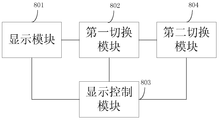
图8为本申请实施例公开的一种目标对象的属性调整装置的结构示意图。
本申请实施例公开了一种目标对象的属性调整方法及装置,可以应用在电子设备中。进一步地,所述电子设备可以为移动终端,例如,手机、PAD等。
下面将结合本申请实施例中的附图,对本申请实施例中的技术方案进行清楚、完整地描述,显然,所描述的实施例仅仅是本申请一部分实施例,而不是全部的实施例。基于本申请中的实施例,本领域普通技术人员在没有做出创造性劳动前提下所获得的所有其他实施例,都属于本申请保护的范围。
本申请实施例公开的一种目标对象的属性调整方法,如图1所示,可以包括以下步骤。
S101:根据用户的操作请求,显示第一操作界面。
在本实施例中,以移动终端为例,用户在使用移动终端的时候,可能会打开一个目标对象,例如一张图片,并需要对此目标对象的属性进行调整,例如调整图片的对比度、亮度等属性。用户输入操作请求,当移动终端接收到用户的操作请求时,向用户显示第一操作界面。图2为在移动终端上显示的、由用户打开的图片以及用于调整此图片的属性的第一操作界面。
其中,第一操作界面中包括第一控件集合,第一控件集合中的控件分别与目标对象的属性相关联,可以用于接收用户通过对第一控件集合中的控件进行操作而输入的调整指令,而调整指令由移动终端执行,用来对目标对象的属性进行调整。所述目标对象可
以为图像或者音频、视频等。
S102:根据用户的第一界面切换请求,将当前的操作界面由第一操作界面切换到第二操作界面。
还是以移动终端为例,用户如果想要切换当前操作界面,可以输入第一界面切换指令。在移动终端接收到第一界面切换请求后,将当前的操作界面由第一操作界面切换到第二操作界面。在此情况下,移动终端可以只向用户显示第二操作界面,也可以同时向用户显示第一操作界面和第二操作界面。
其中,第二操作界面中包括第二控件集合,第二控件集合中的控件与目标对象的属性相关联,用于接收用户通过对控件的操作输入的调整指令,调整指令同样由移动终端执行,用来对目标对象的属性进行调整。
本实施例中,第一控件集合中的控件可以为一个,也可以为多个,第二控件集合中的控件也可以为一个或多个。第一控件集合中的控件关联的属性与第二控件集合中的控件关联的属性可以相同,也可以不同。
本实施例所述的目标对象的属性调整方法,可以显示包括第一控件集合的第一操作界面,第一控件集合用以接收用户对目标对象的属性的调整指令,同时可以依据用户的第一界面切换指令,显示包括第二控件集合的第二操作界面,用以接收用户对目标对象的属性的调整指令。所以,使得用户可以分别或者同时在两个操作界面中对目标对象的属性进行调整,从而有利于提高调整目标对象的属性的效率。
本申请实施例公开的又一种目标对象的属性调整方法,本实施例中,重点在于对图1所示的实施例中的第一操作界面及第二操作界面中的控件进行详细说明,如图3所示,包括以下步骤。
S301:根据用户的操作请求,显示第一操作界面,第一操作界面中包括第一控件集合,第一控件集合中的控件用于接收用户输入的调整指令,调整指令用于对目标对象的属性进行调整。
具体地,如图4所示,第一控件集合中的控件可以为滑动控件,各个滑动控件中均包括滑块和滑轨。其中,一个滑动控件可以对应目标对象的一个属性(图中的对比度、亮度及模糊均为属性),即与目标对象的一个属性相关联。滑轨的不同位置对应此属性的不同数值,用户可以通过在滑轨上滑动滑块的方式,调节与此滑动控件相关联的属性的数值。
S302:根据用户的第一界面切换请求,将当前的操作界面由第一操作界面切换到第二操作界面,第二操作界面中包括第二控件集合,第二控件集合中的控件用于接收用户输入的调整指令,调整指令用于对目标对象的属性进行调整。
本实施例中,第一操作界面中包括的第一控件集合中的控件的形态与第二操作界面中包括的第二控件集合中的控件的形态不同。其中,形态指的是控件所展示出的形状或呈现形式。本实施例中,以控件所述展示出的形态不同为例:第一控件集合中的控件可以为第一类滑动控件,第二控件集合中的控件可以为第二类滑动控件和/或第一类滑动控件。或者,第一控件集合中的控件为第一类滑动控件和第二类滑动控件,第二控件集合中的控件为第一类滑动控件或第二类滑动控件。
具体地,如图5所示,虽然第二控件集合中的控件也为滑动控件,各个滑动控件中均包括滑块和滑轨。但图4中与图5中所示的控件的区别在于,第一控件集合中的滑动控件的滑轨为第一形态的弧形,第二控件集合中的滑动控件的滑轨为第二形态的弧形。例如,在实际应用中,第一形态的弧形可以为便于左手的手指操作的弧形(图4中所示),第二形态的弧形可以为便于右手的手指操作的弧形(图5中所示)。也就是说,第一操作界面为左手模式,便于用户使用左手操作,第二操作界面为右手模式,便于用户使用右手操作。
本实施例中,第二操作界面除了可以为图5所示的操作界面外,还可以如图6所示。即第一控件集合中可以包括滑轨为第一形态的弧形和第二形态的弧形的滑动控件,第二操作界面为双手模式。
图4、图5及图6所示的操作界面,仅为多种具体实现方式中的一种。本实施例中,对于第一形态的弧形和第二形态的弧形的具体形态并不作限定,第一界面还可以如图5或图6所示,第二操作界面还可以如图4或6所示。也就是说,操作界面可以从左手模式切换(或右手模块)切换到双手模式。当然,操作界面也可以从双手模式切换到左手模式(或右手模式)。
本实施例中,虽然对于第一形态的弧形和第二形态的弧形的具体形态并不作限定,但第一形态的弧形和第二形态的弧形均可以依据人体手指的工学标准设置。例如,图4所示的界面为左手模式,滑轨逐渐向右下弯曲。因此,用户在左手持机对界面上的滑块进行滑动时,滑轨的形态贴合左手手指的运动工学标准,从而使得用户的操作更为舒适。
本实施例中,第一界面切换指令可以通过重力加速度的值、语音等方式进行传递。也就是说,用户可以通过改变移动终端的重力加速度的值或者输入语音,触发当前操作
界面的切换。例如,用户通过摇动手机,将图片属性的调整界面从左手模式切换为右手模式,即移动终端上显示的当前操作界面由图4所示切换为图5所示。
本实施例中,在步骤S302之后,还可以包括以下步骤。
S303:获取与第一位置或第二位置对应的显示参数。
其中,第一位置为第一类滑动控件的滑块在其滑轨(即第一形态的弧形)上的当前位置,第二位置为第二类滑动控件的滑块在其滑轨(即第二形态的弧形)上的当前位置。第一类滑动控件或第二类滑动控件中的滑块在其滑轨上的不同位置对应不同的显示参数。
S304:使用所述显示参数显示用户当前操作的滑动控件的滑轨。
本实施例中,具体地,显示参数可以为色度参数,即第一形态的弧形或第二形态的弧形上的不同位置对应不同的色度参数,依据滑块所处位置的不同,将滑轨显示为不同的色度。
通常情况下,用户在界面上滑动滑块时,滑轨会被用户的手遮挡,用户看不到滑块在滑轨上移动的程度。因此,本实施例中,通过显示参数的变化来提示用户滑块在滑轨上移动的程度。例如,随着用户对滑块的移动,将滑轨显示出渐变的颜色,用以提示用户滑块的滑动程度。即使滑轨被用户的手指挡住,也可以通过滑轨的变化获知对此滑动控件对应的属性的调整程度。
综上所述,本实施例中所述的方法,能够在电子设备上显示不同类型的操作界面,以满足用户在不同情境下的不同操作需求,方面用户的使用,从而提高属性调整的效率。
本申请实施例公开的又一种目标对象的属性的调整方法,与图3所示的实施例相比,强调的区别点在于,切换后的当前操作界面与切换前相比,控件所关联的属性不同,如图7所示,包括以下步骤。
S701:根据用户的操作请求,显示第一操作界面,第一操作界面中包括第一控件集合,第一控件集合中包括多个控件,其中,每个控件用于接收所述用户输入的调整指令,所述调整指令用于对目标对象的属性进行调整。
在本实施例中,在移动终端接收到用户的操作请求后,显示第一操作界面,第一操作界面中包括多个控件,每一个控件均关联一个目标对象的属性,将多个控件集中在一个界面中的目的在于,可以在一个界面中调整多个属性,而无需调整完一个属性后再返
回主界面选择进入下一个属性的调整界面,即避免在多个属性调整界面之间的跳转,因此,能够提高属性调整的效率。
并且,本实施例中,第一操作界面中控件的具体形态可以参见上述实施例所述。即,具体地,第一操作界面中的各个控件为滑动控件,其滑轨为弧形,进一步地,弧形依据人体工学原理设置。可见,本实施例中,并非将传统的多个属性调整控件简单地集中在一个操作界面内,而是从用户操作的舒适度考虑,重新设置了滑动控件的轨道。并且,弧形滑轨与直线型滑轨相比,具有拖动范围大的优点,从而能够有效避免用户在滑动滑块时的误操作。
S702:根据用户的第二界面切换请求,将当前的操作界面切换到第三操作界面,第三操作界面中包括第三控件集合,第三控件集合中的控件对应的目标对象的属性与第一操作界面中的控件对应的目标对象的属性不同。
在目标对象包括的可调整属性较多,而导致第一操作界面无法将可调整的属性的控件全部显示的情况下,可以依据第二界面切换请求,切换到第三操作界面,将第一操作操作界面中无法显示的其它控件显示在第三操作界面中。
也就是说,用户在第一操作界面上无法找到想要调整的第一属性关联的控件时,可以输入第二界面切换指令。移动终端接收到第二界面切换请求后,将当前的操作界面切换到第三操作界面,用户通过第三操作界面中的控件,对第一属性进行调整。
本实施例中,第一操作界面可以如图4、图5或图6所示,第三操作界面也可以如图4、图5或图6所示,第三操作界面也可以通过第一界面切换请求转换左右手模式。
本实施例所述的方法,在同一界面上显示多个调整目标对象的属性的控件,能够避免反复跳转界面,提高属性调整的效率。同时,在一个界面无法将目标对象的属性调整控件全部显示的情况下,可以通过切换指令显示下一界面,从而方便用户的使用。
除了上述方法实施例,本申请实施例还公开了一种目标对象的属性的调整装置,如图8所示,可以包括:
显示模块801,用于根据用户的操作请求,显示第一操作界面,所述第一操作界面中包括第一控件集合,所述第一控件集合中的控件用于接收所述用户输入的调整指令,所述调整指令用于对目标对象的属性进行调整;
第一切换模块802,用于根据所述用户的第一界面切换请求,将当前的操作界面由所述第一操作界面切换到第二操作界面,所述第二操作界面中包括第二控件集合,所述
第二控件集合中的控件用于接收所述用户输入的调整指令,所述调整指令用于对所述目标对象的属性进行调整。
具体地,本实施例中,第一切换模块将当前的操作界面由所述第一操作界面切换到第二操作界面,所述第二操作界面中包括第二控件集合的具体实现方式可以为:将当前的操作界面由所述第一操作界面切换到第二操作界面,所述第二操作界面中包括第二控件集合,所述第一控件集合中的控件与所述第二控件集合中的控件的形态不同。
第一操作界面和第二操作界面中的控件的具体形态可以参见图4、图5及图6所示。即具体地,显示模块显示第一操作界面,所述第一操作界面中包括第一控件集合的具体实现方式可以为:显示第一操作界面,所述第一操作界面中包括第一控件集合,所述第一控件集合中的控件为第一类滑动控件,所述第一类滑动控件的滑轨为第一形态的弧形。第一切换模块将当前的操作界面由所述第一操作界面切换到第二操作界面,所述第二操作界面中包括第二控件集合的具体实现方式可以为:将当前的操作界面由所述第一操作界面切换到第二操作界面,所述第二操作界面中包括第二控件集合,所述第二控件集合中的控件为第二类滑动控件和/或第一类滑动控件,所述第二类滑动控件的滑轨为第二形态的弧形。
或者,显示模块显示第一操作界面,所述第一操作界面中包括第一控件集合的另一种具体实现方式可以为:显示第一操作界面,所述第一操作界面中包括第一控件集合,所述第一控件集合中的控件为第一类滑动控件和第二类滑动控件。第一切换模块将当前的操作界面由所述第一操作界面切换到第二操作界面,所述第二操作界面中包括第二控件集合的另一种具体实现方式可以为:将当前的操作界面由所述第一操作界面切换到第二操作界面,所述第二操作界面中包括第二控件集合,所述第二控件集合中的控件为第一类滑动控件或第二类滑动控件,所述第一类滑动控件的滑轨为第一形态的弧形,所述第二类滑动控件的滑轨为第二形态的弧形。
进一步地,显示模块显示第一操作界面中的所述第一类滑动控件的滑轨为第一形态的弧形,和/或所述第一操作界面中的所述第二类滑动控件的滑轨为第二形态的弧形的具体实现方式可以为:显示第一操作界面,所述第一操作界面中的所述第一类滑动控件的滑轨为第一形态的弧形,所述第一形态的弧形依据人体手指的工学标准设置,和/或第一操作界面中的所述第二类滑动控件的滑轨为第二形态的弧形,所述第二形态的弧形依据人体手指的工学标准设置。同样地,第一切换模块显示第二操作界面中的所述第一类滑动控件的滑轨为第一形态的弧形,和/或所述第一操作界面中的所述第二类滑动控件的滑
轨为第二形态的弧形的具体实现方式可以为:将当前的操作界面由所述第一操作界面切换到第二操作界面,所述第二操作界面中的所述第一类滑动控件的滑轨为第一形态的弧形,所述第一形态的弧形依据人体手指的工学标准设置,和/或第二操作界面中的所述第二类滑动控件的滑轨为第二形态的弧形,所述第二形态的弧形依据人体手指的工学标准设置。
本实施例中,可选地,除了显示模块801及第一切换模块802之外,还可以包括:
显示控制模块803,用于获取与第一位置或第二位置对应的显示参数,使用所述显示参数显示所述用户当前操作的滑动控件的滑轨,所述第一位置为所述第一类滑动控件的滑块在其滑轨上的当前位置,所述第二位置为所述第二类滑动控件的滑块在其滑轨上的当前位置。其中,所述第一类滑动控件或所述第二类滑动控件中的滑块在其滑轨上的不同位置对应不同的显示参数。
以及,第二切换模块804,用于根据所述用户的第二界面切换请求,将当前的操作界面切换到第三操作界面,所述第三操作界面中包括第三控件集合,所述第三控件集合中的控件对应的所述目标对象的属性与所述第一控件集合中的控件对应的所述目标对象的属性不同。
本实施例中所述的装置,能够在电子设备上显示不同类型的操作界面,以满足用户在不同情境下的不同操作需求,方面用户的使用,从而提高属性调整的效率。
本申请实施例方法所述的功能如果以软件功能单元的形式实现并作为独立的产品销售或使用时,可以存储在一个计算设备可读取存储介质中。基于这样的理解,本申请实施例对现有技术做出贡献的部分或者该技术方案的部分可以以软件产品的形式体现出来,该软件产品存储在一个存储介质中,包括若干指令用以使得一台计算设备(可以是个人计算机,服务器,移动计算设备或者网络设备等)执行本申请各个实施例所述方法的全部或部分步骤。而前述的存储介质包括:U盘、移动硬盘、只读存储器(ROM,Read-Only Memory)、随机存取存储器(RAM,Random Access Memory)、磁碟或者光盘等各种可以存储程序代码的介质。
本说明书中各个实施例采用递进的方式描述,每个实施例重点说明的都是与其它实施例的不同之处,各个实施例之间相同或相似部分互相参见即可。
对所公开的实施例的上述说明,使本领域专业技术人员能够实现或使用本申请。对这些实施例的多种修改对本领域的专业技术人员来说将是显而易见的,本文中所定义的
一般原理可以在不脱离本申请的精神或范围的情况下,在其它实施例中实现。因此,本申请将不会被限制于本文所示的这些实施例,而是要符合与本文所公开的原理和新颖特点相一致的最宽的范围。
Claims (14)
- 一种目标对象的属性调整方法,其特征在于,包括:根据用户的操作请求,显示第一操作界面,所述第一操作界面中包括第一控件集合,所述第一控件集合中的控件用于接收所述用户输入的调整指令,所述调整指令用于对目标对象的属性进行调整;根据所述用户的第一界面切换请求,将当前的操作界面由所述第一操作界面切换到第二操作界面,所述第二操作界面中包括第二控件集合,所述第二控件集合中的控件用于接收所述用户输入的调整指令,所述调整指令用于对所述目标对象的属性进行调整。
- 根据权利要求1所述的方法,其特征在于,所述第一控件集合中的控件与所述第二控件集合中的控件的形态不同。
- 根据权利要求2所述的方法,其特征在于,所述第一控件集合中的控件为第一类滑动控件,所述第二控件集合中的控件为第二类滑动控件和/或第一类滑动控件,所述第一类滑动控件的滑轨为第一形态的弧形,所述第二类滑动控件的滑轨为第二形态的弧形;或者,所述第一控件集合中的控件为第一类滑动控件和第二类滑动控件,所述第二控件集合中的控件为第一类滑动控件或第二类滑动控件,所述第一类滑动控件的滑轨为第一形态的弧形,所述第二类滑动控件的滑轨为第二形态的弧形。
- 根据权利要求3所述的方法,其特征在于,所述第一形态的弧形与所述第二形态的弧形均依据人体手指的工学标准设置。
- 根据权利要求3所述的方法,其特征在于,还包括:获取与第一位置或第二位置对应的显示参数,所述第一位置为所述第一类滑动控件的滑块在其滑轨上的当前位置,所述第二位置为所述第二类滑动控件的滑块在其滑轨上的当前位置,其中,所述第一类滑动控件或所述第二类滑动控件中的滑块在其滑轨上的不同位置对应不同的显示参数;使用所述显示参数显示所述用户当前操作的滑动控件的滑轨。
- 根据权利要求1至5任一项所述的方法,其特征在于,所述第一控件集合中包括多个控件。
- 根据权利要求6所述的方法,其特征在于,还包括:根据所述用户的第二界面切换请求,将当前的操作界面切换到第三操作界面,所述第三操作界面中包括第三控件集合,所述第三控件集合中的控件对应的所述目标对象的 属性与所述第一控件集合中的控件对应的所述目标对象的属性不同。
- 一种目标对象的属性调整装置,其特征在于,包括:显示模块,用于根据用户的操作请求,显示第一操作界面,所述第一操作界面中包括第一控件集合,所述第一控件集合中的控件用于接收所述用户输入的调整指令,所述调整指令用于对目标对象的属性进行调整;第一切换模块,用于根据所述用户的第一界面切换请求,将当前的操作界面由所述第一操作界面切换到第二操作界面,所述第二操作界面中包括第二控件集合,所述第二控件集合中的控件用于接收所述用户输入的调整指令,所述调整指令用于对所述目标对象的属性进行调整。
- 根据权利要求8所述的装置,其特征在于,所述第一切换模块用于将当前的操作界面由所述第一操作界面切换到第二操作界面,所述第二操作界面中包括第二控件集合包括:所述第一切换模块具体用于,将当前的操作界面由所述第一操作界面切换到第二操作界面,所述第二操作界面中包括第二控件集合,所述第一控件集合中的控件与所述第二控件集合中的控件的形态不同。
- 根据权利要求9所述的装置,其特征在于,所述显示模块用于显示第一操作界面,所述第一操作界面中包括第一控件集合包括:所述显示模块具体用于,显示第一操作界面,所述第一操作界面中包括第一控件集合,所述第一控件集合中的控件为第一类滑动控件,所述第一类滑动控件的滑轨为第一形态的弧形;所述第一切换模块用于将当前的操作界面由所述第一操作界面切换到第二操作界面,所述第二操作界面中包括第二控件集合包括:所述第一切换模块具体用于,将当前的操作界面由所述第一操作界面切换到第二操作界面,所述第二操作界面中包括第二控件集合,所述第二控件集合中的控件为第二类滑动控件和/或第一类滑动控件,所述第二类滑动控件的滑轨为第二形态的弧形;或者,所述显示模块用于显示第一操作界面,所述第一操作界面中包括第一控件集合包括:所述显示模块具体用于,显示第一操作界面,所述第一操作界面中包括第一控件集合,所述第一控件集合中的控件为第一类滑动控件和第二类滑动控件;所述第一切换模块用于将当前的操作界面由所述第一操作界面切换到第二操作界 面,所述第二操作界面中包括第二控件集合包括:所述第一切换模块具体用于,将当前的操作界面由所述第一操作界面切换到第二操作界面,所述第二操作界面中包括第二控件集合,所述第二控件集合中的控件为第一类滑动控件或第二类滑动控件,所述第一类滑动控件的滑轨为第一形态的弧形,所述第二类滑动控件的滑轨为第二形态的弧形。
- 根据权利要求10所述的装置,其特征在于,所述显示模块用于显示第一操作界面,所述第一操作界面中的所述第一类滑动控件的滑轨为所述第一形态的弧形,和/或所述第一操作界面中的所述第二类滑动控件的滑轨为所述第二形态的弧形包括:所述显示模块具体用于,显示第一操作界面,所述第一操作界面中的所述第一类滑动控件的滑轨为所述第一形态的弧形,所述第一形态的弧形依据人体手指的工学标准设置,和/或第一操作界面中的所述第二类滑动控件的滑轨为所述第二形态的弧形,所述第二形态的弧形依据人体手指的工学标准设置;所述第一切换模块用于将当前的操作界面由所述第一操作界面切换到第二操作界面,所述第二操作界面中的所述第一类滑动控件的滑轨为所述第一形态的弧形,和/或所述第二操作界面中的所述第二类滑动控件的滑轨为所述第二形态的弧形包括:所述第一切换模块具体用于,将当前的操作界面由所述第一操作界面切换到第二操作界面,所述第二操作界面中的所述第一类滑动控件的滑轨为所述第一形态的弧形,所述第一形态的弧形依据人体手指的工学标准设置,和/或第二操作界面中的所述第二类滑动控件的滑轨为所述第二形态的弧形,所述第二形态的弧形依据人体手指的工学标准设置。
- 根据权利要求10所述的装置,其特征在于,还包括:显示控制模块,用于获取与第一位置或第二位置对应的显示参数,并使用所述显示参数显示所述用户当前操作的滑动控件的滑轨,所述第一位置为所述第一类滑动控件的滑块在其滑轨上的当前位置,所述第二位置为所述第二类滑动控件的滑块在其滑轨上的当前位置,其中,所述第一类滑动控件或所述第二类滑动控件中的滑块在其滑轨上的不同位置对应不同的显示参数。
- 根据权利要求8至12任一项所述的装置,其特征在于,所述显示模块用于显示第一操作界面,所述第一操作界面中包括第一控件集合包括:所述显示模块具体用于,显示第一操作界面,所述第一操作界面中包括第一控件集合,所述第一控件集合中包括多个控件。
- 根据权利要求13所述的装置,其特征在于,还包括:第二切换模块,用于根据所述用户的第二界面切换请求,将当前的操作界面切换到第三操作界面,所述第三操作界面中包括第三控件集合,所述第三控件集合中的控件对应的所述目标对象的属性与所述第一控件集合中的控件对应的所述目标对象的属性不同。
Applications Claiming Priority (2)
| Application Number | Priority Date | Filing Date | Title |
|---|---|---|---|
| CN201510130175.9 | 2015-03-24 | ||
| CN201510130175.9A CN106155453B (zh) | 2015-03-24 | 2015-03-24 | 一种目标对象的属性调整方法及装置 |
Publications (1)
| Publication Number | Publication Date |
|---|---|
| WO2016150322A1 true WO2016150322A1 (zh) | 2016-09-29 |
Family
ID=56978886
Family Applications (1)
| Application Number | Title | Priority Date | Filing Date |
|---|---|---|---|
| PCT/CN2016/076447 Ceased WO2016150322A1 (zh) | 2015-03-24 | 2016-03-16 | 一种目标对象的属性调整方法及装置 |
Country Status (2)
| Country | Link |
|---|---|
| CN (1) | CN106155453B (zh) |
| WO (1) | WO2016150322A1 (zh) |
Families Citing this family (6)
| Publication number | Priority date | Publication date | Assignee | Title |
|---|---|---|---|---|
| CN109901776B (zh) * | 2017-12-08 | 2022-05-06 | 珠海金山办公软件有限公司 | 一种调整对象属性的方法及装置 |
| CN108513067B (zh) * | 2018-03-29 | 2021-01-08 | 维沃移动通信有限公司 | 一种拍摄控制方法及移动终端 |
| CN109597555B (zh) * | 2018-12-06 | 2022-09-06 | 佛山市原子文化传播有限公司 | 一种根据场景及对象调整显示方式的方法及系统 |
| CN113521724B (zh) * | 2021-07-16 | 2023-11-07 | 腾讯科技(上海)有限公司 | 控制虚拟角色的方法、装置、设备及存储介质 |
| CN115641181A (zh) * | 2021-07-19 | 2023-01-24 | 北京字节跳动网络技术有限公司 | 对象处理方法、装置、设备、介质和计算机程序产品 |
| CN115097977A (zh) * | 2022-07-13 | 2022-09-23 | 北京有竹居网络技术有限公司 | 用于点云处理的方法、装置、设备和存储介质 |
Citations (4)
| Publication number | Priority date | Publication date | Assignee | Title |
|---|---|---|---|---|
| CN102647500A (zh) * | 2012-03-20 | 2012-08-22 | 深圳市金立通信设备有限公司 | 基于左右手使用习惯调整手机显示界面的系统及方法 |
| CN103064629A (zh) * | 2013-01-30 | 2013-04-24 | 龙凡 | 能动态调整图形控件的便携电子设备及方法 |
| CN103703437A (zh) * | 2012-03-06 | 2014-04-02 | 苹果公司 | 用于查看图像的应用 |
| US20140372930A1 (en) * | 2013-06-13 | 2014-12-18 | Tencent Technology (Shenzhen) Company Limited | Method and device for displaying a list view through a sliding operation |
Family Cites Families (5)
| Publication number | Priority date | Publication date | Assignee | Title |
|---|---|---|---|---|
| US9131192B2 (en) * | 2012-03-06 | 2015-09-08 | Apple Inc. | Unified slider control for modifying multiple image properties |
| CN103324423B (zh) * | 2012-03-21 | 2018-11-13 | 北京三星通信技术研究有限公司 | 一种终端及其用户界面显示方法 |
| US9959038B2 (en) * | 2012-08-30 | 2018-05-01 | Google Llc | Displaying a graphic keyboard |
| CN103970283B (zh) * | 2013-01-30 | 2017-05-10 | 三星电子(中国)研发中心 | 双手操作的虚拟键盘的提供装置及提供方法 |
| CN103576879B (zh) * | 2013-09-29 | 2016-03-30 | 罗蒙明 | 一种实现双手拇指操控宽屏虚拟键盘按键的方法 |
-
2015
- 2015-03-24 CN CN201510130175.9A patent/CN106155453B/zh not_active Expired - Fee Related
-
2016
- 2016-03-16 WO PCT/CN2016/076447 patent/WO2016150322A1/zh not_active Ceased
Patent Citations (4)
| Publication number | Priority date | Publication date | Assignee | Title |
|---|---|---|---|---|
| CN103703437A (zh) * | 2012-03-06 | 2014-04-02 | 苹果公司 | 用于查看图像的应用 |
| CN102647500A (zh) * | 2012-03-20 | 2012-08-22 | 深圳市金立通信设备有限公司 | 基于左右手使用习惯调整手机显示界面的系统及方法 |
| CN103064629A (zh) * | 2013-01-30 | 2013-04-24 | 龙凡 | 能动态调整图形控件的便携电子设备及方法 |
| US20140372930A1 (en) * | 2013-06-13 | 2014-12-18 | Tencent Technology (Shenzhen) Company Limited | Method and device for displaying a list view through a sliding operation |
Also Published As
| Publication number | Publication date |
|---|---|
| CN106155453A (zh) | 2016-11-23 |
| CN106155453B (zh) | 2020-03-27 |
Similar Documents
| Publication | Publication Date | Title |
|---|---|---|
| US20220229524A1 (en) | Methods for interacting with objects in an environment | |
| US10593088B2 (en) | System and method for enabling mirror video chat using a wearable display device | |
| WO2016150322A1 (zh) | 一种目标对象的属性调整方法及装置 | |
| CN111418202B (zh) | 相机缩放级别和图像帧捕获控制 | |
| US10304231B2 (en) | Image processing method and image processing device to create a moving image based on a trajectory of user input | |
| JP6349962B2 (ja) | 画像処理装置およびプログラム | |
| EP2854005A1 (en) | Preview picture presentation method, device and terminal | |
| US10270961B2 (en) | Information processing apparatus, information processing method, program, and system | |
| KR20140115906A (ko) | 시선 위치를 디텍트하는 디스플레이 디바이스 및 제어 방법 | |
| US20240103614A1 (en) | Devices, methods, for interacting with graphical user interfaces | |
| CN110764859A (zh) | 一种对屏幕可视区域进行自动调整及优化显示的方法 | |
| CN109496293B (zh) | 扩展内容显示方法、装置、系统及存储介质 | |
| CN105573485B (zh) | 一种显示内容调节方法及终端 | |
| CN111970456A (zh) | 拍摄控制方法、装置、设备及存储介质 | |
| CN106873886A (zh) | 一种立体显示的控制方法、装置和电子设备 | |
| US9582179B2 (en) | Apparatus and method for editing image in portable terminal | |
| US20140240202A1 (en) | Information processing method and apparatus for electronic device | |
| US10116882B2 (en) | Display apparatus for superimposing and displaying images | |
| JP6189622B2 (ja) | 入力装置、および、画像表示装置 | |
| CN103645843A (zh) | 一种信息处理方法及电子设备 | |
| WO2026012205A1 (zh) | 控制方法、装置、电子设备及穿戴式ar设备 | |
| US8943411B1 (en) | System, method, and computer program for displaying controls to a user | |
| JP2024512200A (ja) | 視線に基づくメディア表示装置の制御 | |
| HK1230307B (zh) | 一种目标对象的属性调整方法及装置 | |
| HK1230307A (zh) | 一种目标对象的属性调整方法及装置 |
Legal Events
| Date | Code | Title | Description |
|---|---|---|---|
| 121 | Ep: the epo has been informed by wipo that ep was designated in this application |
Ref document number: 16767699 Country of ref document: EP Kind code of ref document: A1 |
|
| NENP | Non-entry into the national phase |
Ref country code: DE |
|
| 122 | Ep: pct application non-entry in european phase |
Ref document number: 16767699 Country of ref document: EP Kind code of ref document: A1 |