WO2016013348A1 - ユーザインタフェース評価装置およびユーザインタフェース評価方法 - Google Patents
ユーザインタフェース評価装置およびユーザインタフェース評価方法 Download PDFInfo
- Publication number
- WO2016013348A1 WO2016013348A1 PCT/JP2015/068539 JP2015068539W WO2016013348A1 WO 2016013348 A1 WO2016013348 A1 WO 2016013348A1 JP 2015068539 W JP2015068539 W JP 2015068539W WO 2016013348 A1 WO2016013348 A1 WO 2016013348A1
- Authority
- WO
- WIPO (PCT)
- Prior art keywords
- display
- user interface
- screen
- software
- component
- Prior art date
- Legal status (The legal status is an assumption and is not a legal conclusion. Google has not performed a legal analysis and makes no representation as to the accuracy of the status listed.)
- Ceased
Links
Images





Classifications
-
- G—PHYSICS
- G06—COMPUTING OR CALCULATING; COUNTING
- G06F—ELECTRIC DIGITAL DATA PROCESSING
- G06F9/00—Arrangements for program control, e.g. control units
- G06F9/06—Arrangements for program control, e.g. control units using stored programs, i.e. using an internal store of processing equipment to receive or retain programs
- G06F9/44—Arrangements for executing specific programs
-
- G—PHYSICS
- G06—COMPUTING OR CALCULATING; COUNTING
- G06F—ELECTRIC DIGITAL DATA PROCESSING
- G06F11/00—Error detection; Error correction; Monitoring
- G06F11/36—Prevention of errors by analysis, debugging or testing of software
Definitions
- the present invention relates to an apparatus for evaluating a software user interface.
- a standard for connecting mobile computers such as smartphones to in-vehicle devices has been proposed with the aim of integrating mobile terminals and in-vehicle devices.
- a smartphone screen can be output on the display of an in-vehicle device (for example, a navigation device).
- the GUI output to the display may be designed so as not to hinder driving (ie, not reduce concentration). preferable.
- Such a design is defined, for example, in guidelines created by the Japan Automobile Manufacturers Association.
- coding rule that follows these guidelines is provided, and the screen It is preferable to design. For example, coding conventions such as “character font height is greater than or equal to mm” and “button spacing is greater than or equal to mm” can be used.
- the problem here is that the display size of the in-vehicle device varies depending on the manufacturer, and the screen size when it is actually displayed under the user is not known at the time of development.
- the resolution of the target device In the development environment for the cross platform, it is possible to specify the resolution of the target device and actually emulate on the screen what kind of display is performed.
- the size of the output screen depends on the resolution and size of the display. That is, it is not known until the actual machine is connected how large the components included in the screen are displayed. Further, in the system described in Patent Document 1, it is possible to check whether a component included in the screen satisfies the convention. However, when the screen is output to an external display, what the component actually does is It cannot be checked until it is displayed in the correct size.
- the present invention has been made in consideration of the above problems, and an object of the present invention is to provide a user interface evaluation apparatus capable of checking a display state on an external display when target software is output to the external display. To do.
- a user interface evaluation apparatus provides: Check whether the software running on the first computer that can output the screen to the first display, which is the built-in display, and the second display, which is an externally connected display, has a screen interface that conforms to the regulations.
- a user interface evaluation device a resolution acquisition unit for acquiring the actual size and resolution of the second display, a design information acquisition unit for acquiring information about components arranged on a user interface screen of the software,
- a component whose appearance condition on the second display does not satisfy a predetermined condition is Arco And having a detecting means for detecting.
- the first display is a display included in the target device
- the second display is an external display connected to the outside of the target device.
- the resolution acquisition means is means for acquiring the actual size and resolution of the second display.
- the actual size and resolution of the second display may be obtained by user input, for example. Further, information regarding a plurality of second displays may be stored, and a matching item may be acquired each time.
- the design information acquisition means is means for acquiring information related to the arrangement state of the components arranged on the user interface screen of the target software.
- a component is a component that constitutes a screen, such as a label, a list box, or a button. Any object may be used as long as the object is arranged on the screen.
- the arrangement state is, for example, the arrangement position (coordinates) of each component on the screen, vertical size, horizontal size, and the like.
- the arrangement position and size of each component are expressed in units that do not depend on the actual display size (physical size) such as pixels and points.
- the detection unit is a component whose condition regarding the appearance when output to the second display does not satisfy a predetermined condition based on the information acquired by the resolution acquisition unit and the information acquired by the design information acquisition unit. Detect that there is.
- condition regarding the appearance may be a condition regarding an actual size when the target component is displayed on the second display.
- the actual size is the physical size when actually displayed on the second display. Thereby, for example, it can be confirmed that the size (vertical size, horizontal size) of the component that the user actually sees and the interval between the components satisfy the predetermined condition.
- the predetermined condition may be any one of a size of a character included in the component, a height of the component, a width of the component, and an interval between adjacent components. .
- the user interface evaluation device generates an emulation screen which is a screen emulating a result when the third display and the user interface screen are output to the second display, Emulating means for outputting to a third display may be further included.
- the third display is a display included in the user interface evaluation device.
- the emulation means can emulate what kind of display is performed on the second display based on the information acquired by the resolution acquisition means and the information acquired by the arrangement acquisition means.
- the resolution acquisition means further acquires the actual size and resolution of the third display, and the emulation means generates the emulation screen with the same actual size as the second display. It is good.
- the screen size when emulating can be made to match the actual screen size displayed on the second display.
- the user interface evaluation apparatus is a warning unit that warns a user when the detection unit detects that the component that does not satisfy the predetermined condition is included in the user interface screen. May be further included.
- the warning may be performed, for example, by displaying an alert on the screen or by outputting a log. Moreover, it is preferable that the warning includes information on how the generated code deviates from a predetermined condition.
- the first computer may be a mobile terminal
- the second display may be a display included in an in-vehicle device.
- the present invention can also be specified as a user interface evaluation device including at least a part of the above processing. It can also be specified as a software check method executed by the user interface evaluation apparatus.
- the above processes and means can be freely combined and implemented as long as no technical contradiction occurs.
- a user interface evaluation device capable of checking the display state on the external display when the target software is output to the external display.
- the software creation apparatus according to the first embodiment will be described with reference to FIG. 1 which is a system configuration diagram.
- the software creation device 100 is a device for creating software that operates on the mobile terminal 200.
- the software creation device 100 is a computer having a processor, a main storage device, and an auxiliary storage device, and a program stored in the auxiliary storage device is loaded into the main storage device and executed by the processor, whereby each means to be described later is Functions (a processor, a main storage device, and an auxiliary storage device are not shown).
- the portable terminal 200 as a target device is a portable computer (mobile phone, smartphone, PDA, handheld computer, etc.), and is a terminal that executes software created by the software creation apparatus 100.
- the mobile terminal 200 has a function of connecting to the in-vehicle terminal 300, and can output a user interface screen of the software being executed.
- the in-vehicle terminal 300 is an in-vehicle computer mounted on a vehicle.
- the in-vehicle terminal 300 has a display 310 and can output a user interface screen of software being executed on the mobile terminal 200 to the display.
- application software for example, a navigation application, a music application, a browser, an SNS client, etc.
- the software creation apparatus 100 includes an input / output unit 101, a design unit 102, a storage unit 103, a resolution acquisition unit 104, a rule check unit 105, and a code generation unit 106.
- the input / output unit 101 is a means for accepting an input operation performed by the user and presenting information to the user. Specifically, it comprises a liquid crystal display, a keyboard, a mouse and the like and its control means.
- the design unit 102 is a means for designing software. Specifically, a screen for designing software (for example, a code editor or a screen editor) is presented to the software developer through the input / output unit 101, and software design data input by the developer is acquired.
- the software design data is design data on the user interface screen (hereinafter referred to as GUI design data) and design data related to logic.
- the GUI design data is data representing the arrangement of parts (hereinafter referred to as components) arranged on a user interface screen (hereinafter referred to as form) included in the software to be developed.
- FIG. 2 shows an example of component arrangement.
- a plurality of labels (character areas), buttons, images, and the like are arranged on the form 201, respectively.
- the arrangement of components is represented by, for example, the coordinates of the upper left point, width, height, font size (in the case of a character component), and the like.
- labels, buttons, and images are exemplified as components. However, any components may be used as long as they are arranged on the screen.
- it may be a list box, a select box, a check box, or the like.
- a software developer arranges components on a form through an editor screen generated by the design unit 102. Similarly, logic coding is performed through an editor screen generated by the design unit 102.
- the components arranged in this way operate according to the designed logic. For example, as shown in FIG. 3, actual data is embedded and provided to the user (FIG. 3 shows an example of a music player).
- the design data acquired by the design unit 102 is temporarily stored in the storage unit 103 by, for example, a text file in which a code is described or an XML file representing a screen design.
- the storage unit 103 is a means for temporarily storing data related to software design.
- the storage unit 103 is preferably a storage medium that can read and write at high speed and has a large capacity.
- a flash memory can be suitably used.
- the resolution acquisition unit 104 is a means for acquiring information about a display on which a software user interface screen is displayed.
- the target displays are two types, a display that the portable terminal 200 has and a display 310 that the in-vehicle terminal 300 has. Specifically, as illustrated in FIG. 4, the vertical and horizontal physical sizes and the vertical and horizontal pixel numbers of the effective display area of the target display are acquired.
- the two pieces of information are referred to as display data.
- the display data may be acquired each time through the input / output unit 101, or may be acquired each time from a plurality of preset values. Further, a plurality of target displays may be provided. Display data acquired by the resolution acquisition unit 104 is temporarily stored in the storage unit 103.
- the rule check unit 105 is a unit that checks whether there is a component that deviates from the coding rule based on the GUI design data acquired by the design unit 102 and the display data acquired by the resolution acquisition unit 104. The contents of the coding rules and a specific checking method will be described later.
- the code generation unit 106 is a means for generating (building) an executable program based on the code acquired by the design unit 102.
- the built program is finally output as a software package in a distribution format.
- the code generation unit 106 may have a function of transferring the software package to the mobile terminal 200 by wired connection or wireless connection.
- the coding convention in the present embodiment is a set of restrictions on the size or position of components included in the form when the form is displayed on the display 310.
- the coding convention in the present embodiment includes, for example, at least one of the following.
- the “size”, “height”, and “interval” shown below are all actual sizes (mm) on the display 310.
- the height of the character string associated with the label is greater than or equal to a predetermined value
- the number of characters in the character string associated with the label is less than or equal to the predetermined value
- the interval between components is greater than or equal to the predetermined value (4)
- the vertical and horizontal sizes of the buttons must be greater than or equal to the specified values.
- the coding convention to be used is related to the appearance of the components included in the form when the form is displayed on an external display. If it exists, it may be other than those exemplified.
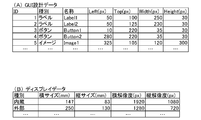
- the GUI design data acquired by the design unit 102 is obtained by designating the arrangement of components by pixels.
- FIG. 5A is an example of GUI design data acquired by the design unit 102 and stored in the storage unit 103.
- coordinates on the form (upper left coordinates of the component), width, and height are defined for each component.
- the software creation apparatus performs emulation when the form is displayed on the display 310 using the display data.
- the GUI design data shown in FIG. 5A can be replaced with the actual size.
- the software creation device detects that there is a component that violates the coding convention by comparing the result of converting the GUI design data into the actual size and the coding convention. For example, if the type of component A is “button” and there is a coding rule that “the horizontal width of the button on the external display is 45 mm or more”, it is determined that the component does not satisfy the rule.
- a warning to that effect is presented to the software developer through the input / output unit 101.
- the warning may be output to a console screen, for example, or may be output by a dialog or the like. Moreover, you may output to a log.
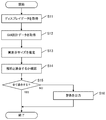
- FIG. 6 is a flowchart of the coding check process performed by the software creation apparatus according to the present embodiment. The process is executed by the convention check unit 105 based on a user instruction (for example, at the timing when the check function is activated in the development environment).
- step S11 the display data acquired by the resolution acquisition unit 104, that is, the display resolution and screen size used for display are acquired.
- the display data may be acquired manually as described above, or may be acquired from a plurality of preset values.
- step S12 GUI design data acquired by the design unit 102 is acquired.
- step S13 the actual display size when the user interface screen is displayed on the external display is calculated. Specifically, among the display data, for the display whose type is “external”, the actual size and resolution are acquired, and the size of the component is calculated by the method described above.
- step S14 by comparing the calculation result with the coding convention, it is determined whether there is a component that violates the coding convention. As a result, when there is a non-conforming component (step S15-No), the process proceeds to step S16, and the result is presented. If all components conform to the coding standards, no warning is given and the process ends.
- the software creation apparatus uses the information about the display externally connected to the target device, not the display of the target device, and the size of the component that is actually displayed is Determine whether the rules are met. This makes it possible to determine conformity / non-conformance of components based on how the software user actually sees the screen, and to ensure usability.
- the second embodiment is an embodiment that emulates the screen when the design target form is output to the display 310 and presents the screen displayed on the display 310 to the software developer in actual size. . Since the configuration of the software creation apparatus according to the second embodiment is the same as that of the first embodiment, the description thereof is omitted, and only the parts different in processing will be described.
- FIG. 7 is an example of display data in the second embodiment. Display information in the development environment is added to the data.
- the size of the emulation screen is calculated using the actual size of the target component on the display 310 calculated in step S13.
- the actual horizontal size of the display used by the input / output unit 101 is 480 [mm]
- the horizontal resolution is 1280 [px]
- the actual size of the display target component A on the display 310 is Consider the case of 44.9 [mm].
- the arrangement position (coordinates) of the component in the emulation screen can be calculated in the same manner.
- FIG. 8 is an example of an emulation screen output on the display of the development environment.
- the generation of the emulation screen can be executed at an arbitrary timing as long as display data and GUI design data are input.
- a software developer can perform development while confirming on the development environment a screen having the same size as that displayed on the display 310.
- the emulation screen is generated for the display 310, but the emulation may be performed for the screen of the mobile terminal 200 by the same method.
- FIG. 9 is an example of screen conversion when the aspect ratio is different between the display of the portable terminal 200 and the display 310.
- the form is arranged so that the height in the vertical direction fits the screen, and the area is complemented for the area outside the dotted line.
- region complementation or enlargement occurs, the actual size on the display 310 may be calculated in consideration of the conversion.
- the display data does not necessarily include all of the vertical and horizontal sizes and the vertical and horizontal resolutions. For example, only the resolution may be defined, and the remaining conditions (minimum required vertical and horizontal sizes) necessary to satisfy the coding convention may be presented at the time of execution. The reverse is also true.
- the check process is executed based on a user instruction.
- the process in FIG. 6 may be performed in real time. For example, it may be possible to detect that the layout of the component has been changed and automatically execute the check.
- the pixel is exemplified as the resolution, but other units may be used.
- DIP Density-independent Pixels
- SP Scale-independent Pixels
Landscapes
- Engineering & Computer Science (AREA)
- Theoretical Computer Science (AREA)
- Software Systems (AREA)
- Physics & Mathematics (AREA)
- General Engineering & Computer Science (AREA)
- General Physics & Mathematics (AREA)
- Computer Hardware Design (AREA)
- Quality & Reliability (AREA)
- Stored Programmes (AREA)
- Debugging And Monitoring (AREA)
Abstract
内蔵されたディスプレイである第一のディスプレイと、外部に接続されたディスプレイである第二のディスプレイに画面出力が可能な第一のコンピュータで動作するソフトウェアが、規定に沿った画面インタフェースを有するかチェックするユーザインタフェース評価装置であって、前記第二のディスプレイの実サイズおよび解像度を取得する解像度取得手段と、前記ソフトウェアのユーザインタフェース画面上に配置されたコンポーネントに関する情報を取得する設計情報取得手段と、前記ソフトウェアが前記第一のコンピュータ上で実行され、前記ユーザインタフェース画面が前記第二のディスプレイに出力された場合において、当該第二のディスプレイ上における外観に関する条件が、所定の条件を満たさないコンポーネントがあることを検出する検出手段と、を有する。
Description
本発明は、ソフトウェアのユーザインタフェースを評価する装置に関する。
近年、スマートフォン等の携帯端末の普及に伴い、クロスプラットフォーム、すなわち、ターゲットとなるデバイスとは異なるプラットフォーム上で動作する開発環境が普及している。
携帯端末の画面は限られたサイズであるため、開発者が自由に画面デザインを行うと、ユーザビリティの低下を引き起こすおそれがある。そこで、画面デザインに関する規約を設け、規約に沿ったコーディングを行うという手法が一部で採用されている。
例えば、特許文献1に記載のシステムでは、開発対象のソフトウェアのコードを開発環境上で自動的にチェックし、規約に違反したコードを発見した場合に、警告を行うことができる。規約は、例えば、ソフトウェアのパブリッシャや、業界団体によって作成される。
例えば、特許文献1に記載のシステムでは、開発対象のソフトウェアのコードを開発環境上で自動的にチェックし、規約に違反したコードを発見した場合に、警告を行うことができる。規約は、例えば、ソフトウェアのパブリッシャや、業界団体によって作成される。
ところで最近、携帯端末と車載機器の融合を目指し、スマートフォンをはじめとするモバイルコンピュータを車載機器に接続するための規格が提唱されている。このような規格によってスマートフォンを接続することで、車載機器(例えばナビゲーション装置)のディスプレイ上に、スマートフォンの画面を出力することが可能になる。
一方、車載機器のディスプレイは、運転しながら視認する可能性があるため、当該ディスプレイに出力されるGUIは、運転の妨げにならないような(すなわち集中力を低下させないような)デザインであることが好ましい。このようなデザインについては、例えば、日本自動車工業会が作成したガイドラインにおいて定義されている。
携帯端末上で動作するソフトウェアであって、車載端末のディスプレイに画面を出力することが想定されるソフトウェアを作成する場合、このようなガイドラインを踏襲したコーディング規約を設け、当該規約に沿って画面のデザインを行うことが好ましい。
例えば、「文字フォントの高さは○ミリ以上」、「ボタン同士の間隔は○ミリ以上」といったようなコーディング規約を用いることができる。
例えば、「文字フォントの高さは○ミリ以上」、「ボタン同士の間隔は○ミリ以上」といったようなコーディング規約を用いることができる。
ここで問題となるのが、車載機器のディスプレイサイズは、メーカーによってまちまちであるため、ユーザの元で実際に表示される際の画面サイズが、開発時にわからないという点である。
クロスプラットフォーム用の開発環境では、ターゲットとなるデバイスの解像度を指定し、どのような表示のされ方がされるのかを、実際に画面上でエミュレートすることができる。しかし、車載機器のディスプレイのように、ターゲットデバイスの外部にディスプレイを接続するような場合、出力される画面のサイズは、当該ディスプレイの解像度やサイズに依存したものとなる。すなわち、画面に含まれるコンポーネントが、どのような大きさで表示されるかは、実機を接続するまでわからない。
また、特許文献1に記載のシステムでは、画面に含まれるコンポーネントが、規約を満たすものであるかをチェックすることはできるが、外部ディスプレイに画面を出力した際に、当該コンポーネントが実際にどのような大きさで表示されるかまではチェックすることができない。
クロスプラットフォーム用の開発環境では、ターゲットとなるデバイスの解像度を指定し、どのような表示のされ方がされるのかを、実際に画面上でエミュレートすることができる。しかし、車載機器のディスプレイのように、ターゲットデバイスの外部にディスプレイを接続するような場合、出力される画面のサイズは、当該ディスプレイの解像度やサイズに依存したものとなる。すなわち、画面に含まれるコンポーネントが、どのような大きさで表示されるかは、実機を接続するまでわからない。
また、特許文献1に記載のシステムでは、画面に含まれるコンポーネントが、規約を満たすものであるかをチェックすることはできるが、外部ディスプレイに画面を出力した際に、当該コンポーネントが実際にどのような大きさで表示されるかまではチェックすることができない。
このように、従前の開発環境では、ターゲットデバイスの外部にディスプレイを接続して表示を行うような環境をエミュレートすることができないため、ディスプレイ上での最終的な表示サイズに関する規約があったとしても、当該規約に沿ったコーディングがされているか否かをチェックすることができないという問題があった。
本発明は上記の課題を考慮してなされたものであり、対象のソフトウェアを外部ディスプレイに出力した場合における、当該外部ディスプレイ上における表示状態をチェック可能なユーザインタフェース評価装置を提供することを目的とする。
上記課題を解決するために、本発明に係るユーザインタフェース評価装置は、
内蔵されたディスプレイである第一のディスプレイと、外部に接続されたディスプレイである第二のディスプレイに画面出力が可能な第一のコンピュータで動作するソフトウェアが、規定に沿った画面インタフェースを有するかチェックするユーザインタフェース評価装置であって、前記第二のディスプレイの実サイズおよび解像度を取得する解像度取得手段と、前記ソフトウェアのユーザインタフェース画面上に配置されたコンポーネントに関する情報を取得する設計情報取得手段と、前記ソフトウェアが前記第一のコンピュータ上で実行され、前記ユーザインタフェース画面が前記第二のディスプレイに出力された場合において、当該第二のディスプレイ上における外観に関する条件が、所定の条件を満たさないコンポーネントがあることを検出する検出手段と、を有することを特徴とする。
内蔵されたディスプレイである第一のディスプレイと、外部に接続されたディスプレイである第二のディスプレイに画面出力が可能な第一のコンピュータで動作するソフトウェアが、規定に沿った画面インタフェースを有するかチェックするユーザインタフェース評価装置であって、前記第二のディスプレイの実サイズおよび解像度を取得する解像度取得手段と、前記ソフトウェアのユーザインタフェース画面上に配置されたコンポーネントに関する情報を取得する設計情報取得手段と、前記ソフトウェアが前記第一のコンピュータ上で実行され、前記ユーザインタフェース画面が前記第二のディスプレイに出力された場合において、当該第二のディスプレイ上における外観に関する条件が、所定の条件を満たさないコンポーネントがあることを検出する検出手段と、を有することを特徴とする。
第一のディスプレイとは、ターゲットデバイスが有するディスプレイであり、第二のディスプレイとは、ターゲットデバイスの外部に接続される外部ディスプレイである。
また、解像度取得手段は、第二のディスプレイの実サイズおよび解像度を取得する手段である。第二のディスプレイの実サイズおよび解像度は、例えば、ユーザの入力によって取得してもよい。また、複数の第二のディスプレイに関する情報を記憶しておき、合致するものをその都度取得するようにしてもよい。
また、解像度取得手段は、第二のディスプレイの実サイズおよび解像度を取得する手段である。第二のディスプレイの実サイズおよび解像度は、例えば、ユーザの入力によって取得してもよい。また、複数の第二のディスプレイに関する情報を記憶しておき、合致するものをその都度取得するようにしてもよい。
また、設計情報取得手段は、対象ソフトウェアのユーザインタフェース画面上に配置されたコンポーネントの配置状態に関する情報を取得する手段である。コンポーネントとは、画面を構成する部品であり、例えば、ラベル、リストボックス、ボタン等である。画面上に配置されるものであれば、対象はどのようなものであってもよい。また、配置状態とは、例えば、各コンポーネントの画面上における配置位置(座標)、縦サイズ、横サイズなどである。各コンポーネントの配置位置やサイズは、ピクセルやポイントなど、実表示サイズ(物理サイズ)に依存しない単位で表される。
また、検出手段は、解像度取得手段が取得した情報と、設計情報取得手段が取得した情報に基づいて、第二のディスプレイに出力された際における外観に関する条件が、所定の条件を満たさないコンポーネントがあることを検出する。
かかる構成によると、ユーザインタフェース画面が第二のディスプレイに出力された際の、当該第二のディスプレイ上におけるコンポーネントの表示状態をチェックすることができる。すなわち、ソフトウェアを実機で動作させずとも、開発環境上において、外観に関する規約に反したコンポーネントがあることを検出することができる。
また、前記外観に関する条件は、対象のコンポーネントが前記第二のディスプレイに表示された際の実サイズに関する条件であることを特徴としてもよい。
実サイズとは、実際に第二のディスプレイに表示された際の物理サイズである。これにより、例えば、ユーザが実際に目にするコンポーネントのサイズ(縦サイズ、横サイズ)や、コンポーネント同士の間隔などが、所定の条件を満たしていることを確認することができる。
また、前記所定の条件は、前記コンポーネントに含まれる文字のサイズ、前記コンポーネントの高さ、前記コンポーネントの幅、隣接するコンポーネントとの間隔のうちのいずれかの最小値であることを特徴としてもよい。
これらの条件が規定を満たしていることを確認することで、第二のディスプレイにユーザインタフェース画面を出力した際のユーザビリティを確保することができる。
また、本発明に係るユーザインタフェース評価装置は、第三のディスプレイと、前記ユーザインタフェース画面を、前記第二のディスプレイに出力した場合の結果をエミュレートした画面であるエミュレート画面を生成し、前記第三のディスプレイに出力するエミュレート手段と、をさらに有することを特徴としてもよい。
第三のディスプレイは、ユーザインタフェース評価装置が有するディスプレイである。
エミュレート手段は、解像度取得手段が取得した情報と、配置取得手段が取得した情報に基づいて、第二のディスプレイ上でどのような表示が行われるかをエミュレートすることができる。
エミュレート手段は、解像度取得手段が取得した情報と、配置取得手段が取得した情報に基づいて、第二のディスプレイ上でどのような表示が行われるかをエミュレートすることができる。
また、前記解像度取得手段は、前記第三のディスプレイの実サイズおよび解像度をさらに取得し、前記エミュレート手段は、前記第二のディスプレイと同一の実サイズで前記エミュレート画面を生成することを特徴としてもよい。
さらに、第三のディスプレイの実サイズおよび解像度を取得することで、エミュレートを行う際の画面サイズを、第二のディスプレイに表示される実際の画面サイズと一致させることができる。
また、本発明に係るユーザインタフェース評価装置は、前記検出手段が、前記所定の条件を満たさないコンポーネントが前記ユーザインタフェース画面に含まれていることを検出した場合に、利用者に警告を行う警告手段をさらに有することを特徴としてもよい。
警告は、例えば、画面上にアラートを表示させることで行ってもよいし、ログを出力することで行ってもよい。また、当該警告には、作成されたコードが、所定の条件をどのように逸脱しているのかといった情報を含ませることが好ましい。
また、前記第一のコンピュータは、携帯端末であり、前記第二のディスプレイは、車載装置が有するディスプレイであることを特徴としてもよい。
携帯端末を車載装置に接続し、当該車載装置が有するディスプレイを用いて画面表示を行う場合、特に、画面インタフェースに関する制約が大きくなる。本発明に係るユーザインタフェース評価装置は、このような環境に好適に適用することができる。
本発明は、上記処理の少なくとも一部を含む、ユーザインタフェース評価装置として特定することもできる。また、ユーザインタフェース評価装置が実行するソフトウェアチェック方法として特定することもできる。上記処理や手段は、技術的な矛盾が生じない限りにおいて、自由に組み合わせて実施することができる。
本発明によれば、対象のソフトウェアを外部ディスプレイに出力した場合における、当該外部ディスプレイ上における表示状態をチェック可能なユーザインタフェース評価装置を提供することができる。
(第一の実施形態)
<システム構成>
第一の実施形態に係るソフトウェア作成装置について、システム構成図である図1を参照しながら説明する。第一の実施形態に係るソフトウェア作成装置100は、携帯端末200上で動作するソフトウェアを作成するための装置である。
ソフトウェア作成装置100は、プロセッサ、主記憶装置、補助記憶装置を有するコンピュータであり、補助記憶装置に記憶されたプログラムが主記憶装置にロードされ、プロセッサによって実行されることによって、後述する各手段が機能する(プロセッサ、主記憶装置、補助記憶装置はいずれも不図示)。
<システム構成>
第一の実施形態に係るソフトウェア作成装置について、システム構成図である図1を参照しながら説明する。第一の実施形態に係るソフトウェア作成装置100は、携帯端末200上で動作するソフトウェアを作成するための装置である。
ソフトウェア作成装置100は、プロセッサ、主記憶装置、補助記憶装置を有するコンピュータであり、補助記憶装置に記憶されたプログラムが主記憶装置にロードされ、プロセッサによって実行されることによって、後述する各手段が機能する(プロセッサ、主記憶装置、補助記憶装置はいずれも不図示)。
ターゲットデバイスである携帯端末200は、携帯型のコンピュータ(携帯電話、スマートフォン、PDA、ハンドヘルドコンピュータ等)であり、ソフトウェア作成装置100にて作成したソフトウェアを実行する端末である。また、携帯端末200は、車載端末300と接続する機能を有しており、実行中のソフトウェアのユーザインタフェース画面を出力することができる。
車載端末300は、車両に搭載される車載型のコンピュータである。車載端末300は、ディスプレイ310を有しており、当該ディスプレイに、携帯端末200で実行中のソフトウェアのユーザインタフェース画面を出力することができる。
これにより、車両に乗車しているユーザが、携帯端末200にて利用しているアプリケーションソフトウェア(例えば、ナビゲーションアプリ、音楽アプリ、ブラウザ、SNSクライアントなど)を、大画面を通して利用することができる。
これにより、車両に乗車しているユーザが、携帯端末200にて利用しているアプリケーションソフトウェア(例えば、ナビゲーションアプリ、音楽アプリ、ブラウザ、SNSクライアントなど)を、大画面を通して利用することができる。
次に、ソフトウェア作成装置100について詳細に説明する。ソフトウェア作成装置100は、入出力部101、設計部102、記憶部103、解像度取得部104、規約チェック部105、コード生成部106からなる。
入出力部101は、ユーザが行った入力操作を受け付け、ユーザに対して情報を提示する手段である。具体的には、液晶ディスプレイ、キーボード、マウス等とその制御手段から構成される。
設計部102は、ソフトウェアの設計を行う手段である。具体的には、ソフトウェアの設計を行うための画面(例えばコードエディタや画面エディタ)を、入出力部101を通してソフトウェア開発者に提示し、当該開発者によって入力されたソフトウェアの設計データを取得する。ソフトウェアの設計データとは、ユーザインタフェース画面の設計データ(以下、GUI設計データ)と、ロジックに関する設計データである。
ここで、GUI設計データについて説明する。GUI設計データとは、開発対象のソフトウェアが有するユーザインタフェース画面(以下、フォーム)上に配置された部品(以下、コンポーネント)の配置を表すデータである。図2に、コンポーネントの配置例を示す。本例は、複数のラベル(文字領域)、ボタン、イメージ等をそれぞれフォーム201上に配置した例である。コンポーネントの配置は、例えば、左上の点の座標、幅、高さ、フォントサイズ(文字コンポーネントの場合)などによって表される。なお、本例では、コンポーネントとしてラベル、ボタン、イメージを例示したが、画面上に配置されるものであれば、コンポーネントはどのようなものであってもよい。例えば、リストボックス、セレクトボックス、チェックボックス等であってもよい。
ソフトウェアの開発者は、設計部102が生成したエディタ画面を通して、フォーム上にコンポーネントの配置を行う。また同様に、設計部102が生成したエディタ画面を通して、ロジックのコーディングを行う。
ソフトウェアの開発者は、設計部102が生成したエディタ画面を通して、フォーム上にコンポーネントの配置を行う。また同様に、設計部102が生成したエディタ画面を通して、ロジックのコーディングを行う。
ソフトウェアが実行される際は、このように配置されたコンポーネントが、設計されたロジックに従って動作する。例えば、図3のように、実際のデータが埋め込まれてユーザに提供される(図3は、音楽プレーヤの例)。
設計部102が取得した設計データは、例えば、コードが記述されたテキストファイルや、画面デザインを表すXMLファイルによって、記憶部103に一時的に記憶される。
設計部102が取得した設計データは、例えば、コードが記述されたテキストファイルや、画面デザインを表すXMLファイルによって、記憶部103に一時的に記憶される。
記憶部103は、ソフトウェアの設計に関するデータを一時的に記憶する手段である。記憶部103には、高速に読み書きでき、かつ、大容量な記憶媒体を用いることが好ましい。例えば、フラッシュメモリなどを好適に用いることができる。
解像度取得部104は、ソフトウェアのユーザインタフェース画面が表示されるディスプレイについての情報を取得する手段である。対象のディスプレイとは、携帯端末200が有するディスプレイと、車載端末300が有するディスプレイ310の二種類である。具体的には、図4に示したように、対象ディスプレイの有効表示領域の、縦方向および横方向の物理サイズ、および、縦方向および横方向のピクセル数を取得する。以下、当該二つの情報をディスプレイデータと称する。ディスプレイデータの詳細例については後述する。
なお、ディスプレイデータは、入出力部101を通してその都度取得してもよいし、プリセットされた複数の値からその都度取得してもよい。また、対象のディスプレイは複数であってもよい。解像度取得部104が取得したディスプレイデータは、記憶部103によって一時的に記憶される。
なお、ディスプレイデータは、入出力部101を通してその都度取得してもよいし、プリセットされた複数の値からその都度取得してもよい。また、対象のディスプレイは複数であってもよい。解像度取得部104が取得したディスプレイデータは、記憶部103によって一時的に記憶される。
規約チェック部105は、設計部102が取得したGUI設計データと、解像度取得部104が取得したディスプレイデータに基づいて、コーディング規約を逸脱したコンポーネントが無いかチェックする手段である。コーディング規約の内容、および、具体的なチェック方法については後述する。
コード生成部106は、設計部102が取得したコードに基づいて、実行形式のプログラムを生成(ビルド)する手段である。ビルドされたプログラムは、配布形式のソフトウェアパッケージとして最終的に出力される。なお、コード生成部106は、有線接続または無線接続によって、当該ソフトウェアパッケージを携帯端末200に転送する機能を有していてもよい。
<チェック方法>
次に、コーディング規約について説明する。本実施形態におけるコーディング規約とは、フォームをディスプレイ310に表示した際の、当該フォームに含まれるコンポーネントの大きさないし位置に関する制約の集合である。本実施形態におけるコーディング規約は、例えば、以下のうちの少なくとも一つを含む。なお、以下に示す「サイズ」「高さ」「間隔」とは全て、ディスプレイ310上における実サイズ(mm)である。
(1)ラベルに関連付いた文字列の高さが所定値以上であること
(2)ラベルに関連付いた文字列の文字数が所定値以下であること
(3)コンポーネント同士の間隔が所定値以上空いていること
(4)ボタンの縦サイズおよび横サイズが所定値以上であること
なお、使用するコーディング規約は、フォームを外部ディスプレイに表示した場合の、当該フォームに含まれるコンポーネントの外観に関するものであれば、例示したもの以外であってもよい。
次に、コーディング規約について説明する。本実施形態におけるコーディング規約とは、フォームをディスプレイ310に表示した際の、当該フォームに含まれるコンポーネントの大きさないし位置に関する制約の集合である。本実施形態におけるコーディング規約は、例えば、以下のうちの少なくとも一つを含む。なお、以下に示す「サイズ」「高さ」「間隔」とは全て、ディスプレイ310上における実サイズ(mm)である。
(1)ラベルに関連付いた文字列の高さが所定値以上であること
(2)ラベルに関連付いた文字列の文字数が所定値以下であること
(3)コンポーネント同士の間隔が所定値以上空いていること
(4)ボタンの縦サイズおよび横サイズが所定値以上であること
なお、使用するコーディング規約は、フォームを外部ディスプレイに表示した場合の、当該フォームに含まれるコンポーネントの外観に関するものであれば、例示したもの以外であってもよい。
設計部102が取得するGUI設計データは、コンポーネントの配置を、ピクセルで指定したものである。図5(A)は、設計部102によって取得され、記憶部103に記憶されるGUI設計データの例である。ここでは、フォーム上における座標(コンポーネントの左上座標)、幅、高さが、コンポーネントごとに定義される。
一方、GUI設計データだけでは、各コンポーネントが、ディスプレイ310上で実際にどのようなサイズで表示されるかを推定することはできない。そこで、本実施形態に係るソフトウェア作成装置では、ディスプレイデータを用いて、フォームをディスプレイ310に表示した際のエミュレーションを行う。具体的には、ピクセル数で表されたGUI設計データを、ディスプレイ上における実サイズ(物理サイズ)に変換する。
例えば、ディスプレイ310の横幅の実サイズが250[mm]であって、横方向の解像度が1280[px]であり、表示対象のコンポーネントAの横幅が230[px]であった場合を考える。この場合、当該コンポーネントAの横幅の実サイズは、250×(230/1280)=44.9[mm]となる。
このような処理を行うと、図5(A)に示したGUI設計データを、実サイズに置き換えることができる。
例えば、ディスプレイ310の横幅の実サイズが250[mm]であって、横方向の解像度が1280[px]であり、表示対象のコンポーネントAの横幅が230[px]であった場合を考える。この場合、当該コンポーネントAの横幅の実サイズは、250×(230/1280)=44.9[mm]となる。
このような処理を行うと、図5(A)に示したGUI設計データを、実サイズに置き換えることができる。
本実施形態に係るソフトウェア作成装置では、このように、GUI設計データを実サイズに変換した結果と、コーディング規約とを比較することで、当該コーディング規約に反しているコンポーネントがあることを検出する。例えば、前述したコンポーネントAの種別が「ボタン」であり、「外部ディスプレイ上におけるボタンの横幅は45mm以上」というコーディング規約があった場合、当該コンポーネントは規約を満たさないものであると判定される。
フォーム上に配置されたコンポーネントが、規約を満たさないものである場合、その旨の警告が入出力部101を通してソフトウェア開発者に提示される。警告は、例えばコンソール画面に出力してもよいし、ダイアログ等によって出力してもよい。また、ログに出力してもよい。
<処理フローチャート>
次に、以上に説明した機能を実現するための処理フローチャートについて説明する。
図6は、本実施形態に係るソフトウェア作成装置が行う、コーディングチェック処理のフローチャートである。当該処理は、ユーザの指示に基づいて(例えば、開発環境においてチェック機能を起動したタイミングで)、規約チェック部105によって実行される。
次に、以上に説明した機能を実現するための処理フローチャートについて説明する。
図6は、本実施形態に係るソフトウェア作成装置が行う、コーディングチェック処理のフローチャートである。当該処理は、ユーザの指示に基づいて(例えば、開発環境においてチェック機能を起動したタイミングで)、規約チェック部105によって実行される。
まず、ステップS11で、解像度取得部104によって取得されたディスプレイデータ、すなわち表示に用いるディスプレイの解像度および画面サイズを取得する。本実施形態では、携帯端末200に内蔵されたディスプレイと、車載端末300が有するディスプレイ310についての情報を取得する。なお、ディスプレイデータについては、前述したように、手入力されたものを取得してもよいし、予めプリセットされた複数の値から、用いるものを取得するようにしてもよい。
次に、ステップS12で、設計部102によって取得されたGUI設計データを取得する。
次に、ステップS13で、ユーザインタフェース画面を外部ディスプレイに表示した際の実表示サイズを演算する。具体的には、ディスプレイデータのうち、種別が「外部」であるディスプレイについて、実サイズおよび解像度を取得し、前述した方法によってコンポーネントのサイズを演算する。
次に、ステップS14で、演算結果とコーディング規約を比較することで、当該コーディング規約に反しているコンポーネントの有無を判定する。この結果、適合しないコンポーネントがあった場合(ステップS15-No)、処理をステップS16へ遷移させ、結果を提示する。全てのコンポーネントがコーディング規約に適合する場合、警告は行わず、処理は終了する。
次に、ステップS13で、ユーザインタフェース画面を外部ディスプレイに表示した際の実表示サイズを演算する。具体的には、ディスプレイデータのうち、種別が「外部」であるディスプレイについて、実サイズおよび解像度を取得し、前述した方法によってコンポーネントのサイズを演算する。
次に、ステップS14で、演算結果とコーディング規約を比較することで、当該コーディング規約に反しているコンポーネントの有無を判定する。この結果、適合しないコンポーネントがあった場合(ステップS15-No)、処理をステップS16へ遷移させ、結果を提示する。全てのコンポーネントがコーディング規約に適合する場合、警告は行わず、処理は終了する。
以上に説明したように、第一の実施形態に係るソフトウェア作成装置は、ターゲットデバイスが有するディスプレイではなく、ターゲットデバイスに外部接続されるディスプレイに関する情報を用いて、実際に表示されるコンポーネントのサイズが規約を満たしているかを判定する。これにより、実際にソフトウェアのユーザが画面を目にする際の見え方に基づいて、コンポーネントの適合・非適合を判断することができ、ユーザビリティを確保することができる。
(第二の実施形態)
第二の実施形態は、設計対象のフォームをディスプレイ310に出力した際の画面をエミュレートし、当該ディスプレイ310上に表示される画面を、実サイズにてソフトウェア開発者に提示する実施形態である。
第二の実施形態に係るソフトウェア作成装置の構成は、第一の実施形態と同様であるため説明は省略し、処理が異なる部分についてのみ説明を行う。
第二の実施形態は、設計対象のフォームをディスプレイ310に出力した際の画面をエミュレートし、当該ディスプレイ310上に表示される画面を、実サイズにてソフトウェア開発者に提示する実施形態である。
第二の実施形態に係るソフトウェア作成装置の構成は、第一の実施形態と同様であるため説明は省略し、処理が異なる部分についてのみ説明を行う。
第二の実施形態では、開発環境におけるディスプレイ(すなわち、入出力部101が利用するディスプレイ)のサイズおよび解像度を保持し、エミュレートに利用する。図7は、第二の実施形態におけるディスプレイデータの例である。当該データには、開発環境におけるディスプレイの情報が付加される。
また、第二の実施形態では、ステップS13で算出した、対象コンポーネントのディスプレイ310上における実サイズを用いて、エミュレート画面のサイズを演算する。
例えば、入出力部101が利用するディスプレイの横幅の実サイズが480[mm]であって、横方向の解像度が1280[px]であり、表示対象のコンポーネントAの、ディスプレイ310上における実サイズが44.9[mm]であった場合を考える。この場合、ディスプレイ310上における実サイズを再現するための、当該コンポーネントのサイズは、1280×(44.9/480)=120[px]となる。また、エミュレート画面中におけるコンポーネントの配置位置(座標)も同様にして算出することができる。
例えば、入出力部101が利用するディスプレイの横幅の実サイズが480[mm]であって、横方向の解像度が1280[px]であり、表示対象のコンポーネントAの、ディスプレイ310上における実サイズが44.9[mm]であった場合を考える。この場合、ディスプレイ310上における実サイズを再現するための、当該コンポーネントのサイズは、1280×(44.9/480)=120[px]となる。また、エミュレート画面中におけるコンポーネントの配置位置(座標)も同様にして算出することができる。
このようにして生成したエミュレート画面は、入出力部101を通してソフトウェア開発者に提示される。図8は、開発環境のディスプレイに出力されるエミュレート画面の例である。なお、エミュレート画面の生成は、ディスプレイデータおよびGUI設計データが入力されていれば、任意のタイミングで実行することができる。
第二の実施形態によると、ソフトウェア開発者が、ディスプレイ310に表示されるものと同一サイズの画面を、開発環境上で確認しながら開発を行うことができる。
なお、本実施形態では、ディスプレイ310を対象としてエミュレート画面を生成したが、同様の方法で、携帯端末200の画面を対象としてエミュレートを行ってもよい。
なお、本実施形態では、ディスプレイ310を対象としてエミュレート画面を生成したが、同様の方法で、携帯端末200の画面を対象としてエミュレートを行ってもよい。
(変形例)
なお、各実施形態の説明は本発明を説明する上での例示であり、本発明は、発明の趣旨を逸脱しない範囲で適宜変更または組み合わせて実施することができる。
なお、各実施形態の説明は本発明を説明する上での例示であり、本発明は、発明の趣旨を逸脱しない範囲で適宜変更または組み合わせて実施することができる。
例えば、携帯端末200と車載端末300との間で画面をやり取りする際に、画面デザインに影響するような変換が行われる場合がある。図9は、携帯端末200が有するディスプレイと、ディスプレイ310とでアスペクト比が異なる場合の画面変換例である。本例では、縦方向の高さが画面にフィットするようにフォームが配置され、点線の外側領域については領域が補完される。このように、領域の補完や引き伸ばしが発生する場合、当該変換を考慮して、ディスプレイ310上における実サイズを演算するようにしてもよい。
また、ディスプレイデータは、例示したように、必ずしも縦横サイズ、縦横解像度の全てを含んでいる必要はない。例えば、解像度のみを定義し、実行時に、コーディング規約を満たすために必要な残りの条件(最低限必要な縦横サイズ)を提示するようにしてもよい。逆も同様である。
また、各実施形態では、ユーザの指示に基づいてチェック処理を実行する例を挙げたが、図6の処理はリアルタイムで行ってもよい。例えば、コンポーネントのレイアウトが変更されたことを検出し、チェックを自動的に実行するようにしてもよい。
また、各実施形態では、解像度としてピクセルを例示したが、他の単位を用いてもよい。例えば、端末の画面密度に依存しないピクセル単位であるDensity-independent Pixels(DIP)や、Scale-independent Pixels(SP)を用いてもよいし、他の単位を用いてもよい。
100 ソフトウェア作成装置
101 入出力部
102 設計部
103 記憶部
104 解像度取得部
105 規約チェック部
106 コード生成部
200 携帯端末
300 車載端末
310 ディスプレイ
101 入出力部
102 設計部
103 記憶部
104 解像度取得部
105 規約チェック部
106 コード生成部
200 携帯端末
300 車載端末
310 ディスプレイ
Claims (9)
- 内蔵されたディスプレイである第一のディスプレイと、外部に接続されたディスプレイである第二のディスプレイに画面出力が可能な第一のコンピュータで動作するソフトウェアが、規定に沿った画面インタフェースを有するかチェックするユーザインタフェース評価装置であって、
前記第二のディスプレイの実サイズおよび解像度を取得する解像度取得手段と、
前記ソフトウェアのユーザインタフェース画面上に配置されたコンポーネントに関する情報を取得する設計情報取得手段と、
前記ソフトウェアが前記第一のコンピュータ上で実行され、前記ユーザインタフェース画面が前記第二のディスプレイに出力された場合において、当該第二のディスプレイ上における外観に関する条件が、所定の条件を満たさないコンポーネントがあることを検出する検出手段と、
を有する、ユーザインタフェース評価装置。 - 前記外観に関する条件は、対象のコンポーネントが前記第二のディスプレイに表示された際の実サイズに関する条件である、
請求項1に記載のユーザインタフェース評価装置。 - 前記所定の条件は、前記コンポーネントに含まれる文字のサイズ、前記コンポーネントの高さ、前記コンポーネントの幅、隣接するコンポーネントとの間隔のうちのいずれかの最小値である、
請求項2に記載のユーザインタフェース評価装置。 - 第三のディスプレイと、
前記ユーザインタフェース画面を、前記第二のディスプレイに出力した場合の結果をエミュレートした画面であるエミュレート画面を生成し、前記第三のディスプレイに出力するエミュレート手段と、をさらに有する、
請求項1から3のいずれかに記載のユーザインタフェース評価装置。 - 前記解像度取得手段は、前記第三のディスプレイの実サイズおよび解像度をさらに取得し、
前記エミュレート手段は、前記第二のディスプレイと同一の実サイズで前記エミュレート画面を生成する、
請求項4に記載のユーザインタフェース評価装置。 - 前記検出手段が、前記所定の条件を満たさないコンポーネントが前記ユーザインタフェース画面に含まれていることを検出した場合に、利用者に警告を行う警告手段をさらに有する、
請求項1から5のいずれかに記載のユーザインタフェース評価装置。 - 前記第一のコンピュータは、携帯端末であり、
前記第二のディスプレイは、車載装置が有するディスプレイである、
請求項1から6のいずれかに記載のユーザインタフェース評価装置。 - 内蔵されたディスプレイである第一のディスプレイと、外部に接続されたディスプレイである第二のディスプレイに画面出力が可能な第一のコンピュータで動作するソフトウェアが、規定に沿った画面インタフェースを有するかチェックするユーザインタフェース評価装置が行うユーザインタフェース評価方法であって、
前記第二のディスプレイの実サイズおよび解像度を取得する解像度取得ステップと、
前記ソフトウェアのユーザインタフェース画面上に配置されたコンポーネントに関する情報を取得する設計情報取得ステップと、
前記ソフトウェアが前記第一のコンピュータ上で実行され、前記ユーザインタフェース画面が前記第二のディスプレイに出力された場合において、当該第二のディスプレイ上における外観に関する条件が、所定の条件を満たさないコンポーネントがあることを検出する検出ステップと、
を含む、ユーザインタフェース評価方法。 - 請求項8に記載のユーザインタフェース評価方法の各ステップをコンピュータに実行させるプログラム。
Applications Claiming Priority (2)
| Application Number | Priority Date | Filing Date | Title |
|---|---|---|---|
| JP2014-148962 | 2014-07-22 | ||
| JP2014148962A JP2016024668A (ja) | 2014-07-22 | 2014-07-22 | ユーザインタフェース評価装置およびユーザインタフェース評価方法 |
Publications (1)
| Publication Number | Publication Date |
|---|---|
| WO2016013348A1 true WO2016013348A1 (ja) | 2016-01-28 |
Family
ID=55162883
Family Applications (1)
| Application Number | Title | Priority Date | Filing Date |
|---|---|---|---|
| PCT/JP2015/068539 Ceased WO2016013348A1 (ja) | 2014-07-22 | 2015-06-26 | ユーザインタフェース評価装置およびユーザインタフェース評価方法 |
Country Status (2)
| Country | Link |
|---|---|
| JP (1) | JP2016024668A (ja) |
| WO (1) | WO2016013348A1 (ja) |
Cited By (2)
| Publication number | Priority date | Publication date | Assignee | Title |
|---|---|---|---|---|
| US10489661B1 (en) | 2016-03-08 | 2019-11-26 | Ocuvera LLC | Medical environment monitoring system |
| US10600204B1 (en) | 2016-12-28 | 2020-03-24 | Ocuvera | Medical environment bedsore detection and prevention system |
Citations (3)
| Publication number | Priority date | Publication date | Assignee | Title |
|---|---|---|---|---|
| JP2010218533A (ja) * | 2009-02-18 | 2010-09-30 | Panasonic Electric Works Co Ltd | 表示画面設計支援装置及びプログラム |
| JP2013088873A (ja) * | 2011-10-13 | 2013-05-13 | Fujitsu Ltd | 設定情報生成プログラム、設定情報生成装置および設定情報生成方法 |
| JP2014085857A (ja) * | 2012-10-24 | 2014-05-12 | Alpine Electronics Inc | 電子装置、電子装置の通信制御方法、電子装置の通信制御プログラム、情報端末装置および電子システム |
Family Cites Families (1)
| Publication number | Priority date | Publication date | Assignee | Title |
|---|---|---|---|---|
| JP6089361B2 (ja) * | 2012-12-14 | 2017-03-08 | アルパイン株式会社 | 車載機および車載システムならびに表示制御方法 |
-
2014
- 2014-07-22 JP JP2014148962A patent/JP2016024668A/ja active Pending
-
2015
- 2015-06-26 WO PCT/JP2015/068539 patent/WO2016013348A1/ja not_active Ceased
Patent Citations (3)
| Publication number | Priority date | Publication date | Assignee | Title |
|---|---|---|---|---|
| JP2010218533A (ja) * | 2009-02-18 | 2010-09-30 | Panasonic Electric Works Co Ltd | 表示画面設計支援装置及びプログラム |
| JP2013088873A (ja) * | 2011-10-13 | 2013-05-13 | Fujitsu Ltd | 設定情報生成プログラム、設定情報生成装置および設定情報生成方法 |
| JP2014085857A (ja) * | 2012-10-24 | 2014-05-12 | Alpine Electronics Inc | 電子装置、電子装置の通信制御方法、電子装置の通信制御プログラム、情報端末装置および電子システム |
Cited By (2)
| Publication number | Priority date | Publication date | Assignee | Title |
|---|---|---|---|---|
| US10489661B1 (en) | 2016-03-08 | 2019-11-26 | Ocuvera LLC | Medical environment monitoring system |
| US10600204B1 (en) | 2016-12-28 | 2020-03-24 | Ocuvera | Medical environment bedsore detection and prevention system |
Also Published As
| Publication number | Publication date |
|---|---|
| JP2016024668A (ja) | 2016-02-08 |
Similar Documents
| Publication | Publication Date | Title |
|---|---|---|
| US11561887B2 (en) | Test script debugging using an automated testing framework and UI rendering tree | |
| US9342237B2 (en) | Automated testing of gesture-based applications | |
| US12073196B2 (en) | Application platform for designing and executing applications | |
| US8843892B2 (en) | Visual representations of code in application development environments | |
| CA2959677C (en) | Parametric inertia and apis | |
| US10592211B2 (en) | Generation of application behaviors | |
| EP2677451A2 (en) | License verification method and apparatus, and computer readable storage medium storing program therefor | |
| US20160034383A1 (en) | Application test across platforms | |
| CN105653056A (zh) | 输入法的测试方法及装置 | |
| WO2015164463A1 (en) | Web user interface builder application | |
| US20140082582A1 (en) | Resource Tracker | |
| US20150332482A1 (en) | Detecting conformance of graphical output data from an application to a convention | |
| US20240070944A1 (en) | Visual Reordering Of Partial Vector Objects | |
| WO2016013348A1 (ja) | ユーザインタフェース評価装置およびユーザインタフェース評価方法 | |
| US20140362122A1 (en) | Input Object for Routing Input for Visual Elements | |
| CN110781425A (zh) | 移动端h5页面的显示方法、装置、设备及存储介质 | |
| US20140304690A1 (en) | Systems and Methods for Outputting an Application to Another Environment | |
| EP3525089B1 (en) | Graphical user interface (gui) system | |
| KR20150070512A (ko) | 앱 에뮬레이션 장치 및 방법 | |
| KR20240126632A (ko) | 이미지 내 텍스트 검출 방법 및 장치 | |
| CN115756466A (zh) | 视图检查方法及装置、电子设备及存储介质 | |
| JP2017111798A (ja) | イベント駆動型ソフトウェア試験 | |
| TWI885705B (zh) | 用以測試用戶介面之電子裝置及其動作方法及非暫時性電腦可讀儲存媒體 | |
| JP7717966B2 (ja) | ターゲットプログラムのテスト方法、装置、機器、及びコンピュータプログラム | |
| US20170103011A1 (en) | Information processing apparatus and system |
Legal Events
| Date | Code | Title | Description |
|---|---|---|---|
| 121 | Ep: the epo has been informed by wipo that ep was designated in this application |
Ref document number: 15824365 Country of ref document: EP Kind code of ref document: A1 |
|
| NENP | Non-entry into the national phase |
Ref country code: DE |
|
| 122 | Ep: pct application non-entry in european phase |
Ref document number: 15824365 Country of ref document: EP Kind code of ref document: A1 |