US9501247B2 - Image forming apparatus, control method and a non-transitory computer-readable storage device having control program - Google Patents
Image forming apparatus, control method and a non-transitory computer-readable storage device having control program Download PDFInfo
- Publication number
- US9501247B2 US9501247B2 US14/792,738 US201514792738A US9501247B2 US 9501247 B2 US9501247 B2 US 9501247B2 US 201514792738 A US201514792738 A US 201514792738A US 9501247 B2 US9501247 B2 US 9501247B2
- Authority
- US
- United States
- Prior art keywords
- data
- image forming
- condition
- image
- command
- Prior art date
- Legal status (The legal status is an assumption and is not a legal conclusion. Google has not performed a legal analysis and makes no representation as to the accuracy of the status listed.)
- Expired - Fee Related
Links
Images


Classifications
-
- G—PHYSICS
- G06—COMPUTING OR CALCULATING; COUNTING
- G06F—ELECTRIC DIGITAL DATA PROCESSING
- G06F3/00—Input arrangements for transferring data to be processed into a form capable of being handled by the computer; Output arrangements for transferring data from processing unit to output unit, e.g. interface arrangements
- G06F3/12—Digital output to print unit, e.g. line printer, chain printer
- G06F3/1201—Dedicated interfaces to print systems
- G06F3/1202—Dedicated interfaces to print systems specifically adapted to achieve a particular effect
- G06F3/1203—Improving or facilitating administration, e.g. print management
- G06F3/1205—Improving or facilitating administration, e.g. print management resulting in increased flexibility in print job configuration, e.g. job settings, print requirements, job tickets
-
- G—PHYSICS
- G06—COMPUTING OR CALCULATING; COUNTING
- G06F—ELECTRIC DIGITAL DATA PROCESSING
- G06F3/00—Input arrangements for transferring data to be processed into a form capable of being handled by the computer; Output arrangements for transferring data from processing unit to output unit, e.g. interface arrangements
- G06F3/12—Digital output to print unit, e.g. line printer, chain printer
- G06F3/1201—Dedicated interfaces to print systems
- G06F3/1223—Dedicated interfaces to print systems specifically adapted to use a particular technique
- G06F3/1237—Print job management
- G06F3/1253—Configuration of print job parameters, e.g. using UI at the client
- G06F3/1254—Automatic configuration, e.g. by driver
-
- G—PHYSICS
- G06—COMPUTING OR CALCULATING; COUNTING
- G06F—ELECTRIC DIGITAL DATA PROCESSING
- G06F3/00—Input arrangements for transferring data to be processed into a form capable of being handled by the computer; Output arrangements for transferring data from processing unit to output unit, e.g. interface arrangements
- G06F3/12—Digital output to print unit, e.g. line printer, chain printer
- G06F3/1201—Dedicated interfaces to print systems
- G06F3/1278—Dedicated interfaces to print systems specifically adapted to adopt a particular infrastructure
- G06F3/1285—Remote printer device, e.g. being remote from client or server
-
- G—PHYSICS
- G06—COMPUTING OR CALCULATING; COUNTING
- G06K—GRAPHICAL DATA READING; PRESENTATION OF DATA; RECORD CARRIERS; HANDLING RECORD CARRIERS
- G06K15/00—Arrangements for producing a permanent visual presentation of the output data, e.g. computer output printers
- G06K15/02—Arrangements for producing a permanent visual presentation of the output data, e.g. computer output printers using printers
- G06K15/18—Conditioning data for presenting it to the physical printing elements
- G06K15/1801—Input data handling means
- G06K15/1803—Receiving particular commands
- G06K15/1806—Receiving job control commands
- G06K15/1809—Receiving job control commands relating to the printing process
-
- H—ELECTRICITY
- H04—ELECTRIC COMMUNICATION TECHNIQUE
- H04N—PICTORIAL COMMUNICATION, e.g. TELEVISION
- H04N1/00—Scanning, transmission or reproduction of documents or the like, e.g. facsimile transmission; Details thereof
- H04N1/00127—Connection or combination of a still picture apparatus with another apparatus, e.g. for storage, processing or transmission of still picture signals or of information associated with a still picture
- H04N1/00204—Connection or combination of a still picture apparatus with another apparatus, e.g. for storage, processing or transmission of still picture signals or of information associated with a still picture with a digital computer or a digital computer system, e.g. an internet server
- H04N1/00206—Transmitting or receiving computer data via an image communication device, e.g. a facsimile transceiver
-
- H—ELECTRICITY
- H04—ELECTRIC COMMUNICATION TECHNIQUE
- H04N—PICTORIAL COMMUNICATION, e.g. TELEVISION
- H04N2201/00—Indexing scheme relating to scanning, transmission or reproduction of documents or the like, and to details thereof
- H04N2201/0077—Types of the still picture apparatus
- H04N2201/0094—Multifunctional device, i.e. a device capable of all of reading, reproducing, copying, facsimile transception, file transception
Definitions
- the disclosure relates to an image forming apparatus, a control method to be executed in the image forming apparatus, and a control program to be installed in a computer of the image forming apparatus.
- a cloud print of designating a printer on the Internet from an application installed in a client terminal such as a portable device, a personal computer (which will be abbreviated as PC) and the like and enabling the printer to print an image.
- a client terminal such as a portable device, a personal computer (which will be abbreviated as PC) and the like and enabling the printer to print an image.
- PC personal computer
- the cloud print is convenient in that it is not necessary to install a printer driver in the client terminal.
- the cloud print has a drawback in that it is unable to make a print setting and the like for using a distinctive function of a printer.
- a configuration has been suggested in which a print setting image corresponding to the print setting is added to an upper part of an image to be printed, and when the image is transmitted from a server to the client terminal, the print setting image is analyzed to obtain a print setting and an image is then printed based on the print setting.
- UI user interface
- One illustrative aspect of the present disclosure may provide an image forming apparatus comprising: a data receiving device; a memory; an image forming device configured to form an image on a recording medium; and a control device configured to control the memory to store therein a data aggregate received by the data receiving device, wherein the data aggregate comprises: image data relating to an image; and condition data relating to an image forming condition for forming the image on the recording medium by the image forming device, wherein the control device is configured to: determine whether command data relating to a command to the image forming apparatus is included in the data aggregate stored in the memory; and when it is determined that the command data is included in the data aggregate stored in the memory, execute a command based on the command data, instead of image formation by the image forming condition relating to the condition data.
- the data aggregate when the data aggregate is received at the data receiving device, the data aggregate is stored in the memory.
- the data aggregate includes the image data relating to an image and the condition data relating to an image forming condition for forming an image by the image forming device.
- the data aggregate may include the command data relating to the command to the image forming apparatus. In this case, the command based on the command data is executed, instead of the image formation by the printing condition relating to the condition data.
- the present disclosure can be implemented not only as an aspect of the image forming apparatus but also as aspects of a control method in the image forming apparatus and a control program to be installed in a computer of the image forming apparatus.
- FIG. 1 is a block diagram showing a configuration of a printing system having an MFP included therein in accordance with an illustrative embodiment of the present disclosure
- FIG. 2 is a perspective view of the MFP, as seen from a left, front and upper side;
- FIG. 3 is a block diagram showing an electrical configuration of the MFP
- FIG. 4 is a concept view showing an example of a data aggregate
- FIG. 5 is a concept view showing an example of command data
- FIG. 6 is a concept view showing another example of the command data
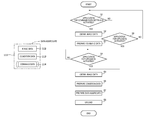
- FIG. 7 is a flowchart showing a flow of setting processing and upload processing.
- FIG. 8 is a flowchart showing a flow of data receiving processing.
- the image similar to the print setting image may be separated from the image to be printed, and an image of which a part is omitted may be thus printed with an erroneous print setting.
- illustrative aspects of the present disclosure provide an image forming apparatus, a control method and a control program capable of improving operability without adding a new operation function to the image forming apparatus.
- a printing system 1 includes a multi-function peripheral (which will be abbreviated as MFP) 2 , which is an example of the image forming apparatus, a server 3 and a personal computer (which will be abbreviated as PC) 5 .
- MFP 2 multi-function peripheral
- PC personal computer
- the MFP 2 , the server 3 and the PC 5 are connected in communication with each other through the Internet 4 , which is an example of the network.
- the PC 5 has a CPU 51 , a RAM 52 , and a hard disk drive (which will be abbreviated as HDD) 53 .
- HDD hard disk drive
- the MFP 2 can be accessed from the PC 5 via the Internet 4 . Also, the MFP 2 can be accessed from the PC 5 via a wired local area network (which will be abbreviated as LAN) or wireless LAN, without access through the Internet 4 .
- the server 3 can be accessed from a portable device 6 such as a portable phone via a public switched telephone network or wireless LAN. The portable device 6 can access the server 3 via the public switched telephone network and Internet 4 or via the wireless LAN and Internet 4 .
- the server 3 has an HDD 31 .
- the server 3 is configured to provide a download service of transmitting a file stored in the HDD 31 to the MFP 2 through the Internet 4 .
- a user accesses a web site, which is provided by the server 3 , from the PC 5 or portable device 6 .
- a login screen is displayed on a display of the accessing PC 5 or portable device 6 .
- the authentication of the user ID and login password is performed in the server 3 .
- a list of printable files is displayed on the display of the accessing PC 5 or portable device 6 .
- a print job relating to the printing execution of the file is transmitted from the server 3 to the MFP 2 .
- the MFP 2 receives the print job, the printing of the file (image data) included in the print job is executed in the MFP 2 .
- the above operations are just an example and can be appropriately changed.
- the user can transmit a printing job from the PC 5 to the MFP 2 by operating the PC 5 .
- the MFP 2 has a printer main body 21 , a scanner main body 22 and an auto document feeder (which will be abbreviated as ADF) 23 .
- ADF auto document feeder
- an image forming device 30 (refer to FIG. 3 ) is accommodated.
- the image forming device 30 is a device configured to execute a printing operation (color or monochrome printing operation) based on image data and to form an image on a sheet.
- the image may be formed by an electrophotographic method or inkjet method.
- the printer main body 21 is provided at its lowest part with a sheet feeding tray 24 .
- the sheet feeding tray 24 is configured to stack and accommodate therein sheets, which are an example of a plurality of recording media.
- An upper surface of the printer main body 21 is formed with a sheet discharge tray 25 .
- the sheets accommodated in the sheet feeding tray 24 are sent one by one from the sheet feeding tray 24 into the printer main body 21 , which is then conveyed in the printer main body 21 towards the sheet discharge tray 25 . While the sheet is conveyed in the printer main body 21 , an image is formed on the sheet by the image forming device 30 .
- the sheet having the sheet formed thereon is discharged to the sheet discharge tray 25 .
- the scanner main body 22 is arranged above the printer main body 21 , and the ADF 23 is arranged above the scanner main body 22 .
- an image reading device 40 (refer to FIG. 3 ) is accommodated.
- the image reading device 40 is a device configured to read an image formed on a sheet from the sheet and to store the same in a RAM 103 , as image data.
- the reading may be performed by an ADF method of reading a sheet image while conveying the sheet or a flat bed (which will be abbreviated as FB) method of placing a sheet on a contact glass and reading a sheet image.
- FB flat bed
- the MFP 2 has the operation panel 26 .
- the operation panel 26 is arranged at a front end portion of the scanner main body 22 , for example.
- the operation panel 26 is provided with the touch panel 50 and a near field communication (which will be abbreviated as NFC) interface 60 (hereinafter, referred to as NFC 60 ).
- NFC 60 near field communication
- the touch panel 50 includes a liquid crystal indicator and a touch sensor, for example. On the touch panel 50 , a variety of information is displayed. On the touch panel 50 , a variety of inputs can be made by a touch operation on operation buttons displayed on the touch panel 50 .
- the operation buttons include an OK button for confirming a variety of instructions (for example, an instruction to start a copy operation), a cancel button for cancelling various instructions, ten keys for inputting a number and a character, and the like.
- the NFC 60 is configured to perform interactive wireless communication with a non-contact IC card such as an ID card.
- the MFP 2 has a network interface (which will be abbreviated as UF) 70 , a facsimile interface 80 , a USB interface 90 , an application specific integrated circuit (which will be abbreviated as ASIC) 101 , a ROM 102 , and a RAM 103 , which is an example of the memory.
- UF network interface
- ASIC application specific integrated circuit
- the network interface 70 which is an example of the data receiving device, is an interface for connection with a local area network (which will be abbreviated as LAN).
- the MFP 2 is connected to the Internet 4 (refer to FIG. 1 ) via the LAN.
- the facsimile interface 80 which is an example of the facsimile communication device, is an interface for connection with a public switched telephone network that is used for facsimile communication.
- the USB interface 90 is an interface (e.g., USB port) for connecting thereto a removable medium such as a USB memory.
- the MFP 2 has a direct printing function.
- the direct printing function is a function of fetching a file stored in the removable medium and printing the same.
- the ASIC 101 is input with a signal indicating a content, which is input by operating the touch panel 50 , and the like. Also, the ASIC 101 is input with a data aggregate 111 (refer to FIG. 4 ), which is transmitted from the server 3 , the PC 5 and the like, through the network interface 70 . Further, the data stored in the removable medium is fetched to the ASIC 101 through the USB interface 90 .
- the ASIC 101 has therein a CPU 104 , which is an example of the control device.
- the CPU 104 is configured to execute programs for various processing on the basis of the data aggregate 111 input to the ASIC 101 and the like, thereby controlling the image forming device 30 , the image reading device 40 and the touch panel 50 and also controlling the communication through the network interface 70 or facsimile interface 80 .
- the programs to be executed by the CPU 104 and a variety of data are stored.
- the RAM 103 is used as a work area when the CPU 104 executes a program.
- the MFP 2 forms (prints) an image by the image forming device 30 .
- the data aggregate 111 is a data file including a metadata area, and is a file prepared in accordance with a file format such as an EXIF (which is an abbreviation of EXchangeable Image File Format), a PDF (which is an abbreviation of Portable Document Format) and the like.
- EXIF which is an abbreviation of EXchangeable Image File Format
- PDF which is an abbreviation of Portable Document Format
- the EXIF is an image file format including a metadata area and corresponds to an image format such as JPEG (which is an abbreviation of Joint Photographic Experts Group), TIFF (which is an abbreviation of Tagged Image File Format) and the like.
- JPEG Joint Photographic Experts Group
- TIFF which is an abbreviation of Tagged Image File Format
- the data aggregate 111 includes at least image data 112 and condition data 113 . Also, the data aggregate 111 may include command data 114 , in some cases.
- the data aggregate 111 is described by exemplifying an EXIF file corresponding to the JPEG format. Also, in the EXIF format, an area configured to store data except for the image data 112 is referred to as an EXIF area.
- the image data 112 is image data of the JPEG format, for example.
- the condition data 113 is data configured to store a printing condition to the MFP 2 .
- the condition data 113 is stored in the EXIF area.
- the condition data 113 is data of a print setting that, when a file of the data aggregate 111 is prepared, is set by the printer driver and is stored in the file.
- the condition data 113 includes data of the number of sheets to be printed, data of a page to be printed, and data of a printing magnification, for example.
- the data of the number of sheets to be printed is data for designating the number of sheets to be printed.
- the data of a page to be printed is data for designating a page to be printed.
- the data of a printing magnification is data for designating a printing magnification.
- the command data 114 is data in which an operating command to the MFP 2 is stored.
- the command data 114 is stored in the EXIF area.
- the command data 114 may have a configuration of including other condition data 115 , as shown in FIG. 5 , or a configuration of not including the other condition data 115 , as shown in FIG. 6 .
- the command data 114 having the configuration of including the other condition data 115 is referred to as ‘command data 114 A’
- the command data 114 having the configuration of not including the other condition data 115 is referred to as ‘command data 114 B’.
- the EXIF area in which the command data 114 is stored and the EXIF area in which the condition data 113 is stored are logically or physically separated, so that the command data 114 and the condition data 113 can be clearly distinguished.
- the command data 114 A includes the other condition data 115 and image forming command data 116 , as shown in FIG. 5 .
- the other condition data 115 is data configured to store a printing condition to the MFP 2 .
- the other condition data 115 includes a more specific printing condition than the printing condition included in the condition data 113 , for example.
- the other condition data 115 includes monochrome/color setting data, image quality setting data, sheet setting data, aggregation setting data and duplex printing setting data, in addition to the number of sheets to be printed, a page to be printed and a printing magnification.
- the monochrome/color setting data is data configured to store a setting selecting whether the printing is to be performed on the basis of monochrome printing or color printing.
- the image quality setting data is data configured to store a setting selecting whether the printing is to be performed on the basis of a low image quality or a high image quality.
- the sheet setting data is data configured to store a size of a printing sheet.
- the sheet setting data is configured to store size designating information such as A4 size, A3 size, B5 size and the like.
- the aggregation setting data is data configured to store a setting for aggregating and printing a plurality of pages into one page.
- the aggregation setting data includes information indicating whether the aggregation printing is to be performed or not and the number of pages to be aggregated into one page.
- the duplex printing setting data is data configured to store a setting indicating whether a duplex printing is to be performed.
- the image forming command data 116 is data configured to store a command indicating that the printing is to be performed on the basis of the printing condition stored in the other condition data 115 .
- the command data 114 B includes data configured to store a command to the MFP 2 and data that is required when the MFP 2 executes the command.
- the command data 114 B includes FAX number data 117 and FAX transmission command data 118 , for example, as shown in FIG. 6 .
- the FAX number data 117 is data configured to store a FAX number.
- the FAX transmission command data 118 is data configured to store a command to facsimile-transmit an image of the image data 112 to a destination, which is designated by the FAX number stored in the FAX number data 117 .
- a configuration of including data configured to store a command of power supply ON to the MFP 2 may be further exemplified.
- the user When a user wants to include the command data 114 in the data aggregate 111 , the user activates an application program for command data setting for including the command data 114 in the data aggregate 111 on the PC 5 , designates a printing target file on a displayed screen, and inputs a printing condition (corresponding to the other condition data 115 ) of the designated printing target file or a command to the MFP 2 .
- the user designates a folder name, in which the printing target file is stored, and a file name with the application program for command data setting.
- the user can designate a printing target file preserved in another terminal connected to the PC 5 via the network.
- the printing condition includes a number of sheets to be printed, a page to be printed, a printing magnification, a monochrome/color setting, an image quality setting, a sheet setting, an aggregation setting and a duplex printing setting.
- the printing condition is set separately from the printing condition (corresponding to the condition data 113 ), which is to be set later by a printer driver.
- the printing condition set by the application program for command data setting may include a more specific printing condition than the printing condition set by the printer driver.
- the printing condition that is to be set by the printer driver includes only a basic printing setting such as a number of sheets to be printed, a page to be printed, a monochrome/color setting and the like.
- the user can input a command to the MFP 2 with the application program for command data setting, instead of the printing condition.
- the command to the MFP 2 is to command an operation of the MFP 2 irrelevant to the printing target file and the printing condition thereof.
- the command to the MFP 2 includes a command of power supply ON to the MFP 2 , a command of power supply OFF, and a command of FAX transmission, for example.
- a facsimile number is also input, as data necessary for the command.
- the user After inputting the printing target file and the printing condition or the command to the MFP 2 by the application program for command data setting, the user presses a setting execution displayed on the screen.
- the contents designated and input with the application program for command data setting are stored in a predetermined area of the RAM 52 with being associated with the printing target file.
- the data aggregate 111 including the command data 114 and not including the condition data 113 is stored in the predetermined area of the RAM 52 .
- the user activates an application program for upload for uploading the data aggregate 111 to the server 3 , designates a printing target file on a displayed screen, and inputs a printing condition (corresponding to the condition data 113 ) of the designated printing target file.
- the user may designate the printing target file associated with the command data 114 described above.
- the user when designating the printing target file, the user designates a folder name, in which the printing target file is stored, and a file name with the application program for upload, for example.
- the user can designate a printing target file preserved in another terminal connected to the PC 5 via the network.
- the user inputs a printing condition (corresponding to the condition data 113 ) of the designated printing target file by a printer driver included in the application program for upload.
- the data aggregate 111 is prepared and the prepared data aggregate 111 is uploaded to the server 3 by the application program for upload.
- the data aggregate 111 includes the image data 112 , the condition data 113 and the command data 114
- the data aggregate 111 includes the image data 112 and the condition data 113 but does not include the command data 114 .
- the processing shown in FIG. 7 is processing that is executed when uploading the data aggregate 111 to the server 3 .
- the uploaded data aggregate 111 is preserved in the HDD 31 of the server 3 .
- the CPU 51 determines whether an application program (application for command data setting) for including the command data 114 in the data aggregate 111 is activated by the user (S 1 ).
- the CPU 51 obtains, as the image data 112 , the printing target file preserved in the HDD 53 from the folder name and file name designated by the user and stored in the predetermined area of the RAM 52 (S 2 ).
- the CPU 51 prepares the command data 114 corresponding to a command input by the user (S 3 ). In this case, the command indicates both the printing condition input by the application program and the command to the MFP 2 .
- the CPU 51 associates the prepared command data 114 with the earlier obtained printing target file and stores the same in the predetermined area of the RAM 52 .
- the CPU 51 prepares the other condition data 115 , which is the data of the printing condition, and the image forming command data 116 , and prepares the command data 114 A including the other condition data 115 and image forming command data 116 .
- the printing condition of the other condition data 115 includes the more specific condition than the printing condition of the condition data 113 .
- the CPU 51 prepares the command data 114 B including the FAX number data 117 and the FAX transmission command data 118 .
- the CPU 51 determines whether the application program (application for upload) for uploading the data aggregate 111 to the server 3 is activated by the user (S 4 ).
- the CPU 51 obtains, as the image data 112 , the printing target file preserved in the HDD 53 from the folder name and file name designated by the user and stored in the predetermined area of the RAM 52 (S 5 ).
- the CPU 51 obtains the associated command data 114 from the predetermined area of the RAM 52 , too.
- the command data 114 is not associated with the obtained printing target file, the CPU 51 obtains only the printing target file.
- the CPU 51 prepares the condition data 113 corresponding to the obtained printing target file by the printing condition of the printing target file designated by the user, through the printer driver activating in accordance with the application for upload (S 6 ).
- the CPU 51 prepares the data aggregate 111 including the image data 112 and the command data 114 (when the command data 114 is associated with the obtained printing target file) obtained in step S 5 and the condition data 113 obtained in step S 6 (S 7 ).
- the CPU 51 uploads the prepared data aggregate 111 to the server 3 (S 8 ).
- the CPU 51 determines whether the application program (application for upload) for uploading the data aggregate 111 to the server 3 is activated by the user (S 9 ). When it is determined that the application for upload is activated by the user (S 9 : YES), the CPU 51 executes the processing of step S 5 and thereafter. When it is determined that the application for upload is not activated by the user (S 9 : NO), the CPU 51 executes the processing of step S 1 and thereafter.
- the data receiving processing is processing that is executed when data is received at the MFP 2 .
- the CPU 104 determines whether the data aggregate 111 relating to the printing is received from the server 3 (S 21 ).
- the CPU 104 determines whether the received data aggregate 111 is plural (S 22 ).
- the CPU 104 determines whether the data aggregate 111 including the command data 114 is plural in the plurality of received data aggregates 111 (S 23 ).
- the CPU 104 determines whether the respective command data 114 thereof is the same (S 24 ).
- the CPU 104 prohibits the MFP 2 from performing the printing operation relating to the data aggregate 111 and the operation relating to the commands stored in the respective command data 114 (S 25 ), and ends the data receiving processing.
- the CPU 104 determines whether the other condition data 115 is included in the command data 114 (S 26 ).
- the CPU 104 stores the printing condition included in the other condition data 115 in the RAM 103 (S 27 ). Then, the CPU 104 sets the printing condition to the image forming device 30 with the other condition data 115 stored in the RAM 103 , and enables the image forming device 30 to execute the printing operation (S 28 ). At this time, when the received data aggregate 111 is plural, the printing operation is executed for the image data 112 of all the received data aggregate 111 .
- the CPU 104 When the other condition data 115 is not included in the command data 114 (S 26 : NO), the CPU 104 enables the MFP 2 to execute the command of the command data 114 B (S 28 ).
- the CPU 104 facsimile-transmits the image data 112 of the received data aggregate 111 to the facsimile number stored in the FAX number data 117 by using the facsimile interface 80 .
- the CPU 104 facsimile-transmits the image data 112 of all the received data aggregate 111 .
- the operation relating to the image data 112 is not executed, and the CPU 104 turns off the MFP 2 .
- the CPU 104 determines whether the command data 114 is included in the received one or multiple data aggregates 111 (S 29 ).
- step S 26 When the command data is included in the data aggregate 111 (S 29 : YES), the CPU 104 executes the processing of step S 26 and thereafter.
- the CPU 104 sets the printing condition to the image forming device 30 , and if the printing condition is not stored, the CPU 104 sets the printing condition stored in the condition data 113 to the image forming device 30 (S 30 ), and then the CPU 104 enables the image forming device 30 to execute the printing operation (S 31 ).
- the data aggregate 111 when the data aggregate 111 is received at the MFP 2 through the network interface 70 , the data aggregate 111 is stored in the RAM 103 .
- the data aggregate 111 includes at least the image data 112 relating to an image and the condition data 113 relating to the printing condition (image forming condition) for forming an image by the image forming device 30 .
- the data aggregate 111 may include the command data 114 relating to the command to the MFP 2 . In this case, the command based on the command data 114 is executed, instead of the image formation by the printing condition relating to the condition data 113 .
- the CPU 104 controls the image forming device 30 to form the image relating to the image data 112 included in the data aggregate 111 on a sheet with the printing condition relating to the other condition data 115 .
- the CPU 104 controls the image forming device 30 to form the image relating to each of the image data 112 included in a respective one of the plurality of data aggregates 111 on a sheet with the printing condition relating to the other condition data 115 .
- the command data 114 A including the other condition data 115 is included in one of the plurality of data aggregates 111 stored in the RAM 103 , it is possible to form the image relating to each of the image data 112 included in the respective one of the plurality of data aggregates 111 with the printing condition relating to the other condition data 115 . As a result, it is not necessary to include the command data 114 A including the other condition data 115 in each of the plurality of data aggregates 111 , so that it is possible to further improve the convenience.
- the CPU 104 prohibits the image formation of the image forming device 30 .
- the CPU 104 preserves the printing condition relating to the other condition data 115 in the RAM 103 .
- the printing condition relating to the other condition data 115 is preserved in the RAM 103 , it is possible to use the printing condition preserved in the RAM 103 in the printing (image formation) that will be executed later. As a result, it is possible to omit the setting of the printing condition in the printing that will be executed later, so that it is possible to further improve the convenience.
- the CPU 104 controls the image forming device 30 to form the image relating to the image data 112 included in the data aggregate 111 on a sheet with the printing condition relating to the condition data 113 .
- the command data 114 may be data for commanding an operation except for the printing by the image forming device 30 .
- the command data 114 B is the FAX transmission command data 118 for commanding the facsimile interface 80 to perform the facsimile transmission and it is determined that the FAX number data 117 and the FAX transmission command data 118 are included in the command data 114 B of the data aggregate 111 stored in the facsimile interface 80 , the CPU 104 controls the facsimile interface 80 to facsimile-transmit the image data 112 included in the data aggregate 111 .
- the CPU 104 controls the image forming device 30 to form the image relating to the image data 112 included in all the received data aggregates 111 including the one data aggregate 111 on a sheet with the printing condition relating to the other condition data 115 .
- the image data 112 included in the one data aggregate 111 may not be used for printing, as dummy data, and the image relating to each of the image data 112 including in a respective one of the plurality of data aggregates 111 except for said one data aggregate 111 may be formed on a sheet.
- the command data 114 A including the other condition data 115 when included in one of the plurality of received data aggregates 111 , the image relating to each of the image data 112 including in the respective one of the plurality of data aggregates 111 except for said one data aggregate 111 can be formed on a sheet with the printing condition relating to the other condition data 115 .
- it is not necessary to include the command data 114 A including the other condition data 115 in each of the plurality of data aggregates 111 so that it is possible to further improve the convenience.
- the present disclosure may be implemented by using the existing cloud server as the server 3 and the existing cloud print service provided by the server 3 .
- the file as the data aggregate 111 may not have the EXIF format inasmuch as it has a file format having a storage area of the metadata.
- a file having a PDF format may be used as the data aggregate 111 and the command data 114 may be stored in a metadata area of the PDF file.
- the data aggregate 111 is transmitted from the PC 5 to the MFP 2 via the server 3 .
- the data aggregate 111 may be transmitted from the portable device 6 to the MFP 2 .
- the command data 114 is preferably preserved in a data area that is included in the data aggregate 111 and has a low possibility that data will be rewritten from the preparation of the command data 114 until the data aggregate is received at the MFP 2 .
- a comment area included in the metadata area of an image file has a low possibility that data recorded in the comment area will be rewritten. Therefore, when the command data 114 is preserved in the comment area, for example, it is possible to reduce concerns that the command data 114 will be damaged or lost, even though the application for command data setting, the application program for upload and the printer driver are provided by the other service providers.
Landscapes
- Engineering & Computer Science (AREA)
- Theoretical Computer Science (AREA)
- General Engineering & Computer Science (AREA)
- Physics & Mathematics (AREA)
- General Physics & Mathematics (AREA)
- Human Computer Interaction (AREA)
- Computing Systems (AREA)
- Multimedia (AREA)
- Signal Processing (AREA)
- Accessory Devices And Overall Control Thereof (AREA)
- Facsimiles In General (AREA)
- Mathematical Physics (AREA)
Abstract
Description
Claims (18)
Applications Claiming Priority (2)
| Application Number | Priority Date | Filing Date | Title |
|---|---|---|---|
| JP2014-140338 | 2014-07-08 | ||
| JP2014140338A JP6481272B2 (en) | 2014-07-08 | 2014-07-08 | Image forming apparatus, control method, and control program |
Publications (2)
| Publication Number | Publication Date |
|---|---|
| US20160011823A1 US20160011823A1 (en) | 2016-01-14 |
| US9501247B2 true US9501247B2 (en) | 2016-11-22 |
Family
ID=55067608
Family Applications (1)
| Application Number | Title | Priority Date | Filing Date |
|---|---|---|---|
| US14/792,738 Expired - Fee Related US9501247B2 (en) | 2014-07-08 | 2015-07-07 | Image forming apparatus, control method and a non-transitory computer-readable storage device having control program |
Country Status (2)
| Country | Link |
|---|---|
| US (1) | US9501247B2 (en) |
| JP (1) | JP6481272B2 (en) |
Families Citing this family (1)
| Publication number | Priority date | Publication date | Assignee | Title |
|---|---|---|---|---|
| JP7334579B2 (en) * | 2019-10-31 | 2023-08-29 | ブラザー工業株式会社 | image forming device |
Citations (9)
| Publication number | Priority date | Publication date | Assignee | Title |
|---|---|---|---|---|
| JP2002318671A (en) | 2001-04-20 | 2002-10-31 | Canon Inc | Print control device, print system, print control method, computer-readable storage medium, and computer program |
| US20040135889A1 (en) * | 2002-08-07 | 2004-07-15 | Takahiko Koizumi | Image processing apparatus |
| US20090059296A1 (en) * | 2007-08-30 | 2009-03-05 | Murata Machinery, Ltd. | Image processing apparatus, facsimile machine, and copier |
| US20090213413A1 (en) * | 2008-02-27 | 2009-08-27 | Arcsoft, Inc. | Method for online printing digital project |
| US20110188744A1 (en) * | 2010-02-04 | 2011-08-04 | Microsoft Corporation | High dynamic range image generation and rendering |
| US20130208296A1 (en) * | 2012-02-15 | 2013-08-15 | Konica Minolta Business Technologies, Ltd. | Image forming system, image forming apparatus, and recording medium |
| US8884936B2 (en) * | 2011-03-15 | 2014-11-11 | Fuji Xerox Co., Ltd. | Display control device, display control method, and non-transitory computer readable medium storing program |
| US8913269B2 (en) * | 2012-09-28 | 2014-12-16 | Konica Minolta Laboratory U.S.A., Inc. | Method for printing PDF files containing corrupted pages |
| US20150002873A1 (en) * | 2013-06-26 | 2015-01-01 | Canon Kabushiki Kaisha | Image forming apparatus, method for controlling the same, and storage medium |
Family Cites Families (13)
| Publication number | Priority date | Publication date | Assignee | Title |
|---|---|---|---|---|
| JPH11129585A (en) * | 1997-11-04 | 1999-05-18 | Ricoh Co Ltd | Printing equipment |
| JP4923845B2 (en) * | 2005-09-28 | 2012-04-25 | 富士ゼロックス株式会社 | Print processing system and program |
| JP4812097B2 (en) * | 2006-05-23 | 2011-11-09 | キヤノン株式会社 | Image forming apparatus, control method therefor, and program |
| JP5018397B2 (en) * | 2007-10-22 | 2012-09-05 | 村田機械株式会社 | Print control apparatus and program |
| JP2011065594A (en) * | 2009-09-18 | 2011-03-31 | Canon Inc | Information processing apparatus, user interface display control method in the same, and program |
| US8842334B2 (en) * | 2010-06-30 | 2014-09-23 | Konica Minolta Laboratory U.S.A., Inc. | Maintaining print settings across multiple applications |
| JP5767483B2 (en) * | 2011-01-31 | 2015-08-19 | キヤノン株式会社 | Print setting server, print setting method and program |
| US8817281B2 (en) * | 2011-01-31 | 2014-08-26 | Canon Kabushiki Kaisha | Print setting server, document processing server, print system, and print setting method |
| JP5619649B2 (en) * | 2011-02-17 | 2014-11-05 | シャープ株式会社 | Information processing apparatus, image output system, program, and recording medium |
| JP5814904B2 (en) * | 2011-11-29 | 2015-11-17 | 株式会社東芝 | Image forming apparatus and image forming processing system |
| JP2013119164A (en) * | 2011-12-06 | 2013-06-17 | Canon Marketing Japan Inc | Printing controller, printing control system, printing control method, program, and storage medium |
| JP6098160B2 (en) * | 2012-03-22 | 2017-03-22 | 株式会社リコー | Output system, image processing apparatus, and output method |
| JP6040878B2 (en) * | 2013-07-08 | 2016-12-07 | 富士ゼロックス株式会社 | Printing apparatus, printing control apparatus, printing system, and program |
-
2014
- 2014-07-08 JP JP2014140338A patent/JP6481272B2/en active Active
-
2015
- 2015-07-07 US US14/792,738 patent/US9501247B2/en not_active Expired - Fee Related
Patent Citations (9)
| Publication number | Priority date | Publication date | Assignee | Title |
|---|---|---|---|---|
| JP2002318671A (en) | 2001-04-20 | 2002-10-31 | Canon Inc | Print control device, print system, print control method, computer-readable storage medium, and computer program |
| US20040135889A1 (en) * | 2002-08-07 | 2004-07-15 | Takahiko Koizumi | Image processing apparatus |
| US20090059296A1 (en) * | 2007-08-30 | 2009-03-05 | Murata Machinery, Ltd. | Image processing apparatus, facsimile machine, and copier |
| US20090213413A1 (en) * | 2008-02-27 | 2009-08-27 | Arcsoft, Inc. | Method for online printing digital project |
| US20110188744A1 (en) * | 2010-02-04 | 2011-08-04 | Microsoft Corporation | High dynamic range image generation and rendering |
| US8884936B2 (en) * | 2011-03-15 | 2014-11-11 | Fuji Xerox Co., Ltd. | Display control device, display control method, and non-transitory computer readable medium storing program |
| US20130208296A1 (en) * | 2012-02-15 | 2013-08-15 | Konica Minolta Business Technologies, Ltd. | Image forming system, image forming apparatus, and recording medium |
| US8913269B2 (en) * | 2012-09-28 | 2014-12-16 | Konica Minolta Laboratory U.S.A., Inc. | Method for printing PDF files containing corrupted pages |
| US20150002873A1 (en) * | 2013-06-26 | 2015-01-01 | Canon Kabushiki Kaisha | Image forming apparatus, method for controlling the same, and storage medium |
Also Published As
| Publication number | Publication date |
|---|---|
| JP6481272B2 (en) | 2019-03-13 |
| JP2016016575A (en) | 2016-02-01 |
| US20160011823A1 (en) | 2016-01-14 |
Similar Documents
| Publication | Publication Date | Title |
|---|---|---|
| JP4089701B2 (en) | Image processing apparatus, image processing system, and image processing method | |
| JP5629621B2 (en) | Image forming apparatus, image forming processing system, image forming processing method, and computer-readable recording medium on which the program is recorded | |
| US8760675B2 (en) | Image reading apparatus and image reading system having a reading preference input operation | |
| US20160065683A1 (en) | Relay server and non-transitory storage medium storing instructions executable by the relay server | |
| JP6192624B2 (en) | Image forming system and information processing terminal | |
| JP2018061156A (en) | Image transmission device, control method, and program | |
| JP2008178066A (en) | Data processing device | |
| JP2019119139A (en) | Image processing system, method therefor and program | |
| JP2012222522A (en) | Facsimile apparatus | |
| JP6136966B2 (en) | Printing apparatus and printing system | |
| JP2017121023A (en) | Image forming apparatus, information processing method, image forming system, and program | |
| JP6092074B2 (en) | Information processing apparatus, image forming system, and information processing method | |
| JP2009157822A (en) | Image forming system and image forming apparatus | |
| JP2008242564A (en) | Printer driver, program, and recording medium | |
| US9501247B2 (en) | Image forming apparatus, control method and a non-transitory computer-readable storage device having control program | |
| JP6089815B2 (en) | Image forming apparatus, image forming apparatus management system, image forming apparatus control method, and control program | |
| EP2380341B1 (en) | Image forming apparatus, control method for image forming apparatus, and storage medium | |
| US10652419B2 (en) | Information processor and non-transitory storage medium storing instructions readable by the information processor | |
| US20240377994A1 (en) | Image forming system | |
| US8958093B2 (en) | Print control device, print control method and program | |
| JP7310197B2 (en) | Information processing system, information processing device and program | |
| JP6724386B2 (en) | Program, mobile terminal, and system | |
| JP4752578B2 (en) | COMMUNICATION CONTROL DEVICE, COMMUNICATION CONTROL METHOD, AND COMMUNICATION CONTROL PROGRAM | |
| JP2021190043A (en) | Control programs and information processing equipment | |
| US20180063345A1 (en) | Processing apparatus and non-transitory computer readable medium |
Legal Events
| Date | Code | Title | Description |
|---|---|---|---|
| AS | Assignment |
Owner name: BROTHER KOGYO KABUSHIKI KAISHA, JAPAN Free format text: ASSIGNMENT OF ASSIGNORS INTEREST;ASSIGNOR:MUROI, KAZUSHIGE;REEL/FRAME:036006/0072 Effective date: 20150630 |
|
| ZAAA | Notice of allowance and fees due |
Free format text: ORIGINAL CODE: NOA |
|
| ZAAB | Notice of allowance mailed |
Free format text: ORIGINAL CODE: MN/=. |
|
| STCF | Information on status: patent grant |
Free format text: PATENTED CASE |
|
| MAFP | Maintenance fee payment |
Free format text: PAYMENT OF MAINTENANCE FEE, 4TH YEAR, LARGE ENTITY (ORIGINAL EVENT CODE: M1551); ENTITY STATUS OF PATENT OWNER: LARGE ENTITY Year of fee payment: 4 |
|
| FEPP | Fee payment procedure |
Free format text: MAINTENANCE FEE REMINDER MAILED (ORIGINAL EVENT CODE: REM.); ENTITY STATUS OF PATENT OWNER: LARGE ENTITY |
|
| LAPS | Lapse for failure to pay maintenance fees |
Free format text: PATENT EXPIRED FOR FAILURE TO PAY MAINTENANCE FEES (ORIGINAL EVENT CODE: EXP.); ENTITY STATUS OF PATENT OWNER: LARGE ENTITY |
|
| STCH | Information on status: patent discontinuation |
Free format text: PATENT EXPIRED DUE TO NONPAYMENT OF MAINTENANCE FEES UNDER 37 CFR 1.362 |
|
| FP | Lapsed due to failure to pay maintenance fee |
Effective date: 20241122 |