US9417827B2 - Image forming apparatus that can print to an index paper, image formation method, and recording medium - Google Patents
Image forming apparatus that can print to an index paper, image formation method, and recording medium Download PDFInfo
- Publication number
- US9417827B2 US9417827B2 US14/523,855 US201414523855A US9417827B2 US 9417827 B2 US9417827 B2 US 9417827B2 US 201414523855 A US201414523855 A US 201414523855A US 9417827 B2 US9417827 B2 US 9417827B2
- Authority
- US
- United States
- Prior art keywords
- index label
- index
- section
- text
- manuscript
- Prior art date
- Legal status (The legal status is an assumption and is not a legal conclusion. Google has not performed a legal analysis and makes no representation as to the accuracy of the status listed.)
- Expired - Fee Related
Links
Images




Classifications
-
- G—PHYSICS
- G06—COMPUTING OR CALCULATING; COUNTING
- G06F—ELECTRIC DIGITAL DATA PROCESSING
- G06F3/00—Input arrangements for transferring data to be processed into a form capable of being handled by the computer; Output arrangements for transferring data from processing unit to output unit, e.g. interface arrangements
- G06F3/12—Digital output to print unit, e.g. line printer, chain printer
- G06F3/1201—Dedicated interfaces to print systems
- G06F3/1223—Dedicated interfaces to print systems specifically adapted to use a particular technique
- G06F3/1237—Print job management
- G06F3/1253—Configuration of print job parameters, e.g. using UI at the client
- G06F3/1256—User feedback, e.g. print preview, test print, proofing, pre-flight checks
-
- G—PHYSICS
- G03—PHOTOGRAPHY; CINEMATOGRAPHY; ANALOGOUS TECHNIQUES USING WAVES OTHER THAN OPTICAL WAVES; ELECTROGRAPHY; HOLOGRAPHY
- G03G—ELECTROGRAPHY; ELECTROPHOTOGRAPHY; MAGNETOGRAPHY
- G03G15/00—Apparatus for electrographic processes using a charge pattern
-
- G—PHYSICS
- G06—COMPUTING OR CALCULATING; COUNTING
- G06F—ELECTRIC DIGITAL DATA PROCESSING
- G06F3/00—Input arrangements for transferring data to be processed into a form capable of being handled by the computer; Output arrangements for transferring data from processing unit to output unit, e.g. interface arrangements
- G06F3/12—Digital output to print unit, e.g. line printer, chain printer
- G06F3/1201—Dedicated interfaces to print systems
- G06F3/1202—Dedicated interfaces to print systems specifically adapted to achieve a particular effect
- G06F3/1203—Improving or facilitating administration, e.g. print management
- G06F3/1208—Improving or facilitating administration, e.g. print management resulting in improved quality of the output result, e.g. print layout, colours, workflows, print preview
-
- G—PHYSICS
- G06—COMPUTING OR CALCULATING; COUNTING
- G06F—ELECTRIC DIGITAL DATA PROCESSING
- G06F3/00—Input arrangements for transferring data to be processed into a form capable of being handled by the computer; Output arrangements for transferring data from processing unit to output unit, e.g. interface arrangements
- G06F3/12—Digital output to print unit, e.g. line printer, chain printer
- G06F3/1201—Dedicated interfaces to print systems
- G06F3/1223—Dedicated interfaces to print systems specifically adapted to use a particular technique
- G06F3/1237—Print job management
- G06F3/1242—Image or content composition onto a page
- G06F3/1243—Variable data printing, e.g. document forms, templates, labels, coupons, advertisements, logos, watermarks, transactional printing, fixed content versioning
-
- G—PHYSICS
- G06—COMPUTING OR CALCULATING; COUNTING
- G06F—ELECTRIC DIGITAL DATA PROCESSING
- G06F3/00—Input arrangements for transferring data to be processed into a form capable of being handled by the computer; Output arrangements for transferring data from processing unit to output unit, e.g. interface arrangements
- G06F3/12—Digital output to print unit, e.g. line printer, chain printer
- G06F3/1201—Dedicated interfaces to print systems
- G06F3/1223—Dedicated interfaces to print systems specifically adapted to use a particular technique
- G06F3/1237—Print job management
- G06F3/1253—Configuration of print job parameters, e.g. using UI at the client
- G06F3/1258—Configuration of print job parameters, e.g. using UI at the client by updating job settings at the printer
-
- G—PHYSICS
- G06—COMPUTING OR CALCULATING; COUNTING
- G06F—ELECTRIC DIGITAL DATA PROCESSING
- G06F3/00—Input arrangements for transferring data to be processed into a form capable of being handled by the computer; Output arrangements for transferring data from processing unit to output unit, e.g. interface arrangements
- G06F3/12—Digital output to print unit, e.g. line printer, chain printer
- G06F3/1201—Dedicated interfaces to print systems
- G06F3/1278—Dedicated interfaces to print systems specifically adapted to adopt a particular infrastructure
- G06F3/1285—Remote printer device, e.g. being remote from client or server
-
- G—PHYSICS
- G06—COMPUTING OR CALCULATING; COUNTING
- G06K—GRAPHICAL DATA READING; PRESENTATION OF DATA; RECORD CARRIERS; HANDLING RECORD CARRIERS
- G06K15/00—Arrangements for producing a permanent visual presentation of the output data, e.g. computer output printers
- G06K15/02—Arrangements for producing a permanent visual presentation of the output data, e.g. computer output printers using printers
- G06K15/021—Adaptations for printing on specific media
-
- G—PHYSICS
- G03—PHOTOGRAPHY; CINEMATOGRAPHY; ANALOGOUS TECHNIQUES USING WAVES OTHER THAN OPTICAL WAVES; ELECTROGRAPHY; HOLOGRAPHY
- G03G—ELECTROGRAPHY; ELECTROPHOTOGRAPHY; MAGNETOGRAPHY
- G03G15/00—Apparatus for electrographic processes using a charge pattern
- G03G15/50—Machine control of apparatus for electrographic processes using a charge pattern, e.g. regulating differents parts of the machine, multimode copiers, microprocessor control
- G03G15/5016—User-machine interface; Display panels; Control console
-
- G—PHYSICS
- G06—COMPUTING OR CALCULATING; COUNTING
- G06K—GRAPHICAL DATA READING; PRESENTATION OF DATA; RECORD CARRIERS; HANDLING RECORD CARRIERS
- G06K15/00—Arrangements for producing a permanent visual presentation of the output data, e.g. computer output printers
- G06K15/002—Interacting with the operator
- G06K15/005—Interacting with the operator only locally
Definitions
- the present disclosure is related to an image forming apparatus, an image formation method, and a recording medium that can print to a paper having an index label (henceforth an “index paper”).
- index paper is a standard-size paper, such as A4 size or letter size, or the like, where an index label is provided.
- Each index label is outside the range of standard size, and a size and a position of it is varied.
- set up information such as a size of an index paper, a position of an index label, a text printed to an index label, or the like
- set up information can be set by using a screen.
- a screen information including a setup of the information on a tab paper (index paper) or a tab (index label), a title of the text printed to the tab, or the like.
- the printer controller displays an image of the tab with which the tab paper and the title information to display on a screen (henceforth a “preview”). Thereby, before the user actually prints the index paper, the print image of the index paper or the tab can be verified.
- An image forming apparatus of the present disclosure is an image forming apparatus that can be printed to an index paper.
- An index label information setting part sets up index label information.
- An index label preview display part displays a preview of an index label by using the index label information.
- a shift image display part displays a shift image on the preview.
- the shift image is an image that a text printed to a standard size section and an index label section is set to the manuscript, and an image area of the manuscript is moved in case of being printed the text of the manuscript to the index label.
- An image formation method of the present disclosure is an image formation method performed by an image forming apparatus that can print to an index paper.
- index label information is set up, firstly. Then, a preview of an index label is displayed by using the index label information. Further, a shift image that a text printed to standard size section and an index label section is set to the manuscript, and an image area of the manuscript is moved in case of printing the text of the manuscript to the index label, is displayed on the preview.
- a recording medium of the present disclosure is a non-transitory recording medium that is recorded an image formation program executed by an image forming apparatus, which can be printed on an index paper.
- the program functions the image forming apparatus as an index label information setting part, an index label preview display part, and a shift image display part.
- the index label information setting part sets up index label information.
- the index label preview display part displays a preview of an index label by using the index label information.
- the shift image display part displays a shift image on the preview.
- the shift image display part displays a shift image on the preview.
- the shift image display part displays a shift image on the preview.
- the shift image is an image that a text printed to a standard size section and an index label section is set to the manuscript, and an image area of the manuscript is moved in case of being printed the text of the manuscript to the index label.
- FIG. 1 is an appearance perspective view of an image forming apparatus related to the embodiment of the present disclosure.
- FIG. 2 is a section schematic diagram showing an internal configuration of the image forming apparatus related to the embodiment of the present disclosure.
- FIG. 3 is a block diagram showing a function configuration of the image forming apparatus related to the embodiment of the present disclosure.
- FIG. 4 is a figure showing the example of an index paper setting screen related to the embodiment of the present disclosure.
- FIG. 5 is a figure showing the example of an index label setting screen related to the embodiment of the present disclosure.
- FIG. 6A is a figure showing an example of an index label setting screen where a shift image is displayed related to the embodiment of the present disclosure.
- FIG. 6B is a figure showing an example of the index label setting screen where the shift image is displayed related to the embodiment of the present disclosure.
- FIG. 6C is a figure showing an example of an index label setting screen where the shift image is displayed related to the embodiment of the present disclosure.
- An image forming apparatus 1 of the embodiment is an image forming apparatus that forms images, such as a printer, a multifunction printer, multifunctional peripheral equipment, or MFP.
- the image forming apparatus 1 includes a manuscript reading part 2 , a manuscript feeding part 3 , a body part 4 , and an operation part 5 .
- the manuscript reading part 2 is allocated in an upper part of the body part 4
- the manuscript feeding part 3 is allocated in the upper part of the manuscript reading part 2 .
- the operation part 5 that performs a setup and instructions of operation for the image forming apparatus 1 is allocated on a front side of the image forming apparatus 1 .
- the operation part 5 includes a liquid crystal display part 51 and a manual operation button 52 .
- a user inputs instructions by the operating operation part 5 , performs various kinds of setup of the image forming apparatus 1 , and carries out various functions, such as image formation.
- the liquid crystal display part 51 shows a state of the image forming apparatus 1 . Also, the liquid crystal display part 51 displays an image formation situation and a number of prints.
- the liquid crystal display part 51 various setup, such as function of double-side printing, a display in white or black background, or the like, magnification setup, and a concentration setup, or the like are instructed with a touch panel.
- the manual operation button 52 includes a start button, a stop/clear button, a reset button, a numeric keypad, or the like.
- the start button instructs the start of the image formation.
- the stop/clear button instructs the stop of the image formation.
- the reset button is used in case of making various setup of the image forming apparatus 1 to a default state.
- the manuscript reading part 2 provides a scanner 21 , a platen glass 22 , and a manuscript reading slit 23 .
- the scanner 21 provides a light source 24 and a light receiving part 25 including a sensor, or the like.
- the manuscript reading part 2 is movable to a conveying direction of a manuscript MS (manuscript) by the manuscript feeding part 3 .
- the manuscript reading slit 23 is a slit formed in the direction that intersects perpendicularly with the conveying direction of the manuscript MS by the manuscript feeding part 3 .
- the manuscript feeding part 3 provides a manuscript placing part 31 , a manuscript discharge part 32 , and a manuscript transport mechanism 33 .
- the manuscript MS set to the manuscript placing part 31 is conveyed one sheet at a time by manuscript transport mechanism 33 , it is conveyed in a position that faces manuscript reading slit 23 , and after that, it is ejected to manuscript discharge part 32 .
- the manuscript feeding part 3 and the manuscript reading part 2 are connected with a hinge mechanism at a back side of the image forming apparatus 1 . Therefore, the manuscript feeding part 3 functions as a platen cover in case of opening and closing an upper surface of the platen glass 22 . By opening the manuscript feeding part 3 , the upper surface of the platen glass 22 is opened, and it will be in a state where the manuscript MS can be set to the platen glass 22 .
- the scanner 21 In a state where the manuscript MS is not set to the manuscript placing part 31 or an open-state where the manuscript feeding part 3 (platen cover) is opened, when reading of the manuscript MS is instructed by the manual operation button 52 of the operation part 5 , and the manuscript MS set to the platen glass 22 will be read.
- the scanner 21 When reading the manuscript MS placed on the platen glass 22 , the scanner 21 is moved to the position that faces the platen glass 22 . Subsequently, the scanner 21 scans and reads the manuscript MS set to the platen glass 22 from vertical scanning direction datum line B to the vertical scanning direction that intersects with the scanning direction perpendicularly and acquires image data.
- the scanner 21 outputs the acquired image data to the control part 7 ( FIG. 3 ) in the body part 4 .
- the manuscript MS conveyed by the manuscript feeding part 3 will be read.
- the manuscript MS is set to the manuscript placing part 31 as turned up a surface (side that is read a manuscript image.)
- the manuscript MS set to the manuscript placing part 31 is conveyed by the manuscript feeding part 3 from left side.
- the surface of the manuscript MS is led to an opposed position of the manuscript reading slit 23 .
- the scanner 21 is moved to the position that counters the manuscript reading slit 23 , when reading the manuscript MS conveyed by the manuscript feeding part 3 .
- the scanner 21 reads the manuscript MS with synchronizing a conveying action by the manuscript feeding part 3 , and acquires image data.
- the scanner 21 outputs the acquired image data to the control part 7 ( FIG. 3 ) in the body part 4 .
- the body part 4 provides a printing part 6 , and it also provides a feeding part 41 , a feed roller 42 , a paper sheet conveying path 43 , a registration roller 44 , and an ejection roller 45 .
- the feeding part 41 is a sheet paper cassette, which a plurality of paper P are stored.
- the feed roller 42 feeds one sheet of paper P at a time to the paper sheet conveying path 43 from feeding part 41 .
- the paper P fed to the paper sheet conveying path 43 by the feed roller 42 is conveyed to the printing part 6 by the registration roller 44 .
- the registration roller 44 conveys the paper P so that a head of paper P supplied from the sheet paper cassette is matched with the head of the image read from the manuscript.
- the paper P which record is carried out by the printing part 6 , is discharged by the ejection roller 45 by an ejection space 46 formed between the manuscript reading part 2 and the body part 4 .
- the feed roller 42 , the registration roller 44 , and the ejection roller 45 function as a conveyance part of the paper P.
- the printing part 6 provides a photo conductor drum 61 , a charging part 62 , a exposure part 63 , an image formation part 64 , a transfer part 65 , a fixing part 66 , and a cleaning part 67 .
- the exposure part 63 is an optical unit providing a laser device, a mirror, or the like.
- the exposure part 63 outputs and exposes the laser beam based on the image data to the photo conductor drum 61 , which is uniformly electrified by the charging part 62 , and forms an electrostatic latent image in the surface of the photo conductor drum 61 .
- the image formation part 64 is a development unit that develops the electrostatic latent image formed in the photo conductor drum 61 by using the toner.
- the image formation part 64 makes the toner image based on the electrostatic latent image form on the photo conductor drum 61 .
- the transfer part 65 transfers the toner image, which is formed on the photo conductor drum 61 of the image formation part 64 , to the paper P.
- the fixing part 66 heats the paper P, which the toner image is transferred by transfer part 65 , and fixes the toner image to the paper P. Then, the toner which remains on the photo conductor drum 61 is removed by the cleaning part 67 .
- FIG. 3 the block diagram for a functional configuration of the image forming apparatus 1 is shown.
- the manuscript reading part 2 the manuscript feeding part 3
- the conveyance part the feed roller 42 , the registration roller 44 , the ejection roller 45
- the operation part 5 the printing part 6
- the storage part 8 the storage part 8
- communication part 9 the communication part 9 .
- Each part is operated and controlled by the control part 7 .
- the control part 7 includes a printing operation processing part 71 .
- the control part 7 is an information processing section including a non-transitory storage part.
- the control program for performing operation-control of the image forming apparatus 1 is memorized in the storage part of the control part 7 .
- the control part 7 reads the control program memorized in the storage part, expands, and executes it. Thereby, the control part 7 controls the whole apparatus according to the predetermined instructions information inputted from the operation part 5 .
- control part 7 functions as an index label information setting part, an index label preview display part, a shift image display part, a shift size setting part, and an image area sifting part. Therefore, the printing operation processing part 71 performs the print operation by the instructions from the control part 7 .
- the storage part 8 is a non-transitory storage part, and the image data of the manuscript MS read by the scanner 21 is memorized. As for the storage part 8 , various kinds of management information and setup information are memorized.
- the communication part 9 includes a function that transmits and receives various data between a peripheral equipment 11 , such as PC (personal computer), and other image forming apparatuses 1 a via a network 10 . Also, the communication part 9 has ability to connect an internet 13 via network 10 and router 12 . Then, the communication part 9 has a function that transmits and receives various data among various communication equipment connected to the internet 13 .
- a peripheral equipment 11 such as PC (personal computer)
- the communication part 9 has ability to connect an internet 13 via network 10 and router 12 . Then, the communication part 9 has a function that transmits and receives various data among various communication equipment connected to the internet 13 .
- an index paper setting screen 80 as shown in FIG. 4 is a screen that sets up index paper information.
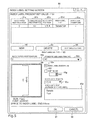
- the index label setting screen 90 shown in FIG. 5 is a screen that sets up index label information.
- the index label setting screen 90 shown in FIG. 6A , FIG. 6B , and FIG. 6C are screens, which each example of a shift image in an index label is displayed on the preview of the index label, respectively.
- a user operates the touch panel of the liquid crystal display part 51 , displays the index paper setting screen 80 and the index label setting screen 90 , and sets up.
- the index paper setting screen 80 as shown in FIG. 4 includes a “number of index labels” 81 , a “print size” 82 , a “index label space” 83 , a the setting item of “index label size” 84 , an “index paper preview” 85 , an “Index label preview” 86 as display area, an “OK” button 87 , and a “cancel” button 88 .
- the “number of index labels” 81 is a setting field that sets up a number of the index labels of the index paper in continuous printing.
- a type of printing that is not continuous printing (henceforth “single printing”) “1” is set as the “number of index labels” 81 .
- Print size” 82 is a setting field that sets up a printing paper size of the section excluding the index label (henceforth “printing paper size”), and a side (a long side or a shorter side) in which the index label is provided. For example, when the printing paper size is A4, and the index label is provided in the long side of the print sheet, “A4 long side” is set.
- the “index label space” 83 is a setting field that sets up the index label formed in a different position in the index paper for continuous printing or single printing.
- the “index label space” 83 includes setting fields to set a “space from head to first index label” 83 a , a “space between index labels” 83 b , and a “space from end to last index label” 83 c .
- “0” is set as the “space between index labels” 83 b.
- the “index label size” 84 is a setting field which sets up the size of an index label.
- the “Index label size” 84 provides a setting field that sets up a “height” 84 a of an index label which has protruded from the print sheet having the standard size.
- the width of the index label is fixed by an initial setting, modification of a setup about this value is possible.
- the “index paper preview” 85 is display area that displays a preview of the index paper(s).
- the preview of the index paper displayed on the “index paper preview” 85 changes. Also, when no value is set as the “number of index labels” 81 , the “print size” 82 , and the “index label space” 83 , the preview of the index paper is not displayed on the “index paper preview” 85 .
- the “index label preview” 86 is display area that displays the preview of the index label.
- the “height” 84 a of the index label for the “index label size” 84 the preview of the index label displayed on the “index label preview” 86 changes.
- the preview of the index label is not displayed on the “index label preview” 86 .
- the width of the index label may be fixed by initial setting, and the width of this initial setting may be used.
- the “OK” button 87 is a button depressed when storing the set point of a setting field at storage part 8 . Depression of the “OK” button 87 will store the set point of index paper setting screen 80 at storage part 8 .
- the “cancel” button 88 is a button depressed when canceling the set point of index paper setting screen 80 .
- “cancel” button 88 is depressed, the set point set as index paper setting screen 80 will be canceled, and it will return to the last set point.
- the index label setting screen 90 as shown in FIG. 5 includes a display item of an “index label present set value” 91 , a “new” button 92 , a “delete” button 93 , a “customize setting” button 94 , a setting item of “index label setting” 95 , a display area of a “index label preview” 96 , a “OK” button 97 , and “cancel” button 98 .
- the “index label present set value” 91 is display area where a set value of the index label being set presently and being stored in the storage part 8 (henceforth the “present set value”) is displayed.
- the “index label present set value” 91 provides a display column that displays a present set value by list for an “index paper insertion page” 91 a , a “standard size area printing” 91 b , an “index label position” 91 c , an “index label texts” 91 d , and an “index label divider use” 91 e .
- a present set value of a number of pages inserted between one index paper and another index paper is displayed.
- a present set value for existence (Yes) or non-existence (No) of printing in an area of the standard size section of the index paper is displayed.
- index label position a present set value of a position of the index label about the number of the index labels of an index paper in the continuous printing is displayed. “A” is displayed when the position of the index label is set up automatically.
- index label position 91 c
- “1” of the “index label position” 91 c shows order about “5” of the “number of index labels” 81 .
- “index label texts” 91 d a present set value of an index label text printed at the index label is displayed.
- index label divider use 91 e
- display existence or non-existence of the index label is displayed at the preview of the index paper.
- the “new” button 92 is a button depressed in case of re-displaying the display column of the “index label present set value” 91 newly. By depressing the “new” button 92 , a present set value of the setting item set up in “index label setting” 95 , which is stored in the storage part 8 , will be shown.
- the “delete” button 93 is a button to depress for deleting set value currently displayed on the display column of the “index label present set value” 91 .
- the present set value of the index label in the storage part 8 which is currently displayed on the display column of the “index label present set value” 91 , will be deleted.
- the “customize setting” button 94 is a button to depress when the user customizes a format and a layout of the index label text. Depression of the “customize setting” button 94 will display a customization setting screen.
- the “index label setting” 95 is setting area where a setup of the index label is performed.
- the “index label setup” 95 includes a setting field which sets up an “index paper insertion page” 95 a , a “standard size area printing” 95 b , an “index label position” 95 c , an “index label texts (maximum of three lines)” 95 d , an “index label divider use” 95 e , a “shift image” 95 f , and a “shift size” 95 g.
- index paper insertion page 95 a
- the number of pages inserted between one index paper and another index paper is set up.
- the “standard size area printing” 95 b the printing existence (Yes) or non-existence (No) in the area of the standard size section of the index paper is set up.
- the “index label position” 95 c the position of the index label to the number of the index labels for the index paper in continuous printing is set up.
- index label texts (maximum of three lines)” 95 d the text printed at the index label is set up.
- text(s) such as a maximum of three lines of characters, can be set.
- the “index label divider use” 95 e the display existence or non-existence of the index label is set up in the preview of an index paper.
- the index label is displayed on the “index paper preview” 85 that are the preview of the index paper. Otherwise, when the “index label divider use” 95 e is not checked as setting, the index label is not displayed on the “index paper preview” 85 .
- shift image when the text or the like, which are printed to the standard size section and/or an index label section are set to the manuscript, whether displaying or not-displaying the shift image that is expressed the image area of the manuscript with the belt-like pattern in the preview of the index label is set up.
- shift image when the “shift image” 95 f is checked as setting, the width that moves in the right end of the image area of the manuscript is set up.
- index label preview 96 , a shift image, which the image area of the manuscript is moved to the right only size of the “shift size” 95 g , is displayed.
- the “index label preview” 96 is display area that displays an image of the index label.
- the preview displayed on the “Index label preview” 96 changes.
- the “shift image” 95 f is checked as setting
- the preview displayed on the “index label preview” 96 also changes.
- no text is set to the “index label texts (maximum of three lines)” 95 d
- the preview of the index label is not displayed on the “index label preview” 96 .
- the “shift image” 95 f is not checked as setting, the preview of the index label is not displayed on the “index label preview” 96 .
- the “OK” button 97 is a button depressed when storing a set value of the setting field to the storage part 8 .
- the “OK” button 97 is pushed, the set value of the index label setting screen 90 is stored to the storage part 8 .
- the “cancel” button 98 is a button depressed in case of canceling a set value of the index label setting screen 90 .
- “cancel” button 98 is pushed, the set value set as the index label setting screen 90 will be canceled, and it will return to the last set value.
- the “index label preview” 96 in FIG. 6A is an example of a preview of being displayed image area in case that the “shift image” 95 f is checked as setting and “10.0” mm is set to the “shift size” 95 g . That is, in the “index label preview” 96 , the preview of the index label, when a right end line 96 a of the image area of the belt-like pattern moves to the 10.0-mm right, is displayed.
- FIG. 6B is an example of a preview of being displayed image area in case that the “shift image” 95 f is checked as setting and “0” mm is set to the “shift size” 95 g . That is, in the “index label preview” 96 , the preview of the index label, when the right end line 96 a of the image area of the belt-like pattern does not move, is displayed.
- the “index label preview” 96 in FIG. 6C is an example of a preview of being displayed image area in case that the “shift image” 95 f is checked as setting and “30.0” mm is set to the “shift size” of 95 g .
- a preview of the index label when the right end line 96 a of image area of the belt-like pattern moves to the 30.0-mm right is displayed on “index label preview” 96 .
- the user check as setting the “shift image” 95 f , and by changing set value of the “shift size” 95 g , a printing request can be performed after adjusting the width for moving the right end line 96 a of the image area of the belt-like pattern.
- setting fields of the “shift image” 95 f and the “shift size” 95 g in the index label setting screen 90 are used for performing set up.
- the index label setting screen 90 also in the case that a printing request is performed with the manuscript set up the text or the like, which are printed into a standard size section and an index label section, when the user only check the “shift image” 95 f as setting, the shift image expressing the image area of the manuscript with the belt-like pattern to the “index label preview” 96 can be displayed.
- the right end line 96 a of the image area of the belt-like pattern can be moved easily by changing set value of the “shift size” 95 g by the user.
- the user can verify the index label section in case of moving the right end line 96 a of the image area of the belt-like pattern towards the right only with the width of the “shift size” 95 g by the “index label preview” 96 .
- the user can verify the print image by the “index paper preview” 85 about the index paper.
- a typical printer controller only provides, by a screen that sets up an information on a tab paper or a tab, a setup for an information on a tab paper or a tab, an item for inputting information including a title or the like of the text for printing to the tab, and a screen for displaying the preview of a tab paper or a tab. Therefore, there is a problem that information including the title or the like of the text printed to the tab can be verified by the preview of the tab, when the text or the like, which are printed to a standard size section and an index label section are set to the manuscript and the text of the manuscript is printed to the index label, this screen cannot be used.
- the preview of the printing region of the index label can be displayed from the screen that sets up the information on the index paper or the index label.
- a shift image of the image area of the manuscript with expressing the belt-like pattern is displayed to the “index label preview” 96 .
- it is not limited to the belt-like pattern but all patterns, colors, or the like, can be displayed if the user can recognize the image area of the manuscript by using them.
- the display of the shift image of the index label in the “index label preview” 96 which the image area of the manuscript is moved by the right only “shift size” 95 g , is explained.
- this is an example in case that the index label is formed in the right side of the index paper.
- the index label is formed in the left side of the index paper, it is also possible to display a shift image, which is moved the image area of the manuscript to the left only for “shift size” 95 g , on the “index label preview” 96 .
- an image area of a manuscript is movable the position to the side where the index label is provided on the index paper.
- the user operates the touch panel of the liquid crystal display part 51 , displays the index paper setting screen 80 , or index label setting screen 90 , and set up the set values
- a print driver of the image forming apparatus 1 is installed in the peripheral equipment 11 , such as PC as shown in FIG. 3 , and a user may indicate to display the index paper setting screen 80 or the index label setting screen 90 on the display panel of the peripheral equipment 11 by using the print driver. Then, it is also possible: while the user verifies the “index label preview” 96 , the “shift size” of 95 g is set up, and the printing request of the index paper is transmitted to the image forming apparatus 1 .
- a setting item and a display item of the index paper setting screen 80 or the index label setting screen 90 are not limited to them. If information on an index paper or an index label can be set up so that printing of an index paper may be attained, it is also possible to consider it as other setting items and a display item.
- the preview of the printing region of the index label is displayed from a screen sets up the information on the index paper or the index label.
- a technology of the present disclosure is suitable for an image forming apparatus.
- it is not limited to the image forming apparatus. That is, the technology of the present disclosure is applicable to a general apparatus and process provided with being discharged or conveyed the index paper.
Landscapes
- Engineering & Computer Science (AREA)
- Theoretical Computer Science (AREA)
- Physics & Mathematics (AREA)
- General Physics & Mathematics (AREA)
- General Engineering & Computer Science (AREA)
- Human Computer Interaction (AREA)
- Quality & Reliability (AREA)
- Record Information Processing For Printing (AREA)
- Accessory Devices And Overall Control Thereof (AREA)
- Facsimiles In General (AREA)
- Control Or Security For Electrophotography (AREA)
Abstract
Description
Claims (6)
Applications Claiming Priority (3)
| Application Number | Priority Date | Filing Date | Title |
|---|---|---|---|
| JP2013222555 | 2013-10-25 | ||
| JP2013-222555 | 2013-10-25 | ||
| JP2013222555A JP5932752B2 (en) | 2013-10-25 | 2013-10-25 | Image forming apparatus |
Publications (2)
| Publication Number | Publication Date |
|---|---|
| US20150116737A1 US20150116737A1 (en) | 2015-04-30 |
| US9417827B2 true US9417827B2 (en) | 2016-08-16 |
Family
ID=52995068
Family Applications (1)
| Application Number | Title | Priority Date | Filing Date |
|---|---|---|---|
| US14/523,855 Expired - Fee Related US9417827B2 (en) | 2013-10-25 | 2014-10-25 | Image forming apparatus that can print to an index paper, image formation method, and recording medium |
Country Status (2)
| Country | Link |
|---|---|
| US (1) | US9417827B2 (en) |
| JP (1) | JP5932752B2 (en) |
Families Citing this family (2)
| Publication number | Priority date | Publication date | Assignee | Title |
|---|---|---|---|---|
| USD745871S1 (en) | 2014-01-31 | 2015-12-22 | Hewlett-Packard Development Company, L.P. | Imaging device |
| JP2018099840A (en) * | 2016-12-21 | 2018-06-28 | キヤノン株式会社 | Image forming apparatus, paper feed control method, and program |
Citations (4)
| Publication number | Priority date | Publication date | Assignee | Title |
|---|---|---|---|---|
| JPH08127159A (en) | 1994-10-31 | 1996-05-21 | Nec Eng Ltd | Printing position adjusting device of printer |
| US20080014002A1 (en) * | 2006-07-11 | 2008-01-17 | Konica Minolta Business Technologies, Inc. | Print control apparatus that controls printing device performing printing using print sheet having tab |
| US20080266596A1 (en) * | 2007-04-27 | 2008-10-30 | Canon Kabushiki Kaisha | Information processing apparatus, information processing method, and computer program |
| JP2009271644A (en) | 2008-05-01 | 2009-11-19 | Canon Inc | Document processing apparatus, document processing method, program and storage medium |
-
2013
- 2013-10-25 JP JP2013222555A patent/JP5932752B2/en not_active Expired - Fee Related
-
2014
- 2014-10-25 US US14/523,855 patent/US9417827B2/en not_active Expired - Fee Related
Patent Citations (5)
| Publication number | Priority date | Publication date | Assignee | Title |
|---|---|---|---|---|
| JPH08127159A (en) | 1994-10-31 | 1996-05-21 | Nec Eng Ltd | Printing position adjusting device of printer |
| US20080014002A1 (en) * | 2006-07-11 | 2008-01-17 | Konica Minolta Business Technologies, Inc. | Print control apparatus that controls printing device performing printing using print sheet having tab |
| JP2008021003A (en) | 2006-07-11 | 2008-01-31 | Konica Minolta Business Technologies Inc | Apparatus, program and method for printing control |
| US20080266596A1 (en) * | 2007-04-27 | 2008-10-30 | Canon Kabushiki Kaisha | Information processing apparatus, information processing method, and computer program |
| JP2009271644A (en) | 2008-05-01 | 2009-11-19 | Canon Inc | Document processing apparatus, document processing method, program and storage medium |
Also Published As
| Publication number | Publication date |
|---|---|
| JP5932752B2 (en) | 2016-06-08 |
| US20150116737A1 (en) | 2015-04-30 |
| JP2015083356A (en) | 2015-04-30 |
Similar Documents
| Publication | Publication Date | Title |
|---|---|---|
| US9329769B2 (en) | Display/input device and image forming apparatus including display/input device | |
| US20150150149A1 (en) | Electronic equipment having display having divided screen and control method thereof | |
| EP2879366B1 (en) | Document reading device and image forming apparatus | |
| US9154653B2 (en) | Numerical value inputting device and electronic equipment | |
| US20150116737A1 (en) | Image forming apparatus that can print to an index paper, image formation method, and recording medium | |
| JP2006332868A (en) | Image forming apparatus and image display method | |
| US9832337B2 (en) | Image forming apparatus and control method of image forming apparatus | |
| JP6171510B2 (en) | Image forming apparatus, operation guide method, program | |
| JP2022015874A (en) | Color verification device, color verification method, and program | |
| JP5922077B2 (en) | Image forming apparatus and image forming system | |
| JP5269863B2 (en) | Image reading control apparatus, image forming apparatus, and image reading method | |
| JP4844660B2 (en) | Image forming apparatus and recording medium information setting method | |
| JP2006151608A (en) | Image forming device and recording medium information setting method | |
| JP7413851B2 (en) | image forming device | |
| JP6319131B2 (en) | Image forming apparatus | |
| JP6054494B2 (en) | Operating device and electronic device | |
| US11019232B2 (en) | Image forming apparatus and non-transitory computer readable storage medium | |
| JP5757911B2 (en) | Display input device and image forming apparatus having the same | |
| JP5847669B2 (en) | Operating device and electronic device | |
| JP6763283B2 (en) | Electronics | |
| JP2006347715A (en) | Image forming system | |
| JP2015084174A (en) | Image forming apparatus | |
| JP2014024297A (en) | Image formation device, method of controlling the same, and program | |
| JP2016034077A (en) | Image forming apparatus | |
| JP2020106554A (en) | Printer |
Legal Events
| Date | Code | Title | Description |
|---|---|---|---|
| ZAAA | Notice of allowance and fees due |
Free format text: ORIGINAL CODE: NOA |
|
| ZAAB | Notice of allowance mailed |
Free format text: ORIGINAL CODE: MN/=. |
|
| AS | Assignment |
Owner name: KYOCERA DOCUMENT SOLUTIONS INC., JAPAN Free format text: ASSIGNMENT OF ASSIGNORS INTEREST;ASSIGNOR:TAIRA, YOSHIYUKI;REEL/FRAME:038598/0077 Effective date: 20141014 |
|
| STCF | Information on status: patent grant |
Free format text: PATENTED CASE |
|
| MAFP | Maintenance fee payment |
Free format text: PAYMENT OF MAINTENANCE FEE, 4TH YEAR, LARGE ENTITY (ORIGINAL EVENT CODE: M1551); ENTITY STATUS OF PATENT OWNER: LARGE ENTITY Year of fee payment: 4 |
|
| FEPP | Fee payment procedure |
Free format text: MAINTENANCE FEE REMINDER MAILED (ORIGINAL EVENT CODE: REM.); ENTITY STATUS OF PATENT OWNER: LARGE ENTITY |
|
| LAPS | Lapse for failure to pay maintenance fees |
Free format text: PATENT EXPIRED FOR FAILURE TO PAY MAINTENANCE FEES (ORIGINAL EVENT CODE: EXP.); ENTITY STATUS OF PATENT OWNER: LARGE ENTITY |
|
| STCH | Information on status: patent discontinuation |
Free format text: PATENT EXPIRED DUE TO NONPAYMENT OF MAINTENANCE FEES UNDER 37 CFR 1.362 |
|
| FP | Lapsed due to failure to pay maintenance fee |
Effective date: 20240816 |