US20120249587A1 - Keyboard avatar for heads up display (hud) - Google Patents
Keyboard avatar for heads up display (hud) Download PDFInfo
- Publication number
- US20120249587A1 US20120249587A1 US13/079,657 US201113079657A US2012249587A1 US 20120249587 A1 US20120249587 A1 US 20120249587A1 US 201113079657 A US201113079657 A US 201113079657A US 2012249587 A1 US2012249587 A1 US 2012249587A1
- Authority
- US
- United States
- Prior art keywords
- display
- user
- representation
- input device
- recited
- Prior art date
- Legal status (The legal status is an assumption and is not a legal conclusion. Google has not performed a legal analysis and makes no representation as to the accuracy of the status listed.)
- Abandoned
Links
Images


Classifications
-
- G—PHYSICS
- G06—COMPUTING OR CALCULATING; COUNTING
- G06F—ELECTRIC DIGITAL DATA PROCESSING
- G06F3/00—Input arrangements for transferring data to be processed into a form capable of being handled by the computer; Output arrangements for transferring data from processing unit to output unit, e.g. interface arrangements
- G06F3/01—Input arrangements or combined input and output arrangements for interaction between user and computer
- G06F3/048—Interaction techniques based on graphical user interfaces [GUI]
- G06F3/0487—Interaction techniques based on graphical user interfaces [GUI] using specific features provided by the input device, e.g. functions controlled by the rotation of a mouse with dual sensing arrangements, or of the nature of the input device, e.g. tap gestures based on pressure sensed by a digitiser
- G06F3/0489—Interaction techniques based on graphical user interfaces [GUI] using specific features provided by the input device, e.g. functions controlled by the rotation of a mouse with dual sensing arrangements, or of the nature of the input device, e.g. tap gestures based on pressure sensed by a digitiser using dedicated keyboard keys or combinations thereof
- G06F3/04895—Guidance during keyboard input operation, e.g. prompting
-
- G—PHYSICS
- G02—OPTICS
- G02B—OPTICAL ELEMENTS, SYSTEMS OR APPARATUS
- G02B27/00—Optical systems or apparatus not provided for by any of the groups G02B1/00 - G02B26/00, G02B30/00
- G02B27/01—Head-up displays
- G02B27/017—Head mounted
-
- G—PHYSICS
- G06—COMPUTING OR CALCULATING; COUNTING
- G06F—ELECTRIC DIGITAL DATA PROCESSING
- G06F3/00—Input arrangements for transferring data to be processed into a form capable of being handled by the computer; Output arrangements for transferring data from processing unit to output unit, e.g. interface arrangements
- G06F3/01—Input arrangements or combined input and output arrangements for interaction between user and computer
- G06F3/011—Arrangements for interaction with the human body, e.g. for user immersion in virtual reality
-
- G—PHYSICS
- G06—COMPUTING OR CALCULATING; COUNTING
- G06F—ELECTRIC DIGITAL DATA PROCESSING
- G06F3/00—Input arrangements for transferring data to be processed into a form capable of being handled by the computer; Output arrangements for transferring data from processing unit to output unit, e.g. interface arrangements
- G06F3/01—Input arrangements or combined input and output arrangements for interaction between user and computer
- G06F3/03—Arrangements for converting the position or the displacement of a member into a coded form
- G06F3/041—Digitisers, e.g. for touch screens or touch pads, characterised by the transducing means
- G06F3/042—Digitisers, e.g. for touch screens or touch pads, characterised by the transducing means by opto-electronic means
- G06F3/0425—Digitisers, e.g. for touch screens or touch pads, characterised by the transducing means by opto-electronic means using a single imaging device like a video camera for tracking the absolute position of a single or a plurality of objects with respect to an imaged reference surface, e.g. video camera imaging a display or a projection screen, a table or a wall surface, on which a computer generated image is displayed or projected
- G06F3/0426—Digitisers, e.g. for touch screens or touch pads, characterised by the transducing means by opto-electronic means using a single imaging device like a video camera for tracking the absolute position of a single or a plurality of objects with respect to an imaged reference surface, e.g. video camera imaging a display or a projection screen, a table or a wall surface, on which a computer generated image is displayed or projected tracking fingers with respect to a virtual keyboard projected or printed on the surface
-
- G—PHYSICS
- G02—OPTICS
- G02B—OPTICAL ELEMENTS, SYSTEMS OR APPARATUS
- G02B27/00—Optical systems or apparatus not provided for by any of the groups G02B1/00 - G02B26/00, G02B30/00
- G02B27/01—Head-up displays
- G02B27/017—Head mounted
- G02B2027/0178—Eyeglass type
-
- G—PHYSICS
- G09—EDUCATION; CRYPTOGRAPHY; DISPLAY; ADVERTISING; SEALS
- G09G—ARRANGEMENTS OR CIRCUITS FOR CONTROL OF INDICATING DEVICES USING STATIC MEANS TO PRESENT VARIABLE INFORMATION
- G09G2370/00—Aspects of data communication
- G09G2370/16—Use of wireless transmission of display information
-
- G—PHYSICS
- G09—EDUCATION; CRYPTOGRAPHY; DISPLAY; ADVERTISING; SEALS
- G09G—ARRANGEMENTS OR CIRCUITS FOR CONTROL OF INDICATING DEVICES USING STATIC MEANS TO PRESENT VARIABLE INFORMATION
- G09G2380/00—Specific applications
- G09G2380/02—Flexible displays
Definitions
- An embodiment of the present invention relates generally to heads-up displays and, more specifically, to a system and method for utilizing a heads-up or head mounted display to view a keyboard/input device and finger location relative to the input device, in addition to a screen or monitor view in the display.
- HUDs Heads-up displays
- HMDs head-mounted displays
- a HUD/HMD may be used as a display for a notebook computer, in existing systems. This can be very useful while working on airplanes and in other situations where heads-up is beneficial. People nearby cannot see the user's display, and the user does not need as much room to work on the notebook; trying to use a notebook computer in economy class on a plane can be very uncomfortable.
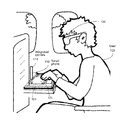
- FIG. 1 illustrates an embodiment of a keyboard avatar system using a smart phone with integrated camera, keyboard and HMD, according to an embodiment of the invention
- FIG. 2A illustrates an image of a keyboard and fingers from the point of view of reverse facing camera, according to an embodiment of the invention
- FIG. 2B illustrates a rotated image of the keyboard and fingers seen in FIG. 2A , according to an embodiment of the invention
- FIG. 3A illustrates an integrated display for viewing an HUD/HMD which combines the expected display output from a user's session and an image of a finger/keyboard, according to an embodiment of the invention
- FIG. 3B illustrates an integrated display for viewing an HUD/HMD which combines the expected display output from a user's session and an avatar finger/keyboard representation, according to an embodiment of the invention
- FIG. 5 illustrates an embodiment of a keyboard avatar system using a camera mounted on a platform in a location relative to an input board, and an HMD.
- An embodiment of the present invention is a system and method relating to wireless display technology that may be applied to heads up and head mounted displays (HUD/HMD) in situations as implementations become smaller, allowing a wireless HUD/HMD.
- Wireless protocol 802.11 is available on some commercial flights and may be more widespread in the near future, enabling use of embodiments described herein to be used.
- Bluetooth technology may be used as the protocols allow increased bandwidth in the future.
- a user may position an integrated notebook camera to look down at the user's fingers on a keyboard, and then see their fingers on the HUD/HMD, along with the expected display. With this approach, however, the video is “upside down” from the normal keyboard perspective that a user needs, and lighting conditions may not be good enough to see the fingers and keyboard clearly.
- a user may easily change input devices while continuing to keep the HUD/HMD on.
- a system mounted light source, or infrared source may be used to get a clearer picture of finger location on the input device.
- HUD heads up display
- HMD head mounted display
- the input board may be coupled with accelerometers and other sensors to detect tilting and gestures of a user. For example, a user might lay out virtual pegs on the board to create a customized pinball game. The user would then use flick gestures or tilt the whole input board to move the virtual ball around the surface. The visual feedback, including a representation of the user's hands, would be displayed on the HMD/HUD.
- Another algorithm may be used to alter the image somewhat to show a display to the user that mimics the perspective and angle as if the camera were at the approximate location of a user's eyes ( FIG. 2C ).
- These transposition algorithms may be configurable so the user may choose a more desirable perspective image.
- a visual representation of hands on keyboard, or avatar instead of viewing an actual photographic image or video of a keyboard and user's hands, instead the user sees a visual representation of hands on keyboard, or avatar, as shown in FIG. 3B .
- the location of the user's fingers on or near the keyboard may be sensed by infrared, or other movement sensor.
- a artificial representation of the fingers (avatar) 602 relative to the keyboard 603 is then provided in place of the video graphic ( 303 ), and then displayed with the current application 601 .
- This method creates a mix between a virtual reality system and real-life, physical controls. In this approach, regular camera input would be optional, thus saving power, and with the ability to be used under a wider variety of lighting conditions and with no concern for proper camera angle.
- the avatar of hands and keyboard 602 / 603 may be displayed 600 on the HUD/HMD with the application being used 601 , as in FIG. 3A (but with the avatar instead of actual video).
- This avatar representation may also include a game controller and/or virtual input device selection user interface (U/I) 605 .
- Creating and displaying a representation of the hands and keyboard may be performed in various ways.
- One approach is to analyze an incoming standard video or an incoming infrared feed.
- the regular video or infrared video may then be analyzed by software, firmware or hardware logic in order to create a representation of the user's hands and keyboard.
- a variety of methods for enhancing video clarity may be used, such as altering wavelengths that are used in the translation of the video, capturing a smaller spectrum than is available with the camera in use, or providing an additional lighting source, such as a camera mounted LED.
- HUDs and HMDs 130 are known and available for purchase in a variety of forms, for instance in the form of eye glasses. These glasses display whatever is sent from the computing device. Video cameras 111 coupled with PCs are already being used to track hands for gesture recognition. Camera perspective may be corrected to appear as user perspective through standard image stretching algorithms. Horizontal and vertical lines of the keyboard 121 may provide a reference point to eliminate the angle distortion or to reverse the angle to approximately 30 degrees (or other perspective consistent with a user's view) at the user's direction.
- the input board may be implemented using laser plane technology, such as that to be used in the keyboard projected to be available from Celluon, Inc. When the user's fingertips break a projected plane that is parallel to the surface, an input is registered.
- the input board may have additional sensors, such as accelerometers. Tilting of the board then signals input for movement of a virtual piece on the board.
- the physics software to drive such applications is already in use in a variety of smart phones, PDAs and gaming software.
- the existing systems provide no visual feedback on finger position relative to an input device.
- the HUD display will show the user an image representation, either avatar or video, of the input board with the tilting aspect. Another embodiment will show only the game results in the display, expecting the user to be able to feel the tilt with his/her hands.
- the input board has either no explicit control or key locations, or the controls may be configurable.
- Game or application controls ( 605 ) for user input may be configured to be relative to a grid or location on the video board, or distance from the camera, etc. Once configured, the input sensing mechanism associated with the board will be able to identify which control has been initiated by the user.
- it may be desired to mount the camera to the board to simplify identification of movements. Further, visual feedback of the tilting aspect may be turned off or on, based on the user's desire, or application.
- logic may be used to receive video or sensor input and interpret finger position.
- Systems have been proposed and embodied for recognizing hand gestures (See, U.S. Pat. No. 6,002,808 and “Robust Hand Gesture Analysis And Application In Gallery Browsing,” Chai, et al., 18 Aug., 2009, first version appearing in IEEE Conference on Multimedia and Expo 2009, ICME 2009, June. 28-Jul. 3, 2009, pp.
- the image of the fingers may be visually represented to be partially transparent.
- an indicator is highlighted directly over a key/control to show that the key/control was pressed, the user can see the indicator through the transparency of the finger image on the display, even though the user's actual fingers are covering the control on the keyboard or input board.
- the user 120 has a HUD/HMD 430 which is connected wirelessly to a computing device 401 for receiving images corresponding to finger position on the input board 415 and the application display ( 301 ).
- the user types or provides input at an input board 415 .
- the input board 415 may be coupled to a docking station 413 .
- a camera, or smart device with integrated camera, 411 may be docked in the docking station 413 , which may placed at a known location relative to the input board 415 . It will be understood that a variety of means may be used to calibrate the camera with board position, as discussed above.
- the docking station 413 may include a transmitter for transmitting video of the input board and finger location to the computing device 401 .
- the docking station may also be equipped with sensors to identify key presses, mouse clicks, and movement of the input board, when equipped with an accelerometer, and transmit the input selections to the computing device 401 .
- any of the communication paths, as illustrated, may be wired or wireless, and the communication paths may use any transmission protocol known or to be invented, as long as the communication protocol has the bandwidth for real time video. For instance, Bluetooth protocols existing at the time of filing may not have appropriate bandwidth for video, but video-friendly Bluetooth protocols and transceivers may be available in the near future.
- FIG. 5 Another alternative embodiment is illustrated in FIG. 5 .
- the input board 415 a is not directly coupled to a docking station. Instead, the input board may communicate user inputs via its own transmitter (not shown).
- the camera 411 may be coupled or docked on a separate platform 423 , which is placed or calibrated to a known relative position to the input board 415 a.
- the platform which may be fully integrated with the camera, or smart device, transmits video of the input board and keyboard position to the computing device 401 .
- the computing device 401 transmits the display and keyboard/finger video or avatar to the user HUD/HMD 130 .
- the computing device 401 translates the video to the proper perspective before transmitting to the HUD/HMD 130 . It will be understood that functions of the camera, calibration of relative position, video translation/transposition, input identification and application, etc. may be distributed among more than one processor, or processor core in any single or multi-processor, multi-core or multi-threaded computing device without departing from the scope of example embodiments of the invention, as discussed herein.
- the camera is coupled to a smart device which performs the translation of input board/finger video to an avatar representation before transmitting the avatar image to the computing device for merging with the application display.
- This embodiment may reduce bandwidth requirements in the communication to the computing device from the camera, if the avatar representation is generated at a lower frame rate and/or with fewer pixels than an actual video representation would require.
- the camera may be integrated into the HUD/HMD. In this case, minimal translation of the keyboard/finger image will be required because the image will already seen from the perspective of the user.
- One embodiment requires the HUD/HMD or integrated camera to have a transmitter as well as receiver to send the camera images to the computing device to be integrated into the display.
- the HUD may include an image integrator to integrate the application or game display received from the computing device with the video or avatar images of the fingers and keyboard. This eliminates the need to send the image from the camera to the computing device and then back to the HUD. Camera movement for HUD/HMD mounted cameras may require additional translation and stabilization logic so that the image appears to be more stable.
- a visual marker may be placed on the input board/device as a reference point to aid in stabilizing the image.
- the techniques described herein are not limited to any particular hardware or software configuration; they may find applicability in any computing, consumer electronics, or processing environment.
- the techniques may be implemented in hardware, software, or a combination of the two.
- program code may represent hardware using a hardware description language or another functional description language which essentially provides a model of how designed hardware is expected to perform.
- Program code may be assembly or machine language, or data that may be compiled and/or interpreted.
- Program code, or instructions may be stored in, for example, volatile and/or non-volatile memory, such as storage devices and/or an associated machine readable or machine accessible medium including solid-state memory, hard-drives, floppy-disks, optical storage, tapes, flash memory, memory sticks, digital video disks, digital versatile discs (DVDs), etc., as well as more exotic mediums such as machine-accessible biological state preserving storage.
- volatile and/or non-volatile memory such as storage devices and/or an associated machine readable or machine accessible medium including solid-state memory, hard-drives, floppy-disks, optical storage, tapes, flash memory, memory sticks, digital video disks, digital versatile discs (DVDs), etc.
- machine-accessible biological state preserving storage such as machine-accessible biological state preserving storage.
- a machine readable medium may include any mechanism for storing, transmitting, or receiving information in a form readable by a machine, and the medium may include a tangible medium through which electrical, optical, acoustical or other form of propagated signals or carrier wave encoding the program code may pass, such as antennas, optical fibers, communications interfaces, etc.
- Program code may be transmitted in the form of packets, serial data, parallel data, propagated signals, etc., and may be used in a compressed or encrypted format.
- Program code may be implemented in programs executing on programmable machines such as mobile or stationary computers, personal digital assistants, set top boxes, cellular telephones and pagers, consumer electronics devices (including DVD players, personal video recorders, personal video players, satellite receivers, stereo receivers, cable TV receivers), and other electronic devices, each including a processor, volatile and/or non-volatile memory readable by the processor, at least one input device and/or one or more output devices.
- Program code may be applied to the data entered using the input device to perform the described embodiments and to generate output information. The output information may be applied to one or more output devices.
- embodiments of the disclosed subject matter can be practiced with various computer system configurations, including multiprocessor or multiple-core processor systems, minicomputers, mainframe computers, as well as pervasive or miniature computers or processors that may be embedded into virtually any device.
- embodiments of the disclosed subject matter can also be practiced in distributed computing environments where tasks or portions thereof may be performed by remote processing devices that are linked through a communications network.
Landscapes
- Engineering & Computer Science (AREA)
- General Engineering & Computer Science (AREA)
- Theoretical Computer Science (AREA)
- Physics & Mathematics (AREA)
- General Physics & Mathematics (AREA)
- Human Computer Interaction (AREA)
- Multimedia (AREA)
- Optics & Photonics (AREA)
- User Interface Of Digital Computer (AREA)
Abstract
In some embodiments, the invention involves using a heads up display (HUD) or head mounted display (HMD) to view a representation of a user's fingers with an input device communicatively connected to a computing device. The keyboard/finger representation is displayed along with the application display received from a computing device. In an embodiment, the input device has an accelerometer to detect tilting movement in the input device, and send this information to the computing device. An embodiment provides visual feedback of key or control actuation in the HUD/HMD display. Other embodiments are described and claimed.
Description
- An embodiment of the present invention relates generally to heads-up displays and, more specifically, to a system and method for utilizing a heads-up or head mounted display to view a keyboard/input device and finger location relative to the input device, in addition to a screen or monitor view in the display.
- Various mechanisms exist for allowing a user to view a display without having to look down. Heads-up displays (HUDs) and head-mounted displays (HMDs) allow people to see displays without looking down at a computer. HUDs/HMDs are becoming much smaller and more flexible, more like a pair of sun glasses, and therefore more popular. A HUD/HMD may be used as a display for a notebook computer, in existing systems. This can be very useful while working on airplanes and in other situations where heads-up is beneficial. People nearby cannot see the user's display, and the user does not need as much room to work on the notebook; trying to use a notebook computer in economy class on a plane can be very uncomfortable.
- With existing technology, touch typists can already use a HUD/HMD with a notebook on a plane and use the keyboard and mouse on the notebook without having to see the notebook keyboard. However, most people need to be able to see the keyboard, relative to their fingers, while they type, and seeing the location of the pointing device and volume controls is helpful too. A HUD/HMD does not allow this.
- The features and advantages of the present invention will become apparent from the following detailed description of the present invention in which:
-
FIG. 1 illustrates an embodiment of a keyboard avatar system using a smart phone with integrated camera, keyboard and HMD, according to an embodiment of the invention; -
FIG. 2A illustrates an image of a keyboard and fingers from the point of view of reverse facing camera, according to an embodiment of the invention; -
FIG. 2B illustrates a rotated image of the keyboard and fingers seen inFIG. 2A , according to an embodiment of the invention; -
FIG. 2C illustrates a translation of the image ofFIGS. 2A-B to a perspective as seen from the user, according to an embodiment of the invention; -
FIG. 3A illustrates an integrated display for viewing an HUD/HMD which combines the expected display output from a user's session and an image of a finger/keyboard, according to an embodiment of the invention; -
FIG. 3B illustrates an integrated display for viewing an HUD/HMD which combines the expected display output from a user's session and an avatar finger/keyboard representation, according to an embodiment of the invention; -
FIG. 4 illustrates an embodiment of a keyboard avatar system using a camera mounted in a docking station coupled to an input board HMD; and -
FIG. 5 illustrates an embodiment of a keyboard avatar system using a camera mounted on a platform in a location relative to an input board, and an HMD. - An embodiment of the present invention is a system and method relating to wireless display technology that may be applied to heads up and head mounted displays (HUD/HMD) in situations as implementations become smaller, allowing a wireless HUD/HMD. Wireless protocol 802.11 is available on some commercial flights and may be more widespread in the near future, enabling use of embodiments described herein to be used. Bluetooth technology may be used as the protocols allow increased bandwidth in the future. A user may position an integrated notebook camera to look down at the user's fingers on a keyboard, and then see their fingers on the HUD/HMD, along with the expected display. With this approach, however, the video is “upside down” from the normal keyboard perspective that a user needs, and lighting conditions may not be good enough to see the fingers and keyboard clearly. Having a single keyboard layout and touchpad limits the user experience. In embodiments of the invention a user may easily change input devices while continuing to keep the HUD/HMD on. In embodiments, a system mounted light source, or infrared source may be used to get a clearer picture of finger location on the input device.
- Reference in the specification to “one embodiment” or “an embodiment” of the present invention means that a particular feature, structure or characteristic described in connection with the embodiment is included in at least one embodiment of the present invention. Thus, the appearances of the phrase “in one embodiment” appearing in various places throughout the specification are not necessarily all referring to the same embodiment.
- For purposes of explanation, specific configurations and details are set forth in order to provide a thorough understanding of the present invention. However, it will be apparent to one of ordinary skill in the art that embodiments of the present invention may be practiced without the specific details presented herein. Furthermore, well-known features may be omitted or simplified in order not to obscure the present invention. Various examples may be given throughout this description. These are merely descriptions of specific embodiments of the invention. The scope of the invention is not limited to the examples given. For purposes of illustration and simplicity, the term heads up display (HUD) may be used to also indicate a head mounted display (HMD) in the description herein, and vice-a-versa.
- Embodiments of the invention include a system that takes advantage of existing technologies to allow a user to see a representation of their fingers on the HUD or HMD in relation to the keyboard and other controls. This allows a non-touch typist to use a notebook without having to see it directly.
- In one embodiment, a physical keyboard is not necessary. A rigid surface, referred to herein as an “input board,” with a laser plane or a camera may be used to sit on the user's lap or on a tray table. The input board may be compact in size, perhaps the size of a standard sheet of paper (8.5×11 in.). The HUD/HMD may display a virtual keyboard for the user that seems to the user to be laid over the input board. The input board need not have markings for keys or controls, but may be imprinted with a grid or corner markers only. The user may type on this surface and exchange the virtual representation to a variety of other virtual input devices, as well.
- The input board may be coupled with accelerometers and other sensors to detect tilting and gestures of a user. For example, a user might lay out virtual pegs on the board to create a customized pinball game. The user would then use flick gestures or tilt the whole input board to move the virtual ball around the surface. The visual feedback, including a representation of the user's hands, would be displayed on the HMD/HUD.
-
FIG. 1 illustrates high level components of a keyboard avatar for HUD/HMD 130, according to an embodiment of the invention. A notebook (or other computing device) 101 with apivoting camera 111 may be used to capture the user's (120) hands over the keyboard. In an embodiment, thecamera 111 may be integrated with asmart phone 110.FIG. 2A illustrates an example image of a user's hand on the keyboard from the perspective of the camera, according to one embodiment. The video frames may be stretched to correct the camera perspective so that the video image would appear form the user's point of view (as opposed to the camera's point of view). A simple transposition algorithm may be used in an application to take the incoming video and reverse it (FIG. 2B ). Another algorithm may be used to alter the image somewhat to show a display to the user that mimics the perspective and angle as if the camera were at the approximate location of a user's eyes (FIG. 2C ). These transposition algorithms may be configurable so the user may choose a more desirable perspective image. - Referring now to
FIG. 3A , the application may then display 300 the keyboard andfinger video 303 adjacent to the main application (e.g., a word processor, spreadsheet program, or drawing program, game, etc.) 301 that is in use. This video approach requires suitable lighting and a particular camera angle from theintegrated camera 111. - In another embodiment, instead of viewing an actual photographic image or video of a keyboard and user's hands, instead the user sees a visual representation of hands on keyboard, or avatar, as shown in
FIG. 3B . In this embodiment, the location of the user's fingers on or near the keyboard may be sensed by infrared, or other movement sensor. A artificial representation of the fingers (avatar) 602 relative to thekeyboard 603 is then provided in place of the video graphic (303), and then displayed with thecurrent application 601. This method creates a mix between a virtual reality system and real-life, physical controls. In this approach, regular camera input would be optional, thus saving power, and with the ability to be used under a wider variety of lighting conditions and with no concern for proper camera angle. The avatar of hands andkeyboard 602/603 may be displayed 600 on the HUD/HMD with the application being used 601, as inFIG. 3A (but with the avatar instead of actual video). This avatar representation may also include a game controller and/or virtual input device selection user interface (U/I) 605. - Creating and displaying a representation of the hands and keyboard may be performed in various ways. One approach is to analyze an incoming standard video or an incoming infrared feed. The regular video or infrared video may then be analyzed by software, firmware or hardware logic in order to create a representation of the user's hands and keyboard. For poor visible lighting conditions, a variety of methods for enhancing video clarity may be used, such as altering wavelengths that are used in the translation of the video, capturing a smaller spectrum than is available with the camera in use, or providing an additional lighting source, such as a camera mounted LED.
- In another embodiment, instead of using an actual keyboard at 121 (
FIG. 1 ), an input board may be used. The input board may be made of flexible material to enable rolling, or a stiffer board with creases for folding, for easy transportation. The input board may include a visible grid or be placed at a known location relative to the camera or sensing equipment with pegs or other temporary fastening means to provide a known perspective of user's fingers to the input board keys, buttons, or other input indicators. Using an input board obviates the need for a full size laptop device to be placed in front of the user, when space is at a minimum. The input board may virtualize the input device on a smaller scale than a full size input device, as well. - Referring again to
FIG. 1 , HUDs andHMDs 130 are known and available for purchase in a variety of forms, for instance in the form of eye glasses. These glasses display whatever is sent from the computing device.Video cameras 111 coupled with PCs are already being used to track hands for gesture recognition. Camera perspective may be corrected to appear as user perspective through standard image stretching algorithms. Horizontal and vertical lines of thekeyboard 121 may provide a reference point to eliminate the angle distortion or to reverse the angle to approximately 30 degrees (or other perspective consistent with a user's view) at the user's direction. The input board may be implemented using laser plane technology, such as that to be used in the keyboard projected to be available from Celluon, Inc. When the user's fingertips break a projected plane that is parallel to the surface, an input is registered. Alternatively, technology such as that in the Touchsmart system available from Hewlett Packard may be used. This technology is an array of LEDs and light sensors that track how a user's fingers break a plane. Various resistive or capacitive touchpad technologies could be used as well. - In another embodiment, the input board may have additional sensors, such as accelerometers. Tilting of the board then signals input for movement of a virtual piece on the board. The physics software to drive such applications is already in use in a variety of smart phones, PDAs and gaming software. However, the existing systems provide no visual feedback on finger position relative to an input device. In an embodiment, the HUD display will show the user an image representation, either avatar or video, of the input board with the tilting aspect. Another embodiment will show only the game results in the display, expecting the user to be able to feel the tilt with his/her hands.
- In an embodiment, the input board has either no explicit control or key locations, or the controls may be configurable. Game or application controls (605) for user input may be configured to be relative to a grid or location on the video board, or distance from the camera, etc. Once configured, the input sensing mechanism associated with the board will be able to identify which control has been initiated by the user. In embodiments implementing tilting or movement of the input board, it may be desired to mount the camera to the board to simplify identification of movements. Further, visual feedback of the tilting aspect may be turned off or on, based on the user's desire, or application.
- A camera (RGB or infrared) for the input board may be used to track user hands and fingers relative to the input board. The camera may be mounted on the board, when a laptop with camera is not used. Two cameras may perform better than a single camera to prevent “shadowing” from the single camera. These cameras may be mounted on small knobs that would protect the lens. Such dual camera systems have already been proposed and specified for tracking gestures. Alternatively, a computing device, such as a
smart phone 110 withintegrated Webcam 111, may be docked on the input board with the user-facing camera in a position to capture the user's hand positions. - In an embodiment, logic may be used to receive video or sensor input and interpret finger position. Systems have been proposed and embodied for recognizing hand gestures (See, U.S. Pat. No. 6,002,808 and “Robust Hand Gesture Analysis And Application In Gallery Browsing,” Chai, et al., 18 Aug., 2009, first version appearing in IEEE Conference on Multimedia and Expo 2009, ICME 2009, June. 28-Jul. 3, 2009, pp. 938-941, available at URL ieeexplore*ieee*org/stamp/stamp.jsp?arnumber=05202650); and recognizing facial features using a 3D camera (See, “Geometric Invariants for Facial Feature Tracking with 3D TOF Cameras,” Haker et al., In IEEE Sym. on Signals Circuits & Systems (ISSCS), session on Alg. for 3D ToF-cameras (2007), pp. 109-112). It should be noted that periods in URLs appearing in this document have been replaced with asterisks to avoid unintentional hyperlinks. Methods used or proposed for recognizing gestures and facial features may be adapted to identify hand and finger movement in proximity of a keyboard or input device, as described herein.
- Logic or software that recognizes fingers in an image or video to analyze gesture input already exists. These existing algorithms may identify body parts and interpret their movement. In an embodiment finger or hand recognition algorithm logic is coupled with logic to add the video or avatar image to the composite video sent to the HUD/HMD. Thus, the image or video seen by the user will include the keyboard/input device, hand video or avatar, as well as the monitor output. A feedback loop from the keyboard or other input controls allows the avatar representation to indicate when a real control is actuated. For example, a quick status indicator may appear over the tip of a finger in the image to show that the underlying control was actuated.
- In an embodiment using an avatar for the fingers and keyboard, the image of the fingers may be visually represented to be partially transparent. Thus, when an indicator is highlighted directly over a key/control to show that the key/control was pressed, the user can see the indicator through the transparency of the finger image on the display, even though the user's actual fingers are covering the control on the keyboard or input board.
- Referring to
FIG. 4 , an alternative embodiment using an input board rather than a keyboard is shown. Theuser 120 has a HUD/HMD 430 which is connected wirelessly to acomputing device 401 for receiving images corresponding to finger position on theinput board 415 and the application display (301). In this alternative embodiment, the user types or provides input at aninput board 415. Theinput board 415 may be coupled to adocking station 413. A camera, or smart device with integrated camera, 411 may be docked in thedocking station 413, which may placed at a known location relative to theinput board 415. It will be understood that a variety of means may be used to calibrate the camera with board position, as discussed above. Thedocking station 413 may include a transmitter for transmitting video of the input board and finger location to thecomputing device 401. The docking station may also be equipped with sensors to identify key presses, mouse clicks, and movement of the input board, when equipped with an accelerometer, and transmit the input selections to thecomputing device 401. It will be understood that any of the communication paths, as illustrated, may be wired or wireless, and the communication paths may use any transmission protocol known or to be invented, as long as the communication protocol has the bandwidth for real time video. For instance, Bluetooth protocols existing at the time of filing may not have appropriate bandwidth for video, but video-friendly Bluetooth protocols and transceivers may be available in the near future. - Another alternative embodiment is illustrated in
FIG. 5 . This embodiment is similar to that shown inFIG. 4 . However, in this embodiment, theinput board 415 a is not directly coupled to a docking station. Instead, the input board may communicate user inputs via its own transmitter (not shown). Thecamera 411 may be coupled or docked on aseparate platform 423, which is placed or calibrated to a known relative position to theinput board 415 a. The platform, which may be fully integrated with the camera, or smart device, transmits video of the input board and keyboard position to thecomputing device 401. Thecomputing device 401 transmits the display and keyboard/finger video or avatar to the user HUD/HMD 130. - In an embodiment, the
computing device 401 translates the video to the proper perspective before transmitting to the HUD/HMD 130. It will be understood that functions of the camera, calibration of relative position, video translation/transposition, input identification and application, etc. may be distributed among more than one processor, or processor core in any single or multi-processor, multi-core or multi-threaded computing device without departing from the scope of example embodiments of the invention, as discussed herein. - For instance, in an embodiment, the camera is coupled to a smart device which performs the translation of input board/finger video to an avatar representation before transmitting the avatar image to the computing device for merging with the application display. This embodiment may reduce bandwidth requirements in the communication to the computing device from the camera, if the avatar representation is generated at a lower frame rate and/or with fewer pixels than an actual video representation would require.
- In another embodiment, the camera may be integrated into the HUD/HMD. In this case, minimal translation of the keyboard/finger image will be required because the image will already seen from the perspective of the user. One embodiment requires the HUD/HMD or integrated camera to have a transmitter as well as receiver to send the camera images to the computing device to be integrated into the display. In another embodiment, the HUD may include an image integrator to integrate the application or game display received from the computing device with the video or avatar images of the fingers and keyboard. This eliminates the need to send the image from the camera to the computing device and then back to the HUD. Camera movement for HUD/HMD mounted cameras may require additional translation and stabilization logic so that the image appears to be more stable. A visual marker may be placed on the input board/device as a reference point to aid in stabilizing the image.
- The techniques described herein are not limited to any particular hardware or software configuration; they may find applicability in any computing, consumer electronics, or processing environment. The techniques may be implemented in hardware, software, or a combination of the two.
- For simulations, program code may represent hardware using a hardware description language or another functional description language which essentially provides a model of how designed hardware is expected to perform. Program code may be assembly or machine language, or data that may be compiled and/or interpreted. Furthermore, it is common in the art to speak of software, in one form or another as taking an action or causing a result. Such expressions are merely a shorthand way of stating execution of program code by a processing system which causes a processor to perform an action or produce a result.
- Each program may be implemented in a high level procedural or object-oriented programming language to communicate with a processing system. However, programs may be implemented in assembly or machine language, if desired. In any case, the language may be compiled or interpreted.
- Program instructions may be used to cause a general-purpose or special-purpose processing system that is programmed with the instructions to perform the operations described herein. Alternatively, the operations may be performed by specific hardware components that contain hardwired logic for performing the operations, or by any combination of programmed computer components and custom hardware components. The methods described herein may be provided as a computer program product that may include a machine accessible medium having stored thereon instructions that may be used to program a processing system or other electronic device to perform the methods.
- Program code, or instructions, may be stored in, for example, volatile and/or non-volatile memory, such as storage devices and/or an associated machine readable or machine accessible medium including solid-state memory, hard-drives, floppy-disks, optical storage, tapes, flash memory, memory sticks, digital video disks, digital versatile discs (DVDs), etc., as well as more exotic mediums such as machine-accessible biological state preserving storage. A machine readable medium may include any mechanism for storing, transmitting, or receiving information in a form readable by a machine, and the medium may include a tangible medium through which electrical, optical, acoustical or other form of propagated signals or carrier wave encoding the program code may pass, such as antennas, optical fibers, communications interfaces, etc. Program code may be transmitted in the form of packets, serial data, parallel data, propagated signals, etc., and may be used in a compressed or encrypted format.
- Program code may be implemented in programs executing on programmable machines such as mobile or stationary computers, personal digital assistants, set top boxes, cellular telephones and pagers, consumer electronics devices (including DVD players, personal video recorders, personal video players, satellite receivers, stereo receivers, cable TV receivers), and other electronic devices, each including a processor, volatile and/or non-volatile memory readable by the processor, at least one input device and/or one or more output devices. Program code may be applied to the data entered using the input device to perform the described embodiments and to generate output information. The output information may be applied to one or more output devices. One of ordinary skill in the art may appreciate that embodiments of the disclosed subject matter can be practiced with various computer system configurations, including multiprocessor or multiple-core processor systems, minicomputers, mainframe computers, as well as pervasive or miniature computers or processors that may be embedded into virtually any device. Embodiments of the disclosed subject matter can also be practiced in distributed computing environments where tasks or portions thereof may be performed by remote processing devices that are linked through a communications network.
- Although operations may be described as a sequential process, some of the operations may in fact be performed in parallel, concurrently, and/or in a distributed environment, and with program code stored locally and/or remotely for access by single or multi-processor machines. In addition, in some embodiments the order of operations may be rearranged without departing from the spirit of the disclosed subject matter. Program code may be used by or in conjunction with embedded controllers.
- While this invention has been described with reference to illustrative embodiments, this description is not intended to be construed in a limiting sense. Various modifications of the illustrative embodiments, as well as other embodiments of the invention, which are apparent to persons skilled in the art to which the invention pertains are deemed to lie within the spirit and scope of the invention.
Claims (37)
1. A system comprising:
a computing device communicatively coupled with an input device for user input;
a camera for capturing video images of the user's physical interaction with the input device; and
a heads up display device to receive display images comprising an application display and a representation of the user's physical interaction with the input device.
2. The system as recited in claim 1 , wherein the computing device receives input events from the input device wirelessly.
3. The system as recited in claim 1 , wherein the camera is mounted on a platform communicatively coupled to the computing device and separate from the input device.
4. The system as recited in claim 1 , wherein the camera is mounted on a docking station coupled to the input device.
5. The system as recited in claim 4 , wherein the camera is integrated with a smart device, and wherein the smart device is mounted in the docking station.
6. The system as recited in claim 1 , wherein the input device comprises one of a keyboard or input board.
7. The system as recited in claim 6 , wherein the input device comprises an input board, and wherein the input board is configured to enable a virtual representation of the user's interaction with the input board in the heads up display.
8. The system as recited in claim 7 , wherein the virtual representation of the input board is configured to represent one of a plurality of input devices, responsive to a user selection.
9. The system as recited in claim 6 , wherein the input device comprises a flexible input board capable of being at least one of rolled or folded.
10. The system as recited in claim 1 , wherein the computing device is configured to translate a video representation received from the camera to a user perspective aspect, before sending the video representation to the heads up display.
11. The system as recited in claim 10 , wherein the computing device is configured to combine the user perspective video representation and application display and to transmit the combine display to the heads up display.
12. The system as recited in claim 10 , wherein the computing device is configured to transmit the application display to the heads up display, and wherein the heads up display is configured to combine the received application display with the user perspective video representation for display to the user.
13. The system as recited in claim 1 , wherein the representation of the user's physical interaction with the input device is one of a video image, avatar image and hybrid video and avatar image.
14. The system as recited in claim 13 , wherein the representation of the user's physical interaction includes showing actuation of virtual controls in response to user input.
15. The system as recited in claim 1 , wherein the representation of the user's physical interaction with the input device further comprises a partially transparent representation of the user's hands overlayed over a representation of the input device.
16. The system as recited in claim 1 , wherein the camera is mounted to the heads up display.
17. The system as recited in claim 16 , wherein the camera is configured to send video images directly to the heads up display, and wherein the heads up display is configured to merge the application display received from the computing device with video images received from the camera for a combined display to the user.
18. A method comprising:
receiving by a heads up display a representation of an application display for display to a user wearing the heads up display;
receiving by the heads up display a representation of the user's interaction with an input device; and
displaying a combined display of the application display and the user's interaction with the input device on the heads up display, to the user.
19. The method as recited in claim 18 , wherein the representation of the application display and representation of the user's interaction with the input device are received by the heads up display as a combined display.
20. The method as recited in claim 18 , wherein the representation of the application display and representation of the user's interaction with the input device are received in an uncombined state, and further comprising: combining the received displays by the heads up display before displaying the combined display to the user.
21. The method as recited in claim 18 , wherein the representation of the user's interaction with an input device is generated in response to images captured by a camera communicatively coupled to a computing device, the computing device configured to execute the application for display, and wherein the camera is mounted on one of (a) a smart device communicatively coupled to the input device, (b) the heads up display, (c) a platform placed in a position relative to the input device, or (d) a keyboard input of the computing device.
22. The method as recited in claim 21 , wherein the camera representation of the user's interaction with the input device is to be translated to an orientation representing a user's point of view of the user interaction before displaying on the heads up display.
23. The method as recited in claim 21 , wherein the camera is coupled to a smart device which performs the translation of input board/finger video to an avatar representation before transmitting the avatar image as the representation of the user's interaction with the input device.
24. A method comprising:
receiving a representation of a user's interaction with an input device communicatively coupled to an application running on a computing device;
operating the application responsive to user input on the input device;
combining the representation of a display corresponding to the application and the representation of user's interaction with the input device; and
sending the combined representation of the display to a heads up display unit for display to the user.
25. The method as recited in claim 24 , further comprising translating the representation of the user's interaction with the input device to an orientation consistent with a view from the user.
26. The method as recited in claim 25 , wherein the representation of the user's interaction with an input device is generated in response to images captured by a camera communicatively coupled to the computing device, and wherein the camera is mounted on one of (a) a smart device communicatively coupled to the input device, (b) the heads up display, (c) a platform placed in a position relative to the input device, or (d) a keyboard input of the computing device.
27. The method as recited in claim 26 , wherein the camera is coupled to a smart device which performs the translation of input board/finger video to an avatar representation before transmitting the avatar image as the representation of the user's interaction with the input device.
28. A non-transitory computer readable medium having instructions stored thereon, the instructions when executed on a machine cause the machine to:
receive by a heads up display a representation of an application display for display to a user wearing the heads up display;
receive by the heads up display a representation of the user's interaction with an input device; and
display a combined display of the application display and the user's interaction with the input device on the heads up display, to the user.
29. The medium as recited in claim 28 , wherein the representation of the application display and representation of the user's interaction with the input device are received by the heads up display as a combined display.
30. The medium as recited in claim 28 , wherein the representation of the application display and representation of the user's interaction with the input device are received in an uncombined state, and further comprising: combining the received displays by the heads up display before displaying the combined display to the user.
31. The medium as recited in claim 28 , wherein the representation of the user's interaction with an input device is generated in response to images captured by a camera communicatively coupled to a computing device, the computing device configured to execute the application for display, and wherein the camera is mounted on one of (a) a smart device communicatively coupled to the input device, (b) the heads up display, (c) a platform placed in a position relative to the input device, or (d) a keyboard input of the computing device.
32. The medium as recited in claim 31 , wherein the camera is coupled to a smart device which performs the translation of input board/finger video to an avatar representation before transmitting the avatar image as the representation of the user's interaction with the input device.
33. The medium as recited in claim 31 , wherein the camera representation of the user's interaction with the input device is to be translated to an orientation representing a user's point of view of the user interaction before displaying on the heads up display.
34. A non-transitory computer readable medium having instructions stored thereon, the instructions when executed on a machine cause the machine to:
receive a representation of a user's interaction with an input device communicatively coupled to an application running on a computing device;
operate the application responsive to user input on the input device;
combine the representation of a display corresponding to the application and the representation of user's interaction with the input device; and
sending the combined representation of the display to a heads up display unit for display to the user.
35. The medium as recited in claim 34 , further comprising instructions to translate the representation of the user's interaction with the input device to an orientation consistent with a view from the user.
36. The medium as recited in claim 35 , wherein the representation of the user's interaction with an input device is generated in response to images captured by a camera communicatively coupled to the computing device, and wherein the camera is mounted on one of (a) a smart device communicatively coupled to the input device, (b) the heads up display, (c) a platform placed in a position relative to the input device, or (d) a keyboard input of the computing device.
37. The medium as recited in claim 36 , wherein the camera is coupled to a smart device which performs the translation of input board/finger video to an avatar representation before transmitting the avatar image as the representation of the user's interaction with the input device.
Priority Applications (4)
| Application Number | Priority Date | Filing Date | Title |
|---|---|---|---|
| US13/079,657 US20120249587A1 (en) | 2011-04-04 | 2011-04-04 | Keyboard avatar for heads up display (hud) |
| EP12768403.3A EP2695039A4 (en) | 2011-04-04 | 2012-04-03 | Keyboard avatar for heads up display (hud) |
| CN201280021362.8A CN103534665A (en) | 2011-04-04 | 2012-04-03 | Keyboard avatar for heads up display (hud) |
| PCT/US2012/031949 WO2012138631A2 (en) | 2011-04-04 | 2012-04-03 | Keyboard avatar for heads up display (hud) |
Applications Claiming Priority (1)
| Application Number | Priority Date | Filing Date | Title |
|---|---|---|---|
| US13/079,657 US20120249587A1 (en) | 2011-04-04 | 2011-04-04 | Keyboard avatar for heads up display (hud) |
Publications (1)
| Publication Number | Publication Date |
|---|---|
| US20120249587A1 true US20120249587A1 (en) | 2012-10-04 |
Family
ID=46926615
Family Applications (1)
| Application Number | Title | Priority Date | Filing Date |
|---|---|---|---|
| US13/079,657 Abandoned US20120249587A1 (en) | 2011-04-04 | 2011-04-04 | Keyboard avatar for heads up display (hud) |
Country Status (4)
| Country | Link |
|---|---|
| US (1) | US20120249587A1 (en) |
| EP (1) | EP2695039A4 (en) |
| CN (1) | CN103534665A (en) |
| WO (1) | WO2012138631A2 (en) |
Cited By (54)
| Publication number | Priority date | Publication date | Assignee | Title |
|---|---|---|---|---|
| US20130257691A1 (en) * | 2012-04-02 | 2013-10-03 | Seiko Epson Corporation | Head-mount type display device |
| WO2014081076A1 (en) * | 2012-11-20 | 2014-05-30 | Lg Electronics Inc. | Head mount display and method for controlling the same |
| US20140306874A1 (en) * | 2013-04-12 | 2014-10-16 | Mark Finocchio | Near-plane segmentation using pulsed light source |
| US20150195489A1 (en) * | 2014-01-06 | 2015-07-09 | Arun Sobti & Associates, Llc | System and apparatus for smart devices based conferencing |
| US20150212647A1 (en) * | 2012-10-10 | 2015-07-30 | Samsung Electronics Co., Ltd. | Head mounted display apparatus and method for displaying a content |
| EP2996017A1 (en) * | 2014-09-11 | 2016-03-16 | Nokia Technologies OY | Method, apparatus and computer program for displaying an image |
| US9298283B1 (en) | 2015-09-10 | 2016-03-29 | Connectivity Labs Inc. | Sedentary virtual reality method and systems |
| US20160378294A1 (en) * | 2015-06-24 | 2016-12-29 | Shawn Crispin Wright | Contextual cursor display based on hand tracking |
| EP3001406A4 (en) * | 2013-05-21 | 2017-01-25 | Sony Corporation | Display control device, display control method, and recording medium |
| US9575508B2 (en) * | 2014-04-21 | 2017-02-21 | Apple Inc. | Impact and contactless gesture inputs for docking stations |
| US9678663B2 (en) * | 2011-11-28 | 2017-06-13 | Seiko Epson Corporation | Display system and operation input method |
| US20170315621A1 (en) * | 2016-04-29 | 2017-11-02 | Bing-Yang Yao | Keyboard gesture instruction generating method and computer program product and non-transitory computer readable storage medium thereof |
| US20170315627A1 (en) * | 2016-04-29 | 2017-11-02 | Bing-Yang Yao | Display method of on-screen keyboard and computer program product and non-transitory computer readable storage medium thereof |
| US9836117B2 (en) | 2015-05-28 | 2017-12-05 | Microsoft Technology Licensing, Llc | Autonomous drones for tactile feedback in immersive virtual reality |
| TWI609316B (en) * | 2016-09-13 | 2017-12-21 | 精元電腦股份有限公司 | Devices to overlay an virtual keyboard on head mount display |
| US9851561B2 (en) * | 2015-12-23 | 2017-12-26 | Intel Corporation | Head-mounted device with rear-facing camera |
| US20180005437A1 (en) * | 2016-06-30 | 2018-01-04 | Glen J. Anderson | Virtual manipulator rendering |
| US9898864B2 (en) | 2015-05-28 | 2018-02-20 | Microsoft Technology Licensing, Llc | Shared tactile interaction and user safety in shared space multi-person immersive virtual reality |
| US9911232B2 (en) | 2015-02-27 | 2018-03-06 | Microsoft Technology Licensing, Llc | Molding and anchoring physically constrained virtual environments to real-world environments |
| EP3281058A4 (en) * | 2015-08-31 | 2018-04-11 | Samsung Electronics Co., Ltd. | Virtual reality display apparatus and display method thereof |
| US20180144553A1 (en) * | 2016-06-09 | 2018-05-24 | Screenovate Technologies Ltd. | Method for supporting the usage of a computerized source device within virtual environment of a head mounted device |
| US10115303B2 (en) * | 2015-05-05 | 2018-10-30 | Razer (Asia-Pacific) Pte. Ltd. | Methods for controlling a headset device, headset devices, computer readable media, and infrared sensors |
| US10217435B2 (en) | 2015-05-20 | 2019-02-26 | Samsung Electronics Co., Ltd. | Electronic device for displaying screen and method of controlling same |
| EP3460633A4 (en) * | 2016-06-22 | 2019-04-17 | Huawei Technologies Co., Ltd. | VISIOCASTIC APPARATUS AND PROCESSING METHOD THEREOF |
| US10365723B2 (en) | 2016-04-29 | 2019-07-30 | Bing-Yang Yao | Keyboard device with built-in sensor and light source module |
| US10394342B2 (en) * | 2017-09-27 | 2019-08-27 | Facebook Technologies, Llc | Apparatuses, systems, and methods for representing user interactions with real-world input devices in a virtual space |
| US20200043354A1 (en) * | 2018-08-03 | 2020-02-06 | VIRNECT inc. | Tabletop system for intuitive guidance in augmented reality remote video communication environment |
| US10582878B2 (en) | 2013-05-09 | 2020-03-10 | Sunnybrook Research Institute | Systems and methods for providing visual feedback of touch panel input during magnetic resonance imaging |
| US10613752B2 (en) | 2016-04-29 | 2020-04-07 | Bing-Yang Yao | Display method of on-screen keyboard, and computer program product and non-transitory computer readable medium of on-screen keyboard |
| US10620699B2 (en) | 2014-10-22 | 2020-04-14 | Sony Interactive Entertainment Inc. | Head mounted display, mobile information terminal, image processing apparatus, display control program, display control method, and display system |
| US10643579B2 (en) | 2016-01-20 | 2020-05-05 | Samsung Electronics Co., Ltd. | HMD device and method for controlling same |
| CN112042262A (en) * | 2018-10-18 | 2020-12-04 | 惠普发展公司,有限责任合伙企业 | Docking station for wireless access to edge computing resources |
| US10867445B1 (en) * | 2016-11-16 | 2020-12-15 | Amazon Technologies, Inc. | Content segmentation and navigation |
| US10895966B2 (en) | 2017-06-30 | 2021-01-19 | Microsoft Technology Licensing, Llc | Selection using a multi-device mixed interactivity system |
| US11023109B2 (en) | 2017-06-30 | 2021-06-01 | Microsoft Techniogy Licensing, LLC | Annotation using a multi-device mixed interactivity system |
| US11054894B2 (en) | 2017-05-05 | 2021-07-06 | Microsoft Technology Licensing, Llc | Integrated mixed-input system |
| US20210346102A1 (en) * | 2015-03-23 | 2021-11-11 | Globus Medical, Inc. | Systems and methods for assisted surgical navigation |
| US20220253139A1 (en) * | 2021-02-08 | 2022-08-11 | Multinarity Ltd | Systems and methods for extending a keyboard to a surrounding surface using a wearable extended reality appliance |
| US11460911B2 (en) * | 2018-01-11 | 2022-10-04 | Steelseries Aps | Method and apparatus for virtualizing a computer accessory |
| US11487353B2 (en) * | 2016-11-14 | 2022-11-01 | Logitech Europe S.A. | Systems and methods for configuring a hub-centric virtual/augmented reality environment |
| US11600027B2 (en) | 2018-09-26 | 2023-03-07 | Guardian Glass, LLC | Augmented reality system and method for substrates, coated articles, insulating glass units, and/or the like |
| US20230070539A1 (en) * | 2021-09-06 | 2023-03-09 | Samsung Electronics Co., Ltd. | Electronic device for obtaining user input through virtual keyboard and method of operating the same |
| US11748056B2 (en) | 2021-07-28 | 2023-09-05 | Sightful Computers Ltd | Tying a virtual speaker to a physical space |
| US11846981B2 (en) | 2022-01-25 | 2023-12-19 | Sightful Computers Ltd | Extracting video conference participants to extended reality environment |
| US11948263B1 (en) | 2023-03-14 | 2024-04-02 | Sightful Computers Ltd | Recording the complete physical and extended reality environments of a user |
| US20240193563A1 (en) * | 2021-04-14 | 2024-06-13 | Wincor Nixdorf International Gmbh | Self-service-terminal and method for ensuring a secure input of a personal identification number at a self-service-terminal |
| US12073054B2 (en) | 2022-09-30 | 2024-08-27 | Sightful Computers Ltd | Managing virtual collisions between moving virtual objects |
| US12175614B2 (en) | 2022-01-25 | 2024-12-24 | Sightful Computers Ltd | Recording the complete physical and extended reality environments of a user |
| WO2025022740A1 (en) * | 2023-07-26 | 2025-01-30 | キヤノン株式会社 | Control device |
| WO2025058683A1 (en) * | 2023-09-12 | 2025-03-20 | Futurewei Technologies, Inc. | Input methods for smart eyewear |
| US20250208695A1 (en) * | 2022-03-14 | 2025-06-26 | Daniel BAIRAMIAN | An augmented reality point of view synchronisation system |
| US12511037B1 (en) * | 2020-10-26 | 2025-12-30 | Apple Inc. | Method and device for typing visualization |
| US12530102B2 (en) | 2022-09-30 | 2026-01-20 | Sightful Computers Ltd | Customized location based content presentation |
| US12537877B2 (en) | 2021-02-08 | 2026-01-27 | Sightful Computers Ltd | Managing content placement in extended reality environments |
Families Citing this family (3)
| Publication number | Priority date | Publication date | Assignee | Title |
|---|---|---|---|---|
| CN103984101B (en) * | 2014-05-30 | 2016-08-24 | 华为技术有限公司 | Display contents controlling method and device |
| US20170046065A1 (en) * | 2015-04-07 | 2017-02-16 | Intel Corporation | Avatar keyboard |
| TWI596378B (en) * | 2015-12-14 | 2017-08-21 | 技嘉科技股份有限公司 | Portable virtual reality system |
Citations (5)
| Publication number | Priority date | Publication date | Assignee | Title |
|---|---|---|---|---|
| US20080144264A1 (en) * | 2006-12-14 | 2008-06-19 | Motorola, Inc. | Three part housing wireless communications device |
| US20100073404A1 (en) * | 2008-09-24 | 2010-03-25 | Douglas Stuart Brown | Hand image feedback method and system |
| US20100079356A1 (en) * | 2008-09-30 | 2010-04-01 | Apple Inc. | Head-mounted display apparatus for retaining a portable electronic device with display |
| US20100103103A1 (en) * | 2008-08-22 | 2010-04-29 | Palanker Daniel V | Method And Device for Input Of Information Using Visible Touch Sensors |
| US20100182340A1 (en) * | 2009-01-19 | 2010-07-22 | Bachelder Edward N | Systems and methods for combining virtual and real-time physical environments |
Family Cites Families (7)
| Publication number | Priority date | Publication date | Assignee | Title |
|---|---|---|---|---|
| WO1994009398A1 (en) * | 1992-10-20 | 1994-04-28 | Alec Robinson | Eye screen means with mounted visual display and communication apparatus |
| KR19980016952A (en) * | 1996-08-30 | 1998-06-05 | 조원장 | Field Experience Language Training System Using Virtual Reality |
| US6611253B1 (en) * | 2000-09-19 | 2003-08-26 | Harel Cohen | Virtual input environment |
| US20080266323A1 (en) * | 2007-04-25 | 2008-10-30 | Board Of Trustees Of Michigan State University | Augmented reality user interaction system |
| WO2010042880A2 (en) * | 2008-10-10 | 2010-04-15 | Neoflect, Inc. | Mobile computing device with a virtual keyboard |
| JP5293154B2 (en) * | 2008-12-19 | 2013-09-18 | ブラザー工業株式会社 | Head mounted display |
| CN101673161B (en) * | 2009-10-15 | 2011-12-07 | 复旦大学 | Visual, operable and non-solid touch screen system |
-
2011
- 2011-04-04 US US13/079,657 patent/US20120249587A1/en not_active Abandoned
-
2012
- 2012-04-03 CN CN201280021362.8A patent/CN103534665A/en active Pending
- 2012-04-03 WO PCT/US2012/031949 patent/WO2012138631A2/en not_active Ceased
- 2012-04-03 EP EP12768403.3A patent/EP2695039A4/en not_active Ceased
Patent Citations (5)
| Publication number | Priority date | Publication date | Assignee | Title |
|---|---|---|---|---|
| US20080144264A1 (en) * | 2006-12-14 | 2008-06-19 | Motorola, Inc. | Three part housing wireless communications device |
| US20100103103A1 (en) * | 2008-08-22 | 2010-04-29 | Palanker Daniel V | Method And Device for Input Of Information Using Visible Touch Sensors |
| US20100073404A1 (en) * | 2008-09-24 | 2010-03-25 | Douglas Stuart Brown | Hand image feedback method and system |
| US20100079356A1 (en) * | 2008-09-30 | 2010-04-01 | Apple Inc. | Head-mounted display apparatus for retaining a portable electronic device with display |
| US20100182340A1 (en) * | 2009-01-19 | 2010-07-22 | Bachelder Edward N | Systems and methods for combining virtual and real-time physical environments |
Cited By (142)
| Publication number | Priority date | Publication date | Assignee | Title |
|---|---|---|---|---|
| US9678663B2 (en) * | 2011-11-28 | 2017-06-13 | Seiko Epson Corporation | Display system and operation input method |
| US9269193B2 (en) | 2012-04-02 | 2016-02-23 | Seiko Epson Corporation | Head-mount type display device |
| US20130257691A1 (en) * | 2012-04-02 | 2013-10-03 | Seiko Epson Corporation | Head-mount type display device |
| US9046686B2 (en) * | 2012-04-02 | 2015-06-02 | Seiko Epson Corporation | Head-mount type display device |
| US11360728B2 (en) * | 2012-10-10 | 2022-06-14 | Samsung Electronics Co., Ltd. | Head mounted display apparatus and method for displaying a content |
| US20150212647A1 (en) * | 2012-10-10 | 2015-07-30 | Samsung Electronics Co., Ltd. | Head mounted display apparatus and method for displaying a content |
| US9804686B2 (en) | 2012-11-20 | 2017-10-31 | Microsoft Technology Licensing, Llc | Wearable display and method of controlling the wearable display generating a user interface according to that of an external device |
| WO2014081076A1 (en) * | 2012-11-20 | 2014-05-30 | Lg Electronics Inc. | Head mount display and method for controlling the same |
| US9304594B2 (en) * | 2013-04-12 | 2016-04-05 | Microsoft Technology Licensing, Llc | Near-plane segmentation using pulsed light source |
| US20140306874A1 (en) * | 2013-04-12 | 2014-10-16 | Mark Finocchio | Near-plane segmentation using pulsed light source |
| CN105164612A (en) * | 2013-04-12 | 2015-12-16 | 微软技术许可有限责任公司 | Near-plane segmentation using pulsed light source |
| US10582878B2 (en) | 2013-05-09 | 2020-03-10 | Sunnybrook Research Institute | Systems and methods for providing visual feedback of touch panel input during magnetic resonance imaging |
| EP3001406A4 (en) * | 2013-05-21 | 2017-01-25 | Sony Corporation | Display control device, display control method, and recording medium |
| JP2019079056A (en) * | 2013-05-21 | 2019-05-23 | ソニー株式会社 | Mobile terminal, method, program, and recording medium |
| US20150195489A1 (en) * | 2014-01-06 | 2015-07-09 | Arun Sobti & Associates, Llc | System and apparatus for smart devices based conferencing |
| US9398250B2 (en) * | 2014-01-06 | 2016-07-19 | Arun Sobti & Associates, Llc | System and apparatus for smart devices based conferencing |
| US9891719B2 (en) | 2014-04-21 | 2018-02-13 | Apple Inc. | Impact and contactless gesture inputs for electronic devices |
| US9575508B2 (en) * | 2014-04-21 | 2017-02-21 | Apple Inc. | Impact and contactless gesture inputs for docking stations |
| CN106716302A (en) * | 2014-09-11 | 2017-05-24 | 诺基亚技术有限公司 | Method, apparatus and computer program for displaying an image |
| JP2017528834A (en) * | 2014-09-11 | 2017-09-28 | ノキア テクノロジーズ オサケユイチア | Method, apparatus and computer program for displaying images |
| EP2996017A1 (en) * | 2014-09-11 | 2016-03-16 | Nokia Technologies OY | Method, apparatus and computer program for displaying an image |
| US10916057B2 (en) | 2014-09-11 | 2021-02-09 | Nokia Technologies Oy | Method, apparatus and computer program for displaying an image of a real world object in a virtual reality enviroment |
| WO2016038253A1 (en) * | 2014-09-11 | 2016-03-17 | Nokia Technologies Oy | Method, apparatus and computer program for displaying an image |
| US10620699B2 (en) | 2014-10-22 | 2020-04-14 | Sony Interactive Entertainment Inc. | Head mounted display, mobile information terminal, image processing apparatus, display control program, display control method, and display system |
| US9911232B2 (en) | 2015-02-27 | 2018-03-06 | Microsoft Technology Licensing, Llc | Molding and anchoring physically constrained virtual environments to real-world environments |
| US20250380992A1 (en) * | 2015-03-23 | 2025-12-18 | Globus Medical, Inc. | Systems and methods for assisted surgical navigation |
| US20210346102A1 (en) * | 2015-03-23 | 2021-11-11 | Globus Medical, Inc. | Systems and methods for assisted surgical navigation |
| US12390281B2 (en) * | 2015-03-23 | 2025-08-19 | Globus Medical, Inc. | Systems and methods for assisted surgical navigation |
| US10115303B2 (en) * | 2015-05-05 | 2018-10-30 | Razer (Asia-Pacific) Pte. Ltd. | Methods for controlling a headset device, headset devices, computer readable media, and infrared sensors |
| US10217435B2 (en) | 2015-05-20 | 2019-02-26 | Samsung Electronics Co., Ltd. | Electronic device for displaying screen and method of controlling same |
| US9836117B2 (en) | 2015-05-28 | 2017-12-05 | Microsoft Technology Licensing, Llc | Autonomous drones for tactile feedback in immersive virtual reality |
| US9898864B2 (en) | 2015-05-28 | 2018-02-20 | Microsoft Technology Licensing, Llc | Shared tactile interaction and user safety in shared space multi-person immersive virtual reality |
| US20160378294A1 (en) * | 2015-06-24 | 2016-12-29 | Shawn Crispin Wright | Contextual cursor display based on hand tracking |
| US10409443B2 (en) * | 2015-06-24 | 2019-09-10 | Microsoft Technology Licensing, Llc | Contextual cursor display based on hand tracking |
| EP3281058A4 (en) * | 2015-08-31 | 2018-04-11 | Samsung Electronics Co., Ltd. | Virtual reality display apparatus and display method thereof |
| US9804394B2 (en) | 2015-09-10 | 2017-10-31 | Connectivity Labs Inc. | Sedentary virtual reality method and systems |
| US9298283B1 (en) | 2015-09-10 | 2016-03-29 | Connectivity Labs Inc. | Sedentary virtual reality method and systems |
| US12461368B2 (en) | 2015-09-10 | 2025-11-04 | Connectivity Labs Inc. | Sedentary virtual reality method and systems |
| US10345588B2 (en) | 2015-09-10 | 2019-07-09 | Connectivity Labs Inc. | Sedentary virtual reality method and systems |
| US11803055B2 (en) | 2015-09-10 | 2023-10-31 | Connectivity Labs Inc. | Sedentary virtual reality method and systems |
| US11125996B2 (en) | 2015-09-10 | 2021-09-21 | Connectivity Labs Inc. | Sedentary virtual reality method and systems |
| US9851561B2 (en) * | 2015-12-23 | 2017-12-26 | Intel Corporation | Head-mounted device with rear-facing camera |
| US10643579B2 (en) | 2016-01-20 | 2020-05-05 | Samsung Electronics Co., Ltd. | HMD device and method for controlling same |
| US11164546B2 (en) | 2016-01-20 | 2021-11-02 | Samsung Electronics Co., Ltd. | HMD device and method for controlling same |
| CN107479717A (en) * | 2016-04-29 | 2017-12-15 | 姚秉洋 | Display method of on-screen keyboard and computer program product thereof |
| CN107402707A (en) * | 2016-04-29 | 2017-11-28 | 姚秉洋 | Method for generating keyboard gesture instruction and computer program product |
| US20170315621A1 (en) * | 2016-04-29 | 2017-11-02 | Bing-Yang Yao | Keyboard gesture instruction generating method and computer program product and non-transitory computer readable storage medium thereof |
| US10613752B2 (en) | 2016-04-29 | 2020-04-07 | Bing-Yang Yao | Display method of on-screen keyboard, and computer program product and non-transitory computer readable medium of on-screen keyboard |
| US10365723B2 (en) | 2016-04-29 | 2019-07-30 | Bing-Yang Yao | Keyboard device with built-in sensor and light source module |
| US10365726B2 (en) * | 2016-04-29 | 2019-07-30 | Bing-Yang Yao | Keyboard gesture instruction generating method and computer program product and non-transitory computer readable storage medium thereof |
| US20170315627A1 (en) * | 2016-04-29 | 2017-11-02 | Bing-Yang Yao | Display method of on-screen keyboard and computer program product and non-transitory computer readable storage medium thereof |
| US10452155B2 (en) | 2016-04-29 | 2019-10-22 | Bing-Yang Yao | Display method of on-screen keyboard and computer program product and non-transitory computer readable storage medium thereof |
| US10614628B2 (en) * | 2016-06-09 | 2020-04-07 | Screenovate Technologies Ltd. | Method for supporting the usage of a computerized source device within virtual environment of a head mounted device |
| US20180144553A1 (en) * | 2016-06-09 | 2018-05-24 | Screenovate Technologies Ltd. | Method for supporting the usage of a computerized source device within virtual environment of a head mounted device |
| EP3460633A4 (en) * | 2016-06-22 | 2019-04-17 | Huawei Technologies Co., Ltd. | VISIOCASTIC APPARATUS AND PROCESSING METHOD THEREOF |
| US10672149B2 (en) | 2016-06-22 | 2020-06-02 | Huawei Technologies Co., Ltd. | Head mounted display device and processing method of head mounted display device |
| US20180005437A1 (en) * | 2016-06-30 | 2018-01-04 | Glen J. Anderson | Virtual manipulator rendering |
| TWI609316B (en) * | 2016-09-13 | 2017-12-21 | 精元電腦股份有限公司 | Devices to overlay an virtual keyboard on head mount display |
| US11487353B2 (en) * | 2016-11-14 | 2022-11-01 | Logitech Europe S.A. | Systems and methods for configuring a hub-centric virtual/augmented reality environment |
| US10867445B1 (en) * | 2016-11-16 | 2020-12-15 | Amazon Technologies, Inc. | Content segmentation and navigation |
| US11054894B2 (en) | 2017-05-05 | 2021-07-06 | Microsoft Technology Licensing, Llc | Integrated mixed-input system |
| US10895966B2 (en) | 2017-06-30 | 2021-01-19 | Microsoft Technology Licensing, Llc | Selection using a multi-device mixed interactivity system |
| US11023109B2 (en) | 2017-06-30 | 2021-06-01 | Microsoft Techniogy Licensing, LLC | Annotation using a multi-device mixed interactivity system |
| US10394342B2 (en) * | 2017-09-27 | 2019-08-27 | Facebook Technologies, Llc | Apparatuses, systems, and methods for representing user interactions with real-world input devices in a virtual space |
| US10928923B2 (en) * | 2017-09-27 | 2021-02-23 | Facebook Technologies, Llc | Apparatuses, systems, and methods for representing user interactions with real-world input devices in a virtual space |
| US20190332184A1 (en) * | 2017-09-27 | 2019-10-31 | Facebook Technologies, Llc | Apparatuses, systems, and methods for representing user interactions with real-world input devices in a virtual space |
| US12535876B2 (en) | 2018-01-11 | 2026-01-27 | Steelseries Aps | Method and apparatus for virtualizing a computer accessory |
| US11460911B2 (en) * | 2018-01-11 | 2022-10-04 | Steelseries Aps | Method and apparatus for virtualizing a computer accessory |
| US12164679B2 (en) | 2018-01-11 | 2024-12-10 | Steelseries Aps | Method and apparatus for virtualizing a computer accessory |
| US11809614B2 (en) | 2018-01-11 | 2023-11-07 | Steelseries Aps | Method and apparatus for virtualizing a computer accessory |
| US10692390B2 (en) * | 2018-08-03 | 2020-06-23 | VIRNECT inc. | Tabletop system for intuitive guidance in augmented reality remote video communication environment |
| US20200043354A1 (en) * | 2018-08-03 | 2020-02-06 | VIRNECT inc. | Tabletop system for intuitive guidance in augmented reality remote video communication environment |
| US11600027B2 (en) | 2018-09-26 | 2023-03-07 | Guardian Glass, LLC | Augmented reality system and method for substrates, coated articles, insulating glass units, and/or the like |
| CN112042262A (en) * | 2018-10-18 | 2020-12-04 | 惠普发展公司,有限责任合伙企业 | Docking station for wireless access to edge computing resources |
| US12511037B1 (en) * | 2020-10-26 | 2025-12-30 | Apple Inc. | Method and device for typing visualization |
| US11496571B2 (en) | 2021-02-08 | 2022-11-08 | Multinarity Ltd | Systems and methods for moving content between virtual and physical displays |
| US11924283B2 (en) | 2021-02-08 | 2024-03-05 | Multinarity Ltd | Moving content between virtual and physical displays |
| US11582312B2 (en) | 2021-02-08 | 2023-02-14 | Multinarity Ltd | Color-sensitive virtual markings of objects |
| US11580711B2 (en) | 2021-02-08 | 2023-02-14 | Multinarity Ltd | Systems and methods for controlling virtual scene perspective via physical touch input |
| US11588897B2 (en) | 2021-02-08 | 2023-02-21 | Multinarity Ltd | Simulating user interactions over shared content |
| US11592872B2 (en) | 2021-02-08 | 2023-02-28 | Multinarity Ltd | Systems and methods for configuring displays based on paired keyboard |
| US11592871B2 (en) | 2021-02-08 | 2023-02-28 | Multinarity Ltd | Systems and methods for extending working display beyond screen edges |
| US11574451B2 (en) | 2021-02-08 | 2023-02-07 | Multinarity Ltd | Controlling 3D positions in relation to multiple virtual planes |
| US11599148B2 (en) | 2021-02-08 | 2023-03-07 | Multinarity Ltd | Keyboard with touch sensors dedicated for virtual keys |
| US11601580B2 (en) | 2021-02-08 | 2023-03-07 | Multinarity Ltd | Keyboard cover with integrated camera |
| US12360557B2 (en) | 2021-02-08 | 2025-07-15 | Sightful Computers Ltd | Docking virtual objects to surfaces |
| US11609607B2 (en) | 2021-02-08 | 2023-03-21 | Multinarity Ltd | Evolving docking based on detected keyboard positions |
| US11620799B2 (en) | 2021-02-08 | 2023-04-04 | Multinarity Ltd | Gesture interaction with invisible virtual objects |
| US11627172B2 (en) | 2021-02-08 | 2023-04-11 | Multinarity Ltd | Systems and methods for virtual whiteboards |
| US11650626B2 (en) * | 2021-02-08 | 2023-05-16 | Multinarity Ltd | Systems and methods for extending a keyboard to a surrounding surface using a wearable extended reality appliance |
| US12360558B2 (en) | 2021-02-08 | 2025-07-15 | Sightful Computers Ltd | Altering display of virtual content based on mobility status change |
| US11797051B2 (en) | 2021-02-08 | 2023-10-24 | Multinarity Ltd | Keyboard sensor for augmenting smart glasses sensor |
| US11567535B2 (en) | 2021-02-08 | 2023-01-31 | Multinarity Ltd | Temperature-controlled wearable extended reality appliance |
| US11574452B2 (en) | 2021-02-08 | 2023-02-07 | Multinarity Ltd | Systems and methods for controlling cursor behavior |
| US11561579B2 (en) | 2021-02-08 | 2023-01-24 | Multinarity Ltd | Integrated computational interface device with holder for wearable extended reality appliance |
| US11811876B2 (en) | 2021-02-08 | 2023-11-07 | Sightful Computers Ltd | Virtual display changes based on positions of viewers |
| US11516297B2 (en) | 2021-02-08 | 2022-11-29 | Multinarity Ltd | Location-based virtual content placement restrictions |
| US12189422B2 (en) | 2021-02-08 | 2025-01-07 | Sightful Computers Ltd | Extending working display beyond screen edges |
| US11514656B2 (en) | 2021-02-08 | 2022-11-29 | Multinarity Ltd | Dual mode control of virtual objects in 3D space |
| US11863311B2 (en) | 2021-02-08 | 2024-01-02 | Sightful Computers Ltd | Systems and methods for virtual whiteboards |
| US11480791B2 (en) | 2021-02-08 | 2022-10-25 | Multinarity Ltd | Virtual content sharing across smart glasses |
| US11481963B2 (en) | 2021-02-08 | 2022-10-25 | Multinarity Ltd | Virtual display changes based on positions of viewers |
| US11882189B2 (en) | 2021-02-08 | 2024-01-23 | Sightful Computers Ltd | Color-sensitive virtual markings of objects |
| US11475650B2 (en) | 2021-02-08 | 2022-10-18 | Multinarity Ltd | Environmentally adaptive extended reality display system |
| US11927986B2 (en) | 2021-02-08 | 2024-03-12 | Sightful Computers Ltd. | Integrated computational interface device with holder for wearable extended reality appliance |
| US20220253139A1 (en) * | 2021-02-08 | 2022-08-11 | Multinarity Ltd | Systems and methods for extending a keyboard to a surrounding surface using a wearable extended reality appliance |
| US12095867B2 (en) | 2021-02-08 | 2024-09-17 | Sightful Computers Ltd | Shared extended reality coordinate system generated on-the-fly |
| US12669848B2 (en) | 2021-02-08 | 2026-06-30 | Sightful Computers Ltd | Systems and methods for docking virtual objects with virtual displays |
| US12095866B2 (en) | 2021-02-08 | 2024-09-17 | Multinarity Ltd | Sharing obscured content to provide situational awareness |
| US12094070B2 (en) | 2021-02-08 | 2024-09-17 | Sightful Computers Ltd | Coordinating cursor movement between a physical surface and a virtual surface |
| US12537877B2 (en) | 2021-02-08 | 2026-01-27 | Sightful Computers Ltd | Managing content placement in extended reality environments |
| US20240193563A1 (en) * | 2021-04-14 | 2024-06-13 | Wincor Nixdorf International Gmbh | Self-service-terminal and method for ensuring a secure input of a personal identification number at a self-service-terminal |
| US12236008B2 (en) | 2021-07-28 | 2025-02-25 | Sightful Computers Ltd | Enhancing physical notebooks in extended reality |
| US11748056B2 (en) | 2021-07-28 | 2023-09-05 | Sightful Computers Ltd | Tying a virtual speaker to a physical space |
| US11809213B2 (en) | 2021-07-28 | 2023-11-07 | Multinarity Ltd | Controlling duty cycle in wearable extended reality appliances |
| US11861061B2 (en) | 2021-07-28 | 2024-01-02 | Sightful Computers Ltd | Virtual sharing of physical notebook |
| US12265655B2 (en) | 2021-07-28 | 2025-04-01 | Sightful Computers Ltd. | Moving windows between a virtual display and an extended reality environment |
| US11816256B2 (en) | 2021-07-28 | 2023-11-14 | Multinarity Ltd. | Interpreting commands in extended reality environments based on distances from physical input devices |
| US11829524B2 (en) | 2021-07-28 | 2023-11-28 | Multinarity Ltd. | Moving content between a virtual display and an extended reality environment |
| US11941180B2 (en) * | 2021-09-06 | 2024-03-26 | Samsung Electronics Co., Ltd | Electronic device for obtaining user input through virtual keyboard and method of operating the same |
| US20230070539A1 (en) * | 2021-09-06 | 2023-03-09 | Samsung Electronics Co., Ltd. | Electronic device for obtaining user input through virtual keyboard and method of operating the same |
| US12429955B2 (en) | 2021-09-06 | 2025-09-30 | Samsung Electronics Co., Ltd. | Electronic device for obtaining user input through virtual keyboard and method of operating the same |
| US12380238B2 (en) | 2022-01-25 | 2025-08-05 | Sightful Computers Ltd | Dual mode presentation of user interface elements |
| US12175614B2 (en) | 2022-01-25 | 2024-12-24 | Sightful Computers Ltd | Recording the complete physical and extended reality environments of a user |
| US11846981B2 (en) | 2022-01-25 | 2023-12-19 | Sightful Computers Ltd | Extracting video conference participants to extended reality environment |
| US11877203B2 (en) | 2022-01-25 | 2024-01-16 | Sightful Computers Ltd | Controlled exposure to location-based virtual content |
| US12619774B2 (en) | 2022-01-25 | 2026-05-05 | Sightful Computers Ltd | Controlled exposure to location-based virtual content |
| US11941149B2 (en) | 2022-01-25 | 2024-03-26 | Sightful Computers Ltd | Positioning participants of an extended reality conference |
| US20250208695A1 (en) * | 2022-03-14 | 2025-06-26 | Daniel BAIRAMIAN | An augmented reality point of view synchronisation system |
| US12422921B2 (en) * | 2022-03-14 | 2025-09-23 | Daniel BAIRAMIAN | Augmented reality point of view synchronisation system |
| US12112012B2 (en) | 2022-09-30 | 2024-10-08 | Sightful Computers Ltd | User-customized location based content presentation |
| US12141416B2 (en) | 2022-09-30 | 2024-11-12 | Sightful Computers Ltd | Protocol for facilitating presentation of extended reality content in different physical environments |
| US12474816B2 (en) | 2022-09-30 | 2025-11-18 | Sightful Computers Ltd | Presenting extended reality content in different physical environments |
| US12124675B2 (en) | 2022-09-30 | 2024-10-22 | Sightful Computers Ltd | Location-based virtual resource locator |
| US12530102B2 (en) | 2022-09-30 | 2026-01-20 | Sightful Computers Ltd | Customized location based content presentation |
| US12530103B2 (en) | 2022-09-30 | 2026-01-20 | Sightful Computers Ltd | Protocol for facilitating presentation of extended reality content in different physical environments |
| US12099696B2 (en) | 2022-09-30 | 2024-09-24 | Sightful Computers Ltd | Displaying virtual content on moving vehicles |
| US12079442B2 (en) | 2022-09-30 | 2024-09-03 | Sightful Computers Ltd | Presenting extended reality content in different physical environments |
| US12073054B2 (en) | 2022-09-30 | 2024-08-27 | Sightful Computers Ltd | Managing virtual collisions between moving virtual objects |
| US11948263B1 (en) | 2023-03-14 | 2024-04-02 | Sightful Computers Ltd | Recording the complete physical and extended reality environments of a user |
| WO2025022740A1 (en) * | 2023-07-26 | 2025-01-30 | キヤノン株式会社 | Control device |
| WO2025058683A1 (en) * | 2023-09-12 | 2025-03-20 | Futurewei Technologies, Inc. | Input methods for smart eyewear |
Also Published As
| Publication number | Publication date |
|---|---|
| EP2695039A4 (en) | 2014-10-08 |
| WO2012138631A3 (en) | 2013-01-03 |
| EP2695039A2 (en) | 2014-02-12 |
| WO2012138631A2 (en) | 2012-10-11 |
| CN103534665A (en) | 2014-01-22 |
Similar Documents
| Publication | Publication Date | Title |
|---|---|---|
| EP2695039A2 (en) | Keyboard avatar for heads up display (hud) | |
| EP4705872A1 (en) | Locations of media controls for media content and captions for media content in three-dimensional environments | |
| WO2024226681A1 (en) | Methods for displaying and rearranging objects in an environment | |
| KR102234928B1 (en) | Sharing virtual reality experiences | |
| WO2024064828A1 (en) | Gestures for selection refinement in a three-dimensional environment | |
| WO2025024476A1 (en) | Systems, devices, and methods for audio presentation in a three-dimensional environment | |
| EP4659088A1 (en) | Devices, methods, and graphical user interfaces for displaying sets of controls in response to gaze and/or gesture inputs | |
| US20210349676A1 (en) | Display device sharing and interactivity in simulated reality (sr) | |
| EP4705864A1 (en) | Methods for moving objects in a three-dimensional environment | |
| US10416835B2 (en) | Three-dimensional user interface for head-mountable display | |
| WO2025049256A1 (en) | Methods for managing spatially conflicting virtual objects and applying visual effects | |
| US20190087014A1 (en) | Interactive system and device with gesture recognition function | |
| US20100128112A1 (en) | Immersive display system for interacting with three-dimensional content | |
| US11270116B2 (en) | Method, device, and system for generating affordances linked to a representation of an item | |
| EP4569397A1 (en) | User interfaces for managing sharing of content in three-dimensional environments | |
| EP4652516A1 (en) | Devices, methods, and graphical user interfaces for using a cursor to interact with three-dimensional environments | |
| WO2025255394A1 (en) | Methods of adjusting a simulated resolution of a virtual object in a three-dimensional environment | |
| WO2024253977A1 (en) | Devices, methods, and graphical user interfaces for displaying presentation environments for a presentation application | |
| CN106257394A (en) | Three-dimensional user interface for head-mounted display | |
| EP4705863A1 (en) | Techniques for displaying representations of physical items within three-dimensional environments | |
| US20260104781A1 (en) | Methods of facilitating and interacting with virtual workspaces in a three-dimensional environment | |
| WO2024020061A1 (en) | Devices, methods, and graphical user interfaces for providing inputs in three-dimensional environments | |
| WO2024253913A1 (en) | Techniques for displaying representations of physical items within three-dimensional environments | |
| WO2025096342A1 (en) | User interfaces for managing sharing of content in three-dimensional environments | |
| KR20250015655A (en) | Method and device for determining operation command of controller |
Legal Events
| Date | Code | Title | Description |
|---|---|---|---|
| AS | Assignment |
Owner name: INTEL CORPORATION, CALIFORNIA Free format text: ASSIGNMENT OF ASSIGNORS INTEREST;ASSIGNORS:ANDERSON, GLEN J.;CORRIVEAU, PHILIP J.;REEL/FRAME:026101/0121 Effective date: 20110330 |
|
| STCB | Information on status: application discontinuation |
Free format text: ABANDONED -- FAILURE TO RESPOND TO AN OFFICE ACTION |