US20080098131A1 - Playback device and computer program - Google Patents
Playback device and computer program Download PDFInfo
- Publication number
- US20080098131A1 US20080098131A1 US11/902,868 US90286807A US2008098131A1 US 20080098131 A1 US20080098131 A1 US 20080098131A1 US 90286807 A US90286807 A US 90286807A US 2008098131 A1 US2008098131 A1 US 2008098131A1
- Authority
- US
- United States
- Prior art keywords
- information
- usb interface
- playback
- file
- external storage
- Prior art date
- Legal status (The legal status is an assumption and is not a legal conclusion. Google has not performed a legal analysis and makes no representation as to the accuracy of the status listed.)
- Abandoned
Links
- 238000004590 computer program Methods 0.000 title claims description 6
- 238000010586 diagram Methods 0.000 description 7
- 230000005236 sound signal Effects 0.000 description 4
- 230000001174 ascending effect Effects 0.000 description 3
- PWPJGUXAGUPAHP-UHFFFAOYSA-N lufenuron Chemical compound C1=C(Cl)C(OC(F)(F)C(C(F)(F)F)F)=CC(Cl)=C1NC(=O)NC(=O)C1=C(F)C=CC=C1F PWPJGUXAGUPAHP-UHFFFAOYSA-N 0.000 description 1
- 230000004044 response Effects 0.000 description 1
- 230000002194 synthesizing effect Effects 0.000 description 1
Images



Classifications
-
- G—PHYSICS
- G11—INFORMATION STORAGE
- G11B—INFORMATION STORAGE BASED ON RELATIVE MOVEMENT BETWEEN RECORD CARRIER AND TRANSDUCER
- G11B27/00—Editing; Indexing; Addressing; Timing or synchronising; Monitoring; Measuring tape travel
- G11B27/10—Indexing; Addressing; Timing or synchronising; Measuring tape travel
- G11B27/102—Programmed access in sequence to addressed parts of tracks of operating record carriers
- G11B27/105—Programmed access in sequence to addressed parts of tracks of operating record carriers of operating discs
-
- G—PHYSICS
- G11—INFORMATION STORAGE
- G11B—INFORMATION STORAGE BASED ON RELATIVE MOVEMENT BETWEEN RECORD CARRIER AND TRANSDUCER
- G11B27/00—Editing; Indexing; Addressing; Timing or synchronising; Monitoring; Measuring tape travel
- G11B27/02—Editing, e.g. varying the order of information signals recorded on, or reproduced from, record carriers
- G11B27/031—Electronic editing of digitised analogue information signals, e.g. audio or video signals
- G11B27/034—Electronic editing of digitised analogue information signals, e.g. audio or video signals on discs
-
- G—PHYSICS
- G11—INFORMATION STORAGE
- G11B—INFORMATION STORAGE BASED ON RELATIVE MOVEMENT BETWEEN RECORD CARRIER AND TRANSDUCER
- G11B2220/00—Record carriers by type
- G11B2220/60—Solid state media
- G11B2220/61—Solid state media wherein solid state memory is used for storing A/V content
Definitions
- the present invention relates to a playback device having a USB interface.
- a playback device has been developed to which a USB memory is attachable and which is capable of playing back a file stored in the USB memory (see JP-A-2005-72799 for an example of such a playback device).
- a so-called playback device with programmed playback capabilities has been conventionally developed which can play back musical pieces recorded on a CD or a MD in sequence set by the user.
- a playback device is the one capable of storing into the main body thereof the sequence of musical pieces set by the user.
- a playback device includes: a USB interface; an information creation section for creating, based on operation in an operation section, information indicating playback sequence for files stored in an external storage device connected to the USB interface; and a storage section for storing the created information into the external storage device connected to the USB interface.
- a playback device includes a USB interface; and a playback section for, based on information stored in an external storage device connected to the USB interface and indicating play back sequence for files stored in the external storage device, sequentially playing back the files.
- just one setting operation subsequently permits, in any playback device, programmed playback without requiring resetting operation, which improves convenience.
- a computer program includes a computer program code for causing a computer having an operation section and a USB interface to execute the steps of: creating, based on operation in the operation section, information indicating playback sequence for files stored in an external storage device connected to the USB interface; and storing the created information into the external storage device connected to the USB interface.
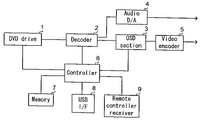
- FIG. 1 is a block diagram of a USB interface loading type DVD player according to the present invention
- FIG. 2 is a flowchart of operation of programmed playback performed by the USB interface loading type DVD player according to the invention
- FIG. 3 is a diagram showing an example of a program screen
- FIG. 4 is a flowchart for creating program setting information
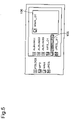
- FIG. 5 is a diagram showing an example of a program screen
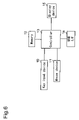
- FIG. 6 is a schematic configuration diagram of a personal computer
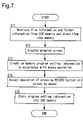
- FIG. 7 is a flowchart for operation of storing program setting information into a USB memory in the personal computer.
- FIG. 8 is a diagram showing an example of a program screen.
- FIG. 1 shows a block diagram of a USB interface loading type DVD player according to the invention.
- the USB interface loading type DVD player includes: a DVD drive 1 , a decoder 2 , an OSD section 3 , an audio DA converter 4 , a video encoder 5 , a controller 6 , a memory 7 , a USB interface 8 , and a remote controller receiver 9 .
- the DVD drive I retrieves video-audio information from a disc and outputs it to the decoder 2 .
- the decoder 2 extends the video-audio information inputted from the DVD drive 1 , and outputs a digital audio signal to the audio DA converter 4 , and outputs a digital image signal to the OSD section 3 .
- the audio DA converter 4 converts the digital audio signal into an analog audio signal and outputs it to an external speaker (not shown).
- the OSD section 3 in response to instructions given from the controller 6 , generates a graphic character signal, synthesizes it with the digital image signal from the decoder 2 to thereby generate a synthetic signal, and outputs the synthetic signal to the video encoder 5 .
- the OSD section 3 also outputs a graphic character signal to the video encoder 5 without synthesizing it.
- the video encoder 5 converts the synthetic signal and graphic character signal from the OSD section 3 into video signals, and outputs them to an external display device (not shown).
- the USB interface 8 is an interface to which a USB memory, not shown, can be attached.
- the decoder 2 extends a file retrieved by the controller 6 from the USB memory via the USB interface 8 , and outputs a digital audio signal to the audio DA converter 4 and outputs a digital image signal to the OSD section 3 .
- the remote controller receiver 9 receives an infrared signal from a remote controller, not shown, and outputs a code signal to the controller 6 .
- step S 21 the controller 6 retrieves the file information and the folder information from the USB memory via the USB interface 8 and stores them into the memory 7 .
- the file information includes file position information, file name information, address information, and size information.
- the folder information includes folder position information and folder name information.
- step S 22 the controller 6 reads the USB memory via the USB interface 8 and determines whether or not the USB memory stores program setting information to be described later.
- the program setting information has not yet been stored in the USB memory (N in step S 22 ); therefore, the operation proceeds to step S 24 .
- step S 24 the controller 6 becomes ready for accepting key input, and when a program screen display key is inputted on the remote controller, the controller 6 receives a corresponding code signal from the remote controller receiver 9 , and the operation proceeds to step S 25 .
- step S 25 the controller 6 determines whether or not the memory 7 stores program setting information.
- the memory 7 stores no program setting information (N in step S 25 ); therefore, the operation proceeds to step S 28 .
- step S 28 the controller 6 , based on the file information and the folder information stored in the memory 7 , gives the OSD section 3 instructions for generating a graphic character signal, and the display device displays a normal program screen as shown in FIG. 3 .
- a folder name of a folder located immediately below a root folder is displayed with a mark 101 provided at the head of this folder name
- a file name of an MP3 file located immediately below the root folder is displayed with a mark 102 provided at the head of this file name
- a file name of a WMA file located immediately below the root folder is displayed with a mark 103 provided at the head of this file name
- a file name of a JPEG file located immediately below the root folder is displayed with a mark 104 provided at the head of this file name.
- a highlight 105 and a selected file display region 106 are additionally displayed. On this screen, the user can set file playback sequence.
- step S 29 the operation transits to operation shown in FIG. 4 .
- step S 41 the controller 6 substitutes 1 for a variable I.
- the highlight 105 can be moved by remote control, and a file name can be selected by the highlight 105 .
- a DETERMINE key is inputted on the remote controller under the condition that a folder name of a folder located immediately below the root folder is selected by the highlight 105 , file and folder names of a file and folder located immediately below the folder with the selected folder name are displayed, and also here, a file name can be selected by the highlight 105 .
- a file name of a file located immediately below a folder in any hierarchy can be selected by the highlight 105 .
- step S 42 the DETERMINE key is inputted on the remote controller under the condition that the file name is selected by the highlight 105 as described above, and the controller 6 receives a corresponding code signal, and then the operation proceeds to step S 43 .
- step S 43 the controller 6 gives the OSD section 3 instructions for generating a graphic character signal, and the file name selected by the highlight 105 is displayed on the selected file display region 106 with a corresponding mark provided at the head of this file name.
- FIG. 5 shows a screen in a case where the file name “WMA — 01” is selected by the highlight 105 and the DETERMINE key is inputted in FIG. 3 .
- step S 44 the controller 6 stores the file position information and file name information corresponding to the file name selected by the highlight 105 into the memory 7 in correspondence with program number information indicating the variable I.
- step S 45 the controller 6 increments the variable I by 1, and thereafter the same operation is repeated every time a file name is selected and determined in step S 42 .
- step S 45 a PLAYBACK key is inputted on the remote controller and the controller 6 receives a corresponding code signal from the remote controller receiver 9 (step S 30 of FIG. 2 ), and then in step S 31 , the controller 6 stores the program number information, file position information, and file name information stored in the memory 7 through the operation shown in FIG. 4 , as program setting information, into the USB memory via the USB interface 8 .
- step S 32 the controller 6 sequentially retrieves files, in an ascending order of numbers indicated by the program number information stored in the memory 7 , from addresses in the USB memory indicated by the address information stored in the memory 7 corresponding to the file position information and file name information corresponding to the program number information, whereby the files are sequentially played back.
- step S 21 upon attachment of a USB memory storing the program setting information as described above to the USB interface 8 , file information and folder information are retrieved from the USB memory and then stored into the memory 7 in step S 21 , and then the controller 6 determines whether or not the USB memory stores the program setting information in step S 22 .
- the USB memory stores the program setting information (Y in step S 22 ); therefore, the operation proceeds to step S 23 .
- step S 23 the controller 6 retrieves the program setting information from the USB memory via the USB interface 8 , and then stores it into the memory 7 .
- step S 24 the controller 6 becomes ready for accepting key input, and when a PROGRAM SCREEN DISPLAY key is inputted on the remote controller, the controller 6 receives a corresponding code signal from the remote controller receiver 9 , and then the operation proceeds to step S 25 .
- step S 25 the controller 6 determines whether or not the memory 7 stores program setting information.
- the memory 7 stores the program setting information (Y in step S 25 ); therefore, the operation proceeds to step S 26 .
- step S 26 the controller 6 , based on the file information, folder information, and program setting information stored in the memory 7 , gives the OSD section 3 instructions for generating a graphic character signal, and the display device displays a program screen.
- the controller 6 based on the file information, folder information, and program setting information stored in the memory 7 , gives the OSD section 3 instructions for generating a graphic character signal, and the display device displays a program screen.
- corresponding file names are displayed on the selected file display region 106 in an ascending order of numbers indicated by the program number information, with corresponding marks provided at the heads of these file names. That is, the setting contents for the file playback sequence in step S 29 described above are displayed.
- step S 27 the PLAYBACK key is inputted on the remote controller and the controller 6 receives a corresponding code signal from the remote controller receiver 9 , and then in step S 32 , the controller 6 sequentially retrieves files, in an ascending order of numbers indicated by the program number information stored in the memory 7 , from addresses in the USB memory indicated by the address information stored in the memory 7 corresponding to the file position information and file name information corresponding to the program number information, whereby the files are sequentially played back.
- USB interface loading type DVD player As described above, once the user sets playback sequence for files stored in the USB memory, the files can be subsequently played back in the set playback sequence without requiring resetting operation in both of the USB interface loading type DVD player used for this setting and another USB interface loading type DVD player according to the invention, which is highly convenient.
- FIG. 6 shows a schematic configuration diagram of the personal computer.
- the personal computer shown in FIG. 6 includes: a key input device 10 , a mouse device 11 , a memory 12 , a controller 13 , a USB interface 14 , and a display device 15 .
- step S 71 the controller 13 retrieves the file information and the folder information from the USB memory via the USB interface 14 , and stores them into the memory 12 .
- the file information and the folder information are same as those described above.
- step S 72 the controller 13 , based on the file information and folder information stored in the memory 12 , generates a display signal and outputs it to the display device 15 .
- the display device 15 displays such a screen that includes a screen similar to the program screen displayed in step S 28 of the flowchart shown in FIG. 2 and an additional button marked “RECORD”.
- FIG. 8 shows a display example. On this screen, the user can set file playback sequence.
- step S 73 the operation proceeds to the operation in the flowchart shown in FIG. 4 .
- step S 41 the controller 13 substitutes 1 for the variable 1 .
- a highlight 107 can be moved by click operation of the mouse device 11 , and a file name can be selected by the highlight 107 .
- double click operation is performed with the mouse device 11 under the condition that a folder name of a folder located immediately below the root folder is selected by the highlight 107 , file and folder names of a file and folder located immediately below the folder with the selected folder name are displayed, and also here, a file name can be selected by the highlight 107 .
- a file name of a file located immediately below a folder in any hierarchy can be selected by the highlight 107 .
- step S 42 double click operation is performed with the mouse device 11 under the condition that the file name is selected by the highlight 107 as described above, and the controller 13 receives an operation signal, and then the operation proceeds to step S 43 .
- step S 43 the controller 13 generates a display signal and outputs it to the display device 15 , and the file name selected by the highlight 107 is displayed on a selected file display region 108 of the display device 15 , with a corresponding mark provided at the head of this file name.
- step S 44 the controller 13 stores the file position information and file name information corresponding to the file name selected by the highlight 107 into the memory 12 in correspondence with program number information indicating the variable I.
- step S 45 the controller 13 increments the variable I by 1, and thereafter the same operation is repeated every time a file name is selected and determined in step S 42 .
- step S 45 when step S 45 has been completed, a button 109 marked “RECORD” on the screen is pressed through click operation of the mouse device 11 (step S 74 in FIG. 7 ), and then in step S 75 , the controller 13 stores, as program setting information, the program number information, file position information, and file name information, which have been stored into the memory 12 through the operation shown in FIG. 4 , into the USB memory via the USB interface 14 .
Landscapes
- Engineering & Computer Science (AREA)
- Multimedia (AREA)
- Information Retrieval, Db Structures And Fs Structures Therefor (AREA)
- Television Signal Processing For Recording (AREA)
- Indexing, Searching, Synchronizing, And The Amount Of Synchronization Travel Of Record Carriers (AREA)
- Management Or Editing Of Information On Record Carriers (AREA)
Abstract
A playback device includes: a USB interface; an information creation section for creating, based on operation in an operation section, information indicating playback sequence for files stored in an external storage device connected to the USB interface; a storage section for storing the created information into the external storage device connected to the USB interface; and a playback section for, based on information stored in an external storage device connected to the USB interface and indicating the playback sequence for the files stored in the external storage device, sequentially playing back the files.
Description
- This application is based on Japanese Patent Application No. 2006-289181 filed on Oct. 24, 2006, the contents of which are hereby incorporated by reference.
- 1. Field of the Invention
- The present invention relates to a playback device having a USB interface.
- 2. Description of Related Art
- Conventionally, a playback device has been developed to which a USB memory is attachable and which is capable of playing back a file stored in the USB memory (see JP-A-2005-72799 for an example of such a playback device).
- Moreover, a so-called playback device with programmed playback capabilities has been conventionally developed which can play back musical pieces recorded on a CD or a MD in sequence set by the user. Developed as such a playback device is the one capable of storing into the main body thereof the sequence of musical pieces set by the user.
- Thus, it is possible to combine together the playback devices described above to develop a playback device capable of performing program playback on files stored in a USB memory and storing into the main body thereof file playback sequence set by the user. With such a playback device, once the user sets file playback sequence, programmed playback can be achieved without subsequently requiring resetting operation.
- However, with the playback device described above, to perform programmed playback with a USB memory attached to a playback device different from the playback device storing the file playback sequence in the main body thereof, since this playback device does not store the file playback sequence, the user is required to reset the playback sequence. This brings about a problem of low convenience.
- It is an object of the present invention to provide a highly convenient playback device and computer program capable of performing programmed playback in any playback device by only one setting operation without subsequently requiring resetting operation.
- To achieve the object described above, a playback device according to one aspect of the present invention includes: a USB interface; an information creation section for creating, based on operation in an operation section, information indicating playback sequence for files stored in an external storage device connected to the USB interface; and a storage section for storing the created information into the external storage device connected to the USB interface.
- To achieve the object described above, a playback device according to another aspect of the invention includes a USB interface; and a playback section for, based on information stored in an external storage device connected to the USB interface and indicating play back sequence for files stored in the external storage device, sequentially playing back the files.
- According to such configuration, just one setting operation subsequently permits, in any playback device, programmed playback without requiring resetting operation, which improves convenience.
- To achieve the object described above, a computer program according to still another aspect of the invention includes a computer program code for causing a computer having an operation section and a USB interface to execute the steps of: creating, based on operation in the operation section, information indicating playback sequence for files stored in an external storage device connected to the USB interface; and storing the created information into the external storage device connected to the USB interface.
-
FIG. 1 is a block diagram of a USB interface loading type DVD player according to the present invention; -
FIG. 2 is a flowchart of operation of programmed playback performed by the USB interface loading type DVD player according to the invention; -
FIG. 3 is a diagram showing an example of a program screen; -
FIG. 4 is a flowchart for creating program setting information; -
FIG. 5 is a diagram showing an example of a program screen; -
FIG. 6 is a schematic configuration diagram of a personal computer; -
FIG. 7 is a flowchart for operation of storing program setting information into a USB memory in the personal computer; and -
FIG. 8 is a diagram showing an example of a program screen. - Embodiments of the present invention will be described below with reference to the accompanying drawings.
FIG. 1 shows a block diagram of a USB interface loading type DVD player according to the invention. - The USB interface loading type DVD player according to the invention includes: a
DVD drive 1, adecoder 2, anOSD section 3, anaudio DA converter 4, avideo encoder 5, acontroller 6, amemory 7, aUSB interface 8, and aremote controller receiver 9. - The DVD drive I retrieves video-audio information from a disc and outputs it to the
decoder 2. Thedecoder 2 extends the video-audio information inputted from theDVD drive 1, and outputs a digital audio signal to theaudio DA converter 4, and outputs a digital image signal to theOSD section 3. Theaudio DA converter 4 converts the digital audio signal into an analog audio signal and outputs it to an external speaker (not shown). TheOSD section 3, in response to instructions given from thecontroller 6, generates a graphic character signal, synthesizes it with the digital image signal from thedecoder 2 to thereby generate a synthetic signal, and outputs the synthetic signal to thevideo encoder 5. In addition, theOSD section 3 also outputs a graphic character signal to thevideo encoder 5 without synthesizing it. Thevideo encoder 5 converts the synthetic signal and graphic character signal from theOSD section 3 into video signals, and outputs them to an external display device (not shown). TheUSB interface 8 is an interface to which a USB memory, not shown, can be attached. Thedecoder 2 extends a file retrieved by thecontroller 6 from the USB memory via theUSB interface 8, and outputs a digital audio signal to theaudio DA converter 4 and outputs a digital image signal to theOSD section 3. Theremote controller receiver 9 receives an infrared signal from a remote controller, not shown, and outputs a code signal to thecontroller 6. - Operation of programmed playback performed in the USB interface loading type DVD player according to the invention with the configuration described above will be described below, following a flowchart shown in
FIG. 2 . - Upon attachment of a USB memory previously storing files, file information, and folder information but not storing program setting information to the
USB interface 8, in step S21, thecontroller 6 retrieves the file information and the folder information from the USB memory via theUSB interface 8 and stores them into thememory 7. The file information includes file position information, file name information, address information, and size information. The folder information includes folder position information and folder name information. - Then in step S22, the
controller 6 reads the USB memory via theUSB interface 8 and determines whether or not the USB memory stores program setting information to be described later. Here, the program setting information has not yet been stored in the USB memory (N in step S22); therefore, the operation proceeds to step S24. - In step S24, the
controller 6 becomes ready for accepting key input, and when a program screen display key is inputted on the remote controller, thecontroller 6 receives a corresponding code signal from theremote controller receiver 9, and the operation proceeds to step S25. - In step S25, the
controller 6 determines whether or not thememory 7 stores program setting information. Here, thememory 7 stores no program setting information (N in step S25); therefore, the operation proceeds to step S28. - In step S28, the
controller 6, based on the file information and the folder information stored in thememory 7, gives theOSD section 3 instructions for generating a graphic character signal, and the display device displays a normal program screen as shown inFIG. 3 . Here, a folder name of a folder located immediately below a root folder is displayed with amark 101 provided at the head of this folder name, a file name of an MP3 file located immediately below the root folder is displayed with amark 102 provided at the head of this file name, a file name of a WMA file located immediately below the root folder is displayed with amark 103 provided at the head of this file name, and a file name of a JPEG file located immediately below the root folder is displayed with amark 104 provided at the head of this file name. In addition, ahighlight 105 and a selectedfile display region 106 are additionally displayed. On this screen, the user can set file playback sequence. - Then in step S29, the operation transits to operation shown in
FIG. 4 . - In step S41, the
controller 6substitutes 1 for a variable I. - Here, the
highlight 105 can be moved by remote control, and a file name can be selected by thehighlight 105. When a DETERMINE key is inputted on the remote controller under the condition that a folder name of a folder located immediately below the root folder is selected by thehighlight 105, file and folder names of a file and folder located immediately below the folder with the selected folder name are displayed, and also here, a file name can be selected by thehighlight 105. Similarly, a file name of a file located immediately below a folder in any hierarchy can be selected by thehighlight 105. - In step S42, the DETERMINE key is inputted on the remote controller under the condition that the file name is selected by the
highlight 105 as described above, and thecontroller 6 receives a corresponding code signal, and then the operation proceeds to step S43. In step S43, thecontroller 6 gives theOSD section 3 instructions for generating a graphic character signal, and the file name selected by thehighlight 105 is displayed on the selectedfile display region 106 with a corresponding mark provided at the head of this file name.FIG. 5 shows a screen in a case where the file name “WMA—01” is selected by thehighlight 105 and the DETERMINE key is inputted inFIG. 3 . - Then in step S44, the
controller 6 stores the file position information and file name information corresponding to the file name selected by thehighlight 105 into thememory 7 in correspondence with program number information indicating the variable I. - Subsequently, in step S45, the
controller 6 increments the variable I by 1, and thereafter the same operation is repeated every time a file name is selected and determined in step S42. - Then when step S45 has been completed, a PLAYBACK key is inputted on the remote controller and the
controller 6 receives a corresponding code signal from the remote controller receiver 9 (step S30 ofFIG. 2 ), and then in step S31, thecontroller 6 stores the program number information, file position information, and file name information stored in thememory 7 through the operation shown inFIG. 4 , as program setting information, into the USB memory via theUSB interface 8. - Subsequently, in step S32, the
controller 6 sequentially retrieves files, in an ascending order of numbers indicated by the program number information stored in thememory 7, from addresses in the USB memory indicated by the address information stored in thememory 7 corresponding to the file position information and file name information corresponding to the program number information, whereby the files are sequentially played back. - Next, upon attachment of a USB memory storing the program setting information as described above to the
USB interface 8, file information and folder information are retrieved from the USB memory and then stored into thememory 7 in step S21, and then thecontroller 6 determines whether or not the USB memory stores the program setting information in step S22. Here, the USB memory stores the program setting information (Y in step S22); therefore, the operation proceeds to step S23. - In step S23, the
controller 6 retrieves the program setting information from the USB memory via theUSB interface 8, and then stores it into thememory 7. - Then in step S24, the
controller 6 becomes ready for accepting key input, and when a PROGRAM SCREEN DISPLAY key is inputted on the remote controller, thecontroller 6 receives a corresponding code signal from theremote controller receiver 9, and then the operation proceeds to step S25. - In step S25, the
controller 6 determines whether or not thememory 7 stores program setting information. Here, thememory 7 stores the program setting information (Y in step S25); therefore, the operation proceeds to step S26. - In step S26, the
controller 6, based on the file information, folder information, and program setting information stored in thememory 7, gives theOSD section 3 instructions for generating a graphic character signal, and the display device displays a program screen. Here, in addition to normal display contents provided in step S28 described above, corresponding file names are displayed on the selectedfile display region 106 in an ascending order of numbers indicated by the program number information, with corresponding marks provided at the heads of these file names. That is, the setting contents for the file playback sequence in step S29 described above are displayed. - Then in step S27, the PLAYBACK key is inputted on the remote controller and the
controller 6 receives a corresponding code signal from theremote controller receiver 9, and then in step S32, thecontroller 6 sequentially retrieves files, in an ascending order of numbers indicated by the program number information stored in thememory 7, from addresses in the USB memory indicated by the address information stored in thememory 7 corresponding to the file position information and file name information corresponding to the program number information, whereby the files are sequentially played back. - With the USB interface loading type DVD player according to the invention as described above, once the user sets playback sequence for files stored in the USB memory, the files can be subsequently played back in the set playback sequence without requiring resetting operation in both of the USB interface loading type DVD player used for this setting and another USB interface loading type DVD player according to the invention, which is highly convenient.
- Moreover, the storage of the program setting information into the USB memory can be achieved by a personal computer as shown below.
FIG. 6 shows a schematic configuration diagram of the personal computer. The personal computer shown inFIG. 6 includes: akey input device 10, amouse device 11, amemory 12, acontroller 13, aUSB interface 14, and adisplay device 15. - Upon start of retrieving a control program stored in the
memory 12 by thecontroller 13 under the condition that a USB memory, not shown, storing files, file information, and folder information but not storing program setting information is attached to theUSB interface 14, a flow shown inFIG. 7 starts. - In step S71, the
controller 13 retrieves the file information and the folder information from the USB memory via theUSB interface 14, and stores them into thememory 12. The file information and the folder information are same as those described above. - Then in step S72, the
controller 13, based on the file information and folder information stored in thememory 12, generates a display signal and outputs it to thedisplay device 15. Then, thedisplay device 15 displays such a screen that includes a screen similar to the program screen displayed in step S28 of the flowchart shown inFIG. 2 and an additional button marked “RECORD”.FIG. 8 shows a display example. On this screen, the user can set file playback sequence. - Then in step S73, the operation proceeds to the operation in the flowchart shown in
FIG. 4 . - In step S41, the
controller 13substitutes 1 for the variable 1. - Here, a
highlight 107 can be moved by click operation of themouse device 11, and a file name can be selected by thehighlight 107. When double click operation is performed with themouse device 11 under the condition that a folder name of a folder located immediately below the root folder is selected by thehighlight 107, file and folder names of a file and folder located immediately below the folder with the selected folder name are displayed, and also here, a file name can be selected by thehighlight 107. Similarly, a file name of a file located immediately below a folder in any hierarchy can be selected by thehighlight 107. - In step S42, double click operation is performed with the
mouse device 11 under the condition that the file name is selected by thehighlight 107 as described above, and thecontroller 13 receives an operation signal, and then the operation proceeds to step S43. In step S43, thecontroller 13 generates a display signal and outputs it to thedisplay device 15, and the file name selected by thehighlight 107 is displayed on a selectedfile display region 108 of thedisplay device 15, with a corresponding mark provided at the head of this file name. - Then in step S44, the
controller 13 stores the file position information and file name information corresponding to the file name selected by thehighlight 107 into thememory 12 in correspondence with program number information indicating the variable I. - Subsequently, in step S45, the
controller 13 increments the variable I by 1, and thereafter the same operation is repeated every time a file name is selected and determined in step S42. - Then when step S45 has been completed, a button 109 marked “RECORD” on the screen is pressed through click operation of the mouse device 11 (step S74 in
FIG. 7 ), and then in step S75, thecontroller 13 stores, as program setting information, the program number information, file position information, and file name information, which have been stored into thememory 12 through the operation shown inFIG. 4 , into the USB memory via theUSB interface 14. - Upon attachment of the USB memory storing the program setting information in this manner to the USB interface loading type DVD player according to the invention described above, through the aforementioned processing of steps S21, 22, 23, 24, 25, 26, 27, and 32 of
FIG. 2 in this order, the files stored in the USB memory are sequentially played back in the playback sequence set by the personal computer. Therefore, just one setting operation performed on the personal computer permits, in any USB interface loading type DVD player, subsequent playback of the files in the set playback sequence without requiring resetting operation, which is highly convenient.
Claims (4)
1. A playback device comprising:
a USB interface;
an information creation section for creating, based on operation in an operation section, information indicating playback sequence for files stored in an external storage device connected to the USB interface; and
a storage section for storing the created information into the external storage device connected to the USB interface.
2. A playback device comprising:
a USB interface; and
a playback section for, based on information stored in an external storage device connected to the USB interface and indicating play back sequence for files stored in the external storage device, sequentially playing back the files.
3. The playback device according to claim 1 , further comprising a playback section for, based on information stored in an external storage device connected to the USB interface and indicating the playback sequence for the files stored in the external storage device, sequentially playing back the files.
4. A computer program comprising a computer program code for causing a computer having an operation section and a USB interface to execute the steps of: creating, based on operation in the operation section, information indicating playback sequence for files stored in an external storage device connected to the USB interface; and storing the created information into the external storage device connected to the USB interface.
Applications Claiming Priority (2)
| Application Number | Priority Date | Filing Date | Title |
|---|---|---|---|
| JP2006-289181 | 2006-10-24 | ||
| JP2006289181A JP2008108334A (en) | 2006-10-24 | 2006-10-24 | Reproducing device and program |
Publications (1)
| Publication Number | Publication Date |
|---|---|
| US20080098131A1 true US20080098131A1 (en) | 2008-04-24 |
Family
ID=39319390
Family Applications (1)
| Application Number | Title | Priority Date | Filing Date |
|---|---|---|---|
| US11/902,868 Abandoned US20080098131A1 (en) | 2006-10-24 | 2007-09-26 | Playback device and computer program |
Country Status (2)
| Country | Link |
|---|---|
| US (1) | US20080098131A1 (en) |
| JP (1) | JP2008108334A (en) |
Cited By (2)
| Publication number | Priority date | Publication date | Assignee | Title |
|---|---|---|---|---|
| US20080109765A1 (en) * | 2006-11-03 | 2008-05-08 | Samsung Electronics Co., Ltd. | Display apparatus and information update method thereof |
| US20100323954A1 (en) * | 2009-06-17 | 2010-12-23 | Amgen Inc. | Chimeric polypeptides and uses thereof |
Citations (5)
| Publication number | Priority date | Publication date | Assignee | Title |
|---|---|---|---|---|
| US20040236568A1 (en) * | 2001-09-10 | 2004-11-25 | Guillen Newton Galileo | Extension of m3u file format to support user interface and navigation tasks in a digital audio player |
| US20040252604A1 (en) * | 2001-09-10 | 2004-12-16 | Johnson Lisa Renee | Method and apparatus for creating an indexed playlist in a digital audio data player |
| US20070033225A1 (en) * | 2005-08-04 | 2007-02-08 | Microsoft Corporation | Media data representation and management |
| US20070061497A1 (en) * | 2005-09-14 | 2007-03-15 | Sony Corporation | Player and playing method and program |
| US20070083556A1 (en) * | 2005-08-12 | 2007-04-12 | Microsoft Corporation | Like processing of owned and for-purchase media |
-
2006
- 2006-10-24 JP JP2006289181A patent/JP2008108334A/en active Pending
-
2007
- 2007-09-26 US US11/902,868 patent/US20080098131A1/en not_active Abandoned
Patent Citations (5)
| Publication number | Priority date | Publication date | Assignee | Title |
|---|---|---|---|---|
| US20040236568A1 (en) * | 2001-09-10 | 2004-11-25 | Guillen Newton Galileo | Extension of m3u file format to support user interface and navigation tasks in a digital audio player |
| US20040252604A1 (en) * | 2001-09-10 | 2004-12-16 | Johnson Lisa Renee | Method and apparatus for creating an indexed playlist in a digital audio data player |
| US20070033225A1 (en) * | 2005-08-04 | 2007-02-08 | Microsoft Corporation | Media data representation and management |
| US20070083556A1 (en) * | 2005-08-12 | 2007-04-12 | Microsoft Corporation | Like processing of owned and for-purchase media |
| US20070061497A1 (en) * | 2005-09-14 | 2007-03-15 | Sony Corporation | Player and playing method and program |
Cited By (3)
| Publication number | Priority date | Publication date | Assignee | Title |
|---|---|---|---|---|
| US20080109765A1 (en) * | 2006-11-03 | 2008-05-08 | Samsung Electronics Co., Ltd. | Display apparatus and information update method thereof |
| US8635538B2 (en) * | 2006-11-03 | 2014-01-21 | Samsung Electronics Co., Ltd. | Display apparatus and information update method thereof |
| US20100323954A1 (en) * | 2009-06-17 | 2010-12-23 | Amgen Inc. | Chimeric polypeptides and uses thereof |
Also Published As
| Publication number | Publication date |
|---|---|
| JP2008108334A (en) | 2008-05-08 |
Similar Documents
| Publication | Publication Date | Title |
|---|---|---|
| US20090089651A1 (en) | System and method for dynamic content insertion from the internet into a multimedia work | |
| JP5631639B2 (en) | AV equipment | |
| JP3771943B2 (en) | Optical disc, optical disc reproducing apparatus, and optical disc manufacturing method | |
| KR100700814B1 (en) | Apparatus and method for playing text files in digital video equipment | |
| US6525251B1 (en) | Method of displaying the title and words of songs on a digital music player | |
| JP4768828B2 (en) | Method and apparatus for defining entry points in a data stream | |
| US8340508B2 (en) | Record/playback apparatus and control method therefor | |
| JP3893279B2 (en) | Data entry via screen display | |
| JP2011108043A (en) | Screen display control device and apparatus having the same | |
| JP2002313070A (en) | Recording and playback device | |
| JP2008108334A (en) | Reproducing device and program | |
| JP4872249B2 (en) | On-screen display device | |
| KR100545810B1 (en) | Display method of background image on optical disk device | |
| JP2009105584A (en) | Reproducer | |
| JP3763316B2 (en) | Playback device | |
| JP3852477B2 (en) | Playback apparatus and playback method | |
| KR100588945B1 (en) | How to enter menu codes for optical disc recording and playback devices | |
| US20100262910A1 (en) | Method and apparatus for processing virtual image files | |
| JP5234598B2 (en) | Content data playback device | |
| JP5633897B2 (en) | Audio equipment | |
| EP1858019A2 (en) | Optical disc reproducing apparatus | |
| TW201516716A (en) | System for watching multimedia file and method thereof | |
| KR20070043114A (en) | How to display the menu screen on the optical disc device | |
| KR101061010B1 (en) | How to save and display bookmark classification by property | |
| KR100782185B1 (en) | How to play disc in optical disc device |
Legal Events
| Date | Code | Title | Description |
|---|---|---|---|
| AS | Assignment |
Owner name: FUNAI ELECTRIC CO., LTD., JAPAN Free format text: ASSIGNMENT OF ASSIGNORS INTEREST;ASSIGNOR:ONISHI, YOSHIKAZU;REEL/FRAME:019948/0693 Effective date: 20070903 |
|
| STCB | Information on status: application discontinuation |
Free format text: ABANDONED -- FAILURE TO RESPOND TO AN OFFICE ACTION |