US11144192B2 - Customizable user interface for use with digital ink - Google Patents
Customizable user interface for use with digital ink Download PDFInfo
- Publication number
- US11144192B2 US11144192B2 US16/226,619 US201816226619A US11144192B2 US 11144192 B2 US11144192 B2 US 11144192B2 US 201816226619 A US201816226619 A US 201816226619A US 11144192 B2 US11144192 B2 US 11144192B2
- Authority
- US
- United States
- Prior art keywords
- digital ink
- objects
- input
- ink input
- document
- Prior art date
- Legal status (The legal status is an assumption and is not a legal conclusion. Google has not performed a legal analysis and makes no representation as to the accuracy of the status listed.)
- Active
Links
Images




Classifications
-
- G—PHYSICS
- G06—COMPUTING OR CALCULATING; COUNTING
- G06F—ELECTRIC DIGITAL DATA PROCESSING
- G06F3/00—Input arrangements for transferring data to be processed into a form capable of being handled by the computer; Output arrangements for transferring data from processing unit to output unit, e.g. interface arrangements
- G06F3/01—Input arrangements or combined input and output arrangements for interaction between user and computer
- G06F3/048—Interaction techniques based on graphical user interfaces [GUI]
- G06F3/0487—Interaction techniques based on graphical user interfaces [GUI] using specific features provided by the input device, e.g. functions controlled by the rotation of a mouse with dual sensing arrangements, or of the nature of the input device, e.g. tap gestures based on pressure sensed by a digitiser
- G06F3/0488—Interaction techniques based on graphical user interfaces [GUI] using specific features provided by the input device, e.g. functions controlled by the rotation of a mouse with dual sensing arrangements, or of the nature of the input device, e.g. tap gestures based on pressure sensed by a digitiser using a touch-screen or digitiser, e.g. input of commands through traced gestures
- G06F3/04883—Interaction techniques based on graphical user interfaces [GUI] using specific features provided by the input device, e.g. functions controlled by the rotation of a mouse with dual sensing arrangements, or of the nature of the input device, e.g. tap gestures based on pressure sensed by a digitiser using a touch-screen or digitiser, e.g. input of commands through traced gestures for inputting data by handwriting, e.g. gesture or text
-
- G—PHYSICS
- G06—COMPUTING OR CALCULATING; COUNTING
- G06F—ELECTRIC DIGITAL DATA PROCESSING
- G06F40/00—Handling natural language data
- G06F40/10—Text processing
- G06F40/166—Editing, e.g. inserting or deleting
- G06F40/174—Form filling; Merging
-
- G—PHYSICS
- G06—COMPUTING OR CALCULATING; COUNTING
- G06F—ELECTRIC DIGITAL DATA PROCESSING
- G06F40/00—Handling natural language data
- G06F40/10—Text processing
- G06F40/166—Editing, e.g. inserting or deleting
- G06F40/171—Editing, e.g. inserting or deleting by use of digital ink
Definitions
- This disclosure relates generally to providing a customizable user interface for use with digital ink and, more particularly, to an improved method of and system for providing customizable documents that are responsive to digital ink input.
- the instant application describes a device having one or more processors; and a memory in communication with the processors where the memory comprises executable instructions that, when executed by the processors, cause the device to perform functions of displaying a digital ink enabled document including one or more object s on a user interface screen, receiving a digital ink input for one of the objects in the digital ink enabled document, modifying the object or the digital ink input in response to the digital ink, and displaying the modified object or the digital ink input on the user interface screen, wherein modifying the object or the digital ink input is done based on the type of object and an examination of the digital ink input.
- the instant application describes a method for providing a customizable document, where the method includes the steps of displaying a digital ink enabled document including one or more objects on a user interface screen, receiving a digital ink input for one of the objects in the digital ink enabled document, modifying the object or the digital ink input in response to the digital ink input, and displaying the modified object or the digital ink input on the user interface screen, where the modifying is done based on the type of the one object and an examination of the digital ink input.
- the instant application describes a non-transitory computer readable medium on which are stored instructions that when executed cause a programmable device to display a digital ink enabled document including one or more objects on a user interface screen, receive a digital ink input for one of the one or more objects in the digital ink enabled document, modify the object or the digital ink input in response to the digital ink input, and display the modified object or the digital ink input on the user interface screen, where the modifying is done based on the type of object and an examination of the digital ink input.
- FIG. 1 depicts an example of a representative environment for providing and processing a customizable document that is responsive to digital ink input.
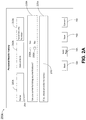
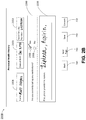
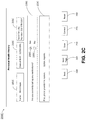
- FIG. 2A-2C depict example user interface (UI) screens displaying a customizable document containing one or more controllable objects that are responsive to digital ink input.
- UI user interface
- FIG. 2D depicts an example of how objects in a document may respond dynamically to different types of input.
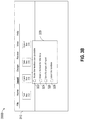
- FIGS. 3A-3B depict example UI screens displaying a toolbar for inserting modular controllable objects into a document.
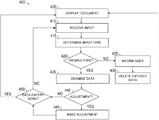
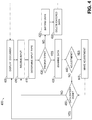
- FIG. 4 is a flow diagram showing an example method 400 providing and processing a customizable document that is responsive to digital ink input.
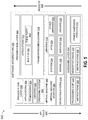
- FIG. 5 is a block diagram illustrating an example software architecture, various portions of which may be used in conjunction with various hardware architectures herein described.
- FIG. 6 is a block diagram illustrating components of an example machine configured to read instructions from a machine-readable medium and perform any of the features described herein.
- the process of filling out a form by hand has its own limitations.
- people may make mistakes, which could mean they have to start over, or cross over the mistake. This may lead to running out of space.
- the writer is physically limited by the paper size, which means that important information might have to be squeezed in, making the form harder to read.
- this description provides an improved method and system of providing and processing customizable documents that are responsive to digital ink input.
- the technical solution enables insertion of modular individually controllable objects into a variety of documents by using an easy to use interface.
- the modular objects may be customizable and responsive to digital ink such that depending on the digital ink inserted into the objects, the object may change.
- a textbox may expand to accommodate more text, when the method recognizes that the user is running out of space in the textbox.
- the controls may also enable ink recognition and conversion such that, for example, ink in textboxes could be converted to text or checkboxes could be converted to a digital checkbox when one is checked.
- the solution provides a customizable use-friendly user interface for entering text into a document in an efficient and accurate way which is convenient to both the user and the owner/creator of the document.
- benefits and advantages provided by such implementations can include, but are not limited to, a solution to the technical problems of having an inefficient, labor intensive and unreliable process of filling out forms.
- Technical solutions and implementations provided here optimize and improve the process of entering data into a form by enabling use of digital ink to enter data and by providing customizable objects in the form that are responsive to and change in response to digital ink.
- the benefits provided by these solutions include providing increased accuracy, reliability and efficiency in filling out documents by hand.
- FIG. 1 illustrates an example system 100 , upon which aspects of this disclosure may be implemented.
- the system 100 may include a user 110 operating a user device 120 which is connected through a network 130 to one or more other devices.
- the user 110 may be a person creating a document for use by one or more other users later.
- the user 110 may be an administrator or other employee of a business creating a form to be filled out by one or more clients, employees, or contractors of the business.
- the user 110 may create the document using an application running on the user device 120 .
- the document may then be stored locally on the user device 120 or may be transmitted via the network 130 to a server 140 for storage on a memory of the server 130 .
- the document may be transmitted directly to one or more other devices connected to the network 130 which may be used to modify the document (e.g., used to enter data into the document).
- the network 130 may be a wired or wireless network or a combination of wired and wireless networks.
- the server 140 may be configured to perform one or more steps of the methods disclosed herein. Alternatively, the one or more steps may be done by the device 120 and/or device 160 connected locally or remotely to the network 130 . In another configurations, some of the steps may be performed by the server 140 , and some may be performed by the device 120 and/or device 160 .
- the device 160 may be operated by a user 150 , who may be a client, an employee, or otherwise a person representing an entity that works with the business.
- the user device(s) 120 and 160 may include any stationary or mobile computing devices configured to provide a user interface for interaction with a user and configured to communicate via the network 130 .
- the user devices may include workstations, desktops, laptops, tablets, smart phones, cellular phones, personal data assistants (PDA), printers, scanners, telephone, or any other device that can be used to interact with a user.
- the user device 160 may be any device that can be used to enter digital ink.
- the user device 160 may be a tablet configured to work with a stylus to receive digital ink.
- the system 100 may be used in any enterprise or entity (e.g., an individual, a family or an enterprise) that could benefit from digitized data entry into one or more documents.
- the devices 130 and 160 are shown as being connected to the network 130 , they could be disconnected and operate independently from a network environment.
- the device 130 may be used to create a document which it can transfer directly (e.g., without the user of a network through a direct connection) to the user device 160 .
- the modified documents may then be stored and processed locally on the user device 160 .
- devices 130 and 160 are shown as separate device, in one implementation, they may be combined into one device. For example, in smaller enterprises, the same device may be used to both create the document and enter data into the document.
- the revised documents is transmitted via the network 130 to the server 140 for storage and/or processing.
- the revised document is transmitted to the device 120 for storage and/or processing.
- FIG. 2A depicts an example UI screen 200 A displaying a blank customizable document containing one or more controllable objects that are responsive to digital ink input.
- the screen 200 may include textboxes 205 A, 210 A, 215 A and 225 A, and a box 220 containing two checkboxes 230 A and 235 A.
- the textboxes 205 A, 210 A, 215 A and 225 A and checkboxes 230 A and 235 A may be configured to adapt to various types of input.
- each textbox may be configured to receive keyboard text, digital ink, voice input, or any other type of input mode available via the device presenting the screen 200 or another device.
- each textbox may be configured to receive specific type(s) of input.
- the customizable document is configured to respond dynamically to the type of input provided by for example changing the object accordingly to receive the proper type of input.
- FIG. 2D depicts how textboxes 205 D and 225 D may react differently to two different types of input.
- the pointer 265 may be displayed over an object when it is determined that the type of input received for the object (e.g., textbox 205 D) will be entered via a keyboard and/or a mouse.
- a corresponding cursor 270 e.g., vertical line
- the digital pen 275 may be displayed and the textbox 225 D may expand to allow for inking, when it is determined that the type of input selected for textbox 225 D is digital ink.
- the text fields may respond dynamically to the type of input selected.
- the document displaying the objects may be linked with or may include digital ink recognition features.
- textboxes may also be configured to be responsive to the input.
- textbox 225 A which is intended to be used for a list of medications, may be configured to adapt its size in response to the size of the received input.
- textbox 225 may be configured to automatically increase its size when the entered input reaches the end of the textbox. This is particularly useful for digital ink, as size and style of handwriting between different individuals varies widely. As a result, some may require much more space to write the same text than others. Furthermore, some people may have more information that they need to provide in response to a question.
- Modifying the size of the textbox enables users to have as much as space as required.
- modifying the size of the textbox may involve automatically adding a new line to the textbox once the user reaches the end of the first line. This is illustrated in FIG. 2B which depicts an example UI screen 200 B for when data has been entered into textboxes of the screen 200 A.
- the size of textbox 225 B is increased by adding an input line in the textbox 225 B. This can be repeated as long as needed.
- the textbox may be extended into the next page.
- the size of the current page may be increased by for example making the page scrollable.
- Each of the textboxes 205 B, 210 B, 215 B and 225 B may be adjustable in size based on user input. Alternatively, some may be adjustable in size, while others include other controllable properties. For example, textbox 210 B may be configured specifically for dates.
- an error message may be displayed on the screen 200 B notifying the user that the wrong type of information was entered. This may be done by displaying a popup box and may also include automatically deleting the data entered in the textbox 210 B.
- the textbox 215 B may be customized for receiving a social security number. This may mean, for example, that if characters other than numbers or a dash are entered, an error message may be displayed on the screen 200 B notifying the user that the wrong type of information was entered. This may also be done by displaying a popup box and may include automatically deleting the data recognized as the wrong type of data.
- Checkboxes 230 B and 235 B may be configured for receiving a checkmark or any other type of input that may be indicative of a user selecting one of the boxes 230 B and 235 B.
- the type of input may be any handwriting indicia or stroke over a checkbox. For example, a user may decide to fill in the checkbox 230 B instead of placing a checkmark. Another may decide to circle the checkbox 230 . Yet another may simply put a dot in the checkbox.
- the checkboxes 230 B and 235 B may be configured to interpret any or all of these types of inputs as a checkmark.
- FIGS. 2A-2C include a back button 240 for going back to a previous page of the document and a next page button 245 for going to the next page. In instances where there is no previous page or next page, these buttons may be automatically deactivated. Alternatively, inapplicable buttons may simply not be shown on the screen.
- FIGS. 2A-2C may also include a save button 250 for saving the entered data and a convert button 255 for converting the entered data.
- Saving the data may include storing the data in a local memory of the device displaying the screen or may involve transmitting the document for storage in a network server or other device.
- any digital ink may be automatically converted.
- the convert button 255 may be used for converting the entered data. This may include converting any digital ink data entered into the document to typed text and may be performed by an ink recognition application. Conversion may also include converting one type of entered data to a standardized format.
- each different object may include its own convert button for when the user desires to see the converted version of a specific object. Pressing the convert button 255 on the screen 200 B may cause the screen 200 C of FIG. 2C to be displayed on the display device. In an alternative implementation, the screen may turn into a split screen that displays the screen 200 B on one side and screen 200 C on another side.
- Screen 200 C includes a textbox 205 C which displays the text for the digital ink entered into textbox 250 B, and a textbox 210 C which shows the date entered into textbox 210 C as converted to a predetermined format.
- the predetermined format may be set by a creator of the document or may be a standard format. Converting a date entered into the textbox to a standard format may also the owner of the document to more easily review and/or parse the documents.
- Screen 200 C also displays a textbox 215 C which shows the numbers entered into the textbox 2158 converted into a predetermined format.
- the format is a standard format used for social security numbers. Other types of customizations may also be made.
- Screen 200 C also includes a text block 220 C for displaying the two checkboxes 230 C and 235 C.
- the checkbox 230 C is shown as having been checked, since the checkbox 230 included a mark on the checkbox. In this manner, any indication for marking a checkbox can be converted to a standard checkmark.
- textbox 225 C is shown has converted the digital ink entered into textbox 2258 to typed text. Moreover, since the typed text occupies a lot less space than the handwriting version, the size of the textbox 225 C has been reduced back to its original size.
- screen 200 C which contains converted data may also include a correct button 255 and a reset button 260 .
- the correct button 255 may be used to correct one or more of the converted texts. In one implementation, once the correct button 255 is pressed, the user has the option of selecting the text that needs to be corrected and correcting the mistake in one or more manners known in the art.
- the reset button 260 may be used when the user determines that it may be easier and/or more efficient to reenter the entire text than to correct all of the mistakes.
- the example UI screen provides easy to use modular controllable objects that are responsive to input and can be utilized as desired to receive, covert, review, correct and organize data.
- FIG. 3A depicts an example user interface 300 A displaying a toolbar for inserting modular controllable objects into a document.
- icons for inserting ink responsive objects into the document are displayed. These icons may include an icon for a textbox 312 , checkbox 314 , date box 316 and custom box 318 .
- the textbox icon 312 may insert an ink responsive textbox into the document. This may mean that the textbox is enabled to receive, interpret and convert digital ink.
- a checkbox inserted by selecting the checkbox icon 314 may be enabled to receive and in, interpret and convert any digital ink indicative of a checkbox being marked.
- the date box icon 316 may insert a text box configured to receive and convert digital ink in the form of a date.
- the custom box icon 318 may be used to insert a customized textbox for example for selecting a format to convert the entered text to.
- the toolbar may include other icons for insert different types of objects. For example, an icon for inserting a signature box may be included.
- another menu may be displayed to present the user with more options for customizing the inserted object. For example, upon pressing the textbox icon 312 , the screen 300 B of FIG. 3B may be displayed.
- FIG. 3B includes a popup box 320 for presenting options to select from for the textbox being insert.
- the popup box 320 may include an option 322 for choosing to make the size of the textbox adjustable based on input, an option 324 for entering a format for the entered data to either choose the format of the data that can be entered and/or covert the entered data to the selected format.
- the popup box 320 may also provide an option 326 for allowing the user to specify a type of input for the data. For example, the user may be able to choose only digital ink, or typed text and or any other type of input desired.
- the options may include an option 328 for labeling the textbox.
- the label could be any label the creator desires and may be used later to parse and/or obtain information from the document.
- a business may desire to keep track of the age range of its clients to better market itself. Such a business may label the textbox for provided for entering the date of birth. Once a desired number of documents have been collected from clients, the business may utilize an application to pull the date of birth information from the all the data collected from the forms for further analysis. Many other options may be presented as part of the popup box 320 or any other ways of providing the user with options to customize the inserted objects.
- FIG. 4 is a flow diagram depicting an example method 400 for providing and processing a customizable document that is responsive to digital ink input.
- the method 400 begins by displaying a document containing one or more controllable objects. This may be initiated by for example, opening the document on a user device. Once the document is displayed, method 400 waits until it receives an input from a user for one of the objects (e.g., a textbox, checkbox, signature box, etc.) in the document, at 410 .
- the method can receive input from a variety of sources and many different types.
- the input may be received directly from the device displaying the document via for example a user interface device (e.g., a keyboard or a microphone of the device for typed text or voice input) or it may be received from a screen of the device (e.g., a tablet screen using an onscreen keyboard or a hand gesture on the screen for digital ink).
- the input may also be received indirectly via a separate device for example a mobile device connected via a network to the device or for handwriting through the use of another device such as a light pen, a stylus or a mouse that enables handwriting to be made to a screen without necessarily requiring a user to handwrite over that screen.
- method 400 may utilize techniques such as determining the location of a curser in the document or utilizing pressure and location sensors, among others.
- method 400 determines that input has been received for an object in the document, the method proceeds to determine if the type of input received is appropriate for the object, at 415 . This may be done for objects that have been customized to receive specific types of input or when the document as whole has been customized to receive a specific type of input. For instances where the object or the entire document can receive various types of input, steps 415 - 430 may be eliminated.
- method 400 proceeds to determine, at 420 , if the type of data is appropriate for the object.
- method 500 may proceed to inform the user, at 425 . This may be done via displaying an error message, for example. In one implementation, after informing the user, method 400 proceeds to delete the incorrect type of data entered into the object, at 430 , before returning back to step 405 to display the document and wait for more input.
- method 400 proceeds to examine the entered data, at 435 . Based on the examined data, method 400 then determines if any adjustments to the object or the entered data are needed, at 440 . For example, method 400 may monitor the entered data to determine if it has reached the end of a textbox to determine if the size of the textbox should be increased to provide more space. Alternatively, method 400 may monitor the data to see if the format of the entered data is correct and if not automatically change the format to the correct predetermined format. When it is determined that an adjustment to the object or the entered data is needed, method 400 proceeds to make the adjustment, at 445 .
- method 400 proceeds to determine if data entry for that object is done, at 450 . This may be done for example, by monitoring the cursor to see if it is moved to a new object and/or by examining the passage of time. For example, when a predetermined amount of time has passed after the last indication of input was received, method 400 may determined that data entry for that object is done for the time being.
- digital ink when digital ink interacts with the objects in the document, they become more pen optimized. For example, they may store information about the type of input received and use that to optimize the document. This may mean, for example, that if a textbox needs to be expanded a majority of the time, the application running the document may automatically expand the textbox for future forms.
- method 400 may return to step 405 to display the document and wait for the next input, which could for example be for another object in the document.
- method 400 may return back to step 410 to receive the input being received and continue on as discussed above.
- the improved user interface may be used for displaying ink enabled forms that allow users to fill out forms using ink with an experience that is better than paper.
- the ink enabled forms may examine and respond to the ink that is input in the forms.
- the method includes an ability to insert modular objects (textboxes, signature boxes, checkboxes) into a variety of document types via an easy-to-use interface.
- FIG. 5 is a block diagram 500 illustrating an example software architecture 502 , various portions of which may be used in conjunction with various hardware architectures herein described, which may implement any of the above-described features.
- FIG. 5 is a non-limiting example of a software architecture and it will be appreciated that many other architectures may be implemented to facilitate the functionality described herein.
- the software architecture 502 may execute on hardware such as client devices, native application provider, web servers, server clusters, external services, and other servers.
- a representative hardware layer 504 includes a processing unit 506 and associated executable instructions 508 .
- the executable instructions 508 represent executable instructions of the software architecture 502 , including implementation of the methods, modules and so forth described herein.
- the hardware layer 504 also includes a memory/storage 510 , which also includes the executable instructions 508 and accompanying data.
- the hardware layer 504 may also include other hardware modules 512 .
- Instructions 508 held by processing unit 508 may be portions of instructions 508 held by the memory/storage 510 .
- the example software architecture 502 may be conceptualized as layers, each providing various functionality.
- the software architecture 502 may include layers and components such as an operating system (OS) 514 , libraries 516 , frameworks 518 , applications 520 , and a presentation layer 524 .
- OS operating system
- the applications 520 and/or other components within the layers may invoke API calls 524 to other layers and receive corresponding results 526 .
- the layers illustrated are representative in nature and other software architectures may include additional or different layers. For example, some mobile or special purpose operating systems may not provide the frameworks/middleware 518 .
- the OS 514 may manage hardware resources and provide common services.
- the OS 514 may include, for example, a kernel 528 , services 530 , and drivers 532 .
- the kernel 528 may act as an abstraction layer between the hardware layer 504 and other software layers.
- the kernel 528 may be responsible for memory management, processor management (for example, scheduling), component management, networking, security settings, and so on.
- the services 530 may provide other common services for the other software layers.
- the drivers 532 may be responsible for controlling or interfacing with the underlying hardware layer 504 .
- the drivers 532 may include display drivers, camera drivers, memory/storage drivers, peripheral device drivers (for example, via Universal Serial Bus (USB)), network and/or wireless communication drivers, audio drivers, and so forth depending on the hardware and/or software configuration.
- USB Universal Serial Bus
- the libraries 516 may provide a common infrastructure that may be used by the applications 520 and/or other components and/or layers.
- the libraries 516 typically provide functionality for use by other software modules to perform tasks, rather than rather than interacting directly with the OS 514 .
- the libraries 516 may include system libraries 534 (for example, C standard library) that may provide functions such as memory allocation, string manipulation, file operations.
- the libraries 516 may include API libraries 536 such as media libraries (for example, supporting presentation and manipulation of image, sound, and/or video data formats), graphics libraries (for example, an OpenGL library for rendering 2D and 3D graphics on a display), database libraries (for example, SQLite or other relational database functions), and web libraries (for example, WebKit that may provide web browsing functionality).
- the libraries 516 may also include a wide variety of other libraries 538 to provide many functions for applications 520 and other software modules.
- the frameworks 518 provide a higher-level common infrastructure that may be used by the applications 520 and/or other software modules.
- the frameworks 518 may provide various graphic user interface (GUI) functions, high-level resource management, or high-level location services.
- GUI graphic user interface
- the frameworks 518 may provide a broad spectrum of other APIs for applications 520 and/or other software modules.
- the applications 520 include built-in applications 520 and/or third-party applications 522 .
- built-in applications 520 may include, but are not limited to, a contacts application, a browser application, a location application, a media application, a messaging application, and/or a game application.
- Third-party applications 522 may include any applications developed by an entity other than the vendor of the particular system.
- the applications 520 may use functions available via OS 514 , libraries 516 , frameworks 518 , and presentation layer 524 to create user interfaces to interact with users.
- the virtual machine 528 provides an execution environment where applications/modules can execute as if they were executing on a hardware machine (such as the machine 600 of FIG. 6 , for example).
- the virtual machine 528 may be hosted by a host OS (for example, OS 514 ) or hypervisor, and may have a virtual machine monitor 526 which manages operation of the virtual machine 528 and interoperation with the host operating system.
- a software architecture which may be different from software architecture 502 outside of the virtual machine, executes within the virtual machine 528 such as an OS 550 , libraries 552 , frameworks 554 , applications 556 , and/or a presentation layer 558 .
- FIG. 6 is a block diagram illustrating components of an example machine 600 configured to read instructions from a machine-readable medium (for example, a machine-readable storage medium) and perform any of the features described herein.
- the example machine 600 is in a form of a computer system, within which instructions 616 (for example, in the form of software components) for causing the machine 600 to perform any of the features described herein may be executed.
- the instructions 616 may be used to implement methods or components described herein.
- the instructions 616 cause unprogrammed and/or unconfigured machine 600 to operate as a particular machine configured to carry out the described features.
- the machine 600 may be configured to operate as a standalone device or may be coupled (for example, networked) to other machines.
- the machine 600 may operate in the capacity of a server machine or a client machine in a server-client network environment, or as a node in a peer-to-peer or distributed network environment.
- Machine 600 may be embodied as, for example, a server computer, a client computer, a personal computer (PC), a tablet computer, a laptop computer, a netbook, a set-top box (STB), a gaming and/or entertainment system, a smart phone, a mobile device, a wearable device (for example, a smart watch), and an Internet of Things (IoT) device.
- PC personal computer
- STB set-top box
- STB set-top box
- smart phone smart phone
- mobile device for example, a smart watch
- wearable device for example, a smart watch
- IoT Internet of Things
- the machine 600 may include processors 610 , memory 630 , and I/O components 650 , which may be communicatively coupled via, for example, a bus 602 .
- the bus 602 may include multiple buses coupling various elements of machine 600 via various bus technologies and protocols.
- the processors 610 (including, for example, a central processing unit (CPU), a graphics processing unit (GPU), a digital signal processor (DSP), an ASIC, or a suitable combination thereof) may include one or more processors 612 a to 612 n that may execute the instructions 616 and process data.
- one or more processors 610 may execute instructions provided or identified by one or more other processors 610 .
- processor includes a multi-core processor including cores that may execute instructions contemporaneously.
- FIG. 6 shows multiple processors, the machine 600 may include a single processor with a single core, a single processor with multiple cores (for example, a multi-core processor), multiple processors each with a single core, multiple processors each with multiple cores, or any combination thereof.
- the machine 600 may include multiple processors distributed among multiple machines.
- the memory/storage 630 may include a main memory 632 , a static memory 634 , or other memory, and a storage unit 636 , both accessible to the processors 610 such as via the bus 602 .
- the storage unit 636 and memory 632 , 634 store instructions 616 embodying any one or more of the functions described herein.
- the memory/storage 630 may also store temporary, intermediate, and/or long-term data for processors 610 .
- the instructions 616 may also reside, completely or partially, within the memory 632 , 634 , within the storage unit 636 , within at least one of the processors 610 (for example, within a command buffer or cache memory), within memory at least one of I/O components 650 , or any suitable combination thereof, during execution thereof.
- the memory 632 , 634 , the storage unit 636 , memory in processors 610 , and memory in I/O components 650 are examples of machine-readable media.
- machine-readable medium refers to a device able to temporarily or permanently store instructions and data that cause machine 600 to operate in a specific fashion.
- the term “machine-readable medium,” as used herein, does not encompass transitory electrical or electromagnetic signals per se (such as on a carrier wave propagating through a medium); the term “machine-readable medium” may therefore be considered tangible and non-transitory.
- Non-limiting examples of a non-transitory, tangible machine-readable medium may include, but are not limited to, nonvolatile memory (such as flash memory or read-only memory (ROM)), volatile memory (such as a static random-access memory (RAM) or a dynamic RAM), buffer memory, cache memory, optical storage media, magnetic storage media and devices, network-accessible or cloud storage, other types of storage, and/or any suitable combination thereof.
- nonvolatile memory such as flash memory or read-only memory (ROM)
- volatile memory such as a static random-access memory (RAM) or a dynamic RAM
- buffer memory cache memory
- optical storage media magnetic storage media and devices
- network-accessible or cloud storage other types of storage, and/or any suitable combination thereof.
- machine-readable medium applies to a single medium, or combination of multiple media, used to store instructions (for example, instructions 616 ) for execution by a machine 600 such that the instructions, when executed by one or more processors 610 of the machine 600 , cause the machine 600 to perform and one or more of the
- the I/O components 650 may include a wide variety of hardware components adapted to receive input, provide output, produce output, transmit information, exchange information, capture measurements, and so on.
- the specific I/O components 650 included in a particular machine will depend on the type and/or function of the machine. For example, mobile devices such as mobile phones may include a touch input device, whereas a headless server or IoT device may not include such a touch input device.
- the particular examples of I/O components illustrated in FIG. 6 are in no way limiting, and other types of components may be included in machine 600 .
- the grouping of I/O components 650 are merely for simplifying this discussion, and the grouping is in no way limiting.
- the I/O components 650 may include user output components 652 and user input components 654 .
- User output components 652 may include, for example, display components for displaying information (for example, a liquid crystal display (LCD) or a projector), acoustic components (for example, speakers), haptic components (for example, a vibratory motor or force-feedback device), and/or other signal generators.
- display components for example, a liquid crystal display (LCD) or a projector
- acoustic components for example, speakers
- haptic components for example, a vibratory motor or force-feedback device
- User input components 654 may include, for example, alphanumeric input components (for example, a keyboard or a touch screen), pointing components (for example, a mouse device, a touchpad, or another pointing instrument), and/or tactile input components (for example, a physical button or a touch screen that provides location and/or force of touches or touch gestures) configured for receiving various user inputs, such as user commands and/or selections.
- alphanumeric input components for example, a keyboard or a touch screen
- pointing components for example, a mouse device, a touchpad, or another pointing instrument
- tactile input components for example, a physical button or a touch screen that provides location and/or force of touches or touch gestures
- the I/O components 650 may include biometric components 656 and/or position components 662 , among a wide array of other environmental sensor components.
- the biometric components 656 may include, for example, components to detect body expressions (for example, facial expressions, vocal expressions, hand or body gestures, or eye tracking), measure biosignals (for example, heart rate or brain waves), and identify a person (for example, via voice-, retina-, and/or facial-based identification).
- the position components 662 may include, for example, location sensors (for example, a Global Position System (GPS) receiver), altitude sensors (for example, an air pressure sensor from which altitude may be derived), and/or orientation sensors (for example, magnetometers).
- GPS Global Position System
- the I/O components 650 may include communication components 664 , implementing a wide variety of technologies operable to couple the machine 600 to network(s) 670 and/or device(s) 680 via respective communicative couplings 672 and 682 .
- the communication components 664 may include one or more network interface components or other suitable devices to interface with the network(s) 670 .
- the communication components 664 may include, for example, components adapted to provide wired communication, wireless communication, cellular communication, Near Field Communication (NFC), Bluetooth communication, Wi-Fi, and/or communication via other modalities.
- the device(s) 680 may include other machines or various peripheral devices (for example, coupled via USB).
- the communication components 664 may detect identifiers or include components adapted to detect identifiers.
- the communication components 664 may include Radio Frequency Identification (RFID) tag readers, NFC detectors, optical sensors (for example, one- or multi-dimensional bar codes, or other optical codes), and/or acoustic detectors (for example, microphones to identify tagged audio signals).
- RFID Radio Frequency Identification
- NFC detectors for example, one- or multi-dimensional bar codes, or other optical codes
- acoustic detectors for example, microphones to identify tagged audio signals.
- location information may be determined based on information from the communication components 662 , such as, but not limited to, geo-location via Internet Protocol (IP) address, location via Wi-Fi, cellular, NFC, Bluetooth, or other wireless station identification and/or signal triangulation.
- IP Internet Protocol
- functions described herein can be implemented using software, firmware, hardware (for example, fixed logic, finite state machines, and/or other circuits), or a combination of these implementations.
- program code performs specified tasks when executed on a processor (for example, a CPU or CPUs).
- the program code can be stored in one or more machine-readable memory devices.
- implementations may include an entity (for example, software) that causes hardware to perform operations, e.g., processors functional blocks, and so on.
- a hardware device may include a machine-readable medium that may be configured to maintain instructions that cause the hardware device, including an operating system executed thereon and associated hardware, to perform operations.
- the instructions may function to configure an operating system and associated hardware to perform the operations and thereby configure or otherwise adapt a hardware device to perform functions described above.
- the instructions may be provided by the machine-readable medium through a variety of different configurations to hardware elements that execute the instructions.
- Relational terms such as first and second and the like may be used solely to distinguish one entity or action from another without necessarily requiring or implying any actual such relationship or order between such entities or actions.
- the terms “comprises,” “comprising,” and any other variation thereof, are intended to cover a non-exclusive inclusion, such that a process, method, article, or apparatus that comprises a list of elements does not include only those elements but may include other elements not expressly listed or inherent to such process, method, article, or apparatus.
- An element preceded by “a” or “an” does not, without further constraints, preclude the existence of additional identical elements in the process, method, article, or apparatus that comprises the element.
Landscapes
- Engineering & Computer Science (AREA)
- Theoretical Computer Science (AREA)
- General Engineering & Computer Science (AREA)
- Physics & Mathematics (AREA)
- General Physics & Mathematics (AREA)
- Health & Medical Sciences (AREA)
- Artificial Intelligence (AREA)
- Audiology, Speech & Language Pathology (AREA)
- Computational Linguistics (AREA)
- General Health & Medical Sciences (AREA)
- Human Computer Interaction (AREA)
- User Interface Of Digital Computer (AREA)
Abstract
Description
Claims (16)
Priority Applications (3)
| Application Number | Priority Date | Filing Date | Title |
|---|---|---|---|
| US16/226,619 US11144192B2 (en) | 2018-12-19 | 2018-12-19 | Customizable user interface for use with digital ink |
| PCT/US2019/065570 WO2020131500A1 (en) | 2018-12-19 | 2019-12-11 | Customizable user interface for use with digital ink |
| EP19832521.9A EP3881217A1 (en) | 2018-12-19 | 2019-12-11 | Customizable user interface for use with digital ink |
Applications Claiming Priority (1)
| Application Number | Priority Date | Filing Date | Title |
|---|---|---|---|
| US16/226,619 US11144192B2 (en) | 2018-12-19 | 2018-12-19 | Customizable user interface for use with digital ink |
Publications (2)
| Publication Number | Publication Date |
|---|---|
| US20200201533A1 US20200201533A1 (en) | 2020-06-25 |
| US11144192B2 true US11144192B2 (en) | 2021-10-12 |
Family
ID=69138018
Family Applications (1)
| Application Number | Title | Priority Date | Filing Date |
|---|---|---|---|
| US16/226,619 Active US11144192B2 (en) | 2018-12-19 | 2018-12-19 | Customizable user interface for use with digital ink |
Country Status (3)
| Country | Link |
|---|---|
| US (1) | US11144192B2 (en) |
| EP (1) | EP3881217A1 (en) |
| WO (1) | WO2020131500A1 (en) |
Families Citing this family (2)
| Publication number | Priority date | Publication date | Assignee | Title |
|---|---|---|---|---|
| US10776000B2 (en) | 2018-12-19 | 2020-09-15 | Microsoft Technology Licensing, Llc. | System and method of receiving and converting digital ink input |
| CN115698911A (en) * | 2020-08-13 | 2023-02-03 | 株式会社和冠 | Ink volume calculation method, information processing device and program |
Citations (20)
| Publication number | Priority date | Publication date | Assignee | Title |
|---|---|---|---|---|
| US6897851B2 (en) * | 2001-01-05 | 2005-05-24 | International Business Machines Corporation | Methods and apparatus for formatted entry of electronic ink |
| US20050135678A1 (en) | 2003-12-03 | 2005-06-23 | Microsoft Corporation | Scaled text replacement of ink |
| US20060159345A1 (en) * | 2005-01-14 | 2006-07-20 | Advanced Digital Systems, Inc. | System and method for associating handwritten information with one or more objects |
| US20070005670A1 (en) * | 2003-11-10 | 2007-01-04 | Microsoft Corporation | Text Input Window with Auto-Growth |
| US20080235577A1 (en) * | 2007-03-16 | 2008-09-25 | Svs Software Development, Llc | System and method for embedding a written signature into a secure electronic document |
| US20080260240A1 (en) | 2007-04-19 | 2008-10-23 | Microsoft Corporation | User interface for inputting two-dimensional structure for recognition |
| US20090161959A1 (en) * | 2007-12-21 | 2009-06-25 | Microsoft Corporation | Handwriting templates |
| US7692636B2 (en) | 2004-09-30 | 2010-04-06 | Microsoft Corporation | Systems and methods for handwriting to a screen |
| US20110060985A1 (en) * | 2009-09-08 | 2011-03-10 | ABJK Newco, Inc. | System and Method for Collecting a Signature Using a Smart Device |
| US20140006920A1 (en) * | 2012-06-29 | 2014-01-02 | Xiao-Guang Li | Electronic device and method for writing memos thereof |
| EP2767894A1 (en) | 2013-02-15 | 2014-08-20 | BlackBerry Limited | Method and apparatus pertaining to adjusting textual graphic embellishments |
| US20140337804A1 (en) * | 2013-05-10 | 2014-11-13 | Microsoft Corporation | Symbol-based digital ink analysis |
| US20140344662A1 (en) | 2013-05-20 | 2014-11-20 | Microsoft Corporation | Ink to text representation conversion |
| US20160180160A1 (en) | 2014-12-23 | 2016-06-23 | Lenovo (Singapore) Pte. Ltd. | Capture of handwriting strokes |
| US20160179364A1 (en) | 2014-12-23 | 2016-06-23 | Lenovo (Singapore) Pte. Ltd. | Disambiguating ink strokes and gesture inputs |
| US20170199660A1 (en) | 2016-01-07 | 2017-07-13 | Myscript | System and method for digital ink interactivity |
| US20170315634A1 (en) * | 2016-04-27 | 2017-11-02 | Sharp Kabushiki Kaisha | Input display device and input display method |
| US20180004406A1 (en) * | 2016-07-04 | 2018-01-04 | Samsung Electronics Co., Ltd. | Method for controlling user interface according to handwriting input and electronic device for implementing the same |
| US20180089412A1 (en) | 2016-09-23 | 2018-03-29 | Qualtrics, Llc | Authenticating a respondent to an electronic survey |
| US20200201532A1 (en) | 2018-12-19 | 2020-06-25 | Microsoft Technology Licensing, Llc | System and Method of Receiving and Converting Digital Ink Input |
-
2018
- 2018-12-19 US US16/226,619 patent/US11144192B2/en active Active
-
2019
- 2019-12-11 EP EP19832521.9A patent/EP3881217A1/en not_active Withdrawn
- 2019-12-11 WO PCT/US2019/065570 patent/WO2020131500A1/en not_active Ceased
Patent Citations (22)
| Publication number | Priority date | Publication date | Assignee | Title |
|---|---|---|---|---|
| US6897851B2 (en) * | 2001-01-05 | 2005-05-24 | International Business Machines Corporation | Methods and apparatus for formatted entry of electronic ink |
| US20070005670A1 (en) * | 2003-11-10 | 2007-01-04 | Microsoft Corporation | Text Input Window with Auto-Growth |
| US20050135678A1 (en) | 2003-12-03 | 2005-06-23 | Microsoft Corporation | Scaled text replacement of ink |
| US7692636B2 (en) | 2004-09-30 | 2010-04-06 | Microsoft Corporation | Systems and methods for handwriting to a screen |
| US20060159345A1 (en) * | 2005-01-14 | 2006-07-20 | Advanced Digital Systems, Inc. | System and method for associating handwritten information with one or more objects |
| US20080235577A1 (en) * | 2007-03-16 | 2008-09-25 | Svs Software Development, Llc | System and method for embedding a written signature into a secure electronic document |
| US8116570B2 (en) | 2007-04-19 | 2012-02-14 | Microsoft Corporation | User interface for providing digital ink input and correcting recognition errors |
| US20080260240A1 (en) | 2007-04-19 | 2008-10-23 | Microsoft Corporation | User interface for inputting two-dimensional structure for recognition |
| US20090161959A1 (en) * | 2007-12-21 | 2009-06-25 | Microsoft Corporation | Handwriting templates |
| US8064702B2 (en) | 2007-12-21 | 2011-11-22 | Microsoft Corporation | Handwriting templates |
| US20110060985A1 (en) * | 2009-09-08 | 2011-03-10 | ABJK Newco, Inc. | System and Method for Collecting a Signature Using a Smart Device |
| US20140006920A1 (en) * | 2012-06-29 | 2014-01-02 | Xiao-Guang Li | Electronic device and method for writing memos thereof |
| EP2767894A1 (en) | 2013-02-15 | 2014-08-20 | BlackBerry Limited | Method and apparatus pertaining to adjusting textual graphic embellishments |
| US20140337804A1 (en) * | 2013-05-10 | 2014-11-13 | Microsoft Corporation | Symbol-based digital ink analysis |
| US20140344662A1 (en) | 2013-05-20 | 2014-11-20 | Microsoft Corporation | Ink to text representation conversion |
| US20160180160A1 (en) | 2014-12-23 | 2016-06-23 | Lenovo (Singapore) Pte. Ltd. | Capture of handwriting strokes |
| US20160179364A1 (en) | 2014-12-23 | 2016-06-23 | Lenovo (Singapore) Pte. Ltd. | Disambiguating ink strokes and gesture inputs |
| US20170199660A1 (en) | 2016-01-07 | 2017-07-13 | Myscript | System and method for digital ink interactivity |
| US20170315634A1 (en) * | 2016-04-27 | 2017-11-02 | Sharp Kabushiki Kaisha | Input display device and input display method |
| US20180004406A1 (en) * | 2016-07-04 | 2018-01-04 | Samsung Electronics Co., Ltd. | Method for controlling user interface according to handwriting input and electronic device for implementing the same |
| US20180089412A1 (en) | 2016-09-23 | 2018-03-29 | Qualtrics, Llc | Authenticating a respondent to an electronic survey |
| US20200201532A1 (en) | 2018-12-19 | 2020-06-25 | Microsoft Technology Licensing, Llc | System and Method of Receiving and Converting Digital Ink Input |
Non-Patent Citations (4)
| Title |
|---|
| "International Search Report and Written Opinion issued in PCT Application No. PCT/US19/065569", dated Mar. 11, 2020, 13 Pages. |
| "International Search Report and Written Opinion Issued in PCT Application No. PCT/US2019/065570", dated Mar. 26, 2020, 14 Pages. |
| "Non Final Office Action Issued in U.S. Appl. No. 16/226,601", dated Jan. 15, 2020, 11 Pages. |
| Vilar, et al., "A Flexible System for Document Processing and Text Transcription", In Proceedings of 13th Conference on Spanish Association for Artificial Intelligence, Nov. 9, 2009, pp. 291-300. |
Also Published As
| Publication number | Publication date |
|---|---|
| WO2020131500A1 (en) | 2020-06-25 |
| EP3881217A1 (en) | 2021-09-22 |
| US20200201533A1 (en) | 2020-06-25 |
Similar Documents
| Publication | Publication Date | Title |
|---|---|---|
| US20210334310A1 (en) | Extensible framework for executable annotations in electronic content | |
| US12169725B2 (en) | System and method of providing access to and managing virtual desktops | |
| US12474921B2 (en) | Multi-modal artificial intelligence root cause analysis | |
| US11797173B2 (en) | System and method of providing digital ink optimized user interface elements | |
| US20230393871A1 (en) | Method and system of intelligently generating help documentation | |
| US12307202B2 (en) | Automatic writing style detection and rewriting | |
| US12182380B2 (en) | Tabbed user interface | |
| US12499324B2 (en) | Personalized branding with prompt adaptation in large language models and visual language models | |
| US10776000B2 (en) | System and method of receiving and converting digital ink input | |
| US20200201533A1 (en) | Customizable User Interface for Use with Digital Ink | |
| US11240108B1 (en) | End-to-end configuration assistance for cloud services | |
| US11526558B2 (en) | System and method of providing accessibility to visualization tools | |
| US11126791B2 (en) | In-application example library | |
| US12099797B2 (en) | Techniques for automatically adjusting font attributes for inline replies in email messages | |
| US12498946B2 (en) | Method and system of automatically generating help documentation | |
| US20240118803A1 (en) | System and method of generating digital ink notes | |
| US20230254353A1 (en) | Media streaming from source in online meeting screen-share |
Legal Events
| Date | Code | Title | Description |
|---|---|---|---|
| AS | Assignment |
Owner name: MICROSOFT TECHNOLOGY LICENSING, LLC, WASHINGTON Free format text: ASSIGNMENT OF ASSIGNORS INTEREST;ASSIGNORS:SCHREIBER, PATRICK EDGAR;EDEN, HEATHER STRONG;LIVINGSTON, ELISE LEIGH;AND OTHERS;SIGNING DATES FROM 20181217 TO 20181218;REEL/FRAME:047822/0393 |
|
| FEPP | Fee payment procedure |
Free format text: ENTITY STATUS SET TO UNDISCOUNTED (ORIGINAL EVENT CODE: BIG.); ENTITY STATUS OF PATENT OWNER: LARGE ENTITY |
|
| STPP | Information on status: patent application and granting procedure in general |
Free format text: RESPONSE TO NON-FINAL OFFICE ACTION ENTERED AND FORWARDED TO EXAMINER |
|
| STPP | Information on status: patent application and granting procedure in general |
Free format text: FINAL REJECTION MAILED |
|
| STPP | Information on status: patent application and granting procedure in general |
Free format text: ADVISORY ACTION MAILED |
|
| STPP | Information on status: patent application and granting procedure in general |
Free format text: NON FINAL ACTION MAILED |
|
| STPP | Information on status: patent application and granting procedure in general |
Free format text: RESPONSE TO NON-FINAL OFFICE ACTION ENTERED AND FORWARDED TO EXAMINER |
|
| STPP | Information on status: patent application and granting procedure in general |
Free format text: NOTICE OF ALLOWANCE MAILED -- APPLICATION RECEIVED IN OFFICE OF PUBLICATIONS |
|
| STPP | Information on status: patent application and granting procedure in general |
Free format text: PUBLICATIONS -- ISSUE FEE PAYMENT VERIFIED |
|
| STCF | Information on status: patent grant |
Free format text: PATENTED CASE |
|
| MAFP | Maintenance fee payment |
Free format text: PAYMENT OF MAINTENANCE FEE, 4TH YEAR, LARGE ENTITY (ORIGINAL EVENT CODE: M1551); ENTITY STATUS OF PATENT OWNER: LARGE ENTITY Year of fee payment: 4 |