US11076056B2 - Communication system and electronic device - Google Patents
Communication system and electronic device Download PDFInfo
- Publication number
- US11076056B2 US11076056B2 US16/498,112 US201816498112A US11076056B2 US 11076056 B2 US11076056 B2 US 11076056B2 US 201816498112 A US201816498112 A US 201816498112A US 11076056 B2 US11076056 B2 US 11076056B2
- Authority
- US
- United States
- Prior art keywords
- section
- information
- transmission
- portable terminal
- Prior art date
- Legal status (The legal status is an assumption and is not a legal conclusion. Google has not performed a legal analysis and makes no representation as to the accuracy of the status listed.)
- Expired - Fee Related, expires
Links
Images




Classifications
-
- H—ELECTRICITY
- H04—ELECTRIC COMMUNICATION TECHNIQUE
- H04N—PICTORIAL COMMUNICATION, e.g. TELEVISION
- H04N1/00—Scanning, transmission or reproduction of documents or the like, e.g. facsimile transmission; Details thereof
- H04N1/00127—Connection or combination of a still picture apparatus with another apparatus, e.g. for storage, processing or transmission of still picture signals or of information associated with a still picture
- H04N1/00281—Connection or combination of a still picture apparatus with another apparatus, e.g. for storage, processing or transmission of still picture signals or of information associated with a still picture with a telecommunication apparatus, e.g. a switched network of teleprinters for the distribution of text-based information, a selective call terminal
- H04N1/00307—Connection or combination of a still picture apparatus with another apparatus, e.g. for storage, processing or transmission of still picture signals or of information associated with a still picture with a telecommunication apparatus, e.g. a switched network of teleprinters for the distribution of text-based information, a selective call terminal with a mobile telephone apparatus
-
- H—ELECTRICITY
- H04—ELECTRIC COMMUNICATION TECHNIQUE
- H04N—PICTORIAL COMMUNICATION, e.g. TELEVISION
- H04N1/00—Scanning, transmission or reproduction of documents or the like, e.g. facsimile transmission; Details thereof
- H04N1/00127—Connection or combination of a still picture apparatus with another apparatus, e.g. for storage, processing or transmission of still picture signals or of information associated with a still picture
- H04N1/00204—Connection or combination of a still picture apparatus with another apparatus, e.g. for storage, processing or transmission of still picture signals or of information associated with a still picture with a digital computer or a digital computer system, e.g. an internet server
- H04N1/00209—Transmitting or receiving image data, e.g. facsimile data, via a computer, e.g. using e-mail, a computer network, the internet, I-fax
-
- G—PHYSICS
- G06—COMPUTING OR CALCULATING; COUNTING
- G06F—ELECTRIC DIGITAL DATA PROCESSING
- G06F13/00—Interconnection of, or transfer of information or other signals between, memories, input/output devices or central processing units
-
- H—ELECTRICITY
- H04—ELECTRIC COMMUNICATION TECHNIQUE
- H04N—PICTORIAL COMMUNICATION, e.g. TELEVISION
- H04N1/00—Scanning, transmission or reproduction of documents or the like, e.g. facsimile transmission; Details thereof
-
- H—ELECTRICITY
- H04—ELECTRIC COMMUNICATION TECHNIQUE
- H04N—PICTORIAL COMMUNICATION, e.g. TELEVISION
- H04N1/00—Scanning, transmission or reproduction of documents or the like, e.g. facsimile transmission; Details thereof
- H04N1/0035—User-machine interface; Control console
- H04N1/00405—Output means
- H04N1/00408—Display of information to the user, e.g. menus
- H04N1/00411—Display of information to the user, e.g. menus the display also being used for user input, e.g. touch screen
-
- H—ELECTRICITY
- H04—ELECTRIC COMMUNICATION TECHNIQUE
- H04N—PICTORIAL COMMUNICATION, e.g. TELEVISION
- H04N2201/00—Indexing scheme relating to scanning, transmission or reproduction of documents or the like, and to details thereof
- H04N2201/0008—Connection or combination of a still picture apparatus with another apparatus
- H04N2201/0034—Details of the connection, e.g. connector, interface
- H04N2201/0048—Type of connection
- H04N2201/006—Using near field communication, e.g. an inductive loop
Definitions
- the present invention relates to an electronic device and a communication system which performs short distance communication between the electronic device and a portable terminal, and more specifically to a technology for supporting creation of electronic data to be transmitted in the electronic device by use of the portable terminal.
- Some image forming apparatuses which are capable of data communication such as mail transmission through a network have a function of reading a document to generate image data indicating an image of the document or receiving and storing the image data and transmitting the image data by an e-mail.
- the aforementioned function is frequently used in offices, etc.
- a user is required to input a destination address, a title, a text, a file name of the image data, a transmission source address, etc. upon the e-mail transmission.
- an operation section of the image forming apparatus is designed with a priority put on operability for properly using a plurality of functions related to image formation, for example, document reading and image recording on recording paper, and cannot be said to be suitable for the e-mail creation which requires character input for inputting the destination address, etc.
- the destination address, the tile, the text, the file name of the image data, the transmission source address, etc. can previously be stored as a plurality of fixed models and an e-mail can be substantially created through simple operation of selecting any of the aforementioned fixed models.
- Patent Literature 1 discloses that external destination information is stored into an image forming apparatus and internal destination information is stored into a portable terminal, and then upon transmission of image data generated in the image forming apparatus, the external destination information is transmitted from the image forming apparatus to the portable terminal, the external destination information and the internal destination information are displayed in the portable terminal, either of the external destination information and the internal destination information is selected on a portable terminal side, the image data is transmitted to a destination of the external destination information from the image forming apparatus in a case where the external destination information has been selected, and the image data is transmitted from the image forming apparatus to a destination of the internal destination information via the portable terminal in a case where the internal destination information has been selected.
- Patent Literature 1 Japanese Patent Application Laid-open No. 2014-93765
- Patent Literature 1 does not provide any technical disclosure for supporting e-mail creation, and an amount of data communication performed between the image forming apparatus and the portable terminal remarkably increases upon the transmission of the image data from the image forming apparatus to the portable terminal, which results in an increase in, for example, communication time.
- the present invention has been made, and it is an object of the invention to more easily perform operation on an electronic device for electronic data transmission without storing transmission information such as transmission partner information for long time on an electronic device side where the data transmission is performed.
- a communication system includes: an electronic device transmitting electronic data through a network; and a portable terminal performing wireless short distance communication with the electronic device, in which the portable terminal includes: a storage section storing transmission information of the electronic data, the transmission information including at least transmission partner information; and a second short distance communication section transmitting the transmission information to the electronic device, and the electronic device includes: a display section; an operation section to which an instruction from a user is inputted; a first short distance communication section receiving the transmission information from the portable terminal; a network communication section transmitting the electronic data; and a control section displaying, on a screen of the display section, a list including the transmission partner information indicated by the transmission information received at the first short distance communication section, creating electronic data as a transmission target by use of the transmission partner information selected from the list through operation of the operation section and transmission target data, causing the network communication section to transmit the created electronic data, and erasing, from the electronic device, the transmission information received from the portable terminal after the transmission.
- An electronic device transmits electronic data through a network and performs wireless short distance communication with a portable terminal, and includes: a display section; an operation section to which an instruction from a user is inputted; a first short distance communication section receiving transmission information of the electronic data from the portable terminal, the transmission information including at least transmission partner information; a network communication section transmitting the electronic data; and a control section displaying, on a screen of the display section, a list including the transmission partner information indicated by the transmission information received at the first short distance communication section, creating electronic data as a transmission target by use of the transmission partner information selected from the list through operation of the operation section and transmission target data, causing the network communication section to transmit the created electronic data, and erasing, from the electronic device, the transmission information received from the portable terminal after the transmission.
- transmission information such as transmission partner information is not stored for long time on an electronic device side where data transmission is performed, which can more simplify operation performed on an electronic device for electronic data transmission than in a conventional case.
- FIG. 1 is a block diagram illustrating a communication system according to one embodiment of the present invention.
- FIG. 2 is a diagram conceptually illustrating mail information stored in a portable terminal or an IC card in the communication system.
- FIG. 3A is a flowchart illustrating processing procedures of an image forming apparatus used for transmission and reception of the mail information from the portable terminal or the IC card to the image forming apparatus upon e-mail creation.
- FIG. 3B is a flowchart illustrating processing procedures following FIG. 3A .
- FIG. 4 is a diagram conceptually illustrating procedures of communication performed between the image forming apparatus and the portable terminal or the IC card.
- FIG. 5 is a plan view illustrating a first operation section and a first display section of the image forming apparatus.
- FIG. 6 is a diagram illustrating a screen for acquiring the mail information displayed at the first display section of the image forming apparatus.
- FIG. 7 is a perspective view illustrating a state in which the portable terminal is hung near an antenna of a first near field radio communication section of the image forming apparatus.
- FIG. 8 is a diagram illustrating a screen of the first display section for supporting the e-mail creation.
- FIG. 9 is a diagram illustrating a screen of the first display section displaying a message which prompts reception of the mail information.
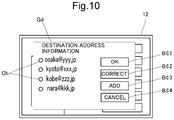
- FIG. 10 is a diagram illustrating a screen of the first display section displaying a selection dialog for selecting a destination address.
- FIG. 11 is a diagram illustrating a screen of the first display section displaying an additional correction dialog for additionally correcting the destination address.
- FIG. 12 is a diagram illustrating a screen of the first display section displaying a selection dialog for selecting a title.
- FIG. 13 is a diagram illustrating a screen of the first display section displaying an addition and correction dialog for adding and correcting the title.
- FIG. 14 is a diagram illustrating a screen of the first display section displaying a selection dialog for selecting a file name.
- FIG. 15 is a diagram illustrating a screen of the first display section displaying an additional correction dialog for additionally correcting the file name.
- FIG. 16 is a diagram illustrating a screen of the first display section displaying a selection dialog for selecting a transmission source address.
- FIG. 17 is a diagram illustrating a screen of the first display section displaying an addition and correction dialog for adding and correcting the transmission source address.
- FIG. 18A is a diagram illustrating a screen of the first display section displaying a selection dialog for selecting a text.
- FIG. 18B is a diagram illustrating a screen of the first display section displaying a selection dialog for selecting the transmission source address.
- FIG. 19 is a diagram illustrating a screen of the first display section displaying a correction dialog for correcting the text.
- FIG. 20 is a diagram illustrating a screen of the first display section displaying an e-mail.
- FIG. 21 is a diagram illustrating a screen of the first display section displaying a message which prompts update of the mail information.
- FIG. 1 is a block diagram illustrating a communication system Sy including an image forming apparatus 10 , a portable terminal device 20 , an IC card 30 , and a terminal device 40 .
- the image forming apparatus 10 is a multifunction peripheral combining together a plurality of functions such as a copy function, a printer function, a scanner function, and a facsimile function.
- the image forming apparatus 10 is one example of an electronic device in the scope of the claims.
- the portable terminal device 20 is a portable terminal of a multifunctional type a such as a smartphone or a tablet.
- the IC card 30 is a portable terminal provided as a contactless IC card.
- the terminal device 40 is, for example, a personal computer.
- the portable terminal device 20 and the IC card 30 can perform data communication between the image forming apparatus 10 and the terminal device 40 through short distance communication (near field radio communication (NFC) in this embodiment although the short distance communication is not limited to the NFC in any manner).
- the image forming apparatus 10 , the portable terminal device 20 , and the terminal device 40 can also perform data communication through the network N.
- the network N is formed of, for example, a LAN, a public line, or the Internet.
- the image forming apparatus 10 includes: a first control section 11 , a first display section 12 , a first operation section 14 , a first network communication section 15 , a first near field radio communication section 16 , an image reading section 17 , an image formation section 18 , a first storage section 19 , etc.
- the first control section 11 is in charge of overall operation control of the image forming apparatus 10 and executes various application programs and also comprehensively controls the image forming apparatus 10 .
- the first operation section 14 is composed of, for example, a plurality of hard keys and a touch panel superposed on a screen of the first display section 12 .
- the first operation section 14 is operated by a user to receive instructions for executing, for example, image formation operation and image reading operation or various pieces of information and then output the instructions and the information to the first control section 11 .
- the first display section 12 displays screens provided following the execution of the application programs, more specifically, an input screen for set items required for image formation processing or an input screen for instructions and information.
- the first network communication section 15 is connected to the terminal device 40 and another terminal via the network N and performs transmission and reception of various pieces of data to and from the terminal device 40 and another terminal.
- the first near field radio communication section 16 has an NFC (Near Field Communication) function in this embodiment and transmits and receives various pieces of data to and from the portable terminal device 20 and the IC card 30 through near field radio communication.
- the first storage section 19 stores the various pieces of application programs, the various pieces of information, etc.
- the image reading section 17 has a scanner which optically reads a document loaded on contact glass and generates, through the document reading, image data indicating an image of the document.
- the image formation section 18 includes: a photosensitive drum; a charging device which uniformly charges a surface of the photosensitive drum; an exposure device which exposes the surface of the photosensitive drum to form an electrostatic latent image on the surface of the photosensitive drum; a developing device which develops the electrostatic latent image on the surface of the photosensitive drum into a toner image; a transfer device which transfers, onto recording paper serving as a storage medium, the toner image (image) formed on the photosensitive drum; etc.
- the image formation section 18 forms, on the recording paper, a print page indicated by print data received from, for example, the aforementioned computer or the image indicated by the image data generated by the image reading section 17 .
- the portable terminal device 20 includes: a second control section 21 , a second display section 22 , a second operation section 24 , a second network communication section 25 , a second near field radio communication section 26 , a second storage section 29 , etc.
- the portable terminal device 20 and the IC card 30 to be described later on are each one example of a portable terminal in the scope of the claims.
- the second control section 21 is in charge of overall operation control of the portable terminal device 20 and executes various application programs, etc. and performs various types of processing.
- the second operation section 24 is composed of: a plurality of hard keys, a touch panel superposed on a screen of the second display section 22 ; etc.
- the second operation section 24 is operated by the user to receive input instructions required for executing the application programs, various pieces of information, etc. and then output the instructions and the information to the second control section 21 .
- the second display section 22 displays, for example, screens provided following the execution of the application programs.
- the second network communication section 25 is connected to the terminal via the network N and transmits and receives various pieces of data to and from the terminal.
- the second near field radio communication section 26 has a function as an NFC tag and transmits and receives the various pieces of data to and from the image forming apparatus 10 and the terminal device 40 through the near field radio communication.
- the second storage section 29 stores the various application programs, the various pieces of information, etc.
- the IC card 30 (portable terminal) includes: a third near field radio communication section 36 , a power supply circuit 37 , a third storage section 39 , etc., and thereby functions as an NFC tag.
- the third near field radio communication section 36 transmits and receives various types of data to and from the image forming apparatus 10 and the terminal device 40 through near field radio communication.
- the power supply circuit 37 supplies, to various parts of the IC card 30 , a power supplied from an image forming apparatus 10 side via an antenna.
- the third storage section 39 is a storage medium such as a memory which stores, for example, mail information M to be described later on.
- the terminal device 40 includes: a fourth control section 41 , a fourth display section 42 , a fourth operation section 44 , a fourth network communication section 45 , a fourth near field radio communication section 46 , a fourth storage section 49 , etc.
- the fourth control section 41 is in charge of overall operation control of the terminal device 40 and executes, for example, various application programs and performs various types of processing.
- the fourth operation section 44 is composed of, for example, a keyboard and a mouse or a touch panel superposed on a screen of the fourth display section 42 .
- the fourth operation section 44 is operated by the user to receive input instructions required for executing the application programs, various pieces of information, etc. and then output the instructions and the information to the fourth control section 41 .
- the fourth display section 42 displays, for example, screens provided following the execution of the application programs.
- the fourth network communication section 45 is connected to the image forming apparatus 10 and another terminal via the network N and transmits and receives various pieces of data to and from the image forming apparatus 10 and another terminal.
- the fourth near field radio communication section 46 transmits and receives the various pieces of data to and from the portable terminal device 20 and the IC card 30 through near field radio communication.
- the fourth storage section 49 stores the various application programs, the various pieces of information, etc.
- the first control section 11 attaches the image data to an e-mail, and causes the first network communication section 15 to transmit the e-mail to the network N.
- the aforementioned e-mail is received at a server (not illustrated) on the network N and transmitted from the server to a terminal such as a PC serving as a transmission partner.
- the user upon crating the aforementioned e-mail, the user is required to set a destination address, a title, a text, a transmission source address, etc., but the aforementioned setting cannot efficiently be performed only through operation of the first operation section 14 of the image forming apparatus 10 .
- the first operation section 14 of the image forming apparatus 10 has no keyboard, which therefore causes inconvenience in character inputting.
- a soft keyboard is displayed on a display screen of the first display section 12 , it takes long time for the inputting, so that the image forming apparatus 10 is occupied for the aforementioned inputting for long time.
- the mail information including the destination address, the transmission source address, the title, the text, etc. required for e-mail creation is previously stored in the second storage section 29 of the portable terminal device 20 or the third storage section 39 of the IC card 30 , so that the image forming apparatus 10 acquires the mail information from the portable terminal device 20 or the IC card 30 through the NFC upon the e-mail creation.
- the e-mail creation is supported in the image forming apparatus 10 in a manner such that the acquired mail information is stored into the first storage section 19 and the destination address, the title, the text, the transmission source address, etc. can be set in the e-mail through simple operation based on the aforementioned mail information.
- the image forming apparatus 10 erases the mail information stored in the first storage section 19 to prevent leak of the mail information.
- the e-mail is one example of electronic data in the scope of the claims.
- the mail information is one example of transmission information in the scope of the claims.
- the destination address is one example of transmission partner information in the scope of the claims.
- the destination address, the title, the text, the transmission address, etc. are each one example as a component of the transmission information in the scope of the claims.
- FIG. 2 is a diagram conceptually illustrating the mail information.
- the mail information M includes: a destination address list Title button Bd 2 , a title list L 2 , a text list L 3 , a file name list L 4 , a transmission source address list L 5 , and a transmission source address-text correspondence list L 6 .
- the destination address list Title button Bd 2 is a list of one or a plurality of destination addresses.
- the destination address list Title button Bd 2 also includes destination names stored in correspondence with the respective destination addresses.
- the title list L 2 includes one or a plurality of titles.
- the text list L 3 includes one or a plurality of texts.
- the file name list L 4 includes one or a plurality of file names.
- the transmission source address list L 5 includes one or a plurality of transmission source addresses.
- the transmission source address list L 5 includes transmission source names stored in correspondence with the transmission source addresses.
- the transmission source address-text correspondence list L 6 includes correspondence between one or the plurality of transmission source addresses and the texts used therefor.
- the mail information M as described above is created by, for example, the portable terminal device 20 and stored into the second storage section 29 .
- the mail information M is inputted through operation of the second operation section 24 by the user and stored into the second storage section 29 or the destination address, the title, the text, etc. already registered in the second storage section 29 are taken in as the mail information M and stored into the second storage section 29 .
- the second control section 21 transcribes the mail information M in a storage region of, for example, a memory built in the second near field radio communication section 26 for a given period.
- the mail information M is written into the third storage section 39 of the IC card 30 by the terminal device 40 .
- the mail information M is created by the same procedures as procedures employed in the portable terminal device 20 and stored into the fourth storage section 49 , and the mail information M is transmitted from the fourth near field radio communication section 46 to the IC card 30 in a state in which the IC card 30 is arranged near the antenna of the fourth near field radio communication section 46 of the terminal device 40 .
- the mail information M is received at the third near field radio communication section 36 and stored into the third storage section 39 .
- FIGS. 3A and 3B are flowcharts illustrating the processing procedures.
- FIG. 4 is a diagram schematically illustrating procedures of communication performed between the image forming apparatus 10 and the portable terminal device 20 or the IC card 30 .
- the image data indicating the image of the document is stored into the first storage section 19 by the image reading section 17 or the image data is received from another device by the first network communication section 15 and stored into the first storage section 19 , the image data is transmitted by an e-mail.
- the instruction is received by the first control section 11 (step S 101 ).
- the first operation section 14 is integrally provided with the first display section 12 .
- the first operation section 14 includes: the touch panel superposed on the screen of the first display section 12 ; a plurality of hard keys 51 ; etc.
- an initial screen G 1 is displayed at the first display section 12 under control performed by the first control section 11 . Displayed on the initial screen G 1 are: for example, a plurality of touch keys 52 a to 52 c corresponding to respective functions.
- the first control section 11 causes the first display section 12 to display a screen Ga as illustrated in FIG. 6 (step S 102 ). Displayed on the screen Ga of the first display section 12 are: a region P where an image indicating contents of the document attached to the e-mail is displayed; a new mail button Ba 1 ; a new folder button Ba 2 ; an NFC button Ba 3 ; etc.
- the user hangs the portable terminal device 20 near the antenna of the first near field radio communication section 16 (near the first display section 12 in this embodiment) of the image forming apparatus 10 and also performs touch operation on the new mail button Ba 1 of the screen Ga displayed at the first display section 12 on an image forming apparatus 10 side.
- the first near field radio communication section 16 of the image forming apparatus 10 executes a specified communication protocol with the second near field radio communication section 26 of the portable terminal device 20 to start data communication with the portable terminal device 20 (step S 104 ).
- the first control section 11 of the image forming apparatus 10 receives, through the data communication, the mail information M transmitted from the second near field radio communication section 26 of the portable terminal device 20 (step S 105 ).
- an instruction for acquiring the mail information M from the second near field radio communication section 26 of the portable terminal device 20 is sent from the second near field radio communication section 26 of the portable terminal device 20 to the first near field radio communication section 16 of the image forming apparatus 10 .
- the first near field radio communication section 16 of the image forming apparatus 10 transmits, to the second near field radio communication section 26 of the portable terminal device 20 , a request for transmitting the mail information M, and the first near field radio communication section 16 receives the mail information M transmitted in response to the aforementioned request from the second near field radio communication section 26 of the portable terminal device 20 .
- the user holds his or her IC card 30 instead of the portable terminal device 20 near the first display section 12 of the image forming apparatus 10 .
- the user also performs touch operation on the new mail button Ba 1 .
- the first control section 11 has determined that the touch operation has been performed on the new mail button Ba 1 through the first operation section 14 (“Ba 1 ” in step S 103 )
- the first near field radio communication section 16 receives the mail information M from the third near field radio communication section 36 of the IC card 30 in a same manner as the manner employed in the portable terminal device 20 described above (step S 105 ).
- the first control section 11 of the image forming apparatus 10 After the reception of the mail information M in step S 105 , the first control section 11 of the image forming apparatus 10 stores the mail information M into the first storage section 19 and displays, at the first display section 12 , an e-mail creation support screen Gb as illustrated in FIG. 8 (step S 106 ).
- step S 108 When touch operation has been performed on the NFC button Ba 3 by the user (“Ba 3 ” in step S 103 ), a message as illustrated in FIG. 9 and prompting the reception of the mail information M stored in the portable terminal is displayed on a dialog Gc of the first display section 12 under control performed by the first control section 11 (step S 108 ).
- the user reads the message and holds his or her portable terminal device 20 (or the IC card 30 ) near the first display section 12 of the image forming apparatus 10 . Consequently, it is possible to perform data communication between the image forming apparatus 10 and the portable terminal device 20 (or the IC card 30 ) based on a specified communication protocol (step S 104 ). Then the processing in S 104 to S 106 is performed in a same manner as described above.
- the driving power source 10 When the driving power source 10 has acquired the mail information M from the portable terminal device 20 or the IC card 30 of the user as described above, displayed on the e-mail creation support screen Gb ( FIG. 8 ) by the first control section 11 are: an image P indicating contents of data as an e-mail transmission target; a destination button Bb 1 for receiving an instruction for displaying the destination address list Title button Bd 2 in the mail information M illustrated in FIG.
- a title button Bb 2 for receiving an instruction for displaying the title list L 2 ; a text button Bb 3 for receiving an instruction for displaying the text list L 3 ; a file name button Bb 4 for receiving an instruction for displaying the file name list L 4 ; a transmission source button Bb 5 for receiving an instruction for displaying the transmission source address list L 5 ; a confirm button Bb 6 : and so on.
- the first control section 11 receives the instruction for displaying the destination address list Title button Bd 2 , searches the mail information M stored in the first storage section 19 , acquires, for example, a plurality of destination addresses E 11 to E 14 in the destination address list Title button Bd 2 illustrated in FIG. 2 , and displays a selection dialog Gd as illustrated in FIG. 10 at the first display section 12 (step S 110 ).
- Displayed on the selection dialog Gd illustrated in FIG. 10 are: for example, the plurality of destination addresses E 11 to E 14 and check boxes Ch corresponding thereto, an OK button Bc 1 , a correct button Bc 2 , an add button Bc 3 , and a cancel button Bc 4 .
- the first control section 11 receives selection of the destination address corresponding to the selected check box described above.
- the first control section 11 closes the selection dialog Gd and displays an addition and correction dialog Ge as illustrated in FIG. 11 at the first display section 12 .
- Displayed on the addition and correction dialog Ge are: a display column R for the destination address E 1 corresponding to the selected check box Ch; an overwrite button Bd 1 ; an add button Title button Bd 2 ; and a cancel button Bd 3 .
- the first control section 11 causes the first display section 12 to display a soft keyboard.
- the user can operate the soft key to input an instruction for correcting or rewriting the destination address corresponding to the display column R. After the inputting for the correction or the rewriting, the user performs touch operation on the overwrite button Bd 1 or the add button Title button Bd 2 .
- the first control section 11 (one example of an update section in the scope of the claims) overwrites the corresponding destination address in the display column R to the original destination address in the mail information M stored in the first storage section 19 for update. Then the first control section 11 closes the addition and correction dialog Ge. The selection of the aforementioned destination address by the user after updating the destination address as described above results in selection of the corrected or rewritten destination address as transmission destination information of the e-mail by the first control section 11 .
- the first control section 11 When touch operation has been performed on the add button Title button Bd 2 , the first control section 11 adds the destination address displayed on the display column R at this point to the mail information M in the first storage section 19 . Then the first control section 11 closes the addition and correction dialog Ge. When the user has selected the updated destination address in this state, the selection of the destination address updated as the transmission destination information of the e-mail is received by the first control section 11 .
- the first control section 11 When touch operation has been performed on the cancel button Bd 3 , the first control section 11 neither updates nor adds the destination address E 1 and closes the addition and correction dialog Ge.
- the first control section 11 sets the selected destination address as an e-mail transmission partner (step S 111 ).
- the first control section 11 receives the instruction for displaying the title list L 2 , searches the mail information M stored in the first storage section 19 , acquires, for example, a plurality of tiles E 21 to E 24 in the title list L 2 illustrated in FIG. 2 , and displays a selection dialog Gf as illustrated in FIG. 12 at the first display section 12 (step S 112 ).
- Displayed on the selection dialog Gf illustrated in FIG. 12 under control performed by the first control section 11 are: for example, the plurality of titles E 21 to E 24 ( FIG. 2 ) and checkboxes Ch corresponding thereto, an OK button Bc 1 , a correct button Bc 2 , an add button Bc 3 , and a cancel button Bc 4 .
- the first control section 11 receives the selection of the title corresponding to the selected check box ch.
- the first control section 11 closes the selection dialog Gf and displays the addition and correction dialog Gg as illustrated in FIG. 13 at the first display section 12 .
- Displayed on the addition and correction dialog Gg are: a display column R of the title E 2 corresponding to the selected check box Ch, an overwrite button Bd 1 , an add button Title button Bd 2 , and a cancel button Bd 3 .
- the first control section 11 causes the first display section 12 to display a soft keyboard.
- the user can operate the soft key to input an instruction for correcting or rewriting the title displayed on the display column R. After the inputting for the correction or the overwriting, the user performs touch operation on the overwrite button Bd 1 or the add button Title button Bd 2 .
- the first control section 11 When touch operation has been performed on the overwrite button Bd 1 at this point, the first control section 11 overwrites the title displayed on the display column R to the original title in the mail information M stored in the first storage section 19 to update this title. Then the first control section 11 closes the addition and correction dialog Gg.
- the aforementioned title on the selection dialog Gf has been selected by the user after the updating the title as described above, the selection of the title corrected or rewritten as the title of the e-mail is received by the first control section 11 .
- the first control section 11 sets the selected title E 2 in the e-mail (step S 113 ).
- the first control section 11 receives the instruction for displaying the file name list L 4 , searches the mail information M in the first storage section 19 , acquires, for example, a plurality of file names E 41 to E 44 ( FIG. 2 ) in the file name list L 4 illustrated in FIG. 2 , and displays a selection dialog Gh as illustrated in FIG. 14 at the first display section 12 to start processing of setting the file name E 41 to E 44 (step S 114 ).
- Displayed on the selection dialog Gh illustrated in FIG. 14 are: for example, the plurality of file names E 41 to 44 and check boxes respectively corresponding thereto; an OK button Bc 1 , a correct button Bc 2 , an add button Bc 3 , and a cancel button Bc 4 .
- the first control section 11 receives the selection of the file name corresponding to the selected check box Ch.
- the first control section 11 closes the selection dialog Gh and displays an addition and correction dialog Gi as illustrated in FIG. 15 at the first display section 12 .
- Displayed on the addition and correction dialog Gi are: a display column R for the file name corresponding to the selected check box Ch, an overwrite button Bd 1 , an add button Bd 2 , and a cancel button Bd 3 .
- the first control section 11 causes the first display section 12 to display a soft keyboard.
- the user can operate the soft key to input an instruction for correcting or rewriting the file name displayed on the display column R.
- the user After the inputting for the aforementioned correction or overwriting, the user performs touch operation on the overwrite button Bd 1 or the add button Title button Bd 2 .
- touch operation has been performed on the overwrite button Bd 1 at this point, the first control section 11 overwrites the file name displayed on the display column R to the original file in the mail information M stored in the first storage section 19 to update this file name.
- the first control section 11 closes the addition and correction dialog Gi.
- the selection of the file name on the selection dialog Gh after updating the aforementioned file name by the user as described above causes the first control section 11 to select the corrected or rewritten file name as the file name of the e-mail.
- the first control section 11 When touch operation has been performed on the title button Title button Bd 2 , the first control section 11 adds the file name displayed on the display column R to the mail information M stored in the first storage section 19 for storage to add this file name. Then the first control section 11 closes the addition and correction dialog Gi. The selection of the file name on the selection dialog Gh after adding the aforementioned file name by the user as described above causes the first control section 11 to receive the selection of the added file name as the file name of the e-mail.
- the first control section 11 closes the addition and correction dialog Gi without updating the file name E 4 .
- the selection of the file name on the selection dialog Gh as described above causes the first control section 11 to add, to the e-mail, a file indicated by the selected file name and included in the files stored in the first storage section 19 (step S 115 ).
- the first control section 11 receives the instruction for displaying the transmission source address list L 5 , searches the mail information M stored in the first storage section 19 , acquires one or a plurality of transmission source addresses E 51 to E 54 in the transmission source address list L 5 illustrated in FIG. 2 , and displays a selection dialog Gj as illustrated in FIG. 16 at the first display section 12 (step S 116 ).
- Displayed on the selection dialog Gj illustrated in FIG. 16 are: for example, the plurality of transmission source addresses E 51 to E 54 and check boxes Ch respectively corresponding thereto, an OK button Bc 1 , a correct button Bc 2 , an add button Bc 3 , and a cancel button Bc 4 .
- the first control section 11 selects the transmission source address corresponding to the selected check box Ch.
- the first control section 11 closes the selection dialog Gj and displays an addition and correction dialog Gk as illustrated in FIG. 17 at the first display section 12 .
- Displayed on the addition and correction dialog Gk are: a display column R for the transmission source address corresponding to the selected check box Ch; an overwrite button Bd 1 , an add button Title button Bd 2 , and a cancel button Bd 3 .
- the first control section 11 causes the first display section 12 to display a soft keyboard. It is possible for the user to operate the soft key to input an instruction for correcting or rewriting the transmission source address displayed on the display column R.
- the user After the inputting for the correction or the rewriting, the user performs touch operation on the overwrite button Bd 1 or the add button Title button Bd 2 .
- the first control section 11 overwrites the transmission source address displayed on the display column R to the original transmission source address in the mail information M stored in the first storage section 19 to update this transmission source address. Then the first control section 11 closes the addition and correction dialog Gk.
- the selection of the transmission source address on the selection dialog Gj after updating this transmission source address as described above causes the first control section 11 to select the corrected or rewritten transmission source address as a transmission source address of the e-mail.
- the first control section 11 closes the addition and correction dialog Gk without performing update or addition of the transmission source address E 5 .
- the transmission source address is selected on the selection dialog Gj or the addition and correction dialog Gk as described above. Then the first control section 11 sets the selected transmission source address E 5 in the e-mail (step S 117 ).
- the first control section 11 receives an instruction for displaying a list of texts which can be used as transmission sources in the e-mail, searches the mail information M stored in the first storage section 19 , and, with reference to the transmission source address-text correspondence list L 6 , detects one or the plurality of texts corresponding to the transmission source address selected in step S 115 .
- the first control section 11 displays a selection dialog Gm as illustrated in FIG. 18A at the first display section 12 to thereby display the detected text (step S 119 ). Displayed on the selection dialog Gm are: a plurality of texts E 31 to 34 ( FIG.
- the first control section 11 selects the text corresponding to the selected check box Ch.
- the first control section 11 closes the selection dialog Gm and displays a correction dialog Gn as illustrated in FIG. 19 at the first display section 12 .
- Displayed on the correction dialog Gn are: a display column R for the text corresponding to the selected check box Ch; an overwrite button Bd 1 ; an add button Title button Bd 2 ; and a cancel button Bd 3 .
- the first control section 11 when the display column R has been selected through touch operation by the user, the first control section 11 causes display of the aforementioned soft key, and when the text displayed on the display column R has been corrected or rewritten through operation of the soft key by the user and touch operation has been performed on the overwrite button Bd 1 , the first control section 11 overwrites the text displayed on the display column R to the original text in the mail information M stored in the first storage section 19 to update this text.
- the first control section 11 adds the text displayed on the display column R (the text corrected or rewritten through the operation of the aforementioned soft key while being kept original) to the original text in the mail information M stored in the first storage section 19 for storage.
- the first control section 11 After processing performed based on the operation of the overwrite button Bd 1 or the add button Title button Bd 2 , the first control section 11 closes the correction dialog Gn.
- the selection of the text on the selection dialog Gm by the user after updating or adding the text as described above causes the first control section 11 to select the corrected or rewritten text as the text of the e-mail or causes the first control section 11 to further add the added text as the text of the e-mail.
- the first control section 11 displays, at the first display section 12 , a selection dialog Gm 2 for selecting the transmission source address as illustrated in FIG. 18B .
- the first control section 11 performs processing of receiving the transmission source address based on the same operation as that performed in case of the selection dialog Gj illustrated in FIG. 16 .
- the first control section 11 displays the selection dialog Gm at the first display section 12 again after receiving the transmission source address.
- the first control section 11 does not display the aforementioned selection dialog Gm 2 and adds the text selected through the touch operation performed on the check box Ch to the original text in the mail information M stored in the first storage section 19 for storage.
- the text is selected on the selection dialog Gm as described above. Then the first control section 11 sets the selected text in the e-mail (step S 120 ).
- the selection of the transmission source address and the text is performed through procedures by which the transmission source address is first selected and then the text corresponding to the selected transmission source address is selected.
- selection of the different transmission source address results in selection of the different text. Consequently, for example, it is possible to properly use the plurality of mutually different texts between a case where the transmission source address corresponding to an individual is used and a case where the transmission source address corresponding to an organization to which the individual belongs is used.
- the destination address, the title, the transmission source address, and the text are set in the e-mail and image data of the file name is also added to the e-mail, thereby creating the e-mail.
- the first control section 11 receives an instruction for displaying information indicating contents of the e-mail and, as illustrated in FIG. 20 , displays, on a dialog Gq of the first display section 12 , an image including the information indicating the contents of the e-mail Q created as described above (step S 122 ).
- an instruction for transmitting the e-mail is inputted to the first operation section 14 and the first control section 11 causes the first network communication section 15 to transmit the e-mail Q to the network N in accordance with the instruction for the transmission (step S 123 ).
- the e-mail Q is received by the server on the network N and is transmitted from the server to a terminal, such as PC, which is indicated by the destination address set in the e-mail Q.
- the first control section 11 displays, on the dialog Gr of the first display section 12 , a message prompting update of the mail information M stored in the portable terminal as illustrated in FIG. 21 (step S 124 ).
- the user reads the message and performs touch operation on the OK button Bc 1 or the cancel button Bc 4 of the dialog Gr of the first display section 12 .
- touch operation has been performed on the add button Bc 3 at this point (“Bc 4 ” in step S 125 )
- the first control section 11 erases the mail information M stored in the first storage section 19 without transmitting the mail information M stored in the first storage section 19 (step S 127 ), ending the processing of FIGS. 3A and 3B .
- the first control section 11 transmits a request for updating the mail information M together with the mail information M stored in the first storage section 19 from the first near field radio communication section 16 to the portable terminal device 20 (step S 126 ) and then erases the mail information M stored in the first storage section 19 (step S 127 ), ending the processing of FIGS. 3A and 3B .
- the second control section 21 rewrites, for update, the mail information M stored in the second storage section 29 to the received mail information M in accordance with the request for updating the mail information M.
- the mail information M stored in the first storage section 19 may be transmitted to a user having the transmission source address set in the e-mail Q.
- the aforementioned mail information M will not be transmitted.
- the first control section 11 of the image forming apparatus 10 creates an e-mail with the transmission source address set as the destination address, adds the request for updating the mail information M together with the mail information M stored in the first storage section 19 to the aforementioned e-mail, and transmits this e-mail from the first network communication section 15 to the network N. Then the first control section 11 erases the mail information M stored in the first storage section 19 .
- This e-mail is received by the server on the network N and is transmitted from the server to the terminal device 40 held by the user holding the destination address (transmission source address).
- the user of the terminal device 40 operates the fourth operation section 44 , causing the fourth storage section 49 to store the request for updating the mail information M added to the e-mail together with the mail information.
- the fourth control section 41 transmits the request for updating the mail information M stored in the fourth storage section 49 together with the mail information M from the fourth near field radio communication section 46 to the portable terminal device 20 (or the IC card 30 ).
- the mail information M stored in the second storage section 29 (or the third storage section 39 ) is rewritten to the received mail information M for update.
- the e-mail creation support processing (e-mail information setting processing) is started after the image forming apparatus 10 previously acquires and stores an image to be transmitted upon the e-mail creation in this embodiment but the invention is not limited thereto and the image to be transmitted may be acquired after the e-mail creation support processing is first performed.
- the first control section 11 does not display, on the e-mail creation support screen Gb illustrated in FIG. 8 beyond, an image P indicating contents of data of the e-mail to be transmitted, and displays the image P at a time point at which the image to be transmitted has been acquired.
- the mail information M including the destination address, the title, the text, the file name, and the transmission source address required for the e-mail creation is previously stored into the second storage section 29 of the portable terminal device 20 or the third storage section 39 of the IC card 30 of the portable terminal device 20 , and the mail information M is transmitted from the portable terminal device 20 or the IC card 30 to the image forming apparatus 10 through near field radio communication upon the e-mail creation.
- the destination address, the title, the text, the file name, and the transmission source address can simply be set in the e-mail based on the mail information M, making it easy to create the e-mail.
- the mail information M stored in the first storage section 19 of the image forming apparatus 10 is erased after the e-mail transmission, permitting prevention of leak of the mail information M.
Landscapes
- Engineering & Computer Science (AREA)
- Multimedia (AREA)
- Signal Processing (AREA)
- General Engineering & Computer Science (AREA)
- Human Computer Interaction (AREA)
- Computing Systems (AREA)
- Theoretical Computer Science (AREA)
- Physics & Mathematics (AREA)
- General Physics & Mathematics (AREA)
- Information Transfer Between Computers (AREA)
- Facsimiles In General (AREA)
Abstract
Description
Claims (7)
Applications Claiming Priority (4)
| Application Number | Priority Date | Filing Date | Title |
|---|---|---|---|
| JP2017071033 | 2017-03-31 | ||
| JP2017-071033 | 2017-03-31 | ||
| JPJP2017-071033 | 2017-03-31 | ||
| PCT/JP2018/013526 WO2018181852A1 (en) | 2017-03-31 | 2018-03-30 | Communication system and electronic device |
Publications (2)
| Publication Number | Publication Date |
|---|---|
| US20210105368A1 US20210105368A1 (en) | 2021-04-08 |
| US11076056B2 true US11076056B2 (en) | 2021-07-27 |
Family
ID=63678236
Family Applications (1)
| Application Number | Title | Priority Date | Filing Date |
|---|---|---|---|
| US16/498,112 Expired - Fee Related US11076056B2 (en) | 2017-03-31 | 2018-03-30 | Communication system and electronic device |
Country Status (4)
| Country | Link |
|---|---|
| US (1) | US11076056B2 (en) |
| JP (1) | JP6795085B2 (en) |
| CN (1) | CN110463171A (en) |
| WO (1) | WO2018181852A1 (en) |
Families Citing this family (4)
| Publication number | Priority date | Publication date | Assignee | Title |
|---|---|---|---|---|
| JP2020116822A (en) * | 2019-01-23 | 2020-08-06 | 株式会社リコー | Image forming apparatus, output state image forming method, and output state image forming program |
| JP7475874B2 (en) | 2020-01-30 | 2024-04-30 | キヤノン株式会社 | Information processing apparatus, image forming apparatus, control method thereof, and program |
| JP7569724B2 (en) * | 2021-03-22 | 2024-10-18 | シャープ株式会社 | Image processing device and control method |
| JP7804471B2 (en) * | 2022-01-27 | 2026-01-22 | シャープ株式会社 | Terminal device, output system, and output method |
Citations (5)
| Publication number | Priority date | Publication date | Assignee | Title |
|---|---|---|---|---|
| JP2004040206A (en) | 2002-06-28 | 2004-02-05 | Minolta Co Ltd | Data communication equipment |
| JP2014093765A (en) | 2012-11-07 | 2014-05-19 | Konica Minolta Inc | Image information communication apparatus, image information communication system, control method of image information communication apparatus, and control program of image information communication apparatus |
| US20160150123A1 (en) * | 2014-11-21 | 2016-05-26 | Ricoh Company, Ltd. | Information processing system, information processing apparatus, information processing method, and recording medium |
| US20160219190A1 (en) | 2015-01-27 | 2016-07-28 | Konica Minolta, Inc. | Image processing apparatus, shared address book display control method for the same, recording medium |
| US20160301824A1 (en) * | 2015-04-10 | 2016-10-13 | Canon Kabushiki Kaisha | Image processing apparatus, method of controlling the same, and storage medium |
Family Cites Families (3)
| Publication number | Priority date | Publication date | Assignee | Title |
|---|---|---|---|---|
| CN101827363B (en) * | 2009-03-03 | 2015-07-01 | 夏普株式会社 | Communication systems, information processing systems and devices, image forming systems and devices, portable information terminal devices |
| EP3163454A4 (en) * | 2014-06-24 | 2018-02-21 | Kyocera Document Solutions Inc. | Communication device and email server |
| JP6149822B2 (en) * | 2014-08-21 | 2017-06-21 | コニカミノルタ株式会社 | Information processing system, information processing device, portable terminal device, and program |
-
2018
- 2018-03-30 JP JP2019510215A patent/JP6795085B2/en not_active Expired - Fee Related
- 2018-03-30 US US16/498,112 patent/US11076056B2/en not_active Expired - Fee Related
- 2018-03-30 WO PCT/JP2018/013526 patent/WO2018181852A1/en not_active Ceased
- 2018-03-30 CN CN201880021343.2A patent/CN110463171A/en active Pending
Patent Citations (9)
| Publication number | Priority date | Publication date | Assignee | Title |
|---|---|---|---|---|
| JP2004040206A (en) | 2002-06-28 | 2004-02-05 | Minolta Co Ltd | Data communication equipment |
| JP2014093765A (en) | 2012-11-07 | 2014-05-19 | Konica Minolta Inc | Image information communication apparatus, image information communication system, control method of image information communication apparatus, and control program of image information communication apparatus |
| US20160150123A1 (en) * | 2014-11-21 | 2016-05-26 | Ricoh Company, Ltd. | Information processing system, information processing apparatus, information processing method, and recording medium |
| JP2016099812A (en) | 2014-11-21 | 2016-05-30 | 株式会社リコー | Information processing system, information processing apparatus, information processing method, and information processing program |
| US20160219190A1 (en) | 2015-01-27 | 2016-07-28 | Konica Minolta, Inc. | Image processing apparatus, shared address book display control method for the same, recording medium |
| JP2016139937A (en) | 2015-01-27 | 2016-08-04 | コニカミノルタ株式会社 | Image processing apparatus, display control of common address book in the same apparatus and display control program |
| US20160301824A1 (en) * | 2015-04-10 | 2016-10-13 | Canon Kabushiki Kaisha | Image processing apparatus, method of controlling the same, and storage medium |
| JP2016201702A (en) | 2015-04-10 | 2016-12-01 | キヤノン株式会社 | Communication system, information processing apparatus and control method therefor, image processing apparatus and control method and program therefor |
| US20180352110A1 (en) | 2015-04-10 | 2018-12-06 | Canon Kabushiki Kaisha | Image processing apparatus, method of controlling the same, and storage medium |
Also Published As
| Publication number | Publication date |
|---|---|
| WO2018181852A1 (en) | 2018-10-04 |
| US20210105368A1 (en) | 2021-04-08 |
| CN110463171A (en) | 2019-11-15 |
| JP6795085B2 (en) | 2020-12-02 |
| JPWO2018181852A1 (en) | 2020-02-06 |
Similar Documents
| Publication | Publication Date | Title |
|---|---|---|
| JP4766667B2 (en) | Display control apparatus, control method therefor, and program | |
| US8964206B2 (en) | Printing device, management device and management method | |
| US11076056B2 (en) | Communication system and electronic device | |
| JP4741634B2 (en) | Image processing apparatus, image forming apparatus, and image transmitting apparatus | |
| JP4693875B2 (en) | Image forming apparatus | |
| US20220385784A1 (en) | Image processing apparatus and method for controlling image processing apparatus | |
| US10880450B2 (en) | Image processing apparatus | |
| US12095959B2 (en) | Image forming apparatus and control method | |
| US20100218102A1 (en) | Display Management System | |
| US11283939B2 (en) | Information processing device, non-transitory computer-readable recording medium storing control program, and control method | |
| JP5284322B2 (en) | Display control apparatus, control method therefor, and program | |
| JP4741633B2 (en) | Image processing apparatus, image forming apparatus, and image transmitting apparatus | |
| JP6206193B2 (en) | Information processing apparatus, image processing system, and program | |
| JP6772660B2 (en) | Driver program | |
| JP2008176085A (en) | Image forming apparatus and image forming system | |
| US20230086808A1 (en) | Control method and image forming system | |
| JP6769289B2 (en) | Information processing equipment, image forming equipment, and programs | |
| US11314470B1 (en) | Image forming apparatus | |
| JP5442081B2 (en) | Display control apparatus, control method therefor, and program | |
| JP6962155B2 (en) | Image processing device | |
| JP6347693B2 (en) | Data transmission apparatus and image forming apparatus | |
| JP2017211958A (en) | Application integration device and control program for application integration device | |
| JP2007193703A (en) | Image output system and image output apparatus |
Legal Events
| Date | Code | Title | Description |
|---|---|---|---|
| AS | Assignment |
Owner name: KYOCERA DOCUMENT SOLUTIONS INC., JAPAN Free format text: ASSIGNMENT OF ASSIGNORS INTEREST;ASSIGNOR:SANOU, MASAKI;REEL/FRAME:050504/0305 Effective date: 20190919 |
|
| FEPP | Fee payment procedure |
Free format text: ENTITY STATUS SET TO UNDISCOUNTED (ORIGINAL EVENT CODE: BIG.); ENTITY STATUS OF PATENT OWNER: LARGE ENTITY |
|
| STPP | Information on status: patent application and granting procedure in general |
Free format text: RESPONSE TO NON-FINAL OFFICE ACTION ENTERED AND FORWARDED TO EXAMINER |
|
| STPP | Information on status: patent application and granting procedure in general |
Free format text: NOTICE OF ALLOWANCE MAILED -- APPLICATION RECEIVED IN OFFICE OF PUBLICATIONS |
|
| STPP | Information on status: patent application and granting procedure in general |
Free format text: PUBLICATIONS -- ISSUE FEE PAYMENT RECEIVED |
|
| STPP | Information on status: patent application and granting procedure in general |
Free format text: PUBLICATIONS -- ISSUE FEE PAYMENT VERIFIED |
|
| STCF | Information on status: patent grant |
Free format text: PATENTED CASE |
|
| FEPP | Fee payment procedure |
Free format text: MAINTENANCE FEE REMINDER MAILED (ORIGINAL EVENT CODE: REM.); ENTITY STATUS OF PATENT OWNER: LARGE ENTITY |
|
| LAPS | Lapse for failure to pay maintenance fees |
Free format text: PATENT EXPIRED FOR FAILURE TO PAY MAINTENANCE FEES (ORIGINAL EVENT CODE: EXP.); ENTITY STATUS OF PATENT OWNER: LARGE ENTITY |
|
| STCH | Information on status: patent discontinuation |
Free format text: PATENT EXPIRED DUE TO NONPAYMENT OF MAINTENANCE FEES UNDER 37 CFR 1.362 |
|
| FP | Lapsed due to failure to pay maintenance fee |
Effective date: 20250727 |