US10978018B2 - Virtual reality resource management for virtual reality head mounted display devices - Google Patents
Virtual reality resource management for virtual reality head mounted display devices Download PDFInfo
- Publication number
- US10978018B2 US10978018B2 US16/195,623 US201816195623A US10978018B2 US 10978018 B2 US10978018 B2 US 10978018B2 US 201816195623 A US201816195623 A US 201816195623A US 10978018 B2 US10978018 B2 US 10978018B2
- Authority
- US
- United States
- Prior art keywords
- operations
- option
- processor
- display
- insufficient
- Prior art date
- Legal status (The legal status is an assumption and is not a legal conclusion. Google has not performed a legal analysis and makes no representation as to the accuracy of the status listed.)
- Expired - Fee Related, expires
Links
Images




Classifications
-
- G—PHYSICS
- G09—EDUCATION; CRYPTOGRAPHY; DISPLAY; ADVERTISING; SEALS
- G09G—ARRANGEMENTS OR CIRCUITS FOR CONTROL OF INDICATING DEVICES USING STATIC MEANS TO PRESENT VARIABLE INFORMATION
- G09G5/00—Control arrangements or circuits for visual indicators common to cathode-ray tube indicators and other visual indicators
- G09G5/003—Details of a display terminal, the details relating to the control arrangement of the display terminal and to the interfaces thereto
-
- G—PHYSICS
- G06—COMPUTING OR CALCULATING; COUNTING
- G06F—ELECTRIC DIGITAL DATA PROCESSING
- G06F3/00—Input arrangements for transferring data to be processed into a form capable of being handled by the computer; Output arrangements for transferring data from processing unit to output unit, e.g. interface arrangements
- G06F3/01—Input arrangements or combined input and output arrangements for interaction between user and computer
- G06F3/011—Arrangements for interaction with the human body, e.g. for user immersion in virtual reality
- G06F3/012—Head tracking input arrangements
-
- G—PHYSICS
- G06—COMPUTING OR CALCULATING; COUNTING
- G06F—ELECTRIC DIGITAL DATA PROCESSING
- G06F3/00—Input arrangements for transferring data to be processed into a form capable of being handled by the computer; Output arrangements for transferring data from processing unit to output unit, e.g. interface arrangements
- G06F3/01—Input arrangements or combined input and output arrangements for interaction between user and computer
- G06F3/048—Interaction techniques based on graphical user interfaces [GUI]
- G06F3/0481—Interaction techniques based on graphical user interfaces [GUI] based on specific properties of the displayed interaction object or a metaphor-based environment, e.g. interaction with desktop elements like windows or icons, or assisted by a cursor's changing behaviour or appearance
- G06F3/0482—Interaction with lists of selectable items, e.g. menus
-
- G—PHYSICS
- G06—COMPUTING OR CALCULATING; COUNTING
- G06F—ELECTRIC DIGITAL DATA PROCESSING
- G06F3/00—Input arrangements for transferring data to be processed into a form capable of being handled by the computer; Output arrangements for transferring data from processing unit to output unit, e.g. interface arrangements
- G06F3/01—Input arrangements or combined input and output arrangements for interaction between user and computer
- G06F3/048—Interaction techniques based on graphical user interfaces [GUI]
- G06F3/0484—Interaction techniques based on graphical user interfaces [GUI] for the control of specific functions or operations, e.g. selecting or manipulating an object, an image or a displayed text element, setting a parameter value or selecting a range
- G06F3/04847—Interaction techniques to control parameter settings, e.g. interaction with sliders or dials
-
- G—PHYSICS
- G06—COMPUTING OR CALCULATING; COUNTING
- G06F—ELECTRIC DIGITAL DATA PROCESSING
- G06F3/00—Input arrangements for transferring data to be processed into a form capable of being handled by the computer; Output arrangements for transferring data from processing unit to output unit, e.g. interface arrangements
- G06F3/14—Digital output to display device ; Cooperation and interconnection of the display device with other functional units
-
- G—PHYSICS
- G09—EDUCATION; CRYPTOGRAPHY; DISPLAY; ADVERTISING; SEALS
- G09G—ARRANGEMENTS OR CIRCUITS FOR CONTROL OF INDICATING DEVICES USING STATIC MEANS TO PRESENT VARIABLE INFORMATION
- G09G5/00—Control arrangements or circuits for visual indicators common to cathode-ray tube indicators and other visual indicators
- G09G5/14—Display of multiple viewports
-
- G—PHYSICS
- G09—EDUCATION; CRYPTOGRAPHY; DISPLAY; ADVERTISING; SEALS
- G09G—ARRANGEMENTS OR CIRCUITS FOR CONTROL OF INDICATING DEVICES USING STATIC MEANS TO PRESENT VARIABLE INFORMATION
- G09G2330/00—Aspects of power supply; Aspects of display protection and defect management
- G09G2330/02—Details of power systems and of start or stop of display operation
- G09G2330/021—Power management, e.g. power saving
-
- G—PHYSICS
- G09—EDUCATION; CRYPTOGRAPHY; DISPLAY; ADVERTISING; SEALS
- G09G—ARRANGEMENTS OR CIRCUITS FOR CONTROL OF INDICATING DEVICES USING STATIC MEANS TO PRESENT VARIABLE INFORMATION
- G09G2354/00—Aspects of interface with display user
-
- G—PHYSICS
- G09—EDUCATION; CRYPTOGRAPHY; DISPLAY; ADVERTISING; SEALS
- G09G—ARRANGEMENTS OR CIRCUITS FOR CONTROL OF INDICATING DEVICES USING STATIC MEANS TO PRESENT VARIABLE INFORMATION
- G09G2360/00—Aspects of the architecture of display systems
- G09G2360/08—Power processing, i.e. workload management for processors involved in display operations, such as CPUs or GPUs
-
- G—PHYSICS
- G09—EDUCATION; CRYPTOGRAPHY; DISPLAY; ADVERTISING; SEALS
- G09G—ARRANGEMENTS OR CIRCUITS FOR CONTROL OF INDICATING DEVICES USING STATIC MEANS TO PRESENT VARIABLE INFORMATION
- G09G2360/00—Aspects of the architecture of display systems
- G09G2360/12—Frame memory handling
-
- G—PHYSICS
- G09—EDUCATION; CRYPTOGRAPHY; DISPLAY; ADVERTISING; SEALS
- G09G—ARRANGEMENTS OR CIRCUITS FOR CONTROL OF INDICATING DEVICES USING STATIC MEANS TO PRESENT VARIABLE INFORMATION
- G09G2370/00—Aspects of data communication
- G09G2370/02—Networking aspects
Definitions
- the present invention relates in general to virtual reality systems and in particular virtual reality resource management for virtual reality head mounted devices.
- VR headsets including standalone and drop-in VR headset devices, typically have limited resources, including limited storage (non-volatile memory) space, limited volatile memory, and limited battery power.
- limited resources including limited storage (non-volatile memory) space, limited volatile memory, and limited battery power.
- limited storage non-volatile memory
- volatile memory volatile memory
- limited battery power limited resources
- the user When the limits on an available resource are reached, the user generally must stop the virtual reality experience to address the issue. For example, the user may be forced to take off the headset, change memory settings, reset operating parameters, address a new source of power, and so on.
- solutions to the problems caused by limited resources are needed to improved user experiences while experiencing virtual reality.
- the principles of the present invention are embodied in a system and method for managing resources in virtual reality applications. Aspects of such embodiments include accessing off-device storage without the need for the user to remove the head mounted display (HMD) device, thereby keeping the user in the virtual reality experience. Other embodiments include allowing the user to continue to operate an HDM device in a lower-performance mode or transfer non-essential content to off-device storage.
- HMD head mounted display
- VR HMD virtual reality (VR) head mounted display
- the VR HMD device includes a display, a processor coupled to the display, and a memory coupled to the processor.
- the processor is configured to: determine that the available capacity of a resource supporting VR operations being executed by the processor is insufficient; and present a graphical user interface on the display with at least one selectable option to reduce usage of at least one resource supporting at least one of non-VR operations and inactive VR operations.
- a method of operating a virtual reality (VR) head mounted display (HMD) device includes a processor, a display coupled to the processor, and a memory coupled to the processor and including instructions executable by the processor.
- the method includes determining, by executing selected instructions from the memory with the processor, that the available capacity of a resource supporting VR operations being executed by the processor is insufficient.
- the method also includes displaying on the display, by executing selected instructions from the memory with the processor, a graphical user interface with at least one selectable option to reduce usage of at least one resource supporting at least one of non-VR operations and inactive VR operations.
- a non-transitory computer readable medium configured to store a program code.
- the program code when executed by a processor, are configured to cause the at least one processor to, determine that the available capacity of a resource supporting VR operations being executed by the processor is insufficient; and display on the HMD a graphical user interface with at least one selectable option to reduce usage of at least one resource supporting at least one of non-VR operations and inactive VR operations.
- the term “or” is inclusive, meaning and/or.
- various functions described below can be implemented or supported by one or more computer programs, each of which is formed from computer readable program code and embodied in a computer readable medium.
- application and “program” refer to one or more computer programs, software components, sets of instructions, procedures, functions, objects, classes, instances, related data, or a portion thereof adapted for implementation in a suitable computer readable program code.
- computer readable program code includes any type of computer code, including source code, object code, and executable code.
- computer readable medium includes any type of medium capable of being accessed by a computer, such as read only memory (ROM), random access memory (RAM), a hard disk drive, a compact disc (CD), a digital video disc (DVD), or any other type of memory.
- ROM read only memory
- RAM random access memory
- CD compact disc
- DVD digital video disc
- a “non-transitory” computer readable medium excludes wired, wireless, optical, or other communication links that transport transitory electrical or other signals.
- a non-transitory computer readable medium includes media where data can be permanently stored and media where data can be stored and later overwritten, such as a rewritable optical disc or an erasable memory device.
- the terms “have,” “may have,” “include,” “may include,” “can have,” or “can include” a feature e.g., a number, function, operation, or a component such as a part
- a feature e.g., a number, function, operation, or a component such as a part
- the terms “A or B,” “at least one of A and/or B,” or “one or more of A and/or B” may include all possible combinations of A and B.
- “A or B,” “at least one of A and B,” “at least one of A or B” may indicate all of (1) including at least one A, (2) including at least one B, or (3) including at least one A and at least one B.
- first and second may modify various components regardless of importance and do not limit the components. These terms are only used to distinguish one component from another.
- a first user device and a second user device may indicate different user devices from each other regardless of the order or importance of the devices.
- a first component may be denoted a second component, and vice versa without departing from the scope of the present disclosure.
- the terms “configured (or set) to” may be interchangeably used with the terms “suitable for,” “having the capacity to,” “designed to,” “adapted to,” “made to,” or “capable of” depending on circumstances.
- the term “configured (or set) to” does not essentially mean “specifically designed in hardware to.” Rather, the term “configured to” may mean that a device can perform an operation together with another device or parts.
- processor configured (or set) to perform A, B, and C may mean a generic-purpose processor (e.g., a CPU or application processor) that may perform the operations by executing one or more software programs stored in a memory device or a dedicated processor (e.g., an embedded processor) for performing the operations.
- a generic-purpose processor e.g., a CPU or application processor
- a dedicated processor e.g., an embedded processor
- examples of the electronic device may include at least one of a smartphone, a tablet personal computer (PC), a mobile phone, a video phone, an e-book reader, a desktop PC, a laptop computer, a netbook computer, a workstation, a PDA (personal digital assistant), a portable multimedia player (PMP), an MP3 player, a mobile medical device, a camera, or a wearable device (e.g., smart glasses, a head-mounted device (HMD), electronic clothes, an electronic bracelet, an electronic necklace, an electronic accessory, an electronic tattoo, a smart mirror, or a smart watch).
- a wearable device e.g., smart glasses, a head-mounted device (HMD), electronic clothes, an electronic bracelet, an electronic necklace, an electronic accessory, an electronic tattoo, a smart mirror, or a smart watch.
- the electronic device can be a smart home appliance.
- the smart home appliance can include at least one of a television, a digital video disk (DVD) player, an audio player, a refrigerator, an air conditioner, a cleaner, an oven, a microwave oven, a washer, a drier, an air cleaner, a set-top box, a home automation control panel, a security control panel, a TV box (e.g., Samsung HomeSyncTM APPLE TVTM, or GOOGLE TVTM), a gaming console (XBOXTM, PLAYSTATIONTM), an electronic dictionary, an electronic key, a camcorder, or an electronic picture frame.
- examples of the electronic device can include at least one of various medical devices (e.g., diverse portable medical measuring devices (a blood sugar measuring device, a heartbeat measuring device, or a body temperature measuring device), a magnetic resource angiography (MRA) device, a magnetic resource imaging (MRI) device, a computed tomography (CT) device, an imaging device, or an ultrasonic device), a navigation device, a global positioning system (GPS) receiver, an event data recorder (EDR), a flight data recorder (FDR), an automotive infotainment device, an sailing electronic device (e.g., a sailing navigation device or a gyro compass), avionics, security devices, vehicular head units, industrial or home robots, automatic teller's machines (ATMs), point of sales (POS) devices, or Internet of Things devices (e.g., a bulb, various sensors, an electric or gas meter, a sprinkler, a fire alarm, a thermostat, a street
- MRA magnetic resource angi
- the electronic device can be at least one of a part of a piece of furniture or building/structure, an electronic board, an electronic signature receiving device, a projector, or various measurement devices (e.g., devices for measuring water, electricity, gas, or electromagnetic waves).
- various measurement devices e.g., devices for measuring water, electricity, gas, or electromagnetic waves.
- the electronic device is one or a combination of the above-listed devices. According to embodiments of the present disclosure, the electronic device is a flexible electronic device.
- the electronic device disclosed herein is not limited to the above-listed devices, and can include new electronic devices depending on the development of technology.
- the term “user” may denote a human or another device (e.g., an artificial intelligent electronic device) using the electronic device.
- FIG. 1 is a high level diagram of an virtual reality (VR) system suitable for describing exemplary embodiments of the present disclosure
- FIG. 2 is a block diagram illustrating an exemplary program module according to embodiments of the present disclosure
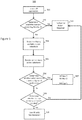
- FIG. 3 illustrates an exemplary procedure allowing a user to manage low VR storage events
- FIGS. 4A-4E illustrate exemplary messages presented on a VR headset display screen allowing a user to manage low VR operating resources events
- FIG. 5 illustrates an exemplary procedure allowing a user to manage low VR memory events
- FIG. 6 illustrates an exemplary procedure allowing a user to manage low VR memory events
- FIG. 7 illustrates an exemplary procedure allowing a user to manage low battery events.
- FIGS. 1 through 7 discussed below, and the various embodiments used to describe the principles of this disclosure in this patent document are by way of illustration only and should not be construed in any way to limit the scope of the disclosure. Those skilled in the art will understand that the principles of this disclosure can be implemented in any suitably arranged system.
- FIG. 1 is a high-level diagram of a VR system 100 suitable for describing exemplary embodiments of the present inventive principles.
- VR system 100 includes a VR headset (i.e., head-mounted display or HMD) device 100 , which may be a stand-alone VR HMD or a drop-in device (e.g., a device where the display and/or data processing functions are provided by a removable unit, such as a mobile phone).
- VR headset i.e., head-mounted display or HMD
- drop-in device e.g., a device where the display and/or data processing functions are provided by a removable unit, such as a mobile phone.
- VR HMD device 100 includes a controller 102 , which in some embodiments, is a set of processors or controllers, such as a central processing unit (CPU), an application processor (AP), and/or a communication processor (CP).
- controller 102 performs control on at least one of the other components of VR HMD device 100 , and/or performs operations or data processing relating to communications. Exemplary operations performed by controller 120 in a VR environment are discussed further below with regards to FIG. 2 .
- Controller 102 operates in conjunction with a memory/storage unit 103 , which in the example of FIG. 1 includes non-volatile storage 104 having a VR assigned space 105 for storing VR contents downloaded to VR HDM 101 .
- the size of VR assigned space 105 is variable and depends, among other things, on the amount of non-volatile storage 104 required to store contents (e.g., data and instructions) required for non-VR applications, as well as the amount of VR content already downloaded and stored.
- Memory/storage unit 103 also includes volatile memory, which stores data and instructions needed by controller 102 for executing active apps. These active apps may include apps that are unrelated or unnecessary to a currently executed VR app.
- VR HMD device 101 also includes a display 107 .
- Display 107 may be, for example, a liquid crystal display (LCD), a light emitting diode (LED) display, an organic light emitting diode (OLED) display, or a microelectromechanical systems (MEMS) display.
- LCD liquid crystal display
- LED light emitting diode
- OLED organic light emitting diode
- MEMS microelectromechanical systems
- a communications unit 108 allows VR HMD device 101 to communicate with external devices and/or systems.
- communications unit 108 may serve as an interface that may, transfer commands or data input from a user or other external devices to other component(s) of VR HMD device 101 .
- communications unit 108 may output commands or data received from other component(s) of electronic device 101 to the user or the other external device.
- Communications unit 108 may support wireless and/or wired communication with external devices and systems.
- the wireless communication may use at least one of, e.g., long term evolution (LTE), long term evolution-advanced (LTE-A), code division multiple access (CDMA), wideband code division multiple access (WCDMA), universal mobile telecommunication system (UMTS), wireless broadband (WiBro), or global system for mobile communication (GSM), as a cellular communication protocol.
- LTE long term evolution
- LTE-A long term evolution-advanced
- CDMA code division multiple access
- WCDMA wideband code division multiple access
- UMTS universal mobile telecommunication system
- WiBro wireless broadband
- GSM global system for mobile communication
- the wired connection may include at least one of universal serial bus (USB), high definition multimedia interface (HDMI), recommended standard 232 (RS-232), or plain old telephone service (POTS).
- USB universal serial bus
- HDMI high definition multimedia interface
- RS-232 recommended standard 232
- POTS plain old
- a user input device 110 exchanges commands and data with VR HDM device 101 through either a wired or wireless connection with communications unit 108 .
- User input/output device 110 may be anyone of a number of devices, such as a gaming controller, electronic pen, or other device that allows a user to respond to information displayed on display 107 through a touch, gesture, proximity or hovering input.
- the user input device 110 is part of the VR headset 101 , e.g., a touchpad, physical buttons, joystick, and the like, located on a surface of the device.
- Communications unit 108 can communicate with local storage (i.e., off-headset non-volatile storage) 111 , which may be a stand-alone device, such as a solid state drive (SSD) or storage within another device or system, such as a gaming console, network attached storage (NAS), a desktop computer, and the like.
- local storage i.e., off-headset non-volatile storage
- server 113 acting as a VR content provider
- Network 112 may include at least one communications or computer network, such as a local area network (LAN) or wide area network (WAN)), Internet, or telephone network.
- Network 112 provides connectivity with at least one cloud storage (shown herein Cloud 1 114 , a Cloud 2 115 , all the way to a Cloud n 116 ). It should be noted that ‘n’ is used to denote that there can be any number of cloud storage allowing alternative embodiments ranging from 1 to ‘n’ number of available storage. Optionally, such cloud storage may be free, paid, or a mixture thereof.
- FIG. 2 is a block diagram illustrating a program module, executable on controller 102 of VR HMD device 101 , according to an embodiment of the present invention.
- the program module may include a system operating system (OS) 200 , a framework 201 , and an application 202 .
- OS system operating system
- framework 201 framework 201
- application 202 application
- OS 200 may include at least one system resource manager and/or at least one device driver.
- the system resource manager may execute, for example, control and allocation operations, and recover system resources.
- the system resource manager may include a memory manager, or a file system manager.
- the device driver may include a display driver, a camera driver, a BLUETOOTH driver, a shared memory driver, a USB driver, a keypad driver, a Wi-Fi driver, an audio driver, or an inter-process communication (IPC) driver.
- IPC inter-process communication
- framework 201 may implement, for example, functions commonly required for the execution of applications or support applications with various functions through the API to allow the application to efficiently use limited system resources inside electronic VR HMD device 101 .
- a VR framework is included in framework 201 , may control functions for running VR mode operations, and may control at least one application 202 to support the VR mode on VR HMD device 101 .
- application 202 may include a plurality of applications 204 , which may include at least one VR application 205 running in the VR mode and at least one normal application 206 running in a normal mode.
- Application 202 may further include a VR control application 203 , which may control at least one VR application 205 and/or at least one normal application 206 .
- FIG. 2 is an example for implementing the principles of the present invention in the form of a program, and embodiments of the present invention are not limited thereto.
- the embodiment described in connection with FIG. 2 references VR, it may be applied to other scenarios such as augmented reality, mixed reality, etc.
- the VR portions or components may be utilized to enable the augmented reality or mixed reality aspects.
- XR various reality scenarios
- FIG. 3 is a flowchart of an exemplary procedure 300 for managing VR storage in VR HMD device 101 of FIG. 1 according to embodiments of the present disclosure. While the flow chart depicts a series of sequential steps, unless explicitly stated, no inference should be drawn from that sequence regarding specific order of performance, performance of steps or portions thereof serially rather than concurrently or in an overlapping manner, or performance of the steps depicted exclusively without the occurrence of intervening or intermediate steps.
- the process depicted in the example depicted is implemented by a processor in, for example, a head mounted electronic device or a wearable electronic device.
- controller 102 launches a selected VR app and starts downloading VR content to VR HMD device 101 from VR content provider 113 .
- the VR application may be retrieved from remote storage (e.g., cloud 1 , cloud 2 , cloud n, etc.) or locally stored on the VR HMD device 101 . So long as the HMD device 101 determines sufficient available storage (e.g., available VR assigned space 105 ) remains at Block 302 , then no further action is required at Block 303 .
- controller 102 when controller 102 is downloading VR content from VR content provider 113 and the amount of remaining non-volatile storage 104 is about to reach a threshold for a particular type of application (e.g., VR), controller 102 outputs to the display 107 of VR HMD device 101 a notification (alert) (e.g., as a pop-up), along with available user action selection options (Block 304 ).
- a threshold for example, may be 15% of the total storage space 104 .
- Such a threshold may be pre-set and in some embodiments may be user adjustable.
- the displayed notification may include information indicating the amount of space available in the VR assigned space 105 and/or the available storage in the non-VR assigned portion of non-volatile memory 104 .
- FIG. 4A shows an exemplary pop-up 401 generated by controller 102 on the display 107 of VR HMD device 101 , which alerts the user to low remaining availability in VR assigned space 105 .
- the user is provided options, for example through the pop-up 405 of FIG. 4E , also generated by controller 102 on the display 107 of VR HMD device 101 , to offload non-essential content (e.g., non-VR content, or unnecessary VR content) to one or more of Cloud 1 114 , Cloud 2 115 , paid Cloud n 116 , or local storage 111 of FIG. 1 , without disturbing the VR experience.
- non-essential content e.g., non-VR content, or unnecessary VR content
- controller 102 receives an actionable selection from the user through the user input device 110 at Block 305 , then the non-essential content is offloaded to the selected off-device storage (Block 306 ).
- the user may also elect not to take any further action at Blocks 305 and procedure 300 returns to Block 303 and no further action is taken.
- a memory management program automatically stores existing contents within non-volatile memory 104 to other storage locations based on the user's selection or a default setting and the type of content (i.e., VR and non-VR). For example, the memory management program may filter the VR and non-VR content to optimize storage and address of all kind of content before exhausting non-volatile storage 104 . In one embodiment, the movement of non-essential content may occur when the mobile device is not in VR mode.
- the VR HMD device 101 can detect when the headset is being worn using sensors 109 (e.g., proximity sensors, ambient light sensors, pressure sensors, connected to and/or disposed on VR HMD device 101 .
- the VR HMD device 101 may determine when VR applications, such as VR applications 205 of FIG., are being launched. Either aspect can allow VR HMD device 101 to sense when it is entering VR mode.
- VR HMD device 101 may then offload the non-essential content to the selected storage location.
- the offloaded non-essential content can be retrieved from the selected storage location and the current VR content offloaded to the selected storage location.
- VR HMD device 101 can then retrieve the VR content when VR HMD device 101 next enters VR mode.
- VR HMD device 101 can detect whether given content is VR content using any one of a number of methods, which can allow filtering of the content early to avoid exhausting the storage space of the non-volatile storage 104 .
- One representative method is to utilize known flags in the metadata of the device (e.g., com.samsung.android.vr.application.mode, vr_only, vr_dual, com.google.intent.category.CARDBOARD).
- Another method may be to examine the manifest files with APIs for content detection.
- a further method may utilize image processing to detect particular known logos or icons for VR applications (e.g., the GEAR VR logo is detected at center uppermost position), an upper right corner location of a settings icon for DAYDREAM, etc.).
- FIG. 5 Another exemplary embodiment of the present principles is a low VR memory alert procedure 500 of FIG. 5 , which allows controller 102 to handle events where insufficient space is available in volatile memory 106 to support VR operations. While the flow chart depicts a series of sequential steps, unless explicitly stated, no inference should be drawn from that sequence regarding specific order of performance, performance of steps or portions thereof serially rather than concurrently or in an overlapping manner, or performance of the steps depicted exclusively without the occurrence of intervening or intermediate steps.
- the process depicted in the example depicted is implemented by a processor in, for example, a head mounted electronic device or a wearable electronic device.
- controller 102 launches a VR application at Block 501 and then makes periodic determinations as to whether sufficient volatile memory 106 is available to support VR operations (Block 502 ). If sufficient volatile memory space is available (i.e., is above a selected threshold), then no further action is required (Block 503 ). (This threshold may be set, for example, by user selection, a default setting, the type of VR app being executed, and/or the type of VR content).
- controller 102 presents a low VR memory alert to the user on the display 107 of VR HMD device 101 , for example, through a pop-up, such as pop-up 402 of FIG. 4B .
- Controller 102 also presents user action options, at Block 504 , for example, to terminate one or more non-essential apps to increase the available memory space and/or to operate in the VR mode with lower display resolution (e.g., run in the VR mode with a grey scale display).
- controller 102 may receive one or more action selections through user input device 110 . If the selected action is to close one or more background applications (Block 506 ), then the selected application or applications are killed at Block 507 . Otherwise, at Block 508 , controller determines whether further constraints on volatile memory use are required. If not, then procedure 500 returns to Block 503 , and controller 102 take no further action. However, if further constraints on volatile memory use are required, the controller 102 runs VR content on display 107 in a low resolution mode (Block 509 ).
- the user may be given the option of offloading VR content to a profile in storage off of VR HMD device 101 for later retrieval (Block 601 ).
- controller 102 presents to the user the choice of offloading to at least one of Cloud 1 114 , Cloud 2 115 , or Cloud n 116 of FIG. 1 at Block 602 , or to local storage 111 of FIG. 1 at Block 603 .
- FIG. 7 illustrates a procedure 700 for addressing low battery power operation.
- a “low battery” condition occurs when the remaining battery power falls to 15% or less; however, the threshold at which a low battery condition occurs may vary upward or downward, depending on the particular embodiment and may be set by the user in advance.
- controller 102 determines the remaining battery power (Block 701 ) and then attempts to launch VR content (Block 702 ). If the VR content does not successfully launch (Block 703 ), then no further action is required (Block 704 ). (A failure to successfully launch under low battery condition may result at Block 703 , for example in: (1) the VR content launching for a few seconds, depending on the size of the VR content, followed by VR HMD device 101 exiting the VR mode; (2) VR HMD device 101 exiting the VR mode and the home screen appearing on display 107 of VR HMD device 101 ; or (3) the VR content initiating but then terminating with unexpected behavior, such as a black screen, reboot, or a similar anomaly).
- controller 102 determines whether the available battery power is below a selected threshold. If the available battery power is above the threshold, then no further action is required and procedure 700 returns to Block 704 . On the other hand, if the remaining battery power is below the selected threshold, then at Block 706 , controller 102 presents a low battery notification pop-up, which can include selectable actions, on the screen of display 107 of VR HMD device 101 .
- An example low battery power alert pop-up screen 403 is shown in FIG. 4C , although the content and appearance of this pop-up screen may vary from embodiment to embodiment.
- Controller 102 may receive one or more user selections for reducing HMD power consumption through user input device 110 (Block 707 ).
- Some exemplary options include reducing display 107 brightness, running the VR mode in grey scale on display 107 , terminating non-VR and/or non-essential VR apps running in the background, terminating WiFi functions, terminating Bluetooth functions, and terminating GPS functions. These options are merely exemplary, and in alternate embodiments, the user may be given the option of reducing battery power consumption by modifying or terminating other operations being performed by VR HMD device 101 .
- controller 102 executes the selected action for reducing the power consumption of VR HMD device 101 .
- a given resource or set of resources including memory, storage, or remaining battery power are running low
- the user is provided an alert 404 on display 107 of VR HMD device 101 .
- the user is then provided with a pop-up, similar to pop-up 405 , which allows the user to manage the low resource condition, for example through user input device 110 , without taking off VR HMD device 101 .
Landscapes
- Engineering & Computer Science (AREA)
- Theoretical Computer Science (AREA)
- General Engineering & Computer Science (AREA)
- Physics & Mathematics (AREA)
- General Physics & Mathematics (AREA)
- Human Computer Interaction (AREA)
- Computer Hardware Design (AREA)
- User Interface Of Digital Computer (AREA)
Abstract
Description
Claims (20)
Priority Applications (2)
| Application Number | Priority Date | Filing Date | Title |
|---|---|---|---|
| US16/195,623 US10978018B2 (en) | 2018-05-29 | 2018-11-19 | Virtual reality resource management for virtual reality head mounted display devices |
| PCT/KR2019/004604 WO2019231108A1 (en) | 2018-05-29 | 2019-04-17 | Virtual reality resource management for virtual reality head mounted display devices |
Applications Claiming Priority (2)
| Application Number | Priority Date | Filing Date | Title |
|---|---|---|---|
| US201862677568P | 2018-05-29 | 2018-05-29 | |
| US16/195,623 US10978018B2 (en) | 2018-05-29 | 2018-11-19 | Virtual reality resource management for virtual reality head mounted display devices |
Publications (2)
| Publication Number | Publication Date |
|---|---|
| US20190371259A1 US20190371259A1 (en) | 2019-12-05 |
| US10978018B2 true US10978018B2 (en) | 2021-04-13 |
Family
ID=68692727
Family Applications (1)
| Application Number | Title | Priority Date | Filing Date |
|---|---|---|---|
| US16/195,623 Expired - Fee Related US10978018B2 (en) | 2018-05-29 | 2018-11-19 | Virtual reality resource management for virtual reality head mounted display devices |
Country Status (2)
| Country | Link |
|---|---|
| US (1) | US10978018B2 (en) |
| WO (1) | WO2019231108A1 (en) |
Cited By (1)
| Publication number | Priority date | Publication date | Assignee | Title |
|---|---|---|---|---|
| US12014030B2 (en) | 2021-08-18 | 2024-06-18 | Bank Of America Corporation | System for predictive virtual scenario presentation |
Families Citing this family (4)
| Publication number | Priority date | Publication date | Assignee | Title |
|---|---|---|---|---|
| US11385907B1 (en) | 2019-04-17 | 2022-07-12 | Snap Inc. | Automated scaling of application features based on rules |
| US11455078B1 (en) * | 2020-03-31 | 2022-09-27 | Snap Inc. | Spatial navigation and creation interface |
| US11797162B2 (en) | 2020-12-22 | 2023-10-24 | Snap Inc. | 3D painting on an eyewear device |
| US11960345B2 (en) | 2021-05-25 | 2024-04-16 | Samsung Electronics Co., Ltd. | System and method for controlling operational modes for XR devices for performance optimization |
Citations (17)
| Publication number | Priority date | Publication date | Assignee | Title |
|---|---|---|---|---|
| US8016670B2 (en) | 2004-01-12 | 2011-09-13 | Igt | Virtual glass for a gaming machine |
| US8032010B2 (en) | 2003-01-02 | 2011-10-04 | Samsung Electronics Co., Ltd. | Image recording/reproducing apparatus and control method thereof |
| US20110307900A1 (en) | 2010-06-14 | 2011-12-15 | Microsoft Corporation | Changing streaming media quality level based on current device resource usage |
| US20130083064A1 (en) | 2011-09-30 | 2013-04-04 | Kevin A. Geisner | Personal audio/visual apparatus providing resource management |
| KR20140056749A (en) | 2012-10-31 | 2014-05-12 | 에스케이플래닛 주식회사 | System and method for contents download service, and apparatus applied to the same |
| US8760503B2 (en) | 2009-11-12 | 2014-06-24 | Lg Electronics Inc. | Image display apparatus and operation method therefor |
| US20150248235A1 (en) * | 2014-02-28 | 2015-09-03 | Samsung Electronics Company, Ltd. | Text input on an interactive display |
| US20150312341A1 (en) | 2014-04-24 | 2015-10-29 | Vivint, Inc. | Saving video clips on a storage of limited size based on priority |
| US20150373116A1 (en) * | 2014-06-24 | 2015-12-24 | Google Inc. | Storing content items |
| EP3104252A1 (en) | 2015-06-09 | 2016-12-14 | Nokia Technologies Oy | Transition of a head mounted display from operation in a first power mode to operation in a second power mode |
| CN205829707U (en) | 2016-06-23 | 2016-12-21 | 高榕科技(深圳)有限公司 | A kind of new VR display system based on private cloud storage system |
| WO2017033992A1 (en) | 2015-08-25 | 2017-03-02 | 株式会社テレパシージャパン | Head-mounted image display device |
| US20170090814A1 (en) | 2015-09-25 | 2017-03-30 | Intel Corporation | Efficient storage and retrieval for wearable-device data |
| CN106775996A (en) | 2015-11-20 | 2017-05-31 | 北京奇虎科技有限公司 | The method and apparatus that mobile terminal internal memory is cleared up by Intelligent worn device |
| JP2017204225A (en) | 2016-05-13 | 2017-11-16 | 株式会社日立システムズ | Resource management device and method in virtual system |
| US9836114B1 (en) * | 2015-09-15 | 2017-12-05 | Amazon Technologies, Inc. | Event-based trigger for managing battery consumption |
| US20180120826A1 (en) | 2015-04-07 | 2018-05-03 | Samsung Electronics Co., Ltd. | Server, electronic device, and electronic device information providing method |
-
2018
- 2018-11-19 US US16/195,623 patent/US10978018B2/en not_active Expired - Fee Related
-
2019
- 2019-04-17 WO PCT/KR2019/004604 patent/WO2019231108A1/en not_active Ceased
Patent Citations (17)
| Publication number | Priority date | Publication date | Assignee | Title |
|---|---|---|---|---|
| US8032010B2 (en) | 2003-01-02 | 2011-10-04 | Samsung Electronics Co., Ltd. | Image recording/reproducing apparatus and control method thereof |
| US8016670B2 (en) | 2004-01-12 | 2011-09-13 | Igt | Virtual glass for a gaming machine |
| US8760503B2 (en) | 2009-11-12 | 2014-06-24 | Lg Electronics Inc. | Image display apparatus and operation method therefor |
| US20110307900A1 (en) | 2010-06-14 | 2011-12-15 | Microsoft Corporation | Changing streaming media quality level based on current device resource usage |
| US20130083064A1 (en) | 2011-09-30 | 2013-04-04 | Kevin A. Geisner | Personal audio/visual apparatus providing resource management |
| KR20140056749A (en) | 2012-10-31 | 2014-05-12 | 에스케이플래닛 주식회사 | System and method for contents download service, and apparatus applied to the same |
| US20150248235A1 (en) * | 2014-02-28 | 2015-09-03 | Samsung Electronics Company, Ltd. | Text input on an interactive display |
| US20150312341A1 (en) | 2014-04-24 | 2015-10-29 | Vivint, Inc. | Saving video clips on a storage of limited size based on priority |
| US20150373116A1 (en) * | 2014-06-24 | 2015-12-24 | Google Inc. | Storing content items |
| US20180120826A1 (en) | 2015-04-07 | 2018-05-03 | Samsung Electronics Co., Ltd. | Server, electronic device, and electronic device information providing method |
| EP3104252A1 (en) | 2015-06-09 | 2016-12-14 | Nokia Technologies Oy | Transition of a head mounted display from operation in a first power mode to operation in a second power mode |
| WO2017033992A1 (en) | 2015-08-25 | 2017-03-02 | 株式会社テレパシージャパン | Head-mounted image display device |
| US9836114B1 (en) * | 2015-09-15 | 2017-12-05 | Amazon Technologies, Inc. | Event-based trigger for managing battery consumption |
| US20170090814A1 (en) | 2015-09-25 | 2017-03-30 | Intel Corporation | Efficient storage and retrieval for wearable-device data |
| CN106775996A (en) | 2015-11-20 | 2017-05-31 | 北京奇虎科技有限公司 | The method and apparatus that mobile terminal internal memory is cleared up by Intelligent worn device |
| JP2017204225A (en) | 2016-05-13 | 2017-11-16 | 株式会社日立システムズ | Resource management device and method in virtual system |
| CN205829707U (en) | 2016-06-23 | 2016-12-21 | 高榕科技(深圳)有限公司 | A kind of new VR display system based on private cloud storage system |
Non-Patent Citations (2)
| Title |
|---|
| International Search Report dated Jul. 18, 2019 in connection with International Patent Application No. PCT/KR2019/004604, 3 pages. |
| Written Opinion of the International Searching Authority dated Jul. 18, 2019 in connection with International Patent Application No. PCT/KR2019/004604, 4 pages. |
Cited By (1)
| Publication number | Priority date | Publication date | Assignee | Title |
|---|---|---|---|---|
| US12014030B2 (en) | 2021-08-18 | 2024-06-18 | Bank Of America Corporation | System for predictive virtual scenario presentation |
Also Published As
| Publication number | Publication date |
|---|---|
| WO2019231108A1 (en) | 2019-12-05 |
| US20190371259A1 (en) | 2019-12-05 |
Similar Documents
| Publication | Publication Date | Title |
|---|---|---|
| US11630553B2 (en) | Electronic device and method for displaying history of executed application thereof | |
| US11650722B2 (en) | Electronic device and method for managing window | |
| US10978018B2 (en) | Virtual reality resource management for virtual reality head mounted display devices | |
| CN109478393B (en) | Electronic device and method for displaying images | |
| US10936340B2 (en) | Apparatus and method for performing selective application preloading in electronic device | |
| CN105929925B (en) | Electronic device and method for managing power in electronic device | |
| KR102528389B1 (en) | Electronic device and notification processing method of electronic device | |
| US10186009B2 (en) | Method for controlling display in electronic device and electronic device thereof | |
| KR102232544B1 (en) | Electronic apparatus and method for reducing burn-in | |
| KR20170053517A (en) | Electronic device comprising multiple displays and method for controlling thereof | |
| US20190034222A1 (en) | Electronic device for controlling application and operation method thereof | |
| KR102475230B1 (en) | Method for controlling communication network connection, storage medium and electronic device therefor | |
| KR20160132620A (en) | Display data processing method and electronic device supporting the same | |
| KR102586874B1 (en) | Electronic device and image display method thereof | |
| KR102488580B1 (en) | Apparatus and method for providing adaptive user interface | |
| KR102673675B1 (en) | Electronic device and method for controlling surface heat in the electronic device | |
| KR20160109466A (en) | Method for controlling dislay and an electronic device thereof | |
| KR102503942B1 (en) | Apparatus and method for providing information via portion of display | |
| KR102533977B1 (en) | Device for Controlling Brightness of Display and Method Thereof | |
| KR20170072702A (en) | Electronic device for providing a character input function and method for controlling thereof | |
| KR20170051905A (en) | Electronic apparatus and operating method thereof |
Legal Events
| Date | Code | Title | Description |
|---|---|---|---|
| AS | Assignment |
Owner name: SAMSUNG ELECTRONICS CO., LTD, KOREA, REPUBLIC OF Free format text: ASSIGNMENT OF ASSIGNORS INTEREST;ASSIGNOR:SHARMA, PRIYANKA;REEL/FRAME:047547/0985 Effective date: 20181116 |
|
| FEPP | Fee payment procedure |
Free format text: ENTITY STATUS SET TO UNDISCOUNTED (ORIGINAL EVENT CODE: BIG.); ENTITY STATUS OF PATENT OWNER: LARGE ENTITY |
|
| STPP | Information on status: patent application and granting procedure in general |
Free format text: NON FINAL ACTION MAILED |
|
| STPP | Information on status: patent application and granting procedure in general |
Free format text: RESPONSE TO NON-FINAL OFFICE ACTION ENTERED AND FORWARDED TO EXAMINER |
|
| STPP | Information on status: patent application and granting procedure in general |
Free format text: DOCKETED NEW CASE - READY FOR EXAMINATION |
|
| STPP | Information on status: patent application and granting procedure in general |
Free format text: NOTICE OF ALLOWANCE MAILED -- APPLICATION RECEIVED IN OFFICE OF PUBLICATIONS |
|
| STPP | Information on status: patent application and granting procedure in general |
Free format text: PUBLICATIONS -- ISSUE FEE PAYMENT RECEIVED |
|
| STPP | Information on status: patent application and granting procedure in general |
Free format text: PUBLICATIONS -- ISSUE FEE PAYMENT VERIFIED |
|
| STCF | Information on status: patent grant |
Free format text: PATENTED CASE |
|
| FEPP | Fee payment procedure |
Free format text: MAINTENANCE FEE REMINDER MAILED (ORIGINAL EVENT CODE: REM.); ENTITY STATUS OF PATENT OWNER: LARGE ENTITY |
|
| LAPS | Lapse for failure to pay maintenance fees |
Free format text: PATENT EXPIRED FOR FAILURE TO PAY MAINTENANCE FEES (ORIGINAL EVENT CODE: EXP.); ENTITY STATUS OF PATENT OWNER: LARGE ENTITY |
|
| STCH | Information on status: patent discontinuation |
Free format text: PATENT EXPIRED DUE TO NONPAYMENT OF MAINTENANCE FEES UNDER 37 CFR 1.362 |
|
| FP | Lapsed due to failure to pay maintenance fee |
Effective date: 20250413 |