US10868682B2 - System and method for monitoring usage of an electronic document - Google Patents
System and method for monitoring usage of an electronic document Download PDFInfo
- Publication number
- US10868682B2 US10868682B2 US15/918,306 US201815918306A US10868682B2 US 10868682 B2 US10868682 B2 US 10868682B2 US 201815918306 A US201815918306 A US 201815918306A US 10868682 B2 US10868682 B2 US 10868682B2
- Authority
- US
- United States
- Prior art keywords
- document
- viewing
- user
- data
- command stream
- Prior art date
- Legal status (The legal status is an assumption and is not a legal conclusion. Google has not performed a legal analysis and makes no representation as to the accuracy of the status listed.)
- Expired - Fee Related, expires
Links
Images




Classifications
-
- H—ELECTRICITY
- H04—ELECTRIC COMMUNICATION TECHNIQUE
- H04L—TRANSMISSION OF DIGITAL INFORMATION, e.g. TELEGRAPHIC COMMUNICATION
- H04L12/00—Data switching networks
- H04L12/02—Details
- H04L12/16—Arrangements for providing special services to substations
- H04L12/18—Arrangements for providing special services to substations for broadcast or conference, e.g. multicast
- H04L12/1813—Arrangements for providing special services to substations for broadcast or conference, e.g. multicast for computer conferences, e.g. chat rooms
-
- G—PHYSICS
- G06—COMPUTING OR CALCULATING; COUNTING
- G06F—ELECTRIC DIGITAL DATA PROCESSING
- G06F16/00—Information retrieval; Database structures therefor; File system structures therefor
- G06F16/10—File systems; File servers
- G06F16/11—File system administration, e.g. details of archiving or snapshots
- G06F16/116—Details of conversion of file system types or formats
-
- G—PHYSICS
- G06—COMPUTING OR CALCULATING; COUNTING
- G06F—ELECTRIC DIGITAL DATA PROCESSING
- G06F16/00—Information retrieval; Database structures therefor; File system structures therefor
- G06F16/30—Information retrieval; Database structures therefor; File system structures therefor of unstructured textual data
- G06F16/31—Indexing; Data structures therefor; Storage structures
- G06F16/313—Selection or weighting of terms for indexing
-
- G—PHYSICS
- G06—COMPUTING OR CALCULATING; COUNTING
- G06F—ELECTRIC DIGITAL DATA PROCESSING
- G06F21/00—Security arrangements for protecting computers, components thereof, programs or data against unauthorised activity
- G06F21/60—Protecting data
- G06F21/62—Protecting access to data via a platform, e.g. using keys or access control rules
- G06F21/6209—Protecting access to data via a platform, e.g. using keys or access control rules to a single file or object, e.g. in a secure envelope, encrypted and accessed using a key, or with access control rules appended to the object itself
-
- G—PHYSICS
- G06—COMPUTING OR CALCULATING; COUNTING
- G06F—ELECTRIC DIGITAL DATA PROCESSING
- G06F21/00—Security arrangements for protecting computers, components thereof, programs or data against unauthorised activity
- G06F21/60—Protecting data
- G06F21/62—Protecting access to data via a platform, e.g. using keys or access control rules
- G06F21/6218—Protecting access to data via a platform, e.g. using keys or access control rules to a system of files or objects, e.g. local or distributed file system or database
-
- H—ELECTRICITY
- H04—ELECTRIC COMMUNICATION TECHNIQUE
- H04L—TRANSMISSION OF DIGITAL INFORMATION, e.g. TELEGRAPHIC COMMUNICATION
- H04L12/00—Data switching networks
- H04L12/02—Details
- H04L12/16—Arrangements for providing special services to substations
- H04L12/18—Arrangements for providing special services to substations for broadcast or conference, e.g. multicast
- H04L12/1813—Arrangements for providing special services to substations for broadcast or conference, e.g. multicast for computer conferences, e.g. chat rooms
- H04L12/1822—Conducting the conference, e.g. admission, detection, selection or grouping of participants, correlating users to one or more conference sessions, prioritising transmission
-
- H—ELECTRICITY
- H04—ELECTRIC COMMUNICATION TECHNIQUE
- H04L—TRANSMISSION OF DIGITAL INFORMATION, e.g. TELEGRAPHIC COMMUNICATION
- H04L12/00—Data switching networks
- H04L12/02—Details
- H04L12/16—Arrangements for providing special services to substations
- H04L12/18—Arrangements for providing special services to substations for broadcast or conference, e.g. multicast
- H04L12/1859—Arrangements for providing special services to substations for broadcast or conference, e.g. multicast adapted to provide push services, e.g. data channels
-
- H04L51/32—
-
- H—ELECTRICITY
- H04—ELECTRIC COMMUNICATION TECHNIQUE
- H04L—TRANSMISSION OF DIGITAL INFORMATION, e.g. TELEGRAPHIC COMMUNICATION
- H04L51/00—User-to-user messaging in packet-switching networks, transmitted according to store-and-forward or real-time protocols, e.g. e-mail
- H04L51/52—User-to-user messaging in packet-switching networks, transmitted according to store-and-forward or real-time protocols, e.g. e-mail for supporting social networking services
-
- H—ELECTRICITY
- H04—ELECTRIC COMMUNICATION TECHNIQUE
- H04L—TRANSMISSION OF DIGITAL INFORMATION, e.g. TELEGRAPHIC COMMUNICATION
- H04L63/00—Network architectures or network communication protocols for network security
- H04L63/02—Network architectures or network communication protocols for network security for separating internal from external traffic, e.g. firewalls
- H04L63/0227—Filtering policies
- H04L63/0245—Filtering by information in the payload
-
- H—ELECTRICITY
- H04—ELECTRIC COMMUNICATION TECHNIQUE
- H04L—TRANSMISSION OF DIGITAL INFORMATION, e.g. TELEGRAPHIC COMMUNICATION
- H04L67/00—Network arrangements or protocols for supporting network services or applications
- H04L67/01—Protocols
- H04L67/06—Protocols specially adapted for file transfer, e.g. file transfer protocol [FTP]
-
- H04L67/22—
-
- H—ELECTRICITY
- H04—ELECTRIC COMMUNICATION TECHNIQUE
- H04L—TRANSMISSION OF DIGITAL INFORMATION, e.g. TELEGRAPHIC COMMUNICATION
- H04L67/00—Network arrangements or protocols for supporting network services or applications
- H04L67/50—Network services
- H04L67/535—Tracking the activity of the user
-
- H—ELECTRICITY
- H04—ELECTRIC COMMUNICATION TECHNIQUE
- H04W—WIRELESS COMMUNICATION NETWORKS
- H04W4/00—Services specially adapted for wireless communication networks; Facilities therefor
- H04W4/18—Information format or content conversion, e.g. adaptation by the network of the transmitted or received information for the purpose of wireless delivery to users or terminals
-
- H—ELECTRICITY
- H04—ELECTRIC COMMUNICATION TECHNIQUE
- H04W—WIRELESS COMMUNICATION NETWORKS
- H04W4/00—Services specially adapted for wireless communication networks; Facilities therefor
- H04W4/20—Services signaling; Auxiliary data signalling, i.e. transmitting data via a non-traffic channel
- H04W4/21—Services signaling; Auxiliary data signalling, i.e. transmitting data via a non-traffic channel for social networking applications
-
- G—PHYSICS
- G06—COMPUTING OR CALCULATING; COUNTING
- G06F—ELECTRIC DIGITAL DATA PROCESSING
- G06F2221/00—Indexing scheme relating to security arrangements for protecting computers, components thereof, programs or data against unauthorised activity
- G06F2221/21—Indexing scheme relating to G06F21/00 and subgroups addressing additional information or applications relating to security arrangements for protecting computers, components thereof, programs or data against unauthorised activity
- G06F2221/2101—Auditing as a secondary aspect
-
- H—ELECTRICITY
- H04—ELECTRIC COMMUNICATION TECHNIQUE
- H04L—TRANSMISSION OF DIGITAL INFORMATION, e.g. TELEGRAPHIC COMMUNICATION
- H04L51/00—User-to-user messaging in packet-switching networks, transmitted according to store-and-forward or real-time protocols, e.g. e-mail
- H04L51/06—Message adaptation to terminal or network requirements
- H04L51/066—Format adaptation, e.g. format conversion or compression
-
- H—ELECTRICITY
- H04—ELECTRIC COMMUNICATION TECHNIQUE
- H04L—TRANSMISSION OF DIGITAL INFORMATION, e.g. TELEGRAPHIC COMMUNICATION
- H04L63/00—Network architectures or network communication protocols for network security
- H04L63/10—Network architectures or network communication protocols for network security for controlling access to devices or network resources
Definitions
- the invention is to a system and method that utilizes a user's navigation commands in order to track which portions of a document the user has scrutinized.
- a customer would have to use navigation commands to move the apparent window of the display screen to show different sections of the document as the customer desires.
- This stream of navigation commands provides an opportunity for the party distributing the document to obtain information about a user's scrutiny of the document itself.
- the navigation data stream that represents the viewing habit by viewers of the document can be used by the system to detect or calculate data analytics based on such items as how long viewers stayed on a page, how long the document was open, the average viewing time, and the spread of the distribution of viewing times.
- the viewing habit of a particular viewer with regard to a particular document may be compared to the aggregated viewing habits of all viewers. This may be used by a business to meet regulatory compliance purposes.
- this aggregated data can be used to determine viewing rules that establish baseline viewing habit that is considered compliant. For example, if on average, viewers in aggregate view a particularly important page for 1 minute, but a particular viewer spends 5 seconds, the detection of the navigation data stream, in real time, can then cause the system to transmit an alert message to the viewer that they are not in compliance. Other examples are if a region of a page in the document is has no indication of having been viewed at all.
- the failure to properly view the document can be data stored in a data record for future use.
- the document may be comprised of a flat image file that the viewing program displays to the viewer.
- the system may convert a word processing data file, a presentation data file, an image, a movie or other content into the flat file that is displayed by the viewer.
- FIG. 1 Exemplary flow chart for displaying document and capturing navigation data.
- FIG. 2 Diagram showing flow of document and boundbox metadata to the display.
- FIG. 3 Diagram showing input of navigation command data flowing out to the server.
- FIG. 4 Flow chart for automatically monitoring user viewing habit.
- FIG. 5 Depiction of the bounding boxes on a document.
- FIG. 6 Depiction of color coding document region sensitivity.
- FIG. 7 Depiction of usage heatmap color coding overlaying the document.
- FIG. 8 Depiction of presentation of aggregated viewing statistics.
- FIG. 9 Depiction of document heat map presentation.
- FIG. 10 Another depiction of the usage heatmap overlaying the document text.
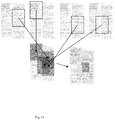
- FIG. 11 depicts the increasing degrees of heatmaps in a document.
- FIG. 12 depicts the increasing degrees of heatmaps in a document
- FIG. 13 depicts the zoomed-in function in a particular document.
- FIG. 14 depicts the different instances of viewing as indicated by different bounding lines.
- FIG. 15 depicts the total time spent on a document by a receiving user over the last seven days
- FIG. 16 depicts a graph indicating the time a receiving user spent per page over the last seven days
- FIG. 17 depicts a graph showing the amount of time a receiving user spent viewing a video or audio file
- a document distribution system may be embodied by a server and a computer program operating on a user's mobile device.
- the server may be attached by a data network to a storage device where data files representing documents are stored.
- the server operates a program that receives from a user's mobile device a request to display a document.
- the server program verifies the request, and if valid and authorized, obtains the document from the storage device. See FIG. 1 .
- the document is then transmitted to the requesting mobile device.
- the document is transmitted as a flat image document in an encoded format that is not usable except by an authorized program operating on the user's mobile device.
- a document may be a word processing file containing text, an image, an audiovisual file or a set of pages for display that contains combinations of text and images or other visual content.
- installed on the user's mobile device is an authorized program that can receive the encoded document data, decode it, and display the decoded document on the mobile device screen.
- the mobile device request for the document results in a payload of program code embodying the authorized program to be transmitted to the user's device. ( 203 )
- the authorized program is installed to operate on the mobile device and then it calls for the document.
- the code payload embodying the authorized program accompanies the encoded document transmitted to the mobile device, either in the same transmission, or in a series of transmissions, and either by one network request transaction or more request transactions.
- the server may transmit parts of a document so that the mobile device only has that portion of the document that was called for or authorized.
- data representing a document or portion thereof is present on the user's mobile device.
- the authorized program code for viewing the document is also present on the device.
- the viewing code can then render the document ( 101 )( 206 ) on the display screen of the user's mobile device.
- the viewing code is configured by its program logic to receive from the user commands to navigate through the document.
- the document may display an 81 ⁇ 2 inch by 11 inch page of a document.
- the screen of the device may be so small, the print on the document is illegible.
- a user may enter commands ( 302 ) into the device to zoom into the document in order to read a portion of the page.
- the commands are entered by means of a touch screen that displays the document.
- the gestures of the user's fingers constitute command data that the viewing code receives and uses in order to recalculate what to display on the devices screen.
- the viewing code may interpret that touch as a command to zoom into or magnify the display of the page such that the touched location is at the center of the zoomed in or magnified portion of the page. This creates an apparent window ( 205 ) for viewing the document page.
- the apparent window is a portion of the document page that is magnified and the window can appear to be moved around the page as a result of the user's commands to selectively display different portions of the same page.
- the user may want to incrementally move the apparent viewing window of the page so as to scroll down the page.
- Those commands may be input into the mobile device by means of the user touching the screen and dragging the touch point down the screen.
- touch and drag gestures may be used to move the apparent window up, down or side to side in order that the user may read the magnified document page.
- a touch gestures like a pinch-in or pinch-out can be used to cause the apparent window to zoom into the document region, that is to increase the magnification or zoom out, that is, to decrease the magnification.
- the user may move a finger across a track-pad, and then press the pad to input the condition of a selection.
- the user may use a mouse to move a cursor that is displayed over the document, and then engage a button on the mouse to input the condition of a selection.
- the commands input by the user to adjust the display may be input by voice command to the device.
- the document may have internal active links.
- the user may select an entry on the table of contents as a way of commanding the viewing code to display that page of the document.
- the selection input may be accomplished by the user touching a rendering of the link on the display of the mobile device.
- the selection of the link may cause the mobile device to launch a program to display a document or other content that is external to the document being displayed by the viewing code.
- the viewing code receives as data, all of the navigation and selection commands input by the user.
- This stream of data may be used in various ways.
- the viewing code maintains the command data stream comprised of navigation and selection command data.
- This data may be stored locally on the mobile device, or may be transmitted to a remote server, or first stored locally and then transmitted to the remote server.
- the server would store the input data stream in a database, ( 305 ) in one or more data records. Those data records may be associated with the user, whose mobile device requested the document for display and the document. In this manner, the stored command data stream is data that indicates how that user reviewed the selected document.
- the document is associated with one or more individual bounding boxes.
- the bounding box is a set of data values that a perimeter of a region of the document.
- the bounding box is a portion of a page of the document.
- the bounding box may be an entire page or a predetermined set of pages of the document.
- the bounding box is represented by the x, y coordinates of a predetermined rectangle in a page in the document.
- the bounding box may be a logical construct and not actually displayed on the mobile device screen.
- the bounding box may be displayed as a line, or by the region being overlayed by a color.
- the bounding boxes define the location of regions of the document that are of interest to the document owner.
- a bounding box defines a perimeter ( 306 ) around a region of text comprising the displayed document region.
- Each bounding box may be represented by a data structure that has a data value identifying the document, a data value identifying the box, and data values representing a locus in the document.
- the data values representing the bounding box may include a page number for the page the box resides on, and then four x, y coordinates that define the location of the box on the page.
- Other forms of bounding box representation can be used. For example, a box may be defined by the x,y location of one point, and then two values representing a distance up or down, or left to right.
- a document that has predetermined numbered columns and rows for text may specify a bounding box in terms of column numbers and line numbers.
- Other embodiments may define a bounding box in terms of paragraph numbers.
- the dimensions may be either actual distances on the page, for example, in inches or centimeters, or text positions from the left or right edge of the paper (or the margins), or text lines from the top or bottom of the page (or its margins). All of these different schemes for identifying a locus on the page are examples of data values representing a locus in the document.
- the data structure may relate the bonding box with the some information about its substance, for the convenience of the document's owner.
- a bounding box may be associated with test describing “Investment Risk Factors.” An example of the bounding box data is presented below:
- the viewing code when operating, responds to the command data stream input by the user in order that the user navigate and view portions of the document.
- viewing code compares the location of the regions of the document being viewed by the user with the locus of the bounding boxes in order to determine if the user is viewing text within a bounding box, and which bounding box it is.
- This data is also stored as part of the command data stream.
- the viewing code uses the command data to determine one or more of a page to display, a magnification amount and a movement of the apparent window.
- the viewing code can associate each command input with a time value. ( 104 ) In this manner, the viewing code can catalog all of the user's viewing habits through the document, including when those movements occurred, and store that data. ( 105 )( 307 ).
- the database on the server stores in a data record data representing the fact that the Newco prospectus (the document) was transmitted to the user's device at a particular date and time.
- the viewing code on the user's mobile device can continue to catalog such usage.
- the prospectus may include a section called “Investment Risk Factors.”
- the viewing code may receive from the server a set of data representing the bounding boxes for that document. One of those bounding boxes may be associated with the “Investment Risk Factor” portion of the document.
- the user may then display the first page of the document, but not input any command to zoom in to view it.
- the user may then quickly input navigation commands, for example, finger strokes, to scroll down the document.
- the viewing code catalogs these gestures, especially the times when they are input.
- the user may arrive at the page titled “Investment Risk Factor” and then at that point zoom into that section.
- the user may then spend some time reading that section, before inputting a zoom out command followed by further navigation to other portions of the document. All of these commands are stored by the viewing code, including the associated times of the command input. These may be stored in a data structure as a list or struct or as a series of entries in a relational table in a relational database.
- the locus of the display window is compared to the bounding boxes to determine if the display window is displaying text in a particular bounding box.
- the location of a point on the document page displayed on the device screen is in pixels, that is, the number of pixels by row and column.
- the document location can be a location in characters along a row for one axis, and then the number of lines for the other axis.
- the transform would be one or a pair of coefficients that map the location on the document page to the pixel locations that are displayed. Similarly, a location of a touch on the screen may be indicated by a pair of actual distances on the screen and then mapped to the location on the document page. Any of these representations in various combinations may be used with the appropriate algebraic transformation between them.
- Step 1 receive navigation command.
- the user inputs commands, for example, document selection, navigation or magnification commands into the viewing code by means of actuating a user interface of their computer.
- the user uses touch gestures on the display screen of a mobile device like a smart phone.
- Step 2 determine time stamp and store command data and time stamp in the command data stream data structure.
- the viewing code fetches a clock value from the mobile device hardware or operating system, generates a new entry into a data structure for that input command and the time stamp.
- Step 3 move display window in the document to its new location or magnification.
- the viewing code then fetches from memory the data embodying the selected page and then renders the document page on the device, in the preferred embodiment, the viewing code generates the output data for the display. If the command is to zoom into a page that is already displayed, the viewing code fetches the data for the page, and selects the subset of that data required to render the portion of the page that is requested.
- the magnification command is interpreted to determine a factor and other mapping data that can relate the apparent position of the display window with the desired region of the document. Using this mapping data, rendered image data can be generated that, when displayed, is the requested region of the document at the requested magnification.
- Step 4 determine whether the new boundary or center-point of display window overlaps any bounding box. If not, then go to Step 1.
- the mapping data from Step 3 can be used to determine the geometric data that defines the apparent perimeter of the display window. That data can then be used to determine if that perimeter is lies within any bounding box. If not, then the system waits for the next command to be input.
- Step 5 determine if the overlap is greater than a predetermined amount. If no, go to Step 1.
- the system arrives at this step if there is an overlap with a bounding box. This step is optional, but may be used in one embodiment. If the amount of overlap is trivial, for example, a few characters of text, the system can optionally treat the command as if there was no overlap, and thereby go back to Step 1.
- Step 6 insert into command data stream an indication that the determined bound box has been detected, and the identity of the detected bounding box. If an overlap with a boundary box is detected in Step 4, then the command data stream is updated to include an indication that the bounding box was detected, that is, which box and a time stamp. The command data stream continues to grow until the user exits the document.
- An example of the organized command data stream is presented below:
- the bounding box aspect may omitted and instead the system can track and store the navigation commands, and use that data directly. For example, if a person enters a “zoom in” command, the entry can store the x, y location of the center of the display window and a time stamp.
- the time stamp can indicate “am” or “pm” or use a 24 hour clock.
- the entry in the stored command data stream could appear as:
- the bounding box could be omitted, but both techniques can also be used together.
- the command data stream for each user is collected by the server, by the viewing code transmitting the command data stream ( 307 ) to the server ( 304 ) over a data.
- This may be by means of a database ( 305 ) that stores a data record for each time the user opens the document, and in that data record is the command data stream for that session, the identity of the user and the identity of the document.
- the database may be utilized to generate more data that represents the aggregate usage of the document. For example, each time a particular bounding box is viewed, that may count for a score of 1 for that bounding box.
- a statistical aggregation of the data can show the percentage of users who viewed a given box.
- the time stamp data may be used to calculate for a user viewing the box, how long they viewed the region.
- the aggregated data can then be used to calculate an average time and standard deviation (or some other representation of the spread of statistical values) for the amount of time a user views that particular bounding box.
- This output data may also be stored in a data record in a database.
- a data record In this data record, the identity of the document and the identity of the bounding box are listed. The number of users who visited the selected region within the bounding can be used to determine whether addition, the determined viewing time and it standard deviation are stored in the data record. The data can be used to store that a viewer has read an important statement in the document or other item that must be reviewed, by means of the fact that the person zoomed into the region of the document with the important statement.
- the output data that is stored for a user can be used by the system to evaluate the user's viewing of the document. For example, queries can be submitted to the database for the time stamp for opening the document and closing the document for a given user. This data can then be used to calculate the elapsed time the document was being viewed. Similarly, particular viewing times for specific bounding boxes in a given document may be calculated. This data may be stored in order to permit the document owner to demonstrate that a particular user did in fact review in detail a particular portion of the document, or that they failed to do so. This data can also be aggregated so that a data record stored in the data base contains information that is the average time for viewing the document or a specific bounding box. The statistical result can also include the width of the statistical curve at the standard deviation.
- a specific viewing time by a specific user can be compared by the computer processor to the average viewing time of a page or region of a page, and the range of viewing times within the standard deviation or some other predetermined tolerated variation threshold.
- This provides a mechanism to automate the monitoring of a user's review of a document. For example, an analytical analysis can be run on a user's command stream to determine how long the user viewed a page or region, how long the document was open, and comparing these parameters to the aggregated data for the same document.
- the result of this comparison can be used by the system to select a compliance rule set, represented by a data structure in the storage system.
- the processor determines if the user's measured viewing habit, for example, the length of time viewing a specific bounding box, or whether the box we zoomed in at all, can be used to drive program logic that then selects a compliance rule that tells the processor to transmit a message.
- a document is associated with metadata that lists bounding boxes and expected or required viewing times for those regions in the document. For example, if a user is found to review an important part of a document for 1 second, while the average viewing time is 1 minute, this detection can trigger program logic that transmits a warning message.
- This message can indicate the identity of the user, the document, and the compliance failure.
- the message can be transmitted to the user, or, can be transmitted to another party by means of electronic messaging mechanisms.
- the detection that a user has viewed a specific region of the document can be stored in a data record associated with the user, that is, it is a data record that can be used to prove that a user spent a certain amount of time reviewing a legal provision in the document.
- the message may be transmitted to a predetermined location with information noting that a specific user with a specific document had an atypical review of the document.
- the system can transmit a message to the user that their review of the document was deficient and suggest where they should be paying attention, given the aggregated viewing habits of all users who reviewed the same document.
- the data record associated with the user may be updated to indicate that the user's review of the document met or failed to meet some predetermined requirement to comply with some regulatory compliance.
- the aggregated data may be used to create an image that includes colors over regions of a document page, where the color in a region is an encoding of the aggregated time that the users view that region of the document.
- the actual (x, y) position of touching the document can be aggregated to create the same encoding.
- the processor can assign a predetermined locus of pixels to an (x, y) location on the page. Then, for each user, their command data stream can be used such that any command that is within the locus of a point (x, y) causes a tally for that locus to increment by one.
- tallies can be calculated for bounding boxes or bounding regions, that is, as each bounding box or region is selected, its tally is incremented by one. Then, in one pass, a color value for a pixel is determined by determining for pixel (x, y), which bounding box it is within for the displayed document page, and then the tally for that box retrieved. As a result, for a given page, the system will calculate for each pixel, a histogram indicating the number of users whose viewing habit included that location or its locus.
- the associated histogram value can then be converted into a color value.
- the tally can then be used by a function to create a pixel color value. For example, as the tally increases, the hue may be incremented from dark blue, through green, to yellow and then red.
- the resulting converted histogram is then a color image.
- the color image can then be superimposed, with a predetermined transparency or opacity, over the image of the document page in order to display a heat-map showing where reviewers of the document spend them most time or otherwise engage the most scrutiny. This can be accomplished by adding the color pixel value to the pixel values representing the document image.
- the resulting image is the superimposing of the heatmap over the text of the document.
- the tally for a pixel, bounding box or region may be increased as a result of touches within that pixel, bounding box or region.
- the tally may be increased using the amount of time that passes before the next navigation command, indicating by a higher tally that the user spent a longer period of time at that navigational position.
- combinations of the two may be used as the tally, for example, a linear combination of touches and time periods.
- the system architecture is a server that is connected by a data network to a database, and also connect by a data network to a remote device operated by the user.
- the server receives the document and converts it to a flat image for viewing.
- the server has received a document and converted it into an image file before transmitting to the viewing code.
- the document in its editable form is transmitted, but it is further encoded so that the remote device cannot alter it or its layout of the text.
- the viewing code module is transmitted to the remote device, and the viewing code displays the document.
- the metadata defining the bounding boxes is transmitted to the remote device. Further, the viewing document can capture and store the command data stream, and determine the bounding box detections. The mobile device can also transmit this data back to the server in order that the data be stored in the database.
- the viewing code displays the document, captures the command data stream, but transmits that data to the server.
- the server holds the meta data defining the bounding boxes locally, and then uses the received command data stream to determine whether the bounding boxes have been detected.
- the document owner or other authorized party can update the metadata defining the bounding boxes. This revised data is then input into the database and if the metadata has already been transmitted to one or more remote devices, this data is pushed out to those devices in order that their command data stream be recalculated using the revised bounding box metadata.
- the invention may be used to predict whether a user that is or has reviewed a document can be associated with another statistical set of users.
- the aggregated viewing habits of many viewers of the document can be considered an N dimensional space, where each dimension represents one of the bounding boxes in the document.
- An example N-space is presented below, in this case, 4 dimensions because there are 4 bounding boxes in the document:
- Viewing Time Variance Box 1 8 secs. 2 sec. Box 2: 15 secs. 3 secs. Box 3: 45 secs. 8 secs. Box 4: 10 secs. 3 secs.
- a specific user's viewing habit for that document then represents a point, or vector in that space.
- the aggregated usage habit data stored in the database may be used to define a region in the N space.
- An example viewer N space vector is presented, for Viewer number 1 with regard to Document number 1: Document: No. 1 Viewer: No. 1 Viewing Time Box 1: 9 secs. Box 2: 14 secs. Box 3: 49 secs. Box 4: 9 secs. In this example case, Viewer No.
- the viewing program may collect the command stream and transmits it to the server for analysis, or conduct such analysis on the user's device.
- parameters defining the N dimensional space would be transmitted to the user's device in order that the comparison be conducted on the user's device.
- the points defining the boundary of the N-dimensional region can also be associated with the detected standard deviation for each dimension defining the point location so that a user whose usage vector is outside the region defined by the points, but only by a distance that is within the standard deviation may be considered a sufficient match.
- a document may be sales pitch for a specific product, like a car. It may be determined that in the N space, there is a different region for those users who ultimately visit a car show room or purchase the car that is distinct from those users who view the sales brochure but fail to visit the showroom or buy the car. If a new user downloads the brochure and views it, their command data stream can be used to determine where in the N space they reside, and thereby predict whether they are likely to come to the showroom or buy the car. As a result, the system can automatically transmit a message to a predetermined location indicating that the user should be contacted, for example, for a follow up sales call.
- a new user whose location in N space is well outside the region can be stricken from a follow up call list, in order to economize on sales efforts.
- Another example is fraud control. It may be that aggregated viewer command stream data indicates a particular locus in N space of typical viewers of a customer agreement, while a different region is occupied by persons who turned out to submit fraudulent claims under the contract. In this way, a prospective customer can be evaluated by determining whether their viewing habit is closer to one locus or the other.
- Heat maps indicate how a document has been viewed. Heat maps displays vital data about document usage, including data on clicks, touches and zoom-ins. For instance, heat maps offer the ability to determine where viewers of content zoom into text or images and then identify areas the viewers find more interesting.
- the heatmap has many intended uses, including, without limitation, sales, marketing and detecting fraud.
- the system collects usage data as a document is being viewed and stores and aggregates the data in order to create a heat map, which is a graphical depiction of usage.
- the usage indicated may be related to a single viewer of a document. In other embodiments, the usage indicated may be related to a plurality of viewers, aggregated together.
- heat maps present insight about where users are focusing in on documents, and how long they are viewing the document or specific part of the document.
- the user selects hot spot boxes with their finger or the mouse pointer.
- the user presses the area and it changes color to reflect the sensitivity of the area, as shown in FIG. 4 .
- the color changes to red which indicates the area is “hot” or more sensitive.
- the colors of the heatmap will change to reflect the amount of time spent viewing a specified document or specified portion of the document.
- the system uses a data list array of points x and y. To represent zoom ins, heat maps based on rectangles are list arrays x, y, width and height. As demonstrated in FIG.
- the data can be used for analytics to show where the user zooms into text.
- the pages can be zoomed to show more detail on areas of interest for viewers.
- the intensity of the color in the display of the heatmap comes from aggregation, indicating more time spent viewing, or more viewers looking at that section.
- the heat-map can be used to show analytics through content with overlays of colors of interest. Additionally, gathering datasets can be used for machine learning—storing the data to be used for datasets for future machine learning to predict viewer behavior. If a heatmap is triggered, an API event can trigger functions in other internal or external systems. Data is collected by a user sending the server log data about tracked events on files. The system then aggregates, reduces and filters the collected data in order to expose the data to analytics dashboards. The aggregated data is then presented on top of each page, image and/or slide mockup. In one embodiment, the opacity may be edited on the heatmap: for example, User A pushes content to User B, User B opens the content and zooms-in on a portion of the document.
- User A can then select “heatmaps” from the analytics menu, and be presented with heatmap analytics of the pushed content, that is, the usage of the document by User B.
- the default setting is 50% opacity level, but User A can toggle the opacity bar to make the heatmap lighter or darker in order to read the content behind the heatmap.
- Opacity can be set as a parameter that is used to modify pixel values that are displaying the document on the screen. For example, white pixels representing background behind text characters may be shifted toward a red value by a color scaling vector that shifts the color vector of the pixel or an additive offset increasing the amount of red as compared to the green and blue values. The same would apply for the other colors.
- the amount of the opacity is determined by the amount of the scaling or offset.
- the heatmap level can be selected as low, medium or high.
- User A pushes content to User B.
- User B opens the content and zooms in to focus on a portion of the document.
- User A can then select heatmaps from the user option, and de-select the pre-selected level (low/medium/high) to remove that level from view.
- User B who is viewing the document, will operate their remote device by using their fingers or touchpad to navigate through the document.
- the user may input commands that navigate to a page or location in the document.
- the user may input commands to zoom into a particular section.
- the user's device will store these commands as they are executed, and forward the command sequence to the server. This can be done in real-time, or stored and transmitted to the server as a batch.
- the usage statistics may be calculated on the remote device and transmitted to the server or directly back to User A's device.
- the commands may also have a timestamp indicating when the command was input into the device.
- This sequence of commands can be stored in a data structure that represents the user's viewing session of the document. That data may be converted into a heatmap image.
- the time period between commands may be determined by subtracting time stamps.
- This interval value can represent a period of time spent viewing a particular location in the document.
- the interval value may be multiplied by a scaling constant and that output mapped to a color.
- behavior of an aggregate of users may be depicted by averaging or otherwise combining the interval times and then mapping that output using color to indicate total average time viewed or total time viewed.
- the amount of interval time for a particular region can be increased if the user revisits the document and the location in the document again.
- commands may be utilized as commands that may be counted. For example, the number of times that a user touches the screen at a region in the displayed document can be calculated. In this embodiment, the system can utilize x,y locations and calculate a tolerance band around the point such that any touch within that tolerance band is tallied as a touch of that x,y point. Similarly, bounding boxes may be used instead. Each time a user or users touch the device screen or touchpad (or use a mouse to select) at a location on a displayed page in the document, as represented on the display, that location on the display can be mapped to the actual location data point in the document.
- the mapping can be accomplished by utilizing the actual location on the screen, the zoom factor and the location in the document that corresponds to the center point of the screen or some other predetermined reference (i.e. one of the corners, for example).
- An scaling factor and offset can be used to convert the actual location on the screen to the location on the page in the document. That actual location data point in the document is a page, and then an x, y coordinate, if Cartesian coordinates are used. Other coordinate systems may be used, but in the preferred embodiment, with rectangular pages, Cartesian coordinates are preferred.
- the locations and times are stored.
- Bounding boxes that represent sections of the document can be predefined, by a reference, a page, a height and width, and an x,y location of one corner.
- the system can detect touches, determine the location and page in the document and then determine which bounding box the touch was in by determining which box encompasses the touch location. As touches are detected, a tally for each bounding box is updated.
- the bounding boxes can be used to generate a heat map image showing where one person's viewing activity was concentrated, or a group of persons viewing activity.
- In-app analytics may be provided by a function that presents the User A the option of viewing analytics that introduce basic analytics for all users to access via Applicant's mobile application.
- a user can select analytics for the pushed content by selecting the menu icon, and select the “analytics—track file’ tab from the pull-down menu.
- the user is presented analytics representing the total time a receiving user spent on the pushed document over the last seven days.
- the days are presented on the x-axis and the time is shown on the y-axis.
- This analytic shows for a set of predetermined time intervals, the number of times the document was open.
- a user is presented with analytics representing time a receiving user spent viewing a pushed image.
- a user is presented with a graph representing the amount of time spent by a receiving user on pages such as PowerPoint® presentations and Microsoft Word®.
- the user may view this graph by selecting the “More analytics” tab in the drop down menu.
- the graph presents the total time the receiving user spent on the pushed file per day over the last seven days.
- a user is presented with a graph representing the amount of time a receiving user spent viewing video or sound files, such as mp3 or mp4 files. If a ten-minute video is viewed once for one minute, the gauge graph will show 10%. Alternatively, if the video is viewed a second time for seven minutes, the gauge will show 70%.
- the system is typically comprised of a central server that is connected by a data network to a user's computer.
- the central server may be comprised of one or more computers connected to one or more mass storage devices.
- the precise architecture of the central server does not limit the claimed invention.
- the user's computer may be a laptop or desktop type of personal computer. It can also be a cell phone, smart phone or other handheld device, including a tablet.
- the precise form factor of the user's computer does not limit the claimed invention.
- Examples of well known computing systems, environments, and/or configurations that may be suitable for use with the invention include, but are not limited to, personal computers, server computers, hand-held, laptop or mobile computer or communications devices such as cell phones and PDA's, multiprocessor systems, microprocessor-based systems, set top boxes, programmable consumer electronics, network PCs, minicomputers, mainframe computers, distributed computing environments that include any of the above systems or devices, and the like.
- the precise form factor of the user's computer does not limit the claimed invention.
- the user's computer is omitted, and instead a separate computing functionality provided that works with the central server. In this case, a user would log into the server from another computer and access the system through a user environment.
- the user environment may be housed in the central server or operatively connected to it. Further, the user may receive from and transmit data to the central server by means of the Internet, whereby the user accesses an account using an Internet web-browser and browser displays an interactive web page operatively connected to the central server.
- the central server transmits and receives data in response to data and commands transmitted from the browser in response to the customer's actuation of the browser user interface.
- the method described herein can be executed on a computer system, generally comprised of a central processing unit (CPU) that is operatively connected to a memory device, data input and output circuitry (TO) and computer data network communication circuitry.
- Computer code executed by the CPU can take data received by the data communication circuitry and store it in the memory device.
- the CPU can take data from the I/O circuitry and store it in the memory device.
- the CPU can take data from a memory device and output it through the IO circuitry or the data communication circuitry.
- the data stored in memory may be further recalled from the memory device, further processed or modified by the CPU in the manner described herein and restored in the same memory device or a different memory device operatively connected to the CPU including by means of the data network circuitry.
- the memory device can be any kind of data storage circuit or magnetic storage or optical device, including a hard disk, optical disk or solid state memory.
- the IO devices can include a display screen, loudspeakers, microphone and a movable mouse that indicate to the computer the relative location of a cursor position on the display and one or more buttons that can be actuated to indicate a command.
- the computer can display on the display screen operatively connected to the I/O circuitry the appearance of a user interface. Various shapes, text and other graphical forms are displayed on the screen as a result of the computer generating data that causes the pixels comprising the display screen to take on various colors and shades.
- the user interface also displays a graphical object referred to in the art as a cursor. The object's location on the display indicates to the user a selection of another object on the screen.
- the cursor may be moved by the user by means of another device connected by I/O circuitry to the computer. This device detects certain physical motions of the user, for example, the position of the hand on a flat surface or the position of a finger on a flat surface.
- Such devices may be referred to in the art as a mouse or a track pad.
- the display screen itself can act as a trackpad by sensing the presence and position of one or more fingers on the surface of the display screen.
- the cursor When the cursor is located over a graphical object that appears to be a button or switch, the user can actuate the button or switch by engaging a physical switch on the mouse or trackpad or computer device or tapping the trackpad or touch sensitive display.
- the computer detects that the physical switch has been engaged (or that the tapping of the track pad or touch sensitive screen has occurred), it takes the apparent location of the cursor (or in the case of a touch sensitive screen, the detected position of the finger) on the screen and executes the process associated with that location.
- a graphical object that appears to be a 2 dimensional box with the word “enter” within it may be displayed on the screen. If the computer detects that the switch has been engaged while the cursor location (or finger location for a touch sensitive screen) was within the boundaries of a graphical object, for example, the displayed box, the computer will execute the process associated with the “enter” command. In this way, graphical objects on the screen create a user interface that permits the user to control the processes operating on the computer.
- a server may be a computer comprised of a central processing unit with a mass storage device and a network connection.
- a server can include multiple of such computers connected together with a data network or other data transfer connection, or, multiple computers on a network with network accessed storage, in a manner that provides such functionality as a group.
- Practitioners of ordinary skill will recognize that functions that are accomplished on one server may be partitioned and accomplished on multiple servers that are operatively connected by a computer network by means of appropriate inter process communication.
- the access of the website can be by means of an Internet browser accessing a secure or public page or by means of a client program running on a local computer that is connected over a computer network to the server.
- a data message and data upload or download can be delivered over the Internet using typical protocols, including TCP/IP, HTTP, TCP, UDP, SMTP, RPC, FTP or other kinds of data communication protocols that permit processes running on two remote computers to exchange information by means of digital network communication.
- a data message can be a data packet transmitted from or received by a computer containing a destination network address, a destination process or application identifier, and data values that can be parsed at the destination computer located at the destination network address by the destination application in order that the relevant data values are extracted and used by the destination application.
- the precise architecture of the central server does not limit the claimed invention.
- the data network may operate with several levels, such that the user's computer is connected through a fire wall to one server, which routes communications to another server that executes the disclosed methods.
- the user computer can operate a program that receives from a remote server a data file that is passed to a program that interprets the data in the data file and commands the display device to present particular text, images, video, audio and other objects.
- the program can detect the relative location of the cursor when the mouse button is actuated, and interpret a command to be executed based on location on the indicated relative location on the display when the button was pressed.
- the data file may be an HTML document, the program a web-browser program and the command a hyper-link that causes the browser to request a new HTML document from another remote data network address location.
- the HTML can also have references that result in other code modules being called up and executed, for example, Flash or other native code.
- the network may be any type of cellular, IP-based or converged telecommunications network, including but not limited to Global System for Mobile Communications (GSM), Time Division Multiple Access (TDMA), Code Division Multiple Access (CDMA), Orthogonal Frequency Division Multiple Access (OFDM), General Packet Radio Service (GPRS), Enhanced Data GSM Environment (EDGE), Advanced Mobile Phone System (AMPS), Worldwide Interoperability for Microwave Access (WiMAX), Universal Mobile Telecommunications System (UMTS), Evolution-Data Optimized (EVDO), Long Term Evolution (LTE), Ultra Mobile Broadband (UMB), Voice over Internet Protocol (VoIP), or Unlicensed Mobile Access (UMA).
- GSM Global System for Mobile Communications
- TDMA Time Division Multiple Access
- CDMA Code Division Multiple Access
- OFDM Orthogonal Frequency Division Multiple Access
- GPRS General Packet Radio Service
- EDGE Enhanced Data GSM Environment
- AMPS Advanced Mobile Phone System
- WiMAX Worldwide Interoperability for Microwave Access
- UMTS
- the Internet is a computer network that permits customers operating a personal computer to interact with computer servers located remotely and to view content that is delivered from the servers to the personal computer as data files over the network.
- the servers present webpages that are rendered on the customer's personal computer using a local program known as a browser.
- the browser receives one or more data files from the server that are displayed on the customer's personal computer screen.
- the browser seeks those data files from a specific address, which is represented by an alphanumeric string called a Universal Resource Locator (URL).
- URL Universal Resource Locator
- the webpage may contain components that are downloaded from a variety of URL's or IP addresses.
- a website is a collection of related URL's, typically all sharing the same root address or under the control of some entity.
- different regions of the simulated space have different URL's. That is, the simulated space can be a unitary data structure, but different URL's reference different locations in the data structure. This makes it possible to simulate a large area and have participants begin to use it within their virtual neighborhood.
- Source code may include a series of computer program instructions implemented in any of various programming languages (e.g., an object code, an assembly language, or a high-level language such as C, C++, C#, Action Script, PHP, EcmaScript, JavaScript, JAVA, or HTML) for use with various operating systems or operating environments.
- the source code may define and use various data structures and communication messages.
- the source code may be in a computer executable form (e.g., via an interpreter), or the source code may be converted (e.g., via a translator, assembler, or compiler) into a computer executable form.
- the invention may be described in the general context of computer-executable instructions, such as program modules, being executed by a computer.
- program modules include routines, programs, objects, components, data structures, etc., that perform particular tasks or implement particular abstract data types.
- the computer program and data may be fixed in any form (e.g., source code form, computer executable form, or an intermediate form) either permanently or transitorily in a tangible storage medium, such as a semiconductor memory device (e.g., a RAM, ROM, PROM, EEPROM, or Flash-Programmable RAM), a magnetic memory device (e.g., a diskette or fixed hard disk), an optical memory device (e.g., a CD-ROM or DVD), a PC card (e.g., PCMCIA card), or other memory device.
- a semiconductor memory device e.g., a RAM, ROM, PROM, EEPROM, or Flash-Programmable RAM
- a magnetic memory device e.g., a diskette or fixed hard disk
- the computer program and data may be fixed in any form in a signal that is transmittable to a computer using any of various communication technologies, including, but in no way limited to, analog technologies, digital technologies, optical technologies, wireless technologies, networking technologies, and internetworking technologies.
- the computer program and data may be distributed in any form as a removable storage medium with accompanying printed or electronic documentation (e.g., shrink wrapped software or a magnetic tape), preloaded with a computer system (e.g., on system ROM or fixed disk), or distributed from a server or electronic bulletin board over the communication system (e.g., the Internet or World Wide Web.)
- ROM read-only memory
- the software components may, generally, be implemented in hardware, if desired, using conventional techniques.
- the invention may also be practiced in distributed computing environments where tasks are performed by remote processing devices that are linked through a communications network.
- program modules may be located in both local and remote computer storage media including memory storage devices.
- Practitioners of ordinary skill will recognize that the invention may be executed on one or more computer processors that are linked using a data network, including, for example, the Internet.
- different steps of the process can be executed by one or more computers and storage devices geographically separated by connected by a data network in a manner so that they operate together to execute the process steps.
- a user's computer can run an application that causes the user's computer to transmit a stream of one or more data packets across a data network to a second computer, referred to here as a server.
- the server may be connected to one or more mass data storage devices where the database is stored.
- the server can execute a program that receives the transmitted packet and interpret the transmitted data packets in order to extract database query information.
- the server can then execute the remaining steps of the invention by means of accessing the mass storage devices to derive the desired result of the query.
- the server can transmit the query information to another computer that is connected to the mass storage devices, and that computer can execute the invention to derive the desired result.
- the result can then be transmitted back to the user's computer by means of another stream of one or more data packets appropriately addressed to the user's computer.
- the relational database may be housed in one or more operatively connected servers operatively connected to computer memory, for example, disk drives.
- the initialization of the relational database may be prepared on the set of servers and the interaction with the user's computer occur at a different place in the overall process.
- logic blocks e.g., programs, modules, functions, or subroutines
- logic elements may be added, modified, omitted, performed in a different order, or implemented using different logic constructs (e.g., logic gates, looping primitives, conditional logic, and other logic constructs) without changing the overall results or otherwise departing from the true scope of the invention.
Landscapes
- Engineering & Computer Science (AREA)
- Computer Networks & Wireless Communication (AREA)
- Signal Processing (AREA)
- General Engineering & Computer Science (AREA)
- Theoretical Computer Science (AREA)
- Physics & Mathematics (AREA)
- Computer Hardware Design (AREA)
- General Physics & Mathematics (AREA)
- Software Systems (AREA)
- Computer Security & Cryptography (AREA)
- Databases & Information Systems (AREA)
- Multimedia (AREA)
- General Health & Medical Sciences (AREA)
- Bioethics (AREA)
- Health & Medical Sciences (AREA)
- Data Mining & Analysis (AREA)
- Computing Systems (AREA)
- User Interface Of Digital Computer (AREA)
- Information Transfer Between Computers (AREA)
Abstract
Description
| Open document | 12:02:05 | ||
| Scroll down |
12:02:06 | ||
| Scroll down page 2 | 12:02:07 | ||
| Scroll down page 3 | 12:02:07 | ||
| Zoom in | 12:02:08 | ||
| Detect |
12:02:09 | ||
| Zoom out | 12:03:09 | ||
| Close Document | 12:03:10 | ||
| Viewing Time | Variance | ||
| Box 1: 8 secs. | 2 sec. | ||
| Box 2: 15 secs. | 3 secs. | ||
| Box 3: 45 secs. | 8 secs. | ||
| Box 4: 10 secs. | 3 secs. | ||
A specific user's viewing habit for that document then represents a point, or vector in that space. As a result, the aggregated usage habit data stored in the database may be used to define a region in the N space. An example viewer N space vector is presented, for
Document: No. 1
Viewer: No. 1
Viewing Time
Box 1: 9 secs.
Box 2: 14 secs.
Box 3: 49 secs.
Box 4: 9 secs.
In this example case, Viewer No. 1 exhibits a viewing habit for
Further data analysis can be used to determine the region of the N space that is occupied by viewers who meet some predetermined condition. Then, for a specific user, where it is not known whether they meet that predetermined condition, their usage vector can be used to determine if the vector occupies or is within that region or sufficiently close to the region, within a predetermined tolerance amount. If it does, it may be possible to infer that they meet the predetermined condition. As a result, users may be selectable based on their viewing habits of the document. In this embodiment, the viewing program may collect the command stream and transmits it to the server for analysis, or conduct such analysis on the user's device. In the latter case, parameters defining the N dimensional space would be transmitted to the user's device in order that the comparison be conducted on the user's device. The points defining the boundary of the N-dimensional region can also be associated with the detected standard deviation for each dimension defining the point location so that a user whose usage vector is outside the region defined by the points, but only by a distance that is within the standard deviation may be considered a sufficient match.
Claims (31)
Priority Applications (2)
| Application Number | Priority Date | Filing Date | Title |
|---|---|---|---|
| US15/918,306 US10868682B2 (en) | 2013-06-13 | 2018-03-12 | System and method for monitoring usage of an electronic document |
| US16/298,518 US20190207780A1 (en) | 2013-06-13 | 2019-03-11 | Method and system for sharing content files using a computer system and data network |
Applications Claiming Priority (11)
| Application Number | Priority Date | Filing Date | Title |
|---|---|---|---|
| US201361834838P | 2013-06-13 | 2013-06-13 | |
| US201361892831P | 2013-10-18 | 2013-10-18 | |
| US201461945618P | 2014-02-27 | 2014-02-27 | |
| US14/303,927 US9660821B2 (en) | 2013-06-13 | 2014-06-13 | Method and system for sharing content files using a computer system and data network |
| US14/973,606 US20160117520A1 (en) | 2014-06-13 | 2015-12-17 | Method and system for sharing content files using a computer system and data network |
| US201762470588P | 2017-03-13 | 2017-03-13 | |
| US201762474693P | 2017-03-22 | 2017-03-22 | |
| US15/486,397 US9954689B2 (en) | 2013-06-13 | 2017-04-13 | Method and system for sharing content files using a computer system and data network |
| US201762555736P | 2017-09-08 | 2017-09-08 | |
| US15/886,172 US10601600B2 (en) | 2013-06-13 | 2018-02-01 | Method and system for sharing content files using a computer system and data network |
| US15/918,306 US10868682B2 (en) | 2013-06-13 | 2018-03-12 | System and method for monitoring usage of an electronic document |
Related Parent Applications (1)
| Application Number | Title | Priority Date | Filing Date |
|---|---|---|---|
| US15/886,172 Continuation-In-Part US10601600B2 (en) | 2013-06-13 | 2018-02-01 | Method and system for sharing content files using a computer system and data network |
Related Child Applications (1)
| Application Number | Title | Priority Date | Filing Date |
|---|---|---|---|
| US16/298,518 Continuation-In-Part US20190207780A1 (en) | 2013-06-13 | 2019-03-11 | Method and system for sharing content files using a computer system and data network |
Publications (2)
| Publication Number | Publication Date |
|---|---|
| US20180323985A1 US20180323985A1 (en) | 2018-11-08 |
| US10868682B2 true US10868682B2 (en) | 2020-12-15 |
Family
ID=64015058
Family Applications (1)
| Application Number | Title | Priority Date | Filing Date |
|---|---|---|---|
| US15/918,306 Expired - Fee Related US10868682B2 (en) | 2013-06-13 | 2018-03-12 | System and method for monitoring usage of an electronic document |
Country Status (1)
| Country | Link |
|---|---|
| US (1) | US10868682B2 (en) |
Families Citing this family (2)
| Publication number | Priority date | Publication date | Assignee | Title |
|---|---|---|---|---|
| US10997408B2 (en) * | 2018-09-21 | 2021-05-04 | Microsoft Technology Licensing, Llc | Estimating document reading time based on apparent user reading activity |
| US11677575B1 (en) * | 2020-10-05 | 2023-06-13 | mmhmm inc. | Adaptive audio-visual backdrops and virtual coach for immersive video conference spaces |
Citations (24)
| Publication number | Priority date | Publication date | Assignee | Title |
|---|---|---|---|---|
| US20020174010A1 (en) | 1999-09-08 | 2002-11-21 | Rice James L. | System and method of permissive data flow and application transfer |
| US20030137525A1 (en) | 2002-01-24 | 2003-07-24 | Smith Randall B. | Method and apparatus for facilitating motion-coupled magnification |
| US20030212745A1 (en) | 2002-05-08 | 2003-11-13 | Caughey David A. | Selective multi-step email message marketing |
| US20060152609A1 (en) | 1998-03-26 | 2006-07-13 | Prentice Wayne E | Digital imaging system and file format providing raw and processed image data |
| US20080022003A1 (en) | 2006-06-22 | 2008-01-24 | Nokia Corporation | Enforcing Geographic Constraints in Content Distribution |
| US20100036967A1 (en) | 2008-08-05 | 2010-02-11 | Isabella Products, Inc. | Systems and methods for multimedia content sharing |
| US20100312793A1 (en) | 2009-06-08 | 2010-12-09 | International Business Machines Corporation | Displaying relevancy of results from multi-dimensional searches using heatmaps |
| US20110040760A1 (en) | 2009-07-16 | 2011-02-17 | Bluefin Lab, Inc. | Estimating Social Interest in Time-based Media |
| US20110067087A1 (en) | 2009-09-16 | 2011-03-17 | Microsoft Corporation | Organizing documents through utilization of people tags |
| US20110283309A1 (en) | 2010-05-17 | 2011-11-17 | Bliss Jason A | Selective Content Presentation Engine |
| US20110307804A1 (en) | 2010-06-11 | 2011-12-15 | Spierer Mitchell D | Electronic message management system and method |
| US20110313996A1 (en) | 2010-05-04 | 2011-12-22 | SNOWBALL FACTORY, INC. A Delaware Corporation | Campaign tracking platform for social media marketing |
| US20120136714A1 (en) | 2010-11-29 | 2012-05-31 | Diaz Nesamoney | User intent analysis engine |
| US8497910B2 (en) | 2006-06-18 | 2013-07-30 | NL Giken Incorporated | Digital camera having communication function |
| US20140143405A1 (en) | 2012-11-19 | 2014-05-22 | Wal-Mart Stores, Inc. | System And Method For Analyzing Social Media Trends |
| US8867779B2 (en) | 2008-08-28 | 2014-10-21 | Microsoft Corporation | Image tagging user interface |
| US20140327677A1 (en) | 2012-01-06 | 2014-11-06 | Thomson Licensing | Method and system for providing a graphical representation on a second screen of social messages related to content on a first screen |
| US20140358630A1 (en) | 2013-05-31 | 2014-12-04 | Thomson Licensing | Apparatus and process for conducting social media analytics |
| US20150317296A1 (en) * | 2014-05-05 | 2015-11-05 | Adobe Systems Incorporated | Method and apparatus for detecting, validating, and correlating form-fields in a scanned document |
| US9214136B1 (en) | 2012-04-26 | 2015-12-15 | The Boeing Company | Highlighting an object in a display using a dynamically generated highlight object |
| US20160344828A1 (en) * | 2015-05-19 | 2016-11-24 | Michael Häusler | Enhanced online user-interaction tracking |
| US9660821B2 (en) | 2013-06-13 | 2017-05-23 | Pushfor, Ltd. | Method and system for sharing content files using a computer system and data network |
| US20180081519A1 (en) * | 2016-09-20 | 2018-03-22 | Apple Inc. | 3d document editing system |
| US20190088149A1 (en) * | 2017-09-19 | 2019-03-21 | Money Media Inc. | Verifying viewing of content by user |
-
2018
- 2018-03-12 US US15/918,306 patent/US10868682B2/en not_active Expired - Fee Related
Patent Citations (24)
| Publication number | Priority date | Publication date | Assignee | Title |
|---|---|---|---|---|
| US20060152609A1 (en) | 1998-03-26 | 2006-07-13 | Prentice Wayne E | Digital imaging system and file format providing raw and processed image data |
| US20020174010A1 (en) | 1999-09-08 | 2002-11-21 | Rice James L. | System and method of permissive data flow and application transfer |
| US20030137525A1 (en) | 2002-01-24 | 2003-07-24 | Smith Randall B. | Method and apparatus for facilitating motion-coupled magnification |
| US20030212745A1 (en) | 2002-05-08 | 2003-11-13 | Caughey David A. | Selective multi-step email message marketing |
| US8497910B2 (en) | 2006-06-18 | 2013-07-30 | NL Giken Incorporated | Digital camera having communication function |
| US20080022003A1 (en) | 2006-06-22 | 2008-01-24 | Nokia Corporation | Enforcing Geographic Constraints in Content Distribution |
| US20100036967A1 (en) | 2008-08-05 | 2010-02-11 | Isabella Products, Inc. | Systems and methods for multimedia content sharing |
| US8867779B2 (en) | 2008-08-28 | 2014-10-21 | Microsoft Corporation | Image tagging user interface |
| US20100312793A1 (en) | 2009-06-08 | 2010-12-09 | International Business Machines Corporation | Displaying relevancy of results from multi-dimensional searches using heatmaps |
| US20110040760A1 (en) | 2009-07-16 | 2011-02-17 | Bluefin Lab, Inc. | Estimating Social Interest in Time-based Media |
| US20110067087A1 (en) | 2009-09-16 | 2011-03-17 | Microsoft Corporation | Organizing documents through utilization of people tags |
| US20110313996A1 (en) | 2010-05-04 | 2011-12-22 | SNOWBALL FACTORY, INC. A Delaware Corporation | Campaign tracking platform for social media marketing |
| US20110283309A1 (en) | 2010-05-17 | 2011-11-17 | Bliss Jason A | Selective Content Presentation Engine |
| US20110307804A1 (en) | 2010-06-11 | 2011-12-15 | Spierer Mitchell D | Electronic message management system and method |
| US20120136714A1 (en) | 2010-11-29 | 2012-05-31 | Diaz Nesamoney | User intent analysis engine |
| US20140327677A1 (en) | 2012-01-06 | 2014-11-06 | Thomson Licensing | Method and system for providing a graphical representation on a second screen of social messages related to content on a first screen |
| US9214136B1 (en) | 2012-04-26 | 2015-12-15 | The Boeing Company | Highlighting an object in a display using a dynamically generated highlight object |
| US20140143405A1 (en) | 2012-11-19 | 2014-05-22 | Wal-Mart Stores, Inc. | System And Method For Analyzing Social Media Trends |
| US20140358630A1 (en) | 2013-05-31 | 2014-12-04 | Thomson Licensing | Apparatus and process for conducting social media analytics |
| US9660821B2 (en) | 2013-06-13 | 2017-05-23 | Pushfor, Ltd. | Method and system for sharing content files using a computer system and data network |
| US20150317296A1 (en) * | 2014-05-05 | 2015-11-05 | Adobe Systems Incorporated | Method and apparatus for detecting, validating, and correlating form-fields in a scanned document |
| US20160344828A1 (en) * | 2015-05-19 | 2016-11-24 | Michael Häusler | Enhanced online user-interaction tracking |
| US20180081519A1 (en) * | 2016-09-20 | 2018-03-22 | Apple Inc. | 3d document editing system |
| US20190088149A1 (en) * | 2017-09-19 | 2019-03-21 | Money Media Inc. | Verifying viewing of content by user |
Non-Patent Citations (5)
| Title |
|---|
| Avraham Margalit and Gary D Knott. An algorithm for computing the union, intersection or difference of two polygons. Computers & Graphics, 13(2):167-183, 1989. |
| Bernard Chazelle. Lower bounds for orthogonal range searching: I. the reporting case. Journal of the ACM (JACM), 37(2):200-212, 1990. |
| Frank Olken and Doron Rotem. Random sampling from database files: A survey. In International Conference on Scientific and Statistical Database Management, pp. 92-111. Springer, 1990. |
| Mark De Berg, Marc Van Kreveld, Mark Overmars, and Offried Cheong Schwarzkopf. Computational geometry, pp. 95-120. Springer, 3 edition, 2000. |
| Radu Berinde. Efficient implementations of range trees. 2007. |
Also Published As
| Publication number | Publication date |
|---|---|
| US20180323985A1 (en) | 2018-11-08 |
Similar Documents
| Publication | Publication Date | Title |
|---|---|---|
| EP1894081B1 (en) | Web usage overlays for third-party web plug-in content | |
| US10416851B2 (en) | Electronic publishing mechanisms | |
| US10474735B2 (en) | Dynamic zooming of content with overlays | |
| US9633129B2 (en) | Personal web display and interaction experience system | |
| US10866692B2 (en) | Methods and apparatus for creating overlays according to trending information | |
| US20130263280A1 (en) | Secure Dynamic Page Content and Layouts Apparatuses, Methods and Systems | |
| US20140249935A1 (en) | Systems and methods for forwarding users to merchant websites | |
| US20170134515A1 (en) | Managing page-level usage data | |
| US20150113452A1 (en) | Graphical user interface | |
| US10042829B2 (en) | Measurement of visibility of overlay content | |
| CN114730341A (en) | Protecting user privacy in user interface data collection for native applications | |
| Lamberti et al. | Supporting web analytics by aggregating user interaction data from heterogeneous devices using viewport-DOM-based heat maps | |
| CN115757608A (en) | Thermodynamic diagram generation method and device, electronic equipment and storage medium | |
| US10868682B2 (en) | System and method for monitoring usage of an electronic document | |
| US11954421B2 (en) | Reducing data usage for rendering state changes | |
| US10140633B1 (en) | Placement of content in a user interface | |
| US10210001B2 (en) | Automatic execution of objects in a user interface | |
| Gong et al. | Towards Context-aware Mobile Privacy Notice: Implementation of A Deployable Contextual Privacy Policies Generator | |
| JP7081807B2 (en) | Browsing status analysis device, browsing status analysis method and browsing status analysis program | |
| US11887213B2 (en) | Image cache for session replays of mobile applications | |
| KR20230030160A (en) | Method for analysing exposure of product detail page | |
| EP4305826A1 (en) | Computing device interaction tracking and assessment | |
| US12067072B2 (en) | Platform independent session player | |
| US11947442B2 (en) | Session replay for mobile applications | |
| US9870347B1 (en) | Network site conversion with respect to a development toolkit |
Legal Events
| Date | Code | Title | Description |
|---|---|---|---|
| FEPP | Fee payment procedure |
Free format text: ENTITY STATUS SET TO UNDISCOUNTED (ORIGINAL EVENT CODE: BIG.); ENTITY STATUS OF PATENT OWNER: SMALL ENTITY |
|
| FEPP | Fee payment procedure |
Free format text: ENTITY STATUS SET TO SMALL (ORIGINAL EVENT CODE: SMAL); ENTITY STATUS OF PATENT OWNER: SMALL ENTITY |
|
| AS | Assignment |
Owner name: PUSHFOR LTD., UNITED KINGDOM Free format text: ASSIGNMENT OF ASSIGNORS INTEREST;ASSIGNORS:SAFA, JOHN;SIELSKI, LUKASZ;REEL/FRAME:045533/0264 Effective date: 20180412 |
|
| STPP | Information on status: patent application and granting procedure in general |
Free format text: DOCKETED NEW CASE - READY FOR EXAMINATION |
|
| STPP | Information on status: patent application and granting procedure in general |
Free format text: NON FINAL ACTION MAILED |
|
| AS | Assignment |
Owner name: SABETY +ASSOCIATES, PLLC, NEW YORK Free format text: LIEN;ASSIGNOR:PUSHFOR LTD.;REEL/FRAME:052006/0810 Effective date: 20200225 |
|
| STPP | Information on status: patent application and granting procedure in general |
Free format text: NOTICE OF ALLOWANCE MAILED -- APPLICATION RECEIVED IN OFFICE OF PUBLICATIONS |
|
| STPP | Information on status: patent application and granting procedure in general |
Free format text: PUBLICATIONS -- ISSUE FEE PAYMENT RECEIVED |
|
| STCF | Information on status: patent grant |
Free format text: PATENTED CASE |
|
| FEPP | Fee payment procedure |
Free format text: MAINTENANCE FEE REMINDER MAILED (ORIGINAL EVENT CODE: REM.); ENTITY STATUS OF PATENT OWNER: SMALL ENTITY |
|
| LAPS | Lapse for failure to pay maintenance fees |
Free format text: PATENT EXPIRED FOR FAILURE TO PAY MAINTENANCE FEES (ORIGINAL EVENT CODE: EXP.); ENTITY STATUS OF PATENT OWNER: SMALL ENTITY |
|
| STCH | Information on status: patent discontinuation |
Free format text: PATENT EXPIRED DUE TO NONPAYMENT OF MAINTENANCE FEES UNDER 37 CFR 1.362 |
|
| FP | Lapsed due to failure to pay maintenance fee |
Effective date: 20241215 |