US10567601B2 - Display device, display method, and recording medium for displaying template - Google Patents
Display device, display method, and recording medium for displaying template Download PDFInfo
- Publication number
- US10567601B2 US10567601B2 US16/157,240 US201816157240A US10567601B2 US 10567601 B2 US10567601 B2 US 10567601B2 US 201816157240 A US201816157240 A US 201816157240A US 10567601 B2 US10567601 B2 US 10567601B2
- Authority
- US
- United States
- Prior art keywords
- template
- display
- images
- unit
- image
- Prior art date
- Legal status (The legal status is an assumption and is not a legal conclusion. Google has not performed a legal analysis and makes no representation as to the accuracy of the status listed.)
- Active
Links
- 238000000034 method Methods 0.000 title claims description 61
- 238000003786 synthesis reaction Methods 0.000 description 87
- 230000008569 process Effects 0.000 description 49
- 238000013461 design Methods 0.000 description 10
- 230000004048 modification Effects 0.000 description 10
- 238000012986 modification Methods 0.000 description 10
- 238000010586 diagram Methods 0.000 description 7
- 230000006870 function Effects 0.000 description 7
- 238000004891 communication Methods 0.000 description 5
- 238000001514 detection method Methods 0.000 description 4
- 239000000463 material Substances 0.000 description 4
- 230000007704 transition Effects 0.000 description 3
- 241000167854 Bourreria succulenta Species 0.000 description 2
- 230000015572 biosynthetic process Effects 0.000 description 2
- 235000019693 cherries Nutrition 0.000 description 2
- 230000008707 rearrangement Effects 0.000 description 2
- 230000008901 benefit Effects 0.000 description 1
- 230000008859 change Effects 0.000 description 1
- 238000006243 chemical reaction Methods 0.000 description 1
- 238000012937 correction Methods 0.000 description 1
- 238000012217 deletion Methods 0.000 description 1
- 230000037430 deletion Effects 0.000 description 1
- 230000014509 gene expression Effects 0.000 description 1
- 230000010365 information processing Effects 0.000 description 1
- 239000004973 liquid crystal related substance Substances 0.000 description 1
- 230000007246 mechanism Effects 0.000 description 1
- 230000002093 peripheral effect Effects 0.000 description 1
- 230000009467 reduction Effects 0.000 description 1
- 238000009966 trimming Methods 0.000 description 1
- 230000000007 visual effect Effects 0.000 description 1
Images



Classifications
-
- H—ELECTRICITY
- H04—ELECTRIC COMMUNICATION TECHNIQUE
- H04N—PICTORIAL COMMUNICATION, e.g. TELEVISION
- H04N1/00—Scanning, transmission or reproduction of documents or the like, e.g. facsimile transmission; Details thereof
- H04N1/00127—Connection or combination of a still picture apparatus with another apparatus, e.g. for storage, processing or transmission of still picture signals or of information associated with a still picture
- H04N1/00132—Connection or combination of a still picture apparatus with another apparatus, e.g. for storage, processing or transmission of still picture signals or of information associated with a still picture in a digital photofinishing system, i.e. a system where digital photographic images undergo typical photofinishing processing, e.g. printing ordering
- H04N1/00185—Image output
- H04N1/00196—Creation of a photo-montage, e.g. photoalbum
-
- H—ELECTRICITY
- H04—ELECTRIC COMMUNICATION TECHNIQUE
- H04N—PICTORIAL COMMUNICATION, e.g. TELEVISION
- H04N1/00—Scanning, transmission or reproduction of documents or the like, e.g. facsimile transmission; Details thereof
- H04N1/0035—User-machine interface; Control console
- H04N1/00405—Output means
- H04N1/00408—Display of information to the user, e.g. menus
- H04N1/0044—Display of information to the user, e.g. menus for image preview or review, e.g. to help the user position a sheet
-
- H—ELECTRICITY
- H04—ELECTRIC COMMUNICATION TECHNIQUE
- H04N—PICTORIAL COMMUNICATION, e.g. TELEVISION
- H04N1/00—Scanning, transmission or reproduction of documents or the like, e.g. facsimile transmission; Details thereof
- H04N1/0035—User-machine interface; Control console
- H04N1/00405—Output means
- H04N1/00408—Display of information to the user, e.g. menus
- H04N1/0044—Display of information to the user, e.g. menus for image preview or review, e.g. to help the user position a sheet
- H04N1/00461—Display of information to the user, e.g. menus for image preview or review, e.g. to help the user position a sheet marking or otherwise tagging one or more displayed image, e.g. for selective reproduction
Definitions
- the present invention relates to a device and a method for displaying a template and a recording medium for storing a program.
- An image display device including a storage unit of storing a plurality of templates for image arrangement including at least one of a vertically long image arrangement area and a horizontally long image arrangement area, an arrangement number setting unit of setting the number of image (arrangement number) to be arranged in the template for the image arrangement, an image selection unit of selecting an arrangement target image from captured image captured in advance, a determination unit of determining whether a direction of the arrangement target image is a vertically long direction or a horizontally long direction, a template selection unit of selecting the template for the image arrangement from the plurality of templates for the image arrangement stored in the storage unit based on the arrangement number to be set and a determination result by the determination unit, a creation unit of creating a display image by arranging an arrangement target image in an image arrangement area within a target template selected by the template selection unit, and a display control unit of displaying the display image on a display device, is known (JP-T-2008-117827).
- a user sometimes wants to check the preview image of various templates in which a selected image is arranged and to select the template matching the selected image. In such a case, the user needs to perform an operation of switching the templates one by one and viewing the template, and takes much time and effort required for selecting the template that matches the selected image.
- JP-T-2008-117827 a layout (one preview as a whole in which part of image selected by user is placed on left page template and remaining images selected by user is placed on the right page template, see FIG. 12 in JP-T-2008-117827) of two pages of an album and does not solve the above-described problem, is described.
- An advantage of some aspects of the invention is to provide a display device, a display method, and a recording medium for storing a display program which can contribute an easy selection of an appropriate template.
- a display device includes an image selection unit that selects an image to be processed, a storage unit that stores a plurality of templates including an arrangement area on which the image is arranged, a template selection unit that selects a first template and a second template from the plurality of templates based on the selected image, an arrangement unit that arranges the selected image on the arrangement area of the first template and arranges the selected image on the arrangement area of the second template, and a display control unit that causes a display unit to display the first template after the arrangement of the image and the second template after the arrangement of the image.
- the display device selects the plurality of templates for arranging images from the storage unit based on the selected image. Then, the selected image is arranged in each template of the plurality of the selected templates (first template and second template), and the plurality of templates (first template and second template) of the arrangement of the image are displayed on a display unit.
- the user can compare the plurality of different templates on which a selected common image is arranged on the display unit, and can easily select the template (determined that it is appropriate by user) by arranging the selected image.
- the template selection unit may select the first template and the second template from the plurality of templates based on feature information of the image including at least one of the capture date and time and the capture location of the selected image.
- the display device automatically selects the plurality of templates corresponding to the arrangement of the selected image among the plurality of templates stored, based on the feature information such as the capture date and time and the capture location of the selected image.
- the template selection unit may specify one or more main images from the selected images based on the feature information for each image, and select the first template and the second template from the plurality of templates based on the main image.
- the display device specifies the main image from the selected images such that the plurality of templates corresponding to the arrangement of the main image can be automatically selected from the plurality of templates stored.
- the arrangement unit may set a plurality of pages in each of the selected templates and arrange the selected image to be divided into the plurality of pages for each of the selected templates, and the display control unit may cause the display unit to display each of the selected templates in a state where parts of the plurality of pages after the arrangement of the image are overlapped.
- the configuration even when the number of the selected image is great, and the entirety of the selected image on the arrangement area for each template is not arranged, by increasing the template to the plurality of pages, it is possible to appropriately present the template after the image arrangement to the user.
- the display control unit may cause the display unit to display the template selected by a user from the templates after the arrangement of the image displayed on the display unit, in a size greater than that of other templates.
- the configuration it is possible to present the template selected by the user among the templates after the image arrangement displayed on the display unit, to the user in a more easily viewable state.
- the display device may further include a print control unit that transmits the template selected by the user from the templates after the arrangement of the image displayed on the display unit to a print unit and causes the print unit to print the template.
- a print control unit that transmits the template selected by the user from the templates after the arrangement of the image displayed on the display unit to a print unit and causes the print unit to print the template.
- the user can compare the plurality of different templates on which the selected common image is arranged on the display unit, and can easily obtain a print result of the template (template of after arrangement of image) selected among the templates.
- the technical idea of the invention can also be realized by a device other than a display device.
- a method display method including a process performed by each unit of the display device and a program (display program) for causing a computer to perform the method are also established as the invention.
- a computer-readable storage medium for storing the program is also established as the invention.
- FIG. 1 is a diagram simply illustrating a device configuration.
- FIG. 2 is a flowchart illustrating a process performed by a control unit according to a program.
- FIG. 3 is a diagram illustrating an example of an image selection screen.
- FIG. 4 is a diagram illustrating an example of a template selection screen after synthesis.
- FIG. 5 is a diagram illustrating an example of an edit screen.
- FIG. 6 is a flowchart illustrating a process according to a modification example 1.
- FIG. 7 is a diagram specifically illustrating processes of steps.
- FIG. 8 is a diagram illustrating another example of the template selection screen after synthesis.
- FIG. 1 simply illustrates a device configuration according to the present embodiment.
- a display device 10 includes a control unit 11 , a display unit 17 , an operation receiving unit 18 , a storage unit 19 , a communication interface (IF) 20 , and the like.
- the display device 10 is realized by a personal computer (PC) or an information processing device having the same process function as the PC. Since the display device 10 controls display by the display unit 17 , it may be referred to as a display control device. In addition, since the display device 10 controls printing by a print unit 30 , it may be referred to as a print control device. In addition, since the display device 10 performs an image process for displaying a template, it may be referred to as an image process device.
- the control unit 11 is configured to appropriately include one or a plurality of ICs including a CPU 11 a , a ROM 11 b , a RAM 11 c , and the like or another memory and the like.
- the CPU 11 a performs an arithmetic process according to a program stored in the ROM 11 b or the like by using the RAM 11 c or the like as a work area such that an operation of the display device 10 is controlled.
- a program A is mounted on the control unit 11 , and realizes each function of an image selection unit 12 , a template (TP) selection unit 13 , an arrangement unit 14 , a display control unit 15 , a print control unit 16 , and the like according to the program A.
- TP template
- the program A can be referred to as a display (control) program, a print control program, an image process program, and the like. It can be mentioned that the control unit 11 performs a process according to the program A (part of program A) such that a display method according to the invention is realized.
- the communication IF 20 is a generic name of an IF for which the control unit 11 performs communication with the outside of the display device 10 in accordance with a predetermined communication standard.
- the storage unit 19 is configured with a storage medium such as a hard disk drive (HDD) and a flash memory.
- the display unit 17 is a unit for displaying visual information, and configured with, for example, a liquid crystal display (LCD), an organic EL display, or the.
- a configuration may be adopted in which the display unit 17 includes a display and a driving circuit for driving the display.
- the operation receiving unit 18 is a unit for receiving an operation by the user, and realized by, for example, a physical button, a touch panel, a mouse, a keyboard, or the like.
- the touch panel may be realized as one function of the display unit 17 .
- the touch panel including the display unit 17 and the operation receiving unit 18 can be referred to as an operation panel or the like.
- the display unit 17 and the operation receiving unit 18 may be a part of the display device 10 , or may be a peripheral device externally attached to the display device 10 .
- the display device 10 is communicably connected to the print unit 30 via the communication IF 20 .
- the print unit 30 is a mechanism capable of performing printing based on print data transmitted from the display device 10 (control unit 11 ), and can be referred to as a print device.
- a print method adopted by the print unit 30 is not particularly limited, and there are various methods such as an ink jet method and an electrophotographic method.
- the print unit 30 has at least a print function and may be a multifunctional machine having a plurality of functions such as a scanner and a facsimile in addition to the print function.
- a configuration including the display device 10 and the print unit 30 can be referred to as a print system 1 .
- each of the display device 10 and the print unit 30 is an independent device, and the entirety of they may be included in one device as an embodiment.
- a configuration (one device) including the display device 10 and the print unit 30 can be referred to as the print device 1 . That is, the print device 1 may be adopted as the display device according to the invention, as one function thereof.
- FIG. 2 illustrates a process performed by the control unit 11 according to the program A by using a flowchart.
- the control unit 11 selects an image to be processed (image selection process, step S 100 ).
- the image to be processed is an image (image data) displayed by arranging it on the template (which will be described below), or printed in a state where it is arranged on the template.
- the image selection unit 12 selects an image according to an operation of the user.
- FIG. 3 illustrates an example of an image selection screen 40 for receiving the selection of an image by the user.
- the image selection unit 12 reads reduced images (thumbnail) 41 of the images from a storage source in which an image can be stored as a process target, and displays the image selection screen 40 on which a plurality of the reduced images 41 are arranged on the display unit 17 .
- the storage source of the image can be processed as the process target is various such as the storage medium (for example, storage unit 19 ) built in the display device 10 , the storage medium connected to the display device 10 from outside, and the like.
- the user operates the operation receiving unit 18 such that one or more arbitrary reduced image 41 can be selected in the image selection screen 40 .
- the image selection unit 12 selects an image according to the operation of such a user (selection of image by user is received).
- An image selected by the image selection unit 12 in step S 100 is referred to as a “target image”.
- a target image An image selected by the image selection unit 12 in step S 100 is referred to as a “target image”.
- the reduced images 41 a , 41 b , 41 c , and 41 d themselves are not the target image and each image stored in the storage source (for example, storage unit 19 ) indicated by each of the reduced images 41 a , 41 b , 41 c , and 41 d is the target image.
- the storage source for example, storage unit 19
- an image selected in step S 100 is represented as the target images 41 ( 41 a , 41 b , 41 c , and 41 d ).
- the control unit 11 advances a process from step S 100 to step S 110 .
- step S 110 the control unit 11 (TP selection unit 13 ) selects a plurality of templates from the plurality of templates stored in the storage unit 19 based on the target image (template selection process).
- the template is a previously designed image having blank spaces (arrangement area) and the like for arranging images such as photographs, and is also called a frame or the like. For example, in each template, various designs such as patterns, illustrations, characters, stamps, messages, and the like relating to seasons, landscapes, events, and the like are given.
- the TP selection unit 13 selects a plurality of templates, that is, at least two or more templates from the plurality of stored templates.
- any one of the templates selected in step S 110 can be referred to as the first template and any one of the templates selected in step S 110 other than the first template can be referred to as the second template.
- the first template and the second template are merely expressions for distinguishing the plurality of templates selected in step S 110 .
- the third, the fourth, . . . templates may be included in the plurality of templates selected in step S 110 .
- the TP selection unit 13 selects a template having the arrangement area corresponding to the number of target image selected by the image selection unit 12 in step S 100 .
- the TP selection unit 13 selects the template having the four arrangement areas.
- the TP selection unit 13 selects the template based on feature information of the target image.
- the feature information of the target image is the capture date and time or the capture location of the target image.
- EXIF exchangeable image file format
- GPS global positioning system
- the TP selection unit 13 can extract (select) a plurality of templates of designs corresponding to Japanese spring scenery and events such as cherry blossoms, cherry blossom viewing, graduation ceremonies, entrance ceremonies, or the like from the templates stored in the storage unit 19 .
- the feature information (template feature information) indicating the design feature and the number of the arrangement area of each template is also attached to a stored template side. Therefore, the TP selection unit 13 automatically selects a suitable template from the number of the target image and the feature information with reference to the template feature information for each template.
- the TP selection unit 13 can select the plurality of templates of designs imitating representative landscapes and buildings in the tourist spot among the templates stored in the storage unit 19 .
- the TP selection unit 13 can select the plurality of templates of a predetermined design suitable for arranging a night scene image from the templates stored in the storage unit 19 .
- a configuration in which the TP selection unit 13 selects the first template and the second template from the plurality of the stored templates based on the feature information including one of the capture date and time and the capture location of the target image is one of disclosure contents.
- the feature information of the target image is not limited to the capture date and time or the capture location.
- the TP selection unit 13 can select a plurality of appropriate templates according to modes from the templates stored in the storage unit 19 by extracting the mode (night view capturing mode, indoor capturing mode, or the like) at the time of capturing from EXIF information of the target image.
- the TP selection unit 13 can perform a so-called human (face) recognition and set a result of the face recognition as the feature information (success/failure of face detection) of the target image by analyzing the target image.
- the TP selection unit 13 can select the plurality of templates of a predetermined design suitable for arranging a portrait from the templates stored in the storage unit 19 .
- each target image is not necessarily unified. For example, there may be variations in the capture date and the capture location each of the target images 41 a , 41 b , 41 c , and 41 d selected in step S 100 .
- the face can be detected from some of the target images 41 a , 41 b , 41 c , and 41 d , the face cannot be detected from another image in some cases.
- the TP selection unit 13 may specify one or more main images based on the feature information of each image from the target images, and may select the first template and the second template from the plurality of templates based on the main image.
- the TP selection unit 13 can specify the main image as follows.
- the TP selection unit 13 performs the face recognition for the target image, and sets the target image obtained by succeeding the detection of the face as the main image.
- the TP selection unit 13 may perform judgment (so-called smile judgment or the like) relating to the size of the face, the direction of the face, the expressing of the face, and the like, and specify the target image including a face with better appearance based on a predetermined criterion as the main image, among the target image obtained by the detection of the face.
- the TP selection unit 13 divides the target image into a group (feature similarity group) having similar feature information such as the capture date and time and the capture location. Then, the target image of a group having the largest number of image after the division into such a feature similarity group, is specified as the main image.
- the target images 41 a , 41 b , and 41 c among the target images 41 a , 41 b , 41 c , and 41 d are images captured during a period from March to April (spring), and the target image 41 d is an image captured during a period of August (summer)
- the first feature similarity group (target images 41 a , 41 b , and 41 c ) among the first feature similarity group (target images 41 a , 41 b , and 41 c ) and the second feature similarity group (target image 41 d ) is specified as the main image.
- the TP selection unit 13 selects the plurality of templates from the templates stored in the above-described storage unit 19 based on the feature information of the main image.
- step S 110 in a process in which the TP selection unit 13 selects two or more templates from the plurality of templates stored in the storage unit 19 based on the target image, a process in which the template is generated from a plurality of materials stored in the storage unit 19 based on the target image, is included.
- material refers to patterns, illustrations, characters, stamps, messages, or the like related to seasons, landscapes, events, or the like in addition to the template having only the arrangement area.
- the TP selection unit 13 may dynamically generate the plurality of templates subjected to design, and may handle the plurality of the generated templates as the plurality of templates selected from the storage unit 19 , by laying out materials such as patterns, illustrations, characters, stamps, messages, or the like into various templates (templates having only arrangement area) corresponding to a capture time or the capture location, based on the feature information of the target image (or main image).
- step S 120 the control unit 11 (arrangement unit 14 ) generates the plurality of templates (post-synthesis template) after the arrangement of the target image by arranging each target image on each arrangement area in each of the templates selected in step S 110 , (arrangement process).
- step S 120 a process in which the target image is arranged on the arrangement area of the first template, and the target image is arranged on the arrangement area of the second template is included.
- step S 120 in the arrangement process of the target image for the arrangement area of the template, the arrangement unit 14 may arrange the target image appropriately by scaling or the like such that the target image is included as much as possible inside the arrangement area, and there is no need to strictly determine a relative positional relationship and a size ratio between the arrangement area and the target image. This is because the user can arbitrarily perform fine adjustment in step S 140 (edit process) (which will be described below).
- the arrangement unit 14 can simply determine correspondence relationship between the target image and the arrangement area in the template. For example, in the template, it is assumed that numbers are allocated in advance on the arrangement area within the template. Then, when the plurality of the target images are arranged on a plurality of the arrangement areas in the template, the arrangement unit 14 may arrange the target images by associating, for example, the order of the capture date and time with the order of the arrangement area of numbers 1, 2, 3, . . . . . However, in a case where there is the difference of the size of the arrangement area in the template or the like, the arrangement unit 14 may determine the correspondence relationship with the arrangement area in the template according to the feature of the target image. For example, the arrangement unit 14 can cause the main image (any one of main images) as described above to be arranged on the arrangement area having the largest area among the plurality of the arrangement areas included in the template.
- step S 130 the control unit 11 (display control unit 15 ) causes a plurality of the post-synthesis templates generated in step S 120 to be displayed on the display unit 17 (display control process).
- the process of step S 130 includes a process of causing the first template after the arrangement of the target images and the second template after the arrangement of the target images to be displayed on the display unit 17 .
- FIG. 4 illustrates an example of a post-synthesis template selection screen 50 displayed on the display unit 17 by the display control unit 15 . That is, from the user's point of view, by simply operating a button 42 in a state where one or more images are selected on the image selection screen 40 ( FIG. 3 ), display content on the display unit 17 transitions from the image selection screen 40 to the post-synthesis template selection screen 50 .
- the plurality of the post-synthesis templates 53 , 55 , 57 , 59 , . . . generated in step S 120 are displayed on the post-synthesis template selection screen 50 .
- the post-synthesis template 53 is an image obtained as a result of arranging the target images 41 a , 41 b , 41 c , and 41 d on a template 52 selected in step S 110 .
- the template 52 includes the four arrangement areas 52 a , 52 b , 52 c , and 52 d , and the target images 41 a , 41 b , 41 c , and 41 d are arranged on the arrangement areas 52 a , 52 b , 52 c , and 52 d , respectively.
- the post-synthesis template 55 is an image of a result obtained by arranging the target images 41 a , 41 b , 41 c , and 41 d on a template 54 selected in step S 110 .
- the template 54 includes the four arrangement areas 54 a , 54 b , 54 c , and 54 d , and the target images 41 a , 41 b , 41 c , and 41 d are arranged on the arrangement areas 54 a , 54 b , 54 c , and 54 d , respectively.
- the post-synthesis template 57 is an image of a result obtained by arranging the target images 41 a , 41 b , 41 c , and 41 d on a template 56 selected in step S 110 .
- the template 56 includes the four arrangement areas 56 a , 56 b , 56 c , and 56 d , and the target images 41 a , 41 b , 41 c , and 41 d are arranged on the arrangement areas 56 a , 56 b , 56 c , and 56 d , respectively.
- the post-synthesis template 59 is an image of a result obtained by arranging the target images 41 a , 41 b , 41 c , and 41 d on a template 58 selected in step S 110 .
- the template 58 includes the four arrangement areas 58 a , 58 b , 58 c , and 58 d , and the target images 41 a , 41 b , 41 c , and 41 d are arranged on the arrangement areas 58 a , 58 b , 58 c , and 58 d , respectively.
- FIG. 4 although only four types of the post-synthesis template are illustrated due to space limitations, on the post-synthesis template selection screen 50 , more post-synthesis template than those can be displayed by scrolling the screen 50 or the like.
- FIG. 4 although descriptions of most of designs such as patterns, illustrations, characters, stamps, and messages applied to the templates 52 , 54 , 56 , and 58 , are omitted, on the actual post-synthesis template selection screen 50 , the design of each of the template 52 , 54 , 56 , and 58 is also displayed together with the target images 41 a , 41 b , 41 c , and 41 d.
- step S 130 the plurality of the post-synthesis templates 53 , 55 , 57 , and 59 in which the target images 41 a , 41 b , 41 c , and 41 d are commonly arranged in each of different templates 52 , 54 , 56 , and 58 are displayed on the display unit 17 .
- the post-synthesis templates 53 , 55 , and 57 illustrated in FIG. 4 are templates obtained by arranging the target images on the horizontally long or vertically long templates 52 , 54 , and 56 , and indicates images printed on a rectangular print medium such as a postcard.
- the post-synthesis template 59 is obtained by arranging the target image in a circular template 58 having a hole in the center, and indicates an image to be printed on a label surface (kind of print medium) of a disc such as a CD and a DVD. That is, it is displayed that the plurality of templates corresponding to various print medium shapes are selected according to the target image in step S 110 and the plurality of the post-synthesis templates in which a common target image is arranged for these various templates, are generated in step S 120 and S 130 .
- step S 130 after the plurality of the post-synthesis templates are displayed on the display unit 17 , the control unit 11 performs the edit process of the post-synthesis template (step S 140 ).
- the edit process is a process performed in accordance with an operation of the user, the edit may be not performed as a result.
- the operation receiving unit 18 By operating the operation receiving unit 18 , in a state where the post-synthesis template displayed on the post-synthesis template selection screen 50 is selected one by one, the user operates a predetermined button (edit button) 60 provided on the post-synthesis template selection screen 50 such that it is possible to make the transition of the selected post-synthesis template on the edit screen 70 for the post-synthesis template selection screen 50 .
- FIG. 5 illustrates an example in which the display control unit 15 causes the edit screen 70 to be displayed on the display unit 17 .
- FIG. 5 is an edit screen for the post-synthesis template 57 on the post-synthesis template selection screen 50 .
- the post-synthesis template of an edit target is enlarged and displayed as compared to a case where the template is displayed on the post-synthesis template selection screen 50 .
- the control unit 11 performs editing on the post-synthesis template according to an operation on an arbitrary operation receiving unit 18 by the user on the edit screen 70 (step S 140 ).
- the editing is, for example, enlargement/reduction, trimming, rotation, and rearrangement (for example, rearrangement such as switching of positions of target image 41 a and target image 41 b ) of the target images 41 a , 41 b , 41 c , and 41 d arranged on the arrangement areas 56 a , 56 b , 56 c , and 56 d of the post-synthesis template 57 .
- the change of the target image currently arranged on the post-synthesis template 57 to another image, or addition, deletion, movement, or the like of materials is also a type of the editing.
- print setting fields 71 , 72 , 73 , 74 , 75 , and 76 for receiving various settings such as a printer (print unit 30 ) for performing printing, a print medium size (paper size), a print medium type (paper type), print quality, selection of whether to activate automatic image quality correction by a program A, and the number of print are provided.
- a printer print unit 30
- print medium size paper size
- print medium type paper type
- print quality selection of whether to activate automatic image quality correction by a program A
- the number of print are provided.
- a print button 77 is provided on the edit screen 70 .
- the control unit 11 print control unit 16
- the print control unit 16 converts the image data as the post-synthesis template transmitted to the print unit 30 into data (print data) in a known format which can be interpreted by the print unit 30 , and transmits the print data after the conversion together with various formats (command indicating print setting set in print setting fields 71 , 72 , 73 , 74 , 75 , 76 , and the like) to the print unit 30 .
- data print data
- various formats command indicating print setting set in print setting fields 71 , 72 , 73 , 74 , 75 , 76 , and the like
- the print control unit 16 transmits the post-synthesis template selected by the user from the post-synthesis template (plurality of post-synthesis templates displayed on post-synthesis template selection screen 50 ) displayed on the display unit 17 to the print unit 30 such that the template is printed on the print unit 30 .
- the control unit 11 of the display device 10 selects the plurality of templates for arranging the target image from the plurality of the stored templates based on the target image arbitrarily selected by the user (step S 110 ). Then, the target image is arranged on each of the plurality of the selected templates (plurality of templates at least including first template and second template) (step S 120 ), and the plurality of templates (post-synthesis template) after arranging the target image are displayed on the display unit 17 (step S 130 ). With this, the user can compare the plurality of the post-synthesis templates (see FIG.
- the selected target images for example, target images 41 a , 41 b , 41 c , and 41 d
- the selected target images for example, target images 41 a , 41 b , 41 c , and 41 d
- the user's burden is great. According to the present embodiment, it is possible to greatly reduce the user's burden required for selecting such a preferable template.
- control unit 11 selects the plurality of templates corresponding to the arrangement of the target image from the plurality of the stored templates based on various types of the feature information such as the capture date and time, the capture location of the target image, and a result of the face recognition (step S 110 ).
- the plurality of the post-synthesis templates see FIG. 4
- the user can easily select the post-synthesis template with high satisfaction.
- control unit 11 can specify the main image based on the feature information from the target images, and select the plurality of templates from the plurality of the stored templates based on the main image (step S 110 ). With this, even in a case where the features of the target image are not necessarily unified, a solution for the control unit 11 to select an appropriate template in accordance with the target image as much as possible is given.
- the present embodiment is not limited to the above-described embodiment, and may include, for example, various modification examples as described below.
- FIG. 6 illustrates a process according to a modification example 1 by a flowchart.
- the flowchart in FIG. 6 is a modification example in steps S 110 to S 130 of FIG. 2 .
- step S 110 includes steps S 112 , S 114 , S 116 , and S 118 .
- the TP selection unit 13 determines whether or not the number of the target image selected in step S 100 exceeds the upper limit of the number of the arrangement area in the template.
- the upper limit of the number of the arrangement area which can be included in the template is set.
- the template having the arrangement area of the number exceeding the upper limit is not stored. It is assumed that the upper limit can take various values, for example, 10.
- step S 112 If the number of the target image is equal to or less than the upper limit (“No” in step S 112 ), the TP selection unit 13 proceeds the process to step S 114 . Meanwhile, if the number of the target image exceeds the upper limit (“Yes” in step S 112 ), the TP selection unit 13 proceeds the process to step S 116 .
- step S 114 the TP selection unit 13 selects the plurality of templates having the arrangement area corresponding to the number of the target image from the templates stored in the storage unit 19 .
- the TP selection unit 13 selects the template based on the feature information of the target image (or main image) described above.
- steps S 114 template selection process
- S 122 arrangement process
- S 132 display control process
- step S 112 the processes (steps S 112 , S 116 , S 118 , S 124 , and S 134 ) of a case where it is determined as “Yes” in step S 112 are the main contents of the modification example.
- step S 116 the TP selection unit 13 divides the target image into a plurality of image groups composed of images of a number equal to or less than the upper limit of the number of the arrangement area in the template. At this time, the TP selection unit 13 processes the number of the image for each image group as uniform as possible.
- the image group is irrelevant to the feature similarity group for specifying the above-described main image.
- the TP selection unit 13 causes 12 target images to be divided into two image groups (first image group and second image group) composed of six target images.
- step S 118 the TP selection unit 13 selects the plurality of templates having the arrangement area corresponding to the number of the target image for each image group from the templates stored in the storage unit 19 (template selection process).
- template selection process For a specific example, if the number of the target image selected in step S 100 is 12 and the number of the target image for each image group according to the division in step S 116 is six, the TP selection unit 13 selects the plurality of templates having six arrangement areas. Of course, also in this case, the TP selection unit 13 selects the template based on the feature information of the target image (or main image) as described above.
- the TP selection unit 13 selects the plurality of templates having the arrangement areas of a number corresponding to the maximum value of the number of the target image for each image group from the templates stored in the storage unit 19 .
- step S 124 the arrangement unit 14 sets a plurality of pages on each template selected in step S 118 , and arranges the target image of each image group on each page of each template (arrangement process). That is, the arrangement unit 14 increases each template selected in step S 118 to a plurality of pages.
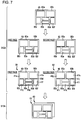
- FIG. 7 is a diagram for specifically explaining the processes of steps S 124 and S 134 .
- the template 80 illustrated in FIG. 7 is one (for example, first template) of the plurality of templates selected in step S 118 .
- the number of the target image selected in step S 100 is 12 and the number of the target image for each image group according to the division in step S 116 is six.
- step S 118 it is assumed that the plurality of templates (for example, template 80 ) having six arrangement areas are selected.
- step S 100 twelve target images selected in step S 100 are referred to as the target images 41 a , 41 b , 41 c , 41 d , 41 e , 41 f , 41 g , 41 h , 41 i , 41 j , 41 k , and 411 , and these target images are divided into the first image group of the target images 41 a , 41 b , 41 c , 41 d , 41 e , and 41 f and the second image group of the target images 41 g , 41 h , 41 i , 41 j , 41 k , and 411 in step S 116 .
- the template 80 includes six arrangement areas 80 a , 80 b , 80 c , 80 d , 80 e , and 80 f .
- the arrangement unit 14 increases the number of the template 80 to the same number of the page as the number of the image group obtained by the division in step S 116 , in step S 124 .
- step S 116 since twelve target images are divided into two image groups (first image group and second image group) composed of six target images, the arrangement unit 14 increases the page of the template 80 to total two pages (number of page of template 80 is set to two pages).
- the increase of the page of the template is performed by simply copying the template.
- a result of copying the template 80 of the first page illustrated in the second row from the top of FIG. 7 is the template 80 of the second page illustrated in the second row.
- the arrangement unit 14 arranges the target image for each image group obtained by the division on each page (first page and second page) of the template 80 in step S 124 .
- the arrangement unit 14 causes the target images 41 a , 41 b , 41 c , 41 d , 41 e , and 41 f of the first image group to be arranged on the arrangement areas 80 a , 80 b , 80 c , 80 d , 80 e , and 80 f in the template 80 of the first page, and causes the target images 41 g , 41 h , 41 i , 41 j , 41 k , and 411 of the second image group to be arranged on the arrangement areas 80 a , 80 b , 80 c , 80 d , 80 e , and 80 f in the template 80 of the second page.
- images of a result obtained by arranging the target images 41 a , 41 b , 41 c , 41 d , 41 e , and 41 f of the first image group on the template 80 of the first page are referred to as a post-synthesis template 81
- images of a result obtained by arranging the target images 41 g , 41 h , 41 i , 41 j , 41 k , and 411 of the second image group on the template 80 of the second page are referred to as a post-synthesis template 82 .
- step S 134 the display control unit 15 causes the template of each page after the arrangement of the target image, that is, the post-synthesis template of the plurality of pages using the same template to be displayed on the display unit 17 in a state where the template is partially overlapped with each other (display control process).
- the display control unit 15 sets the template obtained by partially overlapping a part of the post-synthesis template 81 of the first page with a part of the post-synthesis template 82 of the second page using the same template 80 , as a group of the post-synthesis template, and causes the overlapped template to be displayed on the display unit 17 .
- FIG. 7 the display control unit 15 sets the template obtained by partially overlapping a part of the post-synthesis template 81 of the first page with a part of the post-synthesis template 82 of the second page using the same template 80 , as a group of the post-synthesis template, and causes the overlapped template to be displayed on the display unit 17 .
- step S 134 on the post-synthesis template selection screen 50 of the display unit 17 , a group of the post-synthesis template as exemplified at the bottom of FIG. 7 is displayed (arranged side by side on the same screen 50 ) in accordance with each of the templates selected in step S 118 .
- the arrangement unit 14 sets the plurality of pages for each template selected based on the target image, and arranges the target images to be divided to the plurality of pages for each selected template, and the display control unit 15 causes the display unit 17 to display each of the selected templates in a state where a part of each of the plurality of pages (for example, post-synthesis templates 81 and 82 ) after arrangement of the image is overlapped.
- the display control unit 15 causes a display page (frontmost page) to be switched in one group of the post-synthesis template according to an operation of the user. For example, as illustrated in the bottom row of FIG. 7 , the post-synthesis template 81 among the post-synthesis templates 81 and 82 configuring one group in one group of the post-synthesis template is displayed as the front-most surface.
- the display control unit 15 causes a page (post-synthesis template 82 ) that is clicked to be displayed on the front-most surface in one group of the post-synthesis template.
- the control unit 11 copies each template selected based on the target image and increases the template to the plurality of pages. Then, the target image is divided and arranged on the plurality of pages for each template, and the plurality of pages (post-synthesis template) after the arrangement are partially overlapped with each other on the same template such that the overlapped result is displayed on the display unit 17 .
- the user can check a state of being arranged on a common template (for example, template 80 ) for the entirety of the target image, or compare different templates on which common target images (for example, target images 41 a , 41 b , 41 c , 41 d , 41 e , 41 f , 41 g , 41 h , 41 i , 41 j , 41 k , and 41 l ) are arranged.
- common target images for example, target images 41 a , 41 b , 41 c , 41 d , 41 e , 41 f , 41 g , 41 h , 41 i , 41 j , 41 k , and 41 l
- the user can comfortably and easily perform an arbitrary edit process and a print process after step S 134 (step S 130 ).
- an edit button 60 is pressed down by selecting one group of the post-synthesis templates exemplified in the bottom row of FIG.
- each of the post-synthesis template 81 and the post-synthesis template 82 is printed on the print medium by the print unit 30 .
- the display control unit 15 may display the template selected by the user from the post-synthesis templates displayed on the display unit 17 with a size greater than that of other templates on the display unit 17 in step S 130 ( FIGS. 2 and 6 ).
- FIG. 8 illustrates another example of the post-synthesis template selection screen 50 displayed on the display unit 17 by the display control unit 15 .
- the user selects a part of the post-synthesis template (for example, post-synthesis templates 53 and 55 ) by operating the operation receiving unit 18 .
- the selection is a selection not accompanied by the pressing of the edit button 60 , and a selection by a predetermined operation (for example, drag operation of cursor on post-synthesis template selection screen 50 ).
- the display control unit 15 transitions the post-synthesis template selection screen 50 ( FIG. 4 ) to the post-synthesis template selection screen 50 illustrated in FIG. 8 according to the selection.
- a part of the post-synthesis template (post-synthesis templates 53 and 55 ) selected by the user enlarged and displayed.
- the template for example, post-synthesis templates 53 and 55
- the template selected by the user among the post-synthesis templates displayed on the display unit 17 is displayed with a size greater than that of other templates (templates not selected by user among post-synthesis templates displayed on display unit 17 , for example, post-synthesis templates 57 and 59 ), and the template can be presented to the user in a more easily viewable state.
Landscapes
- Engineering & Computer Science (AREA)
- Multimedia (AREA)
- Signal Processing (AREA)
- Human Computer Interaction (AREA)
- Processing Or Creating Images (AREA)
- User Interface Of Digital Computer (AREA)
- Editing Of Facsimile Originals (AREA)
Abstract
Description
Claims (9)
Applications Claiming Priority (2)
| Application Number | Priority Date | Filing Date | Title |
|---|---|---|---|
| JP2017199692A JP7024308B2 (en) | 2017-10-13 | 2017-10-13 | Display device, display method and display program |
| JP2017-199692 | 2017-10-13 |
Publications (2)
| Publication Number | Publication Date |
|---|---|
| US20190116273A1 US20190116273A1 (en) | 2019-04-18 |
| US10567601B2 true US10567601B2 (en) | 2020-02-18 |
Family
ID=66096644
Family Applications (1)
| Application Number | Title | Priority Date | Filing Date |
|---|---|---|---|
| US16/157,240 Active US10567601B2 (en) | 2017-10-13 | 2018-10-11 | Display device, display method, and recording medium for displaying template |
Country Status (2)
| Country | Link |
|---|---|
| US (1) | US10567601B2 (en) |
| JP (1) | JP7024308B2 (en) |
Cited By (1)
| Publication number | Priority date | Publication date | Assignee | Title |
|---|---|---|---|---|
| US20200336608A1 (en) * | 2019-04-17 | 2020-10-22 | Canon Kabushiki Kaisha | Image processing apparatus, image processing method, and storage medium |
Families Citing this family (7)
| Publication number | Priority date | Publication date | Assignee | Title |
|---|---|---|---|---|
| US10834465B1 (en) * | 2019-06-28 | 2020-11-10 | Netflix, Inc. | Automated video cropping |
| JP7541816B2 (en) * | 2019-08-08 | 2024-08-29 | キヤノン株式会社 | Image processing device, control method and program |
| JP7493919B2 (en) * | 2019-08-08 | 2024-06-03 | キヤノン株式会社 | Image processing device, control method and program |
| CN111145876B (en) * | 2019-12-27 | 2023-12-29 | 成都牙讯科技有限公司 | Dental picture arrangement method, system, equipment and storage medium |
| JP7447633B2 (en) * | 2020-03-31 | 2024-03-12 | ブラザー工業株式会社 | Information processing device and information processing method |
| CN115022696B (en) * | 2022-04-18 | 2023-12-26 | 北京有竹居网络技术有限公司 | Video preview method and device, readable medium and electronic equipment |
| CN121455567A (en) * | 2024-07-26 | 2026-02-03 | 荣耀终端股份有限公司 | Picture previewing method, electronic equipment, storage medium and program product |
Citations (5)
| Publication number | Priority date | Publication date | Assignee | Title |
|---|---|---|---|---|
| US20030084055A1 (en) * | 2001-09-27 | 2003-05-01 | Fuji Photo Film Co., Ltd. | Method, apparatus and program for outputting templates |
| US20050278625A1 (en) * | 2004-06-15 | 2005-12-15 | Microsoft Corporation | Dynamic document and template previews |
| WO2008117827A1 (en) | 2007-03-26 | 2008-10-02 | Nikon Corporation | Image display device, and program product for displaying image |
| US20110025714A1 (en) * | 2009-07-30 | 2011-02-03 | Ptucha Raymond W | Method for producing artistic image template designs |
| US20150086116A1 (en) * | 2013-09-24 | 2015-03-26 | Fujifilm Corporation | Image processing apparatus, image processing method and recording medium |
Family Cites Families (3)
| Publication number | Priority date | Publication date | Assignee | Title |
|---|---|---|---|---|
| JP2002142099A (en) | 2000-11-02 | 2002-05-17 | Canon Inc | Data editing apparatus and method, and storage medium |
| JP2013182524A (en) | 2012-03-02 | 2013-09-12 | Canon Inc | Image processing apparatus and image processing method |
| JP6101661B2 (en) | 2014-08-27 | 2017-03-22 | 富士フイルム株式会社 | Image composition apparatus, image composition method, image composition program, and recording medium storing image composition program |
-
2017
- 2017-10-13 JP JP2017199692A patent/JP7024308B2/en active Active
-
2018
- 2018-10-11 US US16/157,240 patent/US10567601B2/en active Active
Patent Citations (6)
| Publication number | Priority date | Publication date | Assignee | Title |
|---|---|---|---|---|
| US20030084055A1 (en) * | 2001-09-27 | 2003-05-01 | Fuji Photo Film Co., Ltd. | Method, apparatus and program for outputting templates |
| US20050278625A1 (en) * | 2004-06-15 | 2005-12-15 | Microsoft Corporation | Dynamic document and template previews |
| WO2008117827A1 (en) | 2007-03-26 | 2008-10-02 | Nikon Corporation | Image display device, and program product for displaying image |
| US20100164992A1 (en) | 2007-03-26 | 2010-07-01 | Nikon Corporation | Image display device, and program product for displaying image |
| US20110025714A1 (en) * | 2009-07-30 | 2011-02-03 | Ptucha Raymond W | Method for producing artistic image template designs |
| US20150086116A1 (en) * | 2013-09-24 | 2015-03-26 | Fujifilm Corporation | Image processing apparatus, image processing method and recording medium |
Cited By (2)
| Publication number | Priority date | Publication date | Assignee | Title |
|---|---|---|---|---|
| US20200336608A1 (en) * | 2019-04-17 | 2020-10-22 | Canon Kabushiki Kaisha | Image processing apparatus, image processing method, and storage medium |
| US11627227B2 (en) * | 2019-04-17 | 2023-04-11 | Canon Kabushiki Kaisha | Image processing apparatus, image processing method, and storage medium |
Also Published As
| Publication number | Publication date |
|---|---|
| JP7024308B2 (en) | 2022-02-24 |
| US20190116273A1 (en) | 2019-04-18 |
| JP2019074872A (en) | 2019-05-16 |
Similar Documents
| Publication | Publication Date | Title |
|---|---|---|
| US10567601B2 (en) | Display device, display method, and recording medium for displaying template | |
| US8411114B2 (en) | Image display device, and program product for displaying image | |
| US8601369B2 (en) | Image processing apparatus, image processing method, and image processing program | |
| US7889405B2 (en) | Image processing apparatus and computer program product for overlaying and displaying images in a stack | |
| US20090327875A1 (en) | Design editing apparatus, design editing method, and storage medium storing design editing program | |
| CN101272436B (en) | Still image printing device and still image printing method | |
| JP7423444B2 (en) | Image processing device, image processing method, program and recording medium | |
| JP4891144B2 (en) | Image search apparatus and image search method | |
| US8390831B2 (en) | Image processing apparatus, method for same, image reading system, method of controlling image reading system | |
| JP2014063246A (en) | Electronic album creation device, electronic album creation method, and program | |
| US20120179995A1 (en) | Image layout adjustment method | |
| US7190473B1 (en) | Printer apparatus with integrated graphical user interface and method for using the same | |
| JP5366699B2 (en) | Image processing apparatus, image processing method, and image processing program | |
| JP2010074405A (en) | Image processing apparatus and method | |
| US20050174349A1 (en) | Image rendering apparatus with print preview projection mechanism | |
| JP4433049B2 (en) | Information processing apparatus, information processing method, and program. | |
| US8169652B2 (en) | Album creating system, album creating method and creating program with image layout characteristics | |
| JP2000066787A (en) | Data processor, data processing method and medium recording data processing program | |
| US20080260289A1 (en) | Apparatus and Method for Laying Out Images and Program Therefor | |
| EP1626333A1 (en) | Print result displaying method, layout editing method, and print control device | |
| JP5366522B2 (en) | Image display device and digital camera having image display device | |
| JP4948069B2 (en) | Image processing apparatus, image processing method, and program | |
| JP2007259263A (en) | Image processing method, image processing apparatus, program, and storage medium | |
| JP2007304694A (en) | Image search apparatus, image search method, and image search program | |
| CN100440128C (en) | Printing result display method, layout editing method and printing control device |
Legal Events
| Date | Code | Title | Description |
|---|---|---|---|
| AS | Assignment |
Owner name: SEIKO EPSON CORPORATION, JAPAN Free format text: ASSIGNMENT OF ASSIGNORS INTEREST;ASSIGNOR:TAKEUCHI, TAKESHI;REEL/FRAME:047131/0275 Effective date: 20180727 |
|
| FEPP | Fee payment procedure |
Free format text: ENTITY STATUS SET TO UNDISCOUNTED (ORIGINAL EVENT CODE: BIG.); ENTITY STATUS OF PATENT OWNER: LARGE ENTITY |
|
| STPP | Information on status: patent application and granting procedure in general |
Free format text: NON FINAL ACTION MAILED |
|
| STPP | Information on status: patent application and granting procedure in general |
Free format text: RESPONSE TO NON-FINAL OFFICE ACTION ENTERED AND FORWARDED TO EXAMINER |
|
| STPP | Information on status: patent application and granting procedure in general |
Free format text: FINAL REJECTION MAILED |
|
| STPP | Information on status: patent application and granting procedure in general |
Free format text: ADVISORY ACTION MAILED |
|
| STPP | Information on status: patent application and granting procedure in general |
Free format text: DOCKETED NEW CASE - READY FOR EXAMINATION |
|
| STPP | Information on status: patent application and granting procedure in general |
Free format text: NON FINAL ACTION MAILED |
|
| STPP | Information on status: patent application and granting procedure in general |
Free format text: RESPONSE TO NON-FINAL OFFICE ACTION ENTERED AND FORWARDED TO EXAMINER |
|
| STPP | Information on status: patent application and granting procedure in general |
Free format text: NOTICE OF ALLOWANCE MAILED -- APPLICATION RECEIVED IN OFFICE OF PUBLICATIONS |
|
| STPP | Information on status: patent application and granting procedure in general |
Free format text: PUBLICATIONS -- ISSUE FEE PAYMENT RECEIVED |
|
| STPP | Information on status: patent application and granting procedure in general |
Free format text: PUBLICATIONS -- ISSUE FEE PAYMENT VERIFIED |
|
| STCF | Information on status: patent grant |
Free format text: PATENTED CASE |
|
| MAFP | Maintenance fee payment |
Free format text: PAYMENT OF MAINTENANCE FEE, 4TH YEAR, LARGE ENTITY (ORIGINAL EVENT CODE: M1551); ENTITY STATUS OF PATENT OWNER: LARGE ENTITY Year of fee payment: 4 |