US10466893B2 - Touch screen panel with multi-axis manoeuvring of injection presses for plastic materials - Google Patents
Touch screen panel with multi-axis manoeuvring of injection presses for plastic materials Download PDFInfo
- Publication number
- US10466893B2 US10466893B2 US15/782,175 US201715782175A US10466893B2 US 10466893 B2 US10466893 B2 US 10466893B2 US 201715782175 A US201715782175 A US 201715782175A US 10466893 B2 US10466893 B2 US 10466893B2
- Authority
- US
- United States
- Prior art keywords
- axis
- press
- movement
- axes
- touch
- Prior art date
- Legal status (The legal status is an assumption and is not a legal conclusion. Google has not performed a legal analysis and makes no representation as to the accuracy of the status listed.)
- Active
Links
Images




Classifications
-
- B—PERFORMING OPERATIONS; TRANSPORTING
- B29—WORKING OF PLASTICS; WORKING OF SUBSTANCES IN A PLASTIC STATE IN GENERAL
- B29C—SHAPING OR JOINING OF PLASTICS; SHAPING OF MATERIAL IN A PLASTIC STATE, NOT OTHERWISE PROVIDED FOR; AFTER-TREATMENT OF THE SHAPED PRODUCTS, e.g. REPAIRING
- B29C45/00—Injection moulding, i.e. forcing the required volume of moulding material through a nozzle into a closed mould; Apparatus therefor
- B29C45/17—Component parts, details or accessories; Auxiliary operations
- B29C45/76—Measuring, controlling or regulating
- B29C45/766—Measuring, controlling or regulating the setting or resetting of moulding conditions, e.g. before starting a cycle
-
- G—PHYSICS
- G06—COMPUTING OR CALCULATING; COUNTING
- G06F—ELECTRIC DIGITAL DATA PROCESSING
- G06F3/00—Input arrangements for transferring data to be processed into a form capable of being handled by the computer; Output arrangements for transferring data from processing unit to output unit, e.g. interface arrangements
- G06F3/01—Input arrangements or combined input and output arrangements for interaction between user and computer
- G06F3/048—Interaction techniques based on graphical user interfaces [GUI]
- G06F3/0487—Interaction techniques based on graphical user interfaces [GUI] using specific features provided by the input device, e.g. functions controlled by the rotation of a mouse with dual sensing arrangements, or of the nature of the input device, e.g. tap gestures based on pressure sensed by a digitiser
- G06F3/0488—Interaction techniques based on graphical user interfaces [GUI] using specific features provided by the input device, e.g. functions controlled by the rotation of a mouse with dual sensing arrangements, or of the nature of the input device, e.g. tap gestures based on pressure sensed by a digitiser using a touch-screen or digitiser, e.g. input of commands through traced gestures
- G06F3/04883—Interaction techniques based on graphical user interfaces [GUI] using specific features provided by the input device, e.g. functions controlled by the rotation of a mouse with dual sensing arrangements, or of the nature of the input device, e.g. tap gestures based on pressure sensed by a digitiser using a touch-screen or digitiser, e.g. input of commands through traced gestures for inputting data by handwriting, e.g. gesture or text
-
- B—PERFORMING OPERATIONS; TRANSPORTING
- B29—WORKING OF PLASTICS; WORKING OF SUBSTANCES IN A PLASTIC STATE IN GENERAL
- B29C—SHAPING OR JOINING OF PLASTICS; SHAPING OF MATERIAL IN A PLASTIC STATE, NOT OTHERWISE PROVIDED FOR; AFTER-TREATMENT OF THE SHAPED PRODUCTS, e.g. REPAIRING
- B29C45/00—Injection moulding, i.e. forcing the required volume of moulding material through a nozzle into a closed mould; Apparatus therefor
- B29C45/17—Component parts, details or accessories; Auxiliary operations
- B29C45/46—Means for plasticising or homogenising the moulding material or forcing it into the mould
- B29C45/47—Means for plasticising or homogenising the moulding material or forcing it into the mould using screws
-
- B—PERFORMING OPERATIONS; TRANSPORTING
- B29—WORKING OF PLASTICS; WORKING OF SUBSTANCES IN A PLASTIC STATE IN GENERAL
- B29C—SHAPING OR JOINING OF PLASTICS; SHAPING OF MATERIAL IN A PLASTIC STATE, NOT OTHERWISE PROVIDED FOR; AFTER-TREATMENT OF THE SHAPED PRODUCTS, e.g. REPAIRING
- B29C45/00—Injection moulding, i.e. forcing the required volume of moulding material through a nozzle into a closed mould; Apparatus therefor
- B29C45/17—Component parts, details or accessories; Auxiliary operations
- B29C45/76—Measuring, controlling or regulating
-
- G—PHYSICS
- G05—CONTROLLING; REGULATING
- G05B—CONTROL OR REGULATING SYSTEMS IN GENERAL; FUNCTIONAL ELEMENTS OF SUCH SYSTEMS; MONITORING OR TESTING ARRANGEMENTS FOR SUCH SYSTEMS OR ELEMENTS
- G05B19/00—Program-control systems
- G05B19/02—Program-control systems electric
- G05B19/18—Numerical control [NC], i.e. automatically operating machines, in particular machine tools, e.g. in a manufacturing environment, so as to execute positioning, movement or co-ordinated operations by means of program data in numerical form
- G05B19/409—Numerical control [NC], i.e. automatically operating machines, in particular machine tools, e.g. in a manufacturing environment, so as to execute positioning, movement or co-ordinated operations by means of program data in numerical form characterised by using manual data input [MDI] or by using control panel, e.g. controlling functions with the panel; characterised by control panel details or by setting parameters
-
- G—PHYSICS
- G06—COMPUTING OR CALCULATING; COUNTING
- G06F—ELECTRIC DIGITAL DATA PROCESSING
- G06F3/00—Input arrangements for transferring data to be processed into a form capable of being handled by the computer; Output arrangements for transferring data from processing unit to output unit, e.g. interface arrangements
- G06F3/01—Input arrangements or combined input and output arrangements for interaction between user and computer
- G06F3/048—Interaction techniques based on graphical user interfaces [GUI]
- G06F3/0481—Interaction techniques based on graphical user interfaces [GUI] based on specific properties of the displayed interaction object or a metaphor-based environment, e.g. interaction with desktop elements like windows or icons, or assisted by a cursor's changing behaviour or appearance
- G06F3/04817—Interaction techniques based on graphical user interfaces [GUI] based on specific properties of the displayed interaction object or a metaphor-based environment, e.g. interaction with desktop elements like windows or icons, or assisted by a cursor's changing behaviour or appearance using icons
-
- G—PHYSICS
- G06—COMPUTING OR CALCULATING; COUNTING
- G06F—ELECTRIC DIGITAL DATA PROCESSING
- G06F3/00—Input arrangements for transferring data to be processed into a form capable of being handled by the computer; Output arrangements for transferring data from processing unit to output unit, e.g. interface arrangements
- G06F3/01—Input arrangements or combined input and output arrangements for interaction between user and computer
- G06F3/048—Interaction techniques based on graphical user interfaces [GUI]
- G06F3/0484—Interaction techniques based on graphical user interfaces [GUI] for the control of specific functions or operations, e.g. selecting or manipulating an object, an image or a displayed text element, setting a parameter value or selecting a range
- G06F3/04845—Interaction techniques based on graphical user interfaces [GUI] for the control of specific functions or operations, e.g. selecting or manipulating an object, an image or a displayed text element, setting a parameter value or selecting a range for image manipulation, e.g. dragging, rotation, expansion or change of colour
-
- G—PHYSICS
- G06—COMPUTING OR CALCULATING; COUNTING
- G06F—ELECTRIC DIGITAL DATA PROCESSING
- G06F3/00—Input arrangements for transferring data to be processed into a form capable of being handled by the computer; Output arrangements for transferring data from processing unit to output unit, e.g. interface arrangements
- G06F3/01—Input arrangements or combined input and output arrangements for interaction between user and computer
- G06F3/048—Interaction techniques based on graphical user interfaces [GUI]
- G06F3/0484—Interaction techniques based on graphical user interfaces [GUI] for the control of specific functions or operations, e.g. selecting or manipulating an object, an image or a displayed text element, setting a parameter value or selecting a range
- G06F3/04847—Interaction techniques to control parameter settings, e.g. interaction with sliders or dials
-
- G—PHYSICS
- G06—COMPUTING OR CALCULATING; COUNTING
- G06F—ELECTRIC DIGITAL DATA PROCESSING
- G06F3/00—Input arrangements for transferring data to be processed into a form capable of being handled by the computer; Output arrangements for transferring data from processing unit to output unit, e.g. interface arrangements
- G06F3/01—Input arrangements or combined input and output arrangements for interaction between user and computer
- G06F3/048—Interaction techniques based on graphical user interfaces [GUI]
- G06F3/0487—Interaction techniques based on graphical user interfaces [GUI] using specific features provided by the input device, e.g. functions controlled by the rotation of a mouse with dual sensing arrangements, or of the nature of the input device, e.g. tap gestures based on pressure sensed by a digitiser
- G06F3/0488—Interaction techniques based on graphical user interfaces [GUI] using specific features provided by the input device, e.g. functions controlled by the rotation of a mouse with dual sensing arrangements, or of the nature of the input device, e.g. tap gestures based on pressure sensed by a digitiser using a touch-screen or digitiser, e.g. input of commands through traced gestures
- G06F3/04886—Interaction techniques based on graphical user interfaces [GUI] using specific features provided by the input device, e.g. functions controlled by the rotation of a mouse with dual sensing arrangements, or of the nature of the input device, e.g. tap gestures based on pressure sensed by a digitiser using a touch-screen or digitiser, e.g. input of commands through traced gestures by partitioning the display area of the touch-screen or the surface of the digitising tablet into independently controllable areas, e.g. virtual keyboards or menus
-
- B—PERFORMING OPERATIONS; TRANSPORTING
- B29—WORKING OF PLASTICS; WORKING OF SUBSTANCES IN A PLASTIC STATE IN GENERAL
- B29C—SHAPING OR JOINING OF PLASTICS; SHAPING OF MATERIAL IN A PLASTIC STATE, NOT OTHERWISE PROVIDED FOR; AFTER-TREATMENT OF THE SHAPED PRODUCTS, e.g. REPAIRING
- B29C45/00—Injection moulding, i.e. forcing the required volume of moulding material through a nozzle into a closed mould; Apparatus therefor
- B29C45/17—Component parts, details or accessories; Auxiliary operations
- B29C45/76—Measuring, controlling or regulating
- B29C2045/7606—Controlling or regulating the display unit
Definitions
- the present invention relates to an operator control panel of the touch screen type to be used on industrial machines, in particular on injection presses for plastic materials, which allows the display and control of the manoeuvring of several press axes.
- a press for the injection moulding of plastic materials comprises several axes, some of which correlated one to the other, more particularly in pairs, such as for example the mould and extractor axes and the injection and rotation of plasticisation screw axes, which have to be appropriately controlled by the operator during a work cycle of the press.
- control panel which can be of various types, in particular touch screen, to remain within the scope of the invention.
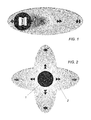
- the axes manoeuvring integrated in the press control software with touch screen operator panel can be actuated by selecting the movement to be performed, for example mould axis, and dragging the movement selected along a single axis, as shown schematically in the accompanying FIG. 1 .
- This drawing shows an elliptical area, starting from the centre of which the icon corresponding to the axis to be moved is displaced horizontally.
- the operator in order to control another axis, for example the extractor axis, which is correlated to the mould axis, the operator has to transport the corresponding icon to the centre of the elliptical area of FIG. 1 and drag it horizontally in the corresponding direction to perform the manoeuvring required.
- DE 102014114322 A1 describes an operator control panel for injection presses, wherein multiple sliders are provided for moving the different press axes. Such a solution is not very practical and does not allow the operator to display simultaneously in a single manoeuvring area several press axes correlated one to the other and to actuate them selectively/sequentially.
- the object of the invention is that of eliminating the disadvantages of the prior art described above.
- an object of the invention is that of providing a multi-axis manoeuvring integrated in the touch screen panel of injection presses of plastic materials.
- Another object of the invention is that of providing such a touch screen panel which allows the operator to have a direct vision of several axes movements which can be performed and to perform manoeuvring thereof in a simple and intuitive manner.
- Yet another object of the invention is that of providing such a touch screen panel with integrated multi-axis movement which does not require substantial structural changes with respect to traditional touch screen panels and which therefore is simple and economical to make.
- the touch screen operator control panel for industrial machines in particular for the control of manoeuvring of the axes of injection presses for plastic materials, comprises an operator interface on which icons are displayed, indicating the various axes of a press, individually selectable in order to be dragged into a manoeuvring area, where they are translatable in the two ways of a certain direction to impart corresponding movements to the selected axis, wherein the possibility is provided of simultaneously displaying in said manoeuvring area ( 2 ) icons of several press axes correlated one to the other and of actuating sequentially/selectively the movements of these press axes by dragging a central zone ( 1 ) of said manoeuvring area ( 2 ) in the corresponding different directions wherein the respective icons of the press axes are displayed.
- FIG. 1 is a schematic view of a part of the operator interface of a touch screen panel for the control of an injection press for plastic materials, showing an example of manoeuvring on the mould axis alone, according to the prior art;
- FIG. 2 is a schematic view like that of FIG. 1 showing the simultaneous display of two orthogonal axes movements on the touch screen interface according to the invention
- FIG. 3 is a view of the operator interface of a touch screen panel according to the invention, with the “mould” icon selected for the subsequent movements highlighted with a circle;
- FIG. 4 shows the interface of FIG. 3 with the mould icon dragged to the centre of the area of manoeuvring shown in FIG. 2 ;
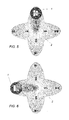
- FIGS. 5 and 6 show respectively two examples of manoeuvring of the extractor axis and of the mould axis
- FIG. 7 is a view of the touch screen interface like that of FIG. 3 , with the plasticisation screw highlighted;
- FIG. 8 is a view of the interface showing the icon of the screw brought to the centre of the manoeuvring area
- FIG. 9 is a view of the interface of the touch screen panel of the invention schematising the speed of movement proportional to the distance of displacement of the corresponding icon.
- the solution proposed by the invention allows the simultaneous display of more than one axis movement (two in this case) in the press control and the manoeuvring on several axes accessible by the touch screen interface of the injection press.
- the press operator will have a direct view of several axis movements which can be performed and will be able to perform the manoeuvring by dragging the finger positioned on a central circle 1 of the manoeuvring area 2 determined for example by the intersection of two ellipses, in the direction of the movement to be performed, with consequent simplification in the use of the machine.
- the axis to be moved will be able to be chosen, dragging the finger in the horizontal or vertical direction.
- the movement of the axis will be performed by the displacement in the direction chosen.
- the method of manoeuvring is not tied to just the two horizontal and vertical axes but can be actuated at a number of axes higher than 2, in which case displacements can for example be provided at 45° with respect to those illustrated in FIG. 2 .
- FIG. 3 shows schematically a series of icons 3 indicating the axis to be moved which can be selected through the dragging in the appropriate area 2 (use movement) for actuating the movement. This mechanism allows a direct and fast choice of the movement.
- the mould axis is normally correlated to the extractor, following the dragging of the mould axis, in the central circle 1 of the manoeuvring area 2 , the mould and extractor axes will be displayed ( FIG. 4 ).
- the axis to be moved can be chosen. Dragging the finger in the horizontal or vertical direction, the movement of the axis will be performed with consequent manoeuvring. During execution of the movement the icon of the movement underway will be displayed in the circle 1 .
- FIG. 5 shows an example of manoeuvring of the extractor axis in the vertical direction
- FIG. 6 shows an example of manoeuvring of the mould axis in the horizontal direction.
- FIG. 7 shows the operator interface of the touch screen panel with the “screw” axis highlighted with a circle
- FIG. 8 shows this icon dragged into the central circle 1 of the area of manoeuvring 2 , where the axes of injection and screw rotation will be displayed, which are normally correlated one to the other.
- the dragging with the finger of the circle 1 in the horizontal direction corresponds to a manoeuvring of the injection axis, while a dragging in the vertical direction corresponds to a rotation of the screw.
- actuation is provided of the regulation of the speed of each movement on the basis of the position achieved with reference to the centre of the manoeuvring area 2 .
- the extent of the displacement of the circle 1 corresponds to the speed of actuation of the relevant manoeuvring. This allows, in addition to the direction and sequence of the movement, also the regulation of the speed of movement proportionally to the distance covered with the finger from the centre of the manoeuvring area 2 of the touch screen panel.
- FIG. 9 shows schematically the displacement of the mould icon corresponding to a certain speed of manoeuvring of the mould axis.
- FIGS. 4, 8 and 9 indicates by way of an example the positions of the members involved.
Landscapes
- Engineering & Computer Science (AREA)
- General Engineering & Computer Science (AREA)
- Theoretical Computer Science (AREA)
- Human Computer Interaction (AREA)
- Physics & Mathematics (AREA)
- General Physics & Mathematics (AREA)
- Manufacturing & Machinery (AREA)
- Mechanical Engineering (AREA)
- Automation & Control Theory (AREA)
- Injection Moulding Of Plastics Or The Like (AREA)
- User Interface Of Digital Computer (AREA)
Abstract
Description
Claims (6)
Applications Claiming Priority (2)
| Application Number | Priority Date | Filing Date | Title |
|---|---|---|---|
| IT102016000102910 | 2016-10-13 | ||
| IT102016000102910A IT201600102910A1 (en) | 2016-10-13 | 2016-10-13 | TOUCH SCREEN PANEL WITH MULTI-AXIS HANDLING OF INJECTION PRESSES FOR PLASTIC MATERIALS |
Publications (2)
| Publication Number | Publication Date |
|---|---|
| US20180107374A1 US20180107374A1 (en) | 2018-04-19 |
| US10466893B2 true US10466893B2 (en) | 2019-11-05 |
Family
ID=58609673
Family Applications (1)
| Application Number | Title | Priority Date | Filing Date |
|---|---|---|---|
| US15/782,175 Active US10466893B2 (en) | 2016-10-13 | 2017-10-12 | Touch screen panel with multi-axis manoeuvring of injection presses for plastic materials |
Country Status (3)
| Country | Link |
|---|---|
| US (1) | US10466893B2 (en) |
| EP (1) | EP3309671B1 (en) |
| IT (1) | IT201600102910A1 (en) |
Cited By (1)
| Publication number | Priority date | Publication date | Assignee | Title |
|---|---|---|---|---|
| EP3858579A1 (en) * | 2020-01-31 | 2021-08-04 | Sumitomo Heavy Industries, Ltd. | Injection molding machine |
Families Citing this family (2)
| Publication number | Priority date | Publication date | Assignee | Title |
|---|---|---|---|---|
| DE112021007354T5 (en) * | 2021-05-25 | 2024-01-04 | Fanuc Corporation | CONTROL FOR AN INDUSTRIAL MACHINE |
| JP7644228B2 (en) * | 2021-05-25 | 2025-03-11 | ファナック株式会社 | Industrial Machine Control Device |
Citations (5)
| Publication number | Priority date | Publication date | Assignee | Title |
|---|---|---|---|---|
| US6618041B2 (en) * | 2000-05-10 | 2003-09-09 | Nissei Plastic Industrial Co., Ltd. | Input device for injection molding machine |
| WO2012062374A1 (en) | 2010-11-12 | 2012-05-18 | Abb Technology Ag | A control system and an operating device for controlling an industrial robot comprising a touch -screen |
| US20130050135A1 (en) * | 2011-08-31 | 2013-02-28 | Lenovo (Singapore) Pte, Ltd. | Information handling devices with touch-based reflective display |
| DE102014114322A1 (en) | 2014-10-02 | 2016-04-07 | Kraussmaffei Technologies Gmbh | control panel |
| US20160364111A1 (en) * | 2015-06-11 | 2016-12-15 | Karma Automotive, Llc | Virtual Joy Stick Controls for Adjustable Components in Vehicles |
-
2016
- 2016-10-13 IT IT102016000102910A patent/IT201600102910A1/en unknown
-
2017
- 2017-10-12 US US15/782,175 patent/US10466893B2/en active Active
- 2017-10-12 EP EP17196218.6A patent/EP3309671B1/en active Active
Patent Citations (6)
| Publication number | Priority date | Publication date | Assignee | Title |
|---|---|---|---|---|
| US6618041B2 (en) * | 2000-05-10 | 2003-09-09 | Nissei Plastic Industrial Co., Ltd. | Input device for injection molding machine |
| WO2012062374A1 (en) | 2010-11-12 | 2012-05-18 | Abb Technology Ag | A control system and an operating device for controlling an industrial robot comprising a touch -screen |
| US20130050135A1 (en) * | 2011-08-31 | 2013-02-28 | Lenovo (Singapore) Pte, Ltd. | Information handling devices with touch-based reflective display |
| DE102014114322A1 (en) | 2014-10-02 | 2016-04-07 | Kraussmaffei Technologies Gmbh | control panel |
| WO2016050390A1 (en) * | 2014-10-02 | 2016-04-07 | Kraussmaffei Technologies Gmbh | Control console |
| US20160364111A1 (en) * | 2015-06-11 | 2016-12-15 | Karma Automotive, Llc | Virtual Joy Stick Controls for Adjustable Components in Vehicles |
Non-Patent Citations (2)
| Title |
|---|
| Grimm, "Description WO2016050390" (English Translation) (Year: 2016). * |
| IT Search Report, dated Aug. 9, 2017, from corresponding IT 201600102910 application. |
Cited By (1)
| Publication number | Priority date | Publication date | Assignee | Title |
|---|---|---|---|---|
| EP3858579A1 (en) * | 2020-01-31 | 2021-08-04 | Sumitomo Heavy Industries, Ltd. | Injection molding machine |
Also Published As
| Publication number | Publication date |
|---|---|
| US20180107374A1 (en) | 2018-04-19 |
| IT201600102910A1 (en) | 2018-04-13 |
| EP3309671A1 (en) | 2018-04-18 |
| EP3309671B1 (en) | 2021-04-07 |
Similar Documents
| Publication | Publication Date | Title |
|---|---|---|
| US8638315B2 (en) | Virtual touch screen system | |
| US10466893B2 (en) | Touch screen panel with multi-axis manoeuvring of injection presses for plastic materials | |
| US10180714B1 (en) | Two-handed multi-stroke marking menus for multi-touch devices | |
| CN103092402A (en) | Vehicle input apparatus | |
| JP2012145980A5 (en) | ||
| JP2014186361A5 (en) | ||
| JP2013114559A5 (en) | ||
| JP2018529543A (en) | Robot system | |
| US20190065007A1 (en) | User interface comprising a plurality of display units, and method for positioning contents on a plurality of display units | |
| US20130100032A1 (en) | Display device for production machine | |
| JP2006500676A (en) | Graphical user interface navigation method and apparatus. | |
| CN104040476B (en) | The equipment of the method for the display of operation energy multi-point touch and the display with energy multi-point touch | |
| JP2000305614A (en) | Machine controller by touch panel | |
| WO2014141314A1 (en) | Display device and programmable display device | |
| CN106553317B (en) | Control device and molding machine | |
| JP2021106796A5 (en) | ||
| CN106367913A (en) | Treating machine for clothes and operation interface thereof | |
| JP2002202839A (en) | Electronic equipment and display method for pointer | |
| KR102755068B1 (en) | Application of touch-sensitive displays for controlling machine tools and machine parts of machine tools | |
| US20200050325A1 (en) | Method for adapting the presentation and use of a graphical user interface | |
| JP2024025272A5 (en) | ||
| CN102722243A (en) | Method for operating and displaying three-dimensional space | |
| JP2016207125A (en) | User interface device, method and program | |
| JP6496345B2 (en) | Numerical controller | |
| CN104536593A (en) | Information processing method, controlled equipment and input equipment |
Legal Events
| Date | Code | Title | Description |
|---|---|---|---|
| AS | Assignment |
Owner name: NEGRI BOSSI S.P.A., ITALY Free format text: ASSIGNMENT OF ASSIGNORS INTEREST;ASSIGNORS:WARD, CRAIG;MOSCA, DAVIDE;REEL/FRAME:044204/0015 Effective date: 20171012 |
|
| FEPP | Fee payment procedure |
Free format text: ENTITY STATUS SET TO UNDISCOUNTED (ORIGINAL EVENT CODE: BIG.); ENTITY STATUS OF PATENT OWNER: SMALL ENTITY |
|
| FEPP | Fee payment procedure |
Free format text: ENTITY STATUS SET TO SMALL (ORIGINAL EVENT CODE: SMAL); ENTITY STATUS OF PATENT OWNER: SMALL ENTITY |
|
| STPP | Information on status: patent application and granting procedure in general |
Free format text: NON FINAL ACTION MAILED |
|
| STPP | Information on status: patent application and granting procedure in general |
Free format text: RESPONSE TO NON-FINAL OFFICE ACTION ENTERED AND FORWARDED TO EXAMINER |
|
| STPP | Information on status: patent application and granting procedure in general |
Free format text: NOTICE OF ALLOWANCE MAILED -- APPLICATION RECEIVED IN OFFICE OF PUBLICATIONS |
|
| STPP | Information on status: patent application and granting procedure in general |
Free format text: PUBLICATIONS -- ISSUE FEE PAYMENT VERIFIED |
|
| STCF | Information on status: patent grant |
Free format text: PATENTED CASE |
|
| MAFP | Maintenance fee payment |
Free format text: PAYMENT OF MAINTENANCE FEE, 4TH YR, SMALL ENTITY (ORIGINAL EVENT CODE: M2551); ENTITY STATUS OF PATENT OWNER: SMALL ENTITY Year of fee payment: 4 |