RU2449373C2 - Text editing within three-dimensional graphic - Google Patents
Text editing within three-dimensional graphic Download PDFInfo
- Publication number
- RU2449373C2 RU2449373C2 RU2008143405/08A RU2008143405A RU2449373C2 RU 2449373 C2 RU2449373 C2 RU 2449373C2 RU 2008143405/08 A RU2008143405/08 A RU 2008143405/08A RU 2008143405 A RU2008143405 A RU 2008143405A RU 2449373 C2 RU2449373 C2 RU 2449373C2
- Authority
- RU
- Russia
- Prior art keywords
- dimensional
- text
- display
- editing
- computer
- Prior art date
Links
Images
Classifications
-
- G—PHYSICS
- G06—COMPUTING OR CALCULATING; COUNTING
- G06T—IMAGE DATA PROCESSING OR GENERATION, IN GENERAL
- G06T15/00—Three-dimensional [3D] image rendering
-
- G—PHYSICS
- G06—COMPUTING OR CALCULATING; COUNTING
- G06F—ELECTRIC DIGITAL DATA PROCESSING
- G06F40/00—Handling natural language data
- G06F40/10—Text processing
- G06F40/166—Editing, e.g. inserting or deleting
-
- G—PHYSICS
- G06—COMPUTING OR CALCULATING; COUNTING
- G06F—ELECTRIC DIGITAL DATA PROCESSING
- G06F40/00—Handling natural language data
- G06F40/10—Text processing
- G06F40/103—Formatting, i.e. changing of presentation of documents
-
- G—PHYSICS
- G06—COMPUTING OR CALCULATING; COUNTING
- G06T—IMAGE DATA PROCESSING OR GENERATION, IN GENERAL
- G06T15/00—Three-dimensional [3D] image rendering
- G06T15/10—Geometric effects
Landscapes
- Engineering & Computer Science (AREA)
- Theoretical Computer Science (AREA)
- Physics & Mathematics (AREA)
- General Physics & Mathematics (AREA)
- Computational Linguistics (AREA)
- General Health & Medical Sciences (AREA)
- Health & Medical Sciences (AREA)
- General Engineering & Computer Science (AREA)
- Audiology, Speech & Language Pathology (AREA)
- Artificial Intelligence (AREA)
- Computer Graphics (AREA)
- Geometry (AREA)
- Processing Or Creating Images (AREA)
- Controls And Circuits For Display Device (AREA)
- User Interface Of Digital Computer (AREA)
- Document Processing Apparatus (AREA)
Abstract
Description
УРОВЕНЬ ТЕХНИКИBACKGROUND
Многие приложения позволяют пользователям создавать трехмерные объекты, которые имеют текст, ассоциативно связанный с ними. Текст может также иметь эффекты, примененные к нему. Например, этими эффектами могут быть: фаски; экструзии; освещение; трехмерные вращения и тому подобное. Создание и редактирование текста, который связан с этими трехмерными объектами в этих приложениях, однако, является обычно очень сложной задачей. Например, приложение может интерпретировать текст как трехмерную форму или может требовать, чтобы пользователь выполнял много действий для изменения или редактирования текста, после того как эффекты применены к форме и/или тексту. Некоторые приложения могут даже не позволить пользователю редактировать текст, после того как эффекты применены.Many applications allow users to create three-dimensional objects that have text associated with them. Text can also have effects applied to it. For example, these effects may include: chamfers; extrusion; lighting; three-dimensional rotation and the like. Creating and editing text that is associated with these three-dimensional objects in these applications, however, is usually a very difficult task. For example, an application may interpret the text as a three-dimensional shape or may require the user to perform many actions to change or edit the text after the effects are applied to the form and / or text. Some applications may not even allow the user to edit the text after the effects are applied.
СУЩНОСТЬ ИЗОБРЕТЕНИЯSUMMARY OF THE INVENTION
Эта сущность изобретения приведена для ознакомления с вариантами выбора концепций в упрощенном виде, которые дополнительно описаны ниже в подробном описании. Эта сущность изобретения, однако, не предназначена для идентифицикации ключевых или существенных признаков заявленного объекта изобретения, а также не предназначена для использования в качестве вспомогательного средства в определении объема заявленного объекта изобретения.This summary is provided to familiarize oneself with the simplified concept selection options that are further described below in the detailed description. This invention, however, is not intended to identify key or essential features of the claimed subject matter, nor is it intended to be used as an aid in determining the scope of the claimed subject matter.
Текст, ассоциативно связанный с трехмерными эффектами, редактируют, используя режим редактирования двухмерного текста. После того, как трехмерный текст выбран для редактирования, входят в режим редактирования двухмерного текста так, что пользователь может легко редактировать и читать текст. Вместо необходимости просматривать текст с его трехмерными примененными эффектами, текст выводят на экран двумерно, делая его легким и более понятным для редактирования. Двухмерные свойства, которые ассоциативно связаны с текстом; такие как шрифт, цвет текста, цвет формы и тому подобное, могут также быть отображены пользователю в режиме редактирования двухмерного текста. Двухмерную визуализацию формы, которая ассоциативно связана с текстом, так же отображают пользователю так, что текст можно редактировать на своем месте с разметкой и обратной связью форматирования. После того как редактирование текста завершено, используя режим редактирования двумерного текста, повторно отображают текст и ассоциативно связанную форму в соответствии с их трехмерными свойствами.Text associated with three-dimensional effects is edited using the two-dimensional text editing mode. After the three-dimensional text is selected for editing, enter the two-dimensional text editing mode so that the user can easily edit and read the text. Instead of having to view the text with its three-dimensional applied effects, the text is displayed on the screen two-dimensionally, making it easier and more understandable for editing. Two-dimensional properties that are associated with the text; such as font, text color, shape color and the like, can also be displayed to the user in the editing mode of two-dimensional text. Two-dimensional visualization of the form, which is associated with the text, is also displayed to the user so that the text can be edited in its place with markup and formatting feedback. After the text editing is completed using the two-dimensional text editing mode, the text and the associated form are re-displayed in accordance with their three-dimensional properties.
ЧЕРТЕЖИBLUEPRINTS
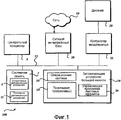
Фиг.1 иллюстрирует примерное вычислительное устройство;Figure 1 illustrates an exemplary computing device;
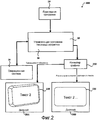
Фиг.2 показывает систему редактирования двухмерного текста для редактирования трехмерного текста;Figure 2 shows a two-dimensional text editing system for editing three-dimensional text;
Фиг.3 иллюстрирует примерное окно приложения, показывающее редактируемый текст с трехмерной графикой; иFigure 3 illustrates an exemplary application window showing editable text with three-dimensional graphics; and
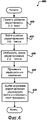
Фиг.4 показывает процесс редактирования трехмерного текста, используя режим редактирования двухмерного текста.Figure 4 shows a three-dimensional text editing process using a two-dimensional text editing mode.
ПОДРОБНОЕ ОПИСАНИЕDETAILED DESCRIPTION
Далее, со ссылкой на чертежи, на которых одинаковые номера представляют подобные элементы, будут описаны различные варианты осуществления. В частности, фиг.1 и соответствующее обсуждение предназначены для предоставления краткого общего описания подходящей вычислительной среды, в которой могут быть реализованы варианты осуществления.Next, with reference to the drawings, in which like numbers represent like elements, various embodiments will be described. In particular, FIG. 1 and the corresponding discussion are intended to provide a brief, general description of a suitable computing environment in which embodiments may be implemented.
В общем, программные модули включают в себя процедуры, программы, компоненты, структуры данных и другие типы структур, которые выполняют конкретные задачи или реализуют конкретные абстрактные типы данных. Может быть также использована другая конфигурация вычислительной системы, включающая в себя «карманные» устройства, многопроцессорные системы, основанную на микропроцессорах или программируемую бытовую электронную аппаратуру, миникомпьютеры, мэйнфреймы и тому подобное. Распределенную вычислительную среду можно также использовать в тех случаях, когда задачи выполняют удаленными устройствами обработки, которые связаны через сеть связи. В распределенной вычислительной среде программные модули могут быть расположены как в локальном, так и удаленном запоминающих устройствах.In general, program modules include procedures, programs, components, data structures, and other types of structures that perform particular tasks or implement particular abstract data types. Another configuration of a computing system may also be used, including “handheld” devices, multiprocessor systems based on microprocessors or programmable consumer electronics, minicomputers, mainframes, and the like. A distributed computing environment can also be used when tasks are performed by remote processing devices that are linked through a communications network. In a distributed computing environment, program modules may be located in both local and remote memory storage devices.
Далее, со ссылкой на Фиг.1, будет описана иллюстративная компьютерная архитектура для компьютера 100, используемого в различных вариантах осуществления. Компьютерная архитектура, показанная на Фиг.1, может быть сконфигурирована как традиционный настольный или переносной компьютер и включать в себя центральный процессор 5 («ЦП», «CPU»), системную память 7, включающую в себя оперативное запоминающее устройство 9 («ОЗУ», «RAM») и постоянное запоминающее устройство 11 («ПЗУ», «ROM»), и системную шину 12, которая присоединяет память к ЦП 5. Базовую систему ввода/вывода, содержащую базовые процедуры, которые помогают передавать информацию между элементами внутри компьютера, к примеру, во время запуска, хранят в ПЗУ 11. Компьютер 100 дополнительно включает в себя запоминающее устройство 14 большой емкости для хранения операционной системы 16, прикладных программ и других программных модулей, которые ниже будут описаны более подробно.Next, with reference to FIG. 1, an illustrative computer architecture for a
Запоминающее устройство 14 большой емкости присоединено к ЦП 5 через контроллер запоминающего устройства большой емкости (не показан), присоединенный к шине 12. Запоминающее устройство 14 большой емкости и его ассоциативно связанные машиночитаемые носители предусматривают энергонезависимое хранилище для компьютера 100. Хотя описание машиночитаемых носителей, содержащееся в материалах настоящей заявки, указывает ссылкой на запоминающее устройство большой емкости, такое как накопитель на жестких дисках или накопитель на CD-ROM, машиночитаемые носители могут быть любыми пригодными носителями, к которым может быть осуществлен доступ компьютером 100.The
В качестве примера, а не ограничения, машиночитаемые носители могут содержать компьютерные запоминающие носители и среду связи. Компьютерный запоминающий носитель включает в себя энергозависимый и энергонезависимый, съемный и несъемный носитель, реализованный любым способом или технологией для хранения информации, таким как машиночитаемые инструкции, структуры данных, программные модули или другие данные. Компьютерный запоминающий носитель включает в себя, но не в качестве ограничения, ОЗУ, ПЗУ, ЭСПЗУ (стираемое программируемое ПЗУ, EPROM), ЭСППЗУ (электрически стираемое программируемое ПЗУ, EEPROM), флэш-память или другую технологию твердотельной памяти, CD-ROM, цифровой универсальный диск («DVD») или другое оптическое запоминающее устройство, магнитные кассеты, магнитную ленту, магнитное дисковое запоминающее устройство или другие магнитные запоминающие устройства, либо любой другой носитель, который может быть использован для хранения требуемой информации и к которому может быть осуществлен доступ компьютером 100.By way of example, and not limitation, computer-readable media may include computer storage media and a communication medium. Computer storage media includes volatile and non-volatile, removable and non-removable media implemented by any method or technology for storing information, such as computer-readable instructions, data structures, program modules or other data. Computer storage media includes, but is not limited to, RAM, ROM, EEPROM (Erasable Programmable ROM, EPROM), EEPROM (Electrically Erasable Programmable ROM, EEPROM), flash memory or other solid state memory technology, CD-ROM, digital universal disk (“DVD”) or other optical storage device, magnetic tapes, magnetic tape, magnetic disk storage device or other magnetic storage device, or any other medium that can be used to store the required information and which can be accessed by
Согласно различным вариантам осуществления компьютер 100 может работать в сетевой среде с использованием логических соединений с удаленными компьютерами через сеть 18, такую как Интернет. Компьютер 100 можно присоединять к сети 18 через сетевой интерфейсный блок 20, присоединенный к шине 12. Сетевое соединение может быть беспроводным и/или по проводам. Сетевой интерфейсный блок 20 также можно использовать для присоединения к другим типам сетей и удаленным компьютерным системам. Компьютер 100 также может включать в себя контроллер 22 ввода/вывода для приема и обработки входного сигнала с некоторого количества других устройств, в том числе клавиатуры, мыши или электронного пера (не показанных на Фиг.1). Подобным образом, контроллер 22 ввода/вывода может обеспечивать вывод на дисплейный экран 28, принтер или другой тип устройства вывода.In various embodiments,
Как кратко упомянуто выше, некоторое количество программных модулей и файлов данных могут быть сохранены в запоминающем устройстве 14 большой емкости и ОЗУ 9 компьютера 100, в том числе операционная система 16, пригодная для управления работой сетевого персонального компьютера, такая как операционная система WINDOWS XP от MICROSOFT CORPORATION из Редмонда, штат Вашингтон. Запоминающее устройство 14 большой емкости и ОЗУ 9 также могут хранить один или более программных модулей. В частности, запоминающее устройство 14 большой емкости и ОЗУ 9 могут хранить одну или более прикладных программ 10. Прикладная программа(ы) 10 выполнена с возможностью применения трехмерных (3D) эффектов к тексту. 3D эффекты могут состоять из одного или более из следующего: фаски, экструзии, освещение, материалы, ориентация и тому подобное. Разнообразные 2D эффекты могут быть также применены к тексту такие, как масштабирование, деформирование, заполнение и контурное форматирование, тени и тому подобное. Трехмерные эффекты могут так же быть применены к форме, на которую помещен текст. Дополнительно, трехмерные эффекты могут быть применимы, как к форме, так и к тексту. Согласно одному варианту осуществления прикладная программа(ы) 10 содержит комплект MICROSOFT OFFICE прикладных программ от MICROSOFT CORPORATION. Например, прикладная программа 10 может быть MICROSOFT WORD, POWERPOINT, EXCEL, ACCESS, PUBLISHER, OUTLOOK и тому подобное. Так же могут быть использованы другие прикладные программы, которые реализуют эффекты трехмерного текста. Например, могут быть использованы программы электронной почты, настольные издательские программы, программы для презентации и любые другие типы программ, которые позволяют 3D эффекты ассоциативно связывать с текстом.As briefly mentioned above, a number of program modules and data files can be stored in
Прикладная программа 10 может использовать управляющую программу 26 текстовых эффектов. Хотя управляющая программа 26 текстовых эффектов показана отдельно от прикладной программы 10, она может быть включена в прикладную программу 10 или в некоторое другое место. Например, управляющая программа 26 текстовых эффектов может быть включена в конвейер графики (смотрите элемент 220 на Фиг.2), операционную систему 16 и тому подобное. Как будет более подробно описано ниже, управляющая программа 26 текстовых эффектов облегчает редактирование текста, имеющего трехмерные свойства, используя режим редактирования двухмерного текста. Работа управляющей программы 26 текстовых эффектов более подробно описана ниже.The
Фиг.2 показывает систему 200 редактирования двухмерного текста для редактирования текста, имеющего трехмерные свойства. Как проиллюстрировано, система 200 редактирования текста включает в себя прикладную программу 10, управляющую программу 26 текстовых эффектов, операционную систему 16, конвейер графики 220 и дисплеи 28A и 28B.2 shows a two-dimensional
Как кратко описано выше, управляющая программа 26 текстовых эффектов использует режим редактирования двухмерного текста для редактирования текста, который имеет трехмерные свойства. Сам текст может обладать трехмерными свойствами, примененными непосредственно к нему, и/или текст может быть ассоциативно связан с трехмерным объектом. Режим редактирования двухмерного текста отображает текст двухмерно. В соответствии с одним вариантом осуществления, в дополнение к отображаемому двухмерно тексту, любую форму, которая ассоциативно связана с текстом, отображают двухмерно. Например, текст может быть расположен на трехмерном кубе. Таким образом, контекст текста и форму размещают в режиме двухмерного редактирования. Благодаря этому пользователь имеет возможность ясно определять эффекты своих редакционных изменений текста.As briefly described above, the text
Как проиллюстрировано в системе 200, прикладная программа 10 выполнена с возможностью отправлять информацию, относящуюся к редактированию текста, который отображают на дисплее 28A, к управляющей программе 26 текстовых эффектов. Информация может включать в себя текстовую информацию в текстовой последовательности «Текст 2» и ее ассоциативно связанные свойства, такие как шрифт, затенение, цвет и тому подобное. Информация может также включать в себя информацию, относящуюся к трехмерной форме 230, которая ассоциативно связана с текстом. Например, информация формы может включать в себя контур, цвет, затенение и тому подобное для формы. В общем, информация включает в себя информацию, которую используют в создании отображения режима редактирования двухмерного текста (смотрите дисплей 28B и Фиг.3), который используют в редактировании текста, который обладает трехмерными свойствами.As illustrated in the
В проиллюстрированном примере дисплей 28A показывает трехмерный вид по умолчанию текстовой последовательности «Текст 2», которая ассоциативно связана с трехмерной формой 230. Ссылаясь на трехмерную форму 230, которую отображают на дисплее 28A, может быть видно, что текстовая последовательность «Текст 2» повернута на угол в сторону от наблюдателя. Любой тип трехмерного эффекта, однако, может быть применен к тексту и/или форме. Например, текст может быть под таким острым углом, что было бы тяжело видеть текст на дисплее, когда он отображается трехмерно. В другом примере только текст может иметь трехмерные эффекты, примененные к нему. Любой текст, однако, может иметь трехмерные эффекты, ассоциативно связанные с ним. Текст может быть одним или более символами. Например, текстовая последовательность может быть несколькими символами, словом, предложением и тому подобное. Подобным образом, текст может быть ассоциативно связан с любым типом формы. Например, форма может быть кубом, сферой, трапециевидным телом и тому подобное.In the illustrated example, the
В этом примере прикладная программа 10 предоставила информацию текста и формы управляющей программы 26 текстовых эффектов, такую, что конвейер 220 графики может должным образом визуализировать трехмерную форму 230 и ее текстовую последовательность на дисплее 28A.In this example, the
Когда пользователь решает редактировать текст, который обладает трехмерными свойствами, управляющая программа 26 текстовых эффектов обеспечивает отображение режима редактирования двухмерного текста, который показывает двухмерное изображение внутри дисплея (например, дисплея 28B) так, что пользователь может редактировать текст. Дисплей 28B отображает текстовую последовательность "Текст 2" двухмерно с двухмерным контуром 235. Контур 235 - двухмерное представление трехмерной формы 230. В общем, когда пользователь хочет редактировать текст, пользователь выбирает текст на трехмерной форме (например, форме 230). Например, пользователь может поместить курсор над текстом «Текст 2» и щелкнуть (кликнуть) кнопкой мыши для того, чтобы поместить курсор для редактирования текста.When the user decides to edit text that has three-dimensional properties, the text
Вместо необходимости просматривать текст с его трехмерными примененными эффектами, текст отображают двумерно (смотрите дисплей 28B) для того, чтобы позволить пользователю легко делать редакционные изменения текста. Двухмерные свойства, которые ассоциативно связаны с текстом, такие как шрифт, цвет текста, цвет формы и тому подобное, могут так же быть отображены пользователю в режиме редактирования двухмерного текста. Например, если трехмерная форма 230 окрашена определенным способом, затем двухмерное представление внутри формы 235 может так же отображать определенную цветовую схему. В соответствии с одним вариантом осуществления текст внутри двухмерной формы 235 обновляют по мере того, как делаются редакционные изменения для текста. Таким образом, пользователь может легко определить, как будет редактируемый текст появляться на результирующей трехмерной форме 230. Например, если бы пользователь добавил длинную строку символов к тексту на форме и увидел бы, что текст не размещается в пределах формы, то пользователь мог бы исправить проблему до фиксации редакционных изменений. После того как редактирование текста завершено, используя режим редактирования двумерного текста, повторно отображают изображение текста в соответствии с их 3D свойствами. В соответствии с одним вариантом осуществления, как только пользователь применяет 3D свойства к тексту или его ассоциативно связанной форме, форму автоматически отображают трехмерно. Другие способы могут быть использованы для выхода из режима редактирования двухмерного текста. Например, можно выйти из режима по истечении периода бездействия, выбора вне двухмерной формы 235 и тому подобное. Это помогает предоставить плавный способ, в котором выходят из режима редактирования двухмерного текста.Instead of having to view the text with its three-dimensional applied effects, the text is displayed two-dimensionally (see
Фиг.3 иллюстрирует примерное окно приложения, показывающее редактируемый текст с трехмерной графикой. Как проиллюстрировано, Фиг.3 включает в себя окна 310, 312 и 314 приложения, элементы 320 окна, область 315 отображения и текстовые отображения 325, 330, 335 и 340. Окно 310 приложения показывает два трехмерных объекта, включающих в себя текст, имеющий трехмерные свойства. Форма 325 включает в себя текст «Текст 1». Форма 330 включает в себя текст «Текст 2». В целях иллюстрации, и не в качестве ограничения, текст «Текст 2», который ассоциативно связан с формой 330, выбран для редактирования.Figure 3 illustrates an exemplary application window showing editable text with three-dimensional graphics. As illustrated, FIG. 3 includes application windows 310, 312, and 314, window elements 320, display area 315, and text displays 325, 330, 335, and 340. The application window 310 shows two three-dimensional objects including text having three-dimensional properties. Form 325 includes the text "Text 1". Form 330 includes the text "
Когда выбрана трехмерная форма 330, и ассоциативно связанный текст отображают как двухмерную форму 335, как проиллюстрировано внутри окна 312 приложения. В соответствии с одним вариантом осуществления любые другие трехмерные объекты, которые расположены в пределах дисплея (например, форма 325), все еще отображают трехмерно внутри области 315 отображения, даже несмотря на то, что форму, включающую текст, который нужно редактировать, выводят на экран двухмерно.When a three-dimensional shape 330 is selected and the associated text is displayed as a two-dimensional shape 335, as illustrated inside the application window 312. In accordance with one embodiment, any other three-dimensional objects that are located within the display (e.g., shape 325) are still displayed three-dimensionally within the display area 315, even though a shape including text to be edited is displayed. two-dimensional.
В соответствии с одним вариантом осуществления редактируемый контекст текста поддерживается во время режима двухмерного редактирования. Это отличает от многих программ, которые убирают все свойства текста, пока он редактируется. В соответствии с одним вариантом осуществления контекстно-зависимые свойства, которые поддерживают, включают в себя информацию о шрифте, окрашивании и форме. Поддерживание контекстно-зависимой информации помогает в создании двухмерного отображения, которое более близко походит на то, на что окончательный результат будет похож. Как таковой, пользователь не должен входить и выходить из режима редактирования до проверки окончательного результата. Текст остается разборчивым во время редактирования текста во время режима двухмерного редактирования. Как можно увидеть со ссылкой на форму 335, текст изменяется из «Текст 2» в «Измененный Текст 2».In accordance with one embodiment, an editable text context is maintained during a two-dimensional editing mode. This differs from many programs that remove all the properties of the text while it is being edited. In accordance with one embodiment, context sensitive properties that support include font, color, and shape information. Maintaining context-sensitive information helps in creating a two-dimensional display that more closely resembles what the final result will look like. As such, the user must not enter or exit edit mode until the final result is verified. The text remains legible during text editing during the two-dimensional editing mode. As can be seen with reference to form 335, the text changes from “
Форма 340 иллюстрирует, на что текст будет похож после восстановления его трехмерных свойств. Можно плавно выйти из режима редактирования двухмерного текста. В соответствии с одним вариантом осуществления, как только пользователь применяет 3D свойства к тексту или форме, содержащей текст, при этом форма автоматически возвращается в 3D вид. В соответствии с другим вариантом осуществления выходят из режима двухмерного редактирования, когда пользователь выбирает область вне формы в настоящее время редактируемого текста. Например, когда пользователь выбирает область вне формы 335, дисплей возвращается к трехмерному отображению, как проиллюстрировано внутри окна приложения 314.Form 340 illustrates what the text will look like after restoring its three-dimensional properties. You can smoothly exit the two-dimensional text editing mode. According to one embodiment, as soon as the user applies 3D properties to the text or form containing the text, the form is automatically returned to the 3D view. In accordance with another embodiment, exit the two-dimensional editing mode when the user selects an area outside the form of the currently edited text. For example, when a user selects an area outside of form 335, the display returns to a three-dimensional display, as illustrated inside the application window 314.
Ссылаясь сейчас на Фиг.4, будет описан иллюстративный процесс редактирования трехмерного текста, использующий режим редактирования двухмерного текста.Referring now to FIG. 4, an illustrative three-dimensional text editing process using a two-dimensional text editing mode will be described.
При прочтении обсуждения процедур, представленных в материалах настоящей заявки, должно приниматься во внимание, что логические операции по различным вариантам осуществления реализуются (1) в качестве последовательности реализуемых компьютером действий или программных модулей, работающих в вычислительной системе, и/или (2) в качестве взаимосвязанных логических схем или схемных модулей машины в пределах вычислительной системы. Реализация является предметом предпочтения, зависящим от требований к рабочим характеристикам вычислительной системы, реализующей изобретение. Соответственно логические операции, проиллюстрированные и составляющие варианты осуществления, описанные в материалах настоящей заявки, указаны ссылкой по-разному в качестве операций, конструктивных устройств, действий или модулей. Эти операции, конструктивные устройства, действия и модули могут быть реализованы в программном обеспечении, микропрограммном обеспечении, в цифровой логике специального назначения и любом их сочетании.When reading the discussion of the procedures presented in the materials of this application, it should be taken into account that the logical operations of various embodiments are implemented (1) as a sequence of computer-implemented actions or program modules operating in a computer system, and / or (2) as interconnected logic circuits or circuit modules of a machine within a computing system. Implementation is a matter of preference, depending on the performance requirements of a computing system implementing the invention. Accordingly, the logical operations illustrated and constituting the embodiments described herein are referred to differently by reference as operations, structural devices, actions or modules. These operations, structural devices, actions and modules can be implemented in software, firmware, in digital logic for special purposes and any combination thereof.
После операции «начало» процесс переходит к операции 410, когда принимают указание для редактирования текста. Текст, который должны редактировать, имеет трехмерные свойства, которые ассоциативно связаны с ним. Например, текст может быть размещен на трехмерном чертеже и/или текст сам может включать в себя трехмерные эффекты, такие как экструзию, фаску и тому подобное. Текст может быть выбран многими различными способами. Например, пользователь может щелкнуть на части текста, которой он желает редактировать.After the “start” operation, the process proceeds to
Перемещаясь к операции 420, входят в режим редактирования двухмерного текста после выбора трехмерного текста для редактирования. В соответствии с одним вариантом осуществления автоматически входят в режим редактирования двухмерного текста без требования пользователя выполнить другие действия для входа в режим редактирования двухмерного текста. В соответствии с одним вариантом осуществления представление 2D текста и/или формы центрируют около его расположения в 3D пространстве.Moving to
Перемещаясь к операции 430, трехмерный текст отображают двухмерно, пока делают редакционные изменения текста в режиме редактирования двухмерного текста. Как обсуждалось выше, в соответствии с одним вариантом осуществления, текст может отображаться внутри контура трехмерной формы, которая ассоциативно связана с ним. Дополнительно, любые свойства текста и формы, которые соответствуют двухмерным свойствам, могут быть также использованы, как обсуждалось выше.Moving to
Переходя к операции 440, пользователь применяет любые редакционные изменения к тексту, когда он желает. В некоторых случаях пользователь не выполняет какие-либо изменения в тексте, в то время как в других случаях пользователь может делать обширные редакционные изменения в тексте.Proceeding to
Когда пользователь завершает делать свои редакционные изменения, процесс переходит к операции 450, где текст и форму отображают в соответствии с их трехмерными свойствами. Как обсуждалось выше, когда пользователь хочет выйти из режима редактирования двухмерного текста, это может быть сделано многими различными способами.When the user finishes making his editorial changes, the process proceeds to
Процесс затем переходит к операции «конец» и возвращается к обработке других действий.The process then proceeds to the “end” operation and returns to processing other activities.
Вышеприведенное описание изобретения, примеры и данные предоставляют полное описание изготовления и использования изобретения. Поскольку многие варианты осуществления могут быть созданы без отклонения от сущности и объема изобретения, объем изобретения определяется формулой изобретения, приложенной ниже.The above description of the invention, examples and data provide a complete description of the manufacture and use of the invention. Since many embodiments can be created without deviating from the essence and scope of the invention, the scope of the invention is defined by the claims appended below.
Claims (17)
отображают трехмерную форму, которая включает в себя текст, который отображается трехмерно; причем информация о форме ассоциативно связана с трехмерной формой, которая содержит контур для трехмерной формы, цвет трехмерной формы и затенение для трехмерной формы;
принимают указание редактировать текст, который отображается трехмерно;
в ответ на прием указания редактировать трехмерный текст выполняют следующее: входят в режим редактирования двухмерного текста, замещают отображение трехмерной формы, которая включает в себя трехмерный текст, и отображают текст двухмерно для редактирования в пределах двухмерного представления контура трехмерной формы; причем используют, по меньшей мере, одно из следующего: цвет трехмерной формы и затенение трехмерной формы при отображении двухмерного текста и контура трехмерной формы;
принимают редакционное изменение текста в пределах двухмерного представления контура трехмерной формы, и обновляют отображение по мере того, как выполняются редакционные изменения текста;
выходят из режима редактирования двухмерного текста, когда редакционные изменения текста завершены; и
отображают текст трехмерно.1. A method of editing text that is displayed three-dimensionally, containing stages in which:
display a three-dimensional shape, which includes text that is displayed three-dimensionally; moreover, information about the form is associated with a three-dimensional form, which contains a contour for a three-dimensional form, the color of the three-dimensional form and shading for the three-dimensional form;
accept instructions to edit text that is displayed three-dimensionally;
in response to receiving instructions to edit three-dimensional text, they do the following: enter the two-dimensional text editing mode, replace the three-dimensional form display, which includes three-dimensional text, and display the two-dimensional text for editing within the two-dimensional representation of the three-dimensional shape outline; moreover, at least one of the following is used: the color of the three-dimensional shape and the shading of the three-dimensional shape when displaying two-dimensional text and the contour of the three-dimensional shape;
accept the editorial change of the text within the two-dimensional representation of the contour of the three-dimensional form, and update the display as editorial changes to the text are performed;
exit the two-dimensional text editing mode when the editorial changes to the text are completed; and
display text three-dimensionally.
прием указания редактировать текст, который отображается трехмерно; в ответ на прием указания редактировать трехмерный текст:
вход в режим редактирования двухмерного текста, замещение отображения трехмерной формы, которая включает в себя трехмерный текст, и отображение текста двухмерно для редактирования в пределах двухмерного представления контура трехмерной формы; причем режим редактирования двухмерного текста использует, по меньшей мере, одно из следующего: цвет трехмерной формы, затенение трехмерной формы при отображении двухмерного текста и контур трехмерной формы;
прием любых редакционных изменений двухмерного текста в пределах отображаемого двухмерного представления;
определение, когда редакционные изменения двухмерного текста завершены; и
повторное трехмерное отображение двумерного представления текста, когда редакционные изменения завершены.8. Non-volatile computer-readable medium containing computer-executable instructions for editing three-dimensional text, and the instructions contain:
receiving instructions to edit text that is displayed three-dimensionally; in response to receiving instructions to edit three-dimensional text:
entering the editing mode of two-dimensional text, replacing the display of a three-dimensional shape, which includes three-dimensional text, and displaying the text two-dimensional for editing within the two-dimensional representation of the contour of the three-dimensional shape; moreover, the editing mode of the two-dimensional text uses at least one of the following: the color of the three-dimensional form, the shading of the three-dimensional form when displaying two-dimensional text and the contour of the three-dimensional form;
Acceptance of any editorial changes to the two-dimensional text within the displayed two-dimensional representation;
determining when editorial changes to a two-dimensional text are completed; and
repeated three-dimensional display of a two-dimensional representation of the text when the editorial changes are completed.
процессор и машиночитаемый носитель;
рабочую среду, сохраненную на машиночитаемом носителе и исполняемую в процессоре;
дисплей;
приложение, действующее под управлением рабочей среды и выполненное с возможностью включения в себя текста, имеющего трехмерные свойства; и
управляющую программу текстовых эффектов, которая сконфигурирована для того, чтобы:
принимать указание редактировать текст, который отображается трехмерно; в ответ на прием указания редактировать трехмерный текст: входить в режим редактирования двухмерного текста, замещать отображение трехмерной формы, которая включает в себя трехмерный текст, и отображать текст двухмерно для редактирования в пределах двухмерного представления контура трехмерной формы; причем режим редактирования двухмерного текста использует, по меньшей мере, одно из следующего: цвет трехмерной формы, затенение трехмерной формы при отображении двухмерного текста и контур трехмерной формы;
принимать редакционные изменения текста в пределах двухмерного представления;
обновлять отображение двухмерного представления по мере того, как выполняются редакционные изменения текста;
определять, когда редакционные изменения в пределах двухмерного представления завершены; и
повторно отображать двухмерное представление текста и трехмерной формы трехмерно, когда редакционные изменения завершены.14. A system for editing text, which is associated with a three-dimensional shape, containing:
processor and computer readable medium;
a working environment stored on a computer-readable medium and executed on a processor;
display;
an application operating under the control of the working environment and configured to include text having three-dimensional properties; and
a text effects control program that is configured to:
accept instructions to edit text that is displayed three-dimensionally; in response to receiving instructions to edit three-dimensional text: enter the editing mode of two-dimensional text, replace the display of a three-dimensional form, which includes three-dimensional text, and display the text two-dimensionally for editing within the two-dimensional representation of the contour of the three-dimensional form; moreover, the editing mode of the two-dimensional text uses at least one of the following: the color of the three-dimensional form, the shading of the three-dimensional form when displaying two-dimensional text and the contour of the three-dimensional form;
accept editorial changes to the text within the two-dimensional presentation;
update the display of the two-dimensional representation as editorial changes to the text are made;
determine when editorial changes within the two-dimensional representation are completed; and
re-display the two-dimensional representation of the text and three-dimensional form three-dimensionally when the editorial changes are completed.
Applications Claiming Priority (2)
| Application Number | Priority Date | Filing Date | Title |
|---|---|---|---|
| US11/418,760 US7719531B2 (en) | 2006-05-05 | 2006-05-05 | Editing text within a three-dimensional graphic |
| US11/418,760 | 2006-05-05 |
Publications (2)
| Publication Number | Publication Date |
|---|---|
| RU2008143405A RU2008143405A (en) | 2010-05-10 |
| RU2449373C2 true RU2449373C2 (en) | 2012-04-27 |
Family
ID=38660785
Family Applications (1)
| Application Number | Title | Priority Date | Filing Date |
|---|---|---|---|
| RU2008143405/08A RU2449373C2 (en) | 2006-05-05 | 2007-05-04 | Text editing within three-dimensional graphic |
Country Status (15)
| Country | Link |
|---|---|
| US (1) | US7719531B2 (en) |
| EP (1) | EP2022013A4 (en) |
| JP (1) | JP4955758B2 (en) |
| KR (1) | KR101292377B1 (en) |
| CN (1) | CN101438322B (en) |
| AU (1) | AU2007248469B2 (en) |
| BR (1) | BRPI0710934B1 (en) |
| CA (1) | CA2648110C (en) |
| IL (1) | IL194641A (en) |
| MX (1) | MX2008013940A (en) |
| MY (1) | MY150108A (en) |
| NO (1) | NO344536B1 (en) |
| RU (1) | RU2449373C2 (en) |
| WO (1) | WO2007130622A2 (en) |
| ZA (1) | ZA200808584B (en) |
Families Citing this family (8)
| Publication number | Priority date | Publication date | Assignee | Title |
|---|---|---|---|---|
| TWI493500B (en) * | 2009-06-18 | 2015-07-21 | Mstar Semiconductor Inc | Image processing method and related apparatus for rendering two-dimensional image to show three-dimensional effect |
| US20130201095A1 (en) * | 2012-02-07 | 2013-08-08 | Microsoft Corporation | Presentation techniques |
| CN102611906A (en) * | 2012-03-02 | 2012-07-25 | 清华大学 | Method for displaying and editing stereoscopic video image-text label with adaptive depth |
| US20150246488A1 (en) * | 2014-03-03 | 2015-09-03 | Microsoft Corporation | Fabricating three-dimensional objects with overhang |
| CN105551076A (en) * | 2016-02-19 | 2016-05-04 | 杨冠平 | Three-dimensional image font library |
| JP6969149B2 (en) * | 2017-05-10 | 2021-11-24 | 富士フイルムビジネスイノベーション株式会社 | 3D shape data editing device and 3D shape data editing program |
| JP6969157B2 (en) * | 2017-05-24 | 2021-11-24 | 富士フイルムビジネスイノベーション株式会社 | 3D shape data editing device and 3D shape data editing program |
| JP2024120611A (en) * | 2023-02-24 | 2024-09-05 | キヤノン株式会社 | Information processing device, information processing method, and program |
Citations (2)
| Publication number | Priority date | Publication date | Assignee | Title |
|---|---|---|---|---|
| US6404435B1 (en) * | 1998-04-03 | 2002-06-11 | Avid Technology, Inc. | Method and apparatus for three-dimensional alphanumeric character animation |
| RU2003110175A (en) * | 2000-09-14 | 2004-08-27 | Орэси Корп. (Us) | METHOD FOR CONVERTING A TWO-DIMENSIONAL IMAGE TO A 3D IMAGE |
Family Cites Families (23)
| Publication number | Priority date | Publication date | Assignee | Title |
|---|---|---|---|---|
| EP0569758A3 (en) * | 1992-05-15 | 1995-03-15 | Eastman Kodak Co | Method and device for producing and storing three-dimensional characters and for three-dimensional typesetting. |
| EP0620530A3 (en) * | 1993-04-13 | 1996-08-28 | Nippon Steel Corp | Method and device for editing two-dimensional data for generating three-dimensional data. |
| US5848425A (en) | 1996-07-01 | 1998-12-08 | Electronic Data Systems Corporation | System and method for displaying alphanumeric data in a three dimensional grid |
| WO1998033149A1 (en) | 1997-01-24 | 1998-07-30 | Sony Corporation | Pattern data generator, pattern data generating method and its medium |
| US6557017B1 (en) | 1998-02-06 | 2003-04-29 | Xerox Corporation | Image production system theme integration |
| US6348927B1 (en) | 1998-02-27 | 2002-02-19 | Oracle Cor | Composing a description of a virtual 3D world from values stored in a database and generated by decomposing another description of a virtual 3D world |
| KR19990086328A (en) * | 1998-05-27 | 1999-12-15 | 윤종용 | Graphic control method |
| EP1008957A1 (en) | 1998-06-02 | 2000-06-14 | Sony Corporation | Image processing device and image processing method |
| JP2000090289A (en) * | 1998-07-13 | 2000-03-31 | Sony Corp | Device and method for processing image and medium |
| JP2000090290A (en) * | 1998-07-13 | 2000-03-31 | Sony Corp | Image processing apparatus, image processing method, and medium |
| US6549878B1 (en) * | 1998-12-31 | 2003-04-15 | Microsoft Corporation | System and method for editing a spreadsheet via an improved editing and cell selection model |
| US6512522B1 (en) * | 1999-04-15 | 2003-01-28 | Avid Technology, Inc. | Animation of three-dimensional characters along a path for motion video sequences |
| US6473093B1 (en) | 1999-07-30 | 2002-10-29 | Curl Corporation | Processing of graphical objects with distinct stretch and compression properties |
| US6803913B1 (en) * | 1999-12-01 | 2004-10-12 | Microsoft Corporation | Warping text along a curved path |
| US6801654B2 (en) * | 2000-01-14 | 2004-10-05 | Sony Corporation | Picture processing apparatus, method and recording medium for a natural expansion drawing |
| US6976214B1 (en) * | 2000-08-03 | 2005-12-13 | International Business Machines Corporation | Method, system, and program for enhancing text composition in a text editor program |
| JP4028979B2 (en) * | 2000-12-05 | 2008-01-09 | 松下電器産業株式会社 | 3D graphic data generator |
| KR100821026B1 (en) * | 2000-12-05 | 2008-04-08 | 마쯔시다덴기산교 가부시키가이샤 | 3D character data generator and 3D graphic data generator |
| US6973618B2 (en) * | 2000-12-29 | 2005-12-06 | International Business Machines Corporation | Method and system for importing MS office forms |
| GB2374776A (en) * | 2001-04-19 | 2002-10-23 | Discreet Logic Inc | 3D Text objects |
| JP2004030402A (en) * | 2002-06-27 | 2004-01-29 | Dainippon Printing Co Ltd | Image editing device and storage medium |
| US7068269B2 (en) * | 2002-08-30 | 2006-06-27 | Brian Curtis Roberts | System and method for presenting three-dimensional data |
| US20040145603A1 (en) | 2002-09-27 | 2004-07-29 | Soares Stephen Michael | Online multimedia presentation builder and presentation player |
-
2006
- 2006-05-05 US US11/418,760 patent/US7719531B2/en active Active
-
2007
- 2007-05-04 EP EP07794577A patent/EP2022013A4/en not_active Ceased
- 2007-05-04 CN CN2007800161073A patent/CN101438322B/en not_active Expired - Fee Related
- 2007-05-04 MX MX2008013940A patent/MX2008013940A/en active IP Right Grant
- 2007-05-04 KR KR1020087027042A patent/KR101292377B1/en not_active Expired - Fee Related
- 2007-05-04 JP JP2009509757A patent/JP4955758B2/en not_active Expired - Fee Related
- 2007-05-04 CA CA2648110A patent/CA2648110C/en not_active Expired - Fee Related
- 2007-05-04 MY MYPI20084044A patent/MY150108A/en unknown
- 2007-05-04 RU RU2008143405/08A patent/RU2449373C2/en not_active IP Right Cessation
- 2007-05-04 BR BRPI0710934-2A patent/BRPI0710934B1/en not_active IP Right Cessation
- 2007-05-04 AU AU2007248469A patent/AU2007248469B2/en not_active Ceased
- 2007-05-04 WO PCT/US2007/010919 patent/WO2007130622A2/en not_active Ceased
-
2008
- 2008-10-07 IL IL194641A patent/IL194641A/en active IP Right Grant
- 2008-10-08 ZA ZA2008/08584A patent/ZA200808584B/en unknown
- 2008-10-10 NO NO20084255A patent/NO344536B1/en unknown
Patent Citations (2)
| Publication number | Priority date | Publication date | Assignee | Title |
|---|---|---|---|---|
| US6404435B1 (en) * | 1998-04-03 | 2002-06-11 | Avid Technology, Inc. | Method and apparatus for three-dimensional alphanumeric character animation |
| RU2003110175A (en) * | 2000-09-14 | 2004-08-27 | Орэси Корп. (Us) | METHOD FOR CONVERTING A TWO-DIMENSIONAL IMAGE TO A 3D IMAGE |
Also Published As
| Publication number | Publication date |
|---|---|
| US20070257904A1 (en) | 2007-11-08 |
| IL194641A0 (en) | 2009-08-03 |
| CA2648110C (en) | 2013-06-25 |
| KR101292377B1 (en) | 2013-08-01 |
| AU2007248469A1 (en) | 2007-11-15 |
| RU2008143405A (en) | 2010-05-10 |
| ZA200808584B (en) | 2010-02-24 |
| BRPI0710934A8 (en) | 2017-01-17 |
| EP2022013A2 (en) | 2009-02-11 |
| WO2007130622A3 (en) | 2008-01-03 |
| JP4955758B2 (en) | 2012-06-20 |
| BRPI0710934A2 (en) | 2011-05-31 |
| EP2022013A4 (en) | 2009-06-03 |
| IL194641A (en) | 2013-11-28 |
| NO344536B1 (en) | 2020-01-27 |
| BRPI0710934B1 (en) | 2021-04-20 |
| US7719531B2 (en) | 2010-05-18 |
| CA2648110A1 (en) | 2007-11-15 |
| CN101438322A (en) | 2009-05-20 |
| AU2007248469B2 (en) | 2011-12-22 |
| WO2007130622A2 (en) | 2007-11-15 |
| CN101438322B (en) | 2013-06-12 |
| MX2008013940A (en) | 2008-11-12 |
| JP2009536404A (en) | 2009-10-08 |
| NO20084255L (en) | 2008-11-12 |
| KR20090005153A (en) | 2009-01-12 |
| MY150108A (en) | 2013-11-29 |
Similar Documents
| Publication | Publication Date | Title |
|---|---|---|
| US8605090B2 (en) | Modifying and formatting a chart using pictorially provided chart elements | |
| RU2383929C2 (en) | Method, system and computer readable medium for creating and linking graphs in application program | |
| Ferguson | Practical algorithms for 3D computer graphics | |
| CA2648110C (en) | Editing text within a three-dimensional graphic | |
| CN113874868B (en) | Text editing system for 3D environments | |
| KR20120026053A (en) | Hierarchically-organized control galleries | |
| US10365791B2 (en) | Computer user interface including lens-based enhancement of graph edges | |
| US9460059B2 (en) | Method and apparatus for visualizing the underlying structure of a document using an interactive viewport overlay | |
| Omura et al. | Mastering AutoCAD 2018 and AutoCAD LT 2018 | |
| US7688317B2 (en) | Texture mapping 2-D text properties to 3-D text | |
| Choi et al. | Visdock: A toolkit for cross-cutting interactions in visualization | |
| US8160389B2 (en) | Method for overlapping visual slices | |
| JP6155000B2 (en) | Method and system for state-based web framework architecture | |
| US20140267380A1 (en) | System and method for efficiently viewing a style | |
| John | CAD fundamentals for architecture | |
| US20150242377A1 (en) | Logical structure-based document navigation | |
| Finkelstein | AutoCAD 2012 and AutoCAD LT 2012 Bible | |
| Tadros | Real World Google SketchUp 7 | |
| Wu et al. | The application of digital technology in the design domain |
Legal Events
| Date | Code | Title | Description |
|---|---|---|---|
| PC41 | Official registration of the transfer of exclusive right |
Effective date: 20150306 |
|
| MM4A | The patent is invalid due to non-payment of fees |
Effective date: 20190505 |