KR20180098641A - Multimedia file management method, electronic device, and graphical user interface - Google Patents
Multimedia file management method, electronic device, and graphical user interface Download PDFInfo
- Publication number
- KR20180098641A KR20180098641A KR1020187021790A KR20187021790A KR20180098641A KR 20180098641 A KR20180098641 A KR 20180098641A KR 1020187021790 A KR1020187021790 A KR 1020187021790A KR 20187021790 A KR20187021790 A KR 20187021790A KR 20180098641 A KR20180098641 A KR 20180098641A
- Authority
- KR
- South Korea
- Prior art keywords
- multimedia
- file
- multimedia file
- display
- multimedia files
- Prior art date
- Legal status (The legal status is an assumption and is not a legal conclusion. Google has not performed a legal analysis and makes no representation as to the accuracy of the status listed.)
- Ceased
Links
Images


Classifications
-
- G06F17/3007—
-
- G—PHYSICS
- G06—COMPUTING OR CALCULATING; COUNTING
- G06F—ELECTRIC DIGITAL DATA PROCESSING
- G06F16/00—Information retrieval; Database structures therefor; File system structures therefor
- G06F16/10—File systems; File servers
- G06F16/11—File system administration, e.g. details of archiving or snapshots
-
- G—PHYSICS
- G06—COMPUTING OR CALCULATING; COUNTING
- G06F—ELECTRIC DIGITAL DATA PROCESSING
- G06F16/00—Information retrieval; Database structures therefor; File system structures therefor
- G06F16/10—File systems; File servers
- G06F16/16—File or folder operations, e.g. details of user interfaces specifically adapted to file systems
- G06F16/168—Details of user interfaces specifically adapted to file systems, e.g. browsing and visualisation, 2d or 3d GUIs
-
- G—PHYSICS
- G06—COMPUTING OR CALCULATING; COUNTING
- G06F—ELECTRIC DIGITAL DATA PROCESSING
- G06F16/00—Information retrieval; Database structures therefor; File system structures therefor
- G06F16/40—Information retrieval; Database structures therefor; File system structures therefor of multimedia data, e.g. slideshows comprising image and additional audio data
- G06F16/44—Browsing; Visualisation therefor
-
- G—PHYSICS
- G06—COMPUTING OR CALCULATING; COUNTING
- G06F—ELECTRIC DIGITAL DATA PROCESSING
- G06F16/00—Information retrieval; Database structures therefor; File system structures therefor
- G06F16/40—Information retrieval; Database structures therefor; File system structures therefor of multimedia data, e.g. slideshows comprising image and additional audio data
- G06F16/44—Browsing; Visualisation therefor
- G06F16/447—Temporal browsing, e.g. timeline
-
- G—PHYSICS
- G06—COMPUTING OR CALCULATING; COUNTING
- G06F—ELECTRIC DIGITAL DATA PROCESSING
- G06F16/00—Information retrieval; Database structures therefor; File system structures therefor
- G06F16/50—Information retrieval; Database structures therefor; File system structures therefor of still image data
- G06F16/54—Browsing; Visualisation therefor
-
- G06F17/30126—
-
- G—PHYSICS
- G06—COMPUTING OR CALCULATING; COUNTING
- G06F—ELECTRIC DIGITAL DATA PROCESSING
- G06F3/00—Input arrangements for transferring data to be processed into a form capable of being handled by the computer; Output arrangements for transferring data from processing unit to output unit, e.g. interface arrangements
- G06F3/01—Input arrangements or combined input and output arrangements for interaction between user and computer
- G06F3/048—Interaction techniques based on graphical user interfaces [GUI]
-
- G—PHYSICS
- G06—COMPUTING OR CALCULATING; COUNTING
- G06F—ELECTRIC DIGITAL DATA PROCESSING
- G06F3/00—Input arrangements for transferring data to be processed into a form capable of being handled by the computer; Output arrangements for transferring data from processing unit to output unit, e.g. interface arrangements
- G06F3/01—Input arrangements or combined input and output arrangements for interaction between user and computer
- G06F3/048—Interaction techniques based on graphical user interfaces [GUI]
- G06F3/0481—Interaction techniques based on graphical user interfaces [GUI] based on specific properties of the displayed interaction object or a metaphor-based environment, e.g. interaction with desktop elements like windows or icons, or assisted by a cursor's changing behaviour or appearance
- G06F3/04817—Interaction techniques based on graphical user interfaces [GUI] based on specific properties of the displayed interaction object or a metaphor-based environment, e.g. interaction with desktop elements like windows or icons, or assisted by a cursor's changing behaviour or appearance using icons
-
- G—PHYSICS
- G06—COMPUTING OR CALCULATING; COUNTING
- G06F—ELECTRIC DIGITAL DATA PROCESSING
- G06F3/00—Input arrangements for transferring data to be processed into a form capable of being handled by the computer; Output arrangements for transferring data from processing unit to output unit, e.g. interface arrangements
- G06F3/01—Input arrangements or combined input and output arrangements for interaction between user and computer
- G06F3/048—Interaction techniques based on graphical user interfaces [GUI]
- G06F3/0484—Interaction techniques based on graphical user interfaces [GUI] for the control of specific functions or operations, e.g. selecting or manipulating an object, an image or a displayed text element, setting a parameter value or selecting a range
- G06F3/04842—Selection of displayed objects or displayed text elements
-
- G—PHYSICS
- G06—COMPUTING OR CALCULATING; COUNTING
- G06F—ELECTRIC DIGITAL DATA PROCESSING
- G06F3/00—Input arrangements for transferring data to be processed into a form capable of being handled by the computer; Output arrangements for transferring data from processing unit to output unit, e.g. interface arrangements
- G06F3/01—Input arrangements or combined input and output arrangements for interaction between user and computer
- G06F3/048—Interaction techniques based on graphical user interfaces [GUI]
- G06F3/0487—Interaction techniques based on graphical user interfaces [GUI] using specific features provided by the input device, e.g. functions controlled by the rotation of a mouse with dual sensing arrangements, or of the nature of the input device, e.g. tap gestures based on pressure sensed by a digitiser
- G06F3/0488—Interaction techniques based on graphical user interfaces [GUI] using specific features provided by the input device, e.g. functions controlled by the rotation of a mouse with dual sensing arrangements, or of the nature of the input device, e.g. tap gestures based on pressure sensed by a digitiser using a touch-screen or digitiser, e.g. input of commands through traced gestures
- G06F3/04883—Interaction techniques based on graphical user interfaces [GUI] using specific features provided by the input device, e.g. functions controlled by the rotation of a mouse with dual sensing arrangements, or of the nature of the input device, e.g. tap gestures based on pressure sensed by a digitiser using a touch-screen or digitiser, e.g. input of commands through traced gestures for inputting data by handwriting, e.g. gesture or text
Landscapes
- Engineering & Computer Science (AREA)
- Theoretical Computer Science (AREA)
- General Engineering & Computer Science (AREA)
- Physics & Mathematics (AREA)
- General Physics & Mathematics (AREA)
- Human Computer Interaction (AREA)
- Data Mining & Analysis (AREA)
- Databases & Information Systems (AREA)
- Multimedia (AREA)
- User Interface Of Digital Computer (AREA)
- Information Retrieval, Db Structures And Fs Structures Therefor (AREA)
Abstract
멀티미디어 파일 관리 방법이 제공된다. 멀티미디어 파일 관리 방법은, 전자 장치가 사전 설정된 규칙에 따라, 상기 전자 장치에 저장된 복수의 멀티미디어 파일을 분류하여 적어도 제1 멀티미디어 파일 세트를 획득하는 단계(S201); 상기 전자 장치가, 상기 제1 멀티미디어 파일 세트 중에서 과거의 사용자 조작의 횟수가 가장 많은 하나 이상의 멀티미디어 파일을 상기 제1 멀티미디어 파일 세트의 좌표 파일로서 결정하는 단계(S203); 및 상기 전자 장치가 제1 멀티미디어 파일 세트 내의 상기 좌표 파일 및 다른 멀티미디어 파일을 다르게 표시하기 위해 상기 좌표 파일에 대해 특수한 마킹을 수행하는 단계(S205)를 포함한다. 멀티미디어 파일 관리 방법에 따르면, 멀티미디어 파일 검색 효율이 개선될 수 있다. A multimedia file management method is provided. The multimedia file management method includes: (S201) an electronic device classifying a plurality of multimedia files stored in the electronic device according to a predetermined rule to obtain at least a first multimedia file set; Determining (S203) the at least one multimedia file having the largest number of past user operations among the first multimedia file sets as the coordinate file of the first multimedia file set; And performing (S205) a special marking on the coordinate file to differently display the coordinate file and the other multimedia file in the first set of multimedia files. According to the multimedia file management method, the multimedia file search efficiency can be improved.
Description
본 발명은 전자 장치 분야에 관한 것으로, 상세하게는 멀티미디어 파일 관리 방법, 전자 장치, 및 그래픽 사용자 인터페이스에 관한 것이다.BACKGROUND OF THE INVENTION 1. Field of the Invention The present invention relates to an electronic device field, and more particularly, to a multimedia file management method, an electronic device, and a graphical user interface.
현재, 전자 장치의 저장 용량이 점점 더 커지고 있으며, 저장 가능한 멀티미디어 파일(사진, 오디오, 및 비디오 등)의 수가 늘어나고 있다. 따라서, 멀티미디어 파일이 효과적으로 관리될 필요가 있다. 현재, 전자 장치는 단일 방식으로 사진을 정렬하여 표시하는데, 주로 촬영 시간의 순서로 사진을 정렬하여 표시한다. 예를 들어, 도 1을 참조하면, 도 1은 종래 기술에서 갤러리의 화면을 개략적으로 나타낸 도면이다. 도 1에서는, 갤러리 내의 모든 사진(사진(P1) 내지 사진(P24)만이 화면 상에 표시될 뿐이며, 사용자가 화면을 플릭(flick)하여 갤러리 내의 다른 사진을 브라우징함)이 촬영 시간의 순서로 정렬되어 표시된다. 사용자가 타깃 사진의 촬영 시간을 위한 불충분한 메모리를 가지고 있는 경우, 엄청난 양의 사진에서 목표로 하는 사진을 찾는 것은 일반적으로 꽤 시간이 많이 걸린다. 그 결과, 사진 검색 효율이 비교적 낮다. Presently, the storage capacity of electronic devices is becoming larger and more and more multimedia files (such as pictures, audio, and video) are being stored. Therefore, the multimedia file needs to be managed effectively. Currently, electronic devices sort and display pictures in a single way, usually by arranging and displaying pictures in order of shooting time. For example, referring to FIG. 1, FIG. 1 schematically illustrates a screen of a gallery in the prior art. In FIG. 1, all the pictures (pictures P1 to P24 only on the screen are displayed on the screen, and the user flicks the screen to browse other pictures in the gallery) . If the user has insufficient memory for the time taken for the target picture, it is generally quite time-consuming to find the target picture from a large amount of pictures. As a result, the efficiency of photo retrieval is relatively low.
종래 기술에서는, 전자 장치도 표시를 위한 어떤 분류 방식으로 사진을 분류하거나, 예를 들어 표시를 위해 지리적 위치 정보를 이용하여 사진을 분류하거나, 또는 표시를 위해 얼굴 인식 기능을 이용하여 다른 사람에 따라 사진을 분류한다. 하지만, 사진의 양이 점진적으로 증가함에 따라, 기존의 단순 표시를 위한 분류 방식은 사진을 빠르게 찾으려는 사용자의 요구사항을 만족시킬 수 없으며, 사용자에게 불편하다. In the prior art, an electronic device can also be used to classify a picture in a certain classification scheme for display, for example, to classify a picture using geo-location information for display, or to use a face recognition function for display Classify your photos. However, as the amount of photographs gradually increases, the conventional classification method for simple display can not satisfy the requirement of the user who wants to find the photograph quickly, and is inconvenient to the user.
이러한 기술적인 문제를 해결하기 위해, 멀티미디어 파일을 검색하는 경우에 사용자가 좌표 파일에 따라 필요한 멀티미디어 파일을 빠르게 찾음으로써 멀티미디어 파일 검색 효율을 개선하고 또한 사용자에게 편의성을 제공할 수 있도록, 본 발명의 실시예는 멀티미디어 파일 관리 방법, 전자 장치, 및 그래픽 사용자 인터페이스를 제공한다. In order to solve such a technical problem, in order to improve multimedia file searching efficiency and to provide convenience to users by searching for a multimedia file quickly according to a coordinate file when searching multimedia files, Examples provide a multimedia file management method, an electronic device, and a graphical user interface.
제1 양태에 따르면, 본 발명은 전자 장치, 서버(예를 들어, 클라우드 서버), 또는 디스플레이 패널을 구비한 단말기, 예를 들어 모바일 폰, 태블릿, 노트북 컴퓨터, 팜탑 컴퓨터, 모바일 인터넷 장치(mobile Internet device, MID), 또는 웨어러블 장치(예를 들어, 스마트워치(iWatch 등) 또는 스마트 안경)에 적용되는 멀티미디어 파일 관리 방법을 제공한다. 상기 멀티미디어 파일 관리 방법은, According to a first aspect, the present invention provides a mobile terminal, for example a mobile phone, a tablet, a notebook computer, a palmtop computer, a mobile Internet device (e.g., device, MID), or a wearable device (e.g., smart watch (iWatch or the like) or smart glasses). The multimedia file management method includes:
적어도 제1 멀티미디어 파일 세트를 획득하기 위해, 상기 전자 장치에 저장된 복수의 멀티미디어 파일을 사전 설정된 규칙에 따라 분류하는 단계 - 상기 제1 멀티미디어 파일 세트는 상기 사전 설정된 규칙을 만족하는 복수의 멀티미디어 파일에 각각 대응하는 아이콘을 포함하고 있음 -; 상기 제1 멀티미디어 파일 세트 중에서 과거의 사용자 조작의 횟수가 가장 많은 하나 이상의 멀티미디어 파일을 상기 제1 멀티미디어 파일 세트의 좌표 파일(coordinate file)로서 결정하는 단계; 및 상기 제1 멀티미디어 파일 세트 내의 다른 멀티미디어 파일과 상기 좌표 파일을 다르게 표시하기 위해 상기 좌표 파일에 대해 특수한 마킹(special marking)을 수행하는 단계를 포함한다. Classifying a plurality of multimedia files stored in the electronic device according to a predetermined rule to acquire at least a first set of multimedia files, the first set of multimedia files comprising a plurality of multimedia files satisfying the predetermined rule A corresponding icon is included; Determining one or more multimedia files having the largest number of past user operations among the first multimedia file sets as a coordinate file of the first multimedia file set; And performing special marking on the coordinate file to display the coordinate file differently from other multimedia files in the first multimedia file set.
상기 전자 장치는 상기 사전 설정된 규칙에 따라 상기 복수의 저장된 멀티미디어 파일을 분류하여 각각의 멀티미디어 파일 세트를 획득한다. 각각의 멀티미디어 파일 세트 내의 복수의 멀티미디어 파일은 적어도 하나의 규칙을 만족하고 또한 서로 관련되어 있다. 상기 제1 멀티미디어 파일 세트 중에서, 상기 전자 장치가 상기 과거의 사용자 조작의 횟수가 가장 많은 상기 멀티미디어 파일을 상기 제1 멀티미디어 파일 세트의 좌표 파일로서 결정하고, 상기 좌표 파일과 상기 제1 멀티미디어 파일 세트 내의 상기 다른 멀티미디어 파일을 다르게 표시하기 위해 상기 선택된 좌표 파일에 대해 특수한 마킹을 수행한다. 사용자가 대량의 멀티미디어 파일 중에서 멀티미디어 파일을 검색하는 경우, 사용자가 과거의 조작 횟수가 가장 많은 좌표 파일을 검색 단서로 이용하여 필요한 멀티미디어 파일을 빠르게 찾는 데 도움을 줌으로써, 멀티미디어 파일 검색 효율을 개선하고 또한 사용자에게 편의를 제공한다. The electronic device classifies the plurality of stored multimedia files according to the predetermined rule to acquire each multimedia file set. A plurality of multimedia files in each multimedia file set satisfy at least one rule and are related to each other. Wherein the electronic device determines the multimedia file having the largest number of past user operations as the coordinate file of the first multimedia file set among the first multimedia file sets, And performs a special marking on the selected coordinate file to display the different multimedia file differently. When a user searches for a multimedia file from a large number of multimedia files, the user can quickly find a necessary multimedia file by using a coordinate file having the largest number of past operations as a search clue, thereby improving the multimedia file search efficiency Provide convenience to users.
제1 양태에 따라, 제1 양태의 가능한 제1 실시 형태에서, 상기 전자 장치에 저장된 복수의 멀티미디어 파일을 사전 설정된 규칙에 따라 분류하는 단계는, According to a first aspect, in the first possible embodiment of the first aspect, the step of classifying a plurality of multimedia files stored in the electronic device according to a predetermined rule comprises:
상기 멀티미디어 파일의 생성 시간에 따라, 상기 전자 장치에 저장되고 또한 같은 해 같은 달의 같은 날짜에 생성되며 또한 사전 설정된 제1 시구간 내의 생성 개수가 사전 설정된 조건을 만족하는 복수의 멀티미디어 파일을 멀티미디어 파일 세트로 그룹화하는 단계; 또는 상기 멀티미디어 파일이 생성된 지리적 위치에 관한 정보에 따라, 상기 전자 장치에 저장되고 또한 동일한 지리적 위치 정보를 가진 복수의 멀티미디어 파일을 멀티미디어 파일 세트로 그룹화하는 단계; 또는 상기 멀티미디어 파일의 생성 시간에 따라, 상기 전자 장치에 저장되고 또한 같은 달의 같은 날짜에 생성된 복수의 멀티미디어 파일을 멀티미디어 파일 세트로 그룹화하는 단계; 또는 상기 멀티미디어 파일의 생성 시간에 따라, 상기 전자 장치에 저장되고 또한 생성 시점이 사전 설정된 제2 시구간 내에 있는 복수의 멀티미디어 파일을 멀티미디어 파일 세트로 그룹화하는 단계; 또는 상기 멀티미디어 파일의 콘텐츠에 따라, 하나 이상의 지정된 객체를 포함하는 복수의 멀티미디어 파일을 멀티미디어 파일 세트로 그룹화하는 단계; 또는 상기 멀티미디어 파일의 라벨에 따라, 상기 전자 장치에 저장되고 또한 같은 라벨을 가진 복수의 멀티미디어 파일을 멀티미디어 파일 세트로 그룹화하는 단계 중 적어도 하나를 포함한다. A plurality of multimedia files stored in the electronic device and generated on the same day of the same month in the same time as the generation time of the multimedia file, Grouping into sets; Grouping a plurality of multimedia files stored in the electronic device and having the same geographical location information into a set of multimedia files according to information about a geographical location where the multimedia file is created; Grouping a plurality of multimedia files stored in the electronic device and generated on the same day of the same month into a multimedia file set according to a generation time of the multimedia file; Grouping a plurality of multimedia files, which are stored in the electronic device and whose generation time is within a predetermined second time interval, into a multimedia file set according to the generation time of the multimedia file; Grouping a plurality of multimedia files including one or more designated objects into a multimedia file set according to contents of the multimedia file; Or grouping a plurality of multimedia files stored in the electronic device and having the same label into a set of multimedia files according to the label of the multimedia file.
상기 전자 장치는 전술한 서로 다른 분류 규칙에 따라 상기 복수의 저장된 멀티미디어 파일을 분류하여 하나 이상의 멀티미디어 파일 세트를 획득하고, 멀티미디어 파일을 검색하는 때, 사용자가 멀티미디어 파일들 간의 상관관계에 따라 필요한 멀티미디어 파일을 빠르게 찾을 수 있도록, 각각의 멀티미디어 파일 세트 내의 복수의 멀티미디어 파일이 서로 관련되어 있다. The electronic device classifies the plurality of stored multimedia files according to the different classification rules to acquire one or more sets of multimedia files. When searching for a multimedia file, the electronic device classifies multimedia files required by the user in accordance with the correlation between the multimedia files A plurality of multimedia files in each multimedia file set are associated with each other.
제1 양태 또는 제1 양태의 가능한 제1 실시 형태에 따라, 제1 양태의 가능한 제2 실시 형태에서, 상기 제1 멀티미디어 파일 세트 내의 다른 멀티미디어 파일과 상기 좌표 파일을 다르게 표시하기 위해 상기 좌표 파일에 대해 특수한 마킹을 수행하는 단계 이후에, 상기 멀티미디어 파일 관리 방법은, 상기 과거의 사용자 조작이 마킹된 아이콘을 상기 좌표 파일에 추가하는 단계를 더 포함한다. 상기 좌표 파일에 관한 정보가 풍부해질 수 있도록 그리고 사용자에 의한 검색을 위해 더 많은 단서가 제공될 수 있도록, 아이콘이 상기 좌표 파일에 추가된다. 이를 통해 사용자가 필요한 멀티미디어 파일을 더 빠르게 찾는 데 도움을 주며, 사용자에게 편의를 제공한다. According to a first possible embodiment of the first aspect or the first aspect, in a possible second embodiment of the first aspect, in order to display the coordinate file differently from other multimedia files in the first set of multimedia files, After the step of performing special marking on the coordinate file, the multimedia file management method further comprises adding the marked icon to the coordinate file. An icon is added to the coordinate file so that information about the coordinate file can be enriched and more clues can be provided for searching by the user. This helps users find the multimedia files they need faster and provides convenience to the users.
제1 양태 또는 제1 양태의 가능한 이전의 실시 형태 중 어느 하나에 따라, 제1 양태의 가능한 제3 실시 형태에서, 상기 제1 멀티미디어 파일 세트 내의 다른 멀티미디어 파일과 상기 좌표 파일을 다르게 표시하기 위해 상기 좌표 파일에 대해 특수한 마킹을 수행하는 단계 이후에, 상기 멀티미디어 파일 관리 방법은, In accordance with any one of the possible previous embodiments of the first aspect or the first aspect, in a possible third embodiment of the first aspect, the method further comprises the step of, in order to display the coordinate file differently from other multimedia files in the first set of multimedia files, After performing the special marking on the coordinate file, the method of managing multimedia files comprises:
상기 제1 멀티미디어 파일 세트에 속하지 않는 하나 이상의 타깃 멀티미디어 파일에 대해 사용자가 수행한 조작을 수신하고, 상기 조작이 사전 설정된 제1 조작을 만족하면, 상기 하나 이상의 타깃 멀티미디어 파일을 상기 제1 멀티미디어 파일 세트로 그룹화하는 단계; 또는 상기 제1 멀티미디어 파일 세트 내의 하나 이상의 타깃 멀티미디어 파일에 대해 사용자가 수행한 조작을 수신하고, 상기 조작이 사전 설정된 제2 조작을 만족하면, 상기 하나 이상의 타깃 멀티미디어 파일이 더 이상 상기 제1 멀티미디어 파일 세트로 그룹화되지 않도록 상기 제1 멀티미디어 파일 세트에서 상기 하나 이상의 타깃 멀티미디어 파일을 분리하는 단계를 더 포함한다. Receiving one or more target multimedia files that do not belong to the first set of multimedia files and an operation performed by the user on the one or more target multimedia files that do not belong to the first set of multimedia files, ; ≪ / RTI > Or an operation performed by a user on one or more target multimedia files in the first multimedia file set, and if the operation satisfies a predetermined second operation, the one or more target multimedia files are no longer stored in the first multimedia file And separating the one or more target multimedia files from the first multimedia file set so as not to be grouped into a set.
상기 전자 장치가 상기 복수의 멀티미디어 파일을 분류한 후에, 상기 전자 장치의 지능적 분류의 결함이 교정되고 또한 사용자의 개인화된 요구사항이 만족될 수 있도록, 사용자가 추가적으로, 분류 결과를 수동으로 조정할 수 있다. After the electronic device classifies the plurality of multimedia files, the user can additionally manually adjust the classification results so that the deficiencies of the intelligent classification of the electronic device are corrected and the user's personalized requirements can be satisfied .
제1 양태, 또는 제1 양태의 가능한 이전의 실시 형태 중 어느 하나에 따라, 제1 양태의 가능한 제4 실시 형태에서, 상기 제1 멀티미디어 파일 세트 중에서 과거의 사용자 조작의 횟수가 가장 많은 하나 이상의 멀티미디어 파일을 상기 제1 멀티미디어 파일의 좌표 파일로서 결정하는 단계는, According to a first aspect or a possible previous embodiment of the first aspect, in a possible fourth embodiment of the first aspect, at least one of the plurality of multimedia files having the largest number of past user operations among the first set of multimedia files Wherein the step of determining a file as a coordinate file of the first multimedia file comprises:
상기 제1 멀티미디어 파일 세트 중에서 상기 과거의 사용자 조작의 횟수가 가장 많은 복수의 멀티미디어 파일이 있으면, 상기 멀티미디어 파일의 생성 시간에 따라 가장 중간의 멀티미디어 파일을 상기 제1 멀티미디어 파일 세트의 좌표 파일로서 결정하는 단계를 포함한다. 상기 전자 장치는 가장 중간의 생성 시간을 가진 상기 멀티미디어 파일을 상기 제1 멀티미디어 파일 세트의 좌표 파일로서 결정한다. 이를 통해 상기 좌표 파일에 기초하여 사용자가 필요한 멀티미디어 파일을 찾는 데 도움을 준다. If there are a plurality of multimedia files having the greatest number of user operations in the past among the first set of multimedia files, the most intermediate multimedia file is determined as the coordinate file of the first multimedia file set according to the generation time of the multimedia file . The electronic device determines the multimedia file having the most intermediate generation time as a coordinate file of the first set of multimedia files. Thereby helping the user to find a necessary multimedia file based on the coordinate file.
제1 양태, 또는 제1 양태의 가능한 이전의 실시 형태 중 어느 하나에 따라, 제1 양태의 가능한 제5 실시 형태에서, 상기 특수한 표시는 구체적으로, 확대에 의한 표시, 또는 프레임 추가에 의한 표시, 또는 마킹 추가에 의한 표시, 또는 특수 색상을 이용한 표시, 또는 특수 패턴을 이용한 표시, 또는 동적인 표시 중 적어도 하나이다. 멀티미디어 파일을 브라우징하는 경우, 사용자가 좌표 파일을 명확하게 볼 수 있도록, 상기 좌표 파일은 제1 표시 방식으로 강조된다. According to the first aspect or any of the possible previous embodiments of the first aspect, in the fifth possible embodiment of the first aspect, the special indication is specifically a display by enlargement, Or a display by adding a marking, or a display using a special color, a display using a special pattern, or a dynamic display. When browsing a multimedia file, the coordinate file is highlighted in the first display manner so that the user can clearly see the coordinate file.
제1 양태, 제1 양태의 가능한 제1 실시 형태, 제1 양태의 가능한 제2 실시 형태, 제1 양태의 가능한 제3 실시 형태, 또는 제1 양태의 가능한 제4 실시 형태에 따라, 제1 양태의 가능한 제6 실시 형태에서, 상기 제1 멀티미디어 파일 세트 내의 다른 멀티미디어 파일과 상기 좌표 파일을 다르게 표시하기 위해 상기 좌표 파일에 대해 특수한 마킹을 수행하는 단계는, According to a first aspect, a first possible embodiment of the first aspect, a possible second embodiment of the first aspect, a possible third embodiment of the first aspect, or a possible fourth embodiment of the first aspect, , Performing the special marking on the coordinate file to display the coordinate file differently from other multimedia files in the first multimedia file set,
상기 제1 멀티미디어 파일 세트 내의 상기 다른 멀티미디어 파일과 상기 좌표 파일을 다르게 표시하기 위해, 상기 좌표 파일을 제외한, 상기 제1 멀티미디어 파일 세트 내의 상기 다른 멀티미디어 파일을 상기 좌표 파일 아래에 숨기는 단계를 포함한다. 상기 좌표 파일이 상기 전자 장치의 화면 상에 표시되고, 상기 좌표 파일과 상기 좌표 파일이 속한 상기 멀티미디어 파일 세트 내의 다른 멀티미디어 파일이 스택 집성 방식(stack aggregation manner)으로 표시될 수 있도록, 상기 좌표 파일을 제외한 상기 다른 멀티미디어 파일이 상기 좌표 파일 아래에 숨겨진다. 이를 통해 전자 장치의 화면의 표시 방식을 최적화함으로써, 화면이 더 간결해지고 또한 사용자가 멀티미디어 파일을 브라우징하는 효율이 개선된다. Hiding the other multimedia file in the first set of multimedia files, except for the coordinate file, under the coordinate file to display the coordinate file differently from the other multimedia file in the first set of multimedia files. Wherein the coordinate file is displayed on the screen of the electronic device and the coordinate file is such that the coordinate file and other multimedia files in the multimedia file set to which the coordinate file belongs can be displayed in a stack aggregation manner. The other multimedia file except the above is hidden under the coordinate file. This optimizes the way the screen of the electronic device is displayed, thereby making the screen more compact and improving the efficiency of the user browsing the multimedia file.
제1 양태, 또는 제1 양태의 가능한 이전의 실시 형태 중 어느 하나에 따라, 제1 양태의 가능한 제7 실시 형태에서, 상기 과거의 사용자 조작은 구체적으로 열람(viewing), 또는 편집, 또는 공유, 또는 마킹, 또는 이용 중 적어도 하나이다. According to a first aspect or a possible previous embodiment of the first aspect, in a possible seventh embodiment of the first aspect, the past user manipulation is specifically viewing or editing, or sharing, Or marking, or use.
제1 양태, 또는 제1 양태의 가능한 이전의 실시 형태 중 어느 하나에 따라, 제1 양태의 가능한 제8 실시 형태에서, 상기 제1 멀티미디어 파일 세트는 폴더이고, 상기 폴더의 아이콘은 상기 좌표 파일의 아이콘이다. 사용자가 상기 좌표 파일을 이용하여, 사용자가 검색하기를 원하는 멀티미디어 파일이 상기 좌표 파일과 관련되는지 여부를 알 수 있으며, 그 다음에 상기 좌표 파일은 사용자가 검색하기 위한 단서를 제공하는 데 사용된다. According to a first aspect or a possible previous embodiment of the first aspect, in a possible eighth embodiment of the first aspect, the first set of multimedia files is a folder, Icon. The user can use the coordinate file to know whether the multimedia file that the user wants to search is related to the coordinate file, and then the coordinate file is used to provide a clue for the user to search.
제2 양태에 따르면, 본 발명은 전자 장치를 제공한다. 상기 전자 장치는 전술한 멀티미디어 파일 관리 방법을 수행하도록 구성되며, 상기 전자 장치는 전술한 멀티미디어 파일 관리 방법을 수행하기 위한 모듈 또는 유닛을 포함한다. According to a second aspect, the present invention provides an electronic device. The electronic device is configured to perform the multimedia file management method described above, and the electronic device includes a module or a unit for performing the multimedia file management method described above.
상기 전자 장치는 사전 설정된 규칙에 따라 복수의 저장된 멀티미디어 파일을 분류하여 각각의 멀티미디어 파일 세트를 획득한다. 각각의 멀티미디어 파일 세트 내의 복수의 멀티미디어 파일은 적어도 하나의 규칙을 만족하며 서로 관련되어 있다. 상기 제1 멀티미디어 파일 세트 중에서, 상기 전자 장치가 과거의 사용자 조작의 횟수가 가장 많은 멀티미디어 파일을 상기 제1 멀티미디어 파일 세트의 좌표 파일로서 결정하고, 상기 제1 멀티미디어 파일 세트 내의 다른 멀티미디어 파일과 상기 좌표 파일을 다르게 표시하기 위해 상기 선택된 좌표 파일에 대해 특수한 마킹을 수행한다. 사용자가 대량의 멀티미디어 파일 중 하나의 멀티미디어 파일을 검색하는 경우, 사용자가 과거의 조작 횟수가 가장 많은 좌표 파일을 검색 단서로 이용하여 필요한 멀티미디어 파일을 빠르게 찾는 데 도움을 줌으로써, 멀티미디어 파일 검색 효율을 개선하고 또한 사용자에게 편의를 제공한다. 또한, 상기 전자 장치가 상기 복수의 멀티미디어 파일을 분류한 후, 상기 전자 장치의 지능적 분류의 결함이 교정되고 또한 사용자의 개인화된 요구사항이 만족될 수 있도록, 사용자가 추가적으로, 분류 결과를 수동으로 조정할 수 있다. The electronic device classifies a plurality of stored multimedia files according to a predetermined rule to acquire each set of multimedia files. A plurality of multimedia files in each multimedia file set satisfy at least one rule and are related to each other. Wherein the electronic device determines the multimedia file having the largest number of past user operations as the coordinate file of the first multimedia file set among the first multimedia file sets and the other multimedia files in the first multimedia file set, And performs a special marking on the selected coordinate file to display the file differently. When a user searches for a multimedia file of one of a large number of multimedia files, a user can quickly find a necessary multimedia file by using a coordinate file having the largest number of past operations as a search lead, thereby improving the efficiency of searching multimedia files And also provides convenience to the user. In addition, after the electronic device classifies the plurality of multimedia files, the user may additionally manually adjust the classification result so that the deficiencies of the intelligent classification of the electronic device are corrected and the user's personalized requirements can be satisfied .
제3 양태에 따르면, 본 발명은 전자 장치를 제공한다. 상기 전자 장치는 입력 장치, 출력 장치, 하나 이상의 프로세서, 메모리, 및 하나 이상의 컴퓨터 프로그램을 포함하고, 상기 하나 이상의 컴퓨터 프로그램은 상기 메모리에 저장되어 상기 하나 이상의 프로세서에 의해 실행되도록 구성되고, 상기 하나 이상의 프로세서는 전술한 멀티미디어 파일 관리 방법을 수행하도록 구성된다. According to a third aspect, the present invention provides an electronic device. The electronic device comprising an input device, an output device, one or more processors, a memory, and one or more computer programs, wherein the one or more computer programs are stored in the memory and are configured to be executed by the one or more processors, The processor is configured to perform the multimedia file management method described above.
상기 전자 장치는 사전 설정된 규칙에 따라 복수의 저장된 멀티미디어 파일을 분류하여 각각의 멀티미디어 파일 세트를 획득한다. 각각의 멀티미디어 파일 세트 내의 복수의 멀티미디어 파일은 적어도 하나의 규칙을 만족하며 또한 서로 관련되어 있다. 상기 제1 멀티미디어 파일 세트 중에서, 상기 전자 장치가 과거의 사용자 조작의 횟수가 가장 많은 멀티미디어 파일을 상기 제1 멀티미디어 파일 세트의 좌표 파일로서 결정하고, 상기 제1 멀티미디어 파일 세트 내의 다른 멀티미디어 파일과 상기 좌표 파일을 다르게 표시하기 위해 상기 선택된 좌표 파일에 대해 특수한 마킹을 수행한다. 사용자가 대량의 멀티미디어 파일 중 하나의 멀티미디어 파일을 검색하는 경우, 사용자가 과거의 조작 횟수가 가장 많은 좌표 파일을 검색 단서로 이용하여 필요한 멀티미디어 파일을 빠르게 찾는 데 도움을 줌으로써, 멀티미디어 파일 검색 효율을 개선하고 또한 사용자에게 편의를 제공한다. 또한, 상기 전자 장치가 상기 복수의 멀티미디어 파일을 분류한 후, 상기 전자 장치의 지능적 분류의 결함이 교정되고 또한 사용자의 개인화된 요구사항이 만족될 수 있도록, 사용자가 추가적으로, 분류 결과를 수동으로 조정할 수 있다. The electronic device classifies a plurality of stored multimedia files according to a predetermined rule to acquire each set of multimedia files. A plurality of multimedia files in each multimedia file set satisfy at least one rule and are related to each other. Wherein the electronic device determines the multimedia file having the largest number of past user operations as the coordinate file of the first multimedia file set among the first multimedia file sets and the other multimedia files in the first multimedia file set, And performs a special marking on the selected coordinate file to display the file differently. When a user searches for a multimedia file of one of a large number of multimedia files, a user can quickly find a necessary multimedia file by using a coordinate file having the largest number of past operations as a search lead, thereby improving the efficiency of searching multimedia files And also provides convenience to the user. In addition, after the electronic device classifies the plurality of multimedia files, the user may additionally manually adjust the classification result so that the deficiencies of the intelligent classification of the electronic device are corrected and the user's personalized requirements can be satisfied .
제4 양태에 따르면, 본 발명은 전자 장치 상의 그래픽 사용자 인터페이스를 제공한다. 여기서, 상기 전자 장치는 디스플레이, 하나 이상의 사용자 입력 장치, 메모리, 및 상기 메모리에 저장된 하나 이상의 컴퓨터 프로그램을 실행하기 위한 하나 이상의 프로세서를 포함하고, 상기 그래픽 사용자 인터페이스는 적어도 제1 멀티미디어 파일을 나타내는 제1 멀티미디어 파일 아이콘과 제2 멀티미디어 파일을 나타내는 제2 멀티미디어 파일 아이콘 또는 폴더를 포함한다. According to a fourth aspect, the present invention provides a graphical user interface on an electronic device. Wherein the electronic device comprises a display, one or more user input devices, a memory, and one or more processors for executing one or more computer programs stored in the memory, the graphical user interface comprising at least a first And a second multimedia file icon or folder representing the multimedia file icon and the second multimedia file.
상기 제1 멀티미디어 파일 아이콘은 상기 디스플레이 상에서 제1 표시 방식으로 표시되고, 상기 제2 멀티미디어 파일 아이콘은 상기 디스플레이 상에서 제2 표시 방식으로 표시되며, 상기 제1 표시 방식은 상기 제2 표시 방식과 다르고; Wherein the first multimedia file icon is displayed on the display in a first display mode and the second multimedia file icon is displayed on the display in a second display mode, the first display mode is different from the second display mode;
상기 제2 멀티미디어 파일 아이콘을 상기 제1 멀티미디어 파일 아이콘과 결합하기 위해 사용자에 의해 수행되는 결합 조작이 검출되며; A combining operation performed by a user to combine the second multimedia file icon with the first multimedia file icon is detected;
상기 검출된 결합 조작에 응답하여, 상기 제1 멀티미디어 파일 아이콘이 상기 디스플레이 상에서 상기 제1 표시 방식으로 여전히 표시되지만, 상기 제2 멀티미디어 파일 아이콘을 표시하는 것이 중단된다. 서로 다른 멀티미디어 파일이 다르게 표시됨으로써 사용자가 그에 따라 필요한 멀티미디어 파일을 볼 수 있고 또한 멀티미디어 파일 아이콘을 편리하게 또한 빠르게 관리하고 분류할 수 있다. 이 방식으로, 그래픽 사용자 인터페이스의 표시 방식이 최적화되고 또한 그래픽 사용자 인터페이스가 더 간결해진다. In response to the detected combining operation, the first multimedia file icon is still displayed in the first display manner on the display, but the displaying of the second multimedia file icon is suspended. Different multimedia files are displayed differently so that users can view necessary multimedia files accordingly, and also can conveniently and quickly manage and classify multimedia file icons. In this way, the presentation of the graphical user interface is optimized, and the graphical user interface becomes more concise.
제4 양태에 따라, 제4 양태의 가능한 제1 실시 형태에서, 상기 그래픽 사용자 인터페이스는, According to a fourth aspect, in a possible first embodiment of the fourth aspect, the graphical user interface comprises:
사용자가 제1 멀티미디어 파일 아이콘에 대해 수행하는 검출된 마킹 조작에 응답하여, 과거의 사용자 조작이 마킹된 아이콘을 상기 디스플레이 상에서 추가적으로 표시하는 기능을 더 포함한다. 이를 통해, 사용자가 상기 제1 멀티미디어 파일에 관한 상세 정보를 학습하도록 돕거나, 또는 사용자가 편리하게 또한 빠르게 아이콘을 제1 멀티미디어 파일에 추가하도록 도와줌으로써, 사용자가 나중에 상기 제1 멀티미디어 파일에 관한 상세 정보를 볼 수 있도록 돕는다. In response to a detected marking operation performed by the user on the first multimedia file icon, further displaying, on the display, an icon marked with a past user operation. This allows the user to learn more information about the first multimedia file or to help the user conveniently and quickly add the icon to the first multimedia file so that the user can later learn more about the first multimedia file Help you to see the information.
제4 양태, 또는 제4 양태의 가능한 제1 실시 형태에 따라, 제4 양태의 가능한 제2 실시 형태에서, 상기 제1 표시 방식은 구체적으로, 확대에 의한 표시, 프레임 추가에 의한 표시, 마킹 추가에 의한 표시, 특수 색상을 이용한 표시, 특수 패턴을 이용한 표시, 또는 동적인 표시 중 적어도 하나이다. 멀티미디어 파일을 브라우징할 때 사용자가 분명하게 상기 좌표 파일을 볼 수 있도록, 좌표 파일이 제1 표시 방식으로 강조된다. According to a first possible embodiment of the fourth aspect or the fourth aspect, in the second possible embodiment of the fourth aspect, the first display method is concretely a display by enlargement, a display by addition of a frame, , A display using a special color, a display using a special pattern, or a dynamic display. When browsing a multimedia file, the coordinate file is highlighted in the first display manner so that the user can clearly see the coordinate file.
제4 양태, 또는 제4 양태의 가능한 이전의 실시 형태 중 어느 하나에 따라, 제4 양태의 가능한 제3 실시 형태에서, 상기 제2 멀티미디어 파일 아이콘을 상기 제1 멀티미디어 파일 아이콘과 결합하는 상기 결합 조작은 구체적으로, 상기 제2 멀티미디어 파일 아이콘을 상기 제1 멀티미디어 파일 아이콘까지 드래그하는 것이다. 상기 멀티미디어 파일 아이콘이 드래그 방식으로 편리하게 또한 빠르게 결합된다. According to any of the possible previous embodiments of the fourth aspect or the fourth aspect, in a possible third embodiment of the fourth aspect, the combining operation combining the second multimedia file icon with the first multimedia file icon Specifically, the second multimedia file icon is dragged to the first multimedia file icon. The multimedia file icon is conveniently and quickly combined in a dragging manner.
제4 양태, 또는 제4 양태의 가능한 이전의 실시 형태 중 어느 하나에 따라, 제4 양태의 가능한 제4 실시 형태에서, 상기 상기 제1 멀티미디어 파일 아이콘에 대한 열기 조작은 구체적으로, 사전 설정된 조건을 만족하는 누르기 조작, 또는 슬라이딩 조작, 또는 플로팅 조작(floating operation) 중 적어도 하나이고, 상기 열기 조작은 상기 결합 조작과 다르다. 상기 결합된 멀티미디어 파일 아이콘이 상기 누르기 조작, 또는 상기 슬라이딩 조작, 또는 상기 플로팅 조작을 수행함으로써 편리하게 또한 빠르게 열린다. According to any of the possible previous embodiments of the fourth aspect or the fourth aspect, in the fourth possible embodiment of the fourth aspect, the opening operation for the first multimedia file icon specifically includes a predetermined condition A satisfying click operation, or a sliding operation, or a floating operation, and the opening operation is different from the combining operation. The combined multimedia file icon is conveniently and quickly opened by performing the push operation, the sliding operation, or the floating operation.
제5 양태에 따르면, 본 발명은 컴퓨터 판독가능 저장매체를 제공한다. 여기서, 상기 컴퓨터 판독가능 저장매체는 하나 이상의 컴퓨터 프로그램을 저장하고, 상기 하나 이상의 컴퓨터 프로그램은 명령을 포함하며, 상기 명령이 상기 전자 장치에 의해 실행되는 경우 디스플레이와 하나 이상의 응용 프로그램을 포함하는 전자 장치가 전술한 멀티미디어 파일 관리 방법을 수행하고, 상기 디스플레이는 터치 감지면과 디스플레이 패널을 포함한다. According to a fifth aspect, the present invention provides a computer-readable storage medium. Wherein the computer readable storage medium stores one or more computer programs, wherein the one or more computer programs include instructions that, when executed by the electronic device, cause the electronic device Performs the above-described multimedia file management method, and the display includes a touch sensing surface and a display panel.
상기 전자 장치는 상기 컴퓨터 프로그램을 실행하여 복수의 저장된 멀티미디어 파일을 사전 설정된 규칙에 따라 분류함으로써, 각각의 멀티미디어 파일 세트를 획득한다. 각각의 멀티미디어 파일 세트 내의 복수의 멀티미디어 파일은 적어도 하나의 규칙을 만족하며 또한 서로 관련되어 있다. 상기 제1 멀티미디어 파일 세트 중에서, 상기 전자 장치가 과거의 사용자 조작의 횟수가 가장 많은 멀티미디어 파일을 상기 제1 멀티미디어 파일 세트의 좌표 파일로서 결정하고, 상기 선택된 좌표 파일에 대해 특수한 마킹을 수행하여 상기 제1 멀티미디어 파일 세트 내의 다른 멀티미디어 파일과 상기 좌표 파일을 다르게 표시한다. 사용자가 대량의 멀티미디어 파일 중 하나의 멀티미디어 파일을 검색하는 경우, 이를 통해 사용자가 과거의 조작 횟수가 가장 많은 좌표 파일을 검색 단서로서 이용하여 필요한 멀티미디어 파일을 빠르게 찾는 데 도움을 줌으로써, 멀티미디어 파일 검색 효율을 개선하고 또한 사용자에게 편의를 제공한다. 또한, 상기 전자 장치가 상기 복수의 멀티미디어 파일을 분류한 후에, 상기 전자 장치의 지능적 분류의 결함이 교정되고 또한 사용자의 개인화된 요구사항이 만족될 수 있도록, 사용자가 추가적으로, 분류 결과를 수동으로 조정할 수 있다. The electronic device executes the computer program to classify a plurality of stored multimedia files according to a predetermined rule, thereby obtaining each multimedia file set. A plurality of multimedia files in each multimedia file set satisfy at least one rule and are related to each other. The electronic device determines the multimedia file having the largest number of past user operations as the coordinate file of the first multimedia file set among the first multimedia file sets and performs special marking on the selected coordinate file, 1 Different multimedia files in the multimedia file set are displayed differently from the coordinate file. When a user searches for a multimedia file of one of a large number of multimedia files, the user can quickly find a necessary multimedia file using the coordinate file having the largest number of past operations as a search clue, And also provides convenience to the user. In addition, after the electronic device classifies the plurality of multimedia files, the user may additionally manually adjust the classification results so that the deficiencies of the intelligent classification of the electronic device are corrected and the user's personalized requirements can be satisfied .
다음의 복수의 실시예의 설명에서는 본 발명의 전술한 양태가 더 명확해지고 또한 이해 가능해질 것이다. In the following description of the plural embodiments, the above-described aspects of the present invention will become more apparent and understandable.
이하, 본 발명의 실시예 또는 종래 기술에서의 기술적 해결책을 더 명확하게 설명하기 위하여, 본 실시예 또는 종래 기술을 설명하는 데 필요한 첨부 도면에 대해 간략하게 설명한다. 명백히, 다음의 설명에서 첨부 도면은 본 발명의 일부 실시예를 나타낼 뿐이며, 당업자라면 창의적인 노력 없이도 이러한 첨부 도면으로부터 다른 도면을 도출해낼 수 있을 것이다.
도 1은 종래 기술에서 갤러리의 화면을 개략적으로 나타낸 도면이다.
도 2a는 본 발명의 일 실시예에 따른 멀티미디어 파일 관리 방법을 개략적으로 나타낸 흐름도이다.
도 2b본 발명의 일 실시예에 따른 촬영된 사진의 개수와 시간의 좌표를 개략적으로 나타낸 도면이다.
도 2c는 본 발명의 일 실시예에 따른 갤러리의 화면을 개략적으로 나타낸 도면이다.
도 2d는 본 발명의 일 실시예에 따른 다른 갤러리의 화면을 개략적으로 나타낸 도면이다.
도 2e는 본 발명의 일 실시예에 따른 또 다른 갤러리의 화면을 개략적으로 나타낸 도면이다.
도 3a는 본 발명의 일 실시예에 따른 다른 멀티미디어 파일 관리 방법을 개략적으로 나타낸 흐름도이다.
도 3b는 본 발명의 일 실시예에 따른 또 다른 갤러리의 화면을 개략적으로 나타낸 도면이다.
도 3c는 본 발명의 일 실시예에 따른 또 다른 갤러리의 화면을 개략적으로 나타낸 도면이다.
도 3d는 본 발명의 일 실시예에 따른 또 다른 갤러리의 화면을 개략적으로 나타낸 도면이다.
도 3e는 본 발명의 일 실시예에 따른 또 다른 갤러리의 화면을 개략적으로 나타낸 도면이다.
도 3f는 본 발명의 일 실시예에 따른 또 다른 갤러리의 화면을 개략적으로 나타낸 도면이다.
도 4a는 본 발명의 일 실시예에 따른 또 다른 멀티미디어 파일 관리 방법을 개략적으로 나타낸 흐름도이다.
도 4b는 본 발명의 일 실시예에 따른 또 다른 갤러리의 화면을 개략적으로 나타낸 도면이다.
도 4c는 본 발명의 일 실시예에 따른 또 다른 갤러리의 화면을 개략적으로 나타낸 도면이다.
도 4d는 본 발명의 일 실시예에 따른 또 다른 갤러리의 화면을 개략적으로 나타낸 도면이다.
도 5a는 발명의 일 실시예에 따른 전자 장치를 개략적으로 나타낸 구조도이다.
도 5b는 본 발명의 일 실시예에 따른 또 다른 전자 장치를 개략적으로 나타낸 구조도이다.
도 5c는 본 발명의 일 실시예에 따른 또 다른 전자 장치를 개략적으로 나타낸 구조도이다.
도 6은 본 발명의 일 실시예에 따른 또 다른 전자 장치를 개략적으로 나타낸 구조도이다.
도 7a은 본 발명의 일 실시예에 따른 그래픽 사용자 인터페이스를 개략적으로 나타낸 도면이다.
도 7b는 본 발명의 일 실시예에 따른 다른 그래픽 사용자 인터페이스를 개략적으로 나타낸 도면이다.
도 7c는 본 발명의 일 실시예에 따른 또 다른 그래픽 사용자 인터페이스를 개략적으로 나타낸 도면이다.
도 7d는 본 발명의 일 실시예에 따른 또 다른 그래픽 사용자 인터페이스를 개략적으로 나타낸 도면이다.
도 7e는 본 발명의 일 실시예에 따른 또 다른 그래픽 사용자 인터페이스를 개략적으로 나타낸 도면이다.
도 7f는 본 발명의 일 실시예에 따른 또 다른 그래픽 사용자 인터페이스를 개략적으로 나타낸 도면이다. BRIEF DESCRIPTION OF THE DRAWINGS The above and other objects, features and advantages of the present invention will be more apparent from the following detailed description taken in conjunction with the accompanying drawings, in which: FIG. Obviously, in the following description, the appended drawings illustrate only some of the embodiments of the invention, and those skilled in the art will be able to derive other figures from such attached drawings without any creative effort.
1 is a view schematically showing a screen of a gallery in the prior art.
FIG. 2A is a flowchart schematically illustrating a method of managing a multimedia file according to an exemplary embodiment of the present invention.
FIG. 2B is a diagram schematically showing the number of photographed photographs and coordinates of time according to an embodiment of the present invention. FIG.
2C is a schematic view of a screen of a gallery according to an embodiment of the present invention.
FIG. 2D is a diagram schematically illustrating a screen of another gallery according to an embodiment of the present invention.
FIG. 2E is a schematic view of another gallery screen according to an exemplary embodiment of the present invention.
3A is a flowchart schematically illustrating another multimedia file management method according to an embodiment of the present invention.
FIG. 3B is a view illustrating a screen of another gallery according to an exemplary embodiment of the present invention.
3C is a schematic view of another gallery screen according to an embodiment of the present invention.
FIG. 3D is a diagram schematically illustrating a screen of another gallery according to an embodiment of the present invention.
FIG. 3E is a schematic view of another gallery screen according to an exemplary embodiment of the present invention.
FIG. 3F is a schematic view of another gallery screen according to an exemplary embodiment of the present invention.
4A is a flowchart schematically illustrating another multimedia file management method according to an exemplary embodiment of the present invention.
FIG. 4B is a view illustrating a screen of another gallery according to an embodiment of the present invention.
4C is a schematic view of another gallery screen according to an embodiment of the present invention.
FIG. 4D is a view illustrating a screen of another gallery according to an embodiment of the present invention.
5A is a schematic diagram showing an electronic device according to an embodiment of the present invention.
5B is a schematic view illustrating another electronic device according to an embodiment of the present invention.
5C is a schematic diagram illustrating another electronic device according to an embodiment of the present invention.
6 is a schematic diagram illustrating another electronic device according to an embodiment of the present invention.
7A is a schematic diagram of a graphical user interface according to an embodiment of the present invention.
7B is a schematic diagram illustrating another graphical user interface according to an embodiment of the present invention.
7C is a schematic diagram illustrating another graphical user interface according to an embodiment of the present invention.
7D is a schematic diagram of another graphical user interface according to an embodiment of the present invention.
7E is a schematic diagram of another graphical user interface according to an embodiment of the present invention.
7f is a schematic diagram of another graphical user interface according to an embodiment of the present invention.
이하, 본 발명의 실시예의 첨부 도면을 참조하여 본 발명의 실시예의 기술적 해결책에 대해 명확하고 완전하게 설명한다. 명백히, 설명되는 실시예는 본 발명의 모든 실시예가 아니라 일부 실시예일 뿐이다. 창작적인 노력 없이 본 발명의 실시예에 기반하여 당업자에 의해 획득되는 다른 모든 실시예는 본 발명의 보호 범위에 속할 것이다. BRIEF DESCRIPTION OF THE DRAWINGS The technical solutions of embodiments of the present invention will now be described in detail with reference to the accompanying drawings of embodiments of the present invention. Obviously, the described embodiments are not all embodiments of the invention, but only some embodiments. All other embodiments, which are obtained by those skilled in the art based on the embodiments of the present invention without any creative effort, will fall within the scope of the present invention.
다음의 실시예에서 설명되는 전자 장치는 서버(예를 들어, 클라우드 서버), 또는 디스플레이 패널을 구비한 단말기, 예를 들어 모바일 폰, 태블릿 컴퓨터, 노트북 컴퓨터, 팜탑 컴퓨터, 모바일 인터넷 장치, 또는 웨어러블 장치(예를 들어, 스마트워치(iWatch 등) 또는 스마트 안경)을 포함하지만 이에 제한되지 않는다. "복수의"는 최소 2개의 항목, 즉 2개 이상의 항목을 설명하는 데 사용된다. The electronic device described in the following embodiments may be a server (e.g., a cloud server), or a terminal with a display panel, such as a mobile phone, a tablet computer, a notebook computer, a palmtop computer, (E. G., A smart watch (such as iWatch) or smart glasses). "Plural" is used to describe at least two items, that is, two or more items.
도 2a를 참조하면, 도 2a는 본 발명의 일 실시예에 따른 멀티미디어 파일 관리 방법을 개략적으로 나타낸 흐름도이다. 멀티미디어 파일 관리 방법은 전자 장치에 적용되고, 멀티미디어 파일 관리 방법은 다음의 단계를 포함하지만 이에 제한되지 않는다. Referring to FIG. 2A, FIG. 2A is a flowchart illustrating a method of managing a multimedia file according to an exemplary embodiment of the present invention. A multimedia file management method is applied to an electronic device, and a multimedia file management method includes, but is not limited to, the following steps.
S201. 전자 장치가, 적어도 제1 멀티미디어 파일 세트를 획득하기 위해 전자 장치에 저장된 복수의 멀티미디어 파일을 사전 설정된 규칙에 따라 분류한다. 여기서, 제1 멀티미디어 파일 세트는 사전 설정된 규칙을 만족하는 복수의 멀티미디어 파일에 각각 대응하는 아이콘을 포함한다. S201. An electronic device classifies a plurality of multimedia files stored in an electronic device according to a predetermined rule to obtain at least a first set of multimedia files. Here, the first set of multimedia files includes icons each corresponding to a plurality of multimedia files satisfying predetermined rules.
구체적으로, 전자 장치가 전자 장치에 저장된 복수의 멀티미디어 파일을 사전 설정된 규칙에 따라 분류하여 하나 이상의 멀티미디어 파일 세트를 획득한다. 하나 이상의 멀티미디어 파일 세트는 제1 멀티미디어 파일 세트를 포함하고, "복수의" 멀티미디어 파일은 적어도 2개의 멀티미디어 파일을 포함한다. 하나 이상의 사전 설정된 규칙이 있을 수 있다. 하나의 사전 설정된 규칙이 있는 경우, 전자 장치는 전자 장치에 저장된 복수의 멀티미디어 파일을 분류한 후 하나 이상의 멀티미디어 파일 세트를 획득할 수 있다. 복수의 사전 설정된 규칙이 있는 경우, 전자 장치는 전자 장치에 저장된 복수의 멀티미디어 파일을 분류한 후 하나 이상의 멀티미디어 파일 세트를 획득할 수도 있다. 멀티미디어 파일 세트의 경우, 멀티미디어 파일 세트에 포함된 복수의 멀티미디어 파일은 적어도 하나의 공통 특징을 가지고 있다. 따라서, 멀티미디어 파일 세트 내의 복수의 멀티미디어 파일은 서로 관련되어 있다. 전자 장치가 전자 장치에 저장된 복수의 멀티미디어 파일을 분류하는 동작은 전자 장치에 의해 자동적으로 수행될 수 있거나, 또는 전자 장치가 사용자에 의해 입력된 분류 명령을 수신한 후 전자 장치에 의해 수행될 수 있다. 본 발명의 본 실시예에서는 이에 대해 구체적으로 제한하지 않는다. 멀티미디어 파일은 사진, 영상(picture), 오디오, 비디오, 및 문서 등을 포함하지만 이에 제한되지 않는다. 아이콘은 사진에 대응하는 썸네일, 영상에 대응하는 썸네일, 오디오 파일에 대응하는 아이콘, 비디오 파일에 대응하는 영상, 및 문서에 대응하는 아이콘 등을 포함하지만 이에 제한되지 않는다. Specifically, an electronic device classifies a plurality of multimedia files stored in an electronic device according to a predetermined rule to acquire one or more sets of multimedia files. The one or more multimedia file sets include a first set of multimedia files, and the "plurality" multimedia files include at least two multimedia files. There can be one or more preset rules. If there is one preset rule, the electronic device can classify a plurality of multimedia files stored in the electronic device and obtain one or more sets of multimedia files. If there are a plurality of predetermined rules, the electronic device may classify the plurality of multimedia files stored in the electronic device and obtain one or more sets of multimedia files. In the case of a multimedia file set, a plurality of multimedia files included in the multimedia file set have at least one common characteristic. Accordingly, a plurality of multimedia files in the multimedia file set are related to each other. The operation of classifying a plurality of multimedia files stored in an electronic device by the electronic device may be performed automatically by the electronic device or may be performed by the electronic device after the electronic device receives the classification command input by the user . But this is not specifically limited in the present embodiment of the present invention. Multimedia files include, but are not limited to, photographs, pictures, audio, video, and documents. The icon includes, but is not limited to, a thumbnail corresponding to the photo, a thumbnail corresponding to the image, an icon corresponding to the audio file, an image corresponding to the video file, and an icon corresponding to the document.
전자 장치가 전자 장치에 저장된 복수의 멀티미디어 파일을 분류한 후, 멀티미디어 파일 저장 영역, 예컨대 갤러리(클라우드 앨범(복수의 멀티미디어 파일은 단말기에 의해 분류된 후 클라우드에 동기화되거나, 또는 복수의 멀티미디어 파일은 클라우드에서 직접 분류됨), 및 로컬 앨범 등을 포함하고 있음) 또는 폴더에 포함된 복수의 멀티미디어 파일이 분류 결과에 따라 표시될 수 있다. 따라서, 사용자가 분류된 표시 방식으로 필요한 멀티미디어 파일을 더 빠르게 찾을 수 있도록, 갤러리 또는 폴더와 같은 멀티미디어 파일 저장 영역 내의 복수의 멀티미디어 파일의 표시 방식이 최적화될 수 있다. After the electronic device classifies a plurality of multimedia files stored in the electronic device, a multimedia file storage area, e.g., a gallery (cloud albums) is synchronized with the cloud after being classified by the terminal or a plurality of multimedia files are classified into cloud , And local albums), or a plurality of multimedia files included in the folder may be displayed according to the classification result. Accordingly, a display method of a plurality of multimedia files in a multimedia file storage area such as a gallery or a folder can be optimized so that a user can find a necessary multimedia file in a classified display manner faster.
제1 멀티미디어 파일 세트가 폴더일 수 있다는 것, 즉 전자 장치에 저장된 복수의 멀티미디어 파일을 분류한 후, 전자 장치가 분류에 의한 표시를 위해, 동일한 분류에 속한 복수의 멀티미디어 파일에 각각 대응하는 아이콘을 폴더에 추가하고, 폴더가 사전 설정된 규칙을 만족하는 복수의 멀티미디어 파일에 각각 대응하는 아이콘을 포함한다는 것; 또는 제1 멀티미디어 파일 세트가 사전 설정된 규칙을 만족하는 복수의 멀티미디어 파일에 각각 대응하는 아이콘의 세트일 수 있다는 것, 즉 전자 장치에 저장된 복수의 멀티미디어 파일을 분류한 후, 전자 장치가 분류에 의한 표시를 위해, 동일한 분류에 속한 복수의 멀티미디어 파일에 각각 대응하는 아이콘을 수집한다는 것을 유의해야 한다. 2개의 이웃하는 멀티미디어 파일 세트 사이에는 분류 표시선이 있거나 또는 분류 표시선이 없을 수 있다. 본 발명의 본 실시예에서는 이에 대해 구체적으로 제한하지 않는다. After the first multimedia file set is classified as a folder, i.e., a plurality of multimedia files stored in the electronic device are classified, the electronic device displays an icon corresponding to each of the plurality of multimedia files belonging to the same category And the folder includes an icon corresponding to each of the plurality of multimedia files satisfying the predetermined rule; Or the first multimedia file set may be a set of icons each corresponding to a plurality of multimedia files satisfying predetermined rules, i.e., after classifying a plurality of multimedia files stored in the electronic device, , It collects an icon corresponding to each of a plurality of multimedia files belonging to the same category. Between two neighboring multimedia file sets, there may or may not be a classification indicating line. But this is not specifically limited in the present embodiment of the present invention.
예를 들어, 전자 장치는 6개의 사진(P1, P2, P3, P4, P5, P6)을 저장하며, 하나의 사전 설정된 규칙이 있다. 사전 설정된 규칙이 촬영이 수행된 달에 따라 분류가 수행된다는 것이면, 전자 장치는 사전 설정된 규칙에 따라 분류를 수행하여 2개의 사진 세트, 즉 사진 세트 1(사진(P1, P2, 및 P3)를 포함)과 사진 세트 2(사진(P4, P5, 및 P6)를 포함))를 획득한다. 사진 세트 1 내의 3개의 사진(P1, P2, 및 P3)이 사전 설정된 규칙을 만족하는 사진이다. 예를 들어, 3개의 사진은 모두 2015년 1월에 촬영된 것이다. 사진 세트 2 내의 3개의 사진(P4, P5, 및 P6)은 사전 설정된 규칙을 만족하는 다른 사진 세트이다. 예를 들어, 3개의 사진은 모두 2015년 3월에 촬영된 것이다. 본 발명의 본 실시예에서의 제1 멀티미디어 파일 세트는 사진 세트 1이거나 또는 사진 세트 2일 수 있다. For example, the electronic device stores six pictures (P1, P2, P3, P4, P5, P6), and there is one preset rule. If the predetermined rule is that the classification is performed according to the month in which the photographing was performed, the electronic device performs classification according to a predetermined rule to include two sets of photographs, i.e., photograph set 1 (photographs P1, P2, and P3) ) And a photograph set 2 (including photographs P4, P5, and P6). The three photographs P1, P2, and P3 in the photograph set 1 satisfy the predetermined rules. For example, all three photos were taken in January 2015. The three pictures (P4, P5, and P6) in the picture set 2 are different picture sets satisfying predetermined rules. For example, all three photographs were taken in March 2015. In this embodiment of the present invention, the first set of multimedia files may be Photo Set 1 or Photo Set 2.
선택적으로, 전자 장치에 저장된 복수의 멀티미디어 파일을 사전 설정된 규칙에 따라 분류하는 단계는, Optionally, the step of classifying a plurality of multimedia files stored in the electronic device according to a predetermined rule,
멀티미디어 파일의 생성 시간에 따라, 전자 장치에 저장되고 또한 같은 해 같은 달의 같은 날짜에 생성되며 또한 사전 설정된 제1 시구간 내의 생성 개수가 사전 설정된 조건을 만족하는 복수의 멀티미디어 파일을 멀티미디어 파일 세트로 그룹화하는 단계; 또는 A plurality of multimedia files stored in an electronic device and generated on the same day of the same month in the same month and having a preset number of generated contents within a predetermined first time interval satisfy preset conditions according to the generation time of the multimedia file, Grouping; or
멀티미디어 파일이 생성된 지리적 위치에 관한 정보에 따라, 전자 장치에 저장되고 또한 동일한 지리적 위치 정보를 가진 복수의 멀티미디어 파일을 멀티미디어 파일 세트로 그룹화하는 단계; 또는 Grouping a plurality of multimedia files stored in an electronic device and having the same geographical location information into a set of multimedia files according to information about a geographical location where the multimedia file is created; or
멀티미디어 파일의 생성 시간에 따라, 전자 장치에 저장되고 또한 같은 달의 같은 날짜에 생성된 복수의 멀티미디어 파일을 멀티미디어 파일 세트로 그룹화하는 단계; 또는 Grouping a plurality of multimedia files stored in an electronic device and generated on the same day of the same month into a multimedia file set according to a generation time of the multimedia file; or
멀티미디어 파일의 생성 시간에 따라, 전자 장치에 저장되고 또한 생성 시점이 사전 설정된 제2 시구간 내에 있는 복수의 멀티미디어 파일을 멀티미디어 파일 세트로 그룹화하는 단계; 또는 Grouping a plurality of multimedia files, which are stored in an electronic device and whose generation time is within a predetermined second time interval, into a multimedia file set according to a generation time of the multimedia file; or
멀티미디어 파일의 콘텐츠에 따라, 하나 이상의 지정된 객체를 포함하는 복수의 멀티미디어 파일을 멀티미디어 파일 세트로 그룹화하는 단계; 또는 Grouping a plurality of multimedia files including one or more designated objects into a multimedia file set according to contents of the multimedia file; or
멀티미디어 파일의 라벨에 따라, 전자 장치에 저장되고 또한 같은 라벨을 가진 복수의 멀티미디어 파일을 멀티미디어 파일 세트로 그룹화하는 단계 중 적어도 하나를 포함한다. And grouping a plurality of multimedia files stored in the electronic device and having the same label into a set of multimedia files according to the label of the multimedia file.
본 발명의 본 실시예에서의 사전 설정된 규칙이 전술한 6개의 분류 방식에 제한되지 않는다는 점을 유의해야 한다. 사용자가 규칙을 커스터마이징할 수 있다. 예를 들어, 사진의 경우, 전자 장치에 저장된 복수의 사진이 조리개, 셔터 속도, 필터 타입, 또는 초점 길이와 같은 파라미터에 따라 분류될 수 있다. 비디오의 경우, 전자 장치에 저장된 복수의 비디오가 녹화 중에 사용된 소프트웨어의 타입, 녹화 지속시간, 또는 비디오에 사용된 언어 등에 따라 분류될 수 있다. It should be noted that the preset rule in the present embodiment of the present invention is not limited to the six classification schemes described above. The user can customize the rule. For example, in the case of a photograph, a plurality of photographs stored in an electronic device may be classified according to parameters such as aperture, shutter speed, filter type, or focal length. In the case of video, a plurality of videos stored in the electronic device may be classified according to the type of software used during recording, the recording duration, or the language used in the video.
구체적으로, 제1 분류 방식에서는, 전자 장치가 동일한 날짜에 생성되고 또한 사전 설정된 제1 시구간 내의 생성 개수가 사전 설정된 조건을 만족하는 복수의 멀티미디어 파일(예를 들어, 연속적으로 촬영된 사진 또는 연속적으로 기록된 비디오)을 멀티미디어 파일 세트로 그룹화한다. 사전 설정된 제1 시구간은 연속 15분, 연속 2시간, 또는 연속 3시간 등일 수 있거나; 사전 설정된 제1 시구간은 적어도 15분, 적어도 1시간, 또는 적어도 2시간 등일 수 있거나; 또는 사전 설정된 제1 시구간은 2개의 구체적인 시점을 이용하여 결정된 시구간, 예를 들어 14:00:00-14:20:00 또는 15:00:00-16:00:00일 수 있다. 사전 설정된 조건은, 사전 설정된 제1 시구간 내의 각 시점(시-분-초)에 생성된 멀티미디어 파일의 개수가 사전 설정된 제1 값보다 크거나 같고 또한 사전 설정된 제1 값이 5, 10, 또는 15 등일 수 있다는 것일 수 있다. 대안적으로, 사전 설정된 조건은, 사전 설정된 제1 시구간 내에 생성된 멀티미디어 파일의 총 개수가 사전 설정된 제2 값보다 크거나 같고 또한 사전 설정된 제2 값이 20, 30, 또는 50 등일 수 있다는 것일 수 있다. 사진의 예에서, 도 2b를 참조하면, 도 2b는 본 발명의 일 실시예에 따라 촬영된 사진의 개수와 시간의 좌표 축을 개략적으로 나타낸 도면이다. 도 2b는 촬영된 사진의 개수와 시간의 선 그래프이다. 가로축은 날짜(예를 들어, 2015년 1월 1일)의 각 시간 지점에 대응하고 있다(모든 시점이 선 그래프에 표시되어 있지는 않다). 세로축은 각 시점에 촬영된 사진의 개수를 나타낸다. 사전 설정된 조건은, 적어도 20분 내의 모든 시점에 대응하는 개수가 사전 설정된 값(5)에 도달하는 복수의 사진이 사진 세트(즉, 멀티미디어 파일 세트)로 분류된다. 도 2b로부터 알 수 있는 것은, 5개의 시점, 즉 연속 20분의 시구간(14:25:00-14:45:00) 내의 14:25:00, 14:30:00, 14:35:00, 14:40:00, 및 14:45:00에 대응하는 촬영된 사진의 개수가 7, 15, 20, 12, 및 5 라는 것이다. 시구간 내의 모든 시점에 대응하는 촬영된 사진의 개수가 사전 설정된 값(5)보다 크거나 같다(즉, 이 시구간에 대응하는 곡선 상의 모든 점의 촬영 횟수가 사전 설정된 값에 도달한다). 따라서, 전자 장치는 이 시구간(14:25:00-14:45:00) 내의 모든 사진을 사진 세트로 분류한다. 사진의 다른 예에서, 사용자가 2015년 1월 1일에 연속 2시간 동안 연속 촬영을 수행하면, 연속 2시간은 구체적으로 2015년 1월 1일의 14:30:00-16:30:00이고, 촬영된 사진의 총 개수가 50(사전 설정된 값 30보다 크거나 같음)이며, 전자 장치는 2015년 14:30:00-16:30:00 동안 연속적으로 촬영된 50개의 사진을 사진 세트로 분류한다. 사용자가 2015년 3월 3일에 연속 촬영을 추가로 수행하면, 이 연속 3시간은 구체적으로 2015년 3월 3일 12:00:00-15:00:00이고, 촬영된 사진의 총 개수가 70(사전 설정된 값(30)보다 크거나 같음)이고, 전자 장치는 2015년 3월 3일에 연속적으로 촬영된 70개의 사진을 또 다른 사진 세트로 분류한다. 사용자가 여행 중이거나 파티 또는 회의와 같은 활동에 참여하는 경우, 연속 촬영 작업은 같은 날짜의 시구간에서 수행된다. 사용자의 경우, 연속적으로 생성된 복수의 멀티미디어 파일은 일반적으로 서로 관련되어 있고, 사용자가 연속적으로 생성된 복수의 멀티미디어 파일 내의 멀티미디어 파일을 동일한 시구간에 생성된 다른 멀티미디어 파일과 연관시킬 수 있다. 따라서, 이 분류 방식은 사용자가 멀티미디어 파일을 검색하는 경우, 사용자에게 검색 단서를 제공할 수 있다. Specifically, in the first classification scheme, a plurality of multimedia files (for example, continuously photographed photographs or continuous photographs) in which electronic devices are generated on the same date and the number of generations within a predetermined first time interval satisfies predetermined conditions Are grouped into a set of multimedia files. The preset first time interval may be 15 minutes in a row, 2 hours in a row, 3 hours in a row or the like; The predetermined first time interval may be at least 15 minutes, at least one hour, or at least two hours, or the like; Alternatively, the predetermined first time interval may be a time period determined using two specific viewpoints, for example, 14: 00: 00-14: 20: 00 or 15: 00: 00-16: 00: 00. The preset condition is that the number of multimedia files generated at each time point (hour-minute-second) within the predetermined first time interval is equal to or greater than a predetermined first value, and the predetermined first value is 5, 10, 15, and so on. Alternatively, the predetermined condition may be that the total number of multimedia files generated within the predetermined first time period is greater than or equal to the predetermined second value, and the predetermined second value may be 20, 30, or 50, etc. . In the example of the photograph, referring to FIG. 2B, FIG. 2B is a diagram schematically showing the coordinate axes of the number of photographs and time according to an embodiment of the present invention. 2B is a line graph of the number of photographs and the time taken. The horizontal axis corresponds to each time point in the date (e.g., January 1, 2015) (not all of the time points are shown in the line graph). The vertical axis represents the number of pictures photographed at each time point. The predetermined condition is that a plurality of photographs in which the number corresponding to all the points within at least 20 minutes reaches a predetermined value (5) is classified into a set of photographs (i.e., a set of multimedia files). It can be seen from FIG. 2B that the time points of 14:25:00, 14:30:00, and 14:35:00 within the five time points, that is, the 20-minute time period (14:25: 00-14: 45: 00) , 14:40:00, and 14:45:00 are 7, 15, 20, 12, and 5, respectively. The number of photographed photographs corresponding to all the points in time is greater than or equal to the predetermined value 5 (i.e., the number of times of shooting of all the points on the corresponding curves between the points reaches a predetermined value). Thus, the electronic device categorizes all photos within this time period (14: 25: 00-14: 45: 00) into photo sets. In another example of the photo, if the user performs continuous sequential shots for two consecutive hours on Jan. 1, 2015, the two consecutive hours will be specifically 14: 30: 00-16: 30: 00 on Jan. 1, 2015 , The total number of photographed photos is 50 (the preset value is greater than or equal to 30), and the electronic device classifies 50 photographs taken successively from 14: 30: 00-16: 30: 00 in 2015 into photographic sets do. If the user performs additional sequential shots on March 3, 2015, the three consecutive hours will be specifically March 3, 2015 12: 00: 00-15: 00: 00, and the total number of shots taken will be 70 (greater than or equal to a predetermined value (30)), and the electronic device categorizes 70 photographs consecutively photographed on March 3, 2015 into another set of photographs. If the user is traveling, or participating in activities such as a party or a meeting, the continuous shooting operation is performed in the time zone of the same date. In the case of a user, a plurality of continuously generated multimedia files are generally related to each other, and a user can associate multimedia files in a plurality of continuously generated multimedia files with other multimedia files generated during the same time period. Accordingly, this classification scheme can provide a search clue to a user when the user searches for a multimedia file.
제2 분류 방식에서, 전자 장치는 동일한 지리적 위치 정보를 가진 복수의 멀티미디어 파일을 멀티미디어 파일 세트로 그룹화한다. 사진의 예에서, 지리적 위치 정보는 촬영 위치일 수 있다. 촬영 위치는 관리 영역에 따라 분류될 수 있다. 예를 들어, 촬영 위치가 광둥성(Guangdong)에 속하는 복수의 사진이 하나의 사진 세트로 분류되고, 촬영 위치가 저장성(Zhejiang)에 속하는 복수의 사진이 다른 사진 세트로 분류되거나; 또는 촬영 위치가 광둥성 심천(Shenzhen)에 속하는 복수의 사진이 하나의 사진 세트로 분류되고, 촬영 위치가 저장성 항주(Hangzhou)에 속하는 복수의 사진이 다른 사진 세트로 분류된다. 대안적으로, 촬영 지역은 지구(District) 및 카운티(county)에 따라 추가로 분류될 수 있다. 예를 들어, 촬영 위치가 광둥성 심천 푸텐 지구(Futian District)에 속하는 복수의 사진이 하나의 사진 세트로 분류되고, 촬영 위치가 광둥성 심천 난산 지구(Nanshan District)에 속하는 복수의 사진이 다른 사진 세트로 분류된다. 대안적으로, 촬영 위치는 구체적인 주소 정보일 수 있다. 예를 들어, 촬영 위치가 광둥성 선전시 난산 지구 1번가 1호에 속하는 복수의 사진이 하나의 사진 세트로 분류되고, 촬영 위치가 광둥성 선전시 난산 지구 2번가 1호에 속하는 복수의 사진이 다른 사진 세트로 분류된다. 대안적으로, 촬영 위치는 다른 지리적 위치 정보, 예를 들어 심천 션 힝 스퀘어(Shun Hing Square), 심천 다메이샤 해변 공원, 및 심천 대학일 수 있다. 촬영 위치가 심천 션 힝 스퀘어에 속하는 복수의 사진이 하나의 사진 세트로 분류되고, 촬영 위치가 심천 다메이샤 해변 공원에 속하는 복수의 사진이 다른 사진 세트로 분류되며, 촬영 위치가 심천 대학에 속하는 복수의 사진이 또 다른 사진 세트로 분류된다. 대안적으로, 촬영 위치는 GPS 위치 정보에 따라 분류될 수 있고, 구체적으로 경도 및 위도 정보일 수 있다. 예를 들어, 촬영 위치가 동경 113°46'-114°37' 및 북위 22°27'-22°52'에 속하는 복수의 사진이 하나의 사진 세트로 분류되고, 촬영 위치가 동경 114°42'-115°22' 및 북위 25°26'-26°17'에 속하는 복수의 사진이 다른 사진 세트로 분류된다. 대안적으로, 촬영 위치는 거리에 따라 분류될 수 있고, 사전 설정된 거리 범위 내의 위치는 동일한 촬영 위치로 간주된다. 예를 들어, 사전 설정된 거리가 20 킬로미터이고, 촬영 위치가 20 킬로미터의 범위 이내에 있는 복수의 사진이 하나의 사진 세트미터로 분류된다. 사용자의 경우, 동일한 지리적 위치 정보를 가진 복수의 멀티미디어 파일이 일반적으로 서로 관련되어 있으며, 사용자가 동일한 지리적 위치 정보를 가진 복수의 멀티미디어 파일 내의 멀티미디어 파일을 동일한 지리적 위치에서 생성된 다른 멀티미디어 파일과 연관시킬 수 있다. 따라서, 이 분류 방식은 사용자가 멀티미디어 파일을 검색하는 경우, 사용자에게 검색 단서를 제공할 수 있다. In the second classification scheme, the electronic device groups a plurality of multimedia files having the same geo-location information into a set of multimedia files. In the example of the photograph, the geo-location information may be the photographing position. The photographing position can be classified according to the management area. For example, a plurality of photographs belonging to Guangdong are classified into one set of photographs and a plurality of photographs belonging to the Zhejiang group are classified into different sets of photographs; A plurality of photographs belonging to Shenzhen, Guangdong Province are classified into one set of photographs, and a plurality of photographs belonging to Hangzhou in Hangzhou are classified into different sets of photographs. Alternatively, the shooting area may be further classified according to district and county. For example, when a plurality of photographs belonging to the Futian District in Guangdong Province are classified into one set of photographs and a plurality of photographs belonging to the Nanshan District in Guangdong Province are classified into different sets of photographs . Alternatively, the photographing position may be concrete address information. For example, a plurality of photographs belonging to No. 1 No. 1 in Nanshan District, Shenzhen, Guangdong Province are classified into one set of photographs, and a plurality of photographs belonging to No. 1 No. 2 in Nanshan District, Shenzhen, Guangdong Province, Set. Alternatively, the location may be other geographical location information, for example, Shun Hing Square, Shenzhen Dameisha Beach Park, and Shenzhen University. A plurality of photographs belonging to Shenzhen Shining Square are classified into one set of photographs, a plurality of photographs belonging to Shenzhen Dameisha Beach Park are classified into different sets of photographs, and a plurality of photographs Of the photographs are grouped into another set of photographs. Alternatively, the photographing position may be classified according to the GPS position information, specifically, the longitude and latitude information. For example, a plurality of photographs belonging to the photographing position at 113 ° 46'-114 ° 37 'and 22 ° 27'-22 ° 52' are classified into one set of photographs, and the photographing position is 114 ° 42 ' -115 ° 22 'and 25 ° 26'-26 ° 17' are classified into different sets of photographs. Alternatively, the photographing position may be classified according to the distance, and the position within the predetermined distance range is regarded as the same photographing position. For example, a plurality of photographs having a predetermined distance of 20 km and a photographing position within a range of 20 km are classified into one photograph set meter. In the case of a user, a plurality of multimedia files having the same geographical location information are generally related to each other, and a user associates a multimedia file in a plurality of multimedia files having the same geographical location information with other multimedia files generated in the same geographical location . Accordingly, this classification scheme can provide a search clue to a user when the user searches for a multimedia file.
제3 분류 방식에서, 전자 장치는 다른 연도의 동일한 날짜 또는 동일한 여러 날짜에 생성된 복수의 멀티미디어 파일을 멀티미디어 파일 세트로 그룹화한다. 다른 연도는 연속적인 M(M=2)개년도, 또는 비연속적인 M(M=2)개년도 일 수 있다. 예를 들어, 연속적인 2개 연도(2014년과 2015년)의 동일한 날짜(1월 1일)에, 사용자가 N(N=1)개의 사진(2014년 1월 1일에 촬영된 사진의 개수가 2015년 1월 1일에 촬영된 사진의 개수와 동일하거나 또는 다를 수 있으며, 본 발명의 본 실시예에서는 이에 대해 구체적으로 제한하지 않음)을 촬영하면, 전자 장치가 이 날짜(즉, 1월 1일)가 사용자에게 특별하다고 간주하고, 전자 장치가 2014년 1월 1일에 촬영된 사진과 2015년 1월 1일에 촬영된 사진을 하나의 멀티미디어 파일 세트로 그룹화한다. 비연속적인 3개 연도(2012년, 2013년, 및 2015년)의 동일한 날짜(3월 3일)에, 사용자가 N(N=1)개의 사진을 촬영하고(2012년 3월 3일에 촬영된 사진의 개수, 2013년 3월 3일에 촬영된 사진의 개수, 및 2015년 3월 3일에 촬영된 사진의 개수가 동일하거나 또는 서로 다를 수 있으며, 본 발명의 본 실시예에서는 이에 대해 구체적으로 제한하지 않음), Q(Q=1)개의 비디오를 녹화하면(2012년 3월 3일에 녹화된 비디오의 개수, 2013년 3월 3일에 녹화된 비디오의 개수, 및 2015년 3월 3일에 녹화된 비디오의 개수가 동일하거나 또는 서로 다를 수 있으며, 본 발명의 본 실시예에서는 이에 대해 구체적으로 제한하지 않음), 전자 장치가 2012년 3월 3일에 촬영된 사진, 2012년 3월 3일에 녹화된 비디오, 2013년 3월 3일에 촬영된 사진, 2013년 3월 3일에 녹화된 비디오, 2015년 3월 3일에 촬영된 사진, 및 2015년 3월 3일에 녹화된 비디오를 다른 멀티미디어 파일 세트로 그룹화한다. 사용자의 경우, 다른 연도의 동일한 날짜 또는 여러 동일한 날짜에 생성된 복수의 멀티미디어 파일은 일반적으로 서로 관련되어 있으며, 사용자가 멀티미디어 파일 세트 내의 멀티미디어 파일을 동일한 날짜 또는 동일한 여러 날짜의 멀티미디어 파일과 함께 생성된 다른 멀티미디어 파일과 연관시킬 수 있다. 따라서, 이 분류 방식은 사용자가 멀티미디어 파일을 검색하는 경우, 사용자에게 검색 단서를 제공할 수 있다. In the third classification scheme, the electronic device groups a plurality of multimedia files generated on the same date of the same year or the same multiple dates into a set of multimedia files. The other year may be a continuous M (M = 2) year, or a non-continuous M (M = 2) year. For example, if you have N (N = 1) photos (the number of photos taken on January 1, 2014) on the same date (January 1) in two consecutive years (2014 and 2015) May be the same as or different from the number of pictures taken on January 1, 2015, but not specifically limited in this embodiment of the invention), then the electronic device may display this date 1 day) is considered special to the user, and the electronic device groups the pictures taken on January 1, 2014, and the pictures taken on January 1, 2015 into a set of multimedia files. On the same date (March 3) in three non-consecutive years (2012, 2013, and 2015), the user takes N (N = 1) photos (taken on March 3, 2012) The number of photos photographed on March 3, 2013, and the number of photographed photographed on March 3, 2015 may be the same or different from each other. In this embodiment of the present invention, (Q = 1) videos (number of videos recorded on March 3, 2012, number of videos recorded on March 3, 2013, and March 3, 2015) The number of recorded videos on a day may be the same or different and is not specifically limited in the present embodiment of the invention), a photograph taken on March 3, 2012, an electronic device Videos recorded on March 3, photos taken on March 3, 2013, videos recorded on March 3, 2013, photos taken on March 3, 2015, and Group the videos recorded on March 3, 2015 into a different set of multimedia files. In the case of a user, a plurality of multimedia files generated on the same date or several same dates in another year are generally related to each other, and a user can select multimedia files in the multimedia file set together with multimedia files of the same date or the same multi- You can associate it with other multimedia files. Accordingly, this classification scheme can provide a search clue to a user when the user searches for a multimedia file.
제4 분류 방식에서, 전자 장치는 동일한 날짜 또는 서로 다른 날짜의 사전 설정된 제2 시구간 동안 생성된 복수의 멀티미디어 파일을 멀티미디어 파일 세트로 그룹화한다. 즉, 전자 장치가 규칙적인 시구간 또는 시점을 가진 복수의 멀티미디어 파일을 멀티미디어 파일 세트로 그룹화한다. 사전 설정된 제2 시구간은 07:45:00-08:00:00, 11:45:00-12:00:00, 또는 17:45:00-18:00:00 등일 수 있다. 사진의 예에서, 사용자가 음식을 촬영하는 데 익숙하면, 하루가 시간대별로 나뉠 수 있다. 예를 들어, 촬영 시점이 시구간(07:45:00-08:00:00)에 속하는 복수의 사진이 아침 사진으로서 하나의 사진 세트로 분류되고, 촬영 시점이 시구간(11:45:00-12:00:00)에 속하는 복수의 사진이 정오 사진으로서 다른 사진 세트로 분류되며, 촬영 시점이 시구간(17:45:00-18:00:00)에 속하는 복수의 사진이 저녁 사진으로서 또 다른 사진 세트로 분류된다. 사용자의 경우, 서로 다른 날짜의 동일한 시구간 동안 생성된 복수의 멀티미디어 파일이 일반적으로 서로 관련되어 있으며, 사용자가 이 시구간 동안 생성된 복수의 멀티미디어 파일 중의 멀티미디어 파일을 동일한 시구간 내의 멀티미디어 파일과 함께 생성된 다른 멀티미디어 파일과 연관시킬 수 있다. 따라서, 이 분류 방식은 사용자가 멀티미디어 파일을 검색하는 경우, 사용자에게 검색 단서를 제공할 수 있다. In the fourth classification scheme, the electronic device groups a plurality of multimedia files generated for a predetermined second time period of the same date or different dates into a set of multimedia files. That is, the electronic device groups a plurality of multimedia files having a regular time period or a viewpoint into a set of multimedia files. The preset second time interval may be 07: 45: 00-08: 00: 00, 11: 45: 00-12: 00: 00, or 17: 45: 00-18: 00: 00. In the example of the picture, if the user is accustomed to taking food, the day can be divided into time zones. For example, a plurality of photographs belonging to the time zone (07: 45: 00-08: 00: 00) at the photographing time are classified into one photograph set as morning photographs, -12: 00: 00) is classified into another photograph set as a noon photograph, and a plurality of photographs belonging to the time period (17: 45: 00-18: 00: 00) It is classified as another set of photographs. In the case of a user, a plurality of multimedia files generated during the same time period on different dates are generally related to each other, and a multimedia file of a plurality of multimedia files generated during this time period by the user is stored together with the multimedia files in the same time interval You can associate it with other multimedia files created. Accordingly, this classification scheme can provide a search clue to a user when the user searches for a multimedia file.
제5 분류 방식에서, 전자 장치는 적어도 하나의 지정된 객체를 가진 복수의 멀티미디어 파일을 멀티미디어 파일 세트로 분류한다. 지정된 객체는 사람, 동물, 식물, 또는 건물 등을 포함하지만 이에 한정되지 않는다. 사진의 예에서, 적어도 하나의 지정된 객체를 가진 복수의 사진을 사진 세트로 분류하기 위해, 전자 장치는 사진에 대해 이미지 인식을 수행하여 각각의 사진에 포함된 객체를 결정할 수 있다. 전자 장치는 장 싼(Zhang San)을 포함하는 복수의 사진을 하나의 사진 세트로 분류하고, 리 시(Li Si)를 포함하는 복수의 사진을 다른 사진 세트로 분류하거나; 또는 만리장성을 포함하는 복수의 사진을 하나의 사진 세트로 분류하고, 천안문(Tian'anmen)을 포함하는 복수의 사진을 하나의 사진 세트로 분류한다. 사용자를 위해, 동일한 지정된 객체를 가진 복수의 멀티미디어 파일은 일반적으로 서로 관련되어 있으며, 사용자가 멀티미디어 파일 세트 내의 멀티미디어 파일을 멀티미디어 파일의 지정된 객체와 동일한 지정된 객체를 가진 다른 멀티미디어 파일과 연관시킬 수 있다. 따라서, 이 분류 방식은 사용자가 멀티미디어 파일을 검색하는 경우, 사용자에게 검색 단서를 제공할 수 있다. In the fifth classification scheme, the electronic device classifies a plurality of multimedia files having at least one designated object into a set of multimedia files. The designated object includes, but is not limited to, a person, an animal, a plant, or a building. In the example of the photograph, to classify a plurality of photographs having at least one designated object into a set of photographs, the electronic device may perform image recognition on the photographs to determine the objects contained in each photograph. The electronic device classifies a plurality of photographs including Zhang San into one set of photographs and classifies a plurality of photographs including Li Si into another set of photographs; Or the Great Wall are classified into one set of photographs, and a plurality of photographs including Tian'anmen are classified into one set of photographs. For a user, a plurality of multimedia files with the same designated object are generally related to each other, and a user can associate a multimedia file in the multimedia file set with another multimedia file having the same designated object as the specified object of the multimedia file. Accordingly, this classification scheme can provide a search clue to a user when the user searches for a multimedia file.
제6 분류 방식에서, 전자 장치는 같은 라벨을 가진 복수의 멀티미디어 파일을 멀티미디어 파일 세트로 분류한다. 사진의 예에서, 사용자가 수동으로 라벨, 예를 들어 친구, 동급생, 가족, 고객, 부모-자식, 가구, 경치, 건강, 쇼핑, 음식, 여행, 위챗(WeChat), 또는 QQ을 각각의 사진에 추가할 수 있다. 전자 장치가 각각의 사진의 라벨에 따라 같은 라벨을 가진 복수의 사진을 사진 세트로 분류한다. 예를 들어, 전자 장치가 같은 라벨 "위챗(WeChat)"(이러한 타입의 사진이 위챗에 공유된 것, 예를 들어 위챗 친구에 공유되거나 또는 위챗 모멘트에 공유된 것을 나타냄)을 가진 복수의 사진을 사진 세트로 분류하고, 같은 라벨 "QQ"(이러한 타입의 사진이 QQ에 공유된 것, 예를 들어 QQ 친구에 공유되거나 또는 Q존에 공유된 것을 나타냄)를 가진 복수의 사진을 다른 사진 세트로 분류하거나; 또는 같은 라벨 "동급생"을 가진 복수의 사진을 하나의 사진 세트로 분류하고, 같은 라벨 "고객"을 가진 복수의 사진을 다른 사진 세트로 분류한다. 사용자의 경우, 같은 라벨을 가진 복수의 멀티미디어 파일이 일반적으로 서로 관련되어 있으며, 사용자가 멀티미디어 파일 세트 내의 멀티미디어 파일을 이 멀티미디어 파일의 라벨과 같은 라벨을 가진 다른 멀티미디어 파일과 연관시킬 수 있다. 따라서, 이 분류 방식은 사용자가 멀티미디어 파일을 검색하는 경우, 사용자에게 검색 단서를 제공할 수 있다. In the sixth classification scheme, the electronic device classifies a plurality of multimedia files having the same label into a set of multimedia files. In the example of the picture, the user manually sets a label, such as a friend, classmate, family, customer, parent-child, furniture, scenery, health, shopping, food, travel, WeChat, Can be added. The electronic device classifies a plurality of photographs having the same label according to the label of each photograph into a set of photographs. For example, if an electronic device has multiple pictures with the same label "WeChat" (this type of picture is shared in the upper chat, e.g. shared in the upper chat friend or shared in the upper chat moment) A set of photographs, and a plurality of photographs having the same label "QQ " (indicating that these types of photographs are shared in QQ, for example, shared in QQ friends or shared in Q zones) Classify or; Or a plurality of photographs having the same label "classmate" into one set of photographs, and a plurality of photographs having the same label "customer " In the case of a user, a plurality of multimedia files having the same label are generally related to each other, and a user can associate a multimedia file in the multimedia file set with another multimedia file having a label such as the label of the multimedia file. Accordingly, this classification scheme can provide a search clue to a user when the user searches for a multimedia file.
전자 장치 또는 사용자가 전술한 사전 설정된 규칙에 대해 미리 우선순위 정렬을 수행할 수 있다는 점을 유의해야 한다. 예를 들어, 제1 분류 방식은 제1 우선순위로 설정되고, 제2 분류 방식은 제2 우선순위로 설정되며, 제3 분류 방식은 제3 우선순위로 설정되고, 제4 분류 방식은 제4 우선순위로 설정되며, 제5 분류 방식은 제5 우선순위로 설정되고, 제6 분류 방식은 제6 우선순위로 설정된다. 이 우선 순위는 다른 순서로 정렬될 수 있으며, 본 발명의 본 실시예에서는 이에 대해 구체적으로 제한하지 않는다. 따라서, 멀티미디어 파일이 전술한 사전 설정된 규칙 중 적어도 2개를 만족하면, 최고 우선순위를 가진 사전 설정된 규칙에 따라 멀티미디어 파일이 분류된다. 예를 들어, 멀티미디어 파일이 제1 분류 방식으로 멀티미디어 파일 세트로 분류될 수 있을 뿐만 아니라 제2 분류 방식으로 다른 멀티미디어 파일 세트로도 분류될 수 있으면, 우선순위 순서에 따라, 멀티미디어 파일은 제1 분류 방식으로만 분류된다. 대안적으로, 멀티미디어 파일이 적어도 2개의 멀티미디어 파일 세트로 분류될 수 있도록, 멀티미디어 파일은 멀티미디어 파일이 만족하는 다른 모든 사전 설정된 규칙에 따라 개별적으로 분류될 수 있다. 멀티미디어 파일은 갤러리 및 폴더와 같은 멀티미디어 파일 저장 영역에 적어도 2회 나타난다. 대안적으로, 전술한 사전 설정된 규칙은 사용자가 선택하도록 전자 장치의 디스플레이 화면 상에 제공될 수 있다. 사용자가 사전 설정된 규칙을 선택한 후에, 전자 장치는 사용자가 선택한 사전 설정된 규칙에 따라 멀티미디어 파일을 분류한다. 대안적으로, 사용자가 사전 설정된 시구간 동안에 사전 설정된 규칙을 선택하지 않으면, 전자 장치는 우선순위 순서에 따라 최고 우선순위를 가진 사전 설정된 규칙을 디폴트로 선택하여 멀티미디어 파일을 분류한다. 사전 설정된 구간은 1분, 2분, 또는 3분 등일 수 있다. 시스템에는 디폴트 사전 설정된 기간이 있을 수 있으며, 사용자가 사전 설정된 기간을 수정할 수 있다. It should be noted that the electronic device or user may perform prior sorting prior to the pre-established rules described above. For example, the first classification scheme is set to the first priority, the second classification scheme is set to the second priority, the third classification scheme is set to the third priority, and the fourth classification scheme is set to the fourth priority The fifth classification scheme is set to the fifth priority, and the sixth classification scheme is set to the sixth priority. These priorities can be arranged in different orders, and this is not specifically limited in the present embodiment of the present invention. Thus, if the multimedia file satisfies at least two of the preset rules described above, the multimedia file is classified according to a preset rule having the highest priority. For example, if a multimedia file can be classified into a multimedia file set by a first classification scheme and classified into another multimedia file set by a second classification scheme, the multimedia file may be classified into a first classification . Alternatively, the multimedia files may be individually classified according to all other predetermined rules that the multimedia file satisfies so that the multimedia files can be classified into at least two sets of multimedia files. The multimedia file appears at least twice in the multimedia file storage area such as a gallery and a folder. Alternatively, the pre-set rules described above may be provided on the display screen of the electronic device for the user to select. After the user selects a preset rule, the electronic device classifies the multimedia file according to a predetermined rule selected by the user. Alternatively, if the user does not select a preset rule for a predetermined period of time, the electronic device classifies the multimedia file by selecting a predetermined rule having the highest priority as the default order. The preset interval may be 1 minute, 2 minutes, or 3 minutes. The system may have a default preset period of time and the user may modify the predetermined period of time.
S203. 전자 장치가 제1 멀티미디어 파일 세트 중에서 과거의 사용자 조작의 횟수가 가장 많은 하나 이상의 멀티미디어 파일을 제1 멀티미디어 파일 세트의 좌표 파일로서 결정한다. S203. The electronic device determines one or more multimedia files having the largest number of past user operations among the first multimedia file sets as the coordinate file of the first multimedia file set.
구체적으로, 전자 장치가 전자 장치에 저장된 복수의 멀티미디어 파일을 분류한 후, 전자 장치가 제1 멀티미디어 파일 세트 중에서 과거의 사용자 조작의 횟수가 가장 많은 하나 이상의 멀티미디어 파일을 제1 멀티미디어 파일 세트의 좌표 파일로서 결정한다. 좌표 파일은 제1 멀티미디어 파일 세트의 상징적 멀티미디어 파일로서 사용되고, 사용자는 좌표 파일을 좌표 파일과 관련된 다른 멀티미디어 파일과 연관시킬 수 있다. 따라서, 사용자가 멀티미디어 파일을 검색하는 경우, 사용자가 좌표 파일에 기초하여 필요한 멀티미디어 파일을 빠르게 찾을 수 있도록, 좌표 파일은 사용자를 위해 참조를 제공할 수 있다. 과거의 사용자 조작은 구체적으로 열람(viewing), 또는 편집, 또는 공유, 또는 마킹, 또는 이용 중 적어도 하나를 포함하지만 이에 제한되지 않는다. 사진 또는 영상의 경우, 편집은 이름 수정, 프레임 추가, 시나리오 추가, 액세서리 추가, 얼굴 미화(facial beautifying), 영상 스플라이싱(splicing), 또는 재단(tailoring) 등을 포함하지만 이에 제한되지 않는다. 오디오 또는 비디오의 경우, 편집은 명칭 수정, 사운드 효과 조절, 특수 효과 추가, 자막 처리(subtitling), 녹화, 또는 편집 등을 포함하지만 이에 제한되지 않는다. 문서의 경우, 편집은 명칭 수정, 형식 변환, 또는 콘텐츠 편집 등이 포함되지만 이에 한정되지 않는다. 공유는 인스턴트 메시징 애플리케이션에 공유하기 또는 사이버 공간에 게시하기, 예를 들어 위챗 친구에게 공유하기, QQ 친구에게 공유하기, 인인(Renren) 친구에게 공유하기, 웨이보 친구에게 공유하기, 티에바 친구에게 공유하기, 위챗 모멘트에 공유하기, Q존에 공유하기, 인인에 공유하기, 웨이보에 공유하기, 또는 티에바에 공유하기를 포함하지만 이에 제한되지 않는다. 마킹은 시간 마킹 추가, 캐릭터명 마킹 추가, 위치 마킹 추가, 마킹 편집, 또는 마킹 삭제 등을 포함하지만 이에 제한되지 않는다. 이용은 영상 스플라이싱, 포스터 만들기, 또는 다른 파일에 자료로 추가하기 등을 포함하지만 이에 제한되지 않는다. 전자 장치가 각각의 멀티미디어 파일에 대응하는 과거의 사용자 조작의 횟수를 기록한다. 제1 멀티미디어 파일 세트 중에서 과거의 사용자 조작의 횟수가 가장 많은 하나의 멀티미디어 파일이 있으면, 전자 장치가 과거의 사용자 조작의 횟수가 가장 많은 멀티미디어 파일을 제1 멀티미디어 파일 세트의 좌표 파일로서 결정한다. 제1 멀티미디어 파일 세트 중에서 과거의 사용자 조작의 횟수가 가장 많은 복수의 멀티미디어 파일이 있으면, 전자 장치가 복수의 멀티미디어 파일 중에서 하나 이상의 멀티미디어 파일을 선택하고, 선택된 하나 이상의 멀티미디어 파일을 제1 멀티미디어 파일 세트의 좌표 파일로서 결정할 수 있다. 좌표 파일의 개수가 사용자에 의해 편집되거나 또는 선택될 수 있다. Specifically, after the electronic device classifies the plurality of multimedia files stored in the electronic device, the electronic device records one or more multimedia files having the largest number of past user operations among the first set of multimedia files in the coordinate file of the first multimedia file set . The coordinate file is used as the symbolic multimedia file of the first multimedia file set, and the user can associate the coordinate file with another multimedia file associated with the coordinate file. Thus, when a user searches for a multimedia file, the coordinate file can provide a reference for the user so that the user can quickly find the required multimedia file based on the coordinate file. Past user manipulations specifically include, but are not limited to, at least one of viewing, editing, or sharing, or marking, or use. In the case of a photograph or video, editing includes, but is not limited to, name modification, frame addition, scenario addition, accessory addition, facial beautifying, image splicing, or tailoring. In the case of audio or video, editing includes, but is not limited to, name modification, sound effect adjustment, special effects addition, subtitling, recording, or editing. In the case of a document, editing includes, but is not limited to, name modification, format conversion, or content editing. Sharing can be shared in an instant messaging application or in cyberspace, for example, sharing with Wichat friends, sharing with QQ friends, sharing with Renren friends, sharing with Wei Bo friends, Including, but not limited to, sharing, sharing in upcast moments, sharing in Q-zone, sharing in person, sharing in wayboy, or sharing on Ti-bar. Marking includes, but is not limited to, adding time marking, adding character marking, adding location marking, marking, or marking deletion. Use includes, but is not limited to, splicing an image, creating a poster, or adding data to another file. The electronic device records the number of past user operations corresponding to each multimedia file. If there is one multimedia file that has the largest number of user operations in the past among the first multimedia file sets, the electronic device determines the multimedia file having the largest number of past user operations as the coordinate file of the first multimedia file set. If there are a plurality of multimedia files having the largest number of past user operations among the first multimedia file sets, the electronic device selects one or more multimedia files from among the plurality of multimedia files, and selects one or more selected multimedia files from the first multimedia file set It can be determined as a coordinate file. The number of coordinate files can be edited or selected by the user.
제1 멀티미디어 파일 세트를 제외한 다른 멀티미디어 파일 세트의 경우, 각각의 멀티미디어 파일 세트 중에서 과거의 사용자 조작의 횟수가 가장 많은 하나 이상의 멀티미디어 파일이 멀티미디어 파일 세트의 좌표 파일로서 유사하게 결정될 수 있거나, 또는 각각의 멀티미디어 파일 세트의 좌표 파일이 다른 방식으로 결정될 수 있으며, 본 발명의 본 실시예에서는 이에 대해 구체적으로 제한하지 않는다는 점을 유의해야 한다. 다른 방식은 가장 이른 생성 시간, 또는 포함된 캐릭터의 가장 큰 개수(멀티미디어 파일이 사진, 그림, 또는 비디오 등인 경우)를 포함하지만 이에 제한되지 않는다. 대안적으로, 다른 방식은, 사용자가 제1 멀티미디어 파일 세트를 제외한 각각의 멀티미디어 파일 세트의 좌표 파일을 수동으로 선택하는 것일 수 있다. 또한, 전자 장치가 제1 멀티미디어 파일 세트의 좌표 파일을 결정한 후, 개인화된 사용자의 요구사항이 만족될 수 있도록, 사용자는 아무때나 좌표 파일을 취소하고, 제1 멀티미디어 파일 세트 내의 다른 멀티미디어 파일을 좌표 파일로서 수동으로 선택할 수 있다. In the case of a multimedia file set other than the first multimedia file set, one or more multimedia files having the largest number of past user operations among the respective multimedia file sets may be similarly determined as a coordinate file of the multimedia file set, It should be noted that the coordinate file of the multimedia file set can be determined in other ways, and this is not specifically limited in the present embodiment of the present invention. Other methods include, but are not limited to, the earliest generation time, or the largest number of embedded characters (if the multimedia file is a picture, picture, video, or the like). Alternatively, the other way may be that the user manually selects the coordinate file of each multimedia file set except the first multimedia file set. In addition, after the electronic device has determined the coordinate file of the first set of multimedia files, the user can cancel the coordinate file at any time, so that the requirements of the personalized user can be satisfied, and the other multimedia files in the first set of multimedia files You can manually select it as a coordinate file.
전자 장치가 제1 멀티미디어 파일 세트의 좌표 파일을 결정한 후, 사용자가 제1 멀티미디어 파일 세트 내의 멀티미디어 파일에 대해 새로운 조작을 수행하고, 멀티미디어 파일에 대한 과거의 사용자 조작의 횟수가 좌표 파일에 대한 과거의 사용자 조작의 미리 결정된 횟수를 초과한다는 것을 통계 수집을 통해 알고 있으면, 전자 장치가 좌표 파일을 다시 결정할 수 있다는 점을 유의해야 한다. 이런 방식으로, 사용자가 항상 좌표 파일에 특징을 부여할 수 있도록, 전자 장치가 사용자의 이용 과정에서 실시간으로 좌표 파일을 갱신할 수 있다. After the electronic device determines the coordinate file of the first multimedia file set, the user performs a new operation on the multimedia file in the first multimedia file set, and the number of past user operations on the multimedia file exceeds the past It should be noted that if it is known through statistical collection that it exceeds a predetermined number of user operations, the electronic device can again determine the coordinate file. In this way, the electronic device can update the coordinate file in real time in the course of the user's use, so that the user can always specify the coordinate file.
선택적으로, 사용자가 전자 장치에 저장된 임의의 멀티미디어 파일에 대해 조작을 수행하는 경우, 전자 장치가 사용자의 조작을 기록하고, 멀티미디어 파일에 대응하는 과거의 사용자 조작의 횟수를 갱신한다. 전자 장치가 각각의 멀티미디어 파일에 대한 과거의 조작 기록표를 생성할 수 있고, 과거의 조작 기록표는 멀티미디어 파일명, 과거의 사용자 조작명, 및 과거의 사용자 조작의 횟수 등을 포함할 수 있다. 사용자가 멀티미디어 파일에 대한 조작을 수행할 때마다, 전자 장치는 멀티미디어 파일에 대응하는 과거의 사용자 조작의 횟수를 갱신할 필요가 있다. 멀티미디어 파일에 대응하는 과거의 사용자 조작명을 기록하는 경우, 전자 장치는 멀티미디어 파일에 대해 사용자가 수행한 과거의 조작의 순서에 따라 각 시간의 과거의 사용자 조작명을 하나씩 기록할 수 있거나, 또는 동일한 과거의 사용자 조작을 요약하고, 분류에 의한 기록을 위해 각각의 과거의 사용자 조작의 횟수에 관한 통계를 수집할 수 있다. 본 발명의 본 실시예에서는 이에 대해 구체적으로 제한하지 않는다. Optionally, when the user performs an operation on any multimedia file stored on the electronic device, the electronic device records the user's operation and updates the number of past user operations corresponding to the multimedia file. The electronic device may generate a past operation record table for each multimedia file, and the past operation record table may include a multimedia file name, a past user operation name, and the number of past user operations. Every time a user performs an operation on a multimedia file, the electronic device needs to update the number of past user operations corresponding to the multimedia file. In the case of recording a past user operation name corresponding to the multimedia file, the electronic device can record the past user operation names of each time one by one according to the order of the past operation performed by the user with respect to the multimedia file, Summarize past user manipulations and collect statistics on the number of past user manipulations for record by classification. But this is not specifically limited in the present embodiment of the present invention.
예를 들어, 전자 장치는 갤러리에 저장된 6개의 사진(P1, P2, P3, P4, P5, 및 P6)을 분류하여 2개의 사진 세트, 즉 사진 세트 1(사진(P1, P2, P3)를 포함)과 사진 세트 2(사진(P4, P5, P6)를 포함)를 획득한다. 제1 멀티미디어 파일 세트가 사진 세트 1이다. 표 1은 전자 장치에 기록된 과거의 조작 기록 테이블을 나타낸다. For example, the electronic device classifies the six pictures (P1, P2, P3, P4, P5, and P6) stored in the gallery into two sets of pictures, ) And a photograph set 2 (including photographs P4, P5 and P6). The first set of multimedia files is Photo Set 1. Table 1 shows a past operation record table recorded in the electronic device.
(표 1) (Table 1)
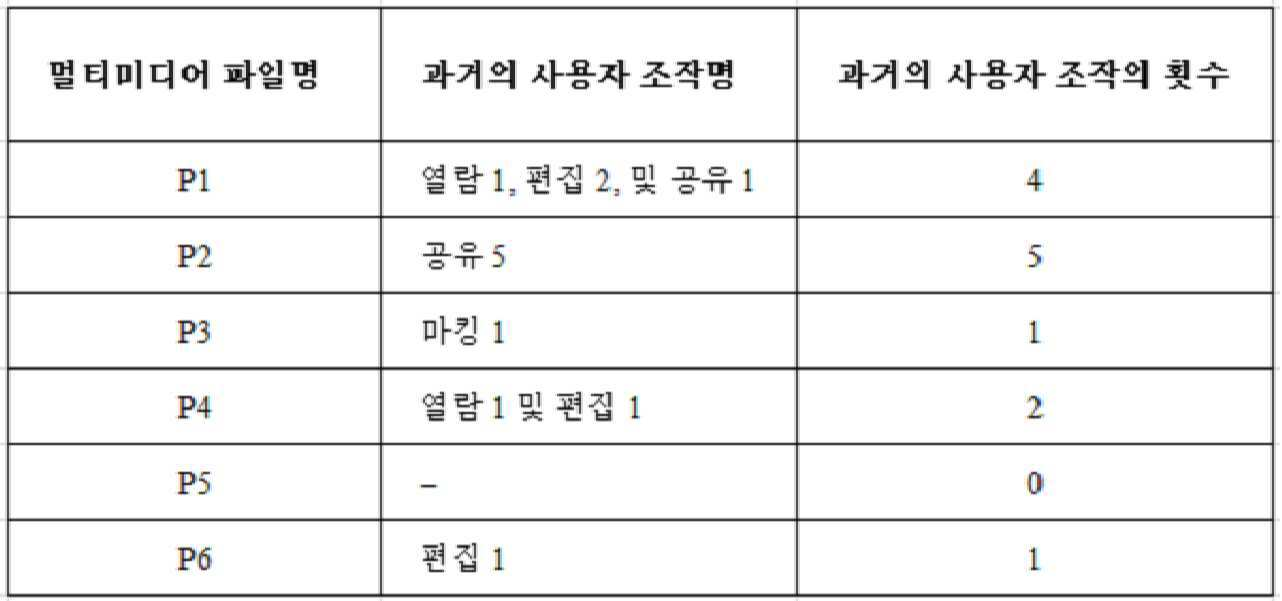
표 1로부터 알 수 있는 것은, 사진 세트 1의 경우, 과거의 사용자 조작의 횟수가 가장 많은 사진이 P2이므로 전자 장치가 P2를 사진 세트 1의 좌표 파일로서 사용한다는 것이다. 사진 세트 2의 경우, 전자 장치가 과거의 사용자 조작의 횟수에 따라 좌표 파일을 유사하게 결정하면, 전자 장치가 사진 세트 2 중에서 과거의 사용자 조작의 횟수가 가장 많은 P4를 사진 세트 2의 좌표 파일로서 결정한다. It can be seen from Table 1 that in the case of the photograph set 1, the electronic apparatus uses P2 as the coordinate file of the photograph set 1 because the photograph having the largest number of user operations in the past is P2. In the case of the photo set 2, if the electronic device similarly determines the coordinate file in accordance with the number of past user operations, the electronic device sets P4 having the largest number of past user operations among the photo sets 2 as the coordinate file of the photo set 2 .
선택적으로, 제1 멀티미디어 파일 세트 중에서 과거의 사용자 조작의 횟수가 가장 많은 멀티미디어 파일을 타깃 분류 파일의 좌표 파일로서 결정하는 단계는, Alternatively, the step of determining, as a coordinate file of the target classification file, a multimedia file having the largest number of past user operations among the first multimedia file sets,
제1 멀티미디어 파일 세트 중에서 과거의 사용자 조작의 횟수가 가장 많은 복수의 멀티미디어 파일이 있으면, 멀티미디어 파일의 생성 시간에 따라 가장 중간의 멀티미디어 파일을 제1 멀티미디어 파일 세트의 좌표 파일로서 결정하는 단계를 포함한다. Determining a most intermediate multimedia file as a coordinate file of the first multimedia file set according to the generation time of the multimedia file if there are a plurality of multimedia files having the largest number of past user operations among the first multimedia file sets .
구체적으로, 제1 멀티미디어 파일 세트 중에서 과거의 사용자 조작의 횟수가 가장 많은 복수의 멀티미디어 파일이 있으면, 과거의 사용자 조작의 횟수가 모두 0이거나, 또는 과거의 사용자 조작의 횟수가 모두 0인 것은 아니다. 과거의 조작의 모든 횟수가 0인 경우, 예를 들어 제1 멀티미디어 파일 세트가 5개의 비디오를 포함하고 또한 5개의 비디오가 모두 사용자에 의해 조작되지 않으면, 전자 장치가 5개의 비디오 중에서 가장 중간의 생성 시간을 가진 비디오(가장 중간의 생성 시간을 가진 하나의 비디오만 있는 경우)를 제1 멀티미디어 파일 세트의 좌표 파일로서 선택할 수 있거나; 또는 가장 중간의 생성 시간을 가진 복수의 비디오가 있으면, 전자 장치가 복수의 멀티미디어 파일 중 어느 하나를 제1 멀티미디어 파일 세트의 좌표 파일로서 선택할 수 있다. 본 발명의 본 실시예에서는 이에 대해 구체적으로 제한하지 않는다. 또한, 전자 장치는 5개의 비디오 중에서 가장 이른 생성 시간 또는 최신 생성 시간을 가진 비디오를 제1 멀티미디어 파일 세트의 좌표 파일로서 선택할 수 있다. 과거의 조작의 모든 횟수가 0이 아닌 경우, 예를 들어 제1 멀티미디어 파일 세트가 5개의 비디오를 포함하고 또한 5개의 비디오에 대한 과거의 사용자 조작의 횟수가 각각 1, 0, 3, 3, 및 3인 경우, 전자 장치가 과거의 사용자 조작의 횟수가 가장 많은 3개의 비디오 모두를 제1 멀티미디어 파일 세트의 좌표 파일로서 결정할 수 있거나, 또는 전자 장치가 3개의 비디오의 생성 시간에 따라 가장 중간의 비디오를 제1 멀티미디어 파일 세트의 좌표 파일로서 선택하거나(가장 중간의 생성 시간을 가진 하나의 비디오만 있는 경우), 또는 3개의 비디오 중에서 과거의 사용자 편집의 횟수가 가장 많은(과거의 이용의 횟수가 가장 많거나 또는 과거의 열람의 횟수가 가장 많은) 비디오를 제1 멀티미디어 파일 세트의 좌표 파일로서 선택하거나, 또는 3개의 비디오 중 어느 하나를 제1 멀티미디어 파일 세트의 좌표 파일로서 선택한다. 본 발명의 본 실시예에서는 이에 대해 구체적으로 제한하지 않는다. Specifically, if there are a plurality of multimedia files having the largest number of user operations in the past among the first set of multimedia files, the number of past user operations is all zero or the number of past user operations is not zero. If the total number of past operations is zero, for example if the first set of multimedia files contains five videos and all five videos are not manipulated by the user, then the electronic device generates the most intermediate of the five videos Select a video with time (if there is only one video with the most intermediate creation time) as the coordinate file of the first set of multimedia files; Or if there is a plurality of videos with the most intermediate generation time, the electronic device may select any one of the plurality of multimedia files as the coordinate file of the first set of multimedia files. But this is not specifically limited in the present embodiment of the present invention. In addition, the electronic device may select the video with the earliest or latest generation time of the five videos as the coordinate file of the first set of multimedia files. For example, if the first multimedia file set contains five videos and the number of past user operations on five videos is 1, 0, 3, 3, and 4, respectively, 3, the electronic device can determine all three videos with the greatest number of past user operations as the coordinate file of the first multimedia file set, or the electronic device can determine the most intermediate video according to the generation time of the three videos As the coordinate file of the first multimedia file set (when there is only one video with the earliest generation time), or the number of past user edits among the three videos is the largest More or the past viewing times is the largest) is selected as the coordinate file of the first multimedia file set, or one of the three videos One as the coordinate file of the first multimedia file set. But this is not specifically limited in the present embodiment of the present invention.
S205. 전자 장치가 제1 멀티미디어 파일 세트 내의 다른 멀티미디어 파일과 좌표 파일을 다르게 표시하기 위해 좌표 파일에 대해 특수한 마킹(special marking)을 수행한다. S205. The electronic device performs special marking on the coordinate file to display the coordinate file differently from other multimedia files in the first multimedia file set.
구체적으로, 좌표 파일과 제1 멀티미디어 파일 세트 내의 다른 멀티미디어 파일의 표시 방식이 서로 다르다. 특수한 마킹은 확대에 의한 표시, 프레임 추가에 의한 표시, 마킹 추가에 의한 표시, 특수 색상을 이용한 표시, 특수 패턴을 이용한 표시, 또는 동적인 표시를 포함하지만 이에 제한되지 않는다. 동일한 특수한 마킹 또는 다른 특수한 마킹이 다른 멀티미디어 파일 세트의 좌표 파일에 대해 수행될 수 있으며, 본 발명의 본 실시예에서는 이에 대해 구체적으로 제한하지 않는다. 사용자가 멀티미디어 파일을 빠르게 브라우징하고, 멀티미디어 파일에 대해 플릭 브라우징(flick browsing)을 수행하는 때 좌표 파일을 명확하게 보며, 강조된 좌표 파일에 기초하여 필요한 멀티미디어 파일을 빠르게 찾을 수 있도록, 전자 장치가 갤러리 또는 폴더와 같은 멀티미디어 파일 저장 영역 내의 좌표 파일을 강조함으로써 좌표 파일에 대해 특수한 마킹을 수행할 수 있다. Specifically, the coordinate file and the display method of the other multimedia files in the first multimedia file set are different from each other. Special markings include, but are not limited to, display by enlargement, display by addition of frames, display by addition of marking, display by special color, display by special pattern, or dynamic display. The same special marking or other special marking can be performed on the coordinate file of another multimedia file set, and this is not specifically limited in the present embodiment of the invention. An electronic device can be displayed in a gallery or a folder so that the user can quickly browse the multimedia file, clearly view the coordinate file when performing flick browsing on the multimedia file, and quickly find a necessary multimedia file based on the emphasized coordinate file. Special markings can be performed on the coordinate file by highlighting the coordinate file within the multimedia file storage area, such as a folder.
예를 들어, 도 2c를 참조하면, 도 2c는 본 발명의 일 실시예에 따른 갤러리의 화면을 개략적으로 나타낸 도면이다. 도 2c에서, 사진(P1)이 사진 세트의 좌표 사진(즉, 좌표 파일)이고, 사진(P12)이 다른 사진 세트의 좌표 사진이다. 사진(P2, P3, P4, P5, 및 P6)이 좌표 사진(P1)의 사진 세트와 동일한 사진 세트에 속하는 다른 사진이고, 사진(P7, P8, P9, P10, P11, P13, P14, P15, P16, P17, 및 P18)이 좌표 사진(P12)의 사진 세트와 동일한 사진 세트에 속하는 다른 사진이다. 좌표 사진(P1)과 좌표 사진(P12)의 표시 방식이 확대에 의한 표시이다. 다른 비-좌표 사진의 표시 방식이 종래 기술에서의 썸네일(thumbnail) 표시 방식이다. 따라서, 갤러리 내의 사진을 검색하는 경우, 검색 효율이 향상될 수 있도록, 사용자가 플릭 브라우징 과정에서 좌표 사진을 분명하게 본 다음, 좌표 사진을 검색 단서로 이용하여 필요한 사진을 빠르게 찾을 수 있다. 좌표 사진(P1)과 좌표 사진(P12)이 촬영 시간의 순서로 정렬되어 있을 수 있고, 좌표 사진(P1)의 사진 세트와 동일한 사진 세트에 속하는 사진(P2, P3, P4, P5, 및 P6)도 촬영 시간의 순서로 정렬될 수 있으며, 좌표 사진(P12)의 사진 세트와 동일한 사진 세트에 속하는 사진(P7, P8, P9, P10, P11, P13, P14, P15, P16, P17, 및 P18)도 촬영 시간의 순서로 정렬될 수 있다는 점을 유의해야 한다. 물론, 좌표 사진이 다른 방식으로 정렬될 수 있고, 동일한 사진 세트 내의 사진도 다른 방식으로 정렬될 수 있다. 본 발명의 본 실시예에서는 이에 대해 구체적으로 제한하지 않는다. 또한, 사진 세트 중에서, 좌표 사진이 사진 세트의 맨 앞의 위치에 있을 수 있거나, 또는 사진 세트의 가장 중간의 위치에 있을 수 있거나, 또는 사진 세트의 맨 뒤의 위치에 있을 수 있거나, 또는 좌표 사진이 시간 순서로 위치해야 하는 위치에 있을 수 있거나, 또는 사진 세트 내의 어떤 위치에도 있을 수 있다. 본 발명의 본 실시예에서는 이에 대해 구체적으로 제한하지 않는다. For example, referring to FIG. 2C, FIG. 2C is a schematic view of a screen of a gallery according to an embodiment of the present invention. In Fig. 2C, the photograph P1 is the coordinate photograph of the photograph set (that is, the coordinate file), and the photograph P12 is the coordinate photograph of another photograph set. P7, P8, P9, P10, P11, P13, P14, P15, and P6 are other photos belonging to the same photographic set as the photographic set of the coordinate photograph P1, P16, P17, and P18) belong to the same photographic set as the photographic set of the coordinate photograph P12. The display method of the coordinate photograph (P1) and the coordinate photograph (P12) is display by enlargement. Another non-coordinate picture display scheme is a thumbnail display scheme in the prior art. Therefore, when a photograph in the gallery is searched, the user can clearly look at the coordinate photograph in the flick browsing process so that the search efficiency can be improved, and then use the coordinate photograph as a search cue to quickly find a necessary photograph. The coordinate photograph P1 and the coordinate photograph P12 may be arranged in the order of the photographing time and the photographs P2, P3, P4, P5, and P6 belonging to the same photograph set as the photograph set of the coordinate photograph P1, The photographs P7, P8, P9, P10, P11, P13, P14, P15, P16, P17 and P18 belonging to the same photographic set as the photographic set of the coordinate photograph P12, May also be arranged in the order of shooting time. Of course, the coordinate pictures can be arranged in different ways, and the pictures in the same set of pictures can be arranged in different ways. But this is not specifically limited in the present embodiment of the present invention. Also, in the set of pictures, the coordinate photograph may be at the forefront position of the set of photographs, or may be at the innermost position of the set of photographs, or may be at the end of the set of photographs, May be in a position that should be located in this time order, or may be in any position in the photo set. But this is not specifically limited in the present embodiment of the present invention.
선택적으로, 제1 멀티미디어 파일 세트 내의 다른 멀티미디어 파일과 좌표 파일을 다르게 표시하기 위해 전자 장치가 좌표 파일에 대해 특수한 마킹을 수행하는 구체적인 방식은, Optionally, the specific manner in which the electronic device performs special marking on the coordinate file to differently display the coordinate file with other multimedia files in the first set of multimedia files,
전자 장치가, 좌표 파일과 제1 멀티미디어 파일 세트 내의 다른 멀티미디어 파일을 다르게 표시하기 위해, 좌표 파일을 제외한, 제1 멀티미디어 파일 세트 내의 다른 멀티미디어 파일을 좌표 파일 아래에 숨기는 방식일 수 있다. The electronic device may be a way of hiding other multimedia files in the first set of multimedia files, except the coordinate file, under the coordinate file, in order to display the coordinate file and other multimedia files in the first set of multimedia files differently.
구체적으로, 전자 장치가, 전자 장치의 화면의 맨위에 제1 멀티미디어 파일 세트의 좌표 파일을 표시하기 위해, 제1 멀티미디어 파일 세트 내의 멀티미디어 파일에 대해 스택 표시를 수행하고, 좌표 파일을 제외한 다른 멀티미디어 파일을 좌표 파일 아래에 숨길 수 있다. 이러한 스택 표시 방식은 또한, 제1 멀티미디어 파일 세트를 제외한 다른 멀티미디어 파일 세트에 사용되어 화면의 맨위에 각각의 멀티미디어 파일 세트의 좌표 파일을 표시하고, 좌표 파일을 제외한 다른 멀티미디어 파일을 대응하는 좌표 파일 아래에 숨길 수 있다. 갤러리 또는 폴더와 같은 저장 영역의 화면이 더 간결해질 수 있도록, 이 표시 방식은 갤러리 또는 폴더와 같은 멀티미디어 파일 저장 영역에서 표시 효과를 최적화할 수 있다. 사용자가 표시된 좌표 파일을 좌표 파일과 관련된 다른 멀티미디어 파일과 직접 연관시킬 수 있다. 좌표 파일이 사용자가 검색할 필요가 있는 멀티미디어 파일과 관련되어 있으면, 사용자가 직접 표시된 좌표 파일을 이용하여 필요한 멀티미디어 파일을 빠르게 찾을 수 있도록, 사용자가 열기 조작을 수행하여 좌표 파일 아래의 다른 멀티미디어 파일을 볼 수 있다. 전자 장치가 좌표 파일에 대해 사용자가 수행한 열기 조작을 수신하는 경우, 전자 장치가 좌표 파일 아래의 다른 멀티미디어 파일을 표시한다. 전자 장치가 좌표 파일에 대해 사용자가 수행한 보기 조작을 수신하는 경우, 전자 장치가 좌표 파일 아래의 다른 멀티미디어 파일을 표시하지 않고 좌표 파일에 대응하는 콘텐츠 정보(사진 표시, 그림 표시, 음악 재생, 비디오 재생, 또는 문서 열기 등)를 직접 출력할 수 있고, 그 다음에 좌표 파일에 대해 사용자가 수행한 보기 조작을 수신하여 좌표 파일의 콘텐츠 정보를 표시함으로써, 좌표 파일을 빠르게 보기 위한 사용자의 요구사항이 만족될 수 있고 또한 사용자의 좌표 파일 보기 효율이 개선된다. 보기 조작은 단일 태핑(single-tapping), 더블 태핑(double-tapping), 트리플 태핑(triple-tapping), 길게 누르기(long-time pressing), 짧게 누르기(short-time pressing), 가볍게 터치하기(light touching), 사전 설정된 압력 값을 이용하여 누르기, 사전 설정된 방향으로 슬라이딩하기, 사전 설정된 패턴을 이용하여 슬라이딩하기, 사전 설정된 플로팅 조작, 또는 사전 설정된 음성 등을 포함하지만 이에 제한되지 않는다. 열기 조작은 단일 태핑, 더블 태핑, 트리플 태핑, 길게 누르기, 짧게 누르기, 가볍게 터치하기, 사전 설정된 압력 값을 이용하여 누르기, 사전 설정된 방향으로 슬라이딩하기, 사전 설정된 패턴을 이용하여 슬라이딩하기, 사전 설정된 플로팅 조작, 또는 사전 설정된 음성 등을 포함하지만 이에 제한되지 않는다. 길게 누르기의 누르기 지속시간이 짧게 누르기의 누르기 지속시간보다 길다. 예를 들어, 짧게 누르기의 누르기 지속시간이 1초일 수 있고, 길게 누르기의 누르기 지속시간이 2초, 3초, 또는 5초 등일 수 있다. 가볍게 터치하기는 1 뉴턴의 누르기이거나 또는 이와 유사한 것일 수 있다. 사전 설정된 압력 값은 2 뉴턴, 또는 3 뉴턴, 또는 5 뉴턴 등일 수 있다. 사전 설정된 방향은 사전 설정된 위쪽 방향, 사전 설정된 아래쪽 방향, 사전 설정된 좌측 방향, 또는 사전 설정된 우측 방향 등을 포함하지만 이에 제한되지 않는다. 사전 설정된 패턴은 삼각형, 원형, 또는 지그재그 등을 포함하지만 이에 제한되지 않는다. 사전 설정된 플로팅 조작은 주먹 쥐기(fist-clenching), 손 휘두르기(hand-swinging), 또는 엄지손가락 올리기(thumb-up)와 같은 사전 설정된 공중 제스처를 포함하지만 이에 제한되지 않는다. 예를 들어, 사전 설정된 음성은 "열기", 또는 "보기" 등일 수 있다. 또한, 보기 조작은 열기 조작과는 다를 필요가 있다. 예를 들어, 보기 조작은 단일 태핑 조작이고, 열기 조작은 사전 설정된 우측 방향을 따르는 슬라이딩 조작이다. Specifically, the electronic device performs stack display on the multimedia file in the first multimedia file set to display the coordinate file of the first multimedia file set at the top of the screen of the electronic device, Can be hidden under the coordinate file. Such a stack display method may also be used in a multimedia file set other than the first multimedia file set so that the coordinate file of each multimedia file set is displayed at the top of the screen and a multimedia file other than the coordinate file is displayed under the corresponding coordinate file . This display scheme can optimize the display effect in a multimedia file storage area such as a gallery or a folder so that the screen of a storage area such as a gallery or a folder becomes more concise. The user can directly associate the displayed coordinate file with other multimedia files associated with the coordinate file. If the coordinate file is associated with a multimedia file that the user needs to search for, the user performs an opening operation so that the user can quickly find the necessary multimedia file by using the coordinate file directly displayed by the user, can see. When the electronic device receives an open operation performed by the user on the coordinate file, the electronic device displays another multimedia file under the coordinate file. When the electronic device receives the viewing operation performed by the user with respect to the coordinate file, the electronic device displays the contents information corresponding to the coordinate file (photograph display, picture display, music reproduction, video Playback, or document opening) of the coordinate file can be output directly. Next, by receiving the viewing operation performed by the user with respect to the coordinate file and displaying the contents information of the coordinate file, the user's requirement for quick viewing of the coordinate file And the efficiency of viewing the coordinate file of the user is improved. The viewing operation may be single-tapping, double-tapping, triple-tapping, long-time pressing, short-time pressing, touching, tapping with a preset pressure value, sliding in a predetermined direction, sliding using a preset pattern, preset floating operation, or preset speech, and the like. Open operations can be performed using a single tapping, double tapping, triple tapping, long tap, short tap, light touch, tap with preset pressure value, slide in preset direction, slide using preset pattern, Operation, or preset speech, and the like. The duration of the long press is longer than the duration of the click. For example, the duration of a short press may be one second, and the duration of a long press may be two seconds, three seconds, or five seconds. Touching lightly may be a Newtonian press or something similar. The preset pressure value may be 2 Newtons, or 3 Newtons, or 5 Newtons. The predetermined direction includes, but is not limited to, a preset up direction, a preset down direction, a preset left direction, or a preset right direction. The preset pattern includes, but is not limited to, triangular, circular, or zigzag. The preset floating manipulation includes, but is not limited to, predetermined air gestures such as fist-clenching, hand-swinging, or thumb-up. For example, the preset voice may be "open", "view", or the like. Also, the viewing operation needs to be different from the opening operation. For example, the viewing operation is a single tapping operation, and the opening operation is a sliding operation along the preset rightward direction.
선택적으로, 제1 멀티미디어 파일 세트가 폴더이고, 폴더의 아이콘이 좌표 파일에 대응하는 아이콘이다. 사용자가 사용자가 검색하기를 원하는 멀티미디어 파일이 좌표 파일과 관련되는지 여부를 좌표 파일을 이용하여 알 수 있고, 그 다음에 좌표 파일 아래의 다른 멀티미디어 파일을 봄으로써 필요한 멀티미디어 파일을 찾는다. 이를 통해 사용자가 좌표 파일을 검색 단서로 이용하여 필요한 멀티미디어 파일을 빠르게 찾도록 돕는다. Optionally, the first multimedia file set is a folder, and the icon of the folder is an icon corresponding to the coordinate file. The user can know whether the multimedia file desired by the user is related to the coordinate file by using the coordinate file, and then looks for another multimedia file under the coordinate file to find the necessary multimedia file. This allows the user to use the coordinate file as a search clue to quickly find the multimedia file they need.
제1 멀티미디어 파일 세트 내에 복수의 좌표 파일이 있으면, 복수의 좌표 파일 중 어느 하나가 선택되어 전자 장치의 화면의 맨위에 표시될 수 있거나, 또는 복수의 좌표 파일 중에서 좌표 파일이 사전 설정된 선택 규칙에 따라 선택되고, 선택된 좌표 파일이 전자 장치의 화면의 맨위에 표시된다는 것을 유의해야 한다. 사전 설정된 선택 규칙은 가장 이른 생성 시간, 가장 중간의 생성 시간, 최근 생성 시간, 또는 랜덤 선택 등을 포함하지만 이에 제한되지 않는다. If there are a plurality of coordinate files in the first multimedia file set, either one of the plurality of coordinate files can be selected and displayed at the top of the screen of the electronic device, or among the plurality of coordinate files, And the selected coordinate file is displayed at the top of the screen of the electronic device. The preset selection rules include, but are not limited to, earliest creation time, innermost creation time, recent creation time, or random selection.
예를 들어, 도 2d를 참조하면, 도 2d는 본 발명의 일 실시예에 따른 다른 갤러리의 화면을 개략적으로 나타낸 도면이다. 도 2d에서, 사진(P1)이 사진 세트의 좌표 사진(즉, 좌표 파일)이고, 사진(P12)이 다른 사진 세트의 좌표 사진이다. 좌표 사진(P1)의 사진 세트와 동일한 사진 세트에 속하는 다른 사진(P2, P3, P4, P5, 및 P6)이 좌표 사진(P1) 아래에 숨겨진다. 좌표 사진(P12)의 사진 세트와 동일한 사진 세트에 속하는 다른 사진(P7, P8, P9, P10, P11, P13, P14, P15, P16, P17, 및 P18)이 좌표 사진(P12) 아래에 숨겨진다. 좌표 사진(P1)에 대해 사용자가 수행한 단일 태핑 조작을 수신하는 경우, 전자 장치는 화면 상에 좌표 사진(P1)을 표시한다(예를 들어, 최대화한다). 사용자가 좌표 사진(P1)에 대해 수행한 사전 설정된 우측 방향을 따르는 슬라이딩 조작을 수신하는 경우, 전자 장치가 좌표 사진(P1) 아래에 숨겨진 다른 사진을 썸네일 방식으로 표시한다. 구체적으로, 도 2e를 참조하면, 도 2e는 본 발명의 일 실시예에 따른 또 다른 갤러리의 화면을 개략적으로 나타낸 도면이다. 도 2e에서, 좌표 사진(P1) 아래의 다른 사진(P2, P3, P4, P5, 및 P6)이 전자 장치의 화면 상에 표시된다. 본 발명의 본 실시예에서는, 전자 장치가 좌표 사진(P1)에 대해 열기 조작을 수행하는 경우, 좌표 사진(P1)이 동시에 화면 상에 표시된다. 다른 실행 가능한 실시예에서, 좌표 사진(P1)에 대한 열기 조작을 수신하는 경우, 전자 장치가 좌표 사진(P1)의 사진 세트와 동일한 사진 세트에 속하는 다른 사진만을 표시할 수 있고, 더 이상 좌표 사진(P1)을 표시하지 않는다. 좌표 사진(P1) 아래에 숨겨진 모든 사진이 화면 상에 표시되는 경우에는, 사진을 정렬하는 순서에 대해 제한하지 않는다. For example, referring to FIG. 2D, FIG. 2D schematically illustrates a screen of another gallery according to an embodiment of the present invention. In Fig. 2D, the photograph P1 is the coordinate photograph of the photograph set (that is, the coordinate file), and the photograph P12 is the coordinate photograph of another photograph set. The other pictures P2, P3, P4, P5, and P6 belonging to the same picture set as the picture set of the coordinate picture P1 are hidden under the coordinate picture P1. The other pictures (P7, P8, P9, P10, P11, P13, P14, P15, P16, P17 and P18) belonging to the same picture set as the picture set of the coordinate picture P12 are hidden under the coordinate picture P12 . When receiving a single tapping operation performed by the user for the coordinate photograph P1, the electronic device displays (e.g., maximizes) the coordinate photograph P1 on the screen. When the user receives a sliding operation along the preset rightward direction performed on the coordinate picture P1, the electronic device displays another picture hidden under the coordinate picture P1 in a thumbnail manner. In particular, referring to FIG. 2E, FIG. 2E is a diagram illustrating a screen of another gallery according to an exemplary embodiment of the present invention. 2E, other pictures P2, P3, P4, P5, and P6 below the coordinate picture P1 are displayed on the screen of the electronic device. In the present embodiment of the present invention, when the electronic device performs the opening operation with respect to the coordinate photograph P1, the coordinate photograph P1 is simultaneously displayed on the screen. In another executable embodiment, when receiving an open operation for the coordinate photograph P1, the electronic device may display only the other photographs belonging to the same set of photographs as the photograph set of the coordinate photograph P1, (P1) is not displayed. In the case where all the pictures hidden under the coordinate picture P1 are displayed on the screen, there is no limitation on the order of arranging the pictures.
선택적으로, 좌표 사진이 도 2d의 표시 방식으로 표시되는 경우, 사용자가 이 그룹의 사진의 특징 등을 알 수 있도록, 좌표 사진 아래에 숨겨진 사진의 개수, 사진 이름, 및 분류 규칙과 같은 정보가 좌표 사진의 표시 영역에 추가로 표시될 수 있다. Optionally, when the coordinate photograph is displayed in the display format of FIG. 2D, information such as the number of photographs hidden under the coordinate photograph, the photograph name, and the classification rule is stored in the coordinates Can be additionally displayed in the display area of the photograph.
도 2a에서 설명된 방법에서는, 전자 장치가 사전 설정된 규칙에 따라, 전자 장치에 저장된 복수의 멀티미디어 파일을 분류하여 각각의 멀티미디어 파일 세트를 획득한다는 것을 알 수 있을 것이다. 제1 멀티미디어 파일 세트 중에서, 전자 장치가 과거의 사용자 조작의 횟수가 가장 많은 멀티미디어 파일을 제1 멀티미디어 파일 세트의 좌표 파일로서 선택하고, 선택된 좌표 파일에 대해 특수한 마킹을 수행하여 제1 멀티미디어 파일 세트 내의 다른 멀티미디어 파일과 좌표 파일을 다르게 표시한다. 대량의 멀티미디어 파일 내의 멀티미디어 파일을 검색하는 경우, 사용자가 좌표 파일을 검색 단서로 이용하여 필요한 멀티미디어 파일을 빠르게 찾음으로써, 멀티미디어 파일 검색 효율을 개선하고 또한 사용자에게 편의를 제공할 수 있다. In the method described in FIG. 2A, it will be appreciated that an electronic device classifies a plurality of multimedia files stored in an electronic device according to predetermined rules to obtain a respective set of multimedia files. Among the first set of multimedia files, the electronic device selects the multimedia file having the largest number of past user operations as the coordinate file of the first multimedia file set, performs special marking on the selected coordinate file, Display different multimedia files and coordinate files differently. When a multimedia file in a large multimedia file is searched, a user can quickly search for a necessary multimedia file by using a coordinate file as a search lead, thereby improving the multimedia file search efficiency and providing convenience to the user.
선택적으로, 도 3a를 참조하면, 도 3a는 본 발명의 일 실시예에 따른 또 다른 멀티미디어 파일 관리 방법을 개략적으로 나타낸 흐름도이다. 좌표 파일에 대해 특수한 마킹을 수행하여 제1 멀티미디어 파일 세트 내의 다른 멀티미디어 파일과 좌표 파일을 다르게 표시한 후, 전자 장치가 추가적으로, 단계 S207을 수행하여 좌표 파일에 아이콘 마크를 추가할 수 있다. 단계 S207에 대해 자세히 설명하면 다음과 같다. Alternatively, referring to FIG. 3A, FIG. 3A is a flowchart schematically illustrating another multimedia file management method according to an embodiment of the present invention. After performing special marking on the coordinate file to display the coordinate file differently from other multimedia files in the first multimedia file set, the electronic device may additionally perform step S207 to add the icon mark to the coordinate file. Step S207 will be described in detail as follows.
S207. 전자 장치가 과거의 사용자 조작이 마킹된 아이콘을 좌표 파일에 추가한다. S207. The electronic device adds an icon marked with the past user operation to the coordinate file.
구체적으로, 전자 장치가 좌표 파일의 생성 시간과 지리적 위치 정보, 또는 좌표 파일에 대해 사용자가 수행한 과거의 조작의 명칭, 횟수, 시간, 및 빈도 등에 따라, 자동적으로 좌표 파일에 마크(mark)를 추가할 수 있다. 대안적으로, 사용자가 좌표 파일에 관한 정보를 풍부하게 하기 위해 좌표 사진에 라벨을 수동으로 추가할 수 있으며, 사용자가 검색하기 위한 단서를 더 많이 제공함으로써 사용자에게 편의를 제공한다. 사진의 예에서, 사용자가 아이콘을 봄으로써 좌표 사진의 촬영 날짜와 촬영 위치와 같은 상세 정보를 알 수 있도록, 전자 장치가 좌표 사진의 촬영 날짜 또는 촬영 위치 등에 따라 좌표 사진에 마킹할 수 있다. 대안적으로, 스케줄 또는 메모가 좌표 사진에 대응하는 촬영 날짜에 생성되면, 생성된 스케줄 또는 생성된 메모에 따라 좌표 사진이 마킹될 수 있다. 대안적으로, 좌표 사진이 위챗 모멘트에 공유되면, 공유 기록에 따라 좌표 사진이 마킹될 수 있다. 아이콘의 표시 방식은 좌표 사진 상에 아이콘을 표시하는 것, 예를 들어 모서리 마크 형태로 좌표 사진에 그래픽 마크를 추가하는 것일 수 있다. 사용자가 그래픽 마크 쪽으로 손가락 또는 커서를 움직이면, 아이콘의 구체적 내용(예를 들어, 촬영 날짜, 촬영 위치, 촬영 파라미터, 및 공유 기록)가 표시된다. 대안적으로, 아이콘의 표시 방식은 아이콘이 좌표 파일 상에서 표시되지 않는 것일 수 있지만, 커서 또는 손가락이 사전 설정된 구간 이상으로 좌표 사진 위에 머무르면, 작은 창이 팝업되어 아이콘의 구체적인 내용을 표시한다. 사전 설정된 구간은 1초, 2초, 또는 5초 등일 수 있다. 대안적으로, 아이콘의 표시 방식은 아이콘이 좌표 사진 아래에 숨겨지는 것일 수 있고, 좌표 사진에 대해 사용자가 수행한 사전 설정된 조작을 수신하는 경우, 전자 장치가 팝업 창 방식으로 현재 화면 영역에 아이콘을 표시하거나, 또는 현재 화면을 다른 화면으로 전환하여 아이콘을 표시한다. 아이콘에 대해 사용자가 수행한 태핑과 같은 조작이 수신된 경우, 아이콘의 구체적인 내용이 표시된다. 사전 설정된 조작은 확대 제스처 조작(stretch gesture operation), 또는 축소 제스처 조작(pinch gesture operation) 등을 포함하지만 이에 제한되지 않으며, 사전 설정된 조작은 보기 조작 및 열기 조작과 다르다. Specifically, the electronic device automatically marks a coordinate file in accordance with the generation time of the coordinate file, the geographical position information, the name, the number of times, the time, and the frequency of the past operation performed by the user with respect to the coordinate file Can be added. Alternatively, the user can manually add labels to the coordinate photographs to enrich the information about the coordinate file, and provide the user with more convenience by providing more clues for searching. In the example of the photograph, the electronic device can mark the coordinate photograph according to the photographing date or the photographing position of the coordinate photograph so that the user can know the detailed information such as the photographing date and photographing position of the coordinate photograph by looking at the icon. Alternatively, if a schedule or memo is created at the shooting date corresponding to the coordinate picture, the coordinate picture may be marked according to the created schedule or the created memo. Alternatively, if the coordinate photograph is shared with the upper cam moment, the coordinate photograph may be marked according to the shared record. The display method of the icon may be to display an icon on the coordinate photograph, for example, to add a graphic mark to the coordinate photograph in the form of an edge mark. When the user moves the finger or cursor toward the graphic mark, the specific content of the icon (e.g., shooting date, shooting position, shooting parameter, and shared record) is displayed. Alternatively, the display method of the icon may be that the icon is not displayed on the coordinate file, but when the cursor or the finger stays on the coordinate photograph over a predetermined interval, a small window pops up to display the specific content of the icon. The preset interval may be 1 second, 2 seconds, or 5 seconds. Alternatively, the display method of the icon may be such that the icon is hidden under the coordinate picture, and when receiving the preset operation performed by the user for the coordinate picture, the electronic device displays an icon in the current screen area in a pop- Or displays the icon by switching the current screen to another screen. When an operation such as a tapping performed by the user on the icon is received, the specific contents of the icon are displayed. The preset operation includes, but is not limited to, stretch gesture operation, or pinch gesture operation, and the preset operation differs from the view operation and the open operation.
사용자가 각각의 멀티미디어 파일에 관한 상세 정보를 더 정확하게 알 수 있도록, 전자 장치가 좌표 파일을 마킹할 수 있을 뿐만 아니라 다른 비-좌표 파일도 마킹할 수 있으며, 사용자가 필요한 멀티미디어 파일을 빠르게 찾는다는 것을 유의해야 한다. Not only can the electronic device mark the coordinate file, but also other non-coordinate files, so that the user can more accurately know the details of each multimedia file, and the user quickly finds the required multimedia file Be careful.
예를 들어, 도 3b를 참조하면, 도 3b는 본 발명의 일 실시예에 따른 또 다른 갤러리의 화면을 개략적으로 나타낸 도면이다. 도 3b에서, 전자 장치가 사용자의 손가락이 좌표 사진(P1)을 터치하는 시구간이 2초의 사전 설정된 구간을 초과하는 것을 검출한 경우, 전자 장치가 현재 화면 상에 창을 팝업하여 좌표 사진(P1)에 대응하는 아이콘을 표시한다. 아이콘의 구체적인 내용이 "2015 7월 18일에 위챗 모멘트에 공유됨"이다. 사용자가 사진을 브라우징하기 위해 갤러리를 플릭(flick)하는 경우, 사용자가 필요한 사진을 빠르게 찾도록 돕기 위해, 좌표 사진의 아이콘 내용 주석이 이런 방식으로 편리하게 보여질 수 있다. 또한, 아이콘 내용 주석의 표시 시구간이 사전 설정되어 있을 수 있다. 예를 들어, 아이콘 내용 주석이 2초 또는 5초 동안 표시된다. For example, referring to FIG. 3B, FIG. 3B is a schematic view of another gallery screen according to an exemplary embodiment of the present invention. 3B, when the electronic device detects that the user's finger touches the coordinate picture P1 exceeds the predetermined interval of 2 seconds, the electronic device pops up the window on the current screen to display the coordinate picture P1, Is displayed. The concrete content of the icon is "shared on Uchial moment on July 18, 2015". When a user flickes a gallery to browse a picture, the icon content annotation of the coordinate picture can be conveniently viewed in this manner to help the user quickly find the desired picture. In addition, the display time period of the icon content annotation may be preset. For example, an icon content annotation is displayed for 2 or 5 seconds.
대안적으로, 도 3c를 참조하면, 도 3c는 본 발명의 일 실시예에 따른 또 다른 갤러리의 화면을 개략적으로 나타낸 도면이다. 도 3c에서, 사용자가 좌표 사진(P1)이 위치하는 영역에서 확대 제스처 조작을 입력하면, 전자 장치가 확대 제스처를 아이콘을 보는 명령으로 변환한 다음, 좌표 사진(P1)에 대응하는 아이콘을 명령에 따라 화면 상에 표시한다. 도 3d를 참조하면, 좌표 사진(P1)에 대응하는, 촬영 날짜, 촬영 위치, 공유 기록, 및 공유 횟수를 포함하는 4개의 아이콘이 화면 상에 표시된다. 사용자가 도 3d에 도시된 화면 상에서 아이콘 "공유 기록"을 탭하는 경우, 도 3e를 참조하면, 화면 상에 창이 팝업되어 아이콘 "공유 기록"에 대응하는 구체적인 내용, 즉 "2015년 7월 18일에 위챗 모멘트에 공유됨"을 표시한다. 따라서, 사용자가 좌표 파일의 아이콘 내용 주석을 볼 수 있다. 아이콘을 추가하기 위한 버튼(31)이 도 3d에 도시된 화면 상에 더 표시된다. 사용자가 아이콘을 추가하기 위한 버튼(31)을 탭한 경우, 사용자가 새로운 아이콘을 좌표 사진(P1)에 추가할 수 있다. 도 3f를 참조하면, 라벨(32)이 화면 상에 표시된다. 사용자가 텍스트 정보 등을 라벨(32)에 입력하여 새로운 아이콘을 좌표 사진(P1)에 추가함으로써, 사용자가 나중에 좌표 파일에 관한 정보를 보는 데 도움을 주고 또한 사용자에게 편의를 제공할 수 있다. 도 3e 및 도 3f가 선택적인 표시 화면을 나타낼 뿐이라는 점을 유의해야 한다. 다른 실시 형태에서, 화면 상에 그리고 다른 표시 방식으로 다른 표시 콘텐츠가 있을 수 있다. 본 명세서에서는 이에 대해 제한하지 않는다. Alternatively, referring to FIG. 3C, FIG. 3C is a diagram illustrating a screen of another gallery according to an embodiment of the present invention. 3C, when the user inputs an enlargement gesture operation in an area where the coordinate photograph P1 is located, the electronic device converts the enlargement gesture into a command for viewing an icon, and then displays an icon corresponding to the coordinate photograph P1 in the command And displays it on the screen. Referring to FIG. 3D, four icons corresponding to the coordinate photograph P1, including a photographing date, a photographing position, a sharing record, and a sharing count, are displayed on the screen. When the user taps the icon "Share Record" on the screen shown in FIG. 3D, referring to FIG. 3E, a window pops up on the screen to display the contents corresponding to the icon "Share Record" Quot; to the wicket moment. " Thus, the user can view the icon content annotation of the coordinate file. A
단계 S207을 수행함으로써, 전자 장치가 좌표 파일에 아이콘을 자동으로 추가하여 좌표 파일에 관한 정보를 풍부하게 할 수 있으며, 사용자가 검색하기 위한 단서를 더 많이 제공한다는 것을 알 수 있을 것이다. 이를 통해 사용자가 필요한 멀티미디어 파일을 더 빠르게 찾도록 도움을 주고 또한 사용자에게 편의를 제공한다. By performing step S207, it will be appreciated that the electronic device can automatically add icons to the coordinate file to enrich the information about the coordinate file and provide more clues for the user to search. This helps users find the multimedia files they need faster and also provides convenience to the users.
선택적으로, 도 4a를 참조하면, 도 4a는 본 발명의 일 실시예에 따른 또 다른 멀티미디어 파일 관리 방법을 개략적으로 나타낸 흐름도이다. 좌표 파일에 대해 특수한 마킹을 수행하여 제1 멀티미디어 파일 세트 내의 다른 멀티미디어 파일과 좌표 파일을 다르게 표시한 후, 전자 장치가 추가적으로, 분류 결과에 대해 사용자가 수행한 수동 조정을 구현하기 위해 단계 S209 또는 단계 S211를 추가로 수행할 수 있다. 단계 S209와 단계 S211에 대해 자세히 설명하면 다음과 같다. Alternatively, referring to FIG. 4A, FIG. 4A is a flowchart schematically illustrating another multimedia file management method according to an exemplary embodiment of the present invention. After performing special marking on the coordinate file to display the coordinate file differently from other multimedia files in the first multimedia file set, the electronic device additionally performs step S209 or step < RTI ID = 0.0 > S211 may be additionally performed. Steps S209 and S211 will be described in detail as follows.
S209. 전자 장치가 제1 멀티미디어 파일 세트에 속하지 않는 하나 이상의 타깃 멀티미디어 파일에 대해 사용자가 수행하는 조작을 수신하고, 이 조작이 사전 설정된 제1 조작을 만족하면, 하나 이상의 타깃 멀티미디어 파일을 제1 멀티미디어 파일 세트로 그룹화한다. S209. If the electronic device receives an operation performed by a user on one or more target multimedia files that do not belong to the first set of multimedia files and the operation satisfies a predetermined first operation, .
S211. 전자 장치가 제1 멀티미디어 파일 세트 내의 하나 이상의 타깃 멀티미디어 파일에 대해 사용자가 수행하는 조작을 수신하고, 이 조작이 사전 설정된 제2 조작을 만족하면, 하나 이상의 타깃 멀티미디어 파일이 제1 멀티미디어 파일 세트로 더 이상 그룹화되지 않도록 제1 멀티미디어 파일 세트에서 하나 이상의 타깃 멀티미디어 파일을 분리한다. S211. If the electronic device receives an operation performed by a user on one or more target multimedia files in the first set of multimedia files and the operation satisfies a predetermined second operation, then one or more target multimedia files are added to the first set of multimedia files And separates one or more target multimedia files from the first multimedia file set so as not to be further grouped.
구체적으로, 전자 장치가 복수의 멀티미디어 파일을 자동으로 분류한 후, 사용자가 추가적으로, 드래깅 또는 다른 조작을 통해 제1 멀티미디어 파일 세트에 속하지 않는 타깃 멀티미디어 파일을 제1 멀티미디어 파일 세트로 분류하기 위해 분류 결과를 수동으로 조정할 수 있거나, 또는 타깃 멀티미디어 파일이 더 이상 제1 멀티미디어 파일 세트로 그룹화되지 않도록 제1 멀티미디어 파일 세트에서 드래깅 또는 다른 조작을 통해 제1 멀티미디어 파일 세트로 그룹화된 타깃 멀티미디어 파일을 분리한다. 제1 조작은, 제1 멀티미디어 파일 세트에 속하지 않는 하나 이상의 타깃 멀티미디어 파일을 제1 멀티미디어 파일 세트의 좌표 파일까지 드래그하는 조작, 또는 제1 멀티미디어 파일 세트에 속하지 않는 하나 이상의 타깃 멀티미디어 파일을 제1 멀티미디어 파일 세트 내의 임의의 멀티미디어 파일까지 드래그하는 조작을 포함하지만 이에 제한되지 않는다. 제2 조작는 제1 멀티미디어 파일 세트에 속하는 하나 이상의 타깃 멀티미디어 파일을 다른 멀티미디어 파일 세트의 좌표 파일까지 드래그하는 조작, 또는 제1 멀티미디어 파일 세트에 속하는 하나 이상의 타깃 멀티미디어 파일을 다른 멀티미디어 파일 세트 내의 임의의 멀티미디어 파일로 드래그하는 조작, 또는 제1 멀티미디어 파일 세트에 속하는 하나 이상의 타깃 멀티미디어 파일을 제1 멀티미디어 파일 세트에 속하지 않는 임의의 멀티미디어 파일까지 드래그하는 조작을 포함하지만 이에 제한되지 않는다. 이를 통해 사용자가 분류 표시 결과를 조정하도록 도움을 줌으로써, 전자 장치의 지능적 분류의 결함이 교정되고 또한 사용자의 개인화된 요구사항이 만족된다. Specifically, after the electronic device automatically classifies a plurality of multimedia files, the user may additionally, through dragging or other manipulation, sort the target multimedia file into a first set of multimedia files that do not belong to the first set of multimedia files, Or separate the target multimedia files grouped into the first set of multimedia files through dragging or other manipulation in the first set of multimedia files such that the target multimedia files are no longer grouped into the first set of multimedia files. The first operation may include an operation of dragging one or more target multimedia files not belonging to the first multimedia file set to a coordinate file of the first multimedia file set or an operation of dragging one or more target multimedia files not belonging to the first multimedia file set to the first multimedia file set Including dragging any multimedia file in the fileset. The second operation may include an operation of dragging one or more target multimedia files belonging to the first multimedia file set to a coordinate file of another multimedia file set or an operation of dragging one or more target multimedia files belonging to the first multimedia file set to any multimedia file set in another multimedia file set An operation of dragging to a file, or an operation of dragging one or more target multimedia files belonging to a first multimedia file set to any multimedia file not belonging to the first multimedia file set. This helps the user adjust the results of the classification display, thereby correcting deficiencies in the intelligent classification of the electronic device and also satisfying the user ' s personalized requirements.
선택적으로, 제1 멀티미디어 파일 세트에 속하지 않는 하나 이상의 타깃 멀티미디어 파일에 대해 사용자가 수행한 제1 조작을 수신하는 경우, 하나 이상의 타깃 멀티미디어 파일을 제1 멀티미디어 파일 세트로 그룹화하기 위해, 전자 장치가 좌표 파일 아래에 하나 이상의 타깃 멀티미디어 파일을 숨길 수 있거나, 또는 하나 이상의 멀티미디어 파일의 표시 위치를 제1 멀티미디어 파일 세트에 대응하는 표시 영역으로 조정할 수 있다. 제1 멀티미디어 파일 세트에 속하는 하나 이상의 타깃 멀티미디어 파일에 대해 사용자가 수행한 제2 조작을 수신하는 경우, 제1 멀티미디어 파일 세트에서 하나 이상의 타깃 멀티미디어 파일을 분리하기 위해, 전자 장치가 하나 이상의 타깃 멀티미디어 파일의 표시 위치를 다른 멀티미디어 파일 세트에 대응하는 표시 영역으로 조정하거나, 또는 다른 멀티미디어 파일 세트에 대응하는 좌표 파일 아래에 하나 이상의 타깃 멀티미디어 파일을 숨기거나, 또는 하나 이상의 타깃 멀티미디어 파일의 표시 위치를 제1 멀티미디어 파일 세트에 대응하는 영역을 제외한 다른 영역으로 조정할 수 있다. Optionally, in order to group one or more target multimedia files into a first set of multimedia files, when the first operation performed by the user on one or more target multimedia files not belonging to the first set of multimedia files is received, One or more target multimedia files may be hidden below the file, or the display location of one or more multimedia files may be adjusted to a display area corresponding to the first set of multimedia files. Wherein the receiving device receives a second operation performed by a user on one or more target multimedia files belonging to a first multimedia file set, Or to hide one or more target multimedia files under a coordinate file corresponding to another set of multimedia files, or to change the display position of one or more target multimedia files to the first But can be adjusted to other areas except the area corresponding to the multimedia file set.
선택적으로, 영역 내의 복수의 멀티미디어 파일을 멀티미디어 파일 세트로 분류하기 위해, 사용자는 손가락 관절을 이용하여 영역의 범위를 정하는 것과 같은 방식으로 전자 장치에 의한 자동적인 분류의 결과를 조정할 수 있다. 도 4b를 참조하면, 도 4b에서, 사용자가 손가락을 이용하여 화면 상의 영역(41)의 범위를 정하고, 이 영역(41)이 사진(P1, P2, P4, P6, P7, 및 P8)을 포함한다. 사진(P7 및 P8)이 좌표 사진(P12)이 속하는 사진 세트에 더 이상 속하지 않도록, 전자 장치가 자동으로 이 영역(41) 내의 사진(P1, P2, P4, P6, P7, 및 P8)을 멀티미디어 파일 세트로 분류한다. 또한, 이 영역(41)에 포함되지 않은 사진(P3 및 P5)이 좌표 사진(P1)이 속하는 사진 세트에 여전히 속할 수 있거나, 또는 좌표 사진(P1)이 속하는 사진 세트에서 분리될 수 있다. 본 발명의 본 실시예에서는 이에 대해 구체적으로 제한하지 않는다. Optionally, to classify a plurality of multimedia files in a region into a set of multimedia files, a user may adjust the result of automatic classification by the electronic device in such a manner as to use the finger joints to define the region. Referring to FIG. 4B, in FIG. 4B, a user defines a range of an
선택적으로, 단계 S201 내지 단계 S205가 수행된 후, 단계 S209만이 수행될 수 있거나, 또는 단계 S211만이 수행될 수 있거나, 또는 단계 S209와 단계 S211이 모두 수행될 수 있다. 또한, 단계 S209와 단계 S211를 수행하는 순서에 대해 제한되지 않는다. Alternatively, after steps S201 to S205 are performed, only step S209 can be performed, or only step S211 can be performed, or both steps S209 and S211 can be performed. Also, the order of performing steps S209 and S211 is not limited.
예를 들어, 도 4c를 참조하면, 도 4c는 본 발명의 일 실시예에 따른 또 다른 갤러리의 화면을 개략적으로 나타낸 도면이다. 도 4c에서, 화면 상에 표시된 사진(P12)이 사진 세트의 좌표 사진(즉, 좌표 파일)이다. 사진(P4)과 좌표 사진(P12)이 동일한 사진 세트에 속하지 않는다. 사용자가 사진(P4)을 탭하여 선택하고, P4를 좌표 사진(P12)이 위치하는영역까지 드래그한다. 사진(P4)이 사진 세트 1에서 분리되어 사진 세트 2로 그룹화될 수 있도록, 전자 장치가 사진(P4)을 사진(P12)에 대응하는 멀티미디어 파일 세트의 표시 영역으로 조정한다. 이런 방식으로, 분류 결과가 조정되어 사용자에게 편의를 제공한다. 조정된 표시 효과에 대해서는, 도 4d를 참조하라. 도 4d에서, 사진 P4의 표시 위치가 좌표 사진(P12)이 속하는 사진 세트의 표시 영역으로 이동되고, 사진 P5와 P6의 표시 위치가 앞쪽으로 이동된다. 선택적으로, 사진(P4)이 좌표 사진(P12)이 속하는 사진 세트의 표시 영역 내의 다른 위치로 이동될 수 있다. 본 발명의 본 실시예에서는 이에 대해 구체적으로 제한하지 않는다. For example, referring to FIG. 4C, FIG. 4C is a diagram illustrating a screen of another gallery according to an exemplary embodiment of the present invention. In Fig. 4C, the picture P12 displayed on the screen is the coordinate picture (i.e., coordinate file) of the picture set. The picture P4 and the coordinate picture P12 do not belong to the same picture set. The user taps the picture P4 to select it, and drags P4 to the area where the coordinate picture P12 is located. The electronic device adjusts the picture P4 to the display area of the multimedia file set corresponding to the picture P12 so that the picture P4 can be separated from the picture set 1 and grouped into the picture set 2. In this way, the classification results are adjusted to provide convenience to the user. For the adjusted display effect, see Figure 4d. In Fig. 4D, the display position of the photograph P4 is moved to the display area of the photograph set to which the coordinate photograph P12 belongs, and the display positions of the photographs P5 and P6 are moved forward. Alternatively, the photograph P4 may be moved to another position in the display area of the photograph set to which the coordinate photograph P12 belongs. But this is not specifically limited in the present embodiment of the present invention.
전자 장치가 단계 S209와 단계 S211를 수행하여 복수의 멀티미디어 파일을 분류한 후, 전자 장치의 지능적 분류의 결함이 교정되고 또한 사용자의 개인화된 요구사항이 만족될 수 있도록, 사용자가 수동으로 분류 결과를 조정할 수 있다는 것을 알 수 있을 것이다,. After the electronic device performs steps S209 and S211 to classify a plurality of multimedia files, the user manually sets the classification result so that the deficiencies of the intelligent classification of the electronic device are corrected and the user's personalized requirements can be satisfied You can see that it can be adjusted.
선택적으로, 단계 S201 내지 단계 S205가 수행된 후, 단계 S207이 수행될 수 있고, 그 다음에 단계 S209 및/또는 단계 S211이 수행되거나, 또는 단계 S209 및/또는 단계 S211이 수행된 후 단계 S207이 수행된다. 단계 S209와 단계 S211를 수행하는 순서에 대해서는 제한하지 않는다. 각각의 단계의 상세한 설명에 대해서는, 동일한 단계의 전술한 설명을 참조하라. 여기서는 세부사항에 대해 다시 설명하지 않는다. Alternatively, after steps S201 to S205 are performed, step S207 may be performed, then step S209 and / or step S211 is performed, or step S209 and / or step S211 is performed, then step S207 . The order of performing steps S209 and S211 is not limited. For a detailed description of each step, see the above description of the same step. The details are not described here again.
본 발명의 실시예의 전술한 해결책이 더 잘 구현될 수 있도록, 본 발명은 전술한 해결책을 구현하기 위한 전자 장치를 추가로 제공한다. The present invention further provides an electronic device for implementing the above-described solution so that the above-described solution of an embodiment of the present invention can be implemented better.
도 5a를 참조하면, 도 5a는 본 발명의 일 실시예에 따른 전자 장치를 개략적으로 나타낸 구조도이다. 도 5a에 도시된 전자 장치(50)는 분류 유닛(501), 획득 유닛(503), 결정 유닛(505), 및 관리 유닛(507)을 포함할 수 있다. 전자 장치(50)가 모든 이전의 내용에서 설명된 멀티미디어 파일 관리 방법을 수행하도록 구성될 수 있다. 도 5a에 도시된 실시예에서 설명되지 않는 내용에 대해서는, 전술한 방법 실시예의 관련 설명을 참조하라. Referring to FIG. 5A, FIG. 5A is a schematic diagram illustrating an electronic device according to an exemplary embodiment of the present invention. The
분류 유닛(501)은 사전 설정된 규칙에 따라, 전자 장치에 저장된 복수의 멀티미디어 파일을 분류하도록 구성된다. The
획득 유닛(503)은 분류 유닛(501)에 의한 분류의 결과에 따라 적어도 제1 멀티미디어 파일 세트를 획득하도록 구성된다. 여기서, 제1 멀티미디어 파일 세트는 사전 설정된 규칙을 만족하는 복수의 멀티미디어 파일에 각각 대응하는 아이콘을 포함한다.
결정 유닛(505)은 제1 멀티미디어 파일 세트 중에서 과거의 사용자 조작의 횟수가 가장 많은 하나 이상의 멀티미디어 파일을 제1 멀티미디어 파일 세트의 좌표 파일로서 결정하도록 구성된다. The
관리 유닛(507)은 제1 멀티미디어 파일 세트 내의 다른 멀티미디어 파일과 좌표 파일을 다르게 표시하기 위해 좌표 파일에 대해 특수한 마킹을 수행하도록 구성된다. The
도 5b를 참조하면, 도 5b는 본 발명의 일 실시예에 따른 또 다른 전자 장치의 개략적인 구조도이다. 도 5b에 도시된 전자 장치(50)는 도 5a에 도시된 전자 장치(50)를 최적화하여 얻어진다. 도 5a의 전자 장치와 비교할 때, 도 5b에 도시된 전자 장치(50)는 마킹 유닛(509)을 더 포함할 수 있다. Referring to FIG. 5B, FIG. 5B is a schematic structural view of another electronic device according to an embodiment of the present invention. The
마킹 유닛(509)은, 관리 유닛(507)이 제1 멀티미디어 파일 세트 내의 다른 멀티미디어 파일과 좌표 파일을 다르게 표시하기 위해 좌표 파일에 대해 특수한 마킹을 수행한 후에, 과거의 사용자 조작이 마킹된 아이콘을 좌표 파일에 추가하도록 구성된다. The marking
도 5c를 참조하면, 도 5c는 본 발명의 일 실시예에 따른 또 다른 전자 장치의 개략적인 구조도이다. 도 5c에 도시된 전자 장치(50)는 도 5a에 도시된 전자 장치(50)를 최적화하여 얻어진다. 도 5a의 전자 장치와 비교할 때, 도 5c에 도시된 전자 장치(50)는 범주화 유닛(511)을 더 포함할 수 있다. Referring to FIG. 5C, FIG. 5C is a schematic structural view of another electronic device according to an embodiment of the present invention. The
범주화 유닛(511)은, 관리 유닛(507)이 제1 멀티미디어 파일 세트 내의 다른 멀티미디어 파일과 좌표 파일을 다르게 표시하기 위해 좌표 파일에 대해 특수한 마킹을 수행한 후에, 제1 멀티미디어 파일 세트에 속하지 않는 하나 이상의 타깃 멀티미디어 파일에 대해 사용자가 수행하는 조작을 수신하고, 이 조작이 사전 설정된 제1 조작을 만족하면, 하나 이상의 타깃 멀티미디어 파일을 제1 멀티미디어 파일 세트로 그룹화하거나; 또는 The
관리 유닛(507)이 제1 멀티미디어 파일 세트 내의 다른 멀티미디어 파일과 좌표 파일을 다르게 표시하기 위해 좌표 파일에 대해 특수한 마킹을 수행한 후에, 제1 멀티미디어 파일 세트 내의 하나 이상의 타깃 멀티미디어 파일에 대해 사용자가 수행하는 조작을 수신하고, 이 조작이 사전 설정된 제2 조작을 만족하면, 하나 이상의 타깃 멀티미디어 파일이 제1 멀티미디어 파일 세트로 더 이상 그룹화되지 않도록 제1 멀티미디어 파일 세트에서 하나 이상의 타깃 멀티미디어 파일을 분리하도록 구성된다. After the
선택적으로, 전자 장치(50)는 분류 유닛(501), 획득 유닛(503), 결정 유닛(505), 관리 유닛(507), 마킹 유닛(509), 및 범주화 유닛(511)을 더 포함할 수 있다. 각각의 유닛의 구체적인 구현에 대해서는, 전술한 해결책의 동일한 유닛에 대한 설명을 참조하라. Optionally, the
본 발명의 본 실시예에서 설명된 전자 장치(50) 내의 각각의 기능 유닛의 기능이 전술한 방법 실시예의 멀티미디어 파일 관리 방법에 따라 구체적으로 구현될 수 있으며, 여기서는 세부사항에 대해 다시 설명하지 않는다는 것을 유의해야 한다. It is to be understood that the function of each functional unit in the
도 6을 참조하면, 도 6은 본 발명의 일 실시예에 따른 전자 장치의 개략적인 구조도이다. 도 6에 도시된 전자 장치(60)는 RF(Radio Frequency) 회로(601), 하나 이상의 컴퓨터 프로그램을 저장하는 메모리(602), 입력 장치(603), 출력 장치(604), 센서(605), 오디오 주파수 회로(606), Wi-Fi(Wireless Fidelity) 모듈(607), 하나 이상의 프로세서 코어를 가진 프로세서(608), 및 전원(609)과 같은 구성 요소를 포함한다. 도 6에 도시된 전자 장치의 구조가 전자 장치에 대해 어떠한 제한도 부과하지 않으며, 전자 장치가 도면에 도시된 것보다 많거나 또는 적은 수의 구성 요소, 또는 일부 구성 요소의 조합, 또는 다른 구성 요소의 배치를 포함할 수 있다는 점을 당업자라면 이해할 수 있을 것이다. Referring to FIG. 6, FIG. 6 is a schematic structural view of an electronic device according to an embodiment of the present invention. 6 includes a radio frequency (RF)
RF 회로(601)는 정보를 수신하고 송신하거나, 또는 통화 중에 신호를 수신하고 송신하도록 구성될 수 있다. 특히, 기지국의 하향링크 정보를 수신한 후에, RF 회로(601)는 처리를 위해 하향링크 정보를 하나 이상의 프로세서(608)에 송신하고, 관련된 상향링크 데이터를 기지국에 송신한다. 일반적으로, RF 회로(601)는 안테나, 적어도 하나의 증폭기, 튜너, 하나 이상의 발진기, 가입자 식별 모듈(SIM) 카드, 송수신기, 결합기, 저잡음 증폭기(Low Noise Amplifier, LNA), 및 듀플렉서 등을 포함하지만 이에 제한되지 않는다. 또한, RF 회로(601)는 추가적으로, 무선 통신에 의하여 네트워크 및 다른 단말 장치와 통신할 수 있다. 이동통신 글로벌 시스템(Global System for Mobile Communications, GSM), 일반 패킷 무선 서비스(General Packet Radio Service, GPRS), 코드분할 다중접속(Code Division Multiple Access, CDMA), 광대역 코드분할 다중접속(Wideband Code Division Multiple Access, WCDMA), 롱 텀 에볼루션(Long Term Evolution, LTE), 이메일, 또는 단문 메시지 서비스(Short Messaging Service, SMS) 등을 포함하지만 이에 제한되지 않는 어떠한 통신 표준 또는 프로토콜도 무선 통신에 사용될 수 있다. The
메모리(602)는 컴퓨터 프로그램 및 모듈을 저장하도록 구성될 수 있고, 프로세서(608)는 다양한 기능 애플리케이션을 실행하고, 컴퓨터 프로그램 및 메모리(602)에 저장된 모듈을 실행하여 데이터 처리를 수행한다. 메모리(602)는 주로 프로그램 저장 영역 및 데이터 저장 영역을 포함할 수 있다. 프로그램 저장 영역은 운영 체제, 또는 적어도 하나의 기능(예컨대, 사운드 재생 기능 또는 이미지 재생 기능)에 필요한 응용 프로그램을 저장할 수 있다. 데이터 저장 영역은 전자 장치(60)의 사용에 따라 생성된 데이터(사진, 오디오 데이터, 또는 비디오 데이터 등)를 저장할 수 있다. 또한, 메모리(602)는 고속 랜덤 액세스 메모리를 포함할 수 있고, 비휘발성 메모리, 예를 들어 적어도 하나의 자기 디스크 메모리 컴포넌트, 플래쉬 메모리 컴포넌트, 또는 다른 휘발성 솔리드 스테이트 메모리 컴포넌트를 더 포함할 수 있다. 따라서, 메모리(602)는 메모리(602)에 액세스하는 프로세서(608)와 입력 장치(603)을 제공하기 위해 메모리 컨트롤러를 더 포함할 수 있다. The
입력 장치(603)는 입력된 수자 정보 또는 문자 정보를 수신하고, 사용자 설정 및 기능 제어와 관련된 신호 입력으로서 키보드, 마우스, 조작 레버(operating lever), 광학 장치, 또는 트랙볼을 포함하는 신호 입력을 생성하도록 구성될 수 있다. 구체적으로, 입력 장치(603)는 다른 입력 장치(6032) 및 터치 감지면(6031)을 포함할 수 있다. 터치 감지면(6031)(터치 디스플레이 패널 또는 터치패드라고도 함)은, 터치 조작(터치 감지면(6031) 위에서 또는 손가락이나 스타일러스 등의 적절한 물체 또는 액세서리를 이용함으로써 터치 감지면(6031) 가까이에서 사용자가 수행한 조작)을 수집하거나, 또는 사전 설정된 프로그램에 따라 대응하는 연결 장치를 구동한다. 선택적으로, 터치 감지면(6031)은 2개의 부분, 즉 터치 검출 장치 및 터치 컨트롤러를 포함할 수 있다. 터치 검출 장치는 사용자의 터치 위치를 검출하고, 터치 조작으로 인한 신호를 검출하며, 이 신호를 터치 컨트롤러에 전송한다. 터치 컨트롤러는 터치 검출 장치로부터 터치 정보를 수신하고, 터치 정보를 접촉 좌표로 변환하며, 접촉 좌표를 프로세서(608)에 송신하고; 프로세서(608)에 의해 송신된 명령을 수신하고 실행할 수 있다. 또한, 터치 감지면(6031)은 저항성, 용량성, 적외선, 또는 표면 음향 터치 감지면일 수 있다. 터치 감지면(6031) 외에도, 입력 장치(603)는 다른 입력 장치(6032)를 더 포함할 수 있다. 구체적으로, 다른 입력 장치(6032)는 하나 이상의 물리적 키보드, 기능 키(볼륨 제어 키 또는 온/오프 키), 트랙볼, 마우스, 또는 조작 레버 등을 포함할 수 있지만 이에 제한되지 않는다. The
출력 장치(604)는 사용자에 의해 입력된 정보 또는 사용자를 위해 제공된 정보, 및 다양한 그래픽 사용자 전자 장치(60)의 인터페이스를 표시하도록 구성될 수 있다. 이러한 그래픽 사용자 인터페이스는 그래프, 텍스트, 아이콘, 비디오, 및 이들의 임의의 조합을 포함할 수 있다. 출력 장치(604)는 디스플레이 패널(6041)을 포함할 수 있다. 선택적으로, 디스플레이 패널(6041)은 액정 디스플레이(Liquid Crystal Display, LCD), 또는 유기 발광 다이오드(Organic Light-Emitting Diode, OLED) 등을 이용하여 구성될 수 있다 . 또한, 터치 감지면(6031)은 디스플레이 패널(6041)을 덮고 있을 수 있다. 터치 감지면(6031) 가까이나 또는 그 위에서 터치 조작을 검출하는 경우, 터치 감지면(6031)은 터치 조작을 프로세서(608)에 전송하여 터치 이벤트의 유형을 결정하고, 그 다음에 프로세서(608)는 터치 이벤트의 유형에 따라 디스플레이 패널(6041) 위에서 대응하는 시각적 출력을 제공한다. 터치 감지면(6031)과 디스플레이 패널(6041)이 2개의 독립적인 컴포넌트로서 사용되어 도 6의 입출력 기능을 구현하더라도, 일부 실시예에서, 터치 감지면(6031)이 디스플레이 패널(6041)과 통합되어 입출력 기능을 구현할 수 있다. The
전자 장치(60)는 적어도 하나의 센서(605), 예컨대 광 센서, 움직임 모델 센서, 및 다른 센서를 더 포함할 수 있다. 구체적으로, 광 센서는 발광 센서와 근접 센서를 포함할 수 있다. 발광 센서는 주변광의 밝기에 따라 디스플레이 패널(6041)의 휘도를 조절할 수 있다. 전자 장치(60)가 귀로 움직이는 경우, 근접 센서는 디스플레이 패널(6041) 및/또는 백라이트를 턴 오프할 수 있다. 일종의 운동 센서로서, 중력 가속도 센서는 모든 방향(일반적으로 3 축)의 가속도 값을 검출할 수 있고, 정적 모드에서 중력의 값과 방향을 검출할 수 있으며, 전자 장치(60)의 자세(예를 들면, 풍경 모드와 인물 모드 간의 화면 전환, 관련 게임, 및 자력계 자세 교정 등)를 식별하는 애플리케이션, 또는 진동 식별에 관한 기능(만보계 또는 뇌졸중 등) 등에 적용될 수 있다. 다른 센서, 예컨대 자이로스코프, 기압계, 습도계, 온도계, 및 적외선 센서가 전자 장치(60) 내에 추가적으로 구성될 수 있으며, 본 명세서에서는 세부사항에 대해 설명하지 않는다. The
오디오 주파수 회로(606), 확성기(6061), 및 마이크(6062)는 사용자와 전자 장치(60) 간의 오디오 인터페이스를 제공할 수 있다. 오디오 주파수 회로(606)는 수신된 오디오 데이터를 전기적 신호로 변환하고, 전기적 신호를 확성기(6061)에 전송하며, 확성기(6061)는 출력을 위해 전기적 신호를 음향 신호로 변환한다. 또한, 오디오 데이터를, 예를 들어 RF 회로(601)를 이용하여 다른 전자 장치에 송신하거나, 또는 추가적인 처리를 위해 오디오 데이터를 메모리(602)에 출력하기 위해, 마이크(6062)는 수집된 음향 신호를 전기적 신호로 변환하고, 오디오 주파수 회로(606)는 전기적 신호를 수신하고, 전기적 신호를 오디오 데이터로 변환하며, 오디오 데이터를 프로세서(608)에 출력한다. 주변기기 헤드셋과 전자 장치(60) 간의 통신을 제공하기 위해, 오디오 주파수 회로(606)는 헤드셋 소켓을 더 포함할 수 있다. The
WiFi는 단거리 무선 전송 기술에 속한다. 전자 장치(60)는 WiFi 모듈(607)을 이용하여, 사용자가 이메일을 송수신하고, 웹 페이지를 브라우징하며, 스트리밍 매체 등에 액세스하는 데 도움이 될 수 있다. WiFi 모듈(607)은 사용자에게 무선 광대역 인터넷 액세스를 제공한다. 또한, 도 6은 WiFi 모듈(607)을 도시한 것으로, WiFi 모듈(607)이 전자 기기(60)의 필수적인 부분이 아니며, 본 발명의 요지를 변경하지 않고 요구사항에 따라 생략될 수 있다는 것을 알 수 있다. WiFi is a short-range wireless transmission technology. The
프로세서(608)는 전자 장치(60)의 제어 중심이고, 전체 전자 장치(60)의 모든 부분을 연결하며, 전자 장치의 다양한 기능(60)을 실행하고, 컴퓨터 프로그램 및/또는 메모리(602)에 저장된 모듈을 실행하거나 수행하여 그리고 메모리에 저장된 데이터를 호출하여 데이터 처리를 수행함으로써, 전자 장치(60)에 대한 전반적인 모니터링을 수행한다. 선택적으로, 프로세서(608)는 하나 이상의 프로세서 코어를 포함할 수 있다. 바람직하게는, 프로세서(608)는 애플리케이션 프로세서와 모뎀 프로세서를 통합할 수 있다. 애플리케이션 프로세서는 주로 운영 체제, 사용자 인터페이스, 및 응용 프로그램 등을 처리하고, 모뎀 프로세서는 주로 무선 통신을 처리한다. 모뎀 프로세서가 프로세서(608)에 통합되지 않을 수 있다는 것을 이해할 수 있을 것이다. The
전자 장치(60)는 전력을 각각의 컴포넌트에 공급하는 전원(609)(배터리 등)을 더 포함한다. 바람직하게는, 전원 관리 시스템을 이용하여 충전 관리, 방전 관리, 및 전력 소비 관리와 같은 기능을 구현하기 위해, 전원은 전원 관리 시스템을 이용하여 프로세서(608)에 논리적으로 연결될 수 있다. 전원(609)은 하나 이상의 직류 전원 또는 교류 전원, 재충전 가능 시스템, 전력 공급 고장 검출 회로, 전원 변환기 또는 인버터, 및 전력 공급 상태 표시기와 같은 임의의 구성 요소를 더 포함할 수 있다. The
도면에 도시되지는 않았지만, 전자 장치(60)는 카메라 렌즈 및 블루투스 모듈 등을 더 포함 할 수 있으며, 본 명세서에서는 세부사항에 대해 설명하지 않는다. 구체적으로, 본 발명의 본 실시예에서, 전자 장치의 출력 장치(604)(또는 입력 장치(603))는 터치스크린 디스플레이이다. 전자 장치는 메모리(602), 프로세서(608), 및 하나 이상의 컴퓨터 프로그램을 더 포함한다. 하나 이상의 컴퓨터 프로그램은 메모리(602)에 저장되고, 프로세서(608)는 메모리(602)(비휘발성 메모리)에 저장된 멀티미디어 파일 관리 프로그램을 호출하도록 구성되어 다음의 단계를 수행한다. Although not shown in the drawings, the
프로세서(608)는 전자 장치에 저장된 복수의 멀티미디어 파일을 사전 설정된 규칙에 따라 분류하여 적어도 제1 멀티미디어 파일 세트를 획득한다. 여기서, 제1 멀티미디어 파일 세트는 사전 설정된 규칙을 만족하는 복수의 멀티미디어 파일에 각각 대응하는 아이콘을 포함한다. The
프로세서(608)는 제1 멀티미디어 파일 세트 중에서 과거의 사용자 조작의 횟수가 가장 많은 하나 이상의 멀티미디어 파일을 제1 멀티미디어 파일 세트의 좌표 파일로서 결정한다. The
프로세서(608)는 좌표 파일에 대해 특수한 마킹을 수행하여 제1 멀티미디어 파일 세트 내의 다른 멀티미디어 파일과 좌표 파일을 출력 장치(604)를 이용하여 다르게 표시한다. The
선택적으로, 프로세서(608)가 전자 장치에 저장된 복수의 멀티미디어 파일을 사전 설정된 규칙에 따라 분류한다는 것은, Optionally, the
프로세서(608)가 멀티미디어 파일의 생성 시간에 따라, 전자 장치에 저장되고 또한 같은 해 같은 달의 같은 날짜에 생성되며 또한 사전 설정된 제1 시구간 내의 생성 개수가 사전 설정된 조건을 만족하는 복수의 멀티미디어 파일을 멀티미디어 파일 세트로 그룹화한다는 것; 또는 A plurality of
프로세서(608)가 멀티미디어 파일이 생성된 지리적 위치에 관한 정보에 따라, 전자 장치에 저장되고 또한 동일한 지리적 위치 정보를 가진 복수의 멀티미디어 파일을 멀티미디어 파일 세트로 그룹화한다는 것; 또는 Grouping a plurality of multimedia files stored in the electronic device and having the same geo-location information into a set of multimedia files, according to information about the geographical location where the multimedia file was created; or
프로세서(608)가 멀티미디어 파일의 생성 시간에 따라, 전자 장치에 저장되고 또한 같은 달의 같은 날짜에 생성된 복수의 멀티미디어 파일을 멀티미디어 파일 세트로 그룹화한다는 것; 또는 The
프로세서(608)가 멀티미디어 파일의 생성 시간에 따라, 전자 장치에 저장되고 또한 생성 시점이 사전 설정된 제2 시구간 내에 있는 복수의 멀티미디어 파일을 멀티미디어 파일 세트로 그룹화한다는 것; 또는 The
프로세서(608)가 멀티미디어 파일의 콘텐츠에 따라, 적어도 하나의 지정된 객체를 포함하는 복수의 멀티미디어 파일을 멀티미디어 파일 세트로 그룹화한다는 것; 또는 The
프로세서(608)가 멀티미디어 파일의 라벨에 따라, 전자 장치에 저장되고 또한 같은 라벨을 가진 복수의 멀티미디어 파일을 멀티미디어 파일 세트로 그룹화한다는 것 중 적어도 하나를 포함한다. The
선택적으로, 프로세서(608)가 제1 멀티미디어 파일 세트 내의 다른 멀티미디어 파일과 좌표 파일을 다르게 표시하기 위해 좌표 파일에 대해 특수한 마킹을 수행하는 전술한 단계를 수행한 후에, 프로세서(608)는 추가적으로, 과거의 사용자 조작이 마킹된 아이콘을 좌표 파일에 추가할 수 있다. Optionally, after the
선택적으로, 프로세서(608)가 제1 멀티미디어 파일 세트 내의 다른 멀티미디어 파일과 좌표 파일을 다르게 표시하기 위해 좌표 파일에 대해 특수한 마킹을 수행하는 전술한 단계를 수행한 후에, 프로세서(608)는 추가적으로, 사용자가 제1 멀티미디어 파일 세트에 속하지 않는 하나 이상의 타깃 멀티미디어 파일에 대해 수행하는 조작을 입력 장치(603)를 이용하여 수신하고, 이 조작이 사전 설정된 제1 조작을 만족하면, 하나 이상의 타깃 멀티미디어 파일을 제1 멀티미디어 파일 세트로 그룹화할 수 있거나; 또는 Optionally, after the
프로세서(608)는 제1 멀티미디어 파일 세트 내의 하나 이상의 타깃 멀티미디어 파일에 대해 사용자가 수행하는 조작을 입력 장치(603)를 이용하여 수신하고, 이 조작이 사전 설정된 제2 조작을 만족하면, 하나 이상의 타깃 멀티미디어 파일이 제1 멀티미디어 파일 세트로 더 이상 그룹화되지 않도록 제1 멀티미디어 파일 세트에서 하나 이상의 타깃 멀티미디어 파일을 분리한다. The
선택적으로, 프로세서(608)가 제1 멀티미디어 파일 세트 중에서 과거의 사용자 조작의 횟수가 가장 많은 멀티미디어 파일을 타깃 분류 파일의 좌표 파일로서 결정한다는 것은 구체적으로,Optionally, the
제1 멀티미디어 파일 세트 중에서 과거의 사용자 조작의 횟수가 가장 많은 복수의 멀티미디어 파일이 있으면, 프로세서(608)가 멀티미디어 파일의 생성 시간에 따라, 가장 중간의 멀티미디어 파일을 제1 멀티미디어 파일 세트의 좌표 파일로서 결정한다는 것이다. If there are a plurality of multimedia files having the largest number of past user operations among the first multimedia file sets, the
선택적으로, 특수한 표시는 구체적으로, 확대에 의한 표시, 또는 프레임 추가에 의한 표시, 또는 마킹 추가에 의한 표시, 또는 특수 색상을 이용한 표시, 또는 특수 패턴을 이용한 표시, 또는 동적인 표시 중 적어도 하나이다. Alternatively, the specific display is at least one of display by enlargement, display by frame addition, display by addition of marking, display using special color, display using special pattern, or dynamic display.
선택적으로, 프로세서(608)가 제1 멀티미디어 파일 세트 내의 다른 멀티미디어 파일과 좌표 파일을 다르게 표시하기 위해 좌표 파일에 대해 특수한 마킹을 수행한다는 것은 구체적으로, Optionally, the
프로세서(608)가 좌표 파일과 제1 멀티미디어 파일 세트 내의 다른 멀티미디어 파일을 다르게 표시하기 위해, 좌표 파일을 제외한, 제1 멀티미디어 파일 세트 내의 다른 멀티미디어 파일을 좌표 파일 아래에 숨긴다는 것이다. The
선택적으로, 과거의 사용자 조작은 구체적으로 열람, 또는 편집, 또는 공유, 또는 마킹, 또는 이용 중 적어도 하나이다. Optionally, the past user manipulation is at least one of browsing, editing, sharing, marking, or use.
본 발명의 본 실시예에서 설명된 전자 장치(60) 내 각각의 기능 모듈의 기능이 전술한 방법 실시예의 멀티미디어 파일 관리 방법에 따라 구체적으로 구현될 수 있으며, 여기서는 세부사항에 대해 다시 설명하지 않는다는 것을 유의해야 한다. The function of each function module in the
본 발명의 실시예의 전술한 해결책이 더 잘 구현될 수 있도록, 본 발명의 일 실시예는 전자 장치 상의 그래픽 사용자 인터페이스를 추가로 제공한다. 전자 장치는 디스플레이, 하나 이상의 사용자 입력 장치, 메모리, 및 메모리에 저장된 하나 이상의 컴퓨터 프로그램을 실행하기 위한 하나 이상의 프로세서를 포함한다. 본 발명의 본 실시예에서, 디스플레이는 터치스크린 디스플레이일 수 있고, 터치스크린 디스플레이는 터치 감지면과 디스플레이 패널을 포함하며, 터치 감지면은 사용자의 조작을 수신하도록 구성되고, 디스플레이 패널은 아이콘과 같은 콘텐츠를 표시하도록 구성된다. 그래픽 사용자 인터페이스는 적어도 제1 멀티미디어 파일을 나타내는 제1 멀티미디어 파일 아이콘(폴더가 아님) 및 제2 멀티미디어 파일을 나타내는 제2 멀티미디어 파일 아이콘 또는 폴더(이 폴더는 하나 이상의 멀티미디어 파일을 포함할 수 있음)를 포함한다 이하, 도 7a 내지 7F의 그래픽 사용자 인터페이스의 개략도를 참조하여 그래픽 사용자 인터페이스에 대해 상세하게 설명한다. 도 7a를 참조하면, 도 7a는 본 발명의 일 실시예에 따른 그래픽 사용자 인터페이스를 개략적으로 나타낸 도면이다. 도 7a에서, 그래픽 사용자 인터페이스(70)는 제1 멀티미디어 파일 아이콘(701)과 제2 멀티미디어 파일 아이콘(702)을 포함한다. 멀티미디어 파일은 사진, 영상, 오디오, 비디오, 및 문서 등을 포함하지만 이에 제한되지 않는다. 멀티미디어 파일 아이콘은 사진에 대응하는 썸네일, 영상에 대응하는 썸네일, 오디오 파일에 대응하는 아이콘, 비디오 파일에 대응하는 영상, 문서에 대응하는 아이콘, 폴더에 대응하는 아이콘 등을 포함하지만 이에 제한되지 않는다. One embodiment of the present invention further provides a graphical user interface on the electronic device so that the above-described solution of an embodiment of the present invention can be implemented better. The electronic device includes a display, one or more user input devices, a memory, and one or more processors for executing one or more computer programs stored in the memory. In this embodiment of the invention, the display may be a touch screen display, wherein the touch screen display includes a touch sensitive surface and a display panel, the touch sensitive surface is configured to receive user manipulation, And is configured to display the content. The graphical user interface includes at least a first multimedia file icon (not a folder) representing the first multimedia file and a second multimedia file icon or folder (this folder may include one or more multimedia files) representing the second multimedia file The graphical user interface will now be described in detail with reference to a schematic diagram of the graphical user interface of FIGS. 7A to 7F. Referring to FIG. 7A, FIG. 7A is a schematic diagram of a graphical user interface according to an exemplary embodiment of the present invention. Referring to FIG. In FIG. 7A, the
제1 멀티미디어 파일 아이콘(701)은 디스플레이 상에 제1 표시 방식으로 표시되고, 제2 멀티미디어 파일 아이콘(702)은 디스플레이 상에 제2 표시 방식으로 표시되며, 제1 표시 방식은 제2 표시 방식과 다르다. The first
제2 멀티미디어 파일 아이콘(702)을 제1 멀티미디어 파일 아이콘(701)과 결합하기 위해 사용자에 의해 수행된 결합 조작이 검출된다. A combining operation performed by the user to combine the second
검출된 결합 조작에 응답하여, 제1 멀티미디어 파일 아이콘(701)이 디스플레이 상에 제1 표시 방식으로 여전히 표시되지만, 제2 멀티미디어 파일 아이콘(702)을 표시하는 것이 중단된다. In response to the detected combining operation, the first
구체적으로, 그래픽 사용자 인터페이스(70) 상에서, 그래픽 사용자 인터페이스 상에서 또는 그래픽 사용자 인터페이스 부근에서 사용자에 의해 입력되는 터치 조작(누르기 조작, 또는 슬라이딩 조작 등을 포함하지만 이에 제한되지 않음)의 터치 정보(터치 점 좌표, 터치 힘, 터치 시간, 및 터치 방향 등을 포함하고 있음)가 검출될 수 있다. Specifically, on the
선택적으로, 제1 표시 방식은 구체적으로, 확대에 의한 표시, 프레임 추가에 의한 표시, 마킹 추가에 의한 표시, 특수 색상을 이용한 표시, 특수 패턴을 이용한 표시, 또는 동적인 표시 중 적어도 하나이다. 도 7a에서는 제1 멀티미디어 파일 아이콘(701)이 확대에 의해 표시되는 것이 예로서 사용된다. Alternatively, the first display method is at least one of display by enlargement, display by addition of frame, display by addition of marking, display using special color, display using special pattern, or dynamic display. In Fig. 7A, the first
선택적으로, 제2 멀티미디어 파일 아이콘을 제1 멀티미디어 파일 아이콘과 결합하는 결합 조작은 구체적으로, 제2 멀티미디어 파일 아이콘을 제1 멀티미디어 파일 아이콘까지 드래그하는 것이다. Optionally, the combining operation of combining the second multimedia file icon with the first multimedia file icon is specifically dragging the second multimedia file icon to the first multimedia file icon.
예를 들어, 도 7b를 참조하면, 도 7b는 본 발명의 일 실시예에 따른 다른 그래픽 사용자 인터페이스를 개략적으로 나타낸 도면이다. 도 7b에서, 그래픽 사용자 인터페이스(70)는 사용자가 제2 멀티미디어 파일 아이콘(702)을 제1 멀티미디어 파일 아이콘(701)까지 드래그하는 조작을 검출한다. 도 7c를 참조하면, 도 7c는 제2 멀티미디어 파일 아이콘(702)이 제1 멀티미디어 파일 아이콘(701)과 결합된 후 얻어지는 화면을 개략적으로 나타낸 도면이다. 도 7c에서, 제2 멀티미디어 파일 아이콘(702)은 제1 멀티미디어 파일 아이콘(701) 아래에 숨겨지고, 제1 멀티미디어 파일 아이콘(701)이 확대에 의하여 여전히 표시되지만, 제2 멀티미디어 파일 아이콘(702)은 더 이상 표시되지 않는다. For example, referring to FIG. 7B, FIG. 7B is a diagram illustrating another graphical user interface according to an embodiment of the present invention. In FIG. 7B, the
도 7a에 설명된 그래픽 사용자 인터페이스 상에서, 서로 다른 멀티미디어 파일이 다르게 표시됨으로써 사용자가 그에 따라 필요한 멀티미디어 파일을 볼 수 있고 또한 멀티미디어 파일 아이콘을 편리하게 그리고 빠르게 관리하고 분류할 수 있다. 이런 방식으로, 그래픽 사용자 인터페이스의 표시 방식이 최적화되고 또한 , 그래픽 사용자 인터페이스가 더 간결해진다. On the graphical user interface illustrated in FIG. 7A, different multimedia files are displayed differently so that a user can view necessary multimedia files accordingly, and also can conveniently and quickly manage and classify multimedia file icons. In this way, the presentation of the graphical user interface is optimized, and the graphical user interface is further simplified.
선택적으로, 사용자가 각각의 그룹화된 멀티미디어 파일을 보는 것을 돕기 위해, 그래픽 사용자 인터페이스는, 제1 멀티미디어 파일 아이콘(701)에 대해 사용자가 수행한 검출된 열기 조작에 응답하여, 디스플레이 상에 제1 멀티미디어 파일 아이콘(701)을 표시하고, 제2 멀티미디어 파일 아이콘(702)을 다시 표시하는 기능을 더 포함할 수 있다. 제1 멀티미디어 파일 아이콘(701)의 표시 방식이 제1 표시 방식일 수 있거나, 또는 다른 표시 방식일 수 있다. 제2 멀티미디어 파일 아이콘(702)의 표시 방식이 제2 표시 방식일 수 있거나, 또는 다른 표시 방식일 수 있다. 또한, 제1 멀티미디어 파일 아이콘(701)의 표시 방식이 제2 멀티미디어 파일 아이콘(702)의 표시 방식과 동일하거나 또는 서로 다를 수 있다. 본 발명의 본 실시예에서는 이에 대해 구체적으로 제한하지 않는다. Optionally, in order to assist the user in viewing each grouped multimedia file, the graphical user interface, in response to the detected open operation performed by the user on the first
선택적으로, 제1 멀티미디어 파일 아이콘에 대한 열기 조작은 구체적으로, 사전 설정된 조건을 만족하는 누르기 조작, 또는 슬라이딩 조작, 또는 플로팅 조작 중 적어도 하나이고, 열기 조작은 결합 조작과 다르다. 누르기 조작은 단일 태핑, 더블 태핑, 트리플 태핑, 길게 누르기, 짧게 누르기, 가볍게 터치하기, 또는 사전 설정된 압력 값을 이용하여 누르기를 포함하지만 이에 제한되지 않는다. 길게 누르기의 누르기 지속시간이 짧게 누르기의 누르기 지속시간보다 길다. 예를 들어, 짧게 누르기의 누르기 지속시간이 1초일 수 있고, 길게 누르기의 누르기 지속시간이 2초, 또는 3초, 또는 5초 등일 수 있다. 가볍게 터치하기는 1 뉴턴의 누르기, 또는 이와 유사한 것일 수 있다. 사전 설정된 압력 값은 2 뉴턴, 또는 3 뉴턴, 또는 5 뉴턴 등일 수 있다. 슬라이딩 조작은 사전 설정된 방향으로 슬라이딩하기, 또는 사전 설정된 패턴을 이용하여 슬라이딩하기를 포함하지만 이에 제한되지 않는다. 사전 설정된 방향은 사전 설정된 위쪽 방향, 사전 설정된 아래쪽 방향, 사전 설정된 좌측 방향, 또는 사전 설정된 우측 방향 등을 포함하지만 이에 제한되지 않는다. 사전 설정된 패턴은 삼각형, 또는 원형, 또는 지그재그 등을 포함하지만 이에 제한되지 않는다. 플로팅 조작은 주먹 쥐기, 또는 손 휘두르기, 또는 엄지손가락 올리기와 같은 사전 설정된 공중 제스처를 포함하지만 이에 제한되지 않는다. Alternatively, the open operation for the first multimedia file icon is at least one of a click operation, a sliding operation, or a floating operation that satisfies a predetermined condition, and the open operation is different from the combining operation. The tapping operation includes but is not limited to single tapping, double tapping, triple tapping, tapping, short tapping, light touching, or tapping using preset pressure values. The duration of the long press is longer than the duration of the click. For example, the duration of the short press may be 1 second, and the duration of the long press may be 2 seconds, or 3 seconds, or 5 seconds, and so on. A light touch may be a 1 Newton press, or the like. The preset pressure value may be 2 Newtons, or 3 Newtons, or 5 Newtons. The sliding operation includes, but is not limited to, sliding in a predetermined direction, or sliding using a preset pattern. The predetermined direction includes, but is not limited to, a preset up direction, a preset down direction, a preset left direction, or a preset right direction. The preset pattern includes, but is not limited to, a triangle, a circle, or zigzag. The floating manipulation includes, but is not limited to, pre-set air gestures such as grasping a hand, or waving a hand, or raising a thumb.
예를 들어, 도 7d를 참조하면, 도 7d는 본 발명의 일 실시예에 따른 또 다른 그래픽 사용자 인터페이스의 개략도이다. 도 7d에서, 제1 멀티미디어 파일 아이콘(701)에 대해 사용자가 수행하는 더블 태핑 조작을 검출하면, 그래픽 사용자 인터페이스(70)는 숨겨진 제2 멀티미디어 파일 아이콘(702)을 다시 표시하고, 제1 멀티미디어 파일 아이콘(701)을 계속 표시한다. 제1 멀티미디어 파일 아이콘(701)에 대해 더블 태핑이 수행된 후, 제1 멀티미디어 파일 아이콘(701)과 제2 멀티미디어 파일 아이콘(702)의 표시 방식을 도 7a에 나타낼 수 있다. 즉, 제1 멀티미디어 파일 아이콘(701)이 확대에 의하여 표시되거나; 또는 도 7e에 나타낼 수 있다. 도 7e에서, 제1 멀티미디어 파일 아이콘(701)과 제2 멀티미디어 파일 아이콘(702)은 동일한 방식으로 그래픽 사용자 인터페이스(70) 상에 표시된다. For example, referring to FIG. 7D, FIG. 7D is a schematic diagram of another graphical user interface according to an embodiment of the present invention. 7D, upon detecting a double tapping operation performed by the user on the first
선택적으로, 그래픽 사용자 인터페이스는 추가적으로, 사용자가 제1 멀티미디어 파일에 관한 상세 정보를 알 수 있도록, 제1 멀티미디어 파일 아이콘(701)에 대해 사용자가 수행하는 검출된 마킹 조작에 응답하여, 과거의 사용자 조작이 마킹된 아이콘을 디스플레이 상에 더 표시하는 기능을 포함한다. Optionally, the graphical user interface may additionally include means for displaying a list of previous multimedia files in response to a detected marking operation performed by the user on the first
구체적으로, 마킹 조작은 열기 조작과 다르고, 마킹 조작은 단일 태핑, 더블 태핑, 길게 누르기, 짧게 누르기, 또는 사전 설정된 압력 값을 이용하여 누르기를 포함하지만 이에 제한되지 않는다. 예를 들어, 도 7d에서, 그래픽 사용자 인터페이스가 제1 멀티미디어 파일 아이콘(701)에 대해 사용자가 수행한 길게 누르기 조작을 검출하면, 사용자가 제1 멀티미디어 파일의 아이콘 내용 주석을 보도록 돕거나 또는 사용자가 제1 멀티미디어 파일에 아이콘을 추가하도록 돕기 위해, 그래픽 사용자 인터페이스(70) 상에 아이콘이 표시된다. 도 7f를 참조하면, 도 7f에서, 라벨(703)이 표시되고, 사용자는 제1 멀티미디어 파일에 아이콘을 추가하기 위해 텍스트 정보 등을 라벨에 입력함으로써, 나중에 제1 멀티미디어 파일에 관한 사용자 보기 정보를 돕고 또한 사용자에게 편의성을 제공한다. Specifically, the marking operation is different from the open operation, and the marking operation includes but is not limited to single tapping, double tapping, long tap, short tap, or tap using a preset pressure value. For example, in FIG. 7D, if the graphical user interface detects a long press operation performed by the user on the first
본 발명의 전술한 실시예의 맨위의 쇄선 영역 및 도 2c 내지 도 2e, 도 3b 내지 도 3F, 도 4b 내지 도 4d, 및 도 7a 내지 7F의 화면의 바닥에서의 모양, 색상, 표시된 제어 컴포넌트(메뉴 키, 홈 키, 또는 리턴 키 등), 및 표시된 내용(날짜 또는 시간 등) 등이 선택적인 표시 방식일 뿐이라는 것을 유의해야 한다. 실제 적용에 있어서, 쇄선 영역이 다른 모양 및 다른 색상을 제공하고, 다른 제어 컴포넌트 및 다른 콘텐츠 등을 표시할 수 있다. 여기서는 이에 대해 제한하지 않는다. The shape, color, displayed control component (menu item) of the screen at the bottom of the screen in the dotted line area at the top of the above-described embodiment of the present invention and FIGS. 2C to 2E, 3B to 3F, 4B to 4D and 7A to 7F Key, home key, or return key, etc.), and the displayed content (such as date or time) are merely optional display schemes. For practical applications, the dotted line area may provide different shapes and colors, and may display other control components and other content. The present invention is not limited thereto.
본 발명의 실시예를 더 잘 구현할 수 있도록, 본 발명의 일 실시예는 컴퓨터 판독가능 저장매체를 추가로 제공한다. 컴퓨터 판독가능 저장매체는 하나 이상의 컴퓨터 프로그램을 저장한다. 컴퓨터 판독가능 저장매체는 자기 디스크, 콤팩트 디스크, 읽기 전용 메모리(Read-Only Memory, ROM), 또는 랜덤 액세스 메모리(Random Access Memory, RAM)일 수 있다. 하나 이상의 컴퓨터 프로그램은 전자 장치 내의 하나 이상의 프로세서 상에서 실행된다. 컴퓨터 프로그램이 실행되는 때, 전술한 방법 실시예의 절차가 구현될 수 있다. 전자 장치는 디스플레이 및 하나 이상의 응용 프로그램을 포함한다. 디스플레이는 터치 감지면 및 디스플레이 패널을 포함한다. 컴퓨터 프로그램이 실행되면, 컴퓨터가 다음의 동작을 구현할 수 있다. 컴퓨터 프로그램은, To better implement embodiments of the present invention, one embodiment of the present invention further provides a computer-readable storage medium. The computer readable storage medium stores one or more computer programs. The computer-readable storage medium can be a magnetic disk, a compact disk, a read-only memory (ROM), or a random access memory (RAM). One or more computer programs are executed on one or more processors in the electronic device. When a computer program is executed, the procedures of the above-described method embodiments can be implemented. The electronic device includes a display and one or more application programs. The display includes a touch sensitive surface and a display panel. When the computer program is executed, the computer can implement the following operations. The computer program,
적어도 제1 멀티미디어 파일 세트를 획득하기 위해, 전자 장치에 저장된 복수의 멀티미디어 파일을 사전 설정된 규칙에 따라 분류하기 위한 명령 - 제1 멀티미디어 파일 세트는 사전 설정된 규칙을 만족하는 복수의 멀티미디어 파일에 각각 대응하는 아이콘을 포함하고 있음 -; Instructions for classifying a plurality of multimedia files stored in an electronic device according to a predetermined rule to obtain at least a first set of multimedia files, the first set of multimedia files comprising a plurality of sets of multimedia files corresponding to a plurality of multimedia files satisfying a predetermined rule, Contains icons;
제1 멀티미디어 파일 세트 중에서 과거의 사용자 조작의 횟수가 가장 많은 하나 이상의 멀티미디어 파일을 제1 멀티미디어 파일 세트의 좌표 파일로서 결정하기 위한 명령; 및 Determining one or more multimedia files having the largest number of past user operations among the first multimedia file sets as a coordinate file of the first multimedia file set; And
제1 멀티미디어 파일 세트 내의 좌표 파일 및 다른 멀티미디어 파일을 다르게 표시하기 위해 좌표 파일에 대해 특수한 마킹을 수행하기 위한 명령을 포함한다. And instructions for performing special marking on the coordinate file to display different coordinate files and other multimedia files in the first multimedia file set.
선택적으로, 전자 장치에 저장된 복수의 멀티미디어 파일을 사전 설정된 규칙에 따라 분류하기 위한 명령은, Optionally, the instructions for classifying a plurality of multimedia files stored in the electronic device according to a predetermined rule,
멀티미디어 파일의 생성 시간에 따라, 전자 장치에 저장되고 또한 같은 해 같은 달의 같은 날짜에 생성되며 또한 사전 설정된 제1 시구간 내의 생성 개수가 사전 설정된 조건을 만족하는 복수의 멀티미디어 파일을 멀티미디어 파일 세트로 그룹화하기 위한 명령; 또는 A plurality of multimedia files stored in an electronic device and generated on the same day of the same month in the same month and having a preset number of generated contents within a predetermined first time interval satisfy preset conditions according to the generation time of the multimedia file, Instructions for grouping; or
멀티미디어 파일이 생성된 지리적 위치에 관한 정보에 따라, 전자 장치에 저장되고 또한 동일한 지리적 위치 정보를 가진 복수의 멀티미디어 파일을 멀티미디어 파일 세트로 그룹화하기 위한 명령; 또는 Instructions for grouping a plurality of multimedia files stored in the electronic device and having the same geo-location information into a set of multimedia files, in accordance with information about the geographical location from which the multimedia file was generated; or
멀티미디어 파일의 생성 시간에 따라, 전자 장치에 저장되고 또한 같은 달의 같은 날짜에 생성된 복수의 멀티미디어 파일을 멀티미디어 파일 세트로 그룹화하기 위한 명령; 또는 Instructions for grouping a plurality of multimedia files stored in the electronic device and generated on the same day of the same month into a set of multimedia files according to the generation time of the multimedia file; or
멀티미디어 파일의 생성 시간에 따라, 전자 장치에 저장되고 또한 생성 시점이 사전 설정된 제2 시구간 내에 있는 복수의 멀티미디어 파일을 멀티미디어 파일 세트로 그룹화하기 위한 명령; 또는 Instructions for grouping a plurality of multimedia files stored in an electronic device and within a second predetermined time period of generation according to a generation time of the multimedia file into a multimedia file set; or
멀티미디어 파일의 콘텐츠에 따라, 하나 이상의 지정된 객체를 포함하는 복수의 멀티미디어 파일을 멀티미디어 파일 세트로 그룹화하기 위한 명령; 또는 Instructions for grouping a plurality of multimedia files according to the content of the multimedia file into one set of multimedia files, the multimedia files including one or more designated objects; or
멀티미디어 파일의 라벨에 따라, 전자 장치에 저장되고 또한 같은 라벨을 가진 복수의 멀티미디어 파일을 멀티미디어 파일 세트로 그룹화하기 위한 명령 중 적어도 하나를 포함한다. And instructions for grouping a plurality of multimedia files stored in the electronic device and having the same label into a set of multimedia files according to a label of the multimedia file.
선택적으로, 제1 멀티미디어 파일 세트 내의 좌표 파일 및 다른 멀티미디어 파일을 다르게 표시하기 위해 좌표 파일에 대해 특수한 마킹을 수행하기 위한 명령이 실행된 후, 컴퓨터 프로그램은, Optionally, after the instructions for performing the special marking on the coordinate file to display the coordinate file and other multimedia files in the first multimedia file set differently,
과거의 사용자 조작이 마킹된 아이콘을 좌표 파일에 추가하기 위한 명령을 더 포함한다. Further comprising instructions for adding to the coordinate file an icon for which a past user operation has been marked.
선택적으로, 제1 멀티미디어 파일 세트 내의 좌표 파일 및 다른 멀티미디어 파일을 다르게 표시하기 위해 좌표 파일에 대해 특수한 마킹을 수행하기 위한 명령이 실행된 후, 컴퓨터 프로그램은, Optionally, after the instructions for performing the special marking on the coordinate file to display the coordinate file and other multimedia files in the first multimedia file set differently,
제1 멀티미디어 파일 세트에 속하지 않는 하나 이상의 타깃 멀티미디어 파일에 대해 사용자가 수행한 조작을 수신하고, 이 조작이 사전 설정된 제1 조작을 만족하면, 하나 이상의 타깃 멀티미디어 파일을 제1 멀티미디어 파일 세트로 그룹화하기 위한 명령; 또는 Grouping one or more target multimedia files into a first multimedia file set if the operation is performed by a user on one or more target multimedia files that do not belong to the first multimedia file set and the operation satisfies a predetermined first operation Command; or
제1 멀티미디어 파일 세트 내의 하나 이상의 타깃 멀티미디어 파일에 대해 사용자가 수행한 조작을 수신하고, 이 조작이 사전 설정된 제2 조작을 만족하면, 하나 이상의 타깃 멀티미디어 파일이 제1 멀티미디어 파일 세트로 더 이상 그룹화되지 않도록 제1 멀티미디어 파일 세트에서 하나 이상의 타깃 멀티미디어 파일을 분리하기 위한 명령을 더 포함한다. One or more target multimedia files are no longer grouped into a first set of multimedia files if the operation is performed by a user on one or more target multimedia files in the first set of multimedia files and the operation satisfies a predetermined second operation Further comprising instructions for separating one or more target multimedia files from the first multimedia file set.
선택적으로, 제1 멀티미디어 파일 세트 중에서 과거의 사용자 조작의 횟수가 가장 많은 멀티미디어 파일을 타깃 분류 파일의 좌표 파일로서 결정하기 위한 명령은, Alternatively, the instruction for determining a multimedia file having the largest number of past user operations among the first multimedia file sets as a coordinate file of the target classification file,
제1 멀티미디어 파일 세트 중에서 과거의 사용자 조작의 횟수가 가장 많은 복수의 멀티미디어 파일이 있으면, 멀티미디어 파일의 생성 시간에 따라 가장 중간의 멀티미디어 파일을 제1 멀티미디어 파일 세트의 좌표 파일로서 결정하기 위한 명령을 포함한다. If there are a plurality of multimedia files having the greatest number of user operations in the past among the first multimedia file sets, includes a command for determining the most intermediate multimedia file as the coordinate file of the first multimedia file set according to the generation time of the multimedia file do.
선택적으로, 특수한 표시는 구체적으로, 확대에 의한 표시, 또는 프레임 추가에 의한 표시, 또는 마킹 추가에 의한 표시, 또는 특수 색상을 이용한 표시, 또는 특수 패턴을 이용한 표시, 또는 동적인 표시 중 적어도 하나이다. Alternatively, the specific display is at least one of display by enlargement, display by frame addition, display by addition of marking, display using special color, display using special pattern, or dynamic display.
선택적으로, 제1 멀티미디어 파일 세트 내의 다른 멀티미디어 파일과 좌표 파일을 다르게 표시하기 위해 좌표 파일에 대해 특수한 마킹을 수행하기 위한 명령은, Optionally, the instructions for performing special marking on the coordinate file to display different coordinate files differently from other multimedia files in the first multimedia file set,
제1 멀티미디어 파일 세트 내의 다른 멀티미디어 파일과 좌표 파일을 다르게 표시하기 위해, 좌표 파일을 제외한, 제1 멀티미디어 파일 세트 내의 다른 멀티미디어 파일을 좌표 파일 아래에 숨기기 위한 명령을 포함한다. Includes an instruction to hide other multimedia files in the first multimedia file set under the coordinate file, except for the coordinate file, to display the coordinate file differently from other multimedia files in the first multimedia file set.
선택적으로, 과거의 사용자 조작은 구체적으로 열람, 또는 편집, 또는 공유, 또는 마킹, 또는 이용 중 적어도 하나다. Optionally, the past user manipulation is at least one of browsing, editing, sharing, marking, or use.
결론적으로, 본 발명의 실시예에 따르면, 전자 장치가 사전 설정된 규칙에 따라, 전자 장치에 저장된 복수의 멀티미디어 파일을 분류하여 각각의 멀티미디어 파일 세트를 획득한다. 제1 멀티미디어 파일 세트 중에서, 전자 장치가 과거의 사용자 조작의 횟수가 가장 많은 제1 멀티미디어 파일 세트 내의 멀티미디어 파일을 제1 멀티미디어 파일 세트의 좌표 파일로서 선택하고, 전자 장치의 그래픽 사용자 인터페이스를 이용하여, 선택된 좌표 파일에 대해 특수한 마킹을 수행하여 제1 멀티미디어 파일 세트 내의 다른 멀티미디어 파일과 좌표 파일을 다르게 표시한다. 사용자가 대량의 멀티미디어 파일 내의 멀티미디어 파일를 검색하는 경우, 사용자가 좌표 파일을 검색 단서로 이용하여 필요한 멀티미디어 파일을 빠르게 찾도록 도움을 줌으로써, 멀티미디어 파일 검색 효율을 개선하고 또한 사용자에게 편의를 제공한다. Consequently, according to an embodiment of the present invention, an electronic device classifies a plurality of multimedia files stored in an electronic device according to a predetermined rule to obtain each multimedia file set. The electronic device selects the multimedia file in the first multimedia file set having the largest number of past user operations as the coordinate file of the first multimedia file set among the first multimedia file sets, And performs special marking on the selected coordinate file to display the coordinate file differently from other multimedia files in the first multimedia file set. When a user searches for a multimedia file in a large multimedia file, the user can use the coordinate file as a search lead to quickly search for a necessary multimedia file, thereby improving the multimedia file search efficiency and providing convenience to the user.
또한, 전자 장치가 아이콘 마크를 좌표 파일에 추가하여 좌표 파일에 관한 정보를 풍부하게 한다. 이를 통해 추가적으로, 사용자가 좌표 파일을 이용하여 필요한 멀티미디어 파일을 빠르게 찾을 수 있도록, 사용자가 좌표 파일의 상태를 학습하도록 도움을 준다. 또한, 전자 장치 자동적으로 복수의 저장된 멀티미디어 파일을 분류한 후, 사용자가 수동으로 조정을 수행할 수 있다 . 이를 통해 사용자가 분류 표시 결과를 조정하도록 도와줌으로써, 전자 장치의 지능적 분류의 결함이 교정되고 또한 사용자의 개인화된 요구사항이 만족되다. In addition, the electronic device adds icon marks to the coordinate file to enrich the information about the coordinate file. In addition, it also helps the user learn the state of the coordinate file so that the user can quickly find the multimedia file they need using the coordinate file. In addition, after the electronic device automatically classifies a plurality of stored multimedia files, the user can manually perform the adjustment. Thereby helping the user to adjust the classification display results, thereby correcting deficiencies in the intelligent classification of the electronic device and also satisfying the user ' s personalized requirements.
본 발명은 실시예를 참조하여 설명되었지만, 본 발명의 보호 범위가 제한되어서는 안 된다. Although the present invention has been described with reference to exemplary embodiments, the scope of protection of the present invention should not be limited.
보호를 주장하는 본 발명을 구현하는 과정에서, 당업자라면 첨부된 도면, 개시된 내용. 및 첨부된 청구 범위를 보고 본 실시예의 모든 절차 또는 일부 절차를 이해하고 구현할 수 있다. 본 발명의 청구 범위에 따라 이루어진 등가의 수정은 본 발명의 범위에 속할 것이다. 청구 범위에서, "포함하는(comprising)"은 다른 구성 요소 또는 다른 단계를 배제하지 않으며, "하나"또는 "하나"는 복수의 경우를 배제하지 않는다. 단일 프로세서 또는 다른 유닛은 청구 범위에 열거된 여러 기능을 구현할 수 있다. 일부 측정 값이 서로 다른 종속 항에 기록되어 있지만, 이는 이러한 측정값을 결합하여 더 나은 결과를 산출할 수 없다는 것을 의미하지 않는다. 컴퓨터 프로그램은 광학 저장 매체 또는 솔리드 스테이트 매체(solid-state medium)와 같은 적절한 매체에 저장되거나/분배되어 다른 하드웨어와 함께 제공되거나 또는 하드웨어의 일부로서 사용될 수 있거나, 또는 다른 방식으로, 예를 들어 인터넷(인터넷) 또는 다른 유선 또는 무선 시스템을 이용하여 분산되어 있을 수 있다.In the course of implementing the claimed invention, those skilled in the art will appreciate that the accompanying drawings, And appended claims to understand and implement all or some of the procedures of this embodiment. Equivalent modifications made in accordance with the claims of the invention will fall within the scope of the invention. In the claims, "comprising" does not exclude other elements or steps, and "one" or "one" A single processor or other unit may implement various functions enumerated in the claims. Some measurements are recorded in different dependent terms, but this does not mean that combining these measurements can not yield better results. The computer program may be stored on an appropriate medium, such as an optical storage medium or solid-state medium, and / or distributed with other hardware or may be used as part of hardware or otherwise stored, (Internet) or other wired or wireless systems.
Claims (30)
적어도 제1 멀티미디어 파일 세트를 획득하기 위해, 상기 전자 장치에 저장된 복수의 멀티미디어 파일을 사전 설정된 규칙에 따라 분류하는 단계 - 상기 제1 멀티미디어 파일 세트는 상기 사전 설정된 규칙을 만족하는 복수의 멀티미디어 파일에 각각 대응하는 아이콘을 포함하고 있음 -;
상기 제1 멀티미디어 파일 세트 중에서 과거의 사용자 조작의 횟수가 가장 많은 하나 이상의 멀티미디어 파일을 상기 제1 멀티미디어 파일 세트의 좌표 파일(coordinate file)로서 결정하는 단계; 및
상기 제1 멀티미디어 파일 세트 내의 다른 멀티미디어 파일과 상기 좌표 파일을 다르게 표시하기 위해 상기 좌표 파일에 대해 특수한 마킹(special marking)을 수행하는 단계
를 포함하는 멀티미디어 파일 관리 방법. A multimedia file management method applied to an electronic device,
Classifying a plurality of multimedia files stored in the electronic device according to a predetermined rule to obtain at least a first set of multimedia files, the first set of multimedia files including a plurality of multimedia files satisfying the predetermined rule A corresponding icon is included;
Determining one or more multimedia files having the largest number of past user operations among the first multimedia file sets as a coordinate file of the first multimedia file set; And
Performing special marking on the coordinate file to display the coordinate file differently from other multimedia files in the first multimedia file set
The multimedia file management method comprising:
상기 전자 장치에 저장된 복수의 멀티미디어 파일을 사전 설정된 규칙에 따라 분류하는 단계는,
상기 멀티미디어 파일의 생성 시간에 따라, 상기 전자 장치에 저장되고 또한 같은 해 같은 달의 같은 날짜에 생성되며 또한 사전 설정된 제1 시구간 내의 생성 개수가 사전 설정된 조건을 만족하는 복수의 멀티미디어 파일을 멀티미디어 파일 세트로 그룹화하는 단계; 또는
상기 멀티미디어 파일이 생성된 지리적 위치에 관한 정보에 따라, 상기 전자 장치에 저장되고 또한 동일한 지리적 위치 정보를 가진 복수의 멀티미디어 파일을 멀티미디어 파일 세트로 그룹화하는 단계; 또는
상기 멀티미디어 파일의 생성 시간에 따라, 상기 전자 장치에 저장되고 또한 같은 달의 같은 날짜에 생성된 복수의 멀티미디어 파일을 멀티미디어 파일 세트로 그룹화하는 단계; 또는
상기 멀티미디어 파일의 생성 시간에 따라, 상기 전자 장치에 저장되고 또한 생성 시점이 사전 설정된 제2 시구간 내에 있는 복수의 멀티미디어 파일을 멀티미디어 파일 세트로 그룹화하는 단계; 또는
상기 멀티미디어 파일의 콘텐츠에 따라, 하나 이상의 지정된 객체를 포함하는 복수의 멀티미디어 파일을 멀티미디어 파일 세트로 그룹화하는 단계; 또는
상기 멀티미디어 파일의 라벨에 따라, 상기 전자 장치에 저장되고 또한 같은 라벨을 가진 복수의 멀티미디어 파일을 멀티미디어 파일 세트로 그룹화하는 단계
중 적어도 하나를 포함하는, 멀티미디어 파일 관리 방법. The method according to claim 1,
Wherein classifying the plurality of multimedia files stored in the electronic device according to a predetermined rule comprises:
A plurality of multimedia files stored in the electronic device and generated on the same day of the same month in the same time as the generation time of the multimedia file, Grouping into sets; or
Grouping a plurality of multimedia files stored in the electronic device and having the same geographical location information into a multimedia file set according to information about a geographical location where the multimedia file is generated; or
Grouping a plurality of multimedia files stored in the electronic device and generated on the same day of the same month into a multimedia file set according to a generation time of the multimedia file; or
Grouping a plurality of multimedia files, which are stored in the electronic device and whose generation time is within a predetermined second time period, into a multimedia file set according to the generation time of the multimedia file; or
Grouping a plurality of multimedia files including one or more designated objects into a multimedia file set according to the contents of the multimedia file; or
Grouping a plurality of multimedia files stored in the electronic device and having the same label into a multimedia file set according to the label of the multimedia file;
The multimedia file management method comprising:
상기 제1 멀티미디어 파일 세트 내의 다른 멀티미디어 파일과 상기 좌표 파일을 다르게 표시하기 위해 상기 좌표 파일에 대해 특수한 마킹을 수행하는 단계 이후에,
상기 과거의 사용자 조작이 마킹된 아이콘을 상기 좌표 파일에 추가하는 단계
를 더 포함하는 멀티미디어 파일 관리 방법. 3. The method according to claim 1 or 2,
After performing the special marking on the coordinate file to display the coordinate file differently from other multimedia files in the first multimedia file set,
Adding the icon marked with the past user operation to the coordinate file
The multimedia file management method comprising the steps of:
상기 제1 멀티미디어 파일 세트 내의 다른 멀티미디어 파일과 상기 좌표 파일을 다르게 표시하기 위해 상기 좌표 파일에 대해 특수한 마킹을 수행하는 단계 이후에,
상기 제1 멀티미디어 파일 세트에 속하지 않는 하나 이상의 타깃 멀티미디어 파일에 대해 사용자가 수행한 조작을 수신하고, 상기 조작이 사전 설정된 제1 조작을 만족하면, 상기 하나 이상의 타깃 멀티미디어 파일을 상기 제1 멀티미디어 파일 세트로 그룹화하는 단계; 또는
상기 제1 멀티미디어 파일 세트 내의 하나 이상의 타깃 멀티미디어 파일에 대해 사용자가 수행한 조작을 수신하고, 상기 조작이 사전 설정된 제2 조작을 만족하면, 상기 하나 이상의 타깃 멀티미디어 파일이 더 이상 상기 제1 멀티미디어 파일 세트로 그룹화되지 않도록 상기 제1 멀티미디어 파일 세트에서 상기 하나 이상의 타깃 멀티미디어 파일을 분리하는 단계
를 더 포함하는 멀티미디어 파일 관리 방법. 4. The method according to any one of claims 1 to 3,
After performing the special marking on the coordinate file to display the coordinate file differently from other multimedia files in the first multimedia file set,
Receiving one or more target multimedia files that do not belong to the first set of multimedia files and an operation performed by the user on the one or more target multimedia files that do not belong to the first set of multimedia files, ; ≪ / RTI > or
Receiving a user-performed operation on one or more target multimedia files in the first set of multimedia files, and if the operation satisfies a predetermined second operation, the one or more target multimedia files are no longer associated with the first multimedia file set Separating the one or more target multimedia files from the first multimedia file set so as not to be grouped into the first multimedia file set
The multimedia file management method comprising the steps of:
상기 제1 멀티미디어 파일 세트 중에서 과거의 사용자 조작의 횟수가 가장 많은 하나 이상의 멀티미디어 파일을 상기 제1 멀티미디어 파일의 좌표 파일로서 결정하는 단계는,
상기 제1 멀티미디어 파일 세트 중에서 상기 과거의 사용자 조작의 횟수가 가장 많은 복수의 멀티미디어 파일이 있으면, 상기 멀티미디어 파일의 생성 시간에 따라 가장 중간의 멀티미디어 파일을 상기 제1 멀티미디어 파일 세트의 좌표 파일로서 결정하는 단계
를 포함하는, 멀티미디어 파일 관리 방법. 5. The method according to any one of claims 1 to 4,
Wherein the step of determining one or more multimedia files having the largest number of past user operations among the first multimedia file sets as a coordinate file of the first multimedia file comprises:
If there are a plurality of multimedia files having the greatest number of user operations in the past among the first set of multimedia files, the most intermediate multimedia file is determined as a coordinate file of the first multimedia file set according to the generation time of the multimedia file step
The multimedia file management method comprising:
상기 특수한 표시는 구체적으로, 확대에 의한 표시, 또는 프레임 추가에 의한 표시, 또는 마킹 추가에 의한 표시, 또는 특수 색상을 이용한 표시, 또는 특수 패턴을 이용한 표시, 또는 동적인 표시 중 적어도 하나인, 멀티미디어 파일 관리 방법. 6. The method according to any one of claims 1 to 5,
Specifically, the special display is at least one of display by enlargement or addition of a frame, display by addition of marking, display by special color, display by special pattern, or dynamic display. How to manage files.
상기 제1 멀티미디어 파일 세트 내의 다른 멀티미디어 파일과 상기 좌표 파일을 다르게 표시하기 위해 상기 좌표 파일에 대해 특수한 마킹을 수행하는 단계는,
상기 제1 멀티미디어 파일 세트 내의 상기 다른 멀티미디어 파일과 상기 좌표 파일을 다르게 표시하기 위해, 상기 좌표 파일을 제외한, 상기 제1 멀티미디어 파일 세트 내의 상기 다른 멀티미디어 파일을 상기 좌표 파일 아래에 숨기는 단계
를 포함하는, 멀티미디어 파일 관리 방법. 6. The method according to any one of claims 1 to 5,
Wherein performing the special marking on the coordinate file to display the coordinate file differently from other multimedia files in the first multimedia file set,
Hiding the other multimedia file in the first set of multimedia files, except for the coordinate file, under the coordinate file to display the coordinate file differently from the other multimedia file in the first set of multimedia files;
The multimedia file management method comprising:
상기 과거의 사용자 조작은 구체적으로 열람(viewing), 또는 편집, 또는 공유, 또는 마킹, 또는 이용 중 적어도 하나인, 멀티미디어 파일 관리 방법. 8. The method according to any one of claims 1 to 7,
Wherein the past user manipulation is at least one of viewing, editing, sharing, marking, or use.
분류 유닛, 획득 유닛, 결정 유닛, 및 관리 유닛을 포함하고,
상기 분류 유닛은 사전 설정된 규칙에 따라, 상기 전자 장치에 저장된 복수의 멀티미디어 파일을 분류하도록 구성되고;
상기 획득 유닛은 상기 분류 유닛에 의한 분류 결과에 따라 적어도 제1 멀티미디어 파일 세트를 획득하도록 구성되며 - 여기서, 상기 제1 멀티미디어 파일 세트는 상기 사전 설정된 규칙을 만족하는 복수의 멀티미디어 파일에 각각 대응하는 아이콘을 포함하고 있음 -;
상기 결정 유닛은 상기 제1 멀티미디어 파일 세트 중에서 과거의 사용자 조작의 횟수가 가장 많은 하나 이상의 멀티미디어 파일을 상기 제1 멀티미디어 파일 세트의 좌표 파일로서 결정하도록 구성되고;
상기 관리 유닛은, 상기 제1 멀티미디어 파일 세트 내의 다른 멀티미디어 파일과 상기 좌표 파일을 다르게 표시하기 위해 상기 좌표 파일에 대해 특수한 마킹을 수행하도록 구성된, 전자 장치. As an electronic device,
A classification unit, an acquisition unit, a determination unit, and a management unit,
The classifying unit is configured to classify a plurality of multimedia files stored in the electronic device according to a predetermined rule;
Wherein the obtaining unit is configured to obtain at least a first multimedia file set according to the classification result by the classification unit, wherein the first multimedia file set includes an icon corresponding to each of the plurality of multimedia files satisfying the predetermined rule -;
Wherein the determining unit is configured to determine one or more multimedia files having the largest number of past user operations among the first multimedia file sets as a coordinate file of the first multimedia file set;
Wherein the management unit is configured to perform special marking on the coordinate file to display the coordinate file differently from other multimedia files in the first set of multimedia files.
상기 분류 유닛은 구체적으로,
상기 멀티미디어 파일의 생성 시간에 따라, 상기 전자 장치에 저장되고 또한 같은 해 같은 달의 같은 날짜에 생성되며 또한 사전 설정된 제1 시구간 내의 생성 개수가 사전 설정된 조건을 만족하는 복수의 멀티미디어 파일을 멀티미디어 파일 세트로 그룹화하는 단계; 또는
상기 멀티미디어 파일이 생성된 지리적 위치에 관한 정보에 따라, 상기 전자 장치에 저장되고 또한 동일한 지리적 위치 정보를 가진 복수의 멀티미디어 파일을 멀티미디어 파일 세트로 그룹화하는 단계; 또는
상기 멀티미디어 파일의 생성 시간에 따라, 상기 전자 장치에 저장되고 또한 같은 달의 같은 날짜에 생성된 복수의 멀티미디어 파일을 멀티미디어 파일 세트로 그룹화하는 단계; 또는
상기 멀티미디어 파일의 생성 시간에 따라, 상기 전자 장치에 저장되고 또한 생성 시점이 사전 설정된 제2 시구간 내에 있는 복수의 멀티미디어 파일을 멀티미디어 파일 세트로 그룹화하는 단계; 또는
상기 멀티미디어 파일의 콘텐츠에 따라, 하나 이상의 지정된 객체를 포함하는 복수의 멀티미디어 파일을 멀티미디어 파일 세트로 그룹화하는 단계; 또는
상기 멀티미디어 파일의 라벨에 따라, 상기 전자 장치에 저장되고 또한 같은 라벨을 가진 복수의 멀티미디어 파일을 멀티미디어 파일 세트로 그룹화하는 단계
중 적어도 하나를 수행하도록 구성된, 전자 장치. 10. The method of claim 9,
The classification unit is, in particular,
A plurality of multimedia files stored in the electronic device and generated on the same day of the same month in the same time as the generation time of the multimedia file, Grouping into sets; or
Grouping a plurality of multimedia files stored in the electronic device and having the same geographical location information into a multimedia file set according to information about a geographical location where the multimedia file is generated; or
Grouping a plurality of multimedia files stored in the electronic device and generated on the same day of the same month into a multimedia file set according to a generation time of the multimedia file; or
Grouping a plurality of multimedia files, which are stored in the electronic device and whose generation time is within a predetermined second time period, into a multimedia file set according to the generation time of the multimedia file; or
Grouping a plurality of multimedia files including one or more designated objects into a multimedia file set according to the contents of the multimedia file; or
Grouping a plurality of multimedia files stored in the electronic device and having the same label into a multimedia file set according to the label of the multimedia file;
≪ / RTI >
상기 관리 유닛이 상기 제1 멀티미디어 파일 세트 내의 상기 다른 멀티미디어 파일과 상기 좌표 파일을 다르게 표시하기 위해 상기 좌표 파일에 대해 특수한 마킹을 수행한 후에, 상기 과거의 사용자 조작이 마킹된 아이콘을 상기 좌표 파일에 추가하도록 구성된 마킹 유닛
을 더 포함하는 전자 장치. 11. The method according to claim 9 or 10,
After the management unit performs a special marking on the coordinate file to display the coordinate file differently from the other multimedia file in the first multimedia file set, A marking unit configured to add
Further comprising:
상기 전자 장치는 범주화 유닛(categorization unit)을 더 포함하고,
상기 범주화 유닛은,
상기 관리 유닛이 상기 제1 멀티미디어 파일 세트 내의 상기 다른 멀티미디어 파일과 상기 좌표 파일을 다르게 표시하기 위해 상기 좌표 파일에 대해 특수한 마킹을 수행한 후에, 상기 제1 멀티미디어 파일 세트에 속하지 않는 하나 이상의 타깃 멀티미디어 파일에 대해 사용자가 수행하는 조작을 수신하고, 상기 조작이 사전 설정된 제1 조작을 만족하면, 상기 하나 이상의 타깃 멀티미디어 파일을 상기 제1 멀티미디어 파일 세트로 그룹화하거나; 또는
상기 관리 유닛이 상기 제1 멀티미디어 파일 세트 내의 상기 다른 멀티미디어 파일과 상기 좌표 파일을 다르게 표시하기 위해 상기 좌표 파일에 대해 특수한 마킹을 수행한 후에, 상기 제1 멀티미디어 파일 세트 내의 하나 이상의 타깃 멀티미디어 파일에 대해 사용자가 수행하는 조작을 수신하고, 상기 조작이 사전 설정된 제2 조작을 만족하면, 상기 하나 이상의 타깃 멀티미디어 파일이 상기 제1 멀티미디어 파일 세트로 더 이상 그룹화되지 않도록 상기 제1 멀티미디어 파일 세트에서 상기 하나 이상의 타깃 멀티미디어 파일을 분리하도록 구성된, 전자 장치. 12. The method according to any one of claims 9 to 11,
The electronic device further includes a categorization unit,
The categorization unit comprises:
After the management unit performs special marking on the coordinate file to display the coordinate file differently from the other multimedia file in the first multimedia file set, the one or more target multimedia files not belonging to the first multimedia file set Grouping the one or more target multimedia files into the first set of multimedia files if the operation satisfies a predetermined first operation; or
After the management unit performs a special marking on the coordinate file to display the coordinate file differently from the other multimedia file in the first multimedia file set, The method comprising: receiving an operation performed by a user, wherein if the operation satisfies a predetermined second operation, the one or more target multimedia files are not grouped into the first multimedia file set, And configured to separate the target multimedia file.
상기 결정 유닛은 구체적으로,
상기 제1 멀티미디어 파일 세트 중에서 상기 과거의 사용자 조작의 횟수가 가장 많은 복수의 멀티미디어 파일이 있으면, 상기 멀티미디어 파일의 생성 시간에 따라 가장 중간의 멀티미디어 파일을 상기 제1 멀티미디어 파일 세트의 좌표 파일로서 결정하도록 구성된, 전자 장치. 13. The method according to any one of claims 9 to 12,
Specifically,
If there are a plurality of multimedia files having the greatest number of user operations in the past among the first set of multimedia files, the most intermediate multimedia file is determined as the coordinate file of the first multimedia file set according to the generation time of the multimedia file ≪ / RTI >
상기 특수한 표시는 구체적으로, 확대에 의한 표시, 또는 프레임 추가에 의한 표시, 또는 마킹 추가에 의한 표시, 또는 특수 색상을 이용한 표시, 또는 특수 패턴을 이용한 표시, 또는 동적인 표시 중 적어도 하나인, 전자 장치. 14. The method according to any one of claims 9 to 13,
Specifically, the special display is at least one of display by enlargement, display by frame addition, display by addition of marking, display using special color, display using special pattern, or dynamic display. Device.
상기 관리 유닛은 구체적으로,
상기 좌표 파일과 상기 제1 멀티미디어 파일 세트 내의 상기 다른 멀티미디어 파일을 다르게 표시하기 위해, 상기 좌표 파일을 제외한, 상기 제1 멀티미디어 파일 세트 내의 상기 다른 멀티미디어 파일을 상기 좌표 파일 아래에 숨기도록 구성된, 전자 장치. 14. The method according to any one of claims 9 to 13,
Specifically,
Configured to hide the other multimedia file in the first set of multimedia files, except the coordinate file, under the coordinate file to differently display the coordinate file and the different multimedia file in the first set of multimedia files, .
상기 과거의 사용자 조작은 구체적으로 열람, 또는 편집, 또는 공유, 또는 마킹, 또는 이용 중 적어도 하나인, 전자 장치. 16. The method according to any one of claims 9 to 15,
Wherein the past user manipulation is at least one of browsing, editing, sharing, marking, or use.
상기 전자 장치는 입력 장치, 출력 장치, 하나 이상의 프로세서, 메모리, 및 하나 이상의 컴퓨터 프로그램을 포함하고, 상기 하나 이상의 컴퓨터 프로그램은 상기 메모리에 저장되어 상기 하나 이상의 프로세서에 의해 실행되도록 구성되고,
상기 하나 이상의 프로세서는 상기 전자 장치에 저장된 복수의 멀티미디어 파일을 사전 설정된 규칙에 따라 분류하여 적어도 제1 멀티미디어 파일 세트를 획득하고 - 여기서, 상기 제1 멀티미디어 파일 세트는 상기 사전 설정된 규칙을 만족하는 복수의 멀티미디어 파일에 각각 대응하는 아이콘을 포함하고 있음 -;
상기 하나 이상의 프로세서는 상기 제1 멀티미디어 파일 세트 중에서 과거의 사용자 조작의 횟수가 가장 많은 하나 이상의 멀티미디어 파일을 상기 제1 멀티미디어 파일 세트의 좌표 파일로서 결정하며;
상기 하나 이상의 프로세서는 상기 제1 멀티미디어 파일 세트 내의 다른 멀티미디어 파일과 상기 좌표 파일을 다르게 표시하기 위해 상기 좌표 파일에 대해 특수한 마킹을 수행하는, 전자 장치. As an electronic device,
The electronic device comprising an input device, an output device, one or more processors, a memory, and one or more computer programs, wherein the one or more computer programs are stored in the memory and configured to be executed by the one or more processors,
Wherein the one or more processors classify a plurality of multimedia files stored in the electronic device according to a predetermined rule to obtain at least a first set of multimedia files, wherein the first set of multimedia files includes a plurality of A multimedia file containing an icon corresponding to each;
Wherein the one or more processors determine one or more multimedia files having the largest number of past user operations among the first multimedia file sets as a coordinate file of the first multimedia file set;
Wherein the one or more processors perform special marking on the coordinate file to display the coordinate file differently from other multimedia files in the first set of multimedia files.
상기 하나 이상의 프로세서가 상기 전자 장치에 저장된 복수의 멀티미디어 파일을 사전 설정된 규칙에 따라 분류한다는 것은,
상기 하나 이상의 프로세서가 상기 멀티미디어 파일의 생성 시간에 따라, 상기 전자 장치에 저장되고 또한 같은 해 같은 달의 같은 날짜에 생성되며 또한 사전 설정된 제1 시구간 내의 생성 개수가 사전 설정된 조건을 만족하는 복수의 멀티미디어 파일을 멀티미디어 파일 세트로 그룹화한다는 것; 또는
상기 하나 이상의 프로세서가 상기 멀티미디어 파일이 생성된 지리적 위치에 관한 정보에 따라, 상기 전자 장치에 저장되고 또한 동일한 지리적 위치 정보를 가진 복수의 멀티미디어 파일을 멀티미디어 파일 세트로 그룹화한다는 것; 또는
상기 하나 이상의 프로세서가 상기 멀티미디어 파일의 생성 시간에 따라, 상기 전자 장치에 저장되고 또한 같은 달의 같은 날짜에 생성된 복수의 멀티미디어 파일을 멀티미디어 파일 세트로 그룹화한다는 것; 또는
상기 하나 이상의 프로세서가 상기 멀티미디어 파일의 생성 시간에 따라, 상기 전자 장치에 저장되고 또한 생성 시점이 사전 설정된 제2 시구간 내에 있는 복수의 멀티미디어 파일을 멀티미디어 파일 세트로 그룹화한다는 것; 또는
상기 하나 이상의 프로세서가 상기 멀티미디어 파일의 콘텐츠에 따라, 하나 이상의 지정된 객체를 포함하는 복수의 멀티미디어 파일을 멀티미디어 파일 세트로 그룹화한다는 것; 또는
상기 하나 이상의 프로세서가 상기 멀티미디어 파일의 라벨에 따라, 상기 전자 장치에 저장되고 또한 같은 라벨을 가진 복수의 멀티미디어 파일을 멀티미디어 파일 세트로 그룹화한다는 것
중 적어도 하나를 포함하는, 전자 장치. 18. The method of claim 17,
The one or more processors classify a plurality of multimedia files stored in the electronic device according to a predetermined rule,
Wherein the one or more processors are stored in the electronic device according to the generation time of the multimedia file and are also generated on the same date of the same month in the same month and the number of generations in the predetermined first time interval satisfies a predetermined condition Grouping multimedia files into a set of multimedia files; or
Grouping a plurality of multimedia files stored in the electronic device and having the same geographical location information into a set of multimedia files according to information about a geographical location where the multimedia file was created; or
Grouping a plurality of multimedia files stored in the electronic device and generated on the same day of the same month into a set of multimedia files according to a generation time of the multimedia file; or
The one or more processors grouping a plurality of multimedia files stored in the electronic device and having a generation time within a predetermined second time interval according to a generation time of the multimedia file into a set of multimedia files; or
The one or more processors grouping a plurality of multimedia files including one or more designated objects into a set of multimedia files according to the contents of the multimedia file; or
The one or more processors grouping a plurality of multimedia files stored in the electronic device and having the same label into a set of multimedia files according to a label of the multimedia file
≪ / RTI >
상기 하나 이상의 프로세서가 상기 제1 멀티미디어 파일 세트 내의 상기 다른 멀티미디어 파일과 상기 좌표 파일을 다르게 표시하기 위해 상기 좌표 파일에 대해 특수한 마킹을 수행한 후에,
상기 하나 이상의 프로세서가 상기 과거의 사용자 조작이 마킹된 아이콘을 상기 좌표 파일에 추가하는, 전자 장치. The method according to claim 17 or 18,
After the one or more processors perform special marking on the coordinate file to display the coordinate file differently from the other multimedia file in the first multimedia file set,
Wherein the one or more processors add icons marked with the past user operations to the coordinate file.
상기 하나 이상의 프로세서가 상기 제1 멀티미디어 파일 세트 내의 상기 다른 멀티미디어 파일과 상기 좌표 파일을 다르게 표시하기 위해 상기 좌표 파일에 대해 특수한 마킹을 수행한 후에,
상기 하나 이상의 프로세서가 상기 제1 멀티미디어 파일 세트에 속하지 않는 하나 이상의 타깃 멀티미디어 파일에 대해 사용자가 수행한 조작을 상기 입력 장치를 이용하여 수신하고, 상기 조작이 사전 설정된 제1 조작을 만족하면, 상기 하나 이상의 타깃 멀티미디어 파일을 상기 제1 멀티미디어 파일 세트로 그룹화하거나; 또는
상기 하나 이상의 프로세서가 상기 제1 멀티미디어 파일 세트 내의 하나 이상의 타깃 멀티미디어 파일에 대해 사용자가 수행한 조작을 상기 입력 장치를 이용하여 수신하고, 상기 조작이 사전 설정된 제2 조작을 만족하면, 상기 하나 이상의 타깃 멀티미디어 파일이 상기 제1 멀티미디어 파일 세트로 더 이상 그룹화되지 않도록 상기 제1 멀티미디어 파일 세트에서 상기 하나 이상의 타깃 멀티미디어 파일을 분리하는, 전자 장치. 20. The method according to any one of claims 17 to 19,
After the one or more processors perform special marking on the coordinate file to display the coordinate file differently from the other multimedia file in the first multimedia file set,
Wherein the one or more processors receive an operation performed by a user on one or more target multimedia files that do not belong to the first multimedia file set using the input device and if the operation satisfies a predetermined first operation, Grouping the target multimedia files into the first set of multimedia files; or
The one or more processors receiving an operation performed by a user on one or more target multimedia files in the first set of multimedia files using the input device and if the operation satisfies a predetermined second operation, And separates the one or more target multimedia files from the first set of multimedia files such that the multimedia files are no longer grouped into the first set of multimedia files.
상기 하나 이상의 프로세서가 상기 제1 멀티미디어 파일 세트 중에서 과거의 사용자 조작의 횟수가 가장 많은 멀티미디어 파일을 상기 타깃 분류 파일의 좌표 파일로서 결정한다는 것은,
상기 제1 멀티미디어 파일 세트 중에서 상기 과거의 사용자 조작의 횟수가 가장 많은 복수의 멀티미디어 파일이 있으면, 상기 하나 이상의 프로세서가 상기 멀티미디어 파일의 생성 시간에 따라 가장 중간의 멀티미디어 파일을 상기 제1 멀티미디어 파일 세트의 좌표 파일로서 결정한다는 것
을 포함하는, 전자 장치. 21. The method according to any one of claims 17 to 20,
Wherein the one or more processors determine a multimedia file having the largest number of past user operations among the first multimedia file sets as a coordinate file of the target classification file,
If there are a plurality of multimedia files having the largest number of past user operations among the first set of multimedia files, the one or more processors associate the most multimedia file with the generation time of the multimedia file in the first multimedia file set As a coordinate file
≪ / RTI >
상기 특수한 표시는 구체적으로, 확대에 의한 표시, 또는 프레임 추가에 의한 표시, 또는 마킹 추가에 의한 표시, 또는 특수 색상을 이용한 표시, 또는 특수 패턴을 이용한 표시, 또는 동적인 표시 중 적어도 하나인, 전자 장치. 22. The method according to any one of claims 17 to 21,
Specifically, the special display is at least one of display by enlargement, display by frame addition, display by addition of marking, display using special color, display using special pattern, or dynamic display. Device.
상기 하나 이상의 프로세서가 상기 제1 멀티미디어 파일 세트 내의 상기 다른 멀티미디어 파일과 상기 좌표 파일을 다르게 표시하기 위해 상기 좌표 파일에 대해 특수한 마킹을 수행한다는 것은,
상기 하나 이상의 프로세서가, 상기 좌표 파일과 상기 제1 멀티미디어 파일 세트 내의 상기 다른 멀티미디어 파일을 다르게 표시하기 위해, 상기 좌표 파일을 제외한, 상기 제1 멀티미디어 파일 세트 내의 상기 다른 멀티미디어 파일을 상기 좌표 파일 아래에 숨긴다는 것
을 포함하는, 전자 장치. 22. The method according to any one of claims 17 to 21,
The one or more processors performing special marking on the coordinate file to display the coordinate file differently from the other multimedia file in the first multimedia file set,
Wherein the one or more processors are configured to display the other multimedia file in the first multimedia file set except for the coordinate file under the coordinate file to display the coordinate file differently from the other multimedia file in the first multimedia file set Hiding
≪ / RTI >
상기 과거의 사용자 조작은 구체적으로 열람, 또는 편집, 또는 공유, 또는 마킹, 또는 이용 중 적어도 하나인, 전자 장치. 24. The method according to any one of claims 17 to 23,
Wherein the past user manipulation is at least one of browsing, editing, sharing, marking, or use.
상기 전자 장치는 디스플레이, 하나 이상의 사용자 입력 장치, 메모리, 및 상기 메모리에 저장된 하나 이상의 컴퓨터 프로그램을 실행하기 위한 하나 이상의 프로세서를 포함하고, 상기 그래픽 사용자 인터페이스는 적어도 제1 멀티미디어 파일을 나타내는 제1 멀티미디어 파일 아이콘 및 제2 멀티미디어 파일을 나타내는 제2 멀티미디어 파일 아이콘 또는 폴더를 포함하며;
상기 제1 멀티미디어 파일 아이콘은 상기 디스플레이 상에서 제1 표시 방식으로 표시되고, 상기 제2 멀티미디어 파일 아이콘은 상기 디스플레이 상에서 제2 표시 방식으로 표시되며, 상기 제1 표시 방식은 상기 제2 표시 방식과 다르고;
상기 제2 멀티미디어 파일 아이콘을 상기 제1 멀티미디어 파일 아이콘과 결합하기 위해 사용자에 의해 수행되는 결합 조작이 검출되며;
상기 검출된 결합 조작에 응답하여, 상기 제1 멀티미디어 파일 아이콘이 상기 디스플레이 상에서 상기 제1 표시 방식으로 여전히 표시되지만, 상기 제2 멀티미디어 파일 아이콘을 표시하는 것이 중단되는, 그래픽 사용자 인터페이스. A graphical user interface on an electronic device,
The electronic device includes a display, one or more user input devices, a memory, and one or more processors for executing one or more computer programs stored in the memory, the graphical user interface comprising at least a first multimedia file Icon and a second multimedia file icon or folder representing the second multimedia file;
Wherein the first multimedia file icon is displayed on the display in a first display mode and the second multimedia file icon is displayed on the display in a second display mode, the first display mode is different from the second display mode;
A combining operation performed by a user to combine the second multimedia file icon with the first multimedia file icon is detected;
Wherein in response to the detected combining operation, the first multimedia file icon is still displayed in the first display manner on the display, but the displaying of the second multimedia file icon is suspended.
상기 사용자가 제1 멀티미디어 파일 아이콘에 대해 수행하는 검출된 마킹 조작에 응답하여, 과거의 사용자 조작이 마킹된 아이콘을 상기 디스플레이 상에서 추가적으로 표시하는 기능
을 더 포함하는 그래픽 사용자 인터페이스. 26. The method of claim 25,
In response to the detected marking operation performed by the user on the first multimedia file icon, a function of additionally displaying an icon on which the past user operation is marked on the display
The graphical user interface further comprising:
상기 제1 표시 방식은 구체적으로, 확대에 의한 표시, 프레임 추가에 의한 표시, 마킹 추가에 의한 표시, 특수 색상을 이용한 표시, 특수 패턴을 이용한 표시, 또는 동적인 표시 중 적어도 하나인, 그래픽 사용자 인터페이스. 27. The method of claim 25 or 26,
Specifically, the first display method may be at least one of a display by enlargement, a display by a frame addition, a display by adding a marking, a display using a special color, a display using a special pattern, or a dynamic display. .
상기 제2 멀티미디어 파일 아이콘을 상기 제1 멀티미디어 파일 아이콘과 결합하는 상기 결합 조작은 구체적으로, 상기 제2 멀티미디어 파일 아이콘을 상기 제1 멀티미디어 파일 아이콘까지 드래그하는 것인, 그래픽 사용자 인터페이스. 28. The method according to any one of claims 25 to 27,
Wherein the combining operation of combining the second multimedia file icon with the first multimedia file icon is specifically dragging the second multimedia file icon to the first multimedia file icon.
상기 제1 멀티미디어 파일 아이콘에 대한 열기 조작은 구체적으로, 사전 설정된 조건을 만족하는 누르기 조작, 또는 슬라이딩 조작, 또는 플로팅 조작(floating operation) 중 적어도 하나이고, 상기 여는 조작은 상기 결합 조작과 다른, 그래픽 사용자 인터페이스. 29. The method according to any one of claims 25 to 28,
Specifically, the opening operation for the first multimedia file icon is at least one of a clicking operation or a sliding operation or a floating operation that satisfies a predetermined condition, and the opening operation is a graphic operation User interface.
상기 컴퓨터 판독가능 저장매체는 하나 이상의 컴퓨터 프로그램을 저장하고, 상기 하나 이상의 컴퓨터 프로그램은 명령을 포함하며, 상기 명령이 전자 장치에 의해 실행되는 경우 디스플레이와 하나 이상의 응용 프로그램을 포함하는 전자 장치가 제1항 내지 제8항 중 어느 한 항에 따른 멀티미디어 파일 관리 방법을 수행하고, 상기 디스플레이는 터치 감지면과 디스플레이 패널을 포함하는, 컴퓨터 판독가능 저장매체.22. A computer readable storage medium,
Wherein the computer-readable storage medium stores one or more computer programs, the one or more computer programs comprising instructions, wherein the instructions, when executed by an electronic device, 10. A computer readable storage medium as claimed in any one of claims 8 to 9, wherein the display comprises a touch sensitive surface and a display panel.
Applications Claiming Priority (1)
| Application Number | Priority Date | Filing Date | Title |
|---|---|---|---|
| PCT/CN2015/099619 WO2017113131A1 (en) | 2015-12-29 | 2015-12-29 | Method of managing multimedia files, electronic device, and graphical user interface |
Publications (1)
| Publication Number | Publication Date |
|---|---|
| KR20180098641A true KR20180098641A (en) | 2018-09-04 |
Family
ID=59224054
Family Applications (1)
| Application Number | Title | Priority Date | Filing Date |
|---|---|---|---|
| KR1020187021790A Ceased KR20180098641A (en) | 2015-12-29 | 2015-12-29 | Multimedia file management method, electronic device, and graphical user interface |
Country Status (10)
| Country | Link |
|---|---|
| US (1) | US20190012320A1 (en) |
| EP (1) | EP3385863A4 (en) |
| JP (1) | JP6628115B2 (en) |
| KR (1) | KR20180098641A (en) |
| CN (1) | CN107209767A (en) |
| AU (1) | AU2015418786B2 (en) |
| CA (1) | CA3010004A1 (en) |
| MY (1) | MY186664A (en) |
| RU (1) | RU2703956C1 (en) |
| WO (1) | WO2017113131A1 (en) |
Families Citing this family (11)
| Publication number | Priority date | Publication date | Assignee | Title |
|---|---|---|---|---|
| US11003305B2 (en) * | 2016-11-18 | 2021-05-11 | Zspace, Inc. | 3D user interface |
| CN106599170A (en) * | 2016-12-09 | 2017-04-26 | 联想(北京)有限公司 | Media file browsing method and information processing equipment |
| CN107943984A (en) * | 2017-11-30 | 2018-04-20 | 广东欧珀移动通信有限公司 | Image processing method, device, computer equipment and computer-readable recording medium |
| CN110532231B (en) * | 2019-09-02 | 2021-12-17 | Oppo(重庆)智能科技有限公司 | File query method, file query device and terminal equipment |
| CN110704377B (en) * | 2019-09-24 | 2022-05-27 | 珠海格力电器股份有限公司 | Multimedia file processing method and device, processor and electronic device |
| US11275500B1 (en) * | 2020-12-30 | 2022-03-15 | Linearity Gmbh | Graphics authoring application user interface control |
| CN113271378B (en) * | 2021-04-25 | 2023-07-14 | 维沃移动通信有限公司 | Image processing method, device and electronic equipment |
| CN113326233B (en) * | 2021-06-08 | 2025-02-07 | 维沃移动通信有限公司 | File sorting method and device |
| CN113806306B (en) * | 2021-08-04 | 2024-01-16 | 北京字跳网络技术有限公司 | Media file processing method, device, equipment, readable storage medium and product |
| CN114995701B (en) * | 2022-07-19 | 2024-04-02 | 荣耀终端有限公司 | Suspended window control method and related device |
| CN115047999B (en) * | 2022-07-27 | 2024-07-02 | 北京字跳网络技术有限公司 | Interface switching method, device, electronic device, storage medium and program product |
Family Cites Families (18)
| Publication number | Priority date | Publication date | Assignee | Title |
|---|---|---|---|---|
| US7289132B1 (en) * | 2003-12-19 | 2007-10-30 | Apple Inc. | Method and apparatus for image acquisition, organization, manipulation, and publication |
| JP2005004396A (en) * | 2003-06-11 | 2005-01-06 | Sony Corp | Information display method, information display apparatus, and computer program |
| US7051282B2 (en) * | 2003-06-13 | 2006-05-23 | Microsoft Corporation | Multi-layer graphical user interface |
| JP2007264701A (en) * | 2006-03-27 | 2007-10-11 | Orion Denki Kk | Information processor, selection item priority application program and selection item priority application method |
| KR100849844B1 (en) * | 2006-12-22 | 2008-08-01 | 삼성전자주식회사 | Apparatus and method for composing album automatically and managing cover image of album |
| WO2008114491A1 (en) * | 2007-03-20 | 2008-09-25 | Access Co., Ltd. | Terminal having application update managing function, and application update managing program and system |
| US20090063542A1 (en) * | 2007-09-04 | 2009-03-05 | Bull William E | Cluster Presentation of Digital Assets for Electronic Devices |
| US8612888B2 (en) * | 2008-04-01 | 2013-12-17 | Litl, Llc | Method and apparatus for managing digital media content |
| JP2010026881A (en) * | 2008-07-22 | 2010-02-04 | Sharp Corp | Operation device and its operation method |
| US9152318B2 (en) * | 2009-11-25 | 2015-10-06 | Yahoo! Inc. | Gallery application for content viewing |
| US9025888B1 (en) * | 2012-02-17 | 2015-05-05 | Google Inc. | Interface to facilitate browsing of items of visual content |
| CN102662590A (en) * | 2012-04-12 | 2012-09-12 | 中兴通讯股份有限公司南京分公司 | Icon processing method and icon processing device |
| GB2507036A (en) * | 2012-10-10 | 2014-04-23 | Lifecake Ltd | Content prioritization |
| JP5950282B2 (en) * | 2013-05-13 | 2016-07-13 | インターナショナル・ビジネス・マシーンズ・コーポレーションInternational Business Machines Corporation | Apparatus and method for generating a user interface |
| CN103514254A (en) * | 2013-07-04 | 2014-01-15 | 李文博 | Image set ordering method for mining hidden operation behavior |
| CN104915402A (en) * | 2015-06-01 | 2015-09-16 | 小米科技有限责任公司 | Method and device for setting cover of electronic book |
| CN104866322B (en) * | 2015-06-10 | 2019-03-29 | 联想(北京)有限公司 | A kind of the transmission display methods and electronic equipment of data information |
| CN105138595A (en) * | 2015-07-31 | 2015-12-09 | 努比亚技术有限公司 | Album cover setting apparatus and method |
-
2015
- 2015-12-29 CN CN201580070868.1A patent/CN107209767A/en active Pending
- 2015-12-29 EP EP15911760.5A patent/EP3385863A4/en not_active Ceased
- 2015-12-29 WO PCT/CN2015/099619 patent/WO2017113131A1/en not_active Ceased
- 2015-12-29 US US16/066,706 patent/US20190012320A1/en not_active Abandoned
- 2015-12-29 JP JP2018534043A patent/JP6628115B2/en active Active
- 2015-12-29 AU AU2015418786A patent/AU2015418786B2/en not_active Ceased
- 2015-12-29 RU RU2018127410A patent/RU2703956C1/en active
- 2015-12-29 KR KR1020187021790A patent/KR20180098641A/en not_active Ceased
- 2015-12-29 MY MYPI2018001221A patent/MY186664A/en unknown
- 2015-12-29 CA CA3010004A patent/CA3010004A1/en active Pending
Also Published As
| Publication number | Publication date |
|---|---|
| MY186664A (en) | 2021-08-05 |
| EP3385863A4 (en) | 2018-12-19 |
| CN107209767A (en) | 2017-09-26 |
| AU2015418786B2 (en) | 2019-12-12 |
| EP3385863A1 (en) | 2018-10-10 |
| CA3010004A1 (en) | 2017-07-06 |
| BR112018013518A2 (en) | 2018-12-18 |
| US20190012320A1 (en) | 2019-01-10 |
| WO2017113131A1 (en) | 2017-07-06 |
| RU2703956C1 (en) | 2019-10-22 |
| JP6628115B2 (en) | 2020-01-08 |
| JP2019508784A (en) | 2019-03-28 |
| BR112018013518A8 (en) | 2022-11-22 |
| AU2015418786A1 (en) | 2018-08-02 |
Similar Documents
| Publication | Publication Date | Title |
|---|---|---|
| JP6628115B2 (en) | Multimedia file management method, electronic device, and computer program. | |
| US9736218B2 (en) | Device, system and method for processing character data | |
| CN103902640B (en) | Portable electronic device, content recommendation method and computer readable medium | |
| US10299110B2 (en) | Information transmission method and system, device, and computer readable recording medium thereof | |
| US9251404B2 (en) | Name bubble handling | |
| EP2894607B1 (en) | Electronic device and display method thereof | |
| WO2018010512A1 (en) | Method and device for uploading phtograph file | |
| WO2019120068A1 (en) | Thumbnail display control method and mobile terminal | |
| EP2584509A1 (en) | Note compiler interface | |
| US20180130235A1 (en) | Color analysis and control using an electronic mobile device transparent display screen | |
| CN104123339A (en) | Method and device for image management | |
| CN106385537A (en) | Photographing method and terminal | |
| US20240361898A1 (en) | Multi-type media user interface | |
| JP2014052915A (en) | Electronic apparatus, display control method, and program | |
| US9740389B2 (en) | Device, system and method for processing character data | |
| CN107766517A (en) | A kind of acquisition methods of view data, device and mobile terminal | |
| CN115858833A (en) | Picture display method, information display method, device and electronic device | |
| KR102210386B1 (en) | Method and apparatus for driving application for logging personal events | |
| US8896554B2 (en) | Data retrieval apparatus and data retrieval method | |
| KR102264428B1 (en) | Method and appratus for operating of a electronic device | |
| US12045449B2 (en) | Activity stream foundations | |
| KR20150026120A (en) | Method and device for editing an object | |
| KR102913100B1 (en) | Content item module arrays | |
| BR112018013518B1 (en) | METHOD OF MANAGING MULTIMEDIA FILES, ELECTRONIC DEVICE AND COMPUTER READABLE STORAGE MEDIA | |
| CN117453099A (en) | Image display control method, device and equipment |
Legal Events
| Date | Code | Title | Description |
|---|---|---|---|
| A201 | Request for examination | ||
| PA0105 | International application |
Patent event date: 20180727 Patent event code: PA01051R01D Comment text: International Patent Application |
|
| PA0201 | Request for examination |
Patent event code: PA02012R01D Patent event date: 20180727 Comment text: Request for Examination of Application |
|
| PG1501 | Laying open of application | ||
| E902 | Notification of reason for refusal | ||
| PE0902 | Notice of grounds for rejection |
Comment text: Notification of reason for refusal Patent event date: 20190805 Patent event code: PE09021S01D |
|
| E90F | Notification of reason for final refusal | ||
| PE0902 | Notice of grounds for rejection |
Comment text: Final Notice of Reason for Refusal Patent event date: 20200225 Patent event code: PE09021S02D |
|
| E601 | Decision to refuse application | ||
| E801 | Decision on dismissal of amendment | ||
| PE0601 | Decision on rejection of patent |
Patent event date: 20200921 Comment text: Decision to Refuse Application Patent event code: PE06012S01D Patent event date: 20200225 Comment text: Final Notice of Reason for Refusal Patent event code: PE06011S02I Patent event date: 20190805 Comment text: Notification of reason for refusal Patent event code: PE06011S01I |
|
| PE0801 | Dismissal of amendment |
Patent event code: PE08012E01D Comment text: Decision on Dismissal of Amendment Patent event date: 20200921 Patent event code: PE08011R01I Comment text: Amendment to Specification, etc. Patent event date: 20200601 Patent event code: PE08011R01I Comment text: Amendment to Specification, etc. Patent event date: 20191002 Patent event code: PE08011R01I Comment text: Amendment to Specification, etc. Patent event date: 20180727 |