KR20140140407A - Terminal and method for controlling multi-touch operation in the same - Google Patents
Terminal and method for controlling multi-touch operation in the same Download PDFInfo
- Publication number
- KR20140140407A KR20140140407A KR20130061244A KR20130061244A KR20140140407A KR 20140140407 A KR20140140407 A KR 20140140407A KR 20130061244 A KR20130061244 A KR 20130061244A KR 20130061244 A KR20130061244 A KR 20130061244A KR 20140140407 A KR20140140407 A KR 20140140407A
- Authority
- KR
- South Korea
- Prior art keywords
- touch
- area
- terminal
- screen
- screen area
- Prior art date
- Legal status (The legal status is an assumption and is not a legal conclusion. Google has not performed a legal analysis and makes no representation as to the accuracy of the status listed.)
- Withdrawn
Links
Images




Classifications
-
- G—PHYSICS
- G06—COMPUTING OR CALCULATING; COUNTING
- G06F—ELECTRIC DIGITAL DATA PROCESSING
- G06F3/00—Input arrangements for transferring data to be processed into a form capable of being handled by the computer; Output arrangements for transferring data from processing unit to output unit, e.g. interface arrangements
- G06F3/01—Input arrangements or combined input and output arrangements for interaction between user and computer
- G06F3/048—Interaction techniques based on graphical user interfaces [GUI]
- G06F3/0487—Interaction techniques based on graphical user interfaces [GUI] using specific features provided by the input device, e.g. functions controlled by the rotation of a mouse with dual sensing arrangements, or of the nature of the input device, e.g. tap gestures based on pressure sensed by a digitiser
- G06F3/0488—Interaction techniques based on graphical user interfaces [GUI] using specific features provided by the input device, e.g. functions controlled by the rotation of a mouse with dual sensing arrangements, or of the nature of the input device, e.g. tap gestures based on pressure sensed by a digitiser using a touch-screen or digitiser, e.g. input of commands through traced gestures
-
- G—PHYSICS
- G06—COMPUTING OR CALCULATING; COUNTING
- G06F—ELECTRIC DIGITAL DATA PROCESSING
- G06F3/00—Input arrangements for transferring data to be processed into a form capable of being handled by the computer; Output arrangements for transferring data from processing unit to output unit, e.g. interface arrangements
- G06F3/01—Input arrangements or combined input and output arrangements for interaction between user and computer
- G06F3/03—Arrangements for converting the position or the displacement of a member into a coded form
- G06F3/033—Pointing devices displaced or positioned by the user, e.g. mice, trackballs, pens or joysticks; Accessories therefor
- G06F3/0354—Pointing devices displaced or positioned by the user, e.g. mice, trackballs, pens or joysticks; Accessories therefor with detection of two-dimensional [2D] relative movements between the device, or an operating part thereof, and a plane or surface, e.g. 2D mice, trackballs, pens or pucks
- G06F3/03545—Pens or stylus
-
- G—PHYSICS
- G06—COMPUTING OR CALCULATING; COUNTING
- G06F—ELECTRIC DIGITAL DATA PROCESSING
- G06F3/00—Input arrangements for transferring data to be processed into a form capable of being handled by the computer; Output arrangements for transferring data from processing unit to output unit, e.g. interface arrangements
- G06F3/01—Input arrangements or combined input and output arrangements for interaction between user and computer
- G06F3/03—Arrangements for converting the position or the displacement of a member into a coded form
- G06F3/041—Digitisers, e.g. for touch screens or touch pads, characterised by the transducing means
- G06F3/0416—Control or interface arrangements specially adapted for digitisers
-
- G—PHYSICS
- G06—COMPUTING OR CALCULATING; COUNTING
- G06F—ELECTRIC DIGITAL DATA PROCESSING
- G06F2203/00—Indexing scheme relating to G06F3/00 - G06F3/048
- G06F2203/041—Indexing scheme relating to G06F3/041 - G06F3/045
- G06F2203/04104—Multi-touch detection in digitiser, i.e. details about the simultaneous detection of a plurality of touching locations, e.g. multiple fingers or pen and finger
Landscapes
- Engineering & Computer Science (AREA)
- General Engineering & Computer Science (AREA)
- Theoretical Computer Science (AREA)
- Human Computer Interaction (AREA)
- Physics & Mathematics (AREA)
- General Physics & Mathematics (AREA)
- Position Input By Displaying (AREA)
- User Interface Of Digital Computer (AREA)
Abstract
본 발명의 실시예에 따르면 단말이 제공된다. 상기 단말은, 스크린 영역에 배치되고, 사용자의 제1 터치를 감지하는 제1 센서; 상기 스크린 영역 이외의 영역에 배치되고, 사용자의 적어도 두 개의 제2 터치를 감지하는 제2 센서; 및 상기 제1 센서를 통해 상기 제1 터치가 감지되고 상기 제2 센서를 통해 상기 제2 터치가 감지된 경우에, 멀티 터치 동작을 수행하는 제어부를 포함한다. According to an embodiment of the present invention, a terminal is provided. The terminal includes: a first sensor disposed in a screen area and sensing a first touch of a user; A second sensor disposed in an area other than the screen area and sensing at least two second touches of the user; And a controller for performing a multi-touch operation when the first touch is sensed through the first sensor and the second touch is sensed through the second sensor.
Description
본 발명은 터치 기반의 입력 UI를 사용하는 단말 및 상기 단말에서의 멀티 터치 동작을 제어하는 방법에 관한 것이다.
The present invention relates to a terminal using a touch-based input UI and a method of controlling multi-touch operation in the terminal.
BYOD(Bring Your Own Device) 시대의 도래와 더불어, 학교에서도 종이 책 대신에 스마트 단말을 이용한 교육 환경을 조성하는 등 전세계적으로 스마트 단말의 이용이 증가하고 있는 실정이다. With the advent of the BYOD (Bring Your Own Device) era, the use of smart terminals has been increasing worldwide, such as creating educational environments using smart terminals instead of paper books in schools.
기존의 스마트 단말의 UI(User Interface) 변천사를 고려하였을 때, 한 점 터치(싱글 터치) 방식에서 멀티 터치 방식으로 진화하고 있다. 최근 LTE 폰과 같이 스크린 크기가 점차 커짐에 따라 스마트 단말을 한 손으로 사용하는 것이 힘들어져 두 손 모두를 이용해 스마트 단말을 사용하는 추세이다. 한편, 액정 크기가 큰 스마트 단말의 경우에 사용자는 터치 펜을 이용한다. Considering the change of UI (User Interface) of existing smart terminals, it is evolving from one point touch (single touch) to multi touch. As the size of screen increases gradually like LTE phones, it becomes difficult to use smart handsets with one hand, and it is a tendency to use smart handsets with both hands. Meanwhile, in the case of a smart terminal having a large liquid crystal size, a user uses a touch pen.
정전 방식의 멀티 터치 스마트 단말을 이용함에 있어, 사용자는 종종 손가락 끝의 찰과상을 입는 경우가 있다. 찰과상을 방지하기 위해서, 많은 사용자들이 터치 펜과 같은 보조 입력도구를 이용해 스마트 단말을 사용하고 있다. In using an electrostatic multitouch smart terminal, a user often wears a fingertip. To prevent abrasions, many users are using smart terminals with an auxiliary input tool such as a touch pen.
하지만, 터치 펜과 같은 보조 입력 도구는 한 점 터치만이 가능하므로 멀티터치가 필요한 경우(예, 화면 줌 인, 줌 아웃 등)에는 그 사용이 제한된다.
However, since the auxiliary input tool such as the touch pen can only touch one point, its use is restricted when multi-touch is required (for example, zooming in on the screen, zooming out, etc.).
본 발명이 해결하고자 하는 과제는, 현재 단말(예, 스마트 폰)에서 사용하고 있는 멀티 터치 기반의 입력 UI를 대체할 수 있는 방법 및 장치를 제공하는 것이다.
SUMMARY OF THE INVENTION It is an object of the present invention to provide a method and apparatus for replacing a multi-touch based input UI used in a current terminal (e.g., a smart phone).
본 발명의 실시예에 따르면 단말이 제공된다. 상기 단말은, 스크린 영역에 배치되고, 사용자의 제1 터치를 감지하는 제1 센서; 상기 스크린 영역 이외의 영역에 배치되고, 사용자의 적어도 두 개의 제2 터치를 감지하는 제2 센서; 및 상기 제1 센서를 통해 상기 제1 터치가 감지되고 상기 제2 센서를 통해 상기 제2 터치가 감지된 경우에, 멀티 터치 동작을 수행하는 제어부를 포함한다.According to an embodiment of the present invention, a terminal is provided. The terminal includes: a first sensor disposed in a screen area and sensing a first touch of a user; A second sensor disposed in an area other than the screen area and sensing at least two second touches of the user; And a controller for performing a multi-touch operation when the first touch is sensed through the first sensor and the second touch is sensed through the second sensor.
상기 스크린 영역 이외의 영역은 상기 단말의 전면부에서 상기 스크린 영역을 제외한 테두리 영역일 수 있다.The area other than the screen area may be a border area excluding the screen area in the front part of the terminal.
상기 스크린 영역 이외의 영역은 상기 단말의 측면부 영역일 수 있다.The area other than the screen area may be a side area of the terminal.
상기 단말은 상기 단말의 측면부에 배치되는 버튼을 더 포함할 수 있다. 상기 제어부는, 상기 버튼의 눌림이 감지된 후 상기 제1 센서를 통해 상기 제1 터치가 감지된 경우에 상기 멀티 터치 동작을 수행한다.The terminal may further include a button disposed on a side surface of the terminal. The controller performs the multi-touch operation when the first touch is sensed through the first sensor after the pressing of the button is sensed.
상기 스크린 영역 이외의 영역은 상기 단말의 후면부 영역일 수 있다.An area other than the screen area may be a rear area of the terminal.
상기 적어도 두 개의 제2 터치는 제3 터치 및 제4 터치를 포함한다. 상기 제어부는, 상기 제3 터치 및 상기 제4 터치가 감지된 후 상기 제1센서를 통해 상기 제1 터치가 감지된 경우에 상기 스크린 영역에서 세 개의 터치가 감지된 경우에 수행하는 동작과 동일한 동작을 수행한다.The at least two second touches include a third touch and a fourth touch. The control unit may perform the same operations as those performed when three touches are detected in the screen area when the first touch is sensed through the first sensor after the third touch and the fourth touch are sensed .
본 발명의 다른 실시예에 따르면 단말에서의 멀티 터치 동작을 제어하는 방법이 제공된다. 상기 멀티 터치 동작 제어 방법은, 상기 단말의 스크린 영역 이외의 영역에 위치한 센서를 통해 사용자의 적어도 두 개의 제1 터치를 감지하는 단계; 상기 스크린 영역에 위치한 센서를 통해 사용자의 제2 터치를 감지하는 단계; 및 상기 스크린 영역에서의 멀티 터치에 따른 동작 중 상기 제1 터치 및 상기 제2 터치의 조합에 대응하는 동작을 수행하는 단계를 포함한다.
According to another embodiment of the present invention, there is provided a method of controlling multi-touch operation in a terminal. The multi-touch operation control method includes: sensing at least two first touches of a user through a sensor located in an area other than a screen area of the terminal; Sensing a user's second touch through a sensor located in the screen area; And performing an operation corresponding to a combination of the first touch and the second touch during operation corresponding to multi-touch in the screen area.
본 발명은, 단말의 스크린 영역 이외의 영역을 이용하여 멀티 터치의 스키마를 사용할 수 있는 미래 지향적 스마트 단말 UI 방식을 제공한다. 본 발명에 따른 스마트 단말 UI 방식은, 현재 널리 사용되고 있는 스크린 영역에서의 멀티 터치 UI 방식을 대체할 수 있다. The present invention provides a future-oriented smart terminal UI method capable of using a multi-touch scheme using an area other than the screen area of the terminal. The smart terminal UI method according to the present invention can replace the widely used multi-touch UI method in the screen area.
본 발명의 실시예에 따르면, 스마트 단말의 화면이 커서 두 손으로 스마트 단말을 사용하는 경우나 보조 입력 수단인 터치 펜을 이용하는 경우에, 두 손가락 혹은 그 이상의 손가락의 동작을 한 손가락(또는 터치 펜)으로도 충분히 수행할 수 있다. 이를 통해, 다양한 멀티 터치 제스처를 필요로 하는 스마트 단말 조작의 한계점을 극복할 수 있다.
According to the embodiment of the present invention, in the case where the screen of the smart terminal is large and the smart terminal is used with two hands or the touch pen which is the auxiliary input means is used, the operation of two fingers or more is performed by one finger ) Can be sufficiently performed. This can overcome the limitations of smart terminal operations that require various multi-touch gestures.
도 1은 종래의 멀티 터치 기반의 스마트 단말 입력 UI 개념을 설명하기 위한 도면.
도 2는 본 발명의 실시예에 따른 스마트 단말의 구성을 나타낸 도면.
도 3는 본 발명의 실시예에 따른 스마트 단말 입력 UI를 설명하기 위한 도면.
도 4는 본 발명의 실시예에 따른 멀티 터치 동작을 제어하는 과정을 나타낸 순서도.
도 5은 종래의 스마트 단말 입력 UI와 본 발명의 실시예에 따른 스마트 단말 입력 UI를 비교하는 일 예를 나타낸 도면.
도 6는 본 발명에 따른 싱글 터치 제스처의 일예를 나타낸 도면.
도 7은 본 발명에 따른 멀티 터치 제스처의 일예를 나타낸 도면.
도 8은 본 발명에 따른 멀티 터치 제스처의 다른 예를 나타낸 도면.1 is a diagram for explaining a concept of a smart terminal input UI based on a conventional multi-touch.
2 is a diagram illustrating a configuration of a smart terminal according to an embodiment of the present invention.
3 is a diagram for explaining a smart terminal input UI according to an embodiment of the present invention.
4 is a flowchart illustrating a process of controlling a multi-touch operation according to an exemplary embodiment of the present invention.
FIG. 5 illustrates an example of comparing a smart terminal input UI according to a conventional smart terminal input UI and a smart terminal input UI according to an embodiment of the present invention.
6 is a diagram illustrating an example of a single-touch gesture according to the present invention.
7 illustrates an example of a multi-touch gesture according to the present invention.
8 is a view showing another example of a multi-touch gesture according to the present invention.
아래에서는 첨부한 도면을 참고로 하여 본 발명의 실시예에 대하여 본 발명이 속하는 기술 분야에서 통상의 지식을 가진 자가 용이하게 실시할 수 있도록 상세히 설명한다. 그러나 본 발명은 여러 가지 상이한 형태로 구현될 수 있으며 여기에서 설명하는 실시예에 한정되지 않는다. 그리고 도면에서 본 발명을 명확하게 설명하기 위해서 설명과 관계없는 부분은 생략하였으며, 명세서 전체를 통하여 유사한 부분에 대해서는 유사한 도면 부호를 붙였다.Hereinafter, embodiments of the present invention will be described in detail with reference to the accompanying drawings so that those skilled in the art can easily carry out the present invention. The present invention may, however, be embodied in many different forms and should not be construed as limited to the embodiments set forth herein. In order to clearly illustrate the present invention, parts not related to the description are omitted, and similar parts are denoted by like reference characters throughout the specification.
명세서 전체에서, 스마트 단말(smart terminal)은 단말(terminal), 이동 단말(mobile terminal, MT), 이동국(mobile station, MS), 진보된 이동국(advanced mobile station, AMS), 고신뢰성 이동국(high reliability mobile station, HR-MS), 가입자국(subscriber station, SS), 휴대 가입자국(portable subscriber station, PSS), 접근 단말(access terminal, AT), 사용자 장비(user equipment, UE) 등을 지칭할 수도 있고, 단말, MT, MS, AMS, HR-MS, SS, PSS, AT, UE 등의 전부 또는 일부의 기능을 포함할 수도 있다.
Throughout the specification, a smart terminal can be a terminal, a mobile terminal (MT), a mobile station (MS), an advanced mobile station (AMS), a high reliability mobile station mobile station, HR-MS, subscriber station (SS), portable subscriber station (PSS), access terminal (AT), user equipment And may include all or some of the functions of a terminal, MT, MS, AMS, HR-MS, SS, PSS, AT, UE,
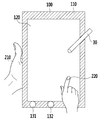
도 1은 종래의 멀티 터치 기반의 스마트 단말 입력 UI 개념을 설명하기 위한 도면이다.FIG. 1 is a diagram for explaining a conventional multi-touch-based smart terminal input UI concept.
일반적으로 스마트 단말(10)의 전면부는 베젤(11), 스크린(12) 및 적어도 하나의 기능 버튼(13_1, 13_2)을 포함한다. 여기서 스크린(12)은 사용자의 터치를 감지하는 센서를 포함하고, 베젤(11)은 스마트 단말(10)의 전면부에서 스크린(12)을 제외한 테두리 영역을 말한다. In general, the front side of the
터치 기반의 스마트 단말 입력 UI는 싱글 터치와 멀티 터치로 구분된다. 싱글 터치는 글씨 입력, 포인팅 등을 위하여 사용자가 한 손가락(21)을 이용하여 스크린(12) 상에서 한번에 한 포인트를 누르거나 드래그하는 것을 의미한다. 멀티 터치는 화면 확대(화면 줌 인), 화면 축소(화면 줌 아웃), 화면 이동(회전) 등을 위하여 동시에 두 손가락(22) 이상을 이용하여 스크린(12) 상에서 두 개 이상의 포인트를 누르거나 드래그하는 것을 의미한다. Touch-based smart terminal input UI is divided into single touch and multi touch. The single touch means that the user presses or drags one point at a time on the
한편, 최근에는 화면을 매번 손가락으로 문지르기 때문에 발생하는 찰과상을 피하기 위해 또는 글씨를 세밀하게 쓰기 위해, 터치 펜(30) 또는 그 대체 제품을 사용하는 경우가 있다. On the other hand, in recent years, the
적어도 하나의 기능 버튼(13_1, 13_2)은 프로그램의 종료, 태스킹의 변경, 단축키 등을 위해 사용된다. At least one function button 13_1 or 13_2 is used for terminating a program, changing a task, or a shortcut key.
이러한 종래의 스마트 단말 입력 UI 방식에서의 싱글 터치와 멀티 터치는 모두 스크린(12) 영역 내에서 이루어진다. In the conventional smart terminal input UI method, both the single touch and the multi-touch are performed within the area of the
최근 스마트 단말(10)의 크기가 커짐에 따라 두 손으로 스마트 단말(10)을 들고 사용하거나, 스마트 단말(10)을 책상 위에 놓고 사용하는 경우가 많아지고 있다. 본 발명은 단순히 스마트 단말(10)을 들고 있어야 하는 한 손을 활용하는 스마트 단말 입력 UI 방법으로써, 이를 통해 더욱 편리하게 스마트 단말을 이용할 수 있다.
Recently, as the size of the
도 2는 본 발명의 실시예에 따른 스마트 단말의 구성을 나타낸 도면이다. 2 is a diagram illustrating a configuration of a smart terminal according to an embodiment of the present invention.
스마트 단말(100)은 베젤 영역에 위치하는 센서(110), 스크린 영역에 위치하는 센서(120), 기능 버튼(131~133), 전방 카메라(140), 측면부 영역에 위치하는 센서(150), 측면부 영역에 위치하는 버튼(161, 162), 후면부 영역에 위치하는 센서(180), 후방 카메라(170) 및 제어부(190)를 포함할 수 있다.The
센서(110, 120), 기능 버튼(131~133) 및 전방 카메라(140)는 스마트 단말(100)의 전면부에 위치한다. 센서(150) 및 버튼(161, 162)은 스마트 단말(100)의 측면부에 위치한다. 후방 카메라(170) 및 센서(180)는 스마트 단말(100)의 후면부에 위치한다.The
센서(110, 120, 150, 180)는 사용자의 터치를 감지한다. The
제어부(190)는 제1 감지신호와 제2 감지신호가 입력되면 멀티 터치 동작을 수행한다. 여기서 제1 감지신호는 센서(110, 150, 180)에 의해 사용자의 터치가 감지되거나 버튼(161, 162)의 눌림이 감지된 경우에 생성되는 신호이고, 제2 감지신호는 센서(120)에 의해 사용자의 터치가 감지된 경우에 생성되는 신호이다. 즉, 제어부(190)는 스크린 이외의 영역에 위치한 센서(110, 150, 180)나 버튼(161, 162)을 통해 사용자의 터치/누름이 감지된 후 스크린 영역에 위치한 센서(120)를 통해 사용자의 터치가 감지된 경우에 멀티 터치 동작을 수행한다. 한편, 도 2에서는 설명의 편의를 위해, 제어부(190)를 스마트 단말(100)의 외부에 도시하였으나, 실제로 제어부(190)는 스마트 단말(100)의 내부에 위치한다. 한편, 제어부(190)에 의한 멀티 터치 동작의 구체적인 수행 방법은 본 발명이 속하는 기술분야에서 통상의 지식을 가진 자(이하 당업자 라함)에게 잘 알려져 있으므로, 이에 대한 자세한 설명은 생략한다.The
사용자의 입력 의도를 추가하기 위해서, 스마트 단말(100)의 스크린 영역 이외의 영역인 베젤 영역, 측면부 영역 및 후면부 영역 중 적어도 어느 하나를 이용할 수 있다. At least one of a bezel area, a side area, and a rear area, which are areas other than the screen area of the
한편, 일반적으로 볼륨 조절 등의 용도로 사용되고 있는 버튼(161, 162)도 본 발명에 따른 터치 기반의 입력 UI를 위한 입력 수단으로 사용될 수 있다. 즉, 스크린 영역 이외의 영역에 위치한 센서(110, 150, 180) 또는 버튼(161, 162)을 이용하여, 입력 의도를 나타내는 한 손(스마트 단말(100)을 잡고 있는 손)의 동작을 감지할 수 있다. The
한편, 도 2에서는 스마트 단말(100)이 스크린 이외의 영역인 베젤 영역, 측면부 영역 및 후면부 영역에 위치하는 센서(110, 150, 180)를 모두 포함하는 경우를 예시하였다. 다만, 이는 예시일 뿐이고, 스마트 단말(100)은 베젤 영역, 측면부 영역 및 후면부 영역 중 적어도 어느 하나의 영역에 위치하는 센서를 포함하도록 설계될 수 있다.
2 illustrates a case where the
도 3는 본 발명의 실시예에 따른 스마트 단말 입력 UI를 설명하기 위한 도면이다.3 is a diagram for explaining a smart terminal input UI according to an embodiment of the present invention.
사용자는 이동 중에 입력에 사용하지 않는 한 손(210)으로 스마트 단말(100)을 들고 있거나 책상에 앉았을 경우에 한 손(210)으로 스마트 단말(100)을 안정되게 잡고 있는다. 이때 스마트 단말(100)의 스크린 이외의 영역(예, 베젤 영역, 측면부 영역, 후면부 영역 등)을 이용해 멀티 터치 기능이 수행되도록 할 수 있다. The user stably holds the
사용자는 자신의 입력 도구(예, 펜(30), 손가락(220) 등)를 통하여 입력을 수행할 수 있다. 이 때, 스마트 단말을 들고 있는 다른 한 손(210)을 이용해, 스크린 영역 상에서의 펜(30) 또는 손가락(220) 등을 통한 싱글 터치 입력이 멀티 터치 입력으로 해석되도록 할 수 있다. 구체적으로, 스마트 단말(100)을 들고 있는 한 손(210)을 통해 베젤 영역, 측면부 영역 또는 후면부 영역의 특정 부분을 터치하거나 측면부에 위치한 버튼(161, 162)을 누름으로써, 스크린 영역 상에서의 펜(30) 또는 손가락(220)에 의한 터치의 의도를 표현할 수 있다. The user can perform input through his or her input tool (e.g.,
한편, 스마트 단말(100)의 전면부에 위치한 기능 버튼(131~133)은 제조사의 목적에 따라 활용될 수 있다.
Meanwhile, the
도 4는 본 발명의 실시예에 따른 멀티 터치 동작을 제어하는 과정을 나타낸 순서도이다. 도 4에서는 설명의 편의를 위해, 스마트 단말(100)이 후면부 영역에 위치하는 센서(180)를 포함하는 경우를 예시하였다. 4 is a flowchart illustrating a process of controlling a multi-touch operation according to an exemplary embodiment of the present invention. In FIG. 4, for the sake of convenience, the
먼저 후면부 영역에 위치하는 센서(180)를 통해 사용자의 터치를 감지한다(S100).First, the touch of the user is sensed through the
S100 단계에서 사용자의 터치가 감지된 후에 스크린 영역에 위치한 센서(120)를 통해 사용자의 터치를 감지한다(S200). 여기서 사용자의 터치는 펜(30)을 통해 이루어질 수 있다.After the touch of the user is detected in step S100, the touch of the user is sensed through the
센서(180)를 통해 사용자의 터치가 감지된 후 센서(120)를 통해 사용자의 터치가 감지된 경우에 제어부(190)는 멀티 터치 동작을 수행한다(S300). 상기 멀티 터치 동작은 화면 줌 인, 줌 아웃 등의 동작일 수 있다.
When the touch of the user is detected through the
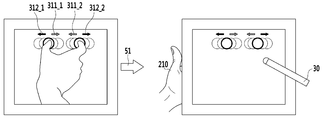
도 5은 종래의 스마트 단말 입력 UI와 본 발명의 실시예에 따른 스마트 단말 입력 UI를 비교하는 일 예를 나타낸 도면이다. 이하에서는 화면 줌 인/줌 아웃 기능을 실행시키는 멀티 터치를 예로 들어 설명한다. 화살표(51) 좌측은 종래의 멀티 터치 입력 방식을 나타내고, 화살표(51) 우측은 본 발명의 멀티 터치 입력 방식을 나타낸다.5 is a diagram illustrating an example of comparing a conventional smart terminal input UI with a smart terminal input UI according to an embodiment of the present invention. Hereinafter, multi-touch for executing the screen zoom-in / zoom-out function will be described as an example. The left side of the
종래에는 화면 줌 인/줌 아웃 기능을 수행하기 위해서, 두 개의 손가락을 이용해 스크린 영역 상의 두 지점을 누르고 상기 두 개의 손가락의 간격을 줄이거나(311_1, 311_2), 상기 두 개의 손가락의 간격을 늘린다(312_1, 312_2).Conventionally, in order to perform a screen zoom-in / zoom-out function, two points on the screen area are pressed using two fingers to reduce the interval between the two fingers (311_1, 311_2), and the distance between the two fingers is increased 312_1, 312_2).
본 발명에서는, 먼저 사용자가 스마트 단말(100)을 잡고 있는 한 손(210)을 이용해 스크린 영역 이외의 영역(예, 베젤 영역, 측면부 영역, 후면부 영역)에 존재하는 센서(110, 150, 180) 또는 버튼(161, 162)을 터치/누름으로써, 몇 개의 손가락을 이용한 멀티 터치인지를 알려준다. 이를 통해, 스크린 영역 상의 한 지점만을 포인팅할 수 있는 펜(30)이나 한 개의 손가락을 이용해 종래의 스크린 영역 상에서의 멀티 터치에 따른 기능(예, 화면 줌 인/줌 아웃 기능)과 동일한 기능이 실행되도록 할 수 있다.
The
도 6 내지 도 8은 본 발명에서 제안하는 싱글 터치 또는 멀티 터치 제스처를 나타낸 도면이다. 이하에서는 설명의 편의를 위해, 사용자는 왼손으로 스마트 단말(100)을 잡고 있고, 오른손으로 잡은 펜(30)을 통해 스크린 영역을 터치하고, 스마트 단말(100)은 후면부 영역에 위치한 센서(180)를 포함하는 경우를 예로 들어 설명한다.6 to 8 are views showing a single-touch or multi-touch gesture proposed in the present invention. Hereinafter, for convenience of explanation, the user holds the
도 6는 본 발명에 따른 싱글 터치 제스처의 일예를 나타낸 도면이다. 6 is a diagram illustrating an example of a single-touch gesture according to the present invention.
화살표(52)의 좌측은 종래의 스마트 단말 입력 방식을 나타낸 것으로써, 한 손가락을 이용한 싱글 터치 제스처를 나타낸다. 스크린 영역 상의 한 지점(410)을 터치하는 싱글 터치에 의한 기능은 기기마다 다를 수 있는데, 일반적으로 화면 포인트, 드래그, 문자 입력 등의 기능이 싱글 터치를 통해 실행된다.The left side of the
화살표(52)의 우측은 본 발명에서 제안하는 싱글 터치 제스처를 나타낸다. 본 발명에 따른 스마트 단말 입력 UI는 스크린 영역 이외의 영역(예, 후면부 영역)에 존재하는 센서(180)를 이용해 사용자의 입력 의도를 판단하는데, 싱글 터치인 경우에는 종래의 방식과 동일하게 펜(30)만을 이용해 스크린 영역을 터치함으로써 그에 따른 기능(예, 문자 입력 등)을 실행시킨다.
The right side of
도 7은 본 발명에 따른 멀티 터치 제스처의 일예를 나타낸 도면이다.7 is a diagram showing an example of a multi-touch gesture according to the present invention.
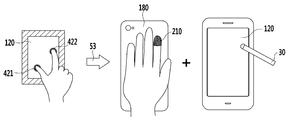
화살표(53) 좌측은 종래의 스마트 단말 입력 방식을 나타낸 것으로써, 두 손가락을 이용한 멀티 터치 제스처를 나타낸다. 스크린 영역 상의 두 지점(421, 422)을 터치하는 멀티 터치에 의한 기능은 기기마다 다를 수 있는데, 일반적으로 화면의 줌 인, 줌 아웃, 회전 등의 기능이 상기 멀티 터치를 통해 실행된다.The left side of the arrow (53) shows a conventional smart terminal input method, and shows a multi-touch gesture using two fingers. The function of the multi-touch that touches the two
화살표(53)의 우측은 본 발명에서 제안하는 멀티 터치 제스처를 나타낸다. 스크린 영역 이외의 영역(예, 후면부 영역)의 한 지점을 한 손가락(210)으로 터치한 후, 펜(30)을 통해 스크린 영역을 터치한다. 펜(30)을 통해 싱글 터치를 하였음에도, 상기 싱글 터치를 통해, 종래의 스크린 영역 상에서의 두 손가락을 이용한 멀티 터치에 따른 기능(예, 화면 줌 인, 줌 아웃, 회전 등)과 동일한 기능이 실행되도록 할 수 있다.
The right side of the
도 8은 본 발명에 따른 멀티 터치 제스처의 다른 예를 나타낸 도면이다.8 is a view showing another example of the multi-touch gesture according to the present invention.
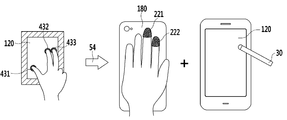
화살표(54)의 좌측은 종래의 스마트 단말 입력 방식을 나타낸 것으로써, 세 손가락을 이용한 멀티 터치 제스처를 나타낸다. 스크린 영역 상의 세 지점(431, 432, 433)을 터치하는 멀티 터치에 의한 기능은 기기마다 다를 수 있는데, 주로 응용 프로그램에 특화된 기능 등이 상기 멀티 터치를 통해 실행된다.The left side of the
화살표(54)의 우측은 본 발명에서 제안하는 멀티 터치 제스처를 나타낸다. 스크린 영역 이외의 영역(예, 후면부 영역)의 두 지점을 두 손가락(221, 222)으로 터치한 후, 펜(30)을 통해 스크린 영역을 터치한다. 펜(30)을 통해 싱글 터치를 하였음에도, 상기 싱글 터치를 통해, 종래의 스크린 영역 상에서의 세 손가락을 이용한 멀티 터치에 따른 기능과 동일한 기능이 실행되도록 할 수 있다.
The right side of the
이상에서 본 발명의 실시예에 대하여 상세하게 설명하였지만 본 발명의 권리범위는 이에 한정되는 것은 아니고 다음의 청구범위에서 정의하고 있는 본 발명의 기본 개념을 이용한 당업자의 여러 변형 및 개량 형태 또한 본 발명의 권리범위에 속하는 것이다.
While the present invention has been particularly shown and described with reference to exemplary embodiments thereof, it is to be understood that the invention is not limited to the disclosed exemplary embodiments, It belongs to the scope of right.
100: 스마트 단말 110: 베젤 영역에 위치한 센서
120: 스크린 영역에 위치한 센서 30: 펜
131~133: 기능 버튼 150: 측면부 영역에 위치한 센서
180: 후면부 영역에 위치한 센서100: smart terminal 110: sensor located in bezel area
120: a sensor located in the screen area 30: a pen
131 to 133: Function button 150: Sensor located in the side area
180: Sensor located in the rear area
Claims (12)
상기 스크린 영역 이외의 영역에 배치되고, 사용자의 적어도 두 개의 제2 터치를 감지하는 제2 센서; 및
상기 제1 센서를 통해 상기 제1 터치가 감지되고 상기 제2 센서를 통해 상기 제2 터치가 감지된 경우에, 멀티 터치 동작을 수행하는 제어부
를 포함하는 단말.
A first sensor disposed in the screen area and sensing a first touch of the user;
A second sensor disposed in an area other than the screen area and sensing at least two second touches of the user; And
A controller for performing a multi-touch operation when the first touch is sensed through the first sensor and the second touch is sensed through the second sensor,
.
상기 스크린 영역 이외의 영역은 상기 단말의 전면부에서 상기 스크린 영역을 제외한 테두리 영역인
단말.
The method according to claim 1,
The area other than the screen area is a border area excluding the screen area in the front part of the terminal
Terminal.
상기 스크린 영역 이외의 영역은 상기 단말의 측면부 영역인
단말.
The method according to claim 1,
The area other than the screen area is a side area of the terminal
Terminal.
상기 단말의 측면부에 배치되는 버튼을 더 포함하고,
상기 제어부는
상기 버튼의 눌림이 감지된 후 상기 제1 센서를 통해 상기 제1 터치가 감지된 경우에 상기 멀티 터치 동작을 수행하는
단말.
The method according to claim 1,
Further comprising a button disposed on a side portion of the terminal,
The control unit
The multi-touch operation is performed when the first touch is sensed through the first sensor after the pressing of the button is sensed
Terminal.
상기 스크린 영역 이외의 영역은 상기 단말의 후면부 영역인
단말.
The method according to claim 1,
The area other than the screen area is a rear area of the terminal
Terminal.
상기 제1 터치는 펜을 통해 이루어지는
단말.
The method according to claim 1,
The first touch is made through a pen
Terminal.
상기 적어도 두 개의 제2 터치는 제3 터치 및 제4 터치를 포함하고,
상기 제어부는,
상기 제3 터치 및 상기 제4 터치가 감지된 후 상기 제1센서를 통해 상기 제1 터치가 감지된 경우에 상기 스크린 영역에서 세 개의 터치가 감지된 경우에 수행하는 동작과 동일한 동작을 수행하는
단말.
The method according to claim 1,
Wherein the at least two second touches include a third touch and a fourth touch,
Wherein,
When the first touch is sensed through the first sensor after the third touch and the fourth touch are sensed, the same operation as that performed when three touches are sensed in the screen area is performed
Terminal.
상기 단말의 스크린 영역 이외의 영역에 위치한 센서를 통해 사용자의 적어도 두 개의 제1 터치를 감지하는 단계;
상기 스크린 영역에 위치한 센서를 통해 사용자의 제2 터치를 감지하는 단계; 및
상기 스크린 영역에서의 멀티 터치에 따른 동작 중 상기 제1 터치 및 상기 제2 터치의 조합에 대응하는 동작을 수행하는 단계
를 포함하는 멀티 터치 동작 제어 방법.
A method of controlling multi-touch operation in a terminal,
Detecting at least two first touches of the user through a sensor located in an area other than the screen area of the terminal;
Sensing a user's second touch through a sensor located in the screen area; And
Performing an operation corresponding to a combination of the first touch and the second touch during operation corresponding to multi-touch in the screen area
Wherein the multi-touch operation control method comprises:
상기 스크린 영역 이외의 영역은 상기 단말의 전면부에서 상기 스크린 영역을 제외한 테두리 영역인
멀티 터치 동작 제어 방법.
9. The method of claim 8,
The area other than the screen area is a border area excluding the screen area in the front part of the terminal
A method for controlling multi-touch operation.
상기 스크린 영역 이외의 영역은 상기 단말의 후면부 영역인
멀티 터치 동작 제어 방법.
9. The method of claim 8,
The area other than the screen area is a rear area of the terminal
A method for controlling multi-touch operation.
상기 적어도 두 개의 제1 터치는 제3 터치 및 제4 터치를 포함하고,
상기 동작을 수행하는 단계는,
상기 제3 터치 및 상기 제4 터치가 감지된 후 상기 제2 터치가 감지된 경우에 상기 스크린 영역에서 세 개의 터치가 감지된 경우에 수행하는 동작과 동일한 동작을 수행하는 단계를 포함하는
멀티 터치 동작 제어 방법.
9. The method of claim 8,
Wherein the at least two first touches include a third touch and a fourth touch,
Wherein performing the operation comprises:
Performing the same operation as that performed when three touches are sensed in the screen area when the second touch is sensed after the third touch and the fourth touch are sensed
A method for controlling multi-touch operation.
상기 제2 터치는 펜을 통해 이루어지는
멀티 터치 동작 제어 방법.
12. The method of claim 11,
The second touch is made through the pen
A method for controlling multi-touch operation.
Priority Applications (2)
| Application Number | Priority Date | Filing Date | Title |
|---|---|---|---|
| KR20130061244A KR20140140407A (en) | 2013-05-29 | 2013-05-29 | Terminal and method for controlling multi-touch operation in the same |
| US14/096,894 US20140359541A1 (en) | 2013-05-29 | 2013-12-04 | Terminal and method for controlling multi-touch operation in the same |
Applications Claiming Priority (1)
| Application Number | Priority Date | Filing Date | Title |
|---|---|---|---|
| KR20130061244A KR20140140407A (en) | 2013-05-29 | 2013-05-29 | Terminal and method for controlling multi-touch operation in the same |
Publications (1)
| Publication Number | Publication Date |
|---|---|
| KR20140140407A true KR20140140407A (en) | 2014-12-09 |
Family
ID=51986667
Family Applications (1)
| Application Number | Title | Priority Date | Filing Date |
|---|---|---|---|
| KR20130061244A Withdrawn KR20140140407A (en) | 2013-05-29 | 2013-05-29 | Terminal and method for controlling multi-touch operation in the same |
Country Status (2)
| Country | Link |
|---|---|
| US (1) | US20140359541A1 (en) |
| KR (1) | KR20140140407A (en) |
Families Citing this family (5)
| Publication number | Priority date | Publication date | Assignee | Title |
|---|---|---|---|---|
| US10712918B2 (en) | 2014-02-13 | 2020-07-14 | Samsung Electronics Co., Ltd. | User terminal device and displaying method thereof |
| US10747416B2 (en) | 2014-02-13 | 2020-08-18 | Samsung Electronics Co., Ltd. | User terminal device and method for displaying thereof |
| US10866714B2 (en) * | 2014-02-13 | 2020-12-15 | Samsung Electronics Co., Ltd. | User terminal device and method for displaying thereof |
| KR102233148B1 (en) | 2015-01-27 | 2021-03-29 | 한국전자통신연구원 | Apparatus and method of heritage modeling |
| US9641743B2 (en) * | 2015-03-06 | 2017-05-02 | Sony Corporation | System, method, and apparatus for controlling timer operations of a camera |
Family Cites Families (8)
| Publication number | Priority date | Publication date | Assignee | Title |
|---|---|---|---|---|
| US8120625B2 (en) * | 2000-07-17 | 2012-02-21 | Microsoft Corporation | Method and apparatus using multiple sensors in a device with a display |
| US20100214243A1 (en) * | 2008-07-15 | 2010-08-26 | Immersion Corporation | Systems and Methods For Interpreting Physical Interactions With A Graphical User Interface |
| KR20100065418A (en) * | 2008-12-08 | 2010-06-17 | 삼성전자주식회사 | Flexible display device and data output method thereof |
| US8957918B2 (en) * | 2009-11-03 | 2015-02-17 | Qualcomm Incorporated | Methods for implementing multi-touch gestures on a single-touch touch surface |
| US9311724B2 (en) * | 2010-04-23 | 2016-04-12 | Handscape Inc. | Method for user input from alternative touchpads of a handheld computerized device |
| US9285840B2 (en) * | 2010-08-19 | 2016-03-15 | Michael S. Stamer | Detachable sensory-interface device for a wireless personal communication device and method |
| US9201520B2 (en) * | 2011-02-11 | 2015-12-01 | Microsoft Technology Licensing, Llc | Motion and context sharing for pen-based computing inputs |
| US8775966B2 (en) * | 2011-06-29 | 2014-07-08 | Motorola Mobility Llc | Electronic device and method with dual mode rear TouchPad |
-
2013
- 2013-05-29 KR KR20130061244A patent/KR20140140407A/en not_active Withdrawn
- 2013-12-04 US US14/096,894 patent/US20140359541A1/en not_active Abandoned
Also Published As
| Publication number | Publication date |
|---|---|
| US20140359541A1 (en) | 2014-12-04 |
Similar Documents
| Publication | Publication Date | Title |
|---|---|---|
| JP5759660B2 (en) | Portable information terminal having touch screen and input method | |
| US9671893B2 (en) | Information processing device having touch screen with varying sensitivity regions | |
| KR102020345B1 (en) | The method for constructing a home screen in the terminal having touchscreen and device thereof | |
| CN102722334B (en) | The control method of touch screen and device | |
| US9459704B2 (en) | Method and apparatus for providing one-handed user interface in mobile device having touch screen | |
| CN103513817B (en) | Touch control equipment and method and device for controlling touch control equipment to configure operation mode | |
| KR101156610B1 (en) | Method for input controlling by using touch type, and computer-readable recording medium with controlling program using touch type | |
| CN103309604A (en) | Terminal and method for controlling information display on terminal screen | |
| JP5611763B2 (en) | Portable terminal device and processing method | |
| CN107066167A (en) | A kind of regional selection method, device and graphic user interface | |
| TWI659353B (en) | Electronic apparatus and method for operating thereof | |
| CN103543944A (en) | Method for performing functions of terminal including pen recognition panel and terminal thereof | |
| CN104331182B (en) | Portable terminal with auxiliary touch-screen | |
| WO2013003105A1 (en) | Electronic device and method with dual mode rear touch pad | |
| TWI482064B (en) | Portable device and operating method thereof | |
| US10671269B2 (en) | Electronic device with large-size display screen, system and method for controlling display screen | |
| WO2012111230A1 (en) | Information processing terminal, and method for controlling same | |
| US20140359541A1 (en) | Terminal and method for controlling multi-touch operation in the same | |
| WO2014002633A1 (en) | Processing device, operation control method, and program | |
| US20150153925A1 (en) | Method for operating gestures and method for calling cursor | |
| KR20130102670A (en) | For detailed operation of the touchscreen handset user-specific finger and touch pen point contact location method and system for setting | |
| KR101678213B1 (en) | An apparatus for user interface by detecting increase or decrease of touch area and method thereof | |
| CN105072224A (en) | Mobile phone with rear cover-touch operation and method for realizing rear cover-touch operation of the same | |
| JP2012238128A (en) | Information device having back-face input function, back-face input method, and program | |
| KR20160000534U (en) | Smartphone having touch pad |
Legal Events
| Date | Code | Title | Description |
|---|---|---|---|
| PA0109 | Patent application |
Patent event code: PA01091R01D Comment text: Patent Application Patent event date: 20130529 |
|
| PG1501 | Laying open of application | ||
| PC1203 | Withdrawal of no request for examination | ||
| WITN | Application deemed withdrawn, e.g. because no request for examination was filed or no examination fee was paid |