JP7686853B2 - Image processing device and method for controlling image processing device - Google Patents
Image processing device and method for controlling image processing device Download PDFInfo
- Publication number
- JP7686853B2 JP7686853B2 JP2024109885A JP2024109885A JP7686853B2 JP 7686853 B2 JP7686853 B2 JP 7686853B2 JP 2024109885 A JP2024109885 A JP 2024109885A JP 2024109885 A JP2024109885 A JP 2024109885A JP 7686853 B2 JP7686853 B2 JP 7686853B2
- Authority
- JP
- Japan
- Prior art keywords
- setting
- image processing
- processing device
- wireless communication
- direct wireless
- Prior art date
- Legal status (The legal status is an assumption and is not a legal conclusion. Google has not performed a legal analysis and makes no representation as to the accuracy of the status listed.)
- Active
Links
Images




Classifications
-
- Y—GENERAL TAGGING OF NEW TECHNOLOGICAL DEVELOPMENTS; GENERAL TAGGING OF CROSS-SECTIONAL TECHNOLOGIES SPANNING OVER SEVERAL SECTIONS OF THE IPC; TECHNICAL SUBJECTS COVERED BY FORMER USPC CROSS-REFERENCE ART COLLECTIONS [XRACs] AND DIGESTS
- Y02—TECHNOLOGIES OR APPLICATIONS FOR MITIGATION OR ADAPTATION AGAINST CLIMATE CHANGE
- Y02D—CLIMATE CHANGE MITIGATION TECHNOLOGIES IN INFORMATION AND COMMUNICATION TECHNOLOGIES [ICT], I.E. INFORMATION AND COMMUNICATION TECHNOLOGIES AIMING AT THE REDUCTION OF THEIR OWN ENERGY USE
- Y02D30/00—Reducing energy consumption in communication networks
- Y02D30/70—Reducing energy consumption in communication networks in wireless communication networks
Landscapes
- Accessory Devices And Overall Control Thereof (AREA)
- Facsimiles In General (AREA)
- Mobile Radio Communication Systems (AREA)
Description
本発明は、画像処理装置、画像処理装置の制御方法に関する。 The present invention relates to an image processing device and a control method for the image processing device.
スマートフォンや携帯ゲーム機、印刷装置等の通信装置は、無線LAN機能を備えている。無線LAN機能の中には、複数の通信装置をアクセスポイントを介さずに直接接続するダイレクト無線通信モードが知られている。特許文献1には、ダイレクト無線通信モードの一例であるアクセスポイントモードを用いて、印刷装置とモバイル端末を直接接続する構成が開示されている。
Communication devices such as smartphones, portable game consoles, and printing devices are equipped with wireless LAN functions. One known wireless LAN function is a direct wireless communication mode that directly connects multiple communication devices without going through an access point.
ダイレクト無線通信モードを利用する場合、ユーザは、ダイレクト無線通信モードの動作を開始するように通信装置に指示する必要がある。例えば、ダイレクト無線通信モードの動作を開始するための「開始ボタン」を通信装置が表示して、ユーザがこの「開始ボタン」を押下することで、通信装置がダイレクト無線通信モードの動作を開始する。また、ダイレクト無線通信モードの利用を終了する場合、ユーザは、ダイレクト無線通信モードの動作を停止するように通信装置に指示する。例えば、ダイレクト無線通信モードの動作を停止するための「停止ボタン」を通信装置が表示して、ユーザがこの「停止ボタン」を押下することで、通信装置がダイレクト無線通信モードの動作を停止する。 When using the direct wireless communication mode, the user must instruct the communication device to start operation in the direct wireless communication mode. For example, the communication device displays a "start button" for starting operation in the direct wireless communication mode, and the user presses this "start button," causing the communication device to start operation in the direct wireless communication mode. Furthermore, when terminating use of the direct wireless communication mode, the user instructs the communication device to stop operation in the direct wireless communication mode. For example, the communication device displays a "stop button" for stopping operation in the direct wireless communication mode, and the user presses this "stop button," causing the communication device to stop operation in the direct wireless communication mode.
従来は通信装置がダイレクト無線通信モードの動作を再開する場合に使用する接続情報に関して考慮されていなかった。使用する接続情報に関してはユーザビリティやセキュリティを考慮して運用されると良い。そこで本発明では、無線通信モードの動作を再開する場合、使用する接続情報を設定に応じて変更する方法を提供することを目的とする。 Conventionally, no consideration has been given to the connection information to be used when a communication device resumes operation in the direct wireless communication mode. It is advisable to manage the connection information to be used with consideration given to usability and security. Therefore, the present invention aims to provide a method for changing the connection information to be used according to settings when operation in the wireless communication mode is resumed.
上述した課題を解決するために、本発明が提供する画像処理装置は、通信端末が接続可能なアクセスポイントとして振る舞い、外部アクセスポイントを介さずに通信端末と直接無線通信を行う直接無線通信機能を有し、当該直接無線通信で通信端末から印刷データを受信して印刷を行うことが可能な画像処理装置であって、直接無線通信機能の実行のために用いるSSID(Service Set Identifier)に関する設定を行う設定手段と、前記設定を受け付ける設定画面であって、前記画像処理装置からログアウトするためのアイテムを含む設定画面を提供する提供手段と、前記設定画面を介して設定された設定に基づいて直接無線通信機能を実行する実行手段と、を有し、前記設定は、繰り返し用いるための記憶されたSSIDで直接無線通信機能を実行する第一の設定と、ランダムに生成された文字列を含むSSIDで直接無線通信を実行する第二の設定とを含み、前記第一の設定と前記第二の設定とは管理者権限を有するユーザにより切り替えられることを特徴とする。 In order to solve the above-mentioned problems, the image processing device provided by the present invention is an image processing device that behaves as an access point to which a communication terminal can be connected, has a direct wireless communication function that performs direct wireless communication with the communication terminal without going through an external access point, and is capable of receiving print data from the communication terminal via the direct wireless communication and printing it , and has: a setting means for making settings related to an SSID (Service Set Identifier) used to execute the direct wireless communication function; a providing means for providing a setting screen that accepts the settings, the setting screen including an item for logging out of the image processing device; and an execution means for executing the direct wireless communication function based on the settings set via the setting screen, the settings including a first setting for executing the direct wireless communication function with a stored SSID for repeated use, and a second setting for executing direct wireless communication with an SSID including a randomly generated character string, and the first setting and the second setting can be switched by a user with administrator authority.
また、本発明が提供する画像処理装置の制御方法は、通信端末が接続可能なアクセスポイントとして振る舞い、外部アクセスポイントを介さずに通信端末と直接無線通信を行う直接無線通信機能を有し、当該直接無線通信で通信端末から印刷データを受信して印刷を行うことが可能な画像処理装置が実行する制御方法であって、直接無線通信機能の実行のために用いるSSID(Service Set Identifier)に関する設定を行う設定工程と、前記設定を受け付ける設定画面であって、前記画像処理装置からログアウトするためのアイテムを含む設定画面を提供する提供工程と、前記設定画面を介して設定された設定に基づいて直接無線通信機能を実行する実行工程と、を有し、前記設定は、繰り返し用いるための記憶されたSSIDで直接無線通信機能を実行する第一の設定と、ランダムに生成された文字列を含むSSIDで直接無線通信を実行する第二の設定とを含み、前記第一の設定と前記第二の設定とは管理者権限を有するユーザにより切り替えられることを特徴とする。 The control method of an image processing device provided by the present invention is a control method executed by an image processing device that behaves as an access point to which a communication terminal can be connected, has a direct wireless communication function that performs direct wireless communication with the communication terminal without going through an external access point, and is capable of receiving print data from the communication terminal via the direct wireless communication and performing printing, the control method including: a setting step of making settings related to an SSID (Service Set Identifier) used to execute the direct wireless communication function; a providing step of providing a setting screen that accepts the settings, the setting screen including an item for logging out from the image processing device; and an execution step of executing the direct wireless communication function based on the settings set via the setting screen, the settings including a first setting that executes the direct wireless communication function with a stored SSID for repeated use, and a second setting that executes direct wireless communication with an SSID including a randomly generated character string, and the first setting and the second setting can be switched by a user having administrator authority.
本発明によれば、装置がダイレクト無線通信モードの動作を再開する場合、使用する接続情報を設定に応じて変更することができる。 According to the present invention, when the device resumes operation in the direct wireless communication mode, the connection information used can be changed according to the settings.
以下、本発明を実施するための最良の形態について図面を用いて説明する。なお、以下の実施の形態は特許請求の範囲に係る発明を限定するものでなく、また実施の形態で説明されている特徴の組み合わせの全てが発明の解決手段に必須のものとは限らない。 The best mode for carrying out the present invention will be described below with reference to the drawings. Note that the following embodiments do not limit the invention as claimed, and not all of the combinations of features described in the embodiments are necessarily essential to the solution of the invention.
(実施形態1)
図1を用いて、通信システムの概要を説明する。本実施形態の通信システムは、印刷装置100とモバイル端末101とで構成される。
(Embodiment 1)
An overview of the communication system will be described with reference to Fig. 1. The communication system of this embodiment is composed of a
印刷装置100は無線LAN機能を備える。印刷装置100が備える無線LAN機能には、インフラストラクチャーモードと、アクセスポイントモードの2種類の無線通信モードが存在する。インフラストラクチャーモードは、印刷装置100がアクセスポイント(不図示)のような中継装置に無線接続して、PC(Personal Computer)等のネットワーク上のデバイスと通信するための無線通信モードである。
The
一方、アクセスポイントモードは、印刷装置100においてソフトウェア・アクセスポイントを起動させることで、印刷装置100自身がアクセスポイントとして振る舞う無線通信モードである。スマートフォン等のモバイル端末101は、アクセスポイントモードで動作する印刷装置100との間で無線接続を確立し、写真等の電子ファイルを印刷するための印刷データを印刷装置100に送信する。アクセスポイントモードによって、アクセスポイントのような中継装置を介することなく、印刷装置100とモバイル端末101との間で直接無線通信を実行することができる。なおアクセスポイントモードは、印刷装置100とモバイル端末101が直接無線接続を確立するためのダイレクト無線通信モードの一例である。アクセスポイントモードの代わりに、Wi-Fi Direct(登録商標)のような他の無線通信方式を本実施形態に適用してもよい。
On the other hand, the access point mode is a wireless communication mode in which the
後ほど詳しく説明するが、印刷装置100はユーザ認証機能を備えていて、ユーザ認証機能によってユーザが印刷装置100にログインする。印刷装置100にログインしたユーザは、アクセスポイントモードを利用することができる。そしてユーザが印刷装置100からログアウトすると、印刷装置100は、ユーザのログアウトに連動してアクセスポイントモードの動作を停止する。
As will be explained in more detail later, the
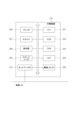
次に図2を用いて、印刷装置100のハードウェア構成を説明する。CPU201はROM202が記憶している制御プログラムを読み出して、印刷装置100の動作を制御するための様々な処理を実行する。ROM202は、制御プログラムを記憶している。RAM203は、CPU201の主メモリ、ワークエリア等の一時記憶領域として用いられる。HDD204は、様々なデータを記憶する不揮発性の記憶媒体である。
Next, the hardware configuration of the
なお、印刷装置100の場合、1つのCPU201が後述するフローチャートに示す処理を実行するものとするが、他の態様であっても構わない。例えば、複数のCPUが協働して後述するフローチャートに示す処理を実行するようにすることもできる。また、後述するフローチャートの処理の一部をASIC等のハードウェア回路を用いて実行するようにしてもよい。
In the case of the
無線LAN I/F205は、モバイル端末101やアクセスポイント等の外部装置との間で無線LAN通信を実行する。無線LAN I/F205が実行する無線LAN通信は、IEEE802.11a/b/g/n/ac等の無線通信である。無線LAN I/F205は、インフラストラクチャーモードとアクセスポイントモードとで動作可能である。無線LAN I/F205は、予めユーザに設定されているデバイス設定に従って、インフラストラクチャーモードとアクセスポイントモードのいずれか一方を選択して動作する。
The wireless LAN I/F 205 executes wireless LAN communication between the mobile terminal 101 and external devices such as an access point. The wireless LAN communication executed by the wireless LAN I/
ネットワークI/F210は、LANケーブルを介して有線LANに接続する。ネットワークI/F210は、有線LAN上の外部装置(例えばPC)と通信可能である。 The network I/F 210 connects to a wired LAN via a LAN cable. The network I/F 210 can communicate with an external device (e.g., a PC) on the wired LAN.
プリンタ206は、無線LAN I/F205やネットワークI/F210が受信した印刷データに基づいて、シートに印刷処理を実行する。スキャナ207は、ユーザに載置された原稿を読み取り、原稿画像を生成する。スキャナ207によって生成された原稿画像は、プリンタ206によって印刷されたり(所謂コピー処理)、HDD204に蓄積されたりする。
The
操作部208は、タッチパネル機能を有する液晶表示部やキーボードを備え、各種操作画面を表示する。ユーザは、操作部208を介して印刷装置100に対して指示や情報を入力することができる。
The
ICカードリーダ209は、ICカードからユーザ情報を読み取る。本実施形態の場合、ユーザIDとパスワードが、ユーザ情報としてICカードに記憶されている。そしてICカードリーダ209がICカードから読み取ったユーザ情報に基づいて、印刷装置100がユーザ認証を実行する。
The
なお、印刷装置100は、アクセスポイントモードで動作可能な通信装置の一例として挙げている。本発明を適用可能な通信装置は印刷装置100に限らない。アクセスポイントモードで動作可能であれば、デジタルカメラ、ビデオカメラ、スマートフォン、携帯ゲーム機等の様々な通信装置に本発明を適用できる。
Note that the
次に、印刷装置100が提供する操作画面と、アクセスポイントモードをユーザが利用する際の操作手順について説明する。
Next, we will explain the operation screen provided by the
図3(A)のログイン画面300は、印刷装置100の操作部208が表示する画面である。印刷装置100の起動が完了すると、操作部208は、ログイン画面300を初期表示する。ユーザは、ICカードリーダ209にユーザ自身のICカードをかざす。
The login screen 300 in FIG. 3A is a screen displayed by the
図4のユーザ管理テーブル400は、印刷装置100にログインすることが許可されているユーザのユーザ情報(ユーザ名、ユーザID、パスワード)を管理するための情報であり、印刷装置100のHDD204に記憶されている。ユーザ管理テーブル400に登録されているユーザが、印刷装置100にログイン可能である。ユーザが自身のICカードをICカードリーダ209にかざすと、ICカードリーダ209は、ICカードからユーザ情報(ユーザIDとパスワード)を読み取る。そしてCPU201は、ICカードリーダ209がICカードから読み取ったユーザ情報が、ユーザ管理テーブル400に登録されているか否かを判定する。ICカードから読み取ったユーザ情報がユーザ管理テーブル400に登録されていれば、認証OKとなり、操作部208は図3(B)のメニュー画面310を表示する。認証OKと判定されたユーザは印刷装置100にログインした状態になり、印刷装置を使用することができる。一方、ICカードから読み取ったユーザ情報がユーザ管理テーブル400に登録されていなければ、認証NGとなり、操作部208は認証NGをユーザに通知し、メニュー画面310は表示されない。
The user management table 400 in FIG. 4 is information for managing user information (user name, user ID, password) of users who are permitted to log in to the
本実施形態の場合、ICカードリーダ209を用いずに、入力欄301と入力欄302にそれぞれユーザIDとパスワードをユーザが入力してもよい。入力欄301と入力欄302にユーザIDとパスワードを入力して、そしてユーザがログインボタン303を押すと、印刷装置100はユーザ認証を実行する。
In this embodiment, the user may input a user ID and a password into
また、ユーザ管理テーブル400を印刷装置100が備えるのではなく、外部の認証サーバが備えていてもよい。認証サーバがユーザ管理テーブル400を備える場合、印刷装置100は、ユーザ情報を認証サーバに送信する。そして認証処理の結果(認証OK又は認証NG)を印刷装置100が認証サーバから受け取ることで、印刷装置100はユーザ認証を実行する。
Also, the user management table 400 may be provided by an external authentication server rather than by the
図3(B)のメニュー画面310には、印刷装置100が提供する機能をユーザが利用するためのボタンが表示される。ログアウトボタン315は、印刷装置100からユーザがログインするためのボタンである。ユーザがログアウトボタン315を押下すると、ログイン中のユーザが印刷装置100からログアウトする。なお、以降で説明する各画面にもログアウト画面が表示されていて、ユーザは、操作部208がどの画面を表示している場合にもログアウト指示を入力することができる。
Menu screen 310 in FIG. 3(B) displays buttons that allow the user to use functions provided by the
ボタン311は、ユーザがコピー機能を利用するためのボタンである。ユーザがボタン311を押下すると、操作部208は不図示のコピー画面を表示する。
ボタン312は、ユーザがSEND機能(スキャナ207が生成した原稿画像を外部装置に送信する機能)を利用するためのボタンである。ユーザがボタン312を押下すると、操作部208は、不図示のSEND画面を表示する。
ボタン314は、印刷装置100のデバイス設定をユーザが行うためのボタンである。ユーザがボタン314を押下すると、操作部208は、ユーザ操作に従って様々な設定画面を表示する。図3(C)の設定画面320は、印刷装置100がユーザに提供する操作画面の1つであり、操作部208が表示する。設定画面320で設定可能な項目について詳しく説明する。設定画面320は、システム管理者のような特別な権限を有するユーザがアクセスできる画面である。
項目321は、アクセスポイントモードで使用するSSID(Service SetIdentifier)として、固定SSIDとワンタイムSSIDのどちらを使用するか設定する。固定SSIDは、アクセスポイントモードで動作する度に同じSSIDを使用することを示す設定である。システム管理者は、入力欄322に所望のSSIDを入力する。印刷装置100は、アクセスポイントモードで動作する際に、入力欄322に入力されたSSIDを固定SSIDとして使用する。一方、ワンタイムSSIDは、ランダムなSSIDを生成して、そしてランダムなSSIDを使用することを示す設定である。
Item 321 sets whether a fixed SSID or a one-time SSID will be used as the SSID (Service Set Identifier) to be used in access point mode. Fixed SSID is a setting that indicates that the same SSID will be used each time the device operates in access point mode. The system administrator inputs the desired SSID into
登録ボタン323は、設定画面320による設定を印刷装置100に反映するためのボタンである。システム管理者が登録ボタン323を押下すると、設定画面320による設定結果がHDD204に記憶され、設定画面320による設定が印刷装置100に反映される。
The
メニュー画面310の説明に戻る。ボタン313は、ユーザがアクセスポイントモードを利用するためのボタンである。ユーザがアクセスポイントモードを利用する場合、ユーザはまずボタン313を押下する。ユーザがボタン313を押下すると、操作部208は図5(A)の無線接続画面500を表示する。
Returning to the explanation of menu screen 310, button 313 is a button for the user to use the access point mode. When the user uses the access point mode, the user first presses button 313. When the user presses button 313,
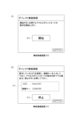
無線接続画面500には、開始ボタン501が表示される。この開始ボタン501は、アクセスポイントモードの動作を開始するようにユーザが印刷装置100に指示するためのボタンである。操作部208が無線接続画面500を表示している場合、印刷装置100はアクセスポイントモードの動作を開始していない。従って、モバイル端末101が周囲のアクセスポイントを探索したとしても印刷装置100を見つけることができず、モバイル端末101と印刷装置100との間で無線接続を確立することはできない。モバイル端末101と印刷装置100との間で無線接続を確立するためには、ユーザは、印刷装置100にアクセスポイントモードの動作を開始させる必要がある。ユーザが開始ボタン501を押下すると、印刷装置100はアクセスポイントモードの動作を開始する。そして操作部208は、図5(B)の無線接続画面510を表示する。
The wireless connection screen 500 displays a
印刷装置100がアクセスポイントモードの動作を開始すると、印刷装置100はSSIDと接続キー(例えばWEPキー)を生成する。無線接続画面510の領域511には、印刷装置100が生成したSSIDと接続キーが表示される。設定画面320において固定SSIDを使用すると設定されている場合、固定SSIDが生成されて領域511に表示される。一方、設定画面320においてワンタイムSSIDを使用すると設定されている場合、ランダムなSSIDが生成されて領域511に表示される。
When the
領域511に表示されている内容を確認したユーザは、自身のモバイル端末101を用いて周囲のアクセスポイントを探索し、探索結果一覧から領域511に表示されているSSIDのアクセスポイントを選択する。そして、領域511に表示されている接続キーをユーザがモバイル端末101に入力することで、印刷装置100とモバイル端末101との間でアクセスポイントモードに基づく無線接続が確立される。アクセスポイントモード用いてモバイル端末101を印刷装置100に無線接続した後、ユーザは、モバイル端末101上で印刷したい写真を選択する。そしてユーザが印刷指示をモバイル端末101に入力すると、モバイル端末101は、アクセスポイントモードによる無線通信を用いて、ユーザが選択した写真を印刷するための印刷データを印刷装置100に送信する。印刷データを受信した印刷装置100は、受信した印刷データに基づいてシートに印刷処理を実行する。
After checking the content displayed in
印刷装置100がアクセスポイントモードの動作を開始すると、印刷装置100は、モバイル端末101のような外部装置から無線接続の確立要求を受けるための待ち受け状態となる。印刷装置100がアクセスポイントモードの動作を開始すると、モバイル端末101が周囲のアクセスポイントを探索した際に印刷装置100を見つけることができる。外部装置から無線接続の確立要求を受けると、印刷装置100は、当該外部装置との間でアクセスポイントモードによる無線接続を確立する。そして無線接続を確立した後に、印刷装置100と外部装置との間で実際のデータ通信(例えばモバイル端末101から印刷装置100への印刷データの送信)が実行される。
When the
また、無線接続画面510には、停止ボタン512が表示されている。停止ボタン512は、アクセスポイントモードの動作を停止させる停止指示をユーザから受け付ける。印刷装置100のアクセスポイントモードの動作を停止させたい場合、ユーザは停止ボタン512を押下する。ユーザが停止ボタン512を押下すると、印刷装置100はアクセスポイントモードの動作を停止する。また、印刷装置100からユーザがログアウトした場合にも、印刷装置100はアクセスポイントモードの動作を停止する。
The wireless connection screen 510 also displays a
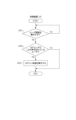
次に、ユーザが印刷装置100にログインする際に印刷装置100が実行する処理を、図6のフローチャートを用いて説明する。図6のフローチャートに示す各ステップは、CPU201がROM202等のメモリに格納された制御プログラムをRAM203に展開して実行することによって処理される。なお、図6のフローチャートの少なくとも一部のステップをCPU201に実行させて、残りのステップをCPU201とは異なる他のCPU(不図示)が実行するように印刷装置100を構成してもよい。
Next, the process executed by the
まずステップS601において、CPU201は、ユーザ認証を実行するか否かを判定する。ICカードリーダ209がICからユーザ情報を読み取った場合、又は、ユーザが入力欄301と入力欄302にユーザIDとパスワードを入力してログインボタン303を押した場合に、ユーザ認証を実行するとCPU201が判定する。そして処理はステップS602に進む。
First, in step S601, the
次にステップS602において、CPU201は、ユーザ情報が示すユーザがログインすることが許可されているユーザであるか否かを判定する。この判定は、ユーザ情報がユーザ管理テーブル400に登録されているか否かを確認することによって行われる。ユーザ情報がユーザ管理テーブル400に登録されていれば(認証OKと判定)、処理はステップS603に進む。そしてステップS603において、CPU201は、ログイン処理を実行する。CPU201は、認証OKと判定されたユーザを印刷装置100にログインさせ、そしてメニュー画面310を表示するように操作部208を制御する。
Next, in step S602, the
一方、ユーザ情報がユーザ管理テーブル400に登録されていなければ(認証NGと判定)、ユーザ情報が示すユーザがログインすることが許可されていないユーザであるとステップS602において判定される。CPU201は、ログイン処理を実行しないで、認証NGをユーザに通知して処理を終了する。
On the other hand, if the user information is not registered in the user management table 400 (determined as authentication NG), it is determined in step S602 that the user indicated by the user information is a user who is not permitted to log in. The
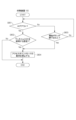
次に、ユーザがアクセスポイントモードを利用し、そしてユーザのログアウトに連動して印刷装置100がアクセスポイントモードの動作を自動的に停止する際に印刷装置100が実行する処理を、図7のフローチャートを用いて説明する。図7のフローチャートに示す各ステップは、CPU201がROM202等のメモリに格納された制御プログラムをRAM203に展開して実行することによって処理される。なお、図7のフローチャートの少なくとも一部のステップをCPU201に実行させて、残りのステップをCPU201とは異なる他のCPU(不図示)が実行するように印刷装置100を構成してもよい。
Next, the process executed by the
まずステップS701において、CPU201は、開始ボタン501がユーザに押下されたか否かを判定する。開始ボタン501がユーザに押下されたことをCPU201が検知すると、処理はステップS702に進む。そしてステップS702において、CPU201は、アクセスポイントモードの動作を開始するように無線LAN I/F205を制御する。無線LAN I/F205は、設定画面320による設定の結果に従って、固定SSID又はワンタイムSSIDを生成して、アクセスポイントモードの動作を開始する。
First, in step S701, the
次にステップS703において、CPU201は、変数Nの値として0をセットする。変数Nは、印刷装置100との間でアクセスポイントモードによる無線接続を確立したデバイスの数を管理するための変数である。本実施形態の場合、印刷装置100は、アクセスポイントモードによる無線接続を同時に最大5台のデバイスとの間で確立できるとする。5台という値は同時接続数の最大値の一例であり、他の値であってもよい。また、本実施形態では、固定SSIDとワンタイムSSIDのどちらを使用していても同時接続数の最大値は変わらないものとして説明するが、固定SSIDを使用する場合とワンタイムSSIDを使用する場合とで同時接続数の最大値を異なる値にしてもよい。
Next, in step S703, the
次にステップ704において、CPU201は、無線接続の確立要求を外部装置から受けたか否かを判定する。無線接続の確立要求を無線LAN I/F205が外部装置から受けると、処理はステップS705に進む。一方、無線接続の確立要求を無線LAN I/F205が外部装置から受けていない場合、処理はステップS709に進む。
Next, in step S704, the
次にステップS705について説明する。ステップS705において、CPU201は、変数Nの値が同時接続数の最大値より少ないか否かを判定する。変数Nの値、つまり、現在アクセスポイントモードによる無線接続を確立しているデバイスの数が同時接続数の最大値より少ない場合、処理はステップS706に進む。ステップS706において、CPU201は、無線接続の確立を要求したデバイスとの間で無線接続を確立するように無線LAN I/F205を制御する。無線LAN I/F205は、無線接続の確立を要求したデバイスとの間で、アクセスポイントモードによる無線接続を確立する。そしてステップS707において、CPU201は、変数Nの値を1増やす。一方、変数Nの値、つまり、現在アクセスポイントモードによる無線接続を確立しているデバイスの数が同時接続数の最大値と等しい場合、処理はステップS708に進む。そしてステップS708において、CPU201は、無線接続の確立要求を拒否する。無線接続の確立を要求したデバイスにしてみれば、印刷装置100との間でアクセスポイントモードによる無線接続を確立することに失敗する。
Next, step S705 will be described. In step S705, the
次にステップS709について説明する。ステップS709において、CPU201は、印刷装置100にログイン中のユーザが印刷装置100からログアウトしたか否かを判定する。本実施形態の場合、ユーザがログアウトボタンを押下したり、ユーザの操作がないまま所定時間(例えば5分)経過した場合に、ユーザのログアウトが発生する。ログイン中のユーザが印刷装置100からログアウトすると、処理はステップS710に進む。一方、ログイン中のユーザが印刷装置100からログアウトしていないとステップS709において判定されると、処理はステップS711に進む。
Next, step S709 will be described. In step S709, the
次にステップS710について説明する。ステップS710において、CPU201は、変数Nの値が1以下であるか否かを判定する。変数Nの値、つまり、現在アクセスポイントモードによる無線接続を確立しているデバイスの数が1以下である場合、処理はステップS712に進む。そしてステップS712において、CPU201は、アクセスポイントモードの動作を停止するように無線LAN I/F205を制御する。無線LAN I/F205は、CPU201の制御に従ってアクセスポイントモードの動作を停止する。一方、変数Nの値、つまり、現在アクセスポイントモードによる無線接続を確立しているデバイスの数が2以上である場合、無線LAN I/F205がアクセスポイントモードの動作を停止することなく、フローチャートに示す処理を終了する。印刷装置100は、アクセスポイントモードによって確立している無線接続の数に基づいて、ユーザのログアウトに連動してアクセスポイントモードの動作を停止するか否かを決定することを特徴とする。
Next, step S710 will be described. In step S710, the
変数Nの値、つまり、現在アクセスポイントモードによる無線接続を確立しているデバイスの数が0である場合、ステップS710においてYesと判定され、無線LAN I/F205はアクセスポイントモードの動作を停止する。変数Nの値が0であるということは、アクセスポイントモードを利用しているユーザが存在しないと判断できる。そこで無線LAN I/F205は、変数Nの値が0である場合、ユーザのログアウトに連動してアクセスポイントモードの動作を停止する。
If the value of variable N, that is, the number of devices currently establishing a wireless connection in access point mode, is 0, step S710 is determined to be Yes, and wireless LAN I/
また、変数Nの値、つまり、現在アクセスポイントモードによる無線接続を確立しているデバイスの数が1である場合、ステップS710においてYesと判定され、無線LAN I/F205はアクセスポイントモードの動作を停止する。変数Nの値が1であるということは、ログインユーザのみがアクセスポイントモードを利用していて、他のユーザはアクセスポイントモードを利用していない可能性が高いと判断できる。そこで無線LAN I/F205は、変数Nの値が1である場合、ユーザのログアウトに連動してアクセスポイントモードの動作を停止する。
Also, if the value of variable N, that is, the number of devices currently establishing a wireless connection in access point mode, is 1, step S710 is determined to be Yes, and wireless LAN I/
また、また、変数Nの値、つまり、現在アクセスポイントモードによる無線接続を確立しているデバイスの数が2以上(複数)である場合、ステップS710においてNoと判定され、無線LAN I/F205はアクセスポイントモードの動作を停止しない。変数Nの値が複数である場合、ログインユーザに加えて他のユーザもアクセスポイントモードを利用している可能性が高いと判断できる。この状態でユーザのログアウトに連動してアクセスポイントモードの動作を停止してしまうと、他のユーザがアクセスポイントモードを利用できなくなってしまう。そこで無線LAN I/F205は、変数Nの値が複数である場合、ユーザがログアウトしてもアクセスポイントモードの動作を停止しない。
Also, if the value of variable N, that is, the number of devices currently establishing a wireless connection in access point mode, is two or more (multiple), step S710 is determined to be No, and wireless LAN I/
次にステップS711について説明する。ステップS711において、CPU201は、停止ボタン512がユーザに押下されたか否かを判定する。停止ボタン512がユーザに押下されたことをCPU201が検知すると、処理はステップS712に進む。そしてステップS712において、CPU201は、アクセスポイントモードの動作を停止するように無線LAN I/F205を制御し、無線LAN I/F205は、アクセスポイントモードの動作を停止する。一方、停止ボタン512がユーザに押下されていないとステップS711において判定されると、処理はステップ704に戻る。
Next, step S711 will be described. In step S711,
以上の説明の通り、本実施形態によれば、印刷装置100からユーザがログアウトしたことに連動して、印刷装置100は、アクセスポイントモードの動作を停止することができる。印刷装置100の場合、無線LAN I/F205は、インフラストラクチャーモードとアクセスポイントモードのいずれかで動作し、インフラストラクチャーモードとアクセスポイントモードを同時に動作させることはできない。従って、無線LAN I/F205がアクセスポイントモードで動作している間は、無線LAN I/F205はインフラストラクチャーモードで動作できず、外部のアクセスポイント経由でPCから印刷データを受信することができないことになってしまう。そこで本実施形態では、無線LANI/F205は、ユーザがログアウトしたことに連動してアクセスポイントモードの動作を自動的に停止する。ユーザがログアウトしたことに連動してアクセスポイントモードの動作を自動的に停止することで、無線LAN I/F205の動作モードをアクセスポイントモードからインフラストラクチャーモードに切り替えることができる。
As described above, according to this embodiment, the
(実施形態2)
実施形態2を説明する。本実施形態では、アクセスポイントモードで使用するSSIDの種類に基づいて、ユーザのログアウトに連動してアクセスポイントモードの動作を停止するか否かを切り替える処理を説明する。印刷装置100の構成は、実施形態1と同様である。
(Embodiment 2)
A second embodiment will be described. In this embodiment, a process for switching whether or not to stop the operation in the access point mode in conjunction with a user logout based on the type of SSID used in the access point mode will be described. The configuration of the
印刷装置100は、設定画面320によって、アクセスポイントモードで使用するSSIDとして固定SSIDとワンタイムSSIDのいずれかを設定する。本実施形態では、固定SSIDを使用する場合の同時接続数の最大値は複数(例えば5台)であり、ワンタイムSSIDを使用する場合の同時接続数の最大値は1である。そしてワンタイムSSIDを使用する設定の場合に、ユーザがログアウトしたことに連動して、無線LAN I/F205がアクセスポイントモードの動作を停止することを特徴とする。一方、固定SSIDを使用する設定の場合に、ユーザがログアウトしても、無線LAN I/F205はアクセスポイントモードの動作を停止しない。
The
この処理について、図8のフローチャートを用いて説明する。図8のフローチャートに示す各ステップは、CPU201がROM202等のメモリに格納された制御プログラムをRAM203に展開して実行することによって処理される。なお、図8のフローチャートの少なくとも一部のステップをCPU201に実行させて、残りのステップをCPU201とは異なる他のCPU(不図示)が実行するように印刷装置100を構成してもよい。
This process will be described with reference to the flowchart in FIG. 8. Each step shown in the flowchart in FIG. 8 is processed by
ステップS801において、CPU201は、印刷装置100にログイン中のユーザが印刷装置100からログアウトしたか否かを判定する。本実施形態の場合、ユーザがログアウトボタンを押下したり、ユーザの操作がないまま所定時間(例えば5分)経過した場合に、ユーザのログアウトが発生する。ログイン中のユーザが印刷装置100からログアウトすると、処理はステップS802に進む。一方、ログイン中のユーザが印刷装置100からログアウトしていないとステップS801において判定されると、処理はステップS803に進む。
In step S801, the
ステップS802について説明する。ステップS802において、CPU201は、印刷装置100に設定されているアクセスポイントモードに関する設定が、ワンタイムSSIDを使用する設定であるか否かを判定する。この判定は、設定画面320による設定の結果を確認することで実行される。アクセスポイントモードに関する設定がワンタイムSSIDを使用する設定である場合、処理はステップS804に進む。そしてステップS804において、CPU201は、アクセスポイントモードの動作を停止するように無線LAN I/F205を制御する。無線LAN I/F205は、CPU201の制御に従ってアクセスポイントモードの動作を停止する。一方、アクセスポイントモードに関する設定が固定SSIDを使用する設定である場合、無線LAN I/F205がアクセスポイントモードの動作を停止することなく、フローチャートに示す処理を終了する。
Step S802 will be described. In step S802, the
アクセスポイントモードに関する設定がワンタイムSSIDを使用する設定である場合、ステップS802においてYesと判定され、無線LAN I/F205はアクセスポイントモードの動作を停止する。アクセスポイントモードに関する設定がワンタイムSSIDを使用する設定である場合、アクセスポイントモードによる無線接続の同時接続数の最大値は1である。同時接続数の最大値が1であるということは、アクセスポイントモードをログインユーザのみに利用させることを想定していて、ユーザがログアウトした段階でアクセスポイントモードの利用が終了したと判断できる。そこで無線LAN I/F205は、ワンタイムSSIDを使用する設定である場合、ユーザのログアウトに連動してアクセスポイントモードの動作を停止する。
If the setting for the access point mode is to use a one-time SSID, the answer in step S802 is Yes, and the wireless LAN I/
また、アクセスポイントモードに関する設定が固定SSIDを使用する設定である場合、ステップS802においてNoと判定され、無線LAN I/F205はアクセスポイントモードの動作を停止しない。アクセスポイントモードに関する設定が固定SSIDを使用する設定である場合、アクセスポイントモードによる無線接続の同時接続数の最大値は複数(例えば5台)である。同時接続数の最大値が複数であるということは、複数のユーザが各ユーザの所望のタイミングでアクセスポイントモードを利用することを想定しているため、アクセスポイントモードの動作は停止させない方が好ましい。そこで無線LAN I/F205は、固定SSIDを使用する設定である場合、ユーザが印刷装置100からログインしてもアクセスポイントモードの動作を停止しないで、アクセスポイントモードの動作を継続する。
Also, if the setting for the access point mode is a setting to use a fixed SSID, step S802 is determined to be No, and the wireless LAN I/
以上の説明の通り、印刷装置100は、アクセスポイントモードで使用するSSIDの設定に基づいて、ユーザのログアウトに連動してアクセスポイントモードの動作を停止するか否かを決定することを特徴とする。アクセスポイントモードで使用するSSIDがワンタイムSSIDであれば、印刷装置100は、ユーザのログアウトに連動してアクセスポイントモードの動作を停止する。一方、アクセスポイントモードで使用するSSIDが固定SSIDであれば、印刷装置100は、ユーザがログアウトしてもアクセスポイントモードの動作を停止しない。
As described above, the
また、本実施形態では、同時接続数の最大値が1であるSSIDの例としてワンタイムSSIDを挙げたが、同時接続数の最大値が1となる他のタイプのSSIDであれば、ワンタイムSSIDの代わりに本願発明を適用してもよい。他のタイプのSSIDとして、例えばユーザに対応するSSIDを生成してアクセスポイントモードで使用する設定が考えられる。ユーザに対応するSSIDを使用する場合、印刷装置100は、ログインユーザに応じて使用するSSIDを切り替える。例えば、ユーザAがログイン中であれば、印刷装置100は、ユーザA専用のユーザSSIDを使用し、ユーザBがログイン中であれば、印刷装置100は、ユーザB専用のユーザSSIDを使用する。このようなユーザに対応するSSIDをアクセスポイントモードで使用する場合も、同時接続数の最大値を1とすることが望ましく、また、ユーザのログアウトに連動してアクセスポイントモードの動作を自動的に停止することが望ましい。
In addition, in this embodiment, a one-time SSID is given as an example of an SSID with a maximum number of simultaneous connections of 1, but the present invention may be applied to other types of SSIDs with a maximum number of simultaneous connections of 1 instead of a one-time SSID. As another type of SSID, for example, a setting in which an SSID corresponding to a user is generated and used in access point mode is conceivable. When using an SSID corresponding to a user, the
(その他実施形態)
本発明は、上述の各実施形態の1以上の機能を実現するプログラムを、ネットワーク又は記憶媒体を介してシステム又は装置に供給し、そのシステム又は装置のコンピュータにおける1つ以上のプロセッサがプログラムを読出し実行する処理でも実現可能である。また、1以上の機能を実現する回路(例えば、ASIC)によっても実現可能である。
(Other embodiments)
The present invention can also be realized by a process in which a program for realizing one or more functions of each of the above-mentioned embodiments is supplied to a system or device via a network or a storage medium, and one or more processors in a computer of the system or device read and execute the program. The present invention can also be realized by a circuit (e.g., ASIC) for realizing one or more functions.
100 印刷装置
201 CPU
205 無線LAN I/F
208 操作部
209 ICカードリーダ
100
205 Wireless LAN I/F
208
Claims (22)
直接無線通信機能の実行のために用いるSSID(Service Set Identifier)に関する設定を行う設定手段と、
前記設定を受け付ける設定画面であって、前記画像処理装置からログアウトするためのアイテムを含む設定画面を提供する提供手段と、
前記設定画面を介して設定された設定に基づいて直接無線通信機能を実行する実行手段と、を有し、
前記設定は、繰り返し用いるための記憶されたSSIDで直接無線通信機能を実行する第一の設定と、ランダムに生成された文字列を含むSSIDで直接無線通信を実行する第二の設定とを含み、前記第一の設定と前記第二の設定とは管理者権限を有するユーザにより切り替えられることを特徴とする画像処理装置。 An image processing device that acts as an access point to which a communication terminal can be connected, has a direct wireless communication function for performing direct wireless communication with the communication terminal without going through an external access point, and is capable of receiving print data from the communication terminal via the direct wireless communication and performing printing,
A setting unit for setting an SSID (Service Set Identifier) used for executing the direct wireless communication function;
a providing means for providing a setting screen for accepting the setting, the setting screen including an item for logging out from the image processing device;
and an execution means for executing a direct wireless communication function based on the setting set via the setting screen,
The image processing device is characterized in that the settings include a first setting that executes a direct wireless communication function using a stored SSID for repeated use, and a second setting that executes direct wireless communication using an SSID that includes a randomly generated string, and the first setting and the second setting can be switched between by a user with administrator authority.
直接無線通信機能の実行のために用いるSSID(Service Set Identifier)に関する設定を行う設定工程と、
前記設定を受け付ける設定画面であって、前記画像処理装置からログアウトするためのアイテムを含む設定画面を提供する提供工程と、
前記設定画面を介して設定された設定に基づいて直接無線通信機能を実行する実行工程と、を有し、
前記設定は、繰り返し用いるための記憶されたSSIDで直接無線通信機能を実行する第一の設定と、ランダムに生成された文字列を含むSSIDで直接無線通信を実行する第二の設定とを含み、前記第一の設定と前記第二の設定とは管理者権限を有するユーザにより切り替えられることを特徴とする制御方法。 A control method executed by an image processing device that acts as an access point to which a communication terminal can be connected, has a direct wireless communication function for performing direct wireless communication with the communication terminal without going through an external access point, and is capable of receiving print data from the communication terminal via the direct wireless communication and printing the print data, the method comprising:
A setting process for setting an SSID (Service Set Identifier) used for executing the direct wireless communication function;
providing a setting screen for accepting the settings, the setting screen including an item for logging out from the image processing device;
and executing a direct wireless communication function based on the setting set via the setting screen ,
The control method is characterized in that the settings include a first setting that executes a direct wireless communication function with a stored SSID for repeated use, and a second setting that executes direct wireless communication with an SSID that includes a randomly generated character string, and the first setting and the second setting can be switched between by a user with administrator authority.
Priority Applications (2)
| Application Number | Priority Date | Filing Date | Title |
|---|---|---|---|
| JP2024109885A JP7686853B2 (en) | 2021-01-06 | 2024-07-08 | Image processing device and method for controlling image processing device |
| JP2025085046A JP2025128152A (en) | 2021-01-06 | 2025-05-21 | Communication device, communication device control method and program |
Applications Claiming Priority (5)
| Application Number | Priority Date | Filing Date | Title |
|---|---|---|---|
| JP2021001141A JP7187588B2 (en) | 2021-01-06 | 2021-01-06 | IMAGE PROCESSING DEVICE, CONTROL METHOD AND PROGRAM OF IMAGE PROCESSING DEVICE |
| JP2022004831A JP7305815B2 (en) | 2021-01-06 | 2022-01-17 | IMAGE PROCESSING DEVICE, CONTROL METHOD AND PROGRAM OF IMAGE PROCESSING DEVICE |
| JP2022159277A JP7342225B2 (en) | 2021-01-06 | 2022-10-03 | Image processing device, control method and program for the image processing device |
| JP2023017525A JP7521025B2 (en) | 2021-01-06 | 2023-02-08 | IMAGE PROCESSING APPARATUS, CONTROL METHOD AND PROGRAM FOR IMAGE PROCESSING APPARATUS |
| JP2024109885A JP7686853B2 (en) | 2021-01-06 | 2024-07-08 | Image processing device and method for controlling image processing device |
Related Parent Applications (1)
| Application Number | Title | Priority Date | Filing Date |
|---|---|---|---|
| JP2023017525A Division JP7521025B2 (en) | 2021-01-06 | 2023-02-08 | IMAGE PROCESSING APPARATUS, CONTROL METHOD AND PROGRAM FOR IMAGE PROCESSING APPARATUS |
Related Child Applications (1)
| Application Number | Title | Priority Date | Filing Date |
|---|---|---|---|
| JP2025085046A Division JP2025128152A (en) | 2021-01-06 | 2025-05-21 | Communication device, communication device control method and program |
Publications (3)
| Publication Number | Publication Date |
|---|---|
| JP2024124540A JP2024124540A (en) | 2024-09-12 |
| JP2024124540A5 JP2024124540A5 (en) | 2024-12-23 |
| JP7686853B2 true JP7686853B2 (en) | 2025-06-02 |
Family
ID=75638688
Family Applications (6)
| Application Number | Title | Priority Date | Filing Date |
|---|---|---|---|
| JP2021001141A Active JP7187588B2 (en) | 2021-01-06 | 2021-01-06 | IMAGE PROCESSING DEVICE, CONTROL METHOD AND PROGRAM OF IMAGE PROCESSING DEVICE |
| JP2022004831A Active JP7305815B2 (en) | 2021-01-06 | 2022-01-17 | IMAGE PROCESSING DEVICE, CONTROL METHOD AND PROGRAM OF IMAGE PROCESSING DEVICE |
| JP2022159277A Active JP7342225B2 (en) | 2021-01-06 | 2022-10-03 | Image processing device, control method and program for the image processing device |
| JP2023017525A Active JP7521025B2 (en) | 2021-01-06 | 2023-02-08 | IMAGE PROCESSING APPARATUS, CONTROL METHOD AND PROGRAM FOR IMAGE PROCESSING APPARATUS |
| JP2024109885A Active JP7686853B2 (en) | 2021-01-06 | 2024-07-08 | Image processing device and method for controlling image processing device |
| JP2025085046A Pending JP2025128152A (en) | 2021-01-06 | 2025-05-21 | Communication device, communication device control method and program |
Family Applications Before (4)
| Application Number | Title | Priority Date | Filing Date |
|---|---|---|---|
| JP2021001141A Active JP7187588B2 (en) | 2021-01-06 | 2021-01-06 | IMAGE PROCESSING DEVICE, CONTROL METHOD AND PROGRAM OF IMAGE PROCESSING DEVICE |
| JP2022004831A Active JP7305815B2 (en) | 2021-01-06 | 2022-01-17 | IMAGE PROCESSING DEVICE, CONTROL METHOD AND PROGRAM OF IMAGE PROCESSING DEVICE |
| JP2022159277A Active JP7342225B2 (en) | 2021-01-06 | 2022-10-03 | Image processing device, control method and program for the image processing device |
| JP2023017525A Active JP7521025B2 (en) | 2021-01-06 | 2023-02-08 | IMAGE PROCESSING APPARATUS, CONTROL METHOD AND PROGRAM FOR IMAGE PROCESSING APPARATUS |
Family Applications After (1)
| Application Number | Title | Priority Date | Filing Date |
|---|---|---|---|
| JP2025085046A Pending JP2025128152A (en) | 2021-01-06 | 2025-05-21 | Communication device, communication device control method and program |
Country Status (1)
| Country | Link |
|---|---|
| JP (6) | JP7187588B2 (en) |
Citations (5)
| Publication number | Priority date | Publication date | Assignee | Title |
|---|---|---|---|---|
| JP2008517553A (en) | 2004-10-20 | 2008-05-22 | トムソン ライセンシング | Access point service and mobile terminal access method to wireless LAN based on service parameters |
| JP2014197830A (en) | 2013-03-05 | 2014-10-16 | 株式会社リコー | Communication device, communication system, and program |
| JP2015072661A (en) | 2013-10-04 | 2015-04-16 | キヤノン株式会社 | Image forming apparatus, control method therefor, and program |
| JP2015073169A (en) | 2013-10-02 | 2015-04-16 | キヤノン株式会社 | COMMUNICATION DEVICE, DATA PROCESSING DEVICE, ITS CONTROL METHOD, PROGRAM |
| JP2015073253A (en) | 2013-10-04 | 2015-04-16 | シャープ株式会社 | Access point control device, access point control method, and image forming device |
Family Cites Families (4)
| Publication number | Priority date | Publication date | Assignee | Title |
|---|---|---|---|---|
| JP5754255B2 (en) | 2011-06-14 | 2015-07-29 | ブラザー工業株式会社 | Wireless communication device |
| JP5966527B2 (en) * | 2012-03-30 | 2016-08-10 | ブラザー工業株式会社 | Communication device |
| JP6224902B2 (en) * | 2013-03-15 | 2017-11-01 | キヤノン株式会社 | COMMUNICATION DEVICE, ITS CONTROL METHOD, AND PROGRAM |
| JP6175995B2 (en) * | 2013-08-30 | 2017-08-09 | ブラザー工業株式会社 | Mobile terminal and program |
-
2021
- 2021-01-06 JP JP2021001141A patent/JP7187588B2/en active Active
-
2022
- 2022-01-17 JP JP2022004831A patent/JP7305815B2/en active Active
- 2022-10-03 JP JP2022159277A patent/JP7342225B2/en active Active
-
2023
- 2023-02-08 JP JP2023017525A patent/JP7521025B2/en active Active
-
2024
- 2024-07-08 JP JP2024109885A patent/JP7686853B2/en active Active
-
2025
- 2025-05-21 JP JP2025085046A patent/JP2025128152A/en active Pending
Patent Citations (5)
| Publication number | Priority date | Publication date | Assignee | Title |
|---|---|---|---|---|
| JP2008517553A (en) | 2004-10-20 | 2008-05-22 | トムソン ライセンシング | Access point service and mobile terminal access method to wireless LAN based on service parameters |
| JP2014197830A (en) | 2013-03-05 | 2014-10-16 | 株式会社リコー | Communication device, communication system, and program |
| JP2015073169A (en) | 2013-10-02 | 2015-04-16 | キヤノン株式会社 | COMMUNICATION DEVICE, DATA PROCESSING DEVICE, ITS CONTROL METHOD, PROGRAM |
| JP2015072661A (en) | 2013-10-04 | 2015-04-16 | キヤノン株式会社 | Image forming apparatus, control method therefor, and program |
| JP2015073253A (en) | 2013-10-04 | 2015-04-16 | シャープ株式会社 | Access point control device, access point control method, and image forming device |
Also Published As
| Publication number | Publication date |
|---|---|
| JP2023054035A (en) | 2023-04-13 |
| JP2022051766A (en) | 2022-04-01 |
| JP2022179594A (en) | 2022-12-02 |
| JP7305815B2 (en) | 2023-07-10 |
| JP2021069125A (en) | 2021-04-30 |
| JP2024124540A (en) | 2024-09-12 |
| JP7521025B2 (en) | 2024-07-23 |
| JP2025128152A (en) | 2025-09-02 |
| JP7342225B2 (en) | 2023-09-11 |
| JP7187588B2 (en) | 2022-12-12 |
Similar Documents
| Publication | Publication Date | Title |
|---|---|---|
| JP6611572B2 (en) | COMMUNICATION DEVICE, COMMUNICATION DEVICE CONTROL METHOD, AND PROGRAM | |
| JP6655924B2 (en) | Communication device, communication device control method, and program | |
| CN104052896B (en) | Communication Apparatus, Control Method Thereof, And Printing Apparatus | |
| JP7786837B2 (en) | Information processing device and control method thereof | |
| JP6635769B2 (en) | Communication device, communication device control method, and program | |
| JP6736283B2 (en) | Printing device, printing device control method, and program | |
| JP2019009696A (en) | Printer, control method therefor and program | |
| JP7521025B2 (en) | IMAGE PROCESSING APPARATUS, CONTROL METHOD AND PROGRAM FOR IMAGE PROCESSING APPARATUS | |
| JP2017094507A (en) | Printing device, printing device controlling method and program | |
| JP6984051B2 (en) | Image processing device, control method and program of image processing device | |
| JP6884840B2 (en) | Communication equipment, control methods and programs for communication equipment | |
| JP7009547B2 (en) | Printing equipment, control methods and programs for printing equipment | |
| JP2019140619A (en) | Information processing device, control method thereof, and program | |
| JP2019104206A (en) | Information processing device, method for starting wi-fi direct in the information processing device, and program |
Legal Events
| Date | Code | Title | Description |
|---|---|---|---|
| A621 | Written request for application examination |
Free format text: JAPANESE INTERMEDIATE CODE: A621 Effective date: 20240725 |
|
| A521 | Request for written amendment filed |
Free format text: JAPANESE INTERMEDIATE CODE: A523 Effective date: 20241213 |
|
| A131 | Notification of reasons for refusal |
Free format text: JAPANESE INTERMEDIATE CODE: A131 Effective date: 20241217 |
|
| A521 | Request for written amendment filed |
Free format text: JAPANESE INTERMEDIATE CODE: A523 Effective date: 20250213 |
|
| A131 | Notification of reasons for refusal |
Free format text: JAPANESE INTERMEDIATE CODE: A131 Effective date: 20250318 |
|
| A521 | Request for written amendment filed |
Free format text: JAPANESE INTERMEDIATE CODE: A523 Effective date: 20250325 |
|
| TRDD | Decision of grant or rejection written | ||
| A01 | Written decision to grant a patent or to grant a registration (utility model) |
Free format text: JAPANESE INTERMEDIATE CODE: A01 Effective date: 20250422 |
|
| A61 | First payment of annual fees (during grant procedure) |
Free format text: JAPANESE INTERMEDIATE CODE: A61 Effective date: 20250521 |
|
| R150 | Certificate of patent or registration of utility model |
Ref document number: 7686853 Country of ref document: JP Free format text: JAPANESE INTERMEDIATE CODE: R150 |