JP7619082B2 - PROGRAM AND INFORMATION PROCESSING APPARATUS - Google Patents
PROGRAM AND INFORMATION PROCESSING APPARATUS Download PDFInfo
- Publication number
- JP7619082B2 JP7619082B2 JP2021028733A JP2021028733A JP7619082B2 JP 7619082 B2 JP7619082 B2 JP 7619082B2 JP 2021028733 A JP2021028733 A JP 2021028733A JP 2021028733 A JP2021028733 A JP 2021028733A JP 7619082 B2 JP7619082 B2 JP 7619082B2
- Authority
- JP
- Japan
- Prior art keywords
- paper
- tray
- printer
- print settings
- automatic selection
- Prior art date
- Legal status (The legal status is an assumption and is not a legal conclusion. Google has not performed a legal analysis and makes no representation as to the accuracy of the status listed.)
- Active
Links
Images




Landscapes
- Facsimiles In General (AREA)
- Accessory Devices And Overall Control Thereof (AREA)
Description
本明細書に開示される技術分野は、印刷設定を受け付けるプログラムおよび情報処理装置に関する。 The technical field disclosed in this specification relates to a program and an information processing device that accepts print settings.
パーソナルコンピュータ等の情報処理装置に組み込まれたプリンタドライバによって、プリンタが備える複数のトレイのうちどのトレイから給紙を行うかを選択する給紙方法の設定を受け付ける技術が知られている。給紙方法にて選択可能な選択肢には、プリンタが備える個々の給紙トレイの他、例えば特許文献1に開示されているように、「自動選択」が含まれる場合がある。プリンタは、給紙方法に「自動選択」が設定されている印刷ジョブを受信した場合、印刷ジョブに設定されている用紙サイズおよび用紙種類と、自装置の各トレイで対応可能な用紙サイズおよび用紙種類と、を比較し、給紙可能なトレイの中から1つのトレイを自動的に選択する。
There is a known technology that uses a printer driver built into an information processing device such as a personal computer to accept settings for a paper feed method that selects which of the multiple trays a printer has to feed paper from. The paper feed method options that can be selected include the individual paper feed trays that the printer has, as well as "automatic selection," as disclosed in, for example,
ユーザによっては、用紙サイズや用紙種類等の用紙の特性に対する各トレイの給紙可否を把握していないことがある。そのため、給紙方法について「自動選択」が設定されている場合、例えばユーザは、給紙方法を設定している段階では所定のトレイについて給紙不可能であることを把握しておらず、プリンタに移動した後、その所定のトレイにシートをセットしたために、印刷が行われないといった問題が生じる可能性があり、ユーザに不便を強いることがあった。 Some users may not know whether each tray can feed paper depending on paper characteristics such as paper size and paper type. Therefore, when the paper feed method is set to "Auto Select," for example, the user may not know that a specific tray cannot feed paper when setting the paper feed method, and after moving the printer, the user may place a sheet in that specific tray, which may result in printing not being performed, causing inconvenience to the user.
本明細書は、給紙方法の設定を受け付けるプログラムであって、給紙方法として自動選択が設定された場合の利便性を向上させる技術を開示する。 This specification discloses a program that accepts settings for the paper feed method and technology that improves convenience when automatic selection is set as the paper feed method.
上述した課題の解決を目的としてなされたプログラムは、情報処理装置のコンピュータによって実行可能であり、プリンタでの印刷に用いる印刷設定を、前記情報処理装置のユーザインタフェースを介して受け付けるプログラムであって、前記印刷設定には、用紙の特性と給紙方法とが含まれ、前記給紙方法で選択可能な選択肢には、トレイの選択を前記プリンタで行う自動選択が含まれ、前記プリンタは、複数のトレイを有し、トレイごとに給紙可能な用紙の特性があり、印刷ジョブに設定されている前記給紙方法が自動選択であった場合、前記印刷ジョブに設定されている前記用紙の特性に基づいてトレイを選択するものであり、前記コンピュータに、前記印刷設定のうち前記給紙方法に前記自動選択が設定された状態での第1のタイミングにおいて、前記印刷設定で設定されている前記用紙の特性に対しての、前記プリンタにある各トレイの給紙可否を示す第1トレイ情報を、前記ユーザインタフェースに報知させる第1報知処理を実行させる、ことを特徴とする。 The program made for the purpose of solving the above-mentioned problems is executable by a computer of an information processing device, and is a program that receives print settings used for printing on a printer via a user interface of the information processing device, the print settings include paper characteristics and a paper feeding method, and the options selectable for the paper feeding method include automatic selection in which the printer selects a tray, the printer has multiple trays, each of which has paper characteristics that can be fed, and when the paper feeding method set in the print job is automatic selection, the printer selects a tray based on the paper characteristics set in the print job, and the computer executes a first notification process that notifies the user interface of first tray information indicating whether each tray in the printer can feed paper for the paper characteristics set in the print settings at a first timing when the automatic selection is set as the paper feeding method in the print settings.
本明細書に開示されるプログラムを情報処理装置のコンピュータによって実行することで、情報処理装置は、給紙方法として自動選択が設定された状態での第1のタイミングにおいて、その時点で設定されている用紙の特性に基づく各トレイの給紙可否を示す情報を報知することができる。したがって、ユーザは、各トレイの給紙可否をプリンタでの印刷前、すなわち、情報処理装置上において把握することができ、ユーザの意図する印刷が行われる可能性が高まり、利便性が向上する。 By executing the program disclosed in this specification by the computer of the information processing device, the information processing device can notify, at a first timing when automatic selection is set as the paper feeding method, information indicating whether or not each tray can feed paper based on the paper characteristics set at that time. Therefore, the user can know whether or not each tray can feed paper before printing on the printer, i.e., on the information processing device, increasing the likelihood that the printing intended by the user will be performed, and improving convenience.
上記プログラムの機能を実現する情報処理装置も、新規で有用である。 An information processing device that realizes the functions of the above program is also new and useful.
本明細書に開示される技術によれば、給紙方法として自動選択が設定された場合の利便性を向上させる技術が実現される。 The technology disclosed in this specification realizes a technology that improves convenience when automatic selection is set as the paper feed method.
以下、プログラムを具体化した実施の形態について、添付図面を参照しつつ詳細に説明する。本形態は、印刷機能を有する装置であるプリンタに接続可能なパーソナルコンピュータ(以下、「PC」とする)にて実行されるプログラムを開示するものである。 Below, an embodiment of the program will be described in detail with reference to the attached drawings. This embodiment discloses a program that is executed on a personal computer (hereinafter, "PC") that can be connected to a printer, which is a device with a printing function.
本形態のPC1は、例えば、図1(A)に示すように、プリンタ2と互いに通信可能に接続されている。PC1は、プリンタ2に各種の機能を行わせるための各種のアプリケーションプログラム(以下、「アプリ」とする)を実行可能な装置である。PC1は、情報処理装置の一例である。PC1に代えて、例えば、スマートフォン、タブレットコンピュータであっても良い。
The
PC1は、図1(A)に示すように、CPU11と、メモリ14と、を含む制御部10を備えている。さらに、PC1は、通信インタフェース(以下、「通信IF」とする)16と、ユーザインタフェース(以下、「ユーザIF」とする)18と、を備え、これらが制御部10に電気的に接続されている。なお、図1(A)中の制御部10は、PC1の制御に利用されるハードウェアやソフトウェアを纏めた総称であって、実際にPC1に存在する単一のハードウェアを表すとは限らない。
As shown in FIG. 1(A), PC1 is equipped with a
CPU11は、メモリ14から読み出したプログラムに従って、また、ユーザの操作に基づいて、各種の処理を実行する。CPU11は、コンピュータの一例である。メモリ14は、例えば、HDD、フラッシュメモリであり、各種のプログラム、画像データや文書データ等のデータ、各種設定を記憶する領域として利用される。CPU11が備えるバッファも、メモリの一例である。
The
メモリの一例は、コンピュータが読み取り可能なストレージ媒体であってもよい。コンピュータが読み取り可能なストレージ媒体とは、non-transitoryな媒体である。non-transitoryな媒体には、上記の例の他に、CD-ROM、DVD-ROM等の記録媒体も含まれる。 An example of memory may be a computer-readable storage medium. A computer-readable storage medium is a non-transitory medium. In addition to the above examples, non-transitory media also include recording media such as CD-ROMs and DVD-ROMs.
通信IF16は、プリンタ2等の外部装置との通信を行うためのハードウェアを含む。通信IF16の通信方式は、無線でも有線でもよく、Wi-Fi(登録商標)、Bluetooth(登録商標)、USB、LAN等、どのような規格の方式でもよい。
The communication IF 16 includes hardware for communicating with an external device such as the
ユーザIF18は、情報を画面に表示するハードウェアと、ユーザによる入力操作を受け付けるハードウェアと、を含む。ユーザIF18は、例えば、図1(B)に示すように、情報を画面に表示するためのディスプレイ18Aと、ユーザによる入力操作を受け付けるキーボード18Bおよびマウス18C等との組み合わせであっても良いし、表示機能と入力受付機能とを備えるタッチパネルであっても良い。
本形態のPC1のメモリ14には、図1(A)に示すように、オペレーティングシステム(以下、「OS」とする)41と、印刷アプリ42と、プリンタドライバ43と、が組み込まれている。OS41は、例えば、Windows(登録商標)、macOS(登録商標)、iOS(登録商標)、Android(登録商標)、Linux(登録商標)である。
As shown in FIG. 1A, the
印刷アプリ42は、印刷に関する各種の指示を受け付けるプログラムである。印刷アプリ42は、例えば、印刷を行わせるプリンタ2の指定、印刷部数の指定、印刷範囲の指定、印刷実行の指示、を受け付ける。さらに、印刷対象の用紙の種類やサイズの指定、両面印刷の指示等を受け付けてもよい。
The
プリンタドライバ43は、プリンタ2のモデルに対応するプログラムであり、通信IF16を介してプリンタ2と通信を行って、プリンタ2の動作を制御するプログラムである。プリンタドライバ43は、例えば、印刷アプリ42等にてプリンタ2が指定された状態で、プリンタ2のプロパティ設定の指示を受け付けた場合に起動される。
The
プリンタドライバ43が起動されると、CPU11は、ディスプレイ18A上に、例えば、図2に一例として示す印刷設定画面51を表示する。印刷設定画面51の基本タブ51A上には、例えば、用紙種類の選択欄511、印刷品質の選択欄512、用紙サイズの選択欄513と、ふちなし印刷の選択欄514と、部数の選択欄515と、両面/小冊子の選択欄516と、給紙方法の選択欄517と、OKボタン518と、キャンセルボタン519と、が表示される。CPU11は、ユーザの、キーボード18Bやマウス18Cの操作を通じて印刷設定画面51に表示した各選択欄や各ボタンへの操作を受け付ける。
When the
具体的には、用紙サイズの選択欄513では、ユーザは、プレカットされた定型サイズの用紙名、例えば、A4、B4、A5、B5、A6、Letter、Legal、A3などの何れか1つを選択することができる。また、給紙方法の選択欄517では、ユーザは、プリンタ2の給紙トレイ、すなわち、後述する、図4に示すところの、多目的トレイ21、第1トレイ22、第2トレイ23および第3トレイ24の何れか1つの選択、もしくは、給紙トレイの選択をプリンタ2で行う「自動選択」を選択することができる。
Specifically, in the paper
また、用紙種類の選択欄511では、ユーザは、普通紙、光沢紙、厚紙、インクジェット紙などの何れか1つを選択することができる。両面/小冊子の選択欄516では、ユーザは、両面/小冊子印刷を「する」、「なし」を選択することができる。
In addition, in the paper
また、ユーザが、ユーザ定義サイズを設定するために、印刷設定画面51の拡張タブ51Bを選択した後に、拡張タブ51B上のユーザ定義ボタン(図示せず)を選択した場合には、CPU11は、ディスプレイ18A上に、例えば、図3に一例として示す登録画面52を表示する。CPU11は、登録画面52上に、例えば、ユーザ定義サイズ名の入力欄521、サイズの単位の選択欄522、用紙幅の入力欄523、用紙高さの入力欄524、OKボタン525、キャンセルボタン526などを表示する。
In addition, when the user selects the
ここで、ユーザが、ユーザ定義サイズ名の入力欄521にユーザ定義サイズ名を入力し、用紙幅の入力欄523および用紙高さの入力欄524に、さらに、用紙幅および用紙高さの値を入力した後にOKボタン525を操作すると、CPU11は、入力されたユーザ定義サイズ名と、入力された用紙幅および用紙高さの値とを紐付してユーザ定義サイズとしてメモリ14に記憶する。なお、登録画面52では、サイズの単位の選択欄522において、単位mmがプリセットされている。
When the user inputs a user-defined size name in the user-defined size
また、プリンタドライバ43は、OS41から印刷指示情報を受け付けた場合、印刷指示情報にて指定されている画像データに基づいて、印刷データを生成する。また、プリンタドライバ43は、生成した印刷データ、印刷設定画面51などにおいて設定された印刷設定などを含む印刷ジョブをプリンタ2に送信する。
When the
プリンタ2は、少なくとも印刷機能と、PC1との通信を行う通信機能と、を有する装置であり、PC1から送信された印刷ジョブに基づいて印刷が可能である。プリンタ2の印刷機能にて印刷可能な用紙サイズの範囲には、所定の制限がある。なお、以下では、用紙サイズのうち、プリンタ2での用紙の搬送方向のサイズを「用紙高さ」、用紙高さに直交する方向のサイズを「用紙幅」とする。また、用紙サイズの範囲は、用紙高さの範囲と用紙幅の範囲とを含み、プリンタ2は、用紙高さと用紙幅とのいずれもが範囲内である用紙への印刷が可能である。
本形態のプリンタ2は、片面印刷の場合、用紙の用紙高さが127.0mm~1200.0mmの範囲内、また、用紙の用紙幅が88.9mm~297.0mmの範囲内の用紙に印刷が可能である。
In this embodiment, the
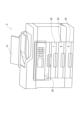
図4は、プリンタの概略的な外観図である。すなわち、本形態のプリンタ2は、4つのタイプのトレイから成る給紙トレイを備える。具体的には、給紙トレイの4つのタイプのトレイとして、多目的トレイ21と、第1トレイ22と、第2トレイ23と、第3トレイ24とを備える。そして、図5(A)に示すように、片面印刷時において、給紙トレイの各トレイと、それぞれ給紙可能な定型サイズの用紙の用紙サイズ名との関係が定められている。なお、第3トレイ24は、プリンタ2の本体に脱可能な給紙トレイであり、給紙可能な用紙サイズの範囲は、常設の多目的トレイ21や第1トレイ22と比較して狭い。
Figure 4 is a schematic external view of the printer. That is, the
また、本形態のプリンタ2は、給紙トレイの各トレイごとに、用紙サイズセンサ(図示せず)によって、そのトレイに用紙がセットされているか否か、さらには、そのトレイにセットされている用紙の用紙サイズを検出することができる。そして、プリンタ2は、給紙トレイの各トレイごとに、検出された用紙の用紙サイズを記憶している。また、ユーザは、プリンタ2の操作パネルを操作することにより、給紙トレイのトレイごとに、そこにセットされている用紙の用紙サイズを記憶させることができる。
In addition, the
したがって、本形態のプリンタ2は、PC1から印刷ジョブを受信した場合には、印刷ジョブに含まれる印刷設定に基づいて給紙トレイの1つトレイを選択する。つまり、印刷設定に含まれる給紙方法により指定された給紙トレイの1つトレイを選択する。そして、選択した給紙トレイのトレイから用紙を給紙し、印刷を可能としている。また、PC1から受信した印刷ジョブに含まれる印刷設定に、給紙方法として自動選択が含まれる場合には、給紙トレイの各トレイごとに記憶された用紙の用紙サイズに基づいて、給紙トレイの1つのトレイを選択し、そして、選択したトレイから、印刷設定に設定された用紙サイズの用紙を給紙することが可能である。
Therefore, when the
また、登録画面52において設定可能なユーザ定義サイズの場合には、図5(B)に示すように、プリンタ2では、給紙トレイの各トレイごとに、それぞれ給紙可能な用紙の用紙幅と、用紙高さとの範囲が定められている。しかし、プリンタ2では、ユーザ定義サイズと給紙トレイの各トレイとの関係は定義されていない。したがって、プリンタ2は、PC1から受信した印刷ジョブに含まれる印刷設定に、用紙サイズとしてユーザー定義サイズが設定され、且つ、給紙方法として自動選択が設定されていた場合には、プリンタ2は、給紙トレイの内の1つのトレイを選択することができず、エラーとなって印刷を実行することができない。
In addition, in the case of user-defined sizes that can be set on
また、本形態のプリンタ2は、両面印刷を行うための搬送機構(図示せず)を有している。両面印刷を実行する場合、プリンタ2は、その搬送機構を使用して、用紙の一面への印刷後、一面に印刷済みの用紙を排出する前に用紙の搬送方向を反転させ、両面印刷用の経路を介して搬送する。さらに、プリンタ2は、一面目と同じ印刷機能を使用して用紙の他面への印刷を行い、両面に印刷済みの用紙を排紙トレイ25へ排出する。プリンタ2の搬送機構にて用紙の搬送方向を適切に反転可能な用紙サイズの範囲、すなわち、プリンタ2にて両面印刷を実行可能な用紙サイズの範囲は、片面印刷時の場合よりも狭い場合が多い。
The
具体的には、本形態のプリンタ2は、用紙の用紙高さが182.0mm~431.8mmの範囲内、また、用紙の用紙幅が128.0~297.0mmの範囲内において両面印刷が可能である。また、図5(A)に示すように、両面印刷時の場合における、給紙トレイの各トレイと、それぞれ給紙可能な定型サイズの用紙名との関係が定められている。
Specifically, the
続いて、本形態のプリンタドライバ43による処理について説明する。なお、以下の処理およびフローチャートの各処理ステップは、基本的に、各プログラムに記述された命令に従ったCPU11の処理を示す。すなわち、CPU11による処理は、PC1のOS41のAPIを用いたハードウェア制御も含む。本明細書では、OS41の記載を省略して各プログラムの動作を説明する。すなわち、以下の説明において、「プログラムBがハードウェアCを制御する」という趣旨の記載は、「プログラムBがOS41のAPIを用いてハードウェアCを制御する」ことを指してもよい。また、プログラムに記述された命令に従ったCPU11の処理を、省略した文言で記載することがある。例えば、「CPU11が行う」、「プログラムが行う」のように記載することがある。
Next, the processing by the
以下、本形態のプリンタドライバ43による給紙方法の報知処理の手順について、図6のフローチャートを参照して説明する。給紙方法の報知処理は、プリンタドライバ43が起動されて印刷設定画面51が表示された状態では、適度なインターバルをおいて繰り返しPC1のCPU11にて実行される。
The procedure for the paper feed method notification process by the
まず、ステップ10(以下、S10と称す)において、CPU11は、ユーザによって用紙サイズの選択欄513が操作されて用紙サイズが変更されたか否かを判断する。そして、用紙サイズが変更されていないと判断した場合には(S10:NO)、次のS11移行して、CPU11は、他の処理を実行する。
First, in step 10 (hereinafter referred to as S10), the
一方、S10において、CPU11は、紙サイズの選択欄513がユーザによって操作されて用紙サイズが変更されたと判断した場合には(S10:YES)、次のS12に移行して、CPU11は、現在、給紙方法として自動選択が選択されているか否かを判断する。なお、用紙サイズが用紙の特性の一例である。
On the other hand, in S10, if the
ここで、ユーザが、現在、印刷設定画面51の給紙方法の選択欄517において自動選択を選択していると、CPU11が、給紙方法として自動選択が選択されていると判断し(S12:YES)、次のS13へ移行する。なお、用紙サイズが変更され、且つ給紙方法として自動選択が選択されいるタイミングが第1のタイミングの一例である。
If the user currently selects automatic selection in the paper feed
また、S12において、CPU11は、ユーザが印刷設定画面51の給紙方法の選択欄517において「自動選択」以外、例えば「多目的トレイ」や「第1トレイ」などを選択している場合には、給紙方法として「自動選択」が選択されていないと判断し(S12:NO)、図8に示す次のS30へ移行する。
In addition, in S12, if the user selects something other than "Automatic Selection" in the paper feed
次に、S13において、CPU11は、図5(A)に示すところの、給紙トレイの各トレイと、それぞれが給紙可能な定型サイズにおける用紙の用紙サイズ名との関係を示す情報をプリンタ2から取得する。
Next, in S13, the
なお、本形態では、S13において、CPU11が、給紙トレイの各トレイと、それぞれが給紙可能な定型サイズにおける用紙の用紙サイズ名との関係を示す情報を、プリンタ2から取得する構成としたが、それに限定されることはない。例えば、プリンタドライバ43がプリンタ2の機種ごとにテーブル(情報)として記憶していて、CPU11が、そのテーブルから読み出す構成や、前回プリンタ2から取得した情報をCPU11がメモリ14に記憶しておき、それを次回以降CPU11が読み出す構成であっても良い。その他、インターネットを介して外部サーバから情報をダウンロードする構成であっても良い。また、前回にプリンタ2から取得してキャッシュしておいた情報がある場合には、その情報から取得する構成であってもよい。
In this embodiment, in S13, the
次に、S14において、CPU11は、用紙サイズの選択欄513において設定された用紙サイズが、給紙トレイの全てのトレイから給紙可能か否かを判断する。S14におけるCPU11の判断は、図5(A)に示すところの、給紙トレイの各トレイと、それぞれが給紙可能な定型サイズにおける用紙の用紙サイズ名との関係を示す情報に基づいて判断される。
Next, in S14, the
具体的には、ここで、例えば、ユーザが、用紙サイズとして、B4、A4、Letter、Legal、のいずれか1つを用紙サイズの選択欄513において選択した場合には、図5(A)に示すように、それらの用紙サイズは、給紙トレイの全てのトレイから給紙可能である。したがって、CPU11は、給紙トレイの全てのトレイから給紙可能と判断し(S14:YES)、その後、給紙可能な給紙トレイをユーザに報知することなく、本報知処理を終了する。なお、この処理が、第1報知処理を実行させない処理の一例である。
Specifically, for example, if the user selects one of B4, A4, Letter, or Legal as the paper size in the paper
このように本形態では、ユーザが用紙サイズの選択欄513において選択した用紙サイズが、給紙トレイの全てのトレイから給紙可能の場合には、ユーザがプリンタ2の何れの給紙トレイに用紙をセットしても印刷可能である。したがって、用紙をセットすべき給紙トレイの報知を省略することで、印刷設定を設定する際に、報知に伴う煩わしさをユーザに生じさせ難く、ユーザは、設定作業をスムースに行うことが可能となる。
In this manner, in this embodiment, if the paper size selected by the user in the paper
また、ここで、ユーザが、用紙サイズの選択欄513において、A3、B5、A5などの1つを選択した場合には、図5(A)に示すように、それらの用紙サイズは、給紙トレイの全てのトレイから給紙することができるというわけではない。すなわち、給紙できなトレイが存在する。したがって、S14において、CPU11は、ユーザが用紙サイズの選択欄513において選択した用紙サイズが、給紙トレイの全てのトレイから給紙可能ではないと判断し(S14:NO)、次のS15へ移行する。
Here, if the user selects one of the sizes A3, B5, A5, etc. in the paper
次に、S15において、CPU11は、ユーザが用紙サイズの選択欄513において選択した用紙サイズが、給紙トレイの全てのトレイから給紙不可能か否かを判断する。なお、S15におけるCPU11の判断は、印刷ジョブに含まれる印字設定で、ユーザ定義サイズが選択されているか否か、もしくは、図5(A)に示すところの、給紙トレイの各トレイと、それぞれが給紙可能な定型サイズにおける用紙の用紙サイズ名との関係を示す情報に基づいて行われる。
Next, in S15,
そして、CPU11は、ユーザが用紙サイズの選択欄513において設定した用紙サイズが、給紙トレイの全てのトレイから給紙不可能であると判断した場合には(S15:YES)、次のS16へ移行する。そして、S16において、CPU11は、図7(A)に示すところの、排他警告画面53をディスプレイ18Aに表示し、また、給紙方法を変更した後に本報知処理を終了する。なお、本処理が第1報知処理および第1変更処理の一例である。
If the
すなわち、従来技術においては、PC1側で、ユーザが、給紙方法として自動選択を選択している状態において、用紙サイズの選択欄513において用紙サイズとしてユーザ定義サイズを選択した状態で、その後、さらに印刷を実行したとすると、プリンタ2側では、印刷ジョブに含まれる印刷設定に基づいて、給紙トレイの内、1つのトレイを選択することができない。したがって、プリンタ2側では、エラーが発生することになり印刷をすることができない。
In other words, in the prior art, if a user selects automatic selection as the paper feed method on
この際、ユーザは、PC1の設置場所からプリンタ2の設置場所に移動して初めて印刷ができていないことに気づくので、利便性が悪い。 In this case, the user will only notice that printing is not possible after moving from the location where PC1 is installed to the location where Printer2 is installed, which is inconvenient.
ところが、本形態では、例えば、ユーザが用紙サイズの選択欄513において用紙サイズとしてユーザ定義サイズを選択した際に、給紙方法として自動選択が設定されている場合には、排他警告画面53をディスプレイ18Aに表示する。
However, in this embodiment, for example, when the user selects a user-defined size as the paper size in the paper
この排他警告画面53には、用紙サイズとしてユーザ定義サイズと、給紙方法として自動選択とが同時に設定することができないことをユーザに報知するための排他警告メッセージ53Aが含まれる。
This
また、排他警告画面53には、給紙方法を自動選択から多目的トレイに変更したことをユーザに報知するするための設定変更メッセージ53Bが含まれる。さらに、排他警告画面53には、多目的トレイに用紙をセットすることを案内するための案内メッセージ53Cが含まれる。なお、設定変更メッセージ53Bが変更情報の一例であり、案内メッセージ53Cが第1トレイ情報の一例である。
The
したがって、ディスプレイ18Aに表示された排他警告画面53を見たユーザは、多目的トレイ21に必要な用紙をセットすることで、プリンタ2においてスムースに印刷を実行することができ、利便性が向上する。
Therefore, when a user sees the
なお、本形態においては、用紙サイズがユーザ定義サイズであった場合には、給紙方法を多目的トレイ21に変更するようにしたが、第1トレイ22であっても良い。図5(B)に示すように、多目的トレイ21および第1トレイ22は、給紙できる用紙の用紙幅と、用紙高さとの範囲が広く、いろいろなサイズの用紙に対応して印刷をすることができる。また、定型サイズの用紙を用いる場合においても、図5(A)に示すように、給紙できる用紙の用紙サイズの種類が多く、いずれの場合でも、ユーザの利便性が向上する。したがって、給紙可能な用紙の用紙サイズの種類が多い給紙トレイであれば、多目的トレイ21や第1トレイ22に限定されることはない。
In this embodiment, when the paper size is a user-defined size, the paper feeding method is changed to the
このように本形態おいては、ユーザ定義サイズの場合には、あらかじめ対応可能な給紙トレイの特定のトレイが決められており、複数のトレイで対応可能なサイズであったとしても、特定のトレイに変更することに限定することで、ユーザ定義サイズにおける対応がシンプルになり、ユーザが困惑し難い。 In this way, in the case of user-defined sizes, a specific paper feed tray that can handle the size is pre-determined, and even if the size can be handled by multiple trays, by limiting the change to a specific tray, handling user-defined sizes is simplified and users are less likely to be confused.
一方、S15において、CPU11は、ユーザが用紙サイズの選択欄513において設定した用紙サイズが、給紙トレイの全てのトレイから給紙不可能ではないと判断した場合には(S15:NO)、次のS17へ移行する。
On the other hand, in S15, if the
次に、S17において、CPU11は、図7(B)に示すところの、案内画面54をディスプレイ18Aに表示した後、本報知処理を終了する。なお、本処理が第1報知処理の一例である。
Next, in S17, the
すなわち、案内画面54には、ユーザが用紙サイズの選択欄513において選択した用紙サイズが給紙可能な給紙トレイのトレイを報知する報知メッセージ54Aが含まれる。また、給紙可能な給紙トレイのトレイに用紙をセットすることを案内するための案内メッセージ54Bが含まれる。なお、報知メッセージ54Aが第1トレイ情報の一例である。
That is, the
具体的には、例えば、用紙サイズの選択欄513において選択した用紙サイズがA3の場合には、図5(A)に示すように、A3が給紙可能な給紙トレイは、多目的トレイ21および第1トレイ22である。したがって、CPU11は、給紙方法が自動選択の場合においても、給紙可能な多目的トレイ21および第1トレイ22を案内する報知メッセージ54Aを含む案内画面54をディスプレイ18Aに表示する。それによって、ユーザは、プリンタ2の多目的トレイ21または第1トレイ22に用紙をセットして印刷を進めることが可能となる。
Specifically, for example, if the paper size selected in the paper
このように本形態においては、ユーザが給紙方法として自動選択を選択している場合においても、給紙可能な給紙トレイを報知する報知メッセージ54Aおよび案内メッセージ54Bを含む案内画面54をディスプレイ18Aに表示するので、ユーザは、ディスプレイ18Aに表示された案内画面54の報知メッセージ54Aおよび案内メッセージ54Bを見て、表示されたトレイに用紙をセットすれば、印刷することができ、ユーザの利便性が向上する。
In this manner, in this embodiment, even if the user selects automatic selection as the paper feed method, the
なお、本形態では、報知メッセージ54Aにおいて、ユーザが用紙サイズの選択欄513において選択した用紙サイズの用紙が給紙可能なトレイをすべて報知するようにしたが、給紙可能なトレイの一部、すなわち、利便性の高い給紙トレイのトレイを報知するようにしても差し支えない。また、給紙不可能なトレイについて、給紙不可能である旨を報知するようにしても差し支えない。
In this embodiment, the
また、本形態において、用紙サイズの選択欄513において選択した用紙サイズが供給可能なトレイが1つである場合には、給紙方法において、自動選択から供給可能なトレイに給紙方法を変更し、また、案内メッセージ54Bにおいて、供給可能なトレイを報知するようにしても差し支えない。
In addition, in this embodiment, if there is only one tray that can supply the paper size selected in the paper
具体的には、例えば、用紙サイズの選択欄513において選択した用紙サイズが長尺紙(297mm×900mm)であった場合、長尺紙(297mm×900mm)の用紙を供給可能なトレイは、多目的トレイ21のみであるので、給紙方法において、自動選択から供給可能な多目的トレイに給紙方法を変更し、また、案内メッセージ54Bにおいて、多目的トレイを報知するようにしても差し支えない。
Specifically, for example, if the paper size selected in the paper
一方、S12において、給紙方法が「自動選択」でないと判断した場合(S12:NO)、図8に示すS30において、CPU11は、図5(A)に示すところの、給紙トレイの各トレイと、それぞれが給紙可能な定型サイズにおける用紙の用紙サイズ名との関係を示す情報をプリンタ2から取得する。図5(A)に示すところの、給紙トレイの各トレイと、それぞれが給紙可能な定型サイズにおける用紙の用紙サイズ名との関係を示す情報は、プリンタ2から取得する場合に限定されないことは、S13において述べたとおりである。
On the other hand, if it is determined in S12 that the paper feed method is not "automatic selection" (S12: NO), in S30 shown in FIG. 8, the
次に、S31において、CPU11は、ユーザが用紙サイズの選択欄513において設定した用紙サイズの用紙が、現在給紙方法の選択欄517において選択されている給紙トレイから給紙可能か否かを判断する。
Next, in S31, the
そして、CPU11は、ユーザが用紙サイズの選択欄513において選択した用紙サイズの用紙が、給紙方法の選択欄517において選択されている給紙トレイから給紙可能と判断した場合には(S31:YES)、本報知処理を終了する。なお、S31におけるCPU11の判断は、S30においてプリンタ2から取得したところの、図5(A)に示す、給紙トレイの各トレイと、それぞれが給紙可能な定型サイズにおける用紙の用紙サイズ名との関係を示す情報に基づいて判断される。
If the
このように本形態では、給紙方法の選択欄517において自動選択が選択されていない状態においても、ユーザが用紙サイズの選択欄513において選択した用紙サイズの用紙が、現在給紙方法の選択欄517において選択されている給紙トレイから給紙可能の場合には、ユーザが設定している印刷設定に基づいてプリンタ2において印刷可能である。したがって、用紙をセットすべき給紙トレイの報知を省略することで、印刷設定を設定する際に、報知に伴う煩わしさをユーザに生じさせ難く、ユーザは、設定作業をスムースに行うことが可能となる。
In this manner, in this embodiment, even if automatic selection is not selected in the paper feed
一方、CPU11が、ユーザが用紙サイズの選択欄513において選択した用紙サイズの用紙が、給紙方法の選択欄517において選択されている給紙トレイから給紙可能ではないと判断した場合には(S31:NO)、次のS32へ移行する。なお、S31の処理が第2のタイミングの一例である。
On the other hand, if the
次に、S32において、CPU11は、ユーザが用紙サイズの選択欄513において用紙サイズとしてユーザ定義サイズを選択しているか否かを判断する。そして、CPU11が、ユーザ定義サイズを選択していないと判断した場合には(S32:NO)、次のS33へ移行する。
Next, in S32, the
次に、S33において、CPU11は、現在用紙サイズの選択欄513において選択されている用紙サイズの用紙が、プリンタ2の給紙トレイの複数のトレイから給紙可能か否かを判断する。そして、CPU1が、現在用紙サイズの選択欄513において選択されている用紙サイズの用紙が、プリンタ2の給紙トレイの複数のトレイから給紙可能であると判断した場合には(S33:YES)、次のS34へ移行する。なお、S33におけるCPU11の判断は、S30においてプリンタ2から取得したところの、図5(A)に示す、給紙トレイの各トレイと、それぞれが給紙可能な定型サイズにおける用紙の用紙サイズ名との関係を示す情報に基づいて判断される。
Next, in S33, the
次に、S34において、CPU11は、図9(A)に示すところの、排他警告画面55をディスプレイ18Aに表示し、また、給紙方法を自動選択に変更した後、本報知処理を終了する。なお、S34の処理が、第2変更処理と第2報知処理の一例である。
Next, in S34, the
排他警告画面55には、用紙サイズの選択欄513において選択された用紙サイズと、給紙方法の選択欄517において選択されている給紙方法とが同時に設定することができないことをユーザに報知するための排他警告メッセージ55Aが含まれる。
The
また、排他警告画面55には、給紙方法を変更したことをユーザに報知するするための設定変更メッセージ55Bが含まれる。さらに、排他警告画面55には、用紙サイズの選択欄513において選択された用紙サイズの用紙を給紙することが可能な給紙トレイのトレイを案内するための案内メッセージ55Cが含まれる。なお、案内メッセージ55Cが第2トレイ情報の一例である。
The
すなわち、本形態では、例えば、図9(A)に示すように、ユーザが用紙サイズの選択欄513において用紙サイズとしてA6を選択し、また、給紙方法の選択欄517において給紙方法として第2トレイが選択されている場合には、図5(A)に示すように、A6サイズの用紙は、第2トレイからは給紙することができない。したがって、S33において、CPU11は、給紙方法を自動選択に変更し、また、排他警告画面55の案内メッセージ55Cをディスプレイ18Aに表示することによって、A6サイズの用紙が給紙可能な第1トレイ22や多目的トレイ21への用紙のセットをユーザに案内する。
That is, in this embodiment, for example, as shown in FIG. 9(A), if the user selects A6 as the paper size in the paper
一方、S33において、CPU1が、現在用紙サイズの選択欄513において選択されている用紙サイズの用紙が、プリンタ2の給紙トレイの複数のトレイから給紙可能ではない、すなわち、プリンタ2の給紙トレイの1つのトレイのみからしか給紙できないと判断した場合には(S33:NO)、次のS35へ移行する。
On the other hand, if
次に、S35において、CPU11は、図9(B)に示すところの、排他警告画面56をディスプレイ18Aに表示し、また、現在用紙サイズの選択欄513において選択されている用紙サイズの用紙が給紙可能な給紙トレイの特定のトレイに変更した後、本報知処理を終了する。なお、S35の処理が、第2変更処理と第2報知処理の一例である。
Next, in S35, the
排他警告画面56には、用紙サイズの選択欄513において選択された用紙サイズと、給紙方法の選択欄517において選択されている給紙方法とが同時に設定することができないことをユーザに報知するための排他警告メッセージ56Aが含まれる。また、排他警告画面56には、給紙方法を変更したことをユーザに報知するするための設定変更メッセージ56Bが含まれる。さらに、排他警告画面56には、用紙サイズの選択欄513において設定された用紙サイズの用紙を給紙することが可能な給紙トレイのトレイを案内するための案内メッセージ56Cが含まれる。なお、案内メッセージ56Cが第2トレイ情報の一例である。
The
すなわち、本形態では、例えば、図9(B)に示すように、ユーザが用紙サイズの選択欄513において用紙サイズとして長尺紙(297mm×900mm)を選択し、また、給紙方法の選択欄517において給紙方法として第1トレイが選択されている場合には、図5(A)に示すように、長尺紙(297mm×900mm)の用紙は、第1トレイからは給紙することができない。したがって、S33において、CPU11は、図5(A)に示す、給紙トレイの各トレイと、それぞれが給紙可能な定型サイズにおける用紙の用紙サイズ名との関係を示す情報に基づいて、長尺紙(297mm×900mm)の用紙を給紙することが可能な多目的トレイ21に給紙方法を変更し、また、排他警告画面56をディスプレイ18Aに表示することによって、長尺紙(297mm×900mm)の用紙が給紙可能な多目的トレイ21への用紙のセットをユーザに案内する。
That is, in this embodiment, for example, as shown in FIG. 9B, if the user selects long paper (297 mm x 900 mm) as the paper size in the paper
一方、S32において、CPU11が、ユーザが用紙サイズの選択欄513において用紙サイズとしてユーザ定義サイズを選択していると判断した場合には(S32:YES)、次に、S36へ移行する。
On the other hand, if the
そして、S36において、CPU11は、図10に示すところの、排他警告画面57をディスプレイ18Aに表示し、また、給紙方法を変更した後に本報知処理を終了する。なお、本処理が第3変更処理および第3報知処理の一例である。
Then, in S36, the
すなわち、従来技術においては、PC1側で、ユーザが、給紙方法として第1トレイを選択し、さらに用紙サイズの選択欄513において用紙サイズとしてユーザ定義サイズを選択した状態で、その後、さらに印刷を実行したとすると、プリンタ2側では、ユーザ定義サイズの用紙が給紙できない場合がある。例えば、ユーザ定義サイズの用紙高さとして、431.8mmを超えるサイズが指定されていると、第1トレイ22からは給紙することができない。したがって、プリンタ2側では、エラーが発生することになり印刷をすることができない。
In other words, in the prior art, if a user selects the first tray as the paper feed method on the
この際、ユーザは、PC1の設置場所からプリンタ2の設置場所に移動して初めて印刷ができていないことに気づくので、利便性が悪い。 In this case, the user will only notice that printing is not possible after moving from the location where PC1 is installed to the location where Printer2 is installed, which is inconvenient.
したがって、本形態では、ユーザが用紙サイズの選択欄513において用紙サイズとしてユーザ定義サイズを選択した場合には、排他警告画面57をディスプレイ18Aに表示する。
Therefore, in this embodiment, if the user selects a user-defined size as the paper size in the paper
この排他警告画面57には、用紙サイズとしてユーザ定義サイズと、給紙方法として第1トレイとが同時に設定することができないことをユーザに報知するための排他警告メッセージ57Aが含まれる。
This
また、排他警告画面57には、給紙方法を第1トレイから多目的トレイに変更したことをユーザに報知するするための設定変更メッセージ57Bが含まれる。さらに、排他警告画面57には、多目的トレイに用紙をセットすることを案内するための案内メッセージ57Cが含まれる。なお、多目的トレイが特定のトレイの一例である。
The
したがって、ディスプレイ18Aに表示された排他警告画面57を見たユーザは、多目的トレイ21に必要な用紙をセットすることで、プリンタ2においてスムースに印刷を実行することができ、利便性が向上する。
Therefore, when a user sees the
このように本形態おいては、ユーザ定義サイズの場合には、あらかじめ対応可能な給紙トレイの特定のトレイが決められており、複数のトレイで対応可能なサイズであったとしても、特定のトレイに変更することに限定することで、ユーザ定義サイズにおける対応がシンプルになり、ユーザが困惑し難い。 In this way, in the case of user-defined sizes, a specific paper feed tray that can handle the size is pre-determined, and even if the size can be handled by multiple trays, by limiting the change to a specific tray, handling user-defined sizes is simplified and users are less likely to be confused.
以上、詳細に説明したように、本形態のプリンタドライバ43を備えるPC1は、給紙方法として自動選択が設定された状態おいて、ユーザが用紙サイズの選択欄513において用紙サイズを設定したタイミングにおいて、その時点で設定されている用紙サイズの用紙を給紙することが可能な給紙トレイのトレイを報知する。これにより、ユーザは給紙トレイの各トレイの給紙可否をプリンタでの印刷前に把握することができ、ユーザの意図する印刷が行われる可能性が高まる。
As described above in detail, when automatic selection is set as the paper feeding method, the
さらに、本形態のプリンタドライバ43を備えるPC1は、給紙トレイのトレイごとに収容可能あるいは搬送可能な物理的な用紙サイズが決まることから、用紙サイズに基づいて給紙トレイのトレイの給紙可否を報知することで、ユーザは給紙トレイの各トレイごとの給紙可否を的確に把握できる。したがって、ユーザは、給紙可能な給紙トレイのトレイに的確に用紙をセットすることができる。
In addition, since the physical paper size that can be stored or transported is determined for each paper feed tray, the
さらに、本形態では、ユーザが用紙サイズの選択欄513において用紙サイズを変更したタイミングで直ぐに報知することで、ユーザは用紙の特性に基づくトレイに関する報知であることを認識し易い。
Furthermore, in this embodiment, the notification is given immediately when the user changes the paper size in the paper
なお、本形態は単なる例示にすぎず、本発明を何ら限定するものではない。したがって本発明は当然に、その要旨を逸脱しない範囲内で種々の改良、変形が可能である。例えば、プリンタ2は、印刷単機能の装置に限らず、例えば、原稿読取機能やFAX送受信機能を備えている装置であっても良い。本形態は、プリンタ2に代えて、複合機、コピー機、FAX装置等に接続されるPC1にも適用可能である。また、PC1には、2台以上のプリンタが接続されていても良い。
Note that this embodiment is merely an example and does not limit the present invention in any way. Naturally, therefore, the present invention can be improved and modified in various ways without departing from the spirit of the invention. For example, the
また、各図に示した画面の構成は、いずれも一例であり、図示の例に限らない。例えば、印刷設定画面51の基本タブ51Aの画面では、用紙サイズと両面印刷と給紙トレイとの全ての選択を受け付けるとしたが、一部の選択は別の画面で受け付けてもよいし、それぞれ別の画面であっても良い。
The screen configurations shown in each figure are merely examples and are not limited to the examples shown. For example, the
また、本形態では、用紙の特性として用紙サイズを用いたが、本発明は何らそれに限定されるものではない。例えば、用紙の種類を用いても良い。光沢紙や厚紙等、用紙の種類によっても給紙可能な給紙トレイのトレイ決まる場合がある。したがって、用紙種類の選択欄511への操作を受け付けたタイミングにおいて、その時点で設定されている用紙サイズの用紙および用紙の種類を給紙することが可能な給紙トレイのトレイを報知するようにしても差し支えない。なお、用紙種類の選択欄511への操作を受け付けたタイミングが第1タイミングの一例である。
In addition, in this embodiment, paper size is used as the paper characteristic, but the present invention is not limited to this. For example, paper type may be used. The type of paper, such as glossy paper or thick paper, may determine the paper feed tray that can feed the paper. Therefore, at the timing when an operation is received in the paper
この場合には、図6に示すS10において、CPU11が、「用紙の種類が変更されたか?」を判断するように構成することで実現可能である。
In this case, this can be achieved by configuring the
また、その他、例えば、印刷品質の選択欄512、ふちなし印刷の選択欄514、両面印刷の選択欄516、およびOKボタン518の何れかへの操作を受け付けたタイミングにおいて、その時点で設定されている用紙サイズの用紙を給紙することが可能な給紙トレイのトレイを報知するようにしても差し支えない。なお、これら操作を受け付けたタイミングが第1タイミングの一例である。
In addition, for example, when an operation is received in the print
この場合には、図6に示すS10において、CPU11が、「印刷品質の選択欄512、ふちなし印刷の選択欄514、両面印刷の選択欄516、およびOKボタン518の何れかが変更操作もしくは操作されたか?」を判断するように構成することで実現可能である。
In this case, this can be realized by configuring the
また、本形態では、ユーザが両面/小冊子の選択欄516で「なし」を選択した片面印刷の場合について述べたが、ユーザが両面/小冊子の選択欄516で「する」を選択した両面/小冊子の場合についても適用できる。
In addition, in this embodiment, the case of single-sided printing where the user selects "No" in the double-sided/
この場合には、図6に示すS14、S15、図8に示すS31、S32において、CPU11が、図5(A)に示す、給紙トレイの各トレイと、両面印刷の場合の、それぞれが給紙可能な定型サイズにおける用紙の用紙サイズ名との関係を示す情報に基づいて判断するようにすればよい。
In this case, in steps S14 and S15 shown in FIG. 6 and steps S31 and S32 shown in FIG. 8, the
また、本形態では、排他警告画面53、55、56および案内画面54をディスプレイ18Aに表示するようにしたが、これに限定されるものではない。例えば、排他警告画面53、55、56および案内画面54上の各メッセージなどを音声により報知するようにしても差し支えない。音もしくは振動のパータンにより、排他警告画面53、55、56および案内画面54上の各メッセージなどの内容をユーザに報知するようにしても差し支えない。また、これらの組み合わせであっても良い。
In addition, in this embodiment, the exclusion warning screens 53, 55, 56 and the
また、排他警告画面53、55、56および案内画面54は、印刷設定画面51に組み込まれた状態でユーザIF18のディスプレイ18Aに表示されるようにしても差し支えないし、また、案内画面54上に、ポップアップ表示されるようにしても差し支えない。もちろん、排他警告画面53、55、56および案内画面54を単独でディスプレイ18Aに表示されるようにしても差し支えない。
In addition, the exclusion warning screens 53, 55, 56 and the
また、本形態では、プリンタドライバ43の処理として説明したが、本発明のプログラムは、プリンタドライバに限らない。プリンタドライバに代えて汎用の印刷プログラムを備えるOSが搭載された、いわゆるドライバレスの構成を有するPCにも適用可能である。本発明は、例えば、汎用の印刷プログラムとは別にPCに組み込まれる印刷に関するプログラム、汎用の印刷プログラムと協働して印刷設定を受け付けるプログラム、にも適用可能である。
In addition, although this embodiment has been described as processing by the
また、各実施の形態に開示されている任意のフローチャートにおいて、任意の複数のステップにおける複数の処理は、処理内容に矛盾が生じない範囲で、任意に実行順序を変更できる、または並列に実行できる。 In addition, in any of the flowcharts disclosed in each embodiment, the execution order of multiple processes in any of the steps can be changed or they can be executed in parallel as desired, as long as no inconsistencies occur in the process content.
また、各実施の形態に開示されている処理は、単一のCPU、複数のCPU、ASICなどのハードウェア、またはそれらの組合せで実行されてもよい。また、実施の形態に開示されている処理は、その処理を実行するためのプログラムを記録した記録媒体、または方法等の種々の態様で実現することができる。 The processes disclosed in each embodiment may be executed by a single CPU, multiple CPUs, hardware such as an ASIC, or a combination of these. The processes disclosed in the embodiments may be realized in various ways, such as a recording medium on which a program for executing the processes is recorded, or a method.
1 PC
2 プリンタ
11 CPU
16 通信IF
18 ユーザIF
18A ディスプレイ
41 OS
43 プリンタドライバ
51 印刷設定画面
511 用紙種類の選択欄
517 給紙方法の選択欄
53、55、56 排他警告画面
54 案内画面
1 PC
2
16 Communication IF
18 User IF
43
Claims (7)
前記コンピュータに、
前記印刷設定のうち前記給紙方法が前記自動選択以外の選択肢から前記自動選択に変更されたタイミングにおいて、
前記印刷設定で設定されている前記用紙の特性に対しての、前記プリンタにある各トレイの給紙可否を示す第1トレイ情報を、前記ユーザインタフェースに報知させる第1報知処理を実行させる、
ことを特徴とするプログラム。 A program executable by a computer of an information processing device, which receives print settings used for printing on a printer via a user interface of the information processing device, the print settings including paper characteristics and a paper feeding method, and selectable options for the paper feeding method including automatic selection in which a tray is selected by the printer, the printer having a plurality of trays, each of which has paper characteristics that can be fed, and when the paper feeding method set in a print job is automatic selection, a tray is selected based on the paper characteristics set in the print job;
The computer includes:
At a timing when the paper feed method of the print settings is changed from an option other than the automatic selection to the automatic selection ,
execute a first notification process for causing the user interface to notify first tray information indicating whether each tray in the printer can feed paper for the characteristics of the paper set in the print settings;
A program characterized by:
前記コンピュータに、
前記印刷設定のうち前記給紙方法に前記自動選択が設定された状態で、前記印刷設定のうち前記用紙の特性が変更されたタイミングにおいて、
前記印刷設定で設定されている前記用紙の特性に対しての、前記プリンタにある各トレイの給紙可否を示す第1トレイ情報を、前記ユーザインタフェースに報知させる第1報知処理を実行させる、
ことを特徴とするプログラム。 A program executable by a computer of an information processing device, which receives print settings used for printing on a printer via a user interface of the information processing device, the print settings including paper characteristics and a paper feeding method, and selectable options for the paper feeding method including automatic selection in which a tray is selected by the printer, the printer having a plurality of trays, each of which has paper characteristics that can be fed, and when the paper feeding method set in a print job is automatic selection, a tray is selected based on the paper characteristics set in the print job;
The computer includes:
When the paper characteristics of the print settings are changed in a state in which the automatic selection is set as the paper feed method of the print settings ,
execute a first notification process for causing the user interface to notify first tray information indicating whether each tray in the printer can feed paper for the characteristics of the paper set in the print settings;
A program characterized by:
前記コンピュータに、
前記印刷設定のうち前記給紙方法に前記自動選択が設定された状態での第1のタイミングにおいて、
前記印刷設定で設定されている前記用紙の特性に対しての給紙不可のトレイが1つでもあれば、第1報知処理を実行させ、前記第1報知処理では、前記印刷設定で設定されている前記用紙の特性に対しての、前記プリンタにある各トレイの給紙可否を示す第1トレイ情報を、前記ユーザインタフェースに報知させ、
前記印刷設定で設定されている前記用紙の特性に対して前記複数のトレイの全てで給紙可能であれば、前記第1報知処理を実行させない、
ことを特徴とするプログラム。 A program executable by a computer of an information processing device, which receives print settings used for printing on a printer via a user interface of the information processing device, the print settings including paper characteristics and a paper feeding method, and selectable options for the paper feeding method including automatic selection in which a tray is selected by the printer, the printer having a plurality of trays, each of which has paper characteristics that can be fed, and when the paper feeding method set in a print job is automatic selection, a tray is selected based on the paper characteristics set in the print job;
The computer includes:
At a first timing in a state where the automatic selection is set as the paper feed method among the print settings,
If there is at least one tray that cannot feed paper for the paper characteristics set in the print settings, a first notification process is executed, and in the first notification process, first tray information indicating whether each tray in the printer can feed paper for the paper characteristics set in the print settings is notified to the user interface,
if the paper can be fed from all of the plurality of trays according to the characteristics of the paper set in the print settings, the first notification process is not executed.
A program characterized by:
前記コンピュータに、
前記印刷設定のうち前記給紙方法に前記自動選択が設定された状態での第1のタイミングにおいて、
前記印刷設定で設定されている前記用紙の特性に対しての、前記プリンタにある各トレイの給紙可否を示す第1トレイ情報を、前記ユーザインタフェースに報知させる第1報知処理を実行させ、
前記印刷設定で設定されている前記用紙の特性に対して前記給紙方法に前記自動選択を設定できない場合、前記給紙方法を変更させる第1変更処理と、前記給紙方法の変更を示す変更情報を前記ユーザインタフェースに報知させる前記第1報知処理とを実行させる、
ことを特徴とするプログラム。 A program executable by a computer of an information processing device, which receives print settings used for printing on a printer via a user interface of the information processing device, the print settings including paper characteristics and a paper feeding method, and selectable options for the paper feeding method including automatic selection in which a tray is selected by the printer, the printer having a plurality of trays, each of which has paper characteristics that can be fed, and when the paper feeding method set in a print job is automatic selection, a tray is selected based on the paper characteristics set in the print job;
The computer includes:
At a first timing in a state where the automatic selection is set as the paper feed method among the print settings,
execute a first notification process for notifying the user interface of first tray information indicating whether each tray in the printer can feed paper for the characteristics of the paper set in the print settings;
When the automatic selection cannot be set as the paper feed method for the characteristics of the paper set in the print settings, a first change process for changing the paper feed method and a first notification process for notifying the user interface of change information indicating the change of the paper feed method are executed.
A program characterized by:
前記コンピュータに、
前記印刷設定のうち前記給紙方法に前記自動選択が設定された状態での第1のタイミングにおいて、
前記印刷設定で設定されている前記用紙の特性に対しての、前記プリンタにある各トレイの給紙可否を示す第1トレイ情報を、前記ユーザインタフェースに報知させる第1報知処理を実行させ、
前記印刷設定のうち前記給紙方法と前記用紙の特性とで併用不可の組み合わせが設定された状態での第2のタイミングにおいて、
設定されている前記用紙の特性で給紙可能なトレイが1つのトレイのみの場合には給紙方法を前記1つのトレイに変更し、設定されている前記用紙の特性で給紙可能なトレイが複数ある場合には給紙方法を自動選択に変更する第2変更処理と、
設定されている前記用紙の特性で給紙可能なトレイを示す第2トレイ情報を、前記ユーザインタフェースに報知させる第2報知処理と、
を実行させる、
ことを特徴とするプログラム。 A program executable by a computer of an information processing device, which receives print settings used for printing on a printer via a user interface of the information processing device, the print settings including paper characteristics and a paper feeding method, and selectable options for the paper feeding method including automatic selection in which a tray is selected by the printer, the printer having a plurality of trays, each of which has paper characteristics that can be fed, and when the paper feeding method set in a print job is automatic selection, a tray is selected based on the paper characteristics set in the print job;
The computer includes:
At a first timing in a state where the automatic selection is set as the paper feed method among the print settings,
execute a first notification process for notifying the user interface of first tray information indicating whether each tray in the printer can feed paper for the characteristics of the paper set in the print settings;
At a second timing in a state where an incompatible combination of the paper feed method and the paper characteristics is set in the print settings,
a second change process for changing the paper feed method to the one tray when there is only one tray that can feed paper with the set paper characteristics, and changing the paper feed method to automatic selection when there are multiple trays that can feed paper with the set paper characteristics;
a second notification process for notifying the user interface of second tray information indicating a tray from which paper can be fed according to the set characteristics of the paper;
Execute the
A program characterized by:
前記用紙の特性である用紙サイズに、ユーザによって定義されるサイズであるユーザ定義サイズの設定が可能であり、前記プリンタの前記複数のトレイには、前記ユーザ定義サイズに対応する特定のトレイが含まれ、
前記用紙の特性の用紙サイズに前記ユーザ定義サイズが設定されている場合には、給紙方法を前記特定のトレイに変更する第3変更処理と、前記特定のトレイを前記ユーザインタフェースに報知させる第3報知処理とを実行させる、
ことを特徴とするプログラム。 The program according to claim 5,
a user-defined size that is a size defined by a user can be set as a paper size that is a characteristic of the paper, and a specific tray corresponding to the user-defined size is included in the plurality of trays of the printer;
When the user-defined size is set as the paper size of the paper characteristics, a third change process is executed to change the paper feed method to the specific tray, and a third notification process is executed to notify the user interface of the specific tray.
A program characterized by:
前記コンピュータは、
プリンタでの印刷に用いる印刷設定を、前記情報処理装置のユーザインタフェースを介して受け付ける受付処理を実行し、前記印刷設定には、用紙の特性と給紙方法とが含まれ、前記給紙方法で選択可能な選択肢には、トレイの選択を前記プリンタで行う自動選択が含まれ、前記プリンタは、複数のトレイを有し、トレイごとに給紙可能な用紙の特性があり、印刷ジョブに設定されている前記給紙方法が自動選択であった場合、前記印刷ジョブに設定されている前記用紙の特性に基づいてトレイを選択するものであり、
さらに前記コンピュータは、
前記印刷設定のうち前記給紙方法が前記自動選択以外の選択肢から前記自動選択に変更されたタイミングにおいて、
前記印刷設定で設定されている前記用紙の特性に対しての、前記プリンタにある各トレイの給紙可否を示す第1トレイ情報を、前記ユーザインタフェースに報知させる第1報知処理を実行する、
ことを特徴とする情報処理装置。 An information processing device including a computer,
The computer includes:
a receiving process is executed to receive print settings to be used for printing on a printer via a user interface of the information processing device, the print settings include paper characteristics and a paper feeding method, and selectable options for the paper feeding method include automatic selection in which a tray is selected by the printer, the printer has a plurality of trays, each of which has paper characteristics that can be fed, and when the paper feeding method set in the print job is automatic selection, a tray is selected based on the paper characteristics set in the print job;
The computer further comprises:
At a timing when the paper feed method of the print settings is changed from an option other than the automatic selection to the automatic selection ,
execute a first notification process for causing the user interface to notify first tray information indicating whether each tray in the printer can feed paper for the characteristics of the paper set in the print settings;
23. An information processing apparatus comprising:
Priority Applications (1)
| Application Number | Priority Date | Filing Date | Title |
|---|---|---|---|
| JP2021028733A JP7619082B2 (en) | 2021-02-25 | 2021-02-25 | PROGRAM AND INFORMATION PROCESSING APPARATUS |
Applications Claiming Priority (1)
| Application Number | Priority Date | Filing Date | Title |
|---|---|---|---|
| JP2021028733A JP7619082B2 (en) | 2021-02-25 | 2021-02-25 | PROGRAM AND INFORMATION PROCESSING APPARATUS |
Publications (2)
| Publication Number | Publication Date |
|---|---|
| JP2022129877A JP2022129877A (en) | 2022-09-06 |
| JP7619082B2 true JP7619082B2 (en) | 2025-01-22 |
Family
ID=83150780
Family Applications (1)
| Application Number | Title | Priority Date | Filing Date |
|---|---|---|---|
| JP2021028733A Active JP7619082B2 (en) | 2021-02-25 | 2021-02-25 | PROGRAM AND INFORMATION PROCESSING APPARATUS |
Country Status (1)
| Country | Link |
|---|---|
| JP (1) | JP7619082B2 (en) |
Citations (6)
| Publication number | Priority date | Publication date | Assignee | Title |
|---|---|---|---|---|
| JP2000143017A (en) | 1998-11-16 | 2000-05-23 | Ricoh Co Ltd | Printer device |
| JP2007233467A (en) | 2006-02-27 | 2007-09-13 | Ricoh Co Ltd | Printer driver and information processing terminal |
| JP2008225025A (en) | 2007-03-13 | 2008-09-25 | Ricoh Co Ltd | Image forming apparatus, image forming system, program, and recording medium |
| JP2011161793A (en) | 2010-02-10 | 2011-08-25 | Seiko Epson Corp | Printer and printing system |
| JP2018083292A (en) | 2016-11-21 | 2018-05-31 | セイコーエプソン株式会社 | Printing apparatus, control method, information processing apparatus, information processing method, and information processing program |
| JP2020087294A (en) | 2018-11-30 | 2020-06-04 | キヤノン株式会社 | Information processing device and program |
-
2021
- 2021-02-25 JP JP2021028733A patent/JP7619082B2/en active Active
Patent Citations (6)
| Publication number | Priority date | Publication date | Assignee | Title |
|---|---|---|---|---|
| JP2000143017A (en) | 1998-11-16 | 2000-05-23 | Ricoh Co Ltd | Printer device |
| JP2007233467A (en) | 2006-02-27 | 2007-09-13 | Ricoh Co Ltd | Printer driver and information processing terminal |
| JP2008225025A (en) | 2007-03-13 | 2008-09-25 | Ricoh Co Ltd | Image forming apparatus, image forming system, program, and recording medium |
| JP2011161793A (en) | 2010-02-10 | 2011-08-25 | Seiko Epson Corp | Printer and printing system |
| JP2018083292A (en) | 2016-11-21 | 2018-05-31 | セイコーエプソン株式会社 | Printing apparatus, control method, information processing apparatus, information processing method, and information processing program |
| JP2020087294A (en) | 2018-11-30 | 2020-06-04 | キヤノン株式会社 | Information processing device and program |
Also Published As
| Publication number | Publication date |
|---|---|
| JP2022129877A (en) | 2022-09-06 |
Similar Documents
| Publication | Publication Date | Title |
|---|---|---|
| JP6218485B2 (en) | Printing apparatus, printing apparatus control method, and program | |
| JP7392519B2 (en) | Programs, installers, and information processing equipment | |
| US10891091B2 (en) | Image-forming apparatus and image-forming method | |
| JP2001195166A (en) | Information processor | |
| JP7459524B2 (en) | Programs and information processing equipment | |
| JP2011161793A (en) | Printer and printing system | |
| JP2011187015A (en) | Image forming system and printing instruction terminal | |
| JP7619082B2 (en) | PROGRAM AND INFORMATION PROCESSING APPARATUS | |
| JP2015151268A (en) | Seat control device, seat control system, and program | |
| JP2018083290A (en) | Printer and control method | |
| JP7647258B2 (en) | program | |
| JP6922195B2 (en) | Printing device and control method | |
| JP7815752B2 (en) | Program and information processing device | |
| JP7830930B2 (en) | Program and Information Processing Device | |
| JP7622497B2 (en) | Printing systems, printer drivers, and printers | |
| JP7600826B2 (en) | Programs and Printers | |
| JP2021128564A (en) | Program and information processing device | |
| JP2022021097A (en) | Program and information processing device | |
| JP7388227B2 (en) | Programs and information processing equipment | |
| JP7251228B2 (en) | Image forming apparatus and program | |
| US11265432B2 (en) | Printing apparatus including a plurality of feeding units, control method, and computer-readable storage medium | |
| JP6950324B2 (en) | Printing equipment and printing method | |
| JP2007086542A (en) | Image forming system and image forming method | |
| JP4176098B2 (en) | Image forming apparatus and image forming system | |
| JP2005011253A (en) | Processing apparatus, printing indication terminal, their processing program and method for avoiding misoperation |
Legal Events
| Date | Code | Title | Description |
|---|---|---|---|
| A621 | Written request for application examination |
Free format text: JAPANESE INTERMEDIATE CODE: A621 Effective date: 20240213 |
|
| A977 | Report on retrieval |
Free format text: JAPANESE INTERMEDIATE CODE: A971007 Effective date: 20240911 |
|
| A131 | Notification of reasons for refusal |
Free format text: JAPANESE INTERMEDIATE CODE: A131 Effective date: 20241008 |
|
| A521 | Request for written amendment filed |
Free format text: JAPANESE INTERMEDIATE CODE: A523 Effective date: 20241128 |
|
| TRDD | Decision of grant or rejection written | ||
| A01 | Written decision to grant a patent or to grant a registration (utility model) |
Free format text: JAPANESE INTERMEDIATE CODE: A01 Effective date: 20241210 |
|
| A61 | First payment of annual fees (during grant procedure) |
Free format text: JAPANESE INTERMEDIATE CODE: A61 Effective date: 20241223 |
|
| R150 | Certificate of patent or registration of utility model |
Ref document number: 7619082 Country of ref document: JP Free format text: JAPANESE INTERMEDIATE CODE: R150 |