JP7589331B2 - Method, device, equipment and medium for distributing video or images - Google Patents
Method, device, equipment and medium for distributing video or images Download PDFInfo
- Publication number
- JP7589331B2 JP7589331B2 JP2023504476A JP2023504476A JP7589331B2 JP 7589331 B2 JP7589331 B2 JP 7589331B2 JP 2023504476 A JP2023504476 A JP 2023504476A JP 2023504476 A JP2023504476 A JP 2023504476A JP 7589331 B2 JP7589331 B2 JP 7589331B2
- Authority
- JP
- Japan
- Prior art keywords
- user interface
- editing
- interface element
- video
- image
- Prior art date
- Legal status (The legal status is an assumption and is not a legal conclusion. Google has not performed a legal analysis and makes no representation as to the accuracy of the status listed.)
- Active
Links
Images







Classifications
-
- G—PHYSICS
- G06—COMPUTING OR CALCULATING; COUNTING
- G06Q—INFORMATION AND COMMUNICATION TECHNOLOGY [ICT] SPECIALLY ADAPTED FOR ADMINISTRATIVE, COMMERCIAL, FINANCIAL, MANAGERIAL OR SUPERVISORY PURPOSES; SYSTEMS OR METHODS SPECIALLY ADAPTED FOR ADMINISTRATIVE, COMMERCIAL, FINANCIAL, MANAGERIAL OR SUPERVISORY PURPOSES, NOT OTHERWISE PROVIDED FOR
- G06Q10/00—Administration; Management
- G06Q10/40—Business processes related to social networking or social networking services
-
- G—PHYSICS
- G11—INFORMATION STORAGE
- G11B—INFORMATION STORAGE BASED ON RELATIVE MOVEMENT BETWEEN RECORD CARRIER AND TRANSDUCER
- G11B27/00—Editing; Indexing; Addressing; Timing or synchronising; Monitoring; Measuring tape travel
- G11B27/10—Indexing; Addressing; Timing or synchronising; Measuring tape travel
- G11B27/34—Indicating arrangements
-
- G—PHYSICS
- G06—COMPUTING OR CALCULATING; COUNTING
- G06F—ELECTRIC DIGITAL DATA PROCESSING
- G06F3/00—Input arrangements for transferring data to be processed into a form capable of being handled by the computer; Output arrangements for transferring data from processing unit to output unit, e.g. interface arrangements
- G06F3/01—Input arrangements or combined input and output arrangements for interaction between user and computer
- G06F3/048—Interaction techniques based on graphical user interfaces [GUI]
- G06F3/0484—Interaction techniques based on graphical user interfaces [GUI] for the control of specific functions or operations, e.g. selecting or manipulating an object, an image or a displayed text element, setting a parameter value or selecting a range
- G06F3/04842—Selection of displayed objects or displayed text elements
-
- G—PHYSICS
- G06—COMPUTING OR CALCULATING; COUNTING
- G06T—IMAGE DATA PROCESSING OR GENERATION, IN GENERAL
- G06T11/00—Two-dimensional [2D] image generation
- G06T11/60—Creating or editing images; Combining images with text
-
- G—PHYSICS
- G11—INFORMATION STORAGE
- G11B—INFORMATION STORAGE BASED ON RELATIVE MOVEMENT BETWEEN RECORD CARRIER AND TRANSDUCER
- G11B27/00—Editing; Indexing; Addressing; Timing or synchronising; Monitoring; Measuring tape travel
- G11B27/02—Editing, e.g. varying the order of information signals recorded on, or reproduced from, record carriers
- G11B27/031—Electronic editing of digitised analogue information signals, e.g. audio or video signals
-
- H—ELECTRICITY
- H04—ELECTRIC COMMUNICATION TECHNIQUE
- H04N—PICTORIAL COMMUNICATION, e.g. TELEVISION
- H04N1/00—Scanning, transmission or reproduction of documents or the like, e.g. facsimile transmission; Details thereof
- H04N1/00127—Connection or combination of a still picture apparatus with another apparatus, e.g. for storage, processing or transmission of still picture signals or of information associated with a still picture
- H04N1/00132—Connection or combination of a still picture apparatus with another apparatus, e.g. for storage, processing or transmission of still picture signals or of information associated with a still picture in a digital photofinishing system, i.e. a system where digital photographic images undergo typical photofinishing processing, e.g. printing ordering
- H04N1/00148—Storage
- H04N1/00159—Storage for sharing images without access restriction, e.g. publishing images
-
- H—ELECTRICITY
- H04—ELECTRIC COMMUNICATION TECHNIQUE
- H04N—PICTORIAL COMMUNICATION, e.g. TELEVISION
- H04N1/00—Scanning, transmission or reproduction of documents or the like, e.g. facsimile transmission; Details thereof
- H04N1/0035—User-machine interface; Control console
- H04N1/00405—Output means
- H04N1/00408—Display of information to the user, e.g. menus
- H04N1/00413—Display of information to the user, e.g. menus using menus, i.e. presenting the user with a plurality of selectable options
-
- H—ELECTRICITY
- H04—ELECTRIC COMMUNICATION TECHNIQUE
- H04N—PICTORIAL COMMUNICATION, e.g. TELEVISION
- H04N1/00—Scanning, transmission or reproduction of documents or the like, e.g. facsimile transmission; Details thereof
- H04N1/0035—User-machine interface; Control console
- H04N1/00405—Output means
- H04N1/00408—Display of information to the user, e.g. menus
- H04N1/0044—Display of information to the user, e.g. menus for image preview or review, e.g. to help the user position a sheet
-
- H—ELECTRICITY
- H04—ELECTRIC COMMUNICATION TECHNIQUE
- H04N—PICTORIAL COMMUNICATION, e.g. TELEVISION
- H04N1/00—Scanning, transmission or reproduction of documents or the like, e.g. facsimile transmission; Details thereof
- H04N1/0035—User-machine interface; Control console
- H04N1/00405—Output means
- H04N1/00408—Display of information to the user, e.g. menus
- H04N1/00472—Display of information to the user, e.g. menus using a pop-up window
-
- H—ELECTRICITY
- H04—ELECTRIC COMMUNICATION TECHNIQUE
- H04N—PICTORIAL COMMUNICATION, e.g. TELEVISION
- H04N23/00—Cameras or camera modules comprising electronic image sensors; Control thereof
- H04N23/60—Control of cameras or camera modules
- H04N23/63—Control of cameras or camera modules by using electronic viewfinders
- H04N23/631—Graphical user interfaces [GUI] specially adapted for controlling image capture or setting capture parameters
- H04N23/632—Graphical user interfaces [GUI] specially adapted for controlling image capture or setting capture parameters for displaying or modifying preview images prior to image capturing, e.g. variety of image resolutions or capturing parameters
-
- H—ELECTRICITY
- H04—ELECTRIC COMMUNICATION TECHNIQUE
- H04N—PICTORIAL COMMUNICATION, e.g. TELEVISION
- H04N23/00—Cameras or camera modules comprising electronic image sensors; Control thereof
- H04N23/60—Control of cameras or camera modules
- H04N23/667—Camera operation mode switching, e.g. between still and video, sport and normal or high- and low-resolution modes
-
- H—ELECTRICITY
- H04—ELECTRIC COMMUNICATION TECHNIQUE
- H04N—PICTORIAL COMMUNICATION, e.g. TELEVISION
- H04N2101/00—Still video cameras
-
- H—ELECTRICITY
- H04—ELECTRIC COMMUNICATION TECHNIQUE
- H04N—PICTORIAL COMMUNICATION, e.g. TELEVISION
- H04N2201/00—Indexing scheme relating to scanning, transmission or reproduction of documents or the like, and to details thereof
- H04N2201/0008—Connection or combination of a still picture apparatus with another apparatus
- H04N2201/007—Selecting or switching between a still picture apparatus or function and another apparatus or function
-
- H—ELECTRICITY
- H04—ELECTRIC COMMUNICATION TECHNIQUE
- H04N—PICTORIAL COMMUNICATION, e.g. TELEVISION
- H04N2201/00—Indexing scheme relating to scanning, transmission or reproduction of documents or the like, and to details thereof
- H04N2201/0077—Types of the still picture apparatus
- H04N2201/0084—Digital still camera
-
- H—ELECTRICITY
- H04—ELECTRIC COMMUNICATION TECHNIQUE
- H04N—PICTORIAL COMMUNICATION, e.g. TELEVISION
- H04N2201/00—Indexing scheme relating to scanning, transmission or reproduction of documents or the like, and to details thereof
- H04N2201/0096—Portable devices
-
- H—ELECTRICITY
- H04—ELECTRIC COMMUNICATION TECHNIQUE
- H04N—PICTORIAL COMMUNICATION, e.g. TELEVISION
- H04N23/00—Cameras or camera modules comprising electronic image sensors; Control thereof
- H04N23/60—Control of cameras or camera modules
- H04N23/62—Control of parameters via user interfaces
Landscapes
- Engineering & Computer Science (AREA)
- Multimedia (AREA)
- Signal Processing (AREA)
- Human Computer Interaction (AREA)
- Theoretical Computer Science (AREA)
- Physics & Mathematics (AREA)
- General Physics & Mathematics (AREA)
- General Engineering & Computer Science (AREA)
- Business, Economics & Management (AREA)
- Human Resources & Organizations (AREA)
- Economics (AREA)
- General Business, Economics & Management (AREA)
- Strategic Management (AREA)
- Marketing (AREA)
- Operations Research (AREA)
- Entrepreneurship & Innovation (AREA)
- Tourism & Hospitality (AREA)
- Quality & Reliability (AREA)
- Television Signal Processing For Recording (AREA)
- Computing Systems (AREA)
- Two-Way Televisions, Distribution Of Moving Picture Or The Like (AREA)
- User Interface Of Digital Computer (AREA)
- Processing Or Creating Images (AREA)
Description
本開示の実施形態は、コンピューターの分野に関し、より具体的には、ビデオまたは画像を公開するための方法、装置、電子デバイス、およびコンピューター可読記憶媒体に関するものである。 Embodiments of the present disclosure relate to the field of computers, and more specifically to methods, apparatus, electronic devices, and computer-readable storage media for publishing videos or images.
モバイル端末の普及やネットワークアクセスの高速化に伴い、短時間で楽しめるショートビデオがモバイル端末ユーザーの間で徐々に人気を集めている。モバイル端末のユーザー一人ひとりが、情報の受信者としてだけでなく、情報の生産者、発信者にもなれるので、ユーザーのショートビデオ制作への参加意欲を大いに高めることができる。しかし、既知のソリューションでは、ユーザーによるショートビデオの作成と公開のプロセスが煩雑であり、ユーザー体験を損ない、ユーザーのショートビデオ作成への参加意欲をさらに高めることにつながらない。 As mobile devices become more widespread and network access speeds increase, short videos that can be enjoyed in a short time are gradually gaining popularity among mobile device users. Each mobile device user can be not only an information receiver but also an information producer and sender, which can greatly increase users' willingness to participate in short video production. However, existing solutions make the process of users creating and publishing short videos cumbersome, which impairs the user experience and does not further increase users' willingness to participate in short video production.
第1の態様では、ビデオまたは画像を公開する方法が提供される。前記方法は、撮影ユーザーインタフェース要素を含む撮影インタフェースを提示するステップと、前記撮影インタフェースにおいて前記撮影ユーザーインタフェース要素の起動が検出されたことに応答して、撮影ビデオ又は画像を生成するステップと、前記撮影ビデオ又は画像を編集する編集インタフェースを表示し、前記編集インタフェースは前記撮影ビデオ又は画像を公開するための公開ユーザーインタフェース要素を含んでおり、前記公開ユーザーインタフェース要素が起動を検出したことに応答して、前記撮影ビデオ又は画像を公開するステップとを含んでいることを特徴とする方法。前記公開用ユーザーインタフェース要素の起動の検知に応答して、前記撮影されたビデオまたは画像を公開する、ユーザーインタフェース要素を提供する。 In a first aspect, a method for publishing a video or image is provided. The method includes the steps of presenting a capture interface including a capture user interface element, generating a captured video or image in response to detecting activation of the capture user interface element in the capture interface, and displaying an editing interface for editing the captured video or image, the editing interface including a publishing user interface element for publishing the captured video or image, and publishing the captured video or image in response to detecting activation of the publishing user interface element. In response to detecting activation of the publishing user interface element, a user interface element is provided for publishing the captured video or image.
第2の態様では、ビデオまたは画像を公開するための装置が提供される。前記装置は、記録ユーザーインタフェース要素を含む記録インタフェースを提示するように構成された提示モジュールと、前記記録インタフェースにおける前記記録ユーザーインタフェース要素の起動の検出に応答して記録ビデオまたは画像を生成するように構成された生成モジュールと、前記記録ビデオまたは画像を編集するための編集インタフェースを表示するように構成された第1の表示モジュールと、前記編集インタフェースには前記記録ビデオまたは画像を公開するための公開ユーザーインタフェース要素が含まれている、前記編集インタフェースは、前記撮影されたビデオまたは画像を公開するための公開ユーザーインタフェース要素および第1公開モジュールを含む。 In a second aspect, an apparatus for publishing a video or image is provided. The apparatus includes a presenting module configured to present a recording interface including a record user interface element, a generating module configured to generate a recorded video or image in response to detecting activation of the record user interface element in the recording interface, and a first display module configured to display an editing interface for editing the recorded video or image, the editing interface including a publishing user interface element for publishing the recorded video or image, the editing interface including a publishing user interface element for publishing the captured video or image and a first publishing module.
前記公開用ユーザーインタフェース要素の起動を検出することに応答して、前記撮影されたビデオまたは画像を公開するように構成されることを特徴とする。 The device is configured to make the captured video or image public in response to detecting activation of the public user interface element.
第3の側面では、電子デバイスが提供される。前記電子デバイスは、プロセッサーと、メモリと、前記メモリは、コンピュータープログラムを記憶するためのものであり、前記コンピュータープログラムは、前記プロセッサーによって実行されて、第1の態様に係る方法を実施することを特徴とする。 In a third aspect, an electronic device is provided. The electronic device comprises a processor and a memory for storing a computer program, the computer program being executed by the processor to implement the method according to the first aspect.
第4の態様では、コンピューター可読記憶媒体が提供される。前記コンピューター可読記憶媒体は、その上に格納されたコンピュータープログラムを有し、前記コンピュータープログラムは、前記プロセッサーによって実行され、第1の態様に係る方法を実施する。 In a fourth aspect, a computer readable storage medium is provided having a computer program stored thereon, the computer program being executed by the processor to implement the method of the first aspect.
本開示の実施形態によれば、スナップショットまたはワンクリック公開機能を実装することができ、それによって、ユーザーが撮影したビデオを迅速に公開することが容易になり、ユーザーのショートビデオの作成に参加する動機をさらに高め、ユーザーの粘着性を向上させることに資する。 According to an embodiment of the present disclosure, a snapshot or one-click publishing function can be implemented, which makes it easy for users to quickly publish videos they have taken, further increasing users' motivation to participate in creating short videos and helping to improve user stickiness.
本発明の内容欄に記載された内容は、本開示の実施形態の主要または重要な特徴を限定するものではなく、本開示の範囲を限定するものでもない。本開示の他の特徴は、以下の説明により容易に理解される。 The contents described in the Description of the Invention section do not limit the main or important features of the embodiments of the present disclosure, nor do they limit the scope of the present disclosure. Other features of the present disclosure will be easily understood from the following description.
本開示の実施形態の上記及び他の特徴、利点及び態様は、添付図と併せて、及び以下の詳細な説明を参照することにより、より明らかになる。添付図において、同一または類似の添付ラベルは、同一または類似の要素を示している。
次に、添付図に示される様々な例示的な実施形態を参照して、本開示の思想が説明される。これらの実施形態は、当業者が本開示をより良く理解し、さらに実施できるようにするためにのみ記載されており、本開示の範囲をいかなる形でも限定することを意図していないことが理解されるべきである。なお、図面には、可能な限り、類似または同一の付記を使用し、類似または同一の付記は、類似または同一の要素を示すことがある。以下の説明から、本説明書に例示された構造及び/又は方法の代替実施形態が、説明された本開示の原理及び概念から逸脱することなく採用されることが、当業者には理解される。 The concepts of the present disclosure will now be described with reference to various exemplary embodiments shown in the accompanying drawings. It should be understood that these embodiments are described solely to enable those skilled in the art to better understand and further practice the present disclosure, and are not intended to limit the scope of the present disclosure in any manner. In addition, similar or identical notations may be used in the drawings, wherever possible, and similar or identical notations may indicate similar or identical elements. From the following description, those skilled in the art will appreciate that alternative embodiments of the structures and/or methods illustrated in this description may be employed without departing from the principles and concepts of the present disclosure as described.
本開示の文脈において、用語「含む」およびその様々な変形は、「含むが限定されない」を意味するオープンエンドな用語として理解されてもよい、用語「に基づく」は、以下のように理解されてもよい。 In the context of this disclosure, the term "including" and its various variations may be understood as open-ended terms meaning "including but not limited to," and the term "based on" may be understood as follows:
用語「1つの実施形態」は、「少なくとも1つの実施形態」と理解することができる。用語「別の実施形態」は、「少なくとも1つの他の実施形態」と理解する。本説明書に登場する可能性があるが言及されていない他の用語は、明示的に記載されていない限り、本開示の実施形態が基づいている思想に反する方法で解釈または修飾されてはならない。 The term "one embodiment" may be understood as "at least one embodiment." The term "another embodiment" is understood as "at least one other embodiment." Other terms that may appear in this description but are not mentioned should not be construed or modified in a manner contrary to the ideas on which the embodiments of the present disclosure are based, unless expressly stated.
図1は、本開示のいくつかの実施形態による電子デバイス100の例示的なユーザーインタフェースを示している。
FIG. 1 illustrates an example user interface of an
電子デバイス100は、携帯電話、携帯型電子デバイス、タブレット型コンピューターなどであってもよい
図1に示すように、電子デバイス100はディスプレイ102を含み、これは液晶ディスプレイ(LCD)技術、有機発光ダイオード(OLED)技術、またはミニLED技術によって実装されるが、他の実施形態では他のディスプレイ技術によって実装されることもある。ディスプレイ102は、例えば、電子デバイス100のプロセッサーから表示情報を受信し、受信した表示情報に基づいてユーザーに視覚的出力を提供する。視覚的な出力には、グラフィックス、文字、アイコン、ビデオ、およびそれらの任意の組み合わせが含まれる場合がある。例えば、ユーザーインタフェースにおける視覚的出力の一部は、ユーザーインタフェース構成要素、例えば、キー、アイコンなどに対応する。
The
いくつかの実施形態では、ディスプレイ102は、電子機器100とユーザーとの間の入力及び出力インタフェースを提供するタッチセンシティブディスプレイによって実装されてもよい。タッチセンサー式ディスプレイを便利上「タッチスクリーン」と呼ぶことがある。ディスプレイ102は、触覚に基づくユーザーからの入力を受け取る触覚面、センサー及び/又はセンサーアレイを含んでいてもよい。これらのセンサーは、ディスプレイ102上の接触または近接を検出し、検出された接触をディスプレイ102上のユーザーインタフェース構成要素とのインタラクティブに変換することができる。ディスプレイ102は、容量性、抵抗性、および表面弾性波技術を含むがこれらに限定されない、現在知られているまたは後に開発される様々なタッチセンシング技術を使用して実装されることできる。いくつかの実施形態では、ユーザーは、指またはスタイラスを使用してディスプレイ102と対話することができる。
In some embodiments, the
図1に示すように、電子機器100は、ディスプレイ102内に配置された、カメラとも呼ばれるカメラ104も含む。カメラ104は、電子機器100の前面に設置され、ユーザーによる自撮りの作成を容易にするために前面カメラとされる。図1に示すカメラレイアウトは「切り出し」レイアウトであるが、他の実施形態では、電子デバイス100は、非全画面レイアウトまたは「ポップアップ」レイアウトなどの他の適切なレイアウトを使用することもできる。カメラ104に加えて、電子デバイス100は、強化された撮影機能を提供するために、背面、すなわちリアカメラに1つ以上のカメラ(図示せず)を含んでもよい。ユーザーは、ユーザーインタフェース要素116をクリックすることで、フロントカメラとリアカメラとを切り替えることができる。
As shown in FIG. 1,
図1に示すように、ディスプレイ102は、ビデオまたは画像共有のためのアプリケーションの撮影インタフェースを提示する。アプリケーションは、複数の撮影モードを含んでもよく、図1は例示的に、4つの撮影モード、「写真を撮る」、「分割撮影」、「スナップショット」、および「ライブ配信」など。例えば、「フォト」モードでは写真を撮影して投稿し、「セグメント」モードでは一定時間(例えば10秒など)までのショートビデオを撮影して投稿し、「スナップ」モードではビデオを素早く撮影して投稿することが可能である。「早撮り」モードでは、ビデオを素早く撮影して投稿することができ、「オープンライブ配信」モードでは、ライブスタジオを開いて生放送を行うことができる。また、このアプリは、より多くの撮影モードを提供することも、より少ない撮影モードを提供することもできる。タップやスワイプで撮影モードを選択することができる。例えば、ユーザーは、撮影モードに対応するユーザーインタフェース要素(例えば、文字やアイコン)をタップして、対応する撮影モードを選択することができる。また、ディスプレイを左右にスワイプすることで、撮影モードを選択することもできる。
As shown in FIG. 1, the
アプリケーションのスナップショットモードは、スナップショットユーザーインタフェース要素106におけるインジケーターによって示されるように、アクティブ化される。スナップショットモードでは、ユーザーは撮影ユーザーインタフェース要素108を作動させてビデオを撮影することができる。例えば、ユーザーは、撮影ユーザーインタフェース要素108をタップして、ビデオの撮影を開始することができる。ユーザーがビデオ撮影を終了したい場合、ユーザーは撮影ユーザーインタフェース要素108を再度タップして、ビデオの撮影を停止することができる。別の例では、ユーザーは、撮影ユーザーインタフェース要素108を押して、映像の撮影を開始することができる。ユーザーがビデオの録画を終了したい場合、ユーザーは録画ユーザーインタフェース要素108から押下を解除し、ビデオの録画を停止することができる。「クリック」「プレス」という用語は、接触または近接の抽象的な表現であり、特定のセンシング方法を示唆または暗示するものではない。撮影中に生成された映像は、映像114に示すように、撮影インタフェースにリアルタイムで提示されてもよい。また、いくつかの実施形態では、撮影中に生成された映像は、電子機器100の記憶装置にリアルタイムで保存されてもよいし、撮影終了後に記憶装置に保存されてもよい。
The snapshot mode of the application is activated as indicated by an indicator in the snapshot user interface element 106. In the snapshot mode, the user can actuate the capture
図1に示すように、撮影インタフェースは、プロップユーザーインタフェース要素110も含み、ユーザーはこれをクリックしてプロップインタフェース(図示せず)にアクセスすることができる。プロップインタフェースは、様々なマジック表現、ステッカー、シーン、ロールプレイなどを提示し、撮影された映像の楽しさやインタラクティブ性を高めることができる。ユーザーが小道具を選択した後、映像の撮影時に小道具を映像114に提示してもよい。
As shown in FIG. 1, the filming interface also includes a prop
また、撮影インタフェースは、ユーザーがクリックしてユーザーのフォトアルバムにアクセスすることができるアルバムユーザーインタフェース要素112を含む。アルバムは、電子機器100のローカルアルバム、ユーザーのクラウドアルバム、または両者の組み合わせのいずれであってもよい。ユーザーは、アルバム内の1つまたは複数のビデオおよび/または1つまたは複数の画像を選択し、編集して公開することができる。例えば、ユーザーがこれらのビデオ及び/又は画像を選択した後、電子デバイス100は、図2、図6又は図11に示すようなユーザーインタフェースにジャンプすることができる。
The photography interface also includes an album
図1に示すような撮影インタフェースにおいて、ユーザーは、アプリケーションの他のユーザーインタフェース、例えば、スタートページにアクセスするために、ユーザーインタフェース要素126をタップしてスナップショットモードを終了させることができる。ユーザーは、音楽選択ユーザーインタフェース要素124をクリックすることができ、ユーザーは、音楽選択ユーザーインタフェース要素124をクリックし、ビデオのサウンドトラックを選択することができる。さらに、撮影インタフェースは、フィルターユーザーインタフェース要素118、美化ユーザーインタフェース要素120、およびフラッシュユーザーインタフェース要素122を含み、ユーザーはフィルターユーザーインタフェース要素118をクリックして、ビデオ撮影時に使用するフィルターを選択することができる。
In the capture interface as shown in FIG. 1, the user can tap
ユーザーは、美化ユーザーインタフェース要素120をクリックして顔などの美化機能を選択したり、フラッシュユーザーインタフェース要素122をクリックしてフラッシュオン状態を調整したりすることができる。撮影インタフェースは、より多くの編集ユーザーインタフェース要素を提供してもよいし、より少なくてもよい。
The user can click on beautify
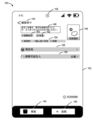
ユーザーがビデオの撮影を終了すると、図1の撮影インタフェースが図2の編集インタフェースに切り替わる。映像114は、編集インタフェースで提示されてもよい、例えば、映像114の一部または全部がループされてもよい。図2に示すように、編集インタフェースは、例えば、フィルターユーザーインタフェース要素128、文字ユーザーインタフェース要素130、ステッカーユーザーインタフェース要素132、効果ユーザーインタフェース要素134など、複数の編集ユーザーインタフェース要素を含んでもよい。ユーザーは、これらの編集用ユーザーインタフェース要素を通じて、映像114を編集することができる。例えば、ユーザーは、フィルターユーザーインタフェース要素128をクリックしてビデオ114のフィルターを調整したり、文字ユーザーインタフェース要素130をクリックしてビデオ114に文字を追加したり、ステッカーユーザーインタフェース要素132をクリックしてビデオ114にステッカーを追加したり、特殊効果ユーザーインタフェース要素134をクリックしてビデオ114に特殊効果を施したりすることができる。あるいは、ユーザーは、ユーザーインタフェース要素136をクリックして、追加の編集機能のためにさらなる編集ユーザーインタフェース要素を展開することができる。編集インタフェースは、より多くの、またはより少ない編集ユーザーインタフェース要素を提供することができる。これらの編集機能は、映像全体に適用してもよいし、映像の一部、例えば、1つまたは複数の映像フレームに適用してもよい。
When the user finishes recording the video, the recording interface of FIG. 1 switches to the editing interface of FIG. 2. The
図2に示すように、ユーザーは、音楽選択ユーザーインタフェース要素124において、映像のサウンドトラックとしての音楽、例えば、「雨」を選択することができる。あるいは、ユーザーは、文字ユーザーインタフェース要素130上で操作する代わりに、文字入力ボックス138を直接クリックして文字を入力することもできる。
As shown in FIG. 2, the user can select music, e.g., "Rain," as a soundtrack for the video in the music selection
ユーザーが結果に満足しない場合、ユーザーはバックユーザーインタフェース要素127をクリックして撮影画面に戻り、ビデオを撮り直すことができる。一方、ユーザーは、ビデオの編集が終了した後、公開ユーザーインタフェース要素140をクリックして、編集されたビデオを公開することができる。また、ユーザーは、編集操作を行わずに、直接公開ユーザーインタフェース要素140をクリックして、ビデオを公開することも可能である。公開UIコンポーネント140は、クイック公開またはワンクリック公開機能を提供することができ、したがって、撮影されたビデオの迅速な公開を容易にし、これは、ユーザーのショートビデオ作成への参加意欲をさらに高めることに資するものである。
If the user is not satisfied with the result, the user can click the back
また、編集インタフェースは、図3に示すように、ビデオを公開するために使用される公開インタフェースに切り替えるためのトグルユーザーインタフェース要素142を提供する。例えば、ユーザーは、トグルユーザーインタフェース要素142をクリックして、ビデオを公開する次のステップ、すなわち、図3に示すような公開インタフェースに切り替えることができる。公開インタフェースは、ビデオ114のデフォルト表紙146を図示し、これは、ビデオ114の第1のフレームまたは他の代表的なフレームまたはフレームであってもよい。表紙は、写真や撮影した映像の一部を使用することができる。ユーザーは、デフォルト表紙146のユーザーインタフェース要素「表紙選択」をクリックすることで、適切な表紙を選択することができる。例えば、ユーザーが「表紙選択」ユーザーインタフェース要素をクリックすると、電子デバイス100は、ユーザーによる選択のために、ビデオ114のビデオフレームの少なくとも一部を表示することができる。さらに、電子装置100は、ユーザーによる選択された表紙の編集を容易にするために、編集ユーザーインタフェース要素を表示してもよい。追加的又は代替的に、電子デバイス100は、ユーザーが表紙を選択するためのローカルアルバム及び/又はクラウドアルバムへのインタフェースも提供することができる。
The editing interface also provides a toggle
公開インタフェースは、タイトルを追加するための文字ボックス148も図示している。ユーザーは、文字ボックス148を編集してビデオのタイトルを構成してもよい、インタラクティブのためのメタデータタグを使用して強化された社会的属性を提供することも可能である。例えば、メタデータタグには、話題を示す「#」インタラクションタグ、インタラクションする相手を示す「@」インタラクションタグなどが考えられる。ユーザーは、文字ボックス148に入力するか、ユーザーインタフェース要素150、152をクリックすることで、メタデータタグを追加することができる。
The publishing interface also illustrates a
図3に示すように、公開インタフェースは、候補話題154のためのユーザーインタフェース要素も含むことができる。候補話題154は、例えば、ユーザーの所在地で人気のある話題や、ウェブ全体で人気のある話題、例えば、「真剣的」、「個人的」等を含むことができる。あるいは、候補話題154は、映像114に関連する話題、例えば、「天気」であってもよい。
As shown in FIG. 3, the public interface can also include user interface elements for
公開インタフェースは、例えば、撮影場所の選択、公開レベルの選択、ローカルに保存するかどうかなど、1つ以上の公開関連オプションも提供することができる。図3に示すように、位置情報ユーザーインタフェース要素156は、位置情報(例えば、撮影位置)を追加するためのインタフェースを提供し、公開ユーザーインタフェース要素158は、公開レベル(例えば、公開するかどうか、公開の程度)を設定するためのインタフェースを提供する。
The publishing interface may also provide one or more publishing-related options, such as, for example, selecting a location where the image was taken, selecting a publishing level, whether to save the image locally, etc. As shown in FIG. 3, location information
公開関連オプションを選択した後、ユーザーは撮影したビデオを公開するかどうかを選択することができる。例えば、ユーザーは、公開ユーザーインタフェース要素146をクリックすることで、撮影したビデオを公開することができる。ユーザーが撮影映像の公開を躊躇している場合、ユーザーは草案ユーザーインタフェース要素144をクリックして、撮影映像を草案ボックスに保存し、その後の公開に備えることができる。ユーザーは、ビデオ編集の結果にあまり満足していないことなどを発見した場合、戻りユーザーインタフェース要素144をクリックして編集インタフェースに戻り、ビデオの再編集を行うことができる。
After selecting a publishing-related option, the user can choose whether to publish the shot video. For example, the user can publish the shot video by clicking the publish
図4は、本開示のいくつかの実施形態に従った電子デバイス100の例示的なユーザーインタフェースを示している。ユーザーインタフェースは、図1に示すように、ユーザーがフィルターユーザーインタフェース要素118をクリックすることに応答して表示されるユーザーインタフェースであってもよい。図4に示すように、ユーザーインタフェースには5つのフィルターが含まれ、4番目のフィルター160が選択されている。ユーザーは、異なるフィルターのユーザーインタフェース要素をクリックして、異なるフィルターを選択することができる。これらのフィルターは、スナップショットモードに固有のもので、アプリケーションの他のモード(例えば、セグメントショットモード)には適用できない。このように、スナップショットモードの利用頻度を高めることで、ユーザーにいち早くスナップショットモードに適応させ、習慣を変え、ユーザーの定着率を高めることができる。これらのフィルターは、通常の純色フィルターよりも質感や光と影の表現など、より高度で消費者向けの効果を表示する特殊なフィルターである。
FIG. 4 illustrates an exemplary user interface of the
いくつかの実施形態では、これらのフィルターのインタラクティブは、手の効果に従うことができる、すなわち、手のジェスチャのスワイプで、それが持ち上げられる前に、画面の一部だけがフィルターのインタラクティブ効果で覆われる。リフティング後に初めて、画面全体にフィルターのインタラクションを叩き込む。また、別の例では、リフティングの後、画面の一部だけがフィルターのインタラクティブな効果で覆われることもある。 In some embodiments, these filter interactivities may follow hand effects, i.e., with a swipe of the hand gesture, only a portion of the screen is covered with the filter interactive effects before it is lifted. Only after the lifting does the entire screen get hit with the filter interactivity. In another example, after the lifting, only a portion of the screen may be covered with the filter interactive effects.
図5は、本開示のいくつかの実施形態による電子デバイス100の例示的なユーザーインタフェースを示す図である。ユーザーインタフェースは、図2に示すように、ユーザーがステッカーユーザーインタフェース要素132をクリックすることに応答して表示されるユーザーインタフェースであってよい。ユーザーインタフェースは、例えば、ステッカーや顔文字などの1つ以上のタブを含んでもよい。ステッカータブの下には、複数のステッカー候補が図示されており、インタラクティブのためのメタデータタグ、例えば「@言及」ステッカー162や「#話題」ステッカー164が含まれている。ユーザーがステッカーを選択すると、そのステッカーのスタイルが直接アップスクリーンされることができる。画面、すなわち、映像114に適用される。ユーザーは、@相手や追加する話題を選択することができる。@行為が成功すれば、@された人に該当の通知メッセージが届き、#話題の追加が成功すれば、その内容も該当の話題に含まれることになる。オプションとして、または追加で、ユーザーは図2のような文字入力のモードでメタデータタグを使用することもできる。例えば、ユーザーは、文字ボックス138をクリックして、@または#を入力することにより、対応する種類のステッカーを使用することができる。
5 is a diagram illustrating an example user interface of the
図6は、本開示のいくつかの実施形態に従った電子デバイス100の例示的なユーザーインタフェースを示している。なお、ユーザーインタフェースは、図1の撮影インタフェースにおいてユーザーが撮影を完了したことに応じて切り替わる編集インタフェースであってもよい。例えば、図6は、図2の編集インタフェースの代替となり得る。編集インタフェースは、複数の編集ユーザーインタフェース要素、例えば、草案ユーザーインタフェース要素168、文字ユーザーインタフェース要素170、ステッカーユーザーインタフェース要素172、エフェクトユーザーインタフェース要素174、フィルターユーザーインタフェース要素176等を含む。あるいは、ユーザーは、ユーザーインタフェース要素178をクリックして、追加の編集機能のために、さらなる編集ユーザーインタフェース要素を展開することができる。簡潔さのために、これらの編集ユーザーインタフェースの要素は繰り返さない。
FIG. 6 illustrates an exemplary user interface of
この編集インタフェースは、BGMを選択するための音楽選択ユーザーインタフェース要素186、ショットの場所を選択するための場所ユーザーインタフェース要素188、および開示レベルを選択するための開示ユーザーインタフェース要素190も含む。さらに、この編集インタフェースは、より多くの編集ユーザーインタフェース要素を表示するためのユーザーインタフェース要素184も示す。ユーザーインタフェース要素190は、図3に示すように、公開インタフェースにおけるロケーションユーザーインタフェース要素156およびパブリックユーザーインタフェース要素158と実質的に同じ機能性を提供する。公開インタフェースにある編集機能を編集インタフェースに統合することで、ユーザーは撮影インタフェースと編集インタフェースのみを使用してビデオを公開することができ、図3の3ステップの方法と比較して、公開の効率が向上し、ユーザーの時間を節約することができる。
The editing interface also includes a music selection
ユーザーがより多くのユーザーインタフェース要素184をクリックすると、ディスプレイ102は、図7に示すようなユーザーインタフェースを表示することができる。このユーザーインタフェースは、例えば、表紙を選択するためのユーザーインタフェース要素192、タグ(商品、ミニプログラムなど)を追加するためのユーザーインタフェース要素194、ローカルへの保存機能を有効にするためのユーザーインタフェース要素196、およびHDアップロード機能を有効にするためのユーザーインタフェース要素198などの編集ユーザーインタフェース要素を出版オプションとしてより多く提供するものである。これらのユーザーインタフェース要素は、ユーザーインタフェース要素188および189と比較して、使用頻度の低いユーザーインタフェース要素であってもよい。いくつかの例では、ユーザーがこれらのユーザーインタフェース要素を使用する頻度に応じて、これらのユーザーインタフェース要素のうち頻度の高いユーザーインタフェース要素がユーザーインタフェース要素188および189を置き換えることができる。たとえば、ユーザーがビデオを投稿するときに通常表紙を変更するが、通常開示レベルを変更しない場合、ユーザーインタフェース要素190がより多くのユーザーインタフェース要素184内で折り畳まれてユーザーインタフェースに置き換えることができる要素192を、ユーザーインタフェース要素188の代わりに使用する。
When the user clicks on the more
ここで図6に戻ると、ユーザーがタップして説明文を追加するための文字ボックス180と、例えば@や#などのインタラクション用のメタデータタグが図示されている。図8は、ユーザーが文字ボックス180をクリックしたときに表示されるユーザーインタフェースを示し、ユーザーインタフェース要素202、204および文字ボックス206は、図3に示したユーザーインタフェース要素150、152および文字ボックス148とそれぞれ同様であるので、繰り返さないことにする。ユーザーは、キーボード200を介して文字を編集し、見出しおよび/またはメタデータタグを追加することができる。
Returning now to FIG. 6, there is shown a
公開に関するオプションを選択した後、ユーザーは撮影したビデオを公開することを選択することができる。例えば、ユーザーは、公開ユーザーインタフェース要素182をクリックすることで、撮影したビデオを公開することができる。ユーザーは、撮影した映像を公開することを躊躇する場合、草案ユーザーインタフェース要素168をクリックして、撮影した映像を草案ボックスに保存し、その後の公開に備えることができる。撮影結果に満足できない場合、ユーザーは戻りユーザーインタフェース要素166をクリックして、図1に示すような撮影インタフェースに戻り、再度ビデオを撮影することができる。
After selecting a publishing option, the user may choose to publish the captured video. For example, the user may publish the captured video by clicking the publish
ビデオを撮影し公開するための実施形態については、図1~図8を併用して上記で説明されている。なお、上記の実施形態は、画像を公開する場合にも適用できる。例えば、図1のように、スナップショットモードではなく、「写真を撮る」をクリックすると、フォトモードが起動する。アプリケーションのフォトモードは、ビデオを撮影して公開するための実施形態と合わせて、上述した方式で使用することも可能である。 The embodiment for taking and publishing a video is described above in conjunction with Figures 1-8. Note that the above embodiment can also be applied to publishing images. For example, as shown in Figure 1, clicking "Take Photo" launches the photo mode instead of the snapshot mode. The photo mode of the application can also be used in the manner described above in conjunction with the embodiment for taking and publishing a video.
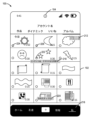
図9は、本開示のいくつかの実施形態による電子デバイス100の例示的なユーザーインタフェースを示す図である。ユーザーインタフェースは、ユーザーの個人的なホームページを示し、個人的なホームページユーザーインタフェース要素216は、活性化される。個人ホームページは、作品、ダイナミック、いいね!、アルバムの4つのタブで構成されており、アルバムタブが選択されている。例えば、プロフィールにはm個のタブ、例えば4個しか表示されず、アルバムタブはn番目のタブ、例えばn4で提示することができる。アルバムは、電子機器100のローカルアルバム及び/又はユーザーのクラウドアルバムであってもよい。アルバムタブでは、アルバムの内容を新しいものから古いものへと時系列に表示することができる。アルバム内のビデオについては、ビデオの右下に[分]:[秒]などのように再生時間を表示することができる。アルバムには、映像の表紙、例えば映像から抽出された1つ以上のフレームが表示されることがある。オプションとして、ビデオはリアルタイムで再生することもでき、また、最初に表示されたビデオ全体を再生することもできる。アルバム内の写真などの画像については、写真または写真の領域の代表的な部分を直接表示することができる。
FIG. 9 illustrates an exemplary user interface of the
一部の実施形態では、1つ以上のビデオ又は画像のタイムスタンプを表示することができる。例えば、現在提示されている1列目の写真のタイムスタンプを表示することができる。アルバムのリストがスライドされると、それに応じてタイムスタンプが変化する。例えば、タイムスタンプを表示している最後の写真が画面から完全に消えた場合、次の写真のタイムスタンプを表示する。別の例では、タイムスタンプを持つ最後の写真のうち、画面から消える割合が所定の閾値を超えると、次の写真のタイムスタンプを表示する。 In some embodiments, one or more video or image timestamps may be displayed. For example, the timestamp of the first photo currently being presented may be displayed. As the list of albums is slid, the timestamps change accordingly. For example, when the last photo displaying a timestamp disappears completely from the screen, the timestamp of the next photo is displayed. In another example, when the percentage of the last photo with a timestamp disappears from the screen above a certain threshold, the timestamp of the next photo is displayed.
また、ユーザーインタフェースには、クイックスタートを容易にするために、プロンプトメッセージ214:「クリックして、シェア」を図示している。ユーザーは、アルバム内のビデオや画像をクリックすることで、例えば図2や図6に示すような編集画面にアクセスすることができる。いくつかの実施形態では、この編集インタフェースは、ユーザーが選択した撮影モードと関連付けることができる。例えば、ユーザーがスナップショットモードを選択している場合、ユーザーはアルバム内のビデオや画像をクリックすることで、例えば図2や図6に示す編集インタフェースに入る。ユーザーが分割撮影モードを選択している場合、アルバム内のビデオや画像をクリックすると、分割撮影モードに対応した編集画面に遷移するなどの工夫がされている。 The user interface also includes a prompt message 214: "Click to share" to facilitate a quick start. The user can access an editing screen, such as that shown in FIG. 2 or FIG. 6, by clicking on a video or image in the album. In some embodiments, the editing interface can be associated with the capture mode selected by the user. For example, if the user selects snapshot mode, the user can enter the editing interface, such as that shown in FIG. 2 or FIG. 6, by clicking on a video or image in the album. If the user selects split capture mode, clicking on a video or image in the album transitions to an editing screen corresponding to the split capture mode.
いくつかの実施形態では、アルバム内のビデオの長さがアプリケーションによって共有されるビデオの長さ制限を超える場合、ユーザーはビデオの表紙をクリックした後にビデオクロッピングインタフェースに入り、ビデオクロッピングインタフェースでクロッピングが完了した後に対応するモードで編集インタフェースに入る。 In some embodiments, if the length of a video in the album exceeds the length limit of a video shared by the application, the user enters a video cropping interface after clicking on the video cover, and enters an editing interface in a corresponding mode after cropping is completed in the video cropping interface.
図9に示すように、ユーザーインタフェースは、マルチ選択ユーザーインタフェース要素212を含む。ユーザーは、図10に示すように、マルチ選択ユーザーインタフェース要素212を活性化して、マルチ選択状態に入ることができる。マルチ選択状態では、映像/画像のところに選択可能なボックスが表示され、ユーザーがこの映像/画像を選択すると、224および226に示すように、対応する数値の識別子が表示されるようにしてもよい。例えば、選択した順番に連番を振ってもよい。
As shown in FIG. 9, the user interface includes a multi-selection
ユーザーが少なくとも1つの作品を選択したとき、ユーザーインタフェースは、「次へ」ユーザーインタフェース要素220を提示し、任意に、ユーザーによって選択された作品の数を表示する。ユーザーがこのユーザーインタフェース要素220をクリックした後、ビデオ編集インタフェースにアクセスする。ビデオ編集のインタフェースから、フォトムービー、スナップショットビデオなどを作成することができる。
When the user has selected at least one creation, the user interface presents a "next"
いくつかの実施形態では、ビデオおよび/または画像がクラウドアルバムに格納される場合、コンテンツは、表示されたときまたはユーザーがクリックしたときにダウンロードされ、「このコンテンツはクラウドドライブから同期されている」218を表示し、ダウンロードの進捗を示すために進捗ユーザーインタフェース要素222を表示させる。ダウンロード処理中も、ユーザーはユーザーインタフェース要素220をクリックして、ビデオ編集インタフェースにアクセスすることができる。ユーザーがコンテンツを選択した後、編集画面に入る。この編集インタフェースは、図11に示すようなものである。図11に示すような編集インタフェースは、図2と同様に、アルバムからのビデオまたは画像248を編集インタフェースに提示することができる。図11に示すように、編集インタフェースは、複数の編集ユーザーインタフェース要素、たとえば、音楽選択ユーザーインタフェース要素228、フィルターユーザーインタフェース要素230、文字ユーザーインタフェース要素232、ステッカーユーザーインタフェース要素234、効果ユーザーインタフェース要素を含むことができる。図2の音楽選択ユーザーインタフェース要素124、フィルターユーザーインタフェース要素128、文字ユーザーインタフェース要素130、ステッカーユーザーインタフェース要素132、特殊効果ユーザーインタフェース要素134にそれぞれ対応する236等である。あるいは、ユーザーは、ユーザーインタフェース要素238をクリックして、追加の編集機能のためにさらなる編集ユーザーインタフェース要素を展開することができる。編集インタフェースは、より多くの、またはより少ない編集ユーザーインタフェース要素を提供することができる。
In some embodiments, if the video and/or images are stored in a cloud album, the content is downloaded when displayed or when the user clicks to display "This content is being synced from cloud drive" 218 and to display a progress user interface element 222 to indicate the progress of the download. During the download process, the user can still click on the
図11に示すように、ユーザーインタフェースには、ビデオ又は画像248のタイムスタンプ、例えば、キャプチャ時刻及び/又は最新の編集時刻が表示される。これは、例えば、所定期間(例えば、3日前、1週間前など)前の履歴画像に対して実行することができる。
As shown in FIG. 11, the user interface displays a timestamp for the video or
ビデオまたは画像248の結果に満足できない場合、ユーザーは、戻りユーザーインタフェース要素240をクリックして、個人アルバムに戻り、ビデオまたは画像の選択を再度行うことができる。一方、ユーザーは、ビデオ又は画像の編集を終了した後、公開ユーザーインタフェース要素242をクリックして、編集されたビデオ又は画像248を公開することができる。また、ユーザーは、編集操作を行わずに、公開ユーザーインタフェース要素242を直接クリックして、ビデオ又は画像248を公開することができる。
If the user is not satisfied with the result of the video or
あるいは、図3に示すように、編集インタフェースは、ビデオまたは画像を公開するために使用される公開インタフェースに切り替えるためのトグルユーザーインタフェース要素244を提供する。
Alternatively, as shown in FIG. 3, the editing interface provides a toggle
本開示のいくつかの実施形態によるパーソナルアルバムのコンテンツを迅速に公開するための実施形態は、図9~図11と関連して上述される。アルバムインタフェースを提供することで、ユーザーは過去に制作したビデオや画像を素早く公開することができ、ユーザーエクスペリエンスの向上やユーザーの定着率を高めることができる。 Some embodiments of the present disclosure for quickly publishing content in a personal album are described above in connection with FIGS. 9-11. Providing an album interface allows users to quickly publish previously created videos and images, improving the user experience and increasing user retention.
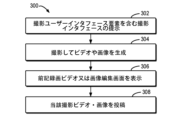
図12は、本開示のいくつかの実施形態による、ビデオまたは画像を公開するための方法300を示すフローチャートである。ボックス302では、撮影ユーザーインタフェース要素(例えば、図1に示すような)を含む撮影インタフェース(例えば、図1に示すような)が提示される。
FIG. 12 is a flow chart illustrating a
ボックス304において、前記撮影インタフェースにおける前記撮影ユーザーインタフェース要素(例えば、撮影ユーザーインタフェース要素108について図1に示すような)の活性化を検出することに応答して、撮影ビデオ又は画像が生成される。
In
いくつかの実施形態では、前記撮影ビデオ又は画像を生成することは、例えば、ビデオの記録又は画像の撮影を開始するために、前記撮影インタフェースにおける前記撮影ユーザーインタフェース要素(例えば、図1に示すような撮影ユーザーインタフェース要素108)上のクリックを検出することに応答して、前記撮影ビデオ又は画像の生成を開始することと、前記撮影ビデオ又は画像の生成中に、前記撮影インタフェースにおいて前記撮影ユーザーインタフェース要素(例えば、図1に示すような撮影ユーザーインタフェース要素108)上のクリックを検出することに応答して、撮影を行うことであり、前記撮影ユーザーインタフェース要素(例えば、図1に示すような撮影ユーザーフィルター要素)上で前記撮影ビデオ又は画像を撮影することは、前記録画ユーザーインタフェース要素(例えば、図1に示す録画ユーザーインタフェース要素108)上のクリックを検出し、前記録画ビデオ又は画像の生成を停止する、例えば、ビデオの録画又は画像の録画を停止する。
In some embodiments, generating the captured video or image includes, for example, initiating generation of the captured video or image in response to detecting a click on the capture user interface element in the capture interface (e.g., capture
いくつかの実施形態では、前記撮影ビデオ又は画像を生成することは、例えば、ビデオの録画又は画像の撮影を開始するために、前記撮影ユーザーインタフェース要素(例えば、図1に示す撮影ユーザーインタフェース要素108)に対する押下を検出することに応答して、前記撮影ビデオ又は画像の生成を開始することと、前記撮影ユーザーインタフェース要素(例えば、図1に示す撮影ユーザーインタフェース要素108)からの前記押下を検出することに応答して、以下のことを備える。ユーザーインタフェース要素108)が解除されると、当該録画映像又は画像の生成が停止される、例えば、映像の録画又は画像の記録が停止される。
In some embodiments, generating the captured video or images includes initiating generation of the captured video or images in response to detecting a press on the capture user interface element (e.g., capture
ボックス306では、前記撮影されたビデオ又は画像を編集するための編集インタフェースが表示され(図2又は図6に示す)、前記編集インタフェースは、前記撮影されたビデオ又は画像を公開するための公開ユーザーインタフェース要素(例えば、図2に示す公開ユーザーインタフェース要素140又は図6に示す公開ユーザーインタフェース要素182)を含む。
In
ボックス308において、前記公開ユーザーインタフェース要素(例えば、図2に示す公開ユーザーインタフェース要素140または図6に示す公開ユーザーインタフェース要素182)の起動を検出することに応答して、前記キャプチャされたビデオまたは画像を公開する。
In
いくつかの実施形態では、前記公開ユーザーインタフェース要素は、第1の公開ユーザーインタフェース要素(例えば、図2に示すように公開ユーザーインタフェース要素140)であり、前記方法300は、前記編集インタフェース(例えば、図2に示すように)におけるトグルユーザーインタフェース要素(例えば、トグルユーザーインタフェース要素142)の活性化を検出することに応答して(例えば、切替ユーザーインタフェース要素142をクリックすること)、撮影ビデオまたは画像を投稿するための投稿インタフェース(例えば、図3に示す)が表示される、前記公開インタフェースは、前記キャプチャされたビデオまたは画像を公開するための第2の公開ユーザーインタフェース要素(例えば、図3に示すように公開ユーザーインタフェース要素146)を含み;前記第2の公開ユーザーインタフェース要素の活性化を検出することに応答して前記キャプチャされたビデオまたは画像を公開することを含む。
In some embodiments, the public user interface element is a first public user interface element (e.g., public
いくつかの実施形態では、前記編集インタフェース(例えば、図6に示すように)は、前記キャプチャされたビデオ又は画像を編集するための編集ユーザーインタフェース要素の第1のセットを備える。例えば、前記第1のセットの編集ユーザーインタフェース要素は、撮影場所を選択するための編集ユーザーインタフェース要素(例えば、図6に示す場所ユーザーインタフェース要素188)及び開示レベルを選択するための編集ユーザーインタフェース要素(例えば、図6に示す場所ユーザーインタフェース要素190)の少なくとも一方から構成される。
In some embodiments, the editing interface (e.g., as shown in FIG. 6) comprises a first set of editing user interface elements for editing the captured video or images. For example, the first set of editing user interface elements may comprise at least one of an editing user interface element for selecting a capture location (e.g., location
いくつかの実施形態では、前記編集インタフェースは、前記キャプチャされたビデオ又は画像を編集するための第2のセットの編集ユーザーインタフェース要素を提示するための追加のユーザーインタフェース要素(例えば、図6に示すように、ユーザーインタフェース要素184)を含む。方法300はさらに、前記編集インタフェース(例えば、図7に示すユーザーインタフェース要素192、194、196、および198)における前記追加のユーザーインタフェース要素(例えば、図6に示すユーザーインタフェース要素184)の起動(例えば、図6に示すユーザーインタフェース要素184をクリック)を検出することに応答して、前記第2のセットの編集ユーザーインタフェース要素(例えば、図7に示すユーザーインタフェース要素192、194、196、および198)を表示させることを含むことを特徴とする、以下のステップを有する。).例えば、前記第2のセットの編集ユーザーインタフェース要素は、表紙を選択するための編集ユーザーインタフェース要素から構成される。
In some embodiments, the editing interface includes an additional user interface element (e.g.,
いくつかの実施形態では、方法300は、前記編集インタフェースにおけるステッカーユーザーインタフェース要素(例えば、図2に示すようなステッカーユーザーインタフェース要素132)の活性化を検出することに応答して、前記キャプチャしたビデオ又は画像にステッカーを追加することであって、前記ステッカーは、インタラクティブ用のメタデータラベル(例えば、図5に示すようにステッカー162、164)を含む。例えば、前記メタデータタグは、インタラクティブオブジェクトを示す「@」タグと、話題を示す「#」タグの少なくとも一方から構成される。
In some embodiments, the
いくつかの実施形態において、方法300は、ユーザーのプロファイルページに前記ユーザーのアルバムを表示することと、前記アルバム内のビデオまたは画像の選択を検出することに応答して、前記ビデオまたは画像を編集するための編集インタフェースを表示することと、図11に示すように、前記ビデオまたは画像が撮影された時間および最後に修正された時間の少なくとも一方を前記編集インタフェースに表示する。例えば、前記アルバムは、ローカルアルバム及びクラウドアルバムの少なくとも一方から構成される。
In some embodiments, the
いくつかの実施形態では、前記編集インタフェースにおけるフィルターユーザーインタフェース要素の活性化を検出することに応答して、前記キャプチャされたビデオ又は画像に追加するために利用可能なフィルターが表示され、前記フィルターは、前記公開ユーザーインタフェース要素を含む前記編集インタフェースに固有のものである。これらのフィルターは、例えば図4に示すように、スナップショットモードに特化したものである。 In some embodiments, in response to detecting activation of a filter user interface element in the editing interface, filters available for adding to the captured video or image are displayed, the filters being specific to the editing interface that includes the public user interface element. These filters are specific to snapshot mode, for example as shown in FIG. 4.
図13は、本開示のいくつかの実施形態による、ビデオまたは画像を公開するための装置400を示すブロック図である。装置400は、撮影ユーザーインタフェース要素を含む撮影インタフェースを提示するように構成された提示モジュール402と、前記撮影インタフェースにおける前記撮影ユーザーインタフェース要素の起動の検知に応答して撮影ビデオ又は画像を生成するように構成された生成モジュール404と、前記撮影ビデオ又は画像を編集するための編集インタフェースを表示するように構成された第1の表示モジュール406と前記編集は、前記撮影ユーザーインタフェース要素が起動されたときに、前記撮影インタフェースが起動されたことを検知する。前記キャプチャされたビデオ又は画像を公開するための公開ユーザーインタフェース要素を含むインタフェースと、前記公開ユーザーインタフェース要素の起動を検出することに応答して、前記キャプチャされたビデオ又は画像を公開するように構成された第1の公開モジュール408を備えることを特徴とする。
13 is a block diagram illustrating an
いくつかの実施形態において、生成モジュール404は、前記撮影インタフェースにおける前記撮影ユーザーインタフェース要素上のクリックを検出することに応答して、前記撮影ビデオ又は画像の生成を開始するように構成された第1の開始モジュールと、前記撮影インタフェースにおける前記撮影ユーザーインタフェース要素上のクリックを検出することに応答して、前記撮影ビデオ又は画像を生成しながら、第1の停止モジュールとを含む。但し、ビデオ・画像の撮影は停止する。 In some embodiments, the generation module 404 includes a first start module configured to start generating the captured video or image in response to detecting a click on the capture user interface element in the capture interface, and a first stop module configured to stop generating the captured video or image in response to detecting a click on the capture user interface element in the capture interface, while generating the captured video or image, but stopping capture of the video or image.
いくつかの実施形態において、生成モジュール404は、前記ショットビデオユーザーインタフェース要素への押下を検出することに応答して前記ショットビデオ又は画像の生成を開始するように構成された第2の開始モジュールと、前記ショットビデオユーザーインタフェース要素から解除される前記押下を検出することに応答して前記ショットビデオ又は画像の生成を停止するように構成された第2の停止モジュールとを含む。 In some embodiments, the generation module 404 includes a second start module configured to start generating the shot video or image in response to detecting a press on the shot video user interface element, and a second stop module configured to stop generating the shot video or image in response to detecting the press being released from the shot video user interface element.
いくつかの実施形態において、前記公開ユーザーインタフェース要素は、第1の公開ユーザーインタフェース要素であり、前記装置は、前記編集インタフェースにおけるトグルユーザーインタフェース要素の起動を検出することに応答して、前記キャプチャしたビデオまたは画像を公開するための公開インタフェースを表示するように構成された第2のディスプレイモジュールを備え、前記公開インタフェースは、前記キャプチャしたビデオまたは画像を公開するための第2の公開ユーザーインタフェース要素を含むことを特徴とする。前記第2の公開ユーザーインタフェース要素の起動を検出することに応答して、前記撮影されたビデオまたは画像を公開するように構成された第2の公開モジュールと、前記第2の公開ユーザーインタフェース要素が起動されたことを検出する。 In some embodiments, the public user interface element is a first public user interface element, and the device includes a second display module configured to display a public interface for publishing the captured video or image in response to detecting activation of a toggle user interface element in the editing interface, the public interface including a second public user interface element for publishing the captured video or image. A second publishing module configured to publish the captured video or image in response to detecting activation of the second public user interface element, and detecting that the second public user interface element has been activated.
いくつかの実施形態において、前記編集インタフェースは、前記撮影されたビデオ又は画像を編集するための編集ユーザーインタフェース要素の第1のセットを備える。 In some embodiments, the editing interface comprises a first set of editing user interface elements for editing the captured video or images.
いくつかの実施形態では、前記第1のセットの編集ユーザーインタフェース要素は、撮影場所を選択するための編集ユーザーインタフェース要素および開示レベルを選択するための編集ユーザーインタフェース要素の少なくとも一方を含む。 In some embodiments, the first set of editing user interface elements includes at least one of an editing user interface element for selecting a location and an editing user interface element for selecting a disclosure level.
いくつかの実施形態において、前記編集インタフェースは、前記キャプチャされたビデオまたは画像を編集するための編集ユーザーインタフェース要素の第2のセットを提示するための追加のユーザーインタフェース要素前記装置は、前記追加のユーザーインタフェース要素の活性化が前記編集インタフェースにおいて検出されることに応答して前記編集ユーザーインタフェース要素の第2のセットを表示するように構成された第3表示モジュール前記編集インタフェースは、前記第2のセットの編集ユーザーインタフェース要素によって構成される。 In some embodiments, the editing interface includes an additional user interface element for presenting a second set of editing user interface elements for editing the captured video or image. The device includes a third display module configured to display the second set of editing user interface elements in response to activation of the additional user interface element being detected in the editing interface. The editing interface is configured with the second set of editing user interface elements.
いくつかの実施形態では、前記第2のセットの編集ユーザーインタフェース要素は、表紙を選択するための編集ユーザーインタフェース要素を含む。 In some embodiments, the second set of editing user interface elements includes an editing user interface element for selecting a cover page.
いくつかの実施形態では、装置400は、前記編集インタフェースにおける前記ステッカーユーザーインタフェース要素の起動を検出することに応答して、前記キャプチャされたビデオまたは画像にステッカーを追加するように構成された追加モジュールであって、前記ステッカーはインタラクティブのためのメタデータラベルを含む、追加モジュールを備える。
In some embodiments, the
ある実施形態では、前記メタデータタグは、インタラクティブオブジェクトを示す「@」タグおよび話題を示す「#」タグの少なくとも一方から構成される。 In one embodiment, the metadata tags consist of at least one of an "@" tag indicating an interactive object and a "#" tag indicating a topic.
いくつかの実施形態において、装置400は、前記ユーザーのプロファイルに前記ユーザーのフォトアルバムを表示するように構成された第4の表示モジュールと、前記フォトアルバムにおけるビデオまたは画像の選択を検出することに応答して前記ビデオまたは画像を編集するための編集インタフェースを表示するように構成された第5の表示モジュールと、前記編集インタフェースに前記ビデオまたは画像の前記編集インタフェースにおいて、前記ビデオまたは画像の撮影時刻および最終更新時刻の少なくとも一方を取得すること。
In some embodiments, the
いくつかの実施形態では、前記アルバムは、ローカルアルバムおよびクラウドアルバムのうちの少なくとも1つからなる。いくつかの実施形態において、装置400は、前記編集インタフェースにおけるフィルターユーザーインタフェース要素の起動を検出することに応答して、前記キャプチャされたビデオまたは画像に追加されるフィルターを表示するように構成された第7の表示モジュールであって、前記フィルターは、前記公開されたユーザーインタフェース要素を含む前記編集インタフェースに固有である、第7の表示モジュールを含む。
In some embodiments, the album comprises at least one of a local album and a cloud album. In some embodiments, the
図14は、本開示のいくつかの実施形態を実施することができる電子デバイス500のブロック図である。図1~図9に示す電子機器100や図13に示す装置400は、装置500によって実現されてもよい。図14に示すように、装置500は、リードオンリーメモリ(ROM)502に格納された、またはメモリユニット508からランダムアクセスメモリ(RAM)503にロードされたコンピュータープログラム命令に基づいて、種々の適切なアクションおよびプロセスを実行し得る中央処理ユニット(CPU)501を含む。RAM503には、装置500の動作に必要な各種プログラムやデータも格納することができる。CPU501、ROM502およびRAM503は、バス504を介して互いに接続されている。また、バス504には、入出力(I/O)インタフェース505と接続されている。
FIG. 14 is a block diagram of an
装置500内の複数のコンポーネントがI/Oインタフェース505に接続されており、キーボード、マウスなどの入力ユニット506、各種モニター、スピーカなどの出力ユニット507、ディスク、CD-ROMなどの記憶ユニット508、ネットワークカード、モデム、無線通信トランシーバなどの通信ユニット509が含まれる。通信ユニット509は、装置500がインターネット及び/又は各種通信ネットワークなどのコンピューターネットワークを介して他の装置と情報/データを交換することを可能にする。
Several components within
なお、方法300など、上述した各種処理・加工は、処理装置501が行ってもよい。例えば、いくつかの実施形態では、方法300は、記憶装置508などの機械可読媒体に接収されるコンピューターソフトウェアプログラムとして実施されてもよい。いくつかの実施形態では、コンピュータープログラムの一部または全部は、ROM502および/または通信装置509を介してコンピューターにロードおよび/または装置500にロード及び/又はインストールされてもよい。
The various processes and processing described above, such as
コンピュータープログラムがRAM503にロードされ、CPU501によって実行されると、上述した方法300のステップのうちの1つまたは複数が実行される。任意選択的に、他の実施形態では、CPU501は、任意の他の適切な手段によって(例えば、ファームウェアの助けを借りて)方法300を実行するように構成されてもよい。
When the computer program is loaded into
本開示は、方法、装置、システム及び/又はコンピュータープログラム製品であってもよい。コンピュータープログラム製品は、本開示の態様を実行するためのコンピューター可読プログラム命令を含むコンピューター可読記憶媒体を含んでもよい。 The present disclosure may be a method, an apparatus, a system, and/or a computer program product. The computer program product may include a computer-readable storage medium that includes computer-readable program instructions for carrying out aspects of the present disclosure.
コンピューター可読記憶媒体は、命令実行装置によって使用される命令を保持し、格納することができる有形の装置であってもよい。コンピューター可読記憶媒体は、例えば、電気記憶装置、磁気記憶装置、光学記憶装置、電磁気記憶装置、半導体記憶装置、またはこれらの任意の適切な組み合わせであってもよい、ただし、これらに限定されない。コンピューター読み取り可能な記憶媒体のより具体的な例(非網羅的なリスト)としては、携帯用コンピューターディスク、ハードディスク、ランダムアクセスメモリ(RAM)、読み取り専用メモリ(ROM)、消去可能プログラム可能読み取り専用メモリ(EPROMまたはフラッシュメモリ)、静的ランダムアクセスメモリ(SRAM)、携帯用コンパクトディスク読み取り専用メモリ(CD-ROM)、デジタル多機能ディスク(DVD)がある。)、メモリースティック、フロッピーディスク、機械的なコード化装置、例えばパンチカードやその上に命令が格納された隆起構造物、および上記の任意の適切な組み合わせ。本説明書で使用されるコンピューター可読記憶媒体は、電波または他の自由に伝播する電磁波、導波管または他の伝送媒体(例えば、光ファイバケーブルを通る光のパルス)を通して伝播する電磁波、またはワイヤを通して伝送される電気信号などの過渡信号そのものとして解釈されないようにする。 A computer-readable storage medium may be a tangible device capable of holding and storing instructions for use by an instruction execution device. A computer-readable storage medium may be, for example, but not limited to, an electrical storage device, a magnetic storage device, an optical storage device, an electromagnetic storage device, a semiconductor storage device, or any suitable combination thereof. More specific examples (non-exhaustive list) of computer-readable storage media include portable computer disks, hard disks, random access memory (RAM), read-only memory (ROM), erasable programmable read-only memory (EPROM or flash memory), static random access memory (SRAM), portable compact disk read-only memory (CD-ROM), digital versatile disk (DVD), memory stick, floppy disk, mechanical coding devices such as punch cards or raised structures having instructions stored thereon, and any suitable combination of the above. Computer-readable storage media as used in this description should not be interpreted as transient signals per se, such as radio waves or other freely propagating electromagnetic waves, electromagnetic waves propagating through a waveguide or other transmission medium (e.g., pulses of light through a fiber optic cable), or electrical signals transmitted through wires.
本説明書に記載されたコンピューター可読プログラム命令は、コンピューター可読記憶媒体から、インターネット、ローカルエリアネットワーク、ワイドエリアネットワーク、および/または無線ネットワークなどのネットワークを介して、個々のコンピューター/処理装置、または外部コンピューターまたは外部記憶装置にダウンロードされる。ネットワークには、銅線伝送ケーブル、光ファイバー伝送、無線伝送、ルーター、ファイアウォール、スイッチ、ゲートウェイコンピューター、エッジサーバーなどが含まれることがある。各計算/処理装置のネットワークアダプタまたはネットワークインタフェースは、ネットワークからコンピューター可読プログラム命令を受信し、それぞれの計算/処理装置のコンピューター可読記憶媒体に格納するためにコンピューター可読プログラム命令を転送する。 The computer readable program instructions described herein are downloaded from the computer readable storage medium to an individual computer/processing device or an external computer or storage device over a network, such as the Internet, a local area network, a wide area network, and/or a wireless network. The network may include copper transmission cables, fiber optic transmissions, wireless transmissions, routers, firewalls, switches, gateway computers, edge servers, and the like. A network adapter or network interface of each computing/processing device receives the computer readable program instructions from the network and forwards the computer readable program instructions for storage on the computer readable storage medium of the respective computing/processing device.
本開示の動作を実行するためのコンピュータープログラム命令は、アセンブリ命令、命令セットアーキテクチャ(ISA)命令、マシン命令、マシン関連命令、マイクロコード、ファームウェア命令、状態設定データ、または1以上のプログラミング言語の任意の組み合わせで書かれたソースまたはオブジェクトコードであって、前記プログラミング言語にはオブジェクト指向プログラミング言語-例えば、以下のものが含まれる。Smalltalk、C++などのほか、"C"などの従来の手続き型プログラミング言語。コンピューター可読プログラム命令は、ユーザーのコンピューターで完全に実行されてもよいし、ユーザーのコンピューターで部分的に、スタンドアロンパッケージとして実行されてもよいし、ユーザーのコンピューターで部分的に、リモートコンピューターで部分的に、またはリモートコンピューターやサーバーで完全に実行されてもよい。リモートコンピューターを含む場合、リモートコンピューターは、ローカルエリアネットワーク(LAN)またはワイドエリアネットワーク(WAN)を含む任意の種類のネットワークを介してユーザーコンピューターに接続されてもよい、代わりに、(例えば、インターネットを介して接続するためにインターネットサービスプロバイダを使用して)外部コンピューターに接続されてもよい。いくつかの実施形態において、本開示の態様は、コンピューター可読プログラム命令からのステータス情報を利用して、コンピューター可読プログラム命令を実行できるプログラマブル論理回路、フィールドプログラマブルゲートアレイ(FPGA)、またはプログラマブル論理アレイ(PLA)などの電子回路を個人化することにより達成される。 The computer program instructions for carrying out the operations of the present disclosure may be assembly instructions, instruction set architecture (ISA) instructions, machine instructions, machine-related instructions, microcode, firmware instructions, state setting data, or source or object code written in any combination of one or more programming languages, including object-oriented programming languages such as Smalltalk, C++, and the like, as well as traditional procedural programming languages such as "C". The computer readable program instructions may be executed entirely on the user's computer, partially on the user's computer as a stand-alone package, partially on the user's computer, partially on a remote computer, or entirely on a remote computer or server. When a remote computer is included, the remote computer may be connected to the user computer via any type of network, including a local area network (LAN) or wide area network (WAN), or alternatively, may be connected to an external computer (e.g., using an Internet service provider to connect via the Internet). In some embodiments, aspects of the present disclosure are accomplished by utilizing status information from computer-readable program instructions to personalize electronic circuitry, such as a programmable logic circuit, a field programmable gate array (FPGA), or a programmable logic array (PLA), capable of executing the computer-readable program instructions.
本開示の態様は、本開示の実施形態による方法、装置(システム)、及びコンピュータープログラム製品のフローチャート及び/又はブロック図を参照して本説明書で説明される。フローチャートおよび/またはブロック図の各ボックス、ならびにフローチャートおよび/またはブロック図のボックスの組み合わせは、コンピューター可読プログラム命令によって実施される。 Aspects of the present disclosure are described herein with reference to flowcharts and/or block diagrams of methods, apparatus (systems), and computer program products according to embodiments of the present disclosure. Each box in the flowcharts and/or block diagrams, and combinations of boxes in the flowcharts and/or block diagrams, are implemented by computer readable program instructions.
これらのコンピューター可読プログラム命令は、汎用コンピューター、特殊用途コンピューター、または他のプログラム可能なデータ処理装置の処理装置に提供され、それによって、これらの命令がコンピューターまたは他のプログラム可能なデータ処理装置の処理装置を介して実行されたとき、フローチャートおよび/またはブロック図の1つまたは複数のボックスで指定された機能/アクションを実施する装置を生成するような装置を生成することができる。また、これらのコンピューター可読プログラム命令を、コンピューター、プログラム可能なデータ処理装置および/または他の装置を特定の方法で動作させるコンピューター可読記憶媒体に格納することも可能であり、これにより、命令が格納されたコンピューター可読媒体は、次に、フローチャートおよび/またはブロック図中の1以上のボックスにおいて指定された機能/アクションの側面を実施する命令を含む製造物品を構成する。 These computer-readable program instructions can be provided to a processor of a general purpose computer, special purpose computer, or other programmable data processing device such that, when these instructions are executed via the processor of the computer or other programmable data processing device, they produce an apparatus that performs the functions/actions specified in one or more boxes of the flowcharts and/or block diagrams. These computer-readable program instructions can also be stored on a computer-readable storage medium that causes a computer, programmable data processing device, and/or other device to operate in a particular manner, such that the computer-readable medium on which the instructions are stored then constitutes an article of manufacture that includes instructions that perform aspects of the functions/actions specified in one or more boxes of the flowcharts and/or block diagrams.
コンピューター可読プログラム命令は、コンピューター、他のプログラマブルデータ処理装置、または他の装置上で実行される命令がフローチャートおよび/またはブロック図を実装するようなコンピューター実装プロセスを生成するための一連の動作ステップがコンピューター、他のプログラマブルデータ処理装置、または他の装置上にロードすることもできる。機能/アクションを1つまたは複数のボックスで指定する。 The computer readable program instructions may also be loaded onto a computer, other programmable data processing device, or other device to generate a sequence of operational steps for generating a computer-implemented process such that the instructions, executed on a computer, other programmable data processing device, or other device, implement the flowcharts and/or block diagrams. The functions/actions are designated by one or more boxes.
添付図のフローチャートおよびブロック図は、本開示の様々な実施形態によるシステム、方法、およびコンピュータープログラム製品において実装されるアーキテクチャ、機能性、および動作を示すものである。このとき、フローチャートまたはブロック図の各ボックスは、モジュール、プログラムセグメントまたは命令の一部を表すことができ、前記モジュール、プログラムセグメントまたは命令の一部は、所定の論理機能を実行するための1つまたは複数の実行可能命令から構成されている。代替品としてのいくつかの実装では、ボックス内に示された機能は、添付図に示されたものとは異なる順序で発生することもある。例えば、連続する2つのボックスは、実際には実質的に並行して実行されることがあり、関係する関数によっては逆の順序で実行されることもある。また、ブロック図および/またはフローチャートの各ボックス、およびブロック図および/またはフローチャートのボックスの組み合わせは、所定の機能または動作を実行する専用のハードウェアベースのシステムで実装してもよい、専用のハードウェアとコンピューター命令の組み合わせで実装してもよいことに留意する必要がある。 The flowcharts and block diagrams in the attached figures illustrate the architecture, functionality, and operation of the systems, methods, and computer program products according to various embodiments of the present disclosure. Each box in the flowchart or block diagram may represent a module, program segment, or part of an instruction, which may be composed of one or more executable instructions for performing a given logical function. In some alternative implementations, the functions shown in the boxes may occur in a different order than that shown in the attached figures. For example, two consecutive boxes may actually be executed substantially in parallel, or may be executed in reverse order depending on the functions involved. It should also be noted that each box in the block diagram and/or flowchart, and combinations of boxes in the block diagram and/or flowchart may be implemented in a dedicated hardware-based system that executes the given function or operation, or in a combination of dedicated hardware and computer instructions.
以上、本開示の実施形態について説明したが、前述の説明は例示的なものであり、網羅的なものではなく、開示された実施形態に限定されるものでもない。図示された実施形態の範囲および精神から逸脱することなく、多くの修正および変更が当業者には明らかである。本説明書で使用される用語は、様々な実施形態の市場における技術の原理、実用化または改良を最もよく説明するために、または当業者が本説明書に開示された様々な実施形態を理解できるように選択されたものである。 Although the embodiments of the present disclosure have been described above, the above description is illustrative and not exhaustive, and is not limited to the disclosed embodiments. Many modifications and variations will be apparent to those skilled in the art without departing from the scope and spirit of the illustrated embodiments. The terms used in this description have been selected to best explain the principles, practical applications, or improvements of the technology in the marketplace of the various embodiments, or to enable those skilled in the art to understand the various embodiments disclosed in this description.
Claims (15)
撮影ユーザーインタフェース要素を含む撮影インタフェースを提示するステップと、
前記撮影インタフェースにおける前記撮影ユーザーインタフェース要素の起動を検出することに応答して、撮影ビデオまたは画像を生成するステップと、
前記撮影ビデオまたは画像を編集するための編集インタフェースを表示するステップであって、前記編集インタフェースは、フィルターユーザーインタフェース要素と、前記撮影ビデオまたは画像を公開するための公開ユーザーインタフェース要素とを含む、ステップと、
前記公開ユーザーインタフェース要素の起動を検出することに応答して、前記撮影ビデオまたは画像を公開するステップと、
前記フィルターユーザーインタフェース要素の活性化を検出することに応答して、前記撮影ビデオまたは画像に使用されるフィルターを表示するステップであって、前記編集インタフェースは第1の撮影モードに対応し、前記編集インタフェースに表示される前記フィルターは前記第1の撮影モードとは異なる第2の撮影モードに使用されない、ステップと、
を含む方法。 1. A method for publishing a video or image, comprising:
presenting a photography interface including a photography user interface element;
generating a capture video or image in response to detecting activation of the capture user interface element in the capture interface;
displaying an editing interface for editing the captured video or image, the editing interface including a filter user interface element and a publish user interface element for publishing the captured video or image;
publishing the captured video or images in response to detecting activation of the publishing user interface element;
in response to detecting activation of the filter user interface element, displaying a filter to be used for the captured video or image, the editing interface corresponding to a first capture mode, and the filter displayed in the editing interface not being used for a second capture mode different from the first capture mode;
The method includes:
前記撮影インタフェースにおける前記撮影ユーザーインタフェース要素上のクリックを検出することに応答して、前記撮影ビデオまたは画像の生成を開始することと、
前記撮影ビデオまたは画像を生成している間に、前記撮影ビデオまたは画像の生成を停止することと、
を含む、請求項1に記載の方法。 generating said captured video or image,
initiating generation of the captured video or image in response to detecting a click on the capture user interface element in the capture interface;
While generating the captured video or images, stopping the generation of the captured video or images ;
2. The method of claim 1, comprising:
前記撮影ユーザーインタフェース要素への押下を検出することに応答して前記撮影ビデオ又は画像の生成を開始することと、
前記撮影ユーザーインタフェース要素から解除された前記押下を検出することに応答して前記撮影ビデオ又は画像の生成を停止することと、
を含む、請求項1に記載の方法。 generating the captured video or image,
initiating generation of the capture video or image in response to detecting a press on the capture user interface element;
ceasing the generation of the captured video or images in response to detecting the press being released from the capture user interface element; and
2. The method of claim 1, comprising:
前記編集インタフェースにおけるトグルユーザーインタフェース要素の作動を検出することに応答して、前記撮影ビデオまたは画像を公開するための公開インタフェースを表示するステップであって、前記公開インタフェースは、前記撮影ビデオまたは画像を公開するための第2の公開ユーザーインタフェース要素を備える、ステップと、
前記第2の公開ユーザーインタフェース要素の起動を検出することに応答して、前記撮影ビデオまたは画像を公開するステップと、
を含む、請求項1に記載の方法。 The public user interface element is a first public user interface element, and the method includes:
in response to detecting an actuation of a toggle user interface element in the editing interface, displaying a publishing interface for publishing the captured video or images, the publishing interface comprising a second publishing user interface element for publishing the captured video or images;
publishing the captured video or image in response to detecting activation of the second publishing user interface element;
2. The method of claim 1, comprising:
前記追加のユーザーインタフェース要素の活性化が前記編集インタフェースにおいて検出されることに応答して、前記編集ユーザーインタフェース要素の第2のセットを表示するステップを含む、請求項5に記載の方法。 the editing interface comprises an additional user interface element for presenting a second set of editing user interface elements for editing the captured video or images, the method comprising:
The method of claim 5 , comprising displaying the second set of editing user interface elements in response to detecting activation of the additional user interface element in the editing interface.
前記アルバム内のビデオまたは画像の選択を検出することに応答して、前記ビデオまたは画像を編集するための編集インタフェースを表示するステップと、
前記ビデオまたは画像を撮影した時刻および最後に修正した時刻の少なくとも1つを前記編集インタフェースに表示するステップと、
を含む、請求項1に記載の方法。 displaying the user 's albums in the user's profile;
in response to detecting a selection of a video or image in the album , displaying an editing interface for editing the video or image;
displaying at least one of a time when the video or image was captured and a time when the video or image was last modified in the editing interface;
2. The method of claim 1, comprising:
撮影ユーザーインタフェース要素を含む撮影インタフェースを提示するように構成された提示モジュールと、
前記撮影インタフェースにおける前記撮影ユーザーインタフェース要素の作動の検出に応答して、撮影ビデオまたは画像を生成するように構成された生成モジュールと、
前記撮影ビデオまたは画像を編集するための編集インタフェースを表示するように構成された第1の表示モジュールであって、前記編集インタフェースは、フィルターユーザーインタフェース要素と、前記撮影ビデオまたは画像を公開するための公開ユーザーインタフェース要素とを含む、第1の表示モジュールと、
前記公開ユーザーインタフェース要素の起動を検出することに応答して、前記撮影ビデオまたは画像を公開するように構成された第1の公開モジュールと、
前記フィルターユーザーインタフェース要素の活性化を検出することに応答して、前記撮影ビデオまたは画像に使用されるフィルターを表示するように構成されたフィルター表示モジュールであって、前記編集インタフェースは第1の撮影モードに対応し、前記編集インタフェースに表示される前記フィルターは前記第1の撮影モードとは異なる第2の撮影モードに使用されない、フィルター表示モジュールと、
を備える装置。 A video or image publishing device, comprising:
a presentation module configured to present a photography interface including a photography user interface element;
a generation module configured to generate a capture video or image in response to detecting an actuation of the capture user interface element in the capture interface;
a first display module configured to display an editing interface for editing the captured video or image, the editing interface including a filter user interface element and a publish user interface element for publishing the captured video or image;
a first publishing module configured to publish the captured video or images in response to detecting activation of the publishing user interface element;
a filter display module configured to display a filter used for the captured video or image in response to detecting activation of the filter user interface element, the editing interface corresponding to a first capture mode, and the filter displayed in the editing interface not being used for a second capture mode different from the first capture mode;
An apparatus comprising:
前記メモリは、コンピュータープログラムを記憶するためのものであり、前記コンピュータープログラムは、前記プロセッサーによって実行されて、請求項1から12のいずれか一項に記載の方法を実施する、電子デバイス。 An electronic device including a processor and a memory,
An electronic device, the memory being for storing a computer program which, when executed by the processor, performs the method according to any one of claims 1 to 12.
前記コンピュータープログラムは、プロセッサーによって実行され、請求項1から12のいずれか一項に記載の方法を実施する、記憶媒体。 A computer-readable storage medium storing a computer program,
A storage medium, the computer program being executed by a processor to perform the method of any one of claims 1 to 12.
Applications Claiming Priority (3)
| Application Number | Priority Date | Filing Date | Title |
|---|---|---|---|
| CN202011026973.4A CN112153288B (en) | 2020-09-25 | 2020-09-25 | Methods, devices, equipment and media for publishing videos or images |
| CN202011026973.4 | 2020-09-25 | ||
| PCT/CN2021/119907 WO2022063176A1 (en) | 2020-09-25 | 2021-09-23 | Method and apparatus for publishing videos or images, device, and medium |
Publications (2)
| Publication Number | Publication Date |
|---|---|
| JP2023535925A JP2023535925A (en) | 2023-08-22 |
| JP7589331B2 true JP7589331B2 (en) | 2024-11-25 |
Family
ID=73897419
Family Applications (1)
| Application Number | Title | Priority Date | Filing Date |
|---|---|---|---|
| JP2023504476A Active JP7589331B2 (en) | 2020-09-25 | 2021-09-23 | Method, device, equipment and medium for distributing video or images |
Country Status (5)
| Country | Link |
|---|---|
| US (2) | US11941708B2 (en) |
| EP (1) | EP4171013A4 (en) |
| JP (1) | JP7589331B2 (en) |
| CN (1) | CN112153288B (en) |
| WO (1) | WO2022063176A1 (en) |
Families Citing this family (23)
| Publication number | Priority date | Publication date | Assignee | Title |
|---|---|---|---|---|
| CN112153288B (en) * | 2020-09-25 | 2023-10-13 | 北京字跳网络技术有限公司 | Methods, devices, equipment and media for publishing videos or images |
| CN112862927B (en) * | 2021-01-07 | 2023-07-25 | 北京字跳网络技术有限公司 | Method, apparatus, device and medium for publishing video |
| CN113055709B (en) * | 2021-03-08 | 2023-05-09 | 北京达佳互联信息技术有限公司 | Video publishing method, device, equipment, storage medium and program product |
| CN113079419A (en) * | 2021-03-30 | 2021-07-06 | 北京字跳网络技术有限公司 | Video processing method of application program and electronic equipment |
| CN113411490B (en) * | 2021-05-11 | 2022-11-11 | 北京达佳互联信息技术有限公司 | Multimedia work publishing method and device, electronic equipment and storage medium |
| CN113727017B (en) | 2021-06-16 | 2022-07-05 | 荣耀终端有限公司 | Shooting method, graphical interface and related device |
| USD1076932S1 (en) | 2021-08-17 | 2025-05-27 | Beijing Kuaimajiabian Technology Co., Ltd. | Display screen or portion thereof with a graphical user interface |
| CA210631S (en) * | 2021-08-30 | 2024-01-23 | Beijing Kuaimajiabian Technology Co Ltd | Display screen with an animated graphical user interface |
| CA210630S (en) * | 2021-08-30 | 2023-12-01 | Beijing Kuaimajiabian Technology Co Ltd | Display screen with an animated graphical user interface |
| CN115857736A (en) * | 2021-09-23 | 2023-03-28 | 北京字跳网络技术有限公司 | Interaction method, interaction device, electronic equipment and medium |
| CN115914499A (en) * | 2021-09-30 | 2023-04-04 | 北京字跳网络技术有限公司 | Video generation method, device, system, equipment and storage medium |
| CN116170549A (en) * | 2021-11-25 | 2023-05-26 | 北京字跳网络技术有限公司 | Video processing method and device |
| CN114817631A (en) | 2022-04-24 | 2022-07-29 | 北京字跳网络技术有限公司 | Media content distribution method, device, equipment, storage medium and program product |
| CN117014648A (en) * | 2022-04-28 | 2023-11-07 | 北京字跳网络技术有限公司 | Video processing method, device, equipment and storage medium |
| CN115061602B (en) * | 2022-06-07 | 2024-10-15 | 北京字跳网络技术有限公司 | Page display method, device, equipment, computer readable storage medium and product |
| CN115278051B (en) * | 2022-06-20 | 2024-08-13 | 北京字跳网络技术有限公司 | Method, device, equipment and storage medium for content shooting |
| CN117376635A (en) * | 2022-06-30 | 2024-01-09 | 北京字跳网络技术有限公司 | Multimedia data processing method, apparatus, device, storage medium, and program product |
| CN115237290A (en) * | 2022-07-11 | 2022-10-25 | 北京达佳互联信息技术有限公司 | Method, Apparatus, Equipment and Storage Medium for Determining Resource Disclosure Scope |
| CN115297272B (en) * | 2022-08-01 | 2024-03-15 | 北京字跳网络技术有限公司 | A video processing method, device, equipment and storage medium |
| CN115291772A (en) * | 2022-08-16 | 2022-11-04 | 北京字跳网络技术有限公司 | Page display method, device, equipment and storage medium |
| CN116208809B (en) * | 2023-02-27 | 2025-03-21 | 北京达佳互联信息技术有限公司 | Multimedia resource editing method, device, electronic device and storage medium |
| CN116506654A (en) * | 2023-04-26 | 2023-07-28 | 北京字跳网络技术有限公司 | Media content distribution method, device, equipment and storage medium |
| CN120315614A (en) * | 2025-04-16 | 2025-07-15 | 北京字跳网络技术有限公司 | Method, device, equipment and storage medium for information editing and interface interaction |
Citations (5)
| Publication number | Priority date | Publication date | Assignee | Title |
|---|---|---|---|---|
| JP2017175242A (en) | 2016-03-21 | 2017-09-28 | Uxent株式会社 | Image editing device, and image editing method |
| JP2017204148A (en) | 2016-05-11 | 2017-11-16 | 株式会社パスコ | Map information processing system, map information processing method, server, and program |
| CN110868639A (en) | 2019-11-28 | 2020-03-06 | 北京达佳互联信息技术有限公司 | Video synthesis method and device |
| JP2020039085A (en) | 2018-09-05 | 2020-03-12 | 富士ゼロックス株式会社 | Information processing device and program |
| WO2020125292A1 (en) | 2018-12-18 | 2020-06-25 | 腾讯科技(深圳)有限公司 | Video processing method and apparatus, device, and storage medium |
Family Cites Families (31)
| Publication number | Priority date | Publication date | Assignee | Title |
|---|---|---|---|---|
| US9032297B2 (en) * | 2006-03-17 | 2015-05-12 | Disney Enterprises, Inc. | Web based video editing |
| US8106856B2 (en) * | 2006-09-06 | 2012-01-31 | Apple Inc. | Portable electronic device for photo management |
| US20090319897A1 (en) * | 2008-06-20 | 2009-12-24 | Microsoft Corporation | Enhanced user interface for editing images |
| US8666194B2 (en) * | 2009-08-28 | 2014-03-04 | Adobe Systems Incorporated | System and method for editing frequency content of images |
| US9128602B2 (en) * | 2009-11-25 | 2015-09-08 | Yahoo! Inc. | Gallery application for content viewing |
| US8810691B2 (en) * | 2010-09-03 | 2014-08-19 | Olympus Imaging Corp. | Imaging apparatus, imaging method and computer-readable recording medium |
| US9454280B2 (en) * | 2011-08-29 | 2016-09-27 | Intellectual Ventures Fund 83 Llc | Display device providing feedback based on image classification |
| CA2808184A1 (en) * | 2012-03-01 | 2013-09-01 | Research In Motion Limited | Drag handle for applying image filters in picture editor |
| CN104322050B (en) * | 2012-05-22 | 2020-04-28 | 株式会社尼康 | Electronic camera, image display device, and recording medium |
| CN103838457A (en) * | 2012-11-26 | 2014-06-04 | 腾讯科技(深圳)有限公司 | Filter list display method and device |
| US9798441B2 (en) * | 2012-12-31 | 2017-10-24 | Google Inc. | Displaying a post unit within a stream interface |
| US9250796B2 (en) * | 2014-04-01 | 2016-02-02 | Ideo Llc | Video editor |
| AU2015253231B2 (en) * | 2014-05-01 | 2020-11-12 | Rageon, Inc. | Transfer of mobile device camera image to an image-supporting surface |
| US9633462B2 (en) * | 2014-05-09 | 2017-04-25 | Google Inc. | Providing pre-edits for photos |
| US20160216871A1 (en) * | 2015-01-27 | 2016-07-28 | Twitter, Inc. | Video capture and sharing |
| US20160239200A1 (en) * | 2015-02-16 | 2016-08-18 | Futurewei Technologies, Inc. | System and Method for Multi-Touch Gestures |
| CN105005441B (en) * | 2015-06-18 | 2018-11-06 | 美国掌赢信息科技有限公司 | A kind of display methods and electronic equipment of instant video |
| CN105808145A (en) * | 2016-03-28 | 2016-07-27 | 努比亚技术有限公司 | Method and terminal for achieving image processing |
| US10394881B2 (en) * | 2017-03-31 | 2019-08-27 | Google Llc | Automatic suggestions to share images |
| CN107092426A (en) * | 2017-04-10 | 2017-08-25 | 上海哇嗨网络科技有限公司 | Theme dissemination method and theme reading method |
| DK201770372A1 (en) * | 2017-05-16 | 2019-01-08 | Apple Inc. | Tactile feedback for locked device user interfaces |
| DK180859B1 (en) * | 2017-06-04 | 2022-05-23 | Apple Inc | USER INTERFACE CAMERA EFFECTS |
| CN107909629A (en) * | 2017-11-06 | 2018-04-13 | 广东欧珀移动通信有限公司 | Recommended method, device, storage medium and terminal equipment for stickers |
| CN108984094B (en) * | 2018-06-29 | 2019-08-27 | 北京微播视界科技有限公司 | Switch method, apparatus, terminal device and the storage medium of global special efficacy |
| CN108833787B (en) * | 2018-07-19 | 2021-06-01 | 百度在线网络技术(北京)有限公司 | Method and apparatus for generating short video |
| US11218639B1 (en) * | 2018-10-12 | 2022-01-04 | Staples, Inc. | Mobile interface for marking and organizing images |
| CN109587549B (en) * | 2018-12-05 | 2021-08-13 | 广州酷狗计算机科技有限公司 | Video recording method, device, terminal and storage medium |
| CN110049266A (en) * | 2019-04-10 | 2019-07-23 | 北京字节跳动网络技术有限公司 | Video data issues method, apparatus, electronic equipment and storage medium |
| CN111221457B (en) * | 2020-01-08 | 2025-08-12 | 深圳市雅阅科技有限公司 | Method, device, equipment and readable storage medium for adjusting multimedia content |
| CN111246272A (en) * | 2020-01-17 | 2020-06-05 | 北京达佳互联信息技术有限公司 | Method and device for displaying video cover picture |
| CN112153288B (en) * | 2020-09-25 | 2023-10-13 | 北京字跳网络技术有限公司 | Methods, devices, equipment and media for publishing videos or images |
-
2020
- 2020-09-25 CN CN202011026973.4A patent/CN112153288B/en active Active
-
2021
- 2021-09-23 WO PCT/CN2021/119907 patent/WO2022063176A1/en not_active Ceased
- 2021-09-23 EP EP21871545.6A patent/EP4171013A4/en active Pending
- 2021-09-23 JP JP2023504476A patent/JP7589331B2/en active Active
-
2022
- 2022-12-28 US US18/147,131 patent/US11941708B2/en active Active
-
2024
- 2024-02-01 US US18/430,396 patent/US20240177247A1/en active Pending
Patent Citations (5)
| Publication number | Priority date | Publication date | Assignee | Title |
|---|---|---|---|---|
| JP2017175242A (en) | 2016-03-21 | 2017-09-28 | Uxent株式会社 | Image editing device, and image editing method |
| JP2017204148A (en) | 2016-05-11 | 2017-11-16 | 株式会社パスコ | Map information processing system, map information processing method, server, and program |
| JP2020039085A (en) | 2018-09-05 | 2020-03-12 | 富士ゼロックス株式会社 | Information processing device and program |
| WO2020125292A1 (en) | 2018-12-18 | 2020-06-25 | 腾讯科技(深圳)有限公司 | Video processing method and apparatus, device, and storage medium |
| CN110868639A (en) | 2019-11-28 | 2020-03-06 | 北京达佳互联信息技术有限公司 | Video synthesis method and device |
Non-Patent Citations (2)
| Title |
|---|
| Part07 iPhoneだから楽しく遊べる! 最強エンタメワザ28,iPhone&iPadの便利帖332 すべてのユーザー必読!,日本,株式会社晋遊舎,2015年08月01日,p. 104 |
| 中村 朝美、松山 茂、らいら,iPhone/iPadでの撮影がグンと楽しくなる! Clipsでお気軽動画作成,Mac Fan,第25巻 第6号,日本,株式会社マイナビ出版,2017年06月01日,pp. 68 - 74 |
Also Published As
| Publication number | Publication date |
|---|---|
| US11941708B2 (en) | 2024-03-26 |
| CN112153288B (en) | 2023-10-13 |
| CN112153288A (en) | 2020-12-29 |
| EP4171013A1 (en) | 2023-04-26 |
| JP2023535925A (en) | 2023-08-22 |
| EP4171013A4 (en) | 2023-11-29 |
| WO2022063176A1 (en) | 2022-03-31 |
| US20230137850A1 (en) | 2023-05-04 |
| US20240177247A1 (en) | 2024-05-30 |
Similar Documents
| Publication | Publication Date | Title |
|---|---|---|
| JP7589331B2 (en) | Method, device, equipment and medium for distributing video or images | |
| CN113365133B (en) | Video sharing method, device, equipment and medium | |
| CN111343074B (en) | Video processing method, device and equipment and storage medium | |
| US9888207B2 (en) | Automatic camera selection | |
| US7873911B2 (en) | Methods for providing information services related to visual imagery | |
| CN114302210A (en) | User interface for viewing and accessing content on electronic devices | |
| US10622021B2 (en) | Method and system for video editing | |
| US20150264303A1 (en) | Stop Recording and Send Using a Single Action | |
| US12175576B2 (en) | Method, apparatus, device and media for publishing video | |
| US9749585B2 (en) | Highlighting unread messages | |
| CN112860163A (en) | Image editing method and device | |
| CN112181252B (en) | Screen capturing method and device and electronic equipment | |
| CN113553466B (en) | Page display method, device, medium and computing device | |
| WO2023273692A1 (en) | Method and apparatus for replying to information, electronic device, computer storage medium, and product | |
| US20150264305A1 (en) | Playback of Interconnected Videos | |
| CN117742538A (en) | Message display method, device, electronic equipment and readable storage medium | |
| CN113810538B (en) | Video editing method and video editing device | |
| CN119562003B (en) | Playing processing method and device | |
| CN113726953A (en) | Display content acquisition method and device | |
| CN114168095B (en) | Message display method, device and electronic device | |
| CN113079415B (en) | Video processing method and device and electronic equipment | |
| CN120371193A (en) | Page display method and device | |
| HK40024660A (en) | Video processing method, apparatus, and device, and storage medium | |
| HK40024660B (en) | Video processing method, apparatus, and device, and storage medium |
Legal Events
| Date | Code | Title | Description |
|---|---|---|---|
| A621 | Written request for application examination |
Free format text: JAPANESE INTERMEDIATE CODE: A621 Effective date: 20230120 |
|
| A977 | Report on retrieval |
Free format text: JAPANESE INTERMEDIATE CODE: A971007 Effective date: 20240112 |
|
| A131 | Notification of reasons for refusal |
Free format text: JAPANESE INTERMEDIATE CODE: A131 Effective date: 20240123 |
|
| A521 | Request for written amendment filed |
Free format text: JAPANESE INTERMEDIATE CODE: A523 Effective date: 20240423 |
|
| A131 | Notification of reasons for refusal |
Free format text: JAPANESE INTERMEDIATE CODE: A131 Effective date: 20240702 |
|
| A521 | Request for written amendment filed |
Free format text: JAPANESE INTERMEDIATE CODE: A523 Effective date: 20241002 |
|
| TRDD | Decision of grant or rejection written | ||
| A01 | Written decision to grant a patent or to grant a registration (utility model) |
Free format text: JAPANESE INTERMEDIATE CODE: A01 Effective date: 20241015 |
|
| A61 | First payment of annual fees (during grant procedure) |
Free format text: JAPANESE INTERMEDIATE CODE: A61 Effective date: 20241113 |
|
| R150 | Certificate of patent or registration of utility model |
Ref document number: 7589331 Country of ref document: JP Free format text: JAPANESE INTERMEDIATE CODE: R150 |