JP7547560B2 - Multi-Participant Live Communication User Interface - Google Patents
Multi-Participant Live Communication User Interface Download PDFInfo
- Publication number
- JP7547560B2 JP7547560B2 JP2023097196A JP2023097196A JP7547560B2 JP 7547560 B2 JP7547560 B2 JP 7547560B2 JP 2023097196 A JP2023097196 A JP 2023097196A JP 2023097196 A JP2023097196 A JP 2023097196A JP 7547560 B2 JP7547560 B2 JP 7547560B2
- Authority
- JP
- Japan
- Prior art keywords
- communication session
- participant
- user interface
- participants
- live video
- Prior art date
- Legal status (The legal status is an assumption and is not a legal conclusion. Google has not performed a legal analysis and makes no representation as to the accuracy of the status listed.)
- Active
Links
Images






































































Classifications
-
- G—PHYSICS
- G06—COMPUTING OR CALCULATING; COUNTING
- G06F—ELECTRIC DIGITAL DATA PROCESSING
- G06F3/00—Input arrangements for transferring data to be processed into a form capable of being handled by the computer; Output arrangements for transferring data from processing unit to output unit, e.g. interface arrangements
- G06F3/01—Input arrangements or combined input and output arrangements for interaction between user and computer
- G06F3/048—Interaction techniques based on graphical user interfaces [GUI]
- G06F3/0481—Interaction techniques based on graphical user interfaces [GUI] based on specific properties of the displayed interaction object or a metaphor-based environment, e.g. interaction with desktop elements like windows or icons, or assisted by a cursor's changing behaviour or appearance
- G06F3/04817—Interaction techniques based on graphical user interfaces [GUI] based on specific properties of the displayed interaction object or a metaphor-based environment, e.g. interaction with desktop elements like windows or icons, or assisted by a cursor's changing behaviour or appearance using icons
-
- G—PHYSICS
- G06—COMPUTING OR CALCULATING; COUNTING
- G06F—ELECTRIC DIGITAL DATA PROCESSING
- G06F3/00—Input arrangements for transferring data to be processed into a form capable of being handled by the computer; Output arrangements for transferring data from processing unit to output unit, e.g. interface arrangements
- G06F3/01—Input arrangements or combined input and output arrangements for interaction between user and computer
- G06F3/048—Interaction techniques based on graphical user interfaces [GUI]
- G06F3/0484—Interaction techniques based on graphical user interfaces [GUI] for the control of specific functions or operations, e.g. selecting or manipulating an object, an image or a displayed text element, setting a parameter value or selecting a range
- G06F3/04845—Interaction techniques based on graphical user interfaces [GUI] for the control of specific functions or operations, e.g. selecting or manipulating an object, an image or a displayed text element, setting a parameter value or selecting a range for image manipulation, e.g. dragging, rotation, expansion or change of colour
-
- G—PHYSICS
- G06—COMPUTING OR CALCULATING; COUNTING
- G06F—ELECTRIC DIGITAL DATA PROCESSING
- G06F3/00—Input arrangements for transferring data to be processed into a form capable of being handled by the computer; Output arrangements for transferring data from processing unit to output unit, e.g. interface arrangements
- G06F3/01—Input arrangements or combined input and output arrangements for interaction between user and computer
- G06F3/048—Interaction techniques based on graphical user interfaces [GUI]
- G06F3/0487—Interaction techniques based on graphical user interfaces [GUI] using specific features provided by the input device, e.g. functions controlled by the rotation of a mouse with dual sensing arrangements, or of the nature of the input device, e.g. tap gestures based on pressure sensed by a digitiser
- G06F3/0488—Interaction techniques based on graphical user interfaces [GUI] using specific features provided by the input device, e.g. functions controlled by the rotation of a mouse with dual sensing arrangements, or of the nature of the input device, e.g. tap gestures based on pressure sensed by a digitiser using a touch-screen or digitiser, e.g. input of commands through traced gestures
-
- G—PHYSICS
- G06—COMPUTING OR CALCULATING; COUNTING
- G06F—ELECTRIC DIGITAL DATA PROCESSING
- G06F3/00—Input arrangements for transferring data to be processed into a form capable of being handled by the computer; Output arrangements for transferring data from processing unit to output unit, e.g. interface arrangements
- G06F3/01—Input arrangements or combined input and output arrangements for interaction between user and computer
- G06F3/048—Interaction techniques based on graphical user interfaces [GUI]
- G06F3/0487—Interaction techniques based on graphical user interfaces [GUI] using specific features provided by the input device, e.g. functions controlled by the rotation of a mouse with dual sensing arrangements, or of the nature of the input device, e.g. tap gestures based on pressure sensed by a digitiser
- G06F3/0488—Interaction techniques based on graphical user interfaces [GUI] using specific features provided by the input device, e.g. functions controlled by the rotation of a mouse with dual sensing arrangements, or of the nature of the input device, e.g. tap gestures based on pressure sensed by a digitiser using a touch-screen or digitiser, e.g. input of commands through traced gestures
- G06F3/04886—Interaction techniques based on graphical user interfaces [GUI] using specific features provided by the input device, e.g. functions controlled by the rotation of a mouse with dual sensing arrangements, or of the nature of the input device, e.g. tap gestures based on pressure sensed by a digitiser using a touch-screen or digitiser, e.g. input of commands through traced gestures by partitioning the display area of the touch-screen or the surface of the digitising tablet into independently controllable areas, e.g. virtual keyboards or menus
-
- G—PHYSICS
- G06—COMPUTING OR CALCULATING; COUNTING
- G06F—ELECTRIC DIGITAL DATA PROCESSING
- G06F9/00—Arrangements for program control, e.g. control units
- G06F9/06—Arrangements for program control, e.g. control units using stored programs, i.e. using an internal store of processing equipment to receive or retain programs
- G06F9/44—Arrangements for executing specific programs
- G06F9/451—Execution arrangements for user interfaces
-
- G—PHYSICS
- G06—COMPUTING OR CALCULATING; COUNTING
- G06Q—INFORMATION AND COMMUNICATION TECHNOLOGY [ICT] SPECIALLY ADAPTED FOR ADMINISTRATIVE, COMMERCIAL, FINANCIAL, MANAGERIAL OR SUPERVISORY PURPOSES; SYSTEMS OR METHODS SPECIALLY ADAPTED FOR ADMINISTRATIVE, COMMERCIAL, FINANCIAL, MANAGERIAL OR SUPERVISORY PURPOSES, NOT OTHERWISE PROVIDED FOR
- G06Q10/00—Administration; Management
- G06Q10/10—Office automation; Time management
- G06Q10/101—Collaborative creation, e.g. joint development of products or services
-
- G—PHYSICS
- G06—COMPUTING OR CALCULATING; COUNTING
- G06Q—INFORMATION AND COMMUNICATION TECHNOLOGY [ICT] SPECIALLY ADAPTED FOR ADMINISTRATIVE, COMMERCIAL, FINANCIAL, MANAGERIAL OR SUPERVISORY PURPOSES; SYSTEMS OR METHODS SPECIALLY ADAPTED FOR ADMINISTRATIVE, COMMERCIAL, FINANCIAL, MANAGERIAL OR SUPERVISORY PURPOSES, NOT OTHERWISE PROVIDED FOR
- G06Q10/00—Administration; Management
- G06Q10/10—Office automation; Time management
- G06Q10/107—Computer-aided management of electronic mailing [e-mailing]
-
- G—PHYSICS
- G06—COMPUTING OR CALCULATING; COUNTING
- G06Q—INFORMATION AND COMMUNICATION TECHNOLOGY [ICT] SPECIALLY ADAPTED FOR ADMINISTRATIVE, COMMERCIAL, FINANCIAL, MANAGERIAL OR SUPERVISORY PURPOSES; SYSTEMS OR METHODS SPECIALLY ADAPTED FOR ADMINISTRATIVE, COMMERCIAL, FINANCIAL, MANAGERIAL OR SUPERVISORY PURPOSES, NOT OTHERWISE PROVIDED FOR
- G06Q50/00—Information and communication technology [ICT] specially adapted for implementation of business processes of specific business sectors, e.g. utilities or tourism
- G06Q50/01—Social networking
-
- H—ELECTRICITY
- H04—ELECTRIC COMMUNICATION TECHNIQUE
- H04L—TRANSMISSION OF DIGITAL INFORMATION, e.g. TELEGRAPHIC COMMUNICATION
- H04L12/00—Data switching networks
- H04L12/02—Details
- H04L12/16—Arrangements for providing special services to substations
- H04L12/18—Arrangements for providing special services to substations for broadcast or conference, e.g. multicast
- H04L12/1813—Arrangements for providing special services to substations for broadcast or conference, e.g. multicast for computer conferences, e.g. chat rooms
- H04L12/1818—Conference organisation arrangements, e.g. handling schedules, setting up parameters needed by nodes to attend a conference, booking network resources, notifying involved parties
-
- H—ELECTRICITY
- H04—ELECTRIC COMMUNICATION TECHNIQUE
- H04L—TRANSMISSION OF DIGITAL INFORMATION, e.g. TELEGRAPHIC COMMUNICATION
- H04L51/00—User-to-user messaging in packet-switching networks, transmitted according to store-and-forward or real-time protocols, e.g. e-mail
- H04L51/04—Real-time or near real-time messaging, e.g. instant messaging [IM]
- H04L51/046—Interoperability with other network applications or services
-
- H—ELECTRICITY
- H04—ELECTRIC COMMUNICATION TECHNIQUE
- H04L—TRANSMISSION OF DIGITAL INFORMATION, e.g. TELEGRAPHIC COMMUNICATION
- H04L51/00—User-to-user messaging in packet-switching networks, transmitted according to store-and-forward or real-time protocols, e.g. e-mail
- H04L51/48—Message addressing, e.g. address format or anonymous messages, aliases
-
- H—ELECTRICITY
- H04—ELECTRIC COMMUNICATION TECHNIQUE
- H04M—TELEPHONIC COMMUNICATION
- H04M1/00—Substation equipment, e.g. for use by subscribers
- H04M1/72—Mobile telephones; Cordless telephones, i.e. devices for establishing wireless links to base stations without route selection
- H04M1/724—User interfaces specially adapted for cordless or mobile telephones
- H04M1/72403—User interfaces specially adapted for cordless or mobile telephones with means for local support of applications that increase the functionality
- H04M1/7243—User interfaces specially adapted for cordless or mobile telephones with means for local support of applications that increase the functionality with interactive means for internal management of messages
-
- H—ELECTRICITY
- H04—ELECTRIC COMMUNICATION TECHNIQUE
- H04N—PICTORIAL COMMUNICATION, e.g. TELEVISION
- H04N7/00—Television systems
- H04N7/14—Systems for two-way working
- H04N7/141—Systems for two-way working between two video terminals, e.g. videophone
- H04N7/147—Communication arrangements, e.g. identifying the communication as a video-communication, intermediate storage of the signals
-
- H—ELECTRICITY
- H04—ELECTRIC COMMUNICATION TECHNIQUE
- H04N—PICTORIAL COMMUNICATION, e.g. TELEVISION
- H04N7/00—Television systems
- H04N7/14—Systems for two-way working
- H04N7/15—Conference systems
-
- H—ELECTRICITY
- H04—ELECTRIC COMMUNICATION TECHNIQUE
- H04L—TRANSMISSION OF DIGITAL INFORMATION, e.g. TELEGRAPHIC COMMUNICATION
- H04L51/00—User-to-user messaging in packet-switching networks, transmitted according to store-and-forward or real-time protocols, e.g. e-mail
- H04L51/04—Real-time or near real-time messaging, e.g. instant messaging [IM]
- H04L51/043—Real-time or near real-time messaging, e.g. instant messaging [IM] using or handling presence information
-
- H—ELECTRICITY
- H04—ELECTRIC COMMUNICATION TECHNIQUE
- H04M—TELEPHONIC COMMUNICATION
- H04M3/00—Automatic or semi-automatic exchanges
- H04M3/42—Systems providing special services or facilities to subscribers
- H04M3/56—Arrangements for connecting several subscribers to a common circuit, i.e. affording conference facilities
Landscapes
- Engineering & Computer Science (AREA)
- Theoretical Computer Science (AREA)
- General Engineering & Computer Science (AREA)
- Business, Economics & Management (AREA)
- Physics & Mathematics (AREA)
- General Physics & Mathematics (AREA)
- Signal Processing (AREA)
- Human Computer Interaction (AREA)
- Human Resources & Organizations (AREA)
- Software Systems (AREA)
- Computer Networks & Wireless Communication (AREA)
- Strategic Management (AREA)
- Entrepreneurship & Innovation (AREA)
- Multimedia (AREA)
- General Business, Economics & Management (AREA)
- Tourism & Hospitality (AREA)
- Economics (AREA)
- Marketing (AREA)
- Operations Research (AREA)
- Data Mining & Analysis (AREA)
- Quality & Reliability (AREA)
- Computing Systems (AREA)
- Computer Hardware Design (AREA)
- Health & Medical Sciences (AREA)
- General Health & Medical Sciences (AREA)
- Primary Health Care (AREA)
- User Interface Of Digital Computer (AREA)
- Telephone Function (AREA)
- Information Transfer Between Computers (AREA)
- Two-Way Televisions, Distribution Of Moving Picture Or The Like (AREA)
- Telephonic Communication Services (AREA)
Description
本出願は、「MULTI-PARTICIPANT LIVE COMMUNICATION USER INTERFACE」と題する、2018年5月7日に出願された米国仮特許出願第62/668,229号に関し、その全体が参照により本明細書に組み込まれる。 This application is related to U.S. Provisional Patent Application No. 62/668,229, filed May 7, 2018, entitled "MULTI-PARTICIPANT LIVE COMMUNICATION USER INTERFACE," which is hereby incorporated by reference in its entirety.
本開示は、概して、コンピュータユーザインターフェースに関し、より具体的には、複数の参加者が関与するライブ通信の技術に関する。 The present disclosure relates generally to computer user interfaces and, more specifically, to techniques for live communications involving multiple participants.
ユーザは、個人的及びビジネス上の理由で他人と仮想的に通信するために、電子デバイスをますます使用している。電子デバイスの大半が、ユーザ間及び複数の参加者間のライブ通信を提供することができる。例として、一部の電子デバイスは、ライブ通信を表示し制御する対話式インターフェースを提供する。 Users are increasingly using electronic devices to virtually communicate with others for personal and business reasons. Most electronic devices are capable of providing live communication between users and between multiple participants. As an example, some electronic devices provide interactive interfaces to view and control the live communication.
しかし、電子デバイスを使用する複数の参加者が関与するライブ通信のための一部の技術は、一般に煩雑で非効率である。例えば、一部の既存の技術では、複数回のキー押圧又は打鍵を含み得る、複雑で時間のかかるユーザインターフェースが使用される。既存の技術では、必要以上の時間を要し、ユーザの時間及びデバイスの電力が浪費される。この後者の問題は、バッテリ動作式デバイスにおいて特に重大である。 However, some techniques for live communication involving multiple participants using electronic devices are generally cumbersome and inefficient. For example, some existing techniques use complex and time-consuming user interfaces that may involve multiple key presses or strokes. Existing techniques take more time than necessary, wasting user time and device power. This latter problem is particularly acute in battery-operated devices.
したがって、本技術は、複数の参加者が関与するライブ通信のための、より速く、より効率的な方法及びインターフェースを伴う電子デバイスを提供する。そのような方法及びインターフェースは、任意選択的に、複数の参加者が関与するライブ通信のための他の方法を補完したり、置き換えたりする。そのような方法及びインターフェースは、ユーザの認知的負担を軽減し、より効率的なヒューマン-マシンインターフェースを実現する。バッテリ動作式コンピューティングデバイスの場合、そのような方法及びインターフェースにより、電力が節約され、バッテリ充電間隔が長くなる。 The present technology thus provides electronic devices with faster, more efficient methods and interfaces for live communication involving multiple participants. Such methods and interfaces, optionally, complement or replace other methods for live communication involving multiple participants. Such methods and interfaces reduce the cognitive burden on the user and provide a more efficient human-machine interface. For battery-operated computing devices, such methods and interfaces conserve power and extend the time between battery charges.
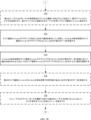
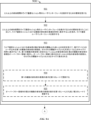
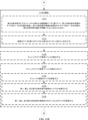
一部の実施形態では、ディスプレイを備える電子デバイスにて方法が実行される。この方法は、メッセージングアプリケーションのメッセージングユーザインターフェースを表示することであって、メッセージングユーザインターフェースは3人以上の参加者間のメッセージ会話における複数のメッセージを含むメッセージ領域を含む、ことと、3人以上の参加者に利用可能なライブ通信セッションがアクティブであることを示す第1のデータを受信することと、3人以上の参加者間のライブ通信セッションがアクティブであることを示す第1のデータの受信に応じて、ライブ通信セッションがアクティブであることを示す通知を表示することと、ライブ通信セッションがアクティブであることを示す通知を表示している間に、3人以上の参加者間のライブ通信セッションがアクティブでなくなったことを示す第2のデータを受信することと、3人以上の参加者間のライブ通信セッションがアクティブでなくなったことを示す第2のデータの受信に応じて、通知の表示を中止するか、又はライブ通信セッションがアクティブでなくなったことを示すように通知を更新することと、を含むことができる。 In some embodiments, a method is performed on an electronic device having a display. The method may include displaying a messaging user interface of a messaging application, the messaging user interface including a message area including a plurality of messages in a message conversation between three or more participants; receiving first data indicating that a live communication session available to the three or more participants is active; in response to receiving the first data indicating that the live communication session between the three or more participants is active, displaying a notification indicating that the live communication session is active; while displaying the notification indicating that the live communication session is active, receiving second data indicating that the live communication session between the three or more participants is no longer active; and in response to receiving the second data indicating that the live communication session between the three or more participants is no longer active, ceasing to display the notification or updating the notification to indicate that the live communication session is no longer active.
一部の実施形態では、非一時的コンピュータ可読記憶媒体が、ディスプレイを備える電子デバイスの1つ以上のプロセッサによって実行されるように構成された1つ以上のプログラムを記憶する。1つ以上のプログラムは、3人以上の参加者間のメッセージ会話における複数のメッセージを含むメッセージ領域を含む、メッセージングアプリケーションのメッセージングユーザインターフェースを表示し、3人以上の参加者に利用可能なライブ通信セッションがアクティブであることを示す第1のデータを受信し、3人以上の参加者間のライブ通信セッションがアクティブであることを示す第1のデータの受信に応じて、ライブ通信セッションがアクティブであることを示す通知を表示し、ライブ通信セッションがアクティブであることを示す通知を表示している間に、3人以上の参加者間のライブ通信セッションがアクティブでなくなったことを示す第2のデータを受信し、3人以上の参加者間のライブ通信セッションがアクティブでなくなったことを示す第2のデータの受信に応じて、通知の表示を中止するか、又はライブ通信セッションがアクティブでなくなったことを示すように通知を更新する、ための命令を含む。 In some embodiments, a non-transitory computer-readable storage medium stores one or more programs configured to be executed by one or more processors of an electronic device having a display. The one or more programs include instructions for displaying a messaging user interface of a messaging application including a message area including a plurality of messages in a message conversation between three or more participants, receiving first data indicating that a live communication session available to the three or more participants is active, displaying a notification indicating that the live communication session is active in response to receiving the first data indicating that the live communication session between the three or more participants is active, receiving second data indicating that the live communication session between the three or more participants is no longer active while displaying the notification indicating that the live communication session is active, and in response to receiving the second data indicating that the live communication session between the three or more participants is no longer active, ceasing to display the notification or updating the notification to indicate that the live communication session is no longer active.
一部の実施形態では、一時的コンピュータ可読記憶媒体が、ディスプレイを備える電子デバイスの1つ以上のプロセッサによって実行されるように構成された1つ以上のプログラムを記憶する。1つ以上のプログラムは、3人以上の参加者間のメッセージ会話における複数のメッセージを含むメッセージ領域を含む、メッセージングアプリケーションのメッセージングユーザインターフェースを表示し、3人以上の参加者に利用可能なライブ通信セッションがアクティブであることを示す第1のデータを受信する、ための命令を含む。3人以上の参加者間のライブ通信セッションがアクティブであることを示す第1のデータの受信に応じて、ライブ通信セッションがアクティブであることを示す通知を表示し、ライブ通信セッションがアクティブであることを示す通知を表示している間に、3人以上の参加者間のライブ通信セッションがアクティブでなくなったことを示す第2のデータを受信することと、3人以上の参加者間のライブ通信セッションがアクティブでなくなったことを示す第2のデータの受信に応じて、通知の表示を中止するか、又はライブ通信セッションがアクティブでなくなったことを示すように通知を更新することと、を含むことができる。 In some embodiments, a temporary computer-readable storage medium stores one or more programs configured to be executed by one or more processors of an electronic device having a display. The one or more programs include instructions for displaying a messaging user interface of a messaging application including a message area including a plurality of messages in a message conversation between the three or more participants, and receiving first data indicating that a live communication session available to the three or more participants is active. In response to receiving the first data indicating that the live communication session between the three or more participants is active, the method may include displaying a notification indicating that the live communication session is active, receiving second data indicating that the live communication session between the three or more participants is no longer active while displaying the notification indicating that the live communication session is active, and in response to receiving the second data indicating that the live communication session between the three or more participants is no longer active, ceasing to display the notification or updating the notification to indicate that the live communication session is no longer active.
一部の実施形態では、電子デバイスは、ディスプレイと、1つ以上のプロセッサと、メモリと、を備える。メモリは、1つ以上のプロセッサによって実行されるように構成された1つ以上のプログラムを記憶する。1つ以上のプログラムは、3人以上の参加者間のメッセージ会話における複数のメッセージを含むメッセージ領域を含む、メッセージングアプリケーションのメッセージングユーザインターフェースを表示し、3人以上の参加者に利用可能なライブ通信セッションがアクティブであることを示す第1のデータを受信する、ための命令を含む。3人以上の参加者間のライブ通信セッションがアクティブであることを示す第1のデータの受信に応じて、ライブ通信セッションがアクティブであることを示す通知を表示し、ライブ通信セッションがアクティブであることを示す通知を表示している間に、3人以上の参加者間のライブ通信セッションがアクティブでなくなったことを示す第2のデータを受信することと、3人以上の参加者間のライブ通信セッションがアクティブでなくなったことを示す第2のデータの受信に応じて、通知の表示を中止するか、又はライブ通信セッションがアクティブでなくなったことを示すように通知を更新することと、を含むことができる。 In some embodiments, an electronic device includes a display, one or more processors, and a memory. The memory stores one or more programs configured to be executed by the one or more processors. The one or more programs include instructions for displaying a messaging user interface of a messaging application including a message area including a plurality of messages in a message conversation between the three or more participants, and receiving first data indicating that a live communication session available to the three or more participants is active. In response to receiving the first data indicating that the live communication session between the three or more participants is active, the method may include displaying a notification indicating that the live communication session is active, receiving second data indicating that the live communication session between the three or more participants is no longer active while displaying the notification indicating that the live communication session is active, and in response to receiving the second data indicating that the live communication session between the three or more participants is no longer active, ceasing to display the notification or updating the notification to indicate that the live communication session is no longer active.
一部の実施形態では、電子デバイスは、ディスプレイと、3人以上の参加者間のメッセージ会話における複数のメッセージを含むメッセージ領域を含む、メッセージングアプリケーションのメッセージングユーザインターフェースを表示する手段と、3人以上の参加者に利用可能なライブ通信セッションがアクティブであることを示す第1のデータを受信する手段と、3人以上の参加者間のライブ通信セッションがアクティブであることを示す第1のデータの受信に応じて、ライブ通信セッションがアクティブであることを示す通知を表示する手段と、ライブ通信セッションがアクティブであることを示す通知を表示している間に、3人以上の参加者間のライブ通信セッションがアクティブでなくなったことを示す第2のデータを受信する手段と、3人以上の参加者間のライブ通信セッションがアクティブでなくなったことを示す第2のデータの受信に応じて、通知の表示を中止するか、又はライブ通信セッションがアクティブでなくなったことを示すように通知を更新する手段と、を備える。 In some embodiments, the electronic device comprises: means for displaying a messaging user interface of a messaging application including a display and a message area including a plurality of messages in a message conversation between the three or more participants; means for receiving first data indicating that a live communication session available to the three or more participants is active; means for displaying a notification indicating that the live communication session is active in response to receiving the first data indicating that the live communication session between the three or more participants is active; means for receiving second data indicating that the live communication session between the three or more participants is no longer active while displaying the notification indicating that the live communication session is active; and means for ceasing display of the notification or updating the notification to indicate that the live communication session is no longer active in response to receiving the second data indicating that the live communication session between the three or more participants is no longer active.
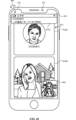
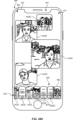
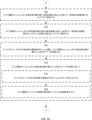
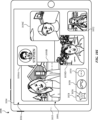
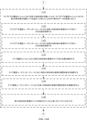
一部の実施形態では、ディスプレイを備える電子デバイスにて方法が行われる。この方法は、2人以上の参加者間のライブ通信セッション用のユーザインターフェースを表示するための要求を受信することと、2人以上の参加者間のライブ通信セッション用のユーザインターフェースを表示するための要求を受信したことに応じて、ライブ通信セッションにおいて複数の参加者の表現を同時に表示することを含む、ライブ通信ユーザインターフェースを表示することと、を含み、ライブ通信セッションにおいて複数の参加者の表現を表示することは、ライブ通信セッションにおける参加者の数が参加者の閾数よりも多いとの判定を受けて、電子デバイスのユーザ以外の第1の複数の参加者の表現を、それぞれの閾値サイズよりも大きな1つ以上のサイズで同時に表示する一方、第1の複数の参加者に含まれない1人以上の参加者を含む第2の複数の参加者の表現をオーバーフロー領域に表示し、オーバーフロー領域に表示される1人以上の他の参加者の表現は、それぞれの閾値サイズよりも小さなサイズで表示される、ことと、ライブ通信セッションにおける参加者の数が参加者の閾数以下であるとの判定を受けて、電子デバイスのユーザ以外の参加者の表現を、それぞれの閾値サイズ以下の1つ以上のサイズで表示することなく、電子デバイスのユーザ以外の参加者の表現を、それぞれの閾値サイズよりも大きな1つ以上のサイズで表示することと、を含むことができる。 In some embodiments, a method is performed on an electronic device having a display. The method includes receiving a request to display a user interface for a live communication session between two or more participants; and, in response to receiving the request to display the user interface for the live communication session between the two or more participants, displaying a live communication user interface including simultaneously displaying representations of a plurality of participants in the live communication session, wherein displaying the representations of the plurality of participants in the live communication session can include, in response to a determination that a number of participants in the live communication session is greater than a threshold number of participants, simultaneously displaying representations of a first plurality of participants other than a user of the electronic device at one or more sizes greater than a respective threshold size while displaying representations of a second plurality of participants including one or more participants not included in the first plurality of participants in an overflow area, the representations of the one or more other participants displayed in the overflow area being displayed at sizes smaller than the respective threshold size; and, in response to a determination that the number of participants in the live communication session is equal to or less than the threshold number of participants, displaying representations of participants other than a user of the electronic device at one or more sizes greater than a respective threshold size without displaying representations of participants other than a user of the electronic device at one or more sizes less than a respective threshold size.
一部の実施形態では、非一時的コンピュータ可読記憶媒体が、ディスプレイを備える電子デバイスの1つ以上のプロセッサによって実行されるように構成された1つ以上のプログラムを記憶する。1つ以上のプログラムは、2人以上の参加者間のライブ通信セッション用のユーザインターフェースを表示するための要求を受信し、2人以上の参加者間のライブ通信セッション用のユーザインターフェースを表示するための要求を受信したことに応じて、ライブ通信セッションにおいて複数の参加者の表現を同時に表示することを含む、ライブ通信ユーザインターフェースを表示する、ための命令を含み、ライブ通信セッションにおいて複数の参加者の表現を表示することは、ライブ通信セッションにおける参加者の数が参加者の閾数よりも多いとの判定を受けて、電子デバイスのユーザ以外の第1の複数の参加者の表現を、それぞれの閾値サイズよりも大きな1つ以上のサイズで同時に表示する一方、第1の複数の参加者に含まれない1人以上の参加者を含む第2の複数の参加者の表現をオーバーフロー領域に表示し、オーバーフロー領域に表示される1人以上の他の参加者の表現は、それぞれの閾値サイズよりも小さなサイズで表示される、ことと、ライブ通信セッションにおける参加者の数が参加者の閾数以下であるとの判定を受けて、電子デバイスのユーザ以外の参加者の表現を、それぞれの閾値サイズ以下の1つ以上のサイズで表示することなく、電子デバイスのユーザ以外の参加者の表現を、それぞれの閾値サイズよりも大きな1つ以上のサイズで表示することと、を含む。 In some embodiments, a non-transitory computer-readable storage medium stores one or more programs configured to be executed by one or more processors of an electronic device having a display. The one or more programs include instructions for receiving a request to display a user interface for a live communication session between two or more participants, and displaying a live communication user interface including simultaneously displaying representations of a plurality of participants in the live communication session in response to receiving the request to display a user interface for a live communication session between two or more participants, the displaying of the representations of the plurality of participants in the live communication session including: simultaneously displaying representations of a first plurality of participants other than the user of the electronic device at one or more sizes greater than a respective threshold size while displaying representations of a second plurality of participants including one or more participants not included in the first plurality of participants in an overflow area, the representations of the one or more other participants displayed in the overflow area being displayed at sizes smaller than the respective threshold sizes in response to a determination that the number of participants in the live communication session is equal to or less than the threshold number of participants; and displaying representations of participants other than the user of the electronic device at one or more sizes greater than the respective threshold sizes without displaying representations of participants other than the user of the electronic device at one or more sizes less than the respective threshold sizes in response to a determination that the number of participants in the live communication session is equal to or less than the threshold number of participants.
一部の実施形態では、一時的コンピュータ可読記憶媒体が、ディスプレイを備える電子デバイスの1つ以上のプロセッサによって実行されるように構成された1つ以上のプログラムを記憶する。1つ以上のプログラムは、2人以上の参加者間のライブ通信セッション用のユーザインターフェースを表示するための要求を受信し、2人以上の参加者間のライブ通信セッション用のユーザインターフェースを表示するための要求を受信したことに応じて、ライブ通信セッションにおいて複数の参加者の表現を同時に表示することを含む、ライブ通信ユーザインターフェースを表示する、ための命令含み、ライブ通信セッションにおいて複数の参加者の表現を表示することは、ライブ通信セッションにおける参加者の数が参加者の閾数よりも多いとの判定を受けて、電子デバイスのユーザ以外の第1の複数の参加者の表現を、それぞれの閾値サイズよりも大きな1つ以上のサイズで同時に表示する一方、第1の複数の参加者に含まれない1人以上の参加者を含む第2の複数の参加者の表現をオーバーフロー領域に表示し、オーバーフロー領域に表示される1人以上の他の参加者の表現は、それぞれの閾値サイズよりも小さなサイズで表示される、ことと、ライブ通信セッションにおける参加者の数が参加者の閾数以下であるとの判定を受けて、電子デバイスのユーザ以外の参加者の表現を、それぞれの閾値サイズ以下の1つ以上のサイズで表示することなく、電子デバイスのユーザ以外の参加者の表現を、それぞれの閾値サイズよりも大きな1つ以上のサイズで表示することと、を含む。 In some embodiments, a temporary computer-readable storage medium stores one or more programs configured to be executed by one or more processors of an electronic device having a display. The one or more programs include instructions for receiving a request to display a user interface for a live communication session between two or more participants, and displaying a live communication user interface, including simultaneously displaying representations of a plurality of participants in the live communication session in response to receiving the request to display a user interface for a live communication session between two or more participants, the displaying of the representations of the plurality of participants in the live communication session including: simultaneously displaying representations of a first plurality of participants other than the user of the electronic device at one or more sizes greater than a respective threshold size while displaying representations of a second plurality of participants including one or more participants not included in the first plurality of participants in an overflow area, the representations of the one or more other participants displayed in the overflow area being displayed at sizes smaller than the respective threshold sizes, and displaying representations of participants other than the user of the electronic device at one or more sizes greater than the respective threshold sizes without displaying representations of participants other than the user of the electronic device at one or more sizes less than the respective threshold sizes in response to a determination that the number of participants in the live communication session is equal to or less than the threshold number of participants.
一部の実施形態では、電子デバイスは、ディスプレイと、1つ以上のプロセッサと、メモリと、を備える。メモリは、1つ以上のプロセッサによって実行されるように構成された1つ以上のプログラムを記憶する。1つ以上のプログラムは、2人以上の参加者間のライブ通信セッション用のユーザインターフェースを表示するための要求を受信し、2人以上の参加者間のライブ通信セッション用のユーザインターフェースを表示するための要求を受信したことに応じて、ライブ通信セッションにおいて複数の参加者の表現を同時に表示することを含む、ライブ通信ユーザインターフェースを表示する、ための命令を含み、ライブ通信セッションにおいて複数の参加者の表現を表示することは、ライブ通信セッションにおける参加者の数が参加者の閾数よりも多いとの判定を受けて、電子デバイスのユーザ以外の第1の複数の参加者の表現を、それぞれの閾値サイズよりも大きな1つ以上のサイズで同時に表示する一方、第1の複数の参加者に含まれない1人以上の参加者を含む第2の複数の参加者の表現をオーバーフロー領域に表示し、オーバーフロー領域に表示される1人以上の他の参加者の表現は、それぞれの閾値サイズよりも小さなサイズで表示される、ことと、ライブ通信セッションにおける参加者の数が参加者の閾数以下であるとの判定を受けて、電子デバイスのユーザ以外の参加者の表現を、それぞれの閾値サイズ以下の1つ以上のサイズで表示することなく、電子デバイスのユーザ以外の参加者の表現を、それぞれの閾値サイズよりも大きな1つ以上のサイズで表示することと、を含む。 In some embodiments, an electronic device includes a display, one or more processors, and a memory. The memory stores one or more programs configured to be executed by the one or more processors. The one or more programs include instructions for receiving a request to display a user interface for a live communication session between two or more participants, and displaying a live communication user interface including simultaneously displaying representations of a plurality of participants in the live communication session in response to receiving the request to display a user interface for a live communication session between two or more participants, the displaying of the representations of the plurality of participants in the live communication session including: simultaneously displaying representations of a first plurality of participants other than the user of the electronic device at one or more sizes greater than a respective threshold size while displaying representations of a second plurality of participants including one or more participants not included in the first plurality of participants in an overflow area, the representations of the one or more other participants displayed in the overflow area being displayed at sizes smaller than the respective threshold sizes in response to a determination that the number of participants in the live communication session is equal to or less than the threshold number of participants; and displaying representations of participants other than the user of the electronic device at one or more sizes greater than the respective threshold sizes without displaying representations of participants other than the user of the electronic device at one or more sizes less than the respective threshold sizes in response to a determination that the number of participants in the live communication session is equal to or less than the threshold number of participants.
一部の実施形態では、電子デバイスは、ディスプレイと、2人以上の参加者間のライブ通信セッション用のユーザインターフェースを表示するための要求を受信する手段と、2人以上の参加者間のライブ通信セッション用のユーザインターフェースを表示するための要求を受信したことに応じて、ライブ通信セッションにおいて複数の参加者の表現を同時に表示することを含む、ライブ通信ユーザインターフェースを表示する手段と、を備え、ライブ通信セッションにおいて複数の参加者の表現を表示することは、ライブ通信セッションにおける参加者の数が参加者の閾数よりも多いとの判定を受けて、電子デバイスのユーザ以外の第1の複数の参加者の表現を、それぞれの閾値サイズよりも大きな1つ以上のサイズで同時に表示する一方、第1の複数の参加者に含まれない1人以上の参加者を含む第2の複数の参加者の表現をオーバーフロー領域に表示し、オーバーフロー領域に表示される1人以上の他の参加者の表現は、それぞれの閾値サイズよりも小さなサイズで表示される、手段と、ライブ通信セッションにおける参加者の数が参加者の閾数以下であるとの判定を受けて、電子デバイスのユーザ以外の参加者の表現を、それぞれの閾値サイズ以下の1つ以上のサイズで表示することなく、電子デバイスのユーザ以外の参加者の表現を、それぞれの閾値サイズよりも大きな1つ以上のサイズで表示する、手段と、を備える。 In some embodiments, an electronic device includes a display, means for receiving a request to display a user interface for a live communication session between two or more participants, and means for displaying a live communication user interface including simultaneously displaying representations of a plurality of participants in the live communication session in response to receiving the request to display a user interface for the live communication session between two or more participants, the displaying of the representations of the plurality of participants in the live communication session including: simultaneously displaying representations of a first plurality of participants other than the user of the electronic device at one or more sizes greater than the respective threshold sizes while displaying representations of a second plurality of participants including one or more participants not included in the first plurality of participants in an overflow area, the representations of the one or more other participants displayed in the overflow area being displayed at sizes smaller than the respective threshold sizes in response to a determination that the number of participants in the live communication session is equal to or less than the threshold number of participants; and means for displaying representations of participants other than the user of the electronic device at one or more sizes greater than the respective threshold sizes without displaying representations of participants other than the user of the electronic device at one or more sizes less than the respective threshold sizes in response to a determination that the number of participants in the live communication session is equal to or less than the threshold number of participants.
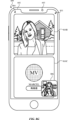
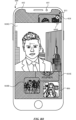
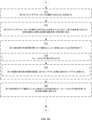
一部の実施形態では、ディスプレイを備える電子デバイスにて方法が行われる。方法は、ライブビデオ通信セッションにおける第1の参加者の表現と、ライブビデオ通信セッションにおける第2の参加者の表現と、ライブビデオ通信セッションにおける第3の参加者の表現とを同時に表示するライブビデオ通信ユーザインターフェースを表示することと、ライブビデオ通信ユーザインターフェースを表示している間に、ライブビデオ通信セッションにおける第2の参加者の活動レベルが、ライブビデオ通信セッションにおける第1の参加者の活動レベルを超えて上昇したことを示すデータを受信することと、ライブビデオ通信セッションにおける第2の参加者の活動レベルが、ライブビデオ通信セッションにおける第1の参加者の活動レベルを超えて上昇したことを示すデータの受信に応じて、ライブビデオ通信ユーザインターフェースにおいて第1の参加者の表現のサイズ及び/又は位置を変更することと、ライブビデオ通信ユーザインターフェースにおいて第2の参加者の表現のサイズ及び/又は位置を変更することと、ライブビデオ通信ユーザインターフェースにおいて第3の参加者の表現のサイズ及び/又は位置を変更することと、を含むことができる。 In some embodiments, a method is performed on an electronic device having a display. The method may include displaying a live video communication user interface simultaneously displaying a representation of a first participant in the live video communication session, a representation of a second participant in the live video communication session, and a representation of a third participant in the live video communication session; receiving data while displaying the live video communication user interface indicating that an activity level of the second participant in the live video communication session has increased beyond an activity level of the first participant in the live video communication session; in response to receiving the data indicating that an activity level of the second participant in the live video communication session has increased beyond an activity level of the first participant in the live video communication session, modifying a size and/or position of the representation of the first participant in the live video communication user interface, modifying a size and/or position of the representation of the second participant in the live video communication user interface, and modifying a size and/or position of the representation of the third participant in the live video communication user interface.
一部の実施形態では、非一時的コンピュータ可読記憶媒体が、ディスプレイを備える電子デバイスの1つ以上のプロセッサによって実行されるように構成された1つ以上のプログラムを記憶する。1つ以上のプログラムは、ライブビデオ通信セッションにおける第1の参加者の表現と、ライブビデオ通信セッションにおける第2の参加者の表現と、ライブビデオ通信セッションにおける第3の参加者の表現とを同時に表示するライブビデオ通信ユーザインターフェースを表示し、ライブビデオ通信ユーザインターフェースを表示している間に、ライブビデオ通信セッションにおける第2の参加者の活動レベルが、ライブビデオ通信セッションにおける第1の参加者の活動レベルを超えて上昇したことを示すデータを受信し、ライブビデオ通信セッションにおける第2の参加者の活動レベルがライブビデオ通信セッションにおける第1の参加者の活動レベルを超えて上昇したことを示すデータの受信に応じて、ライブビデオ通信ユーザインターフェースにおいて第1の参加者の表現のサイズ及び/又は位置を変更し、ライブビデオ通信ユーザインターフェースにおいて第2の参加者の表現のサイズ及び/又は位置を変更し、ライブビデオ通信ユーザインターフェースにおいて第3の参加者の表現のサイズ及び/又は位置を変更する、ための命令を含む。 In some embodiments, a non-transitory computer-readable storage medium stores one or more programs configured to be executed by one or more processors of an electronic device having a display. The one or more programs include instructions for displaying a live video communication user interface simultaneously displaying a representation of a first participant in the live video communication session, a representation of a second participant in the live video communication session, and a representation of a third participant in the live video communication session, receiving data while displaying the live video communication user interface indicating that an activity level of the second participant in the live video communication session has increased beyond an activity level of the first participant in the live video communication session, and in response to receiving the data indicating that an activity level of the second participant in the live video communication session has increased beyond an activity level of the first participant in the live video communication session, modifying a size and/or position of the representation of the first participant in the live video communication user interface, modifying a size and/or position of the representation of the second participant in the live video communication user interface, and modifying a size and/or position of the representation of the third participant in the live video communication user interface.
一部の実施形態では、一時的コンピュータ可読記憶媒体が、ディスプレイを備える電子デバイスの1つ以上のプロセッサによって実行されるように構成された1つ以上のプログラムを記憶する。1つ以上のプログラムは、ライブビデオ通信セッションにおける第1の参加者の表現と、ライブビデオ通信セッションにおける第2の参加者の表現と、ライブビデオ通信セッションにおける第3の参加者の表現とを同時に表示するライブビデオ通信ユーザインターフェースを表示し、ライブビデオ通信ユーザインターフェースを表示している間に、ライブビデオ通信セッションにおける第2の参加者の活動レベルが、ライブビデオ通信セッションにおける第1の参加者の活動レベルを超えて上昇したことを示すデータを受信し、ライブビデオ通信セッションにおける第2の参加者の活動レベルが、ライブビデオ通信セッションにおける第1の参加者の活動レベルを超えて上昇したことを示すデータの受信に応じて、ライブビデオ通信ユーザインターフェースにおいて第1の参加者の表現のサイズ及び/又は位置を変更し、ライブビデオ通信ユーザインターフェースにおいて第2の参加者の表現のサイズ及び/又は位置を変更し、ライブビデオ通信ユーザインターフェースにおいて第3の参加者の表現のサイズ及び/又は位置を変更する、ための命令を含む。 In some embodiments, a temporary computer-readable storage medium stores one or more programs configured to be executed by one or more processors of an electronic device having a display. The one or more programs include instructions for displaying a live video communication user interface simultaneously displaying a representation of a first participant in the live video communication session, a representation of a second participant in the live video communication session, and a representation of a third participant in the live video communication session, receiving data while displaying the live video communication user interface indicating that an activity level of the second participant in the live video communication session has increased beyond an activity level of the first participant in the live video communication session, and in response to receiving the data indicating that an activity level of the second participant in the live video communication session has increased beyond an activity level of the first participant in the live video communication session, modifying a size and/or position of the representation of the first participant in the live video communication user interface, modifying a size and/or position of the representation of the second participant in the live video communication user interface, and modifying a size and/or position of the representation of the third participant in the live video communication user interface.
一部の実施形態では、電子デバイスは、ディスプレイと、1つ以上のプロセッサと、メモリと、を備える。メモリは、1つ以上のプロセッサによって実行されるように構成された1つ以上のプログラムを記憶する。1つ以上のプログラムは、ライブビデオ通信セッションにおける第1の参加者の表現と、ライブビデオ通信セッションにおける第2の参加者の表現と、ライブビデオ通信セッションにおける第3の参加者の表現とを同時に表示するライブビデオ通信ユーザインターフェースを表示し、ライブビデオ通信ユーザインターフェースを表示している間に、ライブビデオ通信セッションにおける第2の参加者の活動レベルが、ライブビデオ通信セッションにおける第1の参加者の活動レベルを超えて上昇したことを示すデータを受信し、ライブビデオ通信セッションにおける第2の参加者の活動レベルが、ライブビデオ通信セッションにおける第1の参加者の活動レベルを超えて上昇したことを示すデータの受信に応じて、ライブビデオ通信ユーザインターフェースにおいて第1の参加者の表現のサイズ及び/又は位置を変更し、ライブビデオ通信ユーザインターフェースにおいて第2の参加者の表現のサイズ及び/又は位置を変更し、ライブビデオ通信ユーザインターフェースにおいて第3の参加者の表現のサイズ及び/又は位置を変更する、ための命令を含む。 In some embodiments, the electronic device comprises a display, one or more processors, and a memory. The memory stores one or more programs configured to be executed by the one or more processors. The one or more programs include instructions for displaying a live video communication user interface simultaneously displaying a representation of a first participant in the live video communication session, a representation of a second participant in the live video communication session, and a representation of a third participant in the live video communication session, receiving data while displaying the live video communication user interface indicating that an activity level of the second participant in the live video communication session has increased beyond an activity level of the first participant in the live video communication session, and in response to receiving the data indicating that an activity level of the second participant in the live video communication session has increased beyond an activity level of the first participant in the live video communication session, modifying a size and/or position of the representation of the first participant in the live video communication user interface, modifying a size and/or position of the representation of the second participant in the live video communication user interface, and modifying a size and/or position of the representation of the third participant in the live video communication user interface.
一部の実施形態では、電子デバイスは、ディスプレイと、ライブビデオ通信セッションにおける第1の参加者の表現と、ライブビデオ通信セッションにおける第2の参加者の表現と、ライブビデオ通信セッションにおける第3の参加者の表現とを同時に表示するライブビデオ通信ユーザインターフェースを表示する手段と、ライブビデオ通信ユーザインターフェースを表示している間に、ライブビデオ通信セッションにおける第2の参加者の活動レベルが、ライブビデオ通信セッションにおける第1の参加者の活動レベルを超えて上昇したことを示すデータを受信する手段と、ライブビデオ通信セッションにおける第2の参加者の活動レベルが、ライブビデオ通信セッションにおける第1の参加者の活動レベルを超えて上昇したことを示すデータの受信に応じて、ライブビデオ通信ユーザインターフェースにおいて第1の参加者の表現のサイズ及び/又は位置を変更し、ライブビデオ通信ユーザインターフェースにおいて第2の参加者の表現のサイズ及び/又は位置を変更し、ライブビデオ通信ユーザインターフェースにおいて第3の参加者の表現のサイズ及び/又は位置を変更する、手段と、を備える。 In some embodiments, the electronic device comprises a display; means for displaying a live video communication user interface simultaneously displaying a representation of a first participant in the live video communication session, a representation of a second participant in the live video communication session, and a representation of a third participant in the live video communication session; means for receiving data indicating that an activity level of the second participant in the live video communication session has increased beyond an activity level of the first participant in the live video communication session while displaying the live video communication user interface; and means for modifying a size and/or position of the representation of the first participant in the live video communication user interface, modifying a size and/or position of the representation of the second participant in the live video communication user interface, and modifying a size and/or position of the representation of the third participant in the live video communication user interface in response to receiving the data indicating that an activity level of the second participant in the live video communication session has increased beyond an activity level of the first participant in the live video communication session.
一部の実施形態では、ディスプレイを備える電子デバイスにて方法が実行される。この方法は、メッセージングアプリケーションのメッセージングユーザインターフェースであって、3人以上の参加者を含むメッセージ会話における参加者間の複数のメッセージを含むメッセージ領域と、ライブビデオ通信アプリケーションにおいてライブビデオ通信セッションを開始するための、メッセージ領域とは別個のアフォーダンスと、を含む、メッセージングユーザインターフェースを表示することと、アフォーダンスの選択に対応する入力を検出することと、アフォーダンスの選択に対応する入力の検出に応じて、ライブビデオ通信アプリケーションにおいてライブビデオ通信セッションを開始する処理を開始することであって、ライブビデオ通信セッションは、メッセージ会話の参加者を含む、開始することと、を含むことができる。 In some embodiments, a method is performed on an electronic device having a display. The method may include displaying a messaging user interface of a messaging application including a message area including a plurality of messages between participants in a message conversation including three or more participants and an affordance, separate from the message area, for initiating a live video communication session in a live video communication application; detecting an input corresponding to a selection of the affordance; and in response to detecting the input corresponding to the selection of the affordance, initiating a process to initiate a live video communication session in the live video communication application, the live video communication session including the participants of the message conversation.
一部の実施形態では、非一時的コンピュータ可読記憶媒体が、ディスプレイを備える電子デバイスの1つ以上のプロセッサによって実行されるように構成された1つ以上のプログラムを記憶する。1つ以上のプログラムは、メッセージングアプリケーションのメッセージングユーザインターフェースであって、3人以上の参加者を含むメッセージ会話における参加者間の複数のメッセージを含むメッセージ領域と、ライブビデオ通信アプリケーションにおいてライブビデオ通信セッションを開始するための、メッセージ領域とは別個のアフォーダンスと、を含む、メッセージングユーザインターフェースを表示し、アフォーダンスの選択に対応する入力を検出し、アフォーダンスの選択に対応する入力の検出に応じて、ライブビデオ通信アプリケーションにおいて、メッセージ会話の参加者を含むライブビデオ通信セッションを開始する処理を開始する、ための命令を含む。 In some embodiments, a non-transitory computer-readable storage medium stores one or more programs configured to be executed by one or more processors of an electronic device having a display. The one or more programs include instructions for displaying a messaging user interface of a messaging application including a message area including a plurality of messages between participants in a message conversation including three or more participants and an affordance, separate from the message area, for initiating a live video communication session in a live video communication application; detecting an input corresponding to a selection of the affordance; and in response to detecting the input corresponding to the selection of the affordance, initiating a process in the live video communication application to initiate a live video communication session including the participants of the message conversation.
一部の実施形態では、一時的コンピュータ可読記憶媒体が、ディスプレイを備える電子デバイスの1つ以上のプロセッサによって実行されるように構成された1つ以上のプログラムを記憶する。1つ以上のプログラムは、メッセージングアプリケーションのメッセージングユーザインターフェースであって、3人以上の参加者を含むメッセージ会話における参加者間の複数のメッセージを含むメッセージ領域と、ライブビデオ通信アプリケーションにおいてライブビデオ通信セッションを開始するための、メッセージ領域とは別個のアフォーダンスと、を含む、メッセージングユーザインターフェースを表示し、表示し、アフォーダンスの選択に対応する入力を検出し、アフォーダンスの選択に対応する入力の検出に応じて、ライブビデオ通信アプリケーションにおいて、メッセージ会話の参加者を含むライブビデオ通信セッションを開始する処理を開始する、ための命令を含む。 In some embodiments, a temporary computer-readable storage medium stores one or more programs configured to be executed by one or more processors of an electronic device having a display. The one or more programs include instructions for displaying a messaging user interface of a messaging application including a message area including a plurality of messages between participants in a message conversation including three or more participants and an affordance, separate from the message area, for initiating a live video communication session in a live video communication application; detecting an input corresponding to a selection of the affordance; and in response to detecting the input corresponding to the selection of the affordance, initiating a process in the live video communication application to initiate a live video communication session including the participants of the message conversation.
一部の実施形態では、電子デバイスは、ディスプレイと、1つ以上のプロセッサと、メモリと、を備える。メモリは、1つ以上のプロセッサによって実行されるように構成された1つ以上のプログラムを記憶する。1つ以上のプログラムは、メッセージングアプリケーションのメッセージングユーザインターフェースであって、3人以上の参加者を含むメッセージ会話における参加者間の複数のメッセージを含むメッセージ領域と、ライブビデオ通信アプリケーションにおいてライブビデオ通信セッションを開始するための、メッセージ領域とは別個のアフォーダンスと、を含む、メッセージングユーザインターフェースを表示し、アフォーダンスの選択に対応する入力を検出し、アフォーダンスの選択に対応する入力の検出に応じて、ライブビデオ通信アプリケーションにおいて、メッセージ会話の参加者を含むライブビデオ通信セッションを開始する処理を開始する、ための命令を含む。 In some embodiments, an electronic device includes a display, one or more processors, and a memory. The memory stores one or more programs configured to be executed by the one or more processors. The one or more programs include instructions for displaying a messaging user interface of a messaging application including a message area including a plurality of messages between participants in a message conversation including three or more participants, and an affordance, separate from the message area, for initiating a live video communication session in a live video communication application; detecting an input corresponding to a selection of the affordance; and in response to detecting the input corresponding to the selection of the affordance, initiating a process in the live video communication application to initiate a live video communication session including the participants of the message conversation.
一部の実施形態では、電子デバイスは、ディスプレイと、メッセージングアプリケーションのメッセージングユーザインターフェースを表示する手段であって、メッセージングユーザインターフェースは、3人以上の参加者を含むメッセージ会話における参加者間の複数のメッセージを含むメッセージ領域と、ライブビデオ通信アプリケーションにおいてライブビデオ通信セッションを開始するための、メッセージ領域とは別個のアフォーダンスと、を含む、手段と、アフォーダンスの選択に対応する入力を検出する手段と、アフォーダンスの選択に対応する入力の検出に応じて、ライブビデオ通信アプリケーションにおいて、メッセージ会話の参加者を含むライブビデオ通信セッションを開始する処理を開始する手段と、を備える。 In some embodiments, the electronic device includes a display; means for displaying a messaging user interface of a messaging application, the messaging user interface including a message area including a plurality of messages between participants in a message conversation including three or more participants, and an affordance, separate from the message area, for initiating a live video communication session in the live video communication application; means for detecting an input corresponding to a selection of the affordance; and means for initiating a process in the live video communication application to initiate a live video communication session including the participants of the message conversation in response to detecting the input corresponding to the selection of the affordance.
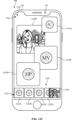
一部の実施形態では、ディスプレイを備える電子デバイスにて方法が実行される。この方法は、ライブビデオ通信アプリケーションのユーザインターフェースであって、3人以上の参加者グループに対応する第1の参加者アフォーダンスを含む、それぞれ1人以上の参加者に対応する複数の参加者アフォーダンスと、新規のライブビデオ通信セッションを開始するための新規セッションアフォーダンスと、を含む、ユーザインターフェースを表示することと、新規のライブビデオ通信セッションを開始する処理を開始するための要求に対応する入力を検出することと、入力の検出に応じて、入力が第1の参加者アフォーダンスの選択に対応することを受けて、3人以上の参加者グループを含む新規のライブビデオ通信セッションを開始する処理を開始することと、入力が新規セッションアフォーダンスの選択に対応することを受けて、2人以上の参加者を選択する処理を開始し、デバイスに関連する参加者と、2人以上の選択された参加者とを含む新規のライブビデオ通信セッションを開始することと、を含むことができる。 In some embodiments, a method is performed on an electronic device having a display. The method may include displaying a user interface of a live video communication application, the user interface including a plurality of participant affordances, each corresponding to one or more participants, including a first participant affordance corresponding to a group of three or more participants, and a new session affordance for starting a new live video communication session; detecting an input corresponding to a request to initiate a process to initiate a new live video communication session; in response to detecting the input, initiating a process to initiate a new live video communication session including the group of three or more participants in response to the input corresponding to a selection of the first participant affordance; and initiating a process to select two or more participants in response to the input corresponding to a selection of the new session affordance, and starting a new live video communication session including a participant associated with the device and the two or more selected participants.
一部の実施形態では、非一時的コンピュータ可読記憶媒体が、ディスプレイを備える電子デバイスの1つ以上のプロセッサによって実行されるように構成された1つ以上のプログラムを記憶する。1つ以上のプログラムは、ライブビデオ通信アプリケーションのライブビデオ通信ユーザインターフェースであって、3人以上の参加者グループに対応する第1の参加者アフォーダンスを含む、それぞれ1人以上の参加者に対応する複数の参加者アフォーダンスと、新規のライブビデオ通信セッションを開始するための新規セッションアフォーダンスと、を含む、ライブビデオ通信ユーザインターフェースを表示し、新規のライブビデオ通信セッションを開始する処理を開始するための要求に対応する入力を検出し、入力の検出に応じて、入力が第1の参加者アフォーダンスの選択に対応することを受けて、3人以上の参加者グループを含む新規のライブビデオ通信セッションを開始する処理を開始し、入力が新規セッションアフォーダンスの選択に対応することを受けて、2人以上の参加者を選択する処理を開始し、デバイスに関連する参加者と、2人以上の選択された参加者とを含む新規のライブビデオ通信セッションを開始する、ための命令を含む。 In some embodiments, a non-transitory computer-readable storage medium stores one or more programs configured to be executed by one or more processors of an electronic device having a display. The one or more programs include instructions for displaying a live video communication user interface of a live video communication application, the live video communication user interface including a plurality of participant affordances, each corresponding to one or more participants, including a first participant affordance corresponding to a group of three or more participants, and a new session affordance for starting a new live video communication session; detecting an input corresponding to a request to start a process to start a new live video communication session; in response to detecting the input, initiating a process to start a new live video communication session including the group of three or more participants in response to the input corresponding to a selection of the first participant affordance; initiating a process to select two or more participants in response to the input corresponding to a selection of the new session affordance; and initiating a new live video communication session including a participant associated with the device and the two or more selected participants.
一部の実施形態では、一時的コンピュータ可読記憶媒体が、ディスプレイを備える電子デバイスの1つ以上のプロセッサによって実行されるように構成された1つ以上のプログラムを記憶する。1つ以上のプログラムは、ライブビデオ通信アプリケーションのライブビデオ通信ユーザインターフェースであって、3人以上の参加者グループに対応する第1の参加者アフォーダンスを含む、それぞれ1人以上の参加者に対応する複数の参加者アフォーダンスと、新規のライブビデオ通信セッションを開始するための新規セッションアフォーダンスと、を含む、ライブビデオ通信ユーザインターフェースを表示し、新規のライブビデオ通信セッションを開始する処理を開始するための要求に対応する入力を検出し、入力の検出に応じて、入力が第1の参加者アフォーダンスの選択に対応することを受けて、3人以上の参加者グループを含む新規のライブビデオ通信セッションを開始する処理を開始し、入力が新規セッションアフォーダンスの選択に対応することを受けて、2人以上の参加者を選択する処理を開始し、デバイスに関連する参加者と、2人以上の選択された参加者とを含む新規のライブビデオ通信セッションを開始する、ための命令を含む。 In some embodiments, a temporary computer-readable storage medium stores one or more programs configured to be executed by one or more processors of an electronic device having a display. The one or more programs include instructions for displaying a live video communication user interface of a live video communication application, the live video communication user interface including a plurality of participant affordances, each corresponding to one or more participants, including a first participant affordance corresponding to a group of three or more participants, and a new session affordance for starting a new live video communication session; detecting an input corresponding to a request to start a process to start a new live video communication session; in response to detecting the input, initiating a process to start a new live video communication session including the group of three or more participants in response to the input corresponding to a selection of the first participant affordance; initiating a process to select two or more participants in response to the input corresponding to a selection of the new session affordance; and initiating a new live video communication session including a participant associated with the device and the two or more selected participants.
一部の実施形態では、電子デバイスは、ディスプレイと、1つ以上のプロセッサと、メモリと、を備える。メモリは、1つ以上のプロセッサによって実行されるように構成された1つ以上のプログラムを記憶する。1つ以上のプログラムは、ライブビデオ通信アプリケーションのライブビデオ通信ユーザインターフェースであって、3人以上の参加者グループに対応する第1の参加者アフォーダンスを含む、それぞれ1人以上の参加者に対応する複数の参加者アフォーダンスと、新規のライブビデオ通信セッションを開始するための新規セッションアフォーダンスと、を含む、ライブビデオ通信ユーザインターフェースを表示し、新規のライブビデオ通信セッションを開始する処理を開始するための要求に対応する入力を検出し、入力の検出に応じて、入力が第1の参加者アフォーダンスの選択に対応することを受けて、3人以上の参加者グループを含む新規のライブビデオ通信セッションを開始する処理を開始し、入力が新規セッションアフォーダンスの選択に対応することを受けて、2人以上の参加者を選択する処理を開始し、デバイスに関連する参加者と、2人以上の選択された参加者とを含む新規のライブビデオ通信セッションを開始する、ための命令を含む。 In some embodiments, the electronic device includes a display, one or more processors, and a memory. The memory stores one or more programs configured to be executed by the one or more processors. The one or more programs include instructions for displaying a live video communication user interface of a live video communication application, the live video communication user interface including a plurality of participant affordances, each corresponding to one or more participants, including a first participant affordance corresponding to a group of three or more participants, and a new session affordance for starting a new live video communication session; detecting an input corresponding to a request to start a process to start a new live video communication session; in response to detecting the input, initiating a process to start a new live video communication session including the group of three or more participants in response to the input corresponding to a selection of the first participant affordance; initiating a process to select two or more participants in response to the input corresponding to a selection of the new session affordance; and initiating a new live video communication session including a participant associated with the device and the two or more selected participants.
一部の実施形態では、電子デバイスは、ディスプレイと、ライブビデオ通信アプリケーションのライブビデオ通信ユーザインターフェースを表示する手段であって、ライブビデオ通信ユーザインターフェースは、3人以上の参加者グループに対応する第1の参加者アフォーダンスを含む、それぞれ1人以上の参加者に対応する複数の参加者アフォーダンスと、新規のライブビデオ通信セッションを開始するための新規セッションアフォーダンスと、を含む、手段と、新規のライブビデオ通信セッションを開始する処理を開始するための要求に対応する入力を検出する手段と、入力の検出に応じて、入力が第1の参加者アフォーダンスの選択に対応することを受けて、3人以上の参加者グループを含む新規のライブビデオ通信セッションを開始する処理を開始し、入力が新規セッションアフォーダンスの選択に対応することによって、2人以上の参加者を選択する処理を開始し、デバイスに関連する参加者と、2人以上の選択された参加者とを含む新規のライブビデオ通信セッションを開始する手段と、を備える。 In some embodiments, the electronic device includes a display, a means for displaying a live video communication user interface of a live video communication application, the live video communication user interface including a plurality of participant affordances, each corresponding to one or more participants, including a first participant affordance corresponding to a group of three or more participants, and a new session affordance for starting a new live video communication session, and a means for detecting an input corresponding to a request to start a process to start a new live video communication session, and in response to detecting the input, starting a process to start a new live video communication session including the group of three or more participants in response to the input corresponding to a selection of the first participant affordance, starting a process to select two or more participants by the input corresponding to a selection of the new session affordance, and starting a new live video communication session including a participant associated with the device and the two or more selected participants.
これらの機能を実行する実行可能命令は、任意選択的に、非一時的コンピュータ可読記憶媒体又は1つ以上のプロセッサによって実行されるように構成された他のコンピュータプログラム製品に含まれる。これらの機能を実行する実行可能命令は、任意選択的に、一時的コンピュータ可読記憶媒体又は1つ以上のプロセッサによって実行されるように構成された他のコンピュータプログラム製品に含まれる。 Executable instructions to perform these functions are optionally included in a non-transitory computer-readable storage medium or other computer program product configured to be executed by one or more processors. Executable instructions to perform these functions are optionally included in a transitory computer-readable storage medium or other computer program product configured to be executed by one or more processors.
このため、電子デバイスは、複数の参加者が関与するライブ通信のための、より速く、より効率的な方法及びインターフェースが提供されることで、そのようなデバイスの有効性、効率性、及びユーザ満足度が高められる。そのような方法及びインターフェースは、複数の参加者が関与するライブ通信のための他の方法を補完したり、置き換えたりすることができる。 Thus, electronic devices are provided with faster, more efficient methods and interfaces for live communication involving multiple participants, thereby increasing the effectiveness, efficiency, and user satisfaction of such devices. Such methods and interfaces may complement or replace other methods for live communication involving multiple participants.
説明される様々な実施形態をより良く理解するため、以下の図面と併せて、以下の「発明を実施するための形態」が参照されるべきである。ここで、類似の参照番号は、それらの図の全てを通じて、対応する部分を指す。 For a better understanding of the various embodiments described, reference should be made to the following Detailed Description in conjunction with the following drawings, in which like reference numerals refer to corresponding parts throughout the various views:
以下の説明では、例示的な方法、パラメータなどが記載される。しかし、そのような説明の目的は、本開示の範囲を限定することではなく、例示的な実施形態の説明を提供することであることを理解されたい。 In the following description, example methods, parameters, and the like are described. However, it should be understood that the purpose of such description is not to limit the scope of the present disclosure, but to provide a description of example embodiments.
複数の参加者が関与するライブ通信のための効率的な方法及びインターフェースを提供する電子デバイスが必要とされている。そのような技術は、複数の参加者が関与するライブ通信に参加するユーザの認知的負担を軽減することができ、そのことで生産性を高めることができる。更に、そのような技術は、通常であれば冗長なユーザ入力のために浪費される、プロセッサ及びバッテリの電力を低減することができる。 There is a need for electronic devices that provide efficient methods and interfaces for live communications involving multiple participants. Such techniques can reduce the cognitive burden on users participating in live communications involving multiple participants, thereby increasing productivity. Furthermore, such techniques can reduce processor and battery power that is otherwise wasted on redundant user input.
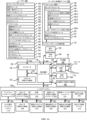
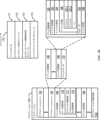
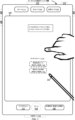
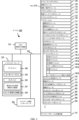
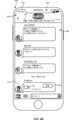
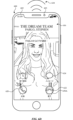
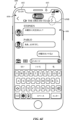
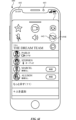
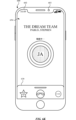
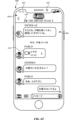
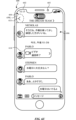
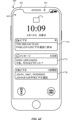
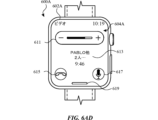
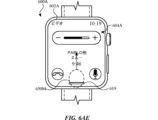
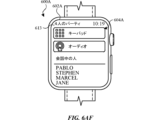
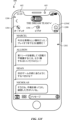
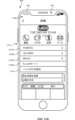
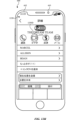
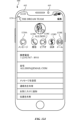
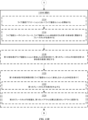
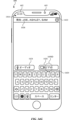
以下の図1A及び図1B、図2、図3、図4A及び図4B、並びに図5A~図5Hは、複数の参加者間のライブ通信セッションの技術を行う例示的なデバイスの説明を提供する。図6A~図6AFは、イベント通知を管理する例示的なユーザインターフェースを示す。図7A~図7Fは、一部の実施形態による、複数の参加者間のライブ通信セッションの方法を示すフロー図である。図6A~図6AFのユーザインターフェースは、図7A~図7Fの処理を含む後述の処理を示すために使用される。 The following Figures 1A-1B, 2, 3, 4A-4B, and 5A-5H provide a description of an exemplary device for performing techniques for a live communication session between multiple participants. Figures 6A-6AF show an exemplary user interface for managing event notifications. Figures 7A-7F are flow diagrams illustrating a method for a live communication session between multiple participants according to some embodiments. The user interfaces of Figures 6A-6AF are used to illustrate the processes described below, including the processes of Figures 7A-7F.
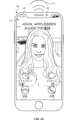
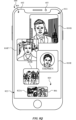
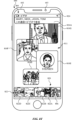
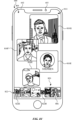
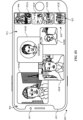
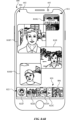
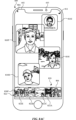
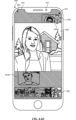
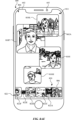
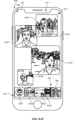
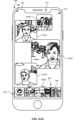
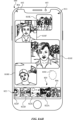
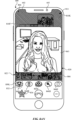
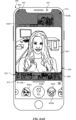
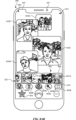
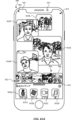
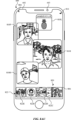
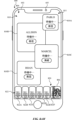
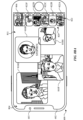
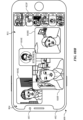
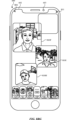
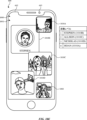
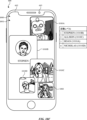
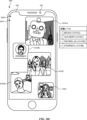
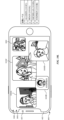
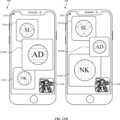
図8A~図8BKは、複数の参加者間のライブ通信セッション用の例示的なユーザインターフェースを示す。図9A~図9Kは、一部の実施形態による、複数の参加者間のライブ通信セッションを行う方法を示すフロー図である。図8A~図8BKのユーザインターフェースは、図9A~図9Kの処理を含む後述の処理を示すために使用される。 FIGS. 8A-8BK show example user interfaces for a live communication session between multiple participants. FIGS. 9A-9K are flow diagrams illustrating a method for conducting a live communication session between multiple participants according to some embodiments. The user interfaces of FIGS. 8A-8BK are used to illustrate the processes described below, including the processes of FIGS. 9A-9K.
図10A~図10Sは、複数の参加者間のライブ通信セッション用の例示的なユーザインターフェースを示す。図11A~図11Fは、一部の実施形態による、複数の参加者間のライブ通信セッションを行う方法を示すフロー図である。図10A~図10Sのユーザインターフェースは、図11A~図11Fの処理を含む後述の処理を示すために使用される。 10A-10S illustrate exemplary user interfaces for a live communication session between multiple participants. FIGs. 11A-11F are flow diagrams illustrating a method for conducting a live communication session between multiple participants according to some embodiments. The user interfaces of FIGs. 10A-10S are used to illustrate the processes described below, including the processes of FIGs. 11A-11F.
図12A~図12Nは、複数の参加者間のライブ通信セッション用の例示的なユーザインターフェースを示す。図13A~図13Dは、一部の実施形態による、複数の参加者間のライブ通信セッションを行う方法を示すフロー図である。図12A~図12Nのユーザインターフェースは、図13A~図13Dの処理を含む後述の処理を示すために使用される。 12A-12N illustrate exemplary user interfaces for a live communication session between multiple participants. FIGs. 13A-13D are flow diagrams illustrating a method for conducting a live communication session between multiple participants, according to some embodiments. The user interfaces of FIGs. 12A-12N are used to illustrate the processes described below, including the processes of FIGs. 13A-13D.
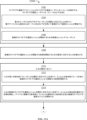
図14A~図14Iは、複数の参加者間のライブ通信セッション用の例示的なユーザインターフェースを示す。図15A~図15Cは、一部の実施形態による、複数の参加者間のライブ通信セッションを行う方法を示すフロー図である。図14A~図14Iのユーザインターフェースは、図15A~図15Cの処理を含む後述の処理を示すために使用される。 14A-14I illustrate exemplary user interfaces for a live communication session between multiple participants. FIGs. 15A-15C are flow diagrams illustrating a method for conducting a live communication session between multiple participants, according to some embodiments. The user interfaces of FIGs. 14A-14I are used to illustrate the processes described below, including the processes of FIGs. 15A-15C.
以下の説明では様々な要素を説明するために「第1」、「第2」などの用語が使用されるが、これらの要素はこれらの用語によって限定されるべきではない。これらの用語は、1つの要素を別の要素と区別するためにのみ使用される。例えば、説明されている様々な実施形態の範囲から逸脱することなく、第1のタッチを第2のタッチと称することができ、同様に、第2のタッチを第1のタッチと称することができる。第1のタッチ及び第2のタッチは共にタッチであるが、同じタッチではない。 In the following description, terms such as "first" and "second" are used to describe various elements, but these elements should not be limited by these terms. These terms are used only to distinguish one element from another. For example, a first touch can be referred to as a second touch, and similarly, a second touch can be referred to as a first touch, without departing from the scope of the various embodiments described. A first touch and a second touch are both touches, but are not the same touch.
本明細書で説明される様々な実施形態の説明で使用される用語は、特定の実施形態を説明することのみを目的とするものであって、限定することを意図するものではない。説明される様々な実施形態の説明及び添付の特許請求の範囲で使用されるように、単数形「a」、「an」、及び「the」は、文脈がそうではないことを明確に示さない限り、複数形もまた含むことが意図される。本明細書で使用されるように、用語「and/or(及び/又は)」は、関連する列挙された項目のうちの1つ以上の任意かつ全ての可能な組み合わせを指し、かつこれを含むことも理解されたい。用語「includes(含む)」、「including(含む)」、「comprises(備える)」、及び/又は「comprising(備える)」は、本明細書で使用されるとき、述べられた特徴、整数、ステップ、動作、要素、及び/又は構成要素の存在を指定するが、1つ以上の他の特徴、整数、ステップ、動作、要素、構成要素、及び/又はそれらのグループの存在若しくは追加を除外しないことが更に理解されるであろう。 The terms used in the description of the various embodiments described herein are for the purpose of describing particular embodiments only and are not intended to be limiting. As used in the description of the various embodiments described and in the appended claims, the singular forms "a", "an" and "the" are intended to include the plural forms as well, unless the context clearly indicates otherwise. As used herein, the term "and/or" is also understood to refer to and include any and all possible combinations of one or more of the associated listed items. It will be further understood that the terms "includes", "including", "comprises" and/or "comprising" as used herein specify the presence of stated features, integers, steps, operations, elements, and/or components, but do not exclude the presence or addition of one or more other features, integers, steps, operations, elements, components, and/or groups thereof.
任意選択的に、用語「if(~場合に)」は、文脈に応じて「when(~ときに)」、「upon(~すると)」、「in response to determining(~との判定に応じて)」、又は「in response to detecting(~の検出に応じて)」を意味すると解釈される。同様に、語句「if it is determined(~と判定される場合)」又は「if[a stated condition or event]is detected([述べられる条件又はイベント]が検出される場合)」は、任意選択的に、文脈によって、「upon determining(~と決定すると)」、「in response to determining(~との判定に応じて)」、「upon detecting[the stated condition or event]([述べられる条件又はイベント]を検出すると)」、又は「in response to detecting[the stated condition or event]([述べられる条件又はイベント]の検出に応じて)」を意味するものと解釈される。 Optionally, the term "if" is interpreted to mean "when," "upon," "in response to determining," or "in response to detecting," depending on the context. Similarly, the phrases "if it is determined" or "if [a stated condition or event] is detected" are, optionally, depending on the context, interpreted to mean "upon determining," "in response to determining," "upon detecting [the stated condition or event]," or "in response to detecting [the stated condition or event]."
電子デバイス、そのようなデバイス用のユーザインターフェース、及びそのようなデバイスを使用するための関連する処理の実施形態が説明される。一部の実施形態では、デバイスは、PDA機能及び/又は音楽プレーヤ機能などの他の機能も含む、モバイル電話機などのポータブル通信デバイスである。ポータブル多機能デバイスの例示的な実施形態には、California州CupertinoのApple Inc.のiPhone(登録商標)、iPod Touch(登録商標)及びiPad(登録商標)デバイスが挙げられるが、これらに限定されない。タッチ感知面(例えば、タッチスクリーンディスプレイ及び/又はタッチパッド)を備えるラップトップ又はタブレットコンピュータなどの他のポータブル電子デバイスは、任意選択的に、使用される。一部の実施形態では、デバイスがポータブル通信デバイスではなく、タッチ感知面(例えば、タッチスクリーンディスプレイ及び/又はタッチパッド)を備えるデスクトップコンピュータであることもまた、理解されたい。 Embodiments of electronic devices, user interfaces for such devices, and associated processes for using such devices are described. In some embodiments, the device is a portable communication device, such as a mobile telephone, that also includes other functions, such as a PDA function and/or a music player function. Exemplary embodiments of portable multifunction devices include, but are not limited to, the iPhone, iPod Touch, and iPad devices from Apple Inc. of Cupertino, California. Other portable electronic devices, such as laptops or tablet computers with touch-sensitive surfaces (e.g., touchscreen displays and/or touchpads), are optionally used. It should also be understood that in some embodiments, the device is not a portable communication device, but a desktop computer with a touch-sensitive surface (e.g., touchscreen displays and/or touchpads).
以下の議論では、ディスプレイとタッチ感知面とを含む電子デバイスが説明される。しかし、電子デバイスは、物理的なキーボード、マウス及び/又はジョイスティックなどの、1つ以上の他の物理的なユーザインターフェースデバイスを任意選択的に含むことを理解されたい。 In the following discussion, electronic devices are described that include a display and a touch-sensitive surface. However, it should be understood that the electronic device optionally includes one or more other physical user interface devices, such as a physical keyboard, a mouse, and/or a joystick.
このデバイスは、一般的に、描画アプリケーション、プレゼンテーションアプリケーション、ワードプロセッシングアプリケーション、ウェブサイト作成アプリケーション、ディスクオーサリングアプリケーション、スプレッドシートアプリケーション、ゲームアプリケーション、電話アプリケーション、テレビ会議アプリケーション、電子メールアプリケーション、インスタントメッセージングアプリケーション、トレーニングサポートアプリケーション、写真管理アプリケーション、デジタルカメラアプリケーション、デジタルビデオカメラアプリケーション、ウェブブラウジングアプリケーション、デジタル音楽プレーヤアプリケーション、及び/又はデジタルビデオプレーヤアプリケーションのうちの1つ以上などの様々なアプリケーションをサポートする。 The device typically supports a variety of applications, such as one or more of drawing applications, presentation applications, word processing applications, website creation applications, disc authoring applications, spreadsheet applications, gaming applications, telephony applications, videoconferencing applications, email applications, instant messaging applications, training support applications, photo management applications, digital camera applications, digital video camera applications, web browsing applications, digital music player applications, and/or digital video player applications.
デバイス上で実行される様々なアプリケーションは、タッチ感知面などの、少なくとも1つの共通の物理的なユーザインターフェースデバイスを、任意選択的に使用する。タッチ感知面の1つ以上の機能、並びにデバイス上に表示される対応する情報は、アプリケーションごとに、及び/又はそれぞれのアプリケーション内で、任意選択的に、調節及び/又は変更される。このように、デバイスの共通の(タッチ感知面などの)物理的なアーキテクチャは、ユーザにとって直感的かつ透過的なユーザインターフェースを備える様々なアプリケーションを、任意選択的にサポートする。 The various applications executing on the device optionally use at least one common physical user interface device, such as a touch-sensitive surface. One or more features of the touch-sensitive surface and corresponding information displayed on the device are optionally adjusted and/or changed for each application and/or within each application. In this manner, the common physical architecture (such as the touch-sensitive surface) of the device optionally supports various applications with user interfaces that are intuitive and transparent to the user.
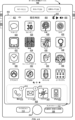
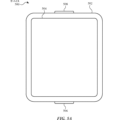
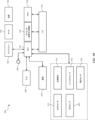
ここで、タッチ感知ディスプレイを備えるポータブルデバイスの実施形態に注意を向ける。図1Aは、一部の実施形態による、タッチ感知ディスプレイシステム112を備えるポータブル多機能デバイス100を示すブロック図である。タッチ感知ディスプレイ112は、便宜上「タッチスクリーン」と呼ばれる場合があり、「タッチ感知ディスプレイシステム」として既知であるか又は呼ばれる場合もある。デバイス100は、(1つ以上のコンピュータ可読記憶媒体を任意選択的に含む)メモリ102、メモリコントローラ122、1つ以上の処理ユニット(CPU)120、周辺機器インターフェース118、RF回路108、オーディオ回路110、スピーカ111、マイクロフォン113、入出力(I/O)サブシステム106、他の入力制御デバイス116及び外部ポート124を含む。デバイス100は、1つ以上の光センサ164を任意選択的に含む。デバイス100は、デバイス100(例えば、デバイス100のタッチ感知ディスプレイシステム112などのタッチ感知面)上の接触の強度を検出するための、1つ以上の接触強度センサ165を任意選択的に含む。デバイス100は、デバイス100上に触知出力を生成する(例えば、デバイス100のタッチ感知ディスプレイシステム112又はデバイス300のタッチパッド355などの、タッチ感知面上に触知出力を生成する)ための、1つ以上の触知出力生成器167を、任意選択的に含む。これらの構成要素は、1つ以上の通信バス又は信号ライン103を介して任意選択的に通信する。
Attention is now directed to an embodiment of a portable device with a touch-sensitive display. FIG. 1A is a block diagram illustrating a
本明細書及び特許請求の範囲で使用されるとき、タッチ感知面上の接触の「強度」という用語は、タッチ感知面上の接触(例えば、指接触)の力若しくは圧力(単位面積あたりの力)、又はタッチ感知面上の接触の力若しくは圧力の代替(代用)を指す。接触の強度は、少なくとも4つの異なる値を含み、より典型的には、何百もの(例えば、少なくとも256個の)異なる値を含む値範囲を有する。接触の強度は、任意選択的に、様々な手法、及び様々なセンサ又はセンサの組み合わせを使用して決定(又は、測定)される。例えば、タッチ感知面の下にある又はこれに隣接する1つ以上の力センサは、任意選択的に、タッチ感知面上の様々な点における力を測定するために使用される。一部の実装形態では、複数の力センサからの力測定値は、接触の力の推定値を判定するために組み合わされる(例えば、加重平均)。同様に、スタイラスの感圧性先端部は、任意選択的に、タッチ感知面上のスタイラスの圧力を判定するために使用される。代わりに、タッチ感知面上で検出される接触領域のサイズ及び/若しくはその変化、接触に近接するタッチ感知面の電気容量及び/若しくはその変化、並びに/又は、接触に近接するタッチ感知面の抵抗及び/若しくはその変化が、タッチ感知面上の接触の力又は圧力の代替として、任意選択的に用いられる。一部の実装形態では、接触の力又は圧力に対する代替的測定値は、強度閾値を超えているかを判定するために直接使用される(例えば、強度閾値は、代替的測定値に対応する単位で説明される)。一部の実装形態では、接触の力又は圧力に対する代替的測定値は、推定される力又は圧力に変換され、推定される力又は圧力は、強度閾値を超えているかを判定するために使用される(例えば、強度閾値は、圧力の単位で測定された圧力閾値である)。接触の強度をユーザ入力の属性として使用することによって、アフォーダンスを表示するための(例えば、タッチ感知ディスプレイ上で)、及び/又はユーザ入力を受信するための(例えば、タッチ感知ディスプレイ、タッチ感知面、又はノブ若しくはボタンなどの物理的/機械的制御部を介して)面積が制限されている、低減されたサイズのデバイス上では別途ユーザによってアクセスすることができない可能性がある、追加的なデバイス機能に、ユーザがアクセスできるようになる。 As used herein and in the claims, the term "intensity" of a contact on a touch-sensitive surface refers to the force or pressure (force per unit area) of a contact (e.g., finger contact) on the touch-sensitive surface, or a substitute (proxy) for the force or pressure of a contact on the touch-sensitive surface. The intensity of a contact has a value range that includes at least four different values, and more typically includes hundreds (e.g., at least 256) different values. The intensity of a contact is optionally determined (or measured) using various techniques and various sensors or combinations of sensors. For example, one or more force sensors under or adjacent to the touch-sensitive surface are optionally used to measure the force at various points on the touch-sensitive surface. In some implementations, the force measurements from multiple force sensors are combined (e.g., weighted average) to determine an estimate of the force of the contact. Similarly, a pressure-sensitive tip of a stylus is optionally used to determine the pressure of the stylus on the touch-sensitive surface. Instead, the size and/or change in a contact area detected on the touch-sensitive surface, the capacitance and/or change in the capacitance of the touch-sensitive surface proximate the contact, and/or the resistance and/or change in the capacitance of the touch-sensitive surface proximate the contact, are optionally used as a proxy for the force or pressure of the contact on the touch-sensitive surface. In some implementations, the proxy measure for the force or pressure of the contact is used directly to determine whether an intensity threshold is exceeded (e.g., the intensity threshold is described in units corresponding to the proxy measure). In some implementations, the proxy measure for the force or pressure of the contact is converted to an estimated force or pressure, and the estimated force or pressure is used to determine whether an intensity threshold is exceeded (e.g., the intensity threshold is a pressure threshold measured in units of pressure). Using the intensity of contact as an attribute of user input allows a user to access additional device functionality that may not otherwise be accessible by the user on a reduced-size device that has a limited area for displaying affordances (e.g., on a touch-sensitive display) and/or receiving user input (e.g., via a touch-sensitive display, touch-sensitive surface, or physical/mechanical controls such as knobs or buttons).
本明細書及び特許請求の範囲で使用されるとき、用語「触知出力」は、ユーザの触覚でユーザによって検出されることになる、デバイスの従前の位置に対するデバイスの物理的変位、デバイスの構成要素(例えば、タッチ感知面)のデバイスの別の構成要素(例えば、筐体)に対する物理的変位、又はデバイスの質量中心に対する構成要素の変位を指す。例えば、デバイス又はデバイスの構成要素がタッチに敏感なユーザの表面(例えば、ユーザの指、手のひら、又は手の他の部分)に接触している状況において、物理的変位によって生成された触知出力は、デバイス又はデバイスの構成要素の物理的特性の認識された変化に相当する触知として、ユーザによって解釈される。例えば、タッチ感知面(例えば、タッチ感知ディスプレイ又はトラックパッド)の移動は、任意選択的に、ユーザによって、物理的なアクチュエータボタンの「ダウンクリック」又は「アップクリック」として解釈される。一部の場合、ユーザの動作により物理的に押された(例えば、変位された)タッチ感知面と関連付けられた物理的なアクチュエータボタンの移動がない時でさえ、ユーザは「ダウンクリック」又は「アップクリック」などの触知を感じるであろう。別の例として、タッチ感知面の移動は、タッチ感知面の平滑度に変化がない場合であっても、ユーザによって、そのタッチ感知面の「粗さ」として、任意選択的に解釈又は感知される。そのようなユーザによるタッチの解釈は、ユーザの個人的な感覚認知に左右されるが、大多数のユーザに共通する、多くのタッチの感覚認知が存在する。よって、触知出力が、ユーザの特定の感覚認知(例えば、「アップクリック」、「ダウンクリック」、「粗さ」)に対応するものとして説明されるとき、別途記載のない限り、生成された触知出力は、典型的な(又は、平均的な)ユーザの説明された感覚認知を生成するデバイス、又はデバイスの構成要素の物理的変位に対応する。 As used herein and in the claims, the term "tactile output" refers to a physical displacement of a device relative to a previous position of the device, a physical displacement of a component of the device (e.g., a touch-sensitive surface) relative to another component of the device (e.g., a housing), or a displacement of a component relative to the center of mass of the device, that is to be detected by a user with the user's sense of touch. For example, in a situation where a device or a component of the device is in contact with a touch-sensitive user surface (e.g., a user's finger, palm, or other part of the hand), the tactile output generated by the physical displacement is interpreted by the user as a tactile sensation corresponding to a perceived change in a physical characteristic of the device or a component of the device. For example, movement of a touch-sensitive surface (e.g., a touch-sensitive display or trackpad) is optionally interpreted by the user as a "down-click" or "up-click" of a physical actuator button. In some cases, the user will feel a tactile sensation such as a "down-click" or "up-click" even when there is no movement of a physical actuator button associated with the touch-sensitive surface that is physically pressed (e.g., displaced) by the user's action. As another example, movement of the touch-sensitive surface is optionally interpreted or sensed by a user as "roughness" of the touch-sensitive surface, even when there is no change in the smoothness of the touch-sensitive surface. Such user interpretation of touch depends on the user's personal sensory perception, but there are many sensory perceptions of touch that are common to a majority of users. Thus, when a tactile output is described as corresponding to a particular sensory perception of a user (e.g., an "up click," a "down click," a "roughness"), unless otherwise noted, the generated tactile output corresponds to a physical displacement of the device, or a component of the device, that produces the described sensory perception for a typical (or average) user.
デバイス100は、ポータブル多機能デバイスの一例に過ぎず、デバイス100は、示されているものよりも多くの構成要素又は少ない構成要素を任意選択的に有すること、2つ以上の構成要素を任意選択的に組み合わせること、又は構成要素の異なる構成若しくは配置を任意選択的に有することを理解されたい。図1Aに示す様々な構成要素は、1つ以上の信号処理回路及び/又は特定用途向け集積回路を含む、ハードウェア、ソフトウェア又はハードウェア及びソフトウェアの双方の組み合わせで実装される。
It should be understood that
メモリ102は、高速ランダムアクセスメモリを任意選択的に含み、1つ以上の磁気ディスク記憶デバイス、フラッシュメモリデバイス又は他の不揮発性ソリッドステートメモリデバイスなどの不揮発性メモリもまた、任意選択的に含む。メモリコントローラ122は、任意選択的に、デバイス100の他の構成要素によるメモリ102へのアクセスを制御する。
Memory 102 optionally includes high-speed random access memory, and optionally also includes non-volatile memory, such as one or more magnetic disk storage devices, flash memory devices, or other non-volatile solid-state memory devices.
周辺機器インターフェース118を使用して、本デバイスの入力及び出力周辺機器を、CPU120及びメモリ102に結合することができる。1つ以上のプロセッサ120は、デバイス100のための様々な機能を実行するため並びにデータを処理するために、メモリ102に記憶された様々なソフトウェアプログラム及び/又は命令セットを動作させる、又は実行する。一部の実施形態では、周辺機器インターフェース118、CPU120及びメモリコントローラ122は、チップ104などの単一チップ上に任意選択的に実装される。一部の他の実施形態では、それらは別々のチップ上に任意選択的に実装される。
A
RF(radio frequency、無線周波数)回路108は、電磁信号とも呼ばれるRF信号を送受信する。RF回路108は、電気信号を電磁信号に、又は電磁信号を電気信号に変換し、電磁信号を介して通信ネットワーク及び他の通信デバイスと通信する。RF回路108は、それらの機能を実行するための周知の回路を任意選択的に含み、アンテナシステム、RF送受信機、1つ以上の増幅器、同調器、1つ以上の発振器、デジタル信号プロセッサ、CODECチップセット、参加者識別モジュール(SIM)カード、メモリなどが挙げられるが、これらに限定されない。RF回路108は任意選択的に、ワールドワイドウェブ(WWW)とも称されるインターネット、イントラネット、並びに/又はセルラー電話ネットワーク、無線ローカルエリアネットワーク(LAN)及び/若しくはメトロポリタンエリアネットワーク(MAN)などの無線ネットワークなどのネットワーク、及び他のデバイスと無線通信によって通信する。RF回路108は、近距離通信無線などによる近距離通信(near field communication、NFC)フィールドを検出するための周知の回路を任意選択的に含む。無線通信は、複数の通信規格、通信プロトコル、及び通信技術のうちの任意のものを任意選択的に使用し、それらの通信規格、通信プロトコル、及び通信技術としては、移動通信用のグローバルシステム(Global System for Mobile Communications、GSM(登録商標))、拡張データGSM環境(Enhanced Data GSM Environment、EDGE)、高速ダウンリンクパケット接続(high-speed downlink packet access、HSDPA)、高速アップリンクパケット接続(high-speed uplink packet access、HSUPA)、Evolution,Data-Only(EV-DO)、HSPA、HSPA+、2重セルHSPA(Dual-Cell HSPA、DC-HSPDA)、ロングタームエボリューション(long term evolution、LTE)、近距離無線通信(near field communication、NFC)、広帯域符号分割多元接続(wideband code division multiple access、W-CDMA)、符号分割多元接続(code division multiple access、CDMA)、時分割多元接続(time division multiple access、TDMA)、Bluetooth(登録商標)、Bluetooth Low Energy(BTLE)、Wireless Fidelity(Wi-Fi)(登録商標)(例えば、IEEE 802.11a、IEEE 802.11b、IEEE 802.11g、IEEE 802.11n、及び/又はIEEE 802.11ac)、ボイスオーバーインターネットプロトコル(voice over Internet Protocol、VoIP)、Wi-MAX、電子メール用のプロトコル(例えば、インターネットメッセージアクセスプロトコル(Internet message access protocol、IMAP)及び/又はポストオフィスプロトコル(post office protocol、POP))、インスタントメッセージング(例えば、拡張可能メッセージング及びプレゼンスプロトコル(extensible messaging and presence protocol、XMPP)、インスタントメッセージング及びプレゼンス利用拡張向けセッション開始プロトコル(Session Initiation Protocol for Instant Messaging and Presence Leveraging Extensions、SIMPLE)、インスタントメッセージング及びプレゼンスサービス(Instant Messaging and Presence Service、IMPS))、及び/又はショートメッセージサービス(Short Message Service、SMS)、あるいは本文書の出願日現在までにまだ開発されていない通信プロトコルを含めた任意の他の好適な通信プロトコルが挙げられるが、これらに限定されない。
The radio frequency (RF)
オーディオ回路110、スピーカ111、及びマイクロフォン113は、ユーザとデバイス100との間のオーディオインターフェースを提供する。オーディオ回路110は、周辺機器インターフェース118からオーディオデータを受信し、そのオーディオデータを電気信号に変換し、その電気信号をスピーカ111に送信する。スピーカ111は、電気信号を人間の可聴音波に変換する。オーディオ回路110はまた、マイクロフォン113により音波から変換された電気信号を受信する。オーディオ回路110は、電気信号をオーディオデータに変換し、オーディオデータを処理のために周辺機器インターフェース118に送信する。オーディオデータは任意選択的に、周辺機器インターフェース118によって、メモリ102及び/若しくはRF回路108から取得され、並びに/又はメモリ102及び/若しくはRF回路108へ送信される。一部の実施形態では、オーディオ回路110はヘッドセットジャック(例えば、図2の212)を更に備える。ヘッドセットジャックは、オーディオ回路110と、出力専用ヘッドホン又は出力(例えば、片耳又は両耳用のヘッドホン)及び入力(例えば、マイクロフォン)の双方を有するヘッドセットなどの、取り外し可能なオーディオ入出力周辺機器と、の間のインターフェースを提供する。
The
I/Oサブシステム106は、周辺機器インターフェース118に、タッチスクリーン112及び他の入力制御デバイス116などのデバイス100の入出力周辺機器を結合する。I/Oサブシステム106は、任意選択的に、ディスプレイコントローラ156、光センサコントローラ158、深度カメラコントローラ169、強度センサコントローラ159、触覚フィードバックコントローラ161、及び他の入力若しくは制御デバイスのための1つ以上の入力コントローラ160を含む。1つ以上の入力コントローラ160は、電気信号を、他の入力制御デバイス116から受信/他の入力制御デバイス116に送信する。他の入力制御デバイス116は、物理的なボタン(例えば、プッシュボタン、ロッカボタンなど)、ダイアル、スライダスイッチ、ジョイスティック、クリックホイールなどを任意選択的に含む。一部の代替的実施形態では、入力コントローラ(単数又は複数)160は、任意選択的に、キーボード、赤外線ポート、USBポート、及びマウスなどのポインタデバイスのうちのいずれかに結合される(又は、いずれにも結合されない)。1つ以上のボタン(例えば、図2の208)は、スピーカ111及び/又はマイクロフォン113の音量調節のためのアップ/ダウンボタンを任意選択的に含む。1つ以上のボタンは、プッシュボタン(例えば、図2の206)を任意選択的に含む。
The I/
2005年12月23日に出願された、米国特許第7,657,849号である米国特許出願第11/322,549号、「Unlocking a Device by Performing Gestures on an Unlock Image」(この特許は、その全体が参照により本明細書に組み込まれる)に記載されているように、任意選択的に、プッシュボタンの素早い押圧により、タッチスクリーン112のロックが解除されるか、又はデバイスのロック解除にタッチスクリーン上のジェスチャを用いる処理が任意選択的に開始される。プッシュボタン(例えば、206)をより長く押圧することにより、任意選択的にデバイス100の電源がオンオフされる。複数のボタンのうちの1つ以上の機能は、任意選択的に、ユーザカスタマイズ可能である。タッチスクリーン112は、仮想ボタン又はソフトボタン及び1つ以上のソフトキーボードを実装するために使用される。
Optionally, a quick press of a push button unlocks the
タッチ感知ディスプレイ112は、デバイスとユーザとの間の入力インターフェース及び出力インターフェースを提供する。ディスプレイコントローラ156は、電気信号を、タッチスクリーン112から受信かつ/又はタッチスクリーン112に送信する。タッチスクリーン112は、ユーザに視覚的出力を表示する。視覚的出力は、グラフィック、テキスト、アイコン、ビデオ及びこれらの任意の組み合わせ(総称して「グラフィック」と称する)を任意選択的に含む。一部の実施形態では、任意選択的に、視覚的出力の一部又は全てはユーザインターフェースオブジェクトに対応する。
The touch-
タッチスクリーン112は、触覚及び/又は触知の接触に基づくユーザからの入力を受け付けるタッチ感知面、センサ、若しくはセンサのセットを有している。タッチスクリーン112及びディスプレイコントローラ156は(メモリ102内の任意の関連モジュール及び/又は命令セットと共に)、タッチスクリーン112上で接触(及び任意の接触の移動又は中止)を検出し、その検出された接触をタッチスクリーン112上に表示されたユーザインターフェースオブジェクト(例えば、1つ以上のソフトキー、アイコン、ウェブページ又は画像)との対話に変換する。例示的な実施形態では、タッチスクリーン112とユーザとの間の接触点は、ユーザの指に対応する。
タッチスクリーン112は任意選択的にLCD(液晶ディスプレイ)技術、LPD(発光ポリマーディスプレイ)技術又はLED(発光ダイオード)技術を使用するが、他の実施形態では、他のディスプレイ技術が使用される。タッチスクリーン112及びディスプレイコントローラ156は、静電容量技術、抵抗性技術、赤外線技術、及び表面超音波技術、並びに、タッチスクリーン112との1つ以上の接触点を決定するための他の近接センサアレイ又は他の要素を含むが、これらに限定されない、現在公知の若しくは後日に開発される複数のタッチ感知技術のうちのいずれかを使用して、接触及びその任意の移動又は中止を、任意選択的に検出する。例示的な実施形態では、California州CupertinoのApple Inc.によるiPhone(登録商標)及びiPod Touch(登録商標)において見られるような、投影型相互静電容量感知技術が使用されている。
The
タッチスクリーン112の一部の実施形態におけるタッチ感知ディスプレイは、任意選択的に、米国特許第6,323,846号(Westermanら)、同第6,570,557号(Westermanら)、及び/若しくは同第6,677,932号(Westerman)、並びに/又は米国特許出願公開第2002/0015024(A1)号に記載されているマルチタッチ感知タッチパッドに類似する。これらの文献は、それらの全体が参照により本明細書に組み込まれる。しかし、タッチスクリーン112は、デバイス100からの視覚的出力を表示するのに対して、タッチ感知タッチパッドは、視覚的出力を提供しない。
The touch-sensitive display in some embodiments of
タッチスクリーン112の一部の実施形態におけるタッチ感知ディスプレイは、以下の出願で説明されている。(1)2006年5月2日出願の米国特許出願第11/381,313号、「Multipoint Touch Surface Controller」、(2)2004年5月6日出願の同第10/840,862号、「Multipoint Touchscreen」、(3)2004年7月30日出願の同第10/903,964号、「Gestures For Touch Sensitive Input Devices」、(4)2005年1月31日出願の同第11/048,264号、「Gestures For Touch Sensitive Input Devices」、(5)2005年1月18日出願の同第11/038,590号、「Mode-Based Graphical User Interfaces For Touch Sensitive Input Devices」、(6)2005年9月16日出願の同第11/228,758号、「Virtual Input Device Placement On A Touch Screen User Interface」、(7)2005年9月16日出願の同第11/228,700号、「Operation Of A Computer With A Touch Screen Interface」、(8)2005年9月16日出願の同第11/228,737号、「Activating Virtual Keys Of A Touch-Screen Virtual Keyboard」、及び(9)2006年3月3日出願の同第11/367,749号、「Multi-Functional Hand-Held Device」。これらの出願の全てにおいて、その全体が参照により本明細書に組み込まれる。 Touch-sensitive displays in some embodiments of touch screen 112 are described in the following applications: (1) U.S. Patent Application No. 11/381,313, filed May 2, 2006, entitled "Multipoint Touch Surface Controller"; (2) U.S. Patent Application No. 10/840,862, filed May 6, 2004, entitled "Multipoint Touchscreen"; (3) U.S. Patent Application No. 10/903,964, filed July 30, 2004, entitled "Gestures For Touch Sensitive Input Devices"; (4) U.S. Patent Application No. 11/048,264, filed January 31, 2005, entitled "Gestures For Touch Sensitive Input Devices"; "Mode-Based Graphical User Interfaces For Touch Sensitive Input Devices", (5) U.S. Patent No. 11/038,590, filed January 18, 2005, entitled "Mode-Based Graphical User Interfaces For Touch Sensitive Input Devices", (6) U.S. Patent No. 11/228,758, filed September 16, 2005, entitled "Virtual Input Device Placement On A Touch Screen User Interface", (7) U.S. Patent No. 11/228,700, filed September 16, 2005, entitled "Operation Of A Computer With A Touch Screen (8) U.S. Patent No. 11/228,737, filed September 16, 2005, entitled "Activating Virtual Keys Of A Touch-Screen Virtual Keyboard," and (9) U.S. Patent No. 11/367,749, filed March 3, 2006, entitled "Multi-Functional Hand-Held Device." All of these applications are incorporated herein by reference in their entirety.
タッチスクリーン112は、任意選択的に、100dpiを超えるビデオ解像度を有する。一部の実施形態では、タッチスクリーンは約160dpiのビデオ解像度を有する。ユーザは、スタイラス、指などの任意の好適な物体又は付属器を使用して、タッチスクリーン112と任意選択的に接触する。一部の実施形態では、ユーザインターフェースは、主として指に基づく接触及びジェスチャによって機能するように設計され、タッチスクリーン上の指の接触面積が広いことにより、スタイラスに基づく入力よりも精度が低いことがある。一部の実施形態では、デバイスは、指に基づく粗い入力を、ユーザの望むアクションを行うために正確なポインタ/カーソル位置又はコマンドに変換する。
一部の実施形態では、タッチスクリーンに加えて、デバイス100は、特定の機能をアクティブ化又は非アクティブ化するためのタッチパッドを任意選択的に含む。一部の実施形態では、タッチパッドは、タッチスクリーンとは異なり、視覚的出力を表示しない、デバイスのタッチ感知エリアである。タッチパッドは、任意選択的に、タッチスクリーン112とは別個のタッチ感知面又はタッチスクリーンによって形成されたタッチ感知面の拡張部である。
In some embodiments, in addition to the touchscreen,
デバイス100はまた、様々な構成要素に電力を供給するための電力システム162を含む。電力システム162は任意選択的に、電力管理システム、1つ以上の電源(例えば、バッテリ、交流(AC))、再充電システム、停電検出回路、電力コンバータ又はインバータ、電力状態インジケータ(例えば、発光ダイオード(LED))、並びにポータブルデバイス内での電力の生成、管理、及び分配と関連付けられた任意の他の構成要素を含む。
The
デバイス100はまた、任意選択的に、1つ以上の光センサ164を含む。図1Aは、I/Oサブシステム106内の光センサコントローラ158に結合された光センサを示す。光センサ164は、電荷結合デバイス(CCD)又は相補的金属酸化物半導体(CMOS)フォトトランジスタを、任意選択的に含む。光センサ164は、1つ以上のレンズを通して投影された、環境からの光を受光し、その光を、画像を表現するデータに変換する。撮像モジュール143(カメラモジュールとも称する)と連携して、光センサ164は、静止画像又はビデオを任意選択的にキャプチャする。一部の実施形態では、タッチスクリーンディスプレイを静止画像及び/又はビデオ画像取得のためのビューファインダとして有効化するように、光センサは、デバイスの前面にあるタッチスクリーンディスプレイ112とは反対側である、デバイス100の背面に配置される。一部の実施形態では、ユーザが他のテレビ会議参加者をタッチスクリーンディスプレイ上で見ながらそのユーザの画像をテレビ会議のために任意選択的に得るように、デバイスの前面に光センサが配置される。一部の実施形態では、光センサ164の位置は、テレビ会議と、静止画像及び/又はビデオ画像の取得との双方のために、単一の光センサ164がタッチスクリーンディスプレイと共に使用されるように、ユーザによって(例えば、デバイス筐体内のレンズ及びセンサを回転させることによって)変更することができる。
Optionally,
デバイス100はまた、1つ以上の深度カメラセンサ175を任意選択的に含む。図1Aは、I/Oサブシステム106内の深度カメラコントローラ169に結合された深度カメラセンサを示す。深度カメラセンサ175は、ビューポイント(例えば、深度カメラセンサ)からのシーン中のオブジェクト(例えば、顔)の3次元モデルを作成するように環境からデータを受信する。一部の実施形態では、撮像モジュール143(カメラモジュールとも呼ばれる)と連携して、深度カメラセンサ175は、任意選択的に、撮像モジュール143によってキャプチャされる画像の異なる部分の深度マップを決定するように使用される。一部の実施形態では、ユーザが他のテレビ会議参加者をタッチスクリーンディスプレイ上で見ながら深度情報を伴うそのユーザの画像をテレビ会議のために任意選択的に得るように、及び深度マップデータを伴う自撮り画像をキャプチャするために、デバイス100の前面に深度カメラセンサが配置される。一部の実施形態では、深度カメラセンサ175は、デバイスの背面、又はデバイス100の背面及び前面に配置される。一部の実施形態では、テレビ会議と、静止画像及び/又はビデオ画像の取得との双方のために、単一の深度カメラセンサ175がタッチスクリーンディスプレイと共に使用されるように、深度カメラセンサ175の位置は、ユーザによって(例えば、デバイス筐体内のレンズ及びセンサを回転させることによって)変更することができる。
一部の実施形態では、深度マップ(例えば、深度マップ画像)は、ビューポイント(例えば、カメラ、光センサ、深度カメラセンサ)からのシーン中のオブジェクトの距離に関する情報(例えば、値)を含む。深度マップの一実施形態では、各深度ピクセルは、ビューポイントのZ軸において対応する2次元ピクセルが配置される位置を定義する。一部の実施形態では、深度マップは、各ピクセルが値(例えば、0~255)によって定義されるピクセルで構成される。例えば、「0」値は、「3次元」シーン中の最も離れた位置に配置されるピクセルを表し、「255」値は、「3次元」シーン中のビューポイント(例えば、カメラ、光センサ、深度カメラセンサ)の最も近くに配置されるピクセルを表す。他の実施形態では、深度マップは、シーン中のオブジェクトとビューポイントの平面との間の距離を表す。一部の実施形態では、深度マップは、深度カメラからのビューにおける関心のあるオブジェクトの様々な特徴の相対深度(例えば、ユーザの顔の目、鼻、口、耳の相対深度)に関する情報を含む。一部の実施形態では、深度マップは、関心のあるオブジェクトのz方向の輪郭をデバイスが判定することを可能にする情報を含む。 In some embodiments, a depth map (e.g., a depth map image) contains information (e.g., values) regarding the distance of objects in a scene from a viewpoint (e.g., a camera, light sensor, depth camera sensor). In one embodiment of a depth map, each depth pixel defines where a corresponding two-dimensional pixel is located in the z-axis of the viewpoint. In some embodiments, a depth map is composed of pixels, where each pixel is defined by a value (e.g., 0-255). For example, a value of "0" represents a pixel located furthest away in a "three-dimensional" scene, and a value of "255" represents a pixel located closest to the viewpoint (e.g., a camera, light sensor, depth camera sensor) in a "three-dimensional" scene. In other embodiments, a depth map represents the distance between an object in a scene and the plane of the viewpoint. In some embodiments, a depth map contains information regarding the relative depth of various features of an object of interest in the view from a depth camera (e.g., the relative depth of the eyes, nose, mouth, and ears of a user's face). In some embodiments, a depth map contains information that allows a device to determine the z-direction contour of an object of interest.
デバイス100はまた、1つ以上の接触強度センサ165を任意選択的に含む。図1Aは、I/Oサブシステム106内の強度センサコントローラ159に結合された、接触強度センサを示す。接触強度センサ165は、1つ以上のピエゾ抵抗ひずみゲージ、電気容量式力センサ、電気力センサ、圧電力センサ、光学力センサ、容量式タッチ感知面又は他の強度センサ(例えば、タッチ感知面上の接触の力(又は圧力)を測定するために使用するセンサ)を、任意選択的に含む。接触強度センサ165は、周辺環境からの接触強度情報(例えば、圧力情報又は圧力情報の代用)を受信する。一部の実施形態では、少なくとも1つの接触強度センサが、タッチ感知面(例えば、タッチ感知ディスプレイシステム112)に配置されているか、又は、それに近接している。一部の実施形態では、少なくとも1つの接触強度センサが、デバイス100の前面に配置されたタッチスクリーンディスプレイ112とは反対側である、デバイス100の背面に配置されている。
デバイス100はまた、1つ以上の近接センサ166を任意選択的に含む。図1Aは、周辺機器インターフェース118と結合された近接センサ166を示す。あるいは、近接センサ166は、任意選択的に、I/Oサブシステム106内の入力コントローラ160に結合される。近接センサ166は、本明細書に参照によって組み込まれる、米国特許出願第11/241,839号、「Proximity Detector In Handheld Device」、同第11/240,788号、「Proximity Detector In Handheld Device」、同第11/620,702号、「Using Ambient Light Sensor To Augment Proximity Sensor Output」、同第11/586,862号、「Automated Response To And Sensing Of User Activity In Portable Devices」、及び同第11/638,251号、「Methods And Systems For Automatic Configuration Of Peripherals」で説明されるように、任意選択的に機能する。一部の実施形態では、多機能デバイスがユーザの耳の近くに配置されている場合(例えば、ユーザが通話している場合)、近接センサは、タッチスクリーン112をオフにし無効にする。
デバイス100はまた、任意選択的に、1つ以上の触知出力生成器167を含む。図1Aは、I/Oサブシステム106内の触覚フィードバックコントローラ161に結合された触知出力生成器を示す。触知出力生成器167は、スピーカ又は他のオーディオ構成要素などの1つ以上の電気音響デバイス、及び/又はモータ、ソレノイド、電気アクティブポリマー、圧電アクチュエータ、静電アクチュエータ若しくは他の触知出力生成構成要素(例えば、デバイス上で電気信号を触知出力に変換する構成要素)などの、エネルギを直線運動に変換する電気機械デバイスを、任意選択的に含む。接触強度センサ165は、触知フィードバックモジュール133から触覚フィードバック生成命令を受信し、デバイス100のユーザが感知できる触知出力をデバイス100上で生成する。一部の実施形態では、少なくとも1つの触知出力生成器が、タッチ感知面(例えば、タッチ感知ディスプレイシステム112)に配置されているか、又はそれに近接しており、任意選択的に、タッチ感知面を垂直方向(例えば、デバイス100の表面の内/外)に、又は横方向(例えば、デバイス100の表面と同じ平面内の前後)に動かすことによって、触知出力を生成する。一部の実施形態では、少なくとも1つの触知出力生成器センサが、デバイス100の前面に配置されたタッチスクリーンディスプレイ112とは反対側である、デバイス100の背面に配置されている。
デバイス100はまた、1つ以上の加速度計168を任意選択的に含む。図1Aは、周辺機器インターフェース118に結合された加速度計168を示す。あるいは、加速度計168は、I/Oサブシステム106内の入力コントローラ160に任意選択的に結合される。加速度計168は、任意選択的に、共にその全体が参照により本明細書に組み込まれる米国特許出願公開第20050190059号、「Acceleration-based Theft Detection System for Portable Electronic Devices」、及び同第20060017692号、「Methods And Apparatuses For Operating A Portable Device Based On An Accelerometer」で説明されるように機能する。一部の実施形態では、情報は、1つ以上の加速度計から受信したデータの分析に基づいて、縦置き表示又は横置き表示でタッチスクリーンディスプレイ上に表示される。デバイス100は、加速度計(単数又は複数)168に加えて、磁気計並びにデバイス100の位置及び方位(例えば、縦置き又は横置き)に関する情報を取得するためのGPS(又はGLONASS若しくは他のグローバルナビゲーションシステム)受信機を任意選択的に含む。
一部の実施形態では、メモリ102に記憶されたソフトウェア構成要素は、オペレーティングシステム126、通信モジュール(又は命令セット)128、接触/動きモジュール(又は命令セット)130、グラフィックモジュール(又は命令セット)132、テキスト入力モジュール(又は命令セット)134、全地球測位システム(Global Positioning System、GPS)モジュール(又は命令セット)135及びアプリケーション(又は命令セット)136を含む。更に、一部の実施形態では、図1A及び図3に示すように、メモリ102(図1A)又はメモリ370(図3)は、デバイス/グローバル内部状態157を記憶する。デバイス/グローバル内部状態157は、以下の、現在アクティブ状態のアプリケーションがある場合、どのアプリケーションがアクティブかを示す、アクティブアプリケーション状態、どのアプリケーション、ビュー又は他の情報がタッチスクリーンディスプレイ112の様々な領域を占めているかを示す、表示状態、デバイスの様々なセンサ及び入力制御デバイス116から取得される情報を含む、センサ状態、並びに、デバイスの位置及び/又は姿勢に関する位置情報、の1つ以上を含む。
In some embodiments, the software components stored in memory 102 include an
オペレーティングシステム126(例えば、Darwin(登録商標)、RTXC(登録商標)、LINUX(登録商標)、UNIX(登録商標)、OS X(登録商標)、iOS(登録商標)、WINDOWS(登録商標)、又はVxWorks(登録商標)などの組み込みオペレーティングシステム)は、一般的なシステムタスク(例えば、メモリ管理、記憶デバイス制御、電力管理など)を制御及び管理するための様々なソフトウェア構成要素及び/又はドライバを含み、様々なハードウェア構成要素とソフトウェア構成要素との間の通信を容易にする。 Operating system 126 (e.g., an embedded operating system such as Darwin®, RTXC®, LINUX®, UNIX®, OS X®, iOS®, WINDOWS®, or VxWorks®) includes various software components and/or drivers for controlling and managing common system tasks (e.g., memory management, storage device control, power management, etc.) and facilitating communication between various hardware and software components.
通信モジュール128は、1つ以上の外部ポート124を介して他のデバイスとの通信を容易にし、RF回路108及び/又は外部ポート124が受信したデータを処理するための様々なソフトウェア構成要素も含む。外部ポート124(例えば、ユニバーサルシリアルバス(Universal Serial Bus、USB)、FIREWIRE(登録商標)など)は、直接的に、又はネットワーク(例えば、インターネット、無線LANなど)を通して間接的に、他のデバイスに結合するように適応している。一部の実施形態では、外部ポートは、iPod(登録商標)(Apple Inc.の商標)デバイス上で使用される30ピンコネクタと同じか、若しくは同様のマルチピン(例えば、30ピン)コネクタ、及び/又は互換性のあるマルチピン(例えば、30ピン)コネクタである。
The
接触/動きモジュール130は、(ディスプレイコントローラ156と連携して)タッチスクリーン112及び他のタッチ感知デバイス(例えば、タッチパッド又は物理的なクリックホイール)との接触を任意選択的に検出する。接触/動きモジュール130は、接触が生じたかを判定すること(例えば、指を下ろすイベントを検出すること)、接触の強度(例えば、接触の力若しくは圧力、又は接触の力若しくは圧力の代替)を判定すること、接触の移動があるかを判定し、タッチ感知面に亘る移動を追跡すること(例えば、指をドラッグする1つ以上のイベントを検出すること)、及び接触が中止したかを判定すること(例えば、指を上げるイベント又は接触の中止を検出すること)などの、接触の検出に関する様々な動作を行うための、様々なソフトウェア構成要素を含む。接触/動きモジュール130は、タッチ感知面から接触データを受信する。一連の接触データにより表される接触点の移動を判定することは、任意選択的に、接触点の速さ(大きさ)、速度(大きさ及び方向)、並びに/又は加速度(大きさ及び/又は方向における変化)を判定することを含む。これらの動作は、任意選択的に、単一の接触(例えば、1本の指の接触)又は複数の同時接触(例えば、「マルチタッチ」/複数の指の接触)に適用される。一部の実施形態では、接触/動きモジュール130及びディスプレイコントローラ156は、タッチパッド上の接触を検出する。
Contact/motion module 130 (in cooperation with display controller 156) optionally detects contact with
一部の実施形態では、接触/動きモジュール130は、ユーザによって動作が行われたかを判定するための(例えば、ユーザがアイコン上で「クリック」したかを判定するための)、1つ以上の強度閾値のセットを使用する。一部の実施形態では、少なくとも強度閾値のサブセットが、ソフトウェアパラメータに従って決定される(例えば、強度閾値は、特定の物理的なアクチュエータのアクティブ化閾値によって決定されず、デバイス100の物理的なハードウェアを変更することなく調整し得る)。例えば、トラックパッド又はタッチスクリーンディスプレイのマウス「クリック」閾値を、トラックパッド又はタッチスクリーンディスプレイのハードウェアを変更することなく、広範囲の所定の閾値のうちのいずれかに設定することができる。加えて、一部の実装形態では、デバイスのユーザには、強度閾値のセットのうちの1つ以上を調整するためのソフトウェア設定が提供される(例えば、個々の強度閾値を調整することによって、及び/又はシステムレベルのクリック「強度」パラメータで一度に複数の強度閾値を調整することによって)。
In some embodiments, the contact/
接触/動きモジュール130は、ユーザによるジェスチャ入力を任意選択的に検出する。タッチ感知面上の異なるジェスチャは、異なる接触パターン(例えば、検出される接触の異なる動き、タイミング、及び/又は強度)を有する。したがって、ジェスチャは、任意選択的に、特定の接触パターンの検出によって検出される。例えば、指のタップジェスチャを検出することは、(例えば、アイコンの位置での)指を下ろすイベントを検出し、続いてその指を下ろすイベントと同じ位置(又は、実質的に同じ位置)で指を上げる(リフトオフ)イベントを検出することを含む。別の例として、タッチ感知面上での指のスワイプジェスチャを検出することは、指を下ろすイベントを検出し、続いて、1つ以上の、指をドラッグするイベントを検出し、その後、続いて指を上げる(リフトオフ)イベントを検出することを含む。
Contact/
グラフィックモジュール132は、表示されるグラフィックの視覚的効果(例えば、輝度、透明度、彩度、コントラスト、又は他の視覚特性)を変更するための構成要素を含む、タッチスクリーン112又は他のディスプレイ上にグラフィックをレンダリングして表示するための、様々な既知のソフトウェア構成要素を含む。本明細書で使用されるとき、用語「グラフィック」は、テキスト、ウェブページ、アイコン(ソフトキーを含むユーザインターフェースオブジェクトなど)、デジタル画像、ビデオ、及びアニメーションなどを含むがこれらに限定されない、ユーザに対して表示することができる任意のオブジェクトを含む。
一部の実施形態では、グラフィックモジュール132は、使用されることとなるグラフィックを表すデータを記憶する。各グラフィックには、任意選択的に、対応するコードが割り当てられる。グラフィックモジュール132は、アプリケーションなどから、必要に応じて座標データ及び他のグラフィック特性データと共に、表示されることとなるグラフィックを指定する1つ以上のコードを受信し、その後に、ディスプレイコントローラ156に出力するスクリーンの画像データを生成する。
In some embodiments, the
触覚フィードバックモジュール133は、デバイス100とのユーザ対話に応じてデバイス100上の1つ以上の位置で触知出力を生成するために、触知出力生成器(単数又は複数)167によって使用される命令を生成するための様々なソフトウェア構成要素を含む。
The
テキスト入力モジュール134は、任意選択的に、グラフィックモジュール132の構成要素であり、様々なアプリケーション(例えば、連絡先137、電子メール140、IM141、ブラウザ147、及びテキスト入力を必要とする任意の他のアプリケーション)でテキストを入力するためのソフトキーボードを提供する。
GPSモジュール135は、デバイスの位置を決定し、この情報を、様々なアプリケーションでの使用のために提供する(例えば、位置に基づく発信での使用のために電話138へ、写真/ビデオメタデータとしてカメラ143へ、並びに、天気ウィジェット、ローカルイエローページウィジェット及びマップ/ナビゲーションウィジェットなどの、位置に基づくサービスを提供するアプリケーションへ)。
The
アプリケーション136は、以下のモジュール(若しくは命令セット)、又はそれらのサブセット若しくはスーパーセットを任意選択的に含む。
●連絡先モジュール137(場合により、アドレス帳又は連絡先リストとも呼ばれる)、
●電話モジュール138、
●テレビ会議モジュール139、
●電子メールクライアントモジュール140、
●インスタントメッセージング(IM)モジュール141、
●トレーニングサポートモジュール142、
●静止画像及び/又はビデオ画像用のカメラモジュール143、
●画像管理モジュール144、
●ビデオプレーヤモジュール、
●音楽プレーヤモジュール、
●ブラウザモジュール147、
●カレンダーモジュール148、
●天気ウィジェット149-1、株価ウィジェット149-2、計算機ウィジェット149-3、アラーム時計ウィジェット149-4、辞書ウィジェット149-5及びユーザによって取得された他のウィジェット、並びにユーザ作成ウィジェット149-6のうちの1つ以上を任意選択的に含む、ウィジェットモジュール149、
●ユーザ作成ウィジェット149-6を作成するためのウィジェット作成モジュール150、
●検索モジュール151、
●ビデオプレーヤモジュール及び音楽プレーヤモジュールを統合した、ビデオ及び音楽プレーヤモジュール152、
●メモモジュール153、
●マップモジュール154及び/又は
●オンラインビデオモジュール155。
Contacts module 137 (sometimes referred to as an address book or contact list);
●
●
●
● Instant messaging (IM)
A
●Video player module,
●Music player module,
●
A
A
A video and
• A
任意選択的にメモリ102内に記憶される他のアプリケーション136の例としては、他のワードプロセッシングアプリケーション、他の画像編集アプリケーション、描画アプリケーション、プレゼンテーションアプリケーション、JAVA(登録商標)対応アプリケーション、暗号化、デジタル著作権管理、音声認識、及び音声複製が挙げられる。
Examples of
タッチスクリーン112、ディスプレイコントローラ156、接触/動きモジュール130、グラフィックモジュール132、及びテキスト入力モジュール134と共に、連絡先モジュール137は、(例えば、メモリ102又はメモリ370内の連絡先モジュール137のアプリケーション内部状態192に記憶される)アドレス帳又は連絡先リストを管理するために任意選択的に用いられ、それには、アドレス帳に名前(単数又は複数)を加えること、アドレス帳から名前(単数又は複数)を削除すること、電話番号(単数又は複数)、電子メールアドレス(単数又は複数)、住所(単数又は複数)、又は他の情報を名前と関連付けること、画像を名前と関連付けること、名前を分類かつ並べ替えること、電話番号若しくは電子メールアドレスを提供して、電話138、テレビ会議モジュール139、電子メール140、又はIM141による通信を開始する及び/又は容易にすること、などが含まれる。
The
RF回路108、オーディオ回路110、スピーカ111、マイクロフォン113、タッチスクリーン112、ディスプレイコントローラ156、接触/動きモジュール130、グラフィックモジュール132、及びテキスト入力モジュール134と連携して、電話モジュール138は、任意選択的に、電話番号に対応する一連の文字を入力し、連絡先モジュール137内の1つ以上の電話番号にアクセスし、入力された電話番号を修正し、対応する電話番号をダイアルし、会話を行い、そして、会話が完了したときに接続を切るか又は電話を切るために、使用される。前述のように、無線通信は、複数の通信規格、プロトコル、及び技術のうちの任意のものを任意選択的に使用する。
In conjunction with the
RF回路108、オーディオ回路110、スピーカ111、マイクロフォン113、タッチスクリーン112、ディスプレイコントローラ156、光センサ164、光センサコントローラ158、接触/動きモジュール130、グラフィックモジュール132、テキスト入力モジュール134、連絡先モジュール137、及び電話モジュール138と連携して、テレビ会議モジュール139は、ユーザの指示に従って、ユーザと1人以上の他の参加者との間のテレビ会議を開始し、遂行し、終了するための、実行可能な命令を含む。
In conjunction with the
RF回路108、タッチスクリーン112、ディスプレイコントローラ156、接触/動きモジュール130、グラフィックモジュール132、及びテキスト入力モジュール134と連携して、電子メールクライアントモジュール140は、ユーザの指示に応じて、電子メールを作成し、送信し、受信し、管理するための、実行可能な命令を含む。画像管理モジュール144と連携して、電子メールクライアントモジュール140は、カメラモジュール143で撮影された静止画像又はビデオ画像を有する電子メールを作成及び送信することを非常に容易にする。
In conjunction with the
RF回路108、タッチスクリーン112、ディスプレイコントローラ156、接触/動きモジュール130、グラフィックモジュール132、及びテキスト入力モジュール134と連携して、インスタントメッセージングモジュール141は、インスタントメッセージに対応する文字列を入力したり、入力済の文字を修正したり、(例えば、電話ベースのインスタントメッセージのためのショートメッセージサービス(SMS)若しくはマルチメディアメッセージサービス(MMS)プロトコルを使用して、又はインターネットベースのインスタントメッセージのためのXMPP、SIMPLE、若しくはIMPSを使用して)対応するインスタントメッセージを送信したり、インスタントメッセージを受信したり、受信したインスタントメッセージを閲覧したりするための、実行可能な命令を含む。一部の実施形態では、送信及び/又は受信されるインスタントメッセージは、任意選択的に、MMS並びに/又は拡張メッセージングサービス(Enhanced Messaging Service、EMS)でサポートされるような、グラフィック、写真、オーディオファイル、ビデオファイル、及び/若しくは他の添付ファイルを含む。本明細書において使用するとき、「インスタントメッセージング」とは、電話ベースのメッセージ(例えば、SMS又はMMSを使用して送信されるメッセージ)及びインターネットベースのメッセージ(例えば、XMPP、SIMPLE、又はIMPSを使用して送信されるメッセージ)の双方を指す。
In cooperation with the
RF回路108、タッチスクリーン112、ディスプレイコントローラ156、接触/動きモジュール130、グラフィックモジュール132、テキスト入力モジュール134、GPSモジュール135、マップモジュール154及び音楽プレーヤモジュールと連携して、トレーニングサポートモジュール142は、(例えば、時間、距離及び/又はカロリー消費目標を有する)トレーニングを作成する、トレーニングセンサ(スポーツデバイス)と通信する、トレーニングセンサデータを受信する、トレーニングをモニタするために使用されるセンサを較正する、トレーニングのための音楽を選択して再生する、及びトレーニングデータを表示し、記憶し、送信するための、実行可能な命令を含む。
In conjunction with the
タッチスクリーン112、ディスプレイコントローラ156、光センサ(単数又は複数)164、光センサコントローラ158、接触/動きモジュール130、グラフィックモジュール132、及び画像管理モジュール144と連携して、カメラモジュール143は、静止画像若しくは(ビデオストリームを含む)ビデオをキャプチャしてメモリ102にそれらを記憶する、静止画像若しくはビデオの特性を修正する、又はメモリ102から静止画像若しくはビデオを削除するための、実行可能な命令を含む。
In conjunction with the
タッチスクリーン112、ディスプレイコントローラ156、接触/動きモジュール130、グラフィックモジュール132、テキスト入力モジュール134及びカメラモジュール143と連携して、画像管理モジュール144は、静止画像及び/又はビデオ画像を配置し、修正し(例えば、編集し)又は別の方法で操作し、ラベルを付け、削除し、(例えば、デジタルスライドショー又はアルバムにおいて)提示し、記憶するための、実行可能な命令を含む。
In conjunction with the
RF回路108、タッチスクリーン112、ディスプレイコントローラ156、接触/動きモジュール130、グラフィックモジュール132、及びテキスト入力モジュール134と連携して、ブラウザモジュール147は、ウェブページ又はそれらの一部、並びにウェブページにリンクされた添付及び他のファイルを検索し、リンク付けし、受信し、表示することを含むユーザの指示に従ってインターネットを閲覧するための実行可能な命令を含む。
In conjunction with the
RF回路108、タッチスクリーン112、ディスプレイコントローラ156、接触/動きモジュール130、グラフィックモジュール132、テキスト入力モジュール134、電子メールクライアントモジュール140、及びブラウザモジュール147と連携して、カレンダーモジュール148は、ユーザの指示に従い、カレンダー及びカレンダーに関連付けられたデータ(例えば、カレンダー項目、to doリストなど)を作成し、表示し、修正し、記憶するための実行可能な命令を含む。
In conjunction with the
RF回路108、タッチ画面112、ディスプレイコントローラ156、接触/動きモジュール130、グラフィックモジュール132、テキスト入力モジュール134、及びブラウザモジュール147と連携して、ウィジェットモジュール149は、ユーザによって任意選択的にダウンロードされて使用されるミニアプリケーション(例えば、天気ウィジェット149-1、株価ウィジェット149-2、計算機ウィジェット149-3、アラーム時計ウィジェット149-4、及び辞書ウィジェット149-5)、又はユーザによって作成されるミニアプリケーション(例えば、ユーザ作成ウィジェット149-6)である。一部の実施形態では、ウィジェットは、HTML(Hypertext Markup Language、ハイパーテキストマークアップ言語)ファイル、CSS(Cascading Style Sheets、カスケーディングスタイルシート)ファイル及びJavaScriptファイルを含む。一部の実施形態では、ウィジェットは、XML(拡張可能マークアップ言語)ファイル及びJavaScriptファイル(例えば、Yahoo!ウィジェット)を含む。
In conjunction with the
RF回路108、タッチスクリーン112、ディスプレイコントローラ156、接触/動きモジュール130、グラフィックモジュール132、テキスト入力モジュール134、及びブラウザモジュール147と連携して、ウィジェット作成モジュール150は、任意選択的に、ウィジェットを作成する(例えば、ウェブページのユーザ指定箇所をウィジェットに変える)ために、ユーザによって使用される。
In conjunction with the
タッチスクリーン112、ディスプレイコントローラ156、接触/動きモジュール130、グラフィックモジュール132、及びテキスト入力モジュール134と連携して、検索モジュール151は、ユーザの指示に従い、1つ以上の検索基準(例えば、1つ以上のユーザ指定の検索語句)と一致する、メモリ102内のテキスト、音楽、音、画像、ビデオ、及び/又は他のファイルを検索するための、実行可能な命令を含む。
In cooperation with the
タッチスクリーン112、ディスプレイコントローラ156、接触/動きモジュール130、グラフィックモジュール132、オーディオ回路110、スピーカ111、RF回路108及びブラウザモジュール147と連携して、ビデオ及び音楽プレーヤモジュール152は、MP3又はAACファイルなどの1つ以上のファイル形式で記憶された録音済みの音楽及び他のサウンドファイルをユーザがダウンロード及び再生できるようにする実行可能な命令、並びにビデオを(タッチスクリーン112上又は外部ポート124を介して接続された外部のディスプレイ上に)表示、提示又は別の方法で再生するための実行可能な命令を含む。一部の実施形態では、デバイス100は、iPod(Apple Inc.の商標)などのMP3プレーヤの機能を任意選択的に含む。
In conjunction with the
タッチスクリーン112、ディスプレイコントローラ156、接触/動きモジュール130、グラフィックモジュール132及びテキスト入力モジュール134と連携して、メモモジュール153は、ユーザの指示に従って、メモ、to doリストなどを作成し、管理するための実行可能な命令を含む。
In conjunction with the
RF回路108、タッチスクリーン112、ディスプレイコントローラ156、接触/動きモジュール130、グラフィックモジュール132、テキスト入力モジュール134、GPSモジュール135、及びブラウザモジュール147と連携して、マップモジュール154は、任意選択的に、ユーザの指示に従い、マップ及びマップに関連付けられたデータ(例えば、運転方向、特定の位置又はその近くの店舗及び他の見所のデータ、並びに他の位置ベースのデータ)を受信し、表示し、修正し、及び記憶するために、使用される。
In conjunction with the
タッチスクリーン112、ディスプレイコントローラ156、接触/動きモジュール130、グラフィックモジュール132、オーディオ回路110、スピーカ111、RF回路108、テキスト入力モジュール134、電子メールクライアントモジュール140及びブラウザモジュール147と連携して、オンラインビデオモジュール155は、ユーザに、H.264などの1つ以上のファイル形式のオンラインビデオにアクセスし、閲覧し、(例えば、ストリーミング及び/又はダウンロードにより)受信し、(例えば、タッチスクリーン上で又は外部ポート124を介して接続された外部のディスプレイ上で)再生し、特定のオンラインビデオへのリンクを含む電子メールを送信し、別の方法で管理させることを可能にする命令を含む。一部の実施形態では、特定のオンラインビデオへのリンクを送信するために、電子メールクライアントモジュール140ではなく、インスタントメッセージングモジュール141が使用される。オンラインビデオアプリケーションの追加の説明は、2007年6月20日に出願された米国特許仮出願第60/936,562号、「Portable Multifunction Device,Method,and Graphical User Interface for Playing Online Videos」、及び2007年12月31日に出願された米国特許出願第11/968,067号、「Portable Multifunction Device,Method,and Graphical User Interface for Playing Online Videos」に見出すことができ、それらの内容の全体が参照により本明細書に組み込まれる。
In conjunction with the
上記で特定されたモジュール及びアプリケーションのそれぞれは、1つ以上の上記の機能を実行するための実行可能な命令セット及び本出願に記載の方法(例えば、コンピュータにより実装される方法及び本明細書に記載の他の情報処理方法)に対応する。これらのモジュール(例えば、命令セット)は、別個のソフトウェアプログラム手順、又はモジュールとして実装される必要はなく、それゆえ、様々な実施形態では、これらのモジュールの様々なサブセットは、任意選択的に組み合わされるか、又は他の方式で再編成される。例えば、ビデオプレーヤモジュールは、任意選択的に、音楽プレーヤモジュールと組み合わせて、単一のモジュールとなる(例えば、図1Aのビデオ及び音楽プレーヤモジュール152)。一部の実施形態では、メモリ102は、上記で特定されたモジュール及びデータ構造のサブセットを任意選択的に記憶する。更に、メモリ102は、前述されていない追加のモジュール及びデータ構造を任意選択的に記憶する。
Each of the above-identified modules and applications corresponds to an executable instruction set and method described herein (e.g., computer-implemented methods and other information processing methods described herein) for performing one or more of the above-identified functions. These modules (e.g., instruction sets) need not be implemented as separate software program procedures or modules, and thus, in various embodiments, various subsets of these modules are optionally combined or otherwise rearranged. For example, a video player module is optionally combined with a music player module into a single module (e.g., video and
一部の実施形態では、デバイス100は、デバイス上の所定の機能のセットの動作がタッチスクリーン及び/又はタッチパッドを通じて排他的に行われるデバイスである。デバイス100の動作のための主要な入力制御デバイスとしてタッチスクリーン及び/又はタッチパッドを使用することによって、デバイス100上の物理的な入力制御デバイス(プッシュボタン、ダイアルなど)の数が任意選択的に削減される。
In some embodiments,
タッチスクリーン及び/又はタッチパッドを通じて排他的に行われる所定の機能のセットは、任意選択的にユーザインターフェース間のナビゲーションを含む。一部の実施形態では、タッチパッドは、ユーザによってタッチされたとき、デバイス100上で表示される任意のユーザインターフェースから、メインメニュー、ホームメニュー、又はルートメニューにデバイス100をナビゲートする。そのような実施形態では、「メニューボタン」はタッチパッドを使用して実装される。一部の他の実施形態では、メニューボタンは、タッチパッドの代わりに、物理的なプッシュボタン又は他の物理的な入力制御デバイスである。
The set of predetermined functions performed exclusively through the touchscreen and/or touchpad optionally includes navigation between user interfaces. In some embodiments, the touchpad, when touched by a user, navigates
図1Bは、一部の実施形態による、イベント処理のための例示的な構成要素を示すブロック図である。一部の実施形態では、メモリ102(図1A)又はメモリ370(図3)は、イベントソータ170(例えば、オペレーティングシステム126内)及び対応するアプリケーション136-1(例えば、前述のアプリケーション137~151、155、380~390のうちのいずれか)を含む。 FIG. 1B is a block diagram illustrating exemplary components for event processing, according to some embodiments. In some embodiments, memory 102 (FIG. 1A) or memory 370 (FIG. 3) includes an event sorter 170 (e.g., in operating system 126) and a corresponding application 136-1 (e.g., any of applications 137-151, 155, 380-390 described above).
イベントソータ170は、イベント情報を受信し、イベント情報が配信されるアプリケーション136-1及びアプリケーション136-1のアプリケーションビュー191を決定する。イベントソータ170は、イベントモニタ171及びイベントディスパッチャモジュール174を含む。一部の実施形態では、アプリケーション136-1には、アプリケーションがアクティブ又は実行中のときに、タッチ感知ディスプレイ112上に表示される現在のアプリケーションビュー(単数又は複数)を示す、アプリケーション内部状態192が含まれる。一部の実施形態では、デバイス/グローバル内部状態157は、どのアプリケーションが現在アクティブであるかを判定するためにイベントソータ170によって使用され、アプリケーション内部状態192は、イベント情報の配信先となるアプリケーションビュー191を決定するために、イベントソータ170によって使用される。
Event sorter 170 receives the event information and determines which application 136-1 and application view 191 of application 136-1 to deliver the event information to. Event sorter 170 includes an
一部の実施形態では、アプリケーション内部状態192は、アプリケーション136-1が実行を再開するときに使用される再開情報、アプリケーション136-1によって表示されているか又は表示の準備がされている情報を示すユーザインターフェース状態情報、ユーザがアプリケーション136-1の前の状態又はビューに戻ることを可能にするための状態待ち行列、及びユーザが行った従前のアクションのリドゥ/アンドゥ待ち行列、のうちの1つ以上などの追加の情報を含む。 In some embodiments, application internal state 192 includes additional information such as one or more of resume information used when application 136-1 resumes execution, user interface state information indicating information being displayed or prepared for display by application 136-1, a state queue to allow the user to return to a previous state or view of application 136-1, and a redo/undo queue of previous actions taken by the user.
イベントモニタ171は、周辺機器インターフェース118からイベント情報を受信する。イベント情報は、サブイベント(例えば、マルチタッチジェスチャの一部としての、タッチ感知ディスプレイ112上のユーザタッチ)の情報を含む。周辺機器インターフェース118は、I/Oサブシステム106又は近接センサ166、加速度計(単数又は複数)168及び/若しくは(オーディオ回路110を通じて)マイクロフォン113などのセンサから受信する情報を送信する。周辺機器インターフェース118がI/Oサブシステム106から受信する情報は、タッチ感知ディスプレイ112又はタッチ感知面からの情報を含む。
一部の実施形態では、イベントモニタ171は、所定の間隔で周辺機器インターフェース118に要求を送信する。それに応じて、周辺機器インターフェース118はイベント情報を送信する。他の実施形態では、周辺機器インターフェース118は、重要なイベント(例えば、所定のノイズ閾値を上回るかつ/又は所定の期間よりも長い入力を受信すること)があるときのみ、イベント情報を送信する。 In some embodiments, event monitor 171 sends requests to peripherals interface 118 at predetermined intervals. In response, peripherals interface 118 sends event information. In other embodiments, peripherals interface 118 sends event information only when there is a significant event (e.g., receiving an input above a predetermined noise threshold and/or for longer than a predetermined period of time).
一部の実施形態では、イベントソータ170はまた、ヒットビュー判定モジュール172及び/又はアクティブイベント認識部判定モジュール173を含む。
In some embodiments, event sorter 170 also includes a hit
ヒットビュー判定モジュール172は、タッチ感知ディスプレイ112が1つ以上のビューを表示したときに、1つ以上のビュー内のどこにおいてサブイベントが発生したかを判定するためのソフトウェア手順を提供する。ビューは、制御部及びユーザがディスプレイ上で見ることができる他の要素で構成される。
Hit
アプリケーションに関連付けられたユーザインターフェースの別の態様は、本明細書においてアプリケーションビュー又はユーザインターフェースウィンドウと呼ばれる場合があるビューのセットであり、それらの中で情報が表示され、タッチに基づくジェスチャが生じる。タッチが検出される(それぞれのアプリケーションの)アプリケーションビューは、アプリケーションのプログラム階層又はビュー階層内のプログラムレベルに任意選択的に対応する。例えば、タッチが検出される最下位レベルのビューは任意選択的に、ヒットビューと呼ばれ、また、適切な入力として認識されるイベントのセットは任意選択的に、タッチに基づくジェスチャを開始する初期のタッチのヒットビューに少なくとも部分的に基づいて判定される。 Another aspect of a user interface associated with an application is the set of views, sometimes referred to herein as application views or user interface windows, in which information is displayed and in which touch-based gestures occur. The application view (of the respective application) in which the touch is detected optionally corresponds to a programmatic level within the programmatic or view hierarchy of the application. For example, the lowest-level view in which the touch is detected is optionally referred to as a hit view, and the set of events that are recognized as suitable inputs are optionally determined based at least in part on the hit view of the initial touch that initiates the touch-based gesture.
ヒットビュー判定モジュール172は、タッチに基づくジェスチャのサブイベントに関連する情報を受信する。アプリケーションが階層において編成された複数のビューを有するとき、ヒットビュー判定モジュール172は、サブイベントを処理するべき階層内の最下位のビューとしてヒットビューを特定する。ほとんどの状況では、ヒットビューは、最初のサブイベント(例えば、イベント又は潜在的なイベントを形成する一続きのサブイベントにおける最初のサブイベント)が発生する最下位レベルのビューである。ヒットビューがヒットビュー判定モジュール172によって特定されると、ヒットビューは典型的には、それがヒットビューとして特定された、同じタッチ又は入力ソースに関連する全てのサブイベントを受信する。
Hit
アクティブイベント認識部判定モジュール173は、ビュー階層内のどのビュー(単数又は複数)がサブイベントの特定の一続きを受信すべきかを判定する。一部の実施形態では、アクティブイベント認識部判定モジュール173は、ヒットビューのみがサブイベントの特定の一続きを受信すべきであると判定する。他の実施形態では、アクティブイベント認識部判定モジュール173は、サブイベントの物理的な位置を含む全てのビューはアクティブに関与しているビューであると判定し、したがって、全てのアクティブに関与しているビューは、サブイベントの特定の一続きを受信すべきであると判定する。他の実施形態では、タッチサブイベントが1つの特定のビューに関連付けられた領域に完全に限定されたとしても、階層の上位のビューは、依然としてアクティブに関与しているビューであり続ける。
Active event
イベントディスパッチャモジュール174は、イベント情報をイベント認識部(例えば、イベント認識部180)にディスパッチする。アクティブイベント認識部判定モジュール173を含む実施形態では、イベントディスパッチャモジュール174は、アクティブイベント認識部判定モジュール173により判定されたイベント認識部にイベント情報を配信する。一部の実施形態では、イベントディスパッチャモジュール174は、対応するイベント受信部182により取得されるイベント情報をイベント待ち行列に記憶する。
Event dispatcher module 174 dispatches event information to an event recognizer (e.g., event recognizer 180). In embodiments that include active event
一部の実施形態では、オペレーティングシステム126は、イベントソータ170を含む。あるいは、アプリケーション136-1が、イベントソータ170を含む。更に他の実施形態では、イベントソータ170は、独立型のモジュール、又は接触/動きモジュール130などの、メモリ102に記憶された別のモジュールの一部である。
In some embodiments,
一部の実施形態では、アプリケーション136-1は、それぞれがアプリケーションのユーザインターフェースの対応するビュー内で発生するタッチイベントを処理する命令を含む、複数のイベント処理部190及び1つ以上のアプリケーションビュー191を含む。アプリケーション136-1のそれぞれのアプリケーションビュー191は、1つ以上のイベント認識部180を含む。一般的には、対応するアプリケーションビュー191は、複数のイベント認識部180を含む。他の実施形態では、イベント認識部180のうちの1つ以上は、アプリケーション136-1が方法及び他の性質をそれから継承する、ユーザインターフェースキット又は上位レベルのオブジェクトなどの別個のモジュールの一部である。一部の実施形態では、対応するイベント処理部190は、データ更新部176、オブジェクト更新部177、GUI更新部178及び/又はイベントソータ170から受信されたイベントデータ179、のうちの1つ以上を含む。イベント処理部190は、アプリケーション内部状態192を更新するために、データ更新部176、オブジェクト更新部177、又はGUI更新部178を任意選択的に利用若しくは呼び出す。あるいは代わりに、アプリケーションビュー191のうちの1つ以上は、1つ以上の対応するイベント処理部190を含む。また、一部の実施形態では、データ更新部176、オブジェクト更新部177及びGUI更新部178のうちの1つ以上は、対応するアプリケーションビュー191に含まれる。
In some embodiments, application 136-1 includes
対応するイベント認識部180は、イベントソータ170からイベント情報(例えば、イベントデータ179)を受信し、イベント情報からイベントを特定する。イベント認識部180は、イベント受信部182及びイベント比較部184を含む。一部の実施形態では、イベント認識部180はまた、メタデータ183及びイベント配信命令188(任意選択的にサブイベント配信命令を含む)の少なくともサブセットも含む。
A
イベント受信部182は、イベントソータ170からイベント情報を受信する。イベント情報は、サブイベント、例えば、タッチ又はタッチの動きに関する情報を含む。サブイベントに応じて、イベント情報はまた、サブイベントの位置などの追加の情報を含む。サブイベントがタッチの動きに関わるとき、イベント情報はまた任意選択的に、サブイベントの速さ及び方向を含む。一部の実施形態では、イベントは、1つの方位から別の方位への(例えば、縦置きから横置きへの、又はその逆の)デバイスの回転を含み、イベント情報は、デバイスの現在の方位(デバイスの姿勢とも呼ばれる)についての対応する情報を含む。
イベント比較部184は、イベント情報を所定のイベント又はサブイベント定義と比較し、その比較に基づいて、イベント又はサブイベントを判定し、又はイベント若しくはサブイベントの状態を判定若しくは更新する。一部の実施形態では、イベント比較部184は、イベント定義186を含む。イベント定義186は、例えば、イベント1(187-1)、イベント2(187-2)などのイベントの定義(例えば、所定の一連のサブイベント)を含む。一部の実施形態では、イベント(187)におけるサブイベントは、例えば、タッチの始め、タッチの終わり、タッチの移動、タッチの停止及び複数のタッチを含む。一例では、イベント1(187-1)の定義は、表示されたオブジェクト上でのダブルタップである。ダブルタップは、例えば、所定の段階での表示されたオブジェクト上の第1のタッチ(タッチの開始)、所定の段階での第1のリフトオフ(タッチの終了)、所定の段階での表示オブジェクト上の第2のタッチ(タッチの開始)、及び所定の段階での第2のリフトオフ(タッチの終了)を含む。別の例では、イベント2(187-2)の定義は、表示されたオブジェクト上のドラッグ操作である。このドラッグ操作は、例えば、所定の段階での表示オブジェクト上のタッチ(又は、接触)、タッチ感知ディスプレイ112を横切るタッチの移動、及びタッチのリフトオフ(タッチの終了)を含む。一部の実施形態では、イベントはまた、1つ以上の関連付けられたイベント処理部190に関する情報も含む。
The
一部の実施形態では、イベント定義187は、それぞれのユーザインターフェースオブジェクトに対するイベントの定義を含む。一部の実施形態では、イベント比較部184は、サブイベントにどのユーザインターフェースオブジェクトが関連付けられているかを判定するヒットテストを行う。例えば、3つのユーザインターフェースオブジェクトがタッチ感知ディスプレイ112上に表示されるアプリケーションビューにおいて、タッチ感知ディスプレイ112上でタッチが検出されると、イベント比較部184は、3つのユーザインターフェースオブジェクトのうちどれがタッチ(サブイベント)に関連付けられているかを判定するためのヒットテストを行う。表示されたそれぞれのオブジェクトが、対応するイベント処理部190と関連付けられている場合、イベント比較部は、ヒットテストの結果を使用して、どのイベント処理部190がアクティブ化されるべきかを判定する。例えば、イベント比較部184は、オブジェクトと関連付けられたイベント処理部及びヒットテストをトリガするサブイベントを選択する。
In some embodiments, event definition 187 includes a definition of an event for each user interface object. In some embodiments,
一部の実施形態では、対応するイベント(187)の定義はまた、一連のサブイベントがイベント認識部のイベント種類に対応するか否かが判定される後まで、イベント情報の配信を遅延させる遅延アクションを含む。 In some embodiments, the definition of the corresponding event (187) also includes a delay action that delays delivery of the event information until after it has been determined whether the set of sub-events corresponds to the event type of the event recognizer.
対応するイベント認識部180が、一連のサブイベントがイベント定義186のイベントのいずれとも一致しないと判定したとき、対応するイベント認識部180は、イベント不可能、イベント失敗又はイベント終了の状態に入り、その後は、続くタッチに基づくジェスチャのサブイベントを無視する。この状況では、ヒットビューについてアクティブのままである他のイベント認識部がもしあれば、そのイベント認識部が進行中のタッチに基づくジェスチャのサブイベントの追跡及び処理を続行する。
When the
一部の実施形態では、対応するイベント認識部180は、イベント配信システムがどのようにサブイベント配信を行うべきかをアクティブに関与しているイベント認識部に示す構成可能なプロパティ、フラグ及び/又はリストを有するメタデータ183を含む。一部の実施形態では、メタデータ183は、イベント認識部が相互にどのように対話するか、又は対話することが可能とされているかについて示す、構成可能なプロパティ、フラグ、及び/又はリストを含む。一部の実施形態では、メタデータ183は、サブイベントがビュー階層又はプログラム階層における多様なレベルに配信されるかを示す、構成可能なプロパティ、フラグ、及び/又はリストを含む。
In some embodiments, the
一部の実施形態では、それぞれのイベント認識部180は、イベントの1つ以上の特定のサブイベントが認識されるときに、イベントと関連付けられたイベント処理部190をアクティブ化する。一部の実施形態では、それぞれのイベント認識部180は、イベントと関連付けられたイベント情報をイベント処理部190に配信する。イベント処理部190をアクティブ化することは、それぞれのヒットビューにサブイベントを送信する(及び、送信を延期する)こととは別個である。一部の実施形態では、イベント認識部180は、認識されたイベントと関連付けられたフラグを投入し、フラグと関連付けられたイベント処理部190は、フラグを捕らえ、所定の処理を行う。
In some embodiments, each
一部の実施形態では、イベント配信命令188は、イベント処理部をアクティブ化することなくサブイベントについてのイベント情報を配信するサブイベント配信命令を含む。代わりに、サブイベント配信命令は、一連のサブイベントと関連付けられたイベント処理部に、又はアクティブに関与しているビューに、イベント情報を配信する。一連のサブイベントと、又はアクティブに関与しているビューと関連付けられたイベント処理部は、イベント情報を受信し、所定の処理を行う。
In some embodiments, the
一部の実施形態では、データ更新部176は、アプリケーション136-1で使用されるデータを作成及び更新する。例えば、データ更新部176は、連絡先モジュール137で使用される電話番号を更新する、又はビデオプレーヤモジュールで使用されるビデオファイルを記憶する。一部の実施形態では、オブジェクト更新部177は、アプリケーション136-1で使用されるオブジェクトを作成及び更新する。例えば、オブジェクト更新部177は、新規のユーザインターフェースオブジェクトを作成する、又はユーザインターフェースオブジェクトの位置を更新する。GUI更新部178は、GUIを更新する。例えば、GUI更新部178は、表示情報を準備し、タッチ感知ディスプレイ上に表示するために表示情報をグラフィックモジュール132に送る。
In some embodiments,
一部の実施形態では、イベント処理部(単数又は複数)190は、データ更新部176、オブジェクト更新部177及びGUI更新部178を含むか又はそれらへのアクセスを有する。一部の実施形態では、データ更新部176、オブジェクト更新部177、及びGUI更新部178は、それぞれのアプリケーション136-1又はアプリケーションビュー191の単一モジュールに含まれる。他の実施形態では、それらは、2つ以上のソフトウェアモジュールに含まれる。
In some embodiments, the event handler(s) 190 includes or has access to a
タッチ感知ディスプレイ上のユーザのタッチのイベント処理に関する前述の議論はまた、入力デバイスで多機能デバイス100を動作させるための他の形態のユーザ入力にも適用され、その全てがタッチスクリーン上で開始されるわけではないことを理解されたい。例えば、任意選択的に単一若しくは複数のキーボードの押圧若しくは保持に適合されたマウスの移動及びマウスボタンの押圧、タッチパッド上でのタップ、ドラッグ、スクロールなどの接触移動、ペンスタイラス入力、デバイスの移動、口頭による指示、検出された眼球の動き、バイオメトリック入力、並びに/又はそれらのいずれかの組み合わせは、任意選択的に、認識されることになるイベントを定義するサブイベントに対応する入力として利用される。
It should be understood that the foregoing discussion regarding event processing of a user's touch on a touch-sensitive display also applies to other forms of user input for operating
図2は、一部の実施形態による、タッチスクリーン112を有するポータブル多機能デバイス100を示す。タッチスクリーンは、ユーザインターフェース(user interface、UI)200内に1つ以上のグラフィックを任意選択的に表示する。本実施形態、並びに後述する他の実施形態では、ユーザは、例えば、1本以上の指202(図には、正確な縮尺率では描かれていない)又は1つ以上のスタイラス203(図には、正確な縮尺率では描かれていない)を用いて、グラフィック上でジェスチャを行うことにより、グラフィックのうちの1つ以上を選択することができる。一部の実施形態では、ユーザが1つ以上のグラフィックとの接触を断ったときに、その1つ以上のグラフィックの選択が生じる。一部の実施形態では、ジェスチャは、1回以上のタップ、1回以上のスワイプ(左から右へ、右から左へ、上方へ及び/又は下方へ)、並びに/又は、デバイス100と接触した指のローリング(右から左へ、左から右へ、上方へ及び/若しくは下方へ)を、任意選択的に含む。一部の実装形態又は状況では、グラフィックとの不測の接触は、グラフィックを選択しない。例えば、選択に対応するジェスチャがタップであるとき、アプリケーションアイコンの上をスイープするスワイプジェスチャは任意選択的に、対応するアプリケーションを選択しない。
FIG. 2 illustrates portable
デバイス100はまた、「ホーム」即ちメニューボタン204などの、1つ以上の物理的なボタンも任意選択的に含む。前述のように、メニューボタン204は、デバイス100上で任意選択的に、実行するアプリケーションのセット内の任意のアプリケーション136へのナビゲーションに、任意選択的に、使用される。あるいは、一部の実施形態では、メニューボタンは、タッチスクリーン112に表示されたGUIにおけるソフトキーとして実装されている。
The
一部の実施形態では、デバイス100は、タッチスクリーン112、メニューボタン204、デバイスへの電源をオン/オフし、またデバイスをロックするためのプッシュボタン206、音量調整ボタン(単数又は複数)208、加入者識別モジュール(SIM)カードスロット210、ヘッドセットジャック212、及びドッキング/充電用外部ポート124を含む。プッシュボタン206は、任意選択的に、ボタンを押し下げて、所定の時間にわたってボタンを押し下げた状態で保持することによってデバイス上の電源をオン/オフし、ボタンを押し下げて、所定の時間が経過する前にボタンを解放することによってデバイスをロックする、及び/又は、デバイスのロックを解除する、若しくはロック解除処理を開始するように用いられる。代替実施形態では、デバイス100はまた、マイクロフォン113を通して、一部の機能をアクティブ化又は非アクティブ化するための口頭入力を受け入れる。デバイス100はまた、任意選択的に、タッチスクリーン112上の接触の強度を検出するための1つ以上の接触強度センサ165、及び/又は、デバイス100のユーザに対する触知出力を生成するための1つ以上の触知出力生成器167も含む。
In some embodiments,
図3は、一部の実施形態による、ディスプレイ及びタッチ感知面を備える例示的な多機能デバイスのブロック図である。デバイス300は、ポータブル型である必要はない。一部の実施形態では、デバイス300は、ラップトップコンピュータ、デスクトップコンピュータ、タブレットコンピュータ、マルチメディアモジュールデバイス、ナビゲーションデバイス、教育的デバイス(子供の学習玩具など)、ゲームシステム、又は制御デバイス(例えば、家庭用又は業務用コントローラ)である。デバイス300は、1つ以上の処理ユニット(CPU)310、1つ以上のネットワーク若しくは他の通信インターフェース360、メモリ370、及びこれらの構成要素を相互接続するための1つ以上の通信バス320を一般的に含む。通信バス320は、システム構成要素間の通信を相互接続及び制御する回路(チップセットと呼ばれることがある)を、任意選択的に含む。デバイス300は、一般的にはタッチスクリーンディスプレイであるディスプレイ340を含む、入出力(I/O)インターフェース330を含む。I/Oインターフェース330はまた、キーボード及び/又はマウス(又は他のポインティングデバイス)350並びにタッチパッド355、デバイス300上に触知出力を生成するための(例えば、図1Aを参照して前述された触知出力生成器(単数又は複数)167と同様の)触知出力生成器357、センサ359(例えば、光センサ、加速度センサ、近接センサ、タッチ感知センサ及び/又は図1Aを参照して前述された接触強度センサ(単数又は複数)165と同様の接触強度センサ)を任意選択的に含む。メモリ370は、DRAM、SRAM、DDR RAM又は他のランダムアクセスソリッドステートメモリデバイスなどの高速ランダムアクセスメモリを含み、また、1つ以上の磁気ディスク記憶デバイス、光ディスク記憶デバイス、フラッシュメモリデバイス又は他の不揮発性ソリッドステート記憶デバイスなどの不揮発性メモリを任意選択的に含む。メモリ370は、CPU(単数又は複数)310からリモートに配置される1つ以上の記憶デバイスを任意選択的に含む。一部の実施形態では、メモリ370は、ポータブル多機能デバイス100(図1A)のメモリ102に記憶されたプログラム、モジュール、及びデータ構造、又はそれらのサブセットに類似する、プログラム、モジュール、及びデータ構造を記憶する。更に、メモリ370は任意選択的に、ポータブル多機能デバイス100のメモリ102に存在しない追加のプログラム、モジュール、及びデータ構造を記憶する。例えば、デバイス300のメモリ370は、描画モジュール380、プレゼンテーションモジュール382、ワードプロセッシングモジュール384、ウェブサイト作成モジュール386、ディスクオーサリングモジュール388及び/又はスプレッドシートモジュール390を任意選択的に記憶するが、ポータブル多機能デバイス100(図1A)のメモリ102は、これらのモジュールを任意選択的に記憶しない。
3 is a block diagram of an exemplary multifunction device with a display and a touch-sensitive surface, according to some embodiments. Device 300 need not be portable. In some embodiments, device 300 is a laptop computer, a desktop computer, a tablet computer, a multimedia module device, a navigation device, an educational device (such as a child's learning toy), a gaming system, or a control device (e.g., a home or commercial controller). Device 300 typically includes one or more processing units (CPUs) 310, one or more network or
上記で特定された図3の要素のそれぞれは任意選択的に、前述のメモリデバイスのうちの1つ以上に記憶される。上記で特定されたモジュールのうちのそれぞれは、前述した機能を実行する命令セットに対応する。上記で特定されたモジュール又はプログラム(例えば、命令セット)は別個のソフトウェアプログラム、手順、又はモジュールとして実装される必要はなく、それゆえ、様々な実施形態では、これらのモジュールの様々なサブセットが組み合わされるか、又は他の方式で任意選択的に再編成される。一部の実施形態では、メモリ370は、上記で特定されたモジュール及びデータ構造のサブセットを任意選択的に記憶する。更に、メモリ370は、前述されていない追加のモジュール及びデータ構造を任意選択的に記憶する。 Each of the elements of FIG. 3 identified above is optionally stored in one or more of the memory devices mentioned above. Each of the modules identified above corresponds to an instruction set that performs the functions described above. The modules or programs (e.g., instruction sets) identified above need not be implemented as separate software programs, procedures, or modules, and thus, in various embodiments, various subsets of these modules are optionally combined or otherwise rearranged. In some embodiments, memory 370 optionally stores a subset of the modules and data structures identified above. Additionally, memory 370 optionally stores additional modules and data structures not described above.
次に、例えば、ポータブル多機能デバイス100上に任意選択的に実装されるユーザインターフェースの実施形態に注目する。
We now turn our attention to embodiments of user interfaces that may be optionally implemented on
図4Aは、一部の実施形態による、ポータブル多機能デバイス100上のアプリケーションのメニューに関する例示的なユーザインターフェースを示す。同様のユーザインターフェースが、デバイス300上に任意選択的に実装される。一部の実施形態では、ユーザインターフェース400は、以下の要素、又はそれらのサブセット若しくはスーパーセットを含む。
●セルラー及びWi-Fi信号などの無線通信(単数又は複数)のための信号強度インジケータ(単数又は複数)402、
●時刻404、
●Bluetoothインジケータ405、
●バッテリ状態インジケータ406、
●下記などの、頻繁に利用されるアプリケーション用のアイコンを含むトレー408、
○不在着信又はオーディオメールメッセージの数のインジケータ414を任意選択的に含む、「電話」とラベル付けされた、電話モジュール138用のアイコン416、
○未読電子メールの数のインジケータ410を任意選択的に含む、「メール」とラベル付けされた、電子メールクライアントモジュール140用のアイコン418、
○「ブラウザ」とラベル付けされた、ブラウザモジュール147用のアイコン420、及び
○「iPod」とラベル付けされた、iPod(Apple Inc.の商標)モジュール152とも称されるビデオ及び音楽プレーヤモジュール152用のアイコン422、及び
●下記などの他のアプリケーション用のアイコン、
○「メッセージ」とラベル付けされた、IMモジュール141用のアイコン424、
○「カレンダー」とラベル付けされた、カレンダーモジュール148用のアイコン426、
○「写真」とラベル付けされた、画像管理モジュール144用のアイコン428、
○「カメラ」とラベル付けされた、カメラモジュール143用のアイコン430、
○「オンラインビデオ」とラベル付けされた、オンラインビデオモジュール155用のアイコン432、
○「株価」とラベル付けされた、株価ウィジェット149-2用のアイコン434、
○「マップ」とラベル付けされた、マップモジュール154用のアイコン436、
○「天気」とラベル付けされた、天気ウィジェット149-1用のアイコン438、
○「時計」とラベル付けされた、アラーム時計ウィジェット149-4用のアイコン440、
○「トレーニングサポート」とラベル付けされた、トレーニングサポートモジュール142用のアイコン442、
○「メモ」とラベル付けされた、メモモジュール153用のアイコン444、及び
○デバイス100及びその様々なアプリケーション136に関する設定へのアクセスを提供する、「設定」とラベル付けされた、設定アプリケーション若しくはモジュール用のアイコン446。
4A shows an exemplary user interface for a menu of applications on
signal strength indicator(s) 402 for wireless communication(s), such as cellular and Wi-Fi signals;
●
●
A
○ An icon 416 for the
○ An icon 418 for the
○ An icon 420 for the
○ An
○ An
○ An
○ An
○ An
○ An
○ An
○ An
○ An
○ An
o An
図4Aに示されるアイコンのラベルは、単なる例示であることに留意されたい。例えば、ビデオ及び音楽プレーヤモジュール152用のアイコン422は、「音楽」又は「音楽プレーヤ」とラベル付けされる。他のラベルが、様々なアプリケーションアイコンのために、任意選択的に使用される。一部の実施形態では、それぞれのアプリケーションアイコンのラベルは、それぞれのアプリケーションアイコンに対応するアプリケーションの名前を含む。一部の実施形態では、特定のアプリケーションアイコンのラベルは、特定のアプリケーションアイコンに対応するアプリケーションの名前とは異なる。
Note that the icon labels shown in FIG. 4A are merely exemplary. For example,
図4Bは、ディスプレイ450(例えば、タッチスクリーンディスプレイ112)とは別個のタッチ感知面451(例えば、図3のタブレット又はタッチパッド355)を備えるデバイス(例えば、図3のデバイス300)上の、例示的なユーザインターフェースを示す。デバイス300はまた、タッチ感知面451上の接触の強度を検出するための1つ以上の接触強度センサ(例えば、センサ359のうちの1つ以上)及び/又はデバイス300のユーザに対して触知出力を生成するための1つ以上の触知出力生成器357を任意選択的に含む。
4B illustrates an exemplary user interface on a device (e.g., device 300 of FIG. 3) that includes a touch-sensitive surface 451 (e.g., tablet or
以下の例のうちのいくつかはタッチスクリーンディスプレイ112上での入力(タッチ感知面とディスプレイとが組み合わされている場合)を参照して説明されるが、一部の実施形態では、デバイスは、図4Bに示されるように、ディスプレイとは別個のタッチ感知面上での入力を検出する。一部の実施形態では、このタッチ感知面(例えば、図4Bの451)は、ディスプレイ(例えば、450)上の主軸(例えば、図4Bの453)に対応する主軸(例えば、図4Bの452)を有する。これらの実施形態によれば、デバイスは、タッチ感知面451との接触(例えば、図4Bの460及び462)を、ディスプレイ上のそれぞれの位置に対応する位置にて検出する(例えば、図4Bでは、460は468に対応し、462は470に対応する)。このように、タッチ感知面がディスプレイとは別個のものである場合、タッチ感知面(例えば、図4Bの451)上でデバイスによって検出されるユーザ入力(例えば、接触460及び462、並びにそれらの移動)が、多機能デバイスのディスプレイ(例えば、図4Bでの450)上のユーザインターフェースを操作するために、デバイスによって使用される。同様の方法が、本明細書に記載の他のユーザインターフェースに任意選択的に使用されることを理解されたい。
Although some of the following examples are described with reference to input on touch screen display 112 (where the touch-sensitive surface and display are combined), in some embodiments, the device detects input on a touch-sensitive surface that is separate from the display, as shown in FIG. 4B. In some embodiments, this touch-sensitive surface (e.g., 451 in FIG. 4B) has a major axis (e.g., 452 in FIG. 4B) that corresponds to a major axis (e.g., 453 in FIG. 4B) on the display (e.g., 450). According to these embodiments, the device detects contact with touch-sensitive surface 451 (e.g., 460 and 462 in FIG. 4B) at locations that correspond to respective locations on the display (e.g., in FIG. 4B, 460 corresponds to 468 and 462 corresponds to 470). In this manner, when the touch-sensitive surface is separate from the display, user input (e.g.,
更に加えて、以下の例は、主に指入力(例えば、指の接触、指のタップジェスチャ、指のスワイプジェスチャ)を参照して説明されるが、一部の実施形態では、それらの指入力のうちの1つ以上が、別の入力デバイスからの入力(例えば、マウスに基づく入力又はスタイラス入力)で置き換えられることを理解されたい。例えば、スワイプジェスチャは、(例えば、接触の代わりに)マウスクリックと任意選択的に置き換えられ、その後、スワイプの経路に沿って(例えば、接触の移動の代わりに)カーソルの移動が行われる。別の例として、タップジェスチャは任意選択的に、カーソルがタップジェスチャの位置の上に配置される間のマウスクリックに置き換えられる(例えば、接触の検出と、それに続く接触の検出の中止の代わりに)。同様に、複数のユーザ入力が同時に検出されるとき、複数のコンピュータマウスが任意選択的に同時に使用される、又はマウスと指の接触とが任意選択的に同時に使用されることを理解されたい。 Additionally, although the following examples are described primarily with reference to finger input (e.g., finger contact, finger tap gesture, finger swipe gesture), it should be understood that in some embodiments, one or more of the finger inputs are replaced with input from another input device (e.g., mouse-based input or stylus input). For example, a swipe gesture is optionally replaced with a mouse click (e.g., instead of a contact) followed by cursor movement (e.g., instead of a contact movement) along the path of the swipe. As another example, a tap gesture is optionally replaced with a mouse click while the cursor is positioned over the location of the tap gesture (e.g., instead of a contact detection followed by cessation of contact detection). Similarly, it should be understood that when multiple user inputs are detected simultaneously, multiple computer mice are optionally used simultaneously, or a mouse and finger contacts are optionally used simultaneously.
図5Aは、例示的なパーソナル電子デバイス500を示す。デバイス500は、本体502を含む。一部の実施形態では、デバイス500は、デバイス100及び300(例えば、図1A~図4B)に関して記載した特徴の一部又は全てを含むことができる。一部の実施形態では、デバイス500は、タッチ感知ディスプレイスクリーン504(以下では、タッチスクリーン504)を有する。タッチスクリーン504の代わりに、又はそれに追加して、デバイス500は、ディスプレイ及びタッチ感知面を有する。デバイス100及びデバイス300と同様に、一部の実施形態では、タッチスクリーン504(又はタッチ感知面)は、任意選択的に、加えられている接触(例えば、タッチ)の強度を検出するための1つ以上の強度センサを有する。タッチスクリーン504(又は、タッチ感知面)の1つ以上の強度センサは、タッチの強度を表す出力データを提供することができる。デバイス500のユーザインターフェースは、タッチの強度に基づいてタッチに応答することができ、これは、異なる強度のタッチが、デバイス500上で異なるユーザインターフェース動作を呼び出すことができることを意味する。
5A illustrates an exemplary personal
タッチ強度を検出して処理する例示的な技術は、例えば、関連出願である、2013年5月8日出願の「Device,Method,and Graphical User Interface for Displaying User Interface Objects Corresponding to an Application」と題された国際特許出願第PCT/US2013/040061号(国際公開第2013/169849号として公開)、及び2013年11月11日出願の「Device,Method,and Graphical User Interface for Transitioning Between Touch Input to Display Output Relationships」と題された同第PCT/US2013/069483号(国際公開第2014/105276号として公開)にみられ、それらのそれぞれ全体が参照により本明細書に組み込まれる。 Exemplary techniques for detecting and processing touch intensity are described, for example, in related applications, International Patent Application No. PCT/US2013/040061, entitled "Device, Method, and Graphical User Interface for Displaying User Interface Objects Corresponding to an Application," filed May 8, 2013 (published as WO 2013/169849), and "Device, Method, and Graphical User Interface for Transitioning Between Touch Input to No. PCT/US2013/069483 (published as WO 2014/105276), entitled "Display Output Relationships," each of which is incorporated herein by reference in its entirety.
一部の実施形態では、デバイス500は、1つ以上の入力機構506及び508を有する。入力機構506及び508は、含まれる場合には、物理的なものとすることができる。物理的な入力機構の例としては、プッシュボタン及び回転可能機構が挙げられる。一部の実施形態では、デバイス500は、1つ以上のアタッチメント機構を有する。かかるアタッチメント機構は、含まれる場合には、例えば、デバイス500を、帽子、アイウェア、イヤリング、ネックレス、シャツ、ジャケット、ブレスレット、腕時計バンド、チェーン、ズボン、ベルト、靴、財布、バックパックなどに、取り付けることを可能にする。これらのアタッチメント機構は、ユーザによってデバイス500が着用されることを可能にする。
In some embodiments,
図5Bは、例示的なパーソナル電子デバイス500を示す。一部の実施形態では、デバイス500は、図1A、図1B及び図3に関して記載した構成要素の一部又は全てを含むことができる。デバイス500は、I/O部514を1つ以上のコンピュータプロセッサ516及びメモリ518に動作可能に結合するバス512を有する。I/O部514は、ディスプレイ504に接続することができ、ディスプレイ504は、タッチ感知構成要素522と、任意選択的に、強度センサ524(例えば、接触強度センサ)と、を有し得る。更に、I/O部514は、Wi-Fi、Bluetooth、近距離通信(NFC)、セルラー及び/又は他の無線通信技術を使用して、アプリケーション及びオペレーティングシステムのデータを受信するための通信ユニット530に接続し得る。デバイス500は、入力機構506及び/又は508を含むことができる。入力機構506は、任意選択的に、例えば、回転可能入力デバイス、又は押圧可能かつ回転可能な入力デバイスである。入力機構508は、任意選択的に、一部の例では、ボタンである。
5B illustrates an exemplary personal
入力機構508は、任意選択的に、一部の例では、マイクロフォンである。パーソナル電子デバイス500は、任意選択的に、GPSセンサ532、加速度計534、方向センサ540(例えば、コンパス)、ジャイロスコープ536、動きセンサ538、及び/又はこれらの組み合わせなどの様々なセンサを含むものであり、それらの全てはI/O部514に動作可能に接続できる。
The
パーソナル電子デバイス500のメモリ518は、コンピュータ実行可能命令を記憶するための1つ以上の非一時的コンピュータ可読記憶媒体を含むことができ、それらの命令は、1つ以上のコンピュータプロセッサ516によって実行されると、例えば、コンピュータプロセッサに、処理700、900、1100、1300及び1500(図7A~図7F、図9A~図9K、図11A~図11F、図13A~図13D、及び図15A~図15C)を含む、以下に説明する技術を行わせることができる。コンピュータ可読記憶媒体は、命令実行システム、装置若しくはデバイスによって、又はこれらと関連して使用するためのコンピュータ実行可能命令を有形的に収容又は記憶することができる、任意の媒体とすることができる。一部の例では、記憶媒体は、一時的コンピュータ可読記憶媒体である。一部の例では、記憶媒体は、非一時的コンピュータ可読記憶媒体である。非一時的コンピュータ可読記憶媒体には、磁気的記憶装置、光学的記憶装置及び/又は半導体記憶装置を挙げることができるが、これらに限定されない。そのような記憶装置の例には、磁気ディスク、CD、DVD又はBlu-ray技術に基づく光ディスク、及び、フラッシュ、ソリッドステートドライブなどの永続的ソリッドステートメモリが挙げられる。パーソナル電子デバイス500は、図5Bの構成要素及び構成に限定されるものではなく、他の構成要素又は追加的構成要素を、複数の構成で含み得る。
The
本明細書において使用するとき、用語「アフォーダンス」は、デバイス100、300及び/又は500(図1、図3及び図5A~図5B)のディスプレイ画面上に任意選択的に表示されるユーザ対話式のグラフィカルユーザインターフェースオブジェクトを指す。例えば、画像(例えば、アイコン)、ボタン及びテキスト(例えば、ハイパーリンク)はそれぞれ、任意選択的に、アフォーダンスを構成する。
As used herein, the term "affordance" refers to a user-interactive graphical user interface object that is optionally displayed on a display screen of
本明細書において使用するとき、用語「フォーカスセレクタ」は、ユーザが対話しているユーザインターフェースの現在の部分を示す入力要素を指す。カーソル又は他の位置マーカを含む一部の実装例において、カーソルは「フォーカスセレクタ」として機能し、カーソルが特定のユーザインターフェース要素(例えば、ボタン、ウィンドウ、スライダ、又は他のユーザインターフェース要素)の上にあるときにタッチ感知面(例えば、図3のタッチパッド355、又は図4Bのタッチ感知面451)上で入力(例えば、押圧入力)が検出されたとき、特定のユーザインターフェース要素は、検出された入力に従って調整される。タッチスクリーンディスプレイ上のユーザインターフェース要素との直接的な対話を可能にするタッチスクリーンディスプレイ(例えば、図1Aでのタッチ感知ディスプレイシステム112、又は図4Aでのタッチスクリーン112)を含む一部の実装例では、タッチスクリーン上で検出される接触が「フォーカスセレクタ」としての役割を果たすことにより、入力(例えば、接触による押圧入力)が、タッチスクリーンディスプレイ上の特定のユーザインターフェース要素(例えば、ボタン、ウィンドウ、スライダ、又は他のユーザインターフェース要素)の位置で検出されると、その特定のユーザインターフェース要素が、検出された入力に従って調節される。一部の実装形態では、タッチスクリーンディスプレイ上の対応するカーソルの移動又は接触の移動なしに(例えば、タブキー又は矢印キーを使用してフォーカスを1つのボタンから別のボタンに移動させることによって)ユーザインターフェースの1つの領域からユーザインターフェースの別の領域にフォーカスが移動され、それらの実装形態では、フォーカスセレクタは、ユーザインターフェースの異なる領域間のフォーカスの移動に従って移動する。フォーカスセレクタによってとられる具体的な形態とは関わりなく、フォーカスセレクタは、全般的に、ユーザの意図したユーザインターフェースとの対話を通信するために(例えば、ユーザが対話することを意図しているユーザインターフェースの要素をデバイスに示すことによって)、ユーザによって制御されるユーザインターフェース要素(又はタッチスクリーンディスプレイ上の接触)である。例えば、押圧入力がタッチ感知面(例えば、タッチパッド又はタッチスクリーン)上で検出されたときの、対応するボタンの上にあるフォーカスセレクタ(例えば、カーソル、接触又は選択ボックス)の位置は、(デバイスのディスプレイ上に示されている他のユーザインターフェース要素ではなく)対応するボタンをユーザがアクティブ化しようとしていることを示すものである。
As used herein, the term "focus selector" refers to an input element that indicates the current portion of a user interface with which a user is interacting. In some implementations involving a cursor or other position marker, the cursor acts as a "focus selector" such that when an input (e.g., a press input) is detected on a touch-sensitive surface (e.g.,
本明細書及び特許請求の範囲において使用するとき、接触の「特性強度」という用語は、接触の1つ以上の強度に基づく接触の特性を指す。一部の実施形態では、特性強度は複数の強度サンプルに基づく。特性強度は、所定の数の強度サンプル、あるいは所定のイベントに対する(例えば、接触を検出した後、接触のリフトオフを検出する前、接触の移動の開始を検出する前若しくは後、接触の終了を検出する前、接触の強度の増加を検出する前若しくは後、及び/又は接触の強度の減少を検出する前若しくは後)所定の時間の間(例えば、0.05、0.1、0.2、0.5、1、2、5、10秒)に収集された強度サンプルのセットに任意選択的に基づく。接触の特性強度は、任意選択的に、接触の強度の最大値、接触の強度の平均値(mean value)、接触の強度の平均値(average value)、接触の強度の上位10%の値、接触の強度の最大値の半分の値、接触の強度の最大値の90%の値など、のうちの1つ以上に基づく。一部の実施形態では、(例えば、特性強度が経時的な接触の強度の平均であるときに)特性強度を判定するために、接触の持続期間が使用される。一部の実施形態では、操作がユーザによって行われたかを判定するために、特性強度を1つ以上の強度閾値のセットと比較する。例えば、1つ以上の強度閾値のセットは、任意選択的に、第1の強度閾値及び第2の強度閾値を含む。この例では、第1の閾値を超えない特性強度を有する接触の結果として第1の動作が行われ、第1の強度閾値を超えるが第2の強度閾値を超えない特性強度を有する接触の結果として第2の動作が行われ、第2の閾値を超える特性強度を有する接触の結果として第3の動作が行われる。一部の実施形態では、特性強度と1つ以上の閾値との間の比較が、第1の動作又は第2の動作のいずれを行うかを判定するために使用されるのではなく、1つ以上の動作を行うか否か(例えば、各動作を行うのか、又は各動作を行うことを見合わせるのか)を判定するために使用される。 As used herein and in the claims, the term "characteristic intensity" of a contact refers to a characteristic of the contact based on one or more intensities of the contact. In some embodiments, the characteristic intensity is based on a plurality of intensity samples. The characteristic intensity is optionally based on a predetermined number of intensity samples or a set of intensity samples collected during a predetermined time (e.g., 0.05, 0.1, 0.2, 0.5, 1, 2, 5, 10 seconds) for a given event (e.g., after detecting the contact, before detecting lift-off of the contact, before or after detecting the start of movement of the contact, before detecting the end of the contact, before or after detecting an increase in the intensity of the contact, and/or before or after detecting a decrease in the intensity of the contact). The characteristic intensity of the contact is optionally based on one or more of the following: a maximum value of the intensity of the contact, a mean value of the intensity of the contact, an average value of the intensity of the contact, the top 10% of the values of the intensity of the contact, a half value of the maximum value of the intensity of the contact, a 90% value of the maximum value of the intensity of the contact, etc. In some embodiments, the duration of the contact is used to determine the characteristic intensity (e.g., when the characteristic intensity is an average of the intensity of the contact over time). In some embodiments, the characteristic intensity is compared to a set of one or more intensity thresholds to determine whether an operation was performed by the user. For example, the set of one or more intensity thresholds optionally includes a first intensity threshold and a second intensity threshold. In this example, a contact having a characteristic intensity that does not exceed the first threshold results in a first action, a contact having a characteristic intensity that exceeds the first intensity threshold but not the second intensity threshold results in a second action, and a contact having a characteristic intensity that exceeds the second threshold results in a third action. In some embodiments, the comparison between the characteristic intensity and the one or more thresholds is used to determine whether to perform one or more actions (e.g., to perform each action or to forgo performing each action), rather than to determine whether to perform the first action or the second action.
図5Cは、複数の強度センサ524A~524Dによる、タッチ感知ディスプレイ画面504上での複数の接触552A~552Eの検出を示す。図5Cは、追加的に、強度単位に対する、強度センサ524A~524Dの現在の強度測定値を示す強度図を含む。この例では、強度センサ524A及び524Dの強度測定値は、それぞれ、9強度単位であり、強度センサ524B及び524Cの強度測定値は、それぞれ、7強度単位である。一部の実装例では、合計の強度は、複数の強度センサ524A~524Dの強度測定値の和であり、この例では、32強度単位である。一部の実施形態では、各接触には、合計の強度の一部分である、それぞれの強度が割り当てられる。図5Dは、力の中心554からの接触552A~552Eの距離に基づく、接触552A~552Eへの合計の強度の割り当てを示す。この例では、接触552A、552B及び552Eのそれぞれに、合計の強度のうち8強度単位の接触の強度が割り当てられ、接触552C及び552Dのそれぞれに、合計の強度のうち4強度単位の接触の強度が割り当てられる。より一般的には、一部の実装例では、各接触jは、所定の数学関数Ij=A・(Dj/ΣDi)に従って、合計の強度Aの一部分である、それぞれの強度Ijが割り当てられ、ここで、Djは、力の中心からそれぞれの接触jまでの距離であり、ΣDiは、力の中心から全てのそれぞれ接触(例えば、i=1から最後まで)までの距離の和である。図5C~図5Dを参照して説明した動作は、デバイス100、300又は500と類似若しくは同一の電子デバイスを使用して行うことができる。一部の実施形態では、接触の特性強度は、接触の1つ以上の強度に基づく。一部の実施形態では、強度センサを使用して、単一の特性強度(例えば、単一の接触の単一の特性強度)を判定する。強度図は、表示されるユーザインターフェースの一部分ではないが、読み手のために、図5C~図5Dに含まれていることに留意されたい。
5C illustrates the detection of
一部の実施形態では、ジェスチャの一部は、特性強度を判定する目的で特定される。例えば、タッチ感知面は、任意選択的に、接触の強度が増加する、開始位置から遷移して終了位置まで達する連続的なスワイプ接触を受け取る。この例では、終了位置における接触の特性強度は、任意選択的に、連続的なスワイプ接触全体ではなく、そのスワイプ接触の一部分のみ(例えば、終了位置におけるスワイプ接触の部分のみ)に基づく。一部の実施形態では、任意選択的に、接触の特性強度を判定する前に、平滑化アルゴリズムをそのスワイプ接触の強度に適用する。例えば、平滑化アルゴリズムは任意選択的に、非加重移動平均平滑化アルゴリズム、三角平滑化アルゴリズム、中央値フィルタ平滑化アルゴリズム、及び/又は指数平滑化アルゴリズムのうちの1つ以上を含む。一部の状況では、それらの平滑化アルゴリズムは、特性強度を判定する目的で、スワイプ接触の強度の小幅な上昇又は低下を除去する。 In some embodiments, a portion of the gesture is identified for purposes of determining the characteristic intensity. For example, the touch-sensitive surface optionally receives successive swipe contacts that transition from a start position to an end position, where the intensity of the contacts increases. In this example, the characteristic intensity of the contacts at the end position is optionally based on only a portion of the swipe contacts (e.g., only the portion of the swipe contact at the end position) rather than the entire successive swipe contacts. In some embodiments, a smoothing algorithm is optionally applied to the intensity of the swipe contacts before determining the characteristic intensity of the contacts. For example, the smoothing algorithm optionally includes one or more of an unweighted moving average smoothing algorithm, a triangular smoothing algorithm, a median filter smoothing algorithm, and/or an exponential smoothing algorithm. In some circumstances, the smoothing algorithms remove small increases or decreases in the intensity of the swipe contacts for purposes of determining the characteristic intensity.
タッチ感知面上の接触の強度は、任意選択的に、接触検出強度閾値、軽い押圧強度閾値、深い押圧強度閾値、及び/又は1つ以上の他の強度閾値などの1つ以上の強度閾値に対して特徴付けする。一部の実施形態では、軽い押圧強度閾値は、物理的なマウスのボタン又はトラックパッドをクリックすることと一般的に関連付けられた操作をデバイスが行う強度に対応する。一部の実施形態では、深い押圧強度閾値は、物理的なマウスのボタン又はトラックパッドをクリックすることと典型的に関連付けられた操作とは異なる操作をデバイスが行う強度に対応する。一部の実施形態では、軽い押圧強度閾値を下回る(例えば、かつ、それを下回ると接触が検出されなくなるわずかな接触検出強度閾値を上回る)特性強度で接触が検出される場合、デバイスは、軽い押圧強度閾値又は深い押圧強度閾値に関連付けられた動作を行うことなく、タッチ感知面上の接触の移動に従って、フォーカスセレクタを移動させる。全般的には、特に明記しない限り、これらの強度閾値は、ユーザインターフェース図の異なるセット間でも一貫している。 The intensity of the contact on the touch-sensitive surface is optionally characterized against one or more intensity thresholds, such as a contact-detection intensity threshold, a light pressure intensity threshold, a deep pressure intensity threshold, and/or one or more other intensity thresholds. In some embodiments, the light pressure intensity threshold corresponds to an intensity at which the device performs an operation typically associated with clicking a physical mouse button or trackpad. In some embodiments, the deep pressure intensity threshold corresponds to an intensity at which the device performs an operation different from an operation typically associated with clicking a physical mouse button or trackpad. In some embodiments, if the contact is detected with a characteristic intensity below the light pressure intensity threshold (e.g., and above a slight contact-detection intensity threshold below which the contact is not detected), the device moves a focus selector in accordance with the movement of the contact on the touch-sensitive surface without performing an action associated with the light pressure intensity threshold or the deep pressure intensity threshold. Generally, unless otherwise specified, these intensity thresholds are consistent across different sets of user interface diagrams.
軽い押圧強度閾値を下回る強度から、軽い押圧強度閾値と深い押圧強度閾値との間の強度への接触の特性強度の増加は、「軽い押圧」入力と呼ばれる場合がある。深い押圧強度閾値を下回る強度から、深い押圧強度閾値を上回る強度への接触の特性強度の増加は、「深い押圧」入力と呼ばれる場合がある。接触検出強度閾値を下回る強度から、接触検出強度閾値と軽い押圧強度閾値との間の強度への接触の特性強度の増加は、タッチ面上の接触の検出と呼ばれる場合がある。接触検出強度閾値を上回る強度から、接触検出強度閾値を下回る強度への接触の特性強度の減少は、タッチ面からの接触のリフトオフの検出と呼ばれる場合がある。一部の実施形態では、接触検出強度閾値はゼロである。一部の実施形態では、接触検出強度閾値はゼロより大きい。 An increase in the characteristic intensity of a contact from an intensity below the light pressure intensity threshold to an intensity between the light pressure intensity threshold and the deep pressure intensity threshold may be referred to as a "light press" input. An increase in the characteristic intensity of a contact from an intensity below the deep pressure intensity threshold to an intensity above the deep pressure intensity threshold may be referred to as a "deep press" input. An increase in the characteristic intensity of a contact from an intensity below the contact detection intensity threshold to an intensity between the contact detection intensity threshold and the light pressure intensity threshold may be referred to as detecting a contact on the touch surface. A decrease in the characteristic intensity of a contact from an intensity above the contact detection intensity threshold to an intensity below the contact detection intensity threshold may be referred to as detecting a lift-off of the contact from the touch surface. In some embodiments, the contact detection intensity threshold is zero. In some embodiments, the contact detection intensity threshold is greater than zero.
本明細書で説明される一部の実施形態では、1つ以上の操作は、それぞれの押圧入力を含むジェスチャを検出したことに応じて、又はそれぞれの接触(又は、複数の接触)で行われるそれぞれの押圧入力を検出したことに応じて行われ、それぞれの押圧入力は、押圧入力強度閾値を上回る接触(又は、複数の接触)の強度の増加を検出したことに少なくとも部分的に基づいて検出される。一部の実施形態では、それぞれの動作は、押圧入力強度閾値を上回る、それぞれの接触の強度の増加(例えば、それぞれの押圧入力の「ダウンストローク」)の検出に応じて行われる。一部の実施形態では、押圧入力は、押圧入力強度閾値を上回るそれぞれの接触の強度の増加、及び後続の押圧入力強度閾値を下回る接触の強度の減少を含み、それぞれの動作は、後続の押圧入力閾値を下回るそれぞれの接触の強度の減少(例えば、それぞれの押圧入力の「アップストローク」)の検出に応じて行われる。 In some embodiments described herein, one or more operations are performed in response to detecting a gesture including a respective press input or in response to detecting a respective press input made with a respective contact (or multiple contacts), where the respective press input is detected based at least in part on detecting an increase in intensity of the contact (or multiple contacts) above a press input intensity threshold. In some embodiments, the respective action is performed in response to detecting an increase in intensity of the respective contact (e.g., a "downstroke" of the respective press input) above the press input intensity threshold. In some embodiments, the press input includes an increase in intensity of the respective contact above the press input intensity threshold and a subsequent decrease in intensity of the contact below the press input intensity threshold, where the respective action is performed in response to detecting a subsequent decrease in intensity of the respective contact below the press input intensity threshold (e.g., an "upstroke" of the respective press input).
図5E~図5Hは、図5Eの軽い押圧強度閾値(例えば、「ITL」)未満の強度から図5Hの深い押圧強度閾値(例えば、「ITD」)を上回る強度に至る、接触562の強度の増加に対応する押圧入力を含む、ジェスチャの検出を示す。接触562によって行われたジェスチャは、所定の領域574に表示されたアプリケーションアイコン572A~572Dを含む、表示されたユーザインターフェース570上において、カーソル576が、アプリ2に対応するアプリケーションアイコン572B上に表示されているときに、タッチ感知面560上で検出される。一部の実施形態では、ジェスチャは、タッチ感知ディスプレイ504上で検出される。強度センサは、タッチ感知面560上に接触の強度を検出する。デバイスは、接触562の強度が、深い押圧強度閾値(例えば、「ITD」)を超えてピークに達したと判定する。接触562は、タッチ感知面560上で維持されている。ジェスチャの検出に応じて、かつジェスチャ中に深い押圧強度閾値(例えば、「ITD」)を上回る強度を有する接触562に応じて、図5F~図5Hに示すように、アプリ2に関して最近開いた文書の縮小表現578A~578C(例えば、サムネイル)を表示する。一部の実施形態では、1つ以上の強度閾値と比較される強度は、接触の特性強度である。接触562の強度図は、表示されるユーザインターフェースの一部分ではないが、読み手のために、図5E~図5Hに含まれていることに留意されたい。
5E-5H illustrate detection of a gesture including a press input corresponding to an increase in intensity of
一部の実施形態では、表現578A~578Cの表示には、アニメーションを含む。例えば、表現578Aは、最初、図5Fに示すように、アプリケーションアイコン572Bの近くに表示されている。アニメーションが進行するにつれて、図5Gに示すように、表現578Aは上方へ移動し、アプリケーションアイコン572Bの近くに表現578Bが表示される。次いで、図5Hに示すように、表現578Aが上方へ移動し、表現578Aに向けて表現578Bが上方へ移動し、アプリケーションアイコン572Bの近くに表現578Cが表示される。表現578A~578Cは、アイコン572Bの上方にアレイを形成する。一部の実施形態では、アニメーションは、図5F~図5Gに示すように、接触562の強度に応じて進行し、ここで、接触562の強度が深い押圧強度閾値(例えば、「ITD」)に向けて増加するにつれて、表現578A~578Cが現れ、そして上方へ移動する。一部の実施形態では、アニメーションの進行が基づく強度は、接触の特性強度である。図5E~図5Hを参照して説明した動作は、デバイス100、300又は500と類似する若しくは同一の電子デバイスを使用して行うことができる。
In some embodiments, the display of
一部の実施形態では、デバイスは、「ジッタ」と呼ばれる場合がある不測の入力を回避するために、強度ヒステリシスを採用し、デバイスは、押圧入力強度閾値との所定の関連性を有するヒステリシス強度閾値を定義又は選択する(例えば、ヒステリシス強度閾値は、押圧入力強度閾値よりもX強度単位低いか、又は、ヒステリシス強度閾値は、押圧入力強度閾値の75%、90%若しくは何らかの妥当な比率である)。したがって、一部の実施形態では、押圧入力は、押圧入力強度閾値を上回る対応する接触の強度の増加、及び後続の、押圧入力強度閾値に対応するヒステリシス強度閾値を下回る接触の強度の減少を含み、対応する動作は、そのヒステリシス強度閾値を下回る、後続の対応する接触の強度の減少(例えば、対応する押圧入力の「アップストローク」)を検出したことに応じて、行われる。同様に、一部の実施形態では、押圧入力は、デバイスが、ヒステリシス強度閾値以下の強度から押圧入力強度閾値以上の強度への接触の強度の増加、及び任意選択的に、後続するヒステリシス強度以下の強度への接触の強度の減少を検出する場合にのみ検出され、対応する動作は、その押圧入力の検出(例えば、状況に応じて、接触の強度の増加、又は接触の強度の減少)に応じて、行われる。 In some embodiments, the device employs intensity hysteresis to avoid accidental inputs, sometimes referred to as "jitter," and the device defines or selects a hysteresis intensity threshold having a predetermined relationship to the press input intensity threshold (e.g., the hysteresis intensity threshold is X intensity units below the press input intensity threshold, or the hysteresis intensity threshold is 75%, 90%, or some reasonable percentage of the press input intensity threshold). Thus, in some embodiments, the press input includes a corresponding increase in the intensity of the contact above the press input intensity threshold and a subsequent decrease in the intensity of the contact below a hysteresis intensity threshold corresponding to the press input intensity threshold, and a corresponding action is taken in response to detecting a subsequent corresponding decrease in the intensity of the contact below the hysteresis intensity threshold (e.g., an "upstroke" of the corresponding press input). Similarly, in some embodiments, a pressure input is detected only when the device detects an increase in the intensity of the contact from an intensity below the hysteresis intensity threshold to an intensity above the pressure input intensity threshold, and optionally a subsequent decrease in the intensity of the contact to an intensity below the hysteresis intensity, and a corresponding action is taken in response to detection of the pressure input (e.g., an increase in the intensity of the contact or a decrease in the intensity of the contact, as the case may be).
説明を容易にするために、押圧入力強度閾値に関連付けられた押圧入力に応じて、又はその押圧入力を含むジェスチャに応じて行われる動作の説明は、押圧入力強度閾値を上回る接触の強度の増加、ヒステリシス強度閾値を下回る強度から押圧入力強度閾値を上回る強度への接触の強度の増加、押圧入力強度閾値を下回る接触の強度の減少、及び/又は押圧入力強度閾値に対応するヒステリシス強度閾値を下回る接触の強度の減少のいずれかを検出したことに応じて、任意選択的にトリガされる。加えて、押圧入力強度閾値を下回る接触の強度の減少を検出したことに応じて動作が行われるとして説明される例では、その動作は、押圧入力強度閾値に対応し、かつそれよりも低いヒステリシス強度閾値を下回る、接触の強度の減少を検出したことに応じて、任意選択的に行われる。 For ease of explanation, an action is described as being performed in response to a press input associated with a press input intensity threshold or in response to a gesture including the press input, optionally triggered in response to detecting any of an increase in the intensity of the contact above the press input intensity threshold, an increase in the intensity of the contact from an intensity below a hysteresis intensity threshold to an intensity above the press input intensity threshold, a decrease in the intensity of the contact below the press input intensity threshold, and/or a decrease in the intensity of the contact below a hysteresis intensity threshold corresponding to the press input intensity threshold. Additionally, in an example where an action is described as being performed in response to detecting a decrease in the intensity of the contact below a press input intensity threshold, the action is optionally performed in response to detecting a decrease in the intensity of the contact below a hysteresis intensity threshold corresponding to and lower than the press input intensity threshold.
本明細書で使用するとき、「インストール済みアプリケーション」とは、電子デバイス(例えば、デバイス100、300、及び/又は500)にダウンロードされており、かつ、そのデバイス上で起動される(例えば、開かれた状態になる)準備が整っているソフトウェアアプリケーションを指す。一部の実施形態では、ダウンロードされたアプリケーションは、ダウンロードされたパッケージからプログラム部分を抽出して、その抽出部分をコンピュータシステムのオペレーティングシステムと統合するインストールプログラムによって、インストール済みアプリケーションになる。
As used herein, an "installed application" refers to a software application that has been downloaded to an electronic device (e.g.,
本明細書で使用するとき、用語「開いているアプリケーション」又は「実行中のアプリケーション」は、(例えば、デバイス/グローバル内部状態157及び/又はアプリケーション内部状態192の一部としての)状態情報が保持されている、ソフトウェアアプリケーションを指す。開いている又は実行中のアプリケーションは、任意選択的に、以下の種類のアプリケーションのうちいずれか1つである。
●そのアプリケーションが使用されているデバイスのディスプレイ画面上に、現時点で表示されている、アクティブなアプリケーション、
●現時点で表示されていないが、そのアプリケーションに関する1つ以上の処理が1つ以上のプロセッサによって処理されている、バックグラウンドアプリケーション(又はバックグラウンド処理)、及び
●稼働していないが、メモリ(それぞれ、揮発性及び/又は不揮発性)内に記憶された、そのアプリケーションの実行を再開するために使用することができる状態情報を有する、中止又は休止状態のアプリケーション。
As used herein, the terms "open application" or "running application" refer to a software application for which state information is maintained (e.g., as part of device/global
● The active application currently displayed on the display screen of the device on which the application is being used;
- Background applications (or background processes), which are not currently displayed but one or more processes related to the application are being processed by one or more processors; and - Suspended or hibernated applications, which are not running but have state information stored in memory (respectively volatile and/or non-volatile) that can be used to resume execution of the application.
本明細書で使用するとき、用語「閉じているアプリケーション」は、状態情報が保持されていないソフトウェアアプリケーションを指す(例えば、閉じているアプリケーションに関する状態情報はデバイスのメモリに記憶されていない)。したがって、アプリケーションを閉じることは、そのアプリケーションに関するアプリケーション処理を停止及び/又は除去すること、並びに、そのアプリケーションに関する状態情報をデバイスのメモリから除去することを含む。一般的には、第1のアプリケーション中に第2のアプリケーションを開いても、第1のアプリケーションが閉じられることはない。第2のアプリケーションが表示され、第1のアプリケーションの表示が中止されると、第1のアプリケーションはバックグラウンドアプリケーションになる。 As used herein, the term "closed application" refers to a software application for which no state information is retained (e.g., no state information for a closed application is stored in the device's memory). Thus, closing an application includes stopping and/or removing application processing for that application, as well as removing state information for that application from the device's memory. Generally, opening a second application during a first application does not close the first application. Once the second application is displayed and the first application ceases to be displayed, the first application becomes a background application.
ここで、ポータブル多機能デバイス100、デバイス300又はデバイス500などの電子デバイス上で実装されるユーザインターフェース(「UI」)及び関連処理の実施形態に着目する。
Attention is now directed to embodiments of user interfaces ("UI") and associated processes implemented on an electronic device such as
図6A~図6AFは、一部の実施形態による、(例えば、メッセージングアプリケーションから)ライブ通信セッションを開始し、セッションに参加するための例示的なユーザインターフェースを示す。これらの図のユーザインターフェースは、図7A~図7Fの処理を含む後述する処理を示すために使用される。 FIGS. 6A-6AF illustrate example user interfaces for initiating and joining a live communication session (e.g., from a messaging application) according to some embodiments. The user interfaces in these figures are used to illustrate the processes described below, including the processes of FIGS. 7A-7F.
図6Aは、タッチ感知ディスプレイ602を備えるデバイス600を示す。一部の実施形態では、デバイス600は、デバイス100、300、及び500の1つ以上の特徴を含む。一部の実施形態では、デバイス600は、カメラ603も含み、カメラは、少なくとも、光スペクトルの一部分(例えば、可視光、赤外光、又は紫外光)を表すデータをキャプチャできる画像センサを含む。一部の実施形態では、カメラ603は、複数の画像センサ及び/又は他の種類のセンサを含む。感知された光を表すデータをキャプチャするのに加えて、一部の実施形態では、カメラ603は、深度データなどの他の種類のデータをキャプチャすることができる。例えば、一部の実施形態では、カメラ603は、スペックル、飛行時間、視差又はフォーカスに基づく技術を用いて、深度データもキャプチャする。デバイス600がカメラ603を使用してキャプチャする画像データは、カメラの視野内のシーンについての光スペクトルの一部分に対応するデータを含む。加えて、一部の実施形態では、キャプチャされる画像データは、光データについての深度データも含む。一部の他の実施形態では、キャプチャされる画像データは、光スペクトルの一部分のデータについての深度データを判定又は生成するのに十分なデータを含む。
6A illustrates a
一部の例では、電子デバイス600は、赤外線カメラ、サーモグラフィーカメラ、又はそれらの組み合わせなどの深度カメラを(例えば、カメラ603の一部として)含む。一部の例では、デバイスは、赤外線フラッドライト、構造化光プロジェクタ、又はそれらの組み合わせなどの発光装置(例えば、光プロジェクタ)を更に含む。発光装置は、任意選択的に、可視光カメラ及び深度カメラ(例えば、IRカメラ)による画像のキャプチャ中に被写体を照明するために使用され、深度カメラ及び可視光カメラからの情報は、可視光カメラによってキャプチャされる被写体の異なる部分の深度マップを判定するために使用される。一部の実施形態では、深度マップ(例えば、深度マップ画像)は、ビューポイント(例えば、カメラ)からシーン中のオブジェクトまでの距離に関する情報(例えば、値)を含む。深度マップの一実施形態では、各深度ピクセルは、ビューポイントのZ軸において対応する2次元ピクセルが配置される位置を定義する。一部の例では、深度マップはピクセルで構成され、各ピクセルは値(例えば、0~255)によって定義される。例えば、「0」値は、「3次元」シーンにおいて最も離れた位置に配置されるピクセルを表し、「255」値は、「3次元」シーンにおいてビューポイント(例えば、カメラ)の最も近くに配置されるピクセルを表す。他の例では、深度マップは、シーン中のオブジェクトとビューポイントの平面との間の距離を表す。)一部の実施形態では、深度マップは、深度カメラからのビューにおける関心のあるオブジェクトの様々な特徴の相対深度(例えば、ユーザの顔の目、鼻、口、耳の相対深度)に関する情報を含む。一部の実施形態では、深度マップは、関心のあるオブジェクトのz方向の輪郭をデバイスが判定することを可能にする情報を含む。一部の実施形態では、本明細書で説明する照明効果は、背面画像用の2つのカメラ(例えば、2つの可視光カメラ)からの視差情報と、前面画像(例えば、自撮り画像)用の可視光カメラからの画像データに合成された深度カメラからの深度情報と、を用いて表示される。一部の実施形態では、2つの可視光カメラを使用して深度情報を判定するときと、深度カメラを使用して深度情報を判定するときとで、同じユーザインターフェースが使用され、照明効果を生成するときに使用する情報を全く異なる技術を用いて判定するときでも、一貫したエクスペリエンスがユーザにもたらされる。一部の実施形態では、照明効果の1つを適用してカメラユーザインターフェースを表示している間に、デバイスは、カメラ切り替えアフォーダンスの選択を検出し、前面カメラ(例えば、深度カメラ及び可視光カメラ)から背面カメラ(例えば、互いに離間した2つの可視光カメラ)(又はその逆)に切り替える一方で、照明効果を適用するためのユーザインターフェースコントローラの表示を維持し、前面カメラの視野の表示を背面カメラの視野に置き換える(又はその逆)。
In some examples, the
図6Aに示すように、デバイス600は、メッセージングアプリケーションのメッセージングユーザインターフェース604を表示する。メッセージングユーザインターフェース604は、3人以上の参加者を含む参加者グループ(「The Dream Team」)間のメッセージ会話におけるメッセージ608A~608Dを含むメッセージ領域606を含む。
As shown in FIG. 6A, the
メッセージングユーザインターフェース604を表示している間に、デバイス600は、ライブ通信セッションがグループThe Dream Teamの参加者に利用可能であって、ライブ通信セッションがアクティブであることを示すデータ(例えば、ライブ通信セッションに参加するための招待)を受信する。一部の実施形態では、ライブ通信セッションは、オーディオ通信セッション又はオーディオ/ビデオ通信セッションである。
While displaying the
ライブ通信セッションがアクティブであることを示すデータの受信に応じて、デバイス600は、ライブ通信セッションがアクティブであることを示す通知を表示する。図6Bに示すように、通知は、参加者Pabloからのメッセージとして、Pabloがライブ通信セッションを開始したことを示す通知614をメッセージ領域606に含む。通知614は、テキスト「ビデオ」及びビデオカメラアイコンによって、ライブ通信セッションの種類を示す。通知614はまた、ライブ通信セッションにおける現在アクティブな参加者の数(「1人アクティブ」)も示す。一部の実施形態では、通知614は、ライブ通信セッションにおいて現在アクティブな参加者の1人以上の名前を示す。通知614はライブ通信参加アフォーダンス614Aをも含み、同アフォーダンスは、選択されると、通知614によって表されるライブ通信セッションに参加する処理をデバイス600に開始させる。ライブ通信セッションに参加する技術については、以下でより詳細に説明する。
In response to receiving the data indicating that the live communication session is active, the
任意選択的に、ライブ通信セッションがアクティブであることを示すデータの受信に応じて、デバイス600は、ライブ通信セッションがアクティブであることを示すオーディオ出力を生成する。一部の実施形態では、オーディオ出力は、メッセージングアプリケーションに関連するオーディオ出力(例えば、受信メッセージ通知)、及び電話アプリケーションに関連するオーディオ出力(例えば、着信音)とは異なる。一部の実施形態では、オーディオ出力は、メッセージ通知に関連するオーディオと、着信通知に関連するオーディオとのハイブリッドである。一部の実施形態では、オーディオ出力は、通話及びメッセージ通知の両方のオーディオ出力とオーディオ特性(例えば、共通の音質、音色、リズム)を共有する。
Optionally, in response to receiving data indicating that a live communication session is active,
ライブ通信セッションがアクティブであることを示すデータの受信に応じて、デバイス600は、ライブ通信アフォーダンス610をも表示する。一部の実施形態では、ライブ通信アフォーダンス610は、ライブ通信セッションが開始される前に、(例えば、グレーアウト状態で)表示され、ライブ通信セッションが開始されると、視覚的に強調(例えば、ハイライト)又は修正(例えば、非グレーアウト状態に)される。一部の実施形態では、ライブ通信アフォーダンス610又はオプションアフォーダンス612の選択によって、ライブ通信セッションに参加する処理が開始する。一部の実施形態では、通知614及び/又はライブ通信アフォーダンス610は、(例えば、ユーザが恐らく既に注目しているアクティブなメッセージ会話に表示されるので、)オーディオ及び/又は触覚出力(例えば、電話着信出力)を伴わずに表示される。
In response to receiving data indicating that a live communication session is active,
図6Cに示すように、メッセージ領域606内のメッセージ会話に追加メッセージが加えられると、通知614は、メッセージ領域606の異なる位置へと上に移動する。一部の実施形態では、デバイス600は、メッセージ領域外の位置に通知614を移動させる(例えば、通知614は、メッセージから、メッセージ領域606外の、ディスプレイ602の上部のバナーに移行する)。
As shown in FIG. 6C, as additional messages are added to a message conversation in the
一部の実施形態では、デバイス600は、通知再配置基準が満たされたことに応じて、通知614を移動させる。一部の実施形態では、通知再配置基準は、所定時間が経過すること(例えば、通知614が表示された後に経過すること)、メッセージングユーザインターフェース604の表示を中止すること、メッセージングアプリケーションが閉じられること、及び/又は、(例えば、新規の着信メッセージがメッセージ領域606を占めることによって)通知614の全体又は通知614の一部分がメッセージ領域606内で隠されること、からなる群から選択される1つ以上の基準を含む。一部の実施形態では、通知614は、ディスプレイ602の下部、右側、又は左側に移動される。一部の実施形態では、通知614は、ライブ通信セッションが利用可能であることを示すデータの受信に直接応じて、ディスプレイ612の上部付近に表示されるバナー通知である。
In some embodiments, the
一部の実施形態では、デバイス600は、ライブ通信セッションへの参加のリマインダを示すリマインダデータ(例えば、参加者によって会話中に又は所定時間後に送られるリマインダ)を受信する。図6Dに示すように、ライブ通信セッションへの参加のリマインダを示すデータの受信に応じて、デバイス600は、全画面通知616を表示し、オーディオ出力618を出力する。一部の実施形態では、オーディオ出力618は、メッセージングアプリケーションに関連するオーディオ出力(例えば、受信メッセージ通知)、及び電話アプリケーションに関連するオーディオ出力(例えば、着信音)とは異なる。一部の実施形態では、オーディオ出力618は、メッセージ通知に関連するオーディオと、着信通知に関連するオーディオとのハイブリッドである。一部の実施形態では、オーディオ出力618は、電話アプリケーションに関連するオーディオ出力(例えば、着信音)よりも短く、メッセージングアプリケーションに関連するオーディオ出力(例えば、受信メッセージ通知)よりも長い。一部の実施形態では、着信音は、対応するオーディオ出力の複数回の再現を含み、オーディオ出力618は、対応するオーディオ出力の一回の再現である。一部の実施形態では、オーディオ出力618は、通話及びメッセージ通知の両方のオーディオ出力とオーディオ特性(例えば、共通の音質、音色、リズム)を共有する。一部の実施形態では、デバイス600は、触覚出力を出力する。図6Dに示すように、全画面通知616は、グループの名称(「THE DREAM TEAM」)と、ライブ通信セッションにおける現在アクティブな参加者の名前(「PABLO、STEPHEN」)と、ライブ通信セッションを最初に開始した又はリマインダを発した参加者の名前(「PABLO」)と、を含む。一部の実施形態では、全画面通知616は、ライブ通信セッションに参加するように招待された参加者の名前を(例えば、グループに加わった順序に従って)含む。全画面通知616はまた、ライブ通信セッションに参加するための回答アフォーダンス620(例えば、ライブ通信セッションに直ちに参加する、又はライブ通信セッションに参加するためのオプションを含むメニューを表示する)と、全画面通知616を拒否するための「後で」アフォーダンス622と、メッセージングユーザインターフェース604に戻ったり、Dream Teamグループにメッセージを送ったりするメッセージアフォーダンス624と、をも含む。全画面通知はまた、(例えば、ユーザが参加すると、ライブ通信セッションにおける他の参加者が見るであろうユーザの画像のプレビューとしての)画像(例えば、カメラ603からのデバイス600のユーザのビデオ)をも含む。
In some embodiments,
図6Dに示すように、デバイス600は、「後で」アフォーダンス622の選択に対応するユーザ入力650A(例えば、タップ)を受ける(例えば、検出する)。図6Eに示すように、ユーザ入力650Aに応じて、デバイス600は、全画面通知616の表示を中止し、メッセージングユーザインターフェース604に戻る。
As shown in FIG. 6D, the
図6Eに示すように、デバイス600は、オプションアフォーダンス612の選択に対応するユーザ入力650B(例えば、タップ)を受ける(例えば、検出する)。ユーザ入力650Bを受けたことに応じて、デバイス600は、オーディオアフォーダンス626A、ビデオ参加アフォーダンス626B、及びグループ詳細アフォーダンス626Cを含むようにメッセージングユーザインターフェース604のヘッダを拡張する。
6E, the
図6Fに示すように、デバイス600は、ビデオ参加アフォーダンス626Bの選択に対応するユーザ入力650C(例えば、タップ)を受ける(例えば、検出する)。一部の実施形態では、デバイス600は、(例えば、追加入力を必要とせずに)ユーザ入力650Bを受けたことに直接応じて、ライブ通信セッションに参加する。一部の実施形態では、デバイス600はライブ通信セッションに参加し、ビデオ及びオーディオの両方を送信する。一部の実施形態では、デバイス600はライブ通信セッションに参加し、(ビデオを送信せずに)オーディオのみを送信する。一部の実施形態では、オーディオアフォーダンス626Aの選択に応じて、デバイス600は、オーディオのみでライブ通信セッションに参加するか、グループ参加者との別個の電話会議通話を開始する。
As shown in FIG. 6F,
図6Gに示すように、ユーザ入力650Cを受けたことに応じて、デバイス600は、ライブ通信アプリケーションのライブ通信インターフェース628を表示する。ライブ通信インターフェース628は、グループの表示(「THE DREAM TEAM」)、画像(例えば、デバイス600の前面のカメラ(例えば、カメラ603)からのデバイス600のユーザのビデオ)、ライブ通信セッションで現在アクティブな参加者の表示(「PABLO、STEPHEN」)、ライブ通信セッションを開始した参加者の表示(「PABLOからのビデオ通話」)、及び通話制御メニュー630を含む。通話コントロールメニュー630は、ハンドルアフォーダンス631、効果アフォーダンス632、通話アフォーダンス634、及びメニューアフォーダンス636、及びを含む。
6G, in response to receiving
図6Gに示すように、デバイス600は、メニューアフォーダンス636上のユーザ入力650Dを受ける(例えば、検出する)。図6Hに示すように、ユーザ入力650Dに応じて、デバイス600は、ライブ通信セッションに関する追加情報及びコントローラを表示するように通話コントロールメニュー630を拡張する。一部の実施形態では、デバイス600は、ハンドルアフォーダンス631付近から始まる上方向スワイプに応じて、通話コントロールメニュー630を拡張する。通話コントロールメニュー630は、拡張されると、オーディオオン/オフアフォーダンス638、オーディオソースメニューアフォーダンス640、ビデオオン/オフアフォーダンス642、グループ名称644(グループ内の参加者の数の表示を伴う)、グループメッセージアフォーダンス646、グループ参加者に対応するアフォーダンス648A~648Eを含むリスト648、及び参加者追加アフォーダンス652を更に含む。一部の実施形態では、グループメッセージアフォーダンス646の選択を受けたことに応じて、デバイス600は、グループ参加者にメッセージを送るためのメッセージングユーザインターフェース604(例えば、図6F)を起動及び/又は表示する。
As shown in FIG. 6G, the
図6Hに示すように、リスト648の参加者のアフォーダンスは、ライブ通信セッションに関するそれぞれの参加者の通信状態の表示を含む。表現648Aは、参加者Pabloがライブ通信セッションに接続しており、ビデオデータ(例えば、ビデオ及びオーディオデータを含むライブメディアストリーム)を提供していることを示す。表現648Bは、参加者Stephenが接続しており、オーディオデータ(例えば、ビデオなし)を提供していることを示す。表現648C及び648Dは、参加者Marcel及びAllisonがそれぞれ、ライブ通信セッションに接続していない(例えば、ビデオ及びオーディオデータを提供していない)ことを示す。接続していない参加者は、ライブ通信セッションに一度も参加したことがないか、ライブ通信セッションに従前に参加していたがセッションから退出したかのいずれかである。例示的な参加者通信状態の種類としては、オーディオ専用(例えば、参加者はオーディオのみを用いた通信である)と、ビデオ(例えば、参加者は、ビデオとオーディオを用いて通話している)と、ビデオの一時停止(例えば、参加者のビデオは一時停止している)と、未復号ビデオ(例えば、遅延問題、ビデオストリームの形式の問題などのために、参加者のビデオストリームを処理することができない)と、退出(例えば、参加者は、ライブ通信セッションから退出した)と、参加待ち(例えば、参加者はライブ通信セッションに招待されたが、ライブ通信セッションに未だ参加していない)と、が挙げられる。
As shown in FIG. 6H, the affordances of the participants in
一部の実施形態では、ライブビデオ通信の参加者は、通信セッションに現在接続しているグループ参加者と、ライブビデオ通信セッションに現在接続していないグループ参加者とを含む。つまり、接続状態にかかわらず、グループ参加者の全てが、ライブ通信セッションの参加者とされる。ライブ通信セッションがアクティブであると、参加者は、ライブ通信セッションに参加(接続)したり、セッションから退出(接続解除)したりすることができる。 In some embodiments, participants in a live video communication include group participants who are currently connected to the communication session and group participants who are not currently connected to the live video communication session. That is, all group participants, regardless of connection state, are considered participants in the live communication session. When a live communication session is active, participants can join (connect) and leave (disconnect) the live communication session.
図6Iに示すように、デバイス600は、ビデオオン/オフアフォーダンス642の選択に対応するユーザ入力650E(例えば、タップ)を受ける(例えば、検出する)。図6Jに示すように、ユーザ入力650Eを受けたことに応じて、デバイス600は、ビデオオフ状態を示すようにビデオオン/オフアフォーダンス642を修正し、通話アフォーダンス634を修正して図6Iのビデオカメラの表現を図6Jの電話の表現に修正することで、オーディオのみの状態を示すようにする。オーディオ専用状態では、デバイス600は、オーディオのみでライブ通信セッションに参加する(例えば、デバイス600はビデオデータを提供しない)。
As shown in FIG. 6I,
図6Jに示すように、デバイス600は、通話アフォーダンス634の選択に対応するユーザ入力650F(例えば、タップ)を受ける(例えば、検出する)。図6Kに示すように、ユーザ入力650Fを受けたことに応じて、デバイス600は、オーディオ専用モードでライブ通信セッションに参加するための接続を開始する。図6Kに示すように、デバイス600は、拡張された通話コントロールメニュー630の表示を中止し(例えば、デバイス600は通話コントロールメニュー630を縮小し)、接続画面654を表示する。一部の実施形態では、デバイス600は、ビデオ参加アフォーダンス626B上のユーザ入力650Cに応じて、ライブ通信セッションに参加するための接続を開始し、接続画面654を表示する。一部の実施形態では、通知614は、アフォーダンスを含む(例えば、通知614上の「参加」アイコン又は通知614全体が選択可能となる)。一部の実施形態では、デバイス600は、通知614の選択に応じて、ライブ通信セッションに参加するための接続を開始し、接続画面654を表示する。
As shown in FIG. 6J, the
図6Lに示すように、デバイス600がライブ通信セッションに参加した後に、デバイス600は、デバイス600のユーザの表現658、参加者Pablo(例えば、ライブ通信セッションを開始した参加者)の表現670A、及び参加者Stephenの表現670Bを含む、ライブ通信ユーザインターフェース656を表示する。リスト648に示される通信状態にしたがって、参加者Pabloの表現670Aは、ライブビデオストリームを含む。参加者Stephenはオーディオデータのみを提供しているので、参加者Pabloの表現670Bはアバターを含む。一部の実施形態では、ライブ通信ユーザインターフェース656上の表現のレイアウトは、ライブ通信セッションに現在接続している参加者(例えば、2人の参加者及びデバイス600のユーザ)の数に基づく。図6Lに示すレイアウトは、表現670Aの位置に対応する第1の位置と、表現670Bの位置に対応する第2の位置とを有する、2対1のレイアウトとして呼ばれる。
As shown in FIG. 6L, after the
一部の実施形態では、デバイス600がライブ通信セッションに参加すると、デバイス600は参加者の数(例えば、アクティブ又は完全(アクティブ及び招待されている)のいずれか)が所定の閾数を超えているかを判定する。参加者の数が閾値を超えているとの判定を受けて、デバイス600は、以下でより詳細に説明するように、オーバーフロー表現(例えば、サムネイル)を伴うオーバーフロー領域を表示する。あるいは、参加者の数が閾値を超えていないとの判定を受けて、デバイス600は、オーバーフロー表現を伴うオーバーフロー領域を表示しない。
In some embodiments, when
デバイス600がライブ通信セッションに参加すると、デバイス600は、ライブメディアストリームを他の参加者(例えば、ライブ通信セッションに参加している参加者)に送信する。別のデバイスに関連する参加者がライブ通信セッションに参加しており、デバイス600も参加すると、デバイス600は、その参加者に対応するメディアストリームを受信する。
When
図6Lに示すように、ライブ通信ユーザインターフェース656を表示している間に、デバイス600は、ディスプレイ602上でユーザ入力650G(例えば、タップ)を受ける(例えば、検出する)。図6Mに示すように、ユーザ入力650Gを受けたことに応じて、デバイス600は、通話コントロールメニュー630を表示する。表現670A及び670Bは、サイズが小さくなり、表現670B及び658は、通話コントロールメニュー630が表現と重ならないように、ディスプレイ602上で上方に移動される。表現670A及び670Bが上下に並べられて重なり合わない図6Lに示す構成とは対照的に、通話コントロールメニュー630が図6Mに表示されると、表現670A及び670Bは、互いにオフセットとなって重なり合う。
As shown in FIG. 6L, while displaying the live
図6Nに示すように、デバイス600は、通話コントロールアフォーダンス630内のメニューアフォーダンス636上のユーザ入力650H(例えば、タップ)を受ける(例えば、検出する)。図6Oに示すように、ユーザ入力650Hを受けたことに応じて、デバイス600は、(例えば、図6Hに関して記載したように、)通話コントロールメニュー630を拡張する。一部の実施形態では、デバイス600は、通話コントロールメニュー630においてライブ通信セッションに接続していない参加者の表現にリマインダアフォーダンスを表示する。図6Oに示すように、リスト648は、参加者Marcel及びAllisonがライブ通信セッションに接続していないことを示す。参加者Marcel及びAllison(例えば、参加者Marcel及びAllisonに関連するデバイス)はライブ通信セッションに接続していないので、拡張された通話コントロールメニュー630は、リスト648内の、参加者Marcel及びAllisonの表現648C及び648Dのそれぞれにて発信アフォーダンス662、664を含む。発信アフォーダンス662又は664の選択に応じて、デバイス600は、選択された発信アフォーダンスに対応する参加者に関連するデバイスで通知(例えば、通話又は発信などのオーディオ出力)を提供させる。一部の実施形態では、通知は、参加者に送られた従前の通知とは異なる新規の通知である。一部の実施形態では、新規の通知は、従前の通知よりも干渉的である(例えば、オーディオ又は触覚出力を伴わないバナー通知に比べて、オーディオ着信音、触覚出力、又は全画面通知などである)。このようにして、(例えば、図6Dに示した全画面通知によってデバイス600のユーザがリマインドされる方法と同様に、)ライブ通信セッションがアクティブであり、参加者が参加できることを、ユーザが、ライブ通信セッションに参加していない参加者にリマインドすることができる。
As shown in FIG. 6N, the
図6Oに示すように、デバイス600は、ビデオオン/オフアフォーダンス642の選択に対応するユーザ入力650I(例えば、タップ)を受ける(例えば、検出する)。ユーザ入力650Iを受けたことに応じて、デバイス600は、(例えば、デバイス600上のカメラからの)ライブビデオストリームをライブ通信セッションに提供し、図6Pに示すように、ビデオがオンであることを示すようにビデオオン/オフアフォーダンス642を修正する。図6Qでは、デバイス600は、通話コントロールメニュー630を縮小するためのユーザ入力650J(例えば、下方向スワイプ)をディスプレイ602上で受ける(例えば、検出する)。図6Rに示すように、通話コントロールメニュー630が縮小されると、デバイス600のユーザに対応する表現658は、デバイス600のカメラ603からのビデオを含む。
As shown in FIG. 6O, the
図6Sに示すように、デバイス600は、通話アフォーダンス634の選択に対応するユーザ入力650K(例えば、タップ)を受ける(例えば、検出する)。ユーザ入力650Kに応じて、デバイス600は、ライブ通信セッションから接続解除する。図6Tは、デバイス600がライブ通信セッションから接続解除した後に表示されるメッセージングアプリケーションのメッセージングユーザインターフェース604の実施形態を示す。デバイス600はライブ通信セッションから接続解除しているが、ライブ通信セッションはアクティブなままである。一部の実施形態では、ライブビデオ通信セッションを開始した参加者がセッションから退出した場合でも、ライブ通信セッションは、参加者の少なくとも1人が接続している限り、アクティブなままである。図6Tに示すように、デバイス600は、通知614及びライブ通信アフォーダンス610の表示を維持し、ライブ通信セッションがアクティブであることを示す。通知614は、ライブ通信セッションの継続時間(例えば、ライブ通信セッションが開始されてからの時間に相当する3分42秒)を示すように更新される。
As shown in FIG. 6S, the
ライブ通信セッションがアクティブであることを示す通知614を表示している間に、デバイス600は、ライブ通信セッションがアクティブでなくなった(例えば、終了した)ことを示すデータを受信する。一部の実施形態では、ライブ通信セッションに参加者が接続していない(例えば、ライブ通信セッションを開始した、又はセッションに参加したいずれの参加者をも接続していない)と、ライブ通信セッションは終了する。ライブ通信セッションがアクティブでなくなったことを示すデータの受信に応じて、デバイス600は、通知614の表示を中止するか、及び/又はライブ通信セッションがアクティブでなくなったことを示すように通知614を更新する。図6Uは、ライブ通信セッションが終了した後に(例えば、ライブ通信セッションがアクティブでなくなったことを示すデータの受信に応じて)表示されるメッセージングアプリケーションのメッセージングユーザインターフェース604の実施形態を示す。図6Uに示すように、通知614は、ライブ通信セッションがアクティブでなくなったことを示す表示(例えば、テキスト「通話終了」)を含むように更新され、ライブ通信アフォーダンス610は削除される。一部の実施形態では、ライブ通信アフォーダンス610及び/又は通知614は、ライブ通信セッションがアクティブでなくなったことを示すようにグレーアウトされる。一部の実施形態では、通知614は、ライブ通信セッションが終了した後には選択不能となる。一部の実施形態では、ライブ通信セッションが終了した後に、通知614は選択可能なままであり、グループとの新規のライブ通信セッションを開始するために選択することができる。一部の実施形態では、デバイス600がライブ通信セッションに参加しなかった場合、デバイス600はユーザがライブ通信セッションを見逃したことを示すように通知614を更新する(例えば「不在通話」)。
While displaying
図6Uに示すように、デバイス600は、戻るアフォーダンス611の選択に対応するユーザ入力650L(例えば、タップ)を受ける(例えば、検出する)。図6Vに示すように、ユーザ入力650Lを受けたことに応じて、デバイス600は、メッセージングアプリケーションのユーザインターフェース671を表示し、同インターフェースは、それぞれのメッセージ会話にアクセスするためのアフォーダンス673A~673Gのリスト673を含む。アフォーダンス673Dは、3人の参加者(Matthew、Danielle、及びデバイス600のユーザ)のグループ間のメッセージ会話に対応する。アフォーダンス673Dは、ライブ通信インジケータ675を含み、同インジケータは、このグループに対してアクティブなライブ通信セッションがあることを示す。対照的に、The Dream Teamに対してのライブ通信セッションがアクティブではないので、The Dream Teamに対応するアフォーダンス673Aは、ライブ通信インジケータ675を含まない。
As shown in FIG. 6U, the
図6Wに目を向けると、デバイス600は、メッセージングユーザインターフェース604以外のインターフェースを表示するものとして示される。図6Wでは、デバイス600は、デバイス600がロック状態であることを示すロック画面668を表示している。ロック画面668は、通知677A及び677Bを含む。通知677Aは、ユーザJohn Appleseedからのメッセージが5分前に受信されたことを示している。通知677Bは、参加できなくなったライブ通信セッション(例えば、不在ビデオ通話)を表す。不在ビデオ通話の通知は、招待された参加者(John、Amy、Rodrigo)、ライブ通信セッションの状態(「不在」)、及びライブ通信セッションが開始された時間か終了された時間のいずれか(「1時間前」)の表示を含む。ロック状態では、デバイス600は、アクティブなアプリケーションを表示しない。
Turning to FIG. 6W,
デバイス600は、ロック状態である間に、参加できるライブ通信セッションがあることを示すデータを受信する。一部の実施形態では、参加できるライブ通信セッションがあることを示すデータを受信するデバイス600の応答は、デバイス600のコンテキスト、利用可能なライブ通信セッション、又は他の要因(単数又は複数)に依存する。一部の実施形態では、ライブ通信セッションが2人の参加者間で利用可能である(例えば、1対1の通信セッション)ことを受けて、デバイス600は、第1の種類の通知を表示する。図6Xに示すように、第1の種類の通知は、全画面通知672及びオーディオ出力674を含む。一部の実施形態では、オーディオ出力674は、通話通知に関連するオーディオ出力及びメッセージ通知に関連するオーディオ出力とは異なる。一部の実施形態では、オーディオ出力674は、通話及びメッセージ通知の両方のオーディオ出力とオーディオ特性(例えば、共通の音質、音色、リズム)を共有する。あるいは、ライブ通信セッションが3人以上の参加者間で利用可能であること(例えば、グループライブ通信セッション)を受けて、デバイス600は、第2の種類の通知を表示する。図6Yに示すように、第2の種類の通知は、バナー通知676(例えば、全画面ではない)及び触覚出力678(例えば、オーディオ出力なし)を含む。一部の実施形態では、ライブ通信セッションが3人以上の参加者間で利用可能であること(例えば、グループライブ通信セッション)を受けて、デバイス600は、(例えば、図6Eに示す全画面通知616と同様の)全画面通知を最初に表示した後に、バナー通知676を表示する(例えば、バナー通知に移行する)。一部の実施形態では、通知676は、選択されると(例えば、図6F~図6Lを参照して前述したような)対応するライブ通信セッションに参加する処理を開始するアフォーダンスを含む。
While in the locked state, the
不在ビデオ通話に対応する通知677Bとは対照的に、通知676は、アクティブなライブ通信セッションに対応する。通知676は、グループ(The Dream Team)、通知の提示をトリガするアクションを行った参加者(Pablo)、及びライブ通信セッションが開始された時間(「今」)の表示を含む。一部の実施形態では、通知676は、ライブ通信セッションが開始された時間、及びライブ通信セッションの状態を正確に反映するように更新される。一部の実施形態では、通知676によって表されるライブ通信セッションが終了すると、通知676のテキストは、「PABLOからのビデオ通話に参加」から「PABLOからの不在ビデオ通話」に更新される。
In contrast to
一部の実施形態では、アクティブなアプリケーションが表示されていない(図6Wの場合のように)との判定を受けて、デバイス600は、参加できるライブ通信セッションがあることを示すデータの受信に応じて全画面通知を表示する。一部の実施形態では、アクティブなアプリケーション(例えば、メッセージングアプリケーション)が表示されていないとの判定を受けて、デバイス600は非全画面通知(例えば、バナー通知)を表示する。
In some embodiments, upon determining that no active application is displayed (as in FIG. 6W),
一部の実施形態では、デバイス600のユーザにアラートを出すとの判定を受けて、デバイス600は、アラート(例えば、通知又はオーディオ若しくは触覚出力)を出力し、ユーザのデバイス600にアラートを出さないとの決定にしたがって、デバイス600は、アラートの出力を控える。一部の実施形態では、ユーザにアラートを出すとの判定は、外乱基準(例えば、デバイスが、ロックされているかロック解除されているか)に基づく。一部の実施形態では、(例えば、図6Yに示すように)デバイス600がロックされていることを受けて、デバイスは、アラート(例えば、触覚出力678)を出力し、(例えば、図6Zに示すように)デバイス600がロック解除されていることによって、デバイス600は、通知(例えば、バナー通知676を表示し、(例えば、触覚出力なし)アラートの提供を控える。
In some embodiments, in response to a determination to alert a user of the
一部の実施形態では、外乱基準は、(例えば、デバイス600の前面のセンサからのデータに基づいて)ユーザがデバイス600を見ているか否かを示す。図6AAは、デバイス600を保持しているユーザ684を示す。ユーザの視線680は、デバイス600に向いていない。デバイス600は、ユーザ684がデバイス600を見ていないかを判定し、ユーザ684がデバイス600を見ていないとの判定を受けて、デバイス600は、非視覚的通知682(例えば、触覚又はオーディオ出力)を提供する。図6ABに示すように、ユーザの視線680は、デバイス600に向いている。ユーザ684がデバイス600を見ているとの判定を受けて、デバイス600は、非視覚的通知の提供を控える(例えば、デバイス600は、触覚又はオーディオ出力を伴わずにバナー通知を表示する)。一部の実施形態では、デバイス600は、ユーザの顔を識別するように構成された画像センサを用いて、ユーザがデバイス600を見ているかを判定する。
In some embodiments, the disturbance criteria indicates whether the user is looking at the device 600 (e.g., based on data from a sensor on the front of the device 600). FIG. 6AA shows a
図6AC~図6AFに目を向けると、デバイス600Aは、ディスプレイ602A(例えば、タッチ感知ディスプレイ)、回転可能な入力機構601A、及び機械式ボタン601Bを含む。一部の実施形態では、デバイス600Aは、デバイス100、300、500、及び600の特徴を含む。一部の実施形態では、デバイス600Aは、(例えば、双方向無線通信によって)デバイス600と通信する。一部の実施形態では、デバイス600Aは、デバイス600とペアリング関係にある。
6AC-6AF,
一部の実施形態では、デバイス600Aは、その3人以上の参加者に利用可能なライブ通信セッションがアクティブであることを示すデータを(例えば、デバイス600から)受信する。図6ACに示すように、ライブ通信セッションがアクティブであることを示すデータの受信に応じて、デバイス600Aはユーザインターフェース604Aを表示し、同インターフェースは、通知605、ライブ通信参加アフォーダンス607、及び拒否アフォーダンス609を含む。一部の実施形態では、通知605は、前述した通知614の特徴(例えば、参加者の名前、参加者の数、通知をトリガした参加者の名前)を含む。一部の実施形態では、デバイス600Aは、ライブ通信セッションがアクティブであることを示すデータの受信に応じて、オーディオ及び/又は触覚出力を生成する。一部の実施形態では、デバイス600Aは、ライブ通信セッションがアクティブであることを示すデータの受信に応じて、デバイス600によって生成されるオーディオ及び/又は触覚出力とは異なるオーディオ及び/又は触覚出力を生成する。一部の実施形態では、ライブ通信セッションがアクティブであることを示す初期データの受信に応じて、ライブ通信セッションがアクティブであることを示す通知(例えば、表示、オーディオ及び/又は触覚出力)が(例えば、デバイス600Aではなく)デバイス600にて提供され、ライブ通信セッションがアクティブであるとのリマインダを示すリマインダデータの受信に応じて、通知がデバイス600とデバイス600Aの両方にて提供される。一部の実施形態では、ライブ通信セッションがアクティブであることを示す初期データの受信に応じて、ライブ通信セッションがアクティブであることを示す通知(例えば、表示、オーディオ及び/又は触覚出力)がデバイス600とデバイス600Aの両方にて提供され、ライブ通信セッションがアクティブであるとのリマインダを示すリマインダデータの受信に応じて、通知が(例えば、デバイス600Aではなく)デバイス600にて提供される。
In some embodiments,
一部の実施形態では、デバイス600Aは、ライブ通信参加アフォーダンス607の選択に対応するユーザ入力(例えば、ライブ通信アフォーダンス617上のタップ)を受ける。ライブ通信参加アフォーダンス607の選択を受けたことに応じて、デバイス600Aは、デバイス600及び/又はデバイス600Aに、ライブ通信セッションに参加させるか、ライブ通信セッションに参加する処理を開始させる。一部の実施形態では、ライブ通信アフォーダンス607の選択を受けたことに応じて、デバイス600Aは、ライブ通信ユーザインターフェース628(図6G)、654(図6K)、又は656(図6L)をデバイス600に表示させる。
In some embodiments,
図6ADは、ライブ通信セッションに参加した後にデバイス600Aに表示されたユーザインターフェース604Aを示す。一部の実施形態では、デバイス600Aは、ユーザがデバイス600Aを介してライブ通信セッションにオーディオ入力を提供するためのマイクロフォンを含む。図6ADでは、ユーザインターフェース604Aは、音量コントローラ611、ライブ通信セッションの参加者の表示613(「PABLO他2人」)及び継続時間(「9分45秒」)、通話終了アフォーダンス615、オーディオオン/オフアフォーダンス617、及びメニューアフォーダンス619を含む。
6AD illustrates a
図6AEでは、デバイス600Aは、ユーザ入力650M(例えば、メニューアフォーダンス619又はその付近で始まる上方向スワイプジェスチャ)を受ける(例えば、検出する)。図6AFに示すように、ユーザ入力650Mを受けたことに応じて、デバイス600Aは、表示613(「4人のパーティ」)を修正し、キーパッドアフォーダンス621、(例えば、デバイス600を使用してライブ通信セッションに参加するための)オーディオソースアフォーダンス623、及びライブ通信セッションの参加者(例えば、参加した及び/又は招待した参加者)のリスト625を表示する。一部の実施形態では、デバイス604Aは、(例えば、ライブ通信セッションに参加するのに先立って)図6ACのユーザインターフェース604上でユーザ入力650Mを受けたことに応じて、リスト625を表示する。一部の実施形態では、リスト625は、参加者の通信状態の表示を含む。一部の実施形態では、リスト625は、ライブ通信セッションに参加していない参加者にリマインダ通知を送るために選択できるリマインダアフォーダンスを含む。
In FIG. 6AE,
図7A~図7Fは、一部の実施形態による方法を示すフロー図である。方法700は、ディスプレイを備えるデバイス(例えば、100、300、500又は600)にて行われる。方法700の一部の動作は任意選択的に組み合わされ、一部の動作の順序は任意選択的に変更され、一部の動作は任意選択的に省略される。
7A-7F are flow diagrams illustrating a method according to some embodiments.
後述するように、方法700はとりわけ、複数の参加者間のライブ通信セッション用の対話式通知(例えば、614、672、676)を提供する直感的な方法を提供する。この方法は、複数の参加者間のライブ通信セッションの通知を提供する革新的な技術を使用するユーザの認知的負担を軽減することで、より効率的なヒューマン-マシンインターフェースを作り出す。バッテリ動作式コンピューティングデバイスの場合、ユーザが複数の参加者間のライブ通信セッションの通知と迅速に対話できることは、より速く、より効率的であり、よって、電力を節約し、バッテリ充電間隔を長くする。
As described below,
ブロック702では、デバイスは、メッセージングアプリケーションのメッセージングユーザインターフェース(例えば、604)を表示する。メッセージングユーザインターフェース(例えば、604)は、メッセージ領域(例えば、606)を含む。メッセージ領域は、3人以上の参加者間のメッセージ会話における複数のメッセージ(例えば、608A~608D)を含む。
At
ブロック704では、デバイスは、その3人以上の参加者に利用可能なライブ通信セッション(例えば、オーディオ通信セッション又はオーディオ/ビデオ通信セッション)がアクティブであることを示す第1のデータを受信する。一部の実施形態では、ライブ通信セッションの参加者は、「現在参加済」(例えば、ライブメディアストリームを他の参加者に提供しており、「接続済」又は「アクティブ」とも呼ばれる)、又は「現在未参加」(例えば、セッションに参加したことがない参加者、又はセッションに従前に参加していたが、セッションから退出した参加者であり、「未接続」又は「招待済」とも呼ばれる)の状態を有する。一部の実施形態では、ライブ通信セッションの参加者は、ライブ通信セッションに現在参加している参加者と、ライブ通信セッションに現在参加していない参加者と(例えば、648A~648D)を含む。ライブ通信セッションがアクティブであると、参加者は、ライブ通信セッションに参加する(接続する)又はライブ通信セッションから退出する(から接続解除する)。別のデバイスに関連する参加者がライブ通信セッションに参加すると、デバイスは、その参加者に対応するメディアストリームを受信する。デバイスのユーザがライブ通信セッションに参加すると、デバイスは、ライブメディアストリームを他の参加者(例えば、ライブ通信セッションに参加している参加者)に送信する。一部の実施形態では、(例えば、ライブ通信セッションを開始した参加者がセッションから退出した場合でも、)ライブ通信セッションは、参加者の少なくとも1人が接続されている限り、アクティブなままである。
At
ブロック706では、3人以上の参加者間のライブ通信セッションがアクティブであることを示す第1のデータの受信に応じて、デバイスは、ライブ通信セッションがアクティブであることを示す通知(例えば、614)を表示する。一部の実施形態では、ライブ通信セッションがアクティブであることを示す通知は、ライブ通信参加アフォーダンス(例えば、614A)を含む。一部の実施形態では、通知は、ライブ通信セッションにおける参加者の数(例えば、セッションにおけるアクティブな参加者の数、セッションに招待された参加者の数)の表示を含む。一部の実施形態では、通知は、通知の提示をトリガするアクションをディスプレイ上で行った参加者(例えば、ライブ通信セッションを開始した参加者、又は、ライブ通信セッションへの参加をデバイスのユーザにリマインドするための「再発信」ボタンなどを選択した参加者)の表示(例えば、名前、イニシャル、写真、又はアバター)を含む。一部の実施形態では、3人以上の参加者間のライブ通信セッションがアクティブであることを示す第1のデータの受信に応じて、デバイスは、デバイスの1つ以上のオーディオ出力装置によって、ライブ通信セッションがアクティブであることを示すオーディオ出力(例えば、618)を生成し、ライブ通信セッションがアクティブであることを示すオーディオ出力は、着信通知に関連するオーディオ出力及びメッセージ通知に関連するオーディオ出力とは異なる。一部の実施形態では、ライブ通信セッションがアクティブであることを示すオーディオ出力は、着信及びメッセージ通知の両方のオーディオ出力とオーディオ特性(例えば、共通の音質、音色、リズム)を共有する。ライブ通信セッションがアクティブであることを示す通知(例えば、614)を表示すること及び/又はオーディオ出力(例えば、618)を生成することにより、ユーザにライブ通信セッションの現在の状態に関するフィードバックが提供され、(例えば、通知が参加アフォーダンスを含むときに)ユーザが通知をアクティブ化する場合に、通知及び/又はライブ通信セッションに関連する特定の動作が行われることを示す視覚的フィードバックがユーザに提供される。改善された視覚的フィードバックをユーザに提供することにより、デバイスの操作性が高められ、ユーザ-デバイスインターフェースを(例えば、デバイスを操作する/デバイスと対話するときに適切な入力をもたらすようにユーザを支援し、ユーザの誤りを減らすことによって)より効率的にし、加えて、ユーザがデバイスをより迅速かつ効率的に使用できるようにすることによって、デバイスの電力使用が抑えられ、バッテリ寿命が改善される。
In
任意選択的に、ブロック704では、デバイスは、ライブ通信セッションがアクティブであることを示す通知をメッセージ領域(例えば、606)の第1の位置に表示する。一部の実施形態では、ライブ通信セッションがアクティブであることを示す通知(例えば、614)は、ライブ通信参加アフォーダンス(例えば、614A)を含む。
Optionally, at
ブロック710では、ライブ通信セッションがアクティブであることを示す通知(例えば、614)を表示している間に、デバイスは、3人以上の参加者間のライブ通信セッションがアクティブでなくなったことを示す第2のデータを受信する。
In
任意選択的に、ブロック712では、デバイスは、ライブ通信セッションがアクティブであることを示す通知を、第1の位置(例えば、メッセージ領域606の下部)から第2の位置(例えば、メッセージ領域606の中央若しくは上部、又はディスプレイ(602)の上部、下部、右側、及び/又は左側)に移動させる。一部の実施形態では、通知再配置基準が満たされたことに応じて、通知(例えば、614)の移動が起きる。一部の実施形態では、通知再配置基準は、所定時間が経過すること(例えば、通知が表示された後に経過すること)、メッセージングユーザインターフェース(例えば、604)の表示を中止すること、メッセージングアプリケーションが閉じられること、又は、新規の着信メッセージがメッセージ領域(例えば、606)を占めることによって、通知(例えば、614)の全体又は通知(例えば、614)の一部分がメッセージ領域(例えば、606)内で隠されること、などの1つ以上の基準を含む。ライブ通信セッションがアクティブであることを示す通知を移動することにより、ライブ通信セッションの現在の状態に関するフィードバックがユーザに提供され、選択された場合に、通知及び/又はライブ通信セッションに関連する特定の動作が行われることを示す視覚的フィードバックがユーザに提供され、操作を行うために必要な入力の数が減る。改善された視覚的フィードバックをユーザに提供することにより、デバイスの操作性が高められ、ユーザ-デバイスインターフェースを(例えば、デバイスを操作する/デバイスと対話するときに適切な入力をもたらすようにユーザを支援し、ユーザの誤りを減らすことによって)より効率的にし、加えて、ユーザがデバイスをより迅速かつ効率的に使用できるようにすることによって、デバイスの電力使用が抑えられ、バッテリ寿命が改善される。加えて、操作を行うために必要な入力の数が減ることにより、デバイスの操作性が更に高められ、ユーザ-デバイスインターフェースを(例えば、よりアクセス可能な入力をユーザにもたらし、入力の数が減ることで)より効率的にし、加えて、ユーザがデバイスをより迅速かつ効率的に使用できるようにすることによって、デバイスの電力使用が抑えられ、バッテリ寿命が改善される。
Optionally, at
任意選択的に、ブロック714及び716では、デバイスは、ライブ通信参加アフォーダンス(例えば、614A又は626B)の選択に対応する第1のユーザ入力(例えば、650C)を受ける。ライブ通信参加アフォーダンスの選択に対応する第1のユーザ入力を受けたことに応じて、デバイスは、ライブ通信セッションに参加する(例えば、ライブ通信セッションに参加し、電子デバイスからビデオとオーディオの両方を送信する、及び/又はライブ通信セッションに参加し、電子デバイスから(ビデオを送信せずに)オーディオのみを送信する)。通知に含まれるライブ通信参加アフォーダンスの選択を受けたことに応じてライブ通信に参加することにより、ライブ通信セッションに参加する操作を行うために必要な入力の数が減る。操作を行うために必要な入力の数が減ることにより、デバイスの操作性が更に高められ、ユーザ-デバイスインターフェースを(例えば、よりアクセス可能な入力をユーザにもたらし、ライブ通信セッションに参加するのに必要な入力の数が減ることで)より効率的にし、加えて、ユーザがデバイスをより迅速かつ効率的に使用できるようにすることによって、デバイスの電力使用が抑えられ、バッテリ寿命が改善される。
Optionally, at
任意選択的に、ブロック718及び720では、デバイスは、ライブ通信セッションへの参加のリマインダを示すリマインダデータ(例えば、図6D)(例えば、会話中に参加者によって又は所定時間後に送られるリマインダ)を受信する。ライブ通信への参加のリマインダ(例えば、リマインダは会話中の参加者によって送られる)を示すリマインダデータの受信に応じて、デバイスは、デバイスの1つ以上のオーディオ出力装置によって、ライブ通信セッションがアクティブであることを示すオーディオ出力(例えば、618)(例えば、着信音出力)を生成する。一部の実施形態では、オーディオ出力(例えば、618)は、通知(例えば、616)の再表示に連携して生成される。一部の実施形態では、通知の表示は、リマインダデータが受信される時に進行中である。一部の実施形態では、ライブ通信セッションがアクティブであることを示すオーディオ出力は、電話着信通知に関連するオーディオ出力及びメッセージ通知に関連するオーディオ出力とは異なる。一部の実施形態では、ライブ通信セッションがアクティブであることを示すオーディオ出力は、電話着信及びメッセージ通知の両方のオーディオ出力とオーディオ特性(例えば、共通の音質、音色、リズム)を共有する。一部の実施形態では、ライブ通信セッションがアクティブであることを示す初期オーディオ出力は、ライブ通信セッションがアクティブであることを示すリマインダオーディオ出力(例えば、参加者が「発信」アフォーダンスを選択していることに基づいて生成されるオーディオ出力)とは異なる(例えば、より短い、より静かである、又はより弱い)。一部の実施形態では、ライブ通信セッションがアクティブであることを示す初期オーディオ出力は、電話着信に使用される繰り返されるオーディオ出力の一回の繰り返しであり、ライブ通信セッションがアクティブであることを示すリマインダオーディオ出力は、電話着信に使用される繰り返されるオーディオ出力の複数回の繰り返しである、又は電話着信に使用されるオーディオ出力と同じである。一部の実施形態では、ライブ通信への参加のリマインダを示すリマインダデータの受信に応じて、デバイスは、リマインダを開始したライブ通信セッションにおける参加者の表示(例えば、名前、イニシャル、写真、又はアバター)を表示する。所定条件が満たされるときにオーディオ出力を含むリマインダを生成することにより、視覚的通知(例えば、614)を見逃した場合にユーザはライブ通信セッションが利用可能であることを迅速に認識することができるようになる。条件のセットが満たされたときに、更なるユーザ入力を必要とせずに、最適化された動作を行うことにより、デバイスの操作性が高められ、ユーザ-デバイスインターフェースを(例えば、デバイスを操作する/デバイスと対話するときに適切な入力をもたらすようにユーザを支援し、ユーザの誤りを減らすことによって)より効率的にし、加えて、ユーザがデバイスをより迅速かつ効率的に使用できるようにすることによって、デバイスの電力使用が抑えられ、バッテリ寿命が改善される。
Optionally, at
任意選択的に、ブロック722及び724では、通知がメニューアクセスアフォーダンス(例えば、626B)を含む実施形態では、デバイスは、メニューアクセスアフォーダンスの選択に対応する第2のユーザ入力(例えば、650C)を受ける。デバイスは、メニューアクセスアフォーダンスの選択に対応する第2のユーザ入力を受けたことに応じて、ビデオ参加オプション(例えば、634)(例えば、アフォーダンス、ドロップダウンメニュー、チェックボックス)、及びオーディオ専用オプション(例えば、642)(例えば、アフォーダンス、ドロップダウン、チェックボックス)を含むメニュー(例えば、630)を表示する。メニューアクセスアフォーダンスの選択を受けたことに応じて、ライブ通信セッションに参加するための異なるオプションを含むメニューを表示することより、表示される追加コントローラによってUIを雑然とさせることなく、追加制御オプションが提供される。表示される追加コントローラによってUIを雑然とさせることなく、追加制御オプションを提供することにより、デバイスの操作性が高められ、ユーザ-デバイスインターフェースを(例えば、デバイスを操作する/デバイスと対話するときに適切な入力をもたらすようにユーザを支援し、ユーザの誤りを減らすことによって)より効率的にし、加えて、ユーザがデバイスをより迅速かつ効率的に使用できるようにすることによって、デバイスの電力使用が抑えられ、バッテリ寿命が改善される。
Optionally, at
任意選択的に、ブロック726及び728では、デバイスは、メニュー(例えば、630)を表示している間に、第3のユーザ入力を受ける。ビデオ参加オプション(例えば、634)の選択に対応する第3のユーザ入力(例えば、650F)を受けて、デバイスは、電子デバイスから送信されるオーディオ及びビデオを用いるライブ通信セッションに参加する。一部の実施形態では、デバイスは、オーディオ専用及び/又はビデオ専用で参加したいかを確認するようにユーザを促す(例えば、「ビデオで参加したいですか?」)。所定条件が満たされるときに(例えば、ビデオ参加オプションが選択されることに応じて)、電子デバイスから送信されるオーディオ及びビデオを用いるライブ通信セッションに参加することにより、ユーザは、ユーザがデバイスの追加入出力を選択又は修正する(例えば、カメラをオンにする、及び/又はマイクロフォンをオンにする)必要なしに、オーディオ及びビデオを用いるライブ通信セッションに参加することができる。条件のセットが満たされたときに、更なるユーザ入力を必要とせずに、最適化された動作を行うことにより、デバイスの操作性が高められ、ユーザ-デバイスインターフェースを(例えば、デバイスを操作する/デバイスと対話するときに適切な入力をもたらすようにユーザを支援し、ユーザの誤りを減らすことによって)より効率的にし、加えて、ユーザがデバイスをより迅速かつ効率的に使用できるようにすることによって、デバイスの電力使用が抑えられ、バッテリ寿命が改善される。
Optionally, at
任意選択的に、ブロック730では、第3のユーザ入力がオーディオ専用参加オプション(例えば、642)の選択に対応することを受けて、デバイスは、電子デバイスからビデオデータを送信することなく、電子デバイスから送信されるオーディオ(例えば、デバイスの1つ以上のマイクロフォンによって録音されるオーディオ)を用いてライブ通信セッションに参加する。一部の実施形態では、デバイスは、ユーザがオーディオのみを用いてライブ通信に参加したことを示すインジケータ(例えば、図6Lの658)を表示する。このことは、ビデオが共有されていないという安心感をユーザに与える)。所定条件が満たされるときに、電子デバイスから送信されるオーディオを用いてライブ通信セッションに参加することにより、ユーザは、ユーザがデバイスの追加入出力を選択又は修正する(例えば、カメラをオフにする、及び/又は、マイクロフォンをオンにする)必要なく、オーディオのみを用いてライブ通信セッションに参加することができる。条件のセットが満たされたときに、更なるユーザ入力を必要とせずに、最適化された動作を行うことにより、デバイスの操作性が高められ、ユーザ-デバイスインターフェースを(例えば、デバイスを操作する/デバイスと対話するときに適切な入力をもたらすようにユーザを支援し、ユーザの誤りを減らすことによって)より効率的にし、加えて、ユーザがデバイスをより迅速かつ効率的に使用できるようにすることによって、デバイスの電力使用が抑えられ、バッテリ寿命が改善される。
Optionally, in
ブロック732では、3人以上の参加者間のライブ通信セッションがアクティブでなくなったことを示す第2のデータの受信に応じて、デバイスは、通知(例えば、614)の表示を中止するか、又はライブ通信セッションがアクティブでなくなったことを示すように通知を更新する。一部の実施形態では、ライブ通信セッションがアクティブである間、通知は、ライブ通信セッションの現在の継続時間を示すように更新される。一部の実施形態では、ライブ通信セッションがアクティブではなくなると、通知はセッションの継続時間の表示を中止し、セッションが終了したとの通知(例えば、「通話終了」)を表示する。ライブ通信セッションがアクティブでなくなったことを示すデータの受信に応じて通知の表示を中止することにより、通知及び/又はライブ通信セッションに関連する特定の動作が利用可能でなくなったことを示す視覚的フィードバックがユーザに提供される。改善された視覚的フィードバックをユーザに提供することにより、デバイスの操作性が高められ、ユーザ-デバイスインターフェースを(例えば、デバイスを操作する/デバイスと対話するときに適切な入力をもたらすようにユーザを支援し、ユーザの誤りを減らすことによって)より効率的にし、加えて、ユーザがデバイスをより迅速かつ効率的に使用できるようにすることによって、デバイスの電力使用が抑えられ、バッテリ寿命が改善される。加えて、ライブ通信セッションがアクティブでなくなったことを示すデータの受信に応じて通知の表示を中止することにより、条件のセットが満たされたときに、更なるユーザ入力なしに、動作が自動的に行われる。条件のセットが満たされたときに、更なるユーザ入力を必要とせずに、最適化された動作を行うことにより、デバイスの操作性が高められ、ユーザ-デバイスインターフェースを(例えば、ユーザインターフェース上の不要な要素を減らし、デバイスを操作する/デバイスと対話するときに適切な入力をもたらすようにユーザを支援し、ユーザの誤りを減らすことによって)より効率的にし、加えて、ユーザがデバイスをより迅速かつ効率的に使用できるようにすることによって、デバイスの電力使用が抑えられ、バッテリ寿命が改善される。
At
任意選択的に、ブロック736、738、及び740では、デバイスは、2人以上の参加者間で第2のライブ通信セッションが利用可能であることを示す第3のデータを受信する。第2のライブ通信セッションが2人の参加者間で利用可能であることを受けて、デバイスは、第2のライブ通信がアクティブであることを示す第1の種類の通知(例えば、672)(例えば、全画面通知)を表示する。一部の実施形態では、第1の種類の通知(例えば、672)は、ビデオ(例えば、634)、オーディオ専用(例えば、643)及び/又は辞退(例えば、622)のオプションを伴うメニュー(例えば、630)を含む。第2のライブ通信セッションが3人以上の参加者間で利用可能であることを受けて、デバイスは、第2のライブ通信がアクティブであることを示す、第1の種類の通知とは異なる第2の種類の通知(例えば、676)を表示する。一部の実施形態では、第2の種類の通知は、全画面ではない、又は持続的な全画面ではない、バナー通知(例えば、676)である。任意選択的に、ブロック742では、デバイスは、第2の種類の通知を第1の状態(例えば、全画面状態672)で最初に表示する。任意選択的に、ステップ744では、デバイスは、第2の種類の通知(例えば、672)を第2の状態(例えば、676)(例えば、持続性の全画面ではない状態(例えば、ディスプレイの上縁に配置される持続性バナー)に移行させる。所定条件が満たされるときに基づいて、ライブ通信セッションがアクティブであるとの特定の種類の通知を表示することにより、所定条件に基づいてユーザにもたらす注意散漫の減少をより多く及び/又はより少なくもたらす一方で、ユーザにライブ通信セッションが利用可能であることを迅速に認識させることを可能にする(例えば、2人の参加者間で利用可能なライブ通信セッションがあるときに全画面通知を表示し、2人の参加者間で利用可能なライブ通信セッションがあるときにバナーを表示する)。条件のセットが満たされたときに、更なるユーザ入力を必要とせずに、最適化された動作を行うことにより、デバイスの操作性が高められ、ユーザ-デバイスインターフェースを(例えば、デバイスを操作する/デバイスと対話するときに適切な入力をもたらすようにユーザを支援し、ユーザの誤りを減らすことによって)より効率的にし、加えて、ユーザがデバイスをより迅速かつ効率的に使用できるようにすることによって、デバイスの電力使用が抑えられ、バッテリ寿命が改善される。
Optionally, at
任意選択的に、ブロック746、748、750、及び752では、デバイスは、第3のライブ通信セッションが利用可能であることを示す第4のデータを受信する。第3のライブ通信セッションが利用可能であることを示す第4のデータの受信に応じて、アクティブなアプリケーション(例えば、メッセージングアプリケーション、又はオペレーティングシステムの開発者以外のアプリケーション開発者によって提供された第三者アプリケーションなどの、(例えば、デバイスのロック画面(例えば、668)又はホーム画面(例えば、1400)の代わりの)アプリケーション)が表示されているとの判定を受けてに、デバイスは、第3のライブ通信セッションが利用可能であることを示す第3の種類(例えば、非全画面状態(例えば、ディスプレイの上縁に配置されるバナー))の通知(例えば、614又は676)を表示する。第3のライブ通信セッションが利用可能であることを示す第4のデータの受信に応じて、アクティブなアプリケーションが表示されていない(例えば、図6W)との判定を受けて、デバイスは、第3のライブ通信セッションが利用可能であることを示す第4の種類の通知(例えば、678又は全画面通知(例えば、616))を提供する。所定条件が満たされるときに基づいた、ライブ通信セッションの特定の種類の通知を表示することにより、所定条件に基づいてユーザに対する精査の減少をより多く及び/又はより少なくもたらす(例えば、デバイスがアプリケーションを表示しているときに全画面通知を表示し、デバイスがアプリケーションを表示していないときにバナーを表示する)一方で、ユーザにライブ通信セッションが利用可能であることを迅速に認識させることを可能にする。条件のセットが満たされたときに、更なるユーザ入力を必要とせずに、最適化された動作を行うことにより、デバイスの操作性が高められ、ユーザ-デバイスインターフェースを(例えば、デバイスを操作する/デバイスと対話するときに適切な入力をもたらすようにユーザを支援し、ユーザの誤りを減らすことによって)より効率的にし、加えて、ユーザがデバイスをより迅速かつ効率的に使用できるようにすることによって、デバイスの電力使用が抑えられ、バッテリ寿命が改善される。
Optionally, at
任意選択的に、ブロック754、756、758、及び760では、デバイスは、第4のライブ通信セッションが利用可能であることを示す第5のデータを受信する。第4のライブ通信セッションが利用可能であることを示す第5のデータの受信に応じて、電子デバイスの現在の状況(例えば、デバイスの現在の動作モード(例えば、デバイスがおやすみ(do-not-disturb、DND)モードであるか、特定のアプリケーション又はハードウェアが操作上アクティブであるか、デバイスがロックされている、又はロック解除されているか、ユーザがディスプレイを見ていることをデバイスの1つ以上のセンサが検出するか)がアラート報知基準を満たすとの判定を受けて、デバイスは、第4のライブ通信セッションが利用可能であるとの非視覚的通知(例えば、678)(例えば、オーディオ又は触覚出力)を提供している間に、第4のライブ通信セッションが利用可能であるとの通知(例えば、676)を表示する。一部の実施形態では、出力又はアラートは、通知(例えば、614)に対応する。第4のライブ通信セッションが利用可能であることを示す第5のデータの受信に応じて、かつ電子デバイスの現在の状況がアラート報知基準を満たさないとの判定を受けて、デバイスは、第4のライブ通信セッションが利用可能であるとの非視覚的通知(例えば、678)を提供せずに、第4のライブ通信セッションが利用可能であるとの通知(例えば、614)を表示する。一部の実施形態では、第1の種類のアラートが報知されない一方、第2の種類のアラート(例えば、バナー通知(例えば、676)などの視覚的アラート)が報知される。一部の実施形態では、デバイスの関連する状況は、デバイスがロック状態にあるかロック解除状態にあるかである。一部の実施形態では、デバイスがロックされていると、第1の種類のアラート(例えば、オーディオ又は触覚出力)が報知され、デバイスがロックされていないと(例えば、ユーザが能動的にデバイスを操作している/デバイスと対話していると)、アラートが報知されない(例えば、抑制される)。一部の実施形態では、デバイスの関連する状況は、ユーザがディスプレイを見ていることを(例えば、1つ以上のセンサ(例えば、カメラ、赤外線センサ)によって)デバイスが検出するか否かである。一部の実施形態では、デバイスがロックされていると、第1の種類のアラート(例えば、オーディオ又は触覚出力)が報知される。一部の実施形態では、ユーザがディスプレイを見ていないこと(例えば、図6AA)をデバイスが検出すると、第1の種類のアラート(例えば、682)が生成される。一部の実施形態では、ユーザが能動的にデバイスを操作している/デバイスと対話している(例えば、図6AB)と、第1の種類のアラートは生成されない(例えば、抑制される)。
Optionally, at
一部の実施形態では、アラート報知基準は、アラート報知基準が満たされるためにはデバイスがロックされているという要件を含む。一部の実施形態では、アラート報知基準は、アラート報知基準が満たされるためにデバイスがデバイスに関するユーザの注目を検出しないという要件を含む。(例えば、電子デバイスの入力装置によって検出されるユーザ入力に基づいて、視線追跡、顔追跡などによって検出されたユーザの視線(例えば、680)に基づいて)。所定条件が満たされるときに基づいて、通知(例えば、614)を表示し、非視覚的通知を提供するかを判定することにより、所定に基づいてより多くの及び/又はより少ない割り込みをもたらす一方、ユーザにライブ通信が利用可能であることを迅速に認識させることを可能にする。条件のセットが満たされたときに、更なるユーザ入力を必要とせずに、最適化された動作を行うことにより、デバイスの操作性が高められ、ユーザ-デバイスインターフェースを(例えば、デバイスを操作する/デバイスと対話するときに適切な入力をもたらすようにユーザを支援し、ユーザの誤りを減らすことによって)より効率的にし、加えて、ユーザがデバイスをより迅速かつ効率的に使用できるようにすることによって、デバイスの電力使用が抑えられ、バッテリ寿命が改善される。 In some embodiments, the alert notification criteria include a requirement that the device be locked for the alert notification criteria to be met. In some embodiments, the alert notification criteria include a requirement that the device not detect user attention on the device for the alert notification criteria to be met. (e.g., based on user input detected by an input device of the electronic device, based on user gaze (e.g., 680) detected by eye tracking, face tracking, etc.). Determining whether to display a notification (e.g., 614) and provide a non-visual notification based on when a predetermined condition is met allows the user to quickly recognize that a live communication is available while providing more and/or less interruption based on a predetermined. Taking an optimized action when a set of conditions is met without requiring further user input enhances the usability of the device, making the user-device interface more efficient (e.g., by assisting the user in providing appropriate inputs when operating/interacting with the device and reducing user errors), as well as reducing device power usage and improving battery life by allowing the user to use the device more quickly and efficiently.
なお、方法700に関して前述した処理(例えば、図7A~図7F)の詳細はまた、後述する方法にも、類似の方式で適用可能であることに留意されたい。例えば、方法700は、任意選択的に、方法900、1100、1300、及び1500に関して後述する様々な方法の特性の1つ以上を含む。例えば、方法700は、方法1300及び1500を使用してライブ通信セッションを起動し、ライブ通信セッションの開始及び実行は、方法900及び1100を含むことができる。簡潔にするために、これらの詳細は、以下では繰り返さない。
It should be noted that the details of the processes (e.g., FIGS. 7A-7F) described above with respect to
図8A~図8BKは、一部の実施形態による、ライブ通信セッション用の例示的なユーザインターフェースを示す。これらの図のユーザインターフェースは、図9A~図9Kの処理を含む後述する処理を示すために使用される。 FIGS. 8A-8BK show example user interfaces for a live communication session, according to some embodiments. The user interfaces in these figures are used to illustrate the processes described below, including the processes of FIGS. 9A-9K.
図8Aは、グループThe Dream Team間のメッセージ会話用のメッセージングユーザインターフェース604を表示しているデバイス600を示す。(例えば、ライブ通信アフォーダンス610がないことによって示されるように、)グループ参加者間のライブ通信セッションはアクティブではない。図8Aに示すように、メッセージングユーザインターフェース604のヘッダは、(前述したように)ビデオ参加アフォーダンス626Bを示すように拡張される。図8Aに示すように、デバイス600は、参加者グループThe Dream Teamの参加者間のライブ通信セッション用のユーザインターフェースを表示するための要求に対応するユーザ入力850A(例えば、ビデオ参加アフォーダンス626B上のタップ)を受ける。図8Aに示すように、要求は、新規のライブビデオ通信セッションを開始するための要求を含む。一部の実施形態では、要求は、(例えば、図6Fに関して前述したような)既存のライブ通信セッションに参加するための要求を含む。
8A illustrates the
ユーザ入力650Aに応じて、デバイス600は、メッセージ領域606内のメッセージ800と、ライブ通信セッションが開始されていることを示す表示802とを表示する。一部の実施形態では、メッセージ800は、通知614の前述した特性の一部を含む。ライブ通信セッションが開始されると、デバイス600は、ライブ通信ユーザインターフェース804を表示し、同インターフェースは、ライブ通信セッションにおける複数の参加者の表現を同時に含む。
In response to user input 650A,
ライブ通信セッションにおける参加者の数が参加者の閾数よりも多い(例えば、デバイス600のユーザを含めて5人よりも多い参加者)との判定を受けて、デバイス600は、デバイス600のユーザ以外の第1の複数の参加者の表現を、それぞれの閾値サイズよりも大きな1つ以上のサイズ(例えば、異なる3つのサイズ)で同時に表示する一方、第1の複数の参加者に含まれない1人以上の参加者を含む第2の複数の参加者の表現をオーバーフロー領域に表示し、オーバーフロー領域に表示される1人以上の他の参加者の表現は、それぞれの閾値サイズよりも小さなサイズで表示される。
Upon determining that the number of participants in the live communication session is greater than a threshold number of participants (e.g., greater than five participants including the user of device 600),
図8A~図8BKに示す実施形態では、参加者の閾数は、(デバイス600のユーザを含む)5人の参加者である。グループThe Dream Teamが15人の参加者を含むので、デバイス600は、ライブ通信セッションにおける参加者の数が、参加者の閾数よりも多いと判定する。図8Cに示すように、この判定を受けて、ライブ通信ユーザインターフェース804は、キャンバス領域811に表示される、デバイス600のユーザ以外の4人のそれぞれの参加者の4つの主要表現810A~810D(集合的に810)の4対1のレイアウトと、デバイス600のカメラのビューのユーザ表現806(デバイス600のユーザに対応する)と、デバイス600のユーザ及びキャンバス領域811に表される参加者以外の、ライブ通信セッションの参加者に対応するオーバーフロー表現822A~822J(集合的に822)を伴うオーバーフロー領域820とを含み、それらのサブセット(例えば、822A~822D)は常に表示されている。一部の実施形態では、レイアウトは、ユーザインターフェース804の異なる位置に参加者の表現が固定される、複数の所定レイアウトのうちの1つである。図8AWは、ユーザインターフェース804の別の実施形態を示す。図8AWに示す実施形態では、オーバーフロー領域820は、ライブ通信セッションにおけるデバイス600のユーザ以外の参加者全てのオーバーフロー表現を含み、キャンバス領域811に表される参加者もオーバーフロー領域820に表される。
In the embodiment shown in Figures 8A-8BK, the threshold number of participants is five participants (including the user of device 600). Because group The Dream Team includes 15 participants,
グループ参加者の数が5人以下である場合、ライブ通信セッションにおける参加者の数が5人以下であるとの判定を受けて、デバイス600は、オーバーフロー領域にオーバーフロー表現を表示することなく、参加者の主要表現及びデバイス600のユーザの表現を表示する。
If the number of group participants is five or less, upon determining that the number of participants in the live communication session is five or less,
主要表現810はそれぞれ、所定の3つの表現サイズ(小、中、及び大)のうちの1つで表示される。主要表現810Aは小サイズで表示され、主要表現810Bは大サイズで表示され、主要表現810C及び主要表現810Dは中サイズで表示される。図8Cでは、主要表現810はそれぞれ、少なくとも1つの他の主要表現と重なる。オーバーフロー表現822は全て、主要表現810に関連する小さな表現サイズよりも小さな同じサイズで表示される。図示の実施形態では、上述したそれぞれの閾値サイズは、オーバーフロー表現822のサイズよりも大きく、主要表現810の小さな表現サイズよりも小さい。ユーザ表現806は、オーバーフロー表現822と同じサイズであり、オーバーフロー領域820と並べられたり、同領域内に表示されたりする。
Each of the
図8Cに示すように、ライブ通信セッションユーザインターフェース804は、3つの全体オーバーフロー表現と、1つの部分オーバーフロー表現とを一度に表示する。残りのオーバーフロー表現は隠されており、(例えば、ユーザ入力、又は話したり若しくは動いたりすることによって参加者が能動的に参加するなどの検出イベントのいずれかに応じて)オーバーフロー領域820をスクロールすることによって表示することができる。図8Cでは、オーバーフロー表現820Dは、より多くのオーバーフロー表現が存在すること、及び/又はオーバーフロー領域820をスクロールできることを示すように部分的に網掛けされている。一部の実施形態では、オーバーフロー領域820内のオーバーフロー表現822の順序は、参加者がライブ通信セッションに参加する順序に依存する。一部の実施形態では、オーバーフロー領域820内のオーバーフロー表現822の順序は、時間とともに(例えば、ライブ通信セッションに対して参加者が参加したり退出したりするときに、又は、詳細については後述するように、例えば、オーバーフロー表現のユーザの選択若しくはオーバーフロー領域に表される参加者による能動的な参加によって、キャンバス領域811に参加者が出入りするときに、)変化する。一部の実施形態では、オーバーフロー領域820内のオーバーフロー表現の順序は固定されている(例えば、オーバーフロー表現が表示される順序は、時間と共に変化しない)。一部の実施形態では、オーバーフロー表現の順序は、グループに関連するリストの順序(例えば、グループが作成されたときに、参加者がグループに追加された順序)に基づく。一部の実施形態では、主要表現810の表示(例えば、ライブビデオフィード)は、オーバーフロー表現822の表示よりも高いレートで更新される。
As shown in FIG. 8C, the live communication
図8Cは、ライブ通信セッションを開始した直後、及び(デバイス600に関連する参加者以外の)参加者のいずれかがライブ通信セッションに参加する前の、ライブ通信セッションインターフェース804を示す。図8Cに示すように、主要表現810及びオーバーフロー表現822は、ライブ通信セッションに接続されていない参加者用のプレースホルダを含む。図8Cに示すように、プレースホルダは、参加者の名前(例えば、名前、又は名前と名字とのイニシャル)の表示及び色付きオブジェクトを伴う表現を含む。一部の実施形態では、色付きオブジェクトそれぞれの色及び/又はパターンは異なるか、所定の色及び/又はパターンのセットから選択される。任意選択的に、プレースホルダは、参加者がライブ通信セッションへの接続を待っていることを示す状態インジケータと、ライブ通信セッションが利用可能であるとのリマインダを対応する参加者に送るためのリマインダアフォーダンス(「発信」)とを含む。一部の実施形態では、リマインダアフォーダンスは、最初はプレースホルダに含まれず、所定時間後に対応する参加者がライブ通信セッションに参加していないとの判定を受けて表示される。
8C illustrates the live
図8Cに示すように、デバイス600は、主要表現810Cの選択に対応するユーザ入力850A(例えば、タップ)を受ける(例えば、検出する)。図8Dに示すように、ユーザ入力850Aを受けたことに応じて、デバイス600は、追加識別情報(例えば、参加者の名前、Marcel)と、ライブ通信セッションが利用可能であるとのリマインダを対応する参加者に送るためのリマインダアフォーダンス808Aとを含むように、主要表現810Cを修正する。
As shown in FIG. 8C, the
図8Dは、主要表現810Bに対応する参加者がライブ通信セッションに参加することも示している。一部の実施形態では、デバイス600は、主要表現822Bに対応する参加者がライブ通信セッションに参加したことを示すデータを受信する。図8Dに示すように、主要表現822Bに対応する参加者がライブ通信セッションに参加したことに応じて、デバイス600は、主要表現822Bのプレースホルダを、対応する参加者からのライブビデオデータに置き換える。一部の実施形態(例えば、図8AX)では、デバイス600は、参加者に対応するオーバーフロー表現822Bを参加者からのライブビデオデータに置き換える。本明細書で使用する場合、「参加者からのライブビデオデータ」(又はその等価物)との文言は、参加者に関連するデバイス(例えば、スマートフォン、ラップトップコンピュータ、デスクトップコンピュータ若しくはタブレットコンピュータ)又は参加者に関連するアカウント(例えば、電子メールアカウント若しくはクラウドストレージアカウント)に関連するデバイスによって送信されるライブビデオデータを含む。
FIG. 8D also illustrates that the participant corresponding to the
図8Dに示すように、デバイス600は、リマインダアフォーダンス808の選択に対応するユーザ入力850B(例えば、タップ)を受ける(例えば、検出する)。入力850Bに応じて、デバイス600は、ライブ通信セッションが利用可能であることを示す新規の通知(例えば、通話、着信音など)を対応する参加者に関連するデバイスにて生じさせる命令を送り、ここで、新規の通知は、参加者に送られた従前の通知とは異なる。一部の実施形態では、新規の通知は、従前の通知よりも干渉的である(例えば、オーディオ又は触覚出力を伴わないバナー通知に比べて、オーディオ発信、触覚出力、又は全画面通知などである)。図8Dでは、デバイス600はまた、(例えば、主要表現810Bによって表される参加者など、ライブ通信セッションに現在接続されている別の参加者から送られるリマインダ、又はデバイス600のユーザによって従前に送られたリマインダなどによって、)ライブ通信セッションが利用可能であることを、主要表現810Dに対応する参加者が現在リマインドされていることを示すように、主要表現810D上にリマインダアフォーダンス808Bをも表示する。デバイス600はまた、(例えば、図8Eに示すように、「発信」を「発信中」に置き換えることによって、)対応する参加者が通知されていることを示すように、リマインダアフォーダンス808Aを修正する。
As shown in FIG. 8D ,
図8Eに示すように、ライブ通信セッションが開始してから所定時間が経過したとの判定を受けて、デバイス600は、オーバーフロー表現822の表示を中止し、ユーザ表現806のサイズを大きくする。一部の実施形態では、主要表現810は、オーバーフロー表現822が削除されると、サイズ変更及び/又は移動される。図示の実施形態では、主要表現810Dは下に移動される。一部の実施形態では、デバイス600は、ライブ通信セッションに現在参加している参加者の数が、参加者の閾数(例えば、デバイス600のユーザを含めて5人の参加者)以下であるとの判定を受けて、オーバーフロー表現822の表示を中止する。
As shown in FIG. 8E, upon determining that a predetermined amount of time has elapsed since the live communication session began,
図8Eに対応する時点で、ライブ通信セッションに2人の参加者が参加している。一部の実施形態では、更なる時間の後に、デバイス600は、主要表現810の1つの表示を中止し、ライブ通信ユーザインターフェース804のレイアウトを3対1のレイアウトに変更する。一部の実施形態では、4対1のレイアウト及び3対1のレイアウトは、主要表現810の相対的な配置が類似する所定レイアウトのセットに含まれる。一部の実施形態では、主要表現の相対的に類似する配置を有することにより、セット内のレイアウト間で移行があるときに、ユーザディスプレイ602上の類似の位置に主要表現が留まる配置が含まれる(例えば、1つのレイアウト中の表現の位置が、同じセットの別のレイアウト中の表現の位置と重なる)。
At a time corresponding to FIG. 8E, two participants are participating in the live communication session. In some embodiments, after a further time, the
一部の実施形態では、デバイス600は、対応する参加者がライブ通信セッションに参加しているか(例えば、対応する参加者が参加している場合には、表現が削除されない)、参加者がリマインドされているか(例えば、リマインドされている参加者の表現は、対応するリマインダアフォーダンスを選択した後の所定時間の間は削除されない)、参加者リスト中の参加者の配置(例えば、リスト内の前の参加者の表現は、リスト内の後の参加者の表現よりも先に削除される)、及びライブ通信ユーザインターフェース804上の表現の配置(例えば、ディスプレイ602の上部により近い表現が、ディスプレイ602上のより下方の表現よりも先に削除される)に基づいて、どの主要表現を削除するかを判定する。図8Fに示すように、デバイス600は、主要表現810Aの表示を中止し、(例えば、表現810Bと表現810Cとの重なりを小さくするように)主要表現810Bを上に移動させる一方、残りの表現の相対的な上下順序を維持する(例えば、表現810Bは、表現810Cよりも大きく、表現810Cの上方にあり、表現810Cは、表現810Dの上方にあり、表現810Dと同じサイズである)。図8Fはまた、リマインダアフォーダンス808Aが「再発信」に修正されることも示し、同アフォーダンスは、対応する参加者が、少なくとも1度リマインドされ、現在はリマインドされていないことを示す。リマインダアフォーダンス808Bもまた、対応する参加者が、デバイス600のユーザによってではないが、従前にリマインドされたことを示すように、(例えば、「発信中」から「発信」に、及び異なる色に)修正される。
In some embodiments, the
図8Fに対応する時点で、ライブ通信セッションには、依然として2人の参加者のみが参加している。一部の実施形態では、更なる時間の後に、デバイス600は、別の主要表現810の表示を中止し、ライブ通信ユーザインターフェース804のレイアウトを(例えば、図8E~図8Fに示す、4対1及び3対1のレイアウトと同じ所定レイアウトのセットにおける)2対1のレイアウトに変更する。図8Gに示すように、デバイス600は、主要表現810Dの表示を中止し、主要表現810B及び810Cを拡大する。図8Gは、デバイス600のユーザ以外の2人の参加者の主要表現が等しいサイズで上下に並んでいる、3人の参加者(例えば、2対1)のレイアウトを示す。主要表現810B及び810Cの上下順序は、主要表現810Bが主要表現810Cの上方にある状態で維持される。図8Fのレイアウトでは、主要表現間の重なり合いはなく、ユーザ表現806は主要表現810Cに重なっている。
At the time corresponding to FIG. 8F, only two participants are still participating in the live communication session. In some embodiments, after a further time, the
図8Gに対応する時点で、ライブ通信セッションには、依然として2人の参加者のみが参加している。一部の実施形態では、更なる時間の後に、デバイス600は、別の主要表現の表示を中止し、ライブ通信ユーザインターフェース804のレイアウトを1対1のレイアウトに変更する。図8Hに示すように、デバイス600は、主要表現810Cの表示を中止し、主要表現810Bを全画面サイズに拡大する。一部の実施形態では、デバイス600は、リマインダアフォーダンス808Aの選択後の所定時間で図8Gのレイアウトから図8Hのレイアウトに変更する。図8Hは、残りの主要表現810Bが全画面で表示され、ユーザ表現806が重なっている、2人の参加者の(例えば、1対1の)レイアウトである。図8Hに示すように、残りの主要表現810B及びユーザ表現806は、図8E~図8Gにそれぞれ示す4対1、3対1、2対1のレイアウトにおける正方形状の主要表現810及びユーザ表現806と比べて、(例えば、プロフィールの向きの)縦長の矩形である。
At the time corresponding to FIG. 8G, only two participants are still participating in the live communication session. In some embodiments, after a further time, the
図8Iに目を向けると、第3の参加者Stephenがライブ通信セッションに参加している。図8Iに示すように、参加者Stephenがライブ通信セッションに参加したことに応じて、デバイス600は、図8Hの1対1のレイアウトの表示から、直近で参加した参加者の主要表現810Eが(デバイス600のユーザ以外の)既存の参加者の表現810Bの参加者の上方にある2対1のレイアウトに移行する。一部の実施形態では、デバイス600は、図8Iに示すように、参加者がライブ通信セッションに参加したことを示す通知812を表示する、及び/又はオーディオ若しくは触覚出力を生成する。一部の実施形態では、参加者Stephenがライブ通信セッションに参加したときに新規の主要表現が表示されるので、デバイス600は、参加者がライブ通信セッションに参加したことを示す表示の役割を主要表現810Eが果たすために、通知812の表示又はオーディオ若しくは触覚出力の生成を控える。
Turning to FIG. 8I, a third participant, Stephen, joins the live communication session. As shown in FIG. 8I, in response to participant Stephen joining the live communication session,
参加者Stephenは、オーディオ専用モードでライブ通信セッションに参加し、ビデオなしのライブオーディオデータを提供する。参加者Stephenのオーディオ専用通信状態は、主要表現810E及び通知812によって示される。主要表現810Eは、参加者の名前及び参加者に関連するアバターの表示によって、オーディオ専用通信状態を示す。通知812は、テキスト(「この通話にオーディオで参加した」)で通信状態を示す。図8Jに示すように、デバイス600は、(例えば、参加者Stephenがライブ通信セッションに参加してから所定時間後に)通知812の表示を中止する。
Participant Stephen joins the live communication session in audio-only mode, providing live audio data without video. Participant Stephen's audio-only communication state is indicated by
一部の実施形態では、オーディオのみで参加した参加者が能動的に参加している(例えば、発話している)ことを示すデータの受信に応じて、デバイス600は、発話している参加者の表現に視覚的表示を表示する。図8Jでは、参加者Stephenが発話していることを示すように、主要表現810E内の代表画像(例えば、アバター)が(例えば「ボイスサークル」で)アニメーション表示される。
In some embodiments, in response to receiving data indicating that an audio-only participant is actively participating (e.g., speaking),
図8Kに目を向けると、第4の参加者Marcelがライブ通信セッションに参加している。図8Kに示すように、第4の参加者がライブ通信セッションに参加したことに応じて、デバイス600は、2対1のレイアウトの表示から、直近で参加した参加者の主要表現810Fが(デバイス600のユーザ以外の)既存の参加者の主要表現810B及び810Eの上方にある、(例えば、図8Fに示すような)3対1のレイアウトに移行する。
Turning to FIG. 8K, a fourth participant, Marcel, joins the live communication session. As shown in FIG. 8K, in response to the fourth participant joining the live communication session, the
参加者Marcelは、ビデオモードでライブ通信セッションに参加し、ライブビデオ及びオーディオデータを提供する。参加者Marcelのビデオ通信状態は、主要表現810Fによって示される。主要表現810Fは、ライブビデオストリームの表示によってビデオ通信状態を示す。図8Kに示すように、デバイス600は、参加者Marcelがライブ通信セッションに参加したことを示す通知を直ちに表示しない。
Participant Marcel joins the live communication session in video mode and provides live video and audio data. Participant Marcel's video communication state is shown by
図8Lに目を向けると、第5の参加者Hoanがライブ通信セッションに参加している。図8Lに示すように、参加者Hoanがライブ通信セッションに参加したことに応じて、デバイス600は、3対1のレイアウトから、直近で参加した参加者の主要表現810Gが、最小の主要表現であって主要表現810Fの上方及び右に配置される、4対1のレイアウトに移行する。一部の実施形態では、参加者Marcel及びHoanの両方が、所定猶予時間内にライブ通信セッションに参加したとの判定を受けて、デバイス600は、図8Lに示すように、参加者Marcel及びHoanがライブ通信セッションに参加したことを示す組み合わせ通知816を表示する。一部の実施形態では、組み合わせ通知816は、参加者が同じ通信状態(例えば、ビデオ)で参加したとの判定を受けて表示される。
Turning to FIG. 8L, a fifth participant, Hoan, joins the live communication session. As shown in FIG. 8L, in response to participant Hoan joining the live communication session,
主要表現810Gに表示されるライブビデオストリーム及び通知816におけるビデオカメラの表現816Aによって示すように、参加者Hoanは、参加者Hoanに関連するライブビデオ及びオーディオデータをデバイス600が受信するように、ビデオモードでライブ通信セッションに参加する。
As shown by the live video stream displayed in the
図8Lに示すように、デバイス600は、ディスプレイ602上の主要表現810Fの位置でユーザ入力850C(例えば、ダブルタップ)を受ける(例えば、検出する)。一部の実施形態では、図8Mに示すように、ユーザ入力850Cを受けたことに応じて、デバイス600は、(4対1のレイアウトを維持しながら、)主要表現810Fを最大の表現サイズに拡大し、主要表現810Eを中サイズに縮小する。図8Mに示すように、デバイス600は、(例えば、参加者Hoanがライブ通信セッションに参加してから所定時間後に)通知816の表示を中止する。
As shown in FIG. 8L,
一部の実施形態では、レイアウトの構成は、参加者がライブ通信セッションに能動的に参加していることを示すデータの受信に応じて動的に変更される。図8Mでは、デバイス600は、主要表現810Gに対応する参加者Hoanが能動的に参加していることを示すデータを受信する。図8Mに示すように、主要表現810Gに対応する参加者Hoanが能動的に参加していることを示すデータの受信に応じて、デバイス600は、主要表現810Gを小さな表現サイズから中位の表現サイズに拡大し、主要表現810Bを中位の表現サイズから小の表現サイズに縮小する。このようにして、4対1のレイアウトは、1つの小サイズの表現、2つの中サイズの表現、及び1つの大サイズの表現を維持する。
In some embodiments, the configuration of the layout is dynamically altered in response to receiving data indicating that participants are actively participating in the live communication session. In FIG. 8M,
図8Mに示すように、デバイス600は、ディスプレイ602上の主要表現810Gの位置でユーザ入力850D(例えば、ダブルタップ)を受ける(例えば、検出する)。一部の実施形態では、図8Nに示すように、ユーザ入力850Dを受けたことに応じて、デバイス600は、主要表現810Gを拡大し、表示される他の主要表現の前方の最前面に主要表現810Gを押し出す。拡大された主要表現810Gの後方の背景は、ユーザ表現806を除いてグレーアウト表示される。
As shown in FIG. 8M,
図8Oに示すように、デバイス600は、キャンセルアフォーダンス818上のユーザ入力850E(例えば、タップ)を受ける(例えば、検出する)。図8Pに示すように、ユーザ入力850Eを受けたことに応じて、デバイス600は、主要表現810Gのサイズを小さくし、中の表現サイズに縮小された主要表現801Fの代わりに主要表現810Gが大サイズの主要表現を占める点を除いて、ユーザ入力850Dに先立って表示された4対1のレイアウトに表示を戻す。
As shown in FIG. 8O,
図8Qに目を向けると、第6の参加者がライブ通信セッションに参加する。図8Qに示すように、第6の参加者がライブ通信セッションに参加したことに応じて、かつ接続している参加者の数が所定の閾値である5人の参加者を超えたことを受けて、デバイス600は、第6の参加者のオーバーフロー表現822Aをオーバーフロー領域820に表示し、ユーザ表現806を、オーバーフロー表現822Aがユーザ表現806の左となるようにオーバーフロー領域820に移動させる。図8Qに示すように、オーバーフロー表現822A及びユーザ表現806は、オーバーフロー領域820の中央に並べられる。一部の実施形態では、デバイス600は、最小の主要表現(例えば、810B)を、新規に参加した参加者(例えば、第6の参加者)の表現に置き換え、置き換えられた参加者のオーバーフロー表現をオーバーフロー領域820に表示する(例えば、表現810Bは、サイズが縮小され、オーバーフロー領域820内のオーバーフロー表現822Aの位置に移動される)。一部の実施形態では、第6の参加者がライブ通信セッションに参加したことに応じて、かつ接続している参加者の数が所定の閾値である5人の参加者を超えたことを受けて、デバイス600は、例えば図8AYに示すように、現在参加している参加者又は参加者全て(現在参加している参加者及び招待されている参加者)のオーバーフロー表現をオーバーフロー領域に表示する。
Turning to FIG. 8Q, a sixth participant joins the live communication session. As shown in FIG. 8Q, in response to the sixth participant joining the live communication session and in response to the number of connected participants exceeding the predetermined threshold of five participants, the
図8Qに示すように、オーバーフロー領域820及び主要表現810は重なり合わない。一部の実施形態では、オーバーフロー領域のための空間を作るために、デバイス600は、主要表現の1つ以上のサイズを小さくする、及び/又は上下に平行移動させる。一部の実施形態では、デバイス600は、中サイズの主要表現のサイズを小さくし、小及び大サイズの主要表現のサイズを維持する。一部の実施形態では、デバイス600は、主要表現間の上下のへだたりを小さくする、及び/又は上下の重なりを大きくする。
As shown in FIG. 8Q,
図8Rに目を向けると、第7の参加者がライブ通信セッションに参加している。第7の参加者がライブ通信セッションに参加したことに応じて、デバイス600は、第7の参加者のオーバーフロー表現822Bをオーバーフロー領域820内のオーバーフロー表現822Aの左に追加する。図8Rに示すように、オーバーフロー表現822A及びユーザ表現806は、オーバーフロー表現822A及び822B並びにユーザ表現806がオーバーフロー領域820の中央に並べられるように、(図8Qと比べて)右に移動される。一部の実施形態では、第7の参加者のオーバーフロー表現822Bは、オーバーフロー表現822Aの右側の、オーバーフロー表現822Aとユーザ表現806との間に追加される。図8AZに示す実施形態では、第7の参加者がライブ通信セッションに参加したことに応じて、デバイス600は、最小の主要表現(例えば、図8AYの810H)を主要表現810Iに置き換え、参加者Pabloに対応するオーバーフロー表現822Fをプレースホルダからライブビデオストリームに変更する。
Turning to FIG. 8R, a seventh participant joins the live communication session. In response to the seventh participant joining the live communication session, the
図8Sに示すように、第8の参加者がライブ通信セッションに参加している。第8の参加者がライブ通信セッションに参加したことに応じて、デバイス600は、第8の参加者のオーバーフロー表現822Cをオーバーフロー領域820内のオーバーフロー表現822Bの左に追加する。図8Sに示すように、オーバーフロー表現822A及び822B並びにユーザ表現806は、オーバーフロー表現822A、822B及び822C並びにユーザ表現806がオーバーフロー領域820の中央に並べられるように、(図8Qと比べて)右に移動される。
As shown in FIG. 8S, an eighth participant joins the live communication session. In response to the eighth participant joining the live communication session, the
図8Tに目を向けると、第9の参加者がライブ通信セッションに参加している。第9の参加者がライブ通信セッションに参加したことに応じて、デバイス600は、第9の参加者のオーバーフロー表現822Dをオーバーフロー領域820内のオーバーフロー表現822Cの左に追加する。図8Tに示すように、オーバーフロー表現822D、822C、及び822B並びにユーザ表現806は、完全に表示される。オーバーフロー表現822Aは、部分的に表示され、右側部分にユーザ表現806が重なる。オーバーフロー表現822Aは、オーバーフロー表現822Aがユーザ表現806に出会う位置で(例えば、陰影効果によって)網掛けされる。図示の実施形態では、オーバーフロー表現822及びユーザ表現806のサイズは、第7、第8、及び第9の参加者がライブ通信セッションに参加したときと同じままである。図8Tは、(オーバーフロー表現822A、822B、822C及び822Dによってそれぞれ表される)参加者Mary、Mick、John、及びTomがライブ通信に参加したことを示す組み合わせ通知824をデバイス600が表示することを示す。一部の実施形態では、(例えば、第9の参加者を超える)追加の参加者がライブ通信セッションに参加するときに、既存のオーバーフロー表現がオーバーフロー領域820内で右にシフトして新規のオーバーフロー表現のための空間を作り、ユーザ表現806はオーバーフロー領域820の右側に完全に表示されたままで、新規に参加した参加者のオーバーフロー表現が既存のオーバーフロー表現の左端に追加される(例えば、既存のオーバーフロー表現は、右に、ユーザ表現806の「下」へとスクロールされる)。一部の実施形態では、新規に参加した参加者のオーバーフロー表現は、ユーザ表現806がオーバーフロー領域820の右側に完全に表示されたままで、既存のオーバーフロー表現の右端に追加される。一部の実施形態では、オーバーフロー領域が完全に占められている場合、既存のオーバーフロー表現の右端に追加される新規に参加した参加者の表現は直ちに表示されない(例えば、新規のオーバーフロー表現は、オーバーフロー表現を左にスクロールすることに応じて表示される)。
Turning to FIG. 8T, a ninth participant has joined the live communication session. In response to the ninth participant joining the live communication session, the
図8Uに目を向けると、デバイス600は、オーバーフロー表現822Bに対応する参加者がライブ通信セッションに能動的に参加していることを示すデータを受信する。一部の実施形態では、デバイス600は、能動的に参加している参加者の活動レベルが、主要表現によって表される参加者の活動レベルを超えて上昇したとの判定に応じて、主要表現を能動的に参加している参加者の表現に置き換える。図示の実施形態では、オーバーフロー表現822Bに対応する参加者がライブ通信セッションに能動的に参加していることを示すデータの受信に応じて、デバイス600は、最小の主要表現を、能動的に参加している参加者の表現に置き換え、置き換えられた主要表現に対応する参加者のオーバーフロー表現を表示する。図8Uに示すように、主要表現810B(最小の主要表現)は網掛けされるかフェードし始め、能動的に参加している参加者のオーバーフロー表現822Bは網掛けされるかフェードアウトし始めてサイズを縮小され、主要表現810B(置き換えられる主要表現)の参加者に対応する新規のオーバーフロー表現822Eがディスプレイ602の左縁からオーバーフロー表現822Dの左へとオーバーフロー領域820に入るときに、オーバーフロー表現822C及び822Dは右にシフトされる。一部の実施形態では、主要表現810Bは、(例えば、置き換えられることを強調するように)僅かに拡大される。図8V~図8Wに示すように、主要表現810Bは、能動的に参加している参加者の主要表現810Hに置き換えられ、オーバーフロー表現822Bは削除されるまで収縮し続け、オーバーフロー表現822Eが完全に表示され、削除されたオーバーフロー表現822Bによって従前に占められていたオーバーフロー領域820の位置をオーバーフロー表現822Cが占めるまで、オーバーフロー表現822C及び822Dは右にシフトし続ける。図8U~図8Wでは、オーバーフロー表現822A及びユーザ表現806は同じ位置のままである。
8U,
一部の実施形態では、デバイス600のユーザが能動的に参加することに応じて、デバイス600はユーザ表現806を視覚的に区別する。図AZに示す実施形態では、デバイス600は、ユーザ表現806の周囲に太い境界を表示し、ユーザ表現806の下でイニシャルバーを強調する。
In some embodiments,
図8Xに目を向けると、デバイス600は、縦置き(垂直)の向きから横置き(水平)の向きに回転される。図8Xに示すように、デバイス600が回転されるのに応じて、デバイス600は、デバイス600の回転に先立って占められていたディスプレイ602のそれぞれの領域内の表現を維持する(例えば、ユーザ表現並びに各主要表現及びオーバーフロー表現は、デバイス600の回転の前後でディスプレイ602上の同じ領域を占める)。表現内の画像は、参加者が横置きの向きに対して直立となるように回転される。一部の実施形態では、デバイス600は、主要表現又は主要表現内の画像のアニメーション化された回転(例えば、デバイス600の回転方向とは反対に90度)を表示する。オーバーフロー表現が正方形ではない一部の実施形態では、デバイス600が回転されると、参加者のビデオデータは、それぞれのオーバーフロー表現にユーザの顔を含む(例えば、センタリングする)ようにトリミング及び/又は平行移動される。主要表現が正方形ではない一部の実施形態では、デバイス600が回転されると、参加者のビデオデータは、それぞれの主要表現にユーザの顔をセンタリングするようにトリミング及び/又は平行移動される。一部の実施形態では、参加者のビデオデータは、(例えば、受信されたビデオデータが、表示される表現とは異なるアスペクト比又は形式を有するときなど、デバイス600が回転されるか否かにかかわらず)ユーザの顔を含むようにトリミングされる。
Turning to FIG. 8X,
図8Xに示すように、主要表現810Hに対応する参加者は、能動的に参加し始める。これに応じて、デバイス600は、図8Yに示すように、主要表現810Hを拡大し、主要表現810Eのサイズを小さくする。図8BA~図8BBに示す実施形態では、デバイス600は、アクティブな参加者に対応するオーバーフロー表現822Fを視覚的に区別する(例えば、強調されたイニシャルバー)。
As shown in FIG. 8X, the participant corresponding to the
一部の実施形態では、参加者がライブ通信セッションに参加したことに応じて、デバイス600は、既存の主要表現を新規に参加した参加者の主要表現に置き換え、置き換えられた参加者をオーバーフロー領域820に移動する。図8Zに目を向けると、参加者Pabloがライブ通信セッションに参加している。これに応じて、デバイス600は、最小の主要表現810E(Stephen)を、新規に参加した参加者Pabloの主要表現810Iに置き換え、オーバーフロー表現822F(Stephen)をオーバーフロー領域820に表示する。オーバーフロー表現822Fのための場所を作るために、オーバーフロー表現822A、822C、822D、及び822Eは、(例えば、図8Zに示すデバイス600の向きに応じて上方に)スクロールされる。図8Zに示すように、オーバーフロー表現822Aは見ることができなくなり、オーバーフロー表現822Cはユーザ表現806によって部分的に隠される。
In some embodiments, in response to a participant joining the live communication session, the
図8AAに目を向けると、デバイス600は、横置き(水平)の向きから縦置き(垂直)の向きに回転される。これに応じて、デバイス600は、表現内の参加者の画像を回転させる一方で、各表現によって占められるディスプレイ上の領域を維持する(例えば、デバイス600は、デバイスが縦置きの向きから横置きの向きに回転されることに応じて行われた回転を反転させる)。
Turning to FIG. 8AA,
図8ABでは、主要表現810Gに対応する参加者は、ライブ通信セッションを退出(接続解除)している。任意選択的に、図8BCに示す実施形態に示すように、これに応じて、デバイス600は、参加者がライブ通信セッションから退出したことを示す通知828を表示する。参加者の数が5人よりも多いままであるので、デバイス600は、オーバーフロー領域820の表示を伴う4対1のレイアウトを維持する。図8ACに示すように、主要表現810Gは、活動レベルが次に最も高い参加者Stephenの主要表現810Jに置き換えられ、参加者Stephenに対応するオーバーフロー表現822Fは、オーバーフロー領域820から削除される。オーバーフロー表現822Fが削除されると、残りのオーバーフロー表現822A、822C、822D、822Eは、左にスクロールされる。図8BDに示す実施形態では、参加者Hoanのオーバーフロー表現822Dは、参加者Hoanが接続していないことを示すプレースホルダと、参加者Hoanに再参加を要求するためのリマインダアフォーダンスとを表示するように更新される。
In FIG. 8AB, the participant corresponding to the
一部の実施形態では、ライブ通信セッションから参加者が退出するときに、ライブ通信の参加者の数が6人から5人に減ると、デバイス600はオーバーフロー領域820の表示を中止し、任意選択的に、主要表現の1つ以上のサイズ及び/又は上下間隔を大きくする。
In some embodiments, when a participant leaves the live communication session, and the number of participants in the live communication drops from six to five, the
図8ACでは、デバイス600は、参加者Allisonのオーバーフロー表現822Eの選択に対応するユーザ入力850F(例えば、ダブルタップ)を受ける(例えば、検出する)。図8ADに示すように、ユーザ入力850Fを受けたことに応じて、デバイス600は、現在表示されている主要表現810の4対1のレイアウトの前方に参加者Allisonの拡大表現830を表示する。拡大表現830の表示は、拡大表現830が4対1のレイアウトの主要表現から前に押し出されない点を除いて、図8Nの拡大表現810Gの表示と同様である。
In FIG. 8AC, the
図8ADに示すように、デバイス600は、閉じるアフォーダンス818の選択に対応するユーザ入力850G(例えば、タップ)を受ける(例えば、検出する)。図8AE~図8AFに示すように、ユーザ入力850Fを受けたことに応じて、デバイス600は、参加者Stephen(例えば、現在の主要表現を伴う参加者のうちの活動状態が最も低い参加者)の主要表現810Jの代わりに、参加者Allisonの主要表現810Kを表示する。主要表現810K(少なくとも最初に)は、縁の下部分に沿ってリボン(又は帯)842Aを含み、それは、参加者の名前と、(例えば、図8ADに示すように)表現を拡大するためのアフォーダンスとを含む。図8AE~図8AFは、主要表現810Jを主要表現810Kに置き換える例示的なアニメーションを示す。主要表現810Kは、最初に(図8ACの主要表現810Jと同じように)小さな表現サイズで表示され、その後に中の表現サイズに拡大される一方、主要表現810Hは、中から小に縮小される。参加者Allisonに対応するオーバーフロー表現822Eは、サイズが小さくなる、及び/又はフェードアウトする一方、置き換えられた参加者のオーバーフロー表現822Fは、オーバーフロー領域820内に平行移動する。一部の実施形態では、主要表現810Jの表示を中止し、主要表現810Kを表示することは、主要表現810Jから主要表現810Kへのクロスフェード、及び/又は「フラッシュ」効果を生じる色合を含む。図8BE~図8BHは、主要表現810Jがフラッシュ効果を伴って削除される実施形態を示す。
As shown in FIG. 8AD, the
一部の実施形態では、オーバーフロー領域820は、スクロール可能である。図8BH~図BIに示す実施形態を参照すると、デバイス600は、対応するオーバーフロー表現が現在表示されていない又は完全には表示されていない参加者による能動的な参加に応じて、オーバーフロー領域820内でオーバーフロー表現822をスクロールする。図8BHに示すように、(主要表現810Iに対応する)参加者のオーバーフロー表現822Fは、オーバーフロー領域820内で部分的に隠される。図8BHでは、主要表現810Iに対応する参加者は、ライブ通信セッションに能動的に参加する。図8BIに示すように、主要表現810Iに対応する参加者が能動的に参加していることを示すデータの受信に応じて、デバイス600は主要表現810Iを拡大し、(例えば、オーバーフロー領域820の表示部分の中央付近に)オーバーフロー表現822Fが完全に表示されるようにオーバーフロー表現822をスクロールし、オーバーフロー表現822Fの下部分にあるイニシャルバーを強調することによってオーバーフロー表現822Fを視覚的に示す。
In some embodiments, the
図8AGに目を向けると、デバイス600は、ディスプレイ602と接触したままで、オーバーフロー領域820上で右から左に水平に移動される接触850Hを検出する。図8AHに示すように、接触850Hを受けたことに応じて、デバイス600は、オーバーフロー表現822Fがディスプレイ602の左縁から部分的に外れ、ユーザ表現806がオーバーフロー表現822Aに重ならなくなるように、オーバーフロー表現822をディスプレイ602上で左にスクロールする。ISE、接触850H及びオーバーフロー表現822は、同じだけ水平に移動する。
Turning to FIG. 8AG,
オーバーフロー領域820をスクロールしている間、主要表現810は変化しないままである。また、ユーザ表現806は、オーバーフロー領域820内に留まる。
While scrolling the
図8BJ~図8BKに示す実施形態では、接触850Hは、オーバーフロー領域820の左側で始まり、水平に右に移動される。これに応じて、デバイス600は、オーバーフロー表現822をディスプレイ602上で右にスクロールする。図8BJ~図8BKでは、デバイス600は、表現がユーザ表現806に達すると、同表現をディスプレイ602から削除する(例えば、表示しなくなる)。
In the embodiment shown in Figures 8BJ-8BK, contact 850H begins on the left side of
図8AHに目を向けると、デバイス600は、主要表現810が表示されていないディスプレイ602上の位置でユーザ入力850I(例えば、タップ)を受ける(例えば、検出する)。図8AIに示すように、ユーザ入力850Iを受けたことに応じて、デバイス600は、(例えば、ライブ通信セッションから退出するための)通話アフォーダンス834、効果アフォーダンス836、メニューアフォーダンス838、及びハンドルアフォーダンス840を含む通話コントロールメニュー832を表示する。
8AH,
図8AIに示すように、通話コントロールメニュー832は、オーバーフロー領域820及び主要表現810とは重ならない。通話コントロールメニュー832のための場所を作るために、デバイス600は、主要表現810の1つ以上のサイズを小さくする、及び/又は上下に平行移動させ(例えば、キャンバス領域811のサイズを小さくする)、オーバーフロー領域820をディスプレイ602上で上方に移動させる。一部の実施形態では、デバイス600は、中サイズの主要表現のサイズを小さくし、小及び大サイズの主要表現のサイズを維持する。一部の実施形態では、デバイス600は、主要表現間の上下のへだたりを小さくする、及び/又は上下の重なりを大きくする。
As shown in FIG. 8AI, the
ユーザ入力850Iを受けたことに応じて、デバイス600は、主要表現のそれぞれにリボン842A~842Dをも表示する。リボン842A~842Dは、対応する参加者の名前と、(例えば、図8Oに示すように)表現を拡大するためのアフォーダンスとを含む。一部の実施形態では、リボン842A~842Dの上下高さは、主要表現間の上下の重なり量と同じである。
In response to receiving user input 850I,
図8AJに示すように、デバイス600は、メニューアフォーダンス838の選択に対応するユーザ入力850J(例えば、タップ)を受ける(例えば、検出する)。一部の実施形態では、ユーザ入力850Jは、(例えば、ハンドルアフォーダンス840上で)通話コントロールメニュー832から開始する上方向スワイプを含む。図8AKに示すように、ユーザ入力850Jに応じて、デバイス600は、図6Hの通話コントロールメニュー630に関して説明した追加情報及びコントローラに類似する、ライブ通信セッションに関する追加情報及びコントローラを表示するように、通話コントロールメニュー832を拡張する。
As shown in FIG. 8AJ, the
図8ALに示すように、デバイス600は、効果アフォーダンス836の選択に対応するユーザ入力850K(例えば、タップ)を受ける(例えば、検出する)。図8AMに示すように、ユーザ入力850Kを受けたことに応じて、デバイス600は、デバイス600のユーザの、カメラ603からの拡大画像843を表示し、通話コントロールメニュー832を修正する。修正された通話コントロールメニュー832では、効果アフォーダンス836は強調され、効果オプションアフォーダンス844A~844Eが表示される。図8ANでは、デバイス600は、効果オプションアフォーダンス844Aの選択に対応するユーザ入力850L(例えば、タップ)を受ける(例えば、検出する)。図8AOに示すように、ユーザ入力850Lを受けたことに応じて、デバイス600は、アバターオプションアフォーダンス846A~846Cを含むように通話コントロールメニュー832を修正する。図8AOでは、デバイス600は、アバターアフォーダンス846Cの選択に対応するユーザ入力850M(例えば、タップ)を受ける(例えば、検出する)。図8APに示すように、ユーザ入力850Mを受けたことに応じて、デバイス600は、画像843中のユーザの顔の上に効果843Aを表示し、通話コントロールメニュー832をスクロールして現在選択されているアバターのアフォーダンス846Cを通話コントロールメニュー832の中心に配置する。図8APでは、デバイス600は、キャンセルアフォーダンス848上でユーザ入力850N(例えば、タップ)を受ける(例えば、検出する)。図8AQに示すように、ユーザ入力850Nを受けたことに応じて、デバイス600は、通話コントロールメニュー832を図8ANの構成に戻し、拡大画像843上の効果843Aの表示を維持する。図8AQでは、デバイス600は、ディスプレイ602上で拡大画像843及び通話コントロールメニュー832の外側でユーザ入力850O(例えば、タップ)を受ける(例えば、検出する)。図8ARに示すように、ユーザ入力850Oを受けたことに応じて、デバイス600は、拡大画像843の表示を中止し、主要表現806におけるユーザの画像上に効果843Aを表示する。効果843Aがアクティブ化されると、図8ARのように、デバイス600のユーザのライブビデオストリームは効果843Aを含む。
As shown in FIG. 8AL,
図8ARに示すように、通話コントロールメニュー832は、メディアアフォーダンス844Eを含む。デバイス600は、メディアアフォーダンス844Eの選択に対応するユーザ入力850P(例えば、タップ)を受ける(例えば、検出する)。図8ASに示すように、ユーザ入力850Pを受けたことに応じて、デバイス600は、メディアオプションアフォーダンス852A~852Dを含むように通話コントロールメニュー832を修正する。図8ASでは、デバイス600は、メディアオプションアフォーダンス852A(スケッチ)の選択に対応するユーザ入力850Q(例えば、タップ)を受ける(例えば、検出する)。ユーザ入力850Qを受けたことに応じて、デバイス600は、メディアオプションアフォーダンス852Aに関連するメディアコンテンツの表現をキャンバス領域811に表示する。
As shown in FIG. 8AR, the
図8ATに示すように、ユーザ入力850Qを受けたことに応じて、デバイス600は、主要表現810K(例えば、最小の主要表現)を、選択されたメディアアイテムの表現810Lに置き換える。図8ATでは、デバイス600は、通話コントロールメニュー832をしまう要求に対応するユーザ入力850R(例えば、通話コントロールメニュー832上での下方向スワイプ)を受ける(例えば、検出する)。図8AUに示すように、ユーザ入力850Rを受けたことに応じて、デバイス600は、コール制御メニュー832の表示を中止する。
As shown in FIG. 8AT, in response to receiving
一部の実施形態では、メディアオプションアフォーダンス852Aの選択によって、関連するメディアコンテンツがライブ通信セッションの他の参加者と共有される(例えば、別の参加者のデバイスのディスプレイ上のキャンバス領域に表示される)。一部の実施形態では、ライブ通信セッションの参加者は、(例えば、ライブ通信アプリケーションのユーザインターフェースにおける一続きの1つ以上の入力によって)共有メディアコンテンツと相互作用することができる。図8AVは、表現810Lのメディアコンテンツに追加特徴810L-1が追加された実施形態を示す。一部の実施形態では、表現801Lに関連するメディアコンテンツとの参加者の対話に応じて、デバイス600は、(例えば、主要表現が拡大された後に選択されたり、表現に対応する参加者が能動的に参加したりする方法と同様に)表現801Lを拡大する。図8AVに示すように、表現810Lは、(図8ATと比べて)関連するメディアコンテンツとの参加者の対話に応じて拡大される。図8AVはまた、ライブ通信セッションで共有される他のコンテンツ(例えば、2人の参加者間のゲーム)の表現810Mをも示す。
In some embodiments, selection of the
図9A~図9Kは、一部の実施形態による方法を示すフロー図である。方法900は、ディスプレイを備えるデバイス(例えば、100、300、500又は600)にて行われる。方法900の一部の動作は任意選択的に組み合わされ、一部の動作の順序は任意選択的に変更され、一部の動作は任意選択的に省略される。
9A-9K are flow diagrams illustrating a method according to some embodiments.
後述するように、方法900は、とりわけ、適応的かつインテリジェントなライブ通信ユーザインターフェースを提供する直感的な方法を提供する。加えて、とりわけ、方法900は、ユーザがライブ通信ユーザインターフェースと対話するための直感的な方法を提供する。この方法は、ライブ通信における参加者の数に基づく適応的かつインテリジェントなライブ通信インターフェースを提供することによりユーザの認知的負担を軽減することで、より効率的なヒューマン-マシンインターフェースを作り出す。バッテリ動作式コンピューティングデバイスの場合、ユーザが、ライブ通信における所定数の参加者に基づいてライブ通信ユーザインターフェースを見ることができるようになることにより、より速くなり、より効率的に電力が節約され、バッテリ充電間隔が長くなる。
As described below,
ブロック901では、デバイスは、2人以上の参加者間のライブ通信セッション用のユーザインターフェースを表示するための要求(例えば、850A)を受ける。
In
ブロック902では、2人以上の参加者間のライブ通信セッション用のユーザインターフェースを表示するための要求を受けたことに応じて、デバイスは、ライブ通信セッションに複数の参加者の表現(例えば、810A~810D)を同時に表示することを含め、ライブ通信ユーザインターフェース(例えば、804)を表示し、ライブ通信セッションにおいて複数の参加者の表現を表示することは、ブロック902及び903を含む。一部の実施形態では、ライブ通信セッションユーザインターフェースは、ライブ通信セッションに招待されたがライブ通信セッションにまだ参加していない第1の参加者(例えば、電子デバイスのユーザ以外の参加者であって、通信セッションにまだ参加しておらず、通信セッションに参加するための招待が送られた参加者))に関連するプレースホルダ(例えば、図8Cの810A)(例えば、グラフィックのプレースホルダ(例えば、画像又は仮想アバター)、テキストのプレースホルダ(例えば、名前又はイニシャル))を含む。一部の実施形態では、ライブビデオストリームを含むライブメディアストリームを参加者が共有している場合、表現は、ライブビデオストリームの画像(例えば、図8Dの810B)を含む。一部の実施形態では、オーディオのみのライブビデオストリームを参加者が共有している場合、表現は、それぞれの参加者のアバターを含む(例えば、図8Iの810B)。一部の実施形態では、ライブ通信セッションにおける複数の参加者の表現は、オーディオ専用状態(例えば、参加者がオーディオのみを用いて通信している)、ビデオ状態(例えば、参加者がビデオ及びオーディオを用いて発話している)、ビデオ一時停止状態(例えば、参加者のビデオが一時停止されている)、ビデオ未復号状態(例えば、遅延の問題、ビデオストリームの形式の問題などのために、参加者のビデオストリームを処理できない)、退出状態(例えば、参加者がライブ通信セッションから退出している)、及び参加待ち状態(例えば、参加者がライブ通信セッションに招待されたが、ライブ通信にまだ参加していない)からなるグループから選択される、ユーザ通信状態を含む。
In
ブロック903では、ライブ通信セッションにおける参加者の数が参加者の閾数よりも多いとの判定を受けて、デバイスは、電子デバイスのユーザ以外の第1の複数の参加者の表現(例えば、810A~810D)を、それぞれの閾値サイズよりも大きな1つ以上のサイズで同時に表示する一方、第2の複数の参加者の表現(例えば、822)をオーバーフロー領域(例えば、820)に表示し、第2の複数の参加者は、第1の複数の参加者に含まれない1人以上の参加者を含み、オーバーフロー領域に表示される1人以上の他の参加者の表現は、それぞれの閾値サイズよりも小さなサイズで表示される。一部の実施形態では、現在アクティブな参加者(例えば、図8Jの810E)(例えば、最もアクティブな参加者、アクティブな参加者の基準セットを満たすように発話している又は移動している参加者)が、第1の複数の参加者の一部として表示される。一部の実施形態では、現在アクティブな参加者は、ユーザインターフェースのメイン領域(例えば、811)(例えば、第1の複数の参加者が表示される領域)に表示される。一部の実施形態では、メイン領域に現在表示されていない参加者(例えば、図8Uの822Bに対応する参加者)が現在アクティブな参加者になった場合、その参加者の表現(例えば、図8Vの810H)は、メイン領域に表示される。一部の実施形態では、第1の複数の参加者の表現(例えば、810)は2つ以上の異なるサイズで表示され(例えば、よりアクティブな参加者又はより最近にアクティブな参加者が、よりアクティブではない参加者又はより最近にアクティブではない参加者よりも大きなサイズで表示され)、オーバーフロー領域内の第2の複数の参加者の表現(例えば、822)は同じサイズで表示される。
In
一部の実施形態では、オーバーフロー領域(例えば、820)は、第1の複数の参加者の表現(例えば、810A~810D)を更に含む(例えば、ユーザインターフェースのメイン領域に表示される参加者の表現もオーバーフロー領域に表示される)(例えば、図8AX)。一部の実施形態では、オーバーフロー領域(例えば、820)は、ライブ通信セッションに現在接続されていない、ライブ通信セッションの招待者用のプレースホルダ表現(例えば、図8AWの822A)(例えば、アバター、名前、イニシャル)を更に含む。所定の条件が満たされるかに基づいて(例えば、ライブ通信セッションがある数の参加者よりも多いかに基づいて)参加者の表現を異なるように表示することにより、ライブ通信セッションにおける参加者の表現をより容易に又はより効率的に見ることをユーザに可能にさせる。条件のセットが満たされたときに、更なるユーザ入力を必要とせずに、最適化された動作を行うことにより、デバイスの操作性が高められ、ユーザ-デバイスインターフェースを(例えば、デバイスを操作する/デバイスと対話するときに適切な入力をもたらすようにユーザを支援し、ユーザの誤りを減らすことによって)より効率的にし、加えて、ユーザがデバイスをより迅速かつ効率的に使用できるようにすることによって、デバイスの電力使用が抑えられ、バッテリ寿命が改善される。 In some embodiments, the overflow area (e.g., 820) further includes representations (e.g., 810A-810D) of a first plurality of participants (e.g., representations of participants displayed in the main area of the user interface are also displayed in the overflow area) (e.g., FIG. 8AX). In some embodiments, the overflow area (e.g., 820) further includes placeholder representations (e.g., 822A in FIG. 8AW) (e.g., avatars, names, initials) for invitees to the live communication session who are not currently connected to the live communication session. Displaying the representations of participants differently based on whether a predetermined condition is met (e.g., based on whether the live communication session has more than a certain number of participants) allows a user to more easily or efficiently view the representations of participants in the live communication session. By performing an optimized operation without requiring further user input when a set of conditions are met, the device's usability is enhanced, the user-device interface is made more efficient (e.g., by assisting the user in providing appropriate inputs when operating/interacting with the device and reducing user errors), and by allowing the user to use the device more quickly and efficiently, the device's power usage is reduced and battery life is improved.
任意選択的に、ブロック904及び905では、デバイスは、第1の複数の参加者の表現(例えば、810A~810D)の表示(例えば、表現の配置、複数の位置、サイズ、位置、視覚的表示、視覚コンテンツ、及び/又はビデオフィード)を第1のレートで更新し(例えば、第1の複数の参加者の表現は、毎秒24、30、若しくは60フレームなどの典型的なビデオリフレッシュレート又はそれよりも高いフレームレートで更新されるライブビデオフィードである)、オーバーフロー領域内の第2の複数の参加者(例えば、822)の表現の表示(例えば、表現の配置、複数の位置、サイズ、位置、表現の視覚的表示、表現の視覚的コンテンツ、及び/又はビデオフィード)を第2のレートで更新し、第2のレートは第1のレートよりも低い。)(例えば、オーバーフロー領域内のサムネイルは時間とともに更新されるが、毎秒1、5、又は10フレームなど、キャンバス領域811内の複数の参加者の表現のビデオリフレッシュレートよりも低いレートで更新される)。表現のセットの表示を異なるレートで更新することにより、デバイスに、表現のセットを表現の他のセットよりも速いレートで提供するように処理パワーを節約しながらライブ通信における表現の現在の状態に関するフィードバックをユーザに提供することを可能にさせ、そのことによって、優先度がより高い表現のセットをより高いレートで見る能力をユーザに証明する。改善された視覚的フィードバックをユーザに提供することにより、デバイスの操作性が高められ、ユーザ-デバイスインターフェースを(例えば、デバイスを操作する/デバイスと対話するときに適切な入力をもたらすようにユーザを支援し、ユーザの誤りを減らすことによって)より効率的にし、加えて、ユーザがデバイスをより迅速かつ効率的に使用できるようにすることによって、デバイスの電力使用が抑えられ、バッテリ寿命が改善される。
Optionally, in
任意選択的に、ブロック906では、デバイスは、第2の複数の参加者の表現(例えば、822)をオーバーフロー領域(例えば、820)に表示しながら、電子デバイスのカメラのビュー(例えば、自己ビューカメラのビュー)の表現(例えば、806)をオーバーフロー領域に表示する。電子デバイスのカメラのビューの表現を表示することにより、ユーザカメラのビューの現在の状態に関する視覚的フィードバック(例えば、ユーザがライブ通信セッションにおける他の参加者に示しているもの)がユーザに提供される。改善された視覚的フィードバックをユーザに提供することにより、デバイスの操作性が高められ、ユーザ-デバイスインターフェースを(例えば、デバイスを操作する/デバイスと対話するときに適切な入力をもたらすようにユーザを支援し、ユーザの誤りを減らすことによって)より効率的にし、加えて、ユーザがデバイスをより迅速かつ効率的に使用できるようにすることによって、デバイスの電力使用が抑えられ、バッテリ寿命が改善される。
Optionally, at
任意選択的に、ブロック907、908、909、及び910では、デバイスは、オーバーフロー領域に対応する入力(例えば、850H)(例えば、水平の指ドラッグ)を検出する。オーバーフロー領域に対応する入力の検出に応じて、デバイスは、第2の複数の参加者の表現のサブセット(例えば、図8BJ~図8BKの822G及び822H)の表示を中止するため(例えば、隠すため)に、オーバーフロー領域をスクロールする(例えば、入力を受けて第2の複数の参加者の表現を第1の方向にスクロールする)。オーバーフロー領域をスクロールしている間に、デバイスは、電子デバイスのカメラのビューの表現(例えば、806)をオーバーフロー領域内に維持する(例えば、図8BJ~図BK)。一部の実施形態では、オーバーフロー領域をスクロールすることは、デバイスのカメラのビューの表現の下にスクロールするように見える、第2の複数の参加者の1つ以上の表現のアニメーションを表示することを含む。オーバーフロー領域をスクロールしている間に電子デバイスのカメラのビューの表現の表示を維持することにより、ユーザにオーバーフロー領域内の参加者の表現をスクロールする能力を許容しながら、電子デバイスのカメラのビューの現在の状態に関する連続的なフィードバック(例えば、ユーザがライブ通信セッションにおける他の参加者に示しているもの)がユーザに提供される。改善された視覚的フィードバックをユーザに提供することにより、デバイスの操作性が高められ、ユーザ-デバイスインターフェースを(例えば、デバイスを操作する/デバイスと対話するときに適切な入力をもたらすようにユーザを支援し、ユーザの誤りを減らすことによって)より効率的にし、加えて、ユーザがデバイスをより迅速かつ効率的に使用できるようにすることによって、デバイスの電力使用が抑えられ、バッテリ寿命が改善される。
Optionally, at
任意選択的に、ブロック911、912、及び913では、オーバーフロー領域内の第2の複数の参加者の表現のうちのある表現(例えば、図8ACの822E)の選択に対応する入力(例えば、850F)(例えば、オーバーフロー領域820内の表現に対応するタップジェスチャ、又はオーバーフロー領域820内の表現に対応する強度閾値を超える特性強度を有するジェスチャ)を検出する。オーバーフロー領域内の第2の複数の参加者の表現のうちのある表現の選択に対応する入力の検出に応じて、デバイスは、第1の複数の参加者の表現のうちのある表現(例えば、図8ACの810J)の表示を、オーバーフロー領域内の選択された表現に対応する参加者の表現(例えば、図8AEの810K)に置き換える(例えば、メイン表示における最近最もアクティブではない参加者を置き換える)。一部の実施形態では、第1の複数の参加者の表現のうちのある表現の表示を、オーバーフロー領域内の選択された表現に対応する参加者の表現に置き換えることは、オーバーフロー領域内の第2の複数の参加者の表現のうちの選択された表現の表示を中止することを含む。一部の実施形態では、オーバーフロー領域内の選択された表現の表示を中止することは、選択された表現が収縮するアニメーションを含む。一部の実施形態では、オーバーフロー領域内の他の表現は、選択された表現が表示されていた隙間を埋めるように平行移動される。一部の実施形態では、第1の複数の参加者の表現のうちのある表現の表示を、オーバーフロー領域内の選択された表現に対応する参加者の表現に置き換えることは、選択された表現に対応する参加者の表現を第1のサイズで表示した後に、選択された表現に対応する参加者の表現を、第1のサイズよりも大きな第2のサイズに拡大することを含む。一部の実施形態では、選択された参加者の表現は、キャンバス領域内の(キャンバス領域内で活動レベルが最も低い参加者に対応する)最小の表現を置き換えた後に、サイズが(例えば、中の表現サイズに)自動的に大きくなる一方、(キャンバス領域内で活動レベルが次に低い参加者に対応する)他の表現は、サイズが(例えば、小の表現サイズに)小さくなる。
Optionally, at
オーバーフロー領域内の選択された表現に対応する表現の表示を置き換えること、及び/又はオーバーフロー領域内の選択された表現の表示を中止することにより、UIを雑然とさせることなく追加制御オプションを提供し、表現をユーザの選択された表現にユーザが迅速に置き換えることを支援することによって、ユーザはデバイス及び表現の表示をよりコントロールすることができるようになる。表示される追加コントローラによってUIを雑然とさせることなく、追加制御できるようにすることにより、デバイスの操作性が高められ、ユーザ-デバイスインターフェースを(例えば、デバイスを操作する/デバイスと対話するときに適切な入力をもたらすようにユーザを支援し、ユーザの誤りを減らすことによって)より効率的にし、加えて、ユーザがデバイスをより迅速かつ効率的に使用できるようにすることによって、デバイスの電力使用が抑えられ、バッテリ寿命が改善される。 Replacing the display of a representation corresponding to the selected representation in the overflow region and/or ceasing to display the selected representation in the overflow region allows the user more control over the device and the display of the representation by providing additional control options without cluttering the UI and assisting the user in quickly replacing the representation with the user's selected representation. Providing additional control without cluttering the UI with additional displayed controls enhances usability of the device, makes the user-device interface more efficient (e.g., by assisting the user in providing appropriate inputs when operating/interacting with the device and reducing user errors), and also reduces device power usage and improves battery life by allowing the user to use the device more quickly and efficiently.
任意選択的に、ブロック914では、デバイスは、第1の複数の参加者の表現のうちのある表現に影響を与える第1のアニメーション効果を表示する(例えば、図8AA~図8AC)(例えば、表現は、任意選択的に「フラッシュ」効果を生じさせるクロスフェード及び色合を伴って、より大きくなった後に小さくなる)。任意選択的に、ブロック915では、デバイスは、第1のアニメーション効果とアニメーション特性を共有する、第2の複数の参加者の表現のうちの選択された表現に影響を与える第2のアニメーション効果を表示する(例えば、図8BF~図8BH)(例えば、メイン表示からのフェーディング/収縮のレートは、オーバーフロー表示の点滅レートに対応することができる)。第1のアニメーションに対応する第2のアニメーションを表示することにより、どの表現が切り替えられる及び/又は置き換えられるかを迅速に識別するための視覚的フィードバックが提供される。改善された視覚的フィードバックをユーザに提供することにより、デバイスの操作性が高められ、ユーザ-デバイスインターフェースを(例えば、デバイスを操作する/デバイスと対話するときに適切な入力をもたらすようにユーザを支援し、ユーザの誤りを減らすことによって)より効率的にし、加えて、ユーザがデバイスをより迅速かつ効率的に使用できるようにすることによって、デバイスの電力使用が抑えられ、バッテリ寿命が改善される。
Optionally, in
任意選択的に、ブロック916では更に、オーバーフロー領域に対応する入力(例えば、850H)の検出に応じて、デバイスは、第2の複数の参加者の新規の(例えば、従前に隠れていた)表現(例えば、図8AG~図8AHの822A)をオーバーフロー領域に表示する。入力に応じて参加者の新規の表現をオーバーフロー領域に表示することにより、表示される表現のアクセス可能性を高めることによって、ユーザはより容易かつより効率的に表現を見ることができるようになる。条件のセットが満たされたときに、更なるユーザ入力を必要とせずに、最適化された動作を行うことにより、デバイスの操作性が高められ、ユーザ-デバイスインターフェースを(例えば、デバイスを操作する/デバイスと対話するときに適切な入力をもたらすようにユーザを支援し、ユーザの誤りを減らすことによって)より効率的にし、加えて、ユーザがデバイスをより迅速かつ効率的に使用できるようにすることによって、デバイスの電力使用が抑えられ、バッテリ寿命が改善される。 Optionally, block 916 further includes, in response to detecting an input (e.g., 850H) corresponding to the overflow region, the device displays new (e.g., previously hidden) representations (e.g., 822A in Figs. 8AG-8AH) of the second plurality of participants in the overflow region. Displaying new representations of participants in the overflow region in response to the input allows a user to view the representations more easily and efficiently by increasing the accessibility of the displayed representations. The device's usability is enhanced by performing an optimized operation without requiring further user input when a set of conditions are met, making the user-device interface more efficient (e.g., by assisting the user in providing appropriate inputs when operating/interacting with the device and reducing user errors), as well as reducing the device's power usage and improving battery life by allowing the user to use the device more quickly and efficiently.
任意選択的に、ブロック917では、新規の参加者がライブ通信セッションに参加した又は追加されたことを示すデータの受信に応じて、デバイスは、オーバーフロー領域内の第2の複数の参加者の一続きの表現の最後にて、新規の参加者の表現(例えば、図8Rの822B)をオーバーフロー領域に表示する。
Optionally, at
任意選択的に、ブロック918、919、920、及び921では、デバイスは、第2の複数の参加者における第1の参加者の活動(例えば、発話、移動)レベルに関する第2のデータを受信する。第2のデータの受信に応じて、デバイスは、第2の複数の参加者における第1の参加者の活動レベルが上昇することによって、オーバーフロー領域内の第2の複数の参加者の表現における第1の参加者の表現に対応する表現(例えば、図8Uの822B)の視覚特性(例えば、サイズ、ハイライト表現(例えば、表示境界)、アニメーション(例えば、脈動するアバター)、画像を前面に押し出す)を強調する(例えば、増加又は開始する)。第2のデータの受信に応じて、デバイスは、第2の複数の参加者における第1の参加者の活動レベルが低下することによって、オーバーフロー領域内の第2の複数の参加者の表現における第1の参加者に対応する表現の視覚特性(例えば、サイズ、ハイライト表現(例えば、表示境界)、アニメーション(例えば、脈動するアバター)が画像を前面に押し出す)の強調を抑える(例えば、増加又は開始する)。所定条件が満たされるときに視覚的表示を強調する及び/又は強調を抑えることにより、ユーザは、最もアクティブである及び/又は最もアクティブではない参加者を含む参加者の活動レベルを迅速に認識することができる。条件のセットが満たされたときに、更なるユーザ入力を必要とせずに、最適化された動作を行うことにより、デバイスの操作性が高められ、ユーザ-デバイスインターフェースを(例えば、デバイスを操作する/デバイスと対話するときに適切な入力をもたらすようにユーザを支援し、ユーザの誤りを減らすことによって)より効率的にし、加えて、ユーザがデバイスをより迅速かつ効率的に使用できるようにすることによって、デバイスの電力使用が抑えられ、バッテリ寿命が改善される。加えて、所定条件が満たされるときに強調する及び/又は強調を抑えることにより、各参加者の活動レベルを示す視覚的フィードバックがユーザに提供される。改善された視覚的フィードバックをユーザに提供することにより、デバイスの操作性が高められ、ユーザ-デバイスインターフェースを(例えば、デバイスを操作する/デバイスと対話するときに適切な入力をもたらすようにユーザを支援し、ユーザの誤りを減らすことによって)より効率的にし、加えて、ユーザがデバイスをより迅速かつ効率的に使用できるようにすることによって、デバイスの電力使用が抑えられ、バッテリ寿命が改善される。
Optionally, at
任意選択的に、ブロック922及び923では、ライブ通信ユーザインターフェースを表示している間に、デバイスは、第2の複数の参加者のうちの現在アクティブな参加者となる第2の参加者(例えば、最もアクティブな参加者、アクティブな参加者の基準のセットを満たすように発話している又は移動している参加者)を検出する。第2の複数の参加者のうちの現在アクティブな参加者となる第2の参加者を検出したことに応じて、かつ第2の複数の参加者のうちの第2の参加者の表現がオーバーフロー領域に現在表示されていないとの判定を受けて、デバイスは、第2の複数の参加者のうちの第2の参加者の表現(例えば、図8BH~図8BIの822F)をオーバーフロー領域に表示するように、オーバーフロー領域をスクロールする。オーバーフロー領域にアクティブな参加者を表示するようにオーバーフロー領域を動的にスクロールすることにより、いかなる追加入力をも選択せずに、オーバーフロー領域においてアクティブな参加者の表現を見ることが可能になる。操作を行うために必要な入力の数が減ることにより、デバイスの操作性が高められ、ユーザ-デバイスインターフェースを(例えば、デバイスを操作する/デバイスと対話するときに適切な入力をもたらすようにユーザを支援し、ユーザの誤りを減らすことによって)より効率的にし、加えて、ユーザがデバイスをより迅速かつ効率的に使用できるようにすることによって、デバイスの電力使用が抑えられ、バッテリ寿命が改善される。
Optionally, in
ブロック924では、ライブ通信セッションが、参加者の閾数以下の参加者の数を含むとの判定を受けて、デバイスは、電子デバイスのユーザ以外の参加者の表現を、それぞれの閾値サイズ以下の1つ以上のサイズで表示することなく、それぞれの閾値サイズよりも大きな1つ以上のサイズで表示する(例えば、図8P)。一部の実施形態では、電子デバイスは、(例えば、ライブ通信セッション用のユーザインターフェースを表示するに先立って)ライブビデオ通信セッションの複数の参加者のそれぞれの参加者に関連する複数のライブメディアストリームを受信する。一部の実施形態では、受信したライブメディアストリームの数は、ライブビデオ通信セッションに現在参加している参加者の数に対応し、デバイスを使用している参加者を含まない。所定の条件が満たされるかに基づいて参加者の表現を異なるように表示する(例えば、ライブ通信セッションが参加者の数以下であるか否かに基づいて、オーバーフロー領域を伴わずに表現を表示する)ことにより、ユーザはライブ通信セッションにおける参加者の表現をより容易に又はより効率的に見ることができる。条件のセットが満たされたときに、更なるユーザ入力を必要とせずに、最適化された動作を行うことにより、デバイスの操作性が高められ、ユーザ-デバイスインターフェースを(例えば、デバイスを操作する/デバイスと対話するときに適切な入力をもたらすようにユーザを支援し、ユーザの誤りを減らすことによって)より効率的にし、加えて、ユーザがデバイスをより迅速かつ効率的に使用できるようにすることによって、デバイスの電力使用が抑えられ、バッテリ寿命が改善される。
At
一部の実施形態では、ライブ通信セッションにおける参加者の数が参加者の第2の閾数よりも少ないとの判定を受けて、リモート参加者(例えば、ユーザ以外の参加者)の複数の表現は、いずれも互いに重なり合わない(例えば、図8J)。一部の実施形態では、ライブ通信セッションにおける参加者の数が参加者の第2の閾数以上であるとの判定を受けて、リモート参加者(例えば、ユーザ以外の参加者)の複数の表現の少なくとも一部は、互いに重なり合う(例えば、図8K)。 In some embodiments, upon determining that the number of participants in the live communication session is less than the second threshold number of participants, none of the multiple representations of the remote participants (e.g., participants other than the user) overlap with one another (e.g., FIG. 8J). In some embodiments, upon determining that the number of participants in the live communication session is greater than or equal to the second threshold number of participants, at least a portion of the multiple representations of the remote participants (e.g., participants other than the user) overlap with one another (e.g., FIG. 8K).
任意選択的に、ブロック925及び926では、ライブ通信セッションにおける参加者の数が参加者の第2の閾数よりも少ない(例えば、電子デバイスのユーザを含む2人の参加者(例えば、他の1人の参加者))との判定を受けて、デバイスは、デバイスのユーザ以外の参加者の表現の少なくとも1つを第1のアスペクト比(例えば、図8Hの810B)(例えば、長方形のアスペクト比)で表示する。ライブ通信セッションにおける参加者の数が参加者の第2の閾数よりも多い(例えば、3人以上の参加者)との判定を受けて、デバイスは、デバイスのユーザ以外の参加者の表現の少なくとも1つを、第1のアスペクト比とは異なる第2のアスペクト比(例えば、正方形のアスペクト比)で表示する(例えば、図8Iの810B)。所定の条件が満たされることに基づき、ライブ通信セッションにおける参加者の数に基づいて異なるアスペクト比で参加者の表現を表示することにより、デバイスは表現及び/又は表現の編成のサイズを最大化することで参加者の数に基づいてより良好なユーザエクスペリエンスを提供することができ、インテリジェントなライブ通信ユーザインターフェースを提供することができるようになり、このことでユーザはデバイス上の表現をより容易かつより効率的に見ることができる。条件のセットが満たされたときに、更なるユーザ入力を必要とせずに、最適化された動作を行うことにより、デバイスの操作性が高められ、ユーザ-デバイスインターフェースを(例えば、デバイスを操作する/デバイスと対話するときに適切な入力をもたらすようにユーザを支援し、ユーザの誤りを減らすことによって)より効率的にし、加えて、ユーザがデバイスをより迅速かつ効率的に使用できるようにすることによって、デバイスの電力使用が抑えられ、バッテリ寿命が改善される。
Optionally, at
任意選択的に、ブロック927及び928では、ライブ通信セッションにおける参加者の数が参加者の第2の閾数よりも少ない(例えば、2人の参加者)との判定を受けて、デバイスは、デバイスのカメラのビュー(例えば、デバイスのカメラからのセルフビュー)の表現を第3のアスペクト比(例えば、長方形のアスペクト比)で表示する(例えば、図8Hの806)。ライブ通信セッションにおける参加者の数が参加者の第2の閾数以上である(例えば、3人以上の参加者)との判定を受けて、デバイスは、デバイスのカメラのビュー(例えば、デバイスのカメラからのセルフビュー)の表現を、第3のアスペクト比とは異なる第4のアスペクト比(例えば、正方形のアスペクト比)で表示する(例えば、図8Jの806)。所定の条件が満たされることに基づき、ライブ通信セッションにおける参加者の数に基づいて異なるアスペクト比でデバイスのカメラのビューの表現を表示することにより、デバイスは、ユーザに対するカメラのビューの表現のサイズを最大化し、ユーザがデバイス上の表現をより容易かつより効率的に見ることができるようにすることによって、インテリジェントなライブ通信ユーザインターフェースを提供することができる。条件のセットが満たされたときに、更なるユーザ入力を必要とせずに、最適化された動作を行うことにより、デバイスの操作性が高められ、ユーザ-デバイスインターフェースを(例えば、デバイスを操作する/デバイスと対話するときに適切な入力をもたらすようにユーザを支援し、ユーザの誤りを減らすことによって)より効率的にし、加えて、ユーザがデバイスをより迅速かつ効率的に使用できるようにすることによって、デバイスの電力使用が抑えられ、バッテリ寿命が改善される。
Optionally, at
任意選択的に、ブロック929及び930では、ライブ通信セッションにおける参加者の数が第1の数の参加者となることを受けて、デバイスは、参加者の表現を第1のレイアウト(例えば、配置又はパターン)で表示する(例えば、図8J)。一部の実施形態では、第1のレイアウトは、ユーザの表現がユーザインターフェースの様々な位置に固定される、複数の所定レイアウトのうちの1つ(例えば、ランダムに選択されるレイアウト)である。一部の実施形態では、(例えば、デバイスのユーザ以外の)第1の複数の参加者の表現のレイアウト(例えば、配置)は、ライブ通信セッションにおける参加者の数に基づいて決定される。ライブ通信セッションにおける参加者の数が第2の数の参加者となることを受けて、デバイスは、参加者の表現を、第2のレイアウトとは異なる第2のレイアウトで表示する(例えば、図8K)(例えば、参加者がライブ通信セッションに参加する/から退出すると、レイアウトが変更される)。一部の実施形態では、第1のレイアウト及び第2のレイアウトは、ユーザの表現の類似する相対配置を有する所定レイアウトのファミリーに含まれる。(例えば、所定レイアウトのファミリーは、一緒にうまく機能するレイアウトを含む)。一部の実施形態では、所定レイアウトのファミリーは、複数の可能な参加者数用のレイアウト要素(例えば、デバイスのユーザ以外の1人の参加者用の第1の要素(例えば、1アップレイアウト)、デバイスのユーザ以外の2人の参加者用の第2の要素(例えば、2アップレイアウト)などを含む。一部の実施形態では、電子デバイスは、所定レイアウトの複数のファミリーを含み、各ファミリーの要素は、共通の特性を共有する。ユーザの数に基づいてユーザの表現の類似する相対配置を有する異なるレイアウトで表現を表示することにより、ユーザは、高い視認性で、より容易かつより効率的に表現を見ることができる。条件のセットが満たされたときに、更なるユーザ入力を必要とせずに、最適化された動作を行うことにより、デバイスの操作性が高められ、ユーザ-デバイスインターフェースを(例えば、デバイスを操作する/デバイスと対話するときに適切な入力をもたらすようにユーザを支援し、ユーザの誤りを減らすことによって)より効率的にし、加えて、ユーザがデバイスをより迅速かつ効率的に使用できるようにすることによって、デバイスの電力使用が抑えられ、バッテリ寿命が改善される。
Optionally, at
任意選択的に、ブロック931、932、923及び934では、デバイスのユーザ以外の参加者の表現を表示している間に、デバイスは、ライブ通信セッションにおける参加者の数が増えたことを示すデータを受信する。ライブ通信セッションにおける参加者の数が増えたことを示すデータの受信に応じて、デバイスは、デバイスのユーザ以外の参加者の表現の1つ以上のサイズを小さくする(例えば、図8J~図8K)。ライブ通信セッションにおける参加者の数が増えたことを示すデータの受信に応じて、デバイスは、ライブ通信セッションにおける新規の参加者(例えば、元の表示よりも前に、最近グループに参加したばかりの参加者)の1人以上の表現を表示する(例えば、図8J~図8K)。
Optionally, at
1つ以上の表現のサイズを小さくし、新規の表現を表示することにより、ライブ通信セッションの現在の状態に関するフィードバックがユーザに提供され、新規の参加者がライブ通信に参加したことを示す視覚的フィードバックがユーザに提供される。改善された視覚的フィードバックをユーザに提供することにより、デバイスの操作性が高められ、ユーザ-デバイスインターフェースを(例えば、デバイスを操作する/デバイスと対話するときに適切な入力をもたらすようにユーザを支援し、ユーザの誤りを減らすことによって)より効率的にし、加えて、ユーザがデバイスをより迅速かつ効率的に使用できるようにすることによって、デバイスの電力使用が抑えられ、バッテリ寿命が改善される。 By reducing the size of one or more representations and displaying new representations, feedback is provided to the user regarding the current state of the live communication session, and visual feedback is provided to the user indicating that a new participant has joined the live communication. Providing improved visual feedback to the user enhances usability of the device and makes the user-device interface more efficient (e.g., by assisting the user in providing appropriate inputs when operating/interacting with the device and reducing user errors), as well as reducing power usage and improving battery life of the device by allowing the user to use the device more quickly and efficiently.
任意選択的に、ブロック935及び936では、デバイスは、第1のリマインダアフォーダンス(例えば、808)の選択に対応する入力(例えば、850B)を受ける。第1のリマインダアフォーダンスの選択に対応する入力を受けたことに応じて、デバイスは、第1の参加者に送られた従前の通知とは異なる新規の通知(例えば、通話、着信音など)を第1の参加者に送る(例えば、第2の通知は、第1の通知よりも干渉性が高い)。リマインダアフォーダンスの選択に対応する入力を受けたことに応じて、その参加者に送られた従前の通知とは異なる通知を第1の参加者に送ることにより、操作を行うために必要な入力の数が減る。操作を行うために必要な入力の数(例えば、ユーザが参加者にリマインドするのに必要なオプションの数)を減らすことにより、デバイスの操作性が高められ、ユーザ-デバイスインターフェースを(例えば、デバイスを操作する/デバイスと対話するときに適切な入力をもたらすようにユーザを支援し、ユーザの誤りを減らすことによって)より効率的にし、加えて、ユーザがデバイスをより迅速かつ効率的に使用できるようにすることによって、デバイスの電力使用が抑えられ、バッテリ寿命が改善される。加えて、更なるユーザ入力を伴わずに、第1の通知とは異なる通知を送るなどの動作を自動的に行うことにより、デバイスの操作性が高められ、ユーザ-デバイスインターフェースを(例えば、デバイスを操作する/デバイスと対話するときに適切な入力をもたらすようにユーザを支援し、ユーザの誤りを減らすことによって)より効率的にし、加えて、ユーザがデバイスをより迅速かつ効率的に使用できるようにすることによって、デバイスの電力使用が抑えられ、バッテリ寿命が改善される。
Optionally, in
プレースホルダと第1の複数の参加者の表現とが第1のレイアウトで配置される実施形態では、任意選択的に、ブロック937、938及び939では、デバイスは、第1の参加者がライブ通信セッションに所定時間の間に参加しなかった(例えば、所定時間後にライブ通信に参加していない)との判定を受けて、プレースホルダの表示を中止する(図8E及び図8F)。更に、第1の参加者がライブ通信セッションに所定時間の間に参加しなかったとの判定を受けて、デバイスは、第1の複数の参加者の表現の配置を、第1のレイアウトとは異なる第2のレイアウトに変更する(例えば、参加者の表現の1つ以上を拡大及び/又は移動することを含む(例えば、第1の参加者がレイアウトに含まれないレイアウトを表示する)。一部の実施形態では、デバイスは、第1の参加者がライブ通信セッションに所定時間の間に参加しなかったとの判定を行うために、サーバ又は他の装置からデータを受信する。一部の実施形態では、デバイスは、ユーザのいかなる表現をも表示しなかったことを理由に、第1の参加者がライブ通信セッションに所定時間の間に参加しなかったとの判定を行うことができる。所定条件が満たされるときに、プレースホルダの表示を中止し、表現の配置を変更することにより、ユーザは、表示されている参加者及び/又はプレースホルダの視認性を最大化しながら、他のユーザが通話に参加するとき又は参加しないときを迅速に認識することができる。条件のセットが満たされたときに、更なるユーザ入力を必要とせずに、最適化された動作を行うことにより、デバイスの操作性が高められ、ユーザ-デバイスインターフェースを(例えば、デバイスを操作する/デバイスと対話するときに適切な入力をもたらすようにユーザを支援し、ユーザの誤りを減らすことによって)より効率的にし、加えて、ユーザがデバイスをより迅速かつ効率的に使用できるようにすることによって、デバイスの電力使用が抑えられ、バッテリ寿命が改善される。加えて、プレースホルダの表示を中止し、表示の配置を変更することにより、ライブ通信セッションの現在の状態に関するフィードバックがユーザに提供され、通知及び/又はライブ通信セッションに関連する特定の動作が行われることを示す視覚的フィードバックがユーザに提供される。改善された視覚的フィードバックをユーザに提供することにより、デバイスの操作性が高められ、ユーザ-デバイスインターフェースを(例えば、デバイスを操作する/デバイスと対話するときに適切な入力をもたらすようにユーザを支援し、ユーザの誤りを減らすことによって)より効率的にし、加えて、ユーザがデバイスをより迅速かつ効率的に使用できるようにすることによって、デバイスの電力使用が抑えられ、バッテリ寿命が改善される。
In an embodiment in which the placeholder and representations of a first plurality of participants are arranged in a first layout, optionally, in
任意選択的に、ブロック940では、第1の参加者がライブ通信セッションに参加したとの判定を受けて、デバイスは、第1の参加者の表現を伴う第1のプレースホルダの表示を修正する(例えば、図8C~図8Dの810B)(例えば、プレースホルダは参加者の名前を伴うことができる)。一部の実施形態では、デバイスは、この判定を行うためのデータをサーバ又は他の装置から受信することができる。一部の実施形態では、デバイスは、ユーザのいかなる表現も表示していないために、この判定を行うことができる。一部の実施形態では、アニメーションが生じる。参加者の表現を伴う第1のプレースホルダの表示を修正することにより、ユーザはどのユーザが通話に参加したかを迅速に認識することができ、ライブ通信セッションの現在の状態に関するフィードバックがユーザに提供され、通知及び/又はライブ通信セッションに関連する特定の動作が行われることを示す視覚的フィードバックがユーザに提供される。改善された視覚的フィードバックをユーザに提供することにより、デバイスの操作性が高められ、ユーザ-デバイスインターフェースを(例えば、デバイスを操作する/デバイスと対話するときに適切な入力をもたらすようにユーザを支援し、ユーザの誤りを減らすことによって)より効率的にし、加えて、ユーザがデバイスをより迅速かつ効率的に使用できるようにすることによって、デバイスの電力使用が抑えられ、バッテリ寿命が改善される。
Optionally, at
任意選択的に、ブロック941及び942では、ライブ通信セッションにおける複数の参加者の表現を表示している間に、デバイスは、ライブ通信セッションにおける参加者の数の変化を検出する。ライブ通信セッションにおける参加者の数の変化の検出に応じて、ライブ通信セッションにおける参加者の数が変化したことを示す通知(例えば、812)を表示する。一部の実施形態では、参加者がライブ通信セッションから退出するときの通知は、退出する参加者の表現がプレースホルダのグラフィック(例えば、参加者の名前又はイニシャルを含むグラフィック)に置き換えられ、その後(例えば、所定時間後)に消える、アニメーションである。一部の実施形態では、新規の参加者がライブ通信セッションに参加するときの通知は、後に(例えば、所定時間後に)新規の参加者の表現(例えば、新規の参加者のデバイスから送信されるビデオデータに基づく表現)に置き換えられる、新規の参加者用のプレースホルダ(例えば、参加者の名前又はイニシャルを含むグラフィック)の表示である。一部の実施形態では、ライブ通信セッションにおける参加者の数が変化したことを示す通知は、ライブ通信セッションに参加している参加者の数が参加者の閾数を超えているとの判定を受けて表示される(例えば、オーバーフロー領域が、表現の所定の最大数(例えば、電子デバイスのユーザ以外に3つ又は4つの表現よりも多くを含むとき)。一部の実施形態では、デバイスは、ライブ通信セッションにおける参加者の数が変化したとの通知を表示しないで済ます(例えば、通知は、新規に参加した参加者の表現の表示、又はセッションから退出した参加者の表現の表示の削除など、参加者がライブ通信セッションに参加した又はセッションから退出したとの別の可視表示があるときには表示されない)。一部の実施形態では、デバイスは、通知を表示せずに(例えば、参加者がライブ通信セッションに参加した又はセッションから退出したとの可視表示がないときに)、ライブ通信セッションにおける参加者の数が変化したことを示すオーディオ出力を提供する。一部の実施形態では、通知は、ライブ通信セッションに参加した又はセッションから退出した参加者の表示(例えば、名前)を含む。一部の実施形態では、閾値時間内に複数の参加者がライブ通信セッションに参加した及び/又はセッションから退出した場合、デバイスは、閾値時間内にライブ通信セッションに参加した及び/又はセッションから退出した参加者の数を示す単一の通知を生成する。一部の実施形態では、ライブ通信セッションに参加する参加者及びライブ通信セッションから退出する参加者は、別々の通知にグループ化される。一部の実施形態では、参加者がライブ通信セッションから退出する又はセッションに参加するときに、デバイスは、ライブ通信セッションに参加する及び/又はセッションから退出する追加参加者に関する情報を通知が含むべきかを判定するために、閾値時間が経過するまで通知の表示を遅らせる。ライブ通信セッションにおける参加者の数が変化したことを示す通知を表示することにより、ライブ通信セッションにおける参加者の数の現在の状態に関するフィードバックがユーザに提供され、ライブ通信セッションにおける参加者の数に変化が生じたことを示す視覚的フィードバックがユーザに提供される。改善された視覚的フィードバックをユーザに提供することにより、デバイスの操作性が高められ、ユーザ-デバイスインターフェースを(例えば、デバイスを操作する/デバイスと対話するときに適切な入力をもたらすようにユーザを支援し、ユーザの誤りを減らすことによって)より効率的にし、加えて、ユーザがデバイスをより迅速かつ効率的に使用できるようにすることによって、デバイスの電力使用が抑えられ、バッテリ寿命が改善される。
Optionally, in
任意選択的に、ブロック943、944、945及び946では、デバイスは、ライブ通信セッションにおける複数の参加者の表現の一部として、デバイスのカメラのビュー(例えば、セルフビュー)の表現を第1のサイズで表示する(例えば、図8AHの806)。ライブ通信セッションにおける複数の参加者の表現を表示している間に、デバイスは、第1のメニュー(例えば、832)を表示するための選択に対応する第1の入力(例えば、850I)(例えば、背景上の単一のタップ又は上方向スワイプに基づいてトリガされる)を受ける。第1のメニューを表示するための選択に対応する入力を受けたことに応じて、デバイスは、ライブ通信ユーザインターフェース(例えば、804)に第1のメニュー(例えば、通話コントロールメニュー832)を表示し、第1のメニューは、ライブ通信セッションにおける参加者の表現上に視覚的効果(例えば、創作カメラ)を表示するためのオプション(例えば、836)を含む。一部の実施形態では、メニューは、(例えば、前面カメラから背面カメラへの)通話切替カメラを終了するためなどの他のオプションを含む。視覚的効果(例えば、842)を表示するためのオプションの選択に対応する第2の入力(例えば、850K)を受けたことに応じて、デバイスは、デバイスのカメラのビューの表現(例えば、842)を、第1のサイズよりも大きい第2のサイズで(例えば、参加者の表現上にオーバーレイするように)表示する。
Optionally, at
任意選択的に、ブロック947、948及び949では、デバイスは、ライブ通信セッションにおける複数の参加者の表現のうちの第1の表現(例えば、図8Lの810F)を拡大するための選択に対応する第3の入力(例えば、850C)(例えば、メイン領域内の表現上のダブルタップ、又は強度閾値を超える特性強度を有する入力)を受ける。ライブ通信セッションにおける複数の参加者の表現のうちの第1の表現を拡大するための選択に対応する第3の入力を受けたことに応じて、デバイスは、第1の表現を拡大する(例えば、図8Mの810F)。デバイスは、ライブ通信ユーザインターフェースにおいて複数の参加者の表現のうちの第1の表現とは異なる少なくとも1つの表現(例えば、図8L~図8Mの810E)のサイズを小さくする。表示される表現のセットにおける1つ以上の表現のサイズを動的に小さくし、選択された表現を拡大することにより、ユーザが、縮小される表現を最小限にしながら、拡大された表現に着目し、同表現を容易に見ることができる、改善されたフィードバックが提供される。改善された視覚的フィードバックをユーザに提供することにより、デバイスの操作性が高められ、ユーザ-デバイスインターフェースを(例えば、デバイスを操作する/デバイスと対話するときに適切な入力をもたらすようにユーザを支援し、ユーザの誤りを減らすことによって)より効率的にし、加えて、ユーザがデバイスをより迅速かつ効率的に使用できるようにすることによって、デバイスの電力使用が抑えられ、バッテリ寿命が改善される。
Optionally, at
任意選択的に、ブロック950、951、952及び953では、デバイスは、電子デバイスの向きの変化(例えば、第1の方向へ(例えば、時計回りで90度の変化))を示すデータを受信する。電子デバイスの向きの変化を示すデータの受信に応じて、デバイスは、(例えば、第2の方向へ(例えば、画像を直立に維持するように、第1の方向とは反対方向へ))ライブ通信セッションにおける複数の参加者の表現の表示を回転させる(例えば、図8W~図8X)。デバイスは、表示を回転させる間、ライブ通信セッションにおける複数の参加者の表現の従前の表示の相対的な特性(例えば、他の表示の、ユーザインターフェースオブジェクト(例えば、表現)のサイズ、位置、配置等)を維持する。特定の条件(例えば、ユーザがデバイスを回転していることを示すデータ)が満たされるときに、デバイスを自動的に回転させ、従前に表示された表現の相対的な特性を維持することにより、ユーザは、表現の配置、サイズ、又は位置の変化を伴わずに、視覚的錯乱を最小限にして、回転された表現を従前と同じ表示位置で見ることができる。条件のセットが満たされたときに、更なるユーザ入力を必要とせずに、最適化された動作を行うことにより、デバイスの操作性が高められ、ユーザ-デバイスインターフェースを(例えば、デバイスを操作する/デバイスと対話するときに適切な入力をもたらすようにユーザを支援し、ユーザの誤りを減らすことによって)より効率的にし、加えて、ユーザがデバイスをより迅速かつ効率的に使用できるようにすることによって、デバイスの電力使用が抑えられ、バッテリ寿命が改善される。
Optionally, at
任意選択的に、ブロック954では、電子デバイスの向きの変化(例えば、縦置きの向きから横置きの向きへ)を示す第1のデータの受信に応じて、デバイスは、ライブ通信セッションにおける複数の参加者の表現のうちの第1の表現の表示を、第1の表現内の顔の位置に基づいて変更する(例えば、図8AZ~図8BAの822C)(例えば、表現が正方形ではない場合、縦置きの表現(参加者の顔は、表現の上部に偏ることがある)から横置きの表現に移るときに、参加者の顔が表現の中心となるように表示を調整する)。
Optionally, at
任意選択的に、ブロック955及び956では、複数の参加者の表現のうちの第2の表現を表示している間に、デバイスは、ライブ通信セッションにおける複数の参加者の表現のうちの少なくとも1つの表現のアスペクト比を変更するための要求を受ける。ライブ通信セッションにおける複数の参加者の表現のうちの少なくとも1つの表現のアスペクト比を変更するための要求を受けたことに応じて、デバイスは、第2の表現のアスペクト比を第6のアスペクト比から第7のアスペクト比(例えば、正方形又は円形のアスペクト比)に変更するが、第2の表現は、第7のアスペクト比である間は、電子デバイスにより受信されるライブメディアストリームの第2の部分(例えば、第1の部分よりも少ない部分、トリミングされた部分)を含み、第2の部分は、ライブメディアストリーム中で検出される顔を含むように選択される(例えば、図8AZ~図8BAの822C)。一部の実施形態では、電子デバイスは、ライブビデオフィードに基づいて表現のアスペクト比を変更し、検出される顔が表現からトリミングされて失われないように、ライブビデオフィードのうちの検出される顔を含む部分を選択することによって、ライブビデオフィードの一部分をトリミングする。参加者の表現内に顔のビューを維持することにより、アスペクト比を変更するときにユーザに他の参加者の顔を見ることを可能にさせるフィードバックがユーザに提供される。改善された視覚的フィードバックをユーザに提供することにより、デバイスの操作性が高められ、ユーザ-デバイスインターフェースを(例えば、デバイスを操作する/デバイスと対話するときに適切な入力をもたらすようにユーザを支援し、ユーザの誤りを減らすことによって)より効率的にし、加えて、ユーザがデバイスをより迅速かつ効率的に使用できるようにすることによって、デバイスの電力使用が抑えられ、バッテリ寿命が改善される。
Optionally, at
任意選択的に、ブロック957、958、959、960、及び961では、ライブ通信セッションにおける複数の参加者の表現を表示している間に、デバイスは、メニュー(例えば、832)を表示するための要求に対応する第4の入力(例えば、850I)(例えば、背景上の単一のタップ又は上方向スワイプに基づいてトリガされる)を受ける。第4の入力を受けたことに応じて、デバイスは、ライブ通信セッション用のユーザインターフェースにメニュー(例えば、832)を表示する。デバイスは、(例えば、メニューを収容するために、メニューとの重なりを避けるために、)ライブ通信セッションにおける複数の参加者の表現のうちの少なくとも第3の表現(例えば、図8AIの810H)を移動させる。デバイスは、(例えば、メニューを収容するために、メニューとの重なりを避けるために、)ライブ通信セッションにおける複数の参加者の表現のうちの少なくとも第4の表現(例えば、図8AIの810F)(例えば、第3の表現と同じ表現、第3の表現とは異なる表現)のサイズを変更する。一部の実施形態では、表現は、画面の下部にメニューが表示されるときに上に移動され、サイズ変更される。一部の実施形態では、メニューを表示するときに、複数の表現のうちの少なくとも1つの表現がサイズ変更されない。一部の実施形態では、表現は、3つの所定の画像サイズを(例えば、「小」を1つ、「中」を2つ、及び「大」を1つ)有する表現であり、1つのサイズの表現(例えば、「中」画像(単数又は複数))のみがサイズ変更され、「小」及び「大」の表現は同じサイズに維持される。メニューを表示しているときに、1つ以上の表現を移動させ、ライブ通信セッションにおける1つ以上の表現のサイズを変更することにより、ライブ通信ユーザインターフェース内の表現の視認性を維持しながら追加制御オプションが提供される。表示される追加コントローラによってライブ通信ユーザインターフェースを雑然とさせることなく、追加制御オプションを提供することにより、デバイスの操作性が高められ、ユーザ-デバイスインターフェースを(例えば、デバイスを操作する/デバイスと対話するときに適切な入力をもたらすようにユーザを支援し、ユーザの誤りを減らすことによって)より効率的にし、加えて、ユーザがデバイスをより迅速かつ効率的に使用できるようにすることによって、デバイスの電力使用が抑えられ、バッテリ寿命が改善される。
Optionally, at
一部の実施形態では、デバイスは、オーバーフロー領域に表される第2の複数の参加者における第1の参加者の活動レベルが、第1の複数の参加者の表現のうちの第1の表現に対応する参加者の活動レベルを超えて上昇する(例えば、オーバーフロー領域に表される参加者が、キャンバス領域に表される参加者のうちの1人の活動レベルを超えて活動レベルが上昇するように通話し始める)ことを示すデータを受信し、それに応じて、第1の複数の参加者の表現のうちの第1の表現の表示を、第2の複数の参加者における第1の参加者の表現に置き換え(例えば、キャンバス領域内で活動レベルが最も低い参加者を発話している参加者の表現に置き換え)、オーバーフロー領域内の第1の参加者の表現の表示を中止する。一部の実施形態では、オーバーフロー領域内の第1の参加者の表現の表示を中止することは、表現が収縮するアニメーションを含む。一部の実施形態では、オーバーフロー領域内の他の表現は、表現が表示されていた隙間を埋めるように平行移動される。一部の実施形態では、第1の複数の参加者の表現のうちの第1の表現の表示を置き換えることは、置き換えられた第1の表現に対応する参加者の表現をオーバーフロー領域に表示することを含む。 In some embodiments, the device receives data indicating that an activity level of a first participant in the second plurality of participants represented in the overflow area rises above an activity level of a participant corresponding to a first representation in the representations of the first plurality of participants (e.g., a participant represented in the overflow area begins speaking such that the activity level rises above an activity level of one of the participants represented in the canvas area), and in response, replaces the display of the first representation in the representations of the first plurality of participants with a representation of the first participant in the second plurality of participants (e.g., replaces the least active participant in the canvas area with a representation of the speaking participant) and ceases displaying the representation of the first participant in the overflow area. In some embodiments, ceasing to display the representation of the first participant in the overflow area includes an animation of the representation shrinking. In some embodiments, other representations in the overflow area are translated to fill the gap where the representation was displayed. In some embodiments, replacing the display of the first representation in the representations of the first plurality of participants includes displaying in the overflow area a representation of the participant corresponding to the replaced first representation.
一部の実施形態では、ライブ通信セッションにおける複数の参加者の表現を表示している間に、デバイスは、メニューを表示するための要求に対応する入力を受ける。メニューを表示するための要求に対応する入力を受けたことに応じて、デバイスは、ライブ通信ユーザインターフェースにメニューを表示する。メニューは、コンテンツアイテム(例えば、ゲーム、ビデオ、スケッチ)を選択するためのオプションを含む。一部の実施形態では、デバイスは、コンテンツアイテムの選択に対応する入力を受け、コンテンツアイテムの選択に対応する入力を受けたことに応じて、デバイスは、それぞれの閾値サイズよりも大きなサイズで表示される参加者の表現(例えば、キャンバス領域内の参加者の表現)を、それぞれの閾値サイズよりも大きなサイズのコンテンツアイテムの表現に置き換える(例えば、コンテンツアイテムは、キャンバス領域内の位置のうちの1つに表示される)。 In some embodiments, while displaying representations of multiple participants in a live communication session, the device receives an input corresponding to a request to display a menu. In response to receiving the input corresponding to the request to display the menu, the device displays a menu in the live communication user interface. The menu includes options for selecting a content item (e.g., a game, a video, a sketch). In some embodiments, the device receives an input corresponding to a selection of the content item, and in response to receiving the input corresponding to a selection of the content item, the device replaces representations of the participants displayed at a size larger than their respective threshold size (e.g., representations of the participants in the canvas area) with representations of the content item at a size larger than their respective threshold size (e.g., the content item is displayed in one of the positions in the canvas area).
一部の実施形態では、第2の複数の参加者の表現をオーバーフロー領域に表示することは、第1の数の参加者(例えば、合計6人の参加者)がライブ通信セッションに参加しているとの判定を受けて、表現の第1のセット(例えば、最もアクティブではない参加者の表現と、デバイスのカメラのビューの表現とを含む、2つの表現)をオーバーフロー領域に表示し、第1の数の参加者とは異なる第2の数の参加者(例えば、合計7人の参加者)がライブ通信セッションに参加しているとの判定を受けて、表現の第1のセットとは異なる表現の第2のセット(例えば、最もアクティブではない2人の参加者の表現と、デバイスのカメラのビューの表現とを含む、3つの表現)をオーバーフロー領域に表示し、表現の第2のセットは、表現の第1のセットとは異なる数の表現を含む。 In some embodiments, displaying the representations of the second plurality of participants in the overflow area includes, upon a determination that a first number of participants (e.g., a total of six participants) are participating in the live communication session, displaying a first set of representations (e.g., two representations including a representation of the least active participant and a representation of a view of the device's camera) in the overflow area, and upon a determination that a second number of participants (e.g., a total of seven participants) different from the first number of participants are participating in the live communication session, displaying a second set of representations (e.g., three representations including a representation of the two least active participants and a representation of a view of the device's camera) in the overflow area that is different from the first set of representations, the second set of representations including a different number of representations than the first set of representations.
なお、方法900に関して前述した処理(例えば、図9A~図9K)の詳細はまた、後述する/前述した方法にも、類似の方式で適用可能であることに留意されたい。例えば、方法900は、任意選択的に、方法700、1100、1300、及び1500に関して前述した様々な方法の特性の1つ以上を含む。
It should be noted that the details of the processes (e.g., FIGS. 9A-9K) described above with respect to
図10A~図10Sは、一部の実施形態による、特に、ライブ通信セッションのユーザインターフェースを動的に調整する、例示的な技術を示す。これらの図のユーザインターフェースは、図11A~図11Fの処理を含む後述する処理を示すために使用される。 10A-10S illustrate example techniques, in particular for dynamically adjusting a user interface of a live communication session, according to some embodiments. The user interfaces in these figures are used to illustrate the processes described below, including the processes of FIGS. 11A-11F.
図10Aは、アクティブなライブ通信セッションのユーザインターフェース1000を表示しているデバイス600を示す。ユーザインターフェース1000は、キャンバス領域1001に表示されるライブ通信セッションの5人の参加者の表現を含む。表現1010Aは、ライブ通信セッションに接続していない参加者用のプレースホルダを含む。表現1010Bは、オーディオデータのみを提供している参加者の代表画像を含む。表現1010C及び1010Dは、それぞれ2人の参加者からのライブビデオフィードを含む。表現1002は、デバイス600のカメラ603からのビューを含む。
FIG. 10A shows
各参加者は、ユーザインターフェース1000のレイアウトを決定するために使用される活動レベルを有する。一部の実施形態では、参加者の活動レベルは、参加者のデバイスから受信されるオーディオ及び/又はビデオフィード(例えば、ビデオフィード中の動き又は音)に基づく。一部の実施形態では、参加者の活動レベルは、参加者のデバイスから受信されるオーディオフィードからフィルタリングされたオーディオ(例えば、バックグラウンドノイズをフィルタリングしたオーディオ又は発話オーディオを分離/増幅するようにフィルタリングされたオーディオ)に基づく。一部の実施形態では、参加者の活動レベルは、参加者のデバイスから受信されるビデオフィードにおいて識別される、移動基準のセットを満たす移動(例えば、特定の種類の移動(手の移動、頭/顔の移動、背景の移動(例えば、参加者以外の移動)ではない移動)に基づく。
Each participant has an activity level that is used to determine the layout of the
一部の実施形態では、参加者の活動レベルは、第1の参加者のデバイスにて検出される活動を示すデータ(例えば、第1の参加者が、参加者のデバイスにてユーザインターフェースアクション(例えば、注目アフォーダンス又は視覚的効果アフォーダンスの選択)を行ったことを示すデータ)に基づく。一部の実施形態では、活動レベルは、外部の電子装置(例えば、サーバ)で決定された後にデバイス600に送信される。
In some embodiments, the participant activity level is based on data indicative of activity detected at the first participant's device (e.g., data indicating that the first participant performed a user interface action (e.g., selecting an attention affordance or a visual effect affordance) at the participant's device). In some embodiments, the activity level is determined at an external electronic device (e.g., a server) and then transmitted to
図10Aに示すように、ライブ通信セッションの参加者の活動レベルは、表現で、最高から最低まで、表現1010C、表現1010D、表現1010B、及び表現1010Aの順序となる。図10A~図10Oの右側に示す表は参加者を最高から最低まで活動レベルの降順にリスト化しており、キャンバス領域1001に表される参加者のうち、リストの先頭の参加者(1)が最も高い活動レベルを有し、リストの末尾の人(4)は最も低い活動レベルを有している。図10A~図10Oでは、活動レベルが最も高い参加者に対応する表現は、キャンバス領域1001内の最も大きな表現であり、キャンバス領域1001に表される参加者のうちの活動レベルが最も低い参加者に対応する表現は、最も小さい。図10A~図10Oでは、活動レベルが2番目に高い参加者及び3番目に高い参加者に対応する表現は、キャンバス領域1001に表される参加者のうちの活動レベルが最も高い参加者の表現のサイズと、活動レベルが最も低い参加者の表現のサイズとの間のサイズである。
As shown in FIG. 10A, the activity levels of the participants in the live communication session are, in representations, ordered from highest to lowest:
一部の実施形態では、参加者の活動レベルは、他の参加者に対して変化する。ユーザインターフェース1000を表示している間に、デバイス600は、表現1010Bに対応する参加者Stephenの活動レベルが、表現1010Dに対応する参加者Nicholasの活動レベルを超えて上昇したことを示すデータを受信する。図10Bに示すように、表現1010Bの活動レベルは、表現1010Dの活動レベルを超えて上昇するが、2番目に高い活動レベルを有するので、サイズが変化しない。図10Bでは、参加者Stephenは発話し続け、活動レベルが最も高い参加者になる。これに応じて、図10Cに示すように、表現1010Bのサイズは大きくなり、表現1010Cのサイズは小さくなり、表現1010Aは(例えば、表現1002Bのサイズの増加による表現1010Bとの過度な重なりを避けるように)右にシフトする。一部の実施形態では、デバイス600は、ユーザインターフェース1000上の3つ以上の表現のサイズ及び/又は位置を変更する。
In some embodiments, the activity level of a participant changes relative to other participants. While displaying the
図10Cに示すように、表現1010A~1010Dは、互いに重なり合う。一部の実施形態では、1つ以上の表現1010A~1010Dは、表現のサイズが大きくなるときに、参加者の顔を邪魔することを避ける、及び/又は所定の最大重なりを超える重なりが生じることを避けるために、サイズが縮小され、及び/又は移動される。一部の実施形態では、表現1010A~1010Dの前後(別名、「zオーダー」)は、表現のサイズが大きくなるとき(例えば、参加者がアクティブに参加しているとき)に変化しない。一部の実施形態では、表現1010は、(例えば、対応する参加者による能動的な参加、又は表現を選択するデバイス600でのユーザ入力(例えば、前述した図8Mのユーザ入力850Cに応じて))サイズを変更するときに1つ以上の表現の順序を変更する(例えば、後から前又は前から後に移動する)。例えば、一部の実施形態では、表現1010Bは、図10B~図10Cにおいてサイズが大きくなるときに、表現1010C及び/又は表現1010Aの前に移動する。
As shown in FIG. 10C,
一部の実施形態では、参加者の表現は、サイズ/又は位置を変更するときに、ディスプレイ602上のほぼ同じ領域に留まる。図10A~図10Cに示すように、表現1010A~1010Dがサイズ及び/又は位置を変更した後に、各表現は、サイズ及び/又は位置を変更するに先立って占めていた領域の少なくとも一部を占める。
In some embodiments, the representations of the participants remain in approximately the same area on the
図10Dに目を向けると、表現1010Bの参加者Stephenは通話を止め始め、図10Eに示すように、表現1010Aのライブビデオフィード中の参加者が物理的に移動し始める。参加者の動きが、ライブビデオフィード中で検出される。一部の実施形態では、参加者のライブビデオフィード内で検出された動き(例えば、参加者の物理的移動を示す動き)に基づいて、参加者がライブ通信セッションに能動的に参加していると判定される。一部の実施形態では、参加者の移動は、参加者の活動レベルの上昇をもたらす。一部の実施形態では、動きが1つ以上の基準(例えば、継続時間、大きさ、方向、又は所定のジェスチャ)を満たすことによって、参加者が能動的に参加していると判定される。
Turning to FIG. 10D, participant Stephen in
図10Fに示すように、表現1010Aの参加者が能動的に参加していることを示すデータの受信に応じて、デバイス600は、表現1010Aのサイズを大きくし、表現1010Dのサイズを小さくする。表現1010Bは、同じ大きさのまま、下方に移動される。このようにして、表現1010Aは最小の表現から中サイズの表現に移行し、表現1010Dは最小の表現に移行する。
As shown in FIG. 10F, in response to receiving data indicating that the participant in
一部の実施形態では、表現1010Aの参加者(例えば、活動レベルが最も低い参加者)が能動的に参加していることを示すデータの受信に応じて、デバイス600は、表現1010Aのサイズを最小の表現から最大の表現に大きくし、表現1010Bのサイズを小さくする。一部の実施形態では、表現1010Aは、表現1010Aに対応する参加者が、能動的に参加している直近の参加者になることによって、最小の表現から最大の表現に大きくなる。例えば、一部の実施形態では、表現1010Aに対応する参加者が、能動的に参加する直近の参加者になることによって、デバイス600は、図10Eに示すレイアウト及び相対的な表現サイズから、図10Gに示すレイアウト及び相対的な表現サイズに移行する(以下に記載する)。
In some embodiments, in response to receiving data indicating that a participant in
一部の実施形態では、参加者は、ライブ通信セッションに提供されるライブビデオフィードに視覚的効果を適用することによって、ライブ通信セッションに能動的に参加する。一部の実施形態では、参加者は、参加者のデバイスのユーザインターフェースによって、視覚的効果を適用する。一部の実施形態では、参加者は、参加者のライブメディアフィードに含まれる視覚的効果に基づいて、ライブ通信セッションに能動的に参加していると判定される。図10Fに示すように、表現1010Aのライブビデオフィードに、視覚的効果(ロボットの顔)が適用される。結果として、表現1010Aの参加者は能動的に参加していると判定され、参加者の活動レベルが上昇する。図10F~図10Hに示すように、表現1010Aの参加者が能動的に参加しているとの判定を受けて、デバイス600は、表現1010Aのサイズを最大の表現サイズに大きくし、表現1010Bのサイズを中の表現サイズに小さくする。表現1010Aに関連する参加者の活動レベルが上昇することにより、表現1010Aと表現101Bの相対的なzオーダーも変化し、表現1010Bの前に表現1010Aが移動する。
In some embodiments, a participant actively participates in a live communication session by applying visual effects to a live video feed provided to the live communication session. In some embodiments, a participant applies visual effects through a user interface of the participant's device. In some embodiments, a participant is determined to be actively participating in a live communication session based on visual effects included in the participant's live media feed. As shown in FIG. 10F, a visual effect (a robot face) is applied to the live video feed of
図10Hでは、デバイス600は、表現1010C上でユーザ入力1050A(例えば、タップ)を受ける(例えば、検出する)。図10I~図10Jに示すように、ユーザ入力1050Aに応じて、デバイス600は、表現1010Cのサイズを最大の表現サイズに大きくする。加えて、表現1010Dに対応する参加者が能動的に参加(例えば、発話)し始めたことで、表現1010Dが中サイズに大きくなり、表現1010Bが小サイズに縮小する。
In FIG. 10H,
図10Jでは、デバイス600は、参加者の表現が表示されていないディスプレイ602上の位置でユーザ入力1050B(例えば、タップ)を受ける(例えば、検出する)。図10Kに示すように、ユーザ入力1050Bに応じて、デバイス600は、前述した通話コントロールメニュー630に類似する通話コントロールメニュー1004を表示する。
In FIG. 10J, the
図10Kに示すように、キャンバス領域1001のサイズは、通話コントロールメニュー1004が表示されるときに、通話コントロールメニュー1004が表現1010に重ならないように縮小される。通話コントロールメニュー1004のための場所を作るために、デバイス600は、表現の1つ以上のサイズを小さくする、及び/又は上方に平行移動させることによって、表現1010のレイアウトを修正する。一部の実施形態では、デバイス600は、中サイズの表現1010A及び1010Dのサイズを小さくし、小及び大の主要表現、それぞれ1010B及び1010Cのサイズを維持する。一部の実施形態では、デバイス600は、表現間(例えば、表現1010Aと表現1010Cとの間)の上下のへだたりを小さくする。
10K, the size of the
ユーザ入力1050Bを受けたことに応じて、デバイス600はまた、デバイス600のユーザの表現1002を除く各表現上にリボン1012A~1012Dをも表示する。各リボンは、対応する参加者の名前と、表現を拡大するためのアフォーダンスとを含む。
In response to receiving
図10Lに目を向けると、デバイス600は横置き(水平)の向きで示されている。参加者の相対的な活動レベルは、図10Jにあるのと同じである。図10Jの縦置き(垂直)の向きと比べて、表現は、縦置き(垂直)の向きの場合と同じ、ディスプレイ602のそれぞれのエリアを占めており、表現内の画像は、参加者が直立に見えるように回転される。一部の実施形態では、図10Jの縦置きの向きから図10Lの横置きの向きへのデバイス600の回転に応じて、デバイス600は、表現又は表現内の画像のアニメーション化された回転(例えば、デバイス600の回転方向とは反対に90度)を表示する。
Turning to FIG. 10L,
図10Mに目を向けると、図10Jに示すレイアウト及び活動レベルから始まり、第6の参加者Pabloがライブ通信セッションに参加する。図10Mに示すように、第6の参加者がライブ通信セッションに参加したことに応じて、かつライブ通信セッションの接続参加者の数が、接続参加者の所定の閾値である5人の接続参加者よりも多いと判定されたことを受けて、デバイス600は、活動レベルが最も低い参加者に対応する表現1010Bの画像を新規の接続参加者の画像に置き換える。デバイス600は、任意選択的に、新規の接続参加者がライブ通信セッションに参加したとの通知を提供し、新規の接続参加者のオーバーフロー表現1022Aをオーバーフロー領域1020に表示する。図10M~図10Oに示すように、オーバーフロー領域1020が表示されるときに、キャンバス領域1001のサイズは縮小される。少なくとも一部の表現1010A~1010Dのサイズが小さくなり、及び/又はディスプレイ602上で移動する。
Turning to FIG. 10M, starting with the layout and activity level shown in FIG. 10J, a sixth participant, Pablo, joins the live communication session. As shown in FIG. 10M, in response to the sixth participant joining the live communication session, and in response to determining that the number of connected participants in the live communication session is greater than the predetermined threshold of connected participants of five connected participants, the
図10Nに示すように、オーバーフロー表現1010Aは、主要表現(例えば、図10Nのオーバーフロー領域1020の上方の表現)によって表されていない参加者に対応する。図10Nでは、デバイス600は、オーバーフロー表現1022A上でユーザ入力1050C(例えば、タップ)を受ける(例えば、検出する)。図10Oに示すように、ユーザ入力1050Cに応じて、デバイス600は、表現1010A内の画像を、選択されたオーバーフロー表現1022Aに対応する参加者の画像に置き換え、置き換えられた参加者(Hoan)に対応するオーバーフロー表現1022Bを表示する。
As shown in FIG. 10N,
一部の実施形態では、デバイス600は、(例えば、ユーザ入力1050Cに応じる代わりに)オーバーフロー表現1022Aに対応する参加者による能動的な参加に応じて、図10Nの表現1010A内の画像をオーバーフロー表現1022Aに対応する参加者の画像に置き換える。一部の実施形態では、デバイス600は、オーバーフロー表現1022Aに対応する参加者の活動レベルが、図10Nの表現1010Aに対応する参加者の活動レベルを超えて上昇したとの判定に応じて、図10Nの表現1010A内の画像をオーバーフロー表現1022Aに対応する参加者の画像に置き換える。
In some embodiments,
図10Pに目を向けると、ディスプレイ1014を備えるデバイス1008が示されている。一部の実施形態では、ディスプレイ1014は、デバイス600のディスプレイ602とは異なる特性(例えば、サイズ及び/又はアスペクト比)を有する。デバイス1008は、部分1016A(例えば、キャンバス領域)と部分1016Bとの2つの部分に分割されたユーザインターフェース1016を表示する。部分1016Aは、デバイス600のディスプレイ602とほぼ同じアスペクト比を有する。部分1016Aのアスペクト比によって、部分1016Aは、図10Oの表現1010A~1010Dの参加者に対応する表現1030A~1030Dを含む。図10Pに示すように、表現1030A~1030Dのレイアウト(例えば、相対的なサイズ、位置、間隔、及び重なり)は、図10Oの表現1010A~1010Dのレイアウトと同様である。
10P, a
図10Pに示すように、デバイス1008は、仕切り1018を右に移動させるためのユーザ入力1050D(例えば、右方向スワイプ)を受ける(例えば、検出する)。これに応じて、デバイス1008は、部分1016Bのサイズを小さくし、部分1016Aのサイズを大きくする。図10P~図10Sに示すように、表現1030は拡大され、表現1030間の水平間隔は大きくなる。図10Sに示すように、デバイス1008は、(前述した効果アフォーダンス632、通話アフォーダンス634、及びメニューアフォーダンス636と類似する)効果アフォーダンス1026、通話アフォーダンス1028、及びメニューアフォーダンス1034を伴うメニュー1024を表示する。
As shown in FIG. 10P, the
図11A~図11Fは、一部の実施形態による方法を示すフロー図である。方法1100は、ディスプレイを備えるデバイス(例えば、100、300、500又は600)にて実行される。方法1100の一部の動作は、任意選択的に、組み合わされ、一部の動作の順序は、任意選択的に、変更され、一部の動作は、任意選択的に、省略される。
11A-11F are flow diagrams illustrating a method according to some embodiments.
後述するように、方法1100は、ライブ通信セッションにおける1人以上のアクティブな参加者を強調する、適応的かつインテリジェントなライブ通信ユーザインターフェースを提供する直感的な方法を提供する。この方法は、ライブ通信セッションにおけるアクティブな参加者を見るためのユーザの認知的負担を軽減することで、より効率的なヒューマンーマシンインターフェースを作り出す。バッテリ動作式コンピューティングデバイスの場合、ユーザがアクティブな参加者をより速く、より効率的に見ることができることにより、電力が節約され、バッテリ充電間隔が長くなる。
As described below,
ブロック1102では、デバイスは、ライブビデオ通信セッションにおける第1の参加者の表現(例えば、1010C)と、ライブビデオ通信セッションにおける第2の参加者の表現(例えば、1010B)と、ライブビデオ通信セッションにおける第3の参加者の表現(例えば、1010D)とを同時に表示するライブビデオ通信ユーザインターフェース(例えば、1000)を表示する。一部の実施形態では、参加者がライブビデオストリームを含むライブメディアストリームを共有している場合、表現は、ライブビデオストリームの画像を含む(例えば、1010C)。一部の実施形態では、参加者がオーディオのみのライブビデオストリームを共有している場合、表現は、それぞれの参加者のアバターを含む(例えば、1010B)。一部の実施形態では、参加者がライブビデオ通信セッションに現在参加していない場合、表現は、プレースホルダ画像(例えば、アバター)を含む(例えば、1010A)。一部の実施形態では、ライブ通信インターフェースは、キャンバス領域を含む(例えば、1001)(例えば、キャンバス領域(例えば、メイン領域)は、オーバーフロー領域とは異なる)。一部の実施形態では、キャンバス領域は、オーバーフロー領域の隣にある。一部の実施形態では、ライブ通信セッションにおける第1の参加者の表現と、ライブ通信セッションにおける第2の参加者の表現と、ライブ通信セッションにおける第3の参加者の表現とが、キャンバス領域に表示される(例えば、図10A)。
In
ブロック1104では、ライブビデオ通信ユーザインターフェースを表示している間に、デバイスは、ライブビデオ通信セッションにおける第2の参加者(例えば、1010B)の活動レベルが、ライブビデオ通信セッションにおける第1の参加者(例えば、1010C)の活動レベルを超えて上昇したことを示すデータを受信する。一部の実施形態では、第1の参加者が能動的に参加していることを示すデータが、外部ソース(例えば、サーバ)から受信される。一部の実施形態では、デバイスは、受信されるデータ(例えば、第1の参加者に関連するライブメディアフィードによるライブビデオ又はライブオーディオ)に基づいて、第1の参加者が能動的に参加していると判定する。一部の実施形態では、ライブビデオ通信セッションにおける第2の参加者の活動レベルが、ライブビデオ通信セッションにおける第1の参加者の活動レベルを超えて上昇したことを示すデータを受信するに先立ち、第1の参加者、第2の参加者、及び第3の参加者の表現のうちの1つ以上は、参加者の少なくとも1つの他の表現と重なる(例えば、図10Aの1010B、1010C、及び1010D)。
In
一部の実施形態では、少なくとも第1の参加者の活動レベルは、第1の参加者のデバイスから受信されるオーディオ及び/又はビデオフィード(例えば、ビデオフィード中の動き又はオーディオ)(の関数)、及び/又は第1の参加者のデバイスにて検出される活動を示すデータ(例えば、第1の参加者が第1の参加者のデバイスでユーザインターフェースアクション(例えば、注目アフォーダンスの選択)を行ったことを示すデータ)に基づく。一部の実施形態では、活動レベルは、外部の電子装置(例えば、サーバ)で判定された後に電子デバイスに送信される。一部の実施形態では、少なくとも第1の参加者の活動レベルは、第1の参加者のデバイスから受信されるオーディオフィードからフィルタリングされたオーディオ(例えば、バックグラウンドノイズをフィルタリングしたオーディオ又は発話オーディオを分離/増幅するようにフィルタリングされたオーディオ)に基づく。一部の実施形態では、少なくとも第1の参加者の活動レベルは、第1の参加者のデバイスから受信されたビデオフィードにおいて識別される(例えば、サーバで識別される、電子デバイスにて識別される)、移動基準のセットを満たす移動(特定の種類の移動(例えば、手の移動、頭/顔の移動、背景の移動(例えば、参加者以外の移動)ではない移動)に基づく(例えば、図10Eの1010A)。 In some embodiments, the activity level of at least the first participant is based on (a function of) an audio and/or video feed (e.g., movement or audio in the video feed) received from the first participant's device and/or data indicative of activity detected at the first participant's device (e.g., data indicating that the first participant has taken a user interface action (e.g., selection of an attention affordance) at the first participant's device). In some embodiments, the activity level is determined at an external electronic device (e.g., a server) and then transmitted to the electronic device. In some embodiments, the activity level of at least the first participant is based on filtered audio (e.g., audio filtered to remove background noise or audio filtered to isolate/amplify speech audio) from an audio feed received from the first participant's device. In some embodiments, the activity level of at least the first participant is identified in a video feed received from the first participant's device (e.g., identified at a server, identified at an electronic device) based on movements that meet a set of movement criteria (e.g., certain types of movements (e.g., hand movements, head/face movements, movements that are not background movements (e.g., non-participant movements)) (e.g., 1010A in FIG. 10E).
ブロック1106では、ライブビデオ通信セッションにおける第2の参加者(例えば、図10Aの1010B)の活動レベルが、ライブビデオ通信セッションにおける第1の参加者(例えば、図10Aの1010C)の活動レベルを超えて上昇したことを示すデータの受信に応じて、デバイスは、(ブロック1108で)ライブビデオ通信ユーザインターフェースにおいて第1の参加者の表現のサイズ及び/又は位置を変更し、(ブロック1110で)ライブビデオ通信ユーザインターフェースにおいて第2の参加者の表現のサイズ及び/又は位置を変更し、(ブロック1112で)ライブビデオ通信ユーザインターフェースにおいて第3の参加者の表現(例えば、1010D)のサイズ及び/又は位置を変更する。所定条件が満たされるときに表現のサイズ及び/又は位置を変更することにより、ユーザは最もアクティブである及び/又は最もアクティブではない参加者を含む参加者の活動レベルを迅速に認識することができる。条件のセットが満たされたときに、更なるユーザ入力を必要とせずに、最適化された動作を行うことにより、デバイスの操作性が高められ、ユーザ-デバイスインターフェースを(例えば、デバイスを操作する/デバイスと対話するときに適切な入力をもたらすようにユーザを支援し、ユーザの誤りを減らすことによって)より効率的にし、加えて、ユーザがデバイスをより迅速かつ効率的に使用できるようにすることによって、デバイスの電力使用が抑えられ、バッテリ寿命が改善される。加えて、所定条件が満たされるときにのみ表現のサイズ及び/又は位置を変更することにより、ユーザがアクティブな参加者を判定したりアクティブな参加者に注目したりするために必要な入力の数が減る。入力の数が更に減ることにより、デバイスの操作性が高められ、ユーザ-デバイスインターフェースを(例えば、デバイスを操作する/デバイスと対話するときに適切な入力をもたらすようにユーザを支援し、ユーザの誤りを減らすことによって)より効率的にし、加えて、ユーザがデバイスをより迅速かつ効率的に使用できるようにすることによって、デバイスの電力使用が抑えられ、バッテリ寿命が改善される。
At
一部の実施形態では、ライブビデオ通信セッションにおける第2の参加者の活動レベルが、ライブビデオ通信セッションにおける第1の参加者の活動レベルを超えて上昇したことを示すデータの受信に応じて、ライブビデオ通信ユーザインターフェースにおける第1の参加者の表現(例えば、図10Aの1010C)のサイズが変更され、ライブビデオ通信ユーザインターフェースにおける第2の参加者の表現(例えば、図10Aの1010B)のサイズが変更され、ライブビデオ通信ユーザインターフェースにおける第3の参加者の表現(例えば、図10Aの1010D)のサイズが変更される。一部の実施形態では、(例えば、活動スコアに基づいて)最もアクティブではない参加者が最もアクティブな参加者になった場合、デバイスは、最もアクティブな参加者の表現のサイズを大きくし、他の全ての表現のサイズを小さくする(例えば、図10E~図10F)。一部の実施形態では、(例えば、活動スコアに基づいて)最もアクティブな参加者が最もアクティブではない参加者になった場合、デバイスは、最もアクティブではない参加者の表現のサイズを小さくし、他の全ての表現のサイズを大きくする。一部の実施形態では、ライブビデオ通信セッションにおける第2の参加者の活動レベルが、ライブビデオ通信セッションにおける第1の参加者の活動レベルを超えて上昇したことを示すデータの受信に応じて、ライブ通信ユーザインターフェースにおける第1の参加者の表現の位置が変更され、ライブ通信ユーザインターフェースにおける第2の参加者の表現の位置が変更され、ライブ通信ユーザインターフェースにおける第3の参加者の表現の位置が変更される。一部の実施形態では、(例えば、活動スコアに基づいて)最もアクティブではない参加者が最もアクティブな参加者になる場合、全ての位置を交換する(例えば、最もアクティブな参加者の表現が上に又は被さるように移動し、他が下に又は被さるように移動する)。一部の実施形態では、(例えば、活動スコアに基づいて)最もアクティブな参加者が最もアクティブではない参加者になった場合、最もアクティブではない参加者の表現が下に及び/又は被さるように移動し、他の表現が上に又は被さるように移動する。 In some embodiments, in response to receiving data indicating that an activity level of a second participant in the live video communication session has increased beyond an activity level of a first participant in the live video communication session, the representation of the first participant in the live video communication user interface (e.g., 1010C of FIG. 10A) is resized, the representation of the second participant in the live video communication user interface (e.g., 1010B of FIG. 10A) is resized, and the representation of the third participant in the live video communication user interface (e.g., 1010D of FIG. 10A) is resized. In some embodiments, if the least active participant (e.g., based on activity scores) becomes the most active participant, the device increases the size of the representation of the most active participant and decreases the size of all other representations (e.g., FIGS. 10E-10F). In some embodiments, if the most active participant (e.g., based on activity scores) becomes the least active participant, the device decreases the size of the representation of the least active participant and increases the size of all other representations. In some embodiments, in response to receiving data indicating that an activity level of a second participant in the live video communication session has risen above an activity level of a first participant in the live video communication session, the position of the representation of the first participant in the live communication user interface is changed, the position of the representation of the second participant in the live communication user interface is changed, and the position of the representation of the third participant in the live communication user interface is changed. In some embodiments, if the least active participant (e.g., based on activity scores) becomes the most active participant, all positions are swapped (e.g., the most active participant's representation moves up or overlays and the others move down or overlays). In some embodiments, if the most active participant (e.g., based on activity scores) becomes the least active participant, the least active participant's representation moves down and/or overlays and the others move up or overlays.
一部の実施形態では、第1、第2及び第3の参加者のうち、活動レベルが(現在)最も高い参加者の表現(例えば、図10Aの1010C)の一部分に、ライブ通信ユーザインターフェースにおける第1、第2及び第3の参加者のうちの別の参加者の表現の一部分が重なる(例えば、最もアクティブな表現の一部分が他の表現の下にある)。一部の実施形態では、活動レベルが最も低い参加者の表現は、他のいずれの参加者の表現も重ならずに表示される(これは、例えば、活動レベルが最も低い参加者の表現が参加者の表現のうち最小の表現であるので、活動レベルが最も低い参加者の表現が不明瞭になりすぎることを避けるように他の参加者の表現の上に保たれるためである)。一部の実施形態では、活動レベルが最も低い参加者の表現(例えば、図10Iの1010B)は、活動レベルが最も高い参加者の表現(例えば、図10Iの1010A)の少なくとも一部分に重なるように表示される。一部の実施形態では、第1、第2及び第3の参加者のうち、活動レベルが(現時点で)最も低い参加者の表現(例えば、図10Hの1010D)の一部分が、ライブ通信ユーザインターフェースにおいて第1、第2及び第3の参加者のうちの別の参加者の表現(例えば、図10Hの1010C)の一部分と重なる(例えば、最もアクティブではない表現の一部分が他の表現の下にある)。 In some embodiments, a portion of the representation of the first, second, and third participant that is (currently) the most active (e.g., 1010C in FIG. 10A ) overlaps a portion of the representation of another of the first, second, and third participants in the live communication user interface (e.g., a portion of the most active representation is below the other representations). In some embodiments, the representation of the least active participant is displayed without overlapping any of the other participant's representations (e.g., because the representation of the least active participant is the smallest of the participant's representations and is therefore kept above the other participant's representations to avoid obscuring the least active participant's representation too much). In some embodiments, the representation of the least active participant (e.g., 1010B in FIG. 10I ) overlaps at least a portion of the representation of the most active participant (e.g., 1010A in FIG. 10I ). In some embodiments, a portion of the representation (e.g., 1010D in FIG. 10H) of the first, second, and third participant with the (currently) lowest level of activity overlaps with a portion of the representation (e.g., 1010C in FIG. 10H) of another of the first, second, and third participants in the live communication user interface (e.g., a portion of the least active representation is below the other representation).
任意選択的に、ブロック1114では、デバイスは、第2の参加者のビデオフィード(及び/又は第3の参加者のビデオフィード)から得られる(例えば、解析により得られる)顔認識データに基づいて、第1の参加者の表現のサイズ及び/又は位置を変更し、第1の参加者の表現のサイズ及び/又は位置を変更することは、第2の参加者の顔を不明瞭にする(及び/又は第3の参加者の顔を不明瞭にする)ことをもたらさない。ライブ通信セッションにおける参加者の表現のサイズ及び/又は位置を、別の参加者の顔を不明瞭にせずに変更することにより、ライブ通信セッションにおける他の参加者の顔を隠さずに参加者の現在の活動レベルに関するフィードバックがユーザに提供されることで、ユーザは活動レベルが変化した参加者のサイズ又は位置を変更するときに他の参加者の顔を見ることができる。改善された視覚的フィードバックをユーザに提供することにより、デバイスの操作性が高められ、ユーザ-デバイスインターフェースを(例えば、デバイスを操作する/デバイスと対話するときに適切な入力をもたらすようにユーザを支援し、ユーザの誤りを減らすことによって)より効率的にし、加えて、ユーザがデバイスをより迅速かつ効率的に使用できるようにすることによって、デバイスの電力使用が抑えられ、バッテリ寿命が改善される。
Optionally, in
任意選択的に、ブロック1116では、デバイスが第1の参加者の表現(例えば、図10A~図10Cの1010B)のサイズ及び/又は位置を変更することは、表現のサイズを第1のサイズから第2のサイズに徐々に(例えば、ある時間にわたって徐々に)大きくすることを含む。表現のサイズ及び/又は位置を変更することにより、ユーザインターフェースの変更を最小限にしながら、参加者の現在の活動レベルに関するフィードバックがユーザに提供される。改善された視覚的フィードバックをユーザに提供することにより、デバイスの操作性が高められ、ユーザ-デバイスインターフェースを(例えば、デバイスを操作する/デバイスと対話するときに適切な入力をもたらすようにユーザを支援し、ユーザの誤りを減らすことによって)より効率的にし、加えて、ユーザがデバイスをより迅速かつ効率的に使用できるようにすることによって、デバイスの電力使用が抑えられ、バッテリ寿命が改善される。表現のサイズを徐々に大きくすることにより、参加者の活動レベルが変化するときに、サイズの急激な変化がユーザにもたらす錯乱を最小限にしながら、活動レベルが変化していることを示す視覚的フィードバックがユーザに提供される。改善された視覚的フィードバックをユーザに提供することにより、デバイスの操作性が高められ、ユーザ-デバイスインターフェースを(例えば、デバイスを操作する/デバイスと対話するときに適切な入力をもたらすようにユーザを支援し、ユーザの誤りを減らすことによって)より効率的にし、加えて、ユーザがデバイスをより迅速かつ効率的に使用できるようにすることによって、デバイスの電力使用が抑えられ、バッテリ寿命が改善される。
Optionally, in
任意選択的に、ブロック1118では、デバイスは、キャンバスサイズ変更イベント(例えば、1050B、図10J~図10K)(例えば、デバイスの回転、ライブビデオ通信ユーザインターフェースへの追加要素の導入(例えば、参加者に連絡するための1つ以上の通話アフォーダンス、キャンバス領域外に表示される参加者の表現の追加)、キャンバス領域のサイズを変更するための要求に対応するユーザ入力)を検出する。任意選択的に、ブロック1120では、デバイスは、キャンバスサイズ変更イベントの検出に応じて、(任意選択的に、ブロック1124で)キャンバス領域(例えば、1001)のサイズを変更する。キャンバスサイズ変更イベントの検出に応じて、デバイスは、第1、第2及び第3の参加者の表現(例えば、図10Kの1010B、1010C及び1010D)のレイアウトを修正する。一部の実施形態では、表現のレイアウトは、(例えば、キャンバス領域のサイズが縮小されるときに表現間の間隔が小さくなるように)表現の位置をシフトする及び/又は表現のサイズを変更することによって修正される。キャンバス領域のサイズ変更に基づいてレイアウトをインテリジェントに修正することにより、キャンバスサイズを変更するときに、表示される表現の変更を最小限にして、ユーザの表現を見ることをユーザに可能にさせることで、表示されたプレゼンテーションをユーザに見せる間のユーザにもたらす錯乱を小さくする。条件のセットが満たされたときに、更なるユーザ入力を必要とせずに、最適化された動作を行うことにより、デバイスの操作性が高められ、ユーザ-デバイスインターフェースを(例えば、デバイスを操作する/デバイスと対話するときに適切な入力をもたらすようにユーザを支援し、ユーザの誤りを減らすことによって)より効率的にし、加えて、ユーザがデバイスをより迅速かつ効率的に使用できるようにすることによって、デバイスの電力使用が抑えられ、バッテリ寿命が改善される。
Optionally, at
任意選択的に、ブロック1126では、デバイスは更に、キャンバスサイズ変更イベントの検出に応じて、第1、第2及び第3の参加者の表現(例えば、図10Kの1010B、1010C、1010D)の1つ以上のサイズを変更する。一部の実施形態では、ライブビデオ通信セッションにおける第2の参加者の活動レベルが、ライブビデオ通信セッションにおける第1の参加者の活動レベルを超えて上昇したことを示すデータの受信に先立って、ライブ通信ユーザインターフェースにおける第1、第2、及び第3の参加者の表現は、zオーダー(例えば、画面から出る軸線)によって表示される(例えば、図10Kの1010B、1010C、及び1010D)(例えば、「zオーダー」は、ディスプレイの面と垂直な仮想軸線に関する参加者の表現の順序を指す)(例えば、2つの表現の位置が重なり合うとき、表現のzオーダーは、どのオブジェクトが他のオブジェクトの前に表示されるかを決定する)。ブロック1128では、デバイスは、第1、第2及び第3の参加者の表現(例えば、図10Kの1010B、1010C及び1010D)のzオーダーを維持する。
Optionally, at
一部の実施形態では、ライブ通信ユーザインターフェースにおける第1の参加者の表現(例えば、図10Bの1010B)のサイズ及び/又は位置を変更した後に、第1の参加者の変更された表現は、第1の参加者の表現のサイズ又は位置の少なくとも一方を変更する前にライブ通信ユーザインターフェースにおいて第1の参加者の表現が占めていた領域(例えば、ディスプレイ上の全体エリア、位置、ピクセルなど)の少なくとも一部分を占める。一部の実施形態では、サイズを変更した後に、参加者は、参加者が従前に表示されていたのと同じディスプレイ上の領域に表示される(例えば、表現の少なくとも一部分(例えば、一部、ピクセル、位置など)が、変更する前に接触していたディスプレイ上の従前の位置に接触し続ける)。一部の実施形態では、表現は、アクティブな参加者を強調する一方、表現の配置/全体的な位置を維持する(例えば、表現は、サイズが大きく/小さくなるにつれてシフトするが、他の画像に対する位置は維持する)。一部の実施形態では、ライブ通信ユーザインターフェースにおける第2の参加者の表現(例えば、図10Bの1010C)のサイズ及び/又は位置を変更した後に、第2の参加者の変更された表現は、第2の参加者の表現のサイズ又は位置の少なくとも一方を変更する前にライブ通信ユーザインターフェースにおいて第2の参加者の表現が占めていた領域(例えば、ディスプレイ上の全体エリア、位置、ピクセルなど)の少なくとも一部分を占める。一部の実施形態では、サイズを変更した後に、参加者は、参加者が従前に表示されていたのと同じディスプレイ上の領域に表示される(例えば、表現の少なくとも一部分(例えば、一部、ピクセル、位置など)が、変更する前に従前に接触していたディスプレイ上の位置に接触し続ける)。一部の実施形態では、表現は、アクティブな参加者を強調する一方、表現の配置/全体的な位置を維持する(例えば、表現は、サイズが大きく/小さくなるにつれてシフトするが、他の画像に対する位置は維持する)。一部の実施形態では、ライブ通信ユーザインターフェースにおける第3の参加者の表現(例えば、図10Bの1010D)のサイズ及び/又は位置を変更した後に、第3の参加者の変更された表現は、第3の参加者の表現のサイズ又は位置の少なくとも一方を変更する前にライブ通信ユーザインターフェースにおいて第3の参加者の表現が(例えば、変更の前に)占めていた領域(例えば、ディスプレイ上の全体エリア、位置、ピクセルなど)の少なくとも一部分を占める。一部の実施形態では、サイズを変更した後に、参加者は、参加者が従前に表示されていたのと同じディスプレイ上の領域に表示される(例えば、表現の少なくとも一部分(例えば、一部、ピクセル、位置など)が、変更する前に従前に接触していたディスプレイ上の位置に接触し続ける)。一部の実施形態では、表現は、アクティブな参加者を強調する一方、配置及び/又は全体的な位置を維持する(例えば、表現は、サイズが大きく/小さくなるにつれてシフトが、他の画像に対する位置は維持する)。 In some embodiments, after changing the size and/or location of the representation of the first participant (e.g., 1010B in FIG. 10B) in the live communication user interface, the changed representation of the first participant occupies at least a portion of the area (e.g., overall area, position, pixels, etc. on the display) that the representation of the first participant occupied in the live communication user interface before changing at least one of the size or location of the representation of the first participant. In some embodiments, after changing the size, the participant is displayed in the same area on the display in which the participant was previously displayed (e.g., at least a portion (e.g., part, pixel, position, etc.) of the representation continues to touch the previous location on the display that it was touching before the change). In some embodiments, the representation maintains the placement/overall position of the representation while emphasizing the active participant (e.g., the representation shifts as it gets larger/smaller in size, but maintains its position relative to other images). In some embodiments, after resizing and/or repositioning the representation of the second participant (e.g., 1010C in FIG. 10B ) in the live communication user interface, the modified representation of the second participant occupies at least a portion of the area (e.g., overall area, position, pixels, etc. on the display) that the representation of the second participant occupied in the live communication user interface before modifying at least one of the size or position of the representation of the second participant. In some embodiments, after resizing, the participant is displayed in the same area on the display in which the participant was previously displayed (e.g., at least a portion (e.g., part, pixel, position, etc.) of the representation continues to touch the location on the display that it was previously touching before the modification). In some embodiments, the representation maintains the placement/overall position of the representation while emphasizing the active participant (e.g., the representation shifts as it gets larger/smaller in size, but maintains its position relative to other images). In some embodiments, after changing the size and/or location of the third participant's representation (e.g., 1010D in FIG. 10B ) in the live communication user interface, the changed representation of the third participant occupies at least a portion of the area (e.g., total area, position, pixels, etc. on the display) that the third participant's representation occupied in the live communication user interface (e.g., before the change) before changing at least one of the size or location of the third participant's representation. In some embodiments, after the change in size, the participant is displayed in the same area on the display in which the participant was previously displayed (e.g., at least a portion (e.g., part, pixel, position, etc.) of the representation continues to touch the location on the display that it was previously touching before the change). In some embodiments, the representation maintains its placement and/or overall position while emphasizing the active participant (e.g., the representation shifts as it gets larger/smaller in size but maintains its position relative to other images).
表現のサイズ及び/又は位置を変更した後に、表現が従前に占めていた領域の少なくとも一部分を占める表現を表示することにより、ユーザインターフェースへの変更を最小限にして、ユーザは参加者の活動レベルを認識することができ、そのことでライブ通信セッションにおける参加者の表現に注目するユーザの能力が高められる。条件のセットが満たされたときに、更なるユーザ入力を必要とせずに、最適化された動作を行うことにより、デバイスの操作性が高められ、ユーザ-デバイスインターフェースを(例えば、デバイスを操作する/デバイスと対話するときに適切な入力をもたらすようにユーザを支援し、ユーザの誤りを減らすことによって)より効率的にし、加えて、ユーザがデバイスをより迅速かつ効率的に使用できるようにすることによって、デバイスの電力使用が抑えられ、バッテリ寿命が改善される。 By displaying the representation occupying at least a portion of the area previously occupied by the representation after changing its size and/or position, the user can recognize the activity level of the participants with minimal changes to the user interface, thereby enhancing the user's ability to focus on the participants' expressions in a live communication session. By performing an optimized operation when a set of conditions are met, without requiring further user input, the usability of the device is enhanced, making the user-device interface more efficient (e.g., by assisting the user in providing appropriate inputs when operating/interacting with the device and reducing user errors), as well as reducing the device's power usage and improving battery life by allowing the user to use the device more quickly and efficiently.
任意選択的に、ブロック1130では、デバイスは、ライブ通信ユーザインターフェースにおいて第4の参加者の表現(例えば、図10Eの1010D)を表示する。任意選択的に、ライブビデオ通信セッションにおける第2の参加者の活動レベルが、ライブビデオ通信セッションにおける第1の参加者の活動レベルを超えて上昇したことを示すデータの受信に応じて、デバイスは、(ブロック1132で)ライブ通信ユーザインターフェースにおける第4の参加者の表現のサイズ及び/又は位置を変更する。一部の実施形態では、第4の表現は、他の全てがサイズ又は位置を変更するときに、サイズ及び/又は位置を変更する。一部の実施形態では、(例えば、ライブビデオ通信セッションにおける第2の参加者の活動レベルが、ライブビデオ通信セッションにおける第1の参加者の活動レベルを超えて上昇したことを示す第1のデータの受信に応じて)第4の表現が変化する。一部の実施形態では、第4の表現などの一部の表現は、他の表現が変化しているときでも、それらサイズ及び位置を維持することができる。
Optionally, at
任意選択的に、ブロック1134、1136、1138、1140、及び1142では、ライブビデオ通信ユーザインターフェースにおける第1の参加者の表現のサイズ及び/又は位置を変更した後に、デバイスは、ライブビデオ通信セッションにおける第1の参加者の活動レベルが、ライブビデオ通信セッションにおける第2の参加者の活動レベルを超えて上昇したことを示す第2のデータを受信する。ライブビデオ通信セッションにおける第1の参加者の活動レベルが、ライブビデオ通信セッションにおける第2の参加者の活動レベルを超えて上昇したことを示す第2のデータの受信に応じて、デバイスは、ライブビデオ通信ユーザインターフェースにおいて第1の参加者の表現のサイズ及び/又は位置を変更する。デバイスは、ライブビデオ通信ユーザインターフェースにおいて第2の参加者の表現のサイズ及び/又は位置を変更する。デバイスは、ライブビデオ通信セッションにおける第3の参加者の表現のサイズ及び位置を維持する。一部の実施形態では、参加者の活動レベルの変化に応じて、キャンバス(例えば、メイン領域)に表示されている表現のうちの一部の表現は維持されるが、他の表現は、サイズ又は位置が変化する(例えば、2つの表現が判定に基づいて位置を交換してもよく、他の表現はサイズ又は位置を交換してもよい)。一部の実施形態では、維持される表現は、変更される表現に対応する参加者の活動レベルよりも活動レベルが低い参加者に対応する。所定条件が満たされるときに、一部の表現のサイズ及び/又は位置を維持する一方で、他の表現のサイズ及び/又は表現を変更することにより、ユーザは、ユーザインターフェースの変更を最小限にして、参加者の活動レベルを認識することができ、そのことで、ライブ通信セッションにおける参加者の表現に注目するユーザの能力が高められる。条件のセットが満たされたときに、更なるユーザ入力を必要とせずに、最適化された動作を行うことにより、デバイスの操作性が高められ、ユーザ-デバイスインターフェースを(例えば、デバイスを操作する/デバイスと対話するときに適切な入力をもたらすようにユーザを支援し、ユーザの誤りを減らすことによって)より効率的にし、加えて、ユーザがデバイスをより迅速かつ効率的に使用できるようにすることによって、デバイスの電力使用が抑えられ、バッテリ寿命が改善される。
Optionally, at
任意選択的に、ブロック1144及び1146では、デバイスは、ライブ通信セッションにおける第2の参加者の活動レベルが、ライブ通信セッションにおける第1の参加者の活動レベルを超えて上昇したことを示す第1のデータの受信に応じて、(例えば、現在、第2の参加者がよりアクティブであるときに)ライブ通信ユーザインターフェースにおける第2の参加者の表現の視覚的表示(例えば、ハイライト表現(例えば、表示境界)、アニメーション(例えば、アバターの脈動)、前面に画像を押し出す、サイズを大きくする)を強調する(例えば、増加又は開始する)。ライブ通信セッションにおける第2の参加者の活動レベルが、ライブ通信セッションにおける第1の参加者の活動レベルを超えて上昇したことを示す第1のデータの受信に応じて、デバイスは、(例えば、現在、第1の参加者がよりアクティブでないときに)ライブ通信ユーザインターフェースにおける第1の参加者の表現の視覚的表示(例えば、ハイライト表現(例えば、表示境界)、アニメーション(例えば、アバターの脈動)、後ろに画像を引っ込める、サイズを小さくする)の強調を抑える(例えば、減少又は中止する)。所定条件が満たされるときに視覚的表示を強調する及び/又は強調を抑えることにより、ユーザは最もアクティブである及び/又は最もアクティブではない参加者を含む参加者の活動レベルを迅速に認識することができる。条件のセットが満たされたときに、更なるユーザ入力を必要とせずに、最適化された動作を行うことにより、デバイスの操作性が高められ、ユーザ-デバイスインターフェースを(例えば、デバイスを操作する/デバイスと対話するときに適切な入力をもたらすようにユーザを支援し、ユーザの誤りを減らすことによって)より効率的にし、加えて、ユーザがデバイスをより迅速かつ効率的に使用できるようにすることによって、デバイスの電力使用が抑えられ、バッテリ寿命が改善される。加えて、所定条件が満たされるときに強調する及び/又は強調を抑えることにより、各参加者の活動レベルを示す視覚的フィードバックがユーザに提供される。改善された視覚的フィードバックをユーザに提供することにより、デバイスの操作性が高められ、ユーザ-デバイスインターフェースを(例えば、デバイスを操作する/デバイスと対話するときに適切な入力をもたらすようにユーザを支援し、ユーザの誤りを減らすことによって)より効率的にし、加えて、ユーザがデバイスをより迅速かつ効率的に使用できるようにすることによって、デバイスの電力使用が抑えられ、バッテリ寿命が改善される。
Optionally, at
一部の実施形態では、ライブビデオ通信セッションにおける第2の参加者の活動レベルが、ライブビデオ通信セッションにおける第1の参加者の活動レベルを超えて上昇したことを示すデータの受信に先立ち(受信の前に)、第1の参加者の表現は、第1のサイズ(例えば、3つ以上の所定のサイズのセットにおける中サイズ、セットの最大サイズ)で表示され、第2の参加者の表現は、第1のサイズよりも小さな第2のサイズ(例えば、3つ以上の所定のサイズのセットにおける最小サイズ、セットの中サイズ)(例えば、小さな表現)で表示される。任意選択的に、ブロック1148では、デバイスは、第2の参加者の表現のサイズを第2のサイズから第1のサイズに大きくする。表現のサイズ及び/又は位置をより小さなサイズからより大きなサイズに大きくすることにより、参加者の活動レベルが変化するときに、活動レベルが変化していること示す視覚的フィードバックがユーザに提供される。改善された視覚的フィードバックをユーザに提供することにより、デバイスの操作性が高められ、ユーザ-デバイスインターフェースを(例えば、デバイスを操作する/デバイスと対話するときに適切な入力をもたらすようにユーザを支援し、ユーザの誤りを減らすことによって)より効率的にし、加えて、ユーザがデバイスをより迅速かつ効率的に使用できるようにすることによって、デバイスの電力使用が抑えられ、バッテリ寿命が改善される。
In some embodiments, prior to receiving data indicating that an activity level of a second participant in the live video communication session has increased above an activity level of a first participant in the live video communication session, a representation of the first participant is displayed at a first size (e.g., a medium size in a set of three or more predetermined sizes, a maximum size of the set) and a representation of the second participant is displayed at a second size (e.g., a minimum size in a set of three or more predetermined sizes, a medium size of the set) smaller than the first size (e.g., a small representation). Optionally, at
任意選択的に、ブロック1150及び1152では、ライブビデオ通信セッションにおける第2の参加者の活動レベルが、ライブビデオ通信セッションにおける第1の参加者の活動レベルを超えて上昇したことを示すデータの受信の後に、デバイスは、第1の参加者の表現に対応する入力(例えば、850C)(例えば、表現上のタップ)を検出する。第1の参加者の表現に対応する入力の検出に応じて(例えば、ユーザは、ライブ通信ユーザインターフェース上(例えば、オーバーフロー領域、キャンバス領域など)に表示されるいずれかの表現のサイズを変更することができる)、デバイスは、第1の参加者(例えば、図8L~図8Mの810F)の活動レベルを上昇させる(例えば、活動レベルの値を増加させる)。
Optionally, at
ブロック1154及び1156では、デバイスは、ライブ通信セッションにおける第4の参加者が、第1、第2及び第3の参加者のうちの活動レベルが最も低い参加者よりもアクティブであることを示すデータを受信する。ライブ通信セッションにおける第4の参加者が、第1、第2及び第3の参加者のうちの活動レベルが最も低い参加者よりもアクティブであることを示すデータの受信に応じて、第1、第2及び第3の参加者のうちの活動レベルが最も低い参加者の表現(例えば、図10Nの1010A)の表示を、第4の参加者の表現(例えば、図10Oの1010A)の表示に置き換える。一部の実施形態では、ブロック1158では、デバイスは、第4の参加者の表現を、第1、第2及び第3の参加者のうちの活動レベルが最も低い参加者の表現のサイズよりも大きなサイズで表示する。所定条件が満たされるときに、活動レベルが最も低い参加者の表現の表示を、表現の第1のセットに表示されていない参加者に置き換えることにより、表示されていないユーザが、表現の第1のセットに表示されているユーザよりもアクティブであるときに、ユーザに、ライブ通信セッションにおける最もアクティブではない参加者へのユーザの注目を減少させる一方、ライブ通信セッションにおける最もアクティブな参加者の表現に注目させることができる。条件のセットが満たされたときに、更なるユーザ入力を必要とせずに、最適化された動作を行うことにより、デバイスの操作性が高められ、ユーザ-デバイスインターフェースを(例えば、デバイスを操作する/デバイスと対話するときに適切な入力をもたらすようにユーザを支援し、ユーザの誤りを減らすことによって)より効率的にし、加えて、ユーザがデバイスをより迅速かつ効率的に使用できるようにすることによって、デバイスの電力使用が抑えられ、バッテリ寿命が改善される。新規に表示される参加者のサイズを大きくすることにより、ユーザインターフェースへの変更を最小限にしながら、新規の参加者に対する、表示される他の参加者(例えば、表現の第1のサブセット)の現在の活動レベルに関するフィードバックがユーザに提供される。改善された視覚的フィードバックをユーザに提供することにより、デバイスの操作性が高められ、ユーザ-デバイスインターフェースを(例えば、デバイスを操作する/デバイスと対話するときに適切な入力をもたらすようにユーザを支援し、ユーザの誤りを減らすことによって)より効率的にし、加えて、ユーザがデバイスをより迅速かつ効率的に使用できるようにすることによって、デバイスの電力使用が抑えられ、バッテリ寿命が改善される。
At
任意選択的に、ブロック1160では、デバイスは、(例えば、ライブ通信セッションユーザインターフェース内の(例えば、セルフビュー)電子デバイスのカメラのビューの表現(例えば、1002)を表示する。任意選択的に、ブロック1162では、デバイスは、ライブ通信セッションにおける第2の参加者の活動レベルが、ライブ通信セッションにおける第1の参加者の活動レベルを超えて上昇したことを示す第1のデータの受信に更に応じて、任意選択的に、ブロック1164で、ライブ通信セッションユーザインターフェースにおいて電子デバイスのカメラのビューの表現(例えば、1002)のサイズを維持する。一部の実施形態では、セルフビューは、他の参加者の活動レベルの変化に基づいて変化しない)。条件のセットが満たされたときに、他の表現が変化してもよい一方で、デバイスのカメラのビューの表現のサイズを維持することにより、ユーザは、レイアウトの変更を引き続き最小限にしながら、表現を見ることができる。条件のセットが満たされたときに、更なるユーザ入力を必要とせずに、最適化された動作を行うことにより、デバイスの操作性が高められ、ユーザ-デバイスインターフェースを(例えば、デバイスを操作する/デバイスと対話するときに適切な入力をもたらすようにユーザを支援し、ユーザの誤りを減らすことによって)より効率的にし、加えて、ユーザがデバイスをより迅速かつ効率的に使用できるようにすることによって、デバイスの電力使用が抑えられ、バッテリ寿命が改善される。
Optionally, at
なお、方法1100に関して前述した処理(例えば、図11A~図11F)の詳細はまた、後述する/前述した方法にも、類似の方式で適用可能であることに留意されたい。例えば、方法1100は、任意選択的に、方法700、900、1300、又は1500に関して前述した様々な方法の特性の1つ以上を含む。
It should be noted that the details of the processes (e.g., FIGS. 11A-11F) described above with respect to
図12A~図12Nは、一部の実施形態による、特に、メッセージングアプリケーションからライブ通信セッションを開始するための例示的なユーザインターフェースを示す。これらの図にあるユーザインターフェースは、図13A~図13Dの処理を含む後述する処理を示すために使用される。 12A-12N illustrate exemplary user interfaces according to some embodiments, particularly for initiating a live communication session from a messaging application. The user interfaces in these figures are used to illustrate the processes described below, including the processes of FIGS. 13A-13D.
図12Aは、メッセージングアプリケーションのメッセージングユーザインターフェース1200を表示している(前述したような)デバイス600を示す。メッセージングユーザインターフェース1200は、メッセージ会話に関与する参加者15人のグループ(「The Dream Team」)内の参加者間のメッセージをメッセージ領域1202に含む。メッセージングユーザインターフェース1200は、メッセージ会話の参加者全て(例えば、The Dream Teamグループの参加者全て)とのライブ通信セッションを開始するための全通話アフォーダンス1206と、The Dream Teamグループに関する追加情報にアクセスするためのグループ連絡先情報アフォーダンス1208とを含む。
12A illustrates device 600 (as described above) displaying a
図12Aに示すように、デバイス600は、全通話アフォーダンス1206の選択に対応するユーザ入力1250A(例えば、タップ)を受ける(例えば、検出する)。ユーザ入力1250Aを受けたことに応じて、デバイス600は、ライブ通信セッションに参加者として含まれる、メッセージ会話の参加者全てとのライブ通信セッションを開始する。一部の実施形態では、ユーザ入力1250Aを受けたことに応じて、デバイス600は、ライブ通信セッションがアクティブであるとの通知をグループのメンバーに関連するデバイスに表示させる命令を送る。このようにして、全通話アフォーダンス1206は、メッセージ会話グループの参加者全てとのライブ通信セッションを直ちに開始する。
12A, the
図12Bは、ライブ通信セッションが開始されている間のメッセージングアプリケーションのメッセージングユーザインターフェース1200を示す。メッセージングユーザインターフェース1200は、メッセージ領域1202にあるメッセージ1212と、ライブ通信セッションがアクティブであることを示す、ディスプレイ602の上部にある視覚インジケータ1214とを含む。
FIG. 12B illustrates a
一部の実施形態では、ユーザ入力1250Aを受けたことに応じて、デバイス600は、ライブ通信アプリケーションを起動する。図12Cに示すように、ライブ通信セッションが始まった後に、デバイス600は、ライブ通信アプリケーションのライブ通信ユーザインターフェース1216を表示する。ライブ通信ユーザインターフェース1216は、グループThe Dream Teamによって開始されたライブ通信セッションに対応する。
In some embodiments, in response to receiving
図12Cに示すように、ライブ通信ユーザインターフェース1216は、対応する4人の参加者(例えば、グループThe Dream Teamの参加者リスト中の最初の4人の参加者)の主要表現1210A~1210D(集合的に1210)と、デバイス600のユーザのユーザ表現1218とを含む。ライブ通信ユーザインターフェース1216は、ライブ通信セッションの参加者(例えば、The Dream Teamグループの各メンバー)に対応するオーバーフロー表現1222を伴うオーバーフロー領域1220も含む。主要表現1210Bは、ビデオデータを伴うライブ通信セッションにAllisonが参加したことを示す、参加者Allisonからのライブビデオを含む。
As shown in FIG. 12C, the live
主要表現1201A、1210C、及び1210Dは、対応する参加者がライブ通信セッションに参加していない(例えば、接続されていない)ことを示すプレースホルダを含む。プレースホルダは、参加者の名前(例えば、名前、又は名前と名字のイニシャル)のテキスト表現を含む。任意選択的に、プレースホルダは、参加者がライブ通信セッションへの接続を待っていることを示す状態インジケータと、ライブ通信セッションが利用可能であるとのリマインダを対応する参加者に送るためのリマインダアフォーダンス(例えば、「発信」808A)とを含む。一部の実施形態では、リマインダアフォーダンスは、プレースホルダに最初は含まれず、所定時間後に対応する参加者がライブ通信セッションに参加していないとの判定を受けて表示される。
一部の実施形態では、デバイス600は、リマインダアフォーダンスの選択に対応する入力(例えば、リマインダアフォーダンス上のタップ)を検出し、これに応じて、ライブ通信セッションが利用可能であることを示す新規の通知(例えば、通話、着信音など)を対応する参加者に関連するデバイスにて生じさせる命令を送り、新規の通知は、参加者に送られた従前の通知とは異なる。一部の実施形態では、新規の通知は、従前の通知よりも干渉的である(例えば、オーディオ又は触覚出力を伴わないバナー通知に比べて、オーディオ発信、触覚出力、又は全画面通知などである)。一部の実施形態では、リマインダアフォーダンスは、(例えば、主要表現内にリマインダアフォーダンスを表示するために使用される同一の基準にしたがって)オーバーフロー表現1222内に表示される。一部の実施形態では、オーバーフロー表現上でのリマインダアフォーダンスの選択により、主要表現上に表示されるリマインダアフォーダンスに関して前述したのと同じ応答(例えば、対応する参加者へのより干渉的な新規の通知)がもたらされる。
In some embodiments, the
一部の実施形態では、プレースホルダによって表される参加者の1人がライブ通信セッションに参加したとの判定に応じて、デバイス600は、ユーザに関連する表現を修正する(例えば、プレースホルダをライブビデオに置き換える、例えば、図8C~図8Dを参照)。一部の実施形態では、表現の修正はアニメーションを含む。一部の実施形態では、デバイス600は、参加者がセッションに参加したかを判定するためのデータをサーバ又は他の装置から受信する。一部の実施形態では、デバイス600は、参加者に関連するライブメディアデータの受信に基づいて、参加者がセッションに参加したと判定する。
In some embodiments, in response to determining that one of the participants represented by the placeholder has joined the live communication session,
一部の実施形態では、プレースホルダによって表される参加者の1人が、所定時間の間にライブ通信セッションに参加しなかったとの判定を受けて、デバイス600は、ライブ通信セッションユーザインターフェース1216に表示される表現のレイアウトを変更する(例えば、デバイス600は、所定時間の間にライブ通信セッションに参加しなかった参加者に対応する表現の表示を中止し、より少ない主要表現を有するレイアウトを表示したり、参加者の表現を別の参加者の表現に置き換えたりする。例えば、図8E~図8Fを参照)。一部の実施形態では、デバイス600は、参加者が所定時間の間にライブ通信セッションに参加しなかったかを判定するためのデータをサーバ又は他の装置から受信する。一部の実施形態では、デバイス600は、参加者に関連するライブメディアデータを受信していないことに基づいて、参加者が所定時間の間にライブ通信セッションに参加しなかったかを判定する。
In some embodiments, upon determining that one of the participants represented by the placeholders has not participated in the live communication session for a predetermined time, the
図12Dは、グループThe Dream Teamとのライブ通信セッション中である後の時間のライブ通信ユーザインターフェース1216を示す。図12Dに示すように、ライブ通信ユーザインターフェース1216は、前述した通話コントロールメニュー630に類似する通話コントロールメニュー1224を含む。前述したように、一部の実施形態では、通話コントロールメニュー1224は、ユーザ入力(例えば、ディスプレイ602上のタップ又はスワイプアップ)に応じて表示される。図12Dに示すように、デバイス600は、通話コントロールメニュー1224を拡張するための要求に対応するユーザ入力1250B(例えば、スワイプアップ)を受ける(例えば、検出する)。図12Eに示すように、ユーザ入力1250Bに応じて、デバイス600は、通話コントロールメニュー1224を拡張する。拡張された通話コントロールメニュー1224は、図6I~図6Kに関して説明した拡張された通話コントロールメニュー630と類似する。図12Eに示すように、通話コントロールメニュー1224は、参加者Hoanに関連するリマインダアフォーダンス1226を含む。一部の実施形態では、デバイス600は、リマインダアフォーダンス1226の選択に対応する入力(例えば、リマインダアフォーダンス1226上のタップ)を検出し、これに応じて、ライブ通信セッションが利用可能であることを示す新規の通知(例えば、通話、着信音など)を参加者Hoanに関連するデバイスにて生じさせる命令を送り、新規の通知は、参加者Hoanに送られた従前の通知とは異なる。一部の実施形態では、新規の通知は、従前の通知よりも干渉的である(例えば、オーディオ又は触覚出力を伴わないバナー通知に比べて、オーディオ発信、触覚出力、又は全画面通知などである)。
12D illustrates the live
図12Fは、メッセージグループThe Dream Teamとのライブ通信セッションの開始前のライブ通信ユーザインターフェース1216を再び示す。図12Fに示すように、デバイス600は、グループ連絡先アフォーダンス1208の選択に対応するユーザ入力1250C(例えば、タップ)を受ける(例えば、検出する)。図12Gに示すように、ユーザ入力1250Cを受けたことに応じて、デバイス600は、グループ連絡先ユーザインターフェース1228を表示し、同インターフェースは、ライブ通信セッションアフォーダンス1230と、グループ参加者リスト1232とを含む、The Dream Teamグループに関する追加情報を示す。グループ連絡先ユーザインターフェース1228は、連絡先追加アフォーダンス1234も含む。一部の実施形態では、連絡先追加アフォーダンス1234の選択に対応する入力(例えば、タップ)の検出に応じて、デバイス600は、(例えば、キーボードを用いて参加者の名前を入力するためのテキスト入力欄を有するユーザインターフェース、及び/又は連絡先リストなどのメニューから参加者を選択するための参加者追加アフォーダンスを表示することによって(例えば、図14Fを参照して後述するような))ライブ通信セッションに新規連絡先を追加する処理を開始する。
12F again illustrates the live
図12Hに示すように、デバイス600は、ライブ通信セッションアフォーダンス1230の選択に対応するユーザ入力1250D(例えば、タップ)を受ける(例えば、検出する)。ユーザ入力1250Dを受けたことに応じて、デバイス600は、ライブ通信アプリケーションを起動し、グループThe Dream Teamの参加者とのライブ通信セッションを開始する(例えば、図12Cに示すように)。
As shown in FIG. 12H, the
ユーザはまた、グループ連絡先ユーザインターフェース1228上のグループ参加者の表現を選択して、対応する参加者に関する追加情報及びオプションにアクセスすることもできる。図12Iに示すように、デバイス600は、参加者Allisonのリストアイテム1232Bの選択に対応するユーザ入力1250E(例えば、タップ)を受ける(例えば、検出する)。ユーザ入力1250Eに応じて、デバイス600は、選択された参加者に関連する追加情報と、様々な通信モードによって参加者と個人的に通信するためのオプション1238A~1238Eとを有する、個人連絡先ユーザインターフェース1236を表示する。図12Jに示すように、個人連絡先ユーザインターフェース1236は、特に、個人的なメッセージ会話、個人的な電話通話、及び参加者Allisonとの個人的なライブ通信セッション(例えば、ビデオ通信)をそれぞれ開始するためのアフォーダンス1238A、1238B及び1238Cを含む。
A user may also select a representation of a group participant on the group
一部の実施形態では、デバイス600は、ユーザ入力1250Eの特性強度が閾値強度を超えるかを判定する。図12Kに示すように、ユーザ入力1250Eの特性強度が閾値強度を超えるとの判定を受けて、デバイス600は、参加者Allisonとの個人通信用の様々な通信モードに対応するオプション1242A~1242Eを伴って、グループ連絡先ユーザインターフェース1228の上にメニュー1240を表示する。
In some embodiments, the
図12L~図12Nはそれぞれ、例示的な4対1、3対1、及び2対1のレイアウトを示す。一部の実施形態では、ライブ通信セッションが5人の参加者(デバイス600のユーザを含む)を含むことを受けて、デバイス600は、図12Lに示す初期レイアウトのうちの1つを表示する。一部の実施形態では、ライブ通信セッションが4人の参加者(デバイス600のユーザを含む)を含むことを受けて、デバイス600は、図12Mに示す初期レイアウトのうちの1つを表示する。一部の実施形態では、ライブ通信セッションが3人の参加者(デバイス600のユーザを含む)を含むことを受けて、デバイス600は、図12Nに示す初期レイアウトのうちの1つを表示する。一部の実施形態では、デバイス600は、招待及び/又は接続された参加者の数に基づいて、ライブ通信セッションを開始するときの初期レイアウトとして(例えば、図12Cに示すレイアウトの代わりに)、図12L~図12Nに示すレイアウトのうちの1つに参加者の表現を表示する。例えば、一部の実施形態では、デバイス600は、ライブ通信セッションが合計4人の参加者を含むことを受けて、図12Mに示すレイアウトのうちの1つに従って参加者の表現を表示する。
12L-12N show exemplary 4-to-1, 3-to-1, and 2-to-1 layouts, respectively. In some embodiments, in response to a live communication session including five participants (including the user of device 600),
図13A~図13Dは、一部の実施形態による方法を示すフロー図である。方法1300は、ディスプレイを備えるデバイス(例えば、100、300、500又は600)にて実行される。方法1300の一部の動作は、任意選択的に、組み合わされ、一部の動作の順序は、任意選択的に、変更され、一部の動作は、任意選択的に、省略される。
13A-13D are flow diagrams illustrating a method according to some embodiments.
後述するように、方法1300は、複数の参加者間のライブ通信セッションを開始し、セッションと対話するための直感的な方法を提供する。この方法は、複数の参加者間のライブ通信セッションのインテリジェントな開始及びセッションとの対話を提供することにより、ユーザの認知的負担を軽減することで、より効率的なヒューマン-マシンインターフェースを作り出す。バッテリ動作式の電子デバイスの場合、ユーザがライブ通信セッションと、より速くかつ効率的に対話し、セッションを開始することができることにより、電力が節約され、電池の充電間隔が長くなる。
As described below,
ブロック1302では、デバイスは、メッセージングアプリケーションのメッセージングユーザインターフェース(例えば、1200)を表示する。メッセージングユーザインターフェースは、3人以上の参加者を含むメッセージ会話における参加者間の複数のメッセージを含むメッセージ領域(例えば、1202)を含む。メッセージングユーザインターフェースは、メッセージ領域(例えば、1202)とは別個の、ライブビデオ通信アプリケーションにおいてライブビデオ通信セッションを開始するためのアフォーダンス(例えば、1206)(例えば、メッセージ詳細アフォーダンス又はライブビデオ通信アプリケーションのグラフィック表示を伴うアフォーダンス)を含む。一部の実施形態では、アフォーダンスは、メッセージングアプリケーションにおける参加者全てとライブ通信セッションを直ちに開始する全通話アフォーダンス(例えば、1206)である。一部の実施形態では、アフォーダンスは、ライブ通信セッションに参加者を招待するためのグループ連絡先ユーザインターフェースを表示するグループ連絡先アフォーダンス(例えば、1208)である。
At
ブロック1340では、デバイスは、アフォーダンス(例えば、1206)の選択に対応する入力(例えば、1250A)を検出する。ブロック1306では、デバイスは、アフォーダンスの選択に対応する入力の検出に応じて、ライブビデオ通信アプリケーションにおいてライブビデオ通信セッションを開始する処理を開始し、ライブビデオ通信セッションは、メッセージ会話の参加者を含む。一部の実施形態では、ライブビデオ通信アプリケーションは起動され(例えば、1216)、新規のライブビデオ通信セッションは、アフォーダンスの選択に応じて直接開始される。一部の実施形態では、アフォーダンスの選択に応じてメッセージングアプリケーションのメニュー(例えば、1228)が表示され、ライブビデオ通信アプリケーションを起動し、新規のライブビデオ通信セッションを開始するように、メニューオプション(例えば、1230)が選択される。(例えば、入力の検出によって)所定条件が満たされるときに、ライブビデオ通信アプリケーションにおいてライブビデオ通信セッションを開始する処理を自動的に開始することにより、ユーザはライブ通信セッションを開始することができる。条件のセットが満たされたときに、更なるユーザ入力を必要とせずに、最適化された動作を行うことにより、デバイスの操作性が高められ、ユーザ-デバイスインターフェースを(例えば、デバイスを操作する/デバイスと対話するときに適切な入力をもたらすようにユーザを支援し、ユーザの誤りを減らすことによって)より効率的にし、加えて、ユーザがデバイスをより迅速かつ効率的に使用できるようにすることによって、デバイスの電力使用が抑えられ、バッテリ寿命が改善される。加えて、表示される追加コントローラ(例えば、グループチャットUI)によってUIを雑然とさせることなく、ライブ通信を開始する処理を開始するための追加コントローラ(例えば、アフォーダンス)を提供することにより、デバイスの操作性が高められ、ユーザ-デバイスインターフェースを(例えば、デバイスを操作する/デバイスと対話するときに適切な入力をもたらすようにユーザを支援し、ユーザの誤りを減らすことによって)より効率的にし、加えて、ユーザがデバイスをより迅速かつ効率的に使用できるようにすることによって、デバイスの電力使用が抑えられ、バッテリ寿命が改善される。
At
任意選択的に、ブロック1308では、デバイスは、メッセージングユーザインターフェース(例えば、1200)からライブ通信アプリケーションのユーザインターフェース(例えば、1216)に移行する(例えば、ユーザ入力の検出に応じて直ちに移行する)。任意選択的に、ブロック1310では、デバイスは、ライブ通信セッションを開始する。任意選択的に、ブロック1312では、デバイスは、グループ連絡先ユーザインターフェース(例えば、1228)を表示し、グループ連絡先ユーザインターフェース(例えば、メッセージングユーザインターフェースの少なくとも一部分を表示し続けている間に表示されるインターフェース、又はメッセージングユーザインターフェースに置き換わる別個のインターフェース)は、ライブ通信セッションを開始するためのグループ連絡先アフォーダンス(例えば、1230)を含む。(例えば、入力の検出によって)所定条件が満たされるときに、自動的にメッセージングユーザインターフェースから移行し、ライブビデオ通信アプリケーションにおいてライブビデオ通信セッションを開始することにより、ユーザはライブ通信セッションを直ちに開始することができる。条件のセットが満たされたときに、更なるユーザ入力を必要とせずに、最適化された動作を行うことにより、デバイスの操作性が高められ、ユーザ-デバイスインターフェースを(例えば、デバイスを操作する/デバイスと対話するときに適切な入力をもたらすようにユーザを支援し、ユーザの誤りを減らすことによって)より効率的にし、加えて、ユーザがデバイスをより迅速かつ効率的に使用できるようにすることによって、デバイスの電力使用が抑えられ、バッテリ寿命が改善される。加えて、所定条件が満たされるときに、メッセージングユーザインターフェースから移行し、ライブビデオ通信アプリケーションにおいてライブビデオ通信セッションを開始することにより、操作を行うために必要な入力の数が減る。操作を行うために必要な入力の数が減ることにより、デバイスの操作性が高められ、ユーザ-デバイスインターフェースを(例えば、デバイスを操作する/デバイスと対話するときに適切な入力をもたらすようにユーザを支援し、ユーザの誤りを減らすことによって)より効率的にし、加えて、ユーザがデバイスをより迅速かつ効率的に使用できるようにすることによって、デバイスの電力使用が抑えられ、バッテリ寿命が改善される。
Optionally, in
一部の実施形態では、グループ連絡先ユーザインターフェースは、メッセージ会話の参加者(例えば、個人参加者リスト)のうちの第1の参加者に関連する第1の参加者アフォーダンス(例えば、1232B)を含む複数の参加者アフォーダンス(例えば、1232)を更に含む。一部の実施形態では、グループ連絡先ユーザインターフェースは、新規連絡先アフォーダンス(例えば、1234)を更に含む。任意選択的に、ブロック1314では、デバイスは、ライブ通信アプリケーションにおいてライブ通信セッションを開始する。追加コントローラが必要とされるときに、表示される追加コントローラによってUIを雑然とさせることなく、追加制御オプション(例えば、アフォーダンス)を提供するグループ連絡先ユーザインターフェースを表示することにより、デバイスの操作性が高められ、ユーザ-デバイスインターフェースを(例えば、デバイスを操作する/デバイスと対話するときに適切な入力をもたらすようにユーザを支援し、ユーザの誤りを減らすことによって)より効率的にし、加えて、ユーザがデバイスをより迅速かつ効率的に使用できるようにすることによって、デバイスの電力使用が抑えられ、バッテリ寿命が改善される。
In some embodiments, the group contacts user interface further includes a plurality of participant affordances (e.g., 1232), including a first participant affordance (e.g., 1232B) associated with a first one of the participants (e.g., individual participant list) of the message conversation. In some embodiments, the group contacts user interface further includes a new contact affordance (e.g., 1234). Optionally, at
任意選択的に、ブロック1316では、デバイスは、ライブ通信セッション参加者のうちの第1の参加者(例えば、電子デバイスのユーザ以外の参加者、通信セッションに参加しておらず、通信セッションに参加するための招待を送られた参加者)に関連するプレースホルダ(例えば、図12Cの1210A)(例えば、グラフィックプレースホルダ(例えば、画像又は仮想アバター)、テキストプレースホルダ(例えば、名前又はイニシャル)を含む(例えば、最初に含む)ライブ通信セッションユーザインターフェース(例えば、1216)(例えば、ライブ通信プレースホルダ用のインターフェース)を表示する。一部の実施形態では、ライブ通信セッションユーザインターフェースは、第2の参加者に関連する第2のプレースホルダを更に含む。一部の実施形態では、第1のプレースホルダは、ライブ通信セッション参加者のうちの第1の参加者用の第1のリマインダアフォーダンス(例えば、発信ボタン)を含む(例えば、図12C)。一部の実施形態では、ライブ通信セッションユーザインターフェースは、第2の参加者に関連する第2のプレースホルダを更に含む(例えば、1210C)。一部の実施形態では、第1のプレースホルダ及び第2のプレースホルダは、第1のレイアウトに従って配置される。ライブ通信が開始されるときにライブ通信セッションユーザインターフェースを表示することにより、ライブ通信セッションの現在の状態に関するフィードバックがユーザに提供され、ライブ通信インターフェースに関連する操作が行われ得ることを示す視覚的フィードバックがユーザに提供される。改善された視覚的フィードバックをユーザに提供することにより、デバイスの操作性が高められ、ユーザ-デバイスインターフェースを(例えば、デバイスを操作する/デバイスと対話するときに適切な入力をもたらすようにユーザを支援し、ユーザの誤りを減らすことによって)より効率的にし、加えて、ユーザがデバイスをより迅速かつ効率的に使用できるようにすることによって、デバイスの電力使用が抑えられ、バッテリ寿命が改善される。
Optionally, in
任意選択的に、ブロック1318では、第1の参加者がライブ通信セッションに参加したとの判定を受けて、デバイスは、第1のプレースホルダ(例えば、図12Cの1210A)の表示を第1の参加者の表現(例えば、図12Dの1210A)に置き換える(例えば、プレースホルダが参加者の名前を伴うことができる)。一部の実施形態では、アニメーションが生じる(例えば、図8T~図8W)。一部の実施形態では、デバイスは、この判定を行うためのデータをサーバ又は他の装置から受信する。一部の実施形態では、デバイスは、ユーザのいかなる表現をも表示していないために、この判定を行う。参加者の表現を伴う第1のプレースホルダの表示を修正することにより、ユーザはどのユーザが通話に参加したかを迅速に認識することができ、ライブ通信セッションの現在の状態に関するフィードバックがユーザに提供され、通知及び/又はライブ通信セッションに関連する特定の動作が行われることを示す視覚的フィードバックがユーザに提供される。改善された視覚的フィードバックをユーザに提供することにより、デバイスの操作性が高められ、ユーザ-デバイスインターフェースを(例えば、デバイスを操作する/デバイスと対話するときに適切な入力をもたらすようにユーザを支援し、ユーザの誤りを減らすことによって)より効率的にし、加えて、ユーザがデバイスをより迅速かつ効率的に使用できるようにすることによって、デバイスの電力使用が抑えられ、バッテリ寿命が改善される。
Optionally, at
任意選択的に、ブロック1320では、第1の参加者がライブ通信セッションに所定時間の間に参加しなかった(例えば、所定時間後にライブ通信に参加していない)との判定を受けて、デバイスは、(任意選択的にブロック1322で)第1のプレースホルダの表示を中止し、任意選択的にブロック1324で、デバイスは、第2のプレースホルダの配置を、第1のレイアウトとは異なる第2のレイアウトに変更する(例えば、第1の参加者がレイアウトに含まれないレイアウトを表示する)。一部の実施形態では、デバイスは、この判定を行うためのデータをサーバ又は他の装置から受信することができる。一部の実施形態では、デバイスは、ユーザのいかなる表現をも表示していないために、この判定を行うことができる。所定条件が満たされるときに、プレースホルダの表示を中止し、表示の配置を変更することにより、ユーザは、表示される参加者及び/又はプレースホルダの視認性を最大化しながら、他のユーザが通話に参加しているとき又は参加していないときを迅速に認識することができる。条件のセットが満たされたときに、更なるユーザ入力を必要とせずに、最適化された動作を行うことにより、デバイスの操作性が高められ、ユーザ-デバイスインターフェースを(例えば、デバイスを操作する/デバイスと対話するときに適切な入力をもたらすようにユーザを支援し、ユーザの誤りを減らすことによって)より効率的にし、加えて、ユーザがデバイスをより迅速かつ効率的に使用できるようにすることによって、デバイスの電力使用が抑えられ、バッテリ寿命が改善される。加えて、プレースホルダの表示を中止し、表示の配置を変更することにより、ライブ通信セッションの現在の状態に関するフィードバックがユーザに提供され、通知及び/又はライブ通信セッションに関連する特定の動作が行われることを示す視覚的フィードバックがユーザに提供される。改善された視覚的フィードバックをユーザに提供することにより、デバイスの操作性が高められ、ユーザ-デバイスインターフェースを(例えば、デバイスを操作する/デバイスと対話するときに適切な入力をもたらすようにユーザを支援し、ユーザの誤りを減らすことによって)より効率的にし、加えて、ユーザがデバイスをより迅速かつ効率的に使用できるようにすることによって、デバイスの電力使用が抑えられ、バッテリ寿命が改善される。
Optionally, at
任意選択的に、ブロック1326及び1328では、デバイスは、第1のリマインダアフォーダンス(例えば、808)の選択に対応する入力(例えば、850B)を受ける。第1のリマインダアフォーダンスの選択に対応する入力を受けたことに応じて、デバイスは、第1の参加者に送られた従前の通知とは異なる新規の通知(例えば、通話、着信音など)を第1の参加者に送る(例えば、第2の通知は、第1の通知よりも干渉性が高い)。リマインダアフォーダンスの選択に対応する入力を受けたことに応じて、その参加者に送られた従前の通知とは異なる通知を第1の参加者に送ることにより、操作を行うために必要な入力の数が減る。操作を行うために必要な入力の数(例えば、ユーザが参加者を呼ぶのに必要なオプションの数)が減ることにより、デバイスの操作性が高められ、ユーザ-デバイスインターフェースを(例えば、デバイスを操作する/デバイスと対話するときに適切な入力をもたらすようにユーザを支援し、ユーザの誤りを減らすことによって)より効率的にし、加えて、ユーザがデバイスをより迅速かつ効率的に使用できるようにすることによって、デバイスの電力使用が抑えられ、バッテリ寿命が改善される。加えて、更なるユーザ入力を伴わずに、第1の通知とは異なる通知を送るなどの動作を自動的に行うことにより、デバイスの操作性が高められ、ユーザ-デバイスインターフェースを(例えば、デバイスを操作する/デバイスと対話するときに適切な入力をもたらすようにユーザを支援し、ユーザの誤りを減らすことによって)より効率的にし、加えて、ユーザがデバイスをより迅速かつ効率的に使用できるようにすることによって、デバイスの電力使用が抑えられ、バッテリ寿命が改善される。
Optionally, in
任意選択的に、ブロック1330及び1332では、デバイスは、ライブ通信セッションを開始するためのグループ連絡先アフォーダンス(例えば、1208)の選択に対応する入力(例えば、1250C)を受ける。ライブ通信セッションを開始するためのグループ連絡先アフォーダンスの選択に対応する入力の検出に応じて、デバイスは、ライブ通信アプリケーションにおいてライブ通信セッションを開始する。(例えば、ライブ通信アプリケーションのユーザインターフェースに移行する)。一部の実施形態では、グループ連絡先ユーザインターフェースは、ライブ通信セッション用の参加者リスト(例えば、1232)を含む。一部の実施形態では、参加者リストは、所与の参加者とのビデオ又はオーディオ会議に個人的に参加する若しくは同会議を開始するためのオプション及び/又はアフォーダンスの提供を伴わずに提供される。一部の実施形態では、メッセージングユーザインターフェースは、ライブビデオ通信アプリケーションにおいてライブビデオ通信セッションを開始するための2つのアフォーダンス、つまり、選択されると、グループ連絡先ユーザインターフェースの表示をもたらす第1のアフォーダンスと、選択されると、ライブ通信アプリケーションのユーザインターフェースへの移行及びその開始(例えば、ライブ通信セッションを直ちに開始する)をもたらす第2のアフォーダンスとを含む)。追加コントローラが必要とされるときに、表示される追加コントローラによってUIを雑然とさせることなく、追加制御オプション(例えば、アフォーダンス)を提供するグループ連絡先アフォーダンスの選択に応じてライブ通信アプリケーションにおいてライブ通信セッションを開始することにより、デバイスの操作性が高められ、ユーザ-デバイスインターフェースを(例えば、デバイスを操作する/デバイスと対話するときに適切な入力をもたらすようにユーザを支援し、ユーザの誤りを減らすことによって)より効率的にし、加えて、ユーザがデバイスをより迅速かつ効率的に使用できるようにすることによって、デバイスの電力使用が抑えられ、バッテリ寿命が改善される。加えて、グループ連絡先アフォーダンスの選択に応じてライブ通信アプリケーションにおいてライブ通信セッションを開始することにより、操作を行うために必要な入力の数を減らすことができる。操作を行うために必要な入力の数が減ることにより、デバイスの操作性が高められ、ユーザ-デバイスインターフェースを(例えば、デバイスを操作する/デバイスと対話するときに適切な入力をもたらすようにユーザを支援し、ユーザの誤りを減らすことによって)より効率的にし、加えて、ユーザがデバイスをより迅速かつ効率的に使用できるようにすることによって、デバイスの電力使用が抑えられ、バッテリ寿命が改善される。
Optionally, at
任意選択的に、ブロック1334、1336、1338、及び1340では、デバイスは、通信を開始した後に、第1の参加者がライブ通信セッションに所定時間の間に参加しなかったとの判定に応じて、第1の参加者に関連するリマインダオプションを表示する。一部の実施形態では、リマインダオプションは、グループ連絡先ユーザインターフェースの第1の参加者アフォーダンスの上又は付近に表示される。所定条件が満たされるときに、参加者に関連するリマインダオプションを表示することにより、ユーザは通話に参加していないユーザを迅速に認識し、それらの特定のユーザを呼ぶことができる。条件のセットが満たされたときに、更なるユーザ入力を必要とせずに、最適化された動作を行うことにより、デバイスの操作性が高められ、ユーザ-デバイスインターフェースを(例えば、デバイスを操作する/デバイスと対話するときに適切な入力をもたらすようにユーザを支援し、ユーザの誤りを減らすことによって)より効率的にし、加えて、ユーザがデバイスをより迅速かつ効率的に使用できるようにすることによって、デバイスの電力使用が抑えられ、バッテリ寿命が改善される。第1の参加者に関連するリマインダオプションを表示している間に、デバイスは、リマインダオプションの選択に対応する入力を受ける。リマインダオプションの選択に対応する入力を受けることに応じて、デバイスは、そこで、ライブ通信セッションが第1の参加者に利用可能であることを示す通知(例えば、第1の参加者のデバイスに(例えば、可聴、可視、触覚)通知を出力させる通知)を送る。その参加者に関連するリマインダオプションの選択に対応する入力を受けたことに応じて、第1の参加者に通知を送ることにより、操作を行うために必要な入力の数が減る。操作を行うために必要な入力の数(例えば、ユーザが参加者を呼ぶのに必要なオプションの数)が減ることにより、デバイスの操作性が高められ、ユーザ-デバイスインターフェースを(例えば、デバイスを操作する/デバイスと対話するときに適切な入力をもたらすようにユーザを支援し、ユーザの誤りを減らすことによって)より効率的にし、加えて、ユーザがデバイスをより迅速かつ効率的に使用できるようにすることによって、デバイスの電力使用が抑えられ、バッテリ寿命が改善される。
Optionally, at
任意選択的に、ブロック1342及び1344では、デバイスは、メッセージ会話の第1の参加者に関連する第1の参加者アフォーダンス(例えば、1232B)の選択に対応する入力(例えば、1250E)を検出する。一部の実施形態では、これらの参加者は、ライブ通信セッションの参加者である(例えば、ライブ通信セッションの参加者は、メッセージ会話からのユーザとは異なる1人以上のユーザを含むことができ、メッセージ会話からの参加者を含まないこともできる)。メッセージ会話の第1の参加者に関連する第1の参加者アフォーダンスの選択に対応する入力の検出に応じて、デバイスは、第1の参加者の特性を含む個人参加者ユーザインターフェース(例えば、1236)を表示する(例えば、個人参加者ユーザインターフェースは、個人ユーザに関する詳細(例えば、名前、イニシャルなどのユーザ識別子、ユーザ連絡先情報、ユーザに連絡するための通信モード)を有する)。追加コントローラが必要とされるときに、表示される追加コントローラによってUI(例えば、グループコンタクトUI)を雑然とさせることなく、入力の検出に応じて個人参加者ユーザインターフェース(例えば、グループ連絡先UI上の各個人参加者用の参加者アフォーダンス)を表示することにより、デバイスの操作性が高められ、ユーザ-デバイスインターフェースを(例えば、デバイスを操作する/デバイスと対話するときに適切な入力をもたらすようにユーザを支援し、ユーザの誤りを減らすことによって)より効率的にし、加えて、ユーザがデバイスをより迅速かつ効率的に使用できるようにすることによって、デバイスの電力使用が抑えられ、バッテリ寿命が改善される。
Optionally, at
任意選択的に、ブロック1346及び1348では、デバイスは、通信モードを選択するためのオプションの選択に対応する入力(例えば、強度閾値を超える特性強度を有する入力)を検出する(例えば、1238A~1238C)。通信モードオプションの選択に対応する入力の検出に応じて、デバイスは、第1の参加者用の通勤モードを選択する処理を開始する。一部の実施形態では、処理の開始は、複数の通信オプションアフォーダンス(例えば、メールアフォーダンス、通話アフォーダンス、メッセージングアフォーダンス)の表示を含む。
Optionally, at
任意選択的に、ブロック1350及び1352では、デバイスは、新規の連絡先アフォーダンス(例えば、1234)の選択に対応する入力を検出する。新規の連絡先アフォーダンスの選択に対応する入力の検出に応じて、デバイスは、ライブ通信セッションに新規の連絡先を追加する処理を開始する(例えば、追加する新規の連絡先を選択するためのユーザインターフェースを表示する)。ライブ通信セッションに新規の連絡先を追加する処理を開始することにより、ユーザはどのユーザが通話に追加されるかを迅速に認識することができ、ライブ通信セッションの現在の状態に関するフィードバックがユーザに提供され、通知及び/又はライブ通信セッションに関連する特定の動作が行われることを示す視覚的フィードバックがユーザに提供される。改善された視覚的フィードバックをユーザに提供することにより、デバイスの操作性が高められ、ユーザ-デバイスインターフェースを(例えば、デバイスを操作する/デバイスと対話するときに適切な入力をもたらすようにユーザを支援し、ユーザの誤りを減らすことによって)より効率的にし、加えて、ユーザがデバイスをより迅速かつ効率的に使用できるようにすることによって、デバイスの電力使用が抑えられ、バッテリ寿命が改善される。
Optionally, at
なお、方法1300に関して前述した処理(例えば、図13A~図13D)の詳細はまた、後述する/前述した方法にも、類似の方式で適用可能であることに留意されたい。例えば、方法1300は、任意選択的に、方法700、900、1100、又は1500に関して説明した様々な方法の特性の1つ以上を含む。
It should be noted that the details of the processes described above with respect to method 1300 (e.g., FIGS. 13A-13D) are also applicable in a similar manner to the methods described below/above. For example,
図14A~図14Iは、一部の実施形態による、特に、ライブ通信アプリケーションからライブ通信セッションを開始するための例示的なユーザインターフェースを示す。これらの図にあるユーザインターフェースは、図15A~図15Cにおける処理を含む後述する処理を示すために使用される。 14A-14I illustrate exemplary user interfaces according to some embodiments, particularly for initiating a live communication session from a live communication application. The user interfaces in these figures are used to illustrate the processes described below, including the processes in FIGS. 15A-15C.
図14Aは、アプリケーションを起動するためのアフォーダンスを伴うユーザインターフェース1400(例えば、ホーム画面又はスプリングボード)を表示している(前述したような)デバイス600を示す。図14Aに示すように、デバイス600は、ライブ通信アプリケーションアフォーダンス1402の選択に対応するユーザ入力1450A(例えば、タップ)を受ける(例えば、検出する)。
14A illustrates a device 600 (as previously described) displaying a user interface 1400 (e.g., a home screen or springboard) with an affordance for launching an application. As shown in FIG. 14A, the
図14Bに示すように、ユーザ入力1450Aを受けたことに応じて、デバイス600は、ライブビデオ通信アプリケーションを起動し、ライブビデオ通信アプリケーションのライブビデオ通信ユーザインターフェース1404を表示する。ライブビデオ通信ユーザインターフェースは、それぞれの参加者又は参加者グループに対応する参加者アフォーダンス1408A~1408Kのリスト1408を含む。一部の実施形態では、ライブ通信アプリケーションにおいてそれぞれの参加者又は参加者グループ(例えば、デバイス600のユーザ以外の2人以上の参加者)との従前(例えば、最近)のライブ通信セッションに基づいて、参加者アフォーダンスがリスト1408に含まれる。一部の実施形態では、従前のライブ通信セッションは、デバイス600のユーザ又は別の参加者のいずれかによって、成功裏に接続され試みられた通信を含む。ライブビデオ通信ユーザインターフェース1404は、新規のライブ通信セッションの参加者を選択するための新規セッションアフォーダンス1406を含む。
14B, in response to receiving
一部の実施形態では、別のアプリケーション(例えば、メッセージアプリケーション(アフォーダンス1408A、例えば、グループチャット参加者リスト)、電話アプリケーション(アフォーダンス1408C、例えば、会議通話の参加者)、カレンダーアプリケーション(アフォーダンス1408B、例えば、カレンダーイベントの出席者)、又は電子メールアプリケーション(アフォーダンス1408D、例えば、電子メールの受信者リスト))に関連する参加者グループに基づいて、参加者アフォーダンスがリスト1408に含まれる。例えば、参加者アフォーダンス1408Aは、従前又は既存のグループメッセージ会話(例えば、テキスト又はインスタントメッセージ)の参加者グループに対応しており、リスト1408に提案として表示される(例えば、ユーザは、参加者グループを手動で作成する必要がない)。一部の実施形態では、参加者アフォーダンスは、電話アプリケーションに関連する電話会議通話の参加者グループに対応する。参加者アフォーダンス1408A~1408Kは、参加者又は参加者グループの表示、状態インジケータ、詳細アフォーダンス、及び、任意選択的に、関連する日付を含む。図14Bに示すように、状態インジケータは、参加者又はグループのソース(例えば、「メッセージより」、「電話より」、「カレンダーより」、「メールより」)、又は関連する通信の通信状態(例えば、ビデオ、オーディオ、不在など)を識別する。一部の実施形態では、参加者又はグループのソースは、グラフィック又はテキスト表示、特定のアプリケーションに関連する色、又はアプリケーションに関するロゴ(例えば、電話アイコン、ビデオカメラアイコン、又は吹き出しアイコン)によって示される。
In some embodiments, participant affordances are included in
一部の実施形態では、デバイス600は、アクティブなライブ通信セッションが存在するグループに関連する参加者アフォーダンスを視覚的に区別する。図14Bでは、参加者アフォーダンス1408Eは、ライブ通信セッションが現在アクティブであるグループに関連する。アクティブなライブ通信セッションは、他の参加者アフォーダンスに表示される非太字表記のテキスト及びコンタクト詳細アイコン(例えば、1408A-1)と比べて、参加者アフォーダンス1408Eにおける太字表記テキストによる参加者の名前、ビデオカメラアイコン1408E-1、及び「参加するためにタップ」メッセージによって示される。
In some embodiments, the
一部の実施形態では、従前のライブ通信セッションに関連する参加者アフォーダンスの外観は、対応するライブ通信セッションにデバイスのユーザが参加したか否かに基づく。図14Bでは、参加者アフォーダンス1408Hは、デバイス600のユーザが参加しなかった従前のライブ通信セッションに関連する。結果として、参加者アフォーダンス1408Hは、デバイス600のユーザが参加した従前のライブ通信セッションに関連する他の参加者アフォーダンス(例えば、1408F)の非イタリック表記のテキストと区画して、イタリック表記のテキストを含む。
In some embodiments, the appearance of a participant affordance associated with a prior live communication session is based on whether the user of the device participated in the corresponding live communication session. In FIG. 14B,
図14Cに示すように、デバイス600は、15人の参加者を含む前述した参加者グループThe Dream Team用の参加者アフォーダンス1408Aの選択に対応するユーザ入力1450B(例えば、タップ)を受ける(例えば、検出する)。
As shown in FIG. 14C, the
ユーザ入力1450Bを受けたことに応じて、デバイス600は、選択された参加者アフォーダンス1408A(The Dream Team)に対応する参加者との新規のライブビデオ通信セッションを開始する処理を開始する。一部の実施形態では、新規のライブビデオ通信セッションは、参加者アフォーダンス1408Aの選択に応じて直ちに開始される。例えば、図14Dに示すように、ユーザ入力1450Bを受けたことに応じて、デバイス600は、ライブ通信ユーザインターフェース1410を表示し、更なるユーザ入力を伴わずにグループThe Dream Teamとのライブ通信セッションを開始する。ライブ通信ユーザインターフェース1410は、デバイス600のユーザの表現(例えば、デバイス600の前面にあるカメラからのビデオ)と、議論した通話コントロールメニュー630に類似する通話コントロールメニュー1412とを含む。
In response to receiving
一部の実施形態では、参加者アフォーダンス1408Aの選択に応じて、ライブビデオ通信アプリケーションのメニューが表示され、新規のライブビデオ通信セッションを開始するようにメニューオプションが選択される。例えば、一部の実施形態では、デバイス600は、ライブ通信セッションを開始せずに、(図14Dに示すように)ライブ通信ユーザインターフェース1410を表示する。代わりに、ライブ通信ユーザインターフェース1410を表示している間に、デバイス600は、通話コントロールメニュー1412上の通話アフォーダンス1414の選択に対応するユーザ入力(例えば、タップ)を受け(例えば、検出し)、ライブ通信開始アフォーダンス1414の選択に応じて、グループThe Dream Teamとのライブ通信セッションを開始する。
In some embodiments, in response to selection of
図14Eはまた、ライブ通信ユーザインターフェース1404をも示す。(図14Cに示すような)リスト1408中の参加者アフォーダンスの選択を受ける代わりに、デバイス600は、新規セッションアフォーダンス1406の選択に対応するユーザ入力1450C(例えば、タップ)を受ける(例えば、検出する)。ユーザ入力1450Cに応じて、かつユーザ入力1450Cが新規セッションアフォーダンス1406の選択に対応することを受けて、デバイス600は、参加者を選択し、選択された参加者とデバイス600のユーザとの新規のライブビデオ通信セッションを開始する処理を開始する。図14Fに示すように、ライブ通信ユーザインターフェース1404は、ユーザインターフェース1416に置き換えられ、同ユーザインターフェースは、キーボード1420を用いて参加者の名前を入力するためのテキスト入力欄1418と、メニュー(例えば、連絡先リスト)から参加者を選択するための参加者追加アフォーダンス1422と、オーディオ専用アフォーダンス1424と、ビデオアフォーダンス1426とを含む。
14E also shows the live
図14Fでは、テキスト入力欄1418へのテキスト「JOE」の入力に応じて、デバイス600は、連絡先「JOE SMITH」について2つの通信オプション1417A及び1417Bを表示する。一部の実施形態では、デバイス600は、ライブ通信セッションに参加できるデバイスに関連する通信オプションを視覚的に区別する。図14Fでは、通信オプション1417Bによって表される通信モード(例えば、電子メール)は、太字表記のテキストによって示されるように、ライブ通信セッションに参加できるデバイスに関連する。対照的に、通信オプション1417Aによって表される通信モード(例えば、家庭電話)は、ライブ通信セッションに参加できるデバイスに通信モードが関連していないことを示すように、通常(非太字表記)テキストで表示される。
In FIG. 14F, in response to entering the text "JOE" into
図14Gに示すように、Joe、Ashley、及びSamという名前の参加者が選択されている。デバイス600は、ビデオアフォーダンス1426の選択に対応するユーザ入力1450D(例えば、タップ)を受ける(例えば、検出する)。
As shown in FIG. 14G, participants named Joe, Ashley, and Sam are selected. The
ユーザ入力1450Dを受けたことに応じて、デバイス600は、(図14Hに示すように)選択された参加者との新規のライブ通信セッションを開始し、ビデオ及びオーディオデータを含むライブメディアストリームを提供する。一部の実施形態では、オーディオ専用アフォーダンス1424の選択に対応するユーザ入力を受けたことに応じて、デバイス600は、選択された参加者との新規のライブ通信セッションを開始し、ビデオデータを伴わずオーディオデータを含むライブメディアストリームを提供する。
In response to receiving
一部の実施形態では、新規のライブ通信セッションが開始された後に、デバイス600は、ライブ通信アプリケーション以外のアプリケーションにおいて、新規のライブ通信セッションの表現を表示する。参加者Joe、Ashley、及びSamとのライブ通信セッションを開始した後に、デバイス600のユーザは、メッセージングアプリケーションにナビゲートする。図14Iに示すように、ライブ通信セッションを開始した後に、デバイス600は、メッセージングアプリケーションのメッセージングインターフェース1428を表示する。メッセージングユーザインターフェース1428は、ライブ通信セッションの参加者を含むグループメッセージ会話を表示し、ライブ通信セッションが開始したことを示すメッセージ1430がメッセージ領域1432に表示される。一部の実施形態では、ライブ通信セッションを開始した後に、デバイス600は、ライブ通信セッションの参加者を含むグループを、メッセージングアプリケーションにおけるメッセージ会話のリストに表示する。一部の実施形態では、デバイス600は、メッセージ会話のリスト中のグループの選択に応じて、(前述した)メッセージングユーザインターフェース1428を表示する。
In some embodiments, after a new live communication session is initiated, the
図15A~図15Cは、一部の実施形態による方法を示すフロー図である。方法1500は、ディスプレイを備えるデバイス(例えば、100、300、500又は600)にて行われる。方法1500の一部の動作は、任意選択的に、組み合わされ、一部の動作の順序は、任意選択的に、変更され、一部の動作は、任意選択的に、省略される。
15A-15C are flow diagrams illustrating a method according to some embodiments.
後述するように、方法1500は、複数の参加者間のライブ通信セッションを開始し、セッションと対話する直感的な方法を提供する。この方法は、複数の参加者間のライブ通信セッションのインテリジェントな開始及びセッションとの対話を提供するための、ユーザの認知的負担を軽減することで、より効率的なヒューマン-マシンインターフェースを作り出す。バッテリ動作式の電子デバイスの場合、ユーザがライブ通信セッションと、より速くかつ効率的に対話し、セッションを開始することができることにより、電力が節約され、電池の充電間隔が長くなる。
As described below,
ブロック1502では、デバイスは、ライブビデオ通信アプリケーションのライブビデオ通信ユーザインターフェース(例えば、1404)を表示する。ブロック1504では、ライブビデオ通信ユーザインターフェースは、それぞれ1人以上の参加者に対応する複数の参加者アフォーダンス(例えば、1408A~1408K)を含み、複数の参加者アフォーダンスは、3人以上の参加者グループに対応する第1の参加者アフォーダンス(例えば、1408A)を含む。ブロック1506では、ライブビデオ通信ユーザインターフェースは、新規のライブビデオ通信セッションを開始するための新規セッションアフォーダンス(例えば、1406)を含む。一部の実施形態では、参加者アフォーダンスは、従前(例えば、最近)のビデオ通信(例えば、(デバイスを使用している参加者又は外部デバイスに関連する参加者によって)成功裏に接続された又は試みられた)に対応し、ビデオ通信の参加者(単数又は複数)の表示(例えば、1408F)を含む。一部の実施形態では、参加者アフォーダンスは、別の通信アプリケーション(例えば、メッセージングアプリケーション又は電話アプリケーション(例えば、最近の会議通話))に関連するグループを表す。一部の実施形態では、ライブ通信ユーザインターフェースは、最近のライブ通信セッションのリスト(例えば、最近のビデオチャットのリストは、個人及び/又はグループのチャットであることができる)を含む。最近のライブ通信セッションのリストを含むライブ通信ユーザインターフェースを表示することにより、ユーザは、ユーザ又はデバイスが関与した(例えば、招待された、参加した、通信したなど)最近のライブ通信セッションに迅速にアクセス及びセッションを実現することができ、ライブ通信セッションの現在の状態に関するフィードバックがユーザに提供され、通知及び/又はライブ通信セッションに関連する特定の動作が行われることを示す視覚的フィードバックがユーザに提供される。改善された視覚的フィードバックをユーザに提供することにより、デバイスの操作性が高められ、ユーザ-デバイスインターフェースを(例えば、デバイスを操作する/デバイスと対話するときに適切な入力をもたらすようにユーザを支援し、ユーザの誤りを減らすことによって)より効率的にし、加えて、ユーザがデバイスをより迅速かつ効率的に使用できるようにすることによって、デバイスの電力使用が抑えられ、バッテリ寿命が改善される。
At
一部の実施形態では、複数の参加者アフォーダンスは、ライブビデオ通信アプリケーションとは異なる第2のアプリケーション(例えば、電話アプリケーション、メッセージングアプリケーション)からのデータ(例えば、利用データ)に基づいて判定される、提案される参加者グループ(例えば、ユーザによって手動で選択/作成されなかった提案される参加者グループ)に対応する第2の参加者アフォーダンス(例えば、1408B)を含む。 In some embodiments, the plurality of participant affordances includes a second participant affordance (e.g., 1408B) corresponding to a suggested participant group (e.g., a suggested participant group not manually selected/created by the user) determined based on data (e.g., usage data) from a second application (e.g., a telephony application, a messaging application) different from the live video communication application.
一部の実施形態では、提案される参加者グループは、第2のアプリケーションにおいて行われたグループ会話(例えば、グループメッセージングセッション、グループ会議通話)の参加者(例えば、1408A)又は第2のアプリケーションにおいて行われた会議通話の参加者(例えば、1408C)に対応する。提案される参加者グループに対応するアフォーダンスを含むライブ通信ユーザインターフェースを表示することにより、ユーザは提案されるグループとのライブ通信に迅速にアクセスし、通信を開始することができ、選択されたグループの各メンバーを含むライブ通信セッションの設定に関連する操作を行うために必要な入力の数が減る。操作を行うために必要な入力の数が減ることにより、デバイスの操作性が高められ、ユーザ-デバイスインターフェースを(例えば、デバイスを操作する/デバイスと対話するときに適切な入力をもたらすようにユーザを支援し、ユーザの誤りを減らすことによって)より効率的にし、加えて、ユーザがデバイスをより迅速かつ効率的に使用できるようにすることによって、デバイスの電力使用が抑えられ、バッテリ寿命が改善される。加えて、提案されるグループに対応するアフォーダンスを表示することにより、表示される追加コントローラによってUIを雑然とさせることなく、追加制御操作が提供される。表示される追加コントローラによってUIを雑然とさせることなく追加制御操作を提供することにより、デバイスの操作性が高められ、ユーザ-デバイスインターフェースを(例えば、デバイスを操作する/デバイスと対話するときに適切な入力をもたらすようにユーザを支援し、ユーザの誤りを減らすことによって)より効率的にし、加えて、ユーザがデバイスをより迅速かつ効率的に使用できるようにすることによって、デバイスの電力使用が抑えられ、バッテリ寿命が改善される。 In some embodiments, the suggested participant group corresponds to participants (e.g., 1408A) of a group conversation (e.g., group messaging session, group conference call) conducted in the second application or participants (e.g., 1408C) of a conference call conducted in the second application. Displaying a live communication user interface including an affordance corresponding to the suggested participant group allows a user to quickly access and initiate live communication with the suggested group and reduces the number of inputs required to perform operations related to setting up a live communication session including each member of the selected group. Reducing the number of inputs required to perform operations enhances device usability and makes the user-device interface more efficient (e.g., by assisting the user to provide appropriate inputs when operating/interacting with the device and reducing user errors), as well as reducing device power usage and improving battery life by allowing the user to use the device more quickly and efficiently. Additionally, displaying an affordance corresponding to the suggested group provides additional control operations without cluttering the UI with additional controllers displayed. Providing additional control operations without cluttering the UI with additional displayed controllers enhances usability of the device, makes the user-device interface more efficient (e.g., by assisting the user in providing appropriate inputs when operating/interacting with the device and reducing user errors), and also reduces power usage and improves battery life of the device by allowing the user to use the device more quickly and efficiently.
一部の実施形態では、第2の参加者アフォーダンスは、第2のアプリケーション(例えば、提案のためのソースアプリケーション)の表示(例えば、グラフィック又はテキスト表示(例えば、「メッセージから提案される」)、特定のアプリケーションに関する色、又はアプリケーションに関するロゴ)を含む。ライブ通信アプリケーションとは異なるアプリケーションにおけるグループ会話の参加者に対応する、提案される参加者グループに対応するアフォーダンスを更に含むライブ通信ユーザインターフェースを表示することにより、ユーザは提案されるグループとのライブ通信に迅速にアクセスし、通信を開始することができ、選択されたグループの各メンバーを含むライブ通信セッションの設定に関連する操作(例えば、異なるアプリケーションをナビゲートするなど)を行うために必要な入力の数が減る。操作を行うために必要な入力の数が減ることにより、デバイスの操作性が高められ、ユーザ-デバイスインターフェースを(例えば、デバイスを操作する/デバイスと対話するときに適切な入力をもたらすようにユーザを支援し、ユーザの誤りを減らすことによって)より効率的にし、加えて、ユーザがデバイスをより迅速かつ効率的に使用できるようにすることによって、デバイスの電力使用が抑えられ、バッテリ寿命が改善される。一部の実施形態では、複数の参加者アフォーダンスは、ライブビデオ通信アプリケーションとは異なり、第2のアプリケーションとも異なる、第3のアプリケーション(例えば、電話アプリケーション、メッセージングアプリケーション、電子メールアプリケーション、カレンダーアプリケーション)からのデータ(例えば、利用データ)に基づいて決定される第2の提案される参加者グループ(例えば、ユーザによって手動で選択/作成されなかった提案される参加者グループ)(最近のカレンダーイベントからのグループ又は最近のメールイベントからのグループ)に対応する第3の参加者アフォーダンスを含む。提案されるグループが由来するアプリケーションの表示を含む第2の参加者アフォーダンスを表示することにより、ライブ通信セッションの現在の状態に関するフィードバックがユーザに提供され、第2のアプリケーションに関連する特定の動作を示す視覚的フィードバックがユーザに提供される。改善された視覚的フィードバックをユーザに提供することにより、デバイスの操作性が高められ、ユーザ-デバイスインターフェースを(例えば、デバイスを操作する/デバイスと対話するときに適切な入力をもたらすようにユーザを支援し、ユーザの誤りを減らすことによって)より効率的にし、加えて、ユーザがデバイスをより迅速かつ効率的に使用できるようにすることによって、デバイスの電力使用が抑えられ、バッテリ寿命が改善される。一部の実施形態では、ライブ通信ユーザインターフェースは、参加者選択アフォーダンス(例えば、「+」)を更に含む。 In some embodiments, the second participant affordance includes a representation of the second application (e.g., a source application for the suggestion) (e.g., a graphical or textual representation (e.g., "Suggested from message"), a color associated with the particular application, or a logo associated with the application). Displaying a live communication user interface that further includes an affordance corresponding to a suggested participant group that corresponds to participants of the group conversation in an application different from the live communication application allows a user to quickly access and initiate live communication with the suggested group, and reduces the number of inputs required to perform operations associated with setting up a live communication session with each member of the selected group (e.g., navigating different applications, etc.). Reducing the number of inputs required to perform operations enhances device usability and makes the user-device interface more efficient (e.g., by assisting the user in providing appropriate inputs when operating/interacting with the device and reducing user errors), as well as reducing device power usage and improving battery life by allowing users to use the device more quickly and efficiently. In some embodiments, the plurality of participant affordances includes a third participant affordance corresponding to a second suggested participant group (e.g., a suggested participant group not manually selected/created by the user) (e.g., a group from a recent calendar event or a group from a recent mail event) determined based on data (e.g., usage data) from a third application (e.g., a phone application, a messaging application, an email application, a calendar application) that is distinct from the live video communication application and distinct from the second application. Displaying the second participant affordance including an indication of the application from which the suggested group originates provides the user with feedback regarding the current state of the live communication session and provides the user with visual feedback indicating a particular action related to the second application. Providing the user with improved visual feedback enhances device usability and makes the user-device interface more efficient (e.g., by assisting the user to provide appropriate inputs when operating/interacting with the device and reducing user errors), as well as reducing device power usage and improving battery life by allowing the user to use the device more quickly and efficiently. In some embodiments, the live communication user interface further includes a participant selection affordance (e.g., "+").
ブロック1508では、デバイスは、新規のライブビデオ通信セッションを開始する処理を開始するための要求に対応する入力(例えば、1450B)を検出する。ブロック1510、1512、及び1514では、デバイスは、入力の検出に応じて、入力が第1の参加者アフォーダンス(例えば、1408A)の選択に対応することを受けて、3人以上の参加者グループを含む新規のライブビデオ通信セッションを開始する処理を開始する。一部の実施形態では、新規のライブビデオ通信セッションは、第1の参加者アフォーダンスの選択に応じて直ちに開始される(例えば、図14D)。一部の実施形態では、第1の参加者アフォーダンスの選択に応じて、ライブビデオ通信アプリケーションのメニュー(例えば、1416)が表示され、新規のライブビデオ通信セッションを開始するようにメニューオプションが選択される。入力の検出に応じて、デバイスは、入力が新規セッションアフォーダンスの選択に対応することを受けて、2人以上の参加者を選択する処理を開始し、デバイスに関連する参加者と、2人以上の選択された参加者とを含む新規のライブビデオ通信セッションを開始する(例えば、図14F)。一部の実施形態では、ユーザインターフェースは、参加者を選択するための第1のアフォーダンス(例えば、1422)と、ライブビデオ通信セッションを開始する(例えば、第2のアフォーダンスの選択に応じて、ライブビデオ通信セッション直ちに開始する)ための第2のアフォーダンス(例えば、1424及び1426)とを含む別のユーザインターフェースに置き換えられる。一部の実施形態では、連絡先情報をテキスト欄(例えば、1418)に入力する、又は連絡先のリストから連絡先を選択することによって、参加者は選択される。一部の実施形態では、新規のライブビデオ通信セッションは、アフォーダンス(例えば、1408A)の選択に応じて直ちに開始される。所定条件が満たされるときに、新規のライブ通信を開始する処理を開始することにより、デバイスは、選択された参加者の数に基づいて異なるライブビデオ通信セッションをユーザに提供することができる。条件のセットが満たされたときに、更なるユーザ入力を必要とせずに、最適化された動作を行うことにより、デバイスの操作性が高められ、ユーザ-デバイスインターフェースを(例えば、デバイスを操作する/デバイスと対話するときに適切な入力をもたらすようにユーザを支援し、ユーザの誤りを減らすことによって)より効率的にし、加えて、ユーザがデバイスをより迅速かつ効率的に使用できるようにすることによって、デバイスの電力使用が抑えられ、バッテリ寿命が改善される。加えて、所定条件が満たされるときに、新規のライブ通信を開始する異なる処理を開始することにより、操作を行うために必要な入力の数が減る。操作を行うために必要な入力の数が減ることにより、デバイスの操作性が高められ、ユーザ-デバイスインターフェースを(例えば、デバイスを操作する/デバイスと対話するときに適切な入力をもたらすようにユーザを支援し、ユーザの誤りを減らすことによって)より効率的にし、加えて、ユーザがデバイスをより迅速かつ効率的に使用できるようにすることによって、デバイスの電力使用が抑えられ、バッテリ寿命が改善される。
At
任意選択的に、ブロック1516、1518、1520、1522、1524、及び1526では、デバイスは、参加者選択アフォーダンスの選択に対応する第2の入力を受ける。参加者選択アフォーダンスの選択に対応する第2のユーザ入力を受けたことに応じて、デバイスは、1人以上の参加者を識別するためのテキスト入力欄(例えば、1418)(例えば、宛先:欄)、キーボード(例えば、1420)、オーディオ専用アフォーダンス(例えば、1424)、ビデオアフォーダンス(例えば、1426)を含むグループ選択ユーザインターフェース(例えば、1416)を表示する。グループ選択ユーザインターフェースを表示している間に、デバイスは、第3のユーザ入力選択を受ける。第3のユーザ入力を受けたことに応じて、デバイスは、第3のユーザ入力がオーディオ専用アフォーダンスの選択に対応することを受けて、電子デバイスからビデオデータを送信せずに、電子デバイスから送信されるオーディオ(例えば、デバイスの1つ以上のマイクロフォンによって録音されるオーディオ)を用いて新規のライブ通信セッションを開始する。所定条件が満たされるときに(例えば、オーディオ専用アフォーダンスの選択に応じて)、電子デバイスから送信されるオーディオを用いて新規のライブ通信セッションを開始することにより、ユーザは、ユーザがデバイスの追加入出力(例えば、カメラをオフにする、及び/又は、マイクロフォンをオンにする)を選択又は修正する必要なしに、オーディオを用いるライブ通信セッションに参加することができる。条件のセットが満たされたときに、更なるユーザ入力を必要とせずに、最適化された動作を行うことにより、デバイスの操作性が高められ、ユーザ-デバイスインターフェースを(例えば、デバイスを操作する/デバイスと対話するときに適切な入力をもたらすようにユーザを支援し、ユーザの誤りを減らすことによって)より効率的にし、加えて、ユーザがデバイスをより迅速かつ効率的に使用できるようにすることによって、デバイスの電力使用が抑えられ、バッテリ寿命が改善される。一部の実施形態では、システムは、オーディオのみを用いてライブ通信にユーザが参加したことを示すインジケータを表示する。一部の実施形態では、デバイスは、ユーザがオーディオのみ、又はビデオ及びオーディオを使用したいかを判定するために、「ビデオを用いて接続したいですか」などのフレーズをユーザディスプレイに表示する。このことは、ユーザに、ビデオが共有されていないという安心感を与えることができる)。第3のユーザ入力を受けたことに応じて、かつ第3のユーザ入力がビデオアフォーダンスの選択に対応していることを受けて、デバイスは、電子デバイスから送信されるオーディオ及びビデオを用いて新規のライブ通信セッションを開始する。所定条件が満たされるときに(例えば、ビデオアフォーダンスオプションが選択されることに応じて)、電子デバイスから送信されるオーディオ及びビデオを用いるライブ通信セッションを開始することにより、ユーザは、ユーザがデバイスの追加入出力(例えば、カメラをオンにする、及び/又は、マイクロフォンをオンにする)を選択又は修正する必要なしに、オーディオ及びビデオを用いるライブ通信セッションに参加することができる。条件のセットが満たされたときに、更なるユーザ入力を必要とせずに、最適化された動作を行うことにより、デバイスの操作性が高められ、ユーザ-デバイスインターフェースを(例えば、デバイスを操作する/デバイスと対話するときに適切な入力をもたらすようにユーザを支援し、ユーザの誤りを減らすことによって)より効率的にし、加えて、ユーザがデバイスをより迅速かつ効率的に使用できるようにすることによって、デバイスの電力使用が抑えられ、バッテリ寿命が改善される。
Optionally, at
任意選択的に、ブロック1528及び1530では、デバイスは、新規のライブ通信セッションを開始する。新規のライブ通信セッションを開始した後に、デバイスは、ライブ通信セッションとは異なる第4のアプリケーション(例えば、メッセージ又は電話アプリケーション)において新規のライブ通信セッションの表現を表示する。一部の実施形態では、ライブ通信参加者は、メッセージングアプリケーションにおいてメッセージ会話のリスト中のグループメッセージのグループ参加者として表示される。一部の実施形態では、メッセージ会話のリスト中のグループメッセージは、グループ参加者を含むアクティブなライブ通信セッションがあるかの表示を含む(例えば、1408E)。一部の実施形態では、ライブ通信参加者は、電話アプリケーション又は通話アプリケーションにおける最近の通話のリスト中のグループ通話のグループ参加者として表示される。一部の実施形態では、ライブ通信参加者は、カレンダーアプリケーションにおいてカレンダーイベントの招待者として表示される。ライブ通信セッションとは異なるアプリケーションにおいてライブ通信セッションの表現を表示することにより、複数のアプリケーションにおいてライブ通信セッションの現在の状態に関するフィードバックがユーザに提供され、ユーザが単に、一部の実施形態で、表現を一度にアクティブ化する(例えば、ライブ通信セッションにおけるその別の新規のライブ通信セッションを、従前のライブ通信セッションにいた同じ参加者と別のアプリケーションから後で開始する)場合に、通知及び/又はライブ通信セッションに関連する特定の動作が行われることを示す視覚的フィードバックがユーザに提供される。改善された視覚的フィードバックをユーザに提供することにより、デバイスの操作性が高められ、ユーザ-デバイスインターフェースを(例えば、デバイスを操作する/デバイスと対話するときに適切な入力をもたらすようにユーザを支援し、ユーザの誤りを減らすことによって)より効率的にし、加えて、ユーザがデバイスをより迅速かつ効率的に使用できるようにすることによって、デバイスの電力使用が抑えられ、バッテリ寿命が改善される。
Optionally, at
一部の実施形態では、複数の参加者アフォーダンス(例えば、1408)は、3人以上の参加者グループに対応する第4の参加者アフォーダンス(例えば、1408A、1408E)を含む。一部の実施形態では、第4の参加者アフォーダンスがアクティブなライブ通信セッションに対応するとの判定を受けて(例えば、1408E)、第4の参加者アフォーダンスは、第1の視覚的外観(例えば、第1の視覚的外観は、参加者アフォーダンスのフォント色若しくはフォントスタイル、又は参加者アフォーダンス若しくはその付近に表示されるアイコン若しくはグリフである)を伴って表示され、第4の参加者アフォーダンスがアクティブではないライブ通信セッションに対応するとの判定を受けて(例えば、1408A)、第4の参加者アフォーダンスは、第1の視覚的外観とは異なる第2の視覚的外観(例えば、第2の視覚的外観は、第1の視覚的外観とは異なるフォント色若しくはフォントスタイルであり、又は第2の視覚的外観は、潜在的な参加者の表現の付近に表示されるアイコン若しくはグリフを含まず、若しくは第1の視覚的外観とは異なるアイコン若しくはグリフを含む)を伴って表示される。一部の実施形態では、従前のライブ通信セッションに関連する参加者アフォーダンスの外観は、デバイスのユーザが対応するライブ通信セッションに参加したか否かに基づく(例えば、見逃したライブ通信セッションの参加者アフォーダンス(例えば、1408H)は、デバイス600のユーザが参加したライブ通信セッションの参加者アフォーダンス(例えば、1408F)におけるのとは異なるか又は同アフォーダンスには含まれないフォント色、フォントスタイル、アイコン、グリフなどを含み、参加者アフォーダンスは、デバイスのユーザがセッションに参加した場合には1色のテキストを含み、セッションが終了する前にデバイスのユーザがセッションに参加しなかった場合には異なる色のテキストを含む)。一部の実施形態では、アクティブなライブ通信セッションに関連する参加者アフォーダンスの外観は、セッションがアクティブではなくなると、(例えば、太字表記のテキスト及びビデオカメラアイコンから、ビデオカメラアイコンを伴わない非太字表記のテキストに)変化する。
In some embodiments, the plurality of participant affordances (e.g., 1408) includes a fourth participant affordance (e.g., 1408A, 1408E) corresponding to a group of three or more participants. In some embodiments, upon a determination that the fourth participant affordance corresponds to an active live communication session (e.g., 1408E), the fourth participant affordance is displayed with a first visual appearance (e.g., the first visual appearance is a font color or font style of the participant affordance, or an icon or glyph displayed at or near the participant affordance), and upon a determination that the fourth participant affordance corresponds to an inactive live communication session (e.g., 1408A), the fourth participant affordance is displayed with a second visual appearance different from the first visual appearance (e.g., the second visual appearance is a font color or font style different from the first visual appearance, or the second visual appearance does not include an icon or glyph displayed near the representation of the potential participant, or includes an icon or glyph different from the first visual appearance). In some embodiments, the appearance of participant affordances associated with a prior live communication session is based on whether the user of the device participated in the corresponding live communication session (e.g., the participant affordances (e.g., 1408H) of a missed live communication session include font colors, font styles, icons, glyphs, etc. that are different from or not included in the participant affordances (e.g., 1408F) of a live communication session in which the user of the
一部の実施形態では、2人以上の参加者を選択する処理を開始することは、潜在的な参加者(例えば、連絡先リスト中の連絡先)の表現(例えば、1417A、1417B)を表示することを含む。一部の実施形態では、潜在的な参加者がライブ通信セッションに参加できるデバイスに関連するとの判定を受けて、潜在的な参加者の表現は、第1の視覚的外観(例えば、第1の視覚的外観は、潜在的な参加者の表現のフォント色若しくはフォントスタイル、又は潜在的な参加者の表現の付近に表示されるアイコン若しくはグリフである)を伴って表示され、参加者がライブ通信セッションに参加できるデバイスに関連しないとの判定を受けて、潜在的な参加者の表現は、第1の視覚的外観とは異なる第2の視覚的外観(例えば、第2の視覚的外観は、第1の視覚的外観のフォント色若しくはフォントスタイルとは異なるフォント色若しくはフォントスタイルであり、又は第2の視覚的外観は、潜在的な参加者の表現の付近に表示されるアイコン若しくはグリフを含まない、若しくは第1の視覚的外観とは異なるアイコン若しくはグリフを含む)を伴って表示される。 In some embodiments, initiating a process of selecting two or more participants includes displaying a representation (e.g., 1417A, 1417B) of a potential participant (e.g., a contact in a contact list). In some embodiments, upon a determination that the potential participant is associated with a device capable of participating in the live communication session, the representation of the potential participant is displayed with a first visual appearance (e.g., the first visual appearance is a font color or font style of the representation of the potential participant, or an icon or glyph displayed in the vicinity of the representation of the potential participant), and upon a determination that the participant is not associated with a device capable of participating in the live communication session, the representation of the potential participant is displayed with a second visual appearance different from the first visual appearance (e.g., the second visual appearance is a font color or font style different from the font color or font style of the first visual appearance, or the second visual appearance does not include an icon or glyph displayed in the vicinity of the representation of the potential participant, or includes an icon or glyph different from the first visual appearance).
なお、方法1500に関して前述した処理(例えば、図15A~図15C)の詳細はまた、前述した方法にも、類似の方式で適用可能であることに留意されたい。例えば、方法1500は、任意選択的に、方法700、900、1100、又は1300に関して前述した様々な方法の特性の1つ以上を含む。
It should be noted that the details of the processes (e.g., FIGS. 15A-15C) described above with respect to
説明を目的とした上述した説明は、特定の実施形態を参照して説明されてきた。しかしながら、上記例示的な議論は、包括的であることを意図しておらず、又は発明を開示された厳密な形式に限定することを意図していない。上記教示を考慮して多くの修正及び変形が可能である。技術の原理及びそれらの実際の適用を最良に説明するために実施形態が選択及び説明されてきた。それによって、他の当業者は、考えられる特定の使用に適切な様々な修正で、技術及び様々な実施形態を最良に利用することが可能である。 The foregoing description has been described with reference to specific embodiments for purposes of illustration. However, the illustrative discussion above is not intended to be exhaustive or to limit the invention to the precise form disclosed. Many modifications and variations are possible in light of the above teachings. The embodiments have been chosen and described to best explain the principles of the technology and their practical application so that others skilled in the art can best utilize the technology and various embodiments with various modifications appropriate to the particular use contemplated.
開示及び例が添付図面を参照して完全に説明されてきたが、様々な変更及び修正が当業者にとって明らかであることに留意されたい。そのような変更及び修正は、特許請求の範囲によって定義されるように、開示及び例の範囲内に含まれるものとして理解されることになる。 Although the disclosure and examples have been fully described with reference to the accompanying drawings, it should be noted that various changes and modifications will be apparent to those skilled in the art. Such changes and modifications are to be understood as being included within the scope of the disclosure and examples, as defined by the claims.
上述のように、本技術の一態様は、マルチメディア通信を向上させるために、様々なソースから入手可能なデータを収集及び使用することである。本開示は、場合によっては、この収集されたデータは、特定の人を一意的に特定するか、又はその人に連絡するか、若しくはその人の位置を特定するために用いることができる個人情報データを含み得ることを企図している。そのような個人情報データは、人口統計データ、位置ベースのデータ、電話番号、電子メールアドレス、ツイッターID、住所、ユーザの健康又はフィットネスレベル(例えば、バイタルサイン測定、服薬情報、運動情報)に関するデータ若しくは記録、誕生日、又は任意の他の識別情報若しくは個人情報を含むことができる。 As discussed above, one aspect of the present technology is the collection and use of data available from various sources to enhance multimedia communications. The present disclosure contemplates that, in some cases, this collected data may include personal information data that uniquely identifies a particular person or that can be used to contact or locate that person. Such personal information data may include demographic data, location-based data, phone numbers, email addresses, Twitter IDs, addresses, data or records regarding the user's health or fitness level (e.g., vital sign measurements, medication information, exercise information), birth date, or any other identifying or personal information.
本開示は、この技術のそのような個人情報データの使用は、ユーザの利益のために使用できることを理解する。例えば、個人情報データは、ユーザ間のマルチメディア通信を容易にするために使用することができる。これにより、そのような個人情報データの使用は、そのような通信を向上させることをユーザに可能にさせる。更に、ユーザに利益のある個人情報データの他の使用もまた、本開示により意図されている。例えば、健康データ及びフィットネスデータは、ユーザの全般的なウェルネスついての洞察を提供するために使用されてもよく、あるいはウェルネスの目標を追求するために技術を使用する個人に有益なフィードバックとして使用されてもよい。 This disclosure appreciates that the use of such personal information data in the technology can be used to the benefit of the user. For example, personal information data can be used to facilitate multimedia communications between users, thereby enabling users to enhance such communications. Additionally, other uses of personal information data that benefit users are also contemplated by this disclosure. For example, health and fitness data can be used to provide insight into the overall wellness of a user, or can be used as beneficial feedback to individuals using the technology to pursue wellness goals.
本開示は、そのような個人情報データの収集、分析、開示、伝送、記憶又は他の使用の責任を担うエンティティが、確固たるプライバシーポリシー及び/又はプライバシー慣行を遵守することを企画する。具体的には、そのようなエンティティは、個人情報データを秘密として厳重に保守するための業界又は政府の要件を満たすか又は上回るものとして一般に認識されている、プライバシーのポリシー及び慣行を実施し常に使用すべきである。そのようなポリシーは、ユーザは容易にアクセスすることができ、データの収集及び/又は使用が変化するにつれて更新されるべきである。ユーザからの個人情報は、そのエンティティの合法的かつ正当な使用のために収集されるべきであり、それらの合法的使用を除いて、共有又は販売されるべきではない。更に、そのような収集/共有は、ユーザに告知して同意を得た後にのみ実施すべきである。加えて、そのようなエンティティは、そのような個人情報データへのアクセスを保護して安全化し、その個人情報データへのアクセスを有する他者が、それらのプライバシーポリシー及び手順を遵守することを保証するための、あらゆる必要な措置を講じるべきである。更には、そのようなエンティティは、広く受け入れられているプライバシーのポリシー及び慣行に対する自身の遵守を証明するために、第三者による評価を自らが受けることができる。加えて、ポリシー及び慣行は、収集かつ/又はアクセスされる特定の種類の個人情報データに適合され、また、管轄権特有の考慮を含む、適用可能な法令及び規格に適合されるべきである。例えば、アメリカ合衆国において、ある健康データの収集又はアクセスは、例えば、Health Insurance Portability and Accountability Act(HIPAA)などの、連邦法及び/又は州法によって管理されてもよく、他の国における健康データは、他の規制及び政策の影響下にあってもよく、それに従って対処されるべきである。したがって、異なるプライバシー慣行を、各国の異なる個人データの種類に対して保つべきである。 This disclosure contemplates that entities responsible for the collection, analysis, disclosure, transmission, storage or other use of such personal information data shall adhere to robust privacy policies and/or practices. Specifically, such entities should implement and always use privacy policies and practices that are generally recognized as meeting or exceeding industry or government requirements for keeping personal information data strictly confidential. Such policies should be readily accessible to users and updated as data collection and/or use changes. Personal information from users should be collected for the entity's lawful and legitimate use and should not be shared or sold except for those lawful uses. Furthermore, such collection/sharing should only be carried out after the user has been informed and consented to. In addition, such entities should take all necessary measures to protect and secure access to such personal information data and to ensure that others having access to that personal information data comply with their privacy policies and procedures. Furthermore, such entities may subject themselves to third-party assessments to attest to their adherence to widely accepted privacy policies and practices. Additionally, policies and practices should be tailored to the specific types of personal information data collected and/or accessed, and should conform to applicable laws and standards, including jurisdiction-specific considerations. For example, in the United States, the collection or access of certain health data may be governed by federal and/or state laws, such as the Health Insurance Portability and Accountability Act (HIPAA), while health data in other countries may be subject to other regulations and policies and should be addressed accordingly. Thus, different privacy practices should be maintained for different types of personal data in each country.
前述のことがらにもかかわらず、本開示はまた、ユーザが、個人情報データの使用又は個人情報データへのアクセスを選択的に阻止する実施形態も企図している。すなわち、本開示は、そのような個人情報データへのアクセスを防止又は阻止するために、ハードウェア要素及び/又はソフトウェア要素を提供することができると想到する。例えば、マルチメディア通信の場合、本技術は、ユーザが、サービスの登録中又はその後のいつでも、個人情報データの収集への参加の「オプトイン」又は「オプトアウト」を選択することができるように構成することができる。別の例では、ユーザは、位置データ及び/又は利用可能性を提供しないことを選択することができる。更に別の例では、ユーザは、通信セッションの記録時間の長さが維持されるように制限すること、又はそのようなデータの保持を完全に禁じることを選択することができる。「オプトイン」及び「オプトアウト」オプションを提供することに加えて、本開示は、個人情報のアクセス又は使用に関する通知を提供することを企画している。例えば、アプリのダウンロード時に、ユーザの個人情報データがアクセスされることがユーザに通知され、その後、個人情報データがアプリによってアクセスされる直前に再びユーザに注意してもよい。 Notwithstanding the foregoing, the present disclosure also contemplates embodiments in which a user selectively blocks use of or access to personal information data. That is, the present disclosure contemplates that hardware and/or software elements may be provided to prevent or block access to such personal information data. For example, in the case of multimedia communications, the present technology may be configured to allow a user to select to "opt-in" or "opt-out" of participating in the collection of personal information data during registration for the service or at any time thereafter. In another example, a user may choose not to provide location data and/or availability. In yet another example, a user may choose to limit the amount of recorded time of a communication session to be maintained or to prohibit retention of such data entirely. In addition to providing "opt-in" and "opt-out" options, the present disclosure contemplates providing notice regarding access or use of personal information. For example, a user may be notified upon download of an app that their personal information data will be accessed, and then again immediately prior to the personal information data being accessed by the app.
更に、本開示の意図は、個人情報データを、意図しない又は不正なアクセス若しくは使用の危険性を最小にする方法で管理かつ取り扱うべきであることである。リスクは、データの収集を制限し、データが必要ではなくなった時点でデータを削除することによって、最小化することができる。加えて、及び適用可能な場合には、ある健康関連アプリケーションにおいても、データ非特定化を、ユーザのプライバシーを保護するために使用することができる。非特定化は、適切な場合には、特定の識別子(例えば、生年月日など)を除去すること、記憶されたデータの量又は特異性を制御すること(例えば、位置データを住所レベルよりも都市レベルで収集すること)、データがどのように記憶されるかを制御すること(例えば、データをユーザ全体にわたって情報集約すること)及び/又は他の方法によって、容易にすることができる。 Further, it is the intent of this disclosure that personal information data should be managed and handled in a manner that minimizes the risk of unintended or unauthorized access or use. Risk can be minimized by limiting collection of data and deleting data when it is no longer needed. Additionally, and where applicable, in certain health-related applications, data de-identification can be used to protect user privacy. De-identification can be facilitated by removing certain identifiers (e.g., date of birth, etc.) where appropriate, controlling the amount or specificity of data stored (e.g., collecting location data at a city level rather than an address level), controlling how data is stored (e.g., aggregating data across users), and/or other methods.
したがって、本開示は、1つ以上の様々な開示された実施形態を実施するために個人情報データの使用を広範に網羅しているが、本開示は、それらの様々な実施形態がまた、そのような個人情報データにアクセスすることを必要とせずに実施されることも可能であることも企図している。すなわち、本技術の様々な実施形態は、そのような個人情報データの全て又は一部分の欠如により、実施不可能となるものではない。例えば、ユーザに関連付けられたデバイスにより要求されたコンテンツ、通信サービスプロバイダで使用可能な他の非個人情報、若しくは公的に使用可能な情報などの、非個人情報データ又は個人情報の最小限の量のみに基づいて、通信セッションを確立することができる。 Thus, while this disclosure broadly encompasses the use of personal information data to implement one or more of the various disclosed embodiments, this disclosure also contemplates that the various embodiments may also be implemented without requiring access to such personal information data. That is, various embodiments of the technology are not rendered inoperable by the absence of all or a portion of such personal information data. For example, a communication session may be established based only on a minimal amount of non-personal information or personal information, such as content requested by a device associated with a user, other non-personal information available to a communications service provider, or publicly available information.
Claims (13)
メッセージングアプリケーションのメッセージングユーザインターフェースを表示することであって、前記メッセージングユーザインターフェースは、
3人以上の参加者を含むメッセージ会話における参加者間の複数のメッセージを含むメッセージ領域と、
ライブビデオ通信アプリケーションにおいてライブビデオ通信セッションを開始するための、前記メッセージ領域とは別個のアフォーダンスと、を含む、ことと、
前記アフォーダンスの選択に対応する入力を検出することと、
前記アフォーダンスの選択に対応する前記入力の検出に応じて、前記ライブビデオ通信アプリケーションにおいて前記ライブビデオ通信セッションを開始する処理を開始することであって、前記ライブビデオ通信セッションは、前記メッセージ会話の前記参加者を含み、前記ライブビデオ通信アプリケーションにおいて前記ライブビデオ通信セッションを開始する前記処理を開始することは、前記ライブビデオ通信アプリケーションにおいて前記ライブビデオ通信セッションを開始することを含む、ことと、
前記ライブビデオ通信セッションを開始した後に、
第1の参加者が所定期間の間、前記ライブビデオ通信セッションに参加していないとの判定に応じて、前記ライブビデオ通信アプリケーションにおいて前記第1の参加者に関連付けられたリマインダオプションを表示することと、
前記第1の参加者に関連付けられた前記リマインダオプションを表示している間に、前記リマインダオプションの選択に対応する入力を受けることと、
前記リマインダオプションの選択に対応する前記入力を受けたことに応じて、前記ライブビデオ通信セッションに参加していない第2の参加者に前記ライブビデオ通信セッションが利用可能であることを示す通知を送ることなく、前記第1の参加者に前記ライブビデオ通信セッションが利用可能であることを示す通知を送ることと、
を含む、方法。 In an electronic device having a display,
Displaying a messaging user interface of a messaging application, the messaging user interface comprising:
a message area containing a plurality of messages between participants in a message conversation involving three or more participants;
an affordance, separate from the message area, for initiating a live video communication session in a live video communication application;
Detecting an input corresponding to a selection of the affordance;
initiating, in response to detecting the input corresponding to a selection of the affordance, a process for initiating the live video communication session in the live video communication application, the live video communication session including the participants of the message conversation, wherein initiating the process for initiating the live video communication session in the live video communication application includes initiating the live video communication session in the live video communication application ;
After initiating the live video communication session,
displaying a reminder option associated with the first participant in the live video communication application in response to determining that the first participant has not participated in the live video communication session for a predetermined period of time;
receiving an input corresponding to a selection of the reminder option associated with the first participant while displaying the reminder option associated with the first participant;
in response to receiving the input corresponding to a selection of the reminder option, sending a notification to the first participant indicating that the live video communication session is available, without sending a notification to a second participant not participating in the live video communication session indicating that the live video communication session is available;
A method comprising:
前記方法は、
前記ライブビデオ通信セッションを開始する前に、
前記ライブビデオ通信セッションを開始するための前記グループ連絡先アフォーダンスの選択に対応する入力を検出することと、
前記ライブビデオ通信セッションを開始するための前記グループ連絡先アフォーダンスの選択に対応する前記入力の検出に応じて、前記ライブビデオ通信アプリケーションにおいて前記ライブビデオ通信セッションを開始することと、
を更に含む、請求項1に記載の方法。 initiating the process of initiating the live video communication session in the live video communication application includes displaying a group contacts user interface including a group contacts affordance for initiating the live video communication session;
The method comprises:
prior to initiating said live video communication session;
detecting an input corresponding to a selection of the group contacts affordance to initiate the live video communication session;
initiating the live video communication session in the live video communication application in response to detecting the input corresponding to a selection of the group contacts affordance for initiating the live video communication session;
The method of claim 1 further comprising:
前記方法は、
前記メッセージ会話の前記第1の参加者に関連する前記第1の参加者アフォーダンスの選択に対応する入力を検出することと、
前記メッセージ会話の前記第1の参加者に関連する前記第1の参加者アフォーダンスの選択に対応する前記入力の検出に応じて、前記第1の参加者の特性を含む個人参加者ユーザインターフェースを表示することと、
を更に含む、請求項3に記載の方法。 the group contact user interface further includes a plurality of participant affordances including a first participant affordance associated with the first one of the participants in the message conversation;
The method comprises:
Detecting an input corresponding to a selection of the first participant affordance associated with the first participant of the message conversation;
In response to detecting the input corresponding to a selection of the first participant affordance associated with the first participant of the message conversation, displaying an individual participant user interface including characteristics of the first participant;
The method of claim 3 further comprising:
前記方法は、
前記通信モードを選択するための前記オプションの選択に対応する入力を検出することと、
前記通信モードを選択するための前記オプションの選択に対応する前記入力の検出に応じて、前記第1の参加者に連絡するための通信モードを選択する処理を開始することと、
を更に含む、請求項4に記載の方法。 the first participant affordance includes an option for selecting a communication mode for contacting the first participant of the message conversation;
The method comprises:
detecting an input corresponding to a selection of the option for selecting the communication mode;
in response to detecting the input corresponding to a selection of the option for selecting the communication mode, initiating a process for selecting a communication mode for contacting the first participant;
The method of claim 4 further comprising:
前記方法は、
前記新規連絡先アフォーダンスの選択に対応する入力を検出することと、
前記新規連絡先アフォーダンスの選択に対応する前記入力の検出に応じて、前記ライブビデオ通信セッションに新規の連絡先を追加する処理を開始することと、
を更に含む、請求項3から5のいずれか1項に記載の方法。 the group contacts user interface further includes a new contact affordance;
The method comprises:
Detecting an input corresponding to a selection of the new contact affordance;
In response to detecting the input corresponding to a selection of the new contact affordance, initiate a process to add a new contact to the live video communication session;
The method of claim 3 , further comprising :
前記ライブビデオ通信アプリケーションにおいて前記ライブビデオ通信セッションを開始した後に、前記ライブビデオ通信セッションの参加者のうちの前記第1の参加者に関連する第1のプレースホルダを含むライブビデオ通信セッションユーザインターフェースを表示することを含む、請求項1から6のいずれか1項に記載の方法。 Initiating the process of initiating the live video communication session includes:
7. The method of claim 1, further comprising: after initiating the live video communication session in the live video communication application, displaying a live video communication session user interface including a first placeholder associated with the first one of the participants in the live video communication session.
前記方法は、
前記第1のリマインダアフォーダンスの選択に対応する入力を受けることと、
前記第1のリマインダアフォーダンスの選択に対応する前記入力を受けたことに応じて、前記第1の参加者に送られた従前の通知とは異なる新規の通知を前記第1の参加者に送ることと、
を更に含む、請求項7に記載の方法。 the first placeholder includes a first reminder affordance for the first one of the participants in the live video communication session;
The method comprises:
receiving an input corresponding to a selection of the first reminder affordance;
In response to receiving the input corresponding to a selection of the first reminder affordance, sending a new notification to the first participant, the new notification being different from a previous notification sent to the first participant;
The method of claim 7 further comprising:
前記方法は、
前記第1の参加者が所定期間の間、前記ライブビデオ通信セッションに参加していないとの判定を受けて、
前記第1のプレースホルダの表示を中止することと、
前記第2のプレースホルダの配置を、前記第1のレイアウトとは異なる第2のレイアウトに変更することと、
を更に含む、請求項7又は8に記載の方法。 the live video communication session user interface further includes a second placeholder associated with a third participant, the first placeholder and the second placeholder being arranged according to a first layout;
The method comprises:
upon determining that the first participant has not participated in the live video communication session for a predetermined period of time ,
ceasing to display the first placeholder; and
changing an arrangement of the second placeholders to a second layout different from the first layout;
The method of claim 7 or 8 , further comprising:
前記メモリに格納された前記コンピュータプログラムを実行可能な1つ以上のプロセッサと、
を含む、電子デバイス。 A memory for storing the computer program according to claim 11 ;
one or more processors capable of executing the computer programs stored in the memory;
2. An electronic device comprising:
Priority Applications (1)
| Application Number | Priority Date | Filing Date | Title |
|---|---|---|---|
| JP2024146741A JP2024170463A (en) | 2018-05-07 | 2024-08-28 | Multi-Participant Live Communication User Interface |
Applications Claiming Priority (12)
| Application Number | Priority Date | Filing Date | Title |
|---|---|---|---|
| US201862668229P | 2018-05-07 | 2018-05-07 | |
| US62/668,229 | 2018-05-07 | ||
| US201862679925P | 2018-06-03 | 2018-06-03 | |
| US62/679,925 | 2018-06-03 | ||
| DKPA201870363 | 2018-06-12 | ||
| DKPA201870362 | 2018-06-12 | ||
| DKPA201870364A DK201870364A1 (en) | 2018-05-07 | 2018-06-12 | MULTI-PARTICIPANT LIVE COMMUNICATION USER INTERFACE |
| DKPA201870364 | 2018-06-12 | ||
| DKPA201870363 | 2018-06-12 | ||
| DKPA201870362A DK180130B1 (en) | 2018-05-07 | 2018-06-12 | MULTI-PARTICIPANT LIVE COMMUNICATION USER INTERFACE |
| JP2019194597A JP6998353B2 (en) | 2018-05-07 | 2019-10-25 | Multi-participant live communication user interface |
| JP2021206121A JP7297044B2 (en) | 2018-05-07 | 2021-12-20 | Multi-participant live communication user interface |
Related Parent Applications (1)
| Application Number | Title | Priority Date | Filing Date |
|---|---|---|---|
| JP2021206121A Division JP7297044B2 (en) | 2018-05-07 | 2021-12-20 | Multi-participant live communication user interface |
Related Child Applications (1)
| Application Number | Title | Priority Date | Filing Date |
|---|---|---|---|
| JP2024146741A Division JP2024170463A (en) | 2018-05-07 | 2024-08-28 | Multi-Participant Live Communication User Interface |
Publications (2)
| Publication Number | Publication Date |
|---|---|
| JP2023120280A JP2023120280A (en) | 2023-08-29 |
| JP7547560B2 true JP7547560B2 (en) | 2024-09-09 |
Family
ID=68466048
Family Applications (5)
| Application Number | Title | Priority Date | Filing Date |
|---|---|---|---|
| JP2018183504A Active JP6609361B2 (en) | 2018-05-07 | 2018-09-28 | Multi-participant live communication user interface |
| JP2019194597A Active JP6998353B2 (en) | 2018-05-07 | 2019-10-25 | Multi-participant live communication user interface |
| JP2021206121A Active JP7297044B2 (en) | 2018-05-07 | 2021-12-20 | Multi-participant live communication user interface |
| JP2023097196A Active JP7547560B2 (en) | 2018-05-07 | 2023-06-13 | Multi-Participant Live Communication User Interface |
| JP2024146741A Pending JP2024170463A (en) | 2018-05-07 | 2024-08-28 | Multi-Participant Live Communication User Interface |
Family Applications Before (3)
| Application Number | Title | Priority Date | Filing Date |
|---|---|---|---|
| JP2018183504A Active JP6609361B2 (en) | 2018-05-07 | 2018-09-28 | Multi-participant live communication user interface |
| JP2019194597A Active JP6998353B2 (en) | 2018-05-07 | 2019-10-25 | Multi-participant live communication user interface |
| JP2021206121A Active JP7297044B2 (en) | 2018-05-07 | 2021-12-20 | Multi-participant live communication user interface |
Family Applications After (1)
| Application Number | Title | Priority Date | Filing Date |
|---|---|---|---|
| JP2024146741A Pending JP2024170463A (en) | 2018-05-07 | 2024-08-28 | Multi-Participant Live Communication User Interface |
Country Status (3)
| Country | Link |
|---|---|
| JP (5) | JP6609361B2 (en) |
| CN (6) | CN110457096B (en) |
| WO (1) | WO2019217477A1 (en) |
Families Citing this family (33)
| Publication number | Priority date | Publication date | Assignee | Title |
|---|---|---|---|---|
| US8917632B2 (en) | 2010-04-07 | 2014-12-23 | Apple Inc. | Different rate controller configurations for different cameras of a mobile device |
| KR102373510B1 (en) * | 2017-08-11 | 2022-03-11 | 삼성전자주식회사 | Display device for visualizing contents as the display is rotated and control method thereof |
| DK201870364A1 (en) | 2018-05-07 | 2019-12-03 | Apple Inc. | MULTI-PARTICIPANT LIVE COMMUNICATION USER INTERFACE |
| JP6946499B2 (en) * | 2020-03-06 | 2021-10-06 | 株式会社日立製作所 | Speech support device, speech support method, and speech support program |
| US11580984B2 (en) * | 2020-03-20 | 2023-02-14 | At&T Intellectual Property I, L.P. | Virtual assistant-initiated conversations |
| US11079913B1 (en) | 2020-05-11 | 2021-08-03 | Apple Inc. | User interface for status indicators |
| KR102565399B1 (en) | 2020-06-09 | 2023-08-08 | 애플 인크. | User interfaces for messages |
| GB2611962A (en) * | 2020-08-12 | 2023-04-19 | Dten Inc | Mode control and content sharing |
| EP4201049A1 (en) * | 2020-08-19 | 2023-06-28 | Google LLC | Visual status notification on edge of display |
| WO2022091298A1 (en) * | 2020-10-29 | 2022-05-05 | 株式会社パルケ | Online conference assistance device, online conference assistance program, and online conference assistance system |
| JP7043110B1 (en) * | 2020-10-29 | 2022-03-29 | 株式会社パルケ | Online conferencing support equipment, online conferencing support programs, and online conferencing support systems |
| CN112288996B (en) * | 2020-11-13 | 2022-08-09 | 中铁广州工程局集团深圳工程有限公司 | High-voltage offline early warning protection method and system, computer equipment and storage medium thereof |
| WO2022118746A1 (en) * | 2020-12-04 | 2022-06-09 | ソニーグループ株式会社 | Information processing apparatus, information processing method, program, and information processing system |
| JP7199791B2 (en) * | 2020-12-18 | 2023-01-06 | グリー株式会社 | Information processing system, information processing method and computer program |
| JP6883140B1 (en) | 2020-12-18 | 2021-06-09 | グリー株式会社 | Information processing system, information processing method and computer program |
| US11909921B1 (en) * | 2020-12-21 | 2024-02-20 | Meta Platforms, Inc. | Persistent digital video streaming |
| US12301979B2 (en) | 2021-01-31 | 2025-05-13 | Apple Inc. | User interfaces for wide angle video conference |
| US11943072B2 (en) * | 2021-03-30 | 2024-03-26 | Snap Inc. | Providing a room preview within a virtual conferencing system |
| CN117527739B (en) * | 2021-05-15 | 2025-07-11 | 苹果公司 | Real-time communication user interface |
| US11928303B2 (en) | 2021-05-15 | 2024-03-12 | Apple Inc. | Shared-content session user interfaces |
| CN117321575A (en) * | 2021-05-17 | 2023-12-29 | 苹果公司 | Apparatus, method and graphical user interface for automatically providing shared content to an application |
| US12449961B2 (en) | 2021-05-18 | 2025-10-21 | Apple Inc. | Adaptive video conference user interfaces |
| EP4324192A1 (en) * | 2021-05-18 | 2024-02-21 | Apple Inc. | Adaptive video conference user interfaces |
| CN115221160A (en) * | 2021-06-29 | 2022-10-21 | 达闼科技(北京)有限公司 | Information synchronization method, device, storage medium and electronic device for terminal equipment |
| CN113873192B (en) * | 2021-09-14 | 2024-04-30 | 北京达佳互联信息技术有限公司 | Session display method, device, computer equipment and medium |
| CN115857736A (en) | 2021-09-23 | 2023-03-28 | 北京字跳网络技术有限公司 | An interactive method, device, electronic equipment and medium |
| US12368946B2 (en) | 2021-09-24 | 2025-07-22 | Apple Inc. | Wide angle video conference |
| US12267622B2 (en) | 2021-09-24 | 2025-04-01 | Apple Inc. | Wide angle video conference |
| CN115914162B (en) * | 2021-09-30 | 2024-10-29 | 上海掌门科技有限公司 | Method, device, medium and program product for providing group status |
| US11770422B2 (en) * | 2021-12-18 | 2023-09-26 | Zoom Video Communications, Inc. | Real-time engagement analytics for communication sessions |
| CA3242150A1 (en) * | 2021-12-23 | 2023-06-29 | 8Seats Group Pty Ltd | ELECTRONIC MESSAGING METHOD AND DEVICE |
| CN115396716B (en) * | 2022-08-23 | 2024-01-26 | 北京字跳网络技术有限公司 | A live video processing method, device, equipment and medium |
| CN115529485B (en) * | 2022-09-14 | 2024-06-18 | 北京字跳网络技术有限公司 | Live video processing method, device, equipment and medium |
Citations (6)
| Publication number | Priority date | Publication date | Assignee | Title |
|---|---|---|---|---|
| JP2009502048A (en) | 2005-06-10 | 2009-01-22 | ティー−モバイル・ユーエスエー・インコーポレーテッド | Preferred contact group-centric interface |
| US20120182381A1 (en) | 2010-10-14 | 2012-07-19 | Umberto Abate | Auto Focus |
| US20120304079A1 (en) | 2011-05-26 | 2012-11-29 | Google Inc. | Providing contextual information and enabling group communication for participants in a conversation |
| WO2014168616A1 (en) | 2013-04-10 | 2014-10-16 | Thomson Licensing | Tiering and manipulation of peer's heads in a telepresence system |
| JP2016001446A (en) | 2014-06-12 | 2016-01-07 | モイ株式会社 | Conversion image providing device, conversion image providing method, and program |
| JP2016167806A (en) | 2015-03-06 | 2016-09-15 | Line株式会社 | CONFERENCE SERVICE PROVIDING METHOD AND COMPUTER PROGRAM THEREOF |
Family Cites Families (54)
| Publication number | Priority date | Publication date | Assignee | Title |
|---|---|---|---|---|
| US3859005A (en) | 1973-08-13 | 1975-01-07 | Albert L Huebner | Erosion reduction in wet turbines |
| US4826405A (en) | 1985-10-15 | 1989-05-02 | Aeroquip Corporation | Fan blade fabrication system |
| JPH06282405A (en) * | 1993-03-29 | 1994-10-07 | Nippon Telegr & Teleph Corp <Ntt> | Participant video display window control method |
| US7185054B1 (en) * | 1993-10-01 | 2007-02-27 | Collaboration Properties, Inc. | Participant display and selection in video conference calls |
| JPH09265457A (en) * | 1996-03-29 | 1997-10-07 | Hitachi Ltd | Online conversation system |
| AU759440B2 (en) | 1998-01-26 | 2003-04-17 | Apple Inc. | Method and apparatus for integrating manual input |
| US7218226B2 (en) | 2004-03-01 | 2007-05-15 | Apple Inc. | Acceleration-based theft detection system for portable electronic devices |
| US7688306B2 (en) | 2000-10-02 | 2010-03-30 | Apple Inc. | Methods and apparatuses for operating a portable device based on an accelerometer |
| US6677932B1 (en) | 2001-01-28 | 2004-01-13 | Finger Works, Inc. | System and method for recognizing touch typing under limited tactile feedback conditions |
| US6570557B1 (en) | 2001-02-10 | 2003-05-27 | Finger Works, Inc. | Multi-touch system and method for emulating modifier keys via fingertip chords |
| JP2003101981A (en) * | 2001-09-21 | 2003-04-04 | Hitachi Software Eng Co Ltd | Electronic cooperative work system and program for cooperative work system |
| JP4352381B2 (en) * | 2003-09-19 | 2009-10-28 | 日本ビクター株式会社 | Video phone equipment |
| US20050099492A1 (en) * | 2003-10-30 | 2005-05-12 | Ati Technologies Inc. | Activity controlled multimedia conferencing |
| JP2005303736A (en) * | 2004-04-13 | 2005-10-27 | Ntt Communications Kk | Video display method in video conference system, user terminal used in video conference system, and program for user terminal used in video conference system |
| JP4994646B2 (en) * | 2005-11-29 | 2012-08-08 | 京セラ株式会社 | Communication terminal, communication system, and communication terminal display method |
| JP4832869B2 (en) * | 2005-11-29 | 2011-12-07 | 京セラ株式会社 | Communication terminal and display method thereof |
| JP4973908B2 (en) * | 2005-11-29 | 2012-07-11 | 京セラ株式会社 | Communication terminal and display method thereof |
| US7657849B2 (en) | 2005-12-23 | 2010-02-02 | Apple Inc. | Unlocking a device by performing gestures on an unlock image |
| EP2597868B1 (en) * | 2007-09-24 | 2017-09-13 | Qualcomm Incorporated | Enhanced interface for voice and video communications |
| US8818175B2 (en) * | 2010-03-08 | 2014-08-26 | Vumanity Media, Inc. | Generation of composited video programming |
| US8725880B2 (en) * | 2010-04-07 | 2014-05-13 | Apple, Inc. | Establishing online communication sessions between client computing devices |
| CN103384235B (en) * | 2012-05-04 | 2017-09-29 | 腾讯科技(深圳)有限公司 | Data are presented during multi-conference method, server and system |
| WO2013169849A2 (en) | 2012-05-09 | 2013-11-14 | Industries Llc Yknots | Device, method, and graphical user interface for displaying user interface objects corresponding to an application |
| CN103458215B (en) * | 2012-05-29 | 2016-11-23 | 国基电子(上海)有限公司 | System, mobile phone, electronic installation and the changing method of Switch Video call |
| CN104903834B (en) | 2012-12-29 | 2019-07-05 | 苹果公司 | For equipment, method and the graphic user interface in touch input to transition between display output relation |
| US8848026B2 (en) * | 2013-02-01 | 2014-09-30 | Maitland M. DeLand | Video conference call conversation topic sharing system |
| JP6111898B2 (en) * | 2013-06-28 | 2017-04-12 | 富士電機株式会社 | Image display device, monitoring system, and image display program |
| CN104869046A (en) * | 2014-02-20 | 2015-08-26 | 陈时军 | Information exchange method and information exchange device |
| CN104010158A (en) * | 2014-03-11 | 2014-08-27 | 宇龙计算机通信科技(深圳)有限公司 | Mobile terminal and implementation method of multi-party video call |
| US20160014059A1 (en) * | 2015-09-30 | 2016-01-14 | Yogesh Chunilal Rathod | Presenting one or more types of interface(s) or media to calling and/or called user while acceptance of call |
| US9207835B1 (en) * | 2014-05-31 | 2015-12-08 | Apple Inc. | Message user interfaces for capture and transmittal of media and location content |
| US9971500B2 (en) * | 2014-06-01 | 2018-05-15 | Apple Inc. | Displaying options, assigning notification, ignoring messages, and simultaneous user interface displays in a messaging application |
| WO2015187941A1 (en) * | 2014-06-05 | 2015-12-10 | Reel, Inc. | Apparatus and method for sharing content items among a plurality of mobile devices |
| JP2016024557A (en) * | 2014-07-17 | 2016-02-08 | 本田技研工業株式会社 | Program and method for exchanging messages, and electronic apparatus |
| CN104331246A (en) * | 2014-11-19 | 2015-02-04 | 广州三星通信技术研究有限公司 | Device and method for split screen display in terminal |
| KR20160092820A (en) * | 2015-01-28 | 2016-08-05 | 엘지전자 주식회사 | Mobile terminal and method for controlling the same |
| US9380264B1 (en) * | 2015-02-16 | 2016-06-28 | Siva Prasad Vakalapudi | System and method for video communication |
| JP6172610B2 (en) * | 2015-03-17 | 2017-08-02 | パナソニックIpマネジメント株式会社 | Video conferencing system |
| US10061467B2 (en) * | 2015-04-16 | 2018-08-28 | Microsoft Technology Licensing, Llc | Presenting a message in a communication session |
| US20160308920A1 (en) * | 2015-04-16 | 2016-10-20 | Microsoft Technology Licensing, Llc | Visual Configuration for Communication Session Participants |
| CN105094957A (en) * | 2015-06-10 | 2015-11-25 | 小米科技有限责任公司 | Video conversation window control method and apparatus |
| CN104980578B (en) * | 2015-06-11 | 2018-01-23 | 广东欧珀移动通信有限公司 | A kind of event-prompting method and mobile terminal |
| CN105204846B (en) * | 2015-08-26 | 2019-07-09 | 小米科技有限责任公司 | Display methods, device and the terminal device of video pictures in more people's videos |
| CN105554429A (en) * | 2015-11-19 | 2016-05-04 | 掌赢信息科技(上海)有限公司 | Video conversation display method and video conversation equipment |
| US10609093B2 (en) * | 2016-05-06 | 2020-03-31 | Facebook, Inc. | Instantaneous call sessions over a communications application |
| US20170353508A1 (en) * | 2016-06-03 | 2017-12-07 | Avaya Inc. | Queue organized interactive participation |
| CN107491257B (en) * | 2016-06-12 | 2021-05-18 | 苹果公司 | Apparatus and method for accessing common device functions |
| JP6634965B2 (en) * | 2016-06-20 | 2020-01-22 | 株式会社リコー | Communication terminal, communication system, communication control method, and program |
| US20170371496A1 (en) * | 2016-06-22 | 2017-12-28 | Fuji Xerox Co., Ltd. | Rapidly skimmable presentations of web meeting recordings |
| JP6179834B1 (en) * | 2016-09-27 | 2017-08-16 | パナソニックIpマネジメント株式会社 | Video conferencing equipment |
| US20180123986A1 (en) * | 2016-11-01 | 2018-05-03 | Microsoft Technology Licensing, Llc | Notification of a Communication Session in a Different User Experience |
| CN107728876B (en) * | 2017-09-20 | 2019-08-09 | 深圳市金立通信设备有限公司 | A kind of method of split screen display available, terminal and computer readable storage medium |
| CN107704177B (en) * | 2017-11-07 | 2020-04-21 | Oppo广东移动通信有限公司 | Interface display method and device and terminal |
| CN107992248B (en) * | 2017-11-27 | 2020-09-29 | 北京小米移动软件有限公司 | Message display method and device |
-
2018
- 2018-09-28 CN CN201910400180.5A patent/CN110457096B/en active Active
- 2018-09-28 CN CN202011243876.0A patent/CN112214275B/en active Active
- 2018-09-28 JP JP2018183504A patent/JP6609361B2/en active Active
- 2018-09-28 CN CN201910400179.2A patent/CN110457095B/en active Active
- 2018-09-28 CN CN201811136766.7A patent/CN110457091A/en active Pending
- 2018-09-28 CN CN202010126661.4A patent/CN111367603A/en active Pending
- 2018-09-28 CN CN201910704856.XA patent/CN110457104B/en active Active
-
2019
- 2019-05-07 WO PCT/US2019/031202 patent/WO2019217477A1/en not_active Ceased
- 2019-10-25 JP JP2019194597A patent/JP6998353B2/en active Active
-
2021
- 2021-12-20 JP JP2021206121A patent/JP7297044B2/en active Active
-
2023
- 2023-06-13 JP JP2023097196A patent/JP7547560B2/en active Active
-
2024
- 2024-08-28 JP JP2024146741A patent/JP2024170463A/en active Pending
Patent Citations (6)
| Publication number | Priority date | Publication date | Assignee | Title |
|---|---|---|---|---|
| JP2009502048A (en) | 2005-06-10 | 2009-01-22 | ティー−モバイル・ユーエスエー・インコーポレーテッド | Preferred contact group-centric interface |
| US20120182381A1 (en) | 2010-10-14 | 2012-07-19 | Umberto Abate | Auto Focus |
| US20120304079A1 (en) | 2011-05-26 | 2012-11-29 | Google Inc. | Providing contextual information and enabling group communication for participants in a conversation |
| WO2014168616A1 (en) | 2013-04-10 | 2014-10-16 | Thomson Licensing | Tiering and manipulation of peer's heads in a telepresence system |
| JP2016001446A (en) | 2014-06-12 | 2016-01-07 | モイ株式会社 | Conversion image providing device, conversion image providing method, and program |
| JP2016167806A (en) | 2015-03-06 | 2016-09-15 | Line株式会社 | CONFERENCE SERVICE PROVIDING METHOD AND COMPUTER PROGRAM THEREOF |
Non-Patent Citations (3)
| Title |
|---|
| LINE(ライン)無料通話を楽しもう!その2,[online],2017年09月23日,インターネット<URL:https://web.archive.org/web/20170923013859/https://octoba.net/archives/line-call2.html>,[2024年5月31日検索] |
| LINE研究所,新機能徹底網羅!LINE120%活用ガイド 最新版 ,株式会社コスミック出版,2018年03月24日,78-80ページ |
| 森嶋 良子,LINE Perfect GuideBook [2014年改訂版],株式会社ソーテック社,2013年12月31日,127ページ |
Also Published As
| Publication number | Publication date |
|---|---|
| JP2024170463A (en) | 2024-12-10 |
| CN111367603A (en) | 2020-07-03 |
| JP2019197520A (en) | 2019-11-14 |
| CN110457095B (en) | 2022-12-27 |
| CN112214275A (en) | 2021-01-12 |
| JP6609361B2 (en) | 2019-11-20 |
| JP7297044B2 (en) | 2023-06-23 |
| CN110457095A (en) | 2019-11-15 |
| CN110457096A (en) | 2019-11-15 |
| CN110457104A (en) | 2019-11-15 |
| WO2019217477A1 (en) | 2019-11-14 |
| CN112214275B (en) | 2021-10-29 |
| CN110457096B (en) | 2021-01-01 |
| JP2020039139A (en) | 2020-03-12 |
| JP2023120280A (en) | 2023-08-29 |
| JP6998353B2 (en) | 2022-01-18 |
| JP2022043185A (en) | 2022-03-15 |
| CN110457091A (en) | 2019-11-15 |
| CN110457104B (en) | 2024-12-06 |
Similar Documents
| Publication | Publication Date | Title |
|---|---|---|
| JP7547560B2 (en) | Multi-Participant Live Communication User Interface | |
| DK180130B1 (en) | MULTI-PARTICIPANT LIVE COMMUNICATION USER INTERFACE | |
| AU2023248185B2 (en) | Multi-participant live communication user interface | |
| AU2021203903B2 (en) | Multi-participant live communication user interface | |
| KR102894113B1 (en) | Multi-participant live communication user interface |
Legal Events
| Date | Code | Title | Description |
|---|---|---|---|
| A521 | Request for written amendment filed |
Free format text: JAPANESE INTERMEDIATE CODE: A523 Effective date: 20230620 |
|
| A621 | Written request for application examination |
Free format text: JAPANESE INTERMEDIATE CODE: A621 Effective date: 20230620 |
|
| A977 | Report on retrieval |
Free format text: JAPANESE INTERMEDIATE CODE: A971007 Effective date: 20240529 |
|
| A131 | Notification of reasons for refusal |
Free format text: JAPANESE INTERMEDIATE CODE: A131 Effective date: 20240607 |
|
| A521 | Request for written amendment filed |
Free format text: JAPANESE INTERMEDIATE CODE: A523 Effective date: 20240702 |
|
| TRDD | Decision of grant or rejection written | ||
| A01 | Written decision to grant a patent or to grant a registration (utility model) |
Free format text: JAPANESE INTERMEDIATE CODE: A01 Effective date: 20240729 |
|
| A61 | First payment of annual fees (during grant procedure) |
Free format text: JAPANESE INTERMEDIATE CODE: A61 Effective date: 20240828 |
|
| R150 | Certificate of patent or registration of utility model |
Ref document number: 7547560 Country of ref document: JP Free format text: JAPANESE INTERMEDIATE CODE: R150 |