JP7459552B2 - Information processing device, information processing system, information processing method, and program - Google Patents
Information processing device, information processing system, information processing method, and program Download PDFInfo
- Publication number
- JP7459552B2 JP7459552B2 JP2020025514A JP2020025514A JP7459552B2 JP 7459552 B2 JP7459552 B2 JP 7459552B2 JP 2020025514 A JP2020025514 A JP 2020025514A JP 2020025514 A JP2020025514 A JP 2020025514A JP 7459552 B2 JP7459552 B2 JP 7459552B2
- Authority
- JP
- Japan
- Prior art keywords
- application
- information processing
- display
- user
- applications
- Prior art date
- Legal status (The legal status is an assumption and is not a legal conclusion. Google has not performed a legal analysis and makes no representation as to the accuracy of the status listed.)
- Active
Links
Images






Landscapes
- Accessory Devices And Overall Control Thereof (AREA)
- Facsimiles In General (AREA)
- User Interface Of Digital Computer (AREA)
Description
本願は、情報処理装置、情報処理システム、情報処理方法、及びプログラムに関する。 This application relates to an information processing device, an information processing system, an information processing method, and a program.
アプリケーションのインストール要求を受け付けた際に即時のインストールをせずに、表示部にダミーアイコン(図形画像)を表示させ、ダミーアイコンに対して起動操作がされた際にアプリケーションをインストールすることで、アプリケーションの実行機の起動時間増加を抑制する構成が開示されている(例えば、特許文献1参照)。 A configuration has been disclosed in which, instead of immediately installing an application when a request to install the application is received, a dummy icon (graphic image) is displayed on the display unit, and the application is installed when a startup operation is performed on the dummy icon, thereby suppressing an increase in startup time of the application execution device (see, for example, Patent Document 1).
しかしながら、特許文献1の構成は、クラウドサーバで提供される複数のアプリケーションを含むパッケージ単位で利用権限が付与されたアプリケーションについては開示がないため、パッケージに含まれるアプリケーションの情報を情報処理装置の利用者に正確に提供できないという課題を解決できない。
However, the configuration of
本発明は、パッケージに含まれるアプリケーションの情報を正確に提供することを課題とする。 The objective of the present invention is to provide accurate information about the applications included in a package.
本発明の一態様に係る情報処理装置は、複数のアプリケーションを実行可能な情報処理装置であって、前記複数のアプリケーションのうちの前記情報処理装置の利用者が操作可能な第1アプリケーションに対する操作を受け付ける操作受付画像と、前記複数のアプリケーションのうちの前記利用者が操作不能な第2アプリケーションを示す図形画像と、を表示する表示部と、操作者が前記利用者である場合に、前記表示部への表示画面を生成する第1表示制御部と、前記操作者が前記情報処理装置を管理する機器管理者である場合に、前記表示画面の少なくとも一部を生成する第2表示制御部と、を備える。
An information processing device according to one embodiment of the present invention is an information processing device capable of executing a plurality of applications, and includes a display unit that displays an operation acceptance image that accepts operations for a first application among the plurality of applications that can be operated by a user of the information processing device, and a graphical image that indicates a second application among the plurality of applications that cannot be operated by the user, a first display control unit that generates a display screen on the display unit when the operator is the user, and a second display control unit that generates at least a portion of the display screen when the operator is a device administrator that manages the information processing device .
本発明によれば、パッケージに含まれるアプリケーションの情報を正確に提供できる。 The present invention makes it possible to provide accurate information about the applications included in a package.
以下に、図面を参照して発明を実施するための形態について説明する。各図面において、同一の構成部分には同一符号を付し、重複した説明を適宜省略する。 Below, a description will be given of a mode for carrying out the invention with reference to the drawings. In each drawing, the same components are given the same reference numerals, and duplicate descriptions will be omitted as appropriate.
実施形態に係る情報処理装置は、複数のアプリケーションを実行可能な装置である。また情報処理装置に備えられた表示部は、上記の複数のアプリケーションのうちの情報処理装置の利用者が操作可能な第1アプリケーションに対する操作を受け付ける利用者操作受付画像と、上記の複数のアプリケーションのうちの上記利用者が操作不能な第2アプリケーションを示す図形画像とを表示する。 The information processing device according to the embodiment is a device capable of executing multiple applications. A display unit provided in the information processing device displays a user operation reception image that receives an operation for a first application among the multiple applications that can be operated by a user of the information processing device, and a graphic image that indicates a second application among the multiple applications that cannot be operated by the user.
ここで、「利用者が操作不能なアプリケーション」とは、図形画像に対する操作を受け付けないか、或いは図形画像に対する操作は受け付けるが、図形画像に対する操作に応じて表示された画面に対する操作を受け付けないアプリケーションをいう。 Here, "an application that cannot be operated by the user" is an application that does not accept operations on graphic images, or an application that accepts operations on graphic images but does not accept operations on the screen displayed in response to operations on graphic images. means.
実施形態では、利用者が操作不能な第2アプリケーションが複数のアプリケーションに含まれる場合にも、第2アプリケーションを示す図形画像を表示することで、第2アプリケーションが含まれていることを利用者に視認させ、パッケージに含まれるアプリケーションの情報を正確に提供する。 In the embodiment, even when a second application that cannot be operated by the user is included in multiple applications, the user is informed that the second application is included by displaying a graphic image indicating the second application. Visualize and provide accurate information about the applications included in the package.
<実施形態における用語について>
(アプリケーション)
目的に応じて使用されるソフトウェアをいう。
<About terms in the embodiment>
(application)
Refers to software that is used for a specific purpose.
(パッケージ)
複数のアプリケーションを一括で提供するための括りをいう。実施形態に係るアプリケーションは、このパッケージの単位で販売され、利用権限が付与されるものである。
(package)
The term "package" refers to a collection of multiple applications that are provided together. Applications according to the embodiment are sold in package units, and usage rights are granted.
パッケージには、業種や業務に応じて有用な複数のアプリケーションが集約され、業種・業務パッケージとして提供されるものや、読み取り機能や印刷機能等の機能に応じて、機能に関連する複数のアプリケーションが集約され、機能パッケージとして提供されるもの等が挙げられる。 Examples of packages include those that aggregate multiple applications useful for a particular industry or business and are provided as industry/business packages, and those that aggregate multiple applications related to a function, such as a reading or printing function, and are provided as function packages.
(利用者)
情報処理装置の利用権限を有し、情報処理装置の管理権限を有さない一般ユーザをいう。パッケージ単位で利用権限が付与された複数のアプリケーションが情報処理装置に導入(インストール)されている場合には、利用者はこの複数のアプリケーションに対しても利用権限を有する。
(user)
A general user who has the authority to use the information processing device but does not have the authority to manage the information processing device. If a plurality of applications to which usage rights are granted in units of packages have been introduced (installed) into an information processing device, the user also has usage rights for these multiple applications.
(機器管理者)
情報処理装置の管理権限を有する者をいう。パッケージ単位で利用権限が付与された複数のアプリケーションが情報処理装置に導入されている場合には、機器管理者はこの複数のアプリケーションに対しても管理権限を有する。なお、機器管理者は情報処理装置の利用権限を有していても有していなくても何れでもよい。
(Device Administrator)
A device administrator is a person who has administrative authority over an information processing device. When multiple applications that have been granted usage authority on a package basis are installed in an information processing device, the device administrator has administrative authority over these multiple applications as well. Note that the device administrator may or may not have usage authority over the information processing device.
(操作者)
情報処理装置を操作する者をいう。上記の利用者が情報処理装置を操作する場合には、操作者は利用者であり、上記の機器管理者が情報処理装置を操作する場合には、操作者は機器管理者である。
(operator)
This refers to a person who operates an information processing device. When the above-mentioned user operates the information processing device, the operator is the user, and when the above-mentioned device administrator operates the information processing device, the operator is the device administrator.
(第1アプリケーション)
パッケージ単位で利用権限が付与された複数のアプリケーションのうちの利用者が操作可能なアプリケーションをいう。例えば、第1アプリケーションを起動させるためのアイコンを備え、アイコンにタッチする等の第1アプリケーションに対する起動操作を利用者が行った場合に起動するアプリケーションである。ここで、起動操作とは、アプリケーションを起動させるための操作をいう。
(First Application)
It refers to an application that a user can operate among a plurality of applications to which usage rights are granted on a package basis. For example, it is an application that has an icon for starting a first application, and is started when a user performs a start operation on the first application, such as touching the icon. Here, the start operation refers to an operation for starting an application.
(第2アプリケーション)
パッケージ単位で利用権限が付与された複数のアプリケーションのうちの利用者が操作不能なアプリケーションをいう。例えば、利用者の操作によらずに自動で起動して情報処理装置のバックグラウンドで動作するアプリケーション等である。但し、第2アプリケーションは機器管理者により操作可能に構成され、機器管理者は第2アプリケーションを操作できる。
(Second Application)
This refers to an application that cannot be operated by a user among multiple applications to which usage rights are granted on a package basis. For example, it is an application that is automatically started without user operation and runs in the background of an information processing device. However, the second application is configured to be operable by a device administrator, and the device administrator can operate the second application.
(アイコン)
情報処理装置の備える表示部に表示される画像であって、利用者又は機器管理者による操作を受け付けるための画像をいう。この操作には、利用者又は機器管理者によるアプリケーションの起動操作等が含まれる。ここで、アイコンは操作受付画像の一例である。
(icon)
An image that is displayed on a display unit included in an information processing device and is used to accept operations by a user or a device administrator. This operation includes an operation to start an application by a user or a device administrator. Here, the icon is an example of an operation reception image.
(ダミーアイコン)
情報処理装置の備える表示部に表示される画像であって、利用者が操作不能な第2アプリケーションを示すための画像をいう。アプリケーションに対する操作を受け付ける画像ではないため、例えば利用者がダミーアイコンにタッチすることで起動操作等を行っても、ダミーアイコンに対応する第2アプリケーションは起動しない。ここで、ダミーアイコンは「図形画像」の一例であり、「模擬受付画像」の一例である。
(dummy icon)
This is an image displayed on a display unit included in an information processing device, and is used to indicate a second application that cannot be operated by a user. Since this is not an image that accepts operations for the application, even if the user performs a startup operation by touching the dummy icon, for example, the second application corresponding to the dummy icon will not start. Here, the dummy icon is an example of a "graphic image" and an example of a "mock reception image."
以下では、情報処理装置の一例としての画像形成装置を備える情報処理システムを一例として、実施形態を説明する。 Embodiments will be described below, taking as an example an information processing system including an image forming apparatus as an example of an information processing apparatus.
まず、実施形態に係る情報処理システム1について説明する。
First, we will explain the
<情報処理システム1の構成例>
図1は、情報処理システム1の構成の一例を説明する図である。図1に示すように、情報処理システム1は、契約管理サーバ5と、画像形成装置9とを備える。契約管理サーバ5及び画像形成装置9は、インターネット等のネットワークNを介して通信可能に接続されている。
<Configuration example of
FIG. 1 is a diagram illustrating an example of the configuration of an
契約管理サーバ5は、一般的なOS(Operating System)等が搭載されたコンピュータ等の情報処理装置によって実現でき、無線による通信の手段又は有線による通信の手段を備えている。ここで、契約管理サーバ5は、「契約情報管理装置」の一例である。
The
また、契約管理サーバ5は、複数のパッケージのそれぞれの契約情報を管理する機能を備えている。複数のパッケージのそれぞれは、パッケージ単位で購入され、複数のアプリケーションを含んでいる。このパッケージ及びパッケージに含まれるアプリケーションについては、別途詳述する。
Furthermore, the
パッケージの契約情報は、パッケージの購入時に締結された契約に関する情報であり、パッケージの契約の有効期限や契約形態(月契約、年契約等)、料金、料金の支払い方法、パッケージに含まれるアプリケーションの種類等の情報である。 Package contract information is information about the contract concluded at the time of purchasing the package, including the expiration date of the package contract, contract type (monthly contract, yearly contract, etc.), fees, payment method, and applications included in the package. This is information such as the type.
次に、画像形成装置9は、MFP(Multifunction Peripheral/Product/Printer)等の画像形成機能を備える装置であり、無線による通信の手段又は有線による通信の手段を備えている。画像形成装置9は、複合機、コピー機、スキャナ、プリンタ、レーザプリンタ、プロジェクタ、電子黒板等の画像形成に係る処理を実行できる。実施形態では、利用者は画像形成装置9の利用権限を有し、機器管理者は画像形成装置9の管理権限を有する。
Next, the
なお、情報処理システム1はアプリケーションを提供するアプリケーション提供サーバに対して、ネットワークNを介して通信可能に接続されており、アプリケーション提供サーバからパッケージ単位又は単独でアプリケーションの提供を受けることができる。
Note that the
また図1では、1台の画像形成装置9を備える情報処理システム1を一例として示したが、情報処理システム1は複数台の画像形成装置9を備え、それらがネットワークNを介して通信可能に接続されていてもよい。また外部サーバ等の他の機器がネットワークNに接続され、ネットワークNを介してそれらと通信できるように構成されていてもよい。
Although FIG. 1 shows the
また、実施形態では情報処理装置の一例としての画像形成装置9を説明するが、これに限定されるものではない。情報処理装置は通信機能を備えた装置であれば、PJ(Projector:プロジェクタ)、IWB(Interactive White Board:相互通信が可能な電子式の黒板機能を有する白板)、デジタルサイネージ等の出力装置、HUD(Head Up Display)装置、産業機械、撮像装置、集音装置、医療機器、ネットワーク家電、自動車(Connected Car)、ノートPC(Personal Computer)、携帯電話、スマートフォン、タブレット端末、ゲーム機、PDA(Personal Digital Assistant)、デジタルカメラ、ウェアラブルPC又はデスクトップPC等であってもよい。
Further, in the embodiment, an
<契約管理サーバ5のハードウェア構成例>
次に、契約管理サーバ5のハードウェア構成について、図2を参照して説明する。図2は契約管理サーバ5のハードウェア構成の一例を説明するブロック図である。
<Example of hardware configuration of
Next, the hardware configuration of the
図2に示すように、契約管理サーバ5は、CPU(Central Processing Unit)501と、ROM(Read Only Memory)502と、RAM(Random Access Memory)503と、HD(Hard Disk)504と、HDD(Hard Disk Drive)コントローラ505とを備えている。またディスプレイ506と、外部機器接続I/F(Interface)508と、ネットワークI/F509と、データバス510と、キーボード511と、ポインティングデバイス512と、DVD-RW(Digital Versatile Disk Rewritable)ドライブ514と、メディアI/F516とを備えている。
As shown in FIG. 2, the
これらのうち、CPU501は、契約管理サーバ5全体の動作を制御する。ROM502は、IPL(Initial Program Loader)等のCPU501の駆動に用いられるプログラムを記憶する。RAM503はCPU501のワークエリアとして使用される。
Of these, the
HD504は、プログラム等の各種データを記憶する。またHDDコントローラ505は、CPU501の制御にしたがってHD504に対する各種データの読み出し又は書き込みを制御する。ディスプレイ506は、カーソル、メニュー、ウィンドウ、文字、又は画像等の各種情報を表示する。
The
外部機器接続I/F508は、各種の外部機器を接続するためのインタフェースである。この場合の外部機器は、USB(Universal Serial Bus)メモリやプリンタ等である。ネットワークI/F509は、ネットワークNを利用してデータ通信をするためのインタフェースである。データバス510は、図2に示されているCPU501等の各構成要素を電気的に接続するためのアドレスバスやデータバス等である。
The external device connection I/
また、キーボード511は、文字、数値、各種指示等の入力のための複数のキーを備えた入力手段の一種である。ポインティングデバイス512は、各種指示の選択や実行、処理対象の選択、カーソルの移動等を行う入力手段の一種である。
The
DVD-RWドライブ514は、着脱可能な記録媒体の一例としてのDVD-RW513に対する各種データの読み出し又は書き込みを制御する。なお、DVD-RWに限らず、DVD-R等であっても良い。メディアI/F516は、フラッシュメモリ等の記録メディア515に対するデータの読み出し又は書き込み(記憶)を制御する。
The DVD-
<画像形成装置9のハードウェア構成例>
次に、画像形成装置9のハードウェア構成について、図3を参照して説明する。図3は画像形成装置9のハードウェア構成の一例を説明するブロック図である。
<Example of hardware configuration of
Next, the hardware configuration of the
図3に示すように画像形成装置9は、コントローラ910と、近距離通信回路920と、エンジン制御部930と、操作パネル940と、ネットワークI/F950とを備えている。
As shown in FIG. 3, the
これらのうち、コントローラ910は、コンピュータの主要部であるCPU901と、システムメモリ(MEM-P)902と、ノースブリッジ(NB)903と、サウスブリッジ(SB)904と、ASIC(Application Specific Integrated Circuit)906と、記憶部であるローカルメモリ(MEM-C)907と、HDDコントローラ908と、記憶部であるHD909とを備える。また、NB903とASIC906との間をAGP(Accelerated Graphics Port)バス921で接続した構成となっている。
Of these, the
これらのうち、CPU901は、画像形成装置9の全体制御を行う制御部である。NB903は、CPU901と、MEM-P902、SB904、及びAGPバス921とを接続するためのブリッジであり、MEM-P902に対する読み書きなどを制御するメモリコントローラと、PCI(Peripheral Component Interconnect)マスタ及びAGPターゲットとを備える。
Of these, the
MEM-P902は、コントローラ910の各機能を実現させるプログラムやデータの格納用メモリであるROM902a、プログラムやデータの展開、及びメモリ印刷時の描画用メモリなどとして用いるRAM902bとからなる。
The MEM-
なお、RAM902bに記憶されているプログラムは、インストール可能な形式又は実行可能な形式のファイルでCD-ROM、CD-R、DVD等のコンピュータで読み取り可能な記録媒体に記録して提供するように構成しても良い。
The programs stored in
SB904は、NB903とPCIデバイス、周辺デバイスとを接続するためのブリッジである。ASIC906は、画像処理用のハードウェア要素を有する画像処理用途向けのIC(Integrated Circuit)であり、AGPバス921、PCIバス922、HDD908およびMEM-C907をそれぞれ接続するブリッジの役割を有する。
SB904 is a bridge for connecting NB903, PCI devices, and peripheral devices. The
このASIC906は、PCIターゲットおよびAGPマスタ、ASIC906の中核をなすアービタ(ARB)、MEM-C907を制御するメモリコントローラ、ハードウェアロジック等により画像データの回転などを行う複数のDMAC(Direct Memory Access Controller)、並びに、スキャナ部931及びプリンタ部932との間でPCIバス922を介したデータ転送を行うPCIユニットとからなる。
This
なお、ASIC906には、USBのインタフェースや、IEEE1394(Institute of Electrical and Electronics Engineers 1394)のインタフェースを接続するようにしても良い。
The
MEM-C907は、コピー用画像バッファ及び符号バッファとして用いるローカルメモリである。HD909は、画像データの蓄積、印刷時に用いるフォントデータの蓄積、フォームの蓄積を行うためのストレージである。HD909は、CPU901の制御にしたがってHD909に対するデータの読出又は書込を制御する。 MEM-C907 is a local memory used as an image buffer for copying and a code buffer. HD909 is a storage for storing image data, font data used during printing, and forms. HD909 controls the reading and writing of data from and to HD909 under the control of CPU901.
AGPバス921は、グラフィック処理を高速化するために提案されたグラフィックスアクセラレータカード用のバスインタフェースであり、MEM-P902に高スループットで直接アクセスすることにより、グラフィックスアクセラレータカードを高速にすることができる。 AGP bus 921 is a bus interface for graphics accelerator cards proposed to speed up graphics processing, and can speed up graphics accelerator cards by directly accessing MEM-P902 with high throughput. .
また、近距離通信回路920には、近距離通信回路920aが備わっている。近距離通信回路920は、NFC又はBluetooth(登録商標)等の通信回路である。
The short-
更に、エンジン制御部930は、スキャナ部931及びプリンタ部932によって構成されている。また、操作パネル940は、現在の設定値や選択画面等を表示させ、操作者からの入力を受け付けるタッチパネル等のパネル表示部940a、並びに濃度の設定条件等の画像形成に関する条件の設定値を受け付けるテンキー及びコピー開始指示を受け付けるスタートキー等からなる操作パネル940bを備えている。
Further, the
コントローラ910は、画像形成装置9全体の制御を行い、例えば、描画、通信、操作パネル940からの入力等を制御する。スキャナ部931又はプリンタ部932には、誤差拡散やガンマ変換などの画像処理部分が含まれている。
The
なお、画像形成装置9は、操作パネル940のアプリケーション切り替えキーにより、ドキュメントボックス機能、コピー機能、プリンタ機能、およびファクシミリ機能を順次に切り替えて選択することが可能となる。
The
ドキュメントボックス機能の選択時にはドキュメントボックスモードとなり、コピー機能の選択時にはコピーモードとなり、プリンタ機能の選択時にはプリンタモードとなり、ファクシミリモードの選択時にはファクシミリモードとなる。 When the document box function is selected, the document box mode is selected, when the copy function is selected, the copy mode is selected, when the printer function is selected, the printer mode is selected, and when the fax mode is selected, the fax mode is selected.
また、ネットワークI/F950は、ネットワークNを利用してデータ通信をするためのインタフェースである。近距離通信回路920及びネットワークI/F950は、PCIバス922を介して、ASIC906に電気的に接続されている。
Further, the network I/
<画像形成装置9のソフトウェア構成例>
次に、画像形成装置9のソフトウェア構成について、図4を参照して説明する。図4は画像形成装置9のソフトウェア構成の一例を示すブロック図である。図4に示すように、画像形成装置9は、アプリケーション層81と、サービス層82と、ハンドラ層83とを備えている。
<Example of software configuration of
Next, the software configuration of the
アプリケーション層81、サービス層82及びハンドラ層83の実体は、ROM103や2次記憶装置16等に格納されている各種ソフトウェアである。CPU901が、これらのソフトウェアを実行することにより、各種の機能が提供される。ハードウェア層84は画像形成装置9が備えるハードウェア資源を示している。サービス層82、ハンドラ層83及びハードウェア層84は、まとめてプラットフォームと称される。
The
アプリケーション層81のソフトウェアは、ハードウェア層84に属するハードウェア資源を動作させて所定の機能を提供するためのアプリケーション等である。操作パネル940を介してユーザから指示、又は設定の要求を受け、プラットフォームに要求を行うことでアプリケーションの機能を実現する。
The software in the
アプリケーションとしては、コピー機能を提供するためのコピーアプリ、スキャン機能を提供するためのスキャンアプリ、ファクス機能を提供するためのファクスアプリ、プリント機能を提供するためのプリントアプリ等が挙げられる。また、ユーザにより追加購入された拡張機能のアプリケーションも含まれる。 Examples of the applications include a copy application for providing a copy function, a scan application for providing a scan function, a fax application for providing a fax function, a print application for providing a print function, and the like. It also includes applications with extended functions additionally purchased by the user.
サービス層82のソフトウェアは、アプリケーション層81とハンドラ層83との間に介在し、アプリケーションに対し、画像形成装置9が備えるハードウェア資源を利用するためのインタフェースを提供するためのソフトウェアである。より具体的には、ハードウェア資源に対する動作要求の受付、動作要求の調停を行う機能を提供するためのソフトウェアである。サービス層82が受け付ける動作要求としては、スキャナ部931による読み取りやプリンタ部932による印刷の要求等が挙げられる。サービス層82のインタフェース機能は、WebAPI(Web Application Programming Interface)等で提供される。
The software of the
ハンドラ層83のソフトウェアは、画像形成装置9が備えるハードウェア資源を制御する基本機能を提供するための基本ソフトウェアである。サービス層82のソフトウェアは、各種アプリからのハードウェア資源の利用要求を、ハンドラ層83が解釈可能なコマンドに変換してハンドラ層83に渡す。そして、ハンドラ層83のソフトウェアによりコマンドが実行されることで、ハードウェア資源は、アプリの要求に従った動作を行う。
The software in the
ハンドラ層83のソフトウェアにより実行される動作としては、MEM-P902のデータ格納及び/又はデータ取り出しの制御や、HD909のデータ格納及び/又はデータ取り出しの制御、スキャナ部931の制御、プリンタ部932の制御等である。
Operations performed by the software in the
<パッケージの構成例>
次に、複数のアプリケーションを含むパッケージの構成について説明する。図5は、パッケージの構成の一例を示すブロック図である。図5に示すように、パッケージ60は、ランチャーアプリLと、アプリケーション61,62,63とを含んで構成され、月額の課金状況に応じてアプリケーション61,62,63の利用が制御されるセキュリティセットパッケージである。
<Package configuration example>
Next, the configuration of a package including a plurality of applications will be described. Fig. 5 is a block diagram showing an example of the package configuration. As shown in Fig. 5,
ランチャーアプリLは、複数のアプリケーションのそれぞれのアイコンを一覧表示するためのランチャー画面(ホーム画面)を、操作パネル940(図3参照)に表示させるアプリケーションである。 The launcher app L is an application that displays a launcher screen (home screen) for displaying a list of icons for multiple applications on the operation panel 940 (see Figure 3).
ランチャーアプリLを起動させるためのアイコンが操作パネル940に表示され、画像形成装置9の操作者は、ランチャーアプリLのアイコンに対して1回の操作を行うだけで、操作パネル940にランチャー画面により複数のアプリケーションのそれぞれのアイコンを一覧表示させることができる。このランチャーアプリLは、「表示制御アプリケーション」の一例である。
An icon for launching the launcher app L is displayed on the
パッケージ60は、利用者又は機器管理者によりパッケージ単位で購入され、クラウドサーバ等に設けられたアプリケーションサイトからダウンロードされる。パッケージ60に含まれるランチャーアプリL及びアプリケーション61,62,63が画像形成装置9にインストールされ、それぞれを利用するためのライセンスが利用者に付与される。
より具体的には、アプリケーション61は私書箱プリントアプリである。私書箱プリントアプリは、PC等の外部装置からの印刷指示を受けた印刷文書を、画像形成装置9上で利用者毎に設けられた「私書箱」と呼ばれる保存場所に蓄積させるアプリケーションである。利用者は、私書箱プリントアプリを用いると、自分の私書箱に蓄積された印刷文書を確認してから印刷を行うことで、印刷文書の設定間違いや取り違え等を簡単に防止できる。このアプリケーション61は、利用者が操作可能な第1アプリケーションに該当する。
More specifically, the
またアプリケーション62は、お決まり条件印刷アプリである。お決まり条件印刷アプリは、画像形成装置9から共有フォルダ内の文書を選択して印刷するアプリケーションである。利用者は、お決まり条件印刷アプリを用いると、共有フォルダ内に蓄積されたチラシ等の文書を簡単に選択して印刷できる。このアプリケーション62は、利用者が操作可能な第1アプリケーションに該当する。
Further, the
またアプリケーション63は、ジョブログ送信アプリである。ジョブログ送信アプリは、画像形成装置9が受信した印刷指示の履歴(ジョブログという)を、定期的に自動でPC等の所定の外部装置に送信するアプリケーションである。画像形成装置9の利用者又は機器管理者のPCにジョブログが送信されるようにすると、利用者又は機器管理者は、送信されたジョブログに基づき、画像形成装置9又はアプリケーション61,62の利用に対する課金状況を認識可能になる。
アプリケーション63は画像形成装置9と外部装置とが通信のみを行うものであり、画像形成装置9のバックグラウンドで動作するものである。またアプリケーション63は課金に関するものであるため、安全面を考慮すると利用者に任意に操作できないようにすることが好ましい。このアプリケーション63は、利用者が操作不能な第2アプリケーションに該当する。
The
このように第2アプリケーションは、利用者による操作がなくても機能を実現できるアプリケーションや、安全面で利用者に任意に操作させない方が好ましいアプリケーション等が該当する。 In this way, the second application corresponds to an application whose function can be realized without any operation by the user, or an application for which it is preferable not to allow the user to operate the application arbitrarily for safety reasons.
<契約管理サーバ5の機能構成例>
次に、契約管理サーバ5の機能構成について、図6を参照して説明する。ここで、図6は契約管理サーバ5の機能構成の一例を説明するブロック図である。
<Example of functional configuration of
Next, the functional configuration of the
図6に示すように、契約管理サーバ5は、送受信部51と、契約情報取得部52と、契約情報格納部53とを備えている。これらのうち、送受信部51の機能はネットワークI/F509(図2参照)等により実現され、契約情報取得部52の機能はCPU501が所定のプログラムを実行すること等により実現される。また契約情報格納部53の機能はHD504等により実現される。
As shown in FIG. 6, the
送受信部51は、画像形成装置9との間で情報の送受信を行う機能を備える。なお、送受信部51は、画像形成装置9以外の外部装置との間で情報の送受信を行うこともできる。
The transmitting/receiving
契約情報取得部52は、送受信部51を介して画像形成装置9から受信した送信要求に基づき、複数のパッケージの契約情報を格納する契約情報格納部53を参照して、送信要求に対応するパッケージの契約情報を取得する。そして、取得したパッケージの契約情報を、送受信部51を介して画像形成装置9に送信することができる。
Based on the transmission request received from the
[第1実施形態]
<画像形成装置9の機能構成例>
次に、第1実施形態に係る画像形成装置9の機能構成について、図7を参照して説明する。ここで、図7は画像形成装置9の機能構成の一例を説明するブロック図である。
[First embodiment]
<Example of functional configuration of
Next, the functional configuration of the
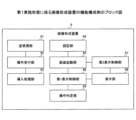
図7に示すように、画像形成装置9は、送受信部91と、操作受付部92と、導入処理部93と、認証部94と、画面起動部95と、第1表示制御部96と、第2表示制御部97と、表示部98と、操作判定部99とを備えている。
As shown in FIG. 7, the
これらのうち、送受信部91の機能はネットワークI/F950(図3参照)等により実現され、操作受付部92及び表示部98の機能は操作パネル940等により実現される。また導入処理部93、認証部94、画面起動部95、第1表示制御部96、第2表示制御部97及び操作判定部99の機能はCPU901が所定のプログラムを実行すること等により実現される。より詳しくは、第1表示制御部96の機能は、CPU901がランチャーアプリLを実行すること等で実現でき、第2表示制御部97の機能は、CPU901が第2アプリケーションを実行すること等で実現できる。
Among these, the functions of the transmitting/receiving
画像形成装置9は、送受信部91、操作受付部92及び導入処理部93等によって、契約情報に基づいて選択したパッケージに含まれるアプリケーションを画像形成装置9にインストールする機能を備える。また、認証部94、画面起動部95、第1表示制御部96、第2表示制御部97、表示部98及び操作判定部99等によって、操作パネル940に第1アプリケーションを操作するためのアイコンと、第2アプリケーションを示すためのダミーアイコンとを表示する機能等を備える。
The
送受信部91は、契約管理サーバ5又はアプリケーション提供サーバ等の外部装置との間で情報の送受信を行う。具体的には、操作受付部92を介した操作者による操作に基づき、契約管理サーバ5に契約情報の送信要求を行い、送信要求に応答した契約情報を契約管理サーバ5から受信する。送受信部91は受信した契約情報を表示部98に表示させることができる。なお、送受信部91は、契約管理サーバ5又はアプリケーション提供サーバ以外の外部装置との間で情報の送受信を行うこともできる。
The transmitting/receiving
操作受付部92は、画像形成装置9の操作者による操作を受け付ける。この操作は、操作パネル940に表示されたアイコンやダミーアイコンに対する画面タッチ等である。また操作受付部92は、アイコンに対する操作によりアイコンに対応するアプリケーションを起動させたり、ダミーアイコンに対する操作によりアプリケーションに関する情報を表示させたりする制御を実行可能である。
The
導入処理部93は、操作受付部92を介したアプリケーションのパッケージの選択操作に応答し、選択したパッケージに含まれるアプリケーションを、送受信部91を介してアプリケーション提供サーバから画像形成装置9にインストールする。
In response to an application package selection operation via the
認証部94は、画像形成装置9を操作する操作者が利用者又は機器管理者の何れであるかを認証するための処理を実行する。認証部94は、操作受付部92を介して操作者にユーザID及びパスワードを入力させ、HD909等に格納された操作者情報を参照して認証処理を実行できる。但し、ID(Identify)カード認証や生体認証等を行えるように構成してもよい。
The
画面起動部95は、操作者が操作受付部92を介してランチャーアプリLのアイコンに対して行ったランチャー画面の表示要求操作に応答して、第1表示制御部96又は第2表示制御部97の一方に対してランチャー画面を表示させる指示を行う。画面起動部95は、操作者が利用者である場合には第1表示制御部96に指示し、操作者が機器管理者である場合には第2表示制御部97に対して指示する。
The
第1表示制御部96は、操作者が利用者である場合に表示部98が表示する画面を生成し、表示部98に表示させる。この画面は、パッケージに含まれる複数のアプリケーションのうちの第1アプリケーションに該当するアプリケーションのアイコン(利用者操作受付画像)と、第2アプリケーションに該当するアプリケーションのダミーアイコン(図形画像)とを含むランチャー画面である。
The first
より詳しくは、第1表示制御部96は、パッケージに含まれる複数のアプリケーションのそれぞれが第1アプリケーション又は第2アプリケーションの何れであるかを判定し、第1アプリケーションである場合にはこれに対応するアイコンを生成し、第2アプリケーションである場合にはこれに対応するダミーアイコンを生成する。
More specifically, the first
例えば、第1表示制御部96は、アプリケーションが備えるアイコンファイルを読み出すことでアイコンを生成し、またHD909(図3参照)等に予め格納されているダミーアイコンファイルを読み出してダミーアイコンを生成する。そしてアイコン又はダミーアイコンを配置してランチャー画面を生成する。
For example, the first
また第1表示制御部96は、利用者がダミーアイコンに対して操作した場合に、操作判定部99からの指示に応答して第2アプリケーションの情報、第2アプリケーションを含むパッケージの情報、又は所定の通知の情報の少なくとも1つを生成し、表示部98に表示させることができる。
Further, when the user operates the dummy icon, the first
ここで、第2アプリケーションは、別途利用可能状況を管理し、第2アプリケーションの利用可能状況及びバージョン情報の第1表示制御部96からの要求に対して応答できるようになっている。
Here, the second application manages the availability status separately and is capable of responding to a request from the first
利用者が操作受付部92を介して画面起動部95に対してランチャー画面の表示要求操作を行うと、第1表示制御部96は画面起動部95からの指示に従って第2アプリケーションがインストールされているか否かを判定する。インストールされている場合には、第2アプリケーションに対して第2アプリケーションの利用可能状況及びバージョン情報を要求する。
When a user issues a display request operation to the
第2アプリケーションは要求に応答して、第2アプリケーションの利用可能状況及びバージョン情報を第1表示制御部96に通知する。第1表示制御部96は第2アプリケーションからの通知により利用可能状況及びバージョン情報を取得できた場合には情報を保持してダミーアイコンを生成する。取得できなかった場合にはダミーアイコンを生成しない。
In response to the request, the second application notifies the first
一方、第2表示制御部97は、操作者が機器管理者である場合に、表示部98が表示する画面を生成する。この画面はパッケージに含まれる複数のアプリケーションのうちの第1アプリケーション及び第2アプリケーションに該当するアプリケーションのアイコン(管理者操作受付画像)を含むランチャー画面である。
On the other hand, the second
より詳しくは、第2表示制御部97は、アプリケーションが備えるアイコンファイルを読み出すことでアイコンを生成し、生成したアイコンを配置してランチャー画面を生成する。
More specifically, the second
表示部98は、第1表示制御部96又は第2表示制御部97の一方が生成したランチャー画面を表示する。また表示部98は、第1表示制御部96が生成した第2アプリケーション又は第2アプリケーションを含むパッケージの情報、或いは所定の通知の情報を表示する。
The
操作判定部99は、操作者が行った操作がアイコンに対する操作であるか否か、又はダミーアイコンに対する操作であるか否かを判定する機能を備える。例えば、第1表示制御部96又は第2表示制御部97がアイコン又はダミーアイコンを生成する際に、アイコンであるか否か、又はダミーアイコンであるか否かを識別する情報を付与されている。操作判定部99は、この情報を参照することで上記の判定を行うことができる。
The
また操作判定部99は、操作者がアイコンに対して操作を行った場合には、アイコンに対応するアプリケーションを起動させる。また操作者がダミーアイコンに対して操作を行った場合には、第1表示制御部96に対して、ダミーアイコンに対応する第2アプリケーション又は第2アプリケーションを含むパッケージの何れかの情報、或いは所定の通知の情報を生成する指示を行う。この指示に応答して第2アプリケーションの利用可能状況及びバージョン情報が操作パネル40に表示される。
Further, when the operator performs an operation on an icon, the
さらに、操作判定部99は、ランチャー画面を用いた処理を終了するか否かを判定する機能も備える。この終了判定は、アプリケーションとは別に設けた終了用のアイコンへの操作者の操作に基づき行ってもよいし、画面に設けられた閉じるボタンへの操作者の操作等に基づき行ってもよい。
Furthermore, the
<画像形成装置9による処理例>
(インストール処理例)
次に、パッケージに含まれるアプリケーションの画像形成装置9へのインストール処理について、図8を参照して説明する。図8は、画像形成装置9によるインストール処理の一例を説明するフローチャートである。
<Example of Processing by
(Installation process example)
Next, the process of installing an application included in a package into the
操作受付部92が画像形成装置9の操作者から契約情報の送信要求操作を受け付けると、まずステップS81において、送受信部91は操作者による操作に応答して契約管理サーバ5に契約情報の送信要求を行い、契約管理サーバ5から契約情報を受信する。
When the
続いて、ステップS82において、表示部98は送受信部91が受信した契約情報を表示する。
Subsequently, in step S82, the
続いて、ステップS83において、操作受付部92は、表示された契約情報に基づき操作者が行ったパッケージの選択操作を受け付ける。
Next, in step S83, the
続いて、ステップS84において、導入処理部93は、選択されたパッケージに含まれる複数のアプリケーションを、送受信部91を介して外部のアプリケーション提供サーバからインストールする。
Next, in step S84, the
このようにして、画像形成装置9は、パッケージに含まれるアプリケーションをインストールできる。
In this way, the
(アプリケーションの操作処理例)
次に、画像形成装置9によるアプリケーションの操作処理について、図9を参照して説明する。図9は、画像形成装置9によるアプリケーションの操作処理の一例を説明するフローチャートである。
(Example of application operation processing)
Next, application operation processing by the
図9は、処理を開始する事前に、操作者が利用者又は機器管理者の何れかであるかの認証処理を認証部94が行い、操作者がランチャー画面の表示要求操作を行った後の処理を示している。
FIG. 9 shows that the
ランチャー画面の表示要求を受け付けると、まずステップS91において、画面起動部95は、操作者が利用者又は機器管理者の何れであるかを判定する。
When a request to display the launcher screen is received, first in step S91, the
ステップS91で、操作者が利用者であると判定された場合には(ステップS91、Yes)、ステップS92において、画面起動部95は、第1表示制御部96に対してランチャー画面を表示させる指示を行う。第1表示制御部96は、指示に応答して第2アプリケーションからその利用可能状況及びバージョン情報を取得するとともに、ランチャー画面の初期画面を生成する。
If it is determined in step S91 that the operator is a user (step S91, Yes), in step S92, the
続いて、ステップS93において、第1表示制御部96は、アプリケーションを区別するための変数nを0に設定する。なお変数nは、説明の便宜のために設けた変数であり、カウンタとしても機能する変数である。
Next, in step S93, the first
続いて、ステップS94において、第1表示制御部96は、アプリケーションnを選択する。
Next, in step S94, the first
続いて、ステップS95において、第1表示制御部96は、アプリケーションnが第1アプリケーションであるか否かを判定する。そして第1アプリケーションであると判定された場合には(ステップS95、Yes)、ステップS96において、第1表示制御部96は、アプリケーションnのアイコンを生成する。
Next, in step S95, the first
続いて、ステップS97において、第1表示制御部96は、生成したアプリケーションnのアイコンをランチャー画面に配置する。
Subsequently, in step S97, the first
一方、ステップS95で、第1アプリケーションでないと判定された場合には(ステップS95、No)、ステップS98において、第1表示制御部96は、アプリケーションnのダミーアイコンを生成する。但し、ステップS92で第2アプリケーションの利用可能状況及びバージョン情報を取得できなかった場合はこのダミーアイコンを生成しない。
On the other hand, if it is determined in step S95 that the application is not the first application (step S95, No), the first
続いて、ステップS99において、第1表示制御部96は、生成したアプリケーションnのダミーアイコンをランチャー画面に配置する。
Next, in step S99, the first
続いて、ステップS100において、第1表示制御部96は変数nが総数Mより小さいか否かを判定する。ここで、総数Mはパッケージに含まれるアプリケーションの総数である。
Subsequently, in step S100, the first
ステップS100で変数nが総数Mより小さいと判定された場合には(ステップS100、Yes)、ステップS101において、第1表示制御部96は、変数nをn+1に設定する。その後、処理はステップS94に戻り、ステップS94~S100の処理が再度行われる。
If it is determined in step S100 that the variable n is smaller than the total number M (Yes in step S100), the first
一方、ステップS100で変数nが総数Mより小さくないと判定された場合には(ステップS100、No)、ランチャー画面の生成を終了し、処理はステップS104に移行する。 On the other hand, if it is determined in step S100 that the variable n is not smaller than the total number M (step S100, No), the generation of the launcher screen is ended, and the process moves to step S104.
ここで、ステップS91に戻り、ステップS91で、操作者が利用者でないと判定された場合には(ステップS91、No)、画面起動部95は、第2表示制御部97に対してランチャー画面を表示させる指示を行う。第2表示制御部97は、画面起動部95の指示に応答してランチャー画面の初期画面を生成する。
Here, returning to step S91, if it is determined in step S91 that the operator is not the user (step S91, No), the
続いて、ステップS102において、第2表示制御部97は、パッケージに含まれる全てのアプリケーションのそれぞれのアイコンを生成する。
Next, in step S102, the second
続いて、ステップS103において、生成したアイコンをランチャー画面に配置する。その後、ランチャー画面の生成を終了し、処理はステップS104に移行する。 Next, in step S103, the generated icon is placed on the launcher screen. After that, generation of the launcher screen ends, and the process proceeds to step S104.
続いて、ステップS104において、表示部98は、第1表示制御部96又は第2表示制御部97により生成されたランチャー画面を表示する。
Next, in step S104, the
続いて、ステップS105において、操作受付部92はランチャー画面に表示されたアイコン又はダミーアイコンに対して、操作者による操作があったか否かを判定する。
Next, in step S105, the
ステップS105で操作がなかったと判定された場合には(ステップS105、No)、ステップS105の処理が再度行われる。 If it is determined in step S105 that no operation has been performed (step S105, No), the processing of step S105 is performed again.
一方、ステップS105で操作があったと判定された場合には(ステップS105、Yes)、ステップS106において、操作判定部99は、操作がアイコンへの操作であるか否かを判定する。
On the other hand, if it is determined in step S105 that an operation has been performed (step S105, Yes), in step S106, the
ステップS106でアイコンへの操作であると判定された場合には(ステップS106、Yes)、ステップS107において、操作判定部99は、操作されたアイコンに対応するアプリケーションを起動させる。
If it is determined in step S106 that the operation is directed to an icon (Yes in step S106), in step S107, the
一方、ステップS106でアイコンへの操作でないと判定された場合には(ステップS106、No)、ステップS108において、操作判定部99は、操作がダミーアイコンへの操作であるか否かを判定する。
On the other hand, if it is determined in step S106 that the operation is not an operation on an icon (step S106, No), in step S108, the
ステップS108でダミーアイコンへの操作であると判定された場合には(ステップS108、Yes)、ステップS109において、第1表示制御部96は、操作判定部99からの指示に応答してダミーアイコンに対応するアプリケーションの情報を表示部98に表示させる。より具体的には、ダミーアイコンに対応する第2アプリケーション又は第2アプリケーションを含むパッケージの何れかの情報、或いは所定の通知の情報を表示させる。第2アプリケーションの情報には、第2アプリケーションの利用可能状況及びバージョン情報が含まれる。
If it is determined in step S108 that the operation is on a dummy icon (step S108, Yes), in step S109, the first
一方、ステップS108でダミーアイコンへの操作でないと判定された場合には(ステップS108、No)、処理はステップS110に移行する。 On the other hand, if it is determined in step S108 that the operation is not directed to a dummy icon (step S108, No), the process proceeds to step S110.
続いて、ステップS110において、操作判定部99は、処理を終了するか否かを判定する。
Next, in step S110, the
ステップS110で終了すると判定された場合には(ステップS110、Yes)、処理は終了し、終了しないと判定された場合には(ステップS110、No)、処理はステップS105に戻り、ステップS105以降の処理が再度行われる。 If it is determined in step S110 that the process should end (Yes in step S110), the process ends. If it is determined that the process should not end (No in step S110), the process returns to step S105, and the process from step S105 onwards is performed again.
このようにして、画像形成装置9は、アプリケーションの操作処理を実行できる。
In this way, the
<表示画面例>
次に、画像形成装置9による表示画面について説明する。ランチャーアプリLにより表示されるランチャー画面の一例を説明する。
<Display screen example>
Next, a description will be given of a display screen of the
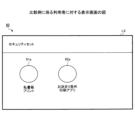
(比較例に係る表示画面)
まず、実施形態に係る表示画面の説明に先立ち、実施形態が適用されない場合の比較例に係る表示画面について、図10を参照して説明する。
(Display screen according to comparative example)
First, prior to describing the display screen according to the embodiment, a display screen according to a comparative example to which the embodiment is not applied will be described with reference to FIG. 10.
図10は、比較例に係る表示画面を説明する図である。図10におけるランチャー画面LXは、操作者が利用者である場合の表示画面であり、パッケージ60に含まれるアプリケーションを表示する画面である。
Figure 10 is a diagram illustrating a display screen according to a comparative example. The launcher screen LX in Figure 10 is a display screen when the operator is a user, and is a screen that displays applications included in the
図10に示すように、ランチャー画面LXは、第1アプリケーションに該当するアプリケーション61のアイコン61aと、アプリケーション62のアイコン62aとを表示し、第2アプリケーションに該当するアプリケーション63のアイコンを表示していない。
As shown in FIG. 10, the launcher screen LX displays an
上述したように、アプリケーション63は利用者による操作が不能であるため、操作を受け付けるためのアイコンが表示されなくても機能上の問題は生じない。しかし、アイコンがランチャー画面LXに表示されないため、利用者はパッケージ60に含まれているはずのアプリケーション63がパッケージ60に含まれていないと誤解したり、不満を抱いたりする場合がある。
As described above, since
(実施形態に係る利用者に対する表示画面例)
これに対し、図11は、実施形態に係る利用者に対する表示画面の一例を説明する図であり、(a)はランチャー画面の一例を示す図、(b)はダミーアイコンに対する操作により表示される画面の一例を示す図である。
(Example of display screen for users according to embodiment)
In contrast, FIG. 11 is a diagram illustrating an example of a display screen for a user according to an embodiment, in which (a) is a diagram showing an example of a launcher screen, and (b) is a diagram showing an example of a launcher screen displayed by an operation on a dummy icon. It is a figure which shows an example of a screen.
図11(a)に示すように、ランチャー画面L1は、アプリケーション61のアイコン61aと、アプリケーション62のアイコン62aと、アプリケーション63のダミーアイコン63aとを表示している。ここで、アイコン61aとアイコン62aは、それぞれ「利用者操作受付画像」の一例であり、ダミーアイコン63aは「図形画像」の一例であり、また「模擬受付画像」の一例である。
As shown in FIG. 11A, the launcher screen L1 displays an
このランチャー画面L1は、操作者が利用者である場合の表示画面であり、第1表示制御部96が生成した表示画面である。またパッケージ60に第2アプリケーションが含まれる場合の表示画面である。
This launcher screen L1 is a display screen when the operator is a user, and is a display screen generated by the first
利用者がアイコン61aに対して操作するとアプリケーション61が起動し、またアイコン62aに対して操作するとアプリケーション62が起動する。一方、ダミーアイコン63aに対して利用者が操作しても、アプリケーション63に対する操作は受け付けられず、アプリケーション63は起動しない。その代わりに、図11(b)に示す情報画面64aが表示される。図11(b)に示すように、情報画面64aは、アプリケーション63が操作できないことを示す通知641と、アプリケーション63のバージョン情報642と、アプリケーション63の利用可能状況643とを表示する。
When the user operates
ここで、情報画面64aが表示する情報は、「アプリケーション情報」の一例であり、通知641は「所定の通知」の一例である。またバージョン情報642は「書誌情報」の一例である。但し、第1表示制御部96は、書誌情報としてパッケージ60のバージョン等の書誌情報を表示することもできる。
Here, the information displayed on the
このようにアプリケーション63のダミーアイコン63aを表示することで、利用者によるアプリケーション63の操作を不能にするとともに、アプリケーション63がパッケージ60に含まれていることを利用者が適切に認識できるようになっている。また利用者がダミーアイコン63aに対する操作を行った場合に、情報画面64aを表示することで、アプリケーション63に関するより詳細な情報を提供できるようになっている。
By displaying the
また、図12は、実施形態に係る利用者に対する表示画面の他の例を説明する図である。図12におけるランチャー画面L2は、操作者が利用者である場合の表示画面であり、パッケージ70に含まれるアプリケーションを表示する画面である。パッケージ70は、第1アプリケーションであるアプリケーション71,72,73を含み、第2アプリケーションは含まない。
Further, FIG. 12 is a diagram illustrating another example of the display screen for the user according to the embodiment. The launcher screen L2 in FIG. 12 is a display screen when the operator is a user, and is a screen that displays applications included in the
一例として、アプリケーション71は、紙で受け取った見積書等をスキャナ部931(図3参照)で読み取り、所望のファイル形式に自動変換して個人のPCに送信する見積書作成アプリである。アプリケーション72は、免税販売手続きで必要となる「輸出免税物品購入記録票」と「購入者誓約書」を簡単且つスピーディーに作成する免税アプリである。アプリケーション73は、免許証や保険証等のIDカードの表面と裏面をスキャナ部931で読み取り、A4用紙1枚に集約してプリンタ部932で印刷する集約印刷アプリである。
As an example, application 71 is an estimate creation application that reads estimates and the like received on paper using scanner unit 931 (see Figure 3), automatically converts them into a desired file format, and sends them to an individual's PC. Application 72 is a tax-free application that easily and quickly creates an "export tax-free goods purchase record ticket" and a "purchaser's pledge" required for tax-free sales procedures. Application 73 is an aggregate printing application that reads the front and back of an ID card such as a driver's license or insurance card using
図12に示すように、ランチャー画面L2は、アプリケーション71のアイコン71aと、アプリケーション72のアイコン72aと、アプリケーション73のアイコン73aとを表示している。
As shown in FIG. 12, the launcher screen L2 displays an
利用者がアイコン71aに対して操作するとアプリケーション71が起動し、アイコン72aに対して操作するとアプリケーション72が起動し、またアイコン73aに対して操作するとアプリケーション73が起動する。
When the user operates on the
このように、パッケージ70に第1アプリケーションのみが含まれる場合は、第1表示制御部96は、ダミーアイコンを表示せず、アイコンのみを表示する。
In this manner, when the
(実施形態に係る機器管理者に対する表示画面例)
次に図13は、実施形態に係る機器管理者に対する表示画面の一例を説明する図である。ランチャー画面L2は、操作者が機器管理者である場合の表示画面であり、第2表示制御部97が生成した表示画面である。
(Example of display screen for device administrator according to embodiment)
Next, FIG. 13 is a diagram illustrating an example of a display screen for the device administrator according to the embodiment. The launcher screen L2 is a display screen when the operator is a device administrator, and is a display screen generated by the second
図12に示すように、ランチャー画面L2は、アプリケーション61のアイコン61bと、アプリケーション62のアイコン62bと、アプリケーション63のアイコン63bとを表示している。このアイコン61b,62b,63bは、それぞれ「管理者操作受付画像」の一例である。
As shown in FIG. 12, the launcher screen L2 displays an
機器管理者がアイコン61bに対して操作するとアプリケーション61が起動し、アイコン62bに対して操作するとアプリケーション62が起動し、またアイコン63bに対して操作するとアプリケーション63が起動する。
When the device administrator operates
このように、機器管理者は第2アプリケーションに対する操作を行えるようになっている。 In this way, the device administrator can operate the second application.
(画像形成装置9の画面遷移例)
次に、画像形成装置9の画面遷移について説明する。図14は、画像形成装置9の画面遷移の一例を説明する図であり、(a)は選択画面、(b)はスキャナアプリ起動時の画面、(c)はセキュリティセット起動時の画面、(d)はお手軽プリントセット起動時の画面である。
(Example of screen transition of image forming device 9)
Next, a description will be given of screen transitions of the
図14(a)は、複数のアプリケーションの一覧を表示する表示制御アプリケーションを起動するための操作受付画像と、他のアプリケーションを起動するための操作受付画像との何れかを選択するための選択画面である。 FIG. 14(a) shows a selection screen for selecting either an operation reception image for starting a display control application that displays a list of multiple applications or an operation reception image for starting another application. It is.
図14(a)におけるボタン141に利用者がタッチすると、図14(b)の画面が表示される。この画面は、他のアプリケーションの一例としてのスキャナアプリ起動時の画面である。
When the user touches
図14(a)におけるボタン142に利用者がタッチすると、図14(c)の画面が表示される。この画面は、パッケージに含まれる第1アプリケーションに対する操作を受け付ける操作受付画像と、第2アプリケーションを示す図形画像とを表示する画面である。
When the user touches
図14(a)におけるボタン143に利用者がタッチすると、図14(d)の画面が表示される。この画面は、他のアプリケーションの一例としてのお手軽プリントセット起動時の画面である。
When the user touches the
画像形成装置9は、画像形成装置9にログインしている操作者が機器管理者である場合には、ジョブログ送信アプリ等の第2アプリケーションが、機器管理者が操作可能な操作画面を表示する。また、画像形成装置9にログインしている操作者が利用者である場合には、ランチャーアプリ等の表示制御アプリケーションが、利用者に操作ができないことを示す表示画面を表示することができる。
When the operator logged in to the
また選択画面では、表示制御アプリケーションを起動するために操作受付画像が選択された場合であって、画像形成装置9にログインしている操作者が利用者である場合は、第1アプリケーションに対する操作を受け付ける操作受付画像は、第1アプリケーションが表示し、第2アプリケーションを示す図形画像は、表示制御アプリケーションが表示する。
In addition, on the selection screen, when an operation acceptance image is selected to launch a display control application, and the operator logged in to the
<画像形成装置9の作用効果>
次に、画像形成装置9の作用効果について説明する。
<Functions and Effects of
Next, the effects of the
ここで、クラウドサーバ上のテナントにて、複数のアプリケーションを含むパッケージ単位で利用権限が付与され、情報処理装置の利用者が情報処理装置の表示部に表示されたアイコン(操作受付画像)を操作して、パッケージに紐付くアプリケーションを利用する形態が知られている。 Here, the tenant on the cloud server grants usage authority for each package containing multiple applications, and the user of the information processing device operates the icon (operation acceptance image) displayed on the display of the information processing device. A known method is to use an application linked to a package.
このような利用形態では、自動で起動して情報処理装置のバックグラウンドで動作するもの等の利用者による起動が不能なアプリケーションがパッケージに含まれると、このアプリケーションのアイコンが表示部に表示されない場合がある。そのため、パッケージに含まれるアプリケーションの情報を利用者に正確に提供できずに、利用者は所望のアプリケーションが含まれていないとの誤解や不満を抱く場合がある。 In this type of usage, if the package includes an application that cannot be started by the user, such as one that starts automatically and runs in the background of the information processing device, the icon for this application may not be displayed on the display. There is. Therefore, information about the applications included in the package cannot be accurately provided to the user, and the user may feel dissatisfied or misunderstood that the desired application is not included.
本実施形態では、画像形成装置9に備えられた表示部98は、パッケージ60に含まれる複数のアプリケーションのうちの画像形成装置9の利用者が操作可能なアプリケーション61,62に対する操作を受け付けるアイコン61a,62aを表示する。また上記の複数のアプリケーションのうちの利用者が操作不能なアプリケーション63を示すダミーアイコン63aを表示する。
In the present embodiment, the
アプリケーション63に対して利用者が行う操作を受け付けないダミーアイコン63aを表示し、利用者に視認させることで、利用者によるアプリケーション63の操作を不能にするとともに、アプリケーション63がパッケージ60に含まれていることを利用者に適切に認識させる。これにより、パッケージ60に含まれるアプリケーション61,62,63の情報を正確に提供することができる。
By displaying a
また本実施形態では、認証部94と、第2表示制御部97とを備え、認証部94による認証の結果、操作者が機器管理者である場合にアプリケーション61,62,63のそれぞれアイコンを表示するランチャー画面L2を表示させる。これらのアイコンは、機器管理者がアプリケーション61,62,63のそれぞれに対して行う操作を受け付ける。これにより、機器管理者は第1アプリケーションに該当するアプリケーション61,62だけでなく、第2アプリケーションに該当するアプリケーション63も操作できる。
In this embodiment, an
また本実施形態では、第1表示制御部96は、利用者がダミーアイコン63aに対して操作した場合には、アプリケーション63に関するアプリケーション情報を表示部98に表示させる。アプリケーション情報としてアプリケーション63、又はパッケージ60の少なくとも一方の書誌情報を表示させる。さらに、アプリケーション63を利用者が操作できないことを表示させる。これらにより、パッケージ60に含まれるアプリケーション63の情報をより詳細又は正確に提供できる。
In addition, in this embodiment, when the user operates the
[第2実施形態]
次に、第2実施形態に係る画像形成装置9aについて説明する。本実施形態では、画像形成装置9aの操作者が機器管理者である場合に、管理者操作受付画像に対して機器管理者が操作した場合には、第2アプリケーションの設定画面を表示部に表示させる。
[Second embodiment]
Next, an
この設定画面は、第2アプリケーションの起動時期、停止時期等の動作設定を行うための画面である。機器管理者は、表示された設定画面を用いて、第2アプリケーションの動作を設定できる。なお、この設定画面に第2アプリケーションの利用可能状況等が表示されてもよい。 This setting screen is a screen for configuring operation settings such as start time and stop time of the second application. The device administrator can use the displayed setting screen to set the operation of the second application. Note that the availability status of the second application, etc. may be displayed on this setting screen.
ここで、第2アプリケーションの起動時期、停止時期等の動作を設定する操作は、機器管理者が第2アプリケーションに対して行う操作に含まれる。 Here, the operation of setting the operation of the second application, such as the start time and the stop time, is included in the operation performed by the device administrator on the second application.
以下では、第1実施形態と重複する部分については、適宜説明を省略する。 Below, descriptions of parts that overlap with those of the first embodiment will be omitted as appropriate.
<画像形成装置9aの機能構成例>
図14は、画像形成装置9aの機能構成の一例を説明するブロック図である。図14に示すように、画像形成装置9aは、操作判定部99aを備えている。
<Example of Functional Configuration of
14 is a block diagram illustrating an example of the functional configuration of the
操作判定部99aは、利用者が行った操作がアイコンに対する操作であるか否か、又はダミーアイコンに対する操作であるか否かを判定する機能を備える。
The
また操作判定部99aは、利用者がアイコンに対して操作を行った場合には、アイコンに対応するアプリケーションを起動させる。また利用者がダミーアイコンに対して操作を行った場合には、第1表示制御部96に対して、ダミーアイコンに対応する第2アプリケーション又は第2アプリケーションを含むパッケージの何れかの情報、或いは所定の通知の情報を生成する指示を行う。これにより第2アプリケーションの利用可能状況及びバージョン情報を操作パネル40に表示させることができる。
When the user performs an operation on an icon, the
また操作判定部99aは、機器管理者がアイコンに対して操作を行った場合には、アイコンに対応するアプリケーションの設定画面を表示部98に表示させる機能を備える。さらに、ランチャー画面を用いた処理を終了するか否かを判定する機能を備える。
The
<画像形成装置9aによる処理例>
次に、画像形成装置9aによる処理について、図15を参照して説明する。図15は、画像形成装置9aによるアプリケーションの操作処理の一例を説明するフローチャートである。なお、図15におけるステップS151~S163及びステップS165~S170の処理は、図9におけるステップS91~S103及びステップS105~S110の処理と同様であるため、ここでは重複する説明を省略する。
<Processing Example by
Next, the process by the
ステップS164において、表示部98は、第1表示制御部96により生成されたランチャー画面を表示する。
In step S164, the
またステップS171において、表示部98は、第2表示制御部97により生成されたランチャー画面を表示する。
Also in step S171, the
続いて、ステップS172において、操作受付部92はランチャー画面に表示されたアイコンに対して、機器管理者による操作があったか否かを判定する。
Next, in step S172, the
ステップS172で操作がなかったと判定された場合には(ステップS172、No)、ステップS172の処理が繰り返される。 If it is determined in step S172 that no operation has been performed (step S172, No), the process of step S172 is repeated.
一方、ステップS172で操作があったと判定された場合には(ステップS172、Yes)、ステップS173において、操作判定部99aは、操作されたアイコンに対応するアプリケーションの設定画面を表示部98に表示させる。機器管理者は、表示された設定画面を用いて、操作されたアイコンに対応するアプリケーションの起動時期、停止時期等の動作設定を行うことができる。
On the other hand, if it is determined in step S172 that an operation has been performed (step S172, Yes), in step S173, the
このようにして、機器管理者は、パッケージ60に含まれる各アプリケーションの動作を設定できる。なお、本実施形態では、パッケージ60に含まれる各アプリケーションのアイコンに対して操作があった場合に、アイコンに対応するアプリケーションの設定画面を表示する例を示したが、これに限定されるものではない。パッケージ60に含まれる各アプリケーションのうちの第2アプリケーションのアイコンに対して操作があった場合にのみ、第2アプリケーションの設定画面を表示するように構成してもよい。この場合、第1アプリケーションのアイコンに対して操作があった場合には、第1アプリケーションの設定画面は表示されず、第1アプリケーションが起動又は停止する等の所定の動作を行う。
In this way, the device administrator can set the operation of each application included in
<表示画面例>
次に、図16は、本実施形態に係る機器管理者に対する表示画面の一例を説明する図であり、(a)はランチャー画面の一例を示す図、(b)は設定画面の一例を示す図である。
<Display screen example>
Next, FIG. 16 is a diagram illustrating an example of a display screen for a device administrator according to this embodiment, where (a) is a diagram showing an example of a launcher screen, and (b) is a diagram showing an example of a setting screen.
第2アプリケーションに該当するジョブログ送信アプリのアイコン63cに対して操作があった場合には、図16(b)に示すジョブログ送信アプリの設定画面64cが表示される。機器管理者は、設定画面64cを用いて、ジョブログ送信アプリの起動時期、停止時期等の動作設定を行えるようになっている。
When an operation is performed on the
<画像形成装置9aの作用効果>
以上説明したように、本実施形態では、画像形成装置9aの操作者が機器管理者である場合に、機器管理者がジョブログ送信アプリのアイコン63cに対して操作した場合には、ジョブログ送信アプリの設定画面を表示部98に表示させる。これにより、機器管理者はジョブログ送信アプリの動作を設定し、その管理を行うことができる。
<Functions and effects of the
As described above, in the present embodiment, when the operator of the
以上、実施形態を説明したが、本発明は、具体的に開示された上記の実施形態に限定されるものではなく、特許請求の範囲から逸脱することなく、種々の変形や変更が可能である。 Although the embodiments have been described above, the present invention is not limited to the above specifically disclosed embodiments, and various modifications and changes can be made without departing from the scope of the claims. .
なお、上述した実施形態では、操作者が利用者である場合には、第1表示制御部96がランチャー画面を生成し、操作者が機器管理者である場合には、第2表示制御部97がランチャー画面を生成する例を示したが、これに限定されるものではない。操作者が機器管理者である場合にも、第1表示制御部96がランチャー画面を生成し、第2表示制御部97は、第1表示制御部96が生成するランチャー画面のうち、第2アプリケーションのアイコン(管理者操作受付画像)のみを生成するように構成してもよい。換言すると、第1表示制御部96が生成するランチャー画面のうちの少なくとも一部を生成するように第2表示制御部97を構成できる。
In the embodiment described above, when the operator is a user, the first
また実施形態の説明では、具体的なアプリケーションを示したが、何れも一例であって、パッケージに含まれるアプリケーションは、実施形態に限定されるものではない。 Further, in the description of the embodiment, specific applications are shown, but these are just examples, and the applications included in the package are not limited to the embodiment.
また、実施形態は、情報処理方法も含む。例えば、情報処理方法は、パッケージ単位で利用権限が付与された複数のアプリケーションを実行可能な情報処理装置による情報処理方法であって、前記複数のアプリケーションのうちの前記情報処理装置の利用者が操作可能な第1アプリケーションに対する操作を受け付ける利用者操作受付画像と、前記複数のアプリケーションのうちの前記利用者が操作不能な第2アプリケーションを示す図形画像と、を表示する工程を行う。このような情報処理方法により、上述した画像形成装置と同様の効果を得ることができる。 The embodiment also includes an information processing method. For example, the information processing method is an information processing method by an information processing device capable of executing a plurality of applications to which usage rights are granted on a package-by-package basis, and includes a step of displaying a user operation reception image that receives an operation for a first application among the plurality of applications that is operable by a user of the information processing device, and a graphic image that indicates a second application among the plurality of applications that is inoperable by the user. Such an information processing method can provide the same effect as the image forming device described above.
さらに、実施形態は、プログラムも含む。例えば、プログラムは、パッケージ単位で利用権限が付与された複数のアプリケーションを実行可能な情報処理装置に実行させるプログラムであって、前記複数のアプリケーションのうちの前記情報処理装置の利用者が操作可能な第1アプリケーションに対する操作を受け付ける利用者操作受付画像と、前記複数のアプリケーションのうちの前記利用者が操作不能な第2アプリケーションを示す図形画像と、を表示する処理を前記情報処理装置に実行させる。このようなプログラムにより、上述した画像形成装置と同様の効果を得ることができる。 Furthermore, embodiments also include programs. For example, the program is a program that causes an executable information processing device to execute a plurality of applications to which usage rights are granted in units of packages, and is operable by a user of the information processing device among the plurality of applications. The information processing device is caused to perform a process of displaying a user operation acceptance image for accepting an operation for a first application, and a graphic image indicating a second application among the plurality of applications that the user cannot operate. With such a program, effects similar to those of the image forming apparatus described above can be obtained.
また、上記で説明した実施形態の各機能は、一又は複数の処理回路によって実現することが可能である。ここで、本明細書における「処理回路」とは、電子回路により実装されるプロセッサのようにソフトウェアによって各機能を実行するようプログラミングされたプロセッサや、上記で説明した各機能を実行するよう設計されたASIC(Application Specific Integrated Circuit)、DSP(digital signal processor)、FPGA(field programmable gate array)や従来の回路モジュール等のデバイスを含むものとする。 Moreover, each function of the embodiment described above can be realized by one or more processing circuits. Here, the term "processing circuit" as used herein refers to a processor programmed to execute each function by software, such as a processor implemented by an electronic circuit, or a processor designed to execute each function explained above. This includes devices such as ASICs (Application Specific Integrated Circuits), DSPs (digital signal processors), FPGAs (field programmable gate arrays), and conventional circuit modules.
1 情報処理システム
5 契約管理サーバ(契約情報管理装置の一例)
51 送受信部
52 契約情報取得部
53 契約情報格納部
9 画像形成装置(情報処理装置の一例)
91 送受信部
92 操作受付部
93 導入処理部
94 認証部
95 画面起動部
96 第1表示制御部
97 第2表示制御部
98 表示部
99 操作判定部
60 パッケージ
61~62、71~73 アプリケーション(第1アプリケーションの一例)
61a~62a、71a~73a アイコン(利用者操作受付画像の一例)
61b~63b、61c~63c アイコン(管理者操作受付画像の一例)
63 アプリケーション(第2アプリケーションの一例)
63a ダミーアイコン(図形画像の一例、模擬受付画像の一例)
64a 情報画面
64c 設定画面
641 通知
642 バージョン情報(アプリケーション情報の一例、書誌情報の一例)
643 利用可能状況(アプリケーション情報の一例)
N ネットワーク
L ランチャーアプリ(表示制御アプリケーションの一例)
L1~L3 ランチャー画面
1
51 Transmission/
91 Transmission/
61a to 62a, 71a to 73a Icons (examples of user operation reception images)
61b to 63b, 61c to 63c Icons (examples of administrator operation reception images)
63 Application (an example of a second application)
63a Dummy icon (an example of a graphic image, an example of a mock reception image)
643 Availability (an example of application information)
N Network L Launcher app (an example of a display control application)
L1-L3 Launcher screen
Claims (14)
前記複数のアプリケーションのうちの前記情報処理装置の利用者が操作可能な第1アプリケーションに対する操作を受け付ける操作受付画像と、前記複数のアプリケーションのうちの前記利用者が操作不能な第2アプリケーションを示す図形画像と、を表示する表示部と、
操作者が前記利用者である場合に、前記表示部への表示画面を生成する第1表示制御部と、
前記操作者が前記情報処理装置を管理する機器管理者である場合に、前記表示画面の少なくとも一部を生成する第2表示制御部と、を備える
情報処理装置。 An information processing device capable of executing multiple applications,
an operation acceptance image that accepts an operation for a first application that can be operated by a user of the information processing device among the plurality of applications; and a graphic that shows a second application among the plurality of applications that cannot be operated by the user. a display section that displays an image ;
a first display control unit that generates a display screen on the display unit when the operator is the user;
An information processing device comprising : a second display control unit that generates at least a portion of the display screen when the operator is a device administrator who manages the information processing device .
請求項1に記載の情報処理装置。 The information processing apparatus according to claim 1 , wherein the plurality of applications are applications to which a usage right is given on a package basis.
請求項1、又は2に記載の情報処理装置。 3. An information processing device as described in claim 1 or 2, wherein the second application among the plurality of applications that the user cannot operate is an application that does not accept operations on the graphic image, or that accepts operations on the graphic image but does not accept operations on a screen displayed in response to operations on the graphic image.
請求項1乃至3の何れか1項に記載の情報処理装置。 The information processing apparatus according to any one of claims 1 to 3, wherein the graphic image is a simulated reception image that does not accept operations performed by the user on the second application.
請求項1乃至4の何れか1項に記載の情報処理装置。 5. The information processing device according to claim 1, wherein the second application is configured to be operable by a device administrator of the information processing device.
前記第2表示制御部は、前記第2アプリケーションで構成されている
請求項1乃至5の何れか1項に記載の情報処理装置。 the first display control unit is configured by a display control application included in the plurality of applications,
The information processing device according to claim 1 , wherein the second display control unit is configured by the second application.
請求項1乃至6の何れか1項に記載の情報処理装置。 7. The first display control section displays application information regarding the second application on the display section when the user operates the graphic image. information processing equipment.
請求項7に記載の情報処理装置。 The information processing apparatus according to claim 7 , wherein the application information is bibliographic information of at least one of the second application and a package including the plurality of applications.
請求項1乃至8の何れか1項に記載の情報処理装置。 The information processing device according to any one of claims 1 to 8 , wherein the first display control unit displays a predetermined notification on the display unit when the user operates the graphic image. .
請求項1乃至9の何れか1項に記載の情報処理装置。 The information processing apparatus according to claim 1 , wherein the second display control unit causes the display unit to display the operation acceptance image for accepting an operation by the device administrator for the second application.
請求項10に記載の情報処理装置。 The information processing apparatus according to claim 10 , wherein the second display control unit causes a setting screen of the second application to be displayed on the display unit when the device administrator performs an operation on the operation acceptance image.
前記情報処理装置は、
前記複数のアプリケーションのうちの前記情報処理装置の利用者が操作可能な第1アプリケーションに対する操作を受け付け操作受付画像と、前記複数のアプリケーションのうちの前記利用者が操作不能な第2アプリケーションを示す図形画像と、を表示する表示部と、
操作者が前記利用者である場合に、前記表示部への表示画面を生成する第1表示制御部と、
前記操作者が前記情報処理装置を管理する機器管理者である場合に、前記表示画面の少なくとも一部を生成する第2表示制御部と、を備える
情報処理システム。 An information processing system including an information processing device capable of executing a plurality of applications and a contract information management device that manages contract information for each package,
The information processing device includes:
a display unit that displays an operation reception image by receiving an operation for a first application that is operable by a user of the information processing device among the plurality of applications, and a graphic image showing a second application that is inoperable by the user among the plurality of applications ;
a first display control unit that generates a display screen on the display unit when an operator is the user;
a second display control unit that generates at least a part of the display screen when the operator is a device administrator that manages the information processing device .
表示部により、前記複数のアプリケーションのうちの前記情報処理装置の利用者が操作可能な第1アプリケーションに対する操作を受け付ける操作受付画像と、前記複数のアプリケーションのうちの前記利用者が操作不能な第2アプリケーションを示す図形画像と、を表示する工程と、
第1表示制御部により、操作者が前記利用者である場合に、前記表示部への表示画面を生成する工程と、
第2表示制御部により、前記操作者が前記情報処理装置を管理する機器管理者である場合に、前記表示画面の少なくとも一部を生成する工程と、 を行う
情報処理方法。 An information processing method using an information processing device capable of executing multiple applications, the method comprising:
The display unit displays an operation acceptance image for accepting an operation for a first application among the plurality of applications that can be operated by the user of the information processing device, and an operation reception image for accepting an operation for a first application among the plurality of applications that can be operated by the user. a step of displaying a graphical image indicating the application;
a step of generating, by a first display control section, a display screen to be displayed on the display section when the operator is the user;
An information processing method comprising: generating at least a part of the display screen by a second display control unit when the operator is a device administrator who manages the information processing device .
表示部により、前記複数のアプリケーションのうちの前記情報処理装置の利用者が操作可能な第1アプリケーションに対する操作を受け付ける操作受付画像と、前記複数のアプリケーションのうちの前記利用者が操作不能な第2アプリケーションを示す図形画像と、を表示し、
第1表示制御部により、操作者が前記利用者である場合に、前記表示部への表示画面を生成し、
第2表示制御部により、前記操作者が前記情報処理装置を管理する機器管理者である場合に、前記表示画面の少なくとも一部を生成する
処理を前記情報処理装置に実行させるプログラム。 A program that causes an information processing device capable of executing multiple applications to execute,
The display unit displays an operation acceptance image for accepting an operation for a first application among the plurality of applications that can be operated by the user of the information processing device, and an operation reception image for accepting an operation for a first application among the plurality of applications that can be operated by the user. display a graphical image representing the application ;
A first display control unit generates a display screen to be displayed on the display unit when the operator is the user;
A second display control unit generates at least a portion of the display screen when the operator is a device administrator who manages the information processing device.
A program that causes the information processing device to execute a process.
Priority Applications (1)
| Application Number | Priority Date | Filing Date | Title |
|---|---|---|---|
| JP2020025514A JP7459552B2 (en) | 2020-02-18 | 2020-02-18 | Information processing device, information processing system, information processing method, and program |
Applications Claiming Priority (1)
| Application Number | Priority Date | Filing Date | Title |
|---|---|---|---|
| JP2020025514A JP7459552B2 (en) | 2020-02-18 | 2020-02-18 | Information processing device, information processing system, information processing method, and program |
Publications (2)
| Publication Number | Publication Date |
|---|---|
| JP2021132256A JP2021132256A (en) | 2021-09-09 |
| JP7459552B2 true JP7459552B2 (en) | 2024-04-02 |
Family
ID=77551282
Family Applications (1)
| Application Number | Title | Priority Date | Filing Date |
|---|---|---|---|
| JP2020025514A Active JP7459552B2 (en) | 2020-02-18 | 2020-02-18 | Information processing device, information processing system, information processing method, and program |
Country Status (1)
| Country | Link |
|---|---|
| JP (1) | JP7459552B2 (en) |
Citations (2)
| Publication number | Priority date | Publication date | Assignee | Title |
|---|---|---|---|---|
| JP2005011321A (en) | 2003-05-22 | 2005-01-13 | Ricoh Co Ltd | Information processing apparatus and entry information management method |
| JP2012168820A (en) | 2011-02-15 | 2012-09-06 | Konica Minolta Business Technologies Inc | Image processing device, and method and program for controlling display of application selection screen |
-
2020
- 2020-02-18 JP JP2020025514A patent/JP7459552B2/en active Active
Patent Citations (2)
| Publication number | Priority date | Publication date | Assignee | Title |
|---|---|---|---|---|
| JP2005011321A (en) | 2003-05-22 | 2005-01-13 | Ricoh Co Ltd | Information processing apparatus and entry information management method |
| JP2012168820A (en) | 2011-02-15 | 2012-09-06 | Konica Minolta Business Technologies Inc | Image processing device, and method and program for controlling display of application selection screen |
Also Published As
| Publication number | Publication date |
|---|---|
| JP2021132256A (en) | 2021-09-09 |
Similar Documents
| Publication | Publication Date | Title |
|---|---|---|
| JP6942541B2 (en) | Image forming device, its control method, and program | |
| US20210349974A1 (en) | System and method for providing service, and recording medium | |
| US20250272036A1 (en) | Information processing apparatus, method, and storage medium for storing program | |
| US11445090B2 (en) | Information processing apparatus, information processing system, and information processing method for executing applications on which use permission is granted | |
| CN103139422B (en) | Image processing apparatus and control method thereof | |
| US20220303354A1 (en) | Service providing system, information processing method, and recording medium | |
| CN104216609A (en) | Device, information processing terminal, information processing system, display control method, and recording medium | |
| US12131076B2 (en) | System and method for acquiring and printing content in a virtual space | |
| JP7683289B2 (en) | Electronic device, setting management system, setting management method, and program | |
| JP2021132256A (en) | Information processing equipment, information processing systems, information processing methods, and programs | |
| US11436299B2 (en) | Information processing system, server apparatus, and information processing method | |
| US11050899B2 (en) | Image formation apparatus, control method therefor, and storage medium | |
| US12401651B2 (en) | Information processing system, setting change method, and non-transitory recording medium | |
| US12242654B2 (en) | Electronic device, library, and processing method | |
| EP4102815A1 (en) | Information processing apparatus, information processing method, and information processing program | |
| US11314468B2 (en) | Information processing apparatus and image forming apparatus | |
| JP7003614B2 (en) | Information processing equipment, image forming equipment and programs | |
| US20260086749A1 (en) | Information processing apparatus, information processing system, and method for controlling information processing apparatus | |
| EP4553638A1 (en) | Cloud print system, cloud print server system and printing method | |
| JP7559347B2 (en) | Information processing system, server device, information processing method, and program | |
| US20220311759A1 (en) | Information processing apparatus, information processing method, and non-transitory recording medium | |
| JP2020119400A (en) | Information processing system, information processing apparatus, information processing method, and program | |
| JP7547872B2 (en) | Device, information processing device, information processing system, and program | |
| JP7434840B2 (en) | Information processing system, information processing device, information processing method and program | |
| JP2023126119A (en) | Information processing system, equipment management device, information processing device, setting change method and program |
Legal Events
| Date | Code | Title | Description |
|---|---|---|---|
| A621 | Written request for application examination |
Free format text: JAPANESE INTERMEDIATE CODE: A621 Effective date: 20221213 |
|
| A977 | Report on retrieval |
Free format text: JAPANESE INTERMEDIATE CODE: A971007 Effective date: 20230825 |
|
| A131 | Notification of reasons for refusal |
Free format text: JAPANESE INTERMEDIATE CODE: A131 Effective date: 20230926 |
|
| A521 | Request for written amendment filed |
Free format text: JAPANESE INTERMEDIATE CODE: A523 Effective date: 20231122 |
|
| TRDD | Decision of grant or rejection written | ||
| A01 | Written decision to grant a patent or to grant a registration (utility model) |
Free format text: JAPANESE INTERMEDIATE CODE: A01 Effective date: 20240220 |
|
| A61 | First payment of annual fees (during grant procedure) |
Free format text: JAPANESE INTERMEDIATE CODE: A61 Effective date: 20240304 |
|
| R150 | Certificate of patent or registration of utility model |
Ref document number: 7459552 Country of ref document: JP Free format text: JAPANESE INTERMEDIATE CODE: R150 |