JP5723092B2 - Web browsing apparatus and web browsing method - Google Patents
Web browsing apparatus and web browsing method Download PDFInfo
- Publication number
- JP5723092B2 JP5723092B2 JP2009230817A JP2009230817A JP5723092B2 JP 5723092 B2 JP5723092 B2 JP 5723092B2 JP 2009230817 A JP2009230817 A JP 2009230817A JP 2009230817 A JP2009230817 A JP 2009230817A JP 5723092 B2 JP5723092 B2 JP 5723092B2
- Authority
- JP
- Japan
- Prior art keywords
- website
- address
- update information
- keyword
- web browsing
- Prior art date
- Legal status (The legal status is an assumption and is not a legal conclusion. Google has not performed a legal analysis and makes no representation as to the accuracy of the status listed.)
- Expired - Fee Related
Links
Images


Landscapes
- Information Transfer Between Computers (AREA)
Description
本発明は、インターネットのウェブサイトによって提供される情報を閲覧するための技術に関する。 The present invention relates to a technique for browsing information provided by a website on the Internet.
近年、インターネットには様々なウェブサイトが設立され、インターネットによって提供される情報の有用性が高まっている。また、RSS(RDF Site Summary、Rich Site Summary、Really Simple Syndication)などの機能により、インターネットの利便性が向上している(特許文献1、2参照)。これに伴い、インターネットのウェブサイトの閲覧機能や、閲覧を補助するための機能(以下、これらの機能を「ウェブ閲覧等機能」という。)を搭載した家電装置が普及しつつある。 In recent years, various websites have been established on the Internet, and the usefulness of information provided by the Internet is increasing. In addition, the convenience of the Internet is improved by functions such as RSS (RDF Site Summary, Rich Site Summary, Really Simple Syndication) (see Patent Documents 1 and 2). Along with this, home appliances equipped with an Internet website browsing function and functions for assisting browsing (hereinafter, these functions are referred to as “web browsing functions”) are becoming widespread.
これらの家電装置に搭載されるウェブ閲覧等機能には、パーソナルコンピューターでのユーザーインターフェースや操作方法がそのまま転用されることが多い。そのため、パーソナルコンピューター特有の使い方に馴染んでいない一般ユーザーは、使いにくさを感じてしまうことが多い。また、パーソナルコンピューターを使用していない一般ユーザーにとっては、インターネットで普及している機能(例えば、上記のRSS)についての知識がなく、せっかくの機能を利用できていない場合もある。 For functions such as web browsing installed in these home appliances, a user interface and an operation method on a personal computer are often diverted as they are. For this reason, general users who are not familiar with how to use personal computers often find it difficult to use. Moreover, for general users who do not use a personal computer, there is a case where there is no knowledge of a function (for example, the above-mentioned RSS) that is widespread on the Internet, and a special function cannot be used.
例えば、頻繁にアクセスしているウェブサイトがあるにもかかわらず、ブラウザのブックマーク登録機能を知らないために、毎回ポータルサイトから検索を行った上でウェブサイトにアクセスしていることがある。 For example, although there is a website that is frequently accessed, the website is accessed after searching from the portal site every time in order not to know the bookmark registration function of the browser.
また、頻繁にアクセスしているウェブサイトがRSS機能に対応しているとしても、RSS機能についての知識がないためにRSSの登録を行っていないことがある。同様に、RSS機能についての知識があったとしても、RSSリーダーに対してRSSの登録を行う手続きが煩わしいために行っていないこともある。 Even if a frequently accessed website supports the RSS function, there is a case where the RSS is not registered because there is no knowledge about the RSS function. Similarly, even if there is knowledge about the RSS function, it may not be performed because the procedure for registering the RSS with the RSS reader is cumbersome.
上記事情に鑑み、本発明は、ウェブ閲覧等機能の利便性を向上させるウェブ閲覧装置を提供することを目的としている。 In view of the above circumstances, an object of the present invention is to provide a web browsing apparatus that improves the convenience of functions such as web browsing.
本発明の一態様は、ウェブ閲覧装置であって、使用者によって選択されたキーワードを記憶するキーワード記憶部と、表示中のウェブサイト中に前記キーワード記憶部に記憶されるキーワードが含まれているか否か判定する判定部と、前記表示中のウェブサイト中に前記キーワードが含まれている場合に、当該ウェブサイトの更新内容の概要を示す更新情報を格納するファイルのアドレスを登録するための登録用画像を表示する表示制御部と、前記登録用画像に対する操作に応じて、前記ウェブサイトの前記更新情報を格納するファイルのアドレスを記憶するアドレス記憶部と、ネットワークを介して、所定のタイミングで前記アドレス記憶部に記憶されているアドレスにアクセスし、前記ウェブサイトの前記更新情報を取得し、取得した前記ウェブサイトの前記更新情報で示される更新内容の概要をテロップ表示する更新情報管理部と、を備える。 One aspect of the present invention is a web browsing apparatus, wherein a keyword storage unit that stores a keyword selected by a user and a keyword stored in the keyword storage unit are included in a displayed website and whether determination unit, when said in websites in display the keyword is included, those the website updates for registering the address of the file that stores the update information indicating the outline of the a display control unit for displaying the registration images, in response to said operation for registration images, and pre-Symbol the update information stores the address of the file that stores the address storage section of the web site via a network, predetermined before accessing the addresses stored in the address storage unit at the timing, acquires the update information before SL website, were obtained And an update information management unit which displays a telop a summary of updates indicated by the update information of the Website.
本発明の一態様は、ウェブ閲覧方法であって、使用者によって選択されたキーワードを記憶するキーワード記憶部と、アドレスを記憶するアドレス記憶部と、を備えるウェブ閲覧装置が、ネットワークを介して受信されるウェブサイトのデータを解釈し表示を行うウェブデータ制御ステップと、前記ウェブ閲覧装置が、表示中のウェブサイト中に前記キーワード記憶部に記憶されるキーワードが含まれているか否か判定する判定ステップと、前記ウェブ閲覧装置が、前記表示中のウェブサイト中に前記キーワードが含まれている場合に、当該ウェブサイトの更新内容の概要を示す更新情報を格納するファイルのアドレスを登録するための登録用画像を表示する表示制御ステップと、前記ウェブ閲覧装置が、登録用画像に対する操作に応じて、前記ウェブサイトの前記更新情報を格納するファイルのアドレスを、前記アドレス記憶部に書き込むステップと、ネットワークを介して、所定のタイミングで前記アドレス記憶部に書き込まれたアドレスにアクセスし、前記ウェブサイトの前記更新情報を取得し、取得した前記ウェブサイトの前記更新情報で示される更新内容の概要をテロップ表示する更新情報管理ステップと、を備える。 One aspect of the present invention is a web browsing method, wherein a web browsing device including a keyword storage unit that stores a keyword selected by a user and an address storage unit that stores an address is received via a network. A web data control step for interpreting and displaying the data of the website to be displayed, and a determination that the web browsing device determines whether or not the keyword stored in the keyword storage unit is included in the website being displayed step a, the web browsing device, wherein when in the website in the display the keyword is included, to register the address of the file that stores the update information indicating the outline of the update contents of this the website a display control step of displaying the registration images of the web browsing device, in accordance with an operation performed on the registration images, Serial address of the file that stores the update information of the Website, and writing in the address storage unit, via a network, to access the address written in the address storage unit at a predetermined timing, before Symbol websites the updates are obtained, and an update information management step of displaying the telop a summary of updates indicated by the update information acquired before SL website.
本発明により、ウェブ閲覧等機能の利便性を向上させることが可能となる。 According to the present invention, the convenience of functions such as web browsing can be improved.
[第一実施形態]
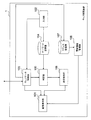
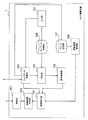
図1は、ウェブ閲覧装置1の第一実施形態の機能構成を表す概略ブロック図である。ウェブ閲覧装置1は、バスで接続されたCPU(Central Processing Unit)やメモリや補助記憶装置やネットワークインターフェースなどを備え、ウェブ閲覧プログラムを実行することによって、画像表示部101、入力部102、ウェブデータ制御部103、キーワード記憶部104、判定部105、表示制御部106、アドレス記憶部107、更新情報管理部108を備える装置として機能する。ウェブ閲覧装置1は、例えばパーソナルコンピューターにおいて実装されても良いし、テレビやビデオレコーダー等の家電装置において実装されても良いし、セットトップボックスとして専用の情報処理装置において実装されても良い。ウェブ閲覧装置1は、他のネットワーク機器に接続されており、インターネットとデータの送受信を行うことができる。
[First embodiment]
FIG. 1 is a schematic block diagram showing a functional configuration of the first embodiment of the web browsing apparatus 1. The web browsing device 1 includes a CPU (Central Processing Unit), a memory, an auxiliary storage device, a network interface, and the like connected by a bus, and executes a web browsing program, thereby causing an
画像表示部101は、ビデオチップやビデオカードを用いて構成され、画像信号を生成し、ウェブ閲覧装置1が接続されるディスプレイ装置に対して画像信号を送信する。なお、ウェブ閲覧装置1にディスプレイ装置が一体的に組み込まれて構成されても良い。この場合には、上記のビデオチップやビデオカード及びディスプレイ装置によって画像表示部101が構成される。
The
入力部102は、入力装置を用いて構成され、ユーザーからの指示やキーワード等の入力を受け付ける。入力部102は、例えばタッチパネル装置、キーボード装置、リモコン装置、マウス等のポインティングデバイス装置、音声入力装置、などを用いて構成される。
The
ウェブデータ制御部103は、インターネットを介してWWWサーバー(World Wide Webサーバー)に対しウェブサイト(Website)のデータのリクエストを送信し、WWWサーバーからウェブサイトのデータを受信する。ウェブデータ制御部103は、例えばHTTP(HyperText Transfer Protocol)によってWWWサーバーとデータの送受信を行い、HTML(HyperText Markup Language)等の言語で記述されたウェブサイトのデータを受信する。ウェブサイトのデータには、上記のHTMLのデータ以外にも、画像データ、音声データ、動画像データ等が含まれても良い。ウェブデータ制御部103は、受信されたウェブサイトのデータを解釈し、ウェブサイトを表示するための画面情報を生成し画像表示部101に出力する。
The web
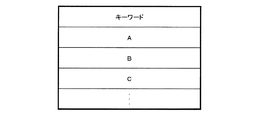
キーワード記憶部104は、磁気ハードディスク装置や半導体記憶装置などの記憶装置を用いて構成され、入力部102を介してユーザーによって入力されたキーワードを記憶する。図2は、キーワード記憶部104の記憶内容の概略を表す図である。図2において、“A”、“B”、“C”はそれぞれ一つのキーワードを表す。図示されるように、キーワード記憶部104は複数のキーワードを記憶しても良いし、1つのキーワードを記憶しても良い。キーワード記憶部104が記憶するキーワードの数については、キーワードを記憶するための記憶領域の要領が満たされるまで無制限であっても良いし、ユーザーや設計者によって予め設定されても良い。
The
判定部105は、ウェブデータ制御部103によって解釈されて画像表示部101によって表示されているウェブサイト中に、キーワード記憶部104に記憶されているキーワードが含まれるか否か判定する。このとき、判定部105は、画面上に実際に文字として表示されている文字列のみに基づいて、キーワードが含まれるか否か判定しても良い。また、判定部105は、画面上には実際に文字として表示されていないもののデータとしては受信されている文字列(例えばコメントアウトの文字列)についても、キーワードが含まれているか否か判定しても良い。このように、判定部105がキーワードの有無を判定する対象となるデータの範囲は、ユーザーによって適宜設定されても良い。
The
さらに、判定部105は、ウェブサイト中にキーワードが含まれている場合に、当該ウェブサイト中に更新情報ファイルのアドレスが含まれているか否か判定する。更新情報ファイルとは、例えばRSS(RDF Site Summary、Rich Site Summary、Really Simple Syndication)やAtomのフィードのファイルである。更新情報ファイルは、当該ウェブサイトの更新情報を含むファイルであり、例えばウェブサイトの最終更新日、タイトル、更新内容の概要などを含む。また、更新情報ファイルのアドレスとは、更新情報ファイルが置かれた記憶領域の番地を表す情報であり、例えばフィードのURL(Uniform Resource Locator)である。
Furthermore, when the keyword is included in the website, the
判定部105は、各種方法によって更新情報ファイルの有無を判定できる。例えば、判定部105は、拡張子が“.rss”、“.rdf”、“.xml”のファイルに対するリンクが含まれている場合に、更新情報ファイルが含まれていると判定しても良い。また、判定部105は、一般的に更新情報ファイルへのリンクに対応付けて表示される画像ファイルの名称(例えば、“Feed−icon.gif”、“rssicon.gif”)が含まれている場合に、更新情報ファイルが含まれていると判定しても良い。また、判定部105は、その他一般的に更新情報ファイルの有無を示す規定に従って判定しても良い。
The
表示制御部106は、判定部105によってウェブサイト中にキーワードが含まれていると判定され且つ更新情報ファイルのアドレスが含まれていると判定された場合に、更新情報ファイルのアドレスを登録するための登録用画像のデータを生成し、画像表示部101に出力する。
The
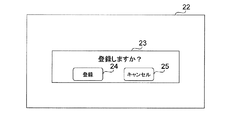
図3及び図4は、登録用画像の具体例を表す図である。図3の場合、表示制御部106は、表示枠22中に、ポップアップウィンドウ23を表示する。ポップアップウィンドウ23は、“登録しますか?”という文字列と共に、登録ボタン24及びキャンセルボタン25を有する。登録ボタン24は、ユーザーによって押下(クリック)されることによって、ウェブデータ制御部103に対して更新情報ファイルのアドレスの登録を指示するための登録用画像である。キャンセルボタン25は、ユーザーによって押下(クリック)されることによって、ウェブデータ制御部103に対して更新情報ファイルのアドレスの登録を行わないことを指示するための画像である。
3 and 4 are diagrams illustrating specific examples of registration images. In the case of FIG. 3, the
図4の場合、表示制御部106は、“テロップ表示枠が設定できます”という文字列を含むボタンの画像であって操作できない画像を、表示枠22中に常に表示している。表示制御部106は、判定部105によってウェブサイト中にキーワードが含まれていると判定され且つ更新情報ファイルのアドレスが含まれていると判定された場合に、このボタンの画像の色や表現方法(浮き出して見えるような表現方法など)を変更することによってハイライト表示し、操作可能に制御する。ハイライト表示された後のこのボタン26は、ユーザーによって押下(クリック)されることによって、ウェブデータ制御部103に対して更新情報ファイルのアドレスの登録を指示するための登録用画像である。なお、図3及び図4に示される登録用画像は一例にすぎず、他の態様の登録用画像が用いられても良い。
In the case of FIG. 4, the
アドレス記憶部107は、磁気ハードディスク装置や半導体記憶装置などの記憶装置を用いて構成され、ウェブデータ制御部103によって登録された更新情報ファイルのアドレスを記憶する。図5は、アドレス記憶部107の記憶内容の概略を表す図である。図5において、“aaa”、“bbb”、“ccc”はそれぞれ一つの更新情報ファイルのアドレスを表す。図示されるように、アドレス記憶部107は複数のアドレスを記憶しても良いし、1つのアドレスを記憶しても良い。アドレス記憶部107が記憶するアドレスの数については、アドレスを記憶するための記憶領域の要領が満たされるまで無制限であっても良いし、ユーザーや設計者によって予め設定されても良い。また、アドレス記憶部107が記憶するアドレスの数を超えてアドレスが登録された場合、アドレス記憶部107は、アドレスの削除をユーザーに対して促しても良いし、FIFO(First In First Out)等の手順に従って更新を行っても良い。
The
更新情報管理部108は、インターネットを介して、所定のタイミングでアドレス記憶部107に記憶されているアドレスにアクセスし、更新情報ファイルを取得し、設定に従って更新情報ファイルの内容を表示する。更新情報管理部108は、例えばRSS対応リーダーやAtom対応リーダーとして構成される。
The update
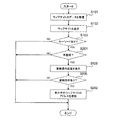
図6は、ウェブ閲覧装置1の第一実施形態の動作の流れを表すフローチャートである。まず、ウェブデータ制御部103が、インターネットを介してウェブサイトのデータを受信し(ステップS101)、データの内容を解釈してウェブサイトを表す画面情報を生成する。画像表示部101は、ウェブデータ制御部103によって生成された画面情報に基づいて画像信号を生成し、画像表示装置にウェブサイトの画面を表示させる(ステップS102)。
FIG. 6 is a flowchart showing the flow of the operation of the first embodiment of the web browsing apparatus 1. First, the web
ステップS101及びS102の処理の後、又はこれらの処理と並行して、判定部105は、このウェブサイトのデータにキーワード記憶部104に記憶されているキーワードが含まれるか否か判定する(ステップS103)。キーワードが含まれていない場合(ステップS103−NO)、図6に示されるウェブ閲覧装置1の処理は終了する。一方、キーワードが含まれている場合(ステップS103−YES)、判定部105はさらに、ウェブサイト中に更新情報ファイルのアドレスが含まれているか否か判定する(ステップS104)。更新情報ファイルのアドレスが含まれていない場合(ステップS104−NO)、図6に示されるウェブ閲覧装置1の処理は終了する。一方、更新情報ファイルのアドレスが含まれている場合(ステップS104−YES)、表示制御部106は登録用画像を表示することを画像表示部101に指示する。画像表示部101は、画像信号を生成し画像表示装置に登録用画像を含む画面を表示させる(ステップS105)。
After the processes in steps S101 and S102, or in parallel with these processes, the
ユーザーが登録用画像に対して操作を行うことによって登録指示を入力すると(ステップS106−YES)、ウェブデータ制御部103は、ウェブサイトのデータから更新情報ファイルのアドレスを検出し、アドレス記憶部107に登録する(ステップS107)。一方、ステップS106において登録指示が入力されない場合(ステップS106−NO)、図6に示されるウェブ閲覧装置1の処理は終了する。
When the user inputs a registration instruction by performing an operation on the registration image (YES in step S106), the web
このように構成されたウェブ閲覧装置1では、ユーザーは入力部102を操作することによって所望のキーワードをウェブ閲覧装置1に設定することができる。そして、ウェブ閲覧装置1は、設定されたキーワードが含まれ且つ更新情報ファイルのアドレスが含まれるウェブサイトが表示されている場合には、更新情報ファイルのアドレスを登録するための操作用画像を表示する。そのため、ユーザーは、操作用画像が表示された場合に、この操作用画像に応じて操作を行うことによって、容易に更新情報ファイルのアドレスを登録することが可能となる。また、更新情報管理部108は、登録された更新情報ファイルのアドレスに対し所定のタイミングでアクセスし、更新情報ファイルを取得する。そのため、ユーザーは、上記のような簡易な処理によって、更新情報管理部108による機能を享受することが可能となる。特に、更新情報管理部108は、ユーザーの処理の有無にかかわらず、更新情報ファイルのアドレスにアクセスし、取得した更新情報の内容を表示(例えばテロップ表示)するように構成されても良い。
In the web browsing device 1 configured as described above, the user can set a desired keyword in the web browsing device 1 by operating the
<変形例>
上記のウェブ閲覧装置1では、表示制御部106は、判定部105によってウェブサイト中にキーワードが含まれていると判定され且つ更新情報ファイルのアドレスが含まれていると判定された場合に、更新情報ファイルのアドレスを登録するための登録用画像のデータを生成し、画像表示部101に出力する。これに対し、表示制御部106は、キーワードが含まれるか否かに拘わらず、更新情報ファイルのアドレスが含まれていると判定された場合には常に更新情報ファイルのアドレスを登録するための登録用画像のデータを生成し、画像表示部101に出力するように構成されても良い。
<Modification>
In the web browsing device 1 described above, the
[第二実施形態]
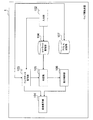
図7は、ウェブ閲覧装置1の第二実施形態の機能構成を表す概略ブロック図である。ウェブ閲覧装置1の第二実施形態は、更新情報管理部108を備えない点、及びウェブデータ制御部103の処理の内容が異なる点で第一実施形態と相違し、他の機能については第一実施形態と同じである。以下、ウェブ閲覧装置1の第二実施形態に関し、第一実施形態と異なる点について説明する。
[Second Embodiment]
FIG. 7 is a schematic block diagram illustrating a functional configuration of the second embodiment of the web browsing apparatus 1. The second embodiment of the web browsing device 1 is different from the first embodiment in that the update
第二実施形態におけるウェブデータ制御部103は、入力部102によって登録用画像が操作されると、表示中のウェブサイトのアドレスをブックマークアドレスとしてアドレス記憶部107に登録する。
When the registration image is operated by the
第二実施形態における判定部105は、第一実施形態における判定部105と同様に、ウェブデータ制御部103によって解釈されて画像表示部101によって表示されているウェブサイト中に、キーワード記憶部104に記憶されているキーワードが含まれるか否か判定する。さらに、第二実施形態における判定部105は、ウェブサイト中にキーワードが含まれている場合に、当該ウェブサイトのアドレスがブックマークアドレスとしてアドレス記憶部107に登録されているか否か判定する。
Similar to the
図8は、ウェブ閲覧装置1の第二実施形態の動作の流れを表す図である。図8において、第一実施形態と同じ処理については図6と同じ符号を付して説明を省略する。ステップS103の処理においてキーワードがあった場合(ステップS103−YES)、判定部105はさらに、表示中のウェブサイトのアドレスがブックマークアドレスとしてアドレス記憶部107に登録されているか否か判定する(ステップS201)。既に登録済みである場合(ステップS201−NO)、図8に示されるウェブ閲覧装置1の処理は終了する。一方、表示中のウェブサイトのアドレスがブックマークアドレスとして未登録である場合(ステップS201−YES)、表示制御部106は登録用画像を表示することを画像表示部101に指示する。画像表示部101は、画像信号を生成し画像表示装置に登録用画像を含む画面を表示させる(ステップS105)。このとき、第二実施形態の表示制御部106は、“お気に入りに登録しますか?”等のように、ブックマークに登録するか否かをユーザーに問い合わせるための文言を含む登録用画像を表示するように構成されても良い。
FIG. 8 is a diagram illustrating an operation flow of the web browsing device 1 according to the second embodiment. In FIG. 8, the same processes as those of the first embodiment are denoted by the same reference numerals as those in FIG. When there is a keyword in the process of step S103 (step S103-YES), the
ユーザーが登録用画像に対して操作を行うことによって登録指示を入力すると(ステップS106−YES)、ウェブデータ制御部103は、ウェブサイトのアドレスをブックマークアドレスとしてアドレス記憶部107に登録する(ステップS202)。この後、ユーザーが入力部102を操作することによってブックマークの表示を指示すると、ウェブデータ制御部103はアドレス記憶部107からアドレスを読み出し、ブックマークされたアドレスの一覧を、画像表示部101を介して画像表示装置に表示する。ユーザーが入力部102を操作することによって所望のアドレスを選択すると、ウェブデータ制御部103は選択されたアドレスのウェブサイトにアクセスし、ウェブサイトのデータを受信し画像表示部101を介して画像表示装置に表示する。
When the user inputs a registration instruction by performing an operation on the registration image (step S106: YES), the web
このように構成されたウェブ閲覧装置1では、ユーザーは入力部102を操作することによって所望のキーワードをウェブ閲覧装置1に設定することができる。そして、ウェブ閲覧装置1は、設定されたキーワードが含まれるウェブサイトが表示されている場合には、表示中のウェブサイトのアドレスをブックマークに登録するための操作用画像を表示する。そのため、ユーザーは、操作用画像が表示された場合に、この操作用画像に応じて操作を行うことによって、容易にウェブサイトのアドレスをブックマークに登録することが可能となる。
In the web browsing device 1 configured as described above, the user can set a desired keyword in the web browsing device 1 by operating the
<変形例>
上記のウェブ閲覧装置1では、表示制御部106は、判定部105によってウェブサイト中にキーワードが含まれていると判定され且つブックマークアドレスとして未登録と判定された場合に、表示中のウェブサイトのアドレスをブックマークに登録するための登録用画像のデータを生成し、画像表示部101に出力する。これに対し、表示制御部106は、キーワードが含まれるか否かに拘わらず、ブックマークとして未登録と判定された場合には常に、表示中のウェブサイトのアドレスをブックマークに登録するための登録用画像のデータを生成し、画像表示部101に出力するように構成されても良い。
<Modification>
In the web browsing device 1 described above, when the
[第三実施形態]
図9は、ウェブ閲覧装置1の第三実施形態の機能構成を表す概略ブロック図である。ウェブ閲覧装置1の第三実施形態は、接続部201及び接続装置判定部202を備える点で第一実施形態と相違し、他の機能については第一実施形態と同じである。以下、ウェブ閲覧装置1の第三実施形態に関し、第一実施形態と異なる点について説明する。
[Third embodiment]
FIG. 9 is a schematic block diagram illustrating a functional configuration of the third embodiment of the web browsing apparatus 1. The third embodiment of the web browsing device 1 is different from the first embodiment in that it includes a
接続部201は、他の装置とデータの一方向通信又は双方向通信を行うためのインターフェースである。接続部201は、例えばLAN(Local Area Network)の接続インターフェースや、無線LANインターフェースや、Bluetoothインターフェースや、その他の有線・無線インターフェースを用いて構成される。接続部201には、画像表示装置や、単体では画像表示機能を有さない情報処理装置が接続される。
The
接続装置判定部202は、接続部201に接続されている装置が、画像表示装置であるか、単体では画像表示機能を有さない情報処理装置であるか判定する。画像表示装置とは、いわゆるテレビ受像機やパーソナルコンピューター用ディスプレイ装置である。一方、単体では画像表示機能を有さない情報処理装置とは、上記の画像表示装置以外の情報処理機能を有する装置であり、例えばパーソナルコンピューターや家庭用ゲーム機器やビデオレコーダーや白物家電装置などである。接続装置判定部202は、接続部201に接続されている装置から接続部201を介して受信される所定の信号に基づいて、いずれの装置が接続されているか判定する。そして、接続装置判定部202は、画像表示装置が接続されていると判定した場合には、画像表示部101によって生成された画像信号を接続部201から出力する。一方、接続装置判定部202は、単体では画像表示機能を有さない情報処理装置が接続されていると判定した場合、接続部201を介してパケットの送受信を行うことによって、ウェブ閲覧装置1に接続された他のネットワーク機器と当該情報処理装置との間のデータの送受信を中継する。
The connection
このように構成されたウェブ閲覧装置1によれば、ユーザーはウェブ閲覧装置1に画像表示装置を接続することによって、特別な設定処理を行うことなく、ウェブ閲覧装置1によって生成された画像信号を画像表示装置において表示させることが可能となる。これとともに、ユーザーは、情報処理装置をウェブ閲覧装置1に接続することによって、ウェブ閲覧装置1を介して、所望の情報処理装置をインターネットに接続させることが可能となる。 According to the web browsing device 1 configured as described above, the user connects the image display device to the web browsing device 1, and can perform the image signal generated by the web browsing device 1 without performing a special setting process. It can be displayed on the image display device. At the same time, the user can connect the desired information processing apparatus to the Internet via the web browsing apparatus 1 by connecting the information processing apparatus to the web browsing apparatus 1.
以上、この発明の実施形態について図面を参照して詳述してきたが、具体的な構成はこの実施形態に限られるものではなく、この発明の要旨を逸脱しない範囲の設計等も含まれる。 The embodiment of the present invention has been described in detail with reference to the drawings. However, the specific configuration is not limited to this embodiment, and includes designs and the like that do not depart from the gist of the present invention.
1…ウェブ閲覧装置, 101…画像表示部, 102…入力部, 103…ウェブデータ制御部, 104…キーワード記憶部, 105…判定部, 106…表示制御部, 107…アドレス記憶部, 108…更新情報管理部, 201…接続部, 202…接続装置判定部 DESCRIPTION OF SYMBOLS 1 ... Web browsing apparatus, 101 ... Image display part, 102 ... Input part, 103 ... Web data control part, 104 ... Keyword storage part, 105 ... Determination part, 106 ... Display control part, 107 ... Address storage part, 108 ... Update Information management unit, 201 ... connection unit, 202 ... connection device determination unit
Claims (2)
使用者によって選択されたキーワードを記憶するキーワード記憶部と、
表示中のウェブサイト中に前記キーワード記憶部に記憶されるキーワードが含まれているか否か判定する判定部と、
前記表示中のウェブサイト中に前記キーワードが含まれている場合に、当該ウェブサイトの更新内容の概要を示す更新情報を格納するファイルのアドレスを登録するための登録用画像を表示する表示制御部と、
前記登録用画像に対する操作に応じて、前記ウェブサイトの前記更新情報を格納するファイルのアドレスを記憶するアドレス記憶部と、
ネットワークを介して、所定のタイミングで前記アドレス記憶部に記憶されているアドレスにアクセスし、前記ウェブサイトの前記更新情報を取得し、取得した前記ウェブサイトの前記更新情報で示される更新内容の概要をテロップ表示する更新情報管理部と、
を備えるウェブ閲覧装置。 A web data controller that interprets and displays website data received over the network;
A keyword storage unit for storing a keyword selected by the user;
A determination unit for determining whether or not a keyword stored in the keyword storage unit is included in a website being displayed;
Wherein when in the website in the display the keyword is included, display control for displaying the registration image for registering the address of the file that stores the update information indicating the outline of the update contents of this the website And
Depending on the operation with respect to the registration images, and an address storage unit for pre-term memory the address of the file for storing the update information of the Website,
Via the network, access the address stored in the address storage unit at a predetermined timing, acquires the update information before SL website indicated by the update information before SL website acquired updated An update information management unit that displays a summary of the contents as a telop ,
A web browsing apparatus comprising:
前記ウェブ閲覧装置が、表示中のウェブサイト中に前記キーワード記憶部に記憶されるキーワードが含まれているか否か判定する判定ステップと、
前記ウェブ閲覧装置が、前記表示中のウェブサイト中に前記キーワードが含まれている場合に、当該ウェブサイトの更新内容の概要を示す更新情報を格納するファイルのアドレスを登録するための登録用画像を表示する表示制御ステップと、
前記ウェブ閲覧装置が、前記登録用画像に対する操作に応じて、前記ウェブサイトの前記更新情報を格納するファイルのアドレスを、前記アドレス記憶部に書き込むステップと、
ネットワークを介して、所定のタイミングで前記アドレス記憶部に書き込まれたアドレスにアクセスし、前記ウェブサイトの前記更新情報を取得し、取得した前記ウェブサイトの前記更新情報で示される更新内容の概要をテロップ表示する更新情報管理ステップと、
を備えるウェブ閲覧方法。 Web data comprising a keyword storage unit that stores a keyword selected by a user and an address storage unit that stores an address, and a web browsing device that interprets and displays website data received via a network Control steps;
A step of determining whether or not the web browsing device includes a keyword stored in the keyword storage unit in a website being displayed;
The web browsing device, wherein when in the website in the display the keyword is included, for registration for registering an address of the file that stores update information showing an outline of the update contents of this the website A display control step for displaying an image;
The web browsing device, and writing in response to an operation with respect to the registration images, the address of the file for storing the update information before SL website, the address storage unit,
Via the network, access the address written in the address storage unit at a predetermined timing, acquires the update information before SL website, updates indicated by the update information before SL website obtained and update information management step of displaying telop an overview of,
A web browsing method comprising:
Priority Applications (1)
| Application Number | Priority Date | Filing Date | Title |
|---|---|---|---|
| JP2009230817A JP5723092B2 (en) | 2009-10-02 | 2009-10-02 | Web browsing apparatus and web browsing method |
Applications Claiming Priority (1)
| Application Number | Priority Date | Filing Date | Title |
|---|---|---|---|
| JP2009230817A JP5723092B2 (en) | 2009-10-02 | 2009-10-02 | Web browsing apparatus and web browsing method |
Publications (2)
| Publication Number | Publication Date |
|---|---|
| JP2011081446A JP2011081446A (en) | 2011-04-21 |
| JP5723092B2 true JP5723092B2 (en) | 2015-05-27 |
Family
ID=44075468
Family Applications (1)
| Application Number | Title | Priority Date | Filing Date |
|---|---|---|---|
| JP2009230817A Expired - Fee Related JP5723092B2 (en) | 2009-10-02 | 2009-10-02 | Web browsing apparatus and web browsing method |
Country Status (1)
| Country | Link |
|---|---|
| JP (1) | JP5723092B2 (en) |
Family Cites Families (5)
| Publication number | Priority date | Publication date | Assignee | Title |
|---|---|---|---|---|
| US6526424B2 (en) * | 1997-09-29 | 2003-02-25 | Fujitsu Limited | Browser image display bookmark system |
| US6100890A (en) * | 1997-11-25 | 2000-08-08 | International Business Machines Corporation | Automatic bookmarks |
| JP4505719B2 (en) * | 2003-12-11 | 2010-07-21 | ソニー株式会社 | Address storage device, address storage method, and address storage program |
| JP2006079368A (en) * | 2004-09-09 | 2006-03-23 | I-Face Inc | Information distribution system, client and method |
| JP5297004B2 (en) * | 2007-06-26 | 2013-09-25 | 株式会社エヌ・ティ・ティ・ドコモ | Information distribution server, information distribution system, information distribution server program, and information distribution method |
-
2009
- 2009-10-02 JP JP2009230817A patent/JP5723092B2/en not_active Expired - Fee Related
Also Published As
| Publication number | Publication date |
|---|---|
| JP2011081446A (en) | 2011-04-21 |
Similar Documents
| Publication | Publication Date | Title |
|---|---|---|
| CN101578575B (en) | Method and device for selecting and displaying a region of interest in an electronic document | |
| JP5551938B2 (en) | Method and apparatus for providing information content to be displayed on a client device | |
| JP2009009519A (en) | Information display device, information display control program, information display system, server control program for information display system | |
| JP4095739B2 (en) | Website browsing method, website browsing system, computer, and storage medium | |
| JP2012032943A (en) | Website browsing system, server, program for server and website browsing support method | |
| JP2009244972A (en) | Information processing device and control program thereof | |
| JP2012123598A (en) | Information processor, display method and program | |
| KR100996037B1 (en) | Apparatus and method for providing hyperlink information in a mobile communication terminal having wireless Internet access | |
| US9524076B2 (en) | Web page management method and apparatus and storage medium thereof | |
| JP5723092B2 (en) | Web browsing apparatus and web browsing method | |
| CN107770630B (en) | Television navigation page display method and device, navigation system and readable storage medium | |
| US20070236606A1 (en) | Methods and arrangements for accessing information via a graphical user interface | |
| JP5113811B2 (en) | Web page information display control apparatus and method | |
| JP5134639B2 (en) | Client apparatus, display method, program, information processing apparatus, and information processing system | |
| JP2009169883A (en) | Simple operation method for web browser | |
| JP6349466B2 (en) | Information processing apparatus, information processing method, program, and storage medium | |
| JP2012173946A (en) | Web page display device and focus control method | |
| JP2005275721A (en) | Program and information processing method | |
| JP2012181693A (en) | Web page display control device and scroll control method | |
| JP2010009334A (en) | Information processor, information processing method, and information processing program | |
| JP2005309720A (en) | Search request device, search request method, search request program, computer-readable recording medium storing search request program, search device, and search program | |
| JP4926125B2 (en) | Web page information display apparatus and method | |
| JP2011253301A (en) | Web site browsing system, server and program for server | |
| JP5418329B2 (en) | Information processing program and information processing apparatus | |
| JP5674704B2 (en) | Information processing apparatus, method, computer program, and system |
Legal Events
| Date | Code | Title | Description |
|---|---|---|---|
| A621 | Written request for application examination |
Free format text: JAPANESE INTERMEDIATE CODE: A621 Effective date: 20120608 |
|
| A977 | Report on retrieval |
Free format text: JAPANESE INTERMEDIATE CODE: A971007 Effective date: 20130722 |
|
| A131 | Notification of reasons for refusal |
Free format text: JAPANESE INTERMEDIATE CODE: A131 Effective date: 20130730 |
|
| A521 | Written amendment |
Free format text: JAPANESE INTERMEDIATE CODE: A523 Effective date: 20130930 |
|
| A131 | Notification of reasons for refusal |
Free format text: JAPANESE INTERMEDIATE CODE: A131 Effective date: 20140401 |
|
| A521 | Written amendment |
Free format text: JAPANESE INTERMEDIATE CODE: A523 Effective date: 20140529 |
|
| A02 | Decision of refusal |
Free format text: JAPANESE INTERMEDIATE CODE: A02 Effective date: 20141125 |
|
| A521 | Written amendment |
Free format text: JAPANESE INTERMEDIATE CODE: A523 Effective date: 20150224 |
|
| A911 | Transfer to examiner for re-examination before appeal (zenchi) |
Free format text: JAPANESE INTERMEDIATE CODE: A911 Effective date: 20150304 |
|
| TRDD | Decision of grant or rejection written | ||
| A01 | Written decision to grant a patent or to grant a registration (utility model) |
Free format text: JAPANESE INTERMEDIATE CODE: A01 Effective date: 20150324 |
|
| A61 | First payment of annual fees (during grant procedure) |
Free format text: JAPANESE INTERMEDIATE CODE: A61 Effective date: 20150327 |
|
| R150 | Certificate of patent or registration of utility model |
Ref document number: 5723092 Country of ref document: JP Free format text: JAPANESE INTERMEDIATE CODE: R150 |
|
| LAPS | Cancellation because of no payment of annual fees |