JP4907653B2 - Aspects of media content rendering - Google Patents
Aspects of media content rendering Download PDFInfo
- Publication number
- JP4907653B2 JP4907653B2 JP2008519383A JP2008519383A JP4907653B2 JP 4907653 B2 JP4907653 B2 JP 4907653B2 JP 2008519383 A JP2008519383 A JP 2008519383A JP 2008519383 A JP2008519383 A JP 2008519383A JP 4907653 B2 JP4907653 B2 JP 4907653B2
- Authority
- JP
- Japan
- Prior art keywords
- media
- time
- presentation
- playback
- samples
- Prior art date
- Legal status (The legal status is an assumption and is not a legal conclusion. Google has not performed a legal analysis and makes no representation as to the accuracy of the status listed.)
- Expired - Fee Related
Links
Images





Classifications
-
- G—PHYSICS
- G06—COMPUTING OR CALCULATING; COUNTING
- G06T—IMAGE DATA PROCESSING OR GENERATION, IN GENERAL
- G06T1/00—General purpose image data processing
-
- G—PHYSICS
- G11—INFORMATION STORAGE
- G11B—INFORMATION STORAGE BASED ON RELATIVE MOVEMENT BETWEEN RECORD CARRIER AND TRANSDUCER
- G11B27/00—Editing; Indexing; Addressing; Timing or synchronising; Monitoring; Measuring tape travel
- G11B27/10—Indexing; Addressing; Timing or synchronising; Measuring tape travel
- G11B27/102—Programmed access in sequence to addressed parts of tracks of operating record carriers
- G11B27/105—Programmed access in sequence to addressed parts of tracks of operating record carriers of operating discs
-
- G—PHYSICS
- G06—COMPUTING OR CALCULATING; COUNTING
- G06F—ELECTRIC DIGITAL DATA PROCESSING
- G06F16/00—Information retrieval; Database structures therefor; File system structures therefor
- G06F16/40—Information retrieval; Database structures therefor; File system structures therefor of multimedia data, e.g. slideshows comprising image and additional audio data
- G06F16/43—Querying
- G06F16/438—Presentation of query results
- G06F16/4387—Presentation of query results by the use of playlists
- G06F16/4393—Multimedia presentations, e.g. slide shows, multimedia albums
-
- G—PHYSICS
- G06—COMPUTING OR CALCULATING; COUNTING
- G06F—ELECTRIC DIGITAL DATA PROCESSING
- G06F17/00—Digital computing or data processing equipment or methods, specially adapted for specific functions
-
- G—PHYSICS
- G06—COMPUTING OR CALCULATING; COUNTING
- G06T—IMAGE DATA PROCESSING OR GENERATION, IN GENERAL
- G06T15/00—3D [Three Dimensional] image rendering
-
- G—PHYSICS
- G11—INFORMATION STORAGE
- G11B—INFORMATION STORAGE BASED ON RELATIVE MOVEMENT BETWEEN RECORD CARRIER AND TRANSDUCER
- G11B20/00—Signal processing not specific to the method of recording or reproducing; Circuits therefor
- G11B20/10—Digital recording or reproducing
- G11B20/10527—Audio or video recording; Data buffering arrangements
-
- G—PHYSICS
- G11—INFORMATION STORAGE
- G11B—INFORMATION STORAGE BASED ON RELATIVE MOVEMENT BETWEEN RECORD CARRIER AND TRANSDUCER
- G11B20/00—Signal processing not specific to the method of recording or reproducing; Circuits therefor
- G11B20/10—Digital recording or reproducing
- G11B20/10527—Audio or video recording; Data buffering arrangements
- G11B2020/10537—Audio or video recording
-
- G—PHYSICS
- G11—INFORMATION STORAGE
- G11B—INFORMATION STORAGE BASED ON RELATIVE MOVEMENT BETWEEN RECORD CARRIER AND TRANSDUCER
- G11B2220/00—Record carriers by type
- G11B2220/20—Disc-shaped record carriers
- G11B2220/25—Disc-shaped record carriers characterised in that the disc is based on a specific recording technology
- G11B2220/2537—Optical discs
Landscapes
- Engineering & Computer Science (AREA)
- Theoretical Computer Science (AREA)
- Physics & Mathematics (AREA)
- Multimedia (AREA)
- General Physics & Mathematics (AREA)
- General Engineering & Computer Science (AREA)
- Databases & Information Systems (AREA)
- Data Mining & Analysis (AREA)
- Signal Processing (AREA)
- Mathematical Physics (AREA)
- Software Systems (AREA)
- Computer Graphics (AREA)
- Television Signal Processing For Recording (AREA)
- Signal Processing For Digital Recording And Reproducing (AREA)
- Two-Way Televisions, Distribution Of Moving Picture Or The Like (AREA)
Description
本出願は、参照により本明細書に組み込まれている2005年7月1日に出願された仮出願第60/695,944号の利益を主張するものである。 This application claims the benefit of provisional application No. 60 / 695,944, filed July 1, 2005, which is incorporated herein by reference.
マルチメディア・プレーヤ(multimedia player)は、ユーザによって消費されるためのビデオ・コンテンツ、オーディオ・コンテンツ、またはデータ・コンテンツの組合せ(「マルチメディア・プレゼンテーション(multimedia presentation)」)をレンダリングする(render)デバイスである。DVDプレーヤなどのマルチメディア・プレーヤは、たとえあるとしてもメディア・コンテンツの再生中にたくさんのユーザインタラクティブ性を実現できるようにはしない(メディア・コンテンツ再生は、一般に再生速度調整以外のユーザ入力を受け取るためには中断させられる)。例えば、DVDプレーヤのユーザは、そのユーザが再生している映画を停止して、そのユーザが、オーディオ解説、俳優の経歴、ゲームなどの特徴を選択し受信することができるようにするオプションを含むメニューへと戻る必要がある。 A multimedia player is a device that renders a combination of video content, audio content, or data content ("multimedia presentation") to be consumed by a user It is. Multimedia players such as DVD players do not allow much user interactivity, if any, during media content playback (media content playback generally accepts user input other than playback speed adjustment) To be interrupted). For example, a user of a DVD player includes an option to stop the movie that the user is playing so that the user can select and receive features such as audio commentary, actor history, games, etc. You need to return to the menu.
インタラクティブ・マルチメディア・プレーヤ(interactive multimedia player)は、伝統的なビデオ・コンテンツ、オーディオ・コンテンツ、またはデータ・コンテンツと同時にインタラクティブ・コンテンツの組合せ(「インタラクティブ・マルチメディア・プレゼンテーション(interactive multimedia presentation)」)をレンダリングするデバイスである(そのようなデバイスは、ハードウェア、ソフトウェア、ファームウェア、またはその任意の組合せを含むことができる)。インタラクティブ・コンテンツは、単独で、あるいは他のビデオ・コンテンツ、オーディオ・コンテンツ、またはデータ・コンテンツと同時に提示可能なユーザ選択可能な目に見え、または耳に聴くことができる任意のオブジェクトである。任意タイプのデバイスは、インタラクティブ・マルチメディア・プレーヤとすることができるが、光メディア・プレーヤ(例えば、DVDプレーヤ)、コンピュータ、他の電子デバイスなどのデバイスは、それらが大量の比較的安価なポータブル・データ・ストレージに対するアクセスを実現するので商業的に価値のある、消費者が求めるインタラクティブ・マルチメディア・プレゼンテーションの作成を可能にするように特によく位置づけられる。 An interactive multimedia player is a combination of traditional video content, audio content, or data content as well as interactive content (“interactive multimedia presentation”). (Such devices can include hardware, software, firmware, or any combination thereof). Interactive content is any object that is user selectable visible or audible that can be presented alone or simultaneously with other video content, audio content, or data content. Any type of device can be an interactive multimedia player, but devices such as optical media players (eg, DVD players), computers, other electronic devices, etc., are relatively inexpensive and portable in large quantities. It is particularly well positioned to enable the creation of interactive multimedia presentations that are of consumer value because they provide access to data storage.
すべてのタイプのメディア・コンテンツ・プレーヤ、特にインタラクティブ・マルチメディア・プレーヤおよびインタラクティブ・マルチメディア・プレゼンテーションへの投資を高めるために、ビデオ・コンテンツ、オーディオ・コンテンツ、またはデータ・コンテンツの予測可能な比較的グリッチフリーの再生を実現することが望ましい。 To increase investment in all types of media content players, especially interactive multimedia players and interactive multimedia presentations, predictable and relatively predictable video content, audio content, or data content It is desirable to realize glitch-free playback.
主張される主題が、特定のマルチメディア・プレゼンテーション・システム、インタラクティブ・マルチメディア・プレゼンテーション・システム、またはそれらの態様の任意またはすべての短所を解決する実施形態だけに限定されないことが理解されるであろう。 It will be appreciated that claimed subject matter is not limited to specific multimedia presentation systems, interactive multimedia presentation systems, or embodiments that solve any or all disadvantages of those aspects. Let's go.
マルチメディア・プレゼンテーションやインタラクティブ・マルチメディア・プレゼンテーションなどの多くのタイプのプレゼンテーションは、メディア・コンテンツを含んでいる。メディア・コンテンツの一例は、映画であるが、メディア・コンテンツは、ビデオ、オーディオ、データまたはそれらの任意の組合せであってもよい。メディア・コンテンツは、一般にクリップと呼ばれるいくつかの組のサンプルに構成されるが、これらのクリップは、メディア・コンテンツ・マネージャによってレンダリングされる。1つのクリップは、一般に1つのメディア・ソースから受信可能である。プレゼンテーション・マネージャによって取り扱われるプレイリストは、ユーザに対して提示可能なクリップの時間順序が付けられたシーケンスを指定する。時として、プレイリスト中において指定されるような1つのクリップから別のクリップへのリアルタイム遷移は、特に限られた処理リソースおよび/または復号化リソースを有するプレゼンテーション・システムが使用されるときに、ユーザにメディア・コンテンツの再生中におけるグリッチ(例えば、遅延、望ましくない中断、または脱落させられたコンテンツ)に直面させることなく実行することが難しい。 Many types of presentations, such as multimedia presentations and interactive multimedia presentations, contain media content. An example of media content is a movie, but the media content may be video, audio, data, or any combination thereof. Media content is organized into a set of samples, commonly referred to as clips, which are rendered by a media content manager. A clip is generally receivable from one media source. The playlist handled by the presentation manager specifies a time-ordered sequence of clips that can be presented to the user. Sometimes, real-time transitions from one clip to another as specified in a playlist can be a user, especially when presentation systems with limited processing and / or decoding resources are used. It is difficult to perform without facing glitches (eg, delayed, undesirable interruptions, or dropped content) during the playback of media content.
本明細書中で論じられるメディア・コンテンツを再生するための方法、システム、装置、および製品は、メディア・コンテンツの再生中におけるグリッチを最小にするために、クリップが再生のためにスケジュールされる前に、来るべきクリップの少なくとも一部分を事前レンダリングすることを含んでいる。メディア・コンテンツの再生中に取られるある種のアクションは、時間オフセット値を決定することを含んでおり、この時間オフセット値を使用して、スケジュールされた再生時間にどれだけ前に先立って来たるべきクリップを事前レンダリングすることを開始すべきかを決定する。スケジュールされた再生時間の前にクリップを事前レンダリングするためには、十分な時間が存在すべきであるが、クリップは、事前レンダリングするアクティビティが、プレゼンテーション・システム内で行われる他の重要なアクティビティに悪影響を及ぼすほど前に先立って事前レンダリングされるべきではない。 The methods, systems, devices, and products for playing media content discussed herein may be used before a clip is scheduled for playback to minimize glitches during playback of the media content. Includes pre-rendering at least a portion of the coming clip. Certain actions taken during the playback of media content include determining a time offset value that uses this time offset value to come ahead of the scheduled playback time Decide whether to start pre-rendering the clip to be done. There should be sufficient time to pre-render the clip before the scheduled playback time, but the clip will be pre-rendered to other important activities that take place within the presentation system. Should not be pre-rendered ahead of time to be detrimental.
時間オフセット値は、来るべきクリップについてのメディア・ソースに関連する1つまたは複数の静的特性と、そのプレゼンテーション・システムの1つまたは複数の動的特性を使用して決定される。特定のメディア・ソースの静的特性の例は、メディア・ソースのロケーション、コーデックのパラメータまたは設定、あるいは暗号化のパラメータまたは設定を含んでいる。プレゼンテーション・システムの動的特性の例は、メディア・クリップの(再生速度を含めた)検索状態、メディアまたはグラフィックスの処理負荷、あるいはメディアまたはグラフィックスのクロック周波数を含んでいる。時間オフセット値は、様々な動的特性について対応するために、メディア・コンテンツの再生中に複数回決定することができる。 The time offset value is determined using one or more static characteristics associated with the media source for the upcoming clip and one or more dynamic characteristics of the presentation system. Examples of static characteristics of a particular media source include media source location, codec parameters or settings, or encryption parameters or settings. Examples of dynamic characteristics of a presentation system include media clip search status (including playback speed), media or graphics processing load, or media or graphics clock frequency. The time offset value can be determined multiple times during playback of the media content to accommodate for various dynamic characteristics.
この「発明の開示」は、簡単化された形式で概念の選択を導入するために提供される。それらの概念は、「発明を実施するための最良の形態」においてさらに詳細に説明される。この「発明の開示」に説明されるこれら以外の要素またはステップも可能であり、どの要素またはステップも必ずしも必要とされるとは限らない。この「発明の開示」は、請求される主題の主要な特徴または不可欠な特徴を識別するようには意図されておらず、また請求される主題の範囲を決定する際における助けとして使用することについても意図されてはいない。 This “invention disclosure” is provided to introduce a selection of concepts in a simplified form. These concepts are described in further detail in “Best Mode for Carrying Out the Invention”. Other elements or steps than those described in this “disclosure of the invention” are possible, and no element or step is necessarily required. This “disclosure of the invention” is not intended to identify key or essential features of the claimed subject matter and is intended to be used as an aid in determining the scope of the claimed subject matter. Is not also intended.
図面に戻ると、同様な数字は、同様なコンポーネントを示しており、図1は、インタラクティブ・マルチメディア・プレゼンテーション・システム(「プレゼンテーション・システム(Presentation System)」)100の簡略化された機能ブロック図である。プレゼンテーション・システム100は、メディア・コンテンツ・マネージャ102と、インタラクティブ・コンテンツ(interactive content)(「IC」)マネージャ104と、プレゼンテーション・マネージャ106と、タイミング信号管理ブロック108と、ミキサ/レンダラ(renderer)110とを含んでいる。一般に、設計の選択は、プレゼンテーション・システム100の特定のファンクションがどのように実施されるかを指示する。そのようなファンクションは、ハードウェア、ソフトウェア、またはファームウェア、あるいはそれらの組合せを使用して実施することができる。
Returning to the drawings, like numerals indicate like components, and FIG. 1 is a simplified functional block diagram of an interactive multimedia presentation system (“Presentation System”) 100. It is. The
オペレーション中に、プレゼンテーション・システム100は、インタラクティブ・マルチメディア・プレゼンテーション・コンテンツ(「プレゼンテーション・コンテンツ」)120を処理する。プレゼンテーション・コンテンツ120は、メディア・コンテンツ・コンポーネント(「メディア・コンポーネント」)122と、インタラクティブ・コンテンツ・コンポーネント(「ICコンポーネント」)124とを含んでいる。メディア・コンポーネント122およびICコンポーネント124は一般に、必ずしもそうする必要はないが、それぞれメディア・コンテンツ・マネージャ102およびICマネージャ104によって別個のデータ・ストリームとして処理される。
During operation, the
プレゼンテーション・システム100はまた、ユーザ(図示されず)に対するプレゼンテーション・コンテンツ120の再生されるプレゼンテーション127としてのプレゼンテーションを容易にもする。再生されるプレゼンテーション127は、ミキサ/レンダラ110によって生成され、ディスプレイやスピーカ(図示されず)などのデバイスを経由してユーザが受け取ることが可能なプレゼンテーション・コンテンツ120に関連する目に見え、かつ/または耳に聴くことができる情報を表す。説明する目的のために、プレゼンテーション・コンテンツ120と、再生されるプレゼンテーション127は、任意のフォーマットにおける高精細DVD映画コンテンツを表すことが仮定される。しかしながら、プレゼンテーション・コンテンツ120および再生されるプレゼンテーション127は、現在知られており、あるいは後で開発されるメディア・コンテンツの任意のタイプのプレゼンテーションとすることができることが理解されるであろう。
メディア・コンポーネント122は、プレゼンテーション・コンテンツ120の伝統的なビデオ・コンポーネント、オーディオ・コンポーネント、またはデータ・コンポーネントを表す。例えば、映画は、全般的に1つまたは複数のバージョン(例えば、成熟した聴衆のためのバージョンと、より若い聴衆のためのバージョンと)と、各タイトルに関連する1つまたは複数のチャプタを有する1つまたは複数のタイトル131(図示されず)(タイトルについてはプレゼンテーション・マネージャ106に関連して以下でさらに説明される)と、1つまたは複数のオーディオ・トラック(例えば、映画は、字幕付きで、または字幕無しで、1つまたは複数の言語で再生することができる)と、監督の解説、追加の場面、予告編などの追加の特徴を有する。タイトルとチャプタとの間の区別は、純粋に論理的区別であることが理解されるであろう。例えば、単一の知覚されるメディア・セグメントは、単一のタイトル/チャプタの一部分とすることができ、あるいは複数のタイトル/チャプタから構成することができる。適用可能な論理的区別を決定することは、コンテンツ・オーサリング・ソース次第である。メディア・コンポーネント122は映画と称されるが、メディア・コンポーネント122は、実際にはビデオ、オーディオ、データ、またはそれらの任意の組合せとすることができることも理解されるであろう。
Media component 122 represents the traditional video, audio, or data component of
メディア・コンポーネント122を形成するメディア・サンプルの組(例えば、ビデオ・サンプル、オーディオ・サンプル、またはデータ・サンプルの組)は、クリップ123と称される(クリップ123は、メディア・コンポーネント122、メディア・コンテンツ・マネージャ102、およびプレイリスト128の内部に示される)。メディア・コンテンツ・マネージャ102を参照すると、クリップ123に関連する情報は、1つまたは複数のメディア処理パイプライン159によって処理される(2つのメディア処理パイプラインが例示の目的のために示されるが、任意の数が可能である)。特定のメディア処理パイプライン159内において、クリップ123に関連する情報がメディア・ソース160から受信され、デコーダ・ブロック161において逆多重化され、復号化され、かつ/または暗号解読される。
A set of media samples (eg, a set of video samples, audio samples, or data samples) that form the media component 122 is referred to as a clip 123 (the
特定のメディア・ソース160は、ビデオ、オーディオ、またはデータがそこから引き出され、あるいは取得される任意のデバイス、ロケーション、またはデータである。メディア・ソースの例は、それだけには限定されないが、ネットワーク、ハードドライブ、光媒体、代替的な物理ディスク、および特定のビデオ、オーディオ、またはデータのストレージロケーションを参照するデータ構造を含んでいる。一般に、任意のコンピュータ読取り可能媒体は、メディア・ソースとして役割を果たすことができる(コンピュータ読取り可能媒体は、図7に関連して以下でさらに説明される)。
A
各メディア・ソース160は、それに関連する1つまたは複数のメディア・ソース特性162を有する。メディア・ソース特性は、特定のメディア・ソースに関連する静的パラメータである。そのような静的パラメータの例は、それだけには限定されないが、メディア・ソースのロケーション、エンコーダ−デコーダ対(「コーデック」)のパラメータまたは設定(例えば、WMV、H.264、MPEG、VC1、ピクチャのグループ(「GOP」)のサイズ設定、圧縮比設定、品質設定などの符号化/複合化のフォーマットまたはプロトコル)、あるいは暗号化のパラメータまたは設定(例えば、対称または非対称、暗号化複雑度、暗号化のフォーマットまたはプロトコルなどの暗号化タイプ)を含んでいる。特定のメディア・ソースに関連する他の静的パラメータも定義し、あるいは認識することもできることが、理解されるであろう。
Each
デコーダ・ブロック161は、メディア・ソース160から受信される情報からレンダリング可能なビデオ・コンテンツ、オーディオ・コンテンツ、またはデータ・コンテンツを検索するために使用される任意のデバイス、技法、またはステップを表す。デコーダ・ブロック161は、例えばコーデック、逆マルチプレクサ、または暗号解読器を含むことができる。デコーダ・ブロック161とそのコンポーネントは、ハードウェア、ソフトウェア、ファームウェア、またはそれらの任意の組合せを使用して実施することができる。デコーダとメディア・ソースの間の1対1の関係が示されるが、1つのデコーダは複数のメディア・ソースの役割を果たし、その逆も同様であることが理解されるであろう。例えば、一部の市販で入手可能なDVDプレーヤは、1つのデコーダだけを含んでいる。
Decoder block 161 represents any device, technique, or step used to retrieve video content, audio content, or data content that can be rendered from information received from
メディア・コンテンツ・データ(「メディア・データ」)132は、メディア・コンテンツ・マネージャ102によってレンダリングするために作成され、ミキサ/レンダラ110に対して伝送されているメディア・コンポーネント122に関連するデータである。メディア・データ134の組(例えば、フレーム)は、一般にアクティブなクリップ123ごとに、クリップの一部分のレンダリングを含んでいる。特定の1組メディア・データ中においてレンダリングされるクリップの正確な部分または量は、クリップのビデオ・コンテンツ、オーディオ・コンテンツ、またはデータ・コンテンツの特性や、1つまたは複数のメディア・ソース特性162など、いくつかのファクタに基づいたものとすることができる。メディア・コンテンツ・マネージャ102は、(以下で説明される)メディア・コンポーネント122および/またはICコンポーネント124を含む様々なクリップのアイデンティティおよびスケジューリングに基づいた動的メディア処理負荷を有する。
Media content data (“media data”) 132 is data associated with media component 122 that has been created for rendering by
プレゼンテーション・コンテンツ120をもう一度参照すると、ICコンポーネント124は、インタラクティブ・オブジェクト125を含んでおり、このインタラクティブ・オブジェクトは、目に見え、または耳で聴くことができるオブジェクトを提示するための(アプリケーション155として示され、以下でさらに説明される)任意の命令と一緒にオプションとしてメディア・コンポーネント122と同時に提示可能な、ユーザ選択可能な目に見え、または耳で聴くことができるオブジェクトである。インタラクティブ・オブジェクト125は、静的とすることも、アニメーション化することもできる。インタラクティブ・オブジェクトの例は、他の物事のうちでもとりわけ、ビデオのサンプルまたはクリップと、オーディオのサンプルまたはクリップと、グラフィックスと、テキストと、それらの組合せとを含んでいる。
Referring back to the
インタラクティブ・オブジェクト125は、1つまたは複数のソース(図示されず)を起源としている。ソースは、そこからインタラクティブ・オブジェクトが引き出され、あるいは取得される任意のデバイス、ロケーション、またはデータである。インタラクティブ・オブジェクト125についてのソースの例は、それだけには限定されないが、ネットワーク、ハードドライブ、光媒体、代替的な物理ディスク、および特定のインタラクティブ・オブジェクトのストレージロケーションを参照するデータ構造を含んでいる。インタラクティブ・オブジェクト125のフォーマットの例は、それだけには限定されないが、ポータブル・ネットワーク・グラフィックス(portable network graphics)(「PNG」)と、ジョイント・フォトグラフィック・エクスパート・グループ(joint photographic experts group)(「JPEG」)と、ムービング・ピクチャ・エクスパート・グループ(moving picture experts group)(「MPEG」)と、マルチプルイメージ・ネットワーク・グラフィックス(multiple−image network graphics)(「MNG」)と、オーディオ・ビデオ・インターリーブ(audio video interleave)(「AVI」)と、拡張可能マークアップ言語(extensible markup language)(「XML」)と、ハイパーテキスト・マークアップ言語(hypertext markup language)(「HTML」)と、拡張可能HTML(extensible HTML)(「XHTML」)と、拡張可能スタイルシート言語(extensible stylesheet language)(「XSL」)と、WAVとを含んでいる。
The
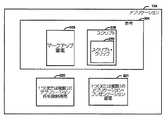
アプリケーション155は、それによってプレゼンテーション・システム100がインタラクティブ・オブジェクト125をユーザに対して提示するメカニズムを提供する。アプリケーション155は、データ上であらかじめ決定されたオペレーションを電子的に制御する任意の信号処理方法または記憶された1つ(または複数)の命令を表す。説明する目的のために、ICコンポーネント124は、3つのアプリケーション155を含むことが仮定され、これらの3つのアプリケーションは、図2および3に関連して以下でさらに説明される。第1のアプリケーションは、映画の目に見える態様と同時に、複数のユーザ選択可能なアイテムを有するメニューを提供するある種のインタラクティブ・オブジェクトを提示する。第2のアプリケーションは、映画の中に現れる1つまたは複数のアイテム(例えば、人、車、建物、または製品)を識別し、かつ/またはそれに従うように使用することができる(円などの)グラフィック・オーバーレイを提供する1つまたは複数のインタラクティブ・オブジェクトを提示する。また第3のアプリケーションは、(「スクリプト・クリップ」と称される)アニメーション化されたサムネールなどのメディア・クリップを提示する。
インタラクティブ・コンテンツ・データ(「ICデータ」)134は、ICマネージャ104によってレンダリングするために作成され、ミキサ/レンダラ110へと伝送されているICコンポーネント124に関連するデータである。各アプリケーションは、関連する待ち行列(図示されず)を有し、この待ち行列は、そのアプリケーションをレンダリングすることに関連する1つまたは複数の作業アイテム(図示されず)を保持する。
Interactive content data (“IC data”) 134 is data associated with the
メディア・コンテンツ・マネージャ104とICマネージャ102の両方と通信するように構成されるプレゼンテーション・マネージャ106は、プレゼンテーション・コンテンツ120の処理と、再生されるプレゼンテーション127のユーザに対する提示を容易にする。プレゼンテーション・マネージャ106は、プレイリスト128に対するアクセス権を有する。プレイリスト128は、他の物事のうちでもとりわけ、ユーザに対して提示可能な(インタラクティブ・オブジェクト125を含む)クリップ123およびアプリケーション155の時間順序付けされたシーケンスを含んでいる。クリップ123およびアプリケーション155/インタラクティブ・オブジェクト125は、1つまたは複数のタイトル131を形成するように構成することができる。例示の目的のために、1つのタイトル131が、本明細書中において説明される。プレイリスト128は、拡張可能マークアップ言語(「XML」)ドキュメント、または別のデータ構造を使用して実施することができる。
A
プレゼンテーション・マネージャ106は、プレイリスト128を使用して、タイトル131についてのプレゼンテーションタイムライン130を確認する。概念的に、プレゼンテーションタイムライン130は、特定のクリップ123およびアプリケーション155がユーザに対して提示可能なときの、タイトル131内部の時刻を示す。クリップ123とアプリケーション155のプレゼンテーションの間の例示の関係を示すサンプルのプレゼンテーションタイムライン130が、図2に関連して示され、説明される。ある種の状況においては、プレイリスト128および/またはプレゼンテーションタイムライン130を使用して、メディア・コンテンツタイムライン(「メディアタイムライン」)142を確認することも有用である(例示のメディアタイムライン142が、図6に関連して以下でさらに説明される)。
The
プレゼンテーション・マネージャ106は、それだけには限定されないが、プレゼンテーションタイムライン130についての情報を含めて情報をメディア・コンテンツ・マネージャ102およびICマネージャ104に対して供給する。プレゼンテーション・マネージャ106からの入力に基づいて、メディア・コンテンツ・マネージャ102は、レンダリングするためのメディア・データ132を作成し、ICマネージャ104は、レンダリングするためのICデータ134を作成する。一実施形態においては、プレゼンテーション・マネージャ106は、メディア処理パイプライン159を制御する。
タイミング信号管理ブロック108は、様々なタイミング信号158を生成し、これらのタイミング信号を使用して、メディア・コンテンツ・マネージャ102およびICマネージャ104によってそれぞれメディア・データ132およびICデータ134の作成および生成についてのタイミングを制御する。とりわけ、タイミング信号158を使用して、メディア・データ132とICデータ134のフレームレベルの同期化を実現する。タイミング信号管理ブロック108とタイミング信号158の詳細は、図4に関連して以下でさらに説明される。
Timing
ミキサ/レンダラは、ビデオ・プレーン(図示されず)中においてメディア・データ132をレンダリングし、グラフィックス・プレーン(図示されず)中においてICデータ134をレンダリングする。グラフィックス・プレーンは一般に、必ずしもそうとは限らないが、ビデオ・プレーン上にオーバーレイされて、そのユーザについての再生されるプレゼンテーション127を生成する。
The mixer / renderer renders
図1を引き続き参照して、図2は、プレイリスト128内のタイトル131についてのサンプルのプレゼンテーションタイムライン130の図式的説明図である。時間が、水平軸220上に示される。メディア・コンポーネント122(クリップ123が示される)とICコンポーネント124(インタラクティブ・オブジェクト125を提示するアプリケーション155が示される)についての情報が、垂直軸225上に示される。
With continued reference to FIG. 1, FIG. 2 is a schematic illustration of a
メディア・コンポーネント122に関して、4つのクリップ123、すなわち第1のメディア・クリップ(「メディア・クリップ1」)230と、第2のメディア・クリップ(「メディア・クリップ2」)250と、第3のメディア・クリップ(「メディア・クリップ3」)251と、第4のメディア・クリップ(「メディア・クリップ4」)253が示されている。メディア・クリップ1 230は、メディア処理パイプライン1(図1に示される)を経由してゼロ秒から10秒まで再生可能であり、メディア・クリップ2 250は、メディア処理パイプライン2(やはり図1に示される)を経由して8秒から15秒まで再生可能であり、メディア・クリップ3 251は、メディア処理パイプライン1を経由して10秒から20秒まで再生可能であり、メディア・クリップ4 253は、メディア処理パイプライン2を経由して30秒から40秒まで再生可能である。メディア・コンテンツは、20秒と30秒の間、再生のためにプレイリスト128によってスケジュールされないが、アプリケーション155は、メディア処理パイプライン1を経由して20秒と30秒の間、再生のためにスクリプト・クリップ255を提示することができる。スクリプト・クリップは、アニメーション化されたサムネールなどのメディア・クリップであり、このメディア・クリップは、一般にプレイリスト中には含まれないが、このメディア・クリップは、再生されるプレゼンテーション127内において(メディア・コンテンツが再生のためにスケジュールされないときなどの)時にはアプリケーションを経由してオプションとして呼び出すことができる。
With respect to the media component 122, there are four clips 123: a first media clip ("Media Clip 1") 230, a second media clip ("Media Clip 2") 250, and a third media. A clip (“media clip 3”) 251 and a fourth media clip (“media clip 4”) 253 are shown. Media clip 1 230 is playable from zero seconds to 10 seconds via media processing pipeline 1 (shown in FIG. 1), and media clip 2 250 is media processing pipeline 2 (also shown in FIG. 1). The media clip 3 251 can be played back from 10 seconds to 20 seconds via the media processing pipeline 1 and the media clip 4 can be played back. 253 can be reproduced from 30 seconds to 40 seconds via the media processing pipeline 2. The media content is not scheduled by play list 128 for playback between 20 and 30 seconds, but
図1に関連して上記されるように、ICコンポーネント124に関して、1つのアプリケーションは、メニュー280のユーザ選択可能なアイテム(例えば、関連するテキストまたはグラフィックスを伴うボタン)を提供するある種のインタラクティブ・オブジェクトを提示するための役割を担う。別のアプリケーションは、グラフィック・オーバーレイ290を提供する1つまたは複数のインタラクティブ・オブジェクトを提示するための役割を担う。図に示されるように、メニュー280は、メディア・クリップ1から4と同時に表示され、グラフィック・オーバーレイ290は、メディア・クリップ1 230と、メディア・クリップ2の一部分と同時に再生可能である。第3のアプリケーションは、プレゼンテーションのためにメディア・コンテンツがスケジュールされていないときにスクリプト・クリップ255を提示するための役割を担う(図に示されるように、スクリプト・クリップ255は、20秒と30秒の間に再生可能である)。
As described above in connection with FIG. 1, with respect to the
タイトル131がユーザに対して提示可能である、水平軸220に沿った特定の時間量は、タイトル131の再生継続時間292と称される。再生継続時間292内の特定の時刻は、タイトル時刻(title time)と称される。7つのタイトル時刻(「TT」)(TT1 293、TT2 294、TT3 295、TT4 296、TT5 297、TT6 298、TT7 299)が、プレゼンテーションタイムライン130上に示される。タイトルは、一回再生することができ、あるいは(例えば、ループする方法で)複数回再生することができるので、再生継続時間292は、タイトル131の1つの反復に基づいて決定される。再生継続時間292は、それだけには限定されないがあらかじめ決定された再生速度(例えば、通常の再生速度、または1xの再生速度)、あらかじめ決定されたフレーム・レート、あるいはあらかじめ決定されたタイミング信号ステータスを含めて望ましい任意の基準に対して決定することができる。再生速度、フレーム・レートおよびタイミング信号は、図4に関連して以下でさらに説明される。
The specific amount of time along the horizontal axis 220 that the
ディスプレイ技法や、タイトルごとのクリップとインタラクティブ・オブジェクトの間の再生シーケンスおよびタイミング関係に関する特定の規則などの実施形態特有のファクタは、タイトルの再生継続時間、およびその中のタイトル時刻の正確な値に対して影響を及ぼし得ることが理解されるであろう。再生継続時間およびタイトル時刻という用語は、そのようなすべての実施形態特有の詳細を包含するように意図される。 Embodiment-specific factors such as display techniques and specific rules regarding the playback sequence and timing relationship between clips and interactive objects per title depend on the playback duration of the title and the exact value of the title time within it. It will be understood that this can have an impact on the environment. The terms playback duration and title time are intended to encompass all such embodiment specific details.
ICコンポーネント124に関連するコンテンツを提示可能なタイトル時刻は、一般にあらかじめ決定されるが、ユーザがそのようなコンテンツと相互作用するときに取られるアクションは、再生されるプレゼンテーション127が再生している間にユーザ入力に基づいて決定することだけができることが理解されるであろう。例えば、ユーザは、再生されるプレゼンテーション127の再生中にそれに関連するある種のアプリケーション、インタラクティブ・オブジェクト、および/または追加のコンテンツを選択し、アクティブにし、あるいは非アクティブにすることができる。
The title time at which content related to the
再生継続時間292内の他の時刻および/または継続時間はまた、本明細書中において定義され、説明される。メディア・プレゼンテーション期間240は、その間に特定のクリップ123に関連する特定のコンテンツが再生可能である、再生継続時間292の開始する時刻と終了する時刻によって定義される。例えば、メディア・クリップ1 230は、開始するタイトル時刻TT1 293と終了するタイトル時刻TT3 295によって定義されるプレゼンテーション期間240を有し、メディア・クリップ2 250は、開始するタイトル時刻TT2 294と終了するタイトル時刻TT4 296によって定義されるプレゼンテーション期間240を有し、メディア・クリップ3 251は、開始するタイトル時刻TT3 295と終了するタイトル時刻TT5 297によって定義されるプレゼンテーション期間240を有し、メディア・クリップ4 253は、開始するタイトル時刻TT6 298と終了するタイトル時刻TT7 299によって定義されるプレゼンテーション期間240を有し、スクリプト・クリップ255は、開始するタイトル時刻TT5 297と終了するタイトル時刻TT6 298によって定義されるプレゼンテーション期間240を有する。
Other times and / or durations within the playback duration 292 are also defined and described herein. The media presentation period 240 is defined by the start time and end time of the playback duration 292 during which specific content related to the
事前レンダリング時間220は、特定のクリップ123が、可変時間オフセット値に基づいた量にだけプレゼンテーションタイムライン130に基づいて再生可能であるタイトル時刻に先立つタイトル時刻(またはそれらの期間)である(時間オフセット値および事前レンダリング時間220の決定は、図5および6に関連して以下で説明される)。
The pre-rendering time 220 is the title time (or period of time) prior to the title time that a
(アプリケーション・プレゼンテーション期間やアプリケーション再生継続時間など)アプリケーション155に関連する時間間隔は、図3に関連して以下で定義され、説明される。 Time intervals associated with the application 155 (such as application presentation duration and application playback duration) are defined and described below in connection with FIG.
図1および2に対する参照を継続して、図3は、単一のアプリケーション155の機能ブロック図である。アプリケーション155は、全体として(図2に示される)インタラクティブ・オブジェクト280、290、および255を提示するための役割を担うアプリケーションを表す。アプリケーション155は、命令304(以下でさらに説明される)を含んでいる。アプリケーション155は、それに関連してアプリケーション再生継続時間320と、1つまたは複数のアプリケーション・プレゼンテーション期間321とを有する。
With continued reference to FIGS. 1 and 2, FIG. 3 is a functional block diagram of a
アプリケーション再生継続時間320は、その内部でアプリケーション155に関連するインタラクティブ・オブジェクト125が、再生されるプレゼンテーション127の受信者に提示可能であり、かつ/またはその受信者によって選択可能である、再生継続時間292の量(一部分または全部)に関した特定の時間量である。例えば図2の場合には、メニュー280についての役割を担うアプリケーション155は、TT1 293とTT7 299との間の時間量から構成されるアプリケーション再生継続時間を有する。グラフィック・オーバーレイ290についての役割を担うアプリケーションは、TT1 293とTT3 295との間の時間量から構成されるアプリケーション再生継続時間を有する。スクリプト・クリップ255についての役割を担うアプリケーションは、TT5 297とTT6 298との間の時間量から構成されるアプリケーション再生継続時間を有する。
特定のアプリケーションに関連するアプリケーション再生継続時間320が、プレゼンテーションタイムライン上で概念化されるときに得られる開始するタイトル時刻と終了するタイトル時刻とによって定義される期間は、アプリケーション・プレゼンテーション期間321と称される。例えば、図2を参照すると、メニュー280についての役割を担うアプリケーションは、TT1 293に開始され、TT7 299に終了するアプリケーション・プレゼンテーション期間を有し、グラフィック・オーバーレイ290についての役割を担うアプリケーションは、TT1 293に開始され、TT3 295に終了するアプリケーション・プレゼンテーション期間を有し、スクリプト・クリップ255についての役割を担うアプリケーションは、TT5 297に開始され、TT6 298に終了するアプリケーション・プレゼンテーション期間を有する。
The period defined by the starting and ending title times obtained when the
一部の場合においては、アプリケーション155は、複数のページを有することができる(ページは、示されていない)。ページは、特定のアプリケーション再生継続時間320および/またはアプリケーション・プレゼンテーション期間321内において同時に提示可能な1つまたは複数のインタラクティブ・オブジェクトの論理的グループ化である。特定のページに関連するインタラクティブ・オブジェクトは、同時に、シリアルに、またはそれらの組合せで提示することができる。与えられたタイトルに関連するアプリケーションおよびページの数と、各アプリケーションまたはページに関連するインタラクティブ・オブジェクトは、一般に設計選択の問題となる論理的な区別である。例えば、特定の開始ページの指定は必要ではなく、アプリケーションの複数のページは、同時に提示することができ、あるいはアプリケーションは、ページなしに(または何も含まない最初のページから)開始することができる。アプリケーションのページは、アプリケーションおよびスクリプトをそのままにしたままロードし、またアンロードすることができる。アプリケーションの実行中にメモリにロードされるアプリケーションに関連するリソースの数または量を管理する(例えば、制限する)ことが望ましいときには、複数のページが、使用されてもよい。
In some cases,
実行されるときに、命令304は、ユーザ入力に基づいて、アプリケーション155に関連するインタラクティブ・オブジェクト125のレンダリングに関連したタスクを(他のタスクのうちでもとりわけ)実行する。1タイプのユーザ入力(またはその結果)は、ユーザ・イベントである。ユーザ・イベントは、ICコンポーネント124に関連する再生されるプレゼンテーション127の受信者によって開始されるアクションまたは出来事(occurrence)である。ユーザ・イベントは、一般に、必ずしもそうとは限らないが、非同期である。ユーザ・イベントの例は、それだけには限定されないが、メニュー280内のボタンの選択、グラフィック・オーバーレイ290に関連する円の選択、スクリプト・クリップ255の呼出しなど、再生されるプレゼンテーション127内のインタラクティブ・オブジェクトを伴うユーザ相互作用を含んでいる。そのような相互作用は、キーボード、リモコン、マウス、スタイラス、または音声コマンドを含めて、現在知られている、または後になって開発される任意のタイプのユーザ入力デバイスを使用して行われることができる。アプリケーション155は、システム・イベント、ドキュメント・オブジェクト・モデル・イベント、他のタイプのイベントなど、ユーザ・イベント以外のイベントに応答することもできることが理解されるであろう。
When executed, the
一実施形態においては、命令304は、コンピュータ読取り可能媒体(図8および9に関連して以下でさらに説明される)中における、符号化されるコンピュータ実行可能命令である。本明細書中において述べられる例においては、命令304は、スクリプト308またはマークアップ要素303のいずれかを使用して実施される。スクリプトまたはマークアップ要素は、単独で使用することもできるが、一般にスクリプトとマークアップ要素の組合せは、高精細DVD映画についての包括的な組のインタラクティブ機能の生成を可能にする。
In one embodiment,
スクリプト308は、命令プログラミング言語など非宣言的なプログラミング言語で書かれた命令304を含んでいる。命令プログラミング言語は、プロセッサによって実行されるべきコマンドのシーケンスの観点から計算を記述する。スクリプト308が使用されるほとんどの場合には、スクリプトを使用してユーザ・イベントに応答する。しかしながら、スクリプト308は、準備が整っておらず、あるいはマークアップ要素だけを使用して効率的に実施される処理課題など、他の場合にも有用である。そのような場合の例は、スクリプト・クリップ255のプレゼンテーション、システム・イベント、状態管理、およびリソース管理(例えば、キャッシュされ、または恒久的に記憶されたリソースにアクセスすること)の処理態様を含んでいる。一実施形態においては、スクリプト308は、ECMA−262仕様においてECMAインターナショナルによって定義されるようなECMAScriptである。ECMA−262に含まれる共通のスクリプティング・プログラミング言語は、JavaScriptとJScriptを含んでいる。一部の設定においては、ECMA−327などのECMAScript262のサブセットを使用して308を実施することが望ましいこともある。
マークアップ要素303は、拡張可能マークアップ言語(「XML」)などの宣言的プログラミング言語で書かれた命令304を表す。XMLにおいては、要素は、開始タグおよび終了タグを使用して、XMLドキュメント内において定義される情報の論理的ユニットである。XMLドキュメントは、エンティティと呼ばれる(コンテナとも呼ばれる)ストレージユニットから成るデータ・オブジェクトであり、これらは、解析された、または未解析のデータのいずれかを含む。解析されたデータは、キャラクタからなり、これらのキャラクタの一部は、キャラクタ・データを形成し、これらのキャラクタの一部は、マークアップを形成する。マークアップは、ドキュメントのストレージレイアウトと論理構造の記述を符号化する。XMLドキュメント中には1つのルート要素が存在し、このルート要素のどの部分も、他の任意の要素のコンテンツ中には現れない。他のすべての要素では、開始タグと終了タグは、他の要素のコンテンツ内にあり、お互いの内部でネストしている。
XMLスキーマは、XMLドキュメントのクラスの1つまたは複数のシンタックスの定義である。一部のXMLスキーマは、ワールドワイドウェブコンソーシアム(World Wide Web Consortium)(「W3C」)によって定義される。他のXMLスキーマは、高精細ビデオについてのDVD仕様に準拠したXMLドキュメントと共に使用するために、また他の使用のためにDVDフォーラムによって公布されている。高精細DVD映画についての他のスキーマ、ならびに他のインタラクティブ・マルチメディア・プレゼンテーションについてのスキーマも可能であることが、理解されるであろう。 An XML schema is a definition of one or more syntaxes of an XML document class. Some XML schemas are defined by the World Wide Web Consortium (“W3C”). Other XML schemas are promulgated by the DVD Forum for use with XML documents that conform to the DVD specification for high definition video and for other uses. It will be appreciated that other schemas for high definition DVD movies are possible as well as schemas for other interactive multimedia presentations.
高レベルにおいて、XMLスキーマは、(1)要素名を要素型に関連づけるグローバル要素宣言と、(2)その型の要素についての属性、副要素、およびキャラクタ・データを定義する型定義を含んでいる。1要素の属性は、1つの属性が単一の要素プロパティを指定して、名前/値の対を使用して要素の個々のプロパティを指定する。 At a high level, the XML schema includes (1) a global element declaration that associates an element name with an element type, and (2) a type definition that defines attributes, subelements, and character data for elements of that type. . One element attributes specify individual element properties using name / value pairs, where one attribute specifies a single element property.
図1〜3に対する参照を継続して、図4は、タイミング信号管理ブロック108の様々なコンポーネントと、タイミング信号158とをより詳細に示す簡略化された機能ブロック図である。
With continued reference to FIGS. 1-3, FIG. 4 is a simplified functional block diagram illustrating the various components of the timing
タイミング信号管理ブロック108は、プレゼンテーション・システム100内で特定の時刻または期間を定義するために使用されるクロックおよび/またはタイミング信号の処理の役割を担う。図に示されるように、連続的なタイミング信号401がクロック・ソース402によってあらかじめ決定されたレートで生成される。クロック・ソース402は、汎用コンピュータや専用電子デバイスなどの処理システムに関連するクロックとすることができる。クロック・ソース402によって生成されるタイミング信号401は、実世界のクロックのように絶えず変化する(実時間の1秒以内に、クロック・ソース402は、あらかじめ決定されたレートで1秒の価値のあるタイミング信号401を生成する)。
The timing
タイミング信号401は、ICフレーム・レート・カルキュレータ404と、メディア・フレーム・レート・カルキュレータ406と、時間基準カルキュレータ408と、時間基準カルキュレータ490とに入力される。ICフレーム・レート・カルキュレータ404は、タイミング信号401に基づいて、タイミング信号405を生成する。タイミング信号405は、「ICフレーム・レート」と称され、このICフレーム・レートは、ICデータ134のフレームがICマネージャ104によって生成されるレートを表す。ICフレーム・レートの1つの例示の値は、秒当たり30フレームである。しかし、ICフレーム・レート405の周波数(「プレゼンテーション・クロック周波数」と称される)は、動的に変化することもできる。プレゼンテーション・システム100の様々なコンポーネント内の処理負荷は、プレゼンテーション・クロック周波数に基づいて変化することができることも理解されるであろう。ICフレーム・レート・カルキュレータ404は、タイミング信号401のレートを減少させ、または増大させて、タイミング信号405を生成することもできる。
The
ICデータ134のフレームは、一般に、有効なアプリケーション155および/またはそのページごとに、関連するユーザ・イベントによる有効なアプリケーションおよび/またはページに関連する各インタラクティブ・オブジェクト125のレンダリングを含んでいる。例示の目的のために、有効なアプリケーションは、再生継続時間292の現行のタイトル時刻が、プレゼンテーションタイムライン130に基づいて含まれるアプリケーション・プレゼンテーション期間321を有するものである。アプリケーションは、複数のアプリケーション・プレゼンテーション期間を有することができることが理解されるであろう。特定の区別が、ユーザ入力またはリソース使用可能性に基づいてアプリケーションの状態について本明細書中では行われないことも理解されるであろう。
The frame of
メディア・フレーム・レート・カルキュレータ406はまた、タイミング信号(タイミング信号407)をタイミング信号401に基づいて生成する。タイミング信号407は、「メディア・フレーム・レート」と称され、このメディア・フレーム・レートは、メディア・データ132のフレームが、メディア・コンテンツ・マネージャ102によって生成されるレートを表す。メディア・フレーム・レートは、ICフレーム・レート405と同じでも、あるいはそれとは異なっていてもよい。メディア・フレーム・レートの1つの例示の値は、秒当たり24フレームである。メディア・フレーム・レート407の周波数は、動的に変化することができるが、メディア・フレーム・レート・カルキュレータ406は、タイミング信号401のレートを減少させ、または増大させてタイミング信号407を生成することもできる。
The media
クロック・ソース470は、タイミング信号471を生成し、このタイミング信号は、クリップ123に関連する情報が、メディア・ソース161から生成されるレートを支配する。クロック・ソース470は、クロック402と同じクロックであり、あるいはクロック・ソース402と同じクロックに基づいていてもよい。代わりに、クロック470および402は、全く異なっており、かつ/または異なるソースを有することもできる。同様に、メディア・フレーム・レート407は、タイミング信号471と同じであり、またはタイミング信号471と同じ値に基づいていることもでき、あるいはタイミング信号は、異なっていることもできる。
クロック・ソース470は、メディア状態インジケータ信号481に基づいてタイミング信号471のレート(これは、「メディア・クロック周波数」と称される)を調整し、このメディア状態インジケータ信号は、メディア状態インジケータ・ブロック480によって生成される。メディア状態インジケータ信号481は、特定のメディア・ソース160(図1に示される)からのビデオ情報、オーディオ情報、またはデータ情報の特定の検索状態を表す。そのような検索状態は、ユーザ入力に、またはプレイリスト128(やはり図1に示される)のコンテンツに直接に、または間接に基づいていてもよい。メディア・クロック周波数はまた、符号化レートや復号化レートなどのメディア・ソース特性162に基づいて変化することもできる。したがって、メディア・クロック周波数は、クロックごとに変化することができる。
The
ある種のユーザ入力は、再生されるプレゼンテーション127の再生速度と、したがって特定のメディア・ソース160からのビデオ情報、オーディオ情報、またはデータ情報の検索の速度を変化させる。例えば、再生されるプレゼンテーション127は、通常速度で順方向に進むことができ、また通常速度よりも速い、または遅い速度で順方向と逆方向の両方に進むこともできる。通常速度は、相対的用語であること、および通常速度は、プレゼンテーションごとに、またクリップごとに変化することができることが理解されるであろう。
Certain user inputs change the playback speed of the
特定のメディア・ソースからのビデオ情報、オーディオ情報、またはデータ情報の検索状態は、再生されるプレゼンテーション127の様々な再生速度に基づいて定義することができる。例えば、通常の再生検索状態は、再生されるプレゼンテーション127が、通常速度で順方向に進むときに行われるように定義される。低速順方向検索状態は、再生されるプレゼンテーション127が、順方向であるが実時間よりも低速で進むときに行われるように定義される。高速順方向検索状態は、再生されるプレゼンテーション127が、順方向であるが実時間よりも高速に進むときに行われるように定義される。低速逆方向検索状態は、再生されるプレゼンテーション127が、逆方向であるが、実時間よりも低速で進むときに行われるように定義される。高速逆方向検索状態は、再生されるプレゼンテーション127が、逆方向であるが、実時間よりも高速で進むときに行われるように定義される。
The search state of video information, audio information, or data information from a particular media source can be defined based on various playback speeds of the
高速逆方向検索状態および高速順方向検索状態の間に、ある種のメディア・コンテンツの再生は、しばしばスキップされる。他のユーザ入力は、ユーザが、映画の一部分から別の部分へとジャンプするときなどに(例えば、メニュー280などのインタラクティブ・メニューからの選択を行うことにより)ある種のコンテンツの再生をスキップさせることができる。ユーザはまた、様々な場所で様々な時刻に映画を開始させ、停止させることもできる。 During the fast reverse search state and the fast forward search state, playback of certain media content is often skipped. Other user input causes the user to skip playback of certain content (eg, by making a selection from an interactive menu such as menu 280), such as when the user jumps from one part of the movie to another. be able to. The user can also start and stop the movie at various times and at various times.
所在を見出すこと、および/または特定のメディア・ソース160から特定のクリップ123に関連するビデオ情報、オーディオ情報、またはデータ情報を再生することを開始することに関連する検索状態もまた、定義することができる。例えば、閉鎖状態(closed state)は、特定のクリップ123に関連するビデオ情報、オーディオ情報、またはデータ情報が、特定のメディア・ソース160から読み取られる前に起こるように定義される。準備状態(ready state)は、特定のメディア・ソース160からのビデオ情報、オーディオ情報、またはデータ情報の第1のグループのサンプルが、復号化されており、レンダリングする準備が整っているときに起こるように定義される。事前ローリング状態(pre−rolling state)は、ステップが、レンダリングするために特定のメディア・ソース160からビデオ情報、オーディオ情報、またはデータ情報の第1のグループのサンプルを作成するために取られているときに閉鎖状態と準備状態との間で起こるように定義される。そのようなステップは、それだけには限定されないが、特定のメディア・ソース160から情報を読み取ること、ならびにその情報を逆多重化すること、復号化すること、および/または暗号解読することを含んでいる。特定のメディア・ソースからの情報の第1のグループのサンプルは、必ずしも特定のクリップ123内で生ずる第1のグループのサンプルであるとは限らないこと、およびどのように第1のグループのサンプルが定義されるかは、符号化または復号化のフォーマットやプロトコルなどのファクタに基づいて、プレゼンテーションごとに変化し得ることが、理解されるであろう。
Also defining a search state associated with locating and / or starting to play video information, audio information, or data information associated with a
経過クリップ再生時間(Elapsed clip play time)452は、アクティブ・クリップ123に関連する個々のプレゼンテーション期間240内において経過している時間量を表す。本明細書中における説明の目的のために、アクティブ・クリップは、プレゼンテーションタイムライン130に基づいた、再生継続時間292の現行のタイトル時刻が含まれるプレゼンテーション期間240(図2に示される)を有するものである。時間基準カルキュレータ454は、時間基準452を受け取り、メディア時間基準455を生成する。メディア時間基準455は、1つまたは複数の時間基準452に基づいて経過している再生継続時間292の総量を表す。一般に、2つ以上のクリップが同時に再生されているときには、たった1つの時間基準452を使用して、メディア時間基準455を生成する。メディア時間基準455と、どのようにしてメディア時間基準455が複数のクリップに基づいて決定されるかを決定するために使用される特定のクリップは、実施形態の好みの問題である。
Elapsed
時間基準カルキュレータ408は、タイミング信号401と、メディア時間基準455と、メディア状態インジケータ信号481とを受け取り、タイトル時刻基準409を生成する。タイトル時刻基準409は、時間基準カルキュレータ408に対する1つまたは複数の入力に基づいた再生継続時間292内に経過している時間の総量を表す。
The time reference calculator 408 receives the
時間基準カルキュレータ490は、タイミング信号401とタイトル時刻基準409とを受け取り、1つ(または複数)のアプリケーション時間基準492と1つ(または複数)のページ時間基準494とを生成する。単一のアプリケーション時間基準492は、連続したタイミング信号401に関して、(図3に関連して示され、説明される)特定のアプリケーション再生継続時間320の経過時間量を表す。タイトル時刻基準409が、現行のタイトル時刻が特定のアプリケーションのアプリケーション・プレゼンテーション期間321に含まれることを示すときに、アプリケーション時間基準492は、決定される。アプリケーション時間基準492は、アプリケーション・プレゼンテーション期間321の完了時にリセットする(例えば、非アクティブになり、あるいは最初からやり直す)。アプリケーション時間基準492は、ユーザ・イベントに対する応答や、トリック再生が行われるときなど、他の状況においてもリセットすることができる。
The time reference calculator 490 receives the
ページ時間基準494は、連続したタイミング信号401に関して、アプリケーションの特定のページについての再生継続時間内の経過時間の量を表す。タイトル時刻基準409が、現行のタイトル時刻が適用可能なページ・プレゼンテーション期間(図示されず)内に含まれることを示すときに、アプリケーションの特定のページについてのページ時間基準494は、決定される。ページ・プレゼンテーション期間は、アプリケーション・プレゼンテーション期間321(図3に示される)の副次的期間である。1つ(または複数)のページ時間基準494は、適用可能なページ・プレゼンテーション期間(図示されず)の完了時にリセットすることができる。ページ時間基準494は、ユーザ・イベントに対する応答や、トリック再生が行われるときなど、他の状況においてもリセットすることができる。アプリケーション・プレゼンテーション期間321の副次的期間および/またはページ・プレゼンテーション期間とすることもできるインタラクティブ・オブジェクト・プレゼンテーション期間もまた定義可能であることが理解されるであろう。
The
表1は、プレゼンテーション・システム100による再生されるプレゼンテーション127の再生中における例示の出来事と、アプリケーション時間基準492、ページ時間基準494、タイトル時刻基準409、およびメディア時間基準455に対するそのような出来事の影響を示している。
Table 1 illustrates exemplary events during playback of a

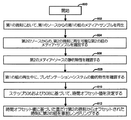
図1〜4に対する参照を継続して、図5は、グリッチフリーな方法で、図2のプレゼンテーションタイムライン130上に示されるクリップ123など、特定のプレゼンテーションのメディア・コンテンツを提示する、プレゼンテーション・システム100などのプレゼンテーション・システムの能力を高めるための一方法のフローチャートである。
Continuing with reference to FIGS. 1-4, FIG. 5 is a presentation system that presents the media content of a particular presentation, such as the
本方法は、ブロック500から開始され、ブロック502へと続き、ここで第1の時刻において第1のメディア・ソースからの第1の組のメディア・サンプルの再生が開始される。次に、ブロック504において、第2のメディア・ソースから第2の時刻に再生可能な第2の組のメディア・サンプルが識別される。第2のメディア・ソースの静的特性が、ブロック506において確認される。プレゼンテーション・システムの動的特性も、ブロック508において確認される。次に、ブロック510において、時間オフセット値が、静的特性と動的特性に基づいて決定される。最後に、ブロック512において、第2の組のメディア・サンプルが、時間オフセット値に基づいた時刻に事前レンダリングされる。
The method begins at
例示の目的のために、図5のフローチャートの方法が、とりわけプレゼンテーションタイムライン130(図2に示される)に従ってユーザに対して提示可能なメディア・コンポーネント122とアプリケーション155に関して、プレゼンテーション・システム100の場合について説明される。
For illustrative purposes, the method of the flowchart of FIG. 5 is for the
図2を参照すると、処理リソースおよび復号化リソースが限られている状況においては、メディア・クリップ1 230、メディア・クリップ2 250、メディア・クリップ3 251、メディア・クリップ4 253のグリッチフリー再生を保証すること、およびスクリプト・クリップ255の再生時間を最大にすることが望ましい。一実施形態においては、プレゼンテーション・システム100は、1つの中央処理装置と、1つのグラフィックス処理ユニットと、1つのデコーダを有するが、他の構成も可能である。したがって、各クリップの少なくとも一部分についての(図4に関連して示され説明されるメディア状態インジケータ信号481によって表される)準備検索状態が、そのクリップがプレゼンテーションタイムライン130上でのプレゼンテーションのためにスケジュールされるタイトル時刻において、あるいはそのタイトル時刻の前に達せられることが望ましい。この点について、(図4に関連しても説明される)事前ローリング検索状態を完了するための十分な時間を残すことが重要であるが、スクリプト・クリップ255または他のクリップの再生など、プレゼンテーション・システム内で行われる他の重要なアクティビティに対する必要以上の悪影響を最小にすることも重要である。特定のクリップについての事前ローリング検索状態内で行われる事前レンダリング・アクティビティは、別のクリップが停止されることをもたらす可能性がある。必要以上の悪影響を最小にすることができる一方法は、クリップが、プレゼンテーションのためにスケジュールされるタイトル時刻の近くで、またはタイトル時刻において事前ローリング検索状態を完了することによる。
Referring to FIG. 2, in a situation where processing resources and decoding resources are limited, glitch-free playback of media clip 1 230, media clip 2 250, media clip 3 251, and media clip 4 253 is guaranteed. It is desirable to maximize the playback time of the
1つのインスタンスにおいては、TT3 295において、またはTT3 295の前にメディア・クリップ3 251の少なくとも一部分についての準備状態に達することが望ましく、このTT3 295は、遷移が、メディア・パイプライン1を経由したメディア・クリップ1 230の再生と、メディア・パイプライン2を経由したメディア・クリップ3 251の再生との間で行われる時刻である。TT3 295における遷移は、メディア・クリップ2 250が、メディア・パイプライン1を経由して再生している(したがって、既存のメディア処理負荷が存在する)間に行われるので、TT3 295におけるまで、またはTT3 295のあまりにも近くまで待って、メディア・クリップ3 251の一部分についての事前ローリング検索状態に入ることは、ユーザが、TT3においてグリッチに直面することをもたらす可能性がある。例えば、ビデオが、TT3において再生についてスケジュールされる場合、そのビデオは、数秒間にわたって一時停止することもあり、何らかのビデオが脱落させられることもある。オーディオがTT3において再生についてスケジュールされる場合には、数秒間の沈黙が存在することもあり、何らかのオーディオが脱落させられることもある。グリッチは、メディア・クリップ2 250、メディア・クリップ3 251、またはメディア・クリップ2 250とメディア・クリップ3 251の両方の再生に関して生ずることもある。 In one instance, it is desirable to reach a ready state for at least a portion of media clip 3 251 at TT3 295 or before TT3 295, which TT3 295 has transitioned through media pipeline 1 This is the time between the playback of the media clip 1 230 and the playback of the media clip 3 251 via the media pipeline 2. The transition at TT3 295 occurs while media clip 2 250 is playing via the media pipeline 1 (thus there is an existing media processing load), so until TT3 295, or Waiting too close to TT3 295 and entering a pre-rolling search state for a portion of media clip 3 251 may result in the user facing a glitch at TT3. For example, if a video is scheduled for playback at TT3, the video may pause for a few seconds or some video may be dropped. If audio is scheduled for playback at TT3, there may be a few seconds of silence, and some audio may be dropped. The glitch may occur with respect to playback of media clip 2 250, media clip 3 251, or both media clip 2 250 and media clip 3 251.
別のインスタンスにおいては、メディア・クリップ4 253の少なくとも一部分についての準備状態に達することが望ましく、このメディア・クリップ4は、TT6 298において、あるいはTT6 298の前にメディア・パイプライン2を経由して再生される。TT6 298における遷移は、スクリプト・クリップ255が、メディア・パイプライン1を経由して再生されている間に行われるので、TT6 298におけるまで、あるいはTT6 298のあまりにも近くまで待って、メディア・クリップ4 253の一部分についての事前ローリング検索状態に入ることは、ユーザがTT6においてグリッチに直面することをもたらす可能性がある。しかしながら、あまりにもすぐにメディア・クリップ4 253の一部分についての事前ローリング検索状態に入ることは、スクリプト・クリップ255の再生時間を減少させるという望ましくない影響がある可能性がある。
In another instance, it is desirable to reach a ready state for at least a portion of media clip 4 253, which media clip 4 is routed via media pipeline 2 at TT6 298 or before TT6 298. Played. The transition at TT6 298 occurs while the
したがって、メディア・クリップ3 251とメディア・クリップ4 253の少なくとも一部分についての事前レンダリング時間220を決定することが望ましい。プレゼンテーション・コンテンツ120/再生されるプレゼンテーション127の再生が順方向に行われるときには、メディア・クリップ3 251についての事前レンダリング時間は、TT3 295に先立って起こり、メディア・クリップ4 253についての事前レンダリング時間220は、TT6 298に先立って起こる。事前レンダリング時間は、逆方向に行われる再生について提供することもできることが理解されるであろう。
Accordingly, it is desirable to determine a pre-rendering time 220 for at least a portion of media clip 3 251 and media clip 4 253. When
事前レンダリング時間220は、一般に時間オフセット値に基づいて決定され、この時間オフセット値は、先行する1つまたは複数のクリップの再生中に1回または複数回、計算される。一実施形態においては、時間オフセット値を決定することに関連する1つまたは複数のステップは、先行する1つ(または複数)のクリップの再生が開始されるときに実行することができ、1つまたは複数のステップは、次のクリップをレンダリングするための時間が近づくときに(しかも、事前レンダリング時間が到達される前に)先行する1つ(または複数)のクリップの再生中の他の時に反復することができる。 The pre-rendering time 220 is generally determined based on a time offset value, which is calculated one or more times during playback of the preceding clip or clips. In one embodiment, the one or more steps associated with determining the time offset value can be performed when playback of the preceding one (or multiple) clips is initiated, Or multiple steps are repeated at other times during playback of the preceding one (or more) clips when the time to render the next clip is approaching (and before the pre-rendering time is reached) can do.
時間オフセット値の一態様は、その後に再生可能なクリップをそこから受信することができるメディア・ソース160の1つまたは複数の(図1に示される)メディア・ソース特性162を確認することにより決定される。メディア・ソースのロケーション、(符号化または復号化のフォーマットまたはプロトコル、GOPサイズ設定、圧縮設定、品質設定など)コーデックのパラメータまたは設定、(暗号化型、フォーマット、プロトコルなど)暗号化のパラメータまたは設定などのメディア・ソース特性162は、特定のクリップまたはその一部分についての事前ローリング検索状態を完了するために必要とされる処理リソースまたは復号化リソース(そしてそれによって時間)に影響を及ぼす。復号化されるべきクリップの一部分のサイズはまた、事前ローリング検索状態を完了するために必要とされる時間に影響を及ぼし得る静的特性でもある。
One aspect of the time offset value is determined by ascertaining one or more media source characteristics 162 (shown in FIG. 1) of the
メディア・クリップ3 251とメディア・クリップ4 253の一部分についての事前レンダリング時間を決定するインスタンスにおいては、それぞれメディア・ソース1とメディア・ソース2の1つまたは複数のメディア・ソース特性162が確認される。一実施形態においては、メディア・ソース1の1つまたは複数のメディア・ソース特性162は、テーブルなどのデータ構造に記憶される。メディア・ソース2の1つまたは複数のメディア・ソース特性162はまた、テーブルなどのデータ構造に記憶される。メディア・ソース1とメディア・ソース2のメディア・ソース特性を記憶するデータ構造は、同じデータ構造であっても、あるいは異なるデータ構造であってもよい。1つ(または複数)のデータ構造は、メディア・コンテンツ・マネージャ102によってアクセスされ、または記憶され、プレゼンテーション・マネージャ106へと伝えられる。メディア・コンテンツ・マネージャ102は、データ構造それら自体、あるいはそれらのデータ構造に基づいた初期値またはデフォルト値を有する時間オフセット値を伝えることができる。代わりに、プレゼンテーション・マネージャ106(またはプレゼンテーション・システム100の別のコンポーネント)は、直接に1つ(または複数)のメディア・ソース特性および/または1つ(または複数)のデータ構造にアクセスし、初期の時間オフセット値を決定することもある。
In the instance that determines the pre-rendering time for a portion of media clip 3 251 and media clip 4 253, one or more
時間オフセット値の第2の態様は、プレゼンテーション・システム100の1つまたは複数の動的特性を確認することにより決定される。動的特性は、プレゼンテーション・システム100のオペレーション中に変化することができる処理オペレーションまたは復号化オペレーションに影響を及ぼす状態を表す。動的特性の例は、それだけには限定されないが、メディア・クロック周波数、プレゼンテーション・クロック周波数、メディア処理負荷、一般的処理負荷、およびメディア状態インジケータ信号481の1つ(または複数)の値を含んでいる。
The second aspect of the time offset value is determined by checking one or more dynamic characteristics of the
メディア・クリップ3 251と、メディア・クリップ4 253の一部分についての事前レンダリング時間を決定するインスタンスにおいては、プレゼンテーション・システム100の1つまたは複数の動的特性は、特定のメディア・ソースの1つ(または複数)の静的特性に関して確立される1つ(または複数)の初期時間オフセット値に影響を及ぼす(例えば、それを増大させる)可能性がある。一般に、プレゼンテーション・システム100内の処理負荷または復号化負荷が高いときに、より長い時間が、事前ローリング検索状態を完了するために必要とされ、時間オフセット値は、増大させられる。
In the instance of determining the pre-rendering time for media clip 3 251 and a portion of media clip 4 253, one or more dynamic characteristics of
処理負荷および/または復号化負荷は、メディア処理負荷が増大させられる(例えば、複数のクリップが同時に再生され、かつ/またはメディア・クロック周波数が高い)とき、グラフィック処理負荷が増大させられる(例えば、プレゼンテーション・クロック周波数が高い)とき、一般的処理負荷が増大させられる(例えば、アンチウィルス・プログラムなど、他のプログラムが同時に実行される)とき、およびメディア状態インジケータ信号481が、通常再生検索状態以外の検索状態を示す(例えば、再生されるプレゼンテーションが、通常速度よりも高速または低速の速度で順方向または逆方向に進んでいる)ときなど様々な状況において増大させられる。
The processing load and / or the decoding load is increased when the media processing load is increased (eg, when multiple clips are played simultaneously and / or the media clock frequency is high) (eg, the graphics processing load is increased). When the presentation clock frequency is high), when the general processing load is increased (for example, other programs such as an antivirus program are executed simultaneously), and the media
メディア・コンポーネント122の再生速度が、メディア・コンポーネント122が通常速度で進む時よりも影響を受ける時間中に、より多くの処理リソースおよび復号化リソースが、1つ(または複数)のメディア・ソース160からのアクティブ・クリップのある種の部分を予測し作成するために使用されるので、(トリック再生、一時停止、低速送り、高速送り、低速戻し、高速戻しなど)メディア・コンポーネント122の再生速度に影響を及ぼすユーザ入力を受け取ることは、グリッチフリーの方法でメディア・コンポーネント122を提示する問題を悪化させる可能性がある。
During the time when the playback speed of the media component 122 is affected more than when the media component 122 travels at normal speed, more processing resources and decoding resources will be added to one (or more)
図6は、(メディア・フレーム・レート407に関しての)例示のメディアタイムライン142の概略図であり、この概略図は、順方向における通常速度以外の速度においてメディア・コンテンツ122を再生することに関連するある種の処理ステップを示している。様々なフレーム番号プレゼンテーション時刻(frame number presentation time)602が、メディアタイムライン142上に示される。フレーム番号プレゼンテーション時刻602は、個別の番号が付けられた組のメディア・データ132を提示可能な(図2に示される)再生継続時間292内の時刻を表す。図に示されるように、フレーム番号プレゼンテーション時刻602は、メディア・フレーム・レート407に基づいたレートで生じ、このメディア・フレーム・レートはまた、フレーム番号プレゼンテーション時刻602の間の周期的なメディア時間間隔604の継続時間も定義する。メディア・フレーム・レート407は、必ずしも特定のクリップ123が符号化されるフレーム・レートと同じである必要はないが、メディア・クロック周波数は、特定のクリップについての符号化フレーム・レートに基づいて変化し得ることに注意すべきである。ICフレーム・レート405(図示されず)は、秒当たり30フレームであることが仮定される(とは言え、プレゼンテーション・クロック周波数もまた、動的に変化することができる)。
FIG. 6 is a schematic diagram of an exemplary media timeline 142 (with respect to media frame rate 407) that relates to playing media content 122 at a speed other than normal speed in the forward direction. Some processing steps are shown. Various frame
再生継続時間292の現行の経過再生時間608が、メディアタイムライン142上に示される。現行の経過再生時間608は、例えばタイトル時刻409の現行の値とすることができる。次の提示可能なフレーム番号プレゼンテーション時刻614もまた、示される。次の提示可能なフレーム番号プレゼンテーション時刻614は、ユーザに対して提示可能な(現行の経過再生時間709/タイトル時刻409に関連するフレーム番号の後の)次のフレーム番号に関連するフレーム番号プレゼンテーション時刻602を表す。次の提示可能なフレーム番号は、プレイリスト128に基づいた次の連続するフレーム番号とすることもでき、あるいは現行の経過再生時間608に関連するフレーム番号から1つまたは複数のフレーム番号プレゼンテーション時刻602だけ離れたフレーム番号とすることもできることが理解されるであろう。通常の再生速度中において、後続のICプレゼンテーション時刻712は、現行のICプレゼンテーション時刻710に対して、ICフレーム・レート407に基づいた量を加えることにより選択される。
The current elapsed
しかしながら、メディア状態インジケータ信号481が、再生状態が通常再生速度以外(例えば、高速送りまたは高速戻し)であることを示すときには、次の提示可能なフレーム番号時刻614を確認する一方法は、(現行の経過再生時間608/タイトル時刻409に追加して)再生速度およびメディア・フレーム・レート407に基づいて経過している再生継続時間292の経過時間620の量を予測することである。
However, when the media
一実施形態においては、予測される経過時間620の量は、メディアタイムライン142上のどれだけ多くの予測されるフレーム番号プレゼンテーション時刻602が、現行の経過再生時間608/タイトル時刻409におけるメディア・コンテンツのプレゼンテーション以来、経過しているかを推定することにより計算される。例えば、経過時間620の予測される量は、現行の経過再生時間608に乗数値を加えることにより計算することができる。乗数値は、フレーム・レート・ファクタにより(再生速度変化の方向に応じて正数または負数とすることができる)再生速度ファクタを乗ずることにより、得られる。再生速度ファクタは、再生速度を表す値をメディア・フレーム・レート407によって除算することにより得られる。フレーム・レート・ファクタは、メディア・フレーム・レート407をICフレーム・レート405によって除算することにより得られる。
In one embodiment, the amount of predicted elapsed
次いで、経過時間620の予測される量を使用して、次の提示可能なフレーム番号プレゼンテーション時刻614となる特定のフレーム番号プレゼンテーション時刻602の所在を見出す。多くの場合に、様々な再生速度で、経過時間620の予測される量(およびそれに対応するフレーム番号プレゼンテーション時刻602)と、対応する次の提示可能なフレーム番号プレゼンテーション時刻614との間にパターンを観察することができる。そのようなパターンを認識することは、各フレーム番号プレゼンテーション時刻602における計算を実行する必要性を低減させることができる。それらのパターンは、あらかじめ決定されたテーブルまたは他のデータ構造の形で表すことができ、これらのテーブルまたは他のデータ構造を使用して、個々のフレーム番号プレゼンテーション時刻602に基づいて次のフレーム番号プレゼンテーション時刻614を調べることができる。このようにしてあらかじめ決定されたデータ構造またはテーブルを使用すること、ある種のフレームのレンダリング、および他の調整は、スキップすることができる。さらに、複数のメディアタイムラインは、(例えば、複数のクリップを再生しているインスタンスにおいては)同時に処理することができる。
The predicted amount of elapsed
図5のフローチャートをもう一度参照すると、プレゼンテーション・システム100の1つまたは複数の動的特性を正確に明らかにすることは、メディア・クリップが再生のためにスケジュールされる時またはそのあたりの時に、来るべきメディア・クリップについての事前ローリング検索状態および準備検索状態を完了することができるようにする時間オフセット値(およびしたがって事前レンダリング時間220)の決定を助けることが分かる。メディア・クリップ3 251およびメディア・クリップ4 253の一部分についての事前レンダリング時間を決定するインスタンスにおいては、プレゼンテーション・クロック周波数、メディア・クロック周波数、またはメディア状態インジケータ信号481によって示される現行の検索状態など、1つまたは複数の動的特性の存在中において、時間オフセット値を増大させて、事前ローリング検索状態を完了するためにより多くの時間をもたらすことができる。
Referring once again to the flowchart of FIG. 5, accurately revealing one or more dynamic characteristics of the
一実施形態においては、特定のクリップについての事前レンダリング時間220を決定するために使用される時間オフセット値は、プレゼンテーション・マネージャ106とメディア・コンテンツ・マネージャ102との間のネゴシエーションを経由して到来する。プレゼンテーション・マネージャ106は、来るべきクリップ(一実施形態中におけるこれは、テーブルなどの1つまたは複数のデータ構造を経由してメディア・コンテンツ・マネージャ102から受け取られ、あるいは確認可能である)のメディア・ソースの1つまたは複数の静的特性に関して決定される初期またはデフォルトの時間オフセット値を用いて開始される。次いで、プレゼンテーション・マネージャ106は、1つまたは複数の動的特性に基づいて初期の時間オフセット値(1つ(または複数)の現行のクリップの再生中における1つまたは複数の時間)を調整する。調整された時間オフセット値は、メディア・コンテンツ・マネージャ102に伝えられ、このメディア・コンテンツ・マネージャは、さらに現行のメディア処理負荷に基づいて時間オフセット値を調整し、そのさらに調整された時間オフセット値をプレゼンテーション・マネージャ106に伝える。次いでプレゼンテーション・マネージャ106は、そのさらに調整された時間オフセット値に基づいて特定の事前レンダリング時間220に、来るべきクリップを事前ローリング検索状態に置くようにメディア・コンテンツ・マネージャ102に指示する。他の実施形態も可能である。一代替実施形態においては、メディア・コンテンツ・マネージャ102が、1つ(または複数)の来るべきクリップについての知識を有する場合、メディア・コンテンツ・マネージャ102は、事前レンダリング時間を直接に決定することができる。別の代替実施形態においては、プレゼンテーション・システム100の単一のコンポーネントは、時間オフセット値および/または事前レンダリング時間を決定することができる。
In one embodiment, the time offset value used to determine the pre-rendering time 220 for a particular clip comes via a negotiation between the
図5に示される1つ(または複数)のプロセスは、図7に関連して以下で説明されるプロセッサ702など、1つまたは複数の汎用、多目的または単一目的のプロセッサの形で実施することができる。特に述べられていない限りは、本明細書中に説明される方法は、特定の順序またはシーケンスだけには制約されない。さらに、説明される方法、またはその要素の一部は、同時に行い、あるいは実行することができる。
The process (s) shown in FIG. 5 may be performed in the form of one or more general purpose, multipurpose or single purpose processors, such as
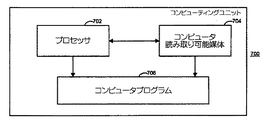
図7は、プレゼンテーション・システム100の様々な機能コンポーネントを実施するために使用することができ、様々な機能コンポーネントによってアクセスすることができ、あるいは様々な機能コンポーネントに含めることができるある種の機能コンポーネントを示す、汎用コンピューティングユニット700のブロック図である。コンピューティングユニット700の1つまたは複数のコンポーネントを使用して、ICマネージャ104、プレゼンテーション・マネージャ106、およびメディア・コンテンツ・マネージャ102を実施し、それらによってアクセス可能にし、あるいはそれらの中に含めることができる。例えば、図7の1つまたは複数のコンポーネントは、一緒にあるいは別々にパッケージ化して、様々な方法でプレゼンテーション・システム100のファンクションを(全体として、または部分的に)実施することができる。
FIG. 7 illustrates certain functional components that can be used to implement various functional components of
プロセッサ702は、コンピュータ読取り可能媒体704に対して、またコンピュータプログラム706に対して応答する。実プロセッサであっても仮想プロセッサであってもよいが、プロセッサ702は、コンピュータ実行可能命令を実行することにより、電子デバイスのファンクションを制御する。プロセッサ702は、アセンブリレベル、コンパイルレベル、またはマシンレベルで命令を実行して、特定のプロセスを実行することができる。そのような命令は、ソースコードまたは他の知られている任意のコンピュータプログラム設計ツールを使用して作成することができる。
The
コンピュータ読取り可能媒体704は、プロセッサ702によって実行可能な命令などのコンピュータ読取り可能データを記録すること、記憶すること、または伝送することの可能な現在知られている、または後で開発される任意の形式における任意の数および組合せのローカルデバイスまたはリモートデバイスを表す。とりわけ、コンピュータ読取り可能媒体704は、(例えば、読取り専用メモリ(read only memory)(「ROM」)、任意タイプのプログラマブルROM(programmable ROM)(「PROM」)、ランダムアクセスメモリ(random access memory)(「RAM」)、フラッシュメモリなどの)半導体メモリ、(フロッピィディスクドライブ、ハードディスクドライブ、磁気ドラム、磁気テープ、光磁気ディスクなどの)磁気ストレージデバイス、(任意タイプのコンパクトディスクやデジタル多用途ディスクなどの)光ストレージデバイス、バブルメモリ、キャッシュメモリ、コアメモリ、ホログラフィックメモリ、メモリスティック、紙テープ、パンチカード、またはそれらの任意の組合せとすることができ、あるいはそれらを含むことができる。コンピュータ読取り可能媒体704はまた、伝送媒体とそれに関連するデータを含むこともできる。伝送媒体/データの例は、それだけには限定されないが、被変調キャリア信号によって搬送されるパケット化されたデータや非パケット化されたデータなど有線伝送または無線伝送の任意の形態で実施されるデータを含んでいる。
Computer readable medium 704 may be any currently known or later developed computer that can record, store, or transmit computer-readable data, such as instructions executable by
コンピュータプログラム706は、データ上のあらかじめ決定されたオペレーションを電子的に制御する任意の信号処理方法または記憶された命令を表す。一般に、コンピュータプログラム706は、コンポーネントベースのソフトウェア開発についてのよく知られている実行によるソフトウェアコンポーネントとして実施され、(コンピュータ読取り可能媒体704などの)コンピュータ読取り可能媒体の形で符号化されるコンピュータ実行可能命令である。コンピュータプログラムは、様々な方法で、組み合わせ、あるいは分散することができる。
プレゼンテーション・システム100の場合に説明されるファンクション/コンポーネントは、コンピュータプログラムの特定の任意の実施形態による実施形態だけには限定されない。そうではなく、ファンクションは、データを伝え、または変換し、またプレゼンテーション・システム100の機能要素の任意の組合せの位置に配置され、あるいは任意の組合せによってアクセスされるハードウェア、ソフトウェア、ファームウェア、またはそれらの任意の組合せによって一般に実施し、またはそれらにおいて実行することができるプロセスである。
The functions / components described in the case of the
図7に対する参照を継続して、図8は、その中でプレゼンテーション・システム100のすべてまたは一部分を実施し、または使用することができる動作環境800の例示のコンフィギュレーションのブロック図である。動作環境800は、一般に多種多様な汎用または専用のコンピューティング環境を示す。動作環境800は、適切な動作環境の一例にすぎず、本明細書中で説明される1つ(または複数)のシステムおよび方法の使用または機能の範囲に関するどのような限定も示唆するようには意図されない。例えば、動作環境800は、現在知られており、または後で開発される、パーソナルコンピュータ、ワークステーション、サーバ、ポータブルデバイス、ラップトップ、タブレットなど、1タイプのコンピュータ、または光メディア・プレーヤや別のタイプのメディア・プレーヤなど、他の任意のタイプの電子デバイス、あるいはそれらの任意の態様とすることができる。動作環境800はまた、例えば分散コンピューティングネットワークまたはウェブサービスとすることもできる。動作環境800の特定の例は、DVDプレーヤやそれに関連するオペレーティングシステムなどの環境であり、この環境は、高精細DVD映画を再生することを容易にする。
With continued reference to FIG. 7, FIG. 8 is a block diagram of an exemplary configuration of an operating
図に示されるように、動作環境800は、プロセッサ702、コンピュータ読取り可能媒体704、およびコンピュータプログラム706を含めて、コンピューティングユニット700のコンポーネントを含み、あるいはコンポーネントにアクセスする。ストレージ804は、光ディスクなどの動作環境800に特に関連する追加の、または異なるコンピュータ読取り可能媒体を含んでおり、この動作環境は、光ディスクドライブ806によって処理される。よく知られており、広く使用可能な要素である1つまたは複数の内部バス920を使用して、コンピューティング環境800またはその要素の内部で、コンピューティング環境800またはその要素に対して、あるいはコンピューティング環境800またはその要素からデータ、アドレス、制御信号、および他の情報を搬送することができる。
As shown, the operating
1つ(または複数)の入力インターフェース808は、コンピューティング環境800に対する入力を供給する。入力は、ユーザインターフェースなど、任意タイプの現在知られており、または後で開発されるインターフェースを使用して収集することができる。ユーザインターフェースは、リモコン、ディスプレイ、マウス、ペン、スタイラス、トラックボール、キーボード、マイクロフォン、スキャニングデバイス、およびデータを入力するために使用されるすべてのタイプのデバイスなどのタッチ入力デバイスとすることができる。
One (or more) input interface 808 provides input to the
1つ(または複数)の出力インターフェース810は、動作環境800からの出力を供給する。1つ(または複数)の出力インターフェース810の例は、ディスプレイ、プリンタ、スピーカ、(光ディスクドライブ806や他のディスクドライブなどの)ドライブなどを含んでいる。
One (or more) output interfaces 810 provide output from the operating
1つ(または複数)の外部通信インターフェース812は、チャネル信号、データ信号、コンピュータ読取り可能媒体などの通信媒体を経由して別のエンティティから情報を受信するために、あるいは別のエンティティに対して情報を送信するために動作環境800の能力を高めるように使用可能である。1つ(または複数)の外部通信インターフェース812は、関連するネットワークサポートデバイスおよび/またはソフトウェア、あるいはインターフェースと一緒に、ケーブルモデム、データ端末装置、メディア・プレーヤ、データストレージデバイス、携帯型個人情報端末(personal digital assistant)、他の任意のデバイスまたはそのコンポーネント/組合せなどの要素とすることができ、あるいはその要素を含むことができる。
One (or more)
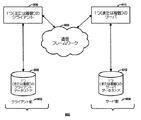
図9は、それに関連してプレゼンテーション・システム100または動作環境900を使用することができるクライアント−サーバ・アーキテクチャ900の簡略化された機能図である。プレゼンテーション・システム100および/または動作環境800の1つまたは複数の態様は、アーキテクチャ900のクライアント側902上に、あるいはアーキテクチャ900のサーバ側904上に表すことができる。図に示されるように、(任意のタイプ、例えば有線または無線の任意の公衆網または専用網とすることができる)通信フレームワーク903は、クライアント側902とサーバ側904との間の通信を容易に実行できるようにする。
FIG. 9 is a simplified functional diagram of a client-server architecture 900 that may use the
クライアント側902上では、ハードウェア、ソフトウェア、ファームウェア、またはそれらの任意の組合せの形で実施することができる1つまたは複数のクライアント906は、クライアントデータストア(client data store)908に対して応答する。クライアントデータストア908は、クライアント906に対してローカルな情報を記憶するために使用されるコンピュータ読取り可能媒体704とすることができる。サーバ側904上では、1つまたは複数のサーバ910は、サーバデータストア(server data store)912に対して応答する。クライアントデータストア908と同様に、サーバデータストア912は、サーバ910に対してローカルな情報を記憶するために使用される1つまたは複数のコンピュータ読取り可能媒体704を含むことができる。
On the client side 902, one or more clients 906, which can be implemented in hardware, software, firmware, or any combination thereof, responds to a
メディア・コンテンツと同期してユーザに対してインタラクティブ・コンテンツを提示するために使用されるプレゼンテーション・システムの様々な態様が、説明されている。しかしながら、プレゼンテーション・システムの説明されるコンポーネントのすべては必ずしも使用される必要があるとは限らず、またそれらのコンポーネントは、使用されるときに同時に存在する必要もないことが理解されるであろう。プレゼンテーション・システム100の場合にコンピュータプログラムであるとして説明されるファンクション/コンポーネントは、コンピュータプログラムの特定のどのような実施形態による実施だけには限定されない。そうではなく、ファンクションは、データを伝え、または変換するプロセスであり、またハードウェア、ソフトウェア、ファームウェア、またはそれらの任意の組合せによって一般に実施し、またはそれらにおいて実行することができるプロセスである。
Various aspects of a presentation system used to present interactive content to a user in synchronization with media content have been described. However, it will be understood that not all described components of the presentation system need necessarily be used, and that those components need not be present at the same time when used. . The functions / components described as being computer programs in the case of the
本明細書中の主題は、構造的特徴および/または方法論的動作に特有の言語で説明されているが、特許請求の範囲中で定義される主題は、必ずしも上記の特定の特徴または動作だけに限定されるとは限らないことも理解すべきである。そうではなく、上記の特定の特徴および動作は、特許請求の範囲を実施する形態の例として開示されている。 Although the subject matter herein is described in language specific to structural features and / or methodological actions, the subject matter defined in the claims is not necessarily limited to the specific features or acts described above. It should also be understood that it is not limited. Rather, the specific features and acts described above are disclosed as example forms of implementing the claims.
1つの要素が別の要素に対して応答しているとして示されるときには、それらの要素は、直接または間接に結合することができることがさらに理解されるであろう。本明細書中に示される接続は、要素間の結合するインターフェースまたは通信インターフェースを達成するために実際には論理的または物理的とすることができる。接続は、他の方法のうちでもとりわけ、ソフトウェアプロセスの間のプロセス間通信、またはネットワーク化コンピュータ間のマシン間通信として実施することができる。 It will be further understood that when one element is shown as responding to another element, the elements can be coupled directly or indirectly. The connections shown herein may actually be logical or physical to achieve a coupling interface or communication interface between elements. The connection can be implemented as interprocess communication between software processes or machine-to-machine communication between networked computers, among other methods.
用語「例示(exemplary)」は、本明細書中では1つの例、インスタンス、または例証としての役割を果たすことを意味するように使用される。「例示」として本明細書中で説明される任意の実施形態またはその態様は、必ずしも他の実施形態またはその態様よりも好ましい、または有利であるものとして構築されるべきものとは限らない。 The term “exemplary” is used herein to mean serving as an example, instance, or illustration. Any embodiment or aspect thereof described herein as “exemplary” is not necessarily to be construed as preferred or advantageous over other embodiments or aspects thereof.
上記の特定の実施形態以外の実施形態は、添付の特許請求の範囲の趣旨および範囲を逸脱することなく工夫することができることが理解されるので、本明細書中の主題の範囲は、添付の特許請求の範囲によって支配されることになることが意図される。 It is understood that embodiments other than the specific embodiments described above can be devised without departing from the spirit and scope of the appended claims, so the scope of the subject matter herein is It is intended that it be governed by the claims.
Claims (19)
第1の時刻に、第1のメディア・ソースから受信される第1の組のメディア・サンプルの再生を開始するステップと、
第2の時刻にスケジュールされるその再生の開始が、前記第1の時刻からあらかじめ決定された時間量で行われる、第2のメディア・ソースから受信可能な第2の組のメディア・サンプルを識別するステップと、
複数の組の静的特性を確認するステップと、
前記第2のメディア・ソースのアイデンティティに基づいて、前記複数の組の静的特性から1組の静的特性を選択するステップと
前記第1の組のメディア・サンプルの再生中に、前記プレゼンテーション・システムの動的特性を確認するステップと、
前記選択された1組の静的特性および前記動的特性に基づいて、時間オフセット値を決定するステップと、
前記時間オフセット値に基づいた量だけ前記第2の時刻からオフセットされる事前レンダリング時間に前記第2の組のメディア・サンプルの少なくとも一部分を事前レンダリングするステップと
を含む方法。A method for playing media content composed in multiple sets of media samples, wherein each set of media samples is receivable from a media source using a presentation system, comprising:
Initiating playback of a first set of media samples received from a first media source at a first time;
Identifying a second set of media samples receivable from a second media source whose start of playback scheduled at a second time occurs for a predetermined amount of time from said first time And steps to
Checking multiple sets of static properties;
Selecting a set of static characteristics from the plurality of sets of static characteristics based on the identity of the second media source and during playback of the first set of media samples Checking the dynamic characteristics of the system;
Determining a time offset value based on the selected set of static characteristics and the dynamic characteristics;
Pre-rendering at least a portion of the second set of media samples at a pre-rendering time offset from the second time by an amount based on the time offset value.
さらに含む、請求項1に記載の方法。The method of claim 1, further comprising adjusting the time offset value based on a processing load in the presentation system.
第1のメディア・ソースからの第1の組のサンプルを再生するように、そして第2のメディア・ソースからの第2の組のサンプルを再生するように動作可能なメディア・コンテンツ・マネージャと、
前記第1の組のメディア・サンプルのアイデンティティがそこからは確認可能でないプレイリストにアクセスし、前記メディア・コンテンツ・マネージャと通信するように構成された、プレゼンテーション・マネージャと
を備え、前記プレゼンテーション・マネージャは、
前記第2の組のメディア・サンプルのアイデンティティを前記プレイリストから確認し、
前記第2のメディア・ソースに関連する静的特性を確認し、
前記第1の組のメディア・サンプルの再生中に動的特性を確認し、
前記静的特性および前記動的特性に基づいて時間オフセット値を決定し、
前記時間オフセット値に基づいた量だけ前記第2の時刻からオフセットされる事前レンダリング時間において、前記第2の組のメディア・サンプルの少なくとも一部分の事前レンダリングのために構成する
ように動作可能であり、
前記第2の組のメディア・サンプルの前記部分が事前レンダリングされたときに、前記メディア・コンテンツ・マネージャは、前記第2の時刻に前記第2の組のサンプルの前記事前レンダリングされた部分を再生するシステム。A system for playing media content comprised of multiple sets of media samples, each set of media samples being receivable from a media source,
A media content manager operable to play a first set of samples from a first media source and to play a second set of samples from a second media source;
A presentation manager configured to access a playlist in which the identity of the first set of media samples is not verifiable therefrom and to communicate with the media content manager; Is
Confirming the identity of the second set of media samples from the playlist;
Confirm static properties associated with the second media source;
Checking dynamic characteristics during playback of the first set of media samples;
Determining a time offset value based on the static and dynamic characteristics;
Operable to pre-render at least a portion of the second set of media samples at a pre-rendering time offset from the second time by an amount based on the time offset value;
When the portion of the second set of media samples has been pre-rendered, the media content manager may use the pre-rendered portion of the second set of samples at the second time. Replay system.
第1の時刻に、第1のメディア・ソースから受信される第1の組のメディア・サンプルの再生を開始するステップと、Initiating playback of a first set of media samples received from a first media source at a first time;
第2の時刻にスケジュールされるその再生の開始が、前記第1の時刻からあらかじめ決定された時間量で行われる、前記第1のメディア・ソースと異なるデバイスからなる第2のメディア・ソースから受信可能な第2の組のメディア・サンプルを識別するステップと、Received from a second media source consisting of a device different from the first media source, whose playback scheduled at a second time is performed for a predetermined amount of time from the first time Identifying a possible second set of media samples;
前記第2のメディア・ソースに関連する静的特性を確認するステップと、Confirming static characteristics associated with the second media source;
前記第1の組のメディア・サンプルの再生中に、前記プレゼンテーション・システムの動的特性を確認するステップと、Confirming dynamic characteristics of the presentation system during playback of the first set of media samples;
前記静的特性および前記動的特性に基づいて、時間オフセット値を決定するステップと、Determining a time offset value based on the static characteristic and the dynamic characteristic;
前記時間オフセット値に基づいた量だけ前記第2の時刻からオフセットされる事前レンダリング時間に前記第2の組のメディア・サンプルの少なくとも一部分を事前レンダリングするステップとPre-rendering at least a portion of the second set of media samples at a pre-rendering time offset from the second time by an amount based on the time offset value;
を含む方法。Including methods.
Applications Claiming Priority (5)
| Application Number | Priority Date | Filing Date | Title |
|---|---|---|---|
| US69594405P | 2005-07-01 | 2005-07-01 | |
| US60/695,944 | 2005-07-01 | ||
| US11/405,816 | 2006-04-18 | ||
| US11/405,816 US7500175B2 (en) | 2005-07-01 | 2006-04-18 | Aspects of media content rendering |
| PCT/US2006/023912 WO2007005272A2 (en) | 2005-07-01 | 2006-06-20 | Aspects of media content rendering |
Publications (3)
| Publication Number | Publication Date |
|---|---|
| JP2009502049A JP2009502049A (en) | 2009-01-22 |
| JP2009502049A5 JP2009502049A5 (en) | 2009-06-25 |
| JP4907653B2 true JP4907653B2 (en) | 2012-04-04 |
Family
ID=37591294
Family Applications (1)
| Application Number | Title | Priority Date | Filing Date |
|---|---|---|---|
| JP2008519383A Expired - Fee Related JP4907653B2 (en) | 2005-07-01 | 2006-06-20 | Aspects of media content rendering |
Country Status (6)
| Country | Link |
|---|---|
| US (1) | US7500175B2 (en) |
| EP (1) | EP1899853A4 (en) |
| JP (1) | JP4907653B2 (en) |
| KR (1) | KR101246976B1 (en) |
| CN (1) | CN102089823B (en) |
| WO (1) | WO2007005272A2 (en) |
Families Citing this family (41)
| Publication number | Priority date | Publication date | Assignee | Title |
|---|---|---|---|---|
| US8656268B2 (en) | 2005-07-01 | 2014-02-18 | Microsoft Corporation | Queueing events in an interactive media environment |
| US8799757B2 (en) | 2005-07-01 | 2014-08-05 | Microsoft Corporation | Synchronization aspects of interactive multimedia presentation management |
| US8225231B2 (en) | 2005-08-30 | 2012-07-17 | Microsoft Corporation | Aggregation of PC settings |
| US8325800B2 (en) | 2008-05-07 | 2012-12-04 | Microsoft Corporation | Encoding streaming media as a high bit rate layer, a low bit rate layer, and one or more intermediate bit rate layers |
| US8379851B2 (en) * | 2008-05-12 | 2013-02-19 | Microsoft Corporation | Optimized client side rate control and indexed file layout for streaming media |
| US9436688B2 (en) * | 2008-05-28 | 2016-09-06 | Adobe Systems Incorporated | Durational referencing cue points for linking multimedia files |
| US7925774B2 (en) * | 2008-05-30 | 2011-04-12 | Microsoft Corporation | Media streaming using an index file |
| US8265140B2 (en) * | 2008-09-30 | 2012-09-11 | Microsoft Corporation | Fine-grained client-side control of scalable media delivery |
| JP5361697B2 (en) * | 2009-12-21 | 2013-12-04 | キヤノン株式会社 | Display control apparatus and display control method |
| US20110268427A1 (en) * | 2010-04-30 | 2011-11-03 | Brelay Herve | Methods and apparatuses for a projected pvr experience |
| US20120159395A1 (en) | 2010-12-20 | 2012-06-21 | Microsoft Corporation | Application-launching interface for multiple modes |
| US8689123B2 (en) | 2010-12-23 | 2014-04-01 | Microsoft Corporation | Application reporting in an application-selectable user interface |
| US8612874B2 (en) | 2010-12-23 | 2013-12-17 | Microsoft Corporation | Presenting an application change through a tile |
| US9423951B2 (en) | 2010-12-31 | 2016-08-23 | Microsoft Technology Licensing, Llc | Content-based snap point |
| US9383917B2 (en) * | 2011-03-28 | 2016-07-05 | Microsoft Technology Licensing, Llc | Predictive tiling |
| US9158445B2 (en) | 2011-05-27 | 2015-10-13 | Microsoft Technology Licensing, Llc | Managing an immersive interface in a multi-application immersive environment |
| US8893033B2 (en) | 2011-05-27 | 2014-11-18 | Microsoft Corporation | Application notifications |
| US9104440B2 (en) | 2011-05-27 | 2015-08-11 | Microsoft Technology Licensing, Llc | Multi-application environment |
| US9104307B2 (en) | 2011-05-27 | 2015-08-11 | Microsoft Technology Licensing, Llc | Multi-application environment |
| US9658766B2 (en) | 2011-05-27 | 2017-05-23 | Microsoft Technology Licensing, Llc | Edge gesture |
| US20130167028A1 (en) * | 2011-06-01 | 2013-06-27 | Adobe Systems Incorporated | Restricting media content rendering |
| US20130057587A1 (en) | 2011-09-01 | 2013-03-07 | Microsoft Corporation | Arranging tiles |
| US10353566B2 (en) | 2011-09-09 | 2019-07-16 | Microsoft Technology Licensing, Llc | Semantic zoom animations |
| US9557909B2 (en) | 2011-09-09 | 2017-01-31 | Microsoft Technology Licensing, Llc | Semantic zoom linguistic helpers |
| US8922575B2 (en) | 2011-09-09 | 2014-12-30 | Microsoft Corporation | Tile cache |
| US9244802B2 (en) | 2011-09-10 | 2016-01-26 | Microsoft Technology Licensing, Llc | Resource user interface |
| US9146670B2 (en) | 2011-09-10 | 2015-09-29 | Microsoft Technology Licensing, Llc | Progressively indicating new content in an application-selectable user interface |
| US8933952B2 (en) | 2011-09-10 | 2015-01-13 | Microsoft Corporation | Pre-rendering new content for an application-selectable user interface |
| CN104427360B (en) * | 2013-09-06 | 2017-12-29 | 刘镇崇 | System and method for editing and playing multi-track media clip |
| EP3126969A4 (en) | 2014-04-04 | 2017-04-12 | Microsoft Technology Licensing, LLC | Expandable application representation |
| EP3129846A4 (en) | 2014-04-10 | 2017-05-03 | Microsoft Technology Licensing, LLC | Collapsible shell cover for computing device |
| EP3129847A4 (en) | 2014-04-10 | 2017-04-19 | Microsoft Technology Licensing, LLC | Slider cover for computing device |
| US10592080B2 (en) | 2014-07-31 | 2020-03-17 | Microsoft Technology Licensing, Llc | Assisted presentation of application windows |
| US10678412B2 (en) | 2014-07-31 | 2020-06-09 | Microsoft Technology Licensing, Llc | Dynamic joint dividers for application windows |
| US10254942B2 (en) | 2014-07-31 | 2019-04-09 | Microsoft Technology Licensing, Llc | Adaptive sizing and positioning of application windows |
| US10642365B2 (en) | 2014-09-09 | 2020-05-05 | Microsoft Technology Licensing, Llc | Parametric inertia and APIs |
| US9674335B2 (en) | 2014-10-30 | 2017-06-06 | Microsoft Technology Licensing, Llc | Multi-configuration input device |
| CN114554386B (en) | 2015-02-06 | 2025-02-11 | 杜比实验室特许公司 | Hybrid priority-based rendering system and method for adaptive audio |
| US10255947B2 (en) * | 2015-08-31 | 2019-04-09 | Netflix, Inc. | Mitigating drift in audiovisual assets |
| KR101853441B1 (en) * | 2016-09-23 | 2018-05-02 | 재단법인 실감교류인체감응솔루션연구단 | Client device and local clock skew compensation method thereof |
| US12236514B2 (en) | 2020-05-14 | 2025-02-25 | Google Llc | Efficiently rendering video having dynamic components |
Family Cites Families (18)
| Publication number | Priority date | Publication date | Assignee | Title |
|---|---|---|---|---|
| KR100363506B1 (en) * | 1994-10-24 | 2003-02-19 | 소니 가부시끼 가이샤 | Playback device, playback method, and recording medium |
| US5659539A (en) * | 1995-07-14 | 1997-08-19 | Oracle Corporation | Method and apparatus for frame accurate access of digital audio-visual information |
| US6385596B1 (en) * | 1998-02-06 | 2002-05-07 | Liquid Audio, Inc. | Secure online music distribution system |
| JP3961693B2 (en) * | 1998-09-28 | 2007-08-22 | 株式会社東芝 | Video display device |
| GB2344453B (en) * | 1998-12-01 | 2002-12-11 | Eidos Technologies Ltd | Multimedia editing and composition system having temporal display |
| DE60040326D1 (en) * | 1999-04-02 | 2008-11-06 | Matsushita Electric Industrial Co Ltd | Optical disc, recording device and reproducing device |
| US8495679B2 (en) * | 2000-06-30 | 2013-07-23 | Thomson Licensing | Method and apparatus for delivery of television programs and targeted de-coupled advertising |
| EP1312206A1 (en) * | 2000-08-16 | 2003-05-21 | Koninklijke Philips Electronics N.V. | Method of playing multimedia applications |
| US7072908B2 (en) * | 2001-03-26 | 2006-07-04 | Microsoft Corporation | Methods and systems for synchronizing visualizations with audio streams |
| EP1286349A1 (en) * | 2001-08-21 | 2003-02-26 | Canal+ Technologies Société Anonyme | File and content management |
| JP3852568B2 (en) * | 2001-09-11 | 2006-11-29 | ソニー株式会社 | Apparatus and method for creating multimedia presentation |
| US20040034622A1 (en) * | 2002-08-13 | 2004-02-19 | Espinoza Danny Javier | Applications software and method for authoring and communicating multimedia content in a multimedia object communication and handling platform |
| US7290057B2 (en) * | 2002-08-20 | 2007-10-30 | Microsoft Corporation | Media streaming of web content data |
| EP2246857A3 (en) * | 2002-09-12 | 2010-12-01 | Panasonic Corporation | Recording medium, playback device, program, playback method, and recording method |
| JP4727908B2 (en) * | 2003-04-23 | 2011-07-20 | シャープ株式会社 | Content reproduction apparatus, computer program, and recording medium |
| JP2004357275A (en) * | 2003-05-07 | 2004-12-16 | Nec Corp | Video recording device, recording medium, video recording method and program |
| EP1641260A4 (en) * | 2003-06-30 | 2009-12-16 | Panasonic Corp | RECORDING MEDIA, PLAYING DEVICE, RECORDING METHOD, PROGRAM AND PLAYBACK METHOD |
| KR101102639B1 (en) * | 2003-11-12 | 2012-01-04 | 파나소닉 주식회사 | Recording medium, playback apparatus and method, recording method, and computer-readable medium |
-
2006
- 2006-04-18 US US11/405,816 patent/US7500175B2/en not_active Expired - Fee Related
- 2006-06-20 WO PCT/US2006/023912 patent/WO2007005272A2/en not_active Ceased
- 2006-06-20 EP EP06773591.0A patent/EP1899853A4/en not_active Withdrawn
- 2006-06-20 KR KR1020077030646A patent/KR101246976B1/en not_active Expired - Fee Related
- 2006-06-20 JP JP2008519383A patent/JP4907653B2/en not_active Expired - Fee Related
- 2006-06-20 CN CN2006800242396A patent/CN102089823B/en not_active Expired - Fee Related
Also Published As
| Publication number | Publication date |
|---|---|
| KR101246976B1 (en) | 2013-03-25 |
| US7500175B2 (en) | 2009-03-03 |
| KR20080023318A (en) | 2008-03-13 |
| EP1899853A2 (en) | 2008-03-19 |
| CN102089823A (en) | 2011-06-08 |
| WO2007005272A2 (en) | 2007-01-11 |
| EP1899853A4 (en) | 2015-06-10 |
| JP2009502049A (en) | 2009-01-22 |
| US20070006064A1 (en) | 2007-01-04 |
| WO2007005272A3 (en) | 2014-07-03 |
| CN102089823B (en) | 2013-09-04 |
Similar Documents
| Publication | Publication Date | Title |
|---|---|---|
| JP4907653B2 (en) | Aspects of media content rendering | |
| JP5553608B2 (en) | Aspects of when to render media content | |
| CN101213606B (en) | Synchronization system and method for interactive multimedia presentation management | |
| US8799757B2 (en) | Synchronization aspects of interactive multimedia presentation management | |
| US7721308B2 (en) | Synchronization aspects of interactive multimedia presentation management | |
| JP2009501459A (en) | Declarative response to state changes in interactive multimedia environment | |
| JP2008545335A5 (en) | ||
| JP4812833B2 (en) | Synchronous aspects of interactive multimedia presentation management | |
| JP5619838B2 (en) | Synchronicity of interactive multimedia presentation management | |
| JP2009500909A5 (en) |
Legal Events
| Date | Code | Title | Description |
|---|---|---|---|
| A521 | Request for written amendment filed |
Free format text: JAPANESE INTERMEDIATE CODE: A523 Effective date: 20090511 |
|
| A621 | Written request for application examination |
Free format text: JAPANESE INTERMEDIATE CODE: A621 Effective date: 20090511 |
|
| RD04 | Notification of resignation of power of attorney |
Free format text: JAPANESE INTERMEDIATE CODE: A7424 Effective date: 20110908 |
|
| TRDD | Decision of grant or rejection written | ||
| A01 | Written decision to grant a patent or to grant a registration (utility model) |
Free format text: JAPANESE INTERMEDIATE CODE: A01 Effective date: 20111213 |
|
| A01 | Written decision to grant a patent or to grant a registration (utility model) |
Free format text: JAPANESE INTERMEDIATE CODE: A01 |
|
| A61 | First payment of annual fees (during grant procedure) |
Free format text: JAPANESE INTERMEDIATE CODE: A61 Effective date: 20120111 |
|
| FPAY | Renewal fee payment (event date is renewal date of database) |
Free format text: PAYMENT UNTIL: 20150120 Year of fee payment: 3 |
|
| R150 | Certificate of patent or registration of utility model |
Free format text: JAPANESE INTERMEDIATE CODE: R150 Ref document number: 4907653 Country of ref document: JP Free format text: JAPANESE INTERMEDIATE CODE: R150 |
|
| R250 | Receipt of annual fees |
Free format text: JAPANESE INTERMEDIATE CODE: R250 |
|
| S111 | Request for change of ownership or part of ownership |
Free format text: JAPANESE INTERMEDIATE CODE: R313113 |
|
| R350 | Written notification of registration of transfer |
Free format text: JAPANESE INTERMEDIATE CODE: R350 |
|
| R250 | Receipt of annual fees |
Free format text: JAPANESE INTERMEDIATE CODE: R250 |
|
| R250 | Receipt of annual fees |
Free format text: JAPANESE INTERMEDIATE CODE: R250 |
|
| R250 | Receipt of annual fees |
Free format text: JAPANESE INTERMEDIATE CODE: R250 |
|
| R250 | Receipt of annual fees |
Free format text: JAPANESE INTERMEDIATE CODE: R250 |
|
| LAPS | Cancellation because of no payment of annual fees |