JP4339040B2 - Shooting and editing system, shooting and editing method, and program - Google Patents
Shooting and editing system, shooting and editing method, and program Download PDFInfo
- Publication number
- JP4339040B2 JP4339040B2 JP2003277067A JP2003277067A JP4339040B2 JP 4339040 B2 JP4339040 B2 JP 4339040B2 JP 2003277067 A JP2003277067 A JP 2003277067A JP 2003277067 A JP2003277067 A JP 2003277067A JP 4339040 B2 JP4339040 B2 JP 4339040B2
- Authority
- JP
- Japan
- Prior art keywords
- guidance
- shooting
- data
- editing
- sensor
- Prior art date
- Legal status (The legal status is an assumption and is not a legal conclusion. Google has not performed a legal analysis and makes no representation as to the accuracy of the status listed.)
- Expired - Fee Related
Links
Images


Landscapes
- Television Signal Processing For Recording (AREA)
- Studio Devices (AREA)
Description
本発明は、撮影装置に関し、特に、環境対応ガイダンス機能を備えた撮影装置に関する。さらに、この撮影装置により撮影されたデータを編集する編集技術に関する。 The present invention relates to a photographing apparatus, and more particularly, to a photographing apparatus having an environment-friendly guidance function. Furthermore, the present invention relates to an editing technique for editing data photographed by the photographing apparatus.
最近、家庭用電気機器や家庭用情報機器などのデジタル化に伴い、画像データや動画データなどに関してもデジタルデータとして保存する方式が主流になっている。 Recently, with the digitization of household electric appliances and household information appliances, a method of storing image data and moving image data as digital data has become mainstream.
一方、デジタル化が進むにつれてユーザ層が広がり、デジタルデータ処理にあまり詳しくないユーザが使用するケースも多くなっている。さらに、撮影装置において撮影時及び特に撮影済みデータの編集時における処理は、一般的なユーザにとっても煩雑であるため、より一層やさしいユーザインターフェイスの提供が望まれる。 On the other hand, as digitization progresses, the user group expands, and there are many cases where users who are not familiar with digital data processing use it. Furthermore, since processing at the time of shooting in the shooting apparatus and particularly at the time of editing already shot data is troublesome for a general user, it is desired to provide a much easier user interface.
本発明は、撮影操作及び撮影済みデータに基づく編集処理を簡単かつ楽しく行なうことができる撮影装置を提供することを目的とする。 An object of the present invention is to provide a photographing apparatus capable of performing photographing operation and editing processing based on photographed data easily and happily.
本発明の一観点によれば、センサを備えた環境測定部を有する撮影装置と関連付け可能な記憶装置であって、一連の撮影対象を複数の撮影データに分割して格納する撮影データ保存エリアと、分割された前記撮影データのそれぞれに対して付されたガイダンスファイルであって、分割された前記撮影データと対応付けされているガイダンスファイルを格納するガイダンスファイル保存エリアと、
前記センサにより測定されたセンサデータを格納するセンサデータ保存エリアとを有する記憶装置が提供される。
According to one aspect of the present invention, a storage device that can be associated with an imaging device having an environment measurement unit including a sensor, and a shooting data storage area that divides and stores a series of shooting targets into a plurality of shooting data; A guidance file attached to each of the divided shooting data, a guidance file storage area for storing a guidance file associated with the divided shooting data;
A storage device having a sensor data storage area for storing sensor data measured by the sensor is provided.
さらに、ユーザ定義ガイダンスファイル保存エリアと前記センサと関連付けされたオブジェクト変更処理部とを有し、前記ガイダンスファイルは、さらに、リソース関連と基本ストリーム生成関連の定義オブジェクトと、ストリーム処理と関連定義オブジェクトとの初期値を格納し、前記ユーザ定義ガイダンスファイル保存エリアは、前記オブジェクト変更処理部により動的に変更されたリソース関連と基本ストリーム生成関連の定義オブジェクト又はストリーム処理関連の定義オブジェクトを格納することを特徴とする。
環境を測定するステップと、測定された環境に基づいて、撮影手順の撮影ガイダンス候補を絞り込むステップと、絞り込まれた前記撮影ガイダンス候補を提示することによりユーザに適したガイダンス候補の選択を促すステップと、を有する。
And a user-defined guidance file storage area and an object change processing unit associated with the sensor. The guidance file further includes a resource-related and basic stream generation-related definition object, a stream process and a related definition object, The user-defined guidance file storage area stores resource-related and basic stream generation-related definition objects or stream processing-related definition objects dynamically changed by the object change processing unit. Features.
A step of measuring the environment, a step of narrowing down the shooting guidance candidates of the shooting procedure based on the measured environment, and a step of prompting the user to select a suitable guidance candidate by presenting the narrowed down shooting guidance candidates Have.
以上、本発明によれば、センサにより測定された環境により撮影時のガイダンス候補中から環境に適したガイダンス候補のみが絞り込まれるため、ユーザは、選択すべきガイダンス候補中から迅速かつ簡単にガイダンスを選択することができるという利点がある。 As described above, according to the present invention, since only the guidance candidates suitable for the environment are narrowed down from the guidance candidates at the time of shooting based on the environment measured by the sensor, the user can quickly and easily provide guidance from the guidance candidates to be selected. There is an advantage that it can be selected.
また、撮影時の環境を反映した映像データを自動的に編集することができる。従って、より臨場感に溢れる作品を簡単に編集することができるという利点がある。 In addition, video data reflecting the shooting environment can be automatically edited. Therefore, there is an advantage that a work with more realistic feeling can be easily edited.
本発明に係る技術は、センサ部により取得した周辺環境を、撮影のための光学絞りなどに用いるというよりは、むしろ撮影手順を提示するガイダンスの選択又はエフェクトなどの映像の装飾であって、環境にふさわしい装飾などを選択するのに用いる。 Rather than using the surrounding environment acquired by the sensor unit for an optical aperture for shooting, the technology according to the present invention is a video decoration such as selection of a guidance or effect for presenting a shooting procedure, Used to select decorations that are appropriate for the situation.
まず、本発明の前提となるに撮影装置が備えるガイダンス機能について説明する。ガイダンス機能は、予め複数用意されている典型的な撮影シーン候補の中から、これから撮影するシーン又はそれに近い撮影シーン候補を選択し、選択された撮影シーン候補により撮影指標となるようなガイダンスを提供する機能である。ユーザは、選択した撮影シーン候補が提供するガイダンスに沿って撮影を行うことができる。より具体的に説明すると、本発明に係るガイダンス機構は、映画に例えれば、撮影監督であり、ユーザはカメラマンである。さらに、一定の手順で撮影されたデータであれば、その後の編集処理などに関する負荷も少なくなる。 First, a guidance function provided in the photographing apparatus as a premise of the present invention will be described. The guidance function provides a guidance that can be used as a shooting index by selecting a scene to be shot or a shooting scene candidate close to it from typical shooting scene candidates prepared in advance. It is a function to do. The user can perform shooting according to the guidance provided by the selected shooting scene candidate. More specifically, the guidance mechanism according to the present invention is a cinematographer and a user is a cameraman, if compared to a movie. Furthermore, if the data is taken in a certain procedure, the load related to the subsequent editing process is reduced.
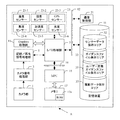
以下、ガイダンス機能付き撮影装置について説明を行う。図1は、ガイダンス機能付きビデオカメラの一構成例を示す機能ブロック図である。図1に示すように、ガイダンス機能付き撮影装置Aは、カメラ部1と、カメラ信号処理部3と、記録/再生信号処理部5と、I/O処理部7と、グラフィックス(Graphics)処理部11と、制御部(MPU)15と、メモリ17であってアプリケーションプログラムを格納するROM17aを有するメモリと、通信制御部21と、を有している。通信制御部21は、例えば、USBやIEEE1394などの規格に基づいて他の機器との間でデータ転送を行うために設けられている。
Hereinafter, a photographing apparatus with a guidance function will be described. FIG. 1 is a functional block diagram illustrating a configuration example of a video camera with a guidance function. As shown in FIG. 1, the photographing apparatus A with a guidance function includes a camera unit 1, a camera signal processing unit 3, a recording / playback
さらに、本実施の形態によるガイダンス機能付き撮影装置Aは、例えば汎用バス12を介してI/O処理部7と関連付けされる記憶装置31を有している。記憶装置31は、例えば、ガイダンス機能付き撮影装置Aの他の部分と着脱可能に設けられており、ガイダンスファイル保存エリア(領域)33と、ユーザ定義ガイダンスファイル保存エリア(領域)35と、撮影データ保存エリア(領域)37とを有している。撮影装置が内蔵されていても良い。
Furthermore, the imaging device A with a guidance function according to the present embodiment includes a
撮影された映像信号(光信号)は、カメラ部1に設けられたレンズ、CCD固体撮像素子(図示せず)などを通して電気信号に変換され、カメラ処理部3においてデジタル化を含む信号処理が行われる。信号処理により生成した映像信号は、記録/再生信号処理部5において、必要なコーデックによりデータ圧縮が行われ、I/O処理部7を介して記憶装置31の撮影データ保存エリア37に書き込まれる。音声信号に関しても、アナログ信号をデジタル化し、必要なコーデックで圧縮、I/O処理部7で映像信号系と同期をとり、記憶装置31の撮影データ保存エリア37に書き込む。
The photographed video signal (optical signal) is converted into an electrical signal through a lens provided in the camera unit 1, a CCD solid-state imaging device (not shown), and the like, and the camera processing unit 3 performs signal processing including digitization. Is called. The video signal generated by the signal processing is subjected to data compression by a necessary codec in the recording / reproduction
ガイダンス機能に利用されるガイダンスファイルは、複数のガイダンスファイルがガイダンスファイル保存エリア33に保存されている。ユーザが、撮影前にこれから撮影するイベントに関連する、或いは、希望のガイダンスを選択すると、撮影開始時にGUI(グラフィック ユーザ インターフェイス)や音声などのガイダンスが適宜提示され、提示されたガイダンスに沿って撮影を開始する。
The guidance file used for the guidance function has a plurality of guidance files stored in the guidance
本発明に係る撮影装置Aは、上記の各構成要素に加えて、さらに、I/O処理部7と関連付けされる外部センサ23が設けられている。外部センサ23は、例えば、温度センサ23−1と、湿度センサ23−2と、GPS(Global Positioning System)23−3と、高度センサ23−4と、加速度センサ23−5と、光度センサ23−6と、を備えている。その他のセンサを備えていても良い。また、記憶装置31に、センサによりセンシングされたデータを保存するセンサデータ保存エリア32が設けられている。尚、外部センサ23は、ガイダンス機能付き撮影装置(ビデオカメラ)本体(A)と着脱可能又は固定して取り付けられている。
The imaging apparatus A according to the present invention is further provided with an external sensor 23 associated with the I / O processing unit 7 in addition to the above-described components. The external sensor 23 includes, for example, a temperature sensor 23-1, a humidity sensor 23-2, a GPS (Global Positioning System) 23-3, an altitude sensor 23-4, an acceleration sensor 23-5, and a light intensity sensor 23-. 6 are provided. Other sensors may be provided. The
ガイダンス機能つきビデオカメラ本体(A)に、外部センサ23を取り付けることにより、センサによりセンシングされた環境データに基づく状況に応じて、プログラムが撮影時選択されたガイダンスに対し、そのガイダンスで使用するリソース、例えばオープニング時のテーマリソース、サブタイトルやトランジション内容、ストリーム分割割合、特殊効果、効果音、BGMなどを動的に変更する。そして、撮影データを編集する場合には、その状況にあった自動編集を行う。 By attaching the external sensor 23 to the video camera body (A) with a guidance function, resources used in the guidance for the guidance selected at the time of shooting according to the situation based on the environmental data sensed by the sensor. For example, theme resources at the time of opening, subtitles and transition contents, stream division ratios, special effects, sound effects, BGM, and the like are dynamically changed. Then, when editing shooting data, automatic editing is performed according to the situation.
ビデオカメラの電源投入後であって撮影を開始する前に、システムが複数のセンサ情報からその環境を求め、種々のガイダンスカテゴリー中から状況に合ったガイダンスを自動的に絞込みそのガイダンスの選択を容易にする。さらに、複数のセンサ情報に基づいて、ビデオカメラ内に保存されているセンサ情報に対応するシーンがシーン確定データベースに存在する場合は、自動的にガイダンスを選択しユーザに“確定”を促す表示を行う。
より具体的には、以下に説明するようないくつかのケースに分けられる。
After the video camera is turned on and before shooting, the system determines the environment from multiple sensor information and automatically narrows down the guidance according to the situation from various guidance categories, making it easy to select the guidance To. Furthermore, when a scene corresponding to the sensor information stored in the video camera exists in the scene determination database based on a plurality of sensor information, the guidance is automatically selected and a display prompting the user to “confirm” is displayed. Do.
More specifically, it can be divided into several cases as described below.
1.単独のセンサを利用するケース、2.複数のセンサを利用するケース。
単独のセンサを利用するケースにおいては、例えば、下記の編集を行う。
(1) 外気温センサを利用するケース(表1参照)。
1. 1. Case using a single sensor Case using multiple sensors.
In the case of using a single sensor, for example, the following editing is performed.
(1) Case of using an outside air temperature sensor (see Table 1).
外気温センサを用いた場合であって、外気温によりフレーム枠の種類を変更する例について表1を参照して説明を行う。まず、撮影時の外気温データをガイダンスユーザ定義オブジェクト(後述する)に保存する。編集時に、その値を利用して装飾用に用いる同一ガイダンス内の別デザインのフレーム枠(一般にリソースと呼ぶ)を合成するシーケンスにおいて、標準枠のデザインが木枠のフレームであったとする。この場合、センサデータに応じてフレーム枠を、例えば表1に示すように変更する。 An example in which the type of the frame frame is changed according to the outside air temperature when the outside air temperature sensor is used will be described with reference to Table 1. First, outside temperature data at the time of shooting is stored in a guidance user-defined object (described later). It is assumed that the design of the standard frame is a frame of a wooden frame in a sequence for synthesizing a frame frame of another design (generally called a resource) within the same guidance that is used for decoration using the value at the time of editing. In this case, the frame frame is changed as shown in Table 1, for example, according to the sensor data.
・外気温とフレーム枠の種類とシーン抽出定義 *1と**定義との関係
マイナス気温0度〜5度、6度〜15度、16度〜25度、26度〜30度、31度以上のそれぞれの環境に対して、フレーム枠をそれぞれ、白、ブルー、水色、緑、オレンジ、赤、にする。シーン抽出定義において、白成分が80%以上のところを抽出し、青成分が80%以上のところを抽出し、水色成分が80%以上のところを抽出し、緑成分が80%以上のところを抽出し、緑〜オレンジ成分が30%以上のところを抽出し、オレンジ〜赤成分が40%以上のところを抽出する。ここでは、選択されるフレーム枠のカテゴリーとして色による表現とダイレクトな表現によるものに分類した。
・ Outside air temperature, frame frame type and scene extraction definition * 1 and ** relationship between minus temperature 0 to 5 degrees, 6 to 15 degrees, 16 to 25 degrees, 26 to 30 degrees, 31 degrees or more For each environment, the frame is white, blue, light blue, green, orange, red. In the scene extraction definition, the white component is extracted at 80% or more, the blue component is extracted at 80% or more, the light blue component is extracted at 80% or more, and the green component is at 80% or more. Extract a portion where the green to orange component is 30% or more, and extract a portion where the orange to red component is 40% or more. In this case, the categories of frame frames to be selected are classified into colors and direct expressions.
2.複数のセンサを利用するケース
複数のセンサを使うことによって上記の選択されるフレーム枠の選択範囲はさらに拡大させることができる。その例について表2を参照して説明する。
2. Case of using a plurality of sensors By using a plurality of sensors, the selection range of the frame frame to be selected can be further expanded. The example will be described with reference to Table 2.
(1.1) 外気温センサと湿度センサの組み合わせによるフレーム枠の種類
異なる2つのセンサ、例えば外気温センサと湿度のセンサとを併用することにより、選択可能なフレーム枠の種類をさらに増やすことが可能となる。特に、気温により湿度に関する影響が全く異なることから、選択肢が増加する。表2に示す、外気温と、湿度と、選択されるフレーム枠の種類と、特殊効果定義とに関して、外気温がマイナス気温0度〜5度、6度〜15度、16〜25度、26度〜30度、31度以上のそれぞれに対して、湿度小、湿度小、湿度小、湿度小、湿度中〜大、湿度小、湿度大、湿度小、湿度大が対応している。また、それぞれに対して、氷の表現冬景色の表現、新芽の表現すがすがしい木々・風の表現、蒸し暑さ・汗とハンカチ。喉が渇く不快指数が大きい・汗とタオル、砂漠、蒸し風呂がそれぞれ挙げられる。
(1.1) Types of frame frame by combination of outside air temperature sensor and humidity sensor By using two different sensors, for example, an outside air temperature sensor and a humidity sensor, the number of selectable frame frames can be further increased. It becomes possible. In particular, choices increase because the effects on humidity are completely different depending on the temperature. Regarding the outside air temperature, the humidity, the type of the frame frame to be selected, and the special effect definition shown in Table 2, the outside air temperature is minus 0 to 5 degrees, 6 to 15 degrees, 16 to 25 degrees, 26 Small to low, low to high, low to high, low to high, low to high, low to high, low to high, low to high, low to high, and low to high, respectively. Also, for each of them, the expression of ice, the expression of winter scenery, the expression of fresh shoots, the expression of trees and wind, the heat of heat, sweat and handkerchief. Thirsty and high discomfort index ・ Sweat and towel, desert, and steam bath.
特殊効果定義としては、それぞれ、センサにより検出された温度・湿度にふさわしい又は連想させるような特殊効果を定義すると良い。例えば、表2に示すような、ネガポジ反転効果、鉛筆画効果・エンボス効果、水彩画効果、水彩画効果、デッサン効果、漫画効果+ベース色を黄色に設定、パステル効果、砂絵効果、砂絵効果+色調をオレンジ、赤強調が挙げられる。 As the special effect definition, it is preferable to define special effects that are appropriate or reminiscent of the temperature and humidity detected by the sensor. For example, as shown in Table 2, negative / positive inversion effect, pencil drawing / embossing effect, watercolor effect, watercolor effect, drawing effect, cartoon effect + base color set to yellow, pastel effect, sand painting effect, sand painting effect + color tone orange , Red enhancement is mentioned.
図2及び図3は、本実施の形態による環境センサ付き撮影装置を用いた場合の、ガイダンスカテゴリーの動的変更処理の流れとユーザ定義ガイダンスファイルの生成処理の流れを示すフローチャート図である。図2及び図3に示すように、ます、ステップS1において、各種センサ情報を取得する。ステップS2において、撮影装置(機器)の電源のバッテリ残容量が十分かどうかを判断する。例えば、バッテリ残存量が10%以下であるか否かによりこれを判定する。バッテリ残存量が10%以下であれば、ステップS3においてバッテリ残量警告の表示が行われ、ステップS4において電力消費を少なくするためセンサによる計測を停止する。ステップS5において、計測停止直前の各種データbを保存し、撮影装置の電源をOFFする。ユーザはバッテリの充電を行っても良い。 FIG. 2 and FIG. 3 are flowcharts showing the flow of guidance category dynamic change processing and user-defined guidance file generation processing when the image sensing device with an environmental sensor according to the present embodiment is used. As shown in FIGS. 2 and 3, first, in step S1, various sensor information is acquired. In step S2, it is determined whether the remaining battery capacity of the power source of the photographing apparatus (device) is sufficient. For example, this is determined based on whether or not the remaining battery amount is 10% or less. If the remaining battery amount is 10% or less, a battery remaining amount warning is displayed in step S3, and measurement by the sensor is stopped in step S4 in order to reduce power consumption. In step S5, various data b immediately before the stop of measurement is saved, and the power of the photographing apparatus is turned off. The user may charge the battery.
ステップS2において、撮影装置(機器)の電源のバッテリ残容量が十分であると判断されると、ステップS7に進み、機器の電源はバッテリのみか否かを判断する。機器の電源がバッテリのみであれば、ステップS8に進み、定期的なデータの逐次保存(パーシャル保存)を行い、ステップS9に進む。ステップS9において、機器の電源をONしたか否かを判断し、ONした場合にはステップS12に、ONしなかった場合にはステップS11に進む。ステップS7において、機器の電源はバッテリのみでない場合には、ステップS10に進みデータの保存処理を行わずにステップS2に戻る。 If it is determined in step S2 that the remaining battery capacity of the power source of the photographing apparatus (device) is sufficient, the process proceeds to step S7, and it is determined whether or not the power source of the device is only a battery. If the power source of the device is only a battery, the process proceeds to step S8, periodic sequential data storage (partial storage) is performed, and the process proceeds to step S9. In step S9, it is determined whether or not the power of the device is turned on. If turned on, the process proceeds to step S12. If not turned on, the process proceeds to step S11. In step S7, when the power source of the device is not only the battery, the process proceeds to step S10, and the process returns to step S2 without performing the data saving process.
ステップS9において、機器の電源がONされたと判断されると、ステップS12に進み計測を停止し、ステップS13に進み、データ解析処理(直前のデータの)を行う。解析処理が行われたデータと、センサパラメータ対ガイダンスカテゴリー対比データベースにおけるデータ(ステップS14)とに基づいて、ステップS15においてデータ解析処理を行う。この際、データベースに一番近いデータが選択される。次いで、ステップS16に進み、自動ガイダンス機能がオンになっているか否かを判断する。自動ガイダンス機能がオンになっていれば、ステップS17に進み、ガイダンス表示選択時に選択されたガイダンスリストを表示する。自動ガイダンス機能がオンになっていなければ、ステップS18に進み、通常のガイダンスを表示する。 If it is determined in step S9 that the power of the device has been turned on, the process proceeds to step S12, the measurement is stopped, the process proceeds to step S13, and a data analysis process (for the immediately preceding data) is performed. Based on the data subjected to the analysis processing and the data (step S14) in the sensor parameter versus guidance category comparison database, the data analysis processing is performed in step S15. At this time, the data closest to the database is selected. Next, in step S16, it is determined whether or not the automatic guidance function is turned on. If the automatic guidance function is on, the process proceeds to step S17, and the guidance list selected when the guidance display is selected is displayed. If the automatic guidance function is not turned on, the process proceeds to step S18, and normal guidance is displayed.
次いで、編集用ユーザ定義ファイル生成処理フロー(ステップS19からS21まで)を行う。すなわち、まずステップS19に進み、ユーザがガイダンスを選択し、ステップS20において選択されたガイダンスからユーザ定義ガイダンスファイルを生成し、ステップS21において、ステップS13において得られた結果に基づいてダイナミック編集用リソース、ストリーム時間帯等の設定値を変更しファイルを保存する。 Next, an editing user definition file generation processing flow (steps S19 to S21) is performed. That is, first proceeding to step S19, the user selects a guidance, generates a user-defined guidance file from the guidance selected in step S20, and in step S21, based on the result obtained in step S13, a dynamic editing resource, Change the settings such as the stream time zone and save the file.
上記フローのより詳細な説明を行う。ビデオカメラなどの機器は、常時電源が入っているわけではない。各種データを蓄積するシステム部分は、例えば、バッテリが装着されている、バッテリ残量が10%以上ある、AC電源供給状態ではない、などの条件下において外部センサ系とデータ保存系のみを動作させておく必要がある。「AC電源供給状態にない」という意味は、一般にビデオカメラは家の外で使うことが非常に多いため、その慣習条件がビデオカメラ機器に備え付けられたセンサ動作の条件として非常に大きな要素となるためである。 A more detailed description of the above flow will be given. Devices such as video cameras are not always on. The system part that stores various data, for example, operates only the external sensor system and the data storage system under the condition that the battery is installed, the remaining battery level is 10% or more, and the AC power supply state is not applied. It is necessary to keep. The meaning of “not in an AC power supply state” is that video cameras are generally used outside the home, so the customary condition is a very important factor as a condition for sensor operation provided in video camera equipment. Because.
また、バッテリ残量が10%以上必要であるという条件は、センサ動作、センサデータ保存系システム動作の消費電力とビデオカメラ機器を使用していない時間との関係により変化する。バッテリ残量が10%以上残っていれば、ビデオカメラが使用する1000mAh〜2000mAhの間の平均的なバッテリパワーから考えて2日程度は動作状態を保障できる、との判断である。これらの条件を満たしている場合のみ、計測を継続する。その条件から逸脱している場合はバッテリ警告表示をするとともに計測を停止、それまでのデータを保存し機器の電源をオフさせる。 Further, the condition that the battery remaining amount is required to be 10% or more varies depending on the relationship between the power consumption of the sensor operation and sensor data storage system operation and the time when the video camera device is not used. If the remaining battery level is 10% or more, it is determined that the operation state can be secured for about two days in view of the average battery power between 1000 mAh and 2000 mAh used by the video camera. The measurement is continued only when these conditions are satisfied. When it deviates from the condition, the battery warning is displayed and the measurement is stopped, the data up to that point is saved, and the device is turned off.
次に電源をユーザが入れた場合(ステップS9)、それまで保存したもしくは保存を継続している場合は計測を停止し、保存されたデータの解析を行う。メモリには、予め、様々なセンサ単独又は複数のセンサデータとガイダンス対比データベース(表1、表2)やセンサ単独または複数のセンサデータとガイダンスファイルに定義された各種オブジェクト内変数値対比データベース(表1、表2)が用意されており、そのデータベースと今まで計測された時間とを軸とした数値変化度合いからガイダンス選択カテゴリーの絞込みや各種オブジェクト内変動要素を決める。この処理は、ユーザがガイダンスを選択するまでに終了させておく必要がある。電源を入れた直後の瞬時に様々な設定を行うため、データベース化されている。 Next, when the user turns on the power (step S9), the measurement is stopped and the stored data is analyzed if it has been stored or has been stored. In the memory, various sensors alone or a plurality of sensor data and guidance comparison databases (Tables 1 and 2), or a sensor alone or a plurality of sensor data and various object variable value comparison databases (tables) are defined in the guidance file. 1 and Table 2) are prepared, and guidance selection categories are narrowed down and various intra-object variation factors are determined from the degree of numerical change with the database and the time measured so far as axes. This process needs to be completed before the user selects the guidance. In order to make various settings immediately after the power is turned on, it is stored in a database.
自動ガイダンス機能がオンになっているかオフになっているか(S16)で処理が異なる。自動ガイダンス機能がオフになっている場合は、通常のガイダンス機能付きビデオカメラと同じになる。 The process differs depending on whether the automatic guidance function is on or off (S16). When the automatic guidance function is off, it is the same as a video camera with a normal guidance function.
これに対して、自動ガイダンス機能がオンになっている場合は、先ほど設定されたビデオカメラが使う時の状況に合ったカテゴリーのみが表示されたガイダンス選択インターフェースが表示される。この際、センサにより測定された環境に基づいて、種々のガイダンス候補の中から測定された環境によるガイダンス候補の絞り込みが行われ、ユーザには全体のガイダンス候補の中から絞り込まれたガイダンス候補が提示される。従って、ユーザはその環境に合ったガイダンスを迅速に選択することができる。ユーザがガイダンスを選択した後、そのガイダンスファイルをユーザ定義フォルダにコピーする。一連のガイダンスによる撮影終了後、再度ガイダンスファイルを保存し一連のフローが終了する。 On the other hand, when the automatic guidance function is turned on, a guidance selection interface is displayed in which only the category suitable for the situation when the previously set video camera is used is displayed. At this time, guidance candidates are narrowed down based on the environment measured from various guidance candidates based on the environment measured by the sensor, and the guidance candidates narrowed down from the entire guidance candidates are presented to the user. Is done. Therefore, the user can quickly select guidance suitable for the environment. After the user selects the guidance, the guidance file is copied to the user-defined folder. After shooting with a series of guidance, the guidance file is saved again and the series of flows ends.
以上に説明したように、本実施の形態による環境対応ガイダンス機能付き撮影装置によれば、センサにより測定された環境により撮影時のガイダンス候補中から環境に適したガイダンス候補のみが絞り込まれるため、ユーザは、選択すべきガイダンス候補中から迅速かつ簡単にガイダンスを選択することができるという利点がある。 As described above, according to the photographing apparatus with an environment-friendly guidance function according to the present embodiment, only guidance candidates suitable for the environment are narrowed down from guidance candidates at the time of photographing based on the environment measured by the sensor. Has an advantage that it is possible to quickly and easily select guidance from candidate guidance to be selected.
次に、本発明の第2の実施の形態であって、環境対応ガイダンス機能を有する撮影装置により撮影されたデータの編集技術について説明する。まず、ガイダンスファイル内で管理される定義オブジェクト群について、図4及び図5を参照しつつ説明を行う。図4は、リソース関連、基本ストリーム生成関連の定義オブジェクトを示す図である。リソースとは、例えば、オープニング、エンディングなどに用いられるフレーム枠や文字情報などを含むフレームなど、既に編集装置内に存在するデータを指す。図4には、ストリームデータから抽出された静止画データや、それを加工し新たにストリームリソースとして生成されるものも含んだカテゴリーとしてまとめている。 Next, a description will be given of a technique for editing data photographed by a photographing apparatus having an environment corresponding guidance function according to the second embodiment of the present invention. First, the definition object group managed in the guidance file will be described with reference to FIGS. FIG. 4 is a diagram showing definition objects related to resource and basic stream generation. The resource refers to data that already exists in the editing apparatus, such as a frame that is used for opening and ending, a frame that includes character information, and the like. FIG. 4 summarizes the categories including still image data extracted from the stream data and data that is processed and newly generated as stream resources.
図5は、ストリームデータ処理にかかわる定義オブジェクトをまとめた図である。動画編集で構成される基本要素である、ビデオストリーム、オーディオストリーム分割合成定義、トランジション定義、特殊効果定義などが含まれる。以上、説明したオブジェクト群のうち、外部センサからの情報により変更可能なオブジェクトの初期設定値を“センサパラメータ対ガイダンスカテゴリー対比データベース”に照らし合わせて、ダイナミックにユーザ定義ガイダンスファイル内データを変更することができる。これらの拡張機能により、編集時により高度な編集が約束される。 FIG. 5 is a diagram in which definition objects related to stream data processing are summarized. The video stream, audio stream division synthesis definition, transition definition, special effect definition, and the like, which are basic elements configured by moving image editing, are included. Of the objects described above, the data in the user-defined guidance file can be dynamically changed by comparing the default values of objects that can be changed by information from external sensors with the “sensor parameter vs. guidance category comparison database”. Can do. These advanced features promise more advanced editing.
上記に関連する処理の流れを図6に示すフローチャート図に基づいて説明する。ステップS31において、直前のデータのデータ解析を行う。センサパラメータ対ガイダンスカテゴリー対比データベース(S32)と上記データ解析によるデータとをステップS33において比較し、ステップS34において最適データ値を決定する。ステップS35において、ガイダンスファイル内に決定された最適データ値をセットし、このファイルを保存する。 The processing flow related to the above will be described based on the flowchart shown in FIG. In step S31, data analysis of the immediately preceding data is performed. The sensor parameter versus guidance category comparison database (S32) and the data obtained by the data analysis are compared in step S33, and the optimum data value is determined in step S34. In step S35, the optimum data value determined in the guidance file is set, and this file is saved.
表3に、ガイダンスファイルフォーマットの構成例を示す。表3に示すように、ガイダンスファイルフォーマットは、ガイダンスヘッダオブジェクトと、編集が必要か否かを判定するのに使用するユーザ定義オブジェクトと、主として撮影前に設定で使用する場合に用いるユーザ定義リソースオブジェクトと、時間経過によるパーシャル処理値を保存するユーザ定義変数と、撮影情報定義オブジェクトと、ユーザ動画定義オブジェクトと、ユーザ音声定義オブジェクトと、テンポラリーオブジェクトと、アイコンに関連するサムネイルオブジェクトと、ガイダンスデータオブジェクトと、ストーリースクリプトオブジェクトと、を有している。 Table 3 shows a configuration example of the guidance file format. As shown in Table 3, the guidance file format includes a guidance header object, a user-defined object that is used to determine whether editing is necessary, and a user-defined resource object that is mainly used for setting before shooting. A user-defined variable for storing a partial processing value over time, a shooting information definition object, a user video definition object, a user audio definition object, a temporary object, a thumbnail object related to an icon, a guidance data object, And a story script object.
ユーザ操作が加えられた情報は、上記のガイダンスファイルフォーマットに従ってビデオカメラにより自動的に作成される。ガイダンスに沿って全ての撮影が終了すると、ガイダンスファイルと撮影データファイルとは、それぞれ決められた保存エリア(領域)に保存される。 The information to which the user operation is applied is automatically created by the video camera according to the above guidance file format. When all the shootings are completed in accordance with the guidance, the guidance file and the shooting data file are stored in a predetermined storage area (area).
尚、ここで初期設定を変えることが有効なオブジェクト例を挙げると、以下のようになる。
・リソース関連、基本ストリーム生成関連定義
(1)リソース群定義オブジェクト
(2)音声リソース関連定義オブジェクト
・ストリームデータ処理関連定義
(1)こま数定義
(2)ビデオストリーム特殊効果処理定義オブジェクト
(3)オーディオ特殊効果定義オブジェクト
(4)トランジション定義オブジェクト
等があげられる。
Here, examples of objects in which it is effective to change the initial settings are as follows.
Resource related, basic stream generation related definition (1) Resource group definition object (2) Audio resource related definition object Stream data processing related definition (1) Top definition (2) Video stream special effect processing definition object (3) Audio Special effect definition object (4) Transition definition object and the like.
ここで、例えばリソース関係、基本ストリーム静止画関連定義の(1)においては、センサが外気温のみの場合、外気温+湿度計の場合のフレーム枠定義は前述の表1、表2に示した通りである。ユーザ定義変数(データ)は、各種センサ値に関連するものである。 Here, for example, in the resource relationship and basic stream still image related definition (1), when the sensor is only the outside air temperature, the frame frame definition in the case of the outside air temperature + hygrometer is shown in Tables 1 and 2 above. Street. User-defined variables (data) are related to various sensor values.
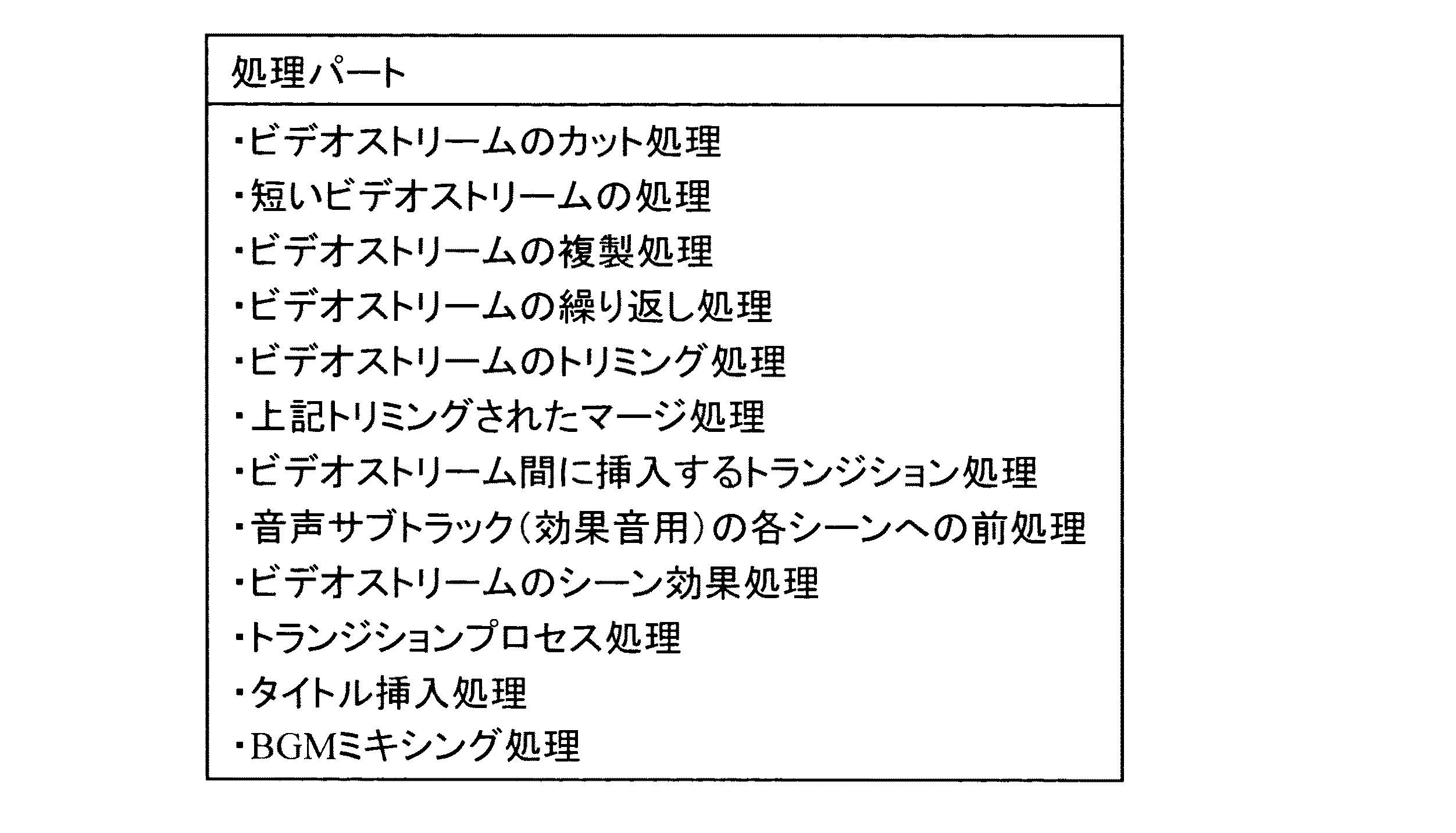
また、表4、5に示すように、スクリプト記述基本アイテムは、すべてオブジェクト構造から構成される。設定パートとしては、表4に示される各種設定があり、処理パートとしては表5に示される各種処理が挙げられる。これらを時系列に組み合わせることでスクリプトを完成させることができる。 As shown in Tables 4 and 5, all script description basic items are composed of object structures. The setting part includes various settings shown in Table 4, and the processing part includes various processes shown in Table 5. A script can be completed by combining these in time series.
尚、予め用意されたガイダンスデータや独自に作ったユーザ定義のガイダンスデータはビデオカメラに装着されたさまざまなセンサからの情報でその中のパラメータやスクリプト順序や時間などを変更することができる。例えば、撮影装置(ビデオカメラ)に温度計、湿度計、高度計、光度計、時計などがついているとして、そのときの時間情報、湿度、温度、高度、撮影状態の被写体の明るさなどによってリソースを動的に変化させる。これら動的に変更されたガイダンスファイルは、標準(デフォルト)のリソースオブジェクトやユーザ定義変数オブジェクトとは異なる内容に変更されるため、テンポラリフォルダに格納され、撮影されたデータとリンクされる。 In addition, guidance data prepared in advance or user-defined guidance data created independently can change parameters, script order, time, and the like in the information from various sensors attached to the video camera. For example, if a camera (video camera) is equipped with a thermometer, hygrometer, altimeter, photometer, clock, etc., resources can be allocated according to time information, humidity, temperature, altitude, and brightness of the subject in the shooting state. Change dynamically. Since these dynamically changed guidance files are changed to contents different from the standard (default) resource object and user-defined variable object, they are stored in the temporary folder and linked to the photographed data.
次に、撮影された映像を編集装置により例えば自動編集する場合には、図1に示す記憶装置31を編集装置に装着する。この際、ガイダンスファイル保存エリアに保存されているガイダンスファイルと、撮影データ保存エリアに保存されている撮影データとが対応付けされているため、自動編集を行いやすい。加えて、撮影時の環境に沿ってガイダンスファイルフォーマットのオブジェクトが変更されているため、このオブジェクトを参照しつつ編集を行うことで、撮影時の環境を反映した映像データを自動的に編集することができる。従って、より臨場感に溢れる作品を簡単に編集することができるという利点がある。
Next, when the photographed video is automatically edited by the editing device, for example, the
以上、本発明に関して実施の形態に沿って説明を行ったが、本発明はこれらの例に限定されるものではなく、種々の変形が可能であるのは言うまでもない。 As described above, the present invention has been described according to the embodiment. However, the present invention is not limited to these examples, and various modifications can be made.
本発明は、ビデオカメラの他に、デジタルスチルカメラや通常のカメラ、携帯電話やPDAなどの携帯端末などに応用可能である。 In addition to a video camera, the present invention can be applied to a digital still camera, a normal camera, a mobile terminal such as a mobile phone or a PDA.
1…カメラ部、3…カメラ処理部、5…記録/再生信号処理部、7…I/O処理部、11…Graphics処理部、15…MPU、17…メモリ、17a…ROM、21…通信制御部、23…センサ部、31…記憶装置、32…センサデータ保存エリア、33…ガイダンスファイル保存エリア、35…ユーザ定義ガイダンスファイル保存エリア、37…撮影データ保存エリア。 DESCRIPTION OF SYMBOLS 1 ... Camera part, 3 ... Camera processing part, 5 ... Recording / playback signal processing part, 7 ... I / O processing part, 11 ... Graphics processing part, 15 ... MPU, 17 ... Memory, 17a ... ROM, 21 ... Communication control Reference numeral 23: Sensor unit 31: Storage device 32: Sensor data storage area 33: Guidance file storage area 35: User-defined guidance file storage area 37: Shooting data storage area
Claims (6)
該外部環境センサにより測定された外部環境を保存するセンサーデータ保存エリアと、
撮影手順を提示する複数のガイダンスファイルを保存するガイダンスファイル保存エリアと、撮影データを保存する撮影データ保存エリアと、センサーデータとセンサーデータに基づく環境に適したガイダンス又は装飾を含むガイダンスカテゴリーを対比させて格納するセンサーパラメータ対ガイダンスカテゴリー対比データベースと、を備えた記憶装置と、を有し、
前記外部環境センサによりセンシングされた環境データを検索キーとして前記センサーパラメータ対ガイダンスカテゴリー対比データベースを検索し、撮影時の環境に適したガイダンスを選択することを特徴とするガイダンス機能付き撮影装置と、
該ガイダンス機能付き撮影装置と接続可能な撮影データ編集装置であって、
前記ガイダンスファイルと前記センサーデータとの対応関係に基づいて、編集に必要なリソース又は編集手順を取得し、該編集手順に基づいて映像データの編集を行う編集処理部を有する撮影データ編集装置と、を有する撮影編集システム。 An external environmental sensor that monitors the surrounding environment,
A sensor data storage area for storing the external environment measured by the external environment sensor;
Compare the guidance file storage area for storing multiple guidance files that present shooting procedures, the shooting data storage area for storing shooting data, and the guidance category including guidance or decoration suitable for the environment based on sensor data and sensor data. A storage device including a sensor parameter database and a guidance category comparison database for storing
An imaging device with a guidance function, wherein the environment data sensed by the external environment sensor is used as a search key to search the sensor parameter vs. guidance category comparison database and select guidance suitable for the environment at the time of shooting ;
A photographing data editing device connectable to the photographing device with a guidance function,
Based on the correspondence relationship between the guidance file and the sensor data, a shooting data editing apparatus having an editing processing unit that acquires resources or editing procedures necessary for editing and edits video data based on the editing procedures; A shooting editing system .
さらに、前記センサーデータに応じて、撮影時選択されたガイダンスで使用するリソースが変更されることを特徴とする請求項1に記載の撮影編集システム。 The photographing device with the guidance function is:
Furthermore, imaging editing system according to claim 1, wherein in response to sensor data, wherein the resource is modified for use in shooting Kageji selected guidance.
周辺環境をモニタリングする外部環境センシングステップと、
該外部環境センシングステップにより測定された外部環境をセンサーデータ保存エリアに保存し、撮影手順を提示する複数のガイダンスファイルをガイダンスファイル保存エリアに保存し、撮影データを撮影データ保存エリアに保存するステップと、
前記外部環境センシングステップによりセンシングされた環境データを検索キーとして、センサーデータとセンサーデータに基づく環境に適したガイダンス又は装飾を含むガイダンスカテゴリーを対比させて格納するセンサーパラメータ対ガイダンスカテゴリー対比データベースを検索し、撮影時の環境に適したガイダンスを選択するステップと
を有することを特徴とする撮影方法と、
前記撮影方法により撮影された撮影データの編集方法であって、
前記ガイダンスファイルと前記センサーデータとの対応関係に基づいて、編集に必要なリソース又は編集手順を取得し、該編集手順に基づいて映像データの編集を行う編集処理ステップを有することを特徴とする撮影データの編集方法と、
を有する撮影・編集方法。 A shooting method in a shooting device with a guidance function,
An external environmental sensing step to monitor the surrounding environment;
Storing the external environment measured in the external environment sensing step in a sensor data storage area, storing a plurality of guidance files presenting shooting procedures in the guidance file storage area, and storing the shooting data in the shooting data storage area; ,
Using the environmental data sensed in the external environment sensing step as a search key, a sensor parameter vs. guidance category comparison database is stored that compares and stores sensor data and guidance categories including guidance or decoration suitable for the environment based on the sensor data. And a step of selecting guidance suitable for the environment at the time of shooting ,
An editing method of shooting data shot by the shooting method,
An imaging process comprising: an editing process step of acquiring a resource or an editing procedure necessary for editing based on a correspondence relationship between the guidance file and the sensor data, and editing video data based on the editing procedure. How to edit the data,
Photography / editing method .
さらに、前記センサーデータに応じて、プログラムが撮影時選択されたガイダンスで使用するリソースを変更するステップを有し、
前記リソースは、オープニング時のテーマ、サブタイトルやトランジション内容、ストリーム分割割合、特殊効果、効果音、BGMの提示のうちの少なくともいずれかにより消費されることを特徴とする請求項4に記載の撮影・編集方法。 The shooting method is:
Furthermore, according to the sensor data, the program has a step of changing the resource used in the guidance selected at the time of shooting,
Wherein the resource, opening time of the themes, subtitles and transitions content stream split ratio, special effects, sound effects, shooting of claim 4, characterized in that it is consumed by at least one of the presentation of the BGM ・ Editing method.
Priority Applications (1)
| Application Number | Priority Date | Filing Date | Title |
|---|---|---|---|
| JP2003277067A JP4339040B2 (en) | 2003-07-18 | 2003-07-18 | Shooting and editing system, shooting and editing method, and program |
Applications Claiming Priority (1)
| Application Number | Priority Date | Filing Date | Title |
|---|---|---|---|
| JP2003277067A JP4339040B2 (en) | 2003-07-18 | 2003-07-18 | Shooting and editing system, shooting and editing method, and program |
Publications (2)
| Publication Number | Publication Date |
|---|---|
| JP2005039734A JP2005039734A (en) | 2005-02-10 |
| JP4339040B2 true JP4339040B2 (en) | 2009-10-07 |
Family
ID=34213176
Family Applications (1)
| Application Number | Title | Priority Date | Filing Date |
|---|---|---|---|
| JP2003277067A Expired - Fee Related JP4339040B2 (en) | 2003-07-18 | 2003-07-18 | Shooting and editing system, shooting and editing method, and program |
Country Status (1)
| Country | Link |
|---|---|
| JP (1) | JP4339040B2 (en) |
Cited By (7)
| Publication number | Priority date | Publication date | Assignee | Title |
|---|---|---|---|---|
| US7637519B2 (en) | 2006-10-30 | 2009-12-29 | 89908, Inc. | Moveable support platform |
| US7740261B2 (en) | 2006-10-27 | 2010-06-22 | 89908, Inc. | Tailgate access step |
| US8157277B2 (en) | 2001-02-15 | 2012-04-17 | 89908, Inc. | Retractable vehicle step |
| US8827294B1 (en) | 2006-10-27 | 2014-09-09 | Lund Motions Products, Inc. | Retractable vehicle step |
| US9346405B2 (en) | 2006-10-27 | 2016-05-24 | Lund Motion Products, Inc. | Retractable vehicle step |
| US9701249B2 (en) | 2006-10-27 | 2017-07-11 | Lund Motion Products, Inc. | Retractable vehicle step |
| US9944231B2 (en) | 2006-10-27 | 2018-04-17 | Lund Motion Products, Inc. | Retractable vehicle step |
Families Citing this family (3)
| Publication number | Priority date | Publication date | Assignee | Title |
|---|---|---|---|---|
| JP4244972B2 (en) | 2005-08-02 | 2009-03-25 | ソニー株式会社 | Information processing apparatus, information processing method, and computer program |
| JP5570923B2 (en) * | 2010-09-17 | 2014-08-13 | オリンパスイメージング株式会社 | Imaging apparatus, imaging method for imaging apparatus, and program |
| CN106534775A (en) * | 2016-11-03 | 2017-03-22 | 北京小米移动软件有限公司 | Video editing method and device as well as video shooting method and device |
-
2003
- 2003-07-18 JP JP2003277067A patent/JP4339040B2/en not_active Expired - Fee Related
Cited By (14)
| Publication number | Priority date | Publication date | Assignee | Title |
|---|---|---|---|---|
| US9302626B2 (en) | 2001-02-15 | 2016-04-05 | Lund Motion Products, Inc. | Retractable vehicle step |
| US8844957B2 (en) | 2001-02-15 | 2014-09-30 | Lund Motion Products, Inc. | Retractable vehicle step |
| US8157277B2 (en) | 2001-02-15 | 2012-04-17 | 89908, Inc. | Retractable vehicle step |
| US9561751B2 (en) | 2001-02-15 | 2017-02-07 | Lund Motion Products, Inc. | Retractable vehicle step |
| US9346405B2 (en) | 2006-10-27 | 2016-05-24 | Lund Motion Products, Inc. | Retractable vehicle step |
| US8827294B1 (en) | 2006-10-27 | 2014-09-09 | Lund Motions Products, Inc. | Retractable vehicle step |
| US9701249B2 (en) | 2006-10-27 | 2017-07-11 | Lund Motion Products, Inc. | Retractable vehicle step |
| US7740261B2 (en) | 2006-10-27 | 2010-06-22 | 89908, Inc. | Tailgate access step |
| US8360455B2 (en) | 2006-10-27 | 2013-01-29 | 89908, Inc. | Tailgate access step |
| US8936266B2 (en) | 2006-10-27 | 2015-01-20 | Lund Motion Products, Inc. | Tailgate access step |
| US9944231B2 (en) | 2006-10-27 | 2018-04-17 | Lund Motion Products, Inc. | Retractable vehicle step |
| US8944451B2 (en) | 2006-10-30 | 2015-02-03 | Lund Motion Products, Inc. | Moveable support platform |
| US7637519B2 (en) | 2006-10-30 | 2009-12-29 | 89908, Inc. | Moveable support platform |
| US8419034B2 (en) | 2006-10-30 | 2013-04-16 | 89908, Inc. | Moveable support platform |
Also Published As
| Publication number | Publication date |
|---|---|
| JP2005039734A (en) | 2005-02-10 |
Similar Documents
| Publication | Publication Date | Title |
|---|---|---|
| CN105940673B (en) | Image processing apparatus and image processing method | |
| JP2012124608A (en) | Camera | |
| US20100268729A1 (en) | Multimedia synthetic data generating apparatus | |
| CN104349060A (en) | Image processing apparatus for time-lapse moving image, image processing method, and storage medium | |
| JP2005065121A (en) | METADATA STORAGE METHOD, METADATA ADDING DEVICE, CONTROL PROGRAM AND RECORDING MEDIUM, CONTENT DISPLAY DEVICE, AND CONTENT IMAGING DEVICE | |
| CN101222582A (en) | Imaging device, continuous photographing method, and storage medium storing program | |
| US20090167895A1 (en) | Image data recording device, image processing device, and camera | |
| JP2005039734A (en) | Image capturing apparatus and editing apparatus having environmental guidance function | |
| US20140071306A1 (en) | Imaging apparatus, digital camera, image generation method, and storage medium storing image generation program | |
| JP4487872B2 (en) | Image processing apparatus and method, program, and recording medium | |
| CN101895683B (en) | Photographing condition control device and its control method, camera and picture quality control device | |
| US20140071307A1 (en) | Image generation apparatus, imaging apparatus comprising the same, image generation method, and storage medium storing image generation program | |
| EP3029676A1 (en) | System and method for theme based video creation with real-time effects | |
| CN101505393A (en) | Image reproduction system and image reproduction method | |
| JP5741749B2 (en) | Image processing apparatus, image processing method, and program | |
| JP2010021819A (en) | Image display apparatus, image display method, and program | |
| JP4842232B2 (en) | Imaging apparatus and image reproduction apparatus | |
| JP3630104B2 (en) | CAMERA DEVICE, SAMPLE IMAGE DISPLAY METHOD, AND RECORDING MEDIUM | |
| JP2017112543A (en) | Image processing apparatus, image processing method, and program | |
| JP2015170941A (en) | Image/voice processing apparatus, image/voice processing method, and program | |
| JP2007329521A (en) | Image reproduction system, digital camera, and image reproduction apparatus | |
| JP4725075B2 (en) | CAMERA DEVICE, SAMPLE IMAGE DISPLAY METHOD, AND RECORDING MEDIUM | |
| JP5828251B2 (en) | Image processing apparatus and digital camera | |
| JP5167964B2 (en) | Display control apparatus, display control method, and program | |
| JP2008167273A (en) | Imaging device and still image shooting program thereof |
Legal Events
| Date | Code | Title | Description |
|---|---|---|---|
| A621 | Written request for application examination |
Free format text: JAPANESE INTERMEDIATE CODE: A621 Effective date: 20050810 |
|
| A977 | Report on retrieval |
Free format text: JAPANESE INTERMEDIATE CODE: A971007 Effective date: 20070926 |
|
| A131 | Notification of reasons for refusal |
Free format text: JAPANESE INTERMEDIATE CODE: A131 Effective date: 20071218 |
|
| A521 | Request for written amendment filed |
Free format text: JAPANESE INTERMEDIATE CODE: A523 Effective date: 20080215 |
|
| A131 | Notification of reasons for refusal |
Free format text: JAPANESE INTERMEDIATE CODE: A131 Effective date: 20080826 |
|
| A521 | Request for written amendment filed |
Free format text: JAPANESE INTERMEDIATE CODE: A523 Effective date: 20081027 |
|
| TRDD | Decision of grant or rejection written | ||
| A01 | Written decision to grant a patent or to grant a registration (utility model) |
Free format text: JAPANESE INTERMEDIATE CODE: A01 Effective date: 20090623 |
|
| A01 | Written decision to grant a patent or to grant a registration (utility model) |
Free format text: JAPANESE INTERMEDIATE CODE: A01 |
|
| A61 | First payment of annual fees (during grant procedure) |
Free format text: JAPANESE INTERMEDIATE CODE: A61 Effective date: 20090701 |
|
| R150 | Certificate of patent or registration of utility model |
Free format text: JAPANESE INTERMEDIATE CODE: R150 |
|
| FPAY | Renewal fee payment (event date is renewal date of database) |
Free format text: PAYMENT UNTIL: 20120710 Year of fee payment: 3 |
|
| FPAY | Renewal fee payment (event date is renewal date of database) |
Free format text: PAYMENT UNTIL: 20120710 Year of fee payment: 3 |
|
| FPAY | Renewal fee payment (event date is renewal date of database) |
Free format text: PAYMENT UNTIL: 20130710 Year of fee payment: 4 |
|
| LAPS | Cancellation because of no payment of annual fees |