JP3620366B2 - Electronic keyboard instrument - Google Patents
Electronic keyboard instrument Download PDFInfo
- Publication number
- JP3620366B2 JP3620366B2 JP26052199A JP26052199A JP3620366B2 JP 3620366 B2 JP3620366 B2 JP 3620366B2 JP 26052199 A JP26052199 A JP 26052199A JP 26052199 A JP26052199 A JP 26052199A JP 3620366 B2 JP3620366 B2 JP 3620366B2
- Authority
- JP
- Japan
- Prior art keywords
- keyboard
- sound
- mode
- performance
- sound effect
- Prior art date
- Legal status (The legal status is an assumption and is not a legal conclusion. Google has not performed a legal analysis and makes no representation as to the accuracy of the status listed.)
- Expired - Fee Related
Links
- 230000000694 effects Effects 0.000 claims description 92
- 239000011295 pitch Substances 0.000 claims description 15
- 238000000034 method Methods 0.000 description 59
- 238000010586 diagram Methods 0.000 description 3
- 230000004044 response Effects 0.000 description 3
- 238000001514 detection method Methods 0.000 description 2
- 230000006870 function Effects 0.000 description 2
- 230000005236 sound signal Effects 0.000 description 2
- 230000004397 blinking Effects 0.000 description 1
- 239000000872 buffer Substances 0.000 description 1
- 238000013500 data storage Methods 0.000 description 1
- 230000000994 depressogenic effect Effects 0.000 description 1
- 230000007274 generation of a signal involved in cell-cell signaling Effects 0.000 description 1
- 230000001678 irradiating effect Effects 0.000 description 1
- 238000009527 percussion Methods 0.000 description 1
- 238000005316 response function Methods 0.000 description 1
Images



Landscapes
- Electrophonic Musical Instruments (AREA)
Description
【0001】
【発明が属する技術分野】
本発明は、サウンドエフェクト音を発音可能な電子鍵盤楽器に関するものである。
【0002】
【従来の技術】
従来、電子鍵盤楽器においては、鍵盤操作子の並びに従って音階通りの音高を発音する通常の演奏を行うことができるが、これに加えて、鍵域を2つに分割して、右手で操作する右鍵域において通常の演奏を行うようにし、左手で操作する左鍵域においてコード検出を行うようにした電子鍵盤楽器が知られている。このコード検出の左鍵域において、鍵を操作すると操作された鍵に基づいてコードが検出されて検出されたコードが発音されるようになる。
また、電子鍵盤楽器において車の走行音や飛行機の飛翔音等のサウンドエフェクト音を発音させるために、操作パネルにサウンドエフェクト音に対応して複数の操作ボタンを設けることが行われていた。
【0003】
【発明が解決しようとする課題】
しかしながら、従来のサウンドエフェクト音を発音することのできる電子鍵盤楽器では、その操作ボタンが操作パネルに増設されるため、電子鍵盤楽器が大きくなるという問題点があった。また、演奏中にサウンドエフェクト音を発音させる際には、鍵盤から離れた位置にある操作ボタンを操作することになるため、その操作を容易に行うことができず、演奏操作に支障を与えるおそれがあった。
【0004】
そこで、本発明は上記従来技術の問題を解決するためになされたものであり、サウンドエフェクト音を発音させる際に操作パネルに操作ボタンを設ける必要がないと共に、演奏操作に支障を与えない電子鍵盤楽器を提供することを目的としている。
【0005】
【課題を解決するための手段】
前記目的を達成するために、本発明の電子鍵盤楽器は、鍵盤における全ての鍵盤操作子の並びに従って音階通りの音高を発音することができる通常演奏モードと、前記鍵盤が、通常の演奏を行う鍵域と、短いフレーズのサウンドエフェクト音を発音指定する鍵域とに分割されるサウンドエフェクトモードと、前記鍵盤が、通常の演奏を行う鍵域と、和音指定する鍵域とに分割され、該和音指定する鍵域における鍵盤操作子を操作して和音指定することにより自動伴奏を行う伴奏モードとを有し、前記通常演奏モード、前記サウンドエフェクトモード、前記伴奏モードの何れかのモードに設定する設定手段とを備え、前記サウンドエフェクトモードに設定された際の鍵域分割点と、前記伴奏モードに設定された際の鍵域分割点とが同一とされ、自動演奏データが読み出された際に、自動演奏データに適した前記通常演奏モード、前記サウンドエフェクトモード、前記伴奏モードの何れかのモードに自動設定されて、前記鍵盤の鍵域が設定されるようにしている。
【0007】
このような本発明によれば、分割した鍵盤の一つの鍵域をサウンドエフェクト音を指定する操作子として割り当てることができるので、サウンドエフェクト音用の操作ボタンを操作パネルに設ける必要をなくすことができ、電子鍵盤楽器をコンパクトにすることができる。特に、初心者が演奏する場合は、操作する鍵域として広い鍵域を必要としないので、鍵盤全体を有効に使用することができる。また、分割した鍵盤の一つの鍵域がサウンドエフェクト音を指定する操作子として割り当てられているので、演奏中にサウンドエフェクト音を発音させる際には、その鍵域の鍵を操作すればよく、演奏操作に何ら支障を与えることがない。さらに、サウンドエフェクトモード時と伴奏モード時とで分割されて割り当てられる鍵域の境目を同一とすることにより、演奏時に操作ミスを極力なくすことができる。
【0008】
【発明の実施の形態】
本発明の電子鍵盤楽器の実施の形態にかかる一構成例の外観を図1に示す。
図1において、電子鍵盤楽器1は、電子鍵盤楽器1に備えられた演奏操作子である複数の白鍵および黒鍵からなるタッチレスポンス付きの鍵盤2と、この鍵盤2の基端部に設けられて、操作すべき鍵を光で照射すると共に、その音名を発光表示する音名/鍵盤ガイドランプ3を備えている。この音名/鍵盤ガイドランプ3は十分な光量の光源が内蔵されており、この光源を発光させることにより操作すべき鍵のみが照射されると共にその音名が発光表示される。また、五線譜上に音符を表示して操作すべき鍵をガイドする音符表示ガイドや、操作すべき鍵の運指を、その指を強調表示してガイドする運指表示ガイドの表示がされるパネルの上面に設けられた表示器4と、操作された鍵に基づいた楽音や自動演奏される楽音を発音する楽音演奏用の左スピーカー5a,右スピーカ5bとを備えている。さらに、演奏モードを通常演奏モードあるいはサウンドエフェクトモードに切り換えるソングスイッチや、伴奏モードをオン/オフする伴奏スイッチ、演奏ガイドの切り換え指示を設定する複数の設定ボタンからなる操作パネル7がパネルの上面に設けられている。
【0009】
操作パネル7に設けられたソングスイッチにより通常演奏モードあるいはサウンドエフェクトモードに設定され、伴奏スイッチにより伴奏モードはオン/オフされることから、通常演奏モードであって伴奏モードとしたり、サウンドエフェクトモードであって伴奏モードとすることができる。
演奏モードのうちの通常演奏モードは、鍵盤2を押鍵した際に鍵盤2の鍵盤操作子の並びに従って音階通りの音高の楽音を発音する通常の演奏を行うモードである。この場合、左鍵域はオブリガートを演奏することになる。また、サウンドエフェクトモードでは、鍵盤2の鍵域が分割され、右鍵域が通常の演奏を行う鍵域となり、左鍵域が短いフレーズのサウンドエフェクト音を発音指定する鍵域になる。そして、サウンドエフェクト音を発音指定する左鍵域における鍵盤操作子が操作された際に、操作された鍵盤操作子により指定されたサウンドエフェクト音が発音されるようになる。
【0010】
さらに、伴奏モードでは伴奏パターンが自動伴奏されるようになり、鍵盤2の鍵域は分割されて、右鍵域が通常の演奏を行う鍵域となり、左鍵域が伴奏パターンにおける和音を指定する鍵域になる。すなわち、和音指定する左鍵域において和音が検出され、検出された和音に基づいて自動伴奏が行われるようになる。なお、伴奏モードおよびサウンドエフェクトモードにおいて、通常の演奏を行う右鍵域における鍵盤操作子が操作された場合は、鍵盤2の鍵盤操作子の並びに従って音階通りの音高の楽音が発音される。また、サウンドエフェクトモードで、かつ、伴奏モードとされている場合は、左鍵域をさらに2分割して一方をサウンドエフェクト音を指定する鍵域とし、他方を和音を指定する鍵域とする。さらに、サウンドエフェクトモードのみに設定された際の左鍵域と右鍵域との境目と、伴奏モードのみに設定された際の左鍵域と右鍵域との境目とを同一として、演奏時に操作を誤ることを防止するようにしてもよい。
【0011】
次に、図1に示す本発明の電子鍵盤楽器1にかかるハードウェアの構成例を図2に示す。
図2において、鍵盤2は黒鍵および白鍵からなる鍵盤操作子を備える図1に示すタッチレスポンス付きの鍵盤であり、音名/鍵盤ガイドランプ3は操作すべき鍵とその音名を表示する図1に示す音名/鍵盤ガイドランプであり、表示器4は音符表示ガイドと運指表示ガイドや各種設定用の表示がされる図1に示す表示器である。また、楽音演奏用スピーカー5は楽音演奏用の図1に示す左スピーカーおよび右スピーカーである。7は通常演奏モードあるいはサウンドエフェクトモードに設定するソングスイッチ、および、伴奏モードをオン/オフする伴奏スイッチを含む各種設定用ボタンからなる図1に示す操作パネルである。11は電子鍵盤楽器における各部の動作を制御する中央処理装置(Central Processing Unit:CPU)であり、動作時の経過時間を示したり、特定の間隔でタイマ割込を発生するタイマを備えている。12は演奏データや各種データ等の格納エリアや、CPU11のワークエリア等が設定されるRAM(Random Access Memory)であり、13はCPU11が実行する演奏ガイドプログラム、楽音発生プログラム等のプログラムや、サウンドエフェクトデータ、演奏データ等の各種データが格納されているROM(Read Only Memory)である。
【0012】
また、14は表示器4に音符表示ガイドを表示するための音符表示ガイド部であり、15は表示器4に運指表示ガイドを表示するための運指表示ガイド部である。16は自動演奏装置や自動演奏機能を有する外部の電子楽器であり、インターフェース17を介して接続されている。インターフェース17をMIDIインターフェースとして外部の電子楽器16をMIDI対応機器としてもよい。さらに、外部の電子楽器16を教師用の楽器として、外部の電子楽器16から次に操作すべき鍵の演奏データをインターフェース17を介して取り込むようにしてもよい。18はCPU11が楽音発生プログラムを実行することにより生成した楽音制御データを受け取って音源レジスタに格納し、この楽音制御データに基づいて楽音を発生する音源であり、19は音源18から出力されるアナログ信号に変換されたアナログ楽音信号を増幅して楽音演奏用スピーカー5から発音するサウンドシステムである。
【0013】
21はハードディスクやリムーバブルディスク等の記憶装置であり、CPU11が実行する演奏ガイドプログラムや、楽音発生プログラム等のプログラムおよび各種アプリケーションプログラム等や自動演奏データ等の各種データが格納されており、実行される際にはそのプログラムやデータがRAM12にロードされる。なお、22は各ブロック間の情報の受け渡しを行うバスである。
上記したハードウェア構成は、パーソナルコンピュータやワークステーションと共通する構成が多くされており、パーソナルコンピュータやワークステーションに演奏ガイドプログラムを含む楽音発生プログラムを搭載させて、表示手段を兼用すると共に、MIDIキーボード等の鍵盤からなるキーボードを接続することにより、本発明に係る電子鍵盤楽器とすることも可能である。
【0014】
図2に示すハードウェア構成の本発明に係る電子鍵盤楽器において、ガイド付き演奏する際には、記憶装置21や外部の電子楽器16からRAM12にロードした自動演奏データを先読みして、音符表示ガイド部14が音符表示ガイド用データを生成して表示器4に音符表示ガイドを表示し、運指表示ガイド部15も同様に、運指表示ガイド用データを生成して表示器4に運指表示ガイドを表示する。さらに、音名/鍵盤ガイドランプ3は送られた音名/鍵盤ガイドデータに基づいて、該当する鍵の基端部および音名を発光させるよう図1に示す音名/鍵盤ガイドランプ3が発光駆動されて、音名/鍵盤ガイドを行う。なお、ユーザーがガイド設定を行うことによりガイドの実行のオン/オフを任意に設定することができる。
【0015】
また、操作パネル7には鍵盤2の演奏操作子の並びに従って音階通りの音高を発音させることができる通常演奏モード、あるいは、鍵盤2の鍵域を通常の演奏を行う右鍵域と、短いフレーズのサウンドエフェクト音を発音指定する左鍵域とに分割し、サウンドエフェクト音を発音指定する左鍵域における鍵盤操作子が操作された際に、操作された鍵盤操作子により指定されたサウンドエフェクト音を発音するサウンドエフェクトモードとに設定するソングスイッチと、鍵盤2の鍵域を通常の演奏を行う右鍵域と、和音指定する左鍵域とに分割し、この和音指定する左鍵域における鍵盤操作子により指定された和音を検出し、検出された和音に基づいて自動伴奏を行う伴奏モードをオン/オフする伴奏スイッチが設けられている。このソングスイッチを操作して通常演奏モードに設定された際に、上記した演奏ガイドに基づいてユーザーが鍵盤2が操作されると、操作された鍵盤操作子に基づいてキーオン(キーオフ)データや音高情報、音色パラメータ等の楽音制御パラメータが得られ、これらのデータに基づいて楽音制御データが生成される。この楽音制御データは、音源18に送られ楽音制御データに基づいて楽音信号が発生される。この楽音信号はサウンドシステム19を介して楽音演奏用スピーカー5から放音される。
【0016】
また、ソングスイッチを操作してサウンドエフェクトモードに設定されると、通常演奏を行う右鍵域の演奏操作子を操作した場合は、通常演奏モードと同様に押鍵された鍵に基づく通常演奏の楽音が発音されるが、サウンドエフェクト音を指定する左鍵域の演奏操作子を操作すると、操作した演奏操作子に割り当てられたサウンドエフェクト音が発音されるようになる。この場合、操作された演奏操作子が検出され、検出された演奏操作子に割り当てられたサウンドエフェクト音に対応するサウンドエフェクトデータがRAM12あるいはROM13から読み出されて音源18に送られ、このサウンドエフェクトデータに基づいてサウンドエフェクト信号が発生される。
【0017】
このサウンドエフェクト信号はサウンドシステム19を介して楽音演奏用スピーカー5からサウンドエフェクト音として放音される。このサウンドエフェクト音としては、車の走行音や飛行機の飛翔音、あるいは、「こんにちは」「いらっしゃい」等の短いフレーズの会話音や、「ワン、ツー、スリー」や「それ、やぁー」等のかけ声であってもかまわない。このように、サウンドエフェクト音は短いフレーズで構成されるが、このフレーズをループさせて繰り返し発音するようにしてもよい。なお、右鍵域においては発音される楽音の音色を変更することができる。
また、鍵盤2がタッチレスポンス付きとされていることから、サウンドエフェクト音の音量を押鍵の強さに応じて制御することができる。すなわち、左鍵域のいずれかの鍵を強く押鍵することにより当該鍵に割り当てられたサウンドエフェクト音の音量を大きくすることができ、当該鍵を弱く押鍵することによりそのサウンドエフェクト音の音量を小さくすることができる。これにより、自動演奏された楽音に好みの音量でサウンドエフェクト音を付加することができるようになる。さらに、まず強く押鍵して次いで同じ鍵を弱く押鍵することにより残響効果(疑似リバーブ)を得ることができるようになる。
【0018】
さらに、伴奏モードに設定されると操作パネル7において設定されたスタイルに基づいてコード音およびベース音と打楽器音からなる伴奏パターンが自動的に演奏される。この際に、自動伴奏に合わせて通常演奏を行う右鍵域の演奏操作子を操作すると、通常演奏モードと同様に通常演奏音も発音される。また、和音指定する左鍵域における鍵盤操作子が操作されると、操作された1ないし複数の鍵盤操作子から和音名と根音が検出され、検出された和音名と根音に基づいたコード音が演奏されるようになる。また、自動伴奏中に再度左鍵域の鍵盤操作子を操作すると、検出された和音に基づいてコードが変更されるようになる。さらにまた、スタイルは操作パネルの設定ボタンにより設定するが、自動演奏を行う際はその自動演奏データを読み出した際に、自動演奏データに適したスタイルに自動的に設定するようにしてもよい。
なお、右鍵域においては発音される楽音の音色を変更することができる。
【0019】
ところで、本発明にかかる電子鍵盤楽器は、詳細に説明しないが五線譜上に音符を表示する音符表示ガイド、表示した手の指を強調表示することにより運指を表示する運指表示ガイド、鍵盤2の基端部に設けられて、操作すべき鍵を光で照射すると共に、その音名を発光表示する音名/鍵盤ガイドの3つの種類のガイドを備えている。
【0020】
次に、本発明の図1および図2に示す電子鍵盤楽器1の動作を図3ないし図5に示すフローチャートを参照しながら説明する。
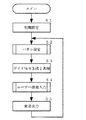
図3はメイン処理のフローチャートであり、電子鍵盤楽器1の電源が投入されたりリセットされたりした際に開始され、メイン処理が開始されるとステップS1の初期設定処理において、演奏モードが前回設定された通常演奏モードあるいはサウンドエフェクトモードのいずれかに設定される。さらに、表示器4に表示される初期画面の設定や、RAM12に設定される各種バッファおよびフラグのリセット等の初期設定処理が行われる。次いで、ステップS2にて後述する演奏モードや伴奏モードの設定を行うパネル設定処理が行われる。パネル設定処理が終了すると、ステップS3にてガイド信号を生成してそのガイド信号を表示する音符表示ガイドや運指表示ガイドおよび音名/鍵盤ガイドを実行するガイド信号生成と実施処理が行われる。ガイド信号生成と実施処理が終了すると、ステップS4にてユーザーの演奏を検出して対応した楽音信号を生成する処理を行う後述するユーザー演奏入力処理が行われる。ユーザー演奏入力処理が終了すると、ステップS5にてユーザーの演奏入力に基づいて生成された楽音の発音の処理を行うと共に、自動演奏データに基づく楽音の生成と発音を行って自動演奏の進行の処理を行う楽音出力処理が行われる。上記したパネル設定処理(ステップS2)ないし楽音出力処理(ステップS5)の処理は繰り返し行われる。
【0021】
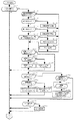
次に、メイン処理のステップS2にて実行されるパネル設定処理を図4に示すフローチャートを参照しながら説明する。パネル設定処理では、図1に示す複数のボタンを供える操作パネル7を操作することによりモード設定や自動演奏の設定が行われる。このパネル設定処理が開始されると、ステップS11にて操作パネル7のスイッチやボタン等のパネル操作子が操作されて入力があるか否かが判断される。ここで、パネル操作子入力があると判断されるとステップS12に分岐して自動演奏関連の操作子が操作されたか否かが判断される。そして、自動演奏関連の操作子が操作されたと判断されると、ステップS13にて操作された操作子の指示が再生指示か否かが判断され、再生指示と判断されるとステップS14に分岐して自動演奏の実行処理が行われる。また、ステップS13にて再生指示でないと判断されるとステップS15にて操作された操作子の指示が停止指示か否かが判断され、停止指示と判断されるとステップS16に分岐して自動演奏の停止処理が行われる。さらに、ステップS15にて停止指示でないと判断されるとステップS17にて操作された操作子の指示が自動演奏データ(曲目)の変更指示か否かが判断され、自動演奏データ(曲目)の変更指示と判断されるとステップS18に分岐して自動演奏する曲目の変更設定処理が行われ、次いで、ステップS19にて変更された自動演奏データに基づいてガイド設定処理が行われる。ガイド設定処理が行われるのは、ガイド信号が自動演奏データに基づいて生成されるため、曲目が変更された際にはガイド信号を生成し直す必要があるからである。
【0022】
ステップS12にて自動演奏関連の操作子が操作されていないと判断された場合、ステップS14,ステップS16,ステップS19の各処理が終了した場合、および、ステップS17にて自動演奏データ(曲目)の変更指示でないと判断された場合は、ステップS21にてステップS11で操作されたパネル操作子が伴奏モードに設定する伴奏スイッチであるか否かが判断される。そして、伴奏スイッチが操作されたと判断されると、ステップS22にて伴奏モードがオン状態となっているか否かが判断され、伴奏モードがオン状態と判断されるとステップS23にて伴奏モードをオフにする処理が行われ、伴奏モードがオン状態でないと判断されるとステップS24にて伴奏モードをオンにする処理が行われる。このように、伴奏スイッチは押す毎に伴奏モードのオン/オフ状態が反転するスイッチとされる。
また、ステップS21にて操作されたパネル操作子が伴奏スイッチでないと判断された場合は、ステップS25へ分岐して操作されたパネル操作子が演奏モードを設定するソングスイッチであるか否かが判断される。そして、ソングスイッチが操作されたと判断されると、ステップS26にて演奏モードが通常演奏モードとなっているか否かが判断され、演奏モードが通常演奏モードと判断されるとステップS27にて通常演奏モードをサウンドエフェクトモードに変更する処理が行われ、演奏モードが通常演奏モードでないと判断されるとステップS28にてサウンドエフェクトモードを通常演奏モードに変更する処理が行われる。このように、ソングスイッチは押す毎に演奏モードが他方の演奏モードへ入れ替わるスイッチとされる。
【0023】
また、ステップS25にて操作されたパネル操作子がソングスイッチでないと判断された場合は、ステップS29へ分岐して操作されたパネル操作子が鍵域設定用の操作子であるか否かが判断される。そして、鍵域設定用の操作子であると判断された場合は、ステップS30にて鍵域を設定する基準位置となる鍵盤入力が入力されるまで待機される。そして、鍵盤入力が検出されると、ステップS31にて入力された鍵盤の位置から右側の鍵域(右鍵域)が通常演奏を行う鍵域に設定され、その鍵盤の位置を表示するために鍵盤の位置に対応する音名/鍵盤ガイドランプ3が点灯されるようになる。この場合、音名/鍵盤ガイドを行う際の点灯と区別されるように、点灯色を変えたり点滅させる等の点灯態様に変えるようにするのが好適である。さらに、ステップS29にて操作されたパネル操作子が鍵域設定用の操作子でないと判断された場合は、ステップS32へ分岐して操作されたパネル操作子がその他設定用の操作子であるか否かが判断される。そして、その他設定用の操作子である場合は、ステップS33にてその他設定処理が行われる。その他設定処理では、音名/鍵盤ガイド等のガイド機能の設定や発音される楽音の音色や効果の設定が行われる。
【0024】
なお、ステップS11にて操作子パネル7から入力がないと判断されると、パネル設定処理は終了してメイン処理にリターンされる。また、ステップS23およびステップS24の処理が終了した時、ステップS27およびステップS28の処理が終了したとき、ステップS31の処理が終了したとき、ステップS33の処理が終了したときには、パネル設定処理が終了してメイン処理にリターンされる。
【0025】
次に、メイン処理のステップS4にて実行されるユーザー演奏入力処理を図5に示すフローチャートを参照しながら説明する。このユーザー演奏入力処理ではユーザーが鍵盤2を操作して入力したデータに基づく楽音信号やサウンドエフェクト音の生成および停止を行う処理である。
ユーザー演奏入力処理が開始されると、ステップS40にて鍵盤2のいずれかの鍵が押鍵されてキーオン信号が発生されたか否かが判断される。ここで、キーオン信号が発生されたと判断されると、ステップS41に進んで現在の演奏モードがサウンドエフェクトモードに設定されており、かつ、左鍵域の鍵盤操作子が操作されたか否かが判断される。ここで、サウンドエフェクトモードに設定されており、かつ、左鍵域の鍵盤操作子が操作されたと判断されると、ステップS43に分岐して、操作された鍵盤操作子に割り当てられたサウンドエフェクトに対応する信号を音源18へ出力する。これにより、サウンドエフェクト音が音源18で生成されて発音されるようになる。
【0026】
また、ステップS43の処理が終了した場合、あるいはサウンドエフェクトモードに設定されており、かつ、左鍵域の鍵盤操作子が操作されていないとステップS41にて判断された場合は、ステップS42に進んで伴奏モードに設定されており、かつ、左鍵域の鍵盤操作子が操作されたか否か判断される。ここで、伴奏モードに設定されており、かつ、左鍵域の鍵盤操作子が操作されたと判断されると、ステップS45に分岐して左鍵域において押鍵された鍵盤操作子から指定されたコードが検出される。次いで、検出されたコードに対応した伴奏信号を音源18に送り、音源18において伴奏音を生成して自動伴奏させる。
さらに、ステップS46の処理が終了した場合、あるいは伴奏モードに設定されており、かつ、左鍵域の鍵盤操作子が操作されていないとステップS42にて判断されると、この場合は、通常演奏モードにおいてキーオンされた場合、あるいは、サウンドエフェクトモードまたは伴奏モードにおいて右鍵域の鍵をキーオンした場合であるので、ステップS44にて押鍵された鍵盤操作子に対応する楽音信号が音源18に送られ、音源18において生成された楽音信号が発音されるようになる。
【0027】
また、ステップS40にて鍵盤2のいずれの鍵盤操作子もキーオンされていないと判断された場合は、ステップS47に分岐して鍵盤2のいずれかの鍵盤操作子がキーオフされたか否かが判断される。ここで、鍵盤2の何れかの鍵盤操作子がキーオフされたと判断された場合は、ステップS48にてキーオフされた鍵盤操作子に対応する音が消音される。さらに、鍵盤2の何れの鍵盤操作子もキーオフされていないと判断された場合は、ユーザー演奏入力処理が終了しメイン処理にリターンされる。
なお、ステップS44の処理およびステップS48の処理が終了した場合、および、ステップS47にてキーオフが検出されない場合は、ユーザー演奏入力処理が終了しメイン処理にリターンされる。
【0028】
以上説明した本発明にかかる電子鍵盤楽器において、サウンドエフェクトモード時と伴奏モード時において、鍵盤2を左鍵域と右鍵域とに分割する分割ポイントは、標準として定められた鍵盤位置とされるが、選択設定された曲データによってはサウンドエフェクト機能を拡張している場合がある。このような場合には、拡張に応じて分割ポイントを変更して変更位置を表示したり、拡張に応じてサウンドエフェクト音の数やサウンドエフェクト音の内容を変更するようにする。この際に、電子鍵盤楽器内の記憶装置に記憶したサウンドエフェクトデータを読み出して追加したり、自動演奏データに付属したサウンドエフェクトデータや、別途用意された拡張データをフロッピーディスク等から読み込んで設定することも可能とされている。
さらに、ユーザーが分割ポイントの位置を変更した際には、サウンドエフェクトモード時に割り当てられる変更された左鍵域の鍵数に対応して、自動的にサウンドエフェクト音が設定される。また、ユーザーが左鍵域の各鍵に割り当てられるサウンドエフェクト音の種類と位置を設定できるようにしてもよい。
【0029】
さらにまた、本発明の電子鍵盤楽器におけるモード設定において、自動演奏を行う際に、選択して読み出された自動演奏データにサウンドエフェクトの設定指示データが含まれていた場合は、サウンドエフェクトモードに自動設定され、サウンドエフェクトの設定指示データが含まれていない場合は、通常演奏モードに自動設定されるようにしてもよい。さらに、自動演奏を行う際に、選択して読み出された自動演奏データに自動伴奏の設定指示データが含まれていた場合には、伴奏モードに自動設定されるようにしてもよい。
なお、曲の種類等(ジャンル)の識別子を自動演奏データであるMIDIデータのメタイベントに付加しておき、この識別子により判定することにより、通常演奏モード、サウンドエフェクトモード、伴奏モードの何れかに自動設定するようにしてもよい。また、自動演奏データの全体音域を検出して、使用しない十分な音域があった場合に、当該音域に対応する鍵盤にサウンドエフェクトを自動設定するようにしてもよい。
【0030】
さらに、サウンドエフェクト音の種類は、曲データに設定されているサウンドエフェクト音が自動的に設定されて演奏に使えるようにしてもよいし、ユーザーがサウンドエフェクト音の設定を切り換えて演奏することができるようにしてもよい。さらに加えて、曲の種類等(ジャンル)の識別子をMIDIデータのメタイベントに付加しておき、この識別子を判定することによりサウンドエフェクト音を自動的に切り換えるようにしてもよい。例えば、識別子が童謡であることを意味している場合には、車や飛行機のサウンドエフェクト音に替えて川のせせらぎ、雷、動物の声等のサウンドエフェクト音に切り換えるようにする。
【0031】
なお、以上の説明では本発明にかかる電子鍵盤楽器は、五線譜上に音符を表示する音符表示ガイド、表示した手の指を強調表示することにより運指を表示する運指表示ガイド、鍵盤2の基端部に設けられて、操作すべき鍵を光で照射すると共に、その音名を発光表示する音名/鍵盤ガイドの3つの種類のガイドを備えているとしたが、これらのガイドに加えて操作すべき鍵の音名を音声で発音したり、音名の音高の楽音を発生したりする音声ガイドの4つの種類のガイドを備えるようにしてもよい。この場合、音声ガイドにおいては、操作すべき鍵の音名の音高でその音名を音声で発音させてもよいし、さらに、音声ガイドの音声を減衰系の音声として自動的に消音させることにより、ガイドに従ってユーザーが演奏した演奏音を聞く際に音声ガイドの音声が邪魔にならないようにしてもよい。
【0032】
【発明の効果】
本発明は以上説明したように、分割した鍵盤の一つの鍵域をサウンドエフェクト音を指定する操作子として割り当てることができるので、サウンドエフェクト音用の操作ボタンを操作パネルに設ける必要をなくすことができ、電子鍵盤楽器をコンパクトにすることができる。特に、初心者が演奏する場合は、操作する鍵域として広い鍵域を必要としないので、鍵盤全体を有効に使用することができる。
また、分割した鍵盤の一つの鍵域がサウンドエフェクト音を指定する操作子として割り当てられているので、演奏中にサウンドエフェクト音を発音させる際には、その鍵域の鍵を操作すればよく、演奏操作に何ら支障を与えることがない。さらに、サウンドエフェクトモード時と伴奏モード時とで分割されて割り当てられる鍵域の境目を同一とすることにより、演奏時に操作ミスを極力なくすことができる。
さらにまた、サウンドエフェクトは鍵盤に割り当てるようにしているので、鍵盤に備えられたタッチレスポンスの機能によって発音指示毎にサウンドエフェクト音の音量を変化させたり、また連打することでサウンドエフェクト音に擬似的な残響音の効果を創出することができるようになる。
【図面の簡単な説明】
【図1】本発明の電子鍵盤楽器の実施の形態にかかる一構成例の外観を示す図である。
【図2】本発明の実施の形態にかかる電子鍵盤楽器のハードウェアの構成例を示す図である。
【図3】本発明の実施の形態にかかる電子鍵盤楽器のメイン処理のフローチャートを示す図である。
【図4】本発明の実施の形態にかかる電子鍵盤楽器のパネル設定処理のフローチャートを示す図である。
【図5】本発明の実施の形態にかかる電子鍵盤楽器のユーザー演奏入力処理のフローチャートを示す図である。
【符号の説明】
1 電子鍵盤楽器、2 鍵盤、3 音名/鍵盤ガイドランプ、4 表示器、5楽音演奏用スピーカー、5a 左スピーカー、5b 右スピーカ、7 操作パネル、11 CPU、12 RAM、13 ROM、14 音符表示ガイド部、15 運指表示ガイド部、16 外部の電子楽器、17 インターフェース、18 音源、19 サウンドシステム、21 記憶装置、22 バス[0001]
[Technical field to which the invention belongs]
The present invention relates to an electronic keyboard instrument that can produce sound effect sounds.
[0002]
[Prior art]
Conventionally, an electronic keyboard instrument can perform a normal performance that produces pitches according to the scale of the keyboard operator. In addition, the keyboard is divided into two parts and operated with the right hand. There is known an electronic keyboard instrument that performs normal performance in the right key range and performs chord detection in the left key range that is operated with the left hand. In the left key area of this chord detection, when the key is operated, the chord is detected based on the operated key, and the detected chord is pronounced.
In addition, in order to sound sound effect sounds such as car running sounds and airplane flight sounds in an electronic keyboard instrument, a plurality of operation buttons are provided on the operation panel corresponding to the sound effect sounds.
[0003]
[Problems to be solved by the invention]
However, the conventional electronic keyboard instrument capable of producing sound effect sounds has a problem that the electronic keyboard instrument becomes large because the operation buttons are added to the operation panel. Also, when sounding sound effects during a performance, the operation buttons located at a position away from the keyboard are operated. was there.
[0004]
Accordingly, the present invention has been made to solve the above-described problems of the prior art, and it is not necessary to provide an operation button on the operation panel when sound effect sound is generated, and the electronic keyboard does not hinder the performance operation. The purpose is to provide musical instruments.
[0005]
[Means for Solving the Problems]
In order to achieve the above object, the electronic keyboard instrument of the present invention has a normal performance mode capable of generating a pitch according to the scale according to the arrangement of all the keyboard operators on the keyboard, and the keyboard performs normal performance. A sound effect mode that is divided into a key range for performing a sound effect sound of a short phrase and a key range for specifying a sound, and the keyboard is divided into a key range for performing a normal performance and a key range for specifying a chord, An accompaniment mode for performing automatic accompaniment by operating a keyboard operator in the key range to specify the chord and specifying the chord, and set to any one of the normal performance mode, the sound effect mode, and the accompaniment mode Setting means, and the key range dividing point when set to the sound effect mode and the key range dividing point when set to the accompaniment mode are the same. When the automatic performance data is read out, the normal performance mode, the sound effect mode and the accompaniment mode suitable for the automatic performance data are automatically set, and the key range of the keyboard is set. Like ing.
[0007]
According to the present invention as described above, since one key range of the divided keyboard can be assigned as an operator for designating the sound effect sound, it is not necessary to provide an operation button for the sound effect sound on the operation panel. The electronic keyboard instrument can be made compact. In particular, when a beginner plays, since a wide key range is not required as a key range to be operated, the entire keyboard can be used effectively. In addition, one key range of the divided keyboard is assigned as an operator to specify the sound effect sound, so when sounding the sound effect sound during performance, you only have to operate the key in that range, There is no hindrance to the performance operation. Furthermore, by making the boundary of the key range divided and assigned in the sound effect mode and the accompaniment mode the same, it is possible to minimize operational errors during performance.
[0008]
DETAILED DESCRIPTION OF THE INVENTION
FIG. 1 shows an external appearance of a configuration example according to an embodiment of the electronic keyboard instrument of the present invention.
In FIG. 1, an
[0009]
The normal performance mode or the sound effect mode is set by the song switch provided on the
The normal performance mode of the performance modes is a mode in which a normal performance is performed in which a musical tone having a musical pitch according to the scale is generated according to the arrangement of the keyboard operators on the
[0010]
Furthermore, in the accompaniment mode, the accompaniment pattern is automatically accompanied, the key range of the
[0011]
Next, a configuration example of hardware according to the
In FIG. 2, a
[0012]
[0013]
A storage device 21 such as a hard disk or a removable disk stores a performance guide program executed by the CPU 11, a program such as a musical tone generation program, various application programs, and various data such as automatic performance data. At that time, the program and data are loaded into the RAM 12. Reference numeral 22 denotes a bus for exchanging information between the blocks.
The hardware configuration described above has many configurations that are common to personal computers and workstations. A musical tone generation program including a performance guide program is mounted on the personal computer or workstation, and also serves as a display means, and a MIDI keyboard. It is also possible to provide an electronic keyboard instrument according to the present invention by connecting a keyboard composed of a keyboard such as the above.
[0014]
In the electronic keyboard musical instrument according to the present invention having the hardware configuration shown in FIG. 2, when performing with a guide, automatic performance data loaded into the RAM 12 from the storage device 21 or the external electronic
[0015]
Further, the
[0016]
In addition, when the sound switch is set to the sound effect mode by operating the song switch, the normal performance tone based on the key pressed is the same as in the normal performance mode when the performance controller in the right key range for normal performance is operated. However, when the performance operator in the left key range that specifies the sound effect sound is operated, the sound effect sound assigned to the operated performance operator is sounded. In this case, the operated performance operator is detected, and sound effect data corresponding to the sound effect sound assigned to the detected performance operator is read from the RAM 12 or
[0017]
The sound effect signal is emitted as a sound effect sound from the musical
In addition, since the
[0018]
Further, when the accompaniment mode is set, an accompaniment pattern composed of chord sounds, bass sounds and percussion instrument sounds is automatically played based on the style set on the
In the right key range, the tone color of the tone to be generated can be changed.
[0019]
By the way, the electronic keyboard instrument according to the present invention is not described in detail, but a note display guide for displaying notes on the staff, a fingering display guide for displaying fingers by highlighting the displayed hand, and
[0020]
Next, the operation of the
FIG. 3 is a flowchart of the main process, which is started when the power of the
[0021]
Next, the panel setting process executed in step S2 of the main process will be described with reference to the flowchart shown in FIG. In the panel setting process, mode setting and automatic performance setting are performed by operating the
[0022]
If it is determined in step S12 that the automatic performance-related controller has not been operated, the processes in steps S14, S16, and S19 are completed, and in step S17, the automatic performance data (program) is stored. If it is determined that the instruction is not a change instruction, it is determined in step S21 whether or not the panel operator operated in step S11 is an accompaniment switch for setting the accompaniment mode. If it is determined that the accompaniment switch has been operated, it is determined in step S22 whether or not the accompaniment mode is on. If it is determined that the accompaniment mode is on, the accompaniment mode is turned off in step S23. If it is determined that the accompaniment mode is not on, processing for turning on the accompaniment mode is performed in step S24. Thus, the accompaniment switch is a switch that reverses the on / off state of the accompaniment mode each time it is pressed.
If it is determined that the panel operator operated in step S21 is not an accompaniment switch, it is determined whether or not the panel operator operated after branching to step S25 is a song switch for setting a performance mode. Is done. If it is determined that the song switch has been operated, it is determined in step S26 whether or not the performance mode is the normal performance mode. If the performance mode is determined to be the normal performance mode, the normal performance is performed in step S27. Processing for changing the mode to the sound effect mode is performed, and when it is determined that the performance mode is not the normal performance mode, processing for changing the sound effect mode to the normal performance mode is performed in step S28. Thus, each time the song switch is pressed, the performance mode is switched to the other performance mode.
[0023]
If it is determined that the panel operator operated in step S25 is not a song switch, it is determined whether or not the panel operator operated after branching to step S29 is a key range setting operator. Is done. If it is determined that it is a key range setting operator, it waits until a keyboard input serving as a reference position for setting the key range is input in step S30. When a keyboard input is detected, the right key range (right key range) from the key position input in step S31 is set as a key range for normal performance, and the keyboard position is displayed in order to display the key position. The note name /
[0024]
If it is determined in step S11 that there is no input from the
[0025]
Next, the user performance input process executed in step S4 of the main process will be described with reference to the flowchart shown in FIG. This user performance input process is a process for generating and stopping a musical tone signal and a sound effect sound based on data input by the user operating the
When the user performance input process is started, it is determined in step S40 whether any key of the
[0026]
If the process of step S43 is completed, or if it is determined in step S41 that the sound effect mode is set and the keyboard operator in the left keyboard is not operated, the process proceeds to step S42. It is determined whether or not the accompaniment mode is set and the keyboard operator in the left key range has been operated. Here, when it is determined that the accompaniment mode is set and the keyboard operator in the left key range has been operated, the process branches to step S45 and is designated from the key operator pressed in the left key range. A code is detected. Next, an accompaniment signal corresponding to the detected chord is sent to the
Furthermore, when the process of step S46 is completed, or when it is determined in step S42 that the accompaniment mode is set and the keyboard operator in the left keyboard is not operated, in this case, the normal performance is performed. When the key is turned on in the mode, or when the key in the right key range is turned on in the sound effect mode or the accompaniment mode, a tone signal corresponding to the keyboard operator pressed in step S44 is sent to the
[0027]
If it is determined in step S40 that none of the keyboard operators on the
When the process of step S44 and the process of step S48 are completed, and when key-off is not detected in step S47, the user performance input process is terminated and the process returns to the main process.
[0028]
In the electronic keyboard instrument according to the present invention described above, the division point for dividing the
Furthermore, when the user changes the position of the division point, the sound effect sound is automatically set according to the changed number of keys in the left key range assigned in the sound effect mode. The user may be able to set the type and position of the sound effect sound assigned to each key in the left key range.
[0029]
Furthermore, in the mode setting of the electronic keyboard instrument of the present invention, when automatic performance is performed, if automatic performance data selected and read includes sound effect setting instruction data, the sound effect mode is set. If the sound effect setting instruction data is not included, the normal performance mode may be automatically set. Further, when performing automatic performance, if automatic performance data that is selected and read includes automatic accompaniment setting instruction data, the automatic performance mode may be automatically set.
It should be noted that an identifier of tune type or the like (genre) is added to a meta event of MIDI data which is automatic performance data, and a determination is made based on this identifier, so that any of the normal performance mode, the sound effect mode and the accompaniment mode You may make it set automatically. Further, when the entire sound range of the automatic performance data is detected and there is a sufficient sound range that is not used, the sound effect may be automatically set on the keyboard corresponding to the sound range.
[0030]
Furthermore, the type of sound effect sound may be set so that the sound effect sound set in the song data is automatically set for use in performance, or the user can switch the sound effect sound setting for performance. You may be able to do it. In addition, an identifier of the type of music (genre) may be added to a meta event of MIDI data, and the sound effect sound may be automatically switched by determining this identifier. For example, when the identifier means that it is a nursery rhyme, it is switched to a sound effect sound such as a river murmur, lightning, or animal voice instead of a sound effect sound of a car or airplane.
[0031]
In the above description, the electronic keyboard instrument according to the present invention includes a note display guide for displaying notes on a staff, a fingering display guide for displaying fingers by highlighting the displayed finger, and a
[0032]
【The invention's effect】
As described above, according to the present invention, since one key range of the divided keyboard can be assigned as an operator for designating a sound effect sound, there is no need to provide an operation button for the sound effect sound on the operation panel. The electronic keyboard instrument can be made compact. In particular, when a beginner plays, since a wide key range is not required as a key range to be operated, the entire keyboard can be used effectively.
In addition, one key range of the divided keyboard is assigned as an operator to specify the sound effect sound, so when sounding the sound effect sound during performance, you only have to operate the key in that range, There is no hindrance to the performance operation. Furthermore, by making the boundary of the key range divided and assigned in the sound effect mode and the accompaniment mode the same, it is possible to minimize operational errors during performance.
Furthermore, since the sound effect is assigned to the keyboard, the sound effect sound is simulated by changing the volume of the sound effect sound for each sound generation instruction by the touch response function provided on the keyboard, or by repeatedly hitting it. It becomes possible to create a reverberant sound effect.
[Brief description of the drawings]
FIG. 1 is a diagram showing an external appearance of a configuration example according to an embodiment of an electronic keyboard instrument of the present invention.
FIG. 2 is a diagram illustrating a hardware configuration example of an electronic keyboard instrument according to an embodiment of the present invention.
FIG. 3 is a flowchart of main processing of the electronic keyboard instrument according to the embodiment of the present invention.
FIG. 4 is a flowchart of panel setting processing for the electronic keyboard instrument according to the embodiment of the present invention.
FIG. 5 is a diagram showing a flowchart of a user performance input process of the electronic keyboard instrument according to the embodiment of the present invention.
[Explanation of symbols]
1 electronic keyboard instrument, 2 keyboard, 3 note name / keyboard guide lamp, 4 display, 5 musical performance speaker, 5a left speaker, 5b right speaker, 7 operation panel, 11 CPU, 12 RAM, 13 ROM, 14 note display Guide unit, 15 fingering display guide unit, 16 external electronic musical instrument, 17 interface, 18 sound source, 19 sound system, 21 storage device, 22 bus
Claims (1)
前記鍵盤が、通常の演奏を行う鍵域と、短いフレーズのサウンドエフェクト音を発音指定する鍵域とに分割されるサウンドエフェクトモードと、
前記鍵盤が、通常の演奏を行う鍵域と、和音指定する鍵域とに分割され、該和音指定する鍵域における鍵盤操作子を操作して和音指定することにより自動伴奏を行う伴奏モードとを有し、
前記通常演奏モード、前記サウンドエフェクトモード、前記伴奏モードの何れかのモードに設定する設定手段とを備え、
前記サウンドエフェクトモードに設定された際の鍵域分割点と、前記伴奏モードに設定された際の鍵域分割点とが同一とされ、
自動演奏データが読み出された際に、自動演奏データに適した前記通常演奏モード、前記サウンドエフェクトモード、前記伴奏モードの何れかのモードに自動設定されて、前記鍵盤の鍵域が設定されるようにしたことを特徴とする電子鍵盤楽器。A normal performance mode that can produce pitches according to the scale according to the arrangement of all keyboard controls on the keyboard,
A sound effect mode in which the keyboard is divided into a key range for performing a normal performance and a key range for designating the sound effect sound of a short phrase;
The keyboard is divided into a key range for performing a normal performance and a key range for specifying a chord, and an accompaniment mode for performing automatic accompaniment by operating a keyboard operator in the key range for specifying a chord to specify a chord. Have
Setting means for setting any one of the normal performance mode, the sound effect mode, and the accompaniment mode,
The key range dividing point when set to the sound effect mode and the key range dividing point when set to the accompaniment mode are the same ,
When automatic performance data is read, the normal performance mode, the sound effect mode, and the accompaniment mode suitable for the automatic performance data are automatically set, and the keyboard range is set. An electronic keyboard instrument characterized by that.
Priority Applications (1)
| Application Number | Priority Date | Filing Date | Title |
|---|---|---|---|
| JP26052199A JP3620366B2 (en) | 1999-06-25 | 1999-09-14 | Electronic keyboard instrument |
Applications Claiming Priority (3)
| Application Number | Priority Date | Filing Date | Title |
|---|---|---|---|
| JP17942799 | 1999-06-25 | ||
| JP11-179427 | 1999-06-25 | ||
| JP26052199A JP3620366B2 (en) | 1999-06-25 | 1999-09-14 | Electronic keyboard instrument |
Publications (2)
| Publication Number | Publication Date |
|---|---|
| JP2001067074A JP2001067074A (en) | 2001-03-16 |
| JP3620366B2 true JP3620366B2 (en) | 2005-02-16 |
Family
ID=26499283
Family Applications (1)
| Application Number | Title | Priority Date | Filing Date |
|---|---|---|---|
| JP26052199A Expired - Fee Related JP3620366B2 (en) | 1999-06-25 | 1999-09-14 | Electronic keyboard instrument |
Country Status (1)
| Country | Link |
|---|---|
| JP (1) | JP3620366B2 (en) |
Cited By (1)
| Publication number | Priority date | Publication date | Assignee | Title |
|---|---|---|---|---|
| CN104700824A (en) * | 2015-02-14 | 2015-06-10 | 彭新华 | Performance method of digital band |
Families Citing this family (2)
| Publication number | Priority date | Publication date | Assignee | Title |
|---|---|---|---|---|
| JP4107107B2 (en) | 2003-02-28 | 2008-06-25 | ヤマハ株式会社 | Keyboard instrument |
| JP5200384B2 (en) * | 2007-01-19 | 2013-06-05 | ヤマハ株式会社 | Electronic musical instruments and programs |
Family Cites Families (5)
| Publication number | Priority date | Publication date | Assignee | Title |
|---|---|---|---|---|
| JPH01103891U (en) * | 1987-12-28 | 1989-07-13 | ||
| JPH01182895A (en) * | 1988-01-14 | 1989-07-20 | Yamaha Corp | Key area dividing device for electronic musical instrument |
| JPH0664468B2 (en) * | 1988-12-04 | 1994-08-22 | 株式会社河合楽器製作所 | Electronic musical instrument with ad-lib performance function |
| JP2606446B2 (en) * | 1990-11-29 | 1997-05-07 | ヤマハ株式会社 | Automatic performance device |
| JP3237455B2 (en) * | 1995-04-26 | 2001-12-10 | ヤマハ株式会社 | Performance instruction device |
-
1999
- 1999-09-14 JP JP26052199A patent/JP3620366B2/en not_active Expired - Fee Related
Cited By (2)
| Publication number | Priority date | Publication date | Assignee | Title |
|---|---|---|---|---|
| CN104700824A (en) * | 2015-02-14 | 2015-06-10 | 彭新华 | Performance method of digital band |
| CN104700824B (en) * | 2015-02-14 | 2017-02-22 | 彭新华 | Performance method of digital band |
Also Published As
| Publication number | Publication date |
|---|---|
| JP2001067074A (en) | 2001-03-16 |
Similar Documents
| Publication | Publication Date | Title |
|---|---|---|
| JP2002229559A (en) | Device and method for music display, music display program actualizing the method on computer, device and method for assisting musical performance, and musical performance assisting program actualizing the musical performance assisting method on computer | |
| JP7521567B2 (en) | Electronic musical instrument, electronic musical instrument sound generation method, and program | |
| JP4748011B2 (en) | Electronic keyboard instrument | |
| US4757736A (en) | Electronic musical instrument having rhythm-play function based on manual operation | |
| JPH07306680A (en) | Electronic musical instrument having automatic performance function | |
| JP4379291B2 (en) | Electronic music apparatus and program | |
| JPH06301332A (en) | Electronic musical instrument | |
| JP3267777B2 (en) | Electronic musical instrument | |
| JP3620366B2 (en) | Electronic keyboard instrument | |
| JP3722005B2 (en) | Electronic music apparatus, control method therefor, and program | |
| JP4305386B2 (en) | Electronic keyboard instrument | |
| JP3543680B2 (en) | Electronic keyboard instrument with performance guide | |
| JP4244504B2 (en) | Performance control device | |
| JP3674469B2 (en) | Performance guide method and apparatus and recording medium | |
| US20260065884A1 (en) | Information processing apparatus, electronic musical instrument, method, and recording medium | |
| JPH04212194A (en) | electronic musical instruments | |
| JP3226268B2 (en) | Concert magic automatic performance device | |
| JP2619278B2 (en) | Electronic musical instrument with rhythm solo performance function | |
| JP2552002B2 (en) | Electronic instrument tone color setting method | |
| JP4239971B2 (en) | Electronic keyboard instrument | |
| JP2004258383A (en) | Electronic musical instrument | |
| JP5449963B2 (en) | Automatic melody performance device and program for automatic melody performance function | |
| JPS6292997A (en) | electronic musical instruments | |
| JP2636216B2 (en) | Tone generator | |
| JPS63264796A (en) | automatic rhythm playing device |
Legal Events
| Date | Code | Title | Description |
|---|---|---|---|
| A131 | Notification of reasons for refusal |
Free format text: JAPANESE INTERMEDIATE CODE: A131 Effective date: 20040323 |
|
| A521 | Written amendment |
Free format text: JAPANESE INTERMEDIATE CODE: A523 Effective date: 20040419 |
|
| A131 | Notification of reasons for refusal |
Free format text: JAPANESE INTERMEDIATE CODE: A131 Effective date: 20040817 |
|
| A521 | Written amendment |
Free format text: JAPANESE INTERMEDIATE CODE: A523 Effective date: 20041004 |
|
| TRDD | Decision of grant or rejection written | ||
| A01 | Written decision to grant a patent or to grant a registration (utility model) |
Free format text: JAPANESE INTERMEDIATE CODE: A01 Effective date: 20041026 |
|
| A61 | First payment of annual fees (during grant procedure) |
Free format text: JAPANESE INTERMEDIATE CODE: A61 Effective date: 20041108 |
|
| R150 | Certificate of patent (=grant) or registration of utility model |
Free format text: JAPANESE INTERMEDIATE CODE: R150 |
|
| S531 | Written request for registration of change of domicile |
Free format text: JAPANESE INTERMEDIATE CODE: R313532 |
|
| R350 | Written notification of registration of transfer |
Free format text: JAPANESE INTERMEDIATE CODE: R350 |
|
| FPAY | Renewal fee payment (prs date is renewal date of database) |
Free format text: PAYMENT UNTIL: 20071126 Year of fee payment: 3 |
|
| FPAY | Renewal fee payment (prs date is renewal date of database) |
Free format text: PAYMENT UNTIL: 20081126 Year of fee payment: 4 |
|
| FPAY | Renewal fee payment (prs date is renewal date of database) |
Free format text: PAYMENT UNTIL: 20081126 Year of fee payment: 4 |
|
| FPAY | Renewal fee payment (prs date is renewal date of database) |
Free format text: PAYMENT UNTIL: 20091126 Year of fee payment: 5 |
|
| FPAY | Renewal fee payment (prs date is renewal date of database) |
Free format text: PAYMENT UNTIL: 20101126 Year of fee payment: 6 |
|
| FPAY | Renewal fee payment (prs date is renewal date of database) |
Free format text: PAYMENT UNTIL: 20101126 Year of fee payment: 6 |
|
| FPAY | Renewal fee payment (prs date is renewal date of database) |
Free format text: PAYMENT UNTIL: 20111126 Year of fee payment: 7 |
|
| FPAY | Renewal fee payment (prs date is renewal date of database) |
Free format text: PAYMENT UNTIL: 20111126 Year of fee payment: 7 |
|
| FPAY | Renewal fee payment (prs date is renewal date of database) |
Free format text: PAYMENT UNTIL: 20121126 Year of fee payment: 8 |
|
| FPAY | Renewal fee payment (prs date is renewal date of database) |
Free format text: PAYMENT UNTIL: 20121126 Year of fee payment: 8 |
|
| FPAY | Renewal fee payment (prs date is renewal date of database) |
Free format text: PAYMENT UNTIL: 20131126 Year of fee payment: 9 |
|
| LAPS | Cancellation because of no payment of annual fees |