JP2018519601A - System and method enabling communication by eye feedback - Google Patents
System and method enabling communication by eye feedback Download PDFInfo
- Publication number
- JP2018519601A JP2018519601A JP2017566228A JP2017566228A JP2018519601A JP 2018519601 A JP2018519601 A JP 2018519601A JP 2017566228 A JP2017566228 A JP 2017566228A JP 2017566228 A JP2017566228 A JP 2017566228A JP 2018519601 A JP2018519601 A JP 2018519601A
- Authority
- JP
- Japan
- Prior art keywords
- user
- eye
- relative
- orientation
- pupil
- Prior art date
- Legal status (The legal status is an assumption and is not a legal conclusion. Google has not performed a legal analysis and makes no representation as to the accuracy of the status listed.)
- Granted
Links
Images
Classifications
-
- A—HUMAN NECESSITIES
- A61—MEDICAL OR VETERINARY SCIENCE; HYGIENE
- A61B—DIAGNOSIS; SURGERY; IDENTIFICATION
- A61B3/00—Apparatus for testing the eyes; Instruments for examining the eyes
- A61B3/10—Objective types, i.e. instruments for examining the eyes independent of the patients' perceptions or reactions
- A61B3/113—Objective types, i.e. instruments for examining the eyes independent of the patients' perceptions or reactions for determining or recording eye movement
-
- A—HUMAN NECESSITIES
- A61—MEDICAL OR VETERINARY SCIENCE; HYGIENE
- A61B—DIAGNOSIS; SURGERY; IDENTIFICATION
- A61B3/00—Apparatus for testing the eyes; Instruments for examining the eyes
- A61B3/0008—Apparatus for testing the eyes; Instruments for examining the eyes provided with illuminating means
-
- A—HUMAN NECESSITIES
- A61—MEDICAL OR VETERINARY SCIENCE; HYGIENE
- A61B—DIAGNOSIS; SURGERY; IDENTIFICATION
- A61B3/00—Apparatus for testing the eyes; Instruments for examining the eyes
- A61B3/02—Subjective types, i.e. testing apparatus requiring the active assistance of the patient
- A61B3/028—Subjective types, i.e. testing apparatus requiring the active assistance of the patient for testing visual acuity; for determination of refraction, e.g. phoropters
- A61B3/032—Devices for presenting test symbols or characters, e.g. test chart projectors
-
- G—PHYSICS
- G02—OPTICS
- G02B—OPTICAL ELEMENTS, SYSTEMS OR APPARATUS
- G02B27/00—Optical systems or apparatus not provided for by any of the groups G02B1/00 - G02B26/00, G02B30/00
- G02B27/0093—Optical systems or apparatus not provided for by any of the groups G02B1/00 - G02B26/00, G02B30/00 with means for monitoring data relating to the user, e.g. head-tracking, eye-tracking
-
- G—PHYSICS
- G02—OPTICS
- G02B—OPTICAL ELEMENTS, SYSTEMS OR APPARATUS
- G02B27/00—Optical systems or apparatus not provided for by any of the groups G02B1/00 - G02B26/00, G02B30/00
- G02B27/01—Head-up displays
- G02B27/017—Head mounted
- G02B27/0172—Head mounted characterised by optical features
-
- G—PHYSICS
- G06—COMPUTING OR CALCULATING; COUNTING
- G06F—ELECTRIC DIGITAL DATA PROCESSING
- G06F3/00—Input arrangements for transferring data to be processed into a form capable of being handled by the computer; Output arrangements for transferring data from processing unit to output unit, e.g. interface arrangements
- G06F3/01—Input arrangements or combined input and output arrangements for interaction between user and computer
- G06F3/011—Arrangements for interaction with the human body, e.g. for user immersion in virtual reality
- G06F3/013—Eye tracking input arrangements
-
- G—PHYSICS
- G06—COMPUTING OR CALCULATING; COUNTING
- G06F—ELECTRIC DIGITAL DATA PROCESSING
- G06F3/00—Input arrangements for transferring data to be processed into a form capable of being handled by the computer; Output arrangements for transferring data from processing unit to output unit, e.g. interface arrangements
- G06F3/01—Input arrangements or combined input and output arrangements for interaction between user and computer
- G06F3/017—Gesture based interaction, e.g. based on a set of recognized hand gestures
-
- G—PHYSICS
- G06—COMPUTING OR CALCULATING; COUNTING
- G06F—ELECTRIC DIGITAL DATA PROCESSING
- G06F3/00—Input arrangements for transferring data to be processed into a form capable of being handled by the computer; Output arrangements for transferring data from processing unit to output unit, e.g. interface arrangements
- G06F3/01—Input arrangements or combined input and output arrangements for interaction between user and computer
- G06F3/02—Input arrangements using manually operated switches, e.g. using keyboards or dials
- G06F3/023—Arrangements for converting discrete items of information into a coded form, e.g. arrangements for interpreting keyboard generated codes as alphanumeric codes, operand codes or instruction codes
- G06F3/0233—Character input methods
- G06F3/0236—Character input methods using selection techniques to select from displayed items
-
- G—PHYSICS
- G06—COMPUTING OR CALCULATING; COUNTING
- G06F—ELECTRIC DIGITAL DATA PROCESSING
- G06F3/00—Input arrangements for transferring data to be processed into a form capable of being handled by the computer; Output arrangements for transferring data from processing unit to output unit, e.g. interface arrangements
- G06F3/01—Input arrangements or combined input and output arrangements for interaction between user and computer
- G06F3/048—Interaction techniques based on graphical user interfaces [GUI]
- G06F3/0481—Interaction techniques based on graphical user interfaces [GUI] based on specific properties of the displayed interaction object or a metaphor-based environment, e.g. interaction with desktop elements like windows or icons, or assisted by a cursor's changing behaviour or appearance
- G06F3/0482—Interaction with lists of selectable items, e.g. menus
-
- G—PHYSICS
- G02—OPTICS
- G02B—OPTICAL ELEMENTS, SYSTEMS OR APPARATUS
- G02B27/00—Optical systems or apparatus not provided for by any of the groups G02B1/00 - G02B26/00, G02B30/00
- G02B27/01—Head-up displays
- G02B27/0101—Head-up displays characterised by optical features
- G02B2027/0138—Head-up displays characterised by optical features comprising image capture systems, e.g. camera
Landscapes
- Engineering & Computer Science (AREA)
- Physics & Mathematics (AREA)
- General Engineering & Computer Science (AREA)
- Theoretical Computer Science (AREA)
- Life Sciences & Earth Sciences (AREA)
- Health & Medical Sciences (AREA)
- General Physics & Mathematics (AREA)
- Human Computer Interaction (AREA)
- Ophthalmology & Optometry (AREA)
- Surgery (AREA)
- Veterinary Medicine (AREA)
- Biomedical Technology (AREA)
- Heart & Thoracic Surgery (AREA)
- Medical Informatics (AREA)
- Molecular Biology (AREA)
- Biophysics (AREA)
- Animal Behavior & Ethology (AREA)
- General Health & Medical Sciences (AREA)
- Public Health (AREA)
- Optics & Photonics (AREA)
- User Interface Of Digital Computer (AREA)
- Eye Examination Apparatus (AREA)
- Ultra Sonic Daignosis Equipment (AREA)
Abstract
目に基づいたフィードバックを用いたユーザコミュニケーションを可能にするシステム及び方法。選択インタフェースが、一連のコミュニケーションオプションをユーザに選択可能に提示する。センサが、ユーザの目から反射された光を検出し、ユーザの頭の向きに対する瞳孔の相対的な向きを含む相対的な目の向きを決定するために処理される相関信号を提供する。目は、光源又は周囲照明によって照らされてもよい。センサは、赤外線光源によって照らされた目から反射された赤外線光を検出してもよい。相対的な目の向きは、画像センサによって捕捉された画像を処理することによって決定されてもよい。相対的な目の向きは、瞳孔の瞬間的な相対的な向きを検出することによって、又は瞳孔の過渡変化を検出することによって決定されてもよい。決定された相対的な目の向きに基づいて、選択されたコミュニケーションオプションが決定及び実行される。【選択図】図3BSystems and methods that enable user communication using eye-based feedback. A selection interface presents a series of communication options to the user in a selectable manner. A sensor detects light reflected from the user's eyes and provides a correlation signal that is processed to determine relative eye orientation, including the relative orientation of the pupil with respect to the user's head orientation. The eye may be illuminated by a light source or ambient lighting. The sensor may detect infrared light reflected from the eyes illuminated by the infrared light source. The relative eye orientation may be determined by processing the image captured by the image sensor. The relative eye orientation may be determined by detecting the instantaneous relative orientation of the pupil or by detecting a transient change in the pupil. Based on the determined relative eye orientation, the selected communication option is determined and executed. [Selection] Figure 3B
Description
本発明は、アイトラッキングと、インタフェース及びユーザコミュニケーションプラットフォームとに関する。 The present invention relates to eye tracking, interfaces and user communication platforms.
変性疾患は、身体組織の構造及び機能の低下を特徴とする。変性疾患は、多くの場合、人の運動能力を損なう、筋肉に対する制御の喪失及び運動機能の低下につながる。その結果、個人は、言葉によって及び/又は手の動きによってコミュニケーションをとることに対して、重度の困難あるいは完全な不能を経験し得る。変性疾患は、必ずしも、人の心及び認知機能を全く又は運動機能の低下と同じ速度で減退させることはない。このように、完全な認知活動を有する人が、身体的及び言語的に自身の環境とインタラクトする能力を失うことがある。そのような人の心は、基本的にその体内にとらわれる又は閉じ込められると考えられ得る。 Degenerative diseases are characterized by a decrease in the structure and function of body tissues. Degenerative diseases often result in loss of control over muscles and loss of motor function that impairs a person's ability to exercise. As a result, an individual may experience severe difficulties or complete inability to communicate verbally and / or by hand movements. Degenerative diseases do not necessarily diminish a person's heart and cognitive function at all or at the same rate as a decline in motor function. Thus, a person with full cognitive activity may lose the ability to interact physically and linguistically with their environment. Such a person's mind can be considered to be essentially trapped or confined within the body.
変性疾患の幾つかの例には、デュシェンヌ型筋ジストロフィー(DMD)、マシャドジョセフ病(MJD)、多発性硬化症(MS)、筋ジストロフィー(MD)、パーキンソン病及び筋萎縮性側索硬化症(ALS)が含まれる。ルー・ゲーリック病及びシャルコー病としても知られる筋萎縮性側索硬化症(ALS)は、ニューロン死を伴う疾患であり、こわばった筋肉、筋肉の痙攣、及び筋肉の萎縮による徐々に悪化する衰弱を特徴とする。ALSは、一般的に、話すこと、嚥下、及び呼吸に困難を生じさせる。ALS患者は、自身の発話能力及び自身の上肢の使用を徐々に失う、完全に機能した認知能力を備えた人々のサブグループを代表する。 Some examples of degenerative diseases include Duchenne muscular dystrophy (DMD), Machado Joseph disease (MJD), multiple sclerosis (MS), muscular dystrophy (MD), Parkinson's disease and amyotrophic lateral sclerosis (ALS). Is included. Amyotrophic lateral sclerosis (ALS), also known as Lou Gehrig's disease and Charcot's disease, is a disease with neuronal death that causes stiff muscles, muscle spasms, and gradual deterioration due to muscle atrophy. Features. ALS generally causes difficulties in speaking, swallowing, and breathing. ALS patients represent a subgroup of people with fully functional cognitive abilities who gradually lose their speaking ability and use of their upper limbs.
変性疾患を患う人々とは別に、他のグループの人々も、自身の知力は保持しながら、身体能力の喪失を経験し得る(すなわち、完全な認知能力を維持しながら、会話によってコミュニケーションをとることに困難を有する)。例えば、閉じ込め症候群(LIS)又はパーキンソン病若しくはハンチントン病のような神経変性疾患を患う人々、脳卒中及び他の事故の犠牲者(例えば、交通事故)、喉に挿入された呼吸管があるため、話すことができない人工呼吸器につながれた患者(人工呼吸器装着患者)、自身の四肢を動かすことができないほど弱った又は自身の四肢を動かすことができない人々、麻痺状態にある人々、又は脳が適切に機能していても、技術的制約のために自身の環境とインタラクトできない状態に達した他の人々である。従って、このような個人は、自身の環境において、他の人々とコミュニケーションをとる能力が著しく制限を受ける。コミュニケーションの欠如は、分離及び孤立の感情を引き起こす可能性があり、患者がストレスを受け、かつ不可欠な要望を効果的に伝える又は重要な援助を得ることができない状況(場合によっては、生命に関わり得る)につながり得る。 Apart from people with degenerative diseases, other groups of people can also experience a loss of physical ability while maintaining their own intelligence (i.e. communicating through conversation while maintaining full cognitive ability) Have difficulty). For example, people who suffer from confinement syndrome (LIS) or neurodegenerative diseases such as Parkinson's disease or Huntington's disease, victims of stroke and other accidents (eg traffic accidents), respiratory tubes inserted into the throat Patients who are connected to a ventilator who can not (ventilator), people who are weak enough to be unable to move their limbs or unable to move their limbs, people who are paralyzed, or the brain is appropriate Other people who have been unable to interact with their environment due to technical constraints, even though they are functioning. Therefore, such individuals are severely limited in their ability to communicate with others in their environment. Lack of communication can cause feelings of separation and isolation, and situations where patients are stressed and cannot effectively communicate essential needs or get important help (sometimes life-threatening) Can lead to).
考えられる方法の1つは、そのような個人に対して、彼らの目に関連した特徴に基づいて、コミュニケーションの代替形態を可能にすることである。例えば、人の目線の方向又は焦点を用いて、彼らの周囲に対して、命令を提供する、又は情報を伝達することができる。このような代替的な非言語的コミュニケーション形態を支援するツールが存在するが、それらは、一般的に比較的高価で、煩雑で、及び/又は動かせない(位置が固定されている)。これらのツールは、多くの場合、専用コンピュータの使用を必要とし、ツールを使用する人の不変の姿勢を条件とする。これらのツールは、画面上の表示に対する目の位置をトラッキングし、画面上のマウスカーソルの動作を模倣するように目の動きを変換することができる。従って、患者の焦点が、ポインタ(又はカーソル)の地理的位置に変換され、患者は、コンピュータマウスの操作と同様に、彼/彼女の目を使って、コンピュータを制御することができる。例えば、瞳孔が、空間内の一点として識別され、人が、コンピュータマウスを制御するやり方と同様に、自身の目を用いてコンピュータを制御することを可能にする。マウス制御は、必ずしも正確とは限らず、閉じ込め症候群の患者は、一般的に、例えば取り付けられた医療機器(例えば、人工呼吸器)により、頭(又は他の身体部分)を自由に動かすことができない。ユーザの正確な視線位置を決定することに依存するこのようなツールは、一般的に、比較的頻繁な再較正も必要とし、積極的なユーザの参加を必要とする。較正プロセスは、通常、画面の前の複数の位置におけるユーザの正確な固定を必要とし、従って、比較的手間及び時間がかかる。また、較正プロセスは、たびたび第三者の援助を必要とする場合があり、これは、費用がかかり、あるいは不便である場合がある。 One possible way is to allow such individuals an alternative form of communication based on characteristics associated with their eyes. For example, the direction or focus of a person's line of sight can be used to provide instructions or convey information to their surroundings. Although tools exist that support such alternative non-verbal communication forms, they are generally relatively expensive, cumbersome and / or immobile (fixed position). These tools often require the use of a dedicated computer and are subject to the constant attitude of the person using the tool. These tools can track the position of the eye with respect to the display on the screen and convert eye movements to mimic the movement of the mouse cursor on the screen. Thus, the patient's focus is translated into the geographical location of the pointer (or cursor) and the patient can control his computer using his / her eyes, similar to the operation of a computer mouse. For example, the pupil is identified as a point in space, allowing a person to control the computer with his / her eyes, similar to how a computer mouse is controlled. Mouse control is not always accurate, and patients with confinement syndrome are generally free to move their heads (or other body parts), for example, with attached medical devices (eg, ventilators). Can not. Such tools that rely on determining the user's precise line-of-sight position generally also require relatively frequent recalibration and require active user participation. The calibration process typically requires accurate fixation of the user at multiple locations in front of the screen and is therefore relatively laborious and time consuming. Also, the calibration process often requires third party assistance, which can be costly or inconvenient.
“Eye Tracker with Visual Feedback”という名称のBouvinらに対する米国特許第8,120,577号明細書は、アイトラッカー検出された、グラフィックディスプレイ上の注視点の移動シーケンスに応じた制御コマンドのコンピュータへの入力を開示している。 U.S. Pat. No. 8,120,577 to Bouvin et al. Entitled “Eye Tracker with Visual Feedback” describes the control commands to the computer according to the eye tracker detected sequence of movement of the point of interest on the graphic display. Disclose input.
“Mobile Terminal and Control Method Thereof”という名称のNaらに対する米国特許出願公開第2013/0293488号明細書は、ユーザのアイジェスチャを捕捉するように構成されたカメラと、捕捉されたアイジェスチャに基づいて、ディスプレイ上にアイトラッキングモードガイドを表示し、捕捉された第2のアイジェスチャに基づいて、アイトラッキングモードガイドに含まれる特定の機能を選択するように構成されたコントローラとを含むモバイル端末を開示している。 US 2013/0293488 to Na et al. Entitled “Mobile Terminal and Control Method Thereof” is based on a camera configured to capture a user's eye gesture and based on the captured eye gesture. A mobile terminal comprising: a controller configured to display an eye tracking mode guide on a display and to select a specific function included in the eye tracking mode guide based on a captured second eye gesture doing.
“Eye Gaze User”という名称のMaltzに対する米国特許第8,593,375号明細書は、角度精度と時間平均化とのトレードオフを視線方向センサに適応させるように設計された視線制御デバイス用のソフトウェア制御ユーザインタフェースを開示している。 US Pat. No. 8,593,375 to Maltz named “Eye Gaze User” is for gaze control devices designed to accommodate gaze direction sensors with a tradeoff between angular accuracy and time averaging. A software control user interface is disclosed.
“Eye Gaze User”という名称のMaltzに対する米国特許第8,593,375号明細書は、角度精度と時間平均化とのトレードオフを視線方向センサに適応させるように設計された視線制御デバイス用のソフトウェア制御ユーザインタフェースを開示している。 US Pat. No. 8,593,375 to Maltz named “Eye Gaze User” is for gaze control devices designed to accommodate gaze direction sensors with a tradeoff between angular accuracy and time averaging. A software control user interface is disclosed.
“Microdisplay with Eye Gaze Detection”という名称のBellに対する米国特許第6,456,262号明細書は、表示された画像要素を、注視することによって選択することができるマイクロディスプレイを開示している。 US Pat. No. 6,456,262 to Bell named “Microdisplay with Eye Gaze Detection” discloses a microdisplay in which displayed image elements can be selected by gazing.
“Apparatus and Method for Inputting Keys Using Biological Signals in Head Mounted Display Information Terminal”という名称のMinらに対する米国特許出願公開第2006/0061544号明細書は、生体信号をキー入力として検知及び受信するEOG(眼電図)入力ユニット及びEMG(筋電図)入力ユニットを備えた生体信号検知ユニットを用いて検知されたユーザの生体信号に従って選択されたキーをユーザが入力するヘッドマウントディスプレイを開示している。 US Patent Application Publication No. 2006/0061544 as an electronic input to G. Min. Et al., Entitled “Apparatus and Method for Input Keys Using Biological Signals in Head Mounted Display Information Terminal”. Figure) discloses a head-mounted display in which a user inputs a key selected in accordance with a user's biosignal detected using a biosignal detection unit having an input unit and an EMG (electromyogram) input unit.
アイトラッキングを用いて操作されるシステムの一例は、「EyeWriter(商標)」(notimpossiblelabs.com又はhttp://www.eyewriter.org/)である。EyeWriter(商標)は、ALSを患うグラフィティアーティストのために開発されたものである。 An example of a system operated using eye tracking is “EyeWriter ™” (notimpossiblelabs.com or http://www.eyewriter.org/). EyeWriter (TM) was developed for graffiti artists with ALS.
従って、本発明の一態様によれば、ユーザが目に基づいたフィードバックを用いてコミュニケーションをとることを可能にするシステムが提供される。このシステムは、相対的な目の向きのセンサ、選択インタフェース及びプロセッサを含む。選択インタフェースは、一連のコミュニケーションオプションをユーザに選択可能に提示するように構成される。相対的な目の向きのセンサは、ユーザの目から反射する光を検出し、相関信号を提供するように構成される。プロセッサは、相対的な目の向きのセンサ及び選択インタフェースと通信可能に結合される。プロセッサは、相関信号を受信及び処理することによって、ユーザの相対的な目の向きを決定するように構成され、相対的な目の向きは、少なくともユーザの頭の向きに対する目の瞳孔の相対的な向きを含む。プロセッサは、決定された相対的な目の向きに基づいて、選択されたコミュニケーションオプションを決定し、選択されたコミュニケーションオプションを実行する命令を提供するようにさらに構成される。システムは、ユーザの目を照らす少なくとも1つの光源をさらに含んでもよい。光源は、赤外線(IR)光源でもよく、相対的な目の向きのセンサは、目から反射されたIR光を検出してもよい。選択インタフェースは、視覚インタフェース、可聴インタフェース、及び/又は触覚インタフェースを含んでもよい。光源及び/又は相対的な向きのセンサは、ユーザによって装着されるウェアラブルヘッドギアに結合されてもよい。選択インタフェースは、モバイルコンピュータデバイス上で動作してもよい。相対的な目の向きのセンサは、ユーザの目の画像を捕捉するように構成された少なくとも1つの画像センサを含んでもよく、プロセッサが、捕捉画像の画像処理によって相対的な目の向きを決定する。プロセッサは、瞳孔の瞬間的な相対的な向きを検出することによって、又は瞳孔の過渡変化を検出することによって、相対的な目の向きを決定してもよい。プロセッサは、相対的な目の向きのセンサ及び/又は選択インタフェースと通信可能に無線結合されてもよい。コミュニケーションオプションは、可聴アラーム、メニュー選択、言語選択、確認メッセージ、文、フレーズ、単語、音節、文字、モバイルコンピュータデバイス起動選択、視覚インタフェース動作停止選択、Eメール/SMS/MMSの送信命令、及び/又はコンピュータアプリケーションの実行命令を含んでもよい。視覚インタフェースは、色の調整、形状の調整、及び/又は記号画像によって、少なくとも1つのコミュニケーションオプションを表示してもよい。 Thus, according to one aspect of the present invention, a system is provided that allows a user to communicate using eye-based feedback. The system includes a relative eye orientation sensor, a selection interface and a processor. The selection interface is configured to present a series of communication options to the user in a selectable manner. The relative eye orientation sensor is configured to detect light reflected from the user's eyes and provide a correlation signal. The processor is communicatively coupled to a relative eye orientation sensor and a selection interface. The processor is configured to determine a user's relative eye orientation by receiving and processing the correlation signal, wherein the relative eye orientation is at least relative to the eye pupil relative to the user's head orientation. Including any orientation. The processor is further configured to determine a selected communication option based on the determined relative eye orientation and provide instructions to execute the selected communication option. The system may further include at least one light source that illuminates the user's eyes. The light source may be an infrared (IR) light source and the relative eye orientation sensor may detect IR light reflected from the eye. The selection interface may include a visual interface, an audible interface, and / or a haptic interface. The light source and / or relative orientation sensor may be coupled to a wearable headgear worn by the user. The selection interface may operate on the mobile computing device. The relative eye orientation sensor may include at least one image sensor configured to capture an image of the user's eye, and the processor determines the relative eye orientation by image processing of the captured image. To do. The processor may determine the relative eye orientation by detecting the instantaneous relative orientation of the pupil, or by detecting transient changes in the pupil. The processor may be wirelessly coupled communicatively with a relative eye orientation sensor and / or a selection interface. Communication options include audible alarm, menu selection, language selection, confirmation message, sentence, phrase, word, syllable, character, mobile computer device activation selection, visual interface deactivation selection, email / SMS / MMS transmission command, and / or Alternatively, an execution instruction of a computer application may be included. The visual interface may display at least one communication option by color adjustment, shape adjustment, and / or symbol image.
従って、本発明の別の局面によれば、ユーザが目に基づいたフィードバックを用いてコミュニケーションをとることを可能にする方法が提供される。本方法は、選択インタフェースを有するユーザに対して、一連のコミュニケーションオプションを選択可能に提示する手順と、ユーザの目から反射された光を検出し、相対的な目の向きのセンサを用いて相関信号を提供する手順とを含む。本方法は、相関信号を処理することによって、ユーザの相対的な目の向きを決定する手順をさらに含み、相対的な目の向きは、少なくともユーザの頭の向きに対する目の瞳孔の相対的な向きを含む。本方法は、決定された相対的な目の向きに基づいて、選択されたコミュニケーションオプションを決定する手順と、選択されたコミュニケーションオプションを実行する命令を提供する手順とをさらに含む。本方法は、少なくとも1つの光源を用いて、ユーザの目を照らす手順をさらに含んでもよい。目は、IR光を用いて照らされてもよく、相対的な目の向きのセンサは、目から反射されたIR光を検出するように構成される。コミュニケーションオプションは、視覚的、可聴的、及び/又は触覚感知可能なやり方で、選択インタフェースによって提示されてもよい。ユーザの目から反射された光を検出する手順は、少なくとも1つの画像センサを用いて、目の画像を捕捉することを含んでもよく、相対的な目の向きは、捕捉画像の画像処理によって決定される。相対的な目の向きは、瞳孔の瞬間的な相対的な向きを検出することによって、又は瞳孔の過渡変化を検出することによって、決定されてもよい。コミュニケーションオプションは、可聴アラーム、メニュー選択、言語選択、確認メッセージ、文、フレーズ、単語、音節、文字、モバイルコンピュータデバイス起動選択、視覚インタフェース動作停止選択、Eメール/SMS/MMS送信命令、及び/又はコンピュータアプリケーションの実行命令を含んでもよい。本方法は、連続する捕捉画像を比較することによって、目の瞳孔の相対的変化を検出することと、捕捉画像内の瞳孔をマーキングすることによって、瞳孔の位置を示す関心領域をトラッキングすることと、2Dグリッドの中心として基準点を設定し、目の動きをグリッド上の座標に変換することと、瞳孔が、グリッドの中心にあることを決定した際に、基準点座標系を構築するための基準点を選択することと、ユーザの動きの範囲を決定することとによって較正を行う手順をさらに含んでもよい。 Thus, according to another aspect of the present invention, a method is provided that allows a user to communicate using eye-based feedback. The method includes a procedure for selectively presenting a series of communication options to a user having a selection interface, detects light reflected from the user's eyes, and correlates using a relative eye orientation sensor. Providing a signal. The method further includes determining a user's relative eye orientation by processing the correlation signal, the relative eye orientation being at least relative to the eye pupil relative to the user's head orientation. Including orientation. The method further includes determining a selected communication option based on the determined relative eye orientation and providing instructions for executing the selected communication option. The method may further include illuminating the user's eyes with at least one light source. The eye may be illuminated using IR light, and the relative eye orientation sensor is configured to detect IR light reflected from the eye. Communication options may be presented by the selection interface in a visual, audible, and / or tactile sense manner. The procedure of detecting light reflected from the user's eyes may include capturing an image of the eye using at least one image sensor, and the relative eye orientation is determined by image processing of the captured image. Is done. The relative eye orientation may be determined by detecting the instantaneous relative orientation of the pupil or by detecting transient changes in the pupil. Communication options include audible alarm, menu selection, language selection, confirmation message, sentence, phrase, word, syllable, character, mobile computer device activation selection, visual interface deactivation selection, email / SMS / MMS transmission command, and / or Computer application execution instructions may also be included. The method detects relative changes in the pupil of the eye by comparing successive captured images, and tracks a region of interest indicating the position of the pupil by marking the pupil in the captured image; Set the reference point as the center of the 2D grid, convert eye movement to coordinates on the grid, and construct the reference point coordinate system when it is determined that the pupil is at the center of the grid The method may further include a calibration step by selecting a reference point and determining a range of user movement.
本発明は、図面と併せた以下の詳細な説明から、より詳しく理解及び認識されるだろう。 The present invention will be understood and appreciated in more detail from the following detailed description taken in conjunction with the drawings.
本発明は、ユーザが目に基づいたフィードバックによってコミュニケーションをとることを可能にするシステム及び方法を提供することによって、先行技術の欠点を克服する。具体的には、ユーザは、彼/彼女の目の相対的な向きを操作することによって、彼/彼女が見ている概略の方向を示す形態の非常に基本的なアイジェスチャを用いることよって、視覚/音声/触覚インタフェースを介して、彼/彼女に提示されたコミュニケーションオプションを選択することができる。このシステムは、例えばIR光源及びIRカメラ又は他のセンサを用いることによって、目からの赤外線(又は他の光)の反射を検出することによって、眼窩に対する瞳孔の向き又は頭の向きを示す、ユーザの相対的な目の向きを決定する。従って、本発明は、洗練され、入手しやすく、比較的安価で、可動性のあるコミュニケーションの代替形態を提供することによって、閉じ込め症候群(LIS)の患者、ALS患者などの、認知的な意識を維持しながら、言葉による及び/又は手話によるコミュニケーションが困難である又は不能であることを特徴とする個人の生活の質を向上させるのに役立つ。より一般的には、本発明は、他の方法でコミュニケーションをとることに制約を示さない人々を含む、どのような個人によっても使用することができる。さらに、このシステムは、ユーザがそれ以外の場合には従事している間に、デバイスの通信及び動作を可能にする。 The present invention overcomes the shortcomings of the prior art by providing a system and method that allows a user to communicate through eye-based feedback. Specifically, the user uses a very basic eye gesture in a form that indicates the approximate direction he / she is looking by manipulating the relative orientation of his / her eyes. Via the visual / audio / tactile interface, the communication options presented to him / her can be selected. The system indicates the orientation of the pupil or head relative to the orbit by detecting the reflection of infrared (or other light) from the eye, for example by using an IR light source and an IR camera or other sensor. Determine the relative eye orientation. Thus, the present invention provides cognitive awareness for patients with containment syndrome (LIS), ALS patients, etc. by providing an alternative form of communication that is sophisticated, readily available, relatively inexpensive and mobile. It helps to improve the quality of life of individuals characterized by difficulties in verbal and / or sign language communication while maintaining. More generally, the present invention can be used by any individual, including those who do not have restrictions on communicating in other ways. Furthermore, the system allows the device to communicate and operate while the user is otherwise engaged.
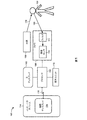
これより、通常100で参照される、本発明の一実施形態に従って構築され、及び動作する、ユーザが目に基づいたフィードバックを用いてコミュニケーションをとることを可能にするシステムの模式図である図1を参照する。システム100は、主ディスプレイ102、画像プロセッサ104、光源106、カメラ108、音声ユニット112、及び補助ディスプレイ124を備えたコンピュータデバイス114を含む。プロセッサ104は、主ディスプレイ102、カメラ108、音声ユニット112、及びコンピュータデバイス114と通信可能に結合される。コンピュータデバイス114は、有線又は無線通信リンク116(例えば、双方向Bluetooth接続)を経由して、プロセッサ104と通信可能に結合されてもよい。
1 is a schematic diagram of a system that allows a user to communicate using eye-based feedback, constructed and operating in accordance with one embodiment of the present invention, generally referred to at 100. Refer to The
光源106は、光118を放射することによって、ユーザ150の少なくとも一方の目を照らすように構成される。光源106は、赤外線(IR)スペクトルの光などの不可視光を放射するように構成されてもよい。IR光は、照明条件の悪い暗い部屋の中でも効果的に使用することができ、かつ目の効果的な照明を可能にするので、特に望ましい。代替的に、ユーザ150の目を照らすために、他の光波長(非IR光)が用いられてもよい。光源106は、一般的に、目に安全な光(例えば、可視又は赤外線波長にある)を放射する。目に安全な光は、表示画像の可視光経路を妨げることなく、望ましい光路でシステム100の様々な光学素子を通過する(すなわち、望ましい方向に光学素子を透過する又は光学素子から反射される)ことができる。一例として、光源106は、アレイに(例えば、各LEDを正方形の各角に備えた正方形パターンに)配置された4つのIRのLED光によって具現化されてもよい。代替的に、光源106は、太陽放射又は室内照明などの周辺光によって具現化されてもよい。
The
カメラ108は、ユーザ150の少なくとも一方の目の画像を捕捉するように構成される。カメラ108の目線(LOS)は、ユーザ150が顔を向けている概略の方向に向けて位置合わせされる。カメラ108の視野(FOV)は、目を画像フレーム内に維持しながら、ユーザ150による可能な頭の動きの範囲に関連付けられる。システム100は、単一のカメラ108を用いて可能となるよりも広い全体的なFOVの撮像を可能にする、異なるFOVを持つ複数のカメラ108を含んでもよい。
The
カメラ108は、任意の波長範囲(例えば、可視又は不可視スペクトルの光、紫外線、赤外線、レーダ波、マイクロ波、RFなど)の任意の形態の電磁放射の取得を含む、現実世界のシーンの画像表現を取得可能な任意の種類のデバイスでもよい。例えば、カメラ108は、可視から近赤外線(NIR)スペクトルで動作する相補型金属酸化膜半導体(CMOS)又は電荷結合素子(CCD)カメラでもよい。一般的に、カメラ108は、光源106の動作可能波長範囲に一致する又は少なくとも部分的に重なるスペクトル領域で動作する。カメラ108の主要構成要素は、フィルタ111、画像センサ110、レンズ(不図示)、及び電子回路(不図示)である。画像センサ110は、選択された波長の光のみを検出するように構成されてもよい(すなわち、狭帯域センサ)。代替的に、フィルタ111は、所望の波長以外の光が画像センサ110に到達することを阻止するように構成されてもよい(例えば、帯域通過フィルタを用いて)。
The
センサ110は、例えば、フォトダイオード、CCD、又は別の種類の光検出素子でもよい。カメラ108は、一般的に、後続の処理及び/又は送信のために電子信号に変換され得るビデオ画像を表す一連の連続した画像フレームなどの少なくとも1つの画像フレームを取得するように動作する。一例として、カメラ108は、改造されたウェブカメラ、デジタルカメラ及び/又は携帯電話カメラによって具現化されてもよい。従って、本明細書で使用される「画像」という用語は、あらゆるスペクトル領域で取得されたシーンのあらゆる光学的又はデジタル表現を含む、上記の画像センサからの、あらゆる出力形態を指し、単一の画像フレーム及び一連の画像フレーム(すなわち、「ビデオ画像」)の両方を包含する。
The
カメラ108は、ユーザ150の相対的な目の向きを決定するために使用されるセンサの1つの種類例として提供されるが、システム100は、代替的に、カメラ108の代わりに、異なる種類のセンサを含んでもよい。例えば、システム100は、代替的に、ユーザ150に対して個々に又は適宜の構成(センサアレイなど)に配置された少なくとも1つの別個の光センサを含んでもよい。従って、ユーザ150の相対的な目の向きの決定は、以下にさらに説明されるように、カメラ画像の画像解析に基づくのではなく、上記別個のセンサによって検出された反射光の解析に基づいて行われてもよい。
Although the
主ディスプレイ102及び補助ディスプレイ124は、ユーザ150が見ることができる視覚情報を表示するように構成される。表示情報は、(以下にさらに詳述されるように)例えば英数字及び/又は記号を含むグラフィックメニュー又は表の形態で、選択可能なオプションを有するグラフィック制御要素を含んでもよい。主ディスプレイ102は、コンピュータモニタ、テレビモニタ、タブレット又は携帯電話のディスプレイ、プラズマ又はLCD画面、発光ダイオード(LED)ディスプレイ、三次元表示ディスプレイ(例えば、ホログラフィックディスプレイ)などを含む(但し、これらに限定されない)、任意の適宜のフォーマット又は基礎技術を用いて視覚情報を提示することが可能な任意のデバイス又は機構でもよい。主ディスプレイ102は、ヘルメット、ヘッドバンド、バイザー、眼鏡、ゴーグルなどの、ユーザ150によって装着されるウェアラブル装置内に埋め込まれたヘッドマウントディスプレイ(HMD)によって具現化されてもよい。システム100は、代替的に、主ディスプレイ102及び補助ディスプレイ124に加えて、又はそれらの代わりに、可聴及び/又は触覚感知できるフォーマットで情報を提示する可聴インタフェース及び/又は触覚インタフェースを含んでもよい。
The
プロセッサ104は、様々なシステム構成要素から命令及びデータを受信する。プロセッサ104は、カメラ108によって捕捉された画像フレームに対する画像処理及び解析を行い、かつ画像特徴から情報を抽出するようにも構成される。プロセッサ104は、システム100の他の構成要素から離れた場所に位置してもよい。例えば、プロセッサ104は、通信媒体又はネットワーク上でアクセス可能なリモートコンピュータ、又はリモートコンピュータシステム若しくはマシンなどのサーバの一部でもよい。代替的に、プロセッサ104は、ユーザ150に隣接して位置してもよく、及び/又はシステム100の他の構成要素内に統合されてもよい。プロセッサ104は、十分な演算能力を備えた低コストプロセッサ(例えば、Odroid U3又はRaspberry pi2)によって具現化されてもよく、及びテキストを音声に変換するエンジン及びBluetooth機能を含んでもよい。
The
音声ユニット112は、可聴出力を生成するように構成される。可聴出力は、単純なビープ音又はアラームタイプの音声通知からより複雑な音声パターンに及ぶ、変化するトーン又は強度の様々な種類の音を含んでもよい。システム100は、一般的に、複数の形態の可聴出力を生成するように構成されてもよい複数の音声ユニット112を含んでもよい。音声ユニット112は、ヘッドフォンなどの少なくとも1つのスピーカによって具現化されてもよい。
The
コンピュータデバイス114は、スマートフォン、タブレットコンピュータ、及び/又はデジタル音楽プレイヤーなどのモバイルコンピュータデバイス、又はデスクトップコンピュータなどの固定式コンピュータデバイスによって具現化されてもよい。
The
システム100は、ユーザ150の近くにシステム100の要素を支持するための支持フレーム(不図示)を含んでもよく、又はそれを用いて使用されてもよい。支持フレームは、眼鏡(spectacle)又はメガネ(eye−glasses)によって具現化されてもよい。支持フレームは、強く、かつ可撓性のある可動アームを用いて、光源106及びカメラ108を支持してもよい。可撓性可動アームは、カメラ108を支持するのに十分な弾性及び剛性を有するが、カメラ108の撮像範囲、位置及び/又は視野角を調整するために曲げられるのに十分な可撓性を有する材料から作ることができる。ユーザ150に対する重量及び圧力を低減するために、軽量材料が使用されてもよい。例えば、カメラ108は、ユーザ150の顔に装着されたヘッドギアにワイヤを介して取り付けられてもよく、及びカメラ108がユーザ150の少なくとも一方の目を撮像するように、ユーザ150の顔に向けられてもよい。この位置合わせは、ユーザ150の頭の動きを変化させる間に目の位置合わせを維持するために、又はユーザ150の他の身体的要件に適応するために、自動的に又は手動で再調整されてもよい。LIS患者は、人工呼吸器又は他の医療機器につながれている場合があるので、支持フレームの操作性は、システム100の位置が完全に固定された場合に生じる支障又は制約を最小限に抑えながら、このような患者が、システム100を便利に利用することを可能にすることができる。また、支持フレームは、特定のユーザ150の要件を満たすように、例えば異なる種類の人工呼吸器を持つ人々によって利用可能となるように、調整可能であってもよく、及び/又は構成されてもよい。安定性及び支持を提供する代替技術は、システム100の要素を隣接するカウンター、乗り物、又は車椅子に取り付けることによる。
The
システム100の構成要素及びデバイスは、ハードウェア、ソフトウェア、又はそれらの組み合わせに基づいてもよい。システム100の各デバイス又は構成要素に関連付けられた機能性が、単一の位置又は複数の位置に存在し得る複数のデバイス又は構成要素間で分散されてもよいことが理解される。例えば、プロセッサ104に関連付けられた機能性が、複数の処理ユニット(画像処理機能用の専用画像プロセッサなど)の間で分散されてもよい。システム100は、任意選択的に、開示の要旨の実施を可能にする、図1に不図示の追加の構成要素を含んでもよく、及び/又はそれらに関連付けられてもよい。例えば、システム100は、電力を様々な構成要素に提供する電源(不図示)を含んでもよく、及び画像フレーム又は他の種類のデータの一時記憶のためのメモリ又は記憶ユニット(不図示)をさらに含んでもよい。
The components and devices of
これより、例示目的で、LIS患者などの言葉によるコミュニケーションが困難又は不能であることを特徴とするユーザ150の観点から、システム100の動作を説明する。ユーザ150は、複数のコマンド選択などの、主ディスプレイ102及び/又は補助ディスプレイ124上に提示された視覚情報を見る。カメラ108は、光源106によって照らされたユーザ150の目の画像を捕捉し、プロセッサ104は、捕捉された画像を受信及び処理して、ユーザ150の相対的な目の向きを決定する。相対的な目の向きは、頭の向きに概ね一致する彼/彼女が顔を向けている方向に対するユーザ150が見ている概略の方向(例えば、「上」、「下」、「左」、「右」、「正面」)を表す。従って、相対的な目の向きは、眼窩内の瞳孔の向き又はユーザの頭の向きに対する瞳孔の向きと見なすことができる。例えば、プロセッサ104は、目の捕捉画像を、少なくとも1つの前の捕捉画像と比較することによって、瞳孔の瞬間的な相対的な向き(眼窩又はユーザ150の頭の向きに対する)を決定し、/又は瞳孔の向きにおける過渡変化を検出する。代替的に、プロセッサ104は、カメラ108によって捕捉された画像ではなく、別個のIRセンサなどの別個の光センサによって検出されたユーザ150の目からの反射信号を処理する。例えば、プロセッサ104は、ユーザの目の周りの異なる位置に配置された複数の別個のセンサ(例えば、目の外周の周りで均等に分散された4つのセンサ)の各検出を比較し、センサ検出の特徴(例えば、どのセンサが目から反射された光を検出したか、検出された反射の強度及び/又は到来角)、並びに各センサに対する瞳孔の相対的近接に基づいて、ユーザ150の相対的な目の向きを決定してもよい。
From now on, for illustrative purposes, the operation of the
ディスプレイ102は、オプション選択表又はメニューを介して複数のオプションを提示する。ユーザ150は、選択するオプションを、彼/彼女の相対的な目の向きが、ディスプレイ102上に提示されたそのオプションの相対的方向と相関するようにアイジェスチャを行うことによって示す。従って、プロセッサ104は、ユーザ150の相対的な目の向きを決定し、決定された相対的な目の向きに基づいて、ユーザ150によって選択されたオプションを決定する。例えば、相対的な目の向きが「右」であると決定されると(すなわち、瞳孔の向きは、ユーザ150の眼窩内の右側にある)、メニューの右側に表示されたオプションが選択されると見なされる。ユーザ選択は、ユーザの正確な注視方向又は目線の決定を必要とせずに(すなわち、ディスプレイ102上の一意的な座標位置を決定するなどの特定の座標系に関してユーザ150が見ている特定の点又は空間座標を決定することなく)、ユーザ150が見ている極めて概略の(曖昧な)方向(例えば、「右」、「左」、「上」、「下」、「正面」)に一致する相対的な目の向きにのみ基づいて決定されることに留意されたい。
The
プロセッサ104は、ユーザ150の決定された選択に基づいて、少なくとも1つのアクションを行うようにディスプレイ102、音声ユニット112、及び/又はコンピュータデバイス114に命令を提供する。これらのアクションは、例えば、単語、文字、フレーズ、文、又はアラーム警告サイレンを聞こえるように出力すること、異なるメニュー画面又は異なる1つ又は複数のメニューオプションを表示すること、テキストを表示すること、テキスト又はEメールメッセージを生成及び送信すること、及び/又はコンピュータデバイス114上で特定のアプリケーションを実行することでもよい。
The
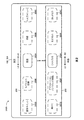
これより、図2〜4を参照して、システム100の選択プロセスをさらに説明する。図2に描かれる例示的表示画面200Sには、2つの別々のメニュー部分が示されている。上側のメニュー部分200は、ユーザ150がシステム100の設定パラメータを選択又は変更することを可能にするように配置された「設定メニュー」である。下側のメニュー部分202は、ユーザ150が、キーワード及びフレーズの所定のセットから特定の単語又は一連の単語(フレーズ)を選択することを可能にするように配置された「単語メニュー」である。1つ又は複数の設定オプション200A、200B、200C、200D、200E及び1つ又は複数の単語オプション202A、202B、202C、202D、202Eが、ある瞬間に、ディスプレイ102、124上に表示される。オプションの選択は、追加のオプションを有するサブメニューを表示させてもよい。
The selection process of the
図示された例では、オプション200Aは、異なる言語の選択肢のサブメニューをもたらす「言語オプション」を表す。オプション200Bは、例えば特定のアイジェスチャ又は指示を行うことによって、ユーザ150によって再起動されるまで、待機(すなわち、停止又は低電力)動作モードにシステム100を切り替える「待機オプション」を表す。オプション200Cは、ユーザ150を支援する(例えば、システム100の特定の局面又は要素の使用方法の説明)ように設計された異なるオプションのサブメニューをもたらす「ヘルプオプション」を表す。オプション200Dは、選択されると、音声ユニット112が警報又は警告信号を発することを生じさせる「警告オプション」を表す。オプション200Dは、ユーザ150が窮地及び/又は生命に関わる状況にある場合に特に有用である。警報又は警告サイレンは、例えば続けざまに4回ウインクをするなどの特定のアイジェスチャ又は指示を行うユーザ150によって起動されてもよい。オプション200Eは、ユーザ150がコンピュータデバイス114上でプログラムアプリケーションを実行することを可能にする、プロセッサ104とコンピュータデバイス114との間の通信リンク116を確立する「モバイル接続オプション」を表す。
In the illustrated example,
単語メニュー部分202を参照して、オプション202Aは、「こんにちは」という単語を表し、オプション202Bは、「さようなら」という単語を表し、オプション202Cは、「ありがとう」という単語を表し、オプション202Dは、「助けて」という単語を表す。例えば、オプション202Dの選択は、設定オプション200Dと同様に、音声ユニット112が警報信号又は警告サイレンを発することを生じさせることができる。オプション202Eは、「アプリケーション」という単語を表す。例えば、オプション202Eの選択は、設定オプション200Eと同様に、ユーザがコンピュータデバイス114上でプログラムアプリケーションを実行することを可能にするために、コンピュータデバイス114との通信リンク116を確立するようにプロセッサ104に命令することができる。
See the
ある例示的実施形態では、「設定」メニュー部分200又は「単語」メニュー部分202からの単一のオプションのみが、ある時点で、ディスプレイ102、124上に表示され、ユーザ150が、適切な目の動き又はジェスチャを実行することによって、現在表示されているメニューオプションを選択すること、又は他の利用可能なメニューオプションを見続けることを可能にする。例えば、各メニュー部分200、202からの個々のオプションは、ユーザ150の相対的な目の向きに応じて、周期的に順次提示されてもよい。具体的には、ユーザ150は、まず、上方向(U)を見ることによって、「設定メニュー」200を選択することができる。続いて、左方向(L1)を見ることによって、ユーザ150は、ディスプレイ102、124上に提示された「設定オプション」を、第1の順番で繰り返し表示させることができ、右方向(R1)を見ることによって、ユーザ150は、「設定オプション」を逆の順番で繰り返し表示させることができる。例えば、ディスプレイ102、124は、まず、設定オプション200A及び202Aのみを提示する。上(U)を見て、次に左(L1)方向を見ることによって、ユーザ150は、設定オプション200E(例えば、設定オプション200Aの代わりに)を表示するようにシステム100に命令することができる。あるいは、上(U)を見て、次に右(R1)方向を見ることによって、ユーザ150は、オプション200B(例えば、オプション200Aの代わりに)を表示するようにシステム100に命令することができる。同様に、まず下(D)を見ることによって、ユーザ150は、「単語メニュー」202を選択することができる。続いて、ユーザ150は、例えば、左(L2)を見ることによって単語オプションを第1の順番で繰り返し表示させる、又は右(R2)を見ることによって単語オプションを第2の順番で繰り返し表示させるなど、ディスプレイ上で「単語オプション」を順次繰り返し表示させることができる。例えば、下(D)を見て、次に左(L2)方向を見ることによって、ユーザ150は、単語オプション202E(例えば、オプション202Aの代わりに)を表示するようにシステム100に命令することができる。あるいは、下(D)を見て、次に右(R2)方向を見ることによって、ユーザ150は、オプション202B(例えば、オプション202Aの代わりに)を表示するようにシステム100に命令することができる。代替の方向構成を等しく適用できることに留意されたい。例えば、ユーザ150は、代替的に、視線を、左方向及び右方向ではなく、上方向及び下方向に向けることによって、メニューオプションを順次繰り返し表示させてもよく、ディスプレイ102、124は、上下構成ではなく、並列で異なるメニュー部分200、202を提示してもよい。
In an exemplary embodiment, only a single option from the “Settings”
ユーザ150は、自身の目を閉じる(ウインクする/まばたきする)、又は例えば前方の目の向きに対して斜めに又は傾斜角(例えば、45°の角度)を成すといった特定の方向を注視するなどの、所定の目に基づいたジェスチャ又は指示を使用することによって、メニュー200、202の一方からオプションを選択することができる。ユーザ150は、彼/彼女が選択プロセスを上手く実行できることを確実にするために、システム100の初期化プロセス中に、使用される適切な目に基づいたジェスチャを選択することができる(例えば、一部のユーザは、まばたきすることが難しい場合があり、従って、代替のジェスチャを選択してもよい)。選択されたジェスチャは、使用前に、システム100の事前セットアップ又は初期化の必要性を排除するために、予め選択されたデフォルトオプションでもよい。例えば、ユーザ150は、下(D)を見て、次に左(L2)及び/又は右(R2)方向を見ることによって、彼/彼女が所望のオプション(例えばオプション202C)に至るまで、単語メニュー202の異なるオプションを繰り返し表示させることができ、次に、下(D)を見て、ジェスチャを行う(例えば、ウインクする)ことによって、オプション202C(「ありがとう」という単語)を選択することができる。単語メニュー202における単語の選択は、選択された単語の可聴表示を提供するように音声ユニット112に命令する。例えば、オプション202Cの選択は、ユーザ150の近くにいる人達に、聞こえるように音声ユニット112から発せられた「ありがとう」という単語を聞かせる。
The
強調表示又は太字表示されたテキスト又はカラーフレームなどの一時的な視覚表示が、例えば、オプションが最初に又は暫定的に選択されたが、まだユーザ150によって認証されていないことを示すために、選択されたオプションに適用されてもよい。次に、選択されたオプションに関連付けられた関連機能性を実行する前に、確認用の目に関連したジェスチャ又は指示(2回まばたきするなど)が、ユーザ選択を認証するために必要とされてもよい。加えて、提示されたメニュー内の様々なオプションを区別することを助けるために、形状又は色が用いられてもよい。代替的に、暫定的なユーザ選択が、例えば部分的音声出力をユーザ150に向けることによって、聞こえるように示されてもよい。例えば、最初に(暫定的に)選択されたメニューオプションが、ユーザ150が装着しているオーディオヘッドフォンの単一のチャンネルにのみ放送され、モノ音響再生を提供する(例えば、ヘッドフォンの右耳/右チャンネルにのみ放送することによって)。ユーザ150が、その単語を彼の周囲の環境に聞かせたい場合には、選択された単語は、選択されたオプションに関連付けられた適切な音(又は複数の音)を、音声ユニット112上、及び任意選択的にユーザ150が装着したヘッドフォンの他方の音声チャンネル(例えば、ヘッドフォンの左耳/左チャンネル)上で放送させる、追加の目に関連した指示又はジェスチャ(例えば、まばだき)によって認証される。異なる音声ユニット112間で(例えば、ユーザによってのみ聞くことができるヘッドフォン及び周囲全体で聞くことができるスピーカ間で)、及び単一の音声ユニットの異なる音声チャンネル間で(すなわち、モノ放送)、部分的可聴表示を選択的に指向させることによって、ユーザ150は、システム100によって放送された可聴フィードバックを認識及び制御することができる。
A temporary visual display, such as highlighted or bold text or a color frame, is selected to indicate, for example, that the option was initially or tentatively selected but not yet authenticated by the
音声ユニット112は、代替的に、ディスプレイ102、124による視覚表示の代わりに(又はそれに加えて)、利用可能な選択オプションを可聴フォーマットでユーザ150に提示してもよい。例えば、ユーザ150が、各オプションに関連付けられた異なる目に関連したジェスチャの可聴表示と共に、利用可能なオプションを聞くように、設定メニュー200の設定オプション及び/又は単語メニュー202の単語オプションのリストが、ヘッドフォンを通してユーザ150に放送されてもよい。例えば、ユーザ150は、ユーザ選択を促す以下の音声シーケンスを聞くことができる:「左−こんにちは、右−さようなら、上−はい、下−いいえ、まばたき−メニューを繰り返して」。代替的に、ユーザ150は、単に、単一のオプション、例えば「言語」を聞くことができる。1つ又は複数のオプションが、ユーザ150にのみ放送されてもよい。ユーザ150は、指定された目に関連したジェスチャを実行することによって、異なるオプションメニュー間を移動する、又はオプションを選択することができる。例えば、ユーザ150は、一方の側(例えば、右又は左、上又は下)への一瞥を用いて、異なる単語オプションを繰り返し表示させ、まばたき又はウインクジェスチャを用いて選択を示すことができる。ユーザ選択に続いて、関連付けられた音声出力が、その周囲に対して公開で放送されてもよい。
The
そのため、システム100の選択インタフェースは、視覚インタフェース(ディスプレイ102、124上に提示された視覚メニュー)、可聴インタフェース(プロセッサ104及び音声ユニット112によって提供される可聴メニュー)及び/又は触覚インタフェース(不図示)でもよい。従って、システム100は、ディスプレイ102、124がなくても、設定メニュー200及び単語メニュー202(図2)に相当する選択メニューを提示することができる。ディスプレイの排除は、患者のベッドの隣に設置され得るストレスとなるデバイスと同様に、回復期の患者(例えば、手術後)が、看護師に依頼する、又は家族とコミュニケーションをとることを可能にすることによって、医療機関の状況下において特に有益となり得ることが理解される。さらに、ディスプレイ102、124の排除は、システム100の構成要素の数の減少に役立ち、このことは、全体的なコストを低下させ、かつより大きな可動性及び利用可能性を提供することができる。
As such, the selection interface of the
例示的表示画面200S(図2)を参照して、ディスプレイ102、124は、代替的に、代わりに他方のメニュー200、202(又は現在表示されていない別の利用可能メニュー)を表示することを可能にする選択可能オプションをメニュー200、202の各々に提示しながら、ある瞬間に、単一のメニュー部分200、202のみを選択的に表示してもよい。例えば、設定メニュー200は、「単語メニューへの切り替え」オプション(不図示)を含んでもよく、それに応じて、単語メニュー202は、「設定メニューへの切り替え」オプション(不図示)を含んでもよく、2つの各メニュー200、202間のトグリングを可能にする。このような表示構成は、ユーザ150の目の動きを左又は右方向にのみ限定する(及び上方向及び下方向への目の動きの必要性を除去する)ことによって、選択プロセスの単純化に役立ち得る。単に彼/彼女の注視を概略の方向(例えば、左又は右)に変えるだけで、表示されたメニュー200、202を順次繰り返し表示させる機能は、ユーザ150が、比較的簡単かつ迅速に利用可能なメニューオプションの全てにアクセスすることを可能にすることがさらに理解されるだろう。例えば、ある特定のメニューが10個の可能なオプションから構成される場合、いずれのオプションも、メニューの5「サイクル」以内に到達することができる(例えば、単語メニュー202が5個のオプションを含む図2の例では、オプション202Dは、オプション202Aから開始して、左に2回、又は右に3回繰り返すことによって到達することができる)。単語メニュー202において提供される語彙は、問題となっているターゲットオーディエンス又はユーザにとって重要性が高く、及び高頻度であることが分かった特定数の予め決定された単語に限定されてもよい。ある単語メニュー202の利用可能な単語オプションは、部分的又は完全に、ユーザ150によって予め選択及び/又は編集されてもよい。単語メニュー202の語彙に関連付けられた各音声出力は、システム100の稼働前に前もって生成されてもよく(例えば、話される単語及び/又はフレーズに対応した様々な音声ファイルを事前に録音することによって)、又はリアルタイムで生成されてもよい(例えば、テキストを音声に変換する、又は発音表記音声合成器を用いて)。
With reference to
上述の通り、文字グループメニューを示すメニューオプションを含む単語メニュー202など、あるメニューオプションが、表示することのできる異なるサブメニューを示してもよい。代替的に、単語メニュー202におけるモバイル接続オプション200E、202Eの選択は、異なるメニュー又はサブメニュー、例えば文字グループメニューを含むアプリケーションを実行中のコンピュータデバイス114との通信リンク116をプロセッサ104に形成させることができる。
As described above, certain menu options may indicate different submenus that can be displayed, such as a
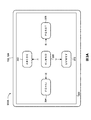
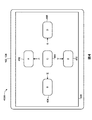
これより、通常300で参照される、選択用の異なる文字グループオプション302、304、306、308、310を含む、文字オプションメニュー例を提示するディスプレイ102、124上の例示的表示画面300Aの図である図3Aを参照する。文字グループメニュー300は、書かれたテキスト又はメッセージを作成するため、又は伝達される若しくは単語メニュー202に追加される単語のスペリングを伝えるために使用されてもよい。図3Aの図示された例では、オプション302は、「ABCDE」の文字グループを表し、オプション304は、「FGHIJ」の文字を表し、オプション306は、「KLMNO」の文字を表し、オプション308は、「PQRST」の文字を表し、オプション310は、「UVWXY」の文字を表す。文字グループオプション302、304、306、308、310は、各文字グループが、ディスプレイ102、124の離れた領域(すなわち、上、下、左、右、又は中央)に位置した十字形構成で提示される。図2を参照して先に説明したメニューオプションの選択と類似して、ユーザ150は、相対的な目の向き及び/又は目に関連したジェスチャのみを用いて、文字グループメニュー300の利用可能なオプションを選択することができる。例えば、ディスプレイ102、124上で文字グループメニュー300を見ながら、ユーザ150は、上方向(U)を注視することによってオプション302を選択することができ、左方向(L)を注視することによってオプション304を選択することができ、右方向(R)を注視することによってオプション308を選択することができ、又は下方向(D)を注視することによってオプション310を選択することができる。ユーザ150は、一方若しくは両方の目を閉じる(ウインクする/まばたきする)、又は前方の相対的な目の向きに対して斜めの若しくは傾斜した角度(例えば、45°の角度)で注視するなどの、所定の目に関連したジェスチャ又は指示を行うことによって、中央のオプション306を選択することができる。オプションは、上述の文字をアナウンスする音声ユニット112によって伝達されてもよい。
Thus, in the illustration of the
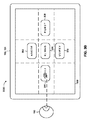
「G」の文字の選択が行われている、異なるセクションに分割された図3Aの例示的文字グループメニュー300を提示する、ディスプレイ102、124上の例示的表示画面300Bの図である図3Bを参照する。
FIG. 3B, which is a diagram of an exemplary display screen 300B on the
文字グループメニュー300の文字グループオプション(例えば302又は304)の選択は、選択された文字グループの個々の文字を表す別のサブメニュー(すなわち400)の表示をもたらすことができる。例えば、ユーザ150が、文字グループオプション302(ABCDEの文字)を選択するために上を注視すると、ディスプレイ102、124は、関連付けられたABCDEの文字サブメニューを表示する。これより、通常400で参照される、選択用の異なる個々の文字オプション402、404、406、408、410を含む、ABCDEの文字サブメニューを提示する、ディスプレイ102、124上の例示的表示画面400Aの図である図4を参照する。文字サブメニュー400は、選択された文字グループオプション302(図3A)に相当する。メニュー400の図示された例では、オプション402は、「A」の文字を表し、オプション404は、「B」の文字を表し、オプション406は、「C」の文字を表し、オプション408は、「D」の文字を表し、オプション410は、「E」の文字を表す。文字グループメニュー300と同様に、個々の文字オプションもまた、各文字グループが、ディスプレイ102、124の離れた領域(すなわち、上、下、左、右、又は中央)に位置した十字形構成で提示される。ユーザ150は、相対的な目の向き及び/又は目に関連したジェスチャを用いて、個々の文字サブメニュー400の利用可能なオプションを選択することができる。例えば、ユーザ150は、上方向(U)を注視することによってオプション402を選択することができ、左方向(L)を注視することによってオプション404を選択することができ、右方向(R)を注視することによってオプション408を選択することができ、下方向(D)を注視することによってオプション410を選択することができる。ユーザ150は、一方又は両方の目を閉じる(ウインクする/まばたきする)などの、所定の目に関連したジェスチャ又は指示を行うことによって、中央のオプション406を選択することができる。
Selection of a character group option (eg, 302 or 304) in the
サブメニュー400の個々の文字の選択は、ユーザ150による確認を必要とし得る、ディスプレイ102、124上に表示される選択された文字の視覚表示(例えば、選択された文字を強調表示する、又はその周りに視覚的な縁を提示することによる)をもたらしてもよい。代替的に、又は追加的に、選択された文字の音声表示が、音声ユニット112によって生成されてもよい。選択された文字は、ユーザ150によって作成中のテキストメッセージ又はテキストベースの命令にさらに加えられてもよい。例えば、上を見てオプション402を選択することにより、ディスプレイ102上に表示された文字「A」の視覚表示を提供し、ユーザ150によって作成中のメッセージのテキストに「A」の文字を入力しながら、「A」の文字の音を発するように音声ユニット112に命令する。完成された単語は、単語メニュー202に追加され、及び保存されてもよい。
The selection of individual characters in the
文字グループメニュー300又は個々の文字メニュー400は、代替的に、任意の数のオプション(必ずしも5個のオプションではない)を表示するように構成されてもよいことに留意されたい。例えば、ユーザ150が、「中央」のオプションの選択を示すための適切なアイジェスチャを実行することが難しい場合には、4個のオプションのみが表示されてもよい。このように、視覚的に提示されるメニューは、追加の目に関連したジェスチャの必要性を除去しながら、相対的な目の向き(例えば、上、下、左又は右)のより一般的な選択のみに基づいてユーザ選択を取得するように構成することができる。4個のオプションのみを含むメニューの中央の領域は、空けたままでもよく、又はメニューのタイトル(すなわち、選択可能なオプションではない)を表示してもよい。代替的に、システム100は、例えば、まばたきをコントロールすることが困難な、又は不随意のまばたきを経験する個人のために、選択を示すための4つの斜め方向(右上、左上、右下、左下)及び任意選択的な真っ直ぐな方向(例えば、真っ直ぐ下)を指定してもよい。
Note that the
異なるメニューオプションが、ディスプレイ102、124上のそれらの異なる相対的位置に加えて、各表示されるメニューオプションに対して追加の視覚的区別を提供するために、固有の視覚的効果又は特徴を有して表示されてもよい。例えば、異なるオプションが、ユーザ150によって、より簡単に認識され、識別され、及び互いに見分けることが可能となるように、各メニューオプションは、異なる色形状又は縁のスタイルで表示されてもよい。メニューは、ユーザ150が、前に選択されたオプション、前に表示されたメニュー、又はプリセットの決定されたアクションに戻ることを可能にする「リターンオプション」を含んでもよい。代替的に、システム100は、メニューオプションの最終選択に続いて、ユーザ150が、前のメニュー又はデフォルトメニューに自動的に戻ることができるように構成されてもよい。上述の通り、選択されたオプションに対して、オプションが最初に選択されたことを示す表示が提供されてもよい。表示は、例えば、強調表示又は太字表示されたテキスト、カラーフレーム、及び/又はユーザ150によって装着されたヘッドフォンの少なくとも一方の耳に発せられる可聴表示でもよい。次に、システム100は、選択されたオプションの選択を認証又は確認し、それによって、オプションが選択されたこと及び/又はどのオプションが選択されたかをユーザ150に知らせる視覚及び/又は音声表示を提供するための指定の確認ジェスチャ(2回まばたきするなど)を待ってもよい。
Different menu options have unique visual effects or features to provide additional visual distinction for each displayed menu option in addition to their different relative positions on the display 102,124. May be displayed. For example, each menu option may be displayed in a different color shape or border style so that different options can be more easily recognized, identified, and distinguished from each other by the
ユーザ150によるオプションの選択を実行するための目に関連したジェスチャは、個々のアクション又はジェスチャのシーケンスを含んでもよい。このようなシーケンスは、サブメニューの提示を回避しながら、提示されたメニューに関連付けられたサブメニューにおける利用可能なオプションの直接的選択を可能にすることもできる。例えば、ユーザ150は、図4の「個々の文字のサブメニュー」400を表示することなく、図3Aの「文字グループメニュー」300を見ながら、2つの連続した所定の目に関連したジェスチャを行うことによって、個々の文字を選択することができる。第1のジェスチャが、ある特定の文字グループ(例えば、文字グループ308)を選択し、次に、その文字グループ内の個々の文字の色又は位置に基づき得る第2のジェスチャが、ある特定の文字(例えば「S」の文字)を選択し、それによって、個々の文字のサブメニュー400の表示を回避する。例えば、各表示された文字グループ302、304、306、308、310内の個々の文字は、関連の方向に表示されたカラーインジケータによって示されてもよい各方向に対応するように色分けされてもよい。例えば、各文字グループの最初の文字「A」、「F」、「K」、「P」、及び「U」が、全て1つの色(例えばオレンジ色)で描写されてもよく、特定の方向(例えば上)を向く矢印によって表されるオレンジ色のカラーインジケータが、ディスプレイ102、124上に表示されてもよい。従って、まず左(L)を見ることによって、ユーザ150は、オプション304(すなわち、文字グループ「FGHIJ」全体)を選択し、続いて上(UP)(すなわち、オレンジ色のインジケータ方向に向けて)を見ることによって、ユーザ150は、文字グループ304の中からある特定の文字(例えば「F」の文字)を選択する。選択されたメニューオプションを表示するために使用される色は、視覚又は知覚能力の障害を特徴とするユーザ150であっても確実に知覚できるように、簡単に識別でき、かつ非常に目に付きやすい特定の色でもよい。ディスプレイ102、124によって表示されるメニューアイテムのグラフィック要素は、テキスト又は英数字に限定されず、例えば、「スペースバーアイコン」、「バックスペース/デリートアイコン」、「メインメニューに戻る又は帰るアイコン」などの様々なアクション又は選択可能なオプションを表す様々な種類の記号、アイコン、又は画像を含んでもよいことに留意されたい。視覚出力に関して、ユーザ150は、複数の画像、記号、又は絵(例えば、食べ物を載せた皿、水の入ったグラス、車、車椅子など)を有するオプションメニューが提供されてもよい。選択された絵は、補助ディスプレイ124などの外部画面上でユーザの周囲に対して表示されてもよく、又は別のデバイスへ(例えば、友人若しくは看護師の携帯電話へ)のメッセージにおいて送信されてもよい。代替的に、絵の選択は、適切な音声出力を生じさせることができ、例えば、食べ物の乗った皿の絵の選択は、「食べ物」という単語の可聴出力を生じさせる。
Eye-related gestures for performing selection of options by the
システム100は、ユーザによって選択された最初の数文字に基づいて、完全な単語を予測し、提案することを支援する単語予測アプリケーションを含んでもよい。例えば、ユーザ150が以下の文字シーケンス:「H−E−L」を選択した場合、システム100は、ディスプレイ102、124上に、又は音声ユニット112を用いて、提案された単語を提示することによって、「help」又は「hello」という単語を提案することができる。システム100は、プロセッサ104によって決定された文脈に基づいて、全単語又は文完成を利用することさえできる。ユーザ150は、例えば、左又は右方向を見ることによって、ディスプレイ上で、異なる提案された完全な単語を繰り返し表示させることができる。ユーザ150による提案された単語の選択は、適切な目に関連したジェスチャ又は指示を用いて行うことができる。このようにして、ユーザ150による単語の選択を加速し、かつ精度を向上させることができる(ユーザ150が追加の文字の選択を継続する必要性を除去し、ユーザによる後続の不注意の間違った文字選択を避けることによって)。完成された単語は、聞こえるように又は視覚的に示すことができ、該当する場合は、音声ファイル及び/又はテキストファイルとして保存又は転送されてもよい。単語予測機能は、言語モデル及び語彙ライブラリに基づいてもよく、及び、例えばユーザの言語習慣を学習して、そのユーザに関連付けられた今後提案される単語完成を向上させるなどの適応性を有していてもよい。
The
個々の文字のスペリングを伝えることによって単語を示すのではなく、ユーザ150は、表示された「単語メニュー」上で直接所望の単語を探してもよい。このようなメニューは、実際の単語、又はトピック若しくは主題(例えば、「食べ物」、「衣服」、「色」など)によって分類される単語のカテゴリを表す異なるオプションを含んでもよい。最初に表示された単語オプションの選択は、最初に選択された単語に続く論理的な単語オプションを有するサブメニューの表示を生じさせることができる。例えば、単語メニューは、まず、5つの異なるカテゴリを提示してもよい。ある特定のカテゴリが選択されると、そのカテゴリ内の5個の新しい単語のサブメニューが提示される。これらの新しい単語の各々が、さらなるサブカテゴリをもたらし、以下同様でもよい(例えば、「衣服」−「シャツ」−「ドレスシャツ」)。このようにして、可能性がある単語のかなり多い語彙が、ユーザ150に利用可能となる。例えば、各単語メニュー画面が合計5個のオプションを提示すると仮定すると、ユーザ150は、潜在的に、たった5個の目に関連したジェスチャを用いて、3000個を超える異なる単語にアクセスすることができる(すなわち、最初の4つのメニュー画面上の各オプションが、単語オプションのサブカテゴリを示す場合)。
Rather than presenting a word by conveying the spelling of individual characters, the
ユーザ150は、好ましい頻出の単語又は文を保存し、今後の動作セッションにおいて、当該単語/文に直接アクセスすることを可能にすることができる。システム100は、ユーザ150の好み及び習慣を適応的に学習し、それに応じて、異なるメニュー画面の利用可能な単語又はオプションを修正又は更新することもできる。ユーザによって以前に選択された好ましい又は頻出の単語又はオプションの優先順位を付けることによって、システム100の動作は、より効率的及びより直感的となることができる。システム100は、例えばインターネットを介したインタフェース(不図示)、プロセッサに結合された入力デバイス、又はコンピュータデバイス114のアプリケーションをさらに含むことによって、特定のユーザ(又は管理者)が、そのユーザ用の特定のメニューをカスタマイズすることを可能にすることができる。このようなメニューのカスタマイズは、個々のユーザ又は特定グループのユーザが、より関連性のある、又は当該ユーザ/グループによって頻繁にアクセスされる可能性の高い単語から選択することを可能にする。このカスタマイズは、様々な種類の特殊なニーズを持つ様々な異なるユーザに対応することにも役立つ。
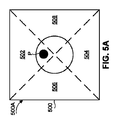
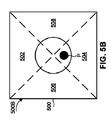
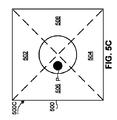
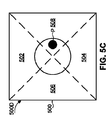
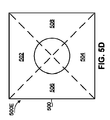
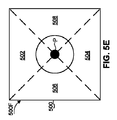
これより、図5A〜5Fを参照する。図5A〜5Fは、図1のシステム100のカメラ108によって捕捉されたユーザ150の目の画像例の模式図である。各画像(500A、500B、500C、500D、500E、500F)は、4つの象限:ユーザ150が上を見ていることに対応した上象限502;ユーザ150が下を見ていることに対応した下象限504;ユーザ150が右を見ていることに対応した左象限506;及びユーザ150が左を見ていることに対応した右象限508に分割される。プロセッサ104は、捕捉画像における目の瞳孔の大まかな又は概略の位置を決定する。例えば、プロセッサ104は、どの領域又は象限に瞳孔が位置する可能性が最も高いか(すなわち、その中に瞳孔の大部分が位置する)、又は瞳孔が画像の中心に又はその付近にあるかどうかを決定することができる。瞳孔が見つからない場合には、プロセッサ104は、目がまばたきをしている、又はウインクをしていると決定することができる。
Reference is now made to FIGS. 5A-5F are schematic diagrams of example images of the eyes of the
瞳孔の概略の位置及び/又は瞳孔の方向の変化(例えば、左、右、上又は下方向への動き)に基づいて、プロセッサ104は、ディスプレイ102、124上の対応する位置(上、下、左、右、又は中心)を決定し、従って、メニュー(200、300、400)の選択された/所望のオプションが表示される。例えば、画像500A(図5A)では、瞳孔Pは、個々の文字メニュー400(図4)のオプション402に対応する上象限502に位置する。各画像500B、500C、500D(図5B、5C、5D)において、瞳孔Pは、それぞれ、個々の文字メニュー400の各文字オプション410「E」、404「B」及び408「B」に対応する、下象限504、左象限506、及び右象限508に位置する(左象限506に位置する瞳孔Pは、ユーザが右方向を見ていることに対応し、右象限508に位置する瞳孔Pは、ユーザが左方向を見ていることに対応する(すなわち、捕捉画像は、ユーザのジェスチャを鏡のように映す)。プロセッサ104が、画像500E(図5E)に示されるように、1つの画像内に、又は最小シーケンスの連続画像を通して、瞳孔P(の少なくとも最小部分)を検出できない場合には、プロセッサ104は、ユーザ150がウインクしている(又はまばたきしている)と決定することができ、これは、メニュー画面上の中央に表示されたオプション(例えば、メニュー400のオプション406)の選択、又はオプション(例えば、文字410「E」)の選択若しくは確認に対応し得る。画像500F(図5F)に示されるように、1つの画像において又は最小シーケンスの連続画像を通して、瞳孔Pがその中心又はその付近にあるとプロセッサ104が検出すると、プロセッサ104は、ユーザ150が前方(上述の方向のいずれでもない)を見ていると判断することができ、これは、ユーザ150が、ある方向を見る又はアイジェスチャを行うまでシステム100が待つ待機モードに対応し得る。分割の実際の数は、異なってもよく、象限に限定されない。
Based on the approximate position of the pupil and / or changes in the direction of the pupil (e.g., movement to the left, right, up or down), the
代替的に、画像500を象限に分割する代わりに、瞳孔の位置(及び相対的な目の向き)を識別するための画像処理中に、画像は、追加の、又はより少ないセクションに分割されてもよい。例えば、プロセッサ104は、目の捕捉画像を、2つのセクション(例えば、中央の垂直仕切りによって分割された左セクション及び右セクション)にのみ分割することによって、瞳孔の左及び右の位置のみを決定してもよい。代替的に、プロセッサ104は、目の捕捉画像を、上及び下のセクション(すなわち、中央の水平境界線によって)に分割することによって、瞳孔の上及び下の位置のみを決定してもよい。さらに代替的に、目の画像は、瞳孔の角度位置及び/又は動き、並びにそれに対応する相対的な目の向きのより正確な決定を必要とするために、8つセクション(ハッシュタグ又はシャープ記号に似せて)に分割されてもよい。瞳孔の位置を識別するための処理を行う際に、画像を多数のセクションに分割することは、ユーザの前方注視に対して様々な斜めの又は傾斜した角度の(例えば、ユーザ150の前方注視方向に対して45°の角度の)瞳孔の位置/相対的な目の向きの決定を向上させることができる。
Alternatively, instead of dividing the
より一般的には、プロセッサ104は、目の画像を、特定のメニューオプションが提示されたディスプレイ102、124の特定のセクション又は部分と相関した異なるセクション、部分、又はセグメントに分割してもよい。例えば、文字グループメニュー300及び個々の文字メニュー400は、各メニューオプションを「十字」形状の構成で提示するので、プロセッサ104は、どのメニューオプションがユーザ150によって見られているかを示す瞳孔位置の決定を容易にするために、各処理画像を同様の十字形状に分割してもよい。プロセッサ104は、目の瞳孔Pに加えて、又はその代わりに、ユーザ150の相対的な目の向きを決定するための他の関連する目のパラメータ(例えば、角膜)のトラッキング又は位置特定を行ってもよい。
More generally, the
プロセッサ104は、捕捉画像のシーケンスを通して、瞳孔Pの位置をトラッキングすることもできる。例えば、プロセッサ108は、基準画像(500REF)を利用することができ、その場合、後続の画像(又は後続画像のシーケンス)を基準画像500REFと比較することによって、瞳孔Pの位置が、基準画像500REFにおけるその位置と比較して変わったかどうか、並びに移動の測定量を決定することができる。このような処理は、元の基準画像及び後続の画像との差を検出及び測定するための計算された画像フィルタに基づいてもよい。捕捉画像のシーケンスを通した目の瞳孔位置のトラッキングに加えて、ユーザ150の相対的な目の向きの方向のみを決定することは、カメラ108の動き(例えば、画像間のユーザの目に対するカメラの動き)を安定させる又は補償する、又はバックグラウンドの変化を補償する必要性を低減させることに役立つことにさらに留意されたい。従って、較正プロセスが必要とされなくてもよい。
The
システム100の較正は必要とされないが、一般的又は工場較正、自動較正、及び手動較正を含む幾つかの較正方法が利用可能となり得る。
Although calibration of the
一般的較正プロセス例は、以下の通りである。第1のステップは、目の地理的領域(瞳孔領域を含む)に対する画面動き検出を行うことによって相対的変化を検出するために、連続画像を比較することである。画像の形状から導出された経験則に従って、画像において変化する領域が関心領域を表すと仮定することができる。第2のステップは、瞳孔Pの位置を示す関心領域を追従するために、捕捉画像内の空間中の点として瞳孔円をマーキングすることである。第3のステップは、二次元(x−y)軸グリッドの中心として基準点を設定し、目の動きをグリッド上の(x,y)座標に変換することである。十分に高い確率で、瞳孔Pが、中央にある(すなわち、グリッドの中心[0,0]に近い)ことを較正プロセスが決定した時点で、基準点(それに従って基準点座標系(グリッド)が構築される)が選択される。(x,y)座標は、4つの方向(上、下、左及び右)の各々における目の瞳孔Pの動きを表す。第4のステップは、ユーザの動きの範囲を決定してもよい。較正プロセスは、異なるユーザに関連付けられた特定の動きの範囲を適応的に学習してもよい。異なるユーザは、異なる目及び顔の特徴を含む異なる身体的特徴によって特徴付けられる。 An example of a general calibration process is as follows. The first step is to compare successive images to detect relative changes by performing screen motion detection on the geographic region of the eye (including the pupil region). According to an empirical rule derived from the shape of the image, it can be assumed that the changing region in the image represents the region of interest. The second step is to mark the pupil circle as a point in space in the captured image to follow the region of interest indicating the position of the pupil P. The third step is to set a reference point as the center of a two-dimensional (xy) axis grid and convert eye movement to (x, y) coordinates on the grid. When the calibration process determines that the pupil P is centered (ie, close to the grid center [0,0]) with a sufficiently high probability, the reference point (the reference point coordinate system (grid) is Constructed) is selected. The (x, y) coordinates represent the movement of the eye pupil P in each of the four directions (up, down, left and right). The fourth step may determine the range of user movement. The calibration process may adaptively learn specific motion ranges associated with different users. Different users are characterized by different physical features including different eye and facial features.
さらに、各ユーザの顔及び目に対するカメラ108の位置及び向きは、システム100の異なる動作セッション中に、おそらく変化する。その結果、システム100の較正プロセスは、各ユーザのx−y軸(グリッド)上の瞳孔Pの動きの範囲を適応的に学習し、必要に応じて、閾値(それを超えると、特定方向の瞳孔の動きに関する信号が送られる)に設定される範囲を調整する。最小継続時間(例えば、数ミリ秒)の瞳孔Pの非検出は、ユーザによるウインク又はまばたきを表すと見なされる。その時間は、ユーザの自然のまばたきに基づいたものなどの、意図しない選択識別を防止するために調整することができる。システム100の自動較正プロセス(ユーザを促さずに)は、各較正に対する外部(第三者)の支援の必要性を除去することにさらに留意されたい。さらに、システム(アルゴリズム)が、瞳孔Pを識別し、相対的な目の向きを理解する。瞳孔検出能力は、位置及び動きの範囲の識別及び比較、並びに画像500における瞳孔Pの有無の確実な検出を含む。これを行うために、複数の物体検出アルゴリズム及びそれらの組み合わせを用いて、明確性の問題及び比較的大量の計算要件に対処してもよい。専用の較正アルゴリズムは、システムが自動的にそれ自体を較正することを可能にする。代替的に、どのような物体認識ツール(特徴検出)も使用しない非自動較正アルゴリズムが使用されてもよい。すなわち、アルゴリズムは、目(瞳孔P)の正確な位置を識別せずに、システムの動作中に捕捉された画像を、手動較正中に捕捉された画像と比較する。
Further, the position and orientation of the
システム100は、システム100の動作セッションに先立って、単一の初期化プロセスを行う一般的工場較正を行ってもよい。較正(又は初期化)は、動作セッションを通して、通常の使用中に識別される必要がある潜在的な相対的な目の向き(例えば、上、下、左、右及び中心)の各々に対して設計された異なるフィルタ又は所定の写真を用いて、自動的に実行されてもよい。プロセッサ104は、フィルタを画像500に適用することができ、現在処理中の画像500が基準画像500REFに相当する可能性を決定する。各基本状況又は状態に対応する基準画像500REF。システムは、基準画像500REFに基づいて、捕捉画像の等級分けを行い、最高の等級を持つオプションを選択してもよい。
The
システム100は、自己較正又は「自動較正」(すなわち、ユーザに開始するように促す必要がなく、ユーザの意識的な認識なしに動作セッションの経過中に自動的に行われる)を用いて動作してもよい。システム100は、関連の基準に従って、較正プロセスを何時及びどのくらいの頻度で自動的に行うかを決定することができる。自動較正は、例えばシステムが画像中に瞳孔を識別できる時など、所定の条件が満たされた場合に行うことができる。
The
システム100は、基準画像500REFを捕捉する前に、音声又は視覚命令、例えば、「右を見て下さい」を提供することによって、ユーザ150によるユーザ又は手動較正を用いて動作してもよい。例えばカメラのシャッター音に似せた音声表示が、画像が捕捉された後に、ユーザ150に画像が捕捉されたことを知らせるために提供されてもよい。基準画像500REFは、瞳孔の位置を特定し、ユーザ150の目の相対的境界線、又はある位置から別の位置に移動する際に(すなわち、「左を見る」から「右を見る」へ)瞳孔が接近する既定の境界領域を決定するために、同様に解析されてもよい。この境界領域をさらに用いて、瞳孔が境界を越えることが観察又は測定された際に、ユーザ150による相対的な目の向きの応答を生じさせることができ、その結果、それに応じてプロセッサ104が適切な応答を提供する。
ノイズを減少させ、画像処理の品質を向上させるために、捕捉画像(信号)は、ノイズフィルタ(例えば、マルコフ信号ノイズフィルタ)にかけられてもよい。各画像500に関する出力が、右、左、上、下、閉じられた目、中心、又は識別なしとして決定される。最終出力(この場合、5つの異なるオプションの1つ)は、タイミングルールなどの追加の基準に基づいてもよい。例えば、閾値継続時間より長く(約0.2秒を超えてなど)瞳孔が識別されない場合、決定は、「まばたき」又は閉じられた目であり、この決定は、瞳孔が再び位置特定若しくは識別される(すなわち、瞳孔の動きが検出される)次の画像フレームまで、又は上述のような固有のアクションとして登録されるまで維持されてもよい。
The captured image (signal) may be subjected to a noise filter (eg, a Markov signal noise filter) to reduce noise and improve image processing quality. The output for each
本発明によれば、ユーザ命令は、正確な注視方向又は目線ではなく、曖昧な概略の目の方向(例えば、「右」、「左」、「上」、「下」、「正面」)に対応する彼/彼女の相対的な目の向きからのみ決定される。このような決定は、一般的に、ある特定の座標系に関して正確な座標を決定することによってユーザの正確な目線を識別するために必要とされる、より大規模で、時間のかかる処理と比較して、比較的基本的で、迅速な処理を伴う。従って、システム100は、ピンポイントの位置が必要とされる画面依存のマウストラッキングメカニズムとは対照的に、ユーザ選択の指示を提供するために曖昧な概略の方向決定を適用するジョイスティックのやり方に似たやり方で動作すると見なすことができる。
According to the present invention, the user command is not in the exact gaze direction or line of sight but in an ambiguous approximate eye direction (eg, “right”, “left”, “up”, “down”, “front”). Only determined from his / her relative eye orientation. Such a determination is generally compared to the larger and time consuming process required to identify the user's exact eye by determining the exact coordinates for a particular coordinate system. It is relatively basic and involves rapid processing. Thus, the
これより、ユーザが目に基づいたフィードバックを用いてコミュニケーションをとることを可能にする方法のフロー図である図6を参照する。任意選択的手順601では、較正が行われる。システム構成要素の較正は、一度だけ(例えば、システム100の初期動作の前に)行われてもよく、又は必要に応じて定期的に(システム100の動作中に)行われてもよい。較正は、カメラ108によって捕捉された単一の目の反射画像のみを用いて、又は多数のそのような画像を比較及び解析することによって行われてもよい。さらに、較正は、特定のユーザに対して(すなわち、システム100を現在使用している特定のユーザに対して)独自に適応させてもよく、又は代替的に、多数の異なるユーザに適用できる一般的較正が実行されてもよい(例えば、システム100の早期の初期化段階中に)。
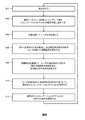
Reference is now made to FIG. 6, which is a flow diagram of a method that allows a user to communicate using eye-based feedback. In an
手順602では、一連のコミュニケーションオプションが、選択インタフェースを有するユーザに選択可能に提示される。図1及び3を参照して、ディスプレイ102(及び/又はディスプレイ124)は、ユーザがその中から選択する様々な視覚メニューオプション302、304、306、308及び310を備えたメニュー300を表示する。コミュニケーションオプションは、代替的に、音声又は触覚インタフェースを用いて提示されてもよい。
In
任意選択的手順604では、ユーザの少なくとも一方の目が、光源を用いて照らされる。図1を参照して、光源106は、ユーザ150の目に向けてIR光118を発する。
In
手順606では、目から反射された光が検出され、相関信号が、相対的な目の向きのセンサによって提供される。図1を参照して、画像センサ110が、ユーザ150の目から反射されたIR光118を受信し、相関信号をプロセッサ104に中継する。目の向きのセンサは、代替的に、1つ又は複数の別個のセンサ又はセンサアレイなどの非画像センサによって具現化されてもよい。図5Aを参照して、画像センサ110は、瞳孔Pが画像500Aの上象限領域に位置する、ユーザ150の目の周りの領域の画像500Aを生成する。
In
手順608では、ユーザの頭の向きに対する瞳孔の相対的な向きを含む、相対的な目の向きを決定するために、相関信号が処理される。図1及び5Aを参照して、プロセッサ104は、画像センサ110によって捕捉された画像に基づいて(又は非画像センサによって捕捉された他の目の反射データを用いることによって)、ユーザ150の相対的な目の向きを決定する。決定された相対的な目の向きは、ユーザ150の頭の向き(頭の向きは、ユーザ150が顔を向けている概略の方向を表す)に対する瞳孔の相対的な向きを表す。例えば、図5Aを参照して、プロセッサ104は、瞳孔Pが上象限領域502に位置し、従ってユーザ150の相対的な目の向きが「上方」位置であることを、画像500Aから決定する。プロセッサ104は、瞳孔Pの瞬間的な相対的な向きを検出すること、又は瞳孔Pの過渡変化を検出することによって、ユーザ150の相対的な目の向きを決定してもよい。
In
手順610では、ユーザの決定された相対的な目の向きに基づいて、選択されたコミュニケーションオプションが決定される。図1、5A及び3Aを参照して、プロセッサ104は、ユーザ150の決定された相対的な目の向きに応じて、ディスプレイ102上に(及び/又は音声ユニット112によって)提示されたオプションを選択する。例えば、ユーザ150の相対的な目の向きが「上方」位置であることをプロセッサ104が画像500Aから決定した場合、プロセッサ104は、メニュー300上に提示されたコミュニケーションオプション302(「ABCDE」)を選択する。
In
手順612において、選択されたコミュニケーションオプションを実行する命令が提供される。図1を参照して、プロセッサ104は、選択されたコミュニケーションオプションに関連付けられた可聴表示を提供するように、音声ユニット112に命令する。例えば、音声ユニット112は、単語メニュー202の単語オプション202Aに関連付けられた「こんにちは」という単語などの、ユーザ150によって選択された単語を放送する。追加的に、プロセッサ104は、選択されたコミュニケーションオプションに関連付けられた視覚表示を提示するようにディスプレイ102に命令してもよい。例えば、ディスプレイ102は、「こんにちは」という単語オプション202Aなどの選択されたメニューオプションを強調表示する。代替的に、プロセッサ104は、選択されたアプリケーションを実行する、又は選択されたコミュニケーションオプションに関連付けられたアクションを行うように、コンピュータデバイス114に命令してもよい。例えば、コンピュータデバイス114は、例えば単語メニュー202の「Eメールアプリケーション」オプション202Eの選択に続いて、メッセージ又はEメールを送信する。
In
上述の通り、プロセッサ104は、目の動きを変換し、無線リンク(例えば、Bluetooth)を介して、その領域に存在し、かつユーザ150が彼/彼女の環境とコミュニケーションをとるために使用することができる異なるアプリケーションを動作させることが可能なコンピュータデバイス114(例えばスマートフォン)に動作を放送する。コンピュータデバイス114を用いて、テキストメッセージを送信する、異なるアプリケーションを実行する、及び/又は(選択表またはメニューを用いた制御用に設計されたプログラムを使用して)コンピュータを制御することができる。ユーザが、コンピュータデバイス114上でアプリケーションを動作させることを選択した後に、プロセッサ104は、通信リンク116上で、コンピュータデバイス114へ/からデータを送信及び受信し続けてもよい。
As described above, the
本発明の一実施形態によれば、システム100を用いて、電動車椅子又はコンピュータ制御された家電などの外部デバイス又は装置を制御することができる。例えば、ユーザは、彼/彼女の相対的な目の向き(例えば、上、下、左、右)を用いて、選択された方向(例えば、前方、後方、左、右)を示すことによって、電動車椅子を案内又はナビゲートすることができる。ユーザは、ディスプレイ102、124上に提示された「電動車椅子ナビゲーション」メニューの特定のメニューオプションの方向を見ることによって指示を提供してもよい。システム100は、指示された選択(例えば、車椅子を左に回転)を決定し、電動車椅子に選択されたオプションを行わせる。システム100は、無線通信リンク(例えば、通信リンク116)を介して、上記外部デバイスと通信可能に結合されてもよい。
According to one embodiment of the present invention, the
システム100が、ユーザ150の相対的な目の向きのみを決定することによって、視覚の完全な活用、又は満足なレベルの視力がユーザ150に備わっていることを必要としない、目に基づいたコミュニケーションを提供するので、ユーザ150は、代替的に、視覚に障害のある、又は完全な視覚能力を欠いた個人でもよいことにさらに留意されたい。
Eye-based communication in which the
従って、本発明は、環境と効果的なコミュニケーションをとるための手段を提供することにより、特殊なニーズを持つ個人の生活の質の向上に役立つ、簡単かつ直感的な操作の、比較的手頃な価格で、かつ入手しやすい解決策を提供する。システムは、可動性があり、携帯可能で、多くの状況及び位置(横たわっている、座っている、頭を下に向けるなど)での使用に適している。さらに、本発明のシステムは、較正のために第三者の支援を必要としない。 Accordingly, the present invention provides a means for effective communication with the environment, thereby helping to improve the quality of life of individuals with special needs, a relatively affordable, simple and intuitive operation. Provide an affordable and accessible solution. The system is mobile, portable, and suitable for use in many situations and positions (lie down, sit down, head down, etc.). Furthermore, the system of the present invention does not require third party assistance for calibration.
本発明のシステム及び方法は、閉じ込め症候群(LIS)を特徴とする個人に限定されず、視覚障害を持つ人々を含む、他のタイプの人々による使用にも同様に等しく適応できることが理解されるだろう。本発明のシステム及び方法は、目からの光反射を検出するためのセンサ(埋め込みカメラなど)を少なくとも含む、スマートフォン、タブレットコンピュータ、又はデジタル音楽プレイヤーなどのコンピュータデバイス上のアプリケーションに組み込まれてもよい。従って、本発明は、彼/彼女の相対的な目の向きと相関したアイジェスチャを用いてユーザによって提供される命令のみに基づいて、メッセージを作成及び送信する、又は第三者との電話での会話を開始するなどの様々なコミュニケーションアクションを、コンピュータデバイスを用いて容易にする及び開始することができる。 It will be appreciated that the systems and methods of the present invention are not limited to individuals characterized by confinement syndrome (LIS), but are equally applicable for use by other types of people, including those with visual impairments. Let's go. The system and method of the present invention may be incorporated into an application on a computing device such as a smartphone, tablet computer, or digital music player that includes at least a sensor (such as an embedded camera) for detecting light reflection from the eye. . Thus, the present invention composes and sends a message based on only instructions provided by the user using an eye gesture that correlates with his / her relative eye orientation, or by telephone with a third party. Various communication actions, such as starting a conversation, can be facilitated and initiated using a computing device.
当業者が本発明を実施できるように、開示の要旨の特定の実施形態を記載したが、前述の記載は、単なる例であることが意図されたものである。それは、以下の特許請求の範囲を参照することによって決定されるべきである開示の要旨の範囲を限定するために使用されないものとする。 While specific embodiments of the disclosed subject matter have been described so that those skilled in the art may practice the invention, the foregoing description is intended to be exemplary only. It should not be used to limit the scope of the disclosure, which should be determined by reference to the claims that follow.
Claims (22)
一連のコミュニケーションオプションを前記ユーザに選択可能に提示するように構成された選択インタフェースと、
前記ユーザの目から反射された光を検出し、相関信号を提供するように構成された少なくとも1つの相対的な目の向きのセンサと、
前記相対的な目の向きのセンサ及び前記選択インタフェースと通信可能に結合されたプロセッサであって、前記プロセッサが、前記相関信号を受信及び処理することによって、前記ユーザの相対的な目の向きを決定するように構成され、前記相対的な目の向きが、少なくとも前記ユーザの頭の向きに対する前記目の瞳孔の相対的な向きを含み、前記決定された相対的な目の向きに基づいて、選択されたコミュニケーションオプションを決定し、前記選択されたコミュニケーションオプションを実行する命令を提供するようにさらに構成されたプロセッサと、
を含むことを特徴とするシステム。 In a system that allows users to communicate using eye-based feedback,
A selection interface configured to selectably present a series of communication options to the user;
At least one relative eye orientation sensor configured to detect light reflected from the user's eyes and provide a correlation signal;
A processor communicatively coupled to the relative eye orientation sensor and the selection interface, wherein the processor receives and processes the correlation signal to determine the relative eye orientation of the user. Configured to determine, wherein the relative eye orientation includes at least a relative orientation of the pupil of the eye with respect to a head orientation of the user, and based on the determined relative eye orientation, A processor further configured to determine a selected communication option and provide instructions to execute the selected communication option;
A system characterized by including.
視覚インタフェースと、
可聴インタフェースと、
触覚インタフェースと、
からなるリストから選択されることを特徴とするシステム。 The system of claim 1, wherein the selection interface is
A visual interface;
An audible interface;
A tactile interface;
A system characterized by being selected from a list consisting of:
可聴アラームと、
メニュー選択と、
言語選択と、
確認メッセージと、
文と、
フレーズと、
単語と、
音節と、
文字と、
モバイルコンピュータデバイス起動選択と、
視覚インタフェース動作停止選択と、
Eメール/SMS/MMSの送信命令と、
コンピュータアプリケーションの実行命令と、
からなるリストから選択されることを特徴とするシステム。 The system of claim 1, wherein at least one of the communication options is
An audible alarm,
Menu selection and
Language selection,
A confirmation message,
Sentence and
Phrases and
A word,
Syllables,
Characters and
Mobile computer device activation selection,
Visual interface operation stop selection,
Send email / SMS / MMS instructions,
Instructions for executing computer applications;
A system characterized by being selected from a list consisting of:
色の調整と、
形状の調整と、
記号画像と、
からなるリストから選択されるやり方で、少なくとも1つのコミュニケーションオプションを表示するように構成されることを特徴とするシステム。 The system of claim 5, wherein the visual interface is
Color adjustment,
Adjusting the shape,
A symbol image,
A system configured to display at least one communication option in a manner selected from a list consisting of:
選択インタフェースを有する前記ユーザに対して、一連のコミュニケーションオプションを選択可能に提示する手順と、
前記ユーザの目から反射された光を検出し、少なくとも1つの相対的な目の向きのセンサを用いて相関信号を提供する手順と、
前記相関信号を処理することによって、前記ユーザの相対的な目の向きを決定し、前記相対的な目の向きが、少なくとも前記ユーザの頭の向きに対する前記目の瞳孔の相対的な向きを含む、手順と、
前記決定された相対的な目の向きに基づいて、選択されたコミュニケーションオプションを決定する手順と、
前記選択されたコミュニケーションオプションを実行する命令を提供する手順と、
を含むことを特徴とする方法。 In a method that allows a user to communicate using eye-based feedback,
A step of presenting a selectable set of communication options to the user having a selection interface;
Detecting light reflected from the user's eyes and providing a correlation signal using at least one relative eye orientation sensor;
By processing the correlation signal, a relative eye orientation of the user is determined, the relative eye orientation including at least a relative orientation of the eye pupil with respect to a user head orientation. , Steps,
Determining a selected communication option based on the determined relative eye orientation;
Providing instructions for performing the selected communication option;
A method comprising the steps of:
視覚的と、
可聴的と、
触覚感知可能と、
からなるリストから選択されるやり方で選択インタフェースによって提示されることを特徴とする方法。 15. The method of claim 14, wherein at least one of the communication options is
Visually,
Audible,
With tactile sensing,
A method characterized by being presented by a selection interface in a manner selected from a list consisting of:
可聴アラームと、
メニュー選択と、
言語選択と、
確認メッセージと、
文と、
フレーズと、
単語と、
音節と、
文字と、
モバイルコンピュータデバイス起動選択と、
視覚インタフェース動作停止選択と、
Eメール送信命令と、
SMS/MMS送信命令と、
コンピュータアプリケーションの実行命令と、
からなるリストから選択されることを特徴とする方法。 15. The method of claim 14, wherein at least one of the communication options is
An audible alarm,
Menu selection and
Language selection,
A confirmation message,
Sentence and
Phrases and
A word,
Syllables,
Characters and
Mobile computer device activation selection,
Visual interface operation stop selection,
Email sending instructions;
SMS / MMS transmission command;
Instructions for executing computer applications;
A method characterized in that it is selected from a list consisting of:
連続する捕捉画像を比較することによって、前記目の前記瞳孔の相対的変化を検出することと、
前記捕捉画像内の前記瞳孔をマーキングすることによって、前記瞳孔の位置を示す関心領域をトラッキングすることと、
2Dグリッドの中心として基準点を設定し、目の動きを前記グリッド上の座標に変換することと、
前記瞳孔が、前記グリッドの前記中心にあることを決定した際に、基準点座標系を構築するための基準点を選択することと、
前記ユーザの動きの範囲を決定することと、
によって較正を行う手順をさらに含むことを特徴とする方法。 The method of claim 18, wherein
Detecting a relative change in the pupil of the eye by comparing successive captured images;
Tracking a region of interest indicating the position of the pupil by marking the pupil in the captured image;
Setting a reference point as the center of the 2D grid and converting eye movement to coordinates on the grid;
Selecting a reference point for constructing a reference point coordinate system when determining that the pupil is at the center of the grid;
Determining a range of movement of the user;
The method further comprising the step of performing a calibration by:
Applications Claiming Priority (3)
| Application Number | Priority Date | Filing Date | Title |
|---|---|---|---|
| US201562130637P | 2015-03-10 | 2015-03-10 | |
| US62/130,637 | 2015-03-10 | ||
| PCT/IL2016/050235 WO2016142933A1 (en) | 2015-03-10 | 2016-03-02 | System and method for enabling communication through eye feedback |
Related Child Applications (1)
| Application Number | Title | Priority Date | Filing Date |
|---|---|---|---|
| JP2021009022A Division JP7153096B2 (en) | 2015-03-10 | 2021-01-22 | System and method enabling communication by eye feedback |
Publications (3)
| Publication Number | Publication Date |
|---|---|
| JP2018519601A true JP2018519601A (en) | 2018-07-19 |
| JP2018519601A5 JP2018519601A5 (en) | 2019-02-14 |
| JP7016263B2 JP7016263B2 (en) | 2022-02-04 |
Family
ID=56879968
Family Applications (2)
| Application Number | Title | Priority Date | Filing Date |
|---|---|---|---|
| JP2017566228A Active JP7016263B2 (en) | 2015-03-10 | 2016-03-02 | Systems and methods that enable communication through eye feedback |
| JP2021009022A Active JP7153096B2 (en) | 2015-03-10 | 2021-01-22 | System and method enabling communication by eye feedback |
Family Applications After (1)
| Application Number | Title | Priority Date | Filing Date |
|---|---|---|---|
| JP2021009022A Active JP7153096B2 (en) | 2015-03-10 | 2021-01-22 | System and method enabling communication by eye feedback |
Country Status (6)
| Country | Link |
|---|---|
| US (1) | US11883101B2 (en) |
| EP (2) | EP3268847A4 (en) |
| JP (2) | JP7016263B2 (en) |
| CN (2) | CN121116061A (en) |
| IL (2) | IL303037B2 (en) |
| WO (1) | WO2016142933A1 (en) |
Cited By (3)
| Publication number | Priority date | Publication date | Assignee | Title |
|---|---|---|---|---|
| JP2022072453A (en) * | 2020-10-29 | 2022-05-17 | パナソニックIpマネジメント株式会社 | Line-of-sight input device |
| WO2023166893A1 (en) * | 2022-03-01 | 2023-09-07 | 日新電機工作株式会社 | Information processing system, information processing method, and information processing program |
| JP2025051735A (en) * | 2023-09-22 | 2025-04-04 | ソフトバンクグループ株式会社 | system |
Families Citing this family (33)
| Publication number | Priority date | Publication date | Assignee | Title |
|---|---|---|---|---|
| TR201613586A2 (en) * | 2016-09-28 | 2016-11-21 | Kuersat Cagiltay | ELECTRONIC AND MOTORIZED WHEELCHAIR SYSTEM CONTROLLED BY EYE MOVEMENTS |
| US11402909B2 (en) | 2017-04-26 | 2022-08-02 | Cognixion | Brain computer interface for augmented reality |
| JP6460425B2 (en) * | 2017-06-02 | 2019-01-30 | 本田技研工業株式会社 | Vehicle control system, vehicle control method, and program |
| WO2019111257A1 (en) * | 2017-12-07 | 2019-06-13 | Eyefree Assisting Communication Ltd. | Communication methods and systems |
| CN108245748A (en) * | 2017-12-21 | 2018-07-06 | 北京怡和嘉业医疗科技股份有限公司 | The method that mask, respirator system and the respirator system perform |
| EP3506055B1 (en) * | 2017-12-28 | 2024-09-11 | Vestel Elektronik Sanayi ve Ticaret A.S. | Method for eye-tracking calibration with splash screen |
| CN109002186B (en) * | 2018-06-28 | 2020-12-25 | 北京金山安全软件有限公司 | Input prediction method and device |
| US10966007B1 (en) * | 2018-09-25 | 2021-03-30 | Apple Inc. | Haptic output system |
| US11393318B2 (en) * | 2018-10-05 | 2022-07-19 | Cleveland State University | Systems and methods for privacy-aware motion tracking with automatic authentication |
| CN120295466A (en) * | 2019-02-01 | 2025-07-11 | 苹果公司 | Biofeedback method for conditioning digital content to stimulate a larger pupil radius response |
| US10809637B1 (en) * | 2019-05-30 | 2020-10-20 | Applied Materials, Inc. | Learning based digital corrections to compensate variations on lithography systems with multiple imaging units |
| IL268575B2 (en) | 2019-08-07 | 2023-02-01 | Eyefree Assisting Communication Ltd | A system and method for monitoring a patient |
| SE546455C2 (en) * | 2019-08-23 | 2024-11-05 | Your Speech Factory Ab | Electronic device and method for eye-contact training |
| CN110619303A (en) * | 2019-09-16 | 2019-12-27 | Oppo广东移动通信有限公司 | Method, device and terminal for tracking point of regard and computer readable storage medium |
| KR102128894B1 (en) * | 2019-10-10 | 2020-07-01 | 주식회사 메디씽큐 | A method and system for eyesight sensing of medical smart goggles |
| US10860098B1 (en) | 2019-12-30 | 2020-12-08 | Hulu, LLC | Gesture-based eye tracking |
| US12226330B2 (en) * | 2020-10-07 | 2025-02-18 | Jay Curtis Beavers | Systems, methods, and techniques for eye gaze control of seat and bed positioning |
| DE102021110109A1 (en) * | 2021-04-21 | 2022-10-27 | Robert Bosch Gesellschaft mit beschränkter Haftung | Method for recognizing eye gestures of an eye |
| IT202100013235A1 (en) * | 2021-05-21 | 2022-11-21 | Dico Tech S R L | SYSTEM AND METHOD FOR NON-VERBAL COMMUNICATION |
| ES2988871T3 (en) * | 2021-06-30 | 2024-11-22 | Tobii Ab | Eye tracking system |
| WO2023002488A1 (en) | 2021-07-22 | 2023-01-26 | Eyefree Assisting Communication Ltd. | A system for communication with a patient based on the determined sedation state |
| CN113589958A (en) * | 2021-08-05 | 2021-11-02 | 西交利物浦大学 | Text input method, device, equipment and storage medium |
| US12524618B2 (en) | 2021-09-20 | 2026-01-13 | Salesforce, Inc. | Database systems and methods of representing conversations |
| US12111964B2 (en) * | 2021-10-28 | 2024-10-08 | Life Drive LLC | Drive manager for power wheelchair and related methods |
| US12032156B2 (en) * | 2022-04-08 | 2024-07-09 | Mirza Faizan | Apparatus to enable differently abled users to communicate and a method thereof |
| US11995231B2 (en) * | 2022-07-21 | 2024-05-28 | Dell Products Lp | System and method for headset haptic or audio confirmation feedback for gaze activation |
| US12204689B2 (en) * | 2022-09-27 | 2025-01-21 | Tobii Dynavox Ab | Method, system, and computer program product for drawing and fine-tuned motor controls |
| US12499319B2 (en) * | 2022-12-12 | 2025-12-16 | Salesforce, Inc. | Database systems with user-configurable automated metadata assignment |
| US12524198B1 (en) * | 2022-12-16 | 2026-01-13 | Amazon Technologies, Inc. | Gaze based device control |
| US12204687B2 (en) * | 2023-04-11 | 2025-01-21 | Jay Curtis Beavers | Systems, methods, and techniques for safely controlling devices using eye gaze control |
| CN116421135A (en) * | 2023-04-27 | 2023-07-14 | 北京京东拓先科技有限公司 | Vision testing method, device, electronic equipment and storage medium |
| EP4465247A1 (en) * | 2023-05-17 | 2024-11-20 | Tata Consultancy Services Limited | Method and system for predicting distance of gazed objects using infrared (ir) camera |
| CN116708974B (en) * | 2023-08-01 | 2023-10-17 | 清华大学 | Universal camera interference method and system for head-mounted active vision camera |
Citations (8)
| Publication number | Priority date | Publication date | Assignee | Title |
|---|---|---|---|---|
| JPH0749744A (en) * | 1993-08-04 | 1995-02-21 | Pioneer Electron Corp | Head mounting type display input device |
| JP2005100366A (en) * | 2003-08-18 | 2005-04-14 | Yamaguchi Univ | Gaze input communication method using eye movement |
| JP2006141862A (en) * | 2004-11-24 | 2006-06-08 | Saga Univ | Gaze direction identification system |
| JP2007310815A (en) * | 2006-05-22 | 2007-11-29 | Fujitsu Ltd | Mobile terminal device |
| CN101893934A (en) * | 2010-06-25 | 2010-11-24 | 宇龙计算机通信科技(深圳)有限公司 | Method and device for intelligently adjusting screen display |
| US20130293488A1 (en) * | 2012-05-02 | 2013-11-07 | Lg Electronics Inc. | Mobile terminal and control method thereof |
| KR20140132906A (en) * | 2013-05-09 | 2014-11-19 | 에스케이플래닛 주식회사 | Device and method for mobile tooltip using eye detecting |
| US20140375541A1 (en) * | 2013-06-25 | 2014-12-25 | David Nister | Eye tracking via depth camera |
Family Cites Families (34)
| Publication number | Priority date | Publication date | Assignee | Title |
|---|---|---|---|---|
| US577A (en) | 1838-01-20 | Uvtachine for threshing grain and shelling corn | ||
| US8120A (en) | 1851-05-27 | Cabkiaorb | ||
| US4836670A (en) * | 1987-08-19 | 1989-06-06 | Center For Innovative Technology | Eye movement detector |
| US4973149A (en) * | 1987-08-19 | 1990-11-27 | Center For Innovative Technology | Eye movement detector |
| US4950069A (en) * | 1988-11-04 | 1990-08-21 | University Of Virginia | Eye movement detector with improved calibration and speed |
| US5912721A (en) * | 1996-03-13 | 1999-06-15 | Kabushiki Kaisha Toshiba | Gaze detection apparatus and its method as well as information display apparatus |
| US6351273B1 (en) * | 1997-04-30 | 2002-02-26 | Jerome H. Lemelson | System and methods for controlling automatic scrolling of information on a display or screen |
| JP2000137789A (en) | 1998-10-29 | 2000-05-16 | Sharp Corp | Image processing device |
| US6456262B1 (en) | 2000-05-09 | 2002-09-24 | Intel Corporation | Microdisplay with eye gaze detection |
| US6943754B2 (en) * | 2002-09-27 | 2005-09-13 | The Boeing Company | Gaze tracking system, eye-tracking assembly and an associated method of calibration |
| US20050045373A1 (en) * | 2003-05-27 | 2005-03-03 | Joseph Born | Portable media device with audio prompt menu |
| CA2967756C (en) | 2004-04-01 | 2018-08-28 | Google Inc. | Biosensors, communicators, and controllers monitoring eye movement and methods for using them |
| KR100594117B1 (en) | 2004-09-20 | 2006-06-28 | 삼성전자주식회사 | Apparatus and method for inputting key using biosignal in HMD information terminal |
| US8120577B2 (en) * | 2005-10-28 | 2012-02-21 | Tobii Technology Ab | Eye tracker with visual feedback |
| WO2007085682A1 (en) * | 2006-01-26 | 2007-08-02 | Nokia Corporation | Eye tracker device |
| JP5167545B2 (en) * | 2006-03-31 | 2013-03-21 | 国立大学法人静岡大学 | Viewpoint detection device |
| WO2008059878A1 (en) | 2006-11-15 | 2008-05-22 | Panasonic Corporation | Adjusting device for brain wave identification method, adjusting method and computer program |
| US20100149073A1 (en) * | 2008-11-02 | 2010-06-17 | David Chaum | Near to Eye Display System and Appliance |
| US8788977B2 (en) * | 2008-11-20 | 2014-07-22 | Amazon Technologies, Inc. | Movement recognition as input mechanism |
| US8593375B2 (en) | 2010-07-23 | 2013-11-26 | Gregory A Maltz | Eye gaze user interface and method |
| JP2012048358A (en) | 2010-08-25 | 2012-03-08 | Sony Corp | Browsing device, information processing method and program |
| WO2012083415A1 (en) * | 2010-11-15 | 2012-06-28 | Tandemlaunch Technologies Inc. | System and method for interacting with and analyzing media on a display using eye gaze tracking |
| US8888287B2 (en) * | 2010-12-13 | 2014-11-18 | Microsoft Corporation | Human-computer interface system having a 3D gaze tracker |
| AU2011204946C1 (en) | 2011-07-22 | 2012-07-26 | Microsoft Technology Licensing, Llc | Automatic text scrolling on a head-mounted display |
| KR101355895B1 (en) * | 2011-10-20 | 2014-02-05 | 경북대학교 산학협력단 | Apparatus for deciding user's intention and method therof |
| US8955973B2 (en) * | 2012-01-06 | 2015-02-17 | Google Inc. | Method and system for input detection using structured light projection |
| US9171198B1 (en) * | 2012-04-02 | 2015-10-27 | Google Inc. | Image capture technique |
| US9823742B2 (en) * | 2012-05-18 | 2017-11-21 | Microsoft Technology Licensing, Llc | Interaction and management of devices using gaze detection |
| US9261961B2 (en) * | 2012-06-07 | 2016-02-16 | Nook Digital, Llc | Accessibility aids for users of electronic devices |
| US9658746B2 (en) * | 2012-07-20 | 2017-05-23 | Nook Digital, Llc | Accessible reading mode techniques for electronic devices |
| KR102163996B1 (en) | 2013-04-03 | 2020-10-13 | 삼성전자 주식회사 | Apparatus and Method for improving performance of non-contact type recognition function in a user device |
| US20140368442A1 (en) * | 2013-06-13 | 2014-12-18 | Nokia Corporation | Apparatus and associated methods for touch user input |
| WO2017216118A1 (en) * | 2016-06-13 | 2017-12-21 | SensoMotoric Instruments Gesellschaft für innovative Sensorik mbH | Method and eye tracking system for performing a calibration procedure for calibrating an eye tracking device |
| US9779478B1 (en) * | 2016-10-04 | 2017-10-03 | Oculus Vr, Llc | Rendering composite content on a head-mounted display including a high resolution inset |
-
2016
- 2016-03-02 IL IL303037A patent/IL303037B2/en unknown
- 2016-03-02 US US15/557,031 patent/US11883101B2/en active Active
- 2016-03-02 WO PCT/IL2016/050235 patent/WO2016142933A1/en not_active Ceased
- 2016-03-02 EP EP16761197.9A patent/EP3268847A4/en not_active Ceased
- 2016-03-02 CN CN202511229956.3A patent/CN121116061A/en active Pending
- 2016-03-02 JP JP2017566228A patent/JP7016263B2/en active Active
- 2016-03-02 CN CN201680026221.3A patent/CN107850939A/en active Pending
- 2016-03-02 EP EP20212667.8A patent/EP3809241B1/en active Active
-
2017
- 2017-09-04 IL IL254315A patent/IL254315A0/en unknown
-
2021
- 2021-01-22 JP JP2021009022A patent/JP7153096B2/en active Active
Patent Citations (8)
| Publication number | Priority date | Publication date | Assignee | Title |
|---|---|---|---|---|
| JPH0749744A (en) * | 1993-08-04 | 1995-02-21 | Pioneer Electron Corp | Head mounting type display input device |
| JP2005100366A (en) * | 2003-08-18 | 2005-04-14 | Yamaguchi Univ | Gaze input communication method using eye movement |
| JP2006141862A (en) * | 2004-11-24 | 2006-06-08 | Saga Univ | Gaze direction identification system |
| JP2007310815A (en) * | 2006-05-22 | 2007-11-29 | Fujitsu Ltd | Mobile terminal device |
| CN101893934A (en) * | 2010-06-25 | 2010-11-24 | 宇龙计算机通信科技(深圳)有限公司 | Method and device for intelligently adjusting screen display |
| US20130293488A1 (en) * | 2012-05-02 | 2013-11-07 | Lg Electronics Inc. | Mobile terminal and control method thereof |
| KR20140132906A (en) * | 2013-05-09 | 2014-11-19 | 에스케이플래닛 주식회사 | Device and method for mobile tooltip using eye detecting |
| US20140375541A1 (en) * | 2013-06-25 | 2014-12-25 | David Nister | Eye tracking via depth camera |
Cited By (7)
| Publication number | Priority date | Publication date | Assignee | Title |
|---|---|---|---|---|
| JP2022072453A (en) * | 2020-10-29 | 2022-05-17 | パナソニックIpマネジメント株式会社 | Line-of-sight input device |
| JP7507482B2 (en) | 2020-10-29 | 2024-06-28 | パナソニックオートモーティブシステムズ株式会社 | Eye-gaze input device |
| WO2023166893A1 (en) * | 2022-03-01 | 2023-09-07 | 日新電機工作株式会社 | Information processing system, information processing method, and information processing program |
| JP2023127116A (en) * | 2022-03-01 | 2023-09-13 | 日新電機工作株式会社 | Information processing system, information processing method, and information processing program |
| JP7568301B2 (en) | 2022-03-01 | 2024-10-16 | 日新電機工作株式会社 | Information processing system, information processing method, and information processing program |
| US12443279B2 (en) | 2022-03-01 | 2025-10-14 | Nissin Denki Kohsaku Co., Ltd. | Information processing system, information processing method, and information processing program |
| JP2025051735A (en) * | 2023-09-22 | 2025-04-04 | ソフトバンクグループ株式会社 | system |
Also Published As
| Publication number | Publication date |
|---|---|
| WO2016142933A1 (en) | 2016-09-15 |
| EP3809241A1 (en) | 2021-04-21 |
| EP3268847A1 (en) | 2018-01-17 |
| US20200022577A1 (en) | 2020-01-23 |
| IL303037A (en) | 2023-07-01 |
| JP7016263B2 (en) | 2022-02-04 |
| CN107850939A (en) | 2018-03-27 |
| CN121116061A (en) | 2025-12-12 |
| EP3809241B1 (en) | 2023-12-13 |
| JP2021073589A (en) | 2021-05-13 |
| IL303037B2 (en) | 2025-06-01 |
| US11883101B2 (en) | 2024-01-30 |
| EP3268847A4 (en) | 2018-10-24 |
| IL254315A0 (en) | 2017-11-30 |
| IL303037B1 (en) | 2025-02-01 |
| JP7153096B2 (en) | 2022-10-13 |
| EP3809241C0 (en) | 2023-12-13 |
Similar Documents
| Publication | Publication Date | Title |
|---|---|---|
| JP7153096B2 (en) | System and method enabling communication by eye feedback | |
| JP7487265B2 (en) | Automatic control of a wearable display device based on external conditions | |
| US12625546B2 (en) | User interfaces for gaze tracking enrollment | |
| US20240152244A1 (en) | Devices, Methods, and Graphical User Interfaces for Interacting with Three-Dimensional Environments | |
| US12399599B2 (en) | Devices, methods, and graphical user interfaces for improving accessibility of interactions with three-dimensional environments | |
| US12417596B2 (en) | User interfaces for managing live communication sessions | |
| US20240103678A1 (en) | Devices, methods, and graphical user interfaces for interacting with extended reality experiences | |
| US12277848B2 (en) | Devices, methods, and graphical user interfaces for device position adjustment | |
| US12620184B2 (en) | Devices, methods, and graphical user interfaces for interacting with three-dimensional environments | |
| US12572198B2 (en) | User interfaces for gaze tracking enrollment | |
| US20180173319A1 (en) | Systems and methods for gaze-based media selection and editing | |
| CN111656304B (en) | Communication methods and systems | |
| US12620298B2 (en) | Devices, methods, and graphical user interfaces for device position adjustment | |
| US12461589B2 (en) | Devices, methods, and graphical user interfaces for generating reminders for a user experience session in an extended reality environment | |
| KR20250049408A (en) | Devices, methods and graphical user interfaces for interacting with three-dimensional environments | |
| WO2024064230A1 (en) | Devices, methods, and graphical user interfaces for interacting with three-dimensional environments | |
| US20260105136A1 (en) | Devices, methods, and graphical user interfaces for transitioning between multiple modes of operation | |
| Mahajan | Multimodal interface integrating eye gaze tracking and speech recognition |
Legal Events
| Date | Code | Title | Description |
|---|---|---|---|
| A529 | Written submission of copy of amendment under article 34 pct |
Free format text: JAPANESE INTERMEDIATE CODE: A529 Effective date: 20171106 |
|
| A521 | Request for written amendment filed |
Free format text: JAPANESE INTERMEDIATE CODE: A523 Effective date: 20181228 |
|
| A621 | Written request for application examination |
Free format text: JAPANESE INTERMEDIATE CODE: A621 Effective date: 20181228 |
|
| A977 | Report on retrieval |
Free format text: JAPANESE INTERMEDIATE CODE: A971007 Effective date: 20191226 |
|
| A131 | Notification of reasons for refusal |
Free format text: JAPANESE INTERMEDIATE CODE: A131 Effective date: 20200114 |
|
| A521 | Request for written amendment filed |
Free format text: JAPANESE INTERMEDIATE CODE: A523 Effective date: 20200414 |
|
| A02 | Decision of refusal |
Free format text: JAPANESE INTERMEDIATE CODE: A02 Effective date: 20200923 |
|
| A521 | Request for written amendment filed |
Free format text: JAPANESE INTERMEDIATE CODE: A523 Effective date: 20210122 |
|
| C60 | Trial request (containing other claim documents, opposition documents) |
Free format text: JAPANESE INTERMEDIATE CODE: C60 Effective date: 20210122 |
|
| C11 | Written invitation by the commissioner to file amendments |
Free format text: JAPANESE INTERMEDIATE CODE: C11 Effective date: 20210202 |
|
| A911 | Transfer to examiner for re-examination before appeal (zenchi) |
Free format text: JAPANESE INTERMEDIATE CODE: A911 Effective date: 20210421 |
|
| C21 | Notice of transfer of a case for reconsideration by examiners before appeal proceedings |
Free format text: JAPANESE INTERMEDIATE CODE: C21 Effective date: 20210427 |
|
| A912 | Re-examination (zenchi) completed and case transferred to appeal board |
Free format text: JAPANESE INTERMEDIATE CODE: A912 Effective date: 20210611 |
|
| C211 | Notice of termination of reconsideration by examiners before appeal proceedings |
Free format text: JAPANESE INTERMEDIATE CODE: C211 Effective date: 20210615 |
|
| C22 | Notice of designation (change) of administrative judge |
Free format text: JAPANESE INTERMEDIATE CODE: C22 Effective date: 20210720 |
|
| C22 | Notice of designation (change) of administrative judge |
Free format text: JAPANESE INTERMEDIATE CODE: C22 Effective date: 20210921 |
|
| C23 | Notice of termination of proceedings |
Free format text: JAPANESE INTERMEDIATE CODE: C23 Effective date: 20211124 |
|
| C03 | Trial/appeal decision taken |
Free format text: JAPANESE INTERMEDIATE CODE: C03 Effective date: 20220104 |
|
| C30A | Notification sent |
Free format text: JAPANESE INTERMEDIATE CODE: C3012 Effective date: 20220104 |
|
| A61 | First payment of annual fees (during grant procedure) |
Free format text: JAPANESE INTERMEDIATE CODE: A61 Effective date: 20220125 |
|
| R150 | Certificate of patent or registration of utility model |
Ref document number: 7016263 Country of ref document: JP Free format text: JAPANESE INTERMEDIATE CODE: R150 |
|
| R250 | Receipt of annual fees |
Free format text: JAPANESE INTERMEDIATE CODE: R250 |
|
| R250 | Receipt of annual fees |
Free format text: JAPANESE INTERMEDIATE CODE: R250 |