JP2017194875A - Information processing system and information processing method - Google Patents
Information processing system and information processing method Download PDFInfo
- Publication number
- JP2017194875A JP2017194875A JP2016085687A JP2016085687A JP2017194875A JP 2017194875 A JP2017194875 A JP 2017194875A JP 2016085687 A JP2016085687 A JP 2016085687A JP 2016085687 A JP2016085687 A JP 2016085687A JP 2017194875 A JP2017194875 A JP 2017194875A
- Authority
- JP
- Japan
- Prior art keywords
- user
- data
- user terminal
- information
- instruction information
- Prior art date
- Legal status (The legal status is an assumption and is not a legal conclusion. Google has not performed a legal analysis and makes no representation as to the accuracy of the status listed.)
- Pending
Links
Images



Landscapes
- Information Transfer Between Computers (AREA)
- Information Retrieval, Db Structures And Fs Structures Therefor (AREA)
Abstract
【構成】 情報処理システム(10)は、サーバ(12)およびユーザ端末(14)を含み、サーバ(12)は、ユーザがHDD26内の所望のデータを選択し、当該所望のデータを他のユーザと共有することを選択すると、共有することを設定したデータを他のユーザのフォルダにコピーするためのリンク202を含む電子メールを生成し、生成した電子メールをコピー先のユーザのユーザ端末(14)に送信する。そして、コピー先のユーザのユーザ端末(14)においてリンク202が選択されると、当該リンク202に従ってサーバ12にコピーの指示が送信され、HDD26内のコピー先のユーザのフォルダにデータがコピーされる。【効果】 データを共有する際に、通信効率および安全性を向上することができる。【選択図】 図6[Configuration] The information processing system (10) includes a server (12) and a user terminal (14), and the server (12) allows the user to select desired data in the HDD 26, and the desired data is transferred to other users. If the user chooses to share, an email including a link 202 for copying the data set to be shared to another user's folder is generated, and the generated email is copied to the user terminal (14 ). When the link 202 is selected on the user terminal (14) of the copy destination user, a copy instruction is transmitted to the server 12 according to the link 202, and the data is copied to the copy destination user folder in the HDD. . [Effect] Communication efficiency and security can be improved when sharing data. [Selection] Figure 6
Description
この発明は、情報処理システムおよび情報処理方法に関し、特にたとえば、複数の情報処理装置および記憶装置が通信可能に接続され、記憶装置が、第1の記憶領域および第2の記憶領域を含む、情報処理システムおよび情報処理方法に関する。 The present invention relates to an information processing system and an information processing method, and in particular, for example, a plurality of information processing devices and a storage device are communicably connected, and the storage device includes a first storage area and a second storage area. The present invention relates to a processing system and an information processing method.
この種の背景技術の一例が特許文献1に開示される。この特許文献1に開示される情報処理システムでは、サーバ装置(情報処理装置)は、通信網を介してアクセス要求を受け付ける。サーバ装置は、受け付けたアクセス要求の要求元が、認証されている要求元を表す認証者であるか否かを判定し、認証者であると判定した場合、該認証者の要求に応じてデータの記憶場所を確保する。また、サーバ装置は、記憶場所へのデータの記憶処理を実行する。サーバ装置は、記憶場所を表す場所情報及び当該記憶場所へのアクセスを許可すべきアクセス要求を対応付けて記憶する記憶部を備える。サーバ装置は、アクセス要求を受け付けたときに、記憶部に記憶されているアクセス要求であると判定した場合、対応する記憶場所へのアクセスを許可する。したがって、認証者でない場合であっても、特定のアクセス要求を行うことにより、対応する記憶場所にアクセスし、データが取得(ダウンロード)される。
An example of this type of background art is disclosed in
この従来の情報処理システムでは、ファイル共有を行うときに利便性を向上しつつ、安全性を維持することができるが、サーバに登録されたユーザであっても、データを一旦ダウンロードしてから自身の記憶場所にアップロードする必要があるため、利便性については改善の余地がある。また、データは、通信網を介してサーバ装置とクライアント装置の間を送受信されるため、安全性(セキュリティ)についても改善の余地がある。 Although this conventional information processing system can maintain safety while improving convenience when sharing files, even a user registered in the server downloads data once and then Because there is a need to upload to the storage location, there is room for improvement in convenience. In addition, since data is transmitted and received between the server device and the client device via the communication network, there is room for improvement in safety.
それゆえに、この発明の主たる目的は、新規な、情報処理システムおよび情報処理方法を提供することである。 Therefore, a main object of the present invention is to provide a novel information processing system and information processing method.
この発明の他の目的は、利便性、通信効率および安全性を向上することができる、情報処理システムおよび情報処理方法を提供することである。 Another object of the present invention is to provide an information processing system and an information processing method capable of improving convenience, communication efficiency, and safety.
第1の発明は、記憶装置、情報処理装置および情報処理装置に通信可能に接続される二以上のユーザ端末を備え、記憶装置は二以上のユーザ端末のユーザの各々に対応する記憶領域を含む、情報処理システムである。記憶装置は、たとえば、HDD、SSD、フラッシュメモリ、EEPROMなどの不揮発性メモリであり、データを記憶する。記憶領域は、たとえばフォルダで管理される。情報処理装置は、汎用のサーバであり、複数のユーザ端末の各々と、インターネットのようなネットワークを介して通信可能に接続される。情報処理装置は、共有情報受信手段、共有指示情報送信手段、複製指示情報受信手段および複製実行手段を備える。共有情報受信手段は、ユーザ端末から送信される、共有するデータおよび当該データを共有する他のユーザについての共有情報を受信する。共有指示情報送信手段は、共有情報受信手段によって受信された共有情報に基づいて、当該共有情報に含まれる他のユーザのユーザ端末に、当該共有情報が示すデータを共有するための共有指示情報を送信する。共有指示情報は、たとえばデータを共有するためのリンク(URL)などである。複製指示情報受信手段は、ユーザ端末とは異なる他のユーザ端末から送信される複製指示情報を受信する。複製実行手段は、複製指示情報受信手段によって受信された複製指示情報に基づいて、当該複製指示情報が示すデータの複製を、当該複製指示情報が示す異なる他のユーザ端末のユーザに対応する記憶領域に記憶(コピー)する。ユーザ端末は、汎用のコンピュータ(端末)であり、たとえばタブレットPC、デスクトップPC、ノート(ラップトップ)PCまたはスマートフォンなどである。ユーザ端末は、共有情報送信手段、共有指示情報受信手段および複製指示情報送信手段を備える。共有情報送信手段は、ユーザ端末のユーザに対応する記憶領域において、ユーザの選択操作によって選択されたデータを他のユーザと共有するための共有情報を情報処理装置に送信する。共有指示情報受信手段は、情報処理装置から送信された共有指示情報を受信する。複製指示情報送信手段は、ユーザの実行操作に応じて、共有指示情報受信手段によって受信された共有指示情報に基づいて、当該共有指示情報が示すデータをユーザ端末のユーザに対応する記憶領域に複製するための複製指示情報を情報処理装置に送信する。 A first invention includes a storage device, an information processing device, and two or more user terminals that are communicably connected to the information processing device, and the storage device includes a storage area corresponding to each of the users of the two or more user terminals. An information processing system. The storage device is, for example, a nonvolatile memory such as an HDD, SSD, flash memory, or EEPROM, and stores data. The storage area is managed by a folder, for example. The information processing apparatus is a general-purpose server, and is connected to each of a plurality of user terminals via a network such as the Internet. The information processing apparatus includes a shared information receiving unit, a sharing instruction information transmitting unit, a duplication instruction information receiving unit, and a duplication execution unit. The shared information receiving means receives shared information about data to be shared and other users who share the data, transmitted from the user terminal. Based on the shared information received by the shared information receiving means, the sharing instruction information transmitting means transmits sharing instruction information for sharing data indicated by the shared information to the user terminals of other users included in the shared information. Send. The sharing instruction information is, for example, a link (URL) for sharing data. The copy instruction information receiving means receives copy instruction information transmitted from another user terminal different from the user terminal. Based on the copy instruction information received by the copy instruction information receiving means, the copy executing means copies the data indicated by the copy instruction information to a storage area corresponding to the user of another different user terminal indicated by the copy instruction information. Store (copy) in The user terminal is a general-purpose computer (terminal) such as a tablet PC, a desktop PC, a notebook (laptop) PC, or a smartphone. The user terminal includes a shared information transmitting unit, a sharing instruction information receiving unit, and a duplication instruction information transmitting unit. The shared information transmitting unit transmits, to the information processing apparatus, shared information for sharing the data selected by the user's selection operation with other users in the storage area corresponding to the user of the user terminal. The sharing instruction information receiving unit receives sharing instruction information transmitted from the information processing apparatus. The duplication instruction information transmitting means duplicates the data indicated by the sharing instruction information in a storage area corresponding to the user of the user terminal based on the sharing instruction information received by the sharing instruction information receiving means according to the user's execution operation. To send information to the information processing apparatus.
第1の発明によれば、データを共有する際に、他のユーザのユーザ端末からの複製指示情報に従って、記憶装置の記憶領域に記憶されたデータを、他のユーザに対応する記憶領域にコピーするので、データを一旦ダウンロードしてから自身の記憶領域にアップロードする必要がないため、利便性を向上することができる。また、第1の発明によれば、データは、記憶装置とユーザ端末との間を送受信されないので、通信効率および安全性を向上することができる。 According to the first invention, when data is shared, the data stored in the storage area of the storage device is copied to the storage area corresponding to the other user according to the copy instruction information from the user terminal of the other user. Therefore, it is not necessary to download the data once and then upload it to its own storage area, so that convenience can be improved. According to the first invention, data is not transmitted / received between the storage device and the user terminal, so that communication efficiency and safety can be improved.
第2の発明は、第1の発明に従属する情報処理システムであって、共有指示情報送信手段は、記憶領域が複数の分割領域を含む場合に、当該複数の分割領域のいずれか一つを選択可能に設定された共有指示情報を、共有情報に含まれる他のユーザのユーザ端末に送信し、複製指示情報送信手段は、ユーザの実行操作に応じて、共有指示情報受信手段によって受信された共有指示情報に基づいて、当該共有指示情報が示すデータをユーザ端末のユーザに対応する記憶領域の指定された分割領域に複製するための複製指示情報を情報処理装置に送信する。 A second invention is an information processing system subordinate to the first invention, wherein the sharing instruction information transmitting means selects any one of the plurality of divided areas when the storage area includes a plurality of divided areas. The sharing instruction information set to be selectable is transmitted to the user terminal of another user included in the sharing information, and the copy instruction information transmitting unit is received by the sharing instruction information receiving unit in accordance with the user's execution operation Based on the sharing instruction information, the replication instruction information for copying the data indicated by the sharing instruction information to the designated divided area of the storage area corresponding to the user of the user terminal is transmitted to the information processing apparatus.
第2の発明によれば、記憶領域が複数の分割領域を含み、複数の分割領域のいずれか一つを選択可能に設定されるので、データを共有する際に、所望の場所にデータをコピーすることができる。これにより、データのコピー後に所望の場所にデータを移動させる手間が省ける。 According to the second invention, since the storage area includes a plurality of divided areas and any one of the plurality of divided areas is set to be selectable, the data is copied to a desired place when sharing the data. can do. This saves the trouble of moving the data to a desired location after copying the data.
第3の発明は、第1または第2の発明に従属する情報処理システムであって、情報処理装置は、ユーザ端末とは異なる他のユーザ端末から送信される送信指示情報を受信する送信指示情報受信手段、および送信指示情報受信手段によって受信された送信指示情報に基づいて、当該送信指示情報が示すデータを、当該送信指示情報が示す異なる他のユーザ端末に送信する送信実行手段をさらに備え、各々のユーザ端末は、送信実行手段によって送信されるデータを受信するデータ受信手段をさらに備え、共有指示情報は、データをユーザ端末のユーザに対応する記憶領域に複製するための複製用のリンクと、データをユーザ端末に送信する送信用のリンクとを含み、複製指示情報送信手段は、ユーザの実行操作に応じて、複製用のリンクが選択された場合に複製指示情報を情報処理装置に送信し、送信用のリンクが選択された場合に送信指示情報を情報処理装置に送信する。 A third invention is an information processing system according to the first or second invention, wherein the information processing apparatus receives transmission instruction information transmitted from another user terminal different from the user terminal. Based on the transmission instruction information received by the receiving means and the transmission instruction information receiving means, further comprises transmission execution means for transmitting the data indicated by the transmission instruction information to another different user terminal indicated by the transmission instruction information, Each user terminal further includes data receiving means for receiving data transmitted by the transmission execution means, and the sharing instruction information includes a duplication link for duplicating the data in a storage area corresponding to the user of the user terminal. And a link for transmission for transmitting data to the user terminal, and the copy instruction information transmission means selects the link for replication according to the user's execution operation. It transmits a duplicate instruction information to the information processing apparatus when it sends the transmission instruction information to the information processing apparatus when a link for transmission is selected.
第3の発明によれば、ユーザは、データをユーザ端末のユーザに対応する記憶領域に複製するか、データをユーザ端末に送信するかを選択でき、利便性を向上することができる。 According to the third aspect, the user can select whether to copy the data to the storage area corresponding to the user of the user terminal or to transmit the data to the user terminal, and the convenience can be improved.
第4の発明は、記憶装置、情報処理装置および情報処理装置に通信可能に接続される二以上のユーザ端末を備え、記憶装置は二以上のユーザ端末のユーザの各々に対応する記憶領域を含む、情報処理システムの情報処理方法であって、(a)ユーザ端末は、当該ユーザ端末のユーザに対応する記憶領域において、ユーザの選択操作によって選択されたデータを他のユーザと共有するための共有情報を情報処理装置に送信するステップ、(b)情報処理装置は、ステップ(a)において、ユーザ端末から送信される、共有するデータおよび当該データを共有する他のユーザについての共有情報を受信するステップ、(c)情報処理装置は、ステップ(b)において受信した共有情報に基づいて、当該共有情報に含まれる他のユーザのユーザ端末に、当該共有情報が示すデータを共有するための共有指示情報を送信するステップ、(d)ユーザ端末とは異なる他のユーザ端末は、ステップ(c)で送信される共有指示情報を受信するステップ、(e)他のユーザ端末は、ユーザの実行操作に応じて、ステップ(d)において受信した共有指示情報に基づいて、当該共有指示情報が示すデータをユーザ端末のユーザに対応する記憶領域に複製するための複製指示情報を情報処理装置に送信するステップ、(f)情報処理装置は、他のユーザ端末から送信される複製指示情報を受信するステップ、および(g)情報処理装置は、ステップ(f)において受信した複製指示情報に基づいて、当該複製指示情報が示すデータの複製を、当該複製指示情報が示す他のユーザ端末のユーザに対応する記憶領域に記憶するステップを有する。 A fourth invention includes a storage device, an information processing device, and two or more user terminals that are communicably connected to the information processing device, and the storage device includes a storage area corresponding to each of the users of the two or more user terminals. An information processing method for an information processing system, in which (a) a user terminal shares data selected by a user's selection operation with another user in a storage area corresponding to the user of the user terminal A step of transmitting information to the information processing device; and (b) the information processing device receives the shared information about the shared data and other users sharing the data transmitted from the user terminal in step (a). Step (c) The information processing apparatus, based on the shared information received in Step (b), is a user terminal of another user included in the shared information A step of transmitting share instruction information for sharing the data indicated by the share information, (d) a step of receiving another share instruction information transmitted in step (c) by another user terminal different from the user terminal, (E) Based on the sharing instruction information received in step (d), the other user terminal copies the data indicated by the sharing instruction information to a storage area corresponding to the user of the user terminal in accordance with the user's execution operation. (F) the information processing apparatus receives the replication instruction information transmitted from another user terminal, and (g) the information processing apparatus performs the steps ( Based on the copy instruction information received in f), the copy of the data indicated by the copy instruction information corresponds to the user of another user terminal indicated by the copy instruction information. Comprising the step of storing the 憶領 area.
第4の発明においても、第1の発明と同様に、データを共有する際に、利便性、通信効率および安全性を向上することができる。 In the fourth invention, as in the first invention, convenience, communication efficiency, and safety can be improved when data is shared.
この発明によれば、利便性、通信効率および安全性を向上することができる。 According to the present invention, convenience, communication efficiency, and safety can be improved.
[第1実施例]
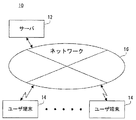
図1はこの発明の情報処理システム10の構成の一例を示す図である。
[First embodiment]
FIG. 1 is a diagram showing an example of the configuration of an
図1を参照して、この発明の第1実施例である情報処理システム10は、情報処理装置の一例であるサーバ12および複数のユーザ端末14を含む。サーバ12は、複数のユーザ端末14の各々と、インターネットのようなネットワーク16を介して通信可能に接続される。この第1実施例の情報処理システム10では、二台以上のユーザ端末14がネットワーク16に接続される。
Referring to FIG. 1, an
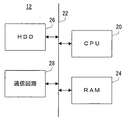
図2は図1に示すサーバ12の電気的な構成を示すブロック図である。図2に示すように、サーバ12は、汎用のサーバであり、CPU20を含む。CPU20には、バス22を介して、RAM24、HDD26および通信回路28が接続される。
FIG. 2 is a block diagram showing an electrical configuration of the
CPU20は、サーバ12の全体的な制御を司る。RAM24は、CPU20のワーク領域およびバッファ領域として用いられる。HDD26は、サーバ12の主記憶装置である。ただし、HDD26に代えて、SSD、フラッシュメモリ、EEPROMなどの他の不揮発性メモリを用いてもよい。
The
通信回路28は、インターネットなどのネットワーク(この第1実施例では、ネットワーク16)に接続するための通信回路である。この通信回路28は、有線または無線でネットワーク16に接続し、CPU20からの指示に従って、ネットワーク16を介して、ユーザ端末14などの外部のコンピュータと通信する。つまり、サーバ12は、ユーザ端末14と通信可能に接続される。
The
また、図1に示したユーザ端末14は、ユーザが使用する汎用のコンピュータ(端末)である。ユーザ端末14は、一例として、タブレットPCであるが、デスクトップPC、ノート(ラップトップ)PCおよびスマートフォンなどの各種の情報機器ないし電子機器をユーザ端末14として用いることもできる。
The
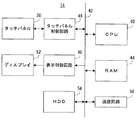
図3は図1に示すユーザ端末14の電気的な構成を示すブロック図である。ただし、図3に示すユーザ端末14の電気的な構成は単なる一例であり、これに限定される必要はない。また、上記のサーバ12で説明したコンポーネントと同じコンポーネントについては簡単に説明することにする。
FIG. 3 is a block diagram showing an electrical configuration of the
図3を参照して、第1実施例のユーザ端末14はCPU40を含む。CPU40には、バス42を介して、RAM44、タッチパネル制御回路46、表示制御回路48、HDD54および通信回路56が接続される。また、タッチパネル制御回路46にはタッチパネル50が接続され、表示制御回路48にはディスプレイ52が接続される。ディスプレイ52は、たとえばLCDであり、タッチパネル50は、ディスプレイ52の表示面上に設けられても良いし、ディスプレイ52とは別に設けられてもよい。ただし、タッチパネル50がディスプレイ52と一体的に形成されたタッチディスプレイが設けられてもよい。なお、ディスプレイ52としては、有機ELを用いることもできる。
With reference to FIG. 3, the
CPU40は、ユーザ端末14の全体的な制御を司る。RAM44は、CPU40のワーク領域およびバッファ領域として用いられる。通信回路56は、有線または無線でネットワーク16に接続するための通信回路である。この通信回路56は、CPU40からの指示に従って、ネットワーク16を介して、サーバ12および他のユーザ端末14などの外部のコンピュータと通信する。
The
タッチパネル制御回路46は、タッチパネル50に必要な電圧などを付与するとともに、タッチパネル50のタッチ有効範囲内でのタッチ操作(タッチ入力)を検出されると、そのタッチ入力の位置を示すタッチ座標データをCPU40に出力する。タッチパネル50は、静電容量方式などの任意の方式のタッチパネルである。
When the touch
表示制御回路48は、GPUおよびVRAMなどを含んでおり、CPU40の指示の下、GPUは、RAM44に記憶された画像生成データ324a(図9参照)を用いて、各種の画面(図4〜図6など)を表示するための画面データをVRAMに生成し、生成した画面データをディスプレイ52に出力する。HDD54は、ユーザ端末14の主記憶装置である。
The
このような構成の情報処理システム10は、ファイル共有システムとして機能し、サーバ12は、登録されたユーザの情報(ユーザ情報)を管理するとともに、登録されたユーザの操作に従って、データ(ファイル)をHDD26に記憶(アップロードまたはバックアップ)し、または、登録されたユーザの操作に従って、データをHDD26から読み出す(ダウンロード)などの処理(管理)を行う。
The
なお、この第1実施例で示されるデータの種類は限定される必要は無く、文書データ、表データ、画像(映像)データ、音データなどの種々のデータを記憶等することができる。 The type of data shown in the first embodiment need not be limited, and various data such as document data, table data, image (video) data, and sound data can be stored.
たとえば、ユーザ端末14は、ユーザの操作を受け付けて、サーバ12へのアクセスを要求するアクセス要求をサーバ12に送信する。サーバ12は、ユーザ端末14からのアクセス要求を受け付けると、受け付けたアクセス要求に基づいて、当該ユーザ端末14からのアクセスの許否を判定する。つまり、アクセス要求を送信したユーザ端末14のユーザが登録されたユーザであるかどうかを認証(ユーザ認証)する。サーバ12は、ユーザ認証の結果、アクセス要求の要求元のユーザ端末14のユーザが登録されたユーザであると判断した場合(認証に成功した場合)には、アクセスを許可し、当該要求元の要求に基づいて、データの記憶場所(記憶領域)の確保、確保された記憶領域へのデータの記憶、または、当該記憶領域からのデータの読み出し等を行う。たとえば、この第1実施例では、登録されたユーザの各々に対応する記憶領域はHDD26に確保(作成)され、記憶領域はフォルダ(分割領域に相当)で管理される。また、各フォルダは、登録されたユーザに割り当てられるユーザID(図7参照)に関連付けられて管理される。
For example, the
また、サーバ12は、ユーザ端末14から特定のURLを要求するアクセス要求を受け付けたときは、URLに対応する記憶領域へのアクセスを許可し、要求元の要求に基づいて、当該記憶領域へのデータの記憶または当該記憶領域からのデータの読み出し等を行う。
In addition, when the
たとえば、このような情報処理システム10(ファイル共有システム)では、登録されたユーザがデータの共有を指示すると、サーバ12によって、当該データをダウンロードするためのリンク(URL)が生成され、当該ユーザが生成されたリンクを取得して、データを共有する他のユーザに電子メールまたはSNS(social networking service)などで取得したリンクを通知したり、データを共有する他のユーザの宛先に当該リンクを含む電子メールをサーバ12から送信して当該リンクを通知したりする。
For example, in such an information processing system 10 (file sharing system), when a registered user gives an instruction to share data, the
他のユーザは、自身のユーザ端末14を用いて、通知されたリンク(URL)に従ってサーバ12にアクセスすることにより、URLで指定されたデータを読み出す(ダウンロードする)ことができる。この他のユーザが、サーバ12に登録されたユーザであれば、ダウンロードしたデータを自身のフォルダに記憶(アップロード)することもできる。
Other users can read (download) the data specified by the URL by accessing the
このように、データを共有することができるが、上記のように、データを共有する他のユーザは、サーバ12に登録されたユーザであっても、サーバ12からデータを一旦ダウンロードし、その後、データをアップロードする必要がある。つまり、他のユーザは、ユーザ端末14を用いてサーバ12との間でデータを送受信する必要がある。このため、送受信されるデータのデータ量が多くなり、通信効率が悪い。また、データは、ネットワーク16を介して、サーバ12とユーザ端末14の間で送受信されるため、セキュリティ上の問題もある。
Thus, although data can be shared, as described above, other users who share data download data once from the
そこで、この第1実施例の情報処理システム10では、このような不都合を回避するために、サーバ12に登録されたユーザ同士でデータを共有する場合には、データを共有する各ユーザに対して作成されたフォルダ間でデータを送受信するようにしてある。
Therefore, in the
以下、具体的に説明するが、サーバ12に登録されていない他のユーザとの間でデータを共有する場合には、従来のように、当該データをダウンロードするためのリンク(URL)が生成され、電子メール等によって直接的にまたは間接的に他のユーザにリンクが通知される。そして、他のユーザは、当該リンクに従ってサーバ12にアクセスし、データを取得(ダウンロード)する。第1実施例においては、これ以降、登録されていない他のユーザについての説明は省略する。
As will be described in detail below, when data is shared with other users who are not registered in the
また、登録されたユーザについては、対応する記憶領域(フォルダ)が既にHDD26に確保(作成)されているものとする。
For registered users, it is assumed that the corresponding storage area (folder) has already been secured (created) in the
ここでは、データの共有を設定する共有元のユーザをユーザAと呼び、共有されるデータのコピー(複製)を取得するコピー先(共有先)のユーザをユーザBと呼ぶ。 Here, a sharing source user who sets data sharing is called a user A, and a copy destination (sharing destination) user who acquires a copy (duplication) of shared data is called a user B.
ユーザAが自身のユーザ端末14を用いてサーバ12にアクセスする場合には、ユーザ端末14のディスプレイ52にログイン画面(図示せず)が表示される。ログイン画面は、サーバ12にログインするためのID(ログインID)およびパスワードを入力するための画面である。このログイン画面の画像データは、一例として、ユーザ端末14に記憶されているものとするが、アクセス(ログイン)の要求に応じて、サーバ12からユーザ端末14に送信されてもよい。
When the user A accesses the
ユーザAがログイン画面でログインIDおよびパスワードを入力すると、それらのデータがユーザ端末14からサーバ12に送信される。サーバ12は、ログインIDおよびパスワードのデータを受信すると、上述したように、ユーザ認証を行う。ここでは、サーバ12は、HDD26に記憶されたユーザ情報のテーブル(図7参照)を参照して、ログインIDおよびパスワードの組み合わせが正しいかどうかを判断する。
When the user A inputs a login ID and a password on the login screen, those data are transmitted from the
ログインIDおよびパスワードの組み合わせが正しく無い場合には、ユーザ認証は失敗であり、ユーザ端末14はサーバ12にログインできない。一方、ログインIDおよびパスワードの組み合わせが正しい場合には、ユーザ認証は成功であり、ユーザA(ユーザ端末14)はサーバ12にログインできる。
If the combination of login ID and password is not correct, user authentication has failed and the
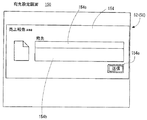
図4(A)はユーザについての管理画面100の一例を示す図解図であり、図4(B)は処理選択画面120の一例を示す図解図である。図5は宛先設定画面150の一例を示す図解図である。
FIG. 4A is an illustrative view showing an example of a
ユーザAがサーバ12にログインすると、図4(A)に示すように、当該ユーザAについての管理画面100がユーザ端末14のディスプレイ52に表示される。ただし、ユーザAについての管理画面100の画像データはサーバ12からユーザ端末14に送信される。ユーザAについての管理画面100は、ユーザAに対応するフォルダの内容を表示するとともに、データを当該フォルダに記憶したり、データを当該フォルダから読み出したり、データを共有したりするための操作を行うための画面である。
When the user A logs in to the
図4(A)に示す管理画面100の例では、左上にユーザAのフォルダであることを示す文字列(後述するユーザID)が表示され、その下方に、選択中のデータないしフォルダの名称を表示するための表示枠が表示され、さらに下方に、ユーザAのフォルダ内のデータを示す画像およびファイル名と、下階層のフォルダを示す画像およびフォルダ名が表示される。
In the example of the
なお、図示は省略するが、下階層のフォルダが指示(選択)された場合には、当該下階層のフォルダ内のデータ(フォルダ)ついての画像およびファイル名(フォルダ名)がツリー構造で表示される。 Although illustration is omitted, when a lower folder is designated (selected), images and file names (folder names) of data (folders) in the lower folder are displayed in a tree structure. The
管理画面100において、ユーザAが所望のデータを選択し、当該所望のデータを他のユーザと共有することを選択(指示)すると、図4(B)に示すような処理選択画面120がディスプレイ52に表示される。図4(B)に示す例では、管理画面100の前面に処理選択画面120が表示される例を示してあるが、管理画面100に代えて処理選択画面120が表示されてもよい。
When the user A selects desired data on the
なお、図4(B)では、図4(A)に示す管理画面100において、ファイル名が「売上報告.aaa」であるデータが共有することを選択された例を示してある。
4B illustrates an example in which data having a file name “sales report.aaa” is selected to be shared on the
処理選択画面120には、アイコン122aおよびアイコン122bが表示される。アイコン122aは、選択されたデータを他のユーザにダウンロードさせるために設けられる。アイコン122bは、選択されたデータを他のユーザと共有するために設けられる。
The
たとえば、アイコン122bが選択(オン)されると、図5に示すように、データを共有する他のユーザに、データを共有することを通知する電子メールを送信するための宛先を設定(入力)するための画面(宛先設定画面)150をディスプレイ52に表示する。たとえば、この宛先設定画面150の画像データはサーバ12から送信されるが、ユーザ端末14に記憶されていてもよい。
For example, when the
宛先設定画面150には、選択されたデータのファイル名が表示され、画面中央に宛先の入力欄154aおよびメッセージの入力欄154bが表示される。入力欄154aには、データを共有する所望の他のユーザに設定された電子メールアドレスが入力される。ただし、他のユーザは、複数人でもよい。かかる場合には、複数の電子メールアドレスが入力欄154aに入力される。入力欄154bには、データを共有する所望の他のユーザへのメッセージを入力することができる。
On the destination setting screen 150, the file name of the selected data is displayed, and a
また、宛先設定画面150には、入力欄154bの下方に、アイコン154cが表示される。アイコン154cは、上記の電子メールを送信するために設けられる。アイコン154cが選択(オン)されると、宛先毎にリンク(URL)が生成され、生成された電子メールの本文に貼り付けられる。この第1実施例では、リンク(URL)は、共有するデータの記憶場所(フォルダ)およびコピー先のフォルダを示す情報などの共有情報を含む。
In the destination setting screen 150, an
なお、サーバ12は、電子メールを作成すると、図示しないメールサーバに電子メールを送信し、このメールサーバから宛先の電子メールアドレスが設定されたユーザ端末14に電子メールが送信される。または、サーバ12がメールサーバとしても機能する場合には、サーバ12から宛先の電子メールアドレスが設定されたユーザ端末14に作成された電子メールが送信される。
When the
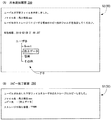
図6(A)は上記の電子メールを受信したユーザ端末14のディスプレイ52に表示される画面(以下、「共有通知画面」という)200の一例を示す図解図である。この共有通知画面200は、上記の電子メールの本文であり、ユーザAが入力したコメントは省略してある。共有通知画面200には、ユーザAがデータ(ファイル)を共有することを設定したこと、ユーザAが共有することを設定したデータ(ファイル)のファイル名、共有することを設定したデータ(ファイル)を自身(ユーザB)のフォルダにコピーするためのリンク(URL)202(共有指示情報に相当)、当該データを共有(コピー)する場合には当該リンク202をクリック(選択)する必要があることおよびリンクの有効期限が表示される。
FIG. 6A is an illustrative view showing an example of a screen 200 (hereinafter referred to as “share notification screen”) displayed on the
ただし、リンク(URL)は、サーバ12によって生成され、電子メールの本文に貼り付けられる。また、リンクの有効期限は設定されなくてもよい。かかる場合には、リンクの有効期限は、共有通知画面200には表示されない。
However, the link (URL) is generated by the
たとえば、ユーザBがリンク202をクリックすると、当該リンク202に従ってサーバ12に共有(コピー)の指示(複製指示情報に相当)が送信される。ただし、コピーが指示されるとともに、コピー元のデータおよびフォルダが指示(指定)され、コピー先のフォルダも指示(指定)される。
For example, when user B clicks a
なお、有効期限を過ぎている場合には、リンク202がクリックされても、サーバ12に共有の指示が送信されない、または、サーバ12に共有の指示が送信されてもデータの共有(コピー)が実行されない。
If the expiration date has passed, the sharing instruction is not transmitted to the
リンク202に従ってデータのコピーが完了すると、サーバ12は、共有を指示したユーザ端末14にコピー完了を通知する。すると、ユーザ端末14のディスプレイ52には、図6(B)に示すようなコピー完了画面250が表示される。コピー完了画面250には、ユーザAが共有することを設定したデータの共有(コピー)が完了したこと、データのファイル名、コピー先のフォルダ名およびユーザBが使用可能なHDD26(ストレージ)の記憶容量(残り容量)が表示される。
When the data copy is completed according to the
詳細な説明は省略するが、第1実施例では、データを共有する他のユーザを指定するだけであるため、コピー先のフォルダは所定のフォルダ(Guest Folder)に設定される。 Although a detailed description is omitted, in the first embodiment, since only another user who shares data is specified, the copy destination folder is set to a predetermined folder (Guest Folder).
ただし、図示は省略するが、管理画面100には、サーバ12からログアウト(サーバ12へのアクセスを終了)するための指示を入力するアイコン(ログアウトアイコン)が表示される。たとえば、ログアウトアイコンが選択(オン)されると、ユーザ端末14のディスプレイ52にログアウト画面(図示せず)が表示される。ログアウト画面は、ログアウトを実行するかどうかをユーザ(ここでは、ユーザA)に選択させるための画面である。たとえば、ログアウト画面には、実際にログアウトするためのアイコン(OKアイコン)と、ログアウトせずに管理画面100に戻るためのアイコン(キャンセルアイコン)とが表示される。
Although not shown, an icon (logout icon) for inputting an instruction for logging out from the server 12 (ending access to the server 12) is displayed on the
ログアウト画面において、OKアイコンが選択(オン)されると、ユーザ端末14(ユーザA)はサーバ12からログアウトする。ただし、ユーザ端末14(ユーザA)がサーバ12からログアウトするときに、ユーザ端末14から、サーバ12へのアクセスを終了する指示(終了指示)がサーバ12に送信される。なお、ログアウトされた場合に限られず、ユーザAが管理画面100を閉じた場合などにも、ユーザ端末14からサーバ12に終了指示が送信される。
When the OK icon is selected (turned on) on the logout screen, the user terminal 14 (user A) logs out from the
図7は上述したユーザ情報のテーブルの一例を示す図解図である。このユーザ情報のテーブルのデータは、HDD26に記憶され、管理される。図7に示すように、ユーザ情報は、ユーザIDを含み、ユーザIDに対応して、メールアドレス、ログインIDおよびパスワードが記述される。
FIG. 7 is an illustrative view showing one example of the user information table described above. The user information table data is stored in the
ユーザIDは、サーバ12に登録されたユーザを個別に識別するための識別情報である。図7に示す例では、三つのアルファベットで示してあるが、これに限定される必要はなく、ユーザの名称でもよい。メールアドレスは、ユーザに設定された電子メールアドレスである。たとえば、電子メールアドレスは、共有通知の電子メールの宛先が入力されたときに、登録されたユーザであるかどうかを判断するために記憶される。ログインIDおよびパスワードは、ユーザ認証を実行するために用いられ、サーバ12に登録されたユーザのそれぞれに割り当てられる。たとえば、ログインIDおよびパスワードは、サーバ12の管理者または運営者等によって発行され、登録されたユーザに通知される。図7に示す例では、ログインIDを三つの数字または英数字を用いて示すとともに、パスワードを六つの記号を用いて示してあるが、これに限定される必要はなく、適宜変更可能である。
The user ID is identification information for individually identifying users registered in the
図示は省略するが、HDD26には、サーバ12に登録されたユーザの各々に対応するフォルダ(記憶領域)が設けられ、このフォルダと対応するユーザのユーザ情報とがユーザIDで関連付けられている。
Although illustration is omitted, the
情報処理システム10の上記のような動作は、サーバ12のCPU20がRAM24に記憶されたサーバ12用の情報処理プログラム(サーバ側情報処理)を実行し、また、ユーザ端末14のCPU40がRAM44に記憶されたユーザ端末14用の情報処理プログラム(端末側情報処理)を実行することによって実現される。具体的な処理については、後でフロー図を用いて説明する。
In the above-described operation of the
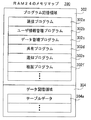
図8は図2に示すサーバ12のRAM24のメモリマップ300の一例を示す図解図である。図8に示すように、RAM24は、プログラム記憶領域302およびデータ記憶領域304を含む。プログラム記憶領域302には、上述したように、サーバ12用の情報処理プログラムが記憶される。このサーバ12用の情報処理プログラムは、通信プログラム302a、ユーザ情報管理プログラム302b、データ管理プログラム302c、共有プログラム302d、通知プログラム302eおよび複製プログラム302fなどを含む。
FIG. 8 is an illustrative view showing one example of a
通信プログラム302aは、ネットワーク16を介して、または、ネットワーク16を介さずに直接、ユーザ端末14等の外部のコンピュータと通信(データを送受信)するためのプログラムである。
The
ユーザ情報管理プログラム302bは、サーバ12に登録されたユーザについてのユーザ情報を管理するためのプログラムである。ユーザがサーバ12に登録されると、当該ユーザについての情報をユーザ情報のテーブルに追加し、ユーザが登録を解除すると、当該ユーザについての情報をユーザ情報のテーブルから消去する。
The user
データ管理プログラム302cは、情報処理システム10を利用するユーザ毎に作成されたフォルダを管理するためのプログラムである。たとえば、データ管理プログラム302cは、新たなユーザがサーバ12に登録された場合に、この新たなユーザが使用する(ユーザに対応する)フォルダを作成したり、ユーザが登録を解除した場合に、このユーザに対応するフォルダを削除したり、ユーザに対応するフォルダにデータを記憶したり、当該フォルダからデータを読み出したりするためのプログラムである。
The
共有プログラム302dは、共有元のユーザが操作するユーザ端末14からデータを共有する指示があった場合に、当該データを共有するためのリンク202を生成するとともに、生成したリンクを含む電子メールを生成するためのプログラムである。
When there is an instruction to share data from the
通知プログラム302eは、共有プログラム302dに従って生成された電子メールを宛先のユーザ端末14に送信するためのプログラムである。ただし、電子メールを送信するときには、通信プログラム302aが実行される。
The notification program 302e is a program for transmitting an e-mail generated according to the sharing program 302d to the
複製プログラム302fは、コピー先(共有先)のユーザが操作するユーザ端末14からリンク202に従ってコピーの指示があった場合に、コピーの指示が示す共有元のユーザのフォルダに記憶されたデータのコピーを、コピーの指示が示すコピー先のユーザのフォルダ(この第1実施例では、Guest Folder)に記憶するためのプログラムである。
The
なお、図示は省略するが、プログラム記憶領域302には、ユーザ認証を行うためのプログラム等も記憶される。
Although illustration is omitted, the
また、RAM24のデータ記憶領域304には、テーブルデータ304aなどが記憶される。テーブルデータ304aは、図7に示したようなユーザ情報のテーブルについてのデータであり、必要に応じて、HDD26からRAM24に読み込まれる。
Further,
なお、図示は省略するが、データ記憶領域304には、サーバ12用の情報処理プログラムの実行に必要な他のデータが記憶されたり、サーバ12用の情報処理プログラムの実行に必要なタイマ(カウンタ)やレジスタが設けられたりする。
Although not shown, the
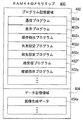
図9は図3に示すユーザ端末14のRAM44のメモリマップ400の一例を示す図解図である。図9に示すように、RAM44は、プログラム記憶領域402およびデータ記憶領域404を含む。プログラム記憶領域402には、上述したように、ユーザ端末14用の情報処理プログラムが記憶される。このユーザ端末14用の情報処理プログラムは、通信プログラム402a、表示プログラム402b、操作検出プログラム402c、共有設定プログラム402d、宛先設定プログラム402e、送受信プログラム402fおよび複製指示プログラム402gを含む。
FIG. 9 is an illustrative view showing one example of a
通信プログラム402aは、ネットワーク16を介して、または、ネットワーク16を介さずに直接、サーバ12等の外部のコンピュータと通信するためのプログラムである。
The communication program 402 a is a program for communicating with an external computer such as the
表示プログラム402bは、後述する画像生成データ404aを用いて、ディスプレイ52に表示する各種の画面(管理画面100、処理選択画面120、宛先設定画面150、共有通知画面200、コピー完了画面250など)に対応する表示画像データを生成し、ディスプレイ52に出力するためのプログラムである。
The
操作検出プログラム402cは、タッチパネル制御回路46から出力されるタッチ座標データを取得して、ディスプレイ52に表示されるメニュー画面などの各種の画面に含まれる各種アイコンなどが操作されたことを検出するためのプログラムである。また、タッチパネル50以外の入力装置が設けられる場合には、操作検出プログラム402cは、当該入力装置を操作したことを検出するためのプログラムでもある。
The operation detection program 402c acquires touch coordinate data output from the touch
共有設定プログラム402dは、ユーザの操作に従って選択されたデータを、他のユーザとの間で共有することを設定するためのプログラムである。
The
宛先設定プログラム402eは、ユーザの操作に従って、データのコピー先すなわちデータを共有したことを通知する他(宛先)のユーザの電子メールアドレスを設定するためのプログラムである。
The
送受信プログラム402fは、ログインIDおよびパスワードなどを含む各種のデータをサーバ12に送信するとともに、サーバ12から送信された各種のデータを受信するためのプログラムである。ただし、データを送受信する場合には、通信プログラム402aに従って通信処理が実行される。
The transmission /
複製指示プログラム402gは、リンク202に従って、データのコピーをサーバ12に指示するためのプログラムである。ただし、データのコピーをサーバ12に指示するときには、通信プログラム402aに従って通知処理が実行される。
The
なお、図示は省略するが、プログラム記憶領域402には、他のアプリケーションプログラムおよび音出力プログラムなどのプログラムも記憶される。
Although not shown, the
また、RAM44のデータ記憶領域404には、画像生成データ404aなどが記憶される。
The
画像生成データ404aは、ディスプレイ52に表示する各種の画面に対応する表示画像データを生成するためのポリゴンデータまたはテクスチャデータ等のデータである。
The image generation data 404 a is data such as polygon data or texture data for generating display image data corresponding to various screens displayed on the
なお、図示は省略するが、データ記憶領域404には、タッチパネル50からの操作データなど、ユーザ端末14用の情報処理プログラムの実行に必要な他のデータが記憶されたり、ユーザ端末14用の情報処理プログラムの実行に必要なタイマ(カウンタ)やレジスタが設けられたりする。
Although illustration is omitted, the
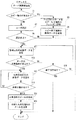
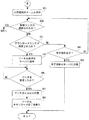
図10は、図2に示したサーバ12のCPU20のサーバ側情報処理の一例を示すフロー図である。ユーザ端末14との間で通信接続されると、図10に示すように、サーバ12のCPU20は、サーバ側情報処理を開始し、ステップS1で、コピー指示があるかどうかを判断する。つまり、通信接続されたユーザ端末14からコピー指示が送信されたかどうかを判断する。
FIG. 10 is a flowchart showing an example of server-side information processing of the
ステップS1で“YES”であれば、つまり、コピー指示が有れば、ステップS3で、指定されたデータをコピーして、指定のフォルダに記憶する。つまり、データがユーザ間で共有される。次のステップS5では、コピー完了画面の画像データをコピー指示の送信元のユーザ端末14に送信して、サーバ側情報処理を終了する。
If “YES” in the step S1, that is, if there is a copy instruction, the designated data is copied and stored in a designated folder in a step S3. That is, data is shared between users. In the next step S5, the image data on the copy completion screen is transmitted to the
一方、ステップS1で“NO”であれば、つまり、コピー指示が無ければ、ステップS7で、ユーザ認証を行う。ここでは、CPU20は、ユーザ端末14から送信されるログインIDおよびパスワードを受信し、HDD26に記憶されるユーザ情報を参照して、登録されたユーザであるかどうかを認証する。
On the other hand, if “NO” in the step S1, that is, if there is no copy instruction, user authentication is performed in a step S7. Here, the
続いて、ステップS9では、認証成功かどうかを判断する。つまり、ユーザ認証に成功したかどうかを判断する。ステップS9で“NO”であれば、つまり、認証失敗であれば、サーバ側情報処理を終了する。ただし、ユーザ認証に失敗した場合には、ログインIDとパスワードの入力(送信)を要求するようにしてもよい。かかる場合には、ユーザ認証に数回失敗した場合に、サーバ側情報処理を終了すればよい。 Subsequently, in step S9, it is determined whether or not the authentication is successful. That is, it is determined whether the user authentication is successful. If “NO” in the step S9, that is, if the authentication fails, the server-side information processing is ended. However, when user authentication fails, input (transmission) of a login ID and a password may be requested. In such a case, the server-side information processing may be terminated when user authentication fails several times.
一方、ステップS9で“YES”であれば、つまり、認証成功であれば、ステップS11で、図4(A)に示したような管理画面100の画像データを送付する。ただし、ここでは、ユーザ認証に成功したユーザについての管理画面100の画像データが送付される。
On the other hand, if “YES” in the step S9, that is, if the authentication is successful, the image data of the
次のステップS13では、ユーザ端末14からデータの共有指示が有るかどうかを判断する。ステップS13で“NO”であれば、つまり、ユーザ端末14からデータの共有指示が無ければ、ステップS15で、ユーザ端末14から終了指示が有るかどうかを判断する。
In the next step S13, it is determined whether or not there is a data sharing instruction from the user terminal. If “NO” in the step S13, that is, if there is no data sharing instruction from the
ステップS15で“NO”であれば、つまり、終了指示が無ければ、ステップS11に戻る。図示は省略するが、終了指示が無い場合には、CPU20は、ユーザの指示に従ってデータを保存したり、フォルダまたはデータを閲覧したりするための処理を実行する。一方、ステップS15で“YES”であれば、つまり、終了指示があれば、サーバ側情報処理を終了する。
If “NO” in the step S15, that is, if there is no end instruction, the process returns to the step S11. Although illustration is omitted, when there is no termination instruction, the
また、ステップS13で“YES”であれば、つまり、ユーザ端末14からデータの共有指示が有れば、ステップS17で、図5に示したような宛先設定画面150の画像データを当該ユーザ端末14に送付する。続くステップS19では、ユーザ端末14から共有の指示が有るかどうかを判断する。
If “YES” in the step S13, that is, if there is a data sharing instruction from the
ステップS19で“NO”であれば、つまり、ユーザ端末14から共有の指示が無ければ、ステップS17に戻る。一方、ステップS19で“YES”であれば、つまり、ユーザ端末14から共有の指示が有れば、ステップS21で、共有通知のメールを生成し、ステップS23で、生成した共有用のメールを送信して、サーバ側情報処理を終了する。
If “NO” in the step S19, that is, if there is no sharing instruction from the
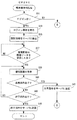
図11〜図13は、図3に示したユーザ端末14のCPU40の端末側情報処理のフロー図である。たとえば、ユーザがユーザ端末14を用いてデータ共有サービスのアプリケーションを起動すると、図11に示すように、CPU40は、端末側情報処理を開始し、ステップS31で、ログインかどうかを判断する。ここでは、CPU40は、ログインの指示が入力されたかどうかを判断する。
11 to 13 are flowcharts of terminal-side information processing of the
ステップS31で“NO”であれば、つまり、ログインでなければ、後述するように、図13に示すステップS57に進む。一方、ステップS31で“YES”であれば、つまり、ログインであれば、ステップS33で、ログイン画面を表示する。続くステップS35では、認証情報をサーバ12に送信する。図示は省略するが、ユーザが、認証情報、すなわち、ログインIDおよびパスワードを入力し、ログインを指示すると、認証情報がサーバ12に送信される。
If “NO” in the step S31, that is, if not logging in, the process proceeds to a step S57 shown in FIG. 13 as described later. On the other hand, if “YES” in the step S31, that is, if logging in, a login screen is displayed in a step S33. In a succeeding step S35, the authentication information is transmitted to the
続いて、ステップS37では、サーバ12から、図4(A)に示したような管理画面100の画像データを受信したかどうかを判断する。ステップS37で“NO”であれば、つまり、管理画面100の画像データを受信していなければ、同じステップS37に戻る。ただし、所定時間(30秒程度)を経過しても、管理画面100の画像データを受信しない場合には、通信エラーを通知した後に、端末側情報処理を終了してもよい。以下、サーバ12から画像データおよび通知を受信しない場合について同様である。
Subsequently, in step S37, it is determined whether image data of the
一方、ステップS37で“YES”であれば、つまり、管理画面100の画像データを受信すれば、ステップS39で、管理画面100をディスプレイ52に表示し、ステップS41で、共有指示が有るかどうかを判断する。ステップS41で“NO”であれば、つまり、共有指示が無ければ、ステップS43で、終了指示が有るかどうかを判断する。
On the other hand, if “YES” in the step S37, that is, if the image data of the
ステップS43で“NO”であれば、つまり、終了指示が無ければ、ステップS39に戻る。図示は省略するが、終了指示が無い場合には、データの閲覧またはデータの保存(アップロード)指示が有ると、対応する指示がサーバ12に送信され、データの閲覧またはデータの保存が実行される。
If “NO” in the step S43, that is, if there is no end instruction, the process returns to the step S39. Although illustration is omitted, when there is no end instruction, if there is a data browsing or data saving (uploading) instruction, the corresponding instruction is transmitted to the
一方、ステップS43で“YES”であれば、つまり、終了指示が有れば、ステップS45で、終了指示をサーバ12に送信して、端末側情報処理を終了する。このとき、管理画面100が非表示され、ログアウトされる。以下、端末側情報処理を終了する場合について同じである。
On the other hand, if “YES” in the step S43, that is, if there is an end instruction, the end instruction is transmitted to the
また、ステップS41で“YES”であれば、つまり、共有指示があれば、ステップS47で、共有指示をサーバ12に送信して、図12に示すステップS49で、サーバ12から、図5に示したような宛先設定画面150の画像データを受信したかどうかを判断する。
If “YES” in the step S41, that is, if there is a sharing instruction, the sharing instruction is transmitted to the
ステップS49で“NO”であれば、つまり、宛先設定画面150の画像データを受信していなければ、同じステップS49に戻る。一方、ステップS49で“YES”であれば、つまり、宛先設定画面150の画像データを受信すれば、ステップS51で、宛先設定画面150をディスプレイ52に表示する。
If “NO” in the step S49, that is, if the image data of the destination setting screen 150 is not received, the process returns to the same step S49. On the other hand, if “YES” in the step S49, that is, if the image data of the destination setting screen 150 is received, the destination setting screen 150 is displayed on the
続くステップS53では、宛先の入力を完了したかどうかを判断する。ここでは、CPU40は、入力欄154aに宛先の電子メールアドレスが一つ以上入力された状態で、アイコン154cが選択されたかどうかを判断する。ステップS53で“NO”であれば、つまり、宛先の入力を完了していなければ、同じステップS53に戻る。一方、ステップS53で“YES”であれば、つまり、宛先の入力を完了すれば、ステップS55で、データの共有をサーバ12に指示して、端末側情報処理を終了する。
In a succeeding step S53, it is determined whether or not the input of the destination is completed. Here, the
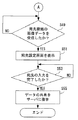
上述したように、ステップS31で“NO”である場合には、図13に示すステップS57で、共有通知のメールを表示する。ここでは、図5(A)に示したような共有通知画面200がディスプレイ52に表示される。続くステップS59では、リンク202が選択されたかどうかを判断する。
As described above, if “NO” in the step S31, the sharing notification mail is displayed in a step S57 shown in FIG. Here, a sharing notification screen 200 as shown in FIG. In a succeeding step S59, it is determined whether or not the
ステップS59で“NO”であれば、つまり、リンク202が選択されていなければ、ステップS61で、終了指示が有るかどうかを判断する。ステップS61で“NO”であれば、つまり、終了指示が無ければ、ステップS59に戻る。一方、ステップS61で“YES”であれば、つまり、終了指示が有れば、ステップS63で、終了指示をサーバ12に送信して、端末側情報処理を終了する。
If “NO” in the step S59, that is, if the
一方、ステップS59で“YES”であれば、つまり、リンク202が選択されれば、ステップS65で、データのコピーをサーバ12に指示する。このとき、リンク202によって、コピーされるデータが指定されるとともに、コピー先のフォルダ(または、ユーザID)が指定される。
On the other hand, if “YES” in the step S59, that is, if the
続くステップS67では、サーバ12からコピー完了の通知を受信したかどうかを判断する。ステップS67で“NO”であれば、つまり、サーバ12からコピー完了の通知を受信していなければ、同じステップS67に戻る。一方、ステップS67で“YES”であれば、つまり、サーバ12からコピー完了の通知を受信すれば、ステップS69で、図6(B)に示したようなコピー完了画面250をディスプレイ52に表示して、端末側情報処理を終了する。
In a succeeding step S67, it is determined whether or not a copy completion notification is received from the
この第1実施例によれば、ユーザ端末14からの共有指示に従ってサーバ12のHDD26に設けたフォルダに記憶されたデータのコピーを他のフォルダに記憶するので、データの実体がネットワーク16を介して送受信されることがない。このため、送受信するデータ量を少なくすることができる。よって、通信効率の向上を図ることができるとともに、安全性(セキュリティ)を向上することができる。
According to the first embodiment, a copy of data stored in a folder provided in the
また、第1実施例によれば、サーバ12のHDD26内において、データをコピーするので、サーバーログを用いてコピーの履歴を追跡することができるとともに、メタデータも残すことができる。したがって、データを管理し易くすることができる。
Further, according to the first embodiment, since data is copied in the
なお、この第1実施例では、ユーザ端末14からデータのコピーの指示を受けると、これに応じて、サーバ12がデータのコピーを実行するようにしたが、コピー回数に上限を設けるようにしてもよい。これは、宛先以外のユーザ端末14でメールが受信された場合に、不正にデータが取得される可能性があるからである。たとえば、データをコピーすることができる回数を、ユーザ端末14で指定された宛先の数に設定しておき、宛先の数だけコピーが実行されると、それ以降にユーザ端末14からコピーの指示を受けたとしても、サーバ12において、コピーを実行しないようにすることができる。
In the first embodiment, when the data copy instruction is received from the
また、第1実施例では、サーバ12からユーザ端末14に共有通知のメールを送信した後で、ユーザ端末14からコピーの指示が有る場合に、データのコピーを実行するようにしたが、たとえば、所定期間(数日から数週間程度)にコピーの指示が無い場合には、コピーの指示を促すようにしてもよい。たとえば、サーバ12は、ユーザ端末14に、共有通知のメールを再度送信してもよいし、別途コピーの指示を促すための通知を送信するようにしても良い。
In the first embodiment, after the
なお、第1実施例では、サーバ12のHDD26にデータを記憶および管理するようにしたが、これに限定される必要はない。サーバ12が直接アクセス可能な記憶装置(データベース)を設けて、この記憶装置でデータを記憶および管理するようにしてもよい。また、ネットワーク16上にサーバ12と通信可能に記憶装置を設けて、サーバ12の指示の下、データの書込み、データの読み出し、データの共有(コピー)を行うようにしてもよい。つまり、サーバ12と通信可能(データの送受信可能)であれば、記憶装置が設けられる場所は限定されない。
In the first embodiment, data is stored and managed in the
また、第1実施例では、宛先設定画面150において、データを共有する他のユーザの電子メールアドレスを入力するようにしたが、これに限定される必要はない。たとえば、ユーザ情報において、各ユーザがデータを共有する他のユーザを予め登録しておくことにより、プルダウンメニューで他のユーザまたは他のユーザの電子メールアドレスを選択可能にしてもよい。
[第2実施例]
第2実施例の情報処理システム10は、コピー先のユーザが、共有元のユーザによって共有することが設定されたデータを、サーバ12のHDD26における自身のフォルダにコピーするか、自身が操作するユーザ端末14にダウンロードするかを選択できるようにした以外は第1実施例と同じであるため、第1実施例と異なる内容について説明し、重複した説明については省略することにする。
In the first embodiment, the e-mail address of another user who shares data is input on the destination setting screen 150. However, the present invention is not limited to this. For example, in the user information, by registering in advance other users with whom each user shares data, another user or another user's e-mail address may be selectable from a pull-down menu.
[Second Embodiment]
In the
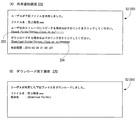
図14(A)は第2実施例における共有通知画面200の一例を示す図解図であり、図14(B)は第2実施例におけるダウンロード完了画面270の一例を示す図解図である。 FIG. 14A is an illustrative view showing an example of a sharing notification screen 200 in the second embodiment, and FIG. 14B is an illustrative view showing an example of a download completion screen 270 in the second embodiment.
図14(A)に示すように、第2実施例の共有通知画面200には、第1実施例で表示される内容に加えて、ユーザAが共有することを設定したデータ(ファイル)をダウンロードするための送信用のリンク204および当該データをダウンロードする場合には当該リンク204をクリック(選択)する必要があることが表示される。
As shown in FIG. 14A, the sharing notification screen 200 of the second embodiment downloads data (file) set to be shared by the user A in addition to the contents displayed in the first embodiment. When the
ただし、リンク204は、サーバ12によって生成され、電子メールの本文に貼り付けられる。また、共有通知画面200に表示されるリンクの有効期限は、リンク202およびリンク204の共通の有効期限である。
However, the
たとえば、ユーザBがリンク204をクリックすると、当該リンク204に従ってサーバ12にダウンロードの指示(送信指示情報に相当)が送信される。サーバ12は、ダウンロードの指示に従って、コピー先(ダウンロードの要求元)のユーザ端末14に、ユーザAが共有することを設定したデータを送信する。サーバ12から送信されたデータは、コピー先のユーザ端末14のHDD54に記憶される。
For example, when the user B clicks the
なお、有効期限を過ぎている場合には、リンク202がクリックされても、サーバ12にダウンロードの指示が送信されない、または、サーバ12にダウンロードの指示が送信されてもデータがコピー先のユーザ端末14に送信されない。
If the expiration date has passed, even if the
リンク204に従ってデータのダウンロードが完了すると、ユーザ端末14のディスプレイ52には、図14(B)に示すようなダウンロード完了画面270が表示される。ダウンロード完了画面270には、ユーザAが共有することを設定したデータのダウンロードが完了したこと、データのファイル名およびコピー先のフォルダ名が表示される。
When the data download is completed according to the
第2実施例では、ダウンロード先のフォルダはユーザが使用しているブラウザの設定により所定のローカルフォルダ(たとえば図14(A)および図14(B)に示す「Download Folder」など )に予め設定される。 In the second embodiment, the download destination folder is preset in a predetermined local folder (for example, “Download Folder” shown in FIGS. 14A and 14B) by the setting of the browser used by the user. The
なお、ユーザによってリンク202が選択された場合の情報処理システム10の動作については、第1実施例と同じであるため、重複した説明は省略する。
Note that the operation of the
また、図示は省略するが、第2実施例では、サーバ12のRAM24のプログラム記憶領域302には、データ送信プログラムが記憶される。データ送信プログラムは、ダウンロードの指示があった場合に、ダウンロードの指示が示す共有元のユーザのフォルダに記憶されたデータのコピーを、ダウンロードの指示が示すコピー先のユーザ端末14に送信するためのプログラムである。
Although not shown, in the second embodiment, a data transmission program is stored in the
同様に、ユーザ端末14のRAM44のプログラム記憶領域402には、ダウンロード指示プログラムが記憶される。ダウンロード指示プログラムは、リンク204に従って、データのダウンロードをサーバ12に指示するためのプログラムである。ただし、データのダウンロードをサーバ12に指示するときには、通信プログラム402aに従って通信処理が実行される。また、サーバ12から送信されたデータを受信するときには、通信プログラム402aに従ってデータの受信処理が実行される。
Similarly, a download instruction program is stored in the
以下、フロー図を用いて、第2実施例におけるサーバ12用のサーバ側情報処理およびユーザ端末14用の共有処理について説明するが、第1実施例で説明したサーバ側情報処理および端末側情報処理と同じ処理については同じ参照符号を付し、重複した内容については、説明を省略するまたは簡単に説明することにする。
Hereinafter, the server-side information processing for the
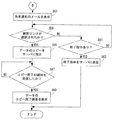
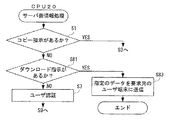
図15は第2実施例におけるサーバ12のCPU20のサーバ側情報処理の一例を示すフロー図である。図15に示すように、サーバ12のCPU20は、ステップS1で“NO”であれば、つまり、コピー指示が無ければ、ステップS81で、ダウンロード指示があるかどうかを判断する。つまり、通信接続されたユーザ端末14からリンク204に従うダウンロード指示が送信されたかどうかを判断する。
FIG. 15 is a flowchart showing an example of server-side information processing of the
ステップS81で“NO”であれば、つまり、ダウンロード指示が無ければ、ステップS7に進み、ユーザ認証を行う。一方、ステップS81で“YES”であれば、つまり、ダウンロード指示が有れば、ステップS83で、指定されたデータを要求元のユーザ端末14(コピー先のユーザ端末14)に送信して、サーバ側情報処理を終了する。 If “NO” in the step S81, that is, if there is no download instruction, the process proceeds to a step S7 to perform user authentication. On the other hand, if “YES” in the step S81, that is, if there is a download instruction, the designated data is transmitted to the requesting user terminal 14 (copy destination user terminal 14) in the step S83, and the server Ends the side information processing.
図16は第2実施例におけるユーザ端末14のCPU40の端末側情報処理の他の一部である。図16に示すように、ユーザ端末14のCPU40は、ステップS59で“NO”であれば、つまり、リンク202が選択されていなければ、ステップS91で、ダウンロードを行うためのリンク204が選択されたかどうかを判断する。
FIG. 16 shows another part of the terminal side information processing of the
ステップS91で“NO”であれば、つまり、リンク204が選択されていなければ、ステップS61に進み、終了指示が有るかどうかを判断する。一方、ステップS91で“YES”であれば、つまり、リンク204が選択されれば、ステップS93で、データの送信(ダウンロードの指示)をサーバ12に指示する。
If “NO” in the step S91, that is, if the
続くステップS95では、サーバ12から送信されたデータを受信したかどうかを判断する。ステップS95で“NO”であれば、つまり、サーバ12から送信されたデータを受信していなければ、同じステップS95に戻る。一方、ステップS95で“YES”であれば、つまり、サーバ12から送信されたデータを受信すれば、ステップS97で、受信したデータをHDD54に記憶し、ステップS99で、図14(B)に示したようなダウンロード完了画面270をディスプレイ52に表示して、端末側情報処理を終了する。
In a succeeding step S95, it is determined whether or not the data transmitted from the
この第2実施例によれば、第1実施例と同じ効果を得ることができるとともに、コピー先のユーザが、共有元のユーザによって共有することが設定されたデータを、サーバ12のHDD26における自身のフォルダにコピーするか、自身が操作するユーザ端末14にダウンロードするかを選択できるので、利便性を向上することができる。
[第3実施例]
第3実施例の情報処理システム10では、コピー先のユーザが、共有元のユーザによって共有することが設定されたデータのコピー先のフォルダを、サーバ12のHDD26における自身のフォルダの下階層のフォルダの中から指示(選択)できるようにした以外は第1実施例と同じであるため、第1実施例と異なる内容について説明し、重複した説明については省略することにする。
According to the second embodiment, the same effect as the first embodiment can be obtained, and the data set by the copy destination user to be shared by the share source user can be stored in the
[Third embodiment]
In the
図17(A)は第3実施例における共有通知画面200の一例を示す図解図であり、図17(B)は第3実施例におけるコピー完了画面250の一例を示す図解図である。 FIG. 17A is an illustrative view showing an example of a sharing notification screen 200 in the third embodiment, and FIG. 17B is an illustrative view showing an example of a copy completion screen 250 in the third embodiment.
図17(A)に示すように、第3実施例の共有通知画面200には、第1実施例で表示される内容に加えて、サーバ12のHDD26におけるユーザBのフォルダ内の下階層のフォルダを示すフォルダ名がツリー構造で表示されるフォルダツリー210が表示される。また、第1実施例で表示された内容に代えて、コピー先のフォルダを指定する必要があることが表示される。
As shown in FIG. 17A, in the sharing notification screen 200 of the third embodiment, in addition to the contents displayed in the first embodiment, a lower-level folder in the folder of user B in the
ただし、フォルダツリー210は、サーバ12によって生成され、電子メールの本文に貼り付けられる。また、フォルダツリー210は、サーバ12が電子メールを作成する時点でのサーバ12のHDD26におけるユーザBのフォルダについての情報に応じて生成される。さらに、フォルダツリー210に含まれる各フォルダ名に対応して、それぞれリンクが設定されている。なお、それぞれのリンクは、フォルダ名の横に表記されてもよい。また、図17(A)では「売上データ」のフォルダが指定された状態を示してある。
However, the
たとえば、ユーザBがフォルダツリー210に含まれるいずれかのフォルダ(フォルダ名)を指定すると、指定されたフォルダ名に応じて設定されたリンク202に従ってサーバ12に共有(コピー)の指示が送信される。これ以降では、指定されたフォルダにコピーされたデータが記憶される以外、第1実施例と同じである。
For example, when the user B designates any folder (folder name) included in the
したがって、リンク202に従ってデータのコピーが完了すると、サーバ12は、共有を指示したユーザ端末14にコピー完了を通知する。すると、ユーザ端末14のディスプレイ52には、図17(B)に示すようなコピー完了画面250が表示される。このコピー完了画面250には、ユーザBが指定したコピー先のフォルダ名などが表示される。
Accordingly, when the data copy is completed according to the
なお、第3実施例では、第1実施例で示したサーバ側情報処理のステップS21で生成される電子メールの内容が異なるだけである。 In the third embodiment, only the contents of the electronic mail generated in step S21 of the server-side information processing shown in the first embodiment are different.
この第3実施例によれば、第1実施例と同じ効果を得ることができるとともに、コピー先のユーザが、コピーの指示を行うときにコピー先のフォルダを指定するので、データのコピー後に所望のフォルダにデータを移動させる手間を省くことができる。 According to the third embodiment, the same effect as that of the first embodiment can be obtained, and the copy destination user designates the copy destination folder when issuing a copy instruction. You can save time and effort to move data to the folder.
なお、第2実施例における変形と第3実施例における変形とは、同時に採用することも可能である。 The modification in the second embodiment and the modification in the third embodiment can be adopted at the same time.
また、上述の実施例で挙げた具体的な構成等は一例であり、実際の製品に応じて適宜変更することが可能である。また、上述の実施例で示したフロー図の各ステップは、同じ結果が得られるのであれば、処理される順番は適宜変更することが可能である。 In addition, the specific configuration and the like given in the above-described embodiments are examples, and can be appropriately changed according to actual products. Moreover, as long as the same result is obtained for each step of the flowchart shown in the above-described embodiment, the processing order can be changed as appropriate.
10 …情報処理システム
12 …サーバ
14 …ユーザ端末
16 …ネットワーク
26 …HDD
DESCRIPTION OF
Claims (4)
前記情報処理装置は、
前記ユーザ端末から送信される、共有するデータおよび当該データを共有する他のユーザについての共有情報を受信する共有情報受信手段、
前記共有情報受信手段によって受信された共有情報に基づいて、当該共有情報に含まれる前記他のユーザの前記ユーザ端末に、当該共有情報が示すデータを共有するための共有指示情報を送信する共有指示情報送信手段、
前記ユーザ端末とは異なる他の前記ユーザ端末から送信される複製指示情報を受信する複製指示情報受信手段、および
前記複製指示情報受信手段によって受信された前記複製指示情報に基づいて、当該複製指示情報が示す前記データの複製を、当該複製指示情報が示す前記異なる他のユーザ端末のユーザに対応する前記記憶領域に記憶する複製実行手段を備え、
各々の前記ユーザ端末は、
前記ユーザ端末のユーザに対応する前記記憶領域において、ユーザの選択操作によって選択された前記データを他のユーザと共有するための前記共有情報を前記情報処理装置に送信する共有情報送信手段、
前記情報処理装置から送信された前記共有指示情報を受信する共有指示情報受信手段、および
前記ユーザの実行操作に応じて、前記共有指示情報受信手段によって受信された前記共有指示情報に基づいて、当該共有指示情報が示す前記データを前記ユーザ端末のユーザに対応する前記記憶領域に複製するための前記複製指示情報を前記情報処理装置に送信する複製指示情報送信手段を備える、情報処理システム。 A storage device, an information processing device, and two or more user terminals that are communicably connected to the information processing device, and the storage device includes a storage area corresponding to each of the users of the two or more user terminals. A system,
The information processing apparatus includes:
Shared information receiving means for receiving shared information about shared data and other users sharing the data, transmitted from the user terminal;
Based on the shared information received by the shared information receiving means, a sharing instruction for transmitting sharing instruction information for sharing data indicated by the shared information to the user terminal of the other user included in the shared information Information transmission means,
Copy instruction information receiving means for receiving copy instruction information transmitted from another user terminal different from the user terminal, and the copy instruction information based on the copy instruction information received by the copy instruction information receiving means A copy execution means for storing the copy of the data indicated by the storage area corresponding to the user of the different other user terminal indicated by the copy instruction information;
Each of the user terminals is
Shared information transmitting means for transmitting, to the information processing apparatus, the shared information for sharing the data selected by the user's selection operation with another user in the storage area corresponding to the user of the user terminal;
Based on the sharing instruction information received by the sharing instruction information receiving means in response to the user's execution operation, the sharing instruction information receiving means for receiving the sharing instruction information transmitted from the information processing apparatus, An information processing system comprising: copy instruction information transmitting means for transmitting to the information processing apparatus the copy instruction information for copying the data indicated by the share instruction information to the storage area corresponding to the user of the user terminal.
前記複製指示情報送信手段は、前記ユーザの実行操作に応じて、前記共有指示情報受信手段によって受信された前記共有指示情報に基づいて、当該共有指示情報が示す前記データを前記ユーザ端末のユーザに対応する前記記憶領域の指定された前記分割領域に複製するための前記複製指示情報を前記情報処理装置に送信する、請求項1記載の情報処理システム。 When the storage area includes a plurality of divided areas, the sharing instruction information transmission unit includes the sharing instruction information set so that any one of the plurality of divided areas can be selected. Send to the user terminal of the other user,
The duplication instruction information transmitting means transmits the data indicated by the sharing instruction information to the user of the user terminal based on the sharing instruction information received by the sharing instruction information receiving means in response to an execution operation of the user. The information processing system according to claim 1, wherein the duplication instruction information for duplicating in the designated divided area of the corresponding storage area is transmitted to the information processing apparatus.
前記ユーザ端末とは異なる他の前記ユーザ端末から送信される送信指示情報を受信する送信指示情報受信手段、および
前記送信指示情報受信手段によって受信された前記送信指示情報に基づいて、当該送信指示情報が示す前記データを、当該送信指示情報が示す前記異なる他のユーザ端末に送信する送信実行手段をさらに備え、
各々の前記ユーザ端末は、
前記送信実行手段によって送信される前記データを受信するデータ受信手段をさらに備え、
前記共有指示情報は、前記データを前記ユーザ端末のユーザに対応する前記記憶領域に複製するための複製用のリンクと、前記データを前記ユーザ端末に送信する送信用のリンクとを含み、
前記複製指示情報送信手段は、前記ユーザの実行操作に応じて、前記複製用のリンクが選択された場合に前記複製指示情報を前記情報処理装置に送信し、前記送信用のリンクが選択された場合に前記送信指示情報を前記情報処理装置に送信する、請求項1または2記載の情報処理システム。 The information processing apparatus includes:
Transmission instruction information receiving means for receiving transmission instruction information transmitted from another user terminal different from the user terminal, and the transmission instruction information based on the transmission instruction information received by the transmission instruction information receiving means Further comprising transmission execution means for transmitting the data indicated by to the different other user terminal indicated by the transmission instruction information,
Each of the user terminals is
Data receiving means for receiving the data transmitted by the transmission executing means,
The sharing instruction information includes a duplication link for duplicating the data in the storage area corresponding to a user of the user terminal, and a transmission link for transmitting the data to the user terminal,
The duplication instruction information transmitting means transmits the duplication instruction information to the information processing apparatus when the duplication link is selected in response to the user's execution operation, and the transmission link is selected. The information processing system according to claim 1, wherein the transmission instruction information is transmitted to the information processing apparatus.
(a)前記ユーザ端末は、当該ユーザ端末のユーザに対応する前記記憶領域において、ユーザの選択操作によって選択された前記データを他のユーザと共有するための前記共有情報を前記情報処理装置に送信するステップ、
(b)情報処理装置は、前記ステップ(a)において、前記ユーザ端末から送信される、共有するデータおよび当該データを共有する他のユーザについての共有情報を受信するステップ、
(c)前記情報処理装置は、前記ステップ(b)において受信した共有情報に基づいて、当該共有情報に含まれる前記他のユーザの前記ユーザ端末に、当該共有情報が示すデータを共有するための共有指示情報を送信するステップ、
(d)前記ユーザ端末とは異なる他の前記ユーザ端末は、前記ステップ(c)で送信される前記共有指示情報を受信するステップ、
(e)前記他のユーザ端末は、前記ユーザの実行操作に応じて、前記ステップ(d)において受信した前記共有指示情報に基づいて、当該共有指示情報が示す前記データを前記ユーザ端末のユーザに対応する前記記憶領域に複製するための前記複製指示情報を前記情報処理装置に送信するステップ、
(f)前記情報処理装置は、前記他のユーザ端末から送信される複製指示情報を受信するステップ、および
(g)前記情報処理装置は、前記ステップ(f)において受信した前記複製指示情報に基づいて、当該複製指示情報が示す前記データの複製を、当該複製指示情報が示す前記他のユーザ端末のユーザに対応する前記記憶領域に記憶するステップを有する、情報処理方法。 A storage device, an information processing device, and two or more user terminals that are communicably connected to the information processing device, and the storage device includes a storage area corresponding to each of the users of the two or more user terminals. An information processing method for a system,
(A) The user terminal transmits, to the information processing apparatus, the shared information for sharing the data selected by the user's selection operation with another user in the storage area corresponding to the user of the user terminal. Step to do,
(B) In the step (a), the information processing apparatus receives shared information about the shared data and other users who share the data, transmitted from the user terminal,
(C) Based on the shared information received in the step (b), the information processing apparatus is configured to share data indicated by the shared information with the user terminal of the other user included in the shared information. Sending the sharing instruction information;
(D) the other user terminal different from the user terminal receives the sharing instruction information transmitted in the step (c);
(E) The other user terminal sends the data indicated by the sharing instruction information to the user of the user terminal based on the sharing instruction information received in the step (d) according to the user's execution operation. Transmitting the duplication instruction information for duplication to the corresponding storage area to the information processing apparatus;
(F) The information processing apparatus receives a copy instruction information transmitted from the other user terminal, and (g) The information processing apparatus is based on the copy instruction information received in the step (f). And storing the copy of the data indicated by the copy instruction information in the storage area corresponding to the user of the other user terminal indicated by the copy instruction information.
Priority Applications (1)
| Application Number | Priority Date | Filing Date | Title |
|---|---|---|---|
| JP2016085687A JP2017194875A (en) | 2016-04-22 | 2016-04-22 | Information processing system and information processing method |
Applications Claiming Priority (1)
| Application Number | Priority Date | Filing Date | Title |
|---|---|---|---|
| JP2016085687A JP2017194875A (en) | 2016-04-22 | 2016-04-22 | Information processing system and information processing method |
Publications (1)
| Publication Number | Publication Date |
|---|---|
| JP2017194875A true JP2017194875A (en) | 2017-10-26 |
Family
ID=60156430
Family Applications (1)
| Application Number | Title | Priority Date | Filing Date |
|---|---|---|---|
| JP2016085687A Pending JP2017194875A (en) | 2016-04-22 | 2016-04-22 | Information processing system and information processing method |
Country Status (1)
| Country | Link |
|---|---|
| JP (1) | JP2017194875A (en) |
Cited By (1)
| Publication number | Priority date | Publication date | Assignee | Title |
|---|---|---|---|---|
| JP2023003864A (en) * | 2021-06-24 | 2023-01-17 | 富士フイルムビジネスイノベーション株式会社 | Information processing system and program |
Citations (5)
| Publication number | Priority date | Publication date | Assignee | Title |
|---|---|---|---|---|
| JP2001357222A (en) * | 2000-06-12 | 2001-12-26 | Sony Corp | Content management system, content management device, and content management method |
| JP2003186726A (en) * | 2001-12-17 | 2003-07-04 | Marubeni Telecom Co Ltd | Server system having storage server and data accumulation service system using the system |
| CN1744509A (en) * | 2004-08-31 | 2006-03-08 | 腾讯科技(深圳)有限公司 | Method for realizing on-line playing of audio-video file and its network system |
| WO2006024230A1 (en) * | 2004-08-31 | 2006-03-09 | Tencent Technology (Shenzhen) Company Limited | A system for implementing the network hard-disk based on the real-time communication platform and the method thereof |
| JP2013235335A (en) * | 2012-05-07 | 2013-11-21 | Keepdata Ltd | Cloud |
-
2016
- 2016-04-22 JP JP2016085687A patent/JP2017194875A/en active Pending
Patent Citations (9)
| Publication number | Priority date | Publication date | Assignee | Title |
|---|---|---|---|---|
| JP2001357222A (en) * | 2000-06-12 | 2001-12-26 | Sony Corp | Content management system, content management device, and content management method |
| US20020023101A1 (en) * | 2000-06-12 | 2002-02-21 | Junichi Kurihara | Content managing system, content managing apparatus, and content managing method |
| JP2003186726A (en) * | 2001-12-17 | 2003-07-04 | Marubeni Telecom Co Ltd | Server system having storage server and data accumulation service system using the system |
| CN1744509A (en) * | 2004-08-31 | 2006-03-08 | 腾讯科技(深圳)有限公司 | Method for realizing on-line playing of audio-video file and its network system |
| WO2006024230A1 (en) * | 2004-08-31 | 2006-03-09 | Tencent Technology (Shenzhen) Company Limited | A system for implementing the network hard-disk based on the real-time communication platform and the method thereof |
| KR20070048805A (en) * | 2004-08-31 | 2007-05-09 | 텐센트 테크놀로지(센젠) 컴퍼니 리미티드 | System and method for executing network hard disk based on real time communication platform |
| US20070203917A1 (en) * | 2004-08-31 | 2007-08-30 | Tencent Technology (Shenzhen) Company Limited | Communication System And Method For Implementing Online File Storage Based On An Instant Messaging Platform |
| JP2008511881A (en) * | 2004-08-31 | 2008-04-17 | ▲騰▼▲訊▼科技(深▲セン▼)有限公司 | Communication system and method for implementing online file storage based on instant messaging platform |
| JP2013235335A (en) * | 2012-05-07 | 2013-11-21 | Keepdata Ltd | Cloud |
Cited By (2)
| Publication number | Priority date | Publication date | Assignee | Title |
|---|---|---|---|---|
| JP2023003864A (en) * | 2021-06-24 | 2023-01-17 | 富士フイルムビジネスイノベーション株式会社 | Information processing system and program |
| JP7800002B2 (en) | 2021-06-24 | 2026-01-16 | 富士フイルムビジネスイノベーション株式会社 | Information processing system and program |
Similar Documents
| Publication | Publication Date | Title |
|---|---|---|
| US10708252B2 (en) | Configuring credentials to faciltate sharing data in a secure manner | |
| JP7204070B2 (en) | Electronic document signature using blockchain | |
| US9860255B2 (en) | Shareable content item links with use restrictions | |
| JP2019012529A (en) | Document management and collaboration system | |
| US20170132428A1 (en) | Requesting modification rights to a linked file set | |
| CN103678967B (en) | Network system, data processing equipment and method | |
| JP6375705B2 (en) | Information processing system, terminal device, and program | |
| CN103078894A (en) | Shared item account selection | |
| JP2017033339A (en) | Service providing system, information processing apparatus, program, and service usage information creation method | |
| JP6597202B2 (en) | Information processing apparatus, information processing system, information processing method, and program | |
| US20210099599A1 (en) | Authentication system, shared terminal, and authentication method | |
| CN107172223A (en) | A kind of sharing method and shared system based on communication terminal and remote server | |
| US20130139240A1 (en) | Network system, information processing apparatus, method for controlling the information processing apparatus, and computer-readable storage medium for computer program | |
| US11451446B2 (en) | Device management system, network device, device management method, and computer-readable medium | |
| JP2015032043A (en) | Service providing system, service providing method and program | |
| JP2015028704A (en) | Service provision system, service provision method, and program | |
| CN106133708B (en) | Information processing system | |
| US20240112233A1 (en) | Multi-tenant system, service provision method, and information storage medium | |
| JP6303317B2 (en) | Service providing system, service providing method and program | |
| JP6303316B2 (en) | Service providing system, service providing method and program | |
| JP2015032042A (en) | Service providing system, service providing method, and program | |
| JP6844666B2 (en) | Information processing system, information processing method, service utilization device, and program | |
| JP2022104000A (en) | Information processing system, information processing method, and information processing program | |
| JP6059307B1 (en) | Terminal device, information transmission method, and information transmission program | |
| JP6424864B2 (en) | system |
Legal Events
| Date | Code | Title | Description |
|---|---|---|---|
| A621 | Written request for application examination |
Free format text: JAPANESE INTERMEDIATE CODE: A621 Effective date: 20190320 |
|
| A977 | Report on retrieval |
Free format text: JAPANESE INTERMEDIATE CODE: A971007 Effective date: 20200130 |
|
| A131 | Notification of reasons for refusal |
Free format text: JAPANESE INTERMEDIATE CODE: A131 Effective date: 20200212 |
|
| A521 | Request for written amendment filed |
Free format text: JAPANESE INTERMEDIATE CODE: A523 Effective date: 20200402 |
|
| A131 | Notification of reasons for refusal |
Free format text: JAPANESE INTERMEDIATE CODE: A131 Effective date: 20200915 |
|
| A02 | Decision of refusal |
Free format text: JAPANESE INTERMEDIATE CODE: A02 Effective date: 20210316 |