JP2015114705A - File management device, control method thereof, and program - Google Patents
File management device, control method thereof, and program Download PDFInfo
- Publication number
- JP2015114705A JP2015114705A JP2013254237A JP2013254237A JP2015114705A JP 2015114705 A JP2015114705 A JP 2015114705A JP 2013254237 A JP2013254237 A JP 2013254237A JP 2013254237 A JP2013254237 A JP 2013254237A JP 2015114705 A JP2015114705 A JP 2015114705A
- Authority
- JP
- Japan
- Prior art keywords
- file
- upload
- information
- user
- uploaded
- Prior art date
- Legal status (The legal status is an assumption and is not a legal conclusion. Google has not performed a legal analysis and makes no representation as to the accuracy of the status listed.)
- Granted
Links
Images
Landscapes
- Information Retrieval, Db Structures And Fs Structures Therefor (AREA)
Abstract
Description
本発明は、記憶手段に記憶したファイルを外部ネットワーク機器にアップロードする機能を有するファイル管理装置、その制御方法及びプログラムに関する。 The present invention relates to a file management apparatus having a function of uploading a file stored in a storage means to an external network device, a control method therefor, and a program.
近年、イーサネット(登録商標)や無線LANといった広域ネットワークにアクセスできるモバイル機器が増加している。これにより、例えばデジタルカメラで撮影した写真や動画といったファイルを、ネットワークを介して自宅のパソコンやサーバ、オンラインサービスにアップロードできるようになってきている。
また、近年の記憶容量の増大化により、モバイル機器内における記憶可能なファイルの量は増大している。
In recent years, mobile devices that can access a wide area network such as Ethernet (registered trademark) and wireless LAN have increased. As a result, for example, files such as photographs and videos taken with a digital camera can be uploaded to a personal computer, server, or online service at home via a network.
In addition, with the recent increase in storage capacity, the amount of files that can be stored in mobile devices is increasing.
例えば特許文献1には、このような大量のメモリ内のファイルにおいて、バックアップ実行時に、そのバックアップ済み情報を登録簿で管理しておき、すでにバックアップ済みのファイルを削除するときは、このバックアップ登録簿を参照して、バックアップ済みを確認してから削除するアイデアが提案されている。
For example, in
しかしながら、オンラインサービスをはじめとする外部ネットワーク機器にファイルをアップロードできるファイル管理装置において、各ファイルを各種アップロード先にアップロードしている状況でファイルを削除する際、どのファイルを優先的に削除すべきかの判断が困難であった。 However, in a file management device that can upload files to external network devices such as online services, when deleting files in the situation where each file is uploaded to various upload destinations, which file should be deleted preferentially Judgment was difficult.
本発明はこのような課題に着目してなされたものであり、ファイルを外部ネットワーク機器にアップロードする機能を有するファイル管理装置において、ユーザが好適にファイル削除を行えるようにすることを目的とする。 The present invention has been made paying attention to such a problem, and an object of the present invention is to allow a user to suitably delete a file in a file management apparatus having a function of uploading a file to an external network device.
本発明のファイル管理装置は、記憶手段に記憶したファイルを外部ネットワーク機器にアップロードするアップロード手段と、前記アップロード手段によりアップロードしたファイルを、アップロードに関する情報と関連付けて管理する管理手段と、前記アップロードに関する情報を削除条件として、前記記憶手段に記憶したファイルを削除する削除手段とを備えたことを特徴とする。 The file management apparatus of the present invention includes an upload unit that uploads a file stored in a storage unit to an external network device, a management unit that manages a file uploaded by the upload unit in association with information related to upload, and the information related to the upload And deletion means for deleting the file stored in the storage means.
本発明によれば、外部ネットワーク機器にアップロードしたファイルを、アップロードに関する情報と関連付けて管理するようにし、このアップロードに関する情報を削除条件として指定できるようにしたので、ユーザが好適にファイル削除を行うことができる。 According to the present invention, a file uploaded to an external network device is managed in association with information related to upload, and the information related to upload can be specified as a deletion condition. Can do.
以下、添付図面を参照して、本発明の好適な実施形態について説明する。
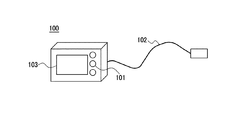
図1は、本実施形態に係るファイル管理装置の一例であるデジタルカメラ100の概観を示す図である。
デジタルカメラ100は、ユーザからの入力操作を受け付ける操作部101を備える。入力操作としては、パワーオン・パワーオフの電源操作、各種選択メニューの選択決定操作、各種文字入力操作等である。
また、デジタルカメラ100は、外部ネットワーク機器と接続するためのLANケーブル102を接続して、外部ネットワーク機器と通信する。本実施形態では、有線であるイーサネットを用いるが、外部ネットワーク機器との通信においてはこれに限られるものではなく、例えば無線LANといった無線通信でもよい。
また、デジタルカメラ100は、ユーザに対して情報を表示するための表示部103を備える。表示部103は、各種メニューやファイルの表示等を行う。
Preferred embodiments of the present invention will be described below with reference to the accompanying drawings.
FIG. 1 is a diagram illustrating an overview of a
The
In addition, the
The
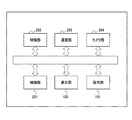
図2は、本実施形態に係るデジタルカメラ100の内部構成例を示すブロック図である。
制御部201は、デジタルカメラ100の動作を制御する。デジタルカメラ100の動作としては、記憶部202へのファイルの書き込み・読み込み、記憶部202に記憶したファイルの管理、通信部203を制御することによるネットワーク通信、カメラ部204を制御することによる画像の撮影等がある。
記憶部202は、ファイルの記憶保存や制御部201が使用するソフトウェアプログラムの記憶先として使用される。
通信部203は、イーサネットコントローラ及びPHY、コネクタを含む、イーサネット通信を行うための構成要素で構成される。
カメラ部204は、レンズ、絞り、AD変換器及び撮像素子を含む、画像を撮影するための構成要素で構成される。
FIG. 2 is a block diagram illustrating an internal configuration example of the
The
The
The
The
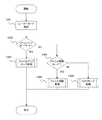
図3は、本実施形態に係るデジタルカメラ100のメイン処理の流れを示すフローチャートである。以下において、各種の動作は、制御部201がデジタルカメラ100の各部を制御することにより実現される。
ユーザ操作により電源が投入されると、制御部201は、記憶部202に格納されているプログラムコードを実行し、各種の初期化処理を実行し、ユーザ操作待ち受けモードに遷移する(ステップS301)。ユーザ操作待ち受けモードでは、ユーザからのモード選択を促すためのモード選択画面を表示部103に表示する。ユーザは、操作部101を用いてファイルアップロードモード、ファイル削除モード、カメラモードの3つのモードから所望のモードを選択する。
FIG. 3 is a flowchart showing a flow of main processing of the
When the power is turned on by a user operation, the
次に、制御部201は、ユーザが選択したモードがファイルアップロードモードであるか否かを確認する(ステップS302)。
ユーザが選択したモードがファイルアップロードモードである場合(ステップS302でYES)、制御部201はファイルアップロード処理に移行する(ステップS303)。このファイルアップロード処理の詳細は図4を用いて後述する。
ユーザが選択したモードがファイルアップロードモードでない場合(ステップS302でNO)、制御部201は、ユーザが選択したモードがファイル削除モードであるか否かを確認する(ステップS304)。
ユーザが選択したモードがファイル削除モードである場合(ステップS304でYES)、制御部201はファイル削除処理に移行する(ステップS305)。このファイル削除処理の詳細は図5を用いて後述する。
ユーザが選択したモードがファイル削除モードでない場合(ステップS304でNO)、制御部201は、ユーザが選択したモードがカメラモードであると判定し、カメラ処理に移行する(ステップS306)。このカメラ処理の詳細は図6を用いて後述する。
以上の処理は、ユーザが操作部101を用いて電源をOFFするまで繰り返し実行される。
Next, the
If the mode selected by the user is the file upload mode (YES in step S302), the
If the mode selected by the user is not the file upload mode (NO in step S302), the
If the mode selected by the user is the file deletion mode (YES in step S304), the
If the mode selected by the user is not the file deletion mode (NO in step S304), the
The above processing is repeatedly executed until the user turns off the power using the
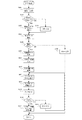
図4は、図3のステップS303のファイルアップロード処理の詳細を示すフローチャートである。
ユーザがファイルアップロードモードを選択すると、ファイルアップロード処理が開始され(ステップS401)、アップロード先をユーザに設定させるための処理に移行する。
制御部201は、表示部103を用いてアップロード先選択方式をユーザに選択させる。アップロード先選択方式として、アップロード先を記憶済みのアップロード先から選択する記憶済みアップロードサイト選択モードか、新規にアップロード先を入力する新規入力モードとするかを問い合わせる。ユーザは、操作部101を用いてアップロード先選択方式を選択する。
制御部201は、ユーザが選択したアップロード先選択方式が記憶済みアップロードサイト選択モードであるか否かを確認する(ステップS402)。
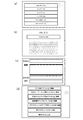
ユーザが選択したアップロード先選択方式が記憶済みアップロードサイト選択モードである場合(ステップS402でYES)、制御部201は、記憶部202に予め登録されているアップロード先の情報を表示部103に表示する(ステップS403)。図8(a)は、予め登録されているURLからアップロード先を選択させる画面の例である。記憶されているアップロード先の情報をリスト表示し、所望のアップロード先をユーザに選択させる。本実施形態では、URL表示したアップロード先の中から選択するようにしているが、これに限られるものではなく、URLのドメイン情報からオンラインサービスを特定して、サービス名表記の中から選択するようにしてもよい。
ユーザが選択したアップロード先選択方式が記憶済みアップロードサイト選択モードでない場合(ステップS402でNO)、制御部201は、アップロード先のURLを入力するための画面を表示部103に表示する(ステップS404)。図8(b)は、任意のアップロード先のURLをユーザに入力させる画面の例である。この例では、URL入力用のダイアログと文字入力のためのソフトウェアキーボードとを表示するようにしている。ユーザは、操作部101を用いてURLを入力する。
FIG. 4 is a flowchart showing details of the file upload process in step S303 of FIG.
When the user selects the file upload mode, the file upload process is started (step S401), and the process proceeds to a process for allowing the user to set the upload destination.
The
The
When the upload destination selection method selected by the user is the stored upload site selection mode (YES in step S <b> 402), the
When the upload destination selection method selected by the user is not the stored upload site selection mode (NO in step S402), the
アップロード先が決定されると、制御部201は、通信部203を用いて指定されたアップロード先に対してネットワーク通信を試みる(ステップS405)。ネットワーク通信には、インターネットで標準に用いられるTCP/IPを用い、その上にHTTPを用いて所定のネットワーク先にGETコマンドを試みる。
制御部201は、ネットワーク接続が成功したか否かを確認する(ステップS406)。
レスポンスが返ってこない等の、ネットワーク接続に失敗した場合(ステップS406でNO)、制御部201は、ネットワーク接続エラーの旨を表示部103に表示し(ステップS408)、本処理を抜ける。
ネットワーク接続に成功し、GETコマンドに対するレスポンスが返ってきた場合(ステップS406でYES)、制御部201は、取得したレスポンス情報であるHTML情報に基づいて、表示部103に接続先画面を表示する(ステップS407)。
When the upload destination is determined, the
The
If the network connection has failed (eg, no response is returned) (NO in step S406), the
When the network connection is successful and a response to the GET command is returned (YES in step S406), the
ネットワーク接続が成功し、接続先画面が表示されると、この画面に従ってアップロードのための手続きを進める。
本実施形態では、まず、制御部201は、予め取得済みのユーザカウントとパスワードをユーザに入力させる(ステップS409)。
制御部201は、入力されたアカウント、パスワード、アップロード先の情報を記憶部202に一時記憶する(ステップS410)。
When the network connection is successful and the connection destination screen is displayed, the upload procedure is advanced according to this screen.
In the present embodiment, first, the
The
次に、制御部201は、アップロードするファイルをユーザに選択させるために、記憶部202に記憶されているファイル一覧を表示部103に表示する(ステップS411)。ユーザは、表示部103に表示されるファイル一覧からアップロードしたいファイルを操作部101を用いて選択する。
次に、制御部201は、アップロード先サイトに、ファイル付属情報をユーザに記入させる(ステップS412)。図8(c)は、ファイル付属情報の入力画面の例である。ファイル付属情報は、例えばコメント(タイトル、説明)、カテゴリ、タグといった情報である。ユーザは、ファイル付属情報を操作部101を用いて入力する。
Next, the
Next, the
次に、制御部201は、ユーザにより選択済みファイルをアップロードする(ステップS413)。
制御部201は、ファイルのアップロードが成功したか否かを確認する(ステップS414)。
ファイルのアップロードが成功した場合(ステップS414でYES)、制御部201は、アップロードに関する情報をアップロードファイルに関連付けて記憶する(ステップS415)。アップロードに関する情報とは、詳しくはまた後述するが、例えば該ファイルをアップロードするときのユーザのアカウント、アップロード先のURL、URLのドメイン情報から特定したオンラインサービス、ファイル付属情報の少なくともいずれかを含む。
ファイルのアップロードが失敗した場合(ステップS414でNO)、制御部201は、その旨を表示部103に表示し(ステップS416)、ステップS411に戻って再度ファイル選択に戻る。
Next, the
The
If the file upload is successful (YES in step S414), the
If the file upload has failed (NO in step S414), the
以上のように、ユーザは記憶部202に記憶されている所望のファイルを所望のアップロード先にアップロードすることができる。また、アップロードファイルをアップロードに関する情報と関連付けて管理することにより、各々のファイルがどこの外部ネットワーク機器にどのようにアップロードしたかを参照することができる。
As described above, the user can upload a desired file stored in the
ここで、図7を参照して、アップロードファイルとアップロードに関する情報との管理方法を説明する。
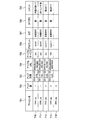
図7は、記憶部202に記憶されているファイルと、そのファイルを外部ネットワーク機器にアップロードした際のアップロードに関する情報との関係を管理するリストである(以下、アップロード管理リストと呼ぶ)。
701は記憶部202に記憶されているファイルのファイル名を格納する列である。記憶部202に記憶されている全ファイルが、この列に列挙される。また、1つのファイルを複数のアップロード先にアップロードした場合、アップロード先の数だけ、同一ファイル名で追加されていく。
702は記憶部202に記憶されているファイルが外部ネットワーク機器にアップロードされた回数を格納する列である。ここの値が2以上の場合は、同一ファイルが同一のアップロード先に複数回アップロードされたことを示す。
703はファイルがアップロードされた日時を格納する列である。
704はアップロード先のURLを格納する列である。
705はアップロード先のオンラインサービスの情報を格納する列である。オンラインサービスの情報は、アップロード先のドメイン情報から一意に識別する。
706はオンラインサービスにログインする際に使用したアカウントを格納する列である。
707〜709はユーザがファイルアップロード時に入力したファイル付属情報である。アップロード先のオンラインサイトによって入力する情報が異なる場合が存在する。本実施形態ではタグ、カテゴリ、コメントを管理し、これら以外の情報は管理対象外とする。また、アップロード先のオンラインサイトにこれらの情報を入力する項目がない場合には、これらの欄は空白としておく。
Here, with reference to FIG. 7, the management method of an upload file and the information regarding upload is demonstrated.
FIG. 7 is a list for managing the relationship between a file stored in the
A
A
A
A
710〜714は各ファイルの行を示す。ファイル710は、アップ数が1であるので、一カ所にアップロードしていることがわかる。ファイル711は、ファイル710と同一のアップロード先に同一アカウントでアップロードしていることがわかる。ファイル712、713は同一のファイルであり、2か所のアップロード先にアップロードしていることがわかる。ファイル714は、記憶部202に記憶されているが、どこにもまだアップロードしていないことがわかる。
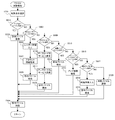
図5は、図3のステップS305のファイル削除処理の詳細を示すフローチャートである。
ユーザがファイル削除モードを選択すると、ファイル削除処理が開始され、ファイル削除条件をユーザに設定させるための処理に移行する。
制御部201は、ファイルの削除条件を表示部103に表示し、ユーザに選択させる(ステップS501)。図8(d)は、ファイルの削除条件の選択画面の例である。ユーザは、操作部101を用いてファイルの削除条件から所望のものを選択する。
FIG. 5 is a flowchart showing details of the file deletion processing in step S305 of FIG.
When the user selects the file deletion mode, the file deletion process is started, and the process proceeds to a process for allowing the user to set a file deletion condition.
The
次に、制御部201は、ユーザが選択した削除条件がアップ済みファイル削除条件であるか否かを確認する(ステップS502)。これは、図8(d)の選択画面において「アップ済みファイル全て削除」を選択した場合である。
ユーザが選択した削除条件がアップ済みファイル削除条件である場合(ステップS502でYES)、制御部201は、アップロード管理リストを用いて、記憶部202に記憶されているファイルにおいてアップロードを行った経歴があるファイルを検索する(ステップS503)。該当する削除対象ファイルは、アップロード管理リスト上において、アップロード履歴が存在するファイルである。検索後、制御部201は、該当するファイルをまとめて記憶部202から削除する(ステップS504)。
Next, the
When the deletion condition selected by the user is the uploaded file deletion condition (YES in step S502), the
ユーザが選択した削除条件がアップ済みファイル削除条件でない場合(ステップS502でNO)、制御部201は、ユーザが選択した削除条件が特定ユーザファイル削除条件であるか否かを確認する(ステップS505)。これは、図8(d)の選択画面において「特定ユーザーアップ済みファイル全て削除」を選択した場合であり、特定のユーザカウントを用いてアップロードしたファイルを一括に削除するモードである。
ユーザが選択した削除条件が特定ユーザファイル削除条件である場合(ステップS505でYES)、制御部201は、削除対象となるファイルのアカウントの入力画面を表示部103に表示して、削除対象となるファイルのアカウントをユーザに入力させる(ステップS506)。ユーザが操作部101よりアカウントを入力すると、制御部201は入力されたアカウントを記憶部202に一時的に記憶する(ステップS507)。そして、記憶したアカウントと、記憶部202に記憶されているアップロード管理リストとを比較し、アカウントが一致するファイルを検索する(ステップS508)。検索後、制御部201は、該当するファイルをまとめて記憶部202から削除する(ステップS504)。
When the deletion condition selected by the user is not the uploaded file deletion condition (NO in step S502), the
When the deletion condition selected by the user is the specific user file deletion condition (YES in step S505), the
ユーザが選択した削除条件が特定ユーザファイル削除条件でない場合(ステップS505でNO)、制御部201は、ユーザが選択した削除条件が特定サービスファイル削除条件であるか否かを確認する(ステップS509)。これは、図8(d)の選択画面において「特定サイトにアップ済みファイル全て削除」を選択した場合であり、特定のオンラインサービスにアップロードしたファイルを一括に削除するモードである。オンラインサービスの情報は、アップロードした際のURLの中のドメイン情報を用いて識別する。
ユーザが選択した削除条件が特定サービスアップロードファイル削除条件である場合(ステップS509でYES)、制御部201は、オンラインサービスリストを表示部103に表示して、削除対象となるオンラインサービスをユーザに選択させる(ステップS510、S511)。オンラインサービスリストは、アップロード管理リストに記憶されているアップロード先サービスを検索して、表示することにより実現する。ユーザが操作部101を用いてオンラインサービスを選択すると、制御部201は選択されたオンラインサービスの情報を記憶部202に一時的に記憶する。そして、記憶されたオンラインサービスの情報と、記憶部202に記憶されているアップロード管理リストを比較し、サービス情報が一致するファイルを検索する(ステップS512)。検索後、制御部201は、該当するファイルをまとめて記憶部202から削除する(ステップS504)。
If the deletion condition selected by the user is not the specific user file deletion condition (NO in step S505), the
When the deletion condition selected by the user is the specific service upload file deletion condition (YES in step S509), the
ユーザが選択した削除条件が特定サービスアップロードファイル削除条件でない場合(ステップS509でNO)、制御部201は、ユーザが選択した削除条件が複数個所アップロード済み削除条件であるか否かを確認する(ステップS513)。これは、図8(d)の選択画面において「複数個所アップ済みファイル全て削除」を選択した場合であり、複数のアップロード先にファイルをアップロードしたファイルを一括に削除するモードである。複数のアップロード先にファイルをアップロードしているか否かは、アップロード管理リストに記憶されているアップロード先URLに基づいて判断する。
ユーザが選択した削除条件が複数個所アップロード済み削除条件である場合(ステップS513でYES)、制御部201は、アップロード管理リストから複数のアップロード先にアップロードされているファイルを検索確認する(ステップS514)。検索後、制御部201は、該当するファイルをまとめて記憶部202から削除する(ステップS504)。
If the deletion condition selected by the user is not the specific service upload file deletion condition (NO in step S509), the
If the deletion condition selected by the user is an upload deletion condition at a plurality of locations (YES in step S513), the
ユーザが選択した削除条件が複数個所アップロード済み削除条件でない場合(ステップS513でNO)、制御部201は、ユーザが選択した削除条件がオリジナルファイルアップロード済み削除条件であるか否かを確認する(ステップS515)。これは、図8(d)の選択画面において「オリジナルファイルアップ済みファイル全て削除」を選択した場合であり、記憶部202に記憶されているファイルのうち、そのままの状態で、すなわちオリジナルファイルのままアップロードされ、アップロード先で記憶されているものを一括に削除するモードである。
ユーザが選択した削除条件がオリジナルファイルアップロード済み削除条件である場合(ステップS515でYES)、制御部201は、実際にアップロード先のファイルをダウンロードし、オリジナルファイルのままであるか否かを確認する(ステップS516)。確認後、制御部201は、該当するファイルをまとめて記憶部202から削除する(ステップS504)。
If the deletion condition selected by the user is not the multiple-site uploaded deletion condition (NO in step S513), the
When the deletion condition selected by the user is the original file uploaded deletion condition (YES in step S515), the
ユーザが選択した削除条件がオリジナルファイルアップロード済み削除条件でない場合(ステップS515でNO)、制御部201は、ユーザが選択した削除条件が特定アップロード情報削除条件であるか否かを確認する(ステップS517)。これは、図8(d)の選択画面において「特定タグのファイル全て削除」を選択した場合であり、ファイル付属情報に基づいて削除対象ファイルを選別するモードである。
ユーザが選択した削除条件が特定アップロード情報削除条件である場合(ステップS517でYES)、制御部201は、表示部103に入力画面を表示して、削除条件となるファイル付属情報をユーザに入力させる。入力画面には、タグ、カテゴリ、コメントにおいて該当するキーワードを入力するダイアログがあり、ユーザは所定のキーワードを操作部101を用いて入力する(ステップS518)。制御部201は、アップロード管理リストから、入力されたキーワードを含むファイル付属情報が存在するファイルを検索する(ステップS519)。検索後、制御部201は、該当するファイルをまとめて記憶部202から削除する(ステップS504)。
When the deletion condition selected by the user is not the original file uploaded deletion condition (NO in step S515), the
When the deletion condition selected by the user is the specific upload information deletion condition (YES in step S517), the
ユーザが選択した削除条件が特定アップロード情報削除条件でない場合(ステップS517でNO)、制御部201は、ユーザが選択した削除条件が削除ファイル選択条件であると判定する。これは、図8(d)の選択画面において「削除ファイル選択」を選択した場合であり、ユーザが操作部101を用いて、記憶部202に記憶されているファイルを一つずつ削除ファイルとして選択し、削除させるモードである。
制御部201は、記憶部202に記憶しているファイル一覧を表示部103に表示して、削除するべきファイルをユーザに選択させる。ユーザは操作部101を用いて、削除したいファイルを一つずつ選択する(ステップS520)。選択後、制御部201は、該当するファイルをまとめて記憶部202から削除する(ステップS504)。
When the deletion condition selected by the user is not the specific upload information deletion condition (NO in step S517), the
The
以上のように、記憶部202に記憶されているファイルをアップロードに関する情報と関連付けて管理し、このアップロードに関する情報を削除条件として、例えばアップロード先やアカウント等に応じてファイルを一括に削除することができる。これにより、例えばファイル保持のセキュリテイの観点から、所定のサイトにアップロードしたファイルのみ削除するといった使い方ができるようになる。
As described above, files stored in the
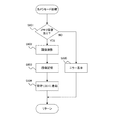
図6は、図3のステップS306のカメラ処理の詳細を示すフローチャートである。
ユーザがカメラモードを選択すると、カメラ処理が開始され、画像撮影を行うための処理に移行する。
制御部201は、記憶部202に記憶されているファイル量を確認し、撮影画像を記憶するためのメモリ容量が存在するか否かを確認する(ステップS601)。
撮影画像を記憶するためのメモリ容量がある場合(ステップS601でYES)、実際の撮影処理に移行する。撮影処理では、カメラ部204で撮影されるライブビュー映像を表示部103に表示し、ユーザは任意のタイミングで操作部101より撮影を行う(ステップS602)。次に、制御部201は、カメラ部204で撮影された撮影画像を記憶部202に記憶する(ステップ603)。撮影画像のファイルを記憶した後、アップロード情報を管理するアップロード管理リストに記憶画像ファイル情報を追加登録する(ステップS604)。
撮影画像を記憶するためのメモリ容量がなかった場合(ステップS601でNO)、メモリ残量が足りない旨の情報を表示部103に表示して、本処理を終了する(ステップS605)。
FIG. 6 is a flowchart showing details of the camera processing in step S306 of FIG.
When the user selects the camera mode, camera processing is started, and the process proceeds to image capturing.
The
If there is a memory capacity for storing the photographed image (YES in step S601), the process proceeds to actual photographing processing. In the shooting process, a live view image shot by the
If there is not enough memory capacity to store the captured image (NO in step S601), information indicating that the remaining memory capacity is insufficient is displayed on the
以上のように、カメラ部204で撮影された撮影画像のファイルを記憶部202に記憶するとともに、アップロード管理リストにファイルを追加することにより、記憶部202内の全ファイルに対して一括にアップロードに関する情報を管理することができる。
As described above, the file of the photographed image taken by the
以上述べたように、記憶部202に記憶されているファイルを外部ネットワーク機器にアップロードする際、アップロードしたファイルを、アップロードに関する情報(ファイルをアップロードするときのユーザのアカウント、アップロード先のURL、URLのドメイン情報から特定したオンラインサービス、ファイル付属情報等)と関連付けて管理する。そして、ユーザ指定のアップロードに関する条件に基づいてファイルを一括削除する。
これにより、記憶部202のメモリ残量がなくなり、撮影画像を記憶できなくなった場合に、ファイル削除の優先順位付けをユーザの好みに応じて一括で行うことができる。例えばアップロード済みのファイルは削除してもよいので、アップロード済みファイルを一括で削除することが可能になる。また、特定のユーザ(アカウント)でアップロードしたファイルのみを一括で削除することにより、本人以外でアップロードしたファイル削除を防止することが可能になる。
As described above, when a file stored in the
As a result, when there is no memory remaining in the
以上、本発明の好ましい実施形態について説明したが、本発明はこれらの実施形態に限定されず、その要旨の範囲内で種々の変形及び変更が可能である。
例えばファイルを削除するときに、該ファイルがアップロード先に存在するか否かを確認するようにし、アップロード先に存在していたならば削除を実行するようにしてもよい。
(その他の実施形態)
また、本発明は、以下の処理を実行することによっても実現される。すなわち、上述した実施形態の機能を実現するソフトウェア(プログラム)を、ネットワーク又は各種記憶媒体を介してシステム或いは装置に供給し、そのシステム或いは装置のコンピュータ(又はCPUやMPU等)がプログラムを読み出して実行する処理である。
As mentioned above, although preferable embodiment of this invention was described, this invention is not limited to these embodiment, A various deformation | transformation and change are possible within the range of the summary.
For example, when deleting a file, it may be confirmed whether or not the file exists at the upload destination, and if it exists at the upload destination, the deletion may be executed.
(Other embodiments)
The present invention can also be realized by executing the following processing. That is, software (program) that realizes the functions of the above-described embodiments is supplied to a system or apparatus via a network or various storage media, and a computer (or CPU, MPU, etc.) of the system or apparatus reads the program. It is a process to be executed.
100:デジタルカメラ、101:操作部、102:LANケーブル、103:表示部、201:制御部、202:記憶部、203:通信部、204:カメラ部 100: Digital camera 101: Operation unit 102: LAN cable 103: Display unit 201: Control unit 202: Storage unit 203: Communication unit 204: Camera unit
Claims (9)
前記アップロード手段によりアップロードしたファイルを、アップロードに関する情報と関連付けて管理する管理手段と、
前記アップロードに関する情報を削除条件として、前記記憶手段に記憶したファイルを削除する削除手段とを備えたことを特徴とするファイル管理装置。 Upload means for uploading the file stored in the storage means to an external network device;
Management means for managing the file uploaded by the upload means in association with information related to upload;
A file management apparatus comprising: deletion means for deleting a file stored in the storage means using the information related to the upload as a deletion condition.
前記削除手段は、ユーザが指定するアカウントが関連付けられているファイルを削除することを特徴とする請求項1に記載のファイル管理装置。 The information about the upload includes the user's account when uploading the file,
The file management apparatus according to claim 1, wherein the deletion unit deletes a file associated with an account designated by a user.
前記削除手段は、ユーザが指定するオンラインサービスの情報が関連付けられているファイルを削除することを特徴とする請求項1又は2に記載のファイル管理装置。 The information related to the upload includes information on the online service to which the file is uploaded,
The file management apparatus according to claim 1, wherein the deletion unit deletes a file associated with information on an online service designated by a user.
前記削除手段は、複数のアップロード先にアップロードしているファイルを削除することを特徴とする請求項1乃至4のいずれか1項に記載のファイル管理装置。 The information about the upload includes information on the file upload destination,
5. The file management apparatus according to claim 1, wherein the deletion unit deletes a file uploaded to a plurality of upload destinations. 6.
前記削除手段は、ユーザが指定するファイル付属情報が関連付けられているファイルを削除することを特徴とする請求項1乃至5のいずれか1項に記載のファイル管理装置。 The information related to the upload includes file attached information including at least one of a comment, category, and tag about the file,
6. The file management apparatus according to claim 1, wherein the deletion unit deletes a file associated with file attachment information designated by a user.
前記削除手段は、そのままの状態でアップロードされたファイルを削除することを特徴とする請求項1乃至6のいずれか1項に記載のファイル管理装置。 The information about the upload includes information on whether or not the file was uploaded as it is,
The file management apparatus according to claim 1, wherein the deletion unit deletes a file that has been uploaded as it is.
アップロードしたファイルを、アップロードに関する情報と関連付けて管理するステップと、
前記アップロードに関する情報を削除条件として、前記記憶手段に記憶したファイルを削除するステップとを有することを特徴とするファイル管理装置の制御方法。 A control method of a file management apparatus having a function of uploading a file stored in a storage means to an external network device,
Managing uploaded files in association with information about uploads,
And a step of deleting the file stored in the storage means using the information related to the upload as a deletion condition.
前記アップロード手段によりアップロードしたファイルを、アップロードに関する情報と関連付けて管理する管理手段と、
前記アップロードに関する情報を削除条件として、前記記憶手段に記憶したファイルを削除する削除手段としてコンピュータを機能させるためのプログラム。 Upload means for uploading the file stored in the storage means to an external network device;
Management means for managing the file uploaded by the upload means in association with information related to upload;
A program for causing a computer to function as a deletion unit that deletes a file stored in the storage unit, using the information related to the upload as a deletion condition.
Priority Applications (1)
| Application Number | Priority Date | Filing Date | Title |
|---|---|---|---|
| JP2013254237A JP6278678B2 (en) | 2013-12-09 | 2013-12-09 | File management apparatus, control method thereof, and program |
Applications Claiming Priority (1)
| Application Number | Priority Date | Filing Date | Title |
|---|---|---|---|
| JP2013254237A JP6278678B2 (en) | 2013-12-09 | 2013-12-09 | File management apparatus, control method thereof, and program |
Publications (3)
| Publication Number | Publication Date |
|---|---|
| JP2015114705A true JP2015114705A (en) | 2015-06-22 |
| JP2015114705A5 JP2015114705A5 (en) | 2017-01-26 |
| JP6278678B2 JP6278678B2 (en) | 2018-02-14 |
Family
ID=53528495
Family Applications (1)
| Application Number | Title | Priority Date | Filing Date |
|---|---|---|---|
| JP2013254237A Expired - Fee Related JP6278678B2 (en) | 2013-12-09 | 2013-12-09 | File management apparatus, control method thereof, and program |
Country Status (1)
| Country | Link |
|---|---|
| JP (1) | JP6278678B2 (en) |
Cited By (1)
| Publication number | Priority date | Publication date | Assignee | Title |
|---|---|---|---|---|
| CN105608529A (en) * | 2015-12-17 | 2016-05-25 | 金蝶软件(中国)有限公司 | Attachment management method and system based on receipts |
Citations (8)
| Publication number | Priority date | Publication date | Assignee | Title |
|---|---|---|---|---|
| JPH11203187A (en) * | 1998-01-12 | 1999-07-30 | Casio Comput Co Ltd | Network terminal device and storage medium |
| JP2000311140A (en) * | 1999-04-27 | 2000-11-07 | Nec Corp | Resource managing device and machine readable recording medium recording program |
| JP2005258688A (en) * | 2004-03-10 | 2005-09-22 | Fuji Photo Film Co Ltd | Picture contribution browsing system |
| JP2006195998A (en) * | 2005-01-12 | 2006-07-27 | Ricoh Co Ltd | Method for deleting electronic document on network device using document retention policy |
| JP2008251043A (en) * | 2008-06-16 | 2008-10-16 | Fujitsu Ltd | Network visual information management device |
| JP2009524889A (en) * | 2006-01-25 | 2009-07-02 | グーグル・インコーポレーテッド | Multiple client search method and system |
| JP2009193108A (en) * | 2008-02-12 | 2009-08-27 | Fujifilm Corp | Digital camera, content management server, content sharing system, and content display method |
| JP2012133618A (en) * | 2010-12-22 | 2012-07-12 | Ricoh Co Ltd | Information processing apparatus, information processing system, and program |
-
2013
- 2013-12-09 JP JP2013254237A patent/JP6278678B2/en not_active Expired - Fee Related
Patent Citations (8)
| Publication number | Priority date | Publication date | Assignee | Title |
|---|---|---|---|---|
| JPH11203187A (en) * | 1998-01-12 | 1999-07-30 | Casio Comput Co Ltd | Network terminal device and storage medium |
| JP2000311140A (en) * | 1999-04-27 | 2000-11-07 | Nec Corp | Resource managing device and machine readable recording medium recording program |
| JP2005258688A (en) * | 2004-03-10 | 2005-09-22 | Fuji Photo Film Co Ltd | Picture contribution browsing system |
| JP2006195998A (en) * | 2005-01-12 | 2006-07-27 | Ricoh Co Ltd | Method for deleting electronic document on network device using document retention policy |
| JP2009524889A (en) * | 2006-01-25 | 2009-07-02 | グーグル・インコーポレーテッド | Multiple client search method and system |
| JP2009193108A (en) * | 2008-02-12 | 2009-08-27 | Fujifilm Corp | Digital camera, content management server, content sharing system, and content display method |
| JP2008251043A (en) * | 2008-06-16 | 2008-10-16 | Fujitsu Ltd | Network visual information management device |
| JP2012133618A (en) * | 2010-12-22 | 2012-07-12 | Ricoh Co Ltd | Information processing apparatus, information processing system, and program |
Cited By (2)
| Publication number | Priority date | Publication date | Assignee | Title |
|---|---|---|---|---|
| CN105608529A (en) * | 2015-12-17 | 2016-05-25 | 金蝶软件(中国)有限公司 | Attachment management method and system based on receipts |
| CN105608529B (en) * | 2015-12-17 | 2021-02-26 | 金蝶软件(中国)有限公司 | Document-based attachment management method and system |
Also Published As
| Publication number | Publication date |
|---|---|
| JP6278678B2 (en) | 2018-02-14 |
Similar Documents
| Publication | Publication Date | Title |
|---|---|---|
| JP4878218B2 (en) | Imaging apparatus having communication function, control method thereof, and program | |
| EP3104589B1 (en) | Offline mobile capture | |
| US20150180967A1 (en) | Device control method and computer-readable recording medium | |
| JP6346434B2 (en) | Device management system, communication device, device management apparatus, control method, and program | |
| JP6368340B2 (en) | Construction machine management system | |
| JPWO2009125571A1 (en) | Content search system and content search method | |
| EP2007127A2 (en) | Network system | |
| CN105793884A (en) | Equipment maintenance server and equipment maintenance system | |
| US20140067883A1 (en) | File processing apparatus for file transfer, file processing method, and storage medium | |
| JP6187958B2 (en) | Construction site photographing apparatus and system | |
| US20130308000A1 (en) | Image processing apparatus, control method thereof, and recording medium | |
| US20110279726A1 (en) | Information processing apparatus, control method thereof, and computer readable storage medium | |
| JP5747886B2 (en) | Image management apparatus and program | |
| JP6278678B2 (en) | File management apparatus, control method thereof, and program | |
| JP2018045356A (en) | Construction management system, construction management method, portable terminal and program | |
| JP6636422B2 (en) | Image management system, management device, program, and image output device | |
| JP4886637B2 (en) | Image management system, image evaluation apparatus, image management method, program, and storage medium | |
| JP2016009459A (en) | Information provision system, information provision method, and program | |
| US20150067079A1 (en) | Device management system, device management apparatus, communication device, and control methods therefor, and storage medium | |
| JP5921233B2 (en) | Image management apparatus, control method therefor, and program | |
| JP5157069B2 (en) | Image management device | |
| JP6001191B2 (en) | Content management system, content management method, and content management apparatus | |
| CN104813273B (en) | Content display method, content display system and computer-readable recording medium | |
| JP5975020B2 (en) | Information processing apparatus, information processing system, control method thereof, and program | |
| KR20130007215A (en) | System for managing picture folder using quick response code and method thereof |
Legal Events
| Date | Code | Title | Description |
|---|---|---|---|
| A521 | Request for written amendment filed |
Free format text: JAPANESE INTERMEDIATE CODE: A523 Effective date: 20161206 |
|
| A621 | Written request for application examination |
Free format text: JAPANESE INTERMEDIATE CODE: A621 Effective date: 20161206 |
|
| A977 | Report on retrieval |
Free format text: JAPANESE INTERMEDIATE CODE: A971007 Effective date: 20170928 |
|
| A131 | Notification of reasons for refusal |
Free format text: JAPANESE INTERMEDIATE CODE: A131 Effective date: 20171024 |
|
| A521 | Request for written amendment filed |
Free format text: JAPANESE INTERMEDIATE CODE: A523 Effective date: 20171213 |
|
| TRDD | Decision of grant or rejection written | ||
| A01 | Written decision to grant a patent or to grant a registration (utility model) |
Free format text: JAPANESE INTERMEDIATE CODE: A01 Effective date: 20171219 |
|
| A61 | First payment of annual fees (during grant procedure) |
Free format text: JAPANESE INTERMEDIATE CODE: A61 Effective date: 20180116 |
|
| R151 | Written notification of patent or utility model registration |
Ref document number: 6278678 Country of ref document: JP Free format text: JAPANESE INTERMEDIATE CODE: R151 |
|
| LAPS | Cancellation because of no payment of annual fees |