JP2012194673A - Information processor and control method therefor, and program - Google Patents
Information processor and control method therefor, and program Download PDFInfo
- Publication number
- JP2012194673A JP2012194673A JP2011056808A JP2011056808A JP2012194673A JP 2012194673 A JP2012194673 A JP 2012194673A JP 2011056808 A JP2011056808 A JP 2011056808A JP 2011056808 A JP2011056808 A JP 2011056808A JP 2012194673 A JP2012194673 A JP 2012194673A
- Authority
- JP
- Japan
- Prior art keywords
- image
- display range
- point
- display area
- axis
- Prior art date
- Legal status (The legal status is an assumption and is not a legal conclusion. Google has not performed a legal analysis and makes no representation as to the accuracy of the status listed.)
- Granted
Links
Images
Classifications
-
- G—PHYSICS
- G06—COMPUTING OR CALCULATING; COUNTING
- G06F—ELECTRIC DIGITAL DATA PROCESSING
- G06F3/00—Input arrangements for transferring data to be processed into a form capable of being handled by the computer; Output arrangements for transferring data from processing unit to output unit, e.g. interface arrangements
- G06F3/01—Input arrangements or combined input and output arrangements for interaction between user and computer
- G06F3/048—Interaction techniques based on graphical user interfaces [GUI]
-
- G—PHYSICS
- G06—COMPUTING OR CALCULATING; COUNTING
- G06F—ELECTRIC DIGITAL DATA PROCESSING
- G06F3/00—Input arrangements for transferring data to be processed into a form capable of being handled by the computer; Output arrangements for transferring data from processing unit to output unit, e.g. interface arrangements
- G06F3/01—Input arrangements or combined input and output arrangements for interaction between user and computer
- G06F3/048—Interaction techniques based on graphical user interfaces [GUI]
- G06F3/0481—Interaction techniques based on graphical user interfaces [GUI] based on specific properties of the displayed interaction object or a metaphor-based environment, e.g. interaction with desktop elements like windows or icons, or assisted by a cursor's changing behaviour or appearance
- G06F3/0482—Interaction with lists of selectable items, e.g. menus
-
- H—ELECTRICITY
- H04—ELECTRIC COMMUNICATION TECHNIQUE
- H04N—PICTORIAL COMMUNICATION, e.g. TELEVISION
- H04N1/00—Scanning, transmission or reproduction of documents or the like, e.g. facsimile transmission; Details thereof
- H04N1/0035—User-machine interface; Control console
- H04N1/00405—Output means
- H04N1/00408—Display of information to the user, e.g. menus
- H04N1/0044—Display of information to the user, e.g. menus for image preview or review, e.g. to help the user position a sheet
- H04N1/00458—Sequential viewing of a plurality of images, e.g. browsing or scrolling
-
- G—PHYSICS
- G06—COMPUTING OR CALCULATING; COUNTING
- G06F—ELECTRIC DIGITAL DATA PROCESSING
- G06F3/00—Input arrangements for transferring data to be processed into a form capable of being handled by the computer; Output arrangements for transferring data from processing unit to output unit, e.g. interface arrangements
- G06F3/14—Digital output to display device ; Cooperation and interconnection of the display device with other functional units
-
- H—ELECTRICITY
- H04—ELECTRIC COMMUNICATION TECHNIQUE
- H04N—PICTORIAL COMMUNICATION, e.g. TELEVISION
- H04N1/00—Scanning, transmission or reproduction of documents or the like, e.g. facsimile transmission; Details thereof
- H04N1/0035—User-machine interface; Control console
- H04N1/00405—Output means
- H04N1/00408—Display of information to the user, e.g. menus
- H04N1/0044—Display of information to the user, e.g. menus for image preview or review, e.g. to help the user position a sheet
- H04N1/00442—Simultaneous viewing of a plurality of images, e.g. using a mosaic display arrangement of thumbnails
-
- G—PHYSICS
- G06—COMPUTING OR CALCULATING; COUNTING
- G06F—ELECTRIC DIGITAL DATA PROCESSING
- G06F2203/00—Indexing scheme relating to G06F3/00 - G06F3/048
- G06F2203/048—Indexing scheme relating to G06F3/048
- G06F2203/04806—Zoom, i.e. interaction techniques or interactors for controlling the zooming operation
-
- H—ELECTRICITY
- H04—ELECTRIC COMMUNICATION TECHNIQUE
- H04N—PICTORIAL COMMUNICATION, e.g. TELEVISION
- H04N2201/00—Indexing scheme relating to scanning, transmission or reproduction of documents or the like, and to details thereof
- H04N2201/32—Circuits or arrangements for control or supervision between transmitter and receiver or between image input and image output device, e.g. between a still-image camera and its memory or between a still-image camera and a printer device
- H04N2201/3201—Display, printing, storage or transmission of additional information, e.g. ID code, date and time or title
- H04N2201/3212—Display, printing, storage or transmission of additional information, e.g. ID code, date and time or title of data relating to a job, e.g. communication, capture or filing of an image
- H04N2201/3214—Display, printing, storage or transmission of additional information, e.g. ID code, date and time or title of data relating to a job, e.g. communication, capture or filing of an image of a date
-
- H—ELECTRICITY
- H04—ELECTRIC COMMUNICATION TECHNIQUE
- H04N—PICTORIAL COMMUNICATION, e.g. TELEVISION
- H04N2201/00—Indexing scheme relating to scanning, transmission or reproduction of documents or the like, and to details thereof
- H04N2201/32—Circuits or arrangements for control or supervision between transmitter and receiver or between image input and image output device, e.g. between a still-image camera and its memory or between a still-image camera and a printer device
- H04N2201/3201—Display, printing, storage or transmission of additional information, e.g. ID code, date and time or title
- H04N2201/3212—Display, printing, storage or transmission of additional information, e.g. ID code, date and time or title of data relating to a job, e.g. communication, capture or filing of an image
- H04N2201/3215—Display, printing, storage or transmission of additional information, e.g. ID code, date and time or title of data relating to a job, e.g. communication, capture or filing of an image of a time or duration
Landscapes
- Engineering & Computer Science (AREA)
- Theoretical Computer Science (AREA)
- Human Computer Interaction (AREA)
- General Engineering & Computer Science (AREA)
- Physics & Mathematics (AREA)
- General Physics & Mathematics (AREA)
- Multimedia (AREA)
- Signal Processing (AREA)
- User Interface Of Digital Computer (AREA)
- Controls And Circuits For Display Device (AREA)
Abstract
【課題】 本発明は、所定の属性情報の項目に基づく軸を有する表示領域に、画像をその属性情報にしたがって表示し、軸上の表示範囲を変更する際に、その基準となる地点をユーザが容易に指定できるようにすることを目的とする。
【解決手段】 情報処理装置は、画像をその属性情報にしたがって、所定の属性情報の項目に基づく軸を有する表示領域に表示する。ユーザの操作にしたがって、表示領域上でマウスカーソルを移動し、変更後の表示範囲の基準を設定する。ここで、マウスカーソルが画像上にあれば、画像の属性情報を基準として設定し、マウスカーソルが画像上に無ければ、表示領域の軸上でのマウスカーソルの位置と対応する値を基準として設定する。
【選択図】 図4PROBLEM TO BE SOLVED: To display an image according to the attribute information in a display area having an axis based on an item of predetermined attribute information, and to change a display range on the axis, a reference point is set by a user. The purpose is to make it easy to specify.
An information processing apparatus displays an image in a display area having an axis based on an item of predetermined attribute information according to the attribute information. In accordance with the user's operation, the mouse cursor is moved on the display area, and the display range reference after the change is set. If the mouse cursor is on the image, set the attribute information of the image as a reference, and if the mouse cursor is not on the image, set the value corresponding to the position of the mouse cursor on the axis of the display area as the reference To do.
[Selection] Figure 4
Description
本発明は、画像等のコンテンツ情報をその属性情報にしたがって画面に表示するための技術に関する。 The present invention relates to a technique for displaying content information such as an image on a screen according to the attribute information.
従来、画像をその撮影時間にしたがって時間軸を有する表示領域に表示することが行われている(特許文献1参照)。また、画像をその撮影場所にしたがって緯度と経度を有する表示領域(地図)に表示することや(特許文献2参照)、地図上の特定地点が指定されると、その地点を中心として地図の表示範囲を変更し、拡大表示することが行われている(特許文献3参照)。 Conventionally, an image is displayed in a display area having a time axis according to the shooting time (see Patent Document 1). In addition, when an image is displayed on a display area (map) having latitude and longitude according to the shooting location (see Patent Document 2), or when a specific point on the map is specified, the map is displayed around that point. The range is changed and enlarged display is performed (see Patent Document 3).
従来、ユーザは、上述のような表示領域における表示範囲を変更する際に、ポインティングデバイスを操作してマウスカーソルを表示領域上で移動することにより、その基準となる地点を指定する。 Conventionally, when changing the display range in the display area as described above, the user designates a reference point by operating the pointing device and moving the mouse cursor on the display area.
しかしながら、表示領域上に画像が配置されている場合には、画像の下にある表示領域は隠れてしまうため、ユーザは所望の地点にマウスカーソルを移動することが困難であった。 However, when an image is arranged on the display area, the display area under the image is hidden, and it is difficult for the user to move the mouse cursor to a desired point.
本願に係る発明の1つは、画像をその撮影時間にしたがって、時間軸を有する表示領域に表示する表示手段と、ユーザの操作に応答して、表示領域上の地点を指定する指定手段と、前記時間軸の表示範囲を変更する変更手段を備え、前記変更手段は、前記指定された地点に前記画像が表示されている時、前記画像の撮影時間を基準として前記表示範囲を変更し、前記指定された地点に前記画像が表示されていない時、前記地点と対応する前記時間軸上の時間を基準として前記表示範囲を変更することを特徴とする。 One of the inventions according to the present application is a display means for displaying an image in a display area having a time axis according to the shooting time; a designation means for designating a point on the display area in response to a user operation; Changing means for changing the display range of the time axis, the changing means, when the image is displayed at the designated point, to change the display range based on the shooting time of the image, When the image is not displayed at a designated point, the display range is changed based on a time on the time axis corresponding to the point.
本発明によれば、所定の属性情報の項目に基づく表示領域に、画像をその属性情報にしたがって表示し、表示領域の表示範囲を変更する際に、その基準となる地点をユーザが容易に指定できるという効果が得られる。 According to the present invention, an image is displayed in a display area based on a predetermined attribute information item according to the attribute information, and a user can easily specify a reference point when changing the display range of the display area. The effect that it can be obtained.
以下に、図面を参照して、この発明の好適な実施の形態を例示的に詳しく説明する。ただし、この実施形態に記載されている構成要素はあくまで例示であり、この発明の範囲をそれらのみに限定する趣旨のものではない。 Hereinafter, exemplary embodiments of the present invention will be described in detail with reference to the drawings. However, the constituent elements described in this embodiment are merely examples, and are not intended to limit the scope of the present invention only to them.
(第1の実施形態)
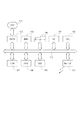
まず、本実施形態の情報処理装置を実現するコンピュータ装置の構成について図1を参照して説明する。表示器101は情報処理装置100の保持するデータや供給されたデータを表示する。例えば、本実施形態の情報管理アプリケーションプログラムのウィンドウに描画される表示領域を表示する。VRAM(Video Random Access Memory)102は表示器101に表示するための画像データを記憶する。VRAM102に記憶された画像データは、所定の規定に従って表示器101に転送され、これにより表示器101に画像データが表示される。BMU(Bit Move Unit)103は、メモリ間(例えば、VRAM102と他のメモリ)のデータ転送や、メモリと各I/Oデバイス(例えば、ネットワークインタフェース111)との間のデータ転送を制御する。キーボード104は、ユーザが文字列データ等の入力指示を行うための各種キーを有する。ポインティングデバイス(PD)105は、表示器101に表示された表示領域上のマウスカーソルをユーザが操作するために使用される。制御部106は、CPU(Central Processing Unit)等である。制御部106はROM107(Read Only Memory)や、ハードディスク(HDD)109に格納された制御プログラムに基づいて、制御部106に接続された各デバイスを制御する。ROM107は、各種の制御プログラム等のデータを保持する。RAM(Random Access Memory)108は、制御部106のワーク領域、エラー処理時のデータの退避領域、制御プログラムのロード領域等を有する。HDD109は、制御部106により実行される各種の制御プログラムやOS(Operating System)、画像ファイルや音声ファイル等のコンテンツ情報、情報管理アプリケーションプログラム、地図に関する情報等を格納する。ネットワークインタフェース111は、インターネット等のネットワーク回線に接続するのに利用される。なお、本実施形態では、画像ファイルはHDD109に保存されているとして説明するが、ネットワークインタフェース111を経由して他の情報処理装置と通信してアクセスする場合も同様に本発明を実現できる。CPUバス112は、各デバイス101〜110間で相互に通信ができるようにするためのものであり、アドレスバス、データバス及びコントロールバスを含む。なお、情報処理装置100は、単一のコンピュータ装置で実現してもよいし、必要に応じた複数のコンピュータ装置に各機能を分散して実現するようにしてもよい。複数のコンピュータ装置で構成される場合は、互いに通信可能なようにLocal Area Network(LAN)などで接続されている。
(First embodiment)
First, the configuration of a computer apparatus that implements the information processing apparatus according to the present embodiment will be described with reference to FIG. The
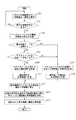
次に、本実施形態の情報処理装置100が、画像をその属性情報のうち撮影時間にしたがって、時間軸を持つ表示領域に表示する動作について図2を参照して説明する。なお、本動作は、ユーザの操作に応答して、情報処理装置100で情報管理アプリケーションプログラム(以下、情報管理アプリ)が起動され、制御部106がOSと情報管理アプリにしたがって動作することにより開始され、実現される。
Next, an operation in which the information processing apparatus 100 according to the present embodiment displays an image in a display area having a time axis according to the shooting time in the attribute information will be described with reference to FIG. This operation starts when an information management application program (hereinafter referred to as an information management application) is activated in the information processing apparatus 100 in response to a user operation, and the
まず、制御部106はHDD109から画像ファイルを読み出し、画像ファイルのサムネイル画像を、画像ファイルの撮影時間情報にしたがって、所定の表示範囲を持つ表示領域に表示する(S201)。その後、制御部106は表示範囲の変更指示を受けたか否か判定する(S202)。ユーザがPD105を用いてドラッグ操作することにより、表示領域上でマウスカーソルを移動し、例えばダブルクリック等の所定の操作を実行すると、制御部106は表示範囲の変更指示を受けたと判定する。さらに、制御部106は、例えばダブルクリックの操作だけであれば表示範囲を現在よりも狭く変更する拡大指示であると判定する。また、ダブルクリックだけでなく、同時にキーボード104を用いてシフトキーの押下操作も実行されれば、表示範囲を現在よりも広く変更する縮小指示であると判定する。すなわち、ステップS202において制御部106は、ユーザの操作の内容を検知し、検知結果に基づいて表示範囲の変更指示の有無を判定する。
First, the
表示範囲の変更指示を受けると(S202でYes)、表示領域上のマウスカーソルの水平座標と変更後の倍率を取得する(S203)。変更後の倍率はマウスカーソルのドラッグの開始から終了までの変位から算出される。あるいはマウスがダブルクリックされると2倍(200%)などあらかじめ決めておく。すなわち変更後の倍率は、表示範囲の変更指示を受けた時に検知されたユーザの操作内容に基づいて算出される。次に制御部106は基準指定モードが自動であるか否か判定する(S204)。ここで、ユーザが例えばドラッグ操作の際に同時にコントロールキーを押下操作する等の所定の操作があると、手動であると判定する。
When an instruction to change the display range is received (Yes in S202), the horizontal coordinate of the mouse cursor on the display area and the magnification after the change are acquired (S203). The magnification after the change is calculated from the displacement from the start to the end of dragging the mouse cursor. Or, when the mouse is double-clicked, it is determined in advance such as double (200%). That is, the scale factor after the change is calculated based on the user operation content detected when the display range change instruction is received. Next, the
自動であれば(S204でYes)、表示領域において、S203で取得したマウスカーソルの示す座標にサムネイル画像が存在するか否かを検知する(S205)。マウスカーソルがサムネイル画像上に存在するとき(S205でYes)、制御部106は、サムネイル画像と対応する画像ファイルの撮影時間を取得し(S206)、それを基準時間に設定する(S207)。一方、基準指定モードが自動ではなく、手動とみなされる場合(S204でNo)や、マウスカーソルの示す座標にサムネイル画像が存在しないとき(S205でNo)、制御部106はマウスカーソルの水平座標と対応する時間軸上の時間を取得する(S208)。そして、制御部106はステップS208で取得した時間を基準時間に設定する(S209)。
If it is automatic (Yes in S204), it is detected whether or not a thumbnail image exists at the coordinates indicated by the mouse cursor acquired in S203 in the display area (S205). When the mouse cursor exists on the thumbnail image (Yes in S205), the
そして、制御部106は設定された基準時間に対応する表示領域上のピクセル水平座標を基準水平座標として記憶する(S210)。次に制御部106は基準水平座標が、表示範囲の変更前後で変わらずに基準時間を示すように、変更後の倍率に基づいて表示範囲を決定する(S211)。制御部106は時間軸上に、更新後の表示範囲内の撮影時間を有する画像ファイルのサムネイル画像を再配置する(S212)。
Then, the
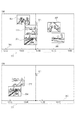
図3(a)は、ステップS205でマウスカーソルの示す座標にサムネイル画像が存在しない時および、ステップS204で基準指定モードが手動の時の状態を示す図である。図3(a)では、表示領域300の表示範囲は11時45分から16時15分までであり、サムネイル画像303〜307がその画像ファイルの撮影時間と対応する水平座標にサムネイル画像の重心が重なるように表示されている。マウスカーソル301はどのサムネイル画像とも重ならない座標に存在する。また、マウスカーソル301の水平座標は時間軸310上で13時53分を示すとする。図3(b)は、図3(a)の状態から表示範囲が変更された状態を示す図である。図3(b)では、表示領域300の表示範囲は13時23分から14時29分までになり、図3(a)に比べて表示範囲が狭いため、拡大して表示されることになる。変更後の表示範囲に含まれるサムネイル画像303〜304は表示されるが、表示範囲外のサムネイル画像305〜307は非表示となる。また、図3(b)のマウスカーソル301は時間軸310上で基準時間13時53分の水平座標に存在し、これは図3(a)のマウスカーソル301の時間軸310上の水平座標と同じである。すなわち、ステップS211において制御部106は、表示範囲の変更の前後でマウスカーソル301の水平座標とそれに対応する時間が変わらないように、時間軸の表示範囲を決定する。
FIG. 3A is a diagram showing a state when no thumbnail image exists at the coordinates indicated by the mouse cursor in step S205 and when the reference designation mode is manual in step S204. In FIG. 3A, the display range of the
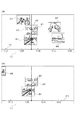
図4(a)は、ステップS205でマウスカーソルの示す座標にサムネイル画像が存在する時の状態を示す図である。図4(a)では、表示領域400の表示範囲は11時45分から16時15分までであり、サムネイル画像403〜407がその画像ファイルの撮影時間と対応する水平座標にサムネイル画像の重心が重なるように表示されている。マウスカーソル401はサムネイル画像403と重なる座標に存在するので、サムネイル画像403と対応する画像ファイルの撮影時間13時35分を基準時間とする。図4(b)は、図4(a)の状態から表示範囲が変更された状態を示す図である。図4(b)では、表示領域400の表示範囲は13時08分から14時14分までになり、図4(a)に比べて表示範囲が狭いため、拡大して表示されることになる。変更後の表示範囲に含まれるサムネイル画像403〜405は表示されるが、表示範囲外のサムネイル画像406〜407は非表示となる。また、図4(b)のマウスカーソル401が重なっているサムネイル画像403の重心は時間軸上で基準時間13時35分の水平座標に存在し、これは図4(a)のサムネイル画像403の重心の水平座標と同じである。すなわち、ステップS211において制御部106は、表示範囲の変更の前後でマウスカーソル401が重なっているサムネイル画像403の重心の水平座標とそれに対応する撮影時間が変わらないように、時間軸の表示範囲を更新する。また、マウスカーソル401も表示範囲の変更前後で、その重なっているサムネイル画像403内での水平座標に関する位置関係を維持する。よって、マウスカーソル401も時間軸の表示範囲の変更前後でピクセル水平座標は変わらない。
FIG. 4A shows a state when a thumbnail image exists at the coordinates indicated by the mouse cursor in step S205. In FIG. 4A, the display range of the
なお、ステップS210において制御部106は、表示領域におけるマウスカーソルの位置が表示範囲の変更前後で変わらないように表示範囲を決定するようにした。これにより、ユーザは視点を動かす必要がなく、変更前から注目していた画像や地点を継続して確認することができる。しかし、これに限らず、ステップS210において制御部106はマウスカーソルの位置が変更後の表示領域の中央になるように表示範囲を決定するようにしてもよい。これにより表示範囲の変更後、ユーザは注目している地点を中心にして確認することができる。また、図3および図4において、サムネイル画像は時間軸の水平方向に、その画像ファイルの撮影時間と対応する場所に配置されるが、時間軸の垂直方向にはランダムな場所に配置される。これにより、撮影時間の近い画像ファイルのサムネイル画像同士が重ならないように垂直方向にずらして表示することができ、ユーザはサムネイル画像を確認し易くなる。
In step S210, the
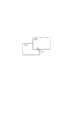
また、図3および図4では、サムネイル画像の重心がその画像ファイルの撮影時間と対応する時間軸上の位置になるように表示する様子を示した。しかし、これに限らず、サムネイル画像の左端や右端がその画像ファイルの撮影時間と対応する時間軸上の位置になるように表示してもよい。 また、ステップS206において、図5に示すように複数のサムネイル画像503および504が重なった所にマウスカーソル501が存在するときは、制御部106は最前面にあるサムネイル画像503の画像ファイルの撮影時間を取得する。あるいは、制御部106は、サムネイル画像503および504のそれぞれの画像ファイルの撮影時間を取得し、その中間を撮影時間として取得してもよい。
3 and 4 show a state where the thumbnail image is displayed so that the center of gravity of the thumbnail image is positioned on the time axis corresponding to the shooting time of the image file. However, the present invention is not limited to this, and the thumbnail image may be displayed such that the left end or the right end of the thumbnail image is positioned on the time axis corresponding to the shooting time of the image file. In step S206, when the
また、表示領域上でのマウスカーソルの移動を、ユーザがPD105を操作することによって実現する場合について説明した。しかし、これに限らず、表示器101にタッチパネルを備え、ユーザが指を使って表示器101に接触することによって実現するようにしてもよい。
Further, the case has been described where the movement of the mouse cursor on the display area is realized by the user operating the
ユーザが、サムネイル画像上にマウスカーソルを移動すれば、そのサムネイル画像に注目している可能性が高い。しかしながら、サムネイル画像が表示されているために、その撮影時間と対応する時間軸上の座標にマウスカーソルを移動することは難しい。このような状況を鑑みて、上述したように本実施形態では、マウスカーソルがサムネイル画像上にあるときは、そのサムネイル画像と対応する画像ファイルの撮影時間を基準として設定するようにした。これにより、ユーザは所望のサムネイル画像に対応する撮影時間を基準としたい場合は、サムネイル画像上にマウスカーソルを移動しさえすればよいので、その撮影時間と対応する地点に厳密にマウスカーソルを移動するのに比べて、操作が容易になる。 If the user moves the mouse cursor over the thumbnail image, there is a high possibility that the user is paying attention to the thumbnail image. However, since the thumbnail image is displayed, it is difficult to move the mouse cursor to the coordinates on the time axis corresponding to the shooting time. In view of such a situation, as described above, in this embodiment, when the mouse cursor is on a thumbnail image, the shooting time of the image file corresponding to the thumbnail image is set as a reference. As a result, if the user wants to use the shooting time corresponding to the desired thumbnail image as a reference, the user only has to move the mouse cursor over the thumbnail image, so the mouse cursor is moved exactly to the point corresponding to the shooting time. Compared to the operation, the operation becomes easier.
一方、サムネイル画像が存在しない座標にマウスカーソルを移動すれば、マウスカーソルの水平座標と対応する時間に興味のある可能性が高い。したがって、上述したように本実施形態では、マウスカーソルがサムネイル画像上にないときは、マウスカーソルの位置と対応する時間軸上の時間を基準として設定するようにした。これにより、ユーザは所望の時間を指定することも簡単な操作で行うことができる。 On the other hand, if the mouse cursor is moved to coordinates where there is no thumbnail image, there is a high possibility of being interested in the time corresponding to the horizontal coordinates of the mouse cursor. Therefore, in the present embodiment, as described above, when the mouse cursor is not on the thumbnail image, the time on the time axis corresponding to the position of the mouse cursor is set as a reference. As a result, the user can specify a desired time with a simple operation.
また、表示範囲が大きく、表示領域上で時間軸の長さに対する時間が長いときはマウスカーソルで時間を指定しづらいが、表示範囲が小さくなり、表示領域上で時間軸の長さに対する時間が短くなってマウスカーソルで時間を指定し易くなる。したがって、上述したように本実施形態では、基準指定モードを切り替えるようにした。これにより、ユーザは、操作中に簡単な操作で基準指定モードを切り替えることにより、所望の方法で基準を設定することができる。 Also, if the display range is large and the time for the length of the time axis on the display area is long, it is difficult to specify the time with the mouse cursor, but the display range becomes small and the time for the length of the time axis on the display area It becomes shorter and it becomes easier to specify the time with the mouse cursor. Therefore, as described above, in this embodiment, the reference designation mode is switched. Thereby, the user can set a reference by a desired method by switching the reference designation mode with a simple operation during the operation.
(第2の実施形態)
本実施形態では、情報処理装置100が、画像をその属性情報のうち撮影場所にしたがって緯度および経度を持つ表示領域(地図)に表示する動作について図6を参照して説明する。なお、以下では、第1の実施形態と同様の部分については説明を省略し、本実施形態に特有の部分について詳細に説明する。
(Second Embodiment)
In the present embodiment, an operation in which the information processing apparatus 100 displays an image on a display area (map) having latitude and longitude according to the shooting location in the attribute information will be described with reference to FIG. In addition, below, description is abbreviate | omitted about the part similar to 1st Embodiment, and the part peculiar to this embodiment is demonstrated in detail.
本動作は、ユーザの操作に応じて、情報処理装置100で情報管理アプリケーションプログラム(以下、情報管理アプリ)が起動され、制御部106がOSと情報管理アプリにしたがって動作することにより開始され、実現される。
This operation is started and realized when an information management application program (hereinafter referred to as an information management application) is activated in the information processing apparatus 100 according to a user operation, and the
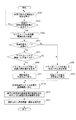
まず、制御部106はHDD109から画像ファイルと所定の縮尺の地図に関する情報を読み出し、画像ファイルのサムネイル画像を、画像ファイルの撮影場所情報(緯度および経度)にしたがって、表示領域に表示する(S601)。その後、制御部106は地図の縮尺の変更指示を受けたか否か判定する(S602)。地図の縮尺の変更指示を受けると(S602でYes)、表示領域上のマウスカーソルの位置と所定の更新縮尺を取得する(S603)。所定の更新縮尺はマウスカーソルのドラッグの開始から終了までの変位から算出される。あるいはマウスがダブルクリックされると10倍などあらかじめ決めておく。すなわち更新縮尺は、地図の縮尺の変更指示を受けた時に検知されたユーザの操作内容に基づいて算出される。次に制御部106は基準指定モードが自動であるか否か判定する(S604)。自動であれば(S604でYes)、表示領域において、S603で取得したマウスカーソルの位置にサムネイル画像が存在するか否かを検知する(S605)。マウスカーソルがサムネイル画像上に存在するとき(S605でYes)、制御部106は、サムネイル画像と対応する画像ファイルの撮影場所を取得し(S606)、それを基準地点に設定する(S607)。一方、基準指定モードが自動ではなく、手動の場合(S604でNo)や、マウスカーソルの位置にサムネイル画像が存在しないとき(S605でNo)、制御部106はマウスカーソルの位置と対応する地図上の場所(緯度および経度)を取得する(S608)。そして、制御部106はステップS608で取得された場所を基準地点として設定する(S609)。
First, the
そして、制御部106は設定された基準地点に対応する表示領域上のピクセル座標を基準座標として記憶する(S610)。次に制御部106は基準座標が、更新後の縮尺の地図においても更新前の縮尺の地図上と変わらずに基準地点を示すように、変更後の縮尺の地図の表示範囲を決定する(S611)。制御部106は変更後の縮尺の地図上に、新たに決定された表示範囲内の撮影場所を有する画像ファイルのサムネイル画像を再配置する(S612)。
Then, the
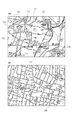
図7(a)は、ステップS605でマウスカーソルの位置にサムネイル画像が存在しない時および、ステップS604で基準指定モードが手動の時の状態を示す図である。図7(a)では、縮尺は1万分の1で、サムネイル画像703〜706がその画像ファイルの撮影場所と対応する位置に表示されている。マウスカーソル701はどのサムネイル画像とも重ならない座標にあり、この座標は地図において(北緯35.6160度、東経139.7190度)を投影する。図7(b)は、図7(a)の状態から地図の縮尺が変更された状態を示す図である。図7(b)では、縮尺は5千分の1であり、図7(a)に比べて表示範囲が狭くなったため、拡大して表示されることになる。変更後の表示範囲にはサムネイル画像703〜706は含まれないため、非表示となる。また、図7(b)のマウスカーソル701の座標は地図上で基準地点(北緯35.6160、東経139.7190)を投影し、これは図7(a)のマウスカーソル701の地図上での座標と同じである。すなわち、ステップS611において制御部106は、表示範囲の変更の前後でマウスカーソル701の座標とそれに対応する場所(緯度、経度)が変わらないように、地図の表示範囲を決定する。
FIG. 7A is a diagram showing a state when no thumbnail image exists at the position of the mouse cursor in step S605 and when the reference designation mode is manual in step S604. In FIG. 7A, the scale is 1 / 10,000, and
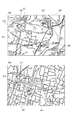
図8(a)は、ステップS605でマウスカーソルの位置にサムネイル画像が存在する時の状態を示す図である。図8(a)では、縮尺は1万分の1で、サムネイル画像803〜806がその画像ファイルの撮影場所と対応する位置に表示されている。マウスカーソル801はサムネイル画像803と重なる位置に存在するので、サムネイル画像803と対応する画像ファイルの撮影場所(北緯35.6160度、東経139.7148度)を基準地点とする。図8(b)は、図8(a)の状態から地図の縮尺が変更された状態を示す図である。図8(b)では、表示領域800の表示範囲は5千分の1であり、図8(a)に比べて表示範囲が狭くなったため、拡大して表示されることになる。変更後の表示範囲に含まれるサムネイル画像803〜804は表示されるが、表示範囲外のサムネイル画像805〜806は非表示となる。また、図8(b)のマウスカーソル801が重なっているサムネイル画像803の重心は地図上で基準地点(北緯35.6160度、東経139.7148度)の座標に存在し、これは図8(a)のサムネイル画像の十陣の座標と同じである。すなわち、ステップS611において制御部106は、地図の縮尺の変更の前後でマウスカーソル801が重なっているサムネイル画像803の重心の座標とそれに対応する場所が変わらないように、地図の表示範囲を更新する。また、マウスカーソル801も表示範囲の変更前後で、その重なっているサムネイル画像803内での座標に関する位置関係を維持する。よって、マウスカーソル801も時間軸の表示範囲の変更前後でピクセル座標は変わらない。
FIG. 8A shows a state when a thumbnail image exists at the position of the mouse cursor in step S605. In FIG. 8A, the scale is 1 / 10,000, and
なお、ステップS611において制御部106は、表示領域におけるマウスカーソルの位置が表示範囲の変更の前後で変わらないように、表示範囲を決定するようにした。これにより、ユーザは視点を動かす必要がなく、変更前から注目していた画像や地点を継続して確認することができる。しかし、これに限らず、ステップS611において制御部106はマウスカーソルの座標が表示領域の中央になるように表示範囲を決定するようにしてもよい。これによりユーザが注目している地点を中心にして確認することができる。
In step S611, the
また、図7および図8では、サムネイル画像の重心の座標がその画像ファイルの撮影場所と対応する地図上の位置になるように表示する様子を示した。しかし、これに限らず、サムネイル画像の左端や右端がその画像ファイルの撮影場所と対応する地図上の位置になるように表示してもよい。 FIGS. 7 and 8 show how the thumbnail image is displayed so that the coordinates of the center of gravity of the thumbnail image are located on the map corresponding to the shooting location of the image file. However, the present invention is not limited to this, and the thumbnail image may be displayed so that the left end and the right end of the thumbnail image are on the map corresponding to the shooting location of the image file.
また、ステップS606において、図5に示すように複数のサムネイル画像503および504が重なった所にマウスカーソル501が存在するときは、制御部106は最前面にあるサムネイル画像503の画像ファイルの撮影場所を取得する。あるいは、制御部106は、サムネイル画像503および504のそれぞれの画像ファイルの撮影場所を取得し、その中間を撮影場所として取得してもよい。
In step S606, when the
また、表示領域上でのマウスカーソルの移動を、ユーザがPD105を操作することによって実現する場合について説明した。しかし、これに限らず、表示器101にタッチパネルを備え、ユーザが指を使って表示器101に接触することによって実現するようにしてもよい。
Further, the case has been described where the movement of the mouse cursor on the display area is realized by the user operating the
ユーザが、サムネイル画像上にマウスカーソルを移動すれば、そのサムネイル画像に注目している可能性が高い。しかしながら、サムネイル画像が表示されているために、その撮影場所と対応する地図上の座標にマウスカーソルを移動することは難しい。このような状況を鑑みて、上述したように本実施形態では、マウスカーソルがサムネイル画像上にあるときは、そのサムネイル画像と対応する画像ファイルの撮影場所を基準として設定するようにした。これにより、ユーザは所望のサムネイル画像に対応する撮影場所を基準としたい場合は、サムネイル画像上にマウスカーソルを移動しさえすればよいので、その撮影場所と対応する地点に厳密にマウスカーソルを移動するのに比べて、操作が容易になる。 If the user moves the mouse cursor over the thumbnail image, there is a high possibility that the user is paying attention to the thumbnail image. However, since the thumbnail image is displayed, it is difficult to move the mouse cursor to the coordinates on the map corresponding to the shooting location. In view of such a situation, as described above, in this embodiment, when the mouse cursor is on a thumbnail image, the shooting location of the image file corresponding to the thumbnail image is set as a reference. As a result, if the user wants to set the shooting location corresponding to the desired thumbnail image as a reference, the user only needs to move the mouse cursor over the thumbnail image, and the mouse cursor is moved to the point corresponding to the shooting location. Compared to the operation, the operation becomes easier.
一方、サムネイル画像が存在しない場所にマウスカーソルを移動すれば、マウスカーソルの位置と対応する場所そのものに興味のある可能性が高い。したがって、上述したように本実施形態では、マウスカーソルがサムネイル画像上にないときは、マウスカーソルの位置と対応する地図上の場所を基準として設定するようにした。これにより、ユーザは所望の場所を指定することも簡単な操作で行うことができる。 On the other hand, if the mouse cursor is moved to a location where no thumbnail image exists, there is a high possibility that the location corresponding to the position of the mouse cursor is interested. Therefore, as described above, in this embodiment, when the mouse cursor is not on the thumbnail image, the position on the map corresponding to the position of the mouse cursor is set as a reference. As a result, the user can also specify a desired location with a simple operation.
また、表示範囲が大きく、表示領域上での縮尺が大きいときはマウスカーソルで場所を指定しづらいが、表示範囲が小さくなり、表示領域上での縮尺が小さくなってマウスカーソルで場所を指定し易くなる。したがって、上述したように本実施形態では、基準指定モードを切り替えるようにした。これにより、ユーザは、操作中に簡単な操作で基準指定モードを切り替えることにより、所望の方法で基準を設定することができる。 Also, when the display range is large and the scale on the display area is large, it is difficult to specify the location with the mouse cursor, but the display range becomes small, the scale on the display area becomes small, and the location is specified with the mouse cursor. It becomes easy. Therefore, as described above, in this embodiment, the reference designation mode is switched. Thereby, the user can set a reference by a desired method by switching the reference designation mode with a simple operation during the operation.
(他の実施形態)
また、本発明は、以下の処理を実行することによっても実現される。即ち、上述した実施形態の機能を実現するソフトウェア(プログラム)を、ネットワーク又は各種記憶媒体を介してシステム或いは装置に供給し、そのシステム或いは装置のコンピュータ(またはCPUやMPU等)がプログラムを読み出して実行する処理である。
(Other embodiments)
The present invention can also be realized by executing the following processing. That is, software (program) that realizes the functions of the above-described embodiments is supplied to a system or apparatus via a network or various storage media, and a computer (or CPU, MPU, or the like) of the system or apparatus reads the program. It is a process to be executed.
また、コンピュータが読み出したプログラムコードを実行することにより、前述した実施例の機能が実現されるだけではない。例えば、そのプログラムコードの指示に基づき、コンピュータ上で稼動しているOS(オペレーションシステム)などが実際の処理の一部または全部を行い、その処理によって前述した実施例の機能が実現される場合も含まれることは言うまでもない。さらに、以下のような処理によって前述した実施形態の機能が実現される場合も含まれることは言うまでもない。まず、記憶媒体から読み出されたプログラムコードが、コンピュータに挿入された機能拡張ボードやコンピュータに接続された機能拡張ユニットに備わるメモリに書きこまれる。その後、そのプログラムコードの指示に基づき、その機能拡張ボードや機能拡張ユニットに備わるCPUなどが実際の処理の一部または全部を行う。 The functions of the above-described embodiments are not only realized by executing the program code read by the computer. For example, an OS (operation system) running on a computer performs part or all of actual processing based on an instruction of the program code, and the functions of the above-described embodiments may be realized by the processing. Needless to say, it is included. Furthermore, it goes without saying that the case where the functions of the above-described embodiment are realized by the following processing is also included. First, the program code read from the storage medium is written in a memory provided in a function expansion board inserted into the computer or a function expansion unit connected to the computer. Thereafter, based on the instruction of the program code, the CPU provided in the function expansion board or function expansion unit performs part or all of the actual processing.
Claims (18)
ユーザの操作に応答して、表示領域上の地点を指定する指定手段と、
前記時間軸の表示範囲を変更する変更手段を備え、
前記変更手段は、前記指定された地点に前記画像が表示されている時、前記画像の撮影時間を基準として前記表示範囲を変更し、前記指定された地点に前記画像が表示されていない時、前記地点と対応する前記時間軸上の時間を基準として前記表示範囲を変更することを特徴とする情報処理装置。 Display means for displaying an image in a display area having a time axis according to the shooting time;
A designation means for designating a point on the display area in response to a user operation;
A changing means for changing the display range of the time axis;
The changing means, when the image is displayed at the designated point, to change the display range based on the shooting time of the image, and when the image is not displayed at the designated point, The information processing apparatus, wherein the display range is changed based on a time on the time axis corresponding to the point.
ユーザの操作に応答して、表示領域上の地点を指定する指定手段と、
前記軸の表示範囲を変更する変更手段を備え、
前記変更手段は、前記指定された地点に前記画像が表示されている時、前記画像の撮影場所を基準として前記表示範囲を変更し、前記指定された地点に前記画像が表示されていない時、前記地点と対応する前記軸上の緯度および経度を基準として前記表示範囲を変更することを特徴とする情報処理装置。 Display means for displaying an image in a display area having an axis of latitude and longitude according to the shooting location;
A designation means for designating a point on the display area in response to a user operation;
Changing means for changing the display range of the axis,
When the image is displayed at the designated point, the changing unit changes the display range based on the shooting location of the image, and when the image is not displayed at the designated point, The information processing apparatus, wherein the display range is changed on the basis of latitude and longitude on the axis corresponding to the point.
ユーザの操作に応答して、表示領域上の地点の指定を指定する指定手段と、
前記軸の表示範囲を変更する変更手段を備え、
前記変更手段は、前記指定された地点に前記画像が表示されている時、前記画像の属性情報を基準として前記表示範囲を変更し、前記指定された地点に前記画像が表示されていない時、前記地点と対応する前記軸上の値を基準として前記表示範囲を変更することを特徴とする情報処理装置。 Display means for displaying an image in a display area having an axis related to the attribute information according to the attribute information;
In response to a user operation, a designation means for designating a point on the display area,
Changing means for changing the display range of the axis,
The changing means, when the image is displayed at the designated point, to change the display range based on the attribute information of the image, when the image is not displayed at the designated point, The information processing apparatus, wherein the display range is changed based on a value on the axis corresponding to the point.
ユーザの操作に応答して、表示領域上の地点を指定するステップと、
前記指定された地点に前記画像が表示されている時、前記画像の撮影時間を基準として前記時間軸の前記表示範囲を変更ステップと、
前記指定された地点に前記画像が表示されていない時、前記地点と対応する前記時間軸上の時間を基準として前記時間軸の表示範囲を変更するステップを備えたことを特徴とする情報処理装置の制御方法。 Displaying an image in a display area having a time axis according to the shooting time;
In response to a user operation, specifying a point on the display area;
When the image is displayed at the designated point, changing the display range of the time axis with reference to the shooting time of the image;
An information processing apparatus comprising: a step of changing a display range of the time axis based on a time on the time axis corresponding to the point when the image is not displayed at the designated point. Control method.
ユーザの操作に応答して、表示領域上の地点を指定するステップと、
前記指定された地点に前記画像が表示されている時、前記画像の撮影場所を基準として前記軸の前記表示範囲を変更するステップと、
前記指定された地点に前記画像が表示されていない時、前記地点と対応する前記軸上の緯度および経度を基準として前記軸の前記表示範囲を変更するステップを備えたことを特徴とする情報処理装置の制御方法。 Displaying an image in a display area having an axis of latitude and longitude according to the shooting location;
In response to a user operation, specifying a point on the display area;
When the image is displayed at the designated point, changing the display range of the axis with reference to the shooting location of the image;
And changing the display range of the axis with reference to the latitude and longitude on the axis corresponding to the point when the image is not displayed at the designated point. Control method of the device.
ユーザの操作に応答して、表示領域上の地点の指定を指定するステップと、
前記指定された地点に前記画像が表示されている時、前記画像の属性情報を基準として前記軸の前記表示範囲を変更するステップと、
前記指定された地点に前記画像が表示されていない時、前記地点と対応する前記軸上の値を基準として前記軸の前記表示範囲を変更するステップを備えたことを特徴とする情報処理装置の制御方法。 Displaying an image according to the attribute information in a display area having an axis related to the attribute information;
In response to a user operation, specifying a point on the display area;
When the image is displayed at the designated point, changing the display range of the axis with reference to attribute information of the image;
An information processing apparatus comprising: a step of changing the display range of the axis based on a value on the axis corresponding to the point when the image is not displayed at the designated point. Control method.
画像をその撮影時間にしたがって、時間軸を有する表示領域に表示するステップと、
ユーザの操作に応答して、表示領域上の地点を指定するステップと、
前記指定された地点に前記画像が表示されている時、前記画像の撮影時間を基準として前記時間軸の前記表示範囲を変更ステップと、
前記指定された地点に前記画像が表示されていない時、前記地点と対応する前記時間軸上の時間を基準として前記時間軸の表示範囲を変更するステップを実行させることを特徴とするプログラム。 On the computer,
Displaying an image in a display area having a time axis according to the shooting time;
In response to a user operation, specifying a point on the display area;
When the image is displayed at the designated point, changing the display range of the time axis with reference to the shooting time of the image;
A program for executing a step of changing a display range of the time axis on the basis of a time on the time axis corresponding to the point when the image is not displayed at the designated point.
画像をその撮影場所にしたがって、緯度および経度の軸を有する表示領域に表示するステップと、
ユーザの操作に応答して、表示領域上の地点を指定するステップと、
前記指定された地点に前記画像が表示されている時、前記画像の撮影場所を基準として前記軸の前記表示範囲を変更するステップと、
前記指定された地点に前記画像が表示されていない時、前記地点と対応する前記軸上の緯度および経度を基準として前記軸の前記表示範囲を変更するステップを実行させることを特徴とするプログラム。 On the computer,
Displaying an image in a display area having an axis of latitude and longitude according to the shooting location;
In response to a user operation, specifying a point on the display area;
When the image is displayed at the designated point, changing the display range of the axis with reference to the shooting location of the image;
A program for executing the step of changing the display range of the axis on the basis of latitude and longitude on the axis corresponding to the point when the image is not displayed at the designated point.
画像をその属性情報にしたがって、前記属性情報に関する軸を有する表示領域に表示するステップと、
ユーザの操作に応答して、表示領域上の地点の指定を指定するステップと、
前記指定された地点に前記画像が表示されている時、前記画像の属性情報を基準として前記軸の前記表示範囲を変更するステップと、
前記指定された地点に前記画像が表示されていない時、前記地点と対応する前記軸上の値を基準として前記軸の前記表示範囲を変更するステップを実行させることを特徴とするプログラム。 On the computer,
Displaying an image according to the attribute information in a display area having an axis related to the attribute information;
In response to a user operation, specifying a point on the display area;
When the image is displayed at the designated point, changing the display range of the axis with reference to attribute information of the image;
A program for executing the step of changing the display range of the axis on the basis of a value on the axis corresponding to the point when the image is not displayed at the designated point.
Priority Applications (4)
| Application Number | Priority Date | Filing Date | Title |
|---|---|---|---|
| JP2011056808A JP5734037B2 (en) | 2011-03-15 | 2011-03-15 | Information processing apparatus, control method thereof, and program |
| US13/417,707 US8878778B2 (en) | 2011-03-15 | 2012-03-12 | Information processing apparatus, and control method and program therefor |
| KR1020120025929A KR101532963B1 (en) | 2011-03-15 | 2012-03-14 | Information processing apparatus and control method therefor |
| CN201210068774.9A CN102750076B (en) | 2011-03-15 | 2012-03-15 | Information processing apparatus, and control method thereof |
Applications Claiming Priority (1)
| Application Number | Priority Date | Filing Date | Title |
|---|---|---|---|
| JP2011056808A JP5734037B2 (en) | 2011-03-15 | 2011-03-15 | Information processing apparatus, control method thereof, and program |
Publications (2)
| Publication Number | Publication Date |
|---|---|
| JP2012194673A true JP2012194673A (en) | 2012-10-11 |
| JP5734037B2 JP5734037B2 (en) | 2015-06-10 |
Family
ID=46828044
Family Applications (1)
| Application Number | Title | Priority Date | Filing Date |
|---|---|---|---|
| JP2011056808A Active JP5734037B2 (en) | 2011-03-15 | 2011-03-15 | Information processing apparatus, control method thereof, and program |
Country Status (4)
| Country | Link |
|---|---|
| US (1) | US8878778B2 (en) |
| JP (1) | JP5734037B2 (en) |
| KR (1) | KR101532963B1 (en) |
| CN (1) | CN102750076B (en) |
Families Citing this family (43)
| Publication number | Priority date | Publication date | Assignee | Title |
|---|---|---|---|---|
| US9400589B1 (en) | 2002-05-30 | 2016-07-26 | Consumerinfo.Com, Inc. | Circular rotational interface for display of consumer credit information |
| US9710852B1 (en) | 2002-05-30 | 2017-07-18 | Consumerinfo.Com, Inc. | Credit report timeline user interface |
| US8127986B1 (en) | 2007-12-14 | 2012-03-06 | Consumerinfo.Com, Inc. | Card registry systems and methods |
| US9990674B1 (en) | 2007-12-14 | 2018-06-05 | Consumerinfo.Com, Inc. | Card registry systems and methods |
| US8312033B1 (en) | 2008-06-26 | 2012-11-13 | Experian Marketing Solutions, Inc. | Systems and methods for providing an integrated identifier |
| US9256904B1 (en) | 2008-08-14 | 2016-02-09 | Experian Information Solutions, Inc. | Multi-bureau credit file freeze and unfreeze |
| US8060424B2 (en) | 2008-11-05 | 2011-11-15 | Consumerinfo.Com, Inc. | On-line method and system for monitoring and reporting unused available credit |
| JP5658451B2 (en) * | 2009-11-30 | 2015-01-28 | ソニー株式会社 | Information processing apparatus, information processing method, and program thereof |
| US9147042B1 (en) | 2010-11-22 | 2015-09-29 | Experian Information Solutions, Inc. | Systems and methods for data verification |
| US20120151397A1 (en) * | 2010-12-08 | 2012-06-14 | Tavendo Gmbh | Access to an electronic object collection via a plurality of views |
| US9665854B1 (en) | 2011-06-16 | 2017-05-30 | Consumerinfo.Com, Inc. | Authentication alerts |
| US9483606B1 (en) | 2011-07-08 | 2016-11-01 | Consumerinfo.Com, Inc. | Lifescore |
| US9106691B1 (en) | 2011-09-16 | 2015-08-11 | Consumerinfo.Com, Inc. | Systems and methods of identity protection and management |
| US8738516B1 (en) | 2011-10-13 | 2014-05-27 | Consumerinfo.Com, Inc. | Debt services candidate locator |
| US9853959B1 (en) | 2012-05-07 | 2017-12-26 | Consumerinfo.Com, Inc. | Storage and maintenance of personal data |
| JP2013242710A (en) * | 2012-05-21 | 2013-12-05 | Sony Corp | User interface, information display method, and program |
| US20150187098A1 (en) * | 2012-09-14 | 2015-07-02 | Google Inc. | Method and apparatus for unobtrusively changing imagery supplementing a map display |
| US9654541B1 (en) | 2012-11-12 | 2017-05-16 | Consumerinfo.Com, Inc. | Aggregating user web browsing data |
| US9916621B1 (en) | 2012-11-30 | 2018-03-13 | Consumerinfo.Com, Inc. | Presentation of credit score factors |
| US10255598B1 (en) | 2012-12-06 | 2019-04-09 | Consumerinfo.Com, Inc. | Credit card account data extraction |
| US10102570B1 (en) | 2013-03-14 | 2018-10-16 | Consumerinfo.Com, Inc. | Account vulnerability alerts |
| US9870589B1 (en) | 2013-03-14 | 2018-01-16 | Consumerinfo.Com, Inc. | Credit utilization tracking and reporting |
| US9406085B1 (en) | 2013-03-14 | 2016-08-02 | Consumerinfo.Com, Inc. | System and methods for credit dispute processing, resolution, and reporting |
| US10664936B2 (en) | 2013-03-15 | 2020-05-26 | Csidentity Corporation | Authentication systems and methods for on-demand products |
| US9633322B1 (en) | 2013-03-15 | 2017-04-25 | Consumerinfo.Com, Inc. | Adjustment of knowledge-based authentication |
| US10685398B1 (en) | 2013-04-23 | 2020-06-16 | Consumerinfo.Com, Inc. | Presenting credit score information |
| US9721147B1 (en) | 2013-05-23 | 2017-08-01 | Consumerinfo.Com, Inc. | Digital identity |
| US9443268B1 (en) | 2013-08-16 | 2016-09-13 | Consumerinfo.Com, Inc. | Bill payment and reporting |
| US10325314B1 (en) | 2013-11-15 | 2019-06-18 | Consumerinfo.Com, Inc. | Payment reporting systems |
| US9477737B1 (en) | 2013-11-20 | 2016-10-25 | Consumerinfo.Com, Inc. | Systems and user interfaces for dynamic access of multiple remote databases and synchronization of data based on user rules |
| CN103885741B (en) * | 2014-03-20 | 2017-03-15 | 青岛海信电器股份有限公司 | Image display method and device |
| USD760256S1 (en) | 2014-03-25 | 2016-06-28 | Consumerinfo.Com, Inc. | Display screen or portion thereof with graphical user interface |
| USD759689S1 (en) | 2014-03-25 | 2016-06-21 | Consumerinfo.Com, Inc. | Display screen or portion thereof with graphical user interface |
| USD759690S1 (en) | 2014-03-25 | 2016-06-21 | Consumerinfo.Com, Inc. | Display screen or portion thereof with graphical user interface |
| US9892457B1 (en) | 2014-04-16 | 2018-02-13 | Consumerinfo.Com, Inc. | Providing credit data in search results |
| US10373240B1 (en) | 2014-04-25 | 2019-08-06 | Csidentity Corporation | Systems, methods and computer-program products for eligibility verification |
| US10991137B2 (en) * | 2015-06-11 | 2021-04-27 | Canon Kabushiki Kaisha | Information processing apparatus, information processing method, and information processing system for display of medical images |
| US10911234B2 (en) | 2018-06-22 | 2021-02-02 | Experian Information Solutions, Inc. | System and method for a token gateway environment |
| US10671749B2 (en) | 2018-09-05 | 2020-06-02 | Consumerinfo.Com, Inc. | Authenticated access and aggregation database platform |
| US11315179B1 (en) | 2018-11-16 | 2022-04-26 | Consumerinfo.Com, Inc. | Methods and apparatuses for customized card recommendations |
| US11238656B1 (en) | 2019-02-22 | 2022-02-01 | Consumerinfo.Com, Inc. | System and method for an augmented reality experience via an artificial intelligence bot |
| US11941065B1 (en) | 2019-09-13 | 2024-03-26 | Experian Information Solutions, Inc. | Single identifier platform for storing entity data |
| US12657589B1 (en) | 2021-01-12 | 2026-06-16 | Experian Information Solutions, Inc. | Identity linkage systems and methods for fraud detection |
Citations (6)
| Publication number | Priority date | Publication date | Assignee | Title |
|---|---|---|---|---|
| JP2003216927A (en) * | 2002-01-18 | 2003-07-31 | Equos Research Co Ltd | Image display program |
| JP2004328265A (en) * | 2003-04-23 | 2004-11-18 | Sony Corp | Display method and display device |
| JP2005110111A (en) * | 2003-10-01 | 2005-04-21 | Sony Corp | Image reproducing apparatus, image editing method, program, and recording medium |
| JP2006195970A (en) * | 2005-01-12 | 2006-07-27 | Microsoft Corp | Architecture and engine for timeline-based visualization of data |
| JP2009139756A (en) * | 2007-12-07 | 2009-06-25 | Sony Corp | Display device, display method, and program |
| JP2009186899A (en) * | 2008-02-08 | 2009-08-20 | Yahoo Japan Corp | Map enlargement display device |
Family Cites Families (12)
| Publication number | Priority date | Publication date | Assignee | Title |
|---|---|---|---|---|
| JP3906938B2 (en) | 1997-02-18 | 2007-04-18 | 富士フイルム株式会社 | Image reproduction method and image data management method |
| US8028249B2 (en) | 2001-05-23 | 2011-09-27 | Eastman Kodak Company | Method and system for browsing large digital multimedia object collections |
| JP2006209258A (en) | 2005-01-25 | 2006-08-10 | Kenwood Corp | AV processing apparatus, AV processing method, and program |
| US8564543B2 (en) | 2006-09-11 | 2013-10-22 | Apple Inc. | Media player with imaged based browsing |
| JP5343332B2 (en) | 2007-07-03 | 2013-11-13 | 株式会社ニコン | Image display program, image display apparatus, and image display method |
| US8872847B2 (en) * | 2008-08-28 | 2014-10-28 | Google Inc. | Architectures and methods for creating and representing time-dependent imagery |
| JP4752897B2 (en) * | 2008-10-31 | 2011-08-17 | ソニー株式会社 | Image processing apparatus, image display method, and image display program |
| US8698920B2 (en) * | 2009-02-24 | 2014-04-15 | Olympus Imaging Corp. | Image display apparatus and image display method |
| JP2009217828A (en) | 2009-04-10 | 2009-09-24 | Konica Minolta Holdings Inc | Image retrieval device |
| JP5359650B2 (en) | 2009-07-28 | 2013-12-04 | 大日本印刷株式会社 | Data file disguise processing device |
| JP2011033870A (en) * | 2009-08-03 | 2011-02-17 | Sony Corp | Image processing apparatus, image processing method and program |
| US8654148B2 (en) * | 2010-12-23 | 2014-02-18 | Sony Corporation | Display control apparatus for deciding a retrieval range for displaying stored pieces of information |
-
2011
- 2011-03-15 JP JP2011056808A patent/JP5734037B2/en active Active
-
2012
- 2012-03-12 US US13/417,707 patent/US8878778B2/en active Active
- 2012-03-14 KR KR1020120025929A patent/KR101532963B1/en not_active Expired - Fee Related
- 2012-03-15 CN CN201210068774.9A patent/CN102750076B/en active Active
Patent Citations (6)
| Publication number | Priority date | Publication date | Assignee | Title |
|---|---|---|---|---|
| JP2003216927A (en) * | 2002-01-18 | 2003-07-31 | Equos Research Co Ltd | Image display program |
| JP2004328265A (en) * | 2003-04-23 | 2004-11-18 | Sony Corp | Display method and display device |
| JP2005110111A (en) * | 2003-10-01 | 2005-04-21 | Sony Corp | Image reproducing apparatus, image editing method, program, and recording medium |
| JP2006195970A (en) * | 2005-01-12 | 2006-07-27 | Microsoft Corp | Architecture and engine for timeline-based visualization of data |
| JP2009139756A (en) * | 2007-12-07 | 2009-06-25 | Sony Corp | Display device, display method, and program |
| JP2009186899A (en) * | 2008-02-08 | 2009-08-20 | Yahoo Japan Corp | Map enlargement display device |
Also Published As
| Publication number | Publication date |
|---|---|
| KR101532963B1 (en) | 2015-07-01 |
| CN102750076B (en) | 2015-05-20 |
| US20120235897A1 (en) | 2012-09-20 |
| JP5734037B2 (en) | 2015-06-10 |
| KR20120105371A (en) | 2012-09-25 |
| US8878778B2 (en) | 2014-11-04 |
| CN102750076A (en) | 2012-10-24 |
Similar Documents
| Publication | Publication Date | Title |
|---|---|---|
| JP5734037B2 (en) | Information processing apparatus, control method thereof, and program | |
| JP5704825B2 (en) | Information processing apparatus, control method thereof, and program | |
| US7752555B2 (en) | Controlling multiple map application operations with a single gesture | |
| JP6364893B2 (en) | Terminal device, electronic whiteboard system, electronic whiteboard input support method, and program | |
| KR20130064458A (en) | Display apparatus for displaying screen divided by a plurallity of area and method thereof | |
| JP2010061311A (en) | Information processor and computer program | |
| JP5925046B2 (en) | Information processing apparatus, information processing apparatus control method, and program | |
| JP2009211244A (en) | Touch panel display control system, touch panel display control method and touch panel display control program | |
| KR20110092049A (en) | Touch type display device, screen division method and storage medium thereof | |
| JP2017016314A (en) | Display system, information processor, information terminals, and program | |
| JP2014182652A (en) | Information processor and method for controlling the same and program | |
| US20140033027A1 (en) | E-Book Application with Multi-Document Display | |
| JP2017037416A (en) | Image processor, image processing method | |
| JP2017059067A (en) | Client device and data display program | |
| KR102371098B1 (en) | Full screen pop-out of objects in editable form | |
| JP4854797B2 (en) | Programs and electronics | |
| JP7192953B2 (en) | Information processing device, information processing method and program | |
| US20160210101A1 (en) | Document display support device, terminal, document display method, and computer-readable storage medium for computer program | |
| JP6222896B2 (en) | Display control apparatus, control method thereof, and program | |
| JP2015204046A (en) | Information processing device that manages objects and control method of the same | |
| JP6388479B2 (en) | Information display device, information distribution device, information display method, information display program, and information distribution method | |
| JP7056094B2 (en) | Display control device and program | |
| JP2009151348A (en) | Document information management apparatus and program | |
| JP6225668B2 (en) | File management apparatus and program | |
| JP2010146439A (en) | Information processor, information processing method and program |
Legal Events
| Date | Code | Title | Description |
|---|---|---|---|
| A621 | Written request for application examination |
Free format text: JAPANESE INTERMEDIATE CODE: A621 Effective date: 20140317 |
|
| A977 | Report on retrieval |
Free format text: JAPANESE INTERMEDIATE CODE: A971007 Effective date: 20141106 |
|
| A131 | Notification of reasons for refusal |
Free format text: JAPANESE INTERMEDIATE CODE: A131 Effective date: 20150106 |
|
| A521 | Request for written amendment filed |
Free format text: JAPANESE INTERMEDIATE CODE: A523 Effective date: 20150220 |
|
| TRDD | Decision of grant or rejection written | ||
| A01 | Written decision to grant a patent or to grant a registration (utility model) |
Free format text: JAPANESE INTERMEDIATE CODE: A01 Effective date: 20150317 |
|
| A61 | First payment of annual fees (during grant procedure) |
Free format text: JAPANESE INTERMEDIATE CODE: A61 Effective date: 20150414 |
|
| R151 | Written notification of patent or utility model registration |
Ref document number: 5734037 Country of ref document: JP Free format text: JAPANESE INTERMEDIATE CODE: R151 |