JP2005293771A - Information processing system - Google Patents
Information processing system Download PDFInfo
- Publication number
- JP2005293771A JP2005293771A JP2004110337A JP2004110337A JP2005293771A JP 2005293771 A JP2005293771 A JP 2005293771A JP 2004110337 A JP2004110337 A JP 2004110337A JP 2004110337 A JP2004110337 A JP 2004110337A JP 2005293771 A JP2005293771 A JP 2005293771A
- Authority
- JP
- Japan
- Prior art keywords
- recording
- recording medium
- information
- recorded
- data
- Prior art date
- Legal status (The legal status is an assumption and is not a legal conclusion. Google has not performed a legal analysis and makes no representation as to the accuracy of the status listed.)
- Pending
Links
Images

Landscapes
- Signal Processing For Digital Recording And Reproducing (AREA)
- Management Or Editing Of Information On Record Carriers (AREA)
Abstract
【課題】 コンテンツの記録先である記録媒体の情報をユーザが容易に把握でき、コンテンツの記録を容易に実行できる情報処理システムを提供する。
【解決手段】 ポータブルデバイス15は、固有の識別情報を記録している記録媒体16に対してデータの再生・記録を行う。ポータブルデバイス15とパソコン11はUSBケーブル14を介して通信を行う。パソコン11は、内蔵HDD(Hard Disk Drive)のハードディスクに記録された前記識別情報に対応する情報を編集し、ポータブルデバイス15によって読み出された記録媒体16に記録されているデータと前記編集された情報とを比較し、その比較結果に応じて前記ハードディスクに記録されたデータの一部をポータブルデバイス15に送る。ポータブルデバイス15はパソコン11からのデータを記録媒体16に記録する。
【選択図】 図1PROBLEM TO BE SOLVED: To provide an information processing system in which a user can easily grasp information on a recording medium that is a content recording destination and can easily execute content recording.
A portable device 15 reproduces and records data on a recording medium 16 on which unique identification information is recorded. The portable device 15 and the personal computer 11 communicate via the USB cable 14. The personal computer 11 edits information corresponding to the identification information recorded on the hard disk of a built-in HDD (Hard Disk Drive), and the data recorded on the recording medium 16 read by the portable device 15 and the edited information. Information is compared, and a part of the data recorded on the hard disk is sent to the portable device 15 according to the comparison result. The portable device 15 records data from the personal computer 11 on the recording medium 16.
[Selection] Figure 1
Description
本発明は、ハードディスク等の大容量記録媒体に蓄積されているコンテンツの一部を半導体メモリカード等の記録媒体に記録する情報処理システムに関する。 The present invention relates to an information processing system for recording a part of content stored in a large-capacity recording medium such as a hard disk on a recording medium such as a semiconductor memory card.
ハードディスク等の大容量記録媒体に蓄積されているコンテンツの一部を半導体メモリカード等の記録媒体に記録する情報処理システムが、パーソナルコンピュータ等を用いて実現されている。 An information processing system for recording a part of content stored in a large-capacity recording medium such as a hard disk on a recording medium such as a semiconductor memory card is realized using a personal computer or the like.
そして、パーソナルコンピュータが具備するハードディスク等の大容量化が進んできており、ユーザは膨大な量のコンテンツをパーソナルコンピュータなどで管理することができるようになってきている。このため、ハードディスク等の大容量記録媒体は膨大な量のコンテンツを蓄積することができる。また、半導体メモリカード等の記録媒体の大容量化に伴い、当該記録媒体は大量のコンテンツを記録することができる。そのため、ハードディスク等の大容量記録媒体に蓄積されているコンテンツの一部を半導体メモリカード等の記録媒体に記録する場合、半導体メモリカード等の記録媒体に記録するコンテンツを1つずつ選択して行っていたのでは、ユーザは同じ動作を幾度も繰り返すことになり、とても煩わしいという問題があった。 The capacity of hard disks and the like provided in personal computers is increasing, and users can manage enormous amounts of content with personal computers and the like. For this reason, a large-capacity recording medium such as a hard disk can store an enormous amount of content. Further, as the capacity of a recording medium such as a semiconductor memory card increases, the recording medium can record a large amount of content. Therefore, when a part of content stored in a large-capacity recording medium such as a hard disk is recorded on a recording medium such as a semiconductor memory card, the contents to be recorded on the recording medium such as a semiconductor memory card are selected one by one. However, there was a problem that the user would repeat the same operation over and over and it would be very annoying.
かかる問題を解決するために、ハードディスク等の大容量記録媒体に蓄積されているコンテンツの一部を選択する処理を行った後、選択されたコンテンツを一括して半導体メモリカード等の記録媒体に記録する情報処理システムが提案されている(例えば、特許文献1及び特許文献2参照)。
半導体メモリカード等の記録媒体の大容量化に伴って半導体メモリカード等の記録媒体に記録できるコンテンツの数は増えてはいるが、その数には限りがあるため、ユーザは大量の記録媒体を所有することとなる。このような場合、ユーザはどの記録媒体にどのようなコンテンツを記録したかを把握できなくなり、新たにコンテンツを記録媒体に記録させる場合、どの記録媒体に記録すれば良いか分からないという問題があった。 Although the number of contents that can be recorded on a recording medium such as a semiconductor memory card is increasing with the increase in capacity of the recording medium such as a semiconductor memory card, the number of contents is limited. You will own it. In such a case, the user cannot grasp what kind of content is recorded on which recording medium, and there is a problem that when recording a new content on the recording medium, the user does not know which recording medium should be recorded. It was.
本発明は、上記の問題点に鑑み、コンテンツの記録先である記録媒体の情報をユーザが容易に把握でき、コンテンツの記録を容易に実行できる情報処理システムを提供することを目的とする。 In view of the above problems, an object of the present invention is to provide an information processing system in which a user can easily grasp information on a recording medium that is a recording destination of content and can easily perform recording of the content.
上記目的を達成するために本発明に係る情報処理システムは、固有の識別情報を記録している第1の記録媒体に記録された前記識別情報を含むデータを読み出す読み出し部及び前記第1の記録媒体にデータを記録する記録部を有する第1の記録再生手段と、第2の記録媒体、前記第2の記録媒体に記録されたデータを読み出す読み出し部、及び前記第2の記録媒体にデータを記録する記録部を有する第2の記録再生手段と、前記第1の記録再生手段と前記第2の記録再生手段との間でデータの通信を行う通信手段と、前記第2の記録媒体に記録された前記識別情報に対応する情報を編集する編集手段と、前記第1の記録再生手段によって読み出されたデータと前記編集手段によって編集された情報とを比較する比較手段と、前記比較手段の比較結果に応じて前記第2の記録媒体に記録されたデータの一部を前記第1の記録媒体に記録するように、前記第1の記録再生手段、前記第2の記録再生手段、及び前記通信手段を制御する制御手段とを備えている。 In order to achieve the above object, an information processing system according to the present invention includes a reading unit for reading data including the identification information recorded on a first recording medium in which unique identification information is recorded, and the first recording First recording / reproducing means having a recording unit for recording data on the medium, a second recording medium, a reading unit for reading data recorded on the second recording medium, and data on the second recording medium A second recording / reproducing unit having a recording unit for recording; a communication unit for communicating data between the first recording / reproducing unit and the second recording / reproducing unit; and recording on the second recording medium. Editing means for editing the information corresponding to the identification information, comparison means for comparing the data read by the first recording / playback means with the information edited by the editing means, and ratio The first recording / reproducing means, the second recording / reproducing means, and the communication so as to record a part of the data recorded on the second recording medium on the first recording medium according to the result Control means for controlling the means.
このような構成によると、識別情報に対応する情報が第2の記録媒体に記録されるので、ユーザは、第2の記録媒体に記録されている識別情報に対応する情報を第2の記録再生手段を用いて参照することで、第1の記録媒体を入れ替えて第1の記録再生手段を用いて第1の記録媒体が記録しているデータを確認しなくても、どの第1の記録媒体にどのようなコンテンツが記録されているかを容易に把握することができ、新たにコンテンツを第1の記録媒体に記録させる場合、どの第1の記録媒体に記録すれば良いか分かる。これにより、第2の記録媒体に記録されているコンテンツを適切な第1の記録媒体に記録することが容易になる。また、編集手段が第2の記録媒体に記録された識別情報に対応する情報を編集するので、第1の記録再生手段が第1の記録媒体にアクセス不能である状態であっても、第2の記録媒体に記録されたどのコンテンツを第1の記録媒体に記録するかを編集することができる。 According to such a configuration, since the information corresponding to the identification information is recorded on the second recording medium, the user can record the information corresponding to the identification information recorded on the second recording medium in the second recording / reproduction. By referring to the first recording medium, the first recording medium can be replaced without checking the data recorded on the first recording medium by replacing the first recording medium and using the first recording / reproducing means. It is possible to easily grasp what kind of content is recorded on the recording medium, and to know which first recording medium should be recorded when newly recording the content on the first recording medium. Thereby, it becomes easy to record the content recorded on the second recording medium on an appropriate first recording medium. Further, since the editing means edits the information corresponding to the identification information recorded on the second recording medium, even if the first recording / reproducing means is inaccessible to the first recording medium, It is possible to edit which content recorded on the recording medium is recorded on the first recording medium.
また、前記制御手段が、前記比較手段の比較結果に応じて前記第1の記録媒体に記録されたデータの一部が前記第1の記録媒体から前記第2の記録媒体へ移動するように、前記第1の記録再生手段、前記第2の記録再生手段、及び前記通信手段を制御するようにしてもよい。これにより、第1の記録媒体から第2の記録媒体へのコンテンツの移動を容易に実現することができる。 Further, the control means moves a part of the data recorded on the first recording medium from the first recording medium to the second recording medium in accordance with the comparison result of the comparing means. The first recording / reproducing means, the second recording / reproducing means, and the communication means may be controlled. Thereby, the movement of the content from the first recording medium to the second recording medium can be easily realized.
また、前記制御手段が、前記比較手段の比較結果に応じて前記第1の記録媒体に記録されたデータの一部を前記第1の記録媒体から前記第2の記録媒体へ移動させた後に前記比較手段の比較結果に応じて前記第2の記録媒体に記録されたデータの一部を前記第1の記録媒体に記録するように、前記第1の記録再生手段、前記第2の記録再生手段、及び前記通信手段を制御するようにしてもよい。これにより、第1の記録媒体の容量を効率良く使用することが可能である。 Further, after the control unit moves a part of the data recorded on the first recording medium from the first recording medium to the second recording medium according to the comparison result of the comparing unit, The first recording / reproducing means, the second recording / reproducing means, so as to record a part of the data recorded on the second recording medium on the first recording medium in accordance with the comparison result of the comparing means. And the communication means may be controlled. Thereby, the capacity of the first recording medium can be used efficiently.
また、前記制御手段が行った処理に基づいて、前記第2の記録媒体に記録された前記識別情報に対応する情報を更新する更新手段を備えるようにしてもよい。これにより、第2の記録媒体に記録される識別情報に対応する情報と、第1の記録媒体に記録されているコンテンツとの相関を確実に保つことができる。 Further, an update unit that updates information corresponding to the identification information recorded on the second recording medium based on processing performed by the control unit may be provided. Thereby, the correlation between the information corresponding to the identification information recorded on the second recording medium and the content recorded on the first recording medium can be reliably maintained.
また、前記通信手段が通信不能状態であっても、前記編集手段は編集可能であるようにしてもよい。これにより、第1の記録再生手段と第2の記録再生手段とがそれぞれ別個の機器に設けられ、通信手段が確立されていない状態(例えば、通信手段が有線通信であって、第1の記録再生手段が設けられる機器と第2の記録再生手段が設けられる機器とのケーブル接続がなされていない状態)であっても、第2の記録媒体に記録されたどのコンテンツを第1の記録媒体に記録するか等を編集することができる。 Further, even if the communication means is in a communication disabled state, the editing means may be editable. As a result, the first recording / reproducing means and the second recording / reproducing means are provided in separate devices, respectively, and the communication means is not established (for example, the communication means is wired communication, and the first recording / reproducing means is Even if the cable connection between the device provided with the playback means and the device provided with the second recording / playback means is not made), any content recorded on the second recording medium is stored in the first recording medium. You can edit whether to record.
また、前記編集手段が一度に複数分の前記識別情報に対応する情報を編集するようにしてもよい。これにより、一度に複数分の前記識別情報に対応する情報を編集した後に第1の記録媒体を入れ替えてデータの書き換えを行うことができるので、第1の記録媒体を入れ替える度に編集をしなくすむ。また、制御手段が、比較手段の比較結果に応じて第1の記録媒体に記録されたデータの一部が第1の記録媒体から第2の記録媒体へ移動するように、第1の記録再生手段、第2の記録再生手段、及び通信手段を制御している場合は、第1の記録再生手段において第1の記録媒体の入れ替えを行うことなく、或る第1の記録媒体から別の第1の記録媒体へ音楽コンテンツを移動させるといった移動情報の編集が可能となる。 Further, the editing unit may edit information corresponding to a plurality of pieces of the identification information at a time. Thereby, after editing information corresponding to a plurality of pieces of the identification information at a time, the first recording medium can be replaced and the data can be rewritten. Therefore, the editing is not performed each time the first recording medium is replaced. I'm sorry. Further, the control means performs the first recording / reproduction so that a part of the data recorded on the first recording medium moves from the first recording medium to the second recording medium in accordance with the comparison result of the comparing means. When the first recording / reproducing unit and the communication unit are controlled, the first recording / reproducing unit does not replace the first recording medium, and the first recording medium is replaced with another first recording medium. It is possible to edit movement information such as moving music content to one recording medium.
また、前記第2の記録媒体に記録された前記識別情報に対応する情報に前記第1の記録媒体の空き容量データが含まれるようにしてもよい。これにより、第2の記録媒体に記録されたコンテンツであって第1の記録媒体の空き容量を超えるようなコンテンツを第1の記録媒体に記録するような編集を防止することが可能である。 The information corresponding to the identification information recorded on the second recording medium may include free capacity data of the first recording medium. As a result, it is possible to prevent editing in which the content recorded on the second recording medium and exceeding the free capacity of the first recording medium is recorded on the first recording medium.
また、前記編集手段によって編集された情報が対応している識別情報と一致する識別情報を記録している第1の記録媒体に前記第1の記録再生手段がアクセス可能であるか否かを判定する判定手段と、前記判定手段の判定結果がアクセス不能であった場合に警告報知を行う報知手段とを備えるようにしてもよい。これにより、適切な第1の記録媒体を第1の記録再生手段に挿入することをユーザに促すことができる。 Further, it is determined whether or not the first recording / reproducing means can access the first recording medium on which the identification information matching the identification information corresponding to the information edited by the editing means is recorded. And a notifying unit that performs warning notification when the determination result of the determining unit is inaccessible. Thereby, it is possible to prompt the user to insert an appropriate first recording medium into the first recording / reproducing means.
上記目的を達成するために本発明に係る情報処理装置は、固有の識別情報を記録している第1の記録媒体に記録された前記識別情報を含むデータを読み出す読み出し部及び前記第1の記録媒体にデータを記録する記録部を有する情報記録再生機器と通信を行う情報処理装置であって、第2の記録媒体、前記第2の記録媒体に記録されたデータを読み出す読み出し部、及び前記第2の記録媒体にデータを記録する記録部を有する第2の記録再生手段と、前記情報記録再生機器にコマンド及びデータを送信する送信部と前記情報記録再生機器から送られている前記コマンドに対する応答及びデータを受信する受信部とを有する送受信手段と、前記第2の記録媒体に記録された前記識別情報に対応する情報を編集する編集手段と、前記送受信手段によって受信された前記情報記録再生機器からのデータと前記編集手段によって編集された情報とを比較する比較手段と、前記比較手段の比較結果に応じて前記第2の記録媒体に記録されたデータの一部を前記情報記録再生機器が前記第1の記録媒体に記録するように、前記第2の記録再生手段及び前記送受信手段を制御する制御手段とを備える。このような構成の情報処理装置を、上記情報記録再生機器と組み合わせることにより、上述した情報処理システムを実現することができる。 In order to achieve the above object, an information processing apparatus according to the present invention includes a reading unit that reads data including the identification information recorded on a first recording medium in which unique identification information is recorded, and the first recording An information processing apparatus that communicates with an information recording / reproducing device having a recording unit that records data on a medium, the second recording medium, a reading unit that reads data recorded on the second recording medium, and the first A second recording / reproducing unit having a recording unit for recording data on two recording media; a transmission unit for transmitting a command and data to the information recording / reproducing device; and a response to the command sent from the information recording / reproducing device. And a transmission / reception unit having a receiving unit for receiving data, an editing unit for editing information corresponding to the identification information recorded on the second recording medium, and the transmission / reception unit The comparison means for comparing the data received from the information recording / reproducing device and the information edited by the editing means, and the data recorded on the second recording medium according to the comparison result of the comparison means Control means for controlling the second recording / reproducing means and the transmitting / receiving means so that the information recording / reproducing apparatus records a part of the information on the first recording medium. The information processing system described above can be realized by combining an information processing apparatus having such a configuration with the information recording / reproducing apparatus.
上記目的を達成するために本発明に係るプログラムは、コンピュータを、第2の記録媒体、前記第2の記録媒体に記録されたデータを読み出す読み出し部、及び前記第2の記録媒体にデータを記録する記録部を有する第2の記録再生手段、固有の識別情報を記録している第1の記録媒体に記録された前記識別情報を含むデータを読み出す読み出し部及び前記第1の記録媒体にデータを記録する記録部を有する情報記録再生機器にコマンド及びデータを送信する送信部と前記情報記録再生機器から送られている前記コマンドに対する応答及びデータを受信する受信部とを有する送受信手段、前記第2の記録媒体に記録された前記識別情報に対応する情報を編集する編集手段、前記送受信手段によって受信された前記情報記録再生機器からのデータと前記編集手段によって編集された情報とを比較する比較手段、及び前記比較手段の比較結果に応じて前記第2の記録媒体に記録されたデータの一部を前記情報記録再生機器が前記第1の記録媒体に記録するように、前記第2の記録再生手段及び前記送受信手段を制御する制御手段、として機能させる。そして、前記プログラムは、コンピュータ読み取り可能な記録媒体(例えば、CD−ROM等)に記録させてもよい。 In order to achieve the above object, a program according to the present invention causes a computer to record data on a second recording medium, a reading unit for reading data recorded on the second recording medium, and the second recording medium. A second recording / reproducing unit having a recording unit for reading data including the identification information recorded on the first recording medium on which unique identification information is recorded, and data on the first recording medium A transmission / reception unit comprising: a transmission unit that transmits a command and data to an information recording / reproducing device having a recording unit for recording; Editing means for editing information corresponding to the identification information recorded on the recording medium, and data received from the information recording / reproducing device received by the transmitting / receiving means. And the information edited by the editing means, and the information recording / reproducing device outputs a part of the data recorded on the second recording medium according to the comparison result of the comparing means. The control unit controls the second recording / reproducing unit and the transmitting / receiving unit so as to record on the recording medium. The program may be recorded on a computer-readable recording medium (for example, a CD-ROM).
上記プログラムを汎用コンピュータで実行することにより、上述した情報処理装置を実現することができる。 By executing the program on a general-purpose computer, the information processing apparatus described above can be realized.
本発明によると、コンテンツの記録先である記録媒体の情報をユーザが容易に把握でき、コンテンツの記録を容易に実行できる情報処理システムを実現することができる。 According to the present invention, it is possible to realize an information processing system in which a user can easily grasp information on a recording medium that is a recording destination of content and can easily execute recording of the content.
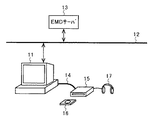
本発明の一実施形態について図面を参照して以下に説明する。先ず、本発明に係る情報通信システムの構成について説明する。本発明に係る情報通信システムの一構成例を図1に示す。パーソナルコンピュータ11は、ローカルエリアネットワークまたはインターネットなどから構成されるネットワーク12に接続されている。パーソナルコンピュータ11は、EMD(Electronic Music Distribution)サーバ13から受信した音楽のデータまたはCD(Compact Disc)から読み取った音楽のデータ(以下、音楽コンテンツと称す)を、そのまま記録するか、または所定の符号化方式(例えばATRAC)で符号化するとともにDES(Data Encryption Standard)などの暗号化方式で暗号化して記録する。
An embodiment of the present invention will be described below with reference to the drawings. First, the configuration of the information communication system according to the present invention will be described. A configuration example of an information communication system according to the present invention is shown in FIG. The
パーソナルコンピュータ11は、USB(Universal Serial Bus)ケーブル14を介してポータブルデバイス15と接続される。ポータブルデバイス15は記録媒体(例えば半導体メモリカードやミニディスク等)16を内蔵あるいは着脱することが可能である。
The
パーソナルコンピュータ11は、記録している音楽コンテンツを、音楽コンテンツに関するデータ(例えば、曲名、または再生条件など)と共に、USBケーブル14を介してポータブルデバイス15に送信する。ポータブルデバイス15は、受信した音楽コンテンツ及び音楽コンテンツに関するデータを内蔵あるいは装着されている記録媒体16に記録する。ポータブルデバイス15は、USBケーブル14を取り外して、ユーザが持ち歩くことができる。また、ユーザは、記録媒体16に記録された音楽コンテンツをポータブルデバイス15に再生させてヘッドホン17などで聞くことができる。
The
続いて、パーソナルコンピュータ11の構成について説明する。パーソナルコンピュータ11の一構成例を図2に示す。CPU(Central Processing Unit)21は、後述する機能を実現するための各種アプリケーションプログラムやOS(Operating System)を実行する。ROM(Read-only Memory)22は、一般的にはCPU21が使用するプログラムや演算用パラメータのうちの基本的に固定であるデータを格納する。RAM(Random-Access Memory)23は、CPU21が使用するプログラムや演算用パラメータのうちのプラグラム実行中に適宜変化するデータを格納する。これらはCPUバス等から構成されるホストバス24により相互に接続されている。そして、ホストバス24はPCI(Peripheral Component Interconnect/Interface)バス等の外部バス26に接続されている。
Next, the configuration of the
キーボード28は、ユーザ操作により、外部バス26及びホストバス24を介してCPU21に各種の指令信号を送出する。マウス29は、ユーザ操作により、ディスプレイ30の画面上のポイントの指示や選択を行う。ディスプレイ30は各種情報をテキストやイメージで画面上に表示する。なお、ディスプレイ30には、例えば液晶表示装置やCRT(Cathode Ray Tube)等を用いるとよい。
The
HDD(Hard Disk Drive)31は、ハードディスクを駆動し、当該ハードディスクにプログラムや情報を記録したり、当該ハードディスクに記録しているプログラムや情報を再生したりする。CD−ROMドライブ32は、装着されるCDを駆動し、当該CDに記録されているデータまたはプログラムを読み出して、外部バス26及びホストバス24を介してRAM23に供給する。
An HDD (Hard Disk Drive) 31 drives a hard disk and records programs and information on the hard disk and reproduces programs and information recorded on the hard disk. The CD-
USBインターフェース33には、USBケーブル14(図2において不図示)を介してポータブルデバイス15(図2において不図示)が接続される。USBインターフェース33は、外部バス26及びホストバス24を介してRAM23に接続され、RAM23から供給されるデータ(例えば音楽コンテンツまたはポータブルデバイス15を制御するコマンド等)をポータブルデバイス15に出力したり、逆にポータブルデバイス15から供給されるデータ(例えば音楽コンテンツまたはポータブルデバイス15を制御するコマンドに対する応答等)を入力する。スピーカ27は、ホストバス24及び外部バス26を介してCPU21から供給される音声信号を音声に変換して出力する。
A portable device 15 (not shown in FIG. 2) is connected to the
通信部25は、ネットワーク12(図2において不図示)を介してEMDサーバ13に接続されており、CPU21またはHDD31から供給されるデータ(例えば、音楽コンテンツの送信要求等)を所定の方式のパケットに格納してネットワーク12経由でEMDサーバ13に送信するとともに、ネットワーク12経由でEMDサーバ13から受信したパケットからデータ(例えば音楽コンテンツなど)を抜き出し、CPU21、RAM23、またはHDD31に出力する。
The communication unit 25 is connected to the
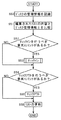
次に、上述のように構成された情報処理システムの動作について図3乃至図7のフローチャートを参照して説明する。 Next, the operation of the information processing system configured as described above will be described with reference to the flowcharts of FIGS.
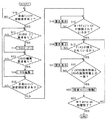
図3は、図1の情報処理システムがパーソナルコンピュータ11内のハードディスクに蓄積されているコンテンツの中からユーザが指示する音楽コンテンツを選択し、ポータブルデバイス15に内蔵或いは装着されている記録媒体16に記録する処理の一例を示すフローチャートである。
FIG. 3 shows an example of music content designated by the user from contents stored in the hard disk in the
最初のステップS10では、パーソナルコンピュータ11のCPU21が、ユーザからの音楽コンテンツ移動要求の有無を判定する。例えば、ユーザがマウス29を操作することでパーソナルコンピュータ11がコンテンツ移動要求を入力したり、USBインターフェース33にUSBケーブル14を介してポータブルデバイス15が接続されたことをCPU21が認識したりすると、パーソナルコンピュータ11のCPU21が、ユーザからの音楽コンテンツ移動要求が有ると判定する。そして、ユーザからの音楽コンテンツ移動要求が有ると判定されれば(ステップS10のYES)、ステップS11に移行する。一方、ユーザからの音楽コンテンツ移動要求が無いと判定されれば(ステップS10のNO)、ステップS10へ戻る。
In the first step S10, the
ステップS11では、パーソナルコンピュータ11のCPU21が、音楽コンテンツの移動元または移動先となるディスクに対応するリストのオープン要求の有無を判定する。例えば、ユーザがマウス29を操作することでパーソナルコンピュータ11が音楽コンテンツの移動元または移動先となるディスクに対応するリストのオープン要求を入力すると、パーソナルコンピュータ11のCPU21が、音楽コンテンツの移動元または移動先となるディスクに対応するリストのオープン要求が有ると判定する。そして、リストのオープン要求が有ると判定されれば(ステップS11のYES)、ステップS12に移行する。一方、リストのオープン要求が無いと判定されれば(ステップS11のNO)、ステップS13に移行する。
In step S11, the
ステップS12では、パーソナルコンピュータ11が、詳細を後述するリストオープン処理を行い、ステップS13へ移行する。
In step S12, the
ステップS13では、パーソナルコンピュータ11のCPU21が、音楽コンテンツの移動元または移動先となるディスクに対応するリストの編集要求の有無を判定する。例えば、ユーザがマウス29を用いて音楽コンテンツの移動元または移動先となるディスクに対応するリストの編集要求を入力すると、パーソナルコンピュータ11のCPU21が、音楽コンテンツの移動元または移動先となるディスクに対応するリストの編集要求が有ると判定する。そして、リストの編集要求が有ると判定されれば(ステップS13のYES)、ステップS14に移行する。一方、リストの編集要求が無いと判定されれば(ステップS13のNO)、ステップS15に移行する。
In step S <b> 13, the
ステップS14では、パーソナルコンピュータ11が、詳細を後述するリスト編集処理を行い、ステップS15へ移行する。
In step S14, the
ステップS15では、パーソナルコンピュータ11のCPU21が、ユーザからの音楽コンテンツ移動開始要求の有無を判定する。例えば、ユーザがマウス29を操作することでパーソナルコンピュータ11がコンテンツ移動開始要求を入力すると、パーソナルコンピュータ11のCPU21が、ユーザからの音楽コンテンツ移動開始要求が有ると判定する。ユーザからの音楽コンテンツ移動開始要求が有ると判定されると(ステップS15のYES)、ステップS16に移行する。一方、ユーザからの音楽コンテンツ移動開始要求が無いと判定されると(ステップS15のNO)、ステップS11に移行するため、引き続き音楽コンテンツの移動元または移動先となるディスクに対応するリストのオープン要求及び当該リストの編集要求に対応することが可能となる。
In step S15, the
ステップS16では、パーソナルコンピュータ11のCPU21が、USBインターフェース33にUSBケーブル14を介してポータブルデバイス15が接続されているか否かを判定する。ポータブルデバイス15が接続されていれば(ステップS16のYES)、ステップS17へ移行し、ポータブルデバイス15が接続されていなければ(ステップS16のNO)、ステップS18へ移行する。ステップS18では、パーソナルコンピュータ11のCPU21がディスプレイ30に例えば「ポータブルデバイスを接続してください」といった警告メッセージを表示させ、ユーザに対してポータブルデバイス15を接続するように促し、ステップS16へ戻る。
In step S <b> 16, the
ステップS17では、パーソナルコンピュータ11のCPU21が、ポータブルデバイス15に記録媒体16であるディスクが挿入されているか否かを判定する。例えば、パーソナルコンピュータ11のCPU21は、RAM23を用いてUSBインターフェース33からポータブルデバイス15に向けてコマンドを出力させ、当該コマンドに対するポータブルデバイス1の応答内容に基づいてポータブルデバイス15にディスクが挿入されているか否かを判定することができる。そして、ディスクが挿入されていれば(ステップS17のYES)、ステップS20へ移行し、ディスクが挿入されていなければ(ステップS17のNO)、ステップS19へ移行する。ステップS19では、パーソナルコンピュータ11のCPU21がディスプレイ30に例えば「ポータブルデバイスにディスクID“XX”のディスクを挿入してください」といった警告メッセージを表示させ、ユーザに対してポータブルデバイス15にディスクID“XX”のディスクを挿入するように促し、ステップS17へ戻る。なお、ステップS14において編集されたリストが複数である場合は、例えば「ポータブルデバイスにディスクID“XX”のディスク或いはディスクID“YY”のディスク或いはディスクID“ZZ”のディスクを挿入してください」といった警告メッセージにしてもよい。また、ディスクの識別情報(ディスクID)を表示するのではなく、ユーザが付けたディスクの名前を表示したり、ユーザが登録したディスクのジャケットなどディスクに関わる画像などを表示したりしても良く、このようにすればどのディスクを挿入すれば良いかをより分かり易く表示することができる。
In step S <b> 17, the
ステップS20では、パーソナルコンピュータ11のCPU21が、ポータブルデバイス15に挿入されているディスクの識別情報と、ステップS14において編集されたリストの識別情報とが一致するか否かを判定する。ディスクの識別情報と編集されたリストの識別情報とが一致していれば(ステップS20のYES)、ステップS22へ移行し、ディスクの識別情報と編集されたリストの識別情報とが一致していなければ(ステップS20のNO)、ステップS21に移行する。ステップS21では、ステップS19と同様に、パーソナルコンピュータ11のCPU21がディスプレイ30に例えば「ポータブルデバイスにディスクID“XX”のディスクを挿入してください」といった警告メッセージを表示させ、ユーザに対してポータブルデバイス15にディスクID“XX”のディスクを挿入するように促し、ステップS20へ戻る。ステップS20において、ポータブルデバイス15に挿入されているディスクの識別情報と、ステップS14において編集されたリストの識別情報とが一致するか否かが判定されるので、音楽コンテンツの移動元又は移動先にしたいディスクと似た内容のディスクとを間違えることなく、音楽コンテンツの移動元又は移動先にしたいディスクを確実にポータブルデバイス15に挿入することが可能である。
In step S20, the
ステップS22では、詳細を後述する音楽コンテンツの移動処理を行い、ステップS23へ移行する。ステップS23では、パーソナルコンピュータ11のCPU21が、ステップS14で編集されたリストの中でステップS22において使用されていないリストが残っていないか否かを判定する。ステップS14で編集されたリストの中でステップS22において使用されていないリストが残っていなければ(ステップS23のYES)、フロー処理を終了し、ステップS14で編集されたリストの中でステップS22において使用されていないリストが残っていれば(ステップS23のNO)、ステップS17に移行する。従って、ステップS14で編集されたリスト全てがステップS22において使用されるまで、ステップS17乃至ステップS23の処理を繰り返す。
In step S22, a music content moving process described in detail later is performed, and the process proceeds to step S23. In step S23, the
上述した図3に示すステップS12乃至ステップS23の処理によって、ディスクをポータブルデバイス15に挿入していない状態で音楽コンテンツの移動情報を編集することが可能となる。さらに、ディスクをポータブルデバイス15に挿入していない状態で音楽コンテンツの移動情報を編集することができるので、一度に複数のディスクに関する音楽コンテンツの移動情報を編集することができる。従って、ポータブルデバイス15においてディスクの入れ替えを行うことなく、或るディスクから別のディスクへ音楽コンテンツを移動させるといった移動情報の編集が可能となる。
With the processing in steps S12 to S23 shown in FIG. 3 described above, it is possible to edit the movement information of the music content without inserting the disc into the
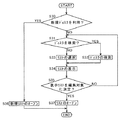
図4は、図3のステップS12において行われるリストのオープン処理の一例を示すフローチャートである。 FIG. 4 is a flowchart showing an example of the list opening process performed in step S12 of FIG.
最初のステップS30では、パーソナルコンピュータ11のCPU21が、新規ディスク(過去にパーソナルコンピュータ11から送られたデータを記録したことのないディスク)を利用するか否かを判定する。例えば、ユーザがマウス29を操作することでパーソナルコンピュータ11が新規ディスクの利用要求を入力すると、パーソナルコンピュータ11のCPU21が、新規ディスクを利用すると判定する。そして、新規ディスクを利用すると判定されれば(ステップS30のYES)、ステップS36に移行する。一方、新規ディスクを利用しないと判定されれば(ステップS30のNO)、ステップS31に移行する。
In the first step S30, the
ステップS36では、パーソナルコンピュータ11のCPU21が、新しく空のリストを作成し、そのリストをオープンする即ち編集可能状態にし、フロー処理を終了する。
In step S36, the
ステップS31では、パーソナルコンピュータ11のCPU21が、ディスクを検索するか否かを判定する。例えば、ユーザがマウス29を操作することでパーソナルコンピュータ11がディスク検索要求を入力すると、パーソナルコンピュータ11のCPU21が、ディスクを検索すると判定する。そして、ディスクを検索すると判定されれば(ステップS31のYES)、ステップS32に移行する。一方、ディスクを検索しないと判定されれば(ステップS31のNO)、ステップS33に移行する。
In step S31, the
ステップS32では、パーソナルコンピュータ11のCPU21が、ディスクの検索を行う。例えば、ユーザがマウス29を操作することでパーソナルコンピュータ11が検索の条件を入力すると、「ディスクの空き容量が最も多いディスク」を検索したり、ディスクの名前で検索したりすることが可能である。そして、ディスクの検索が終わると、ステップS34へ移行する。
In step S32, the
ステップS33では、ユーザが希望するディスクが明確に特定している場合に、特にディスクの検索を行わず、ユーザが希望するディスクのリストを選択する。例えば、ユーザがマウス29を操作することで、パーソナルコンピュータ11が過去にパーソナルコンピュータ11から送られたデータを記録したディスクに対応するリストの一覧から1つのリストを選択する。
In step S33, when the disk desired by the user is clearly specified, the disk search is not performed and the list of disks desired by the user is selected. For example, when the user operates the
ステップS34では、パーソナルコンピュータ11のCPU21が、ステップS32で検索されたディスクに対応するリスト或いはステップS33で選択されたリストをディスプレイ30に表示させる。
In step S34, the
ステップS35では、パーソナルコンピュータ11のCPU21が、ステップ34において表示させたリストを編集対象に決定するか否かを判定する。例えば、ユーザがマウス29を操作することでパーソナルコンピュータ11がステップ34において表示させたリストを編集対象に決定することを入力すると、パーソナルコンピュータ11のCPU21が、ステップ34において表示させたリストを編集対象に決定すると判定する。そして、ステップ34において表示させたリストを編集対象に決定すると判定されれば(ステップS35のYES)、ステップS37に移行する。一方、ステップ34において表示させたリストを編集対象に決定しないと判定されれば(ステップS35のNO)、ステップS31に移行する。
In step S35, the
ステップS37では、パーソナルコンピュータ11のCPU21が、ステップS35において編集対象に決定したリストをオープンする即ち編集可能状態にして、フロー処理を終了する。
In step S37, the
上述した図4に示すステップS30乃至ステップS37の処理によって、ユーザが音楽コンテンツの移動元または移動先にしたいディスクの選択処理が行われ、選択されたディスクに対応するリストをオープンすることが可能である。これにより、音楽コンテンツの移動元または移動先となるディスクの情報を音楽コンテンツの移動前にユーザが容易に把握できる。また、図4に示すステップS31乃至ステップS35の処理によって、ユーザは、選択されたディスクに対応するリストの表示をみて内容を確認した後、そのリストを編集対象にするか否かを判断することができる。さらに、図4に示すステップS31乃至ステップS32の処理によって、ユーザは、ディスクの空き容量の多いディスクを検索したり、今からチェックアウトする音楽コンテンツの作成アーティストと同じアーティストの音楽コンテンツが記録されたディスクを検索したりすることができる。 The above-described processing from step S30 to step S37 shown in FIG. 4 allows the user to select a disk that the music content is to be moved or moved to, and the list corresponding to the selected disk can be opened. is there. Thereby, the user can easily grasp the information of the disc that is the source or destination of the music content before the music content is moved. Further, through the processing from step S31 to step S35 shown in FIG. 4, the user confirms the contents by looking at the display of the list corresponding to the selected disc, and then determines whether or not the list is to be edited. Can do. Further, through the processing from step S31 to step S32 shown in FIG. 4, the user searches for a disc with a large free space on the disc, or the music content of the same artist as the artist who created the music content to be checked out is recorded. You can search the disk.
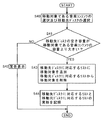
図5は、図3のステップS14において行われるリスト編集処理の一例を示すフローチャートである。 FIG. 5 is a flowchart showing an example of the list editing process performed in step S14 of FIG.
最初にステップS40では、パーソナルコンピュータ11のCPU21が、例えばユーザによるマウス29の操作に基づいて、移動対象である音楽コンテンツ及び移動先であるディスクの選択を行い、ステップS41へ移行する。
First, in step S40, the
ステップS41では、パーソナルコンピュータ11のCPU21が、HDD31のハードディスクに記録されているリストの内容に基づいて、ステップS40において選択された音楽コンテンツの移動先であるディスクの空き容量が移動対象である音楽コンテンツの容量より大きいか否かを判定する。移動先であるディスクの空き容量が移動対象である音楽コンテンツの容量より大きければ(ステップS41のYES)、ステップS43へ移行し、移動先であるディスクの空き容量が移動対象である音楽コンテンツの容量より大きくなければ(ステップS41のNO)、ステップS42へ移行する。
In step S41, the
ステップS42では、パーソナルコンピュータ11のCPU21が、ディスプレイ30に例えば「ディスクの容量をオーバーしています。」といった警告メッセージを表示させ、フロー処理を終了する。
In step S42, the
ステップS43では、パーソナルコンピュータ11のCPU21が、移動先であるディスクに対応するリストに移動対象である音楽コンテンツを追加し、移動元がハードディスクでなく記録媒体16であるディスクである場合は移動元のディスクに対応するリストから移動対象である音楽コンテンツを削除(使用できなくする場合も含む)し、ステップS44へ移行する。ステップS44では、パーソナルコンピュータ11のCPU21が、移動先であるディスクに対応するリストの更新をHDD31のハードディスクに記録し、移動元がハードディスクでなく記録媒体16であるディスクである場合は移動元のディスクに対応するリストの更新をHDD31のハードディスクに記録して、フロー処理を終了する。
In step S43, the
上述した図5に示すステップS40乃至ステップS44の処理によって、ユーザが音楽コンテンツの移動元または移動先にしたいディスクに対応するリストを編集することが可能となる。また、図5に示すステップS41乃至ステップS42の処理によって、ユーザは、移動先のディスク容量がオーバーしないか否かを判断しながら、リストの編集を行うことができる。また、ステップS12のリストオープン処理において複数のリストをオープンしておけば、或るディスクから別のディスクへ音楽コンテンツを移動させるといった移動情報についても容易に編集することが可能である。 By the processing in steps S40 to S44 shown in FIG. 5 described above, it becomes possible for the user to edit the list corresponding to the disc that the music content is to be moved from or moved to. Further, the process of steps S41 to S42 shown in FIG. 5 allows the user to edit the list while determining whether or not the destination disk capacity does not exceed. Further, if a plurality of lists are opened in the list opening process in step S12, movement information such as moving music contents from one disk to another can be easily edited.
図6は、図3のステップS22において行われる音楽コンテンツ移動処理の一例を示すフローチャートである。 FIG. 6 is a flowchart showing an example of the music content movement process performed in step S22 of FIG.
最初にステップS50では、パーソナルコンピュータ11のCPU21は、RAM23を用いてUSBインターフェース33からポータブルデバイス15に向けてポータブルデバイス15に挿入されたディスクに記録されている音楽コンテンツの管理情報(以下、ディスク管理情報と称す)を出力する旨のコマンドを出力させる。当該コマンドはUSBケーブル15を経由してポータブルデバイス15に送られ、ポータブルデバイス15は当該コマンドに応じてディスクからディスク管理情報を読み出し、その読み出した管理情報をUSBケーブル15経由でパーソナルコンピュータ11に送る。以上の動作によって、パーソナルコンピュータ11は、ディスク管理情報を取得し、ステップS51へ移行する。
First, in step S50, the
ステップS51では、パーソナルコンピュータ11のCPU21が、ステップS14において編集されたリストの内容とステップS50において取得したディスク管理情報とを比較し、ステップS52へ移行する。なお、ステップS14において編集されたリストがステップS36で新たに作成されたリストである場合は、ステップS50において取得したディスク管理情報に含まれるディスクの識別情報とリストの識別情報とが一致するようにリストの識別情報を作成する。
In step S51, the
ステップS52では、パーソナルコンピュータ11のCPU21が、ステップS51の比較結果に基づき、編集されたリストに無くてディスク管理情報に有る音楽コンテンツがあるか否かを判定する。つまりチェックインを行うべき音楽コンテンツの有無を判定する。チェックインを行うべき音楽コンテンツがなければ(ステップS52のNO)、ステップS54へ移行し、チェックインを行うべきコンテンツが有れば(ステップS52のYES)、ステップS53へ移行する。
In step S52, the
ステップS53では、ポータブルデバイス14に挿入されたディスクに記録されているチェックインを行うべき音楽コンテンツをHDD31のハードディスクに移動させ、ステップS54へ移行する。
In step S53, the music content to be checked in recorded on the disc inserted in the
ステップS54では、パーソナルコンピュータ11のCPU21が、ステップS51の比較結果に基づき、編集されたリストに有ってディスク管理情報に無い音楽コンテンツがあるか否かを判定する。つまりチェックアウトを行うべき音楽コンテンツの有無を判定する。チェックアウトを行うべき音楽コンテンツがなければ(ステップS54のNO)、ステップS56へ移行し、チェックアウトを行うべきコンテンツが有れば(ステップS54のYES)、ステップS55へ移行する。
In step S54, the
ステップS55では、HDD31のハードディスクに蓄えられているチェックアウトを行うべき音楽コンテンツの複製をポータブルデバイス15に挿入されているディスクに送り、ステップS56へ移行する。
In step S55, a copy of the music content to be checked out stored in the hard disk of the
ステップS56では、ステップS53で行ったチェックイン処理及びステップS55で行ったチェックアウト処理に基づいてリストを更新し、その更新したリストをHDD31のハードディスクに記録して、フロー処理を終了する。
In step S56, the list is updated based on the check-in process performed in step S53 and the check-out process performed in step S55, the updated list is recorded on the hard disk of the
上述した図6に示すステップS50乃至ステップS56によって、ステップS14で編集したリスト通りにポータブルデバイス15に挿入されたディスクの音楽コンテンツを書き換えることが可能となる。従って、パーソナルコンピュータ11からポータブルデバイス15に挿入されるディスクへの音楽コンテンツの複製の送出と、ポータブルデバイス15に挿入されるディスクからパーソナルコンピュータ11への音楽コンテンツの移動との両方を行うことが可能である。また、チェックイン処理をチェックアウト処理の前に行うことで、ポータブルデバイス15に挿入されるディスクの容量を効率良く使用することが可能である。
Through the above-described steps S50 to S56 shown in FIG. 6, it is possible to rewrite the music content of the disc inserted into the
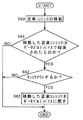
図7は、図6のステップS53において行われるチェックイン処理の他の例を示すフローチャートである。 FIG. 7 is a flowchart showing another example of the check-in process performed in step S53 of FIG.
最初にステップS60では、上述したチェックイン処理と同様にポータブルデバイス15に挿入されたディスクに記録されているチェックインを行うべき音楽コンテンツをHDD31のハードディスクに移動させる。そして、その後ステップS61へ移行する。
First, in step S60, the music content to be checked in recorded on the disc inserted in the
ステップS61では、マイクロコンピュータ11のCPU21が、ステップS60で移動した音楽コンテンツの附属情報を読み取って、ステップS60で移動させた音楽コンテンツが例えばマイクなど介してポータブルデバイス15自身によって移動元のディスクに録音されたコンテンツであるか否かを判定する。移動した音楽コンテンツがポータブルデバイス15自身によって移動元のディスクに録音されたコンテンツであれば(ステップS61のYES)、ステップS62へ移行し、ポータブルデバイス15自身によって移動元のディスクに録音されたコンテンツでなければ(ステップS61のNO)、フロー処理を終了する。
In step S61, the
ステップS62では、マイクロコンピュータ11のCPU21が、ステップS61で移動した音楽コンテンツをポータブルデバイス15に挿入されたディスクに戻すか否か、即ちチェックアウトするか否かを判定する。例えば、ユーザがマウス29を操作することでパーソナルコンピュータ11がチェックアウト要求を入力すると、チェックアウトをすると判定される。そして、チェックアウトをするならば(ステップS62のYES)、ステップS63へ移行し、チェックアウトをしないならば(ステップS62のNO)、フロー処理を終了する。
In step S62, the
ステップS63では、ステップS61でポータブルデバイス15に挿入されたディスクからHDD31のハードディスクに移動させた音楽コンテンツの複製を、HDD31のハードディスクからポータブルデバイス15に挿入されたディスクに送る。
In step S63, a copy of the music content moved from the disk inserted in the
上述した図7に示すステップS60乃至ステップS63によって、ポータブルデバイス15自身によってディスクに録音された音楽コンテンツは、一旦ポータブルデバイス15に挿入されたディスクからパーソナルコンピュータ11のハードディスクへ移動後、チェックアウトされる。例えばOpenMG(Open Magic Gate(商標))の著作権管理ルールに従えば、ポータブルデバイス15自身によって或る記録媒体に録音された音楽コンテンツを別の記録媒体にチェックアウトすることが可能である。したがって、ユーザにとっては、ポータブルデバイス15自身によって或る記録媒体に録音した音楽コンテンツを録音した記録媒体にそのまま残しておくより、一旦パーソナルコンピュータ11のハードディスクへ移動した後チェックアウトする方が、パーソナルコンピュータ11のハードディスクから別の記録媒体にチェックアウトすることができるので、望ましい。
The music content recorded on the disc by the
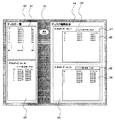
図8は、図3に示すステップS14のリスト編集処理におけるディスプレイ30の表示画面の一例を示す図である。例えば、ユーザは、マウス29を操作することで、ディスプレイ30に表示されているリストの内容を編集することができる。
FIG. 8 is a diagram showing an example of a display screen of the
窓40は、ユーザが過去にパーソナルコンピュータ11を用いて音楽コンテンツを記録し作成したディスクの一覧を表示する窓で、中にさらに窓41と窓42を持つ。
The
窓41は、ユーザが過去にパーソナルコンピュータ11を用いて音楽コンテンツを記録し作成したディスクの全てをリストとして表示する。窓41では、例えば、ディスク毎にユーザが名前を付けたタイトルおよびディスクIDが表示される。
The
窓42は、図4に示すステップS34におけるリストの表示処理に対応する窓で、ディスクの詳細を表示する窓である。窓42では、例えば、ディスクのタイトル、ディスク残り容量、音楽コンテンツ名、音楽コンテンツのアーティスト名などを表示する。例えば、ユーザが窓41のディスクの一覧からマウス29などを用いてディスクNo.35を選択すると、それに対応して、窓42が開いてディスクNo.35の詳細が表示される。
The
窓43は、窓41のディスク一覧で選択し、窓42に詳細が表示されているディスクに対応するリストを編集したい場合に、例えばマウス29などを用いてユーザが編集対象を決定するための窓であり、図4に示すステップS35の処理において用いられる。従って、窓40乃至窓43を設けることで、ユーザは、過去にパーソナルコンピュータ11を用いて音楽コンテンツを記録し作成したディスクの一覧と、選択されたディスクの空き容量などの詳細情報とを確認しながら、どのディスクに対応するリストを編集対象にするかを決定することができる。
The
窓44は、ユーザが編集を行うリストをオープンして表示する窓で、さらに中には窓45と窓46を持つ。この例では窓44の中に編集を行うリストとして窓45と窓46の2つの窓が表示されているが、上述した図3に示すステップS12においてリストをオープンした数の窓を表示することができる。
The
窓45及び窓46は、ユーザが編集を行うリストを表示する窓で、窓45はさらに中に窓47及び窓48を持ち、窓46はさらに中に窓49及び窓50を持つ。図4に示すステップS35乃至ステップS36での編集対象を決定しリストをオープンする処理は、例えばユーザがマウス29を用いて窓43を選択することで実現でき、その結果、窓44の中に窓45及び窓46が表示されている。
The
窓48及び窓50は、それぞれAubum-AとAubum-Zと名づけられたディスクに記録された音楽コンテンツの詳細(例えばNo.やタイトル名、アーティスト名等)を表示する。例えばAubum-AからAubum-ZへSong-Cを移動したい場合、ユーザは、マウス29を操作することによって、窓48においてSong-Cを選択し、窓50までドラッグすることで、リストの編集を行うことができる。
The
窓47は窓45に表示されるAubum-Aのディスクの残り容量を表示し、窓49は窓46に表示されるAubum-Zのディスクの残り容量を表示する。
The
以上のように窓44乃至窓50を設けることで、複数のリストを編集することが可能である。また、或るディスクから別のディスクへの音楽コンテンツの移動情報も容易に編集することが可能である。また、ディスクの残り容量を記録し表示することで、ディスクの空き容量を確認しながら編集を行うことができ、さらに記録媒体の容量を超えるような音楽コンテンツの移動を行うような編集を防止することが可能である。
By providing the
なお、上述した実施形態では、音楽コンテンツの移動について説明したが、他のコンテンツ例えば画像データ等の移動であっても構わない。また、上述した実施形態では、ポータブルデバイス15に挿入される記録媒体16にディスクを用いたが、他の記録媒体例えば半導体メモリカード等であっても構わない。
In the above-described embodiment, the movement of music content has been described. However, other contents such as movement of image data may be used. In the above-described embodiment, the disk is used as the
11 パーソナルコンピュータ
12 ネットワーク
13 EMDサーバ
14 USBケーブル
15 ポータブルデバイス
16 記録媒体
17 ヘッドホン
21 CPU
22 ROM
23 RAM
24 ホストバス
25 通信部
26 外部バス
27 スピーカ
28 キーボード
29 マウス
30 ディスプレイ
31 HDD
32 CD−ROMドライブ
33 USBインターフェース
11
22 ROM
23 RAM
24 Host Bus 25
32 CD-
Claims (11)
第2の記録媒体、前記第2の記録媒体に記録されたデータを読み出す読み出し部、及び前記第2の記録媒体にデータを記録する記録部を有する第2の記録再生手段と、
前記第1の記録再生手段と前記第2の記録再生手段との間でデータの通信を行う通信手段と、
前記第2の記録媒体に記録された前記識別情報に対応する情報を編集する編集手段と、
前記第1の記録再生手段によって読み出されたデータと前記編集手段によって編集された情報とを比較する比較手段と、
前記比較手段の比較結果に応じて前記第2の記録媒体に記録されたデータの一部を前記第1の記録媒体に記録するように、前記第1の記録再生手段、前記第2の記録再生手段、及び前記通信手段を制御する制御手段とを備えることを特徴とする情報処理システム。 First recording / reproducing means having a reading unit for reading data including the identification information recorded on the first recording medium in which unique identification information is recorded, and a recording unit for recording data on the first recording medium When,
A second recording medium, a second recording / reproducing unit having a reading unit for reading data recorded on the second recording medium, and a recording unit for recording data on the second recording medium;
Communication means for communicating data between the first recording / reproducing means and the second recording / reproducing means;
Editing means for editing information corresponding to the identification information recorded on the second recording medium;
Comparing means for comparing the data read by the first recording / reproducing means with the information edited by the editing means;
The first recording / reproducing means and the second recording / reproducing means so as to record a part of the data recorded on the second recording medium on the first recording medium according to the comparison result of the comparing means. And an information processing system comprising: control means for controlling the communication means.
前記判定手段の判定結果がアクセス不能であった場合に警告報知を行う報知手段とを備える請求項1〜7のいずれかに記載の情報通信システム。 Determining whether or not the first recording / reproducing means can access the first recording medium on which the identification information matching the identification information corresponding to the information edited by the editing means is recorded Means,
The information communication system according to any one of claims 1 to 7, further comprising notification means for performing warning notification when the determination result of the determination means is inaccessible.
第2の記録媒体、前記第2の記録媒体に記録されたデータを読み出す読み出し部、及び前記第2の記録媒体にデータを記録する記録部を有する第2の記録再生手段と、
前記情報記録再生機器にコマンド及びデータを送信する送信部と前記情報記録再生機器から送られている前記コマンドに対する応答及びデータを受信する受信部とを有する送受信手段と、
前記第2の記録媒体に記録された前記識別情報に対応する情報を編集する編集手段と、
前記送受信手段によって受信された前記情報記録再生機器からのデータと前記編集手段によって編集された情報とを比較する比較手段と、
前記比較手段の比較結果に応じて前記第2の記録媒体に記録されたデータの一部を前記情報記録再生機器が前記第1の記録媒体に記録するように、前記第2の記録再生手段及び前記送受信手段を制御する制御手段とを備えることを特徴とする情報処理装置。 Communicating with an information recording / reproducing apparatus having a reading unit for reading data including the identification information recorded on the first recording medium on which the unique identification information is recorded and a recording unit for recording the data on the first recording medium An information processing apparatus for performing
A second recording medium, a second recording / reproducing unit having a reading unit for reading data recorded on the second recording medium, and a recording unit for recording data on the second recording medium;
A transmission / reception means comprising: a transmission unit for transmitting commands and data to the information recording / reproducing device; and a receiving unit for receiving responses and data to the commands transmitted from the information recording / reproducing device;
Editing means for editing information corresponding to the identification information recorded on the second recording medium;
A comparison means for comparing data from the information recording / reproducing device received by the transmission / reception means with information edited by the editing means;
The second recording / reproducing means, so that the information recording / reproducing device records a part of the data recorded on the second recording medium on the first recording medium according to the comparison result of the comparing means; An information processing apparatus comprising: control means for controlling the transmission / reception means.
第2の記録媒体、前記第2の記録媒体に記録されたデータを読み出す読み出し部、及び前記第2の記録媒体にデータを記録する記録部を有する第2の記録再生手段、
固有の識別情報を記録している第1の記録媒体に記録された前記識別情報を含むデータを読み出す読み出し部及び前記第1の記録媒体にデータを記録する記録部を有する情報記録再生機器にコマンド及びデータを送信する送信部と前記情報記録再生機器から送られている前記コマンドに対する応答及びデータを受信する受信部とを有する送受信手段、
前記第2の記録媒体に記録された前記識別情報に対応する情報を編集する編集手段、
前記送受信手段によって受信された前記情報記録再生機器からのデータと前記編集手段によって編集された情報とを比較する比較手段、及び
前記比較手段の比較結果に応じて前記第2の記録媒体に記録されたデータの一部を前記情報記録再生機器が前記第1の記録媒体に記録するように、前記第2の記録再生手段及び前記送受信手段を制御する制御手段、
として機能させるためのプログラム。 Computer
A second recording medium, a reading unit for reading out data recorded on the second recording medium, and a second recording / reproducing means having a recording unit for recording data on the second recording medium,
A command is sent to an information recording / reproducing apparatus having a reading unit for reading data including the identification information recorded on the first recording medium in which unique identification information is recorded and a recording unit for recording data on the first recording medium. And a transmission / reception means comprising: a transmission unit for transmitting data; and a reception unit for receiving a response to the command and data transmitted from the information recording / reproducing device;
Editing means for editing information corresponding to the identification information recorded in the second recording medium;
Comparison means for comparing data from the information recording / reproducing device received by the transmission / reception means with information edited by the editing means, and recorded on the second recording medium according to a comparison result of the comparison means Control means for controlling the second recording / reproducing means and the transmitting / receiving means so that the information recording / reproducing device records a part of the recorded data on the first recording medium;
Program to function as.
Priority Applications (1)
| Application Number | Priority Date | Filing Date | Title |
|---|---|---|---|
| JP2004110337A JP2005293771A (en) | 2004-04-02 | 2004-04-02 | Information processing system |
Applications Claiming Priority (1)
| Application Number | Priority Date | Filing Date | Title |
|---|---|---|---|
| JP2004110337A JP2005293771A (en) | 2004-04-02 | 2004-04-02 | Information processing system |
Publications (1)
| Publication Number | Publication Date |
|---|---|
| JP2005293771A true JP2005293771A (en) | 2005-10-20 |
Family
ID=35326528
Family Applications (1)
| Application Number | Title | Priority Date | Filing Date |
|---|---|---|---|
| JP2004110337A Pending JP2005293771A (en) | 2004-04-02 | 2004-04-02 | Information processing system |
Country Status (1)
| Country | Link |
|---|---|
| JP (1) | JP2005293771A (en) |
Cited By (3)
| Publication number | Priority date | Publication date | Assignee | Title |
|---|---|---|---|---|
| JP2007180799A (en) * | 2005-12-27 | 2007-07-12 | Kenwood Corp | Data transfer device, reproducing device, reproducing system, data transfer method, reproducing method, and program |
| JP2007180779A (en) * | 2005-12-27 | 2007-07-12 | Kenwood Corp | Data transfer device, data transfer reproduction system, data transfer method, data transfer reproduction method, and program |
| JP2010238340A (en) * | 2009-03-31 | 2010-10-21 | Sharp Corp | Recording medium editing apparatus, recording medium editing method, program, and recording medium |
-
2004
- 2004-04-02 JP JP2004110337A patent/JP2005293771A/en active Pending
Cited By (3)
| Publication number | Priority date | Publication date | Assignee | Title |
|---|---|---|---|---|
| JP2007180799A (en) * | 2005-12-27 | 2007-07-12 | Kenwood Corp | Data transfer device, reproducing device, reproducing system, data transfer method, reproducing method, and program |
| JP2007180779A (en) * | 2005-12-27 | 2007-07-12 | Kenwood Corp | Data transfer device, data transfer reproduction system, data transfer method, data transfer reproduction method, and program |
| JP2010238340A (en) * | 2009-03-31 | 2010-10-21 | Sharp Corp | Recording medium editing apparatus, recording medium editing method, program, and recording medium |
Similar Documents
| Publication | Publication Date | Title |
|---|---|---|
| JP4385511B2 (en) | Information processing apparatus and method, and program storage medium | |
| KR100687701B1 (en) | Communication system and method, communication device and method | |
| KR100707326B1 (en) | Information processing system, information processing apparatus, and information processing method | |
| JPH11242873A (en) | Recording and playback device | |
| JP2004355627A (en) | Information acquisition method and device | |
| KR100941199B1 (en) | Information processing apparatus and method, and program storage medium | |
| JPH11232840A (en) | Storage device | |
| KR100752833B1 (en) | An information processing apparatus, an information processing method, and a program storage medium | |
| JP2005174213A (en) | Information processing apparatus, information processing method, and computer program | |
| JP2003030015A (en) | Recording apparatus and method, recording medium, and program | |
| JP4670207B2 (en) | Information processing apparatus and method, recording medium, and program | |
| JP2006004152A (en) | Search device, search method, information processing system | |
| JP5000093B2 (en) | Data processing method, portable playback device and computer | |
| JP2003069551A (en) | Encryption device and method, decryption device and method, recording medium, and program | |
| US7882157B2 (en) | Content data recording device and recording control method | |
| KR20010102179A (en) | Method and apparatus for information processing, and medium for storing program | |
| JP4420856B2 (en) | Information acquisition method and content storage device | |
| JP2002312522A (en) | Information processing apparatus and method, recording medium, and program | |
| JP2003330576A (en) | Information processing apparatus and method, expansion apparatus and method, information processing system, recording medium, and program | |
| JP4562544B2 (en) | Storage device and storage method | |
| JP2002318745A (en) | Information processing apparatus and method, recording medium, and program | |
| JP4447989B2 (en) | Data reproducing apparatus, data reproducing method and data processing system | |
| JP5241253B2 (en) | Content recording apparatus and program thereof | |
| JP4883152B2 (en) | Information processing apparatus and method | |
| EP1102268A2 (en) | AV information processing apparatus and computer program |