JP2005293407A - Information processing apparatus, input operation simplification method, and program - Google Patents
Information processing apparatus, input operation simplification method, and program Download PDFInfo
- Publication number
- JP2005293407A JP2005293407A JP2004110078A JP2004110078A JP2005293407A JP 2005293407 A JP2005293407 A JP 2005293407A JP 2004110078 A JP2004110078 A JP 2004110078A JP 2004110078 A JP2004110078 A JP 2004110078A JP 2005293407 A JP2005293407 A JP 2005293407A
- Authority
- JP
- Japan
- Prior art keywords
- application
- function
- application software
- input operation
- input
- Prior art date
- Legal status (The legal status is an assumption and is not a legal conclusion. Google has not performed a legal analysis and makes no representation as to the accuracy of the status listed.)
- Withdrawn
Links
Images
Landscapes
- Stored Programmes (AREA)
- User Interface Of Digital Computer (AREA)
- Digital Computer Display Output (AREA)
Abstract
【課題】 ユーザがアプリケーション毎に異なる入力操作を行なうことなく、同一の機能を呼び出すことを可能にする。
【解決手段】 各アプリケーションでそれぞれ実現できる機能と、該機能を利用するときに各アプリケーションでそれぞれ行われるべき入力操作との対応関係を示す情報を、アプリケーションごとに記憶装置に格納しておく。入力キー操作イベントに対応するアプリケーションフレームワークにおける機能を認識し(S1602)、キー操作イベントの入力時点でアクティブになっていたアプリケーションを認識する(S1603)。該アプリケーションに対応する記憶装置に格納された対応関係情報から、認識された機能に対応する入力操作情報を読み出し(S1604)、該入力操作情報を前記認識されたアプリケーションに送信し、該アプリケーションに該入力操作情報に応じた機能を実現させる(S1605)。
【選択図】 図16PROBLEM TO BE SOLVED: To enable a user to call the same function without performing a different input operation for each application.
Information indicating a correspondence relationship between a function that can be realized by each application and an input operation that should be performed by each application when the function is used is stored in a storage device for each application. The function in the application framework corresponding to the input key operation event is recognized (S1602), and the application that is active at the time of input of the key operation event is recognized (S1603). The input operation information corresponding to the recognized function is read from the correspondence relationship information stored in the storage device corresponding to the application (S1604), the input operation information is transmitted to the recognized application, and the application receives the input operation information. A function corresponding to the input operation information is realized (S1605).
[Selection] FIG.
Description
本発明は、情報処理装置、入力操作簡略化方法、及びプログラムに関し、特に、複数のアプリケーションソフトウェア間で同一の機能を同一の入力操作で利用することを可能にする所定の制御方式を採用し、複数のアプリケーションソフトウェアを並行して実行することが可能な情報処理装置、該情報処理装置に適用される入力操作簡略化方法、及び該入力操作簡略化方法をコンピュータに実行させるためのプログラムに関する。 The present invention relates to an information processing apparatus, an input operation simplification method, and a program, and in particular, employs a predetermined control method that enables the same function to be used in the same input operation among a plurality of application software, The present invention relates to an information processing apparatus capable of executing a plurality of application software in parallel, an input operation simplification method applied to the information processing apparatus, and a program for causing a computer to execute the input operation simplification method.
複数のアプリケーションソフトウェア(以下「アプリケーション」という)を実行可能な情報処理装置において、従来、所定のアプリケーションで実現できる所定の機能を入力操作によって呼び出すには、該所定のアプリケーションで定義された入力操作によって行なう必要があった。各アプリケーションでは、入力操作方法が個別に定義されているため、各アプリケーションで同一の機能を呼び出す場合でも、アプリケーション毎に定義されている入力操作方法に従っていた(例えば、特許文献1参照)。 In an information processing apparatus capable of executing a plurality of application softwares (hereinafter referred to as “applications”), conventionally, in order to call a predetermined function that can be realized by a predetermined application by an input operation, the input operation defined by the predetermined application is used. I had to do it. In each application, since the input operation method is individually defined, even when the same function is called in each application, the input operation method defined for each application is followed (for example, see Patent Document 1).
また、アプリケーションフレームワーク上では、アプリケーション間で同一の機能を同じ入力操作で呼び出すことが可能であるが、そのためには、アプリケーションフレームワークで規定された方法で各アプリケーションを作成する必要があった。
しかしながら、上記従来の複数のアプリケーションが実行される情報処理装置において、各アプリケーションで同じ機能を異なる入力操作で呼び出すことは、ユーザがアプリケーション毎に異なる入力操作を意識する必要があるため、ユーザの混乱を招くという問題点があった。 However, in the information processing apparatus in which a plurality of conventional applications are executed, calling the same function with different input operations in each application requires the user to be aware of the different input operations for each application, and thus confusion for the user. There was a problem of inviting.
また、機能の呼び出し方法を統一するために、アプリケーションフレームワークで規定された方法で各アプリケーションを作成する場合には、過去に作成された既存のアプリケーションを作成し直す手間とコストがかかるという問題点があった。 In addition, in order to unify the function call method, when creating each application using the method specified in the application framework, it takes time and cost to re-create an existing application created in the past. was there.
本発明はこのような問題点に鑑みてなされたものであって、ユーザがアプリケーション毎に異なる入力操作を行なうことなく、同一の機能を呼び出すことを可能にした情報処理装置、入力操作簡略化方法、及びプログラムを提供することを目的とする。 The present invention has been made in view of such problems, and an information processing apparatus and an input operation simplification method that enable a user to call the same function without performing different input operations for each application. And to provide a program.
また、本発明は、アプリケーションフレームワークで規定された方法で既存のアプリケーションを作成し直す手間とコストを減少させることを可能にした情報処理装置、入力操作簡略化方法、及びプログラムを提供することを他の目的とする。 In addition, the present invention provides an information processing apparatus, an input operation simplification method, and a program capable of reducing labor and cost of recreating an existing application by a method defined by an application framework. For other purposes.
上記目的を達成するために、請求項1記載の発明によれば、複数のアプリケーションソフトウェア間で同一の機能を同一の入力操作で利用することを可能にする所定の制御方式を採用し、複数のアプリケーションソフトウェアを並行して実行することが可能な情報処理装置において、各アプリケーションソフトウェアでそれぞれ実現できる機能と、該機能を利用するときに各アプリケーションソフトウェアでそれぞれ行われるべき入力操作との対応関係を示す情報をアプリケーションソフトウェアごとに保持する対応関係保持手段と、入力されたキー操作イベントを取得する取得手段と、前記取得手段によって取得されたキー操作イベントに対応する前記所定の制御方式における機能を認識する第1の認識手段と、前記取得手段によって取得されたキー操作イベントが入力された時点でアクティブになっていたアプリケーションソフトウェアを認識する第2の認識手段と、前記第2の認識手段によって認識されたアプリケーションソフトウェアに対応する前記対応関係保持手段に保持された対応関係情報から、前記第1の認識手段によって認識された機能に対応する入力操作情報を読み出す読出手段と、前記読出手段によって読み出された入力操作情報を前記第2の認識手段によって認識されたアプリケーションソフトウェアに送信し、該アプリケーションソフトウェアに該入力操作情報に応じた機能を実現させる送信実現手段とを有することを特徴とする情報処理装置が提供される。 In order to achieve the above object, according to the first aspect of the present invention, a predetermined control method that enables the same function to be used in the same input operation among a plurality of application software is adopted, In an information processing apparatus capable of executing application software in parallel, a correspondence relationship between a function that can be realized by each application software and an input operation that should be performed by each application software when using the function is shown. Recognizing the function in the predetermined control method corresponding to the key operation event acquired by the acquisition unit, the acquisition unit that acquires the input key operation event, and the correspondence holding unit that stores information for each application software Acquired by first recognition means and the acquisition means Held in the second recognition means for recognizing the application software that was active when the key operation event was input, and in the correspondence relation holding means corresponding to the application software recognized by the second recognition means Reading means for reading input operation information corresponding to the function recognized by the first recognizing means, and the input operation information read by the reading means by the second recognizing means. There is provided an information processing apparatus comprising: a transmission realizing unit configured to transmit the received application software to the application software and cause the application software to realize a function corresponding to the input operation information.
また、請求項3記載の発明によれば、複数のアプリケーションソフトウェア間で同一の機能を同一の入力操作で利用することを可能にする所定の制御方式を採用し、複数のアプリケーションソフトウェアを並行して実行することが可能な情報処理装置に適用される入力操作簡略化方法において、各アプリケーションソフトウェアでそれぞれ実現できる機能と、該機能を利用するときに各アプリケーションソフトウェアでそれぞれ行われるべき入力操作との対応関係を示す情報を、アプリケーションソフトウェアごとに記憶装置に格納する対応関係格納ステップと、入力されたキー操作イベントを取得する取得ステップと、前記取得ステップによって取得されたキー操作イベントに対応する前記所定の制御方式における機能を認識する第1の認識ステップと、前記取得ステップによって取得されたキー操作イベントが入力された時点でアクティブになっていたアプリケーションソフトウェアを認識する第2の認識ステップと、前記第2の認識ステップによって認識されたアプリケーションソフトウェアに対応する前記記憶装置に格納された対応関係情報から、前記第1の認識ステップによって認識された機能に対応する入力操作情報を読み出す読出ステップと、前記読出ステップによって読み出された入力操作情報を前記第2の認識ステップによって認識されたアプリケーションソフトウェアに送信し、該アプリケーションソフトウェアに該入力操作情報に応じた機能を実現させる送信実現ステップとを有することを特徴とする入力操作簡略化方法が提供される。 According to a third aspect of the present invention, a predetermined control method that enables the same function to be used in the same input operation among a plurality of application software is adopted, and the plurality of application software are executed in parallel. Correspondence between functions that can be realized by each application software and input operations that should be performed by each application software when using the functions in the input operation simplification method applied to the information processing apparatus that can be executed Correspondence storage step for storing information indicating the relationship in the storage device for each application software, an acquisition step for acquiring the input key operation event, and the predetermined corresponding to the key operation event acquired by the acquisition step First recognition to recognize the function in the control method A second recognition step for recognizing the application software that is active when the key operation event acquired by the acquisition step is input, and the application software recognized by the second recognition step. A reading step of reading input operation information corresponding to the function recognized by the first recognition step from the correspondence information stored in the storage device, and the input operation information read by the reading step There is provided a method for simplifying an input operation, comprising: a transmission realizing step of transmitting to the application software recognized by the recognition step of 2 and causing the application software to realize a function according to the input operation information.
さらに、上記入力操作簡略化方法をコンピュータに実行させるためのプログラムが提供される。 Furthermore, a program for causing a computer to execute the above input operation simplification method is provided.
本発明によれば、複数のアプリケーションソフトウェア間で同一の機能を同一の入力操作で利用することを可能にする所定の制御方式を採用し、複数のアプリケーションソフトウェアを並行して実行することが可能な情報処理装置において、各アプリケーションソフトウェアでそれぞれ実現できる機能と、該機能を利用するときに各アプリケーションソフトウェアでそれぞれ行われるべき入力操作との対応関係を示す情報を、アプリケーションソフトウェアごとに記憶装置に格納しておく。そこで、第1の認識ステップによって、入力されたキー操作イベントに対応する前記所定の制御方式における機能を認識し、第2の認識ステップによって、前記入力されたキー操作イベントが入力された時点でアクティブになっていたアプリケーションソフトウェアを認識する。そして、前記第2の認識ステップによって認識されたアプリケーションソフトウェアに対応する前記記憶装置に格納された対応関係情報から、前記第1の認識ステップによって認識された機能に対応する入力操作情報を読み出し、該入力操作情報を前記第2の認識ステップによって認識されたアプリケーションソフトウェアに送信し、該アプリケーションソフトウェアに該入力操作情報に応じた機能を実現させる。 According to the present invention, it is possible to employ a predetermined control method that enables the same function to be used in the same input operation among a plurality of application software, and to execute the plurality of application software in parallel. In the information processing apparatus, information indicating a correspondence relationship between a function that can be realized by each application software and an input operation to be performed by each application software when the function is used is stored in a storage device for each application software. Keep it. Therefore, the first recognition step recognizes the function in the predetermined control method corresponding to the input key operation event, and the second recognition step activates when the input key operation event is input. Recognize the application software that was. Then, input operation information corresponding to the function recognized in the first recognition step is read from the correspondence information stored in the storage device corresponding to the application software recognized in the second recognition step, The input operation information is transmitted to the application software recognized by the second recognition step, and the function corresponding to the input operation information is realized in the application software.
これにより、複数のアプリケーションソフトウェアが並行して動作しているときに、各アプリケーションソフトウェアによって実現される同一の機能を、ユーザが同一の入力操作で呼び出すことが可能となり、ユーザがアプリケーションソフトウェア毎に異なる入力操作を行なうことを意識する必要性がなくなり、操作の混乱を防ぐことができる。また、既存のアプリケーションソフトウェアにおいても、新しいアプリケーションフレームワークで規定された方法で作成し直す必要がないため、修正する手間が削減され、コストの発生を抑えることができる。 Accordingly, when a plurality of application softwares are operating in parallel, the user can call the same function realized by each application software by the same input operation, and the user is different for each application software. There is no need to be conscious of performing the input operation, and the confusion of the operation can be prevented. In addition, existing application software does not need to be recreated by a method defined by a new application framework, so that the time and effort required for correction can be reduced and the generation of costs can be suppressed.
以下、本発明を実施するための最良の形態について、図面を参照して説明する。 The best mode for carrying out the present invention will be described below with reference to the drawings.
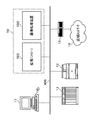
図1は、本発明の一実施の形態に係る情報処理装置を適用した拡張画像処理システムを含むネットワーク環境の構成を示す模式図である。 FIG. 1 is a schematic diagram showing a configuration of a network environment including an extended image processing system to which an information processing apparatus according to an embodiment of the present invention is applied.
拡張画像処理システム10は、画像処理装置100と拡張コントローラ103とから構成されるシステムである。画像処理装置100は、印刷、画像入力、文書ファイリング、文書送受信、画像変換等の機能を有し、拡張コントローラ103は、こうした機能を有する画像処理装置100がさらに拡張された機能を提供できるようにする。画像処理装置100と拡張コントローラ103とは、それぞれLAN400に接続され、LAN400を介して他のネットワークノードと通信する。
The extended
クライアントパーソナルコンピュータ(PC)11は個人向けの情報処理装置であり、主にユーザの机上に置かれ、各種のアプリケーションプログラムがクライアントPC11上で実行される。クライアントPC11は、LAN400に接続され、LAN400を介して、他のネットワークノードが提供するサービスを利用したり、他のネットワークノードにサービスを提供したりする。
A client personal computer (PC) 11 is an information processing apparatus for individuals, and is mainly placed on a user's desk, and various application programs are executed on the client PC 11. The client PC 11 is connected to the
サーバコンピュータ12は大規模な情報処理装置であり、LAN400に接続され、LAN400を介して主に他のネットワークノードに対するサービスを提供する。
The
プリンタ13はネットワーク対応の周辺機器であり、LAN400に接続され、LAN400を介して他のネットワークノードに対して画像形成のサービスを提供する。
The
ルータ15は、ネットワークどうしを接続するネットワークノードであり、インターネットやバーチャルプライベートネットワークなどの広域ネットワーク16とLAN400とを接続する。
The
LAN400は、オフィスなどに敷設されたローカルエリアネットワークである。 The LAN 400 is a local area network laid in an office or the like.
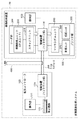
図2は、画像処理装置100と拡張コントローラ103の組み合わせによって構成された拡張画像処理システム10の構成を示すブロック図である。
FIG. 2 is a block diagram illustrating a configuration of the extended
画像処理装置100は、リーダ部(画像入力装置)200とプリンタ部(画像出力装置)300と制御装置(コントローラ部)110と操作部150とで構成され、印刷、画像入力、文書ファイリング、文書送受信、画像変換などの各種の基本的な画像処理機能を提供する。
The
リーダ部200は、原稿画像を光学的に読み取り、画像データに変換する。リーダ部200は、原稿を読取るための機能を持つスキャナユニット210と、原稿用紙を搬送するための機能を持つ原稿給紙ユニット(DFユニット)250とで構成される。
The
プリンタ部300は、記録紙を搬送し、その上に画像データを可視画像として印字して装置外に排紙する。プリンタ部300は、複数種類の記録紙カセットを持つ給紙ユニット360と、画像データを記録紙に転写、定着させる機能を持つマーキングユニット310と、印字された記録紙をソート、ステイプルして機外へ出力する機能を持つ排紙ユニット370とで構成される。
The
制御装置110は、リーダ部200及びプリンタ部300と電気的に接続され、さらにLAN400に接続されている。制御装置110は、リーダ部200を制御して、原稿の画像データを読込み、プリンタ部300を制御して画像データを記録用紙に出力してコピー機能を提供する。また、リーダ部200で読み取られた画像データを、コードデータに変換し、LAN400を介して図示しないホストコンピュータへ送信するスキャナ機能、ホストコンピュータからLAN400を介して受信したコードデータを画像データに変換し、プリンタ部300に出力するプリンタ機能を提供する。
The
操作部150は、制御装置110に接続され、液晶タッチパネルで構成され、画像処理装置100を入出力操作するためのユーザI/Fを提供する。
The
拡張コントローラ103は、制御装置(コントローラ部)170と操作部171と周辺機器172とから構成される。制御装置170は、一般的なパーソナルコンピュータと同等のハードウェアアーキテクチャで構成され、汎用オペレーティングシステムや各種デバイスドライバや各種アプリケーションプログラムを含む一般的なソフトウェアを実行することができる。操作部171は、ユーザが拡張コントローラ103を操作するためのユーザインタフェースを提供する。周辺機器172は、一般的なパーソナルコンピュータ用に提供されている各種の周辺機器であり、制御装置170のハードウェアを拡張する。
The
画像処理装置100と拡張コントローラ103とは、LAN400を介して接続され、相互に通信できる。ローカルインタフェース201は、画像処理装置100と拡張コントローラ103との間に専用の通信経路を提供するためのオプションインタフェースであり、USBや専用バスなどによって実装される。
The
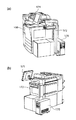
図3は、画像処理装置100と拡張コントローラ103の組み合わせによって構成された拡張画像処理システム10の外観を示す斜視図である。
FIG. 3 is a perspective view showing an appearance of the extended
画像処理装置100は、各種の画像処理機能を提供する複合機である。拡張コントローラ103の制御装置170は、画像処理装置100の背面に設置される。拡張コントローラ103の操作部171は、透明タッチパネルを表面に貼った液晶ディスプレイであり、制御装置170と電気的に接続されている。拡張コントローラ103の周辺機器172は、制御装置170と電気的に接続されたI/O装置であり、たとえばICカードリーダライタ、メモリメディアドライブなどである。操作部171と周辺機器172とは、専用スタンドに設置され、画像処理装置100の前に立ったユーザによって容易に操作できるように配置されている。
The
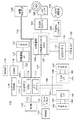
図4は、画像処理装置100の制御装置110のハードウェア構成を示すブロック図である。
FIG. 4 is a block diagram illustrating a hardware configuration of the
メインコントローラ111は、主にCPU112と、バスコントローラ113と、各種I/Fコントローラ回路(図示せず)とから構成される。
The
CPU112とバスコントローラ113は、制御装置110全体の動作を制御するものであり、CPU112は、ROM114からROM−I/F115を経由してプログラムを読み込んで、該プログラムに基づいて動作する。またCPU112は、ホストコンピュータから受信したPDL(ページ記述言語)コードデータを解釈し、ラスターイメージデータに展開する動作を、ROM114から読み込んだプログラムに基づいて実行する。バスコントローラ113は、各I/Fから入出力されるデータの転送を制御するものであり、バス競合時の調停やDMAデータ転送の制御を行う。
The
DRAM116は、DRAM−I/F117によってメインコントローラ111と接続されており、CPU112が動作するためのワークエリアや、画像データを蓄積するためのエリアを提供する。
The
Codec118は、DRAM116に蓄積されたラスターイメージデータをMH/MR/MMR/JBIG/JPEG等の方式で圧縮し、また逆に圧縮され蓄積されたコードデータをラスターイメージデータに伸長する。SRAM119は、Codec118の一時的なワーク領域として使用される。Codec118は、I/F120を介してメインコントローラ111と接続され、DRAM116との間のデータの転送は、バスコントローラ113によって制御され、DMA転送される。
The
グラフィックプロセッサ135は、画像回転、変倍処理、色空間変換等の処理を行う。
The
外部通信I/F121は、I/F123によってメインコントローラ111と接続され、コネクタ122によって外部ネットワークと接続される。
The external communication I /
汎用高速バス125には、拡張ボードを接続するための拡張コネクタ124とI/O制御部126とが接続される。汎用高速バス125はPCIバスで構成される。
An
I/O制御部126には、リーダ部200及びプリンタ部300の各CPUと制御コマンドを送受信するための調歩同期シリアル通信コントローラ127が2チャンネル装備されており、I/Oバス128によってスキャナI/F140及びプリンタI/F145に接続されている。
The I /
パネルI/F132は、LCDコントローラ131に接続され、操作部150上の液晶画面に表示を行うためのI/Fと、ハードキーやタッチパネルキーからの入力信号を受け付けるためのキー入力I/F130とから構成される。
The panel I /
操作部150は、液晶表示部と、液晶表示部上に張り付けられたタッチパネル入力装置と、複数個のハードキーとを有する。タッチパネルまたはハードキーにより入力された信号は、前述したパネルI/F132を介してCPU112に伝えられ、一方、液晶表示部には、パネルI/F520から送られてきた画像データが表示される。また液晶表示部には、本画像処理装置100の操作における機能表示や画像データ等を表示する。
The
リアルタイムクロックモジュール133は、機器内で管理する日付と時刻を更新/保存するためのもので、バックアップ用電池134によってバックアップされている。
The real-
E−IDEインタフェース161は、外部記憶装置を接続するためのものである。本実施の形態においては、このE−IDEインタフェース161を介してハードディスクドライブ160を接続し、E−IDEインタフェース161が、ハードディスク162へ画像データを記憶させたり、ハードディスク162から画像データを読み出したりする。
The
コネクタ142とコネクタ147とは、それぞれリーダ部200とプリンタ部300とに接続され、調歩同期シリアルI/F143,148とビデオI/F144,149とから構成される。
The
スキャナI/F140は、コネクタ142を介してリーダ部200と接続され、また、スキャナバス141によってメインコントローラ111と接続される。スキャナI/F140は、リーダ部200から受け取った画像に対して所定の処理を施す機能を有し、さらに、リーダ部200から送られたビデオ制御信号を基に制御信号を生成し、この制御信号をスキャナバス141に出力する機能も有する。
The scanner I /
スキャナバス141からDRAM116に対してデータ転送が行なわれるが、このデータ転送はバスコントローラ113によって制御される。
Data is transferred from the
プリンタI/F145は、コネクタ147を介してプリンタ部300と接続され、また、プリンタバス146によってメインコントローラ111と接続される。プリンタI/F145は、メインコントローラ111から出力された画像データに所定の処理を施して、プリンタ部300へ出力する機能を有し、さらに、プリンタ部300から送られたビデオ制御信号を基に制御信号を生成し、これをプリンタバス146に出力する機能も有する。
The printer I /
DRAM116上に展開されたラスターイメージデータのプリンタ部への転送は、バスコントローラ113によって制御され、プリンタバス146およびビデオI/F149を経由して、プリンタ部300へDMA転送される。
Transfer of raster image data developed on the
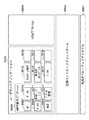
図5は、画像処理装置100の制御装置110で実行されるソフトウェアのモジュール構造を示すブロック図である。
FIG. 5 is a block diagram illustrating a module structure of software executed by the
画像処理装置100に内蔵される制御装置110によって実行ソフトウェアは、いわゆるファームウェアとして実装されており、制御装置110のCPU112によって実行される。
Execution software is implemented as so-called firmware by the
リアルタイムOS(オペレーティングシステム)5001は、組み込みシステムの制御用に最適化された各種資源管理のサービスと枠組みとを、リアルタイムOS5001上で動作するソフトウェアのために提供する。リアルタイムOS5001が提供する各種資源管理のサービスと枠組みには、CPU112による処理の実行コンテクストを複数管理することによって複数の処理を実質的に並行動作させるためのマルチタスク管理(スレッド管理)、タスク間の同期やデータ交換を実現するためのタスク間通信、メモリ管理、割り込み管理、各種のデバイスドライバ、ローカルインタフェースやネットワークや通信などの各種プロトコルの処理を実装したプロトコルスタックなどがある。
A real-time OS (operating system) 5001 provides various resource management services and frameworks optimized for controlling an embedded system for software operating on the real-
ファイルシステム5002は、ハードディスクやメモリなどの記憶装置上に構築され、データを格納するための機構である。画像処理装置100の制御装置110が扱うジョブをスプールしたり各種データを保存したりするために用いられる。
A
ジョブ制御・装置制御モジュール5003は、画像処理装置100のハードウェアを制御し、また、画像処理装置100の主にハードウェアが提供する基本機能(プリント、スキャン、通信、画像変換など)を利用するジョブを制御する。
The job control /
管理モジュール5004は、画像処理装置100の制御装置110の動作に係る内部状態を制御するなど、制御装置110の動作を管理する。
The
制御API5005は、制御API5005の配置される階層よりも下位のソフトウェアモジュール群が提供するサービスを、この階層よりも上位の組み込みアプリケーション群が利用するために設けられたアプリケーションプログラミングインタフェースである。
The
ネットワークサービス(モジュール)5006は、制御API5005とネットワークプロトコルとを相互変換するものであり、クライアントPC11など外部のネットワークノードから画像処理装置100の基本機能を利用可能とする。また、特にネットワークプリントのための各種プロトコル(LPR、NetWare、SMB、PAP、IPPなど)を実装したネットワークサーバ機能を備え、クライアントPC11など外部のネットワークノードからのプリントジョブの投入を可能とする。
A network service (module) 5006 mutually converts the
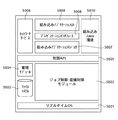
組み込みアプリケーションロジック5007、プレゼンテーションインタフェース5008、組み込みアプリケーションUI5009は、組み込みアプリケーションを構成する。組み込みアプリケーションは、画像処理装置100の基本機能に加えてさらにコピー、画像スキャン、文書送受信、文書ファイリングなどの上位機能を、制御API5005の基本機能を利用して実現する。
An embedded
組み込みアプリケーションロジック5007は、組み込みアプリケーションのビジネスロジック部分に相当する。プレゼンテーションインタフェース5008は、組み込みアプリケーションのビジネスロジックとプレゼンテーションロジックとを分離するために設けられたインタフェースである。組み込みアプリケーションUI5009は、組み込みアプリケーションのプレゼンテーションロジックに相当し、ユーザによる組み込みアプリケーションの操作を可能とするために、グラフィカルユーザインタフェース(GUI)の表示や入力の制御を行う。また、組み込みアプリケーションUI5009は、画像処理装置100の操作部150上にローカルなユーザインタフェースを提供するだけでなく、HTMLなどのマークアップ言語とHTTPなどのWeb技術とを用いて実現されるWebアプリケーションも提供する。ユーザは、クライアントPC11などの上で動作するWebブラウザからこのWebアプリケーションに接続して、画像処理装置100を遠隔操作できる。Webアプリケーションとして実装した組み込みアプリケーションのプレゼンテーション層のことを、ここではリモートUIと呼ぶ。
The embedded
組み込みJava(登録商標)環境(モジュール)5010は、Java(登録商標)仮想機械を中心に構成されるインタプリタ環境モジュールである。組み込みJava(登録商標)環境5010は、Java(登録商標)のバイトコードで記述された命令列データを実行時に読み込み結合し、Java(登録商標)仮想機械が命令を逐次的に読み込み解釈し実行するように構成されている。したがって、リアルタイムOS5001も含めて、あらかじめ全体が単一のロードモジュールに静的結合されているファームウェア上にあって、ごく部分的ながらソフトウェアを動的に追加したり入れ替えたりできる拡張性や柔軟性を確保できる。リアルタイムOS5001やジョブ制御・装置制御モジュール5003、制御API5005などを含むファームウェア(ネイティブシステム)の資源やサービスをJava(登録商標)のプログラムから利用可能なように構成したJava(登録商標)のクラスライブラリ群が、Java(登録商標) Native Interface(JNI)によって提供されている。組み込みJava(登録商標)環境5010の基本部分は、よく知られているJava(登録商標) 2 Platform, Micro Editionによって構築されている。
A built-in Java (registered trademark) environment (module) 5010 is an interpreter environment module configured around a Java (registered trademark) virtual machine. The embedded Java (registered trademark)
図6は、画像処理装置100の操作部150の表示部に表示される基本画面を示す図である。
FIG. 6 is a diagram illustrating a basic screen displayed on the display unit of the
なお、この表示部はタッチパネルで構成されており、タッチパネルにそれぞれ表示される機能表示部分の枠内を触れることにより、その機能が実行されるようになっている。 In addition, this display part is comprised with the touchscreen, and the function is performed by touching the inside of the frame of the function display part each displayed on a touchscreen.
コピーモードキー524は、複写動作を行う場合に押すキーである。そして、このコピーモードキー524が押されたときに、画面表示部530にコピーモードの画面が表示される(図6ではコピーモードの画面が表示されている)。拡張機能キー501は、両面複写、多重複写、移動、綴じ代の設定、枠消しの設定等の各モードを設定するために操作されるキーである。
A
540はステータスラインであり、画像処理装置100の状態や印刷情報を示すメッセージが表示される。図6に示す例では、コピー待機中であることを示している。
A
画像モードキー502は、複写画像に対して網掛け、影付け、トリミング、マスキングを行うための設定モードを設定する場合に操作されるキーである。ユーザモードキー503は、モードメモリの登録、標準モード画面の表示を設定する場合に操作されるキーである。応用ズームキー504は、原稿のX方向、Y方向を独立に変倍するモード、原稿サイズと複写サイズから変倍率を計算するズームプログラムのモードを設定する場合に操作されるキーである。M1キー505、M2キー506、M3キー507は、それぞれに予め登録されたモードメモリを呼び出す際に押されるキーである。オプションキー509は、フィルムから直接複写するため、フィルムプロジェクタ等のオプション機能の設定を行う場合に操作されるキーである。ソータキー510は、ソート、ノンソート、グループの設定を行う場合に操作されるキーである。原稿混載キー511は、原稿フィーダにA4サイズとA3サイズ、またはB5サイズとB4サイズの原稿を一緒にセットする際に押されるキーである。
An
等倍キー512は、複写倍率を100%に設定する場合に操作されるキーである。縮小キー514、拡大キー515は、定型の縮小、拡大を行う際に押されるキーである。用紙選択キー513は、複写用紙の選択を行う際に押されるキーである。濃度キー518、520は、複写印刷濃度を調整するためのキーであり、キー518を押す毎に順次濃く複写され、キー520を押す毎に順次薄く複写される。濃度表示部517は、濃度キー518、520による設定濃度をバーの位置で表示する。AEキー519は、新聞のように地肌の濃い原稿を自動濃度調整複写するときに押されるキーである。HiFiキー521は、写真原稿のように中間調の濃度を再現したい原稿の複写の際に押されるキーである。文字強調キー522は、文字原稿の複写において、文字を際だたせたい場合に押されるキーである。
The
560は履歴キーであり、これを押下することで、処理済みの印刷ジョブの履歴情報を表示する。たとえば、印刷ジョブの終了時刻、ユーザ名、ファイル名、印刷枚数等の情報を表示する。600はプリンタ選択キーであり、リモートコピーや重連コピーを行う場合の受信側複写機を選択する際に押されるキーである。
A
ガイドキー523は、キーの機能がわからないとき押されるキーであり、指定のキーの機能の説明が画面表示部530に表示される。ファックスキー525は、ファックスを行うときに押されるキーであり、Boxキー526は、Box機能を表示させたいときに押されるキーである。プリンタキー527は、プリントの濃度を変更したり、リモートのホストコンピュータから送られたPDLデータのプリント出力詳細情報を参照したい場合に押されるキーである。
The
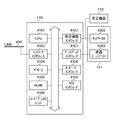
図7は、拡張コントローラ103のハードウェア構成を示すブロック図である。
FIG. 7 is a block diagram illustrating a hardware configuration of the
制御装置170のメインCPU4101は、拡張コントローラ103全体の制御を行う中央演算装置であり、ROM4105およびハードディスクユニット4106に記憶されたプログラムを実行する。ネットワークインタフェース4102は、他の機器との間でネットワークを介したデータ通信を行うための制御部である。CPU4101によって実行されるソフトウェアは、LAN400を介して、印刷デバイスや他のネットワーク機器、あるいは他のコンピュータと双方向のデータのやり取りを行うことができる。
A
周辺インタフェース4103は、周辺機器172の制御を行うための制御部である。メモリ4104は、CPU4101で実行する命令やデータなどを保存するための揮発性の記憶部である。ROM4105は、基本的なハードウェア制御を行うためのプログラムやデータなどを保存するための読み取り専用記憶部である。ハードディスクユニット4106は、制御装置170で実行されるプログラムや演算されたデータなどを保存するための不揮発性の記憶部である。ハードディスクユニット4106は、ブートプログラム(起動プログラム:ハードウェアやソフトウェアの実行を開始させるためのプログラム)、複数のアプリケーション、編集ファイル、ユーザファイル、ネットワーク管理プログラム等を記憶する。
The
ディスプレイインタフェース4107は、拡張コントローラ103の内部状態や、実行状態などを表示するための操作部171の液晶ディスプレイ4203を接続するため制御部である。キーボードインタフェース4108やマウスインタフェース4109は、制御装置170に対してユーザがデータや命令を入力するための入力装置を制御する。周辺機器インタフェース4103は、USB、RS−232Cシリアル、IEEE1394などの仕様を実装した、周辺機器172を接続するための制御部である。周辺機器172は、例えば、CD−ROMドライブやメモリメディアドライブなどの外部記憶装置や、ユーザを特定するためのユーザ認証装置などである。
A
操作部171は、液晶ディスプレイ4203と該液晶ディスプレイ4203の表面に貼られた透明なシート状のタッチパネル4202とから構成される。タッチパネル4202はポインティングデバイスである。CPU4101で実行されるソフトウェアは、タッチパネル4202に対してユーザがタッチして指定した液晶ディスプレイ4203の表示位置を座標データとして検出することができる。タッチパネル4202は周辺機器インタフェース4103によって駆動される。液晶ディスプレイ4203は、拡張コントローラ103の内部状態や実行状態などを表示するための表示部である。CPU4101で実行されるソフトウェアは、液晶ディスプレイ4203上にグラフィカルユーザインタフェースを描画できる。液晶ディスプレイ4203はディスプレイインタフェース4107によって駆動される。
The
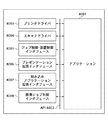
図8は、拡張コントローラ103内のアプリケーションプログラムが画像処理装置100とインタフェースするためのAPI(Application Program Interface)を示すブロック図である。
FIG. 8 is a block diagram showing an API (Application Program Interface) for an application program in the
図8に示すブロックは、拡張コントローラ103のCPU4101によって実行されるソフトウェアのプログラムモジュールに対応する。
The blocks shown in FIG. 8 correspond to software program modules executed by the
アプリケーション8001は、拡張コントローラ103で実行される各種アプリケーションに対応する。
An
API8002は、アプリケーション8001が画像処理装置100の制御装置110上のソフトウェアとインタフェースするためのアプリケーションプログラムインタフェースである。
An
プリンタドライバ8003は、アプリケーション8001によるプリントを可能にするモジュールである。プリントを実現するために、プリントサービスのプロトコルに従って実装されたクライアントとして、画像処理装置100のネットワークサービス5006とインタフェースする。
A
スキャナドライバ8004は、アプリケーション8001による画像スキャンを可能にするモジュールである。スキャンを実現するために、画像処理装置100内の制御API5005に相当するプロトコルにしたがって実装されたクライアントとして、制御API5005とインタフェースする。
A
ジョブ制御・装置制御インタフェース8005は、アプリケーション8001による基本的なジョブ制御と装置制御を可能にするモジュールである。基本的なジョブ制御と装置制御を実現するために、画像処理装置100内の制御API5005に相当するプロトコルに従って実装されたクライアントとして、制御API5005とインタフェースする。
A job control /
プレゼンテーション拡張インタフェース8006は、アプリケーション8001による画像処理装置100内の組み込みアプリケーションUI5009の拡張を可能にするためのモジュールである。このプレゼンテーション拡張インタフェース8006は、画像処理装置100内のプレゼンテーションインタフェース5008に相当するプロトコルに従って実装されたクライアントとして、プレゼンテーションインタフェース5008とインタフェースする。このプレゼンテーション拡張インタフェース8006が提供するAPIによって、拡張コントローラ103内のアプリケーション8001は、画像処理装置100に組み込まれた組み込みアプリケーションUI5009に相当するプレゼンテーションロジック(つまりアプリケーションのUI)を実装することができる。また、アプリケーション8001の実装次第で、組み込みアプリケーションUI5009にはない機能を拡張したりカスタマイズしたりすることもできる。
The
組み込みアプリケーション拡張インタフェース8007は、アプリケーション8001による画像処理装置100内の組み込みアプリケーションロジック5007のカスタマイズを可能にするためのモジュールである。この組み込みアプリケーション拡張インタフェース8007は、組み込みアプリケーションロジック5007が備えるプラグインのためのインタフェース(不図示)に相当するプロトコルに従って実装されたクライアントであり、組み込みアプリケーションロジック5007とインタフェースする。この組み込みアプリケーション拡張インタフェース8007が提供するAPIによって、拡張コントローラ103内のアプリケーション8001は、画像処理装置100に組み込まれた組み込みアプリケーションロジック5007の一部を置き換えたり拡張したりするプラグインを実装することができる。
An embedded
画像ジョブ制御インタフェース8008は、アプリケーション8001による特に高速の画像処理を可能にするためのモジュールである。この画像ジョブ制御インタフェース8008は、画像処理装置100のジョブ制御・装置制御モジュール5003の内部APIに相当するプロトコルに従って実装されたクライアントであり、また、ローカルインタフェース201による画像転送を組み合わせることによって、拡張コントローラ103と画像処理装置100との間で画像や文書をやり取りするジョブの高速化を達成する。
An image
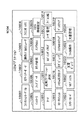
図9は、拡張コントローラ103で実行されるソフトウェアのモジュール群の階層構造を示すブロック図である。
FIG. 9 is a block diagram illustrating a hierarchical structure of a software module group executed by the
汎用オペレーティングシステム(OS)9001は、拡張コントローラ103のオペレーティングシステムである。汎用OS9001は、リアルタイムOS5001と異なり、主に情報処理装置やコンピュータの土台を提供するソフトウェアとして開発されてきたものである。汎用OS9001の例として、Windows(登録商標)、MacOS(登録商標)、Solaris(登録商標)、Linux(登録商標)、FreeBSD、NetBSD、OpenBSDなどがある。汎用OS9001は、拡張コントローラ103が備えるハードウェア的およびソフトウェア的な各種資源を抽象化して、より上位のソフトウェアから拡張コントローラ103を容易かつ効率的に利用できるようにしている。汎用OS9001が提供する機能には、例えば以下のようなものがある。
A general-purpose operating system (OS) 9001 is an operating system of the
すなわち、CPU4101による処理の実行コンテクストを複数管理することによって複数の処理を実質的に並行動作させるマルチプロセス機能やスレッド機能、プロセス間およびスレッド間の同期やデータ交換を実現するプロセス間通信やスレッド間通信、プロセスごとに保護されたメモリ管理、割り込み管理、各種のデバイスドライバ、ローカルインタフェースやネットワークや通信などの各種プロトコルの処理を実装したプロトコルスタックなどが挙げられる。なお特筆すべきは、市販されている一般のコンピュータ周辺機器のデバイスドライバは、汎用OS用のものが多く提供されていることである。この理由は、一般にコンピュータ周辺機器は、汎用OSが稼動するパーソナルコンピュータなど汎用の情報処理装置のために開発されているためである。そのため、汎用OSを採用することで、市場に出回っている多種多様なコンピュータ周辺機器のハードウェアとデバイスドライバとをそのまま、または比較的容易に、拡張コントローラ103のために流用することができる。拡張コントローラ103は、画像処理装置100の拡張性や柔軟性を補うために付加されるアクセサリであるが、汎用OS9001を採用することによって、汎用の情報処理装置と同等のハードウェア構成を採用することができるとともに、ソフトウェア的にも、画像処理装置100の拡張性や柔軟性をより効率的に補うことができる。
That is, by managing a plurality of execution contexts of processing by the
拡張コントローラプラットフォーム9002は、拡張コントローラ103のソフトウェアの動作環境を提供する土台となるソフトウェア(ライブラリ、フレームワーク、およびランタイムモジュールなど)である。また、拡張コントローラプラットフォーム9002は、画像処理装置100に内蔵された組み込みアプリケーションと連携するアプリケーションを拡張コントローラ103内に容易に構築可能とするためのユーティリティライブラリ、フレームワーク、およびランタイムモジュール群を含む。
The
システムアプリケーション9004は、拡張コントローラ103に標準搭載されるユーティリティアプリケーション群であり、ユーザによる拡張画像処理システム10の利用や管理を助けるものである。
A
ユーザランドアプリケーション9005に分類されるアプリケーション群は、拡張画像処理システム10の拡張された機能をユーザに提供するためのアプリケーション群である。ユーザランドアプリケーション9005に分類されるアプリケーションは、アプリケーションを単位としてインストールによって追加することも、アンインストールによって削除することも可能である。また、アプリケーションプログラムの実体のインストール及びアンインストールだけでなく、ユーザがそのアプリケーションプログラムを実行する許諾(ライセンス)を購入したときのみ、該アプリケーションを活性化(アクティベート)するように制御することもできる。
The application group classified as the
MFP統合アプリケーション9006は、画像処理装置100の組み込みアプリケーションに対応するユーザランドアプリケーションであり、画像処理装置100が提供する上位機能や基本機能を拡張コントローラ103から利用可能にする。MFP統合アプリケーション9006は、プレゼンテーション拡張インタフェース8006や組み込みアプリケーション拡張インタフェース8007によって、画像処理装置100の組み込みアプリケーションとインタフェースする。MFP統合アプリケーション9006は、単に画像処理装置100の組み込みアプリケーションとまったく同様な機能性やユーザインタフェースを提供するだけでなく、それらを拡張して提供することもできる。MFP統合アプリケーション9006は、9007〜9012で示すアプリケーション部品を内部に含み統合している。
The MFP
コピー9007は、画像処理装置100の組み込みアプリケーションの一機能であるコピー機能に相当するアプリケーション部品である。
A
ボックス9008は、画像処理装置100の組み込みアプリケーションの一機能である文書ファイリング機能に相当するアプリケーション部品である。
A
送信9009は、画像処理装置100の組み込みアプリケーションの一機能である文書送受信機能に相当するアプリケーション部品である。
A
ポータル9010は、ユーザの好みに応じて、よく使う機能や定型処理を簡単に呼び出すための入り口を提供するアプリケーション部品である。ポータル9010は、MFP統合アプリケーション9006の各アプリケーション部品に対して横断的に、動作パラメータの設定や一連の操作などをマクロ化し、複数のマクロを実行するためのカスタマイズボタン群を自在に配置可能なユーザインタフェースを提供する。
The portal 9010 is an application component that provides an entrance for easily calling frequently used functions and routine processing according to user preferences. A portal 9010 is a user who can freely set customization buttons for executing a plurality of macros by creating a macro of operation parameter settings and a series of operations across the application components of the MFP
本体ジョブモニタ9011は、画像処理装置100内部で実行中のジョブの状況や完了したジョブの履歴などを参照するときに使用されるアプリケーション部品である。
A main body job monitor 9011 is an application component used when referring to the status of a job being executed in the
デバイス管理9012は、画像処理装置100のハードウェアを管理するためのユーザインタフェースを提供するアプリケーション部品である。
The
メモリメディア操作9013は、拡張コントローラ103に周辺機器として接続された各種のリムーバブルストレージ(光磁気メディアドライブ、USBストレージ、スマートカードやコンパクトフラッシュ(登録商標)に代表されるメモリカードなど)の操作を行うためのユーザランドアプリケーションである。メモリメディア内部に格納された文書を画像処理装置100に引き渡してプリント、送信、またはファイリングしたり、画像処理装置100が画像スキャンまたは受信した文書やファイリングされていた文書を受け取ってメモリメディアに格納したりすることができる。
The memory media operation 9013 operates various types of removable storage (such as magneto-optical media drive, USB storage, smart card, and memory card represented by CompactFlash (registered trademark)) connected to the
暗号化セキュアプリント9014は、クライアントPC11から暗号化されたプリント要求を受信した場合に、暗号化されたままいったん格納し、許可されたユーザによる操作であることがユーザ認証された場合のみ、該プリント要求を復号化して画像処理装置100へ送るという、暗号化留め置きプリント機能を提供するユーザランドアプリケーションである。
When the encrypted
ブラウザ9015は、拡張コントローラ103の操作部でWebなどのブラウジング機能を提供するユーザランドアプリケーションである。
A
9016、9017、9018は、上記以外の他のユーザランドアプリケーションである。前述したように、ユーザランドアプリケーション9005では柔軟に追加や削除または活性化や不活性化を行うことができる。
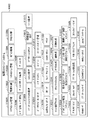
図10は、拡張コントローラ103のシステムアプリケーション9004の構成を示すブロック図である。
FIG. 10 is a block diagram showing the configuration of the
拡張コントローラ103のシステムアプリケーション9004として分類されるソフトウェアモジュール(パッケージ)には、以下のユーティリティプログラムやランタイムモジュールなどが含まれる。
Software modules (packages) classified as
ファンクションキーパネル(モジュール)10001は、機能メニューやソフトウェアキー等を拡張コントローラ103の操作部171の表示部のデスクトップに配置するフレームワークとコンテナである。ファンクションキーとして以下を配置することができる。
A function key panel (module) 10001 is a framework and container for arranging function menus, software keys, and the like on the desktop of the display unit of the
システム既定のキー(たとえばログアウト、シャットダウン、カウンタ確認、余熱、システム状況、システム設定、スクリーンキーボード呼び出し)、
選択中のアプリケーションに応じて動作が切り替わるアプリケーションコンテキストキー(たとえばガイド、アプリケーション設定、アプリケーション状況)、
選択中のアプリケーションがその操作を助けるために追加配置するカレントアプリケーション追加キー(たとえばアプリケーション内部の固有メニューの一部をキーとして展開配置したもの)など。
System default keys (eg logout, shutdown, counter check, remaining heat, system status, system settings, screen keyboard call),
Application context keys (for example, guides, application settings, application status) whose operation switches according to the selected application,
Current application addition key (for example, a part of the unique menu inside the application expanded and arranged as a key) that the selected application additionally arranges to help the operation.
キーのレイアウトとルック&フィールは、ユーザの好みに応じてカスタマイズ(パーソナライズ)できる。ファンクションキーパネル10001のルック&フィールは、システム全体のテーマと連動して切り替わる。例えば高コントラストや反転などのテーマが選ばれると、ファンクションキーパネル10001の表示もそれぞれの特性を反映するように切り替わる。ファンクションキーパネル10001には、ソフトウェアキーやメニューだけでなく、時計やメール着信フラグなどのアプリケーションコンポーネントも配置できる。また、ユーザの利用状況に応じて、ファンクションキーパネル10001に「ユーザモード」、「キーボード」、「操作パネル」、「ガイド」、「アバウト」および「リセット」と名づけられたキーが配置される。
The key layout and look and feel can be customized (personalized) according to user preferences. The look and feel of the function
「ユーザモード」キーは、選択中のカレントアプリケーションに対して環境設定ダイアログを開くことを指示するか、または、システムアプリケーションのひとつであるシステム環境設定10009を起動する。 The “user mode” key instructs the current application being selected to open an environment setting dialog or activates system environment setting 10009 which is one of the system applications.
「キーボード」キーは、システムアプリケーションのひとつであるスクリーンキーボード10002の起動を指示する。
The “keyboard” key instructs activation of the
「操作パネル」キーは、システムアプリケーションのひとつである操作パネルエミュレータ10003の起動を指示する。
The “operation panel” key instructs activation of an
「ガイド」キーは、選択中のカレントアプリケーションに対して、システムアプリケーションのひとつであるヘルプを用いて、カレントアプリケーションの動作状況に応じたオンラインマニュアルを表示することを指示する。 The “Guide” key instructs the current application being selected to display an online manual corresponding to the operation status of the current application, using help that is one of the system applications.
「アバウト」キーは、選択中のカレントアプリケーションに対して、バージョン、開発元、著作権などのアプリケーション情報を表示することを指示するか、あるいは、システム全体に関するモジュールごとのバージョンや著作権情報などを表示することを指示する。 The “About” key instructs the current application being selected to display application information such as version, developer, and copyright, or displays the version and copyright information for each module related to the entire system. Instruct to display.
「リセット」キーは、選択中のカレントアプリケーションに対して、ユーザが途中まで行った一連の操作を取り消して、その時点の状況に応じたひとつ前のチェックポイントまでロールバックすることを指示する。たとえばユーザがテキスト入力フィールドに文字列を入力中にリセットを押下すると、入力途中の文字列がクリアされたり、あるいは文字列の仮名漢字変換途中にリセットを押下すると、変換候補選択状態が解除されて仮名に戻ったり、また、画像処理ジョブの動作パラメータを設定するためのダイアログに対して設定値の変更を施している最中にリセットを押下すると、変更途中の設定はキャンセルされて当初の値に戻ったりする。 The “reset” key instructs the current application being selected to cancel a series of operations performed halfway by the user and roll back to the previous checkpoint according to the situation at that time. For example, if the user presses reset while entering a character string in the text input field, the character string in the middle of input is cleared, or if reset is pressed during kana-kanji conversion of the character string, the conversion candidate selection state is canceled. If you return to Kana or press reset while changing the setting value for the dialog for setting the operation parameters of the image processing job, the setting in the middle of the change is canceled and returned to the original value. Go back.
スクリーンキーボード(モジュール)10002は、物理的なフルキーボードをエミュレーションするためのソフトウェアキーボードである。タッチパネルを指で操作する際の操作性を最適化してある。拡張コントローラ103にはオプションで物理的なキーボードが装着される場合もあることを考慮して、システムのできるだけ低レベルで物理キーボードをエミュレートする(すなわちシステムのほとんどのレベルで、タッチパネルを物理キーボードと区別する必要がないように構成される)。スクリーンキーボード10002の表示が、操作部171のマルチウィンドウ表示される表示部の最前面を覆うことによって、入力の宛先となるアプリケーションの操作性は低下してしまうが、できるだけ邪魔にならないように配慮され、たとえば、表示・非表示の切り替えや表示位置の移動が指で簡単に操作できる。また操作部171の表示部がより高解像度化したとき、指での操作にむかないほどキートップの表示が小さくならないようにするため、スクリーンキーボード10002の表示は、解像度とは独立に構成される。スクリーンキーボード10002は国際標準化の対象であり、拡張コントローラ103の出荷される仕向け地であるロカール(locale)に応じて入力言語などを切り替えるようにする。
A screen keyboard (module) 10002 is a software keyboard for emulating a physical full keyboard. The operability when operating the touch panel with a finger is optimized. Taking into account that an optional physical keyboard may be attached to the
操作パネルエミュレータ(モジュール)10003は、画像処理装置100の物理的な操作パネルをエミュレーションするためのソフトウェアパネルである。操作パネルを構成するスタートキー・ストップキー・テンキーなどをソフトウェアによってエミュレートする。各種キーのコンポーネントが押されたとき生成するキーコードは、拡張コントローラ103にオプションとして接続される物理的なキーボードが生成するキーコードにマッピングされる。例えば、テンキーのキーが押されたとき、各キーに相当する物理フルキーボードのキーコードが生成される。操作パネルエミュレータ10003のGUIはアプリケーションからの要求に応じて表示される。また、ユーザの明示的な操作によって表示させることもできる。操作パネルエミュレータ10003は、画像処理装置100の機種ごとの差異に応じた複数のモードを持つ。例えば、画像処理装置100がファクス対応機である場合は、ファクス用キー(*や#など)を備えたモードで動作する。また、アプリケーションが操作パネルエミュレータ10003を呼び出す場合には、アプリケーションからキーごとの表示・非表示を選択できる。
An operation panel emulator (module) 10003 is a software panel for emulating the physical operation panel of the
アイコンボックス(モジュール)10004は、カレントアプリケーションを切り替えるためのシステムアプリケーションである。その時点で操作対象とするユーザランドアプリケーションをユーザが選択するためのアプリケーション選択リストのプレゼンテーションロジックを提供する。アイコンボックス10004には、アイコン画像、および/または、アプリケーション名がリスト表示され、ユーザがそれらの中から所望のアプリケーションを選択すると、カレントアプリケーションがそのアプリケーションに切り替わる。アプリケーション名は、テキスト及び画像のどちらの形式で与えられても表示できる。テキストは、国際標準化フレームワークに連動したローカライズ対象である。アイコン画像やアプリケーション名のリソースは、各ユーザランドアプリケーションモジュールの中に含まれるリソースを利用する。ユーザがアイコンの表示順序を編集することができる。ルック&フィールはテーマと連動して切り替わる。
An icon box (module) 10004 is a system application for switching the current application. A presentation logic of an application selection list is provided for the user to select a userland application to be operated at that time. The
アイコンボックス10004そのものはアプリケーションのセレクタであってラウンチャではない。ただし、ライフサイクル管理の遅延起動機構を提供することにより、アプリケーションは最初に選択されたときに初めて起動されるように登録することもできる。アプリケーションごとの強制終了やアラート表示などの機能を追加してもよい。
The
インストーラ(モジュール)10005は、拡張コントローラ103で実行されるべき各種のソフトウェアを拡張コントローラ103にインストールするためのインストーラである。インストール対象のソフトウェアは、ユーザランドアプリケーション、システムアプリケーション、ライブラリ、ドライバ、拡張コントローラプラットフォームのモジュール群などがある。インストールすべきソフトウェアモジュールは、リムーバブルメディアなどローカルファイルシステムから供給されるだけでなく、ネットワーク経由で供給されるようにすることもできる。
An installer (module) 10005 is an installer for installing various software to be executed by the
アップデータ(モジュール)10006は、拡張コントローラ103で実行される各種のソフトウェアをアップデートするためのシステムアプリケーションである。アップデート対象のソフトウェアは、インストーラ10005のインストール対象のソフトウェアと同様である。アップデートするソフトウェアモジュールは、ローカルファイルシステム(リムーバブルメディアも含む)から供給されるだけでなく、ネットワーク経由で供給されるようにすることもできる。サーバに存在するアップデート用のデータの更新をネットワーク経由で検出し、更新されていれば管理者ユーザにアップデートを促す機能も有する。
The updater (module) 10006 is a system application for updating various software executed by the
カウンタ参照(モジュール)10007は、カウンタ値を参照するためのシステムアプリケーションである。画像処理装置100に設けられたカウンタと、拡張コントローラ103のアプリケーション利用をカウントするカウンタの両方を参照できる。
A counter reference (module) 10007 is a system application for referring to a counter value. Both a counter provided in the
アンチウィルス(モジュール)10008は、ウィルス感染の予防と検出、および感染時の修復を行うシステムアプリケーションである。 The anti-virus (module) 10008 is a system application for preventing and detecting virus infection and repairing at the time of infection.
システム環境設定(モジュール)10009は、拡張コントローラ103のシステムソフトウェアやハードウェアの各種の環境設定項目(プリファレンス、プロパティ)を参照したり編集したりするためのシステムアプリケーションである。システム環境設定10009は、複数のコンポーネントをプラグイン可能なコンテナであり、各種の環境設定項目は、そのカテゴリに従ってそれぞれを設定するためのコンポーネントによって処理される。設定対象(設定項目)によって、例えばシステム管理者のみが参照可能であったり設定可能であったりというように適切にアクセス制御される。
A system environment setting (module) 10009 is a system application for referring to and editing various environment setting items (preferences and properties) of system software and hardware of the
テーマ(モジュール)10010は、アプリケーションごとに有するカスタマイズ項目(プリファレンス)を、統一感を維持して一元的に設定するための機構を提供するシステムアプリケーションである。例えば、ユーザが自身の好みや身体的特性に合わせて全体的な色調設定やコンポーネントの表示サイズ設定などをテーマとして指定すると、各種アプリケーションはテーマに連動した動作モードで動作する。 A theme (module) 10010 is a system application that provides a mechanism for centrally setting customization items (preferences) for each application while maintaining a sense of unity. For example, when the user designates overall color tone settings, component display size settings, and the like as the theme according to his / her preference and physical characteristics, various applications operate in an operation mode linked to the theme.
起動アプリケーション選択(モジュール)10011は、ユーザ毎に、アプリケーションの起動と停止とを制御するシステムアプリケーションである。ユーザは、システムにインストールされているアプリケーションの一覧からアプリケーションを選択し、該アプリケーションを実行状態に状態遷移させることができる。実際に実行が許可されるかどうかはユーザの権限に基づく。また、実行状態にあるアプリケーションの中からアプリケーションを選択し、停止状態に状態遷移させることができる。システム管理者は、全ユーザに共通の共通設定を行うこともできる。 A start application selection (module) 10011 is a system application that controls start and stop of an application for each user. The user can select an application from the list of applications installed in the system and change the state of the application to an execution state. Whether or not execution is actually permitted is based on the authority of the user. In addition, an application can be selected from the applications in the execution state, and the state can be changed to the stop state. The system administrator can also make common settings common to all users.
ログインダイアログ(モジュール)10012は、ログイン機構に対応するシステムアプリケーションである。拡張画像処理システム10をユーザが利用するユーザセッションの開始に必要なユーザとの対話を行う。必要な対話とは、例えば、システムがユーザに対して求める、ユーザ認証に必要な情報(ドメイン名、ユーザ名、パスワード)のエントリである。ユーザ名のエントリは、テキスト入力だけでなく、より簡易にユーザリストから選択可能なように設定できる。特にゲストユーザ(認証不要のユーザ)による操作を許す運用を行う場合、ゲストユーザによるログイン操作は簡易に行えるように設定できる。ログイン方法の設定変更はシステム管理者ユーザが行う。ユーザがログインしていない状態(ユーザセッション中ではないシステムセッション中)で表示されるユーザインタフェースを備えるので、システムセッションの管理操作(シャットダウンなど)を行うための機能を付加したり、画像処理装置100の状態表示を行う機能を付加したりする場合もある。ユーザセッションの開始に際して、ICカード(スマートカード)や生体認証などに基づくユーザ認証を行う場合、専用のログインダイアログ実装で置き換えられるように構成されている(ログイン機構の実装も同様に置き換えられる)。
A login dialog (module) 10012 is a system application corresponding to a login mechanism. The user interacts with the user necessary to start a user session using the extended
ユーザ管理(モジュール)10013は、拡張画像処理システム10を利用するユーザの管理とユーザの権限の管理とを行うシステムアプリケーションである。
A user management (module) 10013 is a system application that manages a user who uses the extended
アドレス帳(モジュール)10014は、システム内部または外部のディレクトリサービスに接続し、ディレクトリ情報を編集操作するためのシステムアプリケーションである。ディレクトリ情報には宛先情報を含むが、これに限定されず、ユーザ、組織、デバイス、あるいはサービスなどの各種エンティティごとに、その諸属性をディレクトリ情報として扱う。 An address book (module) 10014 is a system application for connecting to an internal or external directory service and editing directory information. The directory information includes destination information, but is not limited thereto, and various attributes are treated as directory information for each entity such as a user, an organization, a device, or a service.
ステータスティッカ(モジュール)10015は、システムとアプリケーションから通知されたステータス情報やメッセージを表示するためのシステムアプリケーションである。テキストやアイコン画像などを表示することができる。ステータスティッカ10015は、並行する複数のメッセージ表示要求に対し優先度ベースの調停や時分割表示なども行う。ステータスティッカ10015のメッセージ表示は、アニメーションなどによるさまざまな表示を行うようにしてもよい。
A status ticker (module) 10015 is a system application for displaying status information and messages notified from the system and applications. Text and icon images can be displayed. The
システム状況モニタ(モジュール)10016は、拡張コントローラ103のハードウェアおよびソフトウェアの両面に関するシステムの状況とアプリケーションの状況を監視するためのシステムアプリケーションである。拡張画像処理システム10で実行される各種モジュール群のバージョンや著作権などの情報を確認することもできる。
The system status monitor (module) 10016 is a system application for monitoring the status of the system and the status of the application regarding both hardware and software of the
ログビューア(モジュール)10017は、拡張コントローラ103および画像処理装置100のそれぞれのシステムや組み込みアプリケーションが残すログ情報を参照したり管理したりするためのシステムアプリケーションである。
A log viewer (module) 10017 is a system application for referring to and managing log information left by the respective systems and embedded applications of the
システムセットアップ(モジュール)10018は、拡張画像処理システム10を設置する際の初期セットアップ手順や、画像処理装置100を新機種に交換する際のリプレース処理手順、何らかのトラブルによって拡張コントローラ103のシステムが破壊され復旧する必要が生じた際の回復手順などを補助するためのユーティリティシステムアプリケーションである。
The system setup (module) 10018 destroys the system of the
バックアップ(モジュール)10019は、拡張コントローラ103と画像処理装置100のそれぞれが持つハードディスクや不揮発性メモリに格納されたデータを、拡張コントローラ103に接続されたリムーバブルメディア、外部記憶装置、またはネットワークストレージなどの安全な記憶手段に退避し、また退避したデータを元に戻すリストアを行うためのシステムアプリケーションである。
A backup (module) 10019 stores data stored in a hard disk or a nonvolatile memory of each of the
スクリーンセーバ(モジュール)10020は、ユーザが拡張コントローラ103の操作部171を利用していないときに操作部171の表示部の焼きつきを防ぐために表示の制御を行うシステムアプリケーションである。スクリーンセーバ10020では、拡張画像処理システム10の便利な使い方などを紹介するアニメーションを再生することもできる。また、画像処理装置100での用紙なしなどのアラーム情報を表示したり、システム管理者などが設定したメッセージ(たとえば「定期メンテナンス日時のお知らせ」など)などを掲載した仮想的な伝言板を表示したり、ネットワーク経由でサーバから最新の情報(天気予報やニュースなど)を取得して表示したりすることもできる。複数のユーザが交互にログインして拡張コントローラ103を用いる運用形態においては、スクリーンセーバ10020は、ユーザがログアウトし忘れて拡張コントローラ103の前を離れた場合に、拡張コントローラ103を自動的にログアウトさせるためのオートログアウト処理を行う。
A screen saver (module) 10020 is a system application that controls display in order to prevent burn-in of the display unit of the
ヘルプシステム(モジュール)10021は、拡張画像処理システム10のシステム全体の利用方法などを解説する文書を表示したり、それぞれのユーザランドアプリケーションがその解説文書を表示することを助けたりするためのシステムアプリケーションである。ヘルプシステム10021はまた、システムのモジュールや各アプリケーションモジュールなどがそれぞれモジュール単位で供給した解説文書コンテンツを、システム全体として統合するポータル機能を備える。アプリケーションプログラムからヘルプシステム10021に対して、コンテンツ内の任意の箇所をユーザに提示するように指示することが可能である。したがって、アプリケーションはその動作状況に応じて最適な情報をユーザに提示できる。ヘルプシステム10021はWebアプリケーションとして構成されているため、拡張コントローラ103の操作部171に解説文書を表示するだけでなく、クライアントPC11などで稼動するWebブラウザ上に解説文書を表示することもできる。
A help system (module) 10021 is a system application for displaying a document explaining how to use the entire system of the extended
文書ビューア(モジュール)1022は、テキスト、画像、およびアプリケーション固有の形式の各種フォーマットの文書データを表示するためのシステムアプリケーションである。表示する文書の形式の例には、テキスト、HTMLやXMLやSGMLなどのマークアップ言語で記述された文書、JPEGやPNGやTIFFやJBIGなどの画像、LIPS(登録商標)やPostScript(登録商標)などのページ記述言語、PDFなどの文書、Macromedia Flash(登録商標)やSun Java (登録商標)Appletなどの表示を伴うプログラム、アニメーション、あるいは、ワードプロセッサやプレゼンテーションや表計算など各種アプリケーションプログラム固有のプロプラエタリなフォーマットに基づく文書データなどがある。文書ビューア1022が扱う文書の一部または全部は、画像処理装置100によってプリント、スキャン、送受信、ファイリングなどが可能である。
The document viewer (module) 1022 is a system application for displaying text, images, and document data in various formats in a format unique to the application. Examples of document formats to be displayed include text, documents written in markup languages such as HTML, XML, and SGML, images such as JPEG, PNG, TIFF, and JBIG, LIPS (registered trademark), and PostScript (registered trademark). Page description languages such as PDF, documents such as PDF, programs with display such as Macromedia Flash (registered trademark) and Sun Java (registered trademark) Applet, animation, or proprietary programs specific to various application programs such as word processors, presentations and spreadsheets Document data based on the format. Part or all of the document handled by the document viewer 1022 can be printed, scanned, transmitted / received, filingd, and the like by the
ファイル操作(モジュール)10023は、拡張コントローラ103に内蔵または接続された各種記憶手段の上に構築されたファイルシステム、画像処理装置100が持つファイルシステム、または、ネットワーク経由でサーバコンピュータ12やクライアントPC11などが提供するネットワーク共有のファイルシステムを操作するシステムアプリケーションである。
The file operation (module) 10027 is a file system built on various storage means built in or connected to the
文書管理(モジュール)10024は、拡張コントローラ103に搭載された文書管理システム(document management system)である。文書管理10024は、拡張コントローラ103のファイルシステムや外部サーバのデータベース管理システムなどを用いて、各種の文書データの蓄積、検索、管理などを実現するための機能を提供する。
A document management (module) 10024 is a document management system (document management system) installed in the
図11は、拡張コントローラ103の拡張コントローラプラットフォーム9002を構成するソフトウェアパッケージ群を示すブロック図である。
FIG. 11 is a block diagram showing a software package group constituting the
システムセッション管理(モジュール)11001は、拡張コントローラ103のブートアップからシャットダウンまで、システム全体のセッション管理を行うためにシステム全体の構成および設定を管理する。また、デーモン型サービス(常駐型アプリケーションとして実装されたシステムアプリケーションとユーザアプリケーション)のライフサイクル管理も行う。
A system session management (module) 11001 manages the configuration and settings of the entire system in order to perform session management of the entire system from boot up to shutdown of the
電源制御(モジュール)11002は、拡張コントローラ103の省電力設定など電力制御の管理を行う。また、WakeOnLAN、ACPIなどハードウェアシステムとBIOS設定を管理する。
A power control (module) 11002 manages power control such as power saving settings of the
ユーザセッション管理(モジュール)11003は、ログインからログアウトまで、ユーザによるログインセッションを管理する。また、コンソール型アプリケーション(ユーザのログインセッション中に動作するシステムアプリケーションとユーザアプリケーション)のライフサイクル管理を行う。またWebアプリケーションのログインセッション管理機構を助ける。 A user session management (module) 11003 manages a login session by a user from login to logout. In addition, the life cycle management of console type applications (system applications and user applications that operate during a user login session) is performed. It also helps the web application login session management mechanism.
ログイン機構(モジュール)11004は、ユーザがユーザセッションを開始するための機構である。ユーザ管理およびユーザ認証パッケージによりユーザの特定を行う。ユーザ環境へのインテグレーションのために、個別のニーズに合わせたログイン機構をプラグインすることが可能である。例えば、ICカード(スマートカード)によるユーザ認証や生体認証に基づくログイン機構を統合することができる。 A login mechanism (module) 11004 is a mechanism for a user to start a user session. The user is specified by the user management and user authentication package. For integration into the user environment, it is possible to plug in a login mechanism tailored to individual needs. For example, a login mechanism based on user authentication or biometric authentication using an IC card (smart card) can be integrated.
アクセス制御(モジュール)11005は、ユーザ毎に、およびユーザが所属するグループ毎に、拡張画像処理システム10を構成する各種リソースのアクセス権限を管理する。
The access control (module) 11005 manages the access authority for various resources constituting the extended
ユーザ管理・ユーザ認証(モジュール)11006は、システムを利用するユーザアカウントの管理とユーザの特定(識別)を行う。パスワードなどによるwhat-you-know型の認証だけなくICカード(スマートカード)などによるwhat-you-have型や生体認証などによるwhat-you-are型の認証も利用できる。 A user management / user authentication (module) 11006 manages a user account that uses the system and identifies (identifies) a user. In addition to what-you-know authentication using passwords, what-you-have authentication using IC cards (smart cards) and what-you-are authentication using biometric authentication can also be used.
ディレクトリサービス連携(モジュール)11007は、拡張コントローラ103のユーザ管理、ユーザ認証、またはディレクトリ情報の管理を外部のディレクトリサービスに委譲する。
The directory service cooperation (module) 11007 delegates user management, user authentication, or directory information management of the
ディレクトリ(モジュール)11008は、拡張コントローラ103が備えるローカルディレクトリサービスであり、ユーザおよび各種リソースの情報を管理する。管理する情報は、ディレクトリサービスが管理対象とするあらゆるエンティティの属性とエンティティ間の関係である。例えばNDSなどのディレクトリサービスが管理するエンティティの例には、ユーザ、プリンタ、ファイルサーバなどがあげられる。管理対象は、拡張コントローラ103のシステム内部のリソースと画像処理装置100内部のリソースの両者である。
A directory (module) 11008 is a local directory service provided in the
アプリケーションライフサイクル管理(モジュール)11009は、システムアプリケーションおよびユーザランドアプリケーションのライフサイクル(インストール、アップデート、アンインストール、起動、中断、停止)を管理する。 The application life cycle management (module) 11009 manages the life cycle (installation, update, uninstallation, activation, interruption, stop) of the system application and the userland application.
ライセンス管理(モジュール)11010は、拡張コントローラ103における各アプリケーションの利用許諾を管理する。
A license management (module) 11010 manages use permission of each application in the
アプリケーションカウンタ(モジュール)11011は、拡張コントローラ103に搭載された各アプリケーションの利用量と、アプリケーションの利用に伴うシステムリソースの利用量とをカウントする。システムトータルのカウントだけでなくユーザ毎のカウントも可能である。
The application counter (module) 11011 counts the usage amount of each application installed in the
環境設定管理(モジュール)11012は、システム全体やアプリケーション毎の環境設定情報(プリファレンス、プロパティ、構成)を保持するデータベースである。ユーザに依存しない共通設定情報と、ユーザごとのユーザ固有の設定情報とがそれぞれ管理される。 The environment setting management (module) 11012 is a database that holds environment setting information (preference, property, configuration) for the entire system and each application. Common setting information that does not depend on the user and user-specific setting information for each user are managed.
リソース管理(モジュール)11013は、アプリケーションを構成する各種リソース(ローカライズ可能文字列、アイコン画像、サウンド、プラグイン、GUI記述、補助データなど)の構造化と管理を助ける。 The resource management (module) 11013 helps to structure and manage various resources (localizable character strings, icon images, sounds, plug-ins, GUI descriptions, auxiliary data, etc.) constituting the application.
パーソナライズフレームワーク(モジュール)11014は、複数のアプリケーションのアプリケーション固有の設定に対し、横断的にユーザの好みを反映するための枠組みを提供する。テーマ(例えば、画面全体の色調を選択すると個々のアプリケーションの色調が連動するなど)や、ユーザ固有で複数のアプリケーションから共通に参照される汎用の環境設定(POPサーバ情報など)を実現する。 The personalization framework (module) 11014 provides a framework for reflecting user preferences across application-specific settings of multiple applications. Themes (for example, the color tone of each application is linked when the color tone of the entire screen is selected) and general environment settings (POP server information, etc.) that are specific to the user and are commonly referenced by a plurality of applications are realized.
ユーザアシスタンス(モジュール)11015は、拡張コントローラ103のシステム全体およびアプリケーション群のドキュメンテーション(ガイド・ヘルプ、マニュアル、チュートリアルなど)を登録管理し、ユーザによるシステムやアプリケーションの利用を補助するためのものである。
A user assistance (module) 11015 registers and manages the entire system and application group documentation (guide / help, manual, tutorial, etc.) of the
インプット(モジュール)11016は、ユーザからの入力イベントを処理する。ユーザと拡張コントローラ103のシステムとの間のインタラクションにおいて、ユーザからのイベント入力源は、物理的なキーボードや操作部ハードキー、マウスなどのポインティングデバイス、スクリーンキーボードや操作部エミュレータ、ファンクションキーパネル上のスクリーンファンクションキーなどがある。インプットメソッド(各国語の文字入力のための入力手段あるいはフロントエンドプロセッサ)に関連する処理も行う。
An input (module) 11016 processes an input event from the user. In the interaction between the user and the system of the
ステータスメッセージ管理(モジュール)11017は、各アプリケーションが表明する状態またはメッセージを受け付け管理する。ユーザや他のアプリケーションがその状態またはメッセージを取得するための機構を提供する。例えばステータスティッカ10015がメッセージを取得する。
The status message management (module) 11017 receives and manages the state or message expressed by each application. Provides a mechanism for a user or other application to obtain its status or message. For example, the
国際化フレームワーク(モジュール)11018は、システム及びアプリケーションの国際標準化を助ける。 The internationalization framework (module) 11018 helps international standardization of systems and applications.
ロギング(モジュール)11019は、各アプリケーションがログを残すための機構を提供する。アプリケーションがステータスメッセージ管理11017に対して送信した状態やメッセージの一部は自動的にロギングされる。エンドユーザのためのログだけでなく、開発者がアプリケーションをデバグするためのログも扱う。
Logging (module) 11019 provides a mechanism for each application to log. The state and part of the message sent by the application to the
ウィンドウマネージャ(モジュール)11020は、ネイティブの汎用OS9001用ウィンドウマネージャとの連携によって実装されるウィンドウマネージャであって、拡張コントローラ103に最適化され、OSに対して独立なウィンドウマネージャである。各種アプリケーションが開くGUIウィンドウの表示や重なりを制御する。また、指で操作しやすいウィンドウタイトル、メニュー、スライダなどを提供する。
The window manager (module) 11020 is a window manager implemented in cooperation with a native general-
GUIツールキット(モジュール)11021は、拡張コントローラ103のシステム用にルック&フィールをデザインしたGUIフレームワーク、GUI部品(コンポーネント)、およびランタイムモジュールである。
The GUI toolkit (module) 11021 is a GUI framework, a GUI component (component), and a run-time module that design a look and feel for the system of the
サウンド(モジュール)11022は、タップ音、警告音など音による、システムやアプリケーションからユーザへの情報提示を制御する。拡張コントローラ103のシステム用にデザインしたサウンドデータのライブラリが用意される。サウンドの設定はパーソナライズの対象である。
The sound (module) 11022 controls information presentation from the system or application to the user by sounds such as tap sounds and warning sounds. A library of sound data designed for the system of the
セキュア通信チャネル(モジュール)1023は、暗号化などの技術により実現される安全なネットワークコネクションを提供する。IETFのSecure Shell(secshまたはSSH)を用いて、セキュアでないTCPコネクションを簡単にトネリングする機構も提供する。 The secure communication channel (module) 1023 provides a secure network connection realized by a technique such as encryption. It also provides a mechanism for easily tunneling insecure TCP connections using IETF Secure Shell (secsh or SSH).
セキュアファイルシステム(モジュール)11024は、安全なファイルシステムを提供する。暗号化などの技術によって実現される。 The secure file system (module) 11024 provides a secure file system. It is realized by technology such as encryption.
暗号処理(モジュール)11025は、暗号処理のための機構を提供する。 The cryptographic processing (module) 11025 provides a mechanism for cryptographic processing.
鍵管理(モジュール)11026は、各種の暗号処理のために必要な鍵を安全に管理する機構を提供する。 The key management (module) 11026 provides a mechanism for securely managing keys necessary for various cryptographic processes.
画像処理(モジュール)11027は、各種画像処理のための機構を提供する。画像処理装置100が内蔵する画像処理ハードウェアなどを用いた専用の画像処理機能を分散サービスとして、拡張コントローラ103のアプリケーションから利用するための分散イメージング機構も提供される。またOCRやブロックセレクションの技術も画像処理の一環として扱われる。
The image processing (module) 11027 provides a mechanism for various image processing. A distributed imaging mechanism for using a dedicated image processing function using image processing hardware incorporated in the
プレゼンテーション拡張インタフェース(モジュール)11028は、拡張コントローラ103のシステム内アプリケーションによって実装されるプレゼンテーションロジックから、画像処理装置100内の組み込みアプリケーションのビジネスロジックへの通信機構を提供する。
The presentation extension interface (module) 11028 provides a communication mechanism from the presentation logic implemented by the application in the system of the
組み込みアプリケーション拡張インタフェース(モジュール)11029は、画像処理装置100内の組み込みアプリケーションのビジネスロジックを分散コンポーネント化するためのフレームワークとアプリケーションプロトコルとによって実現されるインタフェースである。
The embedded application extension interface (module) 11029 is an interface realized by a framework and an application protocol for making the business logic of the embedded application in the
ジョブ制御・装置制御インタフェース(モジュール)11030は、画像処理装置100の製品シリーズに対して横断的に共通で統一的な制御モデルを提供するプリミティブなインタフェースである。ジョブ制御・装置制御インタフェース1103は、拡張コントローラ103のアプリケーションが画像処理装置100のデバイス機能を制御することを可能とする。ジョブ制御・装置制御インタフェース11030によって、拡張コントローラ103内のソフトウェアと画像処理装置100内の組み込みアプリケーション層とがインタフェースすることはできない。
The job control / device control interface (module) 11030 is a primitive interface that provides a common and unified control model across the product series of the
画像ジョブ制御インタフェース(モジュール)11031は、画像処理装置100によって、プリントやスキャンなどの画像転送を伴う処理を高速に行うための高水準インタフェースである。画像ジョブ制御インタフェース11031は、拡張コントローラ103内のアプリケーションが画像処理装置100のデバイス機能を利用することを可能とする。この画像ジョブ制御インタフェース11031によって画像処理装置100内の組み込みアプリケーション層とインタフェースすることはできない。
The image job control interface (module) 11031 is a high-level interface that allows the
プリンタドライバ(モジュール)11032は、ネイティブの汎用OS9001が提供するプリントフレームワークによって、拡張コントローラ103のアプリケーションから画像処理装置100に対するプリントジョブやファクス送信ジョブや文書ファイル格納ジョブなどを投入するためのものである。
A printer driver (module) 11032 is used to submit a print job, a fax transmission job, a document file storage job, or the like to the
スキャナドライバ(モジュール)11033は、ネイティブの汎用OS9001が提供する画像スキャンフレームワークによって、拡張コントローラ103のアプリケーションから画像処理装置100に対するプルスキャンジョブの投入とスキャン画像の取得を行うためのものである。
A scanner driver (module) 11033 is used to input a pull scan job to the
アプリケーション間通信(モジュール)11034は、拡張コントローラ103で動作するソフトウェアのプロセス間およびスレッド間の通信機構を提供する。拡張コントローラ103の汎用OS9001は、その上で動作する各プロセスに対してそれぞれ独立し保護されたメモリ空間を提供する。アプリケーション間通信11034は、汎用OS9001が提供する共有メモリ、パイプ、ソケットなどの機構を用いて、プロセス間通信のトランスポート層を実装している。プロセス間通信のアプリケーションプロトコル層は、XMLプロトコル(SOAP)を用いたXMLベースのメッセージ交換を基本とし、XMLプロトコルの扱いを助けるツールキット、フレームワーク、エンジンが提供される。アプリケーション間通信11034は、拡張コントローラ103と画像処理装置100、および、拡張コントローラ103と外部システムなど、複数のノードに分散しネットワークを介して協調を行う複数のソフトウェア群による分散システムの構築を助けるためのフレームワークも含む。この枠組みには、前記のプログラミング言語に対して独立なXMLプロトコルに基づくものと、Java(登録商標)の分散オブジェクト技術であるRMIに基づくものとが提供される。
The inter-application communication (module) 11034 provides a communication mechanism between software processes and threads operating on the
マクロ・スクリプティング(モジュール)11035は、エンドユーザプログラミングやスクリプティング、あるいは例題学習(ユーザが行った動作を記録して、再生可能とする)などの技巧によって、ソフトウェアにおける一連の処理を単一の処理にまとめるマクロ機構を提供する。マクロ・スクリプティング11035によって、ユーザは単一のアプリケーションの中で行う一連の処理をマクロ化するだけでなく、複数のアプリケーションの処理を組み合わせた処理を定型業務のようなマクロとして登録し利用することもできる。
The macro scripting (module) 11035 can be used to create a single process from a series of processes in software, using techniques such as end-user programming, scripting, or example learning (recording and replaying user actions). Provides a macro mechanism to summarize. The
実行スケジューリング(モジュール)11036は、定時実行(UNIX(登録商標)のユーティリティであるcronに類似している)、および、システムセッションのイベント(たとえばブートアップ、シャットダウン)やユーザセッションのイベント(たとえばログイン、ログアウト)などに同期して所望の処理を自動的に実行するための機構を提供する。 Execution scheduling (module) 11036 includes scheduled execution (similar to the UNIX utility cron) and system session events (eg boot up, shutdown) and user session events (eg login, A mechanism for automatically executing desired processing in synchronization with (logout) is provided.
Webサーバ(モジュール)11037は、よく知られたネットワークプロトコルであるHTTP(あるいはそれをセキュアにしたHTTPSなども同様)に基づく要求に応えて、要求元との間でデータの送受信を行うサービスを提供する。 The Web server (module) 11037 provides a service for transmitting and receiving data to and from a request source in response to a request based on HTTP (or the HTTPS that secures the same) that is a well-known network protocol. To do.
アプリケーションサーバ(モジュール)11038は、Webサーバ11037と連動し、クライアントとの間で動的なデータの交換を行うWebアプリケーションのために動作環境を提供する。Webサーバ11037が受信したHTTPの要求メッセージを、その要求メッセージに応じた適切なアプリケーションに対して要求として引渡し、アプリケーションの処理結果に基づくアプリケーションからの応答を受け取って、対応するHTTP応答メッセージとして元のHTTP要求の要求元へと返送する。アプリケーションサーバ11038は、Webアプリケーションを効率的に開発し動作させるために、テンプレートとテンプレート言語に基づくプログラムとの組み合わせによって動的にメッセージを生成するテンプレートエンジンを含む。またアプリケーションサーバ11038は、Webアプリケーションを効率的に開発し動作させるために、MVC(Model-View-Controller)アーキテクチャに基づくアプリケーションフレームワークを備える。
The application server (module) 11038 works with the
SOAPエンジン(モジュール)11039は、よく知られているXMLプロトコルを処理するプロセッサの開発を容易にするためのエンジンである。SOAPエンジン11039は、アプリケーションサーバ11038と連動するように構成される。SOAPエンジン11039は、SOAPクライアントから送られてきたSOAP要求メッセージを処理し、メッセージを処理するための適切なソフトウェアに引き渡す。SOAP要求メッセージを処理するソフトウェアが適切な処理を完了してリターンすると、SOAPエンジン11039は、そのリターンに相当するSOAP応答メッセージを生成して要求元のSOAPクライアントに返送する。
The SOAP engine (module) 11039 is an engine for facilitating the development of a processor that processes a well-known XML protocol. The
XMLツールキット(モジュール)11040は、拡張コントローラ103上のソフトウェア群が、XMLやその応用として規定された各種マークアップ言語の解釈、生成、変換などの処理を実行することを助けるためのツールキットである。
The XML tool kit (module) 11040 is a tool kit for helping the software group on the
Java(登録商標)プラットフォーム(モジュール)11041の基本部分は、Java(登録商標) 2 Platform, Standard EditionまたはJava(登録商標) 2 Runtime Environmentとしてよく知られているJava(登録商標)プラットフォームによって構築される。
The basic part of the Java® platform (module) 11041 is built by the Java® platform well known as
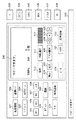
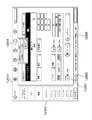
図12は、拡張コントローラ103の操作部171に表示される画面の一例を示す図である。
FIG. 12 is a diagram illustrating an example of a screen displayed on the
操作部171の液晶ディスプレイ4203は、1024ドットx768ドットの解像度を持ち、画面中央付近がアプリケーション表示エリア12001であり、コピー機能用のウインドウ画面をはじめとして、複数のウインドウ画面が同じサイズで重なっている。ユーザから見た場合は、最前面のウインドウがひとつだけアクティブであるように見える。画面左端のアイコンボックス12002には、各ウインドウに一対一で対応したアプリケーション名とアイコンとが表示されており、利用可能なアプリケーションが多数存在して画面内に収まりきらない場合は、スクロールして表示を行うようになっている。アイコンボックス12002上の任意のアイコンを押すことで、アプリケーション表示エリア12001上に対応するウインドウが表示される。
The
画面上部のファンクションキーパネル12003は、拡張コントローラ103の操作部171において、ユーザがアプリケーション毎に異なる入力操作を行なうことなく、同一の機能を呼び出すことを可能にする機能ボタンの集合である。ファンクションキーパネル12003は、図10に示すアプリケーションの1つであるファンクションキーパネル10001に対応し、「ユーザモード」、「キーボード」、「操作パネル」、「ガイド」、「アバウト」および「リセット」の機能ボタンを表示する。
A function
各機能ボタンを押すことで、アプリケーションガイド(「ガイド」機能ボタン)や、後述するスクリーンキーボード(「キーボード」機能ボタン)、操作部パネルエミュレータ(「操作パネル」機能ボタン)などの、ユーザがアプリケーションを意識しないで入力操作を行なうことができる機能を呼び出すことができ、さらに、複数の異なるアプリケーションに対して、「リセット」機能ボタンでリセットのキーコードを同時に送信することが可能である。図12に示す例では、ファンクションキーパネル12003において、「アバウト」機能ボタンを押したときの画面を示している。「アバウト」機能ボタンを押すと、2つの選択肢を持つメニュー12004が表示され、現在最前面で表示中のアプリケーションのバージョン情報を表示するのか、本拡張画像処理システム10の基本ソフトウェアのバージョン情報を表示するのかを選択することができる。
By pressing each function button, the application guide ("Guide" function button), the screen keyboard ("Keyboard" function button) described later, and the operation panel emulator ("Operation Panel" function button) can be used by the user. A function that allows an input operation to be performed without being conscious can be called, and a reset key code can be simultaneously transmitted to a plurality of different applications using a “reset” function button. The example shown in FIG. 12 shows a screen when the “about” function button is pressed on the function
画面下部のステータスティッカ12005は、アプリケーションが発生するメッセージを表示するエリアであり、複数のアプリケーションから送られるメッセージのうち優先度の最も高いメッセージを表示する。メッセージはスクロール表示可能であるため、長いメッセージでも全てを確認することが可能である。ソフトタリー12006は、画像処理装置100のタリーランプをエミュレートしたものであり、拡張コントローラ103の状態(例えば正常、警告、エラーなど)を赤および青の点滅、点灯、消灯によって通知する。
A
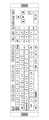
図13は、図12に示すファンクションキーパネル12003における「キーボード」機能ボタンを押したときに、拡張コントローラ103の操作部171に表示されるスクリーンキーボードを示す図である。
FIG. 13 is a diagram showing a screen keyboard displayed on the
スクリーンキーボードは、拡張コントローラ103の操作部171のLCDタッチパネル4202に対して文字入力を可能にするものである。キーボード設定に応じて、キーボードのレイアウトを変更することが可能であり、101キーボードや106キーボードを表示できる。
The screen keyboard enables character input to the
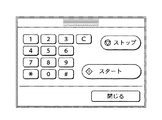
図14は、図12に示すファンクションキーパネル12003における「操作パネル」機能ボタンを押したときに、拡張コントローラ103の操作部171に表示される画像処理装置100の操作部パネルエミュレータを示す図である。
FIG. 14 is a diagram showing an operation unit panel emulator of the
操作部パネルエミュレータは、画像処理装置100のハード操作部のテンキーやスタートキー、ストップキーと同様の入力を可能にするものである。
The operation unit panel emulator enables input similar to the numeric keypad, start key, and stop key of the hardware operation unit of the
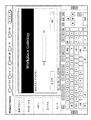
図15は、拡張コントローラ103に搭載されるユーザランドアプリケーション9005の1つである暗号化セキュアプリント9014が実行されたときに拡張コントローラ103の操作部171に表示される画面である。
FIG. 15 is a screen displayed on the
暗号化セキュアプリント9014は、出力装置において排紙された印刷原稿が第三者の目に触れないようにする機密保持、およびネットワーク上を流れる印刷データの機密保持を目的としたアプリケーションである。ユーザがクライアントPC11において印刷ジョブを発行する際に、図15に示す画面を利用して、任意の暗証番号やパスワードを入力し、またICカードを利用して、印刷データを暗号化し拡張コントローラ103へ送信する。暗号化された印刷データは、拡張コントローラ103上において暗号化された状態でスプールされる。その後、ユーザは拡張コントローラ103において、暗証番号やパスワードを入力したりICカードを挿入したりすることにより、暗号化された印刷データを復号化し、所望の印刷原稿の機密性を保持して入手することが可能となる。
The encrypted
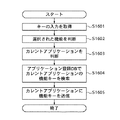
図16は、拡張コントローラ103で実行されるキー変換処理の手順を示すフローチャートである。
FIG. 16 is a flowchart showing the procedure of key conversion processing executed by the
なお、図12に示すファンクションキーパネル12003における「ユーザモード」機能ボタンによって選択できる機能は、選択中のカレントアプリケーションに対して環境設定ダイアログを開くことを指示するか、または、システムアプリケーションの1つであるシステム環境設定10009を起動することである。また、ファンクションキーパネル12003における「ガイド」機能ボタンによって選択できる機能は、選択中のカレントアプリケーションに対して、システムアプリケーションの1つであるヘルプを用いて、カレントアプリケーションの動作状況に応じたオンラインマニュアルを表示することを指示することである。すなわち、「ユーザモード」機能ボタンによって選択できる機能は、各アプリケーションの設定に対応し、「ガイド」機能ボタンによって選択できる機能は、各アプリケーションのヘルプ機能に対応する。
The function that can be selected by the “user mode” function button in the function
各アプリケーションでそれぞれ実現できる機能と、該機能を利用するときに各アプリケーションでそれぞれ行われるべき入力操作との対応関係を示す情報を、アプリケーションごとにアプリケーション登録データベースに予め保持するようにする。 Information indicating a correspondence relationship between a function that can be realized by each application and an input operation to be performed by each application when the function is used is stored in advance in the application registration database for each application.
図16におけるステップS1601では、拡張コントローラ103は、ユーザが入力したキー操作イベントをアプリケーションフレームワークでフックして取得する。
In step S1601 in FIG. 16, the
ステップS1602では、ステップS1601で取得されたキー操作イベントに対応するアプリケーションフレームワークの機能を認識する。また、ステップS1603で、キー操作イベントが入力された時のカレントアプリケーション(キー操作イベントが入力された時点でアクティブとなっているアプリケーション)をウィンドウマネージャ11020から取得する。
In step S1602, the function of the application framework corresponding to the key operation event acquired in step S1601 is recognized. In step S1603, the current application (the application that is active when the key operation event is input) when the key operation event is input is acquired from the
次にステップS1604で、ステップS1602で認識された機能に対応するカレントアプリケーションのキー操作を呼び出すために、ステップS1603で取得されたカレントアプリケーションに対応するアプリケーション登録データベースに保持された対応関係情報から、ステップS1602で認識された機能に対応する入力操作情報を読み出す。そしてステップS1605で、ステップS1604で読み出された入力操作情報に基づくキー操作イベントをカレントアプリケーションに送信し、該カレントアプリケーションに該キー操作イベントに応じた機能を実現させる。 Next, in step S1604, in order to call the key operation of the current application corresponding to the function recognized in step S1602, from the correspondence information stored in the application registration database corresponding to the current application acquired in step S1603, step S1604 is performed. Input operation information corresponding to the function recognized in S1602 is read. In step S1605, a key operation event based on the input operation information read in step S1604 is transmitted to the current application, and the function corresponding to the key operation event is realized in the current application.
以上のようにして、複数のアプリケーションが並行して動作しているときに、各アプリケーションによって実現される同一の機能を、ユーザが同一のキー操作で呼び出すことが可能となり、ユーザがアプリケーション毎に異なるキー操作を行なうことを意識する必要性がなくなり、操作の混乱を防ぐことができる。また、既存のアプリケーションにおいても、新しいアプリケーションフレームワークで規定された方法で作成し直す必要がないため、修正する手間が削減され、コストの発生を抑えることができる。 As described above, when a plurality of applications are operating in parallel, the user can call the same function realized by each application with the same key operation, and the user is different for each application. There is no need to be aware of key operations, and operation confusion can be prevented. In addition, even existing applications do not need to be recreated by a method defined by the new application framework, so that the time and effort required for correction can be reduced and the generation of costs can be suppressed.
〔他の実施の形態〕
なお、本発明の目的は、前述した実施の形態の機能を実現するソフトウェアのプログラムコードを記録した記憶媒体を、システムまたは装置に供給し、そのシステムまたは装置のコンピュータ(またはCPU、MPU等)が記憶媒体に格納されたプログラムコードを読み出して実行することによっても達成される。
[Other Embodiments]
An object of the present invention is to supply a storage medium storing software program codes for realizing the functions of the above-described embodiments to a system or apparatus, and a computer (or CPU, MPU, etc.) of the system or apparatus. It is also achieved by reading and executing the program code stored in the storage medium.
この場合、記憶媒体から読み出されたプログラムコード自体が本発明の新規な機能を実現することになり、そのプログラムコードを記憶した記憶媒体およびプログラムは本発明を構成することになる。 In this case, the program code itself read from the storage medium realizes the novel function of the present invention, and the storage medium and program storing the program code constitute the present invention.
また、プログラムコードを供給するための記憶媒体としては、例えば、フレキシブルディスク、ハードディスク、光ディスク、光磁気ディスク、CD−ROM、CD−R、CD−RW、DVD−ROM、DVD−RAM、DVD−RW、DVD+RW、磁気テープ、不揮発性のメモリカード、ROM等を用いることができる。 The storage medium for supplying the program code is, for example, a flexible disk, hard disk, optical disk, magneto-optical disk, CD-ROM, CD-R, CD-RW, DVD-ROM, DVD-RAM, DVD-RW. DVD + RW, magnetic tape, nonvolatile memory card, ROM, etc. can be used.
また、コンピュータが読み出したプログラムコードを実行することにより、前述した実施の形態の機能が実現されるだけでなく、そのプログラムコードの指示に基づき、コンピュータ上で稼動しているOS(オペレーティングシステム)等が実際の処理の一部または全部を行い、その処理によって前述した実施の形態の機能が実現される場合も含まれる。 Further, by executing the program code read by the computer, not only the functions of the above-described embodiments are realized, but also an OS (operating system) or the like running on the computer based on the instruction of the program code. Includes a case where part or all of the actual processing is performed and the functions of the above-described embodiments are realized by the processing.
更に、記憶媒体から読み出されたプログラムコードが、コンピュータに挿入された機能拡張ボードやコンピュータに接続された機能拡張ユニットに備わるメモリに書き込まれた後、そのプログラムコードの指示に基づき、その機能拡張ボードや機能拡張ユニットに備わるCPU等が実際の処理の一部または全部を行い、その処理によって前述した実施の形態の機能が実現される場合も含まれる。 Further, after the program code read from the storage medium is written in a memory provided in a function expansion board inserted into the computer or a function expansion unit connected to the computer, the function expansion is performed based on the instruction of the program code. This includes the case where the CPU or the like provided in the board or the function expansion unit performs part or all of the actual processing and the functions of the above-described embodiments are realized by the processing.
10:拡張画像処理システム
11:クライアントパーソナルコンピュータ(PC)
12:サーバコンピュータ
13:プリンタ
15:ルータ
16:広域ネットワーク
100:画像処理装置
103:拡張コントローラ(情報処理装置)
110:制御装置
170:制御装置
171:操作部
172:周辺機器
200:リーダ部
201:ローカルインタフェース
210:スキャナユニット
250:原稿給紙ユニット
300:プリンタ部
310:マーキングユニット
360:給紙ユニット
370:排紙ユニット
400:LAN
10: Extended image processing system 11: Client personal computer (PC)
12: Server computer 13: Printer 15: Router 16: Wide area network 100: Image processing device 103: Expansion controller (information processing device)
110: Control device 170: Control device 171: Operation unit 172: Peripheral device 200: Reader unit 201: Local interface 210: Scanner unit 250: Document feeding unit 300: Printer unit 310: Marking unit 360: Paper feeding unit 370: Ejection Paper unit 400: LAN
Claims (4)
各アプリケーションソフトウェアでそれぞれ実現できる機能と、該機能を利用するときに各アプリケーションソフトウェアでそれぞれ行われるべき入力操作との対応関係を示す情報をアプリケーションソフトウェアごとに保持する対応関係保持手段と、
入力されたキー操作イベントを取得する取得手段と、
前記取得手段によって取得されたキー操作イベントに対応する前記所定の制御方式における機能を認識する第1の認識手段と、
前記取得手段によって取得されたキー操作イベントが入力された時点でアクティブになっていたアプリケーションソフトウェアを認識する第2の認識手段と、
前記第2の認識手段によって認識されたアプリケーションソフトウェアに対応する前記対応関係保持手段に保持された対応関係情報から、前記第1の認識手段によって認識された機能に対応する入力操作情報を読み出す読出手段と、
前記読出手段によって読み出された入力操作情報を前記第2の認識手段によって認識されたアプリケーションソフトウェアに送信し、該アプリケーションソフトウェアに該入力操作情報に応じた機能を実現させる送信実現手段と
を有することを特徴とする情報処理装置。 In an information processing apparatus that adopts a predetermined control method that allows the same function to be used in the same input operation among a plurality of application software, and that can execute a plurality of application software in parallel,
Correspondence relation holding means for holding information indicating correspondence relation between functions that can be realized by each application software and input operations to be performed by each application software when using the functions, for each application software;
An acquisition means for acquiring an input key operation event;
First recognition means for recognizing a function in the predetermined control method corresponding to the key operation event acquired by the acquisition means;
Second recognition means for recognizing application software that is active when the key operation event obtained by the obtaining means is input;
Reading means for reading input operation information corresponding to the function recognized by the first recognition means from the correspondence information held in the correspondence relation holding means corresponding to the application software recognized by the second recognition means When,
Transmission operation means for transmitting the input operation information read by the reading means to the application software recognized by the second recognition means, and causing the application software to realize a function corresponding to the input operation information. An information processing apparatus characterized by the above.
各アプリケーションソフトウェアでそれぞれ実現できる機能と、該機能を利用するときに各アプリケーションソフトウェアでそれぞれ行われるべき入力操作との対応関係を示す情報を、アプリケーションソフトウェアごとに記憶装置に格納する対応関係格納ステップと、
入力されたキー操作イベントを取得する取得ステップと、
前記取得ステップによって取得されたキー操作イベントに対応する前記所定の制御方式における機能を認識する第1の認識ステップと、
前記取得ステップによって取得されたキー操作イベントが入力された時点でアクティブになっていたアプリケーションソフトウェアを認識する第2の認識ステップと、
前記第2の認識ステップによって認識されたアプリケーションソフトウェアに対応する前記記憶装置に格納された対応関係情報から、前記第1の認識ステップによって認識された機能に対応する入力操作情報を読み出す読出ステップと、
前記読出ステップによって読み出された入力操作情報を前記第2の認識ステップによって認識されたアプリケーションソフトウェアに送信し、該アプリケーションソフトウェアに該入力操作情報に応じた機能を実現させる送信実現ステップと
を有することを特徴とする入力操作簡略化方法。 It is applied to an information processing device that adopts a predetermined control method that enables the same function to be used by the same input operation among multiple application software, and that can execute multiple application software in parallel. In the input operation simplification method
A correspondence storage step of storing information indicating a correspondence relationship between a function that can be realized by each application software and an input operation to be performed by each application software when the function is used, in a storage device for each application software; ,
An acquisition step for acquiring an input key operation event;
A first recognition step for recognizing a function in the predetermined control method corresponding to the key operation event acquired by the acquisition step;
A second recognition step of recognizing application software that is active at the time when the key operation event acquired by the acquisition step is input;
A reading step of reading input operation information corresponding to the function recognized in the first recognition step from the correspondence information stored in the storage device corresponding to the application software recognized in the second recognition step;
Transmitting the input operation information read in the reading step to the application software recognized in the second recognition step, and causing the application software to realize a function corresponding to the input operation information. The input operation simplification method characterized by this.
各アプリケーションソフトウェアでそれぞれ実現できる機能と、該機能を利用するときに各アプリケーションソフトウェアでそれぞれ行われるべき入力操作との対応関係を示す情報を、アプリケーションソフトウェアごとに記憶装置に格納する対応関係格納ステップと、
入力されたキー操作イベントを取得する取得ステップと、
前記取得ステップによって取得されたキー操作イベントに対応する前記所定の制御方式における機能を認識する第1の認識ステップと、
前記取得ステップによって取得されたキー操作イベントが入力された時点でアクティブになっていたアプリケーションソフトウェアを認識する第2の認識ステップと、
前記第2の認識ステップによって認識されたアプリケーションソフトウェアに対応する前記記憶装置に格納された対応関係情報から、前記第1の認識ステップによって認識された機能に対応する入力操作情報を読み出す読出ステップと、
前記読出ステップによって読み出された入力操作情報を前記第2の認識ステップによって認識されたアプリケーションソフトウェアに送信し、該アプリケーションソフトウェアに該入力操作情報に応じた機能を実現させる送信実現ステップと
を有することを特徴とするプログラム。 It is applied to an information processing device that adopts a predetermined control method that enables the same function to be used by the same input operation among multiple application software, and that can execute multiple application software in parallel. In a program for causing a computer to execute the input operation simplification method,
A correspondence storage step of storing information indicating a correspondence relationship between a function that can be realized by each application software and an input operation to be performed by each application software when the function is used, in a storage device for each application software; ,
An acquisition step for acquiring an input key operation event;
A first recognition step for recognizing a function in the predetermined control method corresponding to the key operation event acquired by the acquisition step;
A second recognition step of recognizing application software that is active when the key operation event acquired in the acquisition step is input;
A reading step of reading input operation information corresponding to the function recognized in the first recognition step from the correspondence information stored in the storage device corresponding to the application software recognized in the second recognition step;
Transmitting the input operation information read in the reading step to the application software recognized in the second recognition step, and causing the application software to realize a function corresponding to the input operation information. A program characterized by
Priority Applications (1)
| Application Number | Priority Date | Filing Date | Title |
|---|---|---|---|
| JP2004110078A JP2005293407A (en) | 2004-04-02 | 2004-04-02 | Information processing apparatus, input operation simplification method, and program |
Applications Claiming Priority (1)
| Application Number | Priority Date | Filing Date | Title |
|---|---|---|---|
| JP2004110078A JP2005293407A (en) | 2004-04-02 | 2004-04-02 | Information processing apparatus, input operation simplification method, and program |
Publications (1)
| Publication Number | Publication Date |
|---|---|
| JP2005293407A true JP2005293407A (en) | 2005-10-20 |
Family
ID=35326241
Family Applications (1)
| Application Number | Title | Priority Date | Filing Date |
|---|---|---|---|
| JP2004110078A Withdrawn JP2005293407A (en) | 2004-04-02 | 2004-04-02 | Information processing apparatus, input operation simplification method, and program |
Country Status (1)
| Country | Link |
|---|---|
| JP (1) | JP2005293407A (en) |
Cited By (17)
| Publication number | Priority date | Publication date | Assignee | Title |
|---|---|---|---|---|
| JP2008236615A (en) * | 2007-03-23 | 2008-10-02 | Kyocera Mita Corp | Image forming apparatus and memory resource securing method |
| JP2008236612A (en) * | 2007-03-23 | 2008-10-02 | Kyocera Mita Corp | Image forming apparatus, image forming method, and application program |
| JP2008236610A (en) * | 2007-03-23 | 2008-10-02 | Kyocera Mita Corp | Image forming apparatus, image forming method, and application program |
| JP2008236613A (en) * | 2007-03-23 | 2008-10-02 | Kyocera Mita Corp | Image formation apparatus and image formation method, and application program |
| JP2008236609A (en) * | 2007-03-23 | 2008-10-02 | Kyocera Mita Corp | Apparatus and method for image formation and application program |
| JP2008236611A (en) * | 2007-03-23 | 2008-10-02 | Kyocera Mita Corp | Apparatus and method for image formation and application program |
| JP2008236616A (en) * | 2007-03-23 | 2008-10-02 | Kyocera Mita Corp | Image forming apparatus, image forming method and application program |
| JP2008236614A (en) * | 2007-03-23 | 2008-10-02 | Kyocera Mita Corp | Image forming apparatus, image forming method, and application program |
| WO2008123123A1 (en) * | 2007-03-23 | 2008-10-16 | Kyocera Mita Corporation | Operation control program, operation control method, image formation device, and memory resource allocation method |
| JP2008271520A (en) * | 2007-03-23 | 2008-11-06 | Kyocera Mita Corp | Operation control program, operation control method, and image formation device |
| JP2010191596A (en) * | 2009-02-17 | 2010-09-02 | Ricoh Co Ltd | Operation-definition file creating apparatus, system, image forming apparatus, operation-definition file creating method and program |
| JP2011520169A (en) * | 2008-04-04 | 2011-07-14 | テレフオンアクチーボラゲット エル エム エリクソン(パブル) | Method and device for accessing a directory |
| JP2012177956A (en) * | 2011-02-25 | 2012-09-13 | Hiromichi Okabe | Emulation method for multilingual virtual keyboard and multilingual virtual keyboard emulated by the same |
| US8793592B2 (en) | 2010-05-10 | 2014-07-29 | Canon Kabushiki Kaisha | Information processing apparatus, method for controlling information processing apparatus, and storage medium |
| US20150002874A1 (en) * | 2013-06-28 | 2015-01-01 | Kyocera Document Solutions Inc. | Application execution time reducing method |
| JP2017033235A (en) * | 2015-07-31 | 2017-02-09 | キヤノン株式会社 | Information processor, method for controlling information processor, and program |
| JP2025100906A (en) * | 2021-09-17 | 2025-07-03 | シャープ株式会社 | Image processing device and method for controlling the image processing device |
-
2004
- 2004-04-02 JP JP2004110078A patent/JP2005293407A/en not_active Withdrawn
Cited By (22)
| Publication number | Priority date | Publication date | Assignee | Title |
|---|---|---|---|---|
| JP2008236616A (en) * | 2007-03-23 | 2008-10-02 | Kyocera Mita Corp | Image forming apparatus, image forming method and application program |
| JP2008236612A (en) * | 2007-03-23 | 2008-10-02 | Kyocera Mita Corp | Image forming apparatus, image forming method, and application program |
| JP2008236610A (en) * | 2007-03-23 | 2008-10-02 | Kyocera Mita Corp | Image forming apparatus, image forming method, and application program |
| JP2008236613A (en) * | 2007-03-23 | 2008-10-02 | Kyocera Mita Corp | Image formation apparatus and image formation method, and application program |
| JP2008236609A (en) * | 2007-03-23 | 2008-10-02 | Kyocera Mita Corp | Apparatus and method for image formation and application program |
| JP2008236611A (en) * | 2007-03-23 | 2008-10-02 | Kyocera Mita Corp | Apparatus and method for image formation and application program |
| US8314962B2 (en) | 2007-03-23 | 2012-11-20 | Kyocera Mita Corporation | Image forming apparatus that discriminates an operation of a service requested and constructs a job corresponding to the operation by selecting a job scenario prepared in advance |
| JP2008236614A (en) * | 2007-03-23 | 2008-10-02 | Kyocera Mita Corp | Image forming apparatus, image forming method, and application program |
| WO2008123123A1 (en) * | 2007-03-23 | 2008-10-16 | Kyocera Mita Corporation | Operation control program, operation control method, image formation device, and memory resource allocation method |
| JP2008271520A (en) * | 2007-03-23 | 2008-11-06 | Kyocera Mita Corp | Operation control program, operation control method, and image formation device |
| JP2008236615A (en) * | 2007-03-23 | 2008-10-02 | Kyocera Mita Corp | Image forming apparatus and memory resource securing method |
| JP2011520169A (en) * | 2008-04-04 | 2011-07-14 | テレフオンアクチーボラゲット エル エム エリクソン(パブル) | Method and device for accessing a directory |
| US8510410B2 (en) | 2008-04-04 | 2013-08-13 | Telefonaktiebolaget Lm Ericsson (Publ) | Method and device for access to a directory |
| JP2010191596A (en) * | 2009-02-17 | 2010-09-02 | Ricoh Co Ltd | Operation-definition file creating apparatus, system, image forming apparatus, operation-definition file creating method and program |
| US8793592B2 (en) | 2010-05-10 | 2014-07-29 | Canon Kabushiki Kaisha | Information processing apparatus, method for controlling information processing apparatus, and storage medium |
| US9483178B2 (en) | 2010-05-10 | 2016-11-01 | Canon Kabushiki Kaisha | Information processing apparatus, method for controlling information processing apparatus, and storage medium |
| JP2012177956A (en) * | 2011-02-25 | 2012-09-13 | Hiromichi Okabe | Emulation method for multilingual virtual keyboard and multilingual virtual keyboard emulated by the same |
| US20150002874A1 (en) * | 2013-06-28 | 2015-01-01 | Kyocera Document Solutions Inc. | Application execution time reducing method |
| US9131094B2 (en) | 2013-06-28 | 2015-09-08 | Kyocera Document Solutions Inc. | Application execution time reducing method |
| JP2017033235A (en) * | 2015-07-31 | 2017-02-09 | キヤノン株式会社 | Information processor, method for controlling information processor, and program |
| US10701225B2 (en) | 2015-07-31 | 2020-06-30 | Canon Kabushiki Kaisha | User interface definition for information processing apparatus, control method, and storage medium |
| JP2025100906A (en) * | 2021-09-17 | 2025-07-03 | シャープ株式会社 | Image processing device and method for controlling the image processing device |
Similar Documents
| Publication | Publication Date | Title |
|---|---|---|
| US8184311B2 (en) | Image processing system | |
| US9489348B2 (en) | Screen generating method, image forming apparatus, and computer program product | |
| US20070038946A1 (en) | Systems, methods and devices for controlling a multifunctional product using a scriptable user interface | |
| US9118789B2 (en) | Application management system for restricting application concurrent execution depending on an image processing device that operates the application | |
| US11467789B2 (en) | Image processing apparatus and method for digital signage | |
| CN100384202C (en) | Image processing system, image processing device and server | |
| JP2005309933A (en) | Extended control apparatus, image processing system, application icon display method, program, and storage medium | |
| JP2005050061A (en) | Push type installation system, information processing apparatus, push type installation method and program | |
| JP4344203B2 (en) | Image forming apparatus and information display method | |
| JP5482407B2 (en) | Information processing apparatus, image processing apparatus, image processing system, screen customization method, screen customization program, and recording medium recording the program | |
| JP2005346179A (en) | Image processing apparatus, display control method, computer-readable storage medium storing program, and program | |
| US20110258349A1 (en) | Information processing apparatus, peripheral device control method, and storage medium | |
| JP4144614B2 (en) | Print management method, program, and print management apparatus | |
| JP4978263B2 (en) | Image forming apparatus, image forming method, and application program | |
| JP2007052641A (en) | Print management method, program and print management apparatus | |
| US9606761B2 (en) | Information processing apparatus for controlling an output process and method for the same | |
| JP2006107301A (en) | Extended control unit | |
| CN101320317A (en) | Data processing device | |
| JP2007122485A (en) | Data backup / restore means for an extended image processing system comprising an image processing device and an extended control device | |
| JP4394740B2 (en) | Image forming apparatus, method, and program | |
| JP5511483B2 (en) | Information processing apparatus, control method, and program | |
| JP2005301890A (en) | Extended control apparatus, image forming system, application activation switching method, image forming system control method, program, and recording medium | |
| JP2005313413A (en) | Image processing system, image processing apparatus, and program | |
| JP4615498B2 (en) | Image processing apparatus, image processing apparatus control system, image processing apparatus control method, program, and computer-readable recording medium | |
| JP2005297487A (en) | Image processing system, system activation control method, storage medium storing computer-readable program, and program |
Legal Events
| Date | Code | Title | Description |
|---|---|---|---|
| RD03 | Notification of appointment of power of attorney |
Free format text: JAPANESE INTERMEDIATE CODE: A7423 Effective date: 20060419 |
|
| A300 | Application deemed to be withdrawn because no request for examination was validly filed |
Free format text: JAPANESE INTERMEDIATE CODE: A300 Effective date: 20070605 |