EP4583030A2 - Verkaufsstellensystem mit mehreren vorrichtungen und mehreren kundenseitigen vorrichtungen - Google Patents
Verkaufsstellensystem mit mehreren vorrichtungen und mehreren kundenseitigen vorrichtungen Download PDFInfo
- Publication number
- EP4583030A2 EP4583030A2 EP25162208.0A EP25162208A EP4583030A2 EP 4583030 A2 EP4583030 A2 EP 4583030A2 EP 25162208 A EP25162208 A EP 25162208A EP 4583030 A2 EP4583030 A2 EP 4583030A2
- Authority
- EP
- European Patent Office
- Prior art keywords
- customer
- merchant
- facing device
- facing
- functionality
- Prior art date
- Legal status (The legal status is an assumption and is not a legal conclusion. Google has not performed a legal analysis and makes no representation as to the accuracy of the status listed.)
- Pending
Links
Images




















Classifications
-
- G—PHYSICS
- G06—COMPUTING OR CALCULATING; COUNTING
- G06Q—INFORMATION AND COMMUNICATION TECHNOLOGY [ICT] SPECIALLY ADAPTED FOR ADMINISTRATIVE, COMMERCIAL, FINANCIAL, MANAGERIAL OR SUPERVISORY PURPOSES; SYSTEMS OR METHODS SPECIALLY ADAPTED FOR ADMINISTRATIVE, COMMERCIAL, FINANCIAL, MANAGERIAL OR SUPERVISORY PURPOSES, NOT OTHERWISE PROVIDED FOR
- G06Q20/00—Payment architectures, schemes or protocols
- G06Q20/38—Payment protocols; Details thereof
- G06Q20/40—Authorisation, e.g. identification of payer or payee, verification of customer or shop credentials; Review and approval of payers, e.g. check credit lines or negative lists
- G06Q20/405—Establishing or using transaction specific rules
-
- G—PHYSICS
- G06—COMPUTING OR CALCULATING; COUNTING
- G06Q—INFORMATION AND COMMUNICATION TECHNOLOGY [ICT] SPECIALLY ADAPTED FOR ADMINISTRATIVE, COMMERCIAL, FINANCIAL, MANAGERIAL OR SUPERVISORY PURPOSES; SYSTEMS OR METHODS SPECIALLY ADAPTED FOR ADMINISTRATIVE, COMMERCIAL, FINANCIAL, MANAGERIAL OR SUPERVISORY PURPOSES, NOT OTHERWISE PROVIDED FOR
- G06Q20/00—Payment architectures, schemes or protocols
- G06Q20/08—Payment architectures
- G06Q20/10—Payment architectures specially adapted for electronic funds transfer [EFT] systems; specially adapted for home banking systems
-
- G—PHYSICS
- G06—COMPUTING OR CALCULATING; COUNTING
- G06Q—INFORMATION AND COMMUNICATION TECHNOLOGY [ICT] SPECIALLY ADAPTED FOR ADMINISTRATIVE, COMMERCIAL, FINANCIAL, MANAGERIAL OR SUPERVISORY PURPOSES; SYSTEMS OR METHODS SPECIALLY ADAPTED FOR ADMINISTRATIVE, COMMERCIAL, FINANCIAL, MANAGERIAL OR SUPERVISORY PURPOSES, NOT OTHERWISE PROVIDED FOR
- G06Q20/00—Payment architectures, schemes or protocols
- G06Q20/08—Payment architectures
- G06Q20/10—Payment architectures specially adapted for electronic funds transfer [EFT] systems; specially adapted for home banking systems
- G06Q20/102—Bill distribution or payments
-
- G—PHYSICS
- G06—COMPUTING OR CALCULATING; COUNTING
- G06Q—INFORMATION AND COMMUNICATION TECHNOLOGY [ICT] SPECIALLY ADAPTED FOR ADMINISTRATIVE, COMMERCIAL, FINANCIAL, MANAGERIAL OR SUPERVISORY PURPOSES; SYSTEMS OR METHODS SPECIALLY ADAPTED FOR ADMINISTRATIVE, COMMERCIAL, FINANCIAL, MANAGERIAL OR SUPERVISORY PURPOSES, NOT OTHERWISE PROVIDED FOR
- G06Q20/00—Payment architectures, schemes or protocols
- G06Q20/08—Payment architectures
- G06Q20/20—Point-of-sale [POS] network systems
-
- G—PHYSICS
- G06—COMPUTING OR CALCULATING; COUNTING
- G06Q—INFORMATION AND COMMUNICATION TECHNOLOGY [ICT] SPECIALLY ADAPTED FOR ADMINISTRATIVE, COMMERCIAL, FINANCIAL, MANAGERIAL OR SUPERVISORY PURPOSES; SYSTEMS OR METHODS SPECIALLY ADAPTED FOR ADMINISTRATIVE, COMMERCIAL, FINANCIAL, MANAGERIAL OR SUPERVISORY PURPOSES, NOT OTHERWISE PROVIDED FOR
- G06Q20/00—Payment architectures, schemes or protocols
- G06Q20/08—Payment architectures
- G06Q20/20—Point-of-sale [POS] network systems
- G06Q20/202—Interconnection or interaction of plural electronic cash registers [ECR] or to host computer, e.g. network details, transfer of information from host to ECR or from ECR to ECR
-
- G—PHYSICS
- G06—COMPUTING OR CALCULATING; COUNTING
- G06Q—INFORMATION AND COMMUNICATION TECHNOLOGY [ICT] SPECIALLY ADAPTED FOR ADMINISTRATIVE, COMMERCIAL, FINANCIAL, MANAGERIAL OR SUPERVISORY PURPOSES; SYSTEMS OR METHODS SPECIALLY ADAPTED FOR ADMINISTRATIVE, COMMERCIAL, FINANCIAL, MANAGERIAL OR SUPERVISORY PURPOSES, NOT OTHERWISE PROVIDED FOR
- G06Q20/00—Payment architectures, schemes or protocols
- G06Q20/08—Payment architectures
- G06Q20/20—Point-of-sale [POS] network systems
- G06Q20/209—Specified transaction journal output feature, e.g. printed receipt or voice output
-
- G—PHYSICS
- G06—COMPUTING OR CALCULATING; COUNTING
- G06Q—INFORMATION AND COMMUNICATION TECHNOLOGY [ICT] SPECIALLY ADAPTED FOR ADMINISTRATIVE, COMMERCIAL, FINANCIAL, MANAGERIAL OR SUPERVISORY PURPOSES; SYSTEMS OR METHODS SPECIALLY ADAPTED FOR ADMINISTRATIVE, COMMERCIAL, FINANCIAL, MANAGERIAL OR SUPERVISORY PURPOSES, NOT OTHERWISE PROVIDED FOR
- G06Q20/00—Payment architectures, schemes or protocols
- G06Q20/30—Payment architectures, schemes or protocols characterised by the use of specific devices or networks
- G06Q20/34—Payment architectures, schemes or protocols characterised by the use of specific devices or networks using cards, e.g. integrated circuit [IC] cards or magnetic cards
-
- G—PHYSICS
- G06—COMPUTING OR CALCULATING; COUNTING
- G06Q—INFORMATION AND COMMUNICATION TECHNOLOGY [ICT] SPECIALLY ADAPTED FOR ADMINISTRATIVE, COMMERCIAL, FINANCIAL, MANAGERIAL OR SUPERVISORY PURPOSES; SYSTEMS OR METHODS SPECIALLY ADAPTED FOR ADMINISTRATIVE, COMMERCIAL, FINANCIAL, MANAGERIAL OR SUPERVISORY PURPOSES, NOT OTHERWISE PROVIDED FOR
- G06Q20/00—Payment architectures, schemes or protocols
- G06Q20/30—Payment architectures, schemes or protocols characterised by the use of specific devices or networks
- G06Q20/34—Payment architectures, schemes or protocols characterised by the use of specific devices or networks using cards, e.g. integrated circuit [IC] cards or magnetic cards
- G06Q20/356—Aspects of software for card payments
- G06Q20/3567—Software being in the reader
-
- G—PHYSICS
- G07—CHECKING-DEVICES
- G07G—REGISTERING THE RECEIPT OF CASH, VALUABLES, OR TOKENS
- G07G1/00—Cash registers
- G07G1/0018—Constructional details, e.g. of drawer, printing means, input means
-
- G—PHYSICS
- G07—CHECKING-DEVICES
- G07G—REGISTERING THE RECEIPT OF CASH, VALUABLES, OR TOKENS
- G07G1/00—Cash registers
- G07G1/0036—Checkout procedures
-
- G—PHYSICS
- G07—CHECKING-DEVICES
- G07G—REGISTERING THE RECEIPT OF CASH, VALUABLES, OR TOKENS
- G07G1/00—Cash registers
- G07G1/01—Details for indicating
Definitions
- a customer can conduct a transaction with a merchant at a point-of-sale (POS) system using cash, a payment card, or other payment instrument.
- POS point-of-sale
- Many POS systems provide a merchant display, or other interface, for a merchant and a customer display or other interface for a customer.
- the customer display is not visible to the merchant and the customers must guide themselves through the transaction utilizing the customer display or customer interface.
- a merchant can work through a single display or other interface and must rotate, flip, or otherwise manipulate the display (e.g., via a rotatable display) to enable a customer to participate in the transaction.
- Techniques described herein are directed to a multi-device point-of-sale (POS) system and uses of the multi-device POS system in merchant environments.
- POS point-of-sale
- Customers can interact with merchants to conduct various transactions. For example, a customer can conduct a transaction with a merchant via a POS system using cash, a payment card, or other payment instrument. Many transactions require that the customer sign a physical receipt, electronically approve a transaction (e.g., by pressing an approve button on a user interface), electronically sign for the transaction (e.g., with a stylus or finger on an electronic signature capture device with a touch sensitive pad), enter an authorizing personal identification number (PIN), etc.
- Techniques described herein are directed to efficiently facilitating such transactions via the multi-device POS system.
- the multi-device POS system described herein offers a complete POS solution for merchants.
- the multi-device POS system described herein enables merchants to process more transactions more efficiently than with existing POS systems.
- a multi-device POS system that includes a merchant-facing device and a customer-facing device is described.
- the merchant-facing device can be used (e.g., by a merchant or an employee or other agent working for the merchant) to perform merchant functionalities.
- the customer-facing device can be used (e.g., by a customer) to perform customer functionalities.
- the multi-device POS system can enable a merchant-facing device to interact with multiple customer-facing devices and/or other merchant-facing devices.
- the flexible configurations enable efficient transaction processing via an enhanced customer experience.
- Merchant functionality can be associated with functionalities that are availed via the merchant application that can be executable by the at least one merchant-facing device (and/or in some examples, via the at least one customer-facing device).
- merchant functionality can enable a device to facilitate transactions between a merchant and a customer.
- the merchant functionality can enable a device to obtain payment data (e.g., from a customer-facing device) to settle a transaction and/or send payment data to payment processing service server(s) for payment processing.
- the merchant functionality can enable a device to generate and/or manage tickets, send and/or track invoices, manage inventory (e.g., edit inventory, customize products with photos, names, prices, etc., track inventory), send receipts via email, text, etc., apply discounts and issue refunds, access, search, and/or interact with real-time sales data and complete sales history, etc.
- the merchant functionality can be associated with a dashboard to enable an operator of a device to manage transactions, payments, and so forth, via the dashboard.
- such merchant functionalities can be presented via merchant user interfaces (Uls) that enable merchants, for example, to interact with merchant-facing devices to perform the merchant functionalities. Additional merchant functionalities are described below.
- Customer functionality can be associated with functionalities that are availed via a customer application executable by the customer-facing device (and/or in some examples, a merchant-facing device). For instance, customer functionality can enable a device to obtain payment data, and related information, and send the payment data, and related information, to a merchant-facing device. Additionally, the customer functionality can enable a device to present information to a customer via a UI.
- the customer functionality can enable a device to present, among other things, contents of a ticket (e.g., a cart, etc.), such as one or more items associated with a ticket, an amount of the ticket, and additional information (e.g., taxes, discounts (e.g., item-level or ticket-level), coupons, etc.) via a UI.
- a device can enable a device to present calls to action via the Ul.
- customer functionalities can be presented via Uls that enable customers, for example, to interact with customer-facing devices to perform the customer functionalities. Additional customer functionalities are described below.
- combinations of merchant functionalities and customer functionalities can be used to implement a payment flow associated with processing a transaction.
- a merchant or an employee or other agent acting on behalf of the merchant
- the customer can review the ticket via a UI presented by the multi-device POS system.
- the multi-device POS system can present a call to action to a customer, requesting the customer provide payment for a cost of the items associated with the ticket.
- the multi-device POS system can receive payment data that is associated with a payment instrument and can send the payment data to a payment processing service for processing the payment data.
- the payment processing service can send an authorization request to a card network, or other payment service, to determine whether the payment data is authorized for a cost of the transaction.
- the card network, or the other payment service can send an indication whether the payment data is authorized (e.g., approved) or not authorized (e.g., declined) to the payment processing service.
- the payment processing service can forward the indication to the multi-device POS system.
- the transaction can be settled.
- the multi-device POS system can be used to request feedback, gratuity, loyalty information, etc.
- the merchant-facing device can be used to perform one or more of the steps of the payment flow described above. Additionally, the customer-facing device can be used to perform one or more steps of the payment flow described above. As a result, the multi-device POS system can enable merchants and customers to interact more efficiently, and in some examples, more securely, while a transaction is processed.
- the multi-device POS system enables merchants to couple one or more merchant-facing devices to one or more customer-facing devices. That is, the multi-device POS system enables merchants to arrange various components (e.g., the merchant-facing device(s) and/or the customer-facing device(s)) in flexible configurations. Such flexible configurations enable merchants to process multiple transactions in parallel (or substantially in parallel) (e.g., via multiple customer-facing devices and/or multiple merchant-facing devices) and/or to process one or more steps of a transaction serially via multiple devices (e.g., via multiple merchant-facing devices or multiple customer-facing devices).
- various components e.g., the merchant-facing device(s) and/or the customer-facing device(s)
- Such flexible configurations enable merchants to process multiple transactions in parallel (or substantially in parallel) (e.g., via multiple customer-facing devices and/or multiple merchant-facing devices) and/or to process one or more steps of a transaction serially via multiple devices (e.g., via multiple
- the multi-device POS system eliminates the need for a rotatable display that rotates from a merchant-facing position to a customer-facing position, which enables merchants to complete transactions faster and more efficiently. Furthermore, the flexible configurations available via the multi-device POS system described herein enable customers to easily provide payment information for completing transactions, often via personalized customer experiences, in a more secure manner.
- Techniques described herein are directed to temporarily provisioning merchant functionality and/or customer functionality on devices such that the devices can interact with the multi-device POS system. For instance, in some examples, techniques described herein are directed to temporarily provisioning functionality on a personal device of a customer or a merchant (e.g., an employee or other agent of a merchant). As a result, the personal device can interact with a merchant-facing device and/or a customer-facing device to participate in processing transactions, as described above. Additionally or alternatively, merchant functionality and/or customer functionality can be temporarily provisioned on merchant-facing devices and/or customer-facing devices, as described below, to enable the devices to interact with the multi-device POS system.
- components of the multi-device POS system can implement more than one functionality.
- a merchant-facing device of the multi-device POS system can implement merchant functionality and customer functionality.
- the customer functionality can be associated with an instance of a customer application installed on and/or executing on the merchant-facing device.
- the customer functionality can be provisioned via a model-view-controller (MVC) framework, as described below.
- MVC model-view-controller
- a customer-facing device of the multi-device POS system can implement customer functionality and merchant functionality.
- the merchant functionality can be associated with an instance of a merchant application installed on and/or executing on the customer-facing device.
- the merchant functionality can be provisioned via a MVC framework, as described below. That is, components of the multi-device POS system can toggle between different types of functionality depending on the state of the device (e.g., merchant state or customer state). Such flexibility can enable components of the multi-device POS system to offer additional or alternative functionality to merchants and/or customers to increase the efficiency in which transactions are processed and enhance the customer experience, in some examples, by providing more security.
- FIG. 1 illustrates an example environment 100, including a multi-device POS system, as described herein.
- the multi-device POS system 100 can include one or more merchant-facing devices 102A-102N and one or more customer-facing devices 104A-104N.
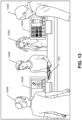
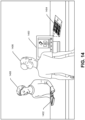
- FIG. 1 includes two merchant-facing devices 102A and 102N and two customer-facing devices 104A and 104N; however, in additional or alternative examples, the multi-device POS system 100 can include any number of merchant-facing devices and any number of customer-facing devices, as illustrated in FIGS. 2-6 and 12-15 .
- each merchant-facing device 102A-102N can have substantially identical hardware and firmware configurations. Furthermore, each of the merchant-facing devices 102A-102N can have a substantially similar software configuration out of the box, but software associated with individual merchant-facing devices 102A-102N can diverge based on use. Similarly, for ease of understanding, details associated with a single customer-facing device 104A are described below; however, each customer-facing device 104A-104N can have substantially identical hardware and firmware configurations. Furthermore, each of the customer-facing devices 104A-104N can have a substantially similar software configuration out of the box, but software associated with individual customer-facing devices 104A-104N can diverge based on use.
- the merchant-facing device 102A can include an instance of a merchant application 106, a display 108, communication interface(s) 110, and power source(s) 112.
- the merchant-facing device 102A can be coupled to at least one customer-facing device 104A. That is, as described below, the merchant-facing device 102A can store a device identifier associated with at least one customer-facing device 104A to enable the devices to transmit data (e.g., via a wired or wireless connection) between one another.
- the customer-facing device 104A can include an instance of a customer application 114, a display 116, communication interface(s) 118, power source(s) 120, and a payment component 122.
- the customer-facing device 104A can be docked on the merchant-facing device 102A. In other examples, the customer-facing device 104A can be undocked from the merchant-facing device 102A.
- the customer-facing device 104A can communicate with the merchant-facing device 102A via each device's communication interface(s) 118 and 110, respectively.
- the merchant-facing device 102A can include an instance of a merchant application 106 that is installed to configure the merchant-facing device 102A as a POS terminal capable of performing merchant functionality, in some examples via one or more interactions with the customer-facing device 104A.
- the merchant application 106 can enable a merchant to participate in transactions with one or more customers. That is, the merchant application 106 can configure the merchant-facing device 102A to handle a customer-facing device 104A.
- the merchant application 106 can determine whether a customer-facing device 104A is coupled to and/or connected to the merchant-facing device 102A, and can provide an indication of such via a UI. In at least one example, the merchant application 106 can indicate that a customer-facing device 104A is not coupled to and/or connected to the merchant-facing device 102A.
- the merchant application 106 can configure the merchant-facing device 102A to participate in transactions via one or more interactions with the customer-facing device 104A (or a customer application, or other provisioned customer functionality, executable by the merchant-facing device 102A and/or another device).
- the customer-facing device 104A can obtain payment data via contact (e.g., swipe, dip, etc.) and/or contactless (e.g., tap) interactions, as described below, and can transmit the payment data to the merchant application 106 for further processing.
- the customer-facing device 104A can obtain payment data via any other form of a payment instrument (e.g., unique identifier, biometric identifier, etc.).
- the merchant application 106 can configure the merchant-facing device 102A to interact with the customer-facing device 104A to obtain the payment data. For instance, the merchant application 106 can cause a selectable graphical element to be presented that triggers a payment request (e.g., generation of instructions for the presentation of a UI presenting such a request) to be output via a customer-facing device 104A coupled to the merchant-facing device 102A. Furthermore, the merchant application 106 can configure the merchant-facing device 102A to transmit received payment data to server(s) associated with a payment processing service (e.g., payment processing service server(s) 124) to process the transactions.
- a payment processing service e.g., payment processing service server(s) 124
- the merchant application 106 can track a status of a payment flow between the merchant-facing device 102A and a customer-facing device 104A coupled to the merchant-facing device 102A, and can output an indication of the status via a UI (e.g., via a status bar).
- a UI e.g., via a status bar
- the merchant application 106 can enable a merchant to record cash, gift cards, and other forms of tender. Furthermore, in at least one example, the merchant application 106 can enable the merchant-facing device 102A to perform card-not-present (CNP) transactions. For instance, in such an example, the merchant application 106 can cause a UI to be presented that enables a merchant, employee, or other agent working on behalf of the merchant to input payment data via the UI. A merchant can utilize a CNP transaction if the payment reader 122 is not working or a payment instrument is not being read, for example. Additionally or alternatively, a merchant can utilize a CNP transaction if it is taking an order over the phone, for example.
- CNP card-not-present
- the merchant application 106 enables the merchant-facing device 102A to operate in an offline mode.
- a merchant-facing device 102A can enter an offline mode when there is a loss of connectivity with the network(s) 128 (e.g., the merchant-facing device 102A cannot communicate with the payment processing service server(s) 124), for example.
- the merchant application 106 can enable the merchant-facing device 102A to store data locally until a network connection is restored, and to send the stored data to the payment processing service server(s) 124 upon establishing connectivity.
- the merchant application 106 can store payment data while the merchant-facing device 102A is operating in offline mode and can forward the payment data to the payment processing service server(s) 124 for processing payments upon connectivity being restored (e.g., the merchant-facing device 102A returns to online mode).
- the merchant application 106 can enable merchants to generate and/or manage tickets (e.g., including open ticket management and/or split ticket management), send and/or track invoices, manage inventory (e.g., edit inventory, customize items (goods or services) in the inventory with photos, names, prices, etc., track inventory, etc.), send receipts via email, text, etc., apply discounts and issue refunds, access, search, and/or interact with real-time sales data and complete sales history, etc. via the merchant-facing device 102A.
- a "ticket" is used to describe a representation of a transaction between a merchant and a customer wherein a customer purchases, or otherwise acquires, one or more items from the merchant.
- a ticket can be generated by a merchant-facing device 102 (e.g., an order) or a customer-facing device (e.g., a cart), as described below.
- a data structure can represent a ticket and a representation of the data structure can be presented via a UI of the merchant-facing device 102A and/or the customer-facing device 104A to facilitate the transaction.
- the merchant application 106 can be associated with a dashboard to enable the merchant to manage transactions, payments, and so forth, via the dashboard.
- a dashboard can be a GUI that provides an at-a-glance view of key information (e.g., associated with transactions, payments, etc.).
- the merchant application 106 can further enable the merchant-facing device 102A to manage employees, manage payroll, facilitate rewards programs, etc.
- the merchant application 106 can include functionality to control hardware settings in both the merchant-facing device 102A and the customer-facing device 104A. Additionally or alternatively, the merchant application 106 can include functionality to update and/or manage settings, applications, and/or firmware on the merchant-facing device 102A and/or the customer-facing device 104A (or other merchant-facing devices). In at least one example, the merchant application 106 can manage states of the merchant-facing device 102A and/or the customer-facing device 104A (e.g., signed in, signed out, locked, unlocked, display on, display off, tampered with, etc.).
- states of the merchant-facing device 102A and/or the customer-facing device 104A e.g., signed in, signed out, locked, unlocked, display on, display off, tampered with, etc.
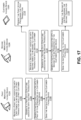
- the merchant application 106 can include functionality to couple the merchant-facing device 102A with other merchant-facing device(s) 102N and/or customer-facing device(s) 104A-104N. Additional details associated with such coupling are described below with respect to FIGS. 7 and 16 .
- the merchant application 106 can provision merchant functionality and/or customer functionality on personal devices of merchants and/or customers, as described below.
- the merchant application 106 can include functionality to couple the merchant-facing device 102A to other peripheral devices (e.g., cash drawer, printer(s), barcode scanner(s), keyboard, scale, kitchen display system (KDS), etc.).
- peripheral devices e.g., cash drawer, printer(s), barcode scanner(s), keyboard, scale, kitchen display system (KDS), etc.
- the merchant application 106 can facilitate onboarding to enable merchants to integrate the merchant-facing device 102A within the payment processing environment (e.g., with remotely located server(s) associated with the payment processing service 124 and/or with peripheral devices (e.g., cash drawer, printer(s), barcode scanner(s), keyboard, scale, kitchen display system (KDS), etc.)).
- a merchant can enter his or her log-in information via the merchant application 106 to access an account associated with the merchant.
- the payment processing service server(s) 124 can receive the log-in information, authenticate the merchant using the log-in information, and send merchant-specific information to the merchant application 106. Accordingly, by logging in, the merchant can access account information associated with an existing account.
- the merchant application 106 can facilitate a device identifier process for establishing a new account with the payment processing service.
- the merchant application 106 can perform a tamper check to ensure that devices coupled to the merchant-facing device 102A have not been tampered with or otherwise compromised.
- the merchant application 106 can receive an indication of tampering and can surface such information via a UI as described herein.
- the merchant application 106 can provide warnings (e.g., no network connection, version mismatch, new device coupled, settings mismatches, eligibility or lack thereof, unactivated device, etc.) and enable support and/or troubleshooting functionality.
- the merchant application 106 can be associated with a UI that enables merchants to, among other things, perform one or more of the merchant-facing functionalities described above.
- the UI can be presented via a webview or web browser that is configured to enable a merchant to access services supported by the payment processing service.
- the UI can be presented via an application (e.g., the merchant application 106), which can be a mobile application or a desktop application, which is provided by the payment processing service provider or is an otherwise dedicated application.
- the UI can support third-party content, which can be linked or otherwise accessible to the merchant.
- the UI can be a GUI which can present graphical elements via the UI to convey information to merchants and/or customers and/or otherwise enable the merchant to perform merchant operations.
- the merchant application 106 can generate instructions for presenting a UI and may execute such instructions for presenting the UI.
- a reference to the "merchant application 106" on the merchant-facing device 102A or any other merchant-facing device 102N corresponds to an instance of the merchant application 106 executable on the corresponding device. That is, the functionality described above can be performed via an instance of the merchant application 106 executable by a respective device.
- the customer-facing device 104A can include an instance of a customer application 114 that is installed to configure the customer-facing device 104A as a POS terminal capable of performing customer functionality.
- the customer application 114 can configure the customer-facing device 104A to obtain payment data, and related information, and send the payment data, and related information, to the merchant application 106 on the merchant-facing device 102A.
- the customer application 114 can configure the customer-facing device 104A to request and/or receive authentication information (e.g., signature, PIN, biometric, etc.) to authenticate the payment data.
- the customer application 114 can receive payment data from a payment component 122 and transmit the payment data to the merchant-facing device 102A.
- the payment component 122 can be housed in, or otherwise associated with, a secure enclave.
- the payment component 122 can perform functionalities to control payment interfaces (e.g., a contactless interface, a contact interface, etc.), a wireless communication interface, a wired interface, a user interface (e.g., a signal condition device (field-programmable gate array (FPGA))), etc.
- the payment component 122 can include a reader 126, which can read payment data associated with a payment instrument.
- the reader 126 can be a Europay, MASTERCARD ® , VISA ® (EMV) payment reader, a read head for reading a magnetic strip of a payment card, etc.
- the payment data can include a name of the customer, an address of the customer, a type (e.g., credit, debit, etc.) of a payment instrument, a number associated with the payment instrument, a verification value (e.g., PIN Verification Key Indicator (PVKI), PIN Verification Value (PW), Card Verification Value (CW), Card Verification Code (CVC), etc.) associated with the payment instrument, an expiration data associated with the payment instrument, a primary account number (PAN) corresponding to the customer (which may or may not match the number associated with the payment instrument), restrictions on what types of charges/debts can be made, etc.
- the payment component 122 can include encryption technology for encrypting the payment data upon receiving the payment data.
- the customer application 114 can configure the customer-facing device 104A to present information to customers via a UI.
- the UI can be presented via a webview or web browser that is configured to enable a customer to view information and/or interact with the merchant-facing device 102A.
- the UI can be presented via an application (e.g., the customer application 114), which can be a mobile application or a desktop application, which is provided by the payment processing service provider or is an otherwise dedicated application.
- the UI can be a GUI which can present graphical elements via the UI to convey information to customers and/or merchants.
- the customer application 114 can generate instructions for presenting a UI and may execute such instructions for presenting the UI.
- the merchant application 106 can generate the instructions and send the instructions to the customer application 114.
- the customer application 114 can execute the received instructions for presenting the UI.
- the customer application 114 can configure the customer-facing device 104A to, among other things, present contents of a ticket (e.g., a cart, etc.) to a customer via the UI. For instance, the customer application 114 can present one or more items associated with a ticket via the UI. Additionally or alternatively, the customer application 114 can configure the customer-facing device 104A to present an amount of the ticket to the customer via the UI. Additional information such as taxes, discounts (e.g., item-level or ticket-level), coupons, etc. can also be surfaced via the UI.
- a ticket e.g., a cart, etc.
- the customer application 114 can present contents of a ticket (e.g., a cart, etc.) to a customer via the UI. For instance, the customer application 114 can present one or more items associated with a ticket via the UI. Additionally or alternatively, the customer application 114 can configure the customer-facing device 104A to present an amount of the ticket to the customer via the UI
- the customer application 114 can configure the customer-facing device 104A to present calls to action via the UI. For instance, when a merchant indicates that transaction is complete, the customer application 114 can present, via the UI, an instruction to a customer to swipe, insert, or tap a payment instrument to pay for the transaction. Or, the customer application 114 can present, via the UI, a request for authentication information (e.g., PIN, biometric input, signature, etc.) from a customer, gratuity, feedback, loyalty information, etc. Additionally or alternatively, the customer application 114 can configure the customer-facing device 104A to present information associated with processing of a transaction via the UI.
- authentication information e.g., PIN, biometric input, signature, etc.
- the customer application 114 can configure the customer-facing device 104A to present information associated with processing of a transaction via the UI.
- the customer application 114 can configure the customer-facing device 104A to present a message that a customer's payment instrument is approved, is being authorized, is declined, etc. In some examples, the customer application 114 can configure the customer-facing device 104A to present a message associated with a split tender or a refund.
- the customer application 114 can manage states of the customer-facing device 104A (e.g., signed in, signed out, locked, unlocked, display on, display off, tampered with, processing status (e.g., ready, idle, ready to read, processing, card read successfully, processing error, etc.), etc.). Furthermore, in at least one example, the customer application 114 can include functionality to couple the customer-facing device 104A to merchant-facing device(s) 102A-102N and/or other customer-facing device(s) 104N. Additional details associated with coupling a merchant-facing device and a customer-facing device are described below with reference to FIG. 7 . In at least one example, the customer application 114 can be configured to provision functionality (e.g., customer functionality and/or merchant functionality) to a personal device of a merchant and/or a customer, as described below.
- functionality e.g., customer functionality and/or merchant functionality
- the customer application 114 can configure the customer-facing device 104A to detect errors and present messages associated with such errors.
- customer errors can include a payment instrument not being charged, an amount charged violating transaction limitations/restrictions, payment not being able to be processed in a particular country, an improper payment method (e.g., swipe when the payment instrument is a EMV card), exceeding a PIN try limit, etc.
- Other errors can include merchant errors, terminal errors (e.g., connectivity, power failure, tamper error, etc.), payment instrument errors (e.g., information missing, card not supported, etc.), etc.
- a reference to the "customer application 114" on the customer-facing device 104A or any other customer-facing device 104N corresponds to an instance of the customer application 114 executable on the corresponding device. That is, the functionality described above can be performed via an instance of the customer application 114 executable by a respective device.
- the merchant application 106 and the customer application 114 can configure the merchant-facing device 102A or the customer-facing device 104A, respectively, to perform additional or alternative functionalities as described herein.
- the merchant application 106 and the customer application 114 can be stored on the merchant-facing device 102A or the customer-facing device 104A, respectively, when a merchant purchases or otherwise acquires the merchant-facing device 102A or the customer-facing device 104A (e.g., "out of the box").
- the merchant application 106 and the customer application 114 can be downloaded onto the merchant-facing device 102A or the customer-facing device 104A, respectively.
- the merchant application 106 can be temporarily provisioned on the merchant-facing device 102A and/or the customer application 114 can be temporarily provisioned on the customer-facing device 104A. Further, in some examples, as described herein, the merchant application 106 can be temporarily provisioned (or activated) on the customer-facing device 104A and/or and the customer application 114 can be temporarily provisioned (or activated) on the merchant-facing device 102A. In such examples, the merchant-facing device 102A can perform both merchant and customer functionalities and the customer-facing device 104A can perform both customer and merchant functionalities, as described below.
- the display 108 and/or the display 116 can employ any suitable display technology.
- the display 108 and/or the display 116 can be a liquid crystal display, a plasma display, a light emitting diode display, an OLED (organic light-emitting diode) display, an electronic paper display, or any other suitable type of display able to present digital content thereon.
- the display 108 and/or the display 116 can have a touch sensor associated with the display 108 and/or the display 116 to provide a touchscreen display configured to receive touch inputs for enabling interaction with a UI presented on the display 108 and/or the display 116. Accordingly, implementations herein are not limited to any particular display technology. Further, in some examples, the merchant-facing device 102A and/or the customer-facing device 104A may not have a display.
- the communication interface(s) 110 and/or the communication interface(s) 118 can include one or more interfaces and hardware components for enabling communication between the merchant-facing device 102A and the customer-facing device 104A and/or various other devices, such as over one or more networks 128 or directly.
- the network(s) 128 can include long-range communication networks and/or short-range communication networks.
- the network(s) 128 can include the Internet, cable networks, cellular networks, wireless networks (e.g., Wi-Fi) and wired networks, Bluetooth ® networks, Bluetooth ® low energy (BLE) networks, Near-field Communication (NFC) (e.g., NFC signals), etc.
- the communication interface(s) 110 and/or the communication interface(s) 118 can enable communication through one or more of the Internet, cable networks, cellular networks, wireless networks (e.g., Wi-Fi) and wired networks, Bluetooth ® , BLE, NFC, etc. Additionally or alternatively, the communication interface(s) 110 and/or the communication interface(s) 118 can include one or more Universal Serial Bus (USB) interfaces, Ethernet interfaces, etc.
- USB Universal Serial Bus
- the power source(s) 112 and/or the power source(s) 120 can include one or more power supplies such as a physical connection to AC power or a battery.
- the power source(s) 112 and/or the power source(s) 120 can include power conversion circuitry for converting AC power and generating a plurality of DC voltages for use by the merchant-facing device 102A.
- the battery can be charged via a physical power connection, via inductive charging, or via any other suitable method.
- the power source(s) 112 can supply a variety of voltages to the components of the merchant-facing device 102A in accordance with the requirements of those components.
- the power source(s) 120 can supply a variety of voltages to the components of the customer-facing device 104A in accordance with the requirements of those components.
- Multi-device POS System Configuration Multiple Customer-facing Devices Coupled to a Merchant-facing Device
- FIGS. 2-6 illustrate various configurations of multiple customer-facing devices coupled to a merchant-facing device.
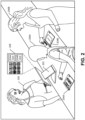
- FIG. 2 illustrates a first example configuration of a multi-device POS system as described herein.
- a merchant or an agent working on behalf of the merchant 200 can interact with a merchant-facing device 202, which can correspond to the merchant-facing device 102A described above with reference to FIG. 1 .
- the merchant-facing device 202 can be coupled to at least two customer-facing devices 204A and 204B.
- the customer-facing devices 204A and 204B can correspond to the customer-facing device 104A and 104N described above with reference to FIG. 1 .
- Two customers 206A and 206B are shown interacting with the at least two customer-facing devices 204A and 204B.
- FIG. 1 illustrates a first example configuration of a multi-device POS system as described herein.
- each of the customer-facing devices 204A and 204B are being used for processing separate transactions in parallel. That is, the first customer-facing device 204A is communicating with the merchant-facing device 202 to process a first transaction for the first customer 206A and the second customer-facing device 204B is communicating with the merchant-facing device 202 to process a second transaction for the second customer 206B.
- the merchant-facing device 202 can store a first data structure (e.g., a ticket) associated with a first transaction between the merchant 200 and the first customer 206A and, when the first customer 206A is ready to pay, for example, the merchant 200 can interact with the merchant-facing device 202 to send the first data structure (or a duplicate thereof) from the merchant-facing device 202 to the first customer-facing device 204A (e.g., from the merchant application to the customer application).
- the customer application executable by the first customer-facing device 204A can present a UI on the display of the first customer-facing device 204A to instruct the first customer 206A to provide payment data and complete the transaction.
- the merchant-facing device 202 can store a second data structure (e.g., a ticket) associated with a second transaction between the merchant 200 and the second customer 206B and, when the second customer 206B is ready to pay, for example, the merchant 200 can interact with the merchant-facing device 202 to send the second data structure (or a duplicate thereof) from the merchant-facing device 202 to the second customer-facing device 204A (e.g., from the merchant application to the customer application).
- the customer application executable by the second customer-facing device 204B can present a UI on the display of the second customer-facing device 204B to instruct the second customer 206B to provide payment data and complete the transaction.
- the merchant application executable by the merchant-facing device 202 can present a UI 208 that enables the merchant 200 to perform merchant-facing interactions and also view actions of each of the customers 206A and 206B.
- the UI 208 can present a picture of a first UI presented via the first customer-facing device 204A and a picture of a second UI presented via the second customer-facing device 204B, for example in a picture-in-picture presentation.
- the merchant 200 can interact with a portion of the UI 208 corresponding to a particular customer-facing device to perform actions or otherwise interact with the corresponding transaction.
- the merchant 200 can interact with the picture of the first UI, which can be associated with a selectable control, actuation of which causes the UI presented via the first customer-facing device 204A to be presented via the UI 208 (e.g., temporarily replacing the picture-in-picture presentation, for example).
- the merchant-facing device 200 can determine an attribute associated with a customer and can direct the customer to a particular customer-facing device for completing a transaction. For instance, if a customer speaks a particular language and a customer-facing device is configured in that particular language, the merchant-facing device can direct the customer to the customer-facing device configured in the particular language. Additionally or alternatively, customer-facing devices can be associated with accommodations (e.g., Braille touchpads, high contrast displays, audible outputs, etc.) to enable customers with hearing and/or visual impairments to interact with the customer-facing devices. In such examples, responsive to determining that a customer is associated with a hearing and/or visual impairment, the merchant-facing device 200 can direct the customer to a specially-configured customer-facing device.
- accommodations e.g., Braille touchpads, high contrast displays, audible outputs, etc.
- a similar configuration of the multi-device POS system can be used to process different tickets associated with a same transaction.
- techniques described herein can be used for split-ticket handling. That is, the merchant 200 can interact with the merchant-facing device 202 to allocate one or more items associated with a ticket to a first ticket (e.g., and, thus, a first data structure) and one or more items associated with the ticket to a second ticket (e.g., and, thus, a second data structure), and so on. In some examples, the merchant 200 can allocate one or more items from a ticket to another ticket (without creating two new tickets and/or data structures).
- the merchant 200 can interact with a UI to send instructions for presenting a first ticket of a split ticket via the first customer-facing device 204A and a second ticket of the split ticket via the second customer-facing device 204B.
- the first customer 206A can provide payment data for the first split ticket via the first customer-facing device 204A
- the second customer 206B can provide payment data for the second split ticket via the second customer-facing device 204B.
- FIG. 3 illustrates a second example configuration of a multi-device POS system as described herein.
- a merchant or an agent working on behalf of the merchant 300 can interact with a merchant-facing device 302, which can correspond to the merchant-facing device 102A described above with reference to FIG. 1 .
- the merchant-facing device 302 can be coupled to at least three customer-facing devices 304A, 304B, and 304C.
- Each of the customer-facing devices 304A-304C can correspond to the customer-facing devices 104A-104N described above with reference to FIG. 1 .
- a single customer 306 is illustrated.
- FIG. 3 a single customer 306 is illustrated.
- each of the customer-facing devices 304A-304C is being used for processing separate steps in a single transaction. That is, the first customer-facing device 304A is communicating with the merchant-facing device 302 to process a first step in a transaction with the customer 306 (e.g., confirming the cost of the transaction, observing items associated with a ticket, and/or providing payment data), the second customer-facing device 304B is communicating with the merchant-facing device 302 to process another step in a transaction with the customer 306 (e.g., inputting a gratuity and providing authorization for the payment), and the third customer-facing device 304C is communicating with the merchant-facing device 302 to process yet another step in the transaction with the customer 306 (e.g., electing a receipt delivery option).
- the first customer-facing device 304A is communicating with the merchant-facing device 302 to process a first step in a transaction with the customer 306 (e.g., confirming the cost of the transaction, observing items associated with a ticket, and/or providing
- customer-facing devices can be used to process one or more steps associated with a transaction.
- one or more customer-facing devices can be used to process one or more steps of a payment flow for settling a transaction.
- the first customer-facing device 304A can output a UI that requests payment data from the customer 306.
- the first customer-facing device 304A can send the payment data to the merchant-facing device 302.
- the merchant-facing device 302 can associate the payment data with the data structure corresponding to the transaction.
- the customer 306 can provide payment information (e.g., via a swipe, dip, or tap) to authenticate the customer 306 at the other customer-facing device to complete a subsequent step of the payment flow (e.g., adding gratuity, providing feedback, imputing loyalty information, etc.).
- payment information e.g., via a swipe, dip, or tap
- Other identifiers can be used for authentication, as described in additional detail below.
- one or more steps can be grouped together and completed via a single customer-facing device. In other examples, each step can be performed on a different customer-facing device. In some examples, one or more steps can be grouped based on whether the steps are mandatory or optional. For instance, in an example, a first customer-facing device can obtain payment data and authentication information for authenticating the customer and the payment data (e.g., mandatory steps) and a second customer-facing device can enable the customer to add a gratuity, provide feedback, input loyalty information, etc. (e.g., optional steps). Additional details associated with processing a transaction via multiple customer-facing devices are described below with reference to FIG. 10 .
- different customer-facing devices can be associated with particular accommodations and the merchant-facing device 302 can direct a customer associated with a particular attribute to particular customer-facing device(s) based on the particular attribute. Additional details associated with such an example are described below with reference to FIG. 11 .
- FIG. 3 illustrates a single customer 306, in some examples, when a first customer is finished interacting with a first customer-facing device, the first customer-facing device can be used for processing a transaction for a second customer (while the first customer interacts with another customer-facing device), and so on.
- FIG. 3 is illustrated with each of the customer-facing devices 304A-304C being positioned at a counter and/or proximate to the merchant-facing device 302, in some examples, one or more of the customer-facing devices 304A-304C can be positioned throughout a merchant environment.
- the customer 306 can interact with the first customer-facing device 304A to perform a first step in a transaction and sit at a table, for example, in a restaurant.
- the table can be associated with a second customer-facing device, and the customer 306 can interact with the second customer-facing device to perform a subsequent step at the table. Additional or alternative scenarios are considered to be within the scope of this disclosure.
- FIGS. 4-6 illustrate additional or alternative example configurations of multi-device POS systems.
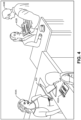
- a merchant-facing device 400 which can correspond to the merchant-facing device 102A as described above with reference to FIG. 1
- one customer-facing device 402A can be positioned proximate the merchant-facing device 400 and a second customer-facing device 402B can be mobile such that it can be moved throughout a merchant environment.
- customer functionality can be provisioned to a personal device of the merchant to configure the personal device, at least temporarily, as a customer-facing device. That is, in at least one example, the second customer-facing device 402B can be a personal device of the merchant (or an employee or other agent of the merchant).
- a first employee 404A (or other agent) of a merchant is operating the merchant-facing device 400 and a second employee 404B (or other agent) is operating the second customer-facing device 402B.
- a customer-facing device such as the second customer-facing device 402B
- the second customer-facing device 402B is performing customer functionality.
- the customer-facing devices 402A and 402B can interact with the merchant-facing device 400 to process independent transactions, as described above in FIG. 2 , or can interact with the merchant-facing device 400 to process independent steps of a same transaction, as described above in FIG. 3 .
- FIG. 4 illustrates the customer-facing devices 402A and 402B interacting with the merchant-facing device 400 to process independent transactions, but is not limited to such an example.
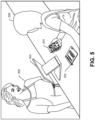
- FIG. 5 illustrates an example where a merchant-facing device 500, which can correspond to the merchant-facing device 102A as described above with reference to FIG. 1 , is coupled to at least a first customer-facing device 502, which can correspond to the customer-facing device 104A as described above with reference to FIG. 1 .
- functionality can be temporarily provisioned to a personal device 504 of a customer 506.
- a customer application can be provisioned to the personal device 504 of the customer 506 and, as a result, the personal device 504 of the customer 506 can be configured to perform at least some customer functionalities.
- the personal device 504 of the customer can act as a second customer-facing device.
- the first customer-facing device 502 and the personal device 504 can communicate with the merchant-facing device 500 to process independent transactions, as described above in FIG. 2 , or can interact with the merchant-facing device 500 to process independent steps of a same transaction, as described above in FIG. 3 .
- FIG. 5 illustrates the customer-facing device 502 and the personal device 504 interacting with the merchant-facing device 500 to process independent steps of a same transaction between the customer 506 and the merchant 508, but is not limited to such an example. For instance, as shown in FIG.
- the customer 506 can utilize the personal device 504 that has been temporarily provisioned with the customer application to add items to a transaction (e.g., build a virtual cart) and, upon arriving at a check-out station, can transmit a data structure (or duplicate thereof) associated with the transaction (e.g., the ticket) to the merchant-facing device 502.
- the merchant-facing device 502 can utilize the first customer-facing device 502 to obtain payment information and complete the transaction.
- FIG. 6 illustrates an example where a merchant-facing device 600, which can correspond to the merchant-facing device 102A as described above with reference to FIG. 1 , is coupled to at least one first customer-facing device 602, which can correspond to a customer-facing device 104A as described above with reference to FIG. 1 .
- a UI 604 can be projected onto a surface proximate a customer 606.
- a second customer-facing device can project the UI 604
- the merchant-facing device 600 can project the UI 604 (e.g., as shown in FIG. 6 )
- a personal device of the customer 606 can project the UI 604, etc.
- a customer application can be executable to generate instructions for outputting the UI 604.
- the projected UI 604 can enable the customer 606 to interact with the merchant-facing device 606 in a manner consistent with how the customer interacts with a physical customer-facing device 602.
- the projector is a touch projector
- the customer 604 can interact directly with the projection to interact with the merchant-facing device 606.
- the projection can be projected onto a touch display configured to receive customer 604 input. That is, such a customer UI can function as a virtual customer-facing device.
- the first customer-facing device 604 and the projected UI 604 can be used to communicate with the merchant-facing device 600 to process independent transactions, as described above in FIG. 2 , or with the merchant-facing device 600 to process independent steps of a same transaction, as described above in FIG. 3 .
- FIG. 6 illustrates the first customer-facing device 602 and projected UI 604 being used to interact with the merchant-facing device 600 to process independent steps of a same transaction between the customer 604 and the merchant 608, but is not limited to such an example.
- the customer 606 can interact with the projected UI 604 to review items associated with a transaction and the merchant-facing device 600 can utilize the first customer-facing device 602 to obtain payment information and complete the transaction.
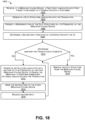
- FIGS. 7-11 illustrate example processes for utilizing a multi-device POS system with multiple customer-facing devices coupled to a merchant-facing device as described herein.
- FIGS. 7-11 are described with reference to environment 100 as described above with reference to FIG. 1 ; however, additional or alternative environments are considered to be within the scope of this disclosure.
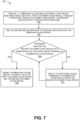
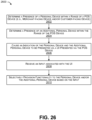
- FIG. 7 illustrates an example process 700 for coupling a customer-facing device to a merchant-facing device to enable multiple customer-facing devices to interact with the merchant-facing device as described herein.
- Block 702 illustrates receiving, at a merchant-facing device storing a first device identifier associated with a first customer-facing device, a request to register a second customer-facing device 104N, the request associated with a second device identifier.
- a merchant-facing device 102A can store a first device identifier of a first customer-facing device 104A in a device identifier storage of the merchant-facing device 102A.
- the first device identifier can identify the first customer-facing device 104A and, by virtue of its storage in the device identifier storage, can indicate that the merchant-facing device 102A is capable of transmitting data to and/or receiving data from the first customer-facing device 104A.
- the first device identifier can serve as an identifier of the first customer-facing device 104A.
- a merchant application 106 executable by the merchant-facing device 102A can receive a request from a second customer-facing device 104N.
- the request can include a second device identifier associated with the second customer-facing device 104N.
- the merchant-facing device 102A can receive the second device identifier responsive to the second customer-facing device 104N being docked to the merchant-facing device 102A.
- the first device identifier and/or the second device identifier can be associated with a respective customer application 114 associated with the first customer-facing device 104A and second customer-facing device 104N.
- Block 706 illustrates determining whether the second customer-facing device 104N has a same version of software and/or firmware as the merchant-facing device.
- the merchant-facing device 102A can determine whether the second customer-facing device 104N has a same version of software and/or firmware as the merchant-facing device 102A. For instance, when the second customer-facing device 104N tries to connect to the merchant-facing device 102A, the second customer-facing device 104N provides its software and/or firmware version(s) as part of the request.
- the merchant application 106 can analyze the software and/or firmware version(s) and compare them to the software and/or firmware version(s) associated with the merchant-facing device 102A.
- the merchant application 106 can enable the merchant-facing device 102A to interact with the first customer-facing device 104A and the second customer-facing device 104N, as illustrated in block 708.
- the merchant application 106 can determine that the software and/or firmware of the second customer-facing device 104N is different associated with a different version than the software and/or firmware of the merchant-facing device 102A and may nevertheless enable the merchant-facing device 102A to interact with the first customer-facing device 104A and the second customer-facing device 104N, as illustrated in block 708.
- the merchant application 106 can determine that the version of the software and/or firmware of the second customer-facing device 104N is compatible, albeit not the same, and can enable the merchant-facing device 102A to interact with the first customer-facing device 104A and the second customer-facing device 104N, as illustrated in block 708.
- the merchant application 106 can update the software and/or firmware of the merchant-facing device 102A and/or the second customer-facing device 104N, as illustrated in block 710.
- the second customer-facing device 104N can have a newer version of software and/or firmware than the merchant-facing device 102A.
- the merchant application 106 can send a request to the payment processing service server(s) 124 for an update, that can be applied upon a subsequent reboot of the merchant-facing device 102A.
- the merchant application 106 can push an update to the second customer-facing device 104N.
- the second customer-facing device 102N can be docked to the merchant-facing device 102A to receive the update.
- the merchant-facing device 102A can push the update to the second customer-facing device 104N via another communication interface (e.g., wired or wireless).
- the merchant application 106 can enable the merchant-facing device 102A to interact with the first customer-facing device 104A and the second customer-facing device 104N, as illustrated in block 708.
- the software and/or firmware update described above with reference to block 710 can occur at any time and need not only occur when a new customer-facing device is coupled to the merchant-facing device 102A. That is, in some examples, the merchant application 106 can receive an indication of a version of software and/or firmware associated with a customer-facing device coupled to the merchant-facing device 104A and can determine whether the version is a same version as that associated with the merchant-facing device 104A. In the event that the versions are different, the merchant application 106 can facilitate software and/or firmware updates to synchronize the software and/or firmware associated with the merchant-facing device 102A and any customer-facing device coupled to the merchant-facing device 102A.
- the update can be provided to the customer-facing device when the customer-facing device is docked to the merchant-facing device 102A.
- the update can be provided to the customer-facing device from the merchant-facing device 102A via a communication interface (e.g., wired or wireless).
- a merchant can selectively choose which customer-facing device(s) to couple to the merchant-facing device 102A. That is, in some examples, a merchant can choose to add a device identifier of a first customer-facing device to a device identifier storage and choose not to add a device identifier of a second customer-facing device to the device identifier storage. In at least one example, customer-facing devices can be coupled to a merchant-facing device at different times.
- a first customer-facing device can be coupled to a merchant-facing device at a factory and a second customer-facing device can be coupled to the merchant-facing device at some later time, for instance, after onboarding the first customer-facing device, after the first customer-facing device has been installed in a merchant environment and has been powered up/down to communicate with one or more servers, after completing a transaction via the first customer-facing device, etc.
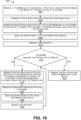
- FIGS. 8 and 9 illustrate examples of two processes 800 and 900 for processing two different transactions via a multi-device POS system, which can be performed in parallel by the merchant application 106 of a merchant-facing device 104A.
- Block 802 illustrates receiving, at a merchant-facing device, a first input associated with first item(s) to be added to a first transaction with a first customer.
- a merchant can interact with a UI (e.g., presented by the merchant application 106 associated with the merchant-facing device 102A) to add one or more first items to a first ticket. For instance, a merchant can add one or more food items to a ticket or a merchant can add one or more clothing items to a ticket. In at least one example, the merchant can add the one or more first items to the first ticket based at least in part on selecting each item of the one or more first items from an inventory of the merchant.
- Block 804 illustrates generating a first data structure associated with the first transaction.
- the merchant application 106 can generate a first data structure associated with the first transaction.
- the first data structure can include representations of the one or more first items added to the ticket.
- the data structure can include data associated with the one or more first items, such as price, quantity, fulfillment preference (e.g., carry out, delayed pick up, delivery, etc.), etc.
- Block 806 illustrates generating instructions associated with a first UI to be presented via a first customer-facing device.
- the merchant application 106 can generate instructions for presenting a representation of the first data structure via a first customer-facing device, such as the customer-facing device 104A. For instance, a customer can desire to review his or her ticket and/or provide payment data for paying for the one or more first items.
- Block 808 illustrates sending the instructions to the first customer-facing device.
- the merchant application 106 can send the instructions to the customer application 114, and the customer application 114 can receive the instructions and output a UI associated with the instructions. That is, the customer application 114 can output a first UI on the display 116 associated with the first customer-facing device 104A.
- the first UI can be a GUI that graphically presents the one or more first items and/or the data associated with the one or more first items (e.g., price, quantity, fulfillment preference, etc.). Additionally or alternatively, the first UI can present a call to action as described above.
- Block 810 illustrates receiving a second input.
- the customer can interact with the UI, for instance, to modify the ticket, to provide payment data, etc.
- the customer application 114 can send an indication of a second input associated with such an interaction to the merchant application 106.
- the indication can include a device identifier associated with the first customer-facing device 104A.
- Block 812 illustrates determining that the second input is associated with the first customer-facing device.
- the merchant application 106 can receive the second input and can determine that the second input is associated with the first customer-facing device 104A based at least in part on the device identifier.
- the merchant application 106 can modify the first data structure based at least in part on the second input, as illustrated in block 814.
- Block 816 illustrates determining whether the first transaction is complete.
- the merchant application 106 can determine whether the first transaction is complete. For instance, the merchant application 106 can determine whether the second input was associated with a final step of a payment flow. Based at least in part on determining that the first transaction is complete (e.g., that the second input is associated with the final step of the payment flow), the merchant application 106 can remove the first data structure from the merchant-facing device 102A, as illustrated in block 818.
- the first data structure can be sent to the payment processing service server(s) 124 for longer-term storage, and a receipt can be sent to a device operated by the first customer (if so elected by the customer).
- the merchant application 106 can store the first data structure until the first transaction is complete, as illustrated in block 820.
- the merchant application 106 can generate instructions associated with one or more additional Uls to be presented via the first customer-facing device to enable the first customer to perform subsequent action(s) associated with the first transaction.
- the merchant application 106 can store the first data structure locally until the first transaction is complete.
- the merchant application 106 can send open tickets to the payment processing server(s) 124 at a particular frequency, after an occurrence of an event, etc. prior to the completion of the first transaction (e.g., for redundancy, etc.).
- Block 902 illustrates receiving, at a merchant-facing device, a third input associated with second item(s) to be added to a second transaction with a second customer.
- a merchant can interact with a UI (e.g., presented by the merchant application 106 associated with the merchant-facing device 102A) to add one or more second items to a second ticket.
- a UI e.g., presented by the merchant application 106 associated with the merchant-facing device 102A
- Block 904 illustrates generating a second data structure associated with the second transaction. Based at least in part on receiving the third input, the merchant application 106 can generate a second data structure associated with the second transaction.
- the second data structure can include representations of the one or more second items added to the second ticket.
- Block 906 illustrates generating instructions associated with a second UI to be presented via a second customer-facing device.
- the merchant application 106 can generate instructions for presenting a representation of the second data structure via a second customer-facing device, such as customer-facing device 104N. For instance, a customer can desire to review his or her ticket and/or provide payment data for paying for the one or more second items.
- Block 908 illustrates sending the instructions to the second customer-facing device 104N.
- the merchant application 106 can send the instructions to a customer application 114 that is executable by the second customer-facing device 104N, and the customer application 114 can receive the instructions and output a UI associated with the instructions. That is, the customer application can output a second UI on a display associated with the second customer-facing device 104N.
- the second UI can graphically present the one or more second items and/or data associated with the one or more second items (e.g., price, quantity, fulfillment preference, etc.) as a GUI. Additionally or alternatively, the second UI can present a call to action as provided above.
- Block 910 illustrates receiving a fourth input.
- the customer can interact with the UI, for instance, to modify the ticket, to provide payment data, etc.
- the customer application 114 can send an indication of a fourth input associated with such an interaction to the merchant application 106.
- the indication can include a device identifier associated with the second customer-facing device 104N.
- Block 912 illustrates determining that the fourth input is associated with the second customer-facing device 104N.
- the merchant application 106 can receive the fourth input and can determine that the fourth input is associated with the second customer-facing device 104N based at least in part on the device identifier.
- the merchant application 106 can modify the second data structure based at least in part on the fourth input, as illustrated in block 914.
- Block 916 illustrates determining whether the second transaction is complete.
- the merchant application 106 can determine whether the second transaction is complete. For instance, the merchant application 106 can determine whether the fourth input was associated with a final step of a payment flow. Based at least in part on determining that the second transaction is complete (e.g., that the fourth input is associated with the final step of the payment flow), the merchant application 106 can remove the second data structure from the merchant-facing device 102A, as illustrated in block 918.
- the second data structure can be sent to the payment processing service server(s) 124 for longer-term storage, and a receipt can be sent to a device operated by the second customer (if the customer so elects).
- the merchant application 106 can store the second data structure until the second transaction is complete, as illustrated in block 920.
- the merchant application 106 can generate instructions associated with one or more additional Uls to be presented via the second customer-facing device 104N to enable the second customer to perform subsequent action(s) associated with the second transaction.
- the merchant application 106 can store the second data structure locally until the second transaction is complete.
- the merchant application 106 can send open tickets to the payment processing server(s) 124 at a particular frequency, after an occurrence of an event, etc. prior to the completion of the second transaction (e.g., for redundancy, etc.).
- the merchant application 106 while the merchant application 106 is performing steps 802-820 associated with a first transaction between the merchant and a first customer, the merchant application 106 can additionally be performing steps 902-920 associated with a second transaction between the merchant and a second customer. That is, as illustrated above, the merchant application 106 can process multiple transactions for multiple customers via multiple customer-facing devices in parallel.
- the second customer-facing device can be a personal device of a customer (e.g., having been temporarily provisioned with a customer application 114) or the merchant-facing device 102A that is executing a customer application 114 and/or projecting the UI.
- FIG. 10 illustrates an example process 1000 for processing a single transaction using multiple customer-facing devices interacting with a single merchant-facing device.
- Block 1002 illustrates receiving, at a merchant-facing device, a first input associated with item(s) to be added to a transaction with a customer.
- a merchant can interact with a UI to add one or more items to a ticket. For instance, a merchant can add one or more food items to a ticket or a merchant can add one or more clothing items to a ticket.
- the merchant can add the one or more items to the ticket based at least in part on selecting each item of the one or more items from an inventory of the merchant.
- Block 1004 illustrates generating a data structure associated with the transaction.
- the merchant application 106 can generate a data structure associated with the transaction.
- the data structure can include representations of the one or more items added to the ticket.
- the data structure can include data associated with the one or more items, such as price, quantity, fulfillment preference (e.g., carry out, delayed pick up, delivery, etc.), etc.
- Block 1006 illustrates generating instructions associated with a UI to be presented via a customer-facing device.
- the merchant application 106 can generate instructions for presenting a representation of the data structure via a customer-facing device, such as the customer-facing device 104A. For instance, a customer can desire to review his or her ticket and/or provide payment data for paying for the one or more items.
- Block 1008 illustrates sending the instructions to the customer-facing device.
- the merchant application 106 can send the instructions to the customer application 114 associated with the customer-facing device 104A, and the customer application 114 can receive the instructions and output a UI associated with the instructions. That is, the customer application 114 can output a UI on the display 116 associated with the customer-facing device 104A.
- the first UI can graphically present the one or more items and/or the data associated with the one or more items (e.g., price, quantity, fulfillment preference, etc.). Additionally or alternatively, the first UI can present a call to action as described above.
- Block 1010 illustrates receiving a second input.
- the customer can interact with the UI, for instance, to modify the ticket, to provide payment data, etc.
- the customer application 114 can send an indication of a second input associated with such an interaction to the merchant application 106.
- Block 1012 illustrates determining whether the transaction is complete.
- the merchant application 106 can determine whether the transaction is complete. For instance, the merchant application 106 can determine whether the second input was associated with a final step of a payment flow. Based at least in part on determining that the transaction is not complete (e.g., the second input was not associated with the final step of the payment flow and thus the transaction is associated with an "open ticket"), the merchant application 106 can generate instructions associated with another UI to be presented via another customer-facing device, such as customer-facing device 104N, to enable the customer to perform subsequent action(s) associated with the transaction, as illustrated in block 1014.
- another customer-facing device such as customer-facing device 104N
- the merchant application 106 can determine a particular customer-facing device to which the customer is to proceed, and can generate additional instructions for directing the customer to the particular customer-facing device. In some examples, the merchant application 106 can determine which customer-facing device to direct the customer based on an attribute of the customer. Additional details of such examples are described below with reference to FIG. 11 . In other examples, the merchant application 106 can determine which customer-facing device to direct the customer based on flow of customer traffic, etc. In such examples, the merchant application 106 can receive input from the merchant to determine how to direct the customer based on the flow of customer traffic, etc.
- Block 1016 illustrates receiving an identifier associated with the customer.
- the merchant application 106 can receive an identifier associated with the customer from another customer-facing device 104N.
- the identifier can be payment data associated with the customer.
- the second input can be associated with payment data. That is, the customer can interact with the customer-facing device 104A to provide payment data, which can be associated with the data structure. Then, the customer can again provide the payment data via another customer-facing device 104N to authenticate the customer at the other customer-facing device 104N.
- the other customer-facing device can be a personal device of a customer (e.g., having been temporarily provisioned with a customer application 114) or the merchant-facing device 102A that is executing a customer application 114 and/or projecting the UI.
- FIG. 11 illustrates an example process 1100 for directing a customer to a particular customer-facing device based on an attribute of the customer.
- Block 1102 illustrates determining an attribute associated with a customer.
- the merchant application 106 can determine an attribute associated with a customer. For instance, in some examples, the merchant application 106 can receive an input indicating an identity of a customer. Based on the identity, the merchant application 106 can access a profile of the customer to determine one or more attributes of the customer. In some examples, an attribute can be a preference (e.g., language, etc.). In other examples, an attribute can be associated with a physical impairment (e.g., vision impairment, hearing impairment, etc.). In additional or alternative examples, the merchant application 106 can receive information from a device operated by a customer, and can determine an attribute associated with such information. For example, the merchant application 106 can determine that the device is set in a particular language or a particular feature (e.g., teletypewriter) is enabled. Furthermore, in some examples, the merchant can provide an input indicating an attribute of a customer.
- a preference e.g., language, etc.
- an attribute can be associated with
- Block 1104 illustrates determining that a particular customer-facing device of a plurality of customer-facing devices associated with an accommodation for the attribute.
- the merchant application 106 can determine whether the merchant-facing device 102A is coupled to a customer-facing device that can accommodate the attribute of the customer. For instance, the merchant application 106 can determine that a particular customer-facing device is configured in a particular language that corresponds to the attribute of the customer. Or, the merchant application 106 can determine that a particular customer-facing device is associated with a high contrast display to accommodate a visual impairment.
- Block 1106 illustrates generating instructions associated with a UI to be presented via another customer-facing device of the plurality of customer-facing devices to direct the customer to the particular customer-facing device. Based at least in part on determining a particular customer-facing device that can accommodate the attribute of the customer, the merchant application 106 can generate instructions associated with a UI that can instruct the customer to go to the particular customer-facing device that is configured to accommodate the customer.
- Block 1108 illustrates sending the instructions to the other customer-facing device.
- the merchant application 106 can send the instructions to a customer application 114 associated with the customer-facing device that the customer is currently interacting with, or most recently interacted, and the customer application 114 associated with the customer-facing device can output the UI to direct the customer to the particular customer-facing device.
- process 1100 can be performed between operations associated with blocks 1014 and 1016 of process 1000.
- Multi-device POS System Configuration Multiple Merchant-facing Devices Coupled to a Customer-facing Device
- FIGS. 12-15 illustrate various configurations of multiple merchant-facing devices coupled to a customer-facing device.
- FIG. 12 illustrates a first example configuration of a multi-device POS system wherein a merchant-facing device 1200A is coupled to another merchant-facing device 1200B and at least one customer-facing device 1202.
- Merchant-facing devices 1202A and 1202B can correspond to merchant-facing devices 102A and 102N described above with reference to FIG. 1 .
- the at least one customer-facing device 1202 can correspond to the customer-facing device 104A described above with reference to FIG. 1 .
- Two employees 1204A and 1204B are shown as interacting with the two merchant-facing devices 1200A and 1200B. Each of the employees 1204A and 1204B can be employed by, or otherwise acting on behalf of, a merchant (e.g., agents of the merchant).
- a merchant e.g., agents of the merchant
- the first employee 1204A interacts with a UI to add one or more items to a ticket associated with the transaction.
- a merchant application can generate a data structure associated with the ticket, which includes representations of the one or more items.
- the first employee 1204A can interact with the UI to send at least a portion of the data structure to a merchant application on the second merchant-facing device 1200B.
- the first employee 1204A can interact with the UI to send a portion of the data structure associated with a soda to the second merchant-facing device 1200B so that the second employee 1204B can pour the soda while the first employee 1204A completes the transaction.
- the second employee 1204B can view at least the second portion of the data structure via the UI presented via the second merchant-facing device 1200B and interact with the UI to complete applicable action(s). For instance, responsive to pouring the soda and delivering the soda to the customer 1206, the second employee 1204B can interact with the UI to indicate that the item has been fulfilled.
- the first employee 1204A can be interacting with the UI presented via the first merchant-facing device 1200A to complete the transaction via the first merchant-facing device 1200A and the customer-facing device 1202.
- the first merchant-facing device 1200A can send the data structure (or a representation thereof) from the first merchant-facing device 1200A to the customer-facing device 1202 (e.g., from the merchant application to the customer application).
- the first merchant-facing device 1200A can send instructions associated with a UI to be presented via the customer-facing device 1202.
- the customer application executable by the customer-facing device 1202 can present the UI on a display 116 of the customer-facing device 1202, for example, to enable the customer 1206 to provide payment data and complete the transaction. Responsive to the customer 1206 providing payment data, the customer application can send the payment data to the first merchant-facing device 1200A, which can send the payment data to the payment processing service server(s) 124 for further processing and/or storage. In some examples, the first merchant-facing device 1200A can receive information from the payment processing service server(s) 124 (e.g., an indication of payment authorization, an indication of payment decline, loyalty information, etc.) and the first merchant-facing device 1200A can further communicate such information to the customer 1206 via the customer-facing device 1202.
- the payment processing service server(s) 124 e.g., an indication of payment authorization, an indication of payment decline, loyalty information, etc.
- each step can correspond to a step in the fulfillment of a transaction.
- each step can correspond to a step in a payment flow.
- one or more steps can be grouped together and completed via a single merchant-facing device.
- each step can be performed on a different merchant-facing device.
- one or more steps can be grouped based on whether the steps are mandatory or optional, by skill level/expertise of an employee, a capability of a merchant-facing device, etc.
- merchant-facing devices can be positioned in different locations within a merchant environment. For instance, in at least one example, a first merchant-facing device can be positioned at a counter (e.g., as illustrated in FIG. 12 ) and one or more other merchant-facing devices can be positioned in different departments of a brick-and-mortar store of a merchant.
- FIG. 13 illustrates a second example configuration of a multi-device POS system wherein a merchant-facing device 1300A is coupled to another merchant-facing device 1300B and at least one customer-facing device 1302 as described herein.
- Merchant-facing devices 1302A and 1302B can correspond to merchant-facing devices 102A and 102B described above with reference to FIG. 1 .
- the at least one customer-facing device 1302 can correspond to the customer-facing device 104A described above with reference to FIG. 1 .
- Two employees 1304A and 1304B are shown as interacting with the two merchant-facing devices 1300A and 1300B. Each of the employees 1304A and 1304B can be employed by, or otherwise acting on behalf of, a merchant (e.g., agents of the merchant).
- a merchant e.g., agents of the merchant
- each of the merchant-facing devices 1300A and 1300B is being used for processing a separate transaction. That is, the first merchant-facing device 1300A is communicating with the customer-facing device 1302 to process a first transaction for a first customer 1306A and the second merchant-facing device 1300B is also communicating with the customer-facing device 1302 to process a second transaction for a second customer 1306B.
- the first employee 1304A interacts with a UI to add one or more items to a ticket associated with a first transaction.
- the merchant application can generate a first data structure associated with the first ticket, which includes representations of the one or more items.
- the first employee 1304A can interact with the UI to send the first data structure (or a representation thereof) to a customer application associated with the customer-facing device 1302.
- the first merchant-facing device 1300A can generate instructions associated with a UI to be presented via the customer-facing device 1302.
- the customer-facing device 1302 can present the UI to enable the first customer 1306A to complete the transaction.
- the customer application executable on the customer-facing device 1302 can send the payment data to the first merchant-facing device 1300A, which can send the payment data to the payment processing service server(s) 124 for further processing and/or storage.
- the first merchant-facing device 1300A can receive information from the payment processing service server(s) 124 (e.g., an indication of payment authorization, an indication of payment decline, loyalty information, etc.) and the first merchant-facing device 1300A can further communicate such information to the first customer 1306A via the customer-facing device 1302.
- the second employee 1304B can interact with the UI to complete the second transaction.
- the first customer 1306A may need to wait until the second customer 1306B completes the second transaction before she can complete the first transaction, or vice versa.
- FIGS. 14-15 illustrate additional or alternative example configurations of multi-device POS systems.
- FIG. 14 illustrates an example where a merchant-facing device 1400, which can correspond to the merchant-facing device 102A as described above with reference to FIG. 1 , is coupled to at least one customer-facing device 1402, which can correspond to the customer-facing device 104A, as described above with reference to FIG. 1 .
- a UI 1404 can be projected onto a surface proximate a merchant 1406 (e.g., or an employee working on the behalf of the merchant).
- the merchant-facing device 1400 can project the UI 1404 (e.g., as shown in FIG.
- the merchant-facing device 1400 and the projected UI 1404 can be used to communicate with the customer-facing device 1402 to process independent steps of a same transaction, as described above in FIG. 12 , or with the customer-facing device 1402 to process independent transactions, as described above in FIG. 13 .
- FIG. 14 illustrates the merchant-facing device 1400 and projected UI 1404 being used to interact with the customer-facing device 1402 to process independent steps of a same transaction between the merchant 1406 and a customer 1408, but is not limited to such an example. For instance, as shown in FIG.
- FIG. 15 illustrates another example configuration of a multi-device POS system.
- a merchant-facing device 1500A which can correspond to the merchant-facing device 102A as described above with reference to FIG. 1
- the merchant-facing device 1500A can be coupled to another merchant-facing device 1500B.
- one merchant-facing device 1500A can be positioned at a check-out location and a first employee 1506A (or other agent of the merchant) can interact with the first merchant-facing device 1500A.
- Operations performed by a first merchant-facing device 102A are illustrated under the first merchant-facing device 102A
- operations performed by a second merchant-facing device 102N are illustrated under the second merchant-facing device 102N
- operations performed by a customer-facing device 104A coupled to the first merchant-facing device 102A and/or the second merchant-facing device 102N are illustrated under the customer-facing device 104A.
- Block 1716 illustrates generating instructions associated with a second UI to be presented via the customer-facing device.
- the merchant application 106 can generate instructions for presenting a representation of the second data structure via the customer-facing device 104A. For instance, a customer can desire to review his or her ticket and/or provide payment data for paying for the one or more second items and the second UI can facilitate such review and/or payment.
- FIG. 18 illustrates an example process 1800 for processing a single transaction using multiple merchant-facing devices as described herein.
- Block 1802 illustrates receiving, at a merchant-facing device, a first input associated with item(s) to be added to a transaction with a customer.
- a merchant can interact with a UI to add one or more items to a ticket. For instance, a merchant can add one or more food items to a ticket or a merchant can add one or more clothing items to a ticket.
- the merchant can add the one or more items to the ticket based at least in part on selecting each item of the one or more items from an inventory of the merchant.
- Block 1806 illustrates presenting a representation of the data structure via the merchant-facing device.
- the merchant application 106 can generate instructions for presenting a representation of the data structure via the merchant-facing device 102A.
- the merchant application 106 can generate instructions for presenting a representation of the data structure via a UI that enables the merchant to add additional items to the ticket or initiate fulfillment or a payment flow for processing the transaction.
- Block 1808 illustrates determining a second input.
- the merchant can interact with the UI to add additional items to the ticket or initiate fulfillment or a payment flow for processing the transaction.
- the merchant application 106 can determine a second input associated with such an interaction.
- Block 1810 illustrates determining whether the transaction is complete.
- the merchant application 106 can determine whether the transaction is complete. For instance, the merchant application 106 can determine whether the second input was associated with a final step of fulfilling the ticket, a final step of a payment flow, etc. Based at least in part on determining that the transaction is not complete (e.g., the second input was not associated with the final step of ticket fulfillment and/or the payment flow and thus the transaction is associated with an "open ticket"), the merchant application 106 can generate instructions associated with another UI to be presented via another merchant-facing device, such as merchant-facing device 102N, to enable the merchant (e.g., via another employee, etc.) to perform subsequent action(s) associated with the transaction, as illustrated in block 1812.
- another merchant-facing device such as merchant-facing device 102N
- the merchant application 106 can generate instructions associated with another UI to be presented via a customer-facing device to enable the customer to perform subsequent action(s) associated with the transaction.
- Block 1814 illustrates sending the instructions to the other merchant-facing device.
- the merchant application 106 can send the instructions to a merchant application 106 associated with the other merchant-facing device 102N. That is, the merchant application 106 can send instructions associated with another UI that is to be presented by another merchant-facing device 102N to enable the merchant to perform subsequent actions(s) associated with the transaction to a merchant application 106 associated with the other merchant-facing device 102N.
- the merchant application 106 can remove the data structure from the merchant-facing device 102A, as illustrated in block 1818.
- the data structure can be sent to the payment processing service server(s) 124 for longer-term storage, and a receipt can be sent to a device operated by the customer (if the customer so elects).
- the second merchant-facing device can be a personal device of a merchant (e.g., having been temporarily provisioned with a merchant application 106) or the customer-facing device 104A that is executing a merchant application 106 and/or projecting the UI.
- Operations performed by a first merchant-facing device 102A are illustrated under the first merchant-facing device 102A
- operations performed by a second merchant-facing device 102N are illustrated under the second merchant-facing device 102N
- operations performed by a customer-facing device 104A coupled to the first merchant-facing device 102A and/or the second merchant-facing device 102N are illustrated under the customer-facing device 104A.
- Block 1904 illustrates generating a first data structure associated with the first transaction.
- the merchant application 106 associated with the first merchant-facing device 102A can generate a first data structure associated with the first transaction.
- the first data structure can include representations of the one or more first items added to the first ticket.
- the first data structure can include data associated with the one or more first items, such as price, quantity, fulfillment preference (e.g., carry out, delayed pick up, delivery, etc.), etc.
- Block 1906 illustrates receiving a second input associated with second item(s) to be added to a second transaction with a second customer.
- a merchant can interact with a UI presented via the second merchant-facing device 102N to add one or more items to a ticket. For instance, a merchant can add one or more food items to a ticket or a merchant can add one or more clothing items to a ticket. In at least one example, the merchant can add the one or more items to the ticket based at least in part on selecting each item of the one or more items from an inventory of the merchant. In at least one example, the merchant can add one or more second items to a second ticket associated with a second customer. In an example where two separate merchant-facing devices 102 are being used, as described in FIG. 19 , different employees (or other agents) of the merchant can be operating each of the merchant-facing devices 102A, 102N.
- Block 1908 illustrates generating a second data structure associated with the second transaction.
- the merchant application 106 associated with the second merchant-facing device 102N can generate a second data structure associated with the second transaction.
- the second data structure can include representations of the one or more second items added to the second ticket.
- the second data structure can include data associated with the one or more second items, such as price, quantity, fulfillment preference (e.g., carry out, delayed pick up, delivery, etc.), etc.
- Block 1910 illustrates generating a duplicate second data structure associated with the second transaction.
- the merchant application 106 associated with the second merchant-facing device 102N can generate a duplicate second data structure, which can be sent to the first merchant-facing device 102A, as illustrated in block 1912.
- the first merchant-facing device 102A and the second merchant-facing device 102N can each have a copy of the second data structure.
- Block 1914 illustrates receiving the duplicate second data structure.
- the merchant application 106 associated with the first merchant-facing device 102A can receive the duplicate second data structure and can present the duplicate second data structure via a GUI that includes representations of the first data structure and the duplicate second data structure, as illustrated in block 1916. That is, in at least one example the merchant application 106 associated with the first merchant-facing device 102A can generate instructions for presenting a representation of the first data structure and the duplicate second data structure via the GUI.
- the representations can be pictures (or other images) and the representations can be presented in a picture-in-picture presentation. In other examples, the representations can be presented in a split screen presentation or another configuration.
- Block 1918 illustrates receiving an update to the second transaction.
- the merchant can interact with the second merchant-facing device 102N to update the second transaction. For instance, the merchant can add or remove a second item from the one or more second items. Or, the merchant can modify a second item of the one or more second items.
- the personal device 2204 can send a duplicate of the ticket (e.g., a duplicate data structure) to the merchant-facing device 102A.
- the merchant-facing device 102A can store the duplicate ticket locally (and, in some examples, can then transmit the ticket to the payment processing service server(s) 124) and, when the customer 2302 is ready to pay, the customer 2302 can approach a check-out station where the merchant-facing device 102A and/or the customer-facing device 104A are positioned.
- the merchant-facing device 102A can access the duplicate ticket and the merchant-facing device 102A can interact with the customer-facing device 104A to settle the transaction.
- the merchant-facing device 102A can receive an indication from the payment processing service server(s) 124 indicating whether the payment data is authorized for the cost of the transaction and can provide a representation of such indication to the customer-facing device 104A.
- the customer-facing device 104A can present a UI that indicates whether the payment data was authorized (e.g., and thus the transaction is complete), the payment data was declined, etc.
- the functionality can be de-provisioned from the customer device 2204 responsive to an occurrence of an event.
- the event can correspond to an employee clocking out. For instance, if the employee 2206 interacts with the merchant-facing device 102A, the customer-facing device 104A, and/or the payment processing service server(s) 124 (e.g., via another device), and indicates that he is finished with his shift, the customer-facing device 104A, and/or the payment processing service server(s) 124 can de-provision the functionality that was provisioned to the personal device 2004. Additional or alternative examples of events causing such de-provisioning are described below.
- FIG. 23 is but one example of how a merchant (e.g., employee 2206) can utilize a personal device 2204 that has been temporarily provisioned functionality 2202.
- a merchant e.g., employee 2206
- FIG. 23 is but one example of how a merchant (e.g., employee 2206) can utilize a personal device 2204 that has been temporarily provisioned functionality 2202.
- other examples are considered to be within the scope of this disclosure.
- additional details associated with provisioning functionality to devices for use in merchant environments can be found in U.S. Patent Application No. 15/454,892 , which is incorporated in its entirety by reference herein.
- FIGS. 24-26 describe various processes for provisioning functionality on a personal device of a user as described herein.
- FIGS. 24-26 are described with reference to environment 100 as described above with reference to FIG. 1 ; however, additional or alternative environments are considered to be within the scope of this disclosure.
- processes 2400-2600 are described with reference to "a device of a POS system.”
- the device can correspond to the merchant-facing device 102A.
- an instance of the merchant application 106 on the merchant-facing device 102A can perform the operations described herein.
- the device can correspond to the customer-facing device 104A.
- an instance of the customer application 114 can perform the operations described herein.
- FIG. 24 illustrates an example process 2400 for temporarily provisioning functionality on a personal device of a user as described herein.
- Block 2402 illustrates determining a presence of a personal device within a range of a POS device (e.g., merchant-facing device and/or customer-facing device).
- a device of the multi-device POS system can determine a presence of a personal device within a range of the multi-device POS system.
- the device of the multi-device POS system can determine that a personal device is within a range of the device based at least in part on determining that the personal device is within a threshold distance of the device of the multi-device POS system.
- the threshold distance can be associated with a geofence corresponding to a merchant location.
- the device of the multi-device POS system can receive location data (e.g., GPS data) associated with the personal device to determine a location of the personal device relative to the device of the multi-device POS system.
- the device of the multi-device POS system can determine that a personal device is within a range of the device based at least in part on determining that a signal associated with the personal device satisfies a threshold. For instance, in some examples, the device of the multi-device POS system can measure radio strength signals (e.g., decibels, signal to noise ratio, received signal strength (RSSI), etc.) emitted by the personal device. Based on determining that the signal satisfies a threshold, the device of the multi-device POS system can determine the presence of the personal device within the range of the multi-device POS system.
- radio strength signals e.g., decibels, signal to noise ratio, received signal strength (RSSI), etc.
- the device of the multi-device POS system can determine that the personal device 2004 is within a range of the device based at least in part on determining how the personal device 2004 responds to a signal emitted by the device of the multi-device POS system.
- the device of the multi-device POS system can determine that the personal device 2004 is within a range of the device based at least in part on determining that the personal device 2004 has joined a same network as the device of the multi-device POS system (e.g., joined a Wi-Fi network associated with the merchant). Furthermore, in at least one example, the device of the multi-device POS system can determine that the personal device 2004 is within a range of the device based at least in part on sensor data (e.g., cameras, etc.) identifying a presence of the personal device 2004. In such an example, the sensors can be associated with the device of the multi-device POS system and/or can be external sensors that communicate to the device of the multi-device POS system and/or the payment processing service server(s) 124.
- sensor data e.g., cameras, etc.
- payment processing service server(s) 124 can determine a presence of a personal device within a range of the multi-device POS system. In such examples, the payment processing service server(s) 124 can utilize location data and/or radio strength signals to determine that a personal device is within a range of the multi-device POS system. Further, the payment processing service server(s) 124 can determine a presence of a personal device within a range of the multi-device POS system via same and/or similar methods as described above. In at least one example, the payment processing service server(s) 124 can send an indication to the merchant-facing device 102A and/or the customer-facing device 104A indicating that a personal device is within a range of the multi-device POS system.
- Block 2404 illustrates provisioning functionality on the personal device to configure the personal device to present a UI and enable the personal device to interact with the merchant-facing device and/or the customer-facing device.
- a device of the multi-device POS system can provision functionality on the personal device.
- the device of the multi-device POS system can provision the functionality on the personal device directly via the network(s) 128.
- the device of the multi-device POS system can provision the functionality on the personal device indirectly via the network(s) 128.
- the device can provision the functionality on the personal device directly via the network(s) 128.
- the merchant-facing device 102A can provision an instance of the merchant application 106 (or the customer application 114) directly to the personal device via NFC, or the customer-facing device 104A can provision an instance of the customer application 114 (or the merchant application 106) directly to the personal device via NFC.
- the merchant-facing device 102A and/or the customer-facing device 104A can provision portions of the merchant application 106 and/or customer application 114 such that the personal device can perform functionalities that are typical of both of the applications, as described herein.
- the functionality provisioned can be a sub-set of instructions associated with the merchant application 106 and/or the customer application 114, which are executable by the personal device to perform one or more functionalities as described herein.
- the functionality can be provisioned via a MVC framework.
- the device can provision the functionality on the personal device indirectly.
- the device can send an address (e.g., URL, etc.) to the personal device.
- the address can be associated with a remote location from which the functionality is accessible (e.g., the payment processing service server(s) 124).
- the address can be sent via NFC or another short-range network of the network(s) 128.
- the user of the personal device can interact with the address (e.g., via a selectable control presented via a UI of the personal device) and send a request to the remote location for access to the functionality.
- the functionality can be sent to the personal device from the remote location over the network(s) 128.
- the functionality can be downloaded onto the personal device from the payment processing service server(s) 124.
- the functionality can be transmitted to the personal device via a long-range network of the network(s) 128.
- the personal device can have previously downloaded an application that enables access to the functionality.
- a device of the multi-device POS system and/or the payment processing service server(s) 124 can provision the functionality on the application responsive to determining the presence of the personal device within a range of the multi-device POS system.
- the device of the multi-device POS system and/or the payment processing service server(s) 124 can activate the functionality associated with the application responsive to determining the presence of the personal device within a range of the multi-device POS system.
- the device of the multi-device POS system and/or the payment processing service server(s) 124 can send a request for permission to access the functionality and can provision the functionality on the application responsive to receiving permission.
- the user of the personal device can interact with a web browser via the personal device to request access to the functionality.
- the personal device can send a request for the functionality on the device of the multi-device POS system and/or the payment processing service server(s) 124 via an interaction with the web browser presented via the personal device. Responsive to sending the request, the device of the multi-device POS system and/or the payment processing service server(s) 124 can provision the functionality on the personal device.
- the payment processing service server(s) 124 can send an instruction to the device of the multi-device POS system that instructs the device of the multi-device POS system to provision the functionality. In other examples, the payment processing service server(s) 124 can directly provision the functionality on the personal device.
- the device of the multi-device POS system and/or the payment processing service server(s) 124 can provision functionality on a personal device without request from the personal device (e.g., automatically). In other examples, the device of the multi-device POS system and/or the payment processing service server(s) 124 can provision functionality on a personal device responsive to receiving a request from the personal device for such functionality.
- such an event can correspond to a determination that the personal device is outside of the threshold distance, as described above.
- the device of the multi-device POS system and/or the payment processing service server(s) 124 can utilize location data and/or signal information to determine whether the personal device is outside of the threshold distance. Additionally or alternatively, the device of the multi-device POS system and/or the payment processing service server(s) 124 can utilize signal information to determine whether a signal associated with the personal device satisfies a threshold.
- the device associated with the multi-device POS system and/or the payment processing service server(s) 124 can de-provision the functionality from the personal device, as illustrated in block 2408.
- such an event can correspond to a determination that a transaction is settled.
- the functionality can enable a customer to interact with a merchant via the personal device, for instance, to conduct one or more transactions.
- the device of the multi-device POS system and/or the payment processing service server(s) 124 can determine that access to the functionality is no longer necessary.
- the device associated with the multi-device POS system and/or the payment processing service server(s) 124 can de-provision the functionality from the personal device, as illustrated in block 2408.
- such an event can correspond to a determination that an employee (or other agent), working on behalf of the merchant, clocks-out or otherwise finishes a shift.
- the functionality can enable a merchant to interact with one or more customers via the personal device, for instance, to conduct one or more transactions.
- an employee can clock-in and clock-out of an employee management system associated with the multi-device POS system and/or payment processing service server(s) 124.
- the device of the multi-device POS system and/or the payment processing service server(s) 124 can determine that an employee clocked-out or otherwise finished a shift, and can determine that access to the functionality is no longer necessary.
- the device associated with the multi-device POS system and/or the payment processing service server(s) 124 can de-provision the functionality from the personal device, as illustrated in block 2408.
- such an event can correspond to an expiration of a predetermined period of time.
- the device of the multi-device POS system and/or the payment processing service server(s) 124 can determine that a predetermined period of time associated with the provisioning of the functionality has expired. Responsive to determining that the predetermined period of time associated with the provisioning of the functionality has expired, the device associated with the multi-device POS system and/or the payment processing service server(s) 124 can de-provision the functionality from the personal device, as illustrated in block 2408.
- a user of a personal device with provisioned functionality can interact with the device of the multi-device POS system to de-provision the functionality.
- the user can tap or otherwise interact with the merchant-facing device 102A or the customer-facing device 104A to indicate that the provisioned functionality is no longer needed, desired, etc.
- the device associated with the multi-device POS system and/or the payment processing service server(s) 124 can de-provision the functionality from the personal device, as illustrated in block 2408.
- the device associated with the multi-device POS system and/or the payment processing service server(s) 124 can send a signal to deactivate the functionality provisioned to the personal device.
- the originally provisioned functionality can include a temporary key or other means for deactivating the functionality provisioned to the personal device.
- FIG. 25 illustrates an example process 2500 for personalizing provisioning based on a characteristic of a user of a personal device as described herein.
- Block 2502 illustrates determining a presence of a personal device within a range of a POS device.
- a device of the multi-device POS system can determine a presence of a personal device within a range of the multi-device POS system.
- the device of the multi-device POS system can determine that a personal device is within a range of the device based at least in part on determining that the personal device is within a threshold distance of the device.
- the device of the multi-device POS system can determine that a personal device is within a range of the device based at least in part on determining that a signal associated with the personal device satisfies a threshold.
- payment processing service server(s) 124 can determine a presence of a personal device within a range of the multi-device POS system. In such examples, the payment processing service server(s) 124 can send an indication to the merchant-facing device 102A and/or the customer-facing device 104A indicating that a personal device is within a range of the multi-device POS system.
- the device associated with the multi-device POS system and/or the payment processing service server(s) 124 can determine an identifier associated with the user of the personal device.
- the identifier can be a device identifier associated with the personal device.
- the identifier can be an employee identifier or a biometric identifier. Based at least in part on identifying the user of the personal device, the device associated with the multi-device POS system and/or the payment processing service server(s) 124 can access user information associated with the user (e.g., from a corresponding profile).
- Block 2506 illustrates determining a characteristic associated with the user based at least in part on the user information.
- the device associated with the multi-device POS system and/or the payment processing service server(s) 124 can analyze the user information to identify a characteristic of the user.
- the characteristic can indicate that a customer prefers to receive functionality via a direct connection via NFC.
- the device associated with the multi-device POS system and/or the payment processing service server(s) 124 can provision the functionality via a direct connection via NFC.
- the characteristic can indicate that a merchant typically uses his or her personal device for inventory management.
- the device associated with the multi-device POS system and/or the payment processing service server(s) 124 can determine to provision functionality to enable such inventory management.
- the characteristic can indicate that a customer always orders a particular item from the merchant.
- the device associated with the multi-device POS system and/or the payment processing service server(s) 124 can utilize a machine-learned model to determine how to personalize the provisioning and/or functionality. For instance, in such an example, the device associated with the multi-device POS system and/or the payment processing service server(s) 124 can compare user information associated with the user with user information associated with other users, and can personalize the provisioning and/or functionality based on the user information associated with the other users.
- behaviors of other users can be used to inform how the device associated with the multi-device POS system and/or the payment processing service server(s) 124 provisions functionality and/or what functionality the device associated with the multi-device POS system and/or the payment processing service server(s) 124 provisions.
- Machine-learned models can include supervised learning algorithms, unsupervised learning algorithms, deep learning algorithms, etc.
- the device associated with the multi-device POS system and/or the payment processing service server(s) 124 can determine that a customer frequents a same merchant or type of merchant, and tends to purchase similar items, as another customer.
- the items for instance, can be bulk items which can be difficult to carry around a store.
- user information associated with the other customer can indicate that the other customer utilizes a provisioned cart building functionality when the other customer is shopping at a physical location of a merchant.
- the device associated with the multi-device POS system and/or the payment processing service server(s) 124 can determine to provision functionality that enables the customer to build a cart responsive to determining that a device operated by the customer is within a range of the device associated with the multi-device POS system.
- the device associated with the multi-device POS system and/or the payment processing service server(s) 124 can determine to provision functionality that enables the merchant to utilize split ticket handling responsive to determining that a device operated by the merchant is within a range of the device associated with the multi-device POS system.
- FIG. 26 illustrates an example process 2600 for selectively provisioning functionality on one or more personal devices as described herein.
- Block 2602 illustrates determining a presence of a personal device within a range of a POS device.
- a device of the multi-device POS system can determine a presence of a personal device within a range of the multi-device POS system.
- the device of the multi-device POS system can determine that a personal device is within a range of the device based at least in part on determining that the personal device is within a threshold distance of the device.
- the device of the multi-device POS system can determine that a personal device is within a range of the device based at least in part on determining that a signal associated with the personal device satisfies a threshold.
- payment processing service server(s) 124 can determine a presence of a personal device within a range of the multi-device POS system. In such examples, the payment processing service server(s) 124 can send an indication to the merchant-facing device 102A and/or the customer-facing device 104A indicating that a personal device is within a range of the multi-device POS system.
- Block 2604 illustrates determining a presence of another personal device within the range of the POS device.
- a device of the multi-device POS system and/or the payment processing service server(s) 124 can determine a presence of another personal device within a range of the multi-device POS system.
- Block 2608 illustrates receiving an input associated with the UI.
- the device associated with the multi-device POS system and/or the payment processing service server(s) 124 can receive an input associated with the UI.
- the device associated with the multi-device POS system and/or the payment processing service server(s) 124 can receive an input that a graphical element corresponding to the personal device and/or the other personal device was selected (e.g., by an operator of the device associated with the multi-device POS system). That is, the device associated with the multi-device POS system and/or the payment processing service server(s) 124 can receive an indication of which personal device(s) the operator of the device associated with the multi-device POS system selects for provisioning functionality.
- FIG. 30 illustrates another example environment where a customer-facing device 3000 of a multi-device POS system can execute merchant functionality and customer functionality as described herein.
- a first employee (or other agent) of a merchant can interact with a merchant-facing device, which can correspond to the merchant-facing device 102A described above with reference to FIG. 1 .
- the merchant-facing device can be coupled to at least one customer-facing device 3000, which can correspond to the customer-facing device 104A described above with reference to FIG. 1 .
- a second employee (or other agent) 3002 of the merchant is shown interacting with the customer-facing device 3000.
- the customer-facing device 3000 can present a UI 3004, which can be a graphical representation of one or more items that a group of customers 3006A-N desires to purchase from the merchant (e.g., a graphical representation of a ticket).
- a UI 3004 can be a graphical representation of one or more items that a group of customers 3006A-N desires to purchase from the merchant (e.g., a graphical representation of a ticket).
- a first customer 3006A can interact with the UI 3004 to identify one or more items that she desires to purchase. That is, the first customer 3006A can indicate which item(s) she desires to split from the ticket associated with the group.
- the first customer 3006A can select "wine A" and "bread" as the items she desires to purchase.
- the merchant-facing device 3100 can perform such functionality based at least in part on receiving an indication that a display 3010 associated with the customer-facing device 3104 is disabled.
- the display 3010 can be disabled, for example, due to a software and/or hardware malfunction.
- the display 310 can be disabled due to an incompatible driver and/or unreadable signal. Additionally or alternatively, the display 310 can be disabled due to physical damage.
- the display 3104 can be disabled due to the customer-facing device 3104 entering a low power mode and turning off the display 3104 to save power (e.g., extend battery life, etc.). Or, the display 3104 can be disabled due to the merchant explicitly turning off the display 3104 (adjusting the settings associated with the display).
- FIGS. 32-34 provide additional details associated with enabling multiple functionalities on a merchant-facing device and/or a customer-facing device associated with the multi-device POS system as described herein.
- the merchant-facing device 102A can perform customer functionalities in addition to merchant functionalities.
- the merchant-facing device 102A can perform such customer functionalities via an instance of the customer application 114 that is executable on the merchant-facing device 102A, as illustrated in FIG. 32 .
- the customer application 114 can be temporarily provisioned to the merchant-facing device 102A as described above.
- the customer application 114 can be installed on the merchant-facing device 102A and can be activated for performing customer functionalities.
- the customer application 114 can be temporarily provisioned and/or activated in association with a customer state.
- the customer application 114 can be temporarily provisioned and/or activated in association with a transition to a customer state.
- the merchant-facing device 102A can toggle between the merchant functionality and customer functionality.
- the merchant-facing device 102A can run the merchant application 106 for performing the merchant functionality and the customer application 114 for performing the customer functionality, and the merchant-facing device 102A can toggle between the two, often seamlessly without the operator noticing a transition between the two applications.
- the customer-facing device 104A can perform merchant functionalities in addition to customer functionalities.
- the customer-facing device 104A can perform such functionality via an instance of the merchant application 106 that is executable on the customer-facing device 104A, as illustrated in FIG. 32 .
- the merchant application 106 can be temporarily provisioned to the customer-facing device 104A as described above.
- the merchant application 106 can be installed on the customer-facing device 104A and can be activated for performing merchant functionalities.
- the merchant application 106 can be temporarily provisioned and/or activated in association with a merchant state.
- the merchant-facing device 102A and/or the customer-facing device 104A may not have connectivity to the payment processing service server(s) 124.
- the merchant-facing device 102A and the customer-facing device 104A can communicate with each other via short-range networks (e.g., BLUETOOTH ® , BLE, NFC, Wi-Fi, etc.).
- short-range networks e.g., BLUETOOTH ® , BLE, NFC, Wi-Fi, etc.
- the model component is the central component of the framework.
- the model component can express the behavior of an application, such as the merchant application 106, independent of the user interface.
- the model component can directly manage data, logic, and/or rules associated with the merchant application 106.
- the view component can output representations of information, such as a via a GUI.
- the controller component can be configured to accept input and convert the input into commands for the model component and/or the view component.
- the customer-facing device 104A can be associated with the model component 3402 and the controller component 3404.
- the merchant-facing device 102A can be associated with the view component 3406.
- the model component 3402 can express the customer application 114, independent of the user interface.
- the model component 3402 can directly manage data, logic, and/or rules associated with the customer application 114.
- the model component 3402 can send an instruction to the view component 3406.
- the instruction can be associated with a customer functionality (e.g., viewing item(s) associated with a ticket, executing step(s) of a payment flow, etc.).
- the view component 3406 can output a representation of information, such as a GUI, to facilitate the customer functionality.
- a customer can interact with the GUI and the view component 3406 can provide an indication of the input back to the controller component 3404.
- the controller component 3404 can be configured to accept input and convert the input into commands for the model component 3402 and/or the view component 3406. Then, the view component 3406 on the merchant-facing device 102A awaits further instruction from the model component 3402 on the customer-facing device 104A.
- Block 3502 illustrates presenting, by a merchant-facing device operating in a first state, a UI on a display 108 of the merchant-facing device.
- a merchant application 106 executable by the merchant-facing device 102A can generate instructions for presenting, on a display 108 of the merchant-facing device 102A, a UI that enables a merchant (or individual working on behalf of the merchant) to perform one or more merchant functionalities.
- Block 3504 illustrates receiving an indication of an event.
- the merchant application 106 can receive an indication of an event, such as a disablement of a display 116 associated with a customer-facing device 104A that is coupled to the merchant-facing device 102A. That is, in some examples, responsive to a display 116 of a customer-facing device 104A becoming disabled, the customer-facing device 104A can send an indication to the merchant-facing device 102A indicating such.
- Block 3506 illustrates transitioning from the first state to a second state, the second state enabling the merchant-facing device to perform an additional functionality.
- the merchant-facing device 102A can transition from a first state-a merchant state-whereby the merchant-facing device 102A is performing merchant functionalities to a second state-a customer state-whereby the merchant-facing device 102A can perform customer functionalities.
- the merchant-facing device 102A can transition from the first state to the second state based at least in part on receiving the indication of the event.
- the merchant-facing device 102A can transition from the first state to the second state based at least in part on receiving an input requesting to transition from the first state to the second state.
- the merchant-facing device 102A can transition from the first state to the second state based at least in part on detecting a change in a position of the merchant-facing device 102A and/or a portion of the merchant-facing device 102A (e.g., the display 106).
- the merchant-facing device 102A can utilize sensor data to determine that an orientation of the merchant-facing device 102A and/or a portion of the merchant-facing device 102A (e.g., the display 106) has changed (e.g., from facing an employee of a merchant to facing a customer), and the merchant-facing device 102A can transition from the first state to the second state based at least in part on detecting the change in orientation of the merchant-facing device 102A.
- an orientation of the merchant-facing device 102A and/or a portion of the merchant-facing device 102A e.g., the display 106
- the merchant-facing device 102A can transition from the first state to the second state based at least in part on detecting the change in orientation of the merchant-facing device 102A.
- the merchant-facing device 102A can perform customer functionality via an executable instance of the customer application 114 associated with the merchant-facing device 102A.
- the customer application 114 can be temporarily provisioned to the merchant-facing device 102A.
- the customer application 114 can be installed on the merchant-facing device 102A and can be activated for performing customer functionalities.
- the customer application 114 can be temporarily provisioned and/or activated in association with a customer state.
- the merchant-facing device 102A can perform customer functionality via a view of a MVC framework associated with a merchant-facing device 102A and the customer-facing device 104A, as described above with reference to FIG. 34 .
- the customer-facing device 104A can determine that the merchant-facing device 102A has transitioned the first state to the second state as illustrated in block 3508, and can provision the additional functionality on the merchant-facing device 102A, as illustrated in block 3510.
- the view component 3406 can output a representation of information, such as a GUI, to facilitate the customer functionality.
- a customer can interact with the GUI and the view component 3406 can provide an indication of the input back to the controller component 3404.
- the controller component 3404 can be configured to accept input and convert the input into commands for the model component 3402 and/or the view component 3406. Then, the view component 3406 on the merchant-facing device 102A awaits further instruction from the model component 3402 on the customer-facing device 104A.
- Block 3512 illustrates updating the UI based at least in part on the additional functionality.
- the merchant-facing device 102A can update the UI based at least in part on the additional functionality.
- an instance of the customer application 114 can generate instructions for updating the UI.
- a view component 3406 associated with the merchant-facing device 102A can receive instructions from a model component 3402 associated with the customer-facing device 104A for updating the UI.
- FIG. 36 illustrates an example process 3600 for enabling a customer-facing device of a multi-device POS system to perform merchant functionality and customer functionality as described herein.
- Block 3602 illustrates presenting, by a customer-facing device operating in a first state, a UI on a display 116 of the customer-facing device.
- a customer application 114 executable by the customer-facing device 104A can generate instructions for presenting, on a display 116 of the customer-facing device 104A, a UI that enables a customer to interact with the customer-facing device 104A to perform one or more customer functionalities.
- Block 3604 illustrates transitioning from the first state to a second state, the second state enabling the customer-facing device to perform an additional functionality.
- the customer-facing device 104A can transition from a first state-a customer state-whereby the customer-facing device 104A is performing customer functionalities to a second state-a merchant state-whereby the customer-facing device 104A can perform merchant functionalities.
- the customer-facing device 104A can transition from the first state to the second state based at least in part on receiving an input requesting to transition from the first state to the second state.
- the customer-facing device 104A can transition from the first state to the second state based at least in part on detecting a change in a position of the customer-facing device 104A and/or a portion of the customer-facing device 104A.
- the customer-facing device 104A can utilize sensor data to determine that an orientation of the customer-facing device 104A and/or a portion of the customer-facing device 104A has changed (e.g., from facing an employee of a merchant to facing a customer), and the customer-facing device 104A can transition from the first state to the second state based at least in part on detecting the change in orientation of the customer-facing device 104A.
- the customer-facing device 104A can perform merchant functionality via an executable instance of the merchant application 106 associated with the customer-facing device 104A.
- the merchant application 106 can be temporarily provisioned to the customer-facing device 104A as described above.
- the merchant application 106 can be installed on the customer-facing device 104A and can be activated for performing merchant functionalities.
- the merchant application 106 can be temporarily provisioned and/or activated in association with a merchant state.
- the merchant application 106 can be temporarily provisioned and/or activated in association with a transition to the second state (e.g., the merchant state).
- the customer-facing device 104A can toggle between the customer functionality and merchant functionality.
- the customer-facing device 104A can run the merchant application 106 for performing the merchant functionality and the customer application 114 for performing the customer functionality, and the customer-facing device 104A can toggle between the two, often seamlessly without the operator noticing a transition between the two applications.
- the customer-facing device 104A can perform merchant functionality via a view of a MVC framework associated with a merchant-facing device 102A and the customer-facing device 104A, as described above with reference to FIG. 33 .
- the merchant-facing device 102A can determine that the customer-facing device 104A has transitioned the first state to the second state as illustrated in block 3606, and can provision the additional functionality on the customer-facing device 104A, as illustrated in block 3608.
- a customer can interact with the GUI and the view component 3306 can provide an indication of the input back to the controller component 3304.
- the controller component 3304 can be configured to accept input and convert the input into commands for the model component 3302 and/or the view component 3306. Then, the view component 3306 on the customer-facing device 104A awaits further instruction from the model component 3302 on the merchant-facing device 102A.
- Block 3610 illustrates updating the UI based at least in part on the additional functionality.
- the customer-facing device 104A can update the UI based at least in part on the additional functionality.
- an instance of the merchant application 106 can generate instructions for updating the UI.
- a view component 3306 associated with the customer-facing device 104A can receive instructions from a model component 3302 associated with the merchant-facing device 102A for updating the UI.
- Block 3612 illustrates presenting at least a portion of the UI on a display 108 of the merchant-facing device.
- the merchant application 106 associated with the merchant-facing device 102A can generate instructions for presenting at least a portion of the UI presented on the display 116 of the customer-facing device 104A on a display 108 of the merchant-facing device 102A.
- the merchant-facing device 102A can present a duplicate of the UI presented on the display 116 of the customer-facing device 104A such that as the customer-facing device 104A receives inputs, the UI presented via the merchant-facing device 102A reflects such inputs in near-real time.
- the merchant-facing device 102A can present a representation of the UI presented on the display 116 of the customer-facing device 104A. In at least one example, such a representation can be presented via a picture-in-picture presentation.
- the UI presented via the merchant-facing device 102A can include a representation of each customer-facing device that is coupled to the merchant-facing device 102A. The representations can be associated with selectable controls to enable the merchant (or employee thereof) to view and/or interact with individual representations of the customer-facing devices and associated transactions. For example, a selection of a particular representation of each customer-facing device can cause the UI presented via the respective customer-facing device to be enlarged and/ or additional details can be presented on the merchant-facing device 102A.
- Block 3614 illustrates receiving an input via the UI presented via the customer-facing device.
- an operator e.g., customer or merchant
- the customer-facing device 104A can send an indication of the input to the merchant-facing device 102A, as illustrated in block 3616, and can update the UI based at least in part on the input, as illustrated in block 3618.
- the merchant-facing device 102A can update at least the portion of the UI presented on the display 108 of the merchant-facing device 102A, as illustrated in block 3620.
- an instance of the merchant application 106 executable by the customer-facing device 104A can send the indication of the input to the merchant-facing device 102A.
- the view component 3306 can provide indication of the input back to the controller component 3304.
- the controller component 3304 can be configured to accept input and convert the input into commands for the model component 3302 and/or the view component 3306. Then, the view component 3306 on the customer-facing device 104A awaits further instruction from the model component 3302 on the merchant-facing device 102A.
- FIG. 37 illustrates an example process 3700 for managing inventory when a customer-facing device of a multi-device POS system is performing merchant functionality that affects inventory as described herein.
- Block 3702 illustrates presenting, by a customer-facing device operating in a first state, a UI on a display 116 of the customer-facing device.
- a customer application 114 executable by the customer-facing device 104A can generate instructions for presenting, on a display 116 of the customer-facing device 104A, a UI that enables a customer to interact with the customer-facing device 104A to perform one or more customer functionalities.
- Block 3704 illustrates transitioning from the first state to a second state, the second state enabling the customer-facing device to perform an additional functionality.
- the customer-facing device 104A can transition from a first state-a customer state-whereby the customer-facing device 104A is performing customer functionalities to a second state-a merchant state-whereby the customer-facing device 104A can perform merchant functionalities.
- the customer-facing device 104A can transition from the first state to the second state based at least in part on receiving an input requesting to transition from the first state to the second state.
- the customer-facing device 104A can transition from the first state to the second state based at least in part on detecting a change in a position of the customer-facing device 104A or a portion of the customer-facing device 104A, as described above.
- Block 3706 illustrates accessing, by the merchant-facing device 102A and from server(s), an instance of inventory associated with a merchant.
- the merchant application 106 can be associated with functionality for managing inventory of a merchant.
- the inventory of a merchant can indicate a quantity of each item that a merchant has available for sale.
- the payment processing service server(s) 124 can store the inventory in a database and the merchant application 106 can access an instance of the inventory from the payment processing service server(s) 124.
- Block 3708 illustrates determining, by the merchant-facing device, that the customer-facing device has transitioned the first state to the second state.
- the merchant-facing device 102A can determine that the customer-facing device 104A transitions from the first state-a customer state-whereby the customer-facing device 104A is performing customer functionalities to the second state-a merchant state-whereby the customer-facing device 104A can perform merchant functionalities.
- Block 3710 illustrates provisioning access to the inventory to the customer-facing device.
- one of the merchant functionality availed to the customer-facing device 104A can be reviewing the inventory of the merchant to build a ticket.
- the merchant-facing device 102A can provision access to the inventory to the customer-facing device 104A.
- the access can be provisioned to an instance of the merchant application 106 executable by the customer-facing device 104A.
- the access can be provisioned via an MVC framework.
- Block 3712 illustrates presenting, based on receiving the access to the inventory, at least a portion of the inventory via the UI.
- the customer-facing device 104A can present at least a portion of the inventory via the UI.
- the UI can be presented by an instance of the merchant application 106 executable by the customer-facing device 104A.
- the UI can be presented via an MVC framework.
- Block 3714 illustrates receiving an input via the Ul, the input associated with adding an item of the inventory to a ticket.
- a customer or an employee of the merchant
- the customer-facing device 104A can send an indication of the input to the merchant-facing device 102A, as illustrated in block 3716, and can update the UI based at least in part on the input, as illustrated in block 3718.
- the merchant-facing device 102A can update at least the portion of the inventory, as illustrated in block 3720.
- an instance of the merchant application 106 executable by the customer-facing device 104A can send the indication of the input to the merchant-facing device 102A.
- the view component 3306 can provide indication of the input back to the controller component 3304.
- the controller component 3304 can be configured to accept input and convert the input into commands for the model component 3302 and/or the view component 3306.
- the model component 3302 can receive the commands from the controller component 3304 and can update the inventory responsive to receiving the commands.
- the merchant-facing device 102A and/or the customer-facing device 104A can lose connectivity to the payment processing service server(s) 124 (e.g., due to disruptions in connectivity).
- the merchant-facing device 102A and/or the customer-facing device 104A can operate in offline mode.
- the merchant-facing device 102A can, in block 3706, for example, download an instance of the inventory and can update the locally stored instance of the inventory based on input received from the customer-facing device 104A (and/or input received from the merchant-facing device 102A).
- the merchant-facing device 102A can send the current inventory to the payment processing service server(s) 124 so that the locally stored inventory and the remotely stored inventory can be synchronized.
- techniques described herein are directed to provisioning functionality on merchant-facing devices and/or customer-facing devices to enable the merchant-facing devices and/or customer-facing devices to execute functionality different than what a typical merchant-facing device and/or customer-facing device would execute.
- Such additional functionalities expand the usefulness of the multi-device POS system thereby enhancing both payment processing efficiencies and/or customer experiences.
- FIG. 38 illustrates depicts an illustrative block diagram of select components of the payment processing service server(s) 124.
- the payment processing service server(s) 124 can include one or more server computing devices 3800 or other types of computing devices that can be embodied in any number of ways.
- the modules, other functional components, and data can be implemented on a single server, a cluster of servers, a server farm or data center, a cloud-hosted computing service, a cloud-hosted storage service, and so forth, although other computer architectures can additionally or alternatively be used.
- the merchant-facing computing device 3900 can include communication interface(s) 3906, which can include one or more Universal Serial Bus (USB) interfaces, Ethernet interfaces, etc.
- USB-A port 4006 can be provided for connecting other devices or components to the merchant-facing computing device 3900 as appropriate.
- a USB+Power port 4008 can be provided, which can be connected to a 5-port USB Hub 4010, for various peripherals associated with a point-of-sale system, including a receipt printer, cash drawer, barcode scanner, scale, keyboard, USB-ethernet dongle/USB mifi, and other point-of-sale peripheral components known in the art.
- FIG. 41 depicts an illustrative block diagram of select components of an example customer-facing device 104A, in accordance with some implementations as described herein.
- the customer-facing computing device 4100 includes at least one processor 4102, one or more computer-readable media 4104, one or more communication interfaces 4106, and one or more input/output (I/O) devices 4108.
- Each processor 4102 can itself comprise one or more processors or processing cores.
- the processor 4102 can be implemented as one or more microprocessors, microcomputers, microcontrollers, digital signal processors, central processing units, state machines, logic circuitries, and/or any devices that manipulate signals based on operational instructions.
- the processor 4102 can be one or more hardware processors and/or logic circuits of any suitable type specifically programmed or configured to execute the algorithms and processes described herein.
- the processor 4102 can be configured to fetch and execute computer-readable processor-executable instructions stored in the computer-readable media 4104.
- the computer-readable media 4104 can be an example of tangible non-transitory computer storage media and can include volatile and nonvolatile memory and/or removable and non-removable media implemented in any type of technology for storage of information such as computer-readable processor-executable instructions, data structures, program modules or other data.
- the computer-readable media 4104 can include, but is not limited to, RAM, ROM, EEPROM, flash memory, solid-state storage, magnetic disk storage, optical storage, and/or other computer-readable media technology.
- the customer-facing computing device 4100 can access external storage, such as RAID storage systems, storage arrays, network attached storage, storage area networks, cloud storage, or any other medium that can be used to store information and that can be accessed by the processor 4102 directly or through another computing device or network.
- the computer-readable media 4104 can be computer storage media able to store instructions, modules or components that can be executed by the processor 4102.
- non-transitory computer-readable media exclude media such as energy, carrier signals, electromagnetic waves, and signals per se.
- the computer-readable media 4104 can also store data, data structures and the like, that are used by the functional components.
- data stored by the computer-readable media 4104 can include device identifier information 4116 which can indicate which customer-facing device(s) and/or merchant-facing device(s) are coupled to the customer-facing computing device 4100.
- the data stored by the computer-readable media 4104 can further include settings information 4118 and profile information 4120.
- the settings information 4118 can store settings information associated with the settings of the customer-facing computing device 4100.
- the profile information 4120 can store one or more profiles associated with the merchant and/or customer(s) of the merchant, as described above.
- the customer-facing computing device 4100 can include a payment component 4126, which, as described above, can be housed in, or otherwise associated with, a secure enclave.
- the payment component 4126 can perform functionalities to control payment interfaces (e.g., a contactless interface, a contact interface, etc.), a wireless communication interface, a wired interface, a user interface (e.g., a signal condition device (FPGA)), etc.
- the payment component 4126 can include a reader 126, which can read payment data associated with a payment instrument.
- the reader 4128 can be an EMV payment reader, a read head for reading a magnetic strip of a payment card, etc.
- FIG. 42 depicts a block diagram that includes additional details associated with components of the customer-facing device 4100.
- the customer-facing computing device 4100 can include processor(s) 4102, computer-readable media 4104, and communication interface(s) 4106, which can include one or more Universal Serial Bus (USB) interfaces, Ethernet interfaces, etc.
- the customer-facing computing device 4100 can include a SoC processor 4200 which can be coupled to flash memory 4202 and RAM 4204 for appropriate storage and processing of data.
- the SoC processor 4200 can be connected to the micro USB 4206 for communication with the merchant-facing computing device 3900.
- a PMIC 4208 is shown in communication with the micro USB connector 4202.
- the customer-facing computing device 4100 can include a payment component 4026, as described above.
- the payment component 4026 can be housed in, or otherwise associated with, a secure enclave.
- a secure enclave 4218 is included in the customer-facing computing device 4100.
- the secure enclave includes a secure MCU 4220 (e.g., secure MCU freescale MK21FX512VMC12), an anti-tamper battery 4222, and a secure debug module 4224.
- the MCU 4222 receives inputs from the Magnetic Stripe Reader (MSR) 4226 which are read by a magnetic head reader 4228.
- MSR Magnetic Stripe Reader
- Inputs are also received from EMV contact 4230 (e.g., NXP TDA 8034) and processed by an EMV contact block 4232 (EMV ICC contact block).
- Inputs from a contactless EMV are received from an EMV contactless antenna 4234 and processed by the EMV contactless block 4236 (e.g., EMV contactless NXP CLRC663).
- the contactless EMV antenna 4234 is dual-use in some embodiments, and configured to receive input from EMV cards and NFC (near field communication) cards, as well as other NFC devices, such as smart phones or other devices configured to process payment transactions.
- All inputs received by the consumer terminal at the touch controller 4238 are sent to the secure enclave 4220 and a multiplexer 4240 determines if the entries should go directly to the non-secure memory, or if further processing (for example, encryption) is needed, and the entries are sent to secure memory.
- a multiplexer 4240 e.g., I2C receives inputs from the touch controller 4238 and directs inputs received in a non-secure portion of the GUI into non-secure memory, and directs inputs received in a secure portion of the GUI into secure memory.
- the main processor on the merchant-facing computing device 3900 and the customer-facing computing device 4100 will each run their own operating system (including possibly two different copies of the same operating system, different versions of the same operating system, or different operating systems altogether, etc.).
- the merchant-facing computing device 3900 can additionally include the secure enclave 4220 described above.
- a personal computing device as described below, in FIG. 43 , can additionally include the secure enclave 4220.
- a Wi-Fi receiver 4242 is illustrated as being in communication with the processor 4200 to perform the wireless communication, for example, with one or more merchant-facing computing devices, one or more other customer-facing computing devices, and/or other point-of-sale system components, or for example a payment system.
- the customer-facing computing device 4000 can include receivers for other types of wireless communication, for instance via one or more of the Internet, cable networks, cellular networks, Bluetooth ® , BLE, NFC, and the like, as additionally enumerated elsewhere herein.
- FIG. 43 depicts an illustrative block diagram of select components of an example personal computing device 4300, in accordance with some implementations as described herein.
- the personal computing device 4300 can correspond to the personal device described above with reference to FIGS. 20-23 .
- the personal computing device 4300 can be any of a number of different types of computing devices, including portable computing devices.
- Some examples of the personal computing device 4300 can include smart phones and mobile communication devices; tablet computing devices; laptops, netbooks and other portable computers; wearable computing devices and/or body-mounted computing devices, which can include watches and augmented reality devices, such as helmets, goggles or glasses; and any other portable device capable of sending communications and performing the functions according to the techniques described herein.
- the personal computing device 4300 includes components such as at least one processor 4302, one or more computer-readable media 4304, one or more communication interfaces 4306, and one or more input/output (I/O) devices 4308.
- Each processor 4302 can itself comprise one or more processors or processing cores.
- the processor 4302 can be implemented as one or more microprocessors, microcomputers, microcontrollers, digital signal processors, central processing units, state machines, logic circuitries, and/or any devices that manipulate signals based on operational instructions.
- the processor 4302 can be one or more hardware processors and/or logic circuits of any suitable type specifically programmed or configured to execute the algorithms and processes described herein.
- the processor 4302 can be configured to fetch and execute computer-readable processor-executable instructions stored in the computer-readable media 4304.
- the computer-readable media 4304 can be an example of tangible non-transitory computer storage media and can include volatile and nonvolatile memory and/or removable and non-removable media implemented in any type of technology for storage of information such as computer-readable processor-executable instructions, data structures, program modules or other data.
- the computer-readable media 4304 can include, but is not limited to, RAM, ROM, EEPROM, flash memory, solid-state storage, magnetic disk storage, optical storage, and/or other computer-readable media technology.
- the personal computing device 4300 can access external storage, such as RAID storage systems, storage arrays, network attached storage, storage area networks, cloud storage, or any other medium that can be used to store information and that can be accessed by the processor 4302 directly or through another computing device or network.
- the computer-readable media 4304 can be computer storage media able to store instructions, modules or components that can be executed by the processor 4302.
- non-transitory computer-readable media exclude media such as energy, carrier signals, electromagnetic waves, and signals per se.
- the computer-readable media 4304 can be used to store and maintain any number of functional components that are executable by the processor 4302. In some implementations, these functional components comprise instructions or programs that are executable by the processor 4302 and that, when executed, implement operational logic for performing the actions and services attributed above to the personal computing device 4300.
- Functional components of the personal computing device 4300 stored in the computer-readable media 4304 can include customer application(s) 4310.
- the customer applications 4310 include a web browser 4312, and an electronic payment module 4314 that provides functionality allowing the customer to make electronic payments.
- Additional functional components can include an operating system 4316 for controlling and managing various functions of the personal computing device 4300 and for enabling basic user interactions with the personal computing device 4300.
- the computer-readable media 4304 can also store data, data structures, and the like, that are used by the functional components. Depending on the type of the customer device 4300, the computer-readable media 4304 can also optionally include other functional components and data, such as other modules and data 4318, which can include applications, programs, drivers, etc., and the data used or generated by the functional components. Further, the personal computing device 4300 can include many other logical, programmatic and physical components, of which those described are merely examples that are related to the discussion herein.
- the communication interface(s) 4306 can include one or more interfaces and hardware components for enabling communication with various other devices, such as over the network(s) 128, or directly.
- communication interface(s) 4306 can enable communication through one or more of the Internet, cable networks, cellular networks, wireless networks (e.g., Wi-Fi) and wired networks, as well as close-range communications such as Bluetooth ® , BLE, NFC, and the like, as additionally enumerated elsewhere herein.
- the personal computing device 4300 can further include the one or more I/O devices 4308.
- the I/O devices 4308 can include speakers, a microphone, a camera, a projector, and various user controls (e.g., buttons, a joystick, a keyboard, a keypad, etc.), a haptic output device, and so forth.
- Other components included in the personal computing device 4300 can include various types of sensors 4322, which can include a GPS device able to indicate location information, as well as other sensors such as an accelerometer, gyroscope, compass, proximity sensor, and the like. Additionally, the personal computing device 4300 can include various other components that are not shown, examples of which include removable storage, a power source, such as a battery and power control unit, a payment component and/or secure enclave as described above, and so forth.
- sensors 4322 can include a GPS device able to indicate location information, as well as other sensors such as an accelerometer, gyroscope, compass, proximity sensor, and the like.
- the personal computing device 4300 can include various other components that are not shown, examples of which include removable storage, a power source, such as a battery and power control unit, a payment component and/or secure enclave as described above, and so forth.
- the methods described above are illustrated as collections of blocks in logical flow diagrams, which represent a sequence of operations, some or all of which can be implemented in hardware, software, or a combination thereof.
- the blocks can represent computer-executable instructions stored on one or more computer-readable media that, when executed by one or more processors, program the processors to perform operations.
- computer-executable instructions include routines, programs, objects, components, data structures, and the like, that perform particular functions or implement particular data types.
- the order in which the blocks are described should not be construed as a limitation. Any number of the described blocks can be combined in any order and/or in parallel to implement the method, or alternative methods, and not all of the blocks need to be executed.
- the methods are described with reference to the environments, architectures, and systems described in the examples herein, although the methods can be implemented in a wide variety of other environments, architecture, and systems.
- AE The method as clause AD recites, wherein a first picture associated with the first GUI and a second picture associated with the second GUI are associated with a selectable control, selection of which results in a representation of the first GUI or a representation of the second GUI being presented on a display of the merchant-facing device.
- AH The method as either clause AF or AG recites, further comprising: receiving, from a second customer-facing device, a second indication that a second item of the one or more items is added to a second ticket associated with a second customer; updating the inventory based at least in part on the second indication; and sending, to at least the first customer-facing device, an updated inventory based at least in part on the second indication.
- AI A method comprising: presenting a graphical user interface (GUI) on a display of a customer-facing device operating in a first state, the customer-facing device being capable of transitioning between the first state and a second state, and the customer-facing device being coupled to a merchant-facing device; transitioning from the first state to the second state, the second state enabling the customer-facing device to perform at least one additional functionality that is not available to the customer-facing device in the first state; receiving, while in the second state, an input via the GUI; and sending, to the merchant-facing device, an indication of the input.
- GUI graphical user interface
- AU The method as clause AT recites, wherein the range is associated with a geo-fence, and the method further comprises determining the presence of the personal device based at least in part on determining that the personal device is within the geo-fence.
- AV The method as either clause AT or AU recites, wherein the range is associated with a threshold signal strength, and the method further comprises: determining a signal strength associated with the personal device; determining that the signal strength satisfies the threshold signal strength; and determining the presence of the personal device based at least in part on determining that the signal strength exceeds the threshold signal strength.
- AW The method as any one of clauses AT-AV recites, wherein provisioning the functionality is based at least in part on provisioning the functionality directly from the merchant-facing device or the customer-facing device to the personal device via at least one short-range communication network.
- AX The method as any one of clauses AT-AW recites, further comprising: sending, via a short-range communication network, an address to the personal device, the address being associated with a remote location from which the functionality is accessible; and determining that the personal device downloaded the functionality from the remote location via a long-range communication network.
- AY The method as any one of clauses AT-AX recites, further comprising: determining that the personal device previously downloaded the functionality; and provisioning the functionality based at least in part on activating the functionality responsive to determining the presence of the personal device.
- a system comprising: at least one merchant-facing device associated with a merchant; at least one customer-facing device that is coupled to the at least one merchant-facing device; one or more processors; and one or more non-transitory computer-readable media storing instructions executable by the one or more processors, wherein the instructions program the one or more processors to perform operations comprising: determining a presence of a personal device within a range of the system; provisioning functionality to the personal device, the functionality (i) configuring the personal device to present a customer user interface (UI) via the personal device to enable a customer operating the personal device to interact with the merchant and (ii) enabling the personal device to interact with one or more of the at least one merchant-facing device or the at least one customer-facing device; determining an occurrence of an event; and de-provisioning the functionality to the personal device based at least in part on determining the occurrence of the event.
- UI customer user interface
- BD The system as clause BC recites, wherein determining the presence of the personal device within the range of the system is performed by one or more of the at least one merchant-facing device, the at least one customer-facing device, or a remote computing device associated with a payment processing service, the system further comprising the remote computing device.
- provisioning the functionality to the personal device comprises at least one of: directly provisioning the functionality to the personal device; indirectly provisioning the functionality to the personal device; activating the functionality, the functionality having been previously downloaded; or provisioning the functionality via a web browser.
- BG The system as any one of clauses BC-BF recites, the operations further comprising: accessing customer information associated with the customer; and personalizing at least one of the provisioning of the functionality or the functionality based at least in part on the customer information.
- BH The system as any one of clauses BC-BG recites, wherein the event comprises at least one of: a determination that the personal device is outside of the range; a completed transaction between the customer and the merchant; or an expiration of a predetermined period of time.
- a point-of-sale (POS) system for conducting a transaction between a merchant and a customer, the POS system comprising: at least two merchant-facing devices communicatively coupled to each other and a customer-facing device, the at least two merchant-facing devices including: a first merchant-facing device comprising first hardware and first firmware, and having a first processor for processing first instructions for presenting a first merchant user interface (UI) on a touchscreen display of the first merchant-facing device to enable the merchant to perform a first action associated with the transaction; and a second merchant-facing device associated with a second hardware that is substantially identical to the first hardware and second firmware that is substantially identical to the first firmware, and having a second processor for processing second instructions for presenting a second merchant UI on a touchscreen display of the second merchant-facing device to enable the merchant to perform a second action associated with the transaction subsequent to the first action; the customer-facing device having a third processor for processing third instructions for presenting a customer UI on a touchscreen display of the customer-facing device, the customer-facing device
- BJ The POS system as clause BI recites, wherein the first merchant-facing device stores a first device identifier of the customer-facing device responsive to the first merchant-facing device having been coupled to the customer-facing device at the first time, and the first instructions are further for receiving a second device identifier of the second merchant-facing device for coupling the second merchant-facing device to the first merchant-facing device.
- BK The POS system as either clause BI or BJ recites, wherein the third instructions are further for providing a device identifier of the customer-facing device to the second merchant-facing device for coupling the second merchant-facing device to the customer-facing device at the second time.
- a system for conducting one or more transactions between a merchant and one or more customers comprising: a customer-facing device having a first processor for processing first instructions for presenting a customer user interface (UI) on a display of the customer-facing device, the customer-facing device including a payment reader that is accessible by the one or more customers; a first merchant-facing device having a second processor for processing second instructions for presenting a first merchant Ul, the first merchant UI enabling the merchant to perform a first action associated with a first transaction of the one or more transactions, the first merchant-facing device being coupled to the customer-facing device; and an application for presenting a second merchant UI enabling the merchant to perform a second action, the application being stored on the customer-facing device, a second merchant-facing device, or a personal device.
- UI customer user interface
- BM The system as clause BL recites, wherein the application is stored on the second-merchant facing device, and the second merchant-facing device comprises at least one of firmware or hardware that is substantially identical to the first merchant-facing device.
- BN The system as clause BM recites, wherein the first merchant-facing device is coupled to the customer-facing device at a first time and the second merchant-facing device is coupled to the first merchant-facing device at a second time after the first time based at least in part on providing a device identifier to the first merchant-facing device.
- BO The system as any one of clauses BL-BN recites, wherein: the second merchant UI is a projection; and the application is executable by the customer-facing device or a personal device associated with the merchant to output the projection.
- BP The system as any one of clauses BL-BO recites, wherein the second action is associated with the first transaction.
- BR The system as any one of clauses BL-BQ recites, wherein the customer-facing device is a personal device of a customer of the one or more customers and the first instructions are temporarily provisioned to the customer-facing device.
- BS The system as any one of clauses BL-BR recites, wherein the first merchant-facing device is a personal device of the merchant and the second instructions are temporarily provisioned to the first merchant-facing device.
- the first merchant UI includes a first representation of the second merchant UI and a second representation of the customer UI, presented in a picture-in-picture (PIP) presentation.
- PIP picture-in-picture
- a method comprising: receiving, at a first merchant application executable by a first merchant-facing device, a first input associated with a first transaction between a merchant and a first customer, the first input indicating one or more items that the first customer desires to purchase from the merchant; generating, by the first merchant application, a first data structure associated with the first input, the first data structure storing one or more first representations associated with the one or more first items; presenting, by the first merchant application, a first representation of the first data structure via a first merchant user interface (UI) presented via the first merchant-facing device; determining, by the first merchant application, a second input indicative of an interaction with the first merchant UI, the interaction being associated with a step in processing the first transaction; generating, by the first merchant application, first instructions associated with a second merchant UI to enable the merchant to perform a subsequent step in processing the first transaction; sending, from the first merchant application, the first instructions to a second merchant application executable by a second merchant-facing device; presenting, by the second merchant application,
- BV The method as clause BU recites, wherein the first merchant-facing device stores a first device identifier associated with the customer-facing device, and the method further comprises: receiving, from the second merchant-facing device, a request to register the second merchant-facing device with the first merchant-facing device, the request being associated with a second device identifier; and storing the second device identifier for the second merchant-facing device to enable the first merchant-facing device to communicate with at least the second merchant-facing device.
- BW The method as either clause BU or BV recites, further comprising: receiving, at a third merchant application executable by a third merchant-facing device that is coupled to the first merchant-facing device, a third input associated with a second transaction between the merchant and a second customer, the third input indicating one or more items that the second customer desires to purchase from the merchant; and generating, by the third merchant application, a second data structure associated with the second input, the second data structure storing one or more second representations associated with the one or more second items.
- BX The method as clause BW recites, further comprising sending, from the third merchant application, a second request for second payment data for satisfying the second transaction to the customer-facing device, the customer-facing device being coupled to the third merchant-facing device.
- CA The method as either clause BY or BZ recites, further comprising: receiving, via the second merchant UI and at the first merchant application, a fourth input associated with the first representation; replacing, by the first merchant application, the second merchant UI with a third merchant UI associated only with the first data structure; generating, by the first merchant application, second instructions associated with a customer UI to be presented via the customer-facing device, wherein the first request is associated with the customer Ul; receiving, from the customer-facing device and at the first merchant application, the first payment data associated with the first customer, wherein the first payment data is obtained from a payment reader associated with the customer-facing device; and sending, from the first merchant application and to one or more remotely located payment processors, the first payment data for processing a payment for at least a portion of the first cost of the first transaction.
- a merchant-facing device for provisioning functionality to a personal device operated by, or on behalf of, a merchant, the merchant-facing device comprising: a display configured to present a merchant user interface (UI); one or more processors; and one or more non-transitory computer-readable media storing instructions executable by the one or more processors, wherein the instructions program the one or more processors to perform operations comprising: determining a presence of the personal device within a range of the merchant-facing device; provisioning, via a near-field communication (NFC) signal, functionality to the personal device, the functionality configuring the personal device to present an additional merchant UI via a display of the personal device, the functionality enabling the merchant to (i) access inventory data associated with the merchant, the inventory data identifying items available for purchase from the merchant, (ii) generate a ticket based at least in part on adding one of the items to the ticket, and (iii) collect information for processing payments for the ticket; receiving, from the personal device, the ticket; sending, to a customer-facing device coupled
- CD The merchant-facing device as clause CC recites, wherein provisioning the functionality comprises directly provisioning the functionality to the personal device via the NFC signal.
- CE The merchant-facing device as either clause CC or CD recites, wherein provisioning the functionality comprises indirectly provisioning the functionality based at least in part on: sending, via the NFC signal, an address to the personal device, the address being associated with a remote location from which the functionality is accessible; and determining that the personal device downloaded the functionality from the remote location via a long-range communication network.
- CH A method comprising: determining a presence of a personal device operated by, or on behalf of, a merchant within a range of a point-of-sale (POS) system of a merchant, the POS system including a merchant-facing device and a customer-facing device that is coupled to the merchant-facing device; provisioning functionality to the personal device, the functionality (i) configuring the personal device to present a merchant user interface (UI) via a display of the personal device to enable the merchant to interact with one or more customers and (ii) enabling the personal device to interact with at least one of the merchant-facing device or the customer-facing device; determining an occurrence of an event; and de-provisioning the functionality to the personal device based at least in part on determining the occurrence of the event.
- POS point-of-sale
- DO The method as any one of clauses DK-DN recites, wherein the at least one functionality enables the merchant-facing device to communicate with a payment reader associated with the customer-facing device to obtain payment data and the method further comprises executing a payment flow for settling a transaction based at least in part on the payment data.
Landscapes
- Business, Economics & Management (AREA)
- Accounting & Taxation (AREA)
- Engineering & Computer Science (AREA)
- General Physics & Mathematics (AREA)
- Physics & Mathematics (AREA)
- Finance (AREA)
- Theoretical Computer Science (AREA)
- General Business, Economics & Management (AREA)
- Strategic Management (AREA)
- Development Economics (AREA)
- Economics (AREA)
- Microelectronics & Electronic Packaging (AREA)
- Computer Networks & Wireless Communication (AREA)
- Computer Security & Cryptography (AREA)
- Cash Registers Or Receiving Machines (AREA)
- Control Of Vending Devices And Auxiliary Devices For Vending Devices (AREA)
Applications Claiming Priority (8)
| Application Number | Priority Date | Filing Date | Title |
|---|---|---|---|
| US15/942,273 US10949846B2 (en) | 2018-03-30 | 2018-03-30 | Multi-device point-of-sale system having multiple customer-facing devices |
| US15/942,332 US11308472B2 (en) | 2018-03-30 | 2018-03-30 | Temporarily provisioning functionality in a multi-device point-of-sale system |
| US15/942,307 US10592886B2 (en) | 2018-03-30 | 2018-03-30 | Multi-functionality customer-facing device |
| US15/942,364 US11328279B2 (en) | 2018-03-30 | 2018-03-30 | Multi-state merchant-facing device |
| US15/942,239 US11334861B2 (en) | 2018-03-30 | 2018-03-30 | Temporarily provisioning functionality in a multi-device point-of-sale system |
| US15/942,227 US11514452B2 (en) | 2018-03-30 | 2018-03-30 | Multi-device point-of-sale system having multiple merchant-facing devices |
| PCT/US2019/022809 WO2019190809A1 (en) | 2018-03-30 | 2019-03-18 | Multi-device point-of-sale system having multiple customer-facing devices |
| EP19715294.5A EP3776426B1 (de) | 2018-03-30 | 2019-03-18 | Verkaufsstellensystem aus mehreren vorrichtungen mit mehreren kundenzugewandten vorrichtungen |
Related Parent Applications (2)
| Application Number | Title | Priority Date | Filing Date |
|---|---|---|---|
| EP19715294.5A Division EP3776426B1 (de) | 2018-03-30 | 2019-03-18 | Verkaufsstellensystem aus mehreren vorrichtungen mit mehreren kundenzugewandten vorrichtungen |
| EP19715294.5A Division-Into EP3776426B1 (de) | 2018-03-30 | 2019-03-18 | Verkaufsstellensystem aus mehreren vorrichtungen mit mehreren kundenzugewandten vorrichtungen |
Publications (2)
| Publication Number | Publication Date |
|---|---|
| EP4583030A2 true EP4583030A2 (de) | 2025-07-09 |
| EP4583030A3 EP4583030A3 (de) | 2025-09-17 |
Family
ID=68058255
Family Applications (2)
| Application Number | Title | Priority Date | Filing Date |
|---|---|---|---|
| EP19715294.5A Active EP3776426B1 (de) | 2018-03-30 | 2019-03-18 | Verkaufsstellensystem aus mehreren vorrichtungen mit mehreren kundenzugewandten vorrichtungen |
| EP25162208.0A Pending EP4583030A3 (de) | 2018-03-30 | 2019-03-18 | Verkaufsstellensystem mit mehreren vorrichtungen und mehreren kundenseitigen vorrichtungen |
Family Applications Before (1)
| Application Number | Title | Priority Date | Filing Date |
|---|---|---|---|
| EP19715294.5A Active EP3776426B1 (de) | 2018-03-30 | 2019-03-18 | Verkaufsstellensystem aus mehreren vorrichtungen mit mehreren kundenzugewandten vorrichtungen |
Country Status (4)
| Country | Link |
|---|---|
| EP (2) | EP3776426B1 (de) |
| AU (3) | AU2019241940B2 (de) |
| CA (2) | CA3229074A1 (de) |
| WO (1) | WO2019190809A1 (de) |
Families Citing this family (5)
| Publication number | Priority date | Publication date | Assignee | Title |
|---|---|---|---|---|
| US11308472B2 (en) | 2018-03-30 | 2022-04-19 | Block, Inc. | Temporarily provisioning functionality in a multi-device point-of-sale system |
| US11334861B2 (en) | 2018-03-30 | 2022-05-17 | Block, Inc. | Temporarily provisioning functionality in a multi-device point-of-sale system |
| US11328279B2 (en) | 2018-03-30 | 2022-05-10 | Block, Inc. | Multi-state merchant-facing device |
| US11514452B2 (en) | 2018-03-30 | 2022-11-29 | Block, Inc. | Multi-device point-of-sale system having multiple merchant-facing devices |
| EP4315753A4 (de) * | 2021-03-23 | 2025-01-15 | Royal Bank of Canada | Protokoll und gateway zur übermittlung sicherer transaktionsdaten |
Family Cites Families (6)
| Publication number | Priority date | Publication date | Assignee | Title |
|---|---|---|---|---|
| US7996252B2 (en) * | 2006-03-02 | 2011-08-09 | Global Customer Satisfaction System, Llc | Global customer satisfaction system |
| US9195982B2 (en) * | 2010-02-04 | 2015-11-24 | Rick N. Orr | System and method for interfacing a client device with a point of sale system |
| US20130185124A1 (en) * | 2012-01-18 | 2013-07-18 | Square Inc. | Mobile Card Processing Using Multiple Wireless Devices |
| US9569757B1 (en) * | 2015-09-30 | 2017-02-14 | Square, Inc. | Anticipatory creation of point-of-sale data structures |
| JP6681210B2 (ja) * | 2016-02-04 | 2020-04-15 | 東芝テック株式会社 | チェックアウトシステム及び登録装置並びにそのプログラム |
| US10692055B2 (en) * | 2016-07-29 | 2020-06-23 | Square, Inc. | Reprogrammable point-of-sale transaction flows |
-
2019
- 2019-03-18 EP EP19715294.5A patent/EP3776426B1/de active Active
- 2019-03-18 WO PCT/US2019/022809 patent/WO2019190809A1/en not_active Ceased
- 2019-03-18 CA CA3229074A patent/CA3229074A1/en active Pending
- 2019-03-18 CA CA3094084A patent/CA3094084C/en active Active
- 2019-03-18 AU AU2019241940A patent/AU2019241940B2/en active Active
- 2019-03-18 EP EP25162208.0A patent/EP4583030A3/de active Pending
-
2023
- 2023-11-21 AU AU2023270227A patent/AU2023270227A1/en not_active Abandoned
-
2025
- 2025-11-21 AU AU2025271149A patent/AU2025271149A1/en active Pending
Also Published As
| Publication number | Publication date |
|---|---|
| AU2019241940B2 (en) | 2023-08-24 |
| CA3094084A1 (en) | 2019-10-03 |
| EP4583030A3 (de) | 2025-09-17 |
| CA3094084C (en) | 2024-04-09 |
| AU2019241940A1 (en) | 2020-10-08 |
| AU2025271149A1 (en) | 2025-12-18 |
| EP3776426B1 (de) | 2025-04-23 |
| CA3229074A1 (en) | 2019-10-03 |
| WO2019190809A1 (en) | 2019-10-03 |
| AU2023270227A1 (en) | 2023-12-14 |
| EP3776426A1 (de) | 2021-02-17 |
Similar Documents
| Publication | Publication Date | Title |
|---|---|---|
| US20230060412A1 (en) | Selecting customer-facing device based on user attribute | |
| US10949846B2 (en) | Multi-device point-of-sale system having multiple customer-facing devices | |
| US11334861B2 (en) | Temporarily provisioning functionality in a multi-device point-of-sale system | |
| US10592886B2 (en) | Multi-functionality customer-facing device | |
| US20230325802A1 (en) | Point-of-sale state control terminals | |
| US11328279B2 (en) | Multi-state merchant-facing device | |
| US11308472B2 (en) | Temporarily provisioning functionality in a multi-device point-of-sale system | |
| US11880818B2 (en) | Transaction interface control | |
| US10733588B1 (en) | User interface presentation on system with multiple terminals | |
| AU2018202908B2 (en) | Controlling Access Based on Display Orientation | |
| AU2019241940B2 (en) | Multi-device point-of-sale system having multiple customer-facing devices | |
| US12131306B2 (en) | Point-of-sale system having a secure touch mode | |
| US12469368B2 (en) | Self-centering user interface for inputting information | |
| US12632863B2 (en) | Multi-device point-of-sale system | |
| US20260134762A1 (en) | Self-centering user interface for inputting information |
Legal Events
| Date | Code | Title | Description |
|---|---|---|---|
| PUAI | Public reference made under article 153(3) epc to a published international application that has entered the european phase |
Free format text: ORIGINAL CODE: 0009012 |
|
| STAA | Information on the status of an ep patent application or granted ep patent |
Free format text: STATUS: THE APPLICATION HAS BEEN PUBLISHED |
|
| AC | Divisional application: reference to earlier application |
Ref document number: 3776426 Country of ref document: EP Kind code of ref document: P |
|
| AK | Designated contracting states |
Kind code of ref document: A2 Designated state(s): AL AT BE BG CH CY CZ DE DK EE ES FI FR GB GR HR HU IE IS IT LI LT LU LV MC MK MT NL NO PL PT RO RS SE SI SK SM TR |
|
| REG | Reference to a national code |
Ref country code: DE Ref legal event code: R079 Free format text: PREVIOUS MAIN CLASS: G06Q0020100000 Ipc: G06Q0020400000 |
|
| PUAL | Search report despatched |
Free format text: ORIGINAL CODE: 0009013 |
|
| AK | Designated contracting states |
Kind code of ref document: A3 Designated state(s): AL AT BE BG CH CY CZ DE DK EE ES FI FR GB GR HR HU IE IS IT LI LT LU LV MC MK MT NL NO PL PT RO RS SE SI SK SM TR |
|
| RIC1 | Information provided on ipc code assigned before grant |
Ipc: G06Q 20/40 20120101AFI20250808BHEP Ipc: G06Q 20/34 20120101ALI20250808BHEP Ipc: G06Q 20/20 20120101ALI20250808BHEP Ipc: G06Q 20/10 20120101ALI20250808BHEP |
|
| STAA | Information on the status of an ep patent application or granted ep patent |
Free format text: STATUS: REQUEST FOR EXAMINATION WAS MADE |
|
| 17P | Request for examination filed |
Effective date: 20260313 |