EP4582918A2 - Verfahren und vorrichtung zur anpassung eines fensters, elektronische vorrichtung und computerlesbares speichermedium - Google Patents
Verfahren und vorrichtung zur anpassung eines fensters, elektronische vorrichtung und computerlesbares speichermedium Download PDFInfo
- Publication number
- EP4582918A2 EP4582918A2 EP25177954.2A EP25177954A EP4582918A2 EP 4582918 A2 EP4582918 A2 EP 4582918A2 EP 25177954 A EP25177954 A EP 25177954A EP 4582918 A2 EP4582918 A2 EP 4582918A2
- Authority
- EP
- European Patent Office
- Prior art keywords
- window
- proportion
- candidate
- screen
- obtaining
- Prior art date
- Legal status (The legal status is an assumption and is not a legal conclusion. Google has not performed a legal analysis and makes no representation as to the accuracy of the status listed.)
- Pending
Links
Images






Classifications
-
- G—PHYSICS
- G06—COMPUTING OR CALCULATING; COUNTING
- G06F—ELECTRIC DIGITAL DATA PROCESSING
- G06F3/00—Input arrangements for transferring data to be processed into a form capable of being handled by the computer; Output arrangements for transferring data from processing unit to output unit, e.g. interface arrangements
- G06F3/01—Input arrangements or combined input and output arrangements for interaction between user and computer
- G06F3/048—Interaction techniques based on graphical user interfaces [GUI]
- G06F3/0484—Interaction techniques based on graphical user interfaces [GUI] for the control of specific functions or operations, e.g. selecting or manipulating an object, an image or a displayed text element, setting a parameter value or selecting a range
-
- G—PHYSICS
- G06—COMPUTING OR CALCULATING; COUNTING
- G06F—ELECTRIC DIGITAL DATA PROCESSING
- G06F3/00—Input arrangements for transferring data to be processed into a form capable of being handled by the computer; Output arrangements for transferring data from processing unit to output unit, e.g. interface arrangements
- G06F3/01—Input arrangements or combined input and output arrangements for interaction between user and computer
- G06F3/048—Interaction techniques based on graphical user interfaces [GUI]
- G06F3/0481—Interaction techniques based on graphical user interfaces [GUI] based on specific properties of the displayed interaction object or a metaphor-based environment, e.g. interaction with desktop elements like windows or icons, or assisted by a cursor's changing behaviour or appearance
-
- G—PHYSICS
- G06—COMPUTING OR CALCULATING; COUNTING
- G06F—ELECTRIC DIGITAL DATA PROCESSING
- G06F3/00—Input arrangements for transferring data to be processed into a form capable of being handled by the computer; Output arrangements for transferring data from processing unit to output unit, e.g. interface arrangements
- G06F3/01—Input arrangements or combined input and output arrangements for interaction between user and computer
- G06F3/048—Interaction techniques based on graphical user interfaces [GUI]
- G06F3/0481—Interaction techniques based on graphical user interfaces [GUI] based on specific properties of the displayed interaction object or a metaphor-based environment, e.g. interaction with desktop elements like windows or icons, or assisted by a cursor's changing behaviour or appearance
- G06F3/0482—Interaction with lists of selectable items, e.g. menus
-
- G—PHYSICS
- G06—COMPUTING OR CALCULATING; COUNTING
- G06F—ELECTRIC DIGITAL DATA PROCESSING
- G06F3/00—Input arrangements for transferring data to be processed into a form capable of being handled by the computer; Output arrangements for transferring data from processing unit to output unit, e.g. interface arrangements
- G06F3/01—Input arrangements or combined input and output arrangements for interaction between user and computer
- G06F3/048—Interaction techniques based on graphical user interfaces [GUI]
- G06F3/0481—Interaction techniques based on graphical user interfaces [GUI] based on specific properties of the displayed interaction object or a metaphor-based environment, e.g. interaction with desktop elements like windows or icons, or assisted by a cursor's changing behaviour or appearance
- G06F3/04812—Interaction techniques based on cursor appearance or behaviour, e.g. being affected by the presence of displayed objects
-
- G—PHYSICS
- G06—COMPUTING OR CALCULATING; COUNTING
- G06F—ELECTRIC DIGITAL DATA PROCESSING
- G06F3/00—Input arrangements for transferring data to be processed into a form capable of being handled by the computer; Output arrangements for transferring data from processing unit to output unit, e.g. interface arrangements
- G06F3/01—Input arrangements or combined input and output arrangements for interaction between user and computer
- G06F3/048—Interaction techniques based on graphical user interfaces [GUI]
- G06F3/0484—Interaction techniques based on graphical user interfaces [GUI] for the control of specific functions or operations, e.g. selecting or manipulating an object, an image or a displayed text element, setting a parameter value or selecting a range
- G06F3/04847—Interaction techniques to control parameter settings, e.g. interaction with sliders or dials
-
- G—PHYSICS
- G06—COMPUTING OR CALCULATING; COUNTING
- G06F—ELECTRIC DIGITAL DATA PROCESSING
- G06F3/00—Input arrangements for transferring data to be processed into a form capable of being handled by the computer; Output arrangements for transferring data from processing unit to output unit, e.g. interface arrangements
- G06F3/01—Input arrangements or combined input and output arrangements for interaction between user and computer
- G06F3/048—Interaction techniques based on graphical user interfaces [GUI]
- G06F3/0487—Interaction techniques based on graphical user interfaces [GUI] using specific features provided by the input device, e.g. functions controlled by the rotation of a mouse with dual sensing arrangements, or of the nature of the input device, e.g. tap gestures based on pressure sensed by a digitiser
- G06F3/0488—Interaction techniques based on graphical user interfaces [GUI] using specific features provided by the input device, e.g. functions controlled by the rotation of a mouse with dual sensing arrangements, or of the nature of the input device, e.g. tap gestures based on pressure sensed by a digitiser using a touch-screen or digitiser, e.g. input of commands through traced gestures
- G06F3/04883—Interaction techniques based on graphical user interfaces [GUI] using specific features provided by the input device, e.g. functions controlled by the rotation of a mouse with dual sensing arrangements, or of the nature of the input device, e.g. tap gestures based on pressure sensed by a digitiser using a touch-screen or digitiser, e.g. input of commands through traced gestures for inputting data by handwriting, e.g. gesture or text
-
- G—PHYSICS
- G06—COMPUTING OR CALCULATING; COUNTING
- G06F—ELECTRIC DIGITAL DATA PROCESSING
- G06F2200/00—Indexing scheme relating to G06F1/04 - G06F1/32
- G06F2200/16—Indexing scheme relating to G06F1/16 - G06F1/18
- G06F2200/161—Indexing scheme relating to constructional details of the monitor
- G06F2200/1614—Image rotation following screen orientation, e.g. switching from landscape to portrait mode
-
- G—PHYSICS
- G06—COMPUTING OR CALCULATING; COUNTING
- G06F—ELECTRIC DIGITAL DATA PROCESSING
- G06F2203/00—Indexing scheme relating to G06F3/00 - G06F3/048
- G06F2203/048—Indexing scheme relating to G06F3/048
- G06F2203/04806—Zoom, i.e. interaction techniques or interactors for controlling the zooming operation
Definitions
- the disclosure relates to a field of control technologies, and particularly to a method and an apparatus for adjusting a window, an electronic device and a computer readable storage medium.
- the disclosure provides a method and an apparatus for adjusting a window, an electronic device and a computer readable storage medium.
- the invention is set out in the appended set of claims.
- the above disclosure may adjust the proportion of the current window to the target proportion based on the type of the current window.
- the application may adapt to the page proportion based on the one supported by the Android system, thus achieving an effect that the proportion of the current window is matched with that of the displayed page, and avoiding the problem of mismatch between the window and the page, which is helpful to improve the user experience.
- first, second, third, and the like are used in the present disclosure to describe various information, the information is not limited to the terms. These terms are merely used to differentiate information of a same type. For example, without departing from the scope of the present disclosure, first information is also referred to as second information, and similarly the second information is also referred to as the first information. Depending on the context, for example, the term “if” used herein may be explained as “when” or “while”, or “in response to ..., it is determined that”.
- module may include memory (shared, dedicated, or group) that stores code or instructions that can be executed by one or more processors.
- a module may include one or more circuits with or without stored code or instructions.
- the module or circuit may include one or more components that are directly or indirectly connected. These components may or may not be physically attached to, or located adjacent to, one another.
- a unit or module may be implemented purely by software, purely by hardware, or by a combination of hardware and software.
- the unit or module may include functionally related code blocks or software components that are directly or indirectly linked together, so as to perform a particular function.
- the reason for the above incompatibility of the application display layout is that, the Android system allows users to freely adjust the window proportion, and an application may adapt to the proportion (e.g. 4:3) supported by the Android system in the development process; however, the window proportion (e.g. 4:2.5) adjusted by the users is usually not the proportion supported by the Android system, the window page corresponding to 4:2.5 may be displayed in the display process and the remaining window page (i.e., 0.5 in the width direction) may be blocked, which leads to the result that the page is not fully displayed (i.e., the application page is incompatible with the window adjusted).
- the window proportion e.g. 4:2.5
- the window page corresponding to 4:2.5 may be displayed in the display process and the remaining window page (i.e., 0.5 in the width direction) may be blocked, which leads to the result that the page is not fully displayed (i.e., the application page is incompatible with the window adjusted).
- FIG. 2 is a flowchart illustrating a method for adjusting a window according to an example.
- the method for adjusting a window includes steps at 21 to 23.
- At 21 in response to detecting a first operation for triggering a specified position of a current window, at least one candidate proportion of the current window is obtained based on a type of the current window, and an actual proportion of the current window varying with the first operation is obtained.
- the electronic device can detect a touch operation from the user on the touch display screen, such as clicking, double clicking, sliding and other operations.
- a touch operation from the user on the touch display screen, such as clicking, double clicking, sliding and other operations.
- the operation is usually continuous when adjusting the window proportion or size, each solution in the subsequent examples is described by taking the sliding operation as an example.
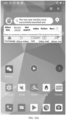
- the specified position (e.g., a position indicated by the letter A shown in FIG. 3 ) can be at least one of the upper left corner, lower left corner, upper right corner and lower right corner of the current window.
- the specified position of the current window may slide from the starting position to the stop position of sliding and two edges corresponding to the specified position also slide synchronously, so as to ensure that the proportion of the current window remains unchanged.
- the touch display screen may detect the user operation.
- the above touch data may be sent to a processor of the electronic device, so that the electronic device can detect the first operation for triggering the specified position of the current window.
- the specified position is the lower right corner of the current window.
- the first operation includes an operation that the user starts to contact the touch display screen and a subsequent sliding operation, such as a gray shaded bar illustrated in FIG. 4 .
- the electronic device when the electronic device detects the first operation for triggering the specified position of the current window, in response to the first operation the electronic device can obtain the actual proportion of the current window changing with the first operation. That is, the proportion of the current window may vary with the change of the specified position, and the area of the current window may be expanded or shrank. The proportion of the current window after the change is called the actual proportion. As shown in FIG. 4 , the current window changes from the proportion a shown in FIG. 3 and FIG. 4 to the proportion b shown in FIG.4 .
- the electronic device when the electronic device detects the first operation for triggering the specified position of the current window, the electronic device can obtain at least one candidate proportion of the current window based on the type of the current window in response to the first operation.
- the electronic device can determine whether an application in the current window is in a preset game list; When the above application in the current window is in the preset game list, the electronic device can determine that the current window is the type of game window, and the electronic device can determine that the candidate proportion of the current window is same as the screen proportion of the electronic device. As shown in FIG. 6 , both the proportion of the current window and the screen proportion are16:9. In this way, in the example, the window with the type of game window can be set as the screen proportion, thus achieving the effect of being consistent with the proportion of the display screen.
- the electronic device can determine whether the current window is a type of video full screen window.
- the electronic device can obtain the attribute information of the current window, and the attribute information can include a package name "packagename" and a "mOrientation" attribute.
- the above "mOrientation” attribute is used to determine a screen mode corresponding to the current window, such as a landscape screen mode or a portrait screen mode.
- the electronic device can determine whether the above package name is in a preset video list. When the above package name is in the preset video list, the electronic device can determine the screen mode corresponding to the current window (based on the "mOrientation" attribute of the current window).
- the electronic device can obtain system visible parameters (systemUiVisibility) of the current window.
- system visible parameters include a full screen parameter (FULLSCREEN) and a hidden navigation bar (HIDE_NAVIGATION)
- the electronic device can determine that the current window is the type of video full screen window.
- the electronic device can determine that the candidate proportion of the current window is same as the screen proportion of the electronic device. As shown in FIG. 6 , both the proportion of the current window and the screen proportion are 16:9.
- the current window when the current window is in the landscape screen mode, it indicates that the current window is displayed in a horizontal orientation. As shown in FIG. 6 , the current window is in the landscape screen mode, which is consistent with the display screen direction of the electronic device. In an example, when the current window is in the portrait screen mode, it indicates that the current window is displayed in a vertical orientation. As shown in FIG. 10 and FIG. 11 , the current window is in the portrait screen mode, which is consistent with the display screen direction of the electronic device.
- the electronic device can obtain attribute information (such as, a "mOrientation" attribute) of the current window.
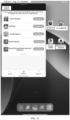
- the electronic device can determine the current window corresponds to a portrait screen mode and the candidate proportions of the current window are a second proportion (e.g., 3:4, its effect is shown in FIG. 10 ) and a third proportion (e.g., 1: 2.16, its effect is shown in FIG. 11 ).
- the second set condition may include at least one of the following:
- the above direction reverse to the portrait refers to a direction obtained by rotating 180 degrees relative to the direction in the landscape mode, so that the page content displayed to the user is opposite to that in the landscape mode.
- first proportion, second proportion and third proportion refer to a window proportion obtained by the application in the current window adapting to the Android system, that is, a window proportion preset in a native scheme in the Android system.
- the electronic device can obtain at least one candidate proportion corresponding to the current window through the above examples.
- a difference between the at least one candidate proportion and the actual proportion is obtained, and a candidate proportion with the smallest difference is determined as a target proportion of the current window.
- the electronic device can continue to detect a touch operation of the user on the touch display screen. Considering an operation (later called a second operation) that the user lifts from the specified position of the current window when the sliding operation ends. When it is detected the sliding operation ends, the electronic device can determine that the second operation for stopping triggering the current window is detected. At this time, the electronic device can obtain the difference between each of the at least one candidate proportion and the actual proportion.
- the candidate proportion and the actual proportion can be preprocessed into a mode of 1: X.
- the proportion of 4:3 is preprocessed into 1:0.75 and the proportion of 3:4 is preprocessed into 1: 1.33, etc.
- the electronic device needs to calculate the difference between the candidate proportion (x1) and the actual proportion (x2). At this time, the electronic device can determine a candidate proportion with the smallest difference as the target proportion of the current window. In other words, when the proportion of the current window is adjusted, in response to the user releasing his hand, the electronic device can select a candidate proportion closest to the actual proportion corresponding to the release as the target proportion and adsorb to the target proportion.
- a proportion of the current window is adjusted from the actual proportion to the target proportion.
- the electronic device can adjust the proportion of the current window from the actual proportion to the target proportion.
- the processor of the electronic device can notify the Android system that the size of the current window has changed and the application in the current window can be refreshed and the layout can be loaded, and can also notify a window management system (WMS) service in a relayout method.
- WMS window management system
- the WMS traverses all windows in the touch display screen, calculates a final size of all the windows, and finally applies them to SurfaceFlinger for rendering display, so as to finally adjust the proportion of the current window.
- the proportion of the current window is adjusted to the target proportion based on the type of the current window.
- the application may adapt the proportion of the page based on the proportion supported by the Android system, so as to achieve the effect that the proportion of the current window is matched with the displayed page, avoid the problem of mismatch between the current window and the displayed page, and improve the use experience.
- the electronic device can obtain a type of the current window, such as a type of game window, a type of video full screen window, a type of non-game window or a type of non-video full screen window in a landscape screen mode, a type of non-game window or a type of non-video full screen window in a portrait screen mode, and a type of non-game window or a type of non-video full screen window in other modes.
- the electronic device may select at least one candidate window based on the type of the current window. For example, when the current window is the type of game window, the candidate proportion of the current window is same as the screen proportion.
- the candidate proportion of the current window is same as the screen proportion.
- the candidate proportion of the current window is 4:3, the effect of which is shown in FIG. 9 .
- the candidate proportion of the current window is 3:4 and 1: 2.16, the effects of which are respectively shown in FIG. 10 and FIG. 11 .
- the candidate ratio is 4:3, 3:4 and 1: 2.16.
- the current window may change following the sliding operation (e.g., the scale and size of the current window may change).
- the current window may enter a small window mode or a free window mode.
- the electronic device can then resize the current window.
- One of the above at least one candidate proportion is selected as a target proportion, which is closest to the candidate proportion when the user releases the sliding operation. Then, the size of the current window is adjusted to the target proportion.
- the example of the disclosure also provides an apparatus for adjusting a window, which is applied to an electronic device.
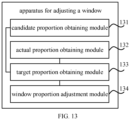
- the apparatus includes a candidate proportion obtaining module 131, an actual proportion obtaining module 132, a target proportion obtaining module 133 and a window proportion adjustment module 134.
- the candidate proportion obtaining module is configured to in response to detecting a first operation for triggering a specified position of a current window, obtain at least one candidate proportion of the current window based on a type of the current window.
- the actual proportion obtaining module is configured to in response to detecting the first operation for triggering the specified position of the current window, obtain an actual proportion of the current window, in which the actual proportion of the current window obtained varies with the first operation.
- the target proportion obtaining module is configured to in response to detecting a second operation for stopping triggering the current window, obtain a difference between the at least one candidate proportion and the actual proportion, and determine a candidate proportion with the smallest difference as a target proportion of the current window.
- the window proportion adjustment module is configured to adjust a proportion of the current window from the actual proportion to the target proportion.
- the candidate proportion obtaining module includes an attribute information obtaining sub module, an attribute information obtaining sub module, a game type determination sub module and a candidate proportion obtaining sub module.
- the attribute information obtaining sub module is configured to obtain attribute information of the current window, in which the attribute information includes flag information.
- the game type determination sub module is configured to determine that the current window is a type of game window in response to the flag information being a preset flag.
- the candidate proportion obtaining sub module is configured to determine that the candidate proportion of the current window is same as a screen proportion of an electronic device.
- the candidate proportion obtaining module further includes: an application determination unit, a game type determination unit and a candidate proportion obtaining sub module.
- the application determination unit configured to determine whether an application in the current window is within a preset game list in response to the flag information being not included in the attribute information;
- the game type determination unit is configured to determine that the current window is the type of game window in response to determining that the application in the current window is within the preset game list.
- the candidate proportion obtaining sub module is configured to determine that the candidate proportion of the current window is same as the screen proportion of the electronic device.
- the candidate proportion obtaining module includes: a video page determination sub module, and a candidate proportion obtaining sub module.
- the video page determination sub module is configured to determine whether the current window is a type of video full screen window.
- the candidate proportion obtaining sub module is configured to determine that the candidate proportion of the current window is same as the screen proportion of the electronic device in response to determining that the current window is the type of video full screen window.
- the video page determination sub module includes: an attribute information obtaining unit, a package name determination unit, a screen mode determination unit, a visible parameter obtaining unit and a video page determination unit.
- the attribute information obtaining unit is configured to obtain attribute information of the current window.
- the package name determination unit is configured to determine whether a package name in the attribute information is within a preset video list.
- the screen mode determination unit is configured to determine a screen mode corresponding to the current window in response to determining that the package name in the attribute information is within a preset video list.
- the candidate proportion obtaining module includes: an attribute information obtaining sub module, and a candidate proportion determination sub module.
Landscapes
- Engineering & Computer Science (AREA)
- General Engineering & Computer Science (AREA)
- Theoretical Computer Science (AREA)
- Human Computer Interaction (AREA)
- Physics & Mathematics (AREA)
- General Physics & Mathematics (AREA)
- User Interface Of Digital Computer (AREA)
Applications Claiming Priority (2)
| Application Number | Priority Date | Filing Date | Title |
|---|---|---|---|
| CN202111307985.9A CN116088734A (zh) | 2021-11-05 | 2021-11-05 | 窗口调整方法、装置、电子设备和计算机可读存储介质 |
| EP22170411.7A EP4177721B1 (de) | 2021-11-05 | 2022-04-28 | Verfahren und vorrichtung zur einstellung eines fensters und computerlesbares speichermedium |
Related Parent Applications (2)
| Application Number | Title | Priority Date | Filing Date |
|---|---|---|---|
| EP22170411.7A Division EP4177721B1 (de) | 2021-11-05 | 2022-04-28 | Verfahren und vorrichtung zur einstellung eines fensters und computerlesbares speichermedium |
| EP22170411.7A Division-Into EP4177721B1 (de) | 2021-11-05 | 2022-04-28 | Verfahren und vorrichtung zur einstellung eines fensters und computerlesbares speichermedium |
Publications (2)
| Publication Number | Publication Date |
|---|---|
| EP4582918A2 true EP4582918A2 (de) | 2025-07-09 |
| EP4582918A3 EP4582918A3 (de) | 2025-09-10 |
Family
ID=81392649
Family Applications (2)
| Application Number | Title | Priority Date | Filing Date |
|---|---|---|---|
| EP22170411.7A Active EP4177721B1 (de) | 2021-11-05 | 2022-04-28 | Verfahren und vorrichtung zur einstellung eines fensters und computerlesbares speichermedium |
| EP25177954.2A Pending EP4582918A3 (de) | 2021-11-05 | 2022-04-28 | Verfahren und vorrichtung zur anpassung eines fensters, elektronische vorrichtung und computerlesbares speichermedium |
Family Applications Before (1)
| Application Number | Title | Priority Date | Filing Date |
|---|---|---|---|
| EP22170411.7A Active EP4177721B1 (de) | 2021-11-05 | 2022-04-28 | Verfahren und vorrichtung zur einstellung eines fensters und computerlesbares speichermedium |
Country Status (3)
| Country | Link |
|---|---|
| US (1) | US11755177B2 (de) |
| EP (2) | EP4177721B1 (de) |
| CN (1) | CN116088734A (de) |
Families Citing this family (1)
| Publication number | Priority date | Publication date | Assignee | Title |
|---|---|---|---|---|
| CN119536566B (zh) * | 2023-08-31 | 2026-04-10 | Oppo广东移动通信有限公司 | 信息处理方法、装置、电子设备和计算机可读存储介质 |
Family Cites Families (13)
| Publication number | Priority date | Publication date | Assignee | Title |
|---|---|---|---|---|
| US8423903B2 (en) | 2007-04-11 | 2013-04-16 | Gvbb Holdings S.A.R.L. | Aspect ratio hinting for resizable video windows |
| US8381125B2 (en) * | 2009-12-16 | 2013-02-19 | Apple Inc. | Device and method for resizing user interface content while maintaining an aspect ratio via snapping a perimeter to a gridline |
| KR101852818B1 (ko) * | 2011-04-29 | 2018-06-07 | 엘지전자 주식회사 | 디지털 수신기 및 디지털 수신기의 제어 방법 |
| US9418068B2 (en) * | 2012-01-27 | 2016-08-16 | Microsoft Technology Licensing, Llc | Dimensional conversion in presentations |
| US9104885B1 (en) * | 2012-03-02 | 2015-08-11 | Amazon Technologies, Inc. | Providing access to application data |
| US9390473B2 (en) * | 2012-09-21 | 2016-07-12 | Google Inc. | Displaying applications on a fixed orientation display |
| US10460765B2 (en) * | 2015-08-26 | 2019-10-29 | JBF Interlude 2009 LTD | Systems and methods for adaptive and responsive video |
| KR102426070B1 (ko) | 2015-11-18 | 2022-07-28 | 삼성전자 주식회사 | 전자 장치 및 전자 장치의 디스플레이 설정 방법 |
| KR102386285B1 (ko) * | 2017-09-08 | 2022-04-14 | 삼성전자주식회사 | 이어폰을 통한 어플리케이션별 오디오 출력 제어 방법 및 이를 구현한 전자 장치 |
| DK179931B1 (en) * | 2017-09-09 | 2019-10-11 | Apple Inc. | Devices, methods and graphical user interfaces for displaying an affordance on a background |
| CN110582027B (zh) * | 2019-08-22 | 2022-04-12 | 聚好看科技股份有限公司 | 智能电视上显示消息的方法及相关装置 |
| US11416130B2 (en) * | 2019-10-01 | 2022-08-16 | Microsoft Technology Licensing, Llc | Moving applications on multi-screen computing device |
| US10846106B1 (en) * | 2020-03-09 | 2020-11-24 | Klarna Bank Ab | Real-time interface classification in an application |
-
2021
- 2021-11-05 CN CN202111307985.9A patent/CN116088734A/zh active Pending
-
2022
- 2022-04-27 US US17/730,185 patent/US11755177B2/en active Active
- 2022-04-28 EP EP22170411.7A patent/EP4177721B1/de active Active
- 2022-04-28 EP EP25177954.2A patent/EP4582918A3/de active Pending
Also Published As
| Publication number | Publication date |
|---|---|
| CN116088734A (zh) | 2023-05-09 |
| EP4177721B1 (de) | 2025-08-06 |
| EP4177721A1 (de) | 2023-05-10 |
| US11755177B2 (en) | 2023-09-12 |
| US20230146334A1 (en) | 2023-05-11 |
| EP4582918A3 (de) | 2025-09-10 |
Similar Documents
| Publication | Publication Date | Title |
|---|---|---|
| CN107526494B (zh) | 键盘显示方法、装置、终端及存储介质 | |
| EP4712489A2 (de) | Verfahren und vorrichtung für bildschirmprojektion, endgerät und speichermedium | |
| US10489169B2 (en) | Method and device for performing subset of functions of application | |
| US10444953B2 (en) | View angle switching method and apparatus | |
| EP3407189B1 (de) | Anwendungsverteilungsverfahren und -vorrichtung | |
| KR20100090467A (ko) | 이미지 표시 방법 및 장치 | |
| CN111399720A (zh) | 一种显示应用界面的方法、装置及存储介质 | |
| EP2921969A1 (de) | Verfahren und Vorrichtung zur Anpassung einer Webseite und elektronische Vorrichtung | |
| US10013151B2 (en) | Method and terminal device for adjusting widget | |
| US11531426B1 (en) | Edge anti-false-touch method and apparatus, electronic device and computer-readable storage medium | |
| US11948525B2 (en) | Refresh rate adjusting method, electronic device and storage medium | |
| CN105094539A (zh) | 参考信息显示方法和装置 | |
| US11755177B2 (en) | Method and apparatus for adjusting window, electronic device, and computer readable storage medium | |
| US20210120276A1 (en) | Screen display device, method and device for controlling screen display and storage medium | |
| CN112181265B (zh) | 一种触控信号处理方法、装置及介质 | |
| CN107168621A (zh) | 一种视图滑动控制方法及移动终端 | |
| CN106384033A (zh) | 一种终端屏幕灭屏的方法及装置 | |
| US20220291890A1 (en) | Method for interaction between devices and medium | |
| CN111614910B (zh) | 一种文件生成方法、装置、电子设备及存储介质 | |
| EP4312114A1 (de) | Verfahren und vorrichtung zur anpassung der grössen von fenstern mit geteiltem bildschirm, elektronische vorrichtung und speichermedium | |
| EP4130996A1 (de) | Verfahren zum erhalten von anzeigedaten, elektronische vorrichtung und speichermedium | |
| KR20150033786A (ko) | 콘텐츠 가독성 향상 방법 및 이를 위한 단말기 | |
| CN111782321B (zh) | 一种查看页面层级结构的方法、装置及介质 | |
| EP3995943A1 (de) | Verfahren zum betrieb einer anzeigevorrichtung, endgerät und speichermedium | |
| EP4632545A1 (de) | Anzeigeverfahren, elektronische vorrichtung und speichermedium |
Legal Events
| Date | Code | Title | Description |
|---|---|---|---|
| PUAI | Public reference made under article 153(3) epc to a published international application that has entered the european phase |
Free format text: ORIGINAL CODE: 0009012 |
|
| STAA | Information on the status of an ep patent application or granted ep patent |
Free format text: STATUS: REQUEST FOR EXAMINATION WAS MADE |
|
| 17P | Request for examination filed |
Effective date: 20250521 |
|
| AC | Divisional application: reference to earlier application |
Ref document number: 4177721 Country of ref document: EP Kind code of ref document: P |
|
| AK | Designated contracting states |
Kind code of ref document: A2 Designated state(s): AL AT BE BG CH CY CZ DE DK EE ES FI FR GB GR HR HU IE IS IT LI LT LU LV MC MK MT NL NO PL PT RO RS SE SI SK SM TR |
|
| PUAL | Search report despatched |
Free format text: ORIGINAL CODE: 0009013 |
|
| AK | Designated contracting states |
Kind code of ref document: A3 Designated state(s): AL AT BE BG CH CY CZ DE DK EE ES FI FR GB GR HR HU IE IS IT LI LT LU LV MC MK MT NL NO PL PT RO RS SE SI SK SM TR |
|
| RIC1 | Information provided on ipc code assigned before grant |
Ipc: G06F 3/0481 20220101AFI20250805BHEP |