EP4582918A2 - Method and apparatus for adjusting window, electronic device, and computer readable storage medium - Google Patents
Method and apparatus for adjusting window, electronic device, and computer readable storage medium Download PDFInfo
- Publication number
- EP4582918A2 EP4582918A2 EP25177954.2A EP25177954A EP4582918A2 EP 4582918 A2 EP4582918 A2 EP 4582918A2 EP 25177954 A EP25177954 A EP 25177954A EP 4582918 A2 EP4582918 A2 EP 4582918A2
- Authority
- EP
- European Patent Office
- Prior art keywords
- window
- proportion
- candidate
- screen
- obtaining
- Prior art date
- Legal status (The legal status is an assumption and is not a legal conclusion. Google has not performed a legal analysis and makes no representation as to the accuracy of the status listed.)
- Pending
Links
Images






Classifications
-
- G—PHYSICS
- G06—COMPUTING OR CALCULATING; COUNTING
- G06F—ELECTRIC DIGITAL DATA PROCESSING
- G06F3/00—Input arrangements for transferring data to be processed into a form capable of being handled by the computer; Output arrangements for transferring data from processing unit to output unit, e.g. interface arrangements
- G06F3/01—Input arrangements or combined input and output arrangements for interaction between user and computer
- G06F3/048—Interaction techniques based on graphical user interfaces [GUI]
- G06F3/0484—Interaction techniques based on graphical user interfaces [GUI] for the control of specific functions or operations, e.g. selecting or manipulating an object, an image or a displayed text element, setting a parameter value or selecting a range
-
- G—PHYSICS
- G06—COMPUTING OR CALCULATING; COUNTING
- G06F—ELECTRIC DIGITAL DATA PROCESSING
- G06F3/00—Input arrangements for transferring data to be processed into a form capable of being handled by the computer; Output arrangements for transferring data from processing unit to output unit, e.g. interface arrangements
- G06F3/01—Input arrangements or combined input and output arrangements for interaction between user and computer
- G06F3/048—Interaction techniques based on graphical user interfaces [GUI]
- G06F3/0481—Interaction techniques based on graphical user interfaces [GUI] based on specific properties of the displayed interaction object or a metaphor-based environment, e.g. interaction with desktop elements like windows or icons, or assisted by a cursor's changing behaviour or appearance
-
- G—PHYSICS
- G06—COMPUTING OR CALCULATING; COUNTING
- G06F—ELECTRIC DIGITAL DATA PROCESSING
- G06F3/00—Input arrangements for transferring data to be processed into a form capable of being handled by the computer; Output arrangements for transferring data from processing unit to output unit, e.g. interface arrangements
- G06F3/01—Input arrangements or combined input and output arrangements for interaction between user and computer
- G06F3/048—Interaction techniques based on graphical user interfaces [GUI]
- G06F3/0481—Interaction techniques based on graphical user interfaces [GUI] based on specific properties of the displayed interaction object or a metaphor-based environment, e.g. interaction with desktop elements like windows or icons, or assisted by a cursor's changing behaviour or appearance
- G06F3/0482—Interaction with lists of selectable items, e.g. menus
-
- G—PHYSICS
- G06—COMPUTING OR CALCULATING; COUNTING
- G06F—ELECTRIC DIGITAL DATA PROCESSING
- G06F3/00—Input arrangements for transferring data to be processed into a form capable of being handled by the computer; Output arrangements for transferring data from processing unit to output unit, e.g. interface arrangements
- G06F3/01—Input arrangements or combined input and output arrangements for interaction between user and computer
- G06F3/048—Interaction techniques based on graphical user interfaces [GUI]
- G06F3/0481—Interaction techniques based on graphical user interfaces [GUI] based on specific properties of the displayed interaction object or a metaphor-based environment, e.g. interaction with desktop elements like windows or icons, or assisted by a cursor's changing behaviour or appearance
- G06F3/04812—Interaction techniques based on cursor appearance or behaviour, e.g. being affected by the presence of displayed objects
-
- G—PHYSICS
- G06—COMPUTING OR CALCULATING; COUNTING
- G06F—ELECTRIC DIGITAL DATA PROCESSING
- G06F3/00—Input arrangements for transferring data to be processed into a form capable of being handled by the computer; Output arrangements for transferring data from processing unit to output unit, e.g. interface arrangements
- G06F3/01—Input arrangements or combined input and output arrangements for interaction between user and computer
- G06F3/048—Interaction techniques based on graphical user interfaces [GUI]
- G06F3/0484—Interaction techniques based on graphical user interfaces [GUI] for the control of specific functions or operations, e.g. selecting or manipulating an object, an image or a displayed text element, setting a parameter value or selecting a range
- G06F3/04847—Interaction techniques to control parameter settings, e.g. interaction with sliders or dials
-
- G—PHYSICS
- G06—COMPUTING OR CALCULATING; COUNTING
- G06F—ELECTRIC DIGITAL DATA PROCESSING
- G06F3/00—Input arrangements for transferring data to be processed into a form capable of being handled by the computer; Output arrangements for transferring data from processing unit to output unit, e.g. interface arrangements
- G06F3/01—Input arrangements or combined input and output arrangements for interaction between user and computer
- G06F3/048—Interaction techniques based on graphical user interfaces [GUI]
- G06F3/0487—Interaction techniques based on graphical user interfaces [GUI] using specific features provided by the input device, e.g. functions controlled by the rotation of a mouse with dual sensing arrangements, or of the nature of the input device, e.g. tap gestures based on pressure sensed by a digitiser
- G06F3/0488—Interaction techniques based on graphical user interfaces [GUI] using specific features provided by the input device, e.g. functions controlled by the rotation of a mouse with dual sensing arrangements, or of the nature of the input device, e.g. tap gestures based on pressure sensed by a digitiser using a touch-screen or digitiser, e.g. input of commands through traced gestures
- G06F3/04883—Interaction techniques based on graphical user interfaces [GUI] using specific features provided by the input device, e.g. functions controlled by the rotation of a mouse with dual sensing arrangements, or of the nature of the input device, e.g. tap gestures based on pressure sensed by a digitiser using a touch-screen or digitiser, e.g. input of commands through traced gestures for inputting data by handwriting, e.g. gesture or text
-
- G—PHYSICS
- G06—COMPUTING OR CALCULATING; COUNTING
- G06F—ELECTRIC DIGITAL DATA PROCESSING
- G06F2200/00—Indexing scheme relating to G06F1/04 - G06F1/32
- G06F2200/16—Indexing scheme relating to G06F1/16 - G06F1/18
- G06F2200/161—Indexing scheme relating to constructional details of the monitor
- G06F2200/1614—Image rotation following screen orientation, e.g. switching from landscape to portrait mode
-
- G—PHYSICS
- G06—COMPUTING OR CALCULATING; COUNTING
- G06F—ELECTRIC DIGITAL DATA PROCESSING
- G06F2203/00—Indexing scheme relating to G06F3/00 - G06F3/048
- G06F2203/048—Indexing scheme relating to G06F3/048
- G06F2203/04806—Zoom, i.e. interaction techniques or interactors for controlling the zooming operation
Definitions
- the disclosure relates to a field of control technologies, and particularly to a method and an apparatus for adjusting a window, an electronic device and a computer readable storage medium.
- the disclosure provides a method and an apparatus for adjusting a window, an electronic device and a computer readable storage medium.
- the invention is set out in the appended set of claims.
- the above disclosure may adjust the proportion of the current window to the target proportion based on the type of the current window.
- the application may adapt to the page proportion based on the one supported by the Android system, thus achieving an effect that the proportion of the current window is matched with that of the displayed page, and avoiding the problem of mismatch between the window and the page, which is helpful to improve the user experience.
- first, second, third, and the like are used in the present disclosure to describe various information, the information is not limited to the terms. These terms are merely used to differentiate information of a same type. For example, without departing from the scope of the present disclosure, first information is also referred to as second information, and similarly the second information is also referred to as the first information. Depending on the context, for example, the term “if” used herein may be explained as “when” or “while”, or “in response to ..., it is determined that”.
- module may include memory (shared, dedicated, or group) that stores code or instructions that can be executed by one or more processors.
- a module may include one or more circuits with or without stored code or instructions.
- the module or circuit may include one or more components that are directly or indirectly connected. These components may or may not be physically attached to, or located adjacent to, one another.
- a unit or module may be implemented purely by software, purely by hardware, or by a combination of hardware and software.
- the unit or module may include functionally related code blocks or software components that are directly or indirectly linked together, so as to perform a particular function.
- the reason for the above incompatibility of the application display layout is that, the Android system allows users to freely adjust the window proportion, and an application may adapt to the proportion (e.g. 4:3) supported by the Android system in the development process; however, the window proportion (e.g. 4:2.5) adjusted by the users is usually not the proportion supported by the Android system, the window page corresponding to 4:2.5 may be displayed in the display process and the remaining window page (i.e., 0.5 in the width direction) may be blocked, which leads to the result that the page is not fully displayed (i.e., the application page is incompatible with the window adjusted).
- the window proportion e.g. 4:2.5
- the window page corresponding to 4:2.5 may be displayed in the display process and the remaining window page (i.e., 0.5 in the width direction) may be blocked, which leads to the result that the page is not fully displayed (i.e., the application page is incompatible with the window adjusted).
- FIG. 2 is a flowchart illustrating a method for adjusting a window according to an example.
- the method for adjusting a window includes steps at 21 to 23.
- At 21 in response to detecting a first operation for triggering a specified position of a current window, at least one candidate proportion of the current window is obtained based on a type of the current window, and an actual proportion of the current window varying with the first operation is obtained.
- the electronic device can detect a touch operation from the user on the touch display screen, such as clicking, double clicking, sliding and other operations.
- a touch operation from the user on the touch display screen, such as clicking, double clicking, sliding and other operations.
- the operation is usually continuous when adjusting the window proportion or size, each solution in the subsequent examples is described by taking the sliding operation as an example.
- the specified position (e.g., a position indicated by the letter A shown in FIG. 3 ) can be at least one of the upper left corner, lower left corner, upper right corner and lower right corner of the current window.
- the specified position of the current window may slide from the starting position to the stop position of sliding and two edges corresponding to the specified position also slide synchronously, so as to ensure that the proportion of the current window remains unchanged.
- the touch display screen may detect the user operation.
- the above touch data may be sent to a processor of the electronic device, so that the electronic device can detect the first operation for triggering the specified position of the current window.
- the specified position is the lower right corner of the current window.
- the first operation includes an operation that the user starts to contact the touch display screen and a subsequent sliding operation, such as a gray shaded bar illustrated in FIG. 4 .
- the electronic device when the electronic device detects the first operation for triggering the specified position of the current window, in response to the first operation the electronic device can obtain the actual proportion of the current window changing with the first operation. That is, the proportion of the current window may vary with the change of the specified position, and the area of the current window may be expanded or shrank. The proportion of the current window after the change is called the actual proportion. As shown in FIG. 4 , the current window changes from the proportion a shown in FIG. 3 and FIG. 4 to the proportion b shown in FIG.4 .
- the electronic device when the electronic device detects the first operation for triggering the specified position of the current window, the electronic device can obtain at least one candidate proportion of the current window based on the type of the current window in response to the first operation.
- the electronic device can determine whether an application in the current window is in a preset game list; When the above application in the current window is in the preset game list, the electronic device can determine that the current window is the type of game window, and the electronic device can determine that the candidate proportion of the current window is same as the screen proportion of the electronic device. As shown in FIG. 6 , both the proportion of the current window and the screen proportion are16:9. In this way, in the example, the window with the type of game window can be set as the screen proportion, thus achieving the effect of being consistent with the proportion of the display screen.
- the electronic device can determine whether the current window is a type of video full screen window.
- the electronic device can obtain the attribute information of the current window, and the attribute information can include a package name "packagename" and a "mOrientation" attribute.
- the above "mOrientation” attribute is used to determine a screen mode corresponding to the current window, such as a landscape screen mode or a portrait screen mode.
- the electronic device can determine whether the above package name is in a preset video list. When the above package name is in the preset video list, the electronic device can determine the screen mode corresponding to the current window (based on the "mOrientation" attribute of the current window).
- the electronic device can obtain system visible parameters (systemUiVisibility) of the current window.
- system visible parameters include a full screen parameter (FULLSCREEN) and a hidden navigation bar (HIDE_NAVIGATION)
- the electronic device can determine that the current window is the type of video full screen window.
- the electronic device can determine that the candidate proportion of the current window is same as the screen proportion of the electronic device. As shown in FIG. 6 , both the proportion of the current window and the screen proportion are 16:9.
- the current window when the current window is in the landscape screen mode, it indicates that the current window is displayed in a horizontal orientation. As shown in FIG. 6 , the current window is in the landscape screen mode, which is consistent with the display screen direction of the electronic device. In an example, when the current window is in the portrait screen mode, it indicates that the current window is displayed in a vertical orientation. As shown in FIG. 10 and FIG. 11 , the current window is in the portrait screen mode, which is consistent with the display screen direction of the electronic device.
- the electronic device can obtain attribute information (such as, a "mOrientation" attribute) of the current window.
- the electronic device can determine the current window corresponds to a portrait screen mode and the candidate proportions of the current window are a second proportion (e.g., 3:4, its effect is shown in FIG. 10 ) and a third proportion (e.g., 1: 2.16, its effect is shown in FIG. 11 ).
- the second set condition may include at least one of the following:
- the above direction reverse to the portrait refers to a direction obtained by rotating 180 degrees relative to the direction in the landscape mode, so that the page content displayed to the user is opposite to that in the landscape mode.
- first proportion, second proportion and third proportion refer to a window proportion obtained by the application in the current window adapting to the Android system, that is, a window proportion preset in a native scheme in the Android system.
- the electronic device can obtain at least one candidate proportion corresponding to the current window through the above examples.
- a difference between the at least one candidate proportion and the actual proportion is obtained, and a candidate proportion with the smallest difference is determined as a target proportion of the current window.
- the electronic device can continue to detect a touch operation of the user on the touch display screen. Considering an operation (later called a second operation) that the user lifts from the specified position of the current window when the sliding operation ends. When it is detected the sliding operation ends, the electronic device can determine that the second operation for stopping triggering the current window is detected. At this time, the electronic device can obtain the difference between each of the at least one candidate proportion and the actual proportion.
- the candidate proportion and the actual proportion can be preprocessed into a mode of 1: X.
- the proportion of 4:3 is preprocessed into 1:0.75 and the proportion of 3:4 is preprocessed into 1: 1.33, etc.
- the electronic device needs to calculate the difference between the candidate proportion (x1) and the actual proportion (x2). At this time, the electronic device can determine a candidate proportion with the smallest difference as the target proportion of the current window. In other words, when the proportion of the current window is adjusted, in response to the user releasing his hand, the electronic device can select a candidate proportion closest to the actual proportion corresponding to the release as the target proportion and adsorb to the target proportion.
- a proportion of the current window is adjusted from the actual proportion to the target proportion.
- the electronic device can adjust the proportion of the current window from the actual proportion to the target proportion.
- the processor of the electronic device can notify the Android system that the size of the current window has changed and the application in the current window can be refreshed and the layout can be loaded, and can also notify a window management system (WMS) service in a relayout method.
- WMS window management system
- the WMS traverses all windows in the touch display screen, calculates a final size of all the windows, and finally applies them to SurfaceFlinger for rendering display, so as to finally adjust the proportion of the current window.
- the proportion of the current window is adjusted to the target proportion based on the type of the current window.
- the application may adapt the proportion of the page based on the proportion supported by the Android system, so as to achieve the effect that the proportion of the current window is matched with the displayed page, avoid the problem of mismatch between the current window and the displayed page, and improve the use experience.
- the electronic device can obtain a type of the current window, such as a type of game window, a type of video full screen window, a type of non-game window or a type of non-video full screen window in a landscape screen mode, a type of non-game window or a type of non-video full screen window in a portrait screen mode, and a type of non-game window or a type of non-video full screen window in other modes.
- the electronic device may select at least one candidate window based on the type of the current window. For example, when the current window is the type of game window, the candidate proportion of the current window is same as the screen proportion.
- the candidate proportion of the current window is same as the screen proportion.
- the candidate proportion of the current window is 4:3, the effect of which is shown in FIG. 9 .
- the candidate proportion of the current window is 3:4 and 1: 2.16, the effects of which are respectively shown in FIG. 10 and FIG. 11 .
- the candidate ratio is 4:3, 3:4 and 1: 2.16.
- the current window may change following the sliding operation (e.g., the scale and size of the current window may change).
- the current window may enter a small window mode or a free window mode.
- the electronic device can then resize the current window.
- One of the above at least one candidate proportion is selected as a target proportion, which is closest to the candidate proportion when the user releases the sliding operation. Then, the size of the current window is adjusted to the target proportion.
- the example of the disclosure also provides an apparatus for adjusting a window, which is applied to an electronic device.
- the apparatus includes a candidate proportion obtaining module 131, an actual proportion obtaining module 132, a target proportion obtaining module 133 and a window proportion adjustment module 134.
- the candidate proportion obtaining module is configured to in response to detecting a first operation for triggering a specified position of a current window, obtain at least one candidate proportion of the current window based on a type of the current window.
- the actual proportion obtaining module is configured to in response to detecting the first operation for triggering the specified position of the current window, obtain an actual proportion of the current window, in which the actual proportion of the current window obtained varies with the first operation.
- the target proportion obtaining module is configured to in response to detecting a second operation for stopping triggering the current window, obtain a difference between the at least one candidate proportion and the actual proportion, and determine a candidate proportion with the smallest difference as a target proportion of the current window.
- the window proportion adjustment module is configured to adjust a proportion of the current window from the actual proportion to the target proportion.
- the candidate proportion obtaining module includes an attribute information obtaining sub module, an attribute information obtaining sub module, a game type determination sub module and a candidate proportion obtaining sub module.
- the attribute information obtaining sub module is configured to obtain attribute information of the current window, in which the attribute information includes flag information.
- the game type determination sub module is configured to determine that the current window is a type of game window in response to the flag information being a preset flag.
- the candidate proportion obtaining sub module is configured to determine that the candidate proportion of the current window is same as a screen proportion of an electronic device.
- the candidate proportion obtaining module further includes: an application determination unit, a game type determination unit and a candidate proportion obtaining sub module.
- the application determination unit configured to determine whether an application in the current window is within a preset game list in response to the flag information being not included in the attribute information;
- the game type determination unit is configured to determine that the current window is the type of game window in response to determining that the application in the current window is within the preset game list.
- the candidate proportion obtaining sub module is configured to determine that the candidate proportion of the current window is same as the screen proportion of the electronic device.
- the candidate proportion obtaining module includes: a video page determination sub module, and a candidate proportion obtaining sub module.
- the video page determination sub module is configured to determine whether the current window is a type of video full screen window.
- the candidate proportion obtaining sub module is configured to determine that the candidate proportion of the current window is same as the screen proportion of the electronic device in response to determining that the current window is the type of video full screen window.
- the video page determination sub module includes: an attribute information obtaining unit, a package name determination unit, a screen mode determination unit, a visible parameter obtaining unit and a video page determination unit.
- the attribute information obtaining unit is configured to obtain attribute information of the current window.
- the package name determination unit is configured to determine whether a package name in the attribute information is within a preset video list.
- the screen mode determination unit is configured to determine a screen mode corresponding to the current window in response to determining that the package name in the attribute information is within a preset video list.
- the candidate proportion obtaining module includes: an attribute information obtaining sub module, and a candidate proportion determination sub module.
Landscapes
- Engineering & Computer Science (AREA)
- General Engineering & Computer Science (AREA)
- Theoretical Computer Science (AREA)
- Human Computer Interaction (AREA)
- Physics & Mathematics (AREA)
- General Physics & Mathematics (AREA)
- User Interface Of Digital Computer (AREA)
Abstract
Description
- The disclosure relates to a field of control technologies, and particularly to a method and an apparatus for adjusting a window, an electronic device and a computer readable storage medium.
- With the popularity of electronic devices, different functions of the electronic devices are used, such as watching videos, reading novels or browsing microblogs. In some scenarios, there is a need to operate multiple windows, such as a scenario where the news is browsed without affecting the usage of the desktop.
- The disclosure provides a method and an apparatus for adjusting a window, an electronic device and a computer readable storage medium. The invention is set out in the appended set of claims.
- The above disclosure may adjust the proportion of the current window to the target proportion based on the type of the current window. When the target proportion is one supported by the Android system, the application may adapt to the page proportion based on the one supported by the Android system, thus achieving an effect that the proportion of the current window is matched with that of the displayed page, and avoiding the problem of mismatch between the window and the page, which is helpful to improve the user experience.
- It should be understood that, the above general descriptions and detailed descriptions are illustrative and descriptive, and may not be a limitation of the disclosure.
- The drawings herein are incorporated into the specification and constitute a part of the specification, show examples in conformity with the present disclosure, and explain the principle of the present disclosure together with the specification.
-
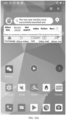
FIG. 1(a) is an effect schematic diagram illustrating mismatch before the adjustment. -
FIG. 1(b) is an effect schematic diagram illustrating mismatch before the adjustment. -
FIG. 2 is a flowchart illustrating a method for adjusting a window according to one or more examples of the present disclosure. -
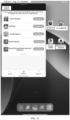
FIG. 3 is a schematic diagram illustrating a designated position being the lower right corner of a current window according to one or more examples of the present disclosure. -
FIG. 4 is a schematic diagram illustrating the current window changes with a first operation according to one or more examples of the present disclosure. -
FIG. 5 is a flowchart illustrating obtaining a candidate proportion according to one or more examples of the present disclosure. -
FIG. 6 is a schematic diagram illustrating a screen proportion is 16:9 according to one or more examples of the present disclosure. -
FIG. 7 is a flowchart illustrating another method for obtaining a candidate proportion according to one or more examples of the present disclosure. -
FIG. 8 is a flowchart illustrating yet another method for obtaining a candidate proportion according to one or more examples of the present disclosure. -
FIG. 9 is a schematic diagram illustrating a proportion of the current window is 4:3 according to one or more examples of the present disclosure. -
FIG. 10 is a schematic diagram illustrating a proportion of the current window is 3:4 according to one or more examples of the present disclosure. -
FIG. 11 is a schematic diagram illustrating a proportion of the current window is 1:2.16 according to one or more examples of the present disclosure. -
FIG. 12 is a flowchart illustrating a method for adjusting a window according to one or more examples of the present disclosure. -
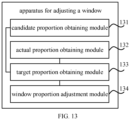
FIG. 13 is a block diagram illustrating an apparatus for adjusting a window according to one or more examples of the present disclosure. -
FIG. 14 is a block diagram illustrating an electronic device according to one or more examples of the present disclosure. - The disclosure will be described in detail here, examples of which are shown in the accompanying drawings. When the following descriptions refer to the accompanying drawings, unless otherwise indicated, the same numbers in different drawings represent the same or similar elements. The implementations described in the following example embodiments do not represent all the implementations consistent with the present disclosure. Rather, they are merely examples of the apparatus and method consistent with some aspects of the present disclosure as detailed in the following claims. It should be noted that the features in the following embodiments and embodiments can be combined with each other without conflict.
- Terms used in the present disclosure are merely for describing specific examples and are not intended to limit the present disclosure. The singular forms "one", "the", and "this" used in the present disclosure and the appended claims are also intended to include a multiple form, unless other meanings are clearly represented in the context. It should also be understood that the term "and/or" used in the present disclosure refers to any or all of possible combinations including one or more associated listed items.
- Reference throughout this specification to "one embodiment," "an embodiment," "an example," "some embodiments," "some examples," or similar language means that a particular feature, structure, or characteristic described is included in at least one embodiment or example. Features, structures, elements, or characteristics described in connection with one or some embodiments are also applicable to other embodiments, unless expressly specified otherwise.
- It should be understood that although terms "first", "second", "third", and the like are used in the present disclosure to describe various information, the information is not limited to the terms. These terms are merely used to differentiate information of a same type. For example, without departing from the scope of the present disclosure, first information is also referred to as second information, and similarly the second information is also referred to as the first information. Depending on the context, for example, the term "if" used herein may be explained as "when" or "while", or "in response to ..., it is determined that".
- The terms "module," "sub-module," "circuit," "sub-circuit," "circuitry," "sub-circuitry," "unit," or "sub-unit" may include memory (shared, dedicated, or group) that stores code or instructions that can be executed by one or more processors. A module may include one or more circuits with or without stored code or instructions. The module or circuit may include one or more components that are directly or indirectly connected. These components may or may not be physically attached to, or located adjacent to, one another.
- A unit or module may be implemented purely by software, purely by hardware, or by a combination of hardware and software. In a pure software implementation, for example, the unit or module may include functionally related code blocks or software components that are directly or indirectly linked together, so as to perform a particular function.
- With the popularity of electronic devices, different functions of the electronic devices are used, such as watching videos, reading novels or browsing microblogs. In some scenarios, there is a need to operate multiple windows, such as a scenario where the news is browsed without affecting the usage of the desktop. Taking this scenario as an example, as shown in
FIG. 1(a) , when an application is opened in a small window, the proportion of the application content displayed does not match the window size without considering compatibility of the application display layout. In this scenario, as shown inFIG. 1(b) , the users need to drag the window interface up, down, left and right for browsing, which reduces user experience. - During the process of implementing the present disclosure, it is found that the reason for the above incompatibility of the application display layout is that, the Android system allows users to freely adjust the window proportion, and an application may adapt to the proportion (e.g. 4:3) supported by the Android system in the development process; however, the window proportion (e.g. 4:2.5) adjusted by the users is usually not the proportion supported by the Android system, the window page corresponding to 4:2.5 may be displayed in the display process and the remaining window page (i.e., 0.5 in the width direction) may be blocked, which leads to the result that the page is not fully displayed (i.e., the application page is incompatible with the window adjusted).
- In order to solve the above technical problem, the example of the disclosure provides a method for adjusting a window, which can be applied to an electronic device. The electronic device can include a device with a large display screen such as a tablet computer. In subsequent examples, an electronic device with a touch display screen is used to describe the solution of each example, but does not constitute a limitation to the solution of the disclosure.
FIG. 2 is a flowchart illustrating a method for adjusting a window according to an example. Referring toFIG. 2 , the method for adjusting a window includes steps at 21 to 23. - At 21, in response to detecting a first operation for triggering a specified position of a current window, at least one candidate proportion of the current window is obtained based on a type of the current window, and an actual proportion of the current window varying with the first operation is obtained.
- In the example, the electronic device can detect a touch operation from the user on the touch display screen, such as clicking, double clicking, sliding and other operations. Considering that the operation is usually continuous when adjusting the window proportion or size, each solution in the subsequent examples is described by taking the sliding operation as an example.
- In the example, the specified position (e.g., a position indicated by the letter A shown in
FIG. 3 ) can be at least one of the upper left corner, lower left corner, upper right corner and lower right corner of the current window. When one corner at the specified position is pressed by the user for sliding, the specified position of the current window may slide from the starting position to the stop position of sliding and two edges corresponding to the specified position also slide synchronously, so as to ensure that the proportion of the current window remains unchanged. - In the example, the touch display screen may detect the user operation. When the first operation that the user triggers the specified position of the current window is detected, the above touch data may be sent to a processor of the electronic device, so that the electronic device can detect the first operation for triggering the specified position of the current window. As shown in
FIG. 3 , the specified position is the lower right corner of the current window. The first operation includes an operation that the user starts to contact the touch display screen and a subsequent sliding operation, such as a gray shaded bar illustrated inFIG. 4 . - In the example, when the electronic device detects the first operation for triggering the specified position of the current window, in response to the first operation the electronic device can obtain the actual proportion of the current window changing with the first operation. That is, the proportion of the current window may vary with the change of the specified position, and the area of the current window may be expanded or shrank. The proportion of the current window after the change is called the actual proportion. As shown in
FIG. 4 , the current window changes from the proportion a shown inFIG. 3 andFIG. 4 to the proportion b shown inFIG.4 . - In the example, when the electronic device detects the first operation for triggering the specified position of the current window, the electronic device can obtain at least one candidate proportion of the current window based on the type of the current window in response to the first operation.
- In an example, referring to
FIG. 5 , at 51, the electronic device can obtain attribute information of the current window, and the attribute information includes flag information. The flag information can be a Flags field in the Android system. For example, the electronic device can read the Flags field in Applicationinfo information of an application in the current window. At 52, when the flag information is a preset flag (e.g., ApplicationInfo.FLAG_IS_GAME), the electronic device can determine that the current window is a type of game window. At 53, the electronic device may determine that the candidate proportion of the current window is same as the screen proportion of the electronic device. For example, when the touch display proportion of the electronic device is 16:9, the candidate proportion of the current window is 16:9. In this way, in the example, the window with the type of game window can be set as the screen proportion, thus achieving the effect of being consistent with the proportion of the display screen. - In another example, after the step at 51 is performed, when the flag information is a non-preset flag (in other words, there is no the above preset flag, ApplicationInfo.FLAG_IS_GAME), the electronic device can determine whether an application in the current window is in a preset game list; When the above application in the current window is in the preset game list, the electronic device can determine that the current window is the type of game window, and the electronic device can determine that the candidate proportion of the current window is same as the screen proportion of the electronic device. As shown in
FIG. 6 , both the proportion of the current window and the screen proportion are16:9. In this way, in the example, the window with the type of game window can be set as the screen proportion, thus achieving the effect of being consistent with the proportion of the display screen. - In another example, referring to
FIG. 7 , at 71, the electronic device can determine whether the current window is a type of video full screen window. For example, the electronic device can obtain the attribute information of the current window, and the attribute information can include a package name "packagename" and a "mOrientation" attribute. The above "mOrientation" attribute is used to determine a screen mode corresponding to the current window, such as a landscape screen mode or a portrait screen mode. The electronic device can determine whether the above package name is in a preset video list. When the above package name is in the preset video list, the electronic device can determine the screen mode corresponding to the current window (based on the "mOrientation" attribute of the current window). When the current window corresponds to the landscape screen mode, the electronic device can obtain system visible parameters (systemUiVisibility) of the current window. When the above system visible parameters include a full screen parameter (FULLSCREEN) and a hidden navigation bar (HIDE_NAVIGATION), the electronic device can determine that the current window is the type of video full screen window. At 72, when the current window is the type of video full screen window, the electronic device can determine that the candidate proportion of the current window is same as the screen proportion of the electronic device. As shown inFIG. 6 , both the proportion of the current window and the screen proportion are 16:9. - In an example, when the current window is in the landscape screen mode, it indicates that the current window is displayed in a horizontal orientation. As shown in
FIG. 6 , the current window is in the landscape screen mode, which is consistent with the display screen direction of the electronic device. In an example, when the current window is in the portrait screen mode, it indicates that the current window is displayed in a vertical orientation. As shown inFIG. 10 andFIG. 11 , the current window is in the portrait screen mode, which is consistent with the display screen direction of the electronic device. - In another example, referring to
FIG. 8 , At 81, when the current window is not a type of game window or a type of video full screen window, the electronic device can obtain attribute information (such as, a "mOrientation" attribute) of the current window. - At 82, when the attribute information meets a first set condition, the electronic device can determine that the current window corresponds to a landscape screen mode and the candidate proportion of the current window is a first proportion (such as 4:3), the effect of which is shown in
FIG. 9 . The first set condition may include at least one of the following: - enabling the screen in a landscape mode and unaffected by a direction sensor (mOrientation == ActivityInfo.SCREEN_ORIENTATION_LANDSCAPE);
- enabling the screen in a landscape mode and changing a screen direction based on a direction sensor (mOrientation == ActivityInfo.SCREEN_ORIENTATION_SENSOR_LANDSCAPE)
- enabling the screen in a landscape mode and in a direction reverse to the portrait (mOrientation == ActivityInfo. SCREEN_ORIENTATION_REVERSE_LANDSCAPE); and
- enabling the screen in a landscape mode and rotating a direction based on a sensor (mOrientation == ActivityInfo.SCREEN_ORIENTATION_USER_LANDSCAPE).
- When the above attribute information meets the second set condition, the electronic device can determine the current window corresponds to a portrait screen mode and the candidate proportions of the current window are a second proportion (e.g., 3:4, its effect is shown in
FIG. 10 ) and a third proportion (e.g., 1: 2.16, its effect is shown inFIG. 11 ). The second set condition may include at least one of the following: - enabling the screen in a portrait mode and unaffected by a direction sensor (mOrientation == ActivityInfo.SCREEN_ORIENTATION_PORTRAIT);
- enabling the screen in a portrait mode and changing a screen direction based on a direction sensor (mOrientation == ActivityInfo.SCREEN_ORIENTATION_SENSOR_PORTRAIT)
- enabling the screen in a portrait mode and in a direction reverse to the portrait (mOrientation == ActivityInfo.SCREEN_ORIENTATION_REVERSE_PORTRAIT); and
- enabling the screen in a portrait mode and rotating a direction based on a sensor (mOrientation == ActivityInfo.SCREEN_ORIENTATION_USER_PORTRAIT).
- The above direction reverse to the portrait refers to a direction obtained by rotating 180 degrees relative to the direction in the landscape mode, so that the page content displayed to the user is opposite to that in the landscape mode.
- When the attribute information does not meet the above first set condition or the second set condition, the electronic device can determine that the candidate proportions of the current window are the first proportion (the effect is shown in
FIG. 9 ), the second proportion (the effect is shown inFIG. 10 ) and the third proportion (the effect is shown inFIG. 11 ). - It should be noted that the above first proportion, second proportion and third proportion refer to a window proportion obtained by the application in the current window adapting to the Android system, that is, a window proportion preset in a native scheme in the Android system.
- In this way, through the example solutions shown in
FIG. 5 to FIG. 8 , the electronic device can obtain at least one candidate proportion corresponding to the current window through the above examples. - At 22, in response to detecting a second operation for stopping triggering the current window, a difference between the at least one candidate proportion and the actual proportion is obtained, and a candidate proportion with the smallest difference is determined as a target proportion of the current window.
- In the example, the electronic device can continue to detect a touch operation of the user on the touch display screen. Considering an operation (later called a second operation) that the user lifts from the specified position of the current window when the sliding operation ends. When it is detected the sliding operation ends, the electronic device can determine that the second operation for stopping triggering the current window is detected. At this time, the electronic device can obtain the difference between each of the at least one candidate proportion and the actual proportion. For the convenience of calculation, in the example, the candidate proportion and the actual proportion can be preprocessed into a mode of 1: X. For example, the proportion of 4:3 is preprocessed into 1:0.75 and the proportion of 3:4 is preprocessed into 1: 1.33, etc. Then, the electronic device needs to calculate the difference between the candidate proportion (x1) and the actual proportion (x2). At this time, the electronic device can determine a candidate proportion with the smallest difference as the target proportion of the current window. In other words, when the proportion of the current window is adjusted, in response to the user releasing his hand, the electronic device can select a candidate proportion closest to the actual proportion corresponding to the release as the target proportion and adsorb to the target proportion.
- At 23, a proportion of the current window is adjusted from the actual proportion to the target proportion.
- In the example, the electronic device can adjust the proportion of the current window from the actual proportion to the target proportion. For example, the processor of the electronic device can notify the Android system that the size of the current window has changed and the application in the current window can be refreshed and the layout can be loaded, and can also notify a window management system (WMS) service in a relayout method. The WMS traverses all windows in the touch display screen, calculates a final size of all the windows, and finally applies them to SurfaceFlinger for rendering display, so as to finally adjust the proportion of the current window.
- So far, in this example, the proportion of the current window is adjusted to the target proportion based on the type of the current window. When the target proportion is the proportion supported by the Android system, the application may adapt the proportion of the page based on the proportion supported by the Android system, so as to achieve the effect that the proportion of the current window is matched with the displayed page, avoid the problem of mismatch between the current window and the displayed page, and improve the use experience.
- The above solution is described below in combination with a scenario where the user slides and adjusts the current window in the electronic device, as shown in
FIG. 12 . - The user touches and slides the lower left or right corner of the current window in the touch display screen. At this time, the electronic device can obtain a type of the current window, such as a type of game window, a type of video full screen window, a type of non-game window or a type of non-video full screen window in a landscape screen mode, a type of non-game window or a type of non-video full screen window in a portrait screen mode, and a type of non-game window or a type of non-video full screen window in other modes. Then, the electronic device may select at least one candidate window based on the type of the current window. For example, when the current window is the type of game window, the candidate proportion of the current window is same as the screen proportion. When the current window is the type of video full screen window, the candidate proportion of the current window is same as the screen proportion. When the current window is the type of non-game window or the type of non-video full screen window in the landscape screen mode, the candidate proportion of the current window is 4:3, the effect of which is shown in
FIG. 9 . When the current window is the type of non-game window or the type of non-video full screen window in the portrait screen mode, the candidate proportion of the current window is 3:4 and 1: 2.16, the effects of which are respectively shown inFIG. 10 andFIG. 11 . When the current window is the type of non-game window or the type of non-video full screen window in other modes, the candidate ratio is 4:3, 3:4 and 1: 2.16. - When the user touches and slides the lower left or right corner of the current window in the touch display screen, the current window may change following the sliding operation (e.g., the scale and size of the current window may change). After the user releases and stops the sliding operation, the current window may enter a small window mode or a free window mode. The electronic device can then resize the current window. One of the above at least one candidate proportion is selected as a target proportion, which is closest to the candidate proportion when the user releases the sliding operation. Then, the size of the current window is adjusted to the target proportion.
- On the basis of the above method for adjusting a window, the example of the disclosure also provides an apparatus for adjusting a window, which is applied to an electronic device. Referring to
FIG. 13 . The apparatus includes a candidateproportion obtaining module 131, an actualproportion obtaining module 132, a targetproportion obtaining module 133 and a windowproportion adjustment module 134. - The candidate proportion obtaining module is configured to in response to detecting a first operation for triggering a specified position of a current window, obtain at least one candidate proportion of the current window based on a type of the current window.
- The actual proportion obtaining module is configured to in response to detecting the first operation for triggering the specified position of the current window, obtain an actual proportion of the current window, in which the actual proportion of the current window obtained varies with the first operation.
- The target proportion obtaining module is configured to in response to detecting a second operation for stopping triggering the current window, obtain a difference between the at least one candidate proportion and the actual proportion, and determine a candidate proportion with the smallest difference as a target proportion of the current window.
- The window proportion adjustment module is configured to adjust a proportion of the current window from the actual proportion to the target proportion.
- In an example, the candidate proportion obtaining module includes an attribute information obtaining sub module, an attribute information obtaining sub module, a game type determination sub module and a candidate proportion obtaining sub module.
- The attribute information obtaining sub module is configured to obtain attribute information of the current window, in which the attribute information includes flag information.
- The game type determination sub module is configured to determine that the current window is a type of game window in response to the flag information being a preset flag.
- The candidate proportion obtaining sub module is configured to determine that the candidate proportion of the current window is same as a screen proportion of an electronic device.
- In an example, the candidate proportion obtaining module further includes: an application determination unit, a game type determination unit and a candidate proportion obtaining sub module.
- The application determination unit, configured to determine whether an application in the current window is within a preset game list in response to the flag information being not included in the attribute information;
The game type determination unit is configured to determine that the current window is the type of game window in response to determining that the application in the current window is within the preset game list. - The candidate proportion obtaining sub module is configured to determine that the candidate proportion of the current window is same as the screen proportion of the electronic device.
- In an example, the candidate proportion obtaining module includes: a video page determination sub module, and a candidate proportion obtaining sub module.
- The video page determination sub module is configured to determine whether the current window is a type of video full screen window.
- The candidate proportion obtaining sub module is configured to determine that the candidate proportion of the current window is same as the screen proportion of the electronic device in response to determining that the current window is the type of video full screen window.
- In an example, the video page determination sub module includes: an attribute information obtaining unit, a package name determination unit, a screen mode determination unit, a visible parameter obtaining unit and a video page determination unit.
- The attribute information obtaining unit is configured to obtain attribute information of the current window.
- The package name determination unit is configured to determine whether a package name in the attribute information is within a preset video list.
- The screen mode determination unit is configured to determine a screen mode corresponding to the current window in response to determining that the package name in the attribute information is within a preset video list.
- The visible parameter obtaining unit is configured to obtain system visible parameters of the current window in response to the current window corresponding to a landscape screen mode.
- The video page determination unit is configured to determine that the current window is the type of video full screen window in response to the system visible parameters including a full screen parameter and a hidden navigation bar.
- In an example, the candidate proportion obtaining module includes: an attribute information obtaining sub module, and a candidate proportion determination sub module.
- The attribute information obtaining sub module is configured to obtain attribute information of the current window in response to the current window being not a type of game window or a type of video full screen window;
The candidate proportion determination sub module is configured to determine that the current window corresponds to a landscape screen mode and the candidate proportion of the current window is a first proportion in response to the attribute information meeting a first set condition; determine the current window corresponds to a portrait screen mode and the candidate proportions of the current window are a second proportion and a third proportion, in response to the attribute information meeting a second set condition; determine that the candidate proportions of the current window are the first proportion, the second proportion and the third proportion in response to the attribute information not meeting the first set condition or the second set condition. - It should be noted that the content of the method examples is matched to the apparatus and device shown in the examples, which may refer to the content of the above method example and may not be repeated here.
-
FIG. 14 is a block diagram illustrating an electronic device according to an example. For example, thedevice 1400 may be a mobile phone, a computer, a digital broadcasting terminal, a messaging device, a game console, a tablet device, a medical equipment, a fitness equipment, a personal digital assistant, etc. - As illustrated in
FIG. 14 , thedevice 1400 may include one or more components: aprocessing component 1402, amemory 1404, apower supply component 1406, amultimedia component 1408, anaudio component 1410, an input/output (I/O)interface 1412, asensor component 1414, acommunication component 1416 and animage acquisition component 1418. - The
processing component 1402 typically controls overall operations of thedevice 1400, such as the operations associated with display, telephone calls, data communications, camera operations, and recording operations. Theprocessing component 1402 may include one ormore processors 1420 to execute instructions to perform all or part of the steps in the above described methods. Moreover, theprocessing component 1402 may include one or more modules which facilitate the interaction between theprocessing component 1402 and other components. For example, theprocessing component 1402 may include a multimedia module for the convenience of interaction between themultimedia component 1408 and theprocessing component 1402. - The
memory 1404 is configured to store all types of data to support the operation of thedevice 1400. Examples of such data include instructions for any applications or methods operated on thedevice 1400, contact data, phonebook data, messages, pictures, video, etc. Thememory 1404 may be implemented using any type of volatile or non-volatile memory devices, or their combination, such as a static random access memory (SRAM), an electrically erasable programmable read-only memory (EEPROM), an erasable programmable read-only memory (EPROM), a programmable read-only memory (PROM), a read-only memory (ROM), a magnetic memory, a flash memory, a magnetic or optical disk. - The
power supply component 1406 may provide power for all components of thedevice 1400. Thepower supply component 1406 may include power supply management system, one or more power supplies, and other units related to generating, managing and distributing power for thedevice 1400. Thepower supply component 1406 may include a power chip, and the controller may communicate with the power chip, so as to control the power chip to turn on or off a switching device so that the battery can supply power to or not supply power to the main board circuit. - The
multimedia component 1408 includes a screen providing an output interface between thedevice 1400 and the user. In some examples, the screen may include a liquid crystal display (LCD) and a touch panel (TP). If the screen includes the touch panel, the screen may be implemented as a touch screen to receive input signals from the user. The touch panel includes one or more touch sensors to sense touches, swipes, and gestures on the touch panel. The touch sensors may not only sense a boundary of a touch or swipe action, but also sense a period of time and a pressure associated with the touch or swipe action. - The
audio component 1410 is configured to output and/or input audio file information. For example, theaudio component 1410 includes a microphone (MIC) configured to receive external audio file information when thedevice 1400 is in an operation mode, such as a call mode, a recording mode, and a voice recognition mode. The received audio file information may be further stored in thememory 1404 or transmitted via thecommunication component 1416. In some examples, theaudio component 1410 further includes a speaker to output audio file information. - The I/
O interface 1412 provides an interface for theprocessing component 1402 and the peripheral interface module, and the peripheral interface module may be a keyboard, a click wheel, a button, etc. - The
sensor component 1414 includes one or more sensors to provide status assessments of various aspects of thedevice 1400. For example, thesensor component 1414 may detect the on/off state of thedevice 1400 and the relative positioning of the component. For example, the component is a display and a keypad of thedevice 1400. Thesensor component 1414 may further detect the position change of thedevice 1400 or a component of thedevice 1400, a presence or absence of contact between a target object and thedevice 1400, an orientation or acceleration/deceleration of thedevice 1400, and the temperature change of thedevice 1400. In the example, thesensor component 1414 may include a magnetic sensor, a gyroscope and a magnetic field sensor. The magnetic field sensor includes at least one of the following: a Hall sensor, a thin film magneto-resistance sensor and a magnetic fluid acceleration sensor. - The
communication component 1416 is configured to facilitate communication, wired or wirelessly, between thedevice 1400 and other devices. Thedevice 1400 may access wireless networks based on a communication standard, such as WiFi, 2G or 3G, 4G LTE, 5G NR or their combination. In an example, thecommunication component 1416 receives broadcast information or broadcast associated information from an external broadcast management system via a broadcast channel. In an example, thecommunication component 1416 further includes a near field communication (NFC) module to facilitate short-range communications. For example, the NFC module may be implemented based on a radio frequency identification (RFID) technology, an infrared data association (IrDA) technology, an ultra-wideband (UWB) technology, a Bluetooth (BT) technology, and other technologies. - In an example, the
device 1400 may be implemented by one or more application specific integrated circuits(ASIC), digital signal processors (DSP), digital signal processing devices (DSPD), programmable logic devices (PLD), field programmable gate arrays (FPGA), controllers, microcontrollers, microprocessors or other electronics elements. - In an example, an electronic device is also provided, which includes
- a processor; and
- a memory configured to store computer programs executable by the processor.
- The processor is configured to execute the computer programs in the memory, the method of the example as shown in
FIG. 2 is carried out. - In an example, a computer readable storage medium is also provided, for example, a memory including executable computer programs. When the executable computer programs may be performed by a processor, the method of the example as shown in
FIG. 2 is carried out. The computer-readable storage medium may be a ROM, a RAM, a CD-ROM, a magnetic tape, a floppy disc, an optical data storage device, and the like. - With the above examples of the disclosure, when the target proportion is one supported by the Android system, the application may adapt to the page proportion based on the one supported by the Android system, thus achieving an effect that the proportion of the current window is matched with that of the displayed page, and avoiding the problem of mismatch between the window and the page, which is helpful to improve the user experience.
- After considering the specification and practicing the disclosure herein, those skilled in the art will be aware of other examples of the present application. The specification and examples are described as examples, and the true scope of the disclosure are indicated by the following claims. It should be understood that the present disclosure is not limited to the precise structure described above and shown in the drawings.
-
- 1. A method for adjusting a window, comprising:
- in response to detecting a first operation for triggering a specified position (A) of the window, obtaining (21), by an electronic device, at least one candidate proportion of the window based on a type of the window, and obtaining an actual proportion of the window, wherein the actual proportion of the window obtained varies with the first operation;
- in response to detecting a second operation for stopping triggering the window, obtaining (22), by the electronic device, a difference between the at least one candidate proportion and the actual proportion, and determining a candidate proportion with the smallest difference as a target proportion; and
- adjusting (23), by the electronic device, a proportion of the window from the actual proportion to the target proportion.
- 2. The method of aspect 1, wherein obtaining at least one candidate proportion of the window comprises:
- obtaining (51) attribute information of the window, wherein the attribute information comprises flag information;
- in response to the flag information being a preset flag, determining (52) that the window is a type of game window; and
- determining (53) that the candidate proportion of the window is same as a screen proportion of the electronic device.
- 3. The method of aspect 2, wherein the method further comprises:
- in response to the flag information being not included in the attribute information, determining whether an application in the window is within a preset game list;
- in response to determining that the application in the window is within the preset game list, determining that the window is the type of game window; and
- determining that the candidate proportion of the window is same as the screen proportion of the electronic device.
- 4. The method of any one of aspects 1 to 3, wherein obtaining at least one candidate proportion of the window comprises:
in response to determining that the window is a type of video full screen window, determining (72) that the candidate proportion of the window is same as the screen proportion of the electronic device. - 5. The method of aspect 4, wherein determining the window is the type of video full screen window comprises:
- obtaining (51) attribute information of the window;
- in response to determining that a package name in the attribute information is within a preset video list, determining a screen mode corresponding to the window;
- in response to the window corresponding to a landscape screen mode, obtaining system visible parameters of the window; and
- in response to the system visible parameters including a full screen parameter and a hidden navigation bar, determining that the window is the type of video full screen window.
- 6. The method of any one of aspects 1 to 5, wherein obtaining at least one candidate proportion of the window comprises:
- in response to the window being not a type of game window or a type of video full screen window, obtaining (81) attribute information of the window;
- in response to the attribute information meeting a first set condition, determining (82) that the window corresponds to a landscape screen mode and the candidate proportion of the window is a first proportion;
- in response to the attribute information meeting a second set condition, determining (82) that the window corresponds to a portrait screen mode and the candidate proportions of the window are a second proportion and a third proportion;
- in response to the attribute information not meeting the first set condition or the second set condition, determining (82) that the candidate proportions of the window are the first proportion, the second proportion and the third proportion.
- 7. An apparatus for adjusting a window, integrated in an electronic device, the apparatus comprising:
- a candidate proportion obtaining module (131), configured to obtain at least one candidate proportion of the window based on a type of the window in response to detecting the first operation for triggering a specified position of the window;
- an actual proportion obtaining module (132), configured to obtain an actual proportion of the window that varies with a first operation in response to detecting the first operation;
- a target proportion obtaining module (133), configured to in response to detecting a second operation for stopping triggering the window, obtain a difference between the at least one candidate proportion and the actual proportion, and determine a candidate proportion with the smallest difference as a target proportion; and
- a window proportion adjustment module (134), configured to adjust a proportion of the window from the actual proportion to the target proportion.
- 8. The apparatus of
aspect 7, wherein the candidate proportion obtaining module comprises:- an attribute information obtaining sub module, configured to obtain attribute information of the window, wherein the attribute information comprises flag information;
- a game type determination sub module, configured to determine that the window is a type of game window in response to the flag information being a preset flag; and
- a candidate proportion obtaining sub module, configured to determine that the candidate proportion of the window is same as a screen proportion of the electronic device.
- 9. The apparatus of
aspect 8, wherein the candidate proportion obtaining module further comprises:- an application determination unit, configured to determine whether an application in the window is within a preset game list in response to the flag information being not included in the attribute information;
- a game type determination unit, configured to determine that the window is the type of game window in response to determining that the application in the window is within the preset game list; and
- a candidate proportion obtaining sub module, configured to determine that the candidate proportion of the window is same as the screen proportion of the electronic device.
- 10. The apparatus of any one of
aspects 7 to 9, wherein the candidate proportion obtaining module comprises:
a video page determination sub module, configured to determine that the candidate proportion of the window is same as the screen proportion of the electronic device in response to determining that the window is a type of video full screen window. - 11. The apparatus of aspect 10, wherein the video page determination sub module comprises:
- an attribute information obtaining unit, configured to obtain attribute information of the window;
- a screen mode determination unit configured to determine a screen mode corresponding to the window in response to determining that a package name in the attribute information is within a preset video list;
- a visible parameter obtaining unit, configured to obtain system visible parameters of the window in response to the window corresponding to a landscape screen mode; and
- a video page determination unit, configured to determine that the window is the type of video full screen window in response to the system visible parameters including a full screen parameter and a hidden navigation bar.
- 12. The apparatus of any one of
aspects 7 to 11, wherein the candidate proportion obtaining module comprises:- an attribute information obtaining sub module, configured to obtain attribute information of the window in response to the window being not a type of game window or a type of video full screen window;
- a candidate proportion determination sub module, configured to
- determine that the window corresponds to a landscape screen mode and the candidate proportion of the window is a first proportion in response to the attribute information meeting a first set condition;
- determine the window corresponds to a portrait screen mode and the candidate proportions of the window are a second proportion and a third proportion, in response to the attribute information meeting a second set condition;
- determine that the candidate proportions of the window are the first proportion, the second proportion and the third proportion in response to the attribute information not meeting the first set condition or the second set condition.
- 13. A non-transitory computer-readable storage medium, wherein when executable computer programs in the storage medium are executed by a processor of an electronic device, a method for adjusting a window as described in any one of aspects 1 to 6 is carried out.
Claims (15)
- A method for adjusting a window, performed by an electronic device, the method comprising:detecting a first operation for triggering a specified position (A) of a window, obtaining a type and a screen mode of the window, wherein the screen mode comprises a landscape screen mode or a portrait screen mode where the window matches a screen of the electronic device;obtaining at least one candidate proportion of the window based on a type or the screen mode of the window, and obtaining an actual proportion of the window that varies with the first operation, wherein the at least one candidate proportion is preset in a system of the electronic device, so that an application in the window adapts to the system;detecting a second operation for stopping triggering the window, obtaining (22) a difference between the at least one candidate proportion and the actual proportion, and determining a candidate proportion with the smallest difference as a target proportion; andadjusting (23) a proportion of the window from the actual proportion to the target proportion.
- The method of claim 1, wherein obtaining at least one candidate proportion of the window comprises:obtaining (51) attribute information of the window, wherein the attribute information comprises flag information;determining (52) that the window is a type of game window, wherein the flag information is a preset flag; anddetermining (53) that the candidate proportion of the window is same as a screen proportion of the electronic device.
- The method of claim 2, wherein the method further comprises:determining that the window is the type of game window, wherein the flag information does not comprises the preset flag and the application in the window is within the preset game list; anddetermining that the candidate proportion of the window is same as the screen proportion of the electronic device.
- The method of claim 1, wherein obtaining at least one candidate proportion of the window based on the type of the window comprises:
determining that the window is a type of video full screen window, and determining (72) that the candidate proportion of the window is same as the screen proportion of the electronic device. - The method of claim 4, wherein determining the window is the type of video full screen window comprises:obtaining (51) attribute information of the window;determining that a package name in the attribute information is within a preset video list, and determining a screen mode corresponding to the window;determining that the screen mode corresponding to the window is the landscape screen mode, and obtaining system visible parameters of the window; anddetermining that the system visible parameters includes a full screen parameter and a hidden navigation bar, and determining that the window is the type of video full screen window.
- The method of claim 1, wherein obtaining at least one candidate proportion of the window based on the type and the screen mode of the window comprises:determining that the window is not a type of game window or a type of video full screen window, and obtaining (81) attribute information of the window; anddetermining (82) that the candidate proportion of the window is a first proportion, wherein the attribute information of the window meets a first set condition, and the first set condition indicates the screen mode corresponding to the window is the landscape screen mode.
- The method of claim 1, wherein obtaining at least one candidate proportion of the window based on the type and the screen mode of the window comprises:determining that the window is not a type of game window or a type of video full screen window, and obtaining (81) attribute information of the window; anddetermining (82) that the candidate proportions of the window are a second proportion and a third proportion, wherein the attribute information of the window meets a second set condition, and the second set condition indicates that the screen mode corresponding to the window is the portrait screen mode.
- The method of claim 6 or 7, wherein obtaining at least one candidate proportion of the window based on the type and the screen mode of the window comprises:
determining (82) that the candidate proportion of the window is any one of the first proportion, the second proportion or the third proportion, wherein the attribute information of the window does not meet the first set condition or the second set condition. - An apparatus for adjusting a window, integrated in an electronic device, the apparatus comprising:a detection module, configured to detect a first operation for triggering a specified position (A) of a window, and a second operation for stopping triggering the window;a first obtaining module, configured to obtain a type and a screen mode of the window, wherein the screen mode comprises a landscape screen mode or a portrait screen mode where the window matches a screen of the electronic device;a second obtaining module (131), configured to obtain at least one candidate proportion of the window based on based on at least one of the type or the screen mode of the window; and obtain an actual proportion of the window that varies with the first operation, wherein the at least one candidate proportion is preset in a system of the electronic device, so that an application in the window adapts to the system;a third obtaining module (133), configured to obtain a difference between the at least one candidate proportion and the actual proportion, and determine a candidate proportion with the smallest difference as a target proportion; anda adjustment module (134), configured to adjust a proportion of the window from the actual proportion to the target proportion.
- The apparatus of claim 9, wherein the second obtaining module comprises:a first obtaining sub module, configured to obtain attribute information of the window, wherein the attribute information comprises flag information;a first determination sub module, configured to determine that the window is a type of game window, wherein the flag information is a preset flag; and determine that the candidate proportion of the window is same as a screen proportion of the electronic device.
- The apparatus of claim 10, wherein the first determination sub module is further configured to :
determine that the window is the type of game window, wherein the flag information does not comprises the preset flag and the application in the window is within the preset game list; and determine that the candidate proportion of the window is same as the screen proportion of the electronic device. - The apparatus of claim 9, wherein the second obtaining module comprises:
a second determination sub module, configured to determine that the window is a type of video full screen window and determine that the candidate proportion of the window is same as the screen proportion of the electronic device. - The apparatus of claim 12, wherein the second determination sub module comprises:a first obtaining unit, configured to obtain attribute information of the window;a first determination unit configured to determine that a package name in the attribute information is within a preset video list and determine a screen mode corresponding to the window ;a second obtaining unit, configured to determine that the screen mode corresponding to the window is the landscape screen mode, and obtain system visible parameters of the window; anda second determination unit, configured to determine that the system visible parameters includes a full screen parameter and a hidden navigation bar, and determine that the window is the type of video full screen window.
- The apparatus of claim 9, wherein the second obtaining module comprises:a third determination sub module, configured to determining that the window is not a type of game window or a type of video full screen window; anda third obtaining sub module, configured to obtain attribute information of the window;wherein the third determination sub module is further configured to:determine that the candidate proportion of the window is a first proportion, wherein the attribute information of the window meets a first set condition, and the first set condition indicates the screen mode corresponding to the window is the landscape screen mode; ordetermine that the candidate proportions of the window are a second proportion and a third proportion, wherein the attribute information of the window meets a second set condition, and the second set condition indicates that the screen mode corresponding to the window is the portrait screen mode; ordetermine that the candidate proportion of the window is any one of the first proportion, the second proportion or the third proportion, wherein the attribute information of the window does not meet the first set condition or the second set condition.
- A non-transitory computer-readable storage medium, wherein when executable computer programs in the storage medium are executed by a processor of an electronic device, a method for adjusting a window as claimed in any one of claims 1 to 8 is carried out.
Applications Claiming Priority (2)
| Application Number | Priority Date | Filing Date | Title |
|---|---|---|---|
| CN202111307985.9A CN116088734A (en) | 2021-11-05 | 2021-11-05 | Window adjustment method, device, electronic device and computer-readable storage medium |
| EP22170411.7A EP4177721B1 (en) | 2021-11-05 | 2022-04-28 | Method and apparatus for adjusting window, and computer readable storage medium |
Related Parent Applications (2)
| Application Number | Title | Priority Date | Filing Date |
|---|---|---|---|
| EP22170411.7A Division EP4177721B1 (en) | 2021-11-05 | 2022-04-28 | Method and apparatus for adjusting window, and computer readable storage medium |
| EP22170411.7A Division-Into EP4177721B1 (en) | 2021-11-05 | 2022-04-28 | Method and apparatus for adjusting window, and computer readable storage medium |
Publications (2)
| Publication Number | Publication Date |
|---|---|
| EP4582918A2 true EP4582918A2 (en) | 2025-07-09 |
| EP4582918A3 EP4582918A3 (en) | 2025-09-10 |
Family
ID=81392649
Family Applications (2)
| Application Number | Title | Priority Date | Filing Date |
|---|---|---|---|
| EP22170411.7A Active EP4177721B1 (en) | 2021-11-05 | 2022-04-28 | Method and apparatus for adjusting window, and computer readable storage medium |
| EP25177954.2A Pending EP4582918A3 (en) | 2021-11-05 | 2022-04-28 | Method and apparatus for adjusting window, electronic device, and computer readable storage medium |
Family Applications Before (1)
| Application Number | Title | Priority Date | Filing Date |
|---|---|---|---|
| EP22170411.7A Active EP4177721B1 (en) | 2021-11-05 | 2022-04-28 | Method and apparatus for adjusting window, and computer readable storage medium |
Country Status (3)
| Country | Link |
|---|---|
| US (1) | US11755177B2 (en) |
| EP (2) | EP4177721B1 (en) |
| CN (1) | CN116088734A (en) |
Families Citing this family (1)
| Publication number | Priority date | Publication date | Assignee | Title |
|---|---|---|---|---|
| CN119536566B (en) * | 2023-08-31 | 2026-04-10 | Oppo广东移动通信有限公司 | Information processing methods, apparatuses, electronic devices and computer-readable storage media |
Family Cites Families (13)
| Publication number | Priority date | Publication date | Assignee | Title |
|---|---|---|---|---|
| US8423903B2 (en) | 2007-04-11 | 2013-04-16 | Gvbb Holdings S.A.R.L. | Aspect ratio hinting for resizable video windows |
| US8381125B2 (en) * | 2009-12-16 | 2013-02-19 | Apple Inc. | Device and method for resizing user interface content while maintaining an aspect ratio via snapping a perimeter to a gridline |
| KR101852818B1 (en) * | 2011-04-29 | 2018-06-07 | 엘지전자 주식회사 | A digital receiver and a method of controlling thereof |
| US9418068B2 (en) * | 2012-01-27 | 2016-08-16 | Microsoft Technology Licensing, Llc | Dimensional conversion in presentations |
| US9104885B1 (en) * | 2012-03-02 | 2015-08-11 | Amazon Technologies, Inc. | Providing access to application data |
| US9390473B2 (en) * | 2012-09-21 | 2016-07-12 | Google Inc. | Displaying applications on a fixed orientation display |
| US10460765B2 (en) * | 2015-08-26 | 2019-10-29 | JBF Interlude 2009 LTD | Systems and methods for adaptive and responsive video |
| KR102426070B1 (en) | 2015-11-18 | 2022-07-28 | 삼성전자 주식회사 | Electronic apparatus and method for configuring of display thereof |
| KR102386285B1 (en) * | 2017-09-08 | 2022-04-14 | 삼성전자주식회사 | Method for controlling audio outputs by applications respectively through earphone and electronic device for the same |
| DK179931B1 (en) * | 2017-09-09 | 2019-10-11 | Apple Inc. | DEVICES, METHODS AND GRAPHICAL USER INTERFACES FOR DISPLAYING AN AFFORDANCE ON A BACKGROUND |
| CN110582027B (en) * | 2019-08-22 | 2022-04-12 | 聚好看科技股份有限公司 | Method and related device for displaying message on smart television |
| US11416130B2 (en) * | 2019-10-01 | 2022-08-16 | Microsoft Technology Licensing, Llc | Moving applications on multi-screen computing device |
| US10846106B1 (en) * | 2020-03-09 | 2020-11-24 | Klarna Bank Ab | Real-time interface classification in an application |
-
2021
- 2021-11-05 CN CN202111307985.9A patent/CN116088734A/en active Pending
-
2022
- 2022-04-27 US US17/730,185 patent/US11755177B2/en active Active
- 2022-04-28 EP EP22170411.7A patent/EP4177721B1/en active Active
- 2022-04-28 EP EP25177954.2A patent/EP4582918A3/en active Pending
Also Published As
| Publication number | Publication date |
|---|---|
| CN116088734A (en) | 2023-05-09 |
| EP4177721B1 (en) | 2025-08-06 |
| EP4177721A1 (en) | 2023-05-10 |
| US11755177B2 (en) | 2023-09-12 |
| US20230146334A1 (en) | 2023-05-11 |
| EP4582918A3 (en) | 2025-09-10 |
Similar Documents
| Publication | Publication Date | Title |
|---|---|---|
| CN107526494B (en) | Keyboard display method, device, terminal and storage medium | |
| EP4712489A2 (en) | Method and device for screen projection, terminal and storage medium | |
| US10489169B2 (en) | Method and device for performing subset of functions of application | |
| US10444953B2 (en) | View angle switching method and apparatus | |
| EP3407189B1 (en) | Application distribution method and device | |
| KR20100090467A (en) | Method and apparatus for displaying of image | |
| CN111399720A (en) | A method, device and storage medium for displaying application interface | |
| EP2921969A1 (en) | Method and apparatus for centering and zooming webpage and electronic device | |
| US10013151B2 (en) | Method and terminal device for adjusting widget | |
| US11531426B1 (en) | Edge anti-false-touch method and apparatus, electronic device and computer-readable storage medium | |
| US11948525B2 (en) | Refresh rate adjusting method, electronic device and storage medium | |
| CN105094539A (en) | Display method and device of reference information | |
| US11755177B2 (en) | Method and apparatus for adjusting window, electronic device, and computer readable storage medium | |
| US20210120276A1 (en) | Screen display device, method and device for controlling screen display and storage medium | |
| CN112181265B (en) | A touch signal processing method, device and medium | |
| CN107168621A (en) | A kind of view control method by sliding and mobile terminal | |
| CN106384033A (en) | Screen off method and apparatus of terminal screen | |
| US20220291890A1 (en) | Method for interaction between devices and medium | |
| CN111614910B (en) | File generation method and device, electronic equipment and storage medium | |
| EP4312114A1 (en) | Method and apparatus for adjusting sizes of split-screen windows, electronic device and storage medium | |
| EP4130996A1 (en) | Method for obtaining display data, electronic device and storage medium | |
| KR20150033786A (en) | Method and apparatus for improving readability of contents | |
| CN111782321B (en) | Method, device and medium for viewing page hierarchical structure | |
| EP3995943A1 (en) | Method for operating a display device, terminal, and storage medium | |
| EP4632545A1 (en) | Display method, electronic device, and storage medium |
Legal Events
| Date | Code | Title | Description |
|---|---|---|---|
| PUAI | Public reference made under article 153(3) epc to a published international application that has entered the european phase |
Free format text: ORIGINAL CODE: 0009012 |
|
| STAA | Information on the status of an ep patent application or granted ep patent |
Free format text: STATUS: REQUEST FOR EXAMINATION WAS MADE |
|
| 17P | Request for examination filed |
Effective date: 20250521 |
|
| AC | Divisional application: reference to earlier application |
Ref document number: 4177721 Country of ref document: EP Kind code of ref document: P |
|
| AK | Designated contracting states |
Kind code of ref document: A2 Designated state(s): AL AT BE BG CH CY CZ DE DK EE ES FI FR GB GR HR HU IE IS IT LI LT LU LV MC MK MT NL NO PL PT RO RS SE SI SK SM TR |
|
| PUAL | Search report despatched |
Free format text: ORIGINAL CODE: 0009013 |
|
| AK | Designated contracting states |
Kind code of ref document: A3 Designated state(s): AL AT BE BG CH CY CZ DE DK EE ES FI FR GB GR HR HU IE IS IT LI LT LU LV MC MK MT NL NO PL PT RO RS SE SI SK SM TR |
|
| RIC1 | Information provided on ipc code assigned before grant |
Ipc: G06F 3/0481 20220101AFI20250805BHEP |