EP4580217A1 - Vorrichtung und verfahren zur bereitstellung von sitzbasiertem naturkapsadenaudio - Google Patents
Vorrichtung und verfahren zur bereitstellung von sitzbasiertem naturkapsadenaudio Download PDFInfo
- Publication number
- EP4580217A1 EP4580217A1 EP24223608.1A EP24223608A EP4580217A1 EP 4580217 A1 EP4580217 A1 EP 4580217A1 EP 24223608 A EP24223608 A EP 24223608A EP 4580217 A1 EP4580217 A1 EP 4580217A1
- Authority
- EP
- European Patent Office
- Prior art keywords
- audio
- vehicle
- sound
- playback
- user
- Prior art date
- Legal status (The legal status is an assumption and is not a legal conclusion. Google has not performed a legal analysis and makes no representation as to the accuracy of the status listed.)
- Pending
Links
Images














Classifications
-
- H—ELECTRICITY
- H04—ELECTRIC COMMUNICATION TECHNIQUE
- H04S—STEREOPHONIC SYSTEMS
- H04S7/00—Indicating arrangements; Control arrangements, e.g. balance control
- H04S7/30—Control circuits for electronic adaptation of the sound field
- H04S7/302—Electronic adaptation of stereophonic sound system to listener position or orientation
-
- B—PERFORMING OPERATIONS; TRANSPORTING
- B60—VEHICLES IN GENERAL
- B60K—ARRANGEMENT OR MOUNTING OF PROPULSION UNITS OR OF TRANSMISSIONS IN VEHICLES; ARRANGEMENT OR MOUNTING OF PLURAL DIVERSE PRIME-MOVERS IN VEHICLES; AUXILIARY DRIVES FOR VEHICLES; INSTRUMENTATION OR DASHBOARDS FOR VEHICLES; ARRANGEMENTS IN CONNECTION WITH COOLING, AIR INTAKE, GAS EXHAUST OR FUEL SUPPLY OF PROPULSION UNITS IN VEHICLES
- B60K35/00—Instruments specially adapted for vehicles; Arrangement of instruments in or on vehicles
- B60K35/20—Output arrangements, i.e. from vehicle to user, associated with vehicle functions or specially adapted therefor
- B60K35/26—Output arrangements, i.e. from vehicle to user, associated with vehicle functions or specially adapted therefor using acoustic output
-
- H—ELECTRICITY
- H04—ELECTRIC COMMUNICATION TECHNIQUE
- H04R—LOUDSPEAKERS, MICROPHONES, GRAMOPHONE PICK-UPS OR LIKE ACOUSTIC ELECTROMECHANICAL TRANSDUCERS; DEAF-AID SETS; PUBLIC ADDRESS SYSTEMS
- H04R3/00—Circuits for transducers, loudspeakers or microphones
-
- H—ELECTRICITY
- H04—ELECTRIC COMMUNICATION TECHNIQUE
- H04R—LOUDSPEAKERS, MICROPHONES, GRAMOPHONE PICK-UPS OR LIKE ACOUSTIC ELECTROMECHANICAL TRANSDUCERS; DEAF-AID SETS; PUBLIC ADDRESS SYSTEMS
- H04R5/00—Stereophonic arrangements
- H04R5/04—Circuit arrangements, e.g. for selective connection of amplifier inputs/outputs to loudspeakers, for loudspeaker detection, or for adaptation of settings to personal preferences or hearing impairments
-
- H—ELECTRICITY
- H04—ELECTRIC COMMUNICATION TECHNIQUE
- H04R—LOUDSPEAKERS, MICROPHONES, GRAMOPHONE PICK-UPS OR LIKE ACOUSTIC ELECTROMECHANICAL TRANSDUCERS; DEAF-AID SETS; PUBLIC ADDRESS SYSTEMS
- H04R2420/00—Details of connection covered by H04R, not provided for in its groups
- H04R2420/07—Applications of wireless loudspeakers or wireless microphones
-
- H—ELECTRICITY
- H04—ELECTRIC COMMUNICATION TECHNIQUE
- H04R—LOUDSPEAKERS, MICROPHONES, GRAMOPHONE PICK-UPS OR LIKE ACOUSTIC ELECTROMECHANICAL TRANSDUCERS; DEAF-AID SETS; PUBLIC ADDRESS SYSTEMS
- H04R2430/00—Signal processing covered by H04R, not provided for in its groups
-
- H—ELECTRICITY
- H04—ELECTRIC COMMUNICATION TECHNIQUE
- H04R—LOUDSPEAKERS, MICROPHONES, GRAMOPHONE PICK-UPS OR LIKE ACOUSTIC ELECTROMECHANICAL TRANSDUCERS; DEAF-AID SETS; PUBLIC ADDRESS SYSTEMS
- H04R2460/00—Details of hearing devices, i.e. of ear- or headphones covered by H04R1/10 or H04R5/033 but not provided for in any of their subgroups, or of hearing aids covered by H04R25/00 but not provided for in any of its subgroups
- H04R2460/07—Use of position data from wide-area or local-area positioning systems in hearing devices, e.g. program or information selection
-
- H—ELECTRICITY
- H04—ELECTRIC COMMUNICATION TECHNIQUE
- H04R—LOUDSPEAKERS, MICROPHONES, GRAMOPHONE PICK-UPS OR LIKE ACOUSTIC ELECTROMECHANICAL TRANSDUCERS; DEAF-AID SETS; PUBLIC ADDRESS SYSTEMS
- H04R2499/00—Aspects covered by H04R or H04S not otherwise provided for in their subgroups
- H04R2499/10—General applications
- H04R2499/13—Acoustic transducers and sound field adaptation in vehicles
-
- H—ELECTRICITY
- H04—ELECTRIC COMMUNICATION TECHNIQUE
- H04R—LOUDSPEAKERS, MICROPHONES, GRAMOPHONE PICK-UPS OR LIKE ACOUSTIC ELECTROMECHANICAL TRANSDUCERS; DEAF-AID SETS; PUBLIC ADDRESS SYSTEMS
- H04R3/00—Circuits for transducers, loudspeakers or microphones
- H04R3/12—Circuits for transducers, loudspeakers or microphones for distributing signals to two or more loudspeakers
-
- H—ELECTRICITY
- H04—ELECTRIC COMMUNICATION TECHNIQUE
- H04S—STEREOPHONIC SYSTEMS
- H04S2400/00—Details of stereophonic systems covered by H04S but not provided for in its groups
- H04S2400/11—Positioning of individual sound objects, e.g. moving airplane, within a sound field
-
- H—ELECTRICITY
- H04—ELECTRIC COMMUNICATION TECHNIQUE
- H04S—STEREOPHONIC SYSTEMS
- H04S2400/00—Details of stereophonic systems covered by H04S but not provided for in its groups
- H04S2400/13—Aspects of volume control, not necessarily automatic, in stereophonic sound systems
-
- H—ELECTRICITY
- H04—ELECTRIC COMMUNICATION TECHNIQUE
- H04S—STEREOPHONIC SYSTEMS
- H04S7/00—Indicating arrangements; Control arrangements, e.g. balance control
- H04S7/30—Control circuits for electronic adaptation of the sound field
- H04S7/305—Electronic adaptation of stereophonic audio signals to reverberation of the listening space
Definitions
- Vehicles provide for a listening environment that differs greatly from the listening environment offered by different venues such as for example stadiums, festivals, recording studios, concert halls (e.g., large, medium, or small), etc.
- sound recordings of audio captured in stadiums, festivals, recording studios, and concert halls, etc. may not translate well to the listening environment of a vehicle.
- the listening environment within the vehicle is considerably smaller than the listening environment of the foregoing venues.
- the listening environment for the vehicle provides for different sizes and shapes of various body shells (e.g., front side, rear side, left/right, and top) when compared to various sides or walls of the venues noted above.
- the different sizes and shapes that define the listening environment of the vehicle may make it difficult for sound recordings captured in other venues to translate into the vehicle. Therefore, the user experience in the vehicle suffers.
- a system including a mobile device is provided.
- the mobile device is positioned about a first seat in a vehicle.
- the mobile device includes at least one first controller programmed to communicate with an audio controller positioned in the vehicle and to generate, for selection, one or more options corresponding to a desired nature sound on a display.
- the at least one first controller is further programmed to transmit one or more options to select a desired nature sound on a display and to transmit a first signal indicative of the selected desired nature sound to the audio controller to playback the selected desired nature sound in the vehicle.
- a system for generating audio in a listening environment of a vehicle includes a memory device and at least one audio controller.
- the at least one audio controller includes the memory device and is programmed to receive a first signal indicative of a first selected desired nature sound from a first mobile device positioned about a first seat of the vehicle and to receive a second signal indicative of a second selected desired nature sound from a second mobile device positioned about a second seat of the vehicle, the second selected desired nature sound being different than the first selected desired nature sound.
- the at least one audio controller is further programmed to generate a first audio output signal including the first selected desired nature sound and a second audio output signal including the second selected desired nature sound and to transmit the first audio output signal to one of the first mobile device and a first loudspeaker positioned about the first seat to playback the first audio output signal.
- the at least one audio controller is further programmed to transmit the second audio output signal to one of the mobile device and a second loudspeaker positioned about the second seat to playback the second audio output signal.
- a method for generating audio in a listening environment of a vehicle includes receiving a first signal indicative of a first selected desired nature sound from a first mobile device positioned about a first seat of the vehicle and receiving a second signal indicative of a second selected desired nature sound from a second mobile device positioned about a second seat of the vehicle, the second selected desired nature sound being different than the first selected desired nature sound.
- the method further includes generating a first audio output signal including the first selected desired nature sound and a second audio output signal including the second selected desired nature sound and transmitting the first audio output signal to one of the first mobile device and a first loudspeaker positioned about the first seat to playback the first audio output signal.
- the method further includes transmitting the second audio output signal to one of the mobile device and a second loudspeaker positioned about the second seat to playback the second audio output signal.
- natural sounds may be automatically played in the vehicle. For example, when a vehicle is travelling in a scenic area, sound elements corresponding to natural sounds in the scenic area may be broadcast, in order to incorporate elements of the exterior environment into the sound environment of the vehicle. Further, when an environmental condition, such as weather, is detected, sound elements corresponding to the environmental condition may be played in order to alert a user to changes in the environmental condition. As another example, a user may be stressed, such as due to a stressful driving environment (e.g., traffic), and sound elements corresponding to a more peaceful exterior environment may be played, thus reducing a stress level of the user. Further, each sound element played in the vehicle may be spatially mixed in order to create an immersive, surround sound experience. For example, each sound element may be indexed to a virtual location outside the vehicle, and the virtual location outside the vehicle may be mapped to a virtual speaker space inside the vehicle.
- the audio system 102 (which may include an amplifier and/or other at least one audio controller 175 for receiving, processing, and/or outputting audio to one or more speakers in the vehicle) which may improve the spatial characteristics of surround sound systems.
- the audio system 102 may include a variety of audio components such as radios, COs, DVDs, their derivatives, and the like.
- the audio system 102 may incorporate, for example, 2-channel source material such as direct left and right, 5.1 channel, 6.2 channel, 7 channel, 12 channel and/or any other source materials from a matrix decoder digitally encoded/decoded discrete source material, and the like.
- the audio system 102 may utilize multiple audio channels.
- the surround speakers may be a left side speaker (LS speaker) 117 and a right side speaker (RS speaker) 119, a left rear speaker (LR speaker) 129 and a right rear speaker (RR speaker) 130, or a combination of speaker sets. Other speaker sets may be used. While not shown, one or more dedicated subwoofers or other drivers may be present. Possible subwoofer mounting locations include a trunk 105, below a seat, or the rear shelf 108.
- the vehicle 100 may also have one or more microphones 174 mounted in the interior. For example, at least one microphone 174 may be mounted near each seat of the vehicle 100 in order to capture audio from users, such as voice commands.
- one or more speakers may be incorporated into a seat of the vehicle (e.g., one of driver seat 109, passenger seat 110, and rear seat 112 (or left rear passenger seat 112a and right rear passenger seat 112b) in order to increase a sonic quality.
- a speaker may be integrated into a headrest of each of the driver seat 109, the passenger seat 110, and the rear seat 112.
- left rear speaker 129 may be incorporated into a headrest of rear seat 112
- the RR speaker 130 may be incorporated into the headrest of rear seat 112.
- FL speaker 113 may be incorporated into a headrest of driver seat 109
- FR speaker 115 may be incorporated into a headrest of passenger seat 110.
- incorporating speakers into headrests of the vehicle seats may enable more targeted sound mixing, such as increasing a media volume for a first user without significantly affecting the media volume for a second user. Further, incorporating speakers into headrests of vehicle seats may increase a user immersion in the media, such as in the environmental sound elements reproduced via audio system 102.
- the audio system 102 may include a naturescape feature.
- the audio system 102 may reproduce a plurality of sound elements (e.g., as secondary media via the second channel), such as pre-recorded natural sound elements and artificially generated reproductions of natural sound elements.
- the plurality of sound elements may be calibrated to provide a sonic representation of a natural environment or natural scene, such as a remote natural environment or an environment outside the vehicle.
- the plurality of sound elements may be provided in response to a user input (e.g., in a manual mode of the naturescape feature), while in other examples, the plurality of sound elements may be provided based on sensor data (e.g., in an automated mode of the naturescape feature).
- a user may select a natural scene with associated sound elements, and the user may adjust a volume and frequency of the associated sound elements.
- the automated mode of the naturescape feature at least one vehicle controller 180 (“the vehicle controller 180) may determine one or more states associated with the vehicle 200 based on the sensor data (e.g., such as a vehicle location, an environmental condition, and an emotional state of a user), and may determine sound elements to play based on the one or more states.
- Both primary media e.g., such as music, a voice call, talk radio, etc.
- secondary media e.g., provided by the naturescape feature
- the secondary media may be layered over the primary media without any adjustment to each of the primary media and the secondary media.
- the primary media may be ducked in response to the secondary media playing, in order to reduce a total audio volume in the vehicle, and to enhance sound quality of the secondary media.
- an amount of ducking may be adjusted based on a media type. For example, talk radio may be ducked less than music, due to the wider sonic spectrum of music relative to the sonic spectrum of talk radio.
- the secondary media may be muted during a voice call (e.g., over the primary media channel) in order to increase clarity of the voice call.
- a user may select to maintain the secondary media on during a voice call in order to share the sonic experience via the voice call.
- spatial mixing may be used to provide an immersive, three-dimensional sound environment.
- sound elements may be spatially mixed so that each sound element is perceived as originating in a spatial location.
- wildlife sounds e.g., such as bird sounds
- each sound element may be continuously mapped to a virtual speaker region 162 or a distinct speaker element, and the virtual speaker region and/or each speaker may be adjusted in order to reproduce the perceived spatial location of the sound element.
- each sound element may be indexed to a virtual location in a virtual sound space 164 (e.g., representing a space around the vehicle 100), and there may be a 1:1 mapping between the virtual sound space and the virtual speaker region 162.
- the in-vehicle computing system may adjust audio gains, panning settings, and other audio settings for each speaker of audio system 102 based on the virtual location of the sound element.
- the desired sound location may be perceived as inside or outside the vehicle cabin.
- the virtual location in the virtual sound space 164 may be a location outside the vehicle.
- the virtual location in the virtual sound space 164 may be inside the vehicle.
- the composition of sound elements and/or the virtual spatial location of the sound element(s) may be adjusted based on vehicle characteristics such as movement, speed, location, or proximity.
- vehicle characteristics such as movement, speed, location, or proximity.
- various sound elements may be adjusted to give the impression of movement. For example, as a vehicle moves closer to a waterfall, a sound element corresponding to a waterfall may increase in volume.
- a wildlife sound may be panned from a first side of the vehicle to a second side of the vehicle 100.
- a surround-sound, immersive experience may be provided to the user, which may increase user satisfaction.
- Sound elements may be considered synthetic (e.g., not corresponding to a sound in the environment outside the vehicle 100) or real (e.g., corresponding to a sound in the environment outside the vehicle 100), and may be spatially mixed to be perceived as spatially located.
- a first sound element may represent a birdcall, and may be played via audio system 102 in response to a vehicle location.
- the birdcall may be a synthetic sound, and may not correspond to a specific birdcall detected outside the vehicle.
- the birdcall may be indexed to a virtual location 171 in a virtual sound space 164 surrounding the vehicle 100.
- the virtual location in the virtual sound space may be mapped to a location in the virtual speaker region 162, such as location 170.
- the first sound element may be panned to the left side speaker 117 and the left rear speaker 129.
- the audio gain for the first sound element may be highest for the left side speaker 117 and the left rear speaker 129 and may be lower for other speakers of the vehicle 100.
- each sound element may be perceived to originate from a spatial location due to a known relationship between audio panning and perceived spatial location, such as a surround sound technique known in the art (e.g., such as 5.1 surround sound, 7.1 surround sound, ambisonic surround sound, and the like).
- some sound elements may be spatially mixed by upmixing one or two channels to multiple speakers.
- a second sound element may represent a real sound detected outside the vehicle.
- a microphone 174 may be coupled to an exterior of the vehicle and may be configured to detect real sounds.
- the second sound element may be played inside the vehicle to represent the natural sound.
- the sound element may be a recording of the external sound captured by microphone 174, and in other examples, the sound element may be a pre-recorded or computer-generated representation of the external sound, such as a pre-recorded sound file of thunder.
- the thunder may be indexed to a virtual location 173 in the virtual sound space 164 surrounding the vehicle.
- the virtual location in the virtual sound space may be mapped to a location in the virtual speaker region 162, such as location 172.
- the second sound element may be panned primarily to the right-side speaker 119 and the right front speaker 115.
- the audio gain for the first sound element may be highest for the right-side speaker 119 and the right front speaker 115 and may be lower for other speakers of the vehicle 100.
- Some sound elements may be spatially mixed as ambient sounds.
- a third sound element may represent rain sounds, and may be spatially mixed to be perceived as surrounding the vehicle.
- the third sound element may be played at approximately the same volume via each speaker of vehicle 100, according to surround sound techniques known in the art.
- each sound element may be perceived to originate from a spatial location due to a known relationship between audio panning and perceived spatial location, such as a surround sound technique known in the art (e.g., such as 5.1 surround sound, 7.1 surround sound, Ambisonic surround sound, and the like).
- a surround sound technique known in the art (e.g., such as 5.1 surround sound, 7.1 surround sound, Ambisonic surround sound, and the like).
- Some sound elements may be real sound elements, and may correspond to sounds detected outside the vehicle (e.g., such as by microphone 174).
- Other sound elements may be synthetic sound elements and may not directly correspond to sounds detected outside the vehicle.
- some sound elements may be spatially mixed by upmixing two channels to multiple speakers. For example, a sound element may have been recorded via a two-track recording device but may be upmixed to the plurality of speakers in vehicle 100 in order to be perceived as a surround sound.
- audio system 102 may be in the automated mode of the naturescape feature and may provide sound elements based on one or more states of the vehicle 100.
- FIG. 2 three vehicle states are shown, with associated audio profiles for each vehicle state.
- the vehicle 100 may be operated by at least one user.
- the one or more states associated with the vehicle 100 may include, as non-limiting examples, a weather external to the vehicle 100, speed of the vehicle, an environment in which the vehicle 100 is traveling, an occupancy state of the vehicle, an emotional state (e.g., mood) of one or more occupants of the vehicle 100, and a geographic location of the vehicle 100.
- the vehicle controller 180 may monitor for the presence of the vehicle 100 in a scenic area 400 (e.g., such as a park, a beach, a historical location, a forest, and the like), for an environmental condition 425 (e.g., a weather-related change such as one of an approaching storm and a heat wave), and an emotional state 450 of one or more vehicle occupants (e.g., such as anxiety due to traffic).
- a scenic area 400 e.g., such as a park, a beach, a historical location, a forest, and the like
- an environmental condition 425 e.g., a weather-related change such as one of an approaching storm and a heat wave
- an emotional state 450 of one or more vehicle occupants e.g., such as anxiety due to traffic.
- a plurality of sound elements may be provided. Specifically, based on the detected scenic area, the vehicle controller 180 may select and/or generate sound elements in order to bring the exterior environment into the vehicle 100 through an immersive sonic experience. For example, ambient natural sound(s) 202 may be played, such as ambient sounds associated with the detected scenic area, such as rain, wind, waves, and the like. Further, a plurality of spatially mixed sounds may be perceived to originate from a distinct location, such as a first spatially mixed sound 204 and a second spatially mixed sound 206. Further still, information regarding a scenic area 208 may be provided in order to enrich a user experience of the scenic area.
- ambient natural sound(s) 202 may be played, such as ambient sounds associated with the detected scenic area, such as rain, wind, waves, and the like.
- a plurality of spatially mixed sounds may be perceived to originate from a distinct location, such as a first spatially mixed sound 204 and a second spatially mixed sound 206.
- information regarding a scenic area 208 may
- the vehicle controller 180 may access information relating to the detected scenic area and may provide the information to the user. While providing this secondary media due to the scenic area, primary media 210 may optionally continue to be played via the audio system 102. For example, the primary media 210 may be adjusted based on the secondary media.
- a plurality of sound elements may be provided.
- the environmental condition may be a weather-related change, and the naturescape feature may alert the user to the changing environmental conditions.
- a plurality of spatially mixed sound elements such as the first spatially mixed sound element 226 and the second spatially mixed sound element 228, may be provided in order to alert a user to a type of environmental change and a location of the environmental change.
- information and/or warning regarding an environmental change 230 may be provided.
- other media 232 such as lights, may be provided in order to further alert the user to the environmental change. For example, lights may reproduce the effect of lightening, or a warning light may flash to alert a user to a temperature change.
- natural sounds may be provided in order to reduce user stress and increase user enjoyment.
- natural sounds may be provided in order to reduce user stress and increase user enjoyment.
- ambient natural sound(s) 252 e.g., such as ocean waves
- spatially mixed sounds such as a first spatially mixed sound 254 and a second spatially mixed sound 256, may increase the verisimilitude of the sound environment by providing spatially located sound elements.
- primary media 258 may continue to play in order to minimize disruption of the user experience.
- the primary media 258 and the secondary media may be mixed so that the primary media 258 remains audible, while the secondary media decreases user stress by reducing the influence of a stressful external environment.
- the audio controller 175 may adjust the secondary media based on a combination of vehicle conditions. For example, the audio controller 175 may provide secondary media based on a scenic area but may further adjust the secondary media based on an emotional state of the user. As another example, the audio controller 175 may provide secondary media based on an environmental condition but may adjust the secondary media based on the emotional state of the user.
- the vehicle controller 180 may adjust the audio system 102 in order to provide an immersive sonic experience.
- the vehicle controller 180 may alter the sound environment in the vehicle cabin by playing sound elements corresponding to a natural environment or natural scene.
- the vehicle controller 180 may increase augmentation of external environmental sounds, while in other examples the vehicle controller 180 may decrease, or even stop, augmentation of external environmental sounds.
- the sound elements may be calibrated to enhance a user's experience of a current vehicle location.
- the vehicle 100 may be driving through a scenic area, such as one of a park, a forest, a beach, and a wildlife preserve.
- sound elements corresponding to the scenic area may be provided, such as ambient nature sound elements (e.g., such as wind and rain), wildlife sound elements, and the like. Further, information regarding the scenic environment may be provided. As another example, in response to an environmental change, such as an approaching storm, sound elements corresponding to the environmental change (e.g., such as pre-recorded thunder) and a warning message may be provided in order to alert the user to the environmental change. In this way, features of an environment outside the vehicle 100 may be brought in via the audio system 102, increasing user integration with the outside environment.
- ambient nature sound elements e.g., such as wind and rain
- information regarding the scenic environment may be provided.
- sound elements corresponding to the environmental change e.g., such as pre-recorded thunder
- a warning message may be provided in order to alert the user to the environmental change.
- features of an environment outside the vehicle 100 may be brought in via the audio system 102, increasing user integration with the outside environment.
- a user emotional state includes stress.
- a user stress level may be determined based on biometric data, such as from, for example, an infrared camera, a camera configured to detect emotional state based on facial expression, a wearable device monitoring heart rate and body temperature, and the like, and sound elements may be played in response to the user stress level exceeding a threshold user stress level.
- FIGS. 3-5 illustrate embodiments for the manual mode of the naturescape feature, in which sound elements corresponding to a natural environment (e.g., secondary media) are provided in response to a user input.
- an activity control may be provided to a user for controlling the sound elements.
- sound elements may be provided in response to a user input via the activity control.
- FIG. 3 one example of an activity control 300 is shown.
- the activity control 300 may be displayed on a touch screen 319 or mobile device 323.
- activity control 300 may be realized as a three-dimensional device that is part of audio system 102 of FIG. 1 .
- the activity control 300 takes a form of a slider control that includes a slide bar 302 and a slide bar guide 322.
- the activity control 300 may be realized in the form of a rotary knob or other known user input device without departing from the scope or intent of the present description.
- a position or state of the activity control 300 may refer to a position or state of slide bar 302.
- the slide bar 302 may be moved longitudinally along the length of slide bar guide 322 as indicated by arrows 304 by human user 303.
- the slide bar 302 may be moved to a left extent 320 or a right extent 324 to adjust sound activity that may be associated with a particular scene that may be shown via a display. For example, a user may wish to relax by listening to prerecorded sound elements of rain falling, waves crashing on a seashore, or water rushing down a creek, etc.
- the user may select which sound to play back over vehicle speakers and a visual representation of the sound may be displayed on a display panel. Attributes of the sound that is selected for playback over vehicle speakers may be adjusted according to a position of slide bar 302, or of an operating state of the activity control.
- Dynamic sound elements may include but are not limited to the sound birds calling, the sound of distant thunder, the sound of owls hooting, and similar sound elements emulating the wildlife and fauna included in the selected theme, scene, or environment. Dynamic sound elements may have a perceived characteristic of not being continuous.
- Surreal sound elements may include but are not limited to the sound of coyotes howling, the sound of elk bugling, the sound of thunderclaps, and other unnatural sound elements intended to augment the user's emotional response to the selected theme, scene, or environment.
- a sole activity control may be the basis for increasing a complexity of sound elements generated via the audio system 102 shown in FIG. 1 .
- the volume and intensity of sound generated and broadcast through speakers may be adjusted via the same activity control by defining control regions for the activity control.
- the activity control 300 as set forth here in FIG. 5 is the same activity control that is shown in FIGS. 3 and 4 . Further, the activity control 300 includes the same previously mentioned control regions 390-392. The activity control 300 also includes the same slide bar 302 and slide bar guide 322. Activity control 300 may operate and provide the functionality previously described.
- the second activity control 350 includes a slide bar 352 and a slide bar guide 360.
- the slide bar 352 may be moved longitudinally left and right along slide bar guide 360 and between left extent 362 and right extent 364 as indicated by arrows 354 via human user 303.
- the second activity control 350 has a control range (or range of authority) that is subdivided into two control regions 370 and 372 (or first control region 370 and second control region 372), although range of authority 375 may be subdivided into additional control regions if desired.
- surround sound control parameters may be adjusted as a function of a position of slide bar 352 and the control region in which slide bar 352 is located.
- a center spread may be increased as the slide bar 352 is moved from the extent 362 toward the vertical line 399. Increasing the center spread may change sound distribution from a center speaker to front left and right speakers. The center spread may reach a maximum level when slide bar 352 reaches the position of vertical line 399.
- the level of up-mixed channels may be adjusted. For example, the level of up-mixed channels may increase as the slide bar 352 moves from vertical line 399 to the right extent 364.
- the second activity control 350 may also adjust other surround sound control parameters such as room size emulation, delay time, and dynamic compression. Further, second activity control 350 may adjust sound control parameters for vehicle specific sound control parameters. For example, second activity control 350 may adjust delivery of sound elements to speakers to enhance sound reception for a particular passenger (e.g., front driver, front passenger, etc.).
- the second activity control 350 may adjust the location of specific sound to different regions of the vehicle.
- the second activity control 350 may adjust the sound distribution and/or location within the various vehicle zones (e.g., front left passenger, front right passenger, etc.) differently for the different sound group regions, such as steady-state sound elements, dynamic sound elements, and/or surreal sound elements.
- the user input controls may thus provide for adjustment of the vehicle zone to provide different control of each of the different group regions in each of the vehicle zones.
- the user input controls may provide for movement from one region to another of only one of the group regions, such as the steady-state sound element.
- activity controls may be assigned to adjust more than one sound control parameter. Further, two or more activity controls may be provided to further increase system flexibility and user experience. In this way, a single activity control may be assigned one or more functions to reduce a number of user inputs, thereby reducing system complexity as perceived by a user.
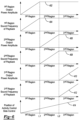
- FIG. 6 shows a relationship between audio attributes of sound elements and a position of an activity control other user interface while operating in the manual mode of the naturescape feature.
- the plots illustrate the manner in which the audio system 102 shown in FIG. 1 may adjust sound elements.
- the first plot from the top of FIG. 6 is a plot of sound output power amplitude or volume versus activity control regions (e.g., 390-392).
- the vertical axis represents the sound output power amplitude for sound elements that are included in a first group (e.g., steady-state sound elements) of sound elements that are associated with a first control region of the activity control.
- the sound output power amplitude increases in the direction of the vertical axis arrow.
- the horizontal axis represents activity control regions and it is broken into three regions as shown in FIG. 4 .
- Trace 402 represents the sound output power amplitude or volume for sound elements included in the first group of sound elements.
- the second plot from the top of FIG. 6 is a plot of sound frequency of playback (e.g., the frequency a sound is repeated when broadcast via speakers) for sound elements that are included in the first group of sound elements versus activity control regions.
- the vertical axis represents the frequency of playback for sound elements that are included in a first group of sound elements that are associated with a first control region of the activity control.
- the horizontal axis represents activity control regions and it is broken into three regions as shown in FIG. 5B.
- Trace 404 represents the sound frequency of playback for sound elements included in the first group of sound elements.
- the third plot from the top of FIG. 6 is a plot of sound output power amplitude or volume versus activity control regions.
- the vertical axis represents the sound output power amplitude for sound elements that are included in a second group (e.g., dynamic sound elements) of sound elements that are associated with a second control region of the activity control.
- the sound output power amplitude increases in the direction of the vertical axis arrow.
- the horizontal axis represents activity control regions and it is broken into three regions as shown in FIG. 5B.
- Trace 406 represents the sound output power amplitude or volume for sound elements included in the second group of sound elements.
- the fourth plot from the top of FIG. 6 is a plot of sound frequency of playback for sound elements that are included in the second group of sound elements versus activity control regions.
- the vertical axis represents the frequency of playback for sound elements that are included in a second group of sound elements that are associated with a second control region of the activity control.
- the horizontal axis represents activity control regions and it is broken into three regions as shown in FIG. 5B.
- Trace 408 represents the sound frequency of playback for sound elements included in the second group of sound elements.
- the fifth plot from the top of FIG. 6 is a plot of sound output power amplitude or volume versus activity control regions.
- the vertical axis represents the sound output power amplitude for sound elements that are included in a third group (e.g., surreal sound elements) of sound elements that are associated with a third control region of the activity control.
- the sound output power amplitude increases in the direction of the vertical axis arrow.
- the horizontal axis represents activity control regions and it is broken into three regions as shown in FIG. 5B.
- Trace 410 represents the sound output power amplitude or volume for sound elements included in the third group of sound elements.
- the sixth plot from the top of FIG. 6 is a plot of sound frequency of playback for sound elements that are included in the third group of sound elements versus activity control regions.
- the vertical axis represents the frequency of playback for sound elements that are included in a third group of sound elements that are associated with a third control region of the activity control.
- the horizontal axis represents activity control regions and it is broken into three regions as shown in FIG. 4 .
- Trace 412 represents the sound frequency of playback for sound elements included in the third group of sound elements.
- the seventh plot from the top of FIG. 6 is a plot of activity control state or position versus activity control regions.
- the vertical axis represents the state or position of the activity control (e.g., slide bar 302) and the activity control moves from left to right in the direction of the vertical axis arrow.
- the horizontal axis represents activity control regions and it is broken into three regions as shown in FIG. 5B.
- Trace 414 represents the activity control state or position.
- the activity control is positioned at a first extent (e.g., 320 of FIG. 3 and FIG. 4 ) of the activity control.
- the activity control is in the first control region so the sound output power amplitudes or volumes and the sound frequency of playback for sound elements that are included in the second and third groups of sound elements are zero.
- the sound output power amplitude of sound elements included in the first group of sound elements increases as the position of the activity control moves from the left side of the plot to the right side of the plot.
- the frequency of playback or repetition for sound elements that are included in the first group of sound elements increases as the activity control moves from the left side of the plot to the right side of the plot.
- the sound output power amplitude of sound elements included in the first group of sound elements ceases increasing when the activity control reaches the position of vertical line L1.
- the frequency of playback or repetition for sound elements that are included in the first group of sound elements ceases increasing when the activity control reaches the position of vertical line L1.
- the sound output power amplitude and the frequency of playback for sound elements included in the first group remain constant.
- the sound output power amplitude of sound elements included in the second group of sound elements increases as the position of the activity control moves from the position of vertical line L1 to vertical line L2.
- the frequency of playback or repetition for sound elements included in the second group of sound elements increases as the activity control moves from the position of vertical line L1 to vertical line L2.
- the sound output power amplitude and the frequency of playback for sound elements included in the third group remain zero.
- the sound output power amplitude of sound elements included in the second group of sound elements ceases increasing when the activity control reaches the position of vertical line L2.
- the frequency of playback or repetition for sound elements that are included in the second group of sound elements ceases increasing when the activity control reaches the position of vertical line L2.
- the sound output power amplitude and the frequency of playback for sound elements included in the first and second groups remain constant.
- the sound output power amplitude of sound elements included in the third group of sound elements increases as the position of the activity control moves from the position of vertical line L2 to the activity control extent (e.g., 324 of FIG. 3 ) or end of travel.
- the frequency of playback or repetition for sound elements that are included in the third group of sound elements increase as the activity control moves from the position of vertical line L2 to the activity control extent (e.g., 324 of FIG. 3 ) or end of travel.
- natural sounds may be provided to a user via the naturescape feature, in one of the manual mode and the automated mode.
- the automated mode may automatically monitor vehicle conditions, such as vehicle location, environmental changes, and a user emotional state, and may provide sound elements to the user. Based on the state of the vehicle 100, the audio system 102 may provide sound elements. Some sound elements may be based on actual sounds detected outside the vehicle (e.g., real sound elements), while other sound elements may not be detected outside the vehicle (e.g., synthetic sound elements).
- a user may select a desired natural scene, and may adjust a mix of corresponding sound elements according to user preference.
- the audio system 102 may also alter audio parameters to make the audio or user experience within the vehicle 100 sound like a different venue (e.g., stadium, concert hall (i.e., large, small, or medium), festival, or recording studio).
- a different venue e.g., stadium, concert hall (i.e., large, small, or medium), festival, or recording studio.
- the vehicle audio apparatus may alter audio parameters to make the vehicle sound like Carnegie Hall, Yankee Stadium, etc. based on a user selection.
- the vehicle audio apparatus may be arranged to simply make the listening environment within the vehicle sound larger than it really is (e.g., if the vehicle is a compact vehicle, the vehicle audio apparatus may provide for the audio experience to sound like the user is in a sports utility vehicle ("SUV”)).
- SUV sports utility vehicle
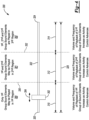
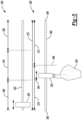
- Figure 7 generally depicts an overview of the vehicle 100 and a corresponding listening environment 512 (or listening room) thereof. Similar to the vehicle 100 noted above in connection with FIG. 1 , the vehicle 100 of FIG. 7 includes the audio system 102 arranged to playback audio within the listening environment 512 (or listening room) of the vehicle 100.
- the listening environment 512 of the vehicle 100 generally defines a front wall 516 (e.g., an area of the vehicle 100 that includes an instrument panel, a front windshield, and a floor pan including upholstery and plastic trim (if applicable) below the instrument panel), a rear wall 518 (e.g., an area of the vehicle 100 that includes a passenger row of seats, a rear trunk compartment if a SUV, and/or a rear windshield), side walls 520 (e.g., an area of the vehicle 100 that includes an A-pillar, B-pillar, C-pillar, and/or D-pillar, front and/or rear doors and windows), and a top wall 522 (or ceiling) (e.g., an area of the vehicle 100 that includes a top metal pan and a headliner).
- a front wall 516 e.g., an area of the vehicle 100 that includes an instrument panel, a front windshield, and a floor pan including upholstery and plastic trim (if applicable) below the instrument panel
- a rear wall 518 e.g., an area of
- the audio system 102 may also include a plurality of microphones 524a - 524d positioned about the interior of the vehicle 100.
- each microphone 524a - 524d may be positioned equidistantly within the headliner (not shown) of the top wall 522 of the vehicle 100 to capture sound or a captured audio signal (e.g., music, noise captured from vehicle occupants that corresponds to entertainment data on an incoming audio signal including entertainment data from an electronic audio source (e.g., mobile device), speech (or dialogue from vehicle occupants), ambient noise from exterior of the vehicle 100 that enters into an interior of the vehicle 100, and/or ambient noise from within a vehicle cabin, etc.) within the listening environment 512 of the vehicle 100.
- a captured audio signal e.g., music, noise captured from vehicle occupants that corresponds to entertainment data on an incoming audio signal including entertainment data from an electronic audio source (e.g., mobile device), speech (or dialogue from vehicle occupants), ambient noise from exterior of the vehicle 100 that enters
- any number of microphones 524 may be positioned within the listening environment 512 of the vehicle 10. However, in the event only one or two microphones 524 are positioned within the vehicle 100, audible sounds close to the microphones 524 may have a greater reverberation effect on the microphones 524 thereby causing a relatively unnatural sound.
- the audio system 102 includes the audio controller 175 that is arranged to employ any one or more noise cancellation techniques (e.g., active noise cancellation (ANC), room noise cancellation (RNC), and engine order cancellation (EOC)) to minimize the effects of road and engine noise (or any undesired audible noise in the ambient that does not coincide with the incoming audio data that is played back in the vehicle 100) that is picked up by the microphones 524a - 524d.
- the vehicle 100 includes the loudspeakers 104 positioned therein to playback the audio processed by the audio controller 175. The location of the loudspeakers 104 may be similar and/or be different than that noted in connection with FIG. 1 .
- the one or more loudspeakers 104 may be positioned in one or more of the walls 516, 518, 520, and 522 to transmit the audio into the vehicle cabin.
- the audio controller 175 may transmit signals to the loudspeakers 104 positioned about, or in the walls (e.g., front wall 516, rear wall 518, side walls 520, and top wall 522) in the vehicle 100 to provide the desired reverberation (or reverb) based on the selected venue.
- the loudspeaker(s) 104 positioned within the headliner (or in the top wall 522) of the vehicle 100 may replicate the reverb of a ceiling of the selected venue
- the loudspeakers(s) 104 positioned in the headrest in back row seating (or in the rear wall 518) may replicate the reverb of the rear wall of the selected venue
- the loudspeaker(s) 104 positioned in the doors (or in the side walls 520) of the vehicle 100 may replicate the reverb of the side walls of the selected venue.
- the speaker(s) 104 positioned on or within the instrument panel (or in the front wall 516) may replicate the reverb of the front wall of the selected venue.
- the audio controller 175 may playback the audio at a much louder volume that normal because the audio volume at a large concert hall may be much louder than the audio volume typically played back in the vehicle 100.
- the user may be able to select a venue corresponding to a listening environment 512 for a larger vehicle 100.
- the audio controller 175 may adjust the reverberation effect accordingly and playback the audio where it is perceived to be played back in a larger vehicle 100.
- reverberation aspects related to the various venues may be recorded or measured at the venues and then stored in memory (not shown) of the audio controller 175 for selection by the user.
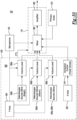
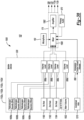
- Figure 9 depicts a detailed implementation of the audio controller 175 that generates virtual venues within the listening environment 512 of the vehicle 100 in accordance with one embodiment. It is recognized that the audio controller 175 may include any number of processors and memory that co-act with one another to execute any of the noted operations disclosed herein.
- An audio source 560 is configured to provide an incoming audio signal to the vehicle 100 (or to the audio controller 175). It is recognized that the audio source 560 may be any one of an FM station, an AM station, a High Definition (HD) audio station, a satellite radio provider, an input from cell phone, an input from a tablet, etc. The user may select the corresponding audio source 560 via a source selector 562 positioned on the audio controller 175 or via the user interface 530 which may be positioned elsewhere on the vehicle 100 or on a mobile device (not shown).
- a source selector 562 positioned on the audio controller 175 or via the user interface 530 which may be positioned elsewhere on the vehicle 100 or on a mobile device (not shown).
- the delay block 574 may or may not apply a delay and that this condition is based on the processing speed of audio controller 175.
- the mixer 576 is configured to mix the reverb from the audio captured by the microphones 524 with any remnants of reverb that are left on the on the incoming audio signal.
- the mixer 576 receives a signal WINDOW/CONVERTIBLE_STATUS that indicates whether the window, convertible top, or sunroof is open or closed. Again, the mixer 576 may mute the captured signal from the microphones 524 if the window, convertible top, or sunroof is open and too much noise is on the signal.
- the mixer 576 controls how much noise or voice data (i.e., captured audio data from the plurality of microphones 24) in the vehicle 100 is fed back to the spider verb block 578 versus how much audio is fed into the spider verb block 578. In general, the mixer 576 determines the blend of audio captured at the microphone 524 in relation to direct audio (or the dry audio) in order to achieve a desired blend.
- the spider reverb block 578 generally includes a plurality of spider verb blocks 580a - 580n (or “580") and a plurality of venue equalization blocks 582a - 582n (or “582").
- each spider verb block 580 and its corresponding venue equalization block 582 adds or adjusts the amount of reverb on the output from the mixer 576 to provide the selected or desired venue for the user.
- the spider reverb block 580 replicates different reverberation characteristics of the different walls for the selected venues.
- the spider reverb block 578 adjusts the reverberation to correspond to a designated or selected venue and the venue equalization block 582 controls the brightness characteristics for the walls 516, 518, 520 and 522 of the vehicle 100 to provide the desired brightness characteristics for the selected venue.
- the selected venue may correspond to a stadium venue, a large concert hall, a medium concert hall, and so on.
- the spider verb block 580 is configured to provide reverberation effect off the walls 516, 518, 520 and 522 of the vehicle 100 to sound like the walls of Carnegie Hall.
- the loudspeakers 104 in the vehicle 100 globally provide an output that corresponds to a desired venue and corresponding speaker(s) in a given wall may each receive a discrete input to simulate the desired brightness characteristic for that given wall of the desired venue.
- the loudspeakers 104 in the ceiling of the vehicle 100 may receive an equalized output to provide the appearance that the sound that bounces off of the ceiling has a fast reflection time to coincide with the short ceiling of the selected venue as noted above.
- the equalization may be adjusted differently for each audio output provided to a corresponding loudspeaker 104 in a particular wall 516, 518, 520, and 522 to coincide with various walls in the selected venue.
- the adder 568 receives the output from the spider reverb block 578 (or from the mute block 586) and also receives the output from the stereo equalization block 566 and sums the two audio inputs together to provide a digital version of the inputs.
- a digital to analog converter (DAC) 588 receives the digital output from the adder 568 and converts the digital output into an analog output. The analog output corresponds to the audio that is to be played back for the user at the selected venue.
- Various power stages (or power amplifiers) 590 boost the analog output for playback at the loudspeakers 104.
- the vehicle 100 it is possible to enable users (or vehicle occupants) in the vehicle 100 to ability to select a corresponding naturescape audio format (e.g., audio that is typically heard in a forest, stream, canyon, etc.) such that the audio system 102 plays back the sounds from that nature setting and in the venue that corresponds to the naturescape setting such as for example, forest, stream, canyon, beach, etc.
- a corresponding naturescape audio format e.g., audio that is typically heard in a forest, stream, canyon, etc.
- the audio system 102 plays back the sounds from that nature setting and in the venue that corresponds to the naturescape setting such as for example, forest, stream, canyon, beach, etc.
- the audio e.g., music and/or voice played back in the vehicle 100 may generally sound as if it is actually in the nature setting.
- the user may select via the user interface 530 to listen to sounds from a beach in which the audio controller 175 plays back sounds generally heard at a beach (e.g., waves crashing on the shore, seagulls, other ambient noise generally heard at the beach, etc.) and adjust the venue via the virtual venue feature so that the corresponding audio that is being played back sounds as if the waves crashing on the shore, seagulls are in a beach setting, and other ambient noise generally heard at the beach.
- sounds generally heard at a beach e.g., waves crashing on the shore, seagulls, other ambient noise generally heard at the beach, etc.
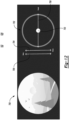
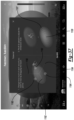
- FIG. 10 illustrates one example of the user interface 530 for controlling aspects related to naturescapes and virtual venues features in accordance with one embodiment.
- mix level 606a generally corresponds to an ambient scene
- mix level 606b generally corresponds to an energetic mix
- mix level 606c generally corresponds to bright mix
- mix level 606d generally corresponds to a warm mix
- 606e generally corresponds to a relaxed mix.
- the slider bar control 604 is generally similar to the slider bar control 602 however, the slider bar control 604 simply illustrates different levels that may be selected for each mix level.
- FIGURE 10 generally illustrates that one or more of the various mix levels 606a - 606e may be activated at any time.
- mix levels 606c e.g., bright
- 606e e.g., relaxed
- Mix levels 606d e.g., warm
- 606e e.g., relaxed
- First selection control 620 is also shown in FIG. 10 and may be used as an alternate to the slider bar control 602 to select the gain selection 604 and mix levels 606a - 606e.
- the first selection control 620 may be circular where the mix levels 606a - 606e are formed as corresponding sections of the first selection control 620 that form the circular shape.
- the first selection control 620 may also include a corresponding mix level 606a that is placed at a center point thereof.
- a selection device 622 that may also be, for example, circular may be moved over a corresponding mix level 606a - 606e to enable the occupant the ability to select one or more of the mix levels 606a - 606e.
- the occupant may simply move the selection device 622 over one or more of the mix levels 606a - 606e to select the corresponding mix level.
- the selection device 622 is placed, for example on a boundary formed by the mix level 606a and 606e to select both mix levels 606a and 606e.
- the center point of the first selection control 620 may correspond to a true virtual venue and the placement of the first selection device 622 outwardly from the center point increases the sound for the corresponding mix level 606a - 606e.
- the placement of the selection device 622 relative to the center point or to an outer perimeter of the first selection control 620 dictates the gain level that is applied to the corresponding mix level 606a - 606e.
- an intensity slider bar 630 is also provided to enable the occupant to ability to select the amount of intensity applied to the selected mix level 606a - 606e.
- the intensity slide bar 630 includes a first end point 632a and a second end point 632b which form extremities or limits for the amount of intensity that is application to the selected mix level.
- the occupant may move selector 634 anywhere between or at the first end point 632a of the second end point 632b.
- this condition represents the occupant's desire to use a minimum intensity level of the selected naturescape (or mix level 606a - 606e).
- this condition corresponds to a minimum intensity level that is applied to the naturescape and/or the other audio being played by in the vehicle ((e.g., recording of artist's audio or audio being played back by a broadcast (i.e., non-naturescape audio)).
- this condition may involve that the intensity of the selected naturescape to be at a minimum and that the virtual venues being applied by the audio system 102 along with the audio being played back by the audio system 102 also being at a minimum.
- this condition represents the occupant's desire to use a maximum intensity level of the selected naturescape (or mix level 606a - 606e).
- this condition may involve that the intensity of the selected naturescape to be at a maximum and that the virtual venues being applied by the audio system 102 along with the audio (e.g., recording of artist's audio or audio being played back by a broadcast (i.e., non-naturescape audio) being played back by the audio system 102 also being at a maximum.
- FIG. 11 illustrates another example of the first selection control 620 as displayed on the user interface 530 in accordance with another embodiment.
- the first selection control 620 as shown in FIG. 11 includes a different number of mix levels 606a - 606d. It is recognized that the number of mix levels 606 for the first selection control 620 may vary based on a desired criterion of a particular implementation.
- FIG. 12 illustrates a second selection control 700 as displayed on the user interface 530 in accordance with one embodiment.
- the user interface 530 may display the selection control 700 which corresponds generally to a virtual venue of a forest.
- the occupant may select the virtual venue for the forest via another selection control mechanism prior to seeing the second selection control 700.
- the virtual venue for the forest and its associated selection control 700 illustrates various naturescapes associated with the forest such as birds, water, etc. that may be played back by the audio system 102.
- the second selection control 700 may increase/decrease level or volume of the audio playback of the naturescapes in response to occupant selection of the second selection control 700.
- the actual touch point 703 will not be visible to the occupant for selection and subsequent control of movement.
- the touch point 703 may be overlaid on the image shown in the second selection control 700. While the touch point 703 is generally shown circular, it is recognized that the touch point 703 may be arranged in any shape or configuration.
- the occupant can move the touch point 703 vertically, downward along an axis 704 toward the water to control the audio controller 175 to increase the level/volume of the water playback.
- the occupant may move the touch point 703, vertically, upward along the axis 704 away from the image of the water as shown in the second selection control 700.
- the occupant can move their respective finger vertically, upward along an axis 706 toward the birds to control the audio controller 175 to increase the level/volume of the bird naturescape playback (e.g., birds chirping).
- the occupant may touch the image of the forest and move the touch point 703 along the axis 708 to the right to move closes to the water as illustrated on the left hand side of the second selection control 700.
- the touch point 703 is generally visible in the image shown of the forest on the second selection control 700.
- the touch point 703 may be overlayed with the image presented in connection with the second selection control 700.
- the touch point 703 may be visible to the user at all times except for moments in which the system enters into a time-out screen with a large image of the selected naturescape.
- the touch point 703 will remain in the spot where the user has left it.
- the audio will change based on the spot where the touch point 703 is moved to.
- FIG. 13 illustrates another aspect of the second selection control 700 as displayed on the user interface 530 in accordance with one embodiment.
- the occupant may traverse the image of the forest as illustrated in the second selection control 700 along the axis 708 with the touch point 703.
- the second selection control 700 as illustrated in FIG 14 illustrates the example in which the occupant touches the image of the forest and moves the touch point 703 along the axis 708 to the left to move closer to the water as illustrated on the left hand side of the second selection control 700.
- the audio system 102 may playback audio related to the naturescape of water in the vehicle 100 at a higher level or volume in response to detecting that the occupant has moved the touch point 703 closer to the image of the water in the forest.
- FIG. 14 illustrates another aspect of the second selection control 700 as displayed on the user interface 530 in accordance with one another embodiment.
- the occupant may move the touch point 703 close to the birds in the image shown in the second selection control 700 (e.g., compared to the image as referenced in the second selection control 700 as illustrated in FIG. 13 ) to increase the level or volume in which the audio system 102 plays back audio for the bird as a naturescape.
- the audio system 102 may play back audio for the water and the bird equally in the vehicle 100.
- FIG. 15 illustrates another aspect of the second selection control 700 as displayed on the user interface 530 in accordance with one another embodiment.
- the occupant may move the touch point 703 even closer to the birds in the image shown in the second selection control 700 (e.g., compared to the image as referenced in the second selection control 700 as illustrated in FIG. 14 ) to increase the level or volume in which the audio system 102 plays back audio for the bird as a naturescape. It is recognized that with the example illustrated in FIG. 14 , the audio system 102 may play back audio for bird louder than that of the water in the vehicle 100.
- the size of the image of the bird is larger than that shown in the previous images on the second selection control 700 which is indicative of the audio system 102 increasing the gain or volume of the naturescape associated with the bird.
- the audio playback of the birds may be much louder (or pronounced) in comparison to the audio playback of the birds in FIG. 14 .
- FIG. 17 illustrates another aspect of the second selection control 700 as displayed on the user interface 530 in accordance with one another embodiment.
- the occupant may place the touch point 703 even closer to the trees in the forest while remaining on the birds and also on the water in the image shown in the second selection control 700 (e.g., compared to the image as referenced in the second selection control 700 as illustrated in FIG. 16 ) to increase the level or volume in which the audio system 102 plays back audio for the trees while also playing audio for the bird and water.
- the audio system 102 may play back audio for the trees, water, and the birds equally in the vehicle 100.
- the size of the image of the birds, water, and trees are similar to one another in comparison to the previous images on the second selection control 700 which is indicative of the audio system 102 playing back the audio for the birds, trees and water equally based on the occupant's placement of the touch point in the sphere 702.
- the audio playback of the birds may be much louder (or pronounced) in comparison to the audio playback of the birds in FIG. 14 .
- FIG. 18 illustrates another aspect of the second selection control 700 as displayed on the user interface 530 in accordance with one another embodiment.
- the occupant may place the touch point 703 even closer to the trees in the forest while being positioned further away from the birds and slightly closer to the water in the image shown in the second selection control 700 (e.g., when compared to the image as referenced in the second selection control 700 as illustrated in FIG. 17 ) to continue to play the birds and water at the same level in FIG. 18 while decreasing the level or volume in which the audio system 102 plays back audio for the birds.
- FIG. 19 illustrates another aspect of the second selection control 700 as displayed on the user interface 530 in accordance with one another embodiment.
- the occupant may place the touch point 703 even closer to the water, while remaining close to the trees in the forest and further away from the birds in the image shown in the second selection control 700 (e.g., when compared to the image as referenced in the second selection control 700 as illustrated in FIG. 18 ) to continue to play the water and the trees at the same level in FIG. 18 while further decreasing the level or volume in which the audio system 102 plays back audio for the birds.
- FIG. 20 illustrates another aspect of the second selection control 700 as displayed on the user interface 530 in accordance with one another embodiment.
- the occupant may place the touch point 703 even closer to the water, while remaining close to the trees in the forest and further away from the birds in the image shown in the second selection control 700 (e.g., when compared to the image as referenced in the second selection control 700 as illustrated in FIG. 19 ) to continue to play the water and the trees at the same level in FIG. 19 while no longer playing back the audio for the birds as notice that the birds are no longer shown in the image of the second selection control 700.
- the user may select a geographical location on the universal selection field 870 such that the audio system 102 plays back audio that is unique to the selected location. As shown, the user may adjust the volume of the audio that is being played back via the first volume control 852.
- a second volume control 854 is also positioned on the user interface 530 to control an overall audio volume control of the audio system.
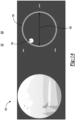
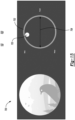
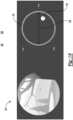
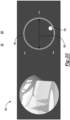
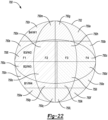
- the touch point 1103 is generally illustrates as a series of concentric spheres 1105 (or shapes 1105) that surround a center sphere 1107.
- An outermost sphere 1109 generally surrounds innermost spheres and the center sphere 1107. It is recognized that the shape may be different and that the generally shaped form of the spheres may take any number of different shapes.
- the audio controller 175 transmits a wave-based audio output.
- the user can move the touch point 1103 such that the series of concentric spheres 1105 may overlap onto one or more of the first axis 1200, the second axis 1202, and the third axis 1204 such that any one or more of the waterfall-based audio, the bird chirp audio, and/or the wave based audio can be played back by the audio controller 175.
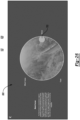
- the touch point 1103 as shown in FIGURE 32 illustrates that the occupant desires that a majority of the audio playback include the naturescape audio corresponding to that of birds with portions of thunder and waves also being included in the overall audio output.
- the volume (or audio level) of the birds may be greater than that of the thunder and the waves.
- the occupant may move the center sphere 1107 on any location about the first axis 1200, the second axis 1202, and the third axis 1204 to select a corresponding naturescape.
- the manner in which the occupant selects the corresponding naturescape may involve that the occupant selects various points on the outermost sphere 1109 whereas the touch point 1103 remains generally stationary.
- the user may select and move the corresponding point of the outermost sphere 1109 a deeper into a corresponding naturescape region to increase the level or volume of the audio playback.
- one or more points on the outermost sphere 1109 are positioned predominantly in the naturescape region corresponding to bird audio.
- the primary audio being transmitted by the audio controller 175 may also be played simultaneously with the naturescape that is being played back.
- An occupant may perform immersion control selection 1210 (see FIG. 36 ) to control the amount of immersion provided by the audio system 102.
- the immersion control selection 1210 involves, among other things, selecting the outermost sphere 1109 with two fingers and bringing the two fingers close to one another to decrease the overall width touch point 1103 such that all of the concentric spheres 1105 also decrease. In one example, the narrower the width of the concentric spheres 1105, the greater the immersion and application of the selected virtual venues. It is recognized that the opposite condition may be applied.
- Audio immersion generally involves., among other things, the audio system 102 playing back audio in a manner in which the audio is sensed to come from all directions surrounding the occupant.
- Stereo based audio generally involves the scenario in which audio is played back from a center of the occupant and from left and right sides of the occupant.
- audio immersion may improve the overall naturescape experience in comparison to a stereo based sound implementation.
- sound immersion control may be performed as follows: the occupant may select the center sphere 1107 and move the sphere 1107 inwardly away from the outermost sphere 1109 or outwardly toward the outermost sphere 1109 while the touch point 1103 (and the outermost sphere 1109) remains generally stationary. Such movement of the center sphere 1107 generates a change in a visual topography of the touch point 1103 which causes a change in the immersion control. This aspect will be discussed in more detail below.
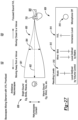
- each occupant in each of the seats 109, 110, 112a, and 112b can independently select the various naturescape that he/she so desires irrespective of what other occupants can select. It is also recognized that each occupant may continue to playback the primary audio that is being played back by the audio system in the vehicle 100 while controlling the particular type of naturescape, the sound immersion level of the naturescape, and volume of the naturescape. Conversely, if the user interface 530 is part of the mobile device 1102, the occupant may select to utilize the vehicle's naturescape that is provided by the audio system 102 while utilizing a primary audio signal that is played back by the occupant's mobile device 1102. While not generally shown, the image of FIG.
- the 32 may also include a reference to which seat (e.g., 109, 110, 112a, and 112b) the occupant is positioned in so that the occupant knows that his/her mobile device 1102 is properly paired and communicating to the audio controller 175 from the location that the occupant is positioned in within the vehicle 100.
- a reference to which seat e.g., 109, 110, 112a, and 112b
- FIG. 32 also includes a master volume level selector 1502 that enables the occupant the ability to select an overall volume for the entire naturescape mix being selected through his/her mobile device 1102.
- the master volume level selector 1502 may enable volume selection of the primary audio being played back by the audio system 102.
- the master volume level selector 1113 may be used to only control the volume level of any and all naturescapes being played back by the audio system 102.
- the mobile device 1102 may also include occupant visual indicators 1115a - 1115d which correspond to visual representations of occupants positioned in their respective seat 109, 110, 112a, and 112b.
- visual indicator 1115a is shown as being highlighted and corresponds to the location of the occupant that is currently controlling the mobile device 1102 to play the desired naturescape.
- the visual indicator 1115b corresponds to the passenger positioned in the right front seat 110 and the display on the mobile device 1102 provides an indication to the driver who is seated in the seat 109 as to what naturescape is being played back for the passenger positioned in the right front seat 110.
- the right front passenger is listening to the naturescape of a bird audio output.
- the left rear passenger is listening to the wave based naturescape via indication 115c and that the right rear passenger is listening to at least the wave-based audio.
- FIG. 33 illustrates another example of the user interface 530 to enable a seat-based extension of the playback of one or more naturescapes for one or more occupants positioned in the vehicle 100 in accordance with one embodiment.
- FIG. 33 is generally similar to the display depicted in FIG. 32 with the exception of different naturescapes being offered for playback.
- the first axis 1200 and the second axis 1202 generally correspond to the naturescape of a waterfall-based audio output.
- the audio controller 175 transmits the waterfall-based audio output.
- the second axis 1202 and the third axis 1204 generally correspond to the naturescape of animal sounds.
- the audio controller 175 transmits animal-based sounds.
- the first axis 1200 and the third axis 1204 generally corresponds to the naturescape of a wind-based audio output.
- the audio controller 175 transmits a wind-based audio output.
- the user can move the touch point 1103 such that the series of concentric spheres 1105 may overlap onto one or more of the first axis 1200, the second axis 1202, and the third axis 1204 such that any one or more of the waterfall-based audio, the animal based sounds, and/or the wind based audio can be played back by the audio controller 175.
- the touch point 1103 as shown in FIGURE 33 illustrates that the occupant desires that a majority of the audio playback include the naturescape audio corresponding to that of animal sounds with portions of waterfall and wind-based audio also being included in the overall audio output.
- the volume (or audio level) of the animal sounds may be greater than that of the waterfall and the wind.
- the occupant may also select the various naturescape by selecting various points on the outermost sphere 1109 as described in connection with FIG. 32 above.
- immersion control may be selected based on the manner described above in connection with FIG. 32 .
- FIG. 34 illustrates another example of the user interface 530 to enable a seat-based extension of the playback of one or more naturescapes for one or more occupants positioned in the vehicle 100 in accordance with one embodiment.
- FIG. 34 is generally similar to the display depicted in FIGs. 32 - 33 with the exception of different naturescapes being offered for playback.
- the first axis 1200 and the second axis 1202 generally correspond to the naturescape of a traffic-based audio output.
- the audio controller 175 transmits the traffic-based audio output.
- the second axis 1202 and the third axis 1204 generally correspond to the naturescape of city-based sounds.
- the audio controller 175 transmits city-based sounds.
- the first axis 1200 and the third axis 1204 generally corresponds to the naturescape of a people-based audio output.
- the people-based audio output (or naturescape) corresponds to sound made by people in crowds, children playing with one another, etc.
- the audio controller 175 transmits a city-based audio output.
- the user can move the touch point 1103 such that the series of concentric spheres 1105 may overlap onto one or more of the first axis 1200, the second axis 1202, and the third axis 1204 and that any one or more of the traffic-based audio, the city based sounds, and/or the people based audio can be played back by the audio controller 175.
- the touch point 1103 as shown in FIGURE 33 illustrates that the occupant desires that a majority of the audio playback include the naturescape audio corresponding to that of city sounds with portions of traffic and people-based audio also being included in the overall audio output.
- the volume (or audio level) of the city sounds may be greater than that of the traffic and the people-based audio outputs.
- the occupant may also select the various naturescape by selecting various points on the outermost sphere 1109 as described in connection with FIG. 32 above.
- immersion control may be selected based on the manner described above in connection with FIG. 32 .
- FIG. 35 depict various example of manner in which various naturescapes may be selected in accordance with one embodiment.
- FIG. 35 illustrates various naturescapes such as water, wind, and bird audio outputs.
- the touch point 1103 includes the outermost sphere 1109.
- the outermost sphere 1109 defines a number of points 1111 that may be selected by the user to move the touch point 1103 away from a center point 1120 where the first axis 1200, the second axis 1202, and the third axis 1204 intersect with one another.
- FIG. 35 depict various example of manner in which various naturescapes may be selected in accordance with one embodiment.
- FIG. 35 illustrates various naturescapes such as water, wind, and bird audio outputs.
- the touch point 1103 includes the outermost sphere 1109.
- the outermost sphere 1109 defines a number of points 1111 that may be selected by the user to move the touch point 1103 away from a center point 1120 where the first axis 1200, the second axis 1202, and the third axi
- FIG. 35 illustrates a first point 1180, a second point 1182, and a third point 1184 formed on the outermost sphere 1109 that the user can select to move or maneuver away from the center point 1120 to choose the corresponding naturescape accordingly. While FIG. 35 illustrates three points (e.g., 1180, 1182, 1184) it recognized that the touch point 1103 may include any number of points that the user can select/grab and move to and from the center point 1120 to move the touch point 1103 accordingly for selecting one or more of the naturescapes. In one example, Bezier curves may be used to define the overall shape of the touch point 1103 as generally shown at 1170.
- a first additional axis 1190, a second additional axis 1192, and a third additional axis 1194 is shown.
- the first additional axis 1190 may be correspond to naturescape of water
- the second additional axis 1192 may correspond to the nature scape of wind
- the third additional axis 1194 may correspond to the naturescape of a bird.
- the touch point 1103 in this embodiment is generally stationary but the occupant may move the first point 1180 on the first additional axis 1190 to or away from the center point 1120 to control the amount of water based naturescape that is played back by the audio system 102.
- the occupant may move the second point 1182 on the second additional axis 1192 to or away from the center point 1120 to control the amount of wind based naturescape that is played back by the audio system 102.
- the occupant may move the third point 1184 on the third additional axis 1194 to or away from the center point 1120 to control the amount of bird based naturescape that is played back by the audio system 102.
- the mobile device 1102 may provide any number of additional axes that coincide with any number of naturescapes. For example, the mobile device 1102 may display five naturescape sounds to select from with each naturescape having a corresponding axis that allows the occupant the ability to select a point on the outermost sphere 1105 relative to the center point 1120 to select the desired naturescape.
- FIG. 36 depicts various examples of the manner in which the user may select immersion control for the touch point 1103 in accordance with one embodiment.
- the touch point 1103 may be moved about the first axis 1200, the second axis 1202, and the third axis 1204 to select one or more naturescapes such as the wind, marine life, and birds.
- the occupant may drag the touch point 1103 about the first axis 1200, the second axis 1202, and the third axis 1204 to change the amount of sound heard for the naturescape by the occupant.
- the occupant may pinch or spread the outermost sphere 1109 to adjust the immersion level.
- the occupant may simply select a point on the outermost sphere 1109 and move the point to or away from the center point 1120 to decrease or increase, respectively the desired amount of naturescape to be played back by the audio system 102.
- FIG. 37 depicts a tutorial which illustrates the manner in which the occupant selects naturescape and the immersion level on the mobile device 1102 in accordance with one embodiment.
- FIG. 37 The visual on the left-hand side of the FIG. 37 illuminates the various points 1180, 1182, and 1184 on the outermost sphere 1109 that can be selected by the occupant to select the corresponding naturescape.
- the visual on the right-hand side of FIG. 37 illustrates a pinch and spread operation to adjust the immersion level. For example, the user may spread the outermost sphere 1109 relative to the center sphere 1107 to increase the immersion level. The user may pinch the outermost sphere 1109 and collapse two fingers closer to one another relative to the center sphere 1107 to decrease the immersion level.
- FIG. 38 depicts a schematic diagram 1500 for playing back seat based naturescapes 1606a - 1606n with the audio system 102 in accordance with one embodiment.
- the diagram 1500 illustrates the audio system 102 that generally includes the audio controller 175 and the user interface 530.
- the user interface 530 generally enables the user to select or adjust various naturescapes 1606a - 1606n as depicted on a mobile device 1102 located within the vehicle or on a user interface that is positioned in a seatback of the vehicle 100 and that is electrically coupled to the audio controller 175.
- a plurality of mobile devices 1102a - 1102n with a corresponding user interface 530 may be positioned within the vehicle.
- mobile device 1102a may be positioned about seat 109
- mobile device 1102b may be positioned about seat 110
- mobile device 102c may be positioned about seat 112a
- mobile device 102d may be positioned about seat 112b.
- the following description below in addition to the detailed illustrated in FIG. 37 applies to each of the mobile devices 1102a - 1102n.
- the naturescapes 1606a - 1606n may correspond to the thunder-based audio, the bird-based audio, the wave-based audio, the traffic-based audio, the city-based audio, the people-based audio, the waterfall-based audio, the animal-based audio, and the wind-based audio, etc. as shown in connection with FIGs 32 - 35 . It is recognized that the naturescapes 1606a - 1606n may correspond to other types of audio and should not be limited to cover only those noted in the present disclosure.
- the audio controller 175 may include memory that stores a bank of naturescapes 1606a - 1606n (or audio files) that are depicted for selection on the user interface 530.
- the user interface 530 also provides the overall position of the touch point 1103 as positioned thereon for the selected naturescape(s) and provides an indication of where the touch point 1103 is positioned on any one or more of the first axis 1200, the second axis 1202, and the third axis 1204.
- the user interface 530 includes level circuits 956a - 956c that each provide an output (or digital information) that is indicative of the desired naturescapes 1606a - 1606n and a corresponding volume (or level) based on the location of the touch point 1103 on the various axes 1200, 1202, and 1204.
- the level circuit 956a receives a signal indicative of the position of the first point 1180 on the first additional axis 1190 (see FIG.
- the user interface 530 includes the main volume level selector 1502 as noted above in connection with FIG. 32 .
- the master volume level selector 1502 that enables the occupant the ability to select an overall volume for the entire naturescape mix being selected through his/her mobile device 1102.
- the level circuit 956d provides an output indicative of the overall volume be applied to the naturescape mix to the audio controller 175.
- Immersion control and virtual venues circuit 958 receive information indicative of the desired immersion level as selected via the immersion selection 1210 as discussed above.
- each of the mobile devices 1102a - 1102d may also enable the occupant the ability to provide a selected virtual venue such that the occupant in the corresponding seat 109, 110, and 112a - 112b can experience the naturescape audio and/or the primary audio in the desired virtual venue.
- Each mobile device 1102a -1102d transmits information indicative of the selected virtual venue and/or immersion control to be applied to the desired naturescape to the audio controller 175.
- the audio controller 175 applies the selected virtual venue and/or immersion control to the selected naturescape 160a - 160n. It is recognized that either one or more of the mobile devices 1102a - 11022n may also provide the primary audio 970.
- the mobile device 1102 may continue to provide signals indicative of the naturescapes 1606a - 1060n and/or the immersion and/or virtual venue, however a different audio source may provide the primary audio 970.
- the vehicle includes one or more microphones 150, the captured audio received by the one or more microphones 150 may be provided to the audio controller 175.
- the audio controller 175 includes a plurality of mixers 1560 (e.g., one mixer 1560 for each seat or mobile device positioned proximate to the seat) to mix the various levels of the naturescapes 1606a - 160n, the primary audio 970, captured audio, and the selected immersion and /or virtual venue (from the immersion control and virtual venues circuit 958).
- a corresponding mixer 1560 adjusts the overall level (or volume) for the naturescapes 1606a - 1606n based on the volume information provided by the level circuits 956a - 956d.
- the user interface 530 also provides a control signal to the audio controller 175 to receive an input for any one or more of the microphones 150 positioned in the vehicle.
- the audio controller 175 may receive captured audio from within the cabin of the vehicle and play this captured audio along with the naturescapes 606, the primary audio 970 within the selected virtual venue 905.
- One example of this aspect is set forth above in connection with the occupant(s) clapping their hands where such audio is captured and played in the selected virtual venue 905 of a church along with the primary audio 970.
- one of the naturescapes 606 may also be played back along with the primary audio 970 and captured audio within the vehicle.
Landscapes
- Engineering & Computer Science (AREA)
- Physics & Mathematics (AREA)
- Acoustics & Sound (AREA)
- Signal Processing (AREA)
- Chemical & Material Sciences (AREA)
- Combustion & Propulsion (AREA)
- Transportation (AREA)
- Mechanical Engineering (AREA)
- Fittings On The Vehicle Exterior For Carrying Loads, And Devices For Holding Or Mounting Articles (AREA)
Applications Claiming Priority (2)
| Application Number | Priority Date | Filing Date | Title |
|---|---|---|---|
| US202363616233P | 2023-12-29 | 2023-12-29 | |
| US18/999,819 US20250214434A1 (en) | 2023-12-29 | 2024-12-23 | Apparatus and method for providing seat-based naturescapes audio |
Publications (1)
| Publication Number | Publication Date |
|---|---|
| EP4580217A1 true EP4580217A1 (de) | 2025-07-02 |
Family
ID=94128437
Family Applications (1)
| Application Number | Title | Priority Date | Filing Date |
|---|---|---|---|
| EP24223608.1A Pending EP4580217A1 (de) | 2023-12-29 | 2024-12-30 | Vorrichtung und verfahren zur bereitstellung von sitzbasiertem naturkapsadenaudio |
Country Status (3)
| Country | Link |
|---|---|
| US (1) | US20250214434A1 (de) |
| EP (1) | EP4580217A1 (de) |
| CN (1) | CN120238801A (de) |
Citations (4)
| Publication number | Priority date | Publication date | Assignee | Title |
|---|---|---|---|---|
| US20180012589A1 (en) * | 2016-01-25 | 2018-01-11 | Ford Global Technologies, Llc | System and method for personalized sound isolation in vehicle audio zones |
| US20190208352A1 (en) * | 2016-08-29 | 2019-07-04 | Harman International Industries, Incorporated | Apparatus and method for generating virtual venues for a listening room |
| US20210197667A1 (en) * | 2019-12-27 | 2021-07-01 | Harman International Industries, Incorporated | Systems and methods for providing nature sounds |
| US20220374199A1 (en) * | 2021-05-24 | 2022-11-24 | Samsung Electronics Co., Ltd. | Electronic device and method for operating audio based on privacy |
-
2024
- 2024-12-23 US US18/999,819 patent/US20250214434A1/en active Pending
- 2024-12-26 CN CN202411938676.5A patent/CN120238801A/zh active Pending
- 2024-12-30 EP EP24223608.1A patent/EP4580217A1/de active Pending
Patent Citations (6)
| Publication number | Priority date | Publication date | Assignee | Title |
|---|---|---|---|---|
| US20180012589A1 (en) * | 2016-01-25 | 2018-01-11 | Ford Global Technologies, Llc | System and method for personalized sound isolation in vehicle audio zones |
| US20190208352A1 (en) * | 2016-08-29 | 2019-07-04 | Harman International Industries, Incorporated | Apparatus and method for generating virtual venues for a listening room |
| US10728691B2 (en) | 2016-08-29 | 2020-07-28 | Harman International Industries, Incorporated | Apparatus and method for generating virtual venues for a listening room |
| US20210197667A1 (en) * | 2019-12-27 | 2021-07-01 | Harman International Industries, Incorporated | Systems and methods for providing nature sounds |
| US11485231B2 (en) | 2019-12-27 | 2022-11-01 | Harman International Industries, Incorporated | Systems and methods for providing nature sounds |
| US20220374199A1 (en) * | 2021-05-24 | 2022-11-24 | Samsung Electronics Co., Ltd. | Electronic device and method for operating audio based on privacy |
Also Published As
| Publication number | Publication date |
|---|---|
| US20250214434A1 (en) | 2025-07-03 |
| CN120238801A (zh) | 2025-07-01 |
Similar Documents
| Publication | Publication Date | Title |
|---|---|---|
| US11485231B2 (en) | Systems and methods for providing nature sounds | |
| US10324683B2 (en) | Control for vehicle sound output | |
| EP3504523B1 (de) | Vorrichtung und verfahren zur erzeugung von virtuellen orten für einen hörraum | |
| US11620100B2 (en) | Systems and methods for adjusting activity control parameters | |
| WO2014026165A2 (en) | Systems and methods for vehicle cabin controlled audio | |
| US20230134271A1 (en) | Method for Audio Processing | |
| US20230247384A1 (en) | Information processing device, output control method, and program | |
| US11968517B2 (en) | Systems and methods for providing augmented audio | |
| JP2023548324A (ja) | 増強されたオーディオを提供するためのシステム及び方法 | |
| JP2008042390A (ja) | 車内会話支援システム | |
| US20180227696A1 (en) | Method and device for stereophonic depiction of virtual noise sources in a vehicle | |
| EP4580217A1 (de) | Vorrichtung und verfahren zur bereitstellung von sitzbasiertem naturkapsadenaudio | |
| WO2025071559A1 (en) | Apparatus and method for rendering nature audio and virtual venue based audio | |
| JP7489391B2 (ja) | 車内ヘッドフォンの音響拡張現実システム | |
| CN119031303A (zh) | 一种沉浸式智能车载声学系统 | |
| US20190052992A1 (en) | Vehicle audio system with reverberant content presentation | |
| JP2001069598A (ja) | 車載用マルチチャネルオーディオ再生装置 | |
| US20260046559A1 (en) | Method and a system for picking up a sound originated outside of a vehicle cabin and reproducing it inside the vehicle cabin thereby creating immersive audio effects | |
| JP2008098694A (ja) | 車載用オーディオ再生システム及びオーディオ再生方法 | |
| CN120863522A (zh) | 座舱域控制器、区域控制器、音频播放方法和车辆 | |
| JPH0141267Y2 (de) | ||
| CN120895015A (zh) | 一种车辆的音频处理方法及装置、电子设备和存储介质 |
Legal Events
| Date | Code | Title | Description |
|---|---|---|---|
| PUAI | Public reference made under article 153(3) epc to a published international application that has entered the european phase |
Free format text: ORIGINAL CODE: 0009012 |
|
| STAA | Information on the status of an ep patent application or granted ep patent |
Free format text: STATUS: THE APPLICATION HAS BEEN PUBLISHED |
|
| AK | Designated contracting states |
Kind code of ref document: A1 Designated state(s): AL AT BE BG CH CY CZ DE DK EE ES FI FR GB GR HR HU IE IS IT LI LT LU LV MC ME MK MT NL NO PL PT RO RS SE SI SK SM TR |
|
| STAA | Information on the status of an ep patent application or granted ep patent |
Free format text: STATUS: REQUEST FOR EXAMINATION WAS MADE |
|
| 17P | Request for examination filed |
Effective date: 20251209 |