EP4579404A1 - Berührungsverarbeitungsverfahren und zugehörige vorrichtung - Google Patents
Berührungsverarbeitungsverfahren und zugehörige vorrichtung Download PDFInfo
- Publication number
- EP4579404A1 EP4579404A1 EP23870662.6A EP23870662A EP4579404A1 EP 4579404 A1 EP4579404 A1 EP 4579404A1 EP 23870662 A EP23870662 A EP 23870662A EP 4579404 A1 EP4579404 A1 EP 4579404A1
- Authority
- EP
- European Patent Office
- Prior art keywords
- touch event
- electronic device
- face detection
- microprocessor
- screen
- Prior art date
- Legal status (The legal status is an assumption and is not a legal conclusion. Google has not performed a legal analysis and makes no representation as to the accuracy of the status listed.)
- Pending
Links
Images






Classifications
-
- G—PHYSICS
- G06—COMPUTING OR CALCULATING; COUNTING
- G06F—ELECTRIC DIGITAL DATA PROCESSING
- G06F1/00—Details not covered by groups G06F3/00 - G06F13/00 and G06F21/00
- G06F1/26—Power supply means, e.g. regulation thereof
- G06F1/32—Means for saving power
- G06F1/3203—Power management, i.e. event-based initiation of a power-saving mode
- G06F1/3206—Monitoring of events, devices or parameters that trigger a change in power modality
- G06F1/3215—Monitoring of peripheral devices
-
- G—PHYSICS
- G06—COMPUTING OR CALCULATING; COUNTING
- G06F—ELECTRIC DIGITAL DATA PROCESSING
- G06F1/00—Details not covered by groups G06F3/00 - G06F13/00 and G06F21/00
- G06F1/26—Power supply means, e.g. regulation thereof
- G06F1/32—Means for saving power
- G06F1/3203—Power management, i.e. event-based initiation of a power-saving mode
- G06F1/3234—Power saving characterised by the action undertaken
-
- G—PHYSICS
- G06—COMPUTING OR CALCULATING; COUNTING
- G06F—ELECTRIC DIGITAL DATA PROCESSING
- G06F1/00—Details not covered by groups G06F3/00 - G06F13/00 and G06F21/00
- G06F1/26—Power supply means, e.g. regulation thereof
- G06F1/32—Means for saving power
- G06F1/3203—Power management, i.e. event-based initiation of a power-saving mode
- G06F1/3234—Power saving characterised by the action undertaken
- G06F1/325—Power saving in peripheral device
- G06F1/3265—Power saving in display device
-
- G—PHYSICS
- G06—COMPUTING OR CALCULATING; COUNTING
- G06F—ELECTRIC DIGITAL DATA PROCESSING
- G06F18/00—Pattern recognition
-
- G—PHYSICS
- G06—COMPUTING OR CALCULATING; COUNTING
- G06F—ELECTRIC DIGITAL DATA PROCESSING
- G06F3/00—Input arrangements for transferring data to be processed into a form capable of being handled by the computer; Output arrangements for transferring data from processing unit to output unit, e.g. interface arrangements
- G06F3/01—Input arrangements or combined input and output arrangements for interaction between user and computer
- G06F3/03—Arrangements for converting the position or the displacement of a member into a coded form
- G06F3/041—Digitisers, e.g. for touch screens or touch pads, characterised by the transducing means
-
- G—PHYSICS
- G06—COMPUTING OR CALCULATING; COUNTING
- G06F—ELECTRIC DIGITAL DATA PROCESSING
- G06F3/00—Input arrangements for transferring data to be processed into a form capable of being handled by the computer; Output arrangements for transferring data from processing unit to output unit, e.g. interface arrangements
- G06F3/01—Input arrangements or combined input and output arrangements for interaction between user and computer
- G06F3/03—Arrangements for converting the position or the displacement of a member into a coded form
- G06F3/041—Digitisers, e.g. for touch screens or touch pads, characterised by the transducing means
- G06F3/0416—Control or interface arrangements specially adapted for digitisers
-
- G—PHYSICS
- G06—COMPUTING OR CALCULATING; COUNTING
- G06F—ELECTRIC DIGITAL DATA PROCESSING
- G06F3/00—Input arrangements for transferring data to be processed into a form capable of being handled by the computer; Output arrangements for transferring data from processing unit to output unit, e.g. interface arrangements
- G06F3/01—Input arrangements or combined input and output arrangements for interaction between user and computer
- G06F3/048—Interaction techniques based on graphical user interfaces [GUI]
- G06F3/0487—Interaction techniques based on graphical user interfaces [GUI] using specific features provided by the input device, e.g. functions controlled by the rotation of a mouse with dual sensing arrangements, or of the nature of the input device, e.g. tap gestures based on pressure sensed by a digitiser
- G06F3/0488—Interaction techniques based on graphical user interfaces [GUI] using specific features provided by the input device, e.g. functions controlled by the rotation of a mouse with dual sensing arrangements, or of the nature of the input device, e.g. tap gestures based on pressure sensed by a digitiser using a touch-screen or digitiser, e.g. input of commands through traced gestures
-
- G—PHYSICS
- G06—COMPUTING OR CALCULATING; COUNTING
- G06V—IMAGE OR VIDEO RECOGNITION OR UNDERSTANDING
- G06V40/00—Recognition of biometric, human-related or animal-related patterns in image or video data
- G06V40/10—Human or animal bodies, e.g. vehicle occupants or pedestrians; Body parts, e.g. hands
- G06V40/16—Human faces, e.g. facial parts, sketches or expressions
-
- G—PHYSICS
- G06—COMPUTING OR CALCULATING; COUNTING
- G06V—IMAGE OR VIDEO RECOGNITION OR UNDERSTANDING
- G06V40/00—Recognition of biometric, human-related or animal-related patterns in image or video data
- G06V40/10—Human or animal bodies, e.g. vehicle occupants or pedestrians; Body parts, e.g. hands
- G06V40/16—Human faces, e.g. facial parts, sketches or expressions
- G06V40/161—Detection; Localisation; Normalisation
Definitions
- Embodiments of this application provide a touch processing method and a related device, to implement a mistouch prevention function of an electronic device, and reduce power consumption of the electronic device.
- an embodiment of this application provides an electronic device.
- the electronic device includes a camera and a microprocessor.
- the camera is connected to the microprocessor.
- the camera is configured to capture a first image.
- the microprocessor is configured to receive a first touch event.
- the microprocessor is further configured to: generate a first face detection result based on the first image, and determine, based on the first face detection result, whether the microprocessor responds to the first touch event.
- a problem of a mistouch on a screen can be resolved with extremely low power consumption, to prolong a battery life of the electronic device and reduce power consumption, thereby improving user experience.
- the microprocessor is specifically configured to: receive the first touch event when the electronic device is in a screen-off state, and when it is determined, based on the first face detection result, that the microprocessor does not respond to the first touch event, the electronic device retains the screen-off state.
- the electronic device in the screen-off state may consider that the first touch event is a mistouch event, and the electronic device does not execute a screen-on procedure, and retains the screen-off state, thereby implementing a mistouch prevention function, prolonging a battery life of the electronic device, and reducing power consumption.
- the electronic device further includes a main processor and a touch sensor.
- the touch sensor is configured to send information about the first touch event to the main processor;
- the main processor is configured to receive the information that is about the first touch event and that is sent by the touch sensor, and send the information about the first touch event to the microprocessor;
- the microprocessor is specifically configured to receive the information that is about the first touch event and that is sent by the main processor.
- the touch sensor is configured to send information about the first touch event to the microprocessor; and the microprocessor is specifically configured to receive the information that is about the first touch event and that is sent by the touch sensor.
- the microprocessor obtains the information about the first touch event by using the main processor.
- the microprocessor directly obtains the information about the first touch event by using the touch sensor (for example, when the microprocessor is connected to the touch sensor, the microprocessor may directly obtain the information about the first touch event in this manner). In this way, after obtaining the information about the first touch event, the microprocessor may perform a subsequent step to determine whether to respond to the first touch event.
- one or more modules are deployed on the microprocessor, and the one or more modules include a face detection module, a mistouch detection module, and a screen control module.
- the face detection module is configured to generate the first face detection result based on the first image.
- the mistouch detection module is configured to: obtain the first face detection result from the face detection module, and determine, based on the first face detection result, whether the screen control module responds to the first touch event.
- the mistouch detection module is further configured to send a first message to the screen control module, where the first message indicates the screen control module to respond to or not to respond to the first touch event.
- the screen control module is configured to: receive the first message, and respond to or skip responding to the first touch event based on the first message.
- the face detection module includes a detection module and a camera control module.
- the detection module is configured to generate and store the first face detection result based on the first image.
- the camera control module is configured to set a working mode of the camera, and the working mode of the camera includes an ultra-low power ULP mode.
- the face detection module may not only perform face detection, but also control the camera.
- that the mistouch detection module is configured to determine, based on the first face detection result, whether the screen control module responds to the first touch event specifically includes: The mistouch detection module determines whether the first face detection result meets one or more of the following first conditions. If the first face detection result meets one or more of the following first conditions, the mistouch detection module determines that the screen control module does not respond to the first touch event, or if the first face detection result does not meet one or more of the following first conditions, the mistouch detection module determines that the screen control module responds to the first touch event.
- the first condition includes: There is no face, a face size is less than a first preset size, face stay duration is less than first preset duration, a face orientation deviates from a first preset angle range, or a distance between a face and a screen of the electronic device is greater than or equal to a first preset distance.
- the electronic device determines not to respond to the first touch event (that is, considers that the first touch event is a mistouch event).
- the electronic device may further determine whether the face detection result meets more other conditions (for example, a face size less than a first preset size, face stay duration less than first preset duration, a face orientation deviating from a first preset angle range, or a distance between a face and a screen of the electronic device being greater than or equal to a first preset distance). If the face detection result meets more other conditions, the electronic device determines not to respond to the first touch event (that is, considers that the first touch event is a mistouch event).
- an image signal processing module is further deployed on the microprocessor.
- the image signal processing module is configured to: preprocess the first image to obtain a preprocessed first image, and send the preprocessed first image to the face detection module.
- the face detection module is specifically configured to: receive the preprocessed first image sent by the image signal processing module, and generate the first face detection result based on the preprocessed first image.
- the image signal processing module may preprocess the image and then face detection is performed.
- the camera is connected to the microprocessor through a mobile industry processor interface MIPI.
- an embodiment of this application provides a touch processing method, applied to an electronic device.
- the electronic device includes a camera and a microprocessor.
- the camera is connected to the microprocessor.
- the method includes: The camera captures a first image; and the microprocessor receives a first touch event, generates a first face detection result based on the first image, and determines, based on the first face detection result, whether the microprocessor responds to the first touch event.
- the electronic device may collect image data, and may perform face detection based on the collected image data to obtain a face detection result. After receiving a touch event, the electronic device may determine, based on the face detection result, whether the touch event is a mistouch event. If the touch event is a mistouch event, the electronic device may not respond to the touch event. In this way, a problem of a mistouch on a screen can be resolved with extremely low power consumption, to prolong a battery life of the electronic device and reduce power consumption, thereby improving user experience.
- the electronic device receives the first touch event when the electronic device is in a screen-off state, and after it is determined, based on the first face detection result, that the microprocessor does not respond to the first touch event, the electronic device retains the screen-off state.
- the electronic device further includes a main processor and a touch sensor.
- That the microprocessor receives a first touch event specifically includes: The touch sensor sends information about the first touch event to the main processor; the main processor receives the information that is about the first touch event and that is sent by the touch sensor, and sends the information about the first touch event to the microprocessor; and the microprocessor receives the information that is about the first touch event and that is sent by the main processor.
- that the microprocessor receives a first touch event specifically includes: The touch sensor sends information about the first touch event to the microprocessor; and the microprocessor receives the information that is about the first touch event and that is sent by the touch sensor.
- one or more modules are deployed on the microprocessor, and the one or more modules include a face detection module, a mistouch detection module, and a screen control module. That the microprocessor generates a first face detection result based on the first image specifically includes: The face detection module generates the first face detection result based on the first image.
- That the microprocessor determines, based on the first face detection result, whether the microprocessor responds to the first touch event specifically includes:
- the mistouch detection module determines, based on the first face detection result, whether the screen control module responds to the first touch event, and sends a first message to the screen control module, where the first message indicates the screen control module to respond to or not respond to the first touch event, and the screen control module receives the first message, and responds to or skips responding to the first touch event based on the first message.
- that the microprocessor determines, based on the first face detection result, whether the microprocessor responds to the first touch event specifically includes: The microprocessor determines whether the first face detection result meets one or more of the following first conditions. If the first face detection result meets one or more of the following first conditions, the microprocessor determines that the microprocessor does not respond to the first touch event, or if the first face detection result does not meet one or more of the following first conditions, the microprocessor determines that the microprocessor responds to the first touch event.
- the first condition includes: There is no face, a face size is less than a first preset size, face stay duration is less than first preset duration, a face orientation deviates from a first preset angle range, or a distance between a face and a screen of the electronic device is greater than or equal to a first preset distance.
- an image signal processing module is further deployed on the microprocessor.
- the image signal processing module is configured to: preprocess the first image to obtain a preprocessed first image, and send the preprocessed first image to the face detection module. That the face detection module generates the first face detection result based on the first image specifically includes: The face detection module generates the first face detection result based on the preprocessed first image.
- the camera is connected to the microprocessor through a mobile industry processor interface MIPI.
- an embodiment of this application provides a computer storage medium.
- the computer storage medium stores a computer program, and the computer program includes program instructions.
- the program instructions When the program instructions are run on an electronic device, the electronic device is enabled to perform the method in any possible implementation of the second aspect.
- an embodiment of this application provides a computer program product.
- the computer program product When the computer program product is run on a computer, the computer is enabled to perform the method in any possible implementation of the second aspect.
- An electronic device 100 may include a camera and a low-power processor (for example, a microprocessor).
- the camera may collect image data.
- the low-power processor may perform face detection based on the image data collected by the camera, to obtain a face detection result.
- the low-power processor may determine, based on the face detection result, whether to respond to the touch event. If the low-power processor responds to the touch event, the electronic device 100 in a screen-off state may retain the screen-off state, or the electronic device 100 in a screen-on state may ignore the touch event, and execute a normal screen-off procedure based on a screen sleep setting policy. In this way, a problem of a mistouch on a screen can be resolved with extremely low power consumption, to prolong a battery life of the electronic device 100 and reduce power consumption, thereby improving user experience.
- the electronic device 100 may also be referred to as a terminal device, user equipment (user equipment, UE), an access terminal, a subscriber unit, a subscriber station, a mobile station, a mobile console, a remote terminal, a mobile device, a user terminal, a terminal, a wireless communication device, a user agent, or a user apparatus.
- the electronic device 100 in embodiments of this application may be a mobile phone (mobile phone) with a touchscreen, a tablet computer (Pad), a handheld device in a foldable screen form, a virtual reality (virtual reality, VR) terminal device, an augmented reality (augmented reality, AR) terminal device, or the like. This is not limited herein.
- the touch processing method provided in embodiments of this application is mainly applied to two scenarios: a scenario of a screen-off state and a scenario of a screen-on state.
- the following describes a diagram of a structure of an electronic device 100 according to an embodiment of this application.
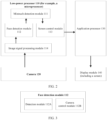
- the low-power processor 110 is a processor with low power consumption, and may assist a main processor (for example, the application processor 130) in performing some data processing work, for example, processing data of one or more sensors. In this way, load of the main processor can be reduced, and a battery life of the electronic device 100 can be prolonged.
- a main processor for example, the application processor 130
- the mistouch detection module 111 may be configured to determine, based on a screen touch event (namely, a touch report point) and a face detection result, whether a screen mistouch event occurs; may be further configured to receive the screen touch event; may be further configured to exchange data with the face detection module 112 (for example, obtain the face detection result); and may be further configured to exchange data with the screen control module 113 (for example, send a result of mistouch detection to the screen control module 113).
- the face detection module 112 may be configured to obtain, by using the image signal processing module 114, image data collected by the camera 120; may be further configured to perform face detection based on image data preprocessed by the image signal processing module 114, for example, detect whether there is a face in front of the screen of the electronic device 100; and may be further configured to set a working mode of the camera 120.
- the screen control module 113 may be configured to control the screen based on the result of mistouch detection, for example, control an on/off state of the screen by using the application processor 130.
- the camera 120 may be a front-facing camera of the electronic device 100.
- the camera 120 may support an always-on (Always-on) mode, or may be set to an ultra-low power (Ultra-Low Power, ULP) mode.
- ULP ultra-low Power
- the camera 120 may output an image at a low resolution (for example, a resolution of 512*384) and a low frame rate (for example, a frame rate of 1 fps). In this way, power consumption of the electronic device 100 can be reduced, and a battery life can be prolonged.
- the camera 120 may be connected to the low-power processor 110.
- the camera 120 may be connected to the low-power processor 110 through a mobile industry processor interface (mobile industry processor interface, MIPI).
- MIPI mobile industry processor interface
- the application processor 130 may be configured to exchange data with the screen control module 113 and the display module 140. For example, the application processor 130 may receive a message sent by the screen control module, and may determine, based on the message, whether to turn on or turn off the screen. For another example, the application processor 130 may send a message to the display module 140, to indicate the display module 140 to turn on or turn off the screen.
- the display module 140 may be configured to exchange data with the application processor 130. For example, the display module 140 may receive a message sent by the application processor 130, and may turn on or turn off the screen based on the message. In a screen-on state, the display module 140 may further display corresponding content on a user interface based on the message.
- the touch sensor may directly send information about the touch event to the low-power processor 110.
- the structure of the electronic device 100 is merely an example.
- the electronic device 100 may alternatively have more or fewer modules than those shown in FIG. 2 , may combine two or more modules, or may have different module configurations. This is not limited herein.
- FIG. 3 shows an example of a structure of the face detection module 112 shown in FIG. 2 .
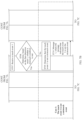
- the face detection module 112 shown in FIG. 2 may include one or more submodules, for example, may include a detection module 112A and a camera control module 112B.
- the detection module 112A may be configured to perform face detection
- the camera control module 112B may be configured to set the working mode of the camera 120.
- the camera 120 may send collected image data to the image signal processing module 114 shown in FIG. 2 based on a preset frame rate in the ultra-low power mode.
- the image signal processing module 114 shown in FIG. 2 may send preprocessed image data to the detection module 112A for face detection, and store a face detection result.
- the face detection result may include a face status (for example, a face size, a face stay duration, and a face orientation), and the detection module 112A may store only a latest face detection result.
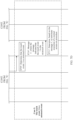
- a mistouch detection module receives a touch event.
- the mistouch detection module may monitor a touch event on a screen in real time, and may perform the following step S502 after receiving the touch event.
- the touch event may be artificially generated (for example, generated due to a finger touch of a user, or generated due to relative motion when the electronic device 100 is placed in a pocket or a bag), or may be non-artificially generated (for example, generated due to an energized conductor).
- the mistouch detection module determines whether the touch event is a mistouch event, and if the touch event is a mistouch event, performs the following step S503, or if the touch event is not a mistouch event, performs the following step S504.
- the mistouch detection module determines whether the touch event is a mistouch event
- the mistouch detection module indicates a screen control module to terminate a normal screen-on procedure.
- the mistouch detection module of the electronic device 100 may first determine whether the touch event is a mistouch event. If the touch event is a mistouch event, the mistouch detection module may indicate the screen control module to terminate the normal screen-on procedure. In this case, the screen control module may ignore the touch event, not respond to the mistouch event, and not process the touch event. In this way, when the touch event is a mistouch event, even if the touch event is detected, the electronic device 100 may retain the screen-off state, to reduce power consumption of the electronic device 100 and prolong a battery life.
- the mistouch detection module indicates a screen control module to ignore the touch event, and the screen control module executes a normal screen-off procedure based on a screen sleep setting policy.
- the mistouch detection module may directly intercept the touch event without notifying the screen control module. In this way, when the touch event is a mistouch event, even if the touch event is detected, the electronic device 100 does not respond to the touch event, to avoid a false response to the touch event, thereby resolving a problem that the electronic device 100 in the screen-on state does not turn off the screen due to the mistouch event. This reduces power consumption of the electronic device 100, and prolongs a battery life.
- a touch function of the electronic device 100 may be temporarily disabled, and/or touch sensitivity of the electronic device 100 may be reduced. In this way, power consumption of the electronic device 100 can be prevented from increasing due to repeatedly triggered mistouch events. For example, a touch function of an edge area on the screen of the electronic device 100 may be temporarily disabled, and/or sensitivity of an area other than an edge area on the screen of the electronic device 100 may be reduced. In this way, a requirement of the user can be met to a greater extent.
- the electronic device 100 may alternatively detect a plurality of touch events consecutively.
- the electronic device 100 may consider that the touch events are generated by repeated touches of a pocket or a bag on the screen of the electronic device 100 that is placed in the pocket or the bag. In this case, the electronic device 100 may directly lock the screen. This can avoid an increase in power consumption of the electronic device 100 caused by repeatedly detecting touch events and repeatedly determining whether the touch events are mistouch events.
- triggering of the touch events can be reduced, thereby further reducing false responses of the electronic device 100 to the touch events.
- the mistouch detection module indicates a screen control module to execute a normal response procedure for the touch event.
- the mistouch detection module of the electronic device 100 may first determine whether the touch event is a mistouch event. If the touch event is not the mistouch event, the mistouch detection module may indicate the screen control module to execute the normal response procedure for the touch event. In this case, the screen control module needs to normally respond to the touch event.
- Application scenario 1 Scenario of a screen-off state
- FIG. 7A to FIG. 7D show an example of a specific procedure for implementing a touch processing method in a scenario in which an electronic device 100 is in a screen-off state according to an embodiment of this application.
- the method may be applied to the electronic device 100.
- the electronic device 100 may include a camera, a low-power processor (for example, a microprocessor), an application processor, and a display module (including a screen).
- a low-power processor for example, a microprocessor
- an application processor for example, a graphics processing unit
- a display module including a screen.
- An image signal processing module, a face detection module, a mistouch detection module, and a screen control module may be deployed on the low-power processor. The following describes in detail specific steps of the method.
- the camera may be a front-facing camera of the electronic device 100.
- a working mode of the camera may be an ultra-low power mode, and the camera may further support an always-on (Always-on) mode, so that data of an image in front of the screen of the electronic device 100 can be collected in real time.
- the screen control module may determine, based on the message 1, that the touch event 1 needs to be responded to, and determine to execute the normal screen-on procedure. Then, the screen control module may send the message 2 to the application processor, where the message indicates the execution of the normal screen-on procedure.
- S713 The application processor sends a message 3 to the display module, where the message includes information about content that needs to be displayed during screen-on.
- the application processor may determine that the normal screen-on procedure needs to be executed. Further, the application processor may send the message 3 to the display module, where the message may include the information about the content that needs to be displayed during screen-on, so that the display module may subsequently display the corresponding content based on the information during screen-on.
- S714 The display module turns on the screen based on the message 3, and displays the content that needs to be displayed during screen-on.
- the display module may turn on the screen based on the message 3, and may display the content that needs to be displayed during screen-on.
- the electronic device 100 is switched from the screen-off state to a screen-on state.
- the mistouch detection module determines that the touch event 1 is the mistouch event, and then the mistouch detection module may send a message 1' to the screen control module, where the message indicates that the touch event 1 is the mistouch event.
- the mistouch detection module may determine that the touch event 1 is the mistouch event. Then, the mistouch detection module may send the message 1' to the screen control module, where the message indicates that the touch event 1 is the mistouch event, so that the screen control module may subsequently not respond to the touch event 1.
- the mistouch detection module may directly intercept the touch event 1 without notifying the screen control module.
- the screen control module determines, based on the message 1', to terminate execution of a normal screen-on procedure.
- the screen control module may determine, based on the message 1', not to respond to the touch event 1 (that is, ignore the touch event 1), and determine to terminate the execution of the normal screen-on procedure.
- the electronic device 100 can retain the screen-off state, thereby achieving mistouch prevention effect and improving user experience.
- the camera and the low-power processor that are used in the entire process of implementing the mistouch prevention function are low-power components, greatly reducing power consumption of the electronic device 100 and prolonging a battery life.
- Application scenario 2 Scenario of a screen-on state
- FIG. 8A to FIG. 8D show an example of a specific procedure for implementing a touch processing method in a scenario in which an electronic device 100 is in a screen-on state according to an embodiment of this application.
- the method may be applied to the electronic device 100.
- the electronic device 100 may include a camera, a low-power processor (for example, a microprocessor), an application processor, and a display module (including a screen).
- a low-power processor for example, a microprocessor
- an application processor for example, a graphics processing unit
- a display module including a screen.
- An image signal processing module, a face detection module, a mistouch detection module, and a screen control module may be deployed on the low-power processor. The following describes in detail specific steps of the method.
- S801 and S802 The camera collects image data 1', and then the camera may send the image data 1' to the image signal processing module.
- the image signal processing module preprocesses the image data 1' to obtain preprocessed image data 1', and then the image signal processing module may send the preprocessed image data 1' to the face detection module.
- the face detection module performs face detection based on the preprocessed image data 1' to obtain a face detection result 1'.
- the face detection module sends the face detection result 1' to the mistouch detection module.
- the mistouch detection module receives a touch event 1', and then the mistouch detection module may determine, based on the face detection result 1', whether a mistouch condition is met, and if the mistouch condition is not met, performs the following step S809; or if the mistouch condition is met, performs the following step S809'.
- Step S801 to step S808 are similar to step S701 to step S708 shown in FIG. 7A to FIG. 7D .
- Step S801 to step S808 are similar to step S701 to step S708 shown in FIG. 7A to FIG. 7D .
- Step S801 to step S808 are similar to step S701 to step S708 shown in FIG. 7A to FIG. 7D .
- Step S801 to step S808 are similar to step S701 to step S708 shown in FIG. 7A to FIG. 7D .
- the mistouch detection module determines that the touch event 1' is not the mistouch event, and then the mistouch detection module may send a message 1' to the screen control module, where the message indicates that the touch event 1' is not the mistouch event.
- the mistouch detection module may determine that the touch event 1' is not the mistouch event. Then, the mistouch detection module may send the message 1' to the screen control module, where the message indicates that the touch event 1' is not the mistouch event, so that the screen control module may subsequently execute a normal response procedure for the touch event 1' as a normal response to the touch event 1'.
- the screen control module determines, based on the message 1', to execute the normal response procedure for the touch event 1', and then the screen control module may send a message 2' to the application processor, where the message indicates to execute the normal response procedure for the touch event 1'.
- the screen control module may determine, based on the message 1', that the touch event 1' needs to be normally responded to, and determine to execute the normal response procedure for the touch event 1'. Then, the screen control module may send the message 2' to the application processor, where the message indicates the execution of the normal response procedure for the touch event 1'.
- S813 The application processor executes the normal response procedure for the touch event 1' based on the message 2'.
- the application processor may execute the normal response procedure for the touch event 1' based on the message 2'. For example, if the touch event 1' is a tap event of a user on the screen of the electronic device 100, the application processor may execute a response procedure corresponding to the tap event on the screen. For another example, if the touch event 1' is a slide event of a user on the screen of the electronic device 100, the application processor may execute a response procedure corresponding to the slide event, or the like.
- the mistouch detection module determines that the touch event 1' is the mistouch event, and then the mistouch detection module may send a message 1" to the screen control module, where the message indicates that the touch event 1' is the mistouch event.
- the mistouch detection module may determine that the touch event 1' is the mistouch event. Then, the mistouch detection module may send the message 1" to the screen control module, where the message indicates that the touch event 1' is the mistouch event, so that the screen control module may subsequently not respond to the touch event 1'.
- the mistouch detection module may directly intercept the touch event 1' without notifying the screen control module.
- the screen control module determines, based on the message 1", to ignore the touch event 1', and then the screen control module may determine, based on a screen sleep setting policy, to execute a normal screen-off procedure. Next, the screen control module may send a message 2" to the application processor, where the message indicates to execute the normal screen-off procedure.
- the screen control module may determine, based on the message 1", not to respond to the touch event 1' (that is, ignore the touch event 1'). Then, the screen control module may determine, based on the screen sleep setting policy, that the normal screen-off procedure needs to be executed. Next, the screen control module may send the message 2" to the application processor, where the message indicates the execution of the normal screen-off procedure.
- S814' The application processor sends a message 3" to the display module, where the message indicates to execute a screen-off procedure.
- the application processor may determine that the normal screen-off procedure needs to be started when specified screen sleep duration expires. When the specified screen sleep duration expires, the application processor may send the message 3" to the display module, where the message indicates the execution of the screen-off procedure.
Landscapes
- Engineering & Computer Science (AREA)
- Theoretical Computer Science (AREA)
- General Engineering & Computer Science (AREA)
- Physics & Mathematics (AREA)
- General Physics & Mathematics (AREA)
- Human Computer Interaction (AREA)
- Health & Medical Sciences (AREA)
- Multimedia (AREA)
- Oral & Maxillofacial Surgery (AREA)
- General Health & Medical Sciences (AREA)
- Bioinformatics & Cheminformatics (AREA)
- Data Mining & Analysis (AREA)
- Evolutionary Biology (AREA)
- Evolutionary Computation (AREA)
- Computer Vision & Pattern Recognition (AREA)
- Bioinformatics & Computational Biology (AREA)
- Artificial Intelligence (AREA)
- Life Sciences & Earth Sciences (AREA)
- Studio Devices (AREA)
Applications Claiming Priority (2)
| Application Number | Priority Date | Filing Date | Title |
|---|---|---|---|
| CN202211225758.6A CN117850614A (zh) | 2022-09-30 | 2022-09-30 | 触控处理方法及相关设备 |
| PCT/CN2023/120903 WO2024067431A1 (zh) | 2022-09-30 | 2023-09-23 | 触控处理方法及相关设备 |
Publications (2)
| Publication Number | Publication Date |
|---|---|
| EP4579404A1 true EP4579404A1 (de) | 2025-07-02 |
| EP4579404A4 EP4579404A4 (de) | 2025-12-24 |
Family
ID=90476191
Family Applications (1)
| Application Number | Title | Priority Date | Filing Date |
|---|---|---|---|
| EP23870662.6A Pending EP4579404A4 (de) | 2022-09-30 | 2023-09-23 | Berührungsverarbeitungsverfahren und zugehörige vorrichtung |
Country Status (3)
| Country | Link |
|---|---|
| EP (1) | EP4579404A4 (de) |
| CN (1) | CN117850614A (de) |
| WO (1) | WO2024067431A1 (de) |
Families Citing this family (1)
| Publication number | Priority date | Publication date | Assignee | Title |
|---|---|---|---|---|
| CN118984482A (zh) * | 2024-07-12 | 2024-11-19 | 北京玄戒技术有限公司 | 设备控制方法、装置、电子设备、芯片及存储介质 |
Family Cites Families (9)
| Publication number | Priority date | Publication date | Assignee | Title |
|---|---|---|---|---|
| KR102350781B1 (ko) * | 2017-06-15 | 2022-01-14 | 엘지전자 주식회사 | 이동 단말기 및 그 제어방법 |
| CN108491142B (zh) * | 2018-03-09 | 2020-08-11 | Oppo广东移动通信有限公司 | 一种移动终端的控制方法、移动终端及存储介质 |
| WO2019200543A1 (zh) * | 2018-04-17 | 2019-10-24 | 深圳市汇顶科技股份有限公司 | 操作系统的唤醒方法、装置及系统 |
| CN110519443B (zh) * | 2018-05-22 | 2021-06-01 | 维沃移动通信有限公司 | 一种亮屏方法及移动终端 |
| CN111078097A (zh) * | 2018-10-18 | 2020-04-28 | 珠海格力电器股份有限公司 | 一种移动终端防误触方法、系统及移动终端 |
| CN109359458B (zh) * | 2018-10-19 | 2021-06-29 | 北京小米移动软件有限公司 | 应用解锁方法、装置及计算机可读存储介质 |
| US11762966B2 (en) * | 2020-04-02 | 2023-09-19 | Motorola Mobility Llc | Methods and devices for operational access grants using facial features and facial gestures |
| CN113625928A (zh) * | 2021-07-13 | 2021-11-09 | 重庆翰博显示科技研发中心有限公司 | 一种荧幕显示自动调节系统及调节方法 |
| CN114578998B (zh) * | 2022-03-23 | 2024-08-16 | 深圳传音控股股份有限公司 | 触控处理方法、智能终端及计算机可读存储介质 |
-
2022
- 2022-09-30 CN CN202211225758.6A patent/CN117850614A/zh active Pending
-
2023
- 2023-09-23 WO PCT/CN2023/120903 patent/WO2024067431A1/zh not_active Ceased
- 2023-09-23 EP EP23870662.6A patent/EP4579404A4/de active Pending
Also Published As
| Publication number | Publication date |
|---|---|
| EP4579404A4 (de) | 2025-12-24 |
| CN117850614A (zh) | 2024-04-09 |
| WO2024067431A1 (zh) | 2024-04-04 |
Similar Documents
| Publication | Publication Date | Title |
|---|---|---|
| US10372326B2 (en) | Mobile terminal device, operation method, program, and storage medium | |
| EP3945680A1 (de) | Verfahren und vorrichtung zur erkennung des zustands eines näherungssensors, endgerät und nicht-transitorisches computerlesbares speichermedium | |
| CN107085508B (zh) | 一种信息处理方法及电子设备 | |
| EP3105919B1 (de) | Fotografieverfahren einer elektronischen vorrichtung und elektronische vorrichtung dafür | |
| CN109992148B (zh) | 触控显示驱动电路 | |
| CN111064842B (zh) | 一种识别异形触摸的方法、终端及存储介质 | |
| US8310504B2 (en) | System and method for panning and selecting on large displays using mobile devices without client software | |
| CN108108079B (zh) | 一种图标显示处理方法及移动终端 | |
| EP4579404A1 (de) | Berührungsverarbeitungsverfahren und zugehörige vorrichtung | |
| EP4571734A1 (de) | Verfahren zum aufwecken eines anwendungsprogramms und elektronische vorrichtung | |
| CN117520028A (zh) | 异常恢复方法、装置和电子设备 | |
| KR20170114515A (ko) | 화면을 표시하는 전자 장치 및 그 제어 방법 | |
| CN110647277A (zh) | 一种控制方法及终端设备 | |
| WO2019072169A1 (zh) | 防误触检测方法、装置及终端 | |
| EP4495751A1 (de) | Funktionsaktivierungsverfahren, benutzerschnittstelle und elektronische vorrichtung | |
| EP4002200A1 (de) | Verfahren und vorrichtung zur verhaltenserkennung, elektronische ausrüstung und speichermedium | |
| KR102553573B1 (ko) | 전자 장치 및 전자 장치의 터치 입력 감지 방법 | |
| CN117724624A (zh) | 处理方法、装置及电子设备 | |
| CN110889102B (zh) | 图像解锁方法、装置、计算机可读存储介质及终端 | |
| CN115437488A (zh) | 省电方法、装置、电子设备及介质 | |
| CN115904181A (zh) | 窗口管理方法及装置 | |
| CN111443938B (zh) | 系统更新方法、装置、存储介质及移动终端 | |
| CN112468725B (zh) | 照片拍摄方法、装置、存储介质及移动终端 | |
| CN210402144U (zh) | 一种电子设备 | |
| CN120255684A (zh) | 功耗控制方法、装置、电子设备及介质 |
Legal Events
| Date | Code | Title | Description |
|---|---|---|---|
| STAA | Information on the status of an ep patent application or granted ep patent |
Free format text: STATUS: THE INTERNATIONAL PUBLICATION HAS BEEN MADE |
|
| PUAI | Public reference made under article 153(3) epc to a published international application that has entered the european phase |
Free format text: ORIGINAL CODE: 0009012 |
|
| STAA | Information on the status of an ep patent application or granted ep patent |
Free format text: STATUS: REQUEST FOR EXAMINATION WAS MADE |
|
| 17P | Request for examination filed |
Effective date: 20250327 |
|
| AK | Designated contracting states |
Kind code of ref document: A1 Designated state(s): AL AT BE BG CH CY CZ DE DK EE ES FI FR GB GR HR HU IE IS IT LI LT LU LV MC ME MK MT NL NO PL PT RO RS SE SI SK SM TR |
|
| A4 | Supplementary search report drawn up and despatched |
Effective date: 20251120 |
|
| RIC1 | Information provided on ipc code assigned before grant |
Ipc: G06F 3/041 20060101AFI20251114BHEP Ipc: G06F 3/0488 20220101ALI20251114BHEP |
|
| DAV | Request for validation of the european patent (deleted) | ||
| DAX | Request for extension of the european patent (deleted) |