EP4576757A1 - Electronic apparatus - Google Patents
Electronic apparatus Download PDFInfo
- Publication number
- EP4576757A1 EP4576757A1 EP24220465.9A EP24220465A EP4576757A1 EP 4576757 A1 EP4576757 A1 EP 4576757A1 EP 24220465 A EP24220465 A EP 24220465A EP 4576757 A1 EP4576757 A1 EP 4576757A1
- Authority
- EP
- European Patent Office
- Prior art keywords
- touch panel
- control unit
- key
- operation screen
- screen
- Prior art date
- Legal status (The legal status is an assumption and is not a legal conclusion. Google has not performed a legal analysis and makes no representation as to the accuracy of the status listed.)
- Pending
Links
Images

Classifications
-
- H—ELECTRICITY
- H04—ELECTRIC COMMUNICATION TECHNIQUE
- H04N—PICTORIAL COMMUNICATION, e.g. TELEVISION
- H04N1/00—Scanning, transmission or reproduction of documents or the like, e.g. facsimile transmission; Details thereof
- H04N1/0035—User-machine interface; Control console
- H04N1/00352—Input means
-
- G—PHYSICS
- G06—COMPUTING OR CALCULATING; COUNTING
- G06F—ELECTRIC DIGITAL DATA PROCESSING
- G06F3/00—Input arrangements for transferring data to be processed into a form capable of being handled by the computer; Output arrangements for transferring data from processing unit to output unit, e.g. interface arrangements
- G06F3/01—Input arrangements or combined input and output arrangements for interaction between user and computer
- G06F3/03—Arrangements for converting the position or the displacement of a member into a coded form
- G06F3/041—Digitisers, e.g. for touch screens or touch pads, characterised by the transducing means
- G06F3/0412—Digitisers structurally integrated in a display
-
- G—PHYSICS
- G06—COMPUTING OR CALCULATING; COUNTING
- G06F—ELECTRIC DIGITAL DATA PROCESSING
- G06F3/00—Input arrangements for transferring data to be processed into a form capable of being handled by the computer; Output arrangements for transferring data from processing unit to output unit, e.g. interface arrangements
- G06F3/01—Input arrangements or combined input and output arrangements for interaction between user and computer
- G06F3/03—Arrangements for converting the position or the displacement of a member into a coded form
- G06F3/041—Digitisers, e.g. for touch screens or touch pads, characterised by the transducing means
- G06F3/0416—Control or interface arrangements specially adapted for digitisers
-
- G—PHYSICS
- G06—COMPUTING OR CALCULATING; COUNTING
- G06F—ELECTRIC DIGITAL DATA PROCESSING
- G06F3/00—Input arrangements for transferring data to be processed into a form capable of being handled by the computer; Output arrangements for transferring data from processing unit to output unit, e.g. interface arrangements
- G06F3/01—Input arrangements or combined input and output arrangements for interaction between user and computer
- G06F3/03—Arrangements for converting the position or the displacement of a member into a coded form
- G06F3/041—Digitisers, e.g. for touch screens or touch pads, characterised by the transducing means
- G06F3/0416—Control or interface arrangements specially adapted for digitisers
- G06F3/0418—Control or interface arrangements specially adapted for digitisers for error correction or compensation, e.g. based on parallax, calibration or alignment
-
- G—PHYSICS
- G06—COMPUTING OR CALCULATING; COUNTING
- G06F—ELECTRIC DIGITAL DATA PROCESSING
- G06F3/00—Input arrangements for transferring data to be processed into a form capable of being handled by the computer; Output arrangements for transferring data from processing unit to output unit, e.g. interface arrangements
- G06F3/01—Input arrangements or combined input and output arrangements for interaction between user and computer
- G06F3/048—Interaction techniques based on graphical user interfaces [GUI]
- G06F3/0487—Interaction techniques based on graphical user interfaces [GUI] using specific features provided by the input device, e.g. functions controlled by the rotation of a mouse with dual sensing arrangements, or of the nature of the input device, e.g. tap gestures based on pressure sensed by a digitiser
- G06F3/0488—Interaction techniques based on graphical user interfaces [GUI] using specific features provided by the input device, e.g. functions controlled by the rotation of a mouse with dual sensing arrangements, or of the nature of the input device, e.g. tap gestures based on pressure sensed by a digitiser using a touch-screen or digitiser, e.g. input of commands through traced gestures
- G06F3/04886—Interaction techniques based on graphical user interfaces [GUI] using specific features provided by the input device, e.g. functions controlled by the rotation of a mouse with dual sensing arrangements, or of the nature of the input device, e.g. tap gestures based on pressure sensed by a digitiser using a touch-screen or digitiser, e.g. input of commands through traced gestures by partitioning the display area of the touch-screen or the surface of the digitising tablet into independently controllable areas, e.g. virtual keyboards or menus
-
- G—PHYSICS
- G06—COMPUTING OR CALCULATING; COUNTING
- G06F—ELECTRIC DIGITAL DATA PROCESSING
- G06F2203/00—Indexing scheme relating to G06F3/00 - G06F3/048
- G06F2203/048—Indexing scheme relating to G06F3/048
- G06F2203/04803—Split screen, i.e. subdividing the display area or the window area into separate subareas
Definitions
- the present invention relates to an electronic apparatus.
- An operation assist display device includes an operation propriety determination unit that determines whether an operation to be performed for a user-desired process is performed or not (i.e. operation propriety), and determines whether display is performed of a help function to assist an operation performed by a user or not on the basis of a determination history of operation propriety in the past.
- An electronic apparatus includes a display device, a touch panel, and a panel control unit.
- the display device is configured to display an operation screen.
- the touch panel is configured to detect an operation to the operation screen.
- the panel control unit is configured to perform transition of the operation screen in accordance with the detected operation. Further, if the operation to go back along the transition is detected with a predetermined frequency or more, the panel control unit displays on the operation screen a first soft key to indicate misrecognition of the touch panel.
- Fig. 1 shows a block diagram that indicates a configuration of an image forming apparatus according to an embodiment of the present invention.
- the image forming apparatus shown in Fig. 1 is an electronic apparatus such as a copier or a multi function peripheral.
- the image forming apparatus 1 includes an operation panel 11, a storage device 21, a processor 22, a printing device 23, an image scanning device 24, a facsimile device 25, a communication device 26, and the like.
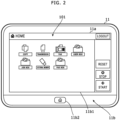
- Fig. 2 shows a diagram that indicates an example of an operation panel 11 shown in Fig. 1 .
- the operation panel 11 is arranged on a front side of a housing of the image forming apparatus 1, and as shown in Fig. 2 , for example, includes a display device 11a such as a liquid crystal display and an input device 11b such as a touch panel 11b1 and a hard key 11b2.
- the display device 11a displays sorts of operation screens to a user.
- a soft key is embodied by the touch panel and a key image displayed on the display device 11a.
- the input device 11b detects a user operation to an operation screen (a soft key or the like) using the touch panel 11b1 and detects a user operation to the hard key 11b2 when such user operation is inputted by a user.
- the hard key 11b2 shown in Fig. 2 is a key to change an operation screen to a home screen 101.
- the storage device 21 is a nonvolatile rewritable storage device such as a flash memory.
- the processor 22 is a computer that includes a CPU (Central Processing Unit), a ROM (Read Only Memory), a RAM (Random Access Memory) and the like, and loads a program to the RAM from the storage device 21 or the ROM and executes the program using the CPU and thereby acts as sorts of processing units.
- the processor 22 acts as a controller 31 and a panel control unit 32.
- the printing device 23 performs printing of an image specified by a job request in accordance with the job request such as a print job request or a copy job request by a user operation.
- the image scanning device 24 includes an automatic document feeder, and in accordance with a copy job request or the like based on a user operation, causes the automatic document feeder to transport a document sheet put on the automatic document feeder, optically scans a document image of the document sheet, and generates image data of the document image.
- the facsimile device 25 generates and transmits a facsimile signal of an image specified by a facsimile transmission job request based on a user operation in accordance with the facsimile transmission job request, and receives a facsimile signal from an external device and generates image data from the received facsimile signal.
- the communication device 26 such as wireless or wired interface performs data communication with an external device.
- the controller 31 controls internal devices such as the printing device 23, the image scanning device 24, the facsimile device 25, and the communication device 26, and performs a job (print, scan, copy, send or the like) specified by a job request.
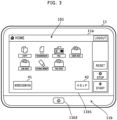
- Fig. 3 shows a diagram that indicates an example of a misrecognition key and a help key displayed when many operations are performed to go back along screen transition.
- the panel control unit 32 performs transition of an operation screen displayed on the display device 11a in accordance with a user operation detected by the input device 11b. Further, if the user operation to go back along the screen transition is detected with a predetermined frequency or more, the panel control unit 32 displays on the operation screen a misrecognition key 41 (soft key) to indicate misrecognition of the touch panel 11b1 as shown in Fig. 3 , for example.
- a misrecognition key 41 soft key
- the "user operation to go back along the screen transition” is pressing the hard key 11b2 to return to the home screen (initial screen), pressing a “return” key (not shown) to return a previous operation screen in the operation screen, or the like.
- the aforementioned predetermined frequency is set as 5 times per most recent 30 seconds, or the like.
- the panel control unit 32 performs at least one of (a) display of a message that indicates malfunction of the touch panel 11b1 and (b) notification of malfunction of the touch panel 11b1 to a customer support.
- the aforementioned message display and/or the notification of the malfunction are/is performed.
- the image forming apparatus 1 is not connected to a network, performed are display of a message to indicate malfunction of the touch panel 11b1 (for example, "The touch panel may have malfunction. Please call a service person.” or the like) and display of contact information of a service person.
- the image forming apparatus 1 is connected to a network, performed are display of a message to indicate malfunction of the touch panel 11b1 (for example, "The touch panel may have malfunction. Status information of the apparatus should be transmitted to the customer support.” or the like) and transmission of the status information (operation history or the like) of the apparatus to the customer support (i.e. notification of malfunction of the touch panel 11b1).
- a message is displayed such as "Do you request a touch panel operation through remote access by the customer support?".
- the user requests to the customer support by email or the like a touch panel operation from remote.
- the customer support performs a touch panel operation from remote (for example, an operation to a remote panel), and causes the image forming apparatus 1 to perform a user-desired process.
- the panel control unit 32 displays on the operation screen a help key 42 to provide a help function together with the misrecognition key 41 as shown in Fig. 3 , for example.
- a help function is invoked.
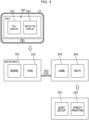
- Fig. 4 shows a diagram that indicates an example of a menu of the help function.
- the panel control function 32 (a) in the help function, displays on the display device 11a a list of items classified into functions, and (b) displays the list except for other items than a function corresponding to the operation screen that the operation to go back along the transition is performed (i.e. except for other items than a function that may have malfunction).
- the help initial screen 201 includes a full display key 211 and a selective display key 212.
- the full display key 211 is a soft key to select an ordinary help function (displaying a list not except for the aforementioned items).
- the selective display key 212 is a soft key to select displaying a list except for the aforementioned items.
- a list of function selection keys 221 to 224 is displayed.
- items in the list are displayed two by two, switched in accordance with a flick operation or the like.
- the function selection keys 221 to 224 of related functions are displayed, but a function selection key of an unrelated function (copy or the like) is not displayed.
- the function selection keys 221 to 224 are displayed in a decreasing order of numbers of views on the basis of a browsing history or the like of the help function.
- function selection keys 231, 232 are displayed as minor items of the selected item (Wi-Fi). Further, when one of the function selection keys 231, 232 is pressed, support information corresponding to the pressed function selection key 231 or 232 is displayed (such as information for malfunction determination or information for resolving the malfunction).
- the panel control unit 32 displays a home screen (initial screen) on the display device 11a as shown in Fig. 2 , for example.
- the user performs an operation (clicking of an icon or the like) to the home screen to select a desired function.
- the panel control unit 32 displays an operation screen of the function on the display device 11a.
- Operation screens of each function are hierarchically configured; in each operation screen, a "return” key is arranged; and when pressing the "return” key, the user returns to a previous operation screen.
- the user inputs sorts of information to the operation screen, and after checking that the inputted information is not wrong, the user performs an operation to perform the function. Contrarily, if the inputted information is not what the user intends, the user redoes input of information. Therefore, the user performs a user operation to go back along the screen transition as mentioned.
- the panel control unit 32 watches whether such user operation to go back along the screen transition is detected with a predetermined frequency or more; and if a user operation to go back along the screen transition is detected with the predetermined frequency or more, then the panel control unit 32 displays the misrecognition key 41 placed on the operation screen as shown in Fig. 3 , for example.
- the panel control unit 32 performs at least one of (a) display of a message that indicates malfunction of the touch panel 11b1 and (b) notification of malfunction of the touch panel 11b1 to a customer support, as mentioned.
- the panel control unit 32 displays on the operation screen the help key 42 together with the misrecognition key 41 as shown in Fig. 3 , for example. If the help key 42 is pressed, the panel control unit 32 displays a hierarchical help menu except for unrelated items as mentioned, and displays support information of the selected item.
- the display device 11a displays an operation screen
- the touch panel 11b1 detects an operation to the operation screen.
- the panel control unit 32 performs transition of the operation screen in accordance with the detected operation. Further, if an operation to go back along the transition is detected with a predetermined frequency or more, the panel control unit 32 displays on the operation screen the misrecognition key 41 to indicate misrecognition of the touch panel 11b1.
Landscapes
- Engineering & Computer Science (AREA)
- General Engineering & Computer Science (AREA)
- Theoretical Computer Science (AREA)
- Human Computer Interaction (AREA)
- Physics & Mathematics (AREA)
- General Physics & Mathematics (AREA)
- Multimedia (AREA)
- Signal Processing (AREA)
- User Interface Of Digital Computer (AREA)
- Facsimiles In General (AREA)
- Accessory Devices And Overall Control Thereof (AREA)
- Control Or Security For Electrophotography (AREA)
Abstract
Description
- The present invention relates to an electronic apparatus.
- An operation assist display device includes an operation propriety determination unit that determines whether an operation to be performed for a user-desired process is performed or not (i.e. operation propriety), and determines whether display is performed of a help function to assist an operation performed by a user or not on the basis of a determination history of operation propriety in the past.
- However, if a touch panel that receives a user operation has malfunction, the touch panel misrecognizes a user operation regardless that the user correctly performs the operation, and consequently a wrong user operation is inputted, then the aforementioned help function for operation assist is useless because the user correctly performs the operation.
- An electronic apparatus according to the present invention includes a display device, a touch panel, and a panel control unit. The display device is configured to display an operation screen. The touch panel is configured to detect an operation to the operation screen. The panel control unit is configured to perform transition of the operation screen in accordance with the detected operation. Further, if the operation to go back along the transition is detected with a predetermined frequency or more, the panel control unit displays on the operation screen a first soft key to indicate misrecognition of the touch panel.
- These and other objects, features and advantages of the present invention will become more apparent upon reading of the following detailed description along with the accompanied drawings.
-
-
Fig. 1 shows a block diagram that indicates a configuration of an image forming apparatus according to an embodiment of the present invention; -
Fig. 2 shows a diagram that indicates an example of anoperation panel 11 shown inFig. 1 ; -
Fig. 3 shows a diagram that indicates an example of a misrecognition key and a help key displayed when many operations are performed to go back along screen transition; and -
Fig. 4 shows a diagram that indicates an example of a menu of a help function. - Hereinafter, an embodiment according to an aspect of the present invention will be explained with reference to drawings.
-
Fig. 1 shows a block diagram that indicates a configuration of an image forming apparatus according to an embodiment of the present invention. The image forming apparatus shown inFig. 1 is an electronic apparatus such as a copier or a multi function peripheral. As shown inFig. 1 , theimage forming apparatus 1 includes anoperation panel 11, astorage device 21, aprocessor 22, aprinting device 23, animage scanning device 24, afacsimile device 25, acommunication device 26, and the like. -
Fig. 2 shows a diagram that indicates an example of anoperation panel 11 shown inFig. 1 . Theoperation panel 11 is arranged on a front side of a housing of theimage forming apparatus 1, and as shown inFig. 2 , for example, includes adisplay device 11a such as a liquid crystal display and aninput device 11b such as a touch panel 11b1 and a hard key 11b2. Thedisplay device 11a displays sorts of operation screens to a user. A soft key is embodied by the touch panel and a key image displayed on thedisplay device 11a. Theinput device 11b detects a user operation to an operation screen (a soft key or the like) using the touch panel 11b1 and detects a user operation to the hard key 11b2 when such user operation is inputted by a user. The hard key 11b2 shown inFig. 2 is a key to change an operation screen to ahome screen 101. - Returning to
Fig. 1 , thestorage device 21 is a nonvolatile rewritable storage device such as a flash memory. - The
processor 22 is a computer that includes a CPU (Central Processing Unit), a ROM (Read Only Memory), a RAM (Random Access Memory) and the like, and loads a program to the RAM from thestorage device 21 or the ROM and executes the program using the CPU and thereby acts as sorts of processing units. Here, theprocessor 22 acts as acontroller 31 and apanel control unit 32. - The
printing device 23 performs printing of an image specified by a job request in accordance with the job request such as a print job request or a copy job request by a user operation. - Further, for example, the
image scanning device 24 includes an automatic document feeder, and in accordance with a copy job request or the like based on a user operation, causes the automatic document feeder to transport a document sheet put on the automatic document feeder, optically scans a document image of the document sheet, and generates image data of the document image. - Furthermore, the
facsimile device 25 generates and transmits a facsimile signal of an image specified by a facsimile transmission job request based on a user operation in accordance with the facsimile transmission job request, and receives a facsimile signal from an external device and generates image data from the received facsimile signal. Thecommunication device 26 such as wireless or wired interface performs data communication with an external device. - The
controller 31 controls internal devices such as theprinting device 23, theimage scanning device 24, thefacsimile device 25, and thecommunication device 26, and performs a job (print, scan, copy, send or the like) specified by a job request. -
Fig. 3 shows a diagram that indicates an example of a misrecognition key and a help key displayed when many operations are performed to go back along screen transition. Thepanel control unit 32 performs transition of an operation screen displayed on thedisplay device 11a in accordance with a user operation detected by theinput device 11b. Further, if the user operation to go back along the screen transition is detected with a predetermined frequency or more, thepanel control unit 32 displays on the operation screen a misrecognition key 41 (soft key) to indicate misrecognition of the touch panel 11b1 as shown inFig. 3 , for example. - Here, the "user operation to go back along the screen transition" is pressing the hard key 11b2 to return to the home screen (initial screen), pressing a "return" key (not shown) to return a previous operation screen in the operation screen, or the like. Further, for example, the aforementioned predetermined frequency is set as 5 times per most recent 30 seconds, or the like.
- When the user feels this operation was performed due to misrecognition of the touch panel 11b1 rather than due to his/her own misoperation, the user presses this
misrecognition key 41. - Further, in accordance with a frequency that the
misrecognition key 41 is displayed and pressed, thepanel control unit 32 performs at least one of (a) display of a message that indicates malfunction of the touch panel 11b1 and (b) notification of malfunction of the touch panel 11b1 to a customer support. - For example, if pressing the
misrecognition key 41 is detected 6 times per most recent 10 times of displaying themisrecognition key 41, the aforementioned message display and/or the notification of the malfunction are/is performed. - For example, if the
image forming apparatus 1 is not connected to a network, performed are display of a message to indicate malfunction of the touch panel 11b1 (for example, "The touch panel may have malfunction. Please call a service person." or the like) and display of contact information of a service person. - For example, if the
image forming apparatus 1 is connected to a network, performed are display of a message to indicate malfunction of the touch panel 11b1 (for example, "The touch panel may have malfunction. Status information of the apparatus should be transmitted to the customer support." or the like) and transmission of the status information (operation history or the like) of the apparatus to the customer support (i.e. notification of malfunction of the touch panel 11b1). - For example, if the
image forming apparatus 1 is connected to a network and remote access is allowed to the customer support, then after the notification of the malfunction of the touch panel 11b1 as mentioned, a message is displayed such as "Do you request a touch panel operation through remote access by the customer support?". When the user sees the message, the user requests to the customer support by email or the like a touch panel operation from remote. The customer support performs a touch panel operation from remote (for example, an operation to a remote panel), and causes theimage forming apparatus 1 to perform a user-desired process. - Further, if the user operation to go back along the screen transition is detected with a predetermined frequency or more, the
panel control unit 32 displays on the operation screen ahelp key 42 to provide a help function together with themisrecognition key 41 as shown inFig. 3 , for example. When thehelp key 42 is pressed, a help function is invoked. -
Fig. 4 shows a diagram that indicates an example of a menu of the help function. As shown inFig. 4 , for example, the panel control function 32 (a) in the help function, displays on thedisplay device 11a a list of items classified into functions, and (b) displays the list except for other items than a function corresponding to the operation screen that the operation to go back along the transition is performed (i.e. except for other items than a function that may have malfunction). - For example, when the
help key 42 is pressed, thepanel control unit 32 display a helpinitial screen 201. The helpinitial screen 201 includes afull display key 211 and aselective display key 212. Thefull display key 211 is a soft key to select an ordinary help function (displaying a list not except for the aforementioned items). Theselective display key 212 is a soft key to select displaying a list except for the aforementioned items. - When the
selective display key 212 is pressed, a list offunction selection keys 221 to 224 is displayed. Here, items in the list (thefunction selection keys 221 to 224) are displayed two by two, switched in accordance with a flick operation or the like. - For example, if a function that may have malfunction is a network connection function, the
function selection keys 221 to 224 of related functions (send, fax, USB and Wi-Fi) are displayed, but a function selection key of an unrelated function (copy or the like) is not displayed. Thefunction selection keys 221 to 224 are displayed in a decreasing order of numbers of views on the basis of a browsing history or the like of the help function. - Here, when the
function selection key 224 of Wi-Fi is pressed,function selection keys function selection keys function selection key - The following part explains a behavior of the aforementioned
image forming apparatus 1. - When the
image forming apparatus 1 starts or when a user logs in, thepanel control unit 32 displays a home screen (initial screen) on thedisplay device 11a as shown inFig. 2 , for example. - The user performs an operation (clicking of an icon or the like) to the home screen to select a desired function. When such operation is detected by the
input device 11b, thepanel control unit 32 displays an operation screen of the function on thedisplay device 11a. Operation screens of each function are hierarchically configured; in each operation screen, a "return" key is arranged; and when pressing the "return" key, the user returns to a previous operation screen. - The user inputs sorts of information to the operation screen, and after checking that the inputted information is not wrong, the user performs an operation to perform the function. Contrarily, if the inputted information is not what the user intends, the user redoes input of information. Therefore, the user performs a user operation to go back along the screen transition as mentioned.
- The
panel control unit 32 watches whether such user operation to go back along the screen transition is detected with a predetermined frequency or more; and if a user operation to go back along the screen transition is detected with the predetermined frequency or more, then thepanel control unit 32 displays themisrecognition key 41 placed on the operation screen as shown inFig. 3 , for example. - When the user feels the operation was performed due to misrecognition of the touch panel 11b1 rather than due to his/her own misoperation, the user presses this
misrecognition key 41. Further, in accordance with a frequency that themisrecognition key 41 is displayed and pressed, thepanel control unit 32 performs at least one of (a) display of a message that indicates malfunction of the touch panel 11b1 and (b) notification of malfunction of the touch panel 11b1 to a customer support, as mentioned. - Furthermore, if the user operation to go back along the screen transition is detected with a predetermined frequency or more, the
panel control unit 32 displays on the operation screen thehelp key 42 together with themisrecognition key 41 as shown inFig. 3 , for example. If thehelp key 42 is pressed, thepanel control unit 32 displays a hierarchical help menu except for unrelated items as mentioned, and displays support information of the selected item. - As mentioned, in the aforementioned embodiment, the
display device 11a displays an operation screen, and the touch panel 11b1 detects an operation to the operation screen. Thepanel control unit 32 performs transition of the operation screen in accordance with the detected operation. Further, if an operation to go back along the transition is detected with a predetermined frequency or more, thepanel control unit 32 displays on the operation screen themisrecognition key 41 to indicate misrecognition of the touch panel 11b1. - Consequently, if it is determined that a misoperation is inputted, possibility of misrecognition due to malfunction of the touch panel 11b1 is proposed. Therefore, malfunction of the touch panel 11b1 tends to be early found and usability is gained.
- It should be understood that various changes and modifications to the embodiments described herein will be apparent to those skilled in the art. Such changes and modifications may be made without departing from the spirit and scope of the present subject matter and without diminishing its intended advantages. It is therefore intended that such changes and modifications be covered by the appended claims.
Claims (3)
- An electronic apparatus, comprising:a display device configured to display an operation screen;a touch panel configured to detect an operation to the operation screen; anda panel control unit configured to perform transition of the operation screen in accordance with the detected operation;wherein if the operation to go back along the transition is detected with a predetermined frequency or more, the panel control unit displays on the operation screen a first soft key to indicate misrecognition of the touch panel.
- The electronic apparatus according to claim 1, wherein the panel control unit performs at least one of (a) display of a message that indicates malfunction of the touch panel and (b) notification of malfunction of the touch panel to a customer support, in accordance with a frequency that the first soft key is displayed and pressed.
- The electronic apparatus according to claim 1, wherein if the operation to go back along the transition is detected with a predetermined frequency or more, the panel control unit displays on the operation screen a second soft key to provide a help function together with the first soft key; and
the panel control function (a) in the help function, displays on the display device a list of items classified into functions, and (b) displays the list except for other items than a function corresponding to the operation screen that the operation to go back along the transition is performed.
Applications Claiming Priority (1)
| Application Number | Priority Date | Filing Date | Title |
|---|---|---|---|
| JP2023215531A JP2025099114A (en) | 2023-12-21 | 2023-12-21 | electronic equipment |
Publications (1)
| Publication Number | Publication Date |
|---|---|
| EP4576757A1 true EP4576757A1 (en) | 2025-06-25 |
Family
ID=93925579
Family Applications (1)
| Application Number | Title | Priority Date | Filing Date |
|---|---|---|---|
| EP24220465.9A Pending EP4576757A1 (en) | 2023-12-21 | 2024-12-17 | Electronic apparatus |
Country Status (4)
| Country | Link |
|---|---|
| US (1) | US12704926B2 (en) |
| EP (1) | EP4576757A1 (en) |
| JP (1) | JP2025099114A (en) |
| CN (1) | CN120196225A (en) |
Citations (2)
| Publication number | Priority date | Publication date | Assignee | Title |
|---|---|---|---|---|
| US20120127520A1 (en) * | 2010-11-18 | 2012-05-24 | Konica Minolta Business Technologies, Inc. | Operation panel and image forming apparatus |
| US20170149990A1 (en) * | 2015-11-25 | 2017-05-25 | Konica Minolta, Inc. | Image forming apparatus, computer readable recording medium stored with computer program for controlling image forming apparatus, and method for controlling image forming apparatus |
Family Cites Families (8)
| Publication number | Priority date | Publication date | Assignee | Title |
|---|---|---|---|---|
| US7256770B2 (en) * | 1998-09-14 | 2007-08-14 | Microsoft Corporation | Method for displaying information responsive to sensing a physical presence proximate to a computer input device |
| JP2009020554A (en) | 2007-07-10 | 2009-01-29 | Panasonic Corp | Operation support display device |
| US20130054325A1 (en) * | 2011-08-29 | 2013-02-28 | Ebay Inc. | Mobile platform for redeeming deals |
| US20160012465A1 (en) * | 2014-02-08 | 2016-01-14 | Jeffrey A. Sharp | System and method for distributing, receiving, and using funds or credits and apparatus thereof |
| US10394344B2 (en) * | 2017-11-07 | 2019-08-27 | International Business Machines Corporation | Character input error correction |
| US11435899B1 (en) * | 2019-06-03 | 2022-09-06 | Zachary Michaels | Dynamic view user interface system and method |
| US11947933B2 (en) * | 2021-01-08 | 2024-04-02 | Microsoft Technology Licensing, Llc | Contextual assistance and interactive documentation |
| US20230116149A1 (en) * | 2021-10-09 | 2023-04-13 | Microsoft Technology Licensing, Llc | Copy-paste-update edit automation |
-
2023
- 2023-12-21 JP JP2023215531A patent/JP2025099114A/en active Pending
-
2024
- 2024-12-11 CN CN202411817119.8A patent/CN120196225A/en active Pending
- 2024-12-17 EP EP24220465.9A patent/EP4576757A1/en active Pending
- 2024-12-17 US US18/984,899 patent/US12704926B2/en active Active
Patent Citations (2)
| Publication number | Priority date | Publication date | Assignee | Title |
|---|---|---|---|---|
| US20120127520A1 (en) * | 2010-11-18 | 2012-05-24 | Konica Minolta Business Technologies, Inc. | Operation panel and image forming apparatus |
| US20170149990A1 (en) * | 2015-11-25 | 2017-05-25 | Konica Minolta, Inc. | Image forming apparatus, computer readable recording medium stored with computer program for controlling image forming apparatus, and method for controlling image forming apparatus |
Also Published As
| Publication number | Publication date |
|---|---|
| CN120196225A (en) | 2025-06-24 |
| US20250208735A1 (en) | 2025-06-26 |
| US12704926B2 (en) | 2026-08-11 |
| JP2025099114A (en) | 2025-07-03 |
Similar Documents
| Publication | Publication Date | Title |
|---|---|---|
| JP7485180B2 (en) | IMAGE PROCESSING APPARATUS, DISPLAY CONTROL METHOD, AND DISPLAY CONTROL PROGRAM | |
| US10681230B2 (en) | Information processing apparatus, method of processing information, and storage medium | |
| JP7816464B2 (en) | Function Execution Device | |
| US9628665B2 (en) | Information processing system, information processing apparatus, information processing method, and recording medium | |
| JP2025186465A (en) | Image forming device | |
| US20170155794A1 (en) | Job processing system, job processing apparatus, and program | |
| US20200228668A1 (en) | Image processing apparatus, control method, and storage medium | |
| US20250208735A1 (en) | Electronic apparatus | |
| EP4064079B1 (en) | Information processing apparatus and recording medium recording information processing program | |
| US20120224224A1 (en) | Printing apparatus and printing method | |
| US10917531B2 (en) | Operation apparatus, information processing system, and operation method for outputting a message by voice sound | |
| US12126771B2 (en) | Image forming device, method for providing notification regarding utilization status of image forming device, and user terminal | |
| US11949649B2 (en) | Device management apparatus | |
| JP2021021972A (en) | Touch input device and image forming device including touch input device | |
| US11445074B2 (en) | Information processing device, touch panel display method, and recording medium | |
| US11269680B2 (en) | Information processing apparatus, information processing system, and information processing method | |
| JP2019164573A (en) | Display input device, image forming device, screen display method, and program | |
| US10509507B2 (en) | Display device, information processing apparatus, method for controlling display device, and storage medium | |
| US10187535B2 (en) | Instruction apparatus, processing apparatus, and processing system | |
| US12147722B2 (en) | Image processing apparatus and method for bringing up job history | |
| JP7334452B2 (en) | User support system | |
| US20230054541A1 (en) | Electronic apparatus | |
| JP2024117141A (en) | Information processing device, image processing device, information processing system, information processing method, and program | |
| JP2018079662A (en) | Display input device and image forming apparatus having the same | |
| JP2022129447A (en) | image forming system |
Legal Events
| Date | Code | Title | Description |
|---|---|---|---|
| PUAI | Public reference made under article 153(3) epc to a published international application that has entered the european phase |
Free format text: ORIGINAL CODE: 0009012 |
|
| STAA | Information on the status of an ep patent application or granted ep patent |
Free format text: STATUS: THE APPLICATION HAS BEEN PUBLISHED |
|
| AK | Designated contracting states |
Kind code of ref document: A1 Designated state(s): AL AT BE BG CH CY CZ DE DK EE ES FI FR GB GR HR HU IE IS IT LI LT LU LV MC ME MK MT NL NO PL PT RO RS SE SI SK SM TR |
|
| STAA | Information on the status of an ep patent application or granted ep patent |
Free format text: STATUS: REQUEST FOR EXAMINATION WAS MADE |
|
| 17P | Request for examination filed |
Effective date: 20251211 |
|
| GRAP | Despatch of communication of intention to grant a patent |
Free format text: ORIGINAL CODE: EPIDOSNIGR1 |
|
| STAA | Information on the status of an ep patent application or granted ep patent |
Free format text: STATUS: GRANT OF PATENT IS INTENDED |
|
| INTG | Intention to grant announced |
Effective date: 20260519 |