EP4539474A2 - Routinen für wiedergabevorrichtungen - Google Patents
Routinen für wiedergabevorrichtungen Download PDFInfo
- Publication number
- EP4539474A2 EP4539474A2 EP25154241.1A EP25154241A EP4539474A2 EP 4539474 A2 EP4539474 A2 EP 4539474A2 EP 25154241 A EP25154241 A EP 25154241A EP 4539474 A2 EP4539474 A2 EP 4539474A2
- Authority
- EP
- European Patent Office
- Prior art keywords
- playback
- routine
- routines
- user
- devices
- Prior art date
- Legal status (The legal status is an assumption and is not a legal conclusion. Google has not performed a legal analysis and makes no representation as to the accuracy of the status listed.)
- Pending
Links
Images














Classifications
-
- H—ELECTRICITY
- H04—ELECTRIC COMMUNICATION TECHNIQUE
- H04N—PICTORIAL COMMUNICATION, e.g. TELEVISION
- H04N21/00—Selective content distribution, e.g. interactive television or video on demand [VOD]
- H04N21/40—Client devices specifically adapted for the reception of or interaction with content, e.g. set-top-box [STB]; Operations thereof
- H04N21/45—Management operations performed by the client for facilitating the reception of or the interaction with the content or administrating data related to the end-user or to the client device itself, e.g. learning user preferences for recommending movies, resolving scheduling conflicts
- H04N21/4508—Management of client data or end-user data
- H04N21/4532—Management of client data or end-user data involving end-user characteristics, e.g. viewer profile, preferences
-
- H—ELECTRICITY
- H04—ELECTRIC COMMUNICATION TECHNIQUE
- H04N—PICTORIAL COMMUNICATION, e.g. TELEVISION
- H04N21/00—Selective content distribution, e.g. interactive television or video on demand [VOD]
- H04N21/40—Client devices specifically adapted for the reception of or interaction with content, e.g. set-top-box [STB]; Operations thereof
- H04N21/41—Structure of client; Structure of client peripherals
- H04N21/422—Input-only peripherals, i.e. input devices connected to specially adapted client devices, e.g. global positioning system [GPS]
- H04N21/42203—Input-only peripherals, i.e. input devices connected to specially adapted client devices, e.g. global positioning system [GPS] sound input device, e.g. microphone
-
- H—ELECTRICITY
- H04—ELECTRIC COMMUNICATION TECHNIQUE
- H04N—PICTORIAL COMMUNICATION, e.g. TELEVISION
- H04N21/00—Selective content distribution, e.g. interactive television or video on demand [VOD]
- H04N21/40—Client devices specifically adapted for the reception of or interaction with content, e.g. set-top-box [STB]; Operations thereof
- H04N21/43—Processing of content or additional data, e.g. demultiplexing additional data from a digital video stream; Elementary client operations, e.g. monitoring of home network or synchronising decoder's clock; Client middleware
- H04N21/4302—Content synchronisation processes, e.g. decoder synchronisation
- H04N21/4307—Synchronising the rendering of multiple content streams or additional data on devices, e.g. synchronisation of audio on a mobile phone with the video output on the TV screen
- H04N21/43076—Synchronising the rendering of multiple content streams or additional data on devices, e.g. synchronisation of audio on a mobile phone with the video output on the TV screen of the same content streams on multiple devices, e.g. when family members are watching the same movie on different devices
-
- H—ELECTRICITY
- H04—ELECTRIC COMMUNICATION TECHNIQUE
- H04N—PICTORIAL COMMUNICATION, e.g. TELEVISION
- H04N21/00—Selective content distribution, e.g. interactive television or video on demand [VOD]
- H04N21/40—Client devices specifically adapted for the reception of or interaction with content, e.g. set-top-box [STB]; Operations thereof
- H04N21/43—Processing of content or additional data, e.g. demultiplexing additional data from a digital video stream; Elementary client operations, e.g. monitoring of home network or synchronising decoder's clock; Client middleware
- H04N21/436—Interfacing a local distribution network, e.g. communicating with another STB or one or more peripheral devices inside the home
- H04N21/43615—Interfacing a Home Network, e.g. for connecting the client to a plurality of peripherals
Definitions
- Media content e.g., songs, podcasts, video sound
- playback devices such that each room with a playback device can play back corresponding different media content.
- rooms can be grouped together for synchronous playback of the same media content, and/or the same media content can be heard in all rooms synchronously.
- the routines may be executed or encoded at a playback device, at a control device, at a server, at another device, or at any combination thereof. Further, the routines may be partially encoded prior to being sent to the one or more playback devices for final execution. The routines may cause one or more playback devices to collaboratively perform a function. When the routines utilize multiple playback devices, the multiple playback devices may perform the exact same functions or may perform different functions.
- the particular set of routines comprise one or more user interface interactions configured to cause the playback device to advance between the one or more routines within the particular set of routines.
- the program instructions cause the playback device to map the one or more user interface interactions to a user interface associated with the playback device. Further the program instructions cause the playback device to execute at least one routine selected from the one or more routines.
- a control device comprises a communication interface, at least one processor, and at least one non-transitory computer-readable medium comprising program instructions that are executable by the at least one processor such that the playback device is configured to perform one or more acts.
- the program instructions cause the control device to receive through the configuration interface a user input associating a particular routine with a particular playback device.
- the particular routine comprises instructions that are configured to cause the particular playback device to play one or more audio files.
- the particular routine comprises one or more audio variables that configure the particular playback device to play the one or more audio files in a particular manner.
- the program instructions also cause the control device to associate a particular trigger condition with the particular routine.
- the particular trigger condition comprises a condition that causes the particular routine to be executed.
- the computer instructions cause the control device to transmit the particular routine to a server.
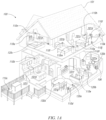
- the environment 101 comprises a household having several rooms, spaces, and/or playback zones, including (clockwise from upper left) a master bathroom 101a, a master bedroom 101b, a second bedroom 101c, a family room or den 101d, an office 101e, a living room 101f, a dining room 101g, a kitchen 101h, and an outdoor patio 101i. While certain embodiments and examples are described below in the context of a home environment, the technologies described herein may be implemented in other types of environments.
- one or more of the playback zones in the environment 101 may each be playing different audio content.
- a user may be grilling on the patio 101i and listening to hip hop music being played by the playback device 110c while another user is preparing food in the kitchen 101h and listening to classical music played by the playback device 110b.
- a playback zone may play the same audio content in synchrony with another playback zone.
- the user may be in the office 101e listening to the playback device 110f playing back the same hip-hop music being played back by playback device 110c on the patio 101i.
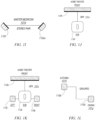
- Figure 1B is a schematic diagram of the media playback system 100 and a cloud network 102. For ease of illustration, certain devices of the media playback system 100 and the cloud network 102 are omitted from Figure 1B .
- One or more communication links 103 (referred to hereinafter as “the links 103") communicatively couple the media playback system 100 and the cloud network 102.
- the links 103 can comprise, for example, one or more wired networks, one or more wireless networks, one or more wide area networks (WAN), one or more local area networks (LAN), one or more personal area networks (PAN), one or more telecommunication networks (e.g., one or more Global System for Mobiles (GSM) networks, Code Division Multiple Access (CDMA) networks, Long-Term Evolution (LTE) networks, 5G communication network networks, and/or other suitable data transmission protocol networks), etc.
- GSM Global System for Mobiles
- CDMA Code Division Multiple Access
- LTE Long-Term Evolution
- 5G communication network networks and/or other suitable data transmission protocol networks
- the cloud network 102 is configured to deliver media content (e.g., audio content, video content, photographs, social media content) to the media playback system 100 in response to a request transmitted from the media playback system 100 via the links 103.
- the cloud network 102 is further configured to receive data (e.g., voice input data) from the media playback system 100 and correspondingly transmit commands and/or
- the cloud network 102 comprises computing devices 106 (identified separately as a first computing device 106a, a second computing device 106b, and a third computing device 106c).
- the computing devices 106 can comprise individual computers or servers, such as, for example, a media streaming service server storing audio and/or other media content, a voice service server, a social media server, a media playback system control server, etc.
- one or more of the computing devices 106 comprise modules of a single computer or server.
- one or more of the computing devices 106 comprise one or more modules, computers, and/or servers.
- the cloud network 102 is described above in the context of a single cloud network, in some embodiments the cloud network 102 comprises a plurality of cloud networks comprising communicatively coupled computing devices. Furthermore, while the cloud network 102 is shown in Figure 1B as having three of the computing devices 106, in some embodiments, the cloud network 102 comprises fewer (or more than) three computing devices 106.
- the media playback system 100 is configured to receive media content from the networks 102 via the links 103.
- the received media content can comprise, for example, a Uniform Resource Identifier (URI) and/or a Uniform Resource Locator (URL).
- URI Uniform Resource Identifier
- URL Uniform Resource Locator
- the media playback system 100 can stream, download, or otherwise obtain data from a URI or a URL corresponding to the received media content.
- a network 104 communicatively couples the links 103 and at least a portion of the devices (e.g., one or more of the playback devices 110, NMDs 120, and/or control devices 130) of the media playback system 100.
- the network 104 can include, for example, a wireless network (e.g., a WiFi network, a Bluetooth, a Z-Wave network, a ZigBee, and/or other suitable wireless communication protocol network) and/or a wired network (e.g., a network comprising Ethernet, Universal Serial Bus (USB), and/or another suitable wired communication).
- a wireless network e.g., a WiFi network, a Bluetooth, a Z-Wave network, a ZigBee, and/or other suitable wireless communication protocol network
- a wired network e.g., a network comprising Ethernet, Universal Serial Bus (USB), and/or another suitable wired communication.
- WiFi can refer to several different communication protocols including, for example, Institute of Electrical and Electronics Engineers (IEEE) 802.11a, 802.11b, 802.11g, 802.11n, 802.11ac, 802.11ac, 802.11ad, 802.11af, 802.11ah, 802.11ai, 802.11aj, 802.11aq, 802.11ax, 802.11ay, 802.15, etc. transmitted at 2.4 Gigahertz (GHz), 5 GHz, and/or another suitable frequency.
- IEEE Institute of Electrical and Electronics Engineers
- audio content sources may be regularly added or removed from the media playback system 100.
- the media playback system 100 performs an indexing of media items when one or more media content sources are updated, added to, and/or removed from the media playback system 100.
- the media playback system 100 can scan identifiable media items in some or all folders and/or directories accessible to the playback devices 110 and generate or update a media content database comprising metadata (e.g., title, artist, album, track length) and other associated information (e.g., URIs, URLs) for each identifiable media item found.
- the media content database is stored on one or more of the playback devices 110, network microphone devices 120, and/or control devices 130.
- the digital I/O 111b comprises a Sony/Philips Digital Interface Format (S/PDIF) communication interface and/or cable and/or a Toshiba Link (TOSLINK) cable.
- the digital I/O 111b comprises a High-Definition Multimedia Interface (HDMI) interface and/or cable.
- the digital I/O 111b includes one or more wireless communication links comprising, for example, a radio frequency (RF), infrared, WiFi, Bluetooth, or another suitable communication protocol.
- RF radio frequency
- the analog I/O 111a and the digital 111b comprise interfaces (e.g., ports, plugs, jacks) configured to receive connectors of cables transmitting analog and digital signals, respectively, without necessarily including cables.
- the processors 112a can comprise clock-driven computing component(s) configured to process data
- the memory 112b can comprise a computer-readable medium (e.g., a tangible, non-transitory computer-readable medium loaded with one or more of the software components 112c) configured to store instructions for performing various operations and/or functions.
- the processors 112a are configured to execute the instructions stored on the memory 112b to perform one or more of the operations.
- the operations can include, for example, causing the playback device 110a to retrieve audio data from an audio source (e.g., one or more of the computing devices 106a-c ( Figure 1B )), and/or another one of the playback devices 110.
- the state data is shared during predetermined intervals of time (e.g., every 5 seconds, every 10 seconds, every 60 seconds) among at least a portion of the devices of the media playback system 100, so that one or more of the devices have the most recent data associated with the media playback system 100.
- the audio components 112g are configured to process and/or filter data comprising media content received by the electronics 112 (e.g., via the input/output 111 and/or the network interface 112d) to produce output audio signals.
- the audio processing components 112g comprise, for example, one or more digital-to-analog converters (DAC), audio preprocessing components, audio enhancement components, a digital signal processors (DSPs), and/or other suitable audio processing components, modules, circuits, etc.
- one or more of the audio processing components 112g can comprise one or more subcomponents of the processors 112a.
- the electronics 112 omits the audio processing components 112g.
- the processors 112a execute instructions stored on the memory 112b to perform audio processing operations to produce the output audio signals.
- one or more playback devices 110 comprises wired or wireless headphones (e.g., over-the-ear headphones, on-ear headphones, in-ear earphones).
- the NMD 120a includes the processor 112a and the memory 112b ( Figure 1B ), while omitting one or more other components of the electronics 112.
- the NMD 120a includes additional components (e.g., one or more sensors, cameras, thermometers, barometers, hygrometers).
- the network interface 132d can be configured, for example, to transmit data to and/or receive data from the playback devices 110, the NMDs 120, other ones of the control devices 130, one of the computing devices 106 of Figure 1B , devices comprising one or more other media playback systems, etc.
- the transmitted and/or received data can include, for example, playback device control commands, state variables, playback zone and/or zone group configurations.
- the network interface 132d can transmit a playback device control command (e.g., volume control, audio playback control, audio content selection) from the control device 304 to one or more of the playback devices 110.
- the user interface 133 is configured to receive user input and can facilitate control of the media playback system 100.
- the user interface 133 includes media content art 133a (e.g., album art, lyrics, videos), a playback status indicator 133b (e.g., an elapsed and/or remaining time indicator), media content information region 133c, a playback control region 133d, and a zone indicator 133e.
- the media content information region 133c can include a display of relevant information (e.g., title, artist, album, genre, release year) about media content currently playing and/or media content in a queue or playlist.
- the playback control region 133d can include selectable (e.g., via touch input and/or via a cursor or another suitable selector) icons to cause one or more playback devices in a selected playback zone or zone group to perform playback actions such as, for example, play or pause, fast forward, rewind, skip to next, skip to previous, enter/exit shuffle mode, enter/exit repeat mode, enter/exit cross fade mode, etc.
- the playback control region 133d may also include selectable icons to modify equalization settings, playback volume, and/or other suitable playback actions.
- the user interface 133 comprises a display presented on a touch screen interface of a smartphone (e.g., an iPhone TM , an Android phone). In some embodiments, however, user interfaces of varying formats, styles, and interactive sequences may alternatively be implemented on one or more network devices to provide comparable control access to a media playback system.
- the one or more microphones 135 can comprise, for example, one or more condenser microphones, electret condenser microphones, dynamic microphones, and/or other suitable types of microphones or transducers. In some embodiments, two or more of the microphones 135 are arranged to capture location information of an audio source (e.g., voice, audible sound) and/or configured to facilitate filtering of background noise. Moreover, in certain embodiments, the control device 130a is configured to operate as playback device and an NMD. In other embodiments, however, the control device 130a omits the one or more speakers 134 and/or the one or more microphones 135.
- an audio source e.g., voice, audible sound
- the control device 130a is configured to operate as playback device and an NMD. In other embodiments, however, the control device 130a omits the one or more speakers 134 and/or the one or more microphones 135.
- control device 130a may comprise a device (e.g., a thermostat, an IoT device, a network device) comprising a portion of the electronics 132 and the user interface 133 (e.g., a touch screen) without any speakers or microphones. Additional control device embodiments are described in further detail below with respect to Figures 4A-4D and 5 .
- bonded playback devices may have additional and/or different respective speaker drivers.
- the playback device 110h named Front may be bonded with the playback device 110i named SUB.
- the Front device 110h can be configured to render a range of mid to high frequencies and the SUB device 110i can be configured render low frequencies. When unbonded, however, the Front device 110h can be configured render a full range of frequencies.
- Figure 1K shows the Front and SUB devices 110h and 110i further bonded with Left and Right playback devices 110j and 110k, respectively.
- the Right and Left devices 110j and 102k can be configured to form surround or "satellite" channels of a home theater system.
- the bonded playback devices 110h, 110i, 110j, and 110k may form a single Zone D ( FIG. 1M ).
- Playback devices that are merged may not have assigned playback responsibilities and may each render the full range of audio content the respective playback device is capable of. Nevertheless, merged devices may be represented as a single UI entity (i.e., a zone, as discussed above). For instance, the playback devices 110a and 110n in the master bathroom have the single UI entity of Zone A. In one embodiment, the playback devices 110a and 110n may each output the full range of audio content each respective playback devices 110a and 110n are capable of, in synchrony.
- an NMD is bonded or merged with another device so as to form a zone.
- the NMD 120b may be bonded with the playback device 110e, which together form Zone F, named Living Room.
- a stand-alone network microphone device may be in a zone by itself. In other embodiments, however, a stand-alone network microphone device may not be associated with a zone. Additional details regarding associating network microphone devices and playback devices as designated or default devices may be found, for example, in previously referenced U.S. Patent Application No. 15/438,749 .
- Zones of individual, bonded, and/or merged devices may be grouped to form a zone group.
- Zone A may be grouped with Zone B to form a zone group 108a that includes the two zones.
- Zone G may be grouped with Zone H to form the zone group 108b.
- Zone A may be grouped with one or more other Zones C-I.
- the Zones A-I may be grouped and ungrouped in numerous ways. For example, three, four, five, or more (e.g., all) of the Zones A-I may be grouped.
- the zones of individual and/or bonded playback devices may play back audio in synchrony with one another, as described in previously referenced U.S. Patent No. 8,234,395 .
- Playback devices may be dynamically grouped and ungrouped to form new or different groups that synchronously play back audio content.
- Identifiers associated with the Den may indicate that the Den is not grouped with other zones but includes bonded playback devices 110h-110k.
- Identifiers associated with the Dining Room may indicate that the Dining Room is part of the Dining + Kitchen zone group 108b and that devices 110b and 110d are grouped ( FIG. 1L ).
- Identifiers associated with the Kitchen may indicate the same or similar information by virtue of the Kitchen being part of the Dining + Kitchen zone group 108b.
- Other example zone variables and identifiers are described below.
- the media playback system 100 may not implement Areas, in which case the system may not store variables associated with Areas.
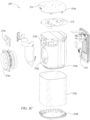
- the one or more microphones 316 are configured to received sound via the apertures 316d and produce electrical signals based on the received sound.
- a frame 316e ( Figure 3C ) of the housing 316 surrounds cavities 316f and 316g configured to house, respectively, a first transducer 314a (e.g., a tweeter) and a second transducer 314b (e.g., a mid-woofer, a midrange speaker, a woofer).
- the NMD 320 includes a single transducer, or more than two (e.g., two, five, six) transducers. In certain embodiments, the NMD 320 omits the transducers 314a and 314b altogether.
- the user interface 313 includes a plurality of control surfaces (e.g., buttons, knobs, capacitive surfaces) including a first control surface 313a (e.g., a previous control), a second control surface 313b (e.g., a next control), and a third control surface 313c (e.g., a play and/or pause control).
- a fourth control surface 313d is configured to receive touch input corresponding to activation and deactivation of the one or microphones 315.
- a first indicator 313e e.g., one or more light emitting diodes (LEDs) or another suitable illuminator
- LEDs light emitting diodes
- a second indicator 313f (e.g., one or more LEDs) can be configured to remain solid during normal operation and to blink or otherwise change from solid to indicate a detection of voice activity.
- the user interface 313 includes additional or fewer control surfaces and illuminators.
- the user interface 313 includes the first indicator 313e, omitting the second indicator 313f.
- the NMD 320 comprises a playback device and a control device, and the user interface 313 comprises the user interface of the control device.
- the NMD 320 is configured to receive voice commands from one or more adjacent users via the one or more microphones 315.
- the one or more microphones 315 can acquire, capture, or record sound in a vicinity (e.g., a region within 10m or less of the NMD 320) and transmit electrical signals corresponding to the recorded sound to the electronics 312.
- the electronics 312 can process the electrical signals and can analyze the resulting audio data to determine a presence of one or more voice commands (e.g., one or more activation words).
- the NMD 320 is configured to transmit a portion of the recorded audio data to another device and/or a remote server (e.g., one or more of the computing devices 106 of Figure 1B ) for further analysis.
- the remote server can analyze the audio data, determine an appropriate action based on the voice command, and transmit a message to the NMD 320 to perform the appropriate action.
- suitable content sources can include a device or storage communicatively coupled to the NMD 320 via a LAN (e.g., the network 104 of Figure 1B ), a remote server (e.g., one or more of the remote computing devices 106 of Figure 1B ), etc.
- a LAN e.g., the network 104 of Figure 1B
- a remote server e.g., one or more of the remote computing devices 106 of Figure 1B
- the NMD 320 determines and/or performs one or more actions corresponding to the one or more voice commands without intervention or involvement of an external device, computer, or server.
- FIG. 3E is a functional block diagram showing additional features of the NMD 320 in accordance with aspects of the disclosure.
- the NMD 320 includes components configured to facilitate voice command capture including voice activity detector component(s) 312k, beam former components 312l, acoustic echo cancellation (AEC) and/or self-sound suppression components 312m, activation word detector components 312n, and voice/speech conversion components 312o (e.g., voice-to-text and text-to-voice).
- voice activity detector component(s) 312k e.g., beam former components 312l, acoustic echo cancellation (AEC) and/or self-sound suppression components 312m, activation word detector components 312n, and voice/speech conversion components 312o (e.g., voice-to-text and text-to-voice).
- AEC acoustic echo cancellation
- self-sound suppression components 312m e.g., voice-to-text and text-to-voice
- the beamforming and self-sound suppression components 312l and 312m are configured to detect an audio signal and determine aspects of voice input represented in the detected audio signal, such as the direction, amplitude, frequency spectrum, etc.
- the voice activity detector activity components 312k are operably coupled with the beamforming and AEC components 312l and 312m and are configured to determine a direction and/or directions from which voice activity is likely to have occurred in the detected audio signal.
- Potential speech directions can be identified by monitoring metrics which distinguish speech from other sounds. Such metrics can include, for example, energy within the speech band relative to background noise and entropy within the speech band, which is measure of spectral structure. As those of ordinary skill in the art will appreciate, speech typically has a lower entropy than most common background noise.
- the activation word detector components 312n are configured to monitor and analyze received audio to determine if any activation words (e.g., wake words) are present in the received audio.
- the activation word detector components 312n may analyze the received audio using an activation word detection algorithm. If the activation word detector 312n detects an activation word, the NMD 320 may process voice input contained in the received audio.
- Example activation word detection algorithms accept audio as input and provide an indication of whether an activation word is present in the audio.
- Many first- and third-party activation word detection algorithms are known and commercially available. For instance, operators of a voice service may make their algorithm available for use in third-party devices. Alternatively, an algorithm may be trained to detect certain activation words.
- the activation word detector 312n runs multiple activation word detection algorithms on the received audio simultaneously (or substantially simultaneously).
- different voice services e.g. AMAZON's ALEXA ® , APPLE's SIRI ® , or MICROSOFT's CORTANA ®
- the activation word detector 312n may run the received audio through the activation word detection algorithm for each supported voice service in parallel.
- the speech/text conversion components 312o may facilitate processing by converting speech in the voice input to text.
- the electronics 312 can include voice recognition software that is trained to a particular user or a particular set of users associated with a household.
- voice recognition software may implement voice-processing algorithms that are tuned to specific voice profile(s). Tuning to specific voice profiles may require less computationally intensive algorithms than traditional voice activity services, which typically sample from a broad base of users and diverse requests that are not targeted to media playback systems.
- FIG. 3F is a schematic diagram of an example voice input 328 captured by the NMD 320 in accordance with aspects of the disclosure.
- the voice input 328 can include an activation word portion 328a and a voice utterance portion 328b.
- the activation word 557a can be a known activation word, such as "Alexa," which is associated with AMAZON's ALEXA ® .
- the voice input 328 may not include an activation word.
- a network microphone device may output an audible and/or visible response upon detection of the activation word portion 328a.
- an NMB may output an audible and/or visible response after processing a voice input and/or a series of voice inputs.
- the voice utterance portion 328b can include other information, such as detected pauses (e.g., periods of non-speech) between words spoken by a user, as shown in Figure 3F .
- the pauses may demarcate the locations of separate commands, keywords, or other information spoke by the user within the voice utterance portion 328b.
- FIGS 4A-4D are schematic diagrams of a control device 430 (e.g., the control device 130a of Figure 1H , a smartphone, a tablet, a dedicated control device, an IoT device, and/or another suitable device) showing corresponding user interface displays in various states of operation.
- the control device comprises one or more processors, memory, software components, a network interface (also referred to herein as a "communication interface").
- the control device 430 can be configured to begin play back of audio content corresponding to the graphical representation 433j and output a fourth user interface display 431d fourth user interface display 431d includes an enlarged version of the graphical representation 433j, media content information 433k (e.g., track name, artist, album), transport controls 433m (e.g., play, previous, next, pause, volume), and indication 433n of the currently selected group and/or zone name.
- media content information 433k e.g., track name, artist, album
- transport controls 433m e.g., play, previous, next, pause, volume
- indication 433n of the currently selected group and/or zone name e.g., current, next, pause, volume
- playback devices in the zones that have been grouped with the particular zone can be configured to play audio content in synchrony with the playback device(s) in the particular zone.
- a "group" icon may be provided within a graphical representation of a zone group.
- the "group” icon may be selectable to bring up options to deselect one or more zones in the zone group to be removed from the zone group.
- the control device 530 includes other interactions and implementations for grouping and ungrouping zones via the user interface 531.
- the representations of playback zones in the playback zone region 533b can be dynamically updated as playback zone or zone group configurations are modified.
- the playback status region 533c includes graphical representations of audio content that is presently being played, previously played, or scheduled to play next in the selected playback zone or zone group.
- the selected playback zone or zone group may be visually distinguished on the user interface, such as within the playback zone region 533b and/or the playback queue region 533d.
- the graphical representations may include track title, artist name, album name, album year, track length, and other relevant information that may be useful for the user to know when controlling the media playback system 100 via the user interface 531.
- Figure 6 is a message flow diagram illustrating data exchanges between devices of the media playback system 100 ( Figures 1A-1M ).
- the media playback system 100 receives an indication of selected media content (e.g., one or more songs, albums, playlists, podcasts, videos, stations) via the control device 130a.
- the selected media content can comprise, for example, media items stored locally on or more devices (e.g., the audio source 105 of Figure 1C ) connected to the media playback system and/or media items stored on one or more media service servers (one or more of the remote computing devices 106 of Figure 1B ).
- the control device 130a transmits a message 651a to the playback device 110a ( Figures 1A-1C ) to add the selected media content to a playback queue on the playback device 110a.
- the playback device 110a receives the message 651d with the data corresponding to the requested media content and plays back the associated media content.
- routines can be used to customize and/or modify the behavior of playback devices 110.
- a user can select or create a set of routines, or scenes, that cause a playback device 110a to play back media content in a user-defined manner. For example, the user may select a routine that causes the playback device 110a to play back the sound of ocean waves. Further, the user may indicate a particular user-defined acoustic parameter in which the ocean waves should be played back, such as by selecting a particular user-defined volume. Further, in some embodiments, a routine can continue execution through the play back of media content. For instance, a routine may be configured to ramp up the volume associated with media content over a five-minute period. Similarly, a routine may be configured to dynamically raise the volume associated with media content in response to ambient noise around one or more playback devices 110.
- individual playback modes can customize the actions associated with different transport commands (e.g., play, previous, next, pause, volume).
- the customizations may be defined by one or more routines that are associated with the individual playback modes.
- a particular playback mode may cause the skip command to speed up an aspect of a routine. For example, pressing the skip command may cause media content to play at a faster speed.
- a particular playback mode may cause the stop command to emit an alarm sound.
- a particular playback mode may be associated with a game and pushing a stop button on a playback device may cause an alarm to sound as part of the game.
- different playback modes may cause any number of different actions to be associated with the transport commands.
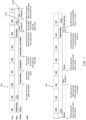
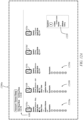
- Figure 7 is a schematic of a timeline 700 associated with one or more playback devices 110 that are shown as operating within two different playback modes 710.
- the timeline 700 shows that the associated playback devices 110 operating within a daytime playback mode 710a and a sleep playback mode 710b.
- the daytime playback mode 710a is considered a default mode of the one or more playback devices 110.
- the “default mode” a button normally associated with "play” will cause media content to be played.
- the play button may be repurposed to perform another function - such as skipping to the next routine, which may not be media content.
- the daytime playback mode 710a is not associated with any routines or scenes.
- the daytime playback mode 710a may be considered a default playback mode such that any time period that is not associated with a particular playback mode is automatically associated with the default playback mode (also referred to as the daytime playback mode 710a).
- the daytime playback mode 710a also referred to as the daytime playback mode 710a.
- one or more playback devices 110 may be associated with a wake-up playback mode from 6 AM until 8 AM and then again with a sleep playback mode 710b from 10 PM until 6 AM.
- the time period from 8 AM until 10 PM may automatically be associated with the daytime playback mode 710a.
- the user may initiate the morning news through any number of different means such as, but not limited to: a vocal command to "play news," a physical user interface integrated into the one or more playback devices 110, a command entered into a control device (such as a mobile phone), a routine that automatically causes the morning news to play at a particular time of day, or any number of ways described herein.
- a vocal command to "play news” a physical user interface integrated into the one or more playback devices 110
- a command entered into a control device such as a mobile phone
- a routine that automatically causes the morning news to play at a particular time of day or any number of ways described herein.
- the user silences the one or more playback devices 110.
- the user starts to listen to workout music.
- the user may switch to her cooking music while she prepares her evening meal. Once she has finished eating, the user may cause the one or more playback devices 110 to play a local radio station while she cleans up.
- a playback mode indication comprises a command that causes the one or more playback devices 110 to enter into a playback mode 710.
- the playback mode indication may be received from a user, a remote server, a control device, the one or more playback devices, or be generated by a trigger condition.
- the playback mode indication depicted with respect to the timeline 700 comprises a trigger condition in the form of a time-based trigger that causes the one or more playback devices 110 to enter the sleep playback mode 710b at 10 PM.
- one or more of the playback devices 110, a control device, or a remote server may be configured to determine that a trigger condition has occurred.
- trigger conditions may comprise a particular time, a geolocation of a user, a button press, a vocal command, a signal from an IoT device, a signal from a cloud service, or any other detectable condition or signal.
- a user-defined acoustic parameter may comprise a volume level, a mix level, a balance level, or a media content-specific variable.
- a media content-specific variable allows a user to specify acoustic attributes that are unique to the particular media content.
- the particular media content may comprise one or more component tracks within the media content that can be independently adjusted (e.g., track speed, track sound, track channel, track balance, and other related attributes).
- one track may comprise the sound of ocean waves.
- the one or more routines also comprise one or more user interface interactions that are configured to cause the one or more playback devices 110 to advance between the one or more routines within the particular set of routines.
- User interface elements 810a, 810b depict exemplary visual elements that may be presented on a control device 130 when the one or more playback devices 110 are operating in sleep playback mode. These visual elements may be displayed on a screen on or associated with the playback device 110 or on a controller of the playback device 110. As depicted, pressing the play button within user interface element 810a causes the playback device 110 to play ocean sounds. When the user activates a skip or next function, the control device 130 causes the one or more playback devices 110 to advance to the sleep quickstart 2 routine 720b, which in turn causes the one or more playback devices 110 to play white noise.
- Figures 9A-15B depict various different embodiments of playback mode interfaces.
- the playback mode interfaces comprise configuration interfaces that are used to configure and/or launch different playback modes or routines.
- the playback mode interfaces comprise dashboard interfaces that are used to show a status of playback devices 110 within a household.
- the playback mode interfaces depicted herein are provided for sake of example and explanation, and do not limit potential additional or alternative embodiments of interfaces to any particular form or device.
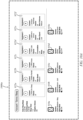
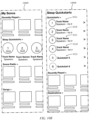
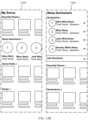
- Figures 9A and 9B are schematic diagrams of related playback mode interfaces 900a, 900b (also referred to herein interchangeably as “configuration interfaces" or “dashboard interfaces").
- the playback mode interfaces 900a, 990b may be displayed on a control device 130 for use in creating or modify routines and playback modes or a dashboard device for use in viewing and monitoring the status of playback devices 110 within a household.
- the depicted playback mode interfaces 900a and 900b are exemplary and can be presented on any device with a viewable display (e.g., control device 530). Additionally, the visual aspects of the playback mode interfaces 900a and 900b are also exemplary and in some embodiments routines can be modified and/or created using voice commands without the presence of a viewable display.
- the playback mode interfaces may comprise at least one microphone configured to receive voice commands or a user interface configured to receive physical inputs from a user.
- the control device 130 can receive, via a playback mode interface 900a and 900b, one or more first user inputs associating a particular routine (also referred to as a particular "scene") with a particular playback mode and associating the particular playback mode with one or more playback devices.
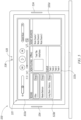
- configuration interface 900a depicts multiple playback device icons 910(a-e) that each represent a different playback device 110 (in e.g., speakers) within a particular media playback system 100.
- the depicted playback device icons 910(a-e) are each associated with a playback device name 912, a playback device mode 914, and a playback device mode status 916.
- Playback mode interface 900b depicts two different rendered views 940a, 940b within the playback mode interface 900b. Rendered view 940a displays to a user various sleep quickstarts 950a, 950b. If a user selects the "Sleep Quickstarts" option 960, the playback mode interface 900b displays the second rendered view 940b. Within the second rendered view 940b, a user it able to further customize the sleep quickstarts 950a, 950b by selecting the quickstarts individually. A user may also be able to launch a sleep quickstart 950a, 950b from either playback mode interfaces 900a or playback mode interface 900b. One will appreciate, however, that additional or alternative embodiments may display different information associated with each playback device 110.
- the playback mode interface 900a also depicts various user-defined acoustic parameters that can be associated with media content. Similar options may also be available to the user through playback mode interface 900b.
- a first routine 922 is associated with instructions that cause a playback setting of one or more playback devices 110 to be associated with particular media content, in this case media content, or nature sounds, referred to as "Seattle Rainfall.”
- the user-defined acoustic parameters include a user defined volume of "25" and a media content-specific settings relating to the rain speed, in this case "medium.” Additionally, in some embodiments, the user-defined acoustic parameters also include the individual playback devices 110 that are associated with the first routine 922.
- the user has turned on the playback devices mode status 916 of the playback devices 110 associated with playback device icons 910a, 910b, and 910c.
- the first routine 922 is configured to cause the audio content "Seattle Rainfall” to play on the selected playback devices 110.
- the playback mode interface 900a, 900b also provides the user with the ability to associate a particular trigger condition with a particular routine.
- a trigger condition field 930 for the playback devices 110 to enter sleep mode at 9:30 PM.
- the user sets a conditional trigger for the playback devices 110 to exit sleep mode at 6:30 AM.
- the trigger conditions define conditions that causes the particular routine to be executed or exited. Accordingly, at 9:30 PM a sleep playback mode would be executed at the "Master Bedroom - Mary" playback device, "Master Bedroom - Josh,” playback device, and the "Master Bathroom” playback device. At 3:1 the playback devices 110 would exit the sleep playback mode.
- trigger conditions may comprise a particular time, a geolocation of a user, a button press, a vocal command, a signal from an IoT device, a signal from a cloud network 102, or any other detectable condition or signal.
- a trigger condition is identified at a server that is remote to the playback device 420 (e.g., computing device 106), at the one or more playback devices 110, or at a control device 130.
- a user is able to select and revise one or more trigger conditions associated with a playback mode or routine.
- trigger conditions are built into particular playback modes or routines and are not user adjustable.
- a user may desire for one or more playback devices to enter a welcome home playback mode whenever the user's geolocation is detected as returning to her home.
- the user may have a mobile phone that is associated with a user account stored in the cloud network 102.
- the user's mobile phone may communicate with the cloud network 102 to indicate the user's current geolocation.
- the cloud network 102 detects that the user, who was previously not at home, is not traveling home, the cloud network 102 communicates an instruction that causes the one or more playback devices to enter the welcome home playback mode.
- the instruction communicated by the cloud network 102 may comprise a current geolocation of the user or may comprise a command to enter the welcome home playback mode.
- the media playback system 100 may process the geolocation information locally and determine whether to enter the welcome home playback mode, or the cloud network 102 may process the geolocation information and directly issue a command that causes the media playback system 100 to enter the welcome home playback mode.
- other trigger conditions can be processed locally within the media playback system 100, remotely in the cloud network 102, or in some combination of the two.
- the control device 130 transmits, via a communication interface, the particular routine to a server (e.g., computing device 106) remote from the control device 130.
- the trigger condition field 930 may provide for options for third-party services or third-party devices to provide a trigger condition.
- a third-party robotic vacuum may be configured to send an indication of a trigger condition whenever the robotic vacuum begins vacuuming.
- a routine may cause the one or more playback devices 110 to increase their volume to a specified level in order to drown out the sounds of the robotic vacuum. Further discussion of the process for receiving indications of trigger conditions from third parties is provided with respect to Figures 16-18 .
- the user may select playback devices at the front of a room to play the wave sounds and playback devices at the back of the room to play the bird and wind sounds.
- the user may also be able to customize volume levels, speed levels, and other user-defined acoustic parameters on a subset-level basis. For example, the user may configure the speed of the waves to ramp up over time and the speed of the birds and the wind to ramp down over time.
- one or more media content settings associated with routines or scenes may configure at least one playback device selected from a group of multiple playback devices to play the media content in a different manner than at least one other playback device selected from the multiple playback devices.
- one of the playback devices may play a different audio channel than the other playback devices.
- a user may be able to further specify different playback devices behaviors. For example, a user may specify that a particular playback device play back media content at a louder volume than the other playback devices associated with a particular routine.
- a user may specify that a particular playback device go to sleep at a different time than the other playback devices associated with a particular routine. For instance, a user may desire that a playback device immediately adjacent her bed sleep after an hour, while other playback devices associated with the same routine or scene continue to playback the media content.
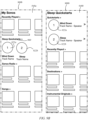
- the playback mode interfaces 1000a, 1000b of Figures 10A and 10B provides a user with greater flexibility in associating quickstart routines with the sleep playback mode.
- the user has defined quickstart 1 routine 922a, quickstart 2 routine 922b, quickstart 3 routine 922c, quickstart 4 routine 922d, quickstart 5 routine 922e, and quickstart 6 routine 922f in relation to the sleep playback mode.
- each quickstart is associated with different media content and different user-defined acoustic parameters (e.g., volume, "rain speed,” “conversation,” “music,” “wind speed,” and “bird volume.") Further, a user is able to indicate which playback devices 110 should be associated with the one or more quick start routines 922(a-f) by selecting the appropriate playback device icons 910(a-e). Additionally, the playback mode interfaces 1000a, 1000b allows a user to arrange the quickstart routines 922(a-c) into a desired sequential order.
- acoustic parameters e.g., volume, "rain speed,” “conversation,” “music,” “wind speed,” and “bird volume.
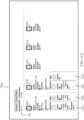
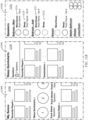
- the playback mode interfaces 1100a and 1100b of Figures 11A and 11B allows a user to set a trigger condition field 930 for the sleep playback mode.
- the user is also able to indicate which playback devices should be associated with the sleep playback mode by selecting the appropriate playback device icons 910(a-e).
- the user is also able to associate quickstart routines 922(a-d) with specific playback devices 110.
- a user is able to individually activate different playback devices 110 with a toggle switch and to associate specific quickstart routines 922(a-d) with individual playback devices 110.
- an inactive quickstart routine 922d may be associated with a toggle switch set to off (as shown in playback mode interface 1100a) or may appear grayed-out (as shown in playback mode interface 1100c).
- a number of different user interface elements may be utilized to control and configure the respective playback devices and quickstart routines 922(a-d). For example, a user may be able to associate a particular quickstart routine with playback device by dragging the quickstart routine 922a to an area of the screen associated with a particular playback devices 110a (e.g., the Bedroom - Mary playback device). Further, the user is able to set playback device-specific variables such as a "sleep timer" and whether "adaptive volume” should be active.
- a user is able to customize how different subsets of playback devices 110 will behave. For instance, a married couple may each have a speaker on their own side of their shared bedroom.
- each partner may be able to customize how their respective playback device 110 operates within the sleep mode. This allows one or more users the ability to individually control playback devices with respect to the one or more routines 922(a-d). For instance, one partner may wish to have a speaker that is next to their bed sleep sooner than the other partner's speaker that is across the room.
- playback mode interfaces 1100a and 1100b display a setting for the one or more user-defined acoustic parameters that causes at least one playback device (represented by playback device icon 910a) within the group of the one or more playback devices (represented by playback device icons 910a-910e) to play back the particular media content in a different manner than another playback device of the group of the one or more playback devices.
- playback device icon 910a displayed within the group of the one or more playback devices (represented by playback device icons 910a-910e) to play back the particular media content in a different manner than another playback device of the group of the one or more playback devices.
- additional or alternative embodiments may display configurations for the volume, balance, fade, and other acoustic parameters of each speaker.
- Playback mode interfaces 1100a and 1100b also provide a user with the ability to enable or disable individual routines 922(a-d) within the sleep playback mode. For example, in playback mode interfaces 1100a and 1100b routine 922d has been disabled. In some embodiments, the routines 922(a-d) are executed as an ordered set. As such, the first routine 922a will be executed, followed by the second routine 922b, and then followed by the third routine 922c. Because the fourth routine 922d has been disabled, the one or more playback devices 110 will stop executing the one or more routines after the third routine 922c completes execution or the ordered set of routines will start over with the first routine 922a.
- a control device 130 may then receive one or more second user inputs to activate the particular routine. For example, the control device 130 may receive an indication that a user has pressed a start button that is associated with a first routine within a particular playback mode. After receiving the one or more second user inputs, the control device 130 may transmit a message that causes the appropriate playback devices 110 to playback the particular media content that is defined by the one or more routines in accordance with the one or more media content settings.
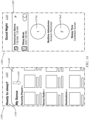
- Figure 14 shows a schematic diagram of another playback mode user interface 1400.
- the playback mode user interface 1400 may be rendered on a control device 130, such as a smartphone.
- Rendered view 1410 comprises a prompt 1430 to a user to enter a sleep playback mode.
- the prompt 1400 may be generated based upon an occurrence of a trigger condition. For example, the user may have previously indicated that the sleep playback mode should begin at 10 PM.
- the control device 130 may determine that the time is 10 PM and in response display prompt 1430 to the user to enter the sleep playback mode.
- the prompt 1430 is only displayed if a user is interacting with a control device 130 during the occurrence of the trigger condition. Otherwise, the playback mode may automatically activate based upon the occurrence of the trigger condition.
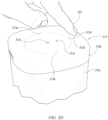
- rendered view 1530 is displayed. Rendered page 1530 displays a visual depiction of a playback device 110a and a visual depiction of a user interaction 1532 on the playback device 110a.
- the user interaction 1532 may be displayed to indicate to a user that performing the displayed user interaction 1532 on a playback device 110a causes the sleep playback mode to advance between quickstart routines (e.g., a swipe across the top of the playback device).
- the visual depiction of the playback device 110a is adjusted to match a particular playback device 110 that the user owns, has most recently interacted with, is most commonly interacted with within the sleep playback mode, or is otherwise associated with the user's current actions.
- the playback device service 1614 provides network services for playback devices 110 and control devices 130 within a media playback system 100.
- the playback device service 1614 may be executed on a remote server and/or executed by local devices, such as control devices 130 and playback devices 110.
- a particular playback device 110a within a group of playback devices 110 may be designated as a "group coordinator."
- the group coordinator is tasked with receiving commands directed towards the group of playback devices 110 and communicating commands to group members.
- the group coordinator may receive a command that is configured to cause a subset of playback devices within the group of playback devices 110 to playback particular media content. After receiving the command, the group coordinator sends out the commands to the subset of playback devices over the local area network.
- a user may tap a volume up button on a particular group member of the group of playback devices 110.
- the particular group member sends the volume up command instruction to the group coordinator over the local area network.
- the group coordinator increases volume up for itself and sends out an instruction, over the local area network, to all group members to increase volume.
- playback devices and control devices may belong to common group, and either a playback device or a control device can function as a group coordinator.
- the playback device service 1614 comprises local network services such as uPNP or other local network APIs.
- the playback device service 1614 may communicate commands and information between playback devices 110 and control devices 130.
- a particular trigger condition may comprise user interaction with a control surface on a playback device 110a.
- the playback device 110a may be bonded to other playback devices and/or a member of a zone, or group.
- the playback device 110a communicates with the playback device service 1614 which communicates to any other bonded playback devices or playback devices 110 within the same zone or group.
- the routine decoder 1602 may generate instructions that are executable at a control device 130, at a routine service 1600, at a playback device 110, at a playback device service 1614 or at some other device within a media playback system 100.
- the decoding is stateless and utilizes the routines database 1604 for base definitions and a hardcoded mapping to the commands that are executable at the one or more playback devices 110.
- a "routine" refers to routines that have not been encoded, routines that have been encoded, and routines that have been partially encoded.
- the one or more routines are executed 1620 by one or more processors at the playback device 110.
- the playback device 110 may receive a routine trigger 1622 from a control device 130, from the playback device service 1614, through direct interaction with the playback device 110 itself, or from the routine service 1600.
- One or more playback devices 110 may also comprise a database of decoded routine instructions 1624.
- the routine service 1600 serves as the source of truth for the routines within a media playback system 100.
- the playback devices 110 and/or the control devices 130 communicate with the routine service 1600 to verify that they have the most up-to-date routines.
- the routine service 1600 may communicate a single hash of all the decoded routines that are associated with a given media playback system to the requesting device.
- the routine service 1600 may generate a new hash of all of the decoded routines stored within its routines database 1604 for a given media playback system 100.
- the routine service 1600 communicates the hash to the device. The device then compares the received hash to a hash that the device generated for the routines stored within the database of decoded routine instructions 1624. If the hashes do not match, the device requests updated routines from the routine service 1600.
- the routine service 1600 generates a unique hash for each decoded routine that it sends to a media playback system 100.
- the unique hashes are stored in the routines database 1604 with the routines.
- the routine service 1600 may communicate these hashes to a device (e.g., playback device) within a media playback system 100.
- the device can then compare hashes of routines that are stored within the database of decoded routines instructions 1624 with the received hashes. If any hashes do not match, the playback devices 110 request the routines associated with the mismatched hashes.
- the playback devices 110 and/or control devices 130 are configured to periodically query the routine service 1600 to verify the status of their routines. Additionally or alternatively, in some embodiments, the routine services 1600 is configured to send a notification to the playback devices 110 and/or control devices 130 when an update occurs within the routines database 1604.
- one or more playback devices 110 implement local-area network cache for the routines.
- a control device 130 may request updates for routines from the cache that is implemented by the one or more playback devices 110.
- the cache may comprise data stored within the database of decoded routine instructions 1624.
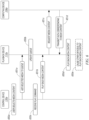
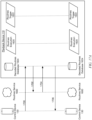
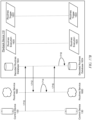
- Figure 17A is a message flow diagram of a media playback system 100 in communication with a cloud service as depicted in Figure 16 .
- Figure 17A depicts initial communications between a control device 130, a routine service 1600, and one or more playback devices 110 within a media playback system 100.
- An initial communication 1700 comprises a control device 130 requesting a list of playback modes or routines (also referred to as scenes) from the decoded routines database 1624 (also referred to as the "database of decoded routines instructions 1624”) at the one or more playback devices 110.
- the "Type" variable may also be associated with sets of routines for specific zones, groups, geographic locations, playback device configurations (e.g., bonded pairs, home theater system, etc.), usage context (e.g., commercial, business, hotel, restaurant), and other types of groupings.
- the one or more playback devices 110 send a communication 1702 to the routine service 1600 to request the current routines stored by the routine services 1600 within the routine database 1604.
- communication 1702 may be requesting a verification, such as a hash, to verify that the routines stored in the decoded routines database 1624 are up-to-date. Additionally or alternatively, communication 1702 may be requesting that the routine service 1600 communicate all or a portion of the routines in the routines database 1604 to the one or more playback devices 110.
- the routine service 1600 sends communication 1704 to the one or more playback devices 110.
- communication 1704 comprises a validation, such as a hash
- the playback devices 110 verifies that the routines stored in the decoded routines database 1624 are up-to-date. If the routines are determined to not be up-to-date, the one or more playback devices 110 request the necessary routines in order to update the routines stored within the decoded routines database 1624.
- the one or more playback devices 110 store the decoded routines within the decoded routines database 1624.
- communication 1624 comprises descriptions and/or names of the routines but does not include executable instructions.
- communication 1624 comprises the decoded routines with their associated executable instructions.
- Figure 17B depicts communications between a control device 130, a routine service 1600, and one or more playback devices 110 related to creating or editing a routine within a media playback system 100.
- Communication 1710 is generated by the control device 130 in response to a user editing or creating a routine. The process for editing or creating routines is described above with respect to Figures 9A-9D.
- a user may provide the following intents while creating or editing a routine on the control device 130: (1) Set initial volume to 20, (2) Start playing Sleep Playback Mode: The Neighbor's Dog Finally Shut Up, (3) Ramp volume to 5 over the next 30 minutes, and (4) Stop after 60 minutes (from when content playback started).
- the control device 130 maps these user intents to a data structure that is communicable within the playback system 100.
- Communication 1712 may comprise the routine or a description of the routine as provided by the control devices 130.
- communication 1712 may comprise the JSON structure described above, the user intents described above, or some other data structure describing or configured to implement the user intents.
- the control device 130 may further configure the data structure received in communication 1710 before sending it to the routines service 1600.
- the control device 130 may be a group coordinator for a group of playback devices. The control device 130 may add information to the data structure relating to other group members, such as bonded playback devices 110.
- the decoding is stateless and utilizes the routines database 1604 for base definitions and a hardcoded mapping to the commands that are executable at the one or more playback devices 110.
- the routines services 1600 may decode the routine by analyzing the data structure and mapping information within the data structure to commands within the routines database 1604.
- the data structure may comprise an entry of ""rampToVolOverTime” : 30".
- the routines service 1600 may map the data entry "rampToVolOverTime” to a particular command or set of commands for adjusting volume at one or more playback devices 110 over time.
- the routines service 1600 may further map the variable "30" to the same particular command or set of commands.
- the routines services 1600 decoding function comprises mapping information within the data structure received in communication 1712 to commands and variables stored within the routines database 1604 and generating a resulting routine that is executable at a playback device 110.
- the one or more playback devices 110 After receiving communication 1716, the one or more playback devices 110 stores the decoded routine within the decoded routines database 1624. The one or more playback devices 110 may also delete the newly created or modified routine that had been received in message 1710.
- Message 1718 comprise an internal communication with the one or more playback devices 110.
- the one or more playback devices 110 after receiving the decoded routine the one or more playback devices 110 generate a file to be shared within a local cache or to be shared with other playback devices 110 and/or control devices 130 within the media playback system 100.
- the generated file may be communicated through the one or more playback devices 110 pushing the updated file to the other playback devices 110 and/or control devices 130 or the other playback devices 110 and/or control devices 130 may query the one or more playback devices 110 for the file. Additional details regarding caching and sharing data within playback system 100 can be found, for example, in U.S. Patent No. 10,747,493 , which was incorporated by reference above.
- the routines trigger function 1622 associates the detected trigger condition with a particular routine.
- the particular routine comprises a routine associated with a playback mode, which when executed causes the one or more playback devices 110 to enter the playback mode. Additionally, in some embodiments, the routines trigger function 1622 accesses a list that associates different trigger functions with different routines.
- the routine execution function 1620 sends communication 1728 to the routine service 1600.
- Communication 1728 may comprise instructions that the particular routine has been executed.
- Communication 1728 may allow third-party devices to respond to the execution of routines within the media playback system 100.
- third-party devices may also be in communication, through an API, with the routine service 1600.
- Third-party devices may be able to register with the routine service 1600 in relation to particular routines. For instance, a user may be able to dim her bedroom lights with a routine.
- message 1028 would communicate the execution of the routine to the routine service 1600.
- Software associated with the third-party light system within the user's room would then receive a notification that the routine had been executed. In response, the third-party light system could cause the lights in the user's bedroom to dim.
- routines execution function 1620 After sending message 1728, the routines execution function 1620 performs a variable substitution in message 1730.
- the decoded routines stored in the decoded routines database 1624 may be configured to allow for variable substitution by the executing one or more playback devices 110.
- the variable substitution may relate to variables that are local to the one or more playback devices 110, such as configurations of the one or more playback devices 110 and/or configurations of the media playback system 100.
- Figure 18 shows a schematic diagram of a media playback system where the routines are executed by the routine service 1600.
- the one or more playback devices 110 comprise a routines trigger function 1622 that detect the occurrence of a trigger condition at the one or more playback devices 110.
- the routine trigger function 1622 can detect when a user interacts with a user interface at the one or more playback devices 110 in a way that triggers a routine.
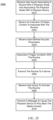
- Figure 19 shows a flow diagram 1900 for operating a playback device 110 within a playback mode.
- the playback device 110 receives a playback mode indication.
- the playback device 110 is caused to operate within a particular playback mode.
- Figures 8A and 8B depict a playback device 110 operating within a particular playback mode.
- the playback device 110 receives the one or more user interface interactions at a user interface associated with the playback device 110.
- a user interface e.g., the control surface 313
- the playback device 110 receives the one or more user interface interactions 830 at a user interface (e.g., the control surface 313) in the form of a button swipe.
- the control device 130 receives an indication of a particular media content to associate with the particular routine.
- a first routine 922a is associated with the media content of "Seattle Rainfall.”
- the control device 130 receive one or more user-defined acoustic parameters for the particular media content.
- the one or more user-defined acoustic parameters are configured to cause the one or more playback devices to play back the particular media content in accordance with the one or more user-defined acoustic parameters.
- the configuration interface 900a provides options for a user to set one or more exemplary user-defined acoustic parameters related to the "volume” and "rain speed" of the "Seattle Rainfall” media content.
- Feature 3 The playback device of any of the preceding features, wherein the at least one non-transitory computer-readable medium further comprises program instructions that are executable by the at least one processor such that the playback device is configured to: after receiving an indication that at least one of the one or more buttons has been selected, advance to a particular routine of the particular set of routines; and after advancing to the particular routine, cause playback of media content.
- Feature 4 The playback device of any of the preceding features, wherein the user interface of the playback device comprises a voice user interface.
- Feature 7 The playback device of any of the preceding features, wherein the particular set of routines comprise at least one routine that is configured to communicate to a third-party device.
- Feature 9 The playback device of any of the preceding features, wherein the particular set of routines cause a first playback device of the one or more playback devices to play media content in a different manner than a second playback device of the one or more playback devices.
- Feature 10 The playback device of any of the preceding features, wherein executing the at least one routine selected from the particular set of routines comprises executing the particular set of routines at a remote server and receiving instructions from the remote server based upon the particular set of routines.
- Feature 12 The method of any of the preceding features, wherein the user interface associated within the playback device comprises one or more buttons integrated into a control surface of the playback device.
- Feature 13 The method of any of the preceding features, further comprising: after receiving an indication that at least one of the one or more buttons has been selected, advancing to a particular routine of the particular set of routines; and after advancing to the particular routine, causing playback of media content.
- Feature 16 The method of any of the preceding features, wherein the trigger condition comprises a particular time.
- Feature 18 The method of any of the preceding features, further comprising: after receiving a playback mode indication, causing one or more playback devices within a predefined group to operate within the particular playback mode that is selected from a plurality of playback modes.
- Feature 19 The method of any of the preceding features, wherein the particular set of routines cause a first playback device of the one or more playback devices to play media content in a different manner than a second playback device of the one or more playback devices.
- a control device comprising: a communication interface; at least one processor; and at least one non-transitory computer-readable medium comprising program instructions that are executable by the at least one processor such that the control device is configured to: receive, via a configuration interface, one or more first user inputs associating a particular routine with a particular playback mode and associating the particular playback mode with one or more playback devices; receive an indication of a particular media content to associate with the particular routine; receive one or more user-defined acoustic parameters for the particular media content, wherein the one or more user-defined acoustic parameters are configured to cause the one or more playback devices to play back the particular media content in accordance with the one or more user-defined acoustic parameters; associate a particular trigger condition with the particular routine, wherein the particular trigger condition comprise a condition that causes the particular routine to be executed; transmit, via the communication interface, the particular routine to a server remote from the control device; receive one or more second user inputs to activate the particular routine; and after receiving
- Feature 23 The control device of any of the preceding features, wherein the one or more user-defined acoustic parameters configure at least one playback devices selected from the multiple playback devices to play the particular media content in a different manner that at least one other playback device selected from the multiple playback devices.
- control device of any of the preceding features, wherein the at least one non-transitory computer-readable medium further comprises program instructions that are executable by the at least one processor such that the control device is configured to: display, via the configuration interface, a single user interface entity representative of a group of the one or more playback devices, wherein the group of the one or more playback devices are configured to play back the particular media content in synchrony.
- Feature 25 The control device of any of the preceding features, wherein the program instructions that are executable by the at least one processor such that the one or more playback devices are configured to transmit a message that causes the one or more playback devices to playback the particular media content according to the one or more user-defined acoustic parameters comprises program instructions that are executable by the at least one processor such that the control device is configured to: transmit the message that causes the group of the one or more playback devices to playback the particular media content according to the one or more user-defined acoustic parameters.
- control device of any of the preceding features, wherein the at least one non-transitory computer-readable medium further comprises program instructions that are executable by the at least one processor such that the control device is configured to: generate executable instructions by at least partially decoding the particular routine using the at least one processor; and after receiving the particular trigger condition, communicate the executable instructions to the one or more playback devices.
- Feature 28 The control device of any of the preceding features, wherein the at least one non-transitory computer-readable medium further comprises program instructions that are executable by the at least one processor such that the control device is configured to: receive, via a configuration interface, one or more third user inputs associating multiple routines with the particular playback mode; and receive, via a configuration interface, one or more fourth user inputs ordering the multiple routines within an ordered set.
- Feature 29 The control device of any of the preceding features, wherein a particular trigger condition comprises the one or more second user inputs.
- a computer-implemented method executed by a processor at a control device comprising: receiving, via a configuration interface, one or more first user inputs associating a particular playback mode with one or more playback devices; receiving one or more user-defined acoustic parameters for particular media content that is associated with the particular playback mode, wherein the one or more user-defined acoustic parameters are configured to cause the one or more playback devices to play back the particular media content in accordance with the one or more user-defined acoustic parameters; associating a particular trigger condition with the particular playback mode, wherein the particular trigger condition comprise a condition that causes the particular playback mode to be executed; receiving one or more second user inputs to activate a particular routine, wherein the particular routine is associated with the particular playback mode; and after receiving the one or more second user inputs, transmitting a message that causes the one or more playback devices to play back the particular media content according to the one or more user-defined acoustic parameters
- transmitting a message that causes the one or more playback devices to playback the particular media content according to the one or more user-defined acoustic parameters further comprises: transmitting the message that causes the group of the one or more playback devices to playback the particular media content according to the one or more user-defined acoustic parameters.
- Feature 36 The method of any of the preceding features further comprising: displaying, via the configuration interface, a setting for the one or more user-defined acoustic parameters that causes at least one play back device within the group of the one or more playback devices to playback the particular media content in a different manner than another playback device of the group of the one or more playback devices.
- Feature 38 The method of any of the preceding features, further comprising: receiving, via a configuration interface, one or more third user inputs associating multiple routines with the particular playback mode; and receiving via a configuration interface, one or more fourth user inputs ordering the multiple routines within an ordered set.
- a non-transitory computer-readable storage media comprising computer-executable instructions that, when executed at a processor of a control device, cause the control device to: receive, via a configuration interface, one or more first user inputs associating a particular playback mode with one or more playback devices; receive one or more user-defined acoustic parameters for particular media content that is associated with the particular playback mode, wherein the one or more user-defined acoustic parameters are configured to cause the one or more playback devices to play back the particular media content in accordance with the one or more user-defined acoustic parameters; associate a particular trigger condition with the particular playback mode, wherein the particular trigger condition comprise a condition that causes the particular playback mode to be executed; receive one or more second user inputs to activate a particular routine, wherein the particular routine is associated with the particular playback mode; and after receiving the one or more second user inputs, transmit a message that causes the one or more playback devices to play back the particular media content according to the one or more user
- Feature 42 The method of feature 41, further comprising receiving, via the configuration interface, one or more user inputs associating one or more particular routines with the particular playback mode.
- Feature 43 The method of feature 41 or 42, further comprising receiving an indication for associating the particular media content with the particular routine.
- Feature 44 The method of any preceding feature, further comprising transmitting, via a communication interface, the particular routine indicated by the received indication to a server remote from the control device.
- Feature 45 The method of any preceding feature, wherein receiving the one or more first user inputs associating the particular playback mode with one or more playback devices comprises receiving the one or more first user inputs to associate the particular playback mode with multiple playback devices, wherein the particular routine comprises instructions that are configured to cause the multiple playback devices to play the particular media content in accordance with the one or more user-defined acoustic parameters.
- Feature 46 The method of feature 45, wherein the one or more user-defined acoustic parameters configure at least one playback device selected from the multiple playback devices to play the particular media content in a different manner that at least one other playback device selected from the multiple playback devices.
- Feature 47 The method of any preceding features, further comprising: displaying, via the configuration interface, a single user interface entity representative of a group of the one or more playback devices, wherein the group of the one or more playback devices are configured to play back the particular media content in synchrony.
- Feature 48 The method of any preceding feature, further comprising: displaying, via the configuration interface, a setting for the one or more user-defined acoustic parameters that causes at least one play back device within the group of the one or more playback devices to playback the particular media content in a different manner than another playback device of the group of the one or more playback devices.
- Feature 49 The method of any preceding feature further comprising: generating executable instructions by at least partially decoding the particular routine using at least one processor at the control device; and after receiving at least one of the one or more second inputs and the particular trigger condition, communicating the executable instructions to the one or more playback devices.
- Feature 51 The method of any preceding feature, wherein the particular trigger condition comprises the one or more second user inputs.
- Feature 52 The method of any preceding feature, wherein the particular routine is executed at least in part by the control device.
- Feature 54 The method of feature 53, wherein the user interface associated within the playback device comprises one or more buttons integrated into a control surface of the playback device.
- Feature 59 The method of one of features 53 to 58, wherein the particular set of routines comprises at least one routine that is configured to communicate to a third-party device.
- Feature 60 The method of one of features 53 to 59, further comprising, after receiving the playback mode indication, causing one or more playback devices within a predefined group to operate within the particular playback mode, wherein the particular set of routines cause a first playback device of the one or more playback devices to play media content in a different manner than a second playback device of the one or more playback devices.
- Feature 61 The method of one of features 53 to 60, wherein executing the at least one routine from the particular set of routines comprises executing the particular set of routines based on instructions from a remote server.
- Feature 64 A control device comprising: a communication interface; at least one processor; and at least one non-transitory computer-readable medium comprising program instructions that are executable by the at least one processor such that the control device is configured to perform the method of one of features 41 to 52.
- references herein to "embodiment” means that a particular feature, structure, or characteristic described in connection with the embodiment can be included in at least one example embodiment of an invention.
- the appearances of this phrase in various places in the specification are not necessarily all referring to the same embodiment, nor are separate or alternative embodiments mutually exclusive of other embodiments.
- the embodiments described herein, explicitly and implicitly understood by one skilled in the art can be combined with other embodiments.
Landscapes
- Engineering & Computer Science (AREA)
- Multimedia (AREA)
- Signal Processing (AREA)
- Databases & Information Systems (AREA)
- Circuit For Audible Band Transducer (AREA)
- Circuits Of Receivers In General (AREA)
Applications Claiming Priority (4)
| Application Number | Priority Date | Filing Date | Title |
|---|---|---|---|
| US202163261823P | 2021-09-29 | 2021-09-29 | |
| US202163261822P | 2021-09-29 | 2021-09-29 | |
| PCT/US2022/044840 WO2023055717A1 (en) | 2021-09-29 | 2022-09-27 | Routines for playback devices |
| EP22797548.9A EP4409920B1 (de) | 2021-09-29 | 2022-09-27 | Routinen für wiedergabegeräte |
Related Parent Applications (1)
| Application Number | Title | Priority Date | Filing Date |
|---|---|---|---|
| EP22797548.9A Division EP4409920B1 (de) | 2021-09-29 | 2022-09-27 | Routinen für wiedergabegeräte |
Publications (2)
| Publication Number | Publication Date |
|---|---|
| EP4539474A2 true EP4539474A2 (de) | 2025-04-16 |
| EP4539474A3 EP4539474A3 (de) | 2025-07-09 |
Family
ID=84044194
Family Applications (2)
| Application Number | Title | Priority Date | Filing Date |
|---|---|---|---|
| EP22797548.9A Active EP4409920B1 (de) | 2021-09-29 | 2022-09-27 | Routinen für wiedergabegeräte |
| EP25154241.1A Pending EP4539474A3 (de) | 2021-09-29 | 2022-09-27 | Routinen für wiedergabevorrichtungen |
Family Applications Before (1)
| Application Number | Title | Priority Date | Filing Date |
|---|---|---|---|
| EP22797548.9A Active EP4409920B1 (de) | 2021-09-29 | 2022-09-27 | Routinen für wiedergabegeräte |
Country Status (2)
| Country | Link |
|---|---|
| EP (2) | EP4409920B1 (de) |
| WO (1) | WO2023055717A1 (de) |
Citations (3)
| Publication number | Priority date | Publication date | Assignee | Title |
|---|---|---|---|---|
| US8234395B2 (en) | 2003-07-28 | 2012-07-31 | Sonos, Inc. | System and method for synchronizing operations among a plurality of independently clocked digital data processing devices |
| US8483853B1 (en) | 2006-09-12 | 2013-07-09 | Sonos, Inc. | Controlling and manipulating groupings in a multi-zone media system |
| US10747493B2 (en) | 2018-07-09 | 2020-08-18 | Sonos, Inc. | Distributed provisioning of properties of operational settings of a media playback system |
Family Cites Families (3)
| Publication number | Priority date | Publication date | Assignee | Title |
|---|---|---|---|---|
| US20100008650A1 (en) * | 2008-07-10 | 2010-01-14 | Apple Inc. | Multi-model modes of one device |
| US9031244B2 (en) * | 2012-06-29 | 2015-05-12 | Sonos, Inc. | Smart audio settings |
| US10735803B2 (en) * | 2018-06-05 | 2020-08-04 | Sonos, Inc. | Playback device setup |
-
2022
- 2022-09-27 EP EP22797548.9A patent/EP4409920B1/de active Active
- 2022-09-27 WO PCT/US2022/044840 patent/WO2023055717A1/en not_active Ceased
- 2022-09-27 EP EP25154241.1A patent/EP4539474A3/de active Pending
Patent Citations (3)
| Publication number | Priority date | Publication date | Assignee | Title |
|---|---|---|---|---|
| US8234395B2 (en) | 2003-07-28 | 2012-07-31 | Sonos, Inc. | System and method for synchronizing operations among a plurality of independently clocked digital data processing devices |
| US8483853B1 (en) | 2006-09-12 | 2013-07-09 | Sonos, Inc. | Controlling and manipulating groupings in a multi-zone media system |
| US10747493B2 (en) | 2018-07-09 | 2020-08-18 | Sonos, Inc. | Distributed provisioning of properties of operational settings of a media playback system |
Also Published As
| Publication number | Publication date |
|---|---|
| EP4409920B1 (de) | 2025-01-29 |
| EP4409920A1 (de) | 2024-08-07 |
| EP4539474A3 (de) | 2025-07-09 |
| WO2023055717A1 (en) | 2023-04-06 |
Similar Documents
| Publication | Publication Date | Title |
|---|---|---|
| US12401935B2 (en) | Systems and methods for controlling playback and other features of a wireless headphone | |
| US20250193621A1 (en) | Systems and methods for authenticating and calibrating passive speakers with a graphical user interface | |
| US11900014B2 (en) | Systems and methods for podcast playback | |
| EP4095674B1 (de) | Systeme und verfahren zum betrieb von medienwiedergabesystemen mit mehreren sprachassistenzdiensten | |
| US12032423B2 (en) | Network identification of portable electronic devices while changing power states | |
| CA3122268C (en) | Selection of playback devices | |
| US12504948B2 (en) | Routines for playback devices | |
| US20230409280A1 (en) | Techniques for Off-Net Synchrony Group Formation | |
| US20250280238A1 (en) | Routines for playback devices | |
| CA3176129C (en) | Priority media content | |
| EP4409920B1 (de) | Routinen für wiedergabegeräte | |
| US12498897B2 (en) | Dashboard user interface | |
| US20240267582A1 (en) | Dashboard user interface |
Legal Events
| Date | Code | Title | Description |
|---|---|---|---|
| PUAI | Public reference made under article 153(3) epc to a published international application that has entered the european phase |
Free format text: ORIGINAL CODE: 0009012 |
|
| STAA | Information on the status of an ep patent application or granted ep patent |
Free format text: STATUS: THE APPLICATION HAS BEEN PUBLISHED |
|
| AC | Divisional application: reference to earlier application |
Ref document number: 4409920 Country of ref document: EP Kind code of ref document: P |
|
| AK | Designated contracting states |
Kind code of ref document: A2 Designated state(s): AL AT BE BG CH CY CZ DE DK EE ES FI FR GB GR HR HU IE IS IT LI LT LU LV MC MK MT NL NO PL PT RO RS SE SI SK SM TR |
|
| REG | Reference to a national code |
Ref country code: DE Ref legal event code: R079 Free format text: PREVIOUS MAIN CLASS: H04N0021422000 Ipc: H04N0021430000 |
|
| PUAL | Search report despatched |
Free format text: ORIGINAL CODE: 0009013 |
|
| AK | Designated contracting states |
Kind code of ref document: A3 Designated state(s): AL AT BE BG CH CY CZ DE DK EE ES FI FR GB GR HR HU IE IS IT LI LT LU LV MC MK MT NL NO PL PT RO RS SE SI SK SM TR |
|
| RIC1 | Information provided on ipc code assigned before grant |
Ipc: H04N 21/422 20110101ALI20250605BHEP Ipc: H04N 21/45 20110101ALI20250605BHEP Ipc: H04N 21/436 20110101ALI20250605BHEP Ipc: H04N 21/43 20110101AFI20250605BHEP |
|
| STAA | Information on the status of an ep patent application or granted ep patent |
Free format text: STATUS: REQUEST FOR EXAMINATION WAS MADE |
|
| STAA | Information on the status of an ep patent application or granted ep patent |
Free format text: STATUS: EXAMINATION IS IN PROGRESS |
|
| 17P | Request for examination filed |
Effective date: 20260109 |
|
| 17Q | First examination report despatched |
Effective date: 20260203 |