EP4535148A1 - Schnellkommentierungsverfahren und -vorrichtung sowie interaktive tafel und speichermedium - Google Patents
Schnellkommentierungsverfahren und -vorrichtung sowie interaktive tafel und speichermedium Download PDFInfo
- Publication number
- EP4535148A1 EP4535148A1 EP22944576.2A EP22944576A EP4535148A1 EP 4535148 A1 EP4535148 A1 EP 4535148A1 EP 22944576 A EP22944576 A EP 22944576A EP 4535148 A1 EP4535148 A1 EP 4535148A1
- Authority
- EP
- European Patent Office
- Prior art keywords
- annotation
- touch
- interface
- fast
- touch object
- Prior art date
- Legal status (The legal status is an assumption and is not a legal conclusion. Google has not performed a legal analysis and makes no representation as to the accuracy of the status listed.)
- Pending
Links
Images




Classifications
-
- G—PHYSICS
- G01—MEASURING; TESTING
- G01H—MEASUREMENT OF MECHANICAL VIBRATIONS OR ULTRASONIC, SONIC OR INFRASONIC WAVES
- G01H1/00—Measuring characteristics of vibrations in solids by using direct conduction to the detector
-
- G—PHYSICS
- G06—COMPUTING OR CALCULATING; COUNTING
- G06F—ELECTRIC DIGITAL DATA PROCESSING
- G06F3/00—Input arrangements for transferring data to be processed into a form capable of being handled by the computer; Output arrangements for transferring data from processing unit to output unit, e.g. interface arrangements
- G06F3/01—Input arrangements or combined input and output arrangements for interaction between user and computer
- G06F3/03—Arrangements for converting the position or the displacement of a member into a coded form
- G06F3/033—Pointing devices displaced or positioned by the user, e.g. mice, trackballs, pens or joysticks; Accessories therefor
- G06F3/0354—Pointing devices displaced or positioned by the user, e.g. mice, trackballs, pens or joysticks; Accessories therefor with detection of two-dimensional [2D] relative movements between the device, or an operating part thereof, and a plane or surface, e.g. 2D mice, trackballs, pens or pucks
- G06F3/03545—Pens or stylus
-
- G—PHYSICS
- G06—COMPUTING OR CALCULATING; COUNTING
- G06F—ELECTRIC DIGITAL DATA PROCESSING
- G06F3/00—Input arrangements for transferring data to be processed into a form capable of being handled by the computer; Output arrangements for transferring data from processing unit to output unit, e.g. interface arrangements
- G06F3/01—Input arrangements or combined input and output arrangements for interaction between user and computer
- G06F3/03—Arrangements for converting the position or the displacement of a member into a coded form
- G06F3/041—Digitisers, e.g. for touch screens or touch pads, characterised by the transducing means
- G06F3/0412—Digitisers structurally integrated in a display
-
- G—PHYSICS
- G06—COMPUTING OR CALCULATING; COUNTING
- G06F—ELECTRIC DIGITAL DATA PROCESSING
- G06F3/00—Input arrangements for transferring data to be processed into a form capable of being handled by the computer; Output arrangements for transferring data from processing unit to output unit, e.g. interface arrangements
- G06F3/01—Input arrangements or combined input and output arrangements for interaction between user and computer
- G06F3/048—Interaction techniques based on graphical user interfaces [GUI]
- G06F3/0481—Interaction techniques based on graphical user interfaces [GUI] based on specific properties of the displayed interaction object or a metaphor-based environment, e.g. interaction with desktop elements like windows or icons, or assisted by a cursor's changing behaviour or appearance
- G06F3/0483—Interaction with page-structured environments, e.g. book metaphor
-
- G—PHYSICS
- G06—COMPUTING OR CALCULATING; COUNTING
- G06F—ELECTRIC DIGITAL DATA PROCESSING
- G06F3/00—Input arrangements for transferring data to be processed into a form capable of being handled by the computer; Output arrangements for transferring data from processing unit to output unit, e.g. interface arrangements
- G06F3/01—Input arrangements or combined input and output arrangements for interaction between user and computer
- G06F3/048—Interaction techniques based on graphical user interfaces [GUI]
- G06F3/0484—Interaction techniques based on graphical user interfaces [GUI] for the control of specific functions or operations, e.g. selecting or manipulating an object, an image or a displayed text element, setting a parameter value or selecting a range
- G06F3/04842—Selection of displayed objects or displayed text elements
-
- G—PHYSICS
- G06—COMPUTING OR CALCULATING; COUNTING
- G06F—ELECTRIC DIGITAL DATA PROCESSING
- G06F3/00—Input arrangements for transferring data to be processed into a form capable of being handled by the computer; Output arrangements for transferring data from processing unit to output unit, e.g. interface arrangements
- G06F3/01—Input arrangements or combined input and output arrangements for interaction between user and computer
- G06F3/048—Interaction techniques based on graphical user interfaces [GUI]
- G06F3/0487—Interaction techniques based on graphical user interfaces [GUI] using specific features provided by the input device, e.g. functions controlled by the rotation of a mouse with dual sensing arrangements, or of the nature of the input device, e.g. tap gestures based on pressure sensed by a digitiser
- G06F3/0488—Interaction techniques based on graphical user interfaces [GUI] using specific features provided by the input device, e.g. functions controlled by the rotation of a mouse with dual sensing arrangements, or of the nature of the input device, e.g. tap gestures based on pressure sensed by a digitiser using a touch-screen or digitiser, e.g. input of commands through traced gestures
-
- G—PHYSICS
- G06—COMPUTING OR CALCULATING; COUNTING
- G06F—ELECTRIC DIGITAL DATA PROCESSING
- G06F3/00—Input arrangements for transferring data to be processed into a form capable of being handled by the computer; Output arrangements for transferring data from processing unit to output unit, e.g. interface arrangements
- G06F3/01—Input arrangements or combined input and output arrangements for interaction between user and computer
- G06F3/048—Interaction techniques based on graphical user interfaces [GUI]
- G06F3/0487—Interaction techniques based on graphical user interfaces [GUI] using specific features provided by the input device, e.g. functions controlled by the rotation of a mouse with dual sensing arrangements, or of the nature of the input device, e.g. tap gestures based on pressure sensed by a digitiser
- G06F3/0488—Interaction techniques based on graphical user interfaces [GUI] using specific features provided by the input device, e.g. functions controlled by the rotation of a mouse with dual sensing arrangements, or of the nature of the input device, e.g. tap gestures based on pressure sensed by a digitiser using a touch-screen or digitiser, e.g. input of commands through traced gestures
- G06F3/04883—Interaction techniques based on graphical user interfaces [GUI] using specific features provided by the input device, e.g. functions controlled by the rotation of a mouse with dual sensing arrangements, or of the nature of the input device, e.g. tap gestures based on pressure sensed by a digitiser using a touch-screen or digitiser, e.g. input of commands through traced gestures for inputting data by handwriting, e.g. gesture or text
-
- G—PHYSICS
- G06—COMPUTING OR CALCULATING; COUNTING
- G06F—ELECTRIC DIGITAL DATA PROCESSING
- G06F40/00—Handling natural language data
- G06F40/10—Text processing
- G06F40/103—Formatting, i.e. changing of presentation of documents
- G06F40/106—Display of layout of documents; Previewing
-
- G—PHYSICS
- G06—COMPUTING OR CALCULATING; COUNTING
- G06F—ELECTRIC DIGITAL DATA PROCESSING
- G06F40/00—Handling natural language data
- G06F40/10—Text processing
- G06F40/166—Editing, e.g. inserting or deleting
- G06F40/169—Annotation, e.g. comment data or footnotes
-
- G—PHYSICS
- G06—COMPUTING OR CALCULATING; COUNTING
- G06F—ELECTRIC DIGITAL DATA PROCESSING
- G06F40/00—Handling natural language data
- G06F40/10—Text processing
- G06F40/166—Editing, e.g. inserting or deleting
- G06F40/171—Editing, e.g. inserting or deleting by use of digital ink
-
- G—PHYSICS
- G06—COMPUTING OR CALCULATING; COUNTING
- G06F—ELECTRIC DIGITAL DATA PROCESSING
- G06F2203/00—Indexing scheme relating to G06F3/00 - G06F3/048
- G06F2203/048—Indexing scheme relating to G06F3/048
- G06F2203/04804—Transparency, e.g. transparent or translucent windows
-
- G—PHYSICS
- G06—COMPUTING OR CALCULATING; COUNTING
- G06F—ELECTRIC DIGITAL DATA PROCESSING
- G06F2203/00—Indexing scheme relating to G06F3/00 - G06F3/048
- G06F2203/048—Indexing scheme relating to G06F3/048
- G06F2203/04808—Several contacts: gestures triggering a specific function, e.g. scrolling, zooming, right-click, when the user establishes several contacts with the surface simultaneously; e.g. using several fingers or a combination of fingers and pen
Definitions
- a fast annotation method is provided, which is applied to an interactive white board.
- the interactive white board includes a touch sensitive display screen, and the method includes:
- a storage medium which stores computer executable instructions.
- the computer executable instructions are used to execute a fast annotation method according to the embodiments of the present disclosure when executed by a computer processor.
- an interactive white board is installed with at least one operating system.
- the operating system includes but is not limited to Android, Linux, Windows, and Huawei Harmony systems.
- the operating system is configured to control and coordinate the interactive white board and an external device, so that various independent hardware in the interactive white board may work as a stable overall coordination.
- An architecture level of the operating system is defined as a system layer.
- interactive white boards are installed with applications developed to meet different fields and issues of users, and the corresponding architecture level is an application layer.
- the interactive white board may be installed with at least one application having a writing function.
- the application having the writing function may be an application that comes with the operating system, or may also be an application downloaded from a third-party device or server.
- the operating system When the driver layer receives touch data, if it is judged that the touch data does not need to be intercepted, the operating system directly distributes the touch data to the corresponding application in the top window. It should be noted that if the annotation application window is the top window at this time, due to the window attribute of the annotation application window being set to be penetrable, touch data is distributed by the operating system to the lower-layer window of the annotation application window, and then the corresponding application of the lower-layer window responds. The optional responding manner depends on the type of application corresponding to the lower-layer window.
- the main communication protocol structure between annotation applications and the driver layer is as follows:
- the annotation application informs the driver layer of the judgment rule or condition for the touch data that needs to be intercepted through the above protocol.
- maxPointCacheForJudge represents how many touch points are cached before judgment. That is, when a touch event occurs on the touch sensitive display screen and the driver layer judges whether to intercept, it is necessary to cache maxPointCacheForJudge touch points before judgment. For example, if maxPointCacheForJudge is set to 10, 10 touch point data is cached before the next judgment. If the touch points cached by a touch event are less than maxPointCacheForJudge, the next judgment will not be made and relevant touch data will not be intercepted.
- the touch object is the stylus head
- the stylus head is used to write a decimal point in the annotation application window after it is displayed in the annotation application window
- the operation of writing a decimal point with the stylus head does not meet the judgment condition for the specific movement operation of the touch object, that is, does not meet the interception rule or condition, and the operating system will not intercept the touch data. Instead, the touch data is distributed to the application corresponding to the lower-layer window of the annotation application window for response, for example, causing other applications to mistakenly consider it as a clicking operation thereon.
- this embodiment further proposes an improved method, alternatively: the driver layer may execute different judgment rules or conditions for touch data in different scenarios.
- the annotation application or operating system informs the driver layer to change the judgment rules or conditions for the current touch data, so that the driver layer intercepts the touch data based on the material type of the specific touch object as the judgment rules or conditions.
- annotation application windows may be annotation application windows (containing an annotation toolbar) that is not displayed previously and is directly added and displayed on the first interface
- annotation application windows may be annotation application windows (not containing annotation toolbars) that is displayed at the top and is completely transparent and cannot be perceived by the user after the annotation application is launched, and thus the annotation toolbar is loaded and displayed in this step, which achieves the display of the annotation application window, thereby presenting the effect of overlaying and displaying the annotation display window.
- annotation application windows may be annotation application windows (containing an annotation toolbar) that is not displayed previously and is directly added and displayed on the first interface
- annotation application windows may be annotation application windows (not containing annotation toolbars) that is displayed at the top and is completely transparent and cannot be perceived by the user after the annotation application is launched, and thus the annotation toolbar is loaded and displayed in this step, which achieves the display of the annotation application window, thereby presenting the effect of overlaying and displaying the annotation display window.
- annotation application windows may be annotation application windows (not containing annotation toolbar) that is displayed at
- a user is using an interactive white board that implements the method of the present disclosure for teaching work
- an interactive white board is used to display text content
- the user may perform click, page-turning, and other operation on the display content by using the finger.
- the user may also click on the display content by using a stylus, such as clicking on the page-turning control on a touch sensitive display screen, so as to achieve page turning of the displayed text content.
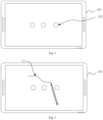
- an annotation layer is generated.
- the handwriting is displayed on the annotation layer, and from the perspective of the user, the handwriting is displayed on the text content, forms annotations.
- the annotation application window when all handwriting on the annotation application window are erased, the annotation application window is closed.
- the annotation application may automatically close the annotation application window after determining that all handwriting has been erased.
- the operating system may also close the annotation application window after a clicking operation of the user on the close control in the annotation operation control is received. That is, when all handwriting on the annotation application window is erased, the first interface will no longer cover the first annotation layer. Therefore, after the annotation handwriting is erased, the annotation application window is automatically closed, and the user may directly operate the first interface to avoid the display of the toolbar and other content in the annotation application window, thereby preventing interference with the experience of the user.
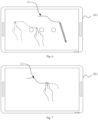
- the third touch object performs multi-touch operation on the first annotation layer, and the response of the interactive white board is to erase the handwriting at the corresponding position on the first annotation layer.
- the user annotates on the interactive white board.
- the user may use the palm or the back of the hand to perform erasing operation on the touch sensitive display screen.
- the touch sensitive display screen detects multiple touch points at the same time, that is, it detects multi-touch of the palm or the back of the hand, therefore, the handwriting on the sliding path of the palm or the back of the hand is cleared.
- closing two fingers together is a schematic multi-touch mode. In practical application, it may also be modes of palm erasing, hand back erasing, closing more fingers together or other preset multi-touch modes.
- the present disclosure may erase annotations based on the multi-touch operation of the third touch object, and provide a fast easing manner for the easing of annotations, which enables users to work more quickly and efficiently, thereby improving the interactive experience.
- an attribute control is displayed on the first interface.
- the attribute control may be configured to control a display attribute of handwriting, such as the color, line type, and other items displayed by the handwriting.
- the selection operation of the third touch object is performed on the attribute control.
- the selection operation includes clicking, sliding, and other operation on the attribute control by the third touch object.
- the display attribute of the handwriting corresponding to the third touch object is changed based on the selection operation.
- a mode switching control is displayed on the first interface, which is configured to control the startup of the fast annotation mode.
- the fast annotation mode is a working mode of the interactive white board applying the fast annotation method of the present disclosure.
- the interactive white board receives a start operation of the mode switching control.
- the start operation may be started by clicking or sliding, for example, the first, second, or third touch object is used to click or slide on the mode switching control.
- the interactive white board responds to the start operation and start the fast annotation mode.
- the interface of the writing application is opened and the first annotation layer is closed. If a fifth movement operation of the touch object is received on an interface of the writing application, handwriting is added or erased on or from the interface of the writing application based on the fifth movement operation.
- the interactive white board opens the interface of the writing application and closes the first annotation layer.
- the user may write or erase handwriting on the interface of the writing application, for example, the user may use the finger or stylus head to add handwriting, the user may use the stylus tail to erase their handwriting.
- the interactive white board may provide convenience for users when the user need to use both the writing application and annotation content at the same time, so that the user may quickly utilize annotation content without the need to store the annotation content separately, which can reduce user operation and improve their interaction experience.
- the first interface is a document presentation interface, and a page turning control is also displayed on the first interface.
- a first annotation layer is added to the first interface, and if the page of the PPT needs to be turned, the user may click the page turning control with the finger for page-turning of the PPT. If the page turning control corresponds to the next page of the current PPT page, when the user clicks the page turning control with a finger, the first interface is updated to the next page of the current PPT page.
- the interaction effect of the third touch object (i.e. a finger) on the page turning operation of a hyperlink or document presentation is similar to that of the clicking operation of the third touch object (i.e. a finger) on the icon in Fig. 5 , that is, when opening the hyperlink or turning the page, the first annotation layer and the display of the existing handwriting in the first annotation layer are maintained.
- a corresponding handwriting is generated on the first annotation layer, and the handwriting color of the handwriting is different from the handwriting color of the handwriting corresponding to the first touch object.
- the first touch object is Stylus I
- the fourth touch object is Stylus II
- Stylus I and Stylus II are styluses with two different materials
- the handwriting of Stylus I on the first annotation layer is displayed in black
- the handwriting of Stylus II on the first annotation layer is displayed in a color different from black, such as red.
- the handwriting color corresponding to the handwriting of Stylus II may be preset, that is, the handwriting colors corresponding to Stylus I and Stylus II are pre-stored on the interactive white board. When the corresponding handwriting needs to be displayed, the pre-stored handwriting color is displayed.
- the handwriting color corresponding to the handwriting of Stylus II may also be randomly assigned by the interactive white board.
- the interactive white board may randomly assign a color other than black as the handwriting color of Stylus II.
- the interactive white board may generate handwriting with different handwriting colors correspondingly, which helps to distinguish the corresponding handwriting of different handwriting styluses, so that multiple parties can write at the same time or one party can write multiple styluses, and the corresponding handwriting can be clearly distinguished, thereby effectively avoiding tedious operation caused by frequent changes in handwriting colors.
- the annotation application is an application that implements a fast annotation method.
- the annotation application window is displayed transparently through WindowChrome attribute.
- the first annotation layer is displayed transparently in the embodiment of the present disclosure.
- a window style may be set to WS_EX_TRANSPARENT through SetWindowLongPtr function, which implements window penetration. It can be understood that when the window may be penetrated, the operation object of the touch operation is not the annotation application window, but the next layer window of the annotation application window, such as screen content.
- the system sends the received touch data to the application in the lower layer of the window for response. Therefore, such a solution can be implemented that the annotation display layer where the first annotation layer is located is passed through and operation is performed on the application display layer of the lower layer application.
- Annotation application receives WM_INPUT message through RegisterRawInputDevices.
- a touch box encapsulates touch data
- a recognition result of the touch object material is encapsulated and the agreed width and height value is sent based on the device type. Since there is no identification for Down, Move, or Up in the WM_INPUT message, a second digit of the encapsulated touch data is used to distinguish the types of Down, Move, or Up operation of the touch point.
- Down indicates that the touch object has started to contact with the touch sensitive display screen
- Move indicates that the touch object is moving on the touch sensitive display screen
- Up indicates that the touch object has left the touch sensitive display screen.
- the operating system Based on the existing touch response logic, the operating system generally sends the touch data to the application corresponding to the top-level window for response.
- the distribution rule is equivalent to intercepting touch data having some attributes and not sending it to the top-level window, but distributing it to a certain lower-layer window. Therefore, in this embodiment, the optional distribution rule is defined as the interception rule.
- the annotation application pre-sets the relevant attributes of the touch data that needs to be responded to, so that the operating system may be notified in advance to intercept the corresponding touch data and send it to the annotation application for response (a first interception rule).
- the annotation application starts running in the background, and communicates with the driver layer of the operating system based on the above communication protocol to inform the driver layer of touch data which needs to be intercepted and sent to the annotation application (based on the first interception rule), and then waits to receive the touch data sent by the driver layer.
- the annotation application does not receive the touch data corresponding to the first interception rule, although the annotation application runs in the background, the corresponding annotation application window is not displayed.
- the user interacts with the interactive white board, and the interactive white board detects the vibration wave signal when the touch object contacts with the touch sensitive display screen, so as to judge the medium type of the touch object.
- Audio frequency below mechanical vibration, sound within the audio range, and ultrasonic waves beyond the audio frequency are all wave phenomena of gases, liquids, solids, and other media. In relative to light and electromagnetic waves, this wave phenomenon is called vibration wave.
- the acoustic vibration sensor is installed at a position where the vibration that occurs on the display screen may be transmitted, so that an event where a touch object touches a touch sensitive display screen on the display screen can be detected, rather than necessarily being installed at the position where the vibration occurs.
- Acoustic vibration sensors may be arranged at the four corners of the display screen, but there are also other arrangement methods, such as arranging them at the midpoint of each edge of the rectangular border, and the quantity may also be other quantities, such as 2 or 5. As long as the acoustic vibration sensors can detect the vibration when the touch object contacts with the display screen during touch operation, the number of arrangements may be targeted based on the size and detection accuracy of the display screen.
- Acoustic vibration sensors may be directly installed on the surface of touch sensitive display screens, such as the upper surface or lower surface of touch sensitive display screens, so as to receive vibrations transmitted by touch sensitive display screens and improve the accuracy of touch detection.
- the acoustic vibration sensor may also be installed inside the frame of the touch sensitive display screen, which reduces the impact on the internal structure and reduces interference of common mode noise from the touch sensitive display screen.
- acoustic vibration sensors may also be installed on other components that contact with touch sensitive displays, so as to receive vibrations that occur on touch sensitive display screens through the transmission of other components.
- Step S230 determining that the first operation is movement operation based on the first position information, and determining that the medium type of the touch object is a preset first or second medium type based on the first vibration wave signal.
- vibration wave signals corresponding to different touch objects are pre-stored, such as vibration wave signals corresponding to the first medium type.
- the first vibration wave signal matches the pre-stored vibration wave signal, the corresponding medium type of the touch object may be determined.
- Step S280 if determining that the medium type of the touch object is a preset third medium type based on the second vibration wave signal, acquiring an operation instruction of the second operation on the first interface based on the second position information, and updating a display content of the first interface.
- the interactive white board determines that the current touch object is of the third medium type, such as a finger. Based on the second position information, the interactive white board obtains the operation instruction of the second operation on the first interface. For example, the interactive white board may determine that the position clicked by the finger of the user corresponds to the application icon on the application display layer based on the second position information, and then the operation instruction of the user for the first interface obtained by the interactive white board is to open the application, and thus, the interactive white board opens the application and displays the content of the application, that is, to update the display content of the first interface.
- the interactive white board determines that the current touch object is of the third medium type, such as a finger. Based on the second position information, the interactive white board obtains the operation instruction of the second operation on the first interface. For example, the interactive white board may determine that the position clicked by the finger of the user corresponds to the application icon on the application display layer based on the second position information, and then the operation instruction of the user for the first interface obtained by the interactive white board is to open the application
- the interactive white board when a first annotation layer is displayed, when the interactive white board determines that the touch object is of the third medium type based on the second vibration wave signal, and determines that the operation of the touch object is clicking operation based on the second position information, and the click target is a writing application, the interactive white board opens the interface of the writing application and closes the first annotation layer, and inputs the handwriting on the first annotation layer into the interface of the writing application for being displayed.
- the interactive white board determines that the touch object is of the third medium type based on the second vibration wave signal, and the interactive white board may determine that the second operation performed by the current touch object is movement operation based on the second position information.
- the interactive white board does not respond to this operation on the first annotation layer. It can be understood that when the user uses the finger to slide on the first annotation layer, the interactive white board receives the second sensing data corresponding to the second operation on the first annotation layer, and the second vibration wave signal matches the vibration wave signal of the pre-stored third medium type, therefore, it is determined that the current touch object is of the third medium type, such as a finger. For sliding of the finger on the first annotation layer, the first annotation layer on the interactive white board does not respond to finger sliding, which means that the corresponding handwriting is not displayed on the first annotation layer.
- the interactive white board needs to determine whether the current operation is performed on the attribute control based on the third position information, such as selecting items on the attribute control, in order to update the display attribute of the third touch object such as the handwriting on the second annotation layer.
- the process of responding to the touch data in the corresponding window based on the medium type and position information of the touch data may be regarded as the process of the corresponding application responding to the touch data in the window.
- the windows of different applications may be located at different display layers.
- the process of generating touch data until sending it to the corresponding application is generally completed by the operating system of the interactive white board.
- the distribution rules for touch data in the operating system are set based on the configuration and running state of the annotation application.
- the annotation application window corresponding to the annotation application may be set to be penetrable by default. After the operating system receives touch data, even if the annotation application window is the top window, the operating system distributes the touch data to the next layer of the annotation application window.
- the operating system Based on the existing touch response logic, the operating system generally sends touch data to the application corresponding to the top-layer window for response.
- the distribution rule is equivalent to intercepting touch data having some attributes and not distributing it to the top-layer window, but distributing it to a certain lower-layer window. Therefore, in this embodiment, the optional distribution rule is defined as the interception rule.
- the annotation application pre-sets the relevant attributes of the touch data that needs to be responded to, so that the operating system may be notified in advance to intercept the corresponding touch data and then send it to the annotation application for response (the first interception rule).
- the driver layer intercepts the touch data corresponding to the first interception rule.
- the operating system distributes the touch data to the annotation application running in the background based on the first interception rule, and the annotation application displays the annotation application window (such as the first annotation layer mentioned above) at the top in response to the touch data, displays the response result (adding or deleting handwriting) in the annotation application window based on the touch data corresponding to the movement operation of the stylus head or tail.
- the driver layer intercepts touch data based on the second interception rule.
- Fig. 9 is a flowchart of another fast annotation method according to an embodiment of the present disclosure.
- the fast annotation method may be applied to an interactive white board, which includes a touch sensitive display screen and an acoustic vibration sensor.
- the touch sensitive display screen is configured to detect position information of the touch object
- the acoustic vibration sensor is configured to detect a vibration wave signal
- the vibration wave signal is configured to determine a medium type of a touch object.
- the touch object as a stylus as an example for explanation.
- this embodiment has further designed a stylus.
- the mold core is extracted and directly formed into a stylus tip having a stylus tip slot 500a, and the stylus tip slot 500a is directly communicated with the mold slot 610b of the first end 610.
- a peripheral size of the touch end 720 is larger than that of the installation end 710, and a step is formed at the connection between the touch end 720 and the installation end 710.
- the first interception rule is used to intercept the touch data corresponding to the movement operation of a touch object of a specific material.
- the first interception rule intercepts touch data having a width and height within a certain range and a displacement exceeding a certain pixel, including a threshold xDeltaThreshold in the horizontal direction and a threshold yDeltaThreshold in the vertical direction that are used to judge the movement operation, and further includes [minWidth, maxWidth] and [minHeight, maxHeight] for the width and height range of the touch object.
- Step S406 the processor changing the preset first interception rule to the second interception rule.
- the first interception rule includes the threshold xDeltaThreshold in the horizontal direction and the threshold yDeltaThreshold in the vertical direction that are used to judge the movement operation.
- Step S408 when the touch object is performs a touch operation on the surface of the touch sensitive display screen, the touch sensitive display screen generates touch data, and at the same time, the acoustic vibration sensor generates a second vibration wave signal.
- the touch object used herein is the finger, and the vibration wave signal generated when the finger contacts with the touch sensitive display screen is the second vibration wave signal.
- the touch sensitive display screen generates touch data, which may be the touch data directly generated by the touch sensitive display screen of the interactive white board, or the touch data that is sent to and processed by the interactive white board after the touch sensitive display screen of the interactive white board generates the original sensing signal, which alternatively depends on the performance of the touch sensitive display screen.
- touch data which may be the touch data directly generated by the touch sensitive display screen of the interactive white board, or the touch data that is sent to and processed by the interactive white board after the touch sensitive display screen of the interactive white board generates the original sensing signal, which alternatively depends on the performance of the touch sensitive display screen.
- the embodiment of the present disclosure does
- the annotation display window remains unchanged, that is, the existing handwriting will not change.
- the hyperlink is opened for entering the page to which the hyperlink is linked, the display content of the PPT presentation interface is updated, and an annotation display window and handwriting is overlaid and displayed on the opened hyperlink page.
- there is a page turning control displayed on the PPT presentation interface and during the annotation process of the PPT presentation interface, an annotation application window is added and annotation handwriting is displayed. If the page of the PPT needs to be turned, the user may click on the page turning control with their fingers to turn a page of the PPT presentation interface.
- the annotation application may have multiple annotation pages during the annotation process, so that different PPT pages are bound to different annotation pages during PPT playback. Therefore, when a page of the display content of the PPT presentation interface is turned, a new blank annotation page may be created on the new display content interface for annotation operation, and the original annotation page may be bound and stored with the PPT page before page turning, alternatively, a new blank annotation page may not be actively created, but to remain the original handwriting in the annotation display window when the displayed content is updated, thereby facilitating the user comparing the handwriting with the new displayed content.
- the processor determines that the operation of the touch object on the surface of the touch sensitive display screen is a movement operation based on the touch data, and the touch object is the stylus tail, it is judged that the touch data is the touch data that needs to be intercepted, so it is necessary to send the touch data to the annotation application.
- Steps S412 to S415 may be performed after the above-mentioned steps S401 to S411, or may be performed after steps S401 to S407.
- the fast annotation method according to the embodiment of the present disclosure may also be executed directly from step S412 without the above-mentioned steps.
- the processor judges whether to send touch data to the annotation application based on the first interception rule.
- the annotation application overlays and displays the annotation application window of the annotation application on the PPT display interface.
- Step S416 when all handwriting on the annotation application window have been erased, the annotation application window no longer being displayed.
- the annotation application may be automatically closed the annotation application window or hidden after determining that all handwriting have been erased.
- the operating system may also close the annotation application window after receiving a clicking operation of the user on the close control in the annotation operation control. That is, when all handwriting on the annotation application window is erased, the first interface no longer covers and displays the first annotation layer. Therefore, after the annotation handwriting is erased, the annotation application window is no longer displayed.
- the user may directly operate the PPT presentation interface to avoid the display of the toolbar and other contents of the annotation application window, so as to avoid interference with the user experience.
- the interactive white board when the interactive white board detects that a stylus tail is sliding (moving) on the touch screen, the corresponding identification symbol is displayed as following sliding of the stylus tail, such as an eraser icon is displayed.
- the interactive white board opens the annotation application window and displays the eraser icon on the annotation application window as following the sliding of the stylus tail.
- the interactive white board closes the annotation application window.
- Fig. 9 is a comprehensive description from user operation, data generation, data transmission, and interactive response based on an exemplary display of the PPT presentation interface.
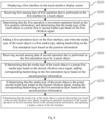
- the basic implementation process of the entire solution may be described as: displaying a document presentation interface on a touch sensitive display screen; receiving the first sensing data of a touch object performing the first operation of the document presentation interface (the first sensing data includes the first position information detected by the touch sensitive display screen and the first vibration wave signal detected by the acoustic vibration sensor); determining based on the first position information that the first operation is a movement operation, and determining that the medium type of the touch object is the preset first medium type based on the first vibration wave signal (the first medium type is a medium type of the stylus head); adding a first annotation layer of the document presentation interface, configuring the window style of the first annotation layer to be impenetrable, and adding handwriting on the first annotation layer based on the first position information; receiving a second sens
- the fast annotation method further includes: in a case of determining that the medium type of the touch object is the preset second medium type based on the second vibration wave signal, configuring the window style of the first annotation layer to be impenetrable, and responding to the second sensing data by the first annotation layer (the second medium type is a medium type of the stylus tail); and easing the corresponding handwriting on the first annotation layer based on the second position information.
- the fast annotation method further includes: in a case of determining that the medium type of the touch object is the preset third medium type based on the second vibration wave signal, determining that the second operation is a movement operation based on the second position information, and not responding to the second operation. That is, if the medium type of the touch object is determined to be a finger, the movement operation of the finger is not responded to.
- the fast annotation method further includes: in a case of determining that the first operation is a clicking operation based on the first position information, updating the display content of the document presentation interface based on the clicking operation.
- the document presentation interface displays a hyperlink.
- the fast annotation method further includes: opening the hyperlink, and updating the display content of the presentation interface.
- the document presentation interface displays a page turning control.
- the fast annotation method further includes: opening the document presentation page corresponding to the page turning control, and updating the display content of the document presentation interface.
- the step of distributing the second position information to the corresponding document presentation application of the document presentation interface, so that the document presentation application acquires the target clicked by the second operation of the document presentation interface based on the second position information, and updates the display content of the document presentation interface includes: generating operation data based on the target clicked in the presentation interface of the second operation, and sending the operation data to the terminal device; receiving second screen casting data transmitted by the terminal device (the second screen casting data is acquired by the terminal device in response to the operation data); and updating the display content of the document presentation interface based on the second screen casting data.
- the touch sensitive display screen displays an annotation control.
- the fast annotation method includes: receiving a third clicking operation of the touch object performing on the annotation control (the touch object includes any of the first, second, and third medium types); adding a second annotation layer of the document presentation interface based on the third clicking operation, and configuring the window style of the first annotation layer to be impenetrable; receiving the fourth movement operation of the touch object; and adding or erasing handwriting on the second annotation layer based on the fourth movement operation.
- the step of receiving the third clicking operation of the touch object performing the third clicking operation on an annotation control may be a step of receiving the third clicking operation of a touch object on an annotation control under a state of not displaying the first annotation layer.
- the fast annotation method further includes: configuring the window style of the first annotation layer to be penetrable after the operation corresponding to the first medium type is completed.
- the embodiment of the present disclosure further provides a fast annotation method applied to an interactive white board, which includes a touch sensitive display screen and an acoustic vibration sensor.
- the touch sensitive display screen is configured to detect the position information of a touch object
- the acoustic vibration sensor is configured to detect a vibration wave signal
- the vibration wave signal is used to determine a medium type of the touch object.
- the fast annotation method includes:
- the application icon corresponding to the second position information is the writing application icon.
- the medium type of the touch object is the preset third medium type based on the second vibration wave signal and determining that the second operation is a clicking operation based on the second position information
- maintaining the display content of the first annotation layer, configuring the window style of the first annotation layer to be penetrable, and distributing the second position information to the corresponding desktop launcher on the desktop icon interface, so that the desktop launcher opens the corresponding application interface based on the application icon corresponding to the second position information includes: opening the interface of the writing application, closing the first annotation layer, and inputting the handwriting on the first annotation layer into the interface of the writing application for being displayed.
- the fast annotation method further includes: receiving a fifth movement operation of a touch object on the interface of the writing application; and adding or erasing handwriting on the writing application interface based on the fifth movement operation.
- Fig. 11 is a structural block diagram of the fast annotation device according to the embodiment of the present disclosure.
- the device includes:
- the fast annotation device may respond through the corresponding first operation response unit, second operation response unit, and third operation response unit based on the operation received by the first operation receiving unit, second operation receiving unit, and third operation receiving unit, thus achieving fast annotation, which is more convenient and quick for the operation steps of annotation, This can meet the growing interaction needs of users, and can enable users to work more quickly and efficiently, resulting in an improved user experience.
- the device further includes a fifth operation response unit, and the fifth operation response unit may be configured to, if determining that a third movement operation of the third touch object on the first annotation layer is received, not respond to the third movement operation.
- the fourth operation receiving unit may further be configured to receive multi-touch operation of the third touch object on the first annotation layer.
- the fourth operation receiving unit may further be configured to erase the corresponding handwriting on the first annotation layer based on the multi-touch operation.
- the device further includes a sixth operation receiving unit and a sixth operation response unit.
- the first operation receiving unit may further be configured to receive a third clicking operation of a touch object on the annotation control, and the touch object includes any one of the first touch object, the second touch object, and the third touch object.
- the first operation response unit may further be configured to add a second annotation layer on the first interface based on the third clicking operation.
- the sixth operation receiving unit is configured to receive a fourth movement operation of the touch object.
- the sixth operation response unit is configured to add or erase handwriting on the second annotation layer based on the fourth movement operation.
- the first operation receiving unit may also be configured to receive a start operation of a mode switching control for be received.
- the first operation response unit may further be configured to start fast annotation mode in response to the start operation.
- the fourth operation response unit may further be configured to open a hyperlink and update the display content of the first interface based on the hyperlink clicked on a presentation interface of the first clicking operation.
- the fourth operation response unit may further be configured to open the presentation page corresponding to the page turning control and update the display content of the first interface based on the page turning control clicked on a document presentation interface by the first clicking operation.
- the device further includes a third data receiving unit and a third data response unit.
- the first data response unit may further be configured to, if determining that the first operation is clicking operation on the annotation control based on the first position information, add a second annotation layer on the first interface.
- the third data receiving unit is configured to receive the third sensing data of performing the third operation on the second annotation layer by the touch object.
- the third sensing data includes the third position information detected by the touch sensitive display screen and a third vibration wave signal detected by the acoustic vibration sensor.
- the third data response unit is configured to, if determining that the third operation is movement operation based on the third position information, add or erase handwriting on the second annotation layer.
- Fig. 13 is a structural schematic diagram of an interactive white board according to an embodiment of the present disclosure.
- the interactive white board includes a processor 310, a memory 320, an input device 330, and an output device 340.
- the number of processors 310 in the apparatus may be one or more, and Fig. 13 takes one processor 310 as an example.
- the processor 310, memory 320, input device 330, and output device 340 in the apparatus may be connected through a bus or other means, and Fig. 13 takes bus connection as an example.
- the memory 320 as a computer-readable storage medium, may be configured to store software programs, computer executable programs, and modules, such as program instructions/modules corresponding to the fast annotation method in the embodiment of the present disclosure.
- a storage medium including computer executable instructions is further provided, and the computer executable instructions are used to perform relevant operation in the fast annotation method provided in any embodiment of the present disclosure when being executed by a computer processor, and have corresponding functions and beneficial effects.
- the present disclosure may adopt the form of a complete hardware embodiment, a complete software embodiment, or an embodiment combining software and hardware.
- the present disclosure may adopt the form of a computer program product implemented on one or more computer-usable storage medium (which may include disk storage, CD-ROM, optical storage, etc.) containing computer-usable program codes.
- the present disclosure is described with reference to flowcharts and/or block diagrams of methods, devices (systems), and computer program products in embodiments of the present disclosure. It should be understood that each process and/or block in the flowchart and/or block diagram, and the combination of processes and/or blocks in the flowchart and/or block diagram may be implemented by computer program instructions.
- These computer program instructions may also be loaded on a computer or other programmable data processing equipment, so that a series of operation steps are performed on the computer or other programmable equipment to produce computer-implemented processing, thus the instructions executed on the computer or other programmable equipment provide steps for implementing functions specified in a flow or multiple flows in the flowchart and/or a block or multiple blocks in the block diagram.
- the computing device includes one or more processors (CPUs), input/output interfaces, network interfaces, and memory.
- the memory may include non-permanent memory, random access memory (RAM) and/or non-volatile memory, etc.in a computer-readable medium, such as read-only memory (ROM) or flash memory (flash RAM).
- ROM read-only memory
- flash RAM flash memory
- Computer-readable storage medium include permanent and non-permanent, removable and non-removable media, and information storage may be achieved by any method or technology.
- the information may be computer-readable instructions, data structures, program modules, or other data.
- Examples of computer-readable storage medium include, but are not limited to: phase change memory (PRAM), static random access memory (SRAM), dynamic random access memory (DRAM), other types of random access memory (RAM), read-only memory (ROM), electrically erasable programmable read-only memory (EEPROM), flash memory or other memories, compact disc read-only memory (CD-ROM), digital versatile disc (DVD) or other optical storage, magnetic cassette tape, magnetic disk storage or other magnetic storage devices or any other non-transmission media which may be configured to store information capable of being accessed by computing devices.
- computer-readable media does not include transitory media, such as modulated data signals and carrier waves.
Landscapes
- Engineering & Computer Science (AREA)
- Theoretical Computer Science (AREA)
- General Engineering & Computer Science (AREA)
- Physics & Mathematics (AREA)
- General Physics & Mathematics (AREA)
- Human Computer Interaction (AREA)
- Health & Medical Sciences (AREA)
- Artificial Intelligence (AREA)
- Audiology, Speech & Language Pathology (AREA)
- Computational Linguistics (AREA)
- General Health & Medical Sciences (AREA)
- User Interface Of Digital Computer (AREA)
Applications Claiming Priority (2)
| Application Number | Priority Date | Filing Date | Title |
|---|---|---|---|
| PCT/CN2022/095903 WO2023230753A1 (zh) | 2022-05-30 | 2022-05-30 | 快捷批注方法、装置、交互平板及存储介质 |
| PCT/CN2022/124985 WO2023231268A1 (zh) | 2022-05-30 | 2022-10-12 | 快捷批注方法、装置、交互平板及存储介质 |
Publications (2)
| Publication Number | Publication Date |
|---|---|
| EP4535148A1 true EP4535148A1 (de) | 2025-04-09 |
| EP4535148A4 EP4535148A4 (de) | 2025-08-20 |
Family
ID=89026503
Family Applications (2)
| Application Number | Title | Priority Date | Filing Date |
|---|---|---|---|
| EP22944097.9A Pending EP4528462A4 (de) | 2022-05-30 | 2022-05-30 | Schnellkommentierungsverfahren, vorrichtung, interaktive tafel und speichermedium |
| EP22944576.2A Pending EP4535148A4 (de) | 2022-05-30 | 2022-10-12 | Schnellkommentierungsverfahren und -vorrichtung sowie interaktive tafel und speichermedium |
Family Applications Before (1)
| Application Number | Title | Priority Date | Filing Date |
|---|---|---|---|
| EP22944097.9A Pending EP4528462A4 (de) | 2022-05-30 | 2022-05-30 | Schnellkommentierungsverfahren, vorrichtung, interaktive tafel und speichermedium |
Country Status (4)
| Country | Link |
|---|---|
| US (2) | US20240370164A1 (de) |
| EP (2) | EP4528462A4 (de) |
| CN (1) | CN117480482A (de) |
| WO (2) | WO2023230753A1 (de) |
Families Citing this family (6)
| Publication number | Priority date | Publication date | Assignee | Title |
|---|---|---|---|---|
| US12026365B2 (en) * | 2022-10-12 | 2024-07-02 | Adobe Inc. | Constrained stroke editing for digital content |
| WO2024122110A1 (ja) * | 2022-12-08 | 2024-06-13 | 株式会社ワコム | 電子ペン用芯体及び電子ペン |
| US20240345718A1 (en) * | 2023-04-17 | 2024-10-17 | Humane, Inc. | Gesture-based virtual interfaces |
| WO2025194390A1 (zh) * | 2024-03-20 | 2025-09-25 | 广州视臻信息科技有限公司 | 快捷批注方法、交互平板和存储介质 |
| CN119129544B (zh) * | 2024-08-21 | 2025-09-19 | 广州朗国电子科技股份有限公司 | 一种智能化批注方法及其系统 |
| WO2026065307A1 (zh) * | 2024-09-29 | 2026-04-02 | 京东方科技集团股份有限公司 | 批注信息的显示、存储方法、装置、设备及存储介质 |
Family Cites Families (11)
| Publication number | Priority date | Publication date | Assignee | Title |
|---|---|---|---|---|
| CN104731443B (zh) * | 2013-12-23 | 2018-05-01 | 鸿合科技股份有限公司 | 一种批注实现方法及装置 |
| US20170052631A1 (en) * | 2015-08-20 | 2017-02-23 | Futurewei Technologies, Inc. | System and Method for Double Knuckle Touch Screen Control |
| US10048811B2 (en) * | 2015-09-18 | 2018-08-14 | Sentons Inc. | Detecting touch input provided by signal transmitting stylus |
| CN105760019B (zh) * | 2016-02-22 | 2019-04-09 | 广州视睿电子科技有限公司 | 基于交互式电子白板的触摸操作方法及其系统 |
| CN107193794B (zh) * | 2017-06-28 | 2021-05-18 | 广州视源电子科技股份有限公司 | 显示内容的批注方法和装置 |
| CN108038094A (zh) * | 2017-10-17 | 2018-05-15 | 广州视源电子科技股份有限公司 | 一种文档批注方法、装置和电子设备 |
| CN110413187B (zh) * | 2018-04-26 | 2021-12-03 | 广州视源电子科技股份有限公司 | 交互智能设备的批注的处理方法和装置 |
| CN112639696A (zh) * | 2018-09-04 | 2021-04-09 | 深圳市柔宇科技股份有限公司 | 手写板、手写板装置及书写控制方法 |
| CN109697004B (zh) * | 2018-12-28 | 2021-04-27 | 广州视源电子科技股份有限公司 | 用于触摸设备书写批注的方法、装置、设备及存储介质 |
| CN110119234B (zh) * | 2019-04-08 | 2022-09-23 | 广州视源电子科技股份有限公司 | 一种智能交互平板的操作方法、存储介质及相关设备 |
| CN113791700B (zh) * | 2021-07-23 | 2024-09-06 | 广州创知科技有限公司 | 基于弹性波的交互方法、装置、交互平板和存储介质 |
-
2022
- 2022-05-30 WO PCT/CN2022/095903 patent/WO2023230753A1/zh not_active Ceased
- 2022-05-30 EP EP22944097.9A patent/EP4528462A4/de active Pending
- 2022-10-12 CN CN202280010062.3A patent/CN117480482A/zh active Pending
- 2022-10-12 EP EP22944576.2A patent/EP4535148A4/de active Pending
- 2022-10-12 WO PCT/CN2022/124985 patent/WO2023231268A1/zh not_active Ceased
-
2024
- 2024-07-16 US US18/774,569 patent/US20240370164A1/en active Pending
- 2024-07-16 US US18/774,503 patent/US20240370163A1/en active Pending
Also Published As
| Publication number | Publication date |
|---|---|
| EP4528462A1 (de) | 2025-03-26 |
| CN117480482A (zh) | 2024-01-30 |
| EP4528462A4 (de) | 2025-07-02 |
| WO2023230753A1 (zh) | 2023-12-07 |
| WO2023231268A1 (zh) | 2023-12-07 |
| EP4535148A4 (de) | 2025-08-20 |
| US20240370164A1 (en) | 2024-11-07 |
| US20240370163A1 (en) | 2024-11-07 |
Similar Documents
| Publication | Publication Date | Title |
|---|---|---|
| EP4535148A1 (de) | Schnellkommentierungsverfahren und -vorrichtung sowie interaktive tafel und speichermedium | |
| US12159027B2 (en) | Method and device for controlling interactive white board | |
| CN108958608B (zh) | 电子白板的界面元素操作方法、装置及交互智能设备 | |
| CN110119234B (zh) | 一种智能交互平板的操作方法、存储介质及相关设备 | |
| US9063647B2 (en) | Multi-touch uses, gestures, and implementation | |
| CN111475097B (zh) | 一种笔迹选择方法、装置、计算机设备和存储介质 | |
| US20020011990A1 (en) | User interface systems and methods for manipulating and viewing digital documents | |
| DK201870336A8 (en) | DEVICES, METHODS, AND GRAPHICAL USER INTERFACES FOR NAVIGATING BETWEEN USER INTERFACES AND DISPLAYING A DOCK | |
| CN109062433A (zh) | 触控数据处理的方法、装置、智能设备和存储介质 | |
| CN104007922A (zh) | 响应于用户输入提供反馈的方法和实现所述方法的终端 | |
| CN110456949A (zh) | 用于在用户界面之间进行导航和显示任务栏的设备、方法和图形用户界面 | |
| WO2020168786A1 (zh) | 触摸操作响应方法、装置、存储介质及终端 | |
| US20130127745A1 (en) | Method for Multiple Touch Control Virtual Objects and System thereof | |
| Vanacken et al. | Ghosts in the interface: Meta-user interface visualizations as guides for multi-touch interaction | |
| CN109144397B (zh) | 擦除方法、装置以及智能交互平板 | |
| CN108255558B (zh) | 书写软件调用方法、装置、设备及计算机可读存储介质 | |
| CN118742882A (zh) | 快捷书写方法、交互平板及存储介质 | |
| CN121311862A (zh) | 一种显示设备及用于显示设备的触控轨迹编辑方法 | |
| CN118778874A (zh) | 书写响应方法、装置、双屏笔记本及存储介质 | |
| CN115878235A (zh) | 多应用显示方法、装置、存储介质及交互平板 | |
| CN120371183A (zh) | 一种内容擦除方法、设备及存储介质 | |
| CN120010738A (zh) | 功能执行方法、功能执行装置及电子设备 | |
| CN114003320A (zh) | 桌面实现方法、终端设备、装置和存储介质 |
Legal Events
| Date | Code | Title | Description |
|---|---|---|---|
| STAA | Information on the status of an ep patent application or granted ep patent |
Free format text: STATUS: THE INTERNATIONAL PUBLICATION HAS BEEN MADE |
|
| PUAI | Public reference made under article 153(3) epc to a published international application that has entered the european phase |
Free format text: ORIGINAL CODE: 0009012 |
|
| STAA | Information on the status of an ep patent application or granted ep patent |
Free format text: STATUS: REQUEST FOR EXAMINATION WAS MADE |
|
| 17P | Request for examination filed |
Effective date: 20241218 |
|
| AK | Designated contracting states |
Kind code of ref document: A1 Designated state(s): AL AT BE BG CH CY CZ DE DK EE ES FI FR GB GR HR HU IE IS IT LI LT LU LV MC ME MK MT NL NO PL PT RO RS SE SI SK SM TR |
|
| A4 | Supplementary search report drawn up and despatched |
Effective date: 20250723 |
|
| RIC1 | Information provided on ipc code assigned before grant |
Ipc: G06F 3/0488 20220101AFI20250717BHEP Ipc: G01H 1/00 20060101ALI20250717BHEP Ipc: G06F 3/0354 20130101ALI20250717BHEP Ipc: G06F 3/041 20060101ALI20250717BHEP Ipc: G06F 3/0483 20130101ALI20250717BHEP Ipc: G06F 3/04842 20220101ALI20250717BHEP Ipc: G06F 3/04883 20220101ALI20250717BHEP Ipc: G06F 40/106 20200101ALI20250717BHEP Ipc: G06F 40/169 20200101ALI20250717BHEP Ipc: G06F 40/171 20200101ALI20250717BHEP |
|
| DAV | Request for validation of the european patent (deleted) | ||
| DAX | Request for extension of the european patent (deleted) |