EP4518331A1 - Multimediavorrichtung und steuerungsverfahren dafür - Google Patents
Multimediavorrichtung und steuerungsverfahren dafür Download PDFInfo
- Publication number
- EP4518331A1 EP4518331A1 EP23213989.9A EP23213989A EP4518331A1 EP 4518331 A1 EP4518331 A1 EP 4518331A1 EP 23213989 A EP23213989 A EP 23213989A EP 4518331 A1 EP4518331 A1 EP 4518331A1
- Authority
- EP
- European Patent Office
- Prior art keywords
- display
- pet
- care mode
- multimedia device
- pet care
- Prior art date
- Legal status (The legal status is an assumption and is not a legal conclusion. Google has not performed a legal analysis and makes no representation as to the accuracy of the status listed.)
- Pending
Links
Images



Classifications
-
- G—PHYSICS
- G06—COMPUTING OR CALCULATING; COUNTING
- G06F—ELECTRIC DIGITAL DATA PROCESSING
- G06F9/00—Arrangements for program control, e.g. control units
- G06F9/06—Arrangements for program control, e.g. control units using stored programs, i.e. using an internal store of processing equipment to receive or retain programs
- G06F9/44—Arrangements for executing specific programs
- G06F9/451—Execution arrangements for user interfaces
-
- H—ELECTRICITY
- H04—ELECTRIC COMMUNICATION TECHNIQUE
- H04N—PICTORIAL COMMUNICATION, e.g. TELEVISION
- H04N21/00—Selective content distribution, e.g. interactive television or video on demand [VOD]
- H04N21/40—Client devices specifically adapted for the reception of or interaction with content, e.g. set-top-box [STB]; Operations thereof
- H04N21/47—End-user applications
- H04N21/485—End-user interface for client configuration
-
- G—PHYSICS
- G06—COMPUTING OR CALCULATING; COUNTING
- G06F—ELECTRIC DIGITAL DATA PROCESSING
- G06F16/00—Information retrieval; Database structures therefor; File system structures therefor
- G06F16/70—Information retrieval; Database structures therefor; File system structures therefor of video data
- G06F16/73—Querying
-
- G—PHYSICS
- G06—COMPUTING OR CALCULATING; COUNTING
- G06F—ELECTRIC DIGITAL DATA PROCESSING
- G06F16/00—Information retrieval; Database structures therefor; File system structures therefor
- G06F16/70—Information retrieval; Database structures therefor; File system structures therefor of video data
- G06F16/78—Retrieval characterised by using metadata, e.g. metadata not derived from the content or metadata generated manually
- G06F16/7867—Retrieval characterised by using metadata, e.g. metadata not derived from the content or metadata generated manually using information manually generated, e.g. tags, keywords, comments, title and artist information, manually generated time, location and usage information, user ratings
-
- G—PHYSICS
- G06—COMPUTING OR CALCULATING; COUNTING
- G06F—ELECTRIC DIGITAL DATA PROCESSING
- G06F3/00—Input arrangements for transferring data to be processed into a form capable of being handled by the computer; Output arrangements for transferring data from processing unit to output unit, e.g. interface arrangements
- G06F3/002—Specific input/output arrangements not covered by G06F3/01 - G06F3/16
- G06F3/005—Input arrangements through a video camera
-
- H—ELECTRICITY
- H04—ELECTRIC COMMUNICATION TECHNIQUE
- H04N—PICTORIAL COMMUNICATION, e.g. TELEVISION
- H04N21/00—Selective content distribution, e.g. interactive television or video on demand [VOD]
- H04N21/40—Client devices specifically adapted for the reception of or interaction with content, e.g. set-top-box [STB]; Operations thereof
- H04N21/41—Structure of client; Structure of client peripherals
- H04N21/422—Input-only peripherals, i.e. input devices connected to specially adapted client devices, e.g. global positioning system [GPS]
- H04N21/4223—Cameras
-
- H—ELECTRICITY
- H04—ELECTRIC COMMUNICATION TECHNIQUE
- H04N—PICTORIAL COMMUNICATION, e.g. TELEVISION
- H04N21/00—Selective content distribution, e.g. interactive television or video on demand [VOD]
- H04N21/40—Client devices specifically adapted for the reception of or interaction with content, e.g. set-top-box [STB]; Operations thereof
- H04N21/43—Processing of content or additional data, e.g. demultiplexing additional data from a digital video stream; Elementary client operations, e.g. monitoring of home network or synchronising decoder's clock; Client middleware
- H04N21/436—Interfacing a local distribution network, e.g. communicating with another STB or one or more peripheral devices inside the home
- H04N21/43615—Interfacing a Home Network, e.g. for connecting the client to a plurality of peripherals
-
- H—ELECTRICITY
- H04—ELECTRIC COMMUNICATION TECHNIQUE
- H04N—PICTORIAL COMMUNICATION, e.g. TELEVISION
- H04N21/00—Selective content distribution, e.g. interactive television or video on demand [VOD]
- H04N21/40—Client devices specifically adapted for the reception of or interaction with content, e.g. set-top-box [STB]; Operations thereof
- H04N21/43—Processing of content or additional data, e.g. demultiplexing additional data from a digital video stream; Elementary client operations, e.g. monitoring of home network or synchronising decoder's clock; Client middleware
- H04N21/442—Monitoring of processes or resources, e.g. detecting the failure of a recording device, monitoring the downstream bandwidth, the number of times a movie has been viewed, the storage space available from the internal hard disk
- H04N21/44213—Monitoring of end-user related data
- H04N21/44218—Detecting physical presence or behaviour of the user, e.g. using sensors to detect if the user is leaving the room or changes his face expression during a TV programme
-
- H—ELECTRICITY
- H04—ELECTRIC COMMUNICATION TECHNIQUE
- H04N—PICTORIAL COMMUNICATION, e.g. TELEVISION
- H04N21/00—Selective content distribution, e.g. interactive television or video on demand [VOD]
- H04N21/40—Client devices specifically adapted for the reception of or interaction with content, e.g. set-top-box [STB]; Operations thereof
- H04N21/47—End-user applications
- H04N21/472—End-user interface for requesting content, additional data or services; End-user interface for interacting with content, e.g. for content reservation or setting reminders, for requesting event notification, for manipulating displayed content
- H04N21/47202—End-user interface for requesting content, additional data or services; End-user interface for interacting with content, e.g. for content reservation or setting reminders, for requesting event notification, for manipulating displayed content for requesting content on demand, e.g. video on demand
-
- H—ELECTRICITY
- H04—ELECTRIC COMMUNICATION TECHNIQUE
- H04N—PICTORIAL COMMUNICATION, e.g. TELEVISION
- H04N21/00—Selective content distribution, e.g. interactive television or video on demand [VOD]
- H04N21/40—Client devices specifically adapted for the reception of or interaction with content, e.g. set-top-box [STB]; Operations thereof
- H04N21/47—End-user applications
- H04N21/472—End-user interface for requesting content, additional data or services; End-user interface for interacting with content, e.g. for content reservation or setting reminders, for requesting event notification, for manipulating displayed content
- H04N21/47217—End-user interface for requesting content, additional data or services; End-user interface for interacting with content, e.g. for content reservation or setting reminders, for requesting event notification, for manipulating displayed content for controlling playback functions for recorded or on-demand content, e.g. using progress bars, mode or play-point indicators or bookmarks
-
- H—ELECTRICITY
- H04—ELECTRIC COMMUNICATION TECHNIQUE
- H04N—PICTORIAL COMMUNICATION, e.g. TELEVISION
- H04N21/00—Selective content distribution, e.g. interactive television or video on demand [VOD]
- H04N21/40—Client devices specifically adapted for the reception of or interaction with content, e.g. set-top-box [STB]; Operations thereof
- H04N21/47—End-user applications
- H04N21/478—Supplemental services, e.g. displaying phone caller identification, shopping application
-
- H—ELECTRICITY
- H04—ELECTRIC COMMUNICATION TECHNIQUE
- H04N—PICTORIAL COMMUNICATION, e.g. TELEVISION
- H04N21/00—Selective content distribution, e.g. interactive television or video on demand [VOD]
- H04N21/40—Client devices specifically adapted for the reception of or interaction with content, e.g. set-top-box [STB]; Operations thereof
- H04N21/47—End-user applications
- H04N21/482—End-user interface for programme selection
-
- G—PHYSICS
- G06—COMPUTING OR CALCULATING; COUNTING
- G06V—IMAGE OR VIDEO RECOGNITION OR UNDERSTANDING
- G06V40/00—Recognition of biometric, human-related or animal-related patterns in image or video data
- G06V40/10—Human or animal bodies, e.g. vehicle occupants or pedestrians; Body parts, e.g. hands
- G06V40/103—Static body considered as a whole, e.g. static pedestrian or occupant recognition
-
- H—ELECTRICITY
- H04—ELECTRIC COMMUNICATION TECHNIQUE
- H04N—PICTORIAL COMMUNICATION, e.g. TELEVISION
- H04N21/00—Selective content distribution, e.g. interactive television or video on demand [VOD]
- H04N21/40—Client devices specifically adapted for the reception of or interaction with content, e.g. set-top-box [STB]; Operations thereof
- H04N21/47—End-user applications
- H04N21/485—End-user interface for client configuration
- H04N21/4852—End-user interface for client configuration for modifying audio parameters, e.g. switching between mono and stereo
-
- H—ELECTRICITY
- H04—ELECTRIC COMMUNICATION TECHNIQUE
- H04N—PICTORIAL COMMUNICATION, e.g. TELEVISION
- H04N21/00—Selective content distribution, e.g. interactive television or video on demand [VOD]
- H04N21/40—Client devices specifically adapted for the reception of or interaction with content, e.g. set-top-box [STB]; Operations thereof
- H04N21/47—End-user applications
- H04N21/485—End-user interface for client configuration
- H04N21/4854—End-user interface for client configuration for modifying image parameters, e.g. image brightness, contrast
Definitions
- the present disclosure relates to a multimedia device and control method therefor, and more particularly, to a multimedia device supporting a pet care mode and control method therefor.
- the form-factor refers to a structured form of a product.
- vertical TVs are expanding, breaking the stereotype that the TVs are viewed horizontally.
- the vertical TV is a product that allows the user to change a direction of a screen by reflecting characteristics of the Millennials and Gen Z who are accustomed to enjoying content on mobile.
- the vertical TVs are convenient because a social media or a shopping site image may be viewed easily, and comments may be read while watching videos at the same time.
- the advantages of the vertical TV are magnified more when the vertical TV is in association with a smartphone via a near-field communication (NFC)-based mirroring function.
- NFC near-field communication
- a rollable TV and a foldable smartphone are similar to each other in that they both use 'flexible displays'.
- the flexible display literally means a flexible electronic device. To be flexible, the flexible display must first be thin. A substrate that receives information and converts the same into light must be thin and flexible so that a performance lasts for a long time without damage.
- the flexible display is implemented based on an organic light-emitting diode (OLED), for example.
- OLED organic light-emitting diode
- the OLED is a display using an organic light emitting material.
- the organic material is relatively more flexible than an inorganic material such as a metal.
- the OLED has a thin substrate and thus is more competitive than other displays. In a case of an LCD substrate used in the past, there is a limit to reducing a thickness because liquid crystal and glass are required separately.
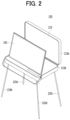
- FIG. 2 illustrates an exemplary TV with a new form factor.
- the present disclosure is to provide a multimedia device supporting a pet care mode and control method therefor.
- a multimedia device includes: a display configured to display a user interface based on a pet care mode; and a controller configured to control the display, wherein the controller is configured to: detect whether trigger conditions are satisfied, wherein the trigger conditions include selection by a user or absence of the user; and activate the pet care mode based on satisfaction of the trigger conditions.
- a method of controlling a multimedia device is performed by a multimedia device including: a display configured to display a user interface based on a pet care mode; and a controller configured to control the display.
- the method includes: detecting whether trigger conditions are satisfied, wherein the trigger conditions include selection by a user or absence of the user; and activating the pet care mode based on satisfaction of the trigger conditions.
- the present disclosure has the following effects.
- a multimedia device may support a pet (companion animal) care mode.
- a multimedia device for pets that detects the pet's condition and display suitable content on a display may be provided.
- a singular representation may include a plural representation unless it represents a definitely different meaning from the context.
- display device In the following descriptions, the term “display device” will be used. However, the term “display device” may refer to various devices such as TVs, multimedia devices, and so on, and thus, the scope of the present disclosure is not limited to specific terminology.
- FIG. 1 is a block diagram for illustrating each component of a display device 100 according to an embodiment of the present disclosure.
- the display device 100 may include a broadcast receiver 1210, an external device interface 171, a network interface 172, storage 140, a user input interface 173, an input unit 130, and a controller 180, a display module 150, an audio output unit 160, and/or a power supply 190.
- the broadcast receiver 1210 may include a tuner 1211 and a demodulator 1212.
- the display device 100 may include only the external device interface 171 and the network interface 172 among the broadcast receiver 1210, the external device interface 171, and the network interface 172. That is, the display device 100 may not include the broadcast receiver 1210.
- the tuner 1211 may select a broadcast signal corresponding to a channel selected by the user or all pre-stored channels among broadcast signals received via an antenna (not shown) or a cable (not shown).
- the tuner 1211 may convert the selected broadcast signal into an intermediate-frequency signal or a base band image or audio signal.
- the tuner 1211 may convert the digital broadcast signal into a digital IF signal (DIF), and when the selected broadcast signal is an analog broadcast signal, the tuner 1211 may convert the analog broadcast signal into an analog base band image or audio signal (CVBS/SIF). That is, the tuner 1211 may process the digital broadcast signal or the analog broadcast signal.
- the analog base band image or audio signal (CVBS/SIF) output from the tuner 1211 may be directly input to the controller 180.
- the tuner 1211 may sequentially select broadcast signals of all stored broadcast channels via a channel memory function among the received broadcast signals and convert the selected signals into the intermediate-frequency signal or the base band image or audio signal.
- the tuner 1211 may include a plurality of tuners to receive broadcast signals of a plurality of channels.
- the tuner 1211 may be a single tuner that simultaneously receives the broadcast signals of the plurality of channels.
- the demodulator 1212 may receive the digital IF signal (DIF) converted by the tuner 1211 and perform a demodulation operation.
- the demodulator 1212 may output a stream signal (TS) after performing demodulation and channel decoding.
- the stream signal may be a signal in which an image signal, an audio signal, or a data signal is multiplexed.
- the stream signal output from the demodulator 1212 may be input to the controller 180.
- the controller 180 may output an image via the display module 150 and output an audio via the audio output unit 160 after performing demultiplexing, image/audio signal processing, and the like.
- a sensing unit 120 refers to a device that senses a change in the display device 100 or an external change.
- the sensing unit 120 may include at least one of a proximity sensor, an illumination sensor, a touch sensor, an infrared (IR) sensor, an ultrasonic sensor, an optical sensor (e.g., a camera), a voice sensor (e.g., a microphone), a battery gauge, and an environment sensor (e.g., a hygrometer, a thermometer, and the like).
- the controller 180 may check a state of the display device 100 based on information collected by the sensing unit 120, and when a problem occurs, the controller 180 may notify the user of the problem or may make adjustments on its own to control the display device 100 to maintain the best state.
- a content, an image quality, a size, and the like of the image provided by the display module 150 may be controlled differently based on a viewer sensed by the sensing unit, a surrounding illumination, or the like to provide an optimal viewing environment.
- the number of functions of the display device increases and the number of sensing units 20 also increases together.
- the input unit 130 may be disposed at one side of a main body of the display device 100.
- the input unit 130 may include a touch pad, a physical button, and the like.
- the input unit 130 may receive various user commands related to an operation of the display device 100 and transmit a control signal corresponding to the input command to the controller 180.
- the minimized physical button may be located on a rear surface or a side surface of the display device 100, and a user input may be received from a remote control device 200 via the touch pad or the user input interface 173 to be described later.
- the storage 140 may store programs for processing and controlling each signal in the controller 180, or may store signal-processed image, audio, or data signals.
- the storage 140 may store application programs designed for the purpose of performing various tasks processable by the controller 180 and may selectively provide some of the stored application programs upon request from the controller 180.
- the programs stored in the storage 140 are not particularly limited as long as they may be executed by the controller 180.
- the storage 140 may also perform a function for temporarily storing the image, audio, or data signals received from an external device via the external device interface 171.
- the storage 140 may store information on a predetermined broadcast channel via the channel memory function such as a channel map.
- FIG. 1 shows an embodiment in which the storage 140 is disposed separately from the controller 180, but the scope of the present disclosure is not limited thereto, and the storage 140 is able to be included in the controller 180.
- the storage 140 may include at least one of a volatile memory (e.g., a DRAM, a SRAM, a SDRAM, and the like) or a non-volatile memory (e.g., a flash memory, a hard disk drive (HDD), a solid-state drive (SSD), and the like).
- a volatile memory e.g., a DRAM, a SRAM, a SDRAM, and the like
- a non-volatile memory e.g., a flash memory, a hard disk drive (HDD), a solid-state drive (SSD), and the like.
- the display module 150 may generate a driving signal by converting the image signal, the data signal, an OSD signal, and a control signal processed by the controller 180 or the image signal, the data signal, a control signal, and the like received from the interface 171.
- the display module 150 may include the display panel 11 having the plurality of pixels.
- the plurality of pixels disposed on the display panel may include RGB sub-pixels.
- the plurality of pixels disposed on the display panel may include RGBW sub-pixels.
- the display module 150 may generate driving signals for the plurality of pixels by converting the image signal, the data signal, the OSD signal, the control signal, and the like processed by the controller 180.
- the display module 150 may be a plasma display panel (PDP), a liquid crystal display (LCD), an organic light emitting diode (OLED), a flexible display module, and the like, or may be a three-dimensional (3D) display module.
- the 3D display module 150 may be classified into a non-glasses type and a glasses type.
- the display device 100 includes the display module that occupies most of the front surface thereof and a casing that covers a rear surface, a side surface, and the like of the display module and packages the display module.
- the display device 100 may use the display module 150 that may be bent such as the light emitting diode (LED) or the organic light emitting diode (OLED) to realize a curved screen in addition to a flat screen.
- the display module 150 may be bent such as the light emitting diode (LED) or the organic light emitting diode (OLED) to realize a curved screen in addition to a flat screen.
- LED light emitting diode
- OLED organic light emitting diode
- the LCD which was mainly used in the past, received light via a backlight unit because it was difficult for the LCD to emit light on its own.
- the backlight unit is a device that uniformly supplies light supplied from a light source to a liquid crystal located in the front. As the backlight unit became thinner, it was possible to realize a thin LCD, but it was difficult to implement the backlight unit with a flexible material, and when the backlight unit is bent, it was difficult to uniformly supply the light to the liquid crystal, resulting in a change in brightness of the screen.
- the LED or the OLED may be implemented to be bendable because each element constituting the pixel emits light on its own and thus the backlight unit is not used.
- each element emits light on its own, even when a positional relationship with a neighboring element changes, brightness thereof is not affected, so that the display module 150 that is bendable using the LED or the OLED may be implemented.
- the organic light emitting diode (OLED) panel appeared in earnest in mid-2010 and is rapidly replacing the LCD in a small and medium-sized display market.
- the OLED is a display made using a self-luminous phenomenon of emitting light when current flows through a fluorescent organic compound.
- the OLED has a higher image quality response speed than the LCD, so that there is almost no afterimage when realizing a moving image.
- the OLED is a light-emitting display product that uses three types (red, green, and blue) of phosphor organic compounds having a self-luminous function, and uses a phenomenon in which electrons and positively charged particles injected from a cathode and an anode are combined with each other within an organic material to emit light by itself, so that there is no need for a backlight (a backlight device) that deteriorates color.
- the light emitting diode (LED) panel as a technology that uses one LED element as one pixel, may reduce a size of the LED element compared to the prior art, and thus, may implement the display module 150 that is bendable.
- a device referred to as an LED TV in the past only used the LED as the light source for the backlight unit that supplies the light to the LCD, and the LED itself was not able to constitute the screen.
- the display module includes the display panel, and a coupling magnet, a first power supply, and a first signal module positioned on a rear surface of the display panel.
- the display panel may include a plurality of pixels R, G, and B.
- the plurality of pixels R, G, and B may be formed in respective areas where multiple data lines and multiple gate lines intersect each other.
- the plurality of pixels R, G, and B may be disposed or arranged in a matrix form.
- the plurality of pixels R, G, and B may include a red (hereinafter, 'R') sub-pixel, a green ('G') sub-pixel, and a blue ('B') sub-pixel.
- the plurality of pixels R, G, and B may further include a white (hereinafter, 'W') sub-pixel.
- a side on which the image is displayed may be referred to as a front side or a front surface.
- a side on which the image is not able to be observed may be referred to as a rear side or a rear surface.
- the display module 150 may be constructed as the touch screen and may be used as the input device in addition to the output device.
- the audio output unit 160 receives an audio-processed signal from the controller 180 and outputs the received signal as the audio.
- An interface 170 serves as a passage for various types of external devices connected to the display device 100.
- the interface may be in a wireless scheme using the antenna as well as a wired scheme of transmitting and receiving data via the cable.
- the interface 170 may include at least one of a wired/wireless headset port, an external charger port, a wired/wireless data port, a memory card port, a port for connecting a device having an identification module, an audio input/output (I/O) port, a video input/output (I/O) port, and an earphone port.
- An example of the wireless scheme may include the broadcast receiver 1210 described above, and may include not only the broadcast signal, but also a mobile communication signal, a short-distance communication signal, a wireless Internet signal, and the like.
- the external device interface 171 may transmit or receive data with a connected external device.
- the external device interface 171 may include an A/V input/output unit (not shown).
- the external device interface 171 may be connected to the external device such as a digital versatile disk (DVD), a Blu-ray, a game console, a camera, a camcorder, a computer (a laptop), a set-top box, and the like in a wired/wireless manner, and may perform input/output operations with the external device.
- DVD digital versatile disk
- Blu-ray Blu-ray
- game console a camera
- camcorder a computer
- a laptop a set-top box, and the like in a wired/wireless manner
- the external device such as a digital versatile disk (DVD), a Blu-ray, a game console, a camera, a camcorder, a computer (a laptop), a set-top box, and the like in a wired/wireless manner, and may perform input/output operations with the external device.
- the external device interface 171 may establish a communication network with various remote control devices 200 to receive a control signal related to the operation of the display device 100 from the remote control device 200 or to transmit data related to the operation of the display device 100 to the remote control device 200.
- the external device interface 171 may include a wireless communication unit (not shown) for short-range wireless communication with other electronic devices. With such a wireless communication unit (not shown), the external device interface 171 may exchange data with an adjacent mobile terminal. In particular, the external device interface 171 may receive device information, running application information, an application image, and the like from the mobile terminal in a mirroring mode.
- a wireless communication unit not shown
- the external device interface 171 may exchange data with an adjacent mobile terminal.
- the external device interface 171 may receive device information, running application information, an application image, and the like from the mobile terminal in a mirroring mode.
- the network interface 172 may provide an interface for connecting the display device 100 to a wired/wireless network including an Internet network.
- the network interface 172 may receive content or data provided by the Internet, a content provider, or a network operator via the network.
- the network interface 172 may include a communication module (not shown) for connection to the wired/wireless network.
- the external device interface 171 and/or the network interface 172 may include a communication module for the short-range communication such as a wireless fidelity (Wi-Fi), a Bluetooth, a Bluetooth low energy (BLE), a Zigbee, and a near field communication (NFC), a communication module for cellular communication such as a long-term evolution (LTE), an LTE advance (LTE-A), a code division multiple access (CDMA), a wideband CDMA (WCDMA), a universal mobile telecommunications system (UMTS), and a wireless broadband (WiBro), and the like.
- a communication module for the short-range communication such as a wireless fidelity (Wi-Fi), a Bluetooth, a Bluetooth low energy (BLE), a Zigbee, and a near field communication (NFC)
- a communication module for cellular communication such as a long-term evolution (LTE), an LTE advance (LTE-A), a code division multiple access (CDMA), a wideband CDMA (WCDMA
- the user input interface 173 may transmit a signal input by the user to the controller 180 or transmit a signal from the controller 180 to the user.
- a user input signal such as power ON/OFF, channel selection, screen setting, and the like may be transmitted/received to/from the remote control device 200
- a user input signal input from a local key such as a power key, a channel key, a volume key, a setting value, and the like may be transmitted to the controller 180
- a user input signal input from a sensor unit (not shown) that senses a gesture of the user may be transmitted to the controller 180, or a signal from the controller 180 may be transmitted to the sensor unit.
- the controller 180 may include at least one processor and may control overall operations of the display device 100 using the processor included therein.
- the processor may be a general processor such as a central processing unit (CPU).
- the processor may be a dedicated device such as an ASIC or a processor based on other hardware.
- the controller 180 may demultiplex the stream input via the tuner 1211, the demodulator 1212, the external device interface 171, or the network interface 172, or process a demultiplexed signal to generate or output a signal for image or audio output.
- the image signal image-processed by the controller 180 may be input to the display module 150 and displayed as an image corresponding to the corresponding image signal.
- the image signal image-processed by the controller 180 may be input to an external output device via the external device interface 171.
- the audio signal processed by the controller 180 may be output as the audio via the audio output unit 160.
- the audio signal processed by the controller 180 may be input to the external output device via the external device interface 171.
- the controller 180 may include a demultiplexer, an image processor, and the like.
- controller 180 may control overall operations within the display device 100.
- the controller 180 may control the tuner 1211 to select (tune) a broadcast corresponding to the channel selected by the user or the pre-stored channel.
- the controller 180 may control the display device 100 in response to a user command input via the user input interface 173 or by an internal program.
- the controller 180 may control the display module 150 to display the image.
- the image displayed on the display module 150 may be a still image or a moving image and may be a 2D image or a 3D image.
- the controller 180 may allow a predetermined 2D object to be displayed within the image displayed on the display module 150.
- the object may be at least one of a connected web screen (a newspaper, a magazine, and the like), an electronic program guide (EPG), various menus, a widget, an icon, the still image, the moving image, and a text.
- EPG electronic program guide
- the controller 180 may modulate and/or demodulate a signal using an amplitude shift keying (ASK) scheme.
- ASK amplitude shift keying
- the amplitude shift keying (ASK) scheme may refer to a scheme of modulating the signal by varying an amplitude of a carrier wave based on a data value or restoring an analog signal to a digital data value based on to the amplitude of the carrier wave.
- the controller 180 may modulate the image signal using the amplitude shift keying (ASK) scheme and transmit the modulated image signal via a wireless communication module.
- ASK amplitude shift keying
- the controller 180 may demodulate and process the image signal received via the wireless communication module using the amplitude shift keying (ASK) scheme.
- ASK amplitude shift keying
- the display device 100 may easily transmit and receive a signal with another image display device disposed adjacent thereto without using a unique identifier such as a media access control address (MAC address) or a complex communication protocol such as TCP/IP.
- MAC address media access control address
- TCP/IP complex communication protocol
- the display device 100 may further include a photographing unit (not shown).
- the photographing unit may photograph the user.
- the photographing unit may be implemented with one camera, but may not be limited thereto, and may be implemented with a plurality of cameras.
- the photographing unit may be embedded in the display device 100 or disposed separately upwardly of the display module 150. Information on the image photographed by the photographing unit may be input to the controller 180.
- the controller 180 may recognize a location of the user based on the image photographed by the photographing unit. For example, the controller 180 may identify a distance between the user and the display device 100 (a z-axis coordinate). In addition, the controller 180 may determine an x-axis coordinate and a y-axis coordinate within the display module 150 corresponding to the location of the user.
- the controller 180 may sense the gesture of the user based on the image photographed by the photographing unit or the signal sensed by the sensor unit, or a combination thereof.
- the power supply 190 may supply the corresponding power throughout the display device 100.
- the power may be supplied to the controller 180 that may be implemented in a form of a system on chip (SOC), the display module 150 for displaying the image, the audio output unit 160 for outputting the audio, and the like.
- SOC system on chip
- the power supply 190 may include a converter (not shown) that converts AC power to DC power and a Dc/Dc converter (not shown) that converts a level of the DC power.
- the power supply 190 serves to receive the power from the outside and distribute the power to each component.
- the power supply 190 may use a scheme of supplying the AC power in direct connection to an external power source and may include a power supply 190 that may be charged and used by including a battery.
- the power supply is used in connection with the cable and has difficulties in moving or is limited in a movement range.
- the movement is free, but a weight and a volume of the power supply increase as much as those of the battery, and the power supply must be directly connected to a power cable for a certain period of time for charging or coupled to a charging cradle (not shown) that supplies the power.
- the charging cradle may be connected to the display device via a terminal exposed to the outside, or the built-in battery may be charged using a wireless scheme when approaching the charging cradle.
- the remote control device 200 may transmit the user input to the user input interface 173.
- the remote control device 200 may use the Bluetooth, a radio frequency (RF) communication, an infrared radiation (IR) communication, an ultra-wideband (UWB), the ZigBee, or the like.
- the remote control device 200 may receive the image, audio, or data signal output from the user input interface 173 and display the same thereon or output the same as audio.
- the display device 100 described above may be a fixed or mobile digital broadcast receiver that may receive a digital broadcast.
- the block diagram of the display device 100 shown in FIG. 1 is only a block diagram for one embodiment of the present disclosure, and each component of the block diagram is able to be integrated, added, or omitted based on specifications of the display device 100 that is actually implemented.
- two or more components may be combined to each other into one component, or one component may be subdivided into two or more components.
- functions performed in each block are for illustrating the embodiment of the present disclosure, and a specific operation or a device thereof does not limit the scope of rights of the present disclosure.
- FIG. 2 is a diagram showing a display device according to an embodiment of the present disclosure. Hereinafter, redundant descriptions duplicate with the above descriptions will be omitted.
- the display device 100 has the display module 150 accommodated inside a housing 210.
- the housing 210 may include an upper casing 210a and a lower casing 210b, and the upper casing 210a and the lower casing 210b may have a structure of being opened and closed.
- the audio output unit 160 may be included in the upper casing 210a of the display device 100, and the main board that is the controller 180, a power board, the power supply 190, the battery, the interface 170, the sensing unit 120, and the input unit (including the local key) 130 may be accommodated in the lower casing 210b.
- the interface 170 may include a Wi-Fi module, a Bluetooth module, an NFC module, and the like for the communication with the external device
- the sensing unit 120 may include an illuminance sensor and an IR sensor.
- the display module 150 may include a DC-DC board, a sensor, and a low voltage differential signaling (LVDS) conversion board.
- LVDS low voltage differential signaling
- the display device 100 may further include four detachable legs 220a, 220b, 220c, and 220d.
- the four legs 220a, 220b, 220c, and 220d may be attached to the lower casing 210b to space the display device 100 from the floor.
- the display device shown in FIG. 2 is an illustrative example.
- Display devices to which the present disclosure is applicable include not only display devices with new form factors but also display devices with existing form factors including conventional flat-screen TVs.
- FIG. 3 illustrates an exemplary user interface 1500 for a companion animal (hereinafter referred to as "pet") care mode displayed on the display according to the present disclosure.
- the user interface 1500 for the pet care mode may include default menus 1510, thumbnails of content for specific menus 1520, related application list icons 1530, and a related mobile application access code 1540.
- pet care mode refers to an operation mode of the multimedia device 100 designed for managing and protecting pets.
- the pet care mode may be displayed on the display 150 as the user interface 1500.
- the pet care mode is designed to provide content for pets, provide and/or record information on the conditions of pets, and provide and/or record information on the health/grooming management for pets.
- FIG. 4 illustrates another exemplary user interface 1500 for the pet care mode displayed on the display according to the present disclosure.
- the user interface 1500 for the pet care mode may include default menus 1510, thumbnails of content for specific menus 1520, related application list icons 1530, and information on the conditions of registered pets 1540.
- FIG. 5 illustrates a flowchart of a control method for the multimedia device for the pet care mode according to the present disclosure.
- the control method of FIG. 5 may be performed by the multimedia device 100 or the controller 180 of the multimedia device 100.
- the control method may be performed by other components of the multimedia device 100.
- it is assumed that the control method is performed by the multimedia device 100.
- the multimedia device 100 may detect trigger conditions for the pet care mode (S510).
- the trigger conditions for the pet care mode may be configured in various ways, one of which may be detection of the absence of users in the living space.
- the multimedia device 100 is located in a specific space (e.g., a living room in a home)
- the pet care mode may be activated.
- the detection of the user's absence may be carried out in various ways. That is, the scope of the rights of the present disclosure is not limited thereto.
- the user's absence may be detected through object detection within a video feed from the camera in the sensing unit 120 of the multimedia device 100.
- the user's absence may be detected through object detection using external sensors connected to the multimedia device 100. In this case, the multimedia device 100 may receive sensing data from the external sensors and detect the user's absence based on the sensing data.
- the trigger conditions for the pet care mode may include the detection of a direct activation command from the user or an equivalent entity.
- the user may input a command to activate the pet care mode into the multimedia device 100.
- the trigger conditions for the pet care mode are diverse.
- the trigger conditions may be stored in the storage 140 (referred to hereinafter as "memory") of the multimedia device 100.
- the multimedia device 100 may activate the pet care mode.
- Pet mode trigger conditions stored in the memory 140 of the multimedia device 100.
- Pet mode trigger conditions may be configured by combining two or more conditions as shown in No. 4 to 7 of Table 1. In addition to the pet mode trigger conditions listed in Table 1, other trigger conditions may also be used. Table 1 No.
- Pet Mode Trigger Conditions Detailed Information 1 A Detection of user's absence (or detection of user's departure) 2 B When pet's crying sounds or barking behavior exceeds prescribed level 3 C
- User's input for pet mode activation 4 A+B 5 A+C
- pet mode is triggered only if condition A is satisfied 6 B+C
- pet mode is triggered only if condition B is satisfied 7 A+B+C
- pet mode is triggered only if both conditions A and B are satisfied
- the multimedia device 100 detects or determines whether the trigger conditions for the pet care mode are satisfied (S520). If the trigger conditions for the pet care mode are satisfied, the multimedia device 100 activates the pet care mode (S530).
- the activation of the pet care mode involves displaying the user interface 1500 on the display 150.
- the multimedia device 100 controls the display 150 to display the user interface 1500 based on the pet care mode.
- the image quality or resolution of the display 150 may vary depending on which trigger condition for the pet care mode is satisfied.
- the multimedia device 100 may control the image quality, resolution, or color of the display 150 exclusively for the pet care mode.
- Such configurations may be stored in the memory 140 of the multimedia device 100.
- the multimedia device 100 may select an image quality or resolution configuration based on the detected trigger condition and control the output on the display 150 based on the selected image quality or resolution configuration.
- Table 2 below shows image quality or resolution configurations displayed on the display 150 based on the pet mode trigger conditions stored in the memory 140 of the multimedia device 100.
- the image quality or resolution configurations may be referred to as display modes.
- Pet mode trigger conditions may be configured by combining two or more conditions as shown in No. 4 to 7 of Table 2. In addition to the pet mode trigger conditions listed in Table 2, other trigger conditions or other image quality and resolution configurations may also be used. Table 2 No. Pet Mode Trigger Conditions Display Modes Displayed on Display 150 1 A Display Mode 1 2 B Display Mode 2 3 C Display Mode 3 4 A+B Display Mode 1 or 2 5 A+C Display Mode 1 6 B+C Display Mode 2 7 A+B+C Display Mode 1 or 2
- display mode 1 may refer to a mode that reduces the resolution of the display 150 to half of the maximum resolution of the display 150 (i.e., resolution control mode).
- Display mode 2 may refer to a mode that applies a boost to the red and green colors for displaying (i.e., color control mode).
- Display mode 3 may refer to a mode that controls the resolution and color adjustment configuration of the display 150 based on user presets.
- the content in the user interface 1500 displayed on the display 150 may vary depending on which trigger condition for the pet care mode is satisfied.
- the content in the user interface 1500 or a set of content therein may be referred to as a user interface mode.
- Such configurations may be stored in the memory 140 of the multimedia device 100.
- the multimedia device 100 may select a user interface mode based on the detected trigger condition and control the output on the display 150 based on the selected user interface mode.
- Pet mode trigger conditions may be configured by combining two or more conditions as shown in No. 4 to 7 of Table 3. In addition to the pet mode trigger conditions listed in Table 3, other trigger conditions or other user interface modes may also be used.. Table 3 No. Pet Mode Trigger Conditions User Interface Modes Displayed on Display 150 1 A User Interface Mode 1 2 B User Interface Mode 2 3 C User Interface Mode 3 4 A+B User Interface Mode 1 or 2 5 A+C User Interface Mode 1 6 B+C User Interface Mode 2 7 A+B+C User Interface Mode 1 or 2
- user interface mode 1 may correspond to the user interface 1500 shown in FIG. 4
- user interface mode 2 may correspond to the user interface 1500 shown in FIG. 3
- user interface mode 3 may correspond to a user interface 1500 that represents other petrelated content or a set thereof.
- pet images detected through the camera of the sensing unit 120 may be used as control commands (or instructions) for the selected and displayed user interface 1500.
- control commands or instructions
- the multimedia device may control to output static video content or calm music.
- the multimedia device 100 may configure default search keywords, which correspond to search terms for selected and displayed search services provided by the user interface 1500.
- the configured default search keywords may be configured to always be included during keyword-based searches. For example, "dog" may be included as a default search keyword. If a search command is input by the user or an equivalent entity, the multimedia device 100 may perform a search by including the default search keyword "dog" in addition to any separately input search terms.
- the detected pet images may be used not only as the commands (or instructions) for the user interface 1500 but also as commands (or instructions) or control inputs for content control.
- the detected pet images may be used for playing, pausing, or replacing the content displayed on the display 150 or user interface 1500.
- the multimedia device 100 may analyze the pet's behavior patterns from the detected pet images or obtain analysis information on the pet's behavior patterns based on the detected pet images.
- the multimedia device 100 may assess the pet's emotions or intentions through the pet's behavior patterns and control the content displayed on the display 150 or user interface 1500 based on the assessment.
- the multimedia device 100 may obtain the level of risk by analyzing the detected pet images. In this case, if the acquired risk level exceeds a predetermined threshold, the multimedia device 100 may control the display 150 to display warning content.
- the warning content is designed to capture the pet's attention. That is, the warning content is intended to encourage the pet that was engaging in risky behavior to stop the risky behavior and watch the content displayed on the display 150 of the multimedia device 100.
- the multimedia device 100 may control sound output in relation to the user interface 1500 by limiting or adjusting the sound within the audible range of the pet. In other words, the multimedia device 100 may control the frequency configuration of the audio output unit 160 exclusively for the pet care mode.
- FIG. 6 is a flowchart for explaining interaction between the multimedia device 100 for the pet care mode and another device or machine according to the present disclosure.
- the multimedia device 100 may interact with the other device or machine.
- the multimedia device 100 may transmit a message informing the activation of the pet care mode to the other device or machine (S610).
- the other device or machine may activate an operation mode for the pet care mode and operate in the activated mode (S620).
- the operation mode for the pet care mode may include predetermined operations.
- the multimedia device 100 may interact with a cleaner or an air purifier.
- the multimedia device 100 may transmit the message informing the activation of the pet care mode to the cleaner or air purifier.
- the cleaner or air purifier may operate as follows: the cleaner may activate an operation mode only for pet care such as starting cleaning; or the air purifier may activate an operation mode only for pet care such as controlling ON/OFF, airflow, etc.
- the multimedia device 100 may interact with two or more other devices or machines.
- the multimedia device 100 may transmit the message informing the activation of the pet care mode to other devices or machines (S680).
- the other devices or machines may activate an operation mode for the pet care mode and operate in the activated mode (S690).
- the operation mode for the pet care mode may include predetermined operations.
- the sequence of transmission and reception of the message informing the activation of the pet care mode (S610 and S680) and the sequence of operational control based on the pet care mode (S620 and S690) are merely examples, and the sequences may not necessarily align with those illustrated in FIG. 6 .
- the interaction with other devices or machines may be patterned. That is, the interaction may include sequentially controlling the operations of a plurality of devices or machines.
- the multimedia device 100 may control the cleaner to initiate the cleaning operation. After the cleaning operation is completed, the multimedia device 100 may control the operation of the air purifier.
- multimedia device 100 may also interact with, for example, a feeder or a water dispenser for pets and control the operation of the feeder or water dispenser when the pet care mode is activated.
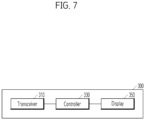
- FIG. 7 illustrates a block diagram of a device or machine 300 that interacts with the multimedia device 100 according to the present disclosure.
- the device 300 may include: a transceiver 310 for receiving the message informing the activation of the pet care mode from the multimedia device 100; and a controller 330 for controlling the transceiver or controlling operations of the device 300. Additionally, the device 300 may include a display 350 for displaying the receipt of the message informing the activation of the pet care mode or displaying information related to the operations of the device 300.
- the message informing the activation of the pet care mode may include information on the pet mode trigger conditions, information on the display modes displayed on the display 150, or information on the user interface modes displayed on the display 150, which are described above in Tables 1 to 3.
- the device 300 may control the operations of the device 300 based on information on at least one of a received pet mode trigger condition, a received display mode, or a received user interface mode.
- the above-described proposals or operations may be provided as code that is capable of being implemented, performed, or executed by computers (herein, the computer is a comprehensive concept including a system on chip (SoC), a processor, a microprocessor etc.) or a computer-readable storage medium or computer program product storing or including the code.
- SoC system on chip
- processor a processor
- microprocessor a computer-readable storage medium or computer program product storing or including the code.
- the scope of the present disclosure may be extended to the code or the computer-readable storage medium or computer program product storing or including the code.
Landscapes
- Engineering & Computer Science (AREA)
- Multimedia (AREA)
- Signal Processing (AREA)
- Theoretical Computer Science (AREA)
- Databases & Information Systems (AREA)
- Human Computer Interaction (AREA)
- General Engineering & Computer Science (AREA)
- General Physics & Mathematics (AREA)
- Physics & Mathematics (AREA)
- Social Psychology (AREA)
- Health & Medical Sciences (AREA)
- General Health & Medical Sciences (AREA)
- Software Systems (AREA)
- Data Mining & Analysis (AREA)
- Computer Networks & Wireless Communication (AREA)
- Library & Information Science (AREA)
- Computational Linguistics (AREA)
- Controls And Circuits For Display Device (AREA)
Applications Claiming Priority (1)
| Application Number | Priority Date | Filing Date | Title |
|---|---|---|---|
| KR1020230116181A KR102815020B1 (ko) | 2023-09-01 | 2023-09-01 | 멀티미디어 장치 및 이를 위한 제어 방법 |
Publications (1)
| Publication Number | Publication Date |
|---|---|
| EP4518331A1 true EP4518331A1 (de) | 2025-03-05 |
Family
ID=89076397
Family Applications (1)
| Application Number | Title | Priority Date | Filing Date |
|---|---|---|---|
| EP23213989.9A Pending EP4518331A1 (de) | 2023-09-01 | 2023-12-04 | Multimediavorrichtung und steuerungsverfahren dafür |
Country Status (3)
| Country | Link |
|---|---|
| US (1) | US20250077246A1 (de) |
| EP (1) | EP4518331A1 (de) |
| KR (1) | KR102815020B1 (de) |
Citations (2)
| Publication number | Priority date | Publication date | Assignee | Title |
|---|---|---|---|---|
| US20160057395A1 (en) * | 2014-08-22 | 2016-02-25 | Panasonic Intellectual Property Corporation Of America | Electronic device, electronic device system, and device control method |
| US20190289360A1 (en) * | 2018-03-13 | 2019-09-19 | Samsung Electronics Co., Ltd. | Display apparatus and control method thereof |
Family Cites Families (15)
| Publication number | Priority date | Publication date | Assignee | Title |
|---|---|---|---|---|
| US8243141B2 (en) * | 2007-08-20 | 2012-08-14 | Greenberger Hal P | Adjusting a content rendering system based on user occupancy |
| JP5495625B2 (ja) * | 2009-06-01 | 2014-05-21 | キヤノン株式会社 | 監視カメラシステム、監視カメラ及び監視カメラ制御装置 |
| JP5476833B2 (ja) * | 2009-07-23 | 2014-04-23 | カシオ計算機株式会社 | 動物の感情表示システム及び動物の感情表示方法 |
| KR101802753B1 (ko) * | 2010-07-21 | 2017-11-29 | 엘지전자 주식회사 | 이동 단말기 및 그를 이용한 tv 제어 방법 |
| US9043818B2 (en) * | 2012-05-23 | 2015-05-26 | Fur Entertainment, Inc. | Adaptive feedback loop based on a sensor for streaming static and interactive media content to animals |
| KR20160010250A (ko) * | 2014-07-18 | 2016-01-27 | 엘지전자 주식회사 | 디스플레이 장치 및 그 제어 방법 |
| KR102278957B1 (ko) * | 2014-08-14 | 2021-07-19 | 엘지전자 주식회사 | 영상 표시 장치 및 그 장치의 제어 방법 |
| KR102269276B1 (ko) * | 2014-09-05 | 2021-06-24 | 엘지전자 주식회사 | 전자 기기, 및 그 동작 방법 |
| KR102254894B1 (ko) * | 2015-01-05 | 2021-05-24 | 엘지전자 주식회사 | 음성 인식 검색 결과를 이용하여 카테고리를 배열하는 디스플레이 디바이스 및 그 제어 방법 |
| CN108459512A (zh) * | 2018-03-12 | 2018-08-28 | 京东方科技集团股份有限公司 | 智能终端及基于其的交互方法、交互系统、处理器 |
| US10571991B2 (en) * | 2018-04-30 | 2020-02-25 | Centurylink Intellectual Property Llc | Method and system for implementing auto-switching or auto-playing video content |
| US11605242B2 (en) * | 2018-06-07 | 2023-03-14 | Motorola Mobility Llc | Methods and devices for identifying multiple persons within an environment of an electronic device |
| US11991418B1 (en) * | 2018-07-12 | 2024-05-21 | Nevermind Capital Llc | Methods and apparatus for modifying an augmented and/or virtual reality experience |
| US11758223B2 (en) * | 2021-12-23 | 2023-09-12 | The Nielsen Company (Us), Llc | Apparatus, systems, and methods for user presence detection for audience monitoring |
| US20240004923A1 (en) * | 2022-06-30 | 2024-01-04 | Haworth, Inc. | Multi-user searching of sources of digital assets and curation of search results in a collaboration session |
-
2023
- 2023-09-01 KR KR1020230116181A patent/KR102815020B1/ko active Active
- 2023-12-04 EP EP23213989.9A patent/EP4518331A1/de active Pending
- 2023-12-05 US US18/529,158 patent/US20250077246A1/en active Pending
Patent Citations (2)
| Publication number | Priority date | Publication date | Assignee | Title |
|---|---|---|---|---|
| US20160057395A1 (en) * | 2014-08-22 | 2016-02-25 | Panasonic Intellectual Property Corporation Of America | Electronic device, electronic device system, and device control method |
| US20190289360A1 (en) * | 2018-03-13 | 2019-09-19 | Samsung Electronics Co., Ltd. | Display apparatus and control method thereof |
Also Published As
| Publication number | Publication date |
|---|---|
| KR20250033709A (ko) | 2025-03-10 |
| KR102815020B1 (ko) | 2025-05-30 |
| US20250077246A1 (en) | 2025-03-06 |
Similar Documents
| Publication | Publication Date | Title |
|---|---|---|
| EP4325868A2 (de) | Bewegliches fernsehgerät und verfahren zur steuerung davon | |
| US12100327B2 (en) | Display device and method for controlling the same | |
| US20240345800A1 (en) | Display apparatus and method for controlling the same | |
| US12254231B2 (en) | Properly displaying image depending on display rotation state of display | |
| US20250077246A1 (en) | Multimedia device and control method therefor | |
| KR102818746B1 (ko) | 휴대용 디스플레이 디바이스 | |
| US12483741B2 (en) | Portable display device and control method for the same | |
| EP4513882A1 (de) | Verfahren und vorrichtung zur gemeinsamen nutzung von inhalt | |
| KR102774799B1 (ko) | 이동 가능한 디스플레이 디바이스 및 이동 가능한 디스플레이 디바이스의 제어 방법 | |
| KR102746278B1 (ko) | 리모트 컨트롤러에 의해 제어되는 디스플레이 디바이스 및 그 제어 방법 | |
| US12471158B2 (en) | Remote controller and system for controlling display device | |
| US20260025477A1 (en) | Movable tv and control method thereof | |
| KR102722280B1 (ko) | 디스플레이 디바이스 및 그 제어 방법 | |
| US20260046467A1 (en) | Portable tv and method for controlling portable tv | |
| KR20250016171A (ko) | 디스플레이 디바이스 및 디스플레이 디바이스의 제어 방법 | |
| CN118803329A (zh) | 便携式显示设备及其控制方法 | |
| EP4212984B1 (de) | Anzeigevorrichtung und verfahren zum steuern derselben | |
| CN121866533A (zh) | 用于生成用于交互式人工智能的提示词的装置或用于其的方法 | |
| KR20260058215A (ko) | 디스플레이 장치 및 디스플레이 장치의 제어 방법 | |
| KR20260052977A (ko) | 대화형 인공지능을 위한 프롬프트 생성을 위한 장치 또는 이를 위한 방법 |
Legal Events
| Date | Code | Title | Description |
|---|---|---|---|
| PUAI | Public reference made under article 153(3) epc to a published international application that has entered the european phase |
Free format text: ORIGINAL CODE: 0009012 |
|
| STAA | Information on the status of an ep patent application or granted ep patent |
Free format text: STATUS: REQUEST FOR EXAMINATION WAS MADE |
|
| 17P | Request for examination filed |
Effective date: 20240104 |
|
| AK | Designated contracting states |
Kind code of ref document: A1 Designated state(s): AL AT BE BG CH CY CZ DE DK EE ES FI FR GB GR HR HU IE IS IT LI LT LU LV MC ME MK MT NL NO PL PT RO RS SE SI SK SM TR |