EP4503569A1 - Information editing program, information editing method, and information editing system - Google Patents
Information editing program, information editing method, and information editing system Download PDFInfo
- Publication number
- EP4503569A1 EP4503569A1 EP23779547.1A EP23779547A EP4503569A1 EP 4503569 A1 EP4503569 A1 EP 4503569A1 EP 23779547 A EP23779547 A EP 23779547A EP 4503569 A1 EP4503569 A1 EP 4503569A1
- Authority
- EP
- European Patent Office
- Prior art keywords
- information
- state
- terminal
- editing
- change data
- Prior art date
- Legal status (The legal status is an assumption and is not a legal conclusion. Google has not performed a legal analysis and makes no representation as to the accuracy of the status listed.)
- Pending
Links
Images





Classifications
-
- G—PHYSICS
- G06—COMPUTING OR CALCULATING; COUNTING
- G06V—IMAGE OR VIDEO RECOGNITION OR UNDERSTANDING
- G06V30/00—Character recognition; Recognising digital ink; Document-oriented image-based pattern recognition
- G06V30/10—Character recognition
- G06V30/18—Extraction of features or characteristics of the image
- G06V30/1801—Detecting partial patterns, e.g. edges or contours, or configurations, e.g. loops, corners, strokes or intersections
-
- G—PHYSICS
- G06—COMPUTING OR CALCULATING; COUNTING
- G06F—ELECTRIC DIGITAL DATA PROCESSING
- G06F3/00—Input arrangements for transferring data to be processed into a form capable of being handled by the computer; Output arrangements for transferring data from processing unit to output unit, e.g. interface arrangements
- G06F3/01—Input arrangements or combined input and output arrangements for interaction between user and computer
- G06F3/048—Interaction techniques based on graphical user interfaces [GUI]
- G06F3/0484—Interaction techniques based on graphical user interfaces [GUI] for the control of specific functions or operations, e.g. selecting or manipulating an object, an image or a displayed text element, setting a parameter value or selecting a range
- G06F3/04842—Selection of displayed objects or displayed text elements
-
- G—PHYSICS
- G06—COMPUTING OR CALCULATING; COUNTING
- G06F—ELECTRIC DIGITAL DATA PROCESSING
- G06F3/00—Input arrangements for transferring data to be processed into a form capable of being handled by the computer; Output arrangements for transferring data from processing unit to output unit, e.g. interface arrangements
- G06F3/01—Input arrangements or combined input and output arrangements for interaction between user and computer
- G06F3/048—Interaction techniques based on graphical user interfaces [GUI]
- G06F3/0487—Interaction techniques based on graphical user interfaces [GUI] using specific features provided by the input device, e.g. functions controlled by the rotation of a mouse with dual sensing arrangements, or of the nature of the input device, e.g. tap gestures based on pressure sensed by a digitiser
- G06F3/0488—Interaction techniques based on graphical user interfaces [GUI] using specific features provided by the input device, e.g. functions controlled by the rotation of a mouse with dual sensing arrangements, or of the nature of the input device, e.g. tap gestures based on pressure sensed by a digitiser using a touch-screen or digitiser, e.g. input of commands through traced gestures
- G06F3/04883—Interaction techniques based on graphical user interfaces [GUI] using specific features provided by the input device, e.g. functions controlled by the rotation of a mouse with dual sensing arrangements, or of the nature of the input device, e.g. tap gestures based on pressure sensed by a digitiser using a touch-screen or digitiser, e.g. input of commands through traced gestures for inputting data by handwriting, e.g. gesture or text
-
- G—PHYSICS
- G06—COMPUTING OR CALCULATING; COUNTING
- G06F—ELECTRIC DIGITAL DATA PROCESSING
- G06F40/00—Handling natural language data
- G06F40/10—Text processing
- G06F40/166—Editing, e.g. inserting or deleting
-
- G—PHYSICS
- G06—COMPUTING OR CALCULATING; COUNTING
- G06V—IMAGE OR VIDEO RECOGNITION OR UNDERSTANDING
- G06V30/00—Character recognition; Recognising digital ink; Document-oriented image-based pattern recognition
- G06V30/10—Character recognition
- G06V30/14—Image acquisition
- G06V30/1444—Selective acquisition, locating or processing of specific regions, e.g. highlighted text, fiducial marks or predetermined fields
- G06V30/1456—Selective acquisition, locating or processing of specific regions, e.g. highlighted text, fiducial marks or predetermined fields based on user interactions
-
- G—PHYSICS
- G06—COMPUTING OR CALCULATING; COUNTING
- G06V—IMAGE OR VIDEO RECOGNITION OR UNDERSTANDING
- G06V30/00—Character recognition; Recognising digital ink; Document-oriented image-based pattern recognition
- G06V30/10—Character recognition
- G06V30/14—Image acquisition
- G06V30/148—Segmentation of character regions
- G06V30/153—Segmentation of character regions using recognition of characters or words
-
- H—ELECTRICITY
- H04—ELECTRIC COMMUNICATION TECHNIQUE
- H04L—TRANSMISSION OF DIGITAL INFORMATION, e.g. TELEGRAPHIC COMMUNICATION
- H04L51/00—User-to-user messaging in packet-switching networks, transmitted according to store-and-forward or real-time protocols, e.g. e-mail
- H04L51/21—Monitoring or handling of messages
- H04L51/224—Monitoring or handling of messages providing notification on incoming messages, e.g. pushed notifications of received messages
Definitions
- the present invention relates to a non-transitory computer-readable storage medium storing an information editing program, an information editing method, and an information editing system that enable editing of information in respective terminals among which the information is to be shared.
- Patent Literature 1 a first electronic whiteboard and a second electronic whiteboard are placed at a first site and a second site, respectively.
- a first user performing an operation to edit a particular existing object at the first site details of the operation are notified to a second user at the second site.
- Patent Literature 1 Japanese Patent No. 5810779
- the particular existing object In response to the first user editing the particular existing object, the particular existing object is updated.
- the particular object before editing and the particular object after editing cannot be compared with each other. Therefore, even if the second user at the second site is notified of the details of the operation performed by the first user at the first site in response to the first user at the first site editing the particular object, it is difficult for the second user to recognize a specific portion that has been edited unless the second user remembers the details of the particular object before editing.
- An object of the present invention is to provide a non-transitory computer-readable storage medium storing an information editing program, an information editing method, and an information editing system that enable an edited portion of information to be notified by including the edited portion in a message.
- a non-transitory computer-readable storage medium stores an information editing program that enables sharing of information among a first terminal and a second terminal and editing of the information in each of the first terminal and the second terminal.
- the information editing program causes a computer to execute: storing a state of information entered or edited on the first terminal as a first state; subsequent to storing the information in the first state, obtaining a state of the information after editing as a second state in response to the information having been edited on the first terminal; comparing the information in the second state and the information in the first state; extracting change data based on a result of the comparison, the change data representing a changed portion that has been changed from the information in the first state; and notifying the second terminal of the changed portion by including the change data in a message, the second terminal being different from the first terminal.
- an information editing method executable by a computer in accordance with an image editing program that enables sharing of information among a first terminal and a second terminal and editing of the information in each of the first terminal and the second terminal, includes: storing a state of information entered or edited on the first terminal as a first state; subsequent to storing the information in the first state, obtaining a state of the information after editing as a second state in response to the information having been edited on the first terminal; comparing the information in the second state and the information in the first state; extracting change data based on a result of the comparison, the change data representing a changed portion that has been changed from the information in the first state; and notifying the second terminal of the changed portion by including the change data in a message, the second terminal being different from the first terminal.
- an information editing system includes a server; a first terminal and a second terminal connected to each other via the server.
- the information editing system enables sharing of information among the first terminal and the second terminal and editing of the information in each of the first terminal and the second terminal.
- the server is configured to: receive information that has been entered or edited on the first terminal and store a state of the received information as a first state; subsequent to storing the information in the first state, obtain a state of the information after editing as a second state in response to the information having been edited on the first terminal; compare the information in the second state and the information in the first state; extract change data based on a result of the comparison, the change data representing a changed portion that has been changed from the information in the first state; and notify the second terminal of the changed portion by including the change data in a message, the second terminal being different from the first terminal.
- the same effect as in the first aspect is achieved.
- an information editing system includes a first terminal and a second terminal.
- the information editing system enables sharing of information among the first terminal and the second terminal and editing of the information in each of the first terminal and the second terminal.
- the first terminal is configured to: receive information that has been entered or edited on the first terminal and store a state of the received information as a first state; subsequent to storing the information in the first state, obtain a state of the information after editing as a second state in response to the information having been edited on the first terminal; compare the information in the second state and the information in the first state; extract change data based on a result of the comparison, the change data representing a changed portion that has been changed from the information in the first state; and notify the second terminal of the changed portion by including the change data in a message, the second terminal being different from the first terminal.
- the same effect as in the first aspect is achieved.
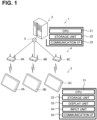
- the information editing system 1 includes a server 2 and client devices 3A, 3B, and 3C (also collectively referred to as "client devices 3").
- the server 2 is communicably connected to access points 4A, 4B, and 4C (also collectively referred to as "access points 4") via a network line 5.
- the client devices 3A, 3B, and 3C are connected to the access points 4A, 4B, and 4C, respectively, so as to be wirelessly communicable with the access points 4A, 4B, and 4C, respectively.
- the server 2 and each of the client devices 3A, 3B, and 3C are communicable with each other via the network line 5 and a corresponding one of the access points 4.
- the client devices 3 are known tablet terminals.
- the server 2 includes a CPU 21, a storage unit 22, and a communication interface (I/F) 23.
- the CPU 21 controls the server 2 entirely.
- the storage unit 22 is configured to store, for example, a server program to be executed by the CPU 21, and a document.
- the document includes a plurality of pieces of edit data.
- the document is data that can be displayed on a display unit 33 of each of the client devices 3 and that can be edited via an input unit 34, such as addition, entire deletion, partial deletion, or change of one or more pieces of edit data.
- Examples of the edit data include stroke data, character data, partial deletion data, still image data, and moving image data.
- the stroke data represents one or more strokes (handwriting).
- the stroke data includes coordinate data defining a location of each individual line segment constituting the one or more strokes in the document, and group data for grouping the line segments appropriately.
- the character data represents one or more character codes for, for example, characters, symbols, or both.
- the character data includes coordinate data defining a display location of each individual character or symbol in a document, and group data for grouping the characters, the symbols, or both appropriately.
- the partial deletion data represents a deletion operation performed on a portion of particular edit data.
- the partial deletion data includes, for example, target data representing the particular edit data targeted for partial deletion, location data representing the location where a partial deletion has been performed on the target data, and shape data representing a shape of the deleted portion.
- a "partial deletion” performed on particular edit data refers to deleting a portion of the target edit data
- an “entire deletion” performed on particular edit data refers to deleting the target edit data in its entirety.
- the still image data represents a still image that can be displayed on the display unit 33, and includes coordinate data indicating a display location of the still image in the document.
- the moving image data represents a moving image that can be displayed on the display unit 33, and includes coordinate data indicating a display location of the moving image in the document.
- the document can be shared among the client devices 3 and displayed on each of the client devices 3, and can be edited in each of the client devices 3.
- the CPU 21 receives a document edited in a particular client device 3 and stores the document in the storage unit 22. Further, the CPU 21 shares a storage area of the document in the storage unit 22 with all the client devices 3 on the network so that each client device 3 can download the document through the network line 5.
- the CPU 21 is capable of generating a URL that identifies the location of the document in the storage area.
- the communication I/F 23 is a communication module for performing communication with the respective client devices 3 via the network line 5 and the corresponding access points 4.
- the client device 3C includes a CPU 31, a storage unit 32, a display unit 33, an input unit 34, and a communication I/F 35.
- the CPU 31 controls the client device 3C entirely.
- the storage unit 32 is configured to store, for example, an information editing program to be executed by the CPU 31, a document, and a program for known optical character recognition (OCR) processing.
- OCR optical character recognition
- the CPU 31 receives a document from the server 2 and stores the document in the storage unit 32.
- the CPU 31 can perform editing such as addition, entire deletion, or change of edit data on the document stored in the storage unit 32.
- the display unit 33 is a liquid crystal display.
- the input unit 34 is a touch screen disposed on a surface of the display unit 33.
- the communication I/F 35 is a communication module for performing communication with the server 2 via the network line 5 and a corresponding one of the access points 4.
- the information editing system 1 in response to editing being performed on a document in a particular client device 3, for example, the client device 3A, on which an application for sharing documents (hereinafter referred to as a "sharing application") is running, edit data is generated based on the editing, and the generated edit data is uploaded to the server 2 in real time by the client device 3A.
- the uploaded edit data is immediately downloaded by the other client devices 3, for example, the client devices 3B and 3C, and the content of the editing is instantly reflected in the same document.
- an email notifying of a new document creation or an email reporting a history of editing on the existing document is sent to the client devices 3B, 3C, or both, from the client device 3A.
- the CPU 31 loads and executes a program of the new creation process from the storage unit 32 to create and display a new blank document on the display unit 33 (S1).
- the CPU 31 edits the document based on a user's operation. Edit data is generated based on the user's operation and is added to the document. The generated edit data is then uploaded to the server 2.
- the CPU 31 stores the newly created document in the storage unit 32 (S25) and then ends the new creation process to return to the main process of the sharing application.
- a document editing screen includes a "SHARE VIA EMAIL” button.
- the CPU 31 returns the process to S1, thereby allowing the user to continue creating the document.
- the CPU 31 displays a "share via email” dialog 50 on the display unit 33 (S7).
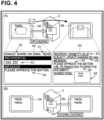
- the "share via email” dialog 50 includes a "SEND” button 51, a "CANCEL” button 52, a recipient addition field 53, and a message entry field 54.
- the CPU 31 captures a screenshot of the entire document to be displayed on the display unit 33 and includes the screenshot in the "share via email” dialog 50 (S9).
- the CPU 31 obtains a URL of the document from the server 2 and includes the URL in the "share via email” dialog 50 (S11).
- a state of the "share via email” dialog 50 after data and/or a description has been included is not illustrated in any figures.
- the CPU 31 accepts entries to the recipient addition field 53 and the message entry field 54 in the "share via email" dialog 50 (S13).
- the user of the client device 3A is enabled to select one or more users of the client devices 3, for example, users of the client devices 3B and 3C, who are targets for document sharing, from a user list display box.
- the CPU 31 includes and displays a selected user in the recipient addition field 53.
- the CPU 31 obtains an email address of the selected user from user data and includes the email address in the "share via email" dialog 50.
- the CPU 31 includes, in the "share via email” dialog 50, a message that has been entered by the user of the client device 3A in the message entry field 54.
- the CPU 31 in response to the "CANCEL” button 52 on the client device 3A having been operated (S15:YES), the CPU 31 closes the "share via email” dialog 50 to discard the entered contents. The CPU 31 then returns the process to S1 to allow the user to continue creating the document. In a case where the "CANCEL” button 52 has not been operated (S15:NO) and the "SEND” button 51 has also not been operated (S17:NO) on the client device 3A, the CPU 31 returns the process to S13 to continue accepting entries to the "share via email" dialog 50.
- the CPU 31 queries the server 2 as to whether the user added as a recipient in the recipient addition field 53 is online that the sharing application is running on the client device 3 of the user as a recipient. In a case where the user as a recipient is offline (S19:NO), the CPU 31 displays a message indicating that the user as a recipient is offline on the display unit 33 of the client device 3A as a sender (S23). The CPU 31 stores the newly created document in the storage unit 32 (S25) and then ends the new creation process to return to the main process of the sharing application.
- the CPU 31 converts the contents included in the "share via email" dialog 50 into a notification email 60.
- the notification email 60 includes an email address 61 of the user added as a recipient in the recipient addition field 53, a subject line 62 informing that a new document has been created, an entered message 63, a link 64 to the URL of the document, for example, "URL TO PAGE", and a screenshot 65 of the entire document.
- the CPU 31 transmits the notification email 60 to the target client device 3 used by the user as a recipient, for example, each of the client devices 3B and 3C (S21).
- the CPU 31 provides each target client device 3 used by the user as a recipient, that is, each of the client devices 3B and 3C, with a notification notifying the transmission of the email.
- the CPU 31 stores the newly created document in the storage unit 32 (S25) and then ends the new creation process to return to the main process of the sharing application.
- an email receiving process executed in the client device 3 e.g., the client device 3B used by the user as a recipient, in response to receipt of the notification email 60.
- the CPU 31 of the client device 3B displays the notification email 60 on the display unit 33 in accordance with a user's operation (S31).
- the CPU 31 hides the notification email 60 (S39) and then ends the email receiving process to return to the main process of the sharing application.
- the CPU 31 returns the process to S31 to continue displaying the notification email 60.
- the CPU 31 downloads the document from the server 2 in accordance with the URL and displays the downloaded document on the display unit 33 (S37).
- the new document created by the user of the client device 3A is thus displayed on the display unit 33 of the client device 3B.
- the CPU 31 ends the email receiving process to return to the main process of the sharing application.
- the CPU 31 loads and executes a program of the editing process from the storage unit 32. For example, the user selects a document to be edited in a selection box on the client device 3A. As illustrated in FIG. 5 , in a case where a document previously stored in the storage unit 32 is designated, the CPU 31 loads the document from the storage unit 32 and displays the loaded document on the display unit 33 (S41).
- the CPU 31 downloads the designated document to be edited from the server 2 and displays the downloaded document on the display unit 33.
- the CPU 31 stores the document to be edited in the storage unit 32 as a document before editing (S43).
- the CPU 31 edits the document in accordance with a user's operation (S45). Edit data is generated based on the user's operation and is added to the document. The generated edit data is then uploaded to the server 2. In response to the user performing an operation to end the editing (S47:YES), the CPU 31 stores the edited document in the storage unit 32 (S137), and ends the editing process to return to the main process of the sharing application.
- the CPU 31 In a case where the user has neither completed the document editing (S47:NO) nor operated the "SHARE VIA EMAII," button on an editing screen (S49:NO), the CPU 31 returns the process to S45 to allow the user to continue editing the document.
- the CPU 31 In response to the user operating the "SHARE VIA EMAII," button on the client device 3A after completing the document editing (S49:YES), the CPU 31 displays the "share via email" dialog 50 on the display unit 33 (S51).
- the CPU 31 loads the document before editing stored in the storage unit 32 in S43 into a working area of the storage unit 32 for comparison (S52).
- the CPU 31 captures a screenshot 71 of the entire document before editing (refer to FIG. 9 ) and includes the screenshot 71 in the "share via email" dialog 50 (S53).
- the CPU 31 loads the document after editing into the working area of the storage unit 32 for comparison (S54).
- the CPU 31 compares the document before editing and the document after editing, both of which are loaded into the working area. If there is one or more differences between the plurality of pieces of edit data contained in the document before editing and the plurality of pieces of edit data contained in the document after editing, the CPU 31 extracts the differing edit data as a change point from the document after editing (S55). In a case where the document after editing has no change points compared to the document before editing (S57:NO), the CPU 31 moves the process to S121. In a case where the document is not edited, a notification email 60 is created (refer to FIG. 4A ), and is transmitted to the client device 3 used by the user as a recipient.
- the CPU 31 captures a screenshot 72 of the entire document after editing and includes the screenshot 72 in the "share via email" dialog 50 (S59).
- the CPU 31 applies highlighting 72A to point out the location of the change point extracted in S55 in the screenshot 72 of the entire document after editing (S61).
- the highlighting 72A may be implemented by line segments surrounding an area including the change point in the screenshot 72.
- the highlighting 72A may be implemented by contrast enhancement such that an area including the change point has higher contrast than the other area.
- the CPU 31 includes the screenshot 72 with the highlighting 72A in the "share via email" dialog 50 (S61).
- the CPU 31 moves the process to S75.
- the CPU 31 includes a description 73 (refer to FIG. 9 ) indicating that an entire deletion operation has been performed in the "share via email" dialog 50 (S73).
- the CPU 31 includes a description 82 (refer to FIG. 9 ) indicating that a handwritten entry has been performed in the "share via email" dialog 50 (S77).
- the CPU 31 captures a screenshot 77 (refer to FIG. 9 ) from the document after editing.
- the screenshot 77 includes the stroke data as one of the one or more change points and a certain area surrounding the stroke data.
- the CPU 31 includes the screenshot 77 in the "share via email" dialog 50 (S79).
- the CPU 31 then performs OCR processing on the screenshot 77.
- the CPU 31 loads and executes a program of the OCR processing from the storage unit 32.
- the CPU 31 analyzes a character image read from the screenshot 77 by the OCR processing, thereby obtaining one or more character codes.
- the CPU 31 obtains a text 76 that is a character string such as a character and/or a symbol indicated by the one or more character codes (S81).
- the CPU 31 includes the obtained text 76 in the "share via email" dialog 50 (S83), and moves the process to S111.
- the CPU 31 returns the process to S75.
- the CPU 31 includes, in the "share via email" dialog 50, a description 81 (refer to FIG. 9 ) indicating that a character string (text) such as a character and/or a symbol has been entered (S93).
- the CPU 31 captures, from the document after editing, a screenshot 75 (refer to FIG. 9 ) including a text 74 represented by character data as one of the one or more change points.
- the CPU 31 includes the screenshot 75 in the "share via email” dialog 50 (S95).
- the CPU 31 displays the obtained text 74 in the "share via email” dialog 50 (S97), and moves the process to S111.
- the CPU 31 includes a description 83 (refer to FIG. 9 ) indicating, for example, that addition of a still image or a moving image has been performed in the "share via email" dialog 50 (S103).
- the CPU 31 obtains, from the document after editing, a still image 78 as one of the change points (refer to FIG. 9 ) or a moving image as one of the change points, and includes the still image 78 or the moving image in the "share via email" dialog 50 (S105).
- the CPU 31 moves the process to S111.
- the CPU 31 includes a description 84 (refer to FIG. 9 ) indicating that addition of edit data has been performed in the "share via email" dialog 50 (S107).
- the CPU 31 captures, from the document after editing, a screenshot 79 (refer to FIG. 9 ) including, for example, a figure represented by the edit data as one of the one or more change points, and includes the screenshot 79 in the "share via email" dialog 50 (S109).
- the CPU 31 moves the process to S111.
- the CPU 31 obtains a URL of the document from the server 2 and includes the URL in the "share via email" dialog 50 (S121).
- the CPU 31 accepts entries to the recipient addition field 53 and the message entry field 54 in the "share via email” dialog 50 (S123).
- the CPU 31 includes the email address of the user selected for document sharing by the user of the client device 3A in the "share via email” dialog 50.
- the CPU 31 includes, in the "share via email” dialog 50, a message that has been entered by the user of the client device 3A in the message entry field 54.
- the CPU 31 In response to the "CANCEL” button 52 having been operated (S125:YES), the CPU 31 closes the "share via email” dialog 50 to discard the entered contents. The CPU 31 then returns the process to S45 to allow the user to continue creating the document. In a case where the "CANCEL” button 52 has not been operated (S125:NO) and the "SEND” button 51 has also not been operated (S127:NO), the CPU 31 returns the process to S123 to continue accepting entries to the "share via email" dialog 50.
- the CPU 31 queries the server 2 as to whether the user added as a recipient in the recipient addition field 53 is online that the sharing application is running on the client device 3 of the user. In a case where the user as a recipient is offline (S131:NO), the CPU 31 displays a message indicating that the user as a recipient is offline on the display unit 33 of the client device 3A as a sender (S135). The CPU 31 stores the document after editing in the storage unit 32 (S137), and then ends the editing process to return to the main process of the sharing application.
- the CPU 31 converts the contents included in the "share via email" dialog 50 into a notification email 70.
- the notification email 70 includes an email address 85 of the user as a recipient, a subject line 86 informing editing of a document, an entered message 87, and a link 88 to the URL of the document.
- the notification email 70 includes a screenshot 71 of the entire document before editing, a screenshot 72 of the entire document after editing with highlighting 72A, a description 73 informing that an entire deletion has been performed, a description 82 informing that a handwritten entry has been performed, a screenshot 77 of the handwritten entry, and a text 76 read by the OCR processing.
- the notification email 70 also includes a description 81 informing that a text has been entered, the entered text 74, a screenshot 75 of the entered text 74, a description 83 informing that a still image or a moving image has been added, the added still image 78 or moving image, a description 84 informing that edit data of another type such as a figure has been edited, and a screenshot 79 of the figure.
- the CPU 31 then transmits the notification email 70 to the target client device 3 used by the user as a recipient, for example, each of the client devices 3B and 3C (S133). Further, the CPU 31 provides each target client device 3 used by the user as a recipient, that is, each of the client devices 3B and 3C, with a notification notifying the transmission of the email. The CPU 31 stores the document after editing in the storage unit 32 (S137), and then ends the editing process to return to the main process of the sharing application.
- the CPU 31 of the particular client device 3 that executes the information editing program includes edit data representing an edited portion of the document in a notification email 70, thereby notifying the others of the client devices 3 of the edited portion.
- users of the other client devices 3 can readily recognize the edited portion of the document.
- the CPU 31 of the particular client device 3 that executes the information editing program includes, in the notification email 70, a screenshot 71 representing a display state of the entire document before editing and a screenshot 72 representing a display state of the entire document after editing, thereby notifying the others of the client devices 3 of the portion where the change has been made on the document.
- the users of the other client devices 3 can readily recognize the edited portion of the document by comparing the screenshot 71 with the screenshot 72.
- the CPU 31 of the particular client device 3 that executes the information editing program includes, in the notification email 70, a screenshot 72 of the entire document after editing, with highlighting 72A being applied to the edited portion of the document, thereby notifying the others of the client devices 3 of the edited portion.
- the highlighting 72A in the screenshot 72 leads each of the users of the other client devices 3 to focus on the portion where the change has been made on the document, thereby causing the users of the other client devices 3 to readily recognize the edited portion of the document.
- the CPU 31 of the particular client device 3 that executes the information editing program includes one or more partial images including specific portions, specifically screenshots 75, 77, and 79, in the notification email 70, thereby notifying the others of the client devices 3 of one or more edited portions of the document.
- the specific portion refers to edit data having a change point.
- the partial image including the specific portion refers to a cutout image of a portion where a change has been made.
- the CPU 31 of the particular client device 3 that executes the information editing program includes a text 76 obtained from the screenshot 77 of the stroke data by the OCR processing in the notification email 70, thereby notifying the others of the client devices 3 of the edited portion of the document.
- the users of the others of the client devices 3 can readily recognize the portion where the change has been made on the information by confirming the text 76 that has been entered as strokes, that is, by handwriting.
- the CPU 31 of the particular client device 3 that executes the information editing program includes, in the notification email 70, a still image represented by the still image data or a moving image represented by the moving data, thereby notifying the others of the client devices 3 of the edited portion of the document.
- the users of the other client devices 3 can readily recognize that the change point involves addition of a still image or moving image.
- each of the client devices 3, 3A, 3B, and 3C corresponds to a "terminal” of the present invention.
- the document corresponds to "information" of the present invention.
- the state of the document before editing corresponds to a "first state” of the present invention.
- the CPU 31 that executes S43 corresponds to a "storing step” of the present invention.
- the state of the document after editing corresponds to a "second state” of the present invention.
- the CPU 31 that executes S54 corresponds to an "obtaining step” of the present invention.
- the edit data corresponds to "change data” of the present invention.
- the CPU 31 that executes S55 corresponds to an "extracting step” of the present invention.
- the notification email 70 corresponds to a "message” of the present invention.
- the CPU 31 that executes S133 corresponds to a "notifying step” of the present invention.
- the screenshot 71 corresponds to a "first entire image” of the present invention.
- the screenshot 72 corresponds to a "second entire image” of the present invention.
- the CPU 31 that executes S53 and S59 corresponds to a "display image generating step” of the present invention.
- the CPU 31 that executes S61 corresponds to a "highlighting step” of the present invention.
- the edit data having the change point corresponds to a "specific portion” of the present invention.
- the screenshot 77 corresponds to a "partial image” of the present invention.
- the CPU 31 that executes S79 corresponds to a "partial image generating step” of the present invention.
- the CPU 31 that executes S81 corresponds to a "reading step” of the present invention.
- the text 76 corresponds to a "character string” of the present invention.
- the CPU 31 that executes S105 corresponds to a "data obtaining step” of the present invention.
- the present invention can be variously modified from the above embodiment. Various modifications described below can be combined with each other as long as no contradiction occurs.
- the information editing program is executed by the CPU 31 of the particular client device 3, but the CPU 21 of the server 2 may execute a process corresponding to the editing process illustrated in FIGS. 5 to 8 .
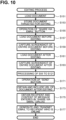
- the CPU 21 of the server 2 in response to a particular client device 3 loading (downloading) a document targeted for editing (S151), the CPU 21 of the server 2 stores the document targeted for editing in the storage unit 22 (S153).
- the CPU 21 loads the document targeted for editing stored in the storage unit 22 into a working area (S157). Then, the CPU 21 captures a screenshot of the entire document targeted for editing and stores the screenshot in the working area (S159).
- target edit data of the document is uploaded in real time from the particular client device 3. Thus, the CPU 21 loads the document after editing that has been updated with the latest edit data, into the working area (S161).
- the CPU 21 captures a screenshot of the entire document after editing and stores the screenshot in the working area (S163).
- the CPU 21 performs the same or similar processing as S55 to S121 of the editing process executed in the particular client device 3, and generates the contents to be included in the notification email 70.
- the contents to be included in the notification email 70 are stored into the working area of the server 2, instead of being included in the "share via email" dialog 50 of the particular client device 3.
- the CPU 21 obtains the URL of the document after editing (S173).
- the CPU 21 obtains the recipient and the content of the message entered in the "share via email" dialog 50 from the particular client device 3 (S175).
- the CPU 21 generates a notification mail 70 that includes a screenshot 71 of the entire document before editing and a screenshot 72 of the entire document after editing which are stored in the working area, the contents to be included in the notification email 70, and the recipient and the contents of the message received from the particular client device 3.
- the CPU 31 transmits the generated notification email 70 and a notification notifying the transmission of the email to the other client devices 3 of the users as recipients (S177).
- the server 2 performs the process of generating the notification email 70, thereby reducing a load on the particular client device 3 for generating the notification email 70.
- the information editing system 1 may be configured such that no server 2 is included and the client devices 3 are connected to each other via the network line 5.
- one of the client devices 3 may function as the server 2 that shares a document and generates a URL.
- a specific one of the client devices 3 may provide the function of the server 2 at all times or a different one of the client devices 3 may provide the function of the server 2 for each document.
- the client device 3 that has created a new document may provide the function of the server 2 for the document.
- the description 73 notifying that the particular edit data has been deleted in its entirety is included in the notification email 70.
- a particular portion of the edit data may be deleted based on partial deletion data and the edit data after editing is generated as new edit data.
- a description notifying that the particular portion of the edit data has been deleted may be included in the notification email 70.
- the editing process may include S181 to S187 between S73 and S75.
- the CPU 31 moves the process to S75.
- the CPU 31 includes a description indicating that a partial deletion has been performed on the edit data in the "share via email" dialog 50 (S183).
- the CPU 31 compares the partial deletion data and the target data that is the edit data targeted for partial deletion, and deletes a portion that positionally coincides with the partial deletion data from the target data.
- the CPU 31 generates a new edit data from the target data after partial deletion (S185).
- the CPU 31 captures, from the document after editing, a screenshot including the edit data newly generated as a result of the partial deletion and a certain area surrounding the edit data.
- the CPU 31 includes the screenshot in the "share via email" dialog 50 (S187), and moves the process to S75.
- the CPU 31 of the particular client device 3 that executes the information editing program includes, in the notification email 70, the screenshot of the edit data newly generated as a result of the partial deletion and a description that the partial deletion has been performed, thereby notifying the others of the client devices 3 of the edited portion of the document.
- the users of the other client devices 3 can readily recognize the portion partially changed by the partial deletion.
- the partial deletion data corresponds to a "partially deleted portion" of the present invention.
- the CPU 31 that executes S155 corresponds to a "partially deleted portion image generating step" of the present invention.
- the description reporting the partial deletion corresponds to a "partial deletion report" of the present invention.
- the CPU 31 In S79, the CPU 31 generates a screenshot 77 including stroke data having a change point and a certain area surrounding of the stroke data. Nevertheless, the CPU 31 may generate a screenshot only including the stroke data having the change point without including the certain area surrounding of the stroke data.
- the CPU 31 includes, in the notification email 70, the text 76 obtained from the screenshot 77 of the stroke data by the OCR processing. Nevertheless, the CPU 31 may include only the screenshot 77 in the notification email 70 without performing the OCR processing. Alternatively, the CPU 31 may include, in the notification email 70, a text 76 obtained by the OCR processing without including the screenshot 77 of the stroke data in the notification email 70.
- the CPU 31 In S95, the CPU 31 generates a screenshot 75 of the character data having a change point and includes the screenshot 75 in the notification email 70.
- the CPU 31 may include only the text 74 in the notification email 70 without including the screenshot 75 in the notification email 70.
- the CPU 31 applies the highlighting 72A to the screenshot 72 of the document after editing in order to point out the location of the change point on the document after editing, but the highlighting 72A might not necessarily be applied.
- the CPU 31 includes, in the notification email 70, a still image 78 represented by still image data having a change point or a moving image represented by moving data having a change point.
- the user of the client device 3 who has received the notification email 70 can confirm the entire contents of the still image 78 or the moving image having the change point by opening the notification email 70.
- the CPU 31 may obtain the URL of the storage area that stores the still image or moving image having the change point from the server 2 and include the obtained URL in the notification email 70.
- the CPU 31 may capture or generate a thumbnail image that is an image of one of frames of the moving image or a thumbnail moving image that is a moving image of one of scenes of the moving image, and include the captured or generated thumbnail image or thumbnail moving image in the notification email 70.
Landscapes
- Engineering & Computer Science (AREA)
- Theoretical Computer Science (AREA)
- Physics & Mathematics (AREA)
- General Physics & Mathematics (AREA)
- Multimedia (AREA)
- Computer Vision & Pattern Recognition (AREA)
- General Engineering & Computer Science (AREA)
- Human Computer Interaction (AREA)
- General Health & Medical Sciences (AREA)
- Computational Linguistics (AREA)
- Audiology, Speech & Language Pathology (AREA)
- Artificial Intelligence (AREA)
- Health & Medical Sciences (AREA)
- Signal Processing (AREA)
- Computer Networks & Wireless Communication (AREA)
- Document Processing Apparatus (AREA)
- User Interface Of Digital Computer (AREA)
- Information Transfer Between Computers (AREA)
Abstract
Description
- The present invention relates to a non-transitory computer-readable storage medium storing an information editing program, an information editing method, and an information editing system that enable editing of information in respective terminals among which the information is to be shared.
- There has been disclosed a technique for enabling sharing of information among a plurality of terminals and enabling editing of the information in each of the plurality of terminals. For example, in
Patent Literature 1, a first electronic whiteboard and a second electronic whiteboard are placed at a first site and a second site, respectively. In response to a first user performing an operation to edit a particular existing object at the first site, details of the operation are notified to a second user at the second site. - [Patent Literature 1]
Japanese Patent No. 5810779 - In response to the first user editing the particular existing object, the particular existing object is updated. Thus, the particular object before editing and the particular object after editing cannot be compared with each other. Therefore, even if the second user at the second site is notified of the details of the operation performed by the first user at the first site in response to the first user at the first site editing the particular object, it is difficult for the second user to recognize a specific portion that has been edited unless the second user remembers the details of the particular object before editing.
- An object of the present invention is to provide a non-transitory computer-readable storage medium storing an information editing program, an information editing method, and an information editing system that enable an edited portion of information to be notified by including the edited portion in a message.
- According to a first aspect of the invention, a non-transitory computer-readable storage medium stores an information editing program that enables sharing of information among a first terminal and a second terminal and editing of the information in each of the first terminal and the second terminal. The information editing program causes a computer to execute: storing a state of information entered or edited on the first terminal as a first state; subsequent to storing the information in the first state, obtaining a state of the information after editing as a second state in response to the information having been edited on the first terminal; comparing the information in the second state and the information in the first state; extracting change data based on a result of the comparison, the change data representing a changed portion that has been changed from the information in the first state; and notifying the second terminal of the changed portion by including the change data in a message, the second terminal being different from the first terminal. According to the first aspect, the computer that executes the information editing program can include the change data representing the edited portion of the information in the message to notify the second terminal of the change data in response to a user of the first terminal editing the information. Thus, a user of the second terminal can readily recognize the edited portion in the information.
- According to a second aspect of the invention, an information editing method executable by a computer in accordance with an image editing program that enables sharing of information among a first terminal and a second terminal and editing of the information in each of the first terminal and the second terminal, includes: storing a state of information entered or edited on the first terminal as a first state; subsequent to storing the information in the first state, obtaining a state of the information after editing as a second state in response to the information having been edited on the first terminal; comparing the information in the second state and the information in the first state; extracting change data based on a result of the comparison, the change data representing a changed portion that has been changed from the information in the first state; and notifying the second terminal of the changed portion by including the change data in a message, the second terminal being different from the first terminal.
- According to a third aspect of the invention, an information editing system includes a server; a first terminal and a second terminal connected to each other via the server. The information editing system enables sharing of information among the first terminal and the second terminal and editing of the information in each of the first terminal and the second terminal. The server is configured to: receive information that has been entered or edited on the first terminal and store a state of the received information as a first state; subsequent to storing the information in the first state, obtain a state of the information after editing as a second state in response to the information having been edited on the first terminal; compare the information in the second state and the information in the first state; extract change data based on a result of the comparison, the change data representing a changed portion that has been changed from the information in the first state; and notify the second terminal of the changed portion by including the change data in a message, the second terminal being different from the first terminal. According to the second aspect, the same effect as in the first aspect is achieved.
- According to a fourth aspect of the invention, an information editing system includes a first terminal and a second terminal. The information editing system enables sharing of information among the first terminal and the second terminal and editing of the information in each of the first terminal and the second terminal. The first terminal is configured to: receive information that has been entered or edited on the first terminal and store a state of the received information as a first state; subsequent to storing the information in the first state, obtain a state of the information after editing as a second state in response to the information having been edited on the first terminal; compare the information in the second state and the information in the first state; extract change data based on a result of the comparison, the change data representing a changed portion that has been changed from the information in the first state; and notify the second terminal of the changed portion by including the change data in a message, the second terminal being different from the first terminal. According to the third aspect, the same effect as in the first aspect is achieved.
-
- [
FIG. 1] FIG. 1 illustrates an overview of aninformation editing system 1. - [
FIG. 2] FIG. 2 is a flowchart of a new creation process. - [
FIG. 3] FIG. 3 is a flowchart of an email receiving process. - [
FIG. 4] FIG. 4 is a diagram for explaining an operation of creating a new document. - [
FIG. 5] FIG. 5 is a flowchart of an editing process. - [
FIG. 6] FIG. 6 is a continuation of the editing process shown inFIG. 5 . - [
FIG. 7] FIG. 7 is a continuation of the editing process shown inFIG. 6 . - [
FIG. 8] FIG. 8 is a continuation of the editing process shown inFIG. 7 . - [
FIG. 9] FIG. 9 is a diagram for explaining an operation of editing a document. - [
FIG. 10] FIG. 10 is a flowchart of an editing process executed by aserver 2 according to a modification. - [
FIG. 11] FIG. 11 is a flowchart of the editing process according to the modification in a case where change points include partial deletion data. - An embodiment of the present invention will be described with reference to the drawings. The drawings to be referred to are used for describing technical features that may be adopted by the present invention, and configurations of devices described herein are not intended to be limited thereto, but are merely illustrative examples.
- Referring to
FIG. 1 , an overview of aninformation editing system 1 will be described. Theinformation editing system 1 includes aserver 2 andclient devices client devices 3"). Theserver 2 is communicably connected toaccess points access points 4") via anetwork line 5. Theclient devices access points access points server 2 and each of theclient devices network line 5 and a corresponding one of theaccess points 4. Theclient devices 3 are known tablet terminals. - The
server 2 includes aCPU 21, astorage unit 22, and a communication interface (I/F) 23. TheCPU 21 controls theserver 2 entirely. Thestorage unit 22 is configured to store, for example, a server program to be executed by theCPU 21, and a document. The document includes a plurality of pieces of edit data. The document is data that can be displayed on adisplay unit 33 of each of theclient devices 3 and that can be edited via aninput unit 34, such as addition, entire deletion, partial deletion, or change of one or more pieces of edit data. Examples of the edit data include stroke data, character data, partial deletion data, still image data, and moving image data. The stroke data represents one or more strokes (handwriting). The stroke data includes coordinate data defining a location of each individual line segment constituting the one or more strokes in the document, and group data for grouping the line segments appropriately. The character data represents one or more character codes for, for example, characters, symbols, or both. The character data includes coordinate data defining a display location of each individual character or symbol in a document, and group data for grouping the characters, the symbols, or both appropriately. The partial deletion data represents a deletion operation performed on a portion of particular edit data. The partial deletion data includes, for example, target data representing the particular edit data targeted for partial deletion, location data representing the location where a partial deletion has been performed on the target data, and shape data representing a shape of the deleted portion. In the present embodiment, a "partial deletion" performed on particular edit data refers to deleting a portion of the target edit data, and an "entire deletion" performed on particular edit data refers to deleting the target edit data in its entirety. In the edit data targeted for partial deletion, a portion that positionally coincides with the partial deletion data is deleted and thus the edit data is updated. The still image data represents a still image that can be displayed on thedisplay unit 33, and includes coordinate data indicating a display location of the still image in the document. The moving image data represents a moving image that can be displayed on thedisplay unit 33, and includes coordinate data indicating a display location of the moving image in the document. The document can be shared among theclient devices 3 and displayed on each of theclient devices 3, and can be edited in each of theclient devices 3. - The
CPU 21 receives a document edited in aparticular client device 3 and stores the document in thestorage unit 22. Further, theCPU 21 shares a storage area of the document in thestorage unit 22 with all theclient devices 3 on the network so that eachclient device 3 can download the document through thenetwork line 5. TheCPU 21 is capable of generating a URL that identifies the location of the document in the storage area. The communication I/F 23 is a communication module for performing communication with therespective client devices 3 via thenetwork line 5 and the corresponding access points 4. - Since all the
client devices 3 have the same configuration, theclient device 3C will be described as a representative example. Theclient device 3C includes aCPU 31, astorage unit 32, adisplay unit 33, aninput unit 34, and a communication I/F 35. TheCPU 31 controls theclient device 3C entirely. Thestorage unit 32 is configured to store, for example, an information editing program to be executed by theCPU 31, a document, and a program for known optical character recognition (OCR) processing. TheCPU 31 receives a document from theserver 2 and stores the document in thestorage unit 32. TheCPU 31 can perform editing such as addition, entire deletion, or change of edit data on the document stored in thestorage unit 32. Thedisplay unit 33 is a liquid crystal display. Theinput unit 34 is a touch screen disposed on a surface of thedisplay unit 33. The communication I/F 35 is a communication module for performing communication with theserver 2 via thenetwork line 5 and a corresponding one of the access points 4. - A description will be provided on how the
information editing system 1 behaves when a document is newly created and edited. In theinformation editing system 1, in response to editing being performed on a document in aparticular client device 3, for example, theclient device 3A, on which an application for sharing documents (hereinafter referred to as a "sharing application") is running, edit data is generated based on the editing, and the generated edit data is uploaded to theserver 2 in real time by theclient device 3A. In response to the uploading of the edit data to theserver 2 from the sharing application running on theclient device 3A, the uploaded edit data is immediately downloaded by theother client devices 3, for example, theclient devices client device 3A, the same document might not be opened on theclient devices information editing system 1, an email notifying of a new document creation or an email reporting a history of editing on the existing document is sent to theclient devices client device 3A. - Referring to
FIGS. 2 and4A , a description will be provided on a new creation process executed in a particular client device 3 (e.g., theclient device 3A) when a document is newly created. In response to a user performing an operation to create a new document during a main process on theclient device 3A on which the sharing application is running, theCPU 31 loads and executes a program of the new creation process from thestorage unit 32 to create and display a new blank document on the display unit 33 (S1). TheCPU 31 edits the document based on a user's operation. Edit data is generated based on the user's operation and is added to the document. The generated edit data is then uploaded to theserver 2. - In response to the user performing an operation to end the document creation on the
client device 3A (S3:YES), theCPU 31 stores the newly created document in the storage unit 32 (S25) and then ends the new creation process to return to the main process of the sharing application. - A document editing screen includes a "SHARE VIA EMAIL" button. In a case where the user has neither completed the document creation on the
client device 3A (S3 :NO) nor operated the "SHARE VIA EMAIL" button (S5:NO), theCPU 31 returns the process to S1, thereby allowing the user to continue creating the document. In response to the user operating the "SHARE VIA EMAIL" button on theclient device 3A after completing the document creation (S5:YES), theCPU 31 displays a "share via email"dialog 50 on the display unit 33 (S7). As illustrated inFIG. 4A , the "share via email"dialog 50 includes a "SEND"button 51, a "CANCEL"button 52, arecipient addition field 53, and amessage entry field 54. - As illustrated in
FIG. 2 , theCPU 31 captures a screenshot of the entire document to be displayed on thedisplay unit 33 and includes the screenshot in the "share via email" dialog 50 (S9). TheCPU 31 obtains a URL of the document from theserver 2 and includes the URL in the "share via email" dialog 50 (S11). A state of the "share via email"dialog 50 after data and/or a description has been included is not illustrated in any figures. - The
CPU 31 accepts entries to therecipient addition field 53 and themessage entry field 54 in the "share via email" dialog 50 (S13). As illustrated inFIG. 4A , for example, the user of theclient device 3A is enabled to select one or more users of theclient devices 3, for example, users of theclient devices CPU 31 includes and displays a selected user in therecipient addition field 53. TheCPU 31 obtains an email address of the selected user from user data and includes the email address in the "share via email"dialog 50. In addition, theCPU 31 includes, in the "share via email"dialog 50, a message that has been entered by the user of theclient device 3A in themessage entry field 54. - As illustrated in
FIG. 2 , in response to the "CANCEL"button 52 on theclient device 3A having been operated (S15:YES), theCPU 31 closes the "share via email"dialog 50 to discard the entered contents. TheCPU 31 then returns the process to S1 to allow the user to continue creating the document. In a case where the "CANCEL"button 52 has not been operated (S15:NO) and the "SEND"button 51 has also not been operated (S17:NO) on theclient device 3A, theCPU 31 returns the process to S13 to continue accepting entries to the "share via email"dialog 50. - In response to the "SEND"
button 51 on theclient device 3A having been operated (S17:YES), theCPU 31 queries theserver 2 as to whether the user added as a recipient in therecipient addition field 53 is online that the sharing application is running on theclient device 3 of the user as a recipient. In a case where the user as a recipient is offline (S19:NO), theCPU 31 displays a message indicating that the user as a recipient is offline on thedisplay unit 33 of theclient device 3A as a sender (S23). TheCPU 31 stores the newly created document in the storage unit 32 (S25) and then ends the new creation process to return to the main process of the sharing application. - In a case where the user as a recipient is online (S19:YES), the
CPU 31 converts the contents included in the "share via email"dialog 50 into anotification email 60. As illustrated inFIG. 4A , thenotification email 60 includes anemail address 61 of the user added as a recipient in therecipient addition field 53, asubject line 62 informing that a new document has been created, an enteredmessage 63, alink 64 to the URL of the document, for example, "URL TO PAGE", and ascreenshot 65 of the entire document. As illustrated inFIG. 2 , theCPU 31 then transmits thenotification email 60 to thetarget client device 3 used by the user as a recipient, for example, each of theclient devices CPU 31 provides eachtarget client device 3 used by the user as a recipient, that is, each of theclient devices CPU 31 stores the newly created document in the storage unit 32 (S25) and then ends the new creation process to return to the main process of the sharing application. - Referring to
FIGS. 3 and4B , a description will be provided on an email receiving process executed in the client device 3 (e.g., theclient device 3B) used by the user as a recipient, in response to receipt of thenotification email 60. In response to receiving the notification notifying the transmission of thenotification email 60 while the sharing application is running on theclient device 3B, theCPU 31 of theclient device 3B displays thenotification email 60 on thedisplay unit 33 in accordance with a user's operation (S31). In response to the user of theclient device 3B performing an operation to close thenotification email 60 after confirming the notification email 60 (S33:YES), theCPU 31 hides the notification email 60 (S39) and then ends the email receiving process to return to the main process of the sharing application. In a case where the user has neither performed the operation to close the notification email 60 (S33:NO) nor clicked thelink 64 to the URL of the document in the notification email 60 (S35:NO), theCPU 31 returns the process to S31 to continue displaying thenotification email 60. - In response to the user of the
client device 3B clicking thelink 64 to the URL of the document in the notification email 60 (S35:YES), theCPU 31 downloads the document from theserver 2 in accordance with the URL and displays the downloaded document on the display unit 33 (S37). The new document created by the user of theclient device 3A is thus displayed on thedisplay unit 33 of theclient device 3B. TheCPU 31 ends the email receiving process to return to the main process of the sharing application. - Referring to
FIGS. 5 to 9 , a description will be provided on an editing process executed in a particular client device 3 (e.g., theclient device 3A) when an existing document is edited. In response to the user performing an operation to edit a document during the main process on theclient device 3A on which the sharing application is running, theCPU 31 loads and executes a program of the editing process from thestorage unit 32. For example, the user selects a document to be edited in a selection box on theclient device 3A. As illustrated inFIG. 5 , in a case where a document previously stored in thestorage unit 32 is designated, theCPU 31 loads the document from thestorage unit 32 and displays the loaded document on the display unit 33 (S41). In a case where a document stored in theserver 2 is designated, theCPU 31 downloads the designated document to be edited from theserver 2 and displays the downloaded document on thedisplay unit 33. TheCPU 31 stores the document to be edited in thestorage unit 32 as a document before editing (S43). - The
CPU 31 edits the document in accordance with a user's operation (S45). Edit data is generated based on the user's operation and is added to the document. The generated edit data is then uploaded to theserver 2. In response to the user performing an operation to end the editing (S47:YES), theCPU 31 stores the edited document in the storage unit 32 (S137), and ends the editing process to return to the main process of the sharing application. - In a case where the user has neither completed the document editing (S47:NO) nor operated the "SHARE VIA EMAII," button on an editing screen (S49:NO), the
CPU 31 returns the process to S45 to allow the user to continue editing the document. In response to the user operating the "SHARE VIA EMAII," button on theclient device 3A after completing the document editing (S49:YES), theCPU 31 displays the "share via email"dialog 50 on the display unit 33 (S51). TheCPU 31 loads the document before editing stored in thestorage unit 32 in S43 into a working area of thestorage unit 32 for comparison (S52). TheCPU 31 captures ascreenshot 71 of the entire document before editing (refer toFIG. 9 ) and includes thescreenshot 71 in the "share via email" dialog 50 (S53). - The
CPU 31 loads the document after editing into the working area of thestorage unit 32 for comparison (S54). TheCPU 31 compares the document before editing and the document after editing, both of which are loaded into the working area. If there is one or more differences between the plurality of pieces of edit data contained in the document before editing and the plurality of pieces of edit data contained in the document after editing, theCPU 31 extracts the differing edit data as a change point from the document after editing (S55). In a case where the document after editing has no change points compared to the document before editing (S57:NO), theCPU 31 moves the process to S121. In a case where the document is not edited, anotification email 60 is created (refer toFIG. 4A ), and is transmitted to theclient device 3 used by the user as a recipient. - In a case where the document after editing includes one or more change points (S57:YES), as illustrated in
FIG. 6 , theCPU 31 captures ascreenshot 72 of the entire document after editing and includes thescreenshot 72 in the "share via email" dialog 50 (S59). TheCPU 31 applies highlighting 72A to point out the location of the change point extracted in S55 in thescreenshot 72 of the entire document after editing (S61). As illustrated inFIG. 9 , in one example, the highlighting 72A may be implemented by line segments surrounding an area including the change point in thescreenshot 72. In another example, the highlighting 72A may be implemented by contrast enhancement such that an area including the change point has higher contrast than the other area. As illustrated inFIG. 6 , theCPU 31 includes thescreenshot 72 with the highlighting 72A in the "share via email" dialog 50 (S61). - In a case where the one or more change points do not include an entire deletion of particular edit data (S71:NO), the
CPU 31 moves the process to S75. In a case where the one or more change points include an entire deletion of particular edit data (S71:YES), theCPU 31 includes a description 73 (refer toFIG. 9 ) indicating that an entire deletion operation has been performed in the "share via email" dialog 50 (S73). - In a case where the one or more change points include addition or change of stroke data (S75:YES), the
CPU 31 includes a description 82 (refer toFIG. 9 ) indicating that a handwritten entry has been performed in the "share via email" dialog 50 (S77). TheCPU 31 captures a screenshot 77 (refer toFIG. 9 ) from the document after editing. Thescreenshot 77 includes the stroke data as one of the one or more change points and a certain area surrounding the stroke data. TheCPU 31 includes thescreenshot 77 in the "share via email" dialog 50 (S79). - The
CPU 31 then performs OCR processing on thescreenshot 77. TheCPU 31 loads and executes a program of the OCR processing from thestorage unit 32. TheCPU 31 analyzes a character image read from thescreenshot 77 by the OCR processing, thereby obtaining one or more character codes. TheCPU 31 obtains atext 76 that is a character string such as a character and/or a symbol indicated by the one or more character codes (S81). TheCPU 31 includes the obtainedtext 76 in the "share via email" dialog 50 (S83), and moves the process to S111. - As illustrated in
FIG. 7 , in a case where the one or more change points include an unprocessed change point (S111:YES), theCPU 31 returns the process to S75. As illustrated inFIG. 6 , in a case where the one or more change points include addition or change of character data (S75:NO, S91:YES), theCPU 31 includes, in the "share via email"dialog 50, a description 81 (refer toFIG. 9 ) indicating that a character string (text) such as a character and/or a symbol has been entered (S93). TheCPU 31 captures, from the document after editing, a screenshot 75 (refer toFIG. 9 ) including atext 74 represented by character data as one of the one or more change points. TheCPU 31 includes thescreenshot 75 in the "share via email" dialog 50 (S95). TheCPU 31 displays the obtainedtext 74 in the "share via email" dialog 50 (S97), and moves the process to S111. - As illustrated in
FIG. 7 , in a case where the one or more change points include addition or change of still image data or moving image data (S75:NO, S91:NO, S101:YES), theCPU 31 includes a description 83 (refer toFIG. 9 ) indicating, for example, that addition of a still image or a moving image has been performed in the "share via email" dialog 50 (S103). TheCPU 31 obtains, from the document after editing, astill image 78 as one of the change points (refer toFIG. 9 ) or a moving image as one of the change points, and includes thestill image 78 or the moving image in the "share via email" dialog 50 (S105). TheCPU 31 moves the process to S111. - In a case where the one or more change points include addition or change of edit data of another type (S75:NO, S91:NO, S101:NO), the
CPU 31 includes a description 84 (refer toFIG. 9 ) indicating that addition of edit data has been performed in the "share via email" dialog 50 (S107). TheCPU 31 captures, from the document after editing, a screenshot 79 (refer toFIG. 9 ) including, for example, a figure represented by the edit data as one of the one or more change points, and includes the screenshot 79 in the "share via email" dialog 50 (S109). TheCPU 31 moves the process to S111. - In a case where the one or more change points do not include an unprocessed change point after completing the processing for all the one or more change points, the
CPU 31 obtains a URL of the document from theserver 2 and includes the URL in the "share via email" dialog 50 (S121). TheCPU 31 accepts entries to therecipient addition field 53 and themessage entry field 54 in the "share via email" dialog 50 (S123). TheCPU 31 includes the email address of the user selected for document sharing by the user of theclient device 3A in the "share via email"dialog 50. In addition, theCPU 31 includes, in the "share via email"dialog 50, a message that has been entered by the user of theclient device 3A in themessage entry field 54. - In response to the "CANCEL"
button 52 having been operated (S125:YES), theCPU 31 closes the "share via email"dialog 50 to discard the entered contents. TheCPU 31 then returns the process to S45 to allow the user to continue creating the document. In a case where the "CANCEL"button 52 has not been operated (S125:NO) and the "SEND"button 51 has also not been operated (S127:NO), theCPU 31 returns the process to S123 to continue accepting entries to the "share via email"dialog 50. - In response to the "SEND"
button 51 having been operated (S127:YES), as illustrated inFIG. 8 , theCPU 31 queries theserver 2 as to whether the user added as a recipient in therecipient addition field 53 is online that the sharing application is running on theclient device 3 of the user. In a case where the user as a recipient is offline (S131:NO), theCPU 31 displays a message indicating that the user as a recipient is offline on thedisplay unit 33 of theclient device 3A as a sender (S135). TheCPU 31 stores the document after editing in the storage unit 32 (S137), and then ends the editing process to return to the main process of the sharing application. - In a case where the user as a recipient is online (S131:YES), the
CPU 31 converts the contents included in the "share via email"dialog 50 into anotification email 70. As illustrated inFIG. 9 , thenotification email 70 includes an email address 85 of the user as a recipient, asubject line 86 informing editing of a document, an enteredmessage 87, and alink 88 to the URL of the document. Further, thenotification email 70 includes ascreenshot 71 of the entire document before editing, ascreenshot 72 of the entire document after editing with highlighting 72A, adescription 73 informing that an entire deletion has been performed, adescription 82 informing that a handwritten entry has been performed, ascreenshot 77 of the handwritten entry, and atext 76 read by the OCR processing. Thenotification email 70 also includes a description 81 informing that a text has been entered, the enteredtext 74, ascreenshot 75 of the enteredtext 74, adescription 83 informing that a still image or a moving image has been added, the added stillimage 78 or moving image, a description 84 informing that edit data of another type such as a figure has been edited, and a screenshot 79 of the figure. - As illustrated in
FIG. 8 , theCPU 31 then transmits thenotification email 70 to thetarget client device 3 used by the user as a recipient, for example, each of theclient devices CPU 31 provides eachtarget client device 3 used by the user as a recipient, that is, each of theclient devices CPU 31 stores the document after editing in the storage unit 32 (S137), and then ends the editing process to return to the main process of the sharing application. - As described above, in response to a user editing a document on a particular one of the
client devices 3, theCPU 31 of theparticular client device 3 that executes the information editing program includes edit data representing an edited portion of the document in anotification email 70, thereby notifying the others of theclient devices 3 of the edited portion. Thus, users of theother client devices 3 can readily recognize the edited portion of the document. - The
CPU 31 of theparticular client device 3 that executes the information editing program includes, in thenotification email 70, ascreenshot 71 representing a display state of the entire document before editing and ascreenshot 72 representing a display state of the entire document after editing, thereby notifying the others of theclient devices 3 of the portion where the change has been made on the document. Thus, the users of theother client devices 3 can readily recognize the edited portion of the document by comparing thescreenshot 71 with thescreenshot 72. - The
CPU 31 of theparticular client device 3 that executes the information editing program includes, in thenotification email 70, ascreenshot 72 of the entire document after editing, with highlighting 72A being applied to the edited portion of the document, thereby notifying the others of theclient devices 3 of the edited portion. The highlighting 72A in thescreenshot 72 leads each of the users of theother client devices 3 to focus on the portion where the change has been made on the document, thereby causing the users of theother client devices 3 to readily recognize the edited portion of the document. - The
CPU 31 of theparticular client device 3 that executes the information editing program includes one or more partial images including specific portions, specificallyscreenshots notification email 70, thereby notifying the others of theclient devices 3 of one or more edited portions of the document. The specific portion refers to edit data having a change point. The partial image including the specific portion refers to a cutout image of a portion where a change has been made. Thus, the users of theother client devices 3 can readily recognize the one or more portions where the changes have been made on information by confirming thescreenshots - The
CPU 31 of theparticular client device 3 that executes the information editing program includes atext 76 obtained from thescreenshot 77 of the stroke data by the OCR processing in thenotification email 70, thereby notifying the others of theclient devices 3 of the edited portion of the document. Thus, the users of the others of theclient devices 3 can readily recognize the portion where the change has been made on the information by confirming thetext 76 that has been entered as strokes, that is, by handwriting. - In response to still image data or moving image data being included in a document, the
CPU 31 of theparticular client device 3 that executes the information editing program includes, in thenotification email 70, a still image represented by the still image data or a moving image represented by the moving data, thereby notifying the others of theclient devices 3 of the edited portion of the document. Thus, the users of theother client devices 3 can readily recognize that the change point involves addition of a still image or moving image. - In the embodiment described above, each of the
client devices CPU 31 that executes S43 corresponds to a "storing step" of the present invention. The state of the document after editing corresponds to a "second state" of the present invention. TheCPU 31 that executes S54 corresponds to an "obtaining step" of the present invention. The edit data corresponds to "change data" of the present invention. TheCPU 31 that executes S55 corresponds to an "extracting step" of the present invention. Thenotification email 70 corresponds to a "message" of the present invention. TheCPU 31 that executes S133 corresponds to a "notifying step" of the present invention. Thescreenshot 71 corresponds to a "first entire image" of the present invention. Thescreenshot 72 corresponds to a "second entire image" of the present invention. TheCPU 31 that executes S53 and S59 corresponds to a "display image generating step" of the present invention. TheCPU 31 that executes S61 corresponds to a "highlighting step" of the present invention. The edit data having the change point corresponds to a "specific portion" of the present invention. Thescreenshot 77 corresponds to a "partial image" of the present invention. TheCPU 31 that executes S79 corresponds to a "partial image generating step" of the present invention. TheCPU 31 that executes S81 corresponds to a "reading step" of the present invention. Thetext 76 corresponds to a "character string" of the present invention. TheCPU 31 that executes S105 corresponds to a "data obtaining step" of the present invention. - The present invention can be variously modified from the above embodiment. Various modifications described below can be combined with each other as long as no contradiction occurs. Although the information editing program is executed by the
CPU 31 of theparticular client device 3, but theCPU 21 of theserver 2 may execute a process corresponding to the editing process illustrated inFIGS. 5 to 8 . For example, as illustrated inFIG. 10 , in an editing process executed by theserver 2, in response to aparticular client device 3 loading (downloading) a document targeted for editing (S151), theCPU 21 of theserver 2 stores the document targeted for editing in the storage unit 22 (S153). Next, in response to the "SHARE VIA EMAII," button having been operated on theparticular client device 3 after completing the document editing (S155), theCPU 21 loads the document targeted for editing stored in thestorage unit 22 into a working area (S157). Then, theCPU 21 captures a screenshot of the entire document targeted for editing and stores the screenshot in the working area (S159). In response to editing being performed on the document targeted for editing, target edit data of the document is uploaded in real time from theparticular client device 3. Thus, theCPU 21 loads the document after editing that has been updated with the latest edit data, into the working area (S161). - Then, the
CPU 21 captures a screenshot of the entire document after editing and stores the screenshot in the working area (S163). TheCPU 21 performs the same or similar processing as S55 to S121 of the editing process executed in theparticular client device 3, and generates the contents to be included in thenotification email 70. The contents to be included in thenotification email 70 are stored into the working area of theserver 2, instead of being included in the "share via email"dialog 50 of theparticular client device 3. Then, in response to the "SEND"button 51 having been operated after completing the entry to the "share via email"dialog 50 of thenotification email 70 on the particular client device 3 (S171), theCPU 21 obtains the URL of the document after editing (S173). TheCPU 21 obtains the recipient and the content of the message entered in the "share via email"dialog 50 from the particular client device 3 (S175). TheCPU 21 generates anotification mail 70 that includes ascreenshot 71 of the entire document before editing and ascreenshot 72 of the entire document after editing which are stored in the working area, the contents to be included in thenotification email 70, and the recipient and the contents of the message received from theparticular client device 3. TheCPU 31 transmits the generatednotification email 70 and a notification notifying the transmission of the email to theother client devices 3 of the users as recipients (S177). As described above, theserver 2 performs the process of generating thenotification email 70, thereby reducing a load on theparticular client device 3 for generating thenotification email 70. - The
information editing system 1 may be configured such that noserver 2 is included and theclient devices 3 are connected to each other via thenetwork line 5. In this case, one of theclient devices 3 may function as theserver 2 that shares a document and generates a URL. A specific one of theclient devices 3 may provide the function of theserver 2 at all times or a different one of theclient devices 3 may provide the function of theserver 2 for each document. In one example, theclient device 3 that has created a new document may provide the function of theserver 2 for the document. - In response to particular edit data having been deleted in its entirety, in S71 and S73, the
description 73 notifying that the particular edit data has been deleted in its entirety is included in thenotification email 70. Nevertheless, a particular portion of the edit data may be deleted based on partial deletion data and the edit data after editing is generated as new edit data. In this case, a description notifying that the particular portion of the edit data has been deleted may be included in thenotification email 70. For example, as illustrated inFIG. 11 , the editing process may include S181 to S187 between S73 and S75. In a case where the one or more change points do not include a partial deletion of edit data (S181:NO), theCPU 31 moves the process to S75. In a case where the one or more change points include partial deletion data (S181:YES), theCPU 31 includes a description indicating that a partial deletion has been performed on the edit data in the "share via email" dialog 50 (S183). TheCPU 31 compares the partial deletion data and the target data that is the edit data targeted for partial deletion, and deletes a portion that positionally coincides with the partial deletion data from the target data. TheCPU 31 generates a new edit data from the target data after partial deletion (S185). TheCPU 31 captures, from the document after editing, a screenshot including the edit data newly generated as a result of the partial deletion and a certain area surrounding the edit data. TheCPU 31 includes the screenshot in the "share via email" dialog 50 (S187), and moves the process to S75. As described above, theCPU 31 of theparticular client device 3 that executes the information editing program includes, in thenotification email 70, the screenshot of the edit data newly generated as a result of the partial deletion and a description that the partial deletion has been performed, thereby notifying the others of theclient devices 3 of the edited portion of the document. Thus, the users of theother client devices 3 can readily recognize the portion partially changed by the partial deletion. In this modification, the partial deletion data corresponds to a "partially deleted portion" of the present invention. TheCPU 31 that executes S155 corresponds to a "partially deleted portion image generating step" of the present invention. The description reporting the partial deletion corresponds to a "partial deletion report" of the present invention. - In S79, the
CPU 31 generates ascreenshot 77 including stroke data having a change point and a certain area surrounding of the stroke data. Nevertheless, theCPU 31 may generate a screenshot only including the stroke data having the change point without including the certain area surrounding of the stroke data. In S81, theCPU 31 includes, in thenotification email 70, thetext 76 obtained from thescreenshot 77 of the stroke data by the OCR processing. Nevertheless, theCPU 31 may include only thescreenshot 77 in thenotification email 70 without performing the OCR processing. Alternatively, theCPU 31 may include, in thenotification email 70, atext 76 obtained by the OCR processing without including thescreenshot 77 of the stroke data in thenotification email 70. - In S95, the
CPU 31 generates ascreenshot 75 of the character data having a change point and includes thescreenshot 75 in thenotification email 70. Alternatively, theCPU 31 may include only thetext 74 in thenotification email 70 without including thescreenshot 75 in thenotification email 70. In thenotification email 70, theCPU 31 applies the highlighting 72A to thescreenshot 72 of the document after editing in order to point out the location of the change point on the document after editing, but the highlighting 72A might not necessarily be applied. - In S105, the
CPU 31 includes, in thenotification email 70, astill image 78 represented by still image data having a change point or a moving image represented by moving data having a change point. Thus, the user of theclient device 3 who has received thenotification email 70 can confirm the entire contents of thestill image 78 or the moving image having the change point by opening thenotification email 70. Alternatively, in one example, theCPU 31 may obtain the URL of the storage area that stores the still image or moving image having the change point from theserver 2 and include the obtained URL in thenotification email 70. In another example, theCPU 31 may capture or generate a thumbnail image that is an image of one of frames of the moving image or a thumbnail moving image that is a moving image of one of scenes of the moving image, and include the captured or generated thumbnail image or thumbnail moving image in thenotification email 70. -
- 1: information editing system
- 2: server
- 3, 3A, 3B, 3C: client device
- 21, 31: CPU
- 22, 32: storage unit
- 70: notification email
- 71, 72: screenshot
- 72A: highlighting
- 73, 81, 82, 83, 84: description
- 74, 76: text
- 75, 77, 79: screenshot
- 78: image
Claims (10)
- A non-transitory computer-readable storage medium storing an information editing program that enables sharing of information among a first terminal and a second terminal and editing of the information in each of the first terminal and the second terminal, the information editing program causing a computer to execute:storing a state of information entered or edited on the first terminal as a first state;subsequent to storing the information in the first state, obtaining a state of the information after editing as a second state in response to the information having been edited on the first terminal;comparing the information in the second state and the information in the first state;extracting change data based on a result of the comparison, the change data representing a changed portion that has been changed from the information in the first state; andnotifying the second terminal of the changed portion by including the change data in a message, the second terminal being different from the first terminal.
- The information editing program according to claim 1, whereinthe extracting the change data includes generating a display image, the display image including:a first entire image representing a display state of the entire information in the first state to be displayed on the second terminal; anda second entire image representing a display state of the entire information in the second state to be displayed on the second terminal, andthe change data included in the message includes the first entire image and the second entire image.
- The information editing program according to claim 2, wherein
the extracting the change data includes specifying the changed portion of the information in the second state that has changed compared to the information in the first state, and applying highlighting to the specified changed portion. - The information editing program according to any one of claims 1 to 3, whereinthe extracting the change data includes specifying a specific portion and generating a partial image, the specific portion being the changed portion of the information in the second state that has changed compared to the information in the first state, the partial image representing a display state of an image including the specific portion and a certain area surrounding the specific portion,the change data included in the message includes the partial image.
- The information editing program according to claim 4, whereinthe terminal allows for information entry through stroke drawing,in a case where the changed portion of the information in the second state that has changed compared to the information in the first state is a portion entered by stroke drawing, the extracting the change data includes reading the portion entered by the stroke drawing by optical character recognition to obtain a character code, andthe change data included in the message includes a character string based on the character code.
- The information editing program according to claim 5, whereinin a case where the changed portion of the information in the second state that has changed compared to the information in the first state is a partially deleted portion, the extracting the change data includes generating a partially deleted portion image, the partially deleted portion representing a partial change of the information performed by partial deletion, the partially deleted portion image representing a display state of the entire information in the second state to be displayed in the second terminal, andthe change data included in the message includes the partially deleted portion image and a partial deletion report.
- The information editing program according to claim 5, whereinin a case where the changed portion of the information in the second state that has changed compared to the information in the first state is a still image or a moving image, the extracting the change data includes obtaining data corresponding to the still image or the moving image, andthe change data included in the message includes the data corresponding to the still image or the moving image.
- An information editing method executable by a computer in accordance with an image editing program that enables sharing of information among a first terminal and a second terminal and editing of the information in each of the first terminal and the second terminal, the information editing method comprising:storing a state of information entered or edited on the first terminal as a first state;subsequent to storing the information in the first state, obtaining a state of the information after editing as a second state in response to the information having been edited on the first terminal;comparing the information in the second state and the information in the first state;extracting change data based on a result of the comparison, the change data representing a changed portion that has been changed from the information in the first state; andnotifying the second terminal of the changed portion by including the change data in a message, the second terminal being different from the first terminal.
- An information editing system comprising:a server;a first terminal and a second terminal connected to each other via the server,the information editing system enabling sharing of information among the first terminal and the second terminal and editing of the information in each of the first terminal and the second terminal, whereinthe server is configured to:receive information that has been entered or edited on the first terminal and store a state of the received information as a first state;subsequent to storing the information in the first state, obtain a state of the information after editing as a second state in response to the information having been edited on the first terminal;compare the information in the second state and the information in the first state;extract change data based on a result of the comparison, the change data representing a changed portion that has been changed from the information in the first state; andnotify the second terminal of the changed portion by including the change data in a message, the second terminal being different from the first terminal.
- An information editing system comprising a first terminal and a second terminal, the information editing system enabling sharing of information among the first terminal and the second terminal and editing of the information in each of the first terminal and the second terminal, wherein
the first terminal is configured to:receive information that has been entered or edited on the first terminal and store a state of the received information as a first state;subsequent to storing the information in the first state, obtain a state of the information after editing as a second state in response to the information having been edited on the first terminal;compare the information in the second state and the information in the first state;extract change data based on a result of the comparison, the change data representing a changed portion that has been changed from the information in the first state; andnotify the second terminal of the changed portion by including the change data in a message, the second terminal being different from the first terminal.
Applications Claiming Priority (2)
| Application Number | Priority Date | Filing Date | Title |
|---|---|---|---|
| JP2022059102A JP7722240B2 (en) | 2022-03-31 | 2022-03-31 | Information editing program, information editing method, information editing system |
| PCT/JP2023/009800 WO2023189527A1 (en) | 2022-03-31 | 2023-03-14 | Information editing program, information editing method, and information editing system |
Publications (2)
| Publication Number | Publication Date |
|---|---|
| EP4503569A1 true EP4503569A1 (en) | 2025-02-05 |
| EP4503569A4 EP4503569A4 (en) | 2026-03-11 |
Family
ID=88201484
Family Applications (1)
| Application Number | Title | Priority Date | Filing Date |
|---|---|---|---|
| EP23779547.1A Pending EP4503569A4 (en) | 2022-03-31 | 2023-03-14 | INFORMATION PROCESSING PROGRAM, INFORMATION PROCESSING PROCESS AND INFORMATION PROCESSING SYSTEM |
Country Status (4)
| Country | Link |
|---|---|
| US (1) | US20250022297A1 (en) |
| EP (1) | EP4503569A4 (en) |
| JP (1) | JP7722240B2 (en) |
| WO (1) | WO2023189527A1 (en) |
Families Citing this family (1)
| Publication number | Priority date | Publication date | Assignee | Title |
|---|---|---|---|---|
| US20250004995A1 (en) * | 2023-06-29 | 2025-01-02 | International Business Machines Corporation | Content change monitoring |
Family Cites Families (4)
| Publication number | Priority date | Publication date | Assignee | Title |
|---|---|---|---|---|
| JP5074233B2 (en) * | 2008-02-26 | 2012-11-14 | パイオニア株式会社 | Screen sharing processing apparatus, screen sharing method, and computer program |
| JP5810779B2 (en) | 2011-09-16 | 2015-11-11 | 株式会社リコー | Screen sharing system, screen sharing terminal, electronic blackboard system and program |
| JP5459877B2 (en) * | 2012-02-15 | 2014-04-02 | 株式会社東芝 | Message creation support apparatus, message creation support method, and program |
| JP6098611B2 (en) * | 2014-10-28 | 2017-03-22 | コニカミノルタ株式会社 | Image processing device, terminal device, processing method, and control program |
-
2022
- 2022-03-31 JP JP2022059102A patent/JP7722240B2/en active Active
-
2023
- 2023-03-14 WO PCT/JP2023/009800 patent/WO2023189527A1/en not_active Ceased
- 2023-03-14 EP EP23779547.1A patent/EP4503569A4/en active Pending
-
2024
- 2024-09-30 US US18/901,230 patent/US20250022297A1/en active Pending
Also Published As
| Publication number | Publication date |
|---|---|
| US20250022297A1 (en) | 2025-01-16 |
| JP7722240B2 (en) | 2025-08-13 |
| JP2023150152A (en) | 2023-10-16 |
| EP4503569A4 (en) | 2026-03-11 |
| WO2023189527A1 (en) | 2023-10-05 |
Similar Documents
| Publication | Publication Date | Title |
|---|---|---|
| US11600090B2 (en) | Image processing apparatus, control method therefor, and storage medium | |
| US11151367B2 (en) | Image processing apparatus and image processing program | |
| JP4372476B2 (en) | Electronic document processing system with scan placeholder | |
| JP4551067B2 (en) | Electronic document processing system with file placeholder | |
| CN100440141C (en) | User-friendly information processing device and method | |
| CN106470110B (en) | Method and device for group messaging to multiple users in user list | |
| EP3552376B1 (en) | Card-based information management method and system | |
| US20160210347A1 (en) | Classification and storage of documents | |
| US10496696B2 (en) | Search method and apparatus | |
| US11749008B2 (en) | Image processing apparatus and image processing program | |
| CN111601012B (en) | Image processing method and device and electronic equipment | |
| CN110162353B (en) | Multi-page switching method and equipment, storage medium and terminal | |
| US10021256B2 (en) | Apparatus system, and method for setting items with values that are input at an execution time of a workflow | |
| US20250022297A1 (en) | Non-transitory computer-readable storage medium storing information editing program, information editing method, and information editing system | |
| CN117608738A (en) | Browser interaction method, device, equipment, readable storage medium and product | |
| CN110858198A (en) | System, non-transitory computer-readable medium, and method for retrieving contact information | |
| CN111506551A (en) | Conference file extraction method and system and computer equipment | |
| US11662886B2 (en) | System and method for directly sending messages with minimal user input | |
| CN111010335A (en) | Chat expression sending method and device, electronic equipment and medium | |
| US20220239613A1 (en) | Information processing apparatus and non-transitory computer readable medium storing computer program | |
| US20260057010A1 (en) | Information processing apparatus, information processing method, and storage medium | |
| EP4535145A1 (en) | Information processing system, program, and information processing method | |
| JP7749417B2 (en) | Information processing device, control method thereof, and program | |
| JP6657799B2 (en) | Graphic processing apparatus, graphic processing method, and graphic processing program | |
| US20250199772A1 (en) | Context-based recommendations for robotic process automation design |
Legal Events
| Date | Code | Title | Description |
|---|---|---|---|
| STAA | Information on the status of an ep patent application or granted ep patent |
Free format text: STATUS: THE INTERNATIONAL PUBLICATION HAS BEEN MADE |
|
| PUAI | Public reference made under article 153(3) epc to a published international application that has entered the european phase |
Free format text: ORIGINAL CODE: 0009012 |
|
| STAA | Information on the status of an ep patent application or granted ep patent |
Free format text: STATUS: REQUEST FOR EXAMINATION WAS MADE |
|
| 17P | Request for examination filed |
Effective date: 20240930 |
|
| AK | Designated contracting states |
Kind code of ref document: A1 Designated state(s): AL AT BE BG CH CY CZ DE DK EE ES FI FR GB GR HR HU IE IS IT LI LT LU LV MC ME MK MT NL NO PL PT RO RS SE SI SK SM TR |
|
| P01 | Opt-out of the competence of the unified patent court (upc) registered |
Free format text: CASE NUMBER: APP_7073/2025 Effective date: 20250211 |
|
| DAV | Request for validation of the european patent (deleted) | ||
| DAX | Request for extension of the european patent (deleted) | ||
| REG | Reference to a national code |
Ref country code: DE Ref legal event code: R079 Free format text: PREVIOUS MAIN CLASS: H04L0051080000 Ipc: G06F0003048830 |
|
| A4 | Supplementary search report drawn up and despatched |
Effective date: 20260209 |
|
| RIC1 | Information provided on ipc code assigned before grant |
Ipc: G06F 3/04883 20220101AFI20260203BHEP Ipc: G06F 3/04842 20220101ALI20260203BHEP Ipc: G06F 40/166 20200101ALI20260203BHEP Ipc: H04L 51/08 20220101ALI20260203BHEP Ipc: G06V 30/14 20220101ALI20260203BHEP Ipc: G06V 30/148 20220101ALI20260203BHEP |