EP4485152A1 - Textbearbeitungsverfahren und elektronische vorrichtung - Google Patents
Textbearbeitungsverfahren und elektronische vorrichtung Download PDFInfo
- Publication number
- EP4485152A1 EP4485152A1 EP23795115.7A EP23795115A EP4485152A1 EP 4485152 A1 EP4485152 A1 EP 4485152A1 EP 23795115 A EP23795115 A EP 23795115A EP 4485152 A1 EP4485152 A1 EP 4485152A1
- Authority
- EP
- European Patent Office
- Prior art keywords
- text
- interface
- electronic device
- editing
- displayed
- Prior art date
- Legal status (The legal status is an assumption and is not a legal conclusion. Google has not performed a legal analysis and makes no representation as to the accuracy of the status listed.)
- Pending
Links
Images





Classifications
-
- G—PHYSICS
- G06—COMPUTING OR CALCULATING; COUNTING
- G06F—ELECTRIC DIGITAL DATA PROCESSING
- G06F40/00—Handling natural language data
- G06F40/10—Text processing
- G06F40/166—Editing, e.g. inserting or deleting
-
- G—PHYSICS
- G06—COMPUTING OR CALCULATING; COUNTING
- G06F—ELECTRIC DIGITAL DATA PROCESSING
- G06F3/00—Input arrangements for transferring data to be processed into a form capable of being handled by the computer; Output arrangements for transferring data from processing unit to output unit, e.g. interface arrangements
- G06F3/01—Input arrangements or combined input and output arrangements for interaction between user and computer
- G06F3/048—Interaction techniques based on graphical user interfaces [GUI]
- G06F3/0481—Interaction techniques based on graphical user interfaces [GUI] based on specific properties of the displayed interaction object or a metaphor-based environment, e.g. interaction with desktop elements like windows or icons, or assisted by a cursor's changing behaviour or appearance
- G06F3/04812—Interaction techniques based on cursor appearance or behaviour, e.g. being affected by the presence of displayed objects
-
- G—PHYSICS
- G06—COMPUTING OR CALCULATING; COUNTING
- G06F—ELECTRIC DIGITAL DATA PROCESSING
- G06F3/00—Input arrangements for transferring data to be processed into a form capable of being handled by the computer; Output arrangements for transferring data from processing unit to output unit, e.g. interface arrangements
- G06F3/01—Input arrangements or combined input and output arrangements for interaction between user and computer
- G06F3/048—Interaction techniques based on graphical user interfaces [GUI]
- G06F3/0484—Interaction techniques based on graphical user interfaces [GUI] for the control of specific functions or operations, e.g. selecting or manipulating an object, an image or a displayed text element, setting a parameter value or selecting a range
-
- G—PHYSICS
- G06—COMPUTING OR CALCULATING; COUNTING
- G06F—ELECTRIC DIGITAL DATA PROCESSING
- G06F3/00—Input arrangements for transferring data to be processed into a form capable of being handled by the computer; Output arrangements for transferring data from processing unit to output unit, e.g. interface arrangements
- G06F3/01—Input arrangements or combined input and output arrangements for interaction between user and computer
- G06F3/048—Interaction techniques based on graphical user interfaces [GUI]
- G06F3/0484—Interaction techniques based on graphical user interfaces [GUI] for the control of specific functions or operations, e.g. selecting or manipulating an object, an image or a displayed text element, setting a parameter value or selecting a range
- G06F3/0485—Scrolling or panning
-
- G—PHYSICS
- G06—COMPUTING OR CALCULATING; COUNTING
- G06F—ELECTRIC DIGITAL DATA PROCESSING
- G06F3/00—Input arrangements for transferring data to be processed into a form capable of being handled by the computer; Output arrangements for transferring data from processing unit to output unit, e.g. interface arrangements
- G06F3/01—Input arrangements or combined input and output arrangements for interaction between user and computer
- G06F3/048—Interaction techniques based on graphical user interfaces [GUI]
- G06F3/0487—Interaction techniques based on graphical user interfaces [GUI] using specific features provided by the input device, e.g. functions controlled by the rotation of a mouse with dual sensing arrangements, or of the nature of the input device, e.g. tap gestures based on pressure sensed by a digitiser
- G06F3/0488—Interaction techniques based on graphical user interfaces [GUI] using specific features provided by the input device, e.g. functions controlled by the rotation of a mouse with dual sensing arrangements, or of the nature of the input device, e.g. tap gestures based on pressure sensed by a digitiser using a touch-screen or digitiser, e.g. input of commands through traced gestures
- G06F3/04883—Interaction techniques based on graphical user interfaces [GUI] using specific features provided by the input device, e.g. functions controlled by the rotation of a mouse with dual sensing arrangements, or of the nature of the input device, e.g. tap gestures based on pressure sensed by a digitiser using a touch-screen or digitiser, e.g. input of commands through traced gestures for inputting data by handwriting, e.g. gesture or text
-
- G—PHYSICS
- G06—COMPUTING OR CALCULATING; COUNTING
- G06F—ELECTRIC DIGITAL DATA PROCESSING
- G06F3/00—Input arrangements for transferring data to be processed into a form capable of being handled by the computer; Output arrangements for transferring data from processing unit to output unit, e.g. interface arrangements
- G06F3/01—Input arrangements or combined input and output arrangements for interaction between user and computer
- G06F3/048—Interaction techniques based on graphical user interfaces [GUI]
- G06F3/0487—Interaction techniques based on graphical user interfaces [GUI] using specific features provided by the input device, e.g. functions controlled by the rotation of a mouse with dual sensing arrangements, or of the nature of the input device, e.g. tap gestures based on pressure sensed by a digitiser
- G06F3/0488—Interaction techniques based on graphical user interfaces [GUI] using specific features provided by the input device, e.g. functions controlled by the rotation of a mouse with dual sensing arrangements, or of the nature of the input device, e.g. tap gestures based on pressure sensed by a digitiser using a touch-screen or digitiser, e.g. input of commands through traced gestures
- G06F3/04886—Interaction techniques based on graphical user interfaces [GUI] using specific features provided by the input device, e.g. functions controlled by the rotation of a mouse with dual sensing arrangements, or of the nature of the input device, e.g. tap gestures based on pressure sensed by a digitiser using a touch-screen or digitiser, e.g. input of commands through traced gestures by partitioning the display area of the touch-screen or the surface of the digitising tablet into independently controllable areas, e.g. virtual keyboards or menus
-
- G—PHYSICS
- G06—COMPUTING OR CALCULATING; COUNTING
- G06F—ELECTRIC DIGITAL DATA PROCESSING
- G06F3/00—Input arrangements for transferring data to be processed into a form capable of being handled by the computer; Output arrangements for transferring data from processing unit to output unit, e.g. interface arrangements
- G06F3/16—Sound input; Sound output
-
- G—PHYSICS
- G06—COMPUTING OR CALCULATING; COUNTING
- G06F—ELECTRIC DIGITAL DATA PROCESSING
- G06F3/00—Input arrangements for transferring data to be processed into a form capable of being handled by the computer; Output arrangements for transferring data from processing unit to output unit, e.g. interface arrangements
- G06F3/16—Sound input; Sound output
- G06F3/167—Audio in a user interface, e.g. using voice commands for navigating, audio feedback
-
- G—PHYSICS
- G10—MUSICAL INSTRUMENTS; ACOUSTICS
- G10L—SPEECH ANALYSIS TECHNIQUES OR SPEECH SYNTHESIS; SPEECH RECOGNITION; SPEECH OR VOICE PROCESSING TECHNIQUES; SPEECH OR AUDIO CODING OR DECODING
- G10L15/00—Speech recognition
- G10L15/08—Speech classification or search
- G10L15/18—Speech classification or search using natural language modelling
- G10L15/1815—Semantic context, e.g. disambiguation of the recognition hypotheses based on word meaning
-
- G—PHYSICS
- G10—MUSICAL INSTRUMENTS; ACOUSTICS
- G10L—SPEECH ANALYSIS TECHNIQUES OR SPEECH SYNTHESIS; SPEECH RECOGNITION; SPEECH OR VOICE PROCESSING TECHNIQUES; SPEECH OR AUDIO CODING OR DECODING
- G10L15/00—Speech recognition
- G10L15/22—Procedures used during a speech recognition process, e.g. man-machine dialogue
-
- G—PHYSICS
- G10—MUSICAL INSTRUMENTS; ACOUSTICS
- G10L—SPEECH ANALYSIS TECHNIQUES OR SPEECH SYNTHESIS; SPEECH RECOGNITION; SPEECH OR VOICE PROCESSING TECHNIQUES; SPEECH OR AUDIO CODING OR DECODING
- G10L15/00—Speech recognition
- G10L15/26—Speech to text systems
-
- G—PHYSICS
- G06—COMPUTING OR CALCULATING; COUNTING
- G06F—ELECTRIC DIGITAL DATA PROCESSING
- G06F2203/00—Indexing scheme relating to G06F3/00 - G06F3/048
- G06F2203/048—Indexing scheme relating to G06F3/048
- G06F2203/04803—Split screen, i.e. subdividing the display area or the window area into separate subareas
Definitions
- This application relates to the field of terminal technologies, and in particular, to a text editing method and an electronic device.
- a recording function is a common function of a terminal device.
- a user may use the function in a scenario such as a class, a meeting, or an interview, to arrange content of a recording subsequently.
- a text of the recording may be edited in the following two manners:
- This application provides a text editing method and an electronic device, to improve text editing efficiency of recording-to-text transcription and improve user experience.
- this application provides a text editing method.
- the method may be applied to a real-time recording-to-text transcription scenario.
- the method may include: An electronic device collects voice signals in real time.
- the electronic device displays a first interface, where the first interface includes a first text and a second text, the first text is a text that is transcribed from a voice signal by artificial intelligence AI and on which semantic correction is completed by the AI, the second text is a text on which semantic correction is not completed by the AI, and collection time of a voice signal corresponding to the second text is later than collection time of the voice signal corresponding to the first text.
- the electronic device determines that an editing input focus exists in the first text or the second text.
- the electronic device detects an editing operation for the first text or the second text, and edits the first text or the second text in response to the editing operation.
- first text has a same meaning as a "first-type text” in the following embodiment
- second text has a same meaning as a "second-type text” in the following embodiment.
- the electronic device when an editing input focus other than a voice signal input focus exists on an interface of recording-to-text transcription, the electronic device can perform, in response to the editing operation of a user, text editing while performing real-time recording-to-text transcription. This improves text editing efficiency and improves user experience.
- the method further includes: The electronic device detects a first operation.
- the electronic device displays a second interface in response to the first operation.
- the second interface includes the second text, a virtual keyboard, and a recording bar.
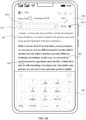
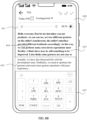
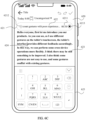
- the second text is displayed below the recording bar, the second text is embedded and displayed in the recording bar, or the second text is displayed above the virtual keyboard.
- the electronic device may adjust a location of the second text, to be specific, adjust the second text from being displayed after the first text to being displayed below the recording bar, embedded in the recording bar, or displayed above the virtual keyboard. In this way, the user can view a transcription status in real time by using the second text, and user experience can be improved.
- the first operation may be a tap operation at a location of a cursor in the diagram shown in FIG. 6A .
- the cursor in the diagram shown in FIG. 6A may be displayed, and a virtual keyboard 605 may be displayed.
- the method further includes: The electronic device displays a third interface when detecting that the second text goes beyond the first interface, where the third interface includes the first text, the second text, and a recording bar.
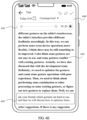
- the second text is displayed below the recording bar, the second text is embedded and displayed in the recording bar, or the second text is displayed at an upper layer of the first text.
- the second text when the second text goes beyond the first interface, the second text may be displayed below the recording bar, embedded and displayed in the recording bar, or displayed on the upper layer of the first text.
- the user can conveniently view a transcription status in real time by using the second text, and user experience can be improved.
- that the electronic device detects that the second text goes beyond the first interface includes: The electronic device detects a second operation, where the second operation is used to enable the second text to go beyond the first interface.
- the electronic device detects that an editing input focus exists on the first interface and a last line of the second text is not on the first interface.
- the second operation may be a slide operation.
- the user may slide the second text out of the first interface with the slide operation.
- the editing input focus exists on the first interface. With input of the voice signals, a quantity of transcribed texts is larger, and the second text gradually goes beyond the first interface. However, due to existence of the editing input focus, the interface does not scroll along with a text for which transcription is being performed.
- the method further includes: The electronic device detects a third operation for the first text on the first interface, where the third operation is used to trigger generation of an editing input focus.
- the electronic device maintains a location of the first interface in response to the third operation, where the first interface includes the editing input focus.
- maintaining the location of the first interface may be understood as that a page is not scrolled, but displayed content may be updated.
- the foregoing technical solution may include the following scenarios:
- Scenario 2 The second-type text is to go beyond the bottom of a screen, and the user performs an editing operation in an area of the first-type text.
- the second-type text may go beyond the first interface as a quantity of voice signal inputs increases.
- Scenario 4 The second-type text is displayed on a screen, and an input cursor exists in an area of the first-type text.
- the location of the first interface may be maintained, in other words, the location of the first interface is not affected when the second text continues to be updated. In this way, a problem that the page jumps back and forth can be avoided, and user experience can be improved.
- the third operation may be a tap operation performed by the user by using a left button of a mouse in the scenario 2, and the tap operation may trigger the editing input focus to generate a cursor. Then, as the quantity of transcribed texts increases, a page location remains unchanged, in other words, the page does not scroll, but page content may be updated with the transcribed text.
- the method when the editing input focus is not on the first interface, and the last line of the second text is displayed on the first interface, the method further includes:
- the electronic device detects a fourth operation, where the fourth operation is used to edit the first text.
- the electronic device displays a fourth interface in response to the fourth operation, where the fourth interface includes the editing input focus.
- the electronic device may jump, in response to the editing operation, to an interface on which the editing input focus is located. In this way, the user can conveniently perform the editing operation and check the editing operation.
- the fourth operation may be an editing operation in a scenario 5.
- the editing operation may be a paste operation.
- the editing operation may be used to edit the first text, so that content of the first text is updated. In this way, if the editing input focus is not on the first interface, when text editing is performed, a page may jump to the fourth interface on which the editing input focus is located.
- the method when the editing input focus is in the first text, the method further includes:
- the electronic device detects that the second text goes beyond the first interface, and detects a fifth operation, where the fifth operation is used to enable the last line of the second text to be displayed on the first interface.
- the electronic device displays the last line of the second text on the first interface in response to the fifth operation.
- the electronic device displays a fifth interface, where the fifth interface is an interface that is updated in a scrolling manner with the voice signals after the first interface.
- the fifth operation may be a gesture operation performed by the user on the first interface in a scenario 3, for example, a slide operation from bottom to top.
- the gesture operation may be used to slide a page downwards, so that the last line of the second-type text is completely displayed on the first interface. Then, as the quantity of transcribed texts increases, the page continuously slides along with the second-type text, and displays the fifth interface that is updated in the scrolling manner with the voice signals.
- the electronic device may enable, in response to a user operation, for example, the slide operation, the last line of the second text to be displayed on the first interface, and then the page may scroll with input of the voice signals.
- a user operation for example, the slide operation
- that the electronic device determines that an editing input focus exists in the first text or the second text includes:
- the electronic device determines that a cursor exists in the first text or the second text. Alternatively, the electronic device detects an operation of selecting the first text or the second text.
- the electronic device may determine, by using the cursor or whether a text selection operation is detected, whether the editing input focus exists, to perform text editing in response to the editing operation when determining that the editing input focus exists.
- this application provides an electronic device.
- the electronic device includes a display, one or more processors, one or more memories, one or more sensors, a plurality of applications, and one or more computer programs.
- the one or more computer programs are stored in the one or more memories, and the one or more computer programs include instructions.
- the electronic device is enabled to perform the method according to any one of the first aspect or the possible designs of the first aspect.
- this application further provides an electronic device.
- the electronic device includes modules/units for performing the method according to any one of the first aspect or the possible designs of the first aspect.
- the modules/units may be implemented by hardware, or may be implemented by hardware executing corresponding software.
- this application further provides a computer-readable storage medium.
- the computer-readable storage medium stores instructions. When the instructions are run on an electronic device, the electronic device is enabled to perform the method according to any one of the first aspect and the possible designs of the first aspect.
- this application further provides a computer program product.
- the computer program product runs on an electronic device, the electronic device is enabled to perform the method according to any one of the first aspect and the possible designs of the first aspect in embodiments of this application.
- an application program in embodiments of this application is a software program that can implement one or more specific functions.
- a plurality of applications may be installed in an electronic device.
- the plurality of applications are a camera application, a short messaging service message application, an email application, a video application, a music application, and the like.
- An application mentioned below may be an application installed before the electronic device is delivered from a factory, or may be an application downloaded from a network or obtained from another electronic device by a user in a process of using the electronic device.
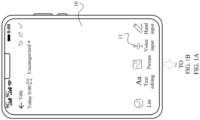
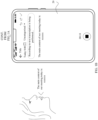
- FIG. 1A and FIG. 1B are a diagram of an application scenario according to an embodiment of this application.
- a user opens a notepad application program on a mobile phone, for example, an interface 10 shown in the figure; and then the user may tap a "Voice input" button 11 on the interface 10.
- a sound of the user may be recorded and a recording may be transcribed into a text, for example, an interface 20 shown in the figure.
- embodiments of this application provide a text editing method.
- a user can simultaneously edit a transcribed text in a recording process, and this improves editing efficiency of recording-to-text transcription and improves user experience.
- the text editing method provided in embodiments of this application is applicable to any electronic device that has a display and a recording function and that can transcribe a recording into a text, for example, a mobile phone, a tablet computer, a wearable device (for example, a watch, a band, a smart helmet, or smart glasses), a vehicle-mounted device, an augmented reality (augmented reality, AR)/virtual reality (virtual reality, VR) device, a notebook computer, an ultra-mobile personal computer (ultra-mobile personal computer, UMPC), a netbook, or a personal digital assistant (personal digital assistant, PDA).
- a mobile phone for example, a mobile phone, a tablet computer, a wearable device (for example, a watch, a band, a smart helmet, or smart glasses), a vehicle-mounted device, an augmented reality (augmented reality, AR)/virtual reality (virtual reality, VR) device, a notebook computer, an ultra-mobile personal computer (ultra-mobile personal computer, UMPC),
- the electronic device in embodiments of this application may be a foldable electronic device, for example, a foldable mobile phone or a foldable tablet computer. This is not limited in this application.
- the electronic device includes but is not limited to an electronic device with iOS ® , Android ® , Microsoft ® , HarmonyOS ® , or another operating system.
- the following uses a mobile phone 100 as an example to describe a structure of the electronic device.
- the mobile phone 100 may include a processor 110, an external memory interface 120, an internal memory 121, a universal serial bus (universal serial bus, USB) interface 130, a charging management module 140, a power management module 141, a battery 142, an antenna 1, an antenna 2, a mobile communication module 150, a wireless communication module 160, an audio module 170, a speaker 170A, a receiver 170B, a microphone 170C, a headset jack 170D, a sensor module 180, a button 190, a motor 191, an indicator 192, a camera 193, a display 194, a subscriber identity module (subscriber identity module, SIM) card interface 195, and the like.
- a processor 110 an external memory interface 120, an internal memory 121, a universal serial bus (universal serial bus, USB) interface 130, a charging management module 140, a power management module 141, a battery 142, an antenna 1, an antenna 2, a mobile communication module 150, a wireless communication module 160, an audio module 170,
- the sensor module 180 may include a pressure sensor 180A, a gyroscope sensor 180B, a barometric pressure sensor 180C, a magnetic sensor 180D, an acceleration sensor 180E, a distance sensor 180F, an optical proximity sensor 180G, a fingerprint sensor 180H, a temperature sensor 180J, a touch sensor 180K, an ambient light sensor 180L, a bone conduction sensor 180M, and the like.
- the processor 110 may include one or more processing units.
- the processor 110 may include an application processor (application processor, AP), a modem processor, a graphics processing unit (graphics processing unit, GPU), an image signal processor (image signal processor, ISP), a controller, a memory, a video codec, a digital signal processor (digital signal processor, DSP), a baseband processor, and/or a neural-network processing unit (neural-network processing unit, NPU).
- Different processing units may be independent components, or may be integrated into one or more processors.
- the controller may be a nerve center and a command center of the mobile phone 100. The controller may generate an operation control signal based on an instruction operation code and a time sequence signal, to complete control of instruction fetching and instruction execution.
- a memory may be further disposed in the processor 110, and is configured to store instructions and data.
- the memory in the processor 110 is a cache.
- the memory may store instructions or data that has just been used or is cyclically used by the processor 110. If the processor 110 needs to use the instructions or the data again, the processor 110 may directly invoke the instructions or the data from the memory. This avoids repeated access, reduces waiting time of the processor 110, and improves system efficiency.
- the USB interface 130 is an interface that complies with a USB standard specification, and may be specifically a mini USB interface, a micro USB interface, a USB type C interface, or the like.
- the USB interface 130 may be configured to connect to a charger to charge the mobile phone 100, and may be configured to transmit data between the mobile phone 100 and a peripheral device.
- the charging management module 140 is configured to receive a charging input from a charger.
- the power management module 141 is configured to connect to the battery 142, the charging management module 140, and the processor 110.
- the power management module 141 receives an input from the battery 142 and/or the charging management module 140, and supplies power to the processor 110, the internal memory 121, an external memory, the display 194, the camera 193, the wireless communication module 160, and the like.
- a wireless communication function of the mobile phone 100 may be implemented through the antenna 1, the antenna 2, the mobile communication module 150, the wireless communication module 160, the modem processor, the baseband processor, and the like.
- the antenna 1 and the antenna 2 are configured to transmit and receive electromagnetic wave signals.
- Each antenna in the mobile phone 100 may be configured to cover one or more communication frequency bands. Different antennas may be further multiplexed, to improve antenna utilization.
- the antenna 1 may be multiplexed as a diversity antenna in a wireless local area network.
- the antenna may be used in combination with a tuning switch.
- the mobile communication module 150 may provide a solution that is applied to the mobile phone 100 and that is for wireless communication including 2G/3G/4G/5G or the like.
- the mobile communication module 150 may include at least one filter, a switch, a power amplifier, a low noise amplifier (low noise amplifier, LNA), and the like.
- the mobile communication module 150 may receive an electromagnetic wave through the antenna 1, perform processing such as filtering and amplification on the received electromagnetic wave, and transmit the electromagnetic wave to the modem processor for demodulation.
- the mobile communication module 150 may further amplify a signal modulated by the modem processor, and the amplified signal is converted into an electromagnetic wave through the antenna 1 for radiation.
- at least some functional modules of the mobile communication module 150 may be disposed in the processor 110.
- at least some functional modules of the mobile communication module 150 may be disposed in a same component as at least some modules of the processor 110.
- the wireless communication module 160 may provide a solution that is applied to the mobile phone 100 and that is for wireless communication including a wireless local area network (wireless local area network, WLAN) (for example, a wireless fidelity (wireless fidelity, Wi-Fi) network), Bluetooth (Bluetooth, BT), a global navigation satellite system (global navigation satellite system, GNSS), frequency modulation (frequency modulation, FM), a near field communication (near field communication, NFC) technology, an infrared (infrared, IR) technology, and the like.
- the wireless communication module 160 may be one or more components integrating at least one communication processing module.
- the wireless communication module 160 receives an electromagnetic wave through the antenna 2, performs frequency modulation and filtering processing on an electromagnetic wave signal, and sends a processed signal to the processor 110.
- the wireless communication module 160 may further receive a to-be-sent signal from the processor 110, perform frequency modulation and amplification on the signal, and convert the signal into an electromagnetic wave through the antenna 2 for radiation.
- the antenna 1 of the mobile phone 100 is coupled to the mobile communication module 150, and the antenna 2 is coupled to the wireless communication module 160, so that the mobile phone 100 may communicate with a network and another device by using a wireless communication technology.
- the wireless communication technology may include a global system for mobile communications (global system for mobile communications, GSM), a general packet radio service (general packet radio service, GPRS), code division multiple access (code division multiple access, CDMA), wideband code division multiple access (wideband code division multiple access, WCDMA), time-division code division multiple access (time-division code division multiple access, TD-SCDMA), long term evolution (long term evolution, LTE), a 5th generation (5th generation, 5G) mobile communication system, future communication systems such as a 6th generation (6th generation, 6G) system, BT, a GNSS, a WLAN, NFC, FM, an IR technology, and/or the like.
- GSM global system for mobile communications
- GPRS general packet radio service
- code division multiple access code division
- the GNSS may include a global positioning system (global positioning system, GPS), a global navigation satellite system (global navigation satellite system, GLONASS), a BeiDou navigation satellite system (BeiDou navigation satellite system, BDS), a quasi-zenith satellite system (quasi-zenith satellite system, QZSS), and/or a satellite based augmentation system (satellite based augmentation system, SBAS).
- GPS global positioning system
- GLONASS global navigation satellite system
- BeiDou navigation satellite system BeiDou navigation satellite system
- BDS BeiDou navigation satellite system
- QZSS quasi-zenith satellite system
- SBAS satellite based augmentation system
- the display 194 is configured to display a display interface of an application, and the like.
- the display 194 includes a display panel.
- the display panel may be a liquid crystal display (liquid crystal display, LCD), an organic light-emitting diode (organic light-emitting diode, OLED), an active-matrix organic light-emitting diode (active-matrix organic light-emitting diode, AMOLED), a flexible light-emitting diode (flex light-emitting diode, FLED), a mini-LED, a micro-LED, a micro-OLED, a quantum dot light-emitting diode (quantum dot light-emitting diode, QLED), or the like.
- the mobile phone 100 may include one or N displays 194, where N is a positive integer greater than 1.
- the display 194 may be configured to display an application interface, for example, may display an interface of recording-to-text transcription. It should be understood that the display 194 may be a touchable display, and a user may directly perform a tap operation, a touch and hold operation, a slide operation, or the like on the display.
- the camera 193 is configured to capture a static image or a video.
- the camera 193 may include a front-facing camera and a rear-view camera.
- the internal memory 121 may be configured to store computer-executable program code.
- the executable program code includes instructions.
- the processor 110 runs the instructions stored in the internal memory 121, to perform various function applications and data processing of the mobile phone 100.
- the internal memory 121 may include a program storage area and a data storage area.
- the program storage area may store an operating system, software code of at least one application program (for example, an iQIYI application or a WeChat application), and the like.
- the data storage area may store data (for example, an image or a video) and the like generated in a process of using the mobile phone 100.
- the internal memory 121 may include a highspeed random access memory, and may further include a non-volatile memory, for example, at least one magnetic disk storage component, a flash memory component, or a universal flash storage (universal flash storage, UFS).
- the external memory interface 120 may be configured to connect to an external storage card, for example, a micro SD card, to extend a storage capability of the mobile phone 100.
- the external storage card communicates with the processor 110 through the external memory interface 120, to implement a data storage function. For example, files such as a picture and a video are stored in the external storage card.
- the mobile phone 100 may implement an audio function, for example, music playing and recording, through the audio module 170, the speaker 170A, the receiver 170B, the microphone 170C, the headset jack 170D, the application processor, and the like.
- the mobile phone 100 may collect, through the microphone 170C, a sound made by the user, and record the collected sound.
- the pressure sensor 180A is configured to sense a pressure signal, and can convert the pressure signal into an electrical signal.
- the pressure sensor 180A may be disposed on the display 194.
- the gyroscope sensor 180B may be configured to determine a motion posture of the mobile phone 100. In some embodiments, angular velocities of the mobile phone 100 around three axes (that is, an x-axis, a y-axis, and a z-axis) may be determined through the gyroscope sensor 180B. The gyroscope sensor 180B may be configured to determine a motion posture of the mobile phone 100. In some embodiments, angular velocities of the mobile phone 100 around three axes (that is, an x-axis, a y-axis, and a z-axis) may be determined through the gyroscope sensor 180B.
- the gyroscope sensor 180B may be configured to implement image stabilization during photographing. For example, when a shutter is pressed, the gyroscope sensor 180B detects an angle at which the mobile phone 100 shakes, and calculates, based on the angle, a distance that needs to be compensated by a lens module, so that a lens cancels shaking of the mobile phone 100 through reverse motion, to implement image stabilization.
- the gyroscope sensor 180B may be further used in scenarios of navigation and motion sensing gaming.
- the barometric pressure sensor 180C is configured to measure barometric pressure.
- the mobile phone 100 calculates an altitude based on a value of the barometric pressure measured by the barometric pressure sensor 180C, to assist in positioning and navigation.
- the magnetic sensor 180D includes a Hall sensor.
- the mobile phone 100 may detect opening and closing of a flip leather case through the magnetic sensor 180D.
- the mobile phone 100 may detect opening and closing of a flip cover through the magnetic sensor 180D. Further, features such as automatic unlocking through flipping are set based on a detected opening/closing state of the leather case or the flip cover.
- the acceleration sensor 180E may detect magnitudes of accelerations of the mobile phone 100 in various directions (usually along the three axes). When the mobile phone 100 is stationary, a magnitude and a direction of gravity may be detected. The acceleration sensor 180E may be further configured to identify a posture of the electronic device, and is used in applications such as landscape/portrait orientation switching and a pedometer.
- the distance sensor 180F is configured to measure a distance.
- the mobile phone 100 may measure the distance by using infrared or lasers. In some embodiments, in a photographing scenario, the mobile phone 100 may use the distance sensor 180F to measure a distance to implement fast focusing.
- the optical proximity sensor 180G may include, for example, a light-emitting diode (LED) and an optical detector, for example, a photodiode.
- the light-emitting diode may be an infrared light-emitting diode.
- the mobile phone 100 emits infrared light to the outside through the light-emitting diode.
- the mobile phone 100 uses the photodiode to detect infrared reflected light from a nearby object.
- the mobile phone 100 may detect, through the optical proximity sensor 180G, whether the user holds the mobile phone 100 close to an ear to make a call, to automatically turn off the screen to save power.
- the optical proximity sensor 180G may be further used in a leather case mode or a pocket mode to automatically unlock or lock the screen.
- the ambient light sensor 180L is configured to sense ambient light brightness.
- the mobile phone 100 may adaptively adjust brightness of the display 194 based on the sensed ambient light brightness.
- the ambient light sensor 180L may be further configured to automatically adjust a white balance during photographing.
- the ambient light sensor 180L may further cooperate with the optical proximity sensor 180G to detect whether the mobile phone 100 is in a pocket, to implement mistouch prevention.
- the fingerprint sensor 180H is configured to collect a fingerprint.
- the mobile phone 100 may use a feature of the collected fingerprint to implement fingerprint-based unlocking, application lock access, fingerprint-based photographing, fingerprint-based call answering, and the like.
- the temperature sensor 180J is configured to detect a temperature.
- the mobile phone 100 executes a temperature processing policy based on the temperature detected by the temperature sensor 180J. For example, when the temperature reported by the temperature sensor 180J exceeds a threshold, the mobile phone 100 lowers performance of a processor near the temperature sensor 180J, to reduce power consumption and implement thermal protection.
- the mobile phone 100 heats the battery 142, to avoid abnormal shutdown of the mobile phone 100 caused by a low temperature.
- the mobile phone 100 boosts an output voltage of the battery 142, to avoid abnormal shutdown caused by a low temperature.
- the touch sensor 180K is also referred to as a "touch panel”.
- the touch sensor 180K may be disposed on the display 194, and the touch sensor 180K and the display 194 form a touchscreen.
- the touchscreen is also referred to as a "touch screen”.
- the touch sensor 180K is configured to detect a touch operation performed on or near the touch sensor.
- the touch sensor may transfer the detected touch operation to the application processor to determine a touch event type.
- a visual output related to the touch operation may be provided through the display 194.
- the touch sensor 180K may alternatively be disposed on a surface of the mobile phone 100 at a location different from that of the display 194.
- the mobile phone 100 may first determine whether a current scenario is a dual-focus input scenario.
- the touch sensor 180K may detect an editing operation of the user on the display, for example, an operation of deleting a text.
- the mobile phone 100 edits, in response to the editing operation, a text for which transcription is completed, to perform, while performing voice-to-text transcription, an editing operation on the text for which transcription is completed.
- Generation of the user operation input focus may be triggered by a tap operation of the user on the display, for example, triggered when detecting a tap operation or a touch and hold operation of the user at a specific location in the text for which transcription is completed.
- the bone conduction sensor 180M may obtain a vibration signal.
- the bone conduction sensor 180M may obtain a vibration signal of a vibration bone of a human vocal-cord part.
- the bone conduction sensor 180M may also be in contact with a human pulse, and receive a blood pressure beating signal.
- the button 190 includes a power button, a volume button, and the like.
- the button 190 may be a mechanical button, or may be a touch button.
- the mobile phone 100 may receive a button input, and generate a button signal input related to a user setting and function control of the mobile phone 100.
- the motor 191 may generate a vibration prompt.
- the motor 191 may be configured to provide an incoming call vibration prompt or a touch vibration feedback. For example, touch operations performed on different applications (for example, photographing and audio playing) may correspond to different vibration feedback effect.
- the indicator 192 may be an indicator light, and may be configured to indicate a charging status and a power change, or may be configured to indicate a message, a missed call, a notification, and the like.
- the SIM card interface 195 is configured to connect to a SIM card. The SIM card may be inserted into the SIM card interface 195 or removed from the SIM card interface 195, to implement contact with or separation from the mobile phone 100.
- the mobile phone may further include more or fewer components than those shown in the figure, some components may be combined, some components may be split, or different component arrangements may be used.
- a software system of the mobile phone 100 may use a layered architecture, including an event-driven architecture, a micro kernel architecture, a micro service architecture, or a cloud architecture.
- an Android system with a layered architecture is used as an example to describe the software structure of the mobile phone 100. It should be understood that the system in embodiments of this application may alternatively be a HarmonyOS system. This is not limited in this application.
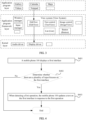
- FIG. 3 is a data flow diagram based on a software structure according to an embodiment of this application.
- software is divided into several layers, and each layer has a clear role and task. The layers communicate with each other through a software interface.
- an Android system is divided into five layers: an application program layer, an application program framework layer, Android runtime (Android runtime, ART) and native C/C++ libraries, a hardware abstraction layer (hardware abstract layer, HAL), and a kernel layer from top to bottom.
- the following uses the application program layer, the application program framework layer, and the kernel layer as an example to describe a data flow process in this embodiment of this application.
- the application program layer may include a series of application program packages. As shown in FIG. 3 , the application program packages may include application programs such as Gallery, Calendar, Maps, Videos, and Notepad.
- the application program framework layer provides an application programming interface (application programming interface, API) and a programming framework for the application programs at the application program layer.
- the application program framework layer includes some predefined functions.
- the application program framework layer may include a window manager, an input manager, and a view system.
- the application program framework layer may further include a content provider, a resource manager, a notification manager, an activity manager, and the like.
- the window manager provides a window manager service (window manager service, WMS).
- WMS window manager service
- the WMS may be used for window management, window animation management, surface management, and is used as a transit station of an input system.
- the view system includes visible controls, such as a text control (TextView), an edit text control (EditText), an image control (ImageView), a button (Button), and a list (List).
- the view system may be configured to construct an application program.
- a display interface may include one or more views.
- a display interface including a short messaging service message notification icon may include a text display view and a picture display view.
- Text View is used to display text content to a user, and is not editable.
- the EditText control is used to allow the user to enter text content, that is, EditText is editable.
- the input manager may provide an input manager service (Input Manager Service, IMS).
- IMS may be used for management of a system input, for example, a touchscreen input, a key input, or a sensor input.
- the IMS obtains an event from an input device node and allocates the event to an appropriate window through interaction with the WMS.
- the resource manager provides various resources such as a localized character string, an icon, a picture, a layout file, and a video file for an application program.
- the content provider is configured to store and obtain data, and enable the data to be accessed by an application program.
- the data may include a video, an image, audio, calls that are made and received, a browsing history and a browsing bookmark, an address book, and the like.
- the notification manager enables an application program to display notification information in a status bar, and may be configured to convey a notification message.
- the notification information may automatically disappear after a short pause without requiring a user interaction.
- the notification manager is configured to notify download completion and provide a message prompt.
- the notification manager may alternatively provide a notification that appears in a top status bar of the system in a form of a graph or a scroll bar text, for example, a notification of an application program running in a background, or may provide a notification that appears on a screen in a form of a dialog window.
- text information is prompted in the status bar, a prompt tone is made, an electronic device vibrates, or an indicator light blinks.
- the activity manager may provide an activity manager service (Activity Manager Service, AMS).
- AMS may be used to start, switch, and schedule system components (for example, an activity, a service, a content provider, and a broadcast receiver), and manage and schedule application processes.
- the kernel layer is a layer between hardware and software.
- the kernel layer includes at least a display driver, a camera driver, an audio driver, and a sensor driver.
- the mobile phone 100 shown in FIG. 2 is used as an example for description.
- an editing input focus needs to be newly added on an interface in addition to a voice input focus.
- the newly added editing input focus may cause the following several technical problems:
- the following embodiment is provided in this application to resolve the existing problems one by one, so that two input focuses can exist simultaneously on an interface of recording-to-text transcription, and text editing can be performed while recording-to-text transcription is performed.
- FIG. 4 is a flowchart of a text editing method according to an embodiment of this application. As shown in FIG. 4 , the method may include the following steps: S401: A mobile phone 100 displays a first interface.
- the first interface is an interface of real-time recording-to-text transcription.
- the first interface may include a first-type text and a second-type text.
- the first-type text is a text for which transcription is completed by artificial intelligence (artificial intelligence, AI) and on which correction is not subsequently performed by the AI.
- the second-type text is a text for which transcription is being performed by the AI, or a text for which transcription is completed and on which semantic correction may be subsequently performed by the AI.
- the two types of texts may be distinguished by using different colors on the interface. For example, a color of a text for which transcription is completed is black, and a color of a text for which transcription is being performed is gray.
- a text for which transcription is completed is a text in a bold font
- a text for which transcription is being performed is a text in a non-bold font
- the text for which transcription is completed is a complete sentence
- the text for which transcription is being performed may be an incomplete sentence. For example, there is an ellipsis at the end of the text for which transcription is being performed.
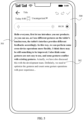
- the mobile phone 100 displays an interface 500 shown in FIG. 5
- the interface 500 may include a first-type text 501 and a second-type text 502.
- the first-type text is a text in the bold font
- the second-type text is a text in the non-bold font.
- S402 The mobile phone 100 determines whether there are a plurality of input focuses on the first interface. If there are a plurality of input focuses on the first interface, S403 continues to be performed. If there are not a plurality of input focuses, the procedure ends.
- the mobile phone 100 may determine, based on a quantity of cursors existing on the first interface, whether there are a plurality of input focuses. If the quantity of cursors is 1, it indicates that there is one input focus on the first interface. If the quantity of cursors is 2, it indicates that there are two input focuses on the first interface.
- the mobile phone 100 when the mobile phone 100 detects, on the first interface, an operation of selecting a text, for example, a touch and hold operation or a double-click operation performed at a specific location on the first interface by using a left button of a mouse, the mobile phone 100 may also determine that there is an input focus on the first interface. In other words, even if the touch and hold operation or the double-click operation does not trigger a continuously blinking cursor, because a text is selected with the touch and hold operation or the double-click operation, a user may perform operations such as deletion based on the selected text. Therefore, the touch and hold operation or the double-click operation may also trigger the input focus.
- a text for example, a touch and hold operation or a double-click operation performed at a specific location on the first interface by using a left button of a mouse
- the mobile phone 100 may also determine that there is an input focus on the first interface. In other words, even if the touch and hold operation or the double-click operation does not trigger a continuously blinking cursor,
- the mobile phone 100 is collecting a sound signal of the user, and is transcribing the collected sound signal into a text, it may be considered that there is a voice input focus. Therefore, it is only necessary to determine whether there is another input focus.
- the mobile phone 100 may determine that a current input scenario is a dual-focus input scenario. Then, when a quantity of input focuses is 2, a cursor or a pop-up menu may not be cleared, in other words, two input focuses are allowed to exist simultaneously. This resolves the problem 1 in the foregoing technical problems.
- the first operation may be an editing operation of the user on the text on the first interface, for example, an addition, deletion, or modification operation. It should be noted that operations performed by using shortcut keys such as ctrl+v (paste) and ctrl+x (cut) may also be considered as editing operations.
- the second-type text is a text for which transcription is being performed by the AI, or a text for which transcription is completed and on which semantic correction may be subsequently performed by the AI.
- the first operation may be an editing operation for the first-type text.
- the first operation may alternatively be an editing operation for the second-type text.
- text editing can be performed while real-time recording-to-text transcription is performed, so that text editing efficiency can be improved, and user experience can be improved.
- Type 1 A recording bar and the second-type text are both displayed on the top of a page.
- the mobile phone displays an interface 600
- the interface 600 may include a recording bar 601, a second-type text 602, a first-type text 603, a cursor 604, and a virtual keyboard 605.
- the cursor 604 appears after the user taps a location shown in the figure in the first-type text 603 (a text for which transcription is completed).
- the second-type text 602 and the recording bar 601 may be displayed above the first-type text 603.
- the recording bar 601 may include voice signal collection duration 6011, an audio status bar 6012, and a recording stop button 6013.
- a dashed-line box in which the audio status bar 6012 is located is merely for illustration. During actual product implementation, the dashed-line box is not displayed.
- Type 2 The second-type text is displayed above a virtual keyboard.
- the mobile phone displays an interface 610
- the interface 610 may include a recording bar 611, a second-type text 612, a first-type text 613, a cursor 614, and a virtual keyboard 615.
- the second-type text 612 may be displayed above the virtual keyboard 615.
- the cursor 614 appears after the user taps a location shown in the figure in the first-type text 613. It should be noted that a part of the first-type text that is not completely displayed may be folded, and the first-type text may be continuously updated with recognition of the second-type text.
- Type 3 The second-type text is embedded and displayed in a recording bar.
- the mobile phone displays an interface 620
- the interface 620 may include a recording bar 621, a second-type text 622, a first-type text 623, a cursor 624, and a virtual keyboard 625.
- the second-type text 622 may be embedded and displayed in the recording bar 621.
- the recording bar 621 may include voice signal collection duration 6211, an audio status bar 6212, and a recording stop button 6213. It should be understood that, through comparison of the audio status bar 6012 shown in FIG. 6A and the audio status bar 6212 shown in FIG. 6C , the audio status bar 6012 may be understood as an original audio status bar, and the audio status bar 6212 may be understood as a remaining status bar after a part of locations are occupied by a text for which transcription is being performed.
- the second-type text when the second-type text is embedded and displayed in the recording bar, the second-type text may occupy a part of locations of an original audio status bar.
- the second-type text 622 may be displayed between the audio status bar 6212 and the voice signal collection duration 6211.
- the figure is merely an example, and the second-type text may alternatively be displayed at another location. All solutions may fall within the protection scope of this application provided that the second-type text is embedded and displayed in the recording bar (for example, occupies a part of locations of the original audio status bar).
- the second-type text embedded and displayed in the recording bar may be a part of the second-type text.
- the second-type text has 30 words, and 10 words may be embedded and displayed.
- eight words or the like may alternatively be embedded and displayed. This is not limited in this application.
- the user may trigger displaying of the virtual keyboard on a transcription interface with a tap operation or the like.
- a display location of the second-type text on the transcription interface changes.
- the display location of the second-type text on the transcription interface may also change.
- that the second-type text goes beyond the bottom of the screen may include the following two cases:
- the mobile phone displays an interface 630
- the interface 630 may include a recording bar 631, a second-type text 632, and a first-type text 633.
- the second-type text 632 has gone beyond the current screen, and the second-type text 632 may be displayed below the recording bar.
- the second-type text 632 may be displayed at an upper layer of the first-type text 633, in other words, cover the first-type text 633.
- the second-type text 632 may alternatively not cover the first-type text 633, for example, may be displayed in a display manner of the second-type text 602 and the first-type text 603 shown in FIG. 6A .
- the mobile phone displays an interface 640, and the interface 640 may include a recording bar 641, a second-type text 642, and a first-type text 643.
- the second-type text 642 has gone through the current screen, and the second-type text 642 may be displayed at the bottom of the screen.
- the second-type text 642 may be displayed at an upper layer of the first-type text 643, in other words, cover the first-type text 643.
- the mobile phone displays an interface 650
- the interface 650 may include a recording bar 651, a second-type text 652, and a first-type text 653.
- the recording bar 651 may include voice signal collection duration 6511, an audio status bar 6512, and a recording stop button 6513.
- the second-type text 652 has gone through the current screen.
- the second-type text 652 may be displayed between the audio status bar 6512 and the voice signal collection duration 6511.
- the figure is merely an example. All solutions may fall within the protection scope of this application provided that the second-type text 652 is embedded and displayed in the recording bar 651.
- the user may intuitively view a transcription status. For example, when the second-type text is displayed, the user may determine that a voice signal is being transcribed into a text.
- Scenario 1 The second-type text is to go beyond the bottom of the screen.
- the mobile phone may display an interface 700 shown in (a) in FIG. 7A .
- the interface 700 may include a first-type text 701 and a second-type text 702.
- the second-type text 702 temporarily does not go beyond the screen of the mobile phone.
- a page may scroll along with a text for which transcription is being performed.
- the interface 710 may include transcription time prompt information 711 (for example, recording-to-text transcription is performed for 50 seconds), a first-type text 712, and a second-type text 713.
- transcription time prompt information 711 for example, recording-to-text transcription is performed for 50 seconds
- first-type text 712 for example, a first-type text 712
- second-type text 713 With passage of time of the recording-to-text transcription, the second-type text 701 in the interface 700 is updated to the first-type text in the interface 710, and a last line of the second-type text is on the screen, in other words, the last line of the second-type text does not go beyond a screen area.
- Scenario 2 The second-type text is to go beyond the bottom of the screen, and the user performs an editing operation in an area of the first-type text.
- the user may tap in the area of the first-type text or enter content in the area of the first-type text by using the keyboard.
- FIG. 7B it is assumed that the user performs, by using the left button of the mouse, a click operation at a location shown in an interface 720 shown in (a) in FIG. 7B , and then a cursor 721 may appear at the location shown in the figure.
- a location of a current page may be maintained, and is not adjusted even if the second-type text is continuously refreshed.
- an interface of the mobile phone 100 may be updated to an interface 730 shown in (b) in FIG. 7B .
- a first-type text in the interface 730 is more than a first-type text in the interface 720.
- a virtual keyboard does not appear if a tap operation is performed by using a finger or a click operation is performed by using a mouse.
- a click operation is performed by using the mouse.
- Scenario 3 The second-type text has gone beyond the bottom of the screen, and an input cursor exists in an area of the first-type text.
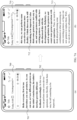
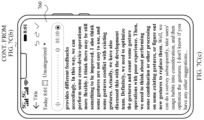
- the mobile phone 100 displays an interface 740 shown in FIG. 7C(a) , and a second-type text in the interface 740 has gone beyond the bottom of the screen. It is assumed that the mobile phone 100 detects a gesture operation of the user on the interface 740, for example, a slide operation from bottom to top shown in the figure. In this case, the mobile phone 100 may slide a page downwards in response to the slide operation until the second-type text is completely displayed on the page. For example, the mobile phone 100 displays an interface 750 shown in FIG. 7C(b) . Then, as a quantity of transcribed texts increases, the page continuously slides along with the second-type text. For example, after a period of time of transcription, the mobile phone 100 displays an interface 760 shown in FIG. 7C(c) .
- the page may scroll with voice inputs.
- Scenario 4 The second-type text is displayed on the screen, and an input cursor exists in an area of the first-type text.
- Scenario 5 The second-type text is displayed on the screen, and an input cursor exists in an area of the first-type text that goes beyond the screen.
- the current page may slide back to a page on which the location of the cursor is located, and a location of the page on which the location of the cursor is located is maintained and is not affected by update of content of the second-type text. In this way, the user can conveniently perform an editing operation and check the editing operation.
- Scenario 6 The second-type text is displayed on the screen, and the first-type text goes beyond the top of the screen.
- the first-type text goes beyond the current page, and the page slides downwards with voice inputs.
- the user slides the page, for example, slides the page from top to bottom, and therefore a last line of the second-type text goes beyond the bottom of the screen, a page location after sliding remains unchanged and is not adjusted even if the second-type text is continuously refreshed.
- page representation in this scenario is the same as page representation in the scenario 2 and the scenario 4.
- scenario 1 and the scenario 6 may be understood as single-focus input scenarios, and other scenarios are dual-focus input scenarios.
- a color of the second-type text may be set to light gray, and a tapped text location (index) may be calculated based on a tap location in an editing trigger (onTouch) event. If the index belongs to the light gray text area, the touch event is canceled.
- the mobile phone 100 may determine, based on a tap location, whether tapping is performed in an area of the second-type text. If the tapping is performed in the area of the second-type text, the mobile phone 100 does not respond to a tap event, in other words, the user is not allowed to perform an editing operation in the area of the second-type text.
- the tap event may alternatively be responded to, in other words, the user is allowed to perform an editing operation in the area of the second-type text. This is not limited in this application.
- the electronic device may include a hardware structure and/or a software module, and the foregoing functions are implemented in a form of the hardware structure, the software module, or a combination of the hardware structure and the software module. Whether a specific function in the foregoing functions is performed by using the hardware structure, the software module, or the combination of the hardware structure and the software module depends on particular applications and design constraints of the technical solutions.
- the electronic device may be an electronic device with a display.
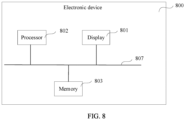
- the electronic device 800 includes the display 801, one or more processors 802, one or more memories 803, one or more sensors 804 (not shown in the figure), a plurality of applications 805 (not shown in the figure), and one or more computer programs 806 (not shown in the figure).
- the foregoing components may be connected through one or more communication buses 807.
- the display 801 is configured to display an interface of recording-to-text transcription.
- the memory 803 stores one or more computer programs, and the one or more computer programs include instructions.
- the processor 802 invokes the instructions stored in the memory 803, to enable the electronic device 800 to perform the method in the foregoing embodiment.
- the electronic device 800 when the instructions are invoked and executed by the one or more processors 802, the electronic device 800 is enabled to perform the following steps: collecting voice signals in real time; displaying a first interface, where the first interface includes a first text and a second text, the first text is a text that is transcribed from a voice signal by artificial intelligence AI and on which semantic correction is completed by the AI, the second text is a text on which semantic correction is not completed by the AI, and collection time of a voice signal corresponding to the second text is later than collection time of the voice signal corresponding to the first text; determining that an editing input focus exists in the first text or the second text; and detecting an editing operation for the first text or the second text, and editing the first text or the second text in response to the editing operation.
- the processor 802 may be a general-purpose processor, a digital signal processor, an application-specific integrated circuit, a field programmable gate array or another programmable logic device, a discrete gate or transistor logic device, or a discrete hardware component, and may implement or perform the method, steps, and logical block diagrams disclosed in embodiments of this application.
- the general-purpose processor may be a microprocessor or any conventional processor or the like.
- the steps of the method disclosed with reference to embodiments of this application may be directly performed by a hardware processor, or may be performed by using a combination of hardware in the processor and a software module.
- the software module may be located in the memory 803.
- the processor 802 reads program instructions from the memory 803, and completes the steps of the foregoing method in combination with the hardware of the processor.
- the memory 803 may be a non-volatile memory, for example, a hard disk drive (hard disk drive, HDD) or a solid-state drive (solid-state drive, SSD), or may be a volatile memory (volatile memory), for example, a RAM.
- the memory may alternatively be any other medium that can be used to carry or store expected program code in an instruction form or a data structure form and that can be accessed by a computer.
- the memory is not limited thereto.
- the memory in this embodiment of this application may alternatively be a circuit or any other apparatus that can implement a storage function, and is configured to store instructions and/or data.
- this application further provides a computer storage medium.
- the computer storage medium stores a computer program.
- the computer program is executed by a computer, the computer is enabled to perform the method provided in the foregoing embodiment.
- An embodiment of this application further provides a computer program product including instructions.
- the computer program product runs on a computer, the computer is enabled to perform the method provided in the foregoing embodiment.
- Embodiments of this application are described with reference to the flowcharts and/or block diagrams of the method, the device (system), and the computer program product according to embodiments of this application. It should be understood that instructions may be used to implement each process and/or each block in the flowcharts and/or the block diagrams and a combination of a process and/or a block in the flowcharts and/or the block diagrams.
- These instructions may be provided for a general-purpose computer, a dedicated computer, an embedded processor, or a processor of another programmable data processing device to generate a machine, so that the instructions executed by the computer or the processor of the another programmable data processing device generate an apparatus for implementing a specified function in one or more processes in the flowcharts and/or in one or more blocks in the block diagrams.
- These computer program instructions may alternatively be stored in a computer-readable memory that can instruct a computer or another programmable data processing device to work in a specific manner, so that the instructions stored in the computer-readable memory generate an artifact that includes an instruction apparatus.
- the instruction apparatus implements a specified function in one or more processes in the flowcharts and/or in one or more blocks in the block diagrams.
- These computer program instructions may alternatively be loaded onto a computer or another programmable data processing device, so that a series of operation steps are performed on the computer or the another programmable device, thereby generating computer-implemented processing. Therefore, the instructions executed on the computer or the another programmable device provide steps for implementing a specified function in one or more processes in the flowcharts and/or in one or more blocks in the block diagrams.
Landscapes
- Engineering & Computer Science (AREA)
- Theoretical Computer Science (AREA)
- General Engineering & Computer Science (AREA)
- Physics & Mathematics (AREA)
- Human Computer Interaction (AREA)
- General Physics & Mathematics (AREA)
- Audiology, Speech & Language Pathology (AREA)
- Health & Medical Sciences (AREA)
- Computational Linguistics (AREA)
- General Health & Medical Sciences (AREA)
- Multimedia (AREA)
- Artificial Intelligence (AREA)
- Acoustics & Sound (AREA)
- Telephone Function (AREA)
- User Interface Of Digital Computer (AREA)
- Document Processing Apparatus (AREA)
Applications Claiming Priority (2)
| Application Number | Priority Date | Filing Date | Title |
|---|---|---|---|
| CN202210446912.6A CN116992829A (zh) | 2022-04-26 | 2022-04-26 | 一种文本编辑方法及电子设备 |
| PCT/CN2023/089051 WO2023207682A1 (zh) | 2022-04-26 | 2023-04-18 | 一种文本编辑方法及电子设备 |
Publications (2)
| Publication Number | Publication Date |
|---|---|
| EP4485152A1 true EP4485152A1 (de) | 2025-01-01 |
| EP4485152A4 EP4485152A4 (de) | 2025-06-18 |
Family
ID=88517555
Family Applications (1)
| Application Number | Title | Priority Date | Filing Date |
|---|---|---|---|
| EP23795115.7A Pending EP4485152A4 (de) | 2022-04-26 | 2023-04-18 | Textbearbeitungsverfahren und elektronische vorrichtung |
Country Status (4)
| Country | Link |
|---|---|
| US (1) | US20250053727A1 (de) |
| EP (1) | EP4485152A4 (de) |
| CN (1) | CN116992829A (de) |
| WO (1) | WO2023207682A1 (de) |
Families Citing this family (2)
| Publication number | Priority date | Publication date | Assignee | Title |
|---|---|---|---|---|
| CN120010675A (zh) * | 2024-12-30 | 2025-05-16 | 珠海莫界科技有限公司 | 头显设备的跨设备输入方法、装置、头显设备及存储介质 |
| CN120373268B (zh) * | 2025-06-26 | 2025-09-05 | 中船凌久高科(武汉)有限公司 | 一种语音识别文本编辑处理方法 |
Family Cites Families (6)
| Publication number | Priority date | Publication date | Assignee | Title |
|---|---|---|---|---|
| US9081590B2 (en) * | 2008-06-24 | 2015-07-14 | Microsoft Technology Licensing, Llc | Multimodal input using scratchpad graphical user interface to edit speech text input with keyboard input |
| KR102057284B1 (ko) * | 2013-01-23 | 2020-01-22 | 엘지전자 주식회사 | 전자 기기 및 전자 기기의 제어 방법 |
| CN109471537A (zh) * | 2017-09-08 | 2019-03-15 | 腾讯科技(深圳)有限公司 | 语音输入方法、装置、计算机设备和存储介质 |
| CN108737634B (zh) * | 2018-02-26 | 2020-03-27 | 珠海市魅族科技有限公司 | 语音输入方法及装置、计算机装置和计算机可读存储介质 |
| US11257484B2 (en) * | 2019-08-21 | 2022-02-22 | Microsoft Technology Licensing, Llc | Data-driven and rule-based speech recognition output enhancement |
| CN112732139A (zh) * | 2021-01-12 | 2021-04-30 | Oppo广东移动通信有限公司 | 录音处理方法、装置、移动终端及存储介质 |
-
2022
- 2022-04-26 CN CN202210446912.6A patent/CN116992829A/zh active Pending
-
2023
- 2023-04-18 EP EP23795115.7A patent/EP4485152A4/de active Pending
- 2023-04-18 WO PCT/CN2023/089051 patent/WO2023207682A1/zh not_active Ceased
-
2024
- 2024-10-28 US US18/929,442 patent/US20250053727A1/en active Pending
Also Published As
| Publication number | Publication date |
|---|---|
| CN116992829A (zh) | 2023-11-03 |
| WO2023207682A1 (zh) | 2023-11-02 |
| EP4485152A4 (de) | 2025-06-18 |
| US20250053727A1 (en) | 2025-02-13 |
Similar Documents
| Publication | Publication Date | Title |
|---|---|---|
| AU2019385366B2 (en) | Voice control method and electronic device | |
| EP4027231B1 (de) | Schnittstellenumschaltverfahren und elektronische vorrichtung | |
| JP7354308B2 (ja) | 表示方法及び電子装置 | |
| EP3964934B1 (de) | Bildschirmteilungsverfahren und elektronische vorrichtung | |
| CN110119296B (zh) | 切换父页面和子页面的方法、相关装置 | |
| CN109445572B (zh) | 全屏显示视频中快速调出小窗口的方法、图形用户接口及终端 | |
| US11914850B2 (en) | User profile picture generation method and electronic device | |
| JP2024514684A (ja) | 表示方法および関連装置 | |
| CN110673783B (zh) | 一种触控方法与电子设备 | |
| CN111176506A (zh) | 一种屏幕显示方法及电子设备 | |
| CN110750317A (zh) | 一种桌面的编辑方法及电子设备 | |
| CN110727382A (zh) | 一种分屏显示方法及电子设备 | |
| CN110602273A (zh) | 一种消息显示方法与电子设备 | |
| US20250053727A1 (en) | Text editing method and electronic device | |
| EP3958106B1 (de) | Schnittstellenanzeigeverfahren und elektronische vorrichtung | |
| US20230384919A1 (en) | File Dragging Method and Electronic Device | |
| CN113961115B (zh) | 对象编辑方法、电子设备、介质以及程序产品 | |
| EP4373062A1 (de) | Anzeigeverfahren, elektronische vorrichtung und speichermedium | |
| EP4394567A1 (de) | Anzeigeverfahren und elektronische vorrichtung | |
| EP4513316A1 (de) | Inhaltsauszugsverfahren und -vorrichtung | |
| EP4625208A1 (de) | Anzeigeverfahren für thematischen inhalt und elektronische vorrichtung | |
| WO2025232373A1 (zh) | 一种编辑手写笔记的方法及电子设备 | |
| WO2025146134A9 (zh) | 信息传输方法及装置 |
Legal Events
| Date | Code | Title | Description |
|---|---|---|---|
| STAA | Information on the status of an ep patent application or granted ep patent |
Free format text: STATUS: THE INTERNATIONAL PUBLICATION HAS BEEN MADE |
|
| PUAI | Public reference made under article 153(3) epc to a published international application that has entered the european phase |
Free format text: ORIGINAL CODE: 0009012 |
|
| STAA | Information on the status of an ep patent application or granted ep patent |
Free format text: STATUS: REQUEST FOR EXAMINATION WAS MADE |
|
| 17P | Request for examination filed |
Effective date: 20240923 |
|
| AK | Designated contracting states |
Kind code of ref document: A1 Designated state(s): AL AT BE BG CH CY CZ DE DK EE ES FI FR GB GR HR HU IE IS IT LI LT LU LV MC ME MK MT NL NO PL PT RO RS SE SI SK SM TR |
|
| REG | Reference to a national code |
Ref country code: DE Ref legal event code: R079 Free format text: PREVIOUS MAIN CLASS: G06F0003023000 Ipc: G06F0003048500 |
|
| A4 | Supplementary search report drawn up and despatched |
Effective date: 20250519 |
|
| RIC1 | Information provided on ipc code assigned before grant |
Ipc: G10L 15/26 20060101ALI20250513BHEP Ipc: G10L 15/22 20060101ALI20250513BHEP Ipc: G06F 40/166 20200101ALI20250513BHEP Ipc: G06F 3/16 20060101ALI20250513BHEP Ipc: G06F 3/04886 20220101ALI20250513BHEP Ipc: G06F 3/04883 20220101ALI20250513BHEP Ipc: G06F 3/0485 20220101AFI20250513BHEP |
|
| DAV | Request for validation of the european patent (deleted) | ||
| DAX | Request for extension of the european patent (deleted) |