EP4478701A1 - Verfahren und system zum testen der videoanalytik eines videoüberwachungssystems - Google Patents
Verfahren und system zum testen der videoanalytik eines videoüberwachungssystems Download PDFInfo
- Publication number
- EP4478701A1 EP4478701A1 EP24177430.6A EP24177430A EP4478701A1 EP 4478701 A1 EP4478701 A1 EP 4478701A1 EP 24177430 A EP24177430 A EP 24177430A EP 4478701 A1 EP4478701 A1 EP 4478701A1
- Authority
- EP
- European Patent Office
- Prior art keywords
- simulated objects
- video
- fov
- algorithm
- distribution
- Prior art date
- Legal status (The legal status is an assumption and is not a legal conclusion. Google has not performed a legal analysis and makes no representation as to the accuracy of the status listed.)
- Pending
Links
Images






Classifications
-
- G—PHYSICS
- G06—COMPUTING OR CALCULATING; COUNTING
- G06V—IMAGE OR VIDEO RECOGNITION OR UNDERSTANDING
- G06V20/00—Scenes; Scene-specific elements
- G06V20/50—Context or environment of the image
- G06V20/52—Surveillance or monitoring of activities, e.g. for recognising suspicious objects
- G06V20/53—Recognition of crowd images, e.g. recognition of crowd congestion
-
- H—ELECTRICITY
- H04—ELECTRIC COMMUNICATION TECHNIQUE
- H04N—PICTORIAL COMMUNICATION, e.g. TELEVISION
- H04N7/00—Television systems
- H04N7/18—Closed-circuit television [CCTV] systems, i.e. systems in which the video signal is not broadcast
-
- G—PHYSICS
- G06—COMPUTING OR CALCULATING; COUNTING
- G06F—ELECTRIC DIGITAL DATA PROCESSING
- G06F16/00—Information retrieval; Database structures therefor; File system structures therefor
- G06F16/30—Information retrieval; Database structures therefor; File system structures therefor of unstructured textual data
- G06F16/33—Querying
- G06F16/3331—Query processing
- G06F16/334—Query execution
- G06F16/3344—Query execution using natural language analysis
-
- G—PHYSICS
- G06—COMPUTING OR CALCULATING; COUNTING
- G06T—IMAGE DATA PROCESSING OR GENERATION, IN GENERAL
- G06T13/00—Animation
- G06T13/80—Two-dimensional [2D] animation, e.g. using sprites
-
- G—PHYSICS
- G06—COMPUTING OR CALCULATING; COUNTING
- G06T—IMAGE DATA PROCESSING OR GENERATION, IN GENERAL
- G06T7/00—Image analysis
- G06T7/20—Analysis of motion
-
- G—PHYSICS
- G06—COMPUTING OR CALCULATING; COUNTING
- G06V—IMAGE OR VIDEO RECOGNITION OR UNDERSTANDING
- G06V20/00—Scenes; Scene-specific elements
- G06V20/20—Scenes; Scene-specific elements in augmented reality scenes
-
- G—PHYSICS
- G06—COMPUTING OR CALCULATING; COUNTING
- G06V—IMAGE OR VIDEO RECOGNITION OR UNDERSTANDING
- G06V20/00—Scenes; Scene-specific elements
- G06V20/40—Scenes; Scene-specific elements in video content
- G06V20/41—Higher-level, semantic clustering, classification or understanding of video scenes, e.g. detection, labelling or Markovian modelling of sport events or news items
-
- G—PHYSICS
- G06—COMPUTING OR CALCULATING; COUNTING
- G06V—IMAGE OR VIDEO RECOGNITION OR UNDERSTANDING
- G06V20/00—Scenes; Scene-specific elements
- G06V20/50—Context or environment of the image
- G06V20/52—Surveillance or monitoring of activities, e.g. for recognising suspicious objects
-
- G—PHYSICS
- G06—COMPUTING OR CALCULATING; COUNTING
- G06V—IMAGE OR VIDEO RECOGNITION OR UNDERSTANDING
- G06V20/00—Scenes; Scene-specific elements
- G06V20/70—Labelling scene content, e.g. deriving syntactic or semantic representations
-
- G—PHYSICS
- G06—COMPUTING OR CALCULATING; COUNTING
- G06V—IMAGE OR VIDEO RECOGNITION OR UNDERSTANDING
- G06V40/00—Recognition of biometric, human-related or animal-related patterns in image or video data
- G06V40/20—Movements or behaviour, e.g. gesture recognition
-
- G—PHYSICS
- G11—INFORMATION STORAGE
- G11B—INFORMATION STORAGE BASED ON RELATIVE MOVEMENT BETWEEN RECORD CARRIER AND TRANSDUCER
- G11B27/00—Editing; Indexing; Addressing; Timing or synchronising; Monitoring; Measuring tape travel
- G11B27/02—Editing, e.g. varying the order of information signals recorded on, or reproduced from, record carriers
- G11B27/031—Electronic editing of digitised analogue information signals, e.g. audio or video signals
-
- H—ELECTRICITY
- H04—ELECTRIC COMMUNICATION TECHNIQUE
- H04N—PICTORIAL COMMUNICATION, e.g. TELEVISION
- H04N17/00—Diagnosis, testing or measuring for television systems or their details
-
- H—ELECTRICITY
- H04—ELECTRIC COMMUNICATION TECHNIQUE
- H04N—PICTORIAL COMMUNICATION, e.g. TELEVISION
- H04N21/00—Selective content distribution, e.g. interactive television or video on demand [VOD]
- H04N21/20—Servers specifically adapted for the distribution of content, e.g. VOD servers; Operations thereof
- H04N21/23—Processing of content or additional data; Elementary server operations; Server middleware
- H04N21/234—Processing of video elementary streams, e.g. splicing of video streams or manipulating encoded video stream scene graphs
- H04N21/23418—Processing of video elementary streams, e.g. splicing of video streams or manipulating encoded video stream scene graphs involving operations for analysing video streams, e.g. detecting features or characteristics
-
- H—ELECTRICITY
- H04—ELECTRIC COMMUNICATION TECHNIQUE
- H04N—PICTORIAL COMMUNICATION, e.g. TELEVISION
- H04N21/00—Selective content distribution, e.g. interactive television or video on demand [VOD]
- H04N21/20—Servers specifically adapted for the distribution of content, e.g. VOD servers; Operations thereof
- H04N21/23—Processing of content or additional data; Elementary server operations; Server middleware
- H04N21/234—Processing of video elementary streams, e.g. splicing of video streams or manipulating encoded video stream scene graphs
- H04N21/23424—Processing of video elementary streams, e.g. splicing of video streams or manipulating encoded video stream scene graphs involving splicing one content stream with another content stream, e.g. for inserting or substituting an advertisement
-
- H—ELECTRICITY
- H04—ELECTRIC COMMUNICATION TECHNIQUE
- H04N—PICTORIAL COMMUNICATION, e.g. TELEVISION
- H04N21/00—Selective content distribution, e.g. interactive television or video on demand [VOD]
- H04N21/40—Client devices specifically adapted for the reception of or interaction with content, e.g. set-top-box [STB]; Operations thereof
- H04N21/43—Processing of content or additional data, e.g. demultiplexing additional data from a digital video stream; Elementary client operations, e.g. monitoring of home network or synchronising decoder's clock; Client middleware
- H04N21/44—Processing of video elementary streams, e.g. splicing a video clip retrieved from local storage with an incoming video stream or rendering scenes according to encoded video stream scene graphs
- H04N21/44008—Processing of video elementary streams, e.g. splicing a video clip retrieved from local storage with an incoming video stream or rendering scenes according to encoded video stream scene graphs involving operations for analysing video streams, e.g. detecting features or characteristics in the video stream
-
- H—ELECTRICITY
- H04—ELECTRIC COMMUNICATION TECHNIQUE
- H04N—PICTORIAL COMMUNICATION, e.g. TELEVISION
- H04N21/00—Selective content distribution, e.g. interactive television or video on demand [VOD]
- H04N21/40—Client devices specifically adapted for the reception of or interaction with content, e.g. set-top-box [STB]; Operations thereof
- H04N21/43—Processing of content or additional data, e.g. demultiplexing additional data from a digital video stream; Elementary client operations, e.g. monitoring of home network or synchronising decoder's clock; Client middleware
- H04N21/44—Processing of video elementary streams, e.g. splicing a video clip retrieved from local storage with an incoming video stream or rendering scenes according to encoded video stream scene graphs
- H04N21/44016—Processing of video elementary streams, e.g. splicing a video clip retrieved from local storage with an incoming video stream or rendering scenes according to encoded video stream scene graphs involving splicing one content stream with another content stream, e.g. for substituting a video clip
-
- H—ELECTRICITY
- H04—ELECTRIC COMMUNICATION TECHNIQUE
- H04N—PICTORIAL COMMUNICATION, e.g. TELEVISION
- H04N5/00—Details of television systems
- H04N5/222—Studio circuitry; Studio devices; Studio equipment
- H04N5/262—Studio circuits, e.g. for mixing, switching-over, change of character of image, other special effects ; Cameras specially adapted for the electronic generation of special effects
- H04N5/265—Mixing
-
- H—ELECTRICITY
- H04—ELECTRIC COMMUNICATION TECHNIQUE
- H04N—PICTORIAL COMMUNICATION, e.g. TELEVISION
- H04N7/00—Television systems
- H04N7/18—Closed-circuit television [CCTV] systems, i.e. systems in which the video signal is not broadcast
- H04N7/181—Closed-circuit television [CCTV] systems, i.e. systems in which the video signal is not broadcast for receiving images from a plurality of remote sources
-
- G—PHYSICS
- G06—COMPUTING OR CALCULATING; COUNTING
- G06N—COMPUTING ARRANGEMENTS BASED ON SPECIFIC COMPUTATIONAL MODELS
- G06N20/00—Machine learning
-
- G—PHYSICS
- G06—COMPUTING OR CALCULATING; COUNTING
- G06T—IMAGE DATA PROCESSING OR GENERATION, IN GENERAL
- G06T2207/00—Indexing scheme for image analysis or image enhancement
- G06T2207/20—Special algorithmic details
- G06T2207/20092—Interactive image processing based on input by user
- G06T2207/20104—Interactive definition of region of interest [ROI]
-
- G—PHYSICS
- G06—COMPUTING OR CALCULATING; COUNTING
- G06T—IMAGE DATA PROCESSING OR GENERATION, IN GENERAL
- G06T2207/00—Indexing scheme for image analysis or image enhancement
- G06T2207/30—Subject of image; Context of image processing
- G06T2207/30242—Counting objects in image
Definitions
- the present disclosure relates generally to video surveillance systems. More particularly, the present disclosure relates to testing video analytics of video surveillance systems.
- a number of video surveillance systems employ video cameras that are installed or otherwise arranged around a surveillance area such as a city, a portion of a city, a facility or a building.
- Video surveillance systems may also include mobile video cameras, such as drones carrying video cameras.
- Video surveillance systems may employ a variety of different detection algorithms using video analytics. What would be desirable are improved methods for testing the video analytics of video surveillance systems.
- the present disclosure relates generally to video surveillance systems and more particularly to testing video analytics of video surveillance systems.
- An example may be found in a computer implemented method for testing one or more video analytics algorithms of a video surveillance system.
- the video surveillance system includes a video camera having a field of view (FOV) that encompasses part of a facility (or other area).
- FOV field of view
- the illustrative method includes generating simulated objects that are to be superimposed on a video stream captured by the video camera, wherein generating the simulated objects includes displaying an image captured by the video camera on a display, receiving a first user input that identifies one or more user identified regions relative to the image, tagging each of the one or more user identified regions with a corresponding region tag, receiving a second user input that is used to identify one or more simulation parameters, and identifying one or more simulation parameters based at least in part on the second user input.
- the method includes determining a plurality of characteristics of the simulated objects including one or more of a quantity of the simulated objects in the FOV, a distribution of the simulated objects in the FOV, a starting point for each of the simulated objects in the FOV, and a movement of each of the simulated objects in the FOV.
- the method includes superimposing the simulated objects on the FOV of the video stream captured by the video camera to create an augmented video stream and processing the augmented video stream using one or more video analytics algorithms to test the effectiveness of each of the one or more video analytics algorithms.
- the illustrative method includes generating simulated objects that are to be superimposed on a video stream captured by the video camera, wherein generating the simulated objects includes receiving a user input that identified a particular video analytics algorithm from a plurality of video analytics algorithm, and based at least in part on the particular video particular video analytics algorithm identified by the user input, determining a plurality of characteristics of the simulated objects including one or more of a quantity of the simulated objects in the FOV, a distribution of the simulated objects in the FOV, a starting point for each of the simulated objects in the FOV, and a movement of each of the simulated objects in the FOV.
- the method includes superimposing the simulated objects on the FOV of the video stream captured by the video camera to create an augmented video stream and processing the augmented video stream
- a computer implemented method for testing a video surveillance system including a video camera having a field of view (FOV) that encompasses a region of a facility (or other region).
- the illustrative method includes generating simulated objects that are to be superimposed on a video stream captured by the video camera, wherein generating the simulated objects includes receiving from a user a voice or text based description of one or more scenarios to be tested.
- the method includes determining a plurality of characteristics of the simulated objects including one or more of a quantity of the simulated objects in the FOV, a distribution of the simulated objects in the FOV, a starting point for each of the simulated objects in the FOV, and a movement of each of the simulated objects in the FOV.
- the method includes superimposing the simulated objects on the FOV of the video stream captured by the video camera to create an augmented video stream and processing the augmented video stream to test the one or more scenarios described in the voice or text based description.
- references in the specification to "an embodiment”, “some embodiments”, “other embodiments”, etc., indicate that the embodiment described may include a particular feature, structure, or characteristic, but every embodiment may not necessarily include the particular feature, structure, or characteristic. Moreover, such phrases are not necessarily referring to the same embodiment. Further, when a particular feature, structure, or characteristic is described in connection with an embodiment, it is contemplated that the feature, structure, or characteristic may be applied to other embodiments whether or not explicitly described unless clearly stated to the contrary.
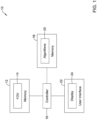
- FIG. 1 is a schematic block diagram of an illustrative video surveillance system 10.
- the illustrative video surveillance system 10 may include a video camera 12. While a single video camera 12 is shown, it will be appreciated that the video surveillance system 10 may include a large number of video cameras 12.
- the video camera 12 has a Field of View (FOV) 14.
- the FOV 14 encompasses what the video camera 12 can see, or what physical region or area can be seen within a video stream produced by the video camera 12, for example.
- the video surveillance system 10 includes a controller 16 that is operably coupled with the video camera 12, such that a video stream produced by the video camera 12 may be transmitted to the controller 16.
- the controller 16 is operably coupled with a memory 18.
- the memory 18 may be used for storing recorded video streams and video clips, for example.
- the memory 18 may be used for storing video analytics algorithms 20.
- the video analytics algorithms 20 may be used by the controller 16, for example, when analyzing a video stream or a recorded video clip.
- the video analytics algorithms 20 may include any of a variety of different video analytics algorithms 20, such as but not limited to one or more of a crowd detection algorithm (e.g. crowd present or forming), a crowd analytics algorithm (e.g. size of crowd, rate of crowd formation or dispersion, density of crowd, movement within the crowd, movement of the crowd, etc.), a people count algorithm (e.g.
- a behavior detection algorithm e.g. running, walking, loitering, yelling, shop lifting, protesting, damaging property, tailgating through a secure entry point, wearing a mask, social distancing, etc.
- an intrusion detection algorithm e.g. entering a secure area
- a perimeter protection algorithm e.g. crossing a security perimeter
- a tailgating detection algorithm e.g. tailgating through a secure entry point
- the controller 16 is operably coupled with a user interface 22.
- the user interface 22 includes a display 24 that may be used for displaying a video stream, for example.
- the user interface 22 may also include data entry capability, such as a keyboard and mouse, that a user may use when entering information into the controller 16.
- the user interface 22 may include a voice and/or text receiving device for receiving a natural language input, sometimes from a remote location.
- at least some of the controller 16, the memory 18 and the user interface 22 may be manifested within a computer such as a PC or laptop.
- the controller 16 and/or the memory 18 may be manifested in a computer server such as a cloud-based server.
- the controller 16 and/or the memory 18 may represent part of a distributed computer system, with part of the distributed computer disposed locally and part of the distributed computer disposed remotely.
- FIG. 2 is a schematic block diagram of an illustrative of an illustrative method 26 for installing and configuring a video surveillance system 10 at a site.
- the video surveillance system 10 may be installed, as indicated at block 28. This may include installing a VMS (Video Management System). This may include installing an NVR (Network Video Recorder), which is a specialized computer that is configured to record security video surveillance to a hard drive or other large storage device in a digital format. Cameras within the video surveillance system 10 may be installed and configured, as indicated at block 30. In some instances, configuring the cameras may include receiving input from a simulated configuration module 32.
- VMS Video Management System
- NVR Network Video Recorder
- simulated objects within a video stream may be beneficial to include simulated objects within a video stream for testing particular video analytics algorithms, particularly when the video stream is directed to a portion of a facility that is largely unoccupied, and thus is not expected to include actual objects that can be used for testing the desired video analytics algorithms.
- the video camera may be installed in a large warehouse that is largely unoccupied for extended periods of time.
- adding simulated objects to the video stream provide something for the particular video analytics algorithms to find. Once the simulated objects are added, the video analytics may be run, as indicated at block 34. If simulated objects are detected, alarms may be generated, as indicated at block 36.
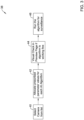
- FIG 3 is a schematic block diagram of an illustrative method 38 for configuring cameras as indicated at block 30 of Figure 2 .
- the illustrate method may be implemented by the controller 16 of the video surveillance system 10.
- a camera may be selected for configuration, as shown at block 40.
- a variety of different video analytics algorithms each using a variety of prescribed parameter values, may be used in analyzing a video stream from the selected camera. In some instances, these parameters may be allocated and defined, as indicated at block 42. Simulated objects may then be added to the video stream of the selected camera, and a visual check may be performed to see if the video analytics algorithm(s) are working correctly, as indicated at block 44.
- the simulated objects may no longer be added to the video stream of the selected camera, and the video analytics algorithm(s) may be used to analyze the video stream from the camera during surveillance, as indicated at block 46.
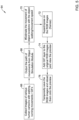
- Figure 4 is a schematic block diagram of an illustrative method 48 for configuring a video surveillance system including testing one or more video analytics algorithms of the video surveillance system.
- the method 48 may be implemented by the controller 16 of the video surveillance system 10.
- a configuration page may be opened and displayed on the user interface 22 of Figure 1 , as indicated at block 50. Needed parameters may be configured using the user interface 22, as indicated at block 52. The configured parameters may be communicated to an Object Simulation Module 54 as well as to a block 56 where the simulated objects are superimposed on a preview that shows the objects superimposed on a video stream from a video camera of the video surveillance system.
- the preview may be considered as displaying an augmented video stream that augments the video stream from the video camera with the superimposed simulated objects.
- the Object Simulation Module 54 generates simulated objects and movement of the simulated objects.
- the augmented video stream including simulated objects moving in the field of view, is visualized, as indicated at block 58.
- One or more detection algorithms are run on the augmented video stream, as indicated at block 60.
- a visual check is run to see if the superimposed simulated objects are being detected as expected for the one or more video analytics algorithms being tested, as indicated at block 62. This may include a user watching the augmented video stream via the user interface 22 of Figure 1 to see if the superimposed simulated objects are appropriately generated for the one or more video analytics algorithms being tested, and if so, whether alarms and/or other output from the one or more video analytics algorithms are appropriate.
- Figure 5 is a schematic block diagram of an illustrative method 64 for superimposing simulated objects onto a video stream to create an augmented video stream.
- the method 64 may be implemented by the controller 16 of the video surveillance system 10. Images of various objects, including people and/or vehicles, are collected, as indicated at block 66. The paths showing movement of the various objects are outputted, as indicated at block 68. In some instances, the movements are provided by the Object Simulation Module 54 ( Figure 4 ). Movement of the objects within the FOV may be based on one or more simulation parameters.
- the simulation parameters may include one or more of an object type of one or more of the simulated objects, a measure related to a number of simulated objects, a distribution of two or more of the simulated objects, a starting point for one or more of the simulated objects, a speed of movement of one or more of the simulated objects, a variation in speed of movement of one or more of the simulated objects over time, a variation in speed of movement between two or more of the simulated objects, and a type of movement of one or more of the simulated objects.
- the distribution of two or more of the simulated objects may include one or more of a Weilbull distribution, a Gaussian distribution, a Binomial distribution, a Poisson distribution, a Uniform distribution, a Random distribution, and a Geometric distribution.
- the distribution of two or more of the simulated objects may include a mixed distribution of two or more different distributions.
- the type of movement may include one or more of a random directional movement, a random directional movement constrained by movement of other simulated objects and/or constrained by user identified regions of the FOV, a directional movement along a predefined corridor, a varying speed movement, and a group movement associated with two or more of the simulated objects.
- one or more of the simulation parameters may be scaled by a scale factor that is dependent on the location of the simulated object in the FOV of the video camera. For example, for simulated objects that are in the upper part of the FOV, indicating that these objects are further from the video camera, the simulated objects may be smaller in size (smaller number of pixels) relative to similar objects that are in the lower part of the FOV. In another example, the speed of the simulated objects (across pixels) may be smaller for objects in the upper part of the FOV relative to similar objects that are in the lower part of the FOV. Moreover, in some cases, the scale factor may be dependent upon the placement of the camera and the size of the area being monitored.
- the scale factor may be greater than a video camera that is placed in a smaller confined room.
- the downward facing angle of the video camera may also be taken into account when determining the scale factor.
- the scale factor is based on one or more inputs from a user.
- the simulated objects, and their movement, are superimposed on the individual frames of the video stream, as indicated at block 72.
- a GIF layer may be added to the original RGB (Red Green Blue) images, and previewed, as seen at block 74.
- the RGB images with the superimposed objects are temporarily saved and reloaded into the preview, as indicated at block 76.
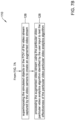
- FIGS 6A and 6B are flow diagrams that together show an illustrative computer-implemented method 78 for testing one or more video analytics algorithms (such as the video analytics algorithms 20) of a video surveillance system (such as the video surveillance system 10).
- the video surveillance system includes a video camera (such as the video camera 12) having a field of view (FOV) (such as the FOV 14) that encompasses part of a facility.
- the illustrative method 78 includes generating simulated objects that are to be superimposed on a video stream captured by the video camera, as indicated at block 80.
- the simulated objects may include a person, an animal or a vehicle.
- the simulated objects may include inanimate objects such as bags, laptops, chairs and other furniture, for example.
- generating the simulated objects include displaying an image captured by the video camera on a display, as indicated at block 82. In some instances, generating the simulated objects include receiving a first user input that identifies one or more user identified regions relative to the image, as indicated at block 84.
- receiving first user input may include drawing annotations on the image while displayed on a display screen to identify the one or more user identified regions.
- the annotations may indicate user identified regions that include possible obstructions that may interfere with where the simulated objects are allowed to be placed or to move by an object simulator module.
- generating the simulated objects include automatically tagging each of the one or more user identified regions with a corresponding region tag, as indicated at block 86.
- the region tags may define a corresponding region type.
- regions and/or region types include but are not limited to one or more of a wall visible in the FOV, a fence visible in the FOV, an obstacle visible in the FOV, a secure area visible in the FOV, a window visible in the FOV, a door visible in the FOV, a pedestrian lane visible in the FOV, and a vehicle lane visible in the FOV.
- the user may draw annotations that indicate regions or areas of interest.
- a user may draw a box or other shape around a particular area of interest in the FOV, in which one or more video analytics algorithms are to be run.
- each area of interest may be tagged to identify which of a plurality of video analytics algorithms are to be run in the associated area of interest.
- a user may draw a shape that encompasses an area in front of a cash machine, and may tag the shape with a loitering video analytics algorithm that detects if/when people are loitering in the area of interest.
- a user may draw a shape that encompasses a region of a train station, and may tag the shape with a crowd detection video analytics algorithm that detects if/when a crowd of people are gathered in the area of interest.
- a crowd detection video analytics algorithm that detects if/when a crowd of people are gathered in the area of interest.
- a user may draw a box or other shape around a particular area, noting that this area is not of interest, and there is no need to run any video analytics algorithms on this particular area.
- a bathroom or changing room may represent an area that is not of interest. This is just an example.
- generating the simulated objects include receiving a second user input that is used to identify one or more simulation parameters, as indicated at block 88. In some instances, one or more of the simulation parameters are based at least in part on the second user input, as indicated at block 90. In some instances, and as continued on Figure 6B , generating the simulated objects include, based at least in part on the one or more simulation parameters and one or more of the user identified regions and corresponding region tags, determining a plurality of characteristics of the simulated objects, as indicated at block 92.
- the plurality of characteristics of the simulated objects include, for example, determining where each of the one or more simulated objects are allowed to move in the FOV and/or where each of the one or more simulated objects are not allowed to move based on the one or more user identified regions and corresponding region tags.
- the characteristics of the simulated objects include a quantity of the simulated objects in the FOV, as indicated at block 94. In some instances, the characteristics of the simulated objects include a distribution and/or distribution type of the simulated objects in the FOV, as indicated at block 96. In some instances, the characteristics of the simulated objects include a starting point (e.g. time and/or location) for each of the simulated objects in the FOV, as indicated at block 98. In some instances, the characteristics of the simulated objects include a movement (e.g. speed, movement type) of each of the simulated objects in the FOV, as indicated at block 100. In some instances, the characteristics of the simulated objects may be influenced by the regions of interest indicated by the user. The simulated objects may be directed into or through a region of interest, particularly for testing a particular video analytics algorithm. The simulated objects may be directed away from areas not of interest, as running video analytics algorithms on these areas may be viewed as a waste of computing resources.
- the method 78 includes superimposing the simulated objects on the FOV of the video stream captured by the video camera to create an augmented video stream, as indicated at block 102.
- the method 78 may include processing the augmented video stream using one or more video analytics algorithms to test the effectiveness of each of the one or more video analytics algorithms, as indicated at block 104.
- the one or more video analytics algorithms may include, but are not limited to, one or more of a crowd detection algorithm (e.g. crowd present or forming), a crowd analytics algorithm (e.g. size of crowd, rate of crowd formation or dispersion, density of crowd, movement within the crowd, movement of the crowd, etc.), a people count algorithm (e.g.
- the method 78 may include receiving a third user input that tags at least one of the one or more user identified regions with a corresponding region tag including a region tag type, as indicated at block 106.
- the method 78 may include using video analytics to automatically identify and tag at least one of the one or more user identified regions with a corresponding region tag, as indicated at block 108. That is, the video analytics may be used to identify walls, doors, windows, fences, parking spaces and other regions in the FOV and automatically and tag each of the identified regions with an appropriate region tag.
- the method 78 may include using video analytics to automatically identify and tag at least some areas, including one or more user identified regions, as not being of interest. A potential person of interest is unlikely to materialize through a solid wall, for example.
- the one or more simulation parameters may include one or more of an object type of one or more of the simulated objects, a measure related to a number of simulated objects, a distribution of two or more of the simulated objects, a starting point for one or more of the simulated objects, a speed of movement of one or more of the simulated objects, a variation in speed of movement of one or more of the simulated objects over time, a variation in speed of movement between two or more of the simulated objects, and a type of movement of one or more of the simulated objects.
- the distribution of two or more of the simulated objects may include one or more of a Weilbull distribution, a Gaussian distribution, a Binomial distribution, a Poisson distribution, a Uniform distribution, a Random distribution, and a Geometric distribution.
- the distribution of two or more of the simulated objects may include a mixed distribution of two or more different distributions.
- the type of movement may include one or more of a random directional movement, a random directional movement constrained by movement of other simulated objects and/or constrained by user identified regions of the FOV, a directional movement along a predefined corridor, a varying speed movement, and a group movement associated with two or more of the simulated objects.
- FIGS 7A and 7B are flow diagrams that together show an illustrative computer-implemented method 110 for testing one or more video analytics algorithms (such as the video analytics algorithms 20) of a video surveillance system (such as the video surveillance system 10).
- the video surveillance system includes a video camera (such as the video camera 12) having a field of view (FOV) (such as the FOV 14) that encompasses part of a facility.
- the method 110 includes generating simulated objects that are to be superimposed on a video stream captured by the video camera, as indicated at block 112. Generating the simulated objects may include receiving a user input that identifies a particular video analytics algorithm from a plurality of video analytics algorithm, as indicated at block 114.
- Generating the simulated objects may include, based at least in part on the particular video particular video analytics algorithm identified by the user input, determining a plurality of characteristics of the simulated objects that are desirable for testing the particular video particular video analytics algorithm, as indicated at block 116.
- the plurality of characteristics of the simulated objects may include a quantity of the simulated objects in the FOV, as indicated at block 118.
- the plurality of characteristics of the simulated objects may include a distribution of the simulated objects in the FOV, as indicated at block 120.
- the plurality of characteristics of the simulated objects may include a starting point for each of the simulated objects in the FOV, as indicated at block 122.
- the plurality of characteristics of the simulated objects may include a movement of each of the simulated objects in the FOV, as indicated at block 124.
- the plurality of characteristics of the simulated objects may include a location or region in the FOV of one or more of the simulated objects in the FOV. These are just examples.
- the method 110 continues on Figure 7B , with superimposing the simulated objects on the FOV of the video stream captured by the video camera to create an augmented video stream, as indicated at block 126.
- the augmented video stream is processed using the particular video particular video analytics algorithm identified by the user input to test the effectiveness of the particular video particular video analytics algorithm, as indicated at block 128.
- the particular video analytics algorithm may include one of a crowd detection algorithm (e.g. crowd present or forming), a crowd analytics algorithm (e.g. size of crowd, rate of crowd formation or dispersion, density of crowd, movement within the crowd, movement of the crowd, etc.), a people count algorithm (e.g. number of people in a defined region of interest of the FOV), a behavior detection algorithm (e.g.
- the user input may include user input selecting one or more video analytics algorithms from the plurality of video analytics algorithms for use in conjunction with the video stream of the video camera.
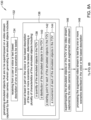
- FIGS 8A and 8B are flow diagrams that together show a computer-implemented method 130 for testing a video surveillance system (such as the video surveillance system 10) including a video camera (such as the video camera 12) having a field of view (FOV) (such as the FOV 14) that encompasses a region of a facility.
- the illustrative method 130 includes generating simulated objects that are to be superimposed on a video stream captured by the video camera, as indicated at block 132. Generating the simulated objects may include receiving from a user a voice or text based description of one or more scenarios to be tested, as indicated at block 134.
- Generating the simulated objects may include determining a plurality of characteristics of the simulated objects based at least in part on the voice or text based description of the one or more scenarios to be tested, as indicated at block 136.
- the characteristics of the simulated objects may include a quantity of the simulated objects in the FOV, as indicated at block 138.
- the characteristics of the simulated objects may include a distribution of the simulated objects in the FOV, as indicated at block 140.
- the characteristics of the simulated objects may include a starting point for each of the simulated objects in the FOV, as indicated at block 142.
- the characteristics of the simulated objects may include a movement of each of the simulated objects in the FOV, as indicated at block 144. These are just example characteristics of the simulated objects.
- the illustrative method 130 further includes superimposing the simulated objects on the FOV of the video stream captured by the video camera to create an augmented video stream, as indicated at block 146.
- the augmented video stream is processed to test the one or more scenarios described in the voice or text based description, as indicated at block 148.
- the method 130 may include utilizing natural language processing to extract keywords from the voice or text based description of the one or more scenarios to be tested, as indicated at block 150.
- the keywords may be mapped to one or more of the plurality of characteristics of the simulated objects, as indicated at block 152.
- One or more of the plurality of characteristics of the simulated objects may be determined based at least in part on the mapping, as indicated at block 154.
- one or more video analytics algorithms may be identified based at least in part on the description of the one or more scenarios, as indicated at block 156.
- the augmented video stream may be processed to test the effectiveness of each of the identified one or more video analytics algorithms, as indicated at block 158.
- the method 130 may further include determining one or more of the plurality of characteristics of the simulated objects based at least in part on the identified one or more video analytics algorithms, as indicated at block 160.
- a voice or text based description may be "Test for an unauthorized entry through door A of region 1".
- the description may be converted to text based through a voice to text translator.
- the system may parse the voice or text based description and identify the phrases "door A" and "region 1". From these phrases, the system may identify which video camera(s) of the video surveillance system 10 has a FOV that incudes door A of region 1.
- the system may also parse the voice or text based description and identify the phrase "unauthorized entry”. This phrase may be mapped to one of a plurality of video analytics algorithms, such as an intrusion detection video analytics algorithm (or an unauthorized entry detection video analytics algorithm).
- the system may then be configured to automatically identify characteristics of the simulated objects that are suitable for testing the identified video analytics algorithm, namely the intrusion detection video analytics algorithm, for an intrusion of door A of region 1.
- the system may then superimpose simulated objects with the identify characteristics on the FOV of the video stream captured by the identified video camera to create an augmented video stream.
- the system may then process the augmented video stream using the particular video analytics algorithm (e.g. the intrusion detection video analytics algorithm) to test the effectiveness of the particular video particular video analytics algorithm (e.g. the intrusion detection video analytics algorithm) to identify an intrusion of door A of region 1.
- the particular video analytics algorithm e.g. the intrusion detection video analytics algorithm
- a voice or text based description may be "Do crowd detection in region 4".
- the system may parse the voice or text based description and identify the phrases "region 4". From this phrases, the system may identify which video camera(s) of the video surveillance system 10 has a FOV that incudes region 4.
- the system may also parse the voice or text based description and identify the phrase "crowd detection”. This phrase may be mapped to one of a plurality of video analytics algorithms, such as a crowd detection video analytics algorithm.
- the system may then be configured to automatically identify characteristics of the simulated objects that are suitable for testing the identified video analytics algorithm, namely the crowd detection video analytics algorithm in region 4.
- the system may then superimpose simulated objects with the identify characteristics on the FOV of the video stream captured by the identified video camera to create an augmented video stream.
- the system may then process the augmented video stream using the particular video analytics algorithm (e.g. crowd detection video analytics algorithm) to test the effectiveness of the particular video particular video analytics algorithm (e.g. crowd detection video analytics algorithm) to identify a crowd in region 4.
- This approach may facilitate testing the video surveillance system 10 from a remote device and/or remote location.
- mappings between the various phrases of the or text based description and the locations and/or video analytics algorithm may be stored in a mapping table.
- the mappings may be learned over time by an artificial intelligence model, and once trained, the artificial intelligence model may automatically produce an appropriate test of the video surveillance system 10 based on the voice or text based description.
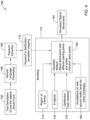
- Figure 9 is a schematic block diagram of an illustrative object simulation module 162.
- the illustrative object simulation module 162 includes receiving a text description of how the simulated objects should move, as indicated at block 164. Natural language processing may be used to analyze the text description, as indicated at block 166. As a result, keywords are extracted, as indicated at block 168. The keywords are mapped to a simulation, as indicated at block 170. The mapping is one of the inputs to a modeling block 172. Additional inputs may include one or more of a region of interest 174, a number of objects 176, a distribution type (e.g.
- a Weilbull distribution a Gaussian distribution, a Binomial distribution, a Poisson distribution, a Uniform distribution, a Random distribution, a Geometric distribution, a mixed distribution
- annotations 180 that identifies walls, doors, windows, fences, parking spaces and other regions in the FOV, and in some cases object movement type (e.g. walking, running, loitering), which are all provided to a distribution block 182.
- object movement type e.g. walking, running, loitering
- the simulated object movements are then superimposed on a video stream from a video camera to test the effectiveness of one or more video analytics algorithms at the site.
- Figure 10 is a schematic block diagram of an illustrative method 186 for generating object movements for a video stream to create an augmented video stream.
- the illustrative method 186 begins with several of the inputs shown in Figure 9 , including the region of interest 174, the number of objects 176 and the annotations 180.
- the method 186 also includes object movement types 188.
- the annotations 180 and/or regions of interest 174 are converted into X,Y regions on the FOV of the video stream, as indicated at block 190 and 192, respectively.
- the number of objects 176 and the object movement type 188 are provided to a block 194, where a requested distribution of objects, object movements, and object shapes are generated.
- the object shapes may be different for different object types.
- an adult person may have a larger size than a child.
- a vehicle may have a larger size and different shape from an adult person.
- the distribution of the objects, the object movements and object shaped may be scaled depending on the location of objects in the field of view. For example, objects located in the top region of the FOV may be further from the camera, and thus may have a tighter distribution (on a pixels-by-pixel basis), a slower movement (on a pixels-by-pixel basis) and a smaller size (on a pixels-by-pixel basis) than objects that are located in the bottom region of the FOV.
- the blocks 190, 192 and 194 each provide information to a decision block 196, where a determination is made as to whether the object simulator is attempting to move a polygon shape (an object) into one of the regions received from the block 190 or the block 192. If yes, control passes to block 198, and the simulator does not move the object to position X1, Y1. If not, control passes to block 200, and the simulator does move the object to position X1, Y1.
- both blocks 190 and 192 defined regions where the simulator is not allowed to move objects.
- one of the regions such as the region defined by block 192, may represent a region that the simulator is encourage to move objects.
- the region defined by block 192 may correspond to region A and the simulator may be encouraged to even required to move one or more objects into the region defined by block 192.
- the decision block 196 may determine whether the object simulator is attempting to move a polygon shape (an object) into the region defined by block 192. If yes, the simulator is encouraged to move the object to position X1, Y1. If not, the simulator is not encouraged but is still allowed to move the object to position X1, Y1. In this embodiment, control is not passed to blocks 198 or 200.
Landscapes
- Engineering & Computer Science (AREA)
- Multimedia (AREA)
- Theoretical Computer Science (AREA)
- General Physics & Mathematics (AREA)
- Physics & Mathematics (AREA)
- Signal Processing (AREA)
- Computational Linguistics (AREA)
- Computer Vision & Pattern Recognition (AREA)
- Health & Medical Sciences (AREA)
- General Health & Medical Sciences (AREA)
- Data Mining & Analysis (AREA)
- Psychiatry (AREA)
- Social Psychology (AREA)
- Human Computer Interaction (AREA)
- Artificial Intelligence (AREA)
- Databases & Information Systems (AREA)
- General Engineering & Computer Science (AREA)
- Biomedical Technology (AREA)
- Marketing (AREA)
- Business, Economics & Management (AREA)
- Software Systems (AREA)
- Closed-Circuit Television Systems (AREA)
- Alarm Systems (AREA)
Applications Claiming Priority (1)
| Application Number | Priority Date | Filing Date | Title |
|---|---|---|---|
| US18/334,068 US20240420479A1 (en) | 2023-06-13 | 2023-06-13 | Method and system for testing video analytics of a video surveillance system |
Publications (1)
| Publication Number | Publication Date |
|---|---|
| EP4478701A1 true EP4478701A1 (de) | 2024-12-18 |
Family
ID=91226956
Family Applications (1)
| Application Number | Title | Priority Date | Filing Date |
|---|---|---|---|
| EP24177430.6A Pending EP4478701A1 (de) | 2023-06-13 | 2024-05-22 | Verfahren und system zum testen der videoanalytik eines videoüberwachungssystems |
Country Status (3)
| Country | Link |
|---|---|
| US (1) | US20240420479A1 (de) |
| EP (1) | EP4478701A1 (de) |
| CN (1) | CN119172521A (de) |
Citations (2)
| Publication number | Priority date | Publication date | Assignee | Title |
|---|---|---|---|---|
| US20170372575A1 (en) * | 2007-05-15 | 2017-12-28 | Ipsotek Ltd | Data processing apparatus to generate an alarm |
| DE102019111883A1 (de) * | 2019-05-07 | 2019-07-25 | FEV Europe GmbH | Verfahren zum Augmentierten eines Videos zum Testen eines ADAS Systems |
Family Cites Families (6)
| Publication number | Priority date | Publication date | Assignee | Title |
|---|---|---|---|---|
| BR112015026374B1 (pt) * | 2013-04-19 | 2022-04-12 | James Carey | Sistema de reconhecimento analítico |
| US9761036B2 (en) * | 2014-04-24 | 2017-09-12 | Carnegie Mellon University | Methods and software for visualizing data by applying physics-based tools to data objectifications |
| US11103773B2 (en) * | 2018-07-27 | 2021-08-31 | Yogesh Rathod | Displaying virtual objects based on recognition of real world object and identification of real world object associated location or geofence |
| US20230281527A1 (en) * | 2019-01-13 | 2023-09-07 | Strong Force Iot Portfolio 2016, Llc | User interface for industrial digital twin providing conditions of interest with display of reduced dimensionality views |
| CN116719452A (zh) * | 2020-09-25 | 2023-09-08 | 苹果公司 | 用于与用于移动虚拟环境中的虚拟对象的虚拟控件和/或示能表示交互的方法 |
| WO2024186350A1 (en) * | 2023-03-08 | 2024-09-12 | Alexandra Henderson | A nonfungible token and digital item trading infrastructure for complex pop-up retail & event solutions |
-
2023
- 2023-06-13 US US18/334,068 patent/US20240420479A1/en active Pending
-
2024
- 2024-05-09 CN CN202410567116.7A patent/CN119172521A/zh active Pending
- 2024-05-22 EP EP24177430.6A patent/EP4478701A1/de active Pending
Patent Citations (2)
| Publication number | Priority date | Publication date | Assignee | Title |
|---|---|---|---|---|
| US20170372575A1 (en) * | 2007-05-15 | 2017-12-28 | Ipsotek Ltd | Data processing apparatus to generate an alarm |
| DE102019111883A1 (de) * | 2019-05-07 | 2019-07-25 | FEV Europe GmbH | Verfahren zum Augmentierten eines Videos zum Testen eines ADAS Systems |
Non-Patent Citations (3)
| Title |
|---|
| CAMBRIDGE PIXEL: "SPx Radar Simulator", 5 August 2022 (2022-08-05), pages 1 - 8, XP093217248, Retrieved from the Internet <URL:https://cambridgepixel.com/site/assets/files/7488/spx-radar-simulator-brochure-cp-16-110-118.pdf> [retrieved on 20241022] * |
| CAMBRIDGE PIXEL: "SPx Video Simulator", 4 January 2023 (2023-01-04), pages 1 - 2, XP093217261, Retrieved from the Internet <URL:https://cambridgepixel.com/site/assets/files/7470/spx-video-simulator-datasheet-cp-16-173-03.pdf> [retrieved on 20241022] * |
| CAMBRIDGE PIXEL: "SPx Video Simulator", 4 January 2023 (2023-01-04), XP093217264, Retrieved from the Internet <URL:https://www.youtube.com/watch?v=BL0Ezenu7zQ> [retrieved on 20241022] * |
Also Published As
| Publication number | Publication date |
|---|---|
| US20240420479A1 (en) | 2024-12-19 |
| CN119172521A (zh) | 2024-12-20 |
Similar Documents
| Publication | Publication Date | Title |
|---|---|---|
| EP3343443B1 (de) | Objekterkennung für videokamera-selbstkalibrierung | |
| CA2545535C (en) | Video tripwire | |
| US8310542B2 (en) | Segmenting time based on the geographic distribution of activity in sensor data | |
| EP1435170B2 (de) | Video-stolperdraht | |
| KR101375583B1 (ko) | 비디오에서의 물체 조밀도 판단 | |
| CN105447458A (zh) | 一种大规模人群视频分析系统和方法 | |
| KR102195706B1 (ko) | 침입 탐지방법 및 그 장치 | |
| CN105554440A (zh) | 监控方法和设备 | |
| Nawaratne et al. | Incremental knowledge acquisition and self-learning for autonomous video surveillance | |
| CN115690496A (zh) | 基于YOLOv5的实时区域入侵检测方法 | |
| CN107122743A (zh) | 安防监控方法、装置和电子设备 | |
| CN119649575A (zh) | 一种标准视频中台监控预警模型的方法及终端 | |
| CN113239718A (zh) | 一种校园人流量统计方法 | |
| Piciarelli et al. | Surveillance-oriented event detection in video streams | |
| CN110557676B (zh) | 用于确定和推荐场景的视频内容活动区域的系统和方法 | |
| US20240420479A1 (en) | Method and system for testing video analytics of a video surveillance system | |
| CN118644804B (zh) | 基于深度学习的视觉多目标跟踪方法、系统和电子设备 | |
| Li et al. | Region-based trajectory analysis for abnormal behaviour detection: a trial study for suicide detection and prevention | |
| CN114979567A (zh) | 一种应用于视频智能监控的物体与区域交互方法及系统 | |
| Zeljkovic | Video surveillance techniques and technologies | |
| CN119516610B (zh) | 一种基于隐式社会模型的打架行为识别方法 | |
| Chmielewska et al. | New approach to traffic density estimation based on indoor and outdoor scenes from CCTV | |
| KR102834888B1 (ko) | 관람객 정보제공 및 이상행동 감지 시스템 | |
| Mustafian et al. | Utilization Of CCTV As a Security System Using YOLOv8 Algorithm (Case Study Of Desty Collection Clothing Store) | |
| Velipasalar et al. | Detection of user-defined, semantically high-level, composite events, and retrieval of event queries |
Legal Events
| Date | Code | Title | Description |
|---|---|---|---|
| PUAI | Public reference made under article 153(3) epc to a published international application that has entered the european phase |
Free format text: ORIGINAL CODE: 0009012 |
|
| STAA | Information on the status of an ep patent application or granted ep patent |
Free format text: STATUS: REQUEST FOR EXAMINATION WAS MADE |
|
| 17P | Request for examination filed |
Effective date: 20240522 |
|
| AK | Designated contracting states |
Kind code of ref document: A1 Designated state(s): AL AT BE BG CH CY CZ DE DK EE ES FI FR GB GR HR HU IE IS IT LI LT LU LV MC ME MK MT NL NO PL PT RO RS SE SI SK SM TR |
|
| STAA | Information on the status of an ep patent application or granted ep patent |
Free format text: STATUS: EXAMINATION IS IN PROGRESS |
|
| 17Q | First examination report despatched |
Effective date: 20251008 |